

AXISLivePrivacyShield
TableofContents
Abouttheapplication.......................................3
Requirements..................................................3
Installtheapplication.......................................4
Starttheapplication.............................................4
Stoptheapplication.............................................4
Considerations.............................................5
Generalconsiderations...........................................5
Considerationsmotion-basedmaskingmethod........................6
ConsiderationsAI-basedmaskingmethod............................7
Conguretheapplication....................................9
Conguretheapplicationwithmotion-basedmaskingmethod...........9
ConguretheapplicationwithAI-basedmaskingmethod...............9
Settings...................................................10
Maskingmethod................................................10
Includearea....................................................10
Excludeareas...................................................10
Backgroundmergetime..........................................11
Sensitivity.....................................................13
Resetbackground...............................................14
Priority........................................................
14
2

AXISLivePrivacyShield
Abouttheapplication
Abouttheapplication
AXISLivePrivacyShieldremotelymonitorsactivitieswhilesafeguardingprivacy.Itsupportstwodifferentmethodsforreal-time
dynamicprivacymasking.
Allcompatiblecamerascanusethemotion-basedmaskingmethodtomaskallmovingobjectsascomparedwiththebackground
scene.Thismaskingmethodsupportsstrictprivacyrequirementsandissuitableforindoorsceneswithgood,stablelighting.
CompatibleDLPUcamerascanadditionallyusetheapplication’sAI-basedhumanrecognitionmaskingmethodtomaskhumansorthe
backgroundinindoororoutdoorscenesinalllightingconditions.
Requirements
TheapplicationcanbeinstalledonAxisnetworkvideodevicesthatsupportAXISCameraApplicationPlatform.Acompletelistof
compatibledevicesandrmwareversionsisavailableataxis.com/applications
Werecommendthefollowingbrowsers:
•Chrome
TM
•Firefox
®
3

AXISLivePrivacyShield
Installtheapplication
Installtheapplication
Note
Toinstallapplicationsontheproductyouneedadministratorrights.
1.Todownloadtheapplication,gotohttps://www.axis.com/products/analytics-and-other-applications.
2.Logintothecamera’swebpage.
3.GotoSettings>AppsandclickAdd.
4.Uploadtheapplicationletothecamera.
Starttheapplication
1.Logintothecamera’swebpageandgotoSettings>Apps.
2.Selecttheapplication.
3.Turnontheapplicationwiththetogglebutton.
Note
Formotionbasedmaskingmethod:Toprotectprivacy,makesurenooneisinthescene.
Stoptheapplication
1.Logintothecamera’swebpageandgotoSettings>Apps.
2.Selecttheapplication.
3.Turnofftheapplicationwiththetogglebutton.
4

AXISLivePrivacyShield
Considerations
Considerations
Beforeyouconguretheapplicationmakesurethatyourscenemeetsthecriteriaspeciedinthissection.
Generalconsiderations
Thefollowingshouldbetakenintoconsiderationwhenusingbothmotion-basedmaskingmethodandAI-basedmaskingmethod.
Itisrecommendedthattheimageisleveledwiththehorizon.
Theobjectneedstostandoutfromthebackground.Forexampleapersondressedinwhiteinasnowstormorapersondressedin
blackonadarkpavementmightnotbedetected.
Barreldistortionisalenseffectwherestraightlinesappearincreasinglybentclosertotheedgesoftheframe.Ifyourcamera
supportsbarreldistortioncorrection,makesuretoturnitonthroughthecamera´ssettings.
5

AXISLivePrivacyShield
Considerations
Considerationsmotion-basedmaskingmethod
Themotion-basedmaskingmethodshouldpreferablybeusedindoors,wherethereisaconstantlightsource.Itisnotidealoutdoors
wherereectivesurfaces,daylightshadowsorswayingobjectsarecommon.
6

AXISLivePrivacyShield
Considerations
ConsiderationsAI-basedmaskingmethod
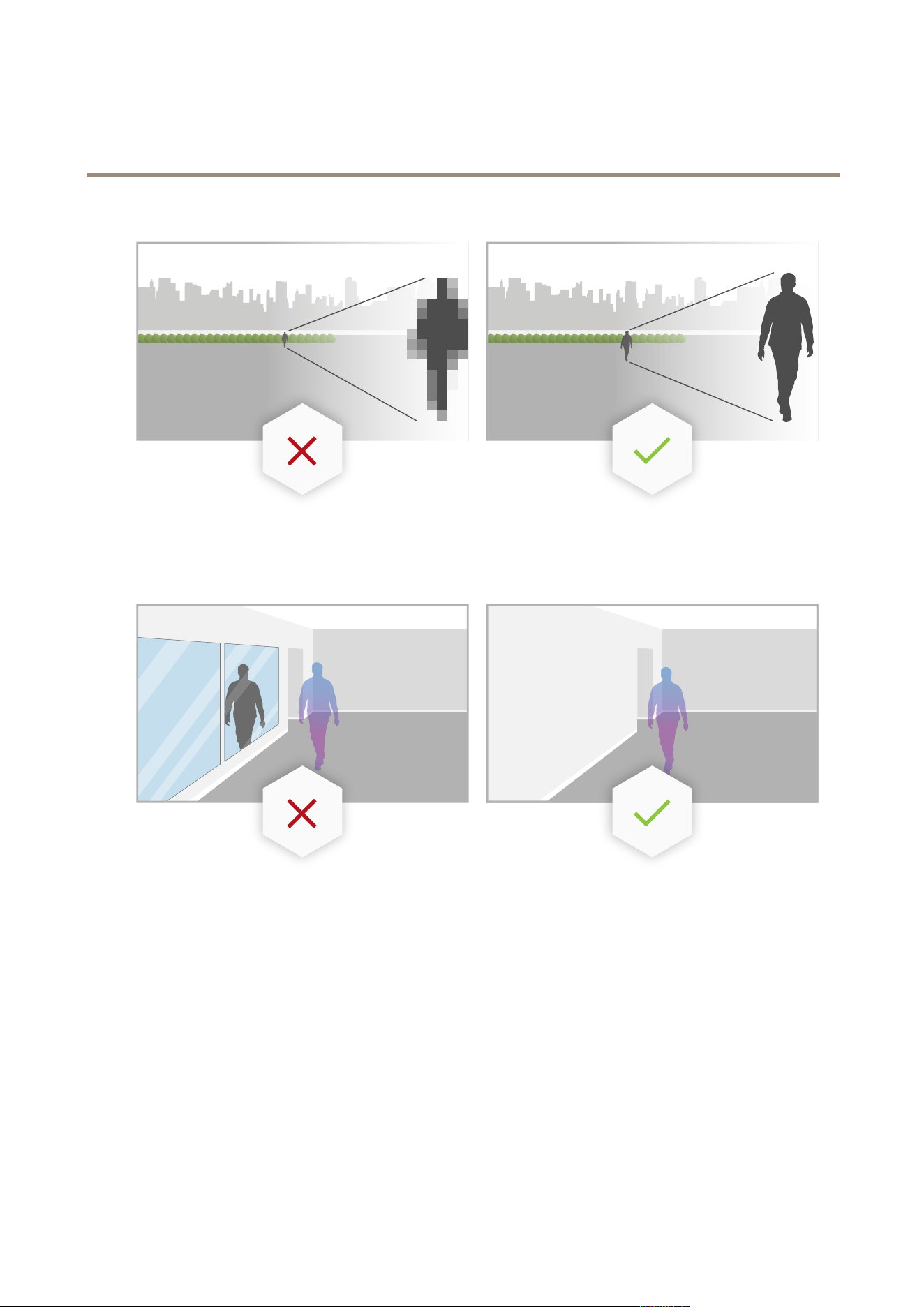
Inthepartsofascenewherethepixeldensityislessthan100pixels/meter(30pixels/foot)thereisachancethatapersonmaynot
becompletelymasked.Usethefreeonlinetool,AXISSiteDesignerathttps://sitedesigner.axis.com/tocalculatethepixeldensityin
yourscene.Determinetheoptimalplacementofthecameratoachieveanappropriatemaskingcoverage.
Towatchthisvideo,gotothewebversionofthisdocument.
www.axis.com/products/online-manual/56119#t10165924
HowtocalculatethepixeldensityusingAXISSiteDesigner
Makesurehumansarenotobscuredby,forexample,foliageorfences.
Humansneedstomoveinasomewhatuprightposition.
Apersonneedstobecloseenoughtothecamerafortheapplicationtoaccuratelydistinguishtheirhumanform.
7
AXISLivePrivacyShield
Considerations
Avoidreectivesurfacesinthescene.TheAI-basedmaskingmethodmayfailtomaskreections.
8

AXISLivePrivacyShield
Configuretheapplication
Configuretheapplication
Therststepinsettinguptheapplicationistoselectmaskingmethod.
1.MakesurethattheconditionsinGeneralconsiderationsonpage
5aremet.
2.Logintothecamera’swebpageasanadministratorandgotoSettings>Apps>AXISLivePrivacyShield.
3.SelecttheapplicationandclickOpen.
4.SelectaMasking Masking
Masking
method method
method
on on
on
page page
page
10 10
10
.
5.Continuetooneofthefollowing:
-Conguretheapplicationwithmotion-basedmaskingmethodonpage
9
-ConguretheapplicationwithAI-basedmaskingmethodonpage9
Note
OnlycameraswithDLPU(deeplearningprocessingunit)supportsAI-basedmasking.Foracompletelistofsupported
cameraspleaserefertoaxis.com.
Conguretheapplicationwithmotion-basedmaskingmethod
1.MakesurethattheconditionsinConsiderationsmotion-basedmaskingmethodonpage
6aremet.
2.DisableWideDynamicRange(WDR)fromthecameracongurationforoptimalbehavioroftheapplication.
3.CongureInclude Include
Include
area area
area
on on
on
page page
page
10 10
10
andExclude Exclude
Exclude
areas areas
areas
on on
on
page page
page
10 10
10
todenewhatpartsofthesceneinwhichmoving
objectsshouldbemasked.
4.CongurethemasksbysettingSensitivity Sensitivity
Sensitivity
on on
on
page page
page
13 13
13
,Background Background
Background
merge merge
merge
time time
time
on on
on
page page
page
11 11
11
andPriority Priority
Priority
on on
on
page page
page
14 14
14
.
5.Selectthelookforthemask.Choosebetweenmosaic,colorandtransparent.
Note
Donotconguretheapplicationwhiletherearemovingobjects,whichrequirecontinuousprivacy,inthescene.While
changingbetweensettingsthereisariskthattheseobjectsbecomevisibleforashortperiodoftime.
ConguretheapplicationwithAI-basedmaskingmethod
1.MakesurethattheconditionsinConsiderationsAI-basedmaskingmethodonpage
7aremet.
2.Selectwhethertomaskhumansormaskbackground.
3.CongureInclude Include
Include
area area
area
on on
on
page page
page
10 10
10
andExclude Exclude
Exclude
areas areas
areas
on on
on
page page
page
10 10
10
todenewhatpartsofthescenethatshouldbemasked.
4.SettheSensitivity Sensitivity
Sensitivity
on on
on
page page
page
13 13
13
ofthemask.
5.Selectthelookforthemask.Choosebetweenmosaicandcolor.
9

AXISLivePrivacyShield
Settings
Settings
Maskingmethod
SelectaMaskingmethod.EitherMotion-basedmaskingmethodorAI-basedmaskingmethod.
Themotion-basedmaskingmethodmasksallpixelchanges(i.e.movingobjects)ascomparedwithabackgroundscene.Itisdesigned
foruseinindoorsceneswithgood,stablelightingandwherestrictprivacyrequirementsareparamount.
TheAI-basedmaskingmethoddeterminesifahumanformappearsinasceneandenablesmaskingmethodofhumansorthe
background.Itissuitableforindoorandoutdoorapplicationsthatwanttoretainthemostdetailinanimageandcanacceptthat
maskingmaybeimperfectincertaininstances.
Thisvideocomparesthetwomethodsside-by-side.Inthescenewithmotion-basedmaskingmethodbothswingsandpeopleare
maskedout,sincetheyareallmoving.InthescenewithAI-basedmaskingmethodonlythechildontheswingandtheperson
pushingtheswingaremaskedout.
Towatchthisvideo,gotothewebversionofthisdocument.
www.axis.com/products/online-manual/56119#t10165816
Comparingmotion-basedandAI-basedmaskingmethodside-by-side.
Includearea
Theapplicationmasksallrelevantobjectsintheincludearea.
Thedefaultincludeareaisarectanglethatcoversthewholeimage.
Usethemousetoreshapeandresizetheareasothatitonlycoversthepartoftheimageinwhichobjectsshouldbemasked.The
defaultrectanglecanbechangedtoapolygonwithupto20corners.
•Toaddanewcorner,clicktheborderoftheincludearea.Dragthecornertothedesiredposition.
•Tomoveacorner,clickanddragthecornertothenewposition.
•Toremoveacorner,right-clickthecorner.
•Tomovetheentireincludearea,placethemousepointerinsidethearea.Clickanddragtheareatothenewposition.
Excludeareas
Theapplicationdoesnotmaskanyobjectsinanexcludearea.Placetheexcludeareainsideanincludearea.Useexcludeareas
whereyoudonotwanttomaskobjects.
Usethemousetomove,reshape,andresizetheareasothatitcoversthedesiredpartoftheimage.Thedefaultrectanglecan
bechangedtoapolygonwithupto20corners.
•Toaddanewcorner,clicktheexcludeareaborder.Dragthecornertothedesiredposition.
•Tomoveacorner,clickanddragthecornertothenewposition.
10

AXISLivePrivacyShield
Settings
•Toremoveacorner,right-clickthecorner.
•Tomovetheexcludearea,placethepointerinsidethearea.Clickanddragtheareatothenewposition.
•Toaddanexcludearea,click
•Toselectanexcludearea,clickintheexcludearea,orclick
•Toremoveanexcludearea,click
Backgroundmergetime
Thissettingisonlyrelevantwhenusingmotionbasedmaskingmethod.Thebackgroundmergetimeisthetimeanobjectneedsto
remainstationaryuntilitisconsideredapartofthebackgroundimage.Onceconsideredpartofthebackgroundimage,the
objectbecomesunmaskedevenifitiswithinanincludearea.
Towatchthisvideo,gotothewebversionofthisdocument.
www.axis.com/products/online-manual/56119#t10140968
Exampleofhowbackgroundmergetimeworks.
Longbackgroundmergetime:
Thisisameetingroom,wherepeopleoftensitstillforalongerperiodoftimeandwheretheregenerallyislittlemovement.Toavoid
peoplebeingconsideredapartofthebackgroundimage(andbeingunmasked)werecommendtoaddalongerbackgroundmergetime.
11

AXISLivePrivacyShield
Settings
Exampleofscenewheretousealongerbackgroundmergetime.
Shortbackgroundmergetime:
Ifanobject(thatoriginallyisapartofthebackgroundimage)ismovedfromonepositiontoanothertheapplicationwillmaskboth
changes.Thetwochangesfromtheoriginalbackgroundimageare:
•theobjectismovedfromitsoriginalposition
•theobject’snewposition
Thisisafactorywherepeopleandthingsareinmovingconstantly.Anobjectthatrstwasconsideredapartofthebackgroundimage
ismovedtoanotherpartofthescene.Ifthishappenstoseveralobjectsinthesceneandthereisalongbackgroundmergetimethe
scenewillsooncontainalotofunwantedmasks(artifacts).Themaskswillnotdisappearuntilthebackgroundmergetimehasended.
Towatchthisvideo,gotothewebversionofthisdocument.
www.axis.com/products/online-manual/56119#t10140968
Ascenewhereashortbackgroundmergetimeisadvisabletoavoidartifacts.
12

AXISLivePrivacyShield
Settings
Sensitivity
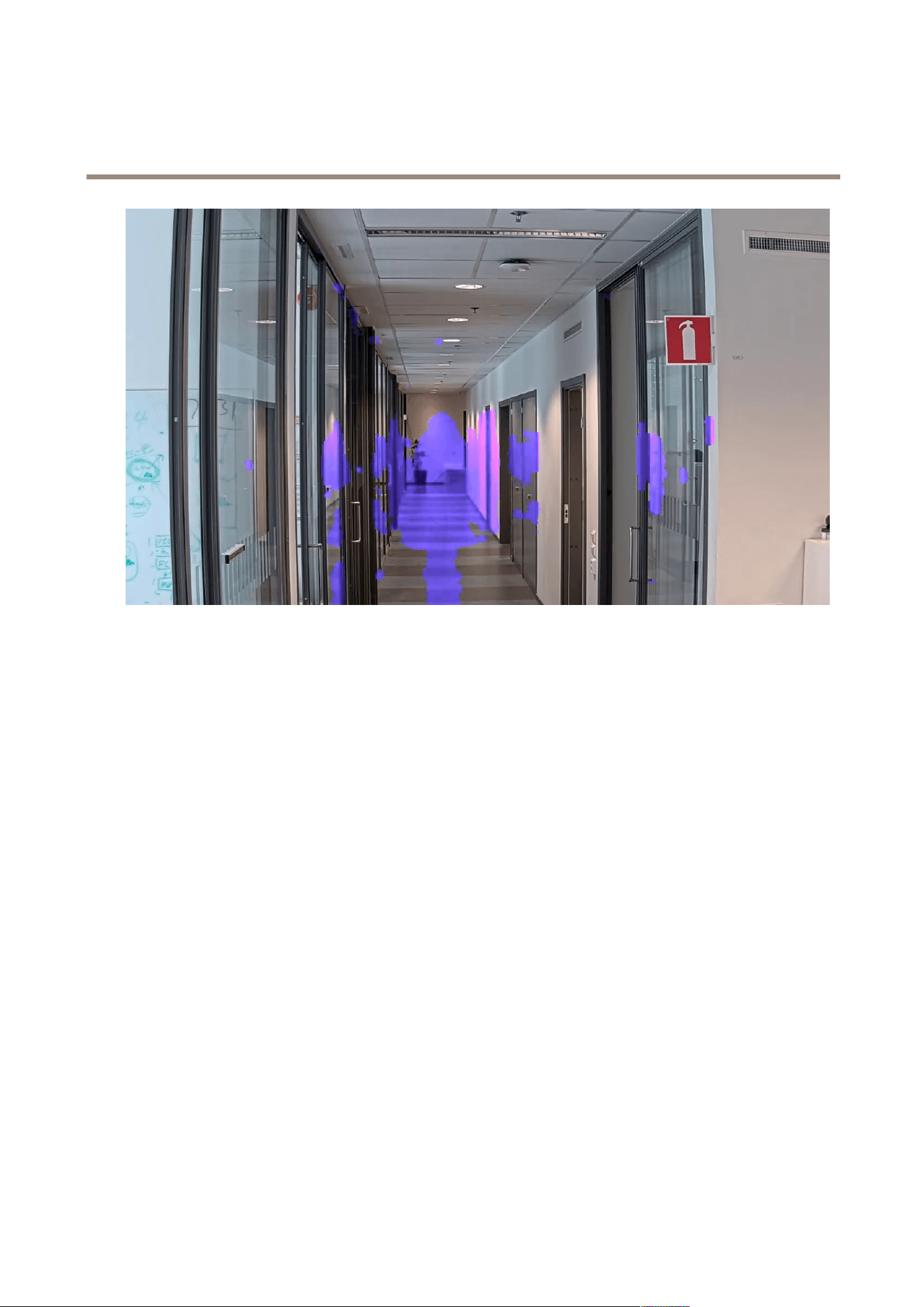
Settingsensitivitytoohighwillintroducemoreartifactsinthescene.Settingittoolowcouldmeanthatsomepixelsthatshould
becoveredaredisplayedasnormal.
Lowsensitivity
Mediumsensitivity
13
AXISLivePrivacyShield
Settings
Highsensitivity
Resetbackground
Cleanupartifactsorunwantedmaskedobjects.ClickResetbackgroundtoforcearesetofthebackgroundscene.Thissettingis
onlyrelevantformotion-basedmaskingmethod.
Priority
Choosewhethertoprioritizemaskdetailorframerateinastream.Thedefaultpriorityisframerate.
•Framerate:Prioritizesframerateforasmootherstream.Themaskdetailwilldecrease.
•Maskdetail:Prioritizesmaskdetailforahigherpixeldensityofthemaskoutline.Theframeratewillbelower.
14

UserManualVer.M3.4
AXISLivePrivacyShield
Date:April2020
©AxisCommunicationsAB,2018-2020
PartNo.T10133030