R&S
®
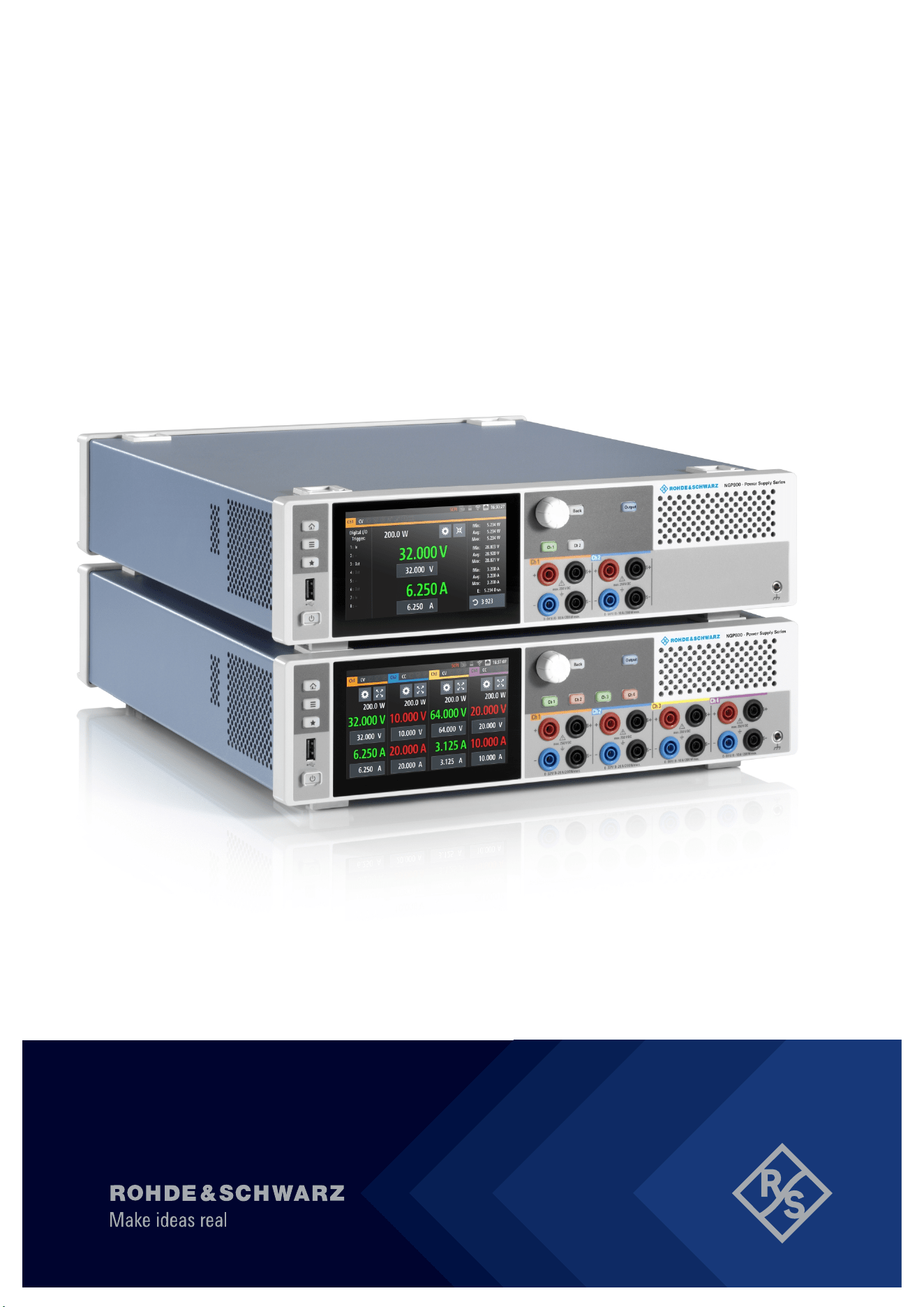
NGP800
Power Supply Series
User Manual
5601561002
Version 04
(Æ1Æ:2)

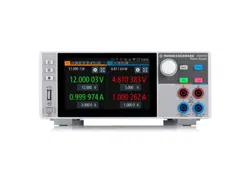
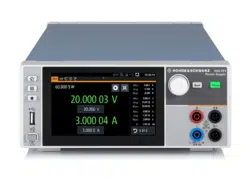
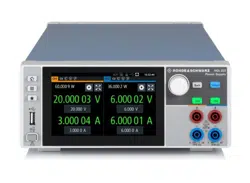
This manual describes the following R&S
®
NGP800 models with firmware version 1.00 or higher:
●
R&S
®
NGP802 Two-channel 32V/20A Power Supply 400 W (5601.4007.05)
●
R&S
®
NGP822 Two-channel 64V/10A Power Supply 400 W (5601.4007.06)
●
R&S
®
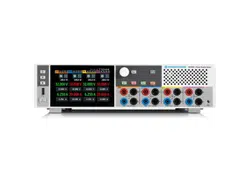
NGP804 Four-channel 32V/20A Power Supply 800 W (5601.4007.02)
●
R&S
®
NGP824 Four-channel 64V/10A Power Supply 800 W (5601.4007.03)
●
R&S
®
NGP814 Four-channel 32V/20A & 64V/10A Power Supply 800 W (5601.4007.04)
In addition to the base unit, the following options are described:
●
R&S
®
NG-B105 Option IEEE-488 (GPIB) Interface (5601.6000.02)
●
R&S
®
NGP-K102 Option Wireless LAN (5601.6400.03)
●
R&S
®
NGP-K103 Option Digital I/O (5601.6300.03)
●
R&S
®
NGP-K107 Option Analog Input (5601.6200.03)
© 2020 Rohde & Schwarz GmbH & Co. KG
Mühldorfstr. 15, 81671 München, Germany
Phone: +49 89 41 29 - 0
Email:
Internet: www.rohde-schwarz.com
Subject to change – data without tolerance limits is not binding.
R&S
®
is a registered trademark of Rohde & Schwarz GmbH & Co. KG.
Trade names are trademarks of the owners.
5601.5610.02 | Version 04 | R&S
®
NGP800
Throughout this manual, products from Rohde & Schwarz are indicated without the
®
symbol, e.g. R&S
®
NGP800 is indicated as
R&S NGP800.

1171.1307.42 - 05
1
Safety Instructions
Instrucciones de seguridad
Sicherheitshinweise
Consignes de sécurité
Risk of injury and instrument damage
The instrument must be used in an appropriate manner to prevent
electric shock, fire,
personal injury or instrument damage.
●
Do not open the instrument casing.
●
Read and observe the "Basic Safety Instructions" delivered as
printed brochure with the instrument.
●
Read and observe the safety instructions in the following sections.
Note that the data sheet may specify additional operating conditions.
●
Keep the "Basic Safety Instructions" and the product documentation
in a safe place and pass them on to the subsequent users.
Riesgo de lesiones y daños en el instrumento
El instrumento se debe usar de manera adecuada para p
revenir
descargas eléctricas, incendios, lesiones o daños materiales.
●
No abrir la carcasa del instrumento.
●
Lea y cumpla las "Instrucciones de seguridad elementales"
suministradas con el instrumento como folleto impreso.
●
Lea y cumpla las instrucciones de seguridad incluidas en las
siguientes secciones. Se debe tener en cuenta que las
especificaciones técnicas pueden contener condiciones adicionales
para su uso.
●
Guarde bien las instrucciones de seguridad elementales, así como
la documentación del producto, y entréguelas a usuarios
posteriores.
1171.1307.42 - 05
2
Gefahr von Verletzungen und Schäden am Gerät
Betreiben Sie das Gerät immer ordnungsgemäß, um elektrischen
Schlag, Brand, Verletzungen von Personen oder Geräteschäden zu
verhindern.
●
Öffnen Sie das Gerätegehäuse nicht.
●
Lesen und beachten Sie die "Grundlegenden Sicherheitshinweise",
die als gedruckte Broschüre dem Gerät beiliegen.
●
Lesen und beachten Sie die Sicherheitshinweise in den folgenden
Abschnitten; möglicherweise enthält das Datenblatt weitere
Hinweise zu speziellen Betriebsbedingungen.
●
Bewahren Sie die "Grundlegenden Sicherheitshinweise" und die
Produktdokumentation gut auf und geben Sie diese an weitere
Benutzer des Produkts weiter.
Risque de blessures et d'endommagement de l'appareil
L'ap
pareil doit être utilisé conformément aux prescriptions afin d'éviter
les électrocutions, incendies, dommages corporels et matériels.
●
N'ouvrez pas le boîtier de l'appareil.
●
Lisez et respectez les "consignes de sécurité fondamentales"
fournies avec l’appareil sous forme de brochure imprimée.
●
Lisez et respectez les instructions de sécurité dans les sections
suivantes. Il ne faut pas oublier que la fiche technique peut indiquer
des conditions d’exploitation supplémentaires.
●
Gardez les consignes de sécurité fondamentales et la
documentation produit dans un lieu sûr et transmettez ces
documents aux autres utilisateurs.

Contents
R&S
®
NGP800
3User Manual 5601.5610.02 ─ 04
Contents
1 Documentation Overview......................................................................9
1.1 Manuals..........................................................................................................................9
1.2 Data Sheet......................................................................................................................9
1.3 Calibration Certificate.................................................................................................10
1.4 Release Notes, Open Source Acknowledgment...................................................... 10
2 Welcome to R&S NGP800....................................................................11
3 Important Notes....................................................................................13
3.1 Symbols....................................................................................................................... 13
3.2 Ambient Conditions.................................................................................................... 13
3.3 Measurement Categories........................................................................................... 14
3.4 Mains Voltage.............................................................................................................. 14
3.5 Limits............................................................................................................................15
4 Getting Started..................................................................................... 16
4.1 Putting into Operation................................................................................................ 16
4.1.1 Safety............................................................................................................................ 17
4.1.2 Intended Operation....................................................................................................... 18
4.1.3 Unpacking and Checking the Instrument...................................................................... 20
4.1.4 Setting Up the Instrument............................................................................................. 21
4.1.4.1 Bench Operation........................................................................................................... 21
4.1.4.2 Rack Mounting.............................................................................................................. 22
4.2 Instrument Tour...........................................................................................................22
4.2.1 Overview of Controls.....................................................................................................22
4.2.1.1 Front Panel....................................................................................................................22
4.2.1.2 Rear Panel.................................................................................................................... 24
4.2.2 Switching On the Instrument......................................................................................... 26
4.3 Trying Out the Instrument.......................................................................................... 27
4.3.1 Setting the Output Voltage and Current Limit................................................................27
4.3.2 Activating the Channels Output.....................................................................................29
4.4 Maintenance and Support.......................................................................................... 30
4.4.1 Maintenance..................................................................................................................30

Contents
R&S
®
NGP800
4User Manual 5601.5610.02 ─ 04
4.4.2 Contacting Customer Support.......................................................................................31
5 Operating Basics..................................................................................32
5.1 Display Overview........................................................................................................ 32
5.1.1 Status Bar Information.................................................................................................. 33
5.1.2 Channel Display Area................................................................................................... 35
5.2 Using the Touchscreen...............................................................................................36
5.2.1 Using Gestures............................................................................................................. 36
5.2.2 Accessing Functionality in the Home Window.............................................................. 37
5.2.2.1 Settings Button..............................................................................................................37
5.2.2.2 Voltage and Current Inputs........................................................................................... 38
5.2.2.3 Expand/Collapse Button................................................................................................38
5.2.3 Input Data......................................................................................................................39
5.3 Front Panel Keys.........................................................................................................40
5.3.1 Menu Controls...............................................................................................................40
5.3.1.1 Home Key..................................................................................................................... 40
5.3.1.2 Settings Key.................................................................................................................. 40
5.3.1.3 User Key....................................................................................................................... 43
5.3.2 Navigation Controls.......................................................................................................43
5.3.3 Output and Channel Controls........................................................................................44
5.4 Output Power Auto Ranging...................................................................................... 44
5.5 Operation Modes.........................................................................................................45
6 Instrument Functions.......................................................................... 47
6.1 Setting the Channels Voltage and Current............................................................... 47
6.2 Activating the Channels Output................................................................................ 48
6.2.1 Output........................................................................................................................... 49
6.2.1.1 Delay............................................................................................................................. 49
6.2.1.2 Remote Sensing............................................................................................................51
6.3 Analog Input................................................................................................................ 52
6.4 Protection.................................................................................................................... 53
6.4.1 Overcurrent Protection (OCP).......................................................................................54
6.4.2 Overvoltage Protection (OVP).......................................................................................54
6.4.3 Overpower Protection (OPP)........................................................................................ 55
6.4.4 Safety Limits..................................................................................................................56

Contents
R&S
®
NGP800
5User Manual 5601.5610.02 ─ 04
6.5 Tracking Function....................................................................................................... 57
6.6 Digital Trigger I/O........................................................................................................ 58
6.7 Advanced Features..................................................................................................... 62
6.7.1 QuickArb....................................................................................................................... 62
6.7.2 EasyRamp.....................................................................................................................65
6.8 User Key.......................................................................................................................66
6.9 Screenshot...................................................................................................................67
6.10 Data Logging............................................................................................................... 67
6.11 CSV Settings................................................................................................................69
6.12 Graphical View Window..............................................................................................70
6.13 File Manager................................................................................................................ 73
6.14 Store and Recall ......................................................................................................... 74
6.15 Interfaces..................................................................................................................... 76
6.15.1 Network Connection......................................................................................................77
6.15.1.1 LAN Connection............................................................................................................ 78
6.15.1.2 Wireless LAN Connection............................................................................................. 80
6.15.2 USB Connection............................................................................................................81
6.15.3 GPIB Address............................................................................................................... 82
6.16 General Instrument Settings...................................................................................... 83
6.16.1 Licenses Management.................................................................................................. 83
6.16.2 Appearance Settings.....................................................................................................85
6.16.3 Sound Settings..............................................................................................................85
6.16.4 Date and Time...............................................................................................................86
6.16.5 Device Information........................................................................................................ 87
6.16.6 Update Device...............................................................................................................88
6.17 Adjustment.................................................................................................................. 88
6.17.1 Analog In Adjustment.................................................................................................... 89
6.17.2 Channel Adjustment......................................................................................................92
7 Remote Control Commands................................................................96
7.1 Common Setting Commands.....................................................................................96
7.2 System Settings Commands......................................................................................99
7.3 Display Commands...................................................................................................105
7.4 Trigger Commands................................................................................................... 105

Contents
R&S
®
NGP800
6User Manual 5601.5610.02 ─ 04
7.5 Configuration Commands........................................................................................ 109
7.5.1 Channel Selection....................................................................................................... 109
7.5.2 Safety Limit Setting......................................................................................................111
7.5.3 Remote Sense Setting.................................................................................................115
7.5.4 Voltage Setting............................................................................................................ 116
7.5.5 Current Setting............................................................................................................ 119
7.5.6 Combined Setting of Voltage and Current Settings.....................................................122
7.5.7 Output Setting............................................................................................................. 123
7.5.8 OCP Setting................................................................................................................ 126
7.5.9 OVP Setting................................................................................................................ 131
7.5.10 OPP Setting................................................................................................................ 134
7.5.11 Reset Protection Tripped State................................................................................... 137
7.5.12 Tracking Setting.......................................................................................................... 137
7.5.13 USB Class Setting.......................................................................................................138
7.6 Measurement Commands........................................................................................ 139
7.7 Advanced Operating Commands............................................................................ 144
7.7.1 Arbitrary.......................................................................................................................145
7.7.2 EasyRamp...................................................................................................................152
7.7.3 Analog Input................................................................................................................ 153
7.7.4 Adjustment.................................................................................................................. 154
7.8 Data and File Management Commands.................................................................. 159
7.9 Status Reporting Commands...................................................................................165
7.9.1 STATus:OPERation Registers.....................................................................................165
7.9.2 STATus:QUEStionable Registers................................................................................ 167
Annex.................................................................................................. 170
A Additional Basics on Remote Control..............................................170
A.1 Messages and Command Structure........................................................................ 170
A.1.1 Messages....................................................................................................................170
A.1.2 SCPI Command Structure...........................................................................................171
A.2 Command Sequence and Synchronization............................................................ 175
A.2.1 Preventing Overlapping Execution..............................................................................176
A.3 Status Reporting System......................................................................................... 176

Contents
R&S
®
NGP800
7User Manual 5601.5610.02 ─ 04
A.3.1 Structure of a SCPI Status Register............................................................................176
List of Commands..............................................................................182
Index....................................................................................................186

Contents
R&S
®
NGP800
8User Manual 5601.5610.02 ─ 04

Documentation Overview
R&S
®
NGP800
9User Manual 5601.5610.02 ─ 04
1 Documentation Overview
This section provides an overview of the R&S NGP800 user documentation.
1.1 Manuals
You find the documents on the R&S NGP800 product page at:
www.rohde-schwarz.com/product/ngp800
Getting Started
Introduces the R&S NGP800 power supply series and describes how to set up and
start working with the instrument. The printed document is delivered with the instru-
ment.
User manual
Contains the description of all instrument modes and functions. It also provides an
introduction to remote control, a complete description of the remote control commands
with programming examples, and information on maintenance and instrument interfa-
ces. Includes the contents of the getting started manual.
The online version of the user manual provides the complete contents for immediate
display on the internet.
Basic safety instructions
Contains safety instructions, operating conditions and further important information.
The printed document is delivered with the instrument.
Instrument security procedures manual
Deals with security issues when working with the R&S NGP800 in secure areas.
Service manual
Describes the performance test for checking the rated specifications, module replace-
ment and repair, firmware update, troubleshooting and fault elimination, and contains
mechanical drawings and spare part lists. The service manual is available for regis-
tered users on the global Rohde & Schwarz information system (GLORIS,
https://
gloris.rohde-schwarz.com
).
1.2 Data Sheet
The datasheet contains the technical specifications of the R&S NGP800 power supply
series. It also lists all options with their order numbers and accessories.
Data Sheet

Documentation Overview
R&S
®
NGP800
10User Manual 5601.5610.02 ─ 04
See www.rohde-schwarz.com/brochure-datasheet/ngp800
1.3 Calibration Certificate
The document is available on https://gloris.rohde-schwarz.com/calcert. You need the
device ID of your instrument, which you can find on a label on the rear panel.
1.4 Release Notes, Open Source Acknowledgment
The release notes list new features, improvements and known issues of the current
firmware version, and describe the firmware installation. The open source acknowledg-
ment document provides verbatim license texts of the used open source software. It
can also be read directly on the instrument.
See
www.rohde-schwarz.com/firmware/ngp800.
Release Notes, Open Source Acknowledgment

Welcome to R&S NGP800
R&S
®
NGP800
11User Manual 5601.5610.02 ─ 04
2 Welcome to R&S NGP800
The two or four-channel power supply series are based on a primary switched-mode
regulator with power factor correction. This concept allows the instrument to achieve
highest accuracy and lowest residual ripple.
The R&S NGP800 power supply series feature galvanically isolated, overload and
short-circuit proof outputs. The outputs can be connected in parallel and serial to ach-
ieve higher currents or voltages.
Multi-purpose protection functions, such as overcurrent protection (OCP), overvoltage
protection (OVP) and overpower protection (OPP) can be set separately for each chan-
nel. If the set limit is reached, the affected output channel is automatically turned off
and an indicator icon (
, , ) flashes on the display. The overcurrent protection can
also be linked to the other channels. If the current exceeds the limit on the affected
channel, all linked channels will be switched off.
The R&S NGP800 power supply series are also protected from overheating. Each
channel is equipped with a temperature sensor that monitors the channel operating
temperature for controlling the fan speed and overtemperature protection. If the safe
limit is exceeded, the output of the affected channel is switched off. The channel must
cool down to a defined threshold before the output can be switched on again. Opera-
tions of the other channels are not affected. Also, the actual operating speed of the
fans is monitored. If a fan is not running, e.g. rotor locked condition, all the outputs will
be switched off to prevent overheating.
The R&S QuickArb function allows freely definable voltage and current sequences with
a timeframe as short as 1 ms, e.g. to simulate different charging conditions of a battery.
The voltage and current points can also be grouped in different blocks which can be
sequenced and repeated independently to achieve a flexible arbitrary function genera-
tion.
With the R&S EasyRamp function, the R&S NGP800 power supply provides the oper-
ating condition to ramp up the supply voltage within a defined timeframe up to 10 s with
1 ms step size and it can be set independently for each channel. Furthermore, the
channels can be sequenced to ramp up the voltage output applied at different times.
With different slew rates and delays between channel outputs, it is easy to test multi-
voltage systems reliability. For the four-channel power supplies, the outputs can also
be arranged into two independent subgroups.
The analog input and digital I/O interfaces at the rear panel can be activated with an
option key. The analog input allows you to control the output directly using voltage sig-
nals (0 V to 5 V analog input corresponds to 0 to Vmax or Imax) and can be set inde-
pendently for each channel. The analog inputs are galvanically isolated from the chan-
nel outputs, making the connection simpler. The digital I/O provides an 8-bit control
port for various control functions. Each pin can be configured as input or output port, to
control any output channel, trigger an event, e.g. start arbitrary or to indicate various
conditions, e.g. over current protections.
The R&S NGP800 power supplies are equipped with a color 800 x 480 5 " TFT LCD
touch screen and a USB and LAN interfaces to control the instrument remotely. With
wireless LAN (WLAN) option, network connection can also be established wirelessly.

Welcome to R&S NGP800
R&S
®
NGP800
12User Manual 5601.5610.02 ─ 04
The R&S NGP800 power supplies can also be remote controlled using the GPIB
option.
The user manual describes all instrument functionalities. The latest version is available
for download from the product homepage (
http://www.rohde-schwarz.com/product/
ngp800
).
Important Notes
R&S
®
NGP800
13User Manual 5601.5610.02 ─ 04
3 Important Notes
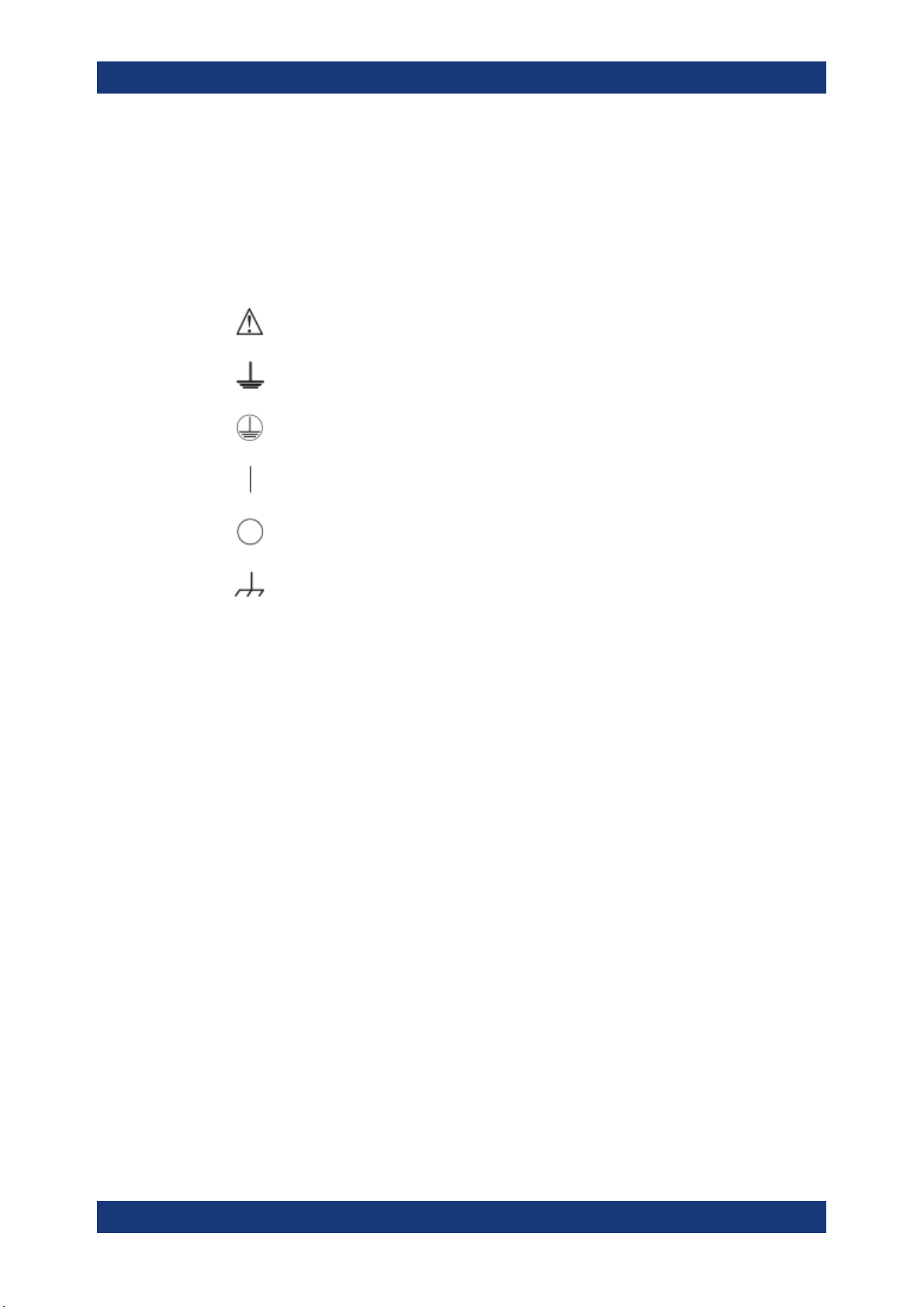
3.1 Symbols
Caution, general danger zone
Ground
PE terminal
ON (supply voltage)
OFF (supply voltage)
Ground terminal
3.2 Ambient Conditions
The allowed operating temperature ranges from +5 °C to +40 °C (pollution category 2).
The maximum relative humidity (without condensation) is at 80 %.
During storage and transport, the temperature must be between -20 °C and +70 °C. In
case of condensation during transportation or storage, the instrument requires approxi-
mately two hours to dry and reach the appropriate temperature prior to operation. The
instrument is designed for use in a clean and dry indoor environment. Do not operate
with high dust and humidity levels, if danger of explosion exists or with aggressive
chemical agents.
Any operating position may be used; however adequate air circulation must be main-
tained. For continuous operation, a horizontal or inclined position (integrated stand) is
preferable.
Specifications with tolerance data apply after a warm-up period of at least 30 minutes
at a temperature of 23 °C (tolerance -3 °C / + 7 °C).
The heat produced inside the instrument is guided to the exterior via temperature-con-
trolled fan. Each channel has multiple temperature sensors which check the heat gen-
eration in the instrument and control the fan speed.
It is necessary to ensure that there is sufficient space around the instrument sides for
heat exchange. If the temperature inside the instrument increases more than the
Ambient Conditions

Important Notes
R&S
®
NGP800
14User Manual 5601.5610.02 ─ 04
allowed limit, overtemperature protection is triggered and the affected outputs are
switched off automatically.
Air circulation
Do not obstruct the ventilation holes!
3.3 Measurement Categories
This instrument is designed for supplying power-on circuits that are only indirectly con-
nected to the low voltage mains or not connected at all. The instrument is not intended
for measurements within the measurement categories II, III or IV; the maximum poten-
tial against earth generated by the user must not exceed 250 V peak in this application.
The following information refers solely to user safety. Other aspects, such as the maxi-
mum voltage, are described in the technical data and must also be observed.
The measurement categories refer to transients that are superimposed on the mains
voltage. Transients are short, very fast (steep) current and voltage variations which
may occur periodically and non-periodically. The level of potential transients increases
as the distance to the source of the low voltage installation decreases.
●
Measurement CAT IV: Measurements at the source of the low voltage installations
(e.g. meters)
●
Measurement CAT III: Measurements in building installations (e.g. power distribu-
tion installations, power switches, firmly installed sockets, firmly installed engines
etc.)
●
Measurement CAT II: Measurements on circuits electronically directly connected to
the mains (e.g. household appliances, power tools, etc.)
●
0 (instruments without measured measurement category): Other circuits that are
not connected directly to the mains
3.4 Mains Voltage
The instrument accepts worldwide mains voltage from 100 VAC to 240 VAC, 50 Hz / 60
Hz. No voltage selector switch is required. The instrument is protected by internal
fuses which is not user accessible. If the instrument is not powering on, this may indi-
cate an open fuse, the instrument must be sent for servicing. The instrument provides
rocker switch at rear panel, which disconnects the AC input. A standby switch at the
front panel toggles the instrument operation between normal mode and low consump-
tion power down mode.
Mains Voltage
Important Notes
R&S
®
NGP800
15User Manual 5601.5610.02 ─ 04
Safe operation
If the instrument is not in use, it must be switched off at the mains switch for safety rea-
sons.
3.5 Limits
The R&S NGP800 is equipped with a protective overload feature. The protective over-
load feature prevents damage to the instrument and is intended to protect against a
possible electrical shock. The maximum values for the instrument must not be excee-
ded. The protection limits are listed on the front panel of the R&S NGP800 to ensure
the safe operation of the instrument.
These protection limits must be adhered to:
Specification Limits
Maximum output voltage 32 V module: 32 VDC
64 V module: 64 VDC
Maximum output current 32 V module: 20 ADC
64 V module: 10 ADC
Maximum voltage against earth 250 VDC
Maximum counter-voltage (same polarity) 32 V module: 35 VDC
64 V module: 70 VDC
Maximum reverse voltage (opposite polarity) 0.4 VDC
Maximum reverse Current (through protection diode,
instrument must be operating)
20 A
AC input 100 VAC to 250 VAC, 50 Hz / 60 Hz
Maximum power output 400W for NGP802 & NGP822
800W for NGP804, NGP814 & NGP824
Limits
Getting Started
R&S
®
NGP800
16User Manual 5601.5610.02 ─ 04
4 Getting Started
4.1 Putting into Operation
This chapter describes how to set up the R&S NGP800 power supply series for the first
time.
Risk of injury due to disregarding safety information
Observe the information on appropriate operating conditions provided in the data sheet
to prevent personal injury or damage to the instrument. Read and observe the basic
safety instructions provided with the instrument, in addition to the safety instructions in
the following sections. In particular:
●
Do not open the instrument casing.
Risk of instrument damage due to inappropriate operating conditions
Specific operating conditions are required to ensure accurate measurements and to
avoid damage to the instrument. Observe the information on appropriate operating
conditions provided in the basic safety instructions and the instrument's data sheet.
Instrument damage caused by electrostatic discharge
Electrostatic discharge (ESD) can damage the electronic components of the instrument
and the device under test (DUT). Electrostatic discharge is most likely to occur when
you connect or disconnect a DUT or test fixture to the instrument's test ports. To pre-
vent electrostatic discharge, use a wrist strap and cord and connect yourself to the
ground, or use a conductive floor mat and heel strap combination.
Risk of radio interference
This instrument is compliant with Class A of CISPR 32. In a residential environment,
this instrument may cause radio interference.
Putting into Operation
Getting Started
R&S
®
NGP800
17User Manual 5601.5610.02 ─ 04
Risk of instrument damage during operation
An unsuitable operating site or test setup can cause damage to the instrument and the
connected devices. Ensure the following operating conditions before you switch on the
instrument:
●
The instrument is dry and shows no sign of condensation
●
The instrument is positioned as described in
Chapter 4.1.4.1, "Bench Operation",
on page 21
●
The ambient temperature does not exceed the range specified in the data sheet
●
Signal levels at the input connectors are all within the specified ranges
●
Signal outputs are correctly connected and not overloaded
EMI impact on measurement results
Electromagnetic interference (EMI) may affect the measurement results.
To suppress generated electromagnetic interference (EMI):
●
Use suitable shielded cables of high quality. For example, use double-shielded RF
and LAN cables.
●
Always terminate open cable ends.
●
Note the EMC classification in the data sheet.
4.1.1 Safety
Recommendations on secure operation
The R&S NGP800 is designed to operate at local workplaces or in secured networks
(LAN). It should not be accessible from the internet, because of a potential security
risk, e.g. attackers could misuse or damage your device.
Please always install the latest firmware.
It is highly recommended that you work closely with your IT department or system
administrator to ensure compliance with your company policies when connecting devi-
ces to your company's network.
This instrument was built in compliance with DIN EN 61010-1 (VDE 0411 part 1),
safety regulations for electrical instruments, control units and Iaboratory equipment.
It has been tested and shipped from the plant in safe condition. It is also in compliance
with the regulations of the European standard EN 61010-1 and the international stan-
dard IEC 61010-1.
To maintain this condition and ensure safe operation, you must observe all instructions
and warnings given in this user manual. Casing, chassis and all measuring ports are
Putting into Operation

Getting Started
R&S
®
NGP800
18User Manual 5601.5610.02 ─ 04
connected to a protective earth conductor. The instrument is designed in compliance
with the regulations of protection class I.
For safety reasons, the instrument may only be operated with authorized safety sock-
ets. The power cable must be plugged in before signal circuits may be connected.
Never use the product if the power cable is damaged. Check regularly if the power
cables are in perfect condition. Choose suitable protective measures and installation
types to ensure that the power cable cannot be damaged and that no harm is caused
by tripping hazards or from electric shock, for instance.
Risk of electric shock
It is prohibited to disconnect the earthed protective connection inside or outside of the
instrument!
If it is assumed that a safe operation is no longer possible, the instrument must be shut
down and secured against any unintended operation.
Safe operation can no longer be assumed when:
●
Instrument shows visible damage
●
Instrument includes loose parts
●
Instrument no longer functions properly
– After an extended period of storage under unfavorable conditions (e.g. out-
doors or in damp rooms)
– After rough handling during transport (e.g. packaging that does not meet the
minimum requirements by post office, railway or forwarding agency)
Exceeding the low voltage protection
Use insulated wires and not bare wires for the terminal connection.
It is assumed that only qualified and trained personnel service the power supplies and
the connected loads.
The universal AC input at the rear of the instrument accepts nominal line voltages in
the range of 100 VAC to 250 VAC. Line frequency can be either 50 Hz or 60 Hz.
Fuses
The instrument contains internal fuses, which are not user accessible.
4.1.2 Intended Operation
The instrument is intended only for use by personnel familiar with the potential risks of
measuring electrical quantities.
Putting into Operation
Getting Started
R&S
®
NGP800
19User Manual 5601.5610.02 ─ 04
For safety reasons, the instrument may only be connected to properly installed wall
outlets. Separating the ground is prohibited.
The power cable must be inserted before signal circuits may be connected.
Use only the power cable included in the delivery package. See
"Delivery package"
on page 20.
Before each measurement, measuring cables must be inspected for damage and
replaced if necessary. Damaged or worn components can damage the instrument or
cause injury.
The instrument may be operated only under the operating conditions and in the posi-
tions specified by the manufacturer, without the product's ventilation being obstructed.
If the manufacturer’s specifications are not observed, this can result in electric shock,
fire and/or serious personal injury, and in some cases, death.
Provide adequate airflow
Do not block the air intake at the front and side of the instrument or the exhaust at the
rear. Install the instrument on a location that allows sufficient space for air circulation at
the air intake and exhaust. Recommended spacing to non-heat producing surface is at
least 2.5 inches (63.5 mm) from the ventilation holes.
Applicable local or national safety regulations and rules for the prevention of accidents
must be observed in all work performed.
The instrument is designed for use in the following sectors: Industrial, residential, busi-
ness and commercial areas and small businesses.
The instrument is designed for indoor use only. Before each measurement, you need
to verify at a known source if the instrument functions properly.
To disconnect from the mains, unplug the IEC socket on the back panel.
See
Table 4-1 for the general data on the instrument specification. For more informa-
tion, see the instrument datasheet (P/N: 3609.1927.32).
Table 4-1: General data on instrument specification
General data
Mains nominal voltage 100 VAC to 250 VAC 50 Hz / 60 Hz
Maximum input power 650 W for 2 channels
1125 W for 4 channels
Mains fuses Internal 16 A 250 V IEC 60127-2/7 fast-acting
Not user accessible
Operating temperature range +5 °C to +40 °C
Storage temperature range -20 °C to +70 °C
Humidity noncondensing 5 % to 95 %
Putting into Operation
Getting Started
R&S
®
NGP800
20User Manual 5601.5610.02 ─ 04
General data
Display TFT 5" 800 pixels x 480 pixels WVGA Touch
Rack installation R&S ZZA-GE23 rack adapter 2U (P/N: 5601.4059.00)
Dimensions (W x H x D) 362 mm x 100 mm x 451 mm (14.25" x 3.94" x 17.76")
Weight R&S NGP802/822 (2-channel) 7.5 kg (16.5 lb)
R&S NGP804/814/824 (4-chan-
nel)
8.0 kg (17.6 lb)
4.1.3 Unpacking and Checking the Instrument
Unpack the R&S NGP800 power supply carefully and check the content of the pack-
age.
●
Check the equipment for completeness using the delivery note and package con-
tents list for the various items.
●
Check the instrument for any damage and loose parts. If there is any damage,
immediately contact the carrier who delivered the instrument.
Packing material
Retain the original packing material. If the instrument needs to be transported or ship-
ped later, you can use the material to protect the control elements and connectors.
Risk of damage during transportation and shipment
Insufficient protection against mechanical and electrostatic effects during transportation
and shipment can damage the instrument.
●
Always ensure that sufficient mechanical and electrostatic protections are provided
●
When shipping an instrument, the original packaging should be used. If you do not
have the original packaging, use sufficient padding to prevent the instrument from
moving around inside the box. Pack the instrument in antistatic wrap to protect it
from electrostatic charging
●
Secure the instrument to prevent any movement and other mechanical effects dur-
ing transportation
Delivery package
The package contents contain the following items:
●
R&S NGP800 power supply
●
Four power cables
●
Two 8-pin terminal block plug for output connections
●
Two 8-pin plug for analog input and digital I/O port connections
●
One printed Getting Started manual
Putting into Operation
Getting Started
R&S
®
NGP800
21User Manual 5601.5610.02 ─ 04
●
One document folder containing a Basic Safety Instructions guide, calibration cer-
tificate, KC and CE certificate
4.1.4 Setting Up the Instrument
The R&S NGP800 power supply series are designed for benchtop and rackmount
operation.
Risk of instrument damage due to high temperature
Operate R&S NGP800 power supply in an area where the ambient temperature is
within +5 °C to +40 °C.
The R&S NGP800 power supply is fan-cooled and must be installed with sufficient
space on the sides to allow proper air circulation. Ensure that fan openings are unob-
structed and airflow vents are unimpeded.
Operating the instrument with insufficient airflow or outside the allowable ambient tem-
perature can disrupt the operation and even cause damage.
4.1.4.1 Bench Operation
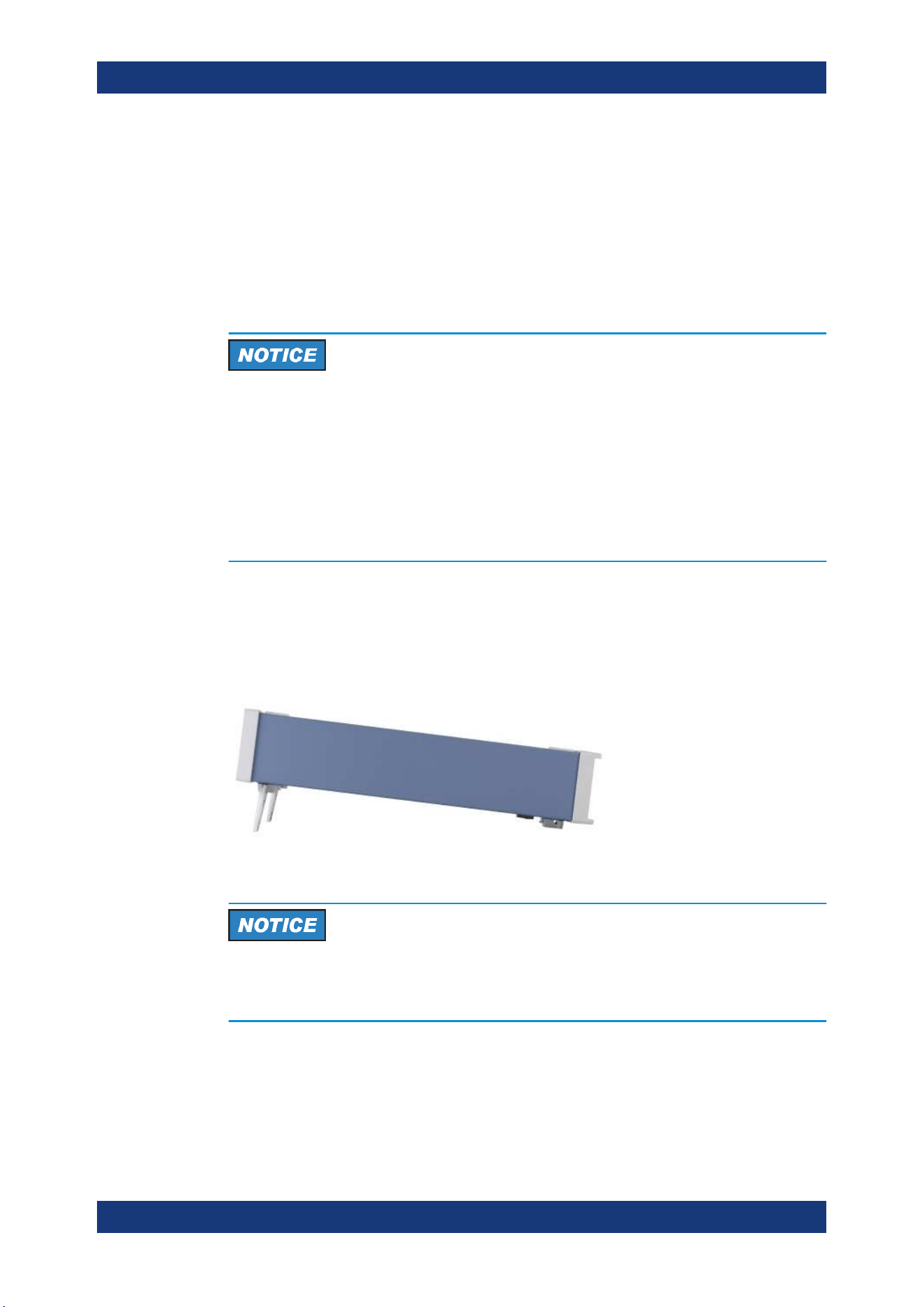
On a benchtop, the R&S NGP800 power supply can either lie flat or stand on its feet.
As shown in
Figure 4-1, feet on the bottom can be folded out to set the instrument in
an inclined position.
Figure 4-1: Inclined position
Positioning of instrument
The instrument must be positioned in a manner that allows you to disconnect the unit
from the mains at any time and without restrictions.
Putting into Operation
Getting Started
R&S
®
NGP800
22User Manual 5601.5610.02 ─ 04
Risk of injury if feet are folded out
The feet can fold in if they are not folded out completely or if the instrument is shifted.
Collapsing feet can cause injury or damage the instrument.
●
Fold the feet completely in or out to ensure stability of the instrument. Never shift
the instrument when the feet are folded out.
●
When the feet are folded out, do not work under the instrument or place anything
underneath.
●
The feet can break if they are overloaded. The overall load on the folded-out feet
must not exceed 250 N.
4.1.4.2 Rack Mounting
The instrument can be installed in 19" rack using the rack adapter R&S ZZA-GE23
(P/N 5601.4059.00). Proceed according to the installation instructions supplied with the
rack adapter.
4.2 Instrument Tour
This chapter provides an overview of all the controls available in the R&S NGP800
power supply series and steps to switch on the instrument for the first time.
●
Overview of Controls...............................................................................................22
●
Switching On the Instrument...................................................................................26
4.2.1 Overview of Controls
4.2.1.1 Front Panel
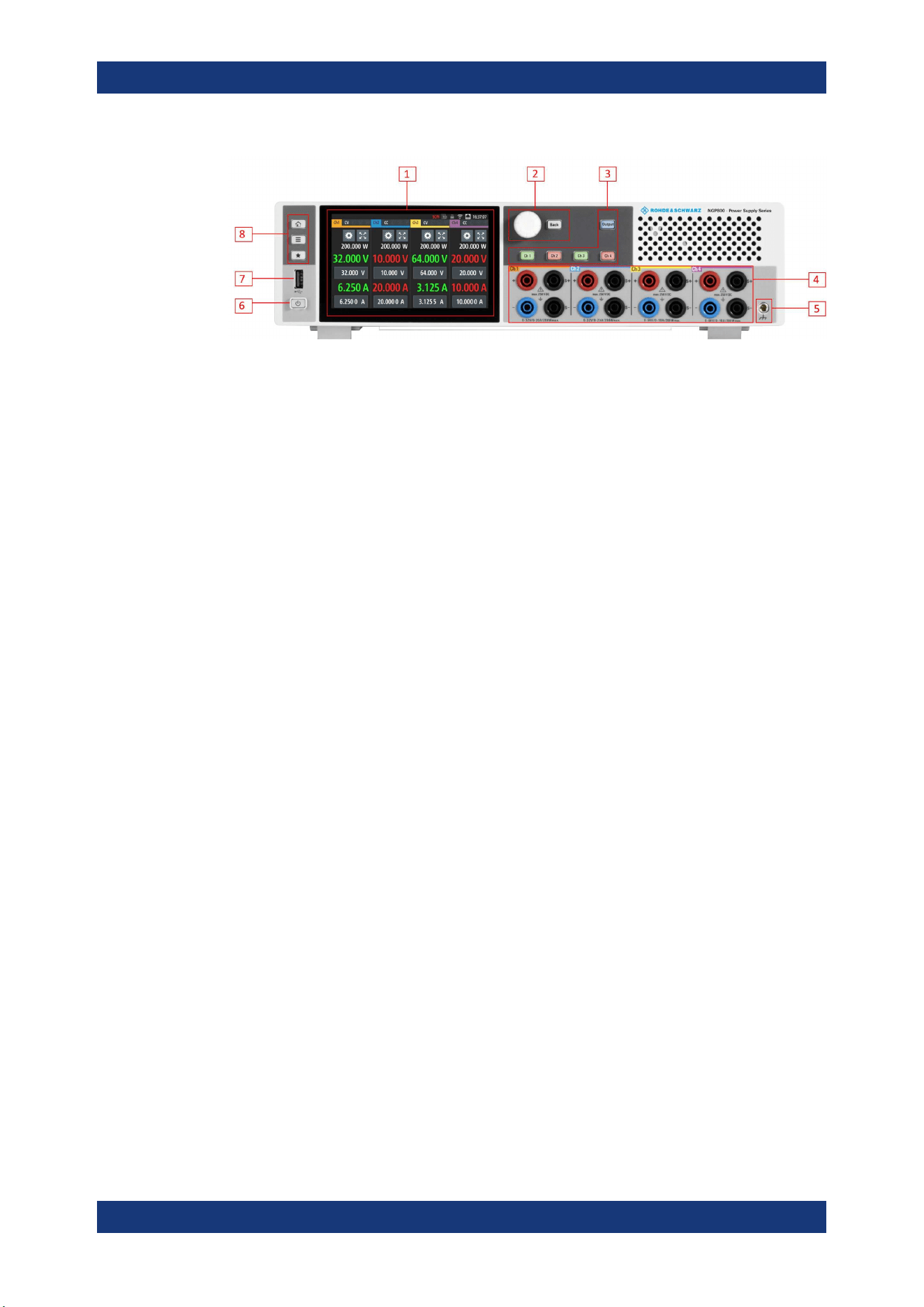
The front panel of the R&S NGP800 power supply is shown in Figure 4-2. The function
keys and navigation controls are located beside the display. The various connectors
are located at the right of the display.
The following power supply models are available:
Table 4-2: Power supply models
Models Number of output channels
NGP802, NGP822 2
NGP804, NGP814, NGP824 4
Instrument Tour
Getting Started
R&S
®
NGP800
23User Manual 5601.5610.02 ─ 04
Figure 4-2: Front panel of R&S
NGP800 power supply
1 = Display with touch screen
2 = Rotary knob and back key
3 = Output and channel keys
4 = Output terminals (see
Table 4-2)
5 = Chassis ground terminal (4mm socket)
6 = Standby button
7 = USB connector
8 = Menu control keys
Display (1)
The display is a color TFT touch screen. Depending on the instrument models, up to
four channels are shown on the display. The respective measurement settings and
menu settings are displayed in the individual channel display area.
Two information status bars, providing the overall device operating mode and channel
settings of the instrument are located respectively at the device level (top-right hand
corner of the display area) and channel level (on top of individual channel display area)
of the instrument.
For a detailed description on-screen layout, see section "Display Overview" in the User
Manual.
Rotary knob and back key (2)
The rotary knob and back key are used for menu navigation and value adjustment in
the instrument.
For a detailed description on navigation, see section "Rotary Knob and Back Key" in
the User Manual.
Output and channel keys (3)
Depending on the instrument models, up to four channels and one output key are pro-
vided to select individual channel and enable/disable the output(s).
Output terminals (4)
Two-channel instruments: NGP802 and NGP822 are equipped with 8 terminals for out-
puts and remote sense connections. Four-channel instruments: NGP804, NGP814 and
NGP824 are equipped with 16 terminals for outputs and remote sense connections.
Instrument Tour
Getting Started
R&S
®
NGP800
24User Manual 5601.5610.02 ─ 04
For 32 V models, each output is capable to source 200 W of power at 0 V to 32 V and
maximum current of 20 A.
For 64 V models, each output is capable to source 200 W of power at 0 V to 64 V and
maximum current of 10A.
Chassis ground terminal (5)
A 4 mm socket is provided for the user to connect to earth ground through the instru-
ment ground/chassis.
Standby button (6)
The [Power] key toggles the instrument between standby state and normal state. In
standby state, the key is illuminated in red and the instrument internal circuits are oper-
ated in powered down state. In normal state, all the internal modules are powered up
and the instrument will startup to operate normally. The LED illumination is turned off in
this state.
USB connector (7)
USB Type-A connector is provided for connecting a USB flash drive to perform soft-
ware update, store logging data or screen captures. It can also be used for an external
USB mouse connector.
Menu control keys (8)
The menu control keys allow you to access the home window, main menu window and
user button key in the instrument.
For a detailed description on menu control keys, see section "Menu Controls" in the
User Manual.
4.2.1.2 Rear Panel
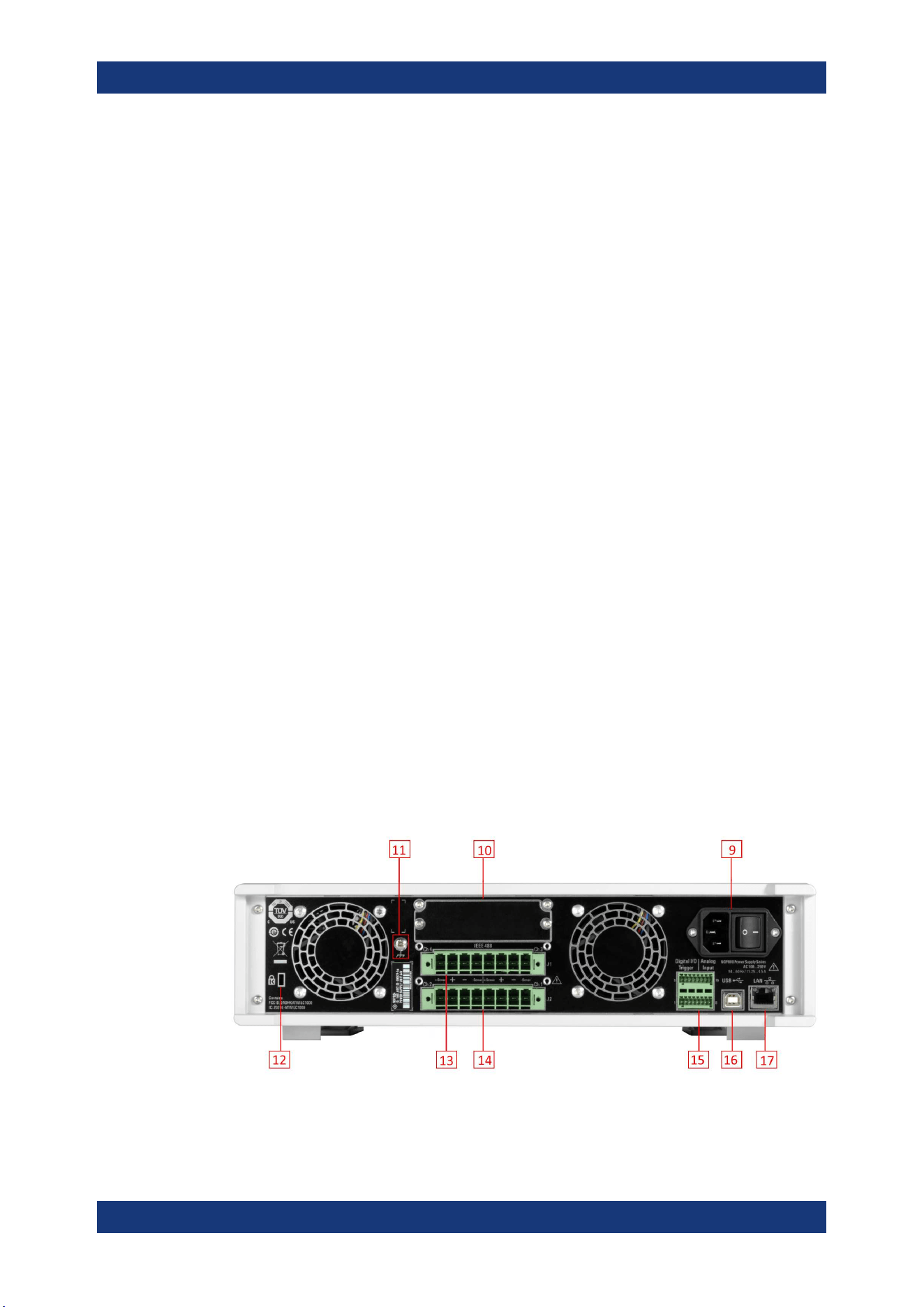
Figure 4-3 shows the rear panel of the R&S NGP800 power supply with its connectors.
Figure 4-3: Rear panel of R&S
NGP800 power supply
Instrument Tour

Getting Started
R&S
®
NGP800
25User Manual 5601.5610.02 ─ 04
9 = AC inlet with integrated 2-pole rocker switch
10 = Optional IEEE-488 (GPIB) interface
11 = Ground terminal
12 = Kensington lock
13 = Channel 3 and 4 rear panel connector (for NGP804, NGP814 and NGP824 models only)
14 = Channel 1 and 2 rear panel connector
15 = Analog input and digital I/O connector
16 = USB-B connector (device)
17 = Ethernet (LAN) connector
AC inlet with integrated 2-pole rocker switch (9)
Main supply cable
Use only the power cable that was supplied with the instrument. Using other types,
which might have inadequate rating can cause overheating of the power cable, result-
ing in fire.
The power cable provides the earth ground connection through the third ground con-
ductor. Operate the instrument only on authorized safety sockets which provide earth
connection.
The power cable must be plugged in before signal circuits can be connected. Never
use the product if the power cable is damaged.
The built-in 2-pole rocker switch is the main power switch of the instrument which con-
nects/disconnects it from the AC supply.
Option IEEE-488 (GPIB) interface (10)
Option R&S NG-B105 provides an IEEE-488 (GPIB) bus interface.
Ground terminal (11)
M4 screw provides connection to earth ground through the instrument ground/chassis.
Kensington security slot (12)
A Kensington lock can be anchored to the R&S NGP800 power supply housing to
secure it to a workstation mechanically.
Channel connectors (13, 14)
Output terminals
Either the channel output terminals at the front panel or rear panel can be used. Using
both terminals at the same time can cause instrument malfunction.
Instrument Tour
Getting Started
R&S
®
NGP800
26User Manual 5601.5610.02 ─ 04
The channel terminal blocks contain connections to both outputs (“+”,”-“) and remote
sense (“+Sense”,”-Sense”). Terminal block for channel 3 and channel 4 are only availa-
ble for a 4-channel instrument.
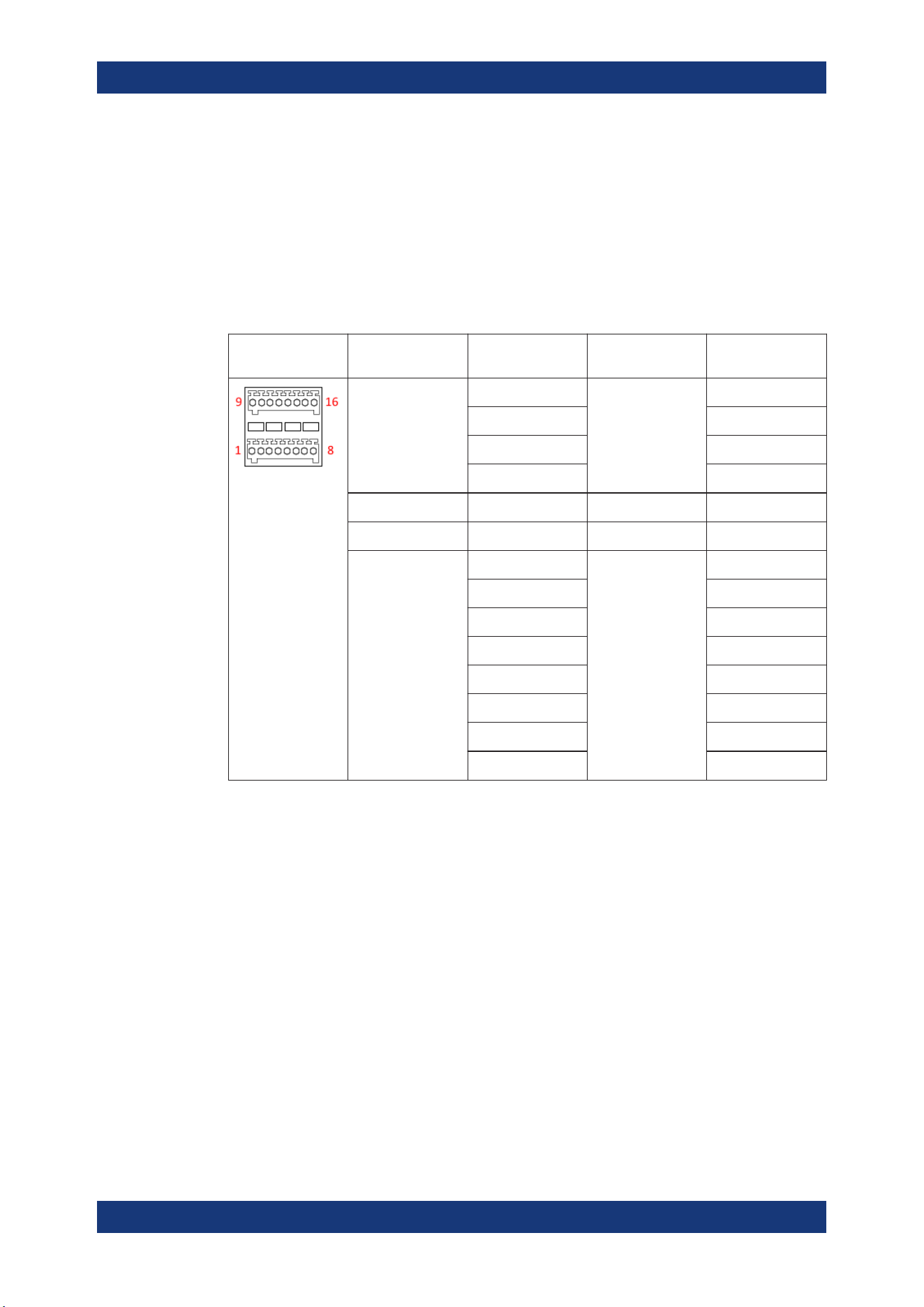
Digital I/O & analog input connector (15)
A 16-pin terminal block provides connection to both digital I/O (option NGP-K103) and
analog input (option NGP-K107). See
Table 4-3.
Table 4-3: Pin configurations
DIO & analog
input connector
Signal Logical name Value range Pin number
Analog input 1 to 4 ANA1 0 Vdc to 5 Vdc 16
ANA2 8
ANA3 15
ANA4 7
Analog ground GND 0 Vdc 6, 14
Digital ground GND 0 Vdc 5, 13
Digital trigger 1 to 8 DIO1 TTL 12
DIO2 4
DIO3 11
DIO4 3
DIO5 10
DIO6 2
DIO7 9
DIO8 1
USB connector (16)
USB Type-B connector provides remote control operation via USB.
Ethernet connector (17)
10/100 Ethernet port for remote control operation via the local area network.
4.2.2 Switching On the Instrument
Before switching on the instrument, check that all the instructions in the “Basic Safety
Instruction” brochure and safety measures in previous sections are observed.
To switch on instrument:
1. Connect the power cable to the AC power connector at the rear panel of the
R&S NGP800 power supply.
Instrument Tour

Getting Started
R&S
®
NGP800
27User Manual 5601.5610.02 ─ 04
2. Connect the power cable to the socket outlet.
3. Toggle the power rocker switch at the rear panel to turn on the instrument.
The instrument performs a system check, boots the operating system, and starts
the R&S NGP800 power supply firmware.
It takes a few seconds for the power supply to complete the initialization before it is
ready for use. If the instrument does not turn on, verify that the power cord is securely
plugged-in and power is available at the outlet. Check if the standby power is lit at the
[Power] key on the front panel. If the standby power is lit, press the [Power] key to ini-
tiate the start-up sequence.
To switch off instrument:
1. Press the [Power] key.
The R&S NGP800 power supply initializes the power down sequence and enters
into standby mode. The R&S NGP800 operates at low power.
2. Toggle the rocker switch at the rear panel to turn off the instrument completely.
3. Disconnect the AC power cable from the socket outlet.
4.3 Trying Out the Instrument
This chapter describes some basic functions that you can perform with the
R&S NGP800 power supply series.
4.3.1 Setting the Output Voltage and Current Limit
1.
Press [Home]
key.
The R&S NGP800 power supply displays the home window.
Trying Out the Instrument
Getting Started
R&S
®
NGP800
28User Manual 5601.5610.02 ─ 04
2. Select voltage or current parameter of the desired channel.
The R&S NGP800 power supply displays an on-screen keypad to set the value.
3. Enter the required value.
4.
Confirm value with either a unit key or enter key
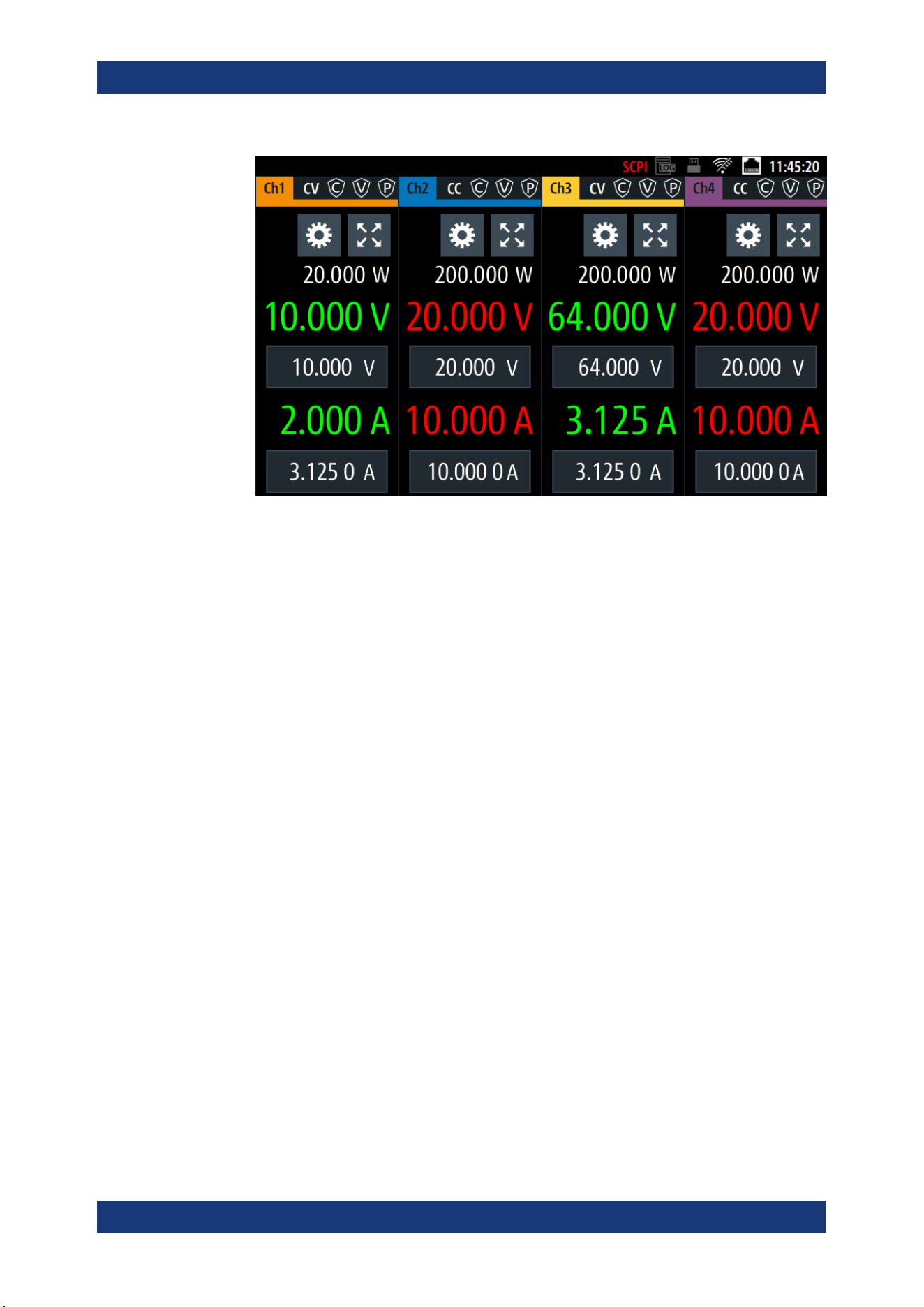
.
The home window shows the updated voltage and current settings (See changes
of voltage and current values in channel 1).
Trying Out the Instrument
Getting Started
R&S
®
NGP800
29User Manual 5601.5610.02 ─ 04
5. Repeat for other channel if desired.
4.3.2 Activating the Channels Output
The output voltages can be switched on or off regardless of the instrument's operating
mode.
To activate the channel output, press the [Output] key on the front panel followed by
the desired channel key or vice versa.
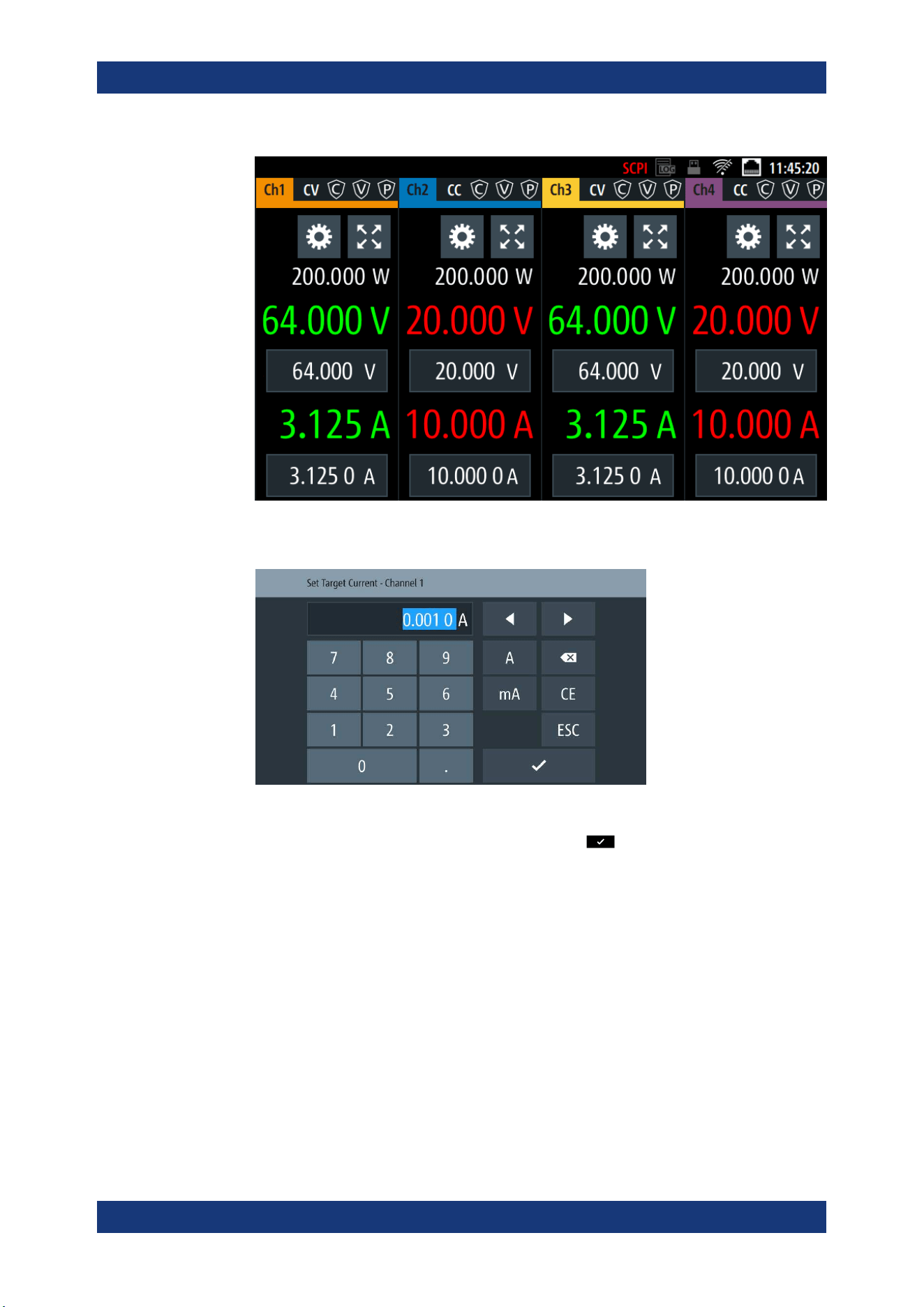
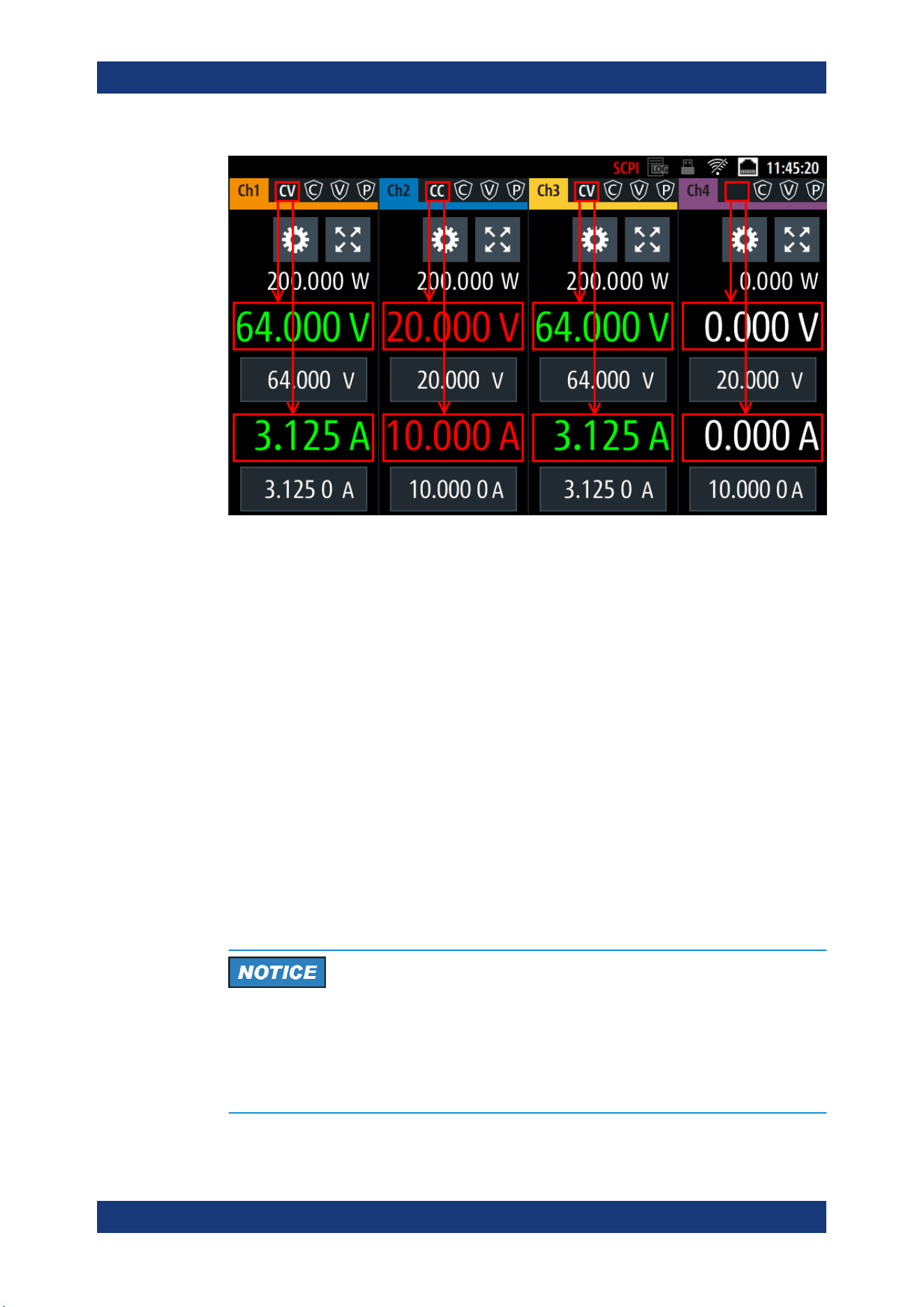
The R&S NGP800 power supply displays the actual voltage on the output channel and
the actual current drawn by the load connected to the output. The display font color of
the selected channel changes depending on the operating mode of the instrument.
●
Constant voltage (CV)
– Voltage regulated, actual current is lesser than setpoint.
– Font color of measured voltage and current is green.
●
Constant current (CC)
– Current regulated, current drawn by the circuit is limited to setpoint.
– Font color of measured voltage and current is red.
When output is turned off, the display font color changes to white and the operating
mode is not displayed.
See the highlighted areas in
Figure 4-4.
Trying Out the Instrument
Getting Started
R&S
®
NGP800
30User Manual 5601.5610.02 ─ 04
Figure 4-4: Font color in highlighted areas changes to green or red depending on the different oper-
ating modes of the instrument
4.4 Maintenance and Support
4.4.1 Maintenance
Regular maintenance improves the life span of the instrument, the following chapter
provides information on instrument maintenance.
Cleaning
Before cleaning the instrument, ensure that it has been switched off and the power
cable is disconnected.
Clean the outer case of the instrument at regular intervals, using a soft, lint-free dust
cloth.
Instrument damage caused by cleaning agents
Use a dry, lint-free cloth to clean the product. When cleaning, keep in mind that the
casing is not waterproof. Do not use any liquids for cleaning.
Cleaning agents, solvents (thinners, acetone), acids and bases can damage the front
panel labeling, plastic parts and display.
Maintenance and Support
Getting Started
R&S
®
NGP800
31User Manual 5601.5610.02 ─ 04
The display may only be cleaned with an appropriate glass cleaner. Rub the display
with a dry, clean and lint-free cloth. Do not allow cleaning fluid to enter the instrument.
Internal battery replacement
An internal CR2032 coin cell battery powers the real-time clock circuit which provides
continuous time stamp for the instrument. If the battery fails, the system clock and time
stamp for the logging function are not available but other instrument functions are not
affected.
Under normal usage at room temperature, the battery is expected to last up to 10
years. However, the battery life expectancy is reduced if the device is stored at temper-
ature above 40°C for an extended period of time.
If the instrument cannot retain the date and time settings after turning off the AC input,
the battery is discharged.
Contact your local service partner for battery replacement.
4.4.2 Contacting Customer Support
Technical support – where and when you need it
For quick, expert help with any Rohde & Schwarz product, contact our customer sup-
port center. A team of highly qualified engineers provides support and works with you
to find a solution to your query on any aspect of the operation, programming or applica-
tions of Rohde & Schwarz products.
Contact information
Contact our customer support center at
www.rohde-schwarz.com/support, or follow this
QR code:
Figure 4-5: QR code to the Rohde
&
Schwarz support page
Maintenance and Support
Operating Basics
R&S
®
NGP800
32User Manual 5601.5610.02 ─ 04
5 Operating Basics
5.1 Display Overview
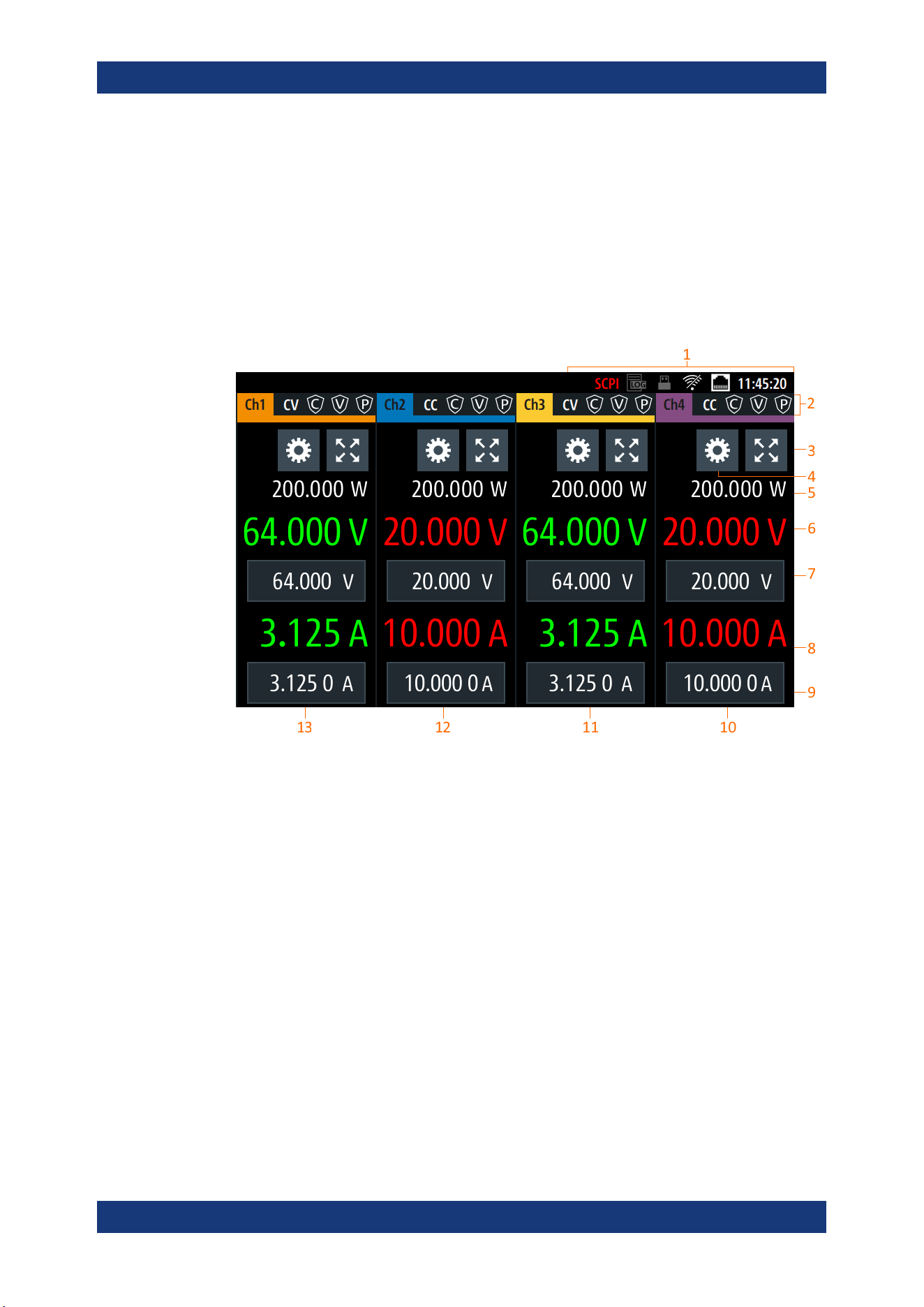
The following displays the home window of R&S NGP800. It shows the output voltage
and current level, status bar information and control settings of the instrument.
Figure 5-1: Home window of R&S
NGP800 with 4 channels
1 = Device status bar
2 = Channel status bar
3 = "Expand/Collapse" channel button
4 = "Settings" button
5 = Measured output power
6 = Output voltage level
7 = Set output voltage
8 = Measured output current
9 = Set output current limit
10 = Channel display area of Ch4
11 = Channel display area of Ch3
12 = Channel display area of Ch2
13 = Channel display area of Ch1
Display Overview
Operating Basics
R&S
®
NGP800
33User Manual 5601.5610.02 ─ 04
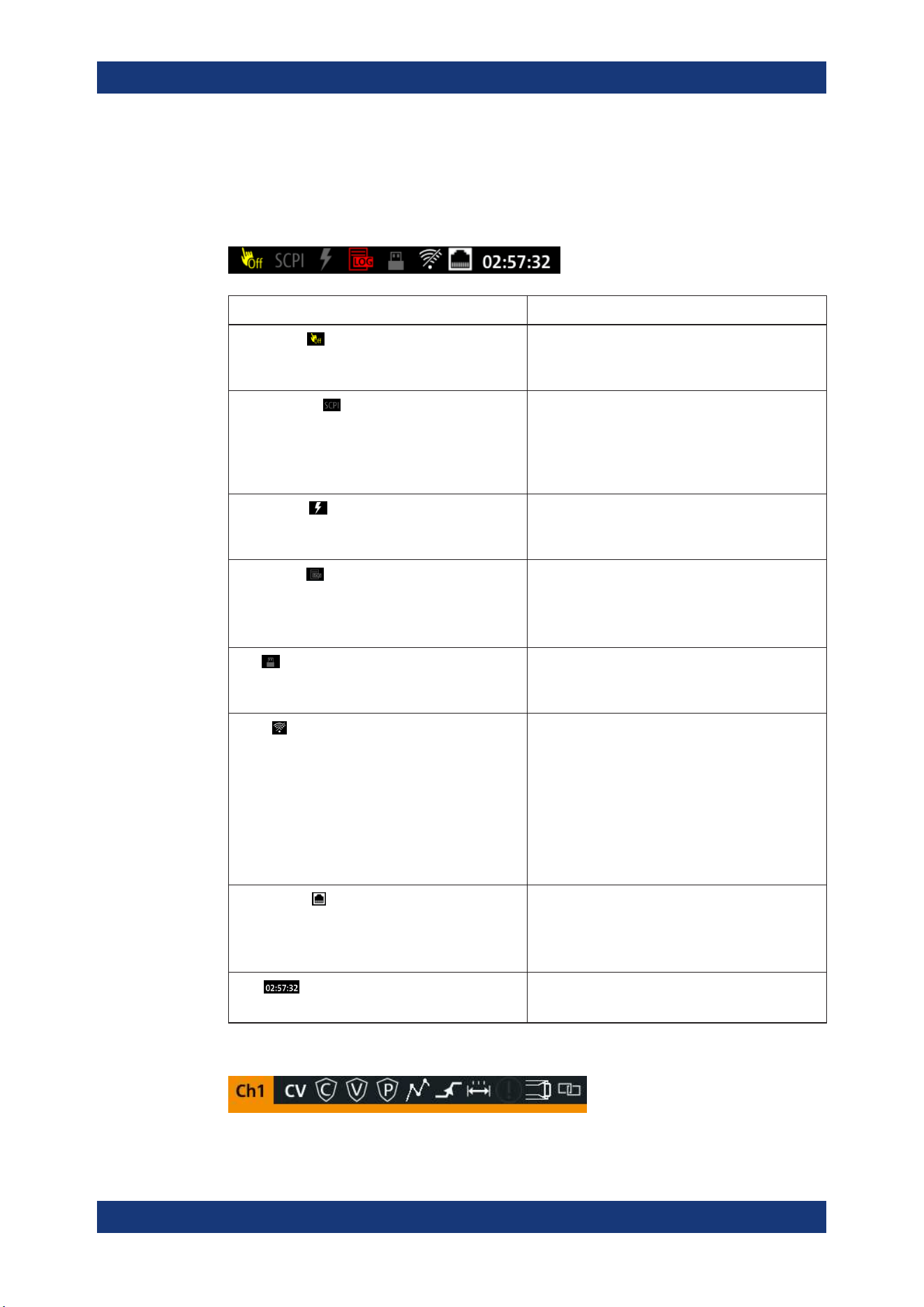
5.1.1 Status Bar Information
Device status bar
Function Description
Touchscreen
If touch input is disabled, the icon is displayed and
highlighted in yellow.
See Chapter 5.3.1.3, "User Key", on page 43.
SCPI command
If a SCPI command is received successfully, the
icon blinks once in white.
If an error is in the SCPI error queue, the icon is
highlighted in red.
If no activity, icon is displayed in gray.
Trigger event
Icon blinks once in white when a trigger event
occurs.
See Chapter 6.6, "Digital Trigger I/O", on page 58.
Data logging
If data logging is present, the icon is highlighted in
white.
If an error is present, the icon is highlighted in red.
See Chapter 6.10, "Data Logging", on page 67.
USB
If USB device is busy, the icon is highlighted in
white.
If USB device is idle, the icon is highlighted in gray.
WLAN
Only visible if software option Wireless LAN is
active.
If connection is present, the icon is highlighted in
white. If both WLAN and LAN connection are pres-
ent, the icon is highlighted with a line cross over.
If no connection or WLAN is disabled, the icon is
highlighted in gray.
See Chapter 6.15.1.2, "Wireless LAN Connection",
on page 80.
LAN interface
If connected, the icon is highlighted in white.
If no connection or an error is present in connection,
the icon is highlighted in red.
See Chapter 6.15, "Interfaces", on page 76.
Time
Time displays in hh:mm:ss format.
See Chapter 6.16.4, "Date and Time", on page 86.
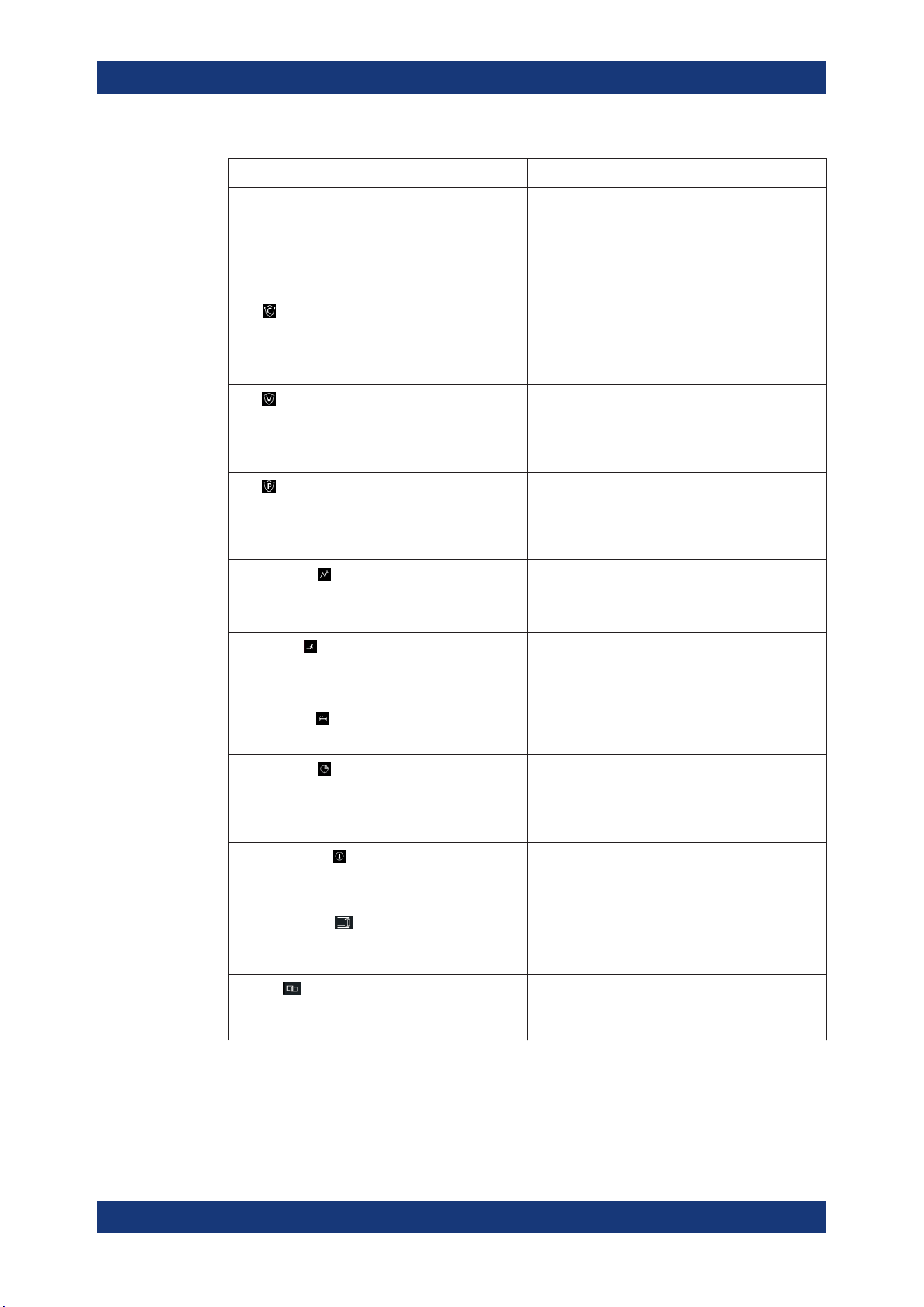
Channel status bar
Display Overview
Operating Basics
R&S
®
NGP800
34User Manual 5601.5610.02 ─ 04
Function Description
Channel number Channel number indication.
Operation mode The R&S NGP800 has two operating modes:
●
CV: Constant voltage mode
●
CC: Constant current mode
See
Chapter 5.5, "Operation Modes", on page 45.
OCP
If enabled, the icon is highlighted in white.
If triggered, the icon blinks.
See Chapter 6.4.1, "Overcurrent Protection (OCP)",
on page 54.
OVP
If enabled, the icon is highlighted in white.
If triggered, the icon blinks.
See Chapter 6.4.2, "Overvoltage Protection (OVP)",
on page 54.
OPP
If enabled, the icon is highlighted in white.
If triggered, the icon blinks.
See Chapter 6.4.3, "Overpower Protection (OPP)",
on page 55.
Arbitrary mode
If enabled, the icon is highlighted in white.
If active, the icon blinks.
See Chapter 6.7.1, "QuickArb", on page 62.
Ramp mode
If enabled, the icon is highlighted in white.
If active, the icon blinks.
See Chapter 6.7.2, "EasyRamp", on page 65.
"Safety Limits"
If enabled, the icon is highlighted in white.
See Chapter 6.4.4, "Safety Limits", on page 56.
"Output Delay"
If enabled, the icon is highlighted in white.
The delay is the time between activation of the out-
put and applying voltage to the output.
See Chapter 6.2.1, "Output", on page 49.
Adjustment mode
If user adjustment is active, the icon is highlighted in
red.
See Chapter 6.17, "Adjustment", on page 88.
Sense connection
If sense connection is detected, the icon is highligh-
ted in white.
See Chapter 6.2.1, "Output", on page 49.
Tracking
If tracking is enabled, the icon is highlighted in
white.
See Chapter 6.5, "Tracking Function", on page 57.
Display Overview
Operating Basics
R&S
®
NGP800
35User Manual 5601.5610.02 ─ 04
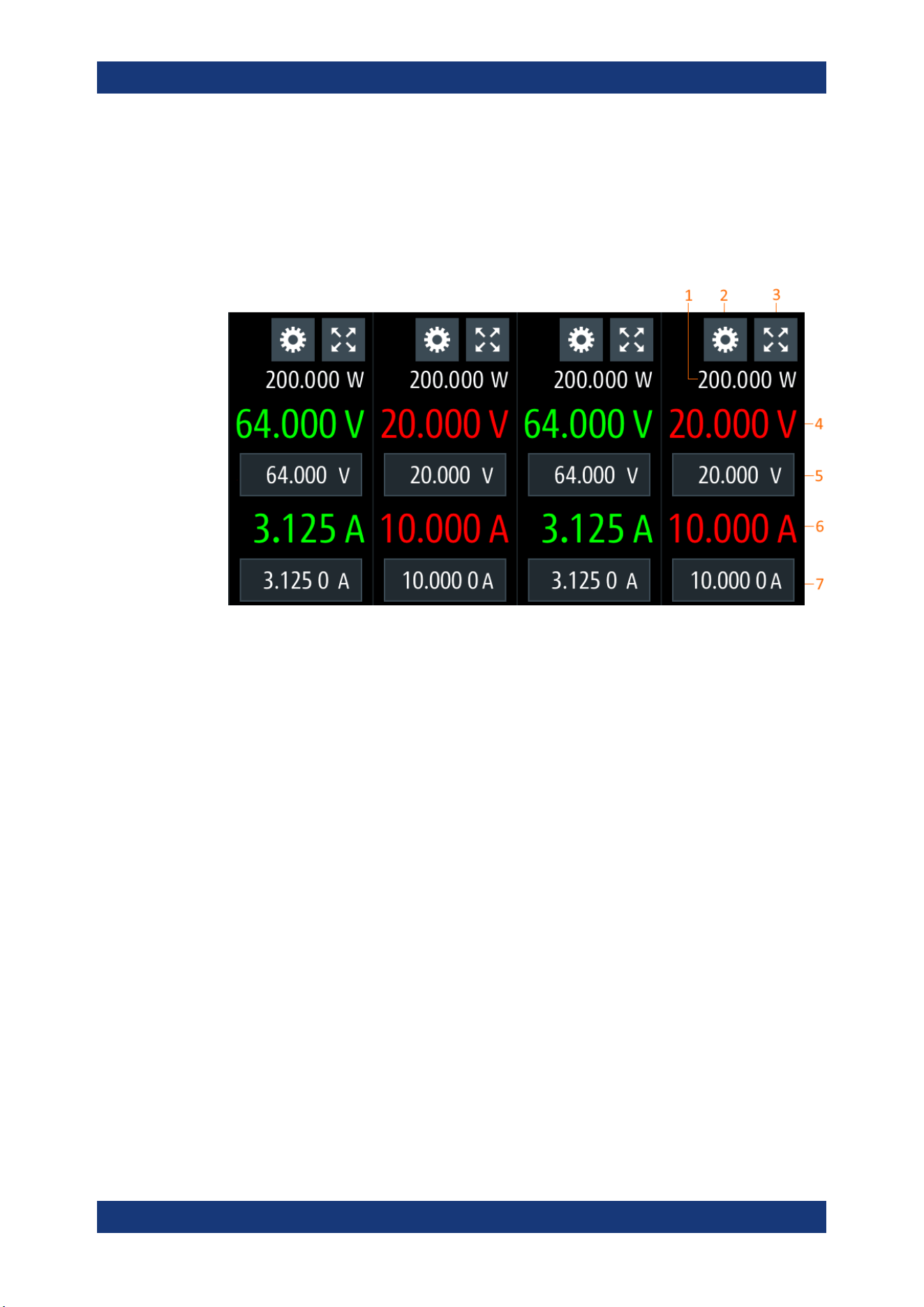
5.1.2 Channel Display Area
The R&S NGP800 displays four channels display area (Ch 1, Ch 2, Ch 3, Ch 4) for
NGP804, NGP824, NGP814 and two channels display area (Ch 1, Ch 2) for NGP802,
NGP822. The respective channel settings and functions are displayed for each chan-
nel.
Figure 5-2: Channel display area for 4-channel model
1 = Output power displays in watt
2 = "Settings" button opens instrument main menu window. Long-press on the button opens the graphical
view window for measurements
3 = "Expand/Collapse" button toggles between home window and channel overview window
4 = Output voltage displays in volt with display resolution of three decimal points
5 = Set voltage level
6 = Output current displays in ampere with display resolution of four decimal points
7 = Set current level
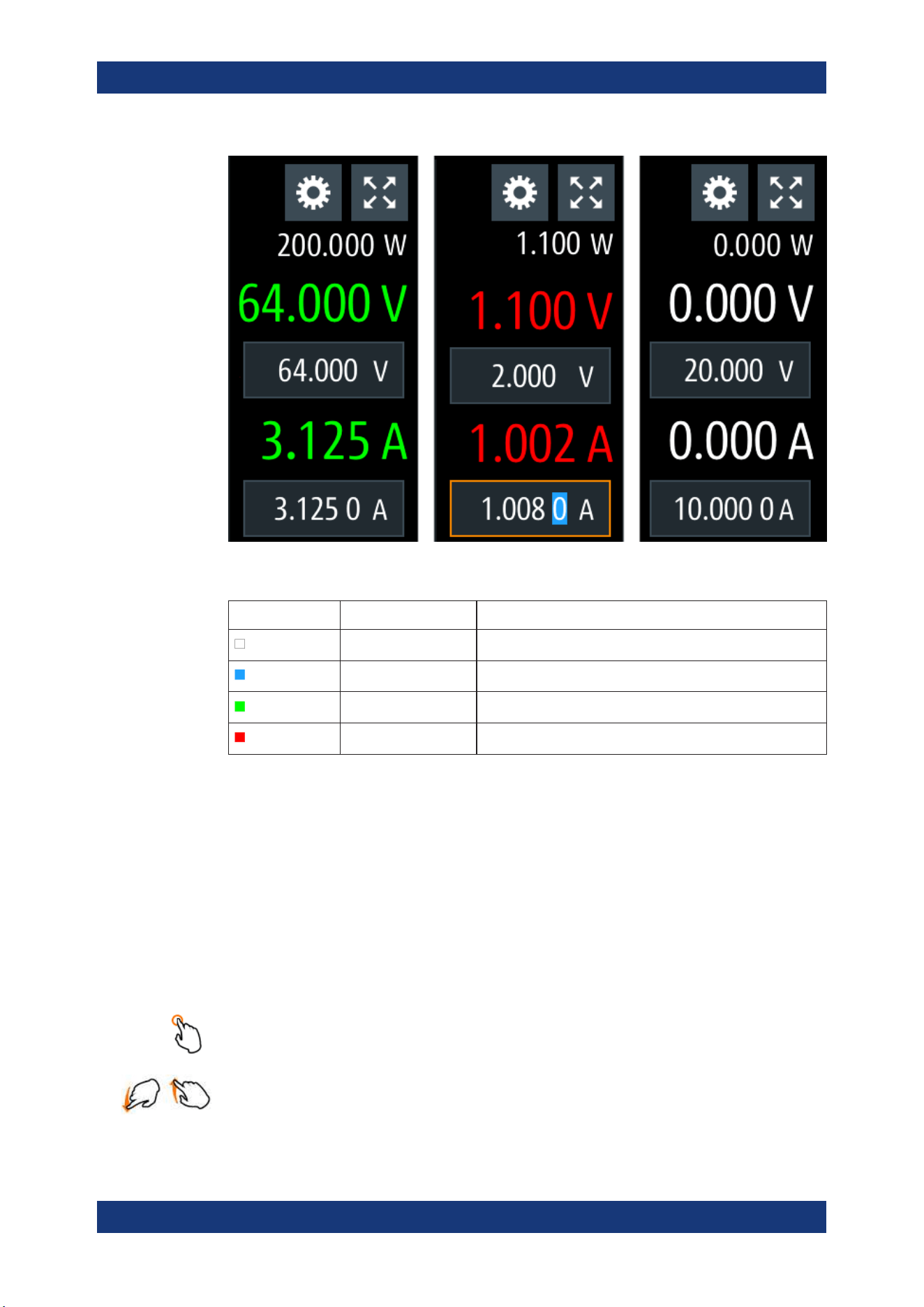
Operating mode
Different font colors on the screen are used to differentiate the various output status
and operating conditions of the instrument. It is easy to know and confirm the different
output status and operating conditions of the instrument by looking at the colors.
Display Overview
Operating Basics
R&S
®
NGP800
36User Manual 5601.5610.02 ─ 04
Figure 5-3: Color coding of difference operating conditions
Color Operating mode Description
OFF mode Output is OFF
Editing mode A solid blue cursor is shown when an item is selected.
CV mode Active outputs are operated in a constant voltage mode.
CC mode Active outputs are operated in a constant current mode.
5.2 Using the Touchscreen
The R&S NGP800 provides a touch-sensitive screen. Touch can be disabled (see
Chapter 6.8, "User Key", on page 66) in the instrument settings. The following illus-
trates the touchscreen gestures and highlight the different touchscreen features that
can be performed on the instrument.
5.2.1 Using Gestures
Tap
Tap on the screen to select or toggle the value.
Swipe up and down
Swipe up to scroll down, swipe down to scroll up in the menu.
Using the Touchscreen
Operating Basics
R&S
®
NGP800
37User Manual 5601.5610.02 ─ 04
5.2.2 Accessing Functionality in the Home Window
The following illustrates various ways of accessing functions in the home window.
5.2.2.1 Settings Button
The "Settings" button navigates to the device/channel menu window where you can set
device or individual channel settings on the instrument.
Long-press on the "Settings" button brings you to the
graphical view window for mea-
surements. For more information, see
Chapter 6.12, "Graphical View Window",
on page 70.
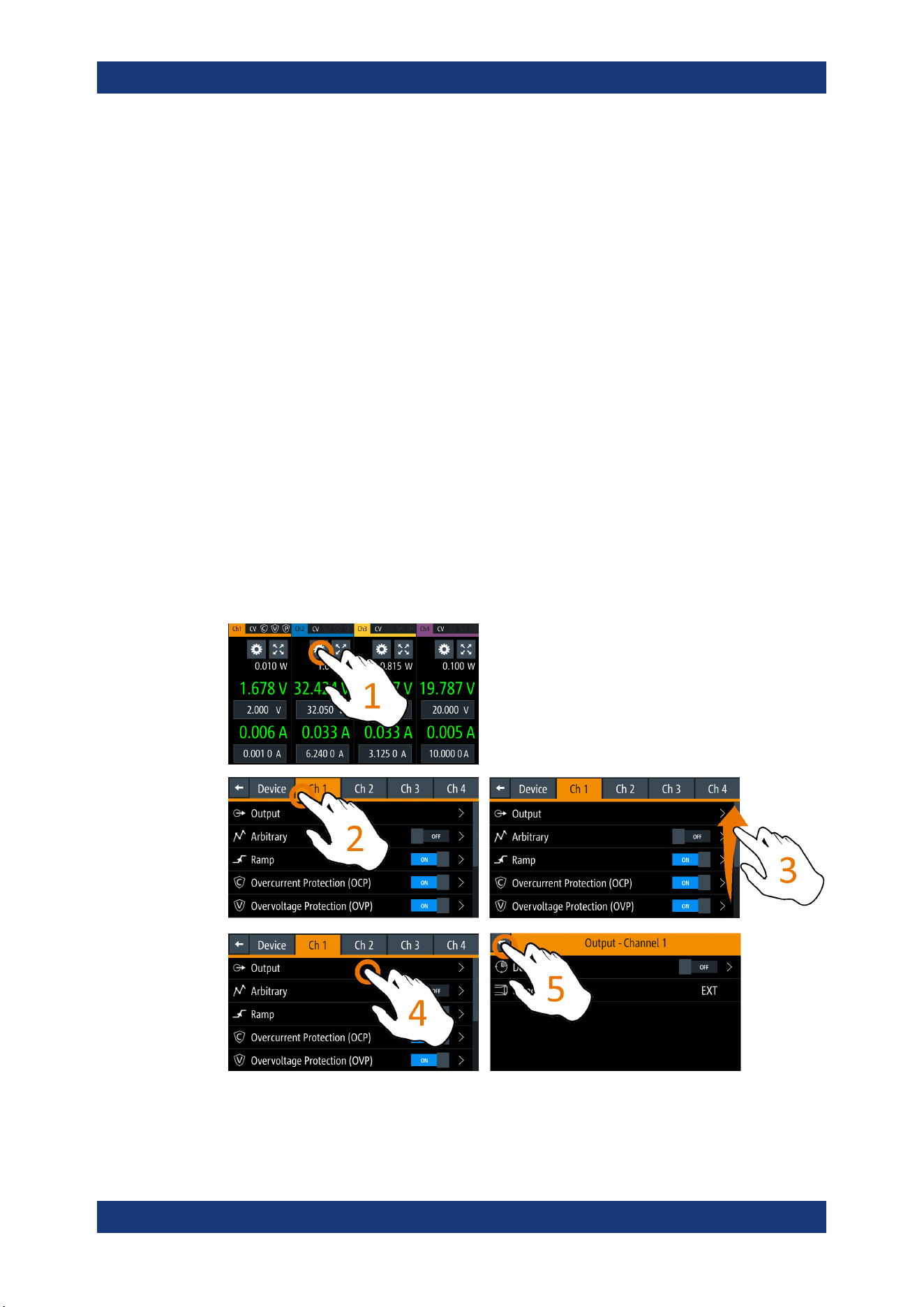
1. Select the "Settings" button.
The R&S NGP800 displays device/channel menu window.
2. Select "Device" or respective channel tab ("Ch 1", "Ch 2", "Ch 3" or "Ch 4") to open
the menu.
3. Swipe up or down for the available items in the menu.
4. Select the required items to configure the settings.
5. Select the back arrow key or press [Back] key to close the menu.
Figure 5-4: Navigation on home window > device/channel menu window
Using the Touchscreen
Operating Basics
R&S
®
NGP800
38User Manual 5601.5610.02 ─ 04
5.2.2.2 Voltage and Current Inputs
You can directly change the voltage and current level in the respective channel display
area.
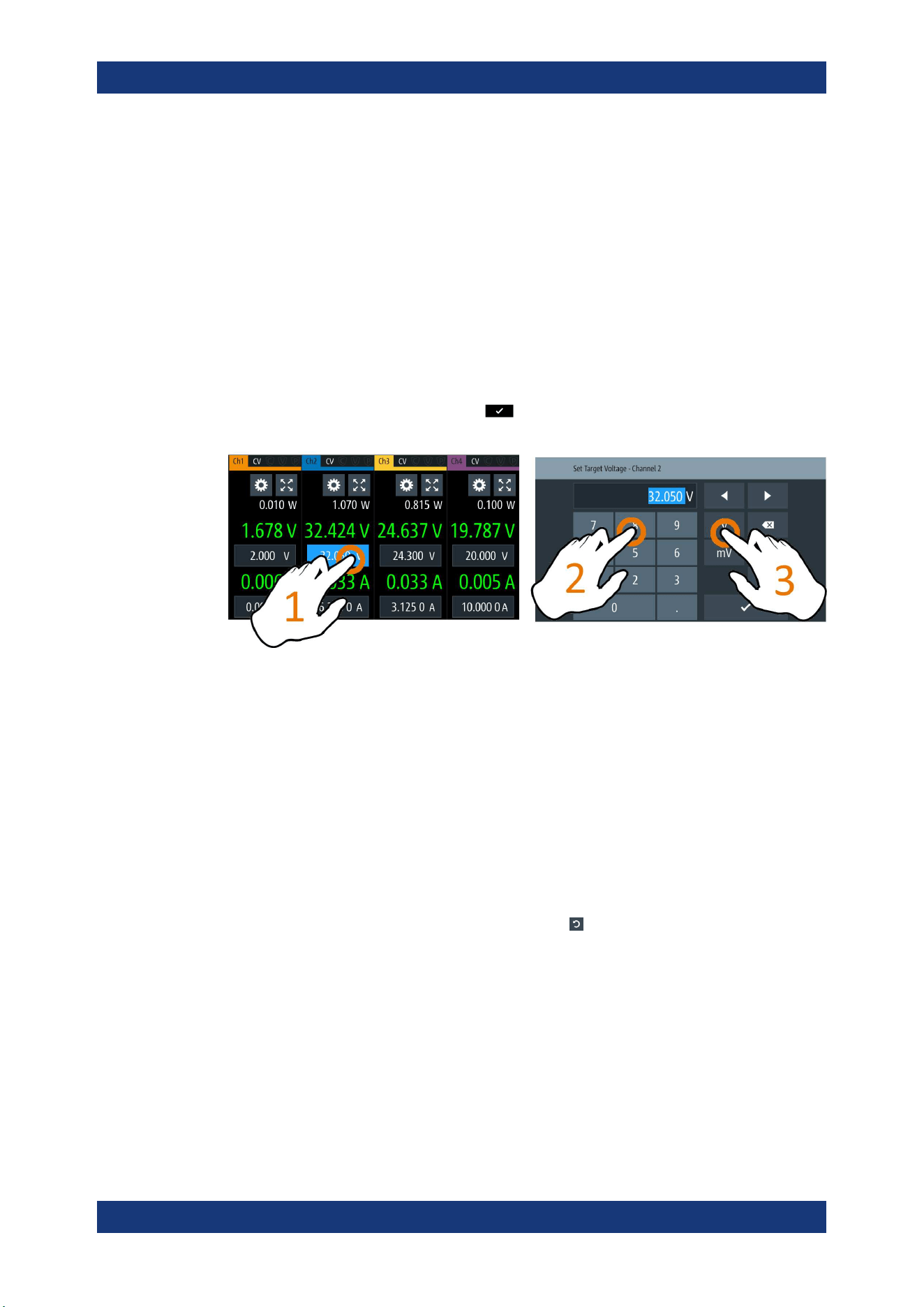
1. Select the voltage or current field in the channel display area to set value.
The R&S NGP800 displays the on-screen keypad to enter value.
2. Set the required value.
See
Chapter 5.2.3, "Input Data", on page 39.
Note: The value is set within the value configured in the "Safety Limits" dialog.
3. Confirm value by selecting a unit key.
Alternatively, select the enter key
to confirm your value.
Figure 5-5: Set voltage and current in home window
5.2.2.3 Expand/Collapse Button
You can expand the selected channel window by using the "Expand/Collapse" button.
The "Expand/Collapse" icon changed when toggled.
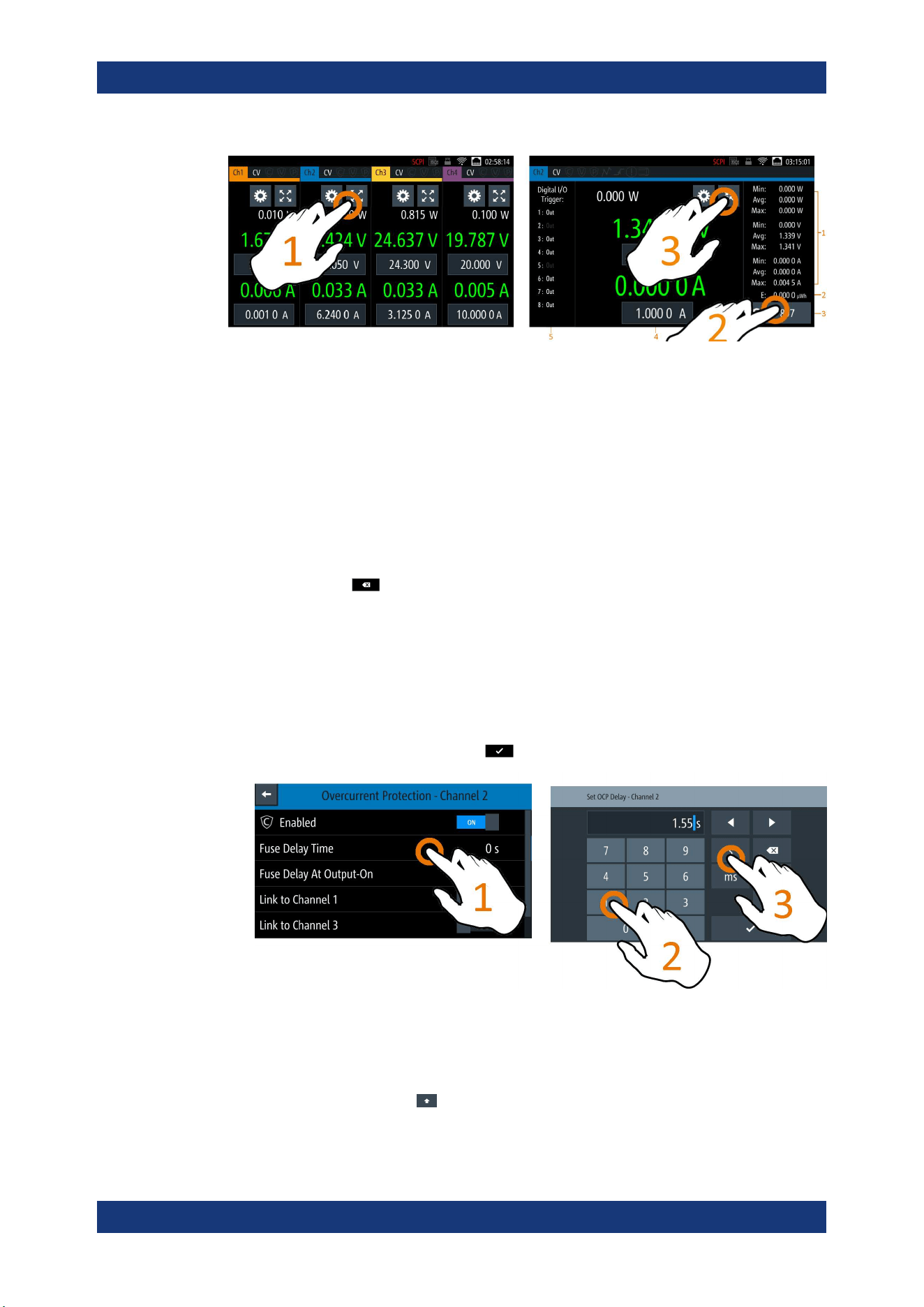
1. Select the "Expand/Collapse" button.
The R&S NGP800 expands the selected channel to a full screen displaying the sta-
tistics ("Min", "Avg" and "Max" values of power, voltage and current readings,
energy calculation and count of samples recorded).
2.
To reset the statistics, select the reset button,
.
The statistics values are reset to zero.
Note: The statistics provides valid data for up to 365 days of continuous operation,
after which the statistics will be reset to zero.
3. Select the "Expand/Collapse" button to revert to the home window.
Using the Touchscreen
Operating Basics
R&S
®
NGP800
39User Manual 5601.5610.02 ─ 04
Figure 5-6: Display of channel overview window
1 = Minimum, maximum and average values for power, voltage and current
2 = Calculation of energy result
3 = Number of samples collected
4 = Channel display area of selected channel
5 = Digital I/O trigger of selected channel
5.2.3 Input Data
The R&S NGP800 provides an on-screen keypad for you to enter numerical values.
Use the back key
on the on-screen keypad to cancel input of the numerical
entries.
1. Select a menu item to enter the numeric value.
The R&S NGP800 displays the on-screen keypad.
2. Enter the required value.
3. Confirm value with the unit key.
Alternatively, select the enter key
to confirm your value.
Figure 5-7: Enter numerical value and unit
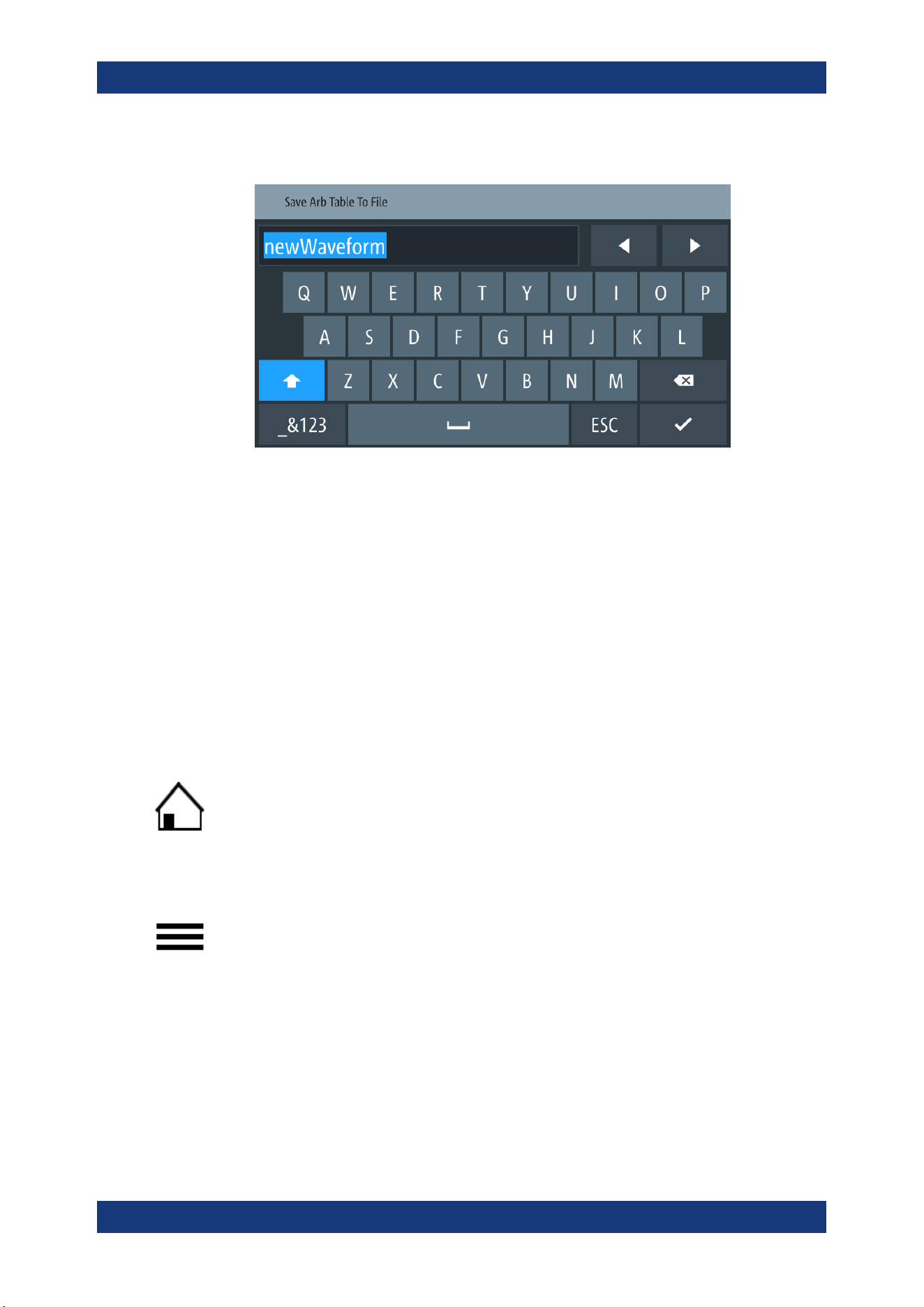
For alphanumeric input, the on-screen keypad works the same way.
1.
Select the "Caps Lock"
key to switch between capital letters and small letters.
The "Caps Lock" key is highlighted in blue.
Using the Touchscreen
Operating Basics
R&S
®
NGP800
40User Manual 5601.5610.02 ─ 04
2. Select "&123" or "ABC" key to switch between alphabet and numeric input data.
Figure 5-8: Alphanumeric input data
5.3 Front Panel Keys
For an overview of the front panel keys, see Figure 4-2.
5.3.1 Menu Controls
The menu controls keys provide navigation on the available menus in the instrument.
5.3.1.1 Home Key
The [Home] key navigates to the instrument home window. See the display of the
home window in
Figure 5-1.
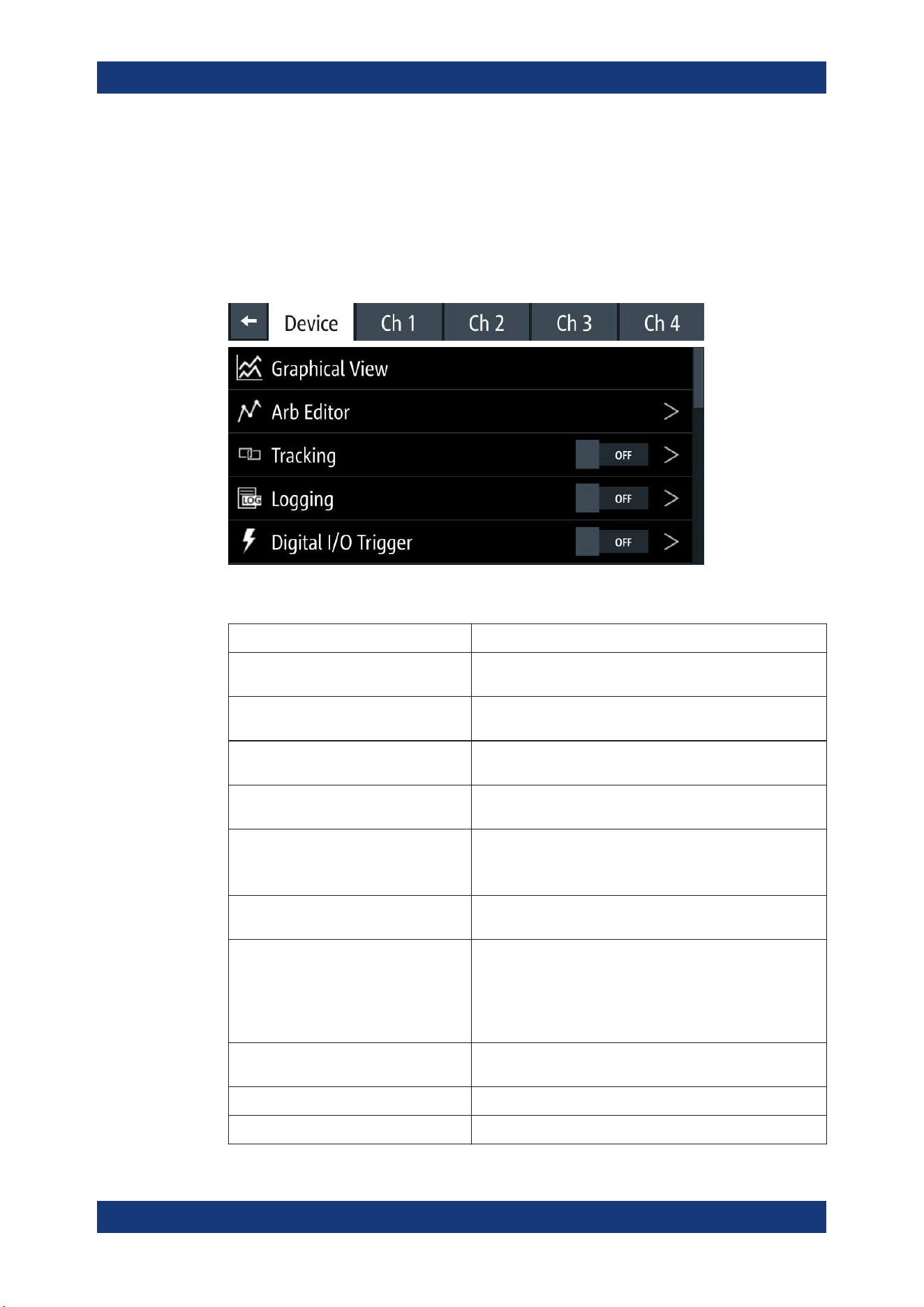
5.3.1.2 Settings Key
The [Settings] key navigates to the device/channel menu window which consists of the
"Device" menu and depending on the instrument variants, either two or four channels
("Channel 1", "Channel 2", "Channel 3", "Channel 4") menu.
Long-press on the [Settings] key also navigates to the graphical view window. For
more information, see
Chapter 6.12, "Graphical View Window", on page 70.
Device menu
The "Device" menu provides access to general instrument settings, file arrangement
and user key configuration. You can also obtain the instrument information via the
menu.
Front Panel Keys
Operating Basics
R&S
®
NGP800
41User Manual 5601.5610.02 ─ 04
1. Press [Home] key.
The R&S NGP800 displays the home window.
2. Select the "Settings" button on the required channel display area.
Alternatively, press [Settings] key.
3. Select the "Device" tab to access the device menu.
Figure 5-9: Device menu
Menu Description
"Graphical View" Graphical display of available data source (e.g. voltage, cur-
rent, etc.)
"Arb Editor" Programs the waveform of voltage and current settings for the
channel output.
"Tracking" Changes made on voltage and current are applied to the
tracked channels.
"Logging" Data logging on the instrument timestamp, voltage, current
and power.
"Digital I/O Trigger" Available only with option R&S NGP-K103
Configures the digital I/O pins trigger modes and its associ-
ated settings.
"File Manager" File transfer function between instrument internal memory and
USB stick.
"Interfaces" Wireless LAN is available only with option NGP-K102.
IEEE-488 (GPIB) interface is available only with option NG-
B105.
Configures the network (WLAN, Wireless LAN), USB interface
and GPIB address
"User Button" Configures the shortcut key action (e.g. screenshot, trigger,
toggle logging, reset statistics, toggle touch).
"Screenshot" Captures screen image of the instrument.
"CSV Settings" Configures the file formatting for CSV file.
Front Panel Keys
Operating Basics
R&S
®
NGP800
42User Manual 5601.5610.02 ─ 04
Menu Description
"Data & Time" Configures date, time and clock format of the instrument.
"Appearance" Configures brightness level for screen display and frontpanel
keys.
"Sound" Enables or disables beeper for trigger events (e.g. error, fuse
tripped, cc-mode continuous).
"Licenses" Displays license information and install license options.
"Device Information" Displays instrument information.
"Update Device" Performs firmware update on the instrument.
"Save/Recall Device Settings" File management on the instrument settings.
Resets instrument settings with factory default.
"Analog In Adjustment" Available only with option NGP-K107.
Provides user adjustment to the analog in connector (see
"Digital I/O & analog input connector (15)" on page 26).
Restore factory adjustment.
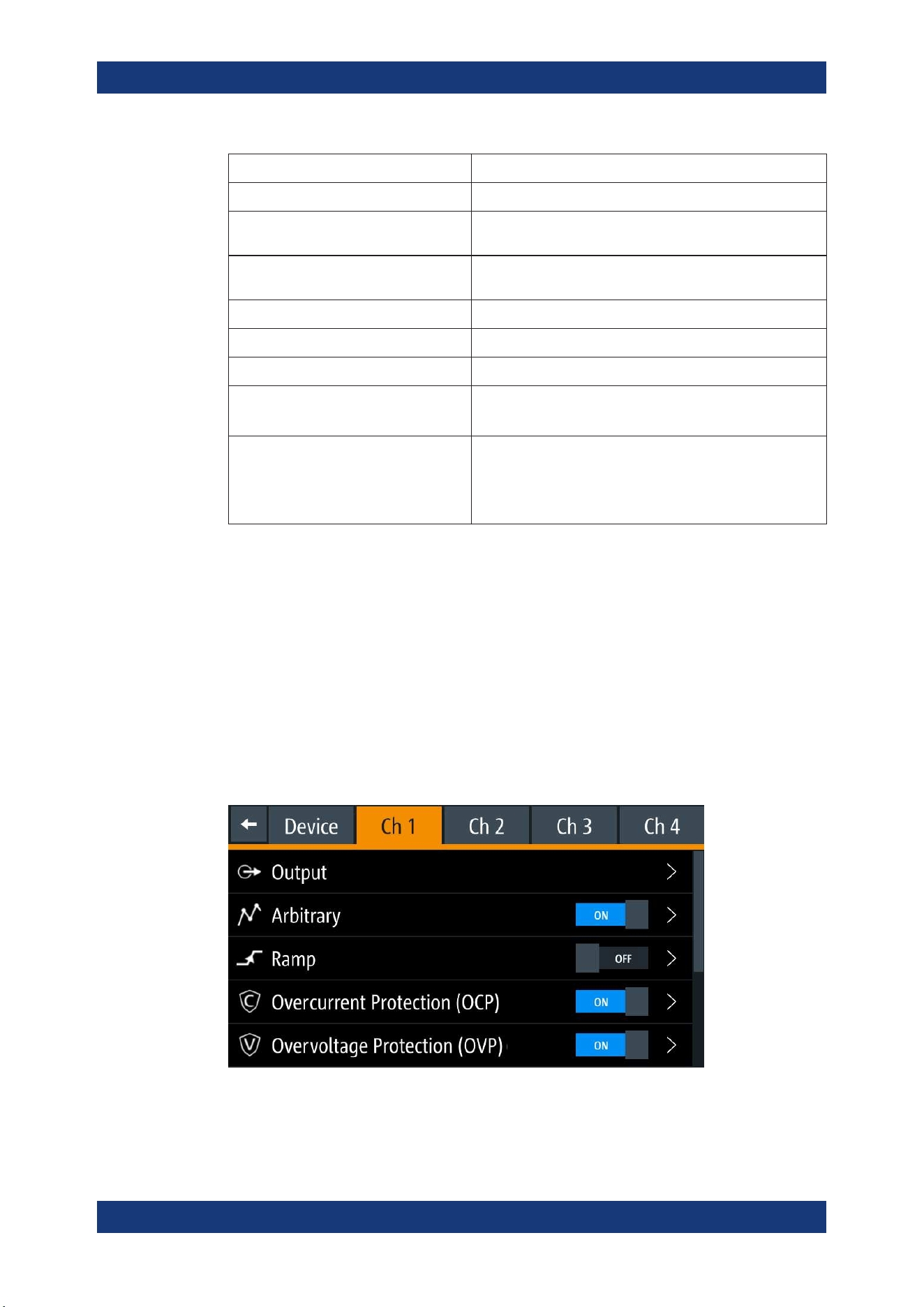
Channel menu
The "Ch 1", "Ch 2", "Ch 3" or "Ch 4" menu provides access to settings on channel out-
put, channel trigger conditions and output limit settings.
1. Press [Home] key.
The R&S NGP800 displays the home window.
2. Select the "Settings" button on the selected channel display area.
Alternatively, press [Settings] key to access the required channel menu.
3. Select the "Settings" button on the channel display area.
Alternatively, press [Settings] key to access the channel menu.
Figure 5-10: Channel 1 menu
Front Panel Keys
Operating Basics
R&S
®
NGP800
43User Manual 5601.5610.02 ─ 04
Menus Description
"Arbitrary" Configures the arbitrary sequence, sequence repeatability
response and the sequence ending behavior.
"Ramp" Configures the ramping time applied on the channel output.
"Overcurrent Protection (OCP)" Configures OCP protection settings ("Blowing Delay", "Initial
Delay" and linking channel) for the instrument.
"Overvoltage Protection (OVP)" Configures OVP protection settings (OVP level) for the instru-
ment.
"Overpower Protection (OPP)" Configures OPP protection settings (OPP power) for the
instrument.
"Analog Input" Available only with option NGP-K107.
Analog input voltage applied at the rear panel is used to regu-
late the output settings for voltage or current.
"Adjustment" Available only with option NGP-K107.
Perform channel adjustment.
Restore factory adjustment.
"Safety Limits" Configures the voltage and current limit of the channel output.
5.3.1.3 User Key
The [*] key provides a shortcut function to one of the followings:
●
screenshot
●
trigger
●
data logging
●
reset statistics
●
toggle touchscreen input
The shortcut key is configurable in the "Device" > "User Button" menu. See
Chap-
ter 6.8, "User Key"
, on page 66.
5.3.2 Navigation Controls
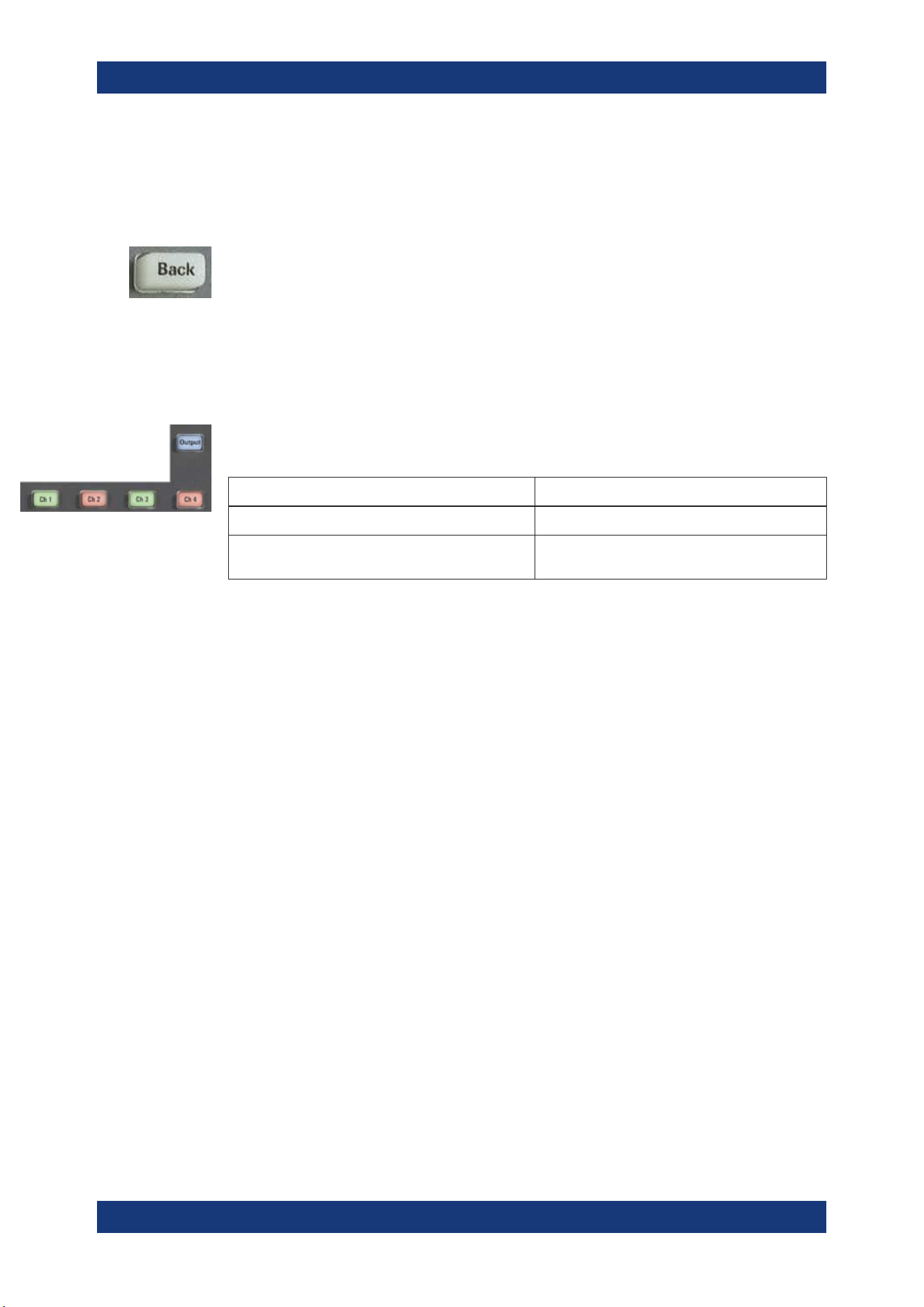
Navigation in the menu and setting of values can be done via rotary knob and [Back]
key.
Rotary knob
The rotary knob has several functions:
●
Increments (clockwise direction) or decrements (counter-clockwise direction) any
kind of numeric value when in editing mode
●
Navigates up (clockwise direction) or down (counterclock-wise direction) the menu
or menu items when rotated
Front Panel Keys
Operating Basics
R&S
®
NGP800
44User Manual 5601.5610.02 ─ 04
●
When pressed and rotated, the rotary knob navigates along the set voltage or cur-
rent position in the home window
[Back] key
Using the [Back] key, you can do several things:
●
Navigate to the previous menu window
●
Close or discard changes made on the on-screen keypad
●
Close the instrument pop-up messages
5.3.3 Output and Channel Controls
Depending on the instrument models, up to 4-channel keys control the channel output
settings of the instrument.
Function keys Description
[Ch 1], [Ch 2], [Ch 3], [Ch 4] Selects the respective channel for output.
[Output] Master output switch - it turns output for all
selected channels on or off.
5.4 Output Power Auto Ranging
The R&S NGP800 power supply series provides a maximum output power of 200 W
for each channel. Depending on the power supply models, up to 800 W of output
power is provided for models with four identical channels with a continuous voltage
range of 0 V to 32 V or 64 V.
Combination of the set voltage and current limit results in the following output perfor-
mance graph.
Output Power Auto Ranging
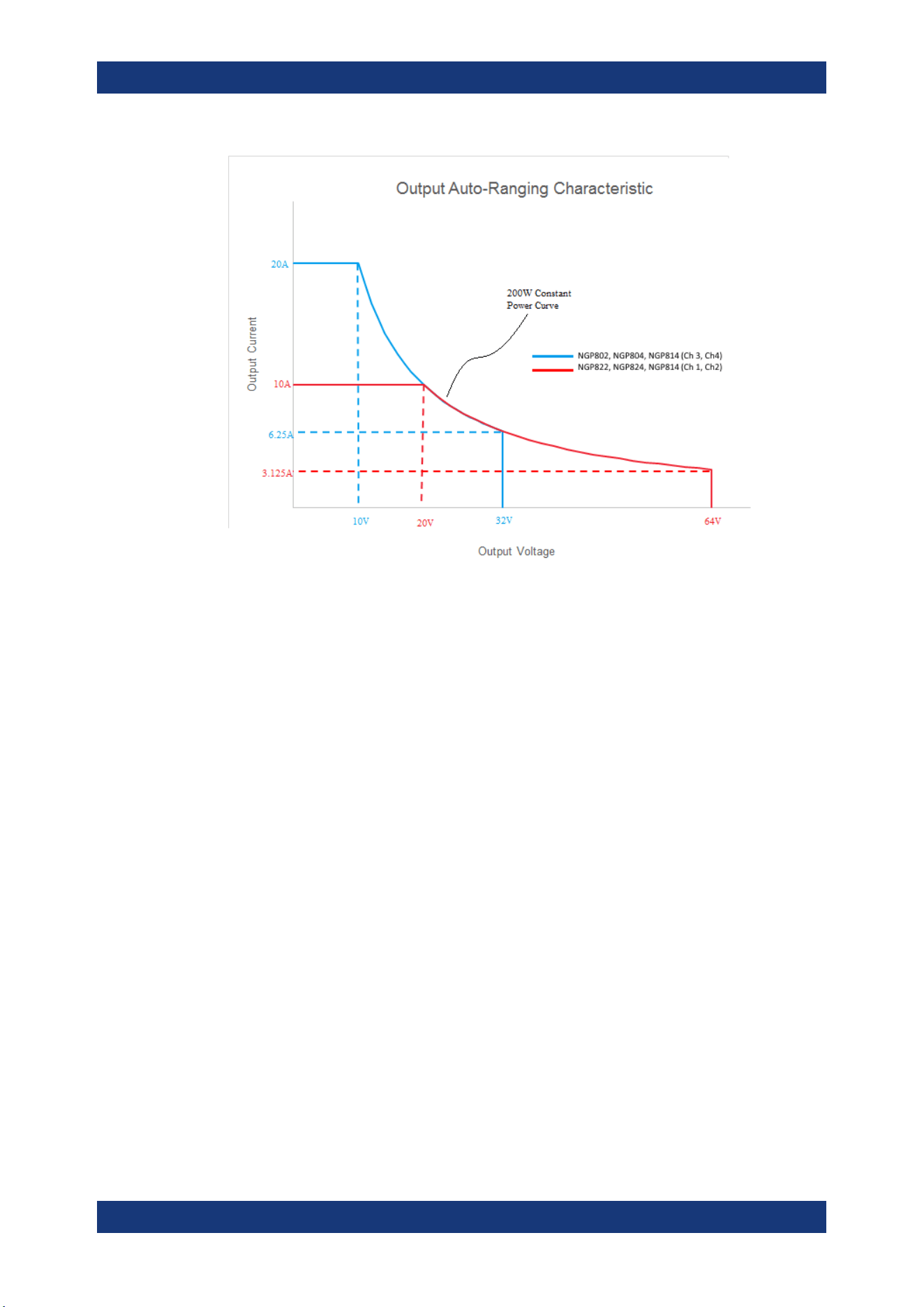
Operating Basics
R&S
®
NGP800
45User Manual 5601.5610.02 ─ 04
Figure 5-11: Output performance graph
According to the electrical basis formula for power (P) = current (I) x voltage (V), the
following results for the maximum power per channel:
●
NGP802, NGP822: 200 W per channel (400 W max for the combination of two
channels)
●
NGP804, NGP824, NGP814: 200 W per channel (800 W max for the combination
of four channels)
5.5 Operation Modes
The R&S NGP800 operates in two different modes, i.e. CV and CC. The instrument
switches automatically between CV and CC depending on the connected load.
CV mode
Figure 5-12 shows that if the instrument is in the range of voltage regulation, the output
voltage V
out
remains constant while the current may increase to its maximum value I
max
when the connected load is increasing. In CV mode, the font text in the channel display
area changes to green.
See Figure 5-3.
Operation Modes
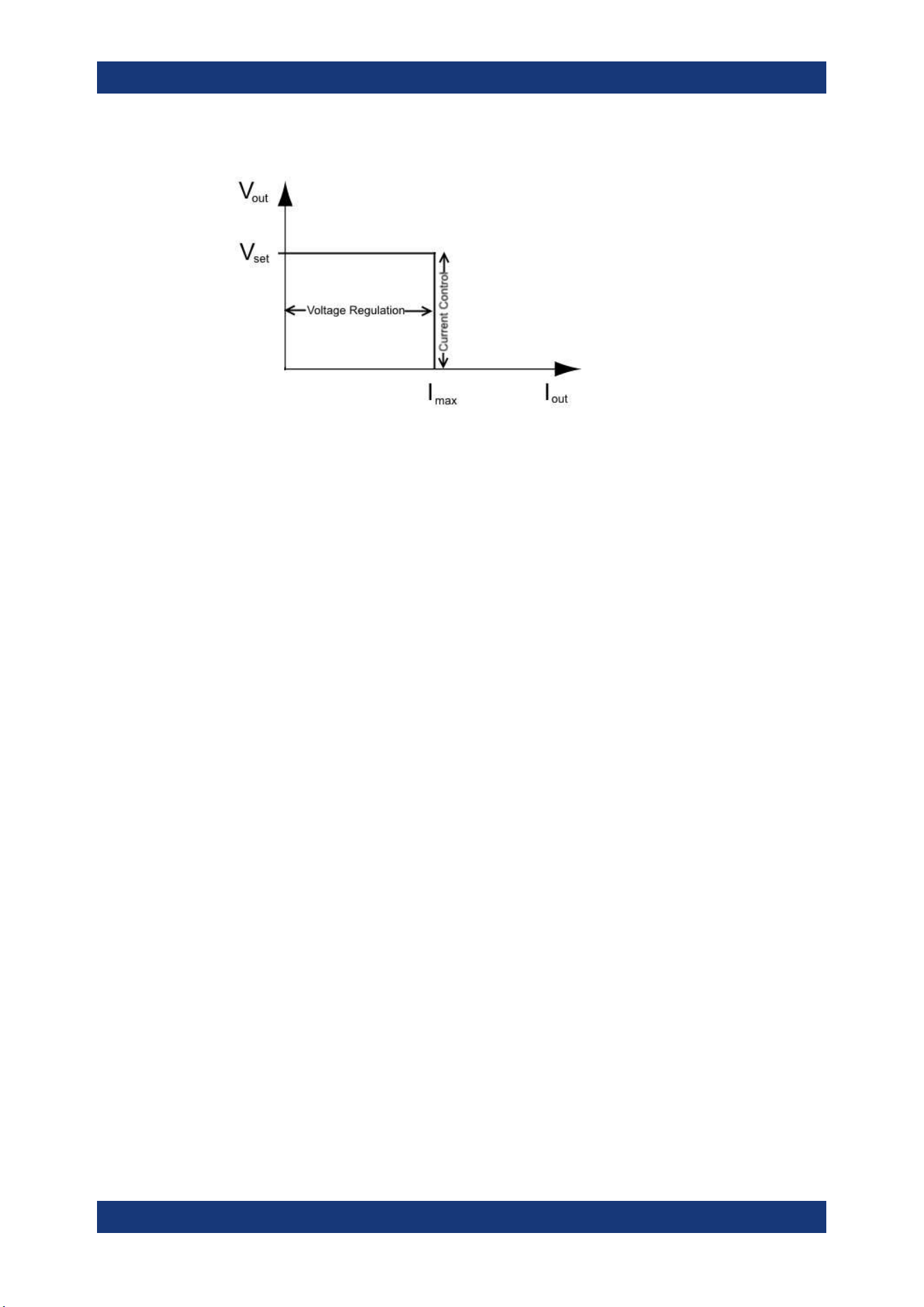
Operating Basics
R&S
®
NGP800
46User Manual 5601.5610.02 ─ 04
Figure 5-12: Current limit
CC mode
The current I
max
corresponds to the current setting adjustable in the instrument.
If I
out
reaches I
max
, the instrument switches to CC mode, i.e. the output current remains
constant and limited to I
max
even if the load increases. Instead, the output voltage V
out
decreases to almost zero with a short circuit. In CC mode, the font text in the channel
display area changes to red.
See
Figure 5-3.
Operation Modes
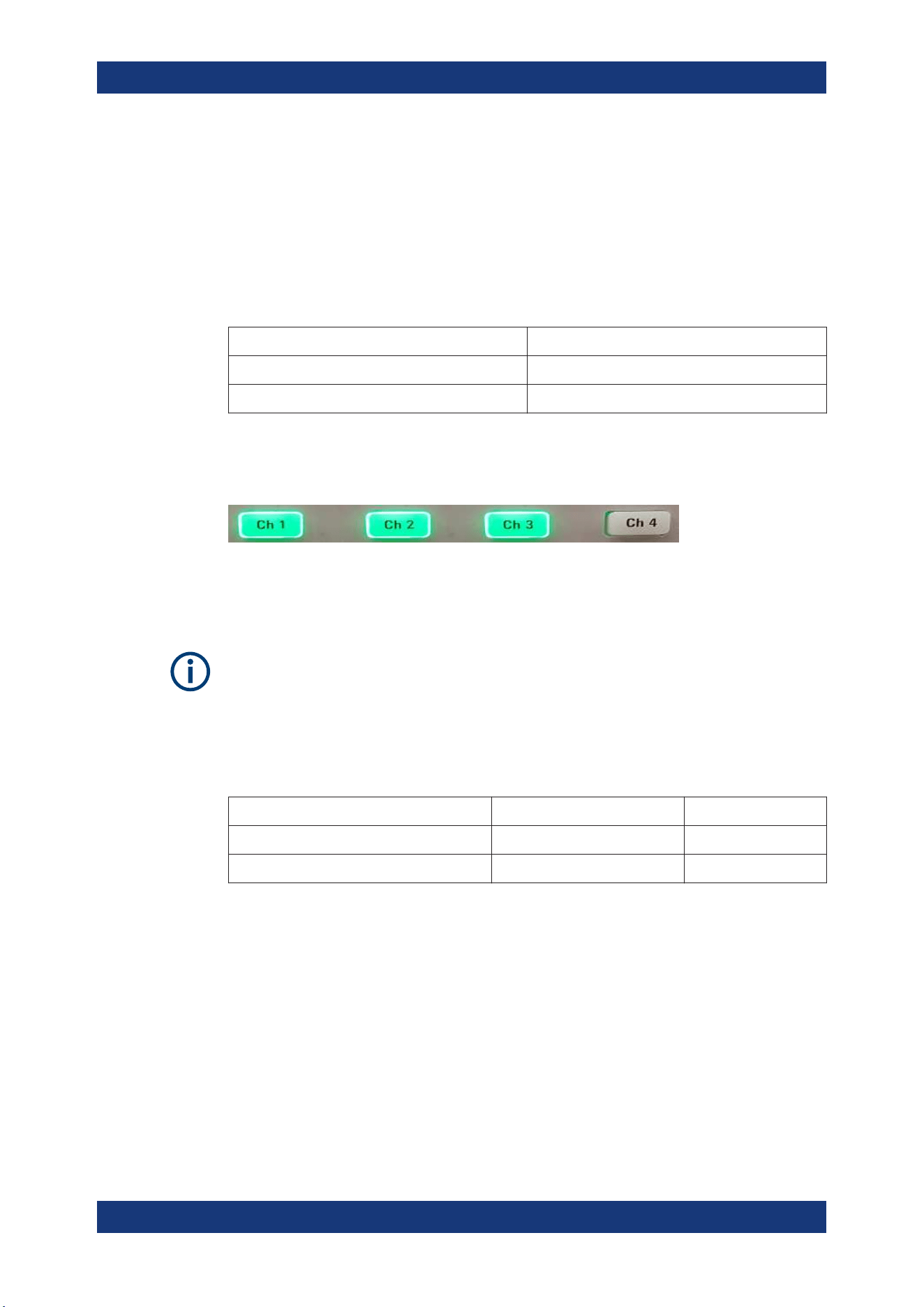
Instrument Functions
R&S
®
NGP800
47User Manual 5601.5610.02 ─ 04
6 Instrument Functions
6.1 Setting the Channels Voltage and Current
The R&S NGP800 comes with the following instrument models:
Models Channels
NGP802, NGP822 Ch 1, Ch 2
NGP804, NGP824, NGP814 Ch 1, Ch 2, Ch 3, Ch 4
Toggle the respective channel key ([Ch 1], [Ch 2], [Ch 3], [Ch 4] ) on the front panel to
select these channels. When a channel is selected, the respective channel key illumi-
nates.
Figure 6-1: Ch 1, Ch 2, and Ch 3 key illuminates when selected
Set output voltage and current
Voltage, current settings
If
Analog input or QuickArb function of a selected channel is enabled, the respective
channel voltage or current setting is disabled.
Depending on the instrument models, the R&S NGP800 adjusts the following voltage
and current values with a voltage step size of 1 mV and current step size of 0.5 mA.
Model Voltage Current
NGP802, NGP804, NGP814 (Ch 1, Ch 2) 0 V to 32.05 V 0 A to 20.01 A
NGP822, NGP824, NGP814 (Ch 3, Ch 4) 0V to 64.05 V 0 A to 10.01 A
The setting of current value corresponds to the I
max
of the respective channel. It is
advisable to set the current limit before operating the instrument to prevent damage to
the load and instrument in the case of malfunction such as a short-circuit.
1. Press [Home] key.
The R&S NGP800 displays the home window.
2. Set voltage or current in the home window.
The R&S NGP800 displays the on-screen keypad to set value.
3. Enter the required voltage or current value.
4. Confirm value with the unit key (V/mV or A/mA).
Setting the Channels Voltage and Current
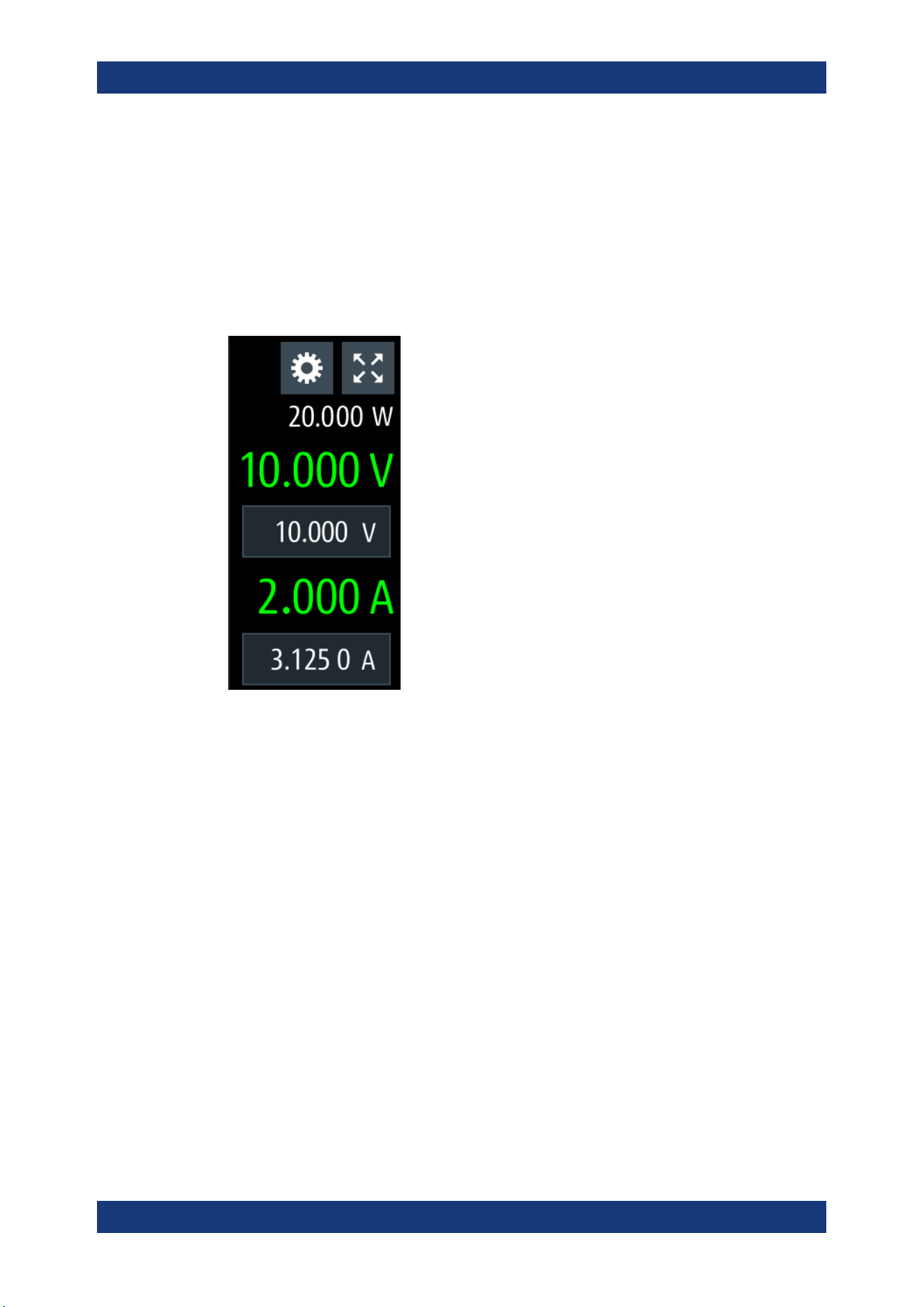
Instrument Functions
R&S
®
NGP800
48User Manual 5601.5610.02 ─ 04
5. Press the required channel key ([Ch 1], [Ch 2], [Ch 3] or [Ch 4]) on the front panel.
The selected channel key is illuminated. See Figure 6-1.
6. Press the [Output] key on the front panel.
The R&S NGP800 outputs the set voltage of the selected channel and displays the
corresponding values in the home window.
For more information on the operation modes, see
Chapter 5.5, "Operation
Modes", on page 45.
Figure 6-2: Voltage and current settings in the instrument
6.2 Activating the Channels Output
The outputs of all the channels (Ch 1, Ch 2, Ch 3, Ch 4) can be switched on or off by
toggling the [Output] key on the front panel.
By default, the output is turned off when the instrument is switched on.
1. Press the required channel key.
Selected channel key (Ch 1, Ch 2, Ch 3, Ch 4) illuminates.
2. Press [Output] key.
The R&S NGP800 outputs the set voltage of the selected channel.
Depending on the operating mode, the font text in the channel display area shows
green in CV mode and red in CC mode.
See
Chapter 5.5, "Operation Modes", on page 45.
See also Chapter 5.4, "Output Power Auto Ranging", on page 44.
Multiple outputs can be turned on or off at the same time.
Activating the Channels Output
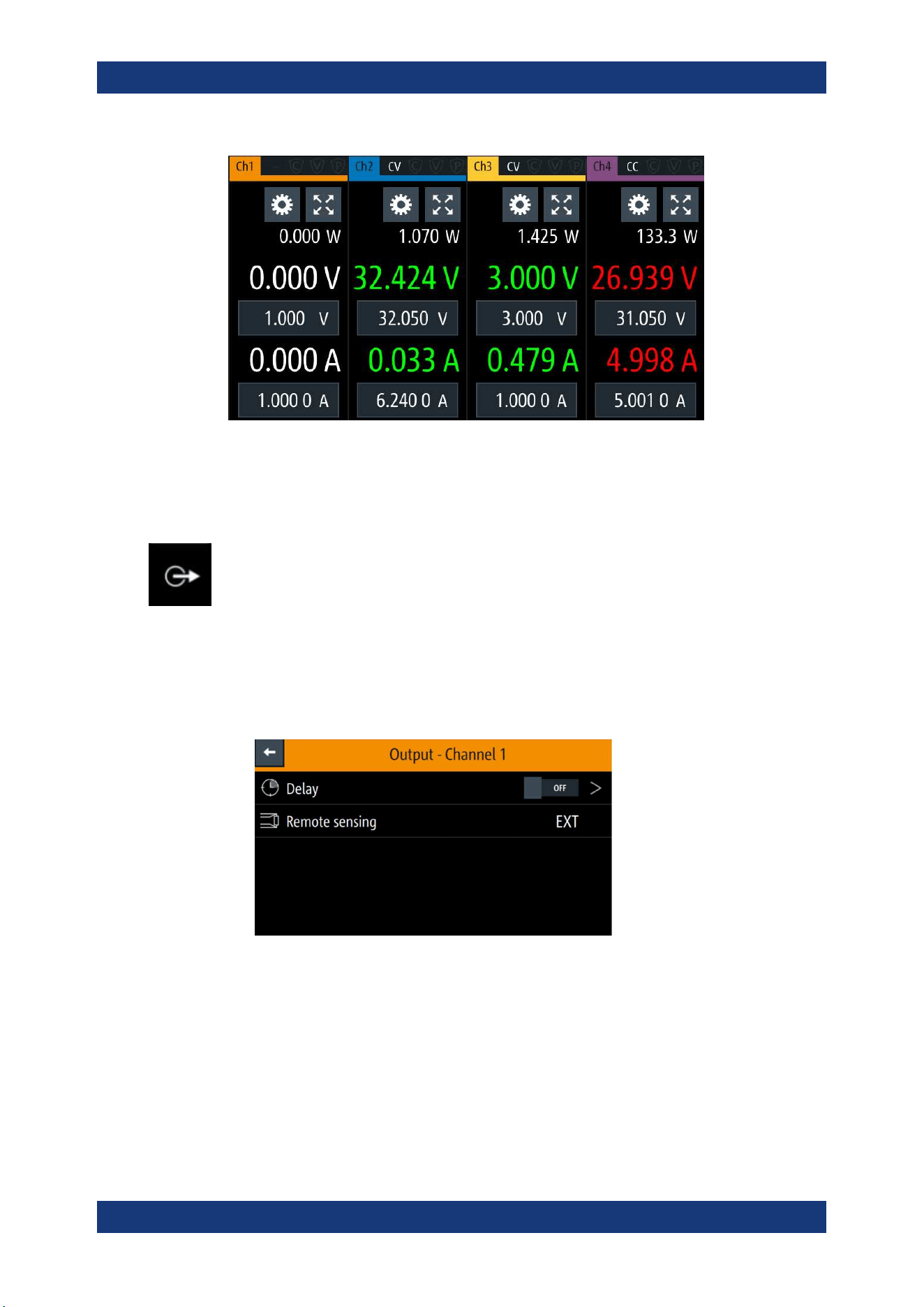
Instrument Functions
R&S
®
NGP800
49User Manual 5601.5610.02 ─ 04
Figure 6-3: Output channels in different operating modes
6.2.1 Output
The "Output" menu provides the settings for output delay and remote sensing mode.
1. Press [Settings] key.
The R&S NGP800 displays the device/channel menu window.
2. Select the required channel tab to apply output delay.
The R&S NGP800 displays the selected channel menu.
3. Select the "Output" menu item.
The R&S NGP800 displays the "Output" dialog.
6.2.1.1 Delay
1. Select the "Delay" menu item to configure the required values.
The R&S NGP800 displays the "Output Delay" dialog.
Activating the Channels Output
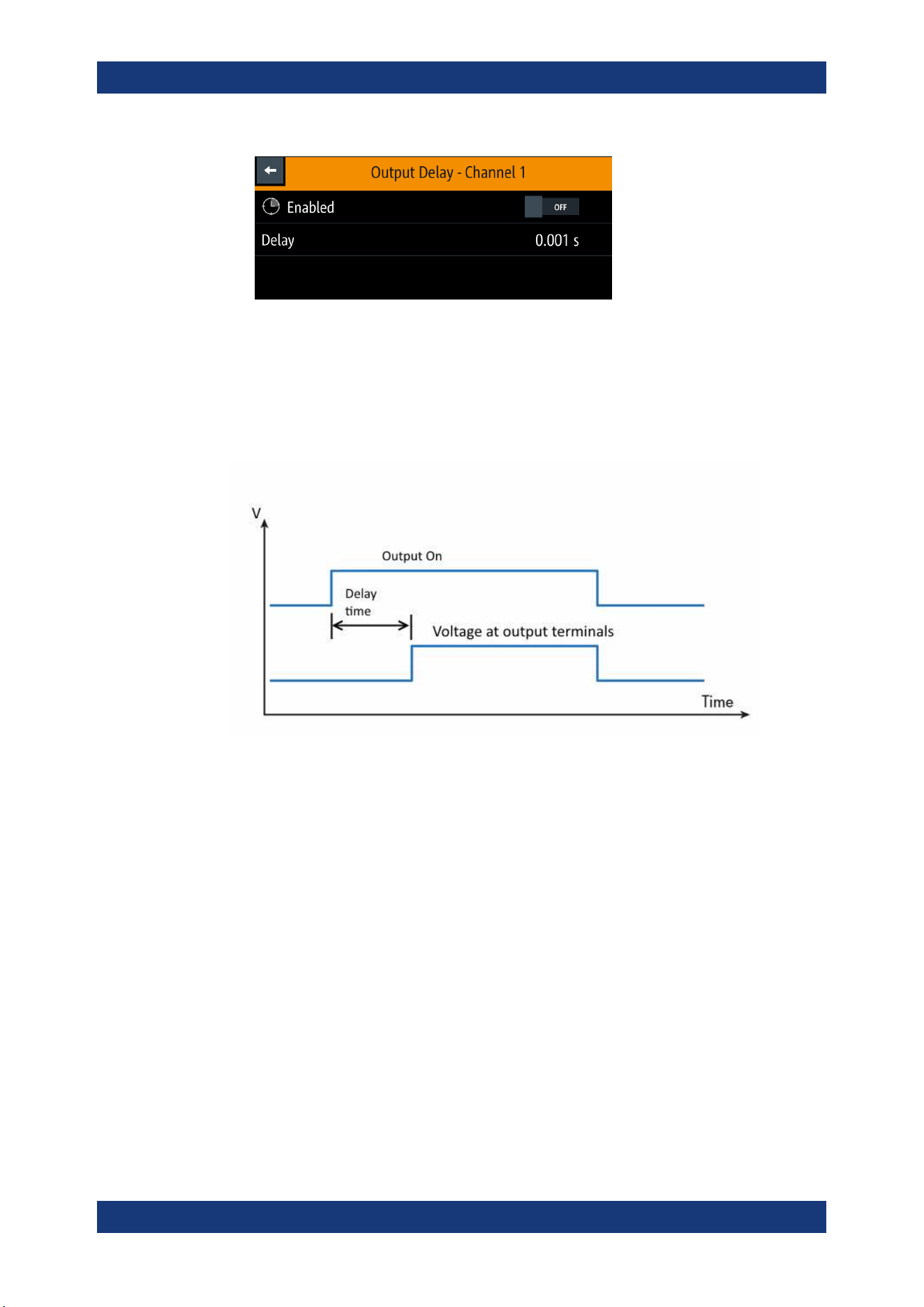
Instrument Functions
R&S
®
NGP800
50User Manual 5601.5610.02 ─ 04
2. Set the required value.
The R&S NGP800 displays the onscreen keypad for entry.
3. Confirm value with the unit keys.
The output delay is the time between the "Output On" event and the available voltage
at the output terminals. See
Figure 6-4.
Figure 6-4: Output delay at the output terminals
When the instrument output delay is activated, the front panel of the respective chan-
nel key (i.e [Ch 1], [Ch 2], [Ch 3], [Ch 4]) blinks in green and a "DLY" red text is dis-
played at the channel display area of the respective channel. See
Figure 6-5.
These operating behaviors resume to normal after the delay time.
Activating the Channels Output
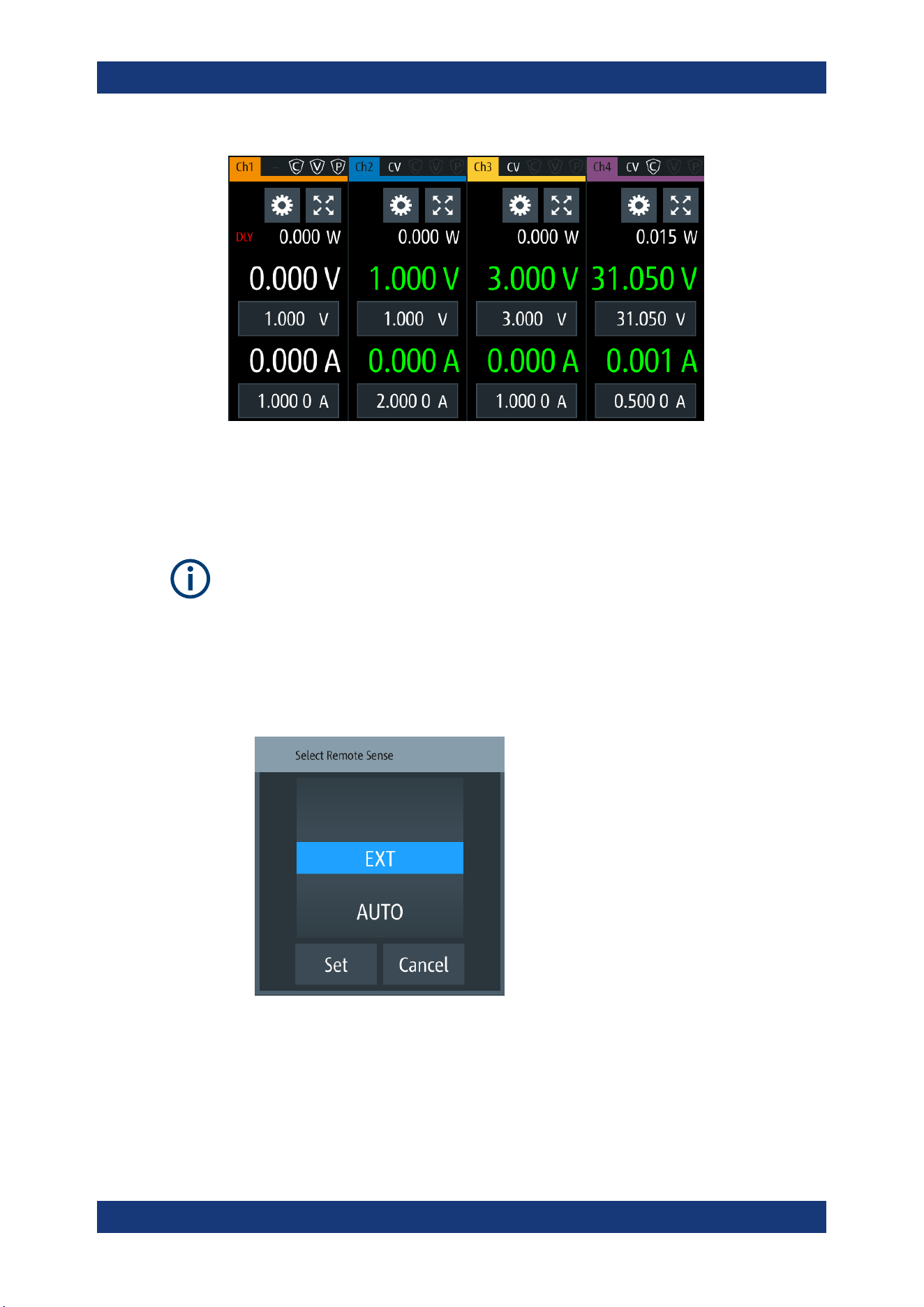
Instrument Functions
R&S
®
NGP800
51User Manual 5601.5610.02 ─ 04
Figure 6-5: Delay text at channel display area
6.2.1.2 Remote Sensing
For voltage setting < 1 V, setting of remote sensing mode to "EXT" is recommended.
The "Remote sensing" is a mechanism used to monitor and compensate the voltage
drops on the cables connected to the load.
1. Select "Remote sensing" menu item to configure the remote sensing mode.
The R&S NGP800 displays the "Remote sensing" dialog.
2. Select the required remote sensing mode.
● EXT: The internal voltage sense relay in the instrument is switched on and the
connection of remote sensing wires (S+, S- ) to the input of the load become
necessary. Failure to connect remote sense can cause overvoltage or unregu-
lated voltage output from the R&S NGP800. The voltage sensing relay remains
switched on even when output is turned off.
Activating the Channels Output
Instrument Functions
R&S
®
NGP800
52User Manual 5601.5610.02 ─ 04
● AUTO : The detection and enabling of the voltage sense relay automatically
kicks in when the connection of remote sensing wires (S+, S- ) to the input of
the load is applied. The voltage sensing relay is switched off when output is
turned off in this case.
3. Select "Set" to configure the remote sensing mode.
6.3 Analog Input
Instrument option
R&S NGP-K107 (P/N: 5601.6200.03) option is required for the "Analog Input".
Analog input
If "Analog Input" of a selected channel (voltage or current) is enabled, the respective
channel voltage or current setting is disabled.
See
Chapter 6.1, "Setting the Channels Voltage and Current", on page 47.
With "Analog Input", you can regulate the channel output (voltage or current) settings
with an input voltage of 0 V to 5 V.
Analog input mode NGP output for 64 V channels NGP output for 32 V chan-
nels
Voltage mode 0 V to 64 V 0 V to 32 V
Current mode 0 A to 10 A 0 A to 20 A
1. Press [Settings] key.
The R&S NGP800 displays the device/channel menu window.
2. Select the required channel tab to configure the analog input mode.
The R&S NGP800 displays the selected channel menu.
3. Select "Analog Input" from the menu.
The R&S NGP800 displays the selected "Analog Input" dialog.
Analog Input
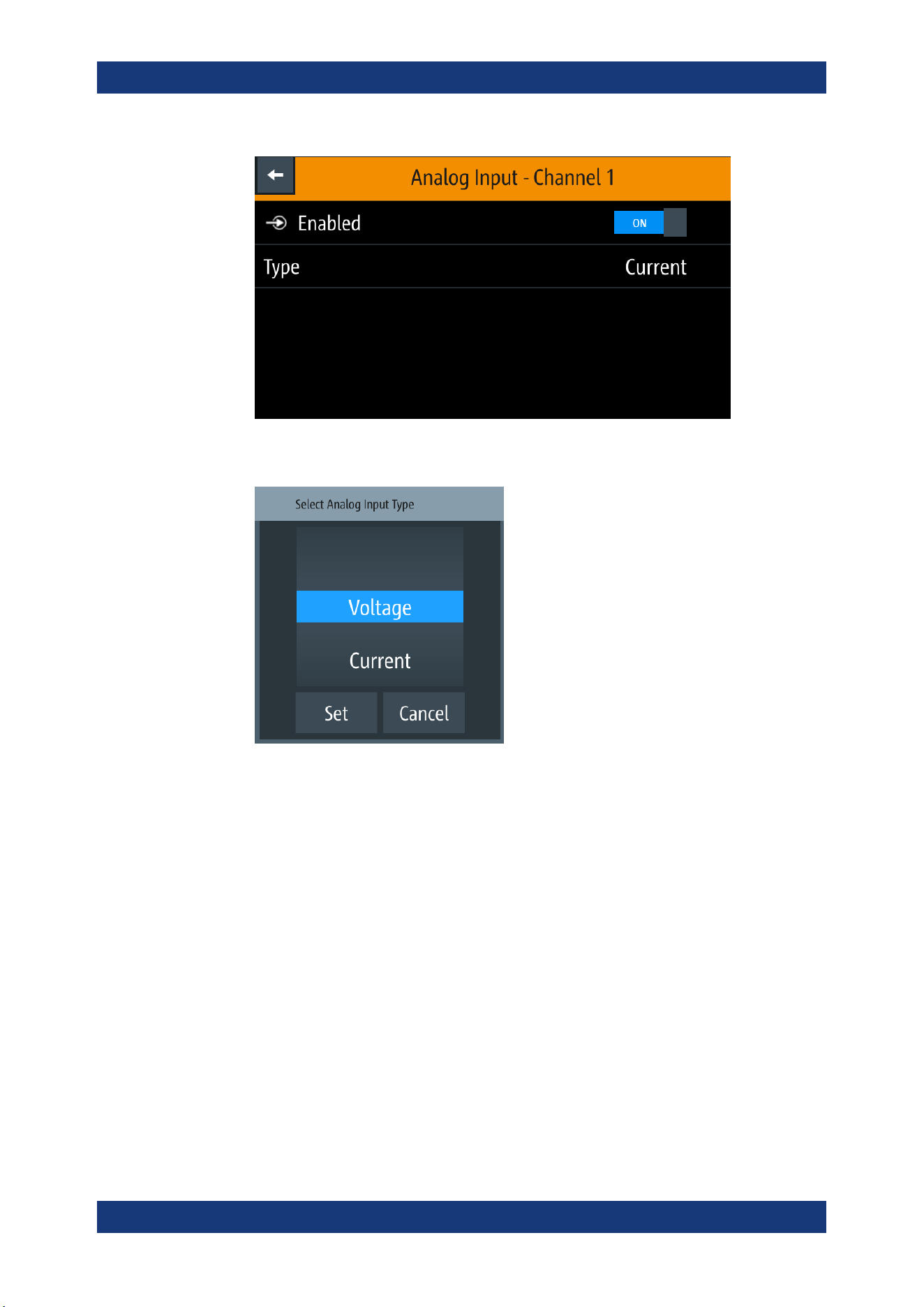
Instrument Functions
R&S
®
NGP800
53User Manual 5601.5610.02 ─ 04
4. Select the required type to regulate the channel output setting.
The R&S NGP800 displays the "Select Analog Input Type" dialog.
5. Activate the "Enabled" menu item.
The R&S NGP800 enables the "Analog in" input and disables the selected channel
settings (voltage or current).
6.4 Protection
There are various ways in which the R&S NGP800 protects itself and the connected
load from damage due to overvoltage, overcurrent and overpower drawn by the load
during testing.
1. Press [Settings] key.
The R&S NGP800 displays the device/channel menu window.
2. Select the required channel tab to configure the various protection dialogs.
The R&S NGP800 displays the selected channel menu.
Protection
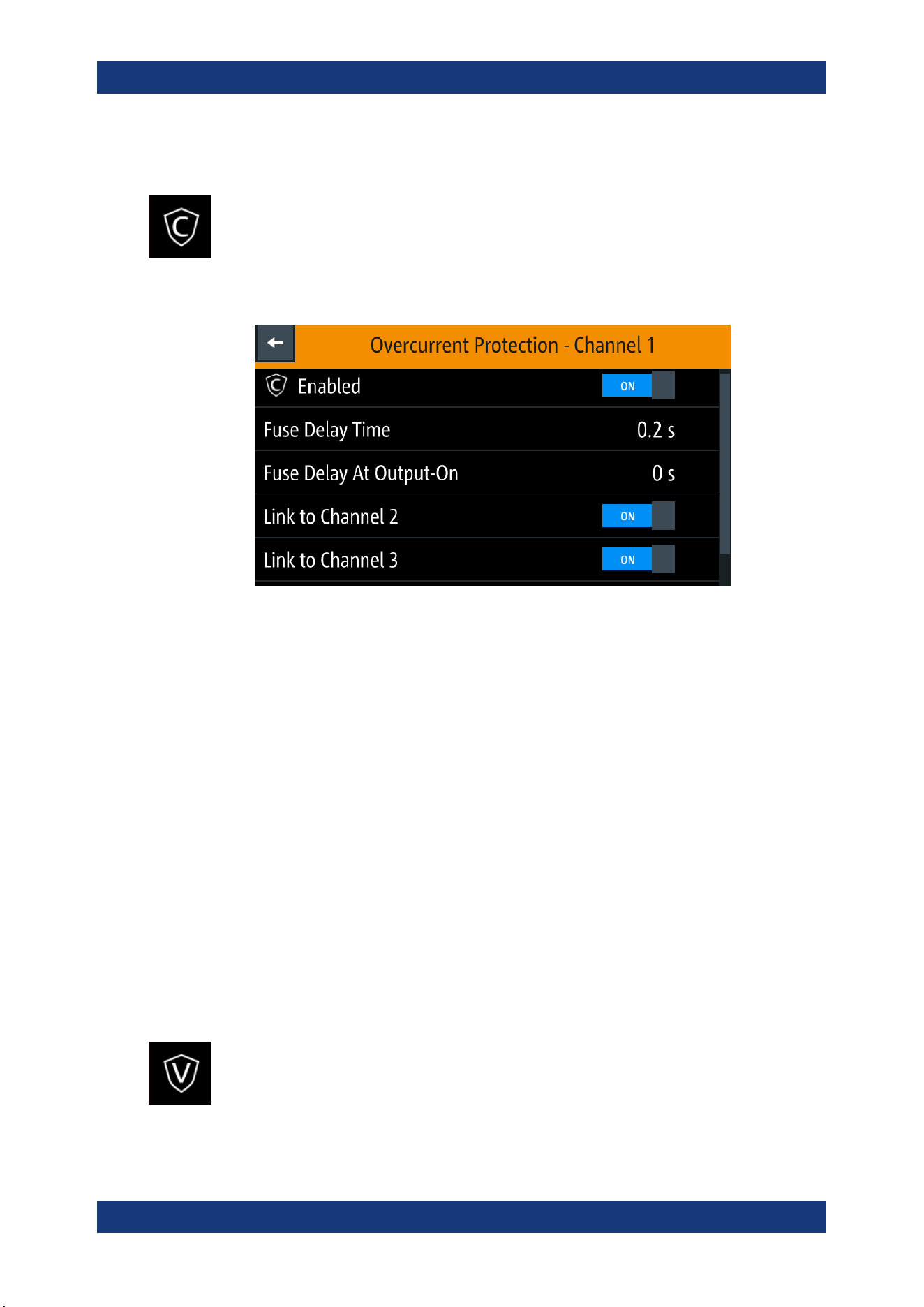
Instrument Functions
R&S
®
NGP800
54User Manual 5601.5610.02 ─ 04
6.4.1 Overcurrent Protection (OCP)
When the drawn current exceeds the limit set for the respective channels, an alert is
triggered and the affected channels are turned off according to the settings configured
in the OCP dialog.
1. Select "Overcurrent Protection (OCP)" from the menu.
The R&S NGP800 displays the OCP dialog.
Figure 6-6: Overcurrent protection dialog
2. Activate the "Enabled" menu item.
The R&S NGP800 enables the OCP and displays the OCP icon on the selected
channel status bar information.
3. Set the required "Fuse Delay Time" and "Fuse Delay At Output-On".
The R&S NGP800 displays the on-screen keypad to set the values.
● "Fuse Delay Time": The time taken to turn off the affected channel after OCP is
triggered.
● "Fuse Delay At Output-On": The time taken after channel output is turned on
before OCP is put into operation.
4. Confirm value with the unit key (ms or s).
5. Activate the required linked channels for over current protection.
● ON: The linked channels are turned off when an OCP event is triggered.
● OFF: The linked channels are not affected when an OCP event is triggered.
6.4.2 Overvoltage Protection (OVP)
When the output voltage exceeds the limit set for the respective channel, an alert is
triggered and the affected channel is turned off according to the settings configured in
the OVP dialog.
1. Select "Overvoltage Protection (OVP)" from the menu.
Protection
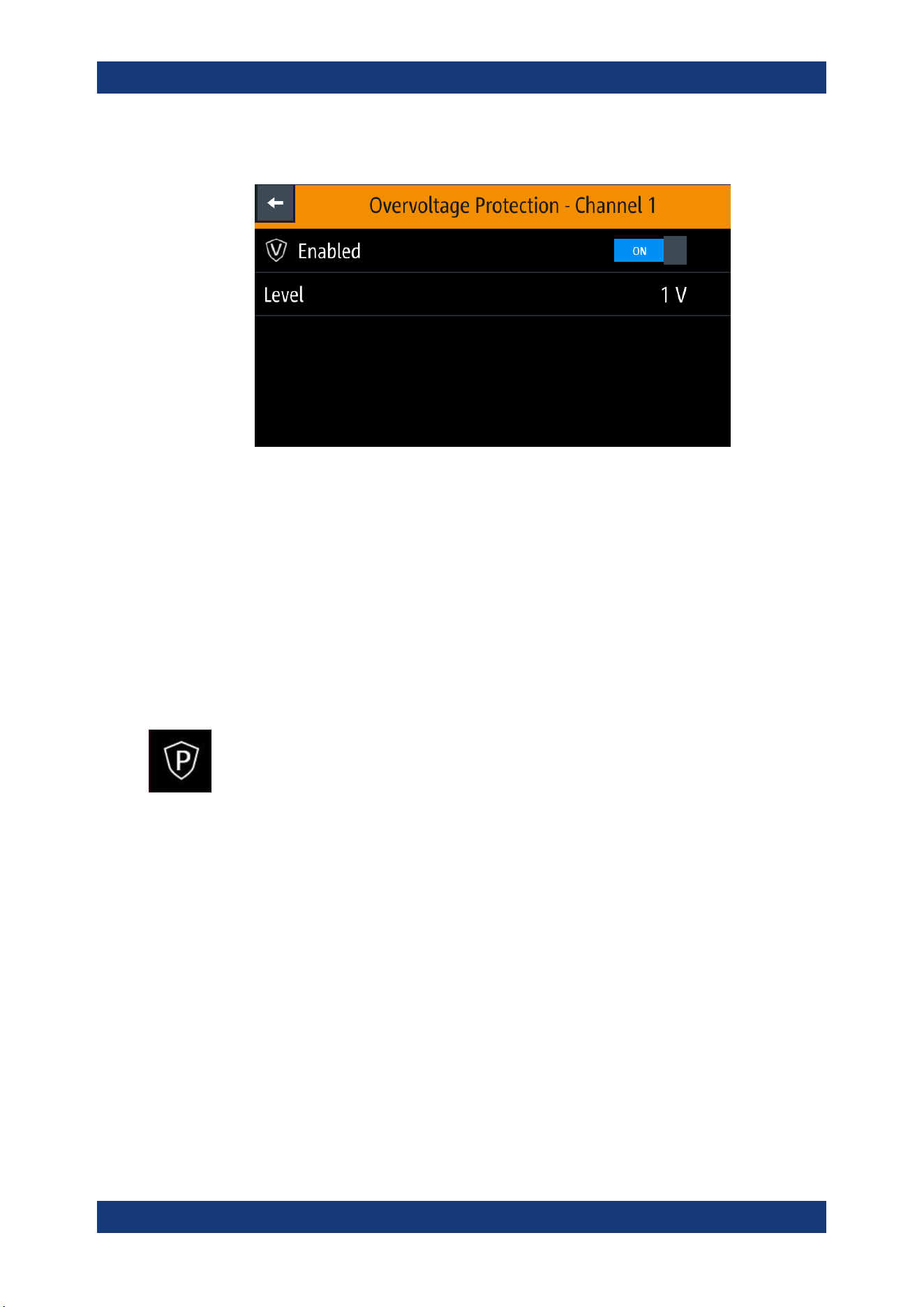
Instrument Functions
R&S
®
NGP800
55User Manual 5601.5610.02 ─ 04
The R&S NGP800 displays the OVP dialog.
Figure 6-7: Overvoltage protection dialog
2. Activate the "Enabled" menu item.
The R&S NGP800 enables the OVP and displays the OVP icon on the selected
channel status bar information.
3. Set the required level for OVP.
The R&S NGP800 displays the on-screen keypad to set the value.
4. Confirm value with the unit key (mV or V).
6.4.3 Overpower Protection (OPP)
When the output power exceeds the limit set for the respective channels, an alert is
triggered and the affected channels are turned off according to the settings configured
in the OPP dialog.
1. Select "Overpower Protection (OPP)" menu item.
The R&S NGP800 displays the OPP dialog.
Protection
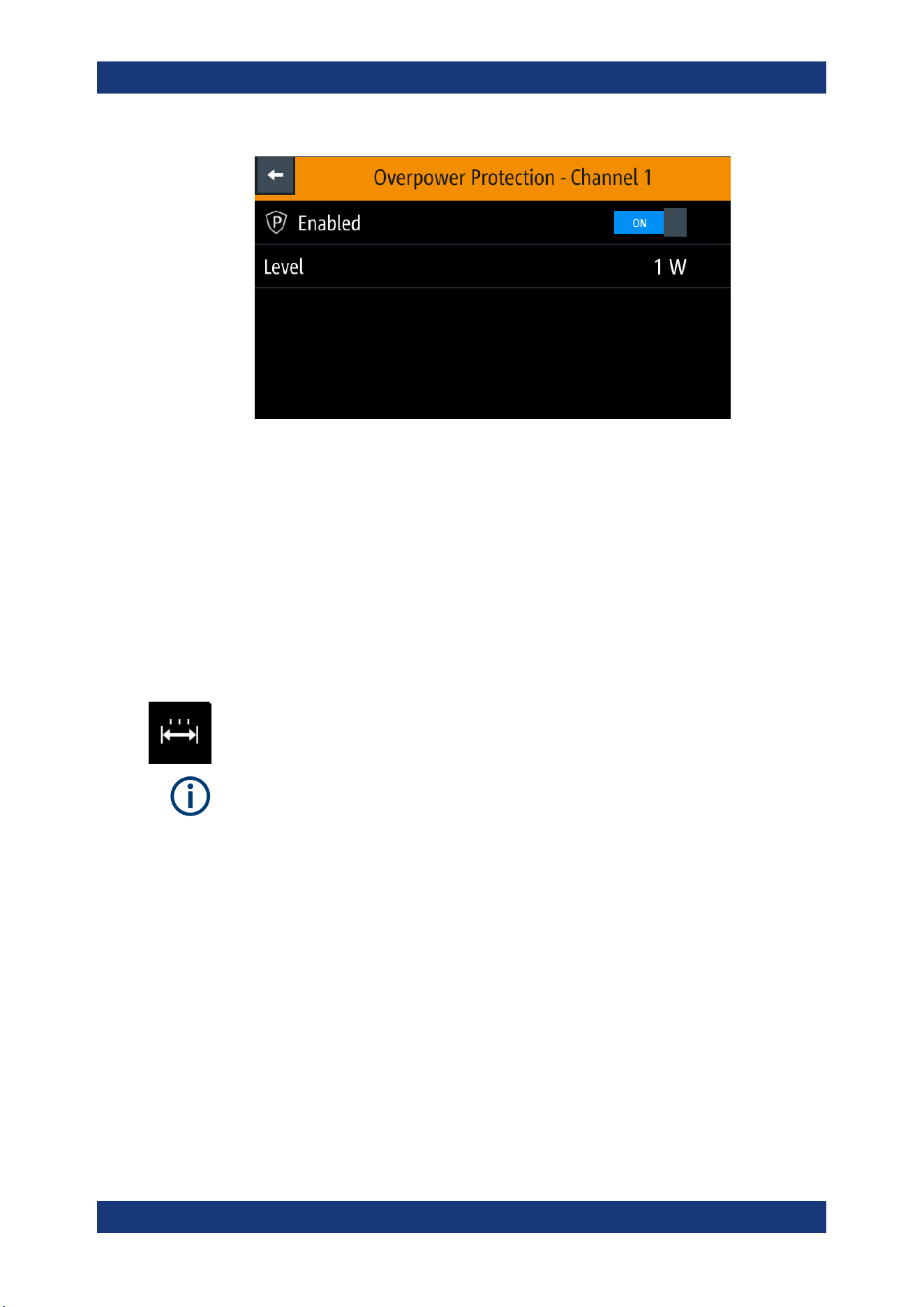
Instrument Functions
R&S
®
NGP800
56User Manual 5601.5610.02 ─ 04
Figure 6-8: Overpower protection dialog
2. Activate the "Enabled" menu item.
The R&S NGP800 enables the OPP and displays the "Overpower Protection
(OPP)" icon on the selected channel status bar information.
3. Set the required level for OPP.
The R&S NGP800 displays the on-screen keypad to set the value.
4. Confirm value with the unit key (mW or W).
6.4.4 Safety Limits
The "Safety Limits" function is disabled if QuickArb function or Analog Input function is
in use.
With safety limits set in the instrument, the range of the output voltage and/or output
current can be limited. The safety limit prevents inadvertently setting values dangerous
for the connected DUT.
1. Select "Safety Limits" menu item from the menu.
The R&S NGP800 displays the "Safety Limits" dialog.
Protection
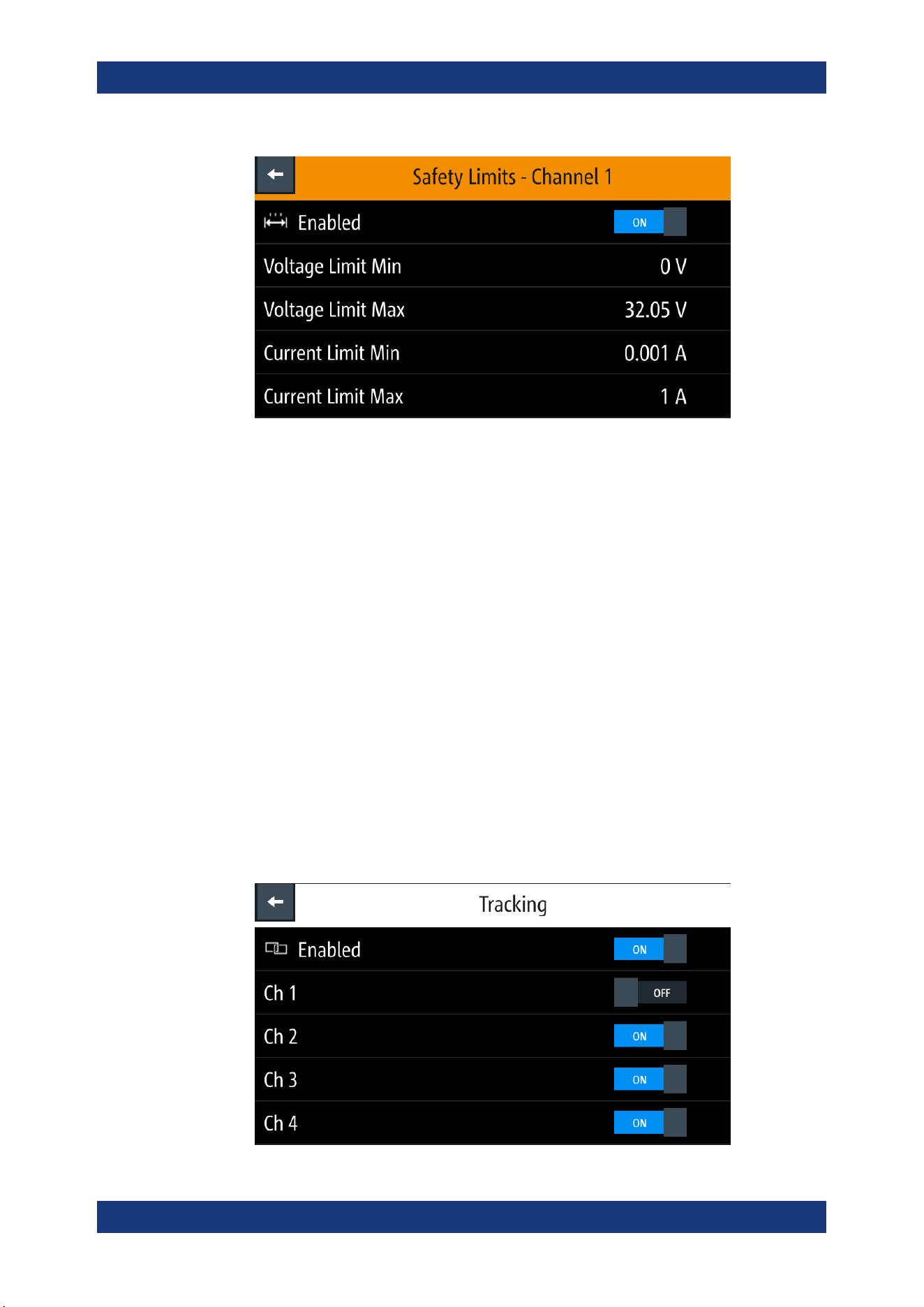
Instrument Functions
R&S
®
NGP800
57User Manual 5601.5610.02 ─ 04
Figure 6-9: Safety limits dialog
2. Activate the "Enabled" menu item.
The R&S NGP800 limits the set voltage and current level and displays the "Safety
Limits" icon on the selected channel status bar information.
3. Set the required minimum and maximum value for voltage and current level.
The R&S NGP800 displays an on-screen keypad to set the value.
4. Confirm value with the unit key.
6.5 Tracking Function
For power supplies with multiple channels, the channels can be linked such that
changes made on one channel are applied to the tracked channel.
1. Press [Settings] key.
The R&S NGP800 displays the device/channel menu window.
2. Select the device tab to configure tracking.
The R&S NGP800 displays the "Tracking" dialog.
Tracking Function
Instrument Functions
R&S
®
NGP800
58User Manual 5601.5610.02 ─ 04
3. Activate the "Enabled" menu item to enable the tracking function.
4. Set the required channels to be tracked.
The R&S NGP800 tracks the voltage and/or current values to the selected tracked
channels.
6.6 Digital Trigger I/O
Digital trigger I/O pins voltage rating
Do not exceed the maximum voltage rating of the digital I/O pins when supplying vol-
tages to the pins.
For more information, see the instrument datasheet (P/N: 3609.1927.32).
Instrument option
R&S NGP-K103 (P/N: 5601.6300.03) option is required for the Digital I/O signals.
The eight data lines of the digital I/O interface are mutually independent and can be
used as trigger input or trigger output separately. See
Table 4-3 and also Figure 6-10.
●
Trigger input
The data lines of the digital I/O interface receive external trigger signal. The exter-
nal trigger signal triggers the selected channel ("Ch 1", "Ch 2", "Ch 3", "Ch 4" or
"All") with the set response when the trigger condition ("Active High" or "Active
Low") is met.
●
Trigger output
The data lines of the digital I/O interface output an "Active High" or "Active Low"
signal when the trigger condition of the selected channel ("Ch 1", "Ch 2", "Ch 3",
"Ch 4") is met.
Table 6-1: Trigger in parameters and conditions
Trigger in
parameters
Trigger conditions Description
Channel "--", "Ch 1", "Ch 2", "Ch 3", "Ch 4" or
"All"
Target output channel selected for trigger
response.
If "--" is selected, no channel is selected for
trigger response.
Mode "Enable" Selected channel output is turned on when
the selected logic level is met.
"Arb Enable" Selected channel
QuickArb function is
enabled when the selected logic level is met.
"Arb Step Point" Selected channel QuickArb function steps to
the next point when the selected logic level
is met.
Digital Trigger I/O
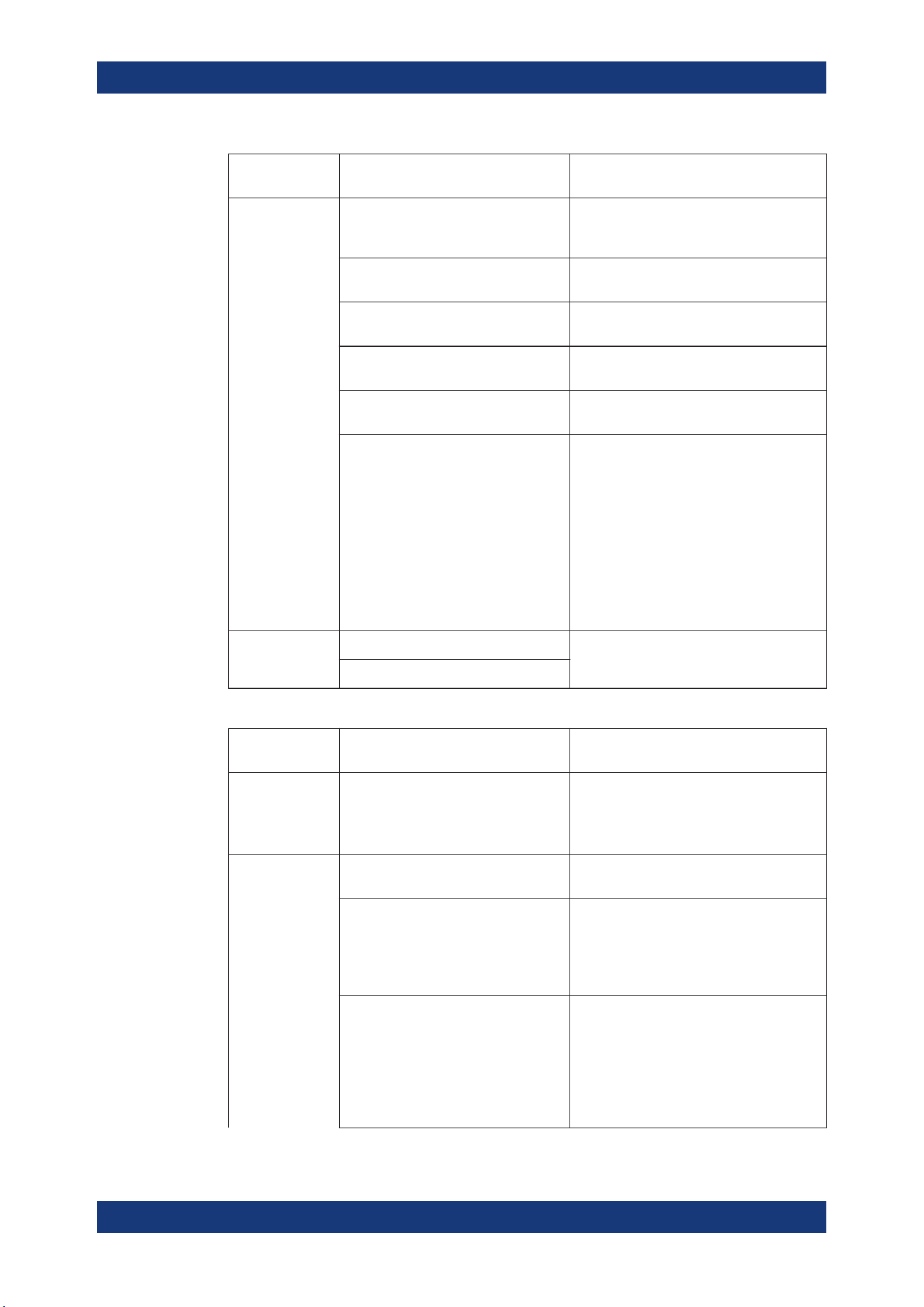
Instrument Functions
R&S
®
NGP800
59User Manual 5601.5610.02 ─ 04
Trigger in
parameters
Trigger conditions Description
"Arb Step Group" Selected channel QuickArb function steps to
the next group when the selected logic level
is met.
"Ramp" Selected channel EasyRamp function is
enabled when the selected logic level is met.
"Logging" Selected channel logging function is enabled
when the selected logic level is met.
"Statistics" Selected channel statistics function is
enabled when the selected logic level is met.
"AnalogIn" Selected channel analog input is enabled
when the selected logic level is met.
"Inhibit" Selected channel output is inhibited when
the selected logic level is met.
If the selected channel output is put to inhibit
state, manual or remote operation on
selected channel output is no longer possi-
ble .
To reverse the inhibit state, remove the
source of the trigger signal. You can either
disable the affected DIO interface or remove
the source from the affected DIO interface at
the rear panel.
Active Level High Set the logic level of the trigger in signal.
Low
Table 6-2: Trigger out parameters and conditions
Trigger out
parameters
Trigger conditions Description
Channel "--", "Ch 1", "Ch 2", "Ch 3", "Ch 4" Output channel selected to monitor for trig-
ger conditions.
If "--" is selected, no channel is selected for
trigger response.
Mode Output Output the selected logic level when the out-
put is turned on at the selected channel.
Fuse Output the selected logic level when a fuse
tripped event occurs on the selected chan-
nel.
See Chapter 6.4.1, "Overcurrent Protection
(OCP)", on page 54 .
Operation mode
●
"CC": Output the selected logic level
when the selected channel operates in
the CC mode. See "CC mode"
on page 46.
●
"CV": Output the selected logic level
when the selected channel operates in
the CV mode. See
"CC mode"
on page 46.
Digital Trigger I/O
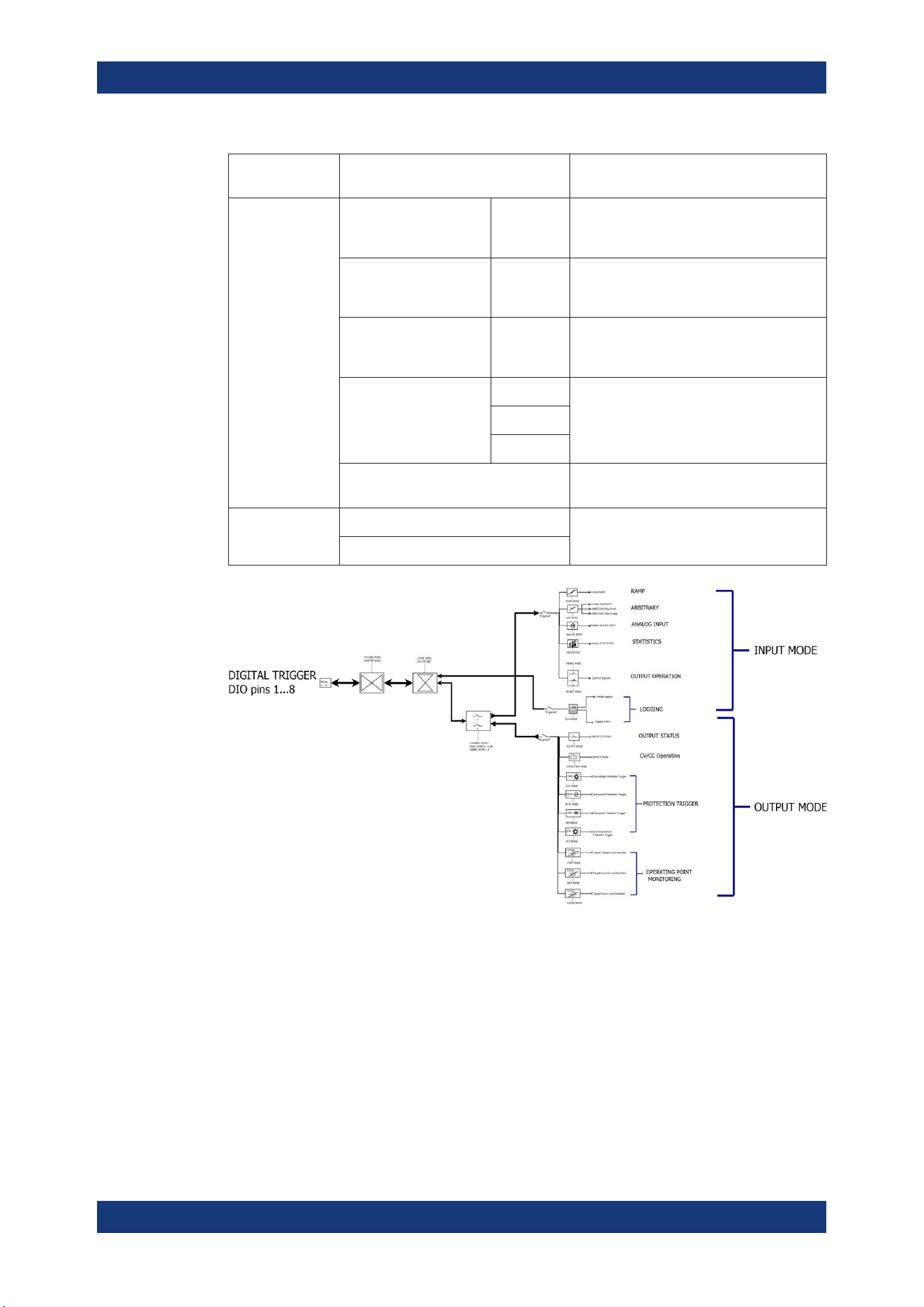
Instrument Functions
R&S
®
NGP800
60User Manual 5601.5610.02 ─ 04
Trigger out
parameters
Trigger conditions Description
Voltage Level, "Vset" >= "set
value"
Output the selected logic level when the
voltage level of the selected channel is
greater or equal to the set voltage level.
Current Level, "Iset" >= "set
value"
Output the selected logic level when the cur-
rent level of the selected channel is greater
or equal to the set current level.
Power Level, "Plevel" >= "set
value"
Output the selected logic level when the
power level of the selected channel is
greater or equal to the set power level.
Critical event "OVP" Output the selected logic level when the
selected critical event ("OVP", "OPP",
"OTP") occurs on the selected channel. See
Chapter 6.4, "Protection", on page 53.
"OPP"
"OTP"
"Logging" Output the selected logic level when the log-
ging is enabled.
Active Level High Set the logic level of the trigger out signal.
Low
Figure 6-10: DIO trigger block diagram
1. Press [Settings] key.
The R&S NGP800 displays the device/channel menu window.
2. Select the device tab to configure digital I/O trigger.
The R&S NGP800 displays the "Digital Trigger Menu" dialog.
Digital Trigger I/O
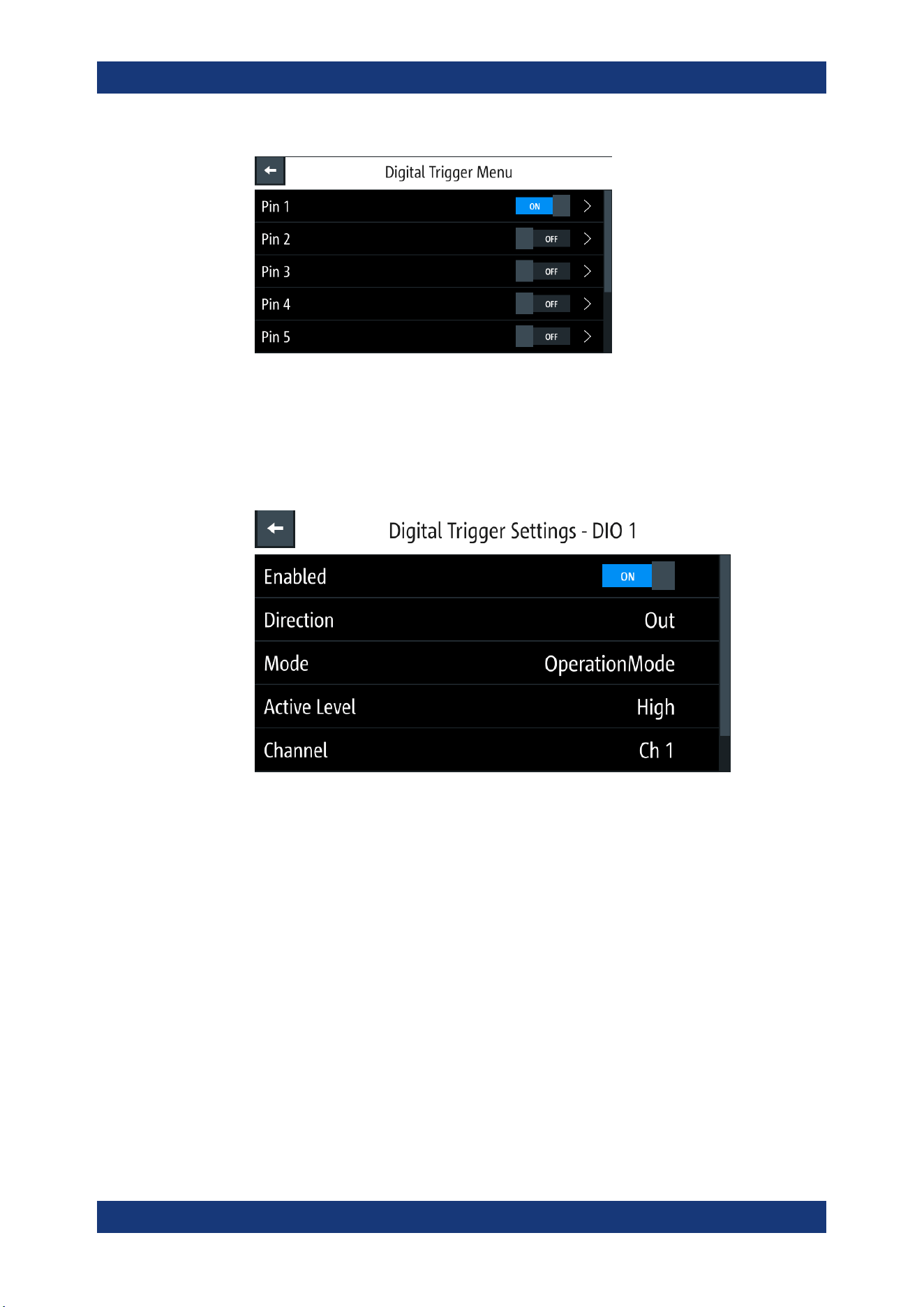
Instrument Functions
R&S
®
NGP800
61User Manual 5601.5610.02 ─ 04
Figure 6-11: Digital trigger menu
3. Set the required pins to "ON" to enable the respective trigger settings for the
selected pins.
4. Select the respective pins to configure the trigger settings.
The R&S NGP800 displays the respective pin dialog for configuration.
Figure 6-12: Digital trigger settings for pin 1
5. Set the required pin "Direction".
Depending on the pin direction, different operating modes are available for trigger
settings.
See
Table 6-1 and Table 6-2.
6. Set the required "Active Level " and "Channel" settings.
7. Press the [Settings] key to return to device menu dialog.
8. Set the "Digital I/O Trigger" to "ON" to enable the digital I/O trigger.
The R&S NGP800 monitors the digital I/O trigger conditions and feedback to the
respective channels or pins.
Digital Trigger I/O
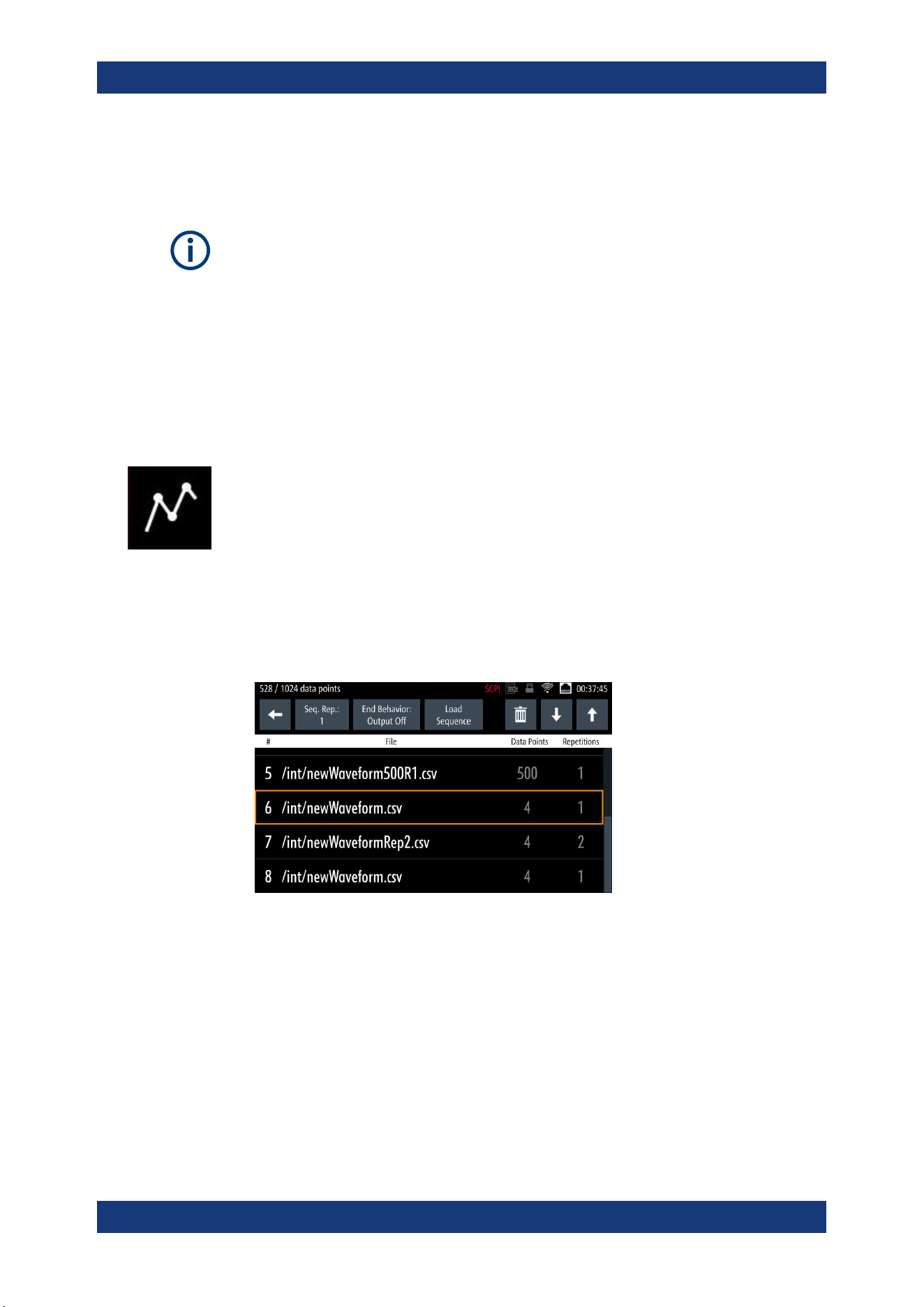
Instrument Functions
R&S
®
NGP800
62User Manual 5601.5610.02 ─ 04
6.7 Advanced Features
QuickArb function
If QuickArb function of a selected channel is enabled, the respective channel voltage,
current setting and safety limit settings are disabled.
See Chapter 6.1, "Setting the Channels Voltage and Current", on page 47.
The QuickArb and EasyRamp are two functions which can be used to control the
waveform of voltage and current output.
6.7.1 QuickArb
The QuickArb function allows you to generate freely programmable waveforms which
can be reproduced within the
Safety Limits for voltage and current.
1. Press [Settings] key.
The R&S NGP800 displays the device/channel menu window.
2. Select the required channel tab to configure QuickArb function.
The R&S NGP800 displays the selected channel menu.
3. Select "Arbitrary" from the menu.
The R&S NGP800 displays the "Arbitrary" dialog.
4. Select any of the rows to load or change the arbitrary file in the arbitrary sequence.
Up to eight arbitrary files with a maximum of 1024 data points can be loaded.
The R&S NGP800 opens a dialog to select the source and file location.
5. Select the required source and file location.
6. Select "Select" to load the selected file.
The R&S NGP800 loads the selected arbitrary file.
Advanced Features
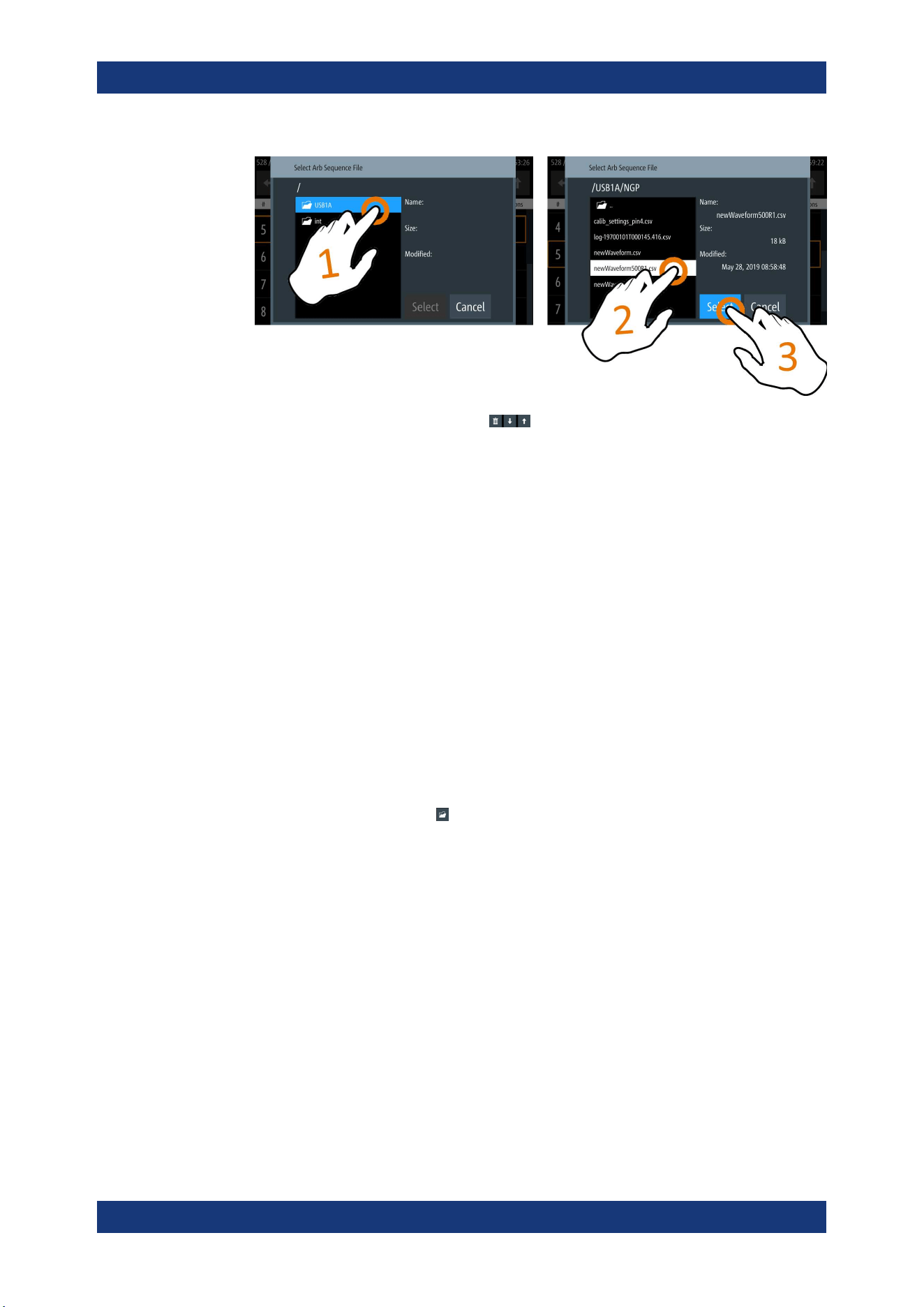
Instrument Functions
R&S
®
NGP800
63User Manual 5601.5610.02 ─ 04
7.
Select delete and up/down button
to navigate the arbitrary test sequence.
8. Select "Load Sequence" to load the arbitrary test sequence.
9. Set "Seq. Rep." and "End Behavior" to configure the arbitrary sequence behavior.
● "Seq. Rep.": Repetition cycle for the arbitrary sequence
● "End Behavior": End behavior of the automation of arbitrary function
– "Off": Output of the selected channel is turned off after performing the
QuickArb function.
– "Hold": Last voltage and current values output at the instrument.
10. Select [Back] key to return to channel menu dialog.
11. Activate the "Arbitrary" menu item to enable the QuickArb function.
The R&S NGP800 enables the QuickArb function and displays the "Arbitrary" icon
on the selected channel status bar information.
Arbitrary editor
The "Arb Editor" dialog allows you to edit the arbitrary profile ("Voltage", "Current",
"Time", "Interpolate" status, "Rep." and "End Behavior"). To view or open the list of
available arbitrary files, select
to open the arbitrary file.
Advanced Features
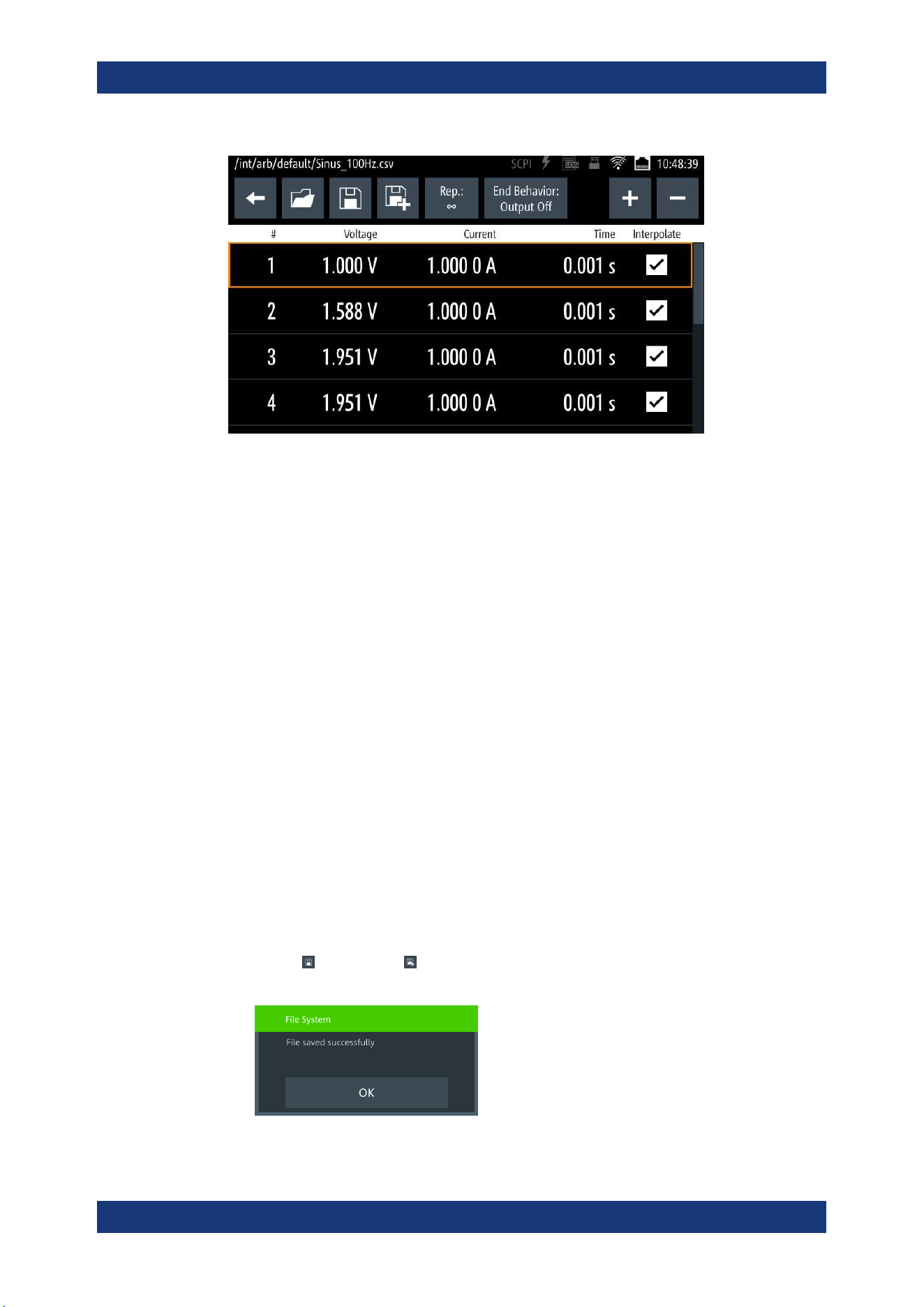
Instrument Functions
R&S
®
NGP800
64User Manual 5601.5610.02 ─ 04
Figure 6-13: Arbitrary editor dialog
1. Configure the "Arb Editor" with the required voltage, current and duration.
The R&S NGP800 displays the on-screen keypad for data entry.
2. Confirm values with the unit keys.
3. Select the interpolation checkbox to toggle on/off the interpolation function on the
arbitrary data.
4. Select the "Plus" or "Minus" icon to add or delete the arbitrary data from the dialog.
● "+": A new row of arbitrary data is added to the end of the table. The new addi-
tion is a copy of the last arbitrary data in the table.
● "-": To delete, select the row of arbitrary data for deletion follows by the "Minus"
icon.
5. Set the "Rep" to configure repetition cycle for the arbitrary data.
By default, the repetition cycle is set to infinity.
6. Set the "End Behavior" to handle the way to end the automation of the QuickArb
function.
● "Off": The output of the selected channel is turned off after performing the
QuickArb function.
● "Hold": The last voltage and current values remains at the output terminal of
the instrument.
7.
Select
(new file) or (existing file) to save the arbitrary data.
The R&S NGP800 displays a popup message to show that file saved successfully.
Advanced Features
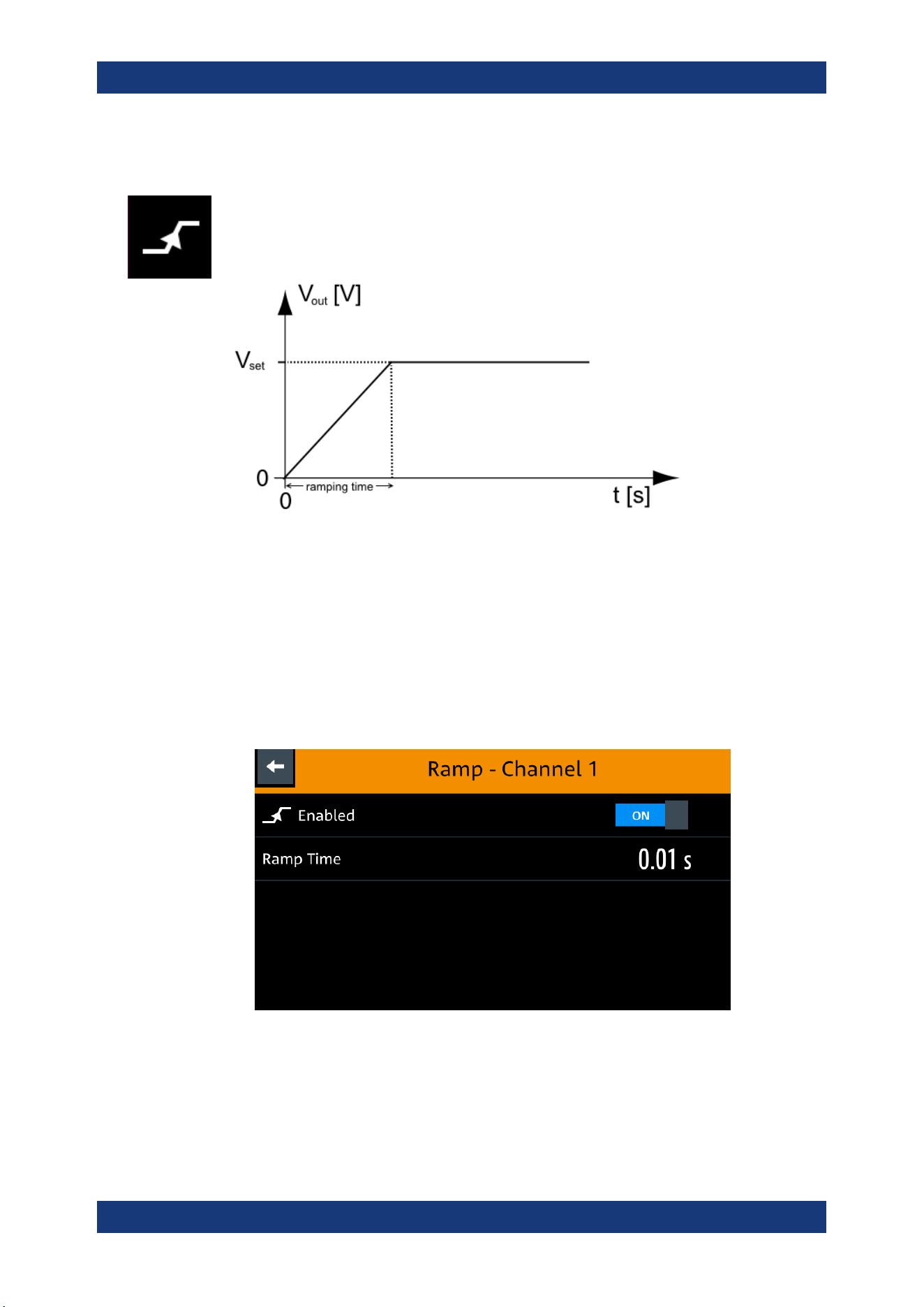
Instrument Functions
R&S
®
NGP800
65User Manual 5601.5610.02 ─ 04
6.7.2 EasyRamp
The EasyRamp function configures a constant rise of supply voltage within a set time
frame. The output voltage can be increased continuously within a 10 ms to 10 s with 1
ms step size. Each channel has an independent ramp configuration. See
Figure 6-14.
Figure 6-14: Ramping voltage output
1. Press [Settings] key.
The R&S NGP800 displays the device/channel menu window.
2. Select the required channel tab to configure EasyRamp function.
The R&S NGP800 displays the selected channel menu.
3. Select "Ramp" from the menu.
The R&S NGP800 displays the "Ramp" dialog.
Figure 6-15: Ramp dialog
4. Activate the "Enabled" menu item.
The R&S NGP800 enables the EasyRamp function and displays the "Ramp" icon
on the selected channel status bar information.
Advanced Features
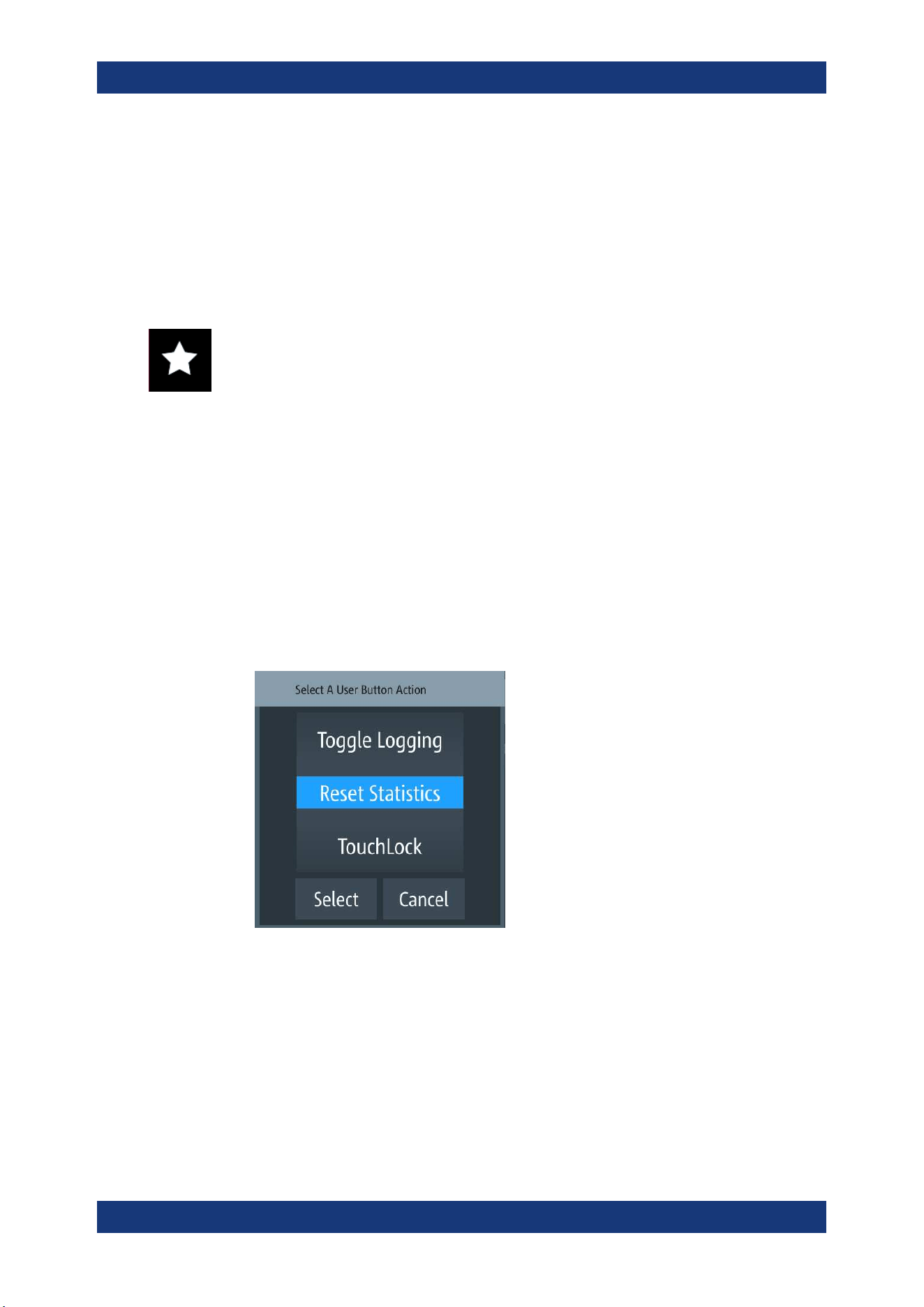
Instrument Functions
R&S
®
NGP800
66User Manual 5601.5610.02 ─ 04
5. Set the required "Ramp Time".
The R&S NGP800 displays the on-screen keypad to set the value.
6. Confirm value with the unit key.
6.8 User Key
The R&S NGP800 allows you to configure the user action for one of the following func-
tions:
●
Screenshot image from instrument
●
Data logging
●
Reset statistic (see index 1, 2, 3 of
Figure 5-6)
●
Enable/Disable touchscreen function
1. Press [Settings] key.
The R&S NGP800 displays the device/channel menu window.
2. Select the "Device" menu tab to configure user action.
The R&S NGP800 displays the device menu.
3. Select "User Button" from the menu.
Alternatively, long-press on the [*] key to configure the user button action.
The R&S NGP800 displays the "User Button" dialog.
Figure 6-16: User button action
4. Select the "User Button Action" to configure the user action.
The R&S NGP800 displays a dialog to configure the user action.
5. Select the required user action.
● "Screenshot": Capture the current screen image of the instrument
● "Toggle Logging": Enable/Disable the data logger function
● "Reset Statistics": Reset sample count, energy result, power, voltage and cur-
rent values
User Key
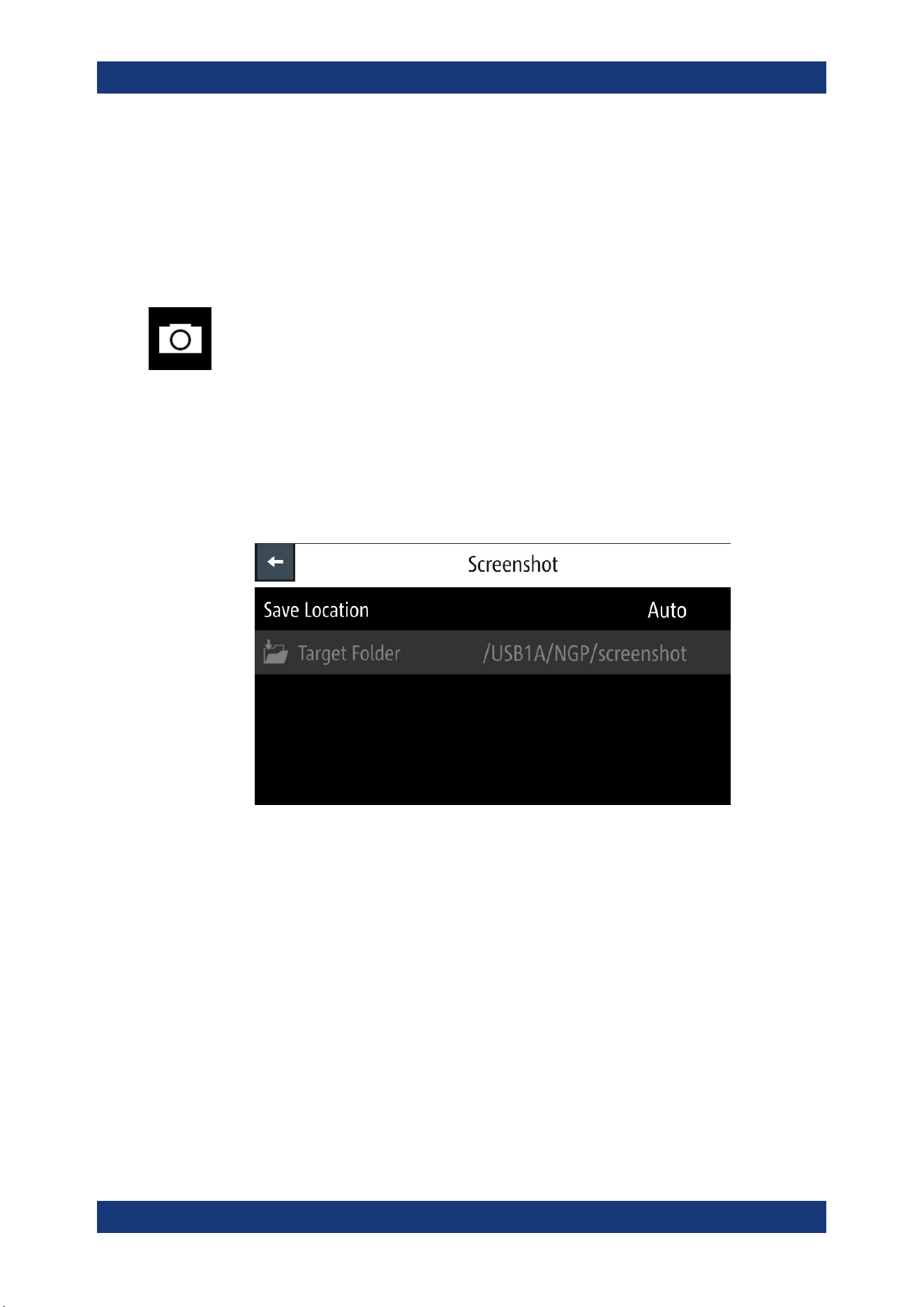
Instrument Functions
R&S
®
NGP800
67User Manual 5601.5610.02 ─ 04
● "TouchLock": Enable/Disable the touchscreen function of the instrument
6. Select "Select" to confirm the action.
6.9 Screenshot
With screenshot, you can capture image easily from the instrument. The images can
be stored in the USB stick or internal memory of the instrument. By default, the screen
images are stored in the USB device under the target folder.
1. Press [Settings] key.
The R&S NGP800 displays the device/channel menu window.
2. Select the "Device" tab to configure screenshot file location.
The R&S NGP800 displays the device menu.
3. Select "Screenshot" from the menu.
The R&S NGP800 displays the "Screenshot" dialog.
Figure 6-17: Screenshot dialog
4. Select the "Save Location" to configure the screenshot file location.
● "Auto": Target folder is set to default file location:
– With USB stick detected:
/USB1A/NGP/screenshot for NGP model
– Without USB stick detected:
/int/screenshot
● "Manual": Choice of target folder.
5. Select the required save location.
6.10 Data Logging
Data Logging
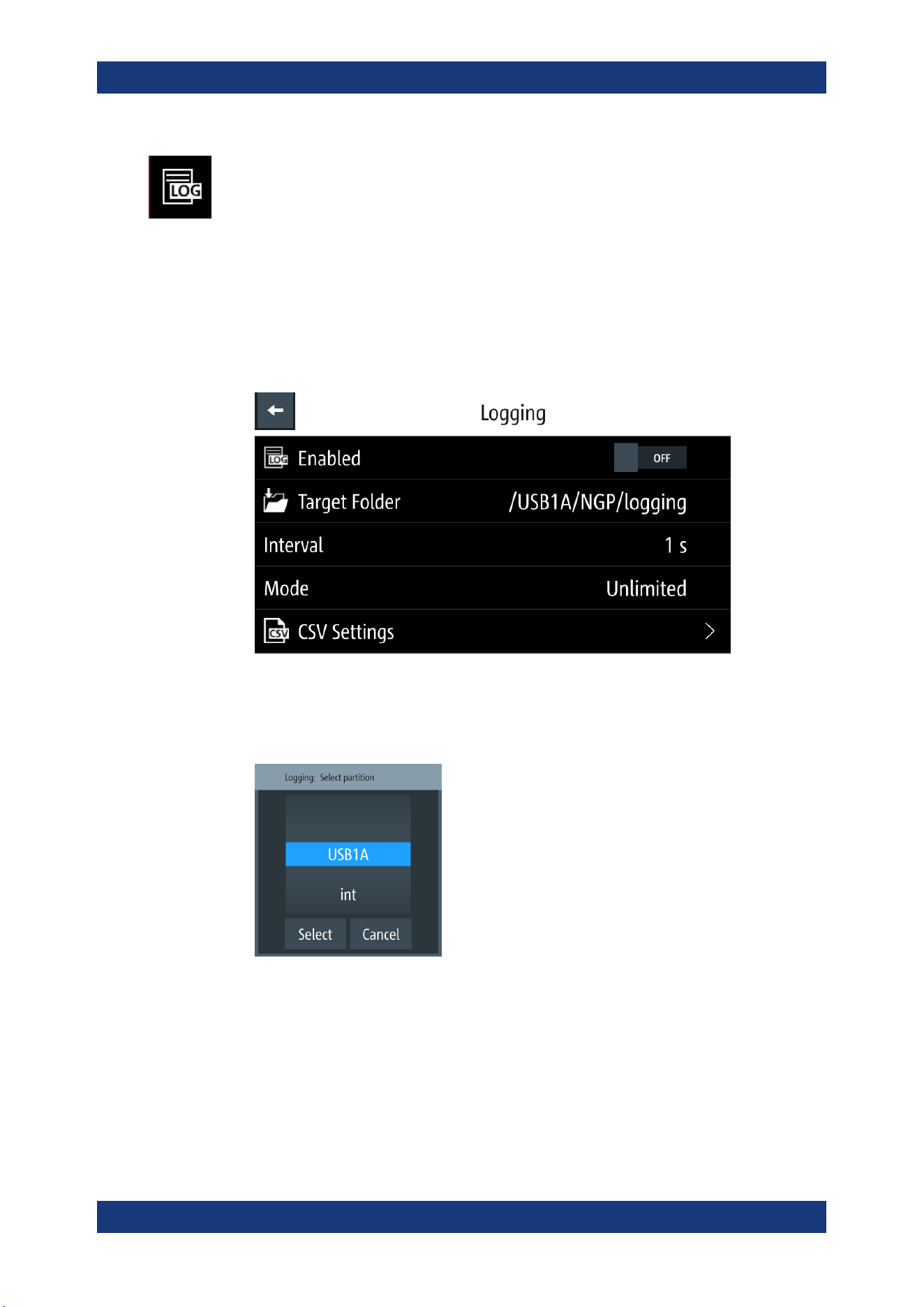
Instrument Functions
R&S
®
NGP800
68User Manual 5601.5610.02 ─ 04
When data logging is activated, the R&S NGP800 records the voltage, current and
power data and stores it in the predefined target folder. The measurement data can be
stored on the USB stick or in the instrument internal memory location.
1. Press [Settings] key.
The R&S NGP800 displays the device/channel menu window.
2. Select the "Device" tab to configure data logger.
The R&S NGP800 displays the device menu.
3. Select "Logging" menu item from the menu.
The R&S NGP800 displays the "Logging" dialog.
4. Select the "Target Folder" menu item to select the predefined target folder for data
logger.
If no USB stick is detected, "Target Folder" is set to internal memory ("int") partition.
By default, "USB1A" partition is selected if USB stick is detected.
Figure 6-18: Target folder dialog
5. Set the required "Target Folder".
6. Select "Mode" to set logging duration.
● "Duration": Time taken for data logging with duration and time interval setting.
● "Span": Time taken for data logging with start time, time interval and duration
setting
Data Logging
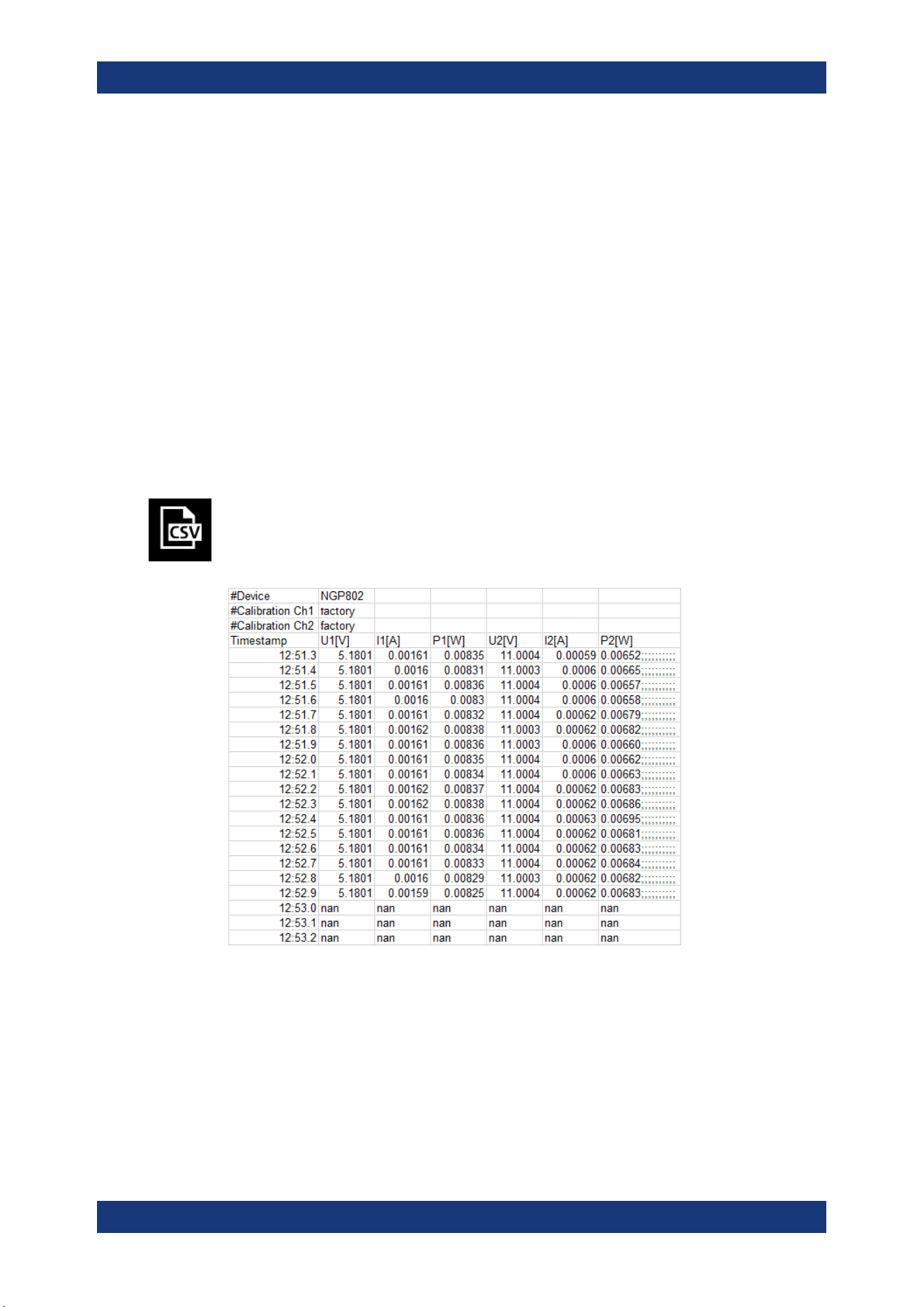
Instrument Functions
R&S
®
NGP800
69User Manual 5601.5610.02 ─ 04
● "Unlimited": Data logging with time interval setting. The data logging continuous
until function is deactivated.
● "Count": Data logging with number of counts and time interval setting
7. Depending on the selected mode, configure the required settings for the data log-
ging duration.
8. Activate the "Enabled" menu item.
The R&S NGP800 activates the logging and disables the settings for file saved
location and logging mode settings.
9. Configure the "CSV Settings".
See
Chapter 6.11, "CSV Settings", on page 69.
6.11 CSV Settings
A CSV file stores tabular data (numbers and text) in plain text. Each line of the file is a
data record and each record consists of one or more fields, separated by a file delim-
iter. The "CSV Settings" provides you ways to format the fields that are stored in the
data logging. See
Figure 6-19.
Figure 6-19: Sample of data logging
1. Select "CSV Settings" from "Device" menu.
The R&S NGP800 displays the "CSV Settings" dialog.
CSV Settings
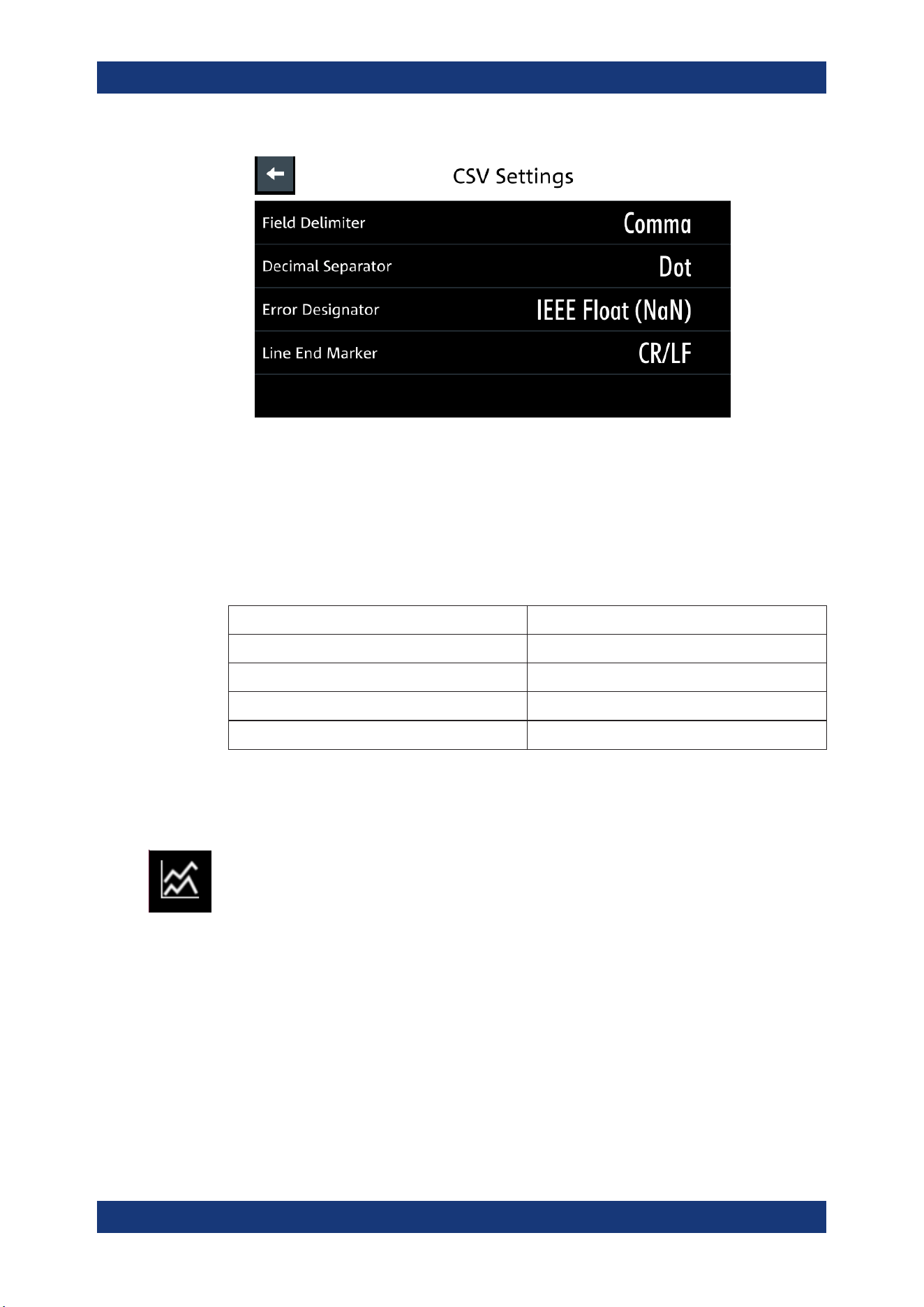
Instrument Functions
R&S
®
NGP800
70User Manual 5601.5610.02 ─ 04
Figure 6-20: CSV settings dialog
2. Set the required CSV parameters.
The R&S NGP800 displays the respective dialog to set the CSV parameters.
See
Table 6-3.
3. Select "Set" to confirm the value.
Table 6-3: CSV settings
CSV settings Selective fields in the dialog
"Field Delimiter" "Comma", "Semicolon"
"Decimal Separator" "Dot", "Comma"
"Error Designator" "IEE Float (NaN)", "Empty"
"Line End Marker" "CR/LF", "LF"
6.12 Graphical View Window
The graphical view measurement is a time-based measurement that allows you to vis-
ualize measurements on available data sources.
The graph illustrated below shows the output of voltage "U1" 0.9 V, current "I1" 90 mA
at channel 1 with output power of "P1" 81 mW from 39 seconds ago. Each measure-
ment trace is represented with an individual color.
The time-based scale is fixed with a time duration display up to the last 60 seconds.
Graphical View Window
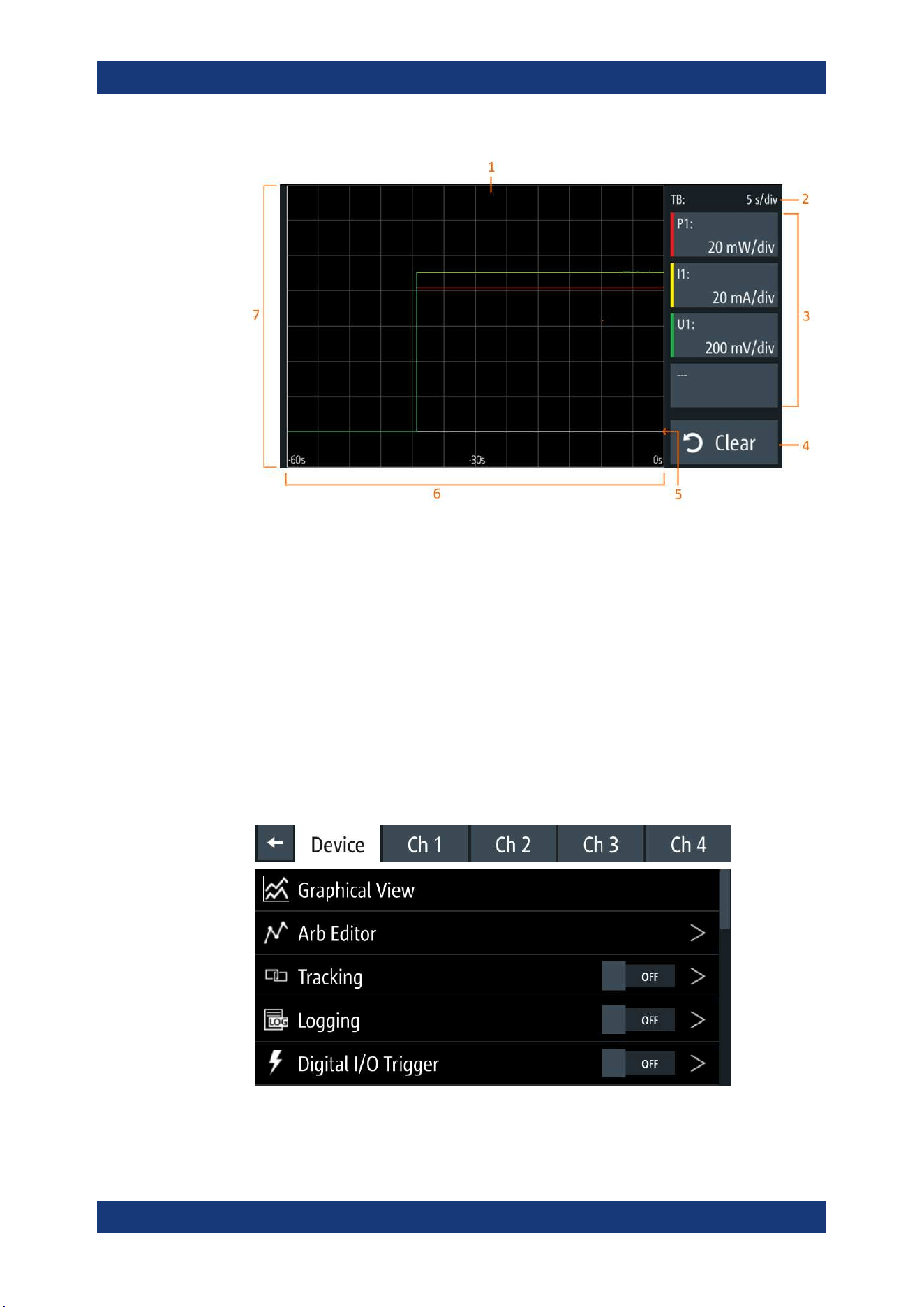
Instrument Functions
R&S
®
NGP800
71User Manual 5601.5610.02 ─ 04
Figure 6-21: Graphical view window
1 = Display window for measurement
2 = Time axis scale fixed at 5 s/div
3 = Configuration slot for measurement
4 = Reset measurements in display window
5 = Zero-origin of the graph
6 = Time axis
7 = Measurement axis
1. Long-press on the [Settings] key or the "Settings" button in
Chapter 5.1.2, "Chan-
nel Display Area", on page 35.
The R&S NGP800 displays the graphical view window. See Figure 6-21.
2. Alternatively, press [Settings] > device menu > "Graphical View" to access graphi-
cal view window.
Figure 6-22: Device menu
Graphical View Window
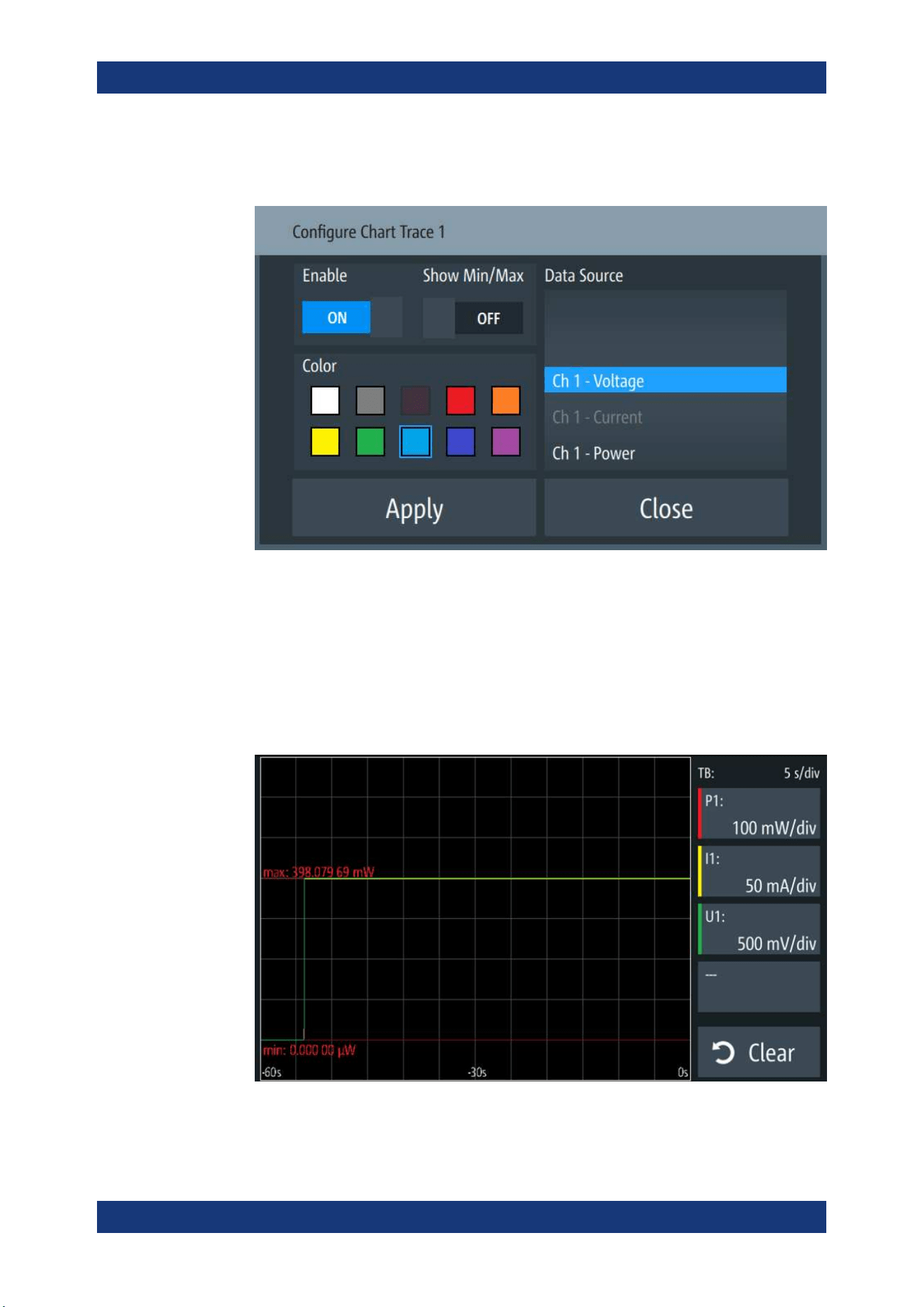
Instrument Functions
R&S
®
NGP800
72User Manual 5601.5610.02 ─ 04
3. Select any of the configuration slots to configure the measurement parameters.
The R&S NGP800 displays the configuration dialog.
4. Select the available "Data Source" for configuration.
The dimmed "Data Source" is in use and is not configurable.
5. Set "Enable" to activate the selected "Data Source" for measurement.
6. Select the available "Color" to configure the "Data Source" measurement trace.
The dimmed "Color" is in use and is not configurable.
7. Set "Show Min/Max" to "ON" to display the minimum and maximum value of the
selected "Data Source".
8. Select "Apply" to confirm the configuration.
Graphical View Window
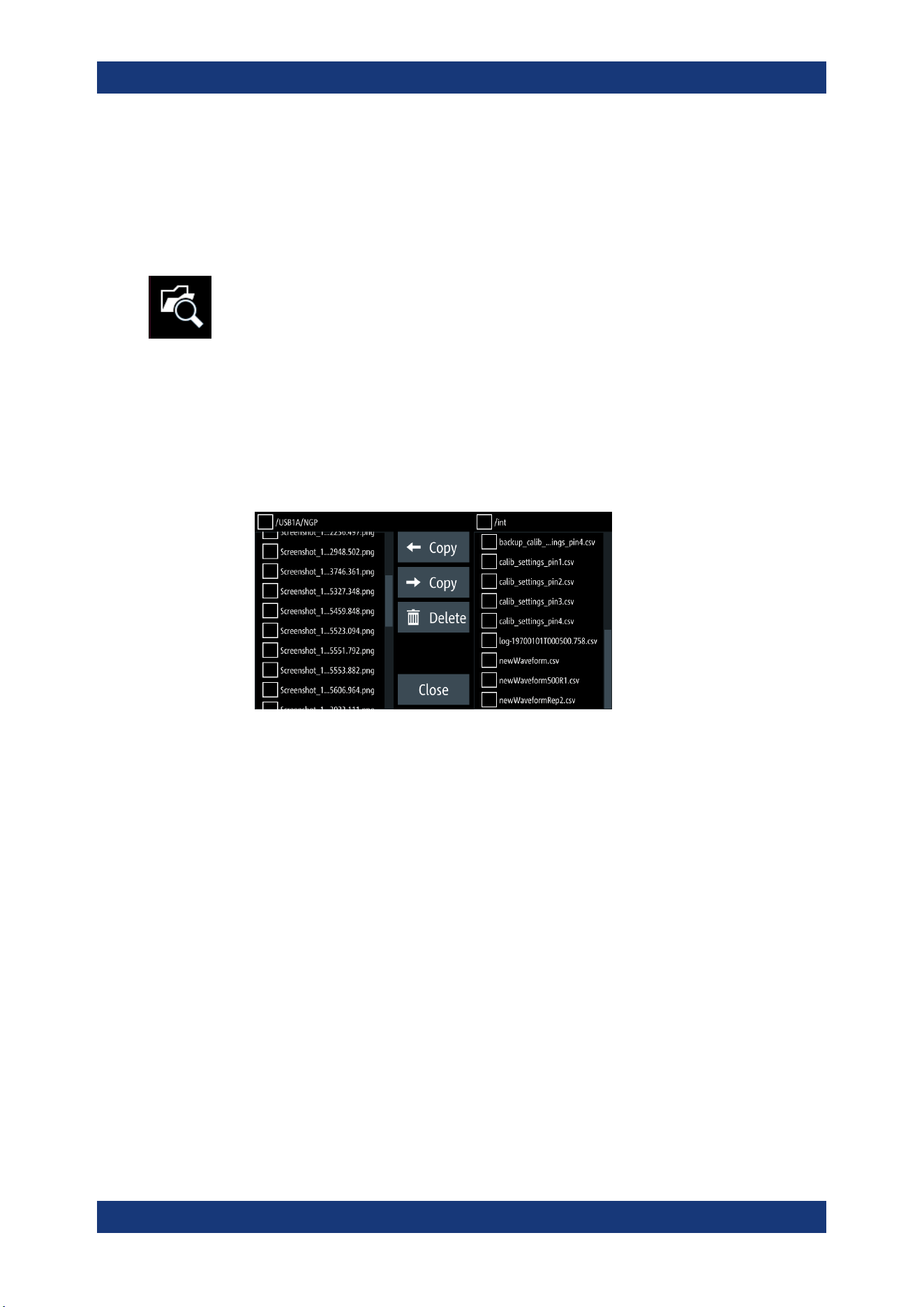
Instrument Functions
R&S
®
NGP800
73User Manual 5601.5610.02 ─ 04
9. Select "Close" to exit configuration dialog.
6.13 File Manager
The "File Manager" provides file transfer functions between USB stick and internal
memory of the instrument. You can copy and delete files in both USB stick and internal
memory of the instrument.
1. Press [Settings] key.
The R&S NGP800 displays the device/channel menu window.
2. Select the "Device" tab to configure file settings for store and recall function.
The R&S NGP800 displays the device menu.
3. Select "File Manager" from the menu.
The R&S NGP800 displays the file manager dialog.
Figure 6-23: File manager dialog
4. Select the file that you want to copy or delete.
5. Select the required action in the file manager dialog.
See
Table 6-4.
6. To view the selected file information, long-press on the selected filename in the file
manager dialog.
A pop-up message box is displayed with the file information.
File Manager
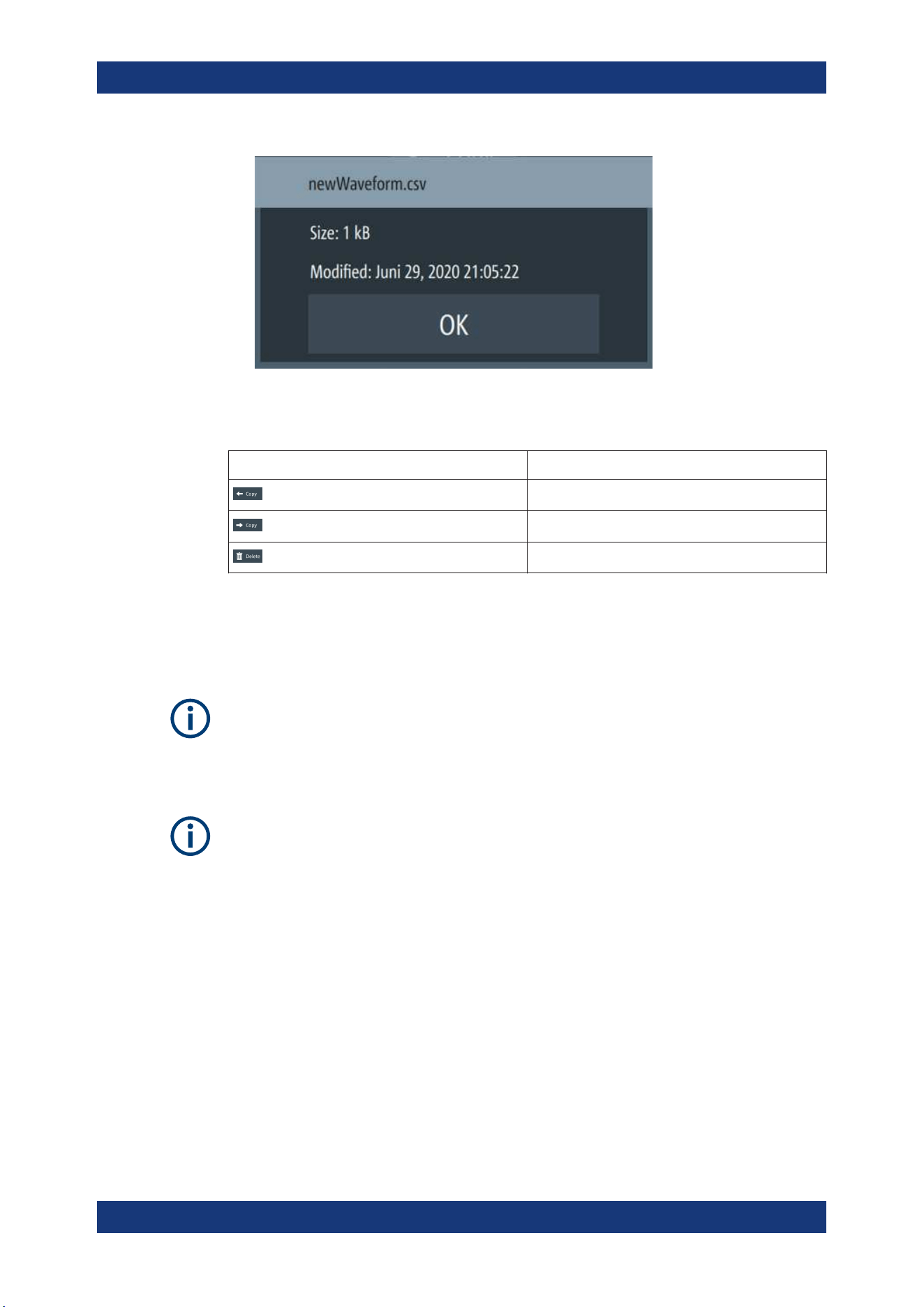
Instrument Functions
R&S
®
NGP800
74User Manual 5601.5610.02 ─ 04
Figure 6-24: File information
Table 6-4: File manager action
Action Description
Copy from internal memory to USB.
Copy from USB to internal memory.
Delete the selected file.
6.14 Store and Recall
Upon power-up, the instrument loads the last stored settings from internal memory
location. Auto saved parameters are also applied during startup.
The R&S NGP800 output states of all channels (Ch 1, Ch 2, Ch 3, Ch 4) are disabled
when the recall function is activated.
Auto saved instrument settings
Auto saved of the instrument settings is applied when any of the following parameters
are changed:
●
Chapter 6.16, "General Instrument Settings", on page 83
●
USB connection mode
●
Ethernet settings
In addition of the auto saved instrument settings, the following instrument settings are
stored or recalled in the internal memory:
●
Set voltage and current level
●
Settings in the Protection Function, Safety Limits
●
Data Logging settings
1. Press [Settings] key.
Store and Recall
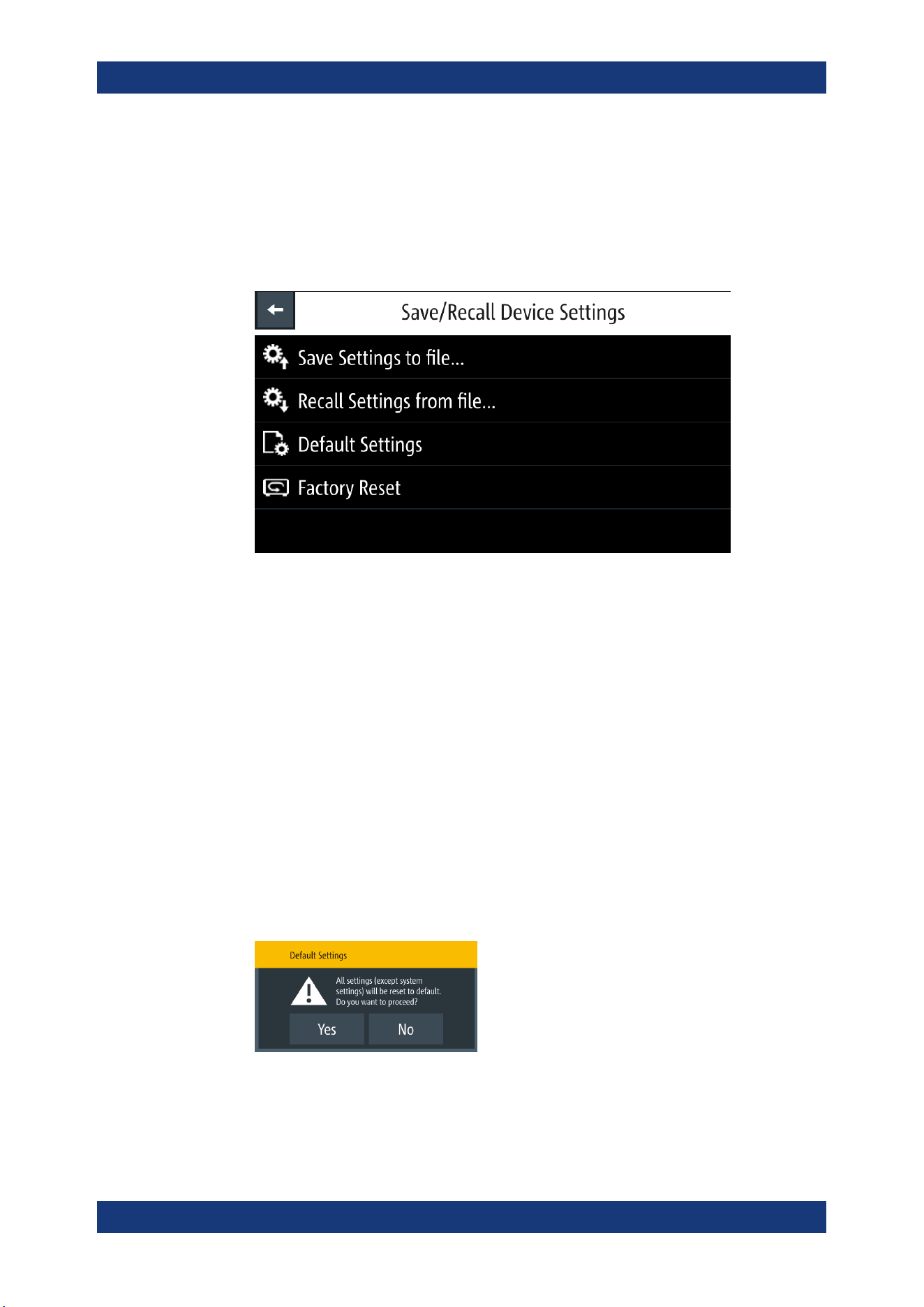
Instrument Functions
R&S
®
NGP800
75User Manual 5601.5610.02 ─ 04
The R&S NGP800 displays the device/channel menu window.
2. Select the "Device" tab to configure file settings for store and recall function.
The R&S NGP800 displays the device menu.
3. Select "Save/Recall Device Settings".
The R&S NGP800 loads the "Save/Recall Device Settings" dialog.
Figure 6-25: Save/Recall device settings dialog
4. Select "Save Settings to file" to save current instrument settings.
The R&S NGP800 opens a dialog to select source and file location.
You can save to existing file or create a file for saving.
5. Set the source and file location.
The R&S NGP800 saves the current instrument settings.
6. Similar, you can select "Recall Settings from file" to load instrument settings.
The R&S NGP800 opens a dialog to select source and file location.
7. Set the source and file location.
The R&S NGP800 resets the instrument with the loaded instrument settings.
To reset the instrument settings to factory default:
1. Select "Default Settings" from the "Save/Recall Device Settings" dialog.
The R&S NGP800 displays a popup message.
2. Select "Yes" to overwrite instrument settings to default.
The R&S NGP800 resets current instrument settings to default.
Store and Recall
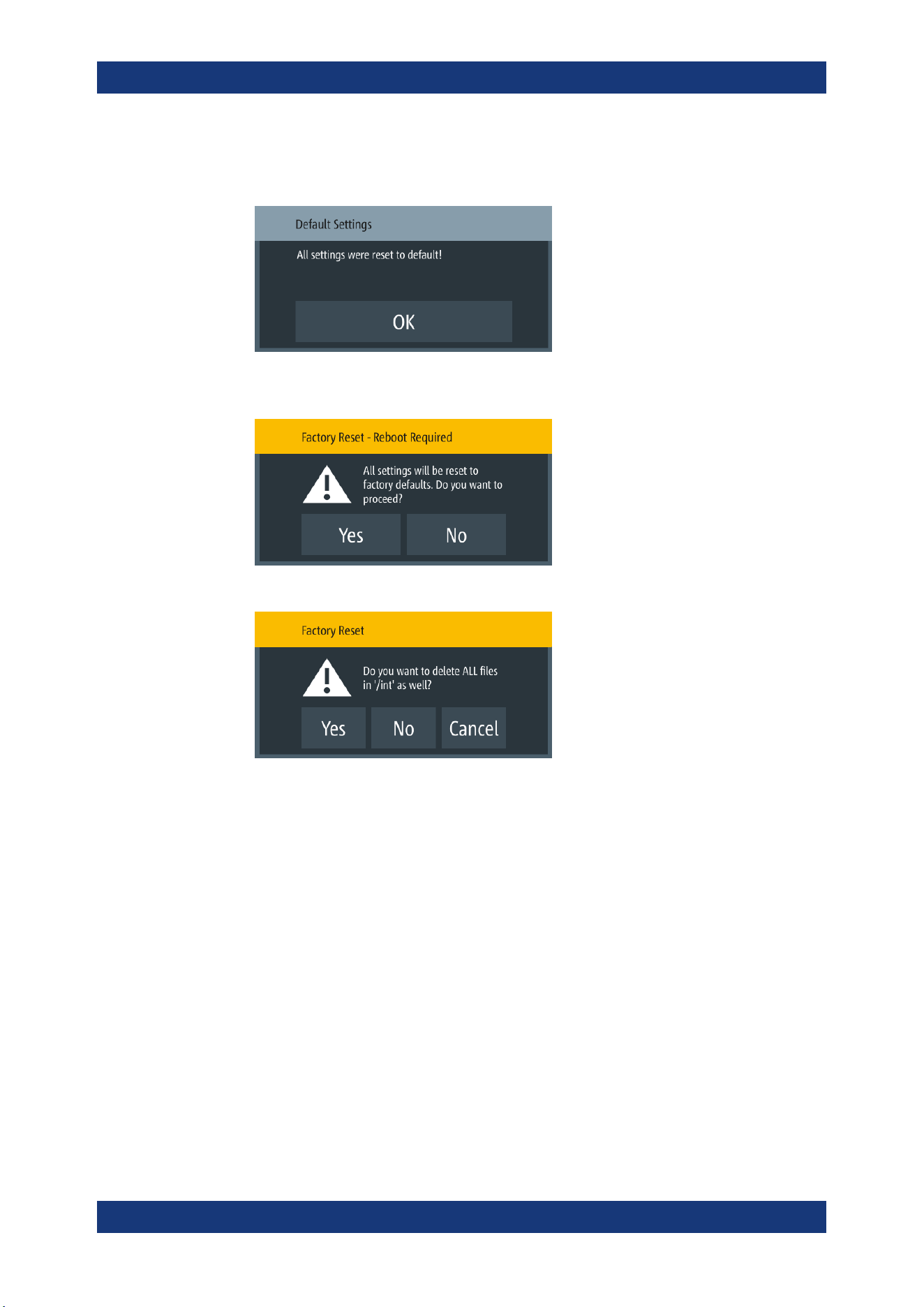
Instrument Functions
R&S
®
NGP800
76User Manual 5601.5610.02 ─ 04
3. The R&S NGP800 displays a popup message to show that all settings are reset to
default.
4. To proceed to reset instrument settings to factory default with a reboot, select "Fac-
tory Reset" from the "Save/Recall Device Settings" dialog.
5. Select "Yes" to proceed factory reset.
6. Select "No" to keep all files in the /int directory.
Select "Yes" to remove all files (arbitrary, logging, screenshots, settings) except the
files in the documentation folder under the /int directory.
6.15 Interfaces
There are various of ways how the R&S NGP800 can be remotely accessed and con-
trolled.
1. Press [Settings] key.
The R&S NGP800 displays the device/channel menu window.
2. Select the "Device" tab to configure network connection.
The R&S NGP800 displays the device menu.
3. Select "Interfaces".
The R&S NGP800 displays the "Interfaces" dialog.
Interfaces
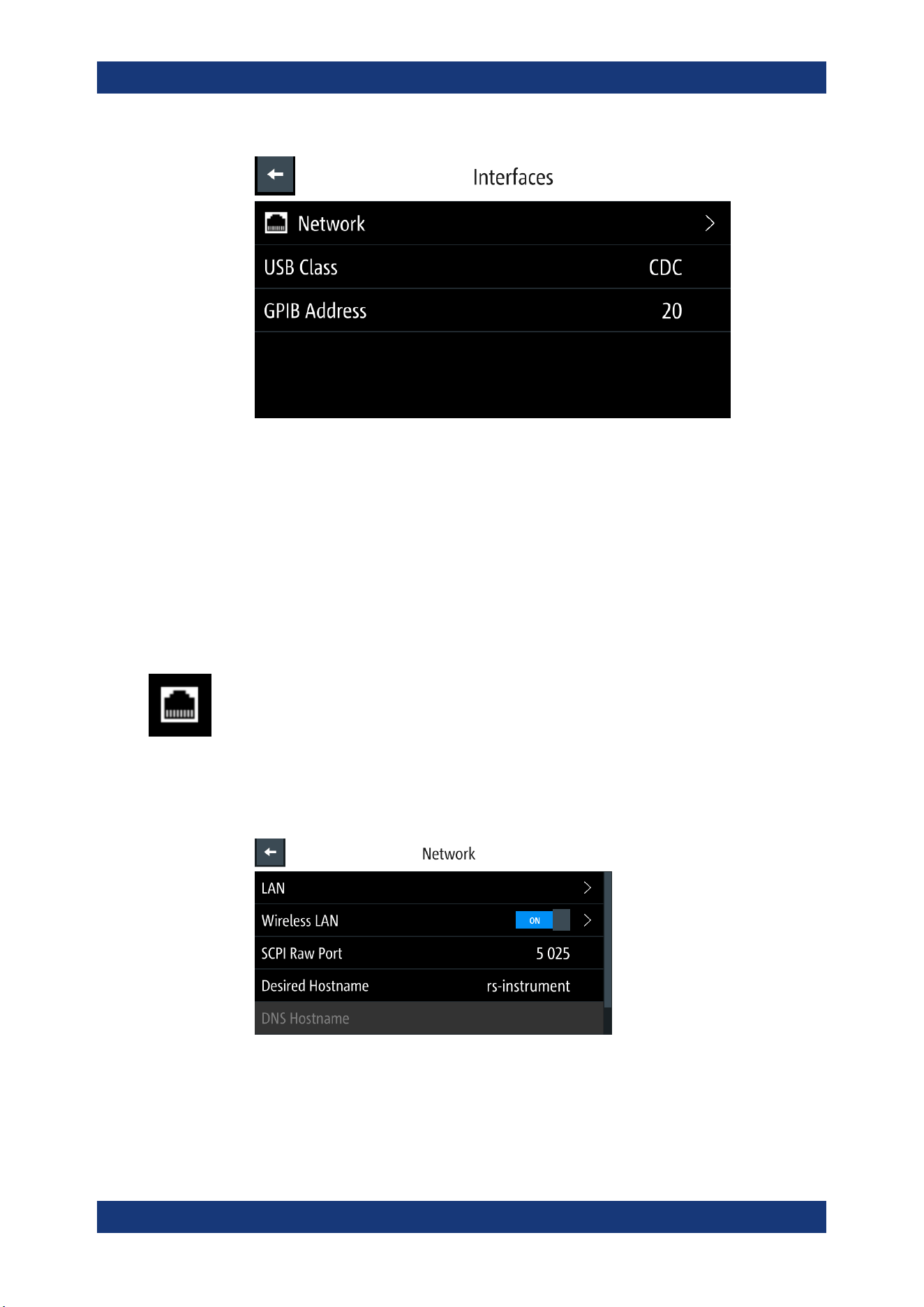
Instrument Functions
R&S
®
NGP800
77User Manual 5601.5610.02 ─ 04
Figure 6-26: Interfaces dialog
4. Select the connected interface (
Network, USB Class or GPIB Address) to configure
the necessary parameters required.
●
Network Connection................................................................................................77
●
USB Connection......................................................................................................81
●
GPIB Address......................................................................................................... 82
6.15.1 Network Connection
There are two methods to establish a local area network (LAN) connection with the
R&S NGP800 for remote control operation.
●
LAN
●
Wireless LAN
1. Select "Network" from the Figure 6-26.
The R&S NGP800 displays the "Network" dialog.
Figure 6-27: Network dialog
2. Set the required "SCPI Raw Port" and "Hostname".
The R&S NGP800 displays the on-screen keypad to enter the port number and
hostname.
Interfaces
Instrument Functions
R&S
®
NGP800
78User Manual 5601.5610.02 ─ 04
● "SCPI Raw Port": A port number used to open a raw TCP/IP connection to
send raw SCPI commands to the instrument
● "Desired Hostname": The name assigned to the instrument used to identify it in
the network
● "DNS Hostname","mDNS Hostname" : The name assigned to the domain
name used to identify it in the network
When the connection is available, the network icon is highlighted in white on the device
status bar information.
6.15.1.1 LAN Connection
The R&S NGP800 is equipped with a network interface and can be connected to an
Ethernet LAN (local area network). A LAN connection is necessary for remote control
of the instrument, and for access from a computer using a web browser.
Risk of network failure
Before connecting the instrument to the network or configuring the network, consult
your network administrator. Errors may affect the entire network.
To establish a network connection, connect a commercial RJ-45 cable to the LAN port
of the instrument and to a PC or network switch.
Depending on the network capacities, the TCP/IP address information for the instru-
ment can be obtained in different ways.
●
If the network supports dynamic TCP/IP configuration using the Dynamic Host
Configuration Protocol (DHCP), and a DHCP server is available, all address infor-
mation can be assigned automatically.
●
Otherwise, the address must be set manually. Automatic Private IP Addressing
(APIPA) is not supported.
By default, the instrument is configured to use dynamic TCP/IP configuration and
obtain all address information automatically. This means that it is safe to establish a
physical connection to the LAN without any previous instrument configuration.
Risk of network errors
Connection errors can affect the entire network. If your network does not support
DHCP, or if you choose to disable dynamic TCP/IP configuration, you must assign valid
address information before connecting the instrument to the LAN. Contact your net-
work administrator to obtain a valid IP address.
1. Connect the LAN cable to the LAN connector at the rear panel of the instrument.
Interfaces
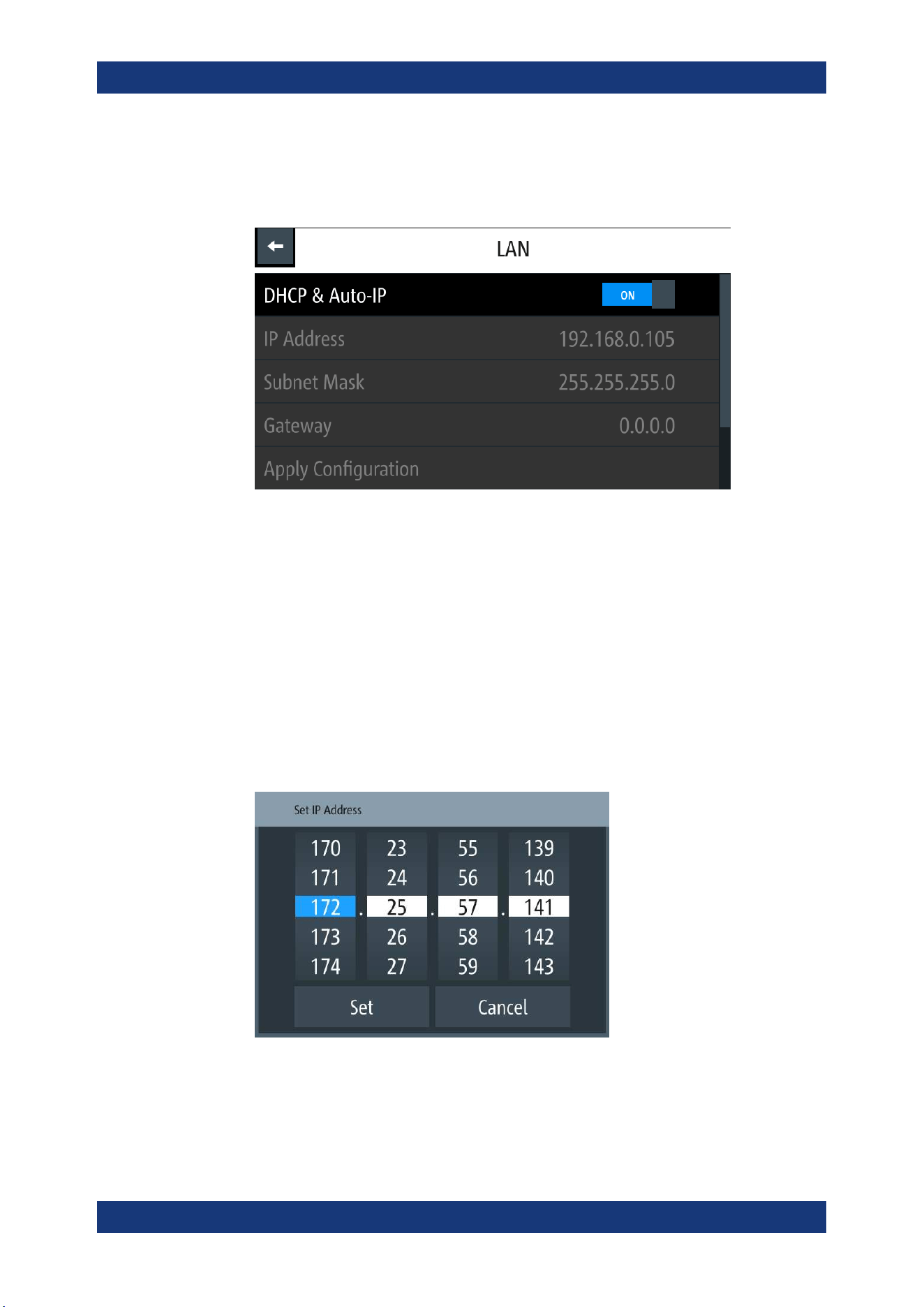
Instrument Functions
R&S
®
NGP800
79User Manual 5601.5610.02 ─ 04
2. Select "LAN" to set LAN connection.
The R&S NGP800 displays the "LAN" dialog.
Note: The "MAC Address" is fixed.
Figure 6-28: Ethernet settings dialog
3. Set the "DHCP & Auto-IP".
● "ON": Enables DHCP for automatic network parameter distribution and shows
the values of the IP Address. By default, the instrument is configured to use
dynamic configuration and obtain all address information automatically.
● "OFF": If the network does not support dynamic host configuration protocol
(DHCP). The addresses must be set manually.
4. Set the required DHCP mode.
If DHCP mode is set "OFF", the following "Ethernet Settings" are required.
5. Configure the "IP Address", "Subnet Mask" and "Gateway".
The R&S NGP800 displays the IP dialog for configuration.
Figure 6-29: IP dialog
6. Set the required IP addresses for "IP Address", "Subnet Mask" and "Gateway"
7. Select "Set" to confirm the value.
Interfaces
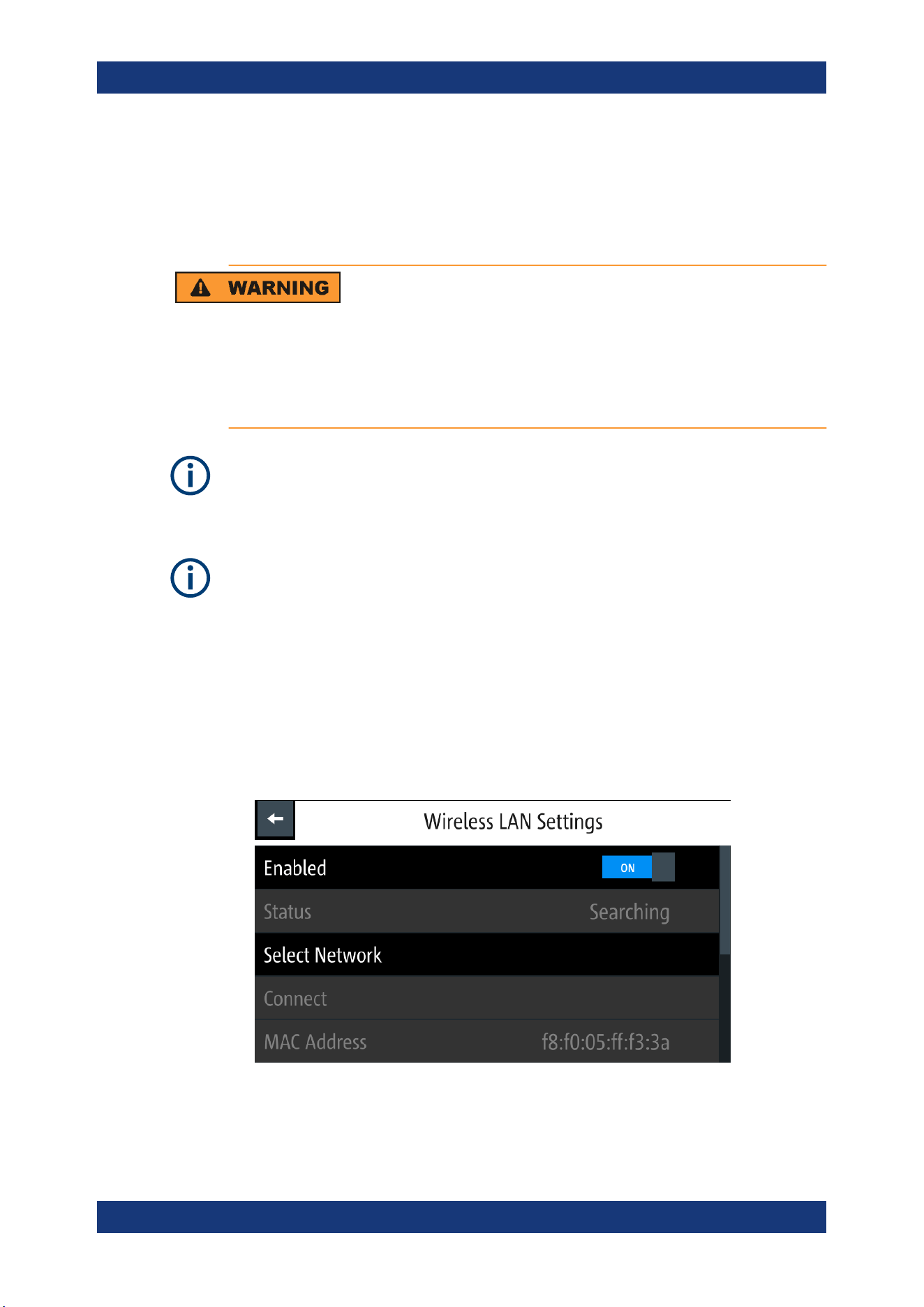
Instrument Functions
R&S
®
NGP800
80User Manual 5601.5610.02 ─ 04
8. Select "Apply Configuration" to apply the changes.
6.15.1.2 Wireless LAN Connection
Risk of RF exposure
When WLAN is active, a minimum separation distance of 20 cm from front panel of the
instrument must be observed at all times.
When WLAN is active, no operation of antenna or transmitter should be co-located with
the instrument.
Wi-Fi transmitter performance
Frequency range: 2412 MHz to 2472 MHz
Power: 19.5 dBm typical
Instrument option
R&S NGP-K102 (P/N: 5601.6400.03) option is required to connect the R&S NGP800 to
a network via wireless LAN connection.
An alterative to connection in local area network is wireless LAN connection. With the
presence of an authenticated Wi-Fi signal, the R&S NGP800 automatically connects to
a network and navigation can be made via the web browser according to the WLAN
IEEE 802.11 b/g/n standards.
1. Select "Wireless LAN" to set LAN connection.
The R&S NGP800 displays the "Wireless LAN Settings" dialog.
Figure 6-30: WLAN settings dialog
2. Select "Enable" menu item to set "On" to enable wireless LAN.
Interfaces
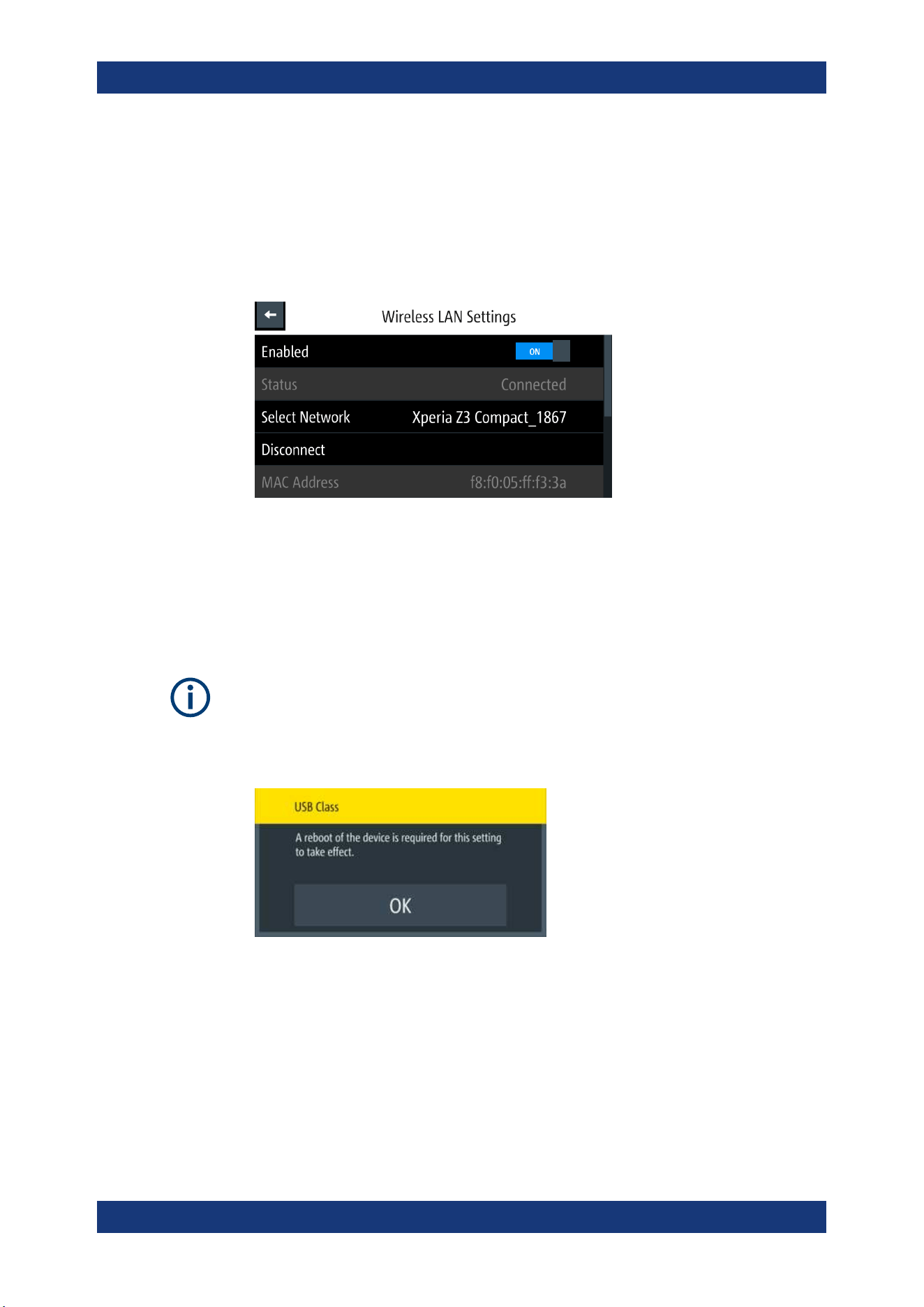
Instrument Functions
R&S
®
NGP800
81User Manual 5601.5610.02 ─ 04
The R&S NGP800 began searching available WiFi network and the "Status" shows
"Searching".
3. Select the "Select Network" to connect the required WiFi network.
If connection is successful, the "Status" shows "Connected". See
Figure 6-31.
When the connection is alive, the WLAN icon turns white on the device status bar.
See "Device status bar" on page 33.
Figure 6-31: WLAN connected
4. To disconnect, select the Disconnect in the "Wireless LAN settings" dialog.
6.15.2 USB Connection
Change of USB class
If a change in "USB Class" is detected (i.e. from "TMC" to "CDC" or vice versa), the
rebooting of instrument is necessary to load the correct USB driver.
●
A popup message is displayed: "A reboot of the device is required for this setting to
take effect.".
Alternatively, connect a USB cable to the USB port (see Figure 4-3) and PC for a USB
connection. The R&S NGP800 supports USB CDC and USB TMC connection.
1. Select "USB Class" from the "Network Connections" dialog.
The R&S NGP800 displays the USB class dialog to select the USB connection.
Interfaces
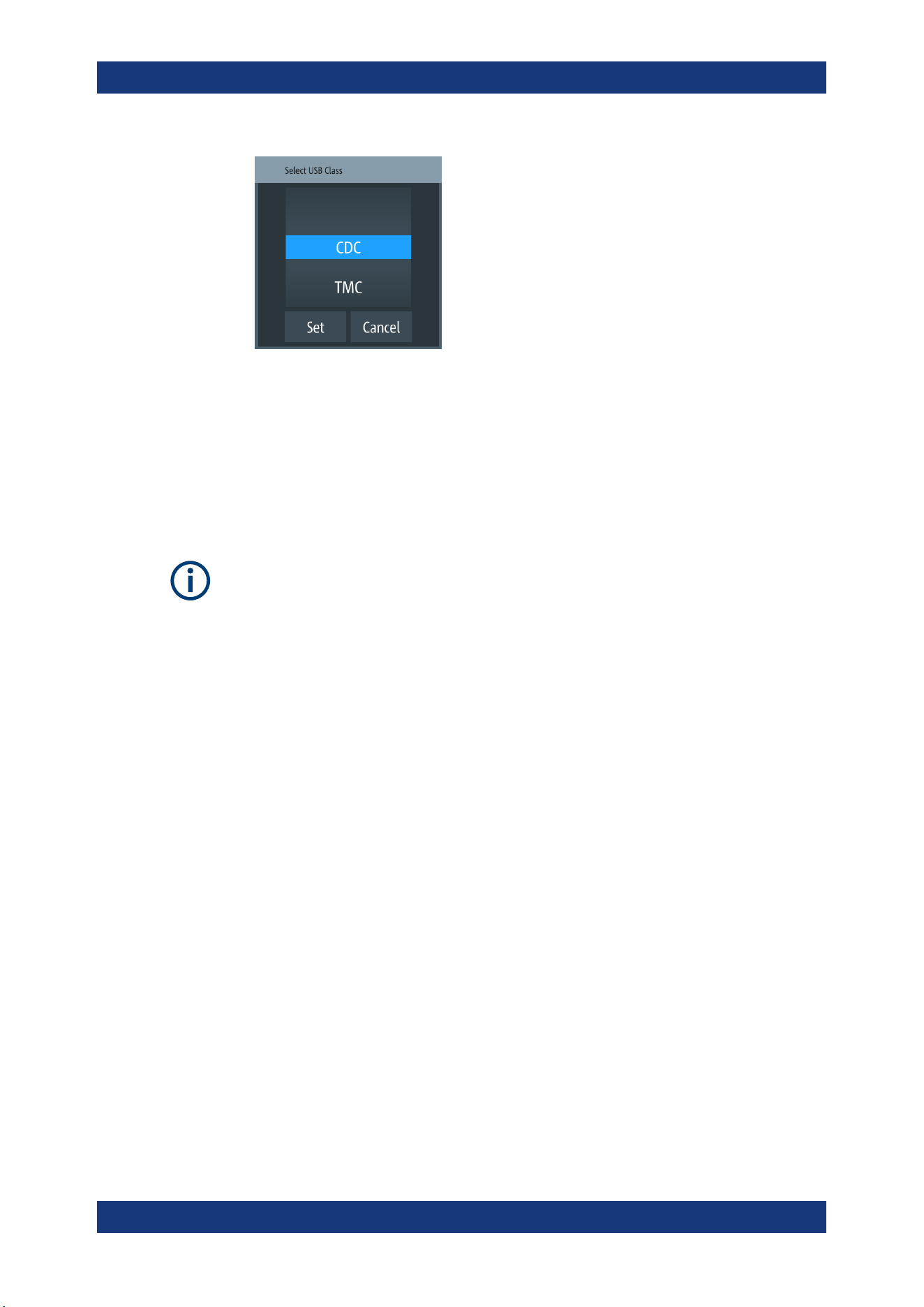
Instrument Functions
R&S
®
NGP800
82User Manual 5601.5610.02 ─ 04
Figure 6-32: USB dialog
2. Set the USB class.
3. Select "Set" to confirm the selection.
6.15.3 GPIB Address
Instrument option
R&S NGP-B105 (P/N: 5601.6000.02) option needs to be installed for the remote com-
mand of R&S NGP800 via GPIB interface.
The GPIB interface, sometimes called the General Purpose Interface Bus (GPIB), is a
general purpose digital interface system that can be used to transfer data between two
or more devices. Some of its key features are:
●
Up to 15 instruments can be connected
●
The total cable length is restricted to a maximum of 15 m; the cable length between
two instruments should not exceed 2m
●
A wired "OR"-connection is used if several instruments are connected in parallel
To be able to control the instrument via the GPIB bus, the instrument and the controller
must be linked by a GPIB bus cable. A GPIB bus card, the card drivers and the pro-
gram libraries for the programming language must be provided in the controller. The
controller must address the instrument with the GPIB instrument address.
GPIB instrument address
To operate the instrument via remote control, it must be addressed using the GPIB
address. The default remote control address is factory-set at 20, the addresses of 0
through 30 are allowed.
The GPIB address is maintained after a reset of the instrument settings.
1. Select "GPIB Address" from the
Figure 6-26.
The R&S NGP800 displays an on-screen keypad to set the value.
Interfaces
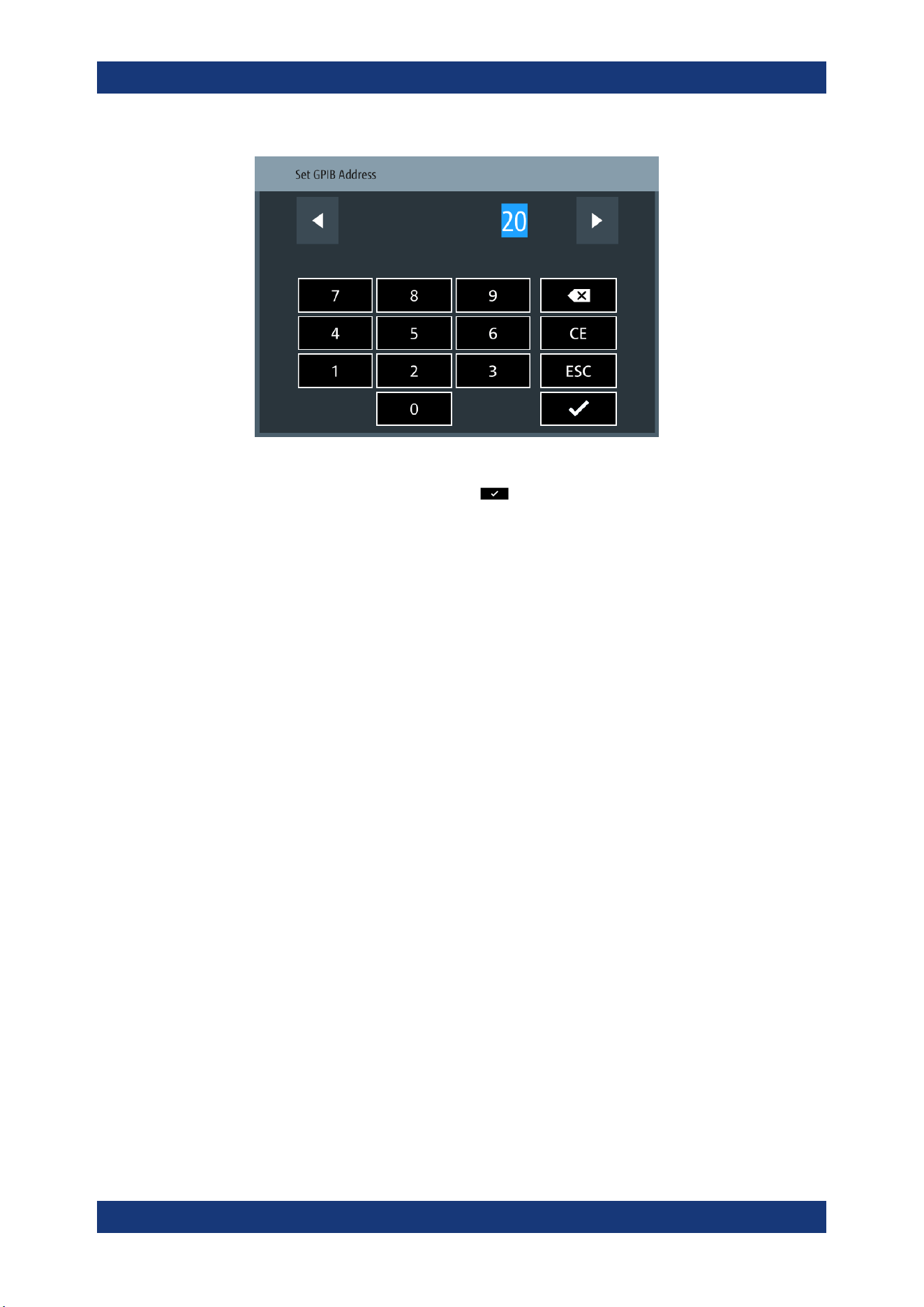
Instrument Functions
R&S
®
NGP800
83User Manual 5601.5610.02 ─ 04
2. Enter the required value.
3.
Confirm value with the enter key
.
6.16 General Instrument Settings
The following chapters provide the general instrument information and utilities services
in "Device" menu.
1. Press [Settings] key.
The R&S NGP800 displays the device/channel menu window.
2. Select the "Device" tab.
The R&S NGP800 displays the device menu.
6.16.1 Licenses Management
Options are enabled by entering a registered license key code.
You may choose to install from an XML file on USB or by manually entering the key
code.
► Select "Licenses" to install license key code.
The R&S NGP800 displays the license dialog.
● "Active": Options that are currently active in the instrument
● "Inactive": Options that are currently not active in the instrument
● "Deactivation": Options that are expried or removed in the instrument
General Instrument Settings
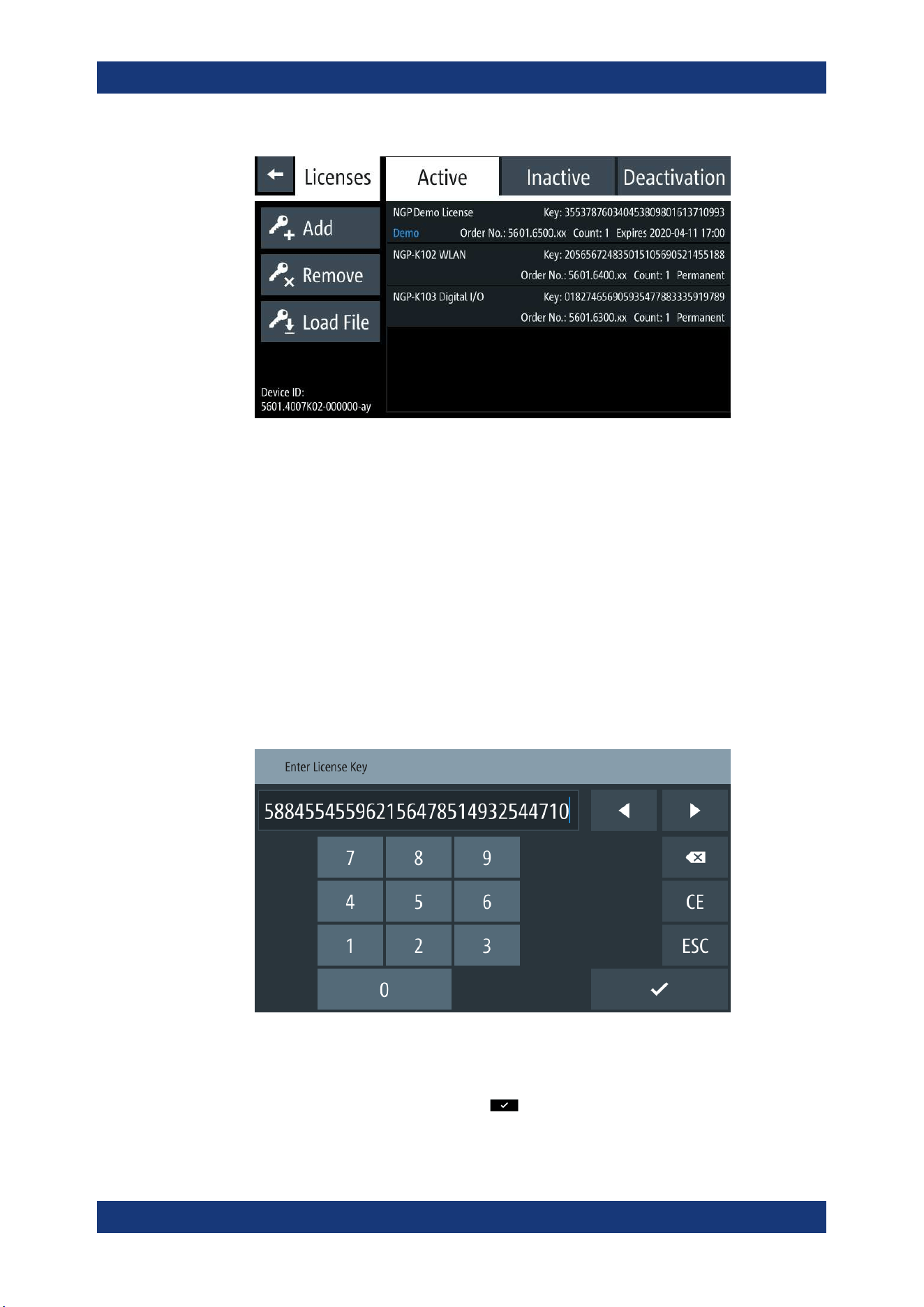
Instrument Functions
R&S
®
NGP800
84User Manual 5601.5610.02 ─ 04
Figure 6-33: License dialog
To install an XML file, proceed as follows:
1. Copy the XML file containing the registered key code into the USB flash drive.
2. Connect the USB flash drive to the USB port of the instrument.
3. Select "Load File" to load the license file from the USB stick.
4. Select the license file to install in the instrument.
The R&S NGP800 install the license option accordingly.
If the installation is successful, the option is displayed in the "Active" window.
To manually enter the key code, proceed as follows:
1. Select "Add" key to invoke the license key on-screen keyboard.
Figure 6-34: License key on-screen keyboard
2. Enter the key code (30-digit number) of the option in the entry box.
3.
Confirm entries with the enter key
.
General Instrument Settings
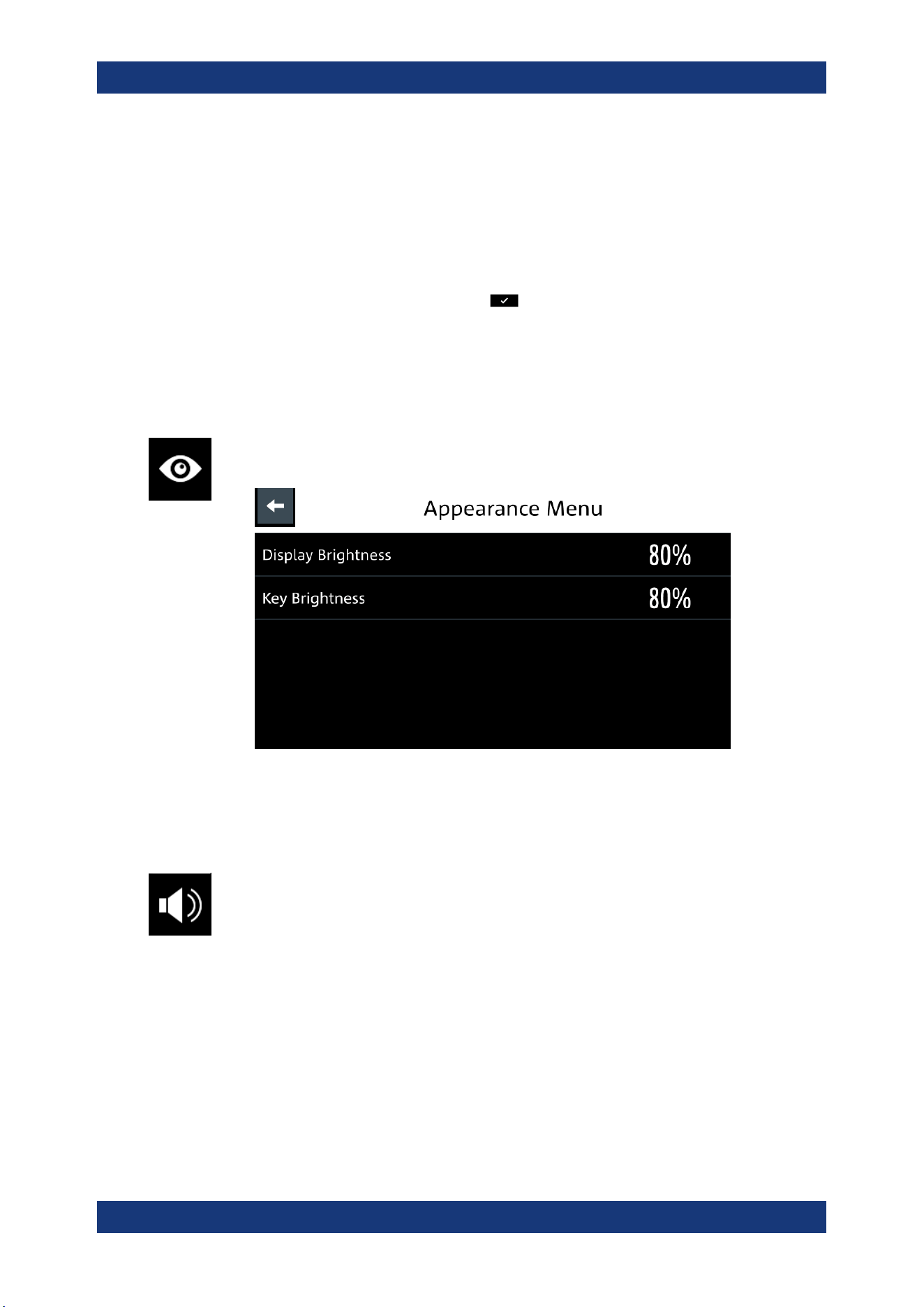
Instrument Functions
R&S
®
NGP800
85User Manual 5601.5610.02 ─ 04
If the correct key code is entered, the R&S NGP800 popup a message "Devicekey
is installed" and the option is displayed in the "Active" window.
4. To remove the option, select "Remove" from the license dialog.
The R&S NGP800 displays the license key on-screen keyboard. See
Figure 6-34.
5. Enter the key code (30-digit number) of the option in the entry box.
6.
Confirm entries with the enter key
.
If the correct key code is entered, the R&S NGP800 popup a message "Devicekey
is removed" and the option is displayed in the "Deactivation" window.
6.16.2 Appearance Settings
► Select the "Appearance" to set display and key brightness.
The R&S NGP800 displays the appearance dialog.
Figure 6-35: Appearance dialog
6.16.3 Sound Settings
1. Select the "Sound Settings" to set sound settings.
The R&S NGP800 displays the sound settings dialog.
General Instrument Settings
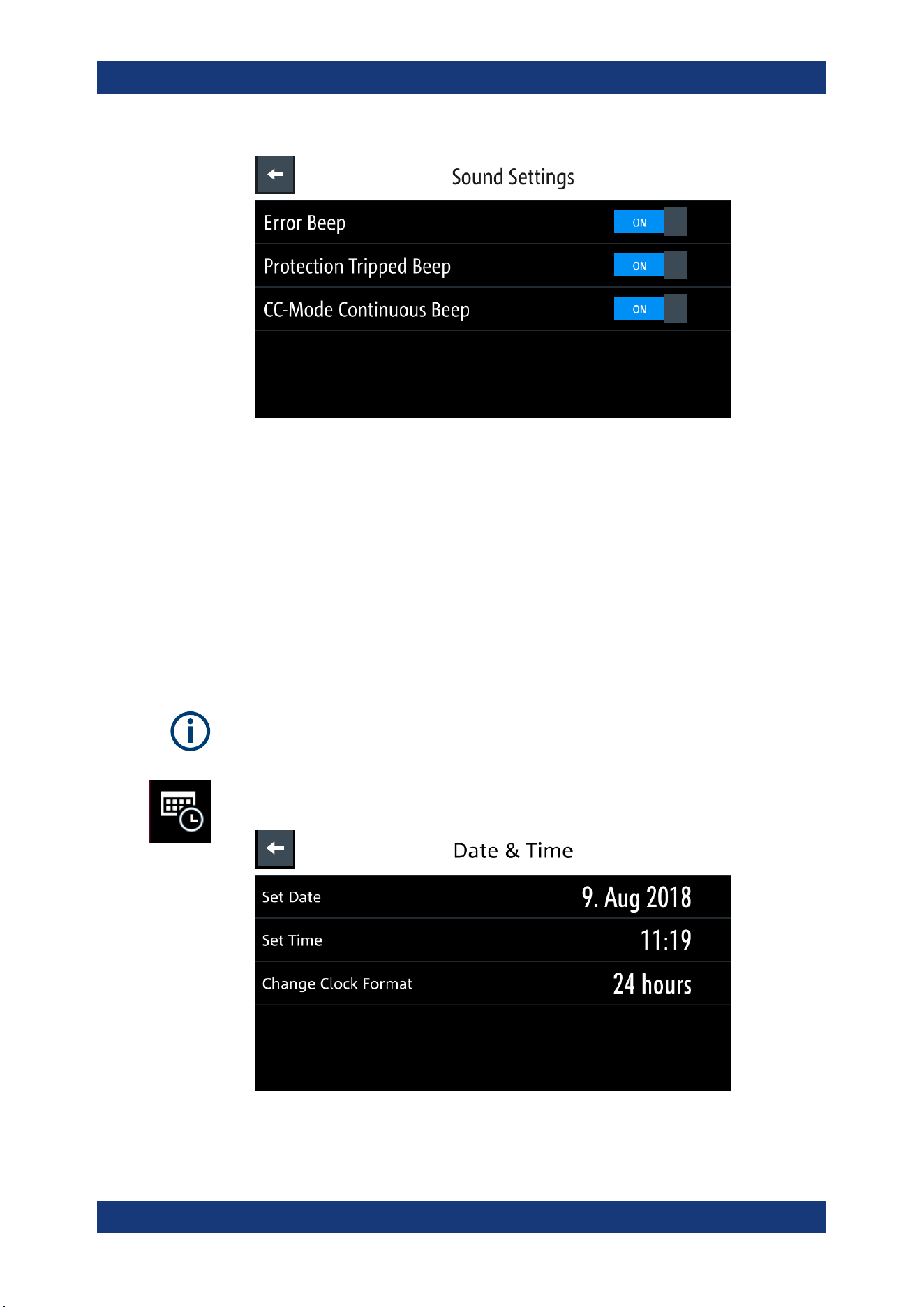
Instrument Functions
R&S
®
NGP800
86User Manual 5601.5610.02 ─ 04
Figure 6-36: Sound settings dialog
2. Select the required fields to set alert.
● "Error Beep": A single beep alert when error occurs.
● "Protection Tripped Beep": A single beep alert when a protection tripped (OCP,
OVP, OPP) occurs. See
Chapter 6.4, "Protection", on page 53.
● "CC-Mode Continuous Beep": A continuous beep sound alert when the
selected output channel goes into CC mode. See "CC mode" on page 46.
6.16.4 Date and Time
The time is regarded as UTC. There is no timezone selectable.
1. Select the "Date & Time" to set date and time format.
The R&S NGP800 displays the date and time dialog.
Figure 6-37: Sound settings dialog
General Instrument Settings
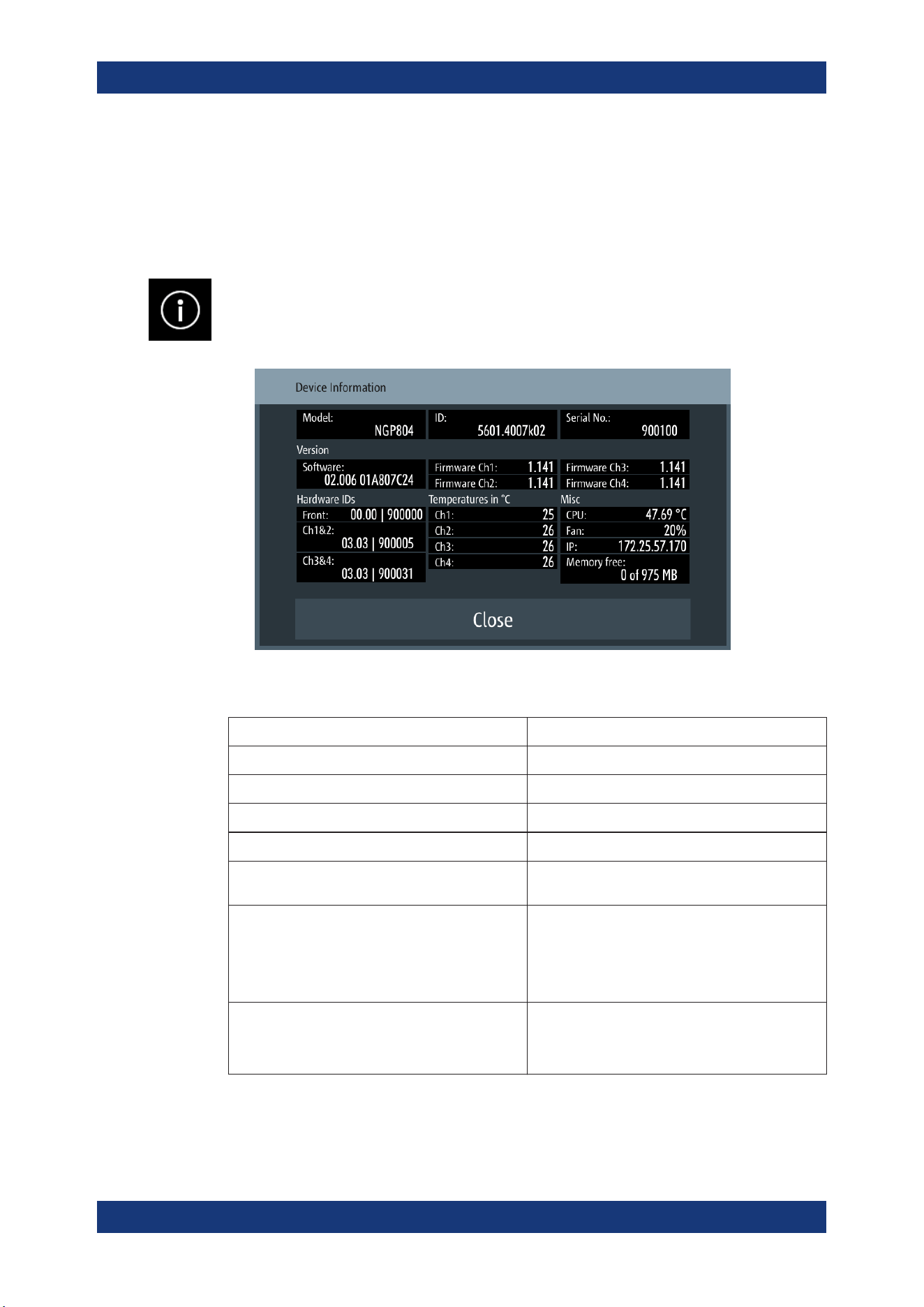
Instrument Functions
R&S
®
NGP800
87User Manual 5601.5610.02 ─ 04
2. Select the required field to configure.
The R&S NGP800 reset the instrument date and time accordingly.
6.16.5 Device Information
General instrument information of R&S NGP800.
► Select the "Instrument Information" to display the device information.
The R&S NGP800 displays the device information dialog.
Figure 6-38: Device information dialog
Device information Description
Model Model of the instrument.
ID Instrument orderable part number.
Serial No. Unique identification number for the instrument.
Version Software version that is installed in the instrument.
Hardware IDs Unique serial number of the front and channel
boards of the instrument.
Temperatures Temperature in degrees measured in both Ch 1, Ch
2, Ch 3 and Ch 4.
If the temperature exceeded the specification, "Over
Temperature Protection" (OTP) is triggered and the
respective output channel is turned off.
Misc Temperature measures for CPU.
Instrument IP address.
Fan speed and memory capacity in the instrument.
General Instrument Settings
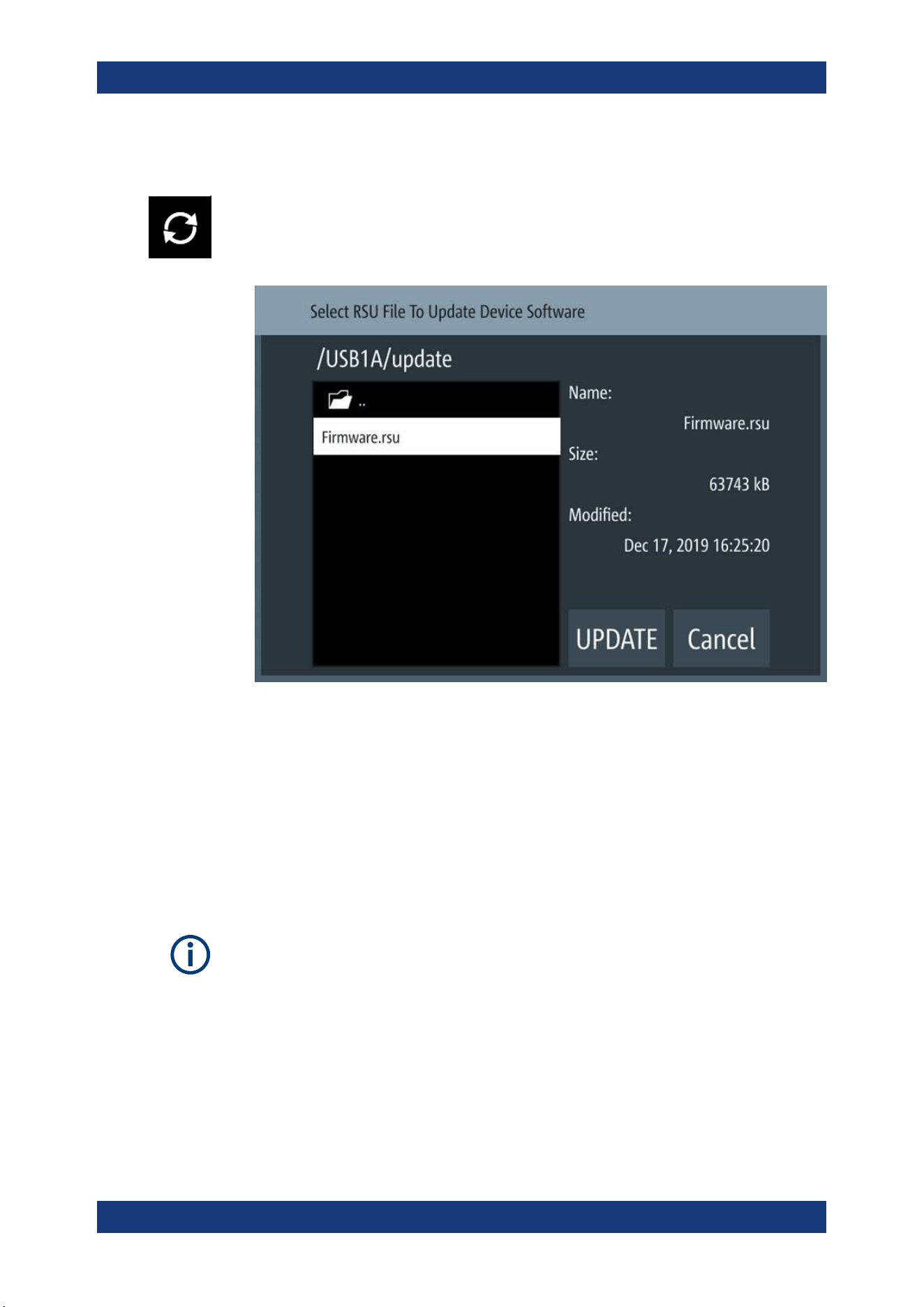
Instrument Functions
R&S
®
NGP800
88User Manual 5601.5610.02 ─ 04
6.16.6 Update Device
Latest instrument firmware is available in the R&S NGP800 product homepage.
1. Select the "Update Device" to update instrument firmware.
The R&S NGP800 displays the update device dialog.
Figure 6-39: Update device dialog
2. Select the source and file location to update instrument firmware.
3. Select "UPDATE" to update the instrument firmware.
The R&S NGP800 updates the instrument firmware accordingly.
6.17 Adjustment
Adjustment shall be done at ambient temperature of 25 °C ± 2 °C .
The instrument must be operated for at least 30 minutes before executing the adjust-
ment .
Thick wires are recommended for connecting the shunt resistor to avoid huge voltage
drop and excessive heating.
For ease of maintenance, the R&S NGP800 provides two adjustment procedures
which you can apply on the instrument:
●
Chapter 6.17.1, "Analog In Adjustment", on page 89
Adjustment
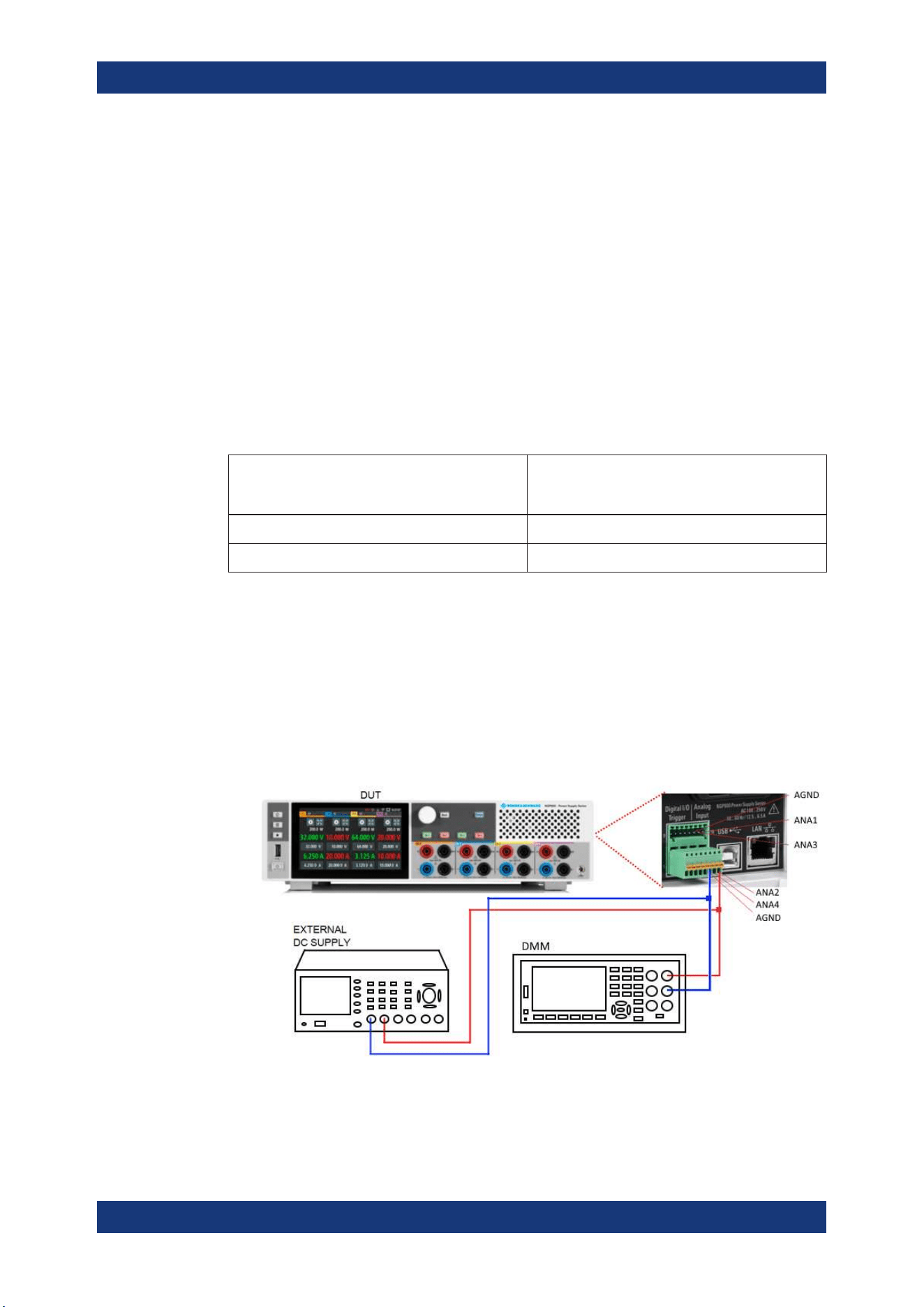
Instrument Functions
R&S
®
NGP800
89User Manual 5601.5610.02 ─ 04
●
Chapter 6.17.2, "Channel Adjustment", on page 92
► Press [Settings] key.
The R&S NGP800 displays the device/channel menu window.
6.17.1 Analog In Adjustment
The "Analog In Adjustment" adjusts the output channel voltage and current when a 0 V
to 5 V is applied at the analog input of the terminal block, see
"Digital I/O & analog
input connector (15)"
on page 26.
Depending on the instrument models, up to four analog input pins are adjusted inde-
pendently.
Table 6-5: Output channel voltage, current for different instrument models
Models Output channel voltage with 0 V to 5 V applied to
analog input pins (ANA IN1, ANA IN2, ANA IN3,
ANA IN4)
NGP802, NGP804, NGP814 (Ch 1, Ch 2) 0 V to 32 V, 0A - 20A
NGP822, NGP824, NGP814 (Ch 3, Ch 4) 0 V to 64 V, 0A - 10A
Analog input adjustment setup
Recommended instruments
●
Digital multimeter (DMM): 6 ½ digits
●
External DC power supply: 1 mV resolution, 0.05 % accuracy with < 500 uVrms rip-
ple
Connect the external DC power supply to the
analog input channel (e.g. ANA_IN1)
with respect to the analog ground (AND_GND). Monitor the voltage using digital
multimeter.
Figure 6-40: Analog input adjustment setup
Adjustment
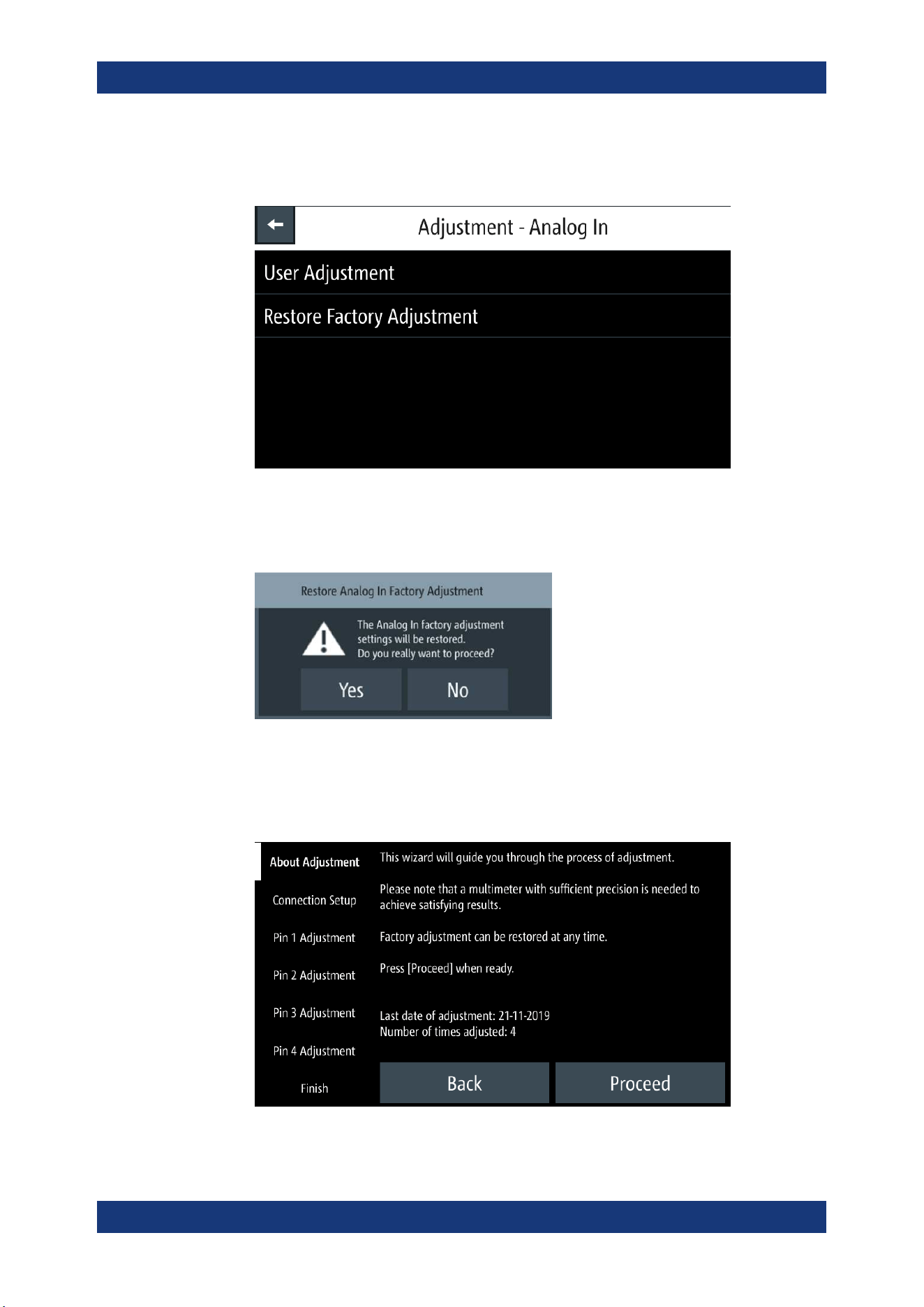
Instrument Functions
R&S
®
NGP800
90User Manual 5601.5610.02 ─ 04
1. Select the device tab to perform the analog in adjustment routine.
The R&S NGP800 displays the selected "Adjustment - Analog In" dialog.
Figure 6-41: Adjustment -Analog In dialog
2. To overwrite user adjustment, select "Restore Factory Adjustment" to restore the
analog in factory settings.
Select "Yes" to restore factory adjustment.
3. To proceed analog in adjustment, select "User Adjustment" in Figure 6-41.
The R&S NGP800 displays the "ANALOG IN ADJUSTMENT" wizard to guide the
adjustment procedures.
Figure 6-42: Analog in adjustment wizard
Adjustment
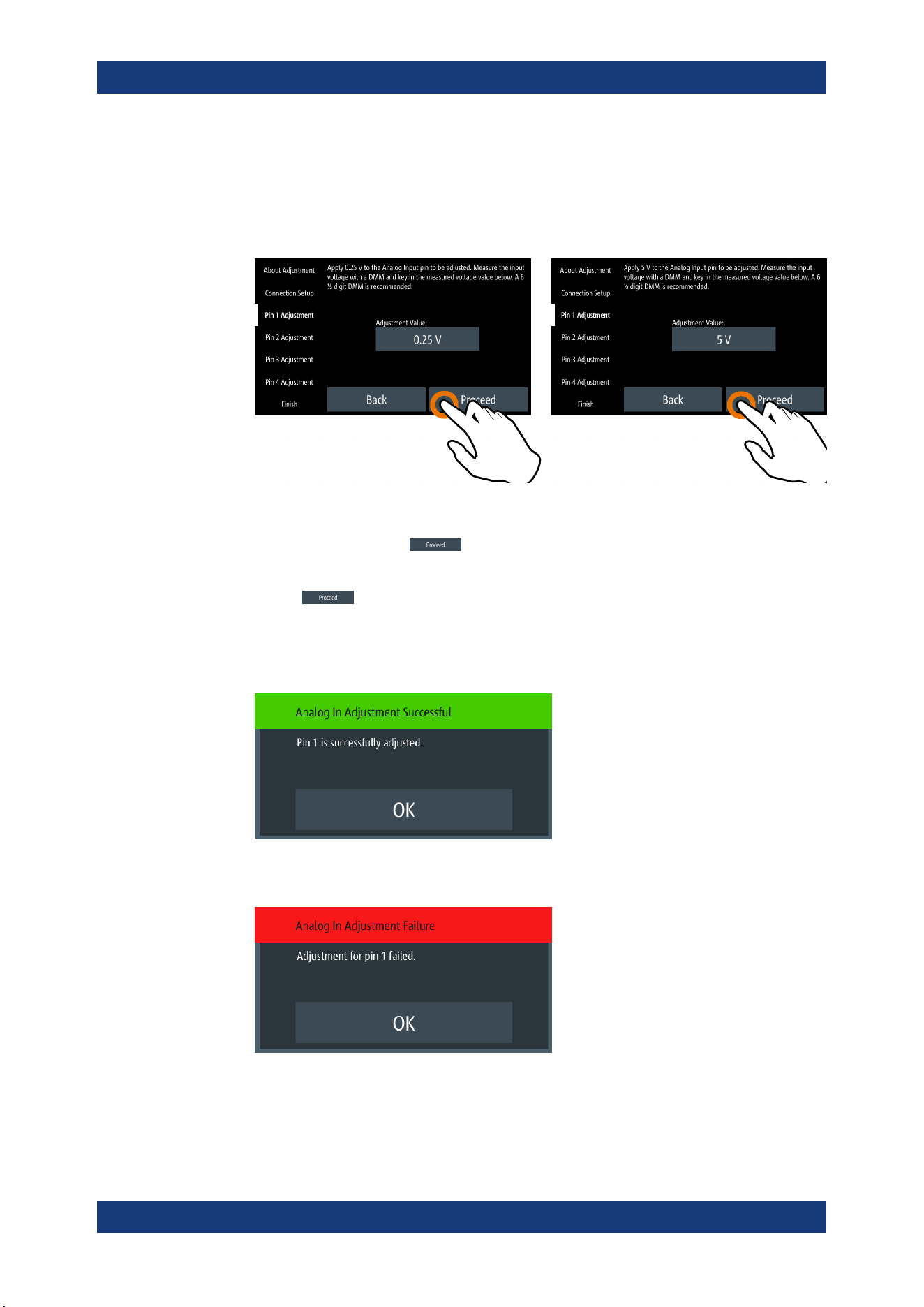
Instrument Functions
R&S
®
NGP800
91User Manual 5601.5610.02 ─ 04
4. Setup the adjustment with instruments illustrated in Figure 6-40.
5. Follow the on-screen instructions displayed in the Figure 6-42.
Supply the required voltage to the analog input and key in the measured value
from DMM using the on-screen keypad. See Figure 6-43.
Figure 6-43: Analog in adjustment procedure
6.
Confirm the entry with
.
7. Leave the setup connections as open.
Select
to start the adjustment automatically.
8. If adjustment is successful, the R&S NGP800 displays a message to indicate that
the adjustment is successful.
The R&S NGP800 overwrites the factory or the last analog in adjustment.
9. If adjustment failed after repeated tries, contact your local service partner for sup-
port.
Adjustment
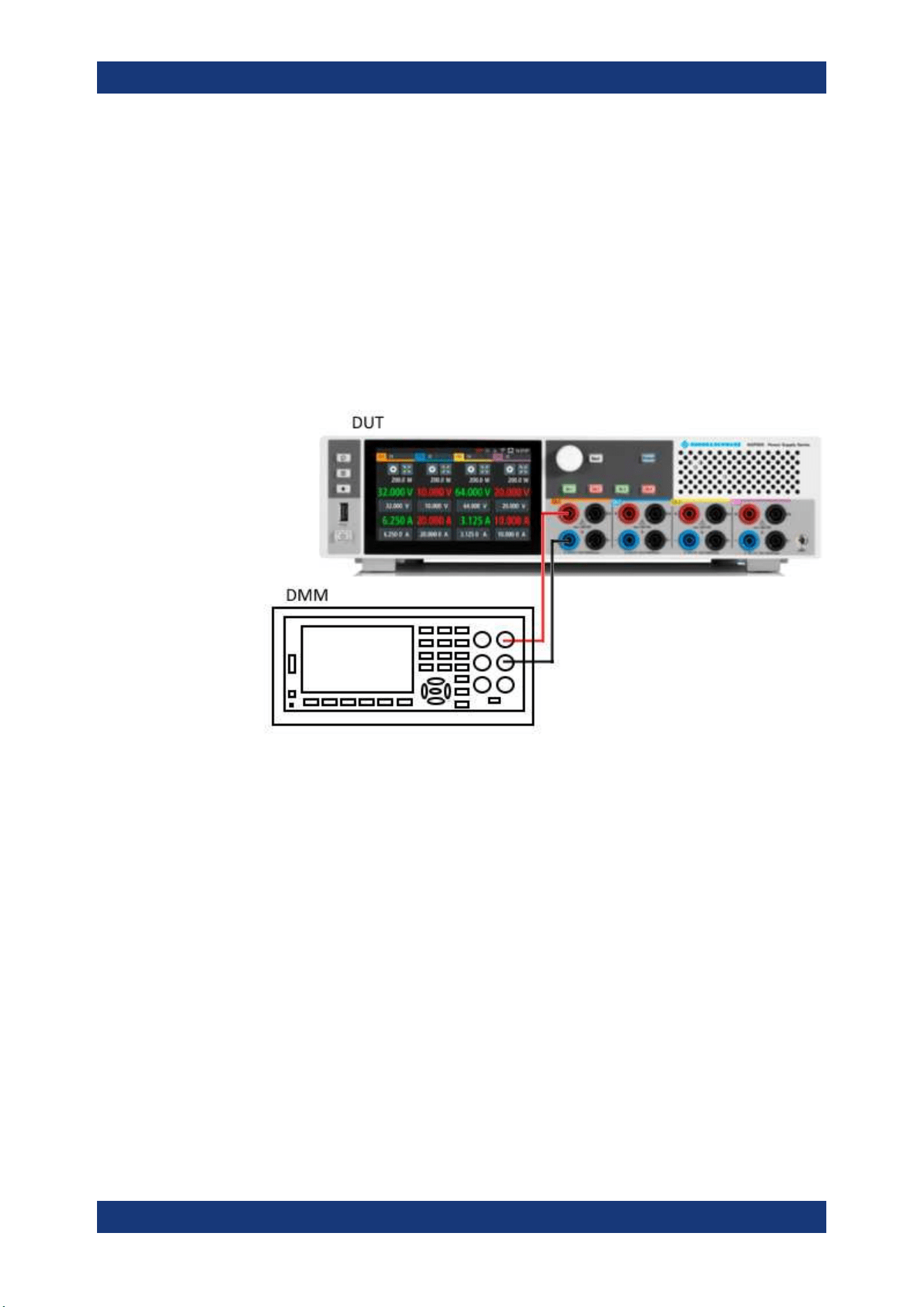
Instrument Functions
R&S
®
NGP800
92User Manual 5601.5610.02 ─ 04
6.17.2 Channel Adjustment
The "Adjustment" calculates the required adjustment coefficient internally for voltage
and current on the selected channel.
Channel adjustment setup
Recommended instruments
●
Digital multimeter (DMM): 6 ½ digits
●
Shunt resistor: 10 mΩ, at least 25 A rating, 0.02 % accuracy,
●
Connect the DMM to the instrument and monitor the measured voltage or current.
See
Figure 6-44 and Figure 6-45.
Figure 6-44: Voltage adjustment setup
Adjustment
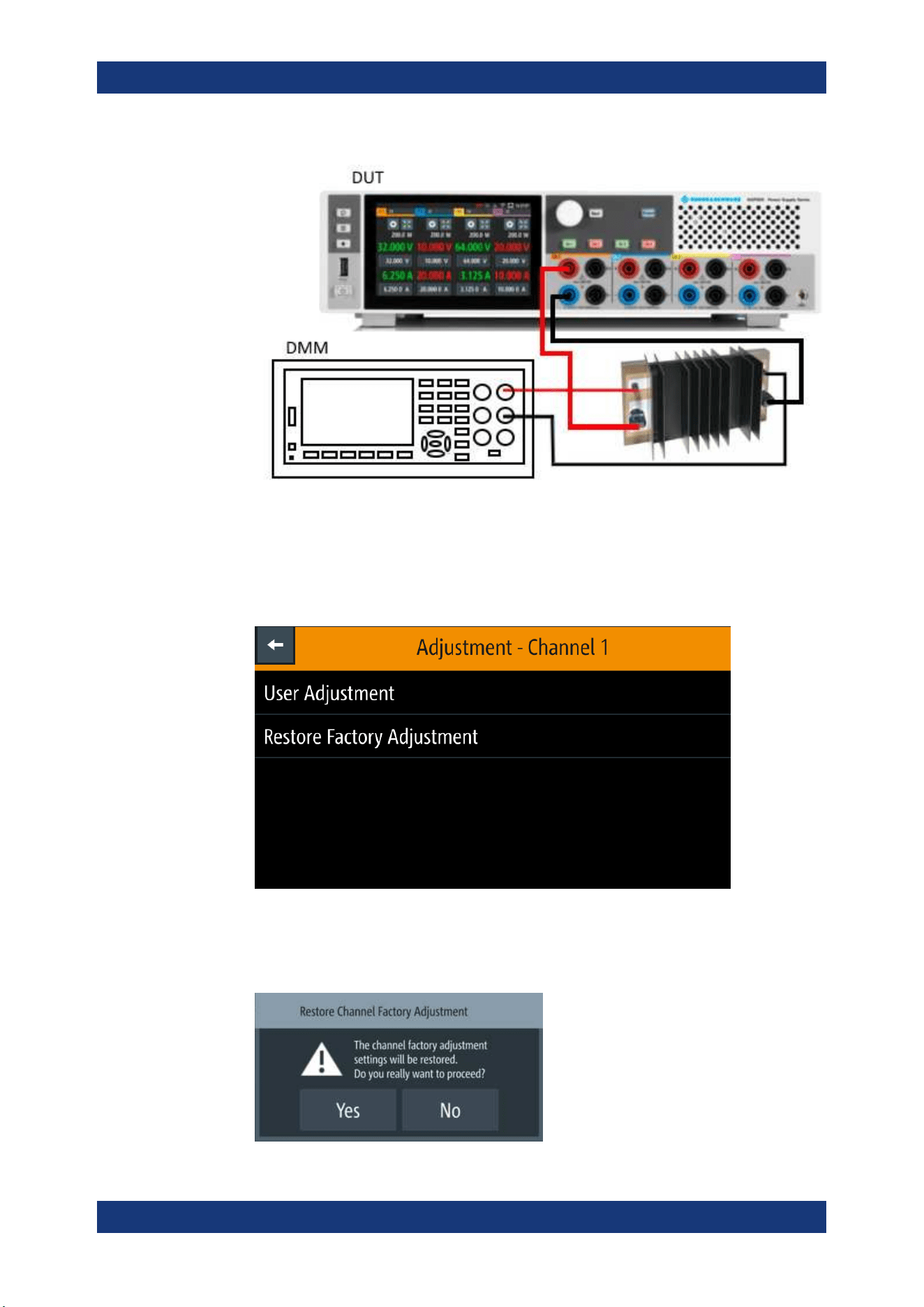
Instrument Functions
R&S
®
NGP800
93User Manual 5601.5610.02 ─ 04
Figure 6-45: Current adjustment setup
1. Select the desired channel tab to perform the required channel adjustment proce-
dures.
The R&S NGP800 displays the selected channel adjustment dialog.
Figure 6-46: Adjustment dialog
2. To overwrite user adjustment, select "Restore Factory Adjustment" to restore the
channel factory settings.
Adjustment
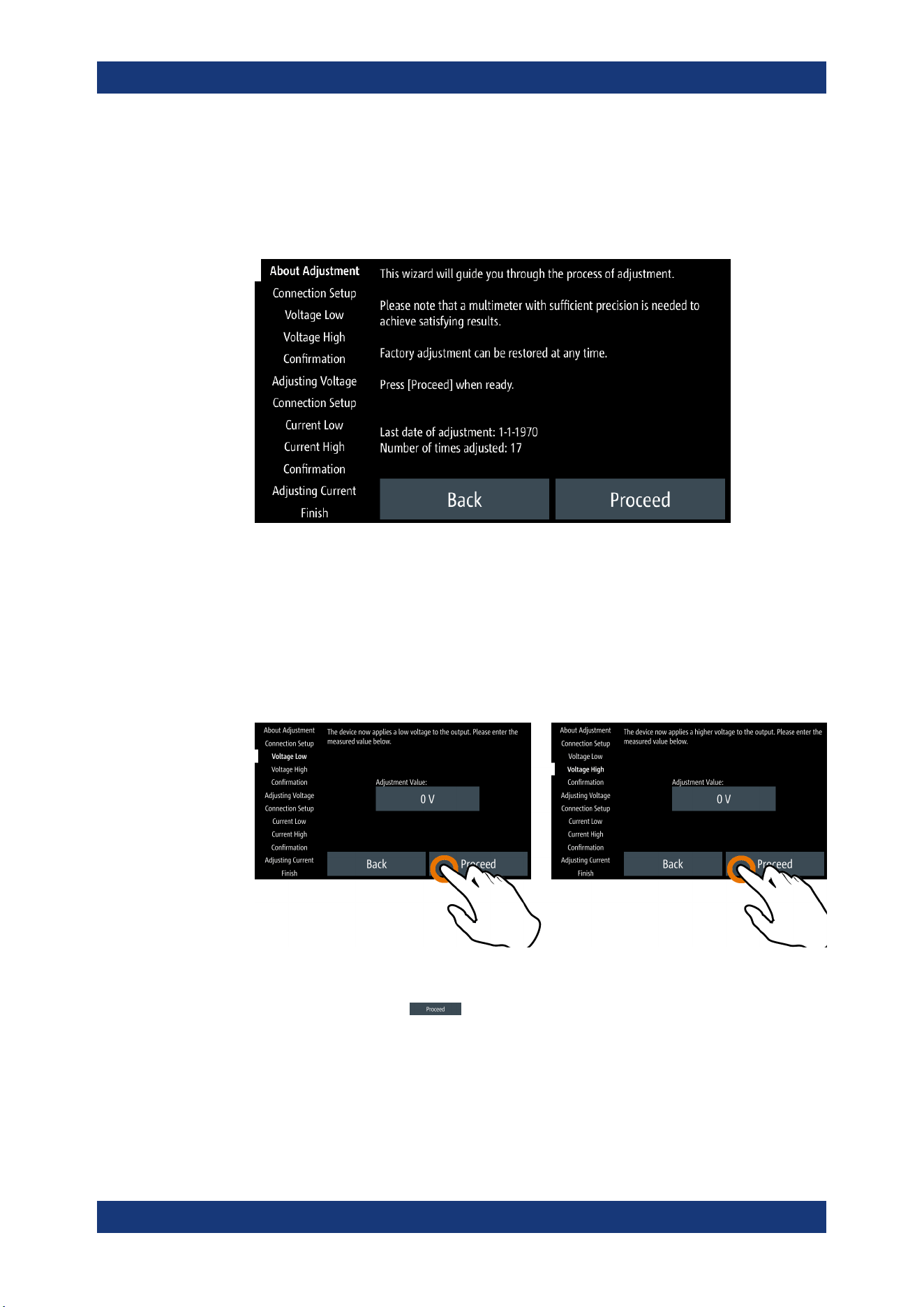
Instrument Functions
R&S
®
NGP800
94User Manual 5601.5610.02 ─ 04
Select "Yes" to restore factory adjustment.
3. To proceed channel adjustment, select "User Adjustment" in Figure 6-46.
The R&S NGP800 displays the "ADJUSTMENT" wizard to guide the channel
adjustment procedures.
Figure 6-47: Channel adjustment wizard
4. Depending on the types of adjustment (voltage or current), setup the instruments
illustrated in
Figure 6-44 or Figure 6-45.
5. Follow the on-screen instructions displayed in the Figure 6-47.
The R&S NGP800 applies a low voltage/current followed by a high voltage/current
for voltage/current adjustment. Key in the measured value from DMM using the on-
screen keypad. See
Figure 6-48.
Figure 6-48: Channel adjustment procedure
6.
Confirm the entry with
.
7. Leave the setup connections as open.
Select "Proceed" to start the voltage adjustment automatically.
8. Follow the on-screen instructions for current adjustment.
Adjustment

Instrument Functions
R&S
®
NGP800
95User Manual 5601.5610.02 ─ 04
9. If adjustment is successful, the R&S NGP800 displays a message to indicate that
the adjustment is successful.
The R&S NGP800 overwrites the factory or the last channel adjustment.
10. If adjustment failed after repeated tries, contact your local service partner for sup-
port.
Adjustment

Remote Control Commands
R&S
®
NGP800
96User Manual 5601.5610.02 ─ 04
7 Remote Control Commands
This chapter provides the description of all remote commands available for the
R&S NGP800 series. The commands are sorted according to the menu structure of the
instrument. A list of commands in alphabetical order is given in the "List of Commands"
at the end of this documentation.
For more information on
Messages and Command Structure, Messages and Com-
mand Structure
and Structure of a SCPI Status Register, see the "Annex" at the end of
this documentation.
7.1 Common Setting Commands
Common commands are described in the IEEE 488.2 (IEC 625-2) standard. These
commands have the same effect and are employed in the same way on different devi-
ces. The headers of these commands consist of "*" followed by three letters.
Many common commands are related to the Status Reporting System.
*CLS...............................................................................................................................96
*ESE...............................................................................................................................96
*ESR?.............................................................................................................................97
*IDN?..............................................................................................................................97
*OPC..............................................................................................................................97
*OPT?.............................................................................................................................97
*RST...............................................................................................................................97
*SRE.............................................................................................................................. 98
*STB?.............................................................................................................................98
*TST?............................................................................................................................. 98
*WAI............................................................................................................................... 98
*SAV...............................................................................................................................98
*RCL...............................................................................................................................99
*CLS
Clear status
Sets the status byte (STB), the standard event register (ESR) and the EVENt part of
the QUEStionable and the OPERation registers to zero. The command does not
alter the mask and transition parts of the registers. It clears the output buffer.
Usage: Setting only
*ESE <Value>
Event status enable
Sets the event status enable register to the specified value. The query returns the con-
tents of the event status enable register in decimal form.
Common Setting Commands

Remote Control Commands
R&S
®
NGP800
97User Manual 5601.5610.02 ─ 04
Parameters:
<Value> Range: 0 to 255
*ESR?
Event status read
Returns the contents of the event status register in decimal form and then sets the reg-
ister to zero.
Return values:
<Contents> Range: 0 to 255
Usage: Query only
*IDN?
Identification
Returns the instrument identification.
Return values:
<ID> "Rohde&Schwarz,<device type>,<part number>/<serial num-
ber>,<firmware version>"
Usage: Query only
*OPC
Operation complete
Sets bit 0 in the event status register when all preceding commands have been execu-
ted. This bit can be used to initiate a service request. The query writes a "1" into the
output buffer when all preceding commands have been executed, which is useful for
command synchronization.
*OPT?
Option identification query
Queries the options included in the instrument. For a list of all available options and
their description, refer to the data sheet.
Usage: Query only
*RST
Reset
Sets the instrument to a defined default status. The default settings are indicated in the
description of commands.
Usage: Setting only
Common Setting Commands
Remote Control Commands
R&S
®
NGP800
98User Manual 5601.5610.02 ─ 04
*SRE <Contents>
Service request enable
Sets the service request enable register to the indicated value. This command deter-
mines under which conditions a service request is triggered.
Parameters:
<Contents> Contents of the service request enable register in decimal form.
Bit 6 (MSS mask bit) is always 0.
Range: 0 to 255
*STB?
Status byte query
Reads the contents of the status byte in decimal form.
Usage: Query only
*TST?
Self-test query
Initiates self-tests of the instrument and returns an error code.
Return values:
<ErrorCode> integer > 0 (in decimal format)
An error occurred.
0
No errors occurred.
Usage: Query only
*WAI
Wait to continue
Prevents servicing of the subsequent commands until all preceding commands have
been executed and all signals have settled (see also command synchronization and
*OPC).
Usage: Event
*SAV <Number>
Save
Stores the current instrument settings under the specified number in an internal mem-
ory. The settings can be recalled using the command
*RCL with the associated num-
ber.
Common Setting Commands

Remote Control Commands
R&S
®
NGP800
99User Manual 5601.5610.02 ─ 04
*RCL <Number>
Recall
Loads the instrument settings from an internal memory identified by the specified num-
ber. The instrument settings can be stored to this memory using the command
*SAV
with the associated number.
7.2 System Settings Commands
The SYSTem subsystem contains the commands for general functions, which do not
affect signal generation directly.
SYSTem:BEEPer:CURRent:STATe.................................................................................... 99
SYSTem:BEEPer:PROTection:STATe...............................................................................100
SYSTem:BEEPer:PROTection[:IMMediate]....................................................................... 100
SYSTem:BEEPer:WARNing:STATe.................................................................................. 100
SYSTem:BEEPer:WARNing[:IMMediate].......................................................................... 100
SYSTem:COMMunicate:SOCKet:APPLy...........................................................................100
SYSTem:COMMunicate:SOCKet:DHCP........................................................................... 101
SYSTem:COMMunicate:SOCKet:DISCard........................................................................ 101
SYSTem:COMMunicate:SOCKet:GATeway.......................................................................101
SYSTem:COMMunicate:SOCKet:IPADdress..................................................................... 101
SYSTem:COMMunicate:SOCKet:MASK........................................................................... 101
SYSTem:COMMunicate:SOCKet:RESet........................................................................... 102
SYSTem:COMMunicate:WLAN:CONNection[:STATe].........................................................102
SYSTem:COMMunicate:WLAN:IPADdress........................................................................102
SYSTem:COMMunicate:WLAN:PASSword....................................................................... 102
SYSTem:COMMunicate:WLAN:SSID............................................................................... 102
SYSTem:COMMunicate:WLAN[:STATe]............................................................................103
SYSTem:DATE.............................................................................................................. 103
SYSTem:KEY:BRIGhtness.............................................................................................. 103
SYSTem:INTerface?....................................................................................................... 103
SYSTem:INTerface:GPIB?.............................................................................................. 104
SYSTem:LOCal..............................................................................................................104
SYSTem:REMote........................................................................................................... 104
SYSTem:RWLock...........................................................................................................104
SYSTem:TIME............................................................................................................... 104
SYSTem:TOUCh[:STATe]................................................................................................104
SYSTem:UPTime?......................................................................................................... 105
SYSTem:BEEPer:CURRent:STATe <arg0>
Sets "current control" beeper tone.
Parameters:
<mode> 1
Control beeper is activated.
System Settings Commands

Remote Control Commands
R&S
®
NGP800
100User Manual 5601.5610.02 ─ 04
0
Control beeper is deactivated.
Example:
SYSTem:BEEPer:CURRent:STATe 1
The "CC-Mode Continuous Beep" is activated, a continue beep
sound alert when the selected output channel goes into CC
mode.
SYSTem:BEEPer:PROTection:STATe <arg0>
Sets "protection" beeper tone.
Parameters:
<mode> 1
Protection beeper is activated.
0
Protection beeper is deactivated.
Example:
SYSTem:BEEPer:PROTection:STATe 1
The "Protection Tripped Beep" is activated, a single beep alert
when a protection tripped event occurs
SYSTem:BEEPer:PROTection[:IMMediate]
Returns a single "protection" beep immediately.
Usage: Event
SYSTem:BEEPer:WARNing:STATe <arg0>
Enables "error/warning" beep sound.
Parameters:
<state> 1
Beep sound for "error/warning" is enabled.
0
Beep sound for "error/warning" is disabled.
SYSTem:BEEPer:WARNing[:IMMediate]
Returns a single "error/warning" beep immediately.
Usage: Event
SYSTem:COMMunicate:SOCKet:APPLy
Apply LAN configuration settings.
Usage: Event
System Settings Commands
Remote Control Commands
R&S
®
NGP800
101User Manual 5601.5610.02 ─ 04
SYSTem:COMMunicate:SOCKet:DHCP <arg0>
Sets the LAN interface mode.
Parameters:
<mode> 1
DHCP is enabled.
Automatic IP address from DHCP server.
0
DHCP is disabled.
Manually set IP address.
SYSTem:COMMunicate:SOCKet:DISCard
Discards LAN settings.
Usage: Event
SYSTem:COMMunicate:SOCKet:GATeway <arg0>
Sets or queries gateway for LAN.
Parameters:
<address> Gateway address.
Example:
SYSTem:COMMunicate:SOCKet:GATeway?
Return gateway address from LAN.
SYSTem:COMMunicate:SOCKet:IPADdress <arg0>
Sets or queries IP address of the LAN interface.
Parameters:
<address> IP address.
Example:
SYSTem:COMMunicate:SOCKet:IPADdress
"192.168.1.128"
Set IP address 192.168.1.128 for the LAN interface.
SYSTem:COMMunicate:SOCKet:MASK <arg0>
Sets or queries the subnet mask for LAN.
Parameters:
<address> Subnet address.
Example:
SYSTem:COMMunicate:SOCKet:MASK "255.255.0.0"
Set subnet mask 255.255.0.0
System Settings Commands

Remote Control Commands
R&S
®
NGP800
102User Manual 5601.5610.02 ─ 04
SYSTem:COMMunicate:SOCKet:RESet
Resets LAN settings.
Usage: Event
SYSTem:COMMunicate:WLAN:CONNection[:STATe] <arg0>
Connects or disconnects WLAN to the predefined wireless access point.
Available only if option R&S NGP-K102.
Parameters:
<mode> 1
Connect WLAN to the predefined wireless access point.
0
Disconnect WLAN from the predefined wireless access point.
Example:
SYSTem:COMMunicate:WLAN:CONNection 0
Disconnect WLAN from the predefined wireless access point.
SYSTem:COMMunicate:WLAN:IPADdress
Queries IP address for WLAN.
Available only if option R&S NGP-K102.
Example:
SYSTem:COMMunicate:WLAN:IPADdress?
Return IP address for WLAN.
SYSTem:COMMunicate:WLAN:PASSword <arg0>
Sets or queries password for WLAN.
Available only if option R&S NGP-K102.
Parameters:
<password> WLAN password.
Example:
SYSTem:COMMunicate:WLAN:PASSword?
Return WLAN password.
Usage: Setting only
SYSTem:COMMunicate:WLAN:SSID <arg0>
Sets or queries SSID of the access point when wireless interface works as a client.
Available only if option R&S NGP-K102.
Parameters:
<ssid> SSID of access point.
System Settings Commands

Remote Control Commands
R&S
®
NGP800
103User Manual 5601.5610.02 ─ 04
Example:
SYSTem:COMMunicate:WLAN:SSID?
Return SSID of access point for WLAN.
SYSTem:COMMunicate:WLAN[:STATe] <arg0>
Enables or disables WLAN state.
Available only if option R&S NGP-K102.
Parameters:
<state> 1
Enable WLAN.
0
Disable WLAN.
SYSTem:DATE <year>, <month>, <day>
Sets or queries the system date.
Parameters:
<year> Sets year of the date.
<month> Sets month of the date.
<arg2> Sets day of the date.
Example:
SYSTem:DATE 2018, 10, 15
SYSTem:DATE? -> 2018, 10, 15
Returns the system date.
SYSTem:KEY:BRIGhtness <brightness>
Sets or queries the front panel key brightness.
Parameters:
<brightness> Sets the key brightness.
Range: 0.0 to 1.0
Increment: 0.1
*RST: 1.0
Example:
SYSTem:KEY:BRIGhtness 1.0
SYSTem:KEY:BRIGhtness? -> 1.0
Returns key brightness value: 1.0.
SYSTem:INTerface?
Queries the available system interface.
Usage: Query only
System Settings Commands

Remote Control Commands
R&S
®
NGP800
104User Manual 5601.5610.02 ─ 04
SYSTem:INTerface:GPIB?
Queries the GPIB interface information.
Usage: Query only
SYSTem:LOCal
Sets the system to front panel control. The front panel control is unlocked.
Usage: Event
SYSTem:REMote
Sets the system to remote state. The front panel control is locked.
Usage: Event
SYSTem:RWLock
Sets the system to remote state. The front panel control is locked. You are only able to
unlock the front panel control via SCPI command SYSTem:LOCal.
Usage: Event
SYSTem:TIME <hh>, <mm>, <ss>
Sets or queries the system time.
Parameters:
<hh> Sets the hours of the system time.
<mm> Sets the minutes of the system time.
<ss> Sets the seconds of the system time.
Example:
SYSTem:TIME 12, 30, 59
SYSTem:TIME? -> 12, 30, 59
Returns system time.
SYSTem:TOUCh[:STATe] <arg0>
Enables or disables touch interface beep.
Parameters:
<state> 1
Touch interface beep is activated.
0
Touch interface beep is deactivated.
System Settings Commands

Remote Control Commands
R&S
®
NGP800
105User Manual 5601.5610.02 ─ 04
SYSTem:UPTime?
Queries system uptime.
Usage: Query only
7.3 Display Commands
The DISPlay subsystem contains the commands for display functions, which do not
affect signal generation directly.
DISPlay:BRIGhtness...................................................................................................... 105
DISPlay[:WINDow]:TEXT:CLEar...................................................................................... 105
DISPlay[:WINDow]:TEXT[:DATA]..................................................................................... 105
DISPlay:BRIGhtness <brightness>
DISPlay:BRIGhtness?
Sets or queries the display brightness.
Parameters:
<brightness> Displays brightness for the instrument.
Range: 0.0 to 1.0
Increment: 0.1
*RST: 0.8
Example:
DISPlay:BRIGhtness 0.5
DISPlay:BRIGhtness? -> 0.5
Returns the display brightness value.
DISPlay[:WINDow]:TEXT:CLEar
Clears the text message box on the front display.
Usage: Event
DISPlay[:WINDow]:TEXT[:DATA] <text>
Shows the text message box on the front display.
Setting parameters:
<text> New value for text message box.
Usage: Setting only
7.4 Trigger Commands
The TRIGger subsystem contains the commands for DIO signal triggering.
Trigger Commands

Remote Control Commands
R&S
®
NGP800
106User Manual 5601.5610.02 ─ 04
TRIGger:CHANnel:DIO<IO>............................................................................................106
TRIGger:CONDition:DIO<IO>..........................................................................................106
TRIGger:DIRection:DIO<IO>...........................................................................................108
TRIGger:LOGic:DIO<IO>................................................................................................108
TRIGger[:ENABle]:DIO<IO>............................................................................................108
TRIGger[:ENABle]:GENeral............................................................................................ 109
TRIGger[:ENABle]:SELect:DIO<IO>.................................................................................109
TRIGger:CHANnel:DIO<IO> <arg0>
Suffix:
<IO>
.
1..8
Parameters:
<channel> NONE | CH1 | CH2 | CH3 | CH4 | ALL
NONE
No channel is set as the trigger channel.
CH1
Ch 1 is set as the trigger channel.
CH2
Ch 2 is set as the trigger channel.
CH3
Ch 3 is set as the trigger channel.
CH4
Ch 4 is set as the trigger channel.
CHALI
All channels are set as the trigger channel.
TRIGger:CONDition:DIO<IO> <arg0>[, <arg1>]
Sets the trigger condition of the specified Digital I/O line.
Suffix:
<IO>
.
1..8
Parameters:
<mode> OUTPut | OVP | FUSE | OTP | OPP | VMODe | CMODe |
VLEVel | ILEVel | ENABle | INHibit | ARB | ARBPoint |
ARBGroup | RAMP | ANINput | STATistics | LOG | PLEVel
OUTPut
Output the selected logic level when the output is turned on at
the selected channel.
OVP
Output the selected logic level when the selected critical event
(OVP) occurs on the selected channel.
FUSE
Output the selected logic level when a fuse tripped event occurs
on the selected channel.
Trigger Commands

Remote Control Commands
R&S
®
NGP800
107User Manual 5601.5610.02 ─ 04
OTP
Output the selected logic level when the selected critical event
(OTP) occurs on the selected channel.
OPP
Output the selected logic level when the selected critical event
(OPP) occurs on the selected channel.
VMODe
Output the selected logic level when the selected channel oper-
ates in the CV mode.
CMODe
Output the selected logic level when the selected channel oper-
ates in the CC mode.
VLEVel
Output the selected logic level when the voltage level of the
selected channel is greater or equal to the set voltage level, i.e.
Vset >= set value.
ILEVel
Output the selected logic level when the current level of the
selected channel is greater or equal to the set current level, i.e.
Iset >= set value.
ENABle
Selected channel output is turned on when the selected logic
level is met.
INHibit
Selected channel output is inhibited when the selected logic
level is met.
Note 1: If the selected channel output is put to inhibit state, man-
ual or remote operation on selected channel output is no longer
possible .
Note 2: To reverse the inhibit state, remove the source of the
trigger signal. You can either disable the affected DIO interface
or remove the source from the affected DIO interface at the rear
panel.
ARB
Selected channel QuickArb function is enabled when the
selected logic level is met.
ARBPoint
Selected channel QuickArb function is stepped to the next point
when the selected logic level is met.
ARBGroup
Selected channel QuickArb function is stepped to the next group
when the selected logic level is met.
RAMP
Selected channel ramp is enabled when the selected logic level
is met.
Trigger Commands

Remote Control Commands
R&S
®
NGP800
108User Manual 5601.5610.02 ─ 04
ANINput
Selected channel analog input is enabled when the selected
logic level is met.
STATistics
Selected channel statistic is enabled when the selected logic
level is met.
LOG
For output mode - output the selected logic level when logging is
enabled.
For input mode - Logging is enabled when the selected logic
level is met.
PLEVel
Output the selected logic level when the power level of the
selected channel is greater or equal to the set power level, i.e.
Plevel >= set value.
<value> Mode value.
TRIGger:DIRection:DIO<IO> <arg0>
Sets or queries the specified Digital I/O line to function as Trigger Input/Output.
Suffix:
<IO>
.
1..8
Parameters:
<logic> OUTPut | INPut
*RST: OUTPut
Example:
TRIGger:DIRection:DIO2 OUT
TRIGger:LOGic:DIO<IO> <arg0>
Sets or queries the trigger logic (Active High/Active Low) of the specified Digital I/O
line.
Suffix:
<IO>
.
1..8
Parameters:
<logic> LOW | HIGH
*RST: HIGH
TRIGger[:ENABle]:DIO<IO> <arg0>
Sets or queries the enable state of the specified Digital I/O line.
Trigger Commands

Remote Control Commands
R&S
®
NGP800
109User Manual 5601.5610.02 ─ 04
Suffix:
<IO>
.
1..8
Parameters:
<state> 1
Selected Digital /O line is enabled.
0
Selected Digital /O line is disabled.
*RST: 0
TRIGger[:ENABle]:GENeral <arg0>
Sets or queries the enable state of the master on/off of Digital I/O trigger.
Parameters:
<master_state> 1
Master state of Digital I/O trigger is enabled.
0
Master state of Digital I/O trigger is disabled.
*RST: 0
TRIGger[:ENABle]:SELect:DIO<IO> <arg0>
Sets or queries the enable state of the specified Digital I/O line.
Suffix:
<IO>
.
1..8
Parameters:
<state> 1
The specified Digital I/O line is enabled.
0
The specified Digital I/O line is disabled.
7.5 Configuration Commands
The following subsystems contain the commands for channel selection, voltage and
current settings for the instrument.
7.5.1 Channel Selection
The INSTrument:Select subsystem contains the commands for selecting the output
channels.
Each channel of the power supply is considered as separate "instrument", which is
required by the SCPI standard. Therefore, the SCPI commands use the INSTRument
node to select a channel.
Configuration Commands

Remote Control Commands
R&S
®
NGP800
110User Manual 5601.5610.02 ─ 04
You can only address the number of channels a device is equipped with, e.g. a maxi-
mum of four channels for the NGP804, NGP824, NGP814 or two channels for the
NGP802, NGP822.
Example: Selecting a channel
You can select a channel either with an OUTput parameter, or just by the channel
number. This example lists all ways how you can select and query a selected channel.
// ************************************************
// Select a channel
// ************************************************
// selects channel 1
INST OUT1
// queries the channel selection
INST?
// response: "OUT1"
// ************************************************
// Select a channel by its number
// ************************************************
// selects channel number 1
INST:NSEL 1
// queries number of the channel selection
INST:NSEL?
// response: 1
INSTrument:NSELect..................................................................................................... 110
INSTrument[:SELect]...................................................................................................... 110
INSTrument:NSELect <arg0>
Selects or queries the channel by number.
Setting parameters:
<channel> 1 | 2 | 3 | 4
Range: 1 to 4
Example: See
Example "Selecting a channel" on page 110.
INSTrument[:SELect] <arg0>
Selects or queries the channel by keyword.
Setting parameters:
<channel> OUT1 | OUTP1 | OUTPut1 | OUT2 | OUTP2 | OUTPut2 | OUT3 |
OUTP3 | OUTPut3 | OUT4 | OUTP4 | OUTPut4
OUT1 | OUTP1 | OUTPut1 | 1
Selects Channel 1 (Ch 1)
OUT2 | OUTP2 | OUTPut2 | 2
Selects Channel 2 (Ch 2)
Configuration Commands

Remote Control Commands
R&S
®
NGP800
111User Manual 5601.5610.02 ─ 04
OUT3 | OUTP3 | OUTPut3 | 3
Selects Channel 3 (Ch 3)
OUT4 | OUTP4 | OUTPut4 | 4
Selects Channel 4 (Ch 4)
Example: See
Example "Selecting a channel" on page 110.
7.5.2 Safety Limit Setting
The SOURce:ALIM subsystem contains the commands for setting the safety limits of
the output channels.
Configuration Commands

Remote Control Commands
R&S
®
NGP800
112User Manual 5601.5610.02 ─ 04
Example: Configuring the safety limit
This example contains all commands to configure and query the voltage and current
safety limit.
// ************************************************
// Select the channel
// ************************************************
// selects channel 1
INST OUT1
// ************************************************
// Set upper or lower voltage safety limit
// ************************************************
//sets the safety limits to enable
ALIM 1
//queries the safety limits state
ALIM?
//response: "1"
//sets the safety limits for the upper voltage
VOLT:ALIM 15
//queries the safety limits for the upper voltage
VOLT:ALIM?
//reponse: "15.000"
//sets the safety limits for the lower voltage
VOLT:ALIM:LOW 0
//queries the safety limits for the lower voltage
VOLT:ALIM:LOW?
//reponse: "0.000"
************************************************
// Set upper or lower current safety limit
// ************************************************
//sets the safety limits for the upper current
CURR:ALIM 3
//queries the safety limits for the upper current
CURR:ALIM?
//reponse: "3.0000"
//sets the safety limits for the lower current
CURR:ALIM:LOW 0
//queries the safety limits for the lower current
CURR:ALIM:LOW?
//reponse: "0.0000"
[SOURce:]ALIMit[:STATe]................................................................................................113
[SOURce:]VOLTage[:LEVel][:IMMediate]:ALIMit:LOWer......................................................113
[SOURce:]VOLTage[:LEVel][:IMMediate]:ALIMit[:UPPer].................................................... 113
[SOURce:]CURRent[:LEVel][:IMMediate]:ALIMit:LOWer..................................................... 114
[SOURce:]CURRent[:LEVel][:IMMediate]:ALIMit[:UPPer]....................................................115
Configuration Commands

Remote Control Commands
R&S
®
NGP800
113User Manual 5601.5610.02 ─ 04
[SOURce:]ALIMit[:STATe] <arg0>[, <Channel list>]
[SOURce:]ALIMit[:STATe]? [<Channel list>]
Sets or queries the safety limit state.
Parameters:
<state> 1
Activates the safety limit.
0
Deactivates the safety limit.
Parameters for setting and query:
<Channel list> <list>
Example:
ALIM 1, (@1)
Activates the safety limit state at channel 1
Example: See
Example "Configuring the safety limit" on page 112.
[SOURce:]VOLTage[:LEVel][:IMMediate]:ALIMit:LOWer <New value for voltage>[,
<Channel list>]
[SOURce:]VOLTage[:LEVel][:IMMediate]:ALIMit:LOWer? [<Channel list>]
Sets or queries the lower safety limit for voltage.
Setting parameters:
<voltage> <numeric value> | MIN | MINimum | MAX | MAXimum
<numeric value>
Numeric value for safety limit.
MIN | MINimum
Min value for lower safety limit.
MAX | MAXimum
Max value for lower safety limit.
Range: 0.000E+00 to 6.4050E+01
Increment: 0.001
*RST: 0.000E+00
Parameters for setting and query:
<Channel list> <list>
Example:
VOLT:ALIM:LOW? (@1)
Queries the lower safety limit for voltage at channel 1
Example: See
Example "Configuring the safety limit" on page 112.
[SOURce:]VOLTage[:LEVel][:IMMediate]:ALIMit[:UPPer] <New value for voltage>
[SOURce:]VOLTage[:LEVel][:IMMediate]:ALIMit[:UPPer]? [<Channel list>]
Sets or queries the upper safety limit for voltage.
Setting parameters:
<voltage> <numeric value> | MIN | MINimum | MAX | MAXimum
Configuration Commands

Remote Control Commands
R&S
®
NGP800
114User Manual 5601.5610.02 ─ 04
<numeric value>
Numeric value for upper safety limit.
MIN | MINimum
Min value for upper safety limit.
MAX | MAXimum
Max value for upper safety limit.
Range: 0.000E+00 to 6.4050E+01
Increment: 0.001
*RST: 6.450E+01
Parameters for setting and query:
<Channel list> <list>
Example:
VOLT:ALIM:UPP? (@1)
Queries the upper safety limit for voltage at channel 1.
Example: See
Example "Configuring the safety limit" on page 112.
[SOURce:]CURRent[:LEVel][:IMMediate]:ALIMit:LOWer <New value for current>[,
<Channel list>]
[SOURce:]CURRent[:LEVel][:IMMediate]:ALIMit:LOWer? [<Channel list>]
Sets or queries the lower safety limit for current.
Setting parameters:
<current> <numeric value> | MIN | MINimum | MAX | MAXimum
<numeric value>
Numeric value for lower safety limit.
MIN | MINimum
Min value for lower safety limit.
MAX | MAXimum
Max value for lower safety limit.
Range: For up to 32V: 0.0005E+00 to 20.0100E+00. For up
to 64V: 0.0005E+00 to 10.0100E+00
Increment: 0.0005
*RST: 0.0005E+00
Parameters for setting and query:
<Channel list> <list>
Example:
CURR:ALIM:LOW? (@1)
Queries the lower safety limit for current at channel 1.
Example: See
Example "Configuring the safety limit" on page 112.
Configuration Commands

Remote Control Commands
R&S
®
NGP800
115User Manual 5601.5610.02 ─ 04
[SOURce:]CURRent[:LEVel][:IMMediate]:ALIMit[:UPPer] <New value for current>[,
<Channel list>]
[SOURce:]CURRent[:LEVel][:IMMediate]:ALIMit[:UPPer]? [<Channel list>]
Sets or queries the upper safety limit for current.
Setting parameters:
<current> <numeric value> | MIN | MINimum | MAX | MAXimum
<numeric value>
Numeric value for upper safety limit.
MIN | MINimum
Min value for upper safety limit.
MAX | MAXimum
Max value for upper safety limit.
Range: For up to 32V: 0.0005E+00 to 20.0100E+00. For up
to 64V: 0.0005E+00 to 10.0100E+00
Increment: 0.0005
*RST: 0.0005E+00
Parameters for setting and query:
<Channel list> <list>
Example:
CURR:ALIM:UPP? (@1)
Queries the upper safety limit for current at channel 1.
Example: See
Example "Configuring the safety limit" on page 112.
7.5.3 Remote Sense Setting
The VOLTage:SENSe subsystem contains the command for setting the remote sense
for the instrument.
[SOURce:]VOLTage:SENSe[:SOURce].............................................................................115
[SOURce:]VOLTage:SENSe[:SOURce] <arg0>[, <Channel list>]
[SOURce:]VOLTage:SENSe[:SOURce]? [<Channel list>]
Sets remote sense detection.
Parameters:
<detection> AUTO | EXT | <list>
AUTO
If remote sense detection is set "AUTO", the detection and ena-
bling of the voltage sense relay automatically kicks in when the
connection of remote sense wires (S+, S-) to the input of the
load is applied.
Configuration Commands

Remote Control Commands
R&S
®
NGP800
116User Manual 5601.5610.02 ─ 04
EXT
If remote sense detection is set "EXT", internal voltage sense
relay in the instrument is switched on and the connection of
remote sense wires (S+, S- ) to the input of the load become
necessary. Failure to connect remote sense can cause overvolt-
age or unregulated voltage output from the R&S NGP800.
Parameters for setting and query:
<Channel list> <list>
Example:
VOLT:SENS? (@1)
Queries the remote sense detection at channel 1.
7.5.4 Voltage Setting
The SOURce:VOLTage subsystem contains the commands for setting the voltage of
the output channels. The default unit is V.
Configuration Commands

Remote Control Commands
R&S
®
NGP800
117User Manual 5601.5610.02 ─ 04
Example: Configuring the output voltage
This example contains all commands to configure and query the output voltage.
// ************************************************
// Select the channel
// ************************************************
INST OUT1
// ************************************************
// Set upper or lower voltage safety limit
// ************************************************
//sets the safety limits to enable
ALIM 1
//queries the safety limits state
ALIM?
//response: "1"
//sets the safety limits for the upper voltage
VOLT:ALIM 15
//queries the safety limits for the upper voltage
VOLT:ALIM?
//response: "15.000"
//sets the safety limits for the lower voltage
VOLT:ALIM LOW 0
//queries the safety limits for the lower voltage
VOLT:ALIM?
//response: "0.000"
// ************************************************
// Set the voltage value
// ************************************************
// selects a channel and sets the voltage
VOLT 10
// sets the voltage to maximum or minimum respectively
VOLT MAX
VOLT MIN
// queries the output voltage of a channel
VOLT?
// response: "10.000"
// ************************************************
// Query the range of the voltage values
// ************************************************
// queries the upper and lower limit of the output voltage
VOLT? MIN
// response: "0.000"
VOLT? MAX
// response: "64.050"
// ************************************************
// Increase or decrease the voltage stepwise
// ************************************************
// selects the output channel, sets the step width
// and increases the voltage in the selected channel
// from 4 Volts
Configuration Commands
Remote Control Commands
R&S
®
NGP800
118User Manual 5601.5610.02 ─ 04
INST OUT1
VOLT:STEP 4
VOLT UP
// decreases the voltage in the selected channel
// from 4 Volts
VOLT DOWN
// queries the voltage step size
VOLT:STEP?
// response: "4.000"
[SOURce:]VOLTage[:LEVel][:IMMediate][:AMPLitude]........................................................ 118
[SOURce:]VOLTage[:LEVel][:IMMediate]:STEP[:INCRement]..............................................119
[SOURce:]VOLTage[:LEVel][:IMMediate][:AMPLitude] <New value for voltage>[,
<Channel list>]
[SOURce:]VOLTage[:LEVel][:IMMediate][:AMPLitude]? [<Channel list>]
Sets or queries the voltage value of the selected channel.
Parameters:
<voltage> <numeric value> | MIN | MINimum | MAX | MAXimum | UP |
DOWN | <list>
<numeric value>
Numeric value in V.
MIN | MINimum
Minimum voltage at 0.000 V.
MAX | MAXimum
Maximum voltage at 64.050 V.
UP
Increases voltage by a defined step size. See
[SOURce:
]VOLTage[:LEVel][:IMMediate]:STEP[:INCRement]
on page 119.
DOWN
Decreases voltage by a defined step size. See
[SOURce:
]VOLTage[:LEVel][:IMMediate]:STEP[:INCRement]
on page 119.
Range: 0.000 to 64.050
Parameters for setting and query:
<Channel list> <list>
Example:
VOLT? (@1)
Queries the voltage at channel 1.
Example: See
Example "Configuring the output voltage" on page 117.
Configuration Commands

Remote Control Commands
R&S
®
NGP800
119User Manual 5601.5610.02 ─ 04
[SOURce:]VOLTage[:LEVel][:IMMediate]:STEP[:INCRement] <desired stepsize>[,
<Optional default step query>]
[SOURce:]VOLTage[:LEVel][:IMMediate]:STEP[:INCRement]? [<Optional default
step query>]
Sets or queries the incremental step size for the
VOLT UP | VOLT DOWN command.
Setting parameters:
<stepsize> <numeric value> | DEF | DEFault
<numeric value>
Step value in V.
DEF | DEFault
Default value of stepsize.
Range: 0.001 to 5.000
Increment: 0.001
*RST: 0.100
Default unit: V
Parameters for setting and query:
<stepsize> DEF | DEFault
Queries the default voltage step size.
Example:
INST OUT1
VOLT:STEP 0.001
VOLT:STEP DEF
VOLT:STEP? DEF -> 0.10
Returns the default stepsize voltage.
See also
Example "Configuring the output voltage" on page 117.
7.5.5 Current Setting
The SOURce:CURRent subsystem contains the commands for setting the current limit
of the output channels. The default unit is A.
Configuration Commands

Remote Control Commands
R&S
®
NGP800
120User Manual 5601.5610.02 ─ 04
Example: Configuring the current output
// ************************************************
// Select the channel
// ************************************************
INST OUT1
// ************************************************
// Set upper or lower current safety limit
// ************************************************
//sets the safety limits to enable
ALIM 1
//queries the safety limits state
ALIM?
//response: "1"
//sets the safety limits for the upper current
CURR:ALIM 3
//queries the safety limits for the upper current
CURR:ALIM?
//reponse: "3.0000"
//sets the safety limits for the lower current
CURR:ALIM LOW 0.0010
//queries the safety limits for the lower current
CURR:ALIM?
//response: "0.0010"
// ************************************************
// Set the current value
// ************************************************
// selects a channel and sets the current
CURR 2
// queries the current of the selected channel
CURR?
// response: 2.0000
// ************************************************
// Query the range of the current values
// ************************************************
// queries the upper and lower limit of the current
CURR? MIN
// response: 0.0001
CURR? MAX
// response: 20.0000
// ************************************************
// Increase or decrease the current stepwise
// ************************************************
// selects the output channel, sets the step width
// and decreases the current in the selected channel
// by the set 1 Ampere
INST OUT1
CURR:STEP 1
CURR DOWN
// increases the current in the selected channel
// by the set 1 Ampere
Configuration Commands

Remote Control Commands
R&S
®
NGP800
121User Manual 5601.5610.02 ─ 04
CURR UP
// queries the current step size
CURR:STEP?
// response: 1.0000
[SOURce:]CURRent[:LEVel][:IMMediate][:AMPLitude]....................................................... 121
[SOURce:]CURRent[:LEVel][:IMMediate]:STEP[:INCRement]............................................. 122
[SOURce:]CURRent[:LEVel][:IMMediate][:AMPLitude] <New value for current>[,
<Channel list>]
[SOURce:]CURRent[:LEVel][:IMMediate][:AMPLitude]? [<Channel list>]
Sets or queries the current value of the selected channel.
Parameters:
<current> <numeric value> | MIN | MINimum | MAX | MAXimum | UP |
DOWN | <list>
<numeric value>
Numeric value in the range of 0.000 to 20.0100 .
MIN | MINimum
Minimum current at 0.0005 A.
MAX | MAXimum
Depending on the set voltage level, the maximum set current is
20.0100 A.
For voltage range up to 32 V, maximum set current is 20.0100 A.
For voltage range up to 64 V, maximum set current is 10.0100 A.
UP
Increases current by a defined step size. See
[SOURce:
]CURRent[:LEVel][:IMMediate]:STEP[:INCRement]
on page 122.
DOWN
Decreases current by a defined step size. See
[SOURce:
]CURRent[:LEVel][:IMMediate]:STEP[:INCRement]
on page 122.
Parameters for setting and query:
<Channel list> <list>
Example:
CURR? (@1)
Queries the current at channel 1.
Example: See
Example "Configuring the current output" on page 120.
Configuration Commands
Remote Control Commands
R&S
®
NGP800
122User Manual 5601.5610.02 ─ 04
[SOURce:]CURRent[:LEVel][:IMMediate]:STEP[:INCRement] <desired stepsize>[,
<Optional default step query>]
[SOURce:]CURRent[:LEVel][:IMMediate]:STEP[:INCRement]? [<Optional default
step query>]
Sets or queries the incremental step size for the
CURR UP | CURR DOWN command.
Setting parameters:
<stepsize> <numeric value> | DEF | DEFault
<numeric value>
Step value in A.
DEF | DEFault
Default value of stepsize.
Range: 0.0001 to 2.000
Increment: 0.0001
*RST: 0.010
Default unit: A
Parameters for setting and query:
<Optional default step
query>
DEF | DEFault
Queries the default voltage step size.
Example:
INST OUT1
CURR:STEP 0.005
CURR:STEP DEF
VOLT:STEP? DEF -> 0.1000E+00
Returns the default stepsize for current.
See
Example "Configuring the current output" on page 120.
7.5.6 Combined Setting of Voltage and Current Settings
The APPLy subsystem provides a command that enables you to set the current and
voltage of a channel in one step.
The combined voltage and current setting command takes approximately 100 ms, i.e.
longer than the setting of a single value.
APPLy <arg0>[, <arg1>, <arg2>]
Sets or queries the voltage and current value of the selected channel.
Parameters:
<voltage> numeric | MIN | MINimum | MAX | MAXimum | DEF | DEFault
numeric
Numeric value for voltage in the range of 0.000 to 64.050.
MIN | MINimum
Min voltage at 0.000 V.
Configuration Commands

Remote Control Commands
R&S
®
NGP800
123User Manual 5601.5610.02 ─ 04
MAX | MAXimum
Max value for voltage at 64.050V.
DEF | DEFault
Default voltage.
*RST: 1.000
Default unit: V
<current> numeric | MIN | MINimum | MAX | MAXimum | DEF | DEFault
numeric
Numeric value for current in the range of 0.000 to 20.0100.
MIN | MINimum
Min current at 0.000 A.
MAX | MAXimum
Max value for current at 0.0100 A.
DEF | DEFault
Numeric value for current.
*RST: 1.000
Default unit: A
<output> OUT1 | OUTP1 | OUTPut1 | OUT2 | OUTP2 | OUTPut2 | OUT3 |
OUTP3 | OUTPut3 | OUT4 | OUTP4 | OUTPut4
OUT1 | OUTP1 | OUTPut1
Selects output for channel 1.
OUT2 | OUTP2 | OUTPut2
Selects output for channel 2.
OUT3 | OUTP3 | OUTPut3
Selects output for channel 2.
OUT4 | OUTP4 | OUTPut4
Selects output for channel 4.
Example:
INST OUT1
APPL 6,2
Sets 6 V and 2 A to output of channel 1.
APPL? -> 6.000, 2.000
Queries the voltage and current of the selected channel.
7.5.7 Output Setting
The OUTPut subsystem contains the commands for activating the output channels.
Configuration Commands

Remote Control Commands
R&S
®
NGP800
124User Manual 5601.5610.02 ─ 04
Example: Activating the channels
You can activate a selected channel and turn on or off the outputs either individually or
all outputs simultaneously. This example lists all ways how you can activate and query
the outputs.
// ************************************************
// Activate a channel
// ************************************************
INST OUT1
// activates the selected channel
OUTP:SEL 1
// activates channel 1 and its output
OUTP 1
// queries the output state
OUTP?
// response: 1
// ************************************************
// Turn on all selected channels simultaneously
// ************************************************
// selects channels 1 and 2
// sets the voltage and current values for both channels
// activates both channels
INST:OUT1
VOLT 12
CURR 0.1
OUTP:SEL 1
INST:OUT2
VOLT 12
CURR 0.2
OUTP:SEL 1
// turns on the output of both channels
OUTP:GEN 1
OUTPut:GENeral[:STATe]............................................................................................... 124
OUTPut[:STATe].............................................................................................................125
OUTPut:DELay:DURation............................................................................................... 125
OUTPut:DELay[:STATe].................................................................................................. 126
OUTPut:SELect............................................................................................................. 126
OUTPut:GENeral[:STATe] <arg0>
Sets or queries all previous selected channels simultaneously
Parameters:
<state> 0
Switches off previous selected channels simultaneously.
1
Switches on previous selected channels simultaneously.
Example: See
Example "Activating the channels" on page 124.
Configuration Commands

Remote Control Commands
R&S
®
NGP800
125User Manual 5601.5610.02 ─ 04
OUTPut[:STATe] <arg0>[, <Channel list>]
OUTPut[:STATe]? [<Channel list>]
Sets or queries the output state of the previous selected channels.
Parameters:
<state> 0
Switches off previous selected channels.
1
Switches on previous selected channels.
Parameters for setting and query:
<Channel list> <list>
Example:
OUTP? (@1)
Queries the output state at channel 1.
Example: See
Example "Activating the channels" on page 124.
OUTPut:DELay:DURation <New value for sequence delay (selected channel)>[,
<Channel list>]
OUTPut:DELay:DURation? [<Channel list>]
Sets or queries the duration for output delay.
Setting parameters:
<duration> <numeric value> | MIN | MINimum | MAX | MAXimum
<numeric value>
Numeric value of the duration in seconds.
MIN | MINimum
Minimum value of the duration at 0.001 seconds.
MAX | MAXimum
Maximum value of the duration at 10.00 seconds.
Range: 0.001 to 10.00
*RST: 0.001
Default unit: s
Parameters for setting and query:
<Channel list> <list>
Example:
OUTPut:DELay:DURation 1
OUTPut:DELay:DURation? -> 1
Returns output delay of 1 s.
Example:
OUTPut:DELay:DURation? (@1)
Returns output delay at channel 1.
Configuration Commands
Remote Control Commands
R&S
®
NGP800
126User Manual 5601.5610.02 ─ 04
OUTPut:DELay[:STATe] <arg0>[, <Channel list>]
OUTPut:DELay[:STATe]? [<Channel list>]
Sets or queries the output delay state for the selected channel.
Parameters:
<state> 0
Deactivates output delay for the selected channel.
1
Activates output delay for the selected channel.
Parameters for setting and query:
<Channel list> <list>
Example:
OUTPut:DELay 1
OUTPut:DELay? -> 1
Returns output delay state as on.
Example:
OUTPut:DELay? (@1)
Returns output delay state at channel 1.
OUTPut:SELect <arg0>[, <Channel list>]
OUTPut:SELect? [<Channel list>]
Sets or queries the output state of selected channel.
Parameters:
<state> 0
Deactivates the selected channel.
1
Activates the selected channel.
*RST: 0
Parameters for setting and query:
<Channel list> <list>
Example:
OUTPut:SEL? (@1)
Queries output state at channel 1.
Example: See
Example "Activating the channels" on page 124.
7.5.8 OCP Setting
The FUSE subsystem contains the commands for overcurrent protection parameters
such as activating fuses and setting fuse parameters of the output channels. The
default unit is A.
The delay function of the fuses takes effect when the corresponding channel is activa-
ted (output on).
Configuration Commands

Remote Control Commands
R&S
®
NGP800
127User Manual 5601.5610.02 ─ 04
Example: Configuring fuses
This example contains all commands to configure and query the fuse states and set-
tings.
// ************************************************
// Activate a fuse
// ************************************************
INST OUT1
// selects a channel and activates the overcurrent protection
FUSE 1
// queries the state of the overcurrent protection in the selected channel
FUSE?
// response: 1
// ************************************************
// Set a delay time for the overcurrent protection. The delay time
// takes effect when the channel output is turned on.
// ************************************************
// sets 50 ms delay for the overcurrent protection
FUSE:DEL 50
// queries the currently set delay time of the overcurrent protection
// in the selected channel
FUSE:DEL?
// response: 50
// sets the delay time to maximum, minimum respectively
FUSE:DEL MAX
FUSE:DEL MIN
// ************************************************
// Query the range of the overcurrent protection delay time
// ************************************************
// queries the upper and lower limit of the
// overcurrent protection delay time in ms
FUSE:DEL? MIN
// response: 0
FUSE:DEL? MAX
// response: 10000
// ************************************************
// Set a initial delay time for the overcurrent protection. During
// the timefrane, overcurrent protection tripping is inhibited.
// ************************************************
// sets 100 ms for the initial overcurrent protection delay
FUSE:DEL:INIT 100
// queries the currently set initial overcurrent protection delay
// in the selected channel
FUSE:DEL:INIT?
// response: 100
// sets the initial overcurrent protection delay to maximum, minimum respectively
FUSE:DEL:INIT MAX
FUSE:DEL:INIT MIN
// ************************************************
// Query the range of the overcurrent protection delay time
Configuration Commands

Remote Control Commands
R&S
®
NGP800
128User Manual 5601.5610.02 ─ 04
// ************************************************
// queries the upper and lower limit of the
// overcurrent protection delay time in ms
FUSE:DEL:INIT? MIN
// response: 10
FUSE:DEL:INIT? MAX
// response: 60000
// ************************************************
// Query a tripped overcurrent protection
// ************************************************
INST OUT1
//queries whether the OCP in channel 1 has tripped
FUSE:TRIP?
//response: 1 OCP is tripped
//response: 0 OCP is not tripped
//resets a tripped OCP in the selected channel
FUSE:TRIP:CLEar
// ************************************************
// Link the electronic overcurrent protection of the channels logically
// ************************************************
INST OUT1
// links the overcurrent protection of channel 1 with channel 2
FUSE:LINK 2
// queries the combined overcurrent protection of the selected channel
FUSE:LINK?
// ************************************************
// Unlink linked overcurrent protection
// ************************************************
FUSE:UNLink 2
// queries the combined overcurrent protection of the selected channel
FUSE:LINK?
//response 0
FUSE:TRIPped:CLEar....................................................................................................128
FUSE:DELay:INITial.......................................................................................................129
FUSE:DELay[:BLOWing]................................................................................................ 129
FUSE:LINK....................................................................................................................130
FUSE:TRIPped?............................................................................................................ 130
FUSE:UNLink................................................................................................................ 130
FUSE[:STATe]................................................................................................................131
FUSE:TRIPped:CLEar [<Channel list>]
FUSE:TRIPped:CLEar [<Channel list>]
Resets the OCP state of the selected channel. If an OCP event has occurred before,
the reset also erases the message on the display.
Parameters:
<Channel list> <list>
Configuration Commands

Remote Control Commands
R&S
®
NGP800
129User Manual 5601.5610.02 ─ 04
Example:
FUSE:TRIP:CLE? (@1)
Queries OCP reset state at channel 1.
Example: See
Example "Configuring fuses" on page 127.
Usage: Setting only
FUSE:DELay:INITial <New value for voltage>[, <Channel list>]
FUSE:DELay:INITial? [<Channel list>]
Sets the initial fuse delay time once output turns on.
Parameters:
<duration> <numeric value> | MIN | MINimum | MAX | MAXimum
<numeric value>
Numeric value for initial fuse delay.
MIN | MINimum
Min value for initial fuse delay.
MAX | MAXimum
Max value for initial fuse delay.
Range: 0.00 to 60.00
*RST: 0
Default unit: s
Parameters for setting and query:
<Channel list> <list>
Example:
FUSE:DEL:INIT? (@1)
Queries initial fuse delay time at channel 1.
Example: See
Example "Configuring fuses" on page 127.
FUSE:DELay[:BLOWing] <New value for voltage>[, <Channel list>]
FUSE:DELay[:BLOWing]? [<Channel list>]
Sets the fuse delay time.
Parameters:
<duration> <numeric value> | MIN | MINimum | MAX | MAXimum
<numeric value>
Numeric value for the initial fuse delay.
MIN | MINimum
Min value for initial fuse delay.
MAX | MAXimum
Max value for initial fuse delay.
Range: 0.00 to 10.00
*RST: 0
Default unit: s
Parameters for setting and query:
<Channel list> <list>
Configuration Commands

Remote Control Commands
R&S
®
NGP800
130User Manual 5601.5610.02 ─ 04
Example:
FUSE:DEL? (@1)
Queries fuse delay time at channel 1.
Example: See
Example "Configuring fuses" on page 127.
FUSE:LINK <arg0>...
FUSE:LINK? <arg0>...
Sets or queries the fuses of several selected channels (fuse linking).
Parameters for setting and query:
<arg0> 0 | 1 | 2 | 3 | 4
0 - Link all other channels to the previously selected channel.
Example:
INST OUT1;:FUSE:LINK 2
Channel 2 is linked with channel 1
INST OUT1;:FUSE:LINK?
Returns a comma-separated list of all channels linked to channel
1.
See
Example "Configuring fuses" on page 127.
FUSE:TRIPped? [<Channel list>]
FUSE:TRIPped?? [<Channel list>]
Queries the OCP state of the selected channel.
Parameters:
<Channel list> <list>
Example:
FUSE:TRIP?
Response 1, the OCP is tripped.
Response 0, the OCP is not tripped.
Example:
FUSE:TRIP? (@1)
Queries fuse tripped status at channel 1.
Usage: Query only
See
Example "Configuring fuses" on page 127.
FUSE:UNLink <arg0>...
Unlinks fuse linking from the other channels (Ch 1, Ch 2, Ch 3 or Ch 4).
See Example "Configuring fuses" on page 127.
Parameters:
<arg0> 0 | 1 | 2 | 3 | 4
0 - Unlink all other channels to the previously selected channel.
Example:
FUSE:UNL 1
Fuse linking is unlinked from channel 1
Usage: Setting only
Configuration Commands

Remote Control Commands
R&S
®
NGP800
131User Manual 5601.5610.02 ─ 04
FUSE[:STATe] <arg0>[, <Channel list>]
FUSE[:STATe]? [<Channel list>]
Sets or queries the state for over current protection (OCP).
See
Example "Configuring fuses" on page 127.
Parameters:
<arg0> 1 | 0
1
Activates the OCP state.
0
deactivates the OCP state.
Parameters for setting and query:
<Channel list> <list>
Example:
FUSE 1
Activates the OCP.
Example:
FUSE? (@1)
Queries fuse state at channel 1.
7.5.9 OVP Setting
The VOLTage:PROTection subsystem contains the commands for setting the over-
voltage protection parameters for the output channels. The default unit is V.
Configuration Commands

Remote Control Commands
R&S
®
NGP800
132User Manual 5601.5610.02 ─ 04
Example: Configuring the overvoltage protection
// ************************************************
// Set the overvoltage protection value
// ************************************************
INST OUT1
//activates the OVP of the previous selected channel
VOLT:PROT 1
// selects a channel and sets the OVP
VOLT:PROT:LEV 5
// queries the output overvoltage value of a channel
VOLT:PROT:LEV?
// response: 5
// queries the OVP state of the previous selected channel
VOLT:PROT?
// response: 1
// sets the overvoltage protection to maximum,
// or minimum respectively
VOLT:PROT:LEV MAX
VOLT:PROT:LEV MIN
// ************************************************
// Query the range of the overvoltage protection values
// ************************************************
// queries the upper and lower limit
VOLT:PROT:LEV? MIN
// response: 0.100
VOLT:PROT:LEV? MAX
// response: 64.050
// ************************************************
// Query a tripped overvoltage protection
// ************************************************
INST OUT1
// queries whether the OVP in channel 1 has tripped
VOLT:PROT:TRIP?
// response: 1 OVP is tripped
// response: 0 OVP is not tripped
// resets a tripped OVP in the selected channel
VOLT:PROT:CLEar
// ************************************************
// Set the overvoltage protection mode
// ************************************************
INST OUT1
// sets OVP protected mode for channel1
VOLT:PROT:MODE PROT
// queres the OVP mode
VOLT:PROT:MODE PROT?
// response: "protected"
Configuration Commands

Remote Control Commands
R&S
®
NGP800
133User Manual 5601.5610.02 ─ 04
[SOURce:]VOLTage:PROTection[:STATe]......................................................................... 133
[SOURce:]VOLTage:PROTection:CLEar........................................................................... 133
[SOURce:]VOLTage:PROTection:LEVel............................................................................ 133
[SOURce:]VOLTage:PROTection:TRIPped?......................................................................134
[SOURce:]VOLTage:PROTection[:STATe] <En/Disable volt protection>[, <Channel
list>]
[SOURce:]VOLTage:PROTection[:STATe]? [<Channel list>]
Sets or queries the OVP state of the previous selected channel.
Parameters:
<state> 0
OVP is deactivated
1
OVP is activated
Parameters for setting and query:
<Channel list> <list>
Example:
VOLT:PROT? (@1)
Queries OVP state at channel 1.
Example: See
Example "Configuring the overvoltage protection"
on page 132.
[SOURce:]VOLTage:PROTection:CLEar [<Channel list>]
[SOURce:]VOLTage:PROTection:CLEar [<Channel list>]
Resets the OVP state of the selected channel. If an OVP event has occurred before,
the reset also erases the message on the display.
Parameters:
<Channel list> <list>
Example:
VOLT:PROT:CLEAR (@1)
Resets OVP state at channel 1.
Example: See
Example "Configuring the overvoltage protection"
on page 132.
Usage: Setting only
[SOURce:]VOLTage:PROTection:LEVel [<New value for voltage protection>,
<Channel list>]
[SOURce:]VOLTage:PROTection:LEVel? [<Channel list>]
Sets or queries the overvoltage protection value of the selected channel.
Parameters:
<voltage> <numeric value> | MIN | MINimum | MAX | MAXimum | DEF |
DEFault
Configuration Commands

Remote Control Commands
R&S
®
NGP800
134User Manual 5601.5610.02 ─ 04
<numeric value>
Numeric value for the overvoltage protection value in V.
MIN | MINimum
Minimum value for the overvoltage protection value at 0.000 V.
MAX | MAXimum
Maximum value for the overvoltage protection value at 64.050 V.
Range: 0.000 to 64.050
*RST: 64.050
Default unit: V
Parameters for setting and query:
<Channel list> <list>
Example:
VOLT:PROT:LEV? (@1)
Queries overvoltage protection value at channel 1.
Example: See
Example "Configuring the overvoltage protection"
on page 132.
[SOURce:]VOLTage:PROTection:TRIPped? [<Channel list>]
[SOURce:]VOLTage:PROTection:TRIPped?? [<Channel list>]
Queries the OVP state of the selected channel.
Parameters:
<Channel list> <list>
Example:
VOLT:PROT:TRIP?
Response 1, the OVP is tripped.
Response 0, the OVP is not tripped.
Example:
VOLT:PROT:TRIP? (@1)
Queries OVP state at channel 1.
Usage: Query only
See
Example "Configuring the overvoltage protection" on page 132.
7.5.10 OPP Setting
The POWer:PROTection subsystem contains the commands for setting the over-
power protection parameters for the output channels. The default unit is W.
Configuration Commands

Remote Control Commands
R&S
®
NGP800
135User Manual 5601.5610.02 ─ 04
Example: Configuring the overpower protection
// ************************************************
// Set the overpower protection value
// ************************************************
INST OUT1
//activates the OPP of the previous selected channel
POW:PROT 1
// selects a channel and sets the OPP
POW:PROT:LEV 5
// queries the output overvoltage value of a channel
POW:PROT:LEV?
// response: 5
// queries the OPP state of the previous selected channel
POW:PROT?
// response: 1
// sets the overvoltage protection to maximum,
// or minimum respectively
POW:PROT:LEV MAX
POW:PROT:LEV MIN
// ************************************************
// Query the range of the overpower protection values
// ************************************************
// queries the upper and lower limit
POW:PROT:LEV? MIN
// reponse: 0.0
POW:PROT:LEV? MAX
// reponse: 60.0
// ************************************************
// Query a tripped overpower protection
// ************************************************
INST OUT1
// queries whether the OPP in channel 1 has tripped
POW:PROT:TRIP?
// response: 1 OPP is tripped
// response: 0 OPP is not tripped
// resets a tripped OPP in the selected channel
POW:PROT:CLEar
[SOURce:]POWer:PROTection[:STATe]............................................................................ 135
[SOURce:]POWer:PROTection:CLEar..............................................................................136
[SOURce:]POWer:PROTection:LEVel...............................................................................136
[SOURce:]POWer:PROTection:TRIPped?.........................................................................137
[SOURce:]POWer:PROTection[:STATe] <arg0>[, <Channel list>]
[SOURce:]POWer:PROTection[:STATe]? [<Channel list>]
Sets or queries the OPP state of the previous selected channel.
Parameters:
<state>
Configuration Commands

Remote Control Commands
R&S
®
NGP800
136User Manual 5601.5610.02 ─ 04
0
OPP is deactivated
1
OPP is activated
Parameters for setting and query:
<Channel list> <list>
Example:
POW:PROT? (@1)
Queries OPP state at channel 1.
Example: See
Example "Configuring the overpower protection"
on page 135.
[SOURce:]POWer:PROTection:CLEar [<Channel list>]
[SOURce:]POWer:PROTection:CLEar [<Channel list>]
Resets the OPP state of the selected channel. If an OPP event has occurred before,
the reset also erases the message on the display.
Parameters:
<Channel list> <list>
Example:
POW:PROT:CLE (@1)
Resets OPP state at channel 1.
Example: See
Example "Configuring the overpower protection"
on page 135.
Usage: Setting only
[SOURce:]POWer:PROTection:LEVel [<New value for voltage protection>, <Channel
list>]
[SOURce:]POWer:PROTection:LEVel? [<Channel list>]
Sets or queries the overvoltage protection value of the selected channel.
Parameters:
<power> <numeric value> | MIN | MINimum | MAX | MAXimum | DEF |
DEFault
<numeric value>
Numeric value of the power protection level in watts.
MIN | MINimum
Minimum value of the power protection level at 0.00 W.
MAX | MAXimum
Maximum value of the power protection level at 200.00 W.
DEF | DEFault
Default value of the power protection level at 200.00 W.
Range: 0.00 to 200.00
*RST: 200.00
Default unit: W
Configuration Commands

Remote Control Commands
R&S
®
NGP800
137User Manual 5601.5610.02 ─ 04
Parameters for setting and query:
<Channel list> <list>
Example:
POW:PROT:LEV? (@1)
Queries OPP value at channel 1.
Example: See
Example "Configuring the overpower protection"
on page 135.
[SOURce:]POWer:PROTection:TRIPped? [<Channel list>]
[SOURce:]POWer:PROTection:TRIPped?? [<Channel list>]
Queries the OPP state of the selected channel.
Parameters:
<Channel list> <list>
Example:
POW:PROT:TRIP?
Response 1, the OPP is tripped.
Response 0, the OPP is not tripped.
Example:
POW:PROT:TRIP? (@1)
Queries OPP state at channel 1.
Usage: Query only
See
Example "Configuring the overpower protection" on page 135.
7.5.11 Reset Protection Tripped State
The Protection subsystem contains the command to reset the protection tripped
state.
[SOURce:]PROTection:CLEar [<Channel list>]
Reset protection tripped state.
Parameters:
<Channel list> <list>
Example:
PROT:CLE (@1)
Reset protection tripped state at channel 1.
Usage: Setting only
7.5.12 Tracking Setting
The TRACking subsystem contains the commands for changes made on reference
channel are applied to the tracked channels.
TRACking[:ENABle]:CH<CHANNEL>...............................................................................138
TRACking[:ENABle]:GENeral.......................................................................................... 138
TRACking[:ENABle]:SELect:CH<CHANNEL>................................................................... 138
Configuration Commands

Remote Control Commands
R&S
®
NGP800
138User Manual 5601.5610.02 ─ 04
TRACking[:ENABle]:CH<CHANNEL> <arg0>
Sets or queries the tracking status on selected channel.
Suffix:
<CHANNEL>
.
1..4
Parameters:
<arg0> 0
Tracking is disabled on specified channel.
1
Tracking is enabled on specified channel.
TRACking[:ENABle]:GENeral <arg0>
Sets or queries the status of the master tracking state.
Parameters:
<arg0> 0
Master tracking is disabled
1
Master tracking is enabled
TRACking[:ENABle]:SELect:CH<CHANNEL> <arg0>
Sets or queries the status of tracking soft enable on specific channel.
Suffix:
<CHANNEL>
.
1..4
Parameters:
<arg0> 0
Tracking is disabled
1
Tracking is enabled
7.5.13 USB Class Setting
The Interface subsystem contains the commands for changes made on the USB
class.
INTerfaces:USB:CLASs <arg0>
Sets or queries the USB class.
Parameters:
<arg0> CDC | TMC
CDC
USB CDC connection.
Configuration Commands

Remote Control Commands
R&S
®
NGP800
139User Manual 5601.5610.02 ─ 04
TMC
USB TMC connection.
7.6 Measurement Commands
The MEASure subsystem provides commands to query the voltage and current values
of a channel.
MEASure[:SCALar]:ENERgy?......................................................................................... 139
MEASure[:SCALar]:ENERgy:RESet.................................................................................139
MEASure[:SCALar]:ENERgy:STATe.................................................................................140
MEASure[:SCALar]:STATistic:COUNt?............................................................................. 140
MEASure[:SCALar]:STATistic:RESet................................................................................ 140
MEASure[:SCALar]:CURRent[:DC]?................................................................................ 141
MEASure[:SCALar]:CURRent[:DC]:AVG?.........................................................................141
MEASure[:SCALar]:CURRent[:DC]:MAX?........................................................................ 141
MEASure[:SCALar]:CURRent[:DC]:MIN?..........................................................................141
MEASure[:SCALar]:CURRent[:DC]:STATistic?.................................................................. 142
MEASure[:SCALar]:POWer?........................................................................................... 142
MEASure[:SCALar]:POWer:AVG?....................................................................................142
MEASure[:SCALar]:POWer:MAX?................................................................................... 142
MEASure[:SCALar]:POWer:MIN?.................................................................................... 143
MEASure[:SCALar]:POWer:STATistic?............................................................................. 143
MEASure[:SCALar][:VOLTage][:DC]?............................................................................... 143
MEASure[:SCALar][:VOLTage][:DC]:AVG?........................................................................143
MEASure[:SCALar][:VOLTage][:DC]:MAX?....................................................................... 144
MEASure[:SCALar][:VOLTage][:DC]:MIN?........................................................................ 144
MEASure[:SCALar][:VOLTage][:DC]:STATistic?................................................................. 144
MEASure[:SCALar]:ENERgy? [<Channel list>]
MEASure[:SCALar]:ENERgy?? [<Channel list>]
Queries the measured the current released energy value of the previous selected
channel.
Parameters:
<Channel list> <list>
Example: MEAS:ENER? -> 5.382E+00 (value in Wh)
Example:
MEAS:ENER? (@1)
Queries the measured accumulated energy value at channel 1.
Usage: Query only
MEASure[:SCALar]:ENERgy:RESet [<Channel list>]
MEASure[:SCALar]:ENERgy:RESet [<Channel list>]
Resets the energy counter for the selected channel.
Measurement Commands

Remote Control Commands
R&S
®
NGP800
140User Manual 5601.5610.02 ─ 04
Parameters:
<Channel list> <list>
Example:
MEAS:ENER:RES (@1)
Resets the measured accumulated energy value at channel 1.
Usage: Setting only
MEASure[:SCALar]:ENERgy:STATe <arg0>[, <Channel list>]
MEASure[:SCALar]:ENERgy:STATe? [<Channel list>]
Sets or queries the energy counter state for the selected channel.
Parameters:
<state> 1
Activates the energy counter.
0
Deactivates the energy counter.
Parameters for setting and query:
<Channel list> <list>
Example:
INST OUT1
MEAS:ENER:STAT ON
MEAS:ENER:STAT?
MEAS:ENER:STAT? -> 1
Energy counter of Ch1 is enabled.
Example:
MEAS:ENER:STAT? (@1)
Queries the energy counter state at channel 1.
MEASure[:SCALar]:STATistic:COUNt? [<Channel list>]
MEASure[:SCALar]:STATistic:COUNt?? [<Channel list>]
Returns the number of samples measured in the statistics for voltage/current/power
Parameters:
<Channel list> <list>
Example:
MEAS:STAT:COUN? (@1)
Queries the number of measurements at channel 1.
Usage: Query only
MEASure[:SCALar]:STATistic:RESet [<Channel list>]
MEASure[:SCALar]:STATistic:RESet [<Channel list>]
Resets the minimum, maximum and average statistic values for voltage, current, and
power.
Additionally this command resets the measured energy.
Parameters:
<Channel list> <list>
Measurement Commands

Remote Control Commands
R&S
®
NGP800
141User Manual 5601.5610.02 ─ 04
Example:
MEAS:STAT:RES (@1)
Resets all the statistic values at channel 1.
Usage: Setting only
MEASure[:SCALar]:CURRent[:DC]? [<Channel list>]
MEASure[:SCALar]:CURRent[:DC]?? [<Channel list>]
Queries the currently measured current of the selected channel.
Parameters:
<Channel list> <list>
Example: MEAS:CURR? -> 1.000E +00
Example:
MEAS:CURR? (@1)
Queries the currently measured current at channel 1.
Usage: Query only
MEASure[:SCALar]:CURRent[:DC]:AVG? [<Channel list>]
MEASure[:SCALar]:CURRent[:DC]:AVG?? [<Channel list>]
Queries the average measured output current.
Parameters:
<Channel list> <list>
Example:
MEAS:CURR? (@1)
Queries the currently measured current at channel 1.
Usage: Query only
MEASure[:SCALar]:CURRent[:DC]:MAX? [<Channel list>]
MEASure[:SCALar]:CURRent[:DC]:MAX?? [<Channel list>]
Queries the maximum measured output current.
Parameters:
<Channel list> <list>
Example:
MEAS:CURR:DC:MAX? (@1)
Queries the maximum measured output current at channel 1.
Usage: Query only
MEASure[:SCALar]:CURRent[:DC]:MIN? [<Channel list>]
MEASure[:SCALar]:CURRent[:DC]:MIN?? [<Channel list>]
Queries the minimum measured output power.
Parameters:
<Channel list> <list>
Measurement Commands

Remote Control Commands
R&S
®
NGP800
142User Manual 5601.5610.02 ─ 04
Example:
MEAS:CURR:DC:MIN? (@1)
Queries the minimum measured output current at channel 1.
Usage: Query only
MEASure[:SCALar]:CURRent[:DC]:STATistic? [<Channel list>]
MEASure[:SCALar]:CURRent[:DC]:STATistic?? [<Channel list>]
Queries the current statistics of the selected channel
Parameters:
<Channel list> <list>
Example:
MEAS:CURR:DC:STAT? (@1)
Queries the current statistics at channel 1.
Usage: Query only
MEASure[:SCALar]:POWer? [<Channel list>]
MEASure[:SCALar]:POWer?? [<Channel list>]
Queries the currently emitted power of the selected channel
Parameters:
<Channel list> <list>
Example: MEAS:POW? -> 3.00E+00
Example:
MEAS:POW? (@1)
Queries the currently supplied power at channel 1.
Usage: Query only
MEASure[:SCALar]:POWer:AVG? [<Channel list>]
MEASure[:SCALar]:POWer:AVG?? [<Channel list>]
Queries the average measured output power.
Parameters:
<Channel list> <list>
Example:
MEAS:POW:AVG? (@1)
Queries the average measured output power at channel 1.
Usage: Query only
MEASure[:SCALar]:POWer:MAX? [<Channel list>]
MEASure[:SCALar]:POWer:MAX?? [<Channel list>]
Queries the maximum measured output power.
Parameters:
<Channel list> <list>
Measurement Commands

Remote Control Commands
R&S
®
NGP800
143User Manual 5601.5610.02 ─ 04
Example:
MEAS:POW:MAX? (@1)
Queries the maximum measured output power at channel 1.
Usage: Query only
MEASure[:SCALar]:POWer:MIN? [<Channel list>]
MEASure[:SCALar]:POWer:MIN?? [<Channel list>]
Queries the minimum measured output power.
Parameters:
<Channel list> <list>
Example:
MEAS:POW:MIN? (@1)
Queries the minimum measured output power at channel 1.
Usage: Query only
MEASure[:SCALar]:POWer:STATistic? [<Channel list>]
MEASure[:SCALar]:POWer:STATistic?? [<Channel list>]
Queries the power statistics of the selected channel.
Parameters:
<Channel list> <list>
Example:
MEAS:POW:STAT? (@1)
Queries the power statistics at channel 1.
Usage: Query only
MEASure[:SCALar][:VOLTage][:DC]? [<Channel list>]
MEASure[:SCALar][:VOLTage][:DC]?? [<Channel list>]
Queries the currently measured voltage of the selected channel.
Parameters:
<Channel list> <list>
Example: MEAS:VOLT? -> 1.000E+00
Example:
MEAS:VOLT? (@1)
Queries the currently measured voltage at channel 1.
Usage: Query only
MEASure[:SCALar][:VOLTage][:DC]:AVG? [<Channel list>]
MEASure[:SCALar][:VOLTage][:DC]:AVG?? [<Channel list>]
Queries the average measured output voltage.
Parameters:
<Channel list> <list>
Measurement Commands

Remote Control Commands
R&S
®
NGP800
144User Manual 5601.5610.02 ─ 04
Example:
MEAS:VOLT:AVG? (@1)
Queries the average measured output voltage at channel 1.
Usage: Query only
MEASure[:SCALar][:VOLTage][:DC]:MAX? [<Channel list>]
MEASure[:SCALar][:VOLTage][:DC]:MAX?? [<Channel list>]
Queries the maximum measured output voltage.
Parameters:
<Channel list> <list>
Example:
MEAS:VOLT:MAX? (@1)
Queries the maximum measured output voltage at channel 1.
Usage: Query only
MEASure[:SCALar][:VOLTage][:DC]:MIN? [<Channel list>]
MEASure[:SCALar][:VOLTage][:DC]:MIN?? [<Channel list>]
Queries the minimum measured output voltage.
Parameters:
<Channel list> <list>
Example:
MEAS:VOLT:MIN? (@1)
Queries the maximum measured output voltage at channel 1.
Usage: Query only
MEASure[:SCALar][:VOLTage][:DC]:STATistic? [<Channel list>]
MEASure[:SCALar][:VOLTage][:DC]:STATistic?? [<Channel list>]
Queries the voltage statistics of the selected channel.
Parameters:
<Channel list> <list>
Example:
MEAS:VOLT:STAT? (@1)
Queries the voltage statistics at channel 1.
Usage: Query only
7.7 Advanced Operating Commands
The following shows the subsystem that contains the commands for configuring the ,
QuickArb, EasyRamp, Analog Input and Adjustment functions.
Advanced Operating Commands

Remote Control Commands
R&S
®
NGP800
145User Manual 5601.5610.02 ─ 04
7.7.1 Arbitrary
The ARBitrary subsystem contains the commands for configuring an arbitrary
sequence for the output channels.
Example: Configuring an arbitrary sequence
This programming example generates an arbitrary sequence for a selected channel.
The sequence starts at 1 V and 1 A for 1 sec, and both values are incremented each
second by 1. The generated arbitrary waveform is transferred to Ch1. When activated,
the R&S NGP800 provides the arbitrary waveform at the output of the selected chan-
nel, and repeats it 10 times.
// ************************************************
// Define and start the arbitrary sequence
// ************************************************
// selects channel 1
INST OUT1
// defines the sequence, i.e. starting at 1V, 1A for 1sec,
// and increments the voltage and current each second by 1
ARB:BLOC:DATA 1,1,1,0,2,2,1,0,3,3,1,0
// ARB:BLOC:DATA? queries the arb data
// sets the repetition rate
ARB:BLOC:REP 1
// queries the set number of repetitions
// ARB:BLOC:REP?
//sets the sequence repetition
ARB:SEQ:REP 10
// queries the set number of sequence repetitions
//ARB:SEQ:REP?
//sets the arbitrary endpoint behavior, when the QuickArb function is finished
ARB:SEQ:BEH:END HOLD
// queries the endpoint behaviour
//ARB:SEQ:BEH:END?
// transfers the arbitrary points to channel
ARB:SEQ:TRAN
//Enable the arbitrary sequence
ARB ON
//ARB? queries the arb status
// starts the sequence in channel 1
//turns on the output
OUTP ON
ARBitrary:BLOCk:CLEar.................................................................................................146
ARBitrary:BLOCk........................................................................................................... 146
ARBitrary:BLOCk:DATA.................................................................................................. 146
ARBitrary:BLOCk:ENDPoint?.......................................................................................... 147
ARBitrary:BLOCk:FNAMe............................................................................................... 147
ARBitrary:BLOCk:REPetitions......................................................................................... 147
ARBitrary[:STATe].......................................................................................................... 147
ARBitrary:CLEar............................................................................................................ 148
Advanced Operating Commands

Remote Control Commands
R&S
®
NGP800
146User Manual 5601.5610.02 ─ 04
ARBitrary:DATA............................................................................................................. 148
ARBitrary:SEQuence:ENDPoint?.....................................................................................148
ARBitrary:FNAMe...........................................................................................................149
ARBitrary:LOAD.............................................................................................................149
ARBitrary:REPetitions.....................................................................................................149
ARBitrary:SAVE............................................................................................................. 149
ARBitrary:SEQuence:BEHavior:END................................................................................150
ARBitrary:SEQuence:CLEar............................................................................................150
ARBitrary:SEQuence:REPetitions.................................................................................... 150
ARBitrary:SEQuence:TRANsfer.......................................................................................150
ARBitrary:TRIGgered:GROup[:STATe]..............................................................................151
ARBitrary:TRIGgered:POINt[:STATe]................................................................................151
ARBitrary:TRIGgered[:STATe]..........................................................................................151
ARBitrary:BLOCk:CLEar
Clears a file selected for the block under channel arbitrary settings.
See also
ARBitrary:BLOCk on page 146.
Example:
INST OUT1
ARB:BLOC 1
ARB:BLCK:CLE
Clear the file in block 1 for Ch 1.
Usage: Event
ARBitrary:BLOCk <>
Select individual block between 1 to 8 in an arbitrary sequence.
Parameters:
<block> 1..8
ARBitrary:BLOCk:DATA <>...
Define the data points for a whole block.
Parameters:
<data> voltage1, current1, time1, interpolation mode1, voltage2, cur-
rent2, time2, interpolation mode2, ...
Voltage and current settings depending on the instrument type.
If the interpolation mode is sets to 1, it indicates that the mode is
activated. If the interpolation mode is sets to 0, it indicates that
the mode is not activated.
Example:
INST OUT1
ARB:BLOC 1
ARB:BLOC:DATA 1,1,1,0,2,2,1,0,3,3,1,0
3 data points (voltage, current, time, interpolation) are written to
data block 1, Ch 1.
Advanced Operating Commands

Remote Control Commands
R&S
®
NGP800
147User Manual 5601.5610.02 ─ 04
ARBitrary:BLOCk:ENDPoint?
Queries the number of data points of the block of arbitrary data.
Example:
INST OUT1
ARB:BLOC 1
ARB:BLOC:ENDP?
Return the number of data points for block 1 of Ch 1.
Usage: Query only
ARBitrary:BLOCk:FNAMe <>[, <>]
ARBitrary:BLOCk:FNAMe? <>[, <>]
Sets or queries the filename for block of arbitrary data.
Parameters for setting and query:
<filename> Filename of the QuickArb function.
<location> INT | EXT | DEF
INT
Internal memory
EXT
USB stick
DEF
Internal memory
Example:
INST OUT1
ARB:BLOC 1
ARB:BLOCK:FNAM "01.CSV"
ARB:BLOCK:FNAM? INT -> "01.CSV"
ARBitrary:BLOCk:REPetitions <>
Sets or queries the number of repetitions of the block of arbitrary data.
Parameters:
<repetitions> Repetition of the block of arbitrary data.
Example:
INST OUT1
ARB:BLOC 1
ARB:BLOC:REP 0
Set repetition of infinity to block 1 of Ch 1.
ARBitrary[:STATe] <>[, <Channel list>]
ARBitrary[:STATe]? [<Channel list>]
Sets or queries the QuickArb function for the previous selected channel.
Parameters:
<state> 1
QuickArb function is activated.
Advanced Operating Commands

Remote Control Commands
R&S
®
NGP800
148User Manual 5601.5610.02 ─ 04
0
QuickArb function is deactivated.
*RST: 0
Parameters for setting and query:
<Channel list> <list>
Example:
ARB ON
ARB? -> 1
QuickArb function of Ch1 is activated.
See
Example "Configuring an arbitrary sequence" on page 145.
Example:
ARB ON, (@1)
ARB? (@1)
Sets and queries the state of QuickArb function at channel 1.
ARBitrary:CLEar
Clears the previous defined arbitrary waveform data for the selected channel.
Example: See
Example "Configuring an arbitrary sequence" on page 145.
Usage: Event
ARBitrary:DATA <>...
Sets or queries the arbitrary points for the previous selected channel. Max. 1024 arbi-
trary points can be defined. The dwell time between 2 arbitrary points is specified from
1 ms to 60 ms.
Parameters:
<data> voltage1, current1, time1, interpolation mode1, voltage2, cur-
rent2, time2, interpolation mode2, ...
Voltage and current settings depending on the instrument type.
If the interpolation mode is sets to 1, it indicates that the mode is
activated. If the interpolation mode is sets to 0, it indicates that
the mode is not activated.
Example:
INST OUT1
ARB:DATA 10,1,0.5,0
Defines one arbitrary point with: Voltage1 = 10 V and Current1 =
1 A, Time1 = 500 ms and Interpolation mode1 = 0 (disabled).
ARB:DATA? -> 10.000, 1.000, 0.50, 1
Returns defined arbitrary points for the previous selected chan-
nel.
See
Example "Configuring an arbitrary sequence" on page 145.
ARBitrary:SEQuence:ENDPoint?
Queries the total number of points of the arbitrary sequence.
Usage: Query only
Advanced Operating Commands

Remote Control Commands
R&S
®
NGP800
149User Manual 5601.5610.02 ─ 04
ARBitrary:FNAMe <>[, <>]
ARBitrary:FNAMe? <>[, <>]
Sets or queries the file name and storage location for the QuickArb function.
Parameters for setting and query:
<filename> Filename of the QuickArb function.
<location> INT | EXT | DEF
INT
Internal memory
EXT
USB stick
DEF
Internal memory
Example:
ARB:FNAM "01.CSV"
ARB:FNAM? INT -> "01.CSV"
ARBitrary:LOAD
Loads an arbitrary table from a file (filename specified with ARB:FNAM)
Example:
INST OUT1
ARB:DATA 10,1,0.5,0
ARB:REP 10
ARB:FNAM "ARB03.CSV",INT
ARB:SAVE
ARB:LOAD
Loads an arbitrary data from filename ARB03.CSV.
Usage: Event
ARBitrary:REPetitions <>
Sets or queries the repetition rate of the defined arbitrary waveform for the previous
selected channel. Up to 65535 repetitions are possible. If the repetition rate "0" is
selected the arbitrary waveform of the previous selected channel is repeated infinitely.
Parameters:
repetition_rate Range: 0 to 65535
The "0" indicates infinite repetition.
Example:
INST OUT1
ARB:REP 10
ARB:REP? -> 10
The returned repetition rate of the Ch1 arbitrary waveform is 10.
ARBitrary:SAVE
Saves the current arbitrary table to a file (filename specified with ARB:FNAM).
Advanced Operating Commands

Remote Control Commands
R&S
®
NGP800
150User Manual 5601.5610.02 ─ 04
Example:
INST OUT1
ARB:DATA 10,1,0.5,0
ARB:REP 10
ARB:FNAM "ARB03.CSV",INT
ARB:SAVE
Saves a predefined arbitrary data to a filename ARB03.CSV in
the internal memory location.
Usage: Event
ARBitrary:SEQuence:BEHavior:END <>
Sets or queries the arbitrary endpoint behavior, when QuickArb function is finished.
Parameters:
<> HOLD | OFF
<state> HOLD | OFF
OFF
If the QuickArb function is finished, the respective channel is
deactivated automatically.
HOLD
If the QuickArb function is finished, the last arbitrary point of the
user-defined arbitrary list is held.
*RST: OFF
Example: See
Example "Configuring an arbitrary sequence" on page 145.
ARBitrary:SEQuence:CLEar
Clears the arbitrary sequence.
Usage: Event
ARBitrary:SEQuence:REPetitions <>
Sets or queries the number of repetitions of the arbitrary sequence
Parameters:
<repetition_rate> Range: 0 to 65535
The "0" indicates infinite repetition.
Example: See also
ARBitrary:REPetitions on page 149.
ARBitrary:SEQuence:TRANsfer
Transfers the defined arbitrary table to the selected channel.
Parameters:
<channel> 1 | 2 | 3 | 4
Example: See
Example "Configuring an arbitrary sequence" on page 145.
Advanced Operating Commands

Remote Control Commands
R&S
®
NGP800
151User Manual 5601.5610.02 ─ 04
Usage: Event
ARBitrary:TRIGgered:GROup[:STATe] <>
Sets or queries the trigger condition of the arbitrary step group for the selected chan-
nel.
Parameters:
<condition> OFF | 1 | 2 | 3 | 4 | 5 | 6 | 7 | 8
OFF
There is no DIO pin that has a mode set to arbitrary step group
for the selected channel.
1 | 2 | 3 | 4 | 5 | 6 | 7 | 8
DIO pin/s are enabled with a mode set to arbitrary step group for
the selected channel.
When DIO pin is enabled with arbitrary step point mode, Quick-
Arb function will step to the next point when the correct voltage
is applied to the DIO pin.
ARBitrary:TRIGgered:POINt[:STATe] <>
Sets or queries the trigger condition of the arbitrary step point for the selected channel.
Parameters:
<condition> OFF | 1 | 2 | 3 | 4 | 5 | 6 | 7 | 8
OFF
There is no DIO pin that has a mode set to arbitrary step point
for the selected channel.
1 | 2 | 3 | 4 | 5 | 6 | 7 | 8
DIO pin/s are enabled with a mode set to arbitrary step point for
the selected channel.
When DIO pin is enabled with arbitrary step point mode, Quick-
Arb function will step to the next point when the correct voltage
is applied to the DIO pin.
ARBitrary:TRIGgered[:STATe] <>
Sets or queries the trigger condition of the arbitrary for the selected channel.
Parameters:
<condition> OFF | 1 | 2 | 3 | 4 | 5 | 6 | 7 | 8
OFF
There is no DIO pin that has a mode set to arbitrary for the
selected channel.
Advanced Operating Commands

Remote Control Commands
R&S
®
NGP800
152User Manual 5601.5610.02 ─ 04
1 | 2 | 3 | 4 | 5 | 6 | 7 | 8
DIO pin/s are enabled with a mode set to arbitrary for the
selected channel.
When DIO pin is enabled with arbitrary mode, QuickArb function
of the channel assigned to that pin will be enabled when the cor-
rect voltage is applied to the DIO pin.
7.7.2 EasyRamp
The VOTage:RAMP subsystem contains the commands for configuring the EasyRamp
function for the output channels.
[SOURce:]VOLTage:RAMP[:STATe]................................................................................. 152
[SOURce:]VOLTage:RAMP:DURation.............................................................................. 152
[SOURce:]VOLTage:RAMP[:STATe] <arg0>[, <Channel list>]
[SOURce:]VOLTage:RAMP[:STATe]? [<Channel list>]
Sets or queries the state of ramp function for the previous selected channel.
Parameters:
<state> 0 | 1
0
EasyRamp function is deactivated.
1
EasyRamp function is activated.
*RST: 0
Parameters for setting and query:
<Channel list> <list>
Example:
INST OUT1
VOLT:RAMP ON
VOLT:RAMP? -> 1
EasyRamp function of Ch1 is activated
Example:
VOLT:RAMP ON, (@1)
VOLT:RAMP? (@1)
Sets and queries the state of ramp function at channel 1.
[SOURce:]VOLTage:RAMP:DURation <New value for voltage>[, <Channel list>]
[SOURce:]VOLTage:RAMP:DURation? [<Channel list>]
Sets or queries the duration of the voltage ramp.
Parameters:
<duration> <numeric value> | MIN | MINimum | MAX | MAXimum | DEF |
DEFault
<numeric value>
Duration of the ramp function in seconds.
Advanced Operating Commands

Remote Control Commands
R&S
®
NGP800
153User Manual 5601.5610.02 ─ 04
MIN | MINimum
Minimum duration of the ramp function at 0.00 s.
MAX | MAXimum
Maximum duration of the ramp function at 60.00 s.
DEF | DEFault
Default duration of the ramp function at 0.01 s.
Range: 0.01 to 60.00
*RST: 0.01
Default unit: s
Parameters for setting and query:
<Channel list> <list>
Example:
VOLT:RAMP:DUR 4
VOLT:RAMP:DUR? -> 4
Duration of the ramp function is set at 4 s.
Example:
VOLT:RAMP:DUR 4, (@1)
VOLT:RAMP:DUR? (@1)
Sets and queries the duration of ramp function at channel 1.
7.7.3 Analog Input
The VOTage:AINPut subsystem contains the commands for configuring the analog
input.
[SOURce:]VOLTage:AINPut:INPut................................................................................... 153
[SOURce:]VOLTage:AINPut:TRIGgered[:STATe ]...............................................................154
[SOURce:]VOLTage:AINPut[:STATe]................................................................................ 154
[SOURce:]VOLTage:AINPut:INPut <arg0>[, <Channel list>]
[SOURce:]VOLTage:AINPut:INPut? [<Channel list>]
Sets or queries the analog input mode.
Parameters:
<input> VOLT | CURR | <list>
VOLT
Voltage mode.
CURR
Current mode.
Parameters for setting and query:
<Channel list> <list>
Example:
VOLT:AINP:INP? (@1)
Queries the analog input mode at channel 1.
Advanced Operating Commands

Remote Control Commands
R&S
®
NGP800
154User Manual 5601.5610.02 ─ 04
[SOURce:]VOLTage:AINPut:TRIGgered[:STATe ] <arg0>
Sets or queries the trigger condition of the analog input for the selected channel.
Parameters:
<condition> OFF | 1 | 2 | 3 | 4 | 5 | 6 | 7 | 8
OFF
There is no DIO pin that has a mode set to Analog In for the
selected channel.
1 | 2 | 3 | 4 | 5 | 6 | 7 | 8
DIO pin/s are enabled with a mode set to Analog In for the
selected channel.
When DIO pin is enabled with Analog In mode, analog input of
the channel assigned to that pin will be enabled when the cor-
rect voltage is applied to the DIO pin.
[SOURce:]VOLTage:AINPut[:STATe] <arg0>[, <Channel list>]
[SOURce:]VOLTage:AINPut[:STATe]? [<Channel list>]
Enables or disables the analog input for the selected channel.
Parameters:
<arg0> 1
Analog input for selected channel is enabled.
0
Analog input for selected channel is disabled.
Parameters for setting and query:
<Channel list> <list>
Example:
VOLT:AINP? (@1)
Queries the analog input state at channel 1.
7.7.4 Adjustment
The CALibration subsystem contains the commands for analog input and channel
adjustment.
CALibration:AINPut:CANCel............................................................................................155
CALibration:AINPut:COUNt?........................................................................................... 155
CALibration:AINPut:DATA............................................................................................... 155
CALibration:AINPut:DATE?............................................................................................. 155
CALibration:AINPut:END................................................................................................ 155
CALibration:AINPut:FACTory:RESTore............................................................................. 155
CALibration:AINPut:SAVE...............................................................................................156
CALibration:AINPut:STARt..............................................................................................156
CALibration:AINPut:STATe?............................................................................................ 156
CALibration:AINPut:UMAX..............................................................................................156
CALibration:AINPut:UMIN............................................................................................... 157
CALibration:CANCel.......................................................................................................157
Advanced Operating Commands

Remote Control Commands
R&S
®
NGP800
155User Manual 5601.5610.02 ─ 04
CALibration:COUNt?...................................................................................................... 157
CALibration:CURRent:DATA............................................................................................157
CALibration:CURRent:IMAX............................................................................................157
CALibration:CURRent:IMIN.............................................................................................157
CALibration:DATE?........................................................................................................ 157
CALibration:END............................................................................................................157
CALibration:FACTory:RESTore........................................................................................ 158
CALibration:SAVE.......................................................................................................... 158
CALibration:STATe?....................................................................................................... 158
CALibration:TEMPerature?............................................................................................. 158
CALibration:USER......................................................................................................... 158
CALibration:VOLTage:DATA............................................................................................ 158
CALibration:VOLTage:UMAX...........................................................................................159
CALibration:VOLTage:UMIN............................................................................................ 159
CALibration:AINPut:CANCel
Cancels the analog input adjustment.
Usage: Event
CALibration:AINPut:COUNt?
Queries the number of counts performed for analog input adjustment .
Usage: Query only
CALibration:AINPut:DATA <arg0>
Sets the analog input adjustment data.
Parameters:
<data> Measured value from DMM.
CALibration:AINPut:DATE?
Returns the analog input adjustment date ("DD-MM-YY").
Usage: Query only
CALibration:AINPut:END
Ends the analog input adjustment.
Usage: Event
CALibration:AINPut:FACTory:RESTore
Restores the analog input factory adjustment.
Usage: Event
Advanced Operating Commands

Remote Control Commands
R&S
®
NGP800
156User Manual 5601.5610.02 ─ 04
CALibration:AINPut:SAVE
Saves the analog input adjustment.
Usage: Event
CALibration:AINPut:STARt <arg0>
Selects the analog input pin for adjustment.
Setting parameters:
<pin> Input pin for adjustment.
Range: 1 to 4
CALibration:AINPut:STATe?
Queries the analog input adjustment state.
State Descriptions
0-15 0x0 - 0xE ( 0x0000 - 0x1111)
bit3|bit2|bit1|bit0
bit0 - pin 1 of analog input
bit1 - pin 2 of analog input
bit2 - pin 3 of analog input
bit3 - pin 4 of analog input
e.g. 15 - All analog input pins are adjusted.
e.g. 9 - Pin 1 and pin 4 are adjusted.
16 Idle
17 Busy
18 Waiting
Example:
CAL:AINP:STAT? -> 9
Pin 1 and pin 4 are adjusted successful.
Usage: Query only
CALibration:AINPut:UMAX
Sets output voltage to high value 100 % of Vmax for analog input pin during adjust-
ment.
Usage: Event
Advanced Operating Commands
Remote Control Commands
R&S
®
NGP800
157User Manual 5601.5610.02 ─ 04
CALibration:AINPut:UMIN
Sets the output voltage to low value 1 % of Vmax for analog input pin during adjust-
ment.
Usage: Event
CALibration:CANCel
Cancels the channel adjustment.
Usage: Event
CALibration:COUNt?
Queries the number of counts channel adjustment performed successfully.
Usage: Query only
CALibration:CURRent:DATA <arg0>
Set the DMM reading after setting the output current level in channel adjustment proc-
ess.
Parameters:
<current> Measured value from DMM.
CALibration:CURRent:IMAX
Sets the output current to high value 100 % of Imax during current adjustment.
Usage: Event
CALibration:CURRent:IMIN
Sets the output current to low value 1 % of Imax during current adjustment.
Usage: Event
CALibration:DATE?
Returns the channel adjustment date.
Usage: Query only
CALibration:END
Ends the channel adjustment.
Usage: Event
Advanced Operating Commands

Remote Control Commands
R&S
®
NGP800
158User Manual 5601.5610.02 ─ 04
CALibration:FACTory:RESTore
Restores the factory channel adjustment.
Usage: Event
CALibration:SAVE
Saves the channel adjustment.
Usage: Event
CALibration:STATe?
Returns the current state of channel adjustment.
State Descriptions
0 Idle
1 Busy
2 Waiting
12 Voltage adjustment completed
13 Current adjustment completed
16 Successful channel adjustment
17 Failed channel adjustment
Example: CAL:STAT? -> 12
Voltage adjustment is successful.
Usage: Query only
CALibration:TEMPerature?
Returns the temperature of selected channel.
Usage: Query only
CALibration:USER
Starts the channel adjustment process.
Usage: Event
CALibration:VOLTage:DATA <arg0>
Sets the DMM reading after setting the output voltage level in channel adjustment
process.
Advanced Operating Commands

Remote Control Commands
R&S
®
NGP800
159User Manual 5601.5610.02 ─ 04
Parameters:
<voltage> Measured value from DMM.
CALibration:VOLTage:UMAX
Sets the output voltage to high value 100 % of Vmax during voltage adjustment.
Usage: Event
CALibration:VOLTage:UMIN
Sets the output voltage to low value 1 % of Vmax during voltage adjustment.
Usage: Event
7.8 Data and File Management Commands
The DATA and HCOPy subsystem contains commands for managing the files in the
instrument and external USB stick.
The LOG subsystem contains the commands for managing the data logging of the
instrument.
DATA:DATA?................................................................................................................. 159
DATA:DELete................................................................................................................ 160
DATA:LIST?...................................................................................................................160
DATA:POINts?...............................................................................................................160
HCOPy:DATA?.............................................................................................................. 161
HCOPy:SIZE:X?............................................................................................................ 161
HCOPy:SIZE:Y?............................................................................................................ 161
LOG[:STATe]................................................................................................................. 161
LOG:COUNt.................................................................................................................. 161
LOG:DATA?...................................................................................................................162
LOG:DURation.............................................................................................................. 162
LOG:FNAMe..................................................................................................................163
LOG:INTerval.................................................................................................................163
LOG:LOCation...............................................................................................................164
LOG:MODE...................................................................................................................164
LOG:STIMe...................................................................................................................164
LOG:TRIGgered[:STATe ]................................................................................................165
DATA:DATA? <>
Returns the logging file data of the selected file.
If manual trigger mode (trigger via TRIG function) is used, the logging function has to
be activated. Without activating the logging function in the manual trigger mode, the
instrument is not able to save a logging file internally or on the USB stick.
Data and File Management Commands

Remote Control Commands
R&S
®
NGP800
160User Manual 5601.5610.02 ─ 04
Parameters:
<filepath> Filepath of the logging file data.
Example:
DATA:DATA?
"/int/logging/log-20201203T095013.965.csv" ->
#Device,NGP802
#Calibration Ch1,factory
Timestamp,U1[V],I1[A],P1[W]
09:50:14.078,2.0003,0.00007,0.00013
09:50:14.177,2.0003,0.00007,0.00014
09:50:14.278,2.0003,0.00007,0.00014
09:50:14.376,2.0003,0.00008,0.00016
09:50:14.477,2.0003,0.00008,0.00015
09:50:14.575,2.0003,0.00008,0.00017
Usage: Query only
DATA:DELete <>
Deletes the specified file from memory.
Setting parameters:
<filepath> Filepath of the file.
Example:
DATA:DEL
"/int/logging/log-20201203T095013.965.csv"
Deletes internal logging file 'log-20201203T095013.965.csv'
Usage: Setting only
DATA:LIST?
Queries all files in internal memory ('/int/') and external memory ('/USB').
Example: DATA:LIST? -> "/USB1A/NGP/logging/
log-20201203T101025.829.csv", "/int/arb/
newWaveform.csv","/int/logging/log-20201203T101129.818.csv"
Usage: Query only
DATA:POINts? <>
DATA:POINts?? <>
Queries the number of measurements from the selected logging file.
If manual trigger mode (trigger via TRIG function) is used, the logging function has to
be activated. Without activating the logging function in the manual trigger mode, the
instrument is not able to save a logging file internally or on the USB stick.
Parameters:
<filepath> Filepath of the logging file data.
Data and File Management Commands

Remote Control Commands
R&S
®
NGP800
161User Manual 5601.5610.02 ─ 04
Example:
DATA:POIN?
"/USB1A/NGP/logging/log-20201203T101025.829.csv"
-> 5
Returns 5 log files counts from "/USB1A/NGP/logging/
log-20201203T101025.829.csv".
Usage: Query only
HCOPy:DATA?
Returns the actual display content (screenshot).
Usage: Query only
HCOPy:SIZE:X?
Returns the horizontal dimension of the screenshots.
Usage: Query only
HCOPy:SIZE:Y?
Returns the vertical dimension of the screenshots.
Usage: Query only
LOG[:STATe] <arg0>
Sets or queries the data logging state.
Parameters:
<state> 1
Data logging function is enabled.
0
Data logging function is disabled.
*RST: 0
Example:
LOG ON
LOG? -> 1
Data logging function is activated.
LOG:COUNt <Set new value>[, <Return min or max>]
LOG:COUNt? [<Return min or max>]
Sets or queries the number of measurement values to be captured.
Setting parameters:
<count> <numeric value> | MIN | MINimum | MAX | MAXimum
Data and File Management Commands

Remote Control Commands
R&S
®
NGP800
162User Manual 5601.5610.02 ─ 04
<numeric value>
Number of measurement values to be captured is set in the
range of 1 to 10000000.
MIN | MINimum
Minimum number of measurement values to be captured is set
at 1.
MAX | MAXimum
Maximum number of measurement values to be captured is set
at 10000000.
Parameters for setting and query:
<count> MIN | MINimum | MAX | MAXimum
Returns the number of measurement values.
Example:
LOG:COUN MAX
LOG:COUN? MAX -> 10000000
LOG:DATA?
Returns 12 sets of latest logging data with minimum logging interval (8 ms).
Depending on the models, the data is returned in the following format for a 2-channel
models: <Ch1_voltage>, <Ch1_current>,<Ch1_power>,<Ch2_voltage>, <Ch2_cur-
rent>,<Ch2_power>, <Ch1_voltage>, <Ch1_current>,<Ch1_power>, <Ch2_voltage>,
<Ch2_current>,<Ch2_power>...
Example: 2-channel models with 5 V set on Ch1 and 10V set on Ch2
LOG:DATA? ->
"5.000,0.0000,0.000,10.000,0.0000,0.000,5.000,0.0000,0.000,1
0.000,0.0000,0.000,5.000,0.0000,0.000,10.000,0.0000,0.000,5.
000,0.0000,0.000,10.000,0.0000,0.000,5.000,0.0000,0.000,10.0
00,0.0000,0.000,5.000,0.0000,0.000,10.000,0.0000,0.000,
5.000,0.0000,0.000,10.000,0.0000,0.000,5.000,0.0000,0.000,
10.000,0.0000,0.000,5.000,0.0000,0.000,10.000,0.0000,0.000,
5.000,0.0000,0.000,10.000,0.0000,0.000,5.000,0.0000,0.000,10
.000,0.0000,0.000,5.000,0.0000,0.000,10.000,0.0000,0.000"
Usage: Query only
LOG:DURation <Set new value>[, <Return min or max>]
LOG:DURation? [<Return min or max>]
Sets or queries the duration of the data logging.
Setting parameters:
<Set new value> <numeric value> | MIN | MINimum | MAX | MAXimum
<numeric value>
Duration of the data logging captured in the range of 0 s to
3.49*10^5 s.
MIN | MINimum
Minimum duration of the data logging captured at 0 s.
Data and File Management Commands

Remote Control Commands
R&S
®
NGP800
163User Manual 5601.5610.02 ─ 04
MAX | MAXimum
Maximum duration of the data logging captured at 3.49*10^5 s.
Default unit: s
Parameters for setting and query:
<span> MIN | MINimum | MAX | MAXimum
Returns the duration of the data logging.
Example:
LOG:DUR MAX
LOG:DUR? MAX -> 349000
LOG:FNAMe <Set new value>
Sets or queries the filename and storage location for the data logging.
Setting parameters:
<Set new value>
Example:
LOG 0
LOG:FNAM? -> ""
LOG 1
LOG:FNAM? -> "/int/logging/log-20190318T1141853.407.csv"
Enables the data logging and queries the data log filename.
LOG:INTerval <Set new value>[, <Return min or max>]
LOG:INTerval? [<Return min or max>]
Sets or queries the data logging measurement interval. The measurement interval
describes the time between the recorded measurements.
Setting parameters:
<interval> <numeric value> | MIN | MINimum | MAX | MAXimum
<numeric value>
Measurement interval in the range of 0.1 s to 600 s.
MIN | MINimum
Minimum measurement interval is set at 0.1 s.
MAX | MAXimum
Maximum measurement interval is set at 600 s.
Default unit: s
Parameters for setting and query:
<Return min or max> MIN | MINimum | MAX | MAXimum
Returns the measurement interval.
Example:
LOG:INT 10
LOG:INT? -> 10
Data and File Management Commands

Remote Control Commands
R&S
®
NGP800
164User Manual 5601.5610.02 ─ 04
LOG:LOCation [<>]
LOG:LOCation? [<>]
Sets or queries the logging location.
Parameters for setting and query:
<location? INT | EXT | DEF
INT
Internal location, i.e. "int/location/".
EXT
External location, i.e. "USB1A/lNGP/ocation/".
DEF
Default location, i.e. "int/location/".
LOG:MODE <arg0>
LOG:MODE? <arg0>
Sets or queries the data logging mode.
Parameters for setting and query:
<mode> UNLimited | COUNt | DURation | SPAN
UNLimited
Infinite data capture.
COUNt
Number of measurement values to be captured.
DURation
Duration of the measurement values capture.
SPAN
Interval of the measurement values capture.
Example:
LOG:MODE DUR
LOG:MODE? -> DUR
LOG:STIMe <Year>, <Month>, <Day>, <Hour>, <Minute>, <Second>
Sets or queries the start time of the data logging function.
Parameters:
<Year> Sets the year for the data logging function.
Setting parameters:
<Month> Sets the month for the data logging function.
<Day> Sets the day for the data logging function.
<Hour> Sets the hour for the data logging function.
<Minute> Sets the minute for the data logging function.
<Second> Sets the second for the data logging function.
Data and File Management Commands

Remote Control Commands
R&S
®
NGP800
165User Manual 5601.5610.02 ─ 04
Example:
LOG:STIM 2018,08,18,08,18,18
LOG:STIM? -> 2018,08,18,08,18,18
LOG:TRIGgered[:STATe ] <arg0>
Sets or queries the trigger conditions for logging.
Parameters:
<condition> OFF | 1 | 2 | 3 | 4 | 5 | 6 | 7 | 8
OFF
There is no DIO pin that has a mode set to logging.
1 | 2 | 3 | 4 | 5 | 6 | 7 | 8
DIO pin/s are enabled with a mode set to logging.
When DIO pin is enabled with logging mode, logging of the
channel assigned to that pin will be enabled when the correct
voltage is applied to the DIO pin.
7.9 Status Reporting Commands
The status reporting system stores all information on the present operating state of the
instrument, and on errors which have occurred. This information is stored in the status
registers and in the error queue. The STATus:OPERation and
STATus:QUEStionable subsystems contains commands to control the status report-
ing structure of the instrument.
See
Chapter A.3.1, "Structure of a SCPI Status Register", on page 176.
7.9.1 STATus:OPERation Registers
The commands of the STATus:OPERation subsystem control the status reporting
structures of the STATus:OPERation register.
The suffix at <Channel> selects the instrument channel. the range is <1...2>.
STATus:OPERation:INSTrument:CONDition?....................................................................166
STATus:OPERation:INSTrument:ISUMmary<Channel>:CONDition?....................................166
STATus:OPERation:INSTrument:ENABle..........................................................................166
STATus:OPERation:INSTrument:ISUMmary<Channel>:ENABle..........................................166
STATus:OPERation:INSTrument[:EVENt]?........................................................................166
STATus:OPERation:INSTrument:ISUMmary<Channel>[:EVENt]?........................................166
STATus:OPERation:INSTrument:NTRansition................................................................... 167
STATus:OPERation:INSTrument:ISUMmary<Channel>:NTRansition................................... 167
STATus:OPERation:INSTrument:PTRansition................................................................... 167
STATus:OPERation:INSTrument:ISUMmary<Channel>:PTRansition................................... 167
Status Reporting Commands

Remote Control Commands
R&S
®
NGP800
166User Manual 5601.5610.02 ─ 04
STATus:OPERation:INSTrument:CONDition?
STATus:OPERation:INSTrument:ISUMmary<Channel>:CONDition?
Returns the contents of the CONDition part of the status register to check for operation
instrument or measurement states. Reading the CONDition registers does not delete
the contents.
Suffix:
<Channel>
.
1..n
Return values:
<Condition> Condition bits in decimal representation.
Range: 1 to 65535
Usage: Query only
STATus:OPERation:INSTrument:ENABle <arg0>
STATus:OPERation:INSTrument:ISUMmary<Channel>:ENABle <arg0>
Controls or queries the ENABle part of the STATus:OPERation register. The ENABle
defines which events in the EVENt part of the status register are forwarded to the
OPERation summary bit (bit 7) of the status byte. The status byte can be used to cre-
ate a service request.
Suffix:
<Channel>
.
1..n
Parameters:
<Enable> Range: 1 to 65535
Increment: 1
Example:
STATus:OPERation:INSTrument:ISUMmary1:ENABle?
Reads the enable register for the Standard Operation Register
group
STATus:OPERation:INSTrument[:EVENt]?
STATus:OPERation:INSTrument:ISUMmary<Channel>[:EVENt]?
Returns the contents of the EVENt part of the status register to check whether an
event has occurred since the last reading. Reading an EVENt register deletes its con-
tents.
Suffix:
<Channel>
.
1..n
Return values:
<Event> Range: 1 to 65535
Usage: Query only
Status Reporting Commands

Remote Control Commands
R&S
®
NGP800
167User Manual 5601.5610.02 ─ 04
STATus:OPERation:INSTrument:NTRansition <arg0>
STATus:OPERation:INSTrument:ISUMmary<Channel>:NTRansition <arg0>
Sets or queries the negative transition filter. Setting a bit in the negative transition filter
shall cause a 1 to 0 transition in the corresponding bit of the associated condition regis-
ter to cause a 1 to be written in the associated bit of the corresponding event register.
Suffix:
<Channel>
.
1..n
Parameters:
<NegativeTransition> Range: 1 to 65535
Example:
STATus:OPERation:INSTrument:ISUMmary1:
NTRansition?
Query for negative transition.
STATus:OPERation:INSTrument:PTRansition <arg0>
STATus:OPERation:INSTrument:ISUMmary<Channel>:PTRansition <arg0>
Sets or queries the positive transition filter. Setting a bit in the positive transition filter
shall cause a 0 to 1 transition in the corresponding bit of the associated condition regis-
ter to cause a 1 to be written in the associated bit of the corresponding event register.
Suffix:
<Channel>
.
1..n
Parameters:
<PositiveTransition> Range: 1 to 65535
Example:
STATus:OPERation:INSTrument:ISUMmary1:
PTRansition?
Query for positive transition.
7.9.2 STATus:QUEStionable Registers
The commands of the STATus:QUEStionable subsystem control the status reporting
structures of the STATus:QUEStionable registers:
The suffix <n> at Channel selects the instrument. The range is <1...2>.
STATus:QUEStionable:INSTrument:CONDition?............................................................... 168
STATus:QUEStionable:INSTrument:ISUMmary<Channel>:CONDition?............................... 168
STATus:QUEStionable:INSTrument:ENABle..................................................................... 168
STATus:QUEStionable:INSTrument:ISUMmary<Channel>:ENABle..................................... 168
STATus:QUEStionable:INSTrument[:EVENt]?................................................................... 168
STATus:QUEStionable:INSTrument:ISUMmary<Channel>[:EVENt]?................................... 168
STATus:QUEStionable:INSTrument:NTRansition...............................................................169
STATus:QUEStionable:INSTrument:ISUMmary<Channel>:NTRansition...............................169
STATus:QUEStionable:INSTrument:PTRansition...............................................................169
STATus:QUEStionable:INSTrument:ISUMmary<Channel>:PTRansition...............................169
Status Reporting Commands

Remote Control Commands
R&S
®
NGP800
168User Manual 5601.5610.02 ─ 04
STATus:QUEStionable:INSTrument:CONDition?
STATus:QUEStionable:INSTrument:ISUMmary<Channel>:CONDition?
Returns the contents of the CONDition part of the status register to check for question-
able instrument or measurement states. Reading the CONDition registers does not
delete the contents.
Suffix:
<Channel>
.
1..n
Return values:
<Condition> Condition bits in decimal representation
Range: 0 to 65535
Usage: Query only
STATus:QUEStionable:INSTrument:ENABle <arg0>
STATus:QUEStionable:INSTrument:ISUMmary<Channel>:ENABle <arg0>
Sets or queries the enable mask that allows true conditions in the EVENt part to be
reported in the summary bit.
If a bit in the ENABle part is 1, and the corresponding EVENt bit is true, a positive tran-
sition occurs in the summary bit. This transition is reported to the next higher level.
Suffix:
<Channel>
.
1..n
Parameters:
<Enable_Value> Bit mask in decimal representation
Range: 0 to 65535
Example:
STATus:QUEStionable:INSTrument:ISUMmary1:
ENABle?
Queries the event register for the Standard QUEStionable Reg-
ister group.
STATus:QUEStionable:INSTrument[:EVENt]?
STATus:QUEStionable:INSTrument:ISUMmary<Channel>[:EVENt]?
Returns the contents of the EVENt part of the status register to check whether an
event has occurred since the last reading. Reading an EVENt register deletes its con-
tents.
Suffix:
<Channel>
.
1..n
Return values:
<Event> Event bits in decimal representation
Range: 0 to 65535
Usage: Query only
Status Reporting Commands

Remote Control Commands
R&S
®
NGP800
169User Manual 5601.5610.02 ─ 04
STATus:QUEStionable:INSTrument:NTRansition <arg0>
STATus:QUEStionable:INSTrument:ISUMmary<Channel>:NTRansition <arg0>
Sets or queries the negative transition filter. Setting a bit in the negative transition filter
shall cause a 1 to 0 transition in the corresponding bit of the associated condition regis-
ter to cause a 1 to be written in the associated bit of the corresponding event register.
Suffix:
<Channel>
.
1..n
Parameters:
<NegativeTransition> Range: 1 to 65535
Example:
STATus:QUEStionable:INSTrument:ISUMmary1:
NTRansition?
Query for negative transition.
STATus:QUEStionable:INSTrument:PTRansition <arg0>
STATus:QUEStionable:INSTrument:ISUMmary<Channel>:PTRansition <arg0>
Sets or queries the positive transition filter. Setting a bit in the positive transition filter
shall cause a 0 to 1 transition in the corresponding bit of the associated condition regis-
ter to cause a 1 to be written in the associated bit of the corresponding event register.
Suffix:
<Channel>
.
1..n
Parameters:
<PositiveTransition> Range: 1 to 65535
Example:
STATus:QUEStionable:INSTrument:ISUMmary1:
PTRansition?
Query for positive transition.
Status Reporting Commands

Additional Basics on Remote Control
R&S
®
NGP800
170User Manual 5601.5610.02 ─ 04
Annex
A Additional Basics on Remote Control
A.1 Messages and Command Structure
A.1.1 Messages
Instrument messages are employed in the same way for all interfaces, if not indicated
otherwise in the description.
●
Structure and syntax of the instrument messages:
Chapter A.1.2, "SCPI Command
Structure"
, on page 171
●
Detailed description of all messages:
Chapter 7, "Remote Control Commands",
on page 96
There are different types of instrument messages:
●
Commands
●
Instrument responses
Commands
Commands (program messages) are messages which the controller sends to the
instrument. They operate the instrument functions and request information. The com-
mands are subdivided according to two criteria:
Effects on the instrument:
●
Setting commands cause instrument settings such as a reset of the instrument or
setting the output voltage.
●
Queries return data for remote control, e.g. for identification of the instrument or
polling a parameter value. Queries are formed by appending a question mark to
the command header.
Applied standards:
●
The function and syntax of the common commands are precisely defined in stan-
dard IEEE 488.2. If implemented, they are used identically on all instruments. They
refer to functions such as management of the standardized status registers, reset
and self-test.
●
Instrument control commands refer to functions depending on the features of the
instrument such as voltage settings. Many of these commands have also been
standardized by the SCPI committee. These commands are marked as "SCPI
compliant" in the command reference chapters. Commands without this SCPI label
Messages and Command Structure
Additional Basics on Remote Control
R&S
®
NGP800
171User Manual 5601.5610.02 ─ 04
are device-specific, however, their syntax follows SCPI rules as permitted by the
standard.
Instrument responses
Instrument responses (response messages and service requests) are messages which
the instrument sends to the controller after a query. They can contain measurement
results, instrument settings and information on the instrument status.
GPIB Interface Messages
Interface messages are transmitted to the instrument on the data lines with the atten-
tion line (ATN) being active (LOW). They are used for communication between the con-
troller and the instrument and can only be sent by a PC which has the function of a
GPIB bus controller. GPIB interface messages can be further subdivided into:
●
Universal commands act on all instruments connected to the GPIB bus without
previous addressing; universal commands are encoded in the range 10 through 1F
hex. They affect all instruments connected to the bus and do not require address-
ing.
●
Addressed commands only act on instruments previously addressed as listeners;
addressed commands are encoded in the range 00 through 0F hex. They only
affect instruments addressed as listeners.
A.1.2 SCPI Command Structure
SCPI commands consist of a so-called header and, usually, one or more parameters.
The header and the parameters are separated by a whitespace. The headers can con-
sist of several mnemonics (keywords). Queries are formed by appending a question
mark directly to the header. The commands can be either device-specific or device-
independent (common commands). Common and device-specific commands differ in
their syntax.
Syntax for Common Commands
Common (= device-independent) commands consist of a header preceded by an aster-
isk (*) and possibly one or more parameters.
Table A-1: Examples of Common Commands
Command Command Name Description
*RST
Reset Resets the instrument.
*ESE
Event Status Enable Sets the bits of the event status
enable registers.
*ESR?
Event Status Query Queries the content of the event
status register.
*IDN?
Identification Query Queries the instrument identifica-
tion string.
Messages and Command Structure

Additional Basics on Remote Control
R&S
®
NGP800
172User Manual 5601.5610.02 ─ 04
Syntax for Device-Specific Commands
For demonstration purposes only, assume the existence of the following commands for
this section:
●
MEASure:CURRent[:DC]?
●
MEASure:VOLTage[:DC]?
●
FUSE[:STATe] {0 | 1}
●
FUSE[:STATe]?
Long and short form
The mnemonics feature a long form and a short form. The short form is marked by
uppercase letters, the long form corresponds to the complete word. You can enter
either the short form or the long form; other abbreviations are not permitted.
Example:
MEASure:CURRent? is equivalent to MEAS:CURR?
Case-insensitivity
Uppercase and lowercase notation only serves to distinguish the two forms in the man-
ual, the instrument itself is case-insensitive.
Optional mnemonics
Some command systems permit inserting or omitting certain mnemonics in the header.
These mnemonics are marked by square brackets. The instrument must recognize the
long command to comply with the SCPI standard. Some commands are shortened by
these optional mnemonics.
Example:
FUSE[:STATe] { ON }
FUSE:STAT ON is equivalent to FUSE ON
Messages and Command Structure
Additional Basics on Remote Control
R&S
®
NGP800
173User Manual 5601.5610.02 ─ 04
Special characters
Table A-2: Special characters
| A vertical stroke in parameter definitions indicates alternative possibilities in the sense of "or". The
effect of the command differs, depending on the used parameter.
Example:
●
FUSE:LINK {1 | 2 | 3}
●
FUSE:LINK 1 sets the fuse link CH1 for the selected channel FUSE:LINK 2 sets the fuse
link of CH2 for the selected channel
[ ] Mnemonics in square brackets are optional and can be inserted into the header or be omitted.
Example:
●
FUSE[:STATe] { ON }
●
FUSE:STAT ON is equivalent to FUSE ON
{ } Parameters in curly brackets are optional and can be inserted once or several times, or be omitted.
Example:
●
VOLTage[:LEVel][:IMMediate][:AMPLitude] {<voltage> | MIN | MAX | UP |
DOWN }
The following are valid commands:
–
VOLT MAX
–
VOLT MIN VOLT 10
Syntax for Channel List Commands
For demonstration purposes only, assume the existence of the following commands for
this section:
●
VOLT? (@2)
●
OUTP (@2)
●
VOLT? (@1,3)
●
VOLT? (@1:4)
●
VOLT 5, (@1:4)
When adding a channel list parameter to a query, there must be a space character
between the query indicator (?) and the channel list parameter. Otherwise an error
-103, invalid separator occurs.
Table A-3: Special characters
@
The "@" sign in parameter definitions indicates in the sense of "at", this is part of the channel list
command syntax.
Example:
●
VOLT? (@2) queries the voltage at CH2
●
OUTP 1, (@3) turns on the output at CH3
, The comma sign in parameter definitions indicates in the sense of seperator for additional chan-
nels defination.
Example:
●
VOLT? (@1,3) queries the voltage at CH1 and CH3
●
VOLT? (@1,3,4) is equivalent to queries the voltage at CH1, CH3 and CH4
: The colon sign in parameter definitions indicates the defination of of channel range for additional
channel defination.
Example:
●
VOLTage? (@1:3) queries the voltage at CH1, CH2, CH3
●
VOLTage 5, (@1:3) configures CH1, CH2 and CH3 to 5 V
Messages and Command Structure

Additional Basics on Remote Control
R&S
®
NGP800
174User Manual 5601.5610.02 ─ 04
SCPI Parameters
Many commands are supplemented by a parameter or a list of parameters. The
parameters must be separated from the header by a whitespace (ASCII code 0 to 9, 11
to 32 decimal, e.g. blank).
Allowed parameters are:
●
Numeric values
●
Special numeric values
●
Boolean parameters
●
Text
●
Character strings
●
Block data
The required parameters and the allowed value range are specified in the command
description.
Numeric values
You can enter numeric values in the following form. Values exceeding the resolution of
the instrument are rounded up or down.
Example:
VOLT 10V = VOLT 10
VOLT 100mV = VOLT 0.1
Special numeric values
The text listed below are interpreted as special numeric values. In the case of a query,
the numeric value is provided.
●
MIN / MAX
●
MINimum and MAXimum denote the minimum and maximum value.
Example:
VOLT:PROT? MAX
Returns the maximum numeric value.
Boolean parameters
Boolean parameters represent two states:
●
On (logically true), is represented by "On" or the numeric value "1"
●
Off (logically false), is represented by "Off" or the numeric value "0"
The instrument returns the numerical value when queried.
Messages and Command Structure
Additional Basics on Remote Control
R&S
®
NGP800
175User Manual 5601.5610.02 ─ 04
Example:
OUTP:STAT ON
OUTP:STAT?
Response: 1
Overview of Syntax Elements
The following table provides an overview of the syntax elements:
Table A-4: Syntax Elements
: A colon separates the mnemonics of a command.
, A comma separates several parameters of a command.
? A question mark forms a query.
* An asterisk marks a common command.
" Quotation marks introduce a string and terminate it.
A whitespace (ASCII-Code 0 to 9, 11 to 32 decimal, e.g. blank) separates the header from the
parameters.
Responses to Queries
You can query each setting command by adding a question mark. According to SCPI,
the responses to queries are partly subject to stricter rules than in the standard IEEE
488.2.
●
The requested parameter is transmitted without a header.
VOLTage:PROTection:MODE?
Response: "measured"
●
Maximum values, minimum values and all other quantities that are requested via a
special text parameter are returned as numeric values.
VOLT:PROT? MAX
Response: 32.500
●
Boolean values are returned as 0 (for Off) and 1 (for On).
OUTPut:STATe?
Response: 1
A.2 Command Sequence and Synchronization
A sequential command finishes the execution before the next command is starting. To
make sure that commands are actually carried out in a certain order, each command
must be sent in a separate command line.
As a rule, send commands and queries in different program messages.
Command Sequence and Synchronization
Additional Basics on Remote Control
R&S
®
NGP800
176User Manual 5601.5610.02 ─ 04
A.2.1 Preventing Overlapping Execution
Table A-5: Synchronization using *OPC, *OPC? and *WAI
Command Action Programming the controller
*OPC
Sets the Operation Complete bit
in the ESR after all previous com-
mands have been executed.
●
Setting bit 0 in the ESE
●
Setting bit 5 in the SRE
●
Waiting for service request
(SRQ)
*OPC?
Stops command processing until
1 is returned. It occurs after the
Operation Complete bit has been
set in the ESR. This bit indicates
that the previous setting has been
completed.
Sending *OPC? directly after the
command whose processing
should be terminated before other
commands can be executed.
*WAI
Stops further command process-
ing until all commands have been
executed before *WAI.
Sending *WAI directly after the
command whose processing
should be terminated before other
commands are executed
To prevent an overlapping execution of commands the commands *OPC, *OPC? or
*WAI can be used. All three commands cause a certain action only to be carried out
after the hardware has been set. The controller can be forced to wait for the corre-
sponding action.
The R&S NGP800 series does not support parallel processing of remote commands. If
OPC? returns a "1", the device is able to process new commands.
A.3 Status Reporting System
The status reporting system stores all information on the current operating state of the
instrument and errors which have occurred. This information is stored in the status reg-
isters and in the error queue. You can query both via RS-232, USB, GPIB or LAN inter-
face (STATus... commands).
A.3.1 Structure of a SCPI Status Register
Each standard SCPI register consists of 2 or 3 parts (Event, Condition and Enable reg-
ister). Each part has a width of 16 bits and has different functions. The individual bits
are independent of each other, i.e. each hardware status is assigned a bit number
which is valid for all 2 or 3 parts. Bit 15 (the most significant bit) is set to zero for all
parts. Thus the controller can process contents of the register parts as positive inte-
gers.
STATus:QUEStionable:INSTrument:ISUMmary1 exists as often as device chan-
nels are available (e.g. NGP802 / NGP822 = 2 channels = 2 status register). Accord-
ingly, the description text of the channel information changes in
Figure A-1 (e.g. instru-
ment 1 = channel 1, instrument 2 = channel 2 etc.).
Status Reporting System
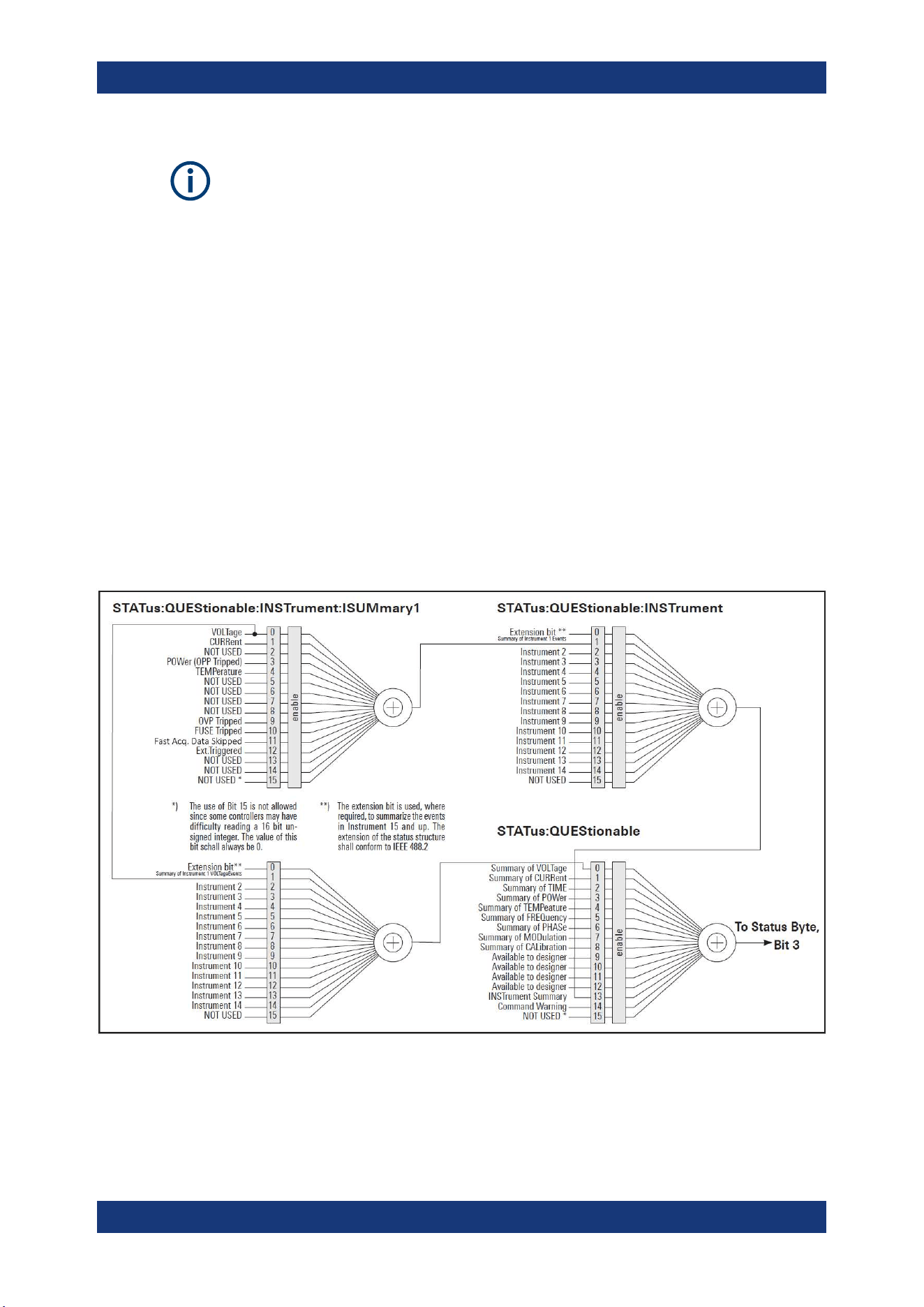
Additional Basics on Remote Control
R&S
®
NGP800
177User Manual 5601.5610.02 ─ 04
Depending on the value of the read register, you can draw conclusions on the current
status of the device. For example, when the unit operates in constant voltage, the
result of the returned ISUM register is a decimal "2" which corresponds the binary
value of "0000000000000010".
Any part of a status register system can be read by query commands. A decimal value
is returned and represents the bit pattern of the requested register. Each SCPI register
is 16 bits wide and has various functions. The individual bits are independent, i.e. each
hardware status is assigned to a bit number.
Bits 9 to 12 are still "free" resp. unused (always return a "0"). Certain areas of the reg-
isters are not used. The SCPI standard defines only the "basic functions". Some devi-
ces offer an advanced functionality.
Each channel of the power supply is considered as separate "instrument" (SCPI stan-
dard definition). Therefore, e.g. the register
STATus:QUEStionable:INSTrument:ISUMary of the NGP802 / NGP822 /
NGP804 / NGP824 / NGP814 is also present four times (Isummary1 - Isummary4).
Description of the status register parts
The SCPI standard provides two different status registers:
Figure A-1: Structure of the status:QUEStionable register
Status Reporting System
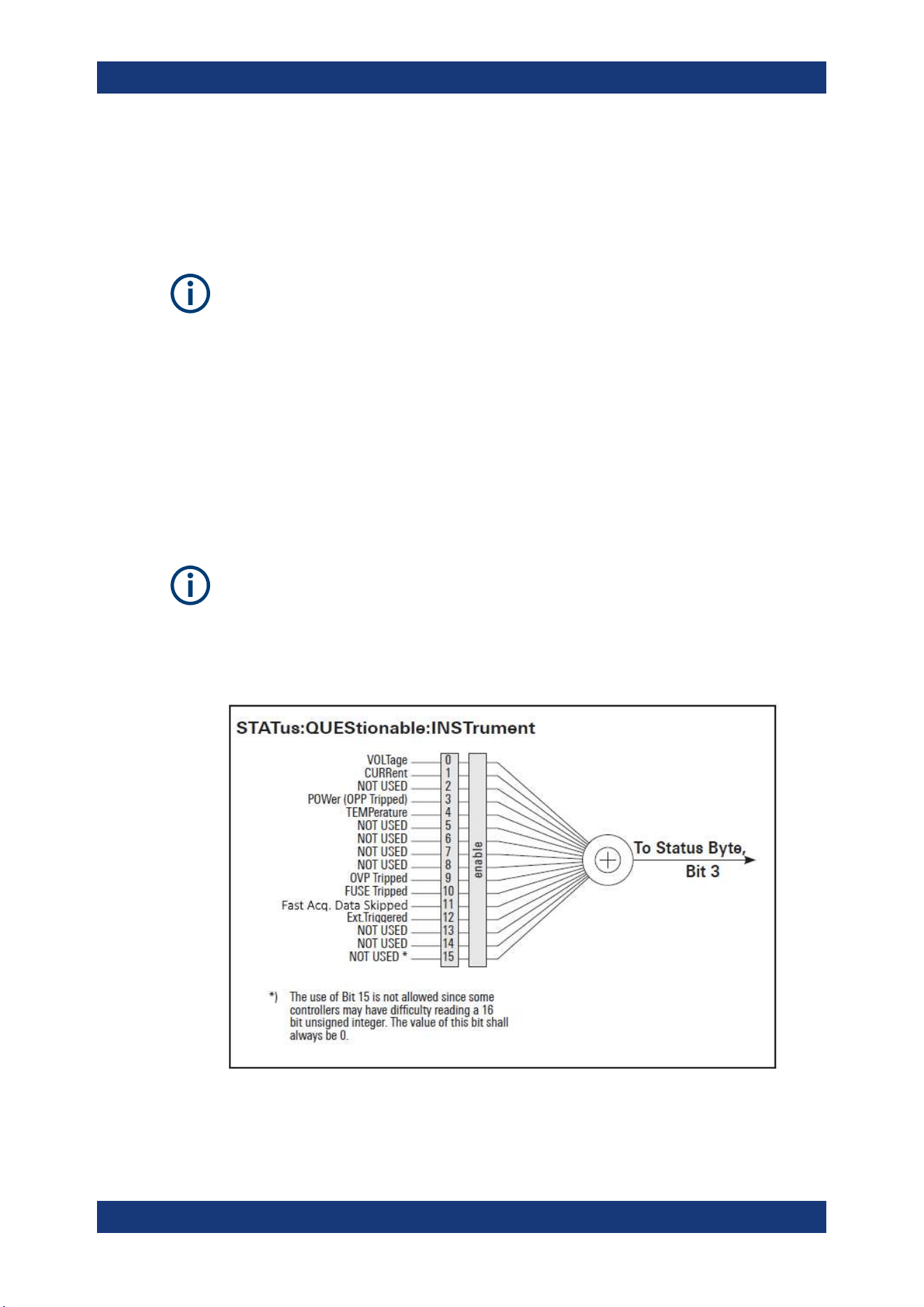
Additional Basics on Remote Control
R&S
®
NGP800
178User Manual 5601.5610.02 ─ 04
CONDition
●
The CONDition register queries the actual state of the instrument. If you want to
query the constant voltage or current mode, you have to use the CONDition regis-
ter.
The CONDition register delivers a "1" (first bit set) in constant current mode (CC) and
a "2" (second bit set) in constant voltage mode (CV).
If the correct channel is selected and the red LED of the channel button lights up (CC
mode), the query of the CONDition register must deliver a "1".
Example:
STAT:QUES:ISUM1:COND?
EVENt
●
The EVENt status register is set (1) until it is queried. After reading (query), the
EVENt status register is set to zero.
The description of registers is only used for general explanation. Due to the complexity,
we recommend the general accessible SCPI standard document for more detailed
information.
For further description of the status register, see
Chapter 7.9, "Status Reporting Com-
mands"
, on page 165.
Figure A-2: Structure of the status:QUEStionable:INSTrument register
Status Reporting System

Additional Basics on Remote Control
R&S
®
NGP800
179User Manual 5601.5610.02 ─ 04
Event Status Register (ESR) and Event Status Enable Register (ESE)
The ESR is defined in IEEE 488.2. It can be compared with the EVENt part of an SCPI
register. The event status register can be read out using the command *ESR?. The
ESE corresponds to the ENABle part of an SCPI register. If a bit is set in the ESE and
the associated bit in the ESR changes from 0 to 1, the ESB bit in the STB is set. The
ESE register can be set using the command *ESE and read using the command
*ESE?.
STATus:OPERation Register
In the CONDition part, this register contains information on which actions the instru-
ment is being executing or, in the EVENt part, information on which actions the instru-
ment has executed since the last reading. It can be read using the commands
STATus:OPERation:CONDition? or STATus:OPERation[:EVENt]?.
Bit No. Meaning
0 Not used
1 to 3 Not used
4 MEASuring
This bit is set on event new measurement available.
5 to 9 Not used
10 Logging
This bit is set as long as "Logging" is enabled
11 Not used
12 Not used
13 to
14
Not used
15 This bit is always 0
STATus:QUEStionable Register
This register contains information about different states which can occur. It can be read
using the commands STATus:QUEStionable:CONDition? and
STATus:QUEStionable[:EVENt]?. See
Figure A-1.
Table A-6: Bits of the STATus:QUEStionable register
Bit No. Meaning
0 Voltage
This bit is set while the instrument is in constant current mode (CC). The voltage is regula-
ted and the current is constant.
1 Current
This bit is set while the instrument is in constant voltage mode (CV). The current is variable
and the voltage is constant.
2 Not used
Status Reporting System
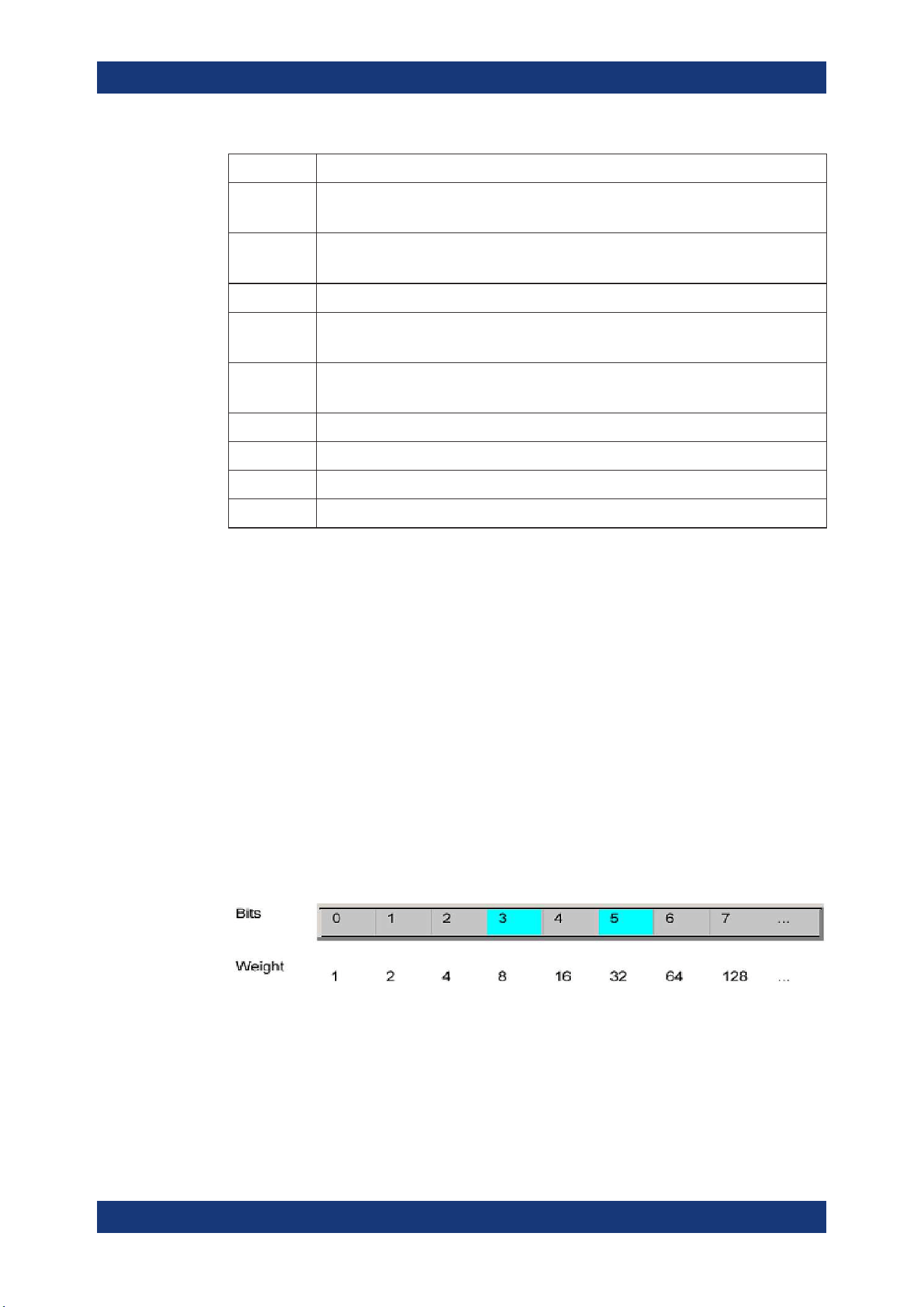
Additional Basics on Remote Control
R&S
®
NGP800
180User Manual 5601.5610.02 ─ 04
Bit No. Meaning
3 POWer (OPP Tripped)
This bit is set if an over power protection has tripped.
4 Temperature overrange
This bit is set if an over temperature occurs.
5 to 8 Not used
9 OVP Tripped
This bit is set if the over voltage protection has tripped.
10 Fuse Tripped
This bit is set if the fuse protection has tripped.
11 Fast Acq. Data Skipped
12 Ext.Triggered
13 to 14 Not used
15 This bit is always 0
Query of an instrument status
Each part of any status register can be read using queries.
There are two types of commands:
●
The common commands *ESR?, *IDN?, *STB? query the higher-level registers.
●
The commands of the STATus system query the SCPI registers
(STATus:QUEStionable)
The returned value is always a decimal number that represents the bit pattern of the
queried register. This number is evaluated by the controller program.
Decimal representation of a bit pattern (binary weights)
The STB and ESR registers contain 8 bits, the status registers 16 bits. The contents of
a status register are specified and transferred as a single decimal number. To make
this possible, each bit is assigned a weighted value. The decimal number is calculated
as the sum of the weighted values of all bits in the register that are set to 1.
Figure A-3: Decimal representation of a bit pattern
Error Queue
Each error state in the instrument leads to an entry in the error queue. The entries of
the error queue are detailed plain text error messages. You can look them up in the
error log or via remote control using SYSTem:ERRor[:NEXT]?. Each call of
Status Reporting System

Additional Basics on Remote Control
R&S
®
NGP800
181User Manual 5601.5610.02 ─ 04
SYSTem:ERRor[:NEXT]? provides one entry from the error queue. If no error mes-
sages are stored, the instrument responds with 0, "No error".
Status Reporting System

List of Commands
R&S
®
NGP800
182User Manual 5601.5610.02 ─ 04
List of Commands
[SOURce:]ALIMit[:STATe]...............................................................................................................................113
[SOURce:]CURRent[:LEVel][:IMMediate]:ALIMit:LOWer...............................................................................114
[SOURce:]CURRent[:LEVel][:IMMediate]:ALIMit[:UPPer]..............................................................................115
[SOURce:]CURRent[:LEVel][:IMMediate]:STEP[:INCRement]......................................................................122
[SOURce:]CURRent[:LEVel][:IMMediate][:AMPLitude]..................................................................................121
[SOURce:]POWer:PROTection:CLEar...........................................................................................................136
[SOURce:]POWer:PROTection:LEVel........................................................................................................... 136
[SOURce:]POWer:PROTection:TRIPped?.....................................................................................................137
[SOURce:]POWer:PROTection[:STATe].........................................................................................................135
[SOURce:]PROTection:CLEar....................................................................................................................... 137
[SOURce:]VOLTage:AINPut:INPut.................................................................................................................153
[SOURce:]VOLTage:AINPut:TRIGgered[:STATe ]..........................................................................................154
[SOURce:]VOLTage:AINPut[:STATe]............................................................................................................. 154
[SOURce:]VOLTage:PROTection:CLEar........................................................................................................133
[SOURce:]VOLTage:PROTection:LEVel........................................................................................................ 133
[SOURce:]VOLTage:PROTection:TRIPped?..................................................................................................134
[SOURce:]VOLTage:PROTection[:STATe]......................................................................................................133
[SOURce:]VOLTage:RAMP:DURation...........................................................................................................152
[SOURce:]VOLTage:RAMP[:STATe].............................................................................................................. 152
[SOURce:]VOLTage:SENSe[:SOURce]......................................................................................................... 115
[SOURce:]VOLTage[:LEVel][:IMMediate]:ALIMit:LOWer................................................................................113
[SOURce:]VOLTage[:LEVel][:IMMediate]:ALIMit[:UPPer].............................................................................. 113
[SOURce:]VOLTage[:LEVel][:IMMediate]:STEP[:INCRement].......................................................................119
[SOURce:]VOLTage[:LEVel][:IMMediate][:AMPLitude].................................................................................. 118
*CLS.................................................................................................................................................................96
*ESE................................................................................................................................................................ 96
*ESR?.............................................................................................................................................................. 97
*IDN?............................................................................................................................................................... 97
*OPC................................................................................................................................................................97
*OPT?.............................................................................................................................................................. 97
*RCL................................................................................................................................................................ 99
*RST................................................................................................................................................................ 97
*SAV.................................................................................................................................................................98
*SRE................................................................................................................................................................ 98
*STB?...............................................................................................................................................................98
*TST?...............................................................................................................................................................98
*WAI.................................................................................................................................................................98
APPLy............................................................................................................................................................ 122
ARBitrary:BLOCk...........................................................................................................................................146
ARBitrary:BLOCk:CLEar................................................................................................................................146
ARBitrary:BLOCk:DATA.................................................................................................................................146
ARBitrary:BLOCk:ENDPoint?........................................................................................................................ 147
ARBitrary:BLOCk:FNAMe..............................................................................................................................147
ARBitrary:BLOCk:REPetitions....................................................................................................................... 147
ARBitrary:CLEar............................................................................................................................................ 148
ARBitrary:DATA............................................................................................................................................. 148
ARBitrary:FNAMe.......................................................................................................................................... 149

List of Commands
R&S
®
NGP800
183User Manual 5601.5610.02 ─ 04
ARBitrary:LOAD.............................................................................................................................................149
ARBitrary:REPetitions....................................................................................................................................149
ARBitrary:SAVE............................................................................................................................................. 149
ARBitrary:SEQuence:BEHavior:END............................................................................................................ 150
ARBitrary:SEQuence:CLEar..........................................................................................................................150
ARBitrary:SEQuence:ENDPoint?.................................................................................................................. 148
ARBitrary:SEQuence:REPetitions................................................................................................................. 150
ARBitrary:SEQuence:TRANsfer.................................................................................................................... 150
ARBitrary:TRIGgered:GROup[:STATe].......................................................................................................... 151
ARBitrary:TRIGgered:POINt[:STATe].............................................................................................................151
ARBitrary:TRIGgered[:STATe]....................................................................................................................... 151
ARBitrary[:STATe].......................................................................................................................................... 147
CALibration:AINPut:CANCel..........................................................................................................................155
CALibration:AINPut:COUNt?......................................................................................................................... 155
CALibration:AINPut:DATA..............................................................................................................................155
CALibration:AINPut:DATE?........................................................................................................................... 155
CALibration:AINPut:END............................................................................................................................... 155
CALibration:AINPut:FACTory:RESTore..........................................................................................................155
CALibration:AINPut:SAVE............................................................................................................................. 156
CALibration:AINPut:STARt............................................................................................................................ 156
CALibration:AINPut:STATe?.......................................................................................................................... 156
CALibration:AINPut:UMAX............................................................................................................................ 156
CALibration:AINPut:UMIN..............................................................................................................................157
CALibration:CANCel...................................................................................................................................... 157
CALibration:COUNt?......................................................................................................................................157
CALibration:CURRent:DATA..........................................................................................................................157
CALibration:CURRent:IMAX..........................................................................................................................157
CALibration:CURRent:IMIN........................................................................................................................... 157
CALibration:DATE?........................................................................................................................................157
CALibration:END............................................................................................................................................157
CALibration:FACTory:RESTore......................................................................................................................158
CALibration:SAVE..........................................................................................................................................158
CALibration:STATe?.......................................................................................................................................158
CALibration:TEMPerature?............................................................................................................................158
CALibration:USER......................................................................................................................................... 158
CALibration:VOLTage:DATA.......................................................................................................................... 158
CALibration:VOLTage:UMAX.........................................................................................................................159
CALibration:VOLTage:UMIN.......................................................................................................................... 159
DATA:DATA?..................................................................................................................................................159
DATA:DELete.................................................................................................................................................160
DATA:LIST?................................................................................................................................................... 160
DATA:POINts?............................................................................................................................................... 160
DISPlay:BRIGhtness......................................................................................................................................105
DISPlay[:WINDow]:TEXT:CLEar....................................................................................................................105
DISPlay[:WINDow]:TEXT[:DATA].................................................................................................................. 105
FUSE:DELay:INITial...................................................................................................................................... 129
FUSE:DELay[:BLOWing]............................................................................................................................... 129
FUSE:LINK.................................................................................................................................................... 130
FUSE:TRIPped:CLEar...................................................................................................................................128
FUSE:TRIPped?............................................................................................................................................ 130

List of Commands
R&S
®
NGP800
184User Manual 5601.5610.02 ─ 04
FUSE:UNLink.................................................................................................................................................130
FUSE[:STATe]................................................................................................................................................ 131
HCOPy:DATA?...............................................................................................................................................161
HCOPy:SIZE:X?............................................................................................................................................ 161
HCOPy:SIZE:Y?............................................................................................................................................ 161
INSTrument:NSELect.....................................................................................................................................110
INSTrument[:SELect]..................................................................................................................................... 110
INTerfaces:USB:CLASs................................................................................................................................. 138
LOG:COUNt...................................................................................................................................................161
LOG:DATA?................................................................................................................................................... 162
LOG:DURation...............................................................................................................................................162
LOG:FNAMe.................................................................................................................................................. 163
LOG:INTerval................................................................................................................................................. 163
LOG:LOCation............................................................................................................................................... 164
LOG:MODE....................................................................................................................................................164
LOG:STIMe....................................................................................................................................................164
LOG:TRIGgered[:STATe ].............................................................................................................................. 165
LOG[:STATe].................................................................................................................................................. 161
MEASure[:SCALar]:CURRent[:DC]:AVG?..................................................................................................... 141
MEASure[:SCALar]:CURRent[:DC]:MAX?.....................................................................................................141
MEASure[:SCALar]:CURRent[:DC]:MIN?......................................................................................................141
MEASure[:SCALar]:CURRent[:DC]:STATistic?..............................................................................................142
MEASure[:SCALar]:CURRent[:DC]?............................................................................................................. 141
MEASure[:SCALar]:ENERgy:RESet..............................................................................................................139
MEASure[:SCALar]:ENERgy:STATe..............................................................................................................140
MEASure[:SCALar]:ENERgy?....................................................................................................................... 139
MEASure[:SCALar]:POWer:AVG?.................................................................................................................142
MEASure[:SCALar]:POWer:MAX?................................................................................................................ 142
MEASure[:SCALar]:POWer:MIN?..................................................................................................................143
MEASure[:SCALar]:POWer:STATistic?......................................................................................................... 143
MEASure[:SCALar]:POWer?......................................................................................................................... 142
MEASure[:SCALar]:STATistic:COUNt?..........................................................................................................140
MEASure[:SCALar]:STATistic:RESet.............................................................................................................140
MEASure[:SCALar][:VOLTage][:DC]:AVG?....................................................................................................143
MEASure[:SCALar][:VOLTage][:DC]:MAX?................................................................................................... 144
MEASure[:SCALar][:VOLTage][:DC]:MIN?.................................................................................................... 144
MEASure[:SCALar][:VOLTage][:DC]:STATistic?............................................................................................ 144
MEASure[:SCALar][:VOLTage][:DC]?............................................................................................................143
OUTPut:DELay:DURation..............................................................................................................................125
OUTPut:DELay[:STATe].................................................................................................................................126
OUTPut:GENeral[:STATe]..............................................................................................................................124
OUTPut:SELect............................................................................................................................................. 126
OUTPut[:STATe].............................................................................................................................................125
STATus:OPERation:INSTrument:CONDition?............................................................................................... 166
STATus:OPERation:INSTrument:ENABle......................................................................................................166
STATus:OPERation:INSTrument:ISUMmary<Channel>:CONDition?............................................................166
STATus:OPERation:INSTrument:ISUMmary<Channel>:ENABle.................................................................. 166
STATus:OPERation:INSTrument:ISUMmary<Channel>:NTRansition...........................................................167
STATus:OPERation:INSTrument:ISUMmary<Channel>:PTRansition........................................................... 167
STATus:OPERation:INSTrument:ISUMmary<Channel>[:EVENt]?................................................................166

List of Commands
R&S
®
NGP800
185User Manual 5601.5610.02 ─ 04
STATus:OPERation:INSTrument:NTRansition...............................................................................................167
STATus:OPERation:INSTrument:PTRansition...............................................................................................167
STATus:OPERation:INSTrument[:EVENt]?....................................................................................................166
STATus:QUEStionable:INSTrument:CONDition?.......................................................................................... 168
STATus:QUEStionable:INSTrument:ENABle.................................................................................................168
STATus:QUEStionable:INSTrument:ISUMmary<Channel>:CONDition?.......................................................168
STATus:QUEStionable:INSTrument:ISUMmary<Channel>:ENABle............................................................. 168
STATus:QUEStionable:INSTrument:ISUMmary<Channel>:NTRansition...................................................... 169
STATus:QUEStionable:INSTrument:ISUMmary<Channel>:PTRansition...................................................... 169
STATus:QUEStionable:INSTrument:ISUMmary<Channel>[:EVENt]?........................................................... 168
STATus:QUEStionable:INSTrument:NTRansition..........................................................................................169
STATus:QUEStionable:INSTrument:PTRansition..........................................................................................169
STATus:QUEStionable:INSTrument[:EVENt]?...............................................................................................168
SYSTem:BEEPer:CURRent:STATe................................................................................................................. 99
SYSTem:BEEPer:PROTection:STATe............................................................................................................100
SYSTem:BEEPer:PROTection[:IMMediate]................................................................................................... 100
SYSTem:BEEPer:WARNing:STATe............................................................................................................... 100
SYSTem:BEEPer:WARNing[:IMMediate].......................................................................................................100
SYSTem:COMMunicate:SOCKet:APPLy.......................................................................................................100
SYSTem:COMMunicate:SOCKet:DHCP........................................................................................................101
SYSTem:COMMunicate:SOCKet:DISCard.................................................................................................... 101
SYSTem:COMMunicate:SOCKet:GATeway...................................................................................................101
SYSTem:COMMunicate:SOCKet:IPADdress.................................................................................................101
SYSTem:COMMunicate:SOCKet:MASK........................................................................................................101
SYSTem:COMMunicate:SOCKet:RESet....................................................................................................... 102
SYSTem:COMMunicate:WLAN:CONNection[:STATe]................................................................................... 102
SYSTem:COMMunicate:WLAN:IPADdress....................................................................................................102
SYSTem:COMMunicate:WLAN:PASSword................................................................................................... 102
SYSTem:COMMunicate:WLAN:SSID............................................................................................................ 102
SYSTem:COMMunicate:WLAN[:STATe]........................................................................................................ 103
SYSTem:DATE...............................................................................................................................................103
SYSTem:INTerface:GPIB?.............................................................................................................................104
SYSTem:INTerface?.......................................................................................................................................103
SYSTem:KEY:BRIGhtness.............................................................................................................................103
SYSTem:LOCal..............................................................................................................................................104
SYSTem:REMote........................................................................................................................................... 104
SYSTem:RWLock.......................................................................................................................................... 104
SYSTem:TIME............................................................................................................................................... 104
SYSTem:TOUCh[:STATe]...............................................................................................................................104
SYSTem:UPTime?......................................................................................................................................... 105
TRACking[:ENABle]:CH<CHANNEL>........................................................................................................... 138
TRACking[:ENABle]:GENeral........................................................................................................................ 138
TRACking[:ENABle]:SELect:CH<CHANNEL>...............................................................................................138
TRIGger:CHANnel:DIO<IO>..........................................................................................................................106
TRIGger:CONDition:DIO<IO>........................................................................................................................106
TRIGger:DIRection:DIO<IO>.........................................................................................................................108
TRIGger:LOGic:DIO<IO>...............................................................................................................................108
TRIGger[:ENABle]:DIO<IO>.......................................................................................................................... 108
TRIGger[:ENABle]:GENeral...........................................................................................................................109
TRIGger[:ENABle]:SELect:DIO<IO>..............................................................................................................109

Index
R&S
®
NGP800
186User Manual 5601.5610.02 ─ 04
Index
A
Activate channel output ..................................................... 48
Adjustment ........................................................................ 88
Analog in adjustment .................................................. 89
Channel adjustment .................................................... 92
Advanced features
EasyRamp .................................................................. 62
QuickArb ..................................................................... 62
Advanced operating commands
Adjustment ................................................................ 154
Analog input .............................................................. 153
Arbitrary .................................................................... 145
EasyRamp ................................................................ 152
Alert beep .......................................................................... 85
Analog input ...................................................................... 52
C
Calibration certificate ......................................................... 10
Channel adjustment
Current adjustment ..................................................... 92
Voltage adjustment ..................................................... 92
Channel display area
Operating mode .......................................................... 35
Clear status
Remote ....................................................................... 96
Command sequence
Remote ....................................................................... 98
Command sequence and synchronization ...................... 175
Configuration commands
Channel selection ..................................................... 109
Combined setting of voltage and current settings ..... 122
Current setting ...........................................................119
OCP setting .............................................................. 126
OPP setting ............................................................... 134
Output setting ........................................................... 123
OVP setting ............................................................... 131
Reset protection tripped state ................................... 137
Safety limit setting ..................................................... 111
Tracking setting .........................................................137
USB class setting ...................................................... 138
Voltage setting ...........................................................116
Controls ............................................................................. 22
CSV settings ..................................................................... 69
Customer support ..............................................................31
D
Data logging ...................................................................... 67
CSV settings ............................................................... 67
Date ...................................................................................86
Default values
Remote ....................................................................... 97
Delivery package contents ................................................ 20
Device/Channel menu window .......................................... 40
Digital trigger I/O ............................................................... 58
Display brightness ............................................................. 85
Display overview ............................................................... 32
Channel display area .................................................. 35
Status bar information ................................................. 33
Documentation overview ..................................................... 9
E
EasyRamp .........................................................................65
Electrostatic discharge ...................................................... 16
ESD ................................................................................... 16
Event status enable register (ESE)
Remote ....................................................................... 96
Event status register (ESR)
Remote ....................................................................... 97
F
Factory default settings ..................................................... 74
File manager
Copy ........................................................................... 73
Delete ......................................................................... 73
Front panel
Back key ..................................................................... 23
Chassis ground terminal ............................................. 24
Display ........................................................................ 23
Menu control keys ....................................................... 24
Output and channel keys ............................................ 23
Output terminals ......................................................... 23
Power key ................................................................... 24
Rotary knob ................................................................ 23
USB connector ............................................................ 24
Front panel keys ................................................................40
Menu controls ............................................................. 40
Navigation controls ..................................................... 43
Output and channel controls ....................................... 44
Settings key ................................................................ 40
G
General instrument settings .............................................. 83
Appearance settings ................................................... 85
Data and time ............................................................. 86
Device information ...................................................... 87
Licenses management ................................................ 83
Sound settings ............................................................ 85
Update device ............................................................. 88
Getting Started .................................................................... 9
Graphical view window ...................................................... 70
I
Identification
Remote ....................................................................... 97
Important notes
Ambient conditions ..................................................... 13
Limits .......................................................................... 15
Mains voltage .............................................................. 14
Measurement categories ............................................ 14
Symbols ...................................................................... 13
Instrument tour .................................................................. 22
Overview controls ....................................................... 22
Switching NGP on off .................................................. 26
Intended operation ............................................................ 18
Interfaces .......................................................................... 76
K
Key brightness .................................................................. 85

Index
R&S
®
NGP800
187User Manual 5601.5610.02 ─ 04
M
Maintenance
Cleaning ...................................................................... 30
Internal battery replacement ....................................... 31
Menu
Channel menu ............................................................ 42
Device menu ............................................................... 40
Menu controls ....................................................................40
Home key .................................................................... 40
Settings key ................................................................ 40
User key ...................................................................... 43
Message and command structure
Messages ................................................................. 170
SCPI command structure .......................................... 171
Mode
Operation modes ........................................................ 45
N
Navigation controls ............................................................43
Back key ..................................................................... 44
Rotary knob ................................................................ 43
Network
GPIB ........................................................................... 82
LAN ............................................................................. 78
USB ............................................................................ 81
Wireless LAN .............................................................. 80
Network connection ...........................................................77
O
Open source acknowledgment (OSA) ............................... 10
Operation complete
Remote ....................................................................... 97
Operation modes
Constant current (CC) ................................................. 46
Constant voltage (CV) ................................................ 45
Options
Identification (remote) ................................................. 97
Output ............................................................................... 49
Delay ........................................................................... 49
Output delay ............................................................... 49
Remote sensing .......................................................... 51
Output and channel controls ............................................. 44
Output auto-ranging .......................................................... 44
Overcurrent protection ...................................................... 54
Overpower protection ........................................................ 55
Overview controls
Front panel .................................................................. 22
Rear panel .................................................................. 24
Overvoltage protection ...................................................... 54
P
Protection
Fuse linking ................................................................. 53
Overcurrent protection ................................................ 53
Overpower protection ................................................. 53
Overvoltage protection ................................................ 53
Safety limits ................................................................ 53
Putting into operation ....................................................... 16
Intended operation ...................................................... 18
Safety .......................................................................... 17
Unpacking and checking the instrument ..................... 20
Q
QuickArb ........................................................................... 62
R
Rear panel
AC inlet with integrated 2-pole rocker switch .............. 25
Analog input connector ............................................... 26
Channel connectors .................................................... 25
Digital I/O connector ................................................... 26
Ethernet connector ..................................................... 26
Ground terminal .......................................................... 25
IEEE-488 (GPIB) interface .......................................... 25
Kensington security slot ............................................. 25
USB connectors .......................................................... 26
Recall ................................................................................ 74
Release notes ................................................................... 10
Remote command
Status reporting commands ...................................... 165
Remote control commands ............................................... 96
Advanced operating commands ............................... 144
Common setting commands ....................................... 96
Configuration commands .......................................... 109
Data and file management commands ..................... 159
Display commands ................................................... 105
Measurement commands ......................................... 139
Remote sense commands ........................................ 115
Status reporting commands ...................................... 165
System settings commands ........................................ 99
Trigger commands .................................................... 105
Reset values
Remote ....................................................................... 97
S
Safety ................................................................................ 17
Safety instructions ............................................................... 9
Safety limits ....................................................................... 56
Save .................................................................................. 74
Screenshot ........................................................................ 67
Selecting channels ............................................................ 47
Self-test
Remote ....................................................................... 98
Service request enable register (SRE)
Remote ....................................................................... 98
Set voltage and current ..................................................... 47
Setting up the instrument .................................................. 21
Bench operation .......................................................... 21
Rack mounting ............................................................ 22
Status bar information
Channel status bar ...................................................... 33
Device status bar ........................................................ 33
Status byte
Remote ................................................................. 96, 98
Status reporting system .................................................. 176
Structure of a SCPI status register ........................... 176
Switching off the instrument .............................................. 27
Switching on the instrument .............................................. 26
T
Time .................................................................................. 86
Tracking function ............................................................... 57

Index
R&S
®
NGP800
188User Manual 5601.5610.02 ─ 04
Trying out the instrument
Activating the channels output .................................... 29
Selecting the channels ................................................ 27
Setting the output voltage and current limit ................ 27
U
Unpacking and checking the instrument ........................... 20
User button key ................................................................. 66
User manual ........................................................................ 9
Using the touchscreen ...................................................... 36
Accessing functionality using shortcuts ...................... 38
Accessing functionality using the settings button ....... 37
Expand/Collapse button .............................................. 38
Input data .................................................................... 39
Using gestures ............................................................ 36
W
Wait
Remote ....................................................................... 98
Welcome to R&S NGP800 ................................................ 11