1
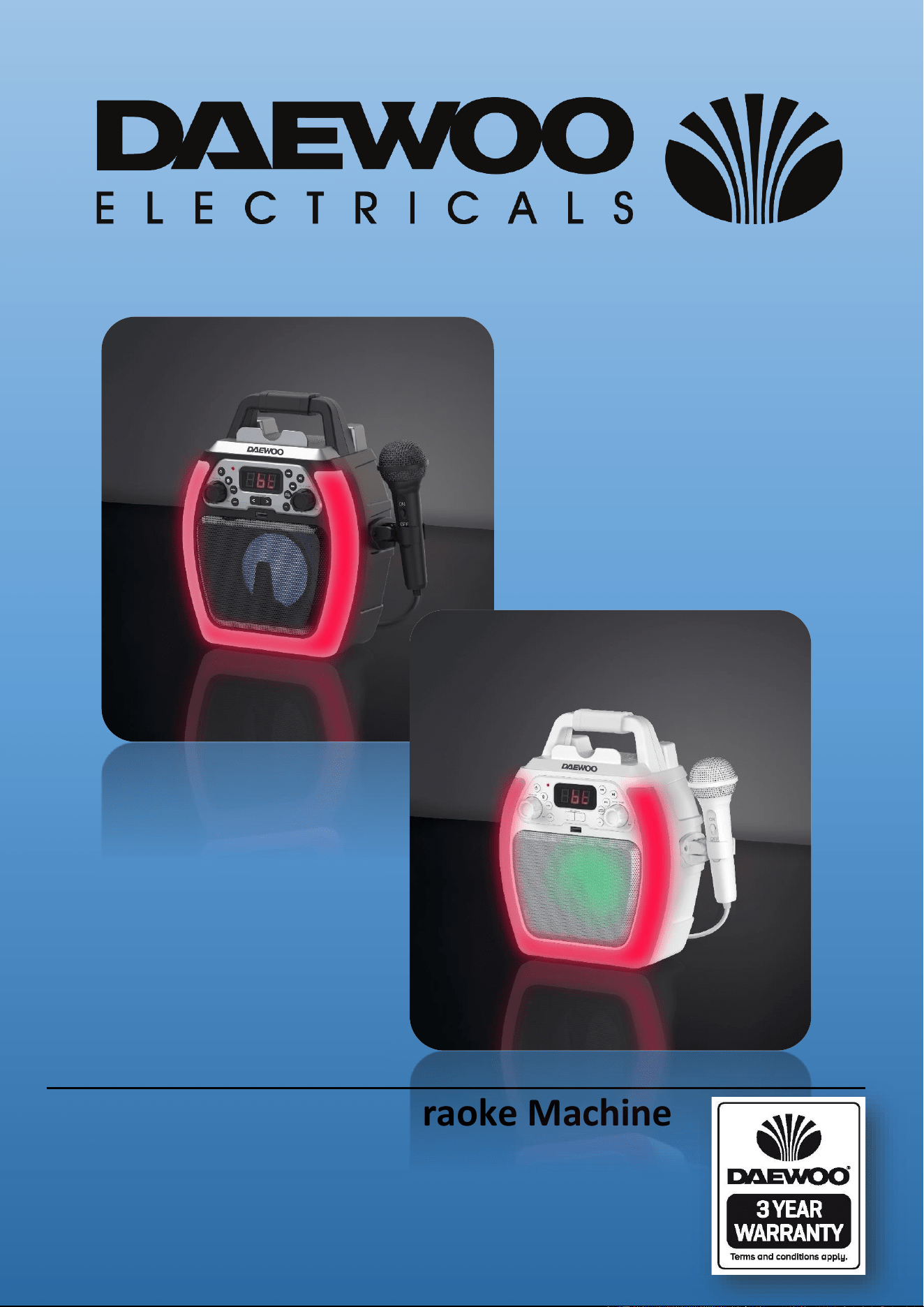
Bluetooth Compact Karaoke Machine
Model No. AVS1493B & AVS1493
User Manual
IMPORTANT – RETAIN THESE INSTRUCTIONS FOR FUTURE REFERENCE
Bluetooth Compact Karaoke Machine
AVS1493B & AVS1493
User Manual
Available in Black or White colours
*
*Please refer to the warranty section for terms of your extended guarantee.
2
Bluetooth Compact Karaoke Machine
Model No. AVS1493B & AVS1493
User Manual
IMPORTANT – RETAIN THESE INSTRUCTIONS FOR FUTURE REFERENCE
READING AND STORING THE USER MANUAL
Before using this product, please read through this manual
carefully paying particular attention to the safety instructions.
Failure to do so may result in personal injury or damage to the
product.
Carefully save this instruction manual for future reference. Ensure the
user manual is included when passing the product on to any third
parties.
IMPORTANT SAFETY INSTRUCTIONS FOR PROPER USE
Whilst using electrical appliances, basic safety precautions should
always be followed:
Only use the product as described in this user manual. Any other use is
considered improper and may result in damage to property or persons.
The manufacturer or vendor cannot be held liable for damages or injury
incurred through improper or incorrect use.
• Read and familiarise yourself with all operating instructions before
using this Karaoke Machine.
• Before plugging your unit into the mains, visually check that the unit is
intact and has not suffered any transit damage.
• Check that the voltage indicated on the data plate corresponds with
that of the local network before connecting the appliance to the mains
power supply.
• Always use this appliance on a solid, level, non-flammable surface.
• Ensure that there is clearance of at least 100mm (4 Inches) minimum
around the Karaoke machine for sufficient ventilation.
• Ensure that the ventilation openings are not covered with items, such
as newspapers, table-cloths, curtains, etc.
• No naked flame sources, such as lighted candles, should be placed on
the Karaoke Machine.
• DO NOT position the Karaoke Machine close to sources of heat such as
radiators, heaters, other electronic equipment, etc.
• The Karaoke Machine shall not be exposed to dripping or splashing and
that no objects filled with liquids, such as vases, shall be placed on the
apparatus.
• DO NOT immerse this appliance or its supply in water or any other
liquids.
• DO NOT leave the appliance unattended during use.
• DO NOT leave the appliance unattended whilst connected to the mains

3
Bluetooth Compact Karaoke Machine
Model No. AVS1493B & AVS1493
User Manual
IMPORTANT – RETAIN THESE INSTRUCTIONS FOR FUTURE REFERENCE
supply.
• Always remove the mains supply from the mains socket when the
Karaoke Machine is not in use, the mains supply must be accessible at
all times.
• Close supervision is required when using this appliance near children.
• Never leave this appliance within reach of children.
• This appliance can be used by children aged from 8 years and above
and persons with reduced physical, sensory or mental capabilities or
lack of experience and knowledge if they have been given supervision
or instruction concerning use of the appliance in a safe way and
understand the hazards involved. Children shall not play with the
appliance. Cleaning and user maintenance shall not be made by
children without supervision.
• Children of less than 3 years should be kept away unless continuously
supervised.
• DO NOT use this appliance outdoors.
• It is imperative to unplug the power supply after the appliance has
been used, before it is cleaned and whilst being repaired.
• Unplug after each use. Grasp the supply, not the cord.
• Repairs to electrical appliances should only be performed by qualified
personnel. Improper repairs may place the user at serious risk.
• DO NOT operate this appliance with a damaged plug or cord, after a
malfunction or after being dropped or damaged in any way.
• Regular, periodic checks should be carried out on the mains supply to
ensure no damage is evident. Should there be any signs of damage the
product should not be used.
• If the power cable is damaged, it should only be replaced by qualified
service personnel.
• DO NOT allow the power cable to hang over sharp edges or come in
contact with hot surfaces.
• DO NOT run the power cable under carpets, rugs, etc.
• This product is intended for household use only and should not be used
for industrial purposes.
• DO NOT use any accessories or attachments with this appliance other
than those supplied or recommended by supplier.
• DO NOT use this product for anything other than its intended use.
• DO NOT push objects into any openings as damage to the product
and/or electric shock may occur.
4
Bluetooth Compact Karaoke Machine
Model No. AVS1493B & AVS1493
User Manual
IMPORTANT – RETAIN THESE INSTRUCTIONS FOR FUTURE REFERENCE
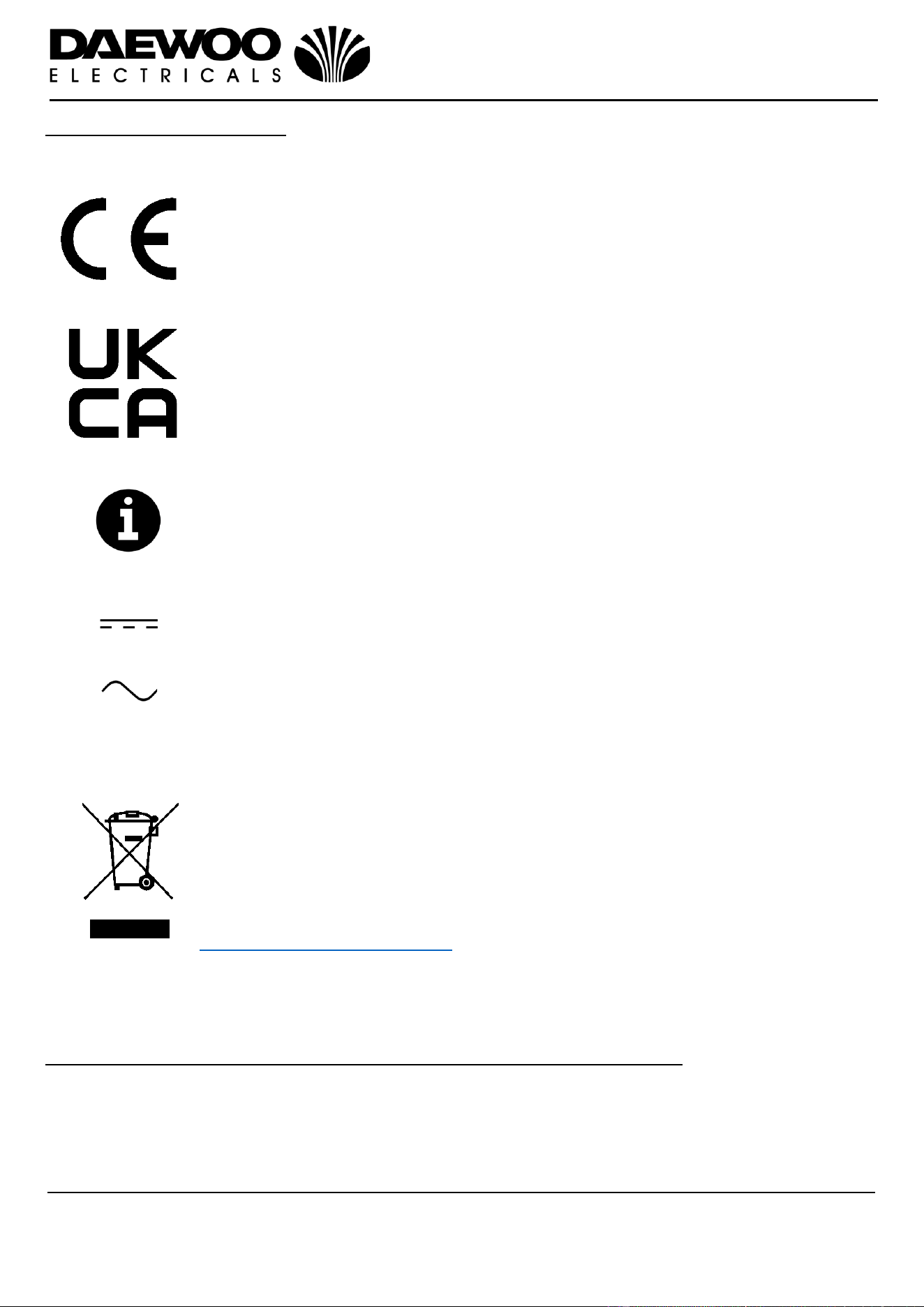
Explanation of Symbols
The following symbols or words are used in this instruction manual:
Products labelled with this symbol conform to applicable
provisions of the European Economic Area.
Products labelled with UK Conformity Assessment identifies
products conforming to UK statutory requirements.
This symbol provides useful additional information on the use of
this product.
This symbol identifies voltage and the current rating for direct
current.
This symbol indicates that the supply uses an alternating current
mains supply.
You should now recycle your waste electrical goods and in doing
so help the environment. This symbol means waste electrical
products at the end of their useful life should not be disposed of
with normal household waste and not sent to landfill. Please
ensure it is taken to a suitable facility for disposal. Check with
your Local Authority or retailer for recycling advice or visit
www.recycle-more.co.uk enter your postcode to find out your
nearest recycling site.
Before the first time you use your Bluetooth Karaoke Machine
Remove all packing materials and discard responsibly (including the protective
card inside the CD player).
Check that all the parts are present with your Karaoke machine see ‘Description of
Parts’ below.
5
Bluetooth Compact Karaoke Machine
Model No. AVS1493B & AVS1493
User Manual
IMPORTANT – RETAIN THESE INSTRUCTIONS FOR FUTURE REFERENCE
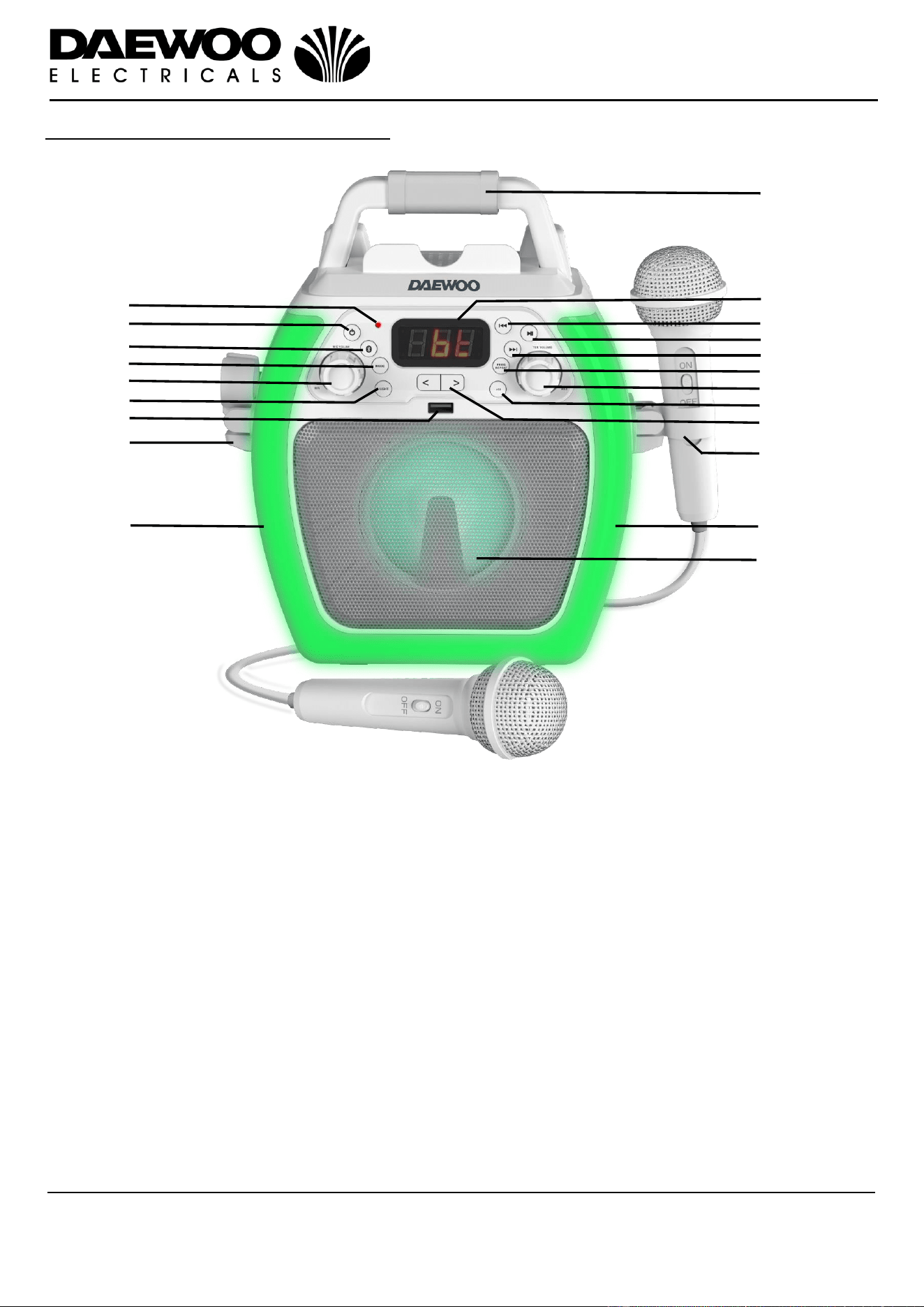
Description of Parts – Front Panel
1. Handle 13. Play/Stop/Pause Button
2. Bluetooth LED Indicator 14. Next Track/Forward Search Button
3. POWER on/off Button 15. PROG/REPEAT Button
4. BLUETOOTH on/off Button 16. MASTER VOL Control
5. MODE Select Button 17. +10 (Tracks) Button
6. MIC VOL Microphone Volume Control 18. Voice Effects <> Buttons
7. LED Decorative LIGHT Mode Button 19. Right Hand Microphone Holder
8. USB Memory Stick Port 20. LED Decorative Lights
9. Left Hand Microphone Holder 21. Internal Speaker
10. LED Decorative Lights
11. LED Display
12. Previous Track/Reverse Search Button
1
2
3
4
5
6
7
8
9
10
11
12
13
14
15
16
17
18
19
20
21
6
Bluetooth Compact Karaoke Machine
Model No. AVS1493B & AVS1493
User Manual
IMPORTANT – RETAIN THESE INSTRUCTIONS FOR FUTURE REFERENCE
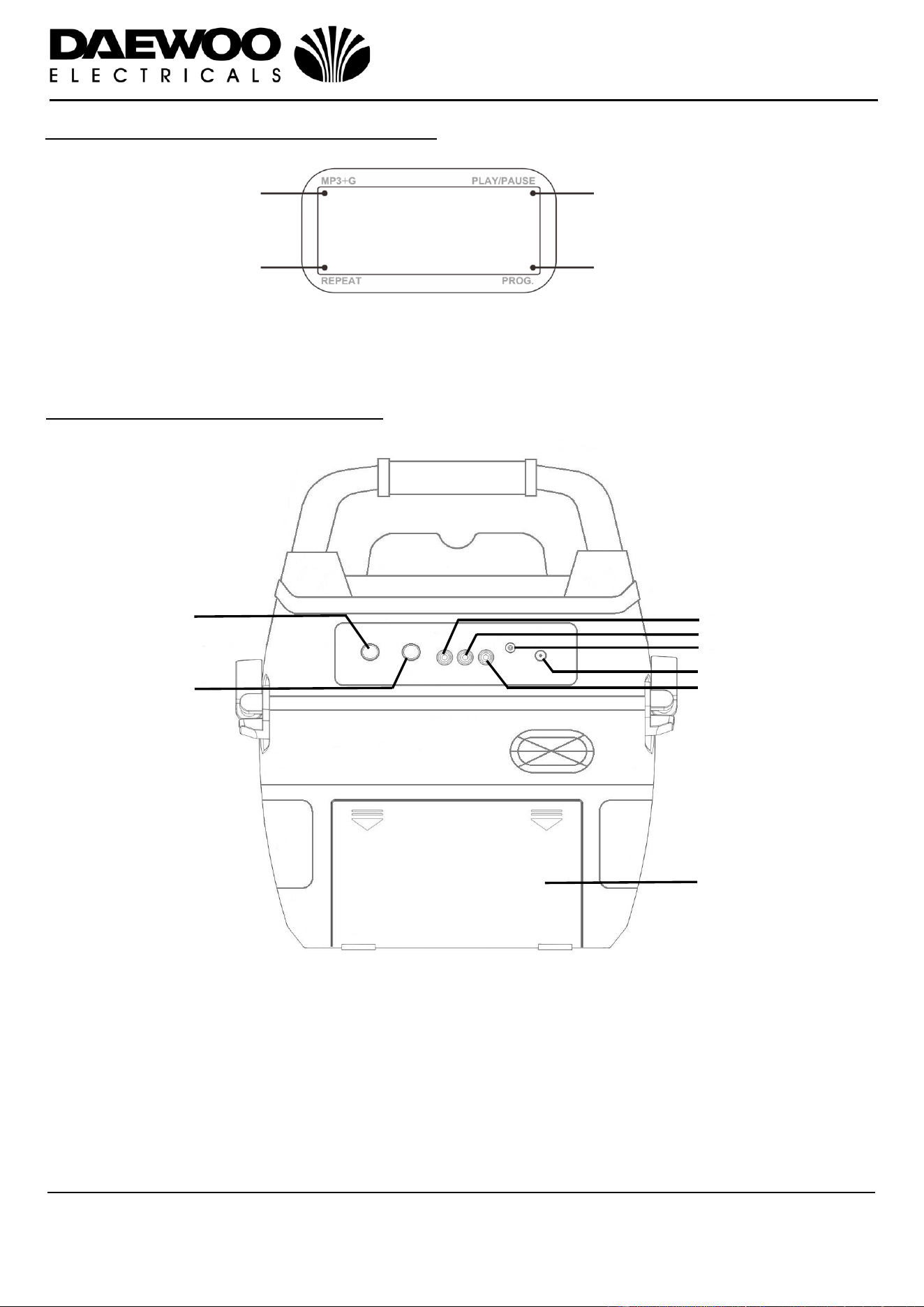
Description of Parts – LED Display (11)
Description of Parts – Rear Panel
27
26
28
29
30
22
23
24
26. MIC 1 Jack Socket
27. MIC 2 Jack Socket
28. Video Out Phono Socket (Yellow)
29. Right Channel Audio Out Socket (Red)
30. 3.5mm AUX IN Jack Socket
31. DC 9V In Jack Socket
32. Left Channel Audio Out Socket (White)
33. Battery Compartment
31
32
33
22. MP3+G Indicator
23. REPEAT Indicator
24. PLAY/PAUSE Indicator
25. PROGRAM Indicator
25
7
Bluetooth Compact Karaoke Machine
Model No. AVS1493B & AVS1493
User Manual
IMPORTANT – RETAIN THESE INSTRUCTIONS FOR FUTURE REFERENCE
Accessories Included
Before the first time you use your Bluetooth Karaoke Machine
Remove all packing materials and discard responsibly.
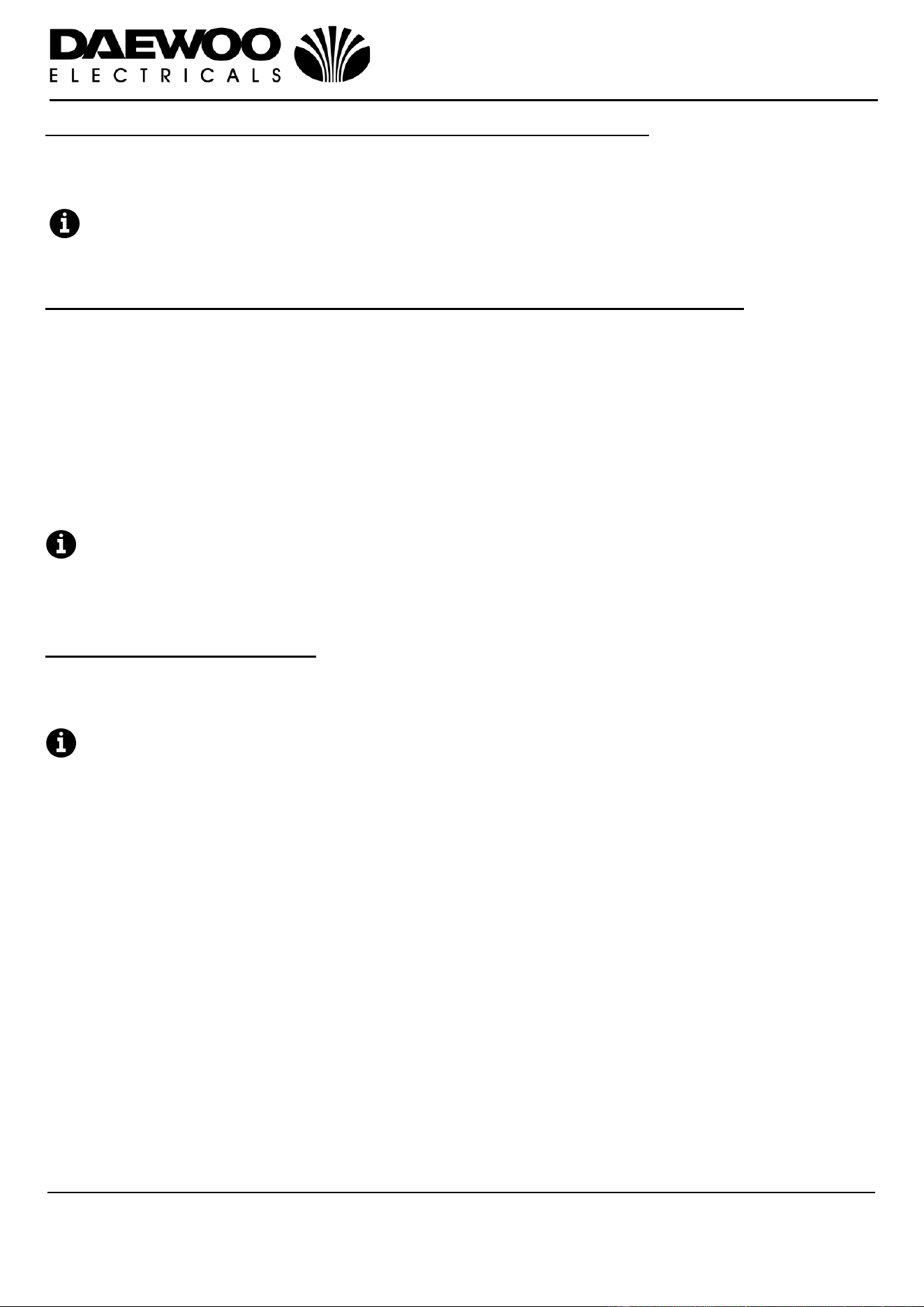
Inserting Batteries (not supplied)
1. To open the Battery Compartment (33), slide the cover down in the direction of
the arrows (shown below) and remove.
2. Insert six C-Type Batteries (not supplied) into the Battery Compartment (33)
being careful to observe the polarity markings:
Battery Warnings
Do not mix old and new batteries together.
It is recommended that batteries are removed from the machine if it is not to be
used for a long period of time.
CAUTION: There is a danger of explosion if the batteries are incorrectly fitted.
Replace only with the same or equivalent battery type.
Do not expose the machine to sunshine, fire, heat or similar.
WARNING
Keep new and used batteries away from children.
If the battery compartment does not latch securely, stop using the product and
keep it away from children.
33
34. AV Cable
35. Microphone with on/off Switch
36. Mains Adaptor
34
35
36
8
Bluetooth Compact Karaoke Machine
Model No. AVS1493B & AVS1493
User Manual
IMPORTANT – RETAIN THESE INSTRUCTIONS FOR FUTURE REFERENCE
Operating Instructions – Using the External Mains Adaptor
• Insert the small power plug of the Mains Adaptor (36) into the DC 9V IN Power
Jack (31) on the rear of the unit.
• Insert the Mains Adaptor (36) into the nearest mains socket.
If the external mains adaptor is being used permanently, it is recommended
that the batteries (if fitted) are removed.
Operating Instructions – Connecting a Television Using the AV Cable
Insert one end of the supplied RCA (Phono) AV Cable (34) into the rear of the unit
as follows:
The Yellow plug into the Video Out Phono Socket (Yellow) (28)
The Red plug into the Right Channel Audio Out Socket (Red) (29)
The White plug into the Left Channel Audio Out Socket (White) (32)
Connect the other end of the AV Cable (34) to the Televisions AV input using the
colour code as above.
Switch on the Television and select the appropriate AV input channel.
A Note on Karaoke Tracks.
MP3+G is the format for karaoke music utilizing the MP3’s small file size. It will
play the audio backing track and display the words on the screen.
Using the Bluetooth Mode
1. Insert batteries or connect the Mains Adaptor (36) as described above.
2. Connect the Microphone(s) (35) to the MIC sockets (26) and (27) on the rear of
the unit.
Slide the ON/OFF switch on the microphone to the ‘ON’ position to operate the
Microphone.
3. Connect the AV cable (34) as described above.
4. Switch the machine on by pressing the POWER on/off button (3).
5. Press the Bluetooth button (4) to select the Bluetooth mode; “bt” will be
shown on the LED Display (11) and the Bluetooth LED Indicator (2) will flash.
The TV screen will also prompt you to connect your Bluetooth device.
6. Enable the Bluetooth mode on your Phone, Tablet or other Bluetooth enabled
device and set it to search.
7. Select ‘AVS1493’ from the search results found by your device. Once the device
has paired with the Karaoke Machine a chime will be heard and the Bluetooth
LED Indicator (2) will light continuously to show your device and the machine
are now paired. The TV screen will also show confirmation of pairing.
8. Press the PLAY/STOP/PAUSE button (13) to start and stop the connected
device playing.
9. Alternatively use your devices controls in the usual manner.
10. Adjust the volume of the internal speaker to the desire level using the MASTER
VOL control (16).
9
Bluetooth Compact Karaoke Machine
Model No. AVS1493B & AVS1493
User Manual
IMPORTANT – RETAIN THESE INSTRUCTIONS FOR FUTURE REFERENCE
11. Rotate the MIC VOL control (6) clockwise to increase or anticlockwise to
decrease the microphone volume level as desired, NB the MIC VOL control will
affect both microphones.
Voice Effects
Press the Voice Effects <> Buttons (18) to select from one of the six voice effects,
the LED Display (11) will show ‘EF0 – 6’ to confirm the effect selected as below:
EF0-Effect Off
EF1-Echo
EF2-Squeeky
EF3-Deep
EF4-Chipmunk
EF5-Robotic
EF6-Gramophone
The Voice Effects will affect both microphones.
Playing songs from a USB Memory Stick
1. Insert batteries or connect the Mains Adaptor (36) as described above.
2. Connect the Microphone(s) (35) to the MIC sockets (26) and (27) on the rear of
the unit.
Slide the ON/OFF switch on the microphone to the ‘ON’ position to operate the
Microphone.
3. Connect the AV cable (34) as described above.
4. Switch the machine on by pressing the POWER on/off button (3).
5. Insert a USB memory stick containing the Karaoke tracks into the USB Port (8)
on the front of the unit.
6. Repeatedly press the MODE Select Button (5) to select the USB mode; “USb”
will first be shown on the LED Display (11) the total number of tracks on the
stick will then be shown on the LED Display (11).
7. Press the PLAY/STOP/PAUSE button (13) to start playback, the PLAY/PAUSE
Indicator (24) will illuminate, press the button again to pause playback, the
PLAY/PAUSE Indicator (24) will flash. Press and hold the PLAY/STOP/PAUSE
button (13) to stop playback, the PLAY/PAUSE Indicator (24) will extinguish.
8. Press the Previous Track/Reverse Search Button (12) or the Next
Track/Forward Search Button (14) to choose the song that you want to play.
Press and hold either buttons to fast search the track being played.
9. Adjust the volume of the internal speaker to the desire level using the MASTER
VOL control (16).
10. Rotate the MIC VOL control (6) clockwise to increase or anticlockwise to
decrease the microphone volume level as desired, NB the MIC VOL control will
affect both microphones.
10
Bluetooth Compact Karaoke Machine
Model No. AVS1493B & AVS1493
User Manual
IMPORTANT – RETAIN THESE INSTRUCTIONS FOR FUTURE REFERENCE
Voice Effects
Press the Voice Effects <> Buttons (18) to select from one of the six voice effects,
the LED Display (11) will show ‘EF0 – 6’ to confirm the effect selected as below:
EF0-Effect Off
EF1-Echo
EF2-Squeeky
EF3-Deep
EF4-Chipmunk
EF5-Robotic
EF6-Gramophone
The Voice Effects will affect both microphones.
Using the Auxiliary Input Mode
The Auxiliary Input allows a direct wired connection of an external audio signal
source.
1. Insert a suitable 3.5mm jack lead (not supplied) into the 3.5mm AUX IN Jack
Socket (30) on the rear of the unit.
2. Repeatedly press the MODE Select Button (5) to select the AUX mode; “AU” will
be shown on the LED display (11).
3. Adjust the volume to the desire level using the MASTER VOL control (16).
4. Use your devices controls in the usual manner.
Using the Repeat Mode
1. During playback, press the PROG/REPEAT button (15) once to repeat play the
current song, the REPEAT indicator (25) will flash rapidly.
2. Press the PROG/REPEAT button (15) again to repeat play the selected folder;
the REPEAT indicator (25) will flash slowly.
3. Press the PROG/REPEAT button (15) again to repeat play all the folders, the
REPEAT indicator (25) will turn solid red.
4. Press it again to cancel the repeat function, the REPEAT indicator (25) will
extinguish.
If no USB stick is in the machine “No” will be shown on the LED Display (11).
Using the Programming Function
1. While in the STOP mode (i.e. a USB stick in the machine but not playing), press
the PROG/REPEAT button (15); the PROGRAM indicator (25) will blink and ”01”
will then show on the LED Display (11) indicating the first track is ready to
program.
2. Select the first track by using the Skip -/+ buttons (12) & (14).
3. Press the PROG/REPEAT button (15) again to confirm the entry.
4. Repeat to set up to 20 tracks into memory. When done, press the
PLAY/STOP/PAUSE button (13) to start the selected tracks playback.
11
Bluetooth Compact Karaoke Machine
Model No. AVS1493B & AVS1493
User Manual
IMPORTANT – RETAIN THESE INSTRUCTIONS FOR FUTURE REFERENCE
Notes on the Programming Function
• Press the MODE button (5) to exit program mode.
• If more than 20 tracks are attempted to be programmed, “FUL” will appear in
the LED display (11).
• The programming function only available in USB mode.
LED Decorative ‘Disco’ Lights (10 & 20)
Press the LED Decorative LIGHT Mode button (7) to select one of the three light
modes on the front of the unit as follows:
• Light Mode 1: The unit will synchronize to the music being played and Karaoke
vocals.
• Light Mode 2: The unit will light up with random colours and patterns.
• Light Mode 3: The light effect will be turned off.
At power up, the unit will automatically default to light mode 1
Care and Use of your Karaoke Machine
• Always disconnect the Karaoke Machine from the mains power supply before
cleaning.
• Clean outside of the Karaoke Machine with a clean, soft dry cloth. Never clean
with harsh or abrasive cleaners.
• Do not clean with furniture wax or polish sprays.
• Do not submerge the Karaoke Machine or its Power Supply in water or any
other liquids.
Technical Specification
Model Numbers
AVS1493B & AVS1493
Mains Adaptor
Input: AC 100-240V ~ 0.5A 50-60Hz
Output: DC 9.0V, 1.0A, 9.0W
Battery Type
6x C-Type Batteries
Audio Output Power
5.0W RMS
Operation Temperature
0°C to + 40°C
Bluetooth Effective Distance
Up to 10m
Video Out
Yellow RCA/Phono Socket
Audio Out
White (Left) Red (Right) RCA/Phono Socket
Microphone Inputs
2x 6.3mm (1/4 Inch) Jack Sockets
USB Playback Standard
MP3/MP3+G
Auxiliary Input (Line-in)
3.5mm Jack Socket
Dimension (approximately)
242 x 130 x 264mm
This product conforms to Radio Equipment Directive 2014/53/EU
12
Bluetooth Compact Karaoke Machine
Model No. AVS1493B & AVS1493
User Manual
IMPORTANT – RETAIN THESE INSTRUCTIONS FOR FUTURE REFERENCE
Sunfly Karaoke is the premier Karaoke label in the UK and Europe.
It has been established since 1991, with a back catalogue of more
than 20,000 Karaoke songs in a huge range of genres and languages
for any occasion.
Visit www.sunflykaraoke.com to find a wide range of collections and
individual tracks to download, stream, or have sent direct to your
door on your own personalised karaoke disc. You can also purchase
CDG and DVD discs along with a range of microphones and mixers.
13
Bluetooth Compact Karaoke Machine
Model No. AVS1493B & AVS1493
User Manual
IMPORTANT – RETAIN THESE INSTRUCTIONS FOR FUTURE REFERENCE
14
Bluetooth Compact Karaoke Machine
Model No. AVS1493B & AVS1493
User Manual
IMPORTANT – RETAIN THESE INSTRUCTIONS FOR FUTURE REFERENCE
Disposal of the Packaging
Dispose of paper and cardboard in appropriate paper re-cycling
facilities.
Dispose of recyclable plastics in appropriate plastic re-cycling
facilities.
Dispose of non-recyclable plastics in the appropriate plastics
collection service.
Disposal of the Product
You should now recycle your waste electrical goods and in doing
so help the environment. This symbol means waste electrical
products at the end of their useful life should not be disposed of
with normal household waste and not sent to landfill. Please
ensure it is taken to a suitable facility for disposal. Check with
your Local Authority or retailer for recycling advice or visit
www.recycle-more.co.uk enter your postcode to find out your
nearest recycling site.
15
Bluetooth Compact Karaoke Machine
Model No. AVS1493B & AVS1493
User Manual
IMPORTANT – RETAIN THESE INSTRUCTIONS FOR FUTURE REFERENCE
WARRANTY
Thank you for purchasing your Daewoo Audio product.
As part of our commitment to quality, we are offering you an extra 2 years warranty in
addition to your 1 year guarantee
Your Daewoo audio product is guaranteed for 1 year from the date of original purchase, with
proof of purchase or receipt. If any defect should occur due to faulty workmanship or material,
your faulty product should be returned to the place of purchase, replacement or refund is at the
discretion of the retailer.
The guarantee is subject to the following provisions:
•
The product must be correctly installed and operated in accordance with the requirements
contained in the instruction manual.
•
The product must be used solely for domestic purposes.
•
It does not cover general wear and tear, damage, misuse or any consumable parts.
•
The guarantee will be rendered invalid if the product is re-sold or has been damaged through
inexpert repair.
•
The guarantee is only valid within the UK and Eire.
Your standard 1 year guarantee will only be extended to the maximum available for your
individual product upon registration. (Note: products must be registered individually and covers
the main body and housing). If you do not register your product within 28 days of the original
purchase date, your product will only be guaranteed for 1 year.
To validate your extended 2 year warranty*please register your purchase online within 28 days
of the original purchase date by registering at
https://help.daewooelectricals.com
or
Contact Us (daewooelectricals.com)
*Your extended warranty is only valid with proof of purchase receipt and subject to the
conditions outlined above.
Daewoo Electricals is a registered trademark.
Imported by Eurosonic Group Ltd. M3 1JS UK
EU Rep: Euromagppie Ireland Ltd. D05 X006
Produced under licence by ESG Ltd
www.esgltd.com