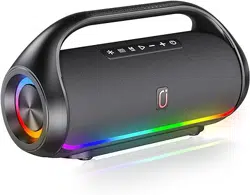
User Manual of Bluetooth Speaker Outdoor
Multifunctional Speaker (Model:D20)
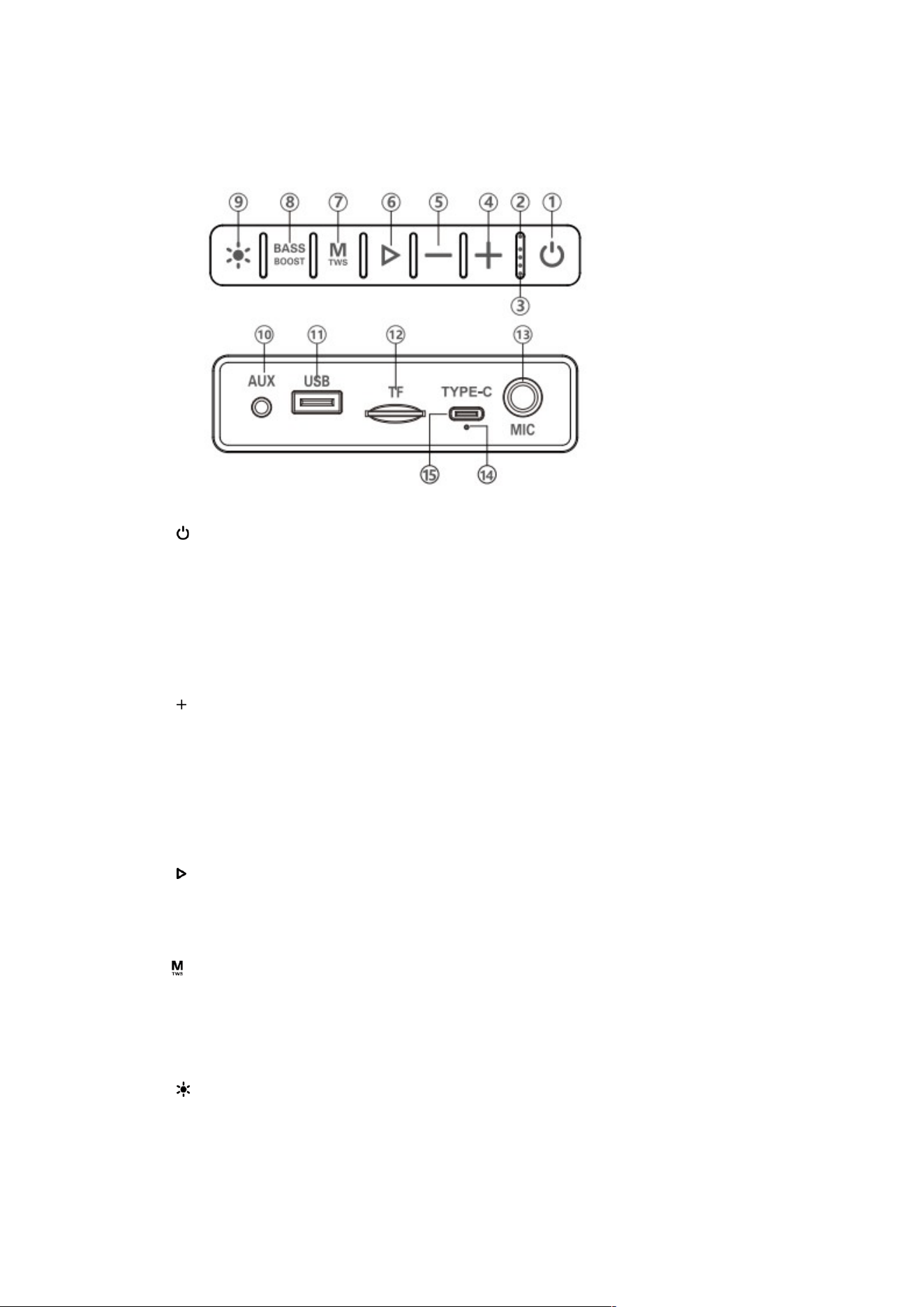
I. Product Feature (subject to the actual product)
1 .【 】: Long press to power on/off. (Press and hold for 10 seconds to restore
factory settings)
2. 【Blue light】: Function indicator.
3. 【White light】:Battery indicator.
4. 【 】:Short press to increase volume. While playing music, long press to play the
next music. Long press to select the next radio station when in FM mode.
5. 【—】 :Short press to decrease volume. Long press to play the previous songs
when playing music, Long press to select the previous radio station when in FM
mode.
6. 【 】:Short press to play/pause, and long press to automatically search for
channels in FM mode. In the Bluetooth mode, long press the play button to directly
disconnect the Bluetooth connection.
7.【 】:Short press mode conversion: Bluetooth, FM, AUX, U disk,TF card. Long
press for TWS function.
8. 【BASS BOOST】: Adjust the deep bass effects.
9. 【 】:Short press to turn on the ambient light, long press to directly turn off the
ambient light.
10. 【AUX】:AUX audio input.

11. 【USB】 :Insert the U disk to play MP3 music. (Max workable capacity for USB
is 64 GB, if more than 64 GB it can not work)
12. 【 TF 】:Insert TF card to play MP3 music. (Max workable capacity for TF Card
is 64 GB ,if more than 64 GB it can not work)
13. 【MIC】 :Microphone jack.
14. 【Charging indicator】:The red light is on when charging, the red light is off
when fully charged and the green light is on.
15. 【TYPE-C】 :Charging jack, use a USB charging cable to connect with the
charger for charging.
II. Bluetooth Connection Operation
Turn on to enter the Bluetooth mode. Then turn on the mobile Bluetooth and search
the Bluetooth name of the speaker or find a string of digital code for pairing. If there
is a prompt to pair the password, please enter "0000" and click confirm connection.
III. TWS connection operation
1.When in Bluetooth mode, turn on the two Bluetooth speaker device at the same
time, and then turn on either speaker and long press TWS key to paired with another
speaker to connect, long press again to disconnect TWS.
2. The optimal connection distance between two Bluetooth speakers is about 5
meters.
IV. Charging Instruction
1.To protect the performance of the battery, avoid using the machine while charging.
2. Note: The machine has no power bank function, it is forbidden to connect other
devices through the USB interface.
3. Use a 5V 2Acharger connected with USB charging cable for the device to charge
the red light is on when charging, and the green light is on when fully charged.
V. Troubleshooting
1.Automatically shut down when turned on.
The battery is low, please fully charge it before use.
2. The player automatically shuts down or restarts.
The battery is low, please fully charge it before use.
3. The charging light is not on, not charging.
Please make sure the charging cable is plugged in properly and whether it is damaged

or normal, please use a 5V 2A charger to charge the device.
4. Bluetooth status is silent
Please make sure the Bluetooth is paired correctly, and the Bluetooth device is
playing, and the volume is not at the minimum.
5. TF card/U disk playback is silent
Check whether the TF card is inserted in the correct direction and in place, whether
the U disk is inserted in place or in good contact; whether the music format in the TF
card or U disk is correct (Note: The music in the TF card/U disk mainly supports MP3
compressed audio files and WMA lossless audio files playback); whether the device
volume is adjusted to the minimum.
6.Power saving mode, automatic shutdown
In the state of Bluetooth mode, the speaker is not connected to any Bluetooth device,
and there is no operation for 15 minutes, the speaker will enter the power saving mode
and automatically shut down.
VI. Technical Specifications:
Input voltage: 5V 2A
Output Power:2x30W
Frequency effect: 75Hz—12KHz
S/N: ≥80dB
FM frequency: 87.5-108MHz
Battery:3.7V 186504500mAh
Product size:368x143x201mm
VII.Product Packaging:
1.Speaker System 1 PC
2.Charging Cable 1PC
3.AUX Cable 1PC
4. User Manual 1PC
