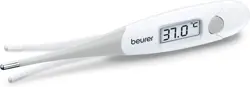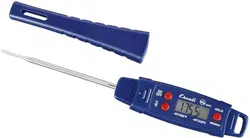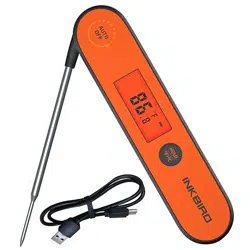

IHT-1P Digital Food Thermometer
Please keep this manual properly for reference.
You can also scan the QR code to visit our official
website for product usage videos. For any
usage issues, please feel free to contact us at
Wenn Sie eine Bedienungsanleitung in deutscher
Sprache benötigen, scannen Sie bitte den QR-Code
und besuchen Sie unsere Website, um sie zu
erhalten und ein Video über die Verwendung des
Produkts zu sehen.
Se avete bisogno di un manuale di istruzioni in
italiano, scansionate il codice QR e visitate il nostro
sito web per ottenerlo e vedere un video su come
utilizzare il prodotto.
Si vous avez besoin d'un mode d'emploi en
français, veuillez scanner le code QR pour visiter
notre site officiel afin d'obtenir et de visionner la
vidéo d'utilisation du produit !
Als je een Nederlandstalige handleiding nodig
hebt, scan dan de QR-code om naar onze officiële
website te gaan en bekijk de video over het
gebruik van het product!
Si necesita el manual de instrucciones en español,
escanee el código QR para ir a nuestro sitio web
oficial y ver el vídeo sobre cómo utilizar el
producto.

● Calibration: Hold the button and unfold the
probe at the same time to enter the calibration status.
Then LCD screen will display CA character, short press
the button to enter setting status, short press
button again to set your calibration value, or you can
hold the button to set your calibration value
quickly. The settings will be saved automatically 10
seconds later. The Calibration range is -3.0℃~3.0
℃/-5.0℉~5.0℉.
● LCD Screen (Liquid Crystal Display): Display the
measured temperature, battery capacity levels.
● Backlight: Convenient for check. Pull out the probe
to turn on the thermometer, the backlight of the LCD
screen will light up, and the LCD screen will display the
measured temperature. If there is no operation on the
thermometer, the backlight will turn off 20 seconds
later in the normal mode or 60s later in the HOLD
mode.
● Rechargeable Lithium Battery: The voltage of the
USB adapter should be 5V and the current electric of
USB adapter should higher than 500mA.
● Auto-on/off: Unfold the probe, the thermometer will
be turned on automatically, and it will be turned off
when you fold the probe back.
● Auto Restart: If there is no operation on the
thermometer and the measured temperature has not
02 Features
01 Specifications
● Device Name: Digital Food Thermometer
● Model: IHT-1P
● Measurement Mode: immersion/penetration probe
● Product Usage: measuring the temperature of food,
liquid, pastes and semi-solid materials
● Measurement Range:
-58.0℉~572℉ (-50.0℃ to 300℃)
● Measurement accuracy: ±1℃/±2℉
● Resolution of Display:
0.1℃/℉ (<100℃/℉), 1.0℃/℉ (>=100℃/℉)
● Waterproof level: IPX5
● Measuring Rate: 0.5s
● Warranty: 2 years
changed for 10 minutes, the thermometer will shut
down automatically. The thermometer will restart if a
sudden temperature change is detected, or you can
press the button to turn on the thermometer.
03 Button
● HOLD/℉/℃
Quickly press the button before taking it out
from meat or other kinds of food to hold the current
temperature reading. Long press for 2 seconds to
switch temperature unit between ℃ and ℉ .
04 Troubleshooting Guide
Issues Causes Solutions
Probe
reading
is
incor-
rect.
1. The
measure-
ment time
is short.
2. The
probe is
damaged.
1. Extend the probe detection
time to ensure stable readings.
2. Test the probe by measuring
boiling water at 100°C (212°F)
without touching the container.
3. If the deviation is small,
please use the calibration
function.
Device
cannot
be
charged.
1. Incorrect
charger or
cable.
2. Device
malfunction.
1. Use a 5V, 1A charger
instead of a fast charger,
or charge via a computer.
2. Replace the charging
cable.
Can it
be
calibrat-
ed?
How?
Yes.
Calibration
range: -5.0
℉~5.0℉/
-3.0℃~3.0℃
1.Press the home button and
unfold the probe at the same
time to enter.
2.Then screen will show CA
character, short press home
button to enter setting status,
short press again to set
calibration value. Or hold and
press home button to set
your calibration value quickly.
3.The setting value will be
saved automatically after 10
seconds.

Shenzhen Inkbird Technology Co.,Ltd.
MADE IN CHINA
DESIGNED BY INKBIRD
V5.0
Consignor: Shenzhen Inkbird Technology Co., Ltd.
Office Address: Room 1803, Guowei Building, No.68 Guowei Road,
Xianhu Community, Liantang, Luohu District, Shenzhen, China
Manufacturer: Shenzhen Inkbird Technology Co., Ltd.
Factory Address: 6th Floor, Building 713, Pengji Liantang Industrial
Area, No.2 Pengxing Road, Luohu District, Shenzhen, China