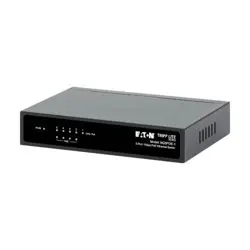
AXISD8004UnmanagedPoESwitch
InstallationGuide

Readthisrst
ReadthroughthisInstallationGuidecarefullybefore
installingtheproduct.KeeptheInstallationGuidefor
futurereference.
Legalconsiderations
Videoandaudiosurveillancecanberegulatedbylaws
thatvaryfromcountrytocountry.Checkthelaws
inyourlocalregionbeforeusingthisproductfor
surveillancepurposes.
Liability
Everycarehasbeentakeninthepreparationofthis
document.PleaseinformyourlocalAxisofceof
anyinaccuraciesoromissions.AxisCommunications
ABcannotbeheldresponsibleforanytechnicalor
typographicalerrorsandreservestherighttomake
changestotheproductandmanualswithoutprior
notice.AxisCommunicationsABmakesnowarranty
ofanykindwithregardtothematerialcontained
withinthisdocument,including,butnotlimitedto,
theimpliedwarrantiesofmerchantabilityandtness
foraparticularpurpose.AxisCommunicationsAB
shallnotbeliablenorresponsibleforincidental
orconsequentialdamagesinconnectionwiththe
furnishing,performanceoruseofthismaterial.This
productisonlytobeusedforitsintendedpurpose.
Intellectualpropertyrights
AxisABhasintellectualpropertyrightsrelatingto
technologyembodiedintheproductdescribedinthis
document.Inparticular,andwithoutlimitation,these
intellectualpropertyrightsmayincludeoneormoreof
thepatentslistedataxis.com/patentandoneormore
additionalpatentsorpendingpatentapplicationsin
theUSandothercountries.
Equipmentmodications
Thisequipmentmustbeinstalledandusedin
strictaccordancewiththeinstructionsgivenin
theuserdocumentation.Thisequipmentcontains
nouser-serviceablecomponents.Unauthorized
equipmentchangesormodicationswillinvalidateall
applicableregulatorycerticationsandapprovals.
Trademarkacknowledgements
AXISCOMMUNICATIONS,AXISandVAPIXare
registeredtrademarksortrademarkapplicationsof
AxisABinvariousjurisdictions.Allothercompany
namesandproductsaretrademarksorregistered
trademarksoftheirrespectivecompanies.
Regulatoryinformation
Europe
ThisproductcomplieswiththeapplicableCEmarking
directivesandharmonizedstandards:
•ElectromagneticCompatibility(EMC)Directive
2014/30/EU.SeeElectromagneticcompatibility
(EMC)onpage2.
•LowVoltageDirective(LVD)2014/35/EU.See
Safetyonpage3.
•RestrictionofHazardousSubstances(RoHS)
Directive2011/65/EUand2015/863,including
anyamendments,updatesorreplacements.See
Disposalandrecyclingonpage3.
Acopyoftheoriginaldeclarationofconformity
maybeobtainedfromAxisCommunicationsAB.See
Contactinformationonpage3.
Electromagneticcompatibility(EMC)
Thisequipmenthasbeendesignedandtestedtofulll
applicablestandardsfor:
•Radiofrequencyemissionwheninstalled
accordingtotheinstructionsandusedinits
intendedenvironment.
•Immunitytoelectricalandelectromagnetic
phenomenawheninstalledaccordingtothe
instructionsandusedinitsintendedenvironment.
USA
Thisdevicecomplieswithpart15oftheFCCRules.
Operationissubjecttothefollowingtwoconditions:
1.Thisdevicemaynotcauseharmfulinterference,
and
2.thisdevicemustacceptanyinterferencereceived,
includinginterferencethatmaycauseundesired
operation.
Thisequipmenthasbeentestedusingashielded
networkcable(STP)andfoundtocomplywiththe
limitsforaClassBdigitaldevice,pursuanttopart15
oftheFCCRules.Theselimitsaredesignedtoprovide
reasonableprotectionagainstharmfulinterferencein
aresidentialinstallation.Thisequipmentgenerates,
usesandcanradiateradiofrequencyenergyand,
ifnotinstalledandusedinaccordancewiththe
instructions,maycauseharmfulinterferencetoradio
communications.However,thereisnoguaranteethat
interferencewillnotoccurinaparticularinstallation.
Ifthisequipmentdoescauseharmfulinterferenceto
radioortelevisionreception,whichcanbedetermined
byturningtheequipmentoffandon,theuseris
encouragedtotrytocorrecttheinterferencebyone
ormoreofthefollowingmeasures:
•Reorientorrelocatethereceivingantenna.
•Increasetheseparationbetweentheequipment
andreceiver.
•Connecttheequipmentintoanoutletona
circuitdifferentfromthattowhichthereceiver
isconnected.
•Consultthedealeroranexperiencedradio/TV
technicianforhelp.
Theproductshallbeconnectedusingashielded
networkcable(STP)thatisproperlygrounded.
Contactinformation
AxisCommunicationsInc.
300ApolloDrive
Chelmsford,MA01824
UnitedStatesofAmerica
Tel:+19786142000
Canada
Thisdigitalapparatuscomplieswith
CANICES-3(ClassB).Theproductshallbe
connectedusingashieldednetworkcable(STP)that
isproperlygrounded.Cetappareilnumériqueest
conformeàlanormeCANNMB-3(classeB).Leproduit
doitêtreconnectéàl'aided'uncâbleréseaublindé
(STP)quiestcorrectementmisàlaterre.
Europe
ThisdigitalequipmentfulllstherequirementsforRF
emissionaccordingtotheClassBlimitofEN55022.
Theproductshallbeconnectedusingashielded
networkcable(STP)thatisproperlygrounded.

Australia/NewZealand
Thisdigitalequipmentfulllstherequirements
forRFemissionaccordingtotheClassBlimitof
AS/NZSCISPR32.Theproductshallbeconnected
usingashieldednetworkcable(STP)thatisproperly
grounded.
Safety
Disposalandrecycling
Whenthisproducthasreachedtheendofits
usefullife,disposeofitaccordingtolocallawsand
regulations.Forinformationaboutyournearest
designatedcollectionpoint,contactyourlocal
authorityresponsibleforwastedisposal.Inaccordance
withlocallegislation,penaltiesmaybeapplicablefor
incorrectdisposalofthiswaste.
Europe
Thissymbolmeansthattheproductshallnotbe
disposedoftogetherwithhouseholdorcommercial
waste.Directive2012/19/EUonwasteelectrical
andelectronicequipment(WEEE)isapplicablein
theEuropeanUnionmemberstates.Toprevent
potentialharmtohumanhealthandtheenvironment,
theproductmustbedisposedofinanapproved
andenvironmentallysaferecyclingprocess.For
informationaboutyournearestdesignatedcollection
point,contactyourlocalauthorityresponsiblefor
wastedisposal.Businessesshouldcontacttheproduct
supplierforinformationabouthowtodisposeofthis
productcorrectly.
Thisproductcomplieswiththerequirementsof
Directive2011/65/EUand2015/863ontherestriction
oftheuseofcertainhazardoussubstancesinelectrical
andelectronicequipment(RoHS).
Contactinformation
AxisCommunicationsAB
Emdalavägen14
22369Lund
Sweden
Tel:+46462721800
Fax:+4646136130
axis.com
Warrantyinformation
ForinformationaboutAxis’productwarrantyand
theretorelatedinformation,gotoaxis.com/warranty.
Support
Shouldyourequireanytechnicalassistance,please
contactyourAxisreseller.Ifyourquestionscannotbe
answeredimmediately,yourresellerwillforwardyour
queriesthroughtheappropriatechannelstoensurea
rapidresponse.IfyouareconnectedtotheInternet,
youcan:
•ndanswerstoresolvedproblemsintheFAQ
database,searchbyproduct,category,orphrase
•reportproblemstoAxissupportstaffbylogging
intoyourprivatesupportarea
•chatwithAxissupportstaff
•visitAxisSupportataxis.com/support
Learnmore!
VisitAxislearningcenteraxis.com/academyforuseful
trainings,webinars,tutorialsandguides.


AXISD8004UnmanagedPoESwitch
Safetyinformation
Hazardlevels
DANGER
Indicatesahazardoussituationwhich,ifnotavoided,willresultindeathorseriousinjury.
WARNING
Indicatesahazardoussituationwhich,ifnotavoided,couldresultindeathorseriousinjury.
CAUTION
Indicatesahazardoussituationwhich,ifnotavoided,couldresultinminorormoderate
injury.
NO NO
NO
TICE TICE
TICE
Indicatesasituationwhich,ifnotavoided,couldresultindamagetoproperty.
Othermessagelevels
Important
Indicatessignicantinformationwhichisessentialfortheproducttofunctioncorrectly.
Note
Indicatesusefulinformationwhichhelpsingettingthemostoutoftheproduct.
5

AXISD8004UnmanagedPoESwitch
Safetyinstructions
NO NO
NO
TICE TICE
TICE
•TheAxisproductshallbeusedincompliancewithlocallawsandregulations.
•UseonlyapplicabletoolswheninstallingtheAxisproduct.Usingexcessiveforcewith
powertoolscouldcausedamagetotheproduct.
•Donotusechemicals,causticagents,oraerosolcleaners.
•Useacleanclothdampenedwithpurewaterforcleaning.
•Useonlyaccessoriesthatcomplywiththetechnicalspecicationofyourproduct.These
canbeprovidedbyAxisorathirdparty.AxisrecommendsusingAxispowersource
equipmentcompatiblewithyourproduct.
•UseonlysparepartsprovidedbyorrecommendedbyAxis.
•Donotattempttorepairtheproductyourself.ContactAxissupportoryourAxisreseller
forservicematters.
Transportation
NO NO
NO
TICE TICE
TICE
•WhentransportingtheAxisproduct,usetheoriginalpackagingorequivalenttoprevent
damagetotheproduct.
6

AXISD8004UnmanagedPoESwitch
Installthehardware
Pre-Installation
•Makesuretoplacetheswitchnearapowersource.
•Makesuretokeepenoughventilationbetweentheswitchandthesurroundingobjects.
•Thisproductisintendedforindooruseonly.
•Whenchoosingalocation,keepinmindtheenvironmentalrestrictions.See
Specicationsonpage10
•ForlocationsofLEDsandconnectors,seeHardwareoverviewonpage9
Note
Nosoftwarecongurationisnecessary.
InstallationSteps
1.Attachtherubberfeettothebottomoftheswitch.
2.Fastenthebrackets,ifneeded.
3.ConnectastandardnetworkcabletotheportlabeledNETontheswitch.
4.ConnecttheotherendofthecabletoanetworkoutletalternativelyviaaPCorrouter.
5.Connectanetworkcablefromthepowereddevices(networkcamera)totheswitch,
port1-4.
6.Connectthenetworkcablefromtheswitchtothepowereddevice(networkcamera).
7.Connectthepowercabletotheswitch.
8.ConnectthepowercabletoastandardACoutlet.
Note
Useonlythesuppliedpoweradaptertopowertheswitch.
PowerNotice
Theswitchisapower-requireddevice,meaningitwillnotworkuntilitispowered.Considerusing
anUPS(UninterruptedPowerSupply)inordertoavoidnetworkdatalossornetworkdowntime.
7

AXISD8004UnmanagedPoESwitch
Installingasurgesuppressiondevicemayalsohelptoprotecttheswitchfrombeingdamagedby
unregulatedsurgeorcurrenttotheswitchorthepowercord.
8

AXISD8004UnmanagedPoESwitch
Referencematerial
Packagecontents
•AXISD8004UnmanagedPoESwitch
•PowerAdapter
•PowerCord
•Rubberfeet(4x)
•Bracket(2x)
•PrintedMaterials
-InstallationGuide(thisdocument)
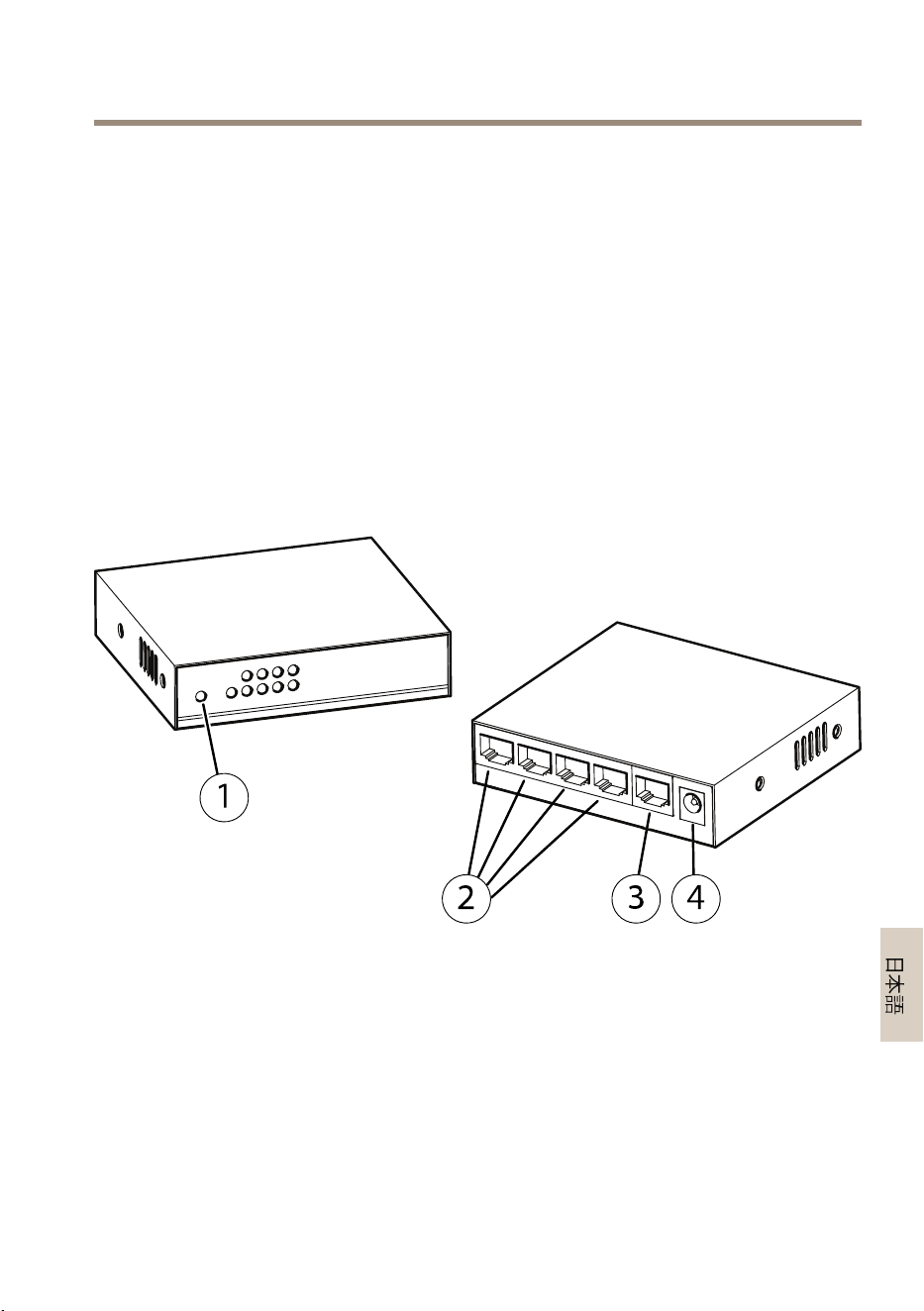
Hardwareoverview
1
LEDs(frontpanel)
2
Port1-4(PoE)
3
PortNET(non-PoE)
4
PowerConnector
LEDindicators
LED
Color
Indication
PWR
Green(lit)
Poweron
9

AXISD8004UnmanagedPoESwitch
LED
Color
Indication
PortNET(network)Green(lit)
10/100Mbpsestablished
PortNET(network)Green(blink)
Sendingorreceivingdata
Port1-4(PoE)Orange(lit)
PoEon
Port1-4(network)Green(lit)
10/100Mbpsestablished
Port1-4(network)Green(blink)
Sendingorreceivingdata
ProductFeatures
•4PoEports
•AutodetectionofPoEpowereddevices.
•Desktoppalmsize.
•LEDindicators
•Metalenclosure
Specications
•HardwareSpecications
-NetworkConnector:5–portRJ4510/100Base-TX
-PoEPorts:Port1-4.SupportsIEEE802.3af/802.3atType1Class3,
IEEE802atType2Class4
-MACAddresstable:1KMACaddresstablewithAutolearningfunctionality
-SwitchedFabric:1Gbps
-SwitchThroughput:0.74Mbps@64Bytes
-MaximumPacketSize:1536Bytes
-Hardwarebased10/100MbpsAutoNegotiationandautoMDI/MDI-X
-FlowControl:BackpressureforHalf-Duplex.IEEE802.3xPauseFramefor
Full-Duplex
-PowerConsumption:Max62W
-Powerplugpolarity:Center-pinpositive
-Dimensions:90x8021mm(3.54x3.15x0.83in)
-Weight:172g(0.38lb)
•PoweroverEthernet
-PoEStandards:IEEE802.3af/802.3atType1Class3,IEEE802atType2Class4
-PoEPowerSupplyType:Midspan
-PowerPinAssignment:4/5(+)and7/8(-)
10

AXISD8004UnmanagedPoESwitch
-PoEPowerBudget:60W(4x15W,2x30Wor1x30W+2x15W)
-Remotepowerfeeding:Upto100m
•Environment
-Theproductisintendedforindooruseonly
-OperatingConditionsTemperature:0°Cto50°C(32°Fto122°F)
-OperatingConditionsHumidity:5to95%RH(non-condensing)
11

12

AXISD8004UnmanagedPoESwitch
Informationssurlasécurité
Niveauxderisques
DANGER
Indiqueunesituationdangereusequi,siellen'estpasévitée,entraîneraledécèsoudes
blessuresgraves.
AVERTISSEMENT
Indiqueunesituationdangereusequi,siellen'estpasévitée,pourraitentraînerledécès
oudesblessuresgraves.
ATTENTION
Indiqueunesituationdangereusequi,siellen'estpasévitée,pourraitentraînerdes
blessureslégèresoumodérées.
A A
A
VIS VIS
VIS
Indiqueunesituationqui,siellen'estpasévitée,pourraitendommagerl'appareil.
Autresniveauxdemessage
Important
Indiquelesinformationsimportantes,nécessairespourassurerlebonfonctionnementde
l’appareil.
Note
Indiquelesinformationsutilesquipermettrontd’obtenirlefonctionnementoptimalde
l’appareil.
13

AXISD8004UnmanagedPoESwitch
Consignesdesécurité
A A
A
VIS VIS
VIS
•LeproduitAxisdoitêtreutiliséconformémentauxloisetrèglementslocaux.
•Utiliseruniquementdesoutilsrecommandéspourl'installationdel'appareilAxis.
L'applicationd'uneforceexcessivesurl'appareilavecdesoutilspuissantspourrait
l'endommager.
•Nepasutiliserdeproduitschimiques,desubstancescaustiquesoudenettoyants
pressurisés.
•Utiliserunchiffonpropreimbibéd'eaupurepourlenettoyage.
•Utiliseruniquementdesaccessoiresconformesauxcaractéristiquestechniquesdevotre
produit.IlspeuventêtrefournisparAxisouuntiers.Axisrecommanded'utiliserun
équipementd'alimentationAxiscompatibleavecvotreproduit.
•UtiliseruniquementlespiècesderechangefourniesourecommandéesparAxis.
•Nepasessayerderéparervous-mêmeceproduit.Contacterl'assistancetechniqued'Axis
ouvotrerevendeurAxispourdesproblèmesliésàl'entretien.
Transport
A A
A
VIS VIS
VIS
•LorsdutransportduproduitAxis,utilisezl'emballaged'origineouunéquivalentpour
éviterd'endommagerleproduit.
14

AXISD8004UnmanagedPoESwitch
Installationdumatériel
Préinstallation
•Placezlecommutateuràproximitéd'unesourced'alimentation.
•Uneventilationsufsantedoitêtreprévueentrelecommutateuretlesobjets
environnants.
•Cetappareilestdestinéàuneutilisationenintérieuruniquement.
•Aumomentdechoisirunemplacement,n'oubliezpaslescontraintesenvironnementales.
Cf.Caractéristiquestechniquespage18
•Pourconnaîtrel'emplacementdesvoyantsetdesconnecteurs,consultezAperçu
dumatérielpage17
Note
Aucunecongurationlogiciellen'estnécessaire.
Procédured’installation
1.Fixezlespiedsencaoutchoucsurlapartieinférieureducommutateur.
2.Fixezlessupports,lecaséchéant.
3.BranchezuncâbleréseaustandardauportidentiéNETsurlecommutateur.
4.Branchezl'autreextrémitéducâbleàunepriseréseauviaunordinateurouunrouteur.
5.Connectezuncâbleréseauvenantdesappareilsalimentés(caméraréseau)au
commutateur,port1-4.
6.Connectezlecâbleréseauvenantducommutateuràl'appareilalimenté(caméraréseau).
7.Connectezlecâblesecteuraucommutateur.
8.Connectezlecâbled'alimentationàuneprisesecteurstandard.
Note
Utilisezuniquementl'adaptateurd'alimentationfournipouralimenterlecommutateur.
Remarqueàproposdel'alimentation
15

AXISD8004UnmanagedPoESwitch
Cecommutateurestunappareilàénergierequise,cequisigniequ'ilnefonctionneques'ilest
alimenté.Pensezàutiliserunsystèmed’alimentationsanscoupure(UPS)pouréviterlespertesde
donnéesréseauoul'arrêtduréseau.
L'installationd'undispositifdeprotectioncontrelessurtensionspeutégalementprotégerle
commutateuroulecordond'alimentationcontreunesurtensionouuncourantnonrégulés.
16

AXISD8004UnmanagedPoESwitch
Élémentsderéférence
Contenudel’emballage
•AXISD8004UnmanagedPoESwitch
•Adaptateurd’alimentation
•Cordond'alimentation
•Piedencaoutchouc(4x)
•Support(2x)
•Documentsimprimés
-Guided’installation(cedocument)
Aperçudumatériel
1
Voyants(panneauavant)
2
Port1à4(PoE)
3
PortNET(non-PoE)
4
Connecteurd’alimentation
Voyants
Voyant
Couleur
Indication
PWR
Vert(allumé)
Soustension
17

AXISD8004UnmanagedPoESwitch
Voyant
Couleur
Indication
PortNET(réseau)Vert(allumé)
10/100Mbit/sétabli.
PortNET(réseau)Vert(clignotant)
Envoiouréceptiondedonnées
Port1à4(PoE)Orange(allumé)
AlimentationparEthernet
(PoE)activée
Port1-4(réseau)Vert(allumé)
10/100Mbit/sétabli.
Port1-4(réseau)Vert(clignotant)
Envoiouréceptiondedonnées
Caractéristiquesduproduit
•4portsPoE
•Détectionautomatiqued'appareilsalimentésparPoE.
•Faibleencombrement.
•Voyants
•Boîtiermétallique
Caractéristiquestechniques
•Caractéristiquesmatérielles
-Connecteurréseau:RJ455ports10/100Base-TX
-PortsPoE:Port1-4.CompatibleIEEE802.3af/802.3atType1Classe3,
IEEE802atType2Classe4
-TableauadressesMAC:tableauadresses1KMACavecfonctionnalité
d'auto-apprentissage
-Matricedecommutation:1Gbit/s
-Débitducommutateur:0,74Mbit/s@64octets
-Taillemaxi.despaquets:1536octets
-Négociationautomatique10/100Mbit/sbaséesurlematérielet
MDI/MDI-Xauto
-Commandedeux:contre-pressionpoursemi-duplex.tramedepause
IEEE802.3xpourduplexintégral
-Consommationélectrique:Max.62W
-Polaritéducordond’alimentation:Brochecentralepositive
-Dimensions:90x80x21mm(3,54x3,15x0,83po)
-Poids:172g(0,38lb)
•AlimentationparEthernet
18

AXISD8004UnmanagedPoESwitch
-NormesPoE:IEEE802.3af/802.3atType1Classe3,IEEE802atType2Classe4
-Typed’alimentationélectriquePoE:Injecteur
-Affectationdesbrochesd'alimentation:4/5(+)et7/8(-)
-Budgetdel'alimentationPoE:60W(4x15W,2x30Wou1x30W+
2x15W)
-Téléalimentation:Jusqu'à100m
•Environnement
-L'appareilestdestinéàuneutilisationenintérieuruniquement.
-Températureenconditionsd'utilisation:de0°Cà50°C(32°Fà122°F)
-Humiditéenconditionsd'utilisation:Humiditérelativede5à95%(sans
condensation)
19

20

AXISD8004UnmanagedPoESwitch
Sicherheitsinformationen
Gefährdungsstufen
GEFAHR
WeistaufeinegefährlicheSituationhin,welche,fallsnichtverhindert,zuTododer
schwerenVerletzungenführenkann.
WARNUNG
WeistaufeinegefährlicheSituationhin,welche,fallsnichtverhindert,zuTododer
schwerenVerletzungenführenkann.
VORSICHT
WeistaufeinegefährlicheSituationhin,welche,fallsnichtverhindert,zugeringfügiger
odermäßigerVerletzungführenkann.
HINWEIS HINWEIS
HINWEIS
WeistaufeinegefährlicheSituationhin,welche,fallsnichtverhindert,zuSachschäden
führenkann.
AndereMeldeebenen
Wichtig
WeistaufwichtigeInformationenhin,diedenrichtigenBetriebdesProduktsgewährleisten.
Beachten
WeistaufnützlicheInformationenhin,diedieoptimaleVerwendungdesProdukts
unterstützen.
21

AXISD8004UnmanagedPoESwitch
Sicherheitsanweisungen
HINWEIS HINWEIS
HINWEIS
•DasAxis-ProduktmussunterBeachtungdergeltendenGesetzeundBestimmungen
betriebenwerden.
•VerwendenSiebeiderInstallationdesAxisProduktsausschließlichpassendeWerkzeuge.
EinzugroßerKraftaufwandmitelektrischenWerkzeugenkanndasProduktbeschädigen.
•VerwendenSiekeinechemischen,ätzendenoderaerosolhaltigenReinigungsmittel.
•VerwendenSiezumReinigeneinsauberes,mitdestilliertemWasserangefeuchtetesTuch.
•VerwendenSienurZubehör,dasdentechnischenVorgabenIhresProduktsentspricht.
DiesesistvonAxisoderDrittanbieternerhältlich.AxisempehltdiemitIhremProdukt
kompatibleStromversorgungvonAxis.
•VerwendenSieausschließlichErsatzteiledievonAxisangebotenoderempfohlenwerden.
•VersuchenSienicht,diesesProduktselbsttätigzureparieren.WendenSiesichbezüglich
ReparaturundWartungandenAxisSupportoderIhrenAxisHändler.
Transport
HINWEIS HINWEIS
HINWEIS
•BeiBedarftransportierenSiedasAxisProduktinderOriginalverpackungodereiner
entsprechendenVerpackung,sodassSchädenvermiedenwerden.
22

AXISD8004UnmanagedPoESwitch
DieHardwareinstallieren
Vorinstallation
•AchtenSiedarauf,denSwitchinderNäheeinerStromquellezuplatzieren.
•StellenSiesicher,dassgenügendAbstandzwischendemSwitchundumliegenden
ObjektenfüreineausreichendeBelüftungbleibt.
•DiesesProduktistausschließlichfürdieVerwendunginInnenräumenausgelegt.
•BeachtenSiebeiderStandortauswahldieUmgebungseinschränkungen.SieheTechnische
DatenaufSeite26
•DiePositionderLEDsundAnschlüssendenSieunter:ÜbersichtüberdieHardwareauf
Seite25.
Beachten
EineSoftwarekongurationistnichterforderlich.
Installationsschritte
1.BringenSiedieGummifüßeanderUnterseitedesSwitchsan.
2.BringenSiebeiBedarfdieHalterungenan.
3.SchließenSieeinStandard-NetzwerkkabelandenmitNETbeschriftetenPortamSwitch
an.
4.VerbindenSiedasKabelamanderenEndeentwederübereinenPCodereinenRoutermit
einemNetzwerkausgang.
5.SchließenSieeinNetzwerkkabeldereingeschaltetenGeräte(Netzwerk-Kamera)anPort
1bis4desSwitchsan.
6.SchließenSiedasNetzwerkkabeldesSwitchsandaseingeschalteteGerät
(Netzwerk-Kamera)an.
7.SchließenSiedasNetzkabelandenSwitchan.
8.VerbindenSiedasNetzkabelaneineNetzsteckdosean.
23

AXISD8004UnmanagedPoESwitch
Beachten
VerwendenSienurdasimLieferumfangenthalteneNetzteilfürdieStromversorgungdes
Switchs.
HinweiszurStromversorgung
DerSwitchisteinGerätmitStrombedarf,d.h.esfunktioniertnur,wennesmitStromversorgt
wird.ErwägenSiedieVerwendungeinerUSV(unterbrechungsfreienStromversorgung),umden
VerlustvonNetzwerkdatenoderNetzwerkausfällezuvermeiden.
DurchInstallationeinesÜberspannungsschutzeskannderSwitchvorBeschädigungdurch
unkontrollierteÜberspannungoderStromstößeüberSwitchoderNetzkabelgeschütztwerden.
24

AXISD8004UnmanagedPoESwitch
Informationsmaterial
Lieferumfang
•AXISD8004UnmanagedPoESwitch
•Netzteil
•Netzkabel
•Gummifüße(4Stück)
•Halterung(2Stück)
•GedruckteDokumente
-Installationsanleitung(diesesDokument)
ÜbersichtüberdieHardware
1
LEDs(Vorderseite)
2
Port1bis4(PoE)
3
PortNET(ohnePoE)
4
Stromanschluss
LED-Anzeigen
LEDFarbeBedeutung
PWR
Grün(leuchtend)
Aktiviert
25

AXISD8004UnmanagedPoESwitch
LEDFarbeBedeutung
PortNET(Netzwerk)Grün(leuchtend)
10/100MBit/serreicht
PortNET(Netzwerk)Grün(blinkend)
SendenoderEmpfangenvon
Daten
Port1bis4(PoE)Orange(leuchtend)
PoEein
Port1bis4(Netzwerk)Grün(leuchtend)
10/100MBit/serreicht
Port1bis4(Netzwerk)Grün(blinkend)
SendenoderEmpfangenvon
Daten
Produktmerkmale
•4PoE-Ports
•AutomatischeErkennungvonPoE-betriebenenGeräten.
•Miniaturformat.
•LED-Anzeigen
•Metallgehäuse
TechnischeDaten
•Hardware–technischeDaten
-Netzwerkanschluss:RJ-45für10/100Base-TXmit5Ports
-PoE-Ports:Port1bis4.UnterstütztIEEE802.3af/802.3atTyp1Klasse3,
IEEE802atTyp2Klasse4
-MAC-Adresstabelle:1K-MAC-AdresstabellemitSelbstlernfunktion
-SwitchedFabric:1GBit/s
-Switch-Durchsatz:0,74MBit/s@64Byte
-MaximalePaketgröße:1536Byte
-HardwarebasierteautomatischeAushandlungmit10/100MBit/sund
automatischeMDI/MDI-X
-Flusssteuerung:GegendruckfürHalbduplex.IEEE802.3x-Pausenrahmenfür
Vollduplex
-Stromverbrauch:Max.62W
-PolaritätdesNetzsteckers:Mittelpolpositiv
-Abmessungen:90x80x21mm
-Gewicht:172g
•PoweroverEthernet
26

AXISD8004UnmanagedPoESwitch
-PoE-Standards:IEEE802.3af/802.3atTyp1Klasse3,IEEE802atTyp2Klasse4
-ArtderPoE-Stromversorgung:Midspan
-Kontaktbelegung:4/5(+)und7/8(-)
-PoE-Leistung:60W(4x15W,2x30Woder1x30W+2x15W)
-Fernspeisung:Biszu100m
•Umgebung
-DasProduktistausschließlichfürdieVerwendunginInnenräumenkonzipiert.
-Betriebsbedingungen–Temperatur:0bis50°C
-Betriebsbedingungen–Luftfeuchtigkeit:
5bis95%relativeLuftfeuchtigkeit(nichtkondensierend)
27

28

AXISD8004UnmanagedPoESwitch
Informazionidisicurezza
Livellidipericolo
PERICOLO
Indicaunasituazionepericolosache,senonevitata,provocamorteolesionigravi.
AVVERTENZA
Indicaunasituazionepericolosache,senonevitata,potrebbeprovocarelamorteolesioni
gravi.
ATTENZIONE
Indicaunasituazionepericolosache,senonevitata,potrebbeprovocarelesionimedie
ominori.
A A
A
VVISO VVISO
VVISO
Indicaunasituazioneche,senonevitata,potrebbedanneggiarelaproprietà.
Altrilivellidimessaggio
Importante
Indicainformazioniimportanti,essenzialiperilcorrettofunzionamentodeldispositivo.
Nota
Indicainformazioniutilicheaiutanoaottenereilmassimodaldispositivo.
29

AXISD8004UnmanagedPoESwitch
Informazionidisicurezza
A A
A
VVISO VVISO
VVISO
•IldispositivoAxisdeveessereutilizzatoinconformitàalleleggieallenormativelocali.
•UtilizzaresolostrumentiapplicabiliquandosiinstallaildispositivoAxis.Sesiutilizzauna
forzaeccessivaconstrumentinonadattièpossibilecausaredannialdispositivo.
•Nonutilizzaresostanzechimiche,agenticausticiodetergentiaerosol.
•Utilizzareunpannopulitoinumiditoinacquapuraperlapulizia.
•Utilizzaresoloaccessoricompatibiliconlespecichetecnichedeldispositivo.Questi
possonoesserefornitidaAxisodaterzeparti.Axisconsiglial'usodell'apparecchiaturadi
alimentazioneAxiscompatibileconildispositivo.
•UtilizzaresolopartidiricambioforniteoconsigliatedaAxis.
•Nontentarediriparareildispositivodasoli.Contattarel'assistenzaoilrivenditoreAxis
perquestionirelativeallamanutenzione.
Trasporto
A A
A
VVISO VVISO
VVISO
•DuranteiltrasportodeldispositivoAxis,utilizzarel'imballaggiooriginaleoequivalente
perevitaredannialdispositivo.
30

AXISD8004UnmanagedPoESwitch
Installazionedell'hardware
Preinstallazione
•Assicurarsidiposizionareloswitchvicinoadunafontedialimentazione.
•Assicurarsidimantenereun'adeguataventilazionetraloswitcheglioggetticircostanti.
•Ildispositivoèdestinatosoloperusointerno.
•Quandosisceglieunaposizione,tenereamenteivincoliambientali.ConsultareDati
tecniciallapagina34
•Perl'ubicazionedeiLEDedeiconnettori,vederePanoramicadell'hardwareallapagina33.
Nota
Nonènecessariaalcunacongurazionedelsoftware.
Proceduradiinstallazione
1.Fissareipiediniingommaallaparteinferioredelloswitch.
2.Senecessario,ssarelestaffe.
3.CollegareuncavodiretestandardallaportaetichettataNETsulloswitch.
4.Collegarel'altraestremitàdelcavoadunapresadiretealternativatramiteunPCo
unrouter.
5.Collegareuncavodiretedaidispositivialimentati(telecameradirete)alloswitch,porte
1-4.
6.Collegareilcavodiretedalloswitchaldispositivoalimentato(telecameradirete).
7.Collegareilcavodialimentazionealloswitch.
8.CollegareilcavodialimentazioneaunapresaCAstandard.
Nota
Peralimentareloswitchutilizzaresolol'alimentatorefornito.
Avvisosull'alimentazione
31

AXISD8004UnmanagedPoESwitch
Loswitchèundispositivoadalimentazione,nelsensochenonfunzionasenonvienealimentato.Si
consiglial'utilizzodiunalimentatoreUPS(UninteruptedPowerSupply)perevitarelaperditadei
datidireteoperiodidiinattivitàdellarete.
L'installazionediundispositivodisoppressionedellesovratensionipuòaiutareaproteggerelo
switchdapossibilidanneggiamentidacorrenteosovratensionenonregolamentataalloswitch
oalcavodialimentazione.
32

AXISD8004UnmanagedPoESwitch
Materialediriferimento
Contenutodellaconfezione
•AXISD8004UnmanagedPoESwitch
•Alimentatore
•Cavodialimentazione
•Piediniingomma(4x)
•Staffa(2x)
•Materialistampati
-Guidaall'installazione(questodocumento)
Panoramicadell'hardware
1
LED(latofrontale)
2
Porte1-4(PoE)
3
PortaNET(nonPoE)
4
Connettoredialimentazione
IndicatoriLED
LED
Colore
Indicazione
Alimentazione
Verde(acceso)
Acceso
33

AXISD8004UnmanagedPoESwitch
LED
Colore
Indicazione
PortaNET(rete)Verde(acceso)
10/100Mbpsstabilito
PortaNET(rete)Verde(lampeggiante)
Inviooricezionedati
Porte1-4(PoE)Arancio(acceso)
PoEattivo
Porte1-4(rete)Verde(acceso)
10/100Mbpsstabilito
Porte1-4(rete)Verde(lampeggiante)
Inviooricezionedati
Caratteristichedeldispositivo
•4portePoE
•RilevamentoautomaticodidispositivialimentatiPoE.
•Desktopdidimensioniridotte.
•IndicatoriLED
•Contenitoreinmetallo
Datitecnici
•Specichehardware
-Connettoredirete:RJ45a5porte10/100Base-TX
-PortePoE:porte1-4.SupportaIEEE802.3af/802.3atTipo1Classe3,
IEEE802atTipo2Classe4
-TabellaindirizziMAC:tabellaindirizziMACda1Kconfunzionalitàdi
apprendimentoautomatico
-SwitchFabric:1Gbps
-Velocitàditrasmissioneswitch:0,74Mbpsa64byte
-Dimensioneminimapacchetto:1536byte
-Negoziazioneautomatica10/100MbpseMDI/MDI-Xautomaticabasatesu
hardware
-Controllousso:contropressioneperhalf-duplex.IEEE802.3xPauseFrame
perfull-duplex
-Consumoenergetico:max62W
-Polaritàspinadialimentazione:pincentralepositivo
-Dimensioni:90x8021mm
-Peso:172g
•PoweroverEthernet
-StandardPoE:IEEE802.3af/802.3atTipo1Classe3,IEEE802atTipo2Classe4
34

AXISD8004UnmanagedPoESwitch
-TipoalimentatorePoE:Midspan
-Assegnazionideipindialimentazione:4/5(+)e7/8(-)
-PotenzaalimentazionePoE:60W(4x15W,2x30Wo1x30W+2x15W)
-Alimentazioneremota:Finoa100m
•Ambiente
-Ildispositivoèdestinatosoloperusointerno
-Temperaturacondizionidifunzionamento:Da0°Ca50°C
-Umiditàcondizionidifunzionamento:da5a95%(umiditàrelativasenza
condensa)
35

36

AXISD8004UnmanagedPoESwitch
Informacióndeseguridad
Nivelesdepeligro
PELIGRO
Indicaunasituaciónpeligrosaque,sinoseevita,provocarálesionesgravesolamuerte.
ADVERTENCIA
Indicaunasituaciónpeligrosaque,sinoseevita,puedeprovocarlesionesgravesola
muerte.
ATENCIÓN
Indicaunasituaciónpeligrosaque,sinoseevita,puedeprovocarlesionesmoderadaso
leves.
A A
A
VISO VISO
VISO
Indicaunasituaciónpeligrosaque,sinoseevita,puedeprovocardañosmateriales.
Otrosnivelesdemensaje
Importante
Indicainformaciónimportantequeesfundamentalparaqueelproductofuncione
correctamente.
Nota
Indicainformaciónútilqueayudaaaprovecharelproductoalmáximo.
37

AXISD8004UnmanagedPoESwitch
Instruccionesdeseguridad
A A
A
VISO VISO
VISO
•EsteproductodeAxisdebeutilizarsedeacuerdoconlasleyesynormativaslocales.
•UtilicesololasherramientascorrespondientescuandoinstaleelproductodeAxis.La
aplicacióndeunafuerzaexcesivaconherramientaseléctricaspuedeprovocardaños
enelproducto.
•Noutilicelimpiadoresenaerosol,agentescáusticosniproductosquímicos.
•Limpieconunpañolimpiohumedecidoconaguapura.
•Utilicesoloaccesoriosquecumplanconlasespecicacionestécnicasdesuproducto.
EstosaccesorioslospuedeproporcionarAxisountercero.Axisrecomiendautilizarun
equipodesuministrodealimentacióndeAxiscompatibleconsuproducto.
•UtilicesolopiezasderepuestoproporcionadasorecomendadasporAxis.
•Nointenterepararelproductoustedmismo.Póngaseencontactoconelserviciode
asistenciatécnicadeAxisoconsudistribuidordeAxisparatratarasuntosdereparación.
Transporte
A A
A
VISO VISO
VISO
•CuandotransporteelproductodeAxis,utiliceelembalajeoriginalounequivalentepara
evitardañosenelproducto.
38

AXISD8004UnmanagedPoESwitch
Instalacióndelhardware
Antesdelainstalación
•Asegúresedecolocarelswitchcercadeunafuentedealimentación.
•Asegúresedemantenersucienteventilaciónentreelswitchylosobjetoscircundantes.
•Esteproductosehadiseñadoparasuusoexclusivoeninteriores.
•Cuandoelijaunaubicación,tengapresentelasrestriccionesmedioambientales.Consulte
Especicacionesenlapágina42
•ParalaubicacióndeLEDyconectores,consulteInformacióngeneraldelhardwareenla
página41
Nota
Noseprecisaningunaconguracióndesoftware.
Pasosdelainstalación
1.Fijelascuatropatasdegomaalaparteinferiordelswitch.
2.Fijelossoportesencasonecesario.
3.ConecteuncablederedestándaralpuertoconlaetiquetaNETdelswitch.
4.Conecteelotroextremodelcableaunatomaderedatravésdeunordenadorode
unrouter.
5.Conecteuncabledereddesdelosdispositivosalimentados(cámaradered)hastael
switch,puerto1-4.
6.Conecteelcabledereddesdeelswitchaldispositivoalimentado(cámaradered).
7.Conecteelcablederedalswitch.
8.ConecteelcabledealimentaciónaunatomadeCAestándar.
Nota
Soloutiliceeladaptadordealimentaciónproporcionadoparaalimentarelswitch.
Avisosobrealimentación
39

AXISD8004UnmanagedPoESwitch
Elswitchesundispositivoqueprecisaestarconectadoaunafuentedealimentación;esdecir,no
funcionarásinoseleproporcionacorriente.ConsiderelaposibilidaddeutilizarunSAI(Sistema
deAlimentaciónIninterrumpido)conelndeevitarlapérdidadedatosderedolostiemposde
inactividaddelared.
Tambiénpuederesultarútilinstalarundispositivodesupresióndesobretensionesparaevitarque
elswitchresultedañadoantecualquiersobretensiónocorrientehaciaelswitchoelcablede
alimentaciónnocontroladas.
40

AXISD8004UnmanagedPoESwitch
Materialdereferencia
Contenidodelpaquete
•AXISD8004UnmanagedPoESwitch
•Adaptadordealimentación
•Cabledealimentación
•Patasdegoma(4)
•Soporte(2)
•Materialesimpresos
-Guíadeinstalación(estedocumento)
Informacióngeneraldelhardware
1
LED(paneldelantero)
2
Puerto1-4(PoE)
3
PuertoNET(sinPoE)
4
Conectordealimentación
IndicadoresLED
LED
Color
Indicación
PWR
Verde(jo)
Encendido
41

AXISD8004UnmanagedPoESwitch
LED
Color
Indicación
PuertoNET(red)Verde(jo)
10/100Mbpsestablecidos
PuertoNET(red)Verde(parpadeante)
Enviandoorecibiendodatos
Puerto1-4(PoE)Naranja(jo)
PoEactivada
Puerto1-4(red)Verde(jo)
10/100Mbpsestablecidos
Puerto1-4(red)Verde(parpadeante)
Enviandoorecibiendodatos
Característicasdelproducto
•4puertosPoE
•DetecciónautomáticadedispositivosalimentadosporPoE.
•Tamañoreducidodesobremesa.
•IndicadoresLED
•Carcasametálica
Especicaciones
•Especicacionesdehardware
-Conectordered:5puertosRJ4510/100Base-TX
-PuertosPoE:puerto1-4.CompatibleconIEEE802.3af/802.3atTipo1Clase
3,IEEE802atTipo2Clase4
-TabladedireccionesMAC:tabladedireccionesMACde1Kconfuncionalidad
deautoaprendizaje
-SwitchedFabric:1Gbps
-Velocidaddesalidadelswitch:0,74Mbpsa64bytes
-Tamañomáximodepaquete:1536bytes
-Autonegociacióna10/100MbpsbasadaenhardwareyMDI/MDI-Xautomático
-Controldeujo:contrapresiónparamodosemidúplex.Tramadepausa
IEEE802.3xparamododúplexcompleto
-Consumoenergético:62Wmáx.
-Polaridaddelenchufedealimentación:pincentralpositivo
-Dimensiones:90x80x21mm
-Peso:172g
•AlimentaciónatravésdeEthernet
-EstándaressobrePoE:IEEE802.3af/802.3atTipo1Clase3,IEEE802atTipo2
Clase4
42

AXISD8004UnmanagedPoESwitch
-TipodesuministrodealimentaciónPoE:Midspan
-Asignacióndepindealimentación:4/5(+)y7/8(-)
-CapacidadmáximadealimentaciónPoE:60W(4x15W,2x30Wo1x30W+
2x15W)
-Alimentaciónremota:hasta100m
•Entorno
-Elproductosehadiseñadoparasuusoexclusivoeninteriores.
-Temperaturaenfuncionamiento:de0°Ca50°C
-Humedadrelativadurantefuncionamiento:de5al95%(sincondensación)
43

44

AXISD8004UnmanagedPoESwitch
安 安
安
全 全
全
情 情
情
報 報
報
危 危
危
険 険
険
レ レ
レ
ベ ベ
ベ
ル ル
ル
危険
回避しない場合、死亡または重傷につながる危険な状態を⽰します。
警告
回避しない場合、死亡または重傷につながるおそれのある危険な状態を
⽰します。
注意
回避しない場合、軽傷または中程度の怪我につながるおそれのある危険
な状態を⽰します。
注 記
回避しない場合、器物の破損につながるおそれのある状態を⽰します。
そ そ
そ
の の
の
他 他
他
の の
の
メ メ
メ
ッ ッ
ッ
セ セ
セ
ー ー
ー
ジ ジ
ジ
レ レ
レ
ベ ベ
ベ
ル ル
ル
重要
製品を正しく機能させるために不可⽋な重要情報を⽰します。
注意
製品を最⼤限に活⽤するために役⽴つ有⽤な情報を⽰します。
45

AXISD8004UnmanagedPoESwitch
安 安
安
全 全
全
⼿ ⼿
⼿
順 順
順
注 記
•本製品は、お使いになる地域の法律や規制に準拠して使⽤してください。
•本製品を設置する際には、適切な⼯具のみを使⽤してください。電動⼯具を
使⽤して過剰な⼒をかけると、製品が損傷することがあります。
•化学薬品、腐⾷剤、噴霧式クリーナーは使⽤しないでください。
•清掃には、きれいな⽔に浸した清潔な布を使⽤してください。
•製品の技術仕様に準拠したアクセサリーのみを使⽤してください。これらの
アクセサリーは、Axisまたはサードパーティから⼊⼿できます。Axisは、ご使
⽤の製品と互換性のあるAxis給電ネットワークスイッチの使⽤を推奨します。
•Axisが提供または推奨する交換部品のみを使⽤してください。
•製品を⾃分で修理しないでください。修理については、Axisサポートまたは
販売代理店にお問い合わせください。
輸 輸
輸
送 送
送
注 記
•本製品を運搬する際は、製品が損傷しないよう、元の梱包か同等の梱包を
使⽤してください。
46

AXISD8004UnmanagedPoESwitch
ハ ハ
ハ
ー ー
ー
ド ド
ド
ウ ウ
ウ
ェ ェ
ェ
ア ア
ア
の の
の
イ イ
イ
ン ン
ン
ス ス
ス
ト ト
ト
ー ー
ー
ル ル
ル
設 設
設
置 置
置
の の
の
前 前
前
に に
に
•スイッチを必ず電源の近くに配置します。
•スイッチと周囲の物体の間に⼗分な換気を確保します。
•本製品は屋内専⽤モデルです。
•位置を選択する際は、環境による制限に留意してください。
50 ペ ー ジ
の 、 仕 様
を参照してください
•LEDとコネクターの位置については、
49 ペ ー ジ の 、 ハ ー ド ウ ェ ア の 概 要
を参照してください
注意
ソフトウェアの設定は不要です。
設 設
設
置 置
置
⼿ ⼿
⼿
順 順
順
1.スイッチ下部にゴム脚を取り付けます。
2.必要な場合は、ブラケットを取り付けます。
3.標準ネットワークケーブルを、スイッチ上の「NET」ラベルが付いたポート
に接続します。
4.ケーブルの他⽅の端を、ネットワークアウトレットに接続します。PCまた
はルーターを経由して接続することも可能です。
5.ネットワークケーブルを受電側機器(ネットワークカメラ)からスイッチの
ポート1〜4に接続します。
6.ネットワークケーブルをスイッチから受電側機器(ネットワークカメラ)
に接続します。
7.電源ケーブルをスイッチに接続します。
8.電源ケーブルを標準ACコンセントに接続します。
注意
スイッチの電源供給には付属の電源アダプターだけを使⽤してください。
47

AXISD8004UnmanagedPoESwitch
電 電
電
源 源
源
に に
に
関 関
関
す す
す
る る
る
注 注
注
意 意
意
本スイッチは電源が必要な機器であり、電源が供給されるまで動作しません。ネッ
トワークデータの損失やネットワークのダウンタイムを回避するため、UPS(無停電
電源装置)の使⽤を検討してください。
サージ抑制機器を設置すると、スイッチや電源コードへの規制されていないサージ
や電流による破損からスイッチを保護するのに役⽴ちます。
48
AXISD8004UnmanagedPoESwitch
参 参
参
考 考
考
資 資
資
料 料
料
パ パ
パ
ッ ッ
ッ
ケ ケ
ケ
ー ー
ー
ジ ジ
ジ
の の
の
内 内
内
容 容
容
•AXISD8004UnmanagedPoESwitch
•電源アダプター
•電源コード
•ゴム脚×4
•ブラケット×2
•印刷物
-インストールガイド(本書)
ハ ハ
ハ
ー ー
ー
ド ド
ド
ウ ウ
ウ
ェ ェ
ェ
ア ア
ア
の の
の
概 概
概
要 要
要
1
LED ( フ ロ ン ト パ ネ ル )
2
ポ ー ト 1 〜 4 (PoE)
3
ポ ー ト NET (PoE ⾮ 対 応 )
4
電 源 コ ネ ク タ ー
49

AXISD8004UnmanagedPoESwitch
LED LED
LED
イ イ
イ
ン ン
ン
ジ ジ
ジ
ケ ケ
ケ
ー ー
ー
タ タ
タ
ー ー
ー
LED LED
LED
⾊ ⾊
⾊
説 説
説
明 明
明
PWR
緑(点灯)
電源オン
LED LED
LED
⾊ ⾊
⾊
説 説
説
明 明
明
ポートNET(ネットワーク)
緑(点灯)10/100Mbpsの接続を確⽴
済み
ポートNET(ネットワーク)
緑(点滅)
データの送受信中
ポート1〜4(PoE)
橙(点灯)
PoEオン
ポート1〜4(ネットワー
ク)
緑(点灯)10/100Mbpsの接続を確⽴
済み
ポート1〜4(ネットワー
ク)
緑(点滅)
データの送受信中
製 製
製
品 品
品
の の
の
特 特
特
徴 徴
徴
•4つのPoEポート
•PoE受電側機器の⾃動検知。
•机の上に乗るサイズ。
•LEDインジケーター
•⾦属製エンクロージャ
仕 仕
仕
様 様
様
•ハ ハ
ハ
ー ー
ー
ド ド
ド
ウ ウ
ウ
ェ ェ
ェ
ア ア
ア
仕 仕
仕
様 様
様
-ネットワークコネクター:5ポートRJ4510/100Base-TX
-PoEポート:ポート1〜4。IEEE802.3af/802.3atType1Class3、
IEEE802atType2Class4をサポートしています。
-MACアドレステーブル:⾃動学習機能を持つ1KMACアドレステー
ブル
-スイッチドファブリック:1Gbps
-スイッチのスループット:0.74Mbps(64バイト)
-最⼤パケットサイズ:1536バイト
-ハードウェアベースの10/100Mbps⾃動ネゴシエーションと⾃
動MDI/MDI-X
50

AXISD8004UnmanagedPoESwitch
-フロー制御:半⼆重の場合はバックプレッシャー。全⼆重の場
合はIEEE802.3xPAUSEフレーム
-消費電⼒:最⼤62W
-電源プラグの極性:中⼼ピンがプラス(+)。
-外形⼨法:90x80x21mm
-重量:172g
•Power Power
Power
over over
over
Ethernet Ethernet
Ethernet
-PoE規格:IEEE802.3af/802.3atType1Class3、IEEE802atType2
Class4
-PoE電源タイプ:ミッドスパン
-電源ピン配置:4/5(+)および7/8(-)
-PoE電⼒供給容量:60W(4x15W、2x30Wまたは1x30W+2x15W)
-リモート電源フィード:最⼤100m
•使 使
使
⽤ ⽤
⽤
環 環
環
境 境
境
-本製品は屋内専⽤です
-動作条件温度:0°C〜50°C
-動作条件湿度:5〜95%RH(結露不可)
51

52

AXISD8004UnmanagedPoESwitch
安 安
安
全 全
全
信 信
信
息 息
息
危 危
危
险 险
险
等 等
等
级 级
级
危险
表示如果不避免则会导致死亡或严重伤害的危险情况。
警告
表示如果不避免则可能导致死亡或严重伤害的危险情况。
小心
表示如果不避免则可能导致轻微或中度伤害的危险情况。
注 意
表示如果不避免则可能导致财产损失的情况。
其 其
其
他 他
他
消 消
消
息 息
息
等 等
等
级 级
级
重要
表示产品正常工作所必需的重要信息。
备注
表示有助于充分利用产品的有用信息。
53

AXISD8004UnmanagedPoESwitch
安 安
安
全 全
全
说 说
说
明 明
明
注 意
•使用安讯士产品时应遵守当地法律和法规。
•安装安讯士产品时,仅使用适用的工具。使用电动工具过度施力可能导致
产品损坏。
•请勿使用化学品、腐蚀剂或气雾剂。
•使用蘸纯净水的干净布进行清洁。
•仅使用符合产品技术规格的附件。这些附件可由安讯士或第三方提供。安讯
士推荐使用与产品兼容的安讯士电源设备。
•仅使用安讯士提供或推荐的备件。
•请勿尝试自行维修产品。有关服务事项,请联系安讯士支持部门或安讯
士经销商。
运 运
运
输 输
输
注 意
•安讯士产品运输途中,应使用其原包装或等效包装,以防对产品造成损坏。
54

AXISD8004UnmanagedPoESwitch
安 安
安
装 装
装
硬 硬
硬
件 件
件
预 预
预
安 安
安
装 装
装
•务必将交换机安置在电源附近。
•务必在交换机和周围物体之间保持充足通风。
•该产品仅供室内使用。
•选择位置时请考虑环境限制。请参见
规 格 在 第 57 页
•有关LED和接口的位置信息,请参见
硬 件 概 览 在 第 56 页
备注
无需进行软件配置。
安 安
安
装 装
装
步 步
步
骤 骤
骤
1.将橡胶脚安装在交换机底部。
2.如果需要,连接支架。
3.将标准网线连接至交换机上标有NET的端口。
4.通过PC或路由器将网线的另一端连接至网络插座(networkoutlet)。
5.将通电设备(网络摄像机)的网线连接至交换机端口1-4。
6.将交换机网线连接至通电设备(网络摄像机)。
7.将电源线连接至交换机。
8.将电源线连接至标准AC插座。
备注
仅使用随附的电源适配器为交换机供电。
电 电
电
源 源
源
声 声
声
明 明
明
交换机是一种需要电源的设备,即它只有在通电情况下才可运行。考虑使用UPS(不
间断电源)以避免网络数据丢失或网络宕机。
安装浪涌抑制设备还可有助于保护交换机免受交换机或电源线非调节浪涌或电流
的破坏。
55

AXISD8004UnmanagedPoESwitch
参 参
参
考 考
考
资 资
资
料 料
料
包 包
包
装 装
装
内 内
内
容 容
容
•AXISD8004UnmanagedPoESwitch
•电源适配器
•电源线
•橡胶脚(4个)
•支架(2个)
•印刷资料
-安装指南(本文档)
硬 硬
硬
件 件
件
概 概
概
览 览
览
1
LED ( 前 面 板 )
2
端 口 1 - 4 (PoE)
3
端 口 NET ( 非 PoE )
4
电 源 接 口
56

AXISD8004UnmanagedPoESwitch
LED LED
LED
指 指
指
示 示
示
灯 灯
灯
LED LED
LED
色 色
色
彩 彩
彩
指 指
指
示 示
示
电源绿色(亮起)通电
LED LED
LED
色 色
色
彩 彩
彩
指 指
指
示 示
示
端口NET(网络)绿色(亮起)10/100Mbps已建立
端口NET(网络)绿色(闪烁)
发送或接收数据
端口1-4(PoE)橙色(亮起)PoE开启
端口1-4(网络)绿色(亮起)10/100Mbps已建立
端口1-4(网络)绿色(闪烁)
发送或接收数据
产 产
产
品 品
品
特 特
特
性 性
性
•4个PoE端口
•自动检测PoE供电设备。
•掌上电脑(Desktoppalm)大小。
•LED指示灯
•金属外壳
规 规
规
格 格
格
•硬 硬
硬
件 件
件
规 规
规
格 格
格
-网络接口:5–端口RJ4510/100Base-TX
-PoE端口:端口1-4。支持IEEE802.3af/802.3at1型3
类,IEEE802at2型4类
-MAC地址表:1KMAC地址表(具有自动学习功能)
-交换结构:1Gbps
-交换机吞吐量:0.74Mbps@64字节
-最大的数据包大小:1536字节
-基于硬件的10/100Mbps自动协商和自动MDI/MDI-X
-流控制:背压用于半双工。IEEE802.3x暂停帧用于全双工
-功耗:最大功率62W
-电源插头极性:中心针脚阳极
-尺寸:90x8021毫米(3.54x3.15x0.83英寸)
57

AXISD8004UnmanagedPoESwitch
-重量:172克(0.38磅)
•以 以
以
太 太
太
网 网
网
供 供
供
电 电
电
-PoE标准:IEEE802.3af/802.3at1型3类,IEEE802at2型4类
-PoE电源类型:PoE模块
-电源针脚分配:4/5(+)和7/8(-)
-PoE功率预算:60W(4x15W,2x30W或1x30W+2x15W)
-远程功率馈送:远达100米
•环 环
环
境 境
境
-该产品仅供室内使用
-工作条件温度:0°C至50°C(32°F至122°F)
-工作条件湿度:5-95%相对湿度(无冷凝)
58

59

InstallationGuide
Ver.M1.5
AXISD8004UnmanagedPoESwitch
Date:April2020
©AxisCommunicationsAB,2020
PartNo.2148266