

AboutthisDocument
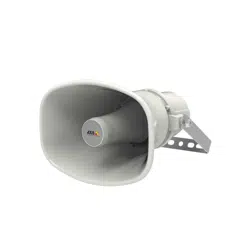
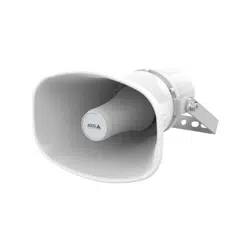
ThismanualisintendedforadministratorsandusersofAXISC3003-E
NetworkSpeaker,andisapplicabletormware1.15andlater.It
includesinstructionsforusingandmanagingtheproductonyour
network.Previousexperienceofnetworkingwillbeofusewhenusing
thisproduct.SomeknowledgeofUNIXorLinux-basedsystemsmay
alsobeusefulwhendevelopingshellscriptsandapplications.Later
versionsofthisdocumentwillbepostedatwww.axis.com.Seealsothe
product’sonlinehelp,availablethroughtheweb-basedinterface.
LegalConsiderations
Audiosurveillancecanberegulatedbylawsthatvaryfromcountryto
country.Checkthelawsinyourlocalregionbeforeusingthisproduct
forsurveillancepurposes.
Liability
Everycarehasbeentakeninthepreparationofthisdocument.Please
informyourlocalAxisofceofanyinaccuraciesoromissions.Axis
CommunicationsABcannotbeheldresponsibleforanytechnicalor
typographicalerrorsandreservestherighttomakechangestothe
productandmanualswithoutpriornotice.AxisCommunicationsAB
makesnowarrantyofanykindwithregardtothematerialcontained
withinthisdocument,including,butnotlimitedto,theimplied
warrantiesofmerchantabilityandtnessforaparticularpurpose.Axis
CommunicationsABshallnotbeliablenorresponsibleforincidentalor
consequentialdamagesinconnectionwiththefurnishing,performance
oruseofthismaterial.Thisproductisonlytobeusedforitsintended
purpose.
IntellectualPropertyRights
AxisABhasintellectualpropertyrightsrelatingtotechnologyembodied
intheproductdescribedinthisdocument.Inparticular,andwithout
limitation,theseintellectualpropertyrightsmayincludeoneormore
ofthepatentslistedatwww.axis.com/patent.htmandoneormore
additionalpatentsorpendingpatentapplicationsintheUSandother
countries.
EquipmentModications
Thisequipmentmustbeinstalledandusedinstrictaccordancewiththe
instructionsgivenintheuserdocumentation.Thisequipmentcontains
nouser-serviceablecomponents.Unauthorizedequipmentchangesor
modicationswillinvalidateallapplicableregulatorycertications
andapprovals.
TrademarkAcknowledgments
AXISCOMMUNICATIONS,AXIS,ETRAX,ARTPECandVAPIXare
registeredtrademarksortrademarkapplicationsofAxisABinvarious
jurisdictions.Allothercompanynamesandproductsaretrademarksor
registeredtrademarksoftheirrespectivecompanies.
RegulatoryInformation
Europe
ThisproductcomplieswiththeapplicableCEmarkingdirectives
andharmonizedstandards:
•ElectromagneticCompatibility(EMC)Directive2004/108/EC.See
ElectromagneticCompatibility(EMC)onpage2.
•LowVoltage(LVD)Directive2006/95/EC.SeeSafetyonpage2.
•RestrictionsofHazardousSubstances(RoHS)Directive2011/65/EU.
SeeDisposalandRecyclingonpage2.
Acopyoftheoriginaldeclarationofconformitymaybeobtainedfrom
AxisCommunicationsAB.SeeContactInformationonpage3.
ElectromagneticCompatibility(EMC)
Thisequipmenthasbeendesignedandtestedtofulllapplicable
standardsfor:
•Radiofrequencyemissionwheninstalledaccordingtothe
instructionsandusedinitsintendedenvironment.
•Immunitytoelectricalandelectromagneticphenomenawhen
installedaccordingtotheinstructionsandusedinitsintended
environment.
USA
Thisequipmenthasbeentestedusingashieldednetworkcable(STP)
andfoundtocomplywiththelimitsforaClassBdigitaldevice,
pursuanttopart15oftheFCCRules.Theselimitsaredesigned
toprovidereasonableprotectionagainstharmfulinterferenceina
residentialinstallation.Thisequipmentgenerates,usesandcanradiate
radiofrequencyenergyand,ifnotinstalledandusedinaccordance
withtheinstructions,maycauseharmfulinterferencetoradio
communications.However,thereisnoguaranteethatinterference
willnotoccurinaparticularinstallation.Ifthisequipmentdoes
causeharmfulinterferencetoradioortelevisionreception,which
canbedeterminedbyturningtheequipmentoffandon,theuseris
encouragedtotrytocorrecttheinterferencebyoneormoreofthe
followingmeasures:
•Reorientorrelocatethereceivingantenna.
•Increasetheseparationbetweentheequipmentandreceiver.
•Connecttheequipmentintoanoutletonacircuitdifferentfrom
thattowhichthereceiverisconnected.
•Consultthedealeroranexperiencedradio/TVtechnicianforhelp.
Theproductshallbeconnectedusingashieldednetworkcable(STP)
thatisproperlygrounded.
Canada
ThisdigitalapparatuscomplieswithCANICES-3(ClassB).Theproduct
shallbeconnectedusingashieldednetworkcable(STP)thatisproperly
grounded.
CetappareilnumériqueestconformeàlanormeCANNMB-3(classeB).
Leproduitdoitêtreconnectéàl'aided'uncâbleréseaublindé(STP)qui
estcorrectementmisàlaterre.
Europe
ThisdigitalequipmentfulllstherequirementsforRFemission
accordingtotheClassBlimitofEN55022.Theproductshallbe
connectedusingashieldednetworkcable(STP)thatisproperly
grounded.
Thisproductfulllstherequirementsforimmunityaccording
toEN61000-6-1residential,commercialandlight-industrial
environments.
Thisproductfulllstherequirementsforimmunityaccordingto
EN61000-6-2industrialenvironments.
Thisproductfulllstherequirementsforimmunityaccordingto
EN55024ofceandcommercialenvironments
Australia/NewZealand
ThisdigitalequipmentfulllstherequirementsforRFemission
accordingtotheClassBlimitofAS/NZSCISPR22.Theproductshall
beconnectedusingashieldednetworkcable(STP)thatisproperly
grounded.
Japan
この装置は、クラスB情報技術装置です。この装置は、家
庭環境で使用することを目的としていますが、この装置が
ラジオやテレビジョン受信機に近接して使用されると、受
信障害を引き起こすことがあります。取扱説明書に従って
正しい取り扱いをして下さい。本製品は、シールドネット
ワークケーブル(STP)を使用して接続してください。また
適切に接地してください。
Korea
이기기는가정용(B급)전자파적합기기로서주로가정에
서사용하는것을목적으로하며,모든지역에서사용할수
있습니다.적절히접지된STP(shieldedtwistedpair)케이
블을사용하여제품을연결하십시오.
Safety
ThisproductcomplieswithIEC/EN/UL60950-1and
IEC/EN/UL60950-22,SafetyofInformationTechnology
Equipment.Theproductshallbegroundedeitherthroughashielded
networkcable(STP)orotherappropriatemethod.
DisposalandRecycling
Whenthisproducthasreachedtheendofitsusefullife,disposeof
itaccordingtolocallawsandregulations.Forinformationabout
yournearestdesignatedcollectionpoint,contactyourlocalauthority
responsibleforwastedisposal.Inaccordancewithlocallegislation,
penaltiesmaybeapplicableforincorrectdisposalofthiswaste.
Europe
Thissymbolmeansthattheproductshallnotbedisposedof
togetherwithhouseholdorcommercialwaste.Directive2012/19/EU
onwasteelectricalandelectronicequipment(WEEE)isapplicablein
theEuropeanUnionmemberstates.Topreventpotentialharmto
humanhealthandtheenvironment,theproductmustbedisposed

ofinanapprovedandenvironmentallysaferecyclingprocess.For
informationaboutyournearestdesignatedcollectionpoint,contact
yourlocalauthorityresponsibleforwastedisposal.Businessesshould
contacttheproductsupplierforinformationabouthowtodispose
ofthisproductcorrectly.
ThisproductcomplieswiththerequirementsofDirective2011/65/EUon
therestrictionoftheuseofcertainhazardoussubstancesinelectrical
andelectronicequipment(RoHS).
China
Thisproductcomplieswiththerequirementsofthelegislative
actAdministrationontheControlofPollutionCausedbyElectronic
InformationProducts(ACPEIP).
ContactInformation
AxisCommunicationsAB
Emdalavägen14
22369Lund
Sweden
Tel:+46462721800
Fax:+4646136130
www.axis.com
Support
Shouldyourequireanytechnicalassistance,pleasecontactyourAxis
reseller.Ifyourquestionscannotbeansweredimmediately,your
resellerwillforwardyourqueriesthroughtheappropriatechannelsto
ensurearapidresponse.IfyouareconnectedtotheInternet,youcan:
•downloaduserdocumentationandsoftwareupdates
•ndanswerstoresolvedproblemsintheFAQdatabase.Search
byproduct,category,orphrase
•reportproblemstoAxissupportstaffbyloggingintoyourprivate
supportarea
•chatwithAxissupportstaff
•visitAxisSupportatwww.axis.com/techsup/
LearnMore!
VisitAxislearningcenterwww.axis.com/academy/forusefultrainings,
webinars,tutorialsandguides.

AXISC3003-ENetworkSpeaker
SafetyInformation
SafetyInformation
HazardLevels
DANGER
Indicatesahazardoussituationwhich,ifnotavoided,willresultindeathorseriousinjury.
WARNING
Indicatesahazardoussituationwhich,ifnotavoided,couldresultindeathorseriousinjury.
CAUTION
Indicatesahazardoussituationwhich,ifnotavoided,couldresultinminorormoderate
injury.
NO NO
NO
TICE TICE
TICE
Indicatesasituationwhich,ifnotavoided,couldresultindamagetoproperty.
OtherMessageLevels
ImportantIndicatessignicantinformationwhichisessentialfortheproducttofunctioncorrectly.
NoteIndicatesusefulinformationwhichhelpsingettingthemostoutoftheproduct.
4

AXISC3003-ENetworkSpeaker
TableofContents
SafetyInformation..........................................4
HazardLevels...................................................4
OtherMessageLevels............................................4
HardwareOverview..........................................6
ConnectorsandButtons..........................................7
LEDIndicators..................................................7
AccesstheProduct..........................................8
AccessfromaBrowser...........................................8
AccessfromtheInternet..........................................8
SettheRootPassword...........................................8
SetUptheProduct..........................................9
BasicSetup....................................................9
Audio.....................................................1
0
SetUpAudio...................................................10
AudioClips....................................................1 1
VoiceoverIP(VoIP).........................................12
TheVoIPOverviewPage..........................................12
ConguretheSIPSettings........................................12
TheAccountSettingsPage........................................14
Events....................................................18
SetUpActionRules.............................................18
AddRecipients..................................................19
CreateSchedules................................................20
SetUpRecurrences..............................................20
Languages.................................................21
SystemOptions.............................................22
Security.......................................................22
Date&Time....................................................24
Network.......................................................24
Ports&Devices.................................................29
Maintenance...................................................29
Support.......................................................29
Advanced......................................................30
ResettoFactoryDefaultSettings...................................30
Troubleshooting............................................31
ChecktheFirmware.............................................31
UpgradetheFirmware...........................................31
Symptoms,PossibleCausesandRemedialActions.....................31
TechnicalSpecications......................................33
5
AXISC3003-ENetworkSpeaker
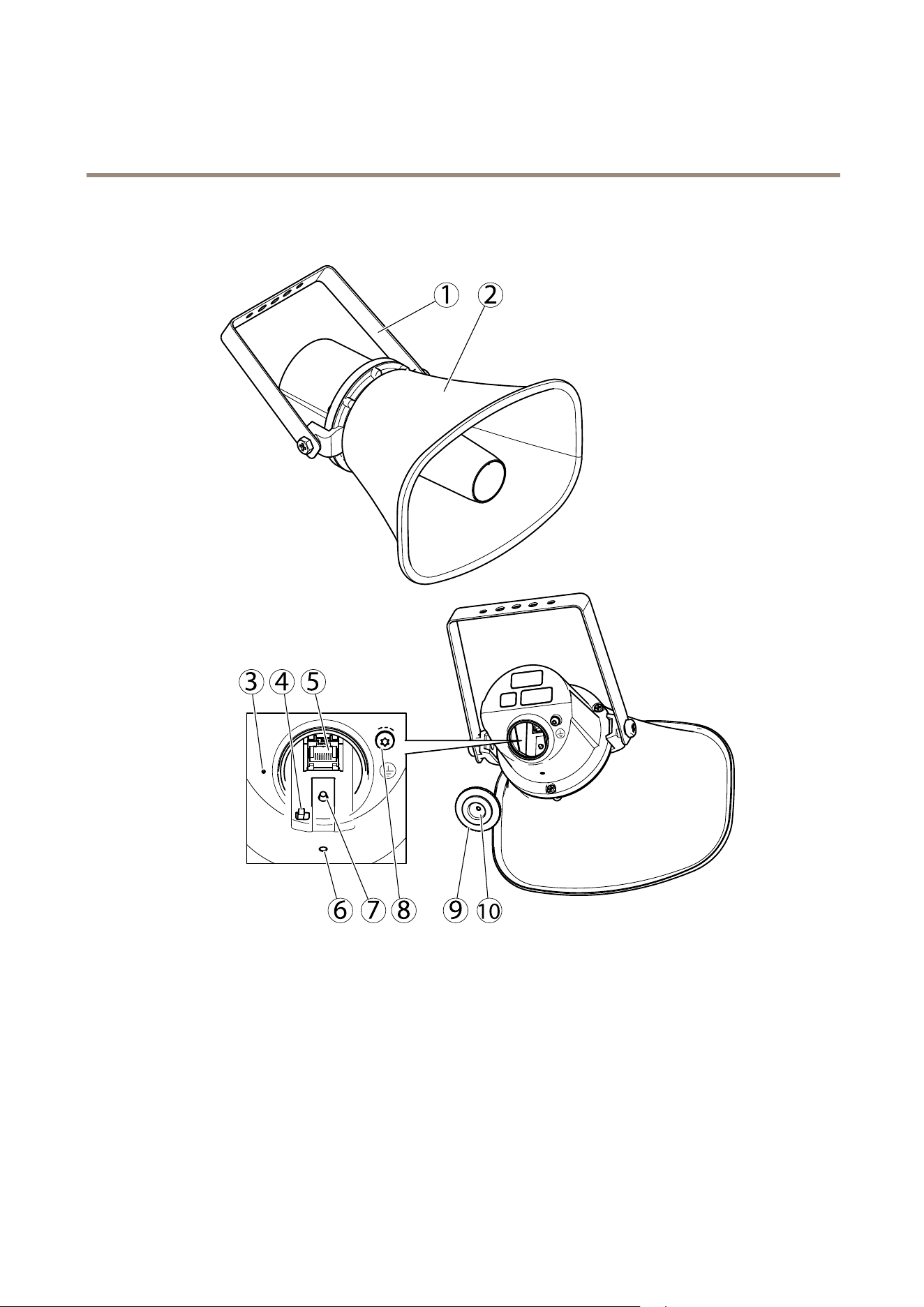
HardwareOverview
HardwareOverview
1 2
3 4 5
76 9 108
1
Bracket
2
Horn
3
Microphone
4
Microphonedisableswitch
5
Networkconnector
6
StatusLEDindicator
7
Controlbutton
8
Protectiveearthterminal
9
Cap
10
Gasket
6

AXISC3003-ENetworkSpeaker
HardwareOverview
ConnectorsandButtons
Fortechnicalspecications,seepage33.
ProtectiveEarthTerminal
DANGER
Riskofelectricshock.Theproductshallbegroundedusingagroundingwire.Makesurebothendsofthegroundingwire
areincontactwiththeirrespectivegroundingsurfaces.
Makesurethegroundingwireisasshortaspossibletomakethecurrentpathasshortaspossible.
NetworkConnector
NO NO
NO
TICE TICE
TICE
Theproductshallbeconnectedusingashieldednetworkcable(STP).Allcablesconnectingtheproducttothenetworkshall
beintendedfortheirspecicuse.Makesurethatthenetworkdevicesareinstalledinaccordancewiththemanufacturer’s
instructions.Forinformationaboutregulatoryrequirements,seeElectromagneticCompatibility(EMC)onpage2.
ControlButton
Forlocationofthecontrolbutton,seeHardwareOverviewonpage6.
Thecontrolbuttonisusedfor:
•SendingoutatesttonethatcalibratestheAutoSpeakerTest.Pressandreleasethecontrolbutton.
•Resettingtheproducttofactorydefaultsettings.Seepage30.
•ConnectingtoanAXISVideoHostingSystemservice.Seepage25.Toconnect,pressandholdthebuttonforabout3
secondsuntiltheStatusLEDashesgreen.
•ConnectingtoAXISInternetDynamicDNSService.Seepage25.Toconnect,pressandholdthebuttonforabout3seconds.
MicrophoneDisableSwitch
Forlocationofthemicrophonedisableswitch,seeHardwareOverviewonpage6.
ThemicrophonedisableswitchisusedtomechanicallyturnthemicrophoneONorOFF.Thefactorydefaultsettingforthisswitch
isON.
LEDIndicators
StatusLED
Indication
Unlit
Unlitfornormaloperation(canbeusefulinmakingtheAxisproductlessnoticeable).
GreenSteadygreenfornormaloperation.
Amber
Steadyduringstartupandwhenrestoringsettings.
Red
Slowashforfailedupgrade.
7

AXISC3003-ENetworkSpeaker
AccesstheProduct
AccesstheProduct
ToinstalltheAxisproduct,seetheInstallationGuidesuppliedwiththeproduct.
AccessfromaBrowser
1.Startabrowser(Chrome,InternetExplorer,Firefox,Safari).
2.EntertheIPaddressorhostnameoftheAxisproductinthebrowser’sLocation/Addresseld.
ToaccesstheproductfromaMaccomputer(OSX),gotoSafari,clickonBonjourandselecttheproductfromthe
drop-downlist.
Note
ToshowBonjourasabrowserbookmark,gotoSafari>Preferences.
3.Enteryourusernameandpassword.Ifthisisthersttimetheproductisaccessed,therootpasswordmustrstbe
congured.Forinstructions,seeSettheRootPasswordonpage8.
AccessfromtheInternet
Onceconnected,theAxisproductisaccessibleonyourlocalnetwork(LAN).ToaccesstheproductfromtheInternetyoumust
congureyournetworkroutertoallowincomingdatatrafctotheproduct.Todothis,enabletheNAT-traversalfeature,whichwill
attempttoautomaticallyconguretheroutertoallowaccesstotheproduct.Thisisenabledfrom.
Formoreinformation,seeNATtraversal(portmapping)forIPv4onpage27.SeealsoAXISInternetDynamicDNSServiceat
www.axiscam.net
ForTechnicalnotesonthisandothertopics,visittheAxisSupportwebatwww.axis.com/techsup
SettheRootPassword
ToaccesstheAxisproduct,youmustsetthepasswordforthedefaultadministratoruserroot.ThisisdoneintheCongureRoot
Passworddialog,whichopenswhentheproductisaccessedforthersttime.
Topreventnetworkeavesdropping,therootpasswordcanbesetviaanencryptedHTTPSconnection,whichrequiresanHTTPS
certicate.HTTPS(HypertextTransferProtocoloverSSL)isaprotocolusedtoencrypttrafcbetweenwebbrowsersandservers.The
HTTPScerticateensuresencryptedexchangeofinformation.SeeHTTPSonpage22.
Thedefaultadministratorusernamerootispermanentandcannotbedeleted.Ifthepasswordforrootislost,theproductmustbe
resettothefactorydefaultsettings.SeeResettoFactoryDefaultSettingsonpage30.
TosetthepasswordviaastandardHTTPconnection,enteritdirectlyinthedialog.
TosetthepasswordviaanencryptedHTTPSconnection,followthesesteps:
1.ClickUseHTTPS.
Atemporarycerticate(validforoneyear)iscreated,enablingencryptionofalltrafctoandfromtheproduct,andthe
passwordcannowbesetsecurely.
2.Enterapasswordandthenre-enterittoconrmthespelling.
3.ClickOK.Thepasswordhasnowbeencongured.
8

AXISC3003-ENetworkSpeaker
SetUptheProduct
SetUptheProduct
TheAxisproductcanbeconguredbyuserswithadministratorrights.GotoSetup>BasicSetup>1Userstoadministerusers.
•Administratorshaveunrestrictedaccesstoallsettings.
Seealsotheonlinehelp
.
BasicSetup
BasicSetupprovidesshortcutstothesettingsthatshouldbemadebeforeusingtheAxisproduct:
1.Users.Seepage22.
2.TCP/IP.Seepage24.
3.Date&Time.Seepage24.
4.VoIPSettings.Seepage12.
9

AXISC3003-ENetworkSpeaker
Audio
Audio
Theaudiosettingscanbeusedtoaudioquality.Youcancongurethefollowing:
•Audiosettings.Seepage1
0.
•Audioclips.Seepage11.
SetUpAudio
TosetuptheAxisproduct,gotoAudio>AudioSettings.
AutoSpeakerTest
TheAutoSpeakerTestisawaytoverifythatthespeakerisworkingfromaremotelocation.Atesttoneisplayedinthespeakerand
thetesttoneismeasuredbytheonboardmicrophonetoensurethatthespeakersoundsasintended.
TheAutoSpeakerTestmustbecalibratedduringrsttimeuse.TocalibratetheAxisproductandrunanAutoSpeakerTest,follow
theinstructionsbelow:
1.GotoSetup>Audio>AudioSettings.
2.ClickCalibratetocalibrateAxisproductandruntherstAutoSpeakerTest.
ItisalsopossibletoruntheAutoSpeakerTestbypressingthecontrolbutton.SeeHardwareOverviewonpage6.
OncetheAxisproductiscalibrated,theAutoSpeakerTestcanberunatanytime:
1.GotoSetup>Audio>AudioSettings.
2.ClickTesttoruntheAutoSpeakerTest.
TosetuptheAutoSpeakerTestasanactionrule,seeSetUpActionRulesonpage18.
AudioModes
TheAxisproductsupportsthefollowingaudiomodes:
Fullduplex-Simultaneoustwo-wayaudioallowingtheAxisproducttotransmitandreceiveaudioatthesametime.Thereis
noechocancellation.
Half-duplex-AudiocanbetransmittedtoandfromtheAxisproductbutonlyinonedirectionatatime.
Simplex—Speakeronly-AudioistransmittedfromaclienttotheAxisproduct.Thisisthedefaultaudiomode.
Simplex—Microphoneonly-AudiocapturedbytheproductmicrophoneistransmittedfromtheAxisproducttooneormoreclients.
Tosettheaudiomode,gotoAudio>AudioSettingsandselectthedesiredmodefromtheAudiomodedrop-downlist.
AudioOutput
ConguretheaudiooutputsettingsunderAudio>AudioSettings.
Outputgain-Movetheslidertoadjustthevolumeoftheaudiooutput.Tomutethesound,movetheslidertotheleftend
oftheslider.
AudioInput
ConguretheaudioinputsettingsunderAudio>AudioSettings.
10

AXISC3003-ENetworkSpeaker
Audio
Sourceliststhebuilt-inmicrophone.
UsetheInputgaintocontrolthevolume(dBFullScale)oftheaudioinput.Ifthesoundistoolow,chooseahigherdB,toamplify
thesound.Ifthesoundistoohigh,choosealowerdB.TheLevelbargivesavisualrepresentationoftheaudiosignallevelindB
relativetothefull-scaleinputlevel.
•Green—thesignalisatagoodlevel.
•Yellow—thesignalisbecomingdistorted.
•Red—thesignalisdistorted.
UsetheEncodingoptiontoselectdigitalaudioencodingformat.
•AACisusedforencodingonlyintheAxisproduct.Fordecoding,nolicenseisincludedintheAxisproduct.
•G71 1isanunlicensedstandardcodecthatisusefulwhenintegratingaudiointoaVoIPsystem
•G726isanunlicensedspeechcodecthatismostcommonlyusedwithinthesecurityindustry.
TheSampleratedenesthenumberoftimespersecondthesoundissampled.Ahighersampleratewillprovidebetteraudio
quality,butalsorequiresagreaterbandwidth.
SettherequiredBitratedependingontheselectedencoding.Ahigherbitratewillgivebetteraudioquality.Alowerbitrate
mayhavelatencyordelay,butwillrequirelessbandwidth.
Formoreinformationaboutthesesettings,pleaseseetheonlinehelp
.
AudioClips
Audioclipscanbeplayedwhenaneventoccurs.AudioclipsarecreatedbyuploadingasoundletotheAxisproduct.Toadd,play,
download,modifyorremoveaudioclips,gotoAudio>AudioClips.Formoreinformationseetheonlinehelp
.
•Add–Toaddanaudioclip,clickAdd,selecttheUploadradiobuttonandclickBrowse.Navigatetothedesiredle
andclickUploadtouploadtheaudioclip.
-Thefollowingaudioformatsaresupported:.auG.71 1u-law,8-bit,mono(8,16kHz)and
.wavPCM,16-bit,mono(8,16,32kHz)
-Themaximumlesizeperaudioclipis1.5MBandamaximumamountof20audioclipscanbeuploaded.
•Play–Toplayanaudioclip,selectanaudioclipintheAudioClipListandclickPlay.Audioclipscanonlybeplayedifthe
speakerisnotstreamingaudioorplayinganotherclip.
•Download–Todownloadarecordingtoaharddriveornetworkdisk,selectitandclickDownload.
•Modify–Tochangethenameoftheaudioclip,selectitandclickModify.
•Remove–Toremoveanaudioclip,selectitandclickRemove.
ToconguretheAxisproducttoplayaudioclipswhenaneventoccurs,anactionrulemustbesetup.Formoreinformation,
seeEventsonpage18.
11

AXISC3003-ENetworkSpeaker
VoiceoverIP(VoIP)
VoiceoverIP(VoIP)
VoiceoverIP(VoIP)isagroupoftechnologiesthatenablesvoicecommunicationandmultimediasessionsoverIPnetworks.Inthe
Axisproduct,VoIPisenabledthroughtheSessionInitiationProtocol(SIP)andDual-ToneMulti-Frequency(DTMF)signaling.
Toopentheproduct’sVoIPpages,gotoSetup>VoIP.
TheVoIPsettingsincludethefollowingpages:
•VoIPOverview.SeeTheVoIPOverviewPageonpage12.
•SIPSettings.SeeConguretheSIPSettingsonpage12.
•AccountSettings.SeeCreateorEditAccountsonpage14.
TheVoIPsettingscanbeconguredbyuserswithadministratorrights.
TheVoIPOverviewPage
TheVoIPOverviewpageshowsbasicinformationabouttheSIP,VoIPactionrule,andaccountsettings.
•SIPSettings–ShowsthebasicSessionInitiationProtocol(SIP)settings,suchaswhetherSIPisenabledandallows
incomingcallsornot.
Tochangethesettings,clickCongureorgotoVoIP>SIPSettings.Formoreinformation,seeConguretheSIPSettings
onpage12.
•AccountSettings–ShowsanoverviewoftheSIPaccountsettings.SeealsoTheAccountSettingsPageonpage14.
Tocreateanewaccount,testanaccount,orchangetheaccountsettings,clickCongureorgotoVoIP>Account
Settings.Formoreinformation,seeCreateorEditAccounts.
ConguretheSIPSettings
SessionInitiationProtocol(SIP)isatext-basedprotocol,similartoHTTPandSMTP,forinteractivecommunicationsessionsbetween
users.Thesessionscanincludevoice,video,andchatelements.Forinformation,seeAboutSIPAddressesonpage16.
BeforetheAxisproductcanbeusedtomakeandreceivecalls,youneedtoconguretheSIPsettings.ThisincludesenablingSIP,
conguringtheports,andsettingtherulesforNetworkAddressTranslation(NAT)traversal.
ToconguretheSIPsettings:
1.GotoSetup>VoIP>SIPSettings.
2.SelectEnableSIP.
3.Tomakeatestcalltoanaccountonanotherdevice,enteravalidSIPaddressfortheotherdeviceandclickTestcall.
Formoreinformation,seeMakeTestCallsonpage16.
4.ToallowtheAxisproducttoreceivecalls,selectAllowincomingcalls.
5.EntertheSIPportnumberandtheSIPTLSportnumber.Formoreinformation,seePortSettingsonpage13.
6.SelecttheprotocolsyouwanttoenableforNATtraversal.SeeNetworkAddressTranslation(NAT)Traversal(port
forwarding)onpage13.
7.ClickSave.
Note
EvenifyouchoosetonotenableSIP,youcanconguretheSIPsettings.ButrememberthatwhenSIPisdisabled,you
cannotmakeorreceivecalls.
12

AXISC3003-ENetworkSpeaker
VoiceoverIP(VoIP)
PortSettings
•SIPport–EntertheportusedforSIPsessions.Thesignallingtrafcthroughthisportwillbenon-encrypted.Thedefault
portnumberis5060.
•SIPTLSport–EntertheportusedforSIPSsessionsandTLS-securedSIPsessions.Thesignallingtrafcthroughthisport
willbeencryptedusingTransportLayerSecurity(TLS).Thedefaultportnumberis5061.
NetworkAddressTranslation(NAT)Traversal(portforwarding)
UseNATtraversalwhentheAxisproductisconnectedtothenetworkbehindaNATrouterorrewalldevice.
VoIPservicesrequireclientstobeserversaswell,andmanyVoIPservicescarryIPaddressandportinformationintheapplication
data.Therefore,AxisproductsbehindNetworkAddressTranslation(NAT)devicessuchasnetworkroutersneedtousespecial
protocolsforNATtraversal(portforwarding)sothatincomingcallscanbelinkedtothecorrecthost.
WithoutSIP-specicportforwarding,usersofclientswithinthesameprivatenetworkwouldbeabletotalktoeachother
(peer-to-peercommunication)butusersofclientsindifferentnetworkswouldnot.
ThefollowingNATtraversalsettingsareavailable:
•ICE–InteractiveConnectivityEstablishment(ICE).Seepage13.
•STUN–SessionTraversalUtilitiesforNAT(STUN).Seepage13.
•TURN–TraversalUsingRelaysaroundNAT(TURN).Seepage13.
EachNATtraversalprotocolhasitsbenetsandaws.Theawscanbereducedbymakingsurethatthenetworkanditsconnected
devicessupportalltheseprotocols.
Formoreinformationabouttheproduct’sgeneralNATtraversalsettings,seeNATtraversal(portmapping)forIPv4onpage27.
InteractiveConnectivityEstablishment(ICE)
InteractiveConnectivityEstablishment(ICE)enablestheproducttosendarequestthatincludesmultipleaddressestothereceiving
device.Initsresponse,thereceivingdevicealsoincludesmultipleaddresses.Throughaprocessofconnectivitychecks,alsocalled
handshakes,thechannelforcommunicationisestablished.
ICEincreasesthechancesofndingthemostefcientpathtosuccessfulcommunicationbetweenpeerdevices.Ifyoualsoenable
STUNandTURN,youimprovetheICEprotocol’schancesofndingthemostefcientpathtosuccessfulcommunication,notjust
betweenpeersbutbetweenalldevicesoneithersideoftheNATdevice.
TousetheICEprotocolforNATtraversal,selectEnableICE.
SessionTraversalUtilitiesforNAT(STUN)
SessionTraversalUtilitiesforNAT(STUN)isaclient-servernetworkprotocolthatenablestheproducttoaskaSTUNserveronthe
InternetforamappedpublicIPaddress.TheSTUNserverresponseincludesthisIPaddressandportsothattheclientcanusethem
initsSIPmessagestootherhostsandclients.
LikeTURN,STUNcanbeusedinfull-cone,address-restrictedcone,andport-restrictedconeNATsetups.STUNisfastbecauseit
islightweight.However,STUNdoesnotallowincomingmessagesfromsymmetricNATs,anditcannotcommunicatewithapeer
behindthesameNATdevice.
TousetheSTUNprotocolforNATtraversal,selectEnableSTUN.ThenentertheaddressoftheSTUNserver.
TraversalUsingRelaysaroundNAT(TURN)
TraversalUsingRelaysaroundNAT(TURN)isaclient-servernetworkprotocolthatenablestheproducttoaskaTURNserverfora
mappedIPaddress.TheTURNserverrespondswithitsIPaddressandportsothattheclientcanusetheminitsSIPmessages.
13

AXISC3003-ENetworkSpeaker
VoiceoverIP(VoIP)
TURNisprimarilyusedinsymmetricNATsetups.LikeSTUN,TURNcanalsobeusedinfull-cone,address-restrictedcone,and
port-restrictedconeNATsetups.ButbecausetheIPaddressandportprovidedbytheTURNserverarethoseoftheTURNserver
itself,itworkslikeacarrierthatforwardsinformationtoandfromtheclient.ThismeansthatwhileTURNserversarereliable,
theysometimescauseabitoflatency.
TousetheTURNprotocolforNATtraversal,selectEnableTURN.ThentheaddressoftheTURNserver,theusernameandpassword.
TheAccountSettingsPage
TheAccountSettingspageallowsyoutosetupandmanageSIPaccounts.SeeCreateorEditAccountsonpage14.
TheAccountSettingspagealsoincludesanaccountlistthatshowsanoverviewoftheSIPaccountsettings,including:
•Name.SeealsoAccountInformationonpage15.
•SIPaddress.SeealsoAboutSIPAddressesonpage16.
•Transportmode.SeealsoTransportSettingsonpage15.
•Default.SeealsoAccountInformationonpage15.
•Registrationstatus.SeeRegistrationStatusonpage14.
RegistrationStatus
Theaccountstatusisindicatedwithdotsindifferentcolors.Formoredetailedinformationaboutanaccount’sstatus,hoverthe
mousepointeroverthestatusdotorselecttheaccountintheaccountlistandclickModify.
SIPdisabled–SIPisdisabled.
Accountnotregistered–TheSIPaccountisnotregisteredwithaPBX.
Provisional–Theproductistryingtoregistertheaccount.
Redirection–Theaccountoraddressneedstoberedirected.
Successful–TheaccounthassuccessfullyregisteredwiththeSIPregistrar.
Failure–Thereisaproblemwiththeaccount,suchastheaccountcredentialsarewrong,authorizationfailed,or
therequestwasbad.
CreateorEditAccounts
TosetupaSIPaccount:
1.GotoSetup>VoIP>AccountSettings.
2.ClickAdd.
3.Entertheaccountdetails.
-SeeAccountInformationonpage15.
-SeeAccountCredentialsonpage15.
-SeeSIPServerSettingsonpage15.
-SeeTransportSettingsonpage15.
-SeeProxySettingsonpage16.
4.ClickOK.
Toeditanaccount,selecttheaccountintheaccountlistandclickModify.
14

AXISC3003-ENetworkSpeaker
VoiceoverIP(VoIP)
Toremoveanaccount,selecttheaccountintheaccountlistandclickRemove.
AccountInformation
•Name–Enteradescriptivename.Thiscanforexamplebearstandlastname,arole,oralocation.Thenameisusedas
analiasandisespeciallyusefulwhenseveralaccountshavethesameuserID.
•Defaultaccount–Selecttomakethisthedefaultaccount.Onlyoneaccountcanbethedefaultaccount.
Atstartup,thersttimetheproductisaccessedorafterareset,apeeraccountiscreatedautomaticallyandsettobethe
defaultaccount.Thispeeraccountcanonlyberemovedifatleastonemoreaccounthasbeenaddedtothelist.
ThedefaultaccountwillbeusedtomaketriggeredcallsandtomaketestcallsontheSIPSettingspage.Formore
informationabouttriggersandactions,seeEventsonpage18.
AccountCredentials
•UserID(required)–EnterthenameorPBXextensionthatshallbeshownwhencallingotheraccounts.Aprivatebranch
exchange(PBX)isatelephoneswitchingsystemthatconnectstelephoneextensionstoeachotherandtoothertelephone
networks.EachPBX-connecteddevicehasitsownextensionnumber.
•AuthenticationID–SomePBXsrequirethattheaccountveriesitselfwiththeSIPregistrartoallowaccesstothePBX.For
moreinformation,seethePBX’sandserviceprovider’sinstructions.BydefaulttheAuthenticationIDisidenticaltotheUser
ID.ToenableanAuthenticationIDthatisdifferentfromtheUserID,cleartheUseUserIDasAuthenticationIDcheckbox.
•Password–Enterthepasswordfortheaccount.Apasswordisnotrequiredforpeer-to-peeraccounts.
•Conrmpassword–Repeatthepassword.Apasswordisnotrequiredforpeer-to-peeraccounts.
•CallerID–Enterthenameorphonenumberthatyouwanttherecipienttoseewhenyoumakethecall.
IfyouonlyenterauserID,theaccountwillbeusedasapeer-to-peeraccount.Thismeansthatunlessthedevicesareconnected
toNATswithSIP-specicportforwardingsuchasSTUNorTURN,theaccountwillonlybeabletocommunicatewithdevices
thatareconnectedtothesameprivatenetwork.Formoreinformation,seeNetworkAddressTranslation(NAT)Traversal(port
forwarding)onpage13.
TocreateanaccountthatisregisteredwithaPBXoraserviceprovider,entertheuserID,password,andtheregistraraddress
ordomainname.SeeSIPServerSettingsbelow.
SIPServerSettings
•Domainname–Ifavailable,enterthepublicdomainname.ThedomainnamewillbeshownaspartoftheSIPaddress
whencallingotheraccounts.Formoreinformation,seeAboutSIPAddressesonpage16.
•Registraraddress–EntertheSIPserver’sregistraraddress.ThisistopointouttheSIPregistrarwithwhichtheaccount
shouldregisteritself.TheSIPregistraristhepartofthePBXthatkeepstrackofalltheextensions.
Important
TheregistraraddressshouldbeanIPv4address.Theproduct’sVoIPcapabilitiescurrentlydonotincludesupportforIPv6.
TransportSettings
•EnableSIPS–SelecttouseSecureSessionInitiationProtocol(SIPS).SIPSusestheTLStransportmodetoencryptthe
trafc.IfyouenableSIPS,youcannotselectanyothertransportmodethanTLS.
•Transportmode–SelecttheSIPtransportmodefortheaccount:UDP,TCP,orTLS.
•AllowportupdatemessagesthroughMWI–Messagewaitingindicator(MWI)notiestheuserofchangesinthe
portsettings.
ThedifferencebetweenSIPS(EnableSIPS)andSIPoverTLS(Transportmode–TLS)isthatSIPSensuresthateachmessagetransfer
isencrypted,whileSIPoverTLSonlyhastomakeabesteffort.
15

AXISC3003-ENetworkSpeaker
VoiceoverIP(VoIP)
SIPoverUDPTransportmode–UDPmeansthatthemessagewillbesentwithoutdelaybutalsowithoutthehandshakesthatSIPS,
SIPoverTLS,andSIPoverTCPTransportmode–TCPoffer.
ProxySettings
ASIPproxymanagesregistrationandroutingrequestsfromcallingdevices.TheSIPproxycommunicateswiththeprivatebranch
exchange(PBX)inordertondaroutethatacallhastotaketoreachadevicethatissetinadifferentlocationorsite.
Address-EntertheSIPproxyserver'saddress.
Username-EnterausernamefortheSIPproxyserverifrequired.
Password-EnterapasswordfortheSIPproxyserverifrequired.
MakeTestCalls
TomakesurethatcallscanbemadefromtheAxisproduct,youcanmakeatestcall:
1.GotoSetup>VoIP>SIPSettingsorSetup>VoIP>AccountSettings.
2.Inthetestcalleld,enteravalidSIPaddresstotheotherdevice.Usetheformatsip:<extension>@<domain>or
sips:<extension>@<domain>.Formoreinformationandexamples,seeAboutSIPAddressesonpage16.
3.ClickTestcall.Thetestcallismadefromthedefaultaccount.Formoreinformation,seeTransportSettingsonpage15.
Thecallstatusshowsbelowthebutton.Formoreinformation,seeCallStatusonpage17.
4.Toendthecall,clickEndcall.
AboutSIPAddresses
SIPaddressesareusedtoidentifyuserswithinanetworkjustlikeyouwoulduseaphonenumberoranemailaddresstocontacta
friendorcolleague.Oneofthemajordifferencesbetweenphonecalls,emails,andSIPcallsisthattheyusedifferentprotocolsto
startandendconversations.
Likeemailaddresses,SIPaddressesareatypeofuniformresourceidentier(URI)thatincludestwouser-specicparts,auserIDor
extensionandadomainorIPaddress.Togetherwithaprexandthe@symbol,theymakeupauniqueaddress.Forexample,if
CaesarofancientRomehadbothanemailaddressandaSIPaddress,theywouldbemailto:[email protected]and
sip:[email protected]respectively.Formoreexamplesanddescriptions,seebelow.
SIPaddressesarealsoknownasSIPURIsor,insomecases,SIPnumbers.Formoreinformation,seethePBX’sandserviceprovider’s
instructions.
Example
Description
sip:
PrexthattellsthesystemthataSIPsessionisbeingstarted.
sips:
PrexthattellsthesystemthataSIPSsessionisbeingstarted.
<extension>
TheuserIDorextensionoftherecipientofthecall.
Or,ifitisapeer-to-peercall,theIPaddressofthereceivingdevice.
@<domain>
Thedomainnameorregistraraddress(IPv4address)ofthereceivingdevice.
Important
TheAxisproduct’sVoIPfunctionalitydoesnotincludesupportforIPv6.
16

AXISC3003-ENetworkSpeaker
VoiceoverIP(VoIP)
FormoreinformationaboutSIP,SIPS,andTLS,seePortSettingsonpage13andTransportSettingsonpage15.
Formoreinformationaboutregistraraddressesanddomains,seeAccountCredentialsonpage15.
CallStatus
Thecallstatusisindicatedwithdotsindifferentcolors.Moreinformationaboutthecallstatusisshownnexttothestatusdot.
Idle–Noactivecallsortheextensionisbusy.
Terminated–Thecallwasdeniedorended,therewasnoanswer,ortheconnectionfailed.
Calling–Callingandwaitingforananswer.
Active–Thecallhasbeenansweredandisongoing.
17

AXISC3003-ENetworkSpeaker
Events
Events
TheEventpagesallowyoutoconguretheAxisproducttoperformactionswhendifferenteventsoccur.Forexample,theproduct
canplayanaudioclipaccordingtoascheduleorwhenacallisreceived.Thesetofconditionsthatdeneshowandwhentheaction
istriggerediscalledanactionrule.
SetUpActionRules
Anactionruledenestheconditionsthatmustbemetfortheproducttoperformanaction,forexampleplayanaudiocliporsenda
noticationmessage.Ifmultipleconditionsaredened,allofthemmustbemettotriggertheaction.
Formoreinformationaboutavailabletriggersandactions,seeTriggersonpage18andActionsonpage19.
ThefollowingexampledescribeshowtosetupanactionruletoplayanaudiolewhentheAxisproductreceivesaninputsignal
fromavideomanagementsystem.
1.GotoEvents>ActionRulesandclickAdd.
2.SelectEnableruleandenteradescriptivenamefortherule.
3.SelectInputSignalfromtheTriggerdrop-downlist.
4.SelectVirtualInputsfromtheseconddrop-downlist.
5.Select1fromthethirddrop-downlist.
6.SelectYesintheActivelist.
7.Optionally,selectaScheduleandAdditionalconditions.Seebelow.
8.UnderActions,selectPlayAudioClipfromtheTypedrop-downlist.
9.SelectthedesiredaudiolefromthePlaydrop-downlist.
10.ClickOK.
Tousemorethanonetriggerfortheactionrule,selectAdditionalconditionsandclickAddtoaddadditionaltriggers.Whenusing
additionalconditions,allconditionsmustbemettotriggertheaction.
Topreventanactionfrombeingtriggeredrepeatedly,aWaitatleasttimecanbeset.Enterthetimeinhours,minutesandseconds,
duringwhichthetriggershouldbeignoredbeforetheactionrulecanbeactivatedagain.
Formoreinformation,seetheonlinehelp
.
Triggers
Availableactionruletriggersandconditionsinclude:
•Call
-State–Triggerstheactionrulewhenacallservicestatechangestoactive,callingoridle.Thistriggercan,for
example,beusedtoplayadialtonewhenacallisconnecting.
-StateChange–Triggerstheactionrulewhenacallstatechanges.Thistriggercanforexample,beusedtoplay
abusytonewhenacallisbusyorcallanotherspeciedSIPaccountifthecallisbusy.
•Hardware
-Network–Triggerstheactionrulewhenthenetworkconnectionislost.SelectYestotriggertheaction
rulewhenthenetworkconnectionislost.SelectNototriggertheactionrulewhenthenetworkconnection
isrestored.
18

AXISC3003-ENetworkSpeaker
Events
•InputSignal
-SpeakerTestPerformed–TriggersanactionruleafteranAutoSpeakerTesthasbeenperformed.Itcanbe
usedto,forexample,sendanoticationtoanoperatorwhenaspeakertesthasbeenperformedafterthe
producthasrestarted.
-VirtualInputs–Triggerstheactionrulewhenoneofthevirtualinputschangesstates.Itcanbeusedbya
clientsuchasanaccessmanagementsystem,throughtheVAPIX®applicationprogramminginterface,totrigger
actions.Virtualinputscan,forexample,beconnectedtobuttonsinthemanagementsystem'suserinterface.
•System
-SystemReady–Triggerstheactionrulewhenthesystemisinstateready.Forexample,theAxisproductcan
detectthesystemstateandsendanoticationwhenthesystemhasstarted.
SelectYestotriggertheactionrulewhentheproductisinstateready.Notethattherulewillonlytriggerwhen
allnecessaryservices,suchastheeventsystem,hasstarted.
•Time
-Recurrence–Triggerstheactionrulebymonitoringtherecurrencesthatyouhavecreated.Youcanusethis
triggertoinitiaterecurringactionssuchassendingnoticationseveryhour.Selectarecurrencepatternorcreate
anewone.Formoreinformationaboutsettinguparecurrencepattern,seeSetUpRecurrencesonpage20.
-UseSchedule–Triggertheruleaccordingtotheselectedschedule.SeeCreateSchedulesonpage20.
Actions
Availableactionsinclude:
•PlayAudioClip–Playsanaudioclipwhentheactionruleistriggered.FromthePlaydrop-downlist,selectanaudioclip
toplaywhentheactionruleistriggered.ToaddnewaudioclipsgotoAudio>AudioClips.
•RunAutoSpeakerTest–SendsanAutoSpeakerTestsignalwhentheactionRuleistriggered.
•SendNotication–Sendanoticationmessagetoarecipient.
•StatusLED–ThestatusLEDcanbesettoashforthedurationoftheactionruleorforasetnumberofseconds.The
statusLEDcanbeusedduringinstallationandcongurationtovisuallyvalidateifthetriggersettingsworkcorrectly.
TosetthestatusLEDashcolor,selectaLEDColorfromthedrop-downlist.
AddRecipients
Theproductcansendmessagestonotifyadministratorsabouteventsandalarms.Butbeforetheproductcansendnotication
messages,youmustdeneoneormorerecipients.Forinformationaboutavailableoptions,seeRecipientTypesonpage19.
Toaddarecipient:
1.GotoEvents>RecipientsandclickAdd.
2.Enteradescriptivename.
3.SelectarecipientType.
4.Entertheinformationneededfortherecipienttype.
5.ClickTesttotesttheconnectiontotherecipient.
6.ClickOK.
RecipientTypes
Thefollowingrecipientsareavailable:
19

AXISC3003-ENetworkSpeaker
Events
•HTTP
•HTTPS
•Email
•TCP
SetUpEmailRecipients
Emailrecipientscanbeconguredbyselectingoneofthelistedemailproviders,orbyspecifyingtheSMTPserver,portand
authenticationusedby,forexample,acorporateemailserver.
Note
Someemailprovidershavesecurityltersthatpreventusersfromreceivingorviewinglargeamountofattachments,from
receivingscheduledemailsandsimilar.Checktheemailprovider’ssecuritypolicytoavoiddeliveryproblemsandlocked
emailaccounts.
Tosetupanemailrecipientusingoneofthelistedproviders:
1.GotoEvents>RecipientsandclickAdd.
2.EnteraNameandselectEmailfromtheTypelist.
3.EntertheemailaddressestosendemailstointheToeld.Usecommastoseparatemultipleaddresses.
4.SelecttheemailproviderfromtheProviderlist.
5.EntertheuserIDandpasswordfortheemailaccount.
6.ClickTesttosendatestemail.
Tosetupanemailrecipientusingforexampleacorporateemailserver,followtheinstructionsabovebutselectUserdenedas
Provider.EntertheemailaddresstoappearassenderintheFromeld.SelectAdvancedsettingsandspecifytheSMTPserver
address,portandauthenticationmethod.Optionally,selectUseencryptiontosendemailsoveranencryptedconnection.Theserver
certicatecanbevalidatedusingthecerticatesavailableintheAxisproduct.Forinformationonhowtouploadcerticates,
seeCerticatesonpage23.
CreateSchedules
Tocreateanewschedule:
Tousethescheduleinanactionrule,selecttheschedulefromtheScheduledrop-downlistintheActionRuleSetuppage.
SetUpRecurrences
Recurrencesareusedtotriggeractionrulesrepeatedly,forexampleevery5minutesoreveryhour.
Tosetuparecurrence:
1.GotoEvents>RecurrencesandclickAdd.
2.Enteradescriptivenameandrecurrencepattern.
3.ClickOK.
Tousetherecurrenceinanactionrule,rstselectTimefromtheTriggerdrop-downlistintheActionRuleSetuppageandthen
selecttherecurrencefromtheseconddrop-downlist.
Tomodifyorremoverecurrences,selecttherecurrenceintheRecurrencesListandclickModifyorRemove.
20

AXISC3003-ENetworkSpeaker
Languages
Languages
MultiplelanguagescanbeinstalledintheAxisproduct.Allwebpagesincludingtheonlinehelpwillbedisplayedintheselected
language.Toswitchlanguages,gotoSetup>Languagesandrstuploadthenewlanguagele.Browseandlocatetheleandclick
theUploadLanguagebutton.SelectthenewlanguagefromthelistandclickSave.
Note
•Resettingtheproducttofactorydefaultsettingswilleraseanyuploadedlanguagelesandresettheproductlanguageto
English.
•ClickingtheRestorebuttonontheMaintenancepagewillnotaffectthelanguage.
•Armwareupgradewillnotaffectthelanguageused.Howeverifyouhaveuploadedanewlanguagetotheproductand
laterupgradethermware,itmayhappenthatthetranslationnolongermatchestheproduct'swebpages.Inthiscase,
uploadanupdatedlanguagele.
•Alanguagealreadyinstalledintheproductwillbereplacedwhenacurrentoralaterversionofthelanguageleisuploaded.
21

AXISC3003-ENetworkSpeaker
SystemOptions
SystemOptions
Security
Users
Theuserlistdisplaysauthorizedusersandusergroups(accesslevels):
Administrator-Unrestrictedaccesstoallsettings;canadd,modifyandremoveotherusers.
UnderHTTP/RTSPPasswordSettings,selectthetypeofpasswordtoallow.Youmayneedtoallowunencryptedpasswordsifthereare
viewingclientsthatdonotsupportencryption,orifyouupgradedthermwareandexistingclientssupportencryptionbutneed
tologinagainandbeconguredtousethisfunctionality.
DeselecttheEnableBasicSetupoptiontohidetheBasicSetupmenu.BasicSetupprovidesquickaccesstosettingsthatshouldbe
madebeforeusingtheAxisproduct.
IPAddressFilter
IPaddresslteringisenabledonthepage.Onceenabled,thelistedIPaddressareallowedordeniedaccesstotheAxisproduct.
SelectAlloworDenyfromthelistandclickApplytoenableIPaddressltering.
Theadministratorcanaddupto256IPaddressentriestothelist(asingleentrycancontainmultipleIPaddresses).
HTTPS
HTTPS(HyperTextTransferProtocoloverSecureSocketLayer,orHTTPoverSSL)isawebprotocolprovidingencryptedbrowsing.
HTTPScanalsobeusedbyusersandclientstoverifythatthecorrectdeviceisbeingaccessed.Thesecuritylevelprovidedby
HTTPSisconsideredadequateformostcommercialexchanges.
TouseHTTPS,anHTTPScerticatemustrstbeinstalled.GotoSystemOptions>Security>Certicatestoinstallandmanage
certicates.SeeCerticatesonpage23.
ToenableHTTPSontheAxisproduct:
1.GotoSystemOptions>Security>HTTPS
2.SelectanHTTPScerticatefromthelistofinstalledcerticates.
3.Optionally,clickCiphersandselecttheencryptionalgorithmstouseforSSL.
4.SettheHTTPSConnectionPolicyforthedifferentusergroups.
5.ClickSavetoenablethesettings.
ToaccesstheAxisproductviathedesiredprotocol,intheaddresseldinabrowser,enterhttps://fortheHTTPSprotocol
andhttp://fortheHTTPprotocol.
TheHTTPSportcanbechangedontheSystemOptions>Network>TCP/IP>Advancedpage.
IEEE802.1X
IEEE802.1Xisastandardforport-basedNetworkAdmissionControlprovidingsecureauthenticationofwiredandwirelessnetwork
devices.IEEE802.1XisbasedonEAP(ExtensibleAuthenticationProtocol).
ToaccessanetworkprotectedbyIEEE802.1X,devicesmustbeauthenticated.Theauthenticationisperformedbyanauthentication
server,typicallyaRADIUSserver,examplesofwhichareFreeRADIUSandMicrosoftInternetAuthenticationService.
22

AXISC3003-ENetworkSpeaker
SystemOptions
InAxisimplementation,theAxisproductandtheauthenticationserveridentifythemselveswithdigitalcerticatesusingEAP-TLS
(ExtensibleAuthenticationProtocol-TransportLayerSecurity).ThecerticatesareprovidedbyaCerticationAuthority(CA).
Youneed:
•aCAcerticatetoauthenticatetheauthenticationserver.
•aCA-signedclientcerticatetoauthenticatetheAxisproduct.
Tocreateandinstallcerticates,gotoSystemOptions>Security>Certicates.SeeCerticatesonpage23.ManyCAcerticates
arepreinstalled.
ToallowtheproducttoaccessanetworkprotectedbyIEEE802.1X:
1.GotoSystemOptions>Security>IEEE802.1X.
2.SelectaCACerticateandaClientCerticatefromthelistsofinstalledcerticates.
3.UnderSettings,selecttheEAPOLversionandprovidetheEAPidentityassociatedwiththeclientcerticate.
4.ChecktheboxtoenableIEEE802.1XandclickSave.
Note
Forauthenticationtoworkproperly,thedateandtimesettingsintheAxisproductshouldbesynchronizedwithanNTP
server.SeeDate&Timeonpage24.
Certicates
Note
Installedcerticates,exceptpreinstalledCAcerticates,willbedeletediftheproductisresettofactorydefault.Preinstalled
CAcerticatesthathavebeendeletedwillbereinstalled.
AServer/Clientcerticatecanbeself-signedorissuedbyaCerticateAuthority(CA).Aself-signedcerticateofferslimited
protectionandcanbeusedbeforeaCA-issuedcerticatehasbeenobtained.
Toinstallaself-signedcerticate:
1.GotoSetup>SystemOptions>Security>Certicates.
2.ClickCreateself-signedcerticateandprovidetherequestedinformation.
TocreateandinstallaCA-signedcerticate:
1.Createaself-signedcerticateasdescribedabove.
2.GotoSetup>SystemOptions>Security>Certicates.
3.ClickCreatecerticatesigningrequestandprovidetherequestedinformation.
4.CopythePEM-formattedrequestandsendtotheCAofyourchoice.
5.Whenthesignedcerticateisreturned,clickInstallcerticateanduploadthecerticate.
Server/ClientcerticatescanbeinstalledasCerticatefromsigningrequestorasCerticateandprivatekey.SelectCerticate
andprivatekeyiftheprivatekeyistobeuploadasaseparateleorifthecerticateisinPKCS#12format.
TheAxisproductisshippedwithseveralpreinstalledCAcerticates.Ifrequired,additionalCAcerticatescanbeinstalled:
1.GotoSetup>SystemOptions>Security>Certicates.
2.ClickInstallcerticateanduploadthecerticate.
23

AXISC3003-ENetworkSpeaker
SystemOptions
Date&Time
TheAxisproduct’sdateandtimesettingsareconguredunderSystemOptions>Date&Time.
Tochangethedateandtimesettings,selectthepreferredTimemodeunderNewServerTime:
•Synchronizewithcomputertime–Setsdateandtimeaccordingtothecomputer’sclock.Withthisoption,dateand
timearesetonceandwillnotbeupdatedautomatically.
•SynchronizewithNTPServer–ObtainsdateandtimefromanNTPserver.Withthisoption,dateandtimesettingsare
updatedcontinuously.ForinformationonNTPsettings,seeNTPCongurationonpage26.
IfusingahostnamefortheNTPserver,aDNSservermustbecongured.SeeDNSCongurationonpage26.
•Setmanually–Allowsyoutomanuallysetdateandtime.
IfusinganNTPserver,selectyourTimezonefromthedrop-downlist.Ifrequired,checkAutomaticallyadjustfordaylightsaving
timechanges.
Network
BasicTCP/IPSettings
NetworkInterfaceMode
ThenetworkinterfacetotheAXISproductcanbewiredorwireless.Differentsettingscanbeusedforeachnetworkinterface,but
onlyonecanbeusedatatime.InAutomodetheproductwilluseawirelessnetworkunlessanetworkcableisconnected,inwhich
caseitwillusethewirednetwork.InWiredmodetheproductwillrequireanetworkcabletoconnecttothenetwork.
IPv4AddressConguration
Bydefault,theAxisproductissettouseIPv4(IPversion4)andtoobtaintheIPaddressautomaticallyviaDHCP.TheIPv4settingsare
conguredunderSystemOptions>Network>TCP/IP>Basic.
DHCP(DynamicHostCongurationProtocol)allowsnetworkadministratorstocentrallymanageandautomatetheassignmentof
IPaddresses.DHCPshouldonlybeenabledifusingdynamicIPaddressnotication,oriftheDHCPcanupdateaDNSserver.Itis
thenpossibletoaccesstheAxisproductbyname(hostname).
IfDHCPisenabledandtheproductcannotbeaccessed,runAXISIPUtilitytosearchthenetworkforconnectedAxisproducts,orreset
theproducttothefactorydefaultsettings(seepage30)andthenperformtheinstallationagain.
TouseastaticIPaddress,checkUsethefollowingIPaddressandspecifytheIPaddress,subnetmaskanddefaultrouter.
IPv6AddressConguration
IfIPv6(IPversion6)isenabled,theAxisproductwillreceiveanIPaddressaccordingtothecongurationinthenetworkrouter.
ToenableIPv6,gotoSystemOptions>Network>TCP/IP>Basic.OthersettingsforIPv6shouldbeconguredinthenetworkrouter.
ARP/Ping
Theproduct’sIPaddresscanbeassignedusingARPandPing.Forinstructions,seeAssignIPAddressUsingARP/Pingonpage25.
TheARP/Pingserviceisenabledbydefaultbutisautomaticallydisabledtwominutesaftertheproductisstarted,orassoonasanIP
addressisassigned.Tore-assignIPaddressusingARP/Ping,theproductmustberestartedtoenableARP/Pingforanadditional
twominutes.
Todisabletheservice,gotoandcleartheoptionEnableARP/PingsettingofIPaddress.
Pingingtheproductisstillpossiblewhentheserviceisdisabled.
24

AXISC3003-ENetworkSpeaker
SystemOptions
AssignIPAddressUsingARP/Ping
Theproduct'sIPaddresscanbeassignedusingARP/Ping.Thecommandmustbeissuedwithin2minutesofconnectingpower.
1.AcquireafreestaticIPaddressonthesamenetworksegmentasthecomputer.
2.Locatetheserialnumber(S/N)ontheproductlabel.
3.Openacommandpromptandenterthefollowingcommands:
Linux/Unixsyntax
arp-s<IPaddress><serialnumber>temp
ping-s408<IPaddress>
Linux/Unixexample
arp-s192.168.0.12500:40:8c:18:10:00temp
ping-s408192.168.0.125
Windowssyntax(thismayrequirethatyourunthecommandpromptasanadministrator)
arp-s<IPaddress><serialnumber>
ping-l408-t<IPaddress>
Windowsexample(thismayrequirethatyourunthecommandpromptasanadministrator)
arp-s192.168.0.12500-40-8c-18-10-00
ping-l408-t192.168.0.125
4.Checkthatthenetworkcableisconnectedandthenrestarttheproductbydisconnectingandreconnectingpower.
5.ClosethecommandpromptwhentheproductrespondswithReplyfrom192.168.0.125:...orsimilar.
6.Openabrowserandtypehttp://<IPaddress>intheLocation/Addresseld.
Note
•ToopenacommandpromptinWindows,opentheStartmenuandtypecmdintheRun/Searcheld.
•TousetheARPcommandinWindows8/Windows7/WindowsVista,right-clickthecommandprompticonandselect
Runasadministrator.
•ToopenacommandpromptinMacOSX,opentheTerminalutilityfromApplication>Utilities.
AXISVideoHostingSystem(AVHS)
TheAVHSsettingsareconguredunderSystemOptions>Network>TCPIP>Basic.ThepossibilitytoconnecttoanAVHSservice
isenabledbydefault.Todisable,cleartheEnableAVHSbox.
One-clickenabled-Pressandholdtheproduct’scontrolbutton(seeHardwareOverviewonpage6)forabout3secondsto
connecttoanAVHSserviceovertheInternet.Onceregistered,AlwayswillbeenabledandtheAxisproductstaysconnectedto
theAVHSservice.Iftheproductisnotregisteredwithin24hoursfromwhenthebuttonispressed,theproductwilldisconnect
fromtheAVHSservice.
Always-TheAxisproductwillconstantlyattempttoconnecttotheAVHSserviceovertheInternet.Onceregisteredtheproductwill
stayconnectedtotheservice.Thisoptioncanbeusedwhentheproductisalreadyinstalledanditisnotconvenienttousethe
one-clickinstallation.
AXISInternetDynamicDNSService
AXISInternetDynamicDNSServiceassignsahostnameforeasyaccesstotheproduct.Formoreinformation,seewww.axiscam.net
ToregistertheAxisproductwithAXISInternetDynamicDNSService,gotoSystemOptions>Network>TCP/IP>Basic.Under
Services,clicktheAXISInternetDynamicDNSServiceSettingsbutton(requiresaccesstotheInternet).Thedomainnamecurrently
registeredatAXISInternetDynamicDNSservicefortheproductcanatanytimeberemoved.
25

AXISC3003-ENetworkSpeaker
SystemOptions
Note
AXISInternetDynamicDNSServicerequiresIPv4.
AdvancedTCP/IPSettings
DNSConguration
DNS(DomainNameService)providesthetranslationofhostnamestoIPaddresses.TheDNSsettingsareconguredunderSystem
Options>Network>TCP/IP>Advanced.
SelectObtainDNSserveraddressviaDHCPtousetheDNSsettingsprovidedbytheDHCPserver.
Tomakemanualsettings,selectUsethefollowingDNSserveraddressandspecifythefollowing:
Domainname-Enterthedomain(s)tosearchforthehostnameusedbytheAxisproduct.Multipledomainscanbeseparatedby
semicolons.Thehostnameisalwaystherstpartofafullyqualieddomainname,forexample,myserveristhehostnameinthe
fullyqualieddomainnamemyserver.mycompany.comwheremycompany.comisthedomainname.
Primary/SecondaryDNSserver-EntertheIPaddressesoftheprimaryandsecondaryDNSservers.ThesecondaryDNSserveris
optionalandwillbeusediftheprimaryisunavailable.
NTPConguration
NTP(NetworkTimeProtocol)isusedtosynchronizetheclocktimesofdevicesinanetwork.TheNTPsettingsareconguredunder
SystemOptions>Network>TCP/IP>Advanced.
SelectObtainNTPserveraddressviaDHCPtousetheNTPsettingsprovidedbytheDHCPserver.
Tomakemanualsettings,selectUsethefollowingNTPserveraddressandenterthehostnameorIPaddressoftheNTPserver.
HostNameConguration
TheAxisproductcanbeaccessedusingahostnameinsteadofanIPaddress.ThehostnameisusuallythesameastheassignedDNS
name.ThehostnameisconguredunderSystemOptions>Network>TCP/IP>Advanced.
SelectObtainhostnameviaIPv4DHCPtousehostnameprovidedbytheDHCPserverrunningonIPv4.
SelectUsethehostnametosetthehostnamemanually.
SelectEnabledynamicDNSupdatestodynamicallyupdatelocalDNSserverswhenevertheAxisproduct’sIPaddresschanges.
Formoreinformation,seetheonlinehelp
.
Link-LocalIPv4Address
Link-LocalAddressisenabledbydefaultandassignstheAxisproductanadditionalIPaddresswhichcanbeusedtoaccess
theproductfromotherhostsonthesamesegmentonthelocalnetwork.TheproductcanhaveaLink-LocalIPandastatic
orDHCP-suppliedIPaddressatthesametime.
ThisfunctioncanbedisabledunderSystemOptions>Network>TCP/IP>Advanced.
HTTP
TheHTTPportusedbytheAxisproductcanbechangedunderSystemOptions>Network>TCP/IP>Advanced.Inadditiontothe
defaultsetting,whichis80,anyportintherange1024–65535canbeused.
26

AXISC3003-ENetworkSpeaker
SystemOptions
HTTPS
NATtraversal(portmapping)forIPv4
Anetworkrouterallowsdevicesonaprivatenetwork(LAN)toshareasingleconnectiontotheInternet.Thisisdonebyforwarding
networktrafcfromtheprivatenetworktothe“outside”,thatis,theInternet.Securityontheprivatenetwork(LAN)isincreased
sincemostroutersarepre-conguredtostopattemptstoaccesstheprivatenetwork(LAN)fromthepublicnetwork(Internet).
UseNATtraversalwhentheAxisproductislocatedonanintranet(LAN)andyouwishtomakeitavailablefromtheother(WAN)side
ofaNATrouter.WithNATtraversalproperlycongured,allHTTPtrafctoanexternalHTTPportintheNATrouterisforwardedto
theproduct.
NATtraversalisconguredunderSystemOptions>Network>TCP/IP>Advanced.
Note
•ForNATtraversaltowork,thismustbesupportedbytherouter.TheroutermustalsosupportUPnP
TM
.
•Inthiscontext,routerreferstoanynetworkroutingdevicesuchasaNATrouter,Networkrouter,InternetGateway,
Broadbandrouter,Broadbandsharingdevice,orasoftwaresuchasarewall.
Enable/Disable-Whenenabled,theAxisproductattemptstocongureportmappinginaNATrouteronyournetwork,using
UPnP
TM
.NotethatUPnP
TM
mustbeenabledintheproduct(see).
UsemanuallyselectedNATrouter-SelectthisoptiontomanuallyselectaNATrouterandentertheIPaddressfortherouterin
theeld.Ifnorouterisspecied,theproductautomaticallysearchesforNATroutersonyournetwork.Ifmorethanonerouteris
found,thedefaultrouterisselected.
AlternativeHTTPport-SelectthisoptiontomanuallydeneanexternalHTTPport.Enteraportintherange1024–65535.Ifthe
porteldisemptyorcontainsthedefaultsetting,whichis0,aportnumberisautomaticallyselectedwhenenablingNATtraversal.
Note
•AnalternativeHTTPportcanbeusedorbeactiveevenifNATtraversalisdisabled.ThisisusefulifyourNATrouterdoesnot
supportUPnPandyouneedtomanuallycongureportforwardingintheNATrouter.
•Ifyouattempttomanuallyenteraportthatisalreadyinuse,anotheravailableportisautomaticallyselected.
•Whentheportisselectedautomaticallyitisdisplayedinthiseld.Tochangethis,enteranewportnumberandclickSave.
FTP
TheFTPserverrunningintheAxisproductenablesuploadofnewrmware,userapplications,etc.TheFTPservercanbedisabled
underSystemOptions>Network>TCP/IP>Advanced.
RTSP
TheRTSPserverrunningintheAxisproductallowsaconnectingclienttostartanaudiostreamfromtheAxisproduct.TheRTSPport
numbercanbechangedunderSystemOptions>Network>TCP/IP>Advanced.Thedefaultportis554.
Note
AudiostreamswillnotbeavailableiftheRTSPserverisdisabled.
SOCKS
SOCKSisanetworkingproxyprotocol.TheAxisproductcanbeconguredtouseaSOCKSservertoreachnetworksontheother
sideofarewallorproxyserver.ThisfunctionalityisusefuliftheAxisproductislocatedonalocalnetworkbehindarewall,and
notications,uploads,alarms,etcneedtobesenttoadestinationoutsidethelocalnetwork(forexampletheInternet).
SOCKSisconguredunderSystemOptions>Network>SOCKS.Formoreinformation,seetheonlinehelp
.
27

AXISC3003-ENetworkSpeaker
SystemOptions
QoS(QualityofService)
QoS(QualityofService)guaranteesacertainlevelofaspeciedresourcetoselectedtrafconanetwork.AQoS-awarenetwork
prioritizesnetworktrafcandprovidesagreaternetworkreliabilitybycontrollingtheamountofbandwidthanapplicationmayuse.
SNMP
TheSimpleNetworkManagementProtocol(SNMP)allowsremotemanagementofnetworkdevices.AnSNMPcommunityisthe
groupofdevicesandmanagementstationrunningSNMP.Communitynamesareusedtoidentifygroups.
ToenableandcongureSNMPintheAxisproduct,gototheSystemOptions>Network>SNMPpage.
Dependingonthelevelofsecurityrequired,selecttheversiononSNMPtouse.
TrapsareusedbytheAxisproducttosendmessagestoamanagementsystemonimportanteventsandstatuschanges.CheckEnable
trapsandentertheIPaddresswherethetrapmessageshouldbesentandtheTrapcommunitythatshouldreceivethemessage.
Note
IfHTTPSisenabled,SNMPv1andSNMPv2cshouldbedisabled.
TrapsforSNMPv1/v2areusedbytheAxisproducttosendmessagestoamanagementsystemonimportanteventsandstatus
changes.CheckEnabletrapsandentertheIPaddresswherethetrapmessageshouldbesentandtheTrapcommunitythat
shouldreceivethemessage.
Thefollowingtrapsareavailable:
•Coldstart
•Warmstart
•Linkup
•Authenticationfailed
SNMPv3providesencryptionandsecurepasswords.TousetrapswithSNMPv3,anSNMPv3managementapplicationisrequired.
TouseSNMPv3,HTTPSmustbeenabled,seeHTTPSonpage22.ToenableSNMPv3,checktheboxandprovidetheinitialuser
password.
Note
Theinitialpasswordcanonlybesetonce.Ifthepasswordislost,theAxisproductmustberesettofactorydefault,see
ResettoFactoryDefaultSettingsonpage30.
UPnP
TM
TheAxisproductincludessupportforUPnP
TM
.UPnP
TM
isenabledbydefaultandtheproductisautomaticallydetectedbyoperating
systemsandclientsthatsupportthisprotocol.
UPnP
TM
canbedisabledunderSystemOptions>Network>UPnP
Bonjour
TheAxisproductincludessupportforBonjour.Bonjourisenabledbydefaultandtheproductisautomaticallydetectedbyoperating
systemsandclientsthatsupportthisprotocol.
BonjourcanbedisabledunderSystemOptions>Network>Bonjour.
28

AXISC3003-ENetworkSpeaker
SystemOptions
Ports&Devices
LEDSettings
TheStatusLEDcanbeconguredtobeunlitduringnormaloperation.Tocongure,gotoSetup>SystemOptions>Ports&
Devices>LED.
TheavailableoptionsfortheStatusIndicatorLEDare:
•Normal:ThestatusLEDshowssteadygreenduringnormaloperation.Thisisthedefaultsetting.
•Off:ThestatusLEDisoffduringnormaloperation.ThiscanbeusefulinmakingtheAxisproductlessnoticeable.
Maintenance
TheAxisproductprovidesseveralmaintenancefunctions.TheseareavailableunderSystemOptions>Maintenance.
ClickRestarttoperformacorrectrestartiftheAxisproductisnotbehavingasexpected.Thiswillnotaffectanyofthecurrent
settings.
Note
ArestartclearsallentriesintheServerReport.
ClickRestoretoresetmostsettingstothefactorydefaultvalues.Thefollowingsettingsarenotaffected:
•thebootprotocol(DHCPorstatic)
•thestaticIPaddress
•thedefaultrouter
•thesubnetmask
•thesystemtime
ClickDefaulttoresetallsettings,includingtheIPaddress,tothefactorydefaultvalues.Thisbuttonshouldbeusedwithcaution.The
Axisproductcanalsoberesettofactorydefaultusingthecontrolbutton,seeResettoFactoryDefaultSettingsonpage30.
Forinformationaboutrmwareupgrade,seeUpgradetheFirmwareonpage3
1.
Support
SupportOverview
Thepageprovidesinformationontroubleshootingandcontactinformation,shouldyourequiretechnicalassistance.
SeealsoTroubleshootingonpage31.
SystemOverview
Logs&Reports
Thepagegenerateslogsandreportsusefulforsystemanalysisandtroubleshooting.IfcontactingAxisSupport,pleaseprovidea
validServerReportwithyourquery.
SystemLog-Providesinformationaboutsystemevents.
AccessLog-Listsallfailedattemptstoaccesstheproduct.TheAccessLogcanalsobeconguredtolistallconnectionstothe
product(seebelow).
29

AXISC3003-ENetworkSpeaker
SystemOptions
ServerReport-Providesinformationabouttheproductstatusinapop-upwindow.TheAccessLogisautomaticallyincluded
intheServerReport.
ParameterList-Showstheproduct'sparametersandtheircurrentsettings.Thismayproveusefulwhentroubleshootingor
whencontactingAxisSupport.
ConnectionList-Listsallclientsthatarecurrentlyaccessingmediastreams.
CrashReport-Generatesanarchivewithdebugginginformation.Thereporttakesseveralminutestogenerate.
Advanced
Scripting
Scriptingallowsexperienceduserstocustomizeandusetheirownscripts.
NO NO
NO
TICE TICE
TICE
ImproperusemaycauseunexpectedbehaviorandlossofcontactwiththeAxisproduct.
Axisstronglyrecommendsthatyoudonotusethisfunctionunlessyouunderstandtheconsequences.AxisSupportdoesnotprovide
assistanceforproblemswithcustomizedscripts.
ToopentheScriptEditor,gotoSystemOptions>Advanced>Scripting.Ifascriptcausesproblems,resettheproducttoits
factorydefaultsettings,seepage30.
Formoreinformation,seewww.axis.com/developer
PlainCong
PlainCongisforadvanceduserswithexperienceofAxisproductconguration.Mostparameterscanbesetandmodiedfrom
thispage.
ToopenPlainCong,gotoSystemOptions>Advanced>PlainCong.AxisSupportdoesnotprovideassistance.
ResettoFactoryDefaultSettings
Important
Resettofactorydefaultshouldbeusedwithcaution.Aresettofactorydefaultwillresetallsettings,includingtheIP
address,tothefactorydefaultvalues.
Toresettheproducttothefactorydefaultsettings:
1.Disconnectpowerfromtheproduct.
2.Pressandholdthecontrolbuttonandreconnectpower.SeeHardwareOverviewonpage6.
3.Keepthecontrolbuttonpressedforabout10secondsuntilthestatusLEDindicatorturnsamberforthesecondtime.
4.Releasethecontrolbutton.TheprocessiscompletewhenthestatusLEDindicatorturnsgreen.Theproducthasbeenreset
tothefactorydefaultsettings.IfnoDHCPserverisavailableonthenetwork,thedefaultIPaddressis192.168.0.90
5.Usingtheinstallationandmanagementsoftwaretools,assignanIPaddress,setthepassword,andaccesstheproduct.
Itisalsopossibletoresetparameterstofactorydefaultviathewebinterface.GotoSetup>SystemOptions>Maintenance.
30

AXISC3003-ENetworkSpeaker
Troubleshooting
Troubleshooting
ChecktheFirmware
Firmwareissoftwarethatdeterminesthefunctionalityofnetworkdevices.Oneofyourrstactionswhentroubleshootingaproblem
shouldbetocheckthecurrentrmwareversion.Thelatestversionmaycontainacorrectionthatxesyourparticularproblem.The
currentrmwareversionintheAxisproductisdisplayedinthepageSetup>BasicSetupandinSetup>About.
UpgradetheFirmware
Important
•Yourdealerreservestherighttochargeforanyrepairattributabletofaultyupgradebytheuser.
•Preconguredandcustomizedsettingsaresavedwhenthermwareisupgraded(providingthefeaturesareavailableinthe
newrmware)althoughthisisnotguaranteedbyAxisCommunicationsAB.
Note
•WhenyouupgradetheAxisproductwiththelatestrmwarefromAxiswebsite,theproductreceivesthelatestfunctionality
available.Alwaysreadtheupgradeinstructionsandreleasenotesavailablewitheachnewreleasebeforeupgrading
thermware.
Symptoms,PossibleCausesandRemedialActions
ProblemssettingtheIPaddress
WhenusingARP/Ping
Theproductislocatedona
differentsubnet
IftheIPaddressintendedfortheproductandtheIPaddressofthecomputerusedtoaccessthe
productarelocatedondifferentsubnets,youwillnotbeabletosettheIPaddress.Contactyour
networkadministratortoobtainanIPaddress.
TheIPaddressisbeingused
byanotherdevice
DisconnecttheAxisproductfromthenetwork.RunthePingcommand(inaCommand/DOS
window,typepingandtheIPaddressoftheproduct):
•Ifyoureceive:Replyfrom<IPaddress>:bytes=32;time=10...
thismeansthattheIPaddressmayalreadybeinusebyanotherdeviceonthenetwork.
ObtainanewIPaddressfromthenetworkadministratorandreinstalltheproduct.
•Ifyoureceive:Requesttimedout,thismeansthattheIPaddressisavailable
forusewiththeAxisproduct.Checkallcablingandreinstalltheproduct.
PossibleIPaddressconict
withanotherdeviceonthe
samesubnet.
ThestaticIPaddressintheAxisproductisusedbeforetheDHCPserversetsadynamicaddress.
ThismeansthatifthesamedefaultstaticIPaddressisalsousedbyanotherdevice,theremay
beproblemsaccessingtheproduct.
Theproductcannotbeaccessedfromabrowser
Cannotlogin
WhenHTTPSisenabled,ensurethatthecorrectprotocol(HTTPorHTTPS)isusedwhenattempting
tologin.Youmayneedtomanuallytypehttporhttpsinthebrowser’saddresseld.
Ifthepasswordfortheuserrootislost,theproductmustberesettothefactorydefaultsettings.
SeeResettoFactoryDefaultSettingsonpage30.
TheIPaddresshasbeen
changedbyDHCP
31

AXISC3003-ENetworkSpeaker
Troubleshooting
Theproductisaccessiblelocallybutnotexternally
RoutercongurationTocongureyourroutertoallowincomingdatatrafctotheAxisproduct,enabletheNAT-traversal
featurewhichwillattempttoautomaticallyconguretheroutertoallowaccesstotheAxis
product,seeNATtraversal(portmapping)forIPv4onpage27.TheroutermustsupportUPnP
TM
.
Firewallprotection
ChecktheInternetrewallwithyournetworkadministrator.
Defaultroutersrequired
32

AXISC3003-ENetworkSpeaker
TechnicalSpecifications
TechnicalSpecifications
Function/group
Item
Specications
Models
AXISC3003–E
Audiostreaming
One-way/two-way(mono)
Audio
compression
G.71 1PCM8kHz,G.726ADPCM8kHz,Axisµ-law16kHz,Congurablebitrate
Audio
input/output
Built-inmicrophone(canbedisabledmechanically)
Audio
Built-in
microphone
specication
50Hz-16kHz
Maxsound
pressurelevel
>121dB
Speaker
Frequency
response
280Hz-12.5kHz
AmplierAmplier
description
Built-in7WClassDamplier
SecurityPasswordprotection,IPaddressltering,HTTPS*encryption,IEEE802.1X*networkaccess
control,Digestauthentication,Useraccesslog
Supported
protocols
IPv4/v6,HTTP,HTTPS*,SIP,SSL/TLS*,QoSLayer3DiffServ,FTP,CIFS/SMB,SMTP,Bonjour,
UPnP
TM
,SNMPv1/v2c/v3(MIB-II),DNS,DynDNS,NTP,TCP,UDP,IGMP,ICMP,DHCP,ARP,
SOCKS
Network
*ThisproductincludessoftwaredevelopedbytheOpenSSLProjectforuseinthe
OpenSSLToolkit.(www.openssl.org),andcryptographicsoftwarewrittenbyEricYoung
Application
Programming
Interface
OpenAPIforsoftwareintegration,includingVAPIX®;specicationsatwww.axis.com
AXISVideoHostingSystem(AVHS)withOne-clickConnection
Intelligentaudio
AutoSpeakerTest
Eventtriggers
Call:State,StateChange
Hardware:Network
InputSignal:SpeakerTestPerformed,VirtualInputs
System:SystemReady
Time:Recurrence,UseSchedule
EventactionsFileupload:FTP,HTTP,networkshareandemail
Notication:email,HTTPandTCP
PlayAudioClip
RunAutoSpeakerTest
SendSNMPTrap
StatusLED
Built-in
installationaids
Testtone
System
Integration
Functional
monitoring
AutoSpeakerTest,Connectionverication,Built-insystemlogging
33

AXISC3003-ENetworkSpeaker
TechnicalSpecifications
Function/group
Item
Specications
Casing
Impact-resistantaluminum,IP66-,IP67-andNEMA4X-rated.Forrepaintinginstructions
andimpactonwarranty,contactyourAxispartner
Memory256MBRAM,256MBFlash
Power
PoweroverEthernet(PoE)IEEE802.3af/802.3atType1Class3(max12.95W)
Connectors
RJ4510BASE-T/100BASE-TXPoE
Operating
conditions
-20°Cto50°C(-4°Fto122°F)
Humidity10–100%RH(condensing)
Approvals
EN55022ClassB,EN61000-6-1,EN61000-6-2,EN55024,EN50121-4,
IEC62236-4,FCCPart15SubpartBClassB,ICES-003ClassB,VCCIClassB,
C-tickAS/NZSCISPR22ClassB,KCCKN22ClassB,KN24,IEC/EN/UL60950-1,
IEC/EN/UL60950-22,IEC60068-2-1,IEC60068-2-2,IEC60068-2-14,IEC60068-2-27,
IEC60068-2-64,IEC60068-2-78,IEC/EN60529IP66,IEC/EN60529IP67,
NEMA250Type4X
Dimensions
Withoutbracket:164x225x250mm(61/2x87/8x97/8in.)
Withbracket:164x225x305mm(61/2x87/8x12in.)
Weight
1.3kg(2.9lb.)
Included
accessories
InstallationGuide,AVHSAuthenticationKey,AXISConnectorGuardA,Cableshoe
Optional
accessories
AXIST91A47PoleMount,AXIST91C67PoleMount,CableGlandM20x1,RJ45,Cable
GlandAM20,AXISPoweroverEthernetMidspans
General
Warranty
Axis3-yearwarrantyandAXISExtendedWarrantyoption,seewww.axis.com/warranty
34

UserManualVer.M1.1 1
AXISC3003-ENetworkSpeaker
Date:March2015
©AxisCommunicationsAB,2015
PartNo.61229