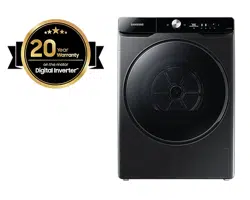
Heat Pump Dryer
User manual
DV16T8740** / DV16T8741**
DC68-04223K-03
DV8700TK_SimpleUX_DC68-04223K-03_EN_P171.indd 1DV8700TK_SimpleUX_DC68-04223K-03_EN_P171.indd 1 2024/8/2 16:53:112024/8/2 16:53:11
English2
Contents
Safety information 4
What you need to know about the safety instructions 4
Important safety symbols 4
Important safety precautions 5
Critical installation warnings 8
Critical usage warnings 9
Usage cautions 10
Critical cleaning warnings 12
Care for preventing freezing 12
Instructions about the WEEE (Only for Saudi Arabia Models) 12
Installation 13
What’s included 13
Installation requirements 15
Step-by-step installation 16
Environment 22
Before you start 23
Initial setup 23
Drying guidelines 24
Operations 26
Control panel 26
Operating a cycle 28
Cycle overview 29
Additional Functions 32
System Functions 35
Special features 37
Remote control (applicable models only) 41
Maintenance 44
Emptying the water tank 44
Installing the micro soft filter(Optional Filter) 45
Cleaning 46
DV8700TK_SimpleUX_DC68-04223K-03_EN_P171.indd 2DV8700TK_SimpleUX_DC68-04223K-03_EN_P171.indd 2 2024/8/2 16:53:112024/8/2 16:53:11
English 3
Troubleshooting 52
Checkpoints 52
Information codes 54
Appendix 55
Fabric care chart 55
Protecting the environment 56
Specification 57
Standby power consumption 58
Packing 59
Unpacking 59
DV8700TK_SimpleUX_DC68-04223K-03_EN_P171.indd 3DV8700TK_SimpleUX_DC68-04223K-03_EN_P171.indd 3 2024/8/2 16:53:112024/8/2 16:53:11
English4
Safety information
Congratulations on your new Samsung dryer. This manual contains important information on the
installation, use, and care of your appliance. Please take the time to read this manual to take full advantage
of your dryer’s many benefits and features.
What you need to know about the safety instructions
Warnings and Important Safety Instructions in this manual do not cover all possible conditions and
situations that may occur. It is your responsibility to caution and care when installing, maintaining, or
operating your dryer.
Always contact your manufacturer about problems or conditions you do not understand.
Important safety symbols
What the icons and signs in this user manual mean:
WARNING
Hazards or unsafe practices that may result in severe personal injury, death and/or property damage.
CAUTION
Hazards or unsafe practices that may result in personal injury and/or property damage.
NOTE
Indicates that a risk of personal injury or material damage exists.
Read the instructions
These warning signs are here to prevent injury to yourself and others.
Please follow them explicitly.
After reading this manual, store it in a safe place for future reference.
Read all instructions before using the appliance.
As with any equipment that uses electricity and moving parts, potential hazards exist. To safely operate
this appliance, familiarize yourself with its operation and exercise care when using it.
WARNING
Risk of Fire
• Clothes dryer installation must be performed by a qualified technician.
• Install the clothes dryer according to the manufacturer’s instructions and local codes.
• To reduce the risk of severe injury or death, follow all installation instructions.
DV8700TK_SimpleUX_DC68-04223K-03_EN_P171.indd 4DV8700TK_SimpleUX_DC68-04223K-03_EN_P171.indd 4 2024/8/2 16:53:112024/8/2 16:53:11
English 5
Important safety precautions
WARNING
To reduce the risk of fire, electric shock, or injury to persons when using
your appliance, follow basic precautions, including the following:
1. This appliance is not to be used by persons (including children) with
reduced physical, sensory or mental capabilities, or lack of experience
and knowledge, unless they have been given supervision or
instruction concerning use of the appliance by a person responsible
for their safety.
2. For use in Europe: This appliance can be used by children aged from
8 years and above and persons with reduced physical, sensory or
mental capabilities or lack of experience and knowledge if they have
been given supervision or instruction concerning use of the appliance
in a safe way and understand the hazards involved. Children shall not
play with the appliance. Cleaning and user maintenance shall not be
made by children without supervision.
3. Children should be supervised to ensure that they do not play with
the appliance.
4. If the supply cord is damaged, it must be replaced by the
manufacturer, its service agent or similarly qualified persons in order
to avoid a hazard.
5. The new hose-sets supplied with the appliance are to be used and
that old hose-sets should not be reused.
DV8700TK_SimpleUX_DC68-04223K-03_EN_P171.indd 5DV8700TK_SimpleUX_DC68-04223K-03_EN_P171.indd 5 2024/8/2 16:53:112024/8/2 16:53:11
Safety information
English6
6. For appliances with ventilation openings in the base, that a carpet
must not obstruct the openings.
7. For use in Europe: Children of less than 3 years should be kept away
unless continuously supervised.
8. CAUTION: In order to avoid a hazard due to inadvertent resetting of
the thermal cut-out, this appliance must not be supplied through an
external switching device, such as a timer, or connected to a circuit
that is regularly switched on and off by the utility.
9. The tumble dryer is not to be used if industrial chemicals have been
used for cleaning.
10. The lint trap has to be cleaned frequently, if applicable.
11. Lint must not to be allowed to accumulate around the tumble dryer.
(not applicable for appliances intended to be vented to the exterior of
the building)
12. Adequate ventilation has to be provided to avoid the back flow of
gases into the room from appliances burning other fuels, including
open fires.
13. Do not dry unwashed items in the tumble dryer.
14. Items that have been soiled with substances such as cooking oil,
acetone, alcohol, petrol, kerosene, spot removers, turpentine, waxes
and wax removers should be washed in hot water with an extra
amount of detergent before being dried in the tumble dryer.
DV8700TK_SimpleUX_DC68-04223K-03_EN_P171.indd 6DV8700TK_SimpleUX_DC68-04223K-03_EN_P171.indd 6 2024/8/2 16:53:112024/8/2 16:53:11
English 7
15. Items such as foam rubber (latex foam), shower caps, waterproof
textiles, rubber backed articles and clothes or pillows fitted with foam
rubber pads should not be dried in the tumble dryer.
16. Fabric softeners, or similar products, should be used as specified by
the fabric softener instructions.
17. The final part of a tumble dryer cycle occurs without heat (cool down
cycle) to ensure that the items are left at a temperature that ensures
that the items will not be damaged.
18. Remove all objects from pockets such as lighters and matches.
19. WARNING: Never stop a tumble dryer before the end of the drying
cycle unless all items are quickly removed and spread out so that the
heat is dissipated.
20. Exhaust air must not be discharged into a flue which is used for
exhausting fumes from appliances burning gas or other fuels.
21. The appliance must not be installed behind a lockable door, a sliding
door or a door with a hinge on the opposite side to that of the tumble
dryer, in such a way that a full opening of the tumble dryer door is
restricted.
22. WARNING: The appliance must not be supplied through an external
switching device, such as a timer, or connected to a circuit that is
regularly switched on and off by a utility.
Heat pump model only: The instructions shall also include the
substance of the following:
DV8700TK_SimpleUX_DC68-04223K-03_EN_P171.indd 7DV8700TK_SimpleUX_DC68-04223K-03_EN_P171.indd 7 2024/8/2 16:53:112024/8/2 16:53:11
Safety information
English8
WARNING: In the appliance enclosure or in the built-in structure,
keep ventilation openings clear of obstruction.
WARNING: Do not damage the refrigerant circuit.
Critical installation warnings
WARNING
The installation of this appliance must be performed by a qualified technician or service company.
• Failure to do so may result in electric shock, fire, an explosion, problems with the product, or injury.
Plug the power cord into a wall socket and use the socket for this appliance only. In addition, do not use an
extension cord.
• Sharing a wall socket with other appliances using a power strip or extending the power cord may result
in electric shock or fire.
• Ensure that the power voltage, frequency and current are the same as those of the product
specifications. Failure to do so may result in electric shock or fire. Failure Plug the power plug into the
wall socket firmly.
Remove all foreign substances such as dust or water from the power plug terminals and contact points
using a dry cloth on a regular basis.
• Unplug the power plug and clean it with a dry cloth.
• Failure to do so may result in electric shock or fire.
Keep all packaging materials well out of the reach of children, as packaging materials can be dangerous to
children.
• If a child places a bag over its head, it may result in suffocation.
This appliance must be properly grounded.
Do not ground the appliance to a gas pipe, plastic water pipe, or telephone line.
• This may result in electric shock, fire, an explosion, or problems with the product
• Never plug the power cord into a socket that is not grounded correctly and make sure that it is in
accordance with local and national codes.
Do not install or keep the product exposed to the outdoor elements.
Do not use a damaged power plug, damaged power cord or loose wall socket.
• This may result in electric shock or fire.
If the plug (power supply cord) is damaged, it must be replaced by the manufacturer or its service agent or
a similar qualified technician in order to avoid a hazard.
This appliance should be positioned to be accessible to the power plug after installation.
Do not pull or excessively bend the power cord.
Do not twist or tie the power cord.
DV8700TK_SimpleUX_DC68-04223K-03_EN_P171.indd 8DV8700TK_SimpleUX_DC68-04223K-03_EN_P171.indd 8 2024/8/2 16:53:112024/8/2 16:53:11
English 9
Do not hook the power cord over a metal object, place a heavy object on the power cord, insert the power
cord between objects, or push the power cord into the space behind the appliance.
• This may result in electric shock or fire.
Do not pull the power cord, when unplugging the power plug.
• Unplug the power plug by holding the plug.
• Failure to do so may result in electric shock or fire.
This appliance must be properly grounded. Never plug the power cord into a receptacle that is not
grounded adequately and in accordance with local and national codes. See installation instructions for
grounding this appliance.
Install this appliance in a location with solid, level floor.
• Failing to do so may result in abnormal vibrations, noise or problems with the product.
Since an ingredient in hair spray may degrade the hydrophile property of the heat exchanger so that dew
may appear on the outer surface of the appliance when the cooling operation is running, do not install the
appliance in a beauty salon.
This appliance should be positioned so that the power plug, the water supply taps, and the drain pipes are
accessible.
Critical usage warnings
WARNING
Do not let children or pets on or into the product. In addition, when disposing of this product, disassemble
the door lock (lever).
• This may result in children falling and injuring themselves.
• If children become locked in the product, there is a danger of suffocation.
Do not try to access the inside of the product when the drum is rotating.
Do not sit on the product or lean against the door.
• This may result in the product turning over and resulting in injury.
Dry the laundry only after it was spun by an appropriate washing machine.
Do not dry unwashed items in the tumble dryer.
Do not drink the condensed water.
Never stop a tumble dryer before the end of the drying cycle unless all items are quickly removed and
spread out so that the heat is dissipated.
Do not dry laundry contaminated by inflammable materials such as gasoline, kerosene, benzene, thinner,
alcohol, etc.
• This may result in electric shock, fire or explosion.
Do not let pets chew or play with the dryer.
• This may result in electric shock or injury.
DV8700TK_SimpleUX_DC68-04223K-03_EN_P171.indd 9DV8700TK_SimpleUX_DC68-04223K-03_EN_P171.indd 9 2024/8/2 16:53:112024/8/2 16:53:11
Safety information
English10
When disposing of the product, separate the door and the power cord before disposing of the product.
• Failing to do so may result in damage to the power code or an injury.
Do not touch the power plug with wet hands.
• This may result in electric shock.
When gas (city gas, propane gas, LP gas) leaks, do not touch this appliance or the power cord, ventilate
immediately.
• At this time, do not use the ventilating fan.
• A spark may cause an explosion or fire.
Do not repair, replace, or attempt to service any part of the appliance unless specifically recommended in
the user-repair instructions. You must also have the skills necessary to service this appliance.
Do not attempt to repair, disassemble, or modify the appliance yourself.
• Do not use any fuse(such as cooper, steel wire, etc.) other than the standard fuse.
• When repairing or reinstalling the appliance is required, contact your nearest service center.
• Failure to do so may result in electric shock, fire, problems with the product, or injury.
The product you have purchased is designed for domestic use only.
The use for business purposes qualifies as product misuse. In this case, the product will not be covered
by the standard warranty provided by Samsung and no responsibility can be attributed to Samsung for
malfunctions or damages resulting from such misuse.
If the product generates strange noise, smells of something burning, or generates smoke, immediately cut-
off the power and contact the service center.
• Otherwise, it may cause an electric shock or fire as a result.
Do not let children (or pets) play in or on your product. The product door does not open easily from the
inside and children may be seriously injured if trapped inside.
Usage cautions
CAUTION
Do not stand on top of the appliance or place objects (such as laundry, lighted candles, lighted cigarettes,
dishes, chemicals, metal objects, etc.) on the appliance.
• This may result in electric shock, fire, problems with the product, or injury.
Do not touch the glass door and inside of the drum during or just after drying as it is hot.
• This may result in burns.
The door glass becomes hot during drying. Therefore, do not touch the door glass.
Also, do not allow children to play around the dryer or touch the door glass.
• This may result in burns.
Do not press the buttons using sharp objects such as pins, knifes, fingernails, etc.
• This may result in electric shock or injury.
DV8700TK_SimpleUX_DC68-04223K-03_EN_P171.indd 10DV8700TK_SimpleUX_DC68-04223K-03_EN_P171.indd 10 2024/8/2 16:53:122024/8/2 16:53:12
English 11
Do not dry laundry containing forming rubber (latex) or similar rubber textures.
• If forming rubber is heated, it may start a fire.
Do not dry laundry contaminated by vegetable oil or cooking oil as a large amount of the oil will not be
removed when washing the laundry. In addition, use the unheated dry cycle so that the laundry is not
heated.
• The oxidization heat of the oil may start a fire.
Do not dry laundry contaminated by foreign substances such as oil, cream, lotion, or other chemicals that
are used in places such as skincare room, massage parlor, beauty salon, or hospital.
• This may result in electric shock, fire, malfunction, and injury.
Make sure that the pockets of all clothing to be dried are empty.
• Hard, sharp objects, such as coins, safety pins, nails, screws, or stones can cause extensive damage to
the appliance.
Do not dry clothing with large buckles, buttons, or other heavy metal (zippers, hooks and eyelets, button-
up covers).
If necessary, use the laundry net for small and lightweight laundry such as fabric tie belt, apron strings, and
underwire bras which can dissolve or break during a cycle.
Dryer sheets are compatible with this model, and are recommended for better drying performance.
Dryer sheets are also beneficial in reducing the static electricity generated during a drying cycle. Static
electricity could lead to damage of laundry items and potentially the appliance.
Do not use the dryer near dangerous powders such as coal dust, wheat flour, etc.
• This may result in electric shock, fire or an explosion.
Do not place inflammable materials near the product.
• This may result in toxic gases from the product, damage to parts, electric shock, fire or an explosion.
• The appliance should not be placed behind lockable doors etc.
Do not touch the rear side of the appliance during or immediately after drying is complete.
• The appliance remains hot and may cause burns.
DV8700TK_SimpleUX_DC68-04223K-03_EN_P171.indd 11DV8700TK_SimpleUX_DC68-04223K-03_EN_P171.indd 11 2024/8/2 16:53:122024/8/2 16:53:12
Safety information
English12
Critical cleaning warnings
WARNING
Do not clean the appliance by spraying water directly onto it.
Do not use benzene, thinner or alcohol to clean the appliance.
• This may result in discoloration, deformation, damage, electric shock or fire.
Before cleaning or performing maintenance, unplug the appliance from the wall socket.
• Failure to do so may result in electric shock or fire.
Clean the filter case before and after using the dryer.
Clean the inside of the product on a regular basis by asking an authorized service engineer.
Clean the Heat Exchanger with a soft brush or vacuum cleaner once a month, Do not touch the heat
exchanger with your hand. Otherwise, it may cause an injury.
The interior of the dryer should be cleaned periodically by qualified service personnel.
Care for preventing freezing
• Install the dryer in an area where the temperature does not drop below zero degree Celsius.
• If draining directly using a long drain hose, water remaining inside the hose can freeze in winter. Make
sure there is no water left inside the hose after use.
If the drain hose has frozen, wrap the hose with a towel soaked in warm water for approximately ten
minutes to thaw it.
Instructions about the WEEE (Only for Saudi Arabia Models)
Correct Disposal of This Product (Waste Electrical & Electronic Equipment)
(Applicable in countries with separate collection systems)
This marking on the product, accessories or literature indicates that the product and
its electronic accessories (e.g. charger, headset, USB cable) should not be disposed of
with other household waste at the end of their working life. To prevent possible harm
to the environment or human health from uncontrolled waste disposal, please separate
these items from other types of waste and recycle them responsibly to promote the
sustainable reuse of material resources.
Household users should contact either the retailer where they purchased this product, or
their local government office, for details of where and how they can take these items for
environmentally safe recycling.
Business users should contact their supplier and check the terms and conditions of the
purchase contract. This product and its electronic accessories should not be mixed with
other commercial wastes for disposal.
DV8700TK_SimpleUX_DC68-04223K-03_EN_P171.indd 12DV8700TK_SimpleUX_DC68-04223K-03_EN_P171.indd 12 2024/8/2 16:53:122024/8/2 16:53:12
English 13
Installation
What’s included
Carefully unpack the dryer. Keep all packaging materials away from children. The parts and location of
parts shown below may differ from your dryer. Before installation, make sure the dryer has all the parts
listed here. If the dryer and/or parts are damaged or missing, contact the nearest Samsung customer
service center.
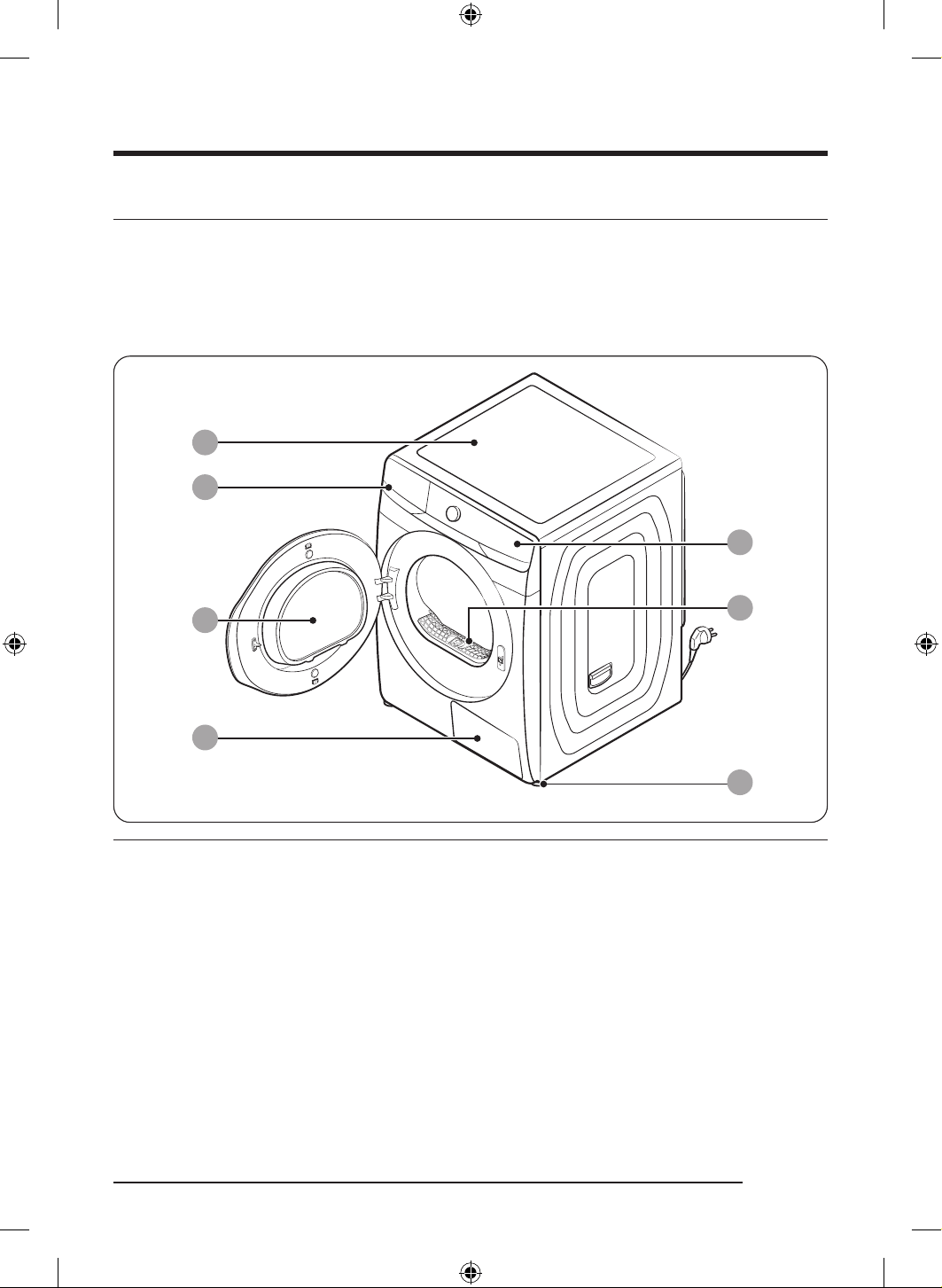
Dryer at a glance
ՋՍ
ՋՎ
ՋՌ
ՋՐ
ՋՒ
ՋՑ
ՋՏ
01 Top cover 02 Water tank
03 Door 04 Heat exchanger
05 Control panel 06 Lint filter
07 Levelling feet
DV8700TK_SimpleUX_DC68-04223K-03_EN_P171.indd 13DV8700TK_SimpleUX_DC68-04223K-03_EN_P171.indd 13 2024/8/2 16:53:122024/8/2 16:53:12
Installation
English14
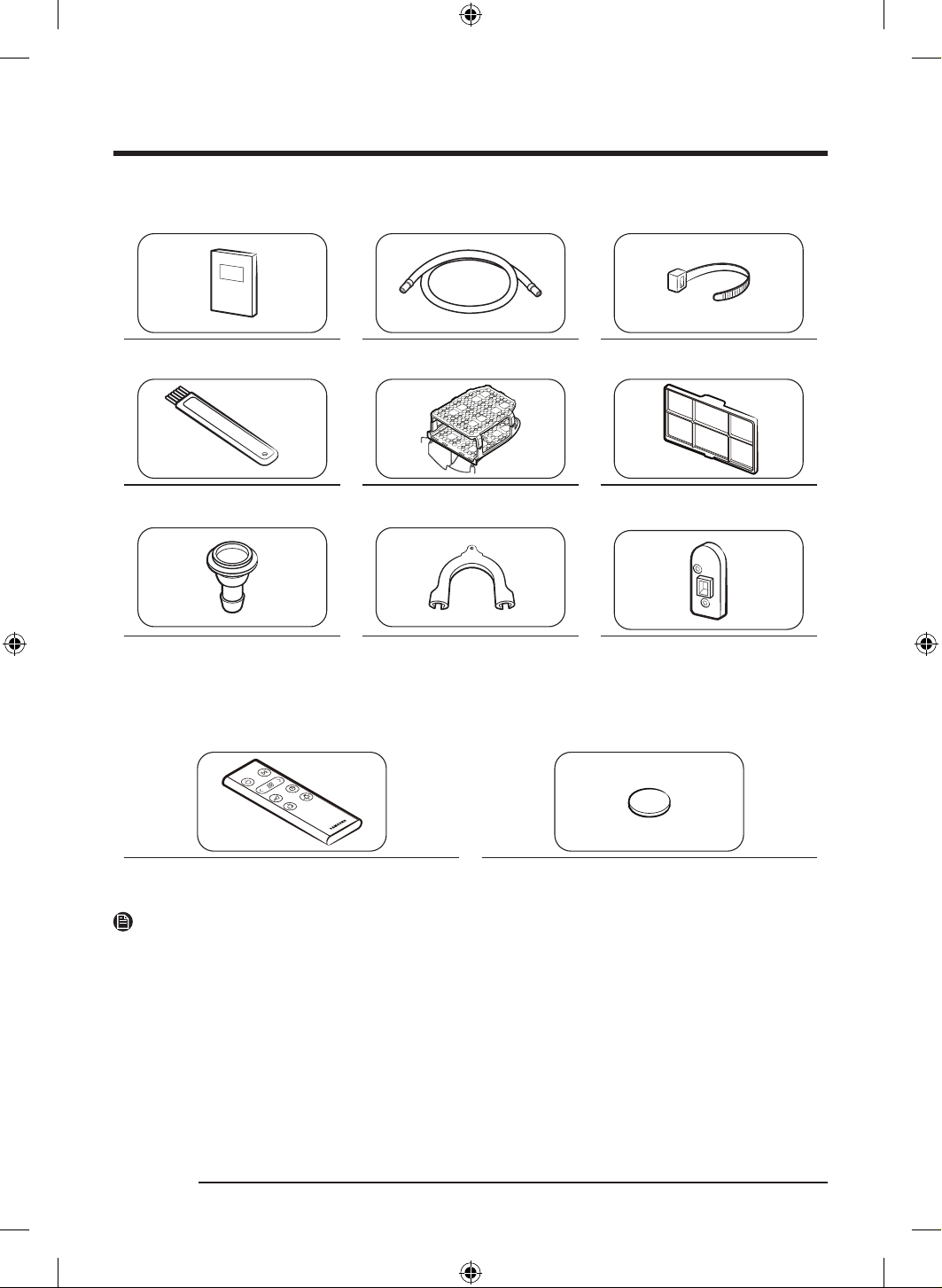
Accessories (supplied)
User manual Long drain hose (3 m) Cable tie
Cleaning brush Drying rack Micro soft filter(Optional Filter)
Hose connector Hose guide Holder lever (applicable models
only)
Remote control accessories
Remote control Battery
NOTE
• The stacking kit allows the dryer to be stacked on top of a washing machine. Please note that the
stacking kit can only be used with Samsung washing machine and dryers. To purchase a stacking kit
above, contact a Samsung service centre or local appliance retailer. The stacking kit differs with the
washing machine model.
• For stacking instructions with the dryer, see the installation manual included in the stacking kit.
• For information on which stacking kit model you can use to stack your dryer on the washing machine,
see the user manual included in your Samsung washing machine.
DV8700TK_SimpleUX_DC68-04223K-03_EN_P171.indd 14DV8700TK_SimpleUX_DC68-04223K-03_EN_P171.indd 14 2024/8/2 16:53:132024/8/2 16:53:13
English 15
Installation requirements
NOTE
This dryer must be installed by a qualified installer. If service is required due to poor or faulty installation,
it is considered the owner’s responsibility and may void the warranty. Keep these instructions for future
reference.
WARNING
• Do not plug the power cord into a wall outlet before the dryer is completely installed.
• Have two or more persons help move the dryer.
• Do not let children or pets play in, on, or around the dryer. Proper supervision is necessary at all times.
• Keep all packaging materials away from children.
• Do not replace a damaged power cord or power plug yourself. Have Samsung or a qualified service
technician replace a damaged power cord or power plug.
• Do not attempt to repair, disassemble, or modify the dryer. For any repairs, contact the nearest Samsung
service center.
• Remove the door/lids from all discarded appliances to avoid children from suffocating.
• If the dryer generates a strange noise, burning smells, or smoke, unplug the power plug immediately
and contact the nearest Samsung service center.
• Do not unplug the dryer while it is operating.
• Do not place flammable objects near the dryer.
Electrical and grounding requirements
• The dryer requires an AC 230 V / 60 Hz electrical supply.
• The dryer must be properly grounded. If the dryer malfunctions or breaks down, grounding reduces the
risk of electric shock by providing a path of least resistance for the electric current. The dryer comes
with a power cord that has a 3-prong grounding plug. The plug must be plugged into an appropriate
outlet that is properly installed and grounded in accordance with all local codes and ordinances.
• If you have any questions regarding the electrical or grounding requirements, please contact Samsung
or a qualified electrician.
WARNING
• Plug the power cord into a grounded, 3-prong outlet.
• Do not use a damaged power plug, cord, or loose or damaged wall outlet.
• Do not use an adapter or an extension cord.
• Improper connection of the equipment-grounding conductor may result in electric shock. If you are
unsure if the dryer is properly grounded, check with a qualified electrician.
• Do not modify the power plug, power cord, or power outlet in any way.
• Do not connect the ground wire to plastic plumbing lines, gas lines, or hot water pipes.
DV8700TK_SimpleUX_DC68-04223K-03_EN_P171.indd 15DV8700TK_SimpleUX_DC68-04223K-03_EN_P171.indd 15 2024/8/2 16:53:132024/8/2 16:53:13
Installation
English16
Alcove or closet installation
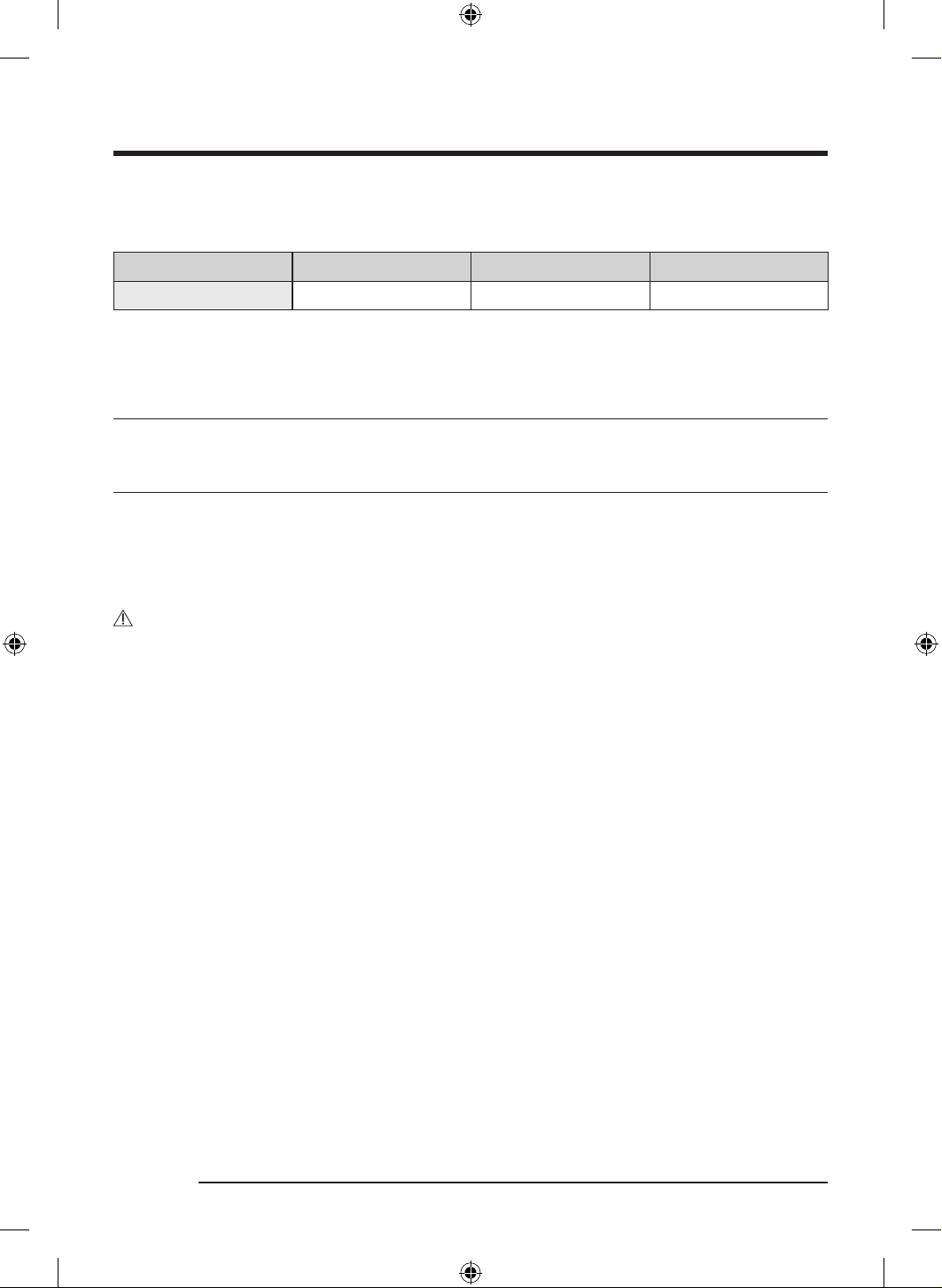
For alcove or closet installation, the dryer requires the following minimum clearances:
Sides Top Front Rear
20 mm 25 mm 490 mm 50 mm
If installing the dryer with a washing machine, the front of the alcove or closet must have an unobstructed
air opening of at least 550 mm.
Step-by-step installation
Before you install your dryer, make sure you have read Installation requirements on page 15.
STEP 1 Select a location
Location requirements
Select a level, well-constructed surface that will withstand vibrations. Select a location where a grounded,
3-prong outlet is easily accessible.
For convenience, consider installing the dryer next to your washing machine.
WARNING
• Install the dryer indoors only.
• Do not install the dryer in areas exposed to the weather.
• Do not install the dryer where the temperature may fall below 5 °C or rise above 35 °C.
• Do not install the dryer where gas may leak.
DV8700TK_SimpleUX_DC68-04223K-03_EN_P171.indd 16DV8700TK_SimpleUX_DC68-04223K-03_EN_P171.indd 16 2024/8/2 16:53:132024/8/2 16:53:13
English 17
STEP 2 Adjust the levelling feet
A
B
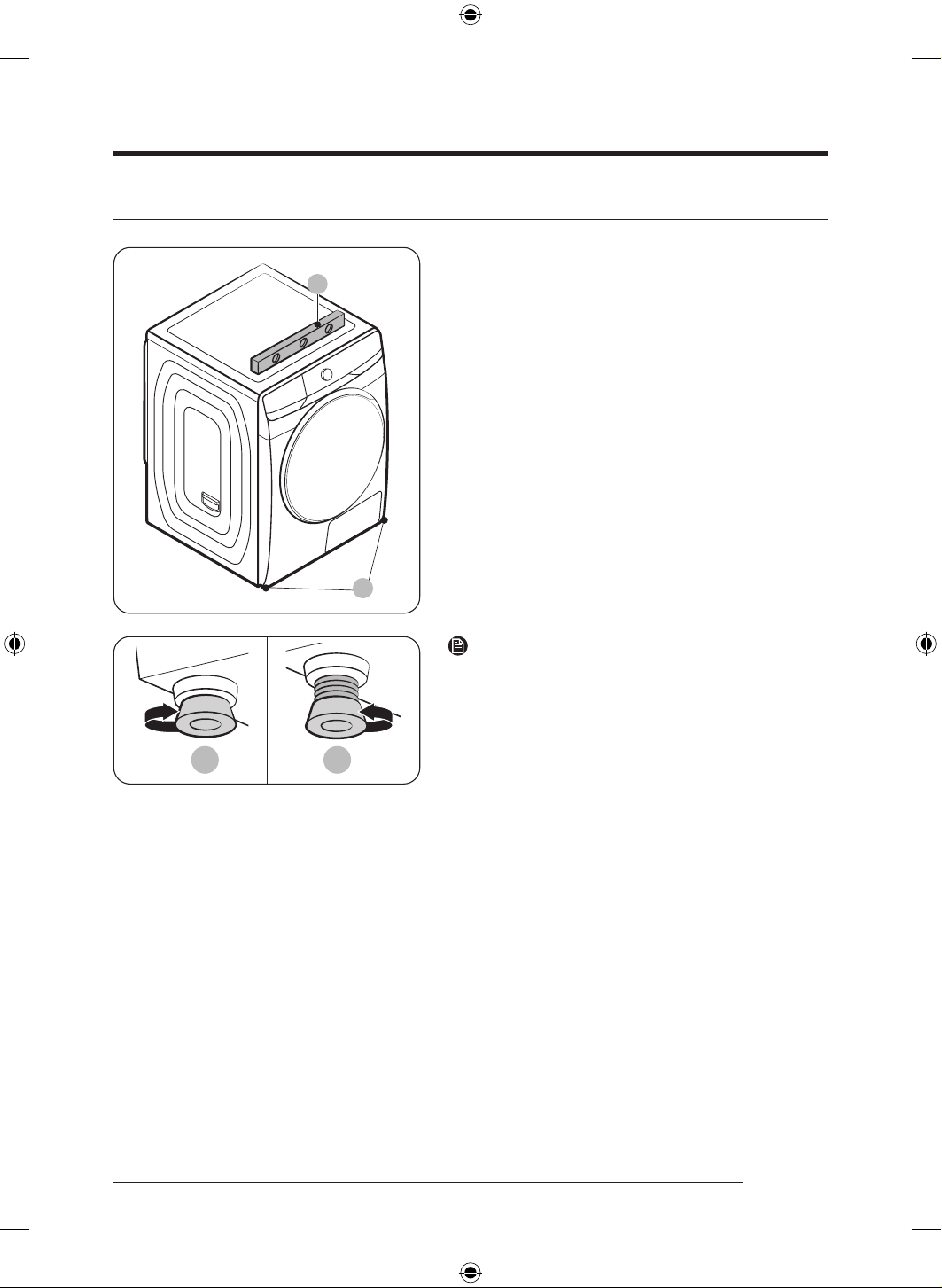
1. Gently slide the dryer into the desired location.
2. Use a level (A) and check the levelness of the dryer
from side to side and front to back.
3. If the dryer is not level, turn the levelling feet (B) left
or right to adjust the height.
4. Once the dryer is level, make sure the dryer stands
firmly on the floor.
5. Plug in the dryer.
C D
NOTE
• To set the dryer to the same height as the washing
machine, turn the levelling feet to the right until it
fully retracts (C). Then, turn the levelling feet to the
left to extend (D) it until the dryer and the washing
machine are the same height.
• Extend the levelling leg only as much as necessary.
Extending the levelling leg more than necessary can
cause the dryer to vibrate.
DV8700TK_SimpleUX_DC68-04223K-03_EN_P171.indd 17DV8700TK_SimpleUX_DC68-04223K-03_EN_P171.indd 17 2024/8/2 16:53:132024/8/2 16:53:13
Installation
English18
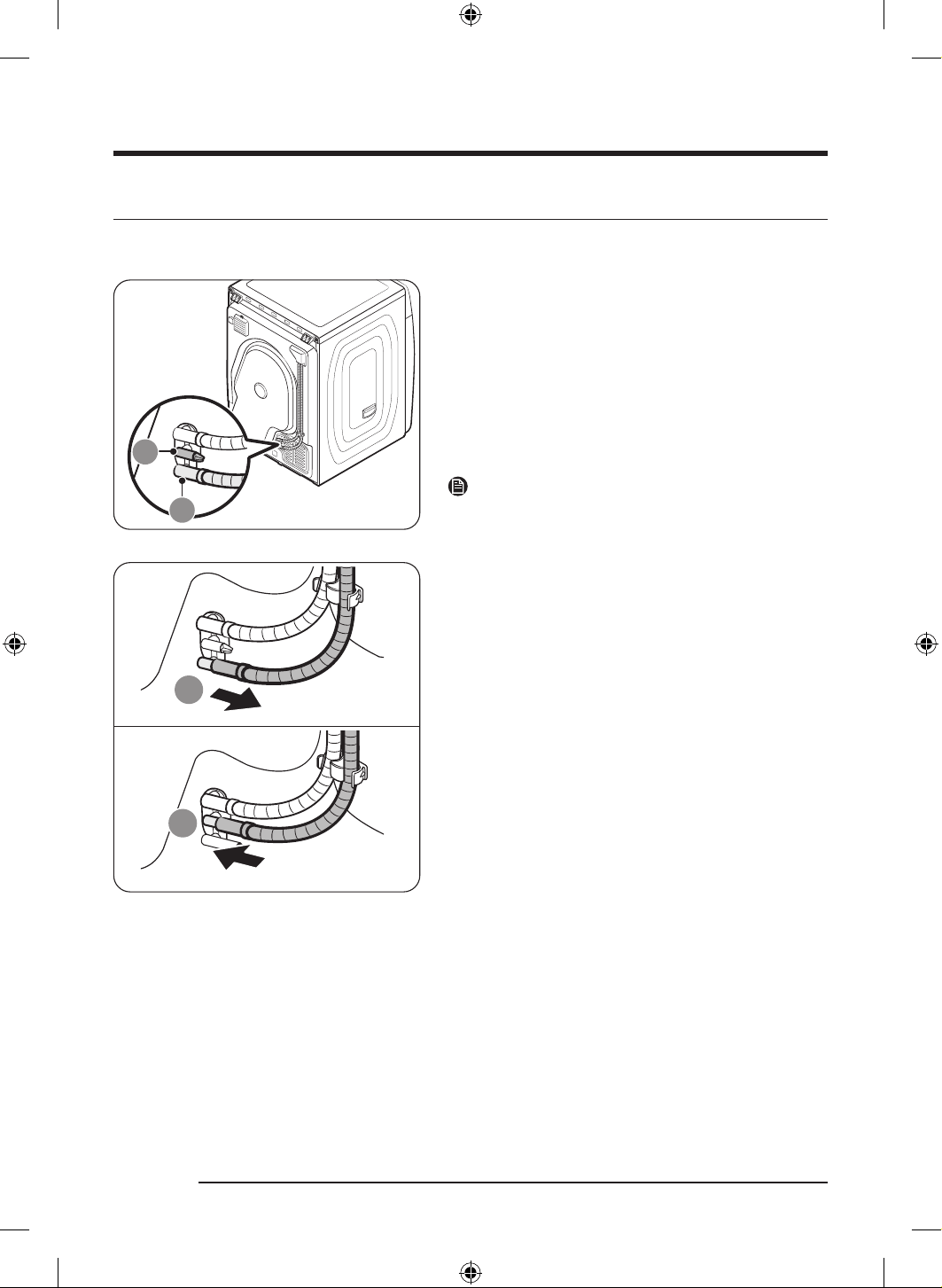
STEP 3 Connect the drain hose
Draining directly to a drainage system
9
• We strongly recommend draining condensed water
directly to your drainage system instead of draining
to the built-in water tank.
• Use the provided accessory hose (long drain hose) to
drain condensed water directly to your drain system
instead of draining to the built-in water tank (which is
a default method).
• Use the built-in water tank only if you cannot drain
the condensed water directly to a drainage system.
NOTE
As a factory default, this dryer is set to use the built-in
water tank to drain condensed water.
9
1. Remove the water tank drain hose from the drain
water outlet (A), and then insert it to the holder (B).
DV8700TK_SimpleUX_DC68-04223K-03_EN_P171.indd 18DV8700TK_SimpleUX_DC68-04223K-03_EN_P171.indd 18 2024/8/2 16:53:142024/8/2 16:53:14
English 19
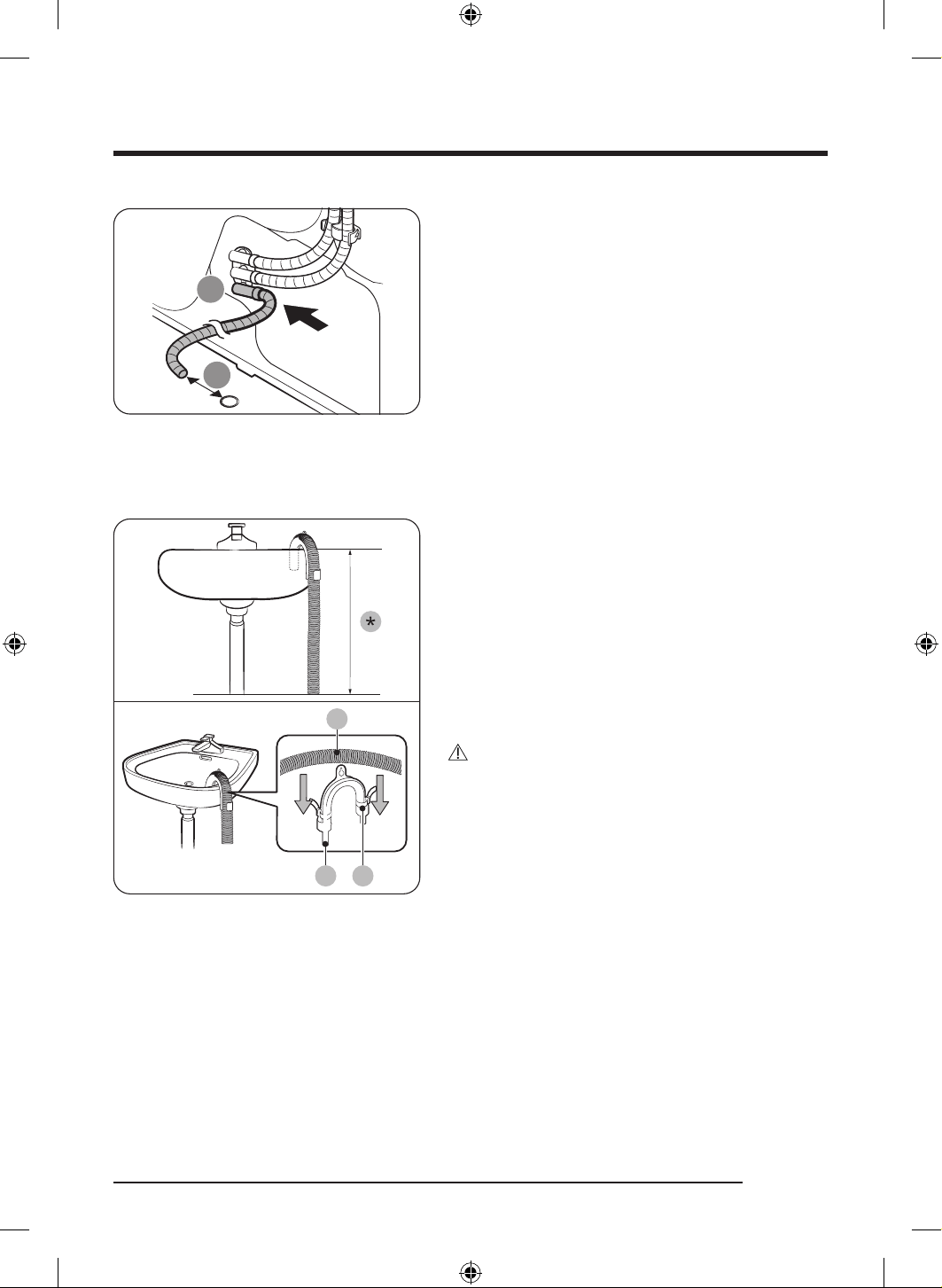
ՋՌ
01 70 mm
2. Insert one end of the accessory hose (long drain
hose) into drain water outlet (A).
3. Place the other end (outlet) of the accessory hose at
least 70 mm away from a drain hole.
Placing the accessory hose over a wash basin
A
CB
1. Make sure to place the end of the accessory hose
lower than 90 cm (*) from the bottom of dryer.
2. To bend some point of the accessory hose, use the
supplied plastic hose guide (B) and secure the guide
to the wall with a hook or to the tap with a piece of
string. Assemble the drain hose (A) and the hose
guide (B) and fix them with the cable-tie (C).
3. You can drain the condensed water by connecting the
accessory hose (long drain hose) to the drain-outlet
directly.
CAUTION
Do not extend the drain hose. Water may leak from the
connected area. Use a long drain hose.
DV8700TK_SimpleUX_DC68-04223K-03_EN_P171.indd 19DV8700TK_SimpleUX_DC68-04223K-03_EN_P171.indd 19 2024/8/2 16:53:142024/8/2 16:53:14
Installation
English20
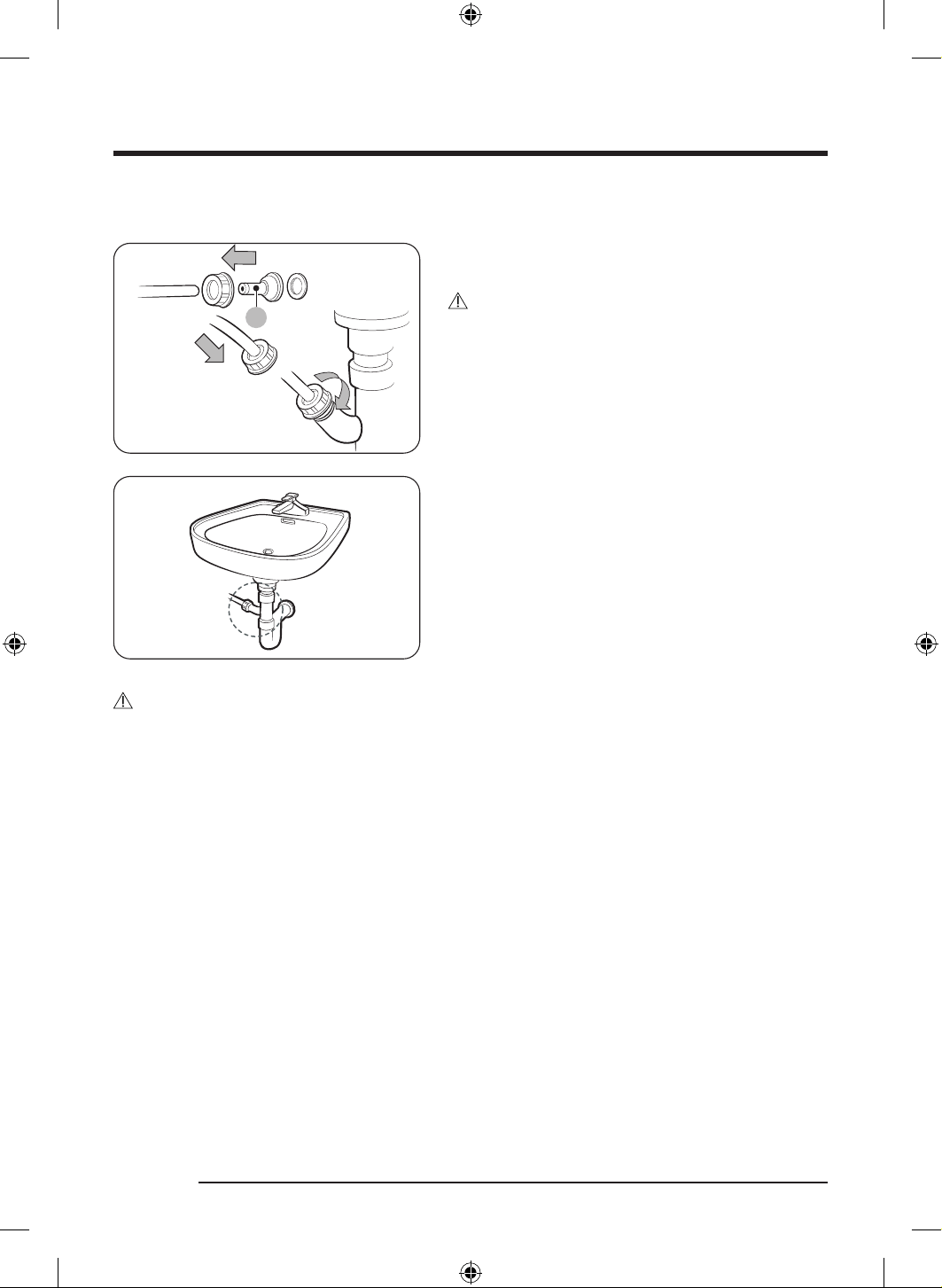
By using the drain pipe of the wash basin
A
1. Assemble the hose connector (A), and attach it to the
end of the accessory hose as shown.
CAUTION
To prevent water leak, make sure to connect the hose
and the connector firmly.
2. Connect the hose adapter directly to the drain pipe of
the wash basin.
CAUTION
• Place the other end (outlet) of the accessory hose about 70 mm away from a drain hole. Do not insert
the end (outlet) of the accessory hose into a sewer.
- A sewer smell may flow into the dryer.
• Wring out excess water from items before putting them in the dryer.
- Wet items may cause an unpleasant smell inside the dryer.
• Open the dryer door and the heat exchanger cover after completing a drying cycle to maintain the dryer
interior more hygienically.
• Run the Self Tub Dry cycle if there is an unpleasant smell inside the dryer, or the " Self Tub Dry needed"
message appears in the display.
DV8700TK_SimpleUX_DC68-04223K-03_EN_P171.indd 20DV8700TK_SimpleUX_DC68-04223K-03_EN_P171.indd 20 2024/8/2 16:53:142024/8/2 16:53:14
English 21
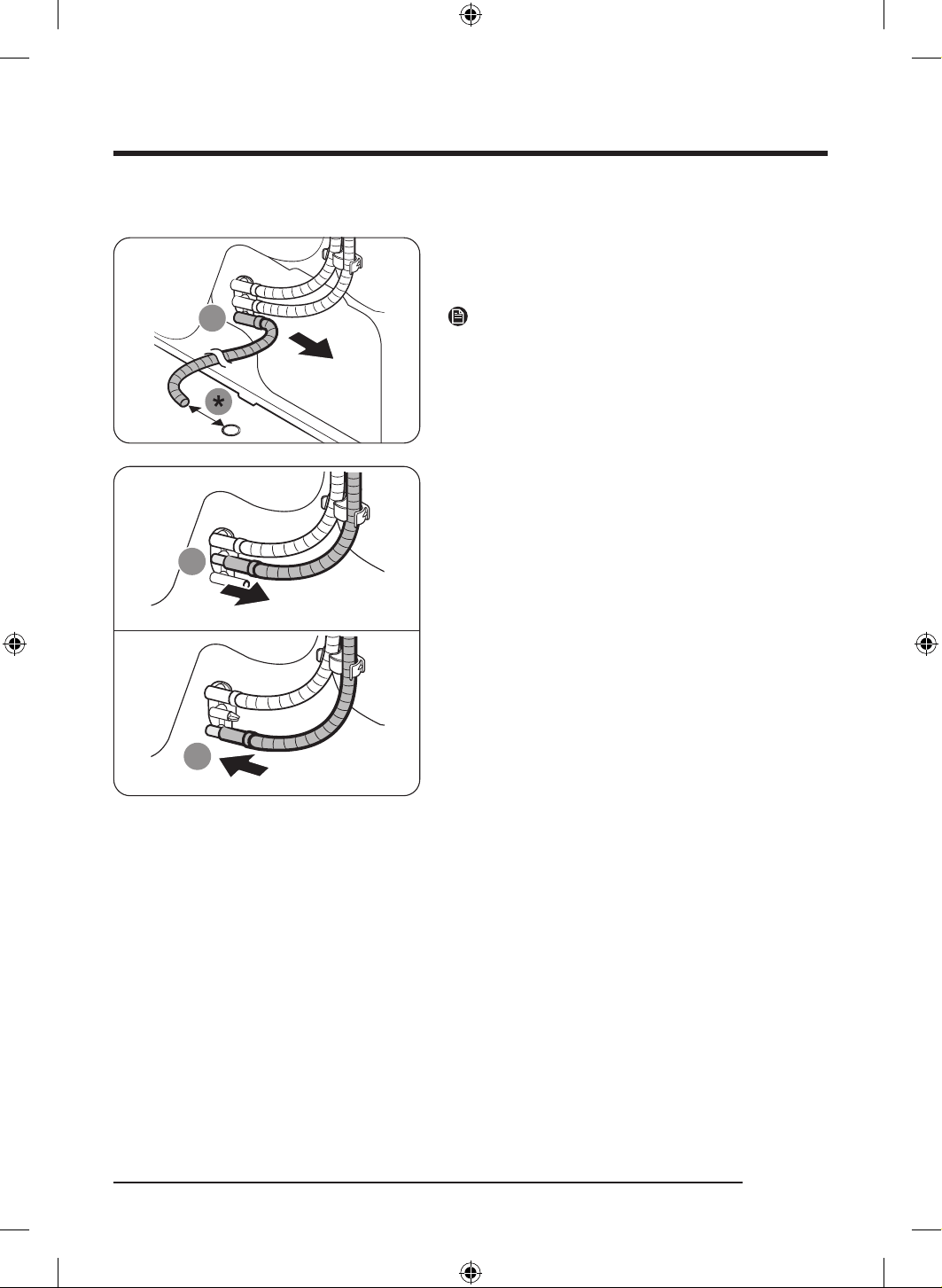
Draining to the water tank
1. Remove the long drain hose from the drain water
outlet (A).
* 70 mm
NOTE
Completely dry the removed long drain hose and keep it
in a safe place for later use.
9
2. Remove the water tank drain hose from the holder
(B), and then connect it to the drain water outlet (A).
- Firmly connect the water tank drain hose so that it
does not move around.
DV8700TK_SimpleUX_DC68-04223K-03_EN_P171.indd 21DV8700TK_SimpleUX_DC68-04223K-03_EN_P171.indd 21 2024/8/2 16:53:152024/8/2 16:53:15
Installation
English22
STEP 4 Check the installation
• All packaging material is completely removed and properly disposed.
• The dryer is level and standing firmly on the floor.
• Make sure no accessory remains inside the drum.
• Do not block the air inlet hole of the cooling grill at the front of the dryer.
• Do not place inflammable objects near the dryer and keep the surroundings clean.
• Do not remove the adjustable levelling legs of the dryer. They are necessary to keep the dryer level with
the ground.
• After installation, we recommend that you wait at least 1 hour before using the dryer.
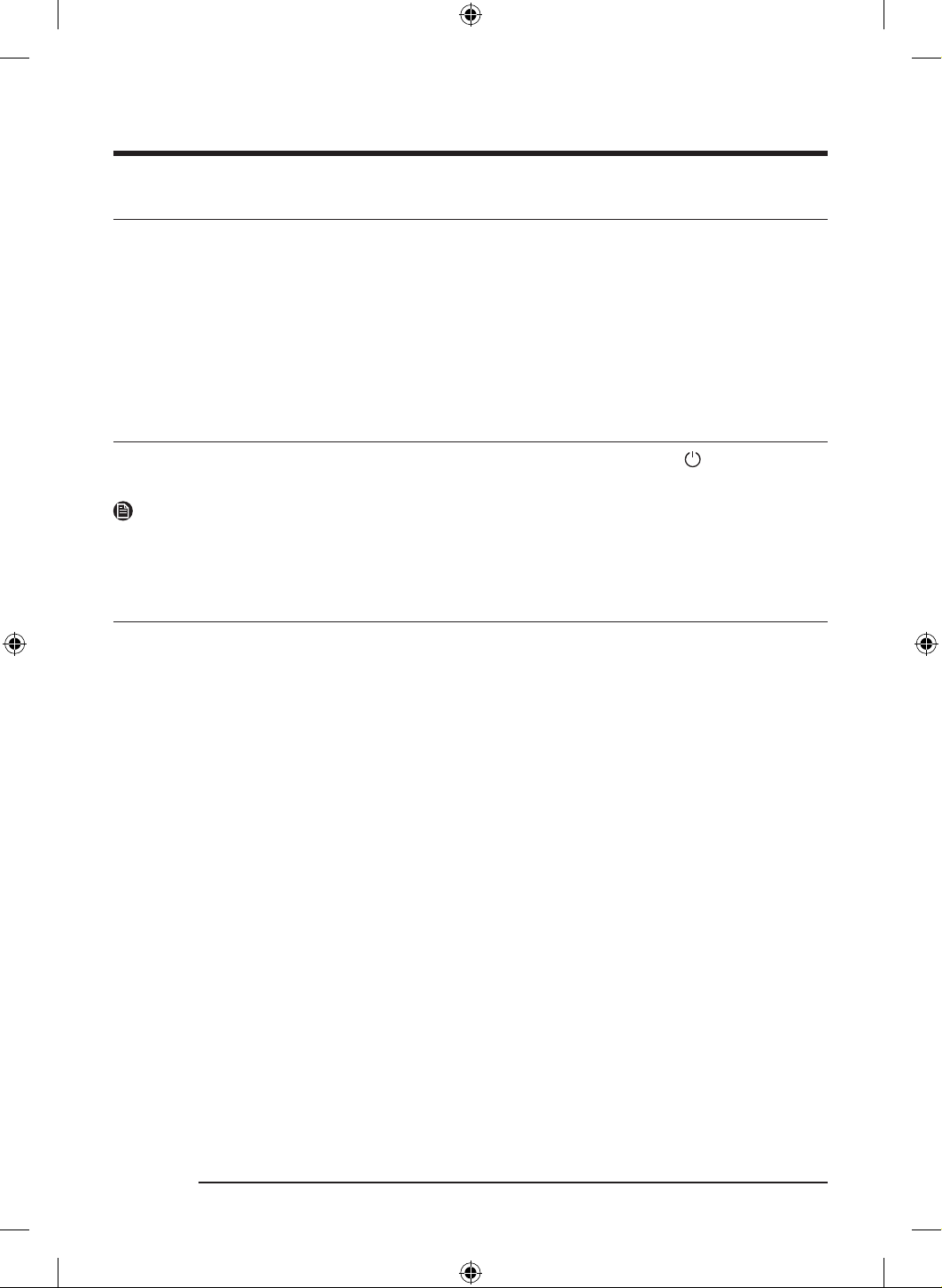
STEP 5 Power on
Plug the power cord into a wall socket protected by a fuse or circuit breaker. Then, tap to turn on the
dryer.
NOTE
Run the Time Dry cycle for 20 minutes to make sure that it runs, heats, and shuts off. If the HC information
code is displayed, contact a local service center.
Environment
Please dispose of the packaging materials for this product in an “environmentally friendly” manner. For
further detail, please contact your local area authority.
DV8700TK_SimpleUX_DC68-04223K-03_EN_P171.indd 22DV8700TK_SimpleUX_DC68-04223K-03_EN_P171.indd 22 2024/8/2 16:53:152024/8/2 16:53:15
English 23
Before you start
Initial setup
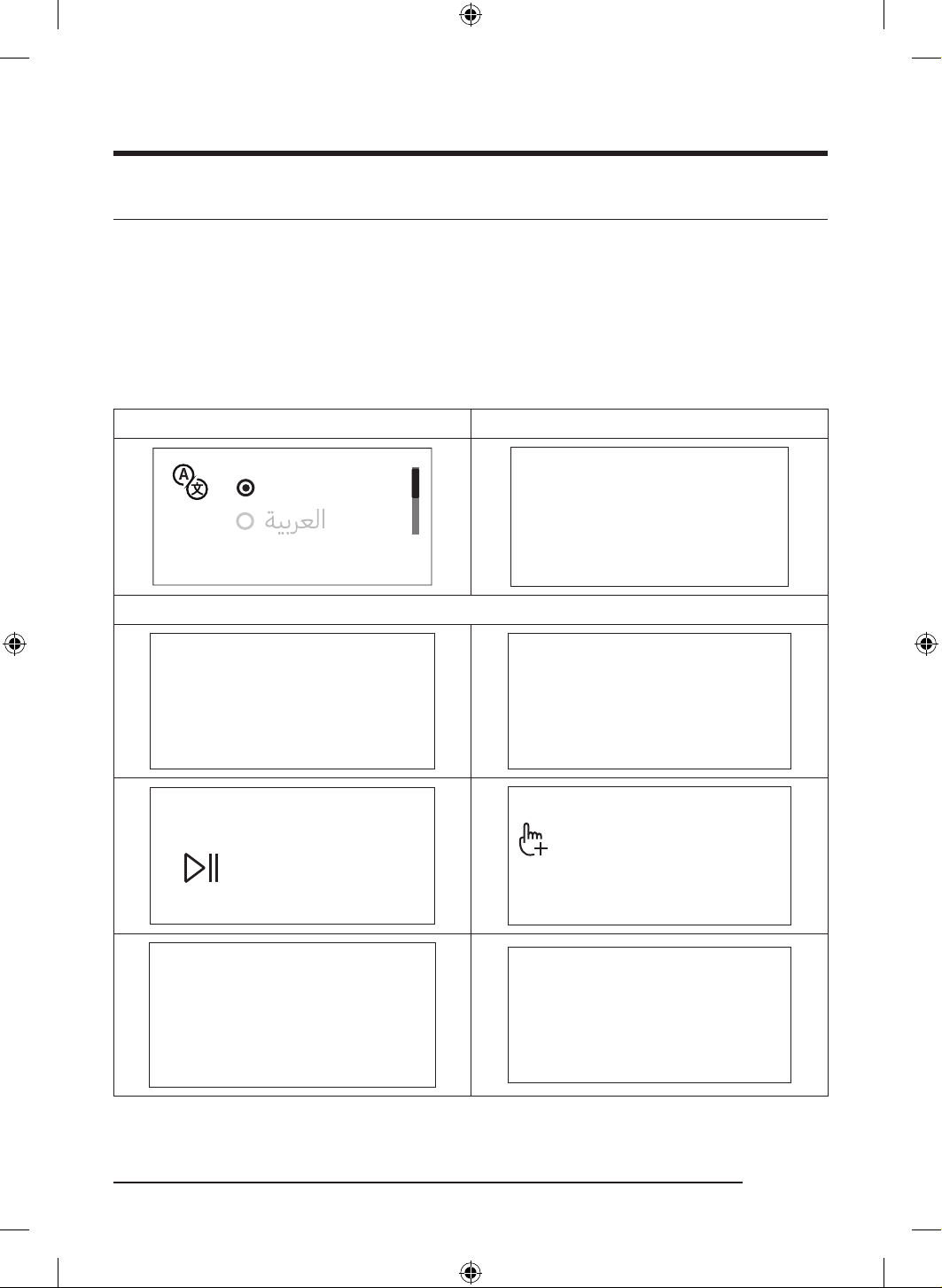
• When you turn on your dryer for the first time, the screen shows the initial setup process. Follow the
on-screen instructions to complete it.
• If you complete the initial setup and operate a cycle for more than a minute, the initial setup will not
appear again.
• The initial setup includes language selection and a brief tutorial.
• When tapping a button, tap exactly over the icon.
• Operating the washing machine and dryer at the same time may result in a loss of power depending on
where they are installed and your electrical power status.
01 Language selection 02 Welcome screen
Turn dial & Tap O
English(US)
Welcome!
03 Tutorial
Let’s explore your new dryer!
[Tap O to skip]
Turn the dial to explore cycles
[Tap O to skip]
Now hold to start a cycle
[Tap O to skip]
Tap to see
additional functions
[Tap O to skip]
Try saving favorites
in My Cycles
A dryer that knows you!
All Done!
DV8700TK_SimpleUX_DC68-04223K-03_EN_P171.indd 23DV8700TK_SimpleUX_DC68-04223K-03_EN_P171.indd 23 2024/8/2 16:53:152024/8/2 16:53:15
Before you start
English24
Drying guidelines
STEP 1 Sort
• Do not mix heavy and lightweight items together.
• Wash and dry dark-colored items separately from light-colored items.
• Unless recommended on the care label, do not dry woolens or fiberglass items.
• Do not dry items soiled with oil, alcohol, gasoline, etc.
• Avoid drying unwashed items .
• Do not dry wet items that have not been fully spin-dried after washing. This could cause an odor inside
the dryer or cause the dryer to malfunction.
• Using a laundry net is recommended for baby socks and other small, light items.
STEP 2 Empty pockets and turn them inside out
• Turn dark-colored clothes inside out before drying them. This will prevent fabric damage due to friction
during the drying process and protect internal parts of the dryer from discoloration and damage.
• Turn the items with buttons or embroideries inside out before drying them.
CAUTION
• Empty the pockets. Metallic objects such as coins, pins, and buckles on clothing may damage other
laundry items as well as the drum.
• Remove any metallic objects attached to items, pull up zippers, and latch hooks before drying. Metallic
objects attached to items may damage other items as well as the drum.
STEP 3 Check the lint filter
Ensure that the lint filter is installed correctly before putting items in the dryer. The dryer does not work
without the lint filter.
• Always clean the lint filter before drying. For more information on filter cleaning, see the “ Lint filter”
section on page 47.
DV8700TK_SimpleUX_DC68-04223K-03_EN_P171.indd 24DV8700TK_SimpleUX_DC68-04223K-03_EN_P171.indd 24 2024/8/2 16:53:152024/8/2 16:53:15
English 25
STEP 4 Determine the load capacity
Do not overload the dryer. Overloading reduces the tumbling action, resulting in uneven drying and
wrinkling.
• Put one wash load in the dryer at a time.
• To improve drying efficiency for one or two items, add a dry towel to the load.
• For best results, untangle items before inserting them into the dryer. Tangled items may degrade the
drying efficiency or cause the door to open.
CAUTION
Add or remove items into or from the dryer with the lint filter installed. If the filter is not in place, small
items can fall into the filter slot and cause the dryer to malfunction.
STEP 5 After finishing the drying
• Empty the water tank to prevent leaks. For more information on emptying the water tank, see the
“Emptying the water tank” section on page 44
• If the “ Clean heat exchanger” message appears on the display, refer to the “ Heat exchanger” section on
page 49 and clean the heat exchanger.
• Keep the dryer door and the heat exchanger cover open after finishing the drying to keep the inside of
the dryer more hygienic.
DV8700TK_SimpleUX_DC68-04223K-03_EN_P171.indd 25DV8700TK_SimpleUX_DC68-04223K-03_EN_P171.indd 25 2024/8/2 16:53:152024/8/2 16:53:15
English26
Operations
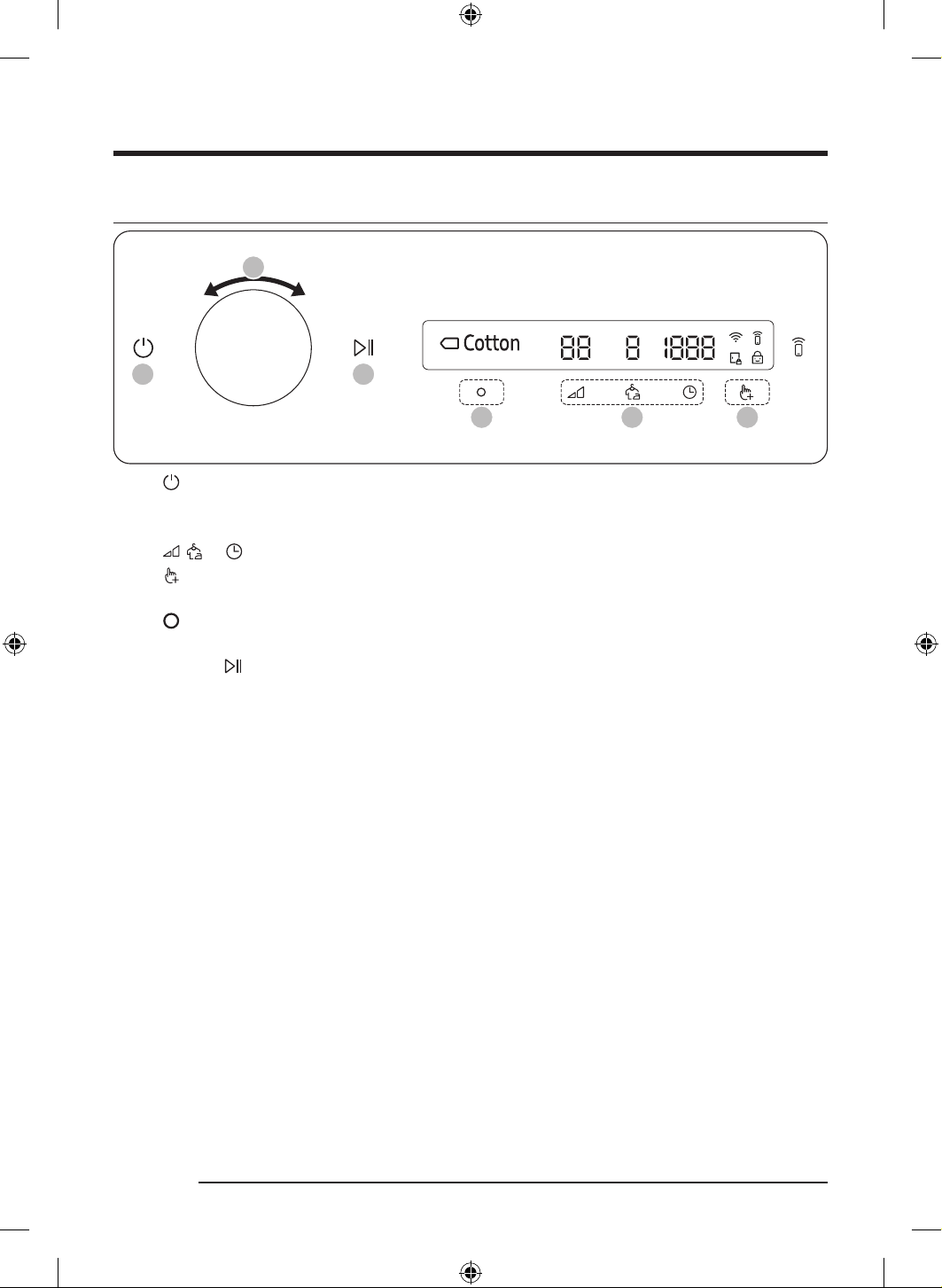
Control panel
ՋՌ ՋՎ
ՋՏ
ՋՐ ՋՑ ՋՒ ՋՓ ՋՔ
ՌՋ
ՋՍ
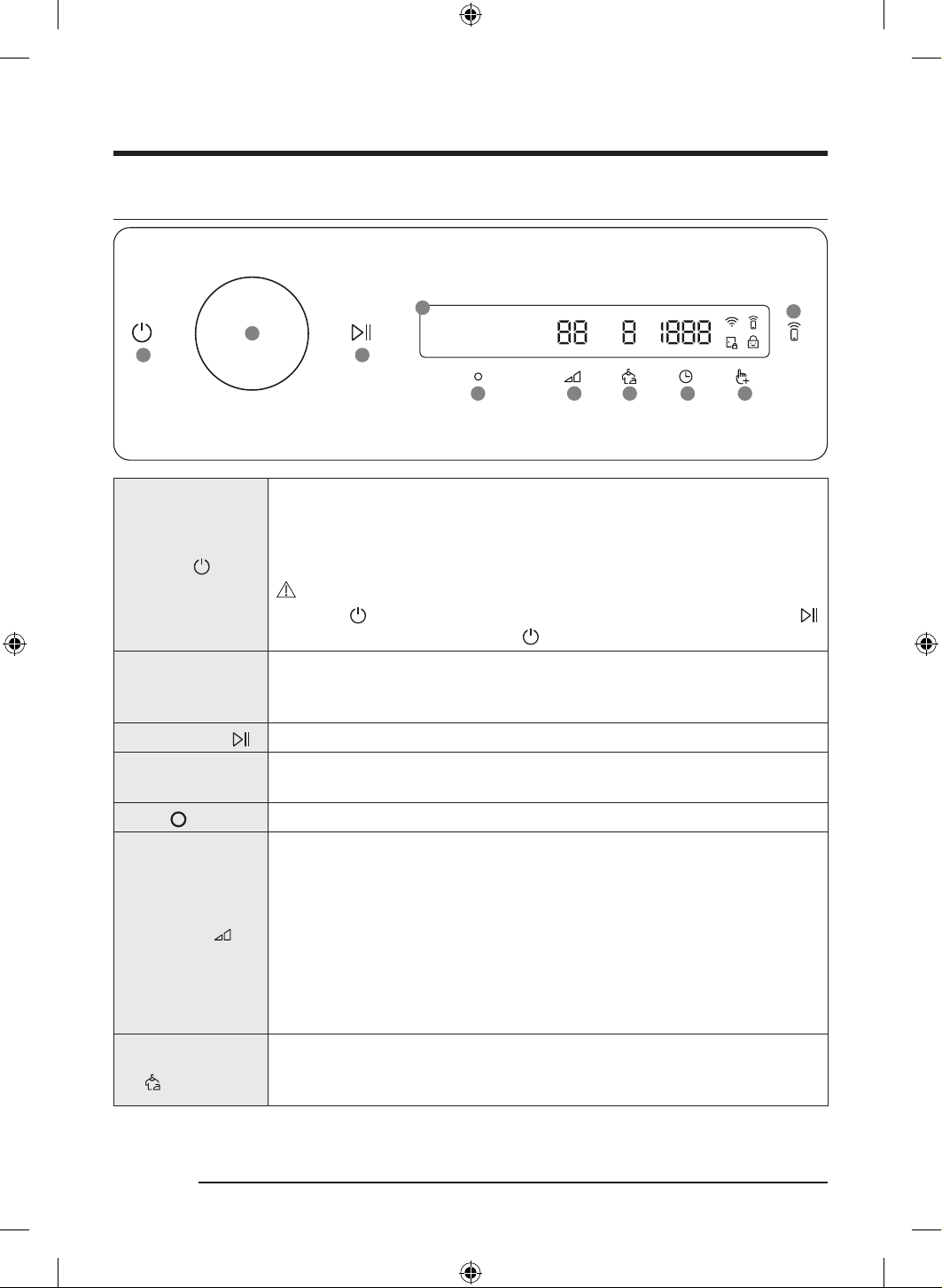
01 P o w e r
Tap to turn the dryer on or off.
• If you do not manipulate the control panel for 10 minutes after the dryer is
turned on, the dryer automatically turns off.
• The dryer automatically turns off when the drying completes.
CAUTION
Do not tap
to turn the dryer off while the drying is in progress. Tap and hold
to pause the cycle first, and then tap to turn the dryer off.
02 Navigation dial
Turn the Navigation dial left or right to navigate through cycles and functions.
When you turn the Navigation dial, the display shows your selection (such as
cycle, additional functions, and system functions).
03 Start/Pause
Tap and hold to start or pause an operation.
04 Display
The display shows the current cycle, estimated time remaining, cycle options, and
other useful or alert messages.
05 O K
Tap to confirm your selection of function or setting.
06 Dry Level
Tap to change the dry level for the selected cycle. You can select from level 1 to 4,
but available level depends on the selected cycle.
• 4: Suitable for large and thick items.
• 3: Standard drying level.
• 2: The Damp dry level is designed to partially dry items. Use for items that lay
flat or hang to dry.
• 1: Gently dries items to protect fabric. Suitable for delicate items or items you
want to naturally dry (by hanging or laying flat on drying rack) while they are
damp.
07 Wrinkle Prevent
Tap to turn the Wrinkle Prevent function on or off. When the function is on, the
dryer rotates the drum intermittently after completing the dry cycle to prevent
wrinkles.
DV8700TK_SimpleUX_DC68-04223K-03_EN_P171.indd 26DV8700TK_SimpleUX_DC68-04223K-03_EN_P171.indd 26 2024/8/2 16:53:162024/8/2 16:53:16
English 27
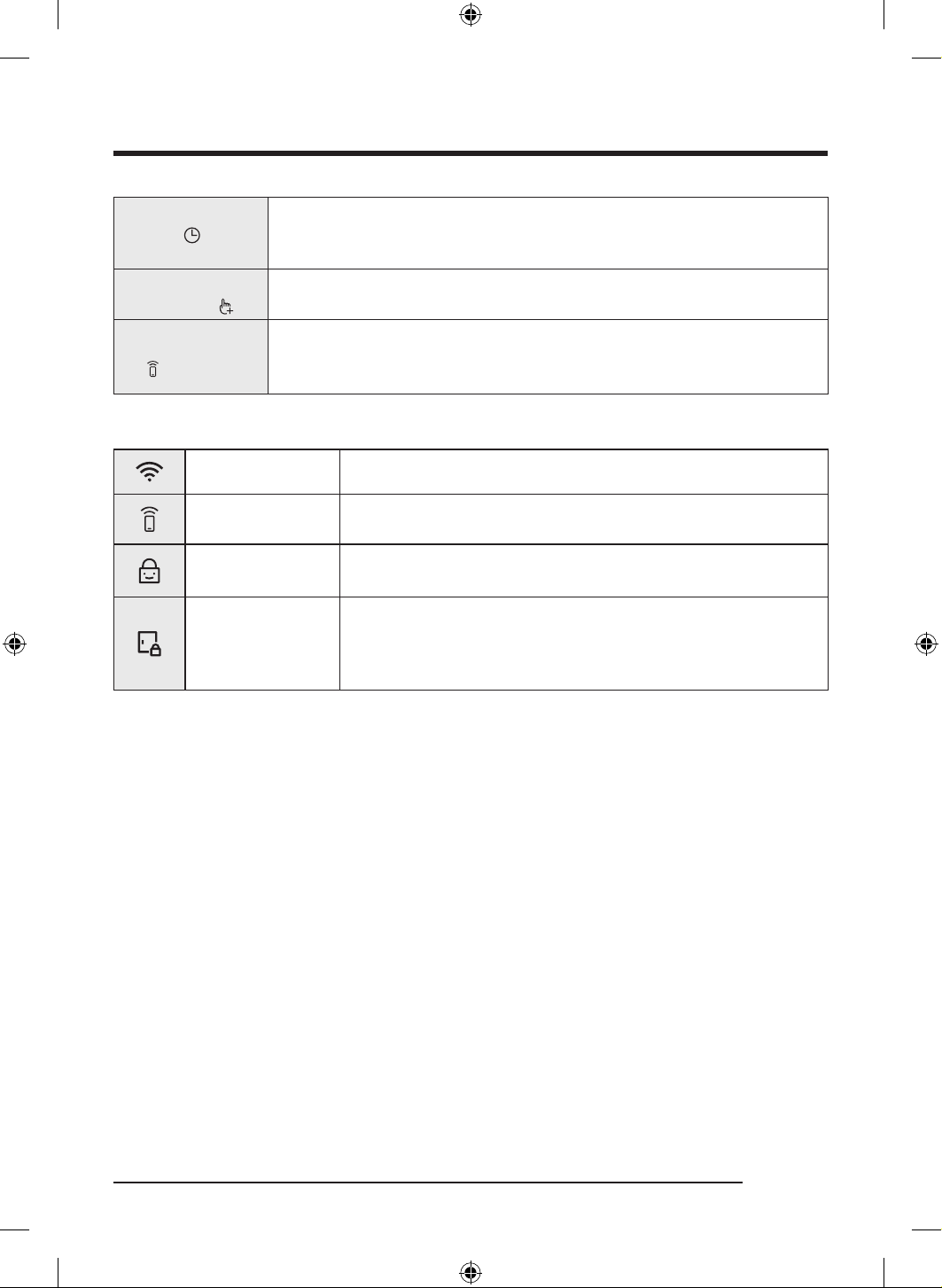
08 Time
Tap to select the cycle time for Time Dry, Rack Dry, or Cool Air. You can set the
drying time between 20 minutes and 240 minutes. Available drying time depend
on the selected cycle.
09 Additional
Functions
• Tap to enter the additional functions menu.
• Tap and hold for 3 seconds to enter the system functions menu.
10 Smart Control
Tap to activate or deactivate the Smart Control function.
• When the Smart Control function is activated, you can control your dryer
remotely using the SmartThings app in your smartphone.
Icon description
Wi-Fi This icon indicates that the dryer is connected to Wi-Fi.
Smart Control
This icon indicates that Smart Control is on. For more information on
“Smart Control”, see page 37.
Child Lock
This icon indicates that Child Lock is on.
For more information on “Child Lock”, see page 34.
Door Lock
• This icon indicates the door is locked and cannot be opened.
• The door locks automatically during a cycle and this indicator turns
on.
• You can open the door when this icon disappears.
DV8700TK_SimpleUX_DC68-04223K-03_EN_P171.indd 27DV8700TK_SimpleUX_DC68-04223K-03_EN_P171.indd 27 2024/8/2 16:53:172024/8/2 16:53:17
Operations
English28
Operating a cycle
Time set based on load
05 03 04
01 06
02
1. Tap to turn on the dryer.
2. Turn the Navigation dial to select the cycle you want. For more information on “ Cycle overview”, see
page 29.
3. Tap
, , or to change the default cycle settings.
4. Tap
, and then turn the Navigation dial to select additional function. For more information on
“Additional functions”, see page 32.
5. Tap
to change the settings for selected additional function. Not all cycles have additional functions
available.
6. Tap and hold
to start operation. Once you set the cycle you want, the screen displays a brief cycle
description, maximum laundry load, and cycle time. You can also check the cycle progress, remaining
cycle time, and information codes.
DV8700TK_SimpleUX_DC68-04223K-03_EN_P171.indd 28DV8700TK_SimpleUX_DC68-04223K-03_EN_P171.indd 28 2024/8/2 16:53:172024/8/2 16:53:17
English 29
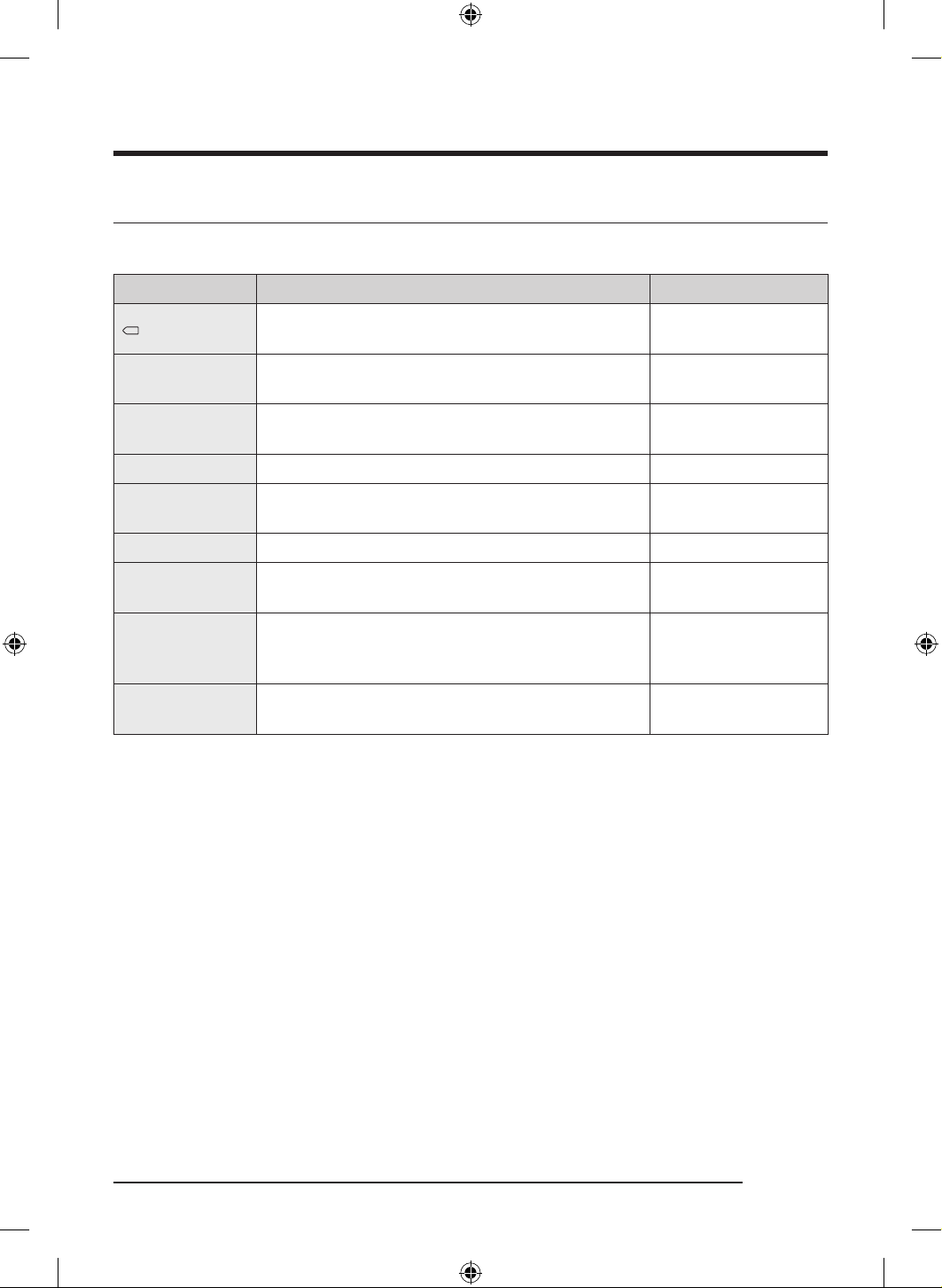
Cycle overview
Sensor dry cycles
Cycle Description Max load (kg)
Cotton
For cottons, bed linens, table linens, underwear, towels,
or shirts.
16.0
AI Dry
Auto optimized drying by AI according to the load and
ambient temperature.
16.0
Quick Dry
For mixed loads consisting of cotton and synthetic
fabrics that need quick drying.
8.0
Shirts Use to quickly dry one item such as a shirt. 2.0
Bedding
For bulky items such as blankets, sheets, comforters,
and light duvets.
4.0
Towels Use to dry loads such as bath towels. 6.0
Delicates
For the delicate items to be handled with care such as
lingerie.
3.0
Synthetics
For blouses, and shirts that are made of polyester
(Diolen, Trevira), polyamide (Perlon, nylon), or other
similar blends.
7.0
Wool
For machine washable and tumble dryable wool only.
For best results, turn laundry inside out before drying.
1.0
DV8700TK_SimpleUX_DC68-04223K-03_EN_P171.indd 29DV8700TK_SimpleUX_DC68-04223K-03_EN_P171.indd 29 2024/8/2 16:53:172024/8/2 16:53:17
Operations
English30
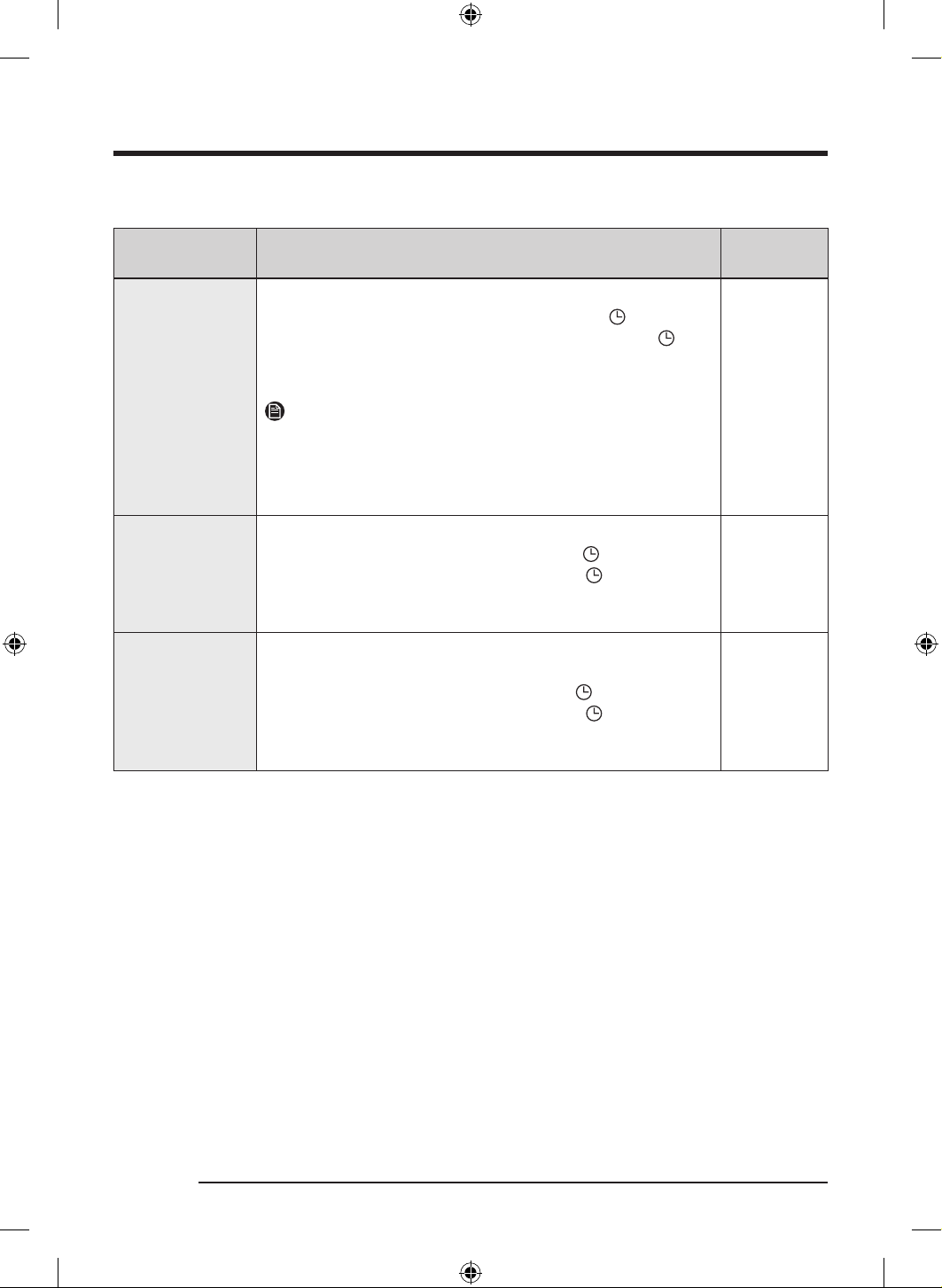
Manual dry cycles
Cycle Description
Max load
(kg)
Time Dry
Use to set a desired dry time.
Turn the Navigation dial to select Time Dry and tap
to set
the drying time between 20 minutes and 240 minutes. Tap
repeatedly to select the available time options in this order: 20 /
30 / 40 / 50 / 60 / 90 / 120 / 150 / 180 / 240.
NOTE
If you use this cycle for additional drying after finishing one of the
Sensor Dry cycles (listed on page 29), set the minimum drying time
(20 minutes). Excessive drying may cause damage or deform to an
item.
-
Rack Dry
Timed cycle for items that needs to be dried on a drying rack.
Turn Navigation dial to select Rack Dry and tap
to set the drying
time between 20 minutes and 240 minutes. Tap repeatedly to
select the available time options in this order: 20 / 30 / 40 / 50 /
60 / 90 / 120 / 150 / 180 / 240.
-
Cool Air
All types of fabric. For freshening up or airing items of laundry that
have not been worn for long.
Turn Navigation dial to select Cool Air and tap
to set the drying
time between 20 minutes and 240 minutes. Tap
repeatedly to
select the available time options in this order: 20 / 30 / 40 / 50 /
60 / 90 / 120 / 150 / 180 / 240.
-
DV8700TK_SimpleUX_DC68-04223K-03_EN_P171.indd 30DV8700TK_SimpleUX_DC68-04223K-03_EN_P171.indd 30 2024/8/2 16:53:172024/8/2 16:53:17
English 31
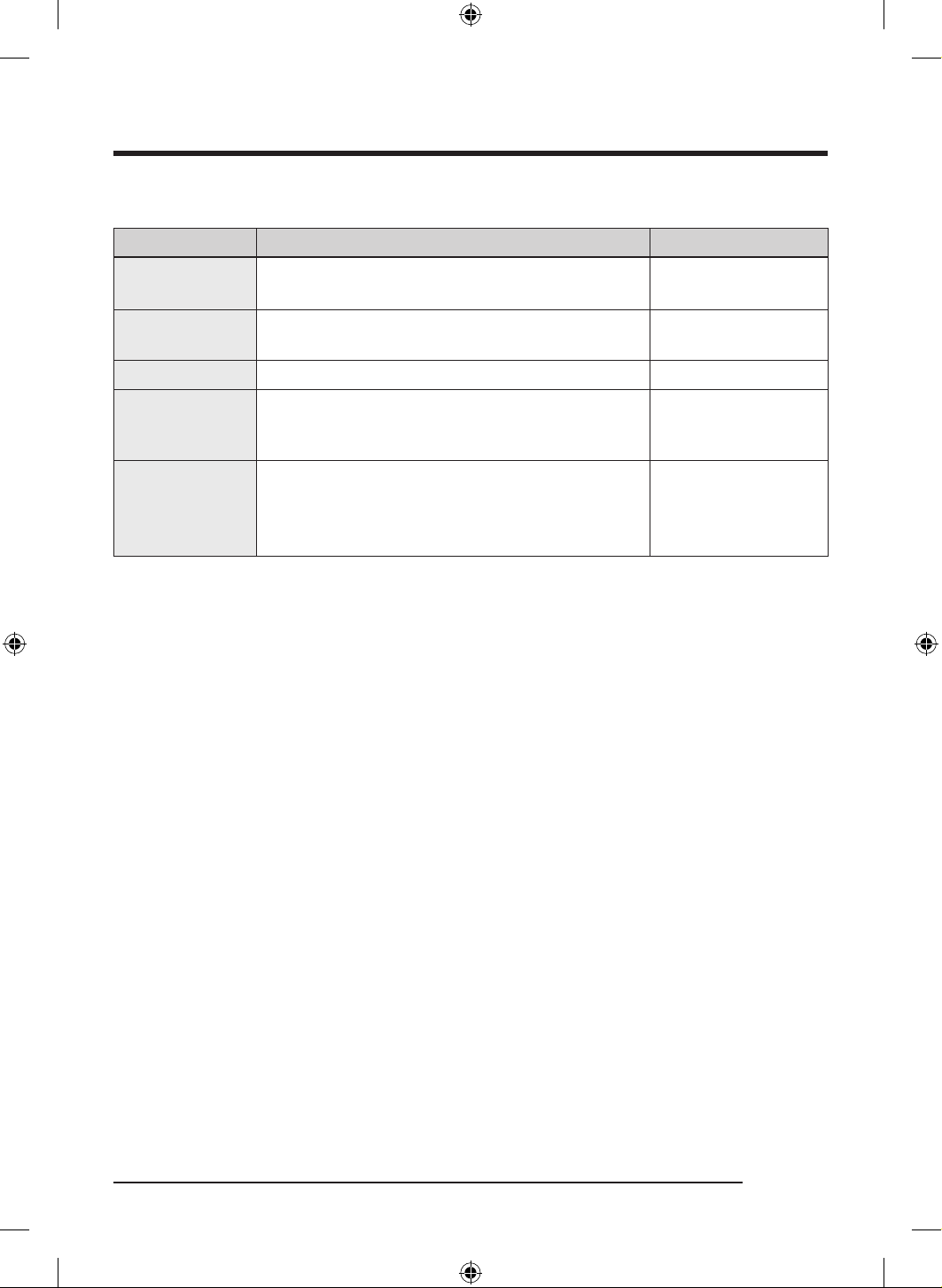
Other cycles
Cycle Description Max load (kg)
Hygiene Care+
For sanitizing wet and dry clothes and linen fabric to
eliminate bacteria.
6.0 (for wet)
4.0 (for dry)
Air Bedding Care
For dusting off clothes, bed spreads, bed sheets and
bedding covers, etc.
3.0
Down Jacket Care For fluffing up a down jacket. 2.0
Outdoor Care
For restoring the water repellent properties of outdoor
wear treated with water repellent agents such as
skiwear and mountain clothing.
1.0
Self Tub Dry
Use this cycle to keep both the drum and the heat
exchanger fresh.
• Do not use this cycle while there is any laundry
stored in the drum.
-
DV8700TK_SimpleUX_DC68-04223K-03_EN_P171.indd 31DV8700TK_SimpleUX_DC68-04223K-03_EN_P171.indd 31 2024/8/2 16:53:172024/8/2 16:53:17
Operations
English32
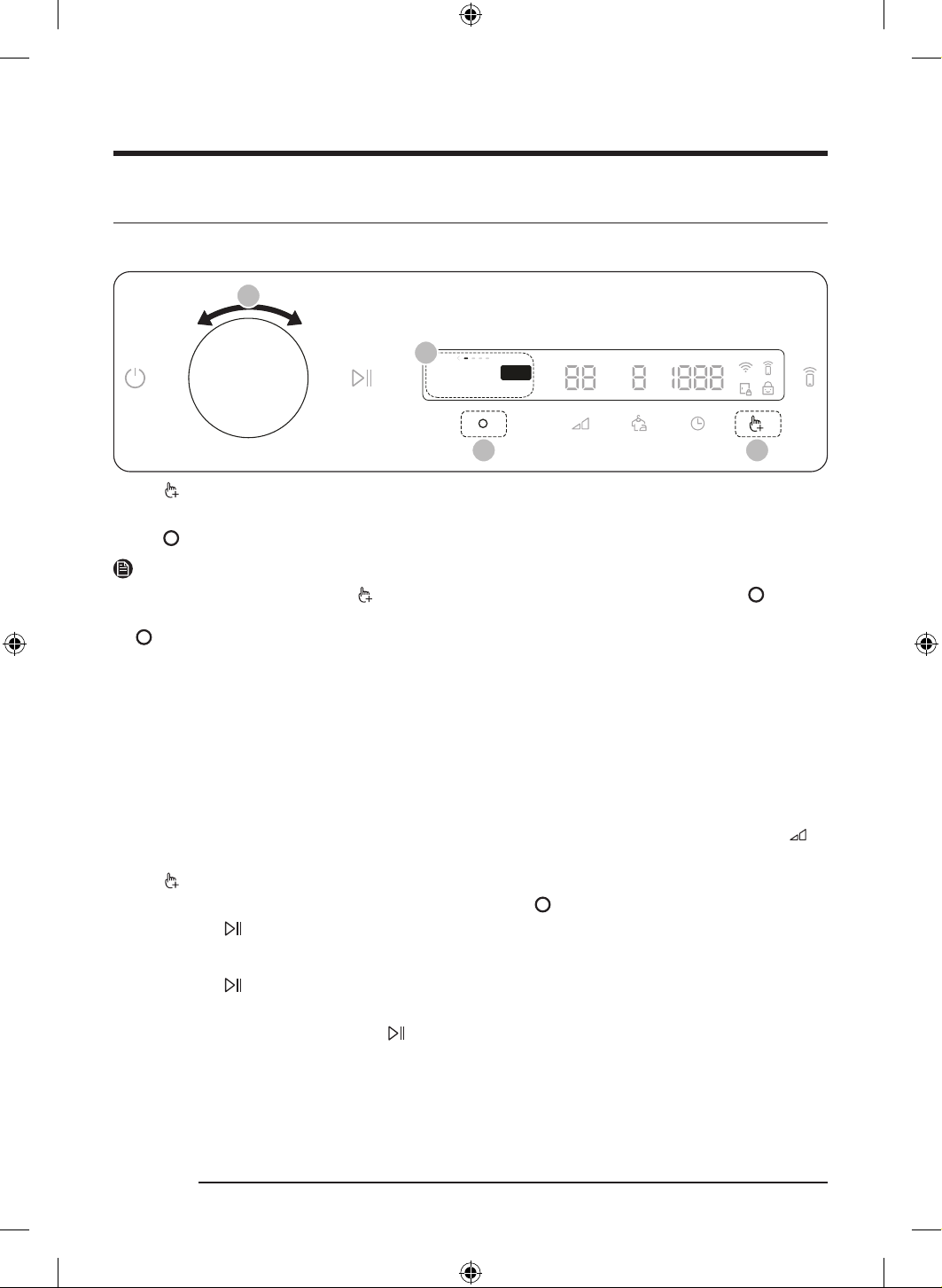
Additional Functions
Using Additional Functions
Damp Alert
Tap O to set alert
Off
03 01
02
02
1. Tap .
2. Turn the Navigation dial to select the desired additional function.
3. Tap
to change the selected function’s settings or start the function.
NOTE
• To return to the main screen, tap
again or turn the Navigation dial to select Back and tap .
• If the selected function is not supported, the " Currently not supported" message is displayed, and the
button is not activated.
• When you select an additional function, a brief help message appears for the first ten times of use.
• If you do not manipulate the control panel for 7 seconds after entering the Additional Functions menu,
the display returns to the main screen.
Damp Alert
This function alerts you when shirts and other items that require ironing are dry enough to be suitable for
ironing.
1. Select a cycle and change the cycle settings as necessary.
- This function is available for Cotton , AI Dry , Quick Dry , Synthetics , and Shirts with the Dry Level
set to 2 ~ 4.
2. Tap
.
3. Turn the Navigation dial to select Damp Alert, and then tap
.
4. Tap and hold
.
Alarm during drying:
1. Tap and hold
to pause the cycle.
2. Open the door and take out the items you want to iron.
3. Close the door, and then tap and hold
to dry the remaining items.
DV8700TK_SimpleUX_DC68-04223K-03_EN_P171.indd 32DV8700TK_SimpleUX_DC68-04223K-03_EN_P171.indd 32 2024/8/2 16:53:182024/8/2 16:53:18
English 33
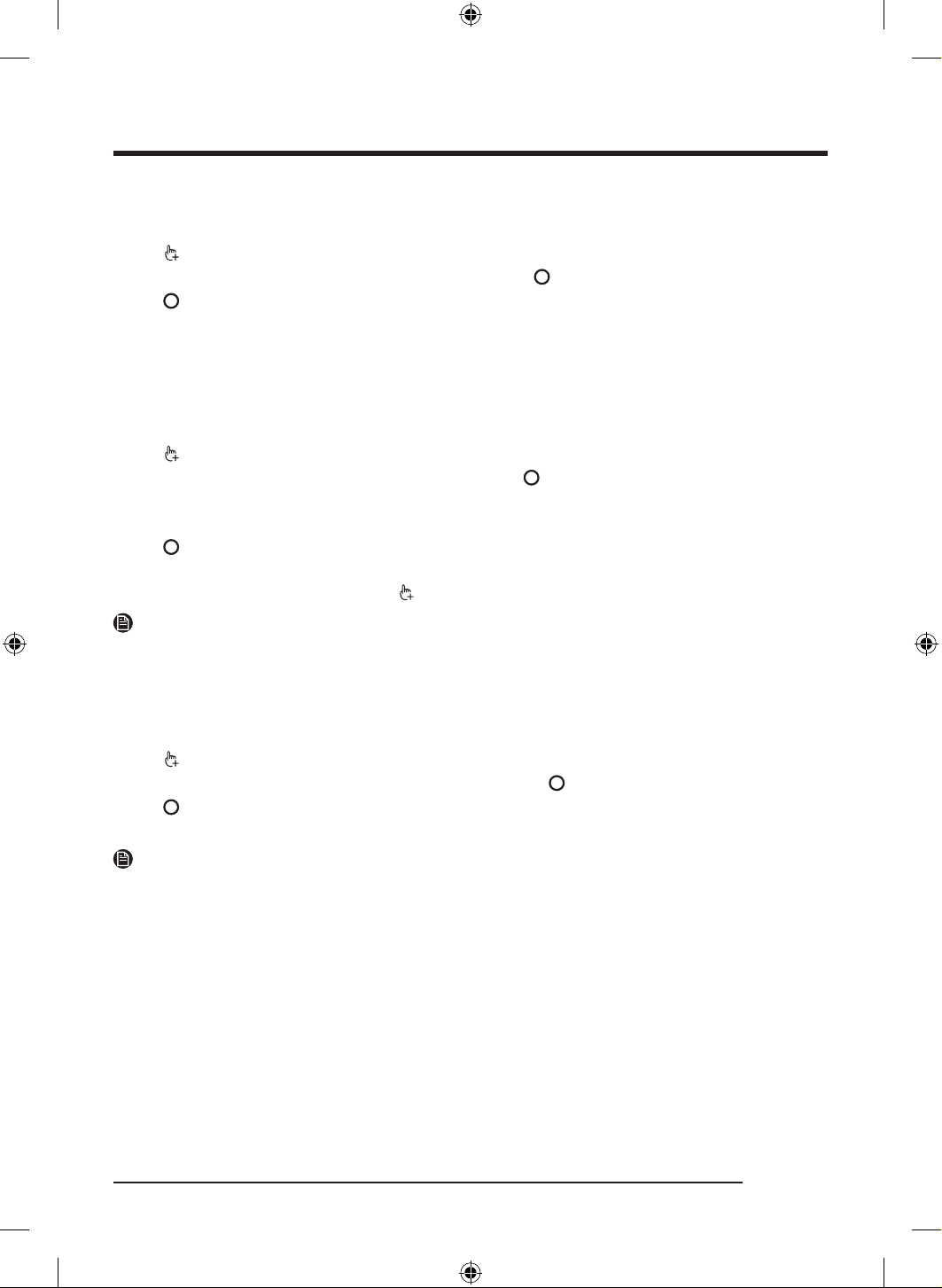
Drum Light
You can turn the drum light on or off.
1. Tap
.
2. Turn the Navigation dial to select Drum Light, and then tap
.
3. Tap
to select On or Off.
- The drum light turns on even when the dryer is off. (If the dryer is plugged in d to a power outlet.)
- When the dryer door opens, the drum light automatically turns on and automatically turns off after
2 minutes.
My Cycles
Add or remove cycles to create a personal cycle list.
1. Tap
.
2. Turn the Navigation dial to select My Cycles, and then tap
.
- You can only edit a cycle to create a personal cycle when the dryer is not operating.
3. Turn the Navigation dial to select a desired cycle.
4. Tap
to add or remove the selected cycle.
- Addition and removal of a cycle is saved automatically.
5. Once you finish creating My Cycles , tap
to return to the cycles screen.
NOTE
The Cotton and Self Tub dry cycles can not be removed from the cycles list.
Optional Filter
If you installed the Optional filter to prevent dust accumulation on the heat exchanger, use this setting to
set the filter cleaning alert on or off.
1. Tap
.
2. urn the Navigation dial to select Optional Filter, and then tap
.
3. Tap
to select On or Off.
- Select On to receive a filter cleaning alert message.
NOTE
If the “Clean Optional Filter” or “Clean heat exchanger” message appears on the display, clean both the
heat exchanger and the Optional Filter. (Refer to the “Heat exchanger” section on page 49 and “Optional
Filter” section on page 51.)
DV8700TK_SimpleUX_DC68-04223K-03_EN_P171.indd 33DV8700TK_SimpleUX_DC68-04223K-03_EN_P171.indd 33 2024/8/2 16:53:182024/8/2 16:53:18
Operations
English34
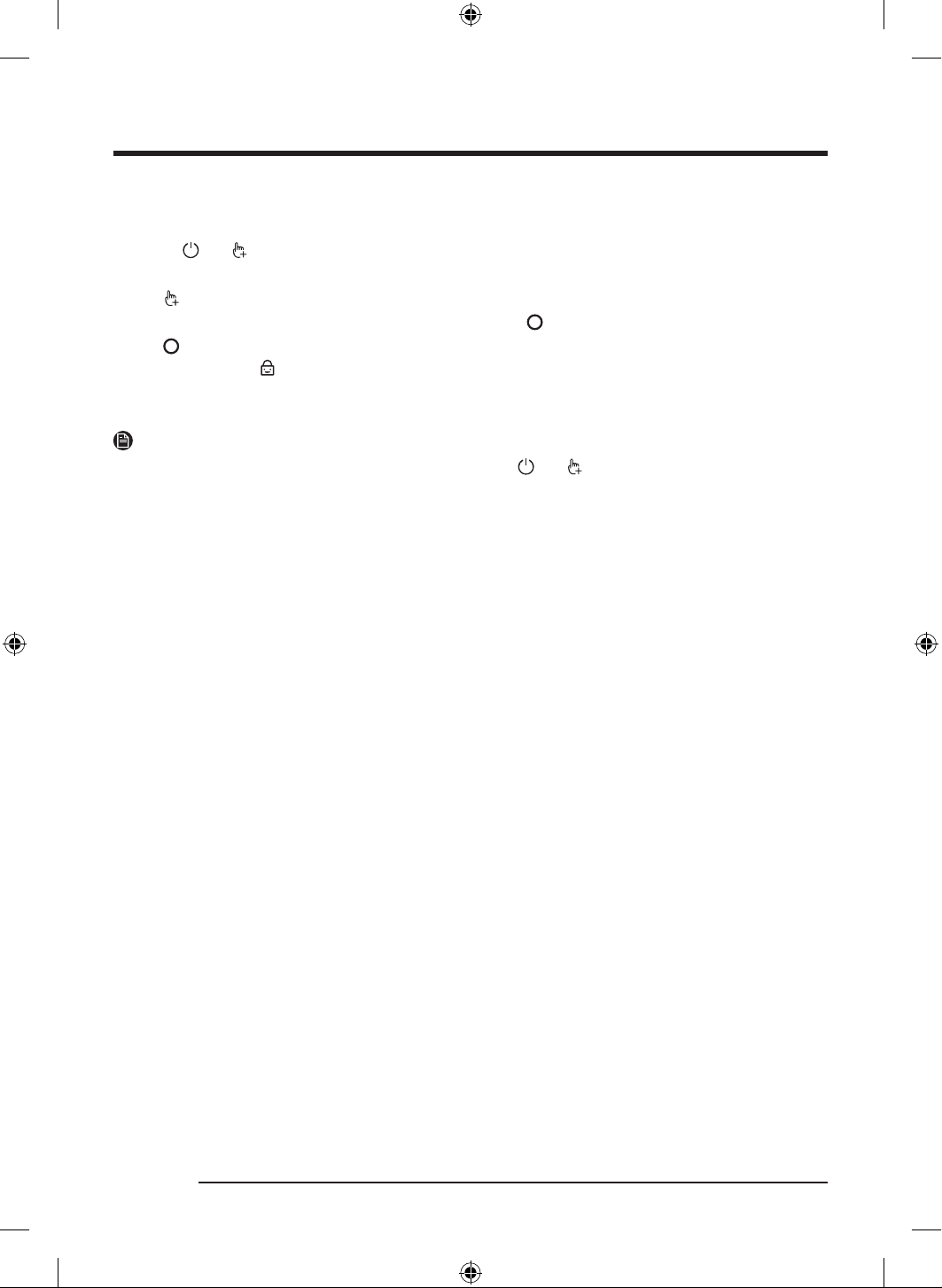
Child Lock
To prevent children or infants from accidentally starting or setting the dryer, Child Lock locks all buttons
except for and .
1. Close the door.
2. Tap
.
3. Turn the Navigation dial to select Child Lock, and then tap
.
4. Tap
to select On or Off.
- The Child Lock icon turns on when the function is on.
- You cannot turn on Child Lock with the door open. If you get the " Door is open" message on the
display while you try to turn on Child Lock, close the door and try again.
NOTE
• When Child Lock is on, all buttons are disabled except for
and .
• If you tap a button with Child Lock on, an alarm triggers with the “Child Lock on” message.
• To dismiss a notification message, turn off Child Lock or the power.
DV8700TK_SimpleUX_DC68-04223K-03_EN_P171.indd 34DV8700TK_SimpleUX_DC68-04223K-03_EN_P171.indd 34 2024/8/2 16:53:182024/8/2 16:53:18
English 35
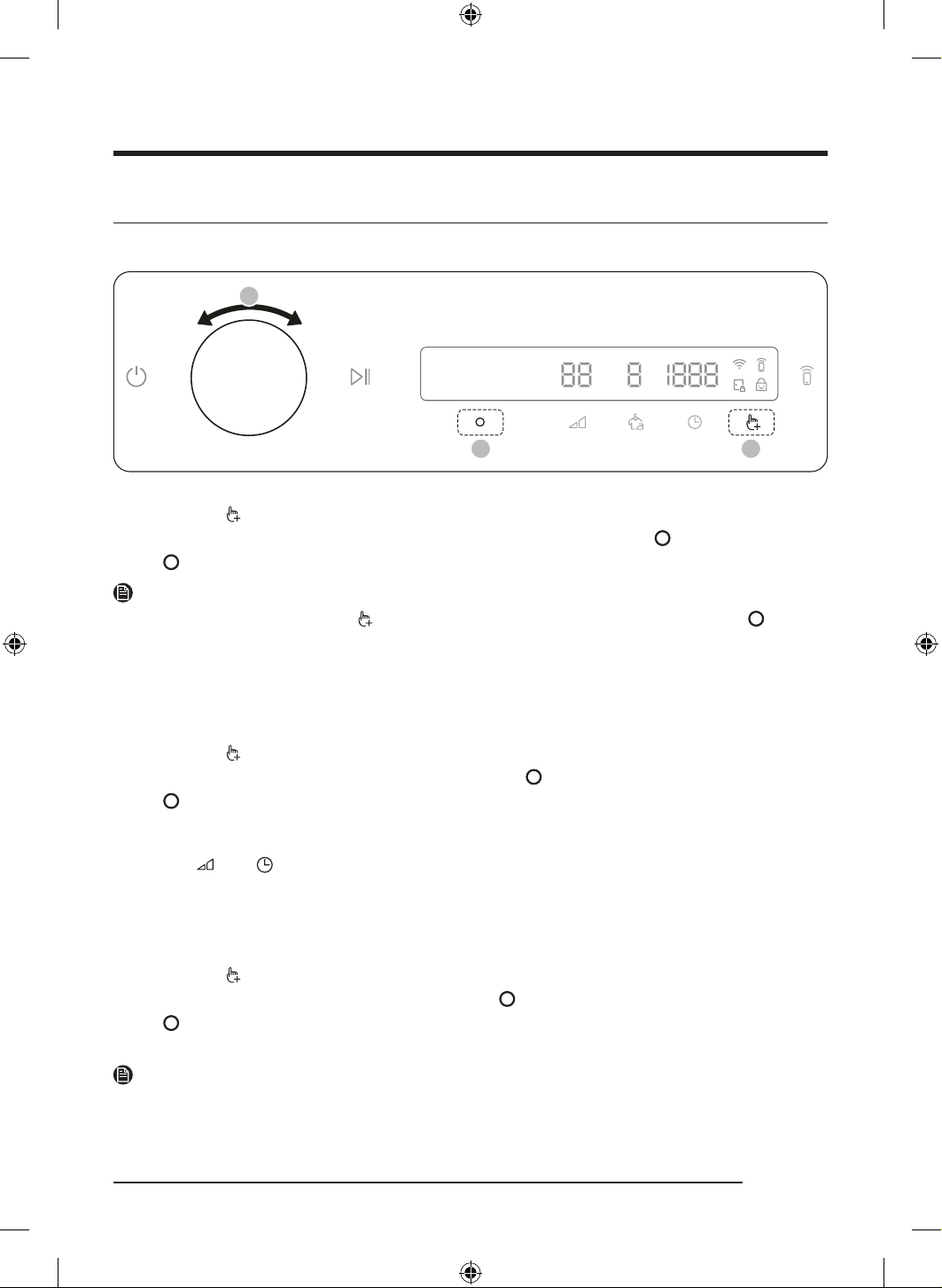
System Functions
Using System Functions
02
03 01
*
* Tap and hold 3 seconds.
1. Tap and hold
for 3 seconds.
2. Turn the Navigation dial and select the desired system function, and then tap
.
3. Tap
to change the selected function’s settings or start the function.
NOTE
• To return to the main screen, tap
again or turn the Navigation dial to select Back and tap .
• If you do not manipulate the control panel for 7 seconds after entering the System Functions menu, the
display returns to the main screen.
AI Pattern
This function saves your frequently used cycles and settings.
1. Tap and hold
for 3 seconds.
2. Turn the Navigation dial to select AI Pattern, and then tap
.
3. Tap
to select On or Off.
- The default setting is On. Set it to Off if you do not want to use this function.
- When you turn the function on, the dryer remembers frequently used cycles and their settings ( Dry
Level , Time ) and save them in frequently used order.
- When you turn off the function, all the saved data resets.
Alarm
You can enable/disable alarm sounds.
1. Tap and hold
for 3 seconds.
2. Turn the Navigation dial to select Alarm, and then tap
.
3. Tap
to select On or Off.
- The default setting is On.
NOTE
The setting remains unchanged even if you restart the dryer.
DV8700TK_SimpleUX_DC68-04223K-03_EN_P171.indd 35DV8700TK_SimpleUX_DC68-04223K-03_EN_P171.indd 35 2024/8/2 16:53:182024/8/2 16:53:18
Operations
English36
Calibration
You can run calibration again for accurate weight detection.
1. Tap and hold
for 3 seconds.
2. Turn the Navigation dial to select Calibration, and then tap
.
- Calibration does not start if the door is not closed properly.
- The drum rotates clockwise and anticlockwise for about 3 minutes.
3. When calibration is complete, the “Calibration complete” message appears on the display and the dryer
turns off automatically.
Wi-Fi
You can turn the dryer's Wi-Fi on or off.
1. Tap and hold
for 3 seconds.
2. Turn the Navigation dial to select Wi-Fi, and then tap
.
3. Tap
to select On or Off.
- The dryer's Wi-Fi is off as a factory default setting. However, the dryer's Wi-Fi turns on automatically
when you turn on the dryer for the first time. Then, the final Wi-Fi setting maintains regardless of the
dryer power status.
- Once you turn on the dryer's Wi-Fi and connect to a network, the dryer remains connected to the
network even when you turn off the power.
- The Wi-Fi indicates that the dryer is connected to the router through the Wi-Fi connection.
Language
You can change the system language.
1. Tap and hold
for 3 seconds.
2. Turn the Navigation dial to select Language, and then tap
.
3. Turn the Navigation dial to select the desired language, and then tap
.
Factory Reset
You can reset your dryer.
1. Tap and hold
for 3 seconds.
2. Turn the Navigation dial to select Factory Reset, and then tap
.
- Your dryer resets to the factory setting.
DV8700TK_SimpleUX_DC68-04223K-03_EN_P171.indd 36DV8700TK_SimpleUX_DC68-04223K-03_EN_P171.indd 36 2024/8/2 16:53:182024/8/2 16:53:18
English 37
Special features
Smart Control
You can connect to the SmartThings app and control your dryer remotely.
Connecting your dryer
• Download and open the SmartThings app on your mobile device .
• Tap and hold
to turn on the dryer.
• Tap and hold for 3 seconds on the dryer.
a. The dryer enters AP mode and connects to your mobile device.
b. Tap
to authenticate your dryer on your mobile device.
c. Once the authentication process is complete, your dryer is successfully connected to the app. Use
various features available in the SmartThings app.
NOTE
• If your dryer fails to connect with the SmartThings app, try again.
• Check your router if you experience any Internet connection problem after connecting your dryer with
the SmartThings app.
• If the Wi-Fi is off, tap and hold
for 3 seconds to navigate to System Functions, select Wi-Fi and tap
to turn it on.
• Turning the dryer's Wi-Fi on allows you connect to the dryer via SmartThings app on your smartphone
regardless of the power status of the dryer. However, the dryer appears offline on the SmartThings app
if the dryer's Wi-Fi is off.
• Close the door before starting the Smart Control function.
• If you use the dryer 20 times without being connected to SmartThings , the next time you turn the dryer
on, a pop-up about Smart Control connection will appear for 3 seconds.
• If the dryer's Wi-Fi is not connected to an AP (access point), the Wi-Fi will turn off when you turn of the
power.
Stay Connect
Set up the Stay Connect function in your SmartThings app. Your dryer stays connected to the app so you can
use the dryer when you are away from home.
1. If you turn on the Stay Connect function on the SmartThings app, the dryer will stay in standby power
saving mode after completing a cycle.
- The Stay Connect function will remain active for up to 24 hour if the door remains closed.
2. When the Stay Connect function is active, the Smart Control
and Wi-Fi turn on your dryer display.
3. Conveniently control your dryer using the SmartThings app .
NOTE
The dryer switches to standby power saving mode when operation is paused even if the machine is not
connected to the SmartThings app.
DV8700TK_SimpleUX_DC68-04223K-03_EN_P171.indd 37DV8700TK_SimpleUX_DC68-04223K-03_EN_P171.indd 37 2024/8/2 16:53:192024/8/2 16:53:19
Operations
English38
SmartThings
Wi-Fi connection
On your smartphone, go to Settings and turn on the wireless connection and select an AP (Access Point).
• This appliance supports the Wi-Fi 2.4 GHz protocols.
Download
On an app market (Google Play Store, Apple App Store, Samsung Galaxy Apps), find the SmartThings app
with a search term of “SmartThings”. Download and install the app on your device.
NOTE
The app is subject to change without notice for improved performance.
In addition, the further updates on app or the function in the app may stop due to usability and security
reasons, even if updates are currently supported on your OS.
Log in
You must first log into SmartThings with your Samsung account. To create a new Samsung account, follow
the instructions on the app. You don’t need a separate app to create your account.
NOTE
If you have a Samsung account, use the account to log in. A registered Samsung smartphone user
automatically logs in.
To register your appliance to SmartThings
1. Make sure your smartphone is connected to a wireless network. If not, go to Settings and turn on the
wireless connection and select an AP (Access Point).
2. Open SmartThings on your smartphone.
3. If a message of “ A new device is found. ”, select Add.
4. If no message appears, select + and select your appliance in a list of devices available. If your appliance
is not listed, select Device Type > Specific Device Model, and then add your appliance manually.
5. Register your appliance to the SmartThings app as follows.
a. Add your appliance to SmartThings. Make sure your appliance is connected to SmartThings.
b. When registration is complete, your appliance appears on your smartphone.
DV8700TK_SimpleUX_DC68-04223K-03_EN_P171.indd 38DV8700TK_SimpleUX_DC68-04223K-03_EN_P171.indd 38 2024/8/2 16:53:192024/8/2 16:53:19
English 39
Open Source Announcement
The software included in this product contains open source software. You may obtain the complete
corresponding source code for a period of three years after the last shipment of this product by contacting
our support team via http://opensource.samsung.com (Please use the “Inquiry” menu.)
It is also possible to obtain the complete corresponding source code in a physical medium such as a CD-
ROM; a minimal charge will be required.
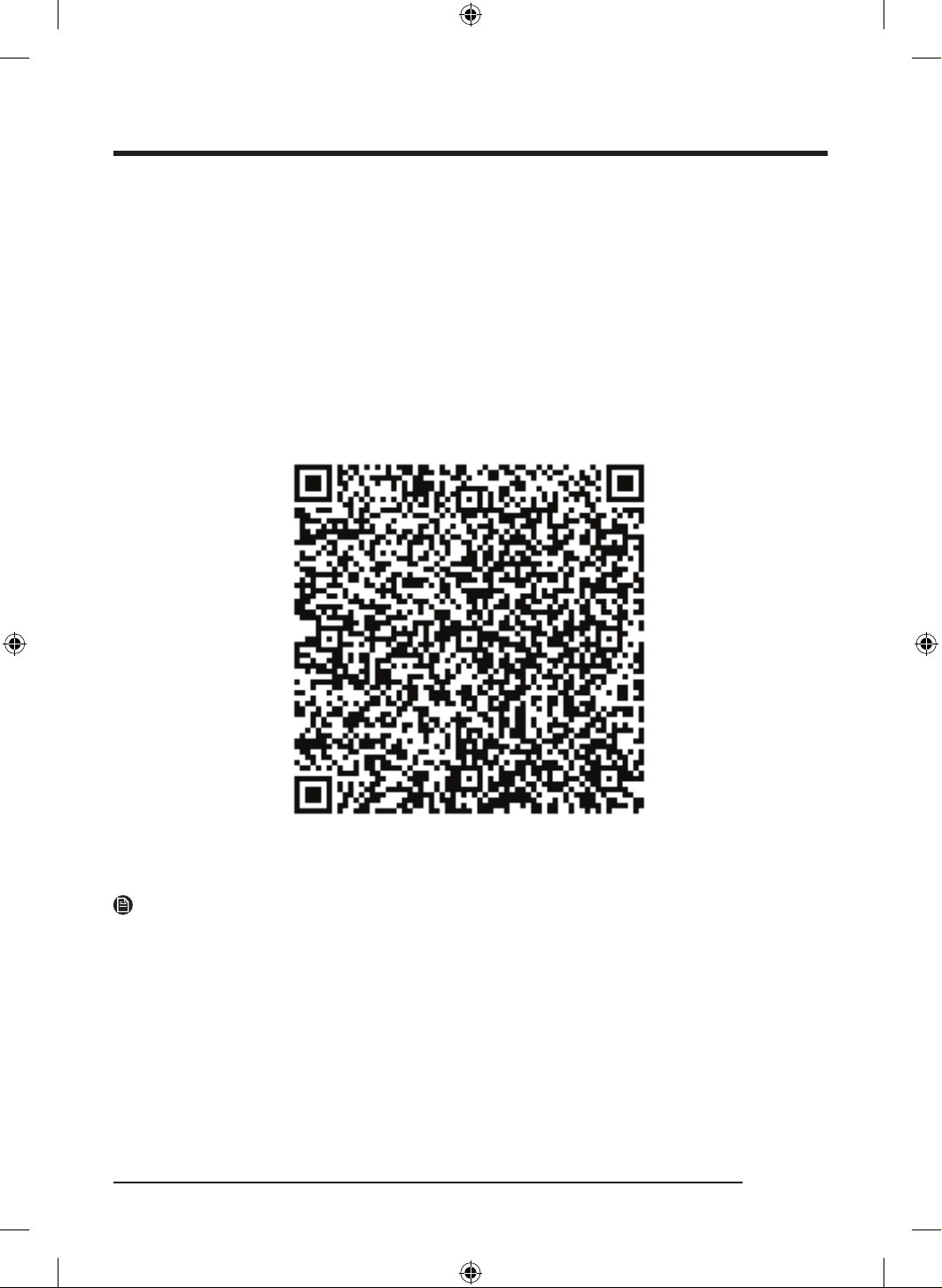
The following URL http://opensource.samsung.com/opensource/SMART_AT_051/seq/0 leads to the
open source license information as related to this product. This offer is valid to anyone in receipt of this
information.
NOTE
Hereby, Samsung declares that this radio equipment is in compliance with Directive 2014/53/EU and
with the relevant statutory requirements in the UK. The full text of the EU declaration of conformity and
the UK declaration of conformity is available at the following internet address: The official Declaration of
conformity may be found at http://www.samsung.com, go to Support > Support home and enter the model
name.
Wi-Fi max transmitter power : 20 dBm at 2.412 GHz – 2.472 GHz
DV8700TK_SimpleUX_DC68-04223K-03_EN_P171.indd 39DV8700TK_SimpleUX_DC68-04223K-03_EN_P171.indd 39 2024/8/2 16:53:192024/8/2 16:53:19
Operations
English40
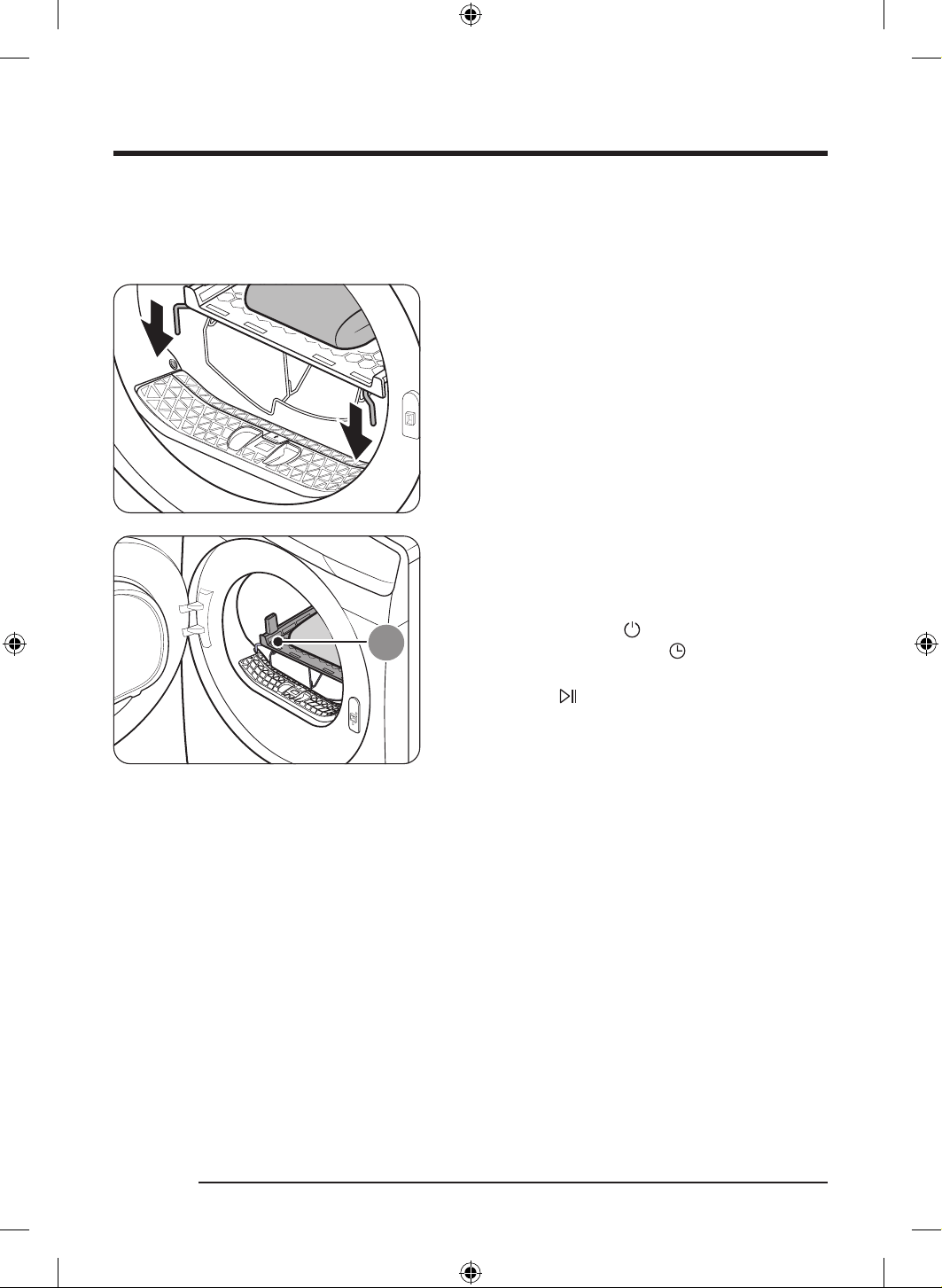
Using the drying rack
Set the drying time up to 240 minutes according to the moisture and weight of the items to dry. When
drying laundry using the drying rack, the Rack Dry cycle is recommended.
1. Position the drying rack in the drum, inserting the
front lips of the rack into the holes of the door
diaphram.
A. Drying rack
2. Place items on the rack, leaving enough space where
air can circulate. For clothing items, fold and place
flat on the rack. For shoes, place shoes with their
soles facing down.
3. Close the door and tap
. Turn the Navigation dial to
select Rack Dry, and then tap to select the drying
time.
4. Tap and hold
.
DV8700TK_SimpleUX_DC68-04223K-03_EN_P171.indd 40DV8700TK_SimpleUX_DC68-04223K-03_EN_P171.indd 40 2024/8/2 16:53:192024/8/2 16:53:19
English 41
Drying suggestions
Items (max 1.5 kg) Description
Washable sweaters (block to shape and lay flat on
rack)
When drying the laundry using the rack, fold
and place the clothes on the rack to prevent the
clothing from becoming wrinkled.
Stuffed toys (cotton or polyester fiber filled)
Stuffed toys (foam or rubber-filled)
Foam rubber pillows
Sneakers To dry sports shoes, place the shoes on the rack so
that the soles of the shoes are facing downwards.
CAUTION
• Drying foam rubber, plastic, or rubber on a heat setting may cause damage to the items and lead to a
fire hazard.
• To prevent damage to shoes, use the drying rack.
Remote control (applicable models only)
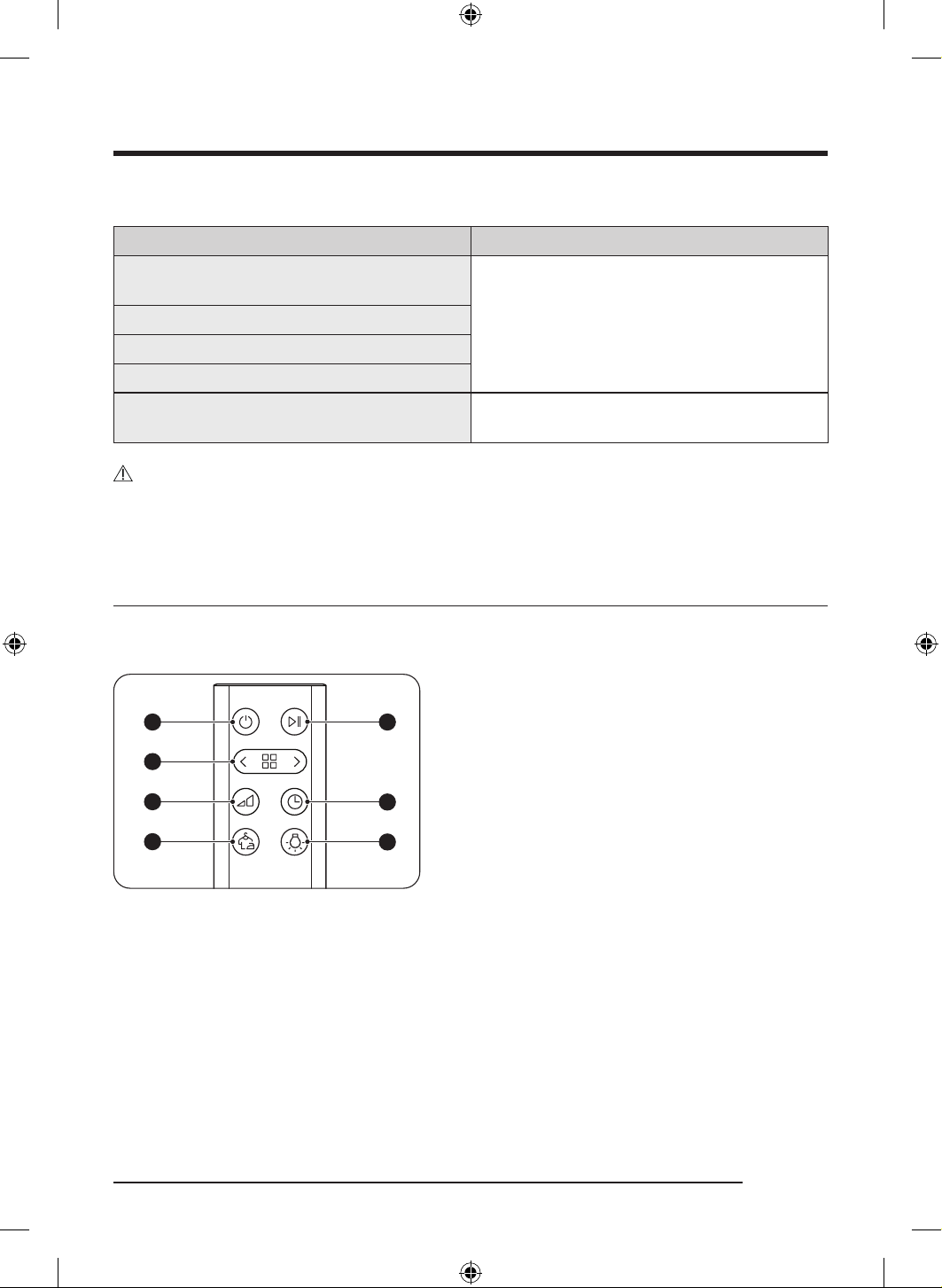
Remote control at a glance
ՋՌ
ՋՍ
ՋՎ
ՋՏ
ՋՐ
ՋՑ
ՋՒ
01 Power button
02 Cycle selection button
03 Dry Level button
04 Wrinkle Prevent button
05 Start/Pause button
06 Time button
07 Drum Light button
DV8700TK_SimpleUX_DC68-04223K-03_EN_P171.indd 41DV8700TK_SimpleUX_DC68-04223K-03_EN_P171.indd 41 2024/8/2 16:53:192024/8/2 16:53:19
Operations
English42
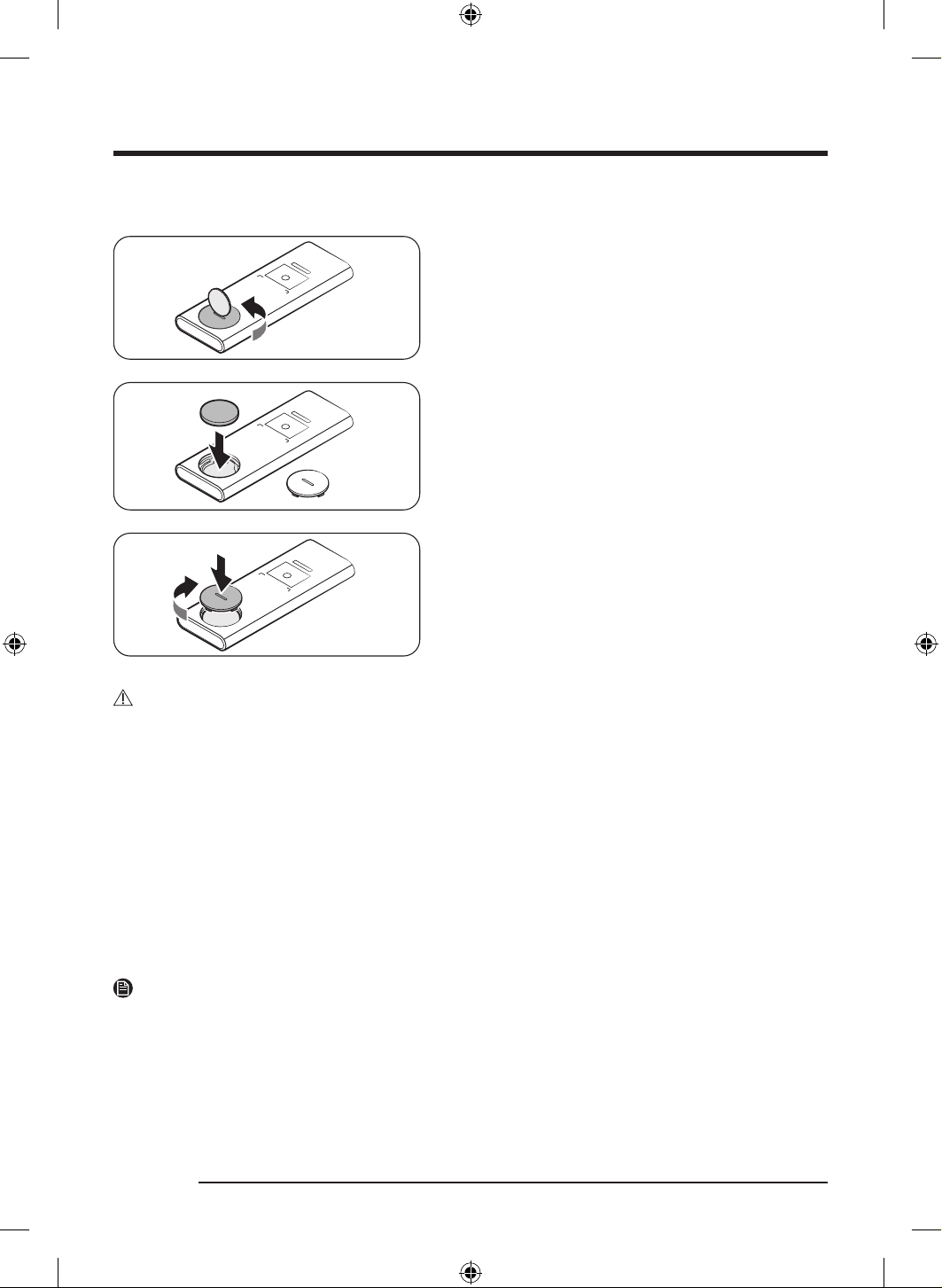
Inserting the remote control battery
1. With a coin or a flat-headed screwdriver, open the
battery cover by turning it counterclockwise.
2. Insert the battery.
- Check the "+" and "-" signs and insert the battery
in the correct position.
3. With a coin or a flat-headed screwdriver, close the
battery cover by turning it clockwise.
- Align the protrusions on the battery cover with
the grooves around the battery slot and press the
battery cover until you hear a clicking sound.
CAUTION
• Do not get any water on the remote control.
• Keep the battery out of reach of children.
• Keep small cells and batteries which are considered swallowable out of the reach of children.
• Swallowing may lead to burns, perforation of soft tissue, and death. Severe burns can occur within 2h of
ingestion.
• In case of ingestion of a cell or battery, seek medical assistance promptly.
• Caution risk of explosion if battery replaced by an incorrect type.
• Never crush or puncture the battery. Avoid exposing the battery to high external pressure, which can
lead to an internal short circuit and overheating.
• Do not disassemble the battery.
• When replacing the battery, make sure that the battery electrolyte does not get on the skin. It can be
harmful to the skin.
NOTE
Please consult a Samsung service center if other electronics are operated by the remote control.
DV8700TK_SimpleUX_DC68-04223K-03_EN_P171.indd 42DV8700TK_SimpleUX_DC68-04223K-03_EN_P171.indd 42 2024/8/2 16:53:202024/8/2 16:53:20
English 43
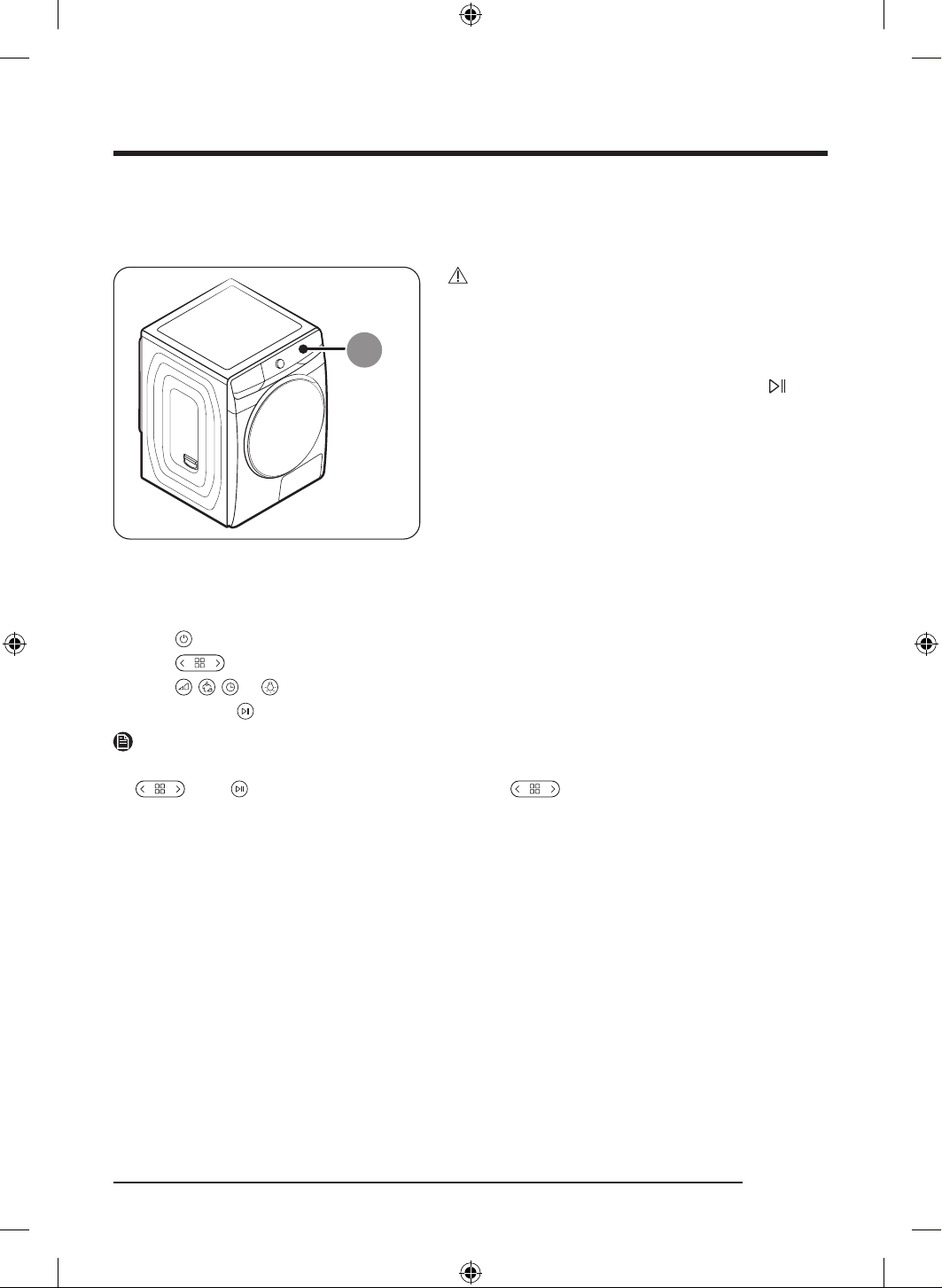
Location of the remote control receiver on the dryer
A. Remote control receiver
CAUTION
• When operating the dryer with the remote control,
point it accurately towards the remote control
receiver on the dryer.
• If you want to to start or pause the dryer with
the remote control, you must press and hold
for 2 seconds. (It is to prevent the children from
manipulating by accidentally pressing the button.)
Using the remote control
1. Press .
2. Press
to select a cycle.
3. Press
, , , or to set the dry level, wrinkle prevent, time, and drum light.
4. Press and hold
for 2 seconds to start the operation.
NOTE
• Once you select and start a cycle using the remote control, you cannot change the cycle by pressing
. Press to pause the cycle first, and then press to change the cycle.
• The remote control has a built-in magnet so you can store it without any holder by simply attaching it
on the dryer.
DV8700TK_SimpleUX_DC68-04223K-03_EN_P171.indd 43DV8700TK_SimpleUX_DC68-04223K-03_EN_P171.indd 43 2024/8/2 16:53:212024/8/2 16:53:21
English44
Maintenance
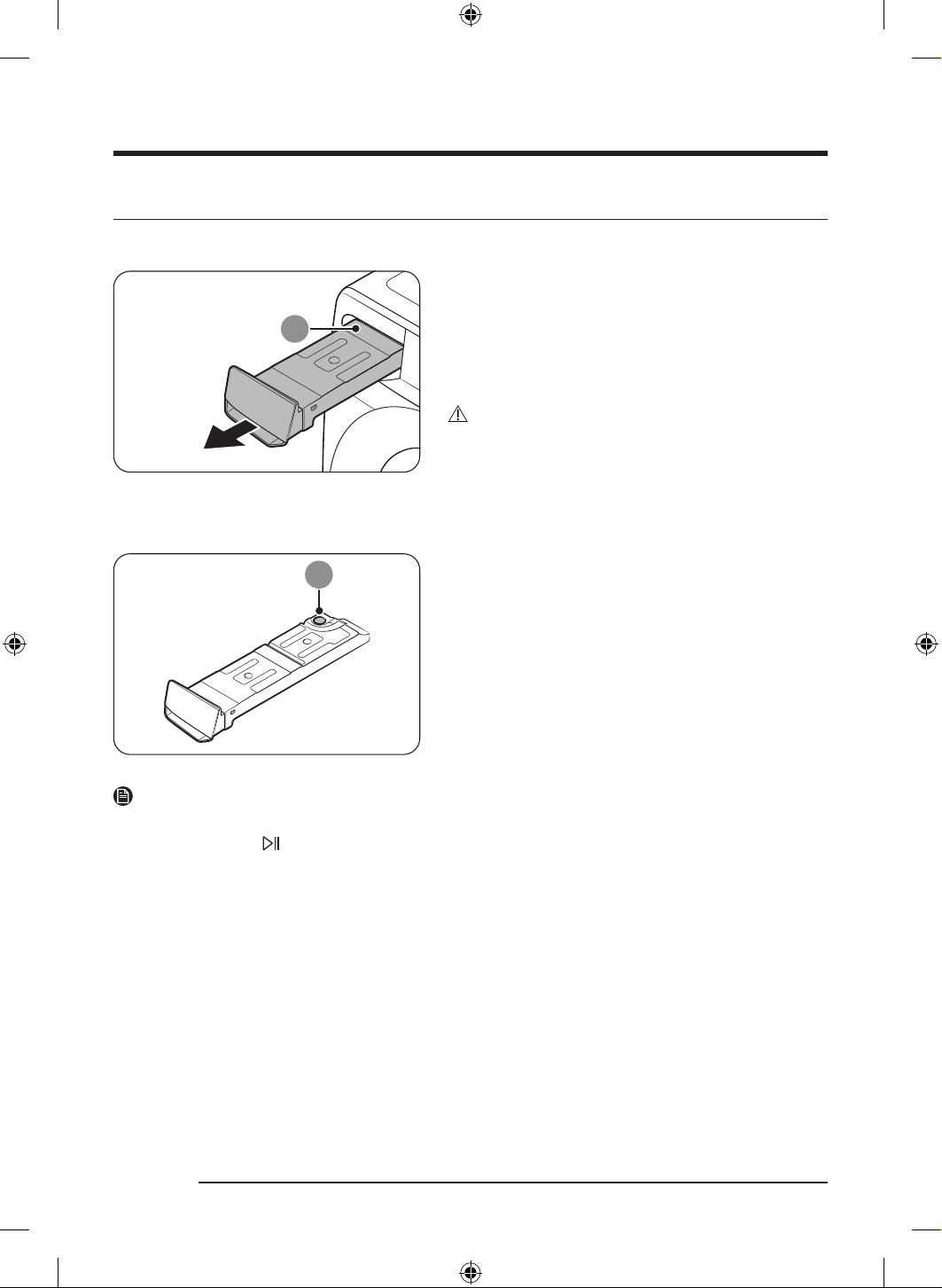
Emptying the water tank
Empty the water tank after each use to prevent leaks.
1. Remove the water tank (A) from the dryer.
- Pull the water tank handle with one hand until the
tank is halfway out.
- Once the water tank is halfway out, support the
bottom of the tank with the other hand and pull it
slowly with both hands.
CAUTION
• The water tank is heavy. Slowly remove the water
tank using both hands while keeping the tank at a
level.
• Be careful when removing the full water tank. It is
very heavy and can cause injury if you drop it.
9
2. Empty the water through the drain hole (B), and then
clean inside the water tank.
- Mix some neutral detergent in lukewarm water.
Fill the water tank with the mixture through the
drain hole (B) and leave it for 30 minutes. Then,
rinse the tank with clean water and completely
dry it.
3. Place the water tank back into place.
NOTE
If the dryer displays the “Empty the tank” message and stops while drying is in progress, empty the water
tank and tap and hold
. The “Empty the tank” message will disappear, and the dryer will resume drying.
DV8700TK_SimpleUX_DC68-04223K-03_EN_P171.indd 44DV8700TK_SimpleUX_DC68-04223K-03_EN_P171.indd 44 2024/8/2 16:53:212024/8/2 16:53:21
English 45
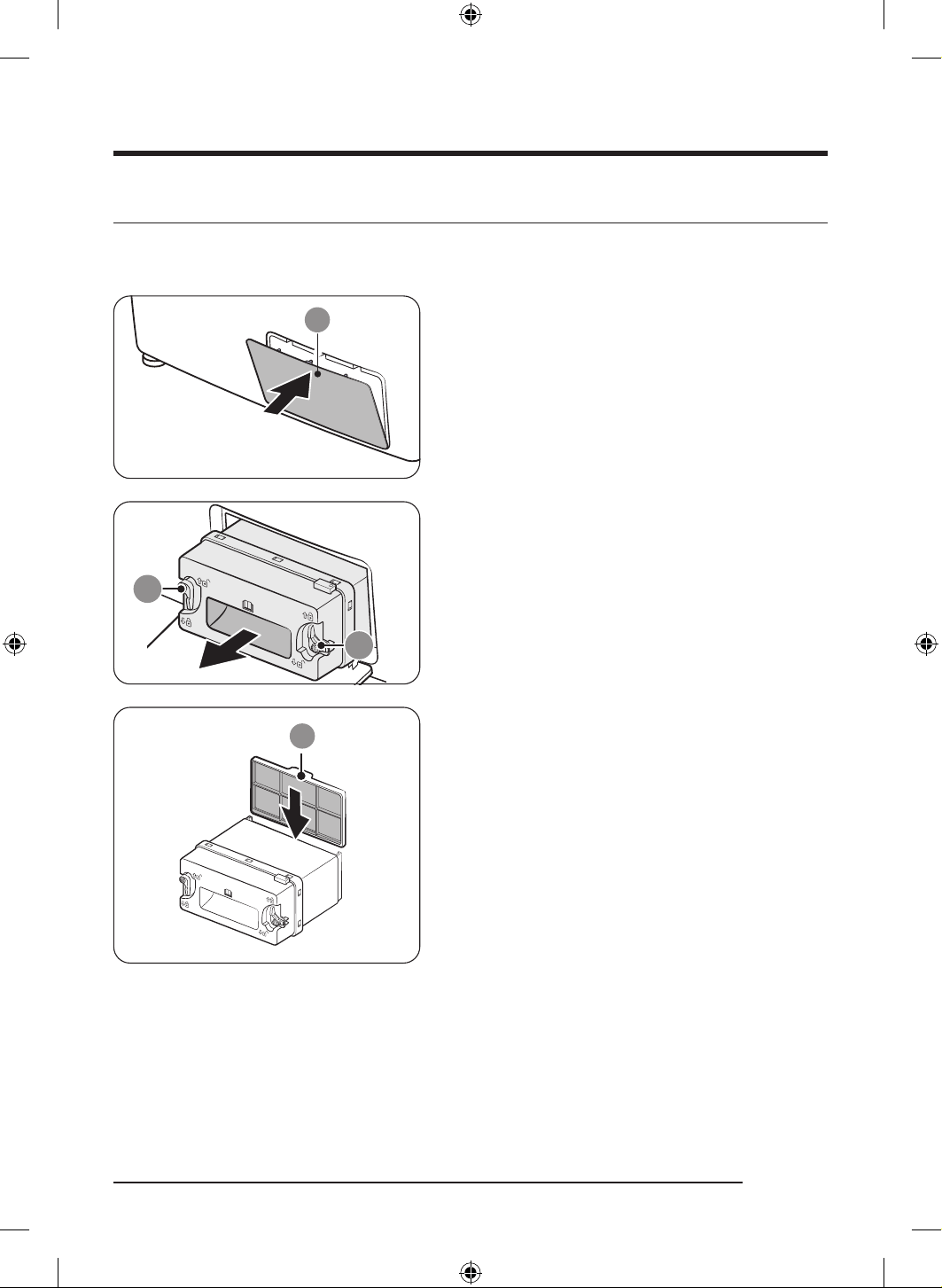
Installing the micro soft filter(Optional Filter)
You can install the provided micro soft filter(Optional Filter) to prevent dust accumulation on the heat
exchanger.
1. Gently press the top part of the outer cover (A) to
open.
9
9
2. Unlock the inner cover fixers (B), and then pull the
inner cover to remove.
A
3. Insert the provided micro soft filter(Optional Filter)
(C) on the back of the inner cover as shown in the
figure.
- Make sure to install the filter in the correct
position. (The tap on the top of the filter should
face outward.)
DV8700TK_SimpleUX_DC68-04223K-03_EN_P171.indd 45DV8700TK_SimpleUX_DC68-04223K-03_EN_P171.indd 45 2024/8/2 16:53:212024/8/2 16:53:21
Maintenance
English46
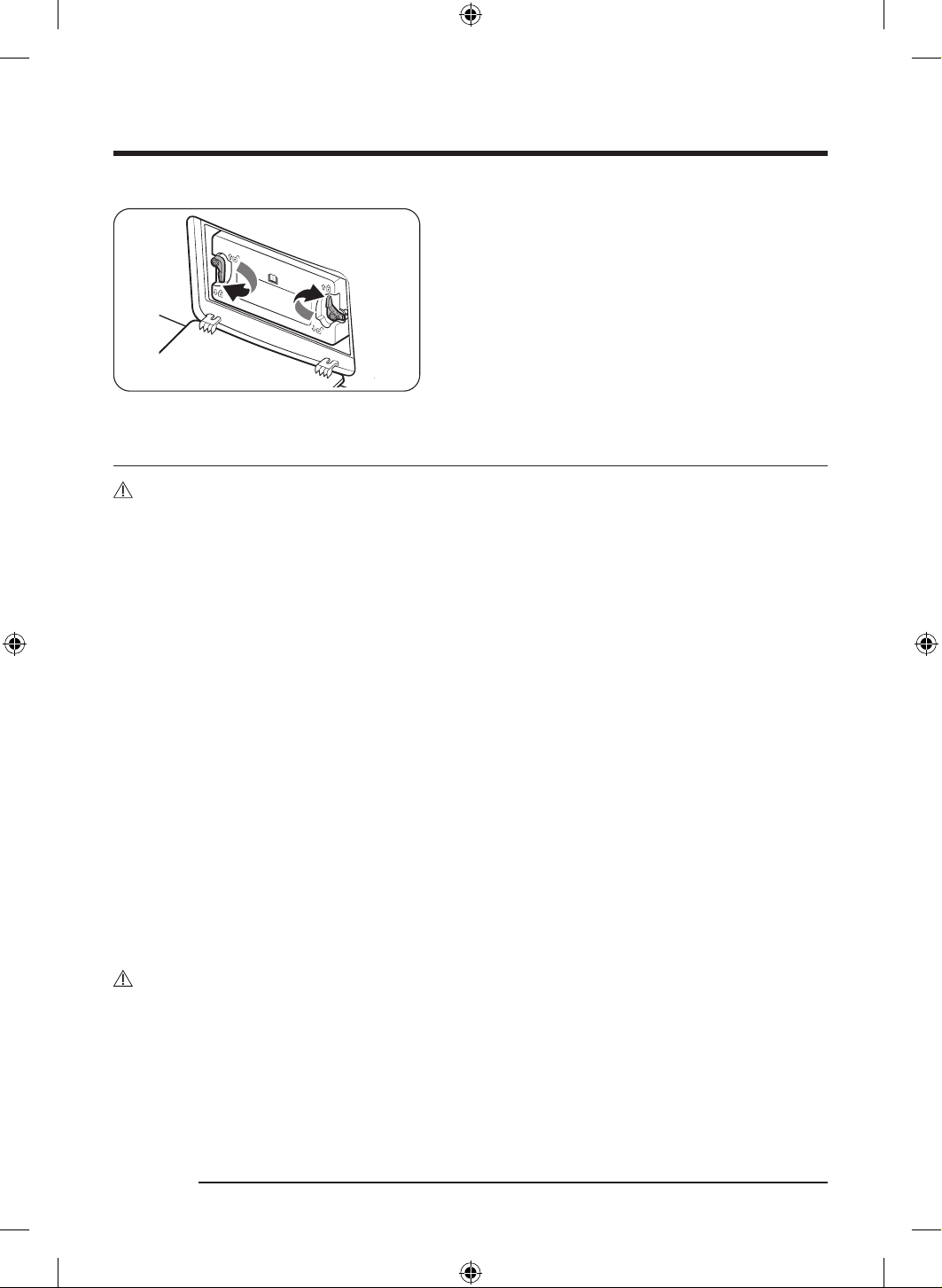
4. Reinsert the inner cover to its original position, and
then lock the fixers.
5. Close the heat exchanger’s outer cover.
Cleaning
WARNING
• Do not clean the dryer by directly spraying water onto the dryer.
• Do not clean the dryer with benzene, thinner, alcohol, or acetone. This may cause discoloration,
deformation, damage, electric shock, or fire.
• Before cleaning the dryer, be sure to unplug the power cord.
Exterior
Clean with a soft, damp cloth. Do not use abrasive cleaners. Avoid using or placing sharp or heavy objects
near/on the dryer. Keep detergent and laundry supplies on the pedestal (sold separately) or in a separate
storage container.
Control panel
Clean with a soft, damp cloth. Do not use abrasive cleaners. Do not spray cleaners directly on the panel.
Immediately wipe up any spills or liquids from the control panel.
Drum
Clean with a damp cloth with a mild, non-abrasive cleaner suitable for stainless steel.
Wipe remaining residue with a clean, dry cloth.
Door
Foreign substances can contaminate or build up on the inside of the door. Clean the inside of the door using
a soft piece of cloth or brush.
CAUTION
Do not detach the door’s rubber sealing.
DV8700TK_SimpleUX_DC68-04223K-03_EN_P171.indd 46DV8700TK_SimpleUX_DC68-04223K-03_EN_P171.indd 46 2024/8/2 16:53:212024/8/2 16:53:21
English 47
Lint filter
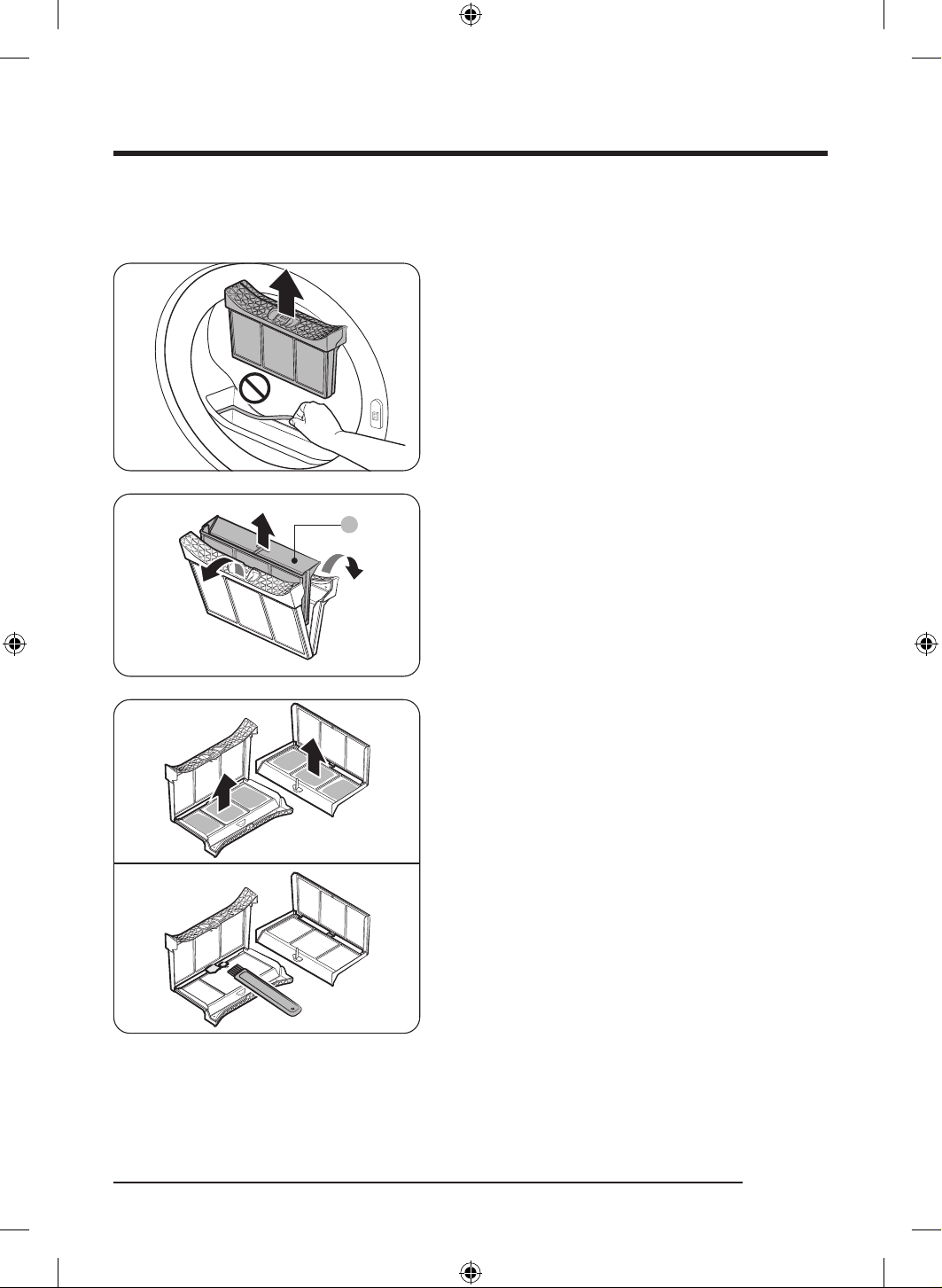
Clean the lint filter after each use.
1. Open the dryer door, grab the top of the lint filter,
and pull to remove the filter.
- Do not detach the rubber sealing after removing
the filter.
A
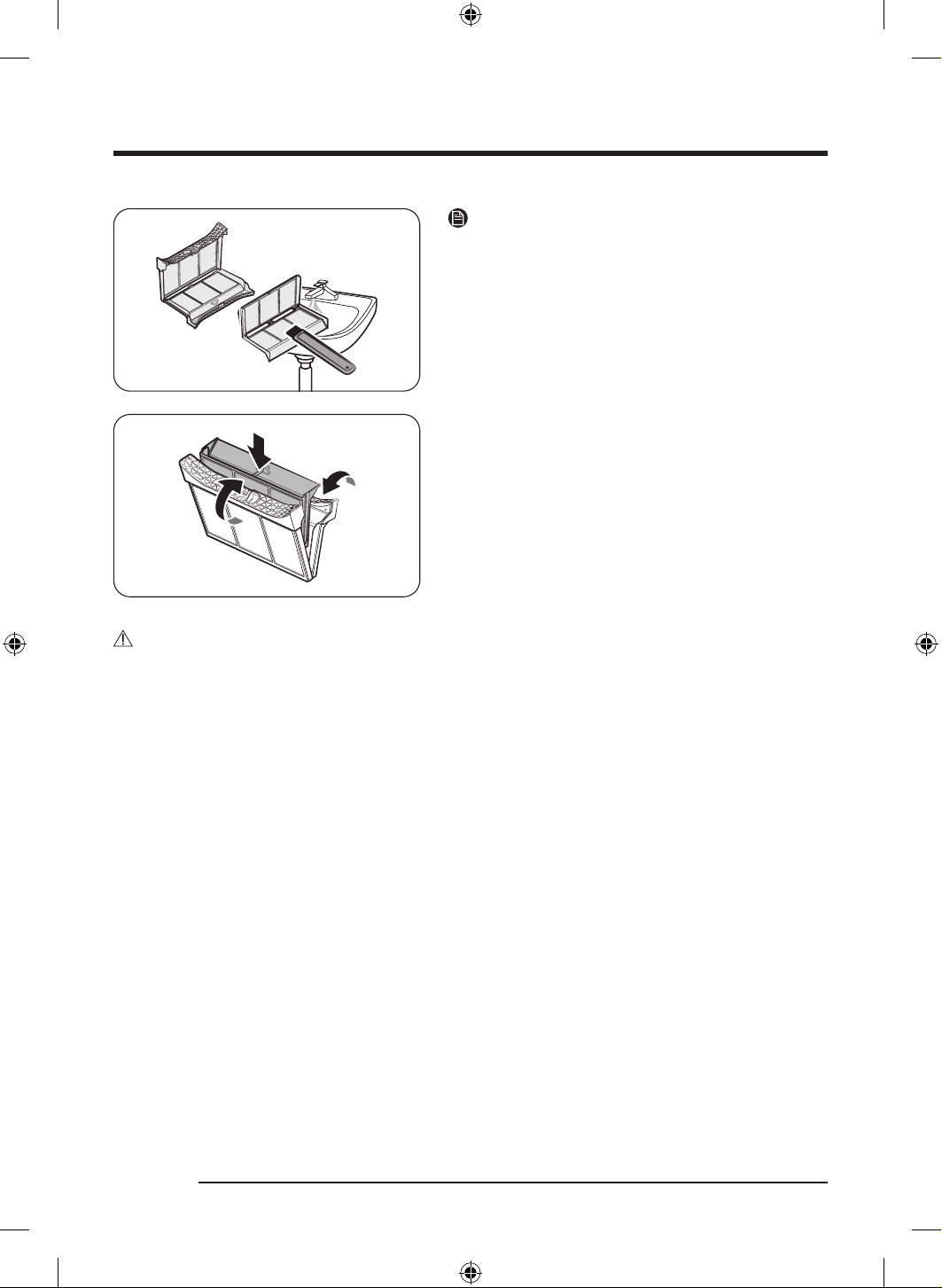
2. Open the outer filter and remove the inner filter (A).
3. Spread open the outer filter and the inner filter.
4. Remove the lint from both filters, and then clean the
filters with the cleaning brush.
DV8700TK_SimpleUX_DC68-04223K-03_EN_P171.indd 47DV8700TK_SimpleUX_DC68-04223K-03_EN_P171.indd 47 2024/8/2 16:53:222024/8/2 16:53:22
Maintenance
English48
NOTE
To clean the filters thoroughly, clean the filters in
running water, and then dry them completely.
5. Put the inner filter into the outer filter, and then
reinsert the lint filter into the original position.
CAUTION
• Clean the lint filter after each load. Otherwise, the drying performance may decrease.
• If the filter surface is wet, allow it to completely dry before use.
- Inserting the filter while it is wet can cause mold and/or odor to form and/or result in less drying.
• When cleaning or removing the lint filter, do not shake or tap on the filter. Doing so can damage the
filter.
• Opening the outer and inner filters carelessly and with excessive force can damage the filters.
DV8700TK_SimpleUX_DC68-04223K-03_EN_P171.indd 48DV8700TK_SimpleUX_DC68-04223K-03_EN_P171.indd 48 2024/8/2 16:53:222024/8/2 16:53:22
English 49
Heat exchanger
When it is time to clean the heat exchanger, the dryer will alert you by displaying the “Clean heat
exchanger” message.
A dirty heat exchanger will hinder the product’s performance and should be cleaned regularly.
NOTE
• Water droplets can form around the heat exchanger due to condensation caused by a temperature
difference. This is normal and is not a sign of a leak.
• If you are not planning on using the dryer for a long period of time, open the heat exchanger cover and
ventilate.
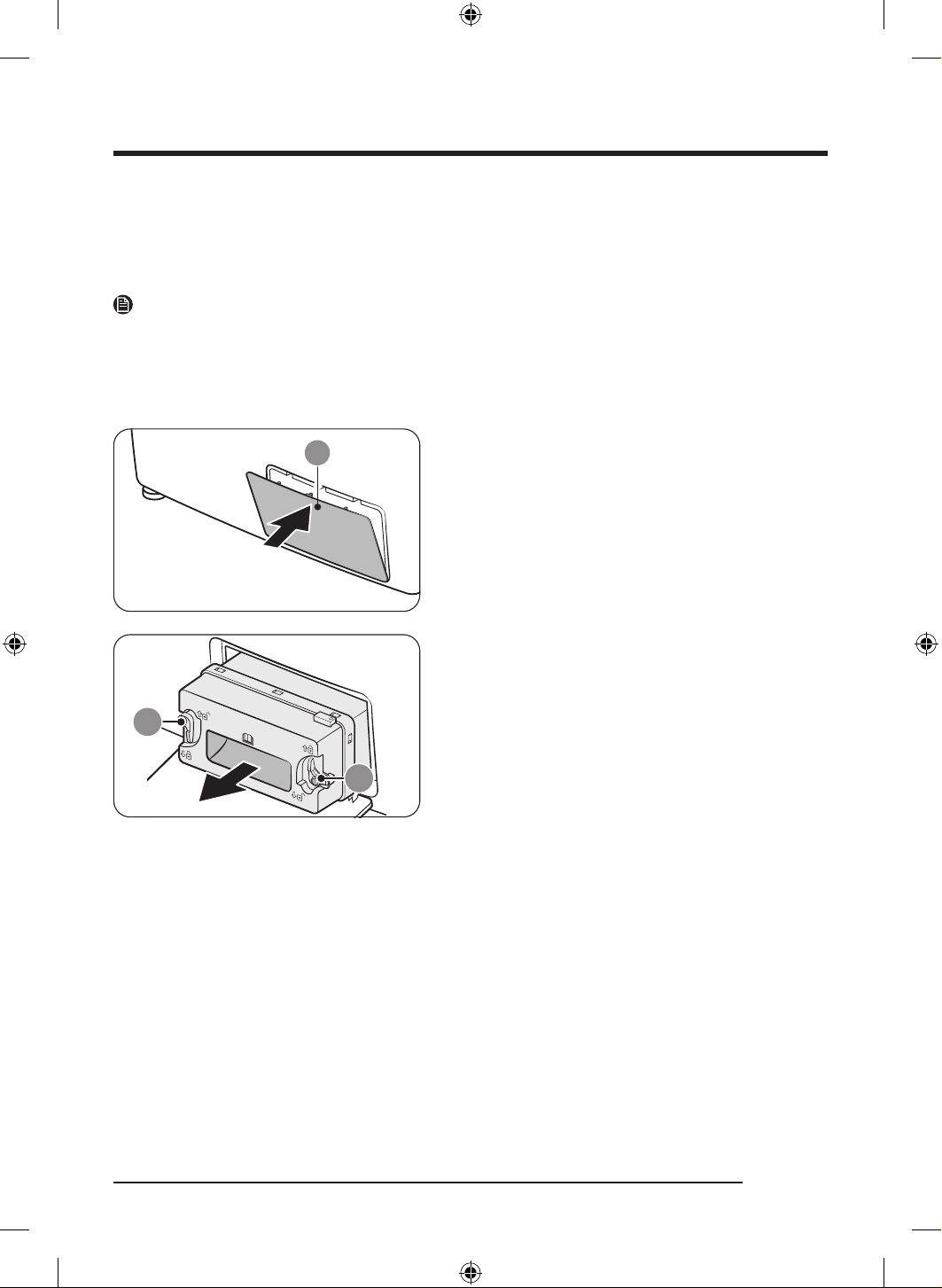
1. Gently press the top part of the outer cover (A) to
open.
9
9
2. Unlock the inner cover fixers (B), and then pull the
inner cover to remove.
DV8700TK_SimpleUX_DC68-04223K-03_EN_P171.indd 49DV8700TK_SimpleUX_DC68-04223K-03_EN_P171.indd 49 2024/8/2 16:53:222024/8/2 16:53:22
Maintenance
English50
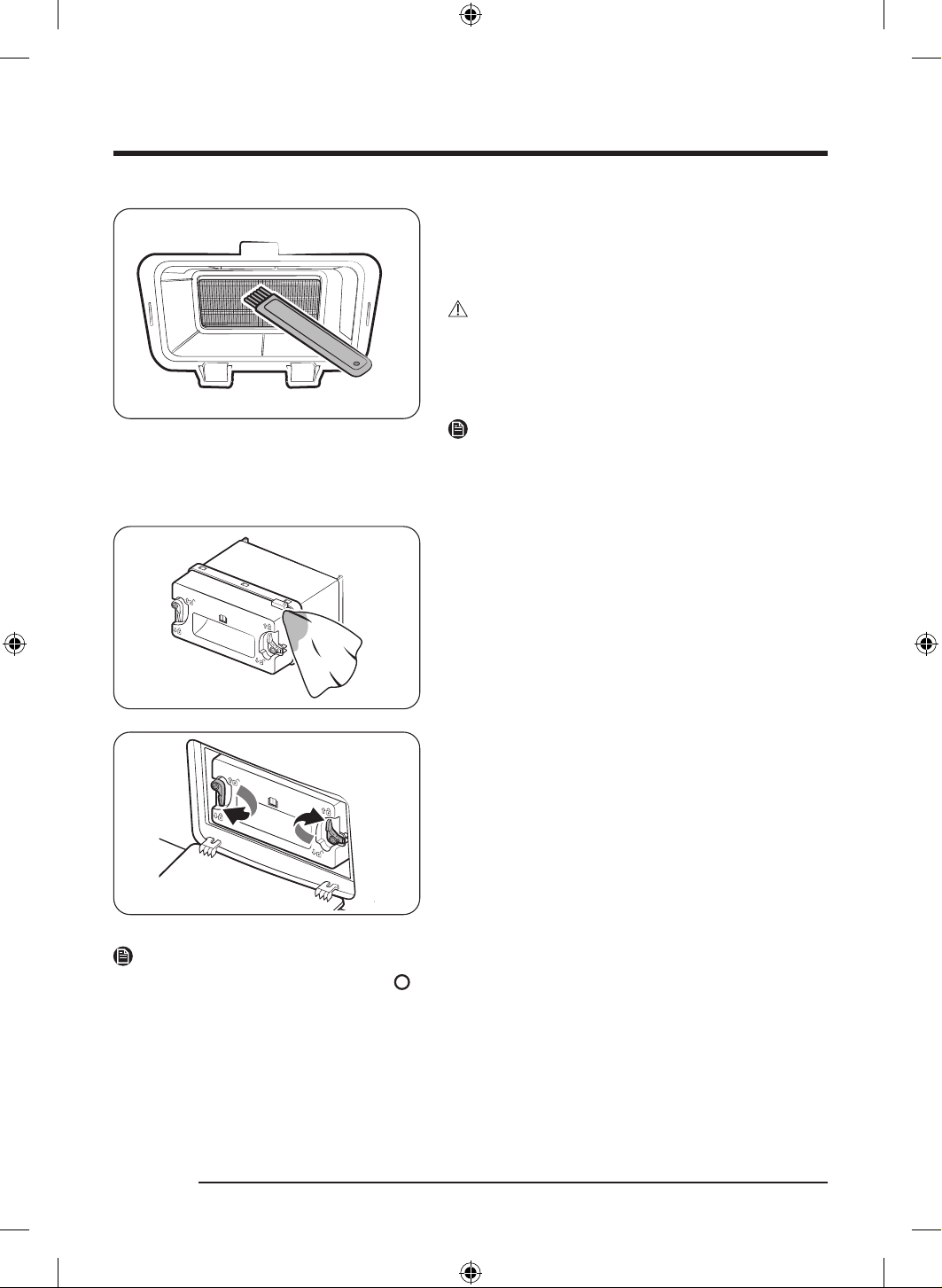
3. Clean the dust on the heat exchanger using the
provided brush.
- After cleaning with the brush, wipe off the
remaining dust using a smooth, damp cloth.
CAUTION
• To avoid physical injury and burns, do not touch or
clean the heat exchanger with bare hands.
• When cleaning the heat exchanger, be careful not to
damage the fins.
NOTE
If the heat exchanger is completely dry and therefore
hard to clean, spray some water on the heat exchanger
and clean using a brush.
4. Clean the inner cover with a smooth, damp cloth.
- There may be moisture and/or foreign substances
around the inner cover.
5. Reinsert the inner cover to its original position, and
then lock the fixers.
6. Close the heat exchanger’s outer cover.
NOTE
• After cleaning the heat exchanger, tap
to dismiss the notification message. The message remains on
until you dismiss it.
• If the alarm continues after you have dismissed it, unplug and then plug in the power cord or remove
and reinsert the heat exchanger's inner cover.
DV8700TK_SimpleUX_DC68-04223K-03_EN_P171.indd 50DV8700TK_SimpleUX_DC68-04223K-03_EN_P171.indd 50 2024/8/2 16:53:222024/8/2 16:53:22
English 51
Micro soft filter(Optional Filter)
When it is time to clean the micro soft filter(Optional Filter), the dryer will alert you by displaying the
“Clean micro soft filter(Optional Filter)” message. A dirty micro soft filter(Optional Filter) will hinder the
product’s performance and should be cleaned regularly.
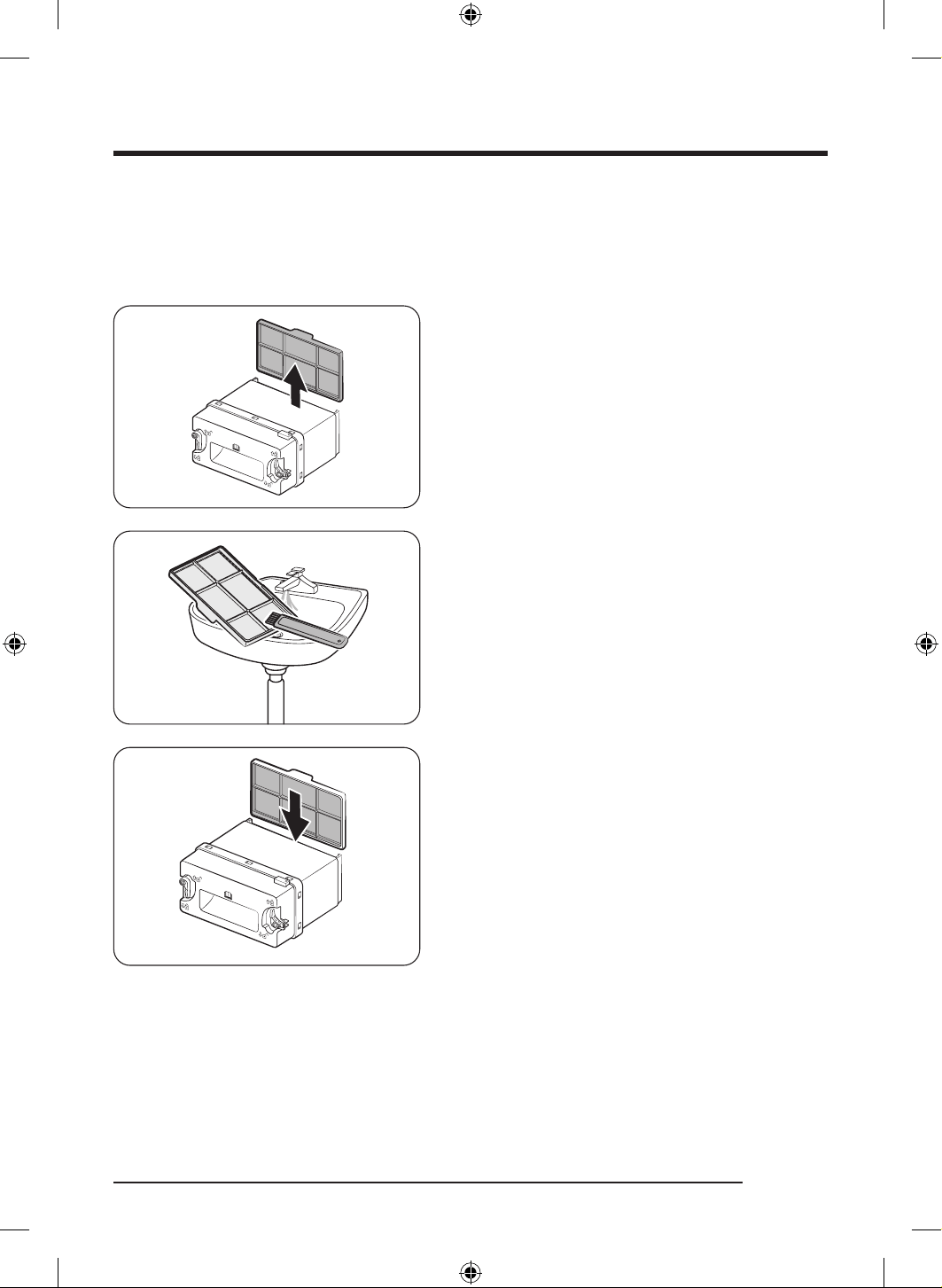
1. Open the heat exchanger's outer cover, and
then remove the inner cover. (Refer to the “Heat
exchanger” section on page 49.)
2. Remove the micro soft filter(Optional Filter) from the
inner cover.
3. Clean the dust on the micro soft filter(Optional Filter)
with the provided brush, and then wash the filter in
running water.
- Completely dry the filter after a wash.
- Clean the filter regularly. A dirty filter can degrade
a drying performance.
4. Insert the filter to the inner cover, and then insert the
inner cover back to its place.
- Make sure to install the filter in the correct
position. (The tap on the top of the filter should
face outward.)
DV8700TK_SimpleUX_DC68-04223K-03_EN_P171.indd 51DV8700TK_SimpleUX_DC68-04223K-03_EN_P171.indd 51 2024/8/2 16:53:232024/8/2 16:53:23
English52
Troubleshooting
Checkpoints
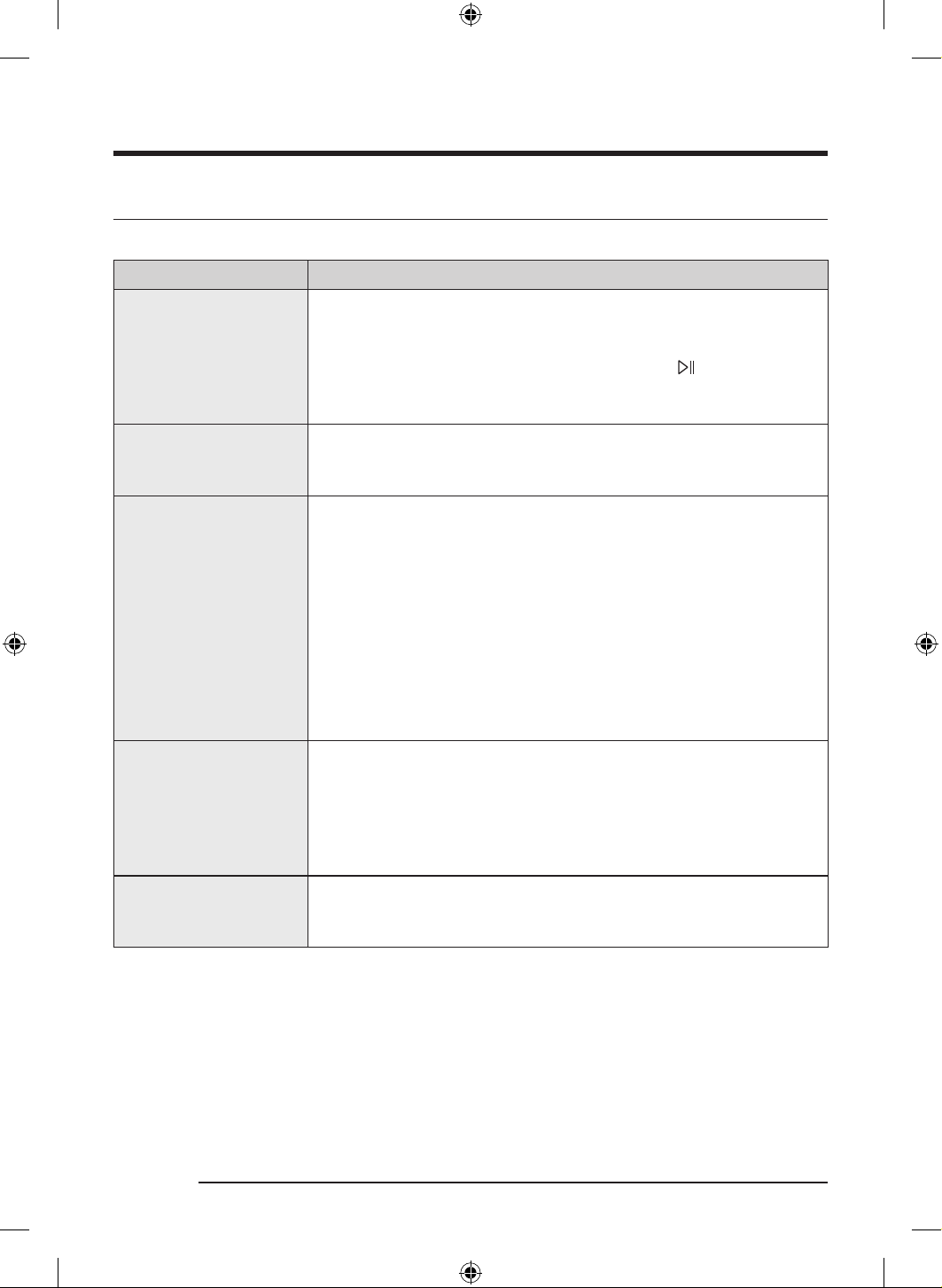
If you encounter a problem with the dryer, first check the table below and try the suggestions.
Problem Action
Dryer does not start.
• Make sure the dryer is plugged in.
• Make sure the door is properly closed.
• Check the fuse or reset the circuit breaker.
• If you opened the door during a cycle, tap and hold
again.
• Clean the filter.
• Make sure Child Lock is not activated.
The dryer does not warm
up.
• Check the fuse or reset the circuit breaker.
• Check the lint filter and the heat exchanger. Clean them if necessary.
• The dryer may be in the cooling down process of the cycle.
Items are not dried.
Check all of the above. Additionally:
• Do not overload the dryer. If the dryer is overloaded, it could take longer
for items to dry.
• Dry heavy fabrics separately from light fabrics.
• The item(s) are too small and may not getting enough spinning inside
the drum.
• Clean the filter.
• Clean the heat exchanger.
• If the “ Clean heat exchanger” message appears on the display, refer to
the “Heat exchanger” section on page 49 and clean the heat exchanger.
• If a drain hose is connected, make sure water is draining properly.
The dryer is too loud.
• Look for coins, loose buttons, nails, and other objects and remove them
immediately.
• Check the lint filter. Remove any items stuck inside the lint filter.
• Make sure the dryer is level and standing firmly on the floor.
• The dryer may hum due to air moving through the drum and fan. This is
normal.
Items are not dried evenly.
• Seams, pockets, and other parts of clothing are harder to dry than
others. This is normal.
• Sort heavy and light items separately.
DV8700TK_SimpleUX_DC68-04223K-03_EN_P171.indd 52DV8700TK_SimpleUX_DC68-04223K-03_EN_P171.indd 52 2024/8/2 16:53:232024/8/2 16:53:23
English 53
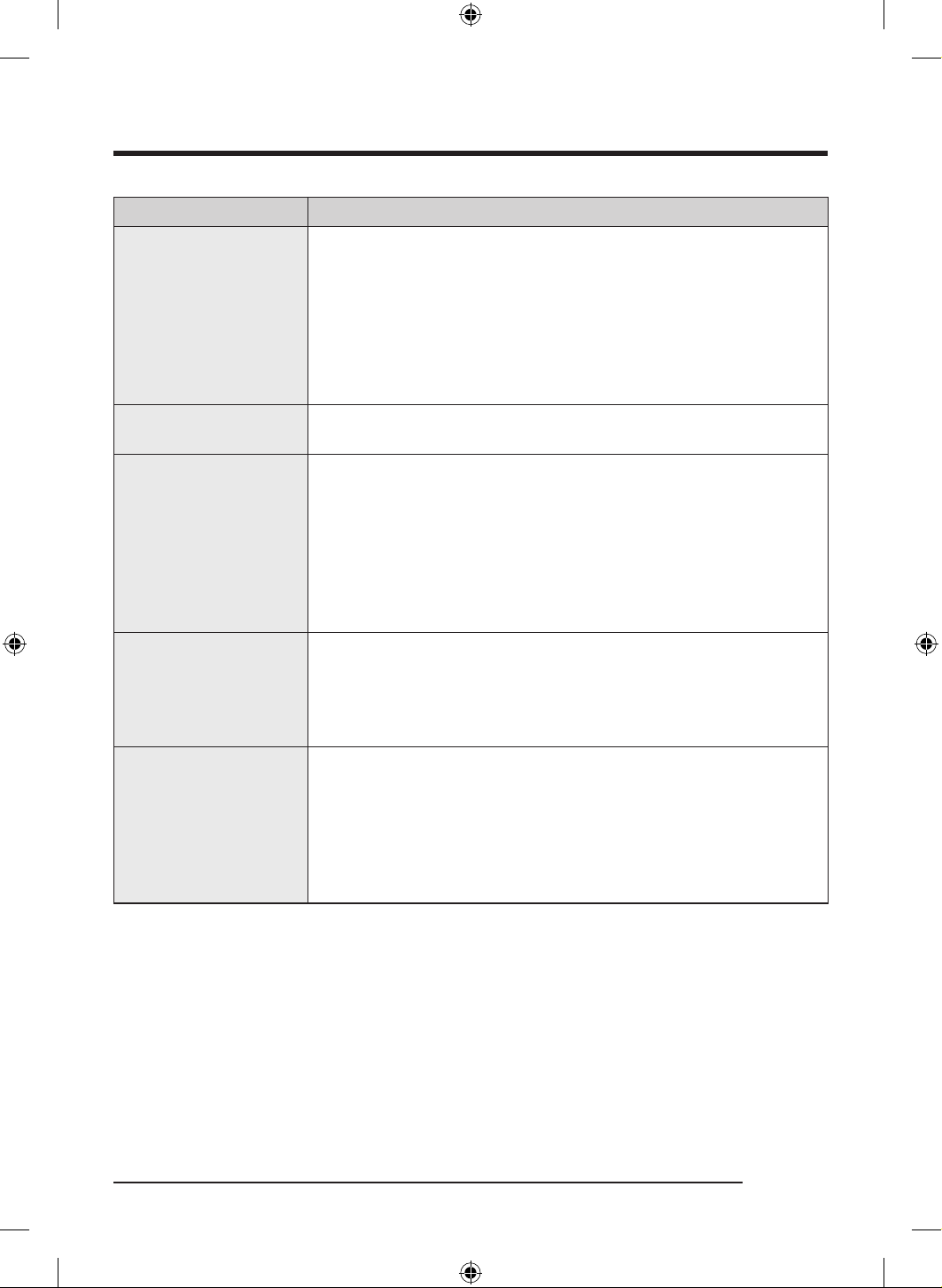
Problem Action
There is a smell coming
from the dryer.
• The smell of paint, varnish, cleaning agents, and other household items
could have circulated in the air and entered the dryer. If you notice such
a smell, ventilate completely before using the dryer.
• If drying in an enclosed area, the dryer could cause the ambient
temperature to rise. Accordingly, make sure to open a window and
ventilate the area.
• Do not attempt to dry wet items after leaving them in the washing
machine or dryer for a long time.
The dryer turns off before
the items are dry.
• The load is too small. Throw in few additional items like towels and try
drying again.
The clothes have lint on
them.
• Always make sure the lint filter is clean before putting items into the
dryer. When drying items that generate a large amount of lint, you may
need to clean the lint filter in the middle of a cycle.
• Some fabrics (such as white towels) causes more lint and should be
dried separately from fabrics that lint attaches easily (such as black
linen pants).
• Check the inside of the pockets to make sure they are empty before
drying.
The ambient temperature
around the dryer rises or
there is a damp, soggy
smell.
• Heat pump dryers circulate ambient air inside and outside the dryer
during the drying process to cool the system. Using the dryer in a poorly
ventilated area may, depending on the operating environment, raise the
ambient humidity level and/or cause a damp, soggy smell to develop.
Ensure proper ventilation when using the dryer.
Water is not draining.
• Check the draining hose for twists and kinks.
Straighten out the hose if it is twisted or kinked and securely connect it
to the drain on the floor.
• Check to see if the draining hose is frozen.
If the hose is frozen, submerge it in warm water to allow the water inside
the hose to melt and drain out. Reconnect the hose and check for proper
draining.
If a problem persists, contact a local Samsung service center.
DV8700TK_SimpleUX_DC68-04223K-03_EN_P171.indd 53DV8700TK_SimpleUX_DC68-04223K-03_EN_P171.indd 53 2024/8/2 16:53:232024/8/2 16:53:23
Troubleshooting
English54
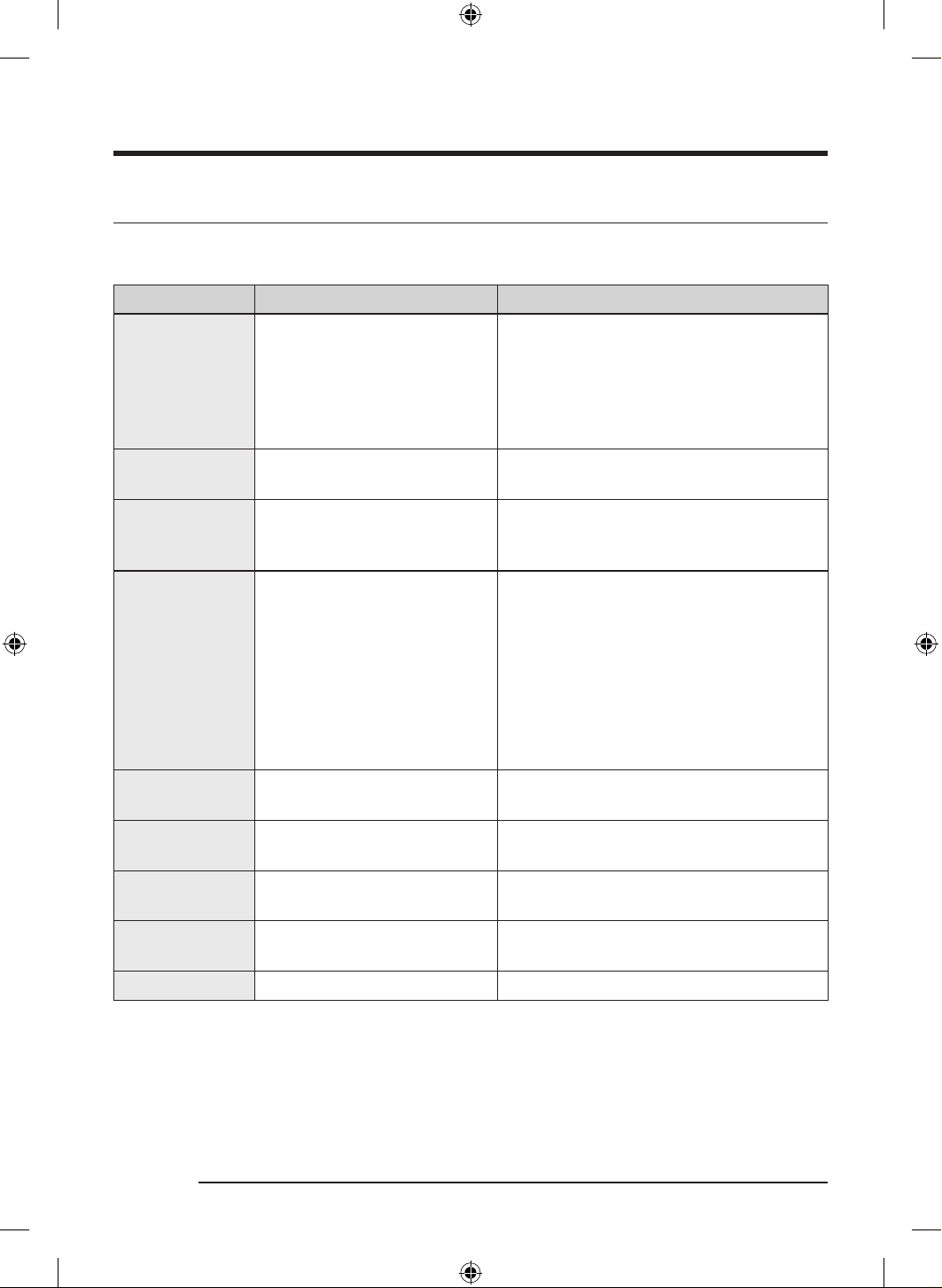
Information codes
If the dryer fails to operate, you may see an information code on the screen. Check the table below and try
the suggestions.
Information code Meaning Action
Door is open
Dryer operation with the door
open
• Close the door and start again.
• If this continues, call for service.
• Check if Child Lock is on. If Child Lock is
on, you may get this message when you
open the door even though the dryer is not
operating.
Check filter Lint filter problem
• Check the lint filter assembly.
• If this continues, call for service.
Check inner cover
of heat exchanger
Internal heat exchanger cover
problem
• Check the internal heat exchanger cover
assembly.
• If this continues, call for service.
Check drainage /
Empty the tank
Draining malfunction
Draining pump malfunction
Frozen draining hose
Water tank full
• Make sure the draining hose is not bent or
damaged.
• If the hose is frozen, wrap the hose
with a towel soaked in warm water for
approximately ten minutes to thaw the
hose.
• Empty the water tank, turn on the dryer,
and start again.
• If this continues, call for service.
tC Air temperature sensor problem
• Clean the lint filter or the heat exchanger.
• If this continues, call for service.
tC5
Compressor temperature sensor
problem
• Wait two to three minutes.
• Turn the power back on and start again.
3C Check the motor for operation.
• Try restarting the cycle.
• If this continues, call for service.
AC6
Check communications between
the main and the inverter PBAs.
• Try restarting the cycle.
• If this continues, call for service.
HC Compressor overheating • Call for service.
If any information code keeps appearing on the screen, contact a local Samsung service center.
DV8700TK_SimpleUX_DC68-04223K-03_EN_P171.indd 54DV8700TK_SimpleUX_DC68-04223K-03_EN_P171.indd 54 2024/8/2 16:53:232024/8/2 16:53:23
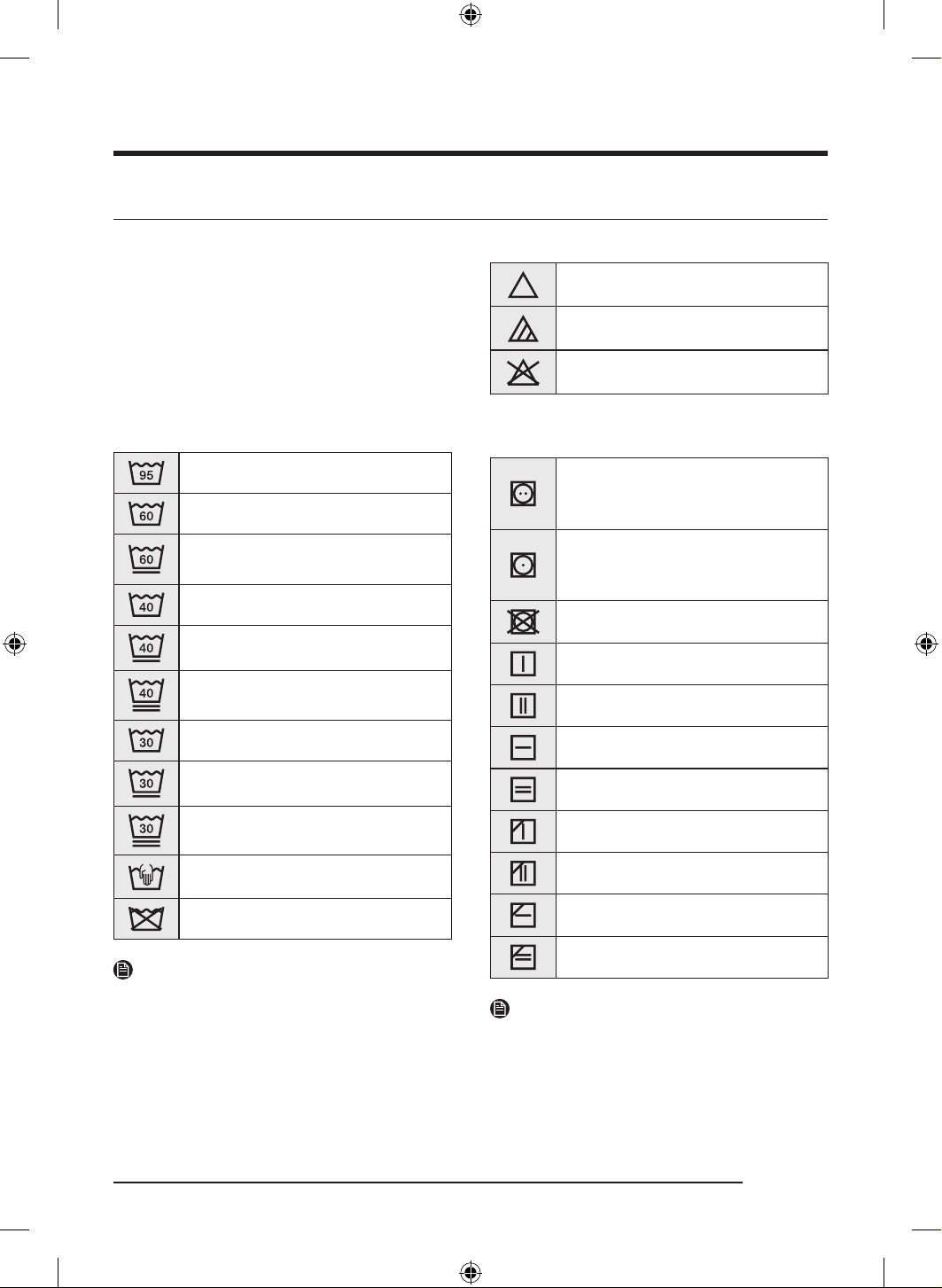
English 55
Appendix
Fabric care chart
The following symbols provide garment care
direction. The Clothing care labels include
symbols for drying, bleaching, drying and ironing,
or dry cleaning when necessary. The use of
symbols ensures consistency among garment
manufacturers of domestic and imported items.
Follow care label directions to maximize garment
life and reduce laundering problems.
Washing
95 °C boil wash.
60 °C coloured wash.
60 °C coloured wash. (“Easy care”
coloured wash)
40 °C coloured wash.
40 °C mild wash.
40 °C very mild wash.
30 °C fine wash.
30 °C mild fine wash.
30 °C very mild fine wash.
Hand wash.
Do not wash.
NOTE
The numbers in the wash tub specify the
maximum washing temperatures in degrees
celsius Celsius which must not be exceeded.
Bleaching
Any bleach allowed.
Only oxygen bleach allowed.
Do not bleach.
Drying
Tumble drying / Drying at a
temperature of 80 °C with a normal
drying process.
Tumble drying / Drying at a
temperature of 60 °C with a mild
drying process.
Do not tumble dry
Line drying.
Drip line drying.
Flat drying.
Drip flat drying.
Line drying in the shade.
Drip line drying in the shade.
Flat drying in the shade.
Drip flat drying in the shade.
NOTE
• The dots indicate the drying level of the dryer.
• The lines indicate the type and place of the
drying.
DV8700TK_SimpleUX_DC68-04223K-03_EN_P171.indd 55DV8700TK_SimpleUX_DC68-04223K-03_EN_P171.indd 55 2024/8/2 16:53:262024/8/2 16:53:26
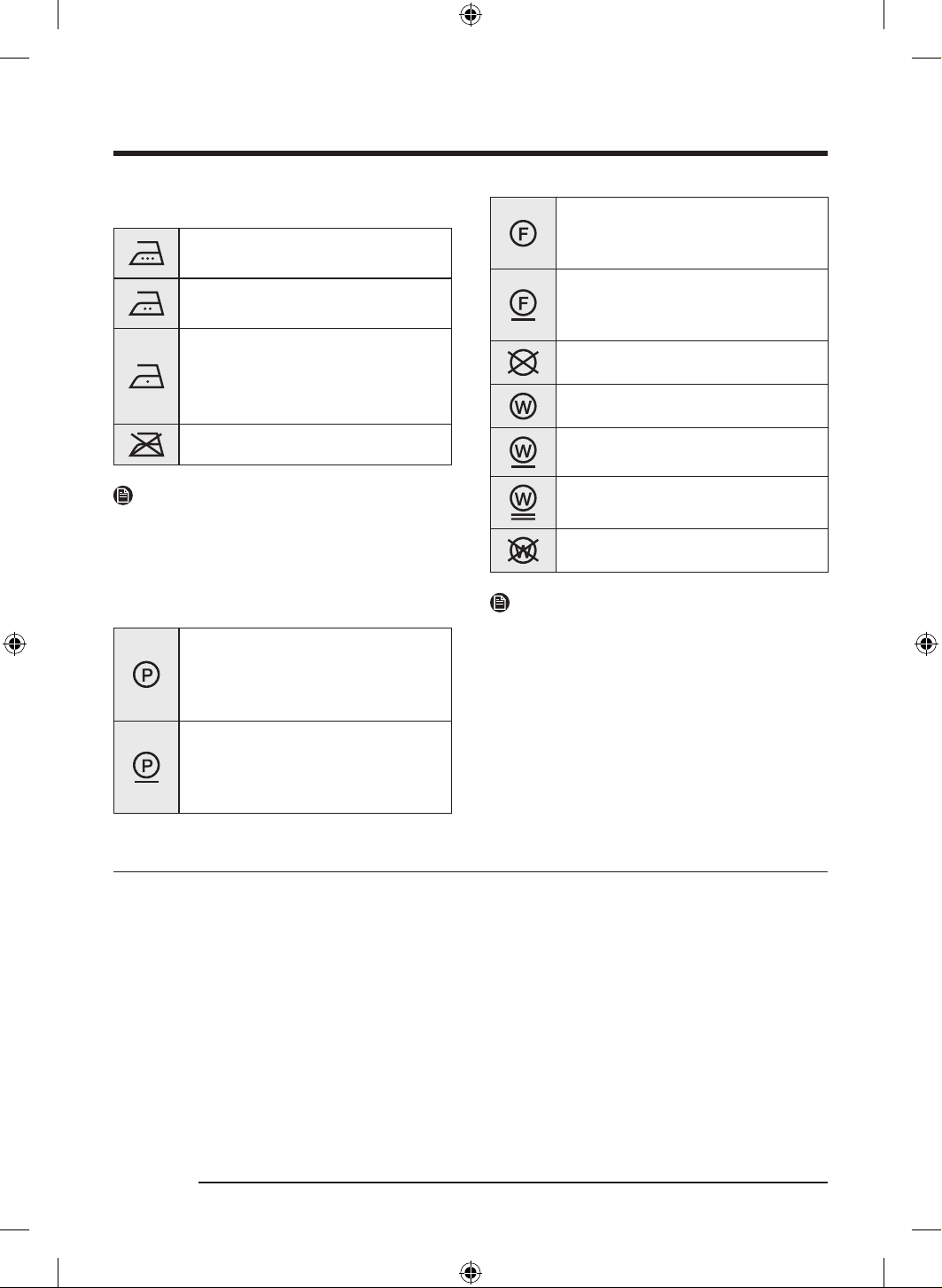
Appendix
English56
Ironing
Iron at maximum sole plate
temperature of 200 °C.
Iron at maximum sole plate
temperature of 150 °C.
Iron at maximum sole plate
temperature of 110 °C.
Caution when using steam irons (
work without steam).
Do not iron.
NOTE
The dots indicate the temperature ranges for
ironing (regulator, steam, travel irons and ironing
machines).
Professional care
Professional dry-cleaning in
perchloroethylene and/or
hydrocarbons (heavy benzines) with
normal process.
Professional dry-cleaning in
perchloroethylene and/or
hydrocarbons (heavy benzines) with
gentle process.
Professional dry-cleaning in
hydrocarbons (heavy benzines) with
normal process.
Professional dry-cleaning in
hydrocarbons (heavy benzines) with
gentle process.
Do not dry-clean.
Professional wet-cleaning.
Mild professional wet-cleaning.
Very mild professional wet-cleaning.
Do not wet-clean.
NOTE
• The letters in a circle indicate the solvents ( P ,
F) used in dry cleaning or wet cleaning (W).
• Generally, the line under the symbol indicates
a milder treatment (e.g. gentle cycle for easy-
care items). The double line indicates care
levels with particularly gentle treatment.
Protecting the environment
• This appliance is manufactured from recyclable materials. If you decide to dispose of this appliance,
please observe local waste disposal regulations. Cut off the power cord so that the appliance cannot be
connected to a power source. Remove the door so that animals and small children cannot get trapped
inside the appliance.
• Contains fluorinated greenhouse gases.
Hermetically sealed equipment.
Do not vent gases into the atmosphere.
Refrigerant (Type): R-134a (GWP = 1430)
Refrigerant (Charging) : 0.58 kg, 0.829 tCO2e
DV8700TK_SimpleUX_DC68-04223K-03_EN_P171.indd 56DV8700TK_SimpleUX_DC68-04223K-03_EN_P171.indd 56 2024/8/2 16:53:272024/8/2 16:53:27
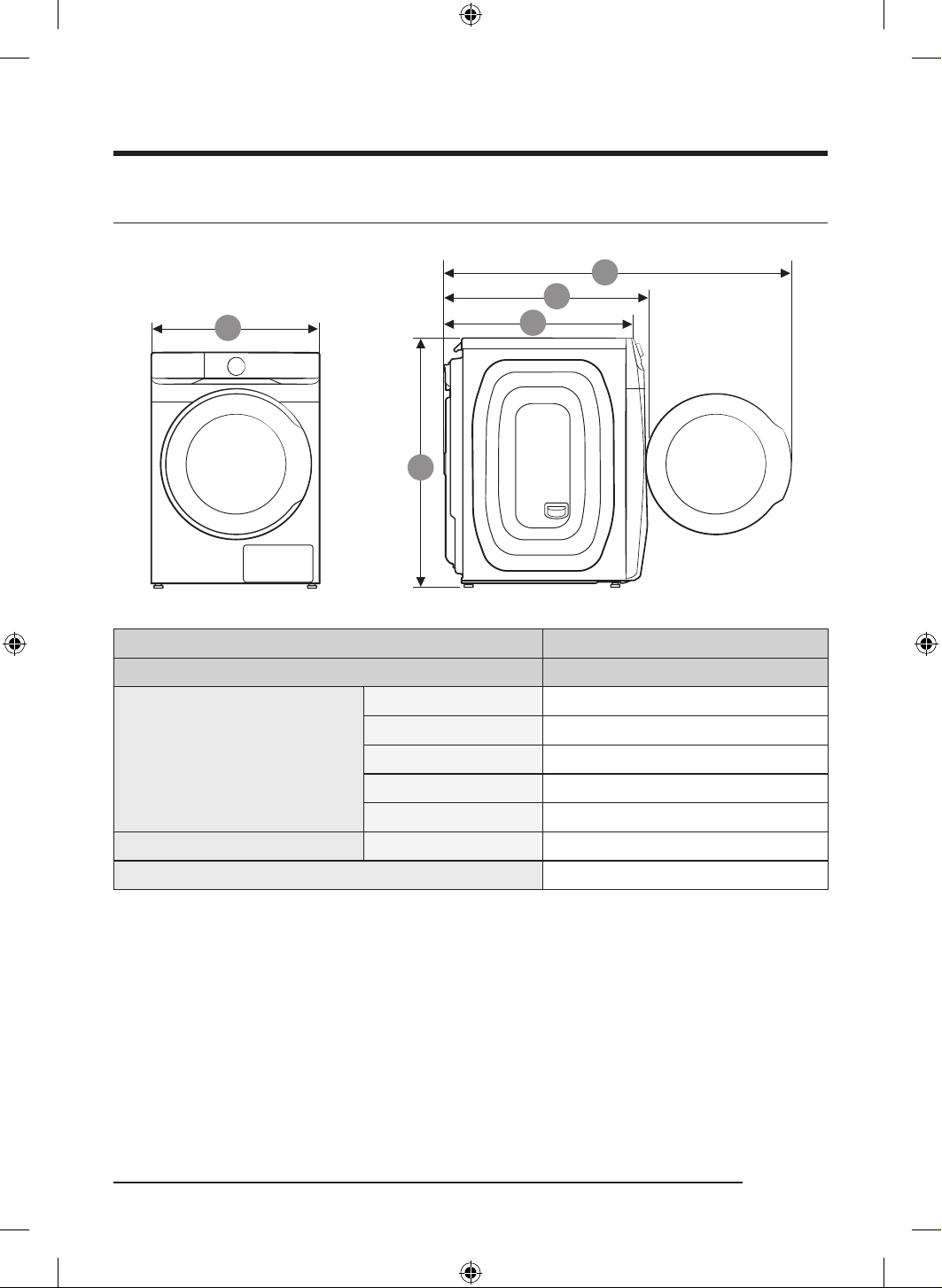
English 57
Specification
9
A
U
k
TYPE FRONT LOADING DRYER
MODEL NAME DV16T8740**/DV16T8741**
DIMENSIONS
A 686 mm
B 984 mm
C 803 mm
D 844 mm
E 1378 mm
ELECTRICAL REQUIREMENTS AC 230 V / 60 Hz 2000 W
ALLOWABLE TEMPERATURE 5-35 °C
DV8700TK_SimpleUX_DC68-04223K-03_EN_P171.indd 57DV8700TK_SimpleUX_DC68-04223K-03_EN_P171.indd 57 2024/8/2 16:53:272024/8/2 16:53:27
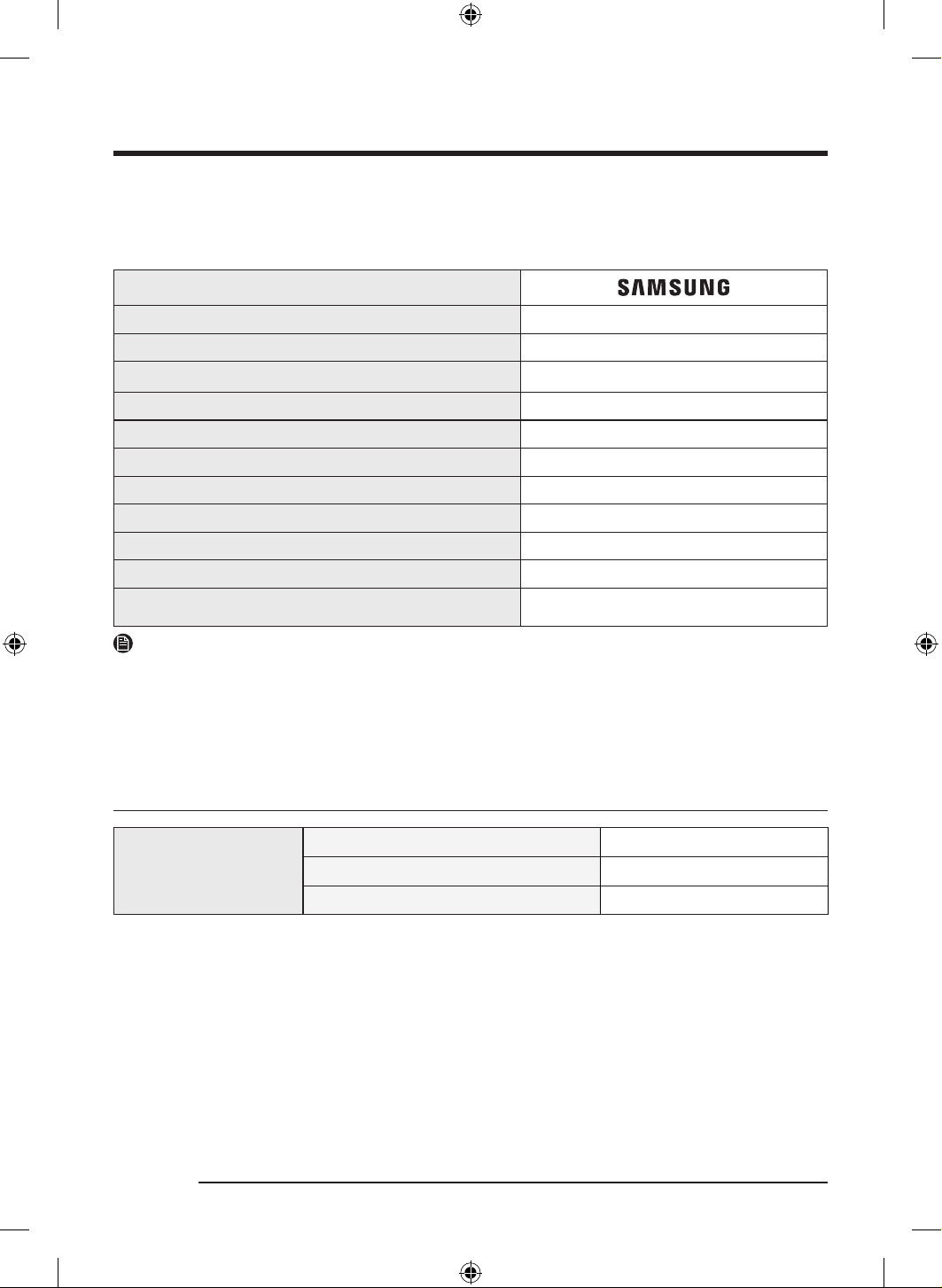
Appendix
English58
Specification sheet
“ * ” Asterisk(s) means variant model and can be varied (0-9) or (A-Z).
The manufacturer’s name and/or his trademark
Country of origin Made in Korea
The type number DV16T8740** / DV16T8741**
Product type Heat Pump Dryer
Rated voltage (volts) 230V~
Rated frequency (Hz) 60Hz
Rated power input 2000 W
Rated drying capacity (kg) 16.0 kg
Annual Energy Consumption 307 kWh
IP number IPX4
Dimensions
W686 x D844 x H984 (mm)
Net weight 74 kg
NOTE
The design and specifications are subject to change without notice for quality improvement purposes.
The energy label specifications have been determined by using the following program accordiing to SASO-
2883:2017.
The program is Cotton + Dry Level 3.
Standby power consumption
Power consumption
Off mode 0.50 W
Network Standby mode 2.00 W
Time in networked standby mode (Wi-Fi) 10 min
DV8700TK_SimpleUX_DC68-04223K-03_EN_P171.indd 58DV8700TK_SimpleUX_DC68-04223K-03_EN_P171.indd 58 2024/8/2 16:53:272024/8/2 16:53:27
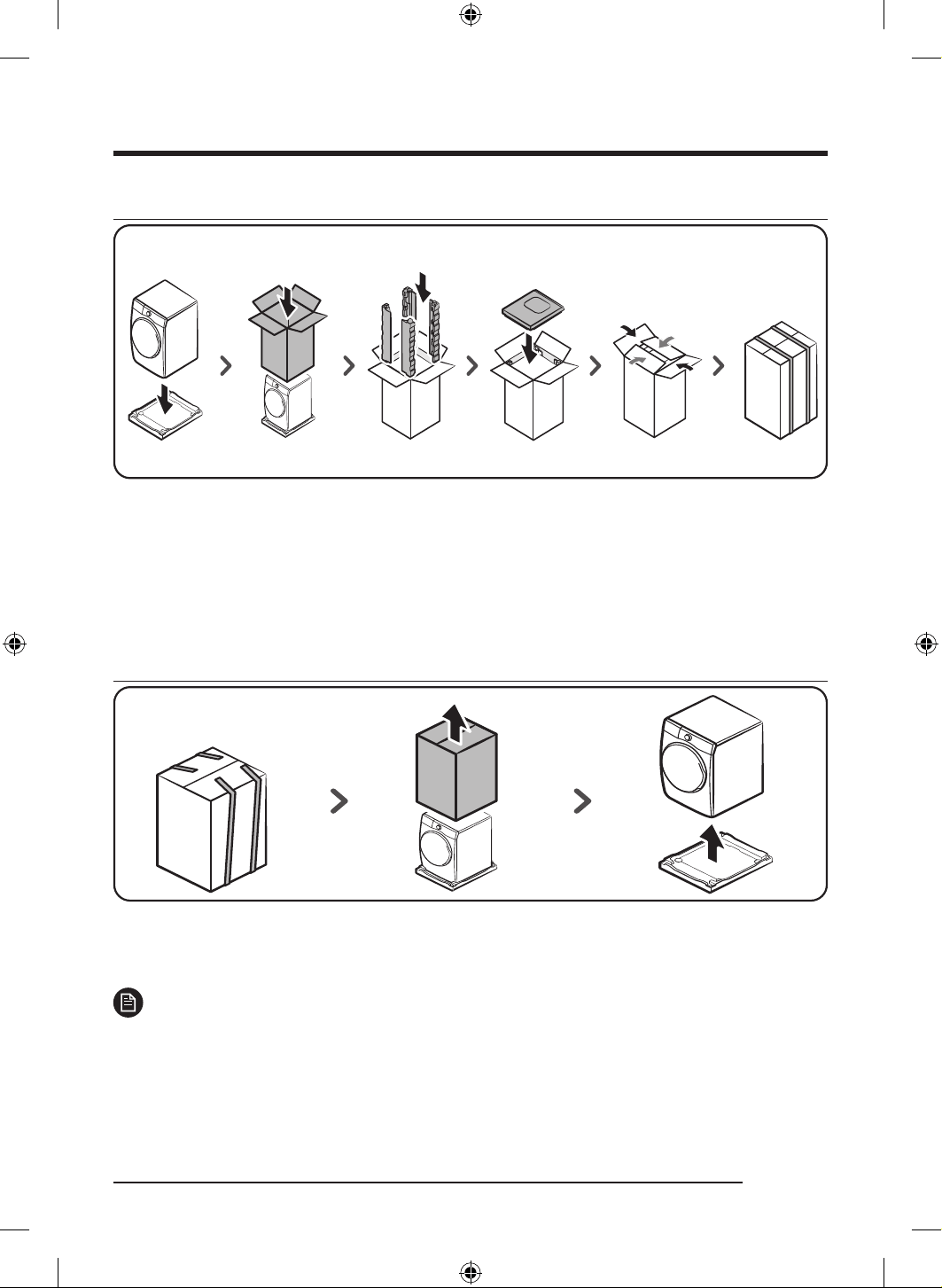
Packing & unpacking
Packing
1. Put the Dryer on the bottom cushion.
2. Put the packing box over the machine.
3. Insert the 4 side cushions in the packing box, one for each corner.
4. Insert the top cushion on the top of the machine.
5. Close the top cover of the box.
6. Wrap up the box with straps.
Unpacking
1. Cut the straps to untie.
2. Hold the packing box with both hands, and raise the box to remove.
3. Remove the Dryer from the bottom cushion.
NOTE
Based on diffierent models, there are 2 or 3 EA band.
English 59
DV8700TK_SimpleUX_DC68-04223K-03_EN_P171.indd 59DV8700TK_SimpleUX_DC68-04223K-03_EN_P171.indd 59 2024/8/2 16:53:272024/8/2 16:53:27
NOTE
Follow these tips to avoid injuring yourself when you are lifting the appliance:
• Position yourself as close to the appliance as possible.
• Firmly hold the appliance while keeping your elbows and arms close to your body.
• Slowly lift the appliance by straightening your hips and knees, not your back.
- Keep your back straight during the lift by tightening your stomach muscles and do not twist as you
lift.
- Keep the appliance as close to your body as possible, and centered in front of you.
• To change direction, use your feet to take small steps. Do not twist your upper body.
QUESTIONS OR COMMENTS?
COUNTRY CALL OR VISIT US ONLINE AT
SAUDI ARABIA
8002474357 (800 24/7 HELP) From
Inside Saudi Arabia
+966112974690 From outside Saudi
Arabia (Call Charges may be applied)
Digital services (24/7 HELP)
www.samsung.com/sa_en/support (English)
www.samsung.com/sa/support (Arabic)
DV8700TK_SimpleUX_DC68-04223K-03_EN_P171.indd 60DV8700TK_SimpleUX_DC68-04223K-03_EN_P171.indd 60 2024/8/2 16:53:272024/8/2 16:53:27
ةرارح ةخضمب ففجم
مدختسملا ليلد
*DV16T8740** / DV16T8741*
DC68-04223K-03
DV8700TK_SimpleUX_DC68-04223K-03_AR_P171.indd 1DV8700TK_SimpleUX_DC68-04223K-03_AR_P171.indd 1 2024/8/2 16:54:172024/8/2 16:54:17
ةيبرعلا
2
تايوتحملا
4 ةمسلا تامولعم
4 ةمسلا تاداشرإ لوح هفرعت نأ بجي ام
4 ةمهملا ةمسلا زومر
5 ةمهملا ةمسلا تاطايتحا
7 ةمهملا بيكرتلا تاريذحتي
8 ةمهملا مادختسا تاريذحت
9 مادختسا تاهيبنت
10 ةمهملا فيظنتلا تاريذحت
10 دمجتلا عنمل ةمزلا ةياعرلا
11 )طقف ةيدوعسلا ةيبرعلا ةكلمملا زارطل ( WEEE ةمعب ةقلعتملا تاداشرا
12 بيكرتلا
12 ففجملا ءازجأ
14 بيكرتلا تابلطتم
15 ةوطخب ةوطخ بيكرتلا
21 ةئيبلا
22 ليغشتلا ءدب لبق ام
22 يلوا طبضلا
23 فيفجتلل ةيداشرا دعاوقلا
25 تايلمعلا
25 مكحتلا ةحول
27 ةرود ليغشت
28 ةرودلل ةماع ةيؤر
31 ةيفاضا فئاظولا
34 ماظنلا فئاظو
36 ةصاخ تازيم
40 دعب نع مكحت
43 ةنايصلا
43 ءاملا نازخ غارفإ
44 )يرايتخا حيشرملا( قيقدلا نيللا ح
ِ
شرملا بيكرت
45 فيظنتلا
DV8700TK_SimpleUX_DC68-04223K-03_AR_P171.indd 2DV8700TK_SimpleUX_DC68-04223K-03_AR_P171.indd 2 2024/8/2 16:54:172024/8/2 16:54:17
ةيبرعلا
3
51 اهلحو لكاشملا فاشكتسا
51 صحفلا طاقن
53 تامولعملا زومر
54 قحلملا
54 ةشمقاب ةيانعلا لودج
55 ةئيبلا ةيامح
56 تافصاوملا
57 دادعتسا عضو ءانثأ ةقاطلا كهتسا
58 ةئبعتلا
58 غيرفتلا
DV8700TK_SimpleUX_DC68-04223K-03_AR_P171.indd 3DV8700TK_SimpleUX_DC68-04223K-03_AR_P171.indd 3 2024/8/2 16:54:172024/8/2 16:54:17
ةيبرعلا
4
ةمسلا تامولعم
ةيانعلاو همادختساو زاهجلا بيكرت ةيلمع لوح ةمهم تامولعم ع ليلدلا اذه ىوتحي .ديدجلا Samsung ففجم كئارش ع انيناهت
.ففجملل ةديدعلا دئاوفلاو تازيملا نم ةلماكلا ةدافتسا نم نكمتتل ةيانعب ليلدلا اذه ةءارق ءاجرلا .هب
ةمسلا تاداشرإ لوح هفرعت نأ بجي ام
كقتاع ع عقي ،اذل .اهثودح لمتحملا فقاوملاو فورظلا عيمج ليلدلا اذه يف ةدراولا ةمهملا ةمسلا تاداشرإو تاريذحتلا يطغت
.هليغشت وأ هتنايص وأ ففجملا بيكرت دنع هابتنا ةاعارمو رذحب لماعتلاو ميلسلا قطنملا عابتا ةيلوؤسم
.اهبعوتست يتلا فورظلاو لكاشملا لوح راسفتسل زاهجلل ةع
ِ
نصملا ةكرشلاب ا
ً
مئاد لصتا
ةمهملا ةمسلا زومر
:يلي ام إ مدختسملا ليلد يف ةدوجوملا تامعلاو زومرلا ريشت
ريذحت
.تاكلتمملاب فلت وأ/و ةافولا وأ ةريطخ ةيصخش ةباص ضرعتلا اهنع جتني دق يتلا ةنما ريغ تاسرامملا وأ رطاخملا
هيبنت
.تاكلتمملاب فلت وأ/و ةيصخش ةباص ضرعتلا اهنع جتني دق يتلا ةنما ريغ تاسرامملا وأ رطاخملا
ةظحم
.يدام ررض وأ ةيصخش ةباص ضرعتلا رطخ دوجو إ ريشت
تاداشرا ةءارق
.نيرخلو كل تاباصإ ثودح عنم إ ريذحتلا تامع فدهت
.ةيانعب اهعابتا ىجر
ُ
ي ،اذل
.لبقتسملا يف هيلإ عوجرلل نمآ ناكم يف هب ظفتحا ،ليلدلا اذه ةءارق دعبو
.زاهجلا مادختسا لبق
ً
وأ تاداشرا عيمج أرقا
،نامأب زاهجلا اذه ليغشتلو .ةكرحتملا ءازجاو ةيبرهكلا ةقاطلا مدختست ةزهجأ يأ عم لاحلا وه امك ،رطاخملل ضرعتلا لامتحا دجوي
.همادختسا ءانثأ رذحلا خوتو هليغشت ةقيرط ع فرعتلا كيلع بجي
ريذحت
قيرح بوشن رطخ
.لهؤم ينف لخ نم سبملا ففجم بيكرت لامعأ ءارجإ بجي
.ةيلحملا نيناوقلاو ةع
ِ
نصملا ةكرشلا تاداشر ا
ً
قفو سبملا ففجم بيكرتب مق
.بيكرتلا تاداشرإ عيمج عبتا ،ةافولا وأ ةغلاب ةباصإ ثودح رطخ ليلقتل
DV8700TK_SimpleUX_DC68-04223K-03_AR_P171.indd 4DV8700TK_SimpleUX_DC68-04223K-03_AR_P171.indd 4 2024/8/2 16:54:172024/8/2 16:54:17
ةيبرعلا
5
ةمهملا ةمسلا تاطايتحا
ريذحت
ةيدسج تاباصإ ثودح وأ ةيبرهك ةمدصل ضرعتلا وأ قيرح بوشن تامتحا ليلقتل
:ةيلاتلا ةيساسا ةمسلا تاطايتحا عبتا ،زاهجلا مادختسا ءانثأ صاخشل
1 . وأ ةيلقعلا وأ ةيسحلا وأ ةيندبلا تاقاعا يوذ لبق نم زاهجلا اذه مادختسا مدع بجي
صخش فارشإ تحت اوناك اذإ إ ،)لافطا كلذ يف امب( ةربخلاو ةفرعملا مهصقنت نم
.مهتمس نع
ً
وؤسم نوكيو ،زاهجلا مادختسا لوح تاداشرإ مهل رفوي
2 . نم مهرامعأ أدبت نيذلا لافطا زاهجلا اذه مدختسي نأ نكمي :ابوروأ يف مادختسا
وأ ةيسح وأ ةيلضع تاردقب نومستي نيذلا صاخشا إ ةفاضاب ،رثكأ اميف تاونس 8
ملع عو فارشا تحت اوناك اذإ ةربخلاو ةفرعملا مهصقنت نيذلا كئلوأ وأ ةليلق ةيلقع
يف ةنمضتملا رطاخملا مهفو ةنمآ ةقيرطب زاهجلا مادختساب قلعتت يتلا تاداشراب
حامسلا مدع بجي امك .زاهجلاب ثبعلاب لافطل حامسلا متي أ بجي .مادختسا ةيلمع
.فارشإ نود مدختسملا اهب موقي يتلا ةنايصلا وأ فيظنتلا لامعأب مايقلاب لافطل
3 ..زاهجلاب مهثبع مدع نامضل لافطا ةبقارم بجي
4 . ليكو وأ ةع
ِ
نصملا ةكرشلا لبق نم هرييغت بجي ،يبرهكلا رايتلا كلس فلت ةلاح يف
.رطخ ي ضرعتلا بنجتل لهؤم ينف يأ وأ اهب صاخلا ةنايصلا
5 . مدعو زاهجلا عم اهريفوت يرجي يتلا ةديدجلا ميطارخلا تاعومجم مادختسا بجي
.ةميدقلا ميطارخلا ةعومجم مادختسا
. هذهل داجسلا بجح بنجت بجي ،اهتدعاقب ةيوهت تاحتف ع يوتحت يتلا ةزهجل ةبسنلاب
.تاحتفلا
. اونوكي ملام زاهجلا نع تاونس 3 نم لقا لافطا داعبإ بجي :ابوروأ يف مادختسا
.نيمئادلا فارشاو ةبقارملا تحت
DV8700TK_SimpleUX_DC68-04223K-03_AR_P171.indd 5DV8700TK_SimpleUX_DC68-04223K-03_AR_P171.indd 5 2024/8/2 16:54:172024/8/2 16:54:17
ةمسلا تامولعم
ةيبرعلا
6
. متي أ بجي ،يرارحلا عطاقلل دوصقملا ريغ طبضلا ةداعإ ببسب رطخ دوجو بنجتل :هيبنت
هليصوت وأ -تقؤملا لثم- يجراخ لصوو لصف زاهج لخ نم ةقاطلاب زاهجلا اذه ديوزت
ةمدخلا قفرم لبق نم ةمظتنم ةروصب اهليغشت فاقيإو اهليغشت متي ةيبرهك ةرئادب
.ةماعلا
..فيظنتلل ةيئايميك داوم مادختسا ةلاح يف راودلا ففجملا مدختست
1 ..نكمأ نإ ،ماظتناب تاسنلا ةافصم فيظنت بجي
11 . ةممصملا ةزهجا ع كلذ قبطني ( .راودلا ففجملا لوح تاسن مكارتب حمست
)ىنبملا جراخ اهتيوهت نوكتل
12 . ا
ً
عاونأ مدختست يتلا ةزهجا نم ةفرغلا إ تازاغلا برست بنجتل ةيفاك ةيوهت ريفوت بجي
.ةرشابملا نارينلا كلذ يف امب ،دوقولا نم ىرخأ
13 ..راودلا ففجملا لخاد ةلوسغملا ريغ سبملا فيفجت بنجت
14 . نيزنبلاو لوحكلاو نوتيساو يهطلا تيز لثم داومب ةخستملا سبملا لسغ بجي
عم نخاس ءامب ،عمشلا تيزمو عمشلاو نيتنبرتلا تيزو عقبلا تيزمو نيسوريكلاو
.راودلا ففجملا يف اهفيفجت لبق فظنملا نم ةيفاضإ ةيمك ةفاضإ
15 . مامحتسا ةيطغأ وأ )سكت طاطم( يجنفسا طاطملا لثم ءايشأ فيفجت مدع بجي
دئاسولا وأ طاطملاب ةموعدملا سبملاو ءايشا وأ ءاملل ةمواقملا ةشمقا وأ
.راودلا ففجملا مادختساب يجنفسا طاطملاب ةوشحملا
1 . مادختسا تاداشر ا
ً
قفو ةهباشملا تاجتنملا وأ ةشمقا تامعنم مادختسا بجيو
.ةشمقا تامعنم
1 . نامضل )درابلا فيفجتلا ةرود( نيخست نود راودلا ففجملا ةرود نم ةيئاهنلا ةلحرملا متت
.فلتلل اهضرعت مدع نمضت ةرارح ةجرد دنع ليسغلا عطق كرت
1 . داوعأو تاعولا لثم اهب ةدوجوم نوكت دق يتلا ءايشا عيمج نم بويجلا غيرفتب مق
.باقثلا
DV8700TK_SimpleUX_DC68-04223K-03_AR_P171.indd 6DV8700TK_SimpleUX_DC68-04223K-03_AR_P171.indd 6 2024/8/2 16:54:172024/8/2 16:54:17
ةيبرعلا
7
1 . جارخإب تمق اذإ إ ،فيفجتلا ةرود ءاهتنا لبق راودلا ففجملا فاقيإب مقت :ريذحت
.ةرارحلا ددبتت ىتح ةعرسب هرشنو لماكلاب ليسغلا
2 . مداعلا جورخل همادختسا متي يذلا ءاوهلا فرصم لخ نم مداعلا ءاوه غيرفت مدع بجي
.دوقولا نم ىرخأ ا
ً
عاونأ وأ زاغلا مدختست يتلا ةزهجا نم
21 . ع دجوت ةلصفمب باب وأ قلزنم باب وأ قلغلل لباق باب فلخ زاهجلا بيكرت مدع بجي
لكشب راودلا ففجملا باب حتف كلذ قوعي ثيح ؛راودلا ففجملا ةهجل ةلباقملا ةهجلا
.لماك
22 . يجراخ لصوو لصف زاهج لخ نم ةقاطلاب زاهجلا اذه ديوزت متي أ بجي :ريذحت
ةمظتنم ةروصب اهليغشت فاقيإو اهليغشت متي ةيبرهك ةرئادب هليصوت وأ -تقؤملا لثم-
.ةماع ةمدخ قفرم لبق نم
:ةيلاتلا داوملا تاداشرا نمضتت :طقف ةرارح ةخضمب دوزملا زارطلا
يأ وأ زاهجلا ءاطغب ةدوجوملا ةيوهتلا تاحتف مامأ قئاوع يأ دوجو مدع ىجر
ُ
ي :ريذحت
.زاهجلل ةيبيكرتلا ةينبلا قوعي ءيش
.ديربتلا ةرئاد فلت يف ببستت ىتح رذحلا يخوت بجي :ريذحت
ةمهملا بيكرتلا تاريذحتي
ريذحت
.ةصصختم ةنايص ةكرش وأ لهؤم ينف ةطساوب زاهجلا اذه بيكرت بجي
.ةباصل ضرعتلا وأ جتنملاب لكاشم وأ راجفنا وأ قيرح بوشن وأ ةيبرهك ةمدص ثودح إ تاميلعتلا هذهب مازتلا مدع يدؤي دق
.ا
ً
قلطم ديدمت كلس مادختست ،كلذ إ ةفاضاب .طقف زاهجلا اذه ليغشتل إ سبقملا مدختست و ،طئاح سبقمب يبرهكلا رايتلا كلس ليصوتب مق
.قيرح بوشن وأ ةيبرهك ةمدص ثودح إ يبرهكلا رايتلا كلس ديدمت وأ ءابرهك كرتشم مادختساب ىرخأ ةزهجأ عم طئاحلا ذخأم ةكراشم يدؤت دق
ةمدصل ضرعتلا إ كلذب مازتلا مدع يدؤي دق .جتنملا تافصاومب ةصاخلا تاسايقلا عم رايتلاو ددرتلاو يبرهكلا دهجلا نم لك قباطت نم دكأت
.ماكحإب طئاحلا سبقم يف يبرهكلا رايتلا سباق لاخدإ يف لشفلا كلذكو .قيرح بوشن وأ ةيبرهك
.ماظتناب ةفاج شامق ةعطق مادختساب لاصتا طاقنو يبرهكلا رايتلا سباق فارطأ نم ءاملا وأ ةبرتا لثم ،ةبيرغ داوم يأ ةلازإب مق
.ةفاج شامق ةعطق مادختساب هفظنو يبرهكلا رايتلا سباق لصفا
.قيرح بوشن وأ ةيبرهك ةمدصل ضرعتلا إ كلذب مازتلا مدع يدؤي دق
.مهيلع ا
ً
رطخ لثمت دق اهن ا
ً
رظن ،لافطا لوانتم نع ا
ً
مامت ةديعب فيلغتلاو ةئبعتلا داوم عيمج لعجا
.قانتخاب هتباصإ إ هسأر قوف فيلغتلا سايكأ نم سيكل لفطلا عضو يدؤي دق
.ميلس لكشب يضرأ فرطب زاهجلا ليصوت بجي
DV8700TK_SimpleUX_DC68-04223K-03_AR_P171.indd 7DV8700TK_SimpleUX_DC68-04223K-03_AR_P171.indd 7 2024/8/2 16:54:172024/8/2 16:54:17
ةمسلا تامولعم
ةيبرعلا
8
.نوفيلت كلس وأ يكيتسب ءام بوبنأ وأ زاغ بوبنأب زاهجلا ضيرأتب مقت
جتنملاب لكاشم وأ راجفنا وأ قيرح بوشن وأ ةيبرهك ةمدص ثودح رما اذه نع جتني دق
.ةيموقلاو ةيلحملا دعاوقلل ا
ً
قفو متي كلذ نأ نم دكأتو ،حيحص لكشب يضرأ فرطب هليصوت متي مل ذخأمب يبرهكلا رايتلا كلس ليصوتب مقت
.ةيجراخلا لماوعلل هضرعت ةقيرطب هظفح وأ زاهجلا بيكرتب مقت
.مكح
ُ
م ريغ طئاح سبقم وأ ا
ً
فلات يبرهك رايت كلس وأ يبرهك رايت سباق مدختست
.قيرح بوشن وأ ةيبرهك ةمدص ثودح رما اذه نع جتني دق
ضرعتلا بنجتل لهؤم ينف يأ وأ اهب صاخلا ةنايصلا ليكو وأ ةع
ِ
نصملا ةكرشلا لبق نم هرييغت بجي ،)يبرهكلا رايتلا كلس( زاهجلا سباق فلت ةلاح يف
.رطخ ي
.بيكرتلا دعب هيلإ يبرهكلا رايتلا سباق لوصو لهسيل بسانم
ٍ
ناكم يف زاهجلا عضو يغبني
.ةدشب هينثت وأ يبرهكلا رايتلا كلس بحست
.هطبر وأ يبرهكلا رايتلا كلس فلب مقت
فلخ ةدوجوملا ةحاسملا يف هعفدت وأ ءايشأ نيب يبرهكلا رايتلا كلس ررمت وأ هقوف
ً
يقث ا
ً
ئيش عضت وأ يندعم ءيش قوف يبرهكلا رايتلا كلس قلعت
.زاهجلا
.قيرح بوشن وأ ةيبرهك ةمدص ثودح رما اذه نع جتني دق
.يبرهكلا رايتلا سباق لصف دنع يبرهكلا رايتلا كلس بحست
.سباقلا بحس قيرط نع يبرهكلا رايتلا سباق لصفا
.قيرح بوشن وأ ةيبرهك ةمدصل ضرعتلا إ كلذب مازتلا مدع يدؤي دق
دعاوقلا عم قباطتم ريغو مئم ريغ لكشب يضرأب لصتم سبقمب ا
ً
قلطم يبرهكلا رايتلا كلس لصوت .ميلس لكشب يضرأ فرطب زاهجلا ليصوت بجي
.يضراب زاهجلا اذه ليصوتب ةصاخلا بيكرتلا تاداشرإ عجار .ةيموقلاو ةيلحملا
.ةيوتسمو ةبلص هتيضرأ ناكم يف زاهجلا ب
ّ
كر
.جتنملاب ةداتعم ريغ تكشم وأ ءاضوض وأ تازازتها ثودح إ تاميلعتلا هذه عابتا مدع يدؤي دق
زاهجلل يجراخلا حطسلا ع ىدنلا تارطق رهظت ثيحب يرارحلا لدابملل ءاملا صاصتما ةيصاخ نم ضفخت دق رعشلا ت
ّ
بثمل ةنوكملا رصانعلا ن ا
ً
رظن
.ليمجت نولاص يف زاهجلا بيكرتب مقت ف ،ديربتلا ةيلمع ليغشت دنع
.ءاملا فيرصت بيبانأو ءاملا ديروت ريبانصو يبرهكلا رايتلا سباق إ لوصولا لهسي ثيحب زاهجلا عضو بجي
ةمهملا مادختسا تاريذحت
ريذحت
.جتنملا نم صلختلا دنع )قطا عارذ( بابلا لفق كفب مق ،كلذ إ ةفاضاب .هلخادب وأ جتنملا قوف ةفيلا تاناويحلا وأ لافطا عضت
.مهتباصإ وأ لافطا طوقس يف رما اذه ببستي دق
.قانتخل اوضرعتي دق ،جتنملا لخاد لافطا سابتحا ةلاح يف
.ليسغلا ةيواح نارود ءانثأ جتنملا لخادب ام إ لوصولا لواحت
.بابلا ع ئكتت وأ جتنملا قوف سلجت
.ةباصل ضرعتلاو جتنملا بقنا يف رما اذه ببستي دق
.ةبسانم ةلاسغ يف هريودت دعب إ ليسغلا ففجت
.راودلا ففجملا لخاد ةلوسغملا ريغ سبملا فيفجت بنجت
.فثكتملا ءاملا برشت
.ةرارحلا ددبتت ىتح ةعرسب هرشنو لماكلاب ليسغلا جارخإب تمق اذإ إ ،فيفجتلا ةرود ءاهتنا لبق راودلا ففجملا فاقيإب مقت
.كلذ إ ام وأ لوحكلا وأ ناهدلا ففخم وأ نيزنبلا وأ نيسوريكلا وأ زاجلا لثم لاعتشل ةلباق داومب ثولملا ليسغلا فيفجت مدع بجي
.راجفنا وأ قيرح بوشن وأ ةيبرهك ةمدص ثودح رما اذه نع جتني دق
DV8700TK_SimpleUX_DC68-04223K-03_AR_P171.indd 8DV8700TK_SimpleUX_DC68-04223K-03_AR_P171.indd 8 2024/8/2 16:54:172024/8/2 16:54:17
ةيبرعلا
9
.هب بعلت وأ هب ثبعت وأ ففج
ُ
ملا ضعت ةفيلا تاناويحلا عدت
.ةباصإ وأ ةيبرهك ةمدص ثودح كلذ نع جتني دق
.هنم صلختلا لبق يبرهكلا رايتلا كلس عزناو بابلا لصفا ،جتنملا نم صلختلا دنع
.ةباصإ ثودح وأ يبرهكلا رايتلا كلس فلت إ تاميلعتلا هذهب مازتلا مدع يدؤي دق
.نيتللبم نيديب يبرهكلا رايتلا سباق سملت
.ةيبرهك ةمدصل ضرعتلا رما اذه نع جتني دق
.يبرهكلا رايتلا كلس وأ زاهجلا سمل نود ا
ً
روف ناكملا ةيوهت بجي ،)لاس
ُ
ملا يطفنلا زاغلا وأ نابوربلا زاغ وأ يعيبطلا زاغلا( زاغلا برست ةلاح يف
.ةيوهتلا ةحورم مدختست ،تقولا اذه يف
.قيرح بوشن وأ راجفنا ثودح إ يدؤتو ةرارش ثدحت دق
يغبني امك .م
ِ
دختسملا هب موقي يذلا حصا تاداشرإ يف كلذب ىصوم نكي مل ام اهتنايص ةلواحم وأ اهلادبتسا وأ زاهجلا نم ةعطق يأ حصإب مقت
.زاهجلا اذه ةنايصل ةمزلا تاراهملا كيدل نوكت نأ
.كسفنب هليدعت وأ ه
كف وأ زاهجلا حصإ لواحت
.يسايقلا رهصنملا فخ )كلذ إ امو ،يندعم كلس وأ ساحنلا لثم( رهصنم يأ مدختست
.ةنايص زكرم برقأب لصتا ،هبيكرت ةداعإ وأ زاهجلا حصإ إ ةجاحلا دنع
.ةباصل ضرعتلا وأ جتنملاب لكاشم وأ قيرح بوشن وأ ةيبرهك ةمدص ثودح إ تاميلعتلا هذهب مازتلا مدع يدؤي دق
.طقف يلزنملا مادختسل هئارشب تمق يذلا جتنملا ميمصت مت
ةكرش همدقت يذلا يسايقلا نامضلا لخ نم جتنملا ةيطغت متت ،ةلاحلا هذه يفو .هل مادختسا ءوس لمعلا ضارغ جتنملا مادختسا دع
ُ
ي
.مادختسا ءوس نع مجنت يتلا رئاسخلا وأ لاطعا نع ةيلوئسم يأ لمحتت Samsung ةكرش نأ امك ،Samsung
.ةمدخلا زكرمب لصتاو ،روفلا ع هنع يبرهكلا رايتلا لصفاف ،ام ءيش قارتحا ةحئار وأ ا
ً
بيرغ ا
ً
توص جتنملا ردصأ اذإ
.قيرح بوشن وأ ةيئابرهك ةمدص ثودح اذه نع جتني دق ،إو
تاباص لافطا ضرعتي دقو ،لخادلا نم ففجملا باب حتف بعصي ثيح .هقوف وأ ففجملا لخاد نوبعلي )ةفيلا تاناويحلا وأ( لافطا كرتت
.هلخادب مهسابتحا ةلاح يف ةروطخلا ةغلاب
مادختسا تاهيبنت
هيبنت
امو ،ةيندعم ءايشأ وأ ةيواميك داوم وأ قابطأ وأ ةلعتشم رئاجس وأ ةءاض
ُ
م عومش وأ ليسغلا سبم لثم( هقوف ءايشأ عضت وأ زاهجلا قوف فقت
.)كلذ إ
.تاباصإ عوقو وأ جتنملاب لكاشم ثودح وأ قيرح بوشن وأ ةيبرهك ةمدصب ةباصا رما اذه نع جتني دق
.هتنوخسل ا
ً
رظن ةرشابم هدعب وأ فيفجتلا ءانثأ ةيواحلا لخادب ام وأ يجاجزلا بابلا سملت
.قورحب ةباصا رما اذه نع جتني دق
.يجاجزلا بابلا سمل رذحا كلذل .فيفجتلا ءانث يفأ ا
ً
نخاس يجاجزلا بابلا كلذ ريصي
.يجاجزلا بابلا سمل وأ ففج
ُ
ملاب ةطيحملا ةقطنملا يف بعللاب لافطل حمست كلذك
.قورحب ةباصا رما اذه نع جتني دق
.كلذ إ امو ،رفاظا وأ نيكاكسلا وأ ريماسملا لثم ،ةداح تاودأ مادختساب رارزا ع طغضت
.ةباصإ وأ ةيبرهك ةمدص ثودح كلذ نع جتني دق
.ةيطاطملل ةهباشم ةشمقأ وأ )سكت( ةيطاطم داوم ع يوتحي يذلا ليسغلا فيفجت رظحي
.لاعتشا يف أدبت دقف ،ةيطاطملا داوملا ةرارح ةجرد عافترا دنع
DV8700TK_SimpleUX_DC68-04223K-03_AR_P171.indd 9DV8700TK_SimpleUX_DC68-04223K-03_AR_P171.indd 9 2024/8/2 16:54:172024/8/2 16:54:17
ةمسلا تامولعم
ةيبرعلا
10
ةدراب فيفجت ةرود مدختسا ،كلذ ع ةوع .سبملا لسغ ءانثأ ةريبكلا تيزلا ةيمك ةلازإ رثعتل ا
ً
رظن ماعط تيز وأ يتابن تيزب ةثولملا سبملا ففجت
.نيخستلل ليسغلا ضرعتي ىتح
.قيرح بوشن يف تيزلا ةدسكأ ةرارح ببستت دق
ةرشبلاب ةيانعلا فرغ لثم نكامأ يف مدختس
ُ
ت ةيئايميكلا داوملا نم اهريغ وأ تابطرملا وأ تاميركلا وأ تيزلا لثم ةبيرغ داومب ثولملا ليسغلا ففج
ُ
ت
.تايفشتسملا وأ ليمجتلا نولاص وأ جاسملا نولاص وأ
.ةباصإ وأ لطع وأ قيرح وأ ةيبرهك ةمدص ثودح رما اذه نع جتني دق
.اهفيفجت متيس يتلا سبملا بويج عيمج غارفإ نم دكأت
.زاهجلاب ةغلاب رارضأ ثادحإ يف راجحا وأ يغاربلا وأ ريماسملا وأ سيبابدلا وأ ةيندعملا تمعلا ،لثم ةداحلاو ةبلصلا ءايشا ببستت دق
تاورعلاو سبملا تافاطخو ليوارسلا تابا
َ
ح
َ
س( نزولا ةليقث ىرخا ةيندعملا ءايشا وأ مجحلا ةريبك رارزأ وأ تاميزبإ يوتحت يتلا سبملا ففجت
.)رارزأب ةدوزملا تارتسلاو
يتلا ردصلا تامحو ةليرملا لسسو ةطبار لكش ع نوكي يذلا شامقلا مازح لثم ةفيفخلا ةريغصلا سبملل ليسغلا ةكبش مدختسا ،رما مزل اذإ
.تارودلا ىدحإ ليغشت ءانثأ رسكنت وأ كفنت نأ نكمي
.لضفأ فيفجت ءادأ ىوتسم ع لوصحلل اهمادختساب ىصو
ُ
يو ،زارطلا اذه ةففجملا قاروا مئت
ليسغلا رصانع يف فلت إ ةنكاسلا ءابرهكلا يدؤت دق .فيفجتلا ةرود ءانثأ ةدلوتملا ةنكاسلا ءابرهكلا نم دحلا يف ةديفم ةففجملا قاروا ا
ً
ضيأو
.زاهجلا يف كلذكو
.كلذ إ ام وأ حمقلا قيقد وأ محفلا بارت ،لثم ةريطخلا قيحاسملا نم برقلاب ففجملا مدختست
.راجفنا وأ قيرح بوشن وأ ةيبرهك ةمدص ثودح رما اذه نع جتني دق
.جتنملا نم برقلاب لاعتشل ةلباقلا داوملا عضت
.راجفنا وأ قيرح بوشن وأ ةيبرهك ةمدص ثودح وأ هئازجأ فلت وأ جتنملا نم ةماس تازاغ ثاعبنا يف رما اذه ببستي دق
.كلذ إ ام وأ قلغلل ةلباقلا باوبا فلخ زاهجلا عضو مدع يغبني
.فيفجتلا لامتكا روف وأ فيفجتلا ءانثأ زاهجلا نم يفلخلا بناجلا سملت
.قورحب ةباصا إ يدؤي دق امم ،ا
ً
نخاس لظي زاهجلا نأ إ ا
ً
رظن
ةمهملا فيظنتلا تاريذحت
ريذحت
.ةرشابم هيلع ءاملا شرب زاهجلا فظنت
.زاهجلا فيظنتل لوحكلا وأ ناهدلا ففخم وأ نيزنبلا مدختست
.قيرح بوشن وأ ةيبرهك ةمدص ثودح وأ هيوشت وأ ناولا يف ريغت ثودح رما اذه نع جتني دق
.هتنايص وأ هفيظنت لبق طئاحلا سبقم نم زاهجلا سباق لصفا
.قيرح بوشن وأ ةيبرهك ةمدصل ضرعتلا إ كلذب مازتلا مدع يدؤي دق
.همادختسا دعبو ففجملا مادختسا لبق ةافصملا ةيواح ف
ّ
ظن
.دمتعم ةنايص سدنهم نم ةدعاسملا بلط قيرط نع ماظتناب جتنملل ةيلخادلا ءازجا فظن
.ةباصإ ثودح إ كلذ يدؤي دق ،إو .كيديب يرارحلا لدابملا سملت و ،ا
ً
يرهش ةرم ةيئابرهك ةسنكم وأ ةمعان ةاشرف مادختساب يرارحلا لدابملا ف
َ
ظن
.لهؤم ةنايص ينف ةطساوب يرود لكشب ففجملل ةيلخادلا ءازجا فيظنت بجي
دمجتلا عنمل ةمزلا ةياعرلا
.سويزلس رفص نود ةرارحلا تاجرد ضافخنا هيف نكمي عضوم يف ففجملا بكر
يف ىقبي ءام نم ام هنأ دكأتلا كيلع اذل .ءاتشلا يف دمجتي دق يقبتملا ءاملا نإف ،ليوط فرص موطرخ ع دمتعي رشابملا فرصلا ناك اذإف
.مادختسا دعب موطرخلا
.دمجتلا كفل ا
ً
بيرقت قئاقد رشع ةدمل ئفاد ءام يف ةعوقنم ةطوفب موطرخلا فل ،فرصلا موطرخ دمجت اذإ
DV8700TK_SimpleUX_DC68-04223K-03_AR_P171.indd 10DV8700TK_SimpleUX_DC68-04223K-03_AR_P171.indd 10 2024/8/2 16:54:172024/8/2 16:54:17
ةيبرعلا
11
)طقف ةيدوعسلا ةيبرعلا ةكلمملا زارطل ( WEEE ةمعب ةقلعتملا تاداشرا
)ةينورتكلاو ةيئابرهكلا ةزهجا تافلخم( ميلس لكشب جتنملا اذه نم صلختلا
)تافلخملل ةلصفنم عيمجت ةمظنأ اهب لا لودلا قبط
ُ
(
ةينوكلا هتاقحلمو جتنا نأ إ ةبوتكا داوا وأ تاقحلا وأ جتنا ع ةدوجوا ةمعلا شت
دنع ىرخا ةيلا تافلخا عم اهنم صلختلا مت أ بج )USB لبكو سأرلا ةعامسو نحاشلا ؛لثم(
تافلخا نم صلختلل ةجيتن ةلمتحا رال ناسنا ةحص وأ ةئيبلا ضرعت عن .افا اهرمع ءاهتنا
ع عيجشتلل ةانعب اهرودت ةداعإب مق مث ،تافلخا نم ىرخا عاونا نع انعلا هذه لزع ىجر
ُ
،ا
ً
يئاوشع
.مئاد لكشب داوا دراوم مادختسا ةداعإ
ةيموكحلا ةهجلا وأ جتنا هنم اوشا يذلا ةئزجتلا عئابب لاصتاب لزاناب جتنا ومدختسم موق نأ يغبنو
ا
ً
يئيب نمآ لكشب انعلا هذه رودت ةداعإ ناكم ليصافت ع لوصحلل اهل عباتلا ةصتخا ةيلحا
.اهتيفيكو
اذه طلخ مت أ بجو .ءالا دقع طو ةعجارمو ند
ِ
رواب لاصتا تاكلا يمدختسم ع يغبن
.مهنم صلختلا دنع ىرخا ةراجتلا تافلخا عم ةينوكلا هتاقحلمو جتنا
DV8700TK_SimpleUX_DC68-04223K-03_AR_P171.indd 11DV8700TK_SimpleUX_DC68-04223K-03_AR_P171.indd 11 2024/8/2 16:54:182024/8/2 16:54:18
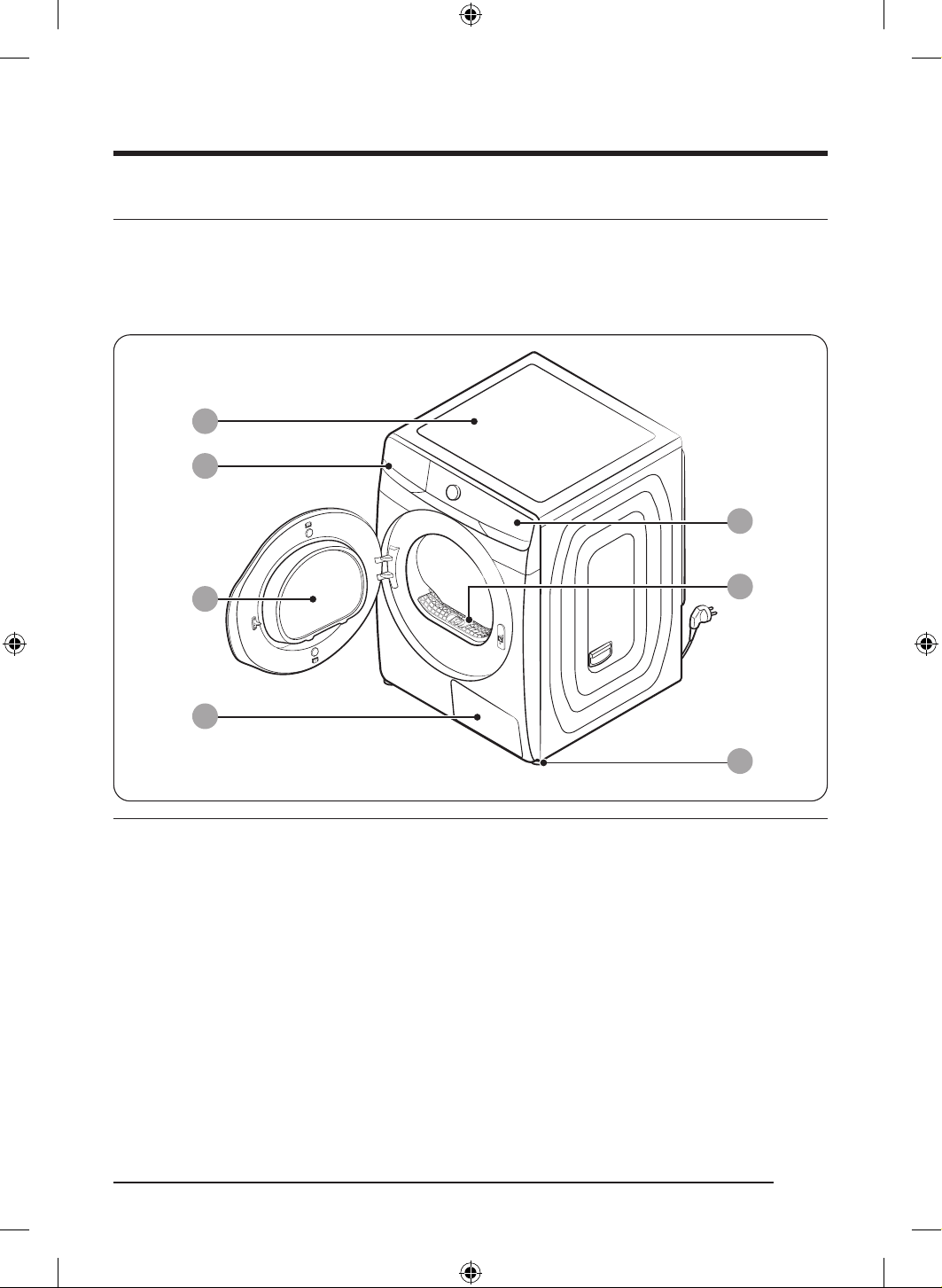
ةيبرعلا
12
بيكرتلا
ففجملا ءازجأ
ةحضوملا اهعقاومو ءازجا نوكت دق .لافطا لوانتم نع ا
ً
ديعب ةئبعتلا داوم عيمجب ظفتحا .صرحب قودنصلا نم ففجملا جارخإب مق
وأ/و ففجملا ناك اذإ .انه ةجردملا ءازجا ةفاك ع يوتحي ففجملا نأ نم دكأت ،بيكرتلا لبق .كب صاخلا ففجملا نع ةفلتخم هاندأ
.Samsung ءمع ةمدخ زكرم برقأب لاصتا ىجريف ،ةدوقفم وأ ةفلات هؤازجأ نم يأ
ففجملا ع ةعيرس ةرظن
ՋՍ
ՋՎ
ՋՌ
ՋՐ
ՋՒ
ՋՑ
ՋՏ
1 يولعلا ءاطغلا2 هايملا نازخ
3 بابلا4 يرارحلا لدابملا
5 مكحتلا ةحول تاسنلا ةافصم
ةيوستلا مدق
DV8700TK_SimpleUX_DC68-04223K-03_AR_P171.indd 12DV8700TK_SimpleUX_DC68-04223K-03_AR_P171.indd 12 2024/8/2 16:54:182024/8/2 16:54:18
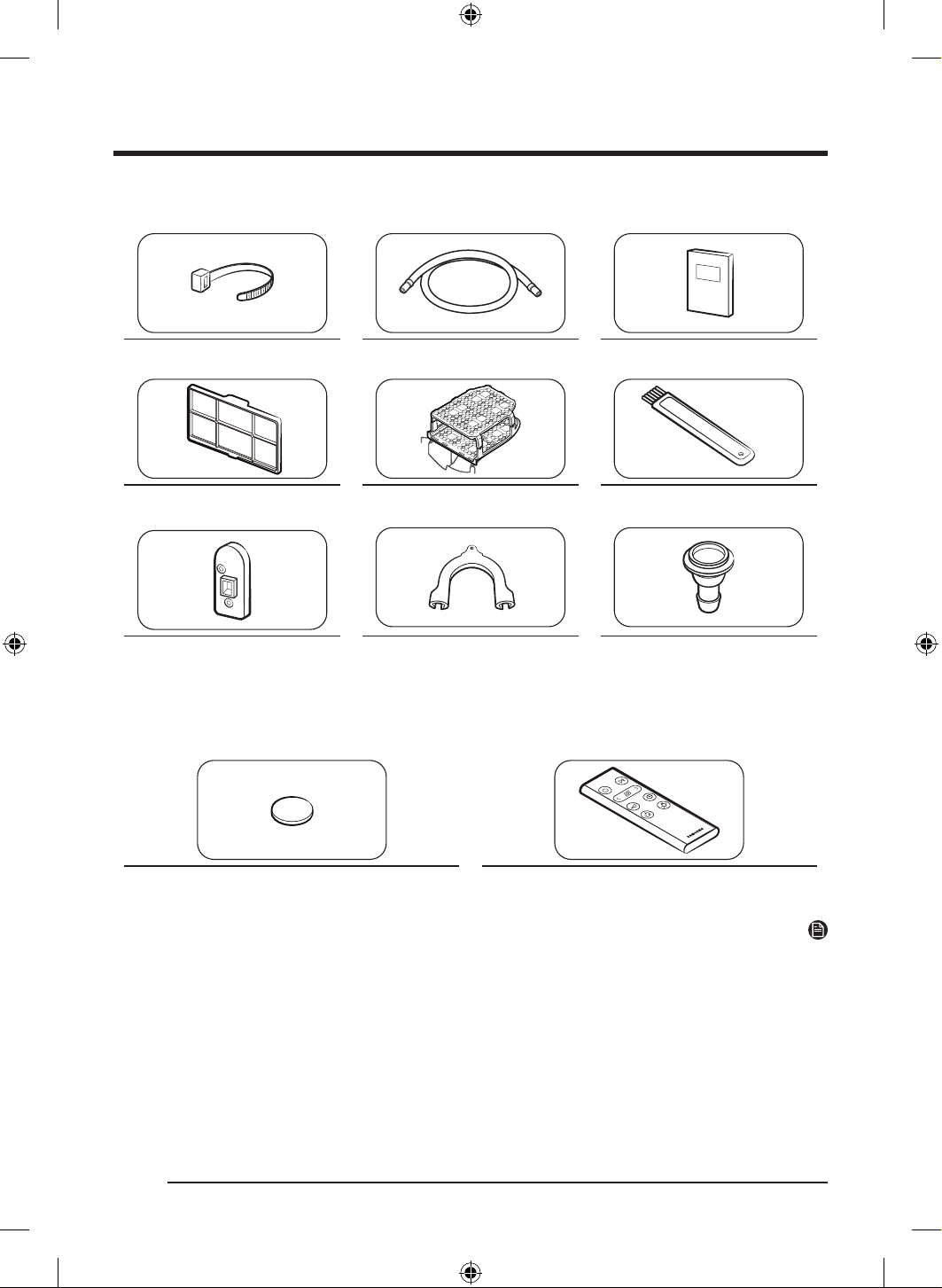
ةيبرعلا
13
)ةرفوتم( تاقحلملا
مدختسملا ليلد)م 3( ليوط فيرصت موطرخلبكلا طبار
فيظنتلا ةاشرففيفجتلا فر)يرايتخا حيشرملا( قيقد نيل حشرم
موطرخلا لصومموطرخلا لماح هب ةدوزملا تيدوملا( كساملا عارذ
)طقف
دعب نع مكحتلا زاهج
دعب نع مكحتةيراطب
ةظحم
عم طقف اهمادختسا نكمي تيبثتلا ةادأ نأ ةظحم ءاجرلا .ةلاسغلا نم يولعلا ءزجلا ع ففجملا تيبثتب حمست تيبثتلا ةادأ
فلتخت .يلحم ةزهجأ رجات وأ Samsung ةنايص ةمدخ زكرمب لصتا ،هعأ نيزختلا ةعومجم ءارشل .Samsung تاففجم و تاسغ
.ةلاسغلا جذومن فتخاب نيزختلا ةعومجم
.تيبثتلا ةادأ عم قفرملا بيكرتلا ليلد عجار ،ففجملل تيبثتلا تاداشرإ ع عطل
عم دراولا مدختسملا ليلد عجارف ،ةلاسغلا ع كففجم نيزختل اهمادختسا نكمي يتلا نيزختلا ةعومجم زارط لوح تامولعمل
.Samsung ةلاسغ
DV8700TK_SimpleUX_DC68-04223K-03_AR_P171.indd 13DV8700TK_SimpleUX_DC68-04223K-03_AR_P171.indd 13 2024/8/2 16:54:192024/8/2 16:54:19
بيكرتلا
ةيبرعلا
14
بيكرتلا تابلطتم
ةظحم
لمحتيسف ،هيف للخ ثودح وأ بيكرتلا ءوس ببسب ةبولطم ةمدخلا تناك اذإ .لهؤم بيكرت ينف لخ نم ففجملا اذه بيكرت بجي
.لبقتسملا يف اهيلإ عوجرلل تاداشرا هذهب ظفتحا .نامضلا ءاغلإ إ كلذ يدؤي دقو ةيلوؤسملا كلاملا
ريذحت
.ففجملا بيكرت لامتكا لبق طئاحلا سبقمب يبرهكلا رايتلا كلس ليصوتب مقت
.ففجملا كيرحتل رثكأ وأ نيصخش نم ةدعاسملا بلطا
.لماكلا فارشا ا
ً
مود مزلي ثيح .هلوح وأ هقوف وأ ففجملا لخاد نوبعلي ةفيلا تاناويحلا وأ لافطا كرتت
.لافطا لوانتم نع ا
ً
ديعب ةئبعتلا داوم عيمجب ظفتحا
Samsung ةكرشل عبات وأ لهؤم ةنايص ينف يأ عد .كسفنب فلات يبرهك رايت سباق وأ فلات يبرهك رايت كلس لادبتساب مقت
.فلات يبرهك رايت سباق وأ يبرهك رايت كلس يأ لدبتسي
.Samsung ةمدخ زكرم برقأب لاصتا ىجري ،تاحصإ يأ ءارج .كسفنب هليدعت وأ ه
كف وأ ففجملا حصإ لواحت
.قانتخل لافطا ضرعت رطخ بنجتل ةلمهملا ةزهجا عيمج نم باوبا ةلازإب مق
ةمدخ زكرم برقأب لصتاو ،روفلا ع ةقاطلا سباق لصفاف ،ناخد وأ قيرح ةحئار وأ ةيبرغ ءاضوض توص زاهجلا نم ردص اذإ
.Samsung
.اهليغشت ءانثأ ةقاطلا ردصم نم ففجملا لصفب مقت
.ففجملا نم برقلاب لاعتشل ةلباقلا داوملا عضت
يضراو يئابرهكلا ليصوتلا تابلطتم
.زتره 60 ددرتو تلوف230 ددرتم رايت دهجب يبرهك رايت ردصم ففجملل ريفوت بجي
يضرا ليصوتلا لمعيس ،ففجملا ءادأ يف لطعت وأ للخ ثودح ةلاح يف .ميلس
ٍ
لكشب يضرأ فرطب ففجملا ليصوت بجي
رايت كلسب ففجملا ديوزت متي .يبرهكلا رايتلل ةمواقم لق راسم ريفوت لخ نم كلذو ةيبرهك ةمدصل ضرعتلا ةروطخ ليلقت ع
ً
اقبط يضرا ليصوتلا لمعو بيكرتلا عم بسانملا ليصوتلا ذفنمب سباقلا ليصوت بجي .نونس ةثثب يضرأ فرط سباق هب يبرهك
.ةيلحملا طباوضلاو نيناوقلل
.لهؤم ءابرهك ينف وأ Samsung ةكرشب لاصتا ىجر
ُ
يف ،يئابرهكلا وأ يضرا ليصوتلا تابلطتم لوح ةلئسأ يأ كيدل تناك اذإ
ريذحت
.تاحتف ثثب ضرؤم يئابرهك سبقم يف ءابرهكلا كلس بكر
.كوكفم وأ فلات طئاح سبقم وأ ا
ً
فلات يبرهك رايت كلس وأ يبرهك رايت سباق مدختست
.ديدمت كلس وأ
ً
وحم مدختست
ةحص نم ا
ً
دكأتم نكت مل اذإ .ةيئابرهك ةمدص إ ض
رعتلا إ ففجملاب صاخلا يضرا لصوملل حيحصلا ريغ ليصوتلا يدؤي دق
.لهؤم ءابرهك ينف رشتساف ،ففجملل يضرا ليصوتلا
.ةقيرط يأب يبرهكلا رايتلا ذفنم وأ يبرهكلا رايتلا كلس وأ سباقلا ليدعتب مقت
.نخاسلا ءاملا ريساوم وأ زاغلا طوطخ وأ ةيكيتسبلا ةكابسلا ريساومب يضرا كلسلا لصوت
DV8700TK_SimpleUX_DC68-04223K-03_AR_P171.indd 14DV8700TK_SimpleUX_DC68-04223K-03_AR_P171.indd 14 2024/8/2 16:54:192024/8/2 16:54:19
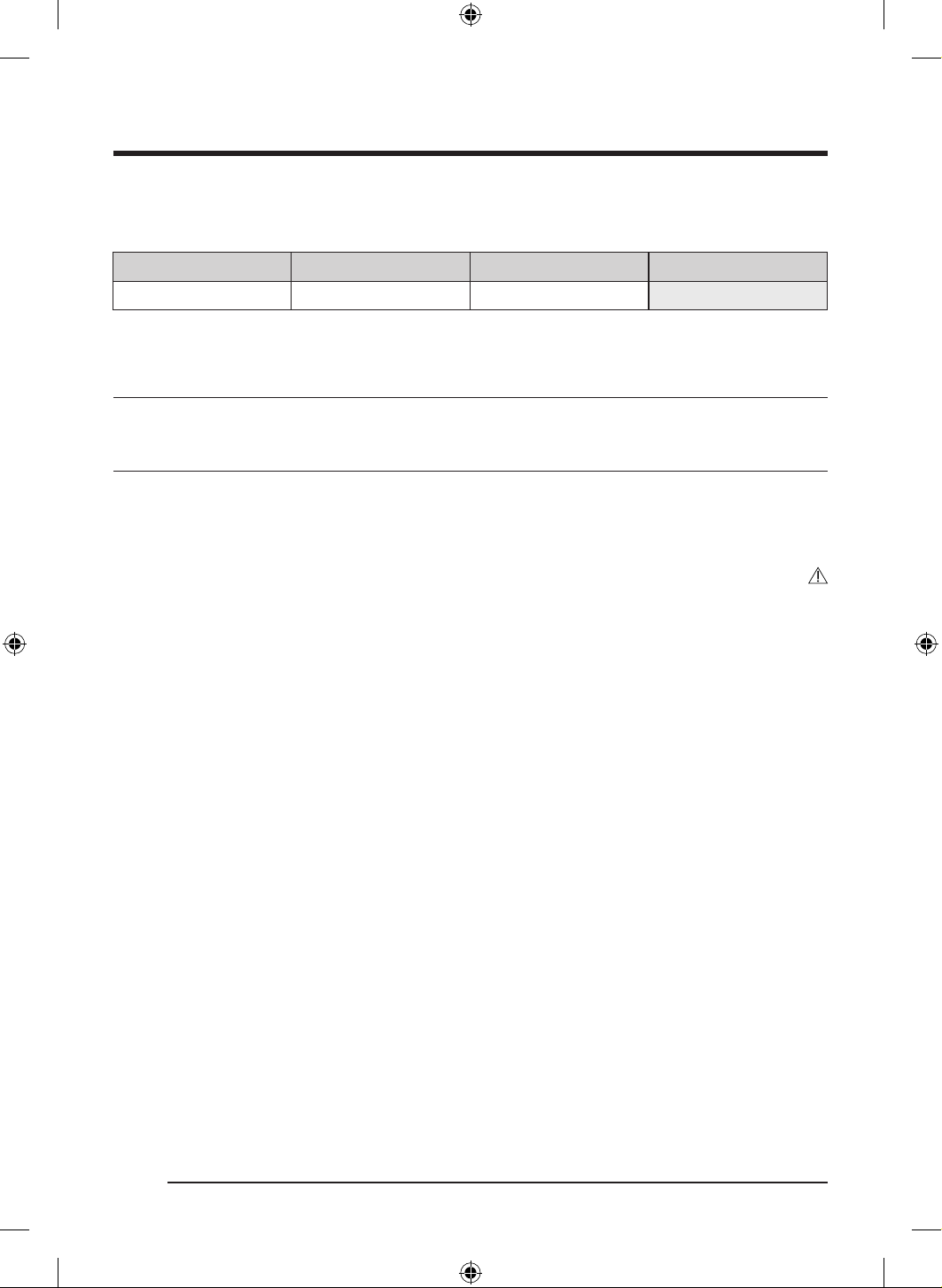
ةيبرعلا
15
ةنازخلا وأ ةرطنقلا بيكرت
:هلوح ةيلاتلا تاغارفلا نم ىندا دحلا ريفوت بجي ،ةنازخلا وأ ةرطنقلا بيكرتل
بناوجلاةيولعلا ةهجلاةيماما ةهجلاةيفلخلا ةهجلا
مم 20مم 25مم 490مم 50
.مم 550 اهردق ةدودسم ريغ ءاوه ةحتف ةنازخلا وأ ةرطنقلل يولعلا بناجلاب نوكي نأ بجي ،ا
ً
عم ففجملاو ةلاسغلا بيكرت ةلاح يف
ةوطخب ةوطخ بيكرتلا
.14 ةحفصلا يف بيكرتلا تابلطتم ةءارق نم دكأت ،ففجملا بيكرت لبق
خةوطخلا1خناكملا رايتخا
ناكملا تابلطتم
.نونسلا يثث ذفنم إ لوصولا هلخ نم لهسي ام ا
ً
ناكم ددحو .تازازتها لمحتي بلصو وتسم حطس ديدحتب مق
.كتحارل ةلاسغلا نم برقلاب ففجملا بيكرت ىجر
ُ
ي
ريذحت
.طقف لزنملا لخاد ففجملا بيكرتب مق
.ةيوجلا تابلقتلل ةضرعم قطانم يف ففجملا بيكرتب مقت
.ةيوئم ةجرد 35 نع ديزت وأ ةيوئم ةجرد 5 نع ةرارحلا ةجرد هيف لقت عقوم يف ففجملا بيكرتب مقت
.زاغلل برست هب نوكي نأ نكمي عقوم يف ففجملا بيكرتب مقت
DV8700TK_SimpleUX_DC68-04223K-03_AR_P171.indd 15DV8700TK_SimpleUX_DC68-04223K-03_AR_P171.indd 15 2024/8/2 16:54:192024/8/2 16:54:19
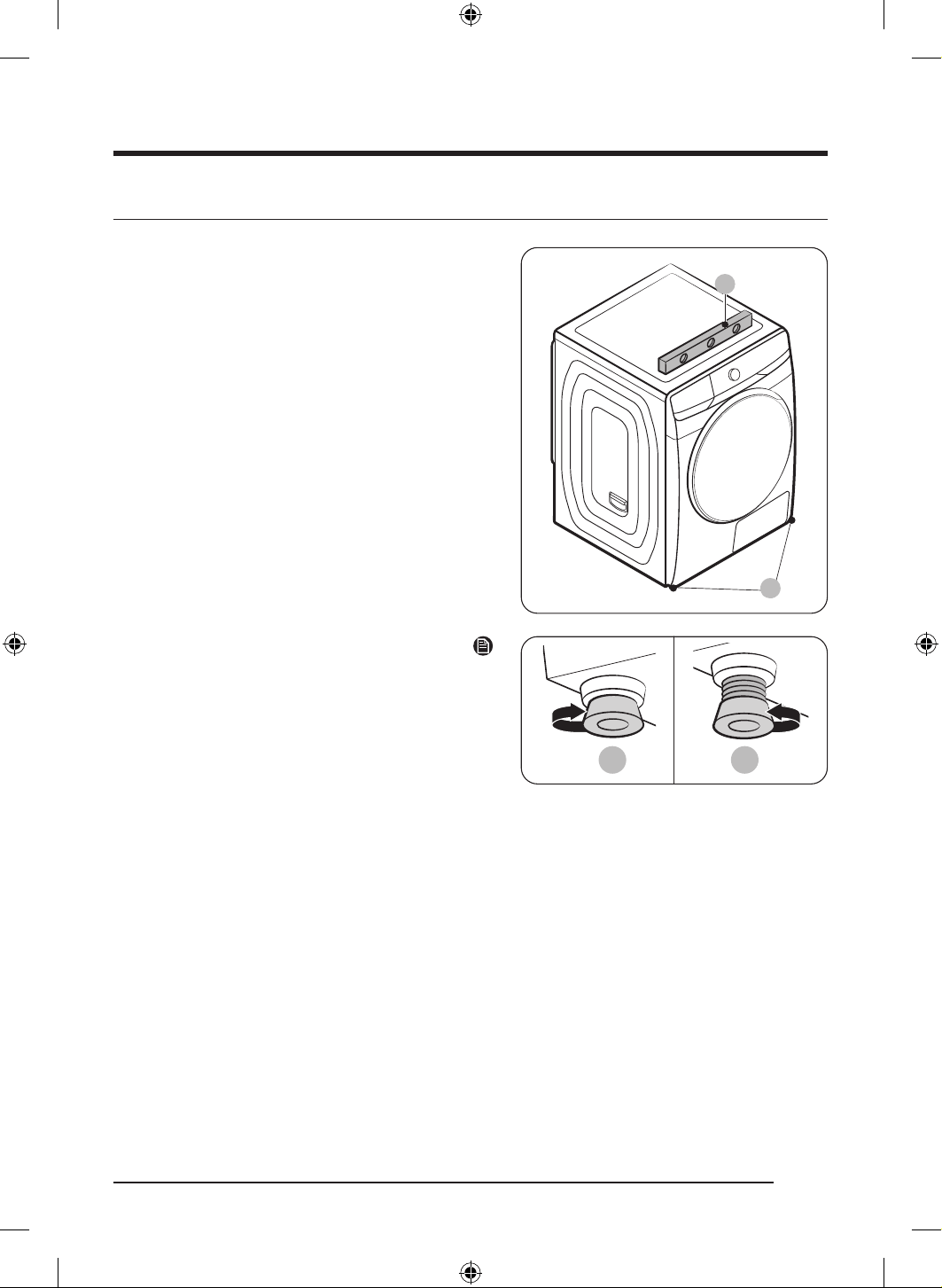
بيكرتلا
ةيبرعلا
16
خةوطخلا2خءاوتسا لجرأ طبض
A
B
1 ..بولطملا ناكملا إ قفرب ففجملا لقنب مق
2 . رخ بناج نم ففجملا ءاوتسا صحفاو )A( ىوتسم مدختسا
.فلخلل ماما نمو
3 . وأ ىرسيلا )B( ءاوتسا لجرأب نعتسا ،
ٍ
وتسم ففج
ُ
ملا نكي مل اذإ
.عافترا طبضل ىنميلا
4 . ع ماكحإب تبث
ٌ
م هنأ نم دكأت ،
ٍ
وتسم ففجملا نوكي نأ درجمب
.ضرا
5 ..ففجملل ءابرهكلا ليصوتب مق
C D
ةظحم
ءاوتسا لجر ردأ ،هتاذ ةلاسغلا عافترا ىوتسم ع ففج
ُ
ملا طبضل
راسيلا إ ءاوتسا لجر ردأ مث .ا
ً
يلك )C( دوعي ىتح نيميلا إ
.هتاذ عافترا ع ففجملاو ةلاسغلا نوكت نأ إ )D( ديدمتل
يدؤي نأ نكمي .بولطملا ردقلاب طقف ءاوتسا لجرأ عيسوتب مق
.ففجملل زازتها ثودح إ مزلا نم رثكأ ءاوتسا لجرأ عيسوت
DV8700TK_SimpleUX_DC68-04223K-03_AR_P171.indd 16DV8700TK_SimpleUX_DC68-04223K-03_AR_P171.indd 16 2024/8/2 16:54:192024/8/2 16:54:19
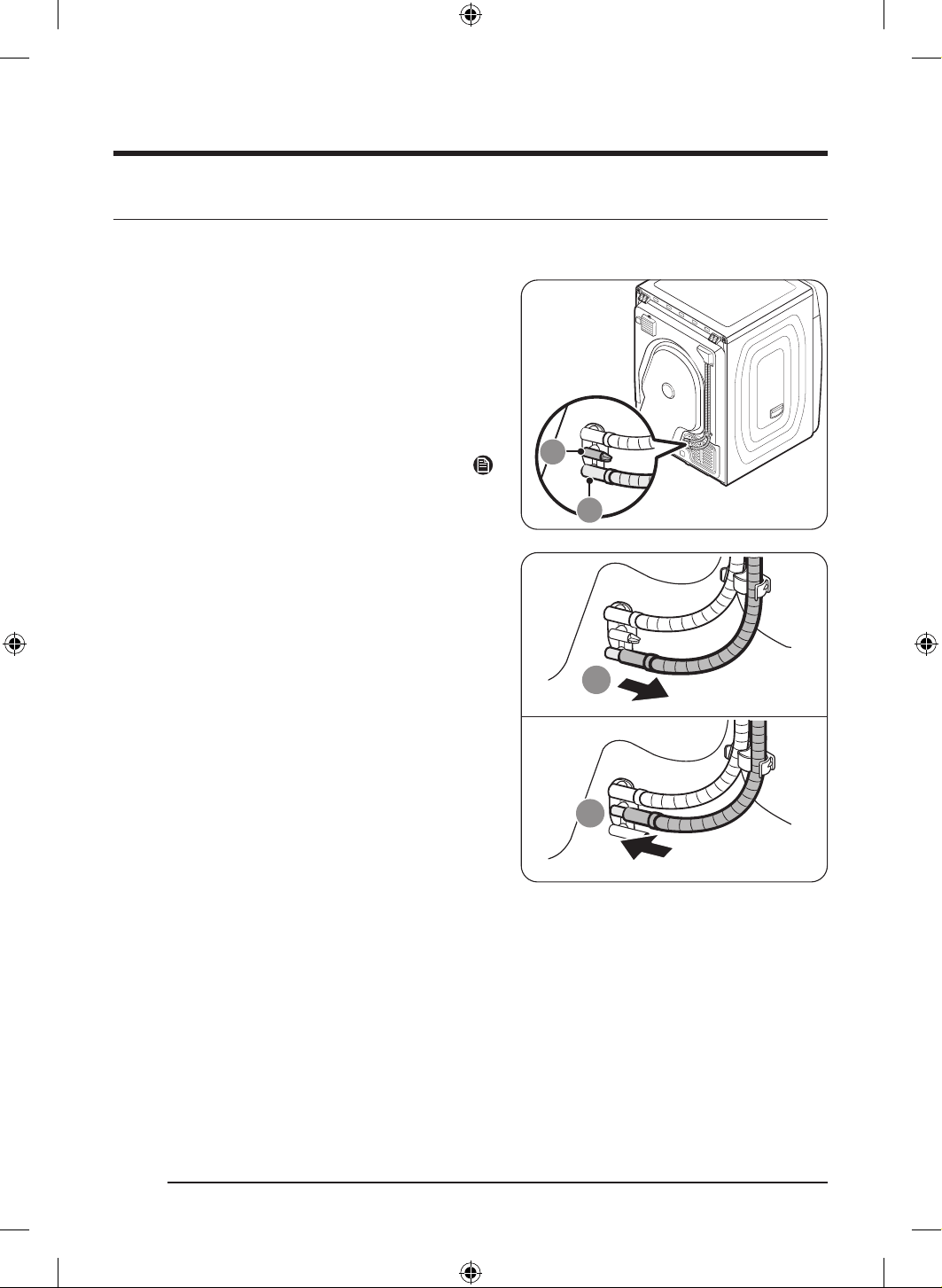
ةيبرعلا
17
خةوطخلا3خفرصلا موطرخ لصو
فرصلا ماظن إ رشابملا فيرصتلا
9
مكيدل فرصلا ماظن إ ةرشابم فثكملا ءاملا فيرصتب ةدشب يصون
.جمد
ُ
ملا ءاملا نازخ يف فيرصتلا نم
ً
دب
)ليوطلا فرصلا موطرخ( دوزملا يليمكتلا موطرخلا مدختسا
نم
ً
دب كيدل فرصلا ماظن إ ةرشابم فثكملا ءاملا فرصل
عضولا وه ريخا نأ ثيح( جمد
ُ
ملا ءاملا نازح يف فيرصتلا
.)فرصلل يضارتفا
اهيف رذعتي يتلا تاحلا ع جمدملا ءاملا نازخ مادختسا رصتقي
.ةرشابم فرصلا ماظنب فرصلا موطرخ ليصوت
ةظحم
ع ا
ً
طوبضم ففج
ُ
ملا اذه نوكي ،يضارتفا عنصملا عضو يف
.فثك
ُ
ملا ءاملا فرصل جمد
ُ
ملا نازخلا مادختسا
9
1 . هلخدأو ،)A( ءاملا فرص جرخ
ُ
م نم ءاملا نازخ فرص موطرخ لزأ
.)B( لماحلا يف
DV8700TK_SimpleUX_DC68-04223K-03_AR_P171.indd 17DV8700TK_SimpleUX_DC68-04223K-03_AR_P171.indd 17 2024/8/2 16:54:202024/8/2 16:54:20
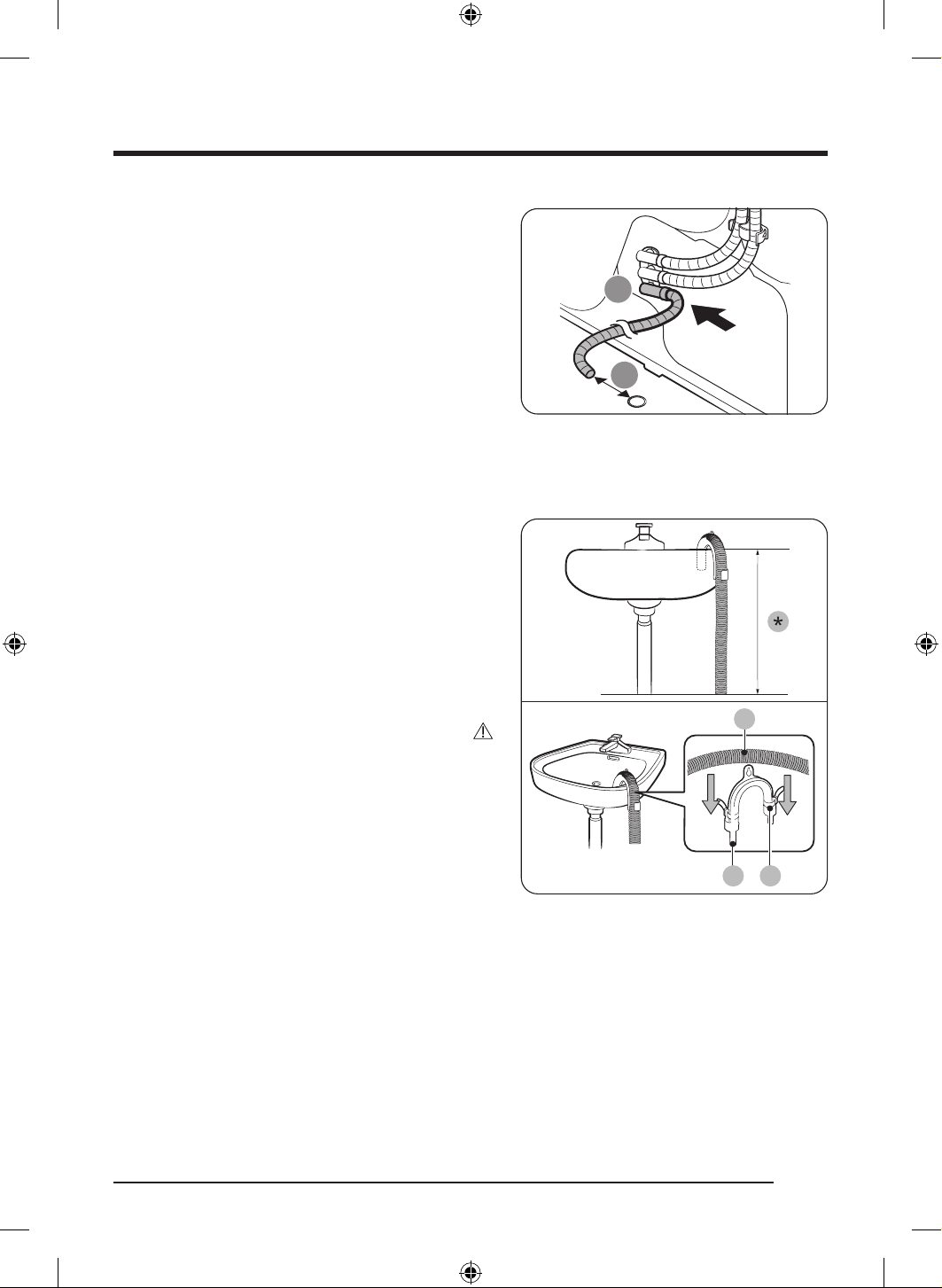
بيكرتلا
ةيبرعلا
18
ՋՌ
1 مم 70
2 . يف )ليوطلا فرصلا موطرخ( يليمكتلا موطرخلا يفرط دحأ لخدأ
.)A( ءاملا فرص ةحتف
3 . مم 70 دعب ع )ةحتفلا( يليمكتلا موطرخلا نم رخا فرطلا عض
.فرصلا ةحتف نم لقا ع
ليسغلا ضوح قوف يليمكتلا موطرخلا عضو
A
CB
1 . ءزجلا نم )*( مس ـب لقأ قحلملا موطرخلا ةياهن عضو نم دكأت
.ففجملا نم يلفسلا
2 . )B( موطرخلا لماح مدختسا ،قحلملا موطرخلا نم ام ةطقن ينثل
فاطخ ةطساوب رادجلا ع لماحلا تبثو ،قحلملا يكيتسبلا
موطرخ بيكرتب مقو .لبح وأ كلس ةطساوب روبنصلا يف هتبث وأ
طبار ا
ً
مدختسم امهتبث مث ،)B( موطرخلا لماحو )A( فيرصتلا
.)C( لبكلا
3 . قحلملا موطرخلا ليصوت قيرط نع فثكتملا ءاملا فيرصت كنكم
ُ
ي
.
ً
ةرشابم فيرصتلا ذفنمب )ليوطلا فيرصتلا موطرخ(
هيبنت
.ليصوتلا ةقطنم نم ءاملا برستي دق .فيرصتلا موطرخ ديدمتب مقت
.ليوط فيرصت موطرخ مدختسا
DV8700TK_SimpleUX_DC68-04223K-03_AR_P171.indd 18DV8700TK_SimpleUX_DC68-04223K-03_AR_P171.indd 18 2024/8/2 16:54:202024/8/2 16:54:20
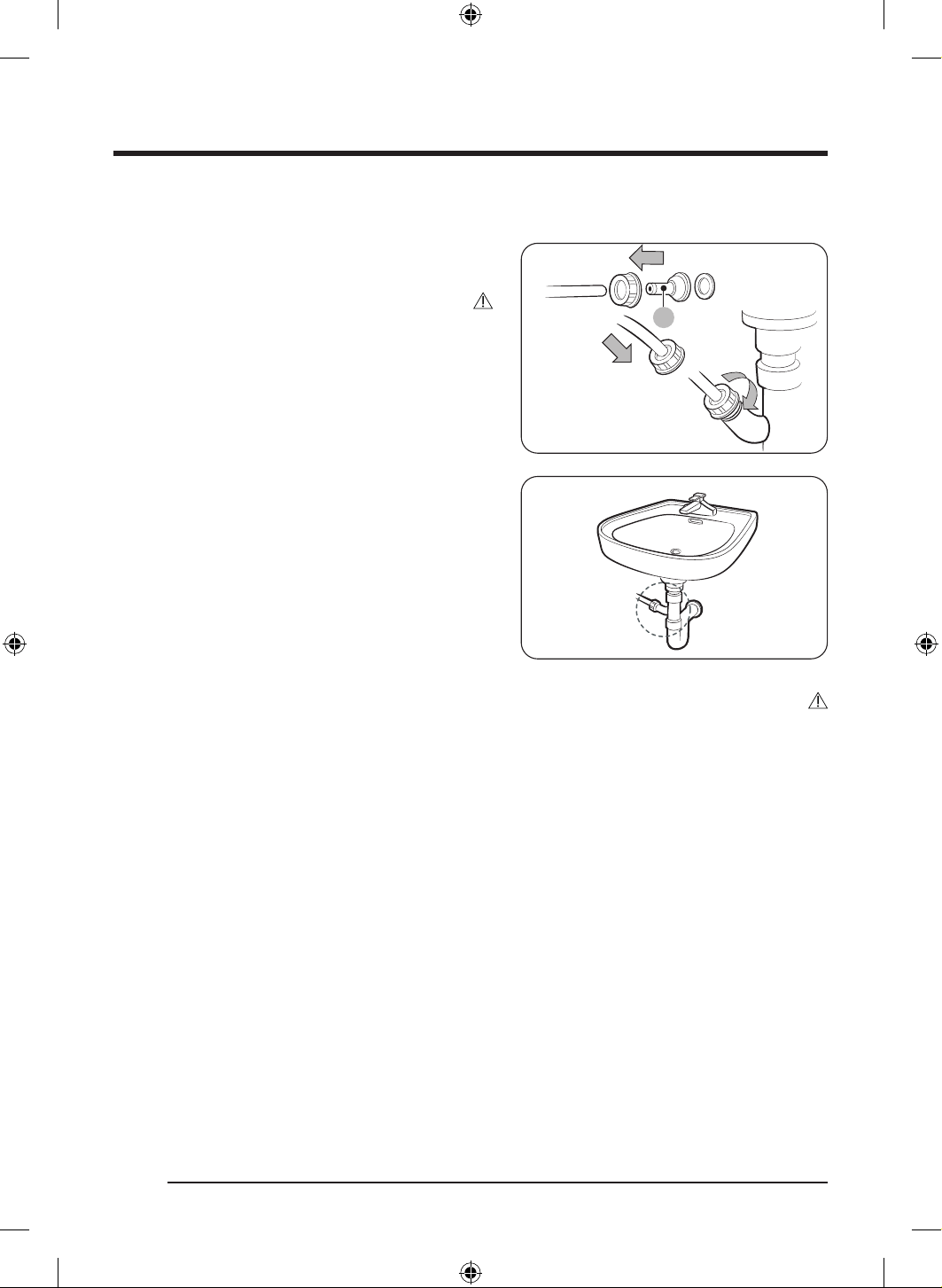
ةيبرعلا
19
ليسغلا ضوح فيرصت بوبنأ مادختساب
A
1 . قحلملا موطرخلا ةياهنب اهطبرا مث ،)A( موطرخلا ةلصو بيكرتب مق
.حضوم وه امك
هيبنت
.ماكحإب ةلصولاو موطرخلا ليصوت نم دكأت ،ءاملا برست عنمل
2 ..ليسغلا ضوح فيرصت بوبنأب ةرشابم موطرخلا لوحم لصو
هيبنت
يليمكتلا موطرخلا فرط عضت .فرصلا ةحتف نم ا
ً
بيرقت مم 70 دعب ع )ةحتفلا( يليمكتلا موطرخلا نم رخا فرطلا عض
.يحصلا فرصلا يراجم يف )ةحتفلا(
- .ففج
ُ
ملا إ فرصلا يراجم ةحئار برستت دقف
.ففج
ُ
ملا يف اهعضو لبق ضارغا نم دئازلا ءاملا ةيفصت كيلع
- .ففج
ُ
ملا لخاد ةهيرك ةحئار روهظ ببس
ُ
ت دق ةلتبملا ضارغا ن كلذو
.ةيحص رثكأ ففجملل ةيلخادلا ءازجا ع ظافحلل فيفجت ةرود مامتإ دعب يرارحلا لدابملا ءاطغو ففجملا باب حتفا
ضوحلا فيفجت بلطتي" ةلاسر ترهظ اذإ وأ ففجملا لخاد ةهيرك ةحئار دوجوب ترعش اذإ يتاذلا ضوحلا فيفجت ةرود لغش
. "يتاذلا
DV8700TK_SimpleUX_DC68-04223K-03_AR_P171.indd 19DV8700TK_SimpleUX_DC68-04223K-03_AR_P171.indd 19 2024/8/2 16:54:202024/8/2 16:54:20
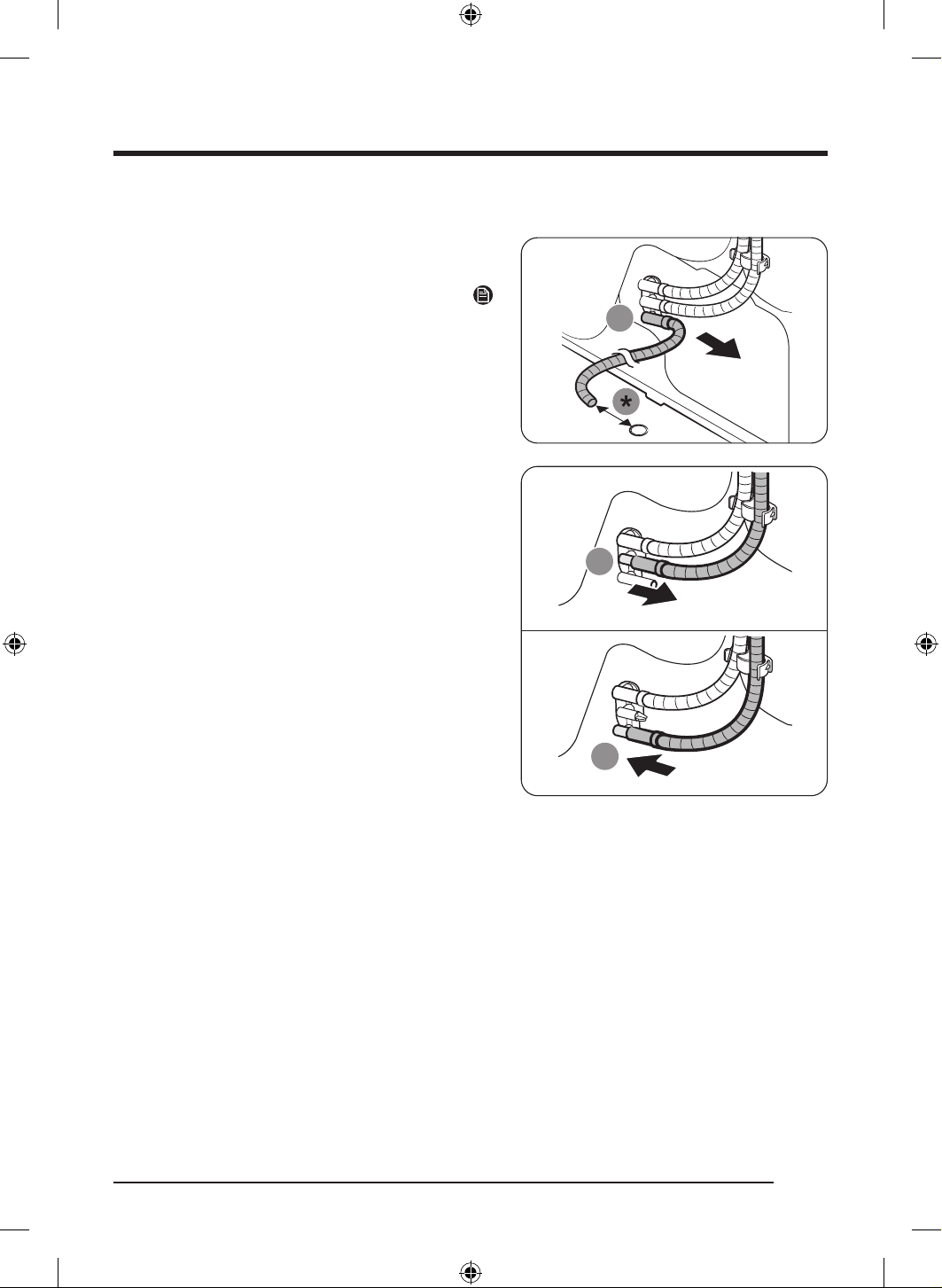
بيكرتلا
ةيبرعلا
20
ءاملا نازخ نم فيرصتلا
1 ..)A( ءاملا فرص ةحتف نم ليوطلا فرصلا موطرخ لزأ
مم *
ةظحم
هيلع ظفاحو ا
ً
مات ا
ً
فيفجت هتلازإ ىرج يذلا ليوطلا فرصلا موطرخ ففج
.ةجاحلا دنع ا
ً
قح همادختس نمآ ناكم يف
9
2 . فرص ةحتفب هلصوو ،)B( لماحلا نم ءاملا نازخ فرص موطرخ لزأ
.)A( ءاملا
- ةجردب ماكحإب ءاملا نازخب صاخلا فرصلا موطرخ لص مث
.هعضوم نم كرحتي ا
ً
تباث هلعجت
DV8700TK_SimpleUX_DC68-04223K-03_AR_P171.indd 20DV8700TK_SimpleUX_DC68-04223K-03_AR_P171.indd 20 2024/8/2 16:54:212024/8/2 16:54:21
ةيبرعلا
21
خةوطخلا4خبيكرتلا نم ققحتلا
.ةحيحص ةقيرطب ا
ً
مامت ةئبعتلا داوم عيمج نم صلختلا
.ضرا ع ماكحإب عوضوم هنأو ،وتسم عضو يف ففجملا نأ نم دكأتلا
.ليسغلا ةيواح لخاد ةقحلم اياقب يأ دوجو مدع نم دكأت
.ففجملل يولعلا بناجلا يف دوجوملا ديربتلا ةكبش ءاوه لخدم ةحتف قلغت
.ةطيحملا ءايشا ةفاظن ع ا
ً
مئاد ظفاحو ،ففجملا نم برقلاب لاعتشل ةلباق ءايشأ عضت
.ضرا ىوتسم سفن يف ففجملا ىوتسم ع ظافحلل ةيرورض اهن ا
ً
رظن .طبضلل ةلباقلا ففجملا لجرأ عزنت
.ففجملا مادختسا لبق لقا ع ةعاس رظتنت نأب كيصون ،بيكرتلا دعب
خةوطخلا5خزاهجلا ليغشت
.ففجملا ليغشتل ع رقنا مث .ةرئاد عطاق وأ رهصنمب يمحم دمتعم طئاح سبقمب ةقاطلا كلس لص
ةظحم
ع ا
ً
رهاظ HC تامولعملا دوك لظ اذإ .فاقياو نيخستلاو زاهجلا لمع نم دكأتلل ةقيقد 20 ةدمل تقؤملا فيفجتلا ةرود لغش
.يلحم ةمدخ زكرمب لصتا ،ةشاشلا
ةئيبلا
يف ةيلحملا تاطلسلا عم لصاوتلا ىجر
ُ
ي ،ليصافتلا نم ديزملو ."ةئيبلل ةقيدص" ةروصب جتنملا اذه فيلغت داوم نم صلختلا ىجري
.كتقطنم
DV8700TK_SimpleUX_DC68-04223K-03_AR_P171.indd 21DV8700TK_SimpleUX_DC68-04223K-03_AR_P171.indd 21 2024/8/2 16:54:212024/8/2 16:54:21
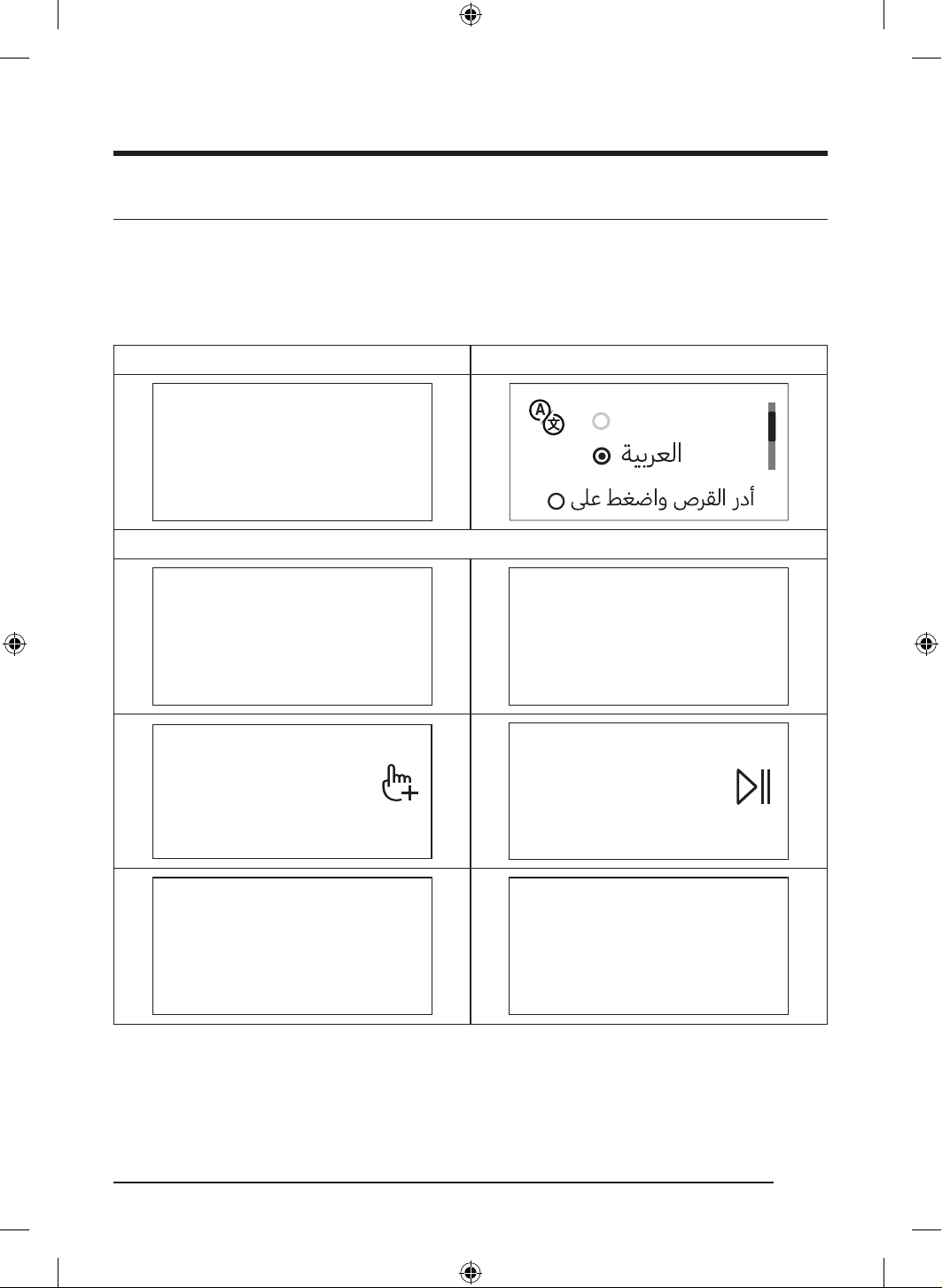
ةيبرعلا
22
ليغشتلا ءدب لبق ام
يلوا طبضلا
.اهمامت ةشاشلا ع رهظت يتلا تاميلعتلا عبتا .يلوا طبضلا تايلمع ةشاشلا ضرعت ،وا ةرملل ففج
ُ
ملا ليغشت دنع
.ةيناث ةرم رهظي نل يلوا طبضلا نإف ،ةقيقد نم رثك ةرود تلغشو يلوا طبضلا تممتأ اذإ
.ةريصق ميلعت ةرودو ةغللا رايتخا يلوا طبضلا لمشيو
.طبضلاب ةنوقيا ع رقنا ،رز ع رقنلا دنع
.كيدل ةيئابرهكلا ةردقلا ةلاحو امهبيكرت عضوم ع ا
ً
دامتعا ةقاطلا يف دقف ببس
ُ
ي هسفن تقولا يف ففج
ُ
ملاو ةلاسغلا ليغشت نإ
1 ةغللا رايتخا2 بيحرتلا ةشاش
English(US)
!ا
ً
بحرم
3 ةيميلعت تاهيجوت
!ديدجلا ففجملا فشتكنل
]يطختلل O ع طغضا[
ع فرعتلل صرقلا ردأ
ليسغلا تارود
]يطختلل O ع طغضا[
أدبتل نا طغضا
ليسغلا ةرود
]يطختلل O ع طغضا[
ةفرعمل طغضا
ةيفاضا فئاظولا
]يطختلل O ع طغضا[
يف تيضفتلا ظفح برج
"يتارود"
!يعانطصا ءاكذلا ةينقتب كففجم
ءيش لك مت!
DV8700TK_SimpleUX_DC68-04223K-03_AR_P171.indd 22DV8700TK_SimpleUX_DC68-04223K-03_AR_P171.indd 22 2024/8/2 16:54:212024/8/2 16:54:21
ةيبرعلا
23
فيفجتلل ةيداشرا دعاوقلا
خةوطخلا1خزرفلا
.نزولا ةليقثو نزولا ةفيفخ ضارغا طلخت
.ضارغا نع ةلصفنم اهففجو ةنولملا سبملا لسغا
.سجربيفلا وأ فوصلا نم ةعونصملا ضارغا ففج
ُ
ت ،ةيانعلا تاقصلم يف كلذب ىصوم نكي مل ام
.كلذ إ امو نيزنبلا وأ لوحكلا وأ تيزلاب ةخستملا سبملا فيفجتب مقت
.ةلوسغملا ريغ سبملا فيفجت بنجت
يف ببستلا وأ ففج
ُ
ملا يف ةهيرك ةحئار كلذ ببس
ُ
ي دقف .ليسغلا دعب لماكلاب اهفيشنت يرجي مل يتلا ةلتبملا ضارغا ففج
ُ
ت
.ففج
ُ
ملا لطع
.ةفيفخلا ةريغصلا ضارغا نم اهريغو لافطا براوج ةلاح يف ليسغلا ةكبش مادختساب ىصو
ُ
ي
خةوطخلا2خجراخلل اهبلقأو بويجلا غرفأ
فيفجتلا تايلمع ءانثأ يف كاكتحا ببسب ةشمقا فلت كلذ لوحيو .اهفيفجت لبق رخا هجولا ع نوللا ةنكاد سبملا بلقا
.فلتلاو نوللا ريغت نم ففج
ُ
ملا نم ةيلخادلا ءازجل ةيامحلا رفوي كلذكو
.اهفيفجت لبق جراخلا هاجت يلخادلا هجولا نوكيل زيرطتلا وأ رارزا تاذ ضارغا بلقا
هيبنت
.سبملا ع ميزباو سيبابدلاو ةيندعملا تمعلا لثم ةيندعملا ضارغا نإ .بويجلا غرفأ
ةقفر
ُ
ملا ةيندعملا ءازجاف .فيفجتلا لبق فيطاطخلا لفقأو ،تاباحسلا قلغأو ،ضارغاب ةقفرملا ةيندعملا ءازجا عيمج لزأ اذل
.اهسفن ةيواحلا فلتت وأ ضارغا نم اهريغ فلتت دق ضارغاب
خةوطخلا3ختاسنلا ةافصم نم ققحت
.تاسنلا ةافصم نود لمعي ففجملاو .ففج
ُ
ملا يف ضارغا عضو لبق ا
ً
حيحص ا
ً
بيكرت تاسنلا ةافصم بيكرت نم دكأت
يف "تاسنلا ةافصم" مسق عجار ،ةافصملا فيظنت نأشب تامولعملا نم ديزمل .فيفجتلا لبق ا
ً
مئاد تاسنلا ةافصم فظن
.4 ةحفص
DV8700TK_SimpleUX_DC68-04223K-03_AR_P171.indd 23DV8700TK_SimpleUX_DC68-04223K-03_AR_P171.indd 23 2024/8/2 16:54:212024/8/2 16:54:21
ليغشتلا ءدب لبق ام
ةيبرعلا
24
خةوطخلا4خةلومحلا ةعس ديدحت
.دعجتلا ثودح كلذكو فيفجتلا قاستا مدع ببس
ُ
ي امب هرثأو ريودتلا لمع نم للق
ُ
ي ليمحتلا طرفف .ففج
ُ
ملل ةددح
ُ
ملا ةعسلا زواجتت
.ةرم لك يف ففج
ُ
ملا يف ةدحاو ةلسغ ةلومح عض اذل
.ةلومحلا إ ةفاج ةفشنم فضأ ،نينثا وأ ضرغ فيفجت ةءافك نيسحتل
ةءافك ليلقت اهنأش نم ةكباشتملا ضارغاف .ففجملا يف اهجاردإ لبق سبملا كباشت كفب مق ،جئاتنلا لضفأ ع لوصحلل
.بابلا حتف يف ببستلاو فيفجتلا
هيبنت
ضارغا نإف ،اهعضوم يف ةبكر
ُ
م ريغ ةافصملا تناك اذإف .ةبكر
ُ
م تاسنلا ةافصم دوجو عم هنم اهلزأ وأ ففج
ُ
ملا إ ضارغا فضأ
.ففج
ُ
ملا لطعت ةببسم ةافصملا ةحتف يف طقست دق ةريغصلا
خةوطخلا5خفيفجتلا مامتإ دعب
ةحفص يف "ءاملا نازخ غارفإ" مسق عجار ،ءاملا نازخ غارفإ نأشب تامولعملا نم ديزملو .تابيرست ثودح يقوتل ءاملا نازخ غرفأ
43
.يرارحلا لدابملا فظنو 4 ةحفص يف "يرارحلا لدابملا" مسق عجار ،ةشاشلا ع "يرارحلا لدابملا فظن" ةلاسر ترهظ اذإ
ةيحص رثكأ ففج
ُ
ملا نم يلخادلا ءزجلا ع ءاقبل فيفجتلا ءاهنإ دعب نيحوتفم يرارحلا لدابملا ءاطغو ففج
ُ
ملا باب ع ظفاح
.ةفاظنو
DV8700TK_SimpleUX_DC68-04223K-03_AR_P171.indd 24DV8700TK_SimpleUX_DC68-04223K-03_AR_P171.indd 24 2024/8/2 16:54:212024/8/2 16:54:21
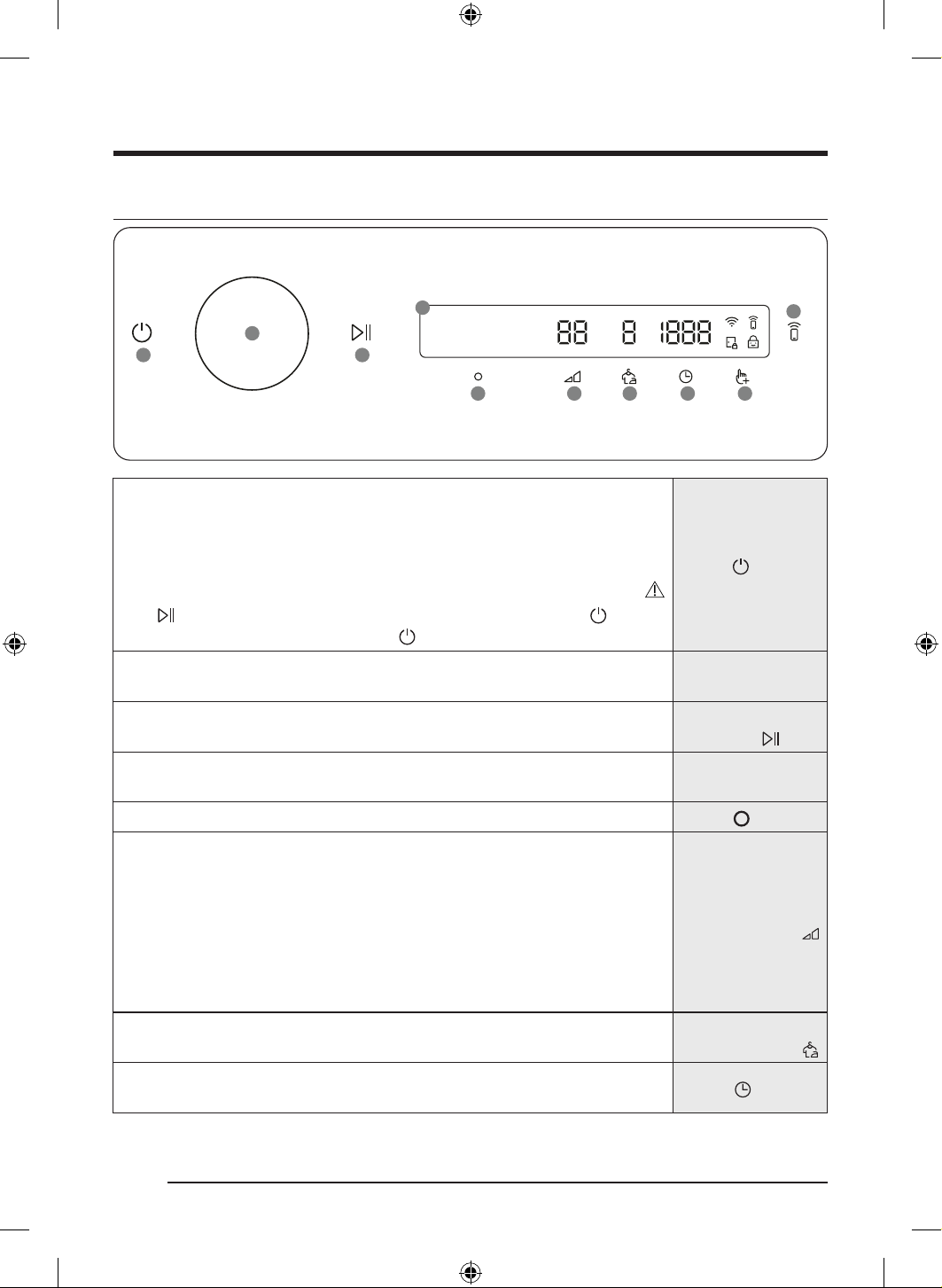
ةيبرعلا
25
تايلمعلا
مكحتلا ةحول
ՋՌ ՋՎ
ՋՏ
ՋՐ ՋՑ ՋՒ ՋՓ ՋՔ
ՌՋ
ՋՍ
1 ةقاطلا
.هليغشت فاقيإ وأ ففج
ُ
ملا ليغشل طغضا
ففج
ُ
ملا ليغشت فقوتيس ،ففج
ُ
ملا ليغشت دعب قئاقد 10 ةدمل مكحتلا ةحول مدختست مل اذإ
.ا
ً
يكيتاموتوأ
.ةرودلا مامتإ دعب ا
ً
يكيتاموتوأ ففج
ُ
ملا ليغشت فقوتي
هيبنت
ع رقنا .ففج
ُ
ملا ةرود ذيفنت ءانثأ يف ففج
ُ
ملا نوكت امدنع ففج
ُ
ملا ليغشتل ع رقنت
.ففج
ُ
ملا ليغشت فاقي ع رقنا مث ،
ً
وأ ةرودلا فاقي طغضلا لصاوو
2 هيجوتلا صرق
،هيجوتلا صرق ريدت امدنع .فئاظولاو تارودلا نيب لاقتنل نيميلا وأ راسيلا إ هيجوتلا صرق ردأ
.)ماظنلا فئاظوو ،ةيفاضا فئاظولاو ،ةرودلا لثم( ةحاتملا تارايتخا ةشاشلا ضرعتس
3 فاقيإ/ءدب
تقؤم
.هفاقيإ وأ ليغشتلا ءدبل طغضلاب رمتساو رقنا
4 ضرعلا ةشاش
هيبنتلا لئاسر نم كلذ ريغو ،ةحاتملا تارايخلاو ،بيرقتلاب قبتملا تقولاو ،ةيلاحلا ةرودلا ةشاشلا حضوت
.ةديفملا لئاسرلا وأ
5
قفاوم
.تادادعا وأ ةفيظولل كرايتخا ديكأتل رقنا
فيفجتلا ةجرد
،4 ةجردلا إ 1 ةجردلا نيب ام رايتخا كلذك كنكم
ُ
ي .ةراتخملا ةرودلل فيفجتلا ةجرد رييغتل انه طغضا
.ةراتخ
ُ
ملا ةرودلا ع فقوتت ةحاتملا ةجردلا نإف كلذ عمو
.ةكيمسلاو ةريبكلا ضارغل ةبسانم :4
.يسايقلا فيفجتلا ةجرد :3
قلع
ُ
ت وأ طسب
ُ
ت يتلا ضارغل مدختس
ُ
يو .ا
ً
يئزج ةفاجلا ضارغل صصخ
ُ
م بطرلا فيفجتلا ةجرد :2
.اهفيفجت لج
ضارغا وأ ةقيقرلا ضارغل بسانم اذهو .ةشمقا ةيامح لج ضارغل ئداهلا فيفجتلا :1
.)فيفجتلا فر وأ اهطسب وأ اهقيلعت لثم( ةبطر نوكت امدنع ا
ً
يعيبط ا
ً
فيفجت اهفيفجت دوت يتلا
ديعاجتلا عنم
ديق ةيصاخلا هذه نوكت امدنع .اهليغشت فاقيإ وأ دعجتلا عنم ةفيظو ليغشتل طغضلا لصاوو طغضا
.دعجتلا عنمل فيفجتلا ةرود مامت دعب عطقتم لكشب ةيواحلا رو
ّ
دي ففج
ُ
ملا نإف ،ليعفتلا
تقولا
كنكم
ُ
ي .درابلا ءاوهلا و فرلا ةطساوب فيفجتلا وأ تقؤملا فيفجتلا ديدحت لج ةرودلا ةدم رايتخ رقنا
.ةراتخملا ةرودلا ع فيفجتلا تقو دمتعيو .ةقيقد 240و ةقيقد 20 نيب فيفجتلا ةدم طبض
DV8700TK_SimpleUX_DC68-04223K-03_AR_P171.indd 25DV8700TK_SimpleUX_DC68-04223K-03_AR_P171.indd 25 2024/8/2 16:54:222024/8/2 16:54:22
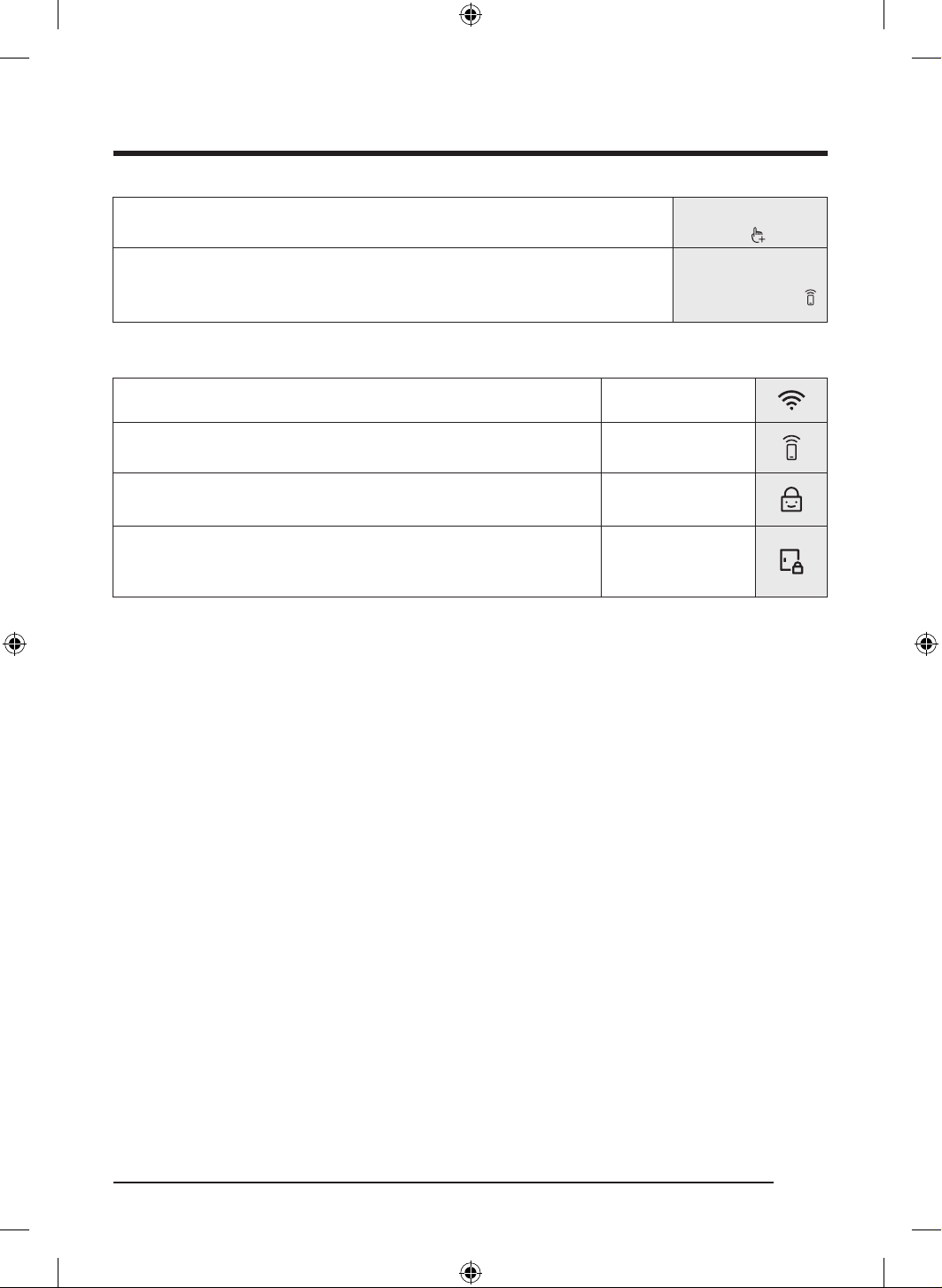
تايلمعلا
ةيبرعلا
26
فئاظولا
ةيفاضا
.ةيفاضا فئاظولا ةمئاق لوخدل رقنا
.ماظنلا ماهم ةمئاق لوخدل ناوث 3 ةدمل طغضلاب رمتساو رقنا
1 يكذلا مكحتلا
.يكذلا مكحتلا ةفيظو ليغشت فاقيإ /ليغشتل رقنا
قيبطت مادختساب دعب نع ففجملا يف مكحتلا كنكمي ،يكذلا مكحتلا ةفيظو طيشنت يرجي امدنع
.يكذلا كفتاه ع SmartThings
ةنوقيا تافيصوت
Wi-Fi.ياف-ياولاب لصتم ففج
ُ
ملا نأ إ ةنوقيا هذه ريشت
يكذلا مكحتلا
،”يكذلا مكحتلا“ نع تامولعملا نم ديزمل .يكذلا مكحتلا ليغشت إ ريشت ةنوقيا هذه
.3 ةحفص ع عطا ىجر
ُ
ي
لافطا دض لفق
.لافطا دض لفق ليغشت إ ريشت ةنوقيا هذه
.33 ةحفص ع عطا ىجر
ُ
ي ،”لافطا دض لفق“ نع تامولعملا نم ديزمل
بابلا لفق
.هحتف نك
ُ
ي و قلغم بابلا نأ إ ةنوقيا هذه ريشت
.ذئدنع رشؤملا اذه ئضيو ،ةرودلا ءانثأ يف ا
ً
يكيتاموتوأ بابلا قلغ
ُ
ي
.ةنوقيا هذه يفتخت امدنع بابلا حتف كنكمي
DV8700TK_SimpleUX_DC68-04223K-03_AR_P171.indd 26DV8700TK_SimpleUX_DC68-04223K-03_AR_P171.indd 26 2024/8/2 16:54:232024/8/2 16:54:23
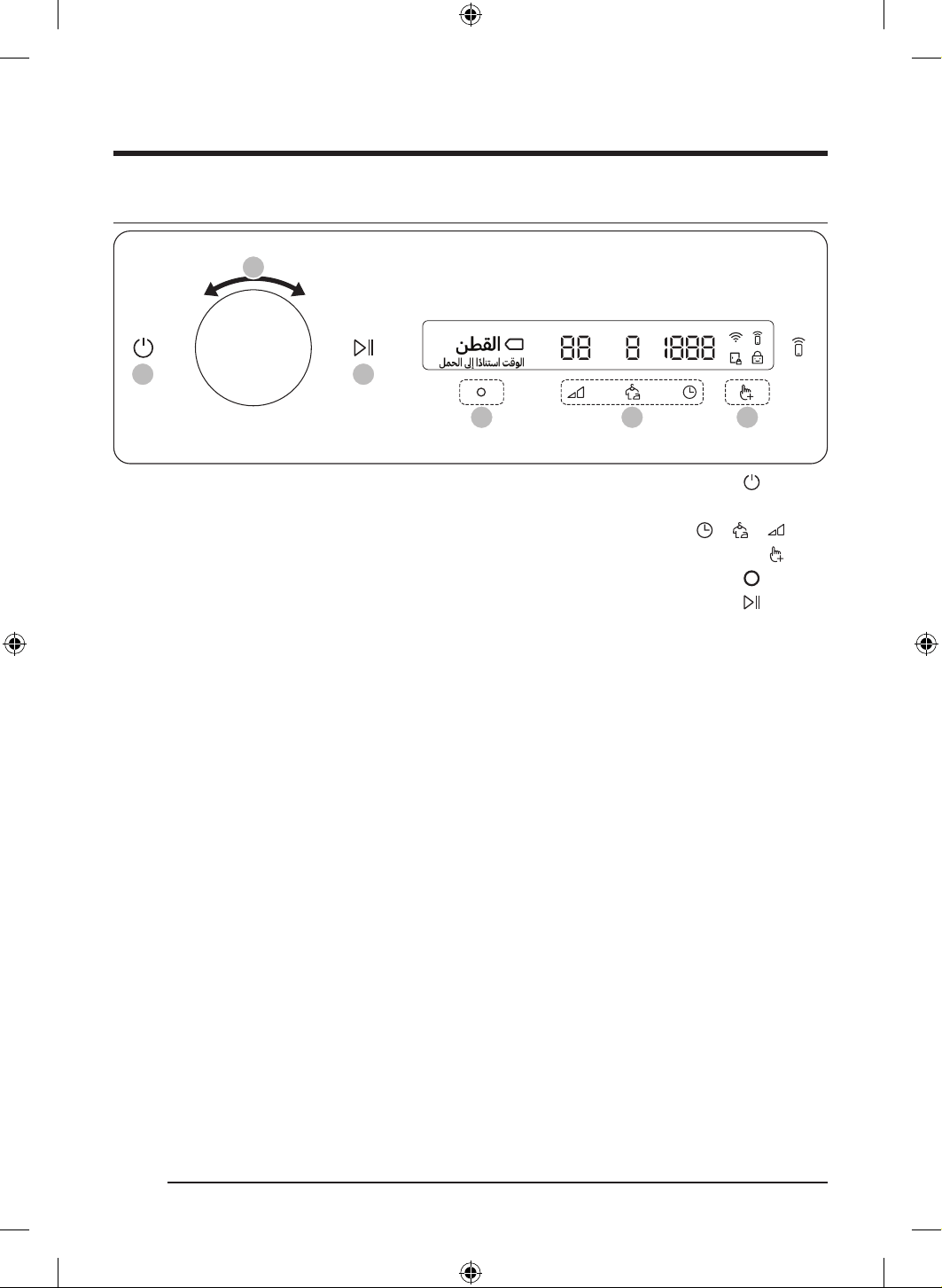
ةيبرعلا
27
ةرود ليغشت
05 03 04
01 06
02
1 ..ففج
ُ
ملا ليغشتل ع رقنا
2 ..2 ةحفص ع عطا ىجر
ُ
ي ،”ةرودلل ةماع ةيؤر“ نع تامولعملا نم ديزمل .اهديرت يتلا ةرودلا رايتخ هيجوتلا صرق ردأ
3 ..ةيضارتفا ةرودلا تادادعإ رييغتل
وأ ، وأ ، رقنا
4 . .31 ةحفص ع عطا ىجر
ُ
ي ،”ةيفاضا فئاظولا“ نع تامولعملا نم ديزمل .ةيفاضإ ةفيظو رايتخ هيجوتلا صرق ردأو ،
رقنا
5 ..ةيفاضإ فئاظو تارودلا عيمجل رفوتي نأ ةرورضلاب سيلو .ةراتخملا ةيفاضا ةفيظولا تادادعإ رييغتل
ع رقنا
. ،ليسغ ةلومح ىصقأو ،ا
ً
زجوم ا
ً
فصو ةشاشلا ضرعت ،اهديرت يتلا ةرودلا ددح
ُ
ت نأ ام .ليغشتلا ءدبل طغضلاب رمتساو
ع رقنا
.تامولعملا داوكأو ،يقبتملا ةرودلا تقوو ،ةرودلا يف مدقتلا نم ققحتلا كلذك كنكمي .ةرودلا نمزو
DV8700TK_SimpleUX_DC68-04223K-03_AR_P171.indd 27DV8700TK_SimpleUX_DC68-04223K-03_AR_P171.indd 27 2024/8/2 16:54:232024/8/2 16:54:23
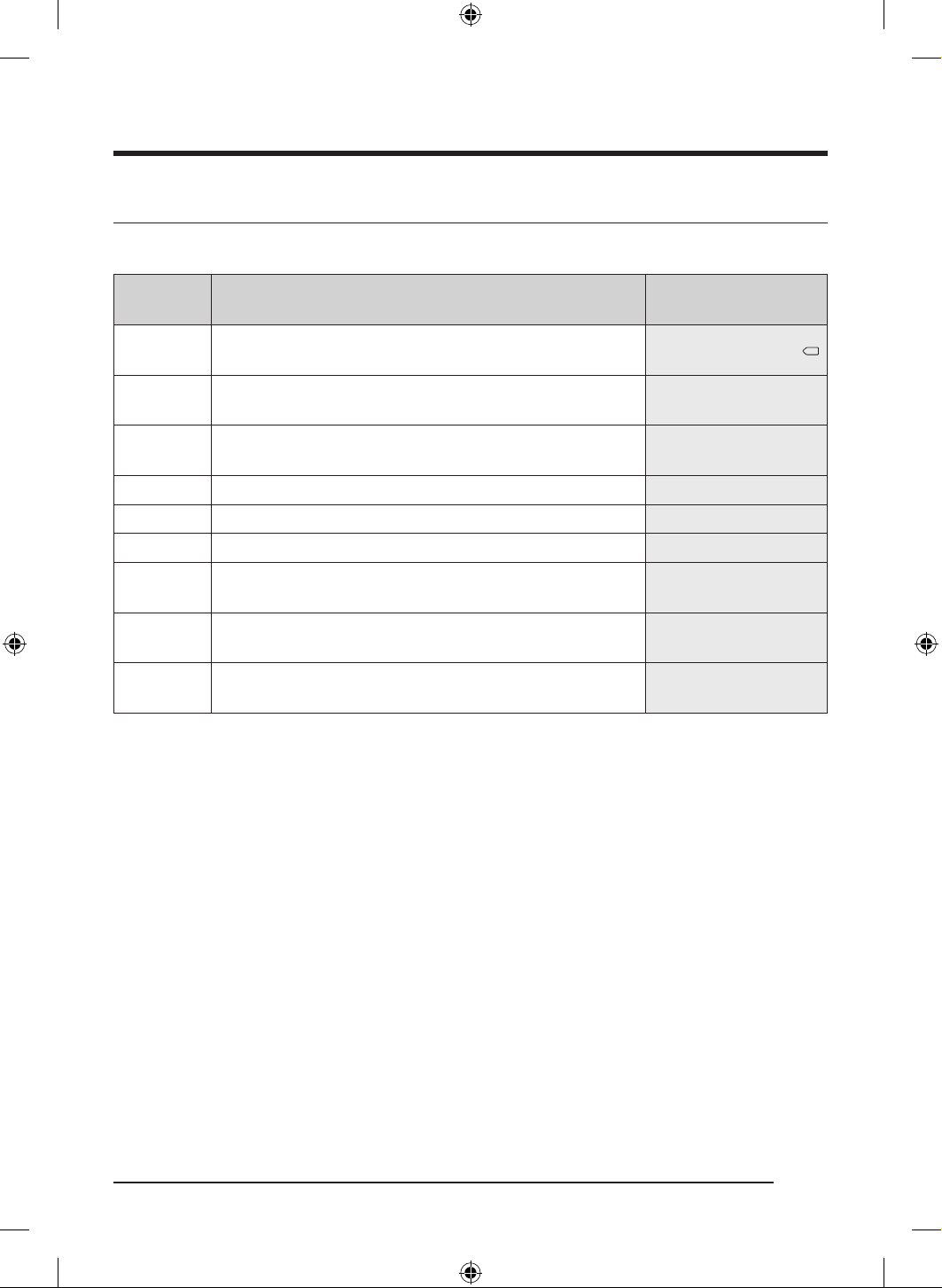
تايلمعلا
ةيبرعلا
28
ةرودلل ةماع ةيؤر
رعشتسملا بسح فيفجت تارود
ةرودلافصولا
نزو ىصقأ
)مجك(
نطقلا
ةيلخادلا سبملا وأ ةدئاملا شرافم وأ ريرسلا ةيطغأ وأ ةينطقلا سبملل
.ناصمقلا وأ فشانملاو
16.0
يعانطصا ءاكذلا ربع فيفجت
ةرارحلا ةجردو ةلومحلا بسح يعانصلا ءاكذلاب نسحم يئاقلت فيفجت
.ةطيحملا
16.0
عيرسلا فيفجتلا
جاتحت يتلا ةيبيكرتلا ةشمقاو تاينطقلا نم ةنوكملا ةطلتخملا تومحلل
.عيرس فيفجت
8.0
ناصمقلا.صيمق لثم ةعرسب ةدحاو سبم ةعطق فيفجتل مدختس
ُ
ي 2.0
ة
ّ
رسا مقطأ.ةفيفخلا ةفحلاو تاءملاو تايناطبلا لثم مجحلا ةريبك ليسغلا عطقل 4.0
طوفلا.مامحلا فشانم لثم سبملا فيفجتل اذه مدختس
ُ
ي 6.0
قيقرلا شامقلا
ةيئاسنلا سبملا لثم ةياعرو ةيانعل جاتحت يتلا ةقيقرلا سبملاو ضارغل
.ةيتحتلا
3.0
ةيعانطصا ةشمقا
ةدامو )اريفيرتلاو نيلويدلا( رتسيلوبلا نم ةعونصملا ناصمقلاو تازولبلل
.ةجسنا نم كلذ لثام
ُ
ي ام وأ )نولينلاو نولريبلا( ديامايلوبلا
7.0
فوصلا
.طقف ةلاسغلا يف ريودتلاب فيفجتلاو لسغلل ةلباقلا ةيفوصلا تاجتنملا لسغل
.فيفجتلا لبق اهرهظ ع سبملا بلقا ،جئاتنلا لضفأ ع لوصحلل
1.0
DV8700TK_SimpleUX_DC68-04223K-03_AR_P171.indd 28DV8700TK_SimpleUX_DC68-04223K-03_AR_P171.indd 28 2024/8/2 16:54:232024/8/2 16:54:23
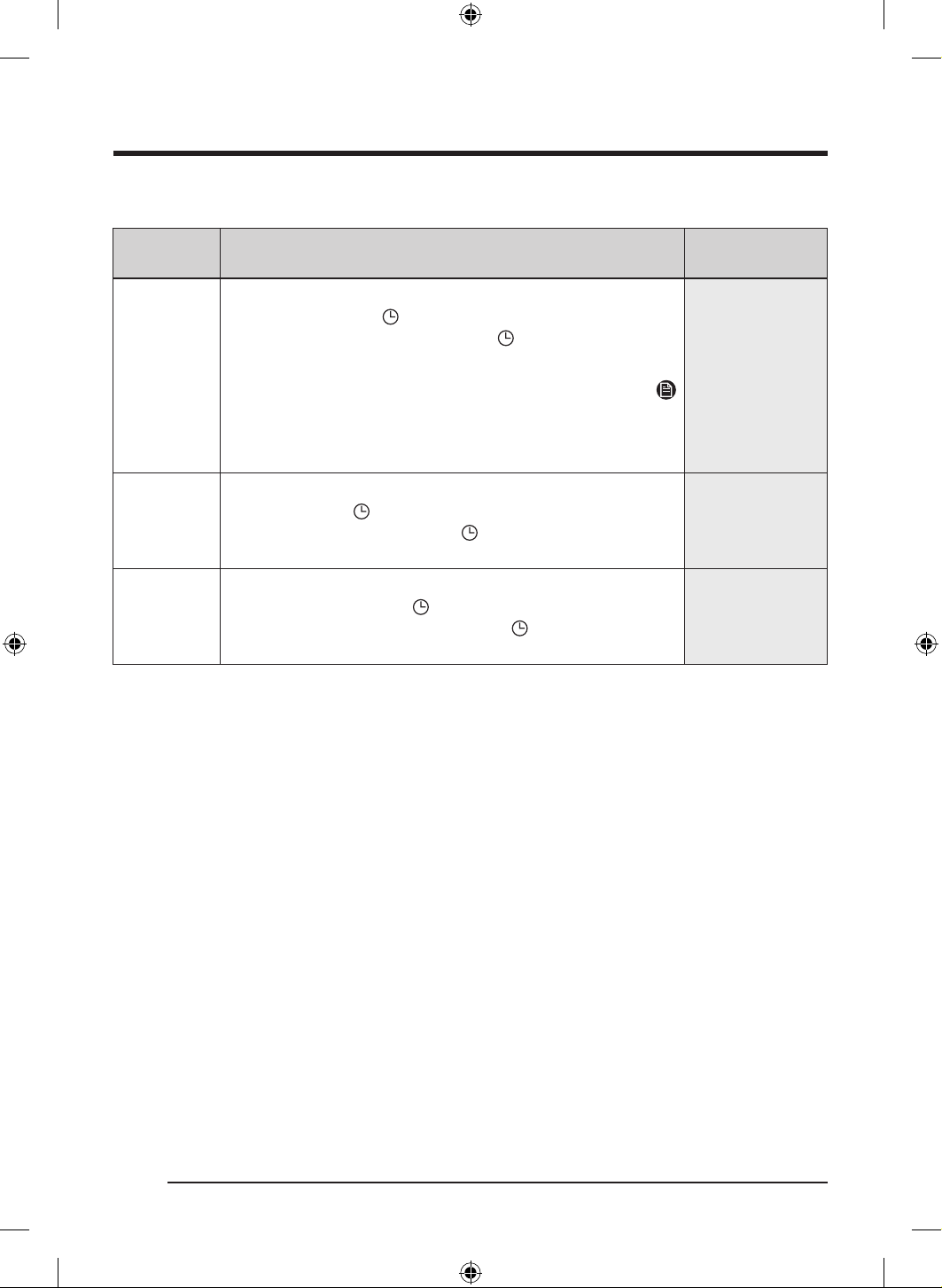
ةيبرعلا
29
يوديلا فيفجتلا تارود
ةرودلافصولا
نزو ىصقأ
)مجك(
تقؤملا فيفجتلا
.بولطملا فيفجتلا تقو طبضل رزلا اذه مدختسا
نيب ام فيفجتلا تقو نوكيل
ع رقناو تقؤملا فيفجتلا طبضل هيجوتلا صرق ردأ
بيترتلاب ةحاتملا تقولا تارايخ ءاقتن تارم ةدع ع رقنا .ةقيقد 240و ةقيقد 20
.240 / 180 / 150 / 120 / 90 / 60 / 50 / 40 / 30 / 20 :يلاتلا
ةظحم
فيفجت تارود ىدحإ ءاهنإ دعب يفاضإ فيفجت لج ةرودلا هذه تمدختسا اذإف
نأ ظحو .)ةقيقد 20( ةدم ىندأ ع فيفجتلا تقو طبضا ،)2 ةحفص يف ةدارولا(
.اههوشت وأ ضارغا فلت ببس
ُ
ي دق دئازلا فيفجتلا
-
فرلا ةطساوب فيفجتلا
.فيفجتلا فر ع فيفجتلل جاتحت يتلا ضارغل تقولا ةددح
ُ
م فيفجت ةرود
فيفجتلا تقو نوكيل
ع رقناو فرلا ةطساوب فيفجتلا طبضل هيجوتلا صرق ردأ
ةحاتملا تقولا تارايخ ءاقتن تارم ةدع ع رقنا .ةقيقد 240و ةقيقد 20 نيب ام
.240 / 180 / 150 / 120 / 90 / 60 / 50 / 40 / 30 / 20 :يلاتلا بيترتلاب
-
درابلا ءاوهلا
.اهتيوهتو ةليوط ةدمل مدختس
ُ
ت مل يتلا سبملا شاعن .ةشمقا عاونأ عيمجل
20 نيب ام فيفجتلا تقو نوكيل
ع رقناو درابلا ءاوهلا طبضل هيجوتلا صرق ردأ
بيترتلاب ةحاتملا تقولا تارايخ ءاقتن تارم ةدع
ع رقنا .ةقيقد 240و ةقيقد
.24 / 1 / 15 / 12 / / / 5 / 4 / 3 / 2 :يلاتلا
-
DV8700TK_SimpleUX_DC68-04223K-03_AR_P171.indd 29DV8700TK_SimpleUX_DC68-04223K-03_AR_P171.indd 29 2024/8/2 16:54:232024/8/2 16:54:23
تايلمعلا
ةيبرعلا
30
ىرخأ تارود
ةرودلافصولا)مجك( نزو ىصقأ
+ةفاظنلاب ةيانعلا.ايريتكبلا ع ءاضقلل تاءملا ةشمقأو ةفاجلاو ةلتبملا سبملا ميقعتل
)للبلا ةلاح يف( 6.0
)فافجلا ةلاح يف( 4.0
ةيئاوهلا مقطاب ةيانعلا
ةيطغأو ريرسلا فشارشو ريرسلا تاءمو سبملا نع رابغلا ضفنل
.خلإ ،دئاسولا
3.0
ةليقثلا فطاعملاب ةيانعلا.ةشفتنملا ضارغا ةئيه ةداعتس 2.0
ةيجراخلا سبملاب ةيانعلا
داومب اهتجلاعم ىرج يتلا جورخلا سبمل هايملا درط صئاصخ ةداعتس
.لابجلا قلست سبمو جلزتلا سبم لثم هايملل ةدراط
1.0
يتاذلا ضوحلا فيفجت
.نيفيظن يرارحلا لدابملا لدابملاو ةيواحلا ع ءاقبل ةرودلا هذه مدختسا
.ةيواحلا يف نزخ
ُ
م ليسغ دجوي امنيح يف ةرودلا هذه مدختست
-
DV8700TK_SimpleUX_DC68-04223K-03_AR_P171.indd 30DV8700TK_SimpleUX_DC68-04223K-03_AR_P171.indd 30 2024/8/2 16:54:232024/8/2 16:54:23
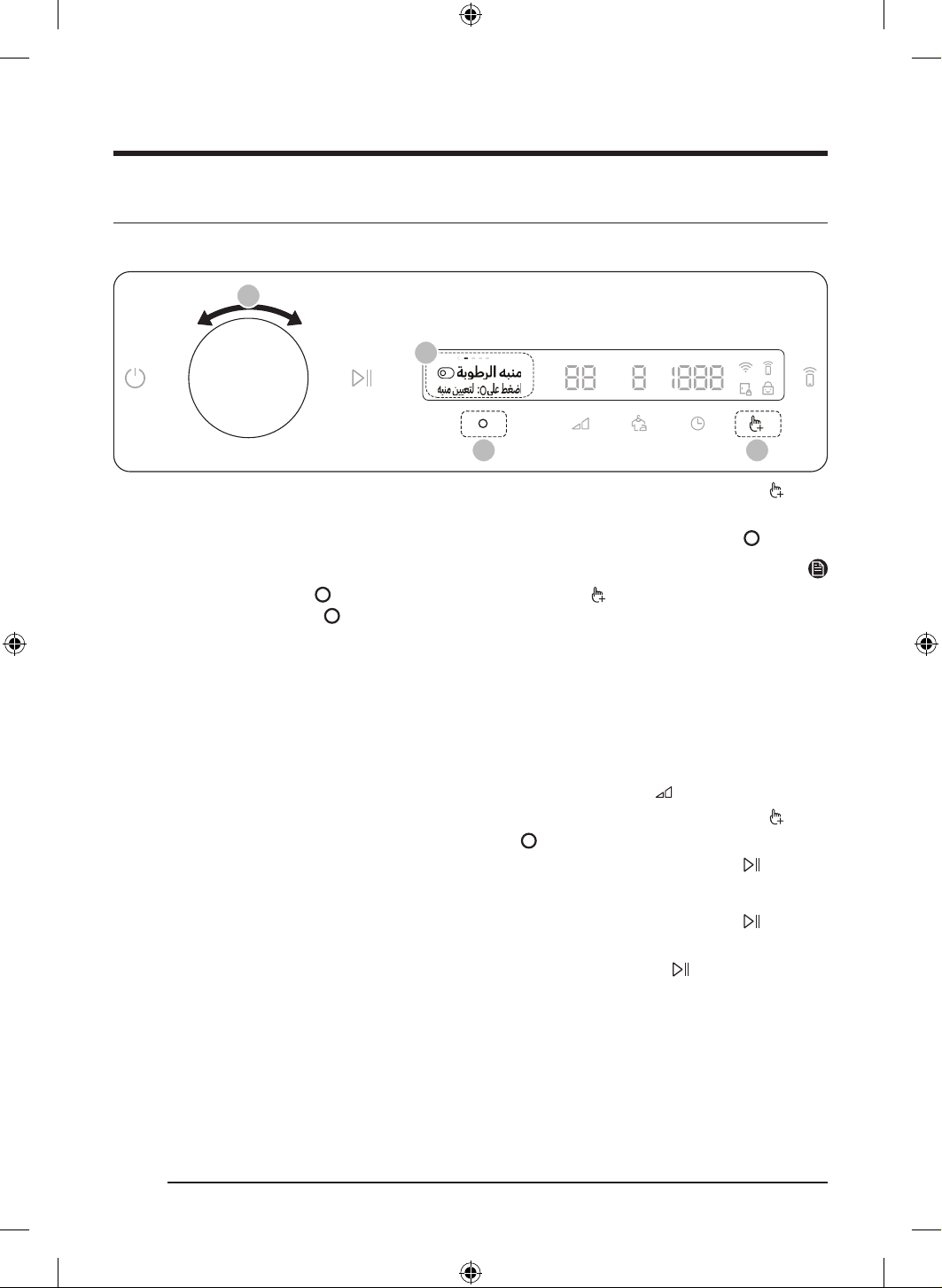
ةيبرعلا
31
ةيفاضا فئاظولا
ةيفاضا فئاظولا مادختسا
03 01
02
02
1 .. رقنا
2 ..اهديرت يتلا ةفيظولا رايتخ هيجوتلا صرق ردأ
3 ..ةفيظولا ءدب وأ ةراتخملا ةفيظولا تادادعإ رييغتل
ع رقنا
ةظحم
. رقناو عوجر رايتخ هيجوتلا صرق ردأ وأ ىرخأ ةرم ع رقنا ،ةيسيئرلا ةشاشلا إ ةدوعلل
.طش
ُ
ن ريغ
رزلاو "
ً
ايلاح م
ّ
عدم ريغ" ةلاسرلا ضرع يرجي هنإف ،ةموعدم ريغ ةراتخ
ُ
ملا ةفيظولا تناك اذإ
.مادختسا نم تارم رشع لوأ يف ةريصق ةدعاسم ةلاسر رهظت هنإف ،ام ةيفاضإ ةفيظو راتخت امدنع
.ةيسيئرلا ةشاشلا إ عجرت ةشاشلا نإف ،ةيفاضا فئاظولا ةمئاق لوخد نم ناوث عبس لوأ يف مكحتلا ةحول مدختست تنك اذإف
ةبوطرلا هبنم
.يكلل ةيفاكلا ةبسانملا ةجردلاب ةفاج يكلل جاتحت يتلا نم اهريغو ناصمقلا نوكت امدنع ةفيظولا هذه كهبنت
1 ..ةرورضلا بسح ةرورضلا تادادعإ ريغو ةرود رتخا
- عم ناصمقلاو ،ةيعانطصا ةشمقاو ،عيرسلا فيفجتلاو ،يعانطصا ءاكذلاب فيفجتلاو ،نطقلا تارود يف ةفيظولا هذه رفوتت
.4 - 2 ع
فيفجتلا ةجرد طبض
2 ..
رقنا
3 ..
ع رقنا مث ،ةبوطرلا هبنم رايتخ هيجوتلا صرق ردأ
4 ..طغضلاب رمتساو ،
ع رقنا
:فيفجتلا ءانثأ يف هيبنت
1 ..ليسغلا ةرود فاقي رمتساو
ع رقنا
2 ..اهيك جاتحت يتلا ضارغا ذخو بابلا حتفا
3 ..ضارغا ةيقب فيفجتل ةرم هيلع طغضلاب رمتساو
ع رقناو ،بابلا قلغأ
DV8700TK_SimpleUX_DC68-04223K-03_AR_P171.indd 31DV8700TK_SimpleUX_DC68-04223K-03_AR_P171.indd 31 2024/8/2 16:54:232024/8/2 16:54:23
تايلمعلا
ةيبرعلا
32
ضوحلا ءوض
.هفاقيإ وأ ففج
ُ
ملا يف ةيواحلا ءوض ليغشت كنكم
ُ
ي
1 ..
رقنا
2 ..
ع رقنا مث ،ضوحلا ءوض رايتخ هيجوتلا صرق ردأ
3 . .فاقيإ وأ ليغشت رايتخ
ع رقنا
- ).ءابرهكلا سباقب
ً
صتم ففج
ُ
ملا ناك اذإ( .ليغشتلا فاقيإ ديق ففج
ُ
ملا نوكي امدنع ىتح ةيواحلا ءوض ءيضي
- .نيتقيقد دعب أفطنيو ا
ً
يئاقلت ءيضي ةيواحلا ءوض نإف ،ا
ً
حوتفم ففجملا نوكي امدنع
يتارود
.تارودلل ةيصخشلا ةمئاقلا ءاشن اهلزأ وأ تارود فضأ
1 ..
رقنا
2 ..
ع رقنا مث ،يتارود رايتخ هيجوتلا صرق ردأ
- .ةلضفم ةرود ءاشن ةرود ريرحت نكمي ىتح ليغشتلا ديق ففج
ُ
ملا نوكي أ نيعتي
3 ..ةبوغرملا ةرودلا رايتخ هيجوتلا صرق ردأ
4 ..اهتلاز وأ ةبوغرملا ةرودلا ةفاض
رقنا
- .ا
ً
يكيتاموتوأ اهتلازإ وأ
ِ
ةرودلا ةفاضإ ظفح يرجي
5 ..تارودلا ةشاش إ ةدوعلل
ع رقنا ،يتارود ءاشنإ لمك
ُ
ت نإ ام
ةظحم
.تارودلا ةمئاق نم يتاذلا ضوحلا فيفجتو نطقلا تارودلا ةلازإ نمك
ُ
ي
يرايتخا حيشرملا
فيظنتب راذنا ليغشت فاقيإ وأ ليغشت طبضل دادعا اذه مدختسا ،يرارحلا لدابملا ع رابغلا مكارت عنمل يرايتخا حيشرملا تبكر اذإ
.ح
ِ
شرملا
1 ..
رقنا
2 ..
ع رقنا مث ،يرايتخا حيشرملا رايتخ هيجوتلا صرق ردأ
3 . .فاقيإ وأ ليغشت رايتخ
ع رقنا
- .حشرملا فيظنتب راذنإ ةلاسر ملستل ليغشت رتخا
ةظحم
يرارحلا لدابملا فيظنت كيلع نإف ،ةشاشلا ع “يرارحلا لدابملا فظن" ةلاسر وأ "يرايتخا حي
ّ
شرملا فيظنت" ةلاسر ترهظ اذإ
).5 ةحفص يف ”يرايتخا حيشرملا“ مسقو 4 ةحفص يف ”يرارحلا لدابملا“ مسق عجار( .امهيلك يرايتخا حيشرملاو
DV8700TK_SimpleUX_DC68-04223K-03_AR_P171.indd 32DV8700TK_SimpleUX_DC68-04223K-03_AR_P171.indd 32 2024/8/2 16:54:232024/8/2 16:54:23
ةيبرعلا
33
لافطا دض لفق
. و ءانثتساب رارزا عيمج لافطا دض لفق لفقي ،يضرعلا ففج
ُ
ملا ليغشت نم عضرلا وأ لافطا عنمل
1 ..بابلا قلغأ
2 ..
رقنا
3 ..
ع رقنا مث ،لافطا دض لفق رايتخ هيجوتلا صرق ردأ
4 . .فاقيإ وأ ليغشت رايتخ
ع رقنا
- .ةفيظولا ليغشت دنع ءيضت لافطا دض لفق ةنوقيأ
- لواحت امنيب ةشاشلا ع "حوتفم بابلا" ةلاسر ترهظ اذإ .ا
ً
حوتفم بابلا نوكي امدنع لافطا دض لفق ليغشت كنكم
ُ
ي
.ىرخأ ةرم لواح مث ،بابلا قلغأ ،لافطا دض لفق ليغشت
ةظحم
. و ءانثتساب رارزا عيمج ليطعت يرجي هنإف ،ليغشتلا ديق لافطا دض لفق نوكي امدنع
.”لافطا دض لفقلا ليغشت“ ةلاسر عم هيبنت ردصيس ،لافطا دض لفق ليغشت ءانثأ يف رز ع ترقن اذإ
.ليغشتلا فقوأ وأ لافطا دض لفقليغشت فقوأ ،هيبنتلا ةلاسر ةلاز
DV8700TK_SimpleUX_DC68-04223K-03_AR_P171.indd 33DV8700TK_SimpleUX_DC68-04223K-03_AR_P171.indd 33 2024/8/2 16:54:242024/8/2 16:54:24
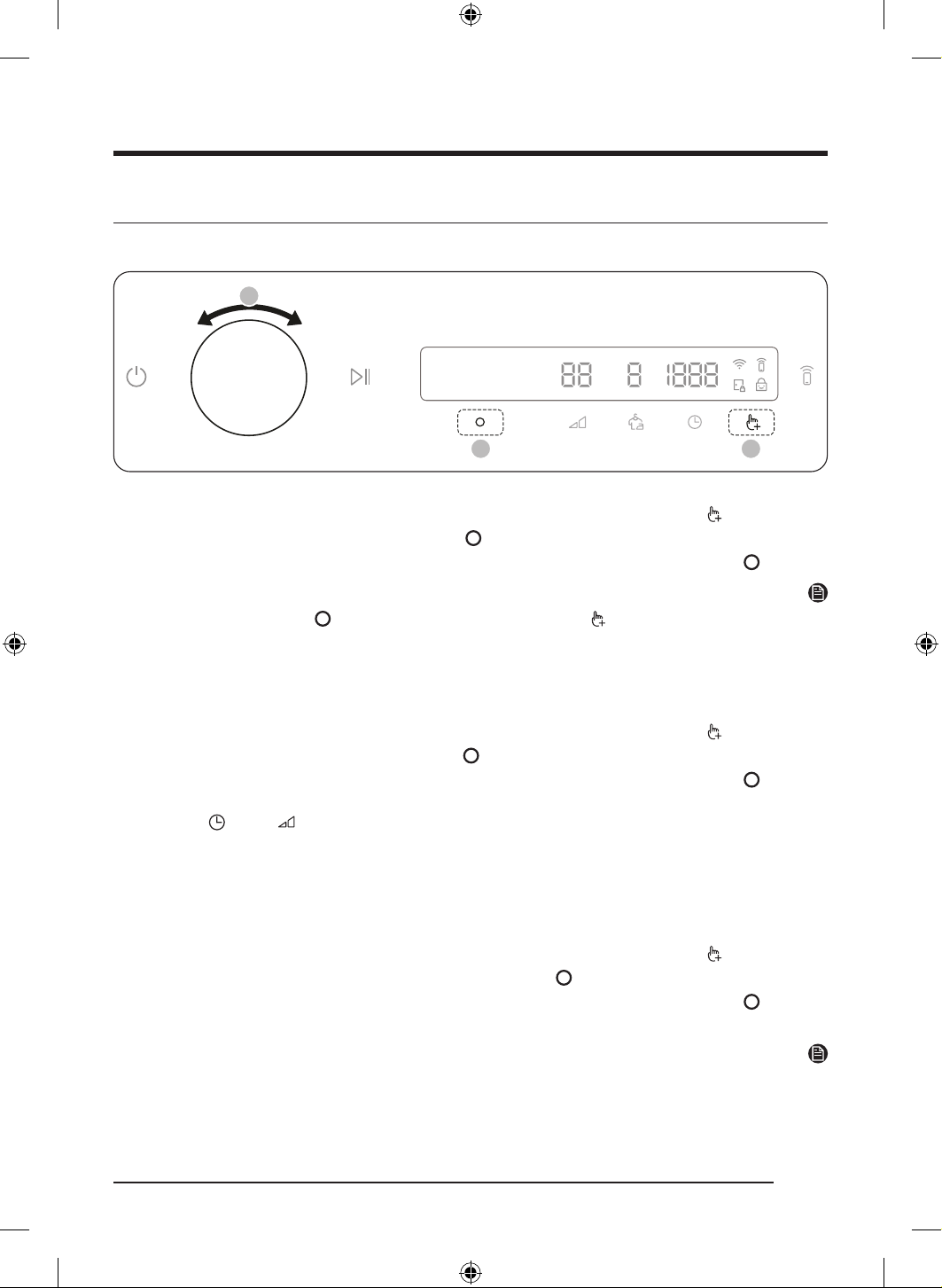
تايلمعلا
ةيبرعلا
34
ماظنلا فئاظو
ماظنلا فئاظو مادختسا
02
03 01
*
.ناوث 3 ةدمل طغضلا لصاوو رزلا ع طغضا*
1 ..ناوث 3 ةدمل طغضلا لصاوو
رزلا ع طغضا
2 ..
ع رقنا مث ،ةبوغرملا ماظنلا ةفيظو رايتخ هيجوتلا صرق ردأ
3 ..ةفيظولا ءدب وأ ةراتخملا ةفيظولا تادادعإ رييغتل
ع رقنا
ةظحم
. رقناو عوجر رايتخ هيجوتلا صرق ردأ وأ ىرخأ ةرم ع رقنا ،ةيسيئرلا ةشاشلا إ ةدوعلل
.ةيسيئرلا ةشاشلا إ عجرت ةشاشلا نإف ،ماظنلا فئاظو ةمئاق لوخد نم ناوث عبس لوأ يف مكحتلا ةحول مدختست تنك اذإف
يعانطصا ءاكذلا طمن
.ةرثكب اهمدختست يتلا تادادعاو تارودلا ةفيظولا هذه ظفحت
1 ..ناوث 3 ةدمل طغضلا لصاوو
رزلا ع طغضا
2 ..
ع رقنا مث ،يعانطصا ءاكذلا طمن رايتخ هيجوتلا صرق ردأ
3 ..فاقيإ وأ ليغشت رايتخ
ع رقنا
- .ةفيظولا هذه مادختسا دوت تنك اذإ فاقيإ عضو ع اهطبضا .ليغشت نوكت نأ يضارتفا دادعا
- مهظفحو ) تقولا و ، فيفجتلا ةجرد( اهتادادعإو ا
ً
مادختسا رثكا تارودلا ركذتي ففج
ُ
ملا نإف ،ةفيظولا ليغشت دنع
.ا
ً
مادختسا رثكا بيترت بسحب
- .ةظوفحملا تانايبلا عيمج نييعت ةداعإ يرجي هنإف ،ةفيظولا ليغشت فاقيإ دنع
هبنملا
.هيبنتلا تاوصأ ليطعت /نيكمت كنكم
ُ
ي
1 ..ناوث 3 ةدمل طغضلا لصاوو
رزلا ع طغضا
2 ..
ع رقنا مث ،هبنملا رايتخ هيجوتلا صرق ردأ
3 ..فاقيإ وأ ليغشت رايتخ
ع رقنا
- .ليغشت نوكت نأ يضارتفا دادعا
ةظحم
.ففج
ُ
ملا ليغشت تدعأ اذإ ىتح رييغت نود تادادعا لظت
DV8700TK_SimpleUX_DC68-04223K-03_AR_P171.indd 34DV8700TK_SimpleUX_DC68-04223K-03_AR_P171.indd 34 2024/8/2 16:54:242024/8/2 16:54:24
ةيبرعلا
35
سايقلا
.ةقدب نزولا ريدقتل ىرخأ ةرم ةرياعملا ليغشت كنكم
ُ
ي
1 ..ناوث 3 ةدمل طغضلا لصاوو
رزلا ع طغضا
2 ..
ع رقنا مث ،سايقلا رايتخ هيجوتلا صرق ردأ
- .يغبني امك قلغ
ُ
م ريغ بابلا ناك اذإ ةرياعملا أدبت
- .قئاقد 3 ةدمل ةعاسلا براقع سكعو ةعاسلا براقع هاجتا يف ةيواحلا رودت
3 ..ا
ً
يئاقلت ففج
ُ
ملا ليغشت فاقيإ يرجيو ضرعلا ةشاش ع "نزولا سايق مت“ ةلاسر رهظت ،ةرياعملا لامكإ دنع
Wi-Fi
.هليغشت فاقيإ وأ ففج
ُ
ملا يف ياف-ياولا ليغشت كنكم
ُ
ي
1 ..ناوث 3 ةدمل طغضلا لصاوو
رزلا ع طغضا
2 ..
ع رقنا مث ،Wi-Fi رايتخ هيجوتلا صرق ردأ
3 . .فاقيإ وأ ليغشت رايتخ
ع رقنا
- ا
ً
يكيتاموتأ لوحتي Wi-Fi عضو نإف ،كلذ عمو .ليغشتلا فاقيإ عضو يف ففج
ُ
ملا يف Wi-Fi عضول ةيضارتفا تادادعا نوكت
ففج
ُ
ملا ليصوت نع رظنلا ضغب هلاح ع Wi-Fi دادعإ رمتسي ،كلذ دعب .وا ةرملل فف
ُ
جملا ليغشت دنع ليغشتلا عضو إ
. مأ ةقاطلاب
- ناك اذإ ىتح ةكبشلاب لصتم لظي ففج
ُ
ملا نإف ،ةكبشب هليصوت يرجيو ليغشتلا عضو ع ففج
ُ
ملا Wi-Fi طبضت نأ ام
.ةقاطلاب ةلصتم ريغ ففج
ُ
ملا
- .ياف-ياولا لاصتا لخ رتوارلا هيجوتلا ةداعإ زاهجب لصتم ففج
ُ
ملا نأ إ Wi-Fi ريشت
ةغللا
.ماظنلا ةغل رييغت كنكمي
1 ..ناوث 3 ةدمل طغضلا لصاوو
رزلا ع طغضا
2 ..
ع رقنا مث ،ةغللا رايتخ هيجوتلا صرق ردأ
3 ..
ع رقنا مث ،ةبوغرملا ةغللا رايتخ هيجوتلا صرق ردأ
عنصملا بسح طبضلا ةداعإ
.ففج
ُ
ملا طبض ةداعإ كنكم
ُ
ي
1 ..ناوث 3 ةدمل طغضلا لصاوو
رزلا ع طغضا
2 ..
ع رقنا مث ،عنصملا بسح طبضلا ةداعإ رايتخ هيجوتلا صرق ردأ
- .عنصملا دادعإ ع ففج
ُ
ملا طبض ةداعإ يرجيس انه
DV8700TK_SimpleUX_DC68-04223K-03_AR_P171.indd 35DV8700TK_SimpleUX_DC68-04223K-03_AR_P171.indd 35 2024/8/2 16:54:242024/8/2 16:54:24
تايلمعلا
ةيبرعلا
36
ةصاخ تازيم
يكذلا مكحتلا
.دعب دنع ففج
ُ
ملا يف مكحتلاو SmartThings قيبطتب لاصتا كلذك كنكم
ُ
ي
ففج
ُ
ملا ليصوت
.هتيبثتو كزاهج ع SmartThings قيبطت ليزنت
.ففج
ُ
ملا ليغشتل طغضلاب رمتساو
ع رقنا
.ففج
ُ
ملا ع يناوث 3 ةدمل طغضلاب رمتساو ع طغضا
a ..ليابوملا زاهجب لصتيو )لوصولا ةطقن( AP عضو ففج
ُ
ملا لخدي
b ..ليابوملا زاهج ع ففج
ُ
ملا ع ةقداصملل
ع رقنا
c . قيبطت يف ايازمو صئاصخ ةدع مادختسا كنكم
ُ
ي كلذك .قيبطتلاب ففج
ُ
ملا لصتي ،ةقداصملا ةيلمع لمتكت نإ ام
.SmartThings
ةظحم
.ىرخأ ةرم لواح ،SmartThings قيبطتب لاصتا نود ففج
ُ
ملا قفخأ اذإ
قيبطتب ففج
ُ
ملا ليصوت دعب تنرتناب لاصتا يف ةلكشم ةمث ناك اذإ هصحفاو رتوارلا هيجوتلا ةداعإ زاهج نم ققحت
.SmartThings
ليغشت رايتخاو ، ماظنلا فئاظو ةمئاق لوخدل ناوث 3 ةدمل طغضلاب رمتساو ع رقنا ،ليغشتلا مدع عضو يف ياف-ياولا ناك اذإ
.اهليغشتل ع رقناو Wi-Fi
رظنلا ضغب ،يحوللا كزاهج وأ يكذلا كفتاه ع SmartThings قيبطت ربع ففج
ُ
ملا ليصوت حيتي ففج
ُ
ملا ياف-ياو ليغشت نإ
ناك اذإ SmartThings قيبطت ع تنرتناب لصتم ريغ هنأك ودبي ففجملا ناك اذإف ،كلذ عمو .ةقاطلاب ففج
ُ
ملا ليصوت ةلاح
.ليغشتلا مدع عضو يف ففج
ُ
ملا Wi-Fi
.يكذلا مكحتلا ةفيظو ءدب لبق بابلا قلغأ
اهيف رهظتس ففج
ُ
ملا اهيف لغش
ُ
ت يتلا ةيلاتلا ةرملا نإف ،SmartThings قيبطتب ليصوتلا نود ةرم 20 ففج
ُ
ملا تمدختسا اذإف
.ناوث 3 ةدمل يكذلا مكحتلا قيبطت ليصوت نأشب ةريغص ةلاسر
.ةقاطلا ليغشت فاقيإ دنع ياف-ياولا ليغشت فاقيإ يرجيس نإف ،)لوصولا ةطقن( APب لصتم ريغ ففج
ُ
ملا Wi-Fi ناك اذإ
)
ً
صتم ءاقبلا( Stay Connect
مادختسا كنكمي ىتح قيبطتلاب
ً
صتم ففج
ُ
ملا لظيو .SmartThings قيبطت يف )
ً
صتم ءاقبلا( Stay Connect ةفيظو طبضا
.لزنملا جراخ نوكت امدنع ففج
ُ
ملا
1 . ظفحل دادعتسا عضو يف لظتس ففج
ُ
ملا نإف ،SmartThings قيبطت ع )
ً
صتم ءاقبلا( Stay Connect ةيصاخ تلغش اذإ
.ةرودلا مامتإ دعب ةقاطلا
- .ا
ً
قلغم بابلا لظ اذإ ةعاس 24 ىتح ةطشن )
ً
صتم ءاقبلا( Stay Connect ةفيظو لظت
2 . ضرع ةشاش ع نائيضت
Wi-Fiو يكذلا مكحتلا يتيفظو هنإف ،ةطشن )
ً
صتم ءاقبلا( Stay Connect ةفيظو تناك اذإ
.ففج
ُ
ملا
3 ..SmartThings قيبطت مادختساب ففج
ُ
ملا يف مئملا مكحتلا رفوت
ةظحم
.SmartThings قيبطتب لصتم ريغ ففج
ُ
ملا ناك اذإ ىتح ليغشتلا فاقيإ دنع ةقاطلا ظفحل دادعتسا عضو إ ففج
ُ
ملا لوحتي
DV8700TK_SimpleUX_DC68-04223K-03_AR_P171.indd 36DV8700TK_SimpleUX_DC68-04223K-03_AR_P171.indd 36 2024/8/2 16:54:242024/8/2 16:54:24
ةيبرعلا
37
SmartThings
يكلس لاصتا
.)لوصولا ةطقن( AP ددحو يكلسلا لاصتا لغشو )تادادعا( Settings إ لقتنا ،يكذلا كفتاه ع
.زترهاغيغ 2.4 ياف-ياولا توكوتورب زاهجلا معدي
ليزنت
SmartThings قيبطت نع ثحبا ،)Samsung Galaxy Appsو ،Apple App Storeو ،Google Play رجتم( تاقيبطتلا قوس يف
.هتيبثتو كزاهج ع قيبطتلا ليزنت .”SmartThings“ تاملك نع ثحبلاب
ةظحم
.ءادا نيسحتل قبسم راعشإ نود رييغتلل ةضرع قيبطتلا
مادختسا ةيناكمإ تاغوسم ببسب فقوتت دق قيبطتلا يف فئاظولا وأ قيبطتلا ع ةيلبقتسملا تاثيدحتلا نإف ،كلذ ع ةوعو
.كليغشت ماظن يف ةموعدم لازت تاثيدحتلا تناك اذإ ىتح ،ناما تاغوسمو
لوخدلا ليجست
يف تاداشرا عبتا ،جنوسماس ىدل ديدج باسح ءاشن .جنوسماس ىدل كباسحب SmartThings إ لوخدلا ليجست بجي وأ
.كب صاخ باسح ءاشن لصفنم قيبطت إ جاتحت .قيبطتلا
ةظحم
نولجسي ةلجسملا ةيكذلا جنوسماس فتاوه ومدختسم .لوخدلا ليجستل باسحلا اذه مدختسا ،جنوسماس ىدل باسح كيدل ناك اذإ
.ايئاقلت لوخدلا
SmartThings قيبطت ع كب صاخلا زاهجلا ليجستل
1 . لاصتا لغشو )تادادعا( Settings إ لقتنا ،صتم زاهجلا نكي مل اذإو .ةيكلس لاصتا ةكبشب لصتم يكذلا كفتاه نأ دكأت
.)لوصولا ةطقن( AP ددحو يكلسلا
2 . .يكذلا كفتاه ع SmartThings قيبطت حتفا
3 ..)ةفاضإ( Add ددح ،).ديدج زاهج ع روثعلا مت( ".A new device is found" ةلاسر رهظت امدنع
4 . Device ددح ،ةمئاقلا يف ا
ً
جردم كزاهج نكي مل اذإ .ةرفوتملا ةزهجا ةمئاق نم كزاهج ددحو + ددح ،ةلاسر روهظ مدع ةلاح يف
.ا
ً
يودي كزاهج فضأ مث ،)نيعم زاهج زارط( Specific Device Model > )زاهجلا عون( Type
5 ..يلاتلا وحنلا ع SmartThings قيبطت يف كزاهج لجس
a ..SmartThings قيبطتب كزاهج لاصتا نم دكأت .SmartThings قيبطت ع كزاهج فضأ
b ..يكذلا كفتاه ع كزاهج رهظي ،ليجستلا نم ءاهتنا دنع
DV8700TK_SimpleUX_DC68-04223K-03_AR_P171.indd 37DV8700TK_SimpleUX_DC68-04223K-03_AR_P171.indd 37 2024/8/2 16:54:242024/8/2 16:54:24
تايلمعلا
ةيبرعلا
38
حوتفملا ردصملا نعإ
ثث ةدمل انم ةلباقم ةلماك ةيردصم ةيرفش ةخسن ع لوصحلا كنكم
ُ
ي .ردصملا حوتفم جمانرب نوكي جتنملا اذه يف دارولا جمانربلا نإ
ةمئاق مادختسا ىجر
ُ
ي( http://opensource.samsung.com ينورتكلا طبارلا ربع كلذو جتنملل نحش رخأ خيرات نم تاونس
))راسفتسا( ”Inquiry“
.ةلاحلا هذه لثم يف طيسب مسر بلطيو جمدم صرق لثم يدام طيسو يف ردصم دوك ع لوصحلا نكمملا نم كلذك
حوتفم صيخرتلا إ http://opensource.samsung.com/opensource/SMART_AT_051/seq/0 يلاتلا طبارلا دوقي
.ةمولعملا اذه هغلبت صخش ي رفوتمو حاتم ضرعلا اذهو .جتنملاب ةلصتملا ردصملا
ةظحم
تاذ ةيعيرشتلا تابلطتملا عمو 2014/53/EU يهيجوتلا رما عم قفاوتت ةيلكسلا ةدعملا هذه نأ انهاه دكؤتو Samsung رقت
ع يلاتلا ناونعلا ع حاتم قفاوتلل ةدحتملا ةكلمملا نايبو قفاوتلل يبوروا داحتا نايبل لماكلا صنلا .ةدحتملا ةكلمملا يف ةلصلا
Support > )معدلا( Support إ لقتنا ،http://www.samsung.com يف قفاوتلل يمسرلا نايبلا ع عطا نكمي :تنرتنا
.زارطلا مسا لخدأو )معدلل ةيسيئرلا ةحفصلا( home
زترهاغيغ 2.472 - زترهاغيغ 2.412 يف طاو يليم لبيسيد 20 :Wi-Fi لاسرإ ةوقل ىصقا دحلا
DV8700TK_SimpleUX_DC68-04223K-03_AR_P171.indd 38DV8700TK_SimpleUX_DC68-04223K-03_AR_P171.indd 38 2024/8/2 16:54:252024/8/2 16:54:25
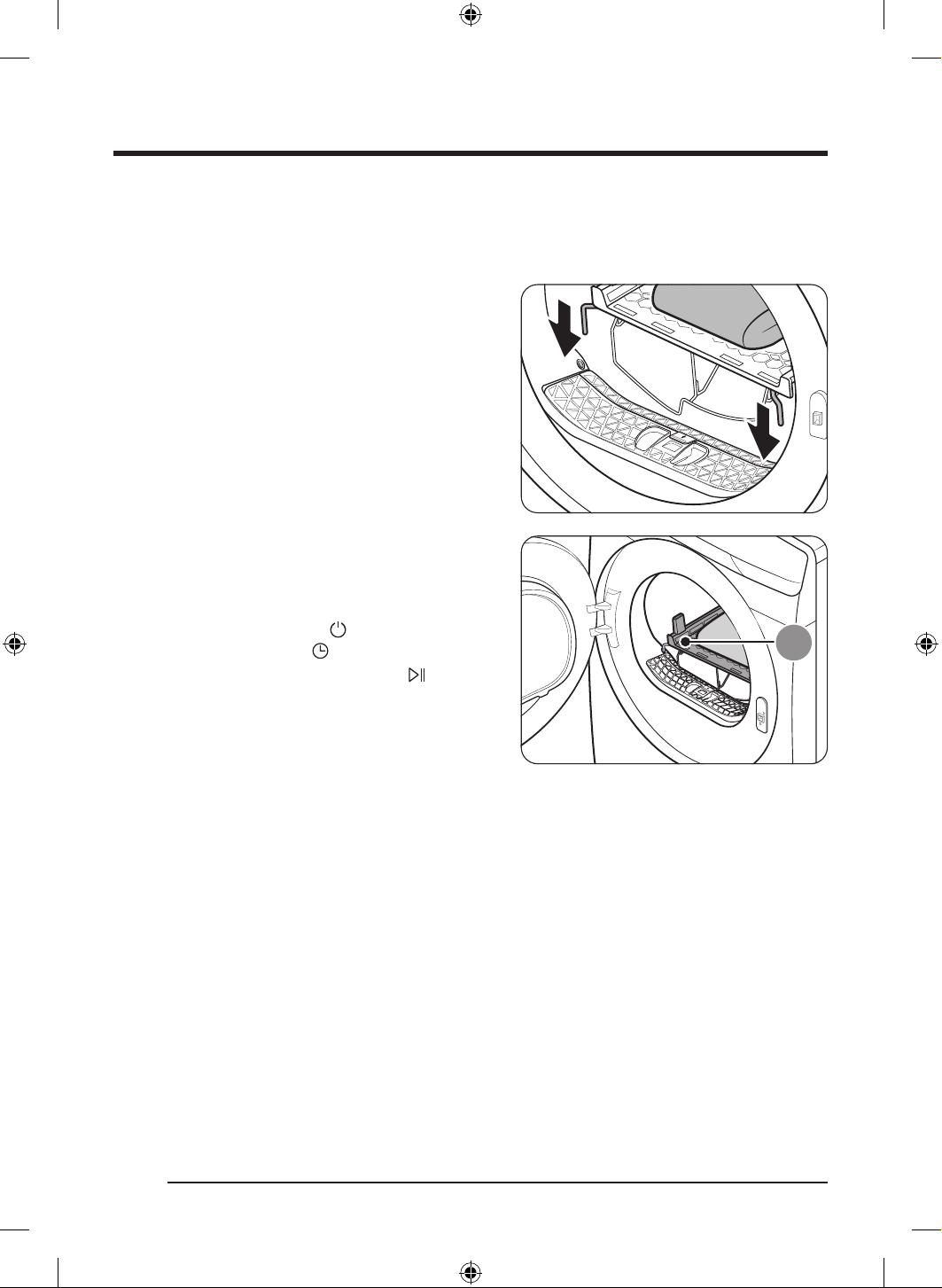
ةيبرعلا
39
فيفجتلا فر مادختسا
فر مادختساب ليسغلا فيفجت دنع .اهنزوو اهفيفجت دار
ُ
ملا سبملا عطق ةبوطرل ا
ً
قفو ةقيقد 240 إ لصي يذلا فيفجتلا تقو ددح
.فرلا ةطساوب فيفجتلا ةرود مادختساب ىصو
ُ
ي هنإف ،فيفجتلا
1 . فاوحلا عضو لخ نم كلذو ،ةيواحلا يف فيفجتلا فر عض
.بابلا قر تاحتف يف فيفجتلا فرل ةيماما
A .فيفجتلا فر
2 . ةيفاك ةحاسم كرت ةاعارم عم ،فيفجتلا فر ع سبملا عض
اهعضوو اه
ّ
يطب مق ،سبملل ةبسنلاب .ءاوهلا لوخد نكمي ثيحب
نوكت ثيحب اهعض ،ةيذحل ةبسنلاب امأ .فيفجتلا فر ع ةحطسم
.لفس ةهجتم اهلاعن
3 . فيفجتلا طبضل هيجوتلا صرق ردأ .
ع رقنا مث بابلا قلغأ
.فيفجتلا تقو رايتخ ع رقنا مث ،فرلا ةطساوب
4 ..طغضلاب رمتساو ،
ع رقنا
DV8700TK_SimpleUX_DC68-04223K-03_AR_P171.indd 39DV8700TK_SimpleUX_DC68-04223K-03_AR_P171.indd 39 2024/8/2 16:54:252024/8/2 16:54:25
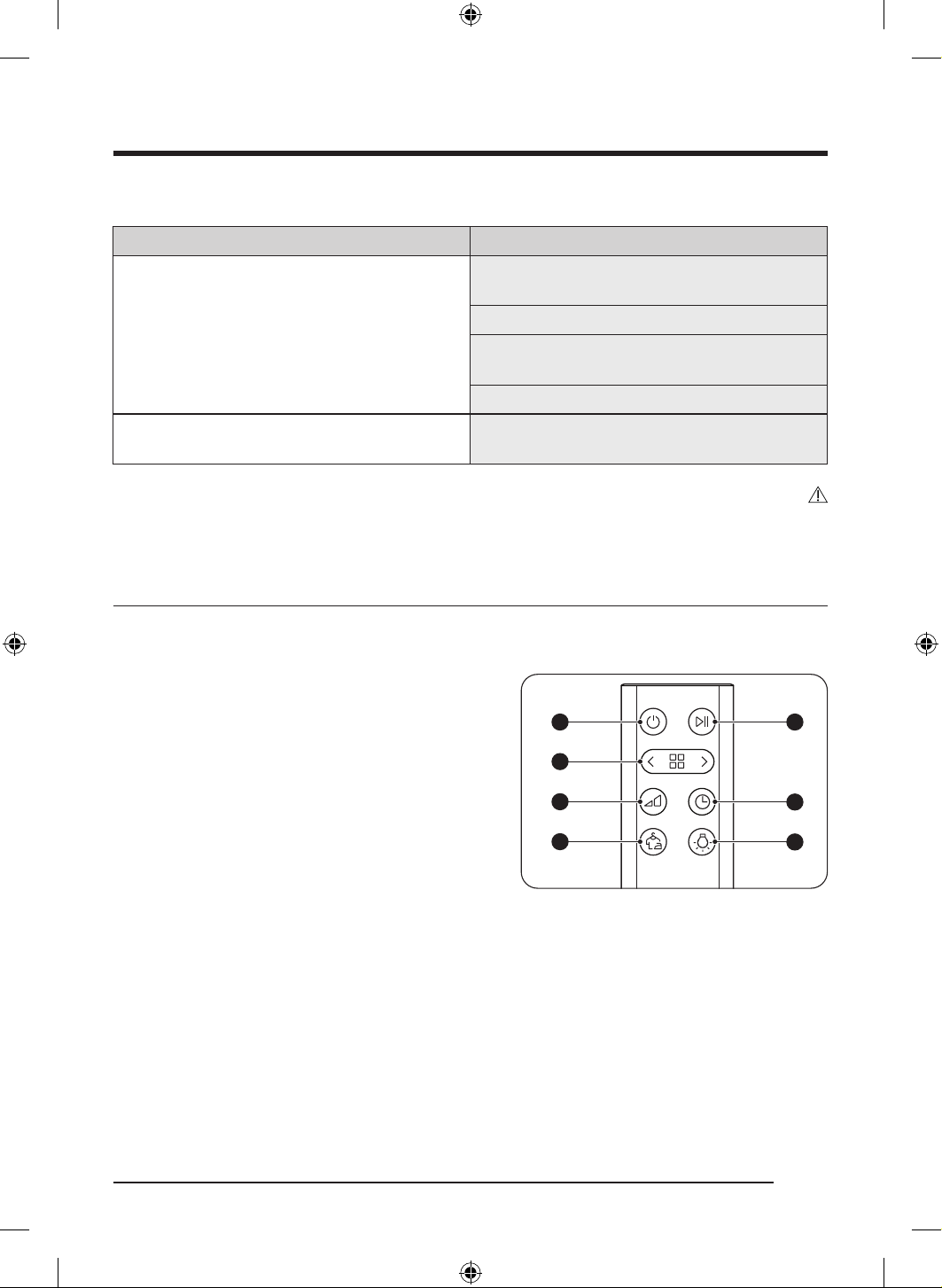
تايلمعلا
ةيبرعلا
40
فيفجتلا تاحارتقا
)مجك 1.5 ىصقأ دحب( سبملافصولا
اهعضو سبملا لكش ع ظفاح( لسغلل ةلباقلا فطاعملا
)فيفجتلا فر ع ةحطسم
،سبملا يطب مق ،فيفجتلا فر ا
ً
مدختسم ليسغلا فيفجت دنع
.سبملا دعجت عنمل هيلع اهعض مث
)يعانصلا رتسيلوبلا وأ نطقلاب ةءولمملا( ةوشحملا ىمدلا
وأ ةيوغرلا ةيطاطملا داوملاب ةءولمملا( ةوشحملا ىمدلا
)يجنفسا طاطملا
يجنفسا طاطملاب ةوشحم دئاسو
ةفيفخلا ةيذحا اهلاعن نوكت ثيحب فرلا ع اهعض ،ةيضايرلا ةيذحا فيفجتل
.لفس ةهجتم
هيبنت
.قيرح بوشن رطخ إ يدؤي وأ سبملا فلت إ نيخستلا تادادعإ دحأ ا
ً
مدختسم كيتسبلا وأ يوغرلا طاطملا فيفجت يدؤي دق
.فيفجتلا فر مدختسا ،ةيذحا فلت عنمل
دعب نع مكحت
دعب نع مكحتلا زاهج ع ةرظن
ՋՌ
ՋՍ
ՋՎ
ՋՏ
ՋՐ
ՋՑ
ՋՒ
1 ةقاطلا رز
2 ةلضفملا ةرودلا ديدحت رز
3 فيفجتلا ةجرد رز
4 دعجتلا عنم رز
5 تقؤم فاقيإ/ءدب رز
تقولا رز
ضوحلا ةءاضإ رز
DV8700TK_SimpleUX_DC68-04223K-03_AR_P171.indd 40DV8700TK_SimpleUX_DC68-04223K-03_AR_P171.indd 40 2024/8/2 16:54:252024/8/2 16:54:25
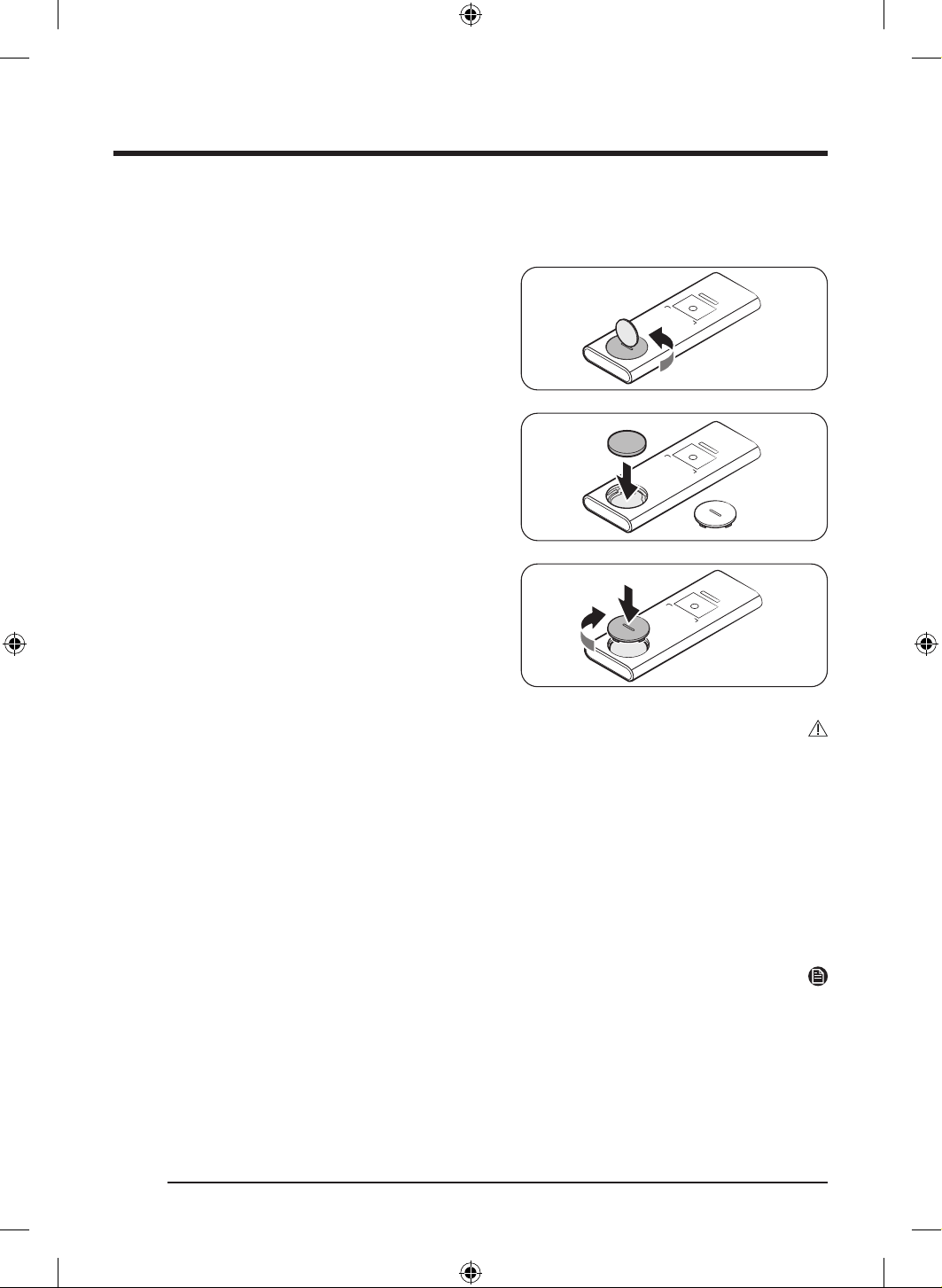
ةيبرعلا
41
دعب نع
ِ
مكحتلا زاهج تايراطب لاخدإ
1 . كفم وأ ةيندعم دوقن ةعطق مادختساب تايراطبلا ءاطغ حتفا
.ةعاسلا براقع هاجتا سكع هترادإب حطسم
2 ..ةيراطبلا لخدأ
- عضولا يف ةيراطبلا لخدأو "-"و "+" تامع نم ققحت
.ميلسلا
3 . كفم وأ ةيندعم دوقن ةعطق مادختساب تايراطبلا ءاطغ قلغأ
.ةعاسلا براقع هاجتا يف هترادإب حطسم
- ةحتف لوح زحلا عم ةيراطبلا ءاطغ ع تازوربلا طبضا
توص عمست ىتح ةيراطبلا ءاطغ ع طغضاو ةيراطبلا
.ةقطقط
هيبنت
.دعب نع مكحتلا زاهج ع لصي ءام يأ لعجت
.لافطا لوانتم نع ا
ً
ديعب ةيراطبلا ع ظفاح
.لافطا لوانتم نع ا
ً
ديعب علبلل ةلباقلا ةريغصلا تايراطبلا ع ظفاح
.علبلا نم نيتعاس لخ يف ةغلاب ا
ً
قورح ثدحت دقو .توملا وأ ةقيقرلا ةجسنا كتهت وأ قورح إ يدؤي دق تايراطبلا هذه علبف
.روفلا ع ةيبطلا ةدعاسملا بلطا ،ةيراطب علب ةلاح يف
.ةيراطبلا مادختسا دنع حيحص ريغ عون مادختسا ةلاح يف راجفنا رطخ بنجتل رذحلاب يلحتلا بجيو
طرفو يلخاد ةرئاد رصق إ دوقي دق ام وهو ،ديدش يجراخ طغضل ةيراطبلا ضيرعت بنجت .اهبقثت وأ ةيراطبلا ع ا
ً
دبأ طغضت
.ةنوخسلا
.ةيراطبلا تانوكم كفت
.دلجلا ع ا
ً
راض كلذ نوكي دقف .دلجلا إ ةيراطبلا ضمح لوصو مدع نم دكأت ،ةيراطبلا لادبتسا دنع
ةظحم
.دعب نع مكحتلا زاهج رماوأو تاراش بيجتست ىرخا ةزهجا تناك اذإ جنوسماس ةمدخ زكرم ةراشتسا ىجر
ُ
ي
DV8700TK_SimpleUX_DC68-04223K-03_AR_P171.indd 41DV8700TK_SimpleUX_DC68-04223K-03_AR_P171.indd 41 2024/8/2 16:54:252024/8/2 16:54:25
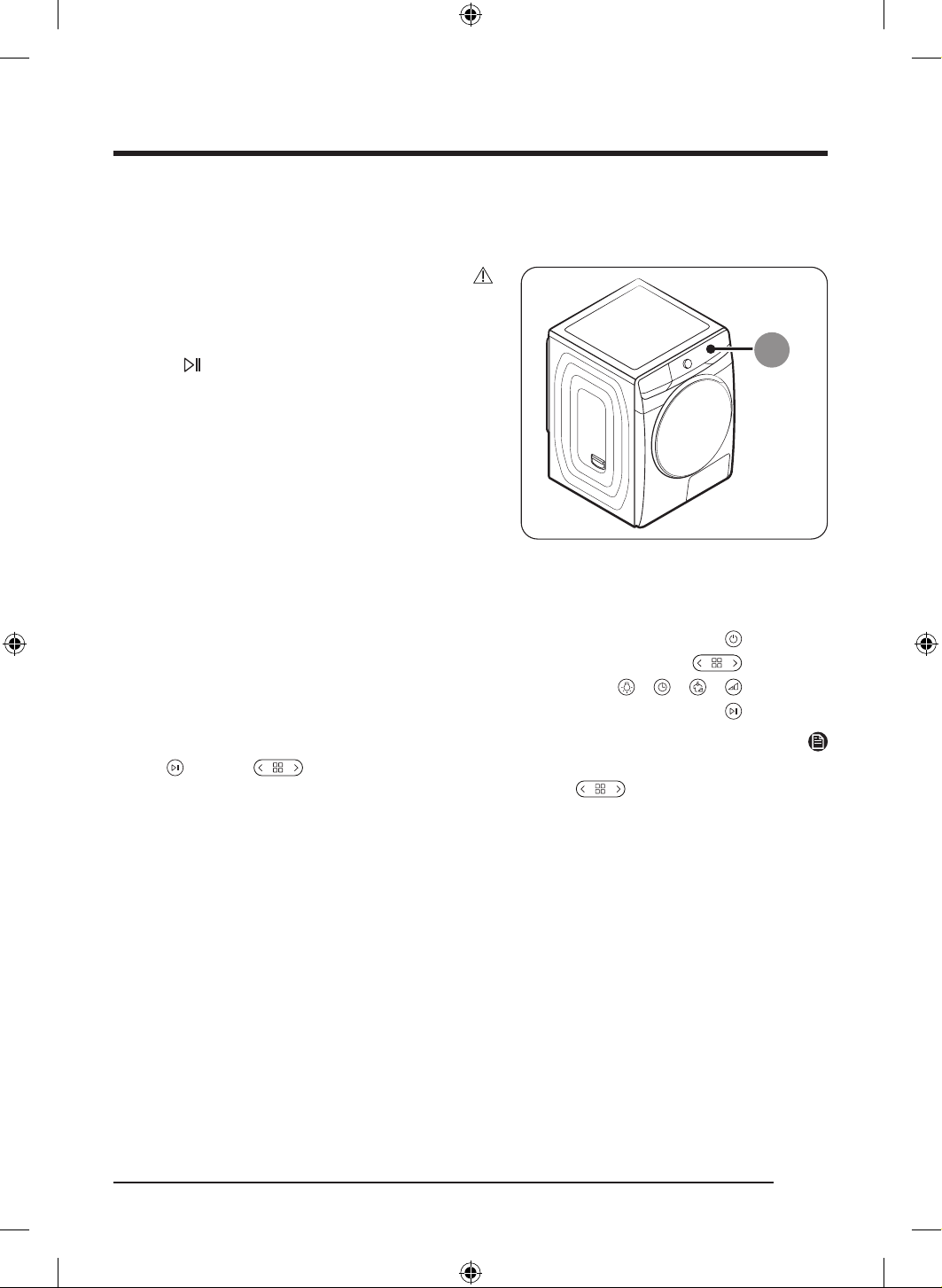
تايلمعلا
ةيبرعلا
42
ففج
ُ
ملا ع دعب نع مكحتلا زاهج عقوم
A .دعب نع مكحتلا زاهج لبقتسم
هيبنت
زاهجلا هجو ،دعب نع مكحتلا زاهج مادختساب ففجملا ليغشت دنع
.ففجملا يف دعب نع مكحتلا زاهج لبقتسم إ ةقدب
زاهج مادختساب هليغشت فاقيإ وأ ففج
ُ
ملا ليغشت ءدب دوت تنك اذإ
ةلصاومو
رزلا ع طغضلا كيلع نيعتي هنإف ،دعب نع مكحتلا
زاهجلاب ثبعلا نم لافطا عنم كلذب دصقيو( .ةيناث 2 ةدمل طغضلا
).رزلا ع دوصقملا ريغ طغضلاب
دعب نع مكحتلا زاهج مادختسا
1 .. ع طغضا
2 ..تارودلا دحأ ءاقتن
ع طغضا
3 ..ةيواحلا ءوضو ،تقولاو ،دعجتلا عنمو ،فيفجتلا ىوتسم طبضل
وأ ، وأ ، وأ ، ع طغضا
4 ..ليغشتلا ءدبل نيتيناث ةدمل طغضلا لصاوو
ع طغضا
ةظحم
ع طغضا . ع رقنلاب ةرودلا رييغت كنكمي هنإف ،دعب نع مكحتلا زاهج مادختساب اهراتختو ةرود دد
ُ
حت نإ ام
.ةرودلا رييغتل ع طغضا مث ،
ً
وأ ةرودلا فاقي
كسميف ففج
ُ
ملا نم هبيرقت إ طقف جاتحتس ثيح لماح نود هنيزخت كنكمي ىتح جمد
ُ
م سيطانغم هب دعب نع مكحتلا زاهج نإ
.هب
DV8700TK_SimpleUX_DC68-04223K-03_AR_P171.indd 42DV8700TK_SimpleUX_DC68-04223K-03_AR_P171.indd 42 2024/8/2 16:54:262024/8/2 16:54:26
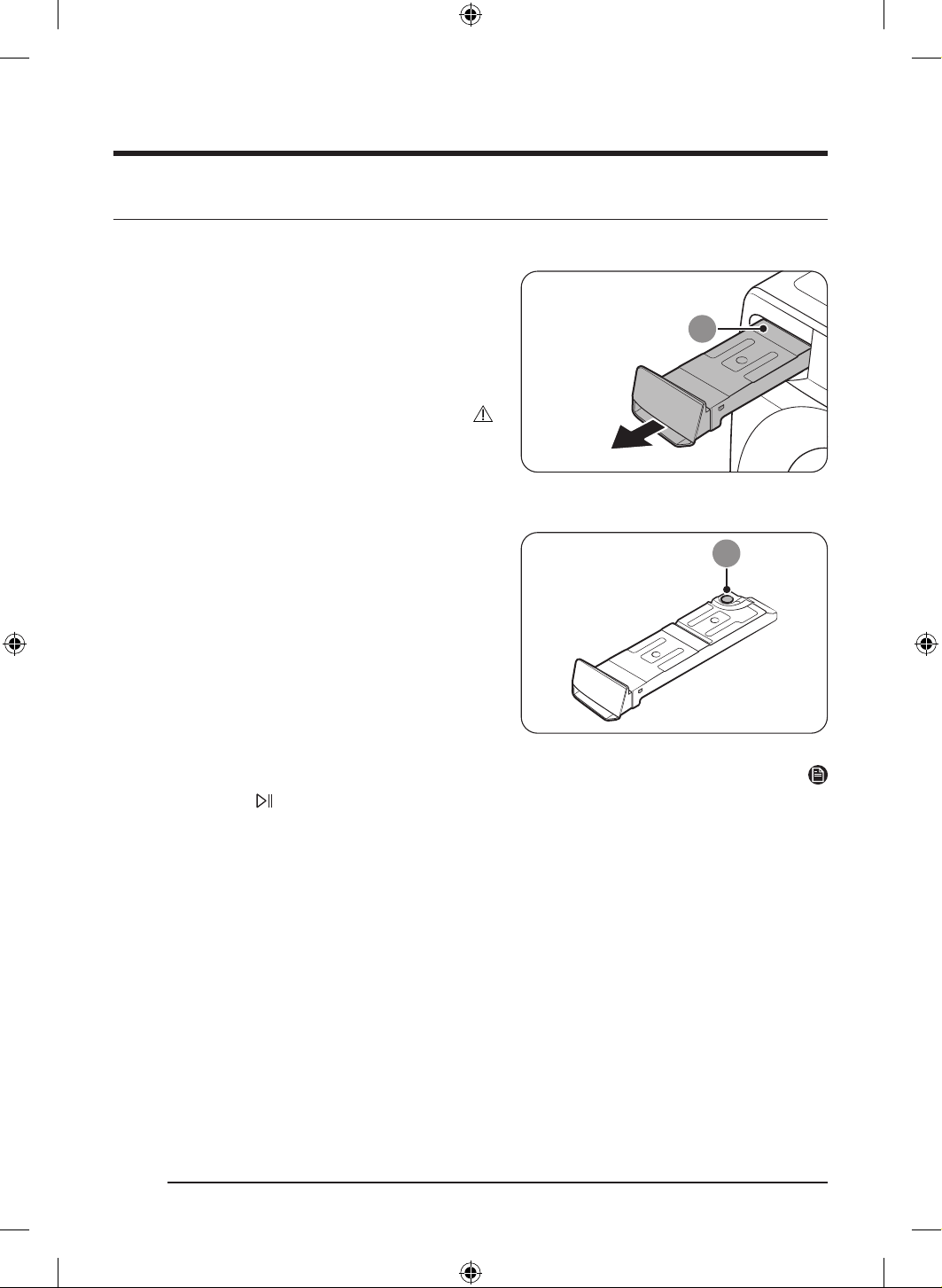
ةيبرعلا
43
ةنايصلا
ءاملا نازخ غارفإ
.تابيرست ثودح يقوتل مادختسا لك دعب ءاملا نازخ غرفأ
1 ..ففج
ُ
ملا نم )A( ءاملا نازخ لزأ
- يف نازخلا نوكي ىتح ةدحاو ديب ءاملا نازخ ضبقم بحسا
.جراخلل ةفاسملا فصتنم
- معدا ،جراخلل ةفاسملا فصتنم يف ءاملا نازخ نوكي نأ امو
نيديلاب ءطبب هبحساو ىرخا ديلاب نازخلا نم يلفسلا ءزجلا
.امهيتلك
هيبنت
نيديلا مادختساب ءطبب ءاملا نازخ جرخأ .ليقث ءاملا نازخ نإ
.ا
ً
يوتسم ءاملا نازخ ءاقبإ عم امهيتلك
نازخلاف .ئلتمملا ءاملا نازخ ةلازإ دنع ةبجاولا ةيانعلاو رذحلاب لحت
.هطوقس ةلاح يف ةباصإ ببس
ُ
ي نأ نكميو ا
ً
دج ليقث ةلاحلا هذه يف
9
2 . نم يلخادلا ءزجلا فظن مث ،)B( فرصلا ةحتف لخ ءاملا غرفأ
.نازخلا
- ءاملا نازخ ما .ئفاد ءام يف ةلدتعملا تانوكملا ضعب جزما
فطشا مث .ةقيقد 30 ةدمل هكرتاو )B( فرصلا ةحتف ربع جيزملاب
.ا
ً
مامت هففجو فيظن ءامب نازخلا
3 ..هعضوم يف ةيناث ةرم نازخلا عض
ةظحم
،اهدنع .طغضلاب رمتساو ، ع رقناو ءاملا نازخ غرفأف ،فيفجتلا ءانثأ يف اهضرعي و "ضوحلا غرفأ" ةلاسر ضرعي ففج
ُ
ملا ناك اذإ
.لمعلا ففج
ُ
ملا لصاويو "ضوحلا غرفأ" ةلاسر يفتخت
DV8700TK_SimpleUX_DC68-04223K-03_AR_P171.indd 43DV8700TK_SimpleUX_DC68-04223K-03_AR_P171.indd 43 2024/8/2 16:54:272024/8/2 16:54:27
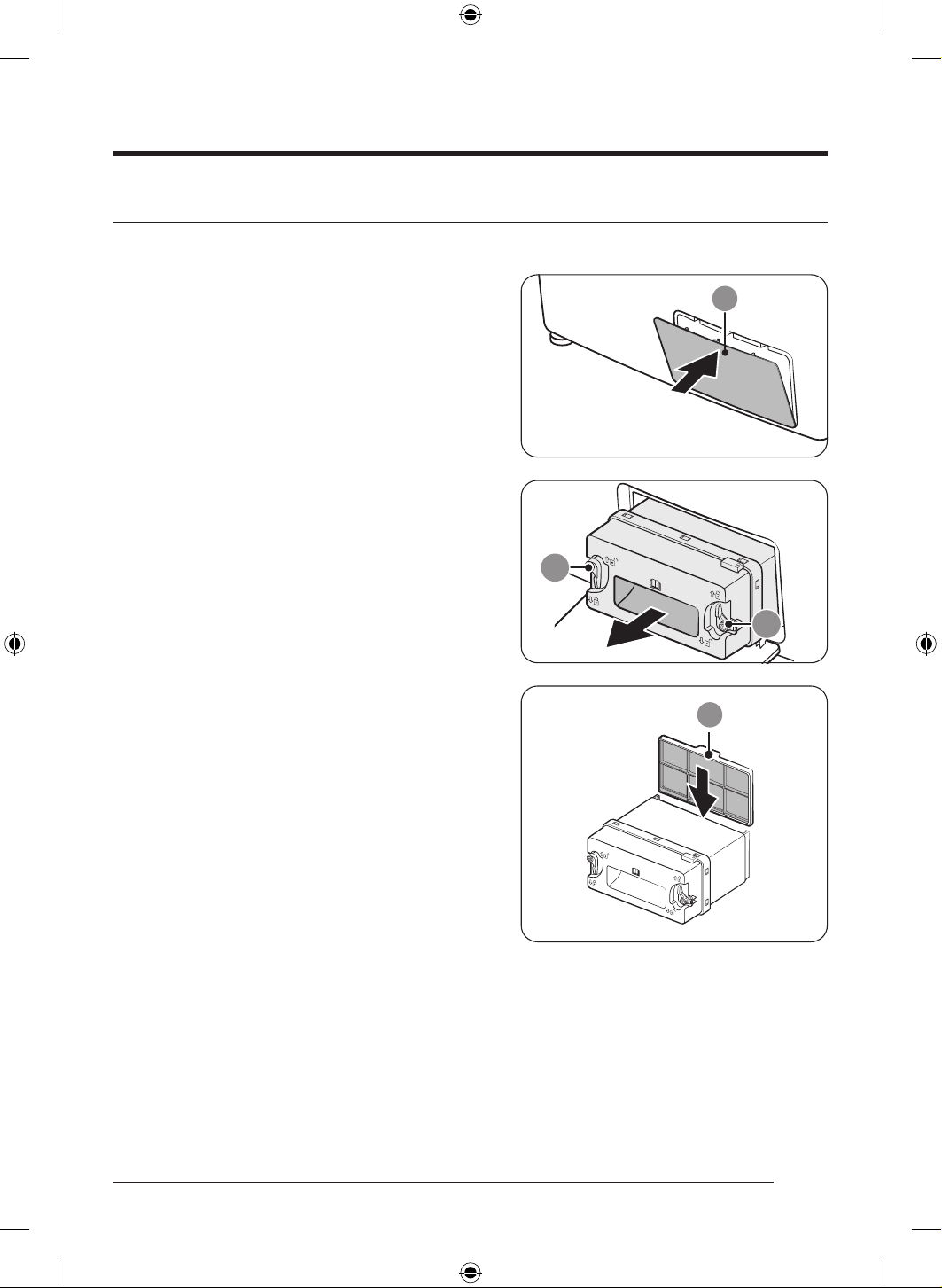
ةنايصلا
ةيبرعلا
44
)يرايتخا حيشرملا( قيقدلا نيللا ح
شرملا بيكرت
.يرارحلا لدابملا ع رابغلا مكارت عنمل )يرايتخا حيشرملا( زاهجلا عم دوزملا قيقدلا نيللا ح
ِ
شرملا بيكرت كنكم
ُ
ي
1 ..هحتفل )A( يجراخلا ءاطغلا نم يولعلا ءزجلا ع قفرب طغضا
9
9
2 . يلخادلا ءاطغلا بحسا مث ،)B( تاتبثملا حتفا ،يلخادلا ءاطغلا يف
.هتلاز
A
3 . ءزجلا ع )C( )يرايتخا حيشرملا( قيقدلا نيللا ح
شرملا لخدأ
.لكشلا يف حضوم وه امك يلخادلا ءاطغلا نم يفلخلا
- نوكي نأ بجي( .ةحيحصلا ةيعضولا يف حشرملا بيكرت نم دكأت
).ع ا
ً
هجوم حشرملا نم يولعلا ءزجلا يف دوجوملا زوربلا
DV8700TK_SimpleUX_DC68-04223K-03_AR_P171.indd 44DV8700TK_SimpleUX_DC68-04223K-03_AR_P171.indd 44 2024/8/2 16:54:272024/8/2 16:54:27
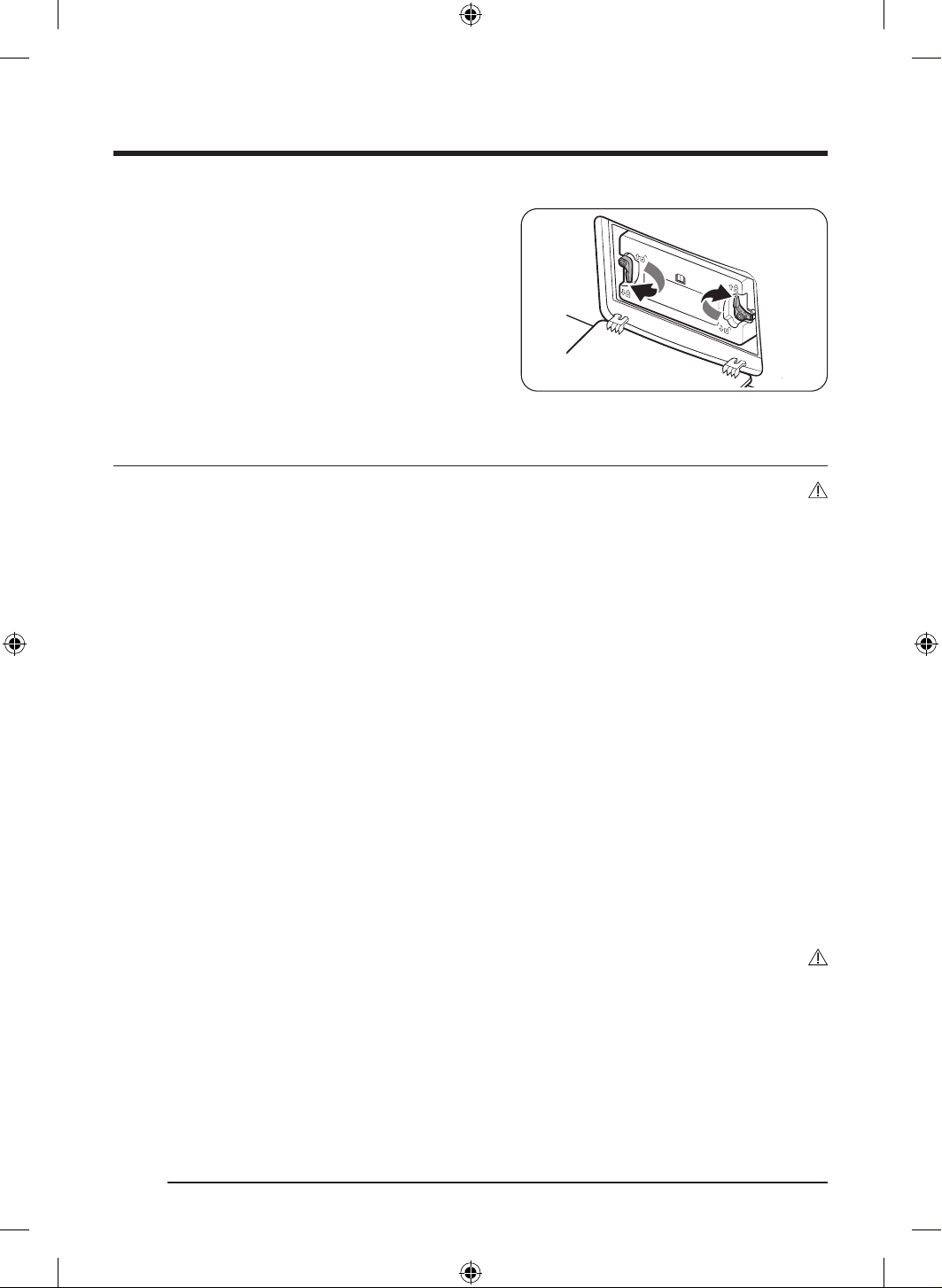
ةيبرعلا
45
4 ..تاتبثملا لفقا مث ،يلصا هعضوم إ يلخادلا ءاطغلا دعأ
5 ..يرارحلا لدابملل يجراخلا ءاطغلا قلغأ
فيظنتلا
ريذحت
.ةرشابم هيلع ءاملا شرب ففجملا فيظنتب مقت
نول يف ريغت ثودح رما اذه نع جتني دق .نوتيسا وأ لوحكلا وأ ناهدلا ففخم وأ نيزنبلا مادختساب ففجملا فيظنتب مقت
.قيرح بوشن وأ ةيبرهك ةمدص ثودح وأ فلت وأ هيوشت وأ زاهجلا
.يبرهكلا رايتلا كلس لصف نم دكأت ،ففجملا فيظنت لبق
يجراخلا حطسلا
برقلاب ةداح وأ ةليقث ءايشأ عضو وأ مادختسا بنجت .ةطشاك تافظنم مدختست .ةبطرو ةمعان شامق ةعطق مادختساب فيظنتلاب مق
.ةلصفنم نيزخت ةيواح يف وأ )ةلصفنم عابت( ةدعاقلا ع ىرخا تامزلتسملاو ليسغلا قوحسم عض .هقوف وأ ففجملا نم
مكحتلا ةحول
حسمب مق .ةرشابم ةحوللا ع تافظنملا شرت .ةطشاك تافظنم مدختست .ةبطرو ةمعان شامق ةعطق مادختساب فيظنتلاب مق
.مكحتلا ةحول نم روفلا ع لئاوس وأ تاباكسنا يأ
ةيواحلا
.فيظنتلل أدصلل داضملا ندعملا نم ةعونصملا حطسل بسانمو طشاك ريغ بطر فظنم عم ةللبم شامق ةعطق مدختسا
.ةفاجو ةفيظن شامق ةعطقب ةيقبتملا عقبلا حسما
بابلا
وأ شامق ةعطق مادختساب بابلا نم يلخادلا ءزجلا فظن اذل .هيف مكارتت وأ بابلا نم يلخادلا بناجلا ثولت نأ ةبيرغلا داوملل نكم
ُ
ي
.ةمعان ةاشرف
هيبنت
.ةيطاطملا بابلا دادس لضفت
DV8700TK_SimpleUX_DC68-04223K-03_AR_P171.indd 45DV8700TK_SimpleUX_DC68-04223K-03_AR_P171.indd 45 2024/8/2 16:54:272024/8/2 16:54:27
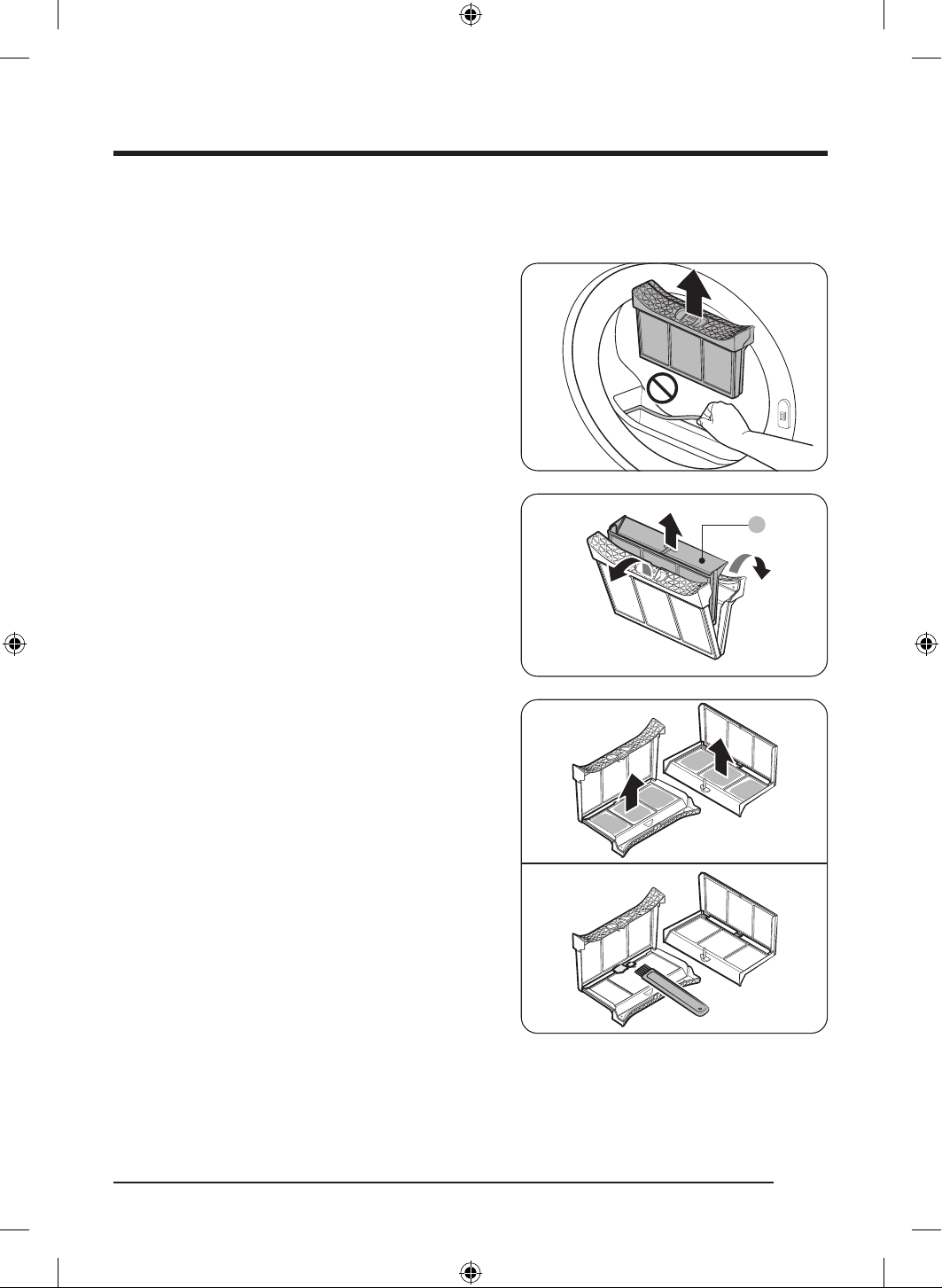
ةنايصلا
ةيبرعلا
46
تاسنلا ةافصم
.سبم ةلومح لك دعب تاسنلا ةافصم فيظنتب مق
1 . مث تاسنلا ةافصم نم يولعلا ءزجلا لزأو ،ففج
ُ
ملا باب حتفا
.ةافصملا عفرل بحسا
- .ةافصملا ةلازإ دعب ةيطاطملا ةدادسلا لصفت
A
2 ..)A( ةيلخادلا ةافصملا جارخإب مقو ةيجراخلا ةافصملا حتفا
3 ..ةيلخادلا ةافصملاو ةيجراخلا ةافصملا حتفا
4 . ةاشرف مادختساب اهفيظنتب مق مث يفاص
َ
ملا نم تاسنلا عزنا
.فيظنتلا
DV8700TK_SimpleUX_DC68-04223K-03_AR_P171.indd 46DV8700TK_SimpleUX_DC68-04223K-03_AR_P171.indd 46 2024/8/2 16:54:282024/8/2 16:54:28
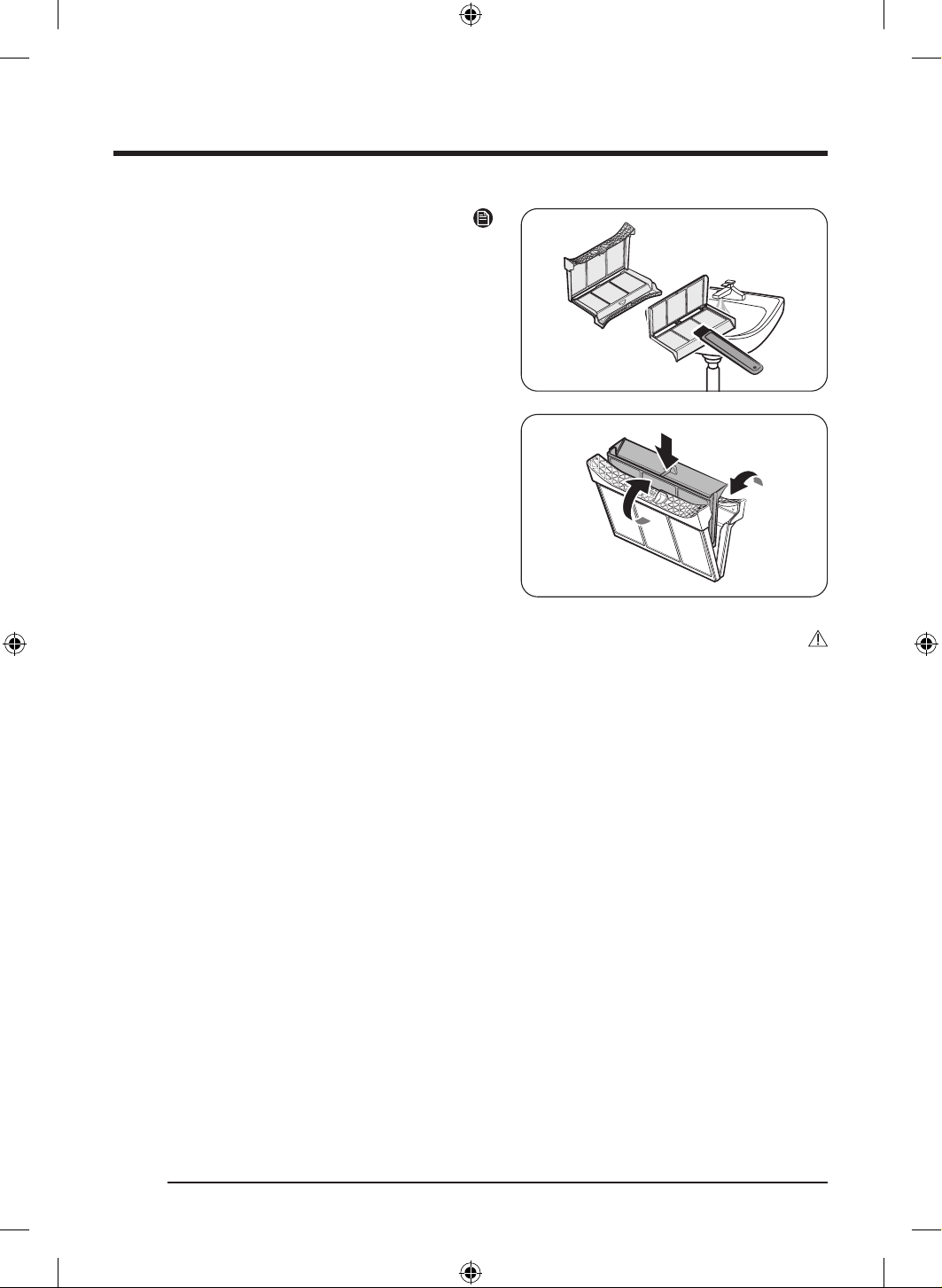
ةيبرعلا
47
ةظحم
.ا
ً
مامت اهففج مث يراجلا ءاملاب اهفيظنتب مق ،ا
ً
ديج يفاص
َ
ملا فيظنتل
5 . ةافصم لاخدإ دعأ مث ،ةيجراخلا ةافصملا يف ةيلخادلا ةافصملا عض
.يلصا عضولا يف تاسنلا
هيبنت
.فيفجتلا ءادأ ضافخنا يف كلذ ببستي دقف إو .سبم ةلومح لك دعب تاسنلا ةافصم فيظنتب مق
.مادختسا لبق ا
ً
مامت فجي هعدف ،
ً
لبم ةافصملا حطس ناك اذإ
- .فيفجتلا يندت وأ /و ةهيرك حئاور وأ /و نفع نوكت هنأش نم زاهجلا يف ةلتبملا ةافصملا لاخدإف
.ةافصملا فتإ هنأش نم كلذف .اهتلازإ وأ اهفيظنت دنع اهيلع طغضت وأ ةافصملا جرت
.نيتافصملا فتإ هنأش نم ةدئاز ةوقب وأ صرح نود لامهإب نيلخادلاو ةيجراخلا نيتافصملا حتف نإف كلذك
DV8700TK_SimpleUX_DC68-04223K-03_AR_P171.indd 47DV8700TK_SimpleUX_DC68-04223K-03_AR_P171.indd 47 2024/8/2 16:54:282024/8/2 16:54:28
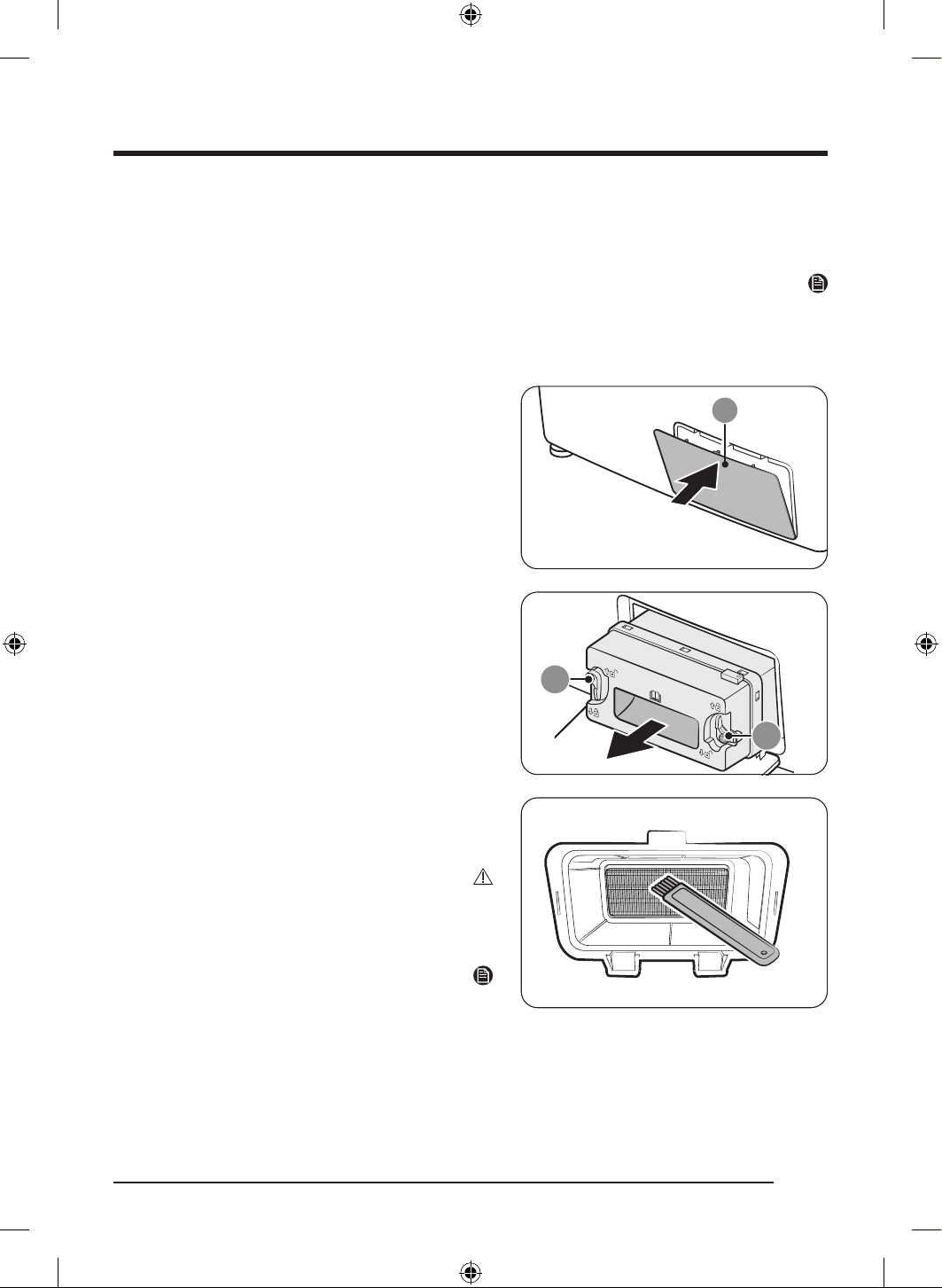
ةنايصلا
ةيبرعلا
48
يرارحلا لدابملا
."يرارحلا لدابملا فظن" ةلاسر ضرعب ففج
ُ
ملا كهبنيس ،يرارحلا لدابملا فيظنت تقو نيحي امدنع
.ماظتناب هفيظنت بجي اذل جتنملا ءادأ ةقاعإ هنأش نم فيظنلا ريغ يرارحلا لدابملاف
ةظحم
ةمعب سيلو يعيبط رمأ اذهو .ةرارحلا تاجرد فتخا هببس
ُ
ي يذلا فيثكتلا ببسب يرارحلا لدابملا لوح ءاملا تارطق مكارت نكمي
.بيرست ع
.ةيوهتلاو يرارحلا لدابملا ءاطغ حتفا ،ةليوط ةرتفل ففج
ُ
ملا مادختس ططخت تنك اذإف
1 ..هحتفل )A( يجراخلا ءاطغلا نم يولعلا ءزجلا ع قفرب طغضا
9
9
2 . يلخادلا ءاطغلا بحسا مث ،)B( تاتبثملا حتفا ،يلخادلا ءاطغلا يف
.هتلاز
3 ..ةرفوتملا ةاشرفلا مادختساب يرارحلا لدابملا لوح رابغلا فظن
- ةعطق ا
ً
مدختسم رابغلا قاب حسما ،ةاشرفلاب فيظنتلا دعب
.ةمعان ةبطر شامق
هيبنت
ل
ِ
دابملا فظن
ٌ
ت وأ سملت قورح وأ ةيدسج ةباصإ ثودح بنجتل
.كيديب يرارحلا
.تافنعلا فلتت يكل يرارحلا لدابملا فيظنت دنع ا
ً
رذح نك
ةظحم
ضعب شر ،هفيظنت بعصي مث نمو ،ا
ً
مامت ا
ً
فاج يرارحلا لدابملا ناك اذإ
.ةاشرف ا
ً
مدختسم هفظنو يرارحلا لدابملا ع ءاملا نم
DV8700TK_SimpleUX_DC68-04223K-03_AR_P171.indd 48DV8700TK_SimpleUX_DC68-04223K-03_AR_P171.indd 48 2024/8/2 16:54:282024/8/2 16:54:28
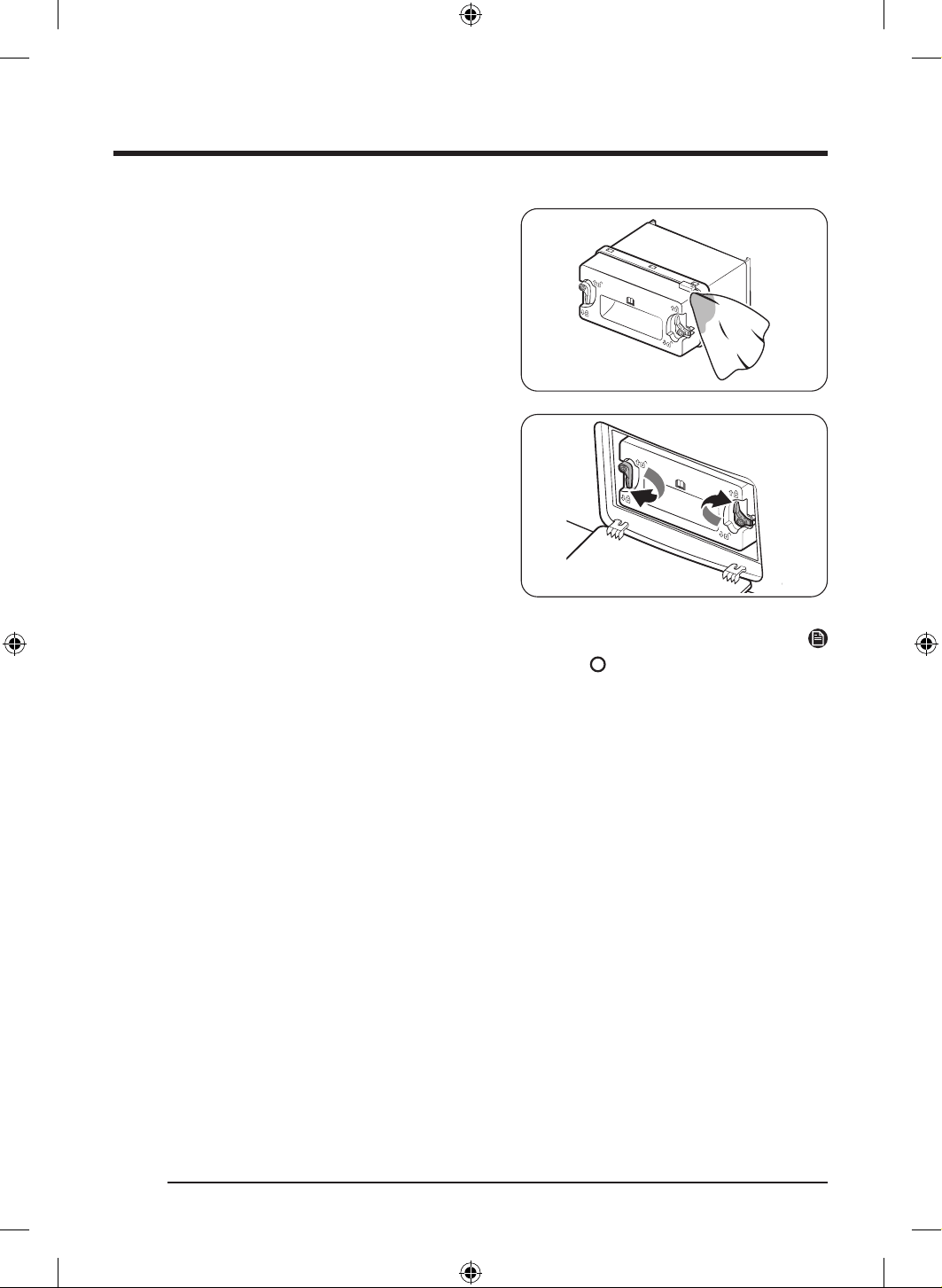
ةيبرعلا
49
4 ..ةبطرو ةمعان شامق ةعطق مادختساب يلخادلا ءاطغلا فيظنتب مق
- .يلخادلا ءاطغلا لوح ةبيرغ داوم وأ /و ةبوطر دجوي دق
5 ..تاتبثملا لفقا مث ،يلصا هعضوم إ يلخادلا ءاطغلا دعأ
..يرارحلا لدابملل يجراخلا ءاطغلا قلغأ
ةظحم
.اهليزت نأ إ ةدوجوم ةلاسرلا لظت .هيبنتلا ةلاسر ةلاز ع رقنا ،يرارحلا لدابملا فيظنت دعب
دعأو يرارحلا لدابملل يلخادلا ءاطغلا لزأ وأ ةقاطلا كلس ليصوت دعأ مث ةقاطلا كلس لصفا ،ةلاسرلا ةلازإ دعب راذنا رمتسا اذإ
.هبيكرت
DV8700TK_SimpleUX_DC68-04223K-03_AR_P171.indd 49DV8700TK_SimpleUX_DC68-04223K-03_AR_P171.indd 49 2024/8/2 16:54:282024/8/2 16:54:28
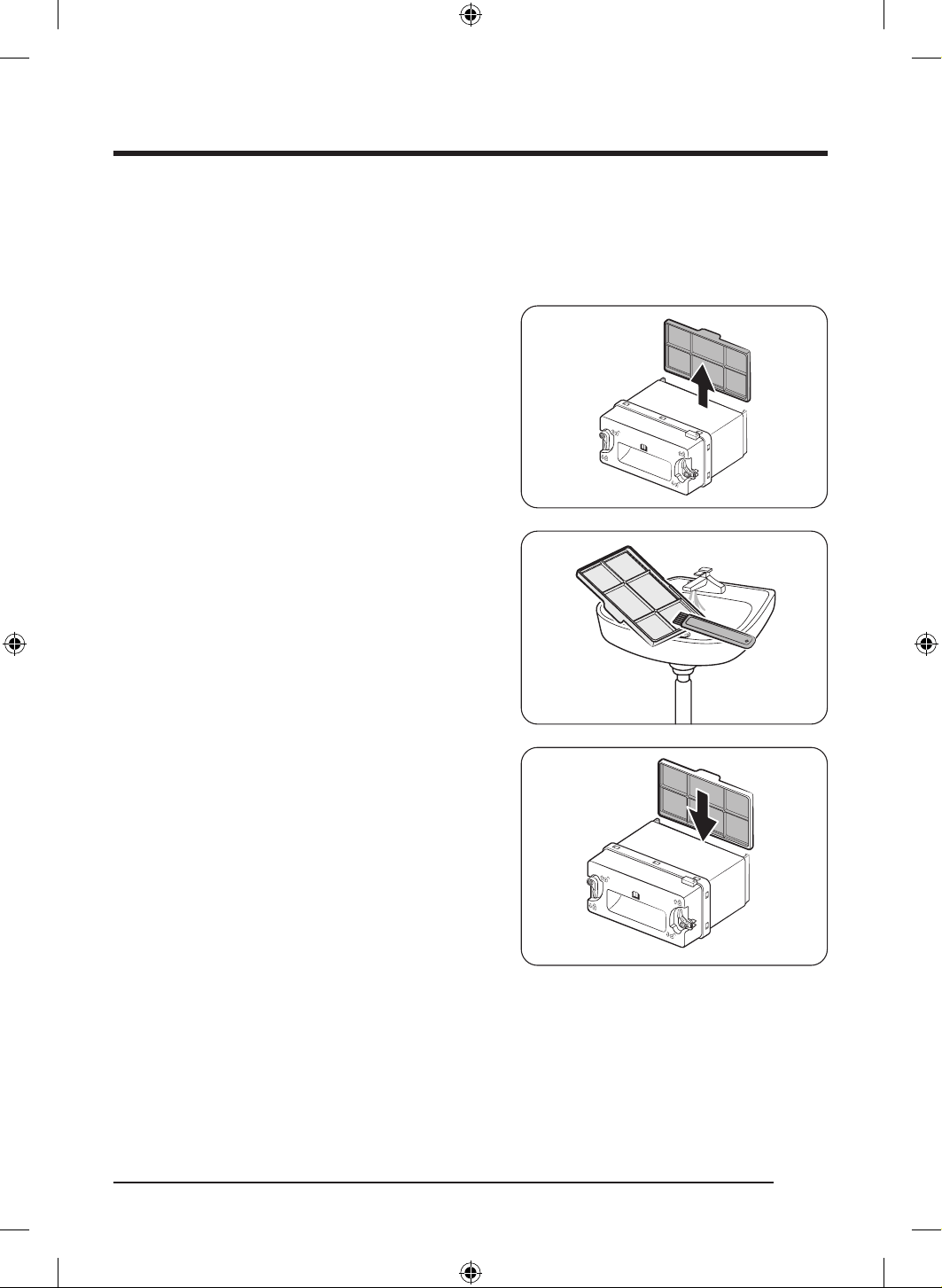
ةنايصلا
ةيبرعلا
50
)يرايتخا حيشرملا( قيقد نيل حشرم
نيللا قيقدلا ح
شرملا فظن" ةلاسر ضرعب ففج
ُ
ملا كهبنيس ،)يرايتخا حيشرملا( نيللا قيقدلا ح
ِ
شرملا فيظنتل تقولا نيحي امدنع
بجي مث نمو جتنملا ءادأ ىوتسم ضافخنا ببس
ُ
ي خستملا )يرايتخا حيشرملا( نيللا قيقدلا ح
ِ
شرملا نإ .")يرايتخا حيشرملا(
.ماظتناب هفيظنت
1 . .يلخادلا ءاطغلا لزأ مث ،يرارحلا لدابملل يجراخلا ءاطغلا حتفا
).4 ةحفص يف "يرارحلا لدابملا" مسق عجار(
2 . ءاطغلا نم )يرايتخا حيشرملا( نيللا قيقدلا ح
ِ
شرملا لزأ
.يلخادلا
3 . حيشرملا( نيللا قيقدلا ح
ِ
شرملا ع دوجوملا رابغلا فظن
.
ٍ
راج
ٍ
ءامب ح
ِ
شرملا لسغا مث زاهجلا عم ةرفوتملا ةاشرفلاب )يرايتخا
- .هلسغ دعب ا
ً
مامت حشرملا ففج
- ليلقت هنأش نم فيظنلا ريغ حشرملا نإ .ماظتناب حشرملا فظن
.فيفجتلا ةءافك
4 . هسفن يلخادلا ءاطغلا لخدأ مث يلخادلا ءاطغلا يف حشرملا لخدأ
.هعضوم يف
- نوكي نأ بجي( .ةحيحصلا ةيعضولا يف حشرملا بيكرت نم دكأت
).ع ا
ً
هجوم حشرملا نم يولعلا ءزجلا يف دوجوملا زوربلا
DV8700TK_SimpleUX_DC68-04223K-03_AR_P171.indd 50DV8700TK_SimpleUX_DC68-04223K-03_AR_P171.indd 50 2024/8/2 16:54:282024/8/2 16:54:28
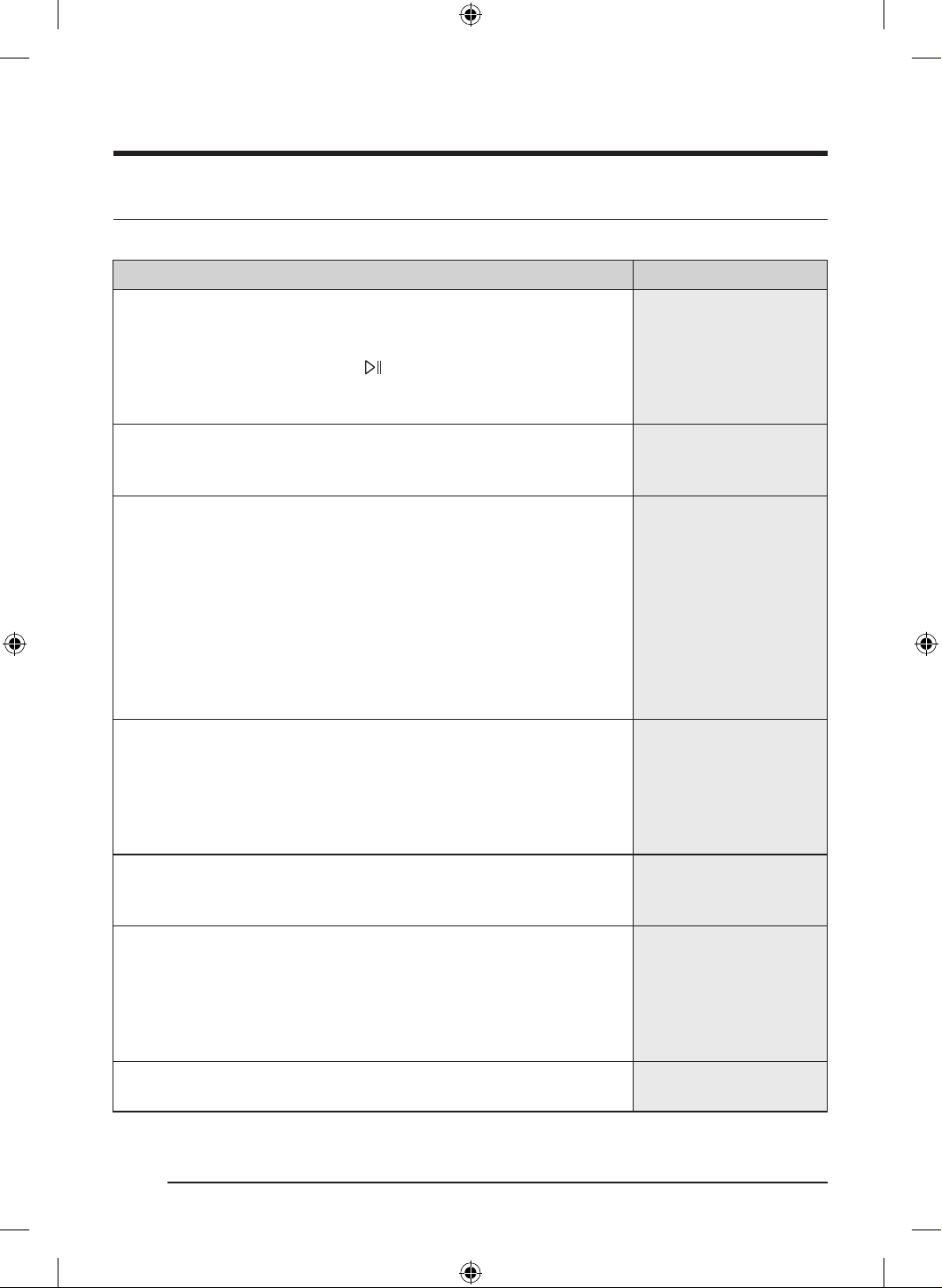
ةيبرعلا
51
اهلحو لكاشملا فاشكتسا
صحفلا طاقن
.تاحارتقا نم هب ام برجو يلاتلا لودجلا نم ققحت ،ففج
ُ
ملا يف ةلكشم تهجاو اذإ
ةلكشملاءارجا
.لمعي ففج
ُ
ملا
.يئابرهكلا رايتلا ردصمب ففج
ُ
ملا سباق ليصوت نم دكأت
.ماكحإب بابلا قغإ نم دكأت
.ةرئادلا عطاق طبض ةداعإ وأ رهصملا صحفا
.طغضلاب رمتساو
ع رقنا ،ام ةرود ءانثأ يف بابلا تحتف اذإ
.حشرملا فظن
.طشن ريغ لافطا دض لفق نأ دكأت
عفترت وأ ئفدي ففج
ُ
ملا
.هترارح
.ةرئادلا عطاق طبض ةداعإ وأ رهصملا صحفا
.رما مزل اذإ اهفيظنتب مق .يرارحلا لدابملاو تاسنلا ةافصم نم ققحت
.ةرودلا ديربت ةيلمع ءانثأ يف ففج
ُ
ملا نوكي دقو
.ضارغا فيفجت يرجي
:كلذ ع ةوعو .ةقباسلا رصانعلا عيمج نم ققحت
قرغتسي دقف ،ففج
ُ
ملا ع دئاز لمح ةمث ناك اذإف .ففج
ُ
ملل ةددح
ُ
ملا ةعسلا زواجتت
.لوطأ ا
ً
تقو ضارغا فيفجت
.فيفجتلا ءانثأ يف ةفيفخلا ةشمقا نع ةليقثلا ةشمقا لصفا
.ةيواحلا لخاد فاكلا ريودتلا ع لصحت و ا
ً
دج ةريغص ضارغا نوكت امبر
.حشرملا فظن
.يرارحلا لدابملا فظن
يف "يرارحلا لدابملا" مسق عجار ،ةشاشلا ع "يرارحلا لدابملا فظن" ةلاسر ترهظ اذإ
.يرارحلا لدابملا فظنو 4 ةحفص
.يغبني امك فرص
ُ
ي ءاملا نأ دكأت ،
ً
صتم فرصلا موطرخ ناك اذإف
.ا
ً
دج لاع ففج
ُ
ملا توص
ةلثامملا ضارغا نم كلذ ريغ وأ ربإ وأ ةكوكفم رارزأ وأ ةيندعم تمع دوجو نم ققحت
.ا
ً
روف اهلزأو
.تاسنلا ةافصم يف ةقلاعلا ءايشا عيمح لزأ .تاسنلا ةافصم نم ققحت
.ماكحإب ضرا ع هعضو متو
ٍ
وتسم عضو يف ففجملا نأ دكأت
ا
ً
رمأ اذه دعي .ةحورملاو ةيواحلا لخاد كرحتملا ءاوهلل ةجيتن ا
ً
تفاخ ا
ً
توص ففجملا ردص
ُ
ي دق
.ا
ً
يعيبط
ضارغا فيفجت يرجي
.يواستلاب
اذه دعي .سبملا يقاب نع ىرخا ءازجا ضعبو بويجلاو يشاوحلا فيفجت رذعتي دق
.ا
ً
يعيبط ا
ً
رمأ
.لصفنم لكشب ةفيفخلاو ةليقثلا سبملا زرفا
.ففج
ُ
ملا نم ردصت ةحئار ةمث
إ ةيلزنملا ضارغا نم اهريغو فيظنتلا داوم وأ شينرولا وأ ناهدلا ةحئار لقتنت امبر
ا
ً
مامت ناكملا ةيوهتب كيلعف ،ةلثامم ةحئار تظح اذإف .ففج
ُ
ملا إ لخدت مث نمو ءاوهلا
.ففج
ُ
ملا مادختسا لبق
تاجرد يف عافترا ببس
ُ
ي دق ففج
ُ
ملا نإف ،ةقلغ
ُ
م ةقطنم يف يرجي فيفجتلا ناك اذإف
.ناكملا ةيوهتو ةذفان حتف نم دكأت ،كلذ ع ةوعو .ةطيحملا ةرارحلا
.ةليوط ةرتفل ففج
ُ
ملا وأ ةلاسغلا يف اهكرت دعب ةلتبملا ضارغا فيفجت لواحت
لبق لمعلا نع فقوتي ففج
ُ
ملا
.ضارغا فيفجت
لواحو فشانملا لثم ةيفاضا ضارغا ضعب عض .
ً
ادج ةريغص )سبملا ةيمك( ةلومحلا
.ىرخأ ةرم فيفجتلا
DV8700TK_SimpleUX_DC68-04223K-03_AR_P171.indd 51DV8700TK_SimpleUX_DC68-04223K-03_AR_P171.indd 51 2024/8/2 16:54:292024/8/2 16:54:29
اهلحو لكاشملا فاشكتسا
ةيبرعلا
52
ةلكشملاءارجا
.سبملا ع ةلاسن ةمث
نوكي امدنعو .ففج
ُ
ملا يف ضارغا عضو لبق تاسنلا ةافصم ةفاظن نم ا
ً
مود دكأت
فصتنم يف تاسنلا ةافصم فيظنت إ جاتحت امبر كنإف ،ةلاسنلا نم ةريبك ةيمك فيفجتلا
.ةرودلا
اهفيفجت يغبنيو ةلاسنلا نم ا
ً
ديزم ببس
ُ
ت )ءاضيبلا فشانملا لثم( ةشمقا ضعبف
.)ءادوسلا ناتكلا لياورسلا لثم( ةلوهسب ةلاسنلا اهب كسم
ُ
ت يتلا ةشمقا نع لزعمب
.فيفجتلا لبق ةغراف اهنأ دكأتلل بويجلا لخاد يف امم ققحت
ففج
ُ
ملاب ةطيحملا ةرارحلا ةجرد
.ةبوطر ةحئار ةمث وأ عفترت
ءانثأ يف ففج
ُ
ملا جراخو لخاد ةطيحملا ءاوهلا ةرارح ةخضمب ةدوزملا تاففجملا رود
ُ
ت
ةيوهتلا إ رقتفي ناكم يف ففج
ُ
ملا مادختسا نإف اذل .ماظنلا ديربتل فيفجتلا ةيلمع
ببس
ُ
ي وأ /و ةطيحملا ةبوطرلا ىوتسم عفري ،ليغشتلا ةئيب ع ا
ً
دامتعاو ،امبر ةبسانملا
.ففج
ُ
ملا مادختسا دنع ةبسانملا ةيوهتلا رفوت نم دكأت .ةظوحلم ةبوطر ةحئار
.ءاملا فرص يرجي
.تاءاوتلا وأ تاينثلا نع ا
ً
ثحب فرصلا موطرخ نم ققحت
إ ماكحإب موطرخلا لصو تاءاوتلا وأ تاينثلا ا
ً
يدافتم ا
ً
ميقتسم موطرخلا راسم مكحأ
.ةيضراب فرصلا
.ا
ً
دمجتم فرصلا موطرخ ناك اذإ امم ققحت
موطرخلا لخاد ةدمجملا هايملا رهصنت يكل ئفاد ءام يف هرمغا ،ا
ً
دمج
ُ
م موطرخلا ناك اذإف
.فرصلا ةمس نم ققحتو موطرخلا ليصوت دعأ .اهفرص يرجيو
.يلحملا Samsung ةمدخ زكرمب لصتا ،ةلكشملا رارمتسا ةلاح يف
DV8700TK_SimpleUX_DC68-04223K-03_AR_P171.indd 52DV8700TK_SimpleUX_DC68-04223K-03_AR_P171.indd 52 2024/8/2 16:54:292024/8/2 16:54:29
ةيبرعلا
53
تامولعملا زومر
.هب ةدراولا تاحارتقا ب
ِ
رجو يلاتلا لودجلا عجار .ضرعلا ةحول ع تامولعملا زومر دحأ رهظت دقف ،ففجملا لمعي مل اذإ
تامولعملا زمرىنعملاءارجا
حوتفم بابلاا
ً
حوتفم بابلا امنيب ففج
ُ
ملا ليغشت
.ةيناث ةرم ليغشتلا أدباو بابلا قلغا
.ةنايصلا زكرمب لصتاف ،ةلكشملا ترمتسا اذإ
.ليغشتلا ديق لافطا دض لفق ناك اذإ امم ققحت
رهظت دق هنإف ،ليغشتلا ديق لافطا دض لفق ناك اذإ
ديق ففج
ُ
ملا نكي مل اذإ ىتح بابلا حتف دنع ةلاسر
.ليغشتلا
ح
شرملا نم ققحتتاسنلا ةافصم يف ةلكشم
.تاسنلا ةافصم عيمجت نم ققحت
.ةنايصلا زكرمب لصتاف ،ةلكشملا ترمتسا اذإ
ءاطغلا نم ققحت
لدابملل يلخادلا
يرارحلا
لدابملل يلخادلا ءاطغلا يف ةلكشم
يرارحلا
.يرارحلا لدابملل يلخادلا ءاطغلا ةعومجم نم ققحت
.ةنايصلا زكرمب لصتاف ،ةلكشملا ترمتسا اذإ
/ فيرصتلا نم ققحتلا
ضوحلا غرفأ
فرصلا يف لطع
فرصلا ةخضم يف لطع
دمجتم فرصلا موطرخ
ئلتمم هايملا نازخ
.ا
ً
دودسم وأ ا
ً
دمجم سيل فرصلا موطرخ نأ دكأت
يف ةعوقنم ةطوفب موطرخلا فل ،موطرخلا دمجت اذإ
.موطرخلا دمجت كفل ا
ً
بيرقت قئاقد رشع ةدمل ئفاد ءام
ليغشت أدباو ففج
ُ
ملا لغش مث ،ءاملا نازخ غرفأ
.ىرخأ ةرم ففج
ُ
ملا
.ةنايصلا زكرمب لصتاف ،ةلكشملا ترمتسا اذإ
tCءاوهلا ةرارح ةجرد رعشتسم يف ةلكشم
.يرارحلا لدابملا وأ تاسنلا ةافصم فظن
.ةنايصلا زكرمب لصتاف ،ةلكشملا ترمتسا اذإ
tC5طغاضلا ةرارح ةجرد رعشتسم يف ةلكشم
.قئاقد ثث وأ نيتقيقد رظتنا
.ىرخأ ةرم ليغشتلا أدباو ىرخأ ةرم ةقاطلا ليصوت دعأ
3C.روتوملا لمع ةمس نم ققحت
.ليسغلا ةرود ءدب ةداعإ لواح
.ةنايصلا زكرمب لصتاف ،ةلكشملا ترمتسا اذإ
AC6
PBA نيب تيصوتلا ةمس نم ققحت
.ةسكاعلاو ةيسيئرلا
.ليسغلا ةرود ءدب ةداعإ لواح
.ةنايصلا زكرمب لصتاف ،ةلكشملا ترمتسا اذإ
HCطغاضلا ةرارح ةجرد طرف .ةنايصلا زكرمب لصتا
.يلحملا Samsung ةمدخ زكرمب لصتا ،ةشاشلا ع روهظلاب رمتسي داوكا دحأ نأ تدجو اذإ
DV8700TK_SimpleUX_DC68-04223K-03_AR_P171.indd 53DV8700TK_SimpleUX_DC68-04223K-03_AR_P171.indd 53 2024/8/2 16:54:292024/8/2 16:54:29
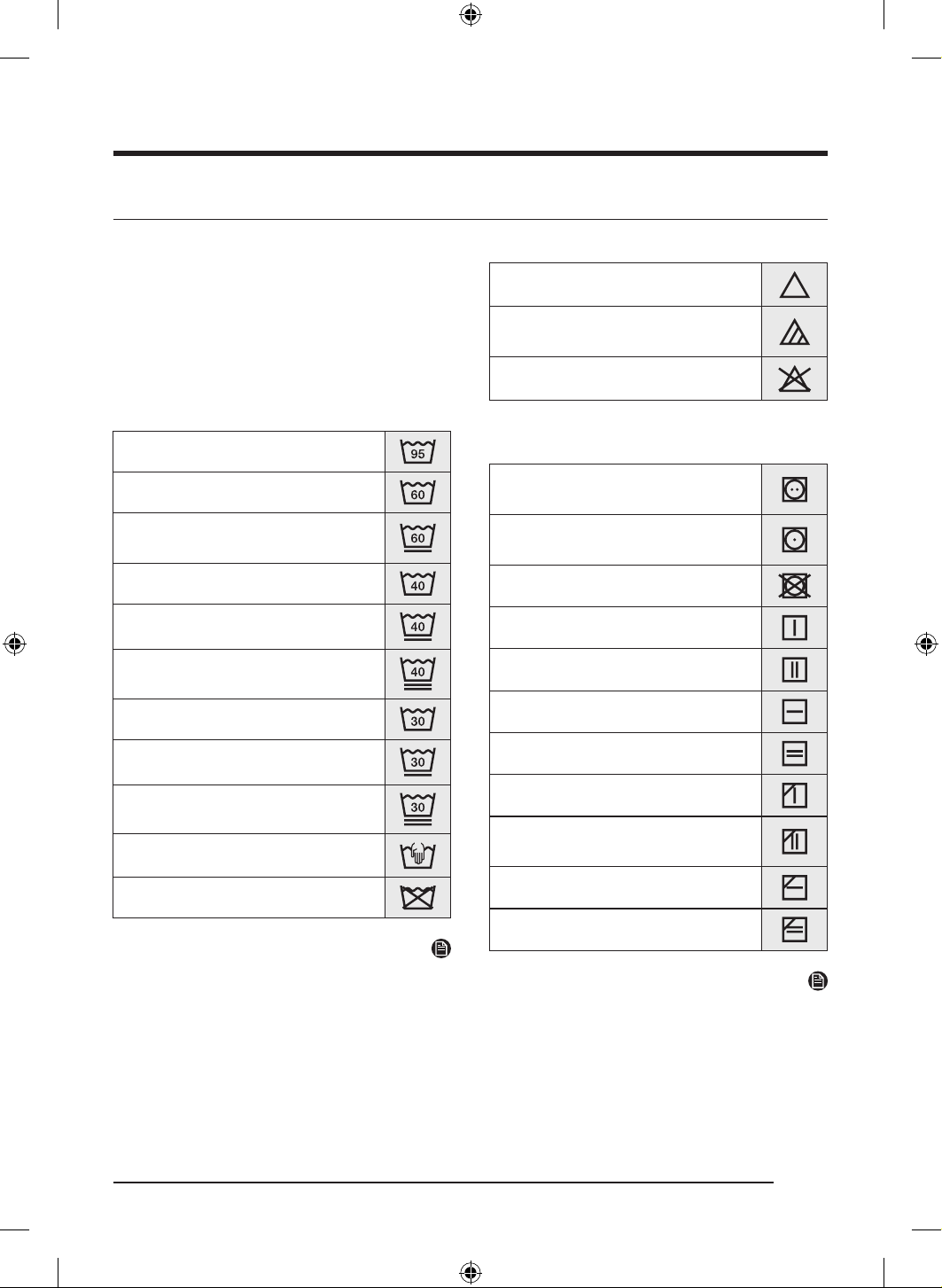
ةيبرعلا
54
قحلملا
ةشمقاب ةيانعلا لودج
تاقاطب نمضتت .سبملاب ةيانعلا تاميلعت ةيلاتلا زومرلا حضوت
فيفجتلاو ضييبتلاو فيفجتلاب ةصاخ ا
ً
زومر سبملاب ةيانعلا
هذه مادختسا نمضي .ةرورضلا دنع فاجلا فيظنتلا وأ يكلاو
ةيلحملا سبملل ةع
ِ
نصملا تاكرشلا نيب قسانتلا زومرلا
.ةدروتسملاو
لكاشم ليلقتو سبملا رمع ةدايزل ةيانعلا ةقاطب تاميلعت عبتا
.ليسغلا
لسغ
.ةيوئم ةجرد 90 نايلغلاب ليسغ
.ةيوئم ةجرد 60 نولم ليسغ
نولم ليسغ( .ةيوئم ةجرد 60 نولم ليسغ
) ”ةريسيلا ةيانعلا“
.ةيوئم ةجرد 40 نولم ليسغ
.ةيوئم ةجرد 40 ئداه ليسغ
.ةيوئم ةجرد 40 ا
ً
دج ئداه ليسغ
.ةيوئم ةجرد 30 فيطل ليسغ
.ةيوئم ةجرد 30 فيطل ئداه ليسغ
.ةيوئم ةجرد 30 ا
ً
دج فيطل ئداه ليسغ
.يودي لسغ
.لسغت
ةظحم
حومسم تاجرد ىصقأ ددحت ليسغلا ضوح يف ةدراولا ماقرا
.اهزواجت مدع نيعتيو ةيوئملا تاجردلاب ةددح
ُ
م ليسغلل اهب
ضييبت ةدام
.ضييبت ةدام يأ مادختساب حومسم
ةلماعلا ضييبتلا داومب ىوس حمس
ُ
ي
.نيجسكواب
.ضييبت ةدام مدختست
فيفجتلا
80 ةرارح ةجرد ع فيفجت /ريودتلاب فيفجت
.ةيداع فيفجت ةيلمع يف ةيوئم ةجرد
60 ةرارح ةجرد ع فيفجت /ريودتلاب فيفجت
.ةطسوتم فيفجت ةيلمع يف ةيوئم ةجرد
ريودتلاب اهفيفجت رظحي
.لبحلا ع فيفجت
.ةيعيبطلا فورظلاب لبحلا ع فيفجت
.حطسم فيفجت
.ةيعيبطلا فورظلاب حطسم فيفجت
.لظلا يف لبحلا ع فيفجت
يف ةيعيبطلا فورظلاب لبحلا ع فيفجت
.لظلا
.لظلا يف حطسم فيفجت
.لظلا يف ةيعيبطلا فورظلاب حطسم فيفجت
ةظحم
.ففج
ُ
ملا فيفجت ىوتسم إ طاقنلا ريشت
.فيفجتلا ناكمو عون إ طوطخلا ريشت
DV8700TK_SimpleUX_DC68-04223K-03_AR_P171.indd 54DV8700TK_SimpleUX_DC68-04223K-03_AR_P171.indd 54 2024/8/2 16:54:312024/8/2 16:54:31
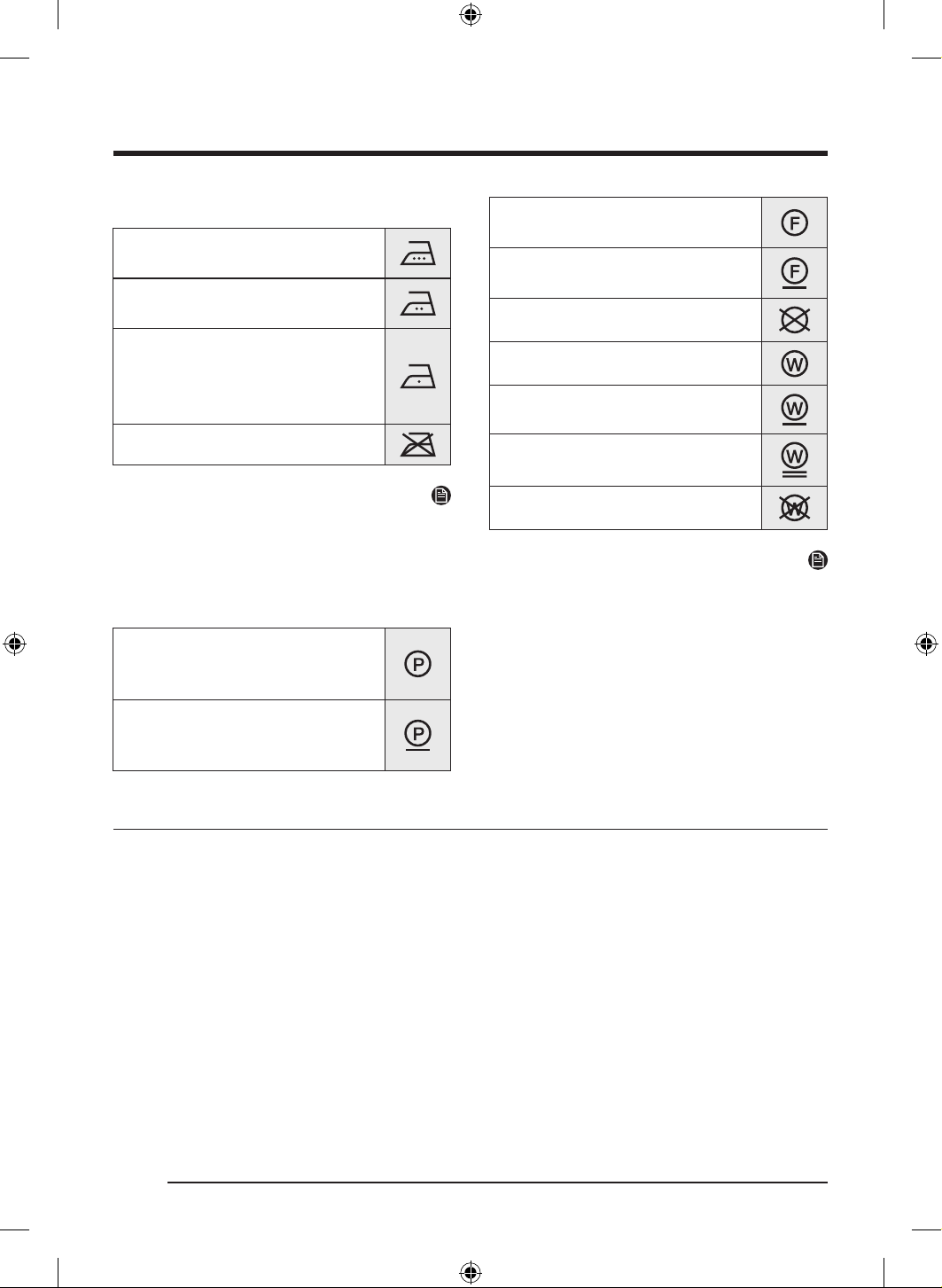
ةيبرعلا
55
يكلا
ع ةاوكملا نطابل ةرارح ةجرد ىصقأ ع يك
.ةيوئم 200 ةجرد
ع ةاوكملا نطابل ةرارح ةجرد ىصقأ ع يك
.ةيوئم 150 ةجرد
ع ةاوكملا نطابل ةرارح ةجرد ىصقأ ع يك
.ةيوئم 110 ةجرد
ةاوكم ةزهجأ مادختسا دنع رذحلاب يلحتلا بجي
.)راخب نود لمعلا( راخبلا
.يكلا عونمم
ةظحم
يكلا ةزهجأ( يكلا لج ةرارحلا ةجرد تاقاطن إ طاقنلا ريشت
تانيكامو رفسلل يكلا ةزهجأو ،راخبلا ةزهجأو ،مظنملا تاذ
.)يكلا
ةيفارتحا ةيانعلا
ورولك يعابر مادختساب يفارتحا فاج فيظنت
)ةليقثلا تانيزنبلا( تانوبركورديهلا وأ /و نيليثا
.ةيعيبط ةيلمعب
ورولك يعابر مادختساب يفارتحا فاج فيظنت
)ةليقثلا تانيزنبلا( تانوبركورديهلا وأ /و نيليثا
.ةفيفخ ةيلمعب
تانوبركورديهلا مادختساب يفارتحا فاج فيظنت
.ةيعيبط ةيلمعب )ةليقثلا تانيزنبلا(
تانوبركورديهلا مادختساب يفارتحا فاج فيظنت
.ةفيفخ ةيلمعب )ةليقثلا تانيزنبلا(
.فاجلا فيظنتلا رظحي
.يفارتحا للبم فيظنت
.ئداه يفارتحا للبم فيظنت
.ا
ً
دج ئداه يفارتحا للبم فيظنت
.للبملا فيظنتلا مادختسا رظح
ُ
ي
ةظحم
)P، F( تابيذملا إ ريشت ةرئادلا يف ةدراولا فورحلا
.)W( لل
ُ
بملا فيظنتلا وأ فاجلا فيظنتلا يف ةمدختس
ُ
ملا
رثكأ ةلماعم إ زمرلا تحت طخلا ريشي ،ماع لكشب
يتلا سبملاو ضارغل ةفيطللا ةرودلا لثم(
ً
ءوده
تايوتسم إ جودزملا طخلا ريشي .)ةريسي ةيانع مزلتست
ةلماعم بلطتت يتلا ضارغا ةلاح يف ةبولطملا ةيانعلا
.ةقيقر
ةئيبلا ةيامح
صلختلاب ةصاخلا ةيلحملا نيناوقلا ةاعارم ىجر
ُ
ي ،زاهجلا اذه نم صلختلا تررق اذإ .ريودتلا ةداع ةلباق داوم نم عونصم زاهجلا اذه
راغصلا لافطا وأ تاناويحلا ضرعت عنمل بابلا كف .ةقاط ردصمب زاهجلا ليصوت متي ىتح رايتلا كلس عطقا .تايافنلا نم
.زاهجلا لخاد سابتحل
.رولفلاب ةجلاعم ةئيفد تازاغ ع يوتحي
.ماكحإب قلغم زاهج
.ءاوهلا يف تازاغلا راشتناب حمست
)1430 = GWP( R-134a :)عون( ديربتلا
tCO2e 0.829 ,مجك 0.58 :)نحش( ديربتلا
DV8700TK_SimpleUX_DC68-04223K-03_AR_P171.indd 55DV8700TK_SimpleUX_DC68-04223K-03_AR_P171.indd 55 2024/8/2 16:54:332024/8/2 16:54:33
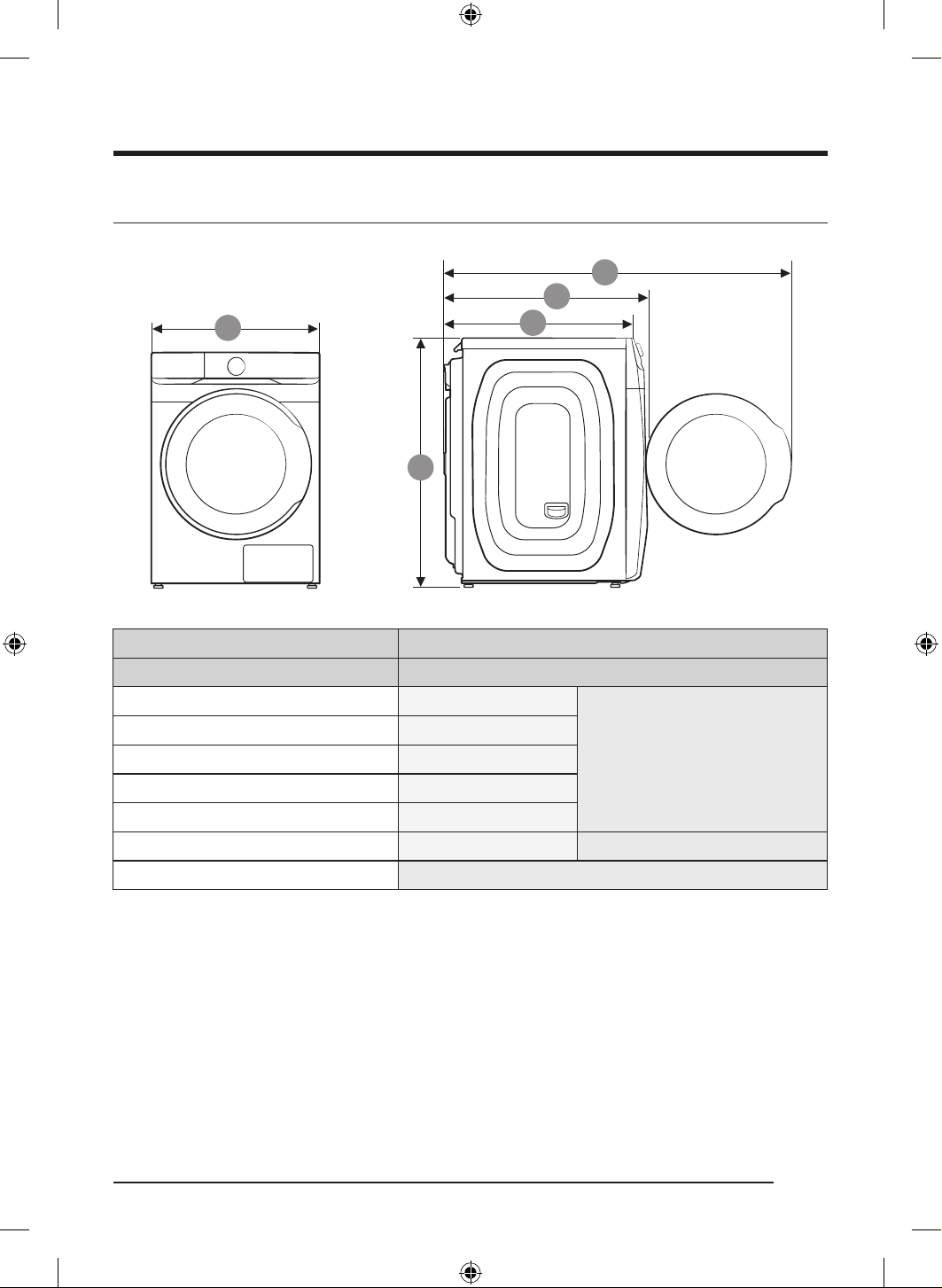
قحلملا
ةيبرعلا
56
تافصاوملا
9
A
U
k
عونلاليمحتلا يمامأ ففجم
زارطلا مساDV16T8740** / DV16T8741**
داعبا
Aمم 686
Bمم 984
Cمم 803
Dمم 844
Eمم 1378
ةيبرهكلا تابلطتملازتره 60 / تلوف 230طاو 2000
اهب حومسملا ةرارحلا ةجردةيوئم ةجرد 35–5
DV8700TK_SimpleUX_DC68-04223K-03_AR_P171.indd 56DV8700TK_SimpleUX_DC68-04223K-03_AR_P171.indd 56 2024/8/2 16:54:332024/8/2 16:54:33
ةيبرعلا
57
ةينفلا تافصاوملا ةمئاق
.)A-Z( وأ )9-0( نم اهتميق فلتخت نأ نكم
ُ
يو ةفلتخم تيدوم « * « ةمع ينعت
ةيراجتلا ةمعلا وأ /و ةعنصملا ةهجلا مسا
أشنملا دلب عنص يف ايروك
عونلا مقرDV16T8740**/DV16T8741**
جتنملا عونةرارح ةخضمب ففجم
)تلوف( ةردقملا ةيطلوفلا~تلوف 230
)زتره( ردقملا ددرتلازتره 60
ردقملا ةردقلا لخدطاو 2000
)مجك( ةردقملا فيفجتلا ةعسمجك 16.0
ةقاطلل يونسلا كهتساةعاسلا يف طاو وليك 307
IP مقرIPX4
داعبامم 984 عافترا × مم 844 قمعلا × مم 686 ضرعلا
يفاصلا نزولامجك 74
ةظحم
.لضفأ ةدوج قيقحت فدهب كلذو راعشإ نود رييغتلل ةضرع تافصاوملاو ميمصتلا نإ
.SASO-2883:2017 رايعملل ا
ً
قفو يتا جمانربلا إ ا
ً
دانتسا ةقاطلا قصلمب تافصاوملا ديدحت مت
.»4 فيفجتلا ةجرد +يداصتقا نطقلا« جمانربلا
دادعتسا عضو ءانثأ ةقاطلا كهتسا
ةقاطلا كهتسا
ليغشتلا فاقإ عضوطاو 0.50
ةكبشلا دادعتسا عضوطاو 2.00
)WI-FI( ةكبشلا دادعتسا عضو قرغتسا تقولاقئاقد 10
DV8700TK_SimpleUX_DC68-04223K-03_AR_P171.indd 57DV8700TK_SimpleUX_DC68-04223K-03_AR_P171.indd 57 2024/8/2 16:54:332024/8/2 16:54:33
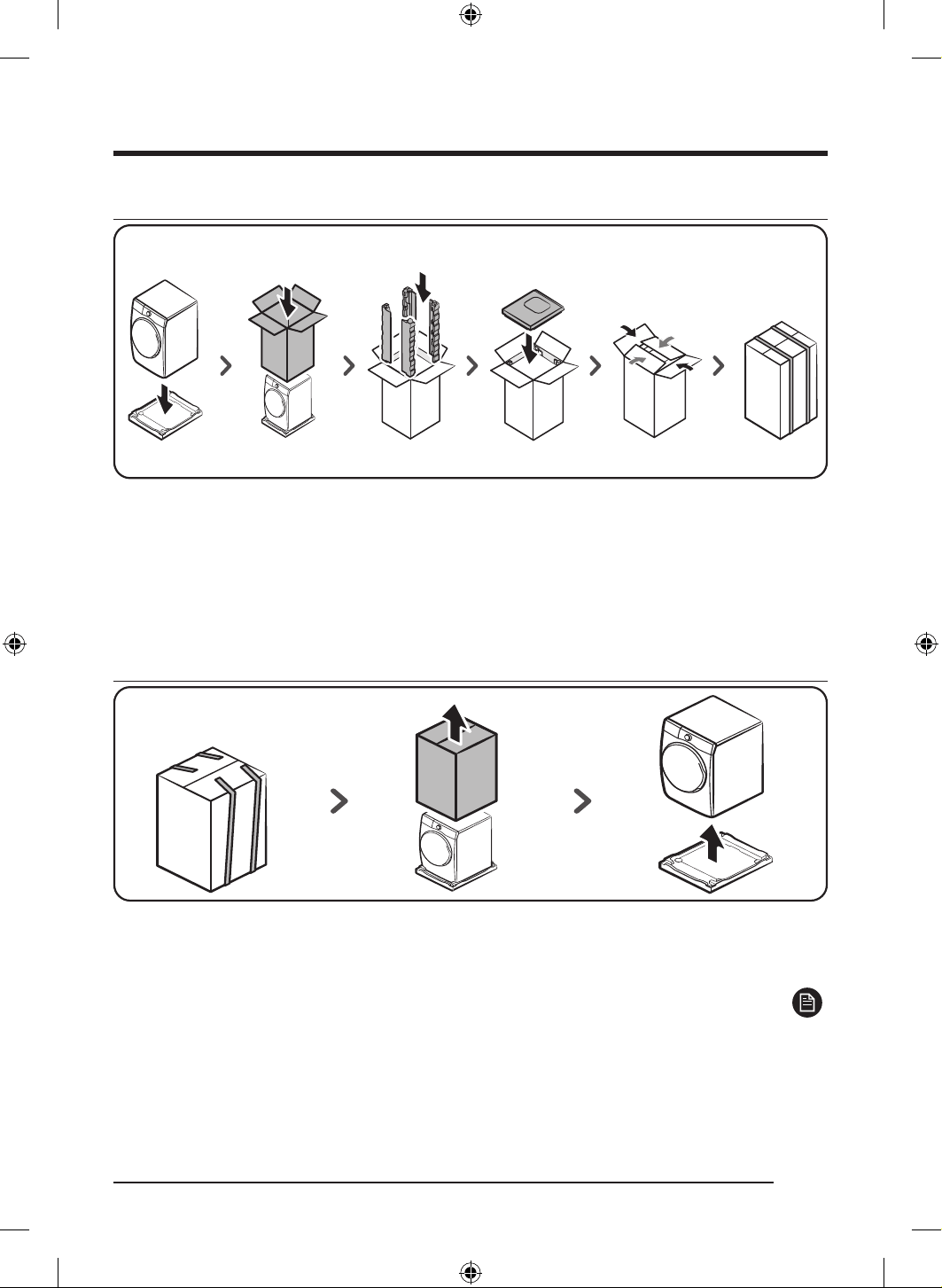
قحلملا
ةيبرعلا
58
غيرفتلا & ةئبعتلا
ةئبعتلا
1 ..تامدصلل ةصاملا ةيلفسلا ةداسولا ع ففج
ُ
ملا عض
2 ..ففج
ُ
ملا ع ةئبعتلا قودنص عض
3 ..نكر لك يف ةدحاو نوكت نأ ع ،ةئبعتلا قودنص يف ةيبناجلا ةعبرا دئاسولا لخدأ
4 ..ففج
ُ
ملا قوف تامدصلل ةصاملا ةيولعلا ةداسولا لخدأ
5 ..قودنصلل يولعلا ءاطغلا قلغأ
..ةطرشاب قودنصلا
ّ
فلغ
غيرفتلا
1 ..طبرلا كفل ةطرشا عطقا
2 ..هتلاز قودنصلا عفراو ،امهيتلك كيديب ةئبعتلا قودنص كسمأ
3 ..تامدصلل ةصاملا ةيلفسلا ةداسولا ع نم ففج
ُ
ملا لزأ
ةظحم
.طبرلا ةمزحأ نم 3 وأ 2 دجوت ،زارطلا بسح
DV8700TK_SimpleUX_DC68-04223K-03_AR_P171.indd 58DV8700TK_SimpleUX_DC68-04223K-03_AR_P171.indd 58 2024/8/2 16:54:332024/8/2 16:54:33
ةركذم
DV8700TK_SimpleUX_DC68-04223K-03_AR_P171.indd 59DV8700TK_SimpleUX_DC68-04223K-03_AR_P171.indd 59 2024/8/2 16:54:332024/8/2 16:54:33
ةظحم
:ةزهجا عفر دنع كسفن ةباصإ يف ببستلا بنجتل حئاصنلا هذه عبتا
.ناكما ردق ةزهجا نم برقلاب فق
.كدسج نم برقلاب كيعارذو كيقفرم ءاقبإ عم ةوقب ةزهجا كسما
.كرهظ سيلو ،كيتبكرو كيذخف درف قيرط نع ءطبب ةزهجا عفرا
- .عفرلا دنع ءانحنا مدعو ،كنطب تضع دش قيرط نع عفرلا ءانثأ يف كرهظ ةماقتسا ع ظفاح
- .كمامأ فصتنملا يف هعضو عم ناكما ردق كدسج نم برقلاب ةزهجا
ِ
قبأ
.كدسج نم يولعلا ءزجلا
ِ
نحت .ةطيسب تاوطخ ذاخت كيمدق ك
ِ
رح ،هاجتا رييغتل
؟تاقيلعت وأ تاراسفتسا يأ كيدل له
دلبلاع لصتاتنرتنا ع انعقوم رز وأ
SAUDI ARABIA
8002474357 ) 800 ) 08:00 ~ 20:00
HELP( From Inside Saudi Arabia
+966112614718 From outside Saudi
Arabia ) Call charges may be applied (
Digital services ) 24/7 HELP(
www.samsung.com/sa_en/support )English(
www.samsung.com/sa/support )Arabic(
DV8700TK_SimpleUX_DC68-04223K-03_AR_P171.indd 60DV8700TK_SimpleUX_DC68-04223K-03_AR_P171.indd 60 2024/8/2 16:54:332024/8/2 16:54:33