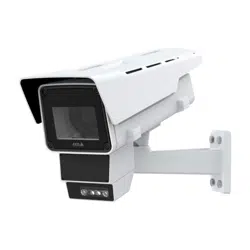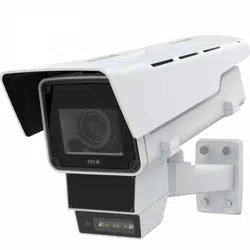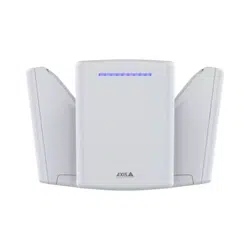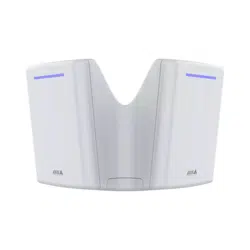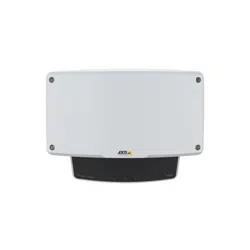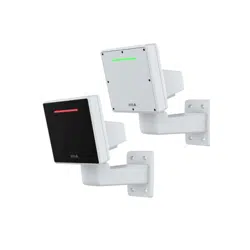


AXISD2210-VERadar
TableofContents
Installation................................................3
Installationguide...............................................3
Considerations..................................................3
Radarproles..............................................6
Areamonitoringprole...........................................6
Roadmonitoringprole..........................................9
Getstarted................................................14
Findthedeviceonthenetwork....................................14
Openthedevice'swebinterface....................................14
Createanadministratoraccount...................................14
Securepasswords...............................................14
Verifythatnoonehastamperedwiththermware....................15
Webinterfaceoverview..........................................15
Congureyourdevice........................................16
Selectaradarprole.............................................16
Calibratetheradar..............................................16
Setdetectionzones..............................................17
Minimizefalsealarms............................................19
Adjusttheradarimage...........................................
20
Viewandrecordvideo............................................
21
Setuprulesforevents...........................................22
Thewebinterface...........................................29
Status........................................................
29
Radar.........................................................
30
Recordings.....................................................36
Apps..........................................................37
System........................................................
37
Maintenance...................................................
56
Validateyourinstallation.....................................58
Validatetheinstallationoftheradar................................
58
Completethevalidation..........................................59
Learnmore................................................60
Streamingandstorage...........................................60
Overlays.......................................................
62
Specications..............................................63
Productoverview................................................
63
LEDindicators..................................................
63
SDcardslot....................................................
64
Buttons.......................................................
64
Connectors....................................................
64
Cleaningrecommendations...................................67
Troubleshooting............................................68
Resettofactorydefaultsettings...................................68
Checkthecurrentrmwareversion.................................
68
Upgradethermware............................................68
Technicalissues,clues,andsolutions................................68
Performanceconsiderations.......................................70
Contactsupport.................................................70
2
AXISD2210-VERadar
Installation
Installation
Towatchthisvideo,gotothewebversionofthisdocument.
help.axis.com/?&piaId=92321§ion=install
Installationguide
Theinstallationguideandotherdocumentsforthisproductcanbefoundonaxis.com/products/axis-d2210-ve-radar/support
Considerations
Wheretoinstalltheproduct
Areaorroadmonitoring
Theradarisintendedformonitoringopenareasandyoucanuseiteitherforareamonitoringorroadmonitoring.Theradarhas
twoprolestooptimizetheperformanceforeachoneofthescenarios.Formoreinformationaboutdetectionrange,installation
examplesandusecases,seeRadarprolesonpage6.
Avoidsolidandreectiveobjects
Mostsolidobjects(suchaswalls,fences,trees,orlargebushes)inthecoverageareawillcreateablindspot(radarshadow)behind
it.Metalobjectsintheeldofviewcausereectionsthataffecttheabilityoftheradartoperformclassications.Thiscanlead
toghosttracksandfalsealarmsintheradarstream.Forinformationabouthowtohandlesolidobjectsandreectivesurfaces,
seeAddexcludezonesonpage19.
Positioning
Installtheproductonastablepoleoraspotonawallwheretherearenootherobjectsorinstallations.Objectswithin1m(3ft)to
theleftandrightoftheproduct,thatreectradiowaves,affecttheperformanceoftheradar.
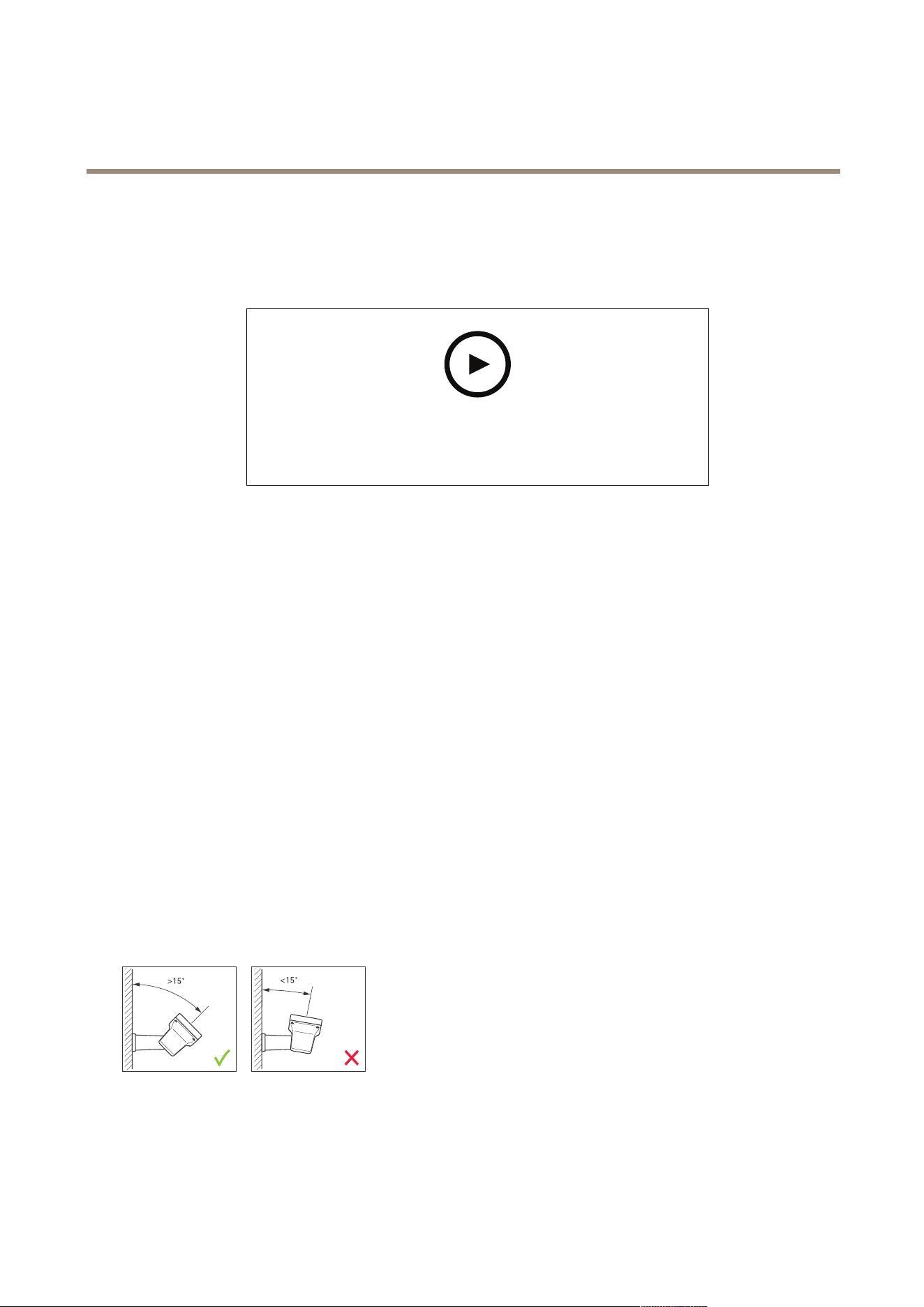
Ifyouinstalltheproductonawall,itneedstopointawayfromthewallatleast15°.
Rollangle
Theproduct'srollanglemustbenearlyequaltozero,whichmeansthatradarshouldbelevelwiththehorizon.
3
AXISD2210-VERadar
Installation
Tiltangle
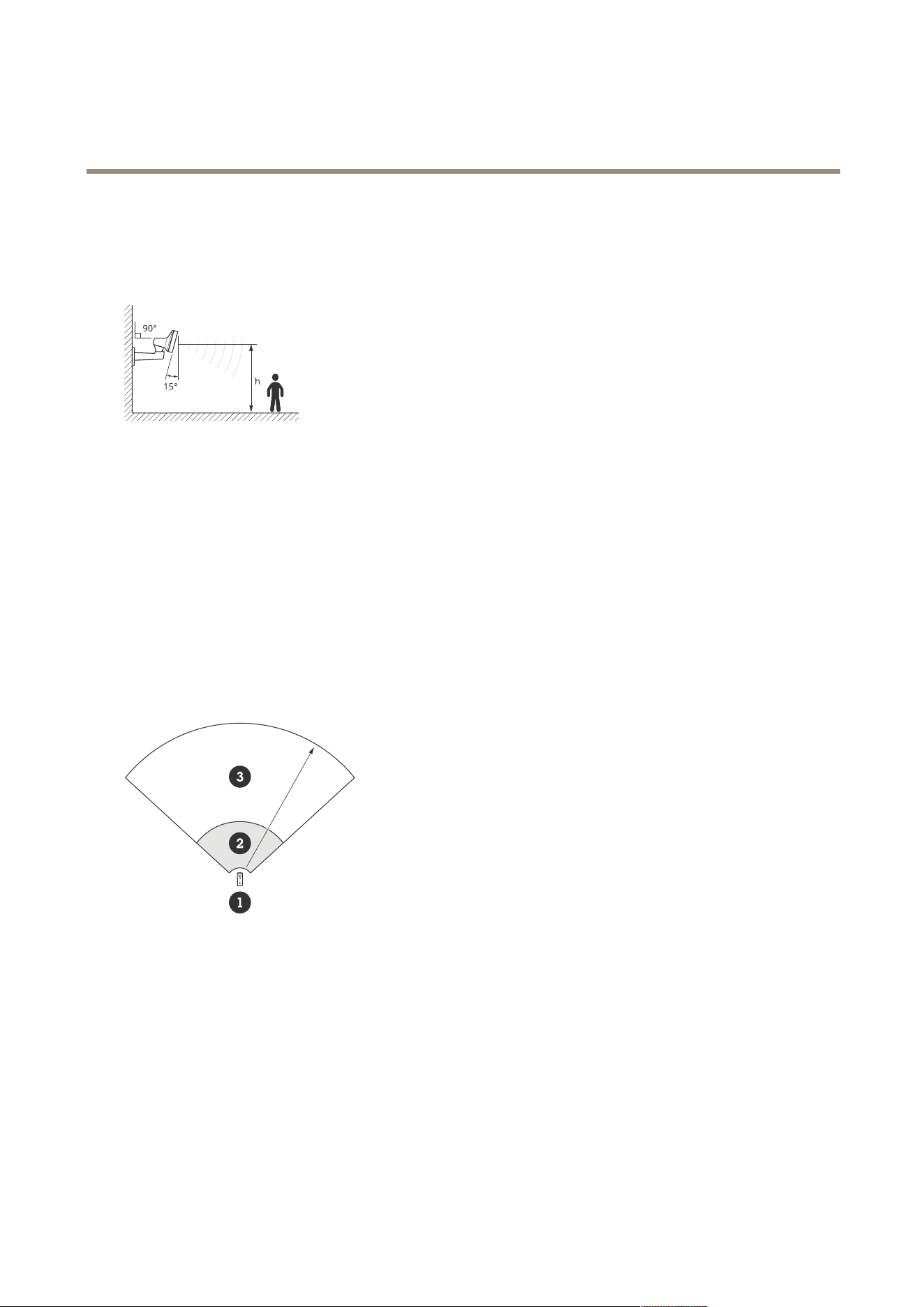
Theradarcanbetilted0-30°,buttherecommendedmountingtiltofthedeviceis15°.Tohelpyouachieve15°tilt,makesurethe
backpartofthechassisislevel,asshownintheillustration.
Youcanaddanoverlayintheradar’sliveviewthatshowsthetiltangleoftheradar.Forinstructions,seeShowatextoverlaywith
thetiltangleoftheradaronpage21
Coexistence
IfyoumountmorethaneightAxisradarsoperatingonthe60GHzfrequencybandclosetogether,theymayinterferewitheachother.
Toavoidinterference,seeInstallmultipleradarsonpage4.
Installmultipleradars
Youcaninstallmultipleradarstocoverareassuchasthesurroundingsofabuildingorthebufferzoneoutsideafence.
Coexistence
Theradar’sradiowavescontinuebeyondthedetectionarea,andcaninterferewithotherradarsupto350m(380yd)away.This
iscalledacoexistencezone.
1
Radar
2
Detectionarea
3
Coexistencezone
Thisradaroperatesonthe60GHzfrequencyband.Youcaninstalluptoeightradarsoperatingonthe60GHzfrequencyband
closetoeachother,orfacingeachother,withoutcausingproblems.Thebuilt-incoexistencealgorithmcanndasuitabletime
slotandfrequencychannelthatwillminimizeinterference.
Ifaninstallationcontainsmorethaneightradarsoperatingonthesamefrequencyband,andmanyofthedevicesarepointingaway
fromeachother,thereislessriskofinterference.Ingeneral,radarinterferencewillnotcausetheradartostopfunctioning.There
isabuilt-ininterferencemitigationalgorithmthattriestorepairtheradarsignalevenwheninterferenceispresent.Awarning
aboutinterferenceisexpectedtohappeninanenvironmentwithmanyradarsoperatingonthesamefrequencybandinthesame
coexistencezone.Themainimpactofinterferenceisdeteriorationofthedetectionperformance,andoccasionalghosttracks.
4
AXISD2210-VERadar
Installation
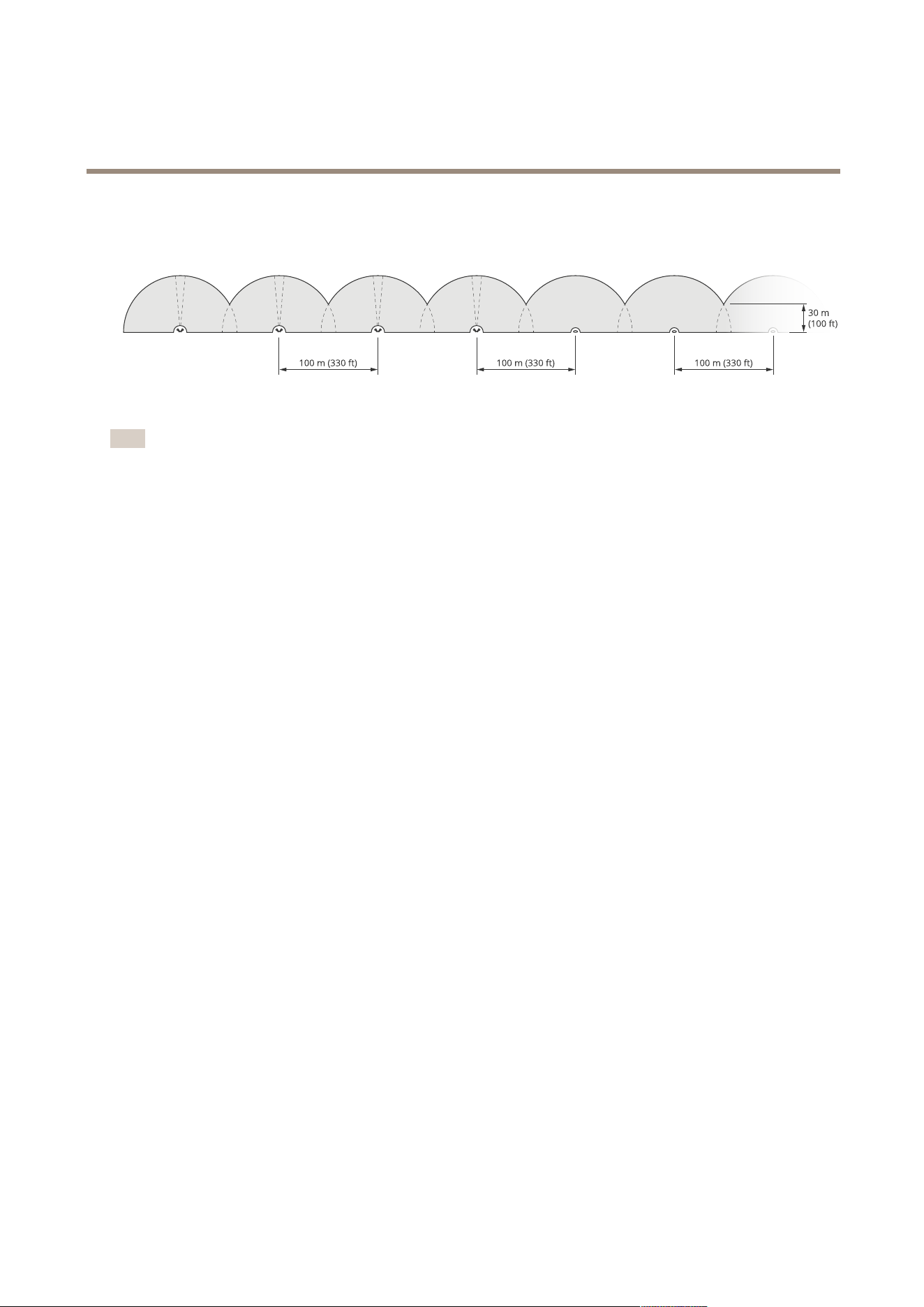
Axisradarsoperatingondifferentfrequencybandswillnotinterferewitheachother.Forexample,youcancombine
AXISD2210-VEwithmultipleAXISD2110-VESecurityRadar,whichoperatesonthe24GHzfrequencyband,withoutinterference.
FourpairsofAXISD2210-VEandmultipleAXISD2110-VESecurityRadarsmountedside-by-side.
Note
AXISD2110-VESecurityRadarrequiresadditionalcongurationwhenmorethantwoAXISD2110-VEaremountedinthe
samecoexistencezone.Tolearnmore,seeAXISD21 10-VESecurityRadarusermanual.
Environment
Therearealsootherdesignfactorstocheckwhenplacingmultipleradarsinasite,likethesurroundingenvironment,swayingobjects,
agpoles,andswayingvegetation.Insomecasesyouneedtolteroutswayingobjectsfromtheradarstreamtoavoidfalsealarms.
5
AXISD2210-VERadar
Radarprofiles
Radarprofiles
Youcanusetheradarforareamonitoringorroadmonitoring.Therearetwoprolesthatareoptimizedforeachoneofthescenarios:
•Areamonitoringprole:trackhumans,vehiclesandunknownobjectsmovingatspeedslowerthan55km/h(34mph)
•Roadmonitoringprole:trackmainlyvehiclesmovingatspeedsupto200km/h(125mph)
Selecttheareaormonitoringproleinthewebinterfaceoftheradar.Forinstructions,seeSelectaradarproleonpage16.
Areamonitoringprole
Theareamonitoringproleisoptimizedforobjectsmovingatupto55km/h(34mph).Thisproleallowsyoutodetectwhetheran
objectishuman,vehicle,orunknown.Arulecanbesettotriggeranactionwhenanyoftheseobjectsisdetected.Totrackvehicles
movinginhigherspeeds,usetheRoadmonitoringproleonpage9.
Areaofcoverage
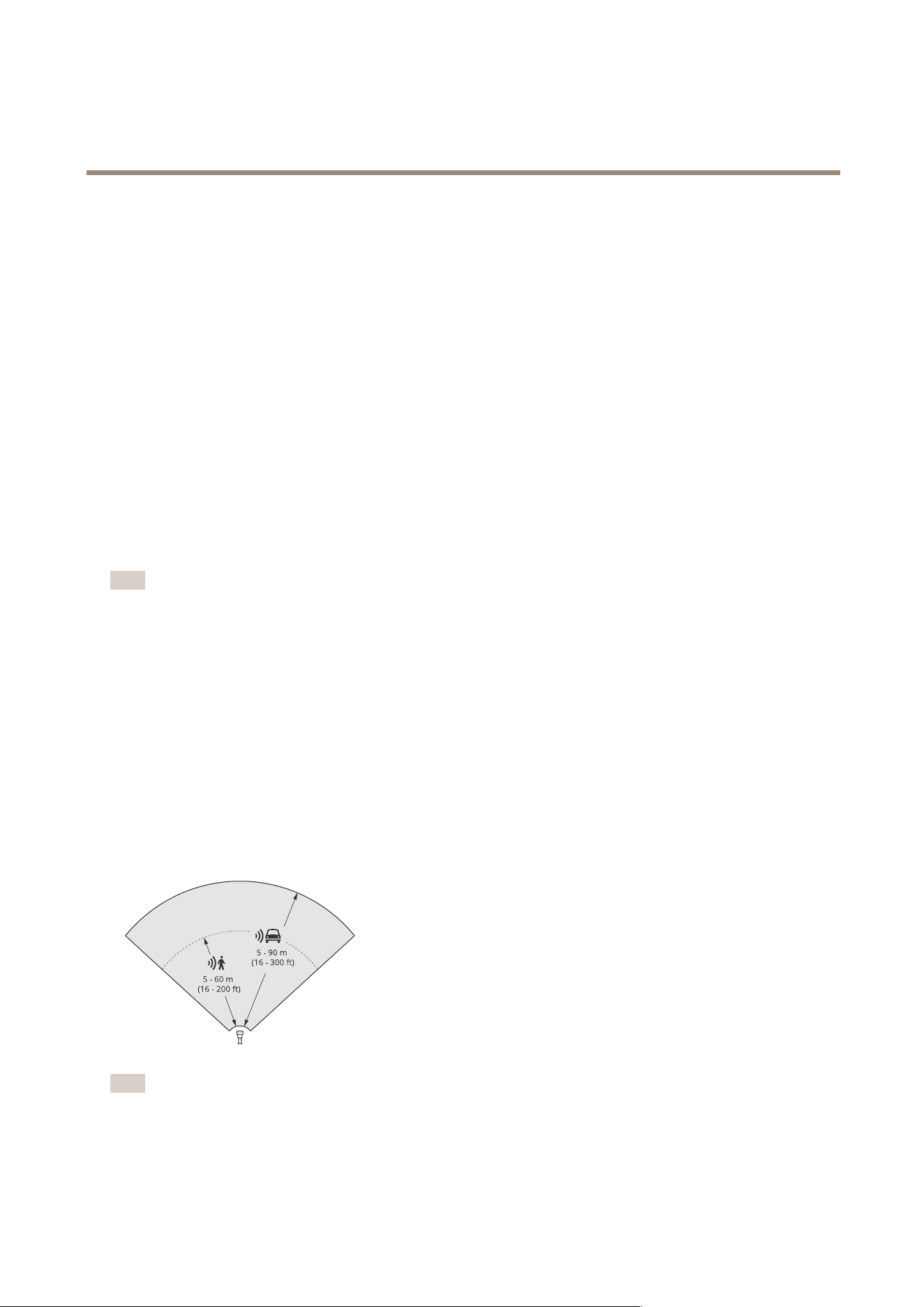
AXISD2210-VEhasahorizontaleldofdetectionof95°.Theareaofcoveragecorrespondsto2700m
2
(29000ft
2
)forhumans
and6100m
2
(65600ft
2
)forvehicles.
Note
Optimalareacoverageapplieswhentheradarismountedat3.5–7m(11–23ft).Themountingheightwillaffectthesize
oftheblindspotbelowtheradar.
Areadetectionrange
Thedetectionrangeisthedistancewithinwhichanobjectcanbetrackedandcantriggeranalarm.Itismeasuredfromanear
detectionlimit(howclosetothedeviceadetectioncanbemade)toafardetectionlimit(howfarfromthedeviceadetection
canbemade).
Theareamonitoringproleisoptimizedforhumandetection,however,itwillalsoallowyoutotrackvehiclesandotherobjects
movingatupto55km/h(34mph)withavelocityaccuracyof+/-2km/h(1.24mph).
Whenmountedattheoptimalinstallationheight,thedetectionrangesare:
•5–60m(16–200ft)whendetectingahuman
•5–90m(16–300ft)whendetectingavehicle
Note
•Enterthemountingheightinthewebinterfacewhenyoucalibratetheradar.
•Thedetectionrangeisaffectedbythesceneandtheproduct’stiltangle.
•Thedetectionrangeisaffectedbythemovingobjecttypeandsize.
6
AXISD2210-VERadar
Radarprofiles
Theradardetectionrangewasmeasuredundertheseconditions:
•Therangewasmeasuredalongtheground.
•Theobjectwasapersonwithaheightof170cm(5ft7in).
•Thepersonwaswalkingstraightinfrontoftheradar.
•Thevaluesweremeasuredwhenthepersonenteredthedetectionzone.
•TheradarsensitivitywassettoMedium.
Mounting
height
0°tilt5°tilt10°tilt15°tilt20°tilt25°tilt30°tilt
3.5m
(11ft)
6.0–60+m
(19–196+ft)
5.0–60+m
(16–196+ft)
4.0–60+m
(13–196+ft)
4.0–60m
(13–196ft)
4.0–55m
(13–180ft)
4.0–40m
(13–131ft)
4.0–30m
(13–98ft)
4.5m
(14ft)
6.0–60+m
(19–196+ft)
6.0–60+m
(19–196+ft)
5.0–60+m
(16–196+ft)
4.0–60+m
(13–96+ft)
4.0–60m
(13–196ft)
4.0–45m
(13–147ft)
4.0–40m
(13–131ft)
6m
(19ft)
10–60+m
(32–196+ft)
9.0–60+m
(29–196+ft)
7.0–60+m
(22–196+ft)
6.0–60+m
(19–196+ft)
6.0–60m
(19–196ft)
5.0–55m
(16–180ft)
5.0–55m
(16–180ft)
8m
(26ft)
16–60m
(52–196ft)
14–60m
(45–196ft)
10–60m
(32–196ft)
8.0–60+m
(26–196+ft)
8.0–60+m
(26–196+ft)
7.0–60m
(22–196ft)
7.0–60m
(22–196ft)
10m
(32ft)
21–60m
(68–196ft)
19–60m
(62–196ft)
14–60m
(45–196ft)
12–60+m
(39–196+ft)
10–60+m
(32–196+ft)
9.0–60m
(29–196ft)
9.0–60m
(29–196ft)
12m
(39ft)
25–60m
(82–196ft)
23–60m
(75–196ft)
19–60m
(62–196ft)
16–60+m
(52–196+ft)
13–60+m
(42–196+ft)
11–60+m
(36–196+ft)
11–55m
(36–180ft)
Note
•SettingtheradarsensitivitytoLowwilldecreasethedetectionrangeby20%whilesettingittoHighwillincreasethe
detectionrangeby20%.
Areainstallationexamples
Tocreateavirtualfence,forexamplealongoraroundabuilding,youcanplaceuptoeightAXISD2210-VERadarsside-by-side.
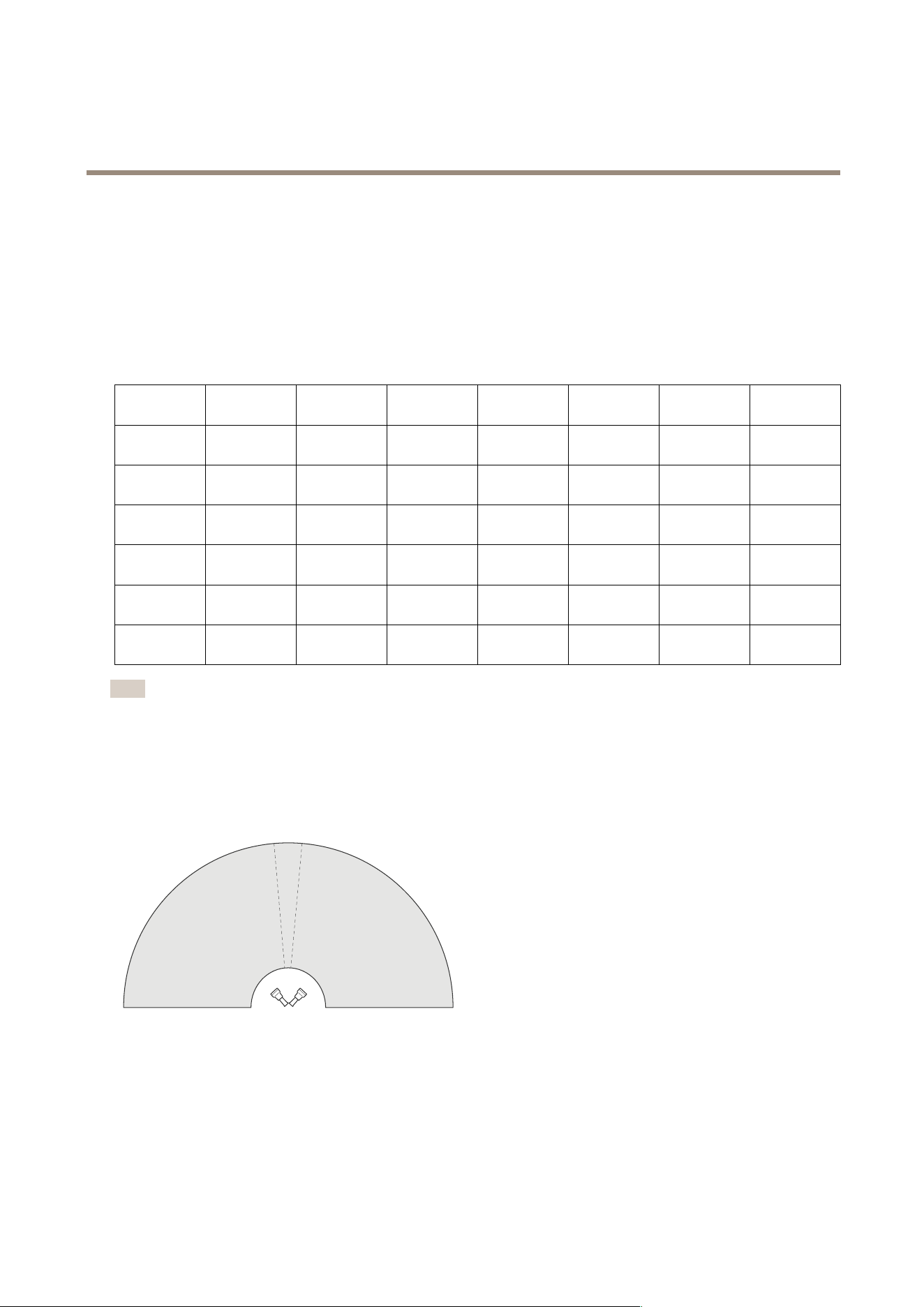
WhenyouplacetwoAXISD2210-VEnexttoeachother,youwillget180°coverage.
TwoAXISD2210-VEmountedside-by-sidefor180°coverage.
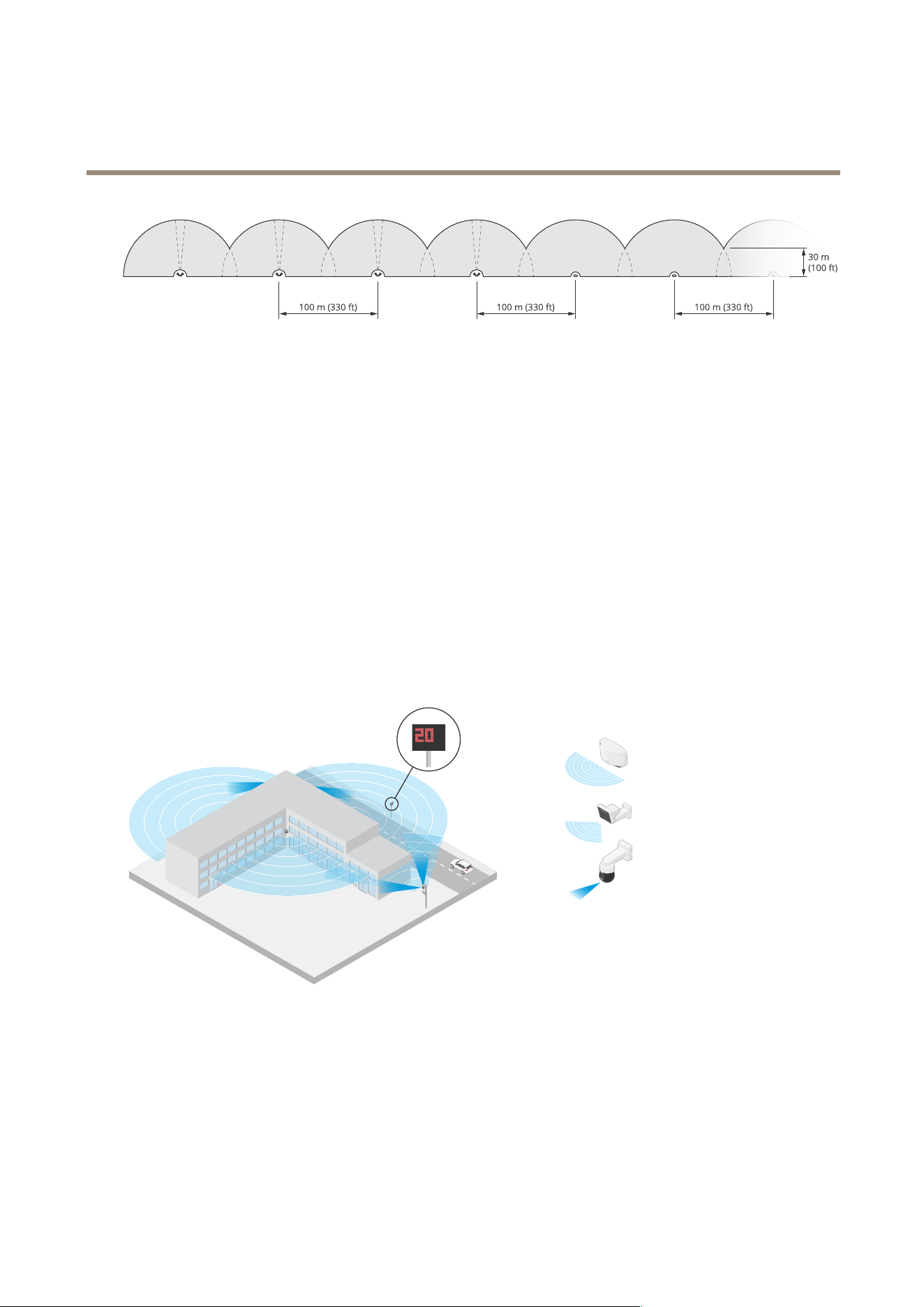
WhenyouinstallmorethanonepairofAXISD2210-VEside-by-side,werecommendthatyouplacethemwith100m(330ft)spacing
betweeneachpair.
7
AXISD2210-VERadar
Radarprofiles
FourpairsofAXISD2210-VEandmultipleAXISD2110-VESecurityRadarsmountedwith100m(330ft)spacing.
Axisradarsoperatingondifferentfrequencybandswillnotinterferewitheachother.Thismeansthatyoucancombine
AXISD2210-VE,whichoperatesonthe60GHzfrequencyband,withAXISD2110-VESecurityRadar,whichoperatesonthe
24GHzfrequencybandinthesamecoexistencezone.
Formoreinformationaboutcoexistenceandinterference,seeInstallmultipleradarsonpage4.
Areamonitoringusecases
Covertheareaaroundabuilding
Acompanyinanofcebuildingneedstosecurethepremisesfromintrusionandvandalism,particularlyafterworkinghours.
Tocovertheareaaroundthebuilding,theyinstallacombinationofradarsandPTZcameras.TheyuseAXISD21 10-VESecurity
Radarswith180°coveragetocoverthelongsidesofthebuilding,andAXISD2210-VERadarwith95°coveragefortheshorter
sidesandcorners.Theyconguretheradarstotriggeranalarmwhenhumansapproachthebuildingafterworkinghours.To
makesuretheygetvisualconrmationofpotentialintruders,theyaddtwoPTZcameras.TheradarscansteerthePTZcameras
throughAXISRadarAutotrackingforPTZ.
Additionally,thecompanywantstokeepthepremisessafeduringworkinghours.Tomakesurethatvehiclespassingtheroadon
thesideofthebuildingarewithinthespeedlimits,theypaironeoftheAXISD2110-VESecurityRadarswithaspeedsignfrom
Microbus,usingAXISRadarIntegrationforMicrobus.
Coveracomplexscene
Acompanythatkeepscriticalequipmentinabuildingonthepremisesissurroundedbyafencetokeepintrudersaway.Toavoid
tamperingandsabotage,theyneedadditionalprotection.Theirwishistotriggeranalarmwhenhumansapproachthebuilding.
However,thescenecontainstreeswithswayingbranches,ametalfencethatcouldcausereections,andevensmallanimals
movingaroundthesite,whichallcouldcausefalsealarms.
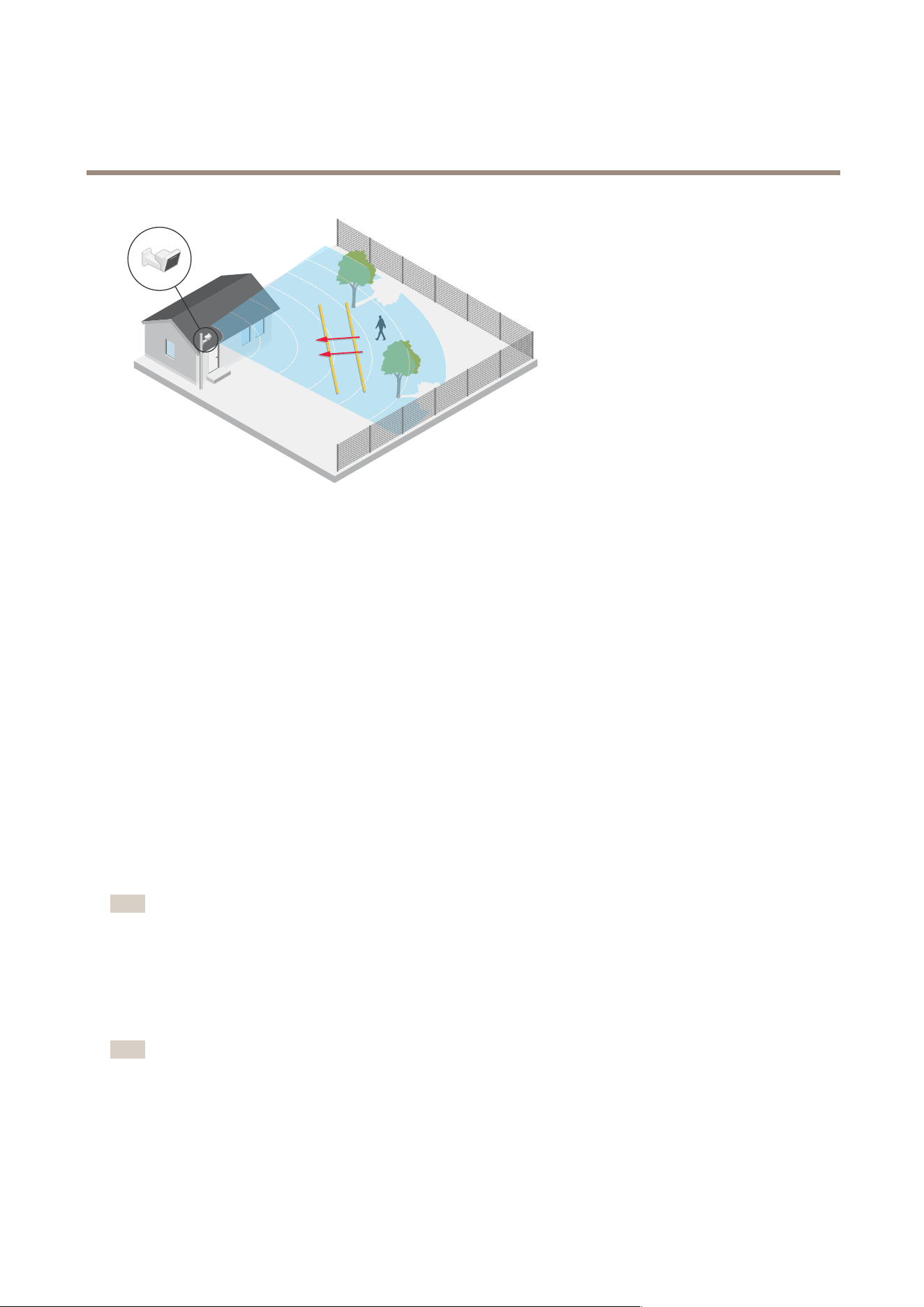
Toreducefalsealarms,theycongureascenariointheradar’swebinterfacesothatanapproachingobjectmustcrosstwovirtual
linesbeforeanalarmistriggered.Thiswillhelptotriggeronobjectsthatintentionallymovetowardsthebuilding,whileobjectsthat
justhappentocrossoneofthevirtuallinesarelteredout.
8
AXISD2210-VERadar
Radarprofiles
Insiteswheretherearenofences,thetwolinescouldactasavirtualfence.Tolearnmoreaboutaddingtwolinestoascenario
intheradar’swebinterface,seeAddscenariosonpage17.
Roadmonitoringprole
Theroadmonitoringproleisoptimizedfortrackingvehiclesmovingatupto200km/h(125mph)onsuburbanroadsand
highways.Totrackhumansandotherobjectsmovingatlowerspeeds,usetheareamonitoringprole.Formoreinformation,see
Areamonitoringproleonpage6.
Roaddetectionrange
Theroadmonitoringproleisoptimizedfordetectionofvehiclesandprovidesavelocityaccuracyof+/-2km/h(1.24mph)when
monitoringvehiclesmovingatupto200km/h(125mph).
Themountingheightoftheradarandthevehiclespeedwillimpactthedetectionrange.Whenmountedatanoptimalinstallation
height,theradardetectsapproachinganddepartingvehicleswithavelocityaccuracyof+/-2km/h(1.24mph)withinthefollowing
ranges:
•25–100m(82–328ft)forvehiclesmovingat50km/h(31mph).
•40–80m(131–262ft)forvehiclesmovingat100km/h(62mph).
•50–70m(164–230ft)forvehiclesmovingat200km/h(125mph).
Note
Tominimizetheriskofmisseddetectionsofvehiclestravellinginhighspeeds,setupascenariointheradarthattriggerson
theobjecttypesVehicleandUnknown.Formoreinformationabouthowtosetupascenario,seeAddscenariosonpage17.
Roadinstallationexamples
Whenmonitoringroadsandhighways,makesuretomounttheradaratasufcientheighttoavoidblindspots(radarshadow)
behindthevehicles.
Note
Thesizeoftheradarshadowdependsontheradar’smountingheightandthevehicles’heightanddistancefromtheradar.
Forexample,whenavehiclewithaheightof4.5m(15ft)is50m(164ft)awayfromaradarthatismountedataheight
of8m(26ft),theradarshadowbehindthevehiclewillbe50m(164ft).However,iftheradarismountedataheightof
12m(39ft),theshadowbehindthesamevehiclewillonlybe23m(74ft).
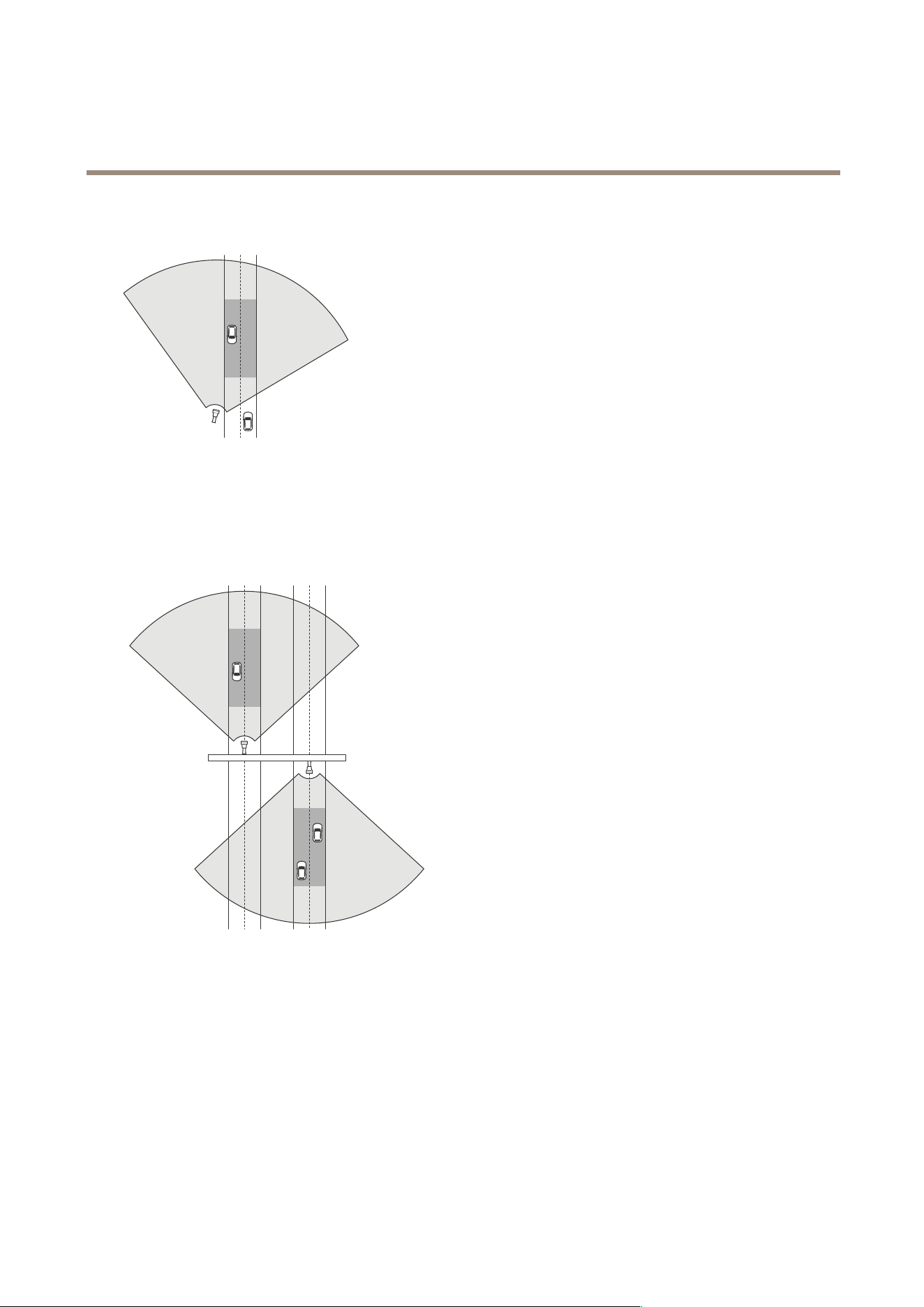
Sidemounted
9
AXISD2210-VERadar
Radarprofiles
Tomonitorvehiclestravellingalongaroadyoucanmounttheradaronthesideoftheroad,forexampleonapole.
Tomeasurehighspeedsaccurately,positiontheradarwithinalateraldistanceof10m(32ft)fromthevehicles.Formoreinformation
aboutdetectionrangeandvelocityaccuracy,seeRoaddetectionrangeonpage9.
Centermounted
Tomonitorvehiclesonamulti-laneroad,youcanmountoneormoreradarsonagantryabovetheroad.
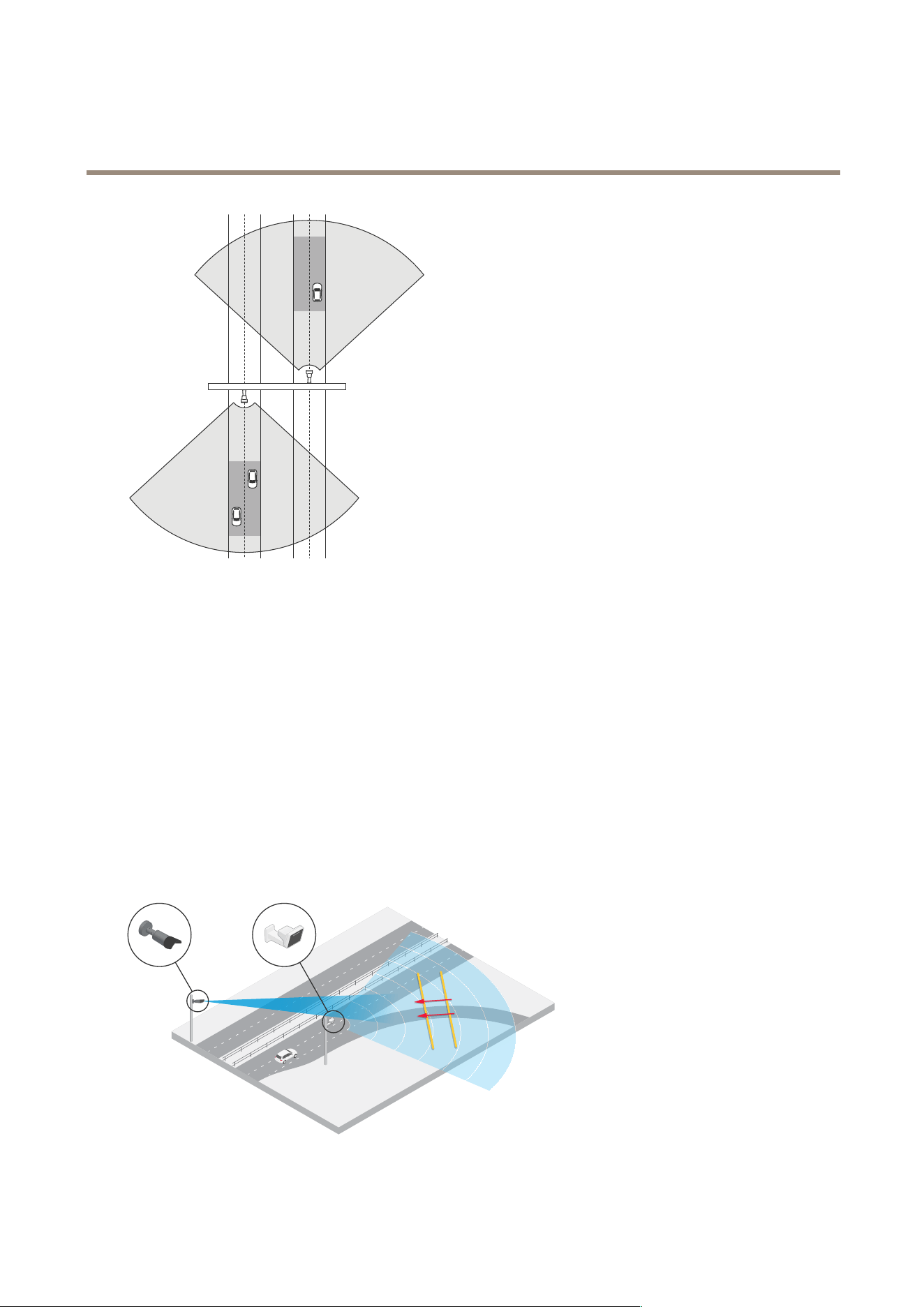
Thesametypeofinstallationispossibleifyouwanttomonitorvehiclesthatdriveawayfromtheradar,insteadofdrivingtowardsit.
10
AXISD2210-VERadar
Radarprofiles
Tomeasurehighspeedsaccurately,positiontheradarwithinalateraldistanceof10m(32ft)fromthevehicles.Formoreinformation
aboutdetectionrangeandvelocityaccuracy,seeRoaddetectionrangeonpage9.
Roadmonitoringusecases
AcommonusecaseforAXISD2210-VERadarandtheroadmonitoringproleistotrackandmeasurethespeedofvehicles.
Additionally,youcanusetheradarwithavisualcameraandtheapplicationAXISSpeedMonitortovisualizethespeedof
thevehiclesinthecamera’sliveview,ortologtheradartracksforstatisticalprocessing.Formoreinformation,seethe
usermanualforAXISSpeedMonitor.
Formoreexamplesofhowyoucansetuptheradarwhenusingtheroadmonitoringprole,seethefollowingusecases:
Wrong-waydetectiononahighwayramp
Todetectandidentifyvehiclesdrivinginthewrongdirectiononahighwayramp,trafccontrolusesanAXISD2210-VEandan
Axisbulletcamera.Theymounttheradaronapolefacingtheramptodetectvehiclesdrivinginthewrongdirection.Forreliable
detections,theysetupalinecrossingscenarioandconguretheradarsothatvehiclesmustcrosstwolinestotriggeranalarm.In
thescenario,theypositionthetwolinesontherampasseenintheillustration.Theyalsospecifythedrivingdirectionandspeedsto
triggeron.Whentheradartriggersanalarm,theAxisbulletcameracanprovidevisualidenticationofthevehicleontheramp.
11
AXISD2210-VERadar
Radarprofiles
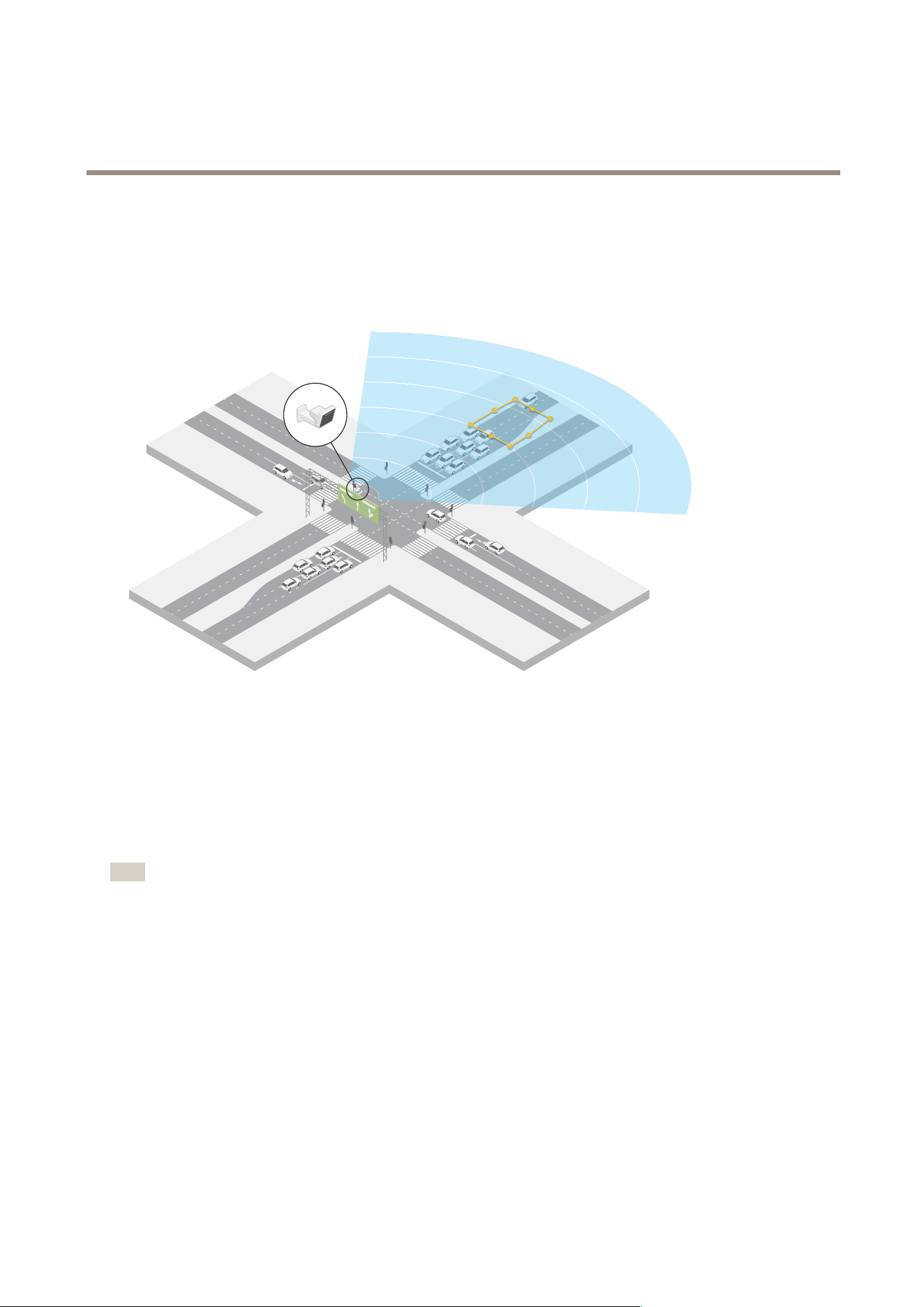
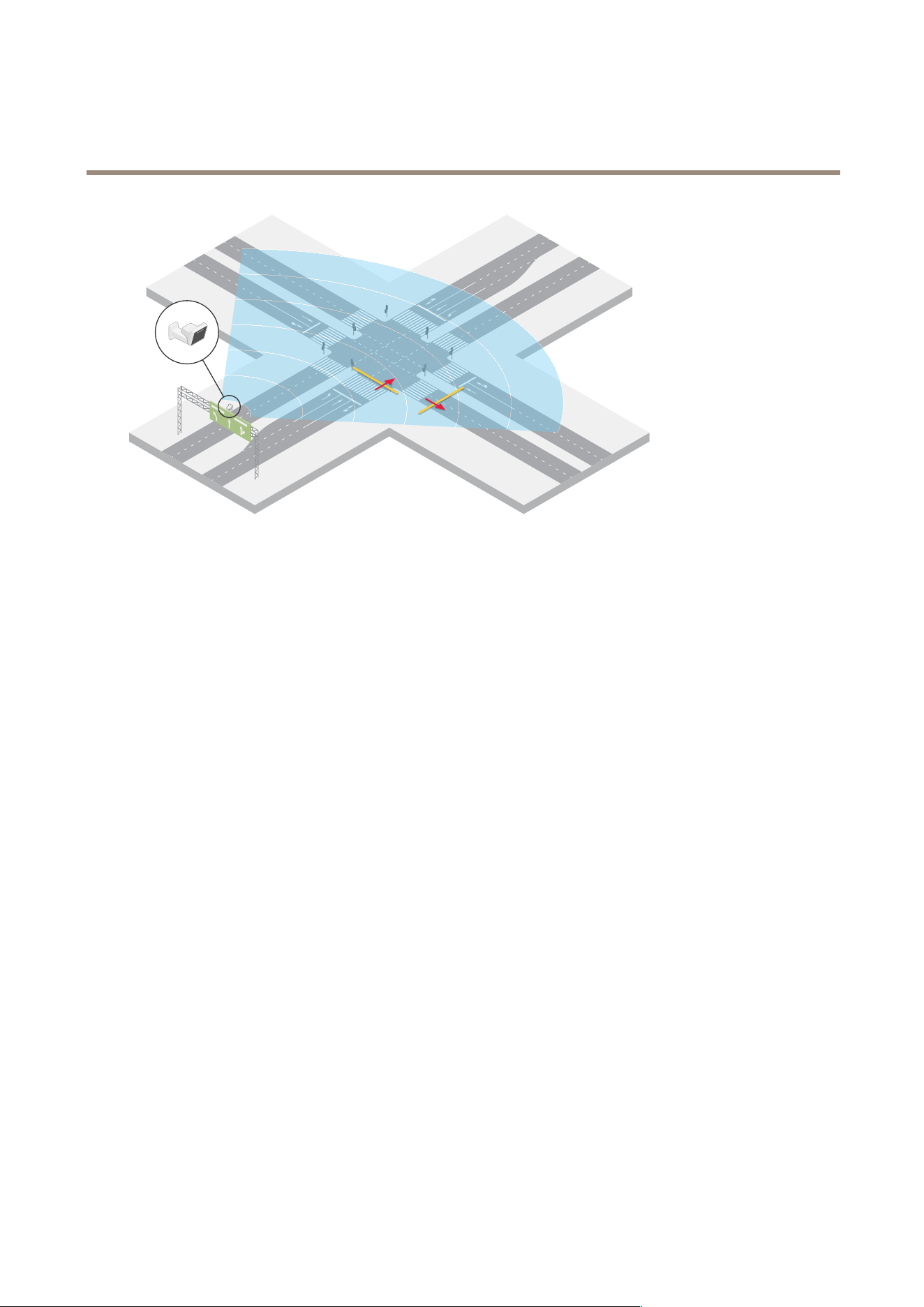
Monitortrafcowatanintersection–queuebuild-up
Tomonitorhowandwhenqueuesbuildupinabusyintersection,trafccontrolinstallsaradaronagantryabovetheintersection.
Theysetupascenariointheradar’swebinterfaceandcongureittotriggeronvehiclesmovinginanarea.Theyshapethescenario
toonlycoverthepartoftheroadleadinguptotheintersection.Totriggeranalarmwhenqueuesstarttobuildup,theycongurethe
scenariototriggeronvehiclesmovingatspeedsbelow5km/h(3mph).
Monitortrafcowatanintersection–direction
Togetanoverviewofthetrafcowandthedirectionvehiclestravelinabusyintersection,trafccontrolinstallsaradarona
gantryabovetheroadleadinguptotheintersection.Theysetupalinecrossingscenariointheradar’swebinterfacewherevehicles
mustcrosstwolinestotriggeranalarm.Whentheycongurethescenario,theyplacetherstofthetwolinesoverthelanesleading
uptotheintersection,afterthepedestriancrossingtoavoidvehiclesstoppingattheline.Theyplacethesecondlineoverthelanes
leadingtotheright.Thevehiclesmustcrossbothlinesinthespecieddirectiontotriggeranalarm.Toavoidtriggeringonmorethan
onevehiclepercrossing,theylowertheminimumtriggerdurationinthescenariofrom2to0seconds.
Tomonitorthetrafcowinalldirections,theycreateonescenarioforeachdirection.
Note
Thescenariodoesn’tcountthevehiclescrossingthelines,insteadyoucanusetheeventsystemintheradar'swebinterface
tokeepcount.OnewaytocountvehiclesistosendanMQTTmessageeachtimethescenariotriggers,andcountthe
triggersontheMQTTreceiverside.
12
AXISD2210-VERadar
Radarprofiles
13

AXISD2210-VERadar
Getstarted
Getstarted
Findthedeviceonthenetwork
TondAxisdevicesonthenetworkandassignthemIPaddressesinWindows®,useAXISIPUtilityorAXISDeviceManager.Both
applicationsarefreeandcanbedownloadedfromaxis.com/support.
FormoreinformationabouthowtondandassignIPaddresses,gotoHowtoassignanIPaddressandaccessyourdevice.
Browsersupport
Youcanusethedevicewiththefollowingbrowsers:
Chrome
TM
Firefox
®
Edge
TM
Safari
®
Windows
®
recommended
recommended
macOS
®
recommendedrecommended
Linux
®
recommendedrecommended
Otheroperatingsystems*
*TouseAXISOSwebinterfacewithiOS15oriPadOS15,gotoSettings Settings
Settings
> >
>
Safari Safari
Safari
> >
>
Advanced Advanced
Advanced
> >
>
Experimental Experimental
Experimental
Features Features
Features
anddisable
NSURLSessionWebsocket.
Openthedevice'swebinterface
1.OpenabrowserandtypetheIPaddressorhostnameoftheAxisdevice.
IfyoudonotknowtheIPaddress,useAXISIPUtilityorAXISDeviceManagertondthedeviceonthenetwork.
2.Typetheusernameandpassword.Ifyouaccessthedeviceforthersttime,youmustcreateanadministratoraccount.See
Createanadministratoraccountonpage14.
Createanadministratoraccount
Thersttimeyoulogintoyourdevice,youmustcreateanadministratoraccount.
1.Enterausername.
2.Enterapassword.SeeSecurepasswordsonpage14.
3.Re-enterthepassword.
4.ClickAdduser.
Important
Thedevicehasnodefaultaccount.Ifyoulosethepasswordforyouradministratoraccount,youmustresetthedevice.See
Resettofactorydefaultsettingsonpage68.
Securepasswords
Important
Axisdevicessendtheinitiallysetpasswordincleartextoverthenetwork.Toprotectyourdeviceaftertherstlogin,set
upasecureandencryptedHTTPSconnectionandthenchangethepassword.
14
AXISD2210-VERadar
Getstarted
Thedevicepasswordistheprimaryprotectionforyourdataandservices.Axisdevicesdonotimposeapasswordpolicyasthey
maybeusedinvarioustypesofinstallations.
Toprotectyourdatawestronglyrecommendthatyou:
•Useapasswordwithatleast8characters,preferablycreatedbyapasswordgenerator.
•Don’texposethepassword.
•Changethepasswordatarecurringinterval,atleastonceayear.
Verifythatnoonehastamperedwiththermware
TomakesurethatthedevicehasitsoriginalAxisrmware,ortotakefullcontrolofthedeviceafterasecurityattack:
1.Resettofactorydefaultsettings.SeeResettofactorydefaultsettingsonpage68.
Afterthereset,securebootguaranteesthestateofthedevice.
2.Congureandinstallthedevice.
Webinterfaceoverview
Thisvideogivesyouanoverviewofthedevice’swebinterface.
Towatchthisvideo,gotothewebversionofthisdocument.
help.axis.com/?&piaId=92321§ion=web-interface-overview
Axisdevicewebinterface
15
AXISD2210-VERadar
Configureyourdevice
Configureyourdevice
Selectaradarprole
Inthewebinterface:
1.GotoRadar>Settings>Detection.
2.SelectaproleunderRadarproles.
Calibratetheradar
Thedefaultliveviewoftheradarwillshowtheradarcoverageandanydetectedmovement,andyoucanadddetectionzonesand
rulesrightaway.Tomakeiteasiertoseewhereobjectsaremoving,uploadareferencemap,forexampleagroundplanoranaerial
photo,thatshowstheareacoveredbytheradar.
Imagerequirementsforthereferencemap:
•Supportedleformatsarejpegandpng.
•Theorientationisnotimportant,sincetheradarcoverageshapewillmovetoadapttotheimageduringcalibration.
Beforeyouuploadareferencemapandcalibratetheradar,setthecorrectmountingheightintheradarwebinterface.
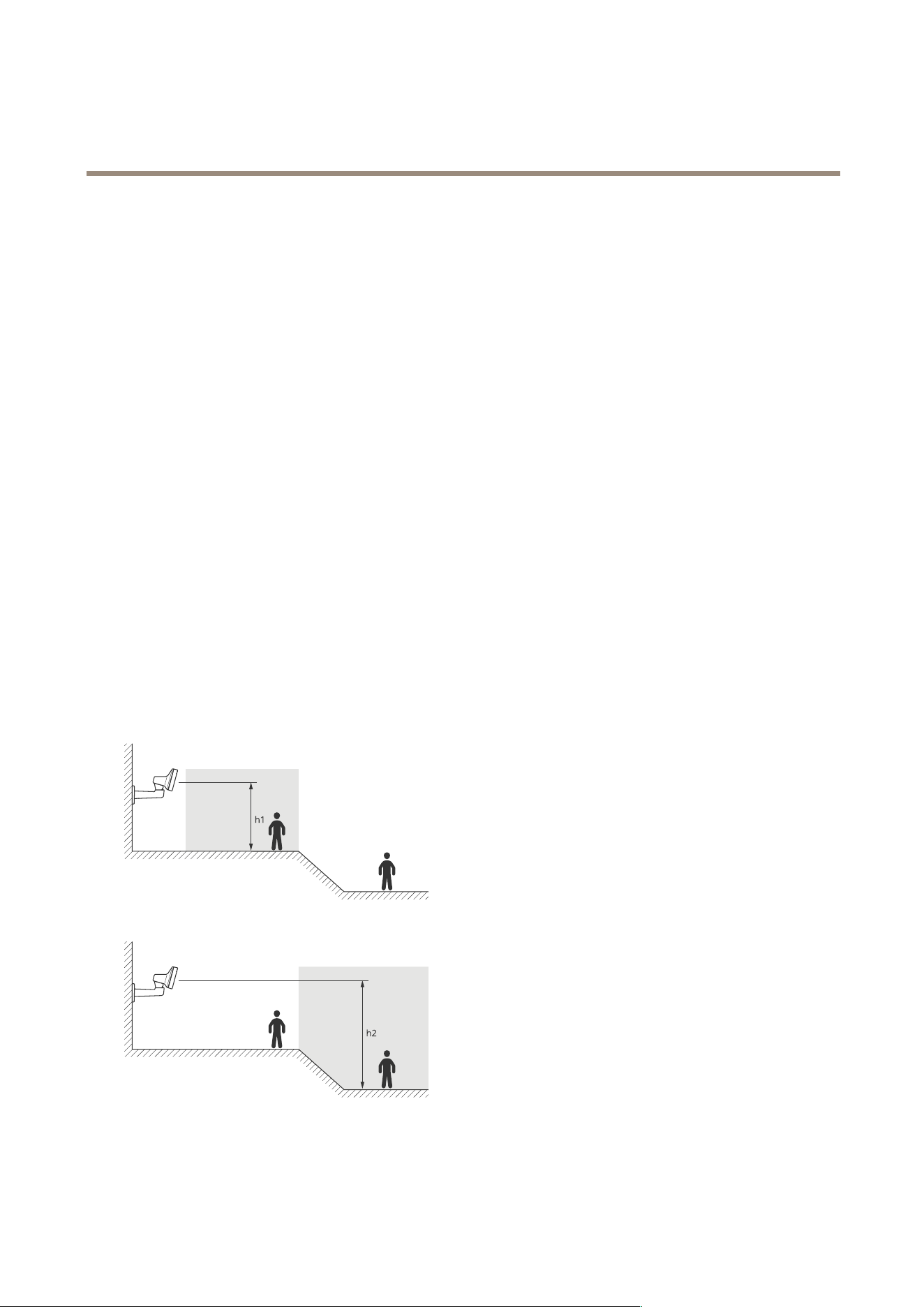
Setthemountingheight
Measurethemountingheightfromthegrounduptotheradarintheareaofinterest.
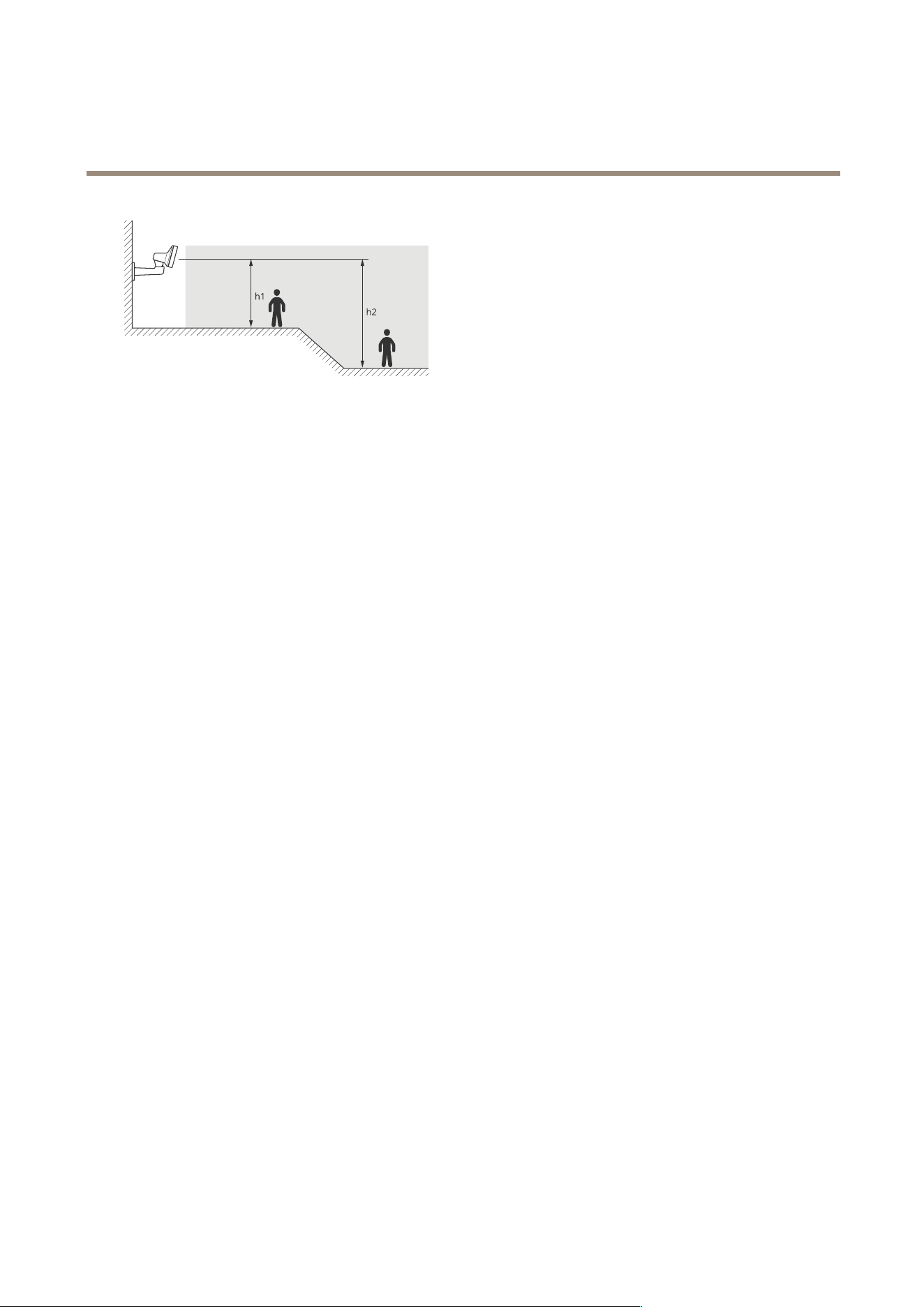
Example
Dependingontheareaofinterest,themountingheight(h1,h2)differs.
Ifthesurfaceintheareaofinterestisuneven,addtheaverageheight(inthiscase(h1+h2)/2)whenyouconguretheradar.
16
AXISD2210-VERadar
Configureyourdevice
Setthemountingheight:
1.GotoRadar>Settings>General.
2.SettheheightunderMountingheight.
Uploadareferencemap
Uploadthereferencemapandcalibrateitsothattheactualradarcoveragetstheposition,directionandscaleofthemap.
1.GotoRadar>Mapcalibration.
2.Uploadyourreferencemapandfollowthesetupassistant.
Setdetectionzones
Todeterminewheretodetectmotion,youcanaddmultiplezones.Differentzonescanbeusedtotriggerdifferentactions.
Therearetwotypesofzones:
•Ascenario(previouslycalledincludezone)isanareainwhichmovingobjectswilltriggerrules.Thedefaultscenario
matchestheentireareacoveredbytheradar.
•Anexcludezoneisanareainwhichmovingobjectswillbeignored.Useexcludezonesifthereareareasinsideascenario
thattriggeralotofunwantedalarms.
Addscenarios
Ascenario(previouslycalledanincludezone)isanareainwhichmovingobjectswilltriggerrules.Addscenariosifyouwantto
createdifferentrulesfordifferentpartsofthescene.
Addascenario:
1.GotoRadar>Scenarios.
2.ClickAddscenario.
3.Typethenameofthescenario.
4.Selectifyouwanttotriggeronobjectsmovinginanareaoronobjectscrossingone,ortwo,lines.
Triggeronobjectsmovinginanarea:
1.SelectMovementinarea.
2.ClickNext.
3.Selectthetypeofzonethatshouldbeincludedinthescenario.
Usethemousetomoveandshapethezonesothatitcoversthedesiredpartoftheradarimageorreferencemap.
17

AXISD2210-VERadar
Configureyourdevice
4.ClickNext.
5.Adddetectionsettings.
5.1AddsecondsuntiltriggerafterunderIgnoreshort-livedobjects.
5.2SelectwhichobjecttypetotriggeronunderTriggeronobjecttype.
5.3AddarangeforthespeedlimitunderSpeedlimit.
6.ClickNext.
7.SettheminimumdurationofthealarmunderMinimumtriggerduration.
8.ClickSave.
Triggeronobjectscrossingaline:
1.SelectLinecrossing.
2.ClickNext.
3.Positionthelineinthescene.
Usethemousetomoveandshapetheline.
4.Tochangethedetectiondirection,turnonChangedirection.
5.ClickNext.
6.Adddetectionsettings.
6.1AddsecondsuntiltriggerafterunderIgnoreshort-livedobjects.
6.2SelectwhichobjecttypetotriggeronunderTriggeronobjecttype.
6.3AddarangeforthespeedlimitunderSpeedlimit.
7.ClickNext.
8.SettheminimumdurationofthealarmunderMinimumtriggerduration.
Thedefaultvalueissetto2seconds.Ifyouwantthescenariototriggereverytimeanobjectcrossestheline,lower
thedurationto0seconds.
9.ClickSave.
Triggeronobjectscrossingtwolines:
1.SelectLinecrossing.
2.ClickNext.
3.Tomaketheobjectcrosstwolinesforthealarmtotrigger,turnonRequirecrossingoftwolines.
4.Positionthelinesinthescene.
Usethemousetomoveandshapetheline.
5.Tochangethedetectiondirection,turnonChangedirection.
6.ClickNext.
7.Adddetectionsettings.
7.1SetthetimelimitbetweencrossingtherstandthesecondlineunderMaxtimebetweencrossings.
18
AXISD2210-VERadar
Configureyourdevice
7.2SelectwhichobjecttypetotriggeronunderTriggeronobjecttype.
7.3AddarangeforthespeedlimitunderSpeedlimit.
8.ClickNext.
9.SettheminimumdurationofthealarmunderMinimumtriggerduration.
Thedefaultvalueissetto2seconds.Ifyouwantthescenariototriggereverytimeanobjecthascrossedthetwolines,
lowerthedurationto0seconds.
10.ClickSave.
Addexcludezones
Excludezonesareareasinwhichmovingobjectswillbeignored.Addexcludezonestoignoreareaswithmovingobjectsthat
couldcausefalsealarms.
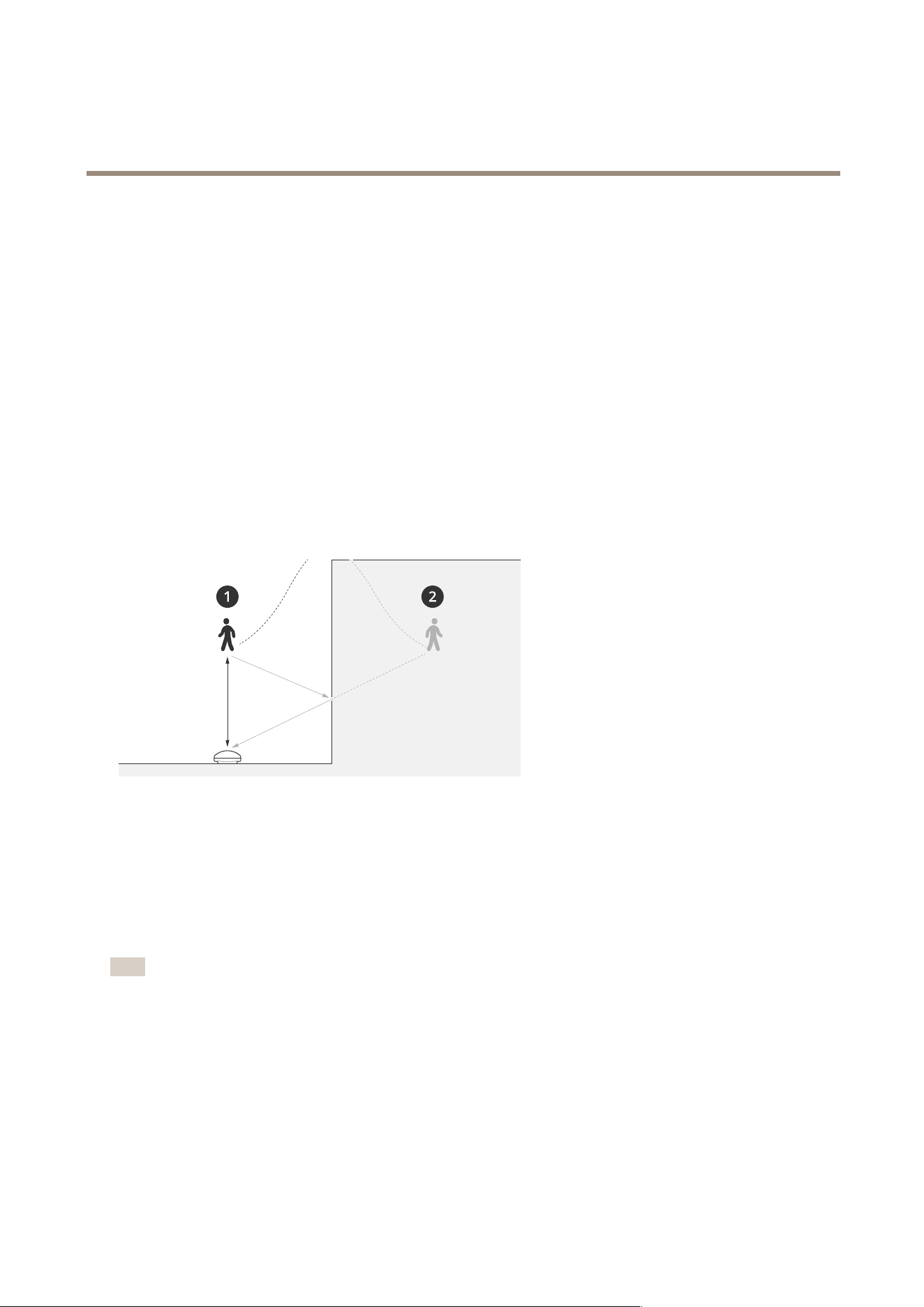
Example
Objectsofradar-reectivematerials,suchasmetalroofs,fences,vehicles,andevenbrickwallsmaydisturbtheradar’sperformance.
Theymaycreatereections,orghosttracks,whichcauseapparentdetectionsthatcanbedifculttoseparatefromrealdetections.
1
Actualdetection
2
Reecteddetection
Addanexcludezone:
1.GotoRadar>Excludezones.
2.ClickAddexcludezone.
Usethemousetomoveandshapethezonesothatitcoversthedesiredpartoftheradarimageorreferencemap.
Note
Fromrmwareversion11.4,therearenolongeranylimitationsonthenumberofexcludezones.
Minimizefalsealarms
Ifyounoticethatyougettoomanyfalsealarms,youcanlteroutcertaintypesofmovementorobjects,changethecoverage,or
adjustthedetectionsensitivity.Seewhichsettingsworkbestforyourenvironment.
•Adjustthedetectionsensitivityoftheradar:
GotoRadar>Settings>DetectionandselectalowerDetectionsensitivity.Thisdecreasestheriskoffalsealarms,but
itcouldalsocausetheradartomisssomemovement.
19

AXISD2210-VERadar
Configureyourdevice
Thesensitivitysettingaffectsallzones.
-Low:Usethissensitivitywhentherearealotofmetalobjectsorlargevehiclesinthearea.Itwilltakelongertime
fortheradartotrackandclassifyobjects.Thiscanreducethedetectionrange,especiallyforfastmovingobjects.
-Medium:Thisisthedefaultsetting.
-High:Usethissensitivitywhenyouhaveanopeneldwithoutmetalobjectsinfrontoftheradar.Thiswill
increasethedetectionrangeforhumans.
•Modifyscenariosandexcludezones:
Ifascenarioincludeshardsurfaces,suchasametalwall,theremaybereectionsthatcausesmultipledetectionsfora
singlephysicalobject.Youcaneithermodifytheshapeofthescenario,oraddanexcludezonethatignorescertainpartsof
thescenario.Formoreinformation,seeAddscenariosonpage17andAddexcludezonesonpage19.
•Triggeronobjectscrossingtwolinesinsteadofone:
Ifalinecrossingscenarioincludesswayingobjectsoranimalsmovingaround,thereisariskthatanobjectwillhappento
crossthelineandtriggerafalsealarm.Inthiscase,youcancongurethescenariototriggeronlywhenanobjecthas
crossedtwolines.Formoreinformation,seeAddscenariosonpage17.
•Filteronmovement:
-GotoRadar>Settings>DetectionandselectIgnoreswayingobjects.Thissettingminimizesfalsealarms
fromtrees,bushes,andagpolesinthecoveragezone.
-GotoRadar>Settings>DetectionandselectIgnoresmallobjects.Thissettingisavailableinthearea
monitoringproleandminimizesfalsealarmsfromsmallobjectsinthecoveragezone,suchascatsandrabbits.
•Filterontime:
-GotoRadar>Scenarios.
-Selectascenario,andclick
tomodifyitssettings.
-SelectahighervalueunderSecondsuntiltrigger.Thisisthedelaytimefromwhentheradarstartstracking
anobjectuntilitcantriggerandalarm.Thetimerstartswhentheradarrstdetectstheobject,notwhen
theobjectentersthespeciedzoneinthescenario.
•Filteronobjecttype:
-GotoRadar>Scenarios.
-Selectascenario,andclick
tomodifyitssettings.
-Toavoidtriggeringonspecicobjecttypes,deselecttheobjecttypesthatshouldnottriggereventsinthe
scenario.
Adjusttheradarimage
Thissectionincludesinstructionsaboutconguringyourdevice.Ifyouwanttolearnmoreabouthowcertainfeatureswork,go
toLearnmoreonpage60.
Showanimageoverlay
Youcanaddanimageasanoverlayintheradarstream.
1.GotoRadar>Overlays.
20

AXISD2210-VERadar
Configureyourdevice
2.SelectImageandclick.
3.ClickImages.
4.Draganddropanimage.
5.ClickUpload.
6.ClickManageoverlay.
7.Selecttheimageandaposition.Youcanalsodragtheoverlayimageintheliveviewtochangetheposition.
Showatextoverlay
Youcanaddatexteldasanoverlayintheradarstream.Thisisusefulforexamplewhenyouwanttodisplaythedate,timeora
companynameinthevideostream.
1.GotoRadar>Overlays.
2.SelectTextandclick
.
3.Typethetextyouwanttodisplayinthevideostream.
4.Selectaposition.Youcanalsodragtheoverlaytexteldintheliveviewtochangetheposition.
Showatextoverlaywiththetiltangleoftheradar
Youcanaddanoverlayintheradar’sliveviewthatshowsthetiltangleoftheradar.Thisishelpfulduringinstallation,orwhenever
youneedtoknowwhatthetiltangleofthedeviceis.
Note
Thetiltangleoverlayadds90°bydefault.Togettheradar’stiltangle,deductthevaluethatisshowninthewebinterface
from90°.Forexample,iftheshownvalueintheoverlayis75,thetiltangleoftheradaris15°belowthehorizon.
1.GotoRadar>Overlays.
2.SelectTextandclick
.
3.Type#op.
YoucanalsoclickModierandselect#opfromthelist.
4.Selectaposition.Youcanalsodragtheoverlayeldintheliveviewtochangetheposition.
Viewandrecordvideo
Thissectionincludesinstructionsaboutconguringyourdevice.Tolearnmoreabouthowstreamingandstorageworks,goto
Streamingandstorageonpage60.
Reducebandwidthandstorage
Important
Reducingthebandwidthcanresultinlossofdetailsintheimage.
1.GotoRadar>Stream.
21

AXISD2210-VERadar
Configureyourdevice
2.Clickintheliveview.
3.SelectVideoformatH.264.
4.GotoRadar>Stream>GeneralandincreaseCompression.
Note
Mostwebbrowsersdon’tsupportH.265decodingandbecauseofthisthedevicedoesn’tsupportitinitswebinterface.
InsteadyoucanuseavideomanagementsystemorapplicationthatsupportsH.265decoding.
Setupnetworkstorage
Tostorerecordingsonthenetwork,youneedtosetupyournetworkstorage.
1.GotoSystem>Storage.
2.ClickAddnetworkstorageunderNetworkstorage.
3.TypetheIPaddressofthehostserver.
4.TypethenameofthesharedlocationonthehostserverunderNetworkshare.
5.Typetheusernameandpassword.
6.SelecttheSMBversionorleaveitonAuto.
7.SelectAddsharewithouttestingifyouexperiencetemporaryconnectionissues,oriftheshareisnotyetcongured.
8.ClickAdd.
Recordandwatchvideo
Recordvideodirectlyfromtheradar
1.GotoRadar>Stream.
2.Tostartarecording,click
.
Ifyouhaven’tsetupanystorage,click
and.Forinstructionsonhowtosetupnetworkstorage,seeSetup
networkstorageonpage22
3.Tostoprecording,click
again.
Watchvideo
1.GotoRecordings.
2.Click
foryourrecordinginthelist.
Setuprulesforevents
Tolearnmore,checkoutourguideGetstartedwithrulesforevents.
22

AXISD2210-VERadar
Configureyourdevice
Triggeranaction
1.GotoSystem>Eventsandaddarule.Theruledeneswhenthedevicewillperformcertainactions.Youcanset
uprulesasscheduled,recurring,ormanuallytriggered.
2.EnteraName.
3.SelecttheConditionthatmustbemettotriggertheaction.Ifyouspecifymorethanoneconditionfortherule,allofthe
conditionsmustbemettotriggertheaction.
4.SelectwhichActionthedeviceshouldperformwhentheconditionsaremet.
Note
Ifyoumakechangestoanactiverule,therulemustbeturnedonagainforthechangestotakeeffect.
Note
Ifyouchangethedenitionofastreamprolethatisusedinarule,thenyouneedtorestartalltherulesthatusethat
streamprole.
Recordvideofromacamerawhenmotionisdetected
ThisexampleexplainshowtosetuptheradarandacamerasothatthecamerastartsrecordingtotheSDcardveseconds
beforetheradardetectsmotionandtostoponeminuteafter.
Connectthedevices:
1.ConnectacablefromanI/OoutputontheradartoanI/Oinputonthecamera.
ConguretheI/Oportoftheradar:
2.GotoSystem>Accessories>I/OportsandconguretheI/Oportasanoutputandselectthenormalstate.
Createaruleintheradar:
3.GotoSystem>Eventsandaddarule.
4.Typeanamefortherule.
5.Fromthelistofconditions,selectascenariounderRadarmotion.
Tosetupascenario,seeAddscenariosonpage17.
6.Fromthelistofactions,selectToggleI/Owhiletheruleisactiveandthenselecttheportthatisconnectedtothecamera.
7.ClickSave.
ConguretheI/Oportofthecamera:
8.GotoSystem>Accessories>I/OportsandconguretheI/Oportasaninputandselectthenormalstate.
Createaruleinthecamera:
9.GotoSystem>Eventsandaddarule.
10.Typeanamefortherule.
11.Fromthelistofconditions,selectDigitalinputisactiveandthenselecttheportthatshouldtriggertherule.
12.Fromthelistofactions,selectRecordvideo.
13.Fromthelistofstorageoptions,selectSDcard.
14.Selectanexistingstreamproleorcreateanewone.
23

AXISD2210-VERadar
Configureyourdevice
15.Settheprebufferto5seconds.
16.Setthepostbufferto1minute.
17.ClickSave.
Recordvideofromacamerawhenavehicledrivesinthewrongdirection
ThisexampleexplainshowtosetuptheradarandacamerasothatthecamerastartsrecordingtoanSDcardwhentheradar
detectsavehiclethatdrivesinthewrongdirection.
Beforeyoustart
•Createascenariointheradar’swebinterfacethattriggersonlinecrossingandvehiclescrossingtwolines.
SeeAddscenariosonpage17formoreinformation.
•Makesuretopositionthetwolinesoverthetrafclanewhereyouwanttodetectvehiclesdrivinginthewrongdirection.
Useareferencemap,suchasanaerialphoto,tomakeiteasiertoseewhereobjectsaremoving.
SeeUploadareferencemaponpage17formoreinformation.
1.Createtworecipientsintheradar.
1.1Intheradar’sdeviceinterface,gotoSystem>Events>Recipientsandaddtherstrecipient.
1.2Addthefollowinginformation:
-Name:Activatevirtualport
-Type:HTTP
-URL:http://<IPaddress>/axis-cgi/virtualinput/activate.cgi
Replace<IPaddress>withtheaddressofthecamerayouwanttostartrecording.
-Theusernameandpasswordofthecamera.
1.5ClickTesttomakesurealldataisvalid.
1.6ClickSave.
1.7Addasecondrecipientwiththefollowinginformation:
-Name:Deactivatevirtualport
-Type:HTTP
-URL:http://<IPaddress>/axis-cgi/virtualinput/deactivate.cgi
Replace<IPaddress>withtheaddressofthecamera.
-Theusernameandpasswordofthecamera.
1.5ClickTesttomakesurealldataisvalid.
1.6ClickSave.
2.Createtworulesintheradar.
2.1Intheradar’sdeviceinterface,gotoSystem>Events>Rulesandaddtherstrule.
2.2Addthefollowinginformation:
-Name:ActivatevirtualIO1
24

AXISD2210-VERadar
Configureyourdevice
-Condition:SelectthescenarioyoucreatedunderRadarmotion.
-Action:Notications>SendnoticationthroughHTTP
-Recipient:Activatevirtualport
-Querystringsufx:schemaversion=1&port=1
2.6ClickSave.
2.7Addanotherrulewiththefollowinginformation:
-Name:DeactivatevirtualIO1
-Condition:SelectthescenarioyoucreatedunderRadarmotion.
-SelectInvertthiscondition.
-Action:Notications>SendnoticationthroughHTTP
-Recipient:Deactivatevirtualport
-Querystringsufx:schemaversion=1&port=1
2.7ClickSave.
3.Createaruleinthecamera.
3.1Inthecamera’sdeviceinterface,gotoSystem>Events>Rulesandaddarule.
3.2Addthefollowinginformation:
-Name:Triggeronvirtualinput1
-Condition:I/O>Virtualinputisactive.
-Port:1
-Action:Recordings>Recordvideowhiletheruleisactive
-Storageoptions:SD_DISK
-SelectCameraandaStreamprole.
3.7ClickSave.
Activateasweepingredlightontheradar
YoucanusethedynamicLEDstriponthefrontoftheradartoshowthattheareaismonitored.
Thisexampleexplainshowyouactivatearedsweepinglight,andhowyousetupaschedulesothatitonlysweepsafterworking
hoursonweekdays.
Createaschedule:
1.GotoSystem>Events>Schedulesandaddaschedule.
2.Typeanamefortheschedule.
3.UnderType,selectSchedule.
4.UnderRecurrent,selectDaily.
5.Setthestarttimeto06:00PM.
6.Settheendtimeto06:00AM.
25

AXISD2210-VERadar
Configureyourdevice
7.UnderDays,selectMondaytoFriday.
8.ClickSave.
Createarule:
1.GotoSystem>Eventsandaddarule.
2.Typeanamefortherule.
3.Inthelistofconditions,underScheduledandrecurring,selectSchedule.
4.Inthelistofactions,underRadar,selectDynamicLEDstrip.
5.Selectapattern.
6.Setthedurationto12hours.
7.ClickSave.
Turnonalightwhenmotionisdetected
Turningonalightwhenanintruderentersthedetectionzonecanhaveadeterringeffect,andwillalsoimprovetheimagequalityof
avisualcamerarecordingtheintrusion.
Thisexampleexplainshowtosetuptheradarandanilluminatorsothattheilluminatorturnsonwhentheradardetectsmotionand
turnsoffafteroneminute.
Connectthedevices:
1.Connectoneoftheilluminatorcablestothepowersupplyviatherelayportontheradar.Connecttheothercable
directlybetweenthepowersupplyandtheilluminator.
Conguretherelayportoftheradar:
2.GotoSystem>Accessories>I/OportsandselectOpencircuitasthenormalstateoftherelayport.
Createaruleintheradar:
3.GotoSystem>Eventsandaddarule.
4.Typeanamefortherule.
5.Fromthelistofconditions,selectascenariounderRadarmotion.
Tosetupascenario,seeAddscenariosonpage17.
6.Fromthelistofactions,selectToggleI/Oonceandthenselecttherelayport.
7.SelectActive.
8.SettheDuration.
9.ClickSave.
ControlaPTZcamerawiththeradar
It’spossibletousetheinformationaboutobjects’positionsfromtheradartomakeaPTZcameratrackobjects.Therearetwo
waystodothis:
•ControlaPTZcamerawiththebuilt-inradarautotrackingserviceonpage27.Thebuilt-inoptionissuitablewhenyou
haveaPTZcameraandradarmountedveryclosetogether.
•ControlaPTZcamerawithAXISRadarAutotrackingforPTZonpage27.TheWindowsapplicationissuitablewhenyouwant
tousemultiplePTZcamerasandradarsfortrackingobjects.
26

AXISD2210-VERadar
Configureyourdevice
Note
UseanNTPservertosynchronizethetimeonthecameras,radarsandtheWindowscomputer.Iftheclocksareoutofsync,
youmayexperiencedelaysinthetracking,orghosttracking.
ControlaPTZcamerawiththebuilt-inradarautotrackingservice
Thebuilt-inradarautotrackingcreatesanedge-to-edgesolutionwheretheradardirectlycontrolsthePTZcamera.Itsupports
allAxisPTZcameras.
ThisinstructionexplainshowtopairaPTZcamerawiththeradar,howtocalibratethem,andhowtosetupthetrackingofobjects.
Note
Youcanusethebuilt-inradarautotrackingservicetoconnectoneradarwithonePTZcamera.Forasetupwhereyouwant
tousemorethanoneradarorPTZcamera,useAXISRadarAutotrackingforPTZ.Formoreinformation,seeControlaPTZ
camerawithAXISRadarAutotrackingforPTZonpage27.
PairtheradarwiththePTZcamera:
1.GotoSystem>Edge-to-edge>PTZpairing.
2.EntertheIPaddress,usernameandpasswordforthePTZcamera.
3.ClickConnect.
4.ClickCongureRadarautotrackingorgotoRadar>Autotrackingtosetupradarautotracking.
CalibratetheradarandthePTZcamera:
5.GotoRadar>Autotracking.
6.Tosetthemountingheightofthecamera,gotoCameramountingheight.
7.TopanthePTZcamerasothatitpointsinthesamedirectionastheradar,gotoPanalignment.
8.Ifyouneedtoadjustthetilttocompensateforaslopingground,gotoGroundinclineoffsetandaddanoffsetindegrees.
SetupthePTZtracking:
9.GotoTracktoselectifyouwanttotrackhumans,vehiclesand/orunknownobjects.
10.TostarttrackingobjectswiththePTZcamera,turnonTracking.
Thetrackingautomaticallyzoomsinonanobject,oragroupofobjects,tokeepthemintheviewofthecamera.
11.TurnonObjectswitchingifyouexpectmultipleobjectsthatwon’ttinthecameraview.
Withthissetting,theradargivespriorityoftheobjectstotrack.
12.Todeterminehowmanysecondstotrackeachobject,setObjectholdtime.
13.TomakethePTZcamerareturntoitshomepositionwhentheradarnolongertracksanyobjects,turnonReturntohome.
14.TodeterminehowlongthePTZcamerashouldstayatthetrackedobjectslastknownpositionbeforereturningtohome,set
Returntohometimeout.
15.TonetunethezoomofthePTZcamera,adjustthezoomontheslider.
ControlaPTZcamerawithAXISRadarAutotrackingforPTZ
AXISRadarAutotrackingforPTZisaserver-basedsolutionthatcanhandledifferentsetupswhentrackingobjects:
•ControlseveralPTZcameraswithoneradar.
27

AXISD2210-VERadar
Configureyourdevice
•ControlonePTZcamerawithseveralradars.
•ControlseveralPTZcameraswithseveralradars.
•ControlonePTZcamerawithoneradarwhentheyaremountedindifferentpositionscoveringthesamearea.
TheapplicationiscompatiblewithaspecicsetofPTZcameras.Formoreinformation,see
axis.com/products/axis-radar-autotracking-for-ptz#compatible-products.
Downloadtheapplicationandseetheusermanualforinformationabouthowtosetuptheapplication.Formoreinformation,see
axis.com/products/axis-radar-autotracking-for-ptz/support.
UseMQTTtosendradardata
UsetheradarwiththeapplicationAXISSpeedMonitortocollectradardatafordetectedobjectsandsenditoverMQTT.
ThisexampleexplainshowtosetupanMQTTclientinthedevicewhereyouhaveinstalledAXISSpeedMonitor,andhowtocreatea
conditionthatwillpublishtheradardatacollectedinAXISSpeedMonitorasapayloadtoanMQTTbroker.
Beforeyoustart:
•InstallAXISSpeedMonitorinyourradar,orinstallitinacamerathatyouconnecttoyourradar.
Formoreinformation,seeAXISSpeedMonitorusermanual.
•SetupanMQTTbrokerandgetthebroker’sIPaddress,usernameandpassword.
LearnmoreaboutMQTTandMQTTbrokersinAXISOSPortal.
SetuptheMQTTclientinthewebinterfaceofthedevicewhereyouhaveinstalledAXISSpeedMonitor:
1.GotoSystem>MQTT>MQTTclient>Brokerandenterthefollowinginformation:
-Host:ThebrokerIPaddress
-ClientID:TheIDofthedevice
-Protocol:Theprotocolthebrokerissetto
-Port:Theportnumberusedbythebroker
-ThebrokerUsernameandPassword
2.ClickSaveandConnect.
CreateaconditionthatpublishestheradardataasapayloadtotheMQTTbroker:
3.GotoSystem>MQTT>MQTTpublicationandclick+Addcondition.
4.Inthelistofconditions,underApplication,selectSpeedMonitor:Trackexitedzone.
Thedevicewillnowbeabletosendinformationabouttheradartracksforeverymovingobjectthatexitsascenario.Everyobjectwill
haveitsownradartrackparameters,forexamplermd_zone_name,tracking_id,andtrigger_count.Youcanndthefulllistof
parametersinAXISSpeedMonitorusermanual.
28
AXISD2210-VERadar
Thewebinterface
Thewebinterface
Toreachthedevice’swebinterface,typethedevice’sIPaddressinawebbrowser.
Note
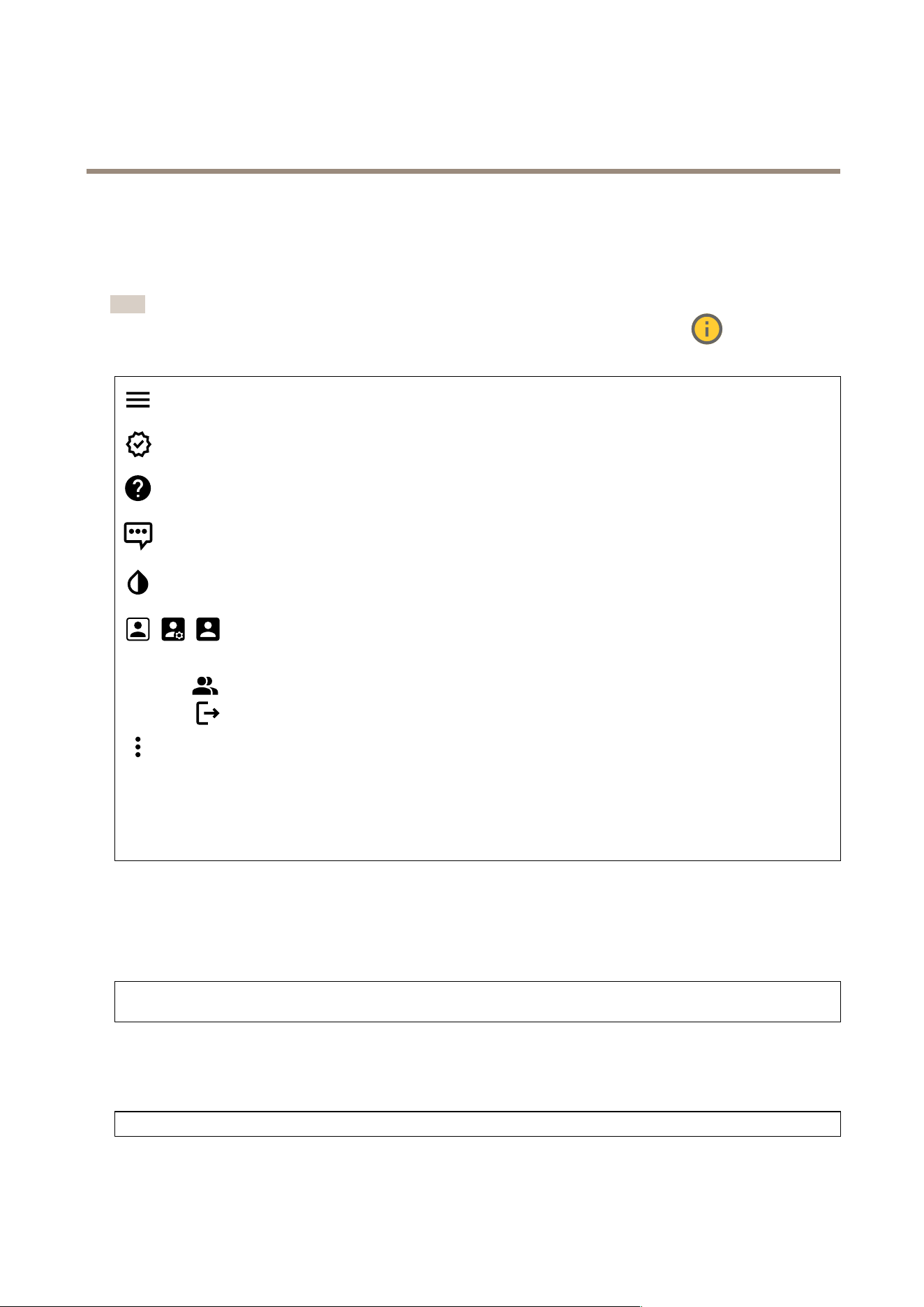
Supportforthefeaturesandsettingsdescribedinthissectionvariesbetweendevices.Thisicon
indicatesthat
thefeatureorsettingisonlyavailableinsomedevices.
Showorhidethemainmenu.
Accessthereleasenotes.
Accesstheproducthelp.
Changethelanguage.
Setlightthemeordarktheme.
Theusermenucontains:
•Informationabouttheuserwhoisloggedin.
•
Changeaccount:Logoutfromthecurrentaccountandlogintoanewaccount.
•
Logout:Logoutfromthecurrentaccount.
Thecontextmenucontains:
•Analyticsdata:Accepttosharenon-personalbrowserdata.
•Feedback:Shareanyfeedbacktohelpusimproveyouruserexperience.
•Legal:Viewinformationaboutcookiesandlicenses.
•About:Viewdeviceinformation,includingrmwareversionandserialnumber.
•Legacydeviceinterface:Changethedevice’swebinterfacetothelegacyversion.
Status
Deviceinfo
Showsthedeviceinformation,includingrmwareversionandserialnumber.
Upgradermware:Upgradethermwareonyourdevice.TakesyoutotheMaintenancepagewhereyoucandoarmware
upgrade.
Timesyncstatus
ShowsNTPsynchronizationinformation,includingifthedeviceisinsyncwithanNTPserverandthetimeremaininguntil
thenextsync.
NTPsettings:ViewandupdatetheNTPsettings.TakesyoutotheDateandtimepagewhereyoucanchangetheNTPsettings.
Security
29
AXISD2210-VERadar
Thewebinterface
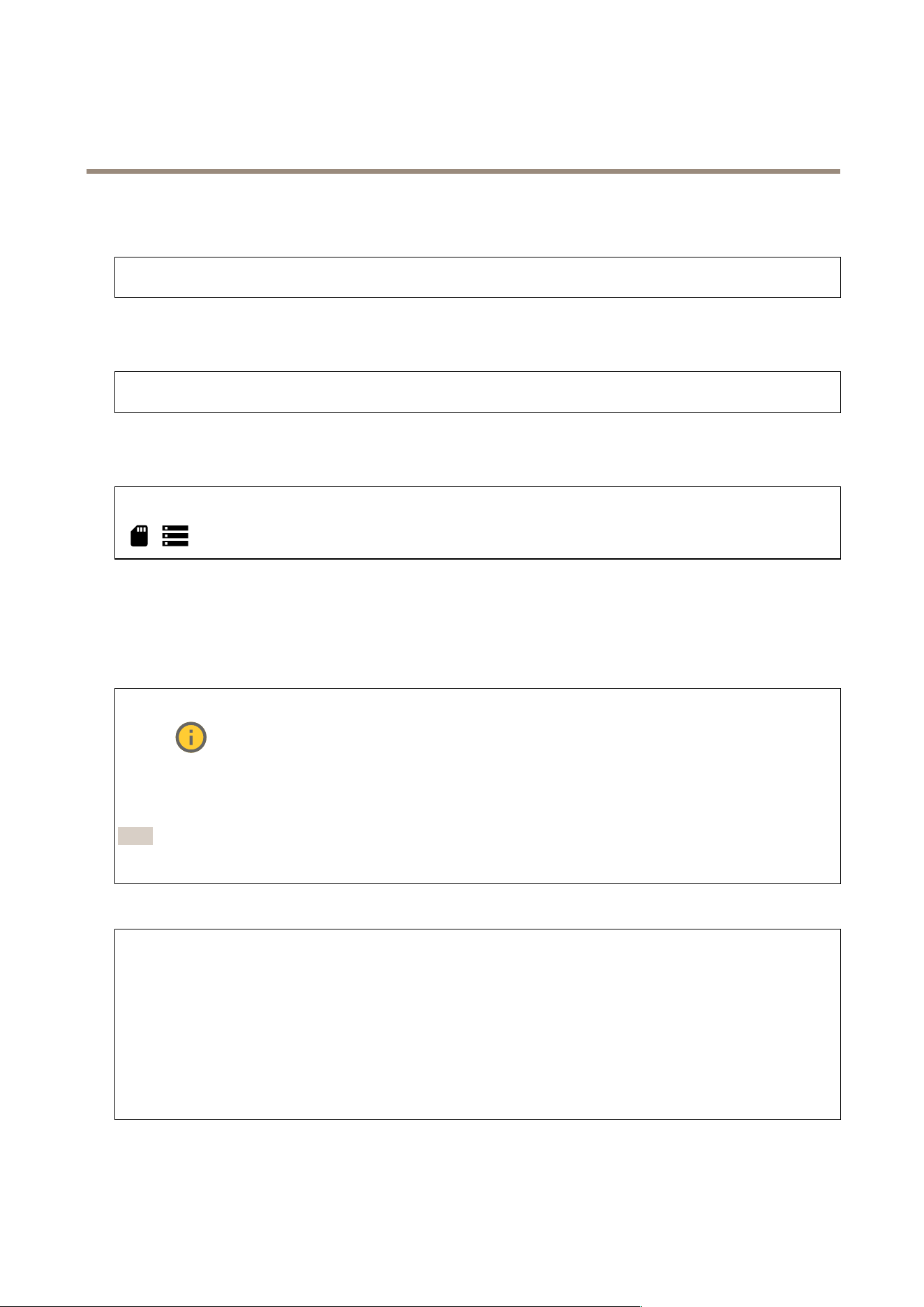
Showswhatkindofaccesstothedevicethatisactive,andwhatencryptionprotocolsareinuse.Recommendationstothesettings
arebasedontheAXISOSHardeningGuide.
Hardeningguide:LinktoAXISOSHardeningguidewhereyoucanlearnmoreaboutcybersecurityonAxisdevicesandbest
practices.
Connectedclients
Showsthenumberofconnectionsandconnectedclients.
Viewdetails:Viewandupdatethelistoftheconnectedclients.ThelistshowsIPaddress,protocol,port,andPID/Process
ofeachclient.
Ongoingrecordings
Showsongoingrecordingsandtheirdesignatedstoragespace.
Recordings:Viewongoingandlteredrecordingsandtheirsource.Formoreinformation,seeRecordingsonpage36
Showsthestoragespacewheretherecordingissaved.
Radar
Settings
General
Radartransmission:Usethistoturnofftheradarmodulecompletely.
Channel
:Ifyouhaveproblemswithmultipledevicesinterferingwitheachother,selectthesamechannelforupto
fourdevicesthatareclosetoeachother.Formostinstallations,selectAutotoletthedevicesautomaticallynegotiatewhich
channeltouse.
Mountingheight:Enterthemountingheightfortheproduct.
Note
Beasspecicasyoucanwhenyouenterthemountingheight.Thishelpsthedevicevisualizetheradardetectionin
thecorrectpositionintheimage.
Detection
Detectionsensitivity:Selecthowsensitivetheradarshouldbe.Ahighervaluemeansthatyougetalongerdetectionrange,but
thereisalsoahigherriskoffalsealarms.Alowersensitivitywilleliminatefalsealarms,butitmayshortenthedetectionrange.
Radarprole:Selectaprolethatsuitsyourareaofinterest.
•Areamonitoring:Trackbothlargeandsmallobjectsmovingatlowerspeedsinopenareas.
-Ignoreswayingobjects:Turnontominimizefalsealarmsfromswayingobjects,suchastrees,bushes,
oragpoles.
-Ignoresmallobjects:Turnontominimizefalsealarmsfromsmallobjects,suchascatsorrabbits.
•Roadmonitoring:Trackvehiclesmovingathigherspeedsinurbanzonesandonsub-urbanroads
-Ignoreswayingobjects:Turnontominimizefalsealarmsfromswayingobjects,suchastrees,bushes,
oragpoles.
View
30

AXISD2210-VERadar
Thewebinterface
Informationlegend:Turnontoshowalegendcontainingtheobjecttypestheradarcandetectandtrack.Draganddropto
movetheinformationlegend.
Zoneopacity:Selecthowopaqueortransparentthecoveragezoneshouldbe.
Gridopacity:Selecthowopaqueortransparentthegridshouldbe.
Colorscheme:Selectathemefortheradarvisualization.
Rotation
:Selectthepreferredorientationoftheradarimage.
Objectvisualization
Traillifetime:Selecthowlongthetrailofatrackedobjectisvisibleintheradarview.
Iconstyle:Selecttheiconstyleofthetrackedobjectsintheradarview.Forplaintriangles,selectTriangle.Forrepresentative
symbols,selectSymbol.Theiconswillpointinthedirectionthetrackedobjectsaremoving,regardlessofstyle.
Showinformationwithicon:Selectwhichinformationtodisplaynexttotheiconofthetrackedobject:
•Objecttype:Showtheobjecttypethattheradarhasdetected.
•Classicationprobability:Showhowsuretheradaristhattheobjectclassicationiscorrect.
•Velocity:Showhowfasttheobjectismoving.
Excludezones
Anexcludezoneisanareainwhichmovingobjectsareignored.Useexcludezonesifthereareareasinsideascenariothattrigger
alotofunwantedalarms.
:Clicktocreateanewexcludezone.
Tomodifyanexcludezone,selectitinthelist.
SelectoneoftheZoneshapepresetsfortheexcludezone.Covereverythingsetsthezonetotheentireradarcoveragearea.
Resettoboxcreatesarectangleinthemiddleofthecoveragearea.
Tomodifythezone,draganddropanyofthepointsonthelines.Toremoveapoint,right-clickonit.
Scenarios
Ascenarioisacombinationoftriggeringconditions,aswellassceneanddetectionsettings.
:Clicktocreateanewscenario.Youcancreateupto20scenarios.
Triggeringconditions:Selecttheconditionthatwilltriggeralarms.
•Movementinarea:Selectifyouwantthescenariototriggeronobjectsmovinginanarea.
•Linecrossing:Selectifyouwanttothescenariototriggeronobjectscrossingone,ortwo,lines.
Scene:Denetheareaorlinesinthescenariowheremovingobjectswilltriggeralarms.
•ForMovementinarea,selectoneoftheshapepresetstomodifythearea.
•ForLinecrossing,draganddropthelineinthescene.Tocreatemorepointsonaline,clickanddraganywhere
onit.Toremoveapoint,right-clickonit.
-Requirecrossingoftwolines:Turnoniftheobjectmustpasstwolinesbeforethescenariotriggersanalarm.
-Changedirection:Turnonifyouwantthescenariototriggeranalarmwhenobjectscrossthelinein
theotherdirection.
Detectionsettings:Denethetriggercriteriaforthescenario.
31

AXISD2210-VERadar
Thewebinterface
•ForMovementinarea:
-Ignoreshort-livedobjects:Setthedelayinsecondsfromwhentheradardetectstheobjecttowhenthe
scenariotriggersanalarm.Thiscanhelptoreducefalsealarms.
-Triggeronobjecttype:Selectthetypeofobjects(human,vehicle,unknown)youwantthescenarioto
triggeron.
-Speedlimit:Triggeronobjectsmovingatspeedswithinaspecicrange.
-Invert:Selectifyouwanttotriggeronspeedsaboveandbelowthesetspeedlimit.
•ForLinecrossing:
-Ignoreshort-livedobjects:Setthedelayinsecondsfromwhentheradardetectstheobjecttowhenthe
scenariotriggersanaction.Thiscanhelptoreducefalsealarms.Thisoptionisnotavailableforobjects
crossingtwolines.
-Maxtimebetweencrossings:Setthemaxtimebetweencrossingtherstlineandthesecondline.This
optionisonlyavailableforobjectscrossingtwolines.
-Triggeronobjecttype:Selectthetypeofobjects(human,vehicle,unknown)youwantthescenarioto
triggeron.
-Speedlimit:Triggeronobjectsmovingatspeedswithinaspecicrange.
-Invert:Selectifyouwanttotriggeronspeedsaboveandbelowthesetspeedlimit.
Alarmsettings:Denethecriteriaforthealarm.
•Minimumtriggerduration:Settheminimumdurationforthetriggeredalarm.
Mapcalibration
Usemapcalibrationtouploadandcalibrateareferencemap.Thiswillmakeiteasiertoseewhereobjectsmoveinthearea
coveredbytheradar.
Uploadmap:Selectthereferencemapyouwanttoupload.
Setradarpositiononmap:Specifythepositionoftheradaronthemap,addareferencepointstraightinfrontoftheradarand
typethedistancebetweentheradarandthereferencepoint.ClickCalibratetostartthecalibration.
Theresultofthecalibrationisareferencemapthatdisplaystheradarcoverageintheappropriatescale.
Stream
General
Resolution:Selecttheimageresolutionsuitableforthesurveillancescene.Ahigherresolutionincreasesbandwidthandstorage.
Framerate:Toavoidbandwidthproblemsonthenetworkorreducestoragesize,youcanlimittheframeratetoaxedamount.
Ifyouleavetheframerateatzero,theframerateiskeptatthehighestpossiblerateunderthecurrentconditions.Ahigher
frameraterequiresmorebandwidthandstoragecapacity.
Compression:Usetheslidertoadjusttheimagecompression.Highcompressionresultsinalowerbitrateandlowerimagequality.
Lowcompressionimprovestheimagequality,butusesmorebandwidthandstoragewhenyourecord.
Signedvideo
:Turnontoaddthesignedvideofeaturetothevideo.Signedvideoprotectsthevideofromtamperingby
addingcryptographicsignaturestothevideo.
Zipstream
P-frames:AP-frameisapredictedimagethatshowsonlythechangesintheimagefromthepreviousframe.Enterthedesired
numberofP-frames.Thehigherthenumber,thelessbandwidthisrequired.However,ifthereisnetworkcongestion,therecould
beanoticeabledeteriorationinthevideoquality.
Bitratecontrol
32
AXISD2210-VERadar
Thewebinterface
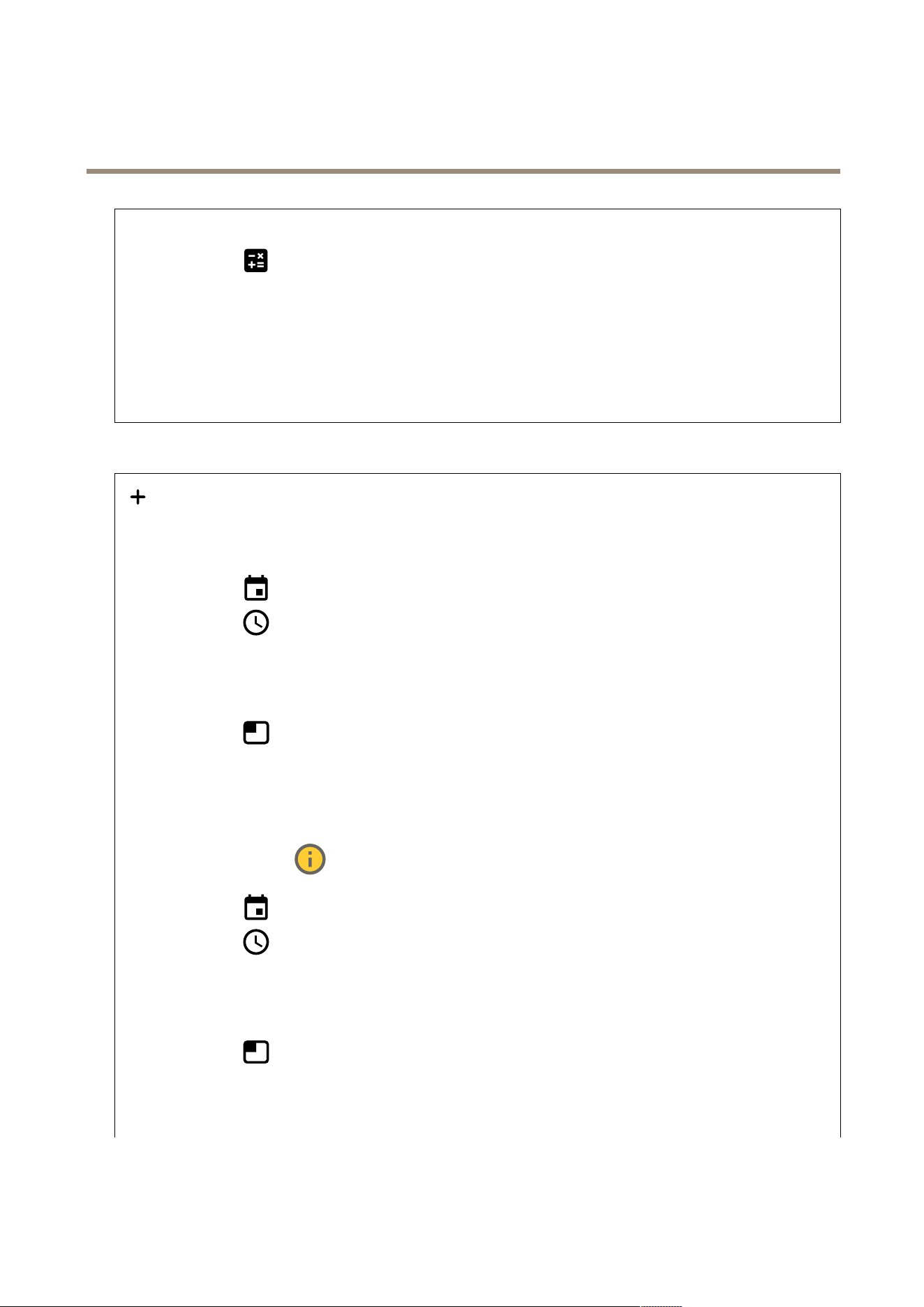
•Average:Selecttoautomaticallyadjustthebitrateoveralongertimeperiodandprovidethebestpossibleimage
qualitybasedontheavailablestorage.
-
Clicktocalculatethetargetbitratebasedonavailablestorage,retentiontime,andbitratelimit.
-Targetbitrate:Enterdesiredtargetbitrate.
-Retentiontime:Enterthenumberofdaystokeeptherecordings.
-Storage:Showstheestimatedstoragethatcanbeusedforthestream.
-Maximumbitrate:Turnontosetabitratelimit.
-Bitratelimit:Enterabitratelimitthatishigherthanthetargetbitrate.
•Maximum:Selecttosetamaximuminstantbitrateofthestreambasedonyournetworkbandwidth.
-Maximum:Enterthemaximumbitrate.
•Variable:Selecttoallowthebitratetovarybasedonthelevelofactivityinthescene.Moreactivityrequiresmore
bandwidth.Werecommendthisoptionformostsituations.
Overlays
:Clicktoaddanoverlay.Selectthetypeofoverlayfromthedropdownlist:
•Text:Selecttoshowatextthatisintegratedintheliveviewimageandvisibleinallviews,recordingsandsnapshots.
Youcanenteryourowntext,andyoucanalsoincludepre-conguredmodierstoautomaticallyshow,forexample,
time,date,andframerate.
-
:Clicktoaddthedatemodier%Ftoshowyyyy-mm-dd.
-
:Clicktoaddthetimemodier%Xtoshowhh:mm:ss(24-hourclock).
-Modiers:Clicktoselectanyofthemodiersshowninthelisttoaddthemtothetextbox.Forexample,
%ashowsthedayoftheweek.
-Size:Selectthedesiredfontsize.
-Appearance:Selectthetextcolorandbackgroundcolor,forexample,whitetextonablackbackground
(default).
-
:Selectthepositionoftheoverlayintheimage.
•Image:Selecttoshowastaticimagesuperimposedoverthevideostream.Youcanuse.bmp,.png,.jpeg,or.svgles.
Touploadanimage,clickImages.Beforeyouuploadanimage,youcanchooseto:
-Scalewithresolution:Selecttoautomaticallyscaletheoverlayimagetotthevideoresolution.
-Usetransparency:SelectandentertheRGBhexadecimalvalueforthatcolor.UsetheformatRRGGBB.
Examplesofhexadecimalvalues:FFFFFFforwhite,000000forblack,FF0000forred,6633FFforblue,and
669900forgreen.Onlyfor.bmpimages.
•Sceneannotation
:Selecttoshowatextoverlayinthevideostreamthatstaysinthesameposition,even
whenthecamerapansortiltsinanotherdirection.Youcanchoosetoonlyshowtheoverlaywithincertainzoomlevels.
-
:Clicktoaddthedatemodier%Ftoshowyyyy-mm-dd.
-
:Clicktoaddthetimemodier%Xtoshowhh:mm:ss(24-hourclock).
-Modiers:Clicktoselectanyofthemodiersshowninthelisttoaddthemtothetextbox.Forexample,
%ashowsthedayoftheweek.
-Size:Selectthedesiredfontsize.
-Appearance:Selectthetextcolorandbackgroundcolor,forexample,whitetextonablackbackground
(default).
-
:Selectthepositionoftheoverlayintheimage.Theoverlayissavedandremainsinthepanand
tiltcoordinatesofthisposition.
-Annotationbetweenzoomlevels(%):Setthezoomlevelswhichtheoverlaywillbeshownwithin.
-Annotationsymbol:Selectasymbolthatappearsinsteadoftheoverlaywhenthecameraisnotwithinthe
setzoomlevels.
33
AXISD2210-VERadar
Thewebinterface
•Streamingindicator:Selecttoshowananimationsuperimposedoverthevideostream.Theanimation
indicatesthatthevideostreamislive,evenifthescenedoesn’tcontainanymotion.
-Appearance:Selecttheanimationcolorandbackgroundcolor,forexample,redanimationonatransparent
background(default).
-Size:Selectthedesiredfontsize.
-
:Selectthepositionoftheoverlayintheimage.
•Widget:Linegraph
:Showagraphchartthatdisplayshowameasuredvaluechangesovertime.
-Title:Enteratitleforthewidget.
-Overlaymodier:Selectanoverlaymodierasdatasource.IfyouhavecreatedMQTToverlays,theywillbe
locatedattheendofthelist.
-
:Selectthepositionoftheoverlayintheimage.
-Size:Selectthesizeoftheoverlay.
-Visibleonallchannels:Turnofftoshowonlyonyourcurrentlyselectedchannel.Turnontoshowonall
activechannels.
-Updateinterval:Choosethetimebetweendataupdates.
-Transparency:Setthetransparencyoftheentireoverlay.
-Backgroundtransparency:Setthetransparencyonlyofthebackgroundoftheoverlay.
-Points:Turnontoaddapointtothegraphlinewhendataisupdated.
-Xaxis
-Label:Enterthetextlabelforthexaxis.
-Timewindow:Enterhowlongtimethedataisvisualized.
-Timeunit:Enteratimeunitforthexaxis.
-Yaxis
-Label:Enterthetextlabelfortheyaxis.
-Dynamicscale:Turnonforthescaletoautomaticallyadapttothedatavalues.Turnofftomanuallyenter
valuesforaxedscale.
-MinalarmthresholdandMaxalarmthreshold:Thesevalueswilladdhorizontalreferencelinestothegraph,
makingiteasiertoseewhenthedatavaluebecomestoohighortoolow.
•Widget:Meter
:Showabarchartthatdisplaysthemostrecentlymeasureddatavalue.
-Title:Enteratitleforthewidget.
-Overlaymodier:Selectanoverlaymodierasdatasource.IfyouhavecreatedMQTToverlays,theywillbe
locatedattheendofthelist.
-
:Selectthepositionoftheoverlayintheimage.
-Size:Selectthesizeoftheoverlay.
-Visibleonallchannels:Turnofftoshowonlyonyourcurrentlyselectedchannel.Turnontoshowonall
activechannels.
-Updateinterval:Choosethetimebetweendataupdates.
-Transparency:Setthetransparencyoftheentireoverlay.
-Backgroundtransparency:Setthetransparencyonlyofthebackgroundoftheoverlay.
-Points:Turnontoaddapointtothegraphlinewhendataisupdated.
-Yaxis
-Label:Enterthetextlabelfortheyaxis.
-Dynamicscale:Turnonforthescaletoautomaticallyadapttothedatavalues.Turnofftomanuallyenter
valuesforaxedscale.
-MinalarmthresholdandMaxalarmthreshold:Thesevalueswilladdhorizontalreferencelinestothebar
chart,makingiteasiertoseewhenthedatavaluebecomestoohighortoolow.
Autotracking
PairtheradarwithaPTZcameratouseradarautotracking.Toestablishtheconnection,gotoSystem>Edge-to-edge.
RadarPTZautotracking
34

AXISD2210-VERadar
Thewebinterface
Congureinitialsettings:
Cameramountingheight:ThedistancefromthegroundtotheheightofthemountedPTZcamera.
Panalignment:PanthePTZcamerasothatitpointsinthesamedirectionastheradar.ClickontheIPaddressofthePTZ
cameratoaccessit.
Savepanoffset:Clicktosavethepanalignment.
Groundinclineoffset:Usethegroundinclineoffsettonetunethecamera’stilt.Ifthegroundissloped,orifthecameraisnot
mountedhorizontally,thecameramayaimtoohighortoolowwhentrackinganobject.
Done:Clicktosaveyoursettingsandcontinuewiththeconguration.
CongurePTZautotracking:
Track:Selectifyouwanttotrackhumans,vehiclesand/orunknownobjects.
Tracking:TurnontostarttrackingobjectswiththePTZcamera.Thetrackingautomaticallyzoomsinonanobject,oragroupof
objects,tokeepthemintheviewofthecamera.
Objectswitching:Iftheradardetectsmultipleobjectsthatwon'ttinthePTZcamera'sview,thePTZcameratrackstheobject
thattheradargivesthehighestpriority,andignorestheothers.
Objectholdtime:DeterminesforhowmanysecondsthePTZcamerashouldtrackeachobject.
Returntohome:TurnontomakethePTZcamerareturntoitshomepositionwhentheradarnolongertracksanyobjects.
Returntohometimeout:DetermineshowlongthePTZcamerashouldstayatthetrackedobjectslastknownpositionbefore
returningtohome.
Zoom:UsetheslidertonetunethezoomofthePTZcamera.
Recongureinstallation:Clicktoclearallsettingsandgobacktotheinitialconguration.
DynamicLEDstrip
DynamicLEDstrippatterns
UsethispagetotestthepatternsofthedynamicLEDstrip.
Pattern:Selectthepatternyouwanttotest.
Duration:Specifythedurationofthetest.
Test:Clicktostartthepatternyouwanttotest.
Stop:Clicktostopthetest.Ifyouleavethepagewhenapatternplays,itwillstopautomatically.
Toactivateapatternforindicationordeterrencepurposes,gotoSystem>Eventsandcreatearule.Foranexample,seeActivate
asweepingredlightontheradaronpage25.
35
AXISD2210-VERadar
Thewebinterface
Recordings
Ongoingrecordings:Showallongoingrecordingsonthedevice.
Startarecordingonthedevice.
Choosewhichstoragedevicetosaveto.
Stoparecordingonthedevice.
Triggeredrecordingswillendwhenmanuallystoppedorwhenthedeviceisshutdown.
Continuousrecordingswillcontinueuntilmanuallystopped.Evenifthedeviceisshutdown,therecordingwillcontinuewhen
thedevicestartsupagain.
Playtherecording.
Stopplayingtherecording.
Showorhideinformationandoptionsabouttherecording.
Setexportrange:Ifyouonlywanttoexportpartoftherecording,enteratimespan.
Encrypt:Selecttosetapasswordforexportedrecordings.Itwillnotbepossibletoopentheexportedlewithoutthepassword.
Clicktodeletearecording.
Export:Exportthewholeorapartoftherecording.
Clicktoltertherecordings.
From:Showrecordingsdoneafteracertainpointintime.
To:Showrecordingsupuntilacertainpointintime.
Source
:Showrecordingsbasedonsource.Thesourcereferstothesensor.
Event:Showrecordingsbasedonevents.
Storage:Showrecordingsbasedonstoragetype.
36

AXISD2210-VERadar
Thewebinterface
Apps
Addapp:Installanewapp.
Findmoreapps:Findmoreappstoinstall.YouwillbetakentoanoverviewpageofAxisapps.
Allowunsignedapps:Turnontoallowinstallationofunsignedapps.
Allowroot-privilegedapps:Turnontoallowappswithrootprivilegesfullaccesstothedevice.
ViewthesecurityupdatesinAXISOSandACAPapps.
Note
Thedevice’sperformancemightbeaffectedifyourunseveralappsatthesametime.
Usetheswitchnexttotheappnametostartorstoptheapp.
Open:Accesstheapp’ssettings.Theavailablesettingsdependontheapplication.Someapplicationsdon’thaveanysettings.
Thecontextmenucancontainoneormoreofthefollowingoptions:
•Open-sourcelicense:Viewinformationaboutopen-sourcelicensesusedintheapp.
•Applog:Viewalogoftheappevents.Thelogishelpfulwhenyoucontactsupport.
•Activatelicensewithakey:Iftheapprequiresalicense,youneedtoactivateit.Usethisoptionifyourdevice
doesn’thaveinternetaccess.
Ifyoudon’thavealicensekey,gotoaxis.com/products/analytics.YouneedalicensecodeandtheAxisproductserial
numbertogeneratealicensekey.
•Activatelicenseautomatically:Iftheapprequiresalicense,youneedtoactivateit.Usethisoptionifyourdevicehas
internetaccess.Youneedalicensecodetoactivatethelicense.
•Deactivatethelicense:Deactivatethelicensetoreplaceitwithanotherlicense,forexample,whenyouchangefroma
triallicensetoafulllicense.Ifyoudeactivatethelicense,youalsoremoveitfromthedevice.
•Settings:Conguretheparameters.
•Delete:Deletetheapppermanentlyfromthedevice.Ifyoudon’tdeactivatethelicenserst,itremainsactive.
System
Timeandlocation
Dateandtime
Thetimeformatdependsonthewebbrowser’slanguagesettings.
Note
Werecommendyousynchronizethedevice’sdateandtimewithanNTPserver.
37

AXISD2210-VERadar
Thewebinterface
Synchronization:Selectanoptionforthedevice’sdateandtimesynchronization.
•Automaticdateandtime(manualNTSKEservers):SynchronizewiththesecureNTPkeyestablishmentservers
connectedtotheDHCPserver.
-ManualNTSKEservers:EntertheIPaddressofoneortwoNTPservers.WhenyouusetwoNTPservers,
thedevicesynchronizesandadaptsitstimebasedoninputfromboth.
•Automaticdateandtime(NTPserversusingDHCP):SynchronizewiththeNTPserversconnectedtotheDHCPserver.
-FallbackNTPservers:EntertheIPaddressofoneortwofallbackservers.
•Automaticdateandtime(manualNTPservers):SynchronizewithNTPserversofyourchoice.
-ManualNTPservers:EntertheIPaddressofoneortwoNTPservers.WhenyouusetwoNTPservers,the
devicesynchronizesandadaptsitstimebasedoninputfromboth.
•Customdateandtime:Manuallysetthedateandtime.ClickGetfromsystemtofetchthedateandtimesettings
oncefromyourcomputerormobiledevice.
Timezone:Selectwhichtimezonetouse.Timewillautomaticallyadjusttodaylightsavingtimeandstandardtime.
Note
Thesystemusesthedateandtimesettingsinallrecordings,logs,andsystemsettings.
Devicelocation
Enterwherethedeviceislocated.Yourvideomanagementsystemcanusethisinformationtoplacethedeviceonamap.
•Latitude:Positivevaluesarenorthoftheequator.
•Longitude:Positivevaluesareeastoftheprimemeridian.
•Heading:Enterthecompassdirectionthatthedeviceisfacing.0isduenorth.
•Label:Enteradescriptivenameforthedevice.
•Save:Clicktosaveyourdevicelocation.
Regionalsettings
Setsthesystemofmeasurementtouseinallsystemsettings.
Metric(m,km/h):Selectfordistancemeasurementtobeinmetersandspeedmeasurementtobeinkilometersperhour.
U.S.customary(ft,mph):Selectfordistancemeasurementtobeinfeetandspeedmeasurementtobeinmilesperhour.
Network
IPv4
AssignIPv4automatically:SelecttoletthenetworkrouterassignanIPaddresstothedeviceautomatically.Werecommend
automaticIP(DHCP)formostnetworks.
IPaddress:EnterauniqueIPaddressforthedevice.StaticIPaddressescanbeassignedatrandomwithinisolatednetworks,
providedthateachaddressisunique.Toavoidconicts,werecommendyoucontactyournetworkadministratorbeforeyou
assignastaticIPaddress.
Subnetmask:Enterthesubnetmasktodenewhataddressesareinsidethelocalareanetwork.Anyaddressoutsidethelocal
areanetworkgoesthroughtherouter.
Router:EntertheIPaddressofthedefaultrouter(gateway)usedtoconnectdevicesthatareattachedtodifferentnetworksand
networksegments.
FallbacktostaticIPaddressifDHCPisn’tavailable:SelectifyouwanttoaddastaticIPaddresstouseasfallbackifDHCP
isunavailableandcan’tassignanIPaddressautomatically.
Note
IfDHCPisn’tavailableandthedeviceusesastaticaddressfallback,thestaticaddressisconguredwithalimitedscope.
IPv6
38

AXISD2210-VERadar
Thewebinterface
AssignIPv6automatically:SelecttoturnonIPv6andtoletthenetworkrouterassignanIPaddresstothedeviceautomatically.
Hostname
Assignhostnameautomatically:Selecttoletthenetworkrouterassignahostnametothedeviceautomatically.
Hostname:Enterthehostnamemanuallytouseasanalternativewayofaccessingthedevice.Theserverreportandsystemlog
usethehostname.AllowedcharactersareA–Z,a–z,0–9and-.
DNSservers
AssignDNSautomatically:SelecttolettheDHCPserverassignsearchdomainsandDNSserveraddressestothedevice
automatically.WerecommendautomaticDNS(DHCP)formostnetworks.
Searchdomains:Whenyouuseahostnamethatisnotfullyqualied,clickAddsearchdomainandenteradomaininwhichto
searchforthehostnamethedeviceuses.
DNSservers:ClickAddDNSserverandentertheIPaddressoftheDNSserver.ThisprovidesthetranslationofhostnamestoIP
addressesonyournetwork.
HTTPandHTTPS
HTTPSisaprotocolthatprovidesencryptionforpagerequestsfromusersandforthepagesreturnedbythewebserver.Theencrypted
exchangeofinformationisgovernedbytheuseofanHTTPScerticate,whichguaranteestheauthenticityoftheserver.
TouseHTTPSonthedevice,youmustinstallanHTTPScerticate.GotoSystem>Securitytocreateandinstallcerticates.
Allowaccessthrough:SelectifauserisallowedtoconnecttothedevicethroughtheHTTP,HTTPS,orbothHTTPandHTTPS
protocols.
Note
IfyouviewencryptedwebpagesthroughHTTPS,youmightexperienceadropinperformance,especiallywhenyou
requestapageforthersttime.
HTTPport:EntertheHTTPporttouse.Thedeviceallowsport80oranyportintherange1024-65535.Ifyouareloggedinasan
administrator,youcanalsoenteranyportintherange1-1023.Ifyouuseaportinthisrange,yougetawarning.
HTTPSport:EntertheHTTPSporttouse.Thedeviceallowsport443oranyportintherange1024-65535.Ifyouareloggedinas
anadministrator,youcanalsoenteranyportintherange1-1023.Ifyouuseaportinthisrange,yougetawarning.
Certicate:SelectacerticatetoenableHTTPSforthedevice.
Networkdiscoveryprotocols
Bonjour
®
:Turnontoallowautomaticdiscoveryonthenetwork.
Bonjourname:Enterafriendlynametobevisibleonthenetwork.ThedefaultnameisthedevicenameandMACaddress.
UPnP
®
:Turnontoallowautomaticdiscoveryonthenetwork.
UPnPname:Enterafriendlynametobevisibleonthenetwork.ThedefaultnameisthedevicenameandMACaddress.
WS-Discovery:Turnontoallowautomaticdiscoveryonthenetwork.
One-clickcloudconnection
One-clickcloudconnection(O3C)togetherwithanO3Cserviceprovideseasyandsecureinternetaccesstoliveandrecordedvideo
fromanylocation.Formoreinformation,seeaxis.com/end-to-end-solutions/hosted-services.
39

AXISD2210-VERadar
Thewebinterface
AllowO3C:
•One-click:Thisisthedefaultsetting.PressandholdthecontrolbuttononthedevicetoconnecttoanO3Cservice
overtheinternet.YouneedtoregisterthedevicewiththeO3Cservicewithin24hoursafteryoupressthecontrol
button.Otherwise,thedevicedisconnectsfromtheO3Cservice.Onceyouregisterthedevice,Alwaysisenabledand
thedevicestaysconnectedtotheO3Cservice.
•Always:ThedeviceconstantlyattemptstoconnecttoanO3Cserviceovertheinternet.Onceyouregisterthedevice,
itstaysconnectedtotheO3Cservice.Usethisoptionifthecontrolbuttononthedeviceisoutofreach.
•No:DisablestheO3Cservice.
Proxysettings:Ifneeded,entertheproxysettingstoconnecttotheproxyserver.
Host:Entertheproxyserver’saddress.
Port:Entertheportnumberusedforaccess.
LoginandPassword:Ifneeded,enterusernameandpasswordfortheproxyserver.
Authenticationmethod:
•Basic:ThismethodisthemostcompatibleauthenticationschemeforHTTP.It’slesssecurethantheDigestmethod
becauseitsendstheusernameandpasswordunencryptedtotheserver.
•Digest:Thismethodismoresecurebecauseitalwaystransfersthepasswordencryptedacrossthenetwork.
•Auto:Thisoptionletsthedeviceselecttheauthenticationmethoddependingonthesupportedmethods.Itprioritizes
theDigestmethodovertheBasicmethod.
Ownerauthenticationkey(OAK):ClickGetkeytofetchtheownerauthenticationkey.Thisisonlypossibleifthedeviceis
connectedtotheinternetwithoutarewallorproxy.
SNMP
TheSimpleNetworkManagementProtocol(SNMP)allowsremotemanagementofnetworkdevices.
SNMP:SelecttheversionofSNMPtouse.
•v1andv2c:
-Readcommunity:Enterthecommunitynamethathasread-onlyaccesstoallsupportedSNMPobjects.The
defaultvalueispublic.
-Writecommunity:EnterthecommunitynamethathasreadorwriteaccesstoallsupportedSNMPobjects
(exceptread-onlyobjects).Thedefaultvalueiswrite.
-Activatetraps:Turnontoactivatetrapreporting.Thedeviceusestrapstosendmessagesforimportant
eventsorstatuschangestoamanagementsystem.Inthewebinterface,youcansetuptrapsforSNMPv1
andv2c.TrapsareautomaticallyturnedoffifyouchangetoSNMPv3orturnoffSNMP.IfyouuseSNMPv3,
youcansetuptrapsthroughtheSNMPv3managementapplication.
-Trapaddress:EntertheIPaddressorhostnameofthemanagementserver.
-Trapcommunity:Enterthecommunitytousewhenthedevicesendsatrapmessagetothemanagement
system.
-Traps:
-Coldstart:Sendsatrapmessagewhenthedevicestarts.
-Warmstart:SendsatrapmessagewhenyouchangeanSNMPsetting.
-Linkup:Sendsatrapmessagewhenalinkchangesfromdowntoup.
-Authenticationfailed:Sendsatrapmessagewhenanauthenticationattemptfails.
Note
AllAxisVideoMIBtrapsareenabledwhenyouturnonSNMPv1andv2ctraps.Formoreinformation,see
AXISOSPortal>SNMP.
•v3:SNMPv3isamoresecureversion,whichprovidesencryptionandsecurepasswords.TouseSNMPv3,we
recommendyoutoactivateHTTPS,asthepasswordisthensentthroughHTTPS.Thisalsopreventsunauthorized
parties’accesstounencryptedSNMPv1andv2ctraps.IfyouuseSNMPv3,youcansetuptrapsthroughtheSNMPv3
managementapplication.
-Passwordfortheaccount“initial”:EntertheSNMPpasswordfortheaccountnamed“initial”.Althoughthe
passwordcanbesentwithoutactivatingHTTPS,wedon’trecommendit.TheSNMPv3passwordcanonly
40
AXISD2210-VERadar
Thewebinterface
besetonce,andpreferablyonlywhenHTTPSisenabled.Oncethepasswordisset,thepasswordeldisno
longerdisplayed.Tosetthepasswordagain,youmustresetthedevicetofactorydefaultsettings.
Security
Certicates
Certicatesareusedtoauthenticatedevicesonanetwork.Thedevicesupportstwotypesofcerticates:
•Client/servercerticates
Aclient/servercerticatevalidatesthedevice’sidentity,andcanbeself-signedorissuedbyaCerticateAuthority(CA).
Aself-signedcerticateofferslimitedprotectionandcanbeusedbeforeaCA-issuedcerticatehasbeenobtained.
•CAcerticates
YoucanuseaCAcerticatetoauthenticateapeercerticate,forexampletovalidatetheidentityofanauthentication
serverwhenthedeviceconnectstoanetworkprotectedbyIEEE802.1X.Thedevicehasseveralpre-installedCA
certicates.
Theseformatsaresupported:
•Certicateformats:.PEM,.CER,and.PFX
•Privatekeyformats:PKCS#1andPKCS#12
Important
Ifyouresetthedevicetofactorydefault,allcerticatesaredeleted.Anypre-installedCAcerticatesarereinstalled.
Filterthecerticatesinthelist.
Addcerticate:Clicktoaddacerticate.
•More
:Showmoreeldstollinorselect.
•Securekeystore:SelecttouseSecureelementorTrustedPlatformModule2.0tosecurelystoretheprivatekey.For
moreinformationonwhichsecurekeystoretoselect,gotohelp.axis.com/en-us/axis-os#cryptographic-support.
•Keytype:Selectthedefaultoradifferentencryptionalgorithmfromthedrop-downlisttoprotectthecerticate.
Thecontextmenucontains:
•Certicateinformation:Viewaninstalledcerticate’sproperties.
•Deletecerticate:Deletethecerticate.
•Createcerticatesigningrequest:Createacerticatesigningrequesttosendtoaregistrationauthoritytoapply
foradigitalidentitycerticate.
Securekeystore
:
•Secureelement(CCEAL6+):Selecttousesecureelementforsecurekeystore.
•TrustedPlatformModule2.0(CCEAL4+,FIPS140-2Level2):SelecttouseTPM2.0forsecurekeystore.
IEEE802.1xandIEEE802.1AEMACsec
41

AXISD2210-VERadar
Thewebinterface
IEEE802.1xisanIEEEstandardforport-basednetworkadmissioncontrolprovidingsecureauthenticationofwiredandwireless
networkdevices.IEEE802.1xisbasedonEAP(ExtensibleAuthenticationProtocol).
ToaccessanetworkprotectedbyIEEE802.1x,networkdevicesmustauthenticatethemselves.Theauthenticationisperformedby
anauthenticationserver,typicallyaRADIUSserver(forexample,FreeRADIUSandMicrosoftInternetAuthenticationServer).
Certicates
WhenconguredwithoutaCAcerticate,servercerticatevalidationisdisabledandthedevicetriestoauthenticateitself
regardlessofwhatnetworkitisconnectedto.
Whenusingacerticate,inAxis'implementation,thedeviceandtheauthenticationserverauthenticatethemselveswithdigital
certicatesusingEAP-TLS(ExtensibleAuthenticationProtocol-TransportLayerSecurity).
Toallowthedevicetoaccessanetworkprotectedthroughcerticates,youmustinstallasignedclientcerticateonthedevice.
Authenticationmethod:SelectanEAPtypeusedforauthentication.ThedefaultoptionisEAP-TLS.
Clientcerticate:SelectaclientcerticatetouseIEEE802.1x.Theauthenticationserverusesthecerticatetovalidatethe
client’sidentity.
CAcerticate:SelectCAcerticatestovalidatetheauthenticationserver’sidentity.Whennocerticateisselected,thedevice
triestoauthenticateitselfregardlessofwhatnetworkitisconnectedto.
EAPidentity:Entertheuseridentityassociatedwiththeclientcerticate.
EAPOLversion:SelecttheEAPOLversionthatisusedinthenetworkswitch.
UseIEEE802.1x:SelecttousetheIEEE802.1xprotocol.
IEEE802.1AEMACsec
IEEE802.1AEMACsecisanIEEEstandardformediaaccesscontrol(MAC)securitythatdenesconnectionlessdatacondentiality
andintegrityformediaaccessindependentprotocols.
ThesettingsareonlyavailableifyouuseEAP-TLSastheauthenticationmethod.
Mode
•DynamicCAK/EAP-TLS:Thedefaultoption.Afterasecuredconnection,thedevicechecksforMACseconthenetwork.
•StaticCAK/pre-sharedkey(PSK):Selecttosetthekeynameandvaluetoconnecttothenetwork.
Preventbrute-forceattacks
Blocking:Turnontoblockbrute-forceattacks.Abrute-forceattackusestrial-and-errortoguesslogininfoorencryptionkeys.
Blockingperiod:Enterthenumberofsecondstoblockabrute-forceattack.
Blockingconditions:Enterthenumberofauthenticationfailuresallowedpersecondbeforetheblockstarts.Youcansetthe
numberoffailuresallowedbothonpagelevelanddevicelevel.
IPaddresslter
Uselter:SelecttolterwhichIPaddressesareallowedtoaccessthedevice.
Policy:ChoosewhethertoAlloworDenyaccessforcertainIPaddresses.
Addresses:EntertheIPnumbersthatareeitherallowedordeniedaccesstothedevice.YoucanalsousetheCIDRformat.
Customsignedrmwarecerticate
42

AXISD2210-VERadar
Thewebinterface
ToinstalltestrmwareorothercustomrmwarefromAxisonthedevice,youneedacustomsignedrmwarecerticate.The
certicateveriesthatthermwareisapprovedbyboththedeviceownerandAxis.Thermwarecanonlyrunonaspecic
devicewhichisidentiedbyitsuniqueserialnumberandchipID.OnlyAxiscancreatecustomsignedrmwarecerticates,
sinceAxisholdsthekeytosignthem.
Install:Clicktoinstallthecerticate.Youneedtoinstallthecerticatebeforeyouinstallthermware.
Thecontextmenucontains:
•Deletecerticate:Deletethecerticate.
Accounts
Accounts
Addaccount:Clicktoaddanewaccount.Youcanaddupto100accounts.
Account:Enterauniqueaccountname.
Newpassword:Enterapasswordfortheaccount.Passwordsmustbe1to64characterslong.OnlyASCIIprintablecharacters
(code32to126)areallowedinthepassword,forexample,letters,numbers,punctuation,andsomesymbols.
Repeatpassword:Enterthesamepasswordagain.
Privileges:
•Administrator:Hasfullaccesstoallsettings.Administratorscanalsoadd,update,andremoveotheraccounts.
•Operator:Hasaccesstoallsettingsexcept:
-AllSystemsettings.
-Addingapps.
•Viewer:Doesn’thaveaccesstochangeanysettings.
Thecontextmenucontains:
Updateaccount:Edittheaccountproperties.
Deleteaccount:Deletetheaccount.Youcan’tdeletetherootaccount.
Anonymousaccess
Allowanonymousviewing:Turnontoallowanyoneaccessthedeviceasaviewerwithoutlogginginwithanaccount.
AllowanonymousPTZoperating:Turnontoallowanonymoususerstopan,tilt,andzoomtheimage.
SSHaccounts
43

AXISD2210-VERadar
Thewebinterface
AddSSHaccount:ClicktoaddanewSSHaccount.
•Restrictrootaccess:Turnontorestrictfunctionalitythatrequiresrootaccess.
•EnableSSH:TurnontouseSSHservice.
Account:Enterauniqueaccountname.
Newpassword:Enterapasswordfortheaccount.Passwordsmustbe1to64characterslong.OnlyASCIIprintablecharacters
(code32to126)areallowedinthepassword,forexample,letters,numbers,punctuation,andsomesymbols.
Repeatpassword:Enterthesamepasswordagain.
Comment:Enteracomment(optional).
Thecontextmenucontains:
UpdateSSHaccount:Edittheaccountproperties.
DeleteSSHaccount:Deletetheaccount.Youcan’tdeletetherootaccount.
OpenIDConguration
Important
Entertherightvaluestoensureyoucanlogintothedeviceagain.
ClientID:EntertheOpenIDusername.
OutgoingProxy:EntertheproxyaddressfortheOpenIDconnectiontouseaproxyserver.
Adminclaim:Enteravaluefortheadminrole.
ProviderURL:EntertheweblinkfortheAPIendpointauthentication.Formatshouldbehttps://[insert
URL]/.well-known/openid-conguration
Operatorclaim:Enteravaluefortheoperatorrole.
Requireclaim:Enterthedatathatshouldbeinthetoken.
Viewerclaim:Enterthevaluefortheviewerrole.
Remoteuser:Enteravaluetoidentifyremoteusers.Thiswillhelptodisplaythecurrentuserinthedevice’swebinterface.
Scopes:Optionalscopesthatcouldbepartofthetoken.
Clientsecret:EntertheOpenIDpassword
Save:ClicktosavetheOpenIDvalues.
EnableOpenID:TurnontoclosecurrentconnectionandallowdeviceauthenticationfromtheproviderURL.
Events
Rules
Aruledenestheconditionsthattriggerstheproducttoperformanaction.Thelistshowsallthecurrentlyconguredrulesin
theproduct.
Note
Youcancreateupto256actionrules.
44

AXISD2210-VERadar
Thewebinterface
Addarule:Createarule.
Name:Enteranamefortherule.
Waitbetweenactions:Entertheminimumtime(hh:mm:ss)thatmustpassbetweenruleactivations.Itisusefuliftheruleis
activatedby,forexample,day-nightmodeconditions,toavoidthatsmalllightchangesduringsunriseandsunsetactivate
therulerepeatedly.
Condition:Selectaconditionfromthelist.Aconditionmustbemetforthedevicetoperformanaction.Ifmultiple
conditionsaredened,allofthemmustbemettotriggertheaction.Forinformationaboutspecicconditions,see
Getstartedwithrulesforevents.
Usethisconditionasatrigger:Selecttomakethisrstconditionfunctiononlyasastartingtrigger.Itmeansthatoncetherule
isactivated,itremainsactiveforaslongasalltheotherconditionsaremet,nomatterthestateoftherstcondition.Ifyoudon’t
selectthisoption,therulewillsimplybeactivewheneveralltheconditionsaremet.
Invertthiscondition:Selectifyouwanttheconditiontobetheoppositeofyourselection.
Addacondition:Clicktoaddanadditionalcondition.
Action:Selectanactionfromthelistandenteritsrequiredinformation.Forinformationaboutspecicactions,see
Getstartedwithrulesforevents.
Recipients
Youcansetupyourdevicetonotifyrecipientsabouteventsorsendles.Thelistshowsalltherecipientscurrentlyconguredinthe
product,alongwithinformationabouttheirconguration.
Note
Youcancreateupto20recipients.
Addarecipient:Clicktoaddarecipient.
Name:Enteranamefortherecipient.
Type:Selectfromthelist:
•FTP
-Host:Entertheserver'sIPaddressorhostname.Ifyouenterahostname,makesurethataDNSserveris
speciedunderSystem>Network>IPv4andIPv6.
-Port:EntertheportnumberusedbytheFTPserver.Thedefaultis21.
-Folder:Enterthepathtothedirectorywhereyouwanttostoreles.Ifthisdirectorydoesn’talreadyexist
ontheFTPserver,youwillgetanerrormessagewhenuploadingles.
-Username:Entertheusernameforthelogin.
-Password:Enterthepasswordforthelogin.
-Usetemporarylename:Selecttouploadleswithtemporary,automaticallygeneratedlenames.The
lesgetrenamedtothedesirednameswhentheuploadcompletes.Iftheuploadisaborted/interrupted,
youdon’tgetanycorruptles.However,youprobablystillgetthetemporaryles.Thiswayyouknow
thatalllesthathavethedesirednamearecorrect.
-UsepassiveFTP:Undernormalcircumstances,theproductsimplyrequeststhetargetFTPservertoopenthe
dataconnection.ThedeviceactivelyinitiatesboththeFTPcontrolanddataconnectionstothetargetserver.
ThisisnormallyneededifthereisarewallbetweenthedeviceandthetargetFTPserver.
•HTTP
-URL:EnterthenetworkaddresstotheHTTPserverandthescriptthatwillhandletherequest.Forexample,
http://192.168.254.10/cgi-bin/notify.cgi.
-Username:Entertheusernameforthelogin.
-Password:Enterthepasswordforthelogin.
45
AXISD2210-VERadar
Thewebinterface
-Proxy:TurnonandentertherequiredinformationifaproxyservermustbepassedtoconnecttotheHTTP
server.
•HTTPS
-URL:EnterthenetworkaddresstotheHTTPSserverandthescriptthatwillhandletherequest.Forexample,
https://192.168.254.10/cgi-bin/notify.cgi.
-Validateservercerticate:SelecttovalidatethecerticatethatwascreatedbyHTTPSserver.
-Username:Entertheusernameforthelogin.
-Password:Enterthepasswordforthelogin.
-Proxy:TurnonandentertherequiredinformationifaproxyservermustbepassedtoconnecttotheHTTPS
server.
•Networkstorage
YoucanaddnetworkstoragesuchasNAS(network-attachedstorage)anduseitasarecipienttostoreles.Theles
arestoredintheMatroska(MKV)leformat.
-Host:EntertheIPaddressorhostnameforthenetworkstorage.
-Share:Enterthenameoftheshareonthehost.
-Folder:Enterthepathtothedirectorywhereyouwanttostoreles.
-Username:Entertheusernameforthelogin.
-Password:Enterthepasswordforthelogin.
•SFTP
-Host:Entertheserver'sIPaddressorhostname.Ifyouenterahostname,makesurethataDNSserveris
speciedunderSystem>Network>IPv4andIPv6.
-Port:EntertheportnumberusedbytheSFTPserver.Thedefaultis22.
-Folder:Enterthepathtothedirectorywhereyouwanttostoreles.Ifthisdirectorydoesn’talreadyexiston
theSFTPserver,youwillgetanerrormessagewhenuploadingles.
-Username:Entertheusernameforthelogin.
-Password:Enterthepasswordforthelogin.
-SSHhostpublickeytype(MD5):Enterthengerprintoftheremotehost’spublickey(a32-digit
hexadecimalstring).TheSFTPclientsupportsSFTPserversusingSSH-2withRSA,DSA,ECDSA,andED25519
hostkeytypes.RSAisthepreferredmethodduringnegotiation,followedbyECDSA,ED25519,andDSA.Make
suretoentertherightMD5hostkeythatisusedbyyourSFTPserver.WhiletheAxisdevicesupportsboth
MD5andSHA-256hashkeys,werecommendusingSHA-256duetostrongersecurityoverMD5.Formore
informationonhowtocongureanSFTPserverwithanAxisdevice,gototheAXISOSPortal.
-SSHhostpublickeytype(SHA256):Enterthengerprintoftheremotehost’spublickey(a43-digitBase64
encodedstring).TheSFTPclientsupportsSFTPserversusingSSH-2withRSA,DSA,ECDSA,andED25519host
keytypes.RSAisthepreferredmethodduringnegotiation,followedbyECDSA,ED25519,andDSA.Make
suretoentertherightMD5hostkeythatisusedbyyourSFTPserver.WhiletheAxisdevicesupportsboth
MD5andSHA-256hashkeys,werecommendusingSHA-256duetostrongersecurityoverMD5.Formore
informationonhowtocongureanSFTPserverwithanAxisdevice,gototheAXISOSPortal.
-Usetemporarylename:Selecttouploadleswithtemporary,automaticallygeneratedlenames.The
lesgetrenamedtothedesirednameswhentheuploadcompletes.Iftheuploadisabortedorinterrupted,
youdon’tgetanycorruptles.However,youprobablystillgetthetemporaryles.Thisway,youknow
thatalllesthathavethedesirednamearecorrect.
•SIPorVMS
:
SIP:SelecttomakeaSIPcall.
VMS:SelecttomakeaVMScall.
-FromSIPaccount:Selectfromthelist.
-ToSIPaddress:EntertheSIPaddress.
-Test:Clicktotestthatyourcallsettingsworks.
•Email
-Sendemailto:Entertheemailaddresstosendemailsto.Toentermultipleaddresses,usecommasto
separatethem.
-Sendemailfrom:Entertheemailaddressofthesendingserver.
-Username:Entertheusernameforthemailserver.Leavethiseldemptyifthemailserverdoesnot
requireauthentication.
-Password:Enterthepasswordforthemailserver.Leavethiseldemptyifthemailserverdoesnotrequire
authentication.
-Emailserver(SMTP):EnterthenameoftheSMTPserver,forexample,smtp.gmail.com,smtp.mail.yahoo.com.
-Port:EntertheportnumberfortheSMTPserver,usingvaluesintherange0-65535.Thedefaultvalueis587.
-Encryption:Touseencryption,selecteitherSSLorTLS.
-Validateservercerticate:Ifyouuseencryption,selecttovalidatetheidentityofthedevice.Thecerticate
canbeself-signedorissuedbyaCerticateAuthority(CA).
46
AXISD2210-VERadar
Thewebinterface
-POPauthentication:TurnontoenterthenameofthePOPserver,forexample,pop.gmail.com.
Note
Someemailprovidershavesecurityltersthatpreventusersfromreceivingorviewinglargeamountof
attachments,fromreceivingscheduledemailsandsimilar.Checktheemailprovider'ssecuritypolicytoavoid
youremailaccountbeinglockedormissingoutonyourexpectedemails.
•TCP
-Host:Entertheserver'sIPaddressorhostname.Ifyouenterahostname,makesurethataDNSserveris
speciedunderSystem>Network>IPv4andIPv6.
-Port:Entertheportnumberusedtoaccesstheserver.
Test:Clicktotestthesetup.
Thecontextmenucontains:
Viewrecipient:Clicktoviewalltherecipientdetails.
Copyrecipient:Clicktocopyarecipient.Whenyoucopy,youcanmakechangestothenewrecipient.
Deleterecipient:Clicktodeletetherecipientpermanently.
Schedules
Schedulesandpulsescanbeusedasconditionsinrules.Thelistshowsalltheschedulesandpulsescurrentlyconguredinthe
product,alongwithinformationabouttheirconguration.
Addschedule:Clicktocreateascheduleorpulse.
Manualtriggers
Youcanusethemanualtriggertomanuallytriggerarule.Themanualtriggercan,forexample,beusedtovalidateactions
duringproductinstallationandconguration.
MQTT
MQTT(MessageQueuingTelemetryTransport)isastandardmessagingprotocolfortheInternetofThings(IoT).Itwasdesignedfor
simpliedIoTintegrationandisusedinawidevarietyofindustriestoconnectremotedeviceswithasmallcodefootprintand
minimalnetworkbandwidth.TheMQTTclientinAxisdevicermwarecansimplifyintegrationofdataandeventsproducedinthe
devicetosystemswhicharenotvideomanagementsoftware(VMS).
SetupthedeviceasanMQTTclient.MQTTcommunicationisbasedontwoentities,theclientsandthebroker.Theclientscan
sendandreceivemessages.Thebrokerisresponsibleforroutingmessagesbetweenclients.
YoucanlearnmoreaboutMQTTinAXISOSPortal.
ALPN
ALPNisaTLS/SSLextensionthatallowsfortheselectionofanapplicationprotocolduringthehandshakephaseoftheconnection
betweentheclientandserver.ThisisusedtoenableMQTTtrafcoverthesameportthatisusedforotherprotocols,suchasHTTP.
Insomecases,theremightnotbeadedicatedportopenforMQTTcommunication.AsolutioninsuchcasesistouseALPNto
negotiatetheuseofMQTTastheapplicationprotocolonastandardport,allowedbytherewalls.
MQTTclient
47

AXISD2210-VERadar
Thewebinterface
Connect:TurnonorofftheMQTTclient.
Status:ShowsthecurrentstatusoftheMQTTclient.
Broker
Host:EnterthehostnameorIPaddressoftheMQTTserver.
Protocol:Selectwhichprotocoltouse.
Port:Entertheportnumber.
•1883isthedefaultvalueforMQTToverTCP
•8883isthedefaultvalueforMQTToverSSL
•80isthedefaultvalueforMQTToverWebSocket
•443isthedefaultvalueforMQTToverWebSocketSecure
ALPNprotocol:EntertheALPNprotocolnameprovidedbyyourMQTTbrokerprovider.ThisisonlyapplicablewithMQTToverSSL
andMQTToverWebSocketSecure.
Username:Entertheusernamethattheclientwillusetoaccesstheserver.
Password:Enterapasswordfortheusername.
ClientID:EnteraclientID.Theclientidentierissenttotheserverwhentheclientconnectstoit.
Cleansession:Controlsthebehavioratconnectionanddisconnectiontime.Whenselected,thestateinformationisdiscarded
atconnectanddisconnect.
HTTPproxy:AURLwithamaximumlengthof255bytes.Youcanleavetheeldemptyifyoudon'twanttouseanHTTPproxy.
HTTPSproxy:AURLwithamaximumlengthof255bytes.Youcanleavetheeldemptyifyoudon'twanttouseanHTTPSproxy.
Keepaliveinterval:Enablestheclienttodetectwhentheserverisnolongeravailablewithouthavingtowaitforthelong
TCP/IPtimeout.
Timeout:Thetimeintervalinsecondstoallowaconnecttocomplete.Defaultvalue:60
Devicetopicprex:UsedinthedefaultvaluesforthetopicintheconnectmessageandLWTmessageontheMQTTclienttab,
andinthepublicationconditionsontheMQTTpublicationtab.
Reconnectautomatically:Specieswhethertheclientshouldreconnectautomaticallyafteradisconnect.
Connectmessage
Speciesifamessageshouldbesentoutwhenaconnectionisestablished.
Sendmessage:Turnontosendmessages.
Usedefault:Turnofftoenteryourowndefaultmessage.
Topic:Enterthetopicforthedefaultmessage.
Payload:Enterthecontentforthedefaultmessage.
Retain:SelecttokeepthestateofclientonthisTopic
QoS:ChangetheQoSlayerforthepacketow.
LastWillandTestamentmessage
TheLastWillTestament(LWT)letsaclientprovideatestamentalongwithitscredentialswhenconnectingtothebroker.Ifthe
clientdisconnectsungracefullyatsomepointlater(maybebecausehispowersourcedied),itcanletthebrokerdeliveramessage
tootherclients.ThisLWTmessagehasthesameformasanordinarymessageandgetsroutedviathesamemechanics.
Sendmessage:Turnontosendmessages.
48

AXISD2210-VERadar
Thewebinterface
Usedefault:Turnofftoenteryourowndefaultmessage.
Topic:Enterthetopicforthedefaultmessage.
Payload:Enterthecontentforthedefaultmessage.
Retain:SelecttokeepthestateofclientonthisTopic
QoS:ChangetheQoSlayerforthepacketow.
MQTTpublication
Usedefaulttopicprex:Selecttousethedefaulttopicprex,thatisdenedinthedevicetopicprexintheMQTTclienttab.
Includetopicname:SelecttoincludethetopicthatdescribestheconditionintheMQTTtopic.
Includetopicnamespaces:SelecttoincludeONVIFtopicnamespacesintheMQTTtopic.
Includeserialnumber:Selecttoincludethedevice’sserialnumberintheMQTTpayload.
Addcondition:Clicktoaddacondition.
Retain:DeneswhichMQTTmessagesaresentasretained.
•None:Sendallmessagesasnon-retained.
•Property:Sendonlystatefulmessagesasretained.
•All:Sendbothstatefulandstatelessmessagesasretained.
QoS:SelectthedesiredlevelfortheMQTTpublication.
MQTTsubscriptions
Addsubscription:ClicktoaddanewMQTTsubscription.
Subscriptionlter:EntertheMQTTtopicthatyouwanttosubscribeto.
Usedevicetopicprex:AddthesubscriptionlterasprextotheMQTTtopic.
Subscriptiontype:
•Stateless:SelecttoconvertMQTTmessagesintoastatelessmessage.
•Stateful:SelecttoconvertMQTTmessagesintoacondition.Thepayloadisusedasthestate.
QoS:SelectthedesiredlevelfortheMQTTsubscription.
MQTToverlays
Note
ConnecttoanMQTTbrokerbeforeyouaddMQTToverlaymodiers.
Addoverlaymodier:Clicktoaddanewoverlaymodier.
Topiclter:AddtheMQTTtopicthatcontainsthedatayouwanttoshowintheoverlay.
Dataeld:Specifythekeyforthemessagepayloadthatyouwanttoshowintheoverlay,assumingthemessageisinJSONformat.
Modier:Usetheresultingmodierwhenyoucreatetheoverlay.
•Modiersthatstartwith#XMPshowallofthedatareceivedfromthetopic.
49

AXISD2210-VERadar
Thewebinterface
•Modiersthatstartwith#XMDshowthedataspeciedinthedataeld.
Storage
Networkstorage
Ignore:Turnontoignorenetworkstorage.
Addnetworkstorage:Clicktoaddanetworksharewhereyoucansaverecordings.
•Address:EntertheIPaddressorhostnameofthehostserver,typicallyaNAS(network-attachedstorage).We
recommendyoutocongurethehosttouseaxedIPaddress(notDHCPsinceadynamicIPaddresscanchange)or
thatyouuseDNS.WindowsSMB/CIFSnamesarenotsupported.
•Networkshare:Enterthenameofthesharedlocationonthehostserver.SeveralAxisdevicescanusethesame
networksharesinceeachdevicegetsitsownfolder.
•User:Iftheserverrequiresalogin,entertheusername.Tologintoaspecicdomainserver,type
DOMAIN\username.
•Password:Iftheserverrequiresalogin,enterthepassword.
•SMBversion:SelecttheSMBstorageprotocolversiontoconnecttotheNAS.IfyouselectAuto,thedevicetries
tonegotiateoneofthesecureversionsSMB:3.02,3.0,or2.1.Select1.0or2.0toconnecttoolderNASthatdon’t
supporthigherversions.YoucanreadmoreaboutSMBsupportinAxisdeviceshere.
•Addsharewithouttesting:Selecttoaddthenetworkshareevenifanerrorisdiscoveredduringtheconnectiontest.
Theerrorcanbe,forexample,thatyoudidn’tenterapasswordeventhoughtheserverrequiresone.
Removenetworkstorage:Clicktounmount,unbind,andremovetheconnectiontothenetworkshare.Thisremovesallsettings
forthenetworkshare.
Unbind:Clicktounbindanddisconnectthenetworkshare.
Bind:Clicktobindandconnectthenetworkshare.
Unmount:Clicktounmountthenetworkshare.
Mount:Clicktomountthenetworkshare.
Writeprotect:Turnontostopwritingtothenetworkshareandprotectrecordingsfrombeingremoved.Youcan’tformata
write-protectednetworkshare.
Retentiontime:Selecthowlongtokeeprecordings,tolimittheamountofoldrecordings,ortocomplywithregulationsregarding
datastorage.Ifthenetworkstoragebecomesfull,oldrecordingsareremovedbeforetheselectedtimeperiodpasses.
Tools
•Testconnection:Testtheconnectiontothenetworkshare.
•Format:Formatthenetworkshare,forexample,whenyouneedtoquicklyerasealldata.CIFSistheavailable
lesystemoption.
Usetool:Clicktoactivatetheselectedtool.
Onboardstorage
Important
Riskofdatalossandcorruptedrecordings.DonotremovetheSDcardwhilethedeviceisrunning.UnmounttheSD
cardbeforeyouremoveit.
Unmount:ClicktosafelyremovetheSDcard.
Writeprotect:TurnontostopwritingtotheSDcardandprotectrecordingsfrombeingremoved.Youcan’tformata
write-protectedSDcard.
Autoformat:TurnontoautomaticallyformatanewlyinsertedSDcard.Itformatsthelesystemintoext4.
Ignore:TurnontostopstoringrecordingsontheSDcard.WhenyouignoretheSDcard,thedevicenolongerrecognizesthatthe
cardexists.Thesettingisonlyavailableforadministrators.
50

AXISD2210-VERadar
Thewebinterface
Retentiontime:Selecthowlongtokeeprecordings,tolimittheamountofoldrecordings,ortocomplywithregulationsregarding
datastorage.IftheSDcardbecomesfull,oldrecordingsareremovedbeforetheselectedtimeperiodhaspassed.
Tools
•Check:CheckforerrorsontheSDcard.Thisonlyworksfortheext4lesystem.
•Repair:Repairerrorsintheext4lesystem.TorepairanSDcardwiththeVFATlesystem,ejecttheSDcard,insertit
inacomputer,andperformadiskrepair.
•Format:FormattheSDcard,forexample,whenyouneedtochangethelesystemorquicklyerasealldata.VFAT
andext4arethetwoavailablelesystemoptions.Therecommendedformatisext4,duetoitsresilienceagainst
datalossifthecardisejectedorifthereisanabruptpowerloss.However,youneedathird-partyext4driveror
applicationtoaccessthelesystemfromWindows®.
•Encrypt:UsethistooltoformattheSDcardandenableencryption.EncryptdeletesalldatastoredontheSDcard.
AfterusingEncrypt,thedatathat’sstoredontheSDcardisprotectedusingencryption.
•Decrypt:UsethistooltoformattheSDcardwithoutencryption.DecryptdeletesalldatastoredontheSDcard.After
usingDecrypt,thedatathat’sstoredontheSDcardisnotprotectedusingencryption.
•Changepassword:ChangethepasswordrequiredtoencrypttheSDcard.
Usetool:Clicktoactivatetheselectedtool.
Weartrigger:SetavaluefortheSDcardwearlevelatwhichyouwanttotriggeranaction.Thewearlevelrangesfrom0–200%.
AnewSDcardthathasneverbeenusedhasawearlevelof0%.Awearlevelof100%indicatesthattheSDcardiscloseto
itsexpectedlifetime.Whenthewear-levelreaches200%,thereisahighriskoftheSDcardmalfunctioning.Werecommend
settingtheweartriggerbetween80–90%.ThisgivesyoutimetodownloadanyrecordingsaswellasreplacetheSDcardin
timebeforeitpotentiallywearsout.Theweartriggerallowsyoutosetupaneventandgetanoticationwhenthewear
levelreachesyoursetvalue.
Streamproles
Astreamproleisagroupofsettingsthataffectthevideostream.Youcanusestreamprolesindifferentsituations,forexample,
whenyoucreateeventsanduserulestorecord.
Addstreamprole:Clicktocreateanewstreamprole.
Preview:Apreviewofthevideostreamwiththestreamprolesettingsyouselect.Thepreviewupdateswhenyouchangethe
settingsonthepage.Ifyourdevicehasdifferentviewareas,youcanchangetheviewareainthedrop-downinthebottomleft
corneroftheimage.
Name:Addanameforyourprole.
Description:Addadescriptionofyourprole.
Videocodec:Selectthevideocodecthatshouldapplyfortheprole.
Resolution:Seeforadescriptionofthissetting.
Framerate:Seeforadescriptionofthissetting.
Compression:Seeforadescriptionofthissetting.
Zipstream
:Seeforadescriptionofthissetting.
Optimizeforstorage
:Seeforadescriptionofthissetting.
DynamicFPS
:Seeforadescriptionofthissetting.
51
AXISD2210-VERadar
Thewebinterface
DynamicGOP:Seeforadescriptionofthissetting.
Mirror
:Seeforadescriptionofthissetting.
GOPlength
:Seeforadescriptionofthissetting.
Bitratecontrol:Seeforadescriptionofthissetting.
Includeoverlays:Selectwhattypeofoverlaystoinclude.SeeOverlaysonpage33forinformationabouthowtoaddoverlays.
Includeaudio
:Seeforadescriptionofthissetting.
ONVIF
ONVIFaccounts
ONVIF(OpenNetworkVideoInterfaceForum)isaglobalinterfacestandardthatmakesiteasierforend-users,integrators,
consultants,andmanufacturerstotakeadvantageofthepossibilitiesofferedbynetworkvideotechnology.ONVIFenables
interoperabilitybetweendifferentvendorproducts,increasedexibility,reducedcostandfuture-proofsystems.
WhenyoucreateanONVIFaccount,youautomaticallyenableONVIFcommunication.Usetheaccountnameandpasswordforall
ONVIFcommunicationwiththedevice.FormoreinformationseetheAxisDeveloperCommunityataxis.com.
Addaccounts:ClicktoaddanewONVIFaccount.
Account:Enterauniqueaccountname.
Newpassword:Enterapasswordfortheaccount.Passwordsmustbe1to64characterslong.OnlyASCIIprintablecharacters
(code32to126)areallowedinthepassword,forexample,letters,numbers,punctuation,andsomesymbols.
Repeatpassword:Enterthesamepasswordagain.
Role:
•Administrator:Hasfullaccesstoallsettings.Administratorscanalsoadd,update,andremoveotheraccounts.
•Operator:Hasaccesstoallsettingsexcept:
-AllSystemsettings.
-Addingapps.
•Mediaaccount:Allowsaccesstothevideostreamonly.
Thecontextmenucontains:
Updateaccount:Edittheaccountproperties.
Deleteaccount:Deletetheaccount.Youcan’tdeletetherootaccount.
ONVIFmediaproles
AnONVIFmediaproleconsistsofasetofcongurationsthatyoucanusetochangemediastreamsettings.Youcancreatenew
proleswithyourownsetofcongurationsorusepreconguredprolesforaquicksetup.
52
AXISD2210-VERadar
Thewebinterface
Addmediaprole:ClicktoaddanewONVIFmediaprole.
Prolename:Addanameforthemediaprole.
Videosource:Selectthevideosourceforyourconguration.
•Selectconguration:Selectauser-denedcongurationfromthelist.Thecongurationsinthedrop-downlist
correspondtothedevice'svideochannels,includingmultiviews,viewareasandvirtualchannels.
Videoencoder:Selectthevideoencodingformatforyourconguration.
•Selectconguration:Selectauser-denedcongurationfromthelistandadjusttheencodingsettings.The
congurationsinthedrop-downlistactasidentiers/namesofthevideoencoderconguration.Selectuser0to15
toapplyyourownsettings,orselectoneofthedefaultusersifyouwanttousepredenedsettingsforaspecic
encodingformat.
Note
Enableaudiointhedevicetogettheoptiontoselectanaudiosourceandaudioencoderconguration.
Audiosource:Selecttheaudioinputsourceforyourconguration.
•Selectconguration:Selectauser-denedcongurationfromthelistandadjusttheaudiosettings.The
congurationsinthedrop-downlistcorrespondtothedevice'saudioinputs.Ifthedevicehasoneaudioinput,it's
user0.Ifthedevicehasseveralaudioinputs,therewillbeadditionalusersinthelist.
Audioencoder
:Selecttheaudioencodingformatforyourconguration.
•Selectconguration:Selectauser-denedcongurationfromthelistandadjusttheaudioencodingsettings.The
congurationsinthedrop-downlistactasidentiers/namesoftheaudioencoderconguration.
Metadata:Selectthemetadatatoincludeinyourconguration.
•Selectconguration:Selectauser-denedcongurationfromthelistandadjustthemetadatasettings.The
congurationsinthedrop-downlistactasidentiers/namesofthemetadataconguration.
PTZ
:SelectthePTZsettingsforyourconguration.
•Selectconguration:Selectauser-denedcongurationfromthelistandadjustthePTZsettings.Thecongurations
inthedrop-downlistcorrespondtothedevice'svideochannelswithPTZsupport.
Create:Clicktosaveyoursettingsandcreatetheprole.
Cancel:Clicktocancelthecongurationandclearallsettings.
prole_x:Clickontheprolenametoopenandeditthepreconguredprole.
Detectors
Shockdetection
Shockdetector:Turnontogenerateanalarmifthedeviceishitbyanobjectorifitistamperedwith.
Sensitivitylevel:Movetheslidertoadjustthesensitivitylevelatwhichthedeviceshouldgenerateanalarm.Alowvalue
meansthatthedeviceonlygeneratesanalarmifthehitispowerful.Ahighvaluemeansthatthedevicegeneratesanalarm
evenwithmildtampering.
Accessories
I/Oports
53
AXISD2210-VERadar
Thewebinterface
Usedigitalinputtoconnectexternaldevicesthatcantogglebetweenanopenandclosedcircuit,forexample,PIRsensors,door
orwindowcontacts,andglassbreakdetectors.
UsedigitaloutputtoconnectexternaldevicessuchasrelaysandLEDs.YoucanactivateconnecteddevicesthroughtheVAPIX®
ApplicationProgrammingInterfaceorthewebinterface.
Port
Name:Editthetexttorenametheport.
Direction:indicatesthattheportisaninputport.indicatesthatit’sanoutputport.Iftheportiscongurable,
youcanclicktheiconstochangebetweeninputandoutput.
Normalstate:Click
foropencircuit,andforclosedcircuit.
Currentstate:Showsthecurrentstateoftheport.Theinputoroutputisactivatedwhenthecurrentstateisdifferentfromthe
normalstate.Aninputonthedevicehasanopencircuitwhenit’sdisconnectedorwhenthereisavoltageabove1VDC.
Note
Duringrestart,theoutputcircuitisopen.Whentherestartiscomplete,thecircuitgoesbacktothenormalposition.Ifyou
changeanysettingsonthispage,theoutputcircuitsgobacktotheirnormalpositionsregardlessofanyactivetriggers.
Supervised
:Turnontomakeitpossibletodetectandtriggeractionsifsomeonetamperswiththeconnectiontodigital
I/Odevices.Inadditiontodetectingifaninputisopenorclosed,youcanalsodetectifsomeonehastamperedwithit(thatis,cut
orshorted).Tosupervisetheconnectionrequiresadditionalhardware(end-of-lineresistors)intheexternalI/Oloop.
Edge-to-edge
AudiopairingallowsyoutouseacompatibleAxisnetworkspeakerasifit’spartofthemaindevice.Oncepaired,thenetwork
speakeractsasanaudiooutdevicewhereyoucanplayaudioclipsandtransmitsound.
Important
Forthisfeaturetoworkwithavideomanagementsoftware(VMS),youmustrstpairthedevicewiththespeaker,then
addthedevicetoyourVMS.
Seta'Waitbetweenactions(hh:mm:ss)'limitintheeventrulewhenyouuseanetworkpairedaudiodeviceinanevent
rulewith'Audiodetection'asconditionand'Playaudioclip'asaction.Thiswillhelpyouavoidaloopingdetectionifthe
capturingmicrophonepicksupaudiofromthespeaker.
Audiopairing
Address:EnterthehostnameorIPaddressofthenetworkspeaker.
Username:Enterusername.
Password:Enterpasswordfortheuser.
Speakerpairing:Selecttopairanetworkspeaker.
Clearelds:Clicktoclearallelds.
Connect:Clicktoestablishconnectiontothespeaker.
PTZpairingallowsyoutopairaradarwithaPTZcameratouseautotracking.AutotrackingmakesthePTZcameratrackobjects
basedoninformationfromtheradarabouttheobjects’positions.
54

AXISD2210-VERadar
Thewebinterface
PTZpairing
Address:EnterhostnameorIPaddressofthePTZcamera.
Username:EntertheusernameofthePTZcamera.
Password:EnterthepasswordforthePTZcamera.
Clearelds:Clicktoclearallelds.
Connect:ClicktoestablishconnectiontothePTZcamera.
Congureradarautotracking:Clicktoopenandcongureautotracking.YoucanalsogotoRadar>Autotrackingtocongure.
Logs
Reportsandlogs
Reports
•Viewthedeviceserverreport:Viewinformationabouttheproductstatusinapop-upwindow.TheAccessLogis
automaticallyincludedintheServerReport.
•Downloadthedeviceserverreport:Itcreatesa.ziplethatcontainsacompleteserverreporttextleinUTF–8
format,aswellasasnapshotofthecurrentliveviewimage.Alwaysincludetheserverreport.ziplewhenyou
contactsupport.
•Downloadthecrashreport:Downloadanarchivewithdetailedinformationabouttheserver'sstatus.Thecrashreport
containsinformationthatisintheserverreportaswellasdetaileddebuginformation.Thisreportmightcontain
sensitiveinformationsuchasnetworktraces.Itcantakeseveralminutestogeneratethereport.
Logs
•Viewthesystemlog:Clicktoshowinformationaboutsystemeventssuchasdevicestartup,warnings,andcritical
messages.
•Viewtheaccesslog:Clicktoshowallfailedattemptstoaccessthedevice,forexample,whenawronglogin
passwordisused.
Networktrace
Important
Anetworktracelemightcontainsensitiveinformation,forexamplecerticatesorpasswords.
Anetworktracelecanhelpyoutroubleshootproblemsbyrecordingactivityonthenetwork.
Tracetime:Selectthedurationofthetraceinsecondsorminutes,andclickDownload.
Remotesystemlog
Syslogisastandardformessagelogging.Itallowsseparationofthesoftwarethatgeneratesmessages,thesystemthatstoresthem,
andthesoftwarethatreportsandanalyzesthem.Eachmessageislabeledwithafacilitycode,whichindicatesthesoftware
typegeneratingthemessage,andassignedaseveritylevel.
55

AXISD2210-VERadar
Thewebinterface
Server:Clicktoaddanewserver.
Host:EnterthehostnameorIPaddressoftheserver.
Format:Selectwhichsyslogmessageformattouse.
•Axis
•RFC3164
•RFC5424
Protocol:Selecttheprotocolandporttouse:
•UDP(Defaultportis514)
•TCP(Defaultportis601)
•TLS(Defaultportis6514)
Severity:Selectwhichmessagestosendwhentriggered.
CAcerticateset:Seethecurrentsettingsoraddacerticate.
Plaincong
PlaincongisforadvanceduserswithexperienceofAxisdeviceconguration.Mostparameterscanbesetandeditedfrom
thispage.
Maintenance
Restart:Restartthedevice.Thisdoesnotaffectanyofthecurrentsettings.Runningapplicationsrestartautomatically.
Restore:Returnmostsettingstothefactorydefaultvalues.Afterwardsyoumustrecongurethedeviceandapps,reinstallany
appsthatdidn’tcomepreinstalled,andrecreateanyeventsandpresets.
Important
Theonlysettingssavedafterrestoreare:
•Bootprotocol(DHCPorstatic)
•StaticIPaddress
•Defaultrouter
•Subnetmask
•802.1Xsettings
•O3Csettings
Factorydefault:Returnallsettingstothefactorydefaultvalues.AfterwardsyoumustresettheIPaddresstomakethedevice
accessible.
Note
AllAxisdevicermwareisdigitallysignedtoensurethatyouonlyinstallveriedrmwareonyourdevice.Thisfurther
increasestheoverallminimumcybersecuritylevelofAxisdevices.Formoreinformation,seethewhitepaper“Signed
rmware,secureboot,andsecurityofprivatekeys”ataxis.com.
Firmwareupgrade:Upgradetoanewrmwareversion.Newrmwarereleasescancontainimprovedfunctionality,bug
xes,andcompletelynewfeatures.Werecommendyoutoalwaysusethelatestrelease.Todownloadthelatestrelease,go
toaxis.com/support.
Whenyouupgrade,youcanchoosebetweenthreeoptions:
•Standardupgrade:Upgradetothenewrmwareversion.
56

AXISD2210-VERadar
Thewebinterface
•Factorydefault:Upgradeandreturnallsettingstothefactorydefaultvalues.Whenyouchoosethisoption,youcan’t
reverttothepreviousrmwareversionaftertheupgrade.
•Autorollback:Upgradeandconrmtheupgradewithinthesettime.Ifyoudon’tconrm,thedevicerevertstothe
previousrmwareversion.
Firmwarerollback:Reverttothepreviouslyinstalledrmwareversion.
57
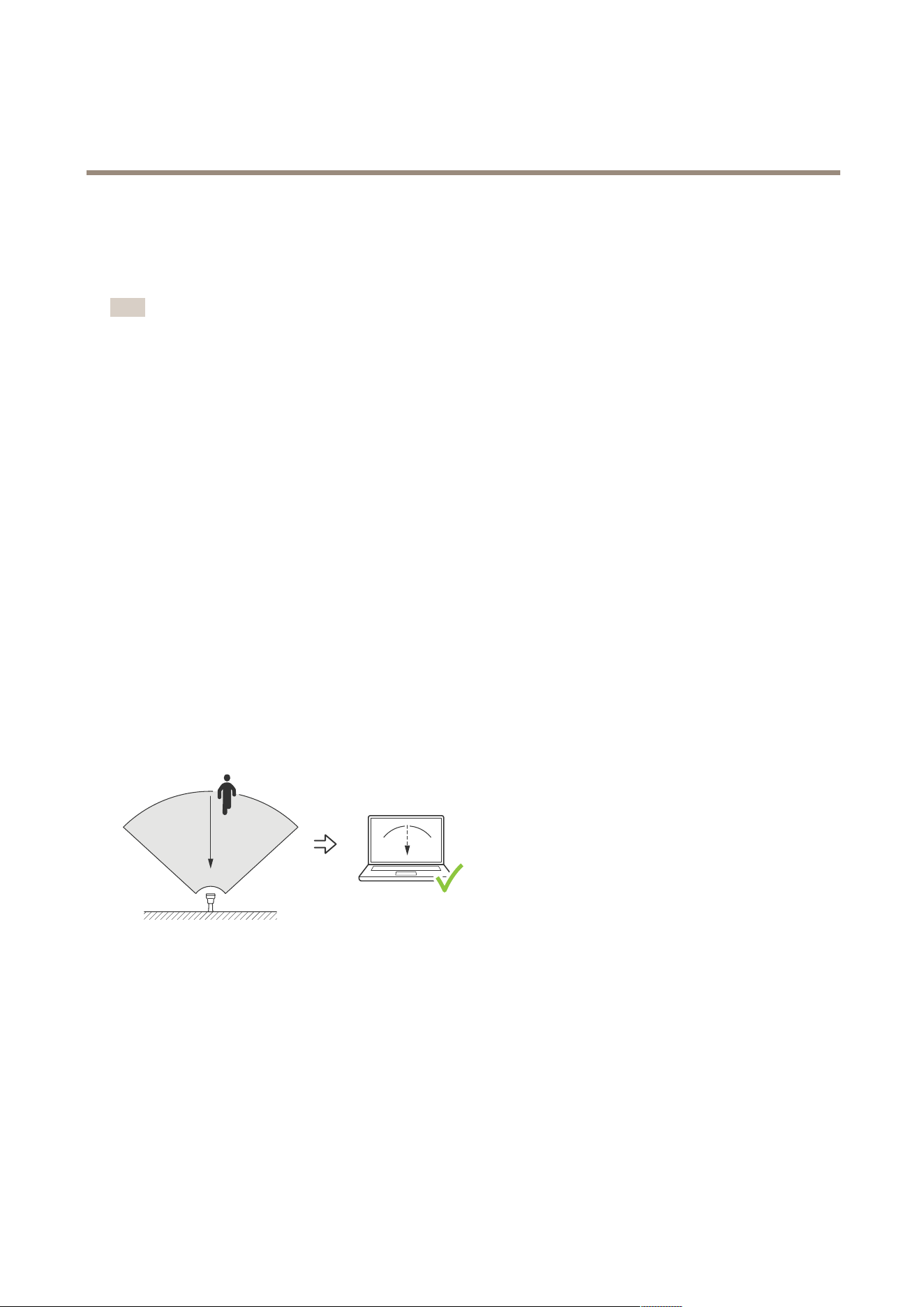
AXISD2210-VERadar
Validateyourinstallation
Validateyourinstallation
Validatetheinstallationoftheradar
Note
Thistesthelpsyoutovalidateyourinstallationundercurrentconditions.Theeverydayperformanceofyourinstallationcan
beaffectedbychangesinthescene.
Theradarisreadytouseassoonasitisinstalled,however,werecommendthatyouperformavalidationbeforeyoustarttouse
it.Thiscanincreasetheaccuracyoftheradarbyhelpingyoutoidentifyanyproblemswiththeinstallationormanageobjects
(suchastreesandreectivesurfaces)inthescene.
FirstCalibratetheradaronpage16beforeattemptingthevalidation.Thenfollowthesesteps:
Checkthattherearenofalsedetections
1.Checkthatthedetectionzoneisclearfromhumanactivity.
2.Waitforafewminutestoensurethattheradarisnotdetectinganystaticobjectsinthedetectionzone.
3.Iftherearenounwanteddetectionsyoucanskipstep4.
4.Ifthereareunwanteddetections,learnhowtolteroutcertaintypesofmovementorobjects,changethecoverage,or
adjustthedetectionsensitivityinMinimizefalsealarmsonpage19.
Checkforthecorrectsymbolanddirectionoftravelwhentheradarisapproachedfromthefront
1.Gointotheradar’swebinterfaceandrecordthesession.Forhelpdoingthis,gotoRecordandwatchvideoonpage22.
2.Startupto60m(196ft)infrontoftheradarandwalkdirectlytowardstheradar.
3.Checkthesessionintheradar’swebinterface.Thesymbolforahumanclassicationshouldappearwhenyouaredetected.
4.Checkthattheradar’swebinterfaceshowsthecorrectdirectionoftravel.
Checkforthecorrectsymbolanddirectionoftravelwhentheradarisapproachedfromtheside
1.Gointotheradar’swebinterfaceandrecordthesession.Forhelpdoingthis,gotoRecordandwatchvideoonpage22.
2.Start30m(98ft)outfromtheradarandwalkstraightacrosstheradarcoveragearea.
3.Checkthattheradar’swebinterfaceshowsthesymbolforahumanclassication.
4.Checkthattheradar’swebinterfaceshowsthecorrectdirectionoftravel.
Createatablesimilartotheonebelowtohelpyourecordthedatafromyourvalidation.
58

AXISD2210-VERadar
Validateyourinstallation
Test
Pass/Fail
Comment
1.Checkthattherearenounwanted
detectionswhentheareaisclear
2a.Checkthattheobjectisdetectedwith
thecorrectsymbolfor‘Human’whenthe
radarisapproachedfromthefront
2b.Checkthatthedirectionoftravel
iscorrectwhentheradarisapproached
fromthefront
3a.Checkthattheobjectisdetectedwith
thecorrectsymbolfor‘Human’whenthe
radarisapproachedfromtheside
3b.Checkthatthedirectionoftravel
iscorrectwhentheradarisapproached
fromtheside
Completethevalidation
Onceyouhavesuccessfullycompletedtherstpartofthevalidation,performthefollowingteststocompletethevalidationprocess.
1.Makesureyouhaveconguredyourradarandfollowedtheinstructions.
2.Forfurthervalidation,addandcalibrateareferencemap.
3.Settheradarscenariototriggerwhenanappropriateobjectisdetected.Bydefault,secondsuntiltriggerissettotwo
secondsbutyoucanchangethisinthewebinterfaceifneeded.
4.Settheradartorecorddatawhenanappropriateobjectisdetected.
SeeRecordandwatchvideoonpage22forinstructions.
5.Setthetraillifetimetoonehoursothatitwillsafelyexceedthetimeittakesforyoutoleaveyourseat,walkaroundthe
areaofsurveillance,andreturntoyourseat.Thetraillifetimewillkeepthetrackintheradar'sliveviewforthesettime
and,onceyouhavenishedthevalidation,itcanbedisabled.
6.Walkalongtheborderoftheradarcoverageareaandmakesurethatthetrailingonthesystemmatchestheroutethat
youwalked.
7.Ifyouareunsatisedwiththeresultsofyourvalidation,re-calibratethereferencemapandrepeatthevalidation.
59

AXISD2210-VERadar
Learnmore
Learnmore
Streamingandstorage
Videocompressionformats
Decidewhichcompressionmethodtousebasedonyourviewingrequirements,andonthepropertiesofyournetwork.The
availableoptionsare:
MotionJPEG
MotionJPEG,orMJPEG,isadigitalvideosequencethatismadeupofaseriesofindividualJPEGimages.Theseimagesarethen
displayedandupdatedataratesufcienttocreateastreamthatshowsconstantlyupdatedmotion.Fortheviewertoperceivemotion
videotheratemustbeatleast16imageframespersecond.Fullmotionvideoisperceivedat30(NTSC)or25(PAL)framespersecond.
TheMotionJPEGstreamusesconsiderableamountsofbandwidth,butprovidesexcellentimagequalityandaccesstoeveryimage
containedinthestream.
H.264orMPEG-4Part10/AVC
Note
H.264isalicensedtechnology.TheAxisproductincludesoneH.264viewingclientlicense.Toinstalladditionalunlicensed
copiesoftheclientisprohibited.Topurchaseadditionallicenses,contactyourAxisreseller.
H.264can,withoutcompromisingimagequality,reducethesizeofadigitalvideolebymorethan80%comparedtotheMotion
JPEGformatandbyasmuchas50%comparedtoolderMPEGformats.Thismeansthatlessnetworkbandwidthandstoragespace
arerequiredforavideole.Orseenanotherway,highervideoqualitycanbeachievedforagivenbitrate.
H.265orMPEG-HPart2/HEVC
H.265can,withoutcompromisingimagequality,reducethesizeofadigitalvideolebymorethan25%comparedtoH.264.
Note
•H.265islicensedtechnology.TheAxisproductincludesoneH.265viewingclientlicense.Installingadditionalunlicensed
copiesoftheclientisprohibited.Topurchaseadditionallicenses,contactyourAxisreseller.
•Mostwebbrowsersdon’tsupportH.265decodingandbecauseofthisthecameradoesn’tsupportitinitswebinterface.
InsteadyoucanuseavideomanagementsystemorapplicationsupportingH.265decoding.
Bitratecontrol
Bitratecontrolhelpsyoutomanagethebandwidthconsumptionofyourvideostream.
Variablebitrate(VBR)
Variablebitrateallowsthebandwidthconsumptiontovarydependingonthelevelofactivityinthescene.Themoreactivity,
themorebandwidthyouneed.Withvariablebitrateyouareguaranteedconstantimagequality,butyouneedtomakesure
youhavestoragemargins.
60
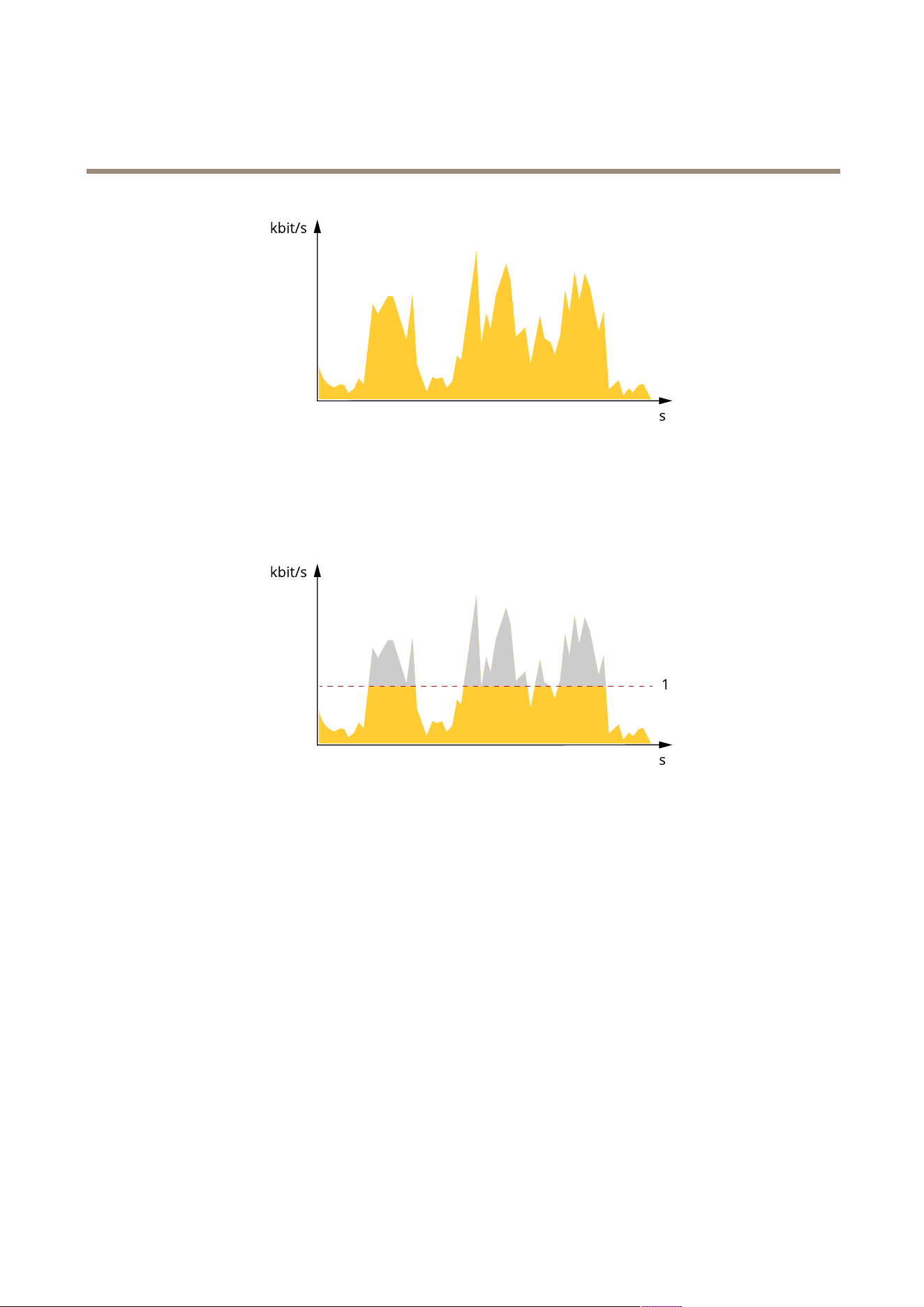
AXISD2210-VERadar
Learnmore
Maximumbitrate(MBR)
Maximumbitrateletsyousetatargetbitratetohandlebitratelimitationsinyoursystem.Youmightseeadeclineinimagequalityor
framerateastheinstantaneousbitrateiskeptbelowthespeciedtargetbitrate.Youcanchoosetoprioritizeeitherimagequality
orframerate.Werecommendthatyoucongurethetargetbitratetoahighervaluethantheexpectedbitrate.Thisgivesyoua
marginincasethereisahighlevelofactivityinthescene.
1
Targetbitrate
Averagebitrate(ABR)
Withaveragebitrate,thebitrateisautomaticallyadjustedoveralongerperiodoftime.Thisissoyoucanmeetthespeciedtarget
andprovidethebestvideoqualitybasedonyouravailablestorage.Bitrateishigherinsceneswithalotofactivity,comparedtostatic
scenes.Youaremorelikelytogetbetterimagequalitywheninsceneswithalotofactivityifyouusetheaveragebitrateoption.You
candenethetotalstoragerequiredtostorethevideostreamforaspeciedamountoftime(retentiontime)whenimagequalityis
adjustedtomeetthespeciedtargetbitrate.Specifytheaveragebitratesettingsinoneofthefollowingways:
•Tocalculatetheestimatedstorageneed,setthetargetbitrateandtheretentiontime.
•Tocalculatetheaveragebitrate,basedonavailablestorageandrequiredretentiontime,usethetargetbitratecalculator.
61
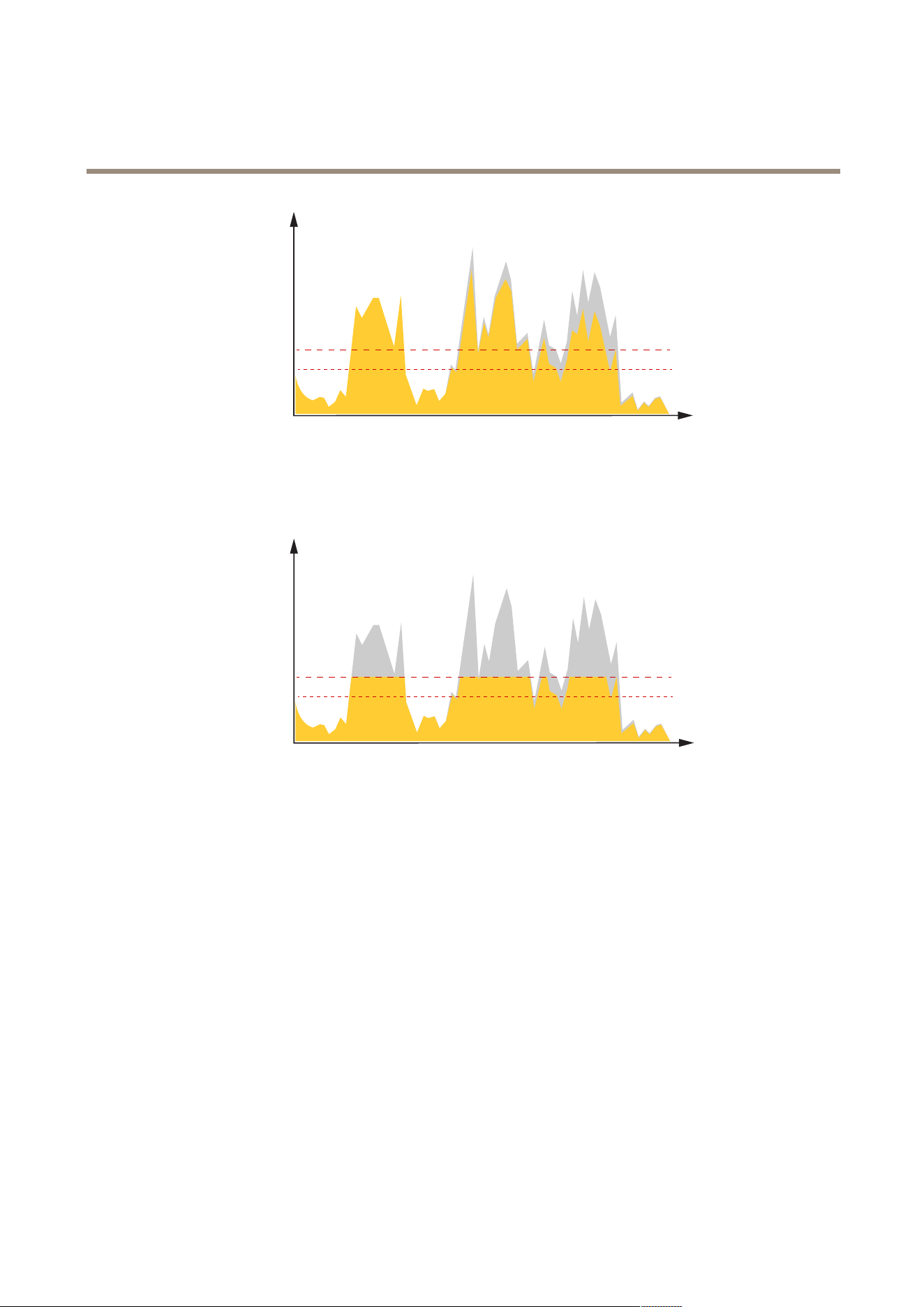
AXISD2210-VERadar
Learnmore
kbit/s
s
1
2
1
Targetbitrate
2
Actualaveragebitrate
Youcanalsoturnonmaximumbitrateandspecifyatargetbitratewithintheaveragebitrateoption.
kbit/s
s
1
2
1
Targetbitrate
2
Actualaveragebitrate
Overlays
Overlaysaresuperimposedoverthevideostream.Theyareusedtoprovideextrainformationduringrecordings,suchasatimestamp,
orduringproductinstallationandconguration.Youcanaddeithertextoranimage.
62
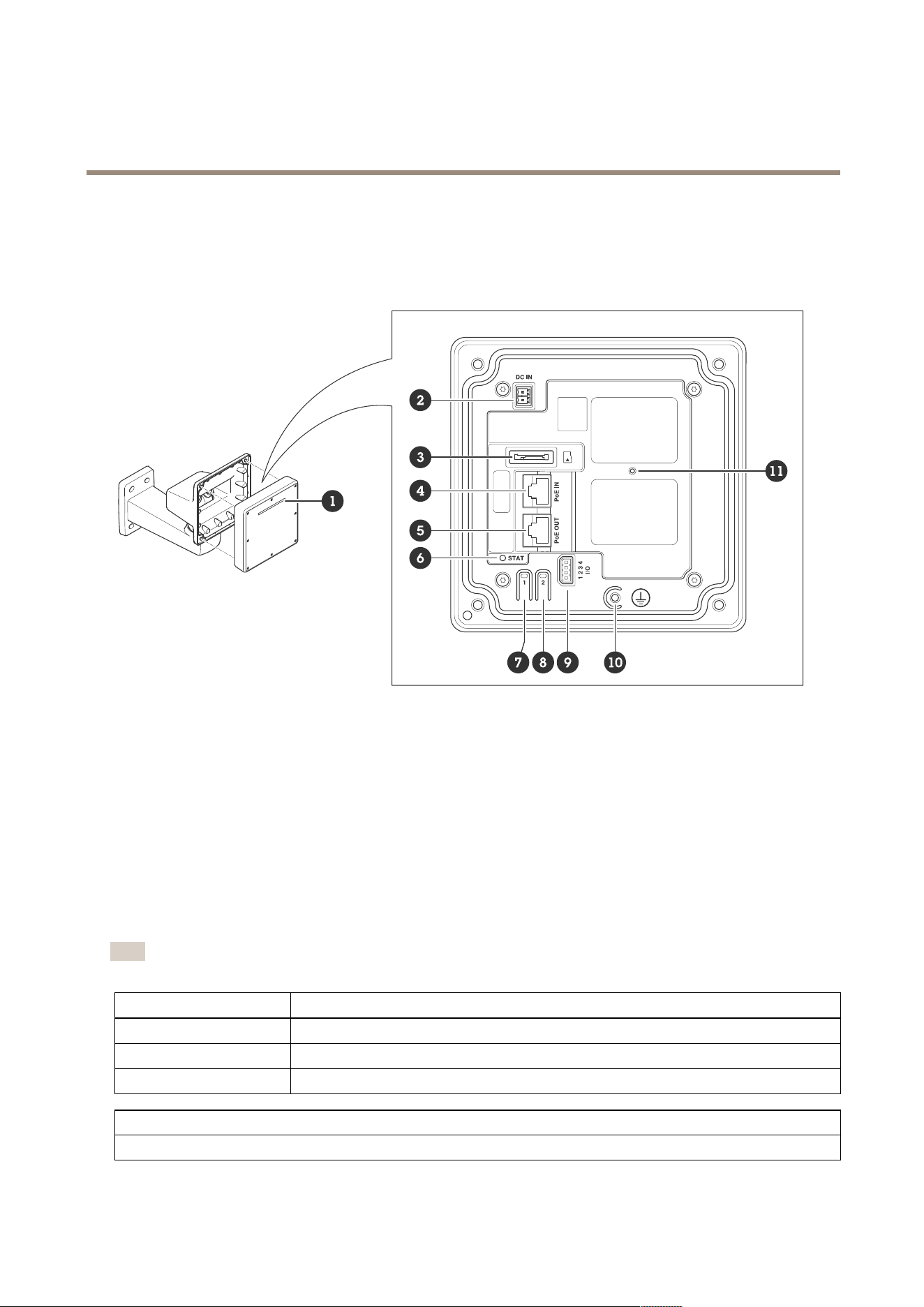
AXISD2210-VERadar
Specifications
Specifications
Productoverview
1
DynamicLEDstrip
2
Powerconnector(DC)
3
microSDcardslot
4
Networkconnector(PoEin)
5
Networkconnector(PoEout)
6
LEDstatusindicator
7
Controlbutton
8
Actionbutton
9
I/Oconnector
10
Groundingscrew
11
Resetbutton
LEDindicators
Note
TheStatusLEDcanbeconguredtoashwhileaneventisactive.
StatusLED
Indication
GreenSteadygreenfornormaloperation.
Amber
Steadyduringstartup.Flashesduringrmwareupgradeorresettofactorydefault.
RedFirmwareupgradefailure.
DynamicLEDstrippatterns
Red
63

AXISD2210-VERadar
Specifications
Blue
Green
Yellow
White
Sweepingred
Sweepingblue
Sweepinggreen
Flashingred,blue,white
SDcardslot
ThisdevicesupportsmicroSD/microSDHC/microSDXCcards.
ForSDcardrecommendations,seeaxis.com.
microSD,microSDHC,andmicroSDXCLogosaretrademarksofSD-3CLLC.microSD,microSDHC,microSDXCare
trademarksorregisteredtrademarksofSD-3C,LLCintheUnitedStates,othercountriesorboth.
Buttons
Controlbutton
Thecontrolbuttonisusedfor:
•Resettingtheproducttofactorydefaultsettings.SeeResettofactorydefaultsettingsonpage68.
•Connectingtoaone-clickcloudconnection(O3C)serviceovertheinternet.Toconnect,pressandholdthebutton
forabout3secondsuntilthestatusLEDashesgreen.
Connectors
Networkconnector(PoEin)
RJ45EthernetconnectorwithPoweroverEthernetIEEE802.3bt,Type3Class6.
Note
PoweroverEthernetIEEE802.3bt,Type3Class6,isrequiredforPoEout.Whennotpoweringaseconddevice,Power
overEthernetIEEE802.3at,Type2Class4,issufcient.
Networkconnector(PoEout)
RJ45EthernetconnectorsupplyingPoweroverEthernetIEEE802.3at,Type2Class4,max30W.
UsethisconnectortosupplypowertoanotherPoEdevice,forexampleacamera,ahornspeaker,orasecondAxisradar.
64
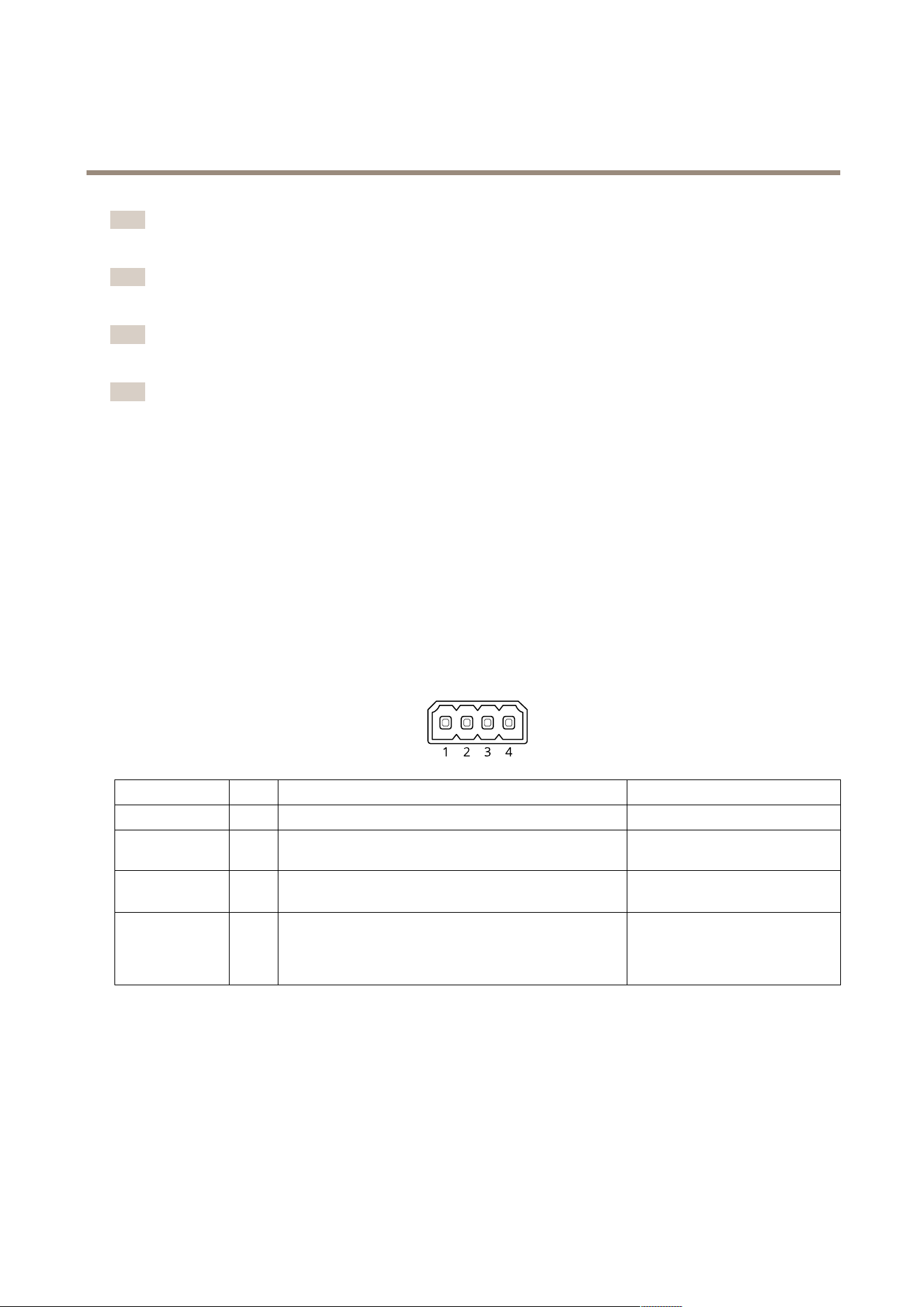
AXISD2210-VERadar
Specifications
Note
ThePoEoutputisenabledwhentheradarispoweredbya60Wmidspan(PoweroverEthernetIEEE802.3bt,type3).
Note
Iftheradarispoweredbya30WmidspanorDCpower,thePoEoutisdisabled.
Note
MaximumEthernetcablelengthis100mintotalforPoEoutandPoEincombined.YoucanincreaseitwithaPoEextender.
Note
IftheconnectedPoEdevicerequiresmorethan30W,youcanadda60WmidspanbetweenthePoEoutportontheradar
andthedevice.ThemidspanwillpowerthedevicewhiletheradarwillprovidetheEthernetconnection.
I/Oconnector
UsetheI/Oconnectorwithexternaldevicesincombinationwith,forexample,eventtriggeringandalarmnotications.Inadditionto
the0VDCreferencepointandpower(DCoutput),theI/Oconnectorprovidestheinterfaceto:
Digitalinput-Forconnectingdevicesthatcantogglebetweenanopenandclosedcircuit,forexamplePIRsensors,door/window
contacts,andglassbreakdetectors.
Supervisedinput-Enablespossibilitytodetecttamperingonadigitalinput.
Digitaloutput-ForconnectingexternaldevicessuchasrelaysandLEDs.ConnecteddevicescanbeactivatedbytheVAPIX®
ApplicationProgrammingInterface,throughaneventorfromthedevice’swebinterface.
4-pinterminalblock
FunctionPinNotes
Specications
DCground
1
0VDC
DCoutput
2
Canbeusedtopowerauxiliaryequipment.
Note:Thispincanonlybeusedaspowerout.
12VDC
Maxload=25mA
DigitalInput
3
Connecttopin1toactivate,orleaveoating(unconnected)
todeactivate.
0tomax30VDC
DigitalOutput
4
Internallyconnectedtopin1(DCground)whenactive,
andoating(unconnected)wheninactive.Ifusedwithan
inductiveload,e.g.,arelay,connectadiodeinparallelwith
theload,toprotectagainstvoltagetransients.
0tomax30VDC,opendrain,
100mA
Example
65
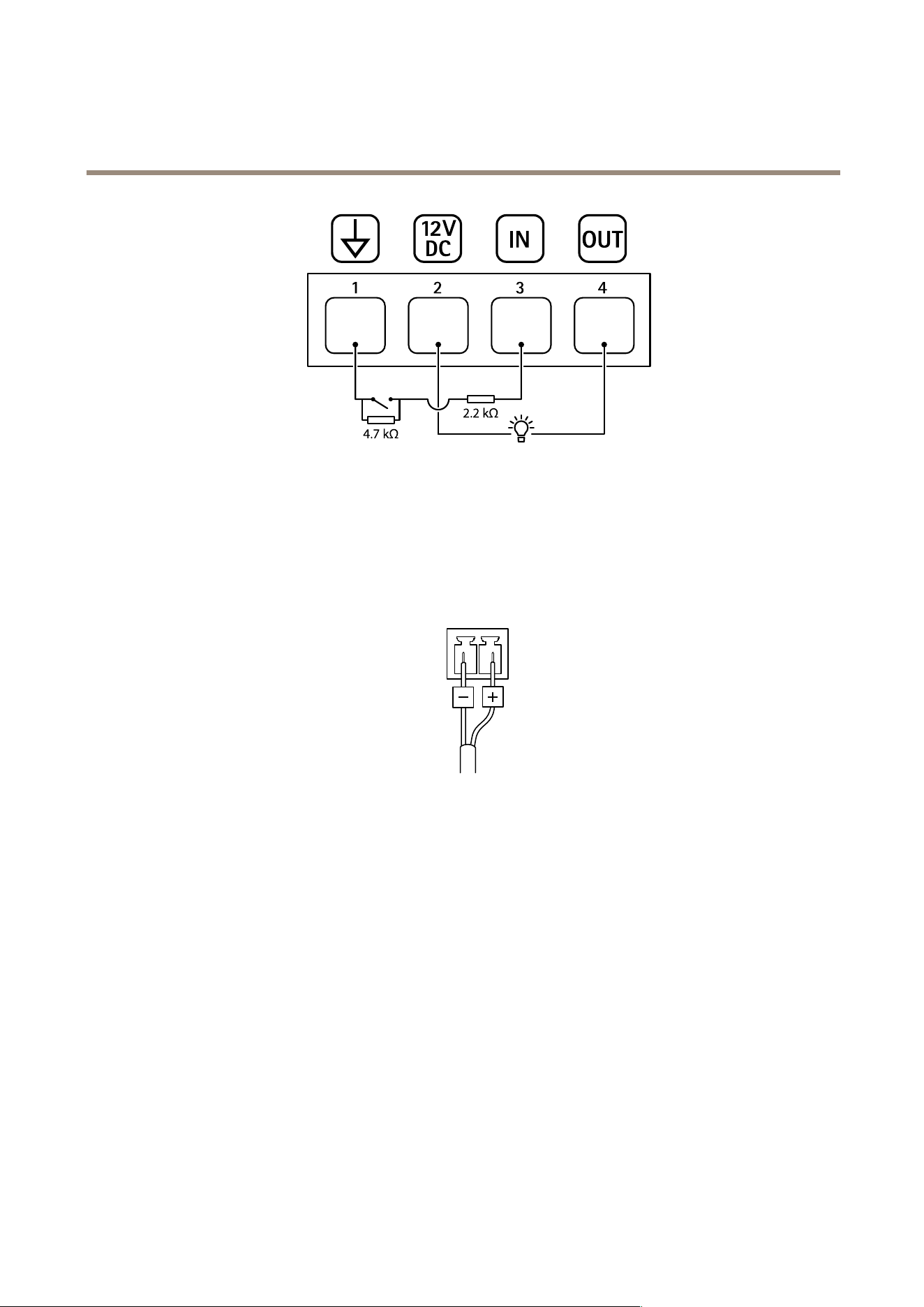
AXISD2210-VERadar
Specifications
1
DCground
2
DCoutput12V,max25mA
3
Supervisedinput
4
Digitaloutput
Powerconnector
2-pinterminalblockforDCpowerinput.UseaSafetyExtraLowVoltage(SELV)compliantlimitedpowersource(LPS)witheither
aratedoutputpowerlimitedto≤100Woraratedoutputcurrentlimitedto≤5A.
66

AXISD2210-VERadar
Cleaningrecommendations
Cleaningrecommendations
NO NO
NO
TICE TICE
TICE
Neveruseharshdetergent,forexamplegasoline,benzene,oracetone.
1.Useacanofcompressedairtoremoveanydustorloosedirtfromthedevice.
2.Ifnecessary,cleanthelenswithasoftclothdampenedwithlukewarmwater.
Note
Avoidcleaningindirectsunlightoratelevatedtemperatures,asthismaycausestainswhenthewaterdropletsdry.
67

AXISD2210-VERadar
Troubleshooting
Troubleshooting
Resettofactorydefaultsettings
Important
Resettofactorydefaultshouldbeusedwithcaution.Aresettofactorydefaultresetsallsettings,includingtheIPaddress,to
thefactorydefaultvalues.
Toresettheproducttothefactorydefaultsettings:
1.Disconnectpowerfromtheproduct.
2.Pressandholdthecontrolbuttonwhilereconnectingpower.SeeProductoverviewonpage63.
3.Keepthecontrolbuttonpressedfor15–30secondsuntilthestatusLEDindicatorashesamber.
4.Releasethecontrolbutton.TheprocessiscompletewhenthestatusLEDindicatorturnsgreen.Theproducthasbeenreset
tothefactorydefaultsettings.IfnoDHCPserverisavailableonthenetwork,thedefaultIPaddressis192.168.0.90.
5.UsetheinstallationandmanagementsoftwaretoolstoassignanIPaddress,setthepassword,andaccessthedevice.
Theinstallationandmanagementsoftwaretoolsareavailablefromthesupportpagesonaxis.com/support.
Youcanalsoresetparameterstofactorydefaultthroughthedevice’swebinterface.GotoMaintenance>Factorydefaultand
clickDefault.
Checkthecurrentrmwareversion
Firmwareisthesoftwarethatdeterminesthefunctionalityofnetworkdevices.Whenyoutroubleshootaproblem,werecommend
youtostartbycheckingthecurrentrmwareversion.Thelatestrmwareversionmightcontainacorrectionthatxesyour
particularproblem.
Tocheckthecurrentrmware:
1.Gotothedevice’swebinterface>Status.
2.SeethermwareversionunderDeviceinfo.
Upgradethermware
Important
•Preconguredandcustomizedsettingsaresavedwhenyouupgradethermware(providedthatthefeaturesareavailablein
thenewrmware)althoughthisisnotguaranteedbyAxisCommunicationsAB.
•Makesurethedeviceremainsconnectedtothepowersourcethroughouttheupgradeprocess.
Note
Whenyouupgradethedevicewiththelatestrmwareintheactivetrack,theproductreceivesthelatestfunctionality
available.Alwaysreadtheupgradeinstructionsandreleasenotesavailablewitheachnewreleasebeforeyouupgradethe
rmware.Tondthelatestrmwareandthereleasenotes,gotoaxis.com/support/device-software.
1.Downloadthermwareletoyourcomputer,availablefreeofchargeataxis.com/support/device-software.
2.Logintothedeviceasanadministrator.
3.GotoMaintenance>FirmwareupgradeandclickUpgrade.
Whentheupgradehasnished,theproductrestartsautomatically.
68

AXISD2210-VERadar
Troubleshooting
Technicalissues,clues,andsolutions
Ifyoucan’tndwhatyou’relookingforhere,trythetroubleshootingsectionataxis.com/support.
Problemsupgradingthermware
FirmwareupgradefailureIfthermwareupgradefails,thedevicereloadsthepreviousrmware.Themostcommonreason
isthatthewrongrmwarelehasbeenuploaded.Checkthatthenameofthermwarele
correspondstoyourdeviceandtryagain.
Problemsafterrmware
upgrade
Ifyouexperienceproblemsafterarmwareupgrade,rollbacktothepreviouslyinstalledversion
fromtheMaintenancepage.
ProblemssettingtheIPaddress
Thedeviceislocatedona
differentsubnet
IftheIPaddressintendedforthedeviceandtheIPaddressofthecomputerusedtoaccessthe
devicearelocatedondifferentsubnets,youcannotsettheIPaddress.Contactyournetwork
administratortoobtainanIPaddress.
TheIPaddressisbeingused
byanotherdevice
DisconnecttheAxisdevicefromthenetwork.Runthepingcommand(inaCommand/DOSwindow,
typepingandtheIPaddressofthedevice):
•Ifyoureceive:Replyfrom<IPaddress>:bytes=32;time=10...
thismeansthattheIPaddressmayalreadybeinusebyanotherdeviceonthenetwork.
ObtainanewIPaddressfromthenetworkadministratorandreinstallthedevice.
•Ifyoureceive:Requesttimedout,thismeansthattheIPaddressisavailable
forusewiththeAxisdevice.Checkallcablingandreinstallthedevice.
PossibleIPaddressconict
withanotherdeviceonthe
samesubnet
ThestaticIPaddressintheAxisdeviceisusedbeforetheDHCPserversetsadynamicaddress.
ThismeansthatifthesamedefaultstaticIPaddressisalsousedbyanotherdevice,theremay
beproblemsaccessingthedevice.
Thedevicecan’tbeaccessedfromabrowser
Can’tlogin
WhenHTTPSisenabled,ensurethatthecorrectprotocol(HTTPorHTTPS)isusedwhenattempting
tologin.Youmayneedtomanuallytypehttporhttpsinthebrowser’saddresseld.
Ifthepasswordfortherootaccountislost,thedevicemustberesettothefactorydefaultsettings.
SeeResettofactorydefaultsettingsonpage68.
TheIPaddresshasbeen
changedbyDHCP
IPaddressesobtainedfromaDHCPserveraredynamicandmaychange.IftheIPaddresshasbeen
changed,useAXISIPUtilityorAXISDeviceManagertolocatethedeviceonthenetwork.Identify
thedeviceusingitsmodelorserialnumber,orbytheDNSname(ifthenamehasbeencongured).
Ifrequired,astaticIPaddresscanbeassignedmanually.Forinstructions,gotoaxis.com/support.
Certicateerrorwhenusing
IEEE802.1X
Forauthenticationtoworkproperly,thedateandtimesettingsintheAxisdevicemustbe
synchronizedwithanNTPserver.GotoSystem>Dateandtime.
Thedeviceisaccessiblelocallybutnotexternally
Toaccessthedeviceexternally,werecommendyoutouseoneofthefollowingapplicationsforWindows
®
:
•AXISCompanion:freeofcharge,idealforsmallsystemswithbasicsurveillanceneeds.
•AXISCameraStation:30-daytrialversionfreeofcharge,idealforsmalltomid-sizesystems.
Forinstructionsanddownload,gotoaxis.com/vms.
69

AXISD2210-VERadar
Troubleshooting
Can’tconnectoverport8883withMQTToverSSL
Therewallblockstrafc
usingport8883asit’s
deemedinsecure.
Insomecasestheserver/brokermightnotprovideaspecicportforMQTTcommunication.Itmay
stillbepossibletouseMQTToveraportnormallyusedforHTTP/HTTPStrafc.
•Iftheserver/brokersupportsWebSocket/WebSocketSecure(WS/WSS),typicallyon
port443,usethisprotocolinstead.Checkwiththeserver/brokerprovidertoseeif
WS/WSSissupportedandwhichportandbasepathtouse.
•Iftheserver/brokersupportsALPN,theuseofMQTTcanbenegotiatedoveranopen
port,suchas443.Checkwithyourserver/brokerprovidertoseeifALPNissupported
andwhichALPNprotocolandporttouse.
Performanceconsiderations
Whensettingupyoursystem,itisimportanttoconsiderhowvarioussettingsandsituationsaffecttheamountofneededbandwidth
(thebitrate)required.
Thefollowingfactorsarethemostimportanttoconsider:
•Heavynetworkutilizationduetopoorinfrastructureaffectsthebandwidth.
Contactsupport
Contactsupportataxis.com/support.
70

UsermanualVer.M4.4
AXISD2210-VERadar
Date:January2024
©AxisCommunicationsAB,2023-2024
Partno.T10193646