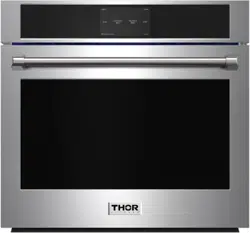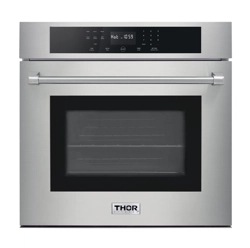

COOK
LIKE
A
GOD
30 INCH PROFESSIONAL ELECTRIC WALL OVEN
HEW300 1

30 INCH PROFESSIONAL
ELECTRIC WALL OVEN
USE AND CARE MANUAL
HEW3001

TABLE OF CONTENTS
Important Safety Tips ................................................................................................ 1 - 25
Product Dimensions ....................................................................................................... 26
Installation instructions .......................................................................................... 27 - 34
install oven handle .................................................................................................. 35 - 36
Introducing your new oven ............................................................................................. 37
before you begin ............................................................................................................. 38
operating the oven .................................................................................................. 39 - 60
maininting the appliance ........................................................................................ 61 - 68
trouble shooting ...................................................................................................... 69 - 74
information codes ................................................................................................... 75 - 76
warranty ......................................................................................................................... 77

IMPORTANT SAFETY TIPS
Read and follow all instructions before using your oven to prevent the risk of
fire,electric shock,personal injury,or damage when using the oven.
This guide does not cover all possible conditions that may occur.
Always contact your service agent or the manufacturer about problems that you do
not understand.
WHAT YOU NEED TO KNOW ABOUT SAFETY INSTRUCTIONS
Warnings and important safety instructions in this manual do not cover all poss
conditions and situations that may occur. It is your responsibility to use common
sense, caution, and care when installing, maintaining, and operating your oven
Important safety symbols and precautions
What the icons and signs in this user manual mean:
WARNING
Hazards or unsafe practices that may result in severe personal injury or death.
CAUTION
Hazards or unsafe practices that may result in minor personal injury or property damage.
SAVE THESE INSTRUCTIONS
1

IMPORTANT SAFETY TIPS
SAVE THESE INSTRUCTIONS
CAUTION
To reduce the risk of fire,explosion,electric shock,or personal injury when using your
oven, follow these basic safety precautions
Do NOT attempt.
Do NOT disassemble.
Do NOT touch.
Follow directions explicitly
Unplug the power plug from the wall socket.
Make sure the machine is grounded to prevent electric shock.
Call a Thorkitchen service center for help.
These warning signs are here to prevent injury to you and others
Please follow them explicitly
After reading this section, keep it in a safe place for future reference.
2

IMPORTANT SAFETY TIPS
STATE OF CALIFORNIA PROPOSITION 65 WARNING (US ONLY)
WARNING: This product contains chemicals known to the State of
California to cause cancer and birth defects or other reproductive harm.
FOR YOUR SAFETY
When using electrical appliances, you should follow basic safety precautions, including
the following:
CAUTION
• Use this appliance only for its intended purpose as described in this Owner's Manual.
• Potentially hot surfaces include the oven vent opening, surfaces near the
opening, and crevices around the oven door.
Proper Installation - Be sure your appliance is properly installed and grounded by a
qualified technician.
User servicing - Do not repair or replace any part of the appliance unless specifically
recommended in this manual.All other servicing should be referred to a qualifien
technician.
3

IMPORTANT SAFETY TIPS
- Always disconnect the power to the appliance before servicing by removing the fuse
or switching off the circuit breaker.
• Do not enter the oven.
• Do not leave children alone. Never leave children alone or unattended
in an area where this appliance is in use. They should never be allowed
to sit or stand on any part of the appliance.
• Never use your appliance for wanning or heating the room.
• Do not use water on grease fires.Tum off the oven to avoid spreading the flames.
Smother the fire or flames by dosing the door or use a dry chemical, baking soda, or
foam-type extinguisher.
• Avoid scratching or striking the glass doors and the control panel. Doing
so may lead to glass breakage. Do not cook on a product with broken
glass.Shock, fire, or cuts may occur.
4

IMPORTANT SAFETY TIPS
• If there is a fire in the oven during self-cleaning,tum the oven off and wait for the fire
to go out. Do not force the door open.The introduction of fresh air at self-cleaning
temperatures may lead to a burst of flame from the oven.
Failure to follow these instructions may result in severe bums.
• If the oven is heavily soiled with oil, self-c|ean the oven before using the
oven again. Leaving the oil in place creates a risk of fire.
• Wipe up heavy soil on the oven bottom with a paper tower or rag before self-cleaning.
Self-cleaning the oven when there is heavy soil on the oven bottom requires longer
cleaning cycles and produces more smoke.
• Storage in or on the appliance.Do not store flammable. materials in the oven or near
the surface units. Be sure all packing materials are removed from the appliance
before operating it. Keep plastics, clothes, and paper away from parts of the
appliance that may become hot.
• Wear proper apparel.Never wear loose-fitting or hanging garments while using the
appliance.
5

IMPORTANT SAFETY TIPS
• Use only dry potholders. Placing moist or damp potholde on hot surfaces may result
in bums from steam. Do not let the potholder touch hot heating elements. Do not use
a towel or other bulky doth instead of a potholde. r each children not to play with the
controls or any other part of the oven.
• For your safety, do not use high-pressure water cleaners or steam jet cleaners to
clean any part of the oven.
• If the power cord is damaged, it must be replaced by the manufacture parts service
agent or similarly qualified persons to avoid creating a hazard.
• The appliance is not intended for use by persons {induding children) with reduced
physical, sensory or mental capabilities, or lack of experience and knowledge, unless
they have been given supervision or instruction concerning use of the appliance by a
person responsible for their safety.
6

IMPORTANT SAFETY TIPS
ELECTRICAL SAFETY
• Use only the factory installed flexible power cord to connect to the power supply. Do
not use a 3rd party power supply cord kit.
• The appliance should be serviced only by qualified service personnel. Repairs carried
out by unqualified individuals may cause injury or a serious malfunction. If your
appliance is in need of repair, contact a Thorkitchen authorized service center. Failure
to follow these instructions may result in damage and void the warranty.
• Flush - mounte d appliances may be operated only after they have been installed in
cabinets and workplaces that conform to the relevant standards. This ensures that
the applianc es are installed in compliance with the appropriate safety standards.
• If your appliance malfunctions or if fractures, cracks, or splits appear:
• Switch off the oven.
• Unplug the oven from the AC wall outlet.
• Contact your local Thorkitchen service center.
7

IMPORTANT SAFETY TIPS
WARNING
• Ensure that the appliance is switched off before replacing the lamp to avoid
the possibility of electric shock.
CHILD SAFETY
WARNING
• This appliance is not intended for use by young children or infirm persons without
the adequate supervision of a responsible adult.
• Young children should be supervised to ensure that they do not play with the
appliance.
• Keep children away from the door when opening or dosing it as they may bump
themselves on the door or catch their fingers in the door.
• During self-c|eaning, the surfaces may get hotter than usual. Keep small children
away from the oven when it is in the selfdeaning mode.
WARNING
Accessible parts may beoome hot during use. To avoid bums, young children
should be kept away.
8

IMPORTANT SAFETY TIPS
OVEN
DO NOT TOUCH THE HEATING ELEMENTS OR INTERIOR SURFACES OF THE OVEN.
Heating elements may be hot even though they are dark in color. Interior surfaces
of an oven become hot enough to cause bums. During and after use,do not touch or
let clothing or other flammable materials contact the heating elements or interior
surfaces of the oven until they have had sufficient time to.
• Other surfaces of the appliance may become hot enough to cause bums.
Among these surfaces are oven vent openings and surfaces near
these openings, the oven door, and the window of the oven door.
• Do not heat unopened food containers. The build-up of pressure may
cause the container to burst and result in injury.
• Do not use the oven to dry newspapers. If overheated,newspapers
can catch fire.
• Do not use the oven for a storage area. Items stored in an oven can ignite.
9

IMPORTANT SAFETY TIPS
• Use care when opening the door. Let hot air or steam escape before you remove food
from or put food into the oven.
• Protective liners. Do not use aluminum foil to line the oven bottoms, except as
suggested in this manual. Improper installation of these liners may result in a risk of
electric shock or fire.
• Placement of oven racks. Always place oven racks in the desired location while the
oven is cool. If the rack must be moved while the oven is hot, use potholders. Do not
let the potholders come in contact with the hot heating element in the oven.
• Do not allow aluminum foil or a meat probe to contact the heating elements.
During use, the appliance becomes hot. Care should be taken to avoid touching heating
elements inside the oven.
• Do not use harsh abrasive deaners or sharp metal scrapers to dean the oven door
glass. They can scratch the surface which may result in the glass shattering.
10

IMPORTANT SAFETY TIPS
CAUTION
Do not attempt to operate the oven during a power failure. If the power fails, always
tum the oven off. If the oven is not turned off and the power returns, the oven may
begin to operate again. Food left unattended could catch fire or spoil.
SELF-CLEANING OVENS
Do not clean the door gasket. The door gasket is essential for a good seal. Care should
be taken not to rub, damage, or move the gasket.
• Never keep pet birds in the kitchen. Birds are extremely sensitive to the fumes
released during an oven self-clean cyde. Fumes may be harmful or fatal to birds.
Move birds to a well-ventilated room.
• Clean only the parts listed in this manual in the self clean cycle.
Before self-cleaning the oven, remove the partition, rack, utensils, and any food.
• Before operating the self-c|ean cycle, wipe grease and food soils from the oven.
Excessive amounts of grease may ignite, leading to smoke damage to your home.
11

IMPORTANT SAFETY TIPS
• Do not use any commercial oven cleaner or oven liner protective coating of any kind
in or on the outside of the oven.
• Remove the nickel oven shelves from the oven before you begin the self-cleaning
cycle or they may discolor.
• If the self-c|eaning mode malfunctions, tum the oven off and disconnect the power
supply. Have it serviced by a qualified technician.
• Excess spillage must be removed before you run the selfcleaning cyde.
12

CRITICAL INSTALLATION WARNINGS
IMPORTANT SAFETY TIPS
WARNING
• This appliance must be installed by a qualified technician or service company.
• Failing to have a qualified technician install the oven may result in electric shock,
fire, an explosion, problems with the product, or injury.
• Unpack the oven, remove all packaging material and examine the oven for any
damage such as dents on the interior or ext or of the oven, broken door latches,
cracks in the door, or a door that is not lined up correctly. If there is any damage, do
not operate the oven and notify your dealer immediately.
• Keep all packaging materials out of the reach of children. Children may use them for
play and injure themselves.
This appliance must be properly grounded.
• Do not ground the appliance to a gas pipe, plastic water pipe, or telephone line.
• This may result in electric shock, fire, explosion or problems with the product.
13

IMPORTANT SAFETY TIPS
Do not cut or remove the ground prong from the power cord under any circumstances.
• Connect the oven to a circuit that provides the collect amperage.
• Do not install this appliance in a humid, oily or dusty location, or in a location exposed
to direct sunlight or water (rain drops).
• This may result in electric shock or fire.
• Do not use a damaged power cord or loose wall socket.
• This may result in electric shock or fire.
• Do not pull or excessively bend the power cord.
• Do not twist or tie the power cord.
• Do not hook the power cord over a metal object, place a heavy object on the power
cord, or insert the power cord between objects.
• This may result in electric shock or fire.
If the power cord is damaged, contact your nearest Thorkitchen service center.
14

IMPORTANT SAFETY TIPS
CRITICAL USAGE WARNING
CAUTION
• If the appliance is flooded by any liquid, please contact your nearest Thorkitchen
service center. Failing to do so may result in electric shock or fire.
• If the appliance produces a strange noise, a burning smell, or smoke, with the
appliance. unplug the power plug immidiately and contact your nearest Thorkitchen
service center.
• Failing to do so may result in electric shock or fire
• In the event of a gas leak (such as propane gas, LP gas, etc.), ventilate the area
immediately. Do not touch the power cord. Do not touch the appliance.
• A spark may result in an explosion or fire.
Take care not to contact the oven door, heating elements, or any of the other hot parts
with your body while cooking or just after cooking.
• Failing to do so may result in bums.
• If materials inside the oven should ignite, keep the oven door closed, tum the oven off
and disconnect the power cord, or shut off power at the fuse or circuit breaker panel.
If the door opened,the fire may spread.
SAVE THESE INSTRUCTIONS
15

IMPORTANT SAFETY TIPS
SAVE THESE INSTRUCTIONS
• Always observe safety precautions when using your oven. Never try to repair the oven
on your own - there is dangerous voltage inside. If the oven needs to be repaired, con
tact an authorized Thorkitchen serv ice center n ear you.
• If you use the appliance when it is contaminated by foreign substances
such as food waste, it may result in a problem with the appliance.
• Take care when removing the wrapping from food taken out of the appliance.
• If the food is hot, hot steam may be emitted abruptly when you remove the wrapping
and this may result in bums.
• Do not attempt to repair, disassemble, or modify the appliance yourself.
• Since a high voltage current enters the product chassis,it may result in electric shock
or fire.
• When a repair is needed, contact your nearest Thorkitchen service center.
If any foreign substance such as water has entered the appliance, contact your nearest
Thorkitchen service center.
• Failing to do so may result in electric shock or fire.
16

Do not touch the power cord with wet hands.
• This may result in electric shock.
• Do not tum the appliance off while an operation is in progress.
• This may cause a spark and result in electric shock or fire.
• Do not let children or any person with reduced physical, sensory, or mental
capabilities use this appliance unsupervised.
• Make sure that the appliance’s controls and cooking areas are out of the reach of
children.
• Failing to do so may result in electric shock, bums, or in injury.
• Do not touch the inside of the appliance immediately after cooking. The inside of the
appliance will be hot.
• Failing to do so may result in bums.
• Do not use or place flammable sprays or objects near the oven.
• Flammable items or sprays can cause fires or an explosion.
IMPORTANT SAFETY TIPS
17

IMPORTANT SAFETY TIPS
• Do not insert fingers, foreign substances, or metal objects such as pins or needles
into inlets, outlets, or holes. If foreign substances are inserted into any of these holes,
contact your product provider or nearest Thorkitchen service center.
• Do not tamper with or make any adjustments or repair to the door.
Under no circumstances should you remove the door or outer shell of
the oven.
• Do not store or use the oven outdoors.
• Never use this appliance for purposes other than cooking.
• Using the appliance for any purpose other than cooking may result in fire.
• Open the cap or stopper of sealed containers (herb tonic tea bottle, baby bottle, milk
bottle and so on) before heating them. Make a hole in food items that have shells
(eggs, chestnuts, etc) with a knife before cooking them.
• Failing to do so may result in bums or in injury.
• Never heat plastic or paper containers and do not use them for cooking.
• Failing to do so may result on fire.
18

IMPORTANT SAFETY TIPS
• Do not heat food wrapped in paper from magazines, newspapers, etc.
• This may result in fire.
• Do not open the door when the food in the oven is buming.
• If you open the door,it causes an inflow of oxygen and may cause the food to ignite.
• Do not apply excessive pressure to the door or the inside of the appliance. Do not
strike the door or the inside or the appliance.
• Hanging on to the door may result in the product falling and cause serious injury.
• If the door is damaged, do not use the appliance. Contact a Thorkitchen service
center.
• Do not hold food in your bare hands during or immidiately after cooking.
• Use cooking gloves. The food may be very hot and you could bum yourself.
• As the handle and oven surfaces may be hot enough to cause bums after cooking,
use cooking gloves to protect your hands from bums.
19

IMPORTANT SAFETY TIPS
USAGE CAUTIONS
CAUTION
• If the surface is cracked, tum the appliance off.
• Failing to do so may result in electric shock.
• Dishes and containers can become hot. Handle with care.
• Hot foods and steam can cause bums. Carefully remove container coverings, directing
the steam away your hands and face.
• Remove lids from baby food jars before heating. After heating baby food, stir well to
distribute the heat evenly. Always test the temperature by tasting before feeding the
baby. The glass jar or the surface of the food may appear to be cooler than the
interior, which can be hot enough to bum an infant’s mouth.
• Take care as beverages or food may be very hot after heating.
• Especially when feeding a child, make sure the food or beverage has cooled
sufficiently.
20

IMPORTANT SAFETY TIPS
• Takecare when heating liquids such as water or other beverages.
• Make sure to stir during or after cooking.
• Avoid using a slippery container with a narrow neck.
• Wait at least 30 seconds after heating before removing the heated liquid.
• Failing to do so may result in an abrupt overflow of the contents and cause bums.
• Do not stand on top of the appliance or place objects (such as laundry, an oven cover,
lighted candles, lighted cigarettes, dishes, chemcials, metal objects, etc.) on the
appliance.
• Items, such as a cloth, may get caught in the door.
• This may result in electric shock,fire,problems with the product, or injury.
• Do not operate the appliance with wet hands.
• This may result in electric shock.
• Do not spray volatile substances such as insecticide onto the surface of the
appliance.
• As well as being harmful to humans, it may also result in electric shock,fire,or
problems with the product.
21

IMPORTANT SAFETY TIPS
• Do not put your face or body dose to the appliance while cooking or when opening
the door just after Cooking.
Take care that children do not come too close to the appliance.
• Failing to do so may result in children burning themselves.
• Do not place food or heavy objects over the edge of the oven door.
• If you open the door, the food or object may fall and this may result in bums or injury.
• Do not abruptly CooI the door, the inside of the appliance, or a dish by pouring water
over it during or just after Cooking.
• This may result in damage to the appliance. The steam or water spray may result in
bums or injury.
• Do not operate while empty except for self-c|eaning.
• Do not defrost frozen beverages in narrow-necked bottles. The bottles can break
• Do not scratch the glass of the oven door with a sharp object.
• This may result in the glass being damaged or broken
• Do not store anything directly on top of the appliance when it is in operation.
22

IMPORTANT SAFETY TIPS
• Do not use sealed containers. Remove seals and lids before cooking. Sealed
containers can explode due to the build up of pressure even after the oven has been
turned off.
Take care that food you are cooking in the oven does not come into contact with the
heating element.
• This may result in fire.
• Do not over-heat food.
• Ovemeating food may result in fire.
• Use caution when opening or closing the door. Your fingers may be pinched, resulting
in physical injury.
• The door reveals wires at the bottom for connecting LED lights. So use caution not to
pull or cut the wires when handling the door.
23

IMPORTANT SAFETY TIPS
CRITICAL CLEANING WARNINGS
CAUTION
• Do not dean the appliance by spraying water directly on to it.
• Do not use benzene, thinner, or alcohol to dean the appliance.
• This may result in discoloration, deformation, damage,electric shock,or fire.
• Takecare not to hurt yourself when cleaning the appliance (externally or internally).
• You may hurt yourself on the sharp edges of the appliance.
• Do not dean the appliance with a steam cleaner.
• This may result in corrosion.
• Keep the inside of the oven clean. Food or spattered oils stuck to the oven walls or
floor can cause paint damage and reduce the effciency of the oven.
24

IMPORTANT SAFETY TIPS
IMPORTANT: Observe all governing codes and ordinances.
• Cabinet opening dimensions that are shown must be used.
Given dimensions provide minimum dearance with oven.
• Recessed installation area must provide complete enclosure around the
recessed portion of the oven.
• Grounded electrical supply is requier d. See "Electrical Requirements"
section.
• Electrical supply junction box should be located 3” (7.6 cm) maximum below the
support surface when the oven is installed in a wall cabinet. A 1” (2.5 cm)
minimum diameter hole should have been drilled in the right rear or left rear
comer of the support surface to pass the appliance cable through to the junction
box.
For under counter installation, it is recommended that the junction box be located
in the adjacent right or left cabinet. If you are installing the junction box on rear
wall behind oven, it is recommended that the junction box be recessed and
located in the upper Right of the cabinet
• Oven support surface must be solid,level and flush with bottom of cabinet
cutout.
• Floor must be able to support a single oven weight of 199 lb (90 Kg).
• Floor must be able to support a double oven weight of 331 lb (150 Kg).
IMPORTANT: To avoid damage to your cabinets, check with your builder or
cabinet supplier to make sure that the materials used will not discolor, delaminate
or sustain other damage. This oven has been designed in accordance with the
requirements of UL and CSA lntemational and complies with the maximum
allowable wood cabinet temperatures of 194 °F (90 °C)
25
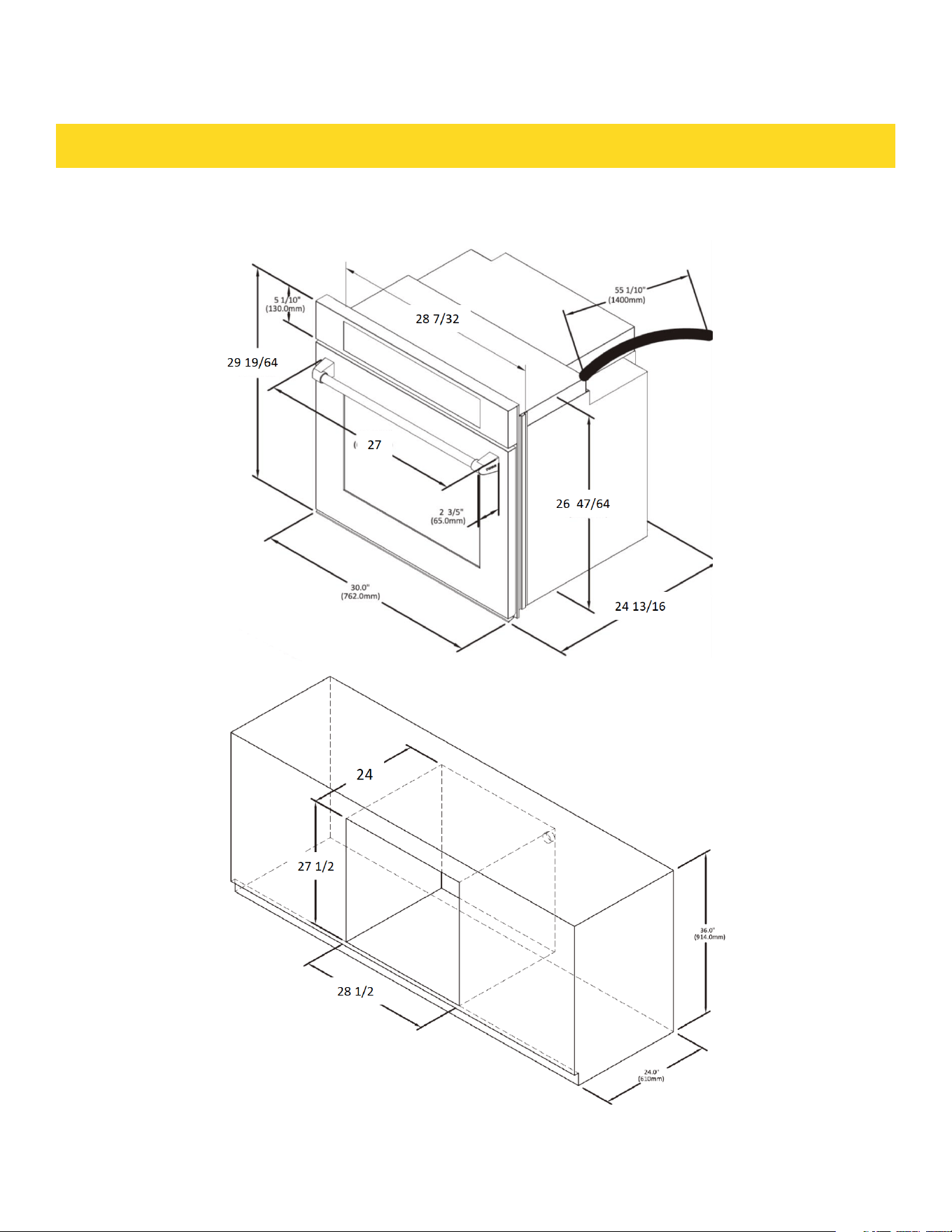
PRODUCT DIMENSION
26

INSTALLATION INSTRUCTIONS
Oven installed in Cabinet:
A. 24" (61cm) cutout depth
B. 27-3/5’ (70cm) recommended cutout height.
C. 28-1/2’ (72.5cm) cutout width
D. 4" (61cm) Min.cabinet depth
E. 6" (91.4cm)Min. cabinet height
Prepare built-in oven
WARNING
Excessive Weight Hazard
Use two or more people to move and install an oven.
Failure to do so can result in back or other injury.
1. Decide on the final location for the oven.Avoid drilling or cutting into house wiring
during installation.
2. To avoid floor damage,set the oven on a cardboard prior to installation.Donot use
handle or any portion of the front frame for lifting.
3. Remove the shipping materials and tape from the oven. Remember to keep the
packing materials that may be needed for installation.
4. Remove the hardware package from inside of the bag containing literature.
5. Remove racks and other parts from inside the oven.
6. Move oven and cardboard close to the oven’s final location.
27

INSTALLATION INSTRUCTIONS
Remove and replace oven door
IMPORTANT: Use two hands to remove oven door.
Prior to removing the oven door, prepare a surface where you will place it. This surface
should be flat and covered with a soft blanket, or use the comer posts from your
packaging material.
28
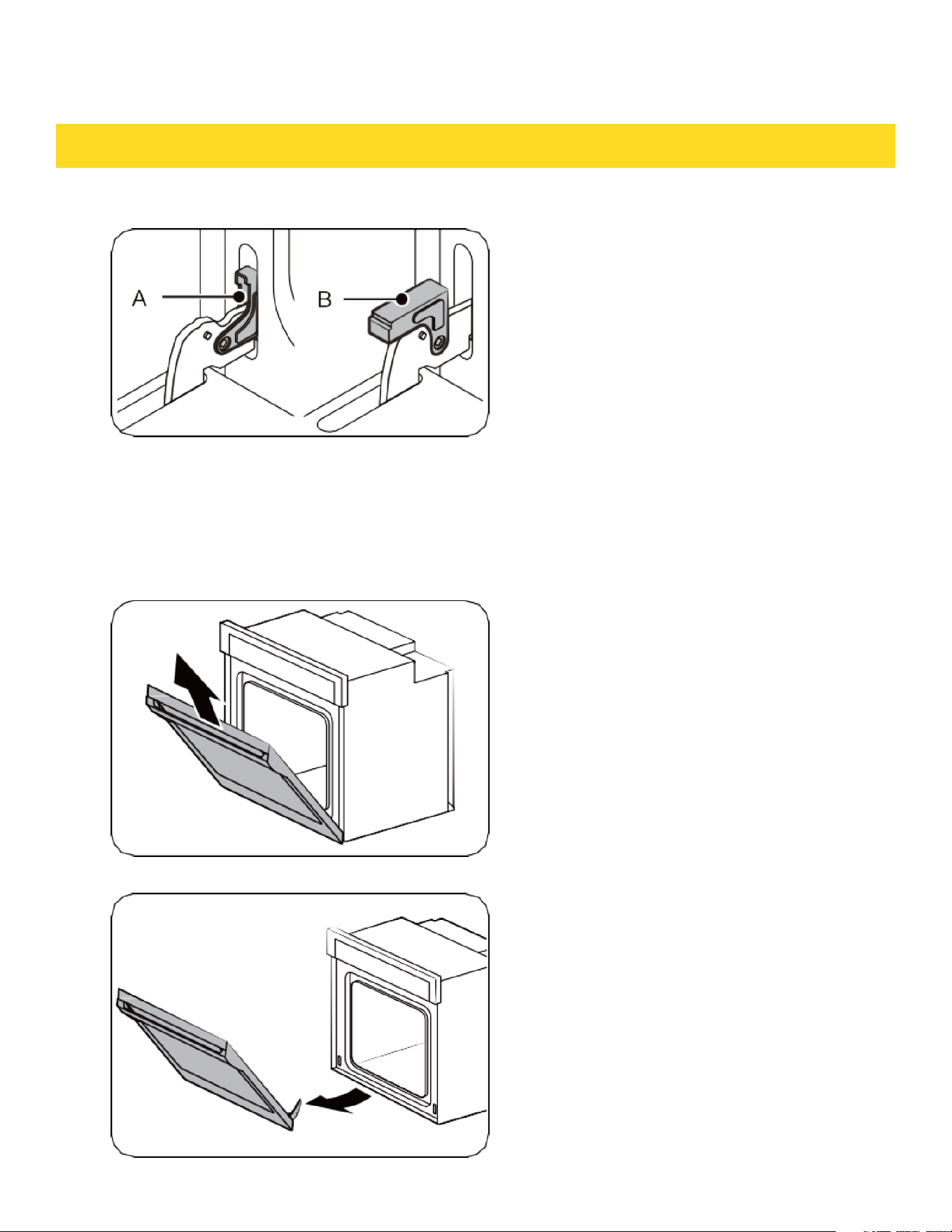
INSTALLATION INSTRUCTIONS
Remove oven door
A. Oven door hinge lock in
locked position.
B. Oven door hinge lock in
unlocked position.
1. Open the oven door.
2. Locate the oven door hinge lock in
both components of the oven door,
and then rotate the hinge locks to
ward the oven door to the unlocked
position (see illustration B). If the
door hinge lock is not rotated fully, the
door will not remove properly.
3. Partially dose the door to engage the
door latch locks. The door will stop at
this point.
4. Using two hands, grasp the edges
of the oven door. Lift and pull the oven
door toward you and remove. You may
need to gently shift door from side to
side as you pull.
5. Set the oven door(s) aside on the
prepared oovered work surface with
the oven door resting on its handle.
6. To continue with the oven installation,
go to the “Positioning Oven Feet
for Multiple Cabinet Cutout Heights”
section.
29
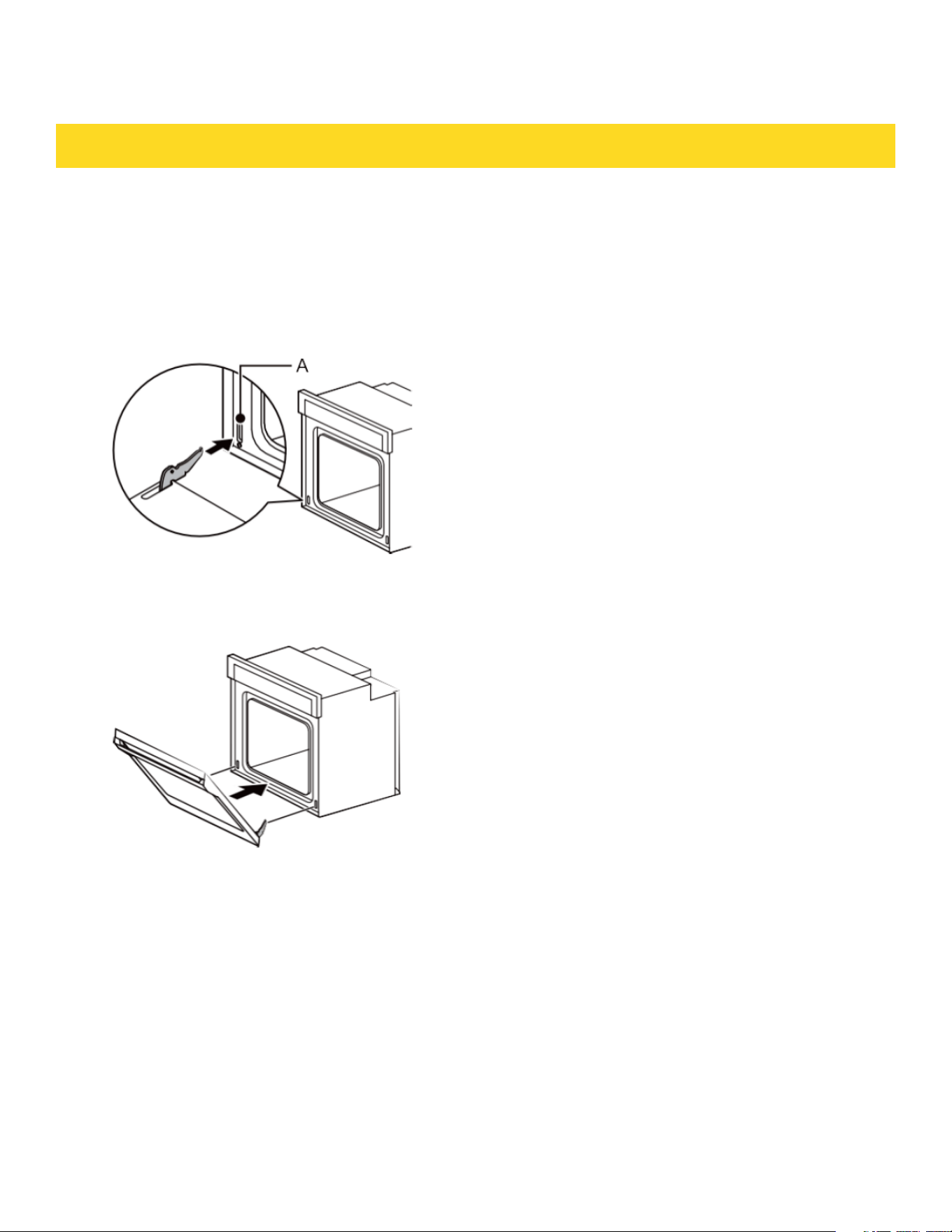
INSTALLATION INSTRUCTIONS
Replace oven door
CAUTION
The door is very heavy. You may need help holding the door high enough to
slide it into the hinge slots. Do not lift the door by the handle.
1. Using two hands, grasp side edges of
door at the midpoint. Face the oven
cavity.
2. Locate the slots on each side of the oven
cavity for the door hinge locks.
3. At a 45° angle, align door hinges with
slots in the lower front of the oven
cavity. Slowly insert door, making sure
you maintain the 45°angle.You will know
the door is engaged in the slot when you
feel a slight drop.
A. Slot in the oven cavity
for door hinge lock
30
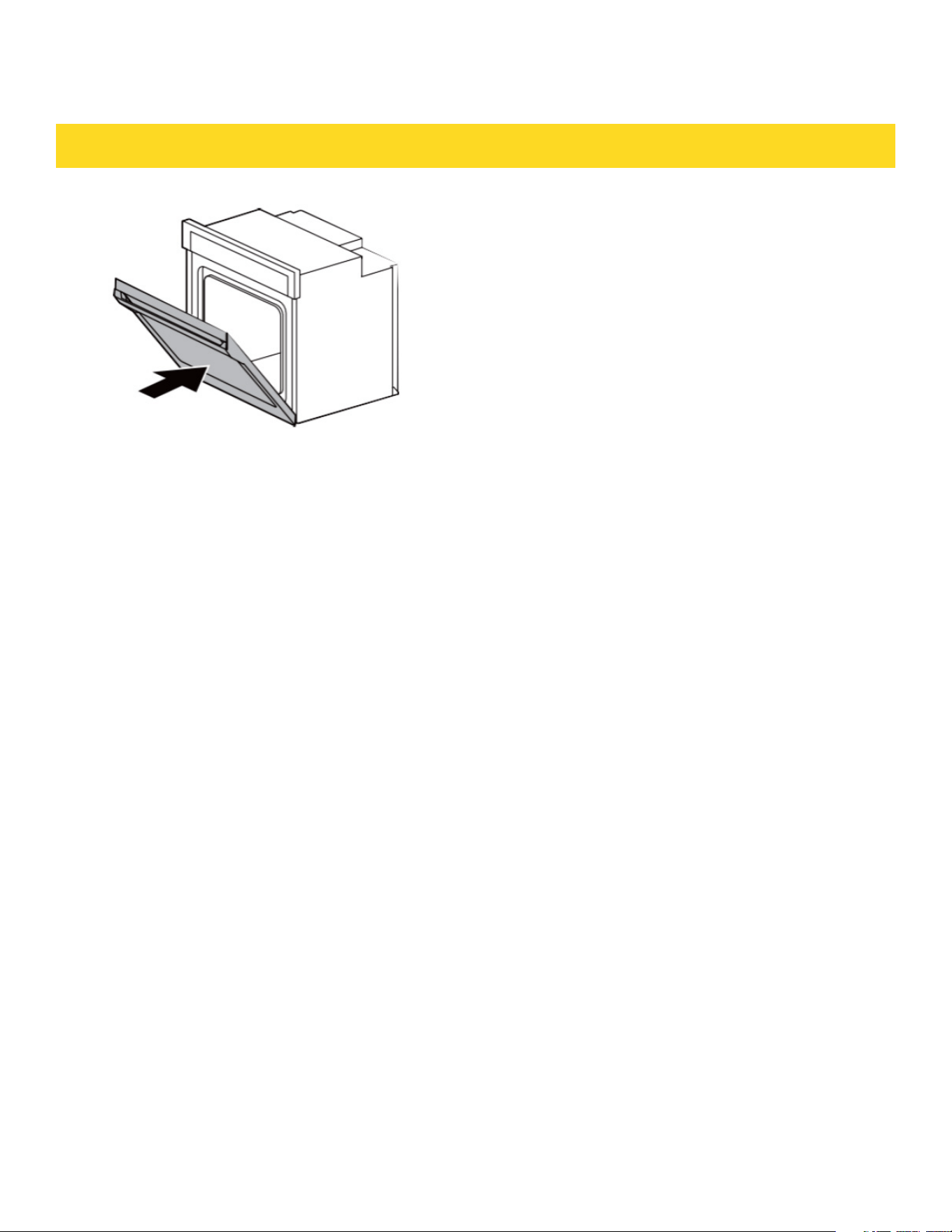
INSTALLATION INSTRUCTIONS
4. Lower the oven door to the fully open
position. If the oven door does not open to
a full 90°, repeat steps 1 through 3.
5. Locate the oven door hinge locks in the
corners of the oven door, and rotate the
hinge locks toward the oven cavity to the
locked position. See Step 1 (illustration
A) in the “RemoveOven Door(s)” section
for proper locked position.
6. Close the oven door.
7. When the hinges are properly installed
and the door dosed, there should be an
even gap between the door and the
control panel. If one side of the oven
door is hanging lower than the other, the
hinge on that side is not properly
installed.
8. Connect Wire Harness.
31
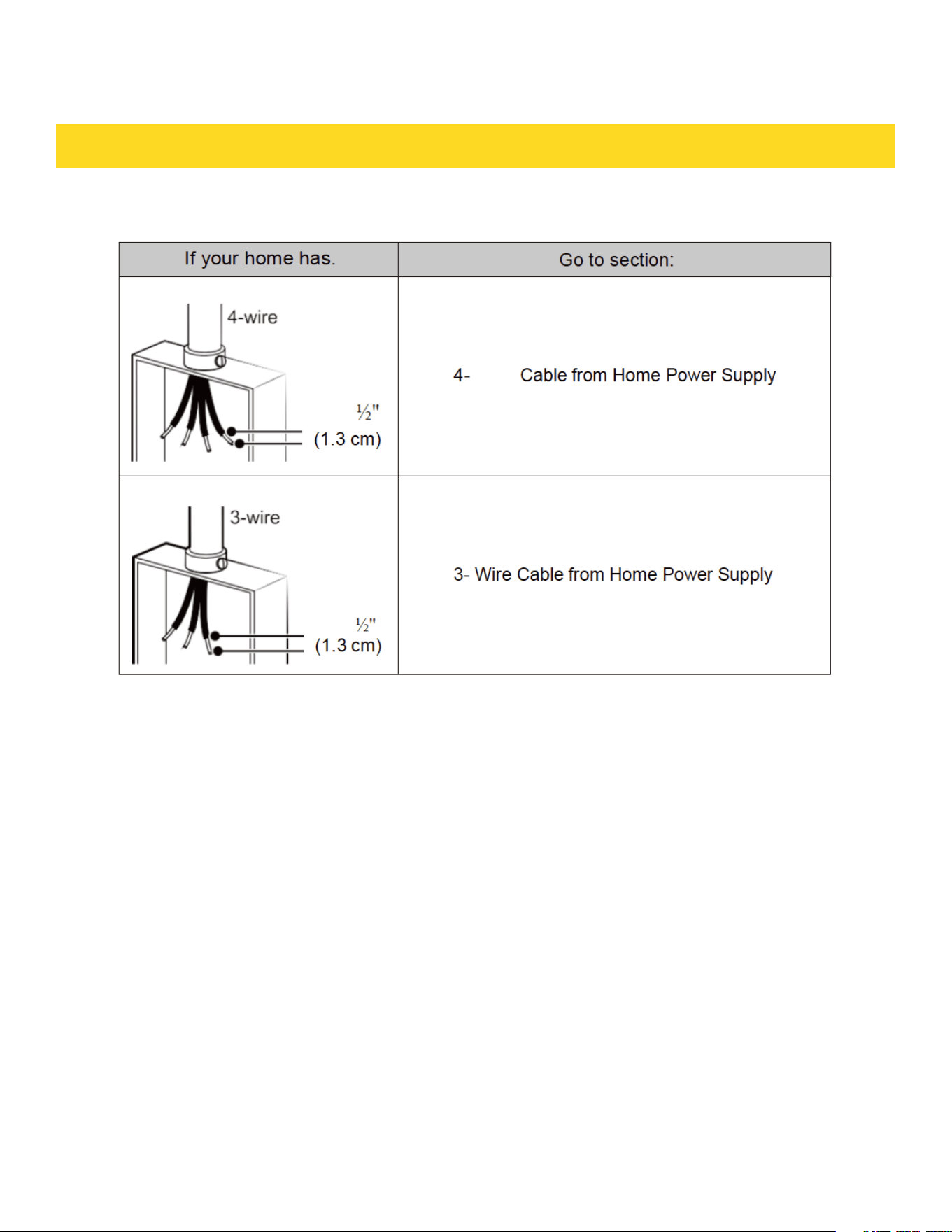
INSTALLATION INSTRUCTIONS
ELECTRICAL CONNECTION OPTIONS CHART
32
Wire

INSTALLATION INSTRUCTIONS
4-Wire Cable from Home Power Supply
IMPORTANT: Use the 4-wire cable from home power supply in the U.S. where local
codes do not allow grounding through neutral, New Branch circuit installations (1996
NEC), mobile homes and recreational vehides, new construction and in Canada.
1. Connect the 2 black wires (B) together
using a UL listed wire connector.
2. Connect the 2 red wires (C) together using
a UL listed wire connector.
3. Untwist white wire from green (or bare)
ground wire coming from the oven
4. Connect the 2 white wires (F) together using
a UL listed wire connector.
5. Connect the green (or bare) ground wire (H)
from the oven cable to the green (or bare)
ground wire (in the junction box) using a
UL listed wire connector.
6. Install junction box cover
A. Cable from home power supply
B. Black wires (normally L1)
C. Red wires (normally L2)
D. 4-wire flexible conduit from oven
E. Junction box
F. White wires (normally N-neutral)
G. UL listed wire connectors
H. green wires (normally Gijround)
I. UL listed or CSA approved conduit
connector.
33
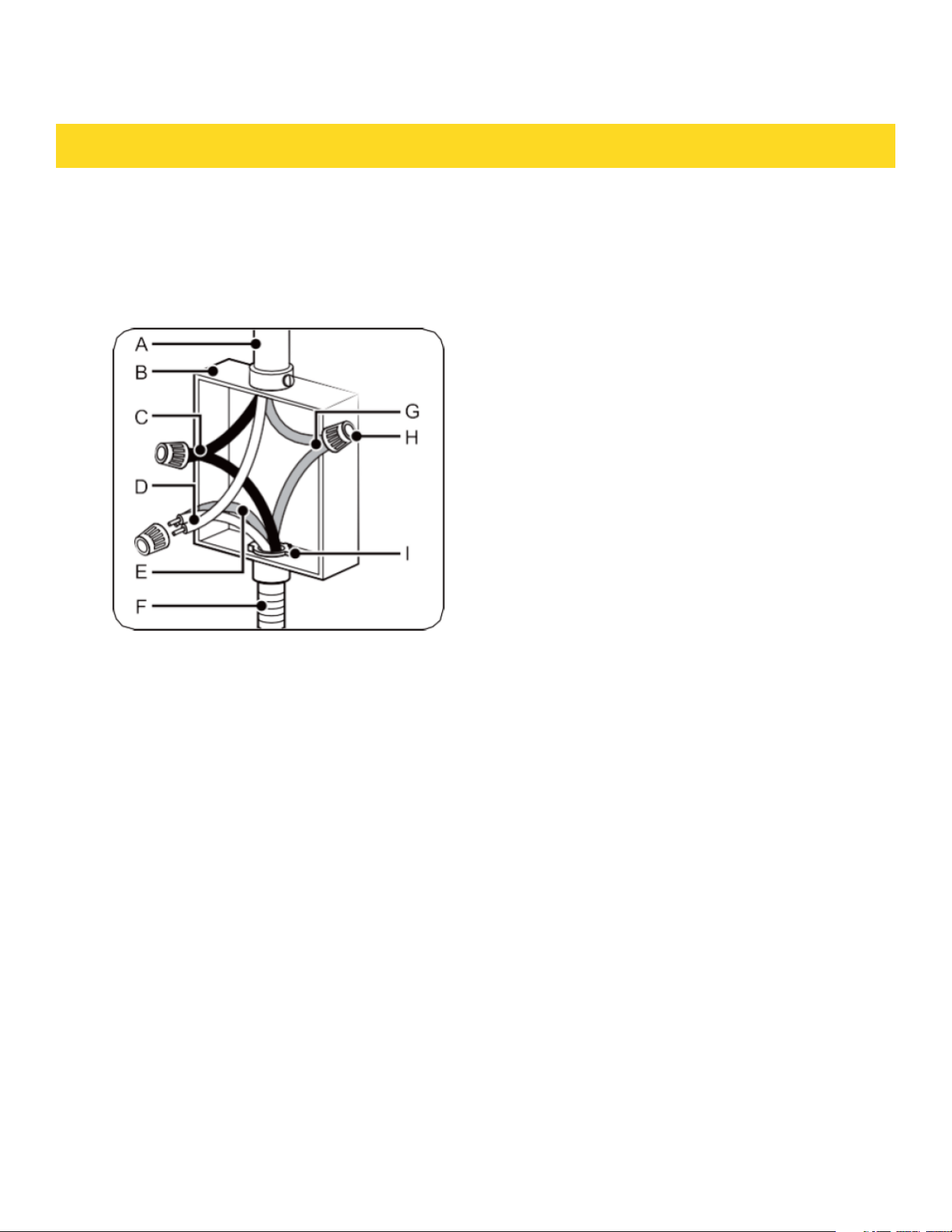
INSTALLATION INSTRUCTIONS
3-Wire Cable from Home Power Supply - U.S. Only
IMPORTANT: Use the 3-wire cable from home power supply where local codes permit a
3-wire connection.
A. Cable from home power supply
B. Junction box
C. Black wires (nonnally L1)
D. White wires (nonnally N-neutral}
E. green wires (nonnally G-ground}
F. 4-wire flexible conduit from oven
G. Red wires (nonnally L2)
H. UL listed wire connectors
I. UL listed or CSA approved conduit connector.
1. Connect the 2 black wires (C) together
using a UL listed wire connector.
2. Connect the 2 white wires (D) and the
green (or bare) ground wire (of the oven
cable) using a UL listed wire connector.
3. Connect the 2 red wires (G) mtogether
using a UL listed wire connector.
4. Install junction box cove.
34
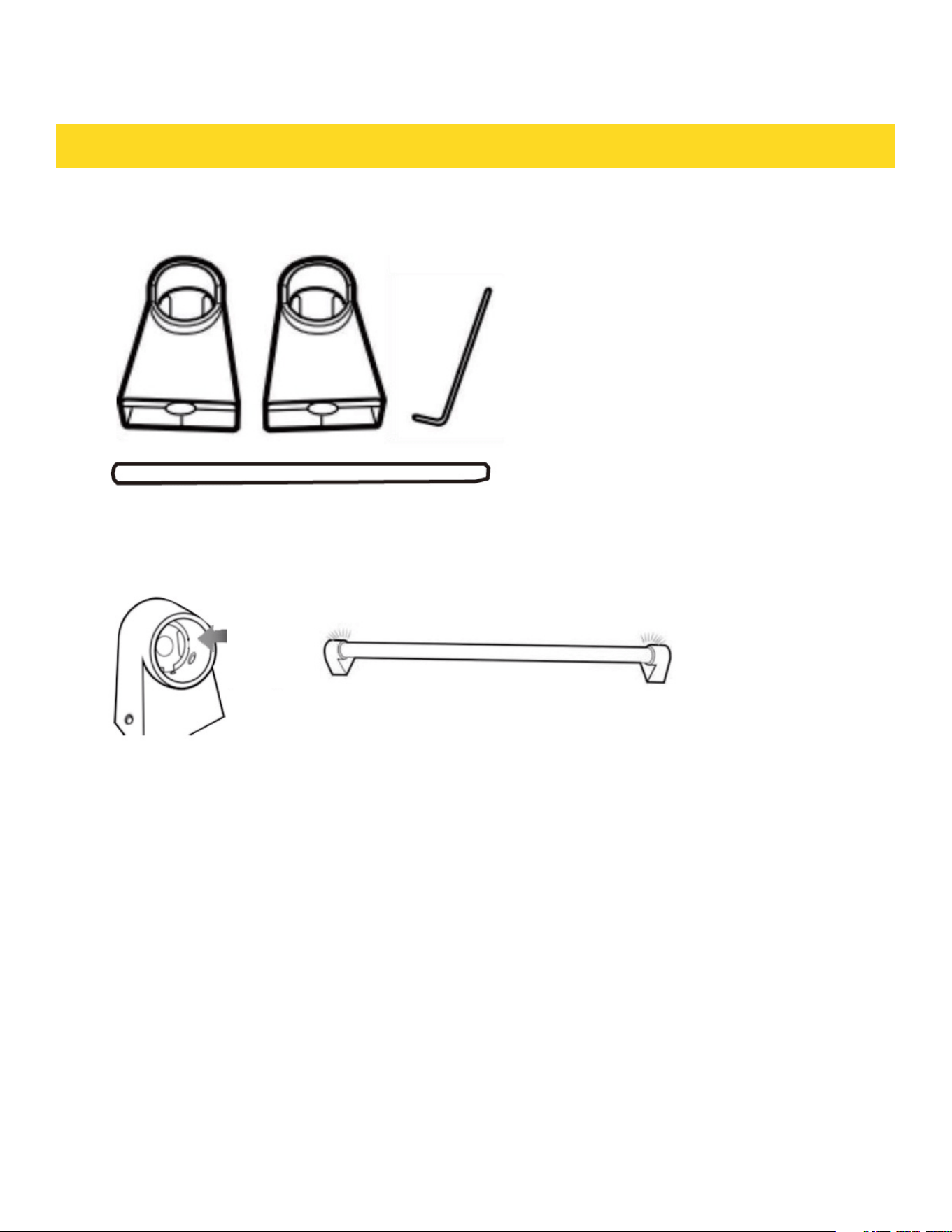
INSTALL OVEN HANDLE
1. How to install Handles For Thor KD Models
2. Connect the handle to the handle holders.
35
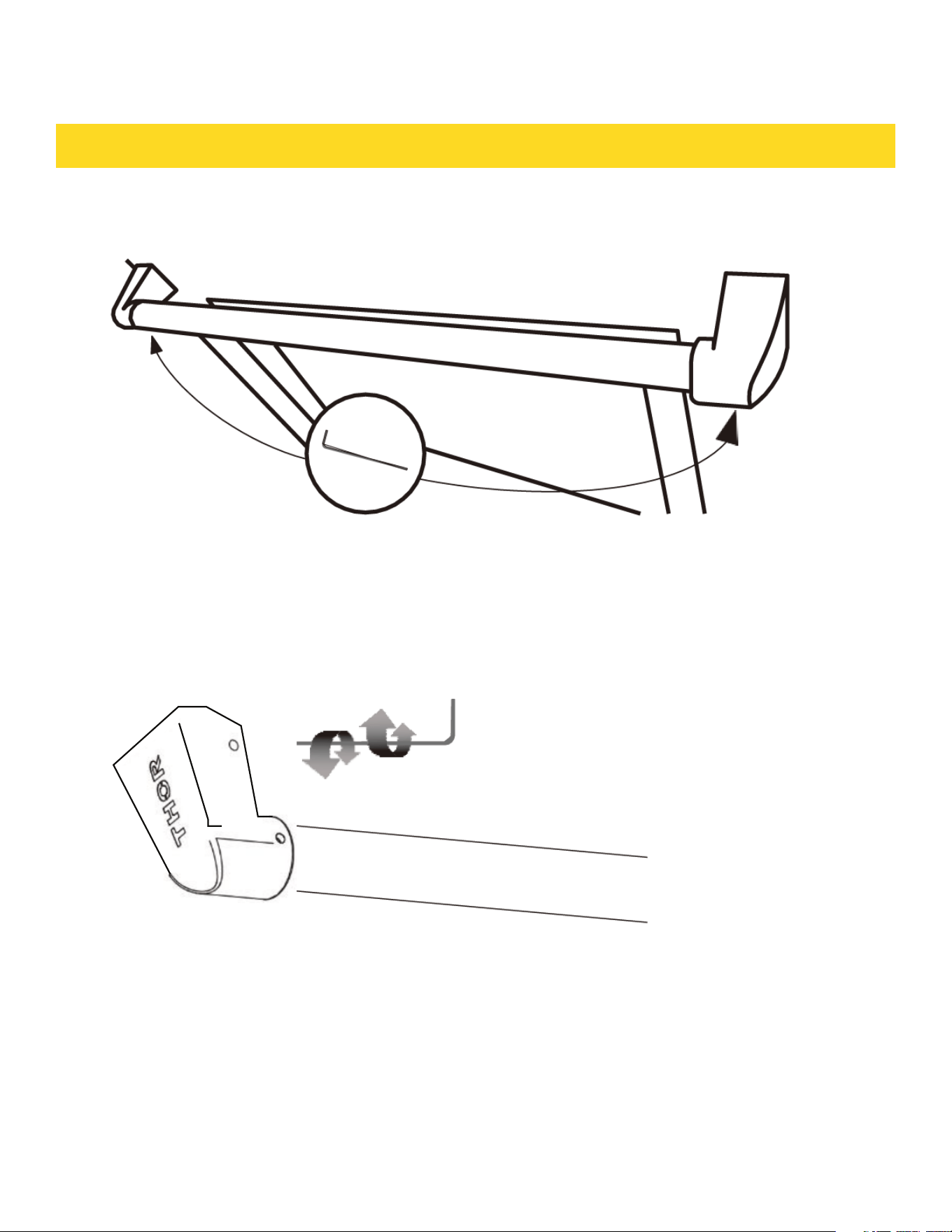
INSTALL OVEN HANDLE
3 Lay the door handle against to the oven door and fit it on the connection part.
4. Use the wrench to get the door handle holder tight
5. Check if the oven door is level and stable.
36
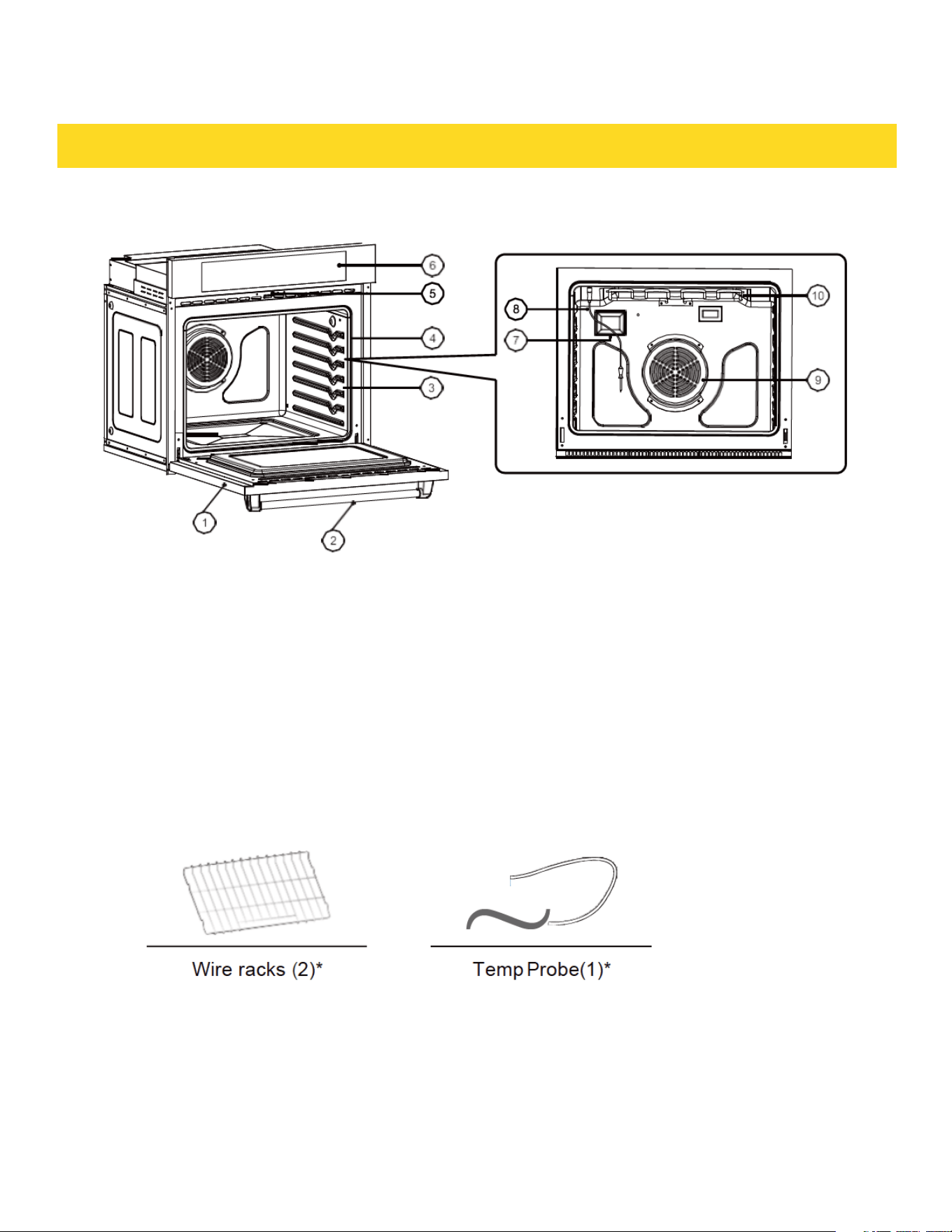
INTRODUCING YOUR NEW OVEN
Overview
1. Oven door
4. Oven gasket
7. Halogen lamp
2. Oven handle
5. Door latch
8. Temp Probe
3. Shelf position
6. Oven control panel
9. Convection fan
10. Heating elements
What's included with your oven
37

BEFORE YOU BEGIN
Clena the oven thoroughly before using it for the first time.Then,remove the
accessories, set the oven to Bake, and then run the oven at 400 °F for 1 hour. There will
be a distinctive odor. This is normal. Ensure your kitchen is well ventilated during this
conditioning period.
Energy saving tips
• During cooking, the oven door should remain closed except when you tum food over.
Do not open the door frequently during cooking to maintain the oven temperature and
to save energy.
• If cooking time is more than 30 minutes, you can switch the oven off 5-10 minutes
before the end of the cooking time to save energy. The residual heat will complete the
cooking process.
• To save energy and reduce the time needed for re-heating the oven, plan oven use to
avoid tuming the oven off between cooking one item and the next.
• Whenever possible, cook more than one item at a time.
38

OPERATING THE OVEN
The oven control panel
READ THE INSTRUCTIONS CAREFULLY BEFORE USING THE OVEN. For satisfactory
use of your oven, become familiar with the various features and functions of the oven
as described below. Detailed instructions for each feature and function follow later in
this user manual.
1. Time Cooking: Touch and then use the number pad to set the amount of time you
want your food to cook.The oven will shut off when the cooking time has run out.
2. Light: Use to tum the light (Oven and Door) on or off.
3. Convection Roast: Use to select the Convection Roast function.
4. Convection Bake: Use to select the Convection Bake function.
5. Bake: Use to select the Bake function.
6. Broil: Use to select the Broil function.
7. Warm: Use to select the Warm function to keep cooked foods.
8. Self Clean: Use to select the Self-cleaning function. While Selfdeaning is running in
one oven, you cannot use the other oven for any function.
9. Delay Start: Use t o s et the o ven to start and st op automatic ally at a time you set.
39
1 9
5 6 7 8
2
3
4
5

OPERATING THE OVEN
10. START: Use to st art any cooking or deaning function in the oven.
11. Timer On/Off: Use to se t or cancel the kitchen timer. The kit chen timer does not
start or st op oooking.
12. Clock: Use to set the time of day.
14. Cancel: Use to cancel a previ ously entered temperature or time.
15. Number pad: Use to set any function requiring numbers such as the time of day on
the dock, the timer, the oven temperature, the start time, and the length of
operation for timed baking, etc.
40

OPERATING THE OVEN
Setting the clock
The dock must be set to the correct time of day for the automatic oven timing
functions to work properly.
• The time of day cannot be changed during timed cooking, delay-timed cooking,
or a self-c|eaning cycle.
• You can choose between a 12-hour or 24-hour displa.yThe default is 12-hour.
How to set the clock
1. Touch Clock.
2. Touch Clock to select AM or PM. (Skip this step if you are setting the dock to 24 hour
display mode.)
3. Touch keys on the number pad to set the current time of day.
4. Touch START to save the changes
Setting the kitchen timer
The kitchen timer serves as an extra timer that will beep when the set time has
elapsed. It does not start or stop cooking functions. You can use the kitchen timer
with any of the other oven functions.
How to set the timer
1. TouchTimer On/Off
2. Touchnumber keys in the number pad to set the hours and minutes. The timer
can be set for any amount of time from 1 minute to 11 hours and 59 minutes.
If you make a mistake, touch Cancel, and then enter the amount of time again.
3.Touch START.
4.When the set time has elapsed, the oven will beep and the display will show End
until you touch Timer On/Off. You can cancel the timer at any time by touching Timer
On/Off
41

OPERATING THE OVEN
Control Lockout
Control Lockout lets you lock the buttons on the touch pad so they cannot be activated
accidently. You can only activate Control Lockout when the oven is in stand by mooe.
How to activate the Control Lockout
1. Cancel or tum off all other functions.
2. Touch SETTING Lock (hold 3 sec.) for 3 seconds.
The oven will display “Loe” and the lock icon along with the current time.
• All othe r function s must be cance lied before you activate Control Lockout.
How to unlock the controls
hold SETTING Lock for 3 seconds.
Setting the kitchen timer
“Loe” and the lock icon will disappear from the display
42

OPERATING THE OVEN
Time cooking
In limed Cooking mode, the oven turns on immidiately and cooks for the length of time
you select. At the end of the cooking time, the oven turns off automatically.
• You can use the limed Cooking only with another cooking operation (Convection Bake,
Convection Roast, Bake).
How to set the oven for Time Cooking
1. Touchthe pad for the cooking operation you want, eg. Bake
Enter the temperature you want, for example, 400 °F, using the number pad
(The default temperature is 350 °F).
2. TouchTime Cooking. Enter the number of hours/minutes you want the oven to
3. stay on using the number pad. You can set the cooking time for any amount of
time from 1 minute to 11 hours and 59 minutes. Touch START to begin cooking.
The temperature display will start to change once the oven temperature reaches
100 °F. The oven will continue to cook until the set amount of time has elapsed,
then tum off automatically unless you set the Keep Warm feature. (Refer to the
Using Keep Warm section on page 30.)
• When limed Cooking is done, the oven will beep 3 times
CAUTION
Use caution with the Time Cooking or Delay Start features. You can use these
features to cook cured or frozen meats and most fruits and vegetables. For food that
can easily spot such as milke, eggs, and unfrozen or fresh fish,meat,or poultry,chill
them in the refrigerator first.Even when chilled,they should not stand in the oven
for more than 1 hour before cooking begins, and should be removed promptly when
cooking is completed. Eating spoiled food can result in sickness from food poisoning.
43

OPERATING THE OVEN
Delay Start
With Delay Start, the oven’s timer turns the oven on and off at times you select in
advance.
• You can use the Delay Start only with another cooking operation (Convection
Bake, Convection Roast, Bake).
• You can set the oven for a delay start before setting other cooking
• operations. The dock must be set to the current time.
How to set the oven for delay start
1.Position the oven rack(s) and place the food in the oven.
2. Touchthe pad for the cooking operation you want, eg. Bake . The default temperature
is 350 °F.
3. Enter the temperature you want, eg. 375 °F, using the number pad
4. Set the cooking time if you want. (Refer to the section on the timed cooking feature
on page 21).
5. Touch Delay Start. Use the number pad to set the time.
6. Touch START. The oven will begin to cook
Turning the light on and off
• The oven light turns on and door light turns off automatically when the door is
opened.
• The oven light turns off automatically when the door is closed.
• You can tum the oven and door light on and off manually by touching the Ught.
44
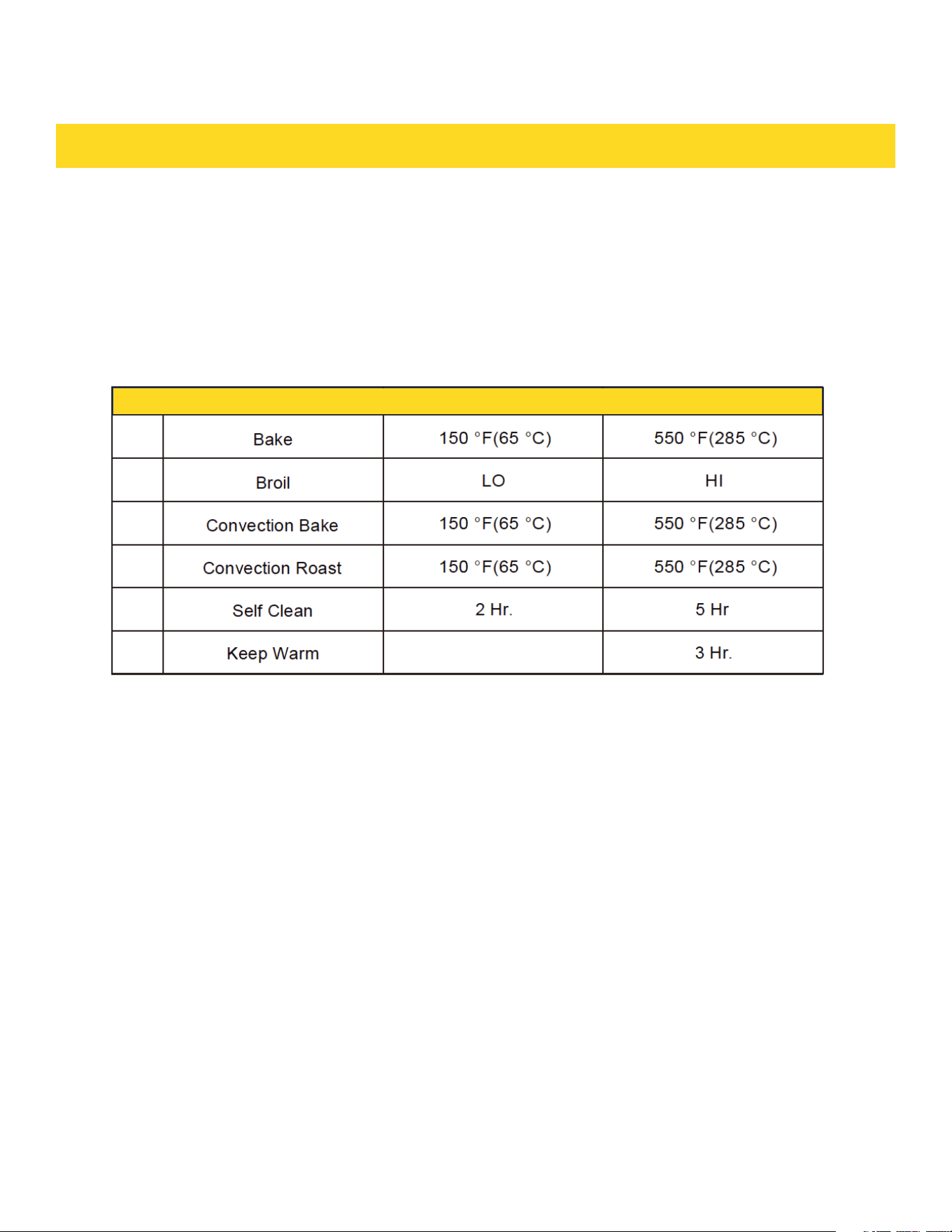
Minimum and maxim um settings
All the features listed in the table below have minimum and maximum time or
temperature settings. A beep will sound each time a pad on the control panel is
pressed and the entry is accepted. An error tone will sound in the form of a long beep if
the entered temperature or time is below the minimum or above the
maximum setting for the feature.
OPERATING THE OVEN
45
1
2
3
4
5
6
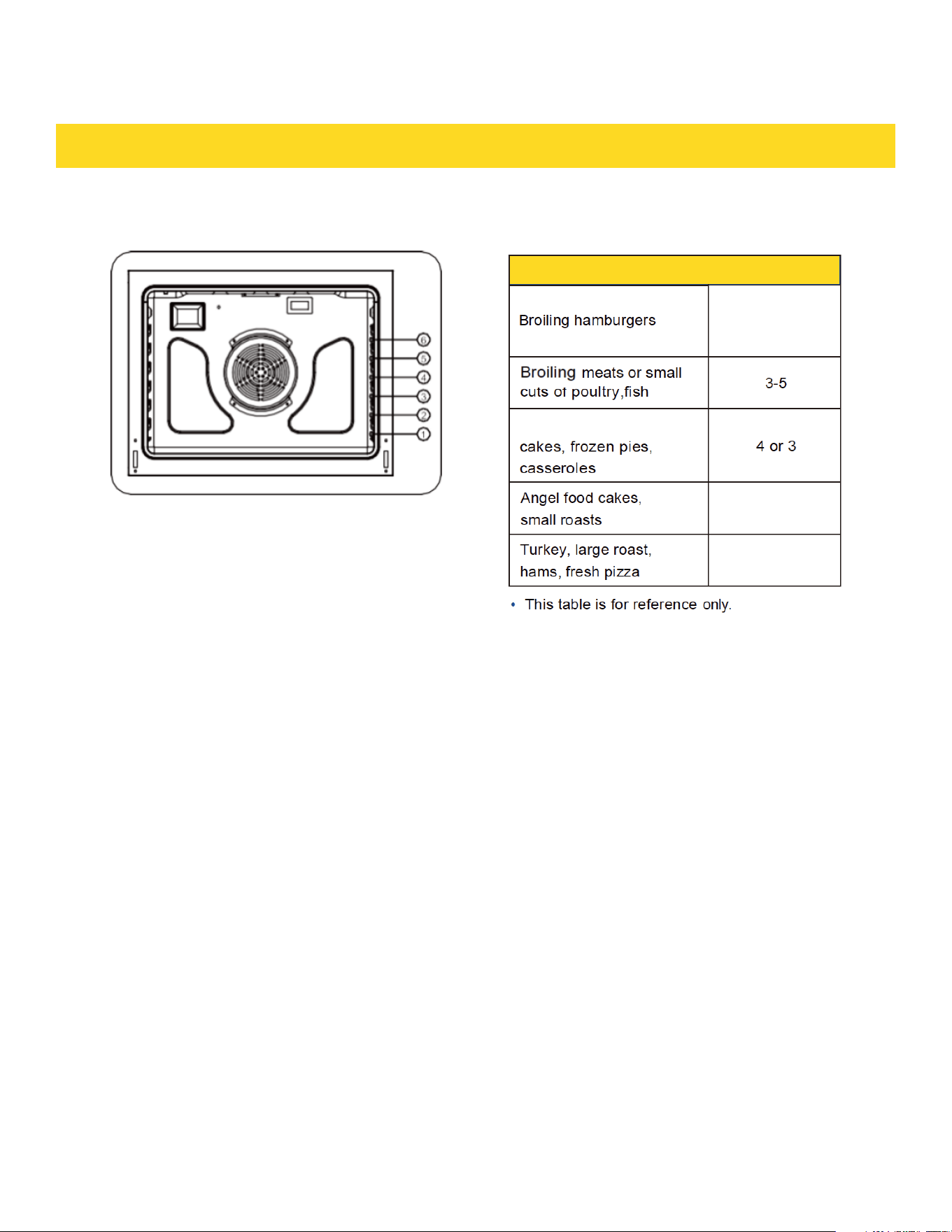
OPERATING THE OVEN
Using the oven racks
Recommended rack position for cooking
46
6
2
Bundt Cake, pound
OPERATING THE OVEN
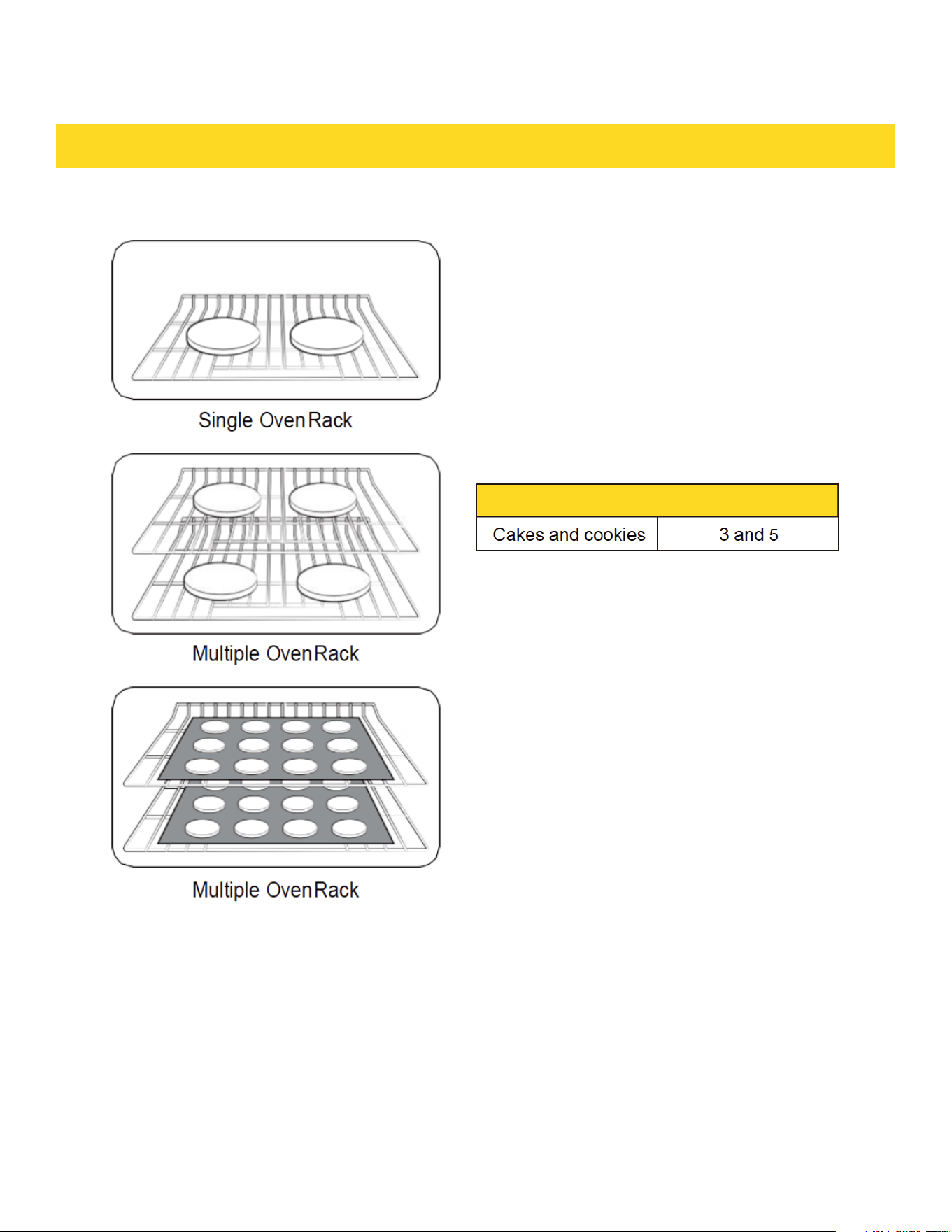
Rack and Pan placement
Centering baking pans in the oven as much
as possible will produce better results.
If baking with more than one pan, place
the pans so each has at least 1" to 2 of air
space around it.When baking on a single
oven rack, place the oven rack in
pos 2, 3 or 4. See the figure on the left.
When baking cakes and cookies on multi-
ple racks, place the oven racks in position
3 and 5. Using Multiple Oven Racks
47
OPERATING THE OVEN
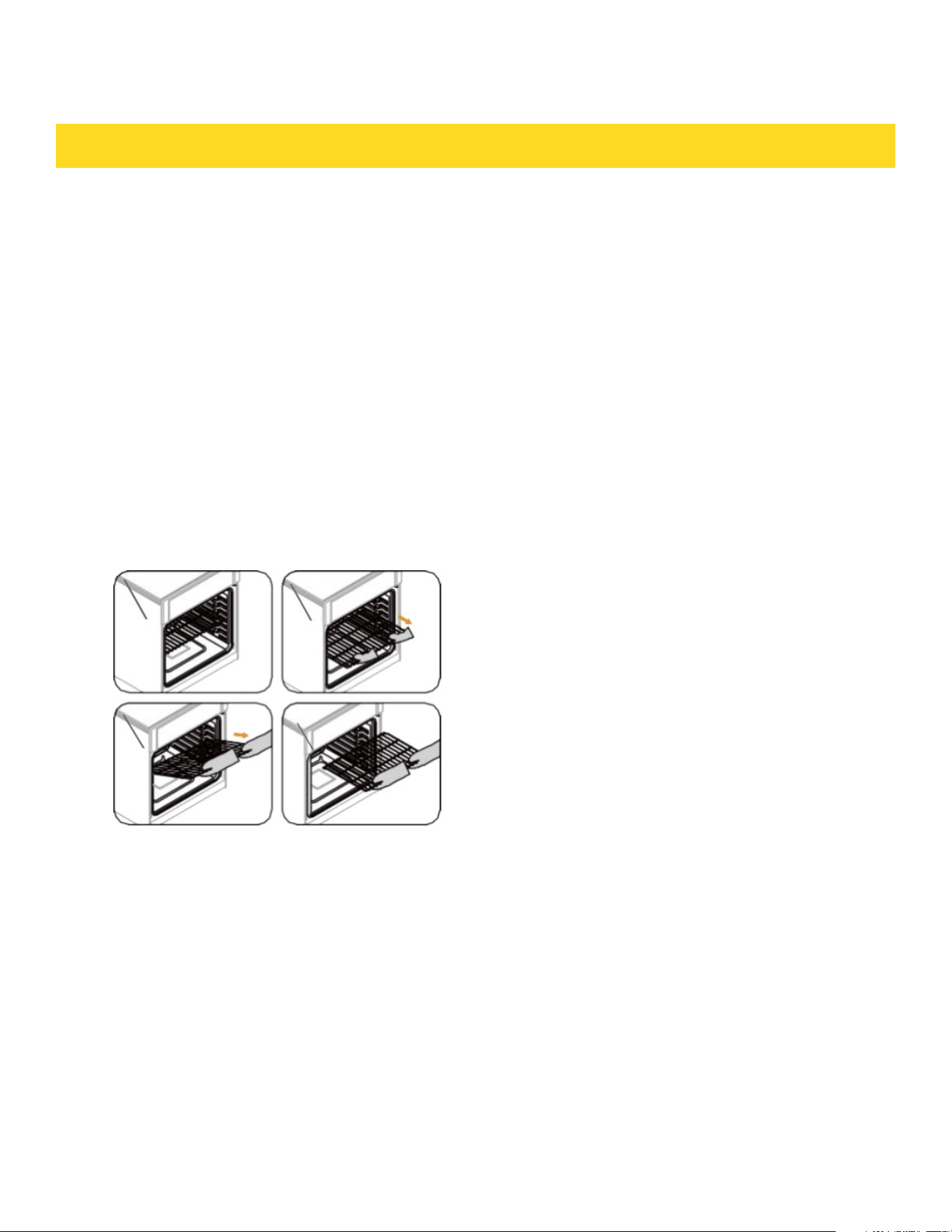
Before using the racks
Each rack has stops that need to be placed oorrectly on the supports. These
stops will keep the rack from oomingcompletely out.
REMOVING THE RACKS
1. Pull the rack straight out until it stops.
2. Lift up the front of the rack, and then pull it out
REPLACING THE RACKS
1. Place the end of the rack on the support.
2. Place the front end up and push the rack in.
CAUTION
• Do not Cover a rack with aluminum foil or
place aluminum foil on the oven bottom.
This will hamper heat circulation, resulting
in poor baking, and may damage the oven
bottom.
• Arrange the oven racks only when the
oven is cool.
48

OPERATING THE OVEN
Baking
The oven can be programmed to bake at any temperature from 150 °F to 550 °F.
Baking temperature and time will vary depending on the ingredients and the size and
shape of the baking pan used. Dark or nonstick coatings may oook faster with more
browning.
How to set the oven for baking
1. Touch Bake
2. Enterthe temperature you want using the number pad, eg. 3, 7, 5.
3. Touch START. The temperature display will start to change once the oven
temperature reaches 100 °F.
4. lf you want to cancel baking or if you have finished, touch Cancel.
• Place food in the oven after preheating if the pe calls for it. Preheating is very
important for good results when baking cakes, cookies, pastry and breads. After the
oven has reached the desired temperature, the oven will beep 3 times.
• If you are using an oven thennometer in the oven cavity, the temperature registered
by the thennometer may differ from the actual set oven temperature.
49
OPERATING THE OVEN
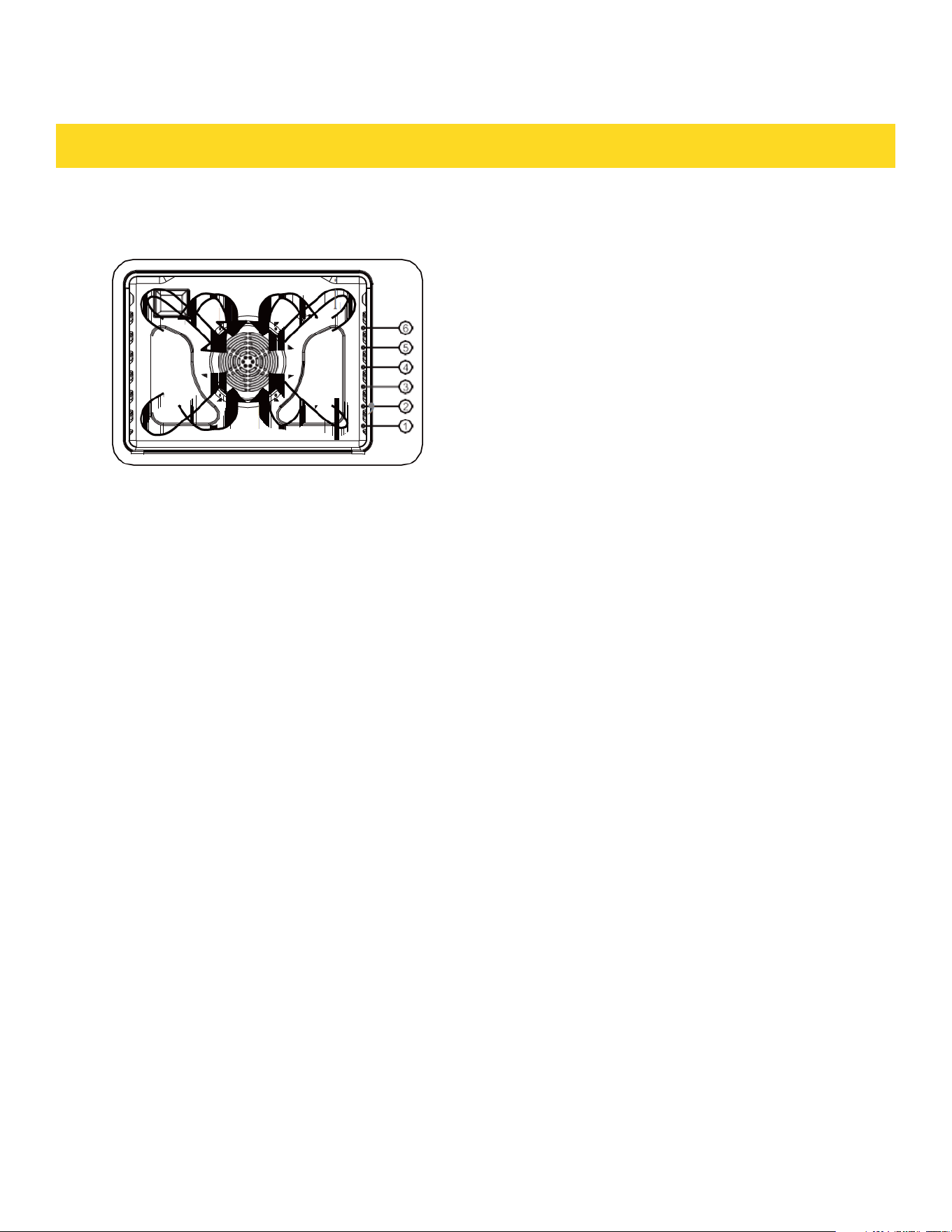
Convection baking
By using the Convection Bake, you will be
able to cook faster. Convection baking uses
a fan to circulate the oven's heat evenly and
continuously within the oven. This improved
heat distribution allows for even cooking and
excellent results while using multiple racks at
the same time. Foods cooked on a single oven
rack will generally cook faster and more evenly
with convection baking. Multiple oven rack
cooking may have slightly increased cooking
times for some foods, but the overall result is
time saved. Breads and pastries brown more
evenl.yYou can program the oven for convection
baking at any temperature between 150 °F and
550 °F.
Tips for convection baking
The amount of time you save will vary depending on the amount and type of food you
are cooking. When baking cookies or biscuits, you should use pans with no sides or
very low sides to allow the heated air to circulate around the food. Using a pan with a
dark finish will produce faster cooking times.
When using convection baking with a single rack, place the oven rack in position 3 or
4. If cooking on multiple racks, place the oven racks in position 3 and 5. When baking a
cake, using the bake mode (not the convection bake mode) will produce better results.
50

OPERATING THE OVEN
How to set the oven for convection baking
1. Touch Bake
2. Enterthe temperature you want, eg. 400 °F, using the number pad.
3. Touch START. The temperature display will start to change once the oven
temperature reaches 100 OF.
The oven will beep 3 times when the oven reaches the adjusted oven temperature.
4. If you want to cancel convection baking or if you have finished, touch Cancel.
• The convection oven fan shuts off when the oven door is opened.
• DO NOT leave the door open for long periods of time while using convection
cooking or you may shorten the life of the convection heating element.
• If you leave the oven door open for more than 1 minute when the oven is on, all
heating elements will shut off automatically.
• If you are using an oven thermometer in the oven cavity, the temperature registered
by the thermometer may deter from the actual set oven temperature
51

OPERATING THE OVEN
Convection roasting
Convection roasting is good for cooking large tender cuts of meat uncovered. Heat
comes from the top heating element. The convection fan circulates the heated air
evenly over and around the food. Meat and poultry are browned on all sides as if
they were cooked on a rotisserie. The heated air seals in juices quickly for moist and
tender results while, at the same time, creating a rich golden brown exterior.
How to set the oven for convection roasting
1. Touch Roast. Enter the temperature you want, eg. 400 °F, using the number pad
2. Touch START.
3. The temperature d isplay will start to change once the oven temperature reaches
100°F. The oven will beep 3 times when the oven reaches the adjusted oven
temperature.
4. If you want to cancel convection roasting or if you have finished,touch Cancel.
• The convection oven fan shuts off when the oven door is opened.
• DO NOT leave the door open for long periods of time while using convection
cooking or you may shorten the life of the convection heating element.
• If you leave the oven door open for more than 1 minute when the oven is on, all
heating elements will shut off automatically.
• If you are using an oven thermometer in the oven cavity, the temperature registered
by the thermometer may differ from the actual set oven temperature.
52
OPERATING THE OVEN
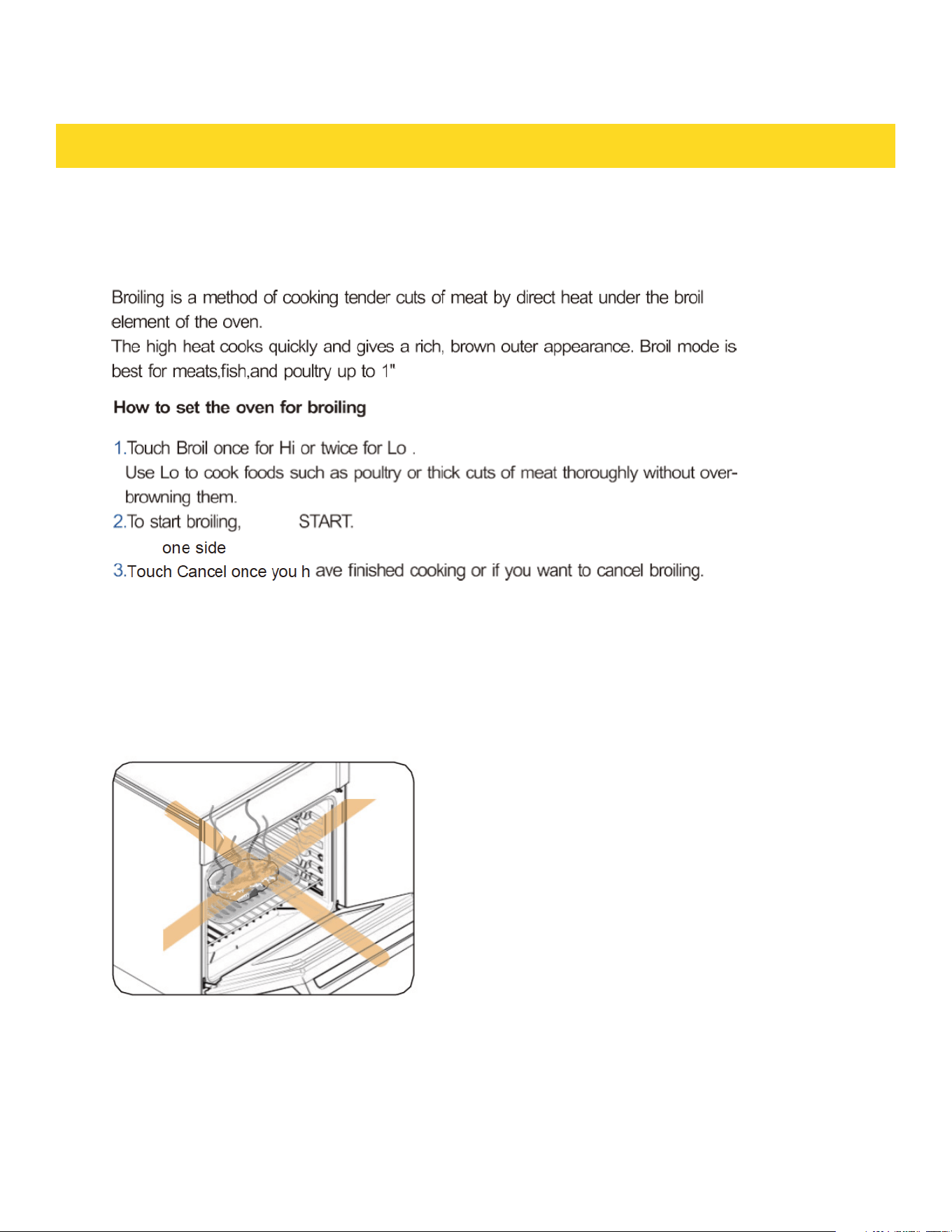
Broiling
• If you leave the oven door open for more than 1 minute when the oven is on, all
heating elements will shut off automa tically.
• If you are using an oven thermometer in the oven cavity, the temperature registered
by the thermometer may differ from the actual set oven temperature
CAUTION
Always broil with the oven door
dosed. Use care when opening the
door. Let hot air from steam escape
before you remove food.
53
touch
until the food is browned.
Turn over and broil the other side.
broil
thick

OPERATING THE OVEN
Using Keep Warm
Keep Warm will keepcooked food warm for serving up to 3 hours aftercooking has
finished.
After 3 hours, the feature will shut off automatically. You can use the Keep Warm
feature without any othercooking operations or you can set it to activate after a timed
or delay timedcooking operation.
You should not use this feature to reheatcoId food
How to use Keep Warm
1. TouchKeep Wann.
2. TouchSTART.
3. TouchCancel at a ny time to tum the feature off
How to set the oven to activate Keep Warm after a time cooking
1. Set up the oven for Time cooking . (Refer to limed Cooking section on page 21.)
2. Touch Keep Warm before touching START to begin cooking.
3. Touch Cancel at any time to turn the feature off.
54
OPERATING THE OVEN
55
cooked
of the
portion of the

OPERATING THE OVEN
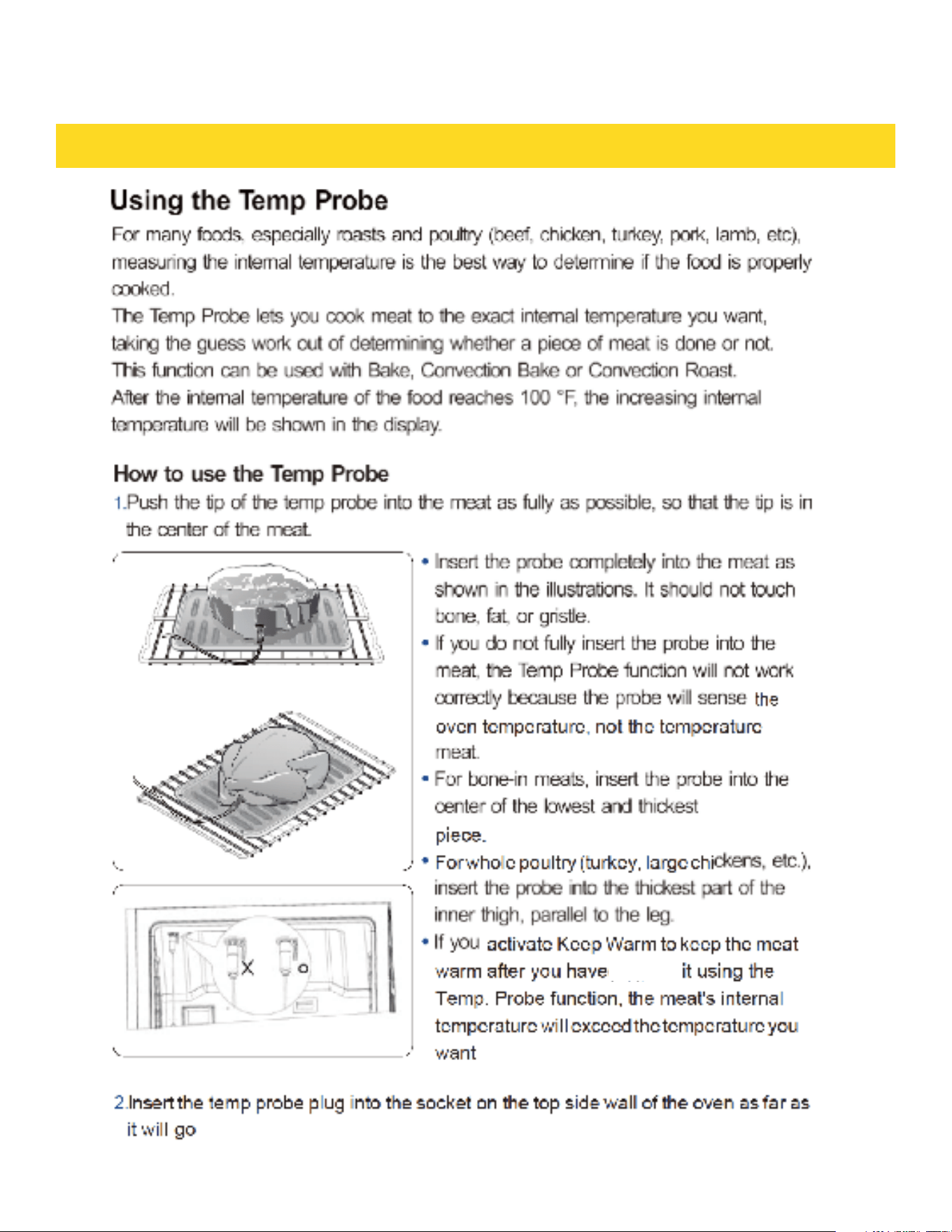
3. Select the desired cooking function (Bake or Convection Roast) and temperature
4. Touch SETTING to into Temp. Probe (probe signal will display in panel)
5. Set the desired internal temperature using the number pad. (The default
temperature is 150 °F).
6. If you want to use Cook time, Delay Start, or Keep Warm, set each function.
7. Touch START.
8. When the desired internal temperature is reached, the function automatically stops
and an alarm sounds.
CAUTION
To protect the Temp Probe’s tip, be careful not to insert the probe so that the tip
protrudes through the surface of the meat. Make sure that the tip is in or near the
center of the meat.
CAUTION
• Do not store the probe in the oven.
• Do not leave the probe inside the oven during a self clean or broiling cycle you can
permanently damage the probe and it will no longer work.
• To avoid breaking the probe’s tip, defrost your food oompletely
• Do not use tongs when inserting or removing the probe. Tongs can damage the probe.
• Use the Temp Probe for Temp. Probe function cooking only. Do not use the Temp
Probe for any other purpose.
• If you remove the Temp Probe while the Temp. Probe function is operating or insert
the Temp Probe while baking or cooking normally, cooking will stop after 1 minute.
• If you use the probe to cook frozen food, there are times when it cannot be detected.
(The Temp. Probe doesn’tshow in the display.)
56
OPERATING THE OVEN
If you cover the meat with aluminum foil and allow it to stand for 10 minutes after
cooking, the Internal temperature will rise 5-10 degrees.
Removing the Temp Probe
Remove the temp probe plug from the socket.
CAUTION
After cooking, the Temp Probe is hot enough to cause bums.
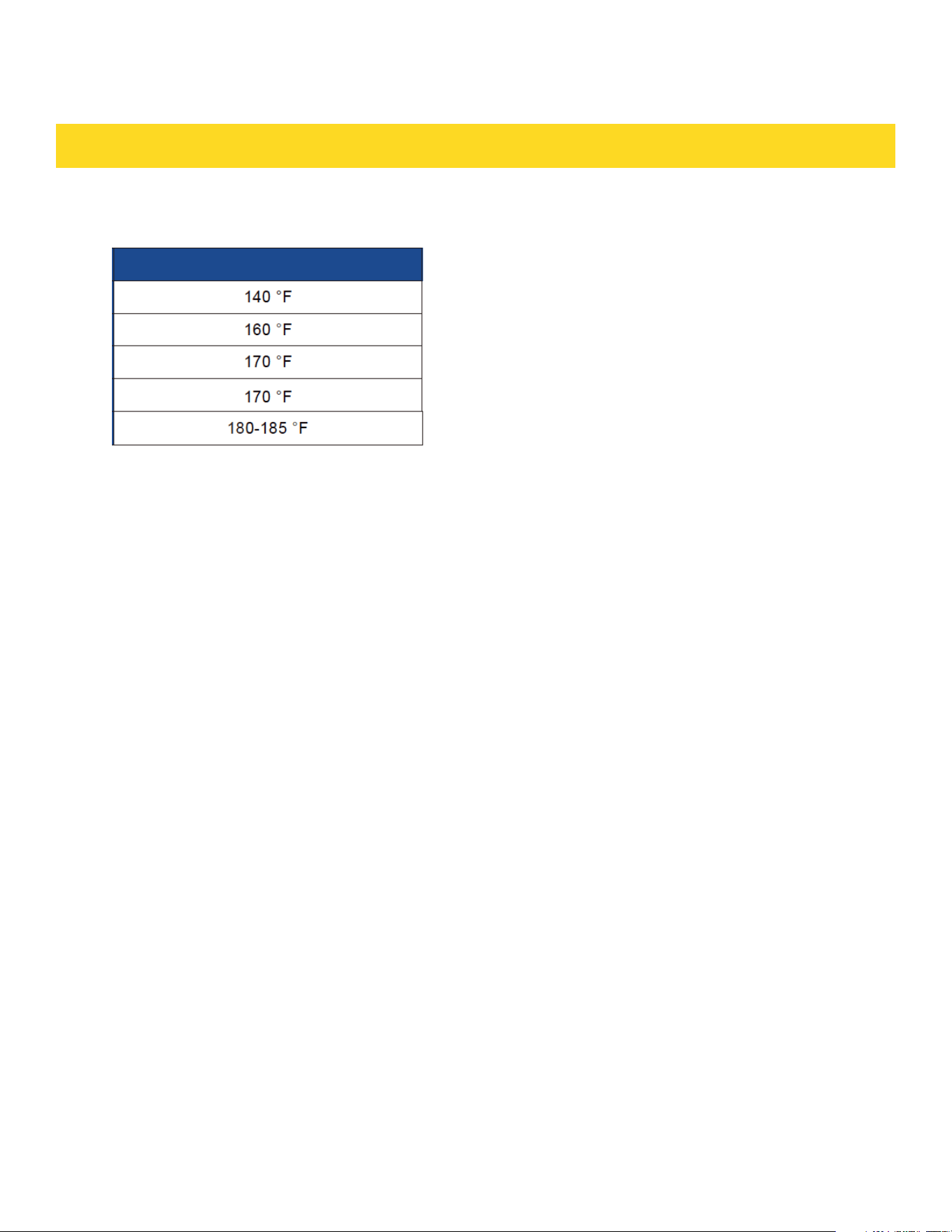
Temp Probe table
57

OPERATING THE OVEN
Temp Adjust
The temperature in the oven has been calibrated at the factory. When first using the
oven, besure to follow recipe times and temperatures. If you think the oven is too
hot or too cool, you can correct the temperature in the oven. Beforecorrecting, test a
recipe by using a temperature setting that is higher or lawer than the recommended
temperature. The baking results should help you to decide how much of an adjustment
is needed
The oven temperature can be adjusted 35 °F 19 °C )
How to correct the oven temperature
1. Touch SETTING in standby continously until SET CALI disply in panel.touch START to
save. Default cook function is BAKE, you can set other function
2. Enter the adjust ment you want to mak e using the number pad. (0-35). If need
minus touch settings again.
3. Touch START to save changes.
This adjustment will not affect the broiling or the self-deaning temperatures
The adjustment will be retained in memory after a power failure
Temp Unit (Fahrenheit or Celsius temperature selection)
You can program the ovencontrol to display the temperature in Fahrenheit or Celsius.
The oven has been preset at the factory to display in Fahrenheit.
How to change the display from Fahrenheit to Celsius or Celsius to Fahrenheit
1. Touch SETTING in standby continously until SET displyin panel.touch START to save
2. Touch SETTING to change between (Fahrenheit) and(Celsius).
3. Touch START to save the changes
58

OPERATING THE OVEN
Sound On/0ff
Using Sound On/OFF, you can set the oven controls to operate silently.
How to turn the sound on or off
1. Touch SETTING in standby continously until SET BEEP disply in panel,touch START to
save.
2. Touch SETTING to change bet ween (ON BEEP) and (OFF BEEP).
3. Touch START to save the changes.
Demo mode
This option is for use by retail establishments for display purposes only.
When Demo mode is on, the heating element is disabled and does not operate.)
How to enable or disable the demo mode
1. Touch SETTING in standby continously until SET DISP disply in panel. Touch START
to save.
2. Touch SETTING to change between (ON DISP) and {OFF DISP).
3. Touch START to save the changes.
59

OPERATING THE OVEN
Self-cleaning
This self-cleaning oven uses high temperatures (well above cooking temperatures) to
bum off leftover grease and residue completely or reduce them to a finely powdered
ash that you can wipe away with a damp cloth.
CAUTION
• During the self-c|eaning cycle, the outside of the oven will become very hot to the
touch. Do not leave small children unattended near the appliance
• Some birds are extremely sensitive to the fumes given off during the selfdeaning
cycle of any oven. Move birds to another well-ventilated room.
• Do not line the oven walls, racks, bottom, or any other part of the oven with
aluminum foil. Doing so will result in poor heat distribution, poor baking results, and
cause permanent damage to the oven interior. Aluminum foil will melt and adhere to
the interior surface of the oven.
• The oven door locks during self-cleaning. Do not force the oven door open. This can
damage the automatic door locking system. Use care when opening the oven door
after the self-cleaning mode is complete. Stand to the side of the oven when opening
the door to allow hot air or steam to escape. The oven may still be VERY HOT.
60
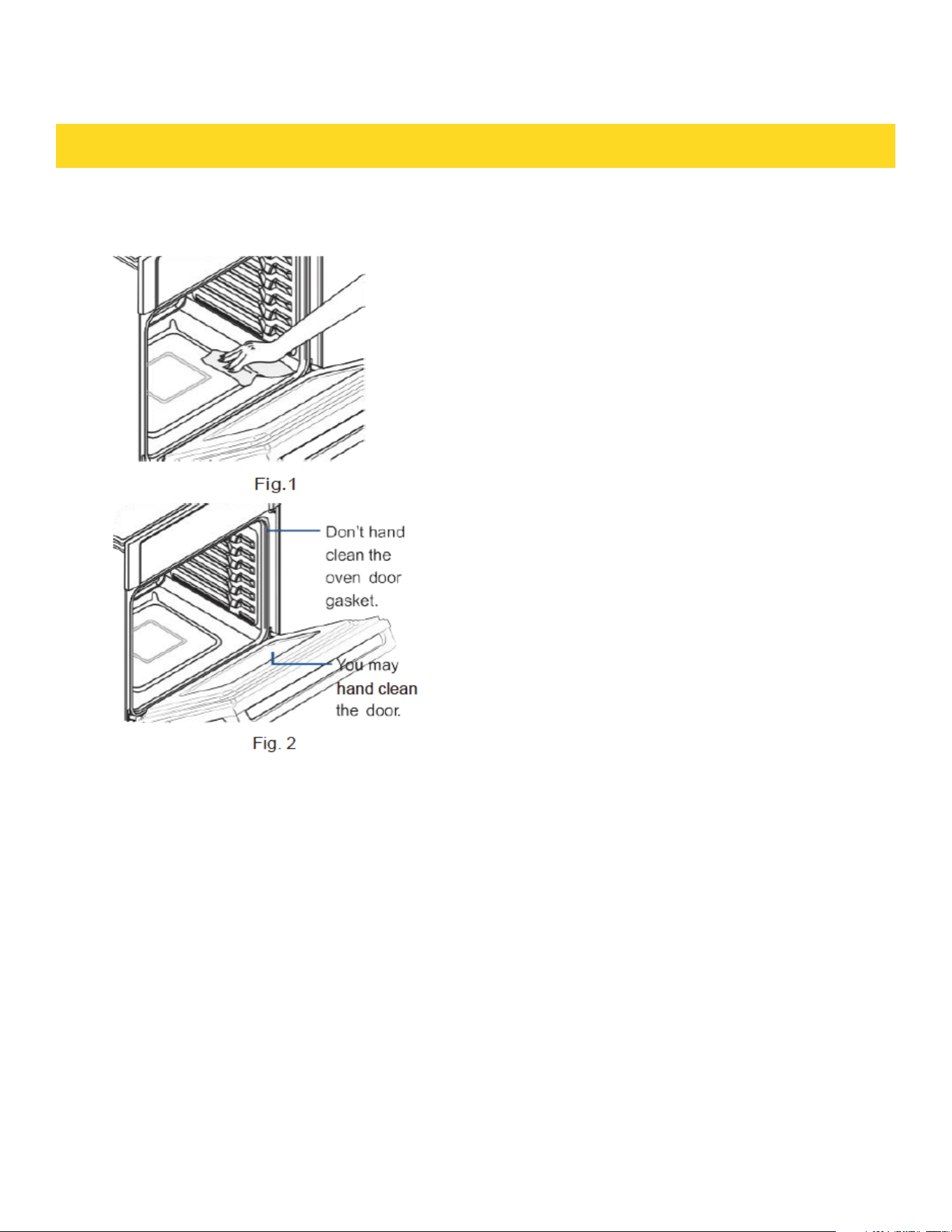
Before a self-cleaning cycle
MAINTAINING THE APPLIANCE
· We recommend venting your kitchen with an
open window or using a ventilation fan or
hood during the self-deaning cyde
· Remove the wire rack, broil pan, broil pan
insert, all cookware, and any aluminum foil
from the oven.
· Wipe up debris from the oven bottom. (Fig. 1)
· The silver colored oven racks can be self-
dean ed, but they will darken, lose their
luster, and become hard to slide
· Residue on the front frame of the oven and
outside the gasket on the door will need to be
cleaned by hand. Clean these ares with hot
water soap-dilled steel-wool pads, or
deansers such as Soft Scrub. Rinse well with
clean water and dry.
· Do not dean the gasket.The fiberglass
material of the oven door gasket cannot
withstand abrasion. It is essential for the
gasket to remain intact. If you notice it
becoming wom or frayed, have it replaced.
(Fig. 2)
· Make sure the oven light cover is in place and
the oven light is off.
Remove oven racks and accessories before starting the self-clean mode.
61

MAINTAINING THE APPLIANCE
How to run a self-cleaning cycle
1. Select the length of time for the self-cleaning operation, eg. 3 hours. Touch Self
Clean'2J3/5h once for a 3 hour dean time, twice for a 5 hour clean time, or 3 times
for a 2 hour dean time The default setting is 3 hours.
2. TouchSTART to st a rt the self-cleaning. The motor driven door lock will engage
automatically.
· You will not be able to start a self-cleaning if the Control Lockout feature is activated or if the
oven’s temperature is too hot.
· The oven door locks automatically. The display will show the deaning time remaining.
You cannot open the oven door until the temperature drops to a safe/cool temperature
3. When the self-cleaning is done, End will appear in the display and the oven will beep 6 times
How to delay the start of self-cleaning
1.Touch Self Clean’213/5h. Select the desired self-clean time by touching Self
Clean’213/5h.
2. TouchDelay Start
3. Enter the time you want the self-clean to start.
4.Touch START. The display will show Delay, Self dean , and the Lock icon. The
motordriven door lock will engage automatically.
5.The Self-Cleaning will tum on automatically at the set time
How to tum off the self cleaning feature
If you need to stop or interrupt a self-cleaning cyde:
1. Touch Cancel.
2. You will be able to open the oven door once the oven has cooled down for approximately 1
hour.
After a self-cleaning cycle
· Youmaynotice some white ash in the oven. Wipe it up with a damp cloth
after the oven cools.(lf white sports remain,remove them with a soapfilled
steel wool pad and rinse thoroughly with a vinegar and water mixture.)
· If the oven is not clean after one cycle, repeat the cycle.
· You cannot set the oven for cooking until the oven is cool enough for the door.
62

Using Sabbath
You can use the Sabbath feature with baking only. The oven temperature may be set higher or |ower
after setting the Sabbath feature (The oven temperature adjustment feature should be used only
during Jewish holidays.) The display, however, will not change and tones will not sound when a change
occurs. Once the oven is properly set for baking with the Sabbath feature active, the oven will remain
continuously on until the Sabbath feature is cancelled. If the oven light is needed during the Sabbath,
touch Light before activating the Sabbath feature. Once the oven light is turned on and the Sabbath
feature is active, the oven light will remain on until the Sabbath feature is turned off. If the oven light
needs to be off, be sure to turn the oven light off before activating the Sabbath feature
How to use the Sabbath feature
a. Touch Bake. The default temperature is 350 "F
b. Enter the temperature you want, eg. 375 "F, by using the number pad
c. Touch START. The temperature display will start to change once the oven
temperature reaches 100 "F
d. Touch Bake and Broil for three seconds at same time. The panel will display Set Sab
e. Touch START. Activate the oven Sabbath function, the panel will display SAb, the
oven heating work automatically becomes 74 hours. Once SAb appears in the
display, the oven will not beep or display any further changes. You may change the
oven temperature once baking has started. Remember that the oven will not beep or
display any further changes once the Sabbath feature is engaged
f. You can tum the oven off at any time by touching Cancel. This will tum only the oven
off. If you want to deactivate the Sabbath feature, hold down Cancel for 3 seconds.
Sab will disappear from the display
Do not to attempt to activate any other program feature except BAKE while the Sabbath Cleaner or
Polish. feature is active. ONLY the following key pads will function correctly with the Sabbath feature on:
NUMBER, BAKE, START and Cancel. All other keypads should not be used once the Sabbath feature is
activated.
You can change the oven temperature, but the display will not change and tones will not sound when
a change occurs. (The oven temperature adjustment feature should be used only on Jewish holidays.)
After changing the temperature while the unit is in Sabbath mode, there is a 15 second delay before the
unit recognizes the change Should you experience a power failure or interruption, the oven will shut off.
When power IS returned, the oven will not turn back on automatically. SAb will be displayed in the oven
18 control display, but the oven will not operate. Food may be safely removed from the oven while it is
still in the Sabbath mode, however the oven cannot be turned back on until after the Sabbath/ Holidays.
After the Sabbath observance, turn off the Sabbath mode. Touch and hold down Cancel for 3 seconds
simultaneously to turn the Sabbath mode off . The oven may then be used with all normal functions.
Do not open the oven door or change the oven temperature for about 30 minutes after you
have started Sabbath mode to allow the oven to reach the set temperature
MAINTAINING THE APPLIANCE
63

MAINTAINING THE APPLIANCE
Self-cleaning
Cleaning painted parts and decorative trim
· For general deaning, use a doth with hot, soapy water
· For more difficult residue and built-up grease,apply a liquid detergent directly onto
the area and leave for 30 to 60 minutes. Wipe with a damp doth and dry. Do not use
abrasive deaners on any oven surface. They can be scratched.
Cleaning stainless steel surfaces
1. Shake a bottle of Stainless Steel Appliance Cleaner or Polish well.
2. Place a small amount of stainless steel appliance deaner or polish on a damp doth
or damp paper towel.
3. Clean a small area, rubbing with the grain of the stainless steel if applicable
4. Dry and buff with a dean, dry paper tawel or soft doth
5. Repeat as necessary.
· Do not use a steel-wool pad. It will scratch the surface.
· If a mineral oil-based stainless steel appliance deaner has been used before to dean
the appliance, wash the surface with dishwashing liquid and water prior to using the
Stainless Steel Appliance Cleaner or Polish
Oven racks
· If the racks are left in the oven during a self-deaning cyde, their color will turn slightly
blue and the finish will be dull.After the self -deaning cydeis complete and the oven
has cooled, rub the sides of the racks with wax paper or a doth containing a small
amount of oil. This will help the racks glide more easily on their tracks
· Cleaning racks may be deaned by hand with an abrasive deaner or steel wool. During
cleaning, be careful not to allow water or deaner to enter the slides on the sides of
rack
64
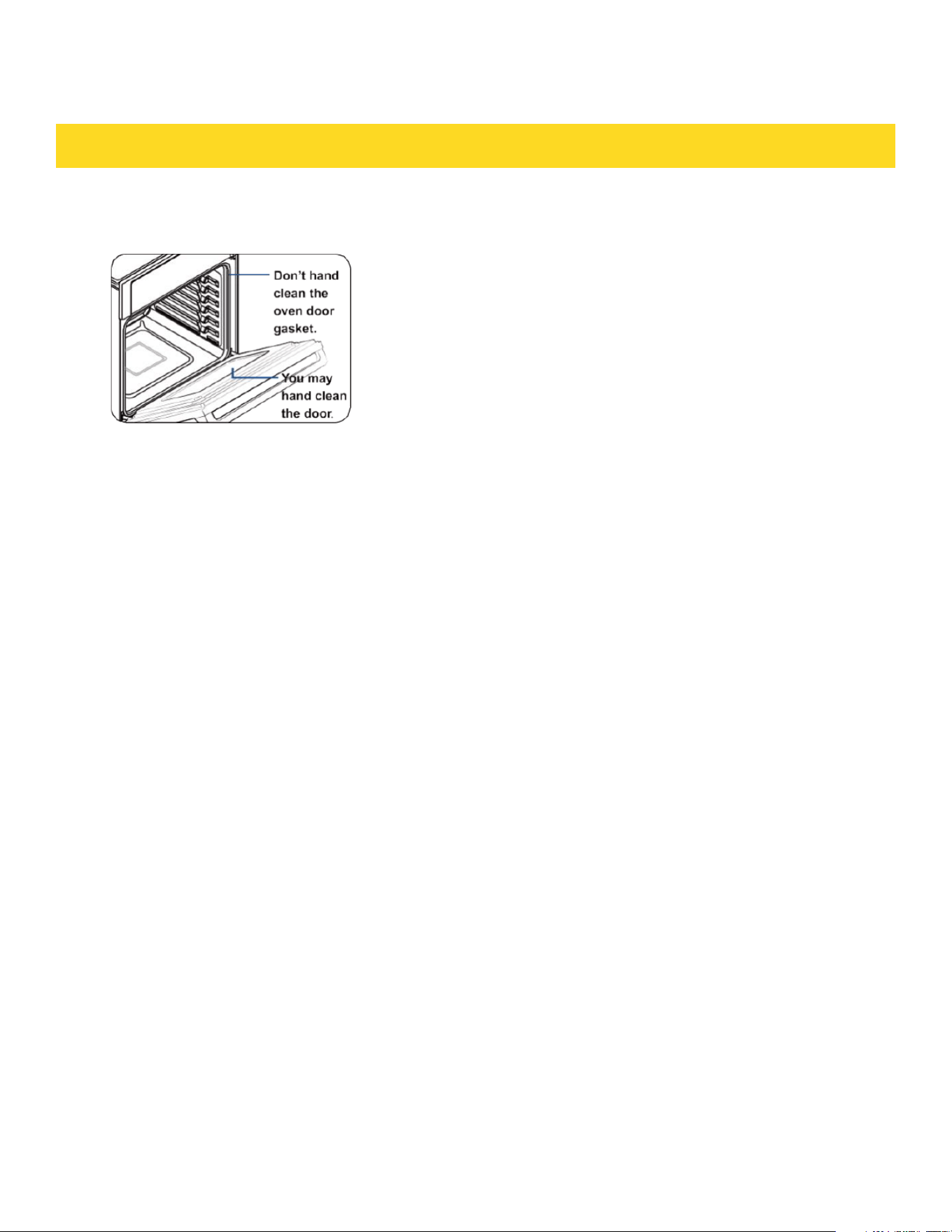
Oven door
MAINTAINING THE APPLIANCE
• Use soap and water to thoroughly clean the top, sides, and front of the oven door.
Rinse well. You may use a glass deaner on the outside glass of the oven door. DO NOT
immerse the door in water. DO NOT spray or allow water or the glass cleaner to enter
the door vents. DO NOT use oven deaners, deaning powders, or any harsh abrasive
cleaning materials on the outside of the oven door.
• DO NOT clean the oven door gasket. The oven door gasket is made of a woven
material which is essential for a closed seal. Care should be taken not to rub,
damage, or remove this gasket.
65
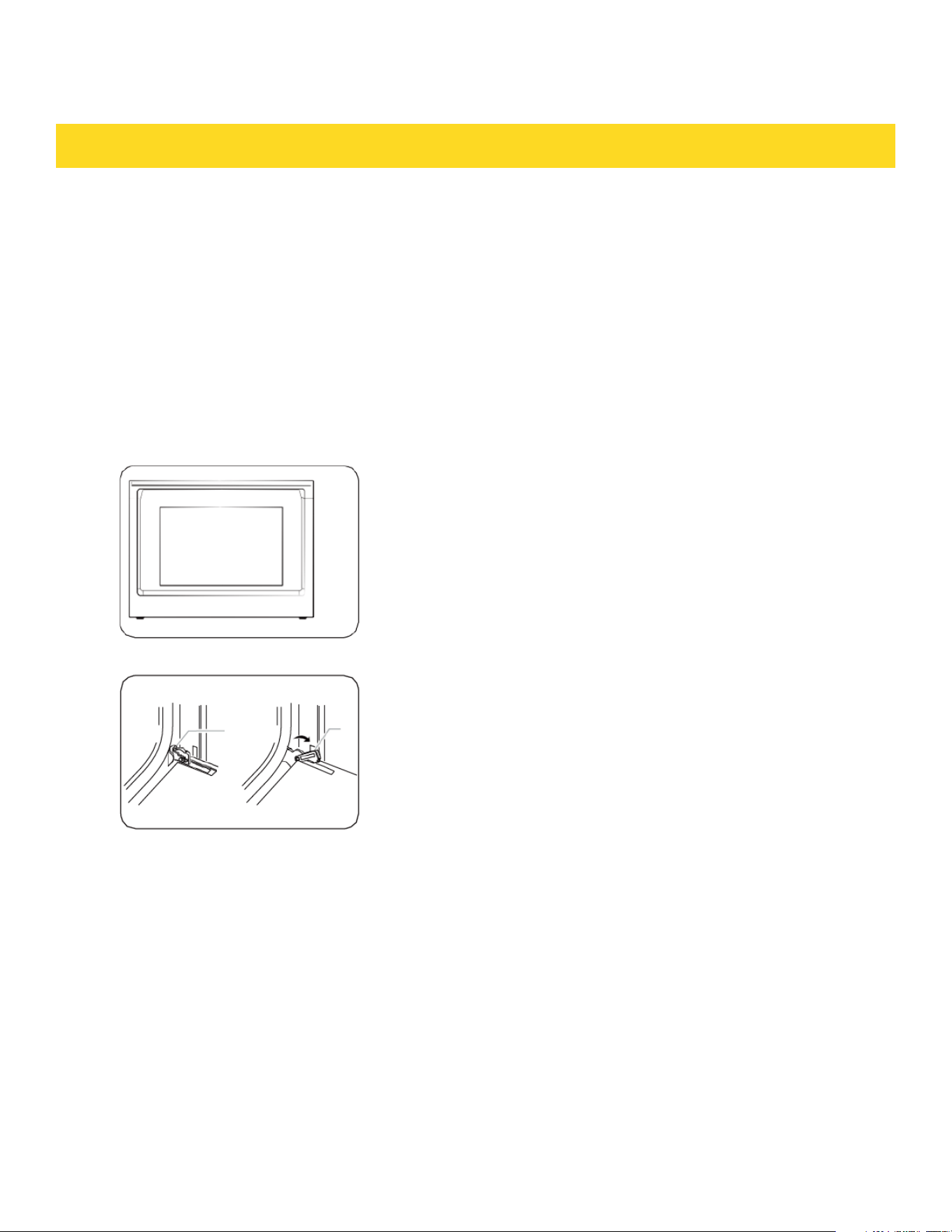
MAINTAINING THE APPLIANCE
Removing the oven doors
CAUTION
• The door is very heavy. Be careful when removing and lifting the door
• Do not lift the door by the handle. Use two hands to remove an oven door. For
double ovens, repeat the process for each door.
1. Prior to removing the oven door, prepare
a surface where you will placecovered
with a soft blanket. You can also use the
corner posts from your packaging
material.
2. 0pen the oven door.
3. Locate the oven door hinge locks in both
corners of the oven door, and then rotate
the hinge locks toward the oven door to
the unlocked position. If the door hinge
lock is not rotated fully (see illustration B
on the left for an example of full
rotation), you will not be able to remove
the door properly.
A. Oven door hinge lock
locked position
B. Oven door hinge lock in
unlocked position
66
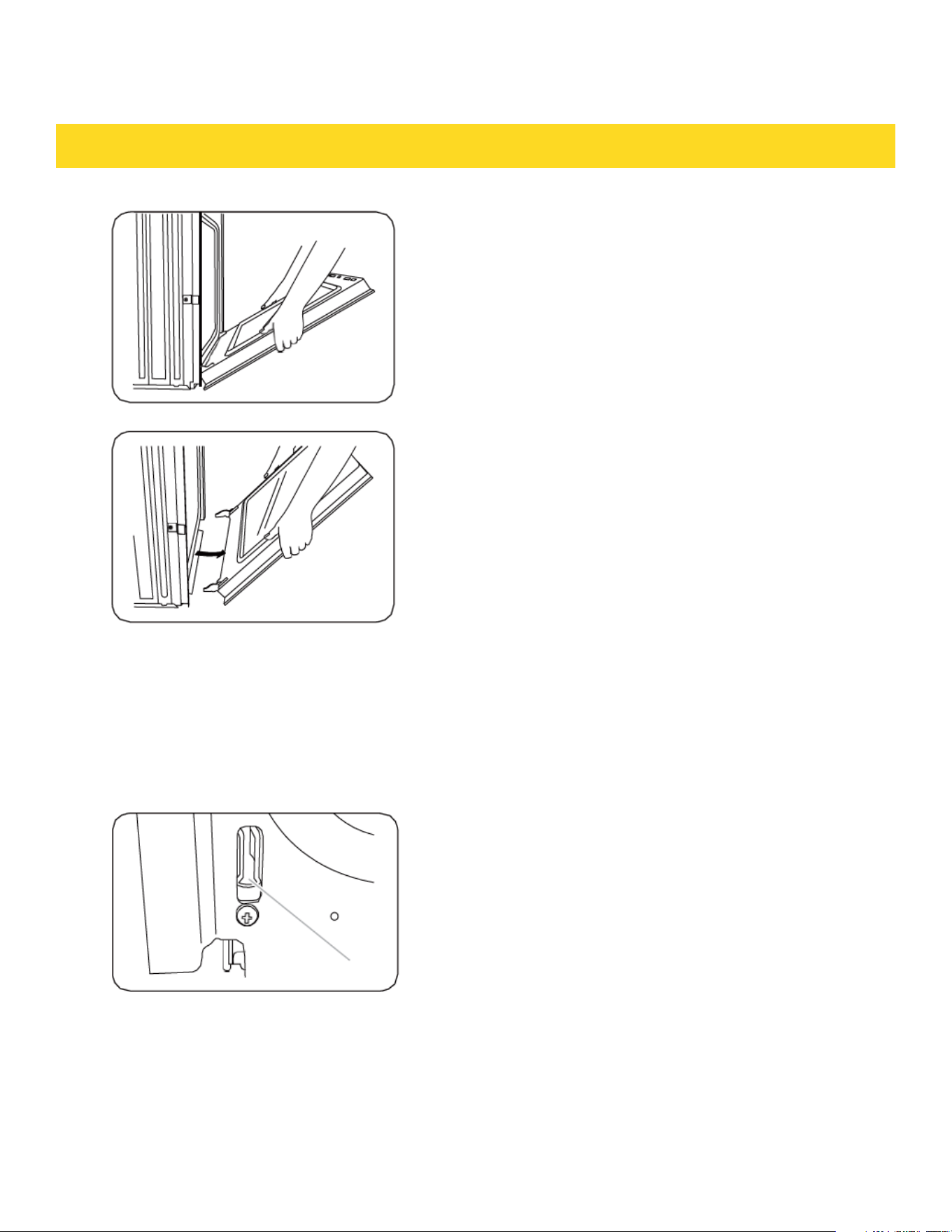
4. Partially dose the door to engage the door
latch locks The door will stop at this point.
5. Using two hands, grasp the edges of the
oven door. Lift and pull the oven door toward
you and remove. You may need to gently
shift the door from side to side as you pull.
6. Set the oven door aside on the prepared
covered work surface with the oven door
resting on its handle.
Replacing the oven door
CAUTION
The door is very heavy. You may need helping the door high enough to slide it into the
hinge slots. Do not lift the door by the handle.
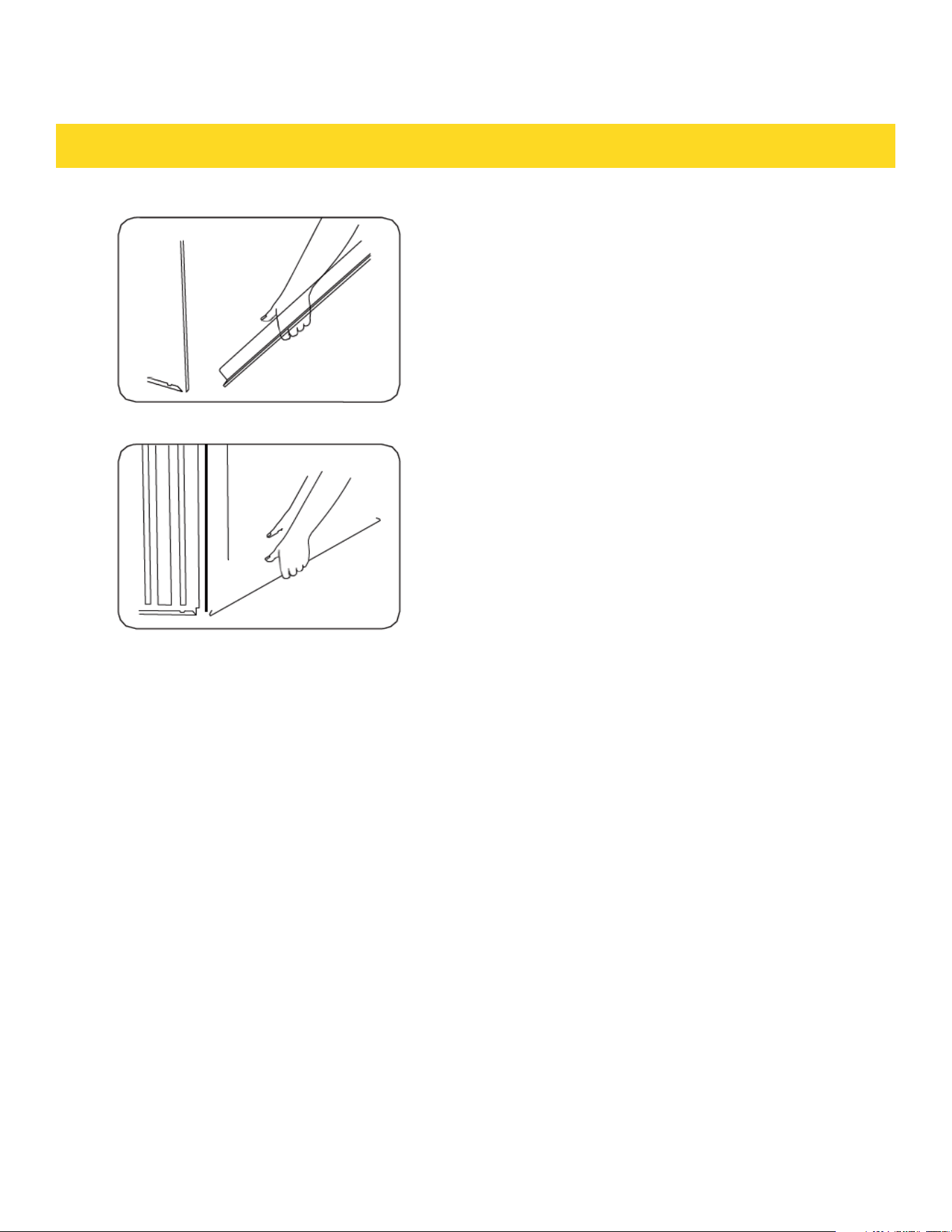
1. Using two hands, grasp the side edges of
the door at the midpoint Face the oven
cavity.
2. Locate the slots on each side of the oven
cavity for the door hinge locks.
A. Slot in the oven cavity for the
door hinge lock
MAINTAINING THE APPLIANCE
67
MAINTAINING THE APPLIANCE
3. Holdthe door at a 45° angle, and then
align the door hinges with the slots in the
lower front of the oven cavity. Slowly
insert the door, making sure you main
tain the 45° angle. You will knaw the door
is engaged in the slot when you feel a
slight drop.
4. Lawer the oven door to the fully open
position. If the oven door does not open
to a full 90°, repeat steps 1 through 3.
5. Locate the oven door hinge locks in the
comers of the oven door, and rotate the
hinge locks taward the oven cavity to the
locked position. See Step 3 (illustration
A) in the "Removing the oven doors"
section for the proper locked position.
6. Close the oven door
7. When the hinges are properly installed
and the door is d osed, there should
be an even gap between the door and the
control panel. If one side of the oven door
is hanging over, than the other hinge on
that side is not properly installed.
68
TROUBLESHOOTING
Troubleshooting
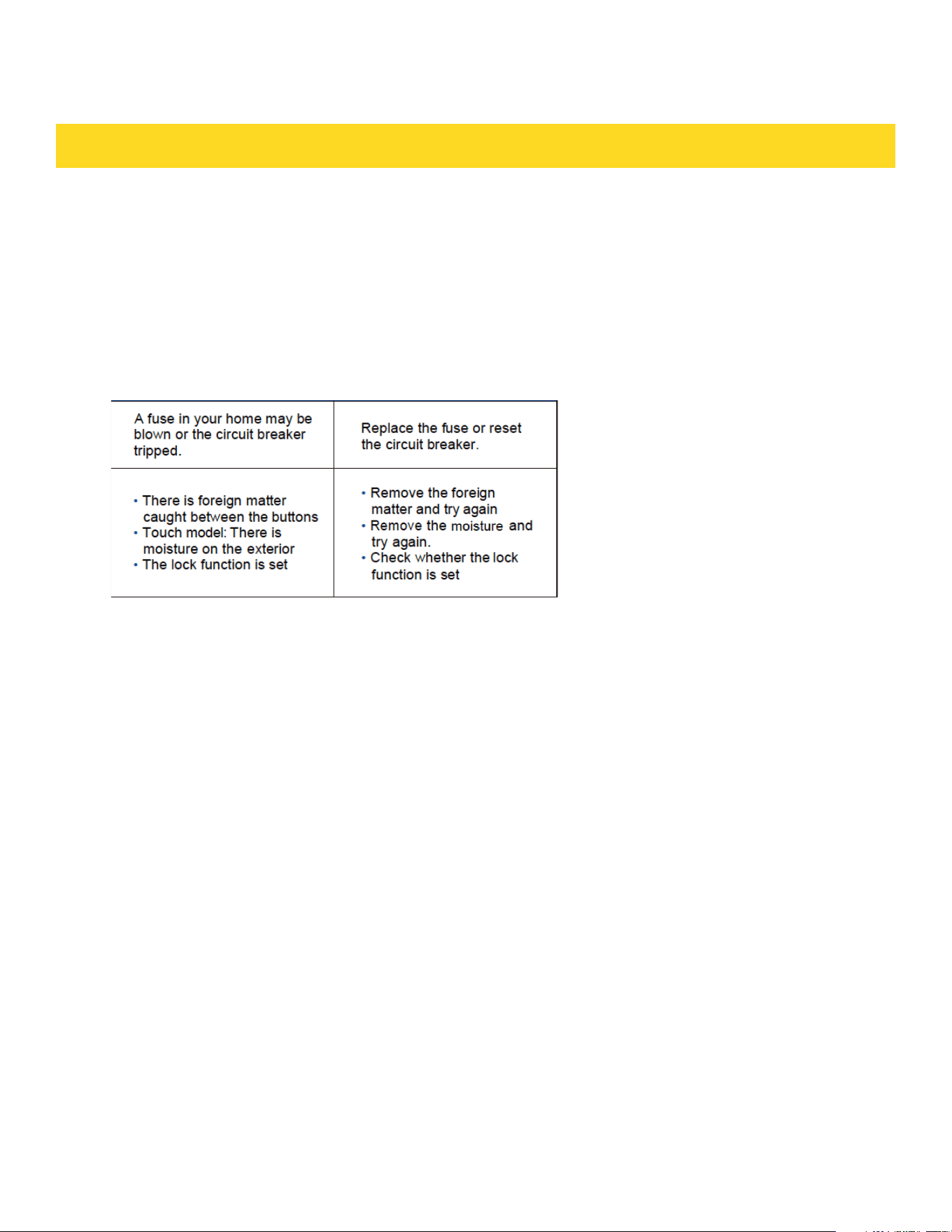
Thorkitchen works hard to ensure that you don’t have problems with your new electric
oven. If you run into unexpected trouble, look first for a so lution in the tables below. If
you’re still having trouble after trying the suggested solution, call Thorkitchen at
1-877-288-8099.
CONTROL DISPLAY
69
TROUBLESHOOTING
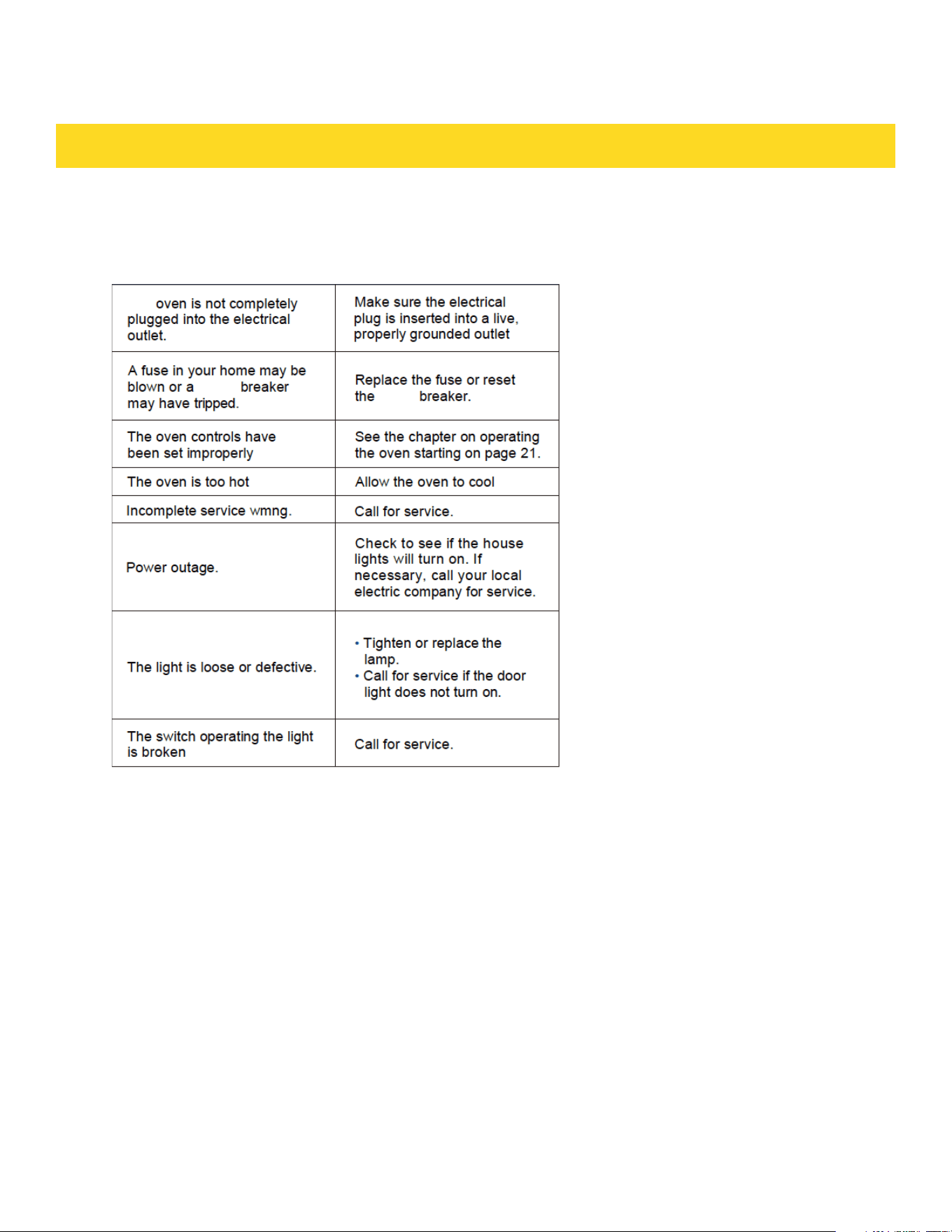
Oven
70
The
circuit
circuit
TROUBLESHOOTING
71
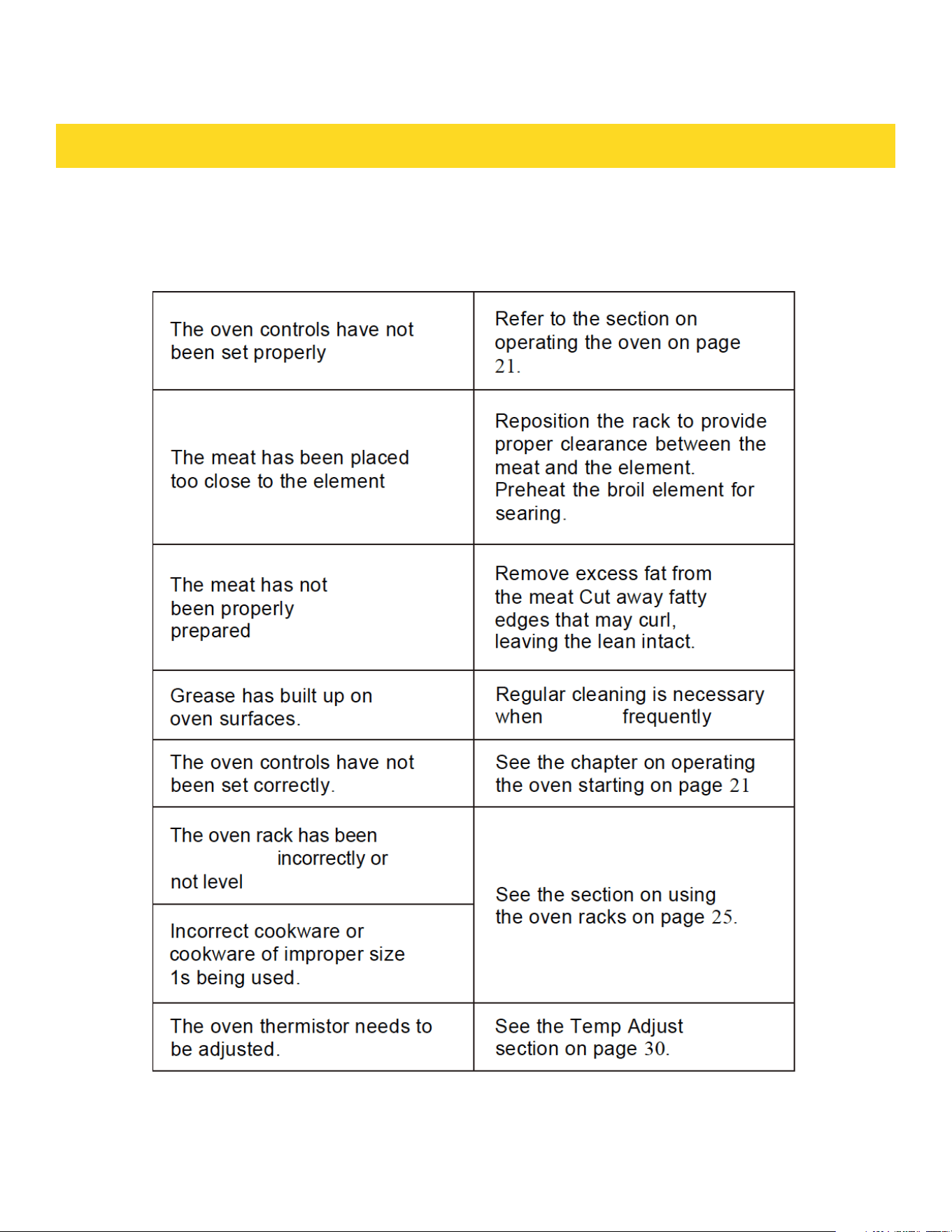
is
broiling
positioned
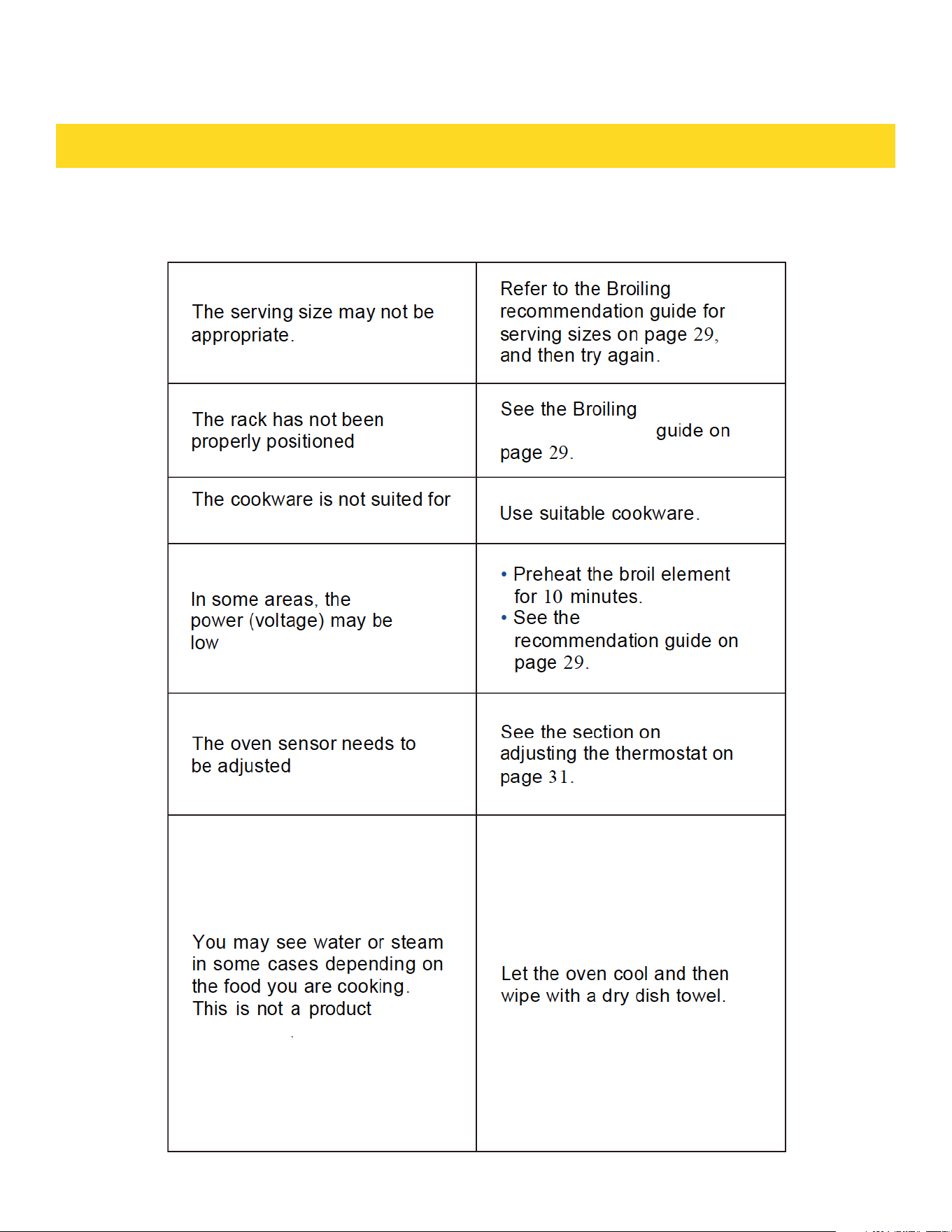
TROUBLESHOOTING
72
broiling
broiling
recommendation
malfunction
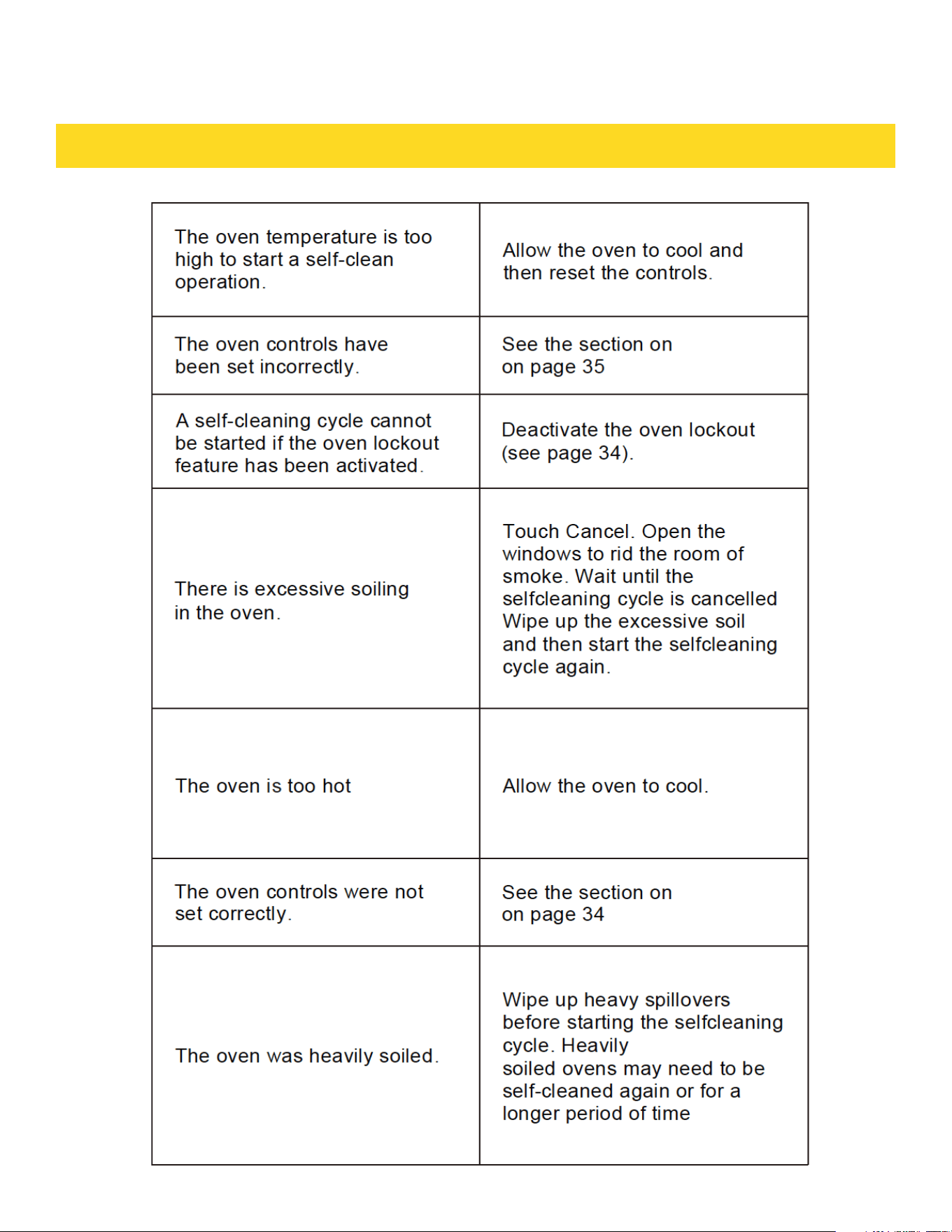
TROUBLESHOOTING
73
selfcleaning
selfcleaning
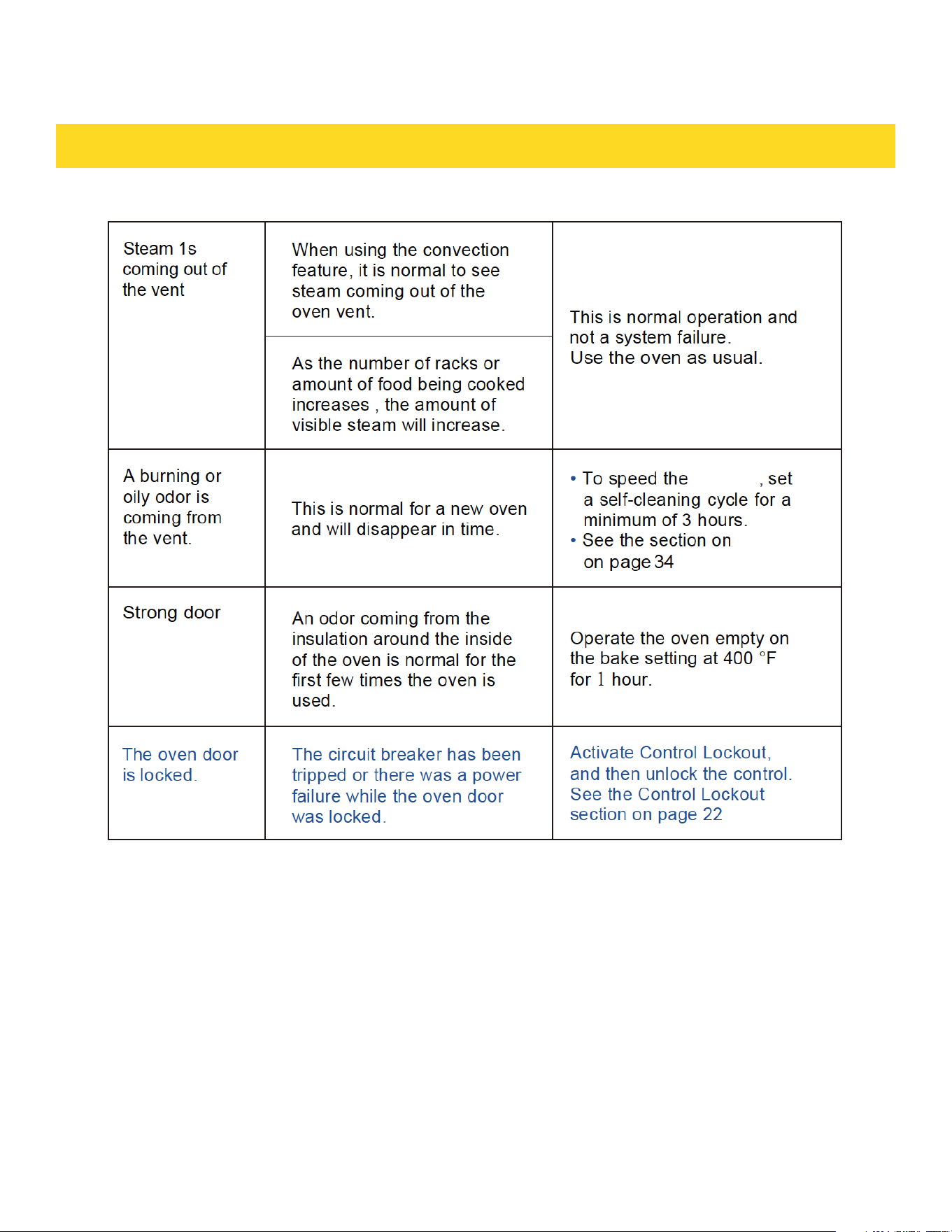
TROUBLESHOOTING
74
process
selfcleaning
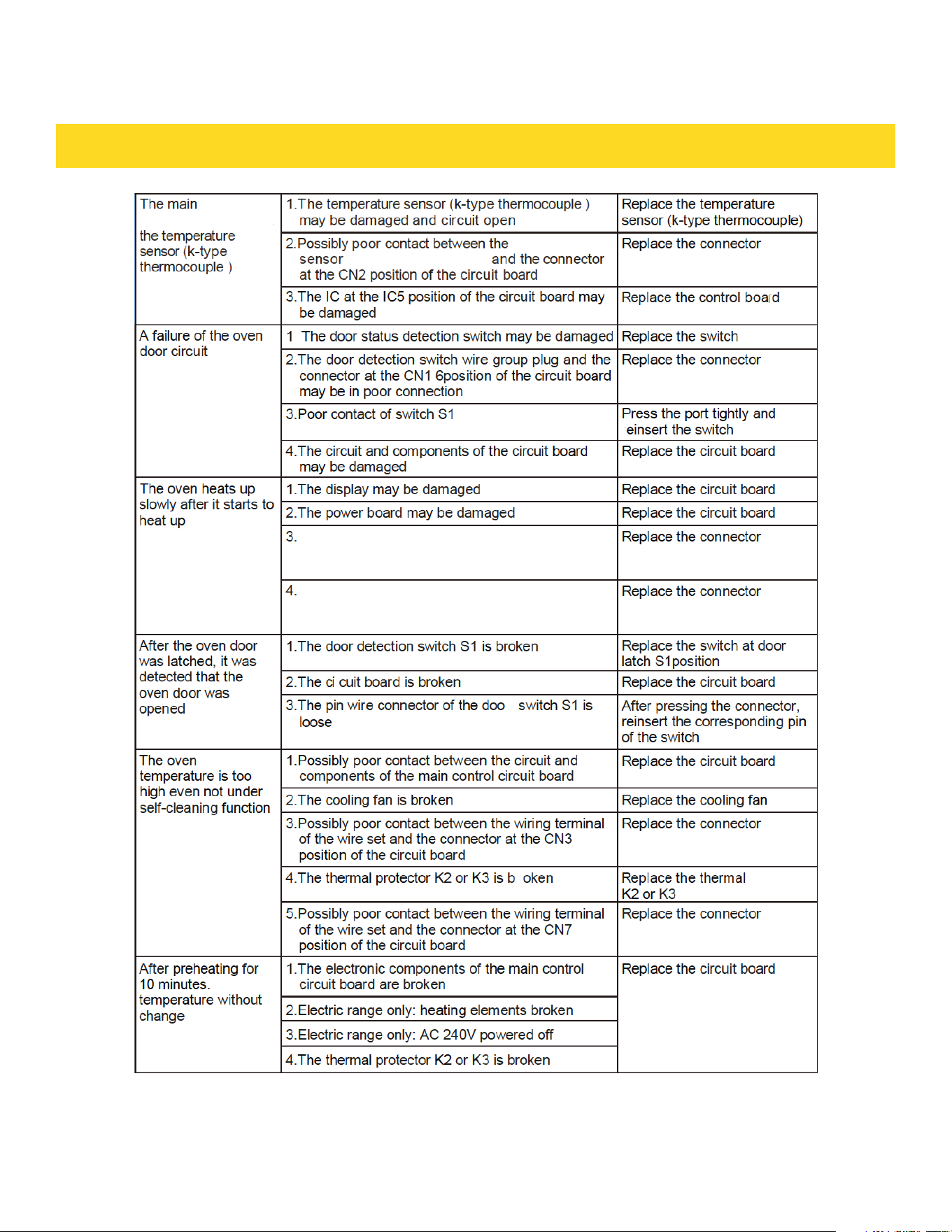
INFORMATAION CODES
75
(k-type thermocouple)
r
r
r
.
board cannot detect
circuit
r
oven
Possibly poor contact between the plug of the wire set
and the connector at the CN2 position of the display
board
Possibly poor contact between the plug of the wire set
and the connector at the CN18 position of the display
board
protection
temperature
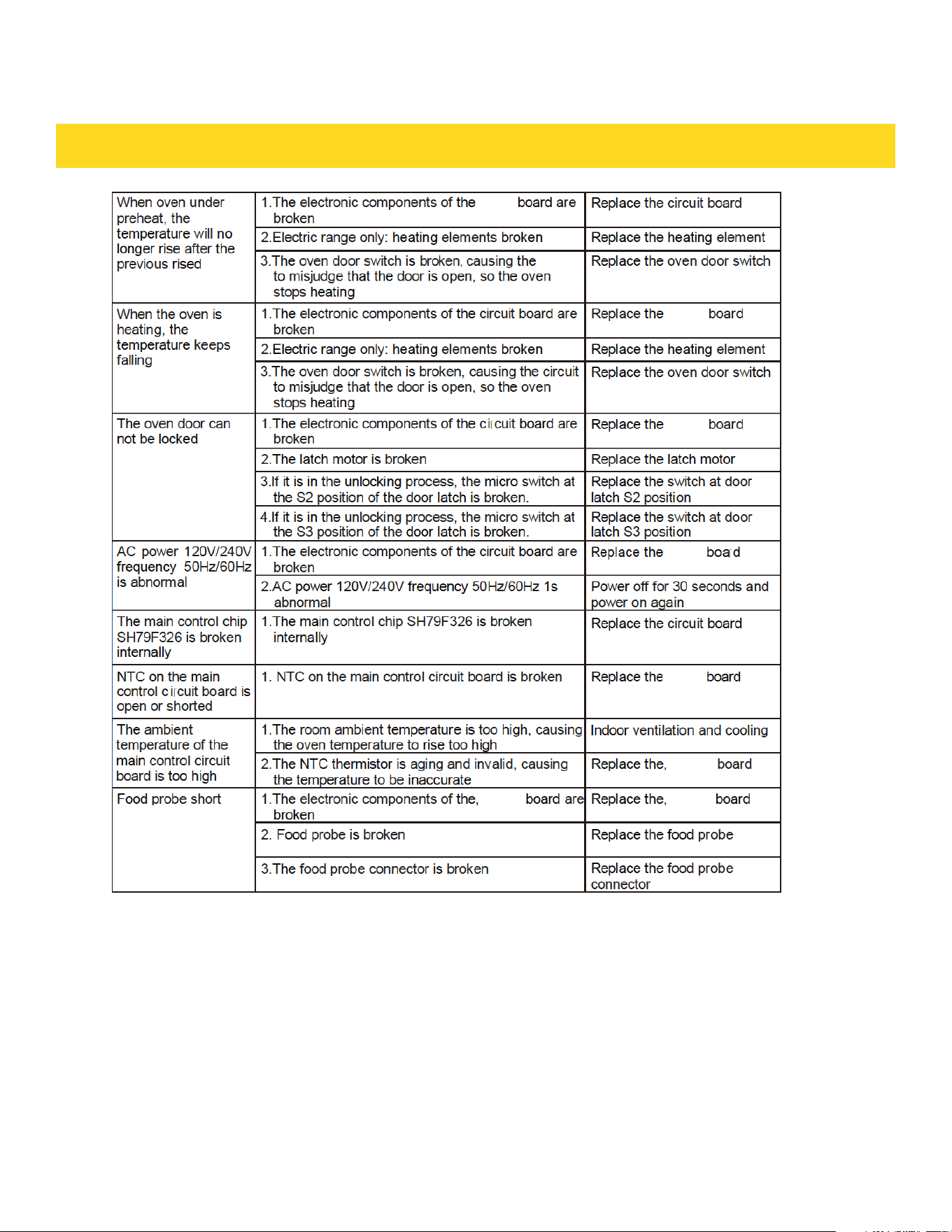
INFORMATION CODES
76
circuit
circuitcircuit
circuit
circuit
circuit
circuit
circuit
circuit
circuit

WARRANTY AND SERVICE
Warrant & Service
This product has been manufactured by Thor Group, 4651 E Airport Drive, California
91761
For Customer Service, please call (877) 288 - 8099
For the most up to date warranty and service policy, please refer to our website
WWW.THORKITCHEN.COM/WARRANTY-REGISTRATION
For in-warranty service requests, please visit our website at
WWW.THORKITCHEN.COM/SERVICE
Please Note: You must provide proof of purchase or installation date for any in
warranty service requests
77
WARRANTY REGISTRATION
Scan theQR code or visit
thorkitchen.com/warranty
Input your product info
and select register
You’re done.
Let’s get cookin’.
You chose THOR Kitchen to enhance your culinary journey and
we’re stoked to have you in the club. Think of it as a secret
society of really savvy people, such as yourself, choosing
professional power and performance at an affordable price.
Register your product by following the steps below.
WELCOME
TO THE CLUB
WARRANTY NEED PARTS?