
3
0 IN
. PROFESSION
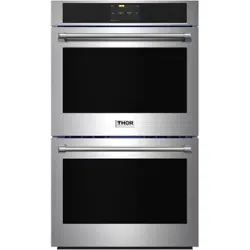
TEW30ES
A
L ELECTRIC SIN
GLE
WALL OVEN

USE AND CARE MANUAL
30 INCH PROFESSIONAL
ELECTRIC SINGLE
WALL OVEN
TEW30ES

Important Safety Tips .............................................................................................................. 1
Installation Instructions ........................................................................................................... 5
Install Oven Handle ........................................................................................................................ 9
Introducing Your New Oven .......................................................................................................... 10
Before You Begin ........................................................................................................................... 11
Operating the Oven ............................................................................................................... 12
Maininting the O ven.............................................................................................................. 35
Troubleshooting ................................................................................................................... 37
Warranty ...................................................................................................................................... 41
TABLE OF CONTENTS

Read and follow all instructions before using your oven to prevent the risk of fire, electrical
shock, personal injury or damage when using the oven. This guide does not cover all possible
conditions that may occur. Always contact your service agent or manufacturer about problems
you do not understand.
SAFETY PRECAUTIONS
• Be sure your appliances are properly installed and grounded by a qualified technician.
• Do not repair or replace any part of this appliance unless specifically recommended in this
Use & Care Manual.
• All servicing of this appliance should be carried out by a qualified technician.
• Always disconnect the power to the appliance before servicing by unplugging the power cord,
removing the fuse or switching off the circuit breaker.
DO NOT TOUCH HEATING ELEMENTS OR INTERIOR SURFACES OF OVEN WHEN IN USE
Heating elements may be hot to the touch even though they are dark in color and not glowing.
The interior surface of the oven can become hot enough to cause burns.During and after use, do
not touch or let clothing or other flammable material contact heating elements or interior
surfaces of oven until they have had sufficient time to cool. Other surfaces of the appliance
may become hot enough to cause burns. Use caution around oven vent openings and surfaces
near vent opening, oven doors, and window of oven door.
USE CARE WHEN OPENING DOOR.
Let hot air or steam escape before you remove or place food in the oven.
DO NOT HEAT UNOPENED FOOD CONTAINERS.
There will be a build up of pressure in sealed food containers when heated. This can lead to
containers bursting and resulting in injury.
SAVE THESE INSTRUCTIONS
IMPORTANT SAFETY TIPS
1
• Use dry pot holders only.
Moist or damp pot holder on a hot surface may result in steam burns. Do not allow pot
holders or clothing to contact heating elements. Do use towels or other bulky cloths to pick
up hot items. Use a dry pot holder or equivalent .
• Wear appropriate apparel when operating appliance.
Loose fitting or hanging garments should never be worn while using the appliance.
• Be certain all packing materials are removed from the appliance before operating.
Keep all plastics, clothing, paper and other flammable products away from parts of the oven
that become hot.
• DO NOT Force the oven door open. This can damage the automatic door locking system.
Wait for the oven to fully cool before trying to open the door. When opening the door after Self-
Clean, stand to the side of the door and allow hot air and steam to escape, the oven may still
be very hot.
• DO NOT use steel wool pads. Steel wool will scratch the stainless steel surfaces as well as
rack and oven interior.
• DO NOT use harsh etching tools, abrasive, cleaners, or sharp metal scrapers to clean the oven
surfaces or glass, as this may cause damage to the product.
• Use caution when removing the oven door. Oven door is HEAVY. DO NOT lift the oven door by
the handle or carry the door by the handle.
SAVE THESE INSTRUCTIONS
SAFETY PRECAUTIONS (Cont.)
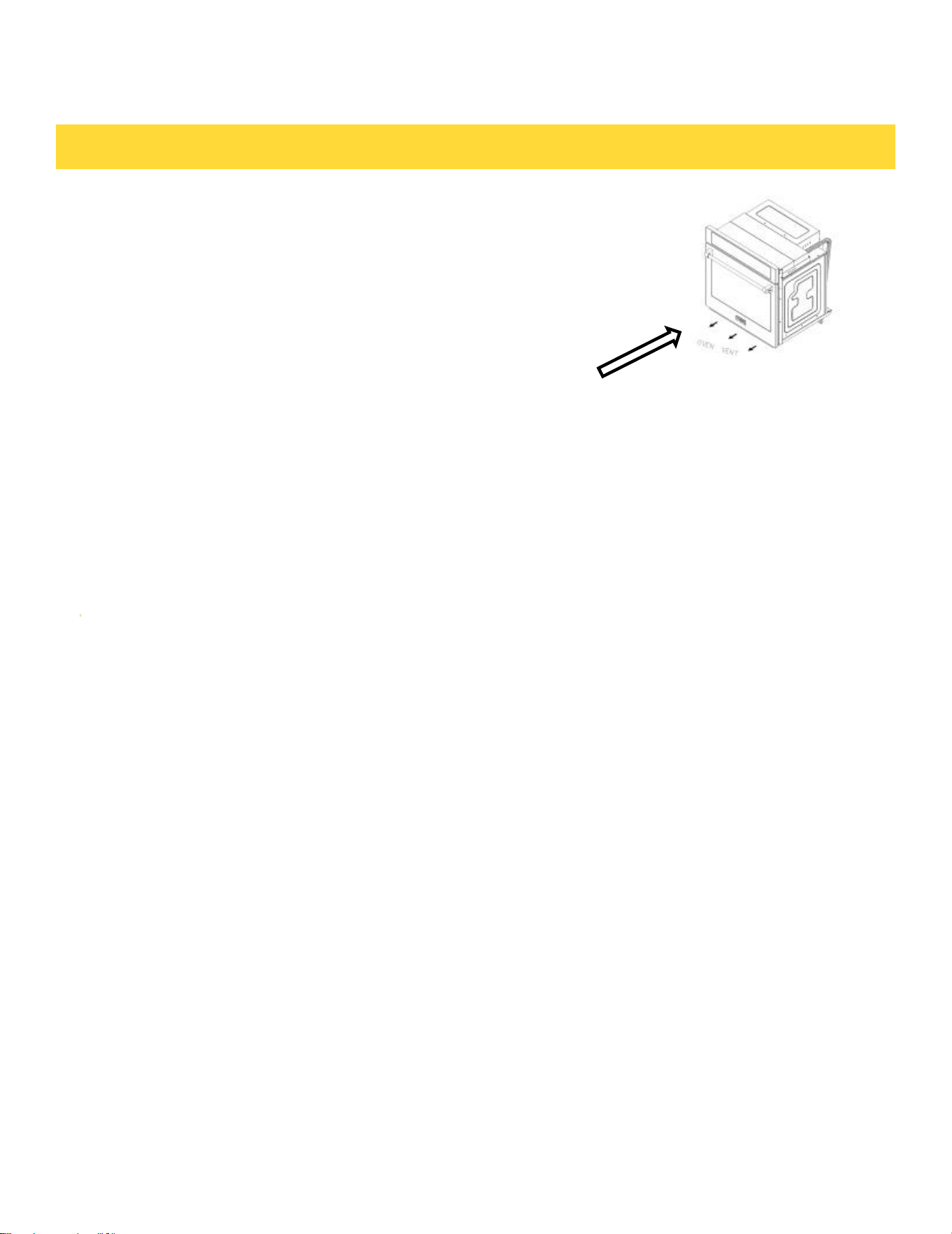
• Keep oven vent / ducts unobstructed.
The oven vent becomes hot during oven use. Never block
this vent and never place plastic or heat sensitive items
on or near the oven vent .
Oven vent opening
Note:
For proper operation,vent trim must be installed below the oven door to correctly channel
cooling air flow for oven.
WARNING
• NEVER use this appliance for warming or heating the room.
• DO NOT use water on grease fires.
Should an oven fire occur, DO NOT open the oven door. Turn off the oven. Once the fire has
consumed all oxygen in the oven the fire will go out on it own.If it does not,use an ABC type
Fire extinguisher.
IMPORTANT SAFETY TIPS
2
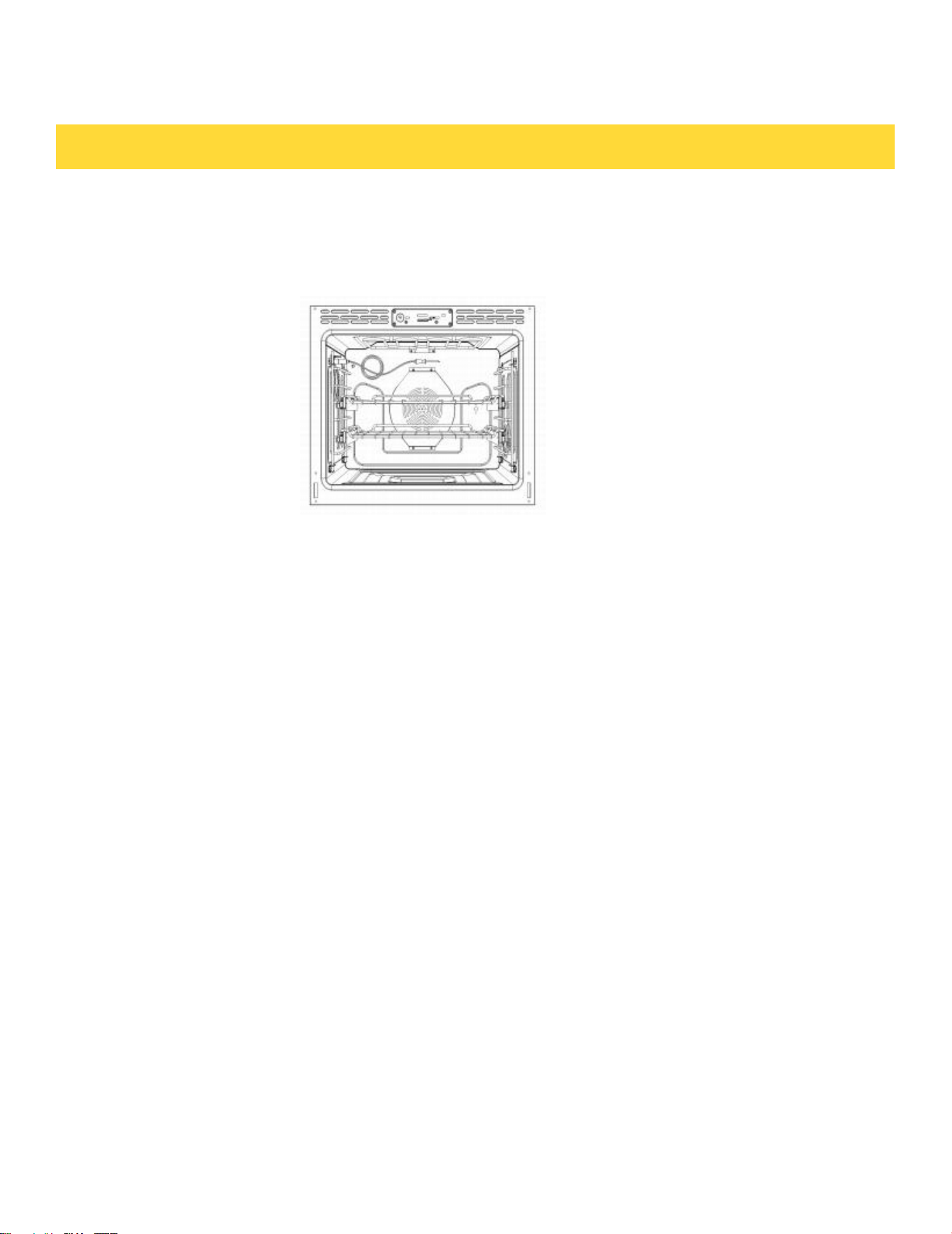
• DO NOT place aluminum foil directly on the oven bottom.
• DO NOT line the oven walls, racks, bottom, or any other part of the oven with aluminum
foil or any other material. Doing so will result in poor cooking results. The foil will disrupt
the heat distribution and result in permanent damage to the oven.
• Before replacing the oven light bulb switch off the electrical power to the oven at the
circuit breaker panel. Failure to do so can result in severe personal injury , death or electrical
shock.
SAFETY DURING USE
• Always place the oven rack in the desired position while the oven is cool.
• Always use pot holders or oven mitts when removing food from the oven or adjusting the oven
rack.Hot cookware and racks can cause burns.
• Use caution with TIMED COOKING or DELAY TIME COOKING features.Always use pot holders or
oven mitts when removing food from the oven or adjusting the oven rack.Always use pot holders or
oven mitts when removing food from the oven or adjusting the oven rack.Always use pot holders or
oven mitts when removing food from the oven or adjusting the oven rack.
• Should an oven fire occur, leave the oven door closed, and turn off the oven. If the fire continues,
use an ABC fire extinguisher.
• DO NOT use water to put out a fire.
• DO NOT use the broiler pan with out the grid in place.DO NOT cover the Grid with aluminum
foil.
SAVE THESE INSTRUCTIONS
ELECTRICAL SAFETY
• Protective Liners. DO NOT use aluminum foil or any other material to line the oven bottom.
This include silicone liners. Doing so will cause permanent damage to the oven interior.
IMPORTANT SAFETY TIPS
3

CHILD SAFETY
• Children should be kept away from the oven.
• Children should not be left alone or unattended in the area where the oven is in use.
• DO NOT leave small children unattended near the appliance , During the self-cleaning cycle ,
the outside of the oven can become very hot to the touch.
SAFETY WHEN CLEANING
• Do not clean the door gasket. The door gasket is essential for a good seal between the oven
body and the door. Do not use cleaners or push or rub on the door gasket.
• Do not use oven cleaners. No commercial oven cleaner or oven liner protective coatings of
any kind should be used in or around any part of the oven.
• Before self cleaning the oven,remove the broiler pan, all oven racks, meat probe and any
other utensils from the oven cavity.
• Never keep pets birds in the kitchen. The health of birds is extremely sensitive to the fumes
released during and oven self clean cycle. Fumes may be harmful or fatal to birds. Move
birds to a well ventilated room.
• Important instructions. In the event of a failure during the self-clean cycle, an "F" and a
number error code will be displayed.Record this number for the service technician. Shut down
the
power to the oven. Contact a qualified service technician.
• Ensure the oven light lens and all interior surfaces have cooled before cleaning or wiping
them down to avoid thermal shock.
• DO not block the oven vent during operation. Blocking the oven vents can cause the oven
to overheat and trip safety thermal protectors on the oven. The airflow from the bottom of the
wall oven should never be obstructed.
SAVE THESE INSTRUCTIONS
IMPORTANT SAFETY TIPS
4
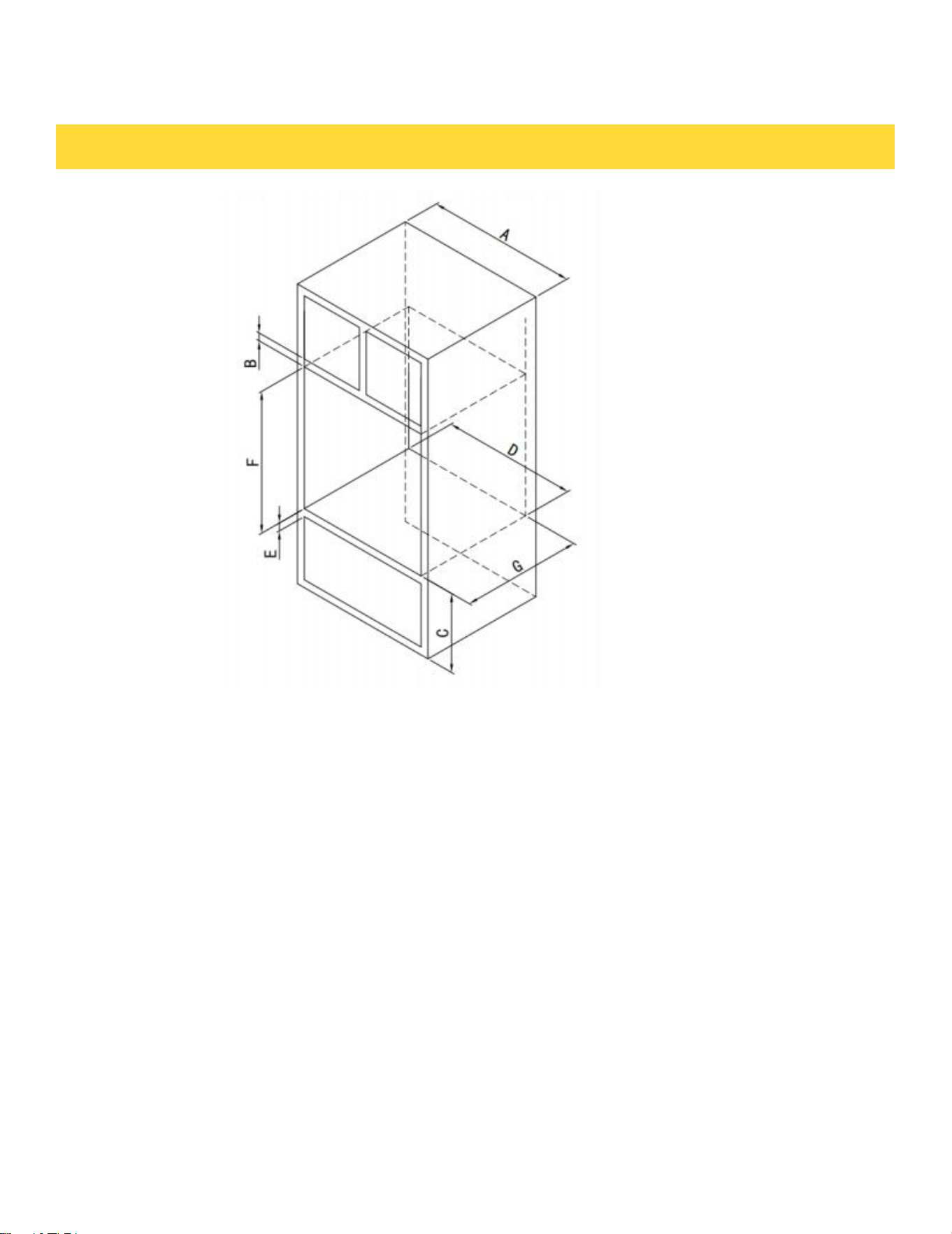
• Platform must support min 220lbs.
Cut Out Dimension:
A:30''(762MM)
B:1''(25MM)
C:15 3/4''(401MM)
D:28 1/2''(724MM)
E:1 1/2''(38MM)
F:27 5/8''(702MM)
G:24''(610MM)
INSTALLATION INSTRUCTIONS
5
IMPORTANT NOTE
This installation must be completed by a qualified installer or technician. Proper installation is
the installer's responsibility, and the manufacturer's warranty does not cover product failures
resulting from improper installation.
1. Before beginning.
Remove all packing material from the oven exterior and interior. This includes any tape, bags,
zip ties and polystyrene packing materials.
2. Installation requirements
Measure the existing cabinet opening and compare them to the cutout dimensions below. If
cabinet dimension meet below specs then little to no cabinet work is required. If cabinet cut
outs do not fall with specification below then cabinet work will be required prior to installation.
• Cabinet base must be level.
• Junction box for electrical connections must be mounted flush to rear wall for proper
clearances.
• Kitchen cabinets in contact with the oven must be heat resistant up to 194°F (90°C). Front and
surrounding cabinets must withstand a minimum of 158°F (70°C).
• Front frame of cabinet should be at least ¾” thick to support mounting screws for oven.
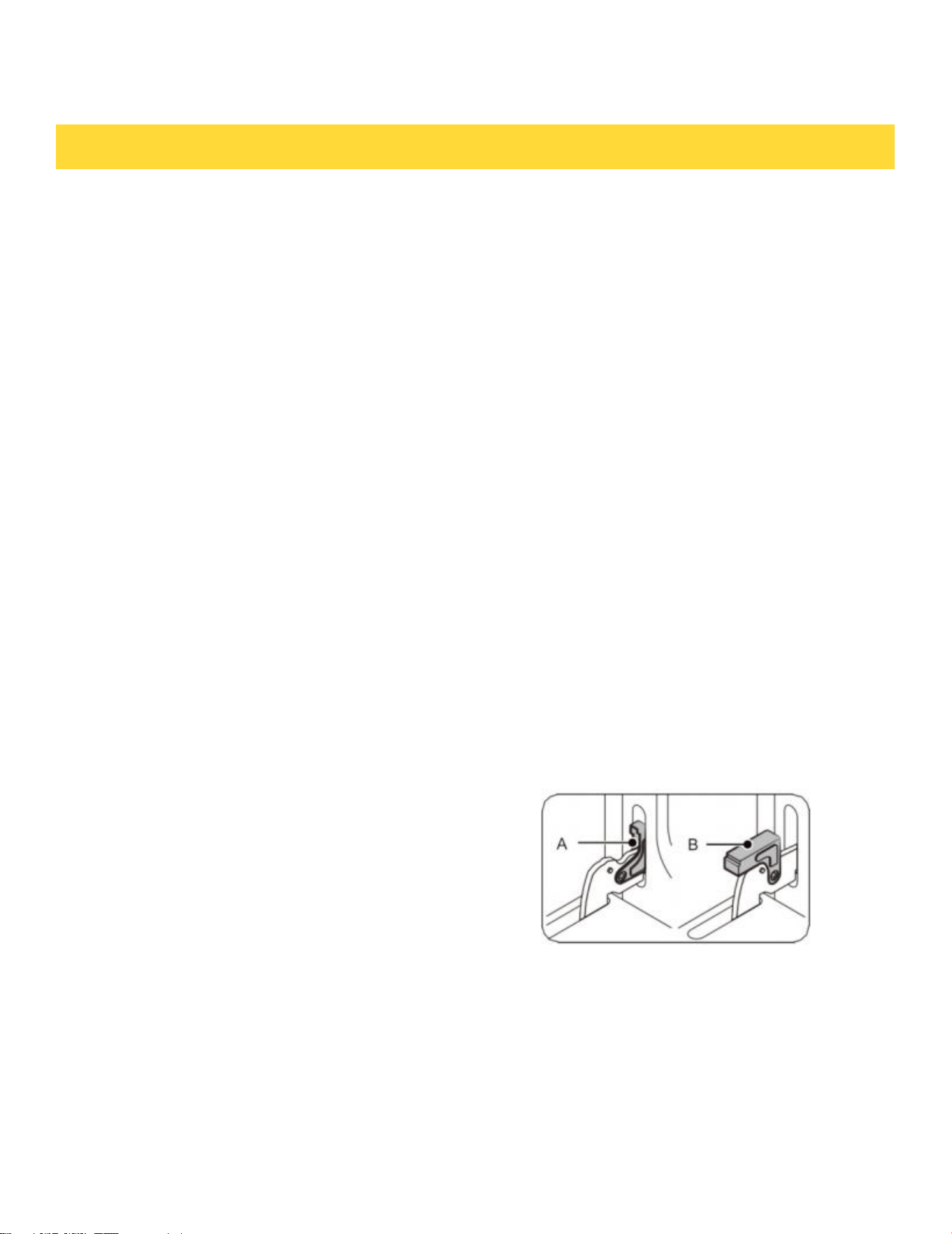
3. Remove oven door and racks from oven.
• Open door fully.
• Flip hinge locks towards door, Move from position A
to Position B on both hinges.
• Close the door until it is resting on hinge locks.
• While grasping the door on both sides (do not lift by the
handle), lift the oven door up until the hinges are free and
clear from their hinge receptacles.Store door in a safe
location.
INSTALLATION INSTRUCTIONS
6
4. Move oven close enough to the opening so electrical connections can be made.
IMPORTANT NOTE
The wall oven must be hardwired (direct wired) to an approved junction box. A plug and
receptacle is NOT PERMITTED. DO NOT shorten the flexible conduit. Conduit must be
securely connected directly to junction box with cable connector. You will need to purchase an
appropriate conduit connector to complete the connection to the junction box.
Wire connections should be made by electrician or qualified technician following all local
codes.
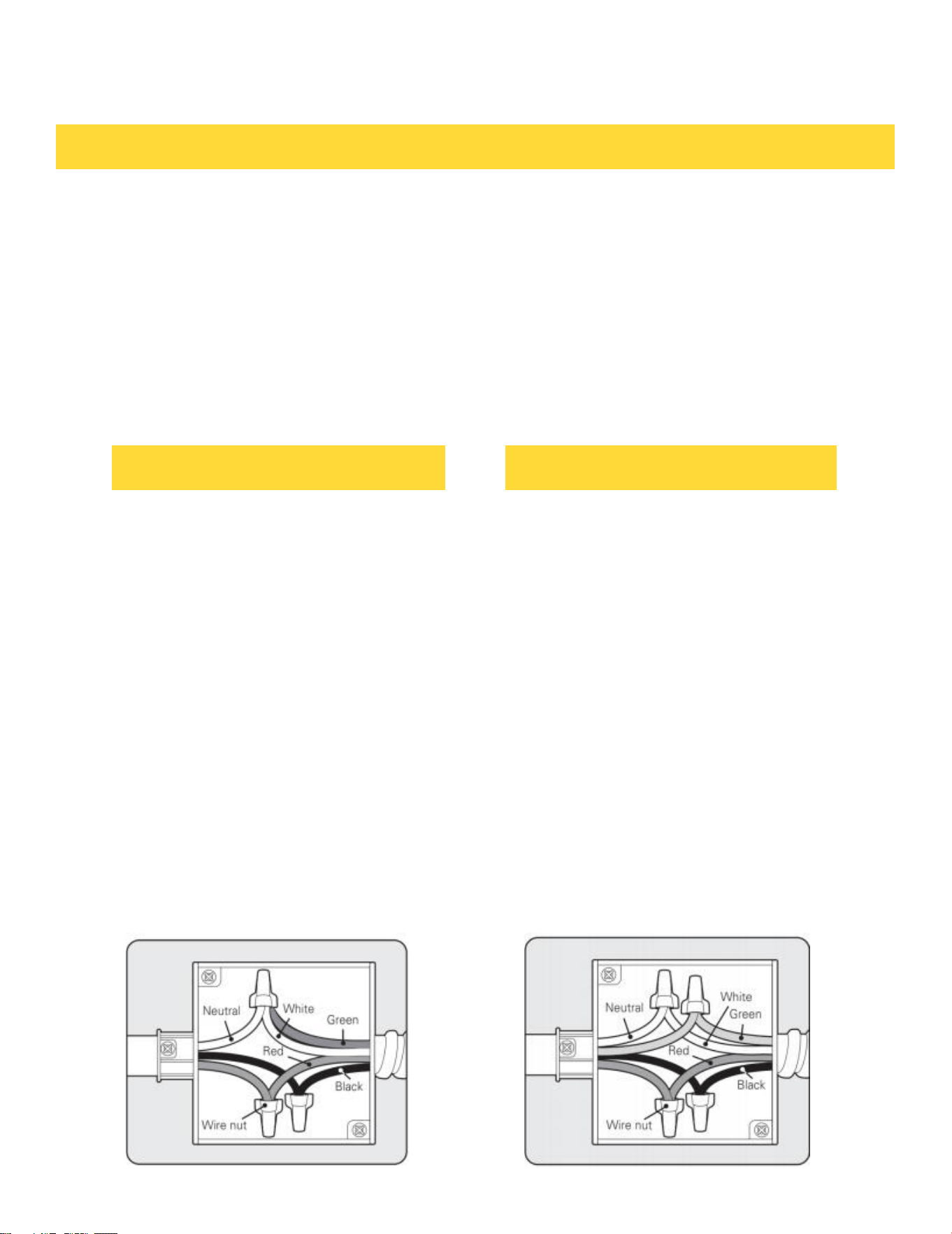
To connect to a Four wire circuit follow
below steps.
1. Separate the oven Ground and (white)
Neutral wire.
2. Connect the oven ground (Green or
bare copper wire) wire to the home
branch circuit Ground (Green or bare
copper) wire, using a UL approved
wire nut appropriate for wire gauge.
3. Connect the oven (White) wire to the
branch circuit White (Neutral) wire
using an approved UL wire nut.
4. Connect the oven Black wire to the
branch circuit Black (L1) using a UL
approved wire nut.
5. Connect the oven Red wire to the
branch circuit Red (L2) wire using a
UL approved Wire nut.
6. Install junction box cover.
To connect to a three wire circuit follow
below steps.
1. Connect the oven ground (Green or
bare copper wire) and Neutral (white)
wire to the home branch circuit
neutral (white) wire, using a UL
approved wire nut appropriate for
wire gauge.
2. Connect the oven Red wire to the
branch circuit Red (L2) wire using an
approved UL wire nut appropriate for
wire gauge.
3. Connect the oven Black wire to the
branch circuit Black (L1) using a UL
approved wire nut appropriate for the
wire gauge.
4. Install junction box cover.
INSTALLATION INSTRUCTIONS
3-Wire circuit connection 4-Wire circuit connection
7

6. Check operation
• Power on oven.
• Set the oven to Broil and let it run for a few minutes; heat should be felt at the top of the oven.
• Set the oven to Bake and let it run for a few minutes; heat should be felt from the from the
bottom of the oven.
• Set the oven to Conv. Bake; the convection fan on the back wall should visibly turn on.
NOTE
It is normal for a small amount of smoke and odor to be present during the initial break in of
the oven.
5. Install oven in to the cabinet.
• With the help of another person, lift the oven and carefully slide it into the cabinet. When sliding
the oven in, push against the door frame rather than the stainless steel side trims.
• Align the oven so it is centered in the opening.
• Using the mounting holes on the side trim of the oven as a guide,pre drill pilot holes for the
screws provided.
• Using the 4 provided mounting screws,secure the oven to the cabinet.
• Reinstall the oven door.
• Turn on power to oven.
INSTALLATION INSTRUCTIONS
8
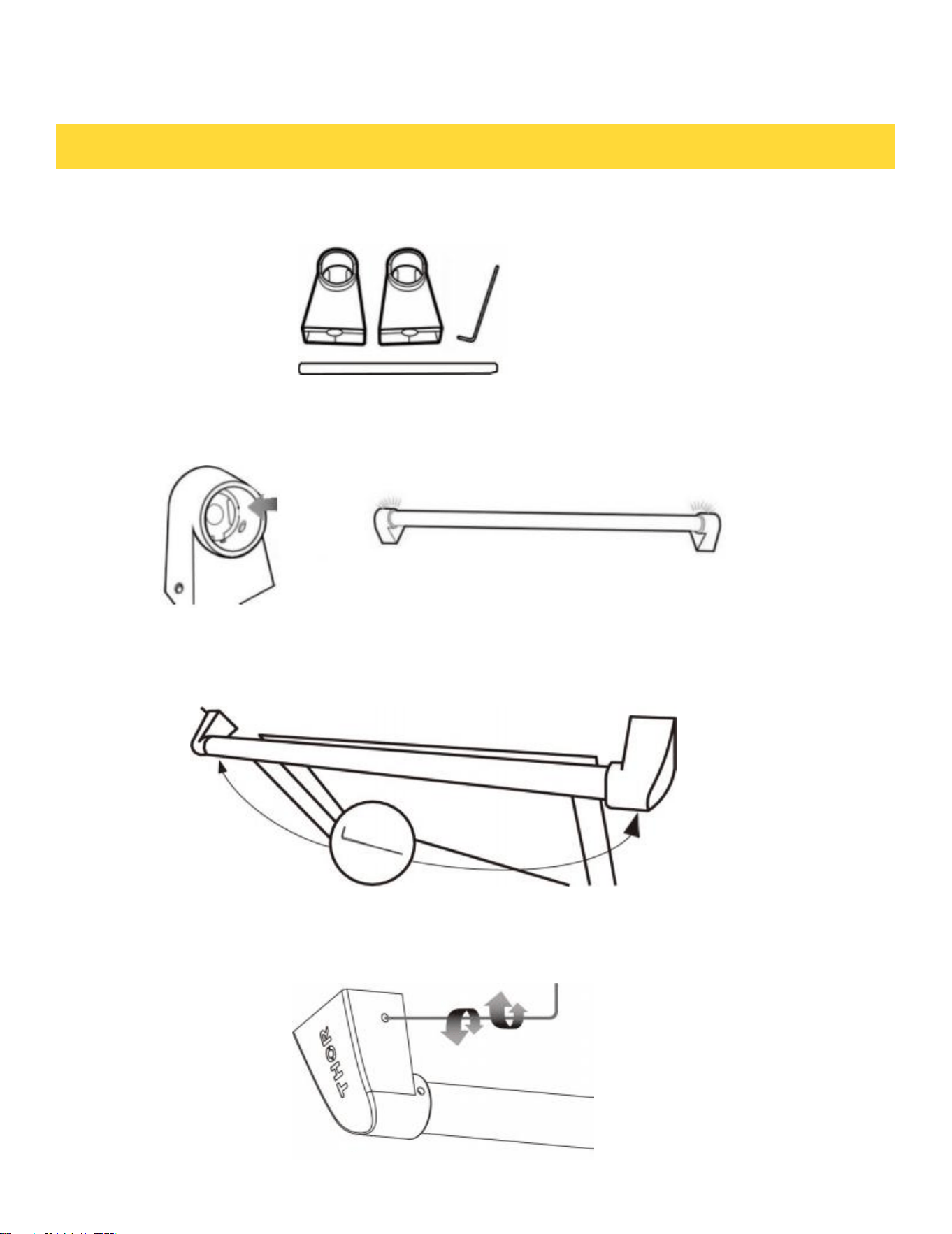
INSTALLATION INSTRUCTIONS
2. While holding the two handle end caps in place on the tubular handle, align the
handle end cap opening up with the studs on the door. Slide handle holders on to
the door studs.
3.While holding the door handle assembly in place on the door studs use the
sup- plied Allen wrench to tighten the set screws on the under side of each
handle
holder.
Door Handle parts
1. Insert the tubular handle in to the handle holder end caps.
Mounting Handle
9
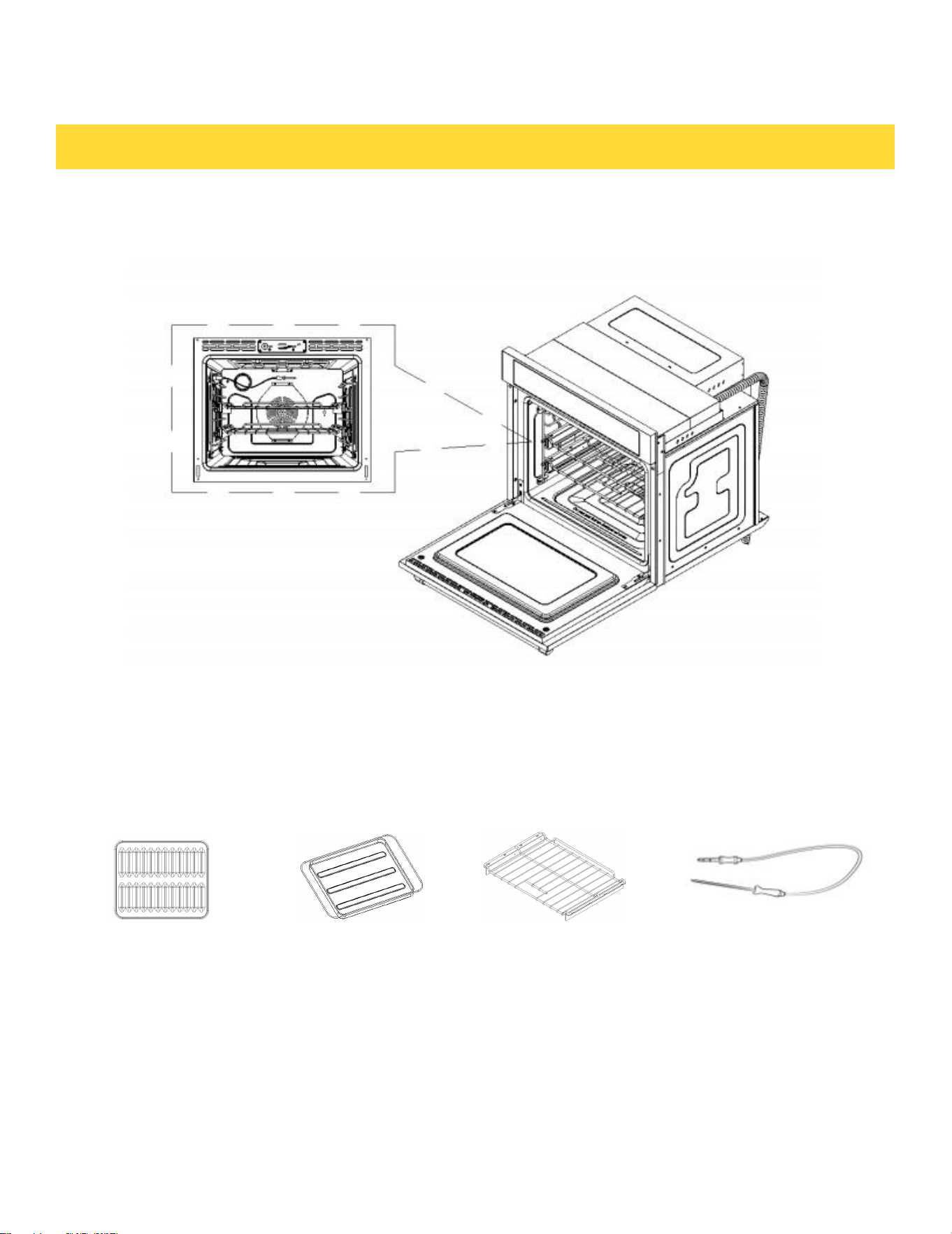
1*Broil Pan Cover 1*Broil Pan 2*Slide Racks 1*Temp prob
INTRODUCING YOUR NEW OVEN
What's included with your oven
Overview
10

Remove all rack accessories. Make sure there is no packing material remaining in the oven.
Clean the oven thoroughly before using it for the first time. Then set the oven to Bake, set
temperature for 400 °F and run for 1 hour. Then set unit to Broil and run for an additional 30
min on Broil. There will be a distinctive odor. This is normal. You may see a light smoke from
the oven vent area and inside the oven as the manufacturing and protective coating oils are
burned off. Ensure your kitchen is well ventilated during this conditioning period.
Energy Saving Tips
• During cooking, the oven door should remain closed except when you turn food over.
Do not open the door frequently during cooking to maintain the oven temperature and to save
energy.
• If cooking time is more than 30 minutes, you can switch the oven off 5-10 minutes before the
end of the cooking time to save energy. The residual heat will complete the cooking process.
• To save energy and reduce the time needed for reheating the oven, plan oven use to avoid
turning the oven off between cooking one item and the next.
• Whenever possible, cook more than one item at a time.
BEFORE YOU BEGIN
11
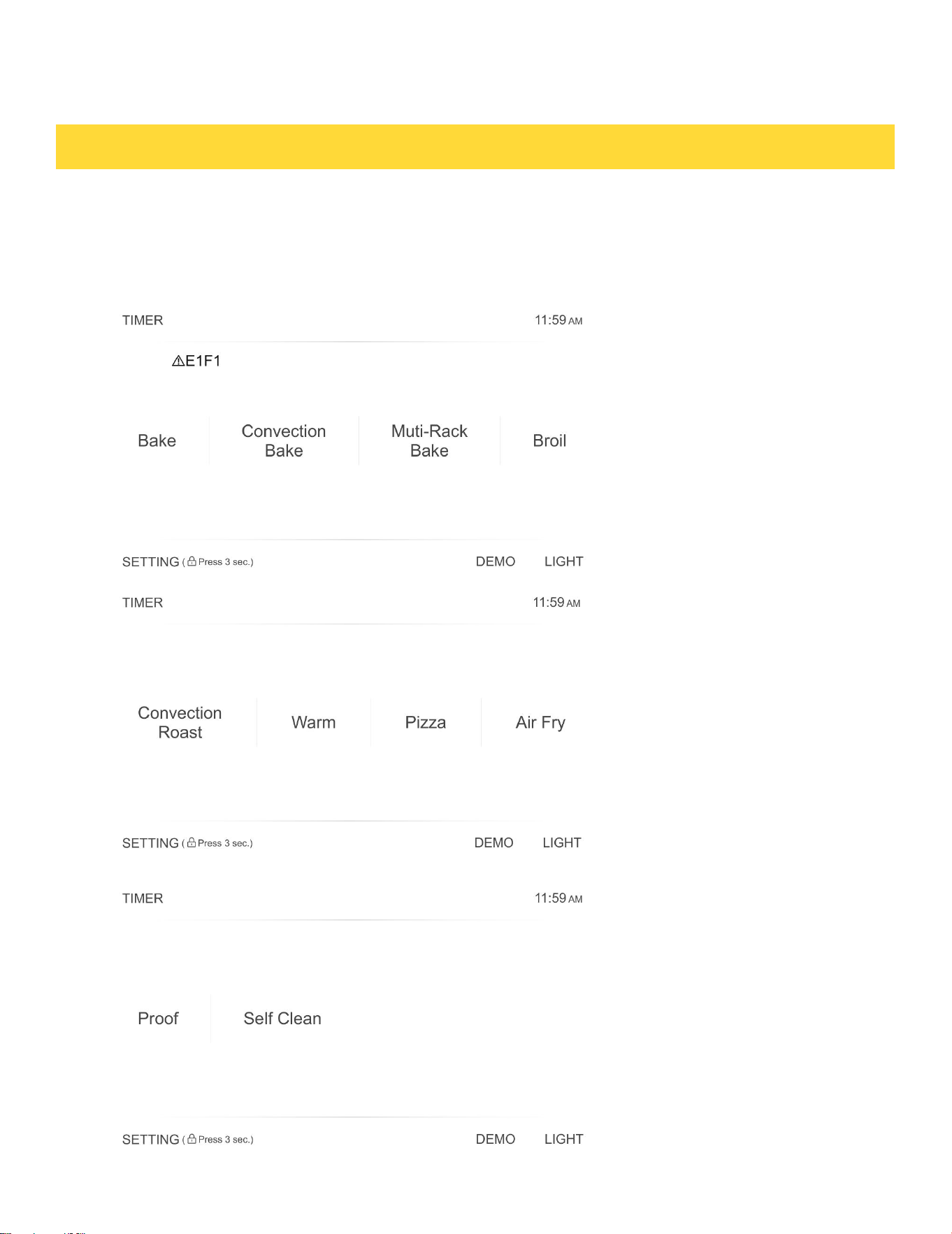
READ THE INSTRUCTIONS CAREFULLY BEFORE USING THE OVEN.
For satisfactory use of your oven, become familiar with the various features and functions of
the oven as described below. Detailed instructions for each feature and function follow later in
this user manual.
OPERATING THE OVEN
12

OPERATING THE OVEN
13
Bake
This option allows the user to access the traditional bake mode.
Convection Bake
Circulates the oven heat evenly and continuously for faster cooking of some foods.
Multi-Rack Bake
Multi-rack cooking in a convection oven is most beneficial around the holidays. With a
convection oven, it's easy to utilize and great for cooking your food faster.
Broil
Broil can be selected to access Broil Low and Broil High. See the Cooking Modes section
for more information.
Convection Roast
Uses a convection fan to gently brown meats and poultry and seal in the juices.
Keep Warm
Keep Warm will keep cooked food warm for serving up to 3 hours after cooking has finished.
Pizza
Pizza is specially designed to cook the perfect pizza.
Air Fry
Uses hot air for great tasting crispy results without all the oil.
Proof
Create the perfect oven environment for activating yeast in homemade bread.
Self-Clean
This self-cleaning oven uses high temperatures (well above cooking temperatures) to burn off
leftover grease and residue completely or reduce them to a finely powdered ash that you can
wipe away with a damp cloth.
Child Lock
Press and hold SETTINGS for three seconds to turn off the control panel to prevent the
oven from accidentally being turned on.Panel stay locked until you turn this function off.
SETTINGS
Press the SETTINGS to access the Settings. See the Settings section for more
information.
Oven Light
To turn on or off the LIGHT on the right bottom of panel, press the Oven light.
TIMER
Set or cancel the TIMER on the right bottom of panel.
Clock
You can press the clock display in the top of the right panel to set the clock.
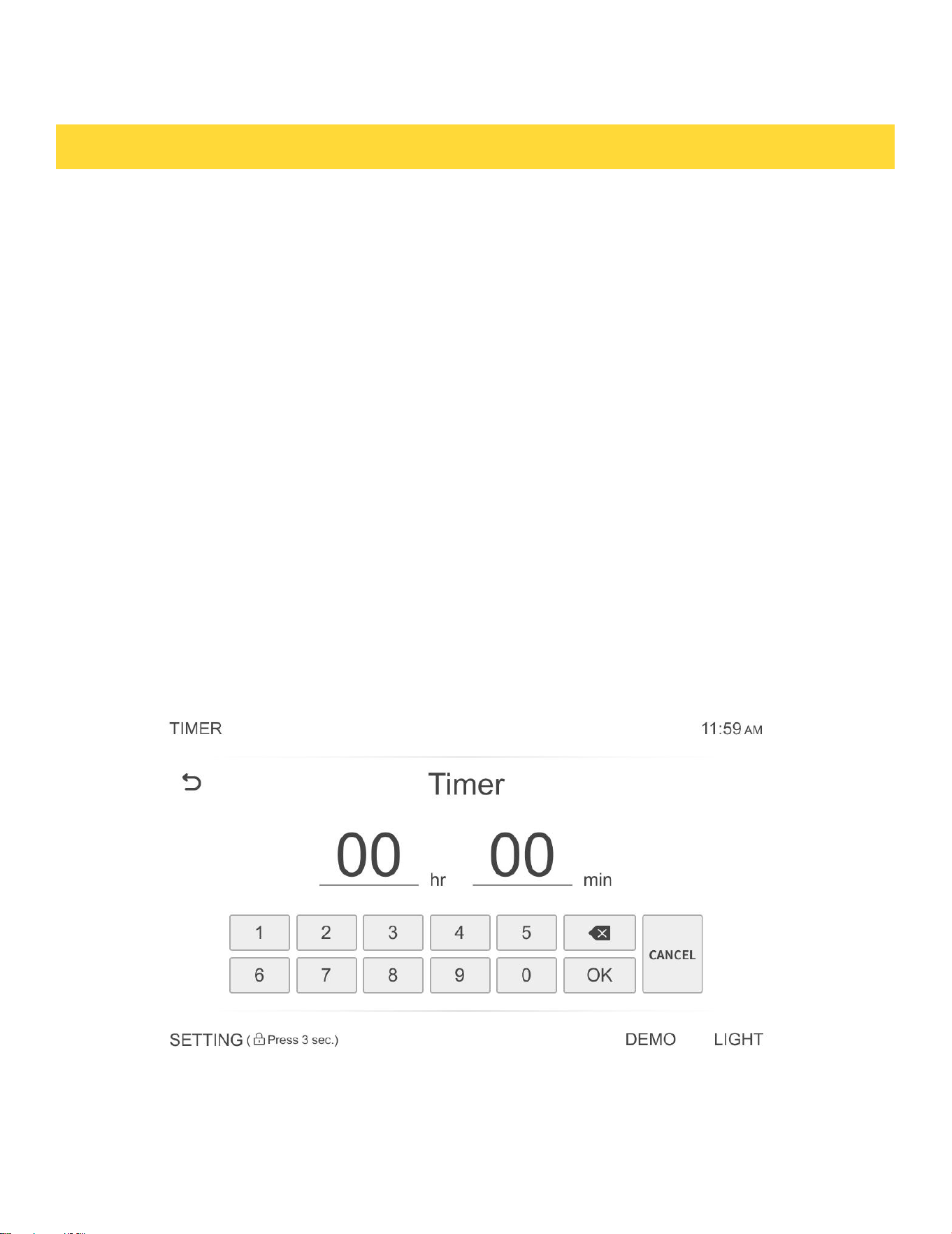
Setting the clock
The Clock must be set to the correct time of day for the automatic oven cooking functions to work properly.
• The time of day cannot be changed during timed cooking, delay-timed cooking, or a self-cleaning cycle.
How to set the clock
1. Touch SETTINGS ,then touch Clock to set the clock.
2. You can choose between a 12-hour or 24-hour display. The default is 12-hour.
3. Select AM or PM. (Skip this step if you are setting the clock to 24 hour display mode.)
4. Touch the number to set the current time of day.
5. Touch OK to save the changes.
Setting the kitchen timer
The kitchen timer serves as an extra timer that will beep when the set time has elapsed. It does not start
or stop cooking functions. You can use the kitchen timer with any of the other oven functions.
How to set the timer
1. Touch TIMER .
2. Press the number keys to set the hours and minutes. The timer can be set for any amount of time from 1
minute to 24 hours. If you make a mistake, press CANCEL , and then enter the amount of time again.
3. Touch OK to complete the setup.
4. When the set time has elapsed, the oven will beep and the display will show End until you touch Timer
to clear the setting. You can cancel the timer at any time by pressing the CANCEL button.
OPERATING THE OVEN
14
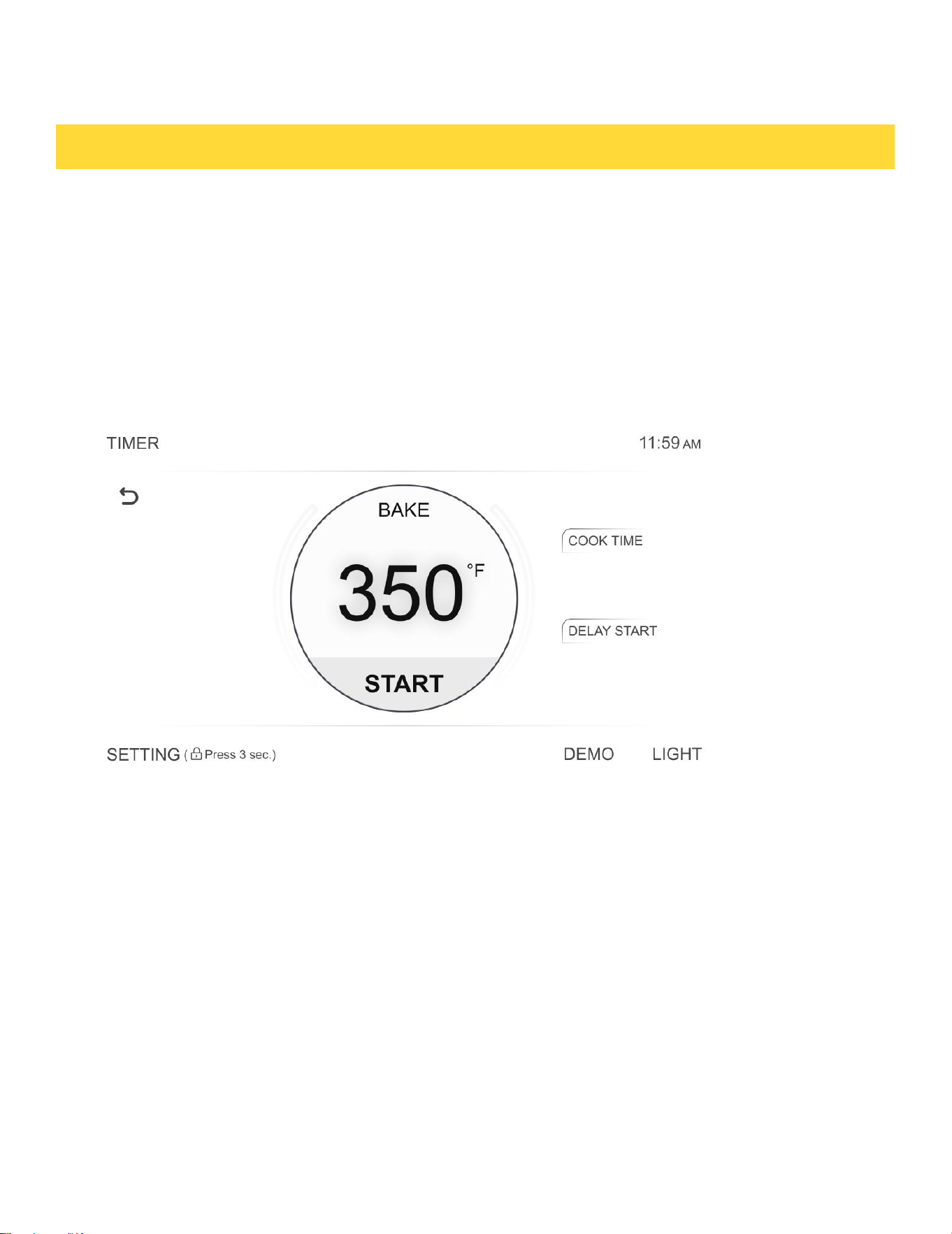
Cook Time
In Timed Cooking mode, the oven turns on immediately and cooks for the length of time you select. At the
end of the cooking time, the oven turns off automatically.
• You can use the Timed Cooking only with another cooking operation.
How to set the oven for Timed Cooking
1. Select the preferred cooking operation , e.g.BAKE. Enter the temperature desired, for example, 400 °F,
using the number pad (The default temperature is 350 °F).
2. Touch COOK TIME on the right top of cooking panel. Using the number pad,enter you want the oven to
cook for. You can set the cooking time for as little as and a maximum of 10 hours.
3. Touch START to the temperature display will start to change once the oven temperature
reaches 100 °F until the set temperature,then the buzzer sounds six times to indicate that the preheating
is complete.(Cooking time does not include preheating time.)
• When Cooking is done, the oven will stop working and the buzzer will sound.
Control Lockout
Control Lockout lets you lock the buttons on the touch pad so they cannot be activated accidentally. You
can only activate Control Lockout when the oven is in stand by mode.
How to activate the Control Lockout
1. Cancel or turn off all other functions.
2. Touch and hold SETTINGS for three seconds on the bottom of the control panel.
The padlock icon along with the current time will be displayed.
• All other functions must be cancelled before you activate Control Lockout.
How to unlock the controls
Press and hold the Lock icon for three seconds.The padlock icon will clear from the display.
OPERATING THE OVEN
15

CAUTION
Use caution with the Timed Cooking or Delay Start features. You can use these features to cook cured or
frozen meats and most fruits and vegetables. For food that can easily spoil such as milk, eggs, and unfrozen
or fish, meat, or poultry, chill them in the refrigerator first. Even when chilled, they should not stand in the
oven for more than 1 hour before cooking begins, and should be removed promptly when cooking is
completed . Eating spoiled food can result in food poisoning.
Delay Start
With Delay Start, the oven’s timer turns the oven on at a time.
How to set the oven for Delay Start
1. Position the oven racks and place the food in the oven cavity.
2. Enter the desired cooking temperature using the number pad.
3. Enter the cooking time using the number pad.
4. Touch the DELAY START function on the bottom right hand side of the display panel. Use the numeric key to
enter the hours and min of delayed time before starting.
5. Touch START. The oven will automatically turn on after the Delay Start time has elapsed.
Turning the light on and off
• The oven light turns on automatically when the door is opened.
• You can turn the oven light on and off manually by touching the light button on top of the control panel.
• The oven light turns off automatically when the door is closed.
OPERATING THE OVEN
16
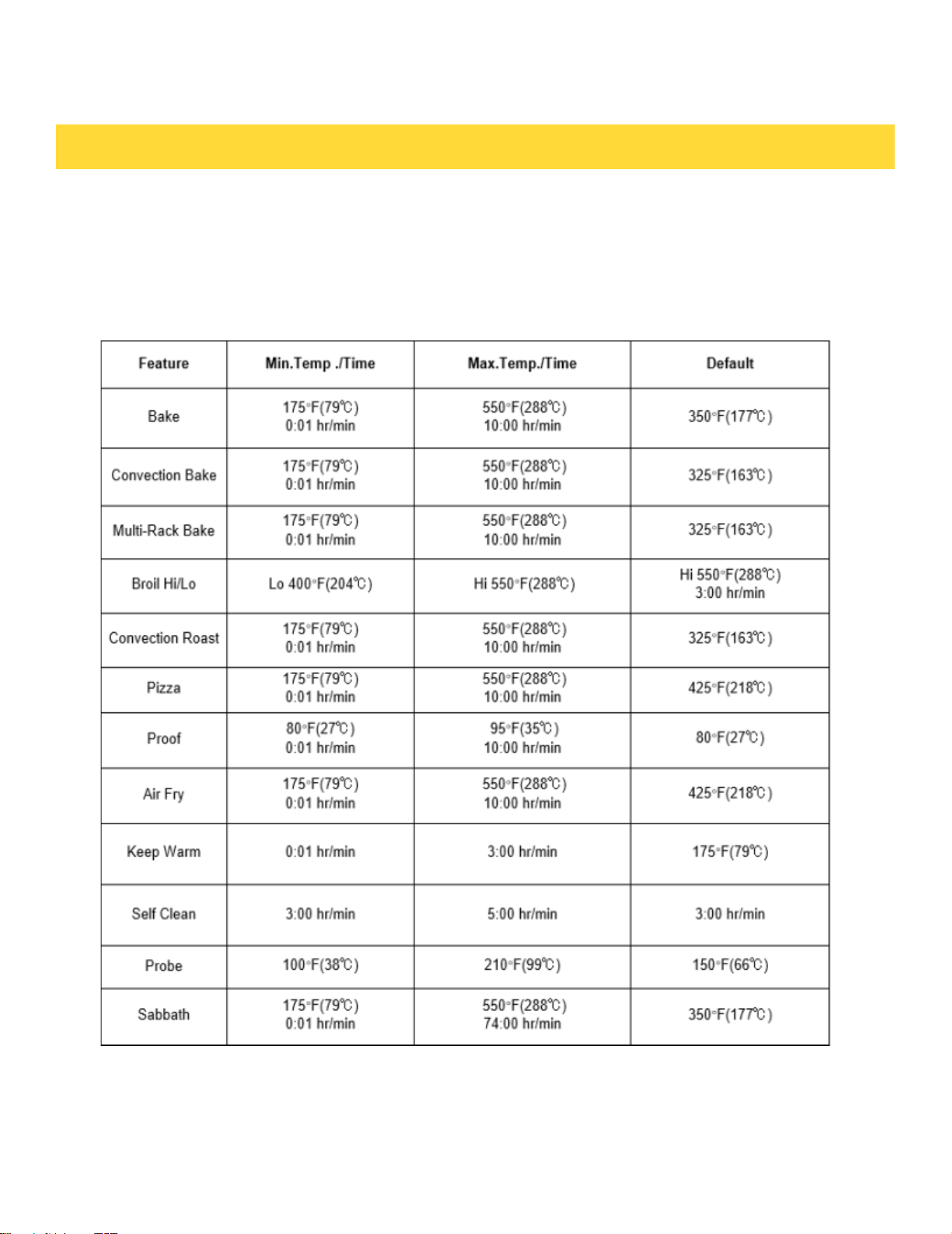
Minimum and maximum settings
All the features listed in the table below have minimum and maximum time or temperature
settings. A beep will sound each time a pad on the control panel is pressed and the entry is ac-
cepted. An error tone will sound in the form of a long beep if the entered temperature or time
is below the minimum or above the maximum setting for the feature.
OPERATING THE OVEN
17
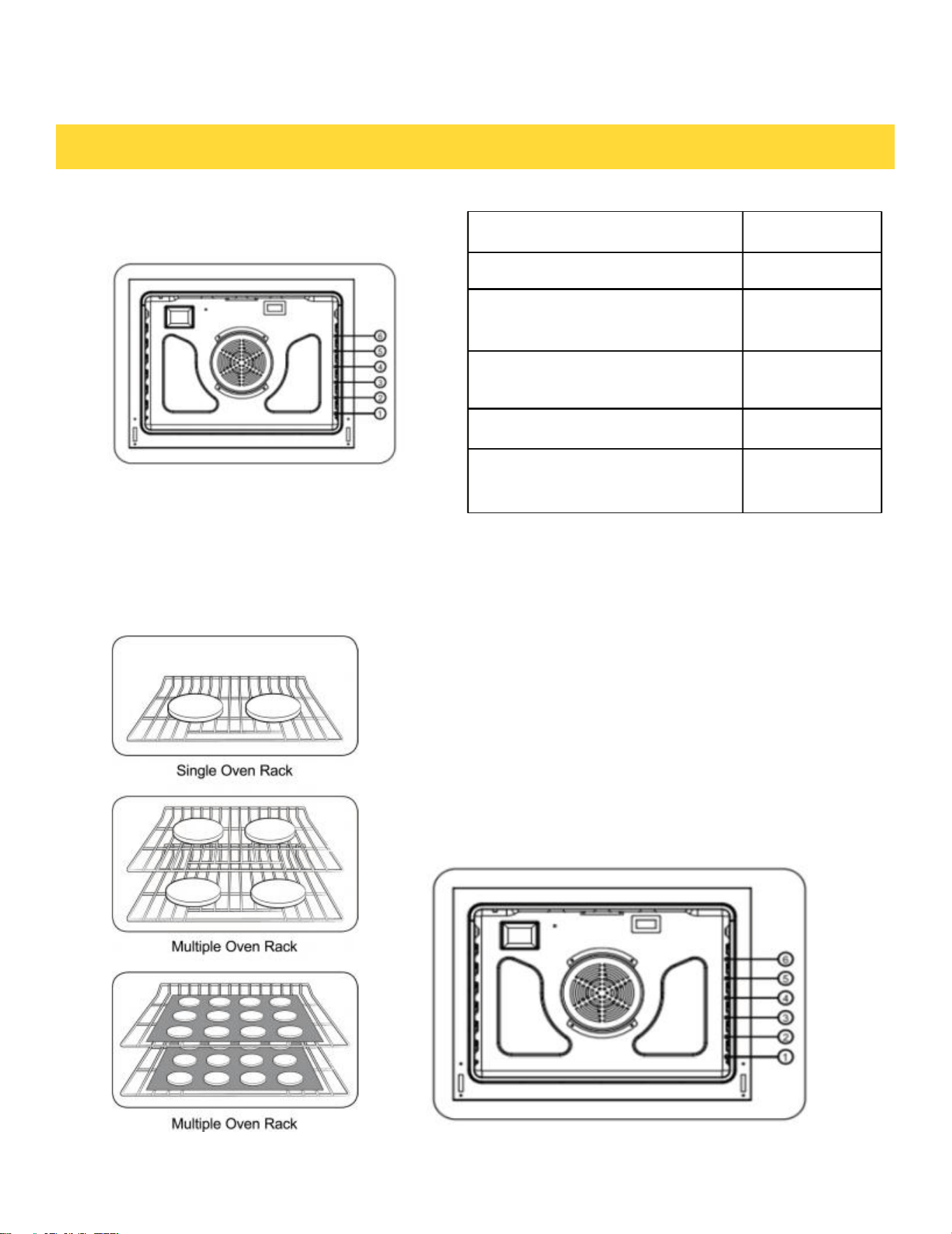
Type of Food
Rack Position
Broiling of Hamburgers.
6
Broiling meats or small cuts of
poultry and fish.
3 to 5
Bundt Cakes, Pound Cakes,
Frozen Pies, and Casseroles.
4 or 3
Angel Food Cakes, Small Roast
2
Turkey, large Roast, Hams
Fresh Pizza
1
Centering baking pans in the oven as much as possible
will produce better results. If baking with more than
one pan, place the pans so each has at least 1" to 2” of
air space around it. When baking on a single oven rack,
place the oven rack in position 3 or 4.
When baking cakes and cookies on multiple racks,
place the oven racks in position 3 and 5. Using the
convection fan will provide best air movement with
multi-level rack cooking.
OPERATING THE OVEN
Rack and Pan Placement
Oven Rack Positions
18
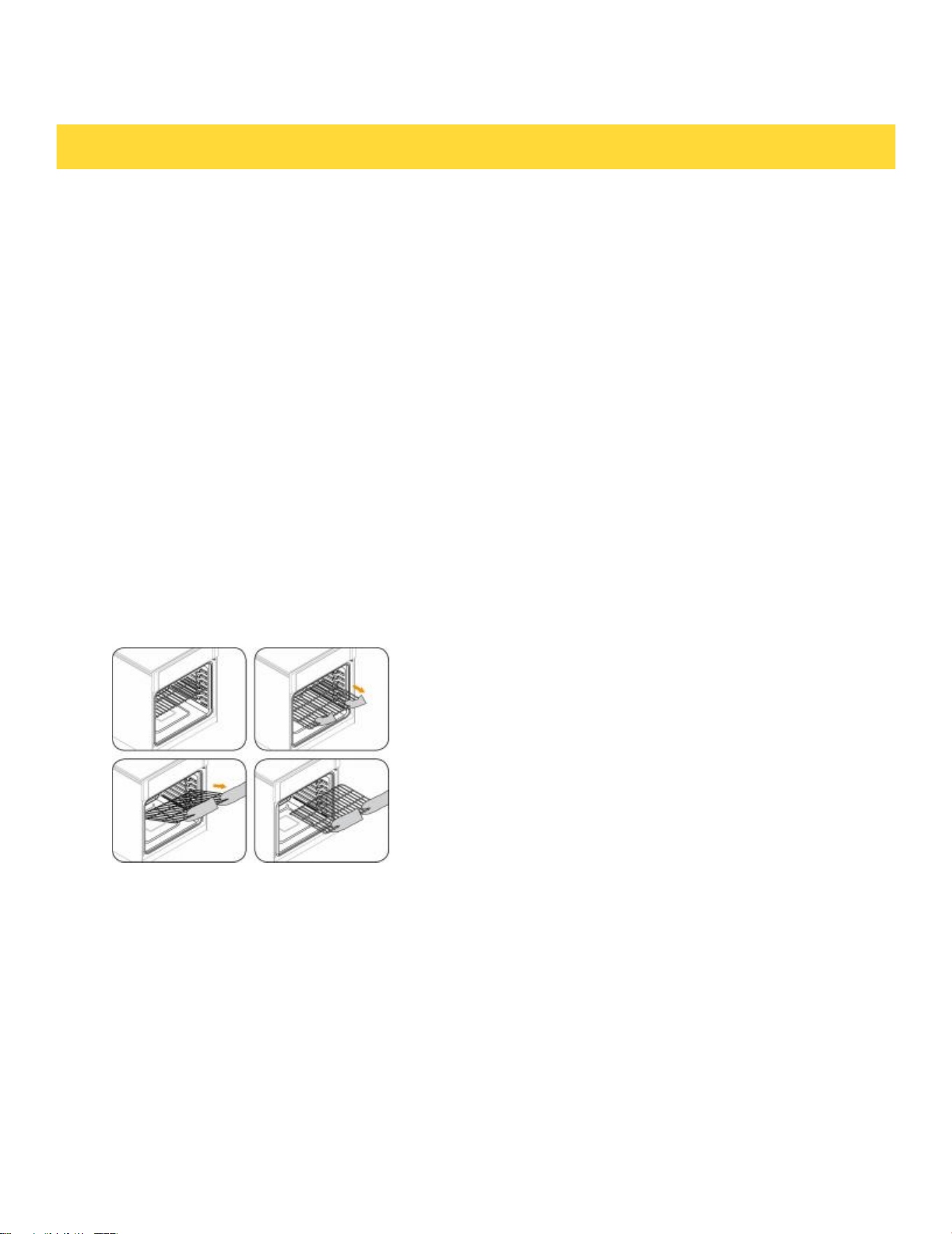
Before using the racks
Each rack has stops that need to be placed correctly on the supports. These stops will keep the
rack from coming completely out.
REMOVING THE RACKS
1. Pull the rack straight out until it stops.
2. Lift up the front of the rack, and then pull it out.
REPLACING THE RACKS
1. Place the end of the rack on the support.
2. Place the front end up and push the rack in.
CAUTION
• Do not cover a rack with aluminum foil
or place aluminum foil on the oven
bottom. This will hamper heat circulation,
resulting in poor baking, and may damage
the oven bottom.
• Arrange the oven racks only when the
oven is cool.
OPERATING THE OVEN
19
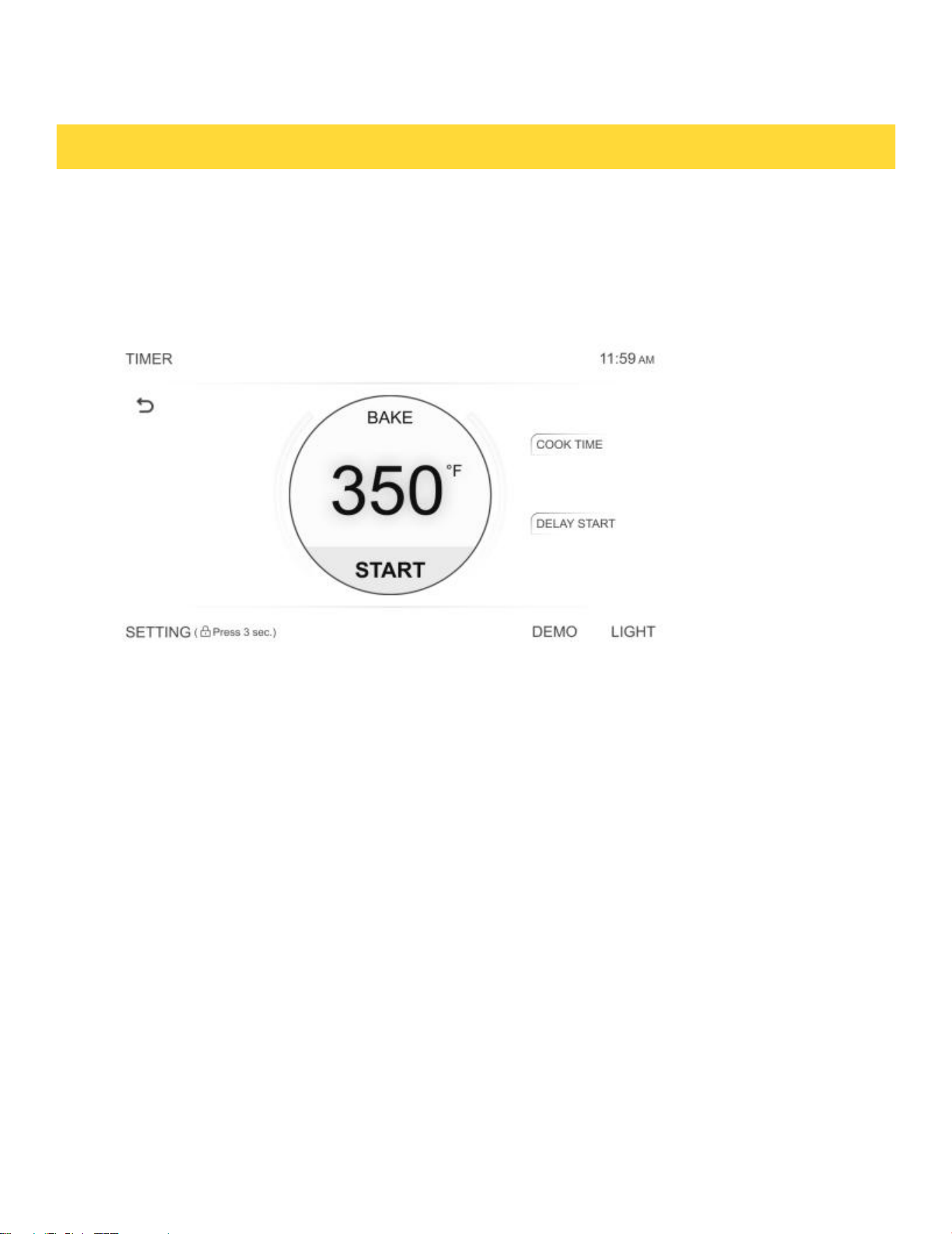
How to set the oven for baking:
1. Touch Bake.
2. Enter the temperature you want using the number key, eg. 3, 5, 0.
3. Touch START. The oven to preheat,and the temperature display will start to change once theoven
temperature 100 °F until,then the buzzer will sound six times to indicate that the preheating is complete. If
you want to cancel baking , touch CANCEL to cancel cooking.
4. Cooking time does not include preheating time.
• If you want to change the cooking time,you need touch COOK TIME in the right of the
display screen to update,then touch START.
• If oven door is left open for more than one min the heating elements will turn off.
Baking
The oven can be programmed to bake at any temperature from 175 °F to 550 °F. Baking temperature and
time will vary depending on the ingredients and the size and shape of the baking pan used. Dark or nonstick
coatings may cook faster with more browning.
OPERATING THE OVEN
20
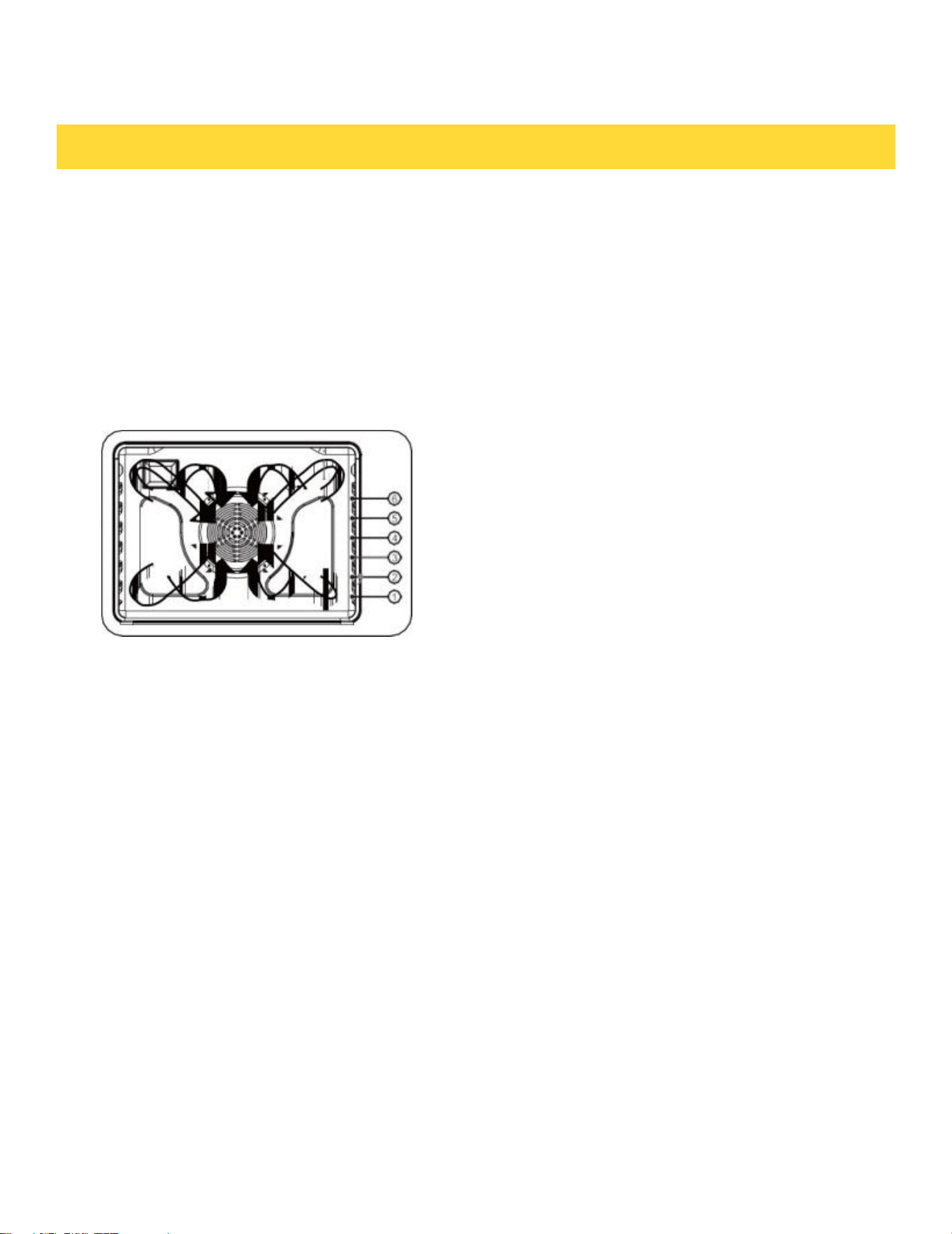
Tips for convection baking
The amount of time you save will vary depending on the amount and type of food you are cooking.
When baking cookies or biscuits, you should use pans with no sides or very low sides to allow the
heated air to circulate around the food. Using a pan with a dark finish will produce faster cooking
times.
When using convection baking with a single rack, place the oven rack in position 3 or 4. If
cooking on multiple racks, place the oven racks in position 3 and 5. When baking a cake, using the
bake mode (not the convection bake mode) will produce better results.
How to set oven to Convection Bake:
1. Touch Convection Bake . Default temp is 325°F.
2. Enter the desired cooking temperature using the numeric key. (Note if using a standard baking
recipe in Convection Bake mode,reduce the cooking temp by 25°F and keep the cooking time the
same.)
By using the Convection Bake, you will be able
to cook faster. Convection baking uses a fan to
circulate the oven's heat evenly and continuously
within the oven. This improved heat distribution
allows for even cooking and excellent results while
using multiple racks at the same time. Foods
cooked on a single oven rack will generally cook
faster and more evenly with convection baking.
Multiple oven rack cooking may have slightly
increased cooking times for some foods, but the
overall result is time saved. Breads and pastries
brown more evenly. You can program the oven for
convection baking at any temperature between 175 °F
and 550 °F.
• Place food in the oven after preheating if the recipe calls for it. Preheating is very important for good results
when baking cakes, cookies, pastry and breads. After the oven has reached desired temperature, the buzzer will
sound.
• If you are using an oven thermometer in the oven cavity, the temperature registered by the thermometer may
differ from the actual set oven temperature.
OPERATING THE OVEN
Convection Baking
21

3. When the cooking time ends, the oven will stop operating, a buzzer will sound, and a pop-up
notification will indicate that cooking is complete.(Cooking time does not include preheating time.)
• To change the cooking temperature, tap the temperature value in the center of the display screen
to adjust it, then press START. The oven will operate with the updated settings.
•If you want to change the cooking time,you need touch COOK TIME in the right of the display
screen to update,then touch START.The oven will operate with the updated settings.
• Convention Fan turns off when the oven door is opened to prevent unwanted heat
escape. If oven door is left open for more than one min,the heating elements will turn off.
Convection roasting
Convection roasting is good for cooking large tender cuts of meat uncovered. Heat comes from
the top heating element. The convection fan circulates the heated air evenly over and around
the food. Meat and poultry are browned on all sides as if they were cooked on a rotisserie. The
heated air seals in juices quickly for moist and tender results while, at the same time, creating
a rich golden-brown exterior.
How to set the oven for convection roasting:
1. Touch Convection Roast . Enter the temperature you want, eg. 400 °F, using the number
key.
2. Press START to begin preheating. The temperature display will update once the oven reaches
100°F and continue to show the rising temperature until it reaches the set temperature. When
preheating is complete, the buzzer will sound six times. To cancel cooking at any time, press
CANCEL.
3. When the cooking time arrives,the oven will stop working and the buzzer will sound ,and pop
-up window indicates that cooking is complete.(Cooking time does not include preheating time.)
OPERATING THE OVEN
22
• If you want to change the cooking temperature,you need touch the temperature
value in the middle of the display screen to update,then touch START.The oven will operate
with the updated settings.
• If you want to change the cooking time,you need touch COOK TIME in the right of the
display screen to update,then touch START.The oven will operate with the updated settings.
• Convention Fan turns off when the oven door is opened to prevent unwanted heat
escape. If oven door is left open for more than one heating elements will turn off.
Broiling
Broiling is a method of cooking tender cuts of meat by direct heat under the broil element of
the oven. The high heat cooks quickly and gives a rich, brown outer appearance. Broil mode is
best for meats, fish, and poultry up to 1" thick.
Always preheat the oven for 5-10 minutes before broiling.Cooking time cannot be set in Broil
mode, and the default maximum working time is 3 hours.
How to set the oven for broiling:
1. Touch START to begin broiling.. Broil one side until the food is browned. Turn over and broil
the other side.
2. Touch CANCEL to cancel cooking.
Note: If oven door is left open for more than one min the heating elements will turn off.
OPERATING THE OVEN
CAUTION !
Always broil with the oven door closed. Use
care when opening the door. Let hot air from
steam escape before you remove food.
23

Using Warm
Warm will keep cooked food warm for serving up to 3 hours after cooking has finished.After 3 hours,
the feature will shut off automatically. You can use the Warm feature without any other cooking oper
- ations or you can set it to activate after a timed or delay timed cooking operation.The cooking temp-
erature is 175 °F by defualt and cannot be set.
You should not use this feature to reheat coId food.
How to use Warm:
1. Touch Warm.
2. Touch START.
3. Touch CANCEL to cancel at any time to turn the feature off.
How to set the oven to activate Warm after a time cooking
1. Set up the oven.
2. Touch Warm before touching START to begin cooking.
3. Touch CANCEL to cancel at any time to turn the feature off.
• If you want to change the cooking time,you need touch COOK TIME in the right of the display
screen to update,then touch START.
• If oven door is left open for more than one min the heating elements will turn off.
Pizza Cooking
The Pizza function is specially designed for cooking pizza. It heats from both the top and bottom to
brown food more evenly. This system is designed to give the cooking performance for pizza by
automatically selecting a combination of the broil and bake heating systems.
OPERATING THE OVEN
24

How to use Pizza:
1. Touch Pizza . Default temp is 425°F
2. Enter the desired cooking temperature using the numeric key.
3. Press START to begin preheating. The temperature display will update once the oven reaches 100°F
and continue to show the rising temperature until it reaches the set temperature. When preheating is
complete, the buzzer will sound six times. To cancel cooking at any time, press CANCEL..
4. When the cooking time ends, the oven will stop operating, a buzzer will sound, and a pop-up
notification will indicate that cooking is complete.(Cooking time does not include preheating time.)
• If you want to change the cooking temperature,you need touch the temperature
value in the middle of the display screen to update,then touch START.
• If you want to change the cooking time,you need touch COOK TIME in the right of the
display screen to update,then touch START.
• If oven door is left open for more than one min the heating elements will turn off.
Proof
Bread Proof provides an optimal temperature for the bread proofing process up to 10 hours.
How to use proofing:
1. Touch Proof. Default temp is 80°F.Touch 80°F for 95°F.
2. Touch START to proofing.
3. Touch CANCEL to cancel cooking.
OPERATING THE OVEN
25

• If you want to change the cooking time,you need touch COOK TIME in the right of the
display screen to update,then touch START.
• If oven door is left open for more than one min the heating elements will turn off.
NOTE: Use rack position 4 for Bread Proof. If the oven temperature is above 125°F(52°C), Proof will
not work properly. Do not use Proof to warm food. The proofing temp cannot keep food warm.
Air Fry
The Air Fry feature uses hot air for crispier and healthier frozen or fresh foods without any (or less
than normal) oil compared to convection modes.
The Air Fry feature works best for single rack baking with packaged and convenience foods. Make
sure that you remove the packaging from food before cooking it. You can program for temperatures
between 350° F and 550° F. Leave the oven light off when baking.
1. Arrange the food on the rack.
2. Touch Air Fry. The default temperature is 425° F. If the default temperature is the temperature
you want, skip to step 4.
3. (Optional) Press the numbers for the temperature you want.
4. Touch START to cooking. If you want to cancel cooking, touch CANCEL to cancel cooking.
5. When the cooking time ends, the oven will stop operating, a buzzer will sound, and a pop-up
notification will indicate that cooking is complete.
• If you want to change the cooking temperature,you need touch the temperature
value in the middle of the display screen to update,then touch START.The oven will operate with the
updated settings.
• If you want to change the cooking time,you need touch COOK TIME in the right of the
display screen to update,then touch START.The oven will operate with the updated settings.
• If oven door is left open for more than one min the heating elements will turn off.
OPERATING THE OVEN
26
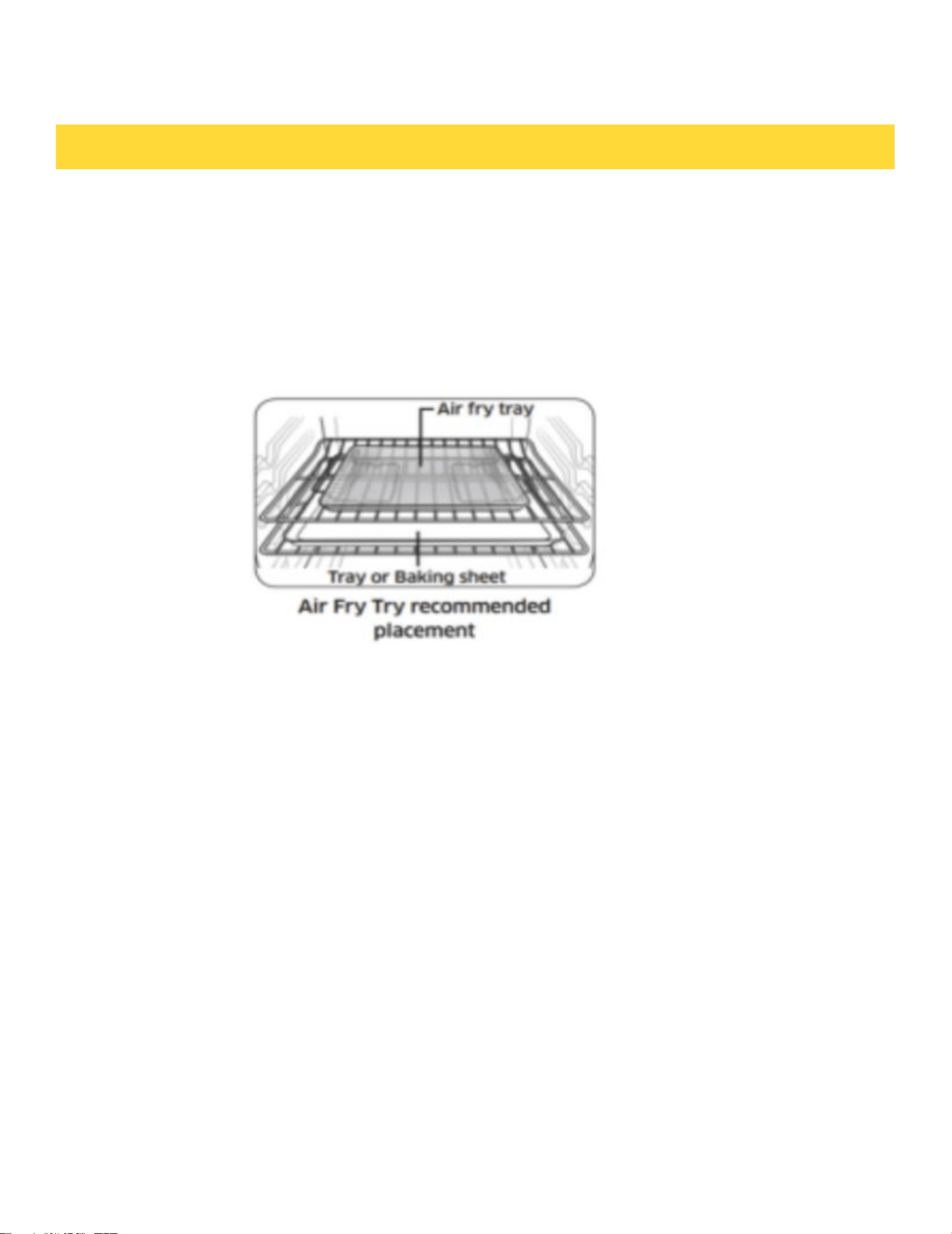
Note:
• This will help to reduce splatter and smoke.
• Before using a baking sheet, check the maximum temperature.
• Air Fry is designed for a single oven rack. Place food on rack position 3 for best results.
• For cooking fresh or foods,spread the oil over a larger area more evenly,for better crisping.
OPERATING THE OVEN
27

Using the Temp Probe
For many foods, especially roasts and poultry (beef, chicken, turkey, pork, lamb, etc), measur-
ing the internal temperature is the best way to determine if the food is properly cooked.
The Temp Probe lets you cook meat to the exact internal temperature you want, taking the
guess work out of determining whether a piece of meat is done or not.
This function can be used with Bake, Convection Bake or Convection Roast.
After the internal temperature of the food reaches 75°F, the increasing internal temperature
will be shown in the display.
How to use the Temp Probe:
1. Preheat the oven to the desired oven temperature in the desired mode.
2. Insert the probe into the thickest area of food. When making bread, cook for approximately
10 minutes before inserting the probe.
3. When preheating is complete, insert the input rod into the rod receptacle. Close the oven door.
OPERATING THE OVEN
28
4. Enter the temperature of the probe according to the pop-up prompt.
5. Touch START to begin cooking. If you want to cancel cooking,you can touch CANCEL to
cancel
cooking.
6. When the set temp on the probe is reached, the oven will stop operating, a buzzer will sound,
and a pop-up notification will indicate that cooking is complete.
• If you want to change the probe or cooking temperature,you need touch the temperature
value in the middle of the display screen to update,then touch START.The oven will operate
with the updated settings.
• If oven door is left open for more than one min the heating elements will turn off.
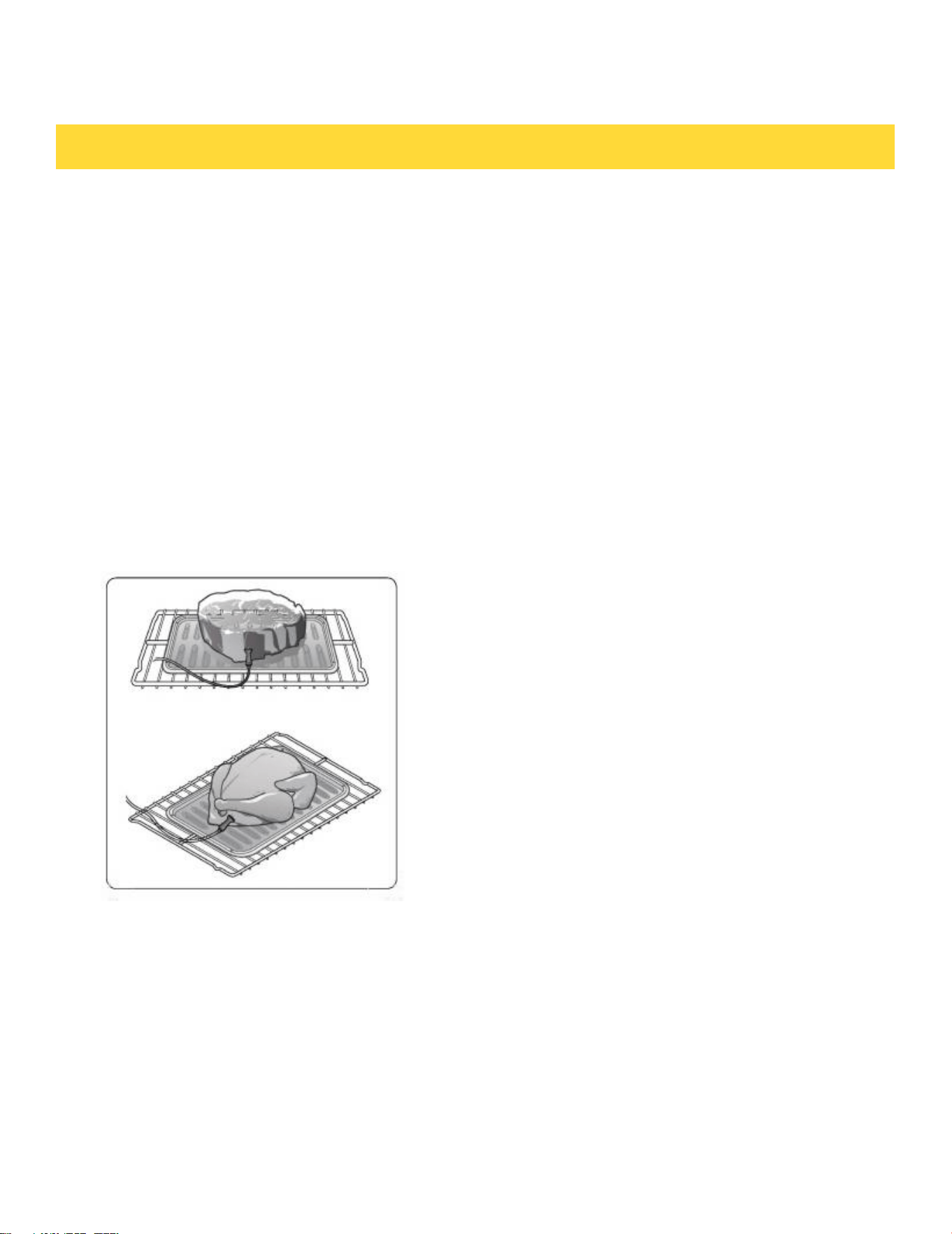
How to use the temp probe into the meat:
CAUTION
To protect the Temp Probe’s tip, be careful not to insert the probe so that the tip protrudes
through the surface of the meat. Make sure that the tip is in or near the center of the meat.
CAUTION
• Do not store the probe in the oven.
Insert the probe completely into the meat as
shown in the illustrations. It should not touch
bone, fat, or gristle.
If you do not fully insert the probe into the meat,
the Temp Probe function will not work correctly
because the probe will sense the oven tempera-
ture, not the temperature of the meat.
For bone-in meats, insert the probe into the cen-
ter of the lowest and thickest portion of the piece.
For whole poultry (turkey, large chickens, etc.),
insert the probe into the thickest part of the inner
thigh, parallel to the leg.
OPERATING THE OVEN
29
• Do not leave the probe inside the oven during a self clean or broiling cycle as you can perma-
nently damage the probe and it will no longer work.
• To avoid breaking the probe’s tip, defrost your food completely.
• Do not use tongs when inserting or removing the probe. Tongs can damage the probe.
• Use the Temp Probe for Temp. Probe function cooking only. Do not use the Temp Probe for
any other purpose.
• If you remove the Temp Probe while the Temp. Probe function is operating or insert the Temp
Probe while baking or cooking normally, cooking will stop after 1 minute.
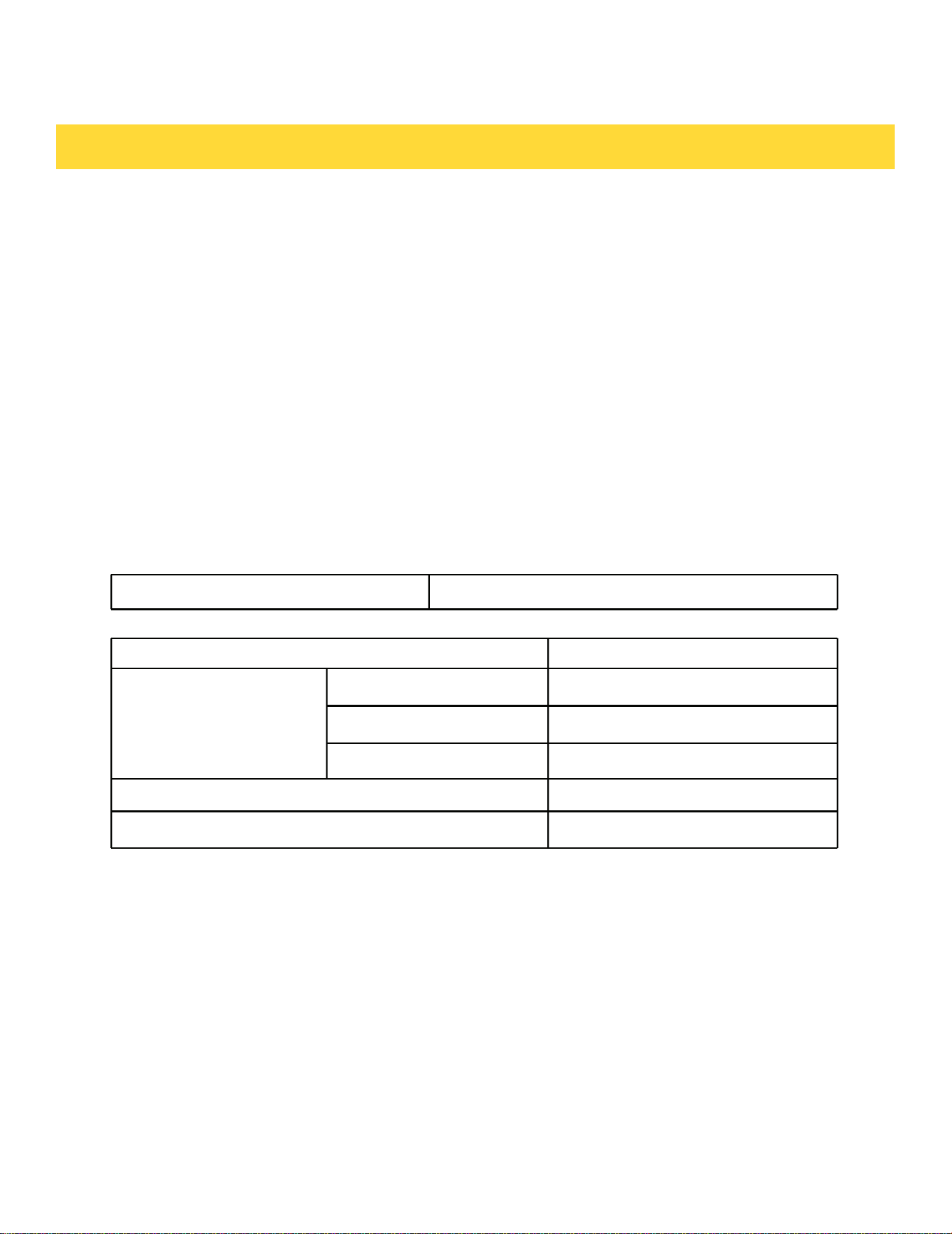
Temp Probe table
Type of Food
Internal Temperature
Beef / Lamb
Rare
120℉
Medium
130℉
Well Done
140℉
Pork
160℉
Poultry
165℉
Note: If you cover meat with foil and allow to rest for 10 minutes after cooking , the internal
temperature will rise an additional 5°F to 10°F.
Removing the Temp Probe
Remove the temp probe plug from the socket.
CAUTION
After cooking, the Temp Probe will be hot enough to cause burns.
OPERATING THE OVEN
Available Temperatures
100 to 200 °F
30
Sabbath Feature
Sabbath mode disables the oven lights (the oven light will not turn on when the door is opened), all
sounds (the control will not beep when the screen is pressed),Convection modes, Broil modes,Warm,
Proof,and all time functions.Sabbath mode can only be used with traditional Bake.This feature confor
-ms to Jewish Sabbath requirements.
How to use Sabbath mode:
1. Touch SETTINGS , swipe to Sabbath mode. Set Cook temperature,Cook time and Delay start time.
2. Touch START.
3. The oven will continue to cook at the preset temp and time.The oven can stay in this mode for a max of
74 hours.
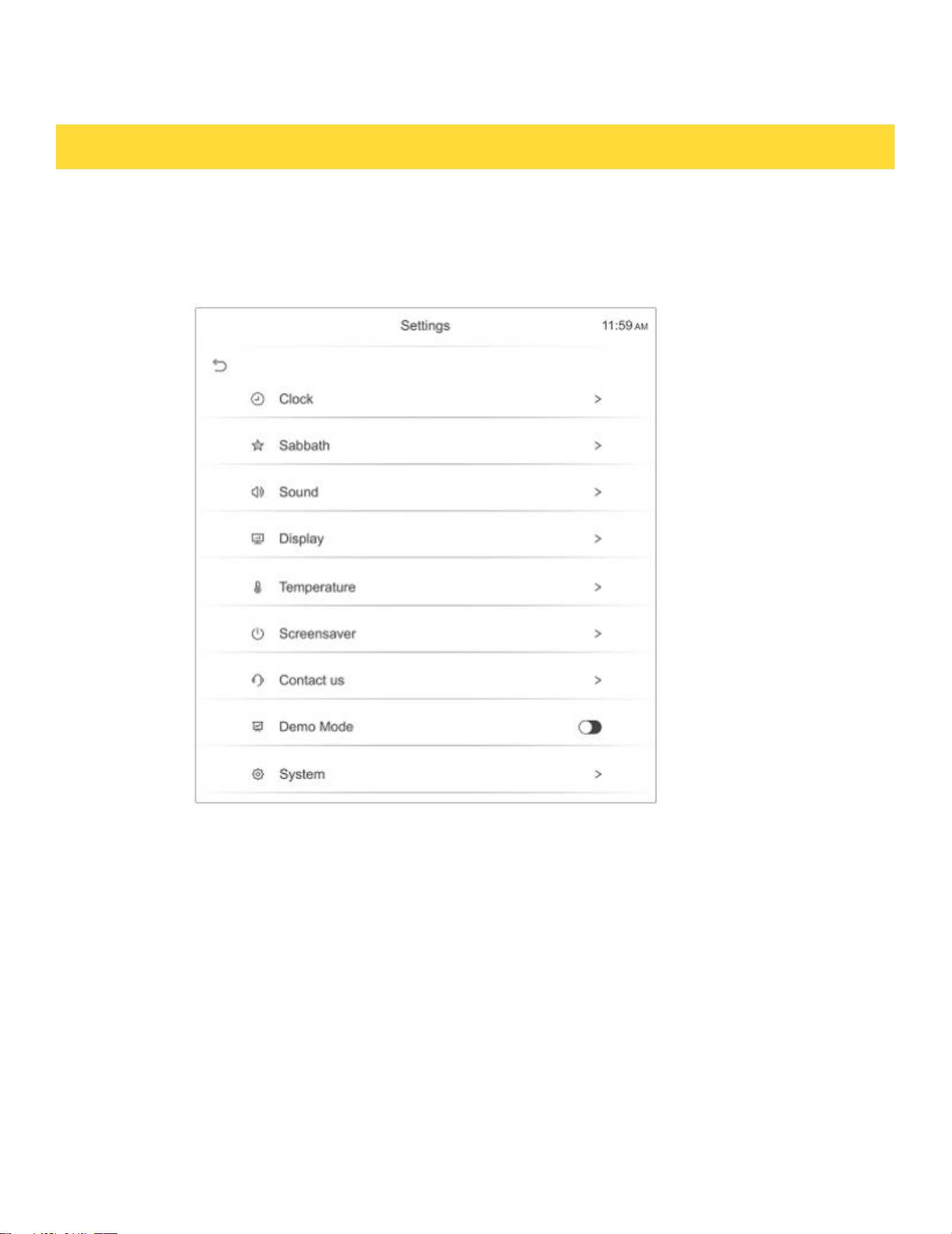
Settings
There are numerous settings that are accessed by pressing SETTINGS in the bottom left corner of the main
OPERATING THE OVEN
screen.
31

4. The oven can be turned off at any time by pressing the CANCEL key one time.
NOTE
• If a power outage occurs during when the oven is in Sabbath Mode, the unit will return to Sabbath
Mode when power is restored.
• The cooking temperature and cooking time cannot be updated in Sabbath Mode.
Sound
Adjust the volume of the oven controls.
1. Touch Mute to turn off the sound,or touch + and - to adjust the sound.
Display
Adjust the brightness of the display.
1. In standby mode, tap SETTINGS and swipe to select Sound.
2. Touch + and - to adjust display brightness level.
Manual temperature calibration
The temperature in the oven has been calibrated at the factory. When first using the oven, be sure to fol
-low recipe times and temperatures. If you think the oven is too hot or too cool, you can correct the
temperat ure in the oven. Before correcting, test a recipe by using a temperature setting that is higher
or lower tha n the recommended temperature. The baking results should help you to decide how much
of an adjustment is needed.
Oven temp can be adjusted up or down by 30°F from factory default setting.
1. Enter the adjustment you want by repeatedly pressing + or - in the Adjust Temperature option.
OPERATING THE OVEN
32

NOTE
This adjustment will not affect the broiling or the self-cleaning temperatures.
The adjustment will be retained in memory after a power failure.
Change temperature display from Fahrenheit to Celsius
The oven has been preset at the factory to display in Fahrenheit.
1. In standby mode, tap SETTINGS and swipe to select Temperature.
2. Touch (Fahrenheit) or (Celsius) as you need in the Temperature Unit.
Screensaver
Set the length of time before the display sleeps.
1. In standby mode, tap SETTINGS and swipe to select Screensaver mode.
2. Adjust the timing for the screen saver.
Demo Mode
1. Touch SETTINGS in standby swipe to Demo Mode.
2. Click the demo mode switch to turn on the demo mode,then DEMO will display in the bottom left of
the display screen.
• This option is for use by retail establishments for display purposes only.
(The heating element does not operate).
Restore factory
This function returns all settings to the factory defaults.
Caution: All stored data will be deleted.
1. In standby mode, tap SETTINGS and swipe to System, then tap Restore factory.
2. If you want to reset data to the factory defaults, touch Restore then touch the YES key.
OPERATING THE OVEN
33

SELF CLEANING THE OVEN
This self cleaning oven uses high temperatures to burn off left over grease and cooking residue
and completely reduce them to a fine powdered ash that can be wiped away with a damp cloth
after cycle has completed and oven has cooled.
How to run a self clean cycle:
1. Select the Self Clean option to select either a 3-hour normal clean or a 5-hour heavy clean.
2. Make sure oven racks have been removed.Using the self-cleaning function on oven racks will
cause irreversible damage to the chrome coating and will not be covered under the
manufacturer's warranty.
3. Touch START to start self cleaning.
Delayed self clean cycle
1. Select the Self-Clean option and select either the 3-hour or 5-hour cycle as described above.
2. Select DELAY START.
3. Touch START. The door will automatically lock .
4. The self clean cycle will start automatically after the preset time has elapsed.
NOTE:
• If one oven is used in any mode, the other oven can not enter self-clean mode.
• Its is recommended to have kitchen windows open or to run a ventilation hood fan during the
self clean cycle.
• All racks and broil pan and any cookware must be removed from the oven prior to running
the self clean cycle.
• Wipe up debris from the oven floor and remove any large spills.
• Self clean cycle will only clean areas where the heat can reach.Areas along the door frame,
gasket area and inner door will have to be cleaned by hand after cleaning cycle has finished.
• During self-clean, exterior surfaces may get hotter than usual, so children should be kept away.
If canceled, the door stays locked until the unit cools to a safe temperature level.
Turning a unit off during self-clean is discouraged. Damage can occur if self-clean does not
complete.
• During self-clean,the other oven functions cannot be used.
• After self clean is completed,the oven door will stay locked until the ends and oven temperature
has cooled below 500°F (260°C)。
OPERATING THE OVEN
34
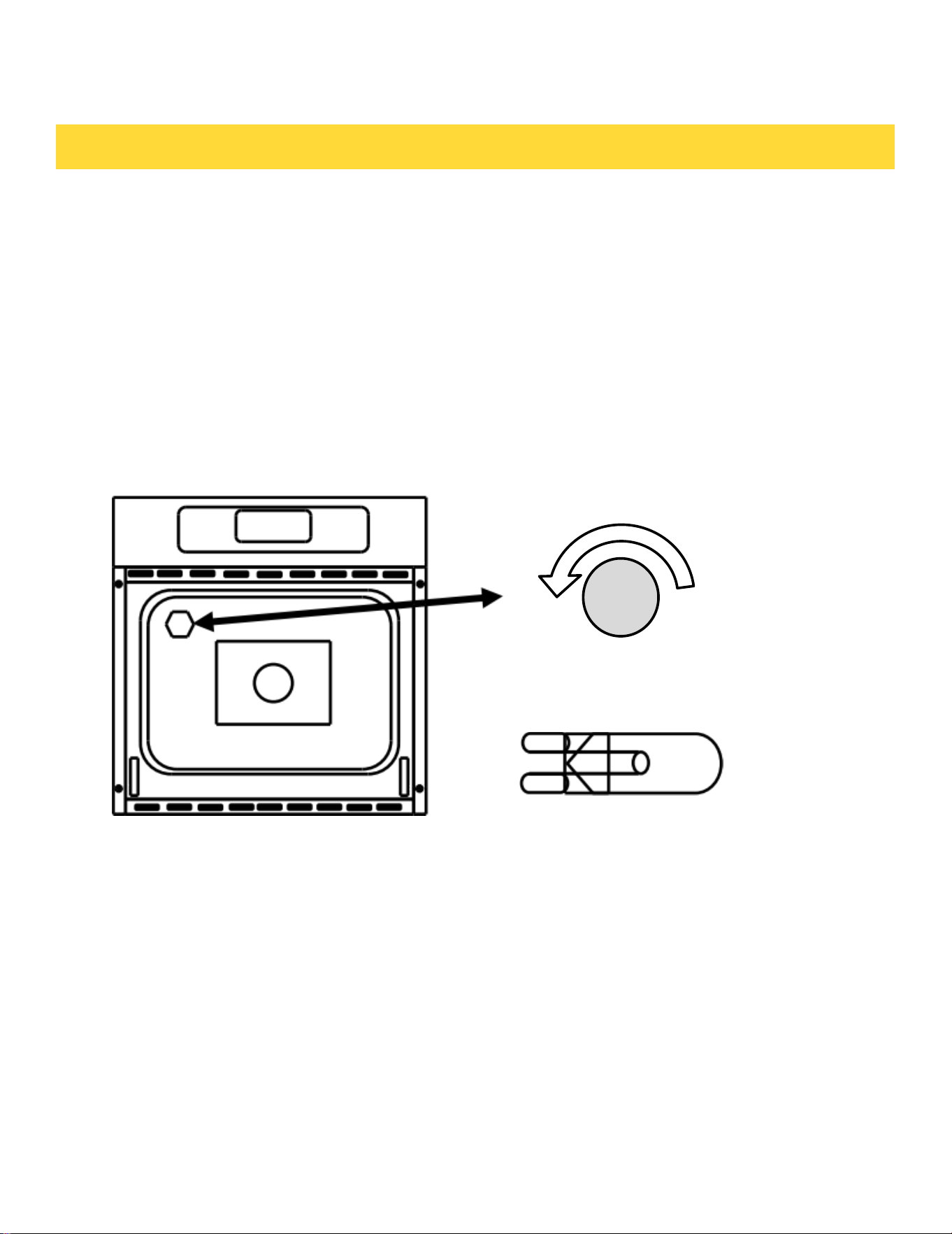
REPLACING OVEN CAVITY LIGHT BULB
• Turn off power to the oven at the circuit breaker.
• Make sure the oven cavity is cool to the touch.Do not attempt to change light bulb when the
oven is hot.
• Grasp oven light lens cover and unscrew the light lens by turning it counter-clockwise
direction.
• Remove the light lens and set it aside.
• Remove light bulb from the socket by pulling the light bulb towards front of the oven.
• Replace the oven light bulb with a 120Vac 40watt G9 base Halogen light bulb. Do not handle
the halogen bulb with hare hands. Use a cloth or glove when removing and inserting the bulb.
CLEANING THE OVEN EXTERIOR
For general cleaning, use a soft cloth with hot soapy water. For more difficult soils and built up
grease apply liquid detergent directly onto the soil. Let detergent sit for 30 to 60 min and then
rinse with a damp cloth. Do not use abrasive cleaners as they can scratch oven surfaces.
MAINTAINING THE OVEN
Replace light bulb with 120Vac
40 watt G9 base halogen bulb.
Turn oven light lens counter
clockwise to unscrew.
35

CLEANING STAINLESS STEEL SURFACES
• DO NOT use steel wool or any other abrasive type material to clean the stainless steel
surfaces.
• Use a stainless steel cleaner or stainless steel polish cleaner with a soft cloth.
• Clean the stainless steel by moving the cloth in the direction of the grain of the stainless
steel panel being cleaned.Note: Do not clean using swirling motions or going across the grain.
• Once the cleaner has dried, buff the surface with a soft, dry microfiber towel, moving along the
grain of the stainless steel.
CLEANING THE BROILER PAN AND GRID
• Broil pan and grid can be cleaned by washing in hot soapy water, For burnt on material
allow pan and grid to soak in hot water to soften material.
CLEANING THE OVEN DOOR
• Use soap and water with a dish cloth to thoroughly clean.
• Glass cleaner can be used on the exterior glass only.
• Do not spray or allow water near the oven vents at the top and bottom of the door, Doing so
will allow liquid to seep between the layers of glass inside the door, resulting in streaks and
spots on the interior glass surface.
• Do not clean the oven door gasket.Doing so will cause damage to the gasket.
MAINTAINING THE OVEN
36

Problem
Possible solution
Oven control beeps
and displays F and
number
• The electronic control has detected a fault .
• Press the Cancel key to clear display
• Reprogram cycle and try again. If error continues, turn off power
to the oven for 5 min via the circuit breaker. After 5 min, turn on
power and retry.
• If error continues,contact a qualified service technician.
No power / No display
• Power outage.Check other items in the house such as lights.
• Check house circuit breaker.
Oven cavity light
doesn't turn on
• Replace oven cavity light bulb.
Food is not baking or
roasting properly
• Oven control was not set correctly - go to the Operating the
Oven section of the user manual.
• Rack position being used is not correct - Go to the Operation
the Oven section of the user manual .
• Incorrect cookware or cookware of improper size being used-
Go to the operating the Oven section of user manual.
• Temperature adjustment needed.See the temp adjustment
subsection of the "Operating the Oven" section of the manual.
Food is not Broiling
correctly
• Oven controls improperly set.- Make sure Broil function is
selected.
• Improper rack position being used.See the broiling subsection
of the "Operating the Oven" section of the manual.
•You may be using cookware that is not suited for broiling. Use the
broil pan that came with the oven.
Troubleshooting
THOR Kitchen works hard to ensure that you don’t have problems with your new eclectic wall
oven.If you run into unexpected trouble, look first for a solution in the tables below. If you’re
still having trouble after trying the suggested solution, call THOR Kitchen at 1-877-288-8099.
TROUBLESHOOTING
37

Problem
Possible solution
Oven smokes during
broiling
• Food product is placed to close to broil element.
• Rack position is incorrect.
• Food product not properly prepared, Remove excess fat from
cuts of meats, Trim fatty edges to prevent curling.
• Incorrect cookware used.use the supplied broiler pan to allow
the grease to drip below the slots.
• Grease has built up on oven cavity surfaces. Regular cleaning
is
required when doing heavy amounts of broiling due to grease
splatter.
Oven temp is to hot or
too cold
• Oven temp sensor off set needs to be adjusted.
• See manual temp adjust. Oven Temp can be increased or
decreased by 35℉ .
Cracking / popping
sounds
• These sounds are normal. As metal heats and cools, there will
be expansion and contractions sounds during the heating process.
Oven is not clean after
a self clean
• The oven control may not be set correctly or for a sufficient
cleaning cycle. Use a 5-hour cycle for heavy soil and a 3-hour
cycle for normal soil.
• The soil level in the oven may be too high. Self clean more
frequently.
• Clean up heavy spills over before starting the clean cycle.
• Oven may need a second self clean cycle if there was heavy
soiling present during the previous self clean cycle.
Excessive smoking
during self clean
cycle
• Excessive soil in oven cavity.
• Cancel the cleaning cycle, open windows, and turn on the
exhaust hood to ventilate and remove smoke. Allow the oven to
cool and the door to unlock. Remove excess soil from the cavity,
then restart the self-clean cycle.
Burning or oily odor
emitting from the oven
and vents
• This is normal for a new oven and will dissipate with use.
• Run the oven prior to first use following the seasoning process
outlined in the BEFORE YOU BEGIN section of owners manual.
TROUBLESHOOTING
38
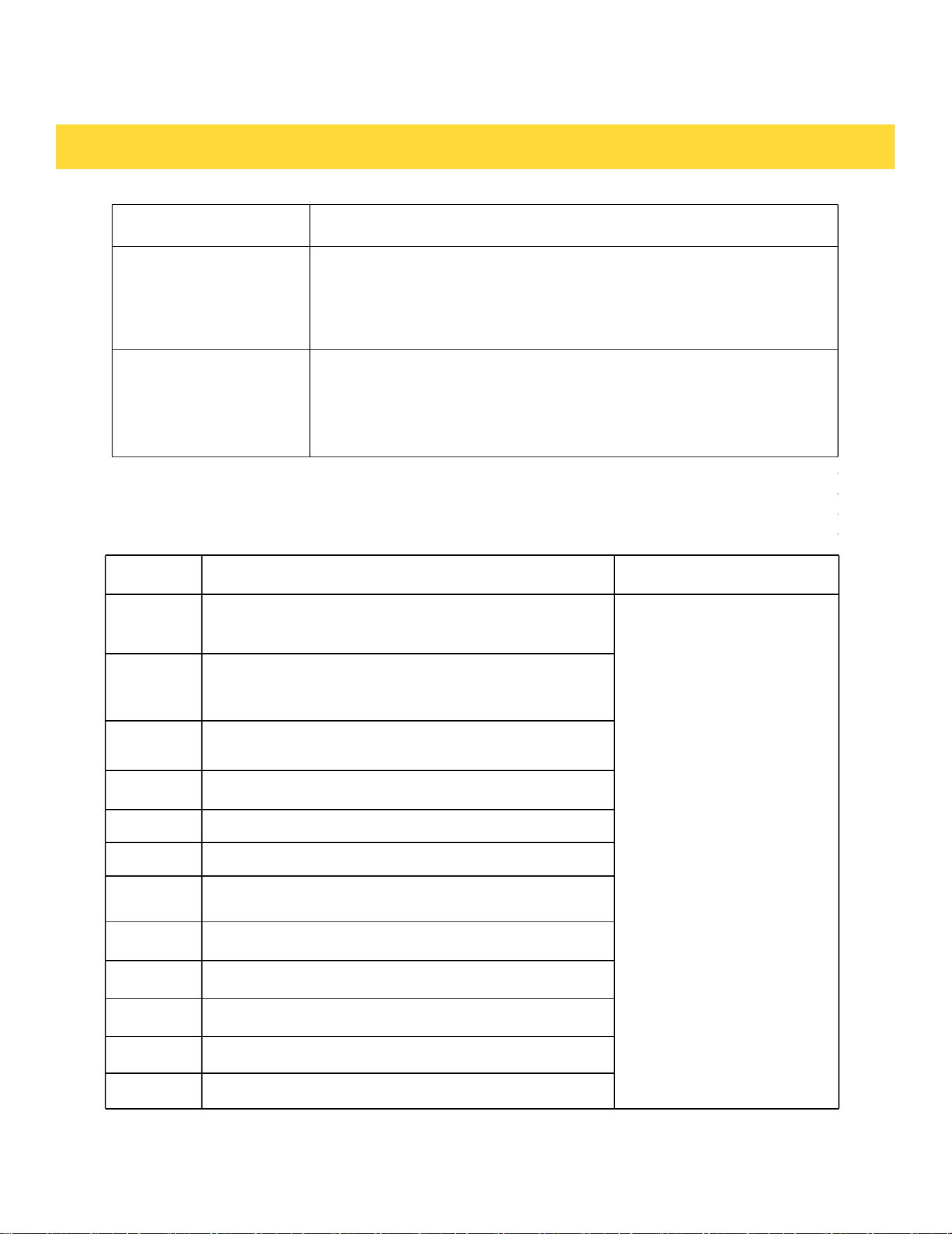
Error Code
Error Description
Solutions
F1E1
Communication failure between display board and
main control board
Restart the oven. If the
problem persists,
disconnect all power to
your oven for at least 30
seconds. Then, reconnect
the power. If this does not
solve the problem, call
for service.
F3E1
An open or short circuit fault occurs on the oven
temperature sensor
F3E2
The oven temperature rises failure when the oven is
heated
F3E3
The oven temperature overheat
F3E4
The PCB board temperature sensor is faulty.
F3E5
The PCB board temperature exceeds safe limits.
F3E6
Temperature probe failure.
F3E7
The thermostat overheats.
F4E1
The MCU self-test fails.
F5E1
Oven door lock failure.
F5E2
Oven door switch detection failure.
F6E1
The Hall sensor in the heat dissipation fan is faulty.
Problem
Possible solution
Cooling fan runs after the
oven is turned off
• This is normal, the cooling fan will continue to run until the oven has
cooled below 165°F. Once it has cooled below this temperature it will
automatily turn off.
Warm air is venting
out from below the
door
• This is normal, the oven cooling fan will draw cool air in through
the oven door and this air will be cycled over the top and back of the
oven. The warm air will be vented out the bottom vent of the oven
into the kitchen.
TROUBLESHOOTING
Error Code
39

Warrant & Service
This product has been manufactured by Thor, 4651 E Airport Drive, California 91761 For
Customer Service, please call (877) 288 - 8099
For the most up to date warranty and service policy, please refer to our website WWW.THOR
Kitchen.COM/WARRANTY-REGISTRATION
For in-warranty service requests, please visit our website at WWW.THOR Kitchen.COM/
SERVICE
Please Note: You must provide proof of purchase or installation date for any in warranty service
requests.
WARRANTY AND SERVICE
40
WELCOME
TO THE CLUB
You chose THOR Kitchen to enhance your culinary journey and
we’re stoked to have you in the club. Think of it as a secret
society of really savvy people, such as yourself, choosing
professional power and performance at an affordable price.
Register your product by following the steps below.
WARRANTY REGISTRATION
WARRANTY NEED PARTS?
Scan theQR code or visit
thorkitchen.com/warranty
Input your product info
and select register
You’re done.
Let’s get cookin’ .