

AXISQ6078-EPTZCamera
TableofContents
Getstarted................................................3
Findthedeviceonthenetwork....................................3
Accessthedevice...............................................3
Webpageoverview..............................................5
Additionalsettings..........................................7
Adjusttheimage................................................7
Adjustthecameraview(PTZ)......................................12
Viewandrecordvideo............................................12
Setuprulesandalerts...........................................13
Learnmore................................................18
Cleaningrecommendations.......................................18
Bitratecontrol..................................................18
Capturemodes.................................................20
Privacymasks..................................................20
Overlays.......................................................20
Pan,tilt,andzoom(PTZ)..........................................20
Streamingandstorage...........................................21
Applications....................................................21
Security.......................................................22
Troubleshooting............................................23
Resettofactorydefaultsettings...................................23
Firmwareoptions...............................................23
Checkthecurrentrmware.......................................
23
Upgradethermware............................................23
Technicalissues,cluesandsolutions................................
24
Performanceconsiderations.......................................
26
Needmorehelp?................................................26
Specications..............................................27
Productoverview................................................
27
LEDindicators..................................................
28
SDcardslot....................................................
28
Buttons.......................................................
28
Connectors....................................................
28
2

AXISQ6078-EPTZCamera
Getstarted
Getstarted
Findthedeviceonthenetwork
TondAxisdevicesonthenetworkandassignthemIPaddressesinWindows®,useAXISIPUtilityorAXISDeviceManager.Both
applicationsarefreeandcanbedownloadedfromaxis.com/support.
FormoreinformationabouthowtondandassignIPaddresses,gotoHowtoassignanIPaddressandaccessyourdevice.
Browsersupport
Youcanusethedevicewiththefollowingbrowsers:
Chrome
TM
Firefox
®
Edge
®
Safari
®
Windows
®
recommended
xx
macOS
®
recommended
x
Otheroperatingsystems
xx
Ifyouneedmoreinformationaboutrecommendedbrowsers,gotoaxis.com/browser-support.
Accessthedevice
1.OpenabrowserandentertheIPaddressorhostnameoftheAxisdevice.
IfyoudonotknowtheIPaddress,useAXISIPUtilityorAXISDeviceManagertondthedeviceonthenetwork.
2.Entertheusernameandpassword.Ifyouaccessthedeviceforthersttime,youmustsettherootpassword.SeeSeta
newpasswordfortherootaccountonpage3.
3.Theliveviewpageopensinyourbrowser.
Verifythatnoonehastamperedwiththermware
TomakesurethatthedevicehasitsoriginalAxisrmware,ortotakefullcontrolofthedeviceafterasecurityattack:
1.Resettofactorydefaultsettings.SeeResettofactorydefaultsettingsonpage23.
Afterthereset,securebootguaranteesthestateofthedevice.
2.Congureandinstallthedevice.
Setanewpasswordfortherootaccount
Important
Thedefaultadministratorusernameisroot.Ifthepasswordforrootislost,resetthedevicetofactorydefaultsettings.
3

AXISQ6078-EPTZCamera
Getstarted
Towatchthisvideo,gotothewebversionofthisdocument.
www.axis.com/products/online-manual/68579#t10098905
Supporttip:Passwordsecurityconrmationcheck
1.Typeapassword.Followtheinstructionsaboutsecurepasswords.SeeSecurepasswordsonpage4.
2.Retypethepasswordtoconrmthespelling.
3.ClickCreatelogin.Thepasswordhasnowbeencongured.
Securepasswords
Important
Axisdevicessendtheinitiallysetpasswordincleartextoverthenetwork.Toprotectyourdeviceaftertherstlogin,set
upasecureandencryptedHTTPSconnectionandthenchangethepassword.
Thedevicepasswordistheprimaryprotectionforyourdataandservices.Axisdevicesdonotimposeapasswordpolicyasthey
maybeusedinvarioustypesofinstallations.
Toprotectyourdatawestronglyrecommendthatyou:
•Useapasswordwithatleast8characters,preferablycreatedbyapasswordgenerator.
•Don’texposethepassword.
•Changethepasswordatarecurringinterval,atleastonceayear.
4

AXISQ6078-EPTZCamera
Getstarted
Webpageoverview
1
Liveviewcontrolbar
2
Liveview
3
Productname
4
Userinformation,colorthemes,andhelp
5
Videocontrolbar
6
Settingstoggle
5

AXISQ6078-EPTZCamera
Getstarted
7
Settingstabs
6

AXISQ6078-EPTZCamera
Additionalsettings
Additionalsettings
Adjusttheimage
Thissectionincludesinstructionsabouthowtocongureyourdevice.Ifyouwanttolearnmoreabouthowcertainfeatures
function,gotoLearnmoreonpage18.
Adjustthefocusfasterwithfocusrecallareas
Tosavethefocussettingsataspecicpan/tiltrange,addafocusrecallarea.Eachtimethecameramovesintothatareaitrecallsthe
previouslysavedfocus.It’senoughtocoverhalfofthefocusrecallareaintheliveview.
Werecommendthefocusrecallfeatureinthefollowingscenarios:
•Whenthereisalotofmanualoperationinliveview,forexamplewithajoystick.
•WherePTZpresetpositionswithmanualfocusarenotefcient,forexamplemovementswherethefocussettingchanges
continuously.
•Inlow-lightscenarios,wheretheautofocusischallengedbythelightingconditions.
Important
•Thefocusrecalloverridesthecamera’sautofocusatthespecicpan/tiltrange.
•Apresetpositionoverridesthefocussettingsavedinthefocusrecallarea.
•Themaximumnumberoffocusrecallareasis20.
Createafocusrecallarea
1.Pan,tilt,andzoomintotheareawhereyouwouldliketohavefocus.
Aslongasthefocusrecallbuttonshowsaplus
,youcanaddafocusrecallareainthatposition.
2.Adjustthefocus.
3.Clickthefocusrecallbutton.
Deleteafocusrecallarea
1.Pan,tilt,andzoomintothefocusrecallareayouwanttodelete.
Thefocusrecallbuttontogglestominuswhenthecameradetectsafocusrecallarea:.
2.Clickthefocusrecallbutton.
BenetfromIRlightinlow-lightconditionsusingnightmode
Yourcamerausesvisiblelighttodelivercolorimagesduringtheday.Astheavailablelightdiminishes,youcansetthecamerato
automaticallyshifttonightmode,inwhichthecamerausesbothvisiblelightandnear-infraredlighttodeliverblack-and-white
images.Sincethecamerausesmoreoftheavailablelightitcandeliverbrighter,moredetailed,images.
1.GotoSettings>Image>Dayandnight,andmakesurethattheIRcutlterissettoAuto.
2.Todetermineatwhatlightlevelyouwantthecameratoshifttonightmode,movetheThresholdslidertowardBright
orDark.
7

AXISQ6078-EPTZCamera
Additionalsettings
Note
Ifyousettheshifttonightmodetooccurwhenit’sbrighter,theimageremainssharperastherewillbelesslow-light
noise.Ifyousettheshifttooccurwhenit’sdarker,theimagecolorsaremaintainedforlonger,buttherewillbemore
imageblurduetolow-lightnoise.
Reducenoiseinlow-lightconditions
Toreducenoiseinlow-lightconditions,youcanadjustoneormoreofthefollowingsettings:
•Adjustthetrade-offbetweennoiseandmotionblur.GotoSettings>Image>ExposureandmovetheBlur-noise
trade-offslidertowardLownoise.
Note
Ahighmaxshuttervaluecanresultinmotionblur.
•Toslowdowntheshutterspeed,setmaxshuttertothehighestpossiblevalue.
Note
Whenyoureducethemaxgain,theimagecanbecomedarker.
•Setthemaxgaintoalowervalue.
•Opentheaperture.
Handlesceneswithstrongbacklight
Dynamicrangeisthedifferenceinlightlevelsinanimage.Insomecasesthedifferencebetweenthedarkestandthebrightest
areascanbesignicant.Theresultisoftenanimagewhereeitherthedarkorthebrightareasarevisible.Widedynamicrange
(WDR)makesbothdarkandbrightareasoftheimagevisible.
ImagewithoutWDR.
ImagewithWDR.
8

AXISQ6078-EPTZCamera
Additionalsettings
Note
•WDRcancauseartifactsintheimage.
•WDRmaynotbeavailableforallcapturemodes.
1.GotoSettings>Image>Widedynamicrange.
2.TurnonWDR.
3.TosettheamountofWDR,selectLow,MediumorHighfromtheWDRlevellist.
4.Ifyoustillhaveproblems,gotoExposureandadjusttheExposurezonetocovertheareaofinterest.
FindoutmoreaboutWDRandhowtouseitataxis.com/web-articles/wdr.
Verifythepixelresolution
Toverifythatadenedpartoftheimagecontainsenoughpixelsto,forexample,recognizelicenseplates,youcanusethepixel
counter.
ABC 123
1.GotoSettings>System>Orientation.
2.Click
.
3.Inthecamera’sliveview,adjustthesizeandpositionoftherectanglearoundtheareaofinterest,forexamplewhereyou
expectlicenseplatestoappear.
Youcanseethenumberofpixelsforeachoftherectangle’ssides(XandY),anddecideifthevaluesareenoughfor
yourneeds.
Hidepartsoftheimagewithprivacymasks
Youcancreateoneorseveralprivacymaskstohidepartsoftheimage.
9

AXISQ6078-EPTZCamera
Additionalsettings
Towatchthisvideo,gotothewebversionofthisdocument.
www.axis.com/products/online-manual/68579#t10106902
Howtocreateaprivacymask
1.GotoSettings>Privacymask.
2.ClickNew.
3.Adjustthesize,color,andnameoftheprivacymaskaccordingtoyourneeds.
Towatchthisvideo,gotothewebversionofthisdocument.
www.axis.com/products/online-manual/68579#t10106902
Howtochangetheappearanceofthemask
Showanimageoverlay
Youcanaddanimageasanoverlayinthevideostream.
1.GotoSettings>Overlay.
2.ClickImagelist.
3.UploadanimageandclickDone.
4.ClickCreateoverlay.
5.SelectImageandclickCreate.
6.Selecttheimagefromthedrop-downlist.
7.Topositiontheimageoverlay,chooseCustomoroneofthepresets.
8.ClickCreate.
Showatextoverlayinthevideostreamwhenthedevicedetectsmotion
Thisexampleexplainshowtodisplaythetext“Motiondetected”whenthedevicedetectsmotion.
10

AXISQ6078-EPTZCamera
Additionalsettings
Towatchthisvideo,gotothewebversionofthisdocument.
www.axis.com/products/online-manual/68579#t10103832
Howtoshowtextoverlaywhenthecameradetectsmotion
MakesurethatAXISVideoMotionDetectionisrunning:
1.GotoSettings>Apps>AXISVideoMotionDetection.
2.Starttheapplicationifitisnotalreadyrunning.
3.Makesureyouhavesetuptheapplicationaccordingtoyourneeds.
Addtheoverlaytext:
4.GotoSettings>Overlay.
5.SelectCreateoverlayandselectTextoverlay.
6.Enter#Dinthetexteld.
7.Choosetextsizeandappearance.
8.Topositionthetextoverlay,chooseCustomoroneofthepresets.
Createarule:
9.GotoSystem>Events>Rulesandaddarule.
10.Typeanamefortherule.
11.Inthelistofconditions,selectAXISVideoMotionDetection.
12.Inthelistofactions,selectUseoverlaytext.
13.Selectaviewarea.
14.Type“Motiondetected”.
15.Settheduration.
16.ClickSave.
Note
Ifyouupdatetheoverlaytextitwillbeautomaticallyupdatedonallvideostreamsdynamically.
Showthepanortiltpositionasatextoverlay
Youcanshowthepanortiltpositionasanoverlayintheimage.
1.GotoSettings>OverlayandclickCreateoverlay.
2.SelectTextandclickCreate.
3.Inthetexteld,type#xtoshowthepanposition.
Type#ytoshowthetiltposition.
11

AXISQ6078-EPTZCamera
Additionalsettings
4.Chooseappearance,textsize,andalignment.
5.Thecurrentpanandtiltpositionsshowupintheliveviewimageandintherecording.
Adjustthecameraview(PTZ)
Tolearnmoreaboutdifferentpan,tilt,andzoomsettings,seePan,tilt,andzoom(PTZ)onpage20.
Limitthepan,tilt,andzoommovements
Iftherearepartsofthescenethatyoudon’twantthecameratoreach,youcanlimitthepan,tilt,andzoommovements.For
example,youwanttoprotecttheprivacyofresidentsinanapartmentbuilding,whichislocatedclosetoaparkinglotthatyouintend
tomonitor.Tolimitthemovements,gotoSettings>PTZ>Limits.
Createaguardtourwithpresetpositions
Aguardtourdisplaysthevideostreamfromdifferentpresetpositionseitherinapredeterminedorrandomorder,andforcongurable
periodsoftime.
1.GotoSettings>PTZ>Guardtours.
2.Click+.
3.Toedittheguardtour’sproperties,click
.
4.Typeanamefortheguardtourandspecifythepauselengthinminutesbetweeneachtour.
5.Ifyouwanttheguardtourtogotothepresetpositionsinarandomorder,turnonShufe.
6.ClickDone.
7.ClickAddtoaddthepresetpositionsthatyouwantinyourguardtour.
8.ClickDonetoexittheguardtoursettings.
9.Toscheduletheguardtour,gotoSystem>Events.
Towatchthisvideo,gotothewebversionofthisdocument.
www.axis.com/products/online-manual/68579#t1011 1157
Viewandrecordvideo
Thissectionincludesinstructionsabouthowtocongureyourdevice.Tolearnmoreabouthowstreamingandstorageworks,goto
Streamingandstorageonpage21.
Reducebandwidthandstorage
Important
Ifyoureducethebandwidthitcanresultinlossofdetailsinthepicture.
12

AXISQ6078-EPTZCamera
Additionalsettings
1.GotoliveviewandselectH.264.
2.GotoSettings>Stream.
3.Dooneormoreofthefollowing:
Note
ThezipstreamsettingsareusedforbothH.264andH.265.
-TurnondynamicGOPandsetahighGOPlengthvalue.
-Increasethecompression.
-TurnondynamicFPS.
Note
WebbrowsersdonotsupportH.265decoding.UseavideomanagementsystemorapplicationsupportingH.265decoding.
Setupnetworkstorage
Tostorerecordingsonthenetwork,youneedtosetupyournetworkstorage.
1.GotoSettings>System>Storage.
2.ClickSetupunderNetworkstorage.
3.EntertheIPaddressofthehostserver.
4.Enterthenameofthesharedlocationonthehostserver.
5.Movetheswitchifthesharerequiresalogin,andenterusernameandpassword.
6.ClickConnect.
Recordandwatchvideo
Torecordvideoyoumustrstsetupnetworkstorage,seeSetupnetworkstorageonpage13,orhaveanSDcardinstalled.
Recordvideo
1.Gototheliveview.
2.Tostartarecording,clickRecord.Clickagaintostoptherecording.
Watchvideo
1.ClickStorage>Gotorecordings.
2.Selectyourrecordinginthelistanditwillplayautomatically.
Setuprulesandalerts
Youcancreaterulestomakeyourdeviceperformanactionwhencertaineventsoccur.Aruleconsistsofconditionsandactions.
Theconditionscanbeusedtotriggertheactions.Forexample,thedevicecanstartarecordingorsendanemailwhenitdetects
motion,orshowanoverlaytextwhilethedeviceisrecording.
Triggeranaction
1.GotoSettings>System>Eventstosetuparule.Theruledeneswhenthedevicewillperformcertainactions.Rules
canbesetupasscheduled,recurring,orforexample,triggeredbymotiondetection.
13

AXISQ6078-EPTZCamera
Additionalsettings
2.SelecttheConditionthatmustbemettotriggertheaction.Ifyouspecifymorethanoneconditionfortherule,allofthe
conditionsmustbemettotriggertheaction.
3.SelectwhichActionthedeviceshouldperformwhentheconditionsaremet.
Note
Ifyoumakechangestoanactiverule,youhavetorestarttheruleforthechangestotakeeffect.
Recordvideowhenthecameradetectsmotion
ThisexampleexplainshowtosetupthecameratostartrecordingtotheSDcardvesecondsbeforeitdetectsmotionandto
stoponeminuteafter.
Towatchthisvideo,gotothewebversionofthisdocument.
www.axis.com/products/online-manual/68579#t10106619
Howtorecordavideostreamwhenthecameradetectsmotion
MakesurethatAXISVideoMotionDetectionisrunning:
1.GotoSettings>Apps>AXISVideoMotionDetection.
2.Starttheapplicationifitisnotalreadyrunning.
3.Makesureyouhavesetuptheapplicationaccordingtoyourneeds.Ifyouneedhelp,seethe
usermanualforAXISVideoMotionDetection4.
Createarule:
1.GotoSettings>System>Eventsandaddarule.
2.Typeanamefortherule.
3.Inthelistofconditions,underApplication,selectAXISVideoMotionDetection(VMD).
4.Inthelistofactions,underRecordings,selectRecordvideowhiletheruleisactive.
5.Selectanexistingstreamproleorcreateanewone.
6.Settheprebuffertimeto5seconds.
7.Setthepostbuffertimeto60seconds.
8.Inthelistofstorageoptions,selectSDcard.
9.ClickSave.
Directthecameratoapresetpositionwhenthecameradetectsmotion
Thisexampleexplainshowtosetupthecameratogotoapresetpositionwhenitdetectsmotionintheimage.
14

AXISQ6078-EPTZCamera
Additionalsettings
Towatchthisvideo,gotothewebversionofthisdocument.
www.axis.com/products/online-manual/68579#t10101129
MakesurethatAXISVideoMotionDetectionisrunning:
1.GotoSettings>Apps>AXISVideoMotionDetection.
2.Starttheapplicationifitisnotalreadyrunning.
3.Makesureyouhavesetuptheapplicationaccordingtoyourneeds.Ifyouneedhelp,seethe
usermanualforAXISVideoMotionDetection4.
Addapresetposition:
GotoSettings>PTZandsetwhereyouwantthecameratobedirectedbycreatingapresetposition.
Createarule:
1.GotoSettings>System>Events>Rulesandaddarule.
2.Typeanamefortherule.
3.Inthelistofconditions,selectavideomotiondetectionconditionunderApplication.
4.Fromthelistofactions,selectGotopresetposition.
5.Selectthepresetpositionyouwantthecameratogoto.
6.ClickSave.
Zoominonaspecicareaautomaticallywithgatekeeper
Thisexampleexplainshowtousethegatekeeperfunctionalitytomakethecamerazoominautomaticallyonthelicenseplateofa
carthatpassesthroughagate.Whenthecarhaspassed,thecamerazoomsouttothehomeposition.
Createthepresetpositions:
1.GotoSettings>PTZ>Presetpositions.
2.Createthehomepositionthatincludestheentranceofthegate.
3.Createthezoomed-inpresetpositionsothatitcoverstheareaintheimagewhereyouassumethatthelicenseplate
willappear.
Createamotiondetectionprole:
1.GotoSettings>AppsandopenAXISVideoMotionDetection.
2.Createaprolethatcoverstheentranceofthegateandthensavetheprole.
Createarule:
1.GotoSettings>System>Eventsandaddarule.
2.Nametherule“Gatekeeper”.
15

AXISQ6078-EPTZCamera
Additionalsettings
3.Inthelistofconditions,underApplication,selectthemotiondetectionprole.
4.Inthelistofactions,underPresetpositions,selectGotopresetposition.
5.SelectaVideochannel.
6.SelectthePresetposition.
7.Tomakethecamerawaitawhilebeforeitreturnstothehomeposition,selectHometimeout,andsetatime.
8.ClickSave.
Recordvideowhenthecameradetectsimpact
Shockdetectionallowsthecameratodetecttamperingcausedbyvibrationsorshock.Vibrationsduetotheenvironmentortoan
objectcantriggeranactiondependingontheshocksensitivityrange,whichcanbesetfrom0to100.Inthisscenario,someoneis
throwingrocksatthecameraafterhoursandyouwouldliketogetavideoclipoftheevent.
Turnonshockdetection:
1.GotoSettings>System>Detectors.
2.Turnonshockdetection,andsetavaluefortheshocksensitivity.
Createarule:
1.GotoSettings>System>Eventsandaddarule.
2.Typeanamefortherule.
3.Inthelistofconditions,underDevicestatus,selectShockdetected.
4.Click+toaddasecondcondition.
5.Inthelistofconditions,underScheduledandrecurring,selectScheduledevent.
6.Inthelistofschedules,selectAfterhours.
7.Inthelistofactions,underRecordings,selectRecordvideowhiletheruleisactive.
8.SelectaCamera.
9.Settheprebuffertimeto5seconds.
10.Setthepostbuffertimeto60seconds.
11.Selectwheretosavetherecordings.
12.ClickSave.
16

AXISQ6078-EPTZCamera
Additionalsettings
Sendanemailautomaticallyifsomeonespraypaintsthelens
Towatchthisvideo,gotothewebversionofthisdocument.
www.axis.com/products/online-manual/68579#t10106687
Howtosendanemailnoticationifsomeonespraypaintthelens
1.GotoSettings>System>Detectors.
2.TurnonTriggerondarkimages.Thiswilltriggeranalarmifthelensissprayed,covered,orrenderedseverelyoutoffocus.
3.SetadurationforTriggerafter.Thevalueindicatesthetimethatmustpassbeforeanemailissent.
Createarule:
1.GotoSettings>System>Events>Rulesandaddarule.
2.Typeanamefortherule.
3.Inthelistofconditions,selectTampering.
4.Inthelistofactions,selectSendnoticationtoemail.
5.SelectarecipientfromthelistorgotoRecipientstocreateanewrecipient.
Tocreateanewrecipient,click
.Tocopyanexistingrecipient,click.
6.Typeasubjectandamessagefortheemail.
7.ClickSave.
17

AXISQ6078-EPTZCamera
Learnmore
Learnmore
Cleaningrecommendations
Ifthedevicegetsgreasestainsorbecomesheavilysoiled,youcancleanitwithmild,solvent-freesoapordetergent.
NO NO
NO
TICE TICE
TICE
Neveruseharshdetergent,forexamplegasoline,benzene,oracetone.
1.Useacanofcompressedairtoremoveanydustorloosedirtfromthedevice.
2.Cleanthedevicewithasoftclothdampenedwithmilddetergentandlukewarmwater.
3.Wipecarefullywithadrycloth.
Note
Avoidcleaningindirectsunlightoratelevatedtemperatures,asthismaycausestainswhenthewaterdropletsdry.
Bitratecontrol
Withbitratecontrol,youcanmanagethebandwidthconsumptionofyourvideostream.
Variablebitrate(VBR)
Withvariablebitrate,thebandwidthconsumptionvariesbasedonthelevelofactivityinthescene.Themoreactivityinthescene,
themorebandwidthyouneed.Youareguaranteedconstantimagequalitybutitrequiresstoragemargins.
Maximumbitrate(MBR)
Withmaximumbitrate,youcansetatargetbitratetohandlebitratelimitationsinyoursystem.Youmayseeadeclineinimage
qualityorframeratewhentheinstantaneousbitrateiskeptbelowthespeciedtargetbitrate.Youcanchoosetoeitherprioritize
imagequalityorframerate.Werecommendthatyoucongurethetargetbitratetoahighervaluethantheexpectedbitrate.This
givesyouamarginforadditionalcomplexitythatneedstobecaptured.
18

AXISQ6078-EPTZCamera
Learnmore
1
Targetbitrate
Averagebitrate(ABR)
Withaveragebitrate,thebitrateisautomaticallyadjustedoveralongertimescale.Thisissoyoucanmeetthespeciedtargetand
providethebestvideoqualitybasedonyouravailablestorage.Bitrateishigherinsceneswithalotofactivity,comparedtostatic
scenes.Youaremorelikelytogetbetterimagequalitywhenneededwhenusingtheaveragebitrateoption.Youcandenethetotal
storagerequiredtostorethevideostreamforaspeciedamountoftime(retentiontime)whenimagequalityisadjustedtomeetthe
speciedtargetbitrate.Specifytheaveragebitratesettingsinoneofthefollowingways:
•Tocalculatetheestimatedstorageneed,setthetargetbitrateandtheretentiontime.
•Tocalculatetheaveragebitrate,basedonavailablestorageandrequiredretentiontime,usethetargetbitratecalculator.
kbit/s
s
1
2
1
Targetbitrate
2
Actualaveragebitrate
Youcanalsoturnonmaximumbitrateandspecifyatargetbitratewithintheaveragebitrateoption.
19

AXISQ6078-EPTZCamera
Learnmore
kbit/s
s
1
2
1
Targetbitrate
2
Actualaveragebitrate
Capturemodes
CapturemodedenesthemaximumframerateavailableintheAxisproduct.Dependingonwhichcapturemodeyouselect,you
maynotbeabletouseWDR.
Whichcapturemodetochoosedependsontherequirementsofframerateandresolutionforthespecicsurveillancesetup.For
specicationsaboutavailablecapturemodes,seetheproduct’sdatasheetataxis.com.
Privacymasks
Aprivacymaskisauser-denedareathatcoversapartofthemonitoredarea.Inthevideostream,privacymasksappeareitheras
blocksofsolidcolororwithamosaicpattern.
You’llseetheprivacymaskonallsnapshots,recordedvideo,andlivestreams.
YoucanusetheVAPIX®applicationprogramminginterface(API)toturnofftheprivacymasks.
Important
Ifyouusemultipleprivacymasksitmayaffecttheproduct’sperformance.
Overlays
Overlaysaresuperimposedoverthevideostream.Theyareusedtoprovideextrainformationduringrecordings,suchasatimestamp,
orduringproductinstallationandconguration.Youcanaddeithertextoranimage.
Thevideostreamingindicatorisanothertypeofoverlay.Itshowsyouthattheliveviewvideostreamislive.
Pan,tilt,andzoom(PTZ)
Guardtours
Aguardtourdisplaysthevideostreamfromdifferentpresetpositionseitherinapredeterminedorrandomorder,andforcongurable
periodsoftime.Oncestarted,aguardtourcontinuestorununtilstopped,evenwhentherearenoclients(webbrowsers)viewingthe
images.
20

AXISQ6078-EPTZCamera
Learnmore
Streamingandstorage
Videocompressionformats
Decidewhichcompressionmethodtousebasedonyourviewingrequirements,andonthepropertiesofyournetwork.The
availableoptionsare:
MotionJPEG
MotionJPEG,orMJPEG,isadigitalvideosequencethatismadeupofaseriesofindividualJPEGimages.Theseimagesarethen
displayedandupdatedataratesufcienttocreateastreamthatshowsconstantlyupdatedmotion.Fortheviewertoperceivemotion
videotheratemustbeatleast16imageframespersecond.Fullmotionvideoisperceivedat30(NTSC)or25(PAL)framespersecond.
TheMotionJPEGstreamusesconsiderableamountsofbandwidth,butprovidesexcellentimagequalityandaccesstoeveryimage
containedinthestream.
H.264orMPEG-4Part10/AVC
Note
H.264isalicensedtechnology.TheAxisproductincludesoneH.264viewingclientlicense.Toinstalladditionalunlicensed
copiesoftheclientisprohibited.Topurchaseadditionallicenses,contactyourAxisreseller.
H.264can,withoutcompromisingimagequality,reducethesizeofadigitalvideolebymorethan80%comparedtotheMotion
JPEGformatandbyasmuchas50%comparedtotheMPEG-4standard.Thismeansthatlessnetworkbandwidthandstoragespace
arerequiredforavideole.Orseenanotherway,highervideoqualitycanbeachievedforagivenbitrate.
H.265orMPEG-HPart2/HEVC
Note
H.265islicensedtechnology.TheAxisproductincludesoneH.265viewingclientlicense.Toinstalladditionalunlicensed
copiesoftheclientisprohibited.Topurchaseadditionallicenses,contactyourAxisreseller.
HowdoImage,Stream,andStreamprolesettingsrelatetoeachother?
TheImagetabcontainscamerasettingsthataffectallvideostreamsfromtheproduct.Ifyouchangesomethinginthistab,it
immediatelyaffectsallvideostreamsandrecordings.
TheStreamtabcontainssettingsforvideostreams.Yougetthesesettingsifyourequestavideostreamfromtheproductanddon’t
specifyforexampleresolution,orframerate.WhenyouchangethesettingsintheStreamtab,itdoesn’taffectongoingstreams,but
itwilltakeeffectwhenyoustartanewstream.
TheStreamprolessettingsoverridethesettingsfromtheStreamtab.Ifyourequestastreamwithaspecicstreamprole,the
streamcontainsthesettingsofthatprole.Ifyourequestastreamwithoutspecifyingastreamprole,orrequestastreamprole
thatdoesn'texistintheproduct,thestreamcontainsthesettingsfromtheStreamtab.
Applications
AXISCameraApplicationPlatform(ACAP)isanopenplatformthatenablesthirdpartiestodevelopanalyticsandotherapplications
forAxisproducts.Tondoutmoreaboutavailableapplications,downloads,trialsandlicenses,gotoaxis.com/applications.
TondtheusermanualsforAxisapplications,gotoaxis.com.
Note
•Severalapplicationscanrunatthesametimebutsomeapplicationsmightnotbecompatiblewitheachother.Certain
combinationsofapplicationsmightrequiretoomuchprocessingpowerormemoryresourceswhenruninparallel.Verify
thattheapplicationsworktogetherbeforedeployment.
21

AXISQ6078-EPTZCamera
Learnmore
Towatchthisvideo,gotothewebversionofthisdocument.
www.axis.com/products/online-manual/68579#t10001688
Howtodownloadandinstallanapplication
Towatchthisvideo,gotothewebversionofthisdocument.
www.axis.com/products/online-manual/68579#t10001688
Howtoactivateanapplicationlicencecodeonadevice
Autotracking
Withautotracking,thecameraautomaticallyzoomsinonandtracksmovingobjects,forexampleavehicleoraperson.Youcan
manuallyselectanobjecttotrack,orsetuptriggerareasandletthecameradetectmovingobjects.Theapplicationisbestsuited
foropenareaswithnoobscuringobjectsandwheremovementisunusual.Whenthecameradoesn'ttrackanobject,itreturns
toitshomeposition.
Important
•Autotrackingisdesignedforareaswithalimitedamountofmovement.
•Autotrackingdoesnottrackobjectsbehindprivacymasks.
•Ifbothautotrackingandguardtourareenabled,guardtourtakespriorityoverautotracking.Thismeansautotracking
stopsifaguardtourstarts.
Security
TPMmodule
TheTPM(TrustedPlatformModule)isacomponentthatprovidescryptographicfeaturestoprotectinformationfromunauthorized
access.Itisalwaysactivatedandtherearenosettingsyoucanchange.
TolearnmoreaboutTPM,gotoaxis.com/press-center/media-resources/white-papers.
22

AXISQ6078-EPTZCamera
Troubleshooting
Troubleshooting
Resettofactorydefaultsettings
Important
Resettofactorydefaultshouldbeusedwithcaution.Aresettofactorydefaultresetsallsettings,includingtheIPaddress,to
thefactorydefaultvalues.
Toresettheproducttothefactorydefaultsettings:
1.Pressandholdthecontrolbuttonandthepowerbuttonfor15–30secondsuntilthestatusLEDindicatorashesamber.
SeeProductoverviewonpage27.
2.ReleasethecontrolbuttonbutcontinuetoholddownthepowerbuttonuntilthestatusLEDindicatorturnsgreen.
3.Releasethepowerbuttonandassembletheproduct.
4.Theprocessisnowcomplete.Theproducthasbeenresettothefactorydefaultsettings.IfnoDHCPserverisavailableon
thenetwork,thedefaultIPaddressis192.168.0.90.
5.UsingtheinstallationandmanagementsoftwaretoolstoassignanIPaddress,setthepasswordandaccessthevideo
stream.
Itisalsopossibletoresetparameterstofactorydefaultthroughthewebinterface.GotoSettings>System>Maintenanceand
clickDefault.
Firmwareoptions
Axisoffersproductrmwaremanagementaccordingtoeithertheactivetrackorthelong-termsupport(LTS)tracks.Beingonthe
activetrackmeanscontinuouslygettingaccesstoallthelatestproductfeatures,whiletheLTStracksprovideaxedplatformwith
periodicreleasesfocusedmainlyonbugxesandsecurityupdates.
Usingrmwarefromtheactivetrackisrecommendedifyouwanttoaccessthenewestfeatures,orifyouuseAxisend-to-endsystem
offerings.TheLTStracksarerecommendedifyouusethird-partyintegrations,whicharenotcontinuouslyvalidatedagainstthelatest
activetrack.WithLTS,theproductscanmaintaincybersecuritywithoutintroducinganysignicantfunctionalchangesoraffecting
anyexistingintegrations.FormoredetailedinformationaboutAxisproductrmwarestrategy,gotoaxis.com/support/rmware.
Checkthecurrentrmware
Firmwareisthesoftwarethatdeterminesthefunctionalityofnetworkdevices.Oneofyourrstactionswhentroubleshootinga
problemshouldbetocheckthecurrentrmwareversion.Thelatestversionmaycontainacorrectionthatxesyourparticular
problem.
Tocheckthecurrentrmware:
1.Gototheproduct’swebpage.
2.Clickonthehelpmenu
.
3.ClickAbout.
Upgradethermware
Important
Preconguredandcustomizedsettingsaresavedwhenthermwareisupgraded(providedthatthefeaturesareavailablein
thenewrmware)althoughthisisnotguaranteedbyAxisCommunicationsAB.
23

AXISQ6078-EPTZCamera
Troubleshooting
Important
Makesurethecoverisattachedduringupgradetoavoidinstallationfailure.
Important
Makesuretheproductremainsconnectedtothepowersourcethroughouttheupgradeprocess.
Note
Whenyouupgradetheproductwiththelatestrmwareintheactivetrack,theproductreceivesthelatestfunctionality
available.Alwaysreadtheupgradeinstructionsandreleasenotesavailablewitheachnewreleasebeforeupgradingthe
rmware.Tondthelatestrmwareandthereleasenotes,gotoaxis.com/support/rmware.
AXISDeviceManagercanbeusedformultipleupgrades.Findoutmoreataxis.com/products/axis-device-manager.
Towatchthisvideo,gotothewebversionofthisdocument.
www.axis.com/products/online-manual/68579#t10095327
Howtoupgradethermware
1.Downloadthermwareletoyourcomputer,availablefreeofchargeataxis.com/support/rmware.
2.Logintotheproductasanadministrator.
3.GotoSettings>System>Maintenance.Followtheinstructionsonthepage.Whentheupgradehasnished,the
productrestartsautomatically.
Technicalissues,cluesandsolutions
Ifyoucan’tndwhatyou’relookingforhere,trythetroubleshootingsectionataxis.com/support.
Problemsupgradingthermware
FirmwareupgradefailureIfthermwareupgradefails,thedevicereloadsthepreviousrmware.Themostcommonreason
isthatthewrongrmwarelehasbeenuploaded.Checkthatthenameofthermwarele
correspondstoyourdeviceandtryagain.
ProblemssettingtheIPaddress
Thedeviceislocatedona
differentsubnet
IftheIPaddressintendedforthedeviceandtheIPaddressofthecomputerusedtoaccessthe
devicearelocatedondifferentsubnets,youcannotsettheIPaddress.Contactyournetwork
administratortoobtainanIPaddress.
24

AXISQ6078-EPTZCamera
Troubleshooting
TheIPaddressisbeingused
byanotherdevice
DisconnecttheAxisdevicefromthenetwork.Runthepingcommand(inaCommand/DOSwindow,
typepingandtheIPaddressofthedevice):
•Ifyoureceive:Replyfrom<IPaddress>:bytes=32;time=10...
thismeansthattheIPaddressmayalreadybeinusebyanotherdeviceonthenetwork.
ObtainanewIPaddressfromthenetworkadministratorandreinstallthedevice.
•Ifyoureceive:Requesttimedout,thismeansthattheIPaddressisavailable
forusewiththeAxisdevice.Checkallcablingandreinstallthedevice.
PossibleIPaddressconict
withanotherdeviceonthe
samesubnet
ThestaticIPaddressintheAxisdeviceisusedbeforetheDHCPserversetsadynamicaddress.
ThismeansthatifthesamedefaultstaticIPaddressisalsousedbyanotherdevice,theremay
beproblemsaccessingthedevice.
Thedevicecannotbeaccessedfromabrowser
Cannotlogin
WhenHTTPSisenabled,ensurethatthecorrectprotocol(HTTPorHTTPS)isusedwhenattempting
tologin.Youmayneedtomanuallytypehttporhttpsinthebrowser’saddresseld.
Ifthepasswordfortheuserrootislost,thedevicemustberesettothefactorydefaultsettings.
SeeResettofactorydefaultsettingsonpage23.
TheIPaddresshasbeen
changedbyDHCP
IPaddressesobtainedfromaDHCPserveraredynamicandmaychange.IftheIPaddresshasbeen
changed,useAXISIPUtilityorAXISDeviceManagertolocatethedeviceonthenetwork.Identify
thedeviceusingitsmodelorserialnumber,orbytheDNSname(ifthenamehasbeencongured).
Ifrequired,astaticIPaddresscanbeassignedmanually.Forinstructions,gotoaxis.com/support.
Thedeviceisaccessiblelocallybutnotexternally
Toaccessthedeviceexternally,werecommendusingoneofthefollowingapplicationsforWindows
®
:
•AXISCompanion:freeofcharge,idealforsmallsystemswithbasicsurveillanceneeds.
•AXISCameraStation:30-daytrialversionfreeofcharge,idealforsmalltomid-sizesystems.
Forinstructionsanddownload,gotoaxis.com/vms.
Problemswithstreaming
MulticastH.264only
accessiblebylocalclients
Checkifyourroutersupportsmulticasting,oriftheroutersettingsbetweentheclientandthe
deviceneedtobecongured.TheTTL(TimeToLive)valuemayneedtobeincreased.
NomulticastH.264
displayedintheclient
CheckwithyournetworkadministratorthatthemulticastaddressesusedbytheAxisdevice
arevalidforyournetwork.
Checkwithyournetworkadministratortoseeifthereisarewallpreventingviewing.
PoorrenderingofH.264
images
Ensurethatyourgraphicscardisusingthelatestdriver.Thelatestdriverscanusuallybe
downloadedfromthemanufacturer’swebsite.
Colorsaturationisdifferent
inH.264andMotionJPEG
Modifythesettingsforyourgraphicsadapter.Gototheadapter’sdocumentationformore
information.
Lowerframeratethan
expected
•SeePerformanceconsiderationsonpage26.
•Reducethenumberofapplicationsrunningontheclientcomputer.
•Limitthenumberofsimultaneousviewers.
•Checkwiththenetworkadministratorthatthereisenoughbandwidthavailable.
•Lowertheimageresolution.
•Themaximumframespersecondisdependentontheutilityfrequency(60/50Hz)
oftheAxisdevice.
Can'tselectH.265encoding
inliveview
WebbrowsersdonotsupportH.265decoding.Useavideomanagementsystemorapplication
supportingH.265decoding.
25

AXISQ6078-EPTZCamera
Troubleshooting
Performanceconsiderations
Whensettingupyoursystem,itisimportanttoconsiderhowvarioussettingsandsituationsaffecttheperformance.Somefactors
affecttheamountofbandwidth(thebitrate)required,otherscanaffecttheframerate,andsomeaffectboth.Iftheloadonthe
CPUreachesitsmaximum,thisalsoaffectstheframerate.
Thefollowingfactorsarethemostimportanttoconsider:
•Highimageresolutionorlowercompressionlevelsresultinimagescontainingmoredatawhichinturnaffectsthe
bandwidth.
•RotatingtheimageintheGUIwillincreasetheproduct'sCPUload.
•Removingorattachingthecoverwillrestartthecamera.
•AccessbylargenumbersofMotionJPEGorunicastH.264clientsaffectsthebandwidth.
•Simultaneousviewingofdifferentstreams(resolution,compression)bydifferentclientsaffectsbothframerateand
bandwidth.
Useidenticalstreamswhereverpossibletomaintainahighframerate.Streamprolescanbeusedtoensurethat
streamsareidentical.
•AccessingMotionJPEGandH.264videostreamssimultaneouslyaffectsbothframerateandbandwidth.
•Heavyusageofeventsettingsaffectstheproduct’sCPUloadwhichinturnaffectstheframerate.
•UsingHTTPSmayreduceframerate,inparticularifstreamingMotionJPEG.
•Heavynetworkutilizationduetopoorinfrastructureaffectsthebandwidth.
•Viewingonpoorlyperformingclientcomputerslowersperceivedperformanceandaffectsframerate.
•RunningmultipleAXISCameraApplicationPlatform(ACAP)applicationssimultaneouslymayaffecttheframerateand
thegeneralperformance.
Needmorehelp?
Usefullinks
•HowtoassignanIPaddressandaccessyourdevice
Contactsupport
Contactsupportataxis.com/support.
26
AXISQ6078-EPTZCamera
Specifications
Specifications
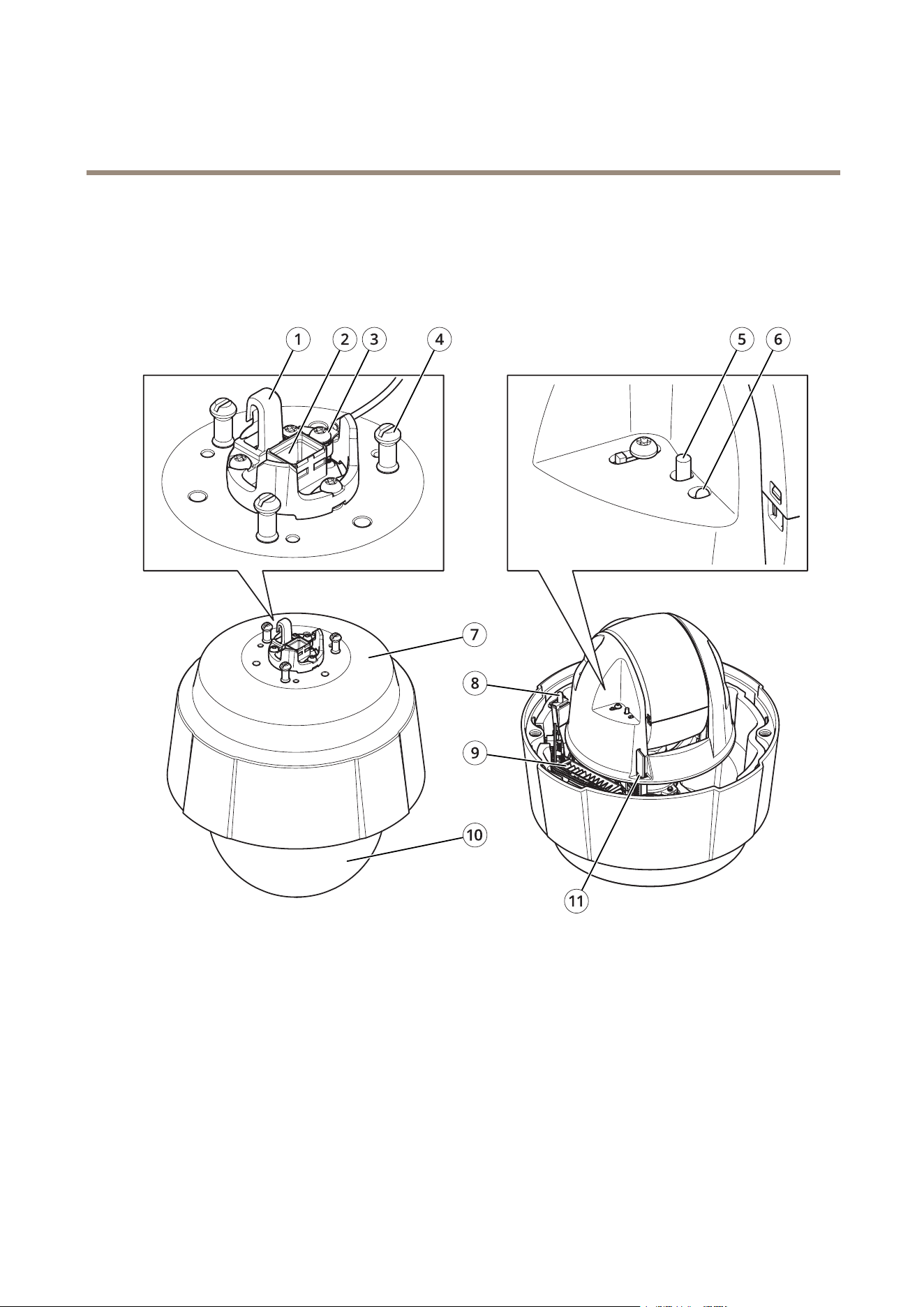
Productoverview
1
Hookforsafetywire
2
Networkconnector(HighPoE)
3
Groundscrew
4
Unitholder(3x)
5
Controlbutton
6
StatusLEDindicator
7
Partnumber(P/N)andserialnumber(S/N)
8
Powerbutton
9
Heater
10
Dome
11
SDcardslot
27

AXISQ6078-EPTZCamera
Specifications
LEDindicators
StatusLED
Indication
Unlit
Connectionandnormaloperation.
GreenShowssteadygreenfor10secondsfornormaloperationafterstartupcompleted.
Amber
Steadyduringstartup.Flashesduringrmwareupgradeorresettofactorydefault.
Amber/RedFlashesamber/redifnetworkconnectionisunavailableorlost.
SDcardslot
NO NO
NO
TICE TICE
TICE
•RiskofdamagetoSDcard.Donotusesharptools,metalobjects,orexcessiveforcewheninsertingorremovingthe
SDcard.Useyourngerstoinsertandremovethecard.
•Riskofdatalossandcorruptedrecordings.DonotremovetheSDcardwhiletheproductisrunning.UnmounttheSDcard
fromtheproduct’swebpagebeforeremoval.
ThisproductsupportsSD/SDHC/SDXCcards.
ForSDcardrecommendations,seeaxis.com.
SD,SDHC,andSDXCLogosaretrademarksofSD-3CLLC.SD,SDHCandSDXCaretrademarksorregistered
trademarksofSD-3C,LLCintheUnitedStates,othercountriesorboth.
Buttons
Controlbutton
Thecontrolbuttonisusedfor:
•Resettingtheproducttofactorydefaultsettings.SeeResettofactorydefaultsettingsonpage23.
Powerbutton
Pressandholdthepowerbuttontotemporarilypowertheproductwhenthedomecoverisremoved.Thepowerbuttonisalsoused
withthecontrolbuttontoresetthecameratofactorydefaultsettings.Seepage23.
Connectors
Networkconnector
RJ45EthernetconnectorwithPoweroverEthernetPlus(PoE+).
28

UserManualVer.M1.4
AXISQ6078-EPTZCamera
Date:May2021
©AxisCommunicationsAB,2021
PartNo.T10164156