5. Operation
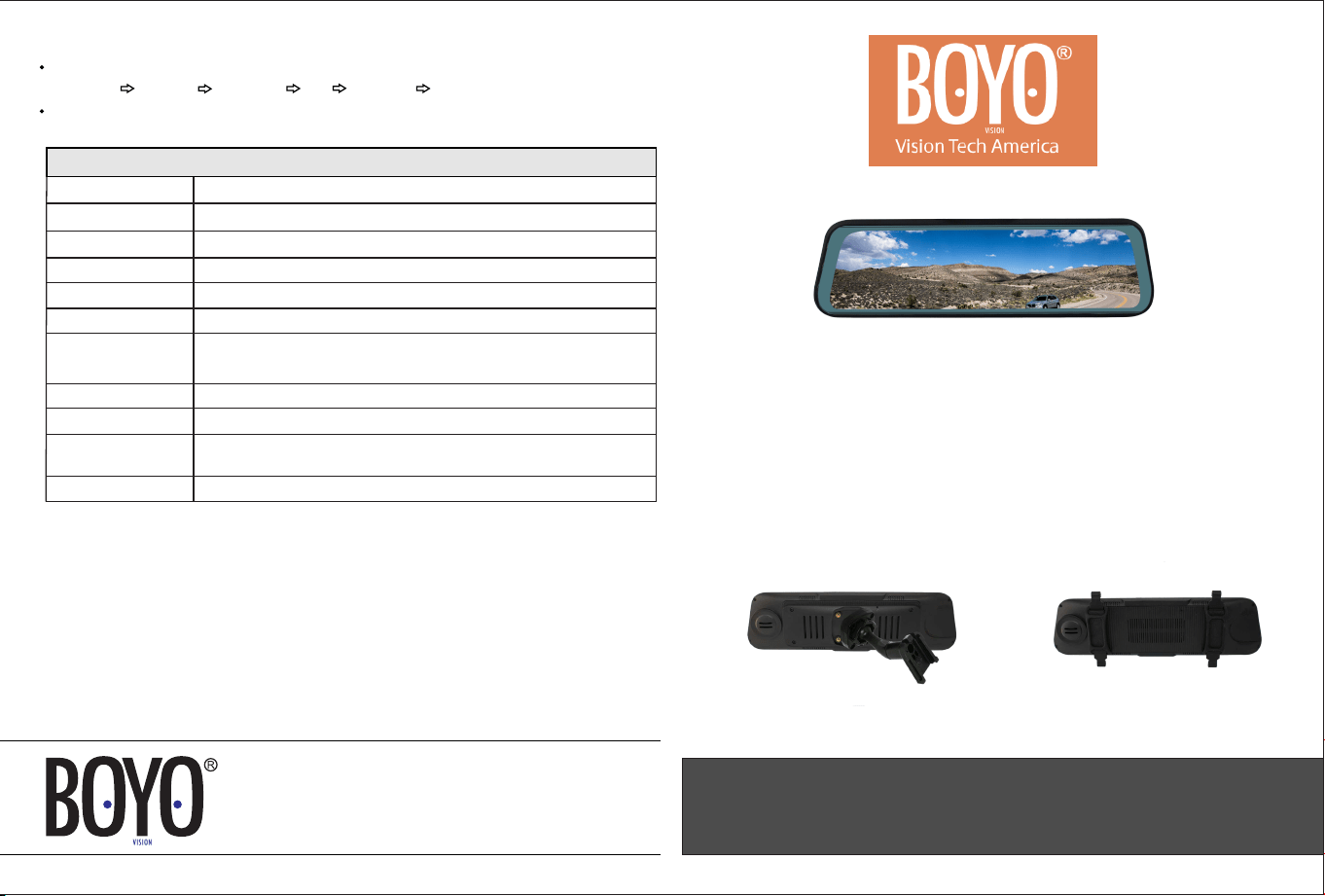
The screen only works when it has video signal going into it. When video1 input receives signal, the screen turns on to video 1.
You can use the power button to turn the mirror off and on. When the signal is removed, the screen turns off.
When video channel 2 receives video signal, the screen powers on and switches to video 2, regardless of whether there is
signal going into channel 1. When in video 2 display mode, only power button is activated for power off, the other button is
vacant. When signal is removed from video 2, either the screen will switch t o video 1 if there is signal present there or switch
off there is no signal.
The screen can adjust its brightness according to the ambient light condition. When ambient light is strong, the screen will be
brighter. Similarly, the screen will decrease its brightness to protect your eyesight and so it isn’t too bright while driving when
the ambient light is low.
Patent feature: The button can adjust its brightness according to the ambient light condition too. When the ambient light is
strong, the button light will be off, avoid the dizzy to the driving; when the ambient light is low, the button light will be on, for
easy operation during the driving.
VTM96M
Vision Tech America, Inc.
For technical support call
Email
Visit
888-941-3060
info@VisionTechAmerica.com
www.VisionTechAmerica.com
1452 E. Valencia Dr.
9.6 Inch Full Display Mirror Monitor
With Dual Mounting Options
(Replacement)
(Clip-On)
USER MANUAL
Fullerton, CA 92831
Display
Current
350mA ( , 89mA (Working) Standby)
DC10 24V, Cam output: DC12V~
Operating Voltage
Operating Temp.
9.6-inch MIPI
600 cdm / 400:1
1280x320
2 (AHD1 and AHD2)
# of Camera Inputs
Mounting
Strap-on: Rubber Fastener
-13ºF ~ 158ºF
Replacement mount: A1 types
Brightness / Contrast
Display Resolution
Video Format
CVBS, 720P, 1080P supported
Display Trigger
1 (Reverse AHD2 Trigger)
Display Views
AHD1 / AHD2 (Rear View): Standard display
AHD2 (Reverse View): In the reverse mode the portion of the camera image
Specification
Long press to access settings menu. Once in the settings menu:
Repeated long presses cycle through:
Brightness Contrast Saturation Tint Guideline Reset
Within each setting, repeated short presses will change the setting value.
shown is the low part to suit reversing operation. (Reverse trigger)
WARNING:
In the box
Please check the content before proceeding
Wiring
Camera Views
Do not get the monitor wet.
Do not use chemical cleaning products.
Do not watch videos while driving.
Adjust rear camera properly before driving.
For better images, please use 1080P or 720P HD cameras.
Operation: On / Off Button
The button is located at the bottom center of the mirror.
The button will be operational only when one or more cameras are connected.
The button is operated by
short button press: momentary press
long button press: 2 second press
Repeated short presses cycle through:
Monitor on
AHD1 display
AHD2 display
Monitor off.
If starts on AHD2, this will be:
AHD2 Display
AHD1 display
Monitor off
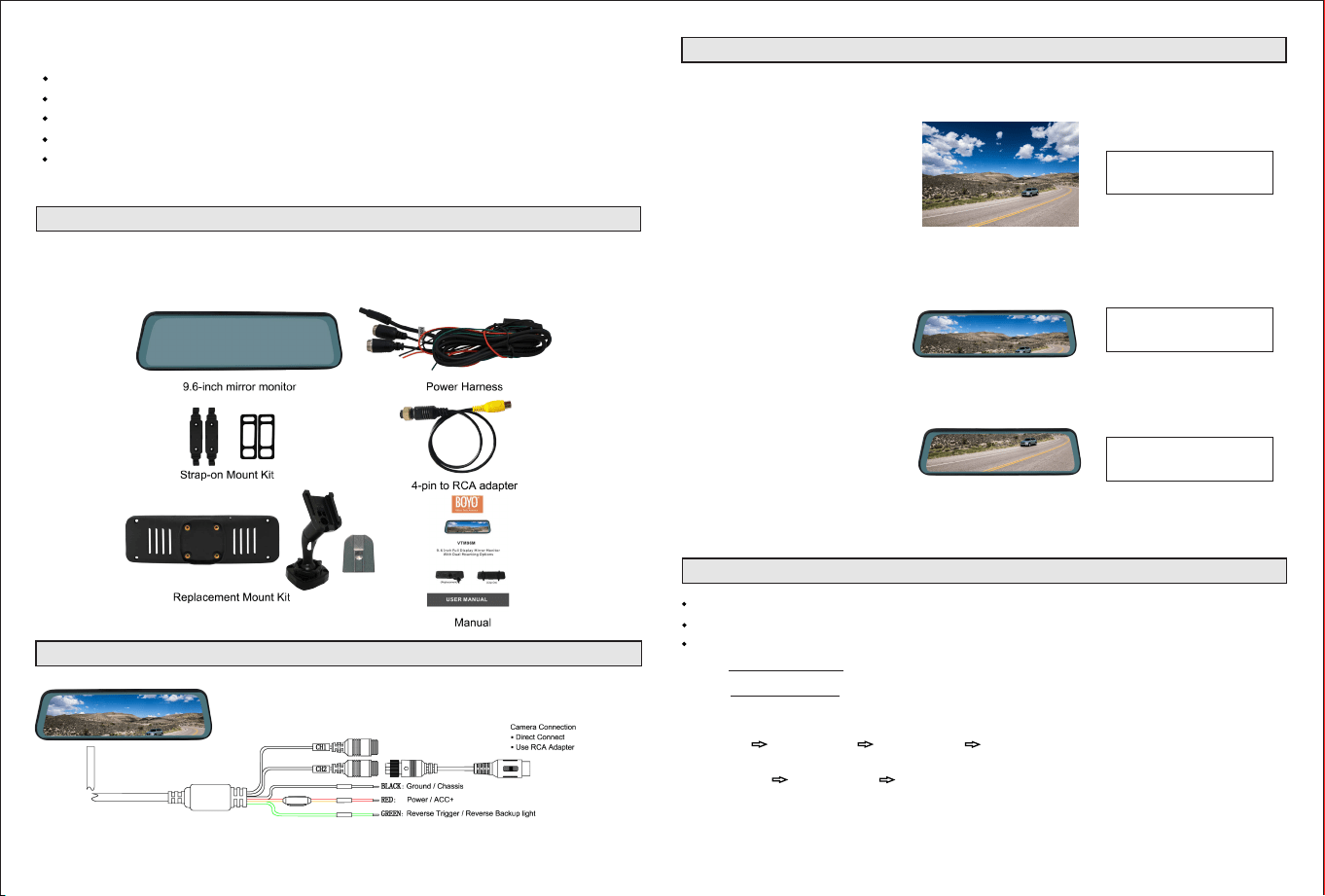
Camera Display
To retain the correct image proportion
only a section of the full vertical camera
image is displayed, please adjust the
camera position accordingly.
Full image from camera
1280*720
Standard display
1280*320
Standard View
Reverse View
AHD1 and AHD2 (Rear View)
In the reverse mode the portion of the
camera image shown is the low part to
suite reversing operation.
Reverse display
1280*320
REVERSE TRIGGER