Requirements Before Placing an Order
REQUIREMENTS
DETAILS
For Yourself
You know how to set your WiFi Name (SSID) & Password in case your
WiFi does not meet the following network requirements
For the Network
1. You can provide WiFi for this camera
2. If your WiFi is 2.4Ghz & 5Ghz dual band, please make the Name of
5Ghz band different from that of 2.4Ghz band
3. The name & password of 2.4Ghz WiFi should not contain special
character
4. The 2.4Ghz WiFi name should not be hidden
For the camera
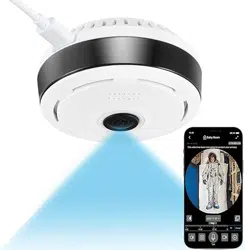
1. The camera needs to be plugged in to work
2. The camera should be within WiFi distance to keep connecting
How to connect the camera to the network
1. Make sure both your WiFi and the camera meet the requirements above
2. Connect your phone to the 2.4Ghz WiFi
3. Download the specified App on your Phone, sign up by an email address and log in.
4. Power on the camera. Wait until it makes a short beep and the red indicator starts
blinking.
5. If the red indicator still doesn’t blink after 1 minute, please put the Pin into the reset hole.
Press the Pin and hold it for several seconds until it makes a short beep then the red
indicator blinks.
6. Open the App, click + then choose [Smart wireless mode], tap [Next]
7. Enter the password for your 2.4Ghz WiFi. Increase the volume and get your phone close to
the camera, then tap [next]
8. You phone will make beeps and search the nearby device. After tens of seconds, the
camera will make a crisp buzz like Ding-dong and remind you “Camera ready”.
* You can connect the camera before mounting it on your ceiling. After re-powering it on
within WiFi distance, it will take minutes to re-connect to the WiFi automatically.
Why is the image delayed /black or the camera offline?
The WiFi signal nearby the camera is not strong enough, or you are watching via a slow
network. Possible causes for other issues please refer to Trouble Shooting on the next page.
Can’t get the camera connected to your network?
Please email us via this address: longmwon@outlook.com
We will reply to you with a solution within 18 hours or less time, and your rights are
protected.
* According to our experience, most problems could be solved after communication
with us. Hope you could give us a chance to correct it. Returns without contacting us
could get your money back, but waste your time and does not really solve the problem.

Trouble Shooting
ISSUES
CAUSES
Can’t connect it to my
WiFi
1. Your WiFi does not meet the network requirements
2. The camera is not within WiFi distance
3. The red indicator was not blinking when you connect the
camera to the network
4. You refused the necessary permissions request of the
App
Image is delayed/black,
or
the camera disconnected
1. The WiFi signal nearby the camera is not strong enough
2. The WiFi network is not stable
3. You’re watching via a slow network
4. Power failure or the camera is powered off
No Motion Detection &
Playback
You didn’t insert a TF card before the camera is powered on
Does not recognize my
card
The card is not installed before the camera is powered on
Motion Detection is too
sensitive
Please adjust the sensitivity in the [Message Settings] in the
App
The Green Status LED is
annoying
Please turn it off in the App Settings
Can’t power it on
1. Power failure
2. Please replace a power cord /adapter and try again.
Contact us if the accessories not working
Can’t reset the camera
1. The camera is not powered on
2. You didn’t long press the pin for more than 2 seconds
-------------------------------------------------------------------------------
Greetings from Honest Policy Shop!
Limited by character length, we cannot write all details and solutions here. We cannot find
your order with a product review. Thus, if there is any issue, please don’t hesitate to
CONTACT US via this email longmwon@outlook.com , your rights are protected.
If you could give us a chance to solve the problem, we will be very grateful!
Best Regards
Mia
