
www.taotronics.com
User Guide
Model: TT-SK035
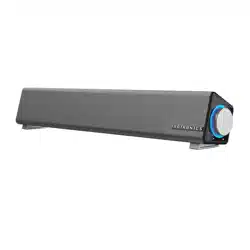
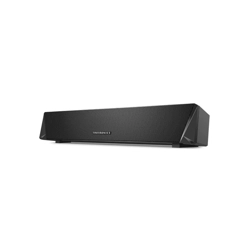
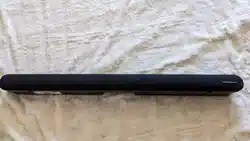
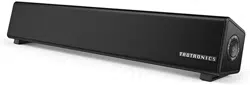
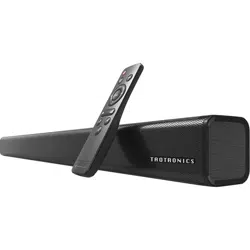
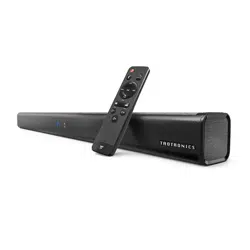
TaoTronics Sound Bar
Rev_1.0
Learn more about the EU Declaration of Conformity:
https://www.taotronics.com/pages/user-manual
MADE IN CHINA
Manufacturer:
Shenzhen Danya Technology Co.,Ltd.
Address:
Room 3323, Building C, Galaxy World Phase II, Minle Community,
Minzhi Street, Longhua District, Shenzhen, China
E-mail:
support@taotronics.com

CONTENTS
English
Deutsch
日本語
01-06
07-12
13-18
EN
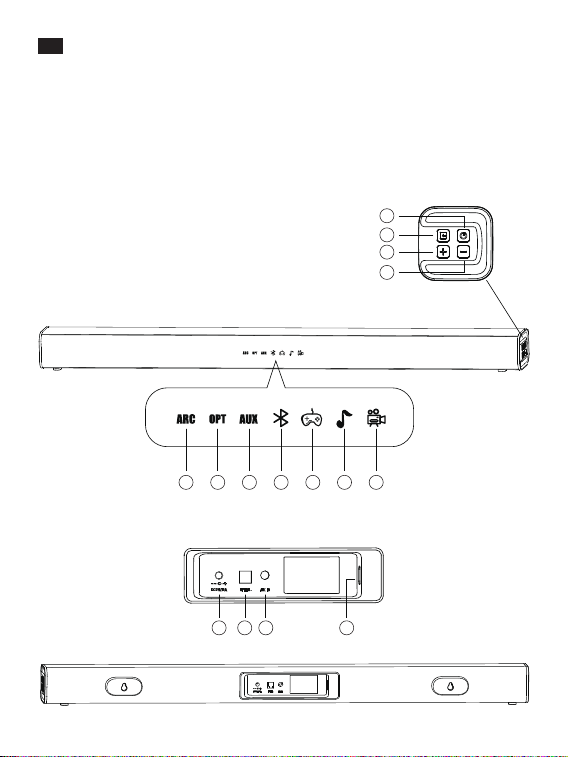
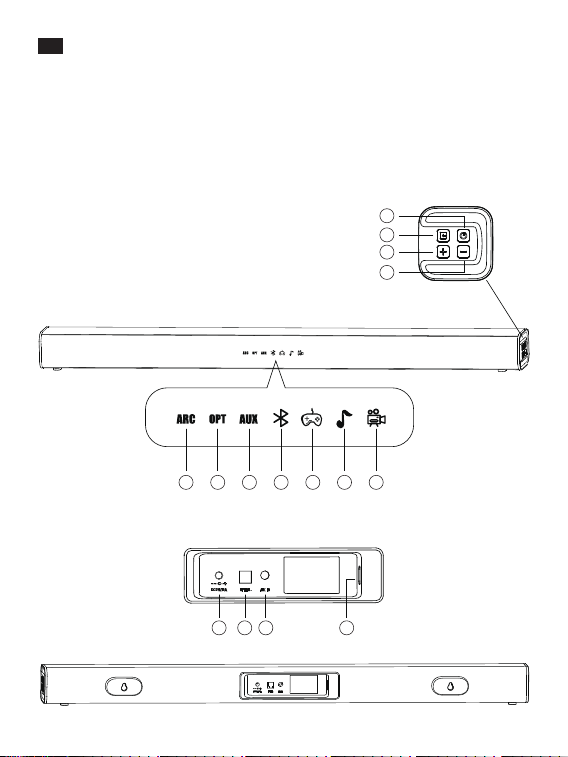
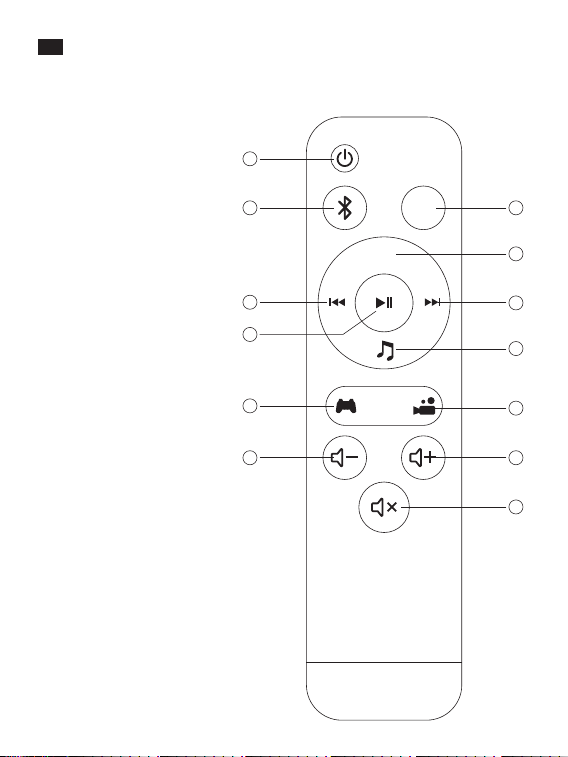
Product Diagram
Top Panel
1. Power Button
2. Mode Selection
3. Volume +
4. Volume -
TIndicators on the Display
5. HDMI
6. Optical
7. AUX
8. Bluetooth
9. Games
10. Music
11. Video
Rear Panel
12. Power Input
13. Optical Input
14. AUX Input
15. HDMI Input
EN
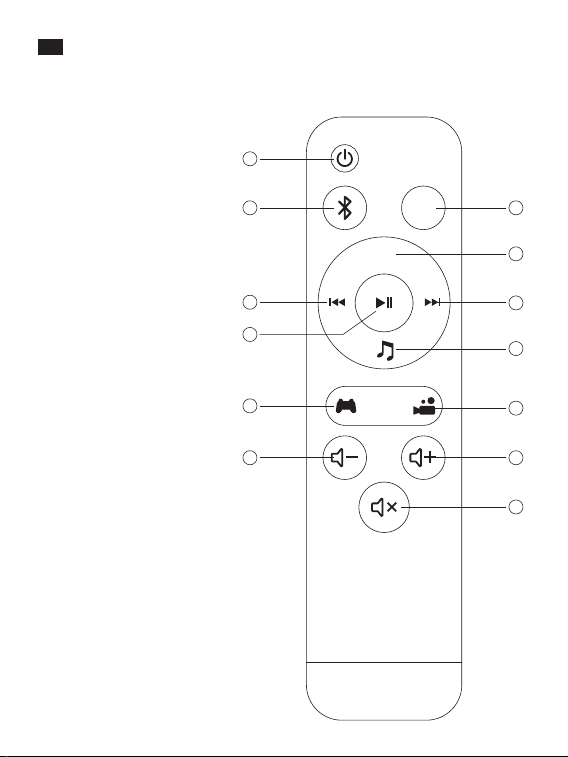
Remote Control
1. Power Button
2. Bluetooth Mode
3. Optical Mode
4. AUX Input
5. Next Track
6. Music Mode
7. Previous Track
8. Play / Pause
9. Games Mode
10. Video Mode
11. Volume –
12. Volume +
13. Mute
5
1
2
11
9
8
7
3
4
5
6
10
12
13
12 13 14 15
OPTICAL
AUX
Music
Game Moive
6 7 8 9 10 11
1
2
3
4
0201
EN
Product Diagram
Top Panel
1. Power Button
2. Mode Selection
3. Volume +
4. Volume -
TIndicators on the Display
5. HDMI
6. Optical
7. AUX
8. Bluetooth
9. Games
10. Music
11. Video
Rear Panel
12. Power Input
13. Optical Input
14. AUX Input
15. HDMI Input
EN
Remote Control
1. Power Button
2. Bluetooth Mode
3. Optical Mode
4. AUX Input
5. Next Track
6. Music Mode
7. Previous Track
8. Play / Pause
9. Games Mode
10. Video Mode
11. Volume –
12. Volume +
13. Mute
5
1
2
11
9
8
7
3
4
5
6
10
12
13
12 13 14 15
OPTICAL
AUX
Music
Game Moive
6 7 8 9 10 11
1
2
3
4
0201

Warning
1. To reduce the risk of fire or electric shock, do not expose this appliance to rain
or moisture.
2. Do not use chemicals or detergents to clean the product. Clean only with a dry
cloth.
3. Do not scrape the surface with sharp objects.
4. Do not block any ventilation openings. Install in accordance with the
manufacturer’s instructions.
5. Keep the sound bar away from extreme heat and humidity, and do not expose
to direct sunlight.
6. Do not install near any heat sources such as radiators, heat registers, stoves, etc.
7. Protect the power cord from being walked on or pinched particularly at plugs,
convenience receptacles, and the point where they exit from the device.
8. Unplug this device during lightning storms or when unused for long periods
of time.
9. To reduce the risk of electric shock, do not remove the cover (or back).
10. No user-serviceable parts are inside. Please refer servicing to qualified service
personnel.
11. Do not drop or knock your sound bar on hard surfaces as it may damage the
interior circuits.
EN
Package Contents
• 1 x TaoTronics Sound Bar (TT-SK035)
• 1 x Remote Control
• 1 x RCA to 3.5mm Audio Cable
• 1 x Optical Cable
• 1 x User Guide
• 2 x Wall Mount Screws
Button Control (Top Panel & Remote Control)
Press the Power Button and the mode indicator
will light up / go off on the display.
Press the Volume + button
Press the Volume - button
Press the Mute button to mute / unmute
When the sound bar is on, press the corresponding
mode button to select the Optical / AUX / ARC/
Bluetooth / Games / Music / Video mode, and the
corresponding indicator will light up.
The soundbar supports ARC, compatible with all
devices with HDMI.
Power On / Off
Volume +
Volume -
Mode Selection
Mute
Note: To disconnect a Bluetooth device, press and hold the Bluetooth Mode
button on Remote Control for 2-3s, or the Mode Selection button on the sound
bar for 5-6s. The Bluetooth Mode indicator will flash when waiting for a
reconnection.
Specifications
Power Supply
Power Consumption
S/N
Response Frequency
Working Temperature
Dimensions
Weight
100-240V; 50 / 60Hz
40W
≥70dB
60Hz-20KHz
-10°C - 35°C / 14°F-95°F
80 x 6 x 6cm / 31.5 x 2.4 x 2.4in
1765g±5g / 61.6oz
0403

Warning
1. To reduce the risk of fire or electric shock, do not expose this appliance to rain
or moisture.
2. Do not use chemicals or detergents to clean the product. Clean only with a dry
cloth.
3. Do not scrape the surface with sharp objects.
4. Do not block any ventilation openings. Install in accordance with the
manufacturer’s instructions.
5. Keep the sound bar away from extreme heat and humidity, and do not expose
to direct sunlight.
6. Do not install near any heat sources such as radiators, heat registers, stoves, etc.
7. Protect the power cord from being walked on or pinched particularly at plugs,
convenience receptacles, and the point where they exit from the device.
8. Unplug this device during lightning storms or when unused for long periods
of time.
9. To reduce the risk of electric shock, do not remove the cover (or back).
10. No user-serviceable parts are inside. Please refer servicing to qualified service
personnel.
11. Do not drop or knock your sound bar on hard surfaces as it may damage the
interior circuits.
EN
Package Contents
• 1 x TaoTronics Sound Bar (TT-SK035)
• 1 x Remote Control
• 1 x RCA to 3.5mm Audio Cable
• 1 x Optical Cable
• 1 x User Guide
• 2 x Wall Mount Screws
Button Control (Top Panel & Remote Control)
Press the Power Button and the mode indicator
will light up / go off on the display.
Press the Volume + button
Press the Volume - button
Press the Mute button to mute / unmute
When the sound bar is on, press the corresponding
mode button to select the Optical / AUX / ARC/
Bluetooth / Games / Music / Video mode, and the
corresponding indicator will light up.
The soundbar supports ARC, compatible with all
devices with HDMI.
Power On / Off
Volume +
Volume -
Mode Selection
Mute
Note: To disconnect a Bluetooth device, press and hold the Bluetooth Mode
button on Remote Control for 2-3s, or the Mode Selection button on the sound
bar for 5-6s. The Bluetooth Mode indicator will flash when waiting for a
reconnection.
Specifications
Power Supply
Power Consumption
S/N
Response Frequency
Working Temperature
Dimensions
Weight
100-240V; 50 / 60Hz
40W
≥70dB
60Hz-20KHz
-10°C - 35°C / 14°F-95°F
80 x 6 x 6cm / 31.5 x 2.4 x 2.4in
1765g±5g / 61.6oz
0403
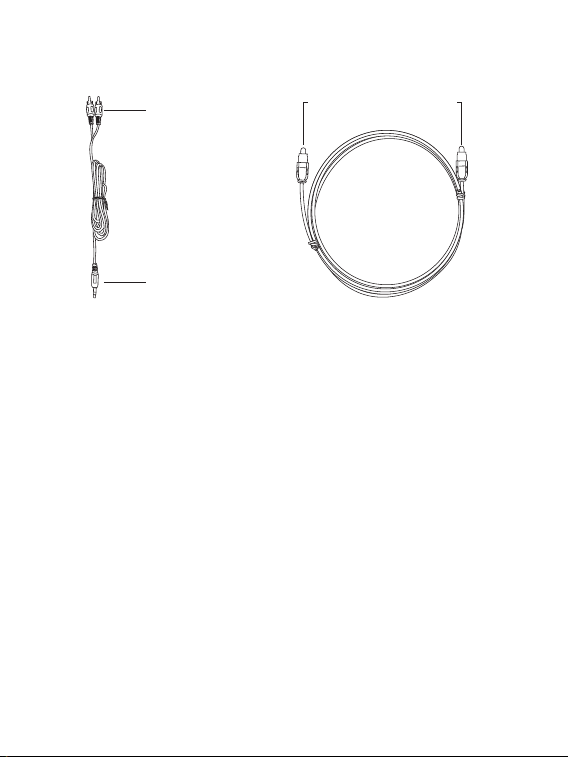
AUX Output
Audio Input
Optical Input / Output
Connections
Cable Connection
Note: Please plug the appropriate cable into the corresponding port to connect
the device, then select the corresponding mode.
Bluetooth® Connection
1. Turn on the sound bar and select the Bluetooth® mode.
2. Activate the Bluetooth® function on your device and search for devices nearby.
3. Find “TaoTronics TT-SK035” in the search results and tap to connect. A beep
will be heard upon a successful connection.
4. The Bluetooth® indicator will turn solid on upon a successful connection.
Note:
• The Bluetooth indicator will keep flashing when the sound bar is pairing.
• Please make sure no other active Bluetooth® devices are within range, and that
the sound bar is within 3ft / 1m away from your device.
• It’s not recommended to pair the sound bar with your TV Bluetooth for it may
cause audio delay.
• Before starting to play via Bluetooth, please lower the volume to a moderate
level.
Troubleshooting
Q: Why is the unit not turning on?
A: Please check and make sure the power cord is correctly connected to a power
source.
Q: Why is there no sound or why is the sound is distorted?
A: Please go over the following:
• Check to make sure the audio cable is correctly connected.
• Turn up the volume slowly.
• Press the Mute button to switch on the sound.
• Press the Play / Pause button.
• Set the audio output mode on your TV (if applicable) accordingly with the
mode setting on the sound bar.
Q: Why do the buttons on the sound bar not work?
A: Switch off the sound bar and unplug. Then connect it to a power supply and
switch it on again.
Q: Why does the remote control not work?
A: Please go over the following:
• Install 2 AAA 1.5A batteries into the remote.
• Replace the current batteries with new ones.
• Make sure the remote control is pointed to the sound bar during use.
• Make sure the remote control is within operating range.
• Switch off the sound bar and disconnect the power. Then reconnect and
power it on, try again.
Q: Why can't I disconnect the device by pressing the Bluetooth Mode button?
A: You need to press and hold the Bluetooth Mode button on Remote Control for
2-3s, or the Mode Selection button on the sound bar for 5-6s to disconnect a
Bluetooth device. The Bluetooth Mode indicator then will flash when waiting
for a reconnection.
The Bluetooth
®
word mark and logos are
registered trademarks owned by the Bluetooth SIG, Inc. and
any use of such marks by Sunvalleytek International Inc. is under license. Other
trademarks and trade names are those of their respective owners.
0605

AUX Output
Audio Input
Optical Input / Output
Connections
Cable Connection
Note: Please plug the appropriate cable into the corresponding port to connect
the device, then select the corresponding mode.
Bluetooth® Connection
1. Turn on the sound bar and select the Bluetooth® mode.
2. Activate the Bluetooth® function on your device and search for devices nearby.
3. Find “TaoTronics TT-SK035” in the search results and tap to connect. A beep
will be heard upon a successful connection.
4. The Bluetooth® indicator will turn solid on upon a successful connection.
Note:
• The Bluetooth indicator will keep flashing when the sound bar is pairing.
• Please make sure no other active Bluetooth® devices are within range, and that
the sound bar is within 3ft / 1m away from your device.
• It’s not recommended to pair the sound bar with your TV Bluetooth for it may
cause audio delay.
• Before starting to play via Bluetooth, please lower the volume to a moderate
level.
Troubleshooting
Q: Why is the unit not turning on?
A: Please check and make sure the power cord is correctly connected to a power
source.
Q: Why is there no sound or why is the sound is distorted?
A: Please go over the following:
• Check to make sure the audio cable is correctly connected.
• Turn up the volume slowly.
• Press the Mute button to switch on the sound.
• Press the Play / Pause button.
• Set the audio output mode on your TV (if applicable) accordingly with the
mode setting on the sound bar.
Q: Why do the buttons on the sound bar not work?
A: Switch off the sound bar and unplug. Then connect it to a power supply and
switch it on again.
Q: Why does the remote control not work?
A: Please go over the following:
• Install 2 AAA 1.5A batteries into the remote.
• Replace the current batteries with new ones.
• Make sure the remote control is pointed to the sound bar during use.
• Make sure the remote control is within operating range.
• Switch off the sound bar and disconnect the power. Then reconnect and
power it on, try again.
Q: Why can't I disconnect the device by pressing the Bluetooth Mode button?
A: You need to press and hold the Bluetooth Mode button on Remote Control for
2-3s, or the Mode Selection button on the sound bar for 5-6s to disconnect a
Bluetooth device. The Bluetooth Mode indicator then will flash when waiting
for a reconnection.
The Bluetooth
®
word mark and logos are
registered trademarks owned by the Bluetooth SIG, Inc. and
any use of such marks by Sunvalleytek International Inc. is under license. Other
trademarks and trade names are those of their respective owners.
0605
DE
Product Diagram
Oberseite
1. Powertaste
2. Moduswahl
3. Lautstärke +
4. Lautstärke -
Anzeigen auf dem Display
5. HDMI
6. Optisch
7. AUX
8. Bluetooth
9. Spiele
10. Musik
11. Video
Rückseite
12. HDMI Input
13. Optical Input
14. AUX Input
15. Power Input
5
1
2
11
9
8
7
3
4
5
6
10
12
13
12 13 14 15
OPTICAL
AUX
Music
Game Moive
6 7 8 9 10 11
1
2
3
4
DE
Fernbedienung
1. Powertaste
2. Bluetooth-Modus
3. Optischer Modus
4. AUX-Eingang
5. Nächstes Lied
6. Musikmodus
7. Vorheriges Lied
8. Wiedergabe / Pause
9. Spielemodus
10. Videomodus
11. Lautstärke -
12. Lautstärke +
13. Stummschalten
0807
DE
Product Diagram
Oberseite
1. Powertaste
2. Moduswahl
3. Lautstärke +
4. Lautstärke -
Anzeigen auf dem Display
5. HDMI
6. Optisch
7. AUX
8. Bluetooth
9. Spiele
10. Musik
11. Video
Rückseite
12. HDMI Input
13. Optical Input
14. AUX Input
15. Power Input
5
1
2
11
9
8
7
3
4
5
6
10
12
13
12 13 14 15
OPTICAL
AUX
Music
Game Moive
6 7 8 9 10 11
1
2
3
4
DE
Fernbedienung
1. Powertaste
2. Bluetooth-Modus
3. Optischer Modus
4. AUX-Eingang
5. Nächstes Lied
6. Musikmodus
7. Vorheriges Lied
8. Wiedergabe / Pause
9. Spielemodus
10. Videomodus
11. Lautstärke -
12. Lautstärke +
13. Stummschalten
0807

尺寸:90*120mm
装订成册
材质:封面128克铜版纸 内页80克书纸
Model:
TT-SK035

尺寸:90*120mm
装订成册
材质:封面128克铜版纸 内页80克书纸
Model:
TT-SK035

Warnung
1. Um das Risiko von Feuer oder Stromschlag zu mindern, sollten Sie dieses Gerät
weder Regen noch Feuchtigkeit aussetzen.
2. Verwenden Sie weder Chemikalien noch Reinigungsmittel, um das Produkt zu
reinigen. Reinigen Sie das Gerät nur mit einem trockenen Tuch.
3. Kratzen Sie nicht mit scharfen Gegenständen über die Oberfläche.
4. Blockieren Sie keine Belüftungsöffnungen. Gemäß der Herstellerhinweise
montieren.
5. Halten Sie die Soundbar von extremer Hitze und Feuchtigkeit fern und setzen
Sie sie keiner direkten Sonneneinstrahlung aus.
6. Nicht in die Nähe von Hitzequellen wie Radiatoren, Heizregistern, Öfen etc.
stellen.
7. Achten Sie darauf, dass niemand auf das Kabel tritt und dass es nicht
gequetscht wird, besonders bei Steckern, Gerätesteckdosen und am Punkt,
wo das Kabel aus dem Gerät herauskommt.
8. Trennen Sie das Gerät bei Gewittern und, wenn Sie es lange Zeit nicht nutzen,
vom Strom.
9. Um Stromschlägen vorzubeugen, sollten Sie das Gehäuse (oder die Rückseite)
nicht abnehmen.
10. Im Inneren befinden sich keine vom Benutzer zu wartenden Teile. Bitte
überlassen Sie Wartungsarbeiten qualifiziertem Service-Personal.
11. Ihre Soundbar darf nicht auf harte Oberflächen fallengelassen oder
geschlagen werden, da dies die Schaltkreise im Inneren beschädigen kann.
DE
Im Lieferumfang enthalten
• 1 x TaoTronics Soundbar (TT-SK035)
• 1 x Fernbedienung
• 1 x RCA zu 3.5mm Audiokabel
• 1 x Optisches Kabel
• 1 x Bedienungsanleitung
• 2 x Wandhalterungsschrauben
Tastensteuerung (Oberseite & Fernbedienung)
Wenn Sie die Powertaste drücken, geht die
Modusanzeige auf dem Display an / aus.
Drücken Sie die Taste Lautstärke +
Drücken Sie die Taste Lautstärke -
Drücken Sie die jeweilige Modustaste, wenn die
Soundbar eingeschaltet ist, um auf den Optischen /
AUX- / ARC- / Bluetooth- / Spiele- / Musik- /
Videomodus zu wechseln. Die entsprechende
Anzeige leuchtet dann auf.
Die Soundbar unterstützt ARC, kompatibel mit allen
Geräten mit HDMI.
Drücken Sie die Stummschalten-Taste, um das
Gerät stumm- oder lautzuschalten
Ein- / Ausschalten
Lautstärke +
Lautstärke -
Moduswahl
Stummschalten
Anmerkung: Um die Verbindung zu einem Bluetooth-Gerät zu trennen, halten
Sie die Bluetooth-Modustaste auf der Fernbedienung 2-3s lang oder die
Moduswahl-Taste auf der Soundbar 5-6s lang gedrückt. Die Bluetooth-Modusan-
zeige blinkt, wenn das Gerät auf eine erneute Verbindung wartet.
Spezifikationen
Stromversorgung
Stromverbrauch
S/N
Antworthäufigkeit
Betriebstemperatur
Maße
Gewicht
100-240V; 50 / 60Hz
40W
≥70dB
60Hz-20KHz
-10°C - 35°C / 14°F-95°F
80 x 6 x 6cm / 31.5 x 2.4 x 2.4in
1765g±5g / 61.6oz
1009

Warnung
1. Um das Risiko von Feuer oder Stromschlag zu mindern, sollten Sie dieses Gerät
weder Regen noch Feuchtigkeit aussetzen.
2. Verwenden Sie weder Chemikalien noch Reinigungsmittel, um das Produkt zu
reinigen. Reinigen Sie das Gerät nur mit einem trockenen Tuch.
3. Kratzen Sie nicht mit scharfen Gegenständen über die Oberfläche.
4. Blockieren Sie keine Belüftungsöffnungen. Gemäß der Herstellerhinweise
montieren.
5. Halten Sie die Soundbar von extremer Hitze und Feuchtigkeit fern und setzen
Sie sie keiner direkten Sonneneinstrahlung aus.
6. Nicht in die Nähe von Hitzequellen wie Radiatoren, Heizregistern, Öfen etc.
stellen.
7. Achten Sie darauf, dass niemand auf das Kabel tritt und dass es nicht
gequetscht wird, besonders bei Steckern, Gerätesteckdosen und am Punkt,
wo das Kabel aus dem Gerät herauskommt.
8. Trennen Sie das Gerät bei Gewittern und, wenn Sie es lange Zeit nicht nutzen,
vom Strom.
9. Um Stromschlägen vorzubeugen, sollten Sie das Gehäuse (oder die Rückseite)
nicht abnehmen.
10. Im Inneren befinden sich keine vom Benutzer zu wartenden Teile. Bitte
überlassen Sie Wartungsarbeiten qualifiziertem Service-Personal.
11. Ihre Soundbar darf nicht auf harte Oberflächen fallengelassen oder
geschlagen werden, da dies die Schaltkreise im Inneren beschädigen kann.
DE
Im Lieferumfang enthalten
• 1 x TaoTronics Soundbar (TT-SK035)
• 1 x Fernbedienung
• 1 x RCA zu 3.5mm Audiokabel
• 1 x Optisches Kabel
• 1 x Bedienungsanleitung
• 2 x Wandhalterungsschrauben
Tastensteuerung (Oberseite & Fernbedienung)
Wenn Sie die Powertaste drücken, geht die
Modusanzeige auf dem Display an / aus.
Drücken Sie die Taste Lautstärke +
Drücken Sie die Taste Lautstärke -
Drücken Sie die jeweilige Modustaste, wenn die
Soundbar eingeschaltet ist, um auf den Optischen /
AUX- / ARC- / Bluetooth- / Spiele- / Musik- /
Videomodus zu wechseln. Die entsprechende
Anzeige leuchtet dann auf.
Die Soundbar unterstützt ARC, kompatibel mit allen
Geräten mit HDMI.
Drücken Sie die Stummschalten-Taste, um das
Gerät stumm- oder lautzuschalten
Ein- / Ausschalten
Lautstärke +
Lautstärke -
Moduswahl
Stummschalten
Anmerkung: Um die Verbindung zu einem Bluetooth-Gerät zu trennen, halten
Sie die Bluetooth-Modustaste auf der Fernbedienung 2-3s lang oder die
Moduswahl-Taste auf der Soundbar 5-6s lang gedrückt. Die Bluetooth-Modusan-
zeige blinkt, wenn das Gerät auf eine erneute Verbindung wartet.
Spezifikationen
Stromversorgung
Stromverbrauch
S/N
Antworthäufigkeit
Betriebstemperatur
Maße
Gewicht
100-240V; 50 / 60Hz
40W
≥70dB
60Hz-20KHz
-10°C - 35°C / 14°F-95°F
80 x 6 x 6cm / 31.5 x 2.4 x 2.4in
1765g±5g / 61.6oz
1009
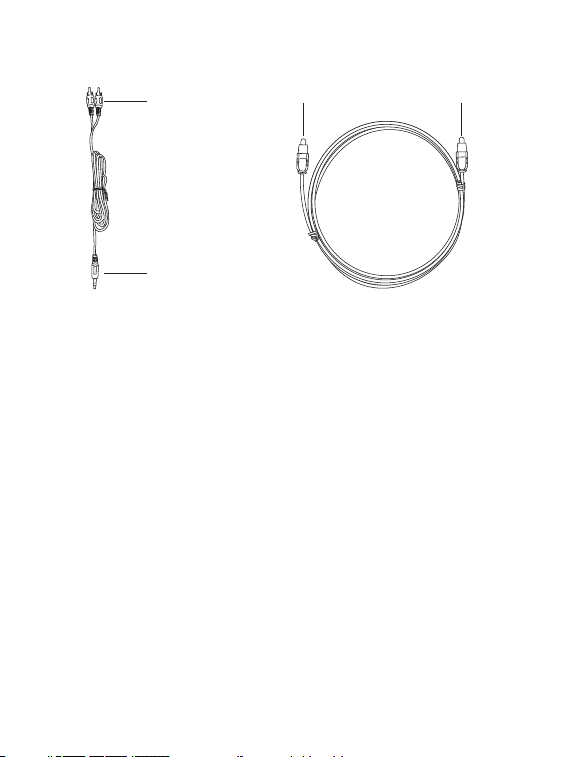
Anschlüsse
Kabelverbindungen
Audio-Eingang
AUX-Ausgang
Optischer Eingang / Ausgang
Anmerkung: Bitte stecken Sie zuerst das passende Kabel in den jeweiligen
Anschluss und wählen dann den entsprechenden Modus.
Bluetooth®-Verbindung
1. Schalten Sie die Soundbar ein und wechseln Sie in den Bluetooth®-Modus.
2. Aktivieren Sie die Bluetooth®-Funktion auf Ihrem Gerät und suchen Sienach
Geräten in der Nähe.
3. Suchen Sie in den Suchergebnissen nach “TaoTronics TT-SK035” und tippen
Sie zum Verbinden darauf. Nach erfolgreicher Verbindung ertönt ein Piepton.
4. Die Bluetooth®-Anzeige leuchtet nach erfolgreicher Verbindung
durchgängig.
Anmerkung:
• Die Bluetooth®-Anzeige blinkt, während die Soundbar gekoppelt wird.
• Es sollte sich kein anderes aktives Bluetooth®-Gerät innerhalb der Reichweite
befinden und die Soundbar maximal 1m / 3ft weit von Ihrem Gerät entfernt
stehen.
• Es wird nicht empfohlen, die Soundbar mit dem Bluetooth Ihres TVs zu koppeln,
da dies zu Audioverzögerungen führen kann.
• Bitte verringern Sie die Lautstärke auf ein angemessenes Level, bevor Sie die
Wiedergabe via Bluetooth starten.
Problemlösung
Q: Warum lässt sich das Gerät nicht einschalten?
A: Bitte stellen Sie sicher, dass das Stromkabel richtig an einer Stromquelle
angeschlossen ist.
Q: Warum höre ich keinen Sound oder warum ist der Sound verzerrt?
A: Bitte prüfen Sie folgende Schritte:
• Stellen Sie sicher, dass die Audiokabel korrekt angeschlossen sind.
• Stellen Sie die Lautstärke langsam lauter.
• Drücken Sie die Stummschalt-Taste, um den Ton einzuschalten.
• Drücken Sie die "Wiedergabe / Pause"-Taste.
• Stellen Sie den Audioausgangsmodus auf Ihrem TV (falls möglich)
entsprechend der Moduseinstellung der Soundbar ein.
Q: Warum funktionieren die Tasten auf der Soundbar nicht?
A: Schalten Sie die Soundbar aus und ziehen Sie den Stecker heraus.
Schließen Sie sie dann wieder an einer Steckdose an und schalten Sie sie
wieder ein.
Q: Warum funktioniert die Fernbedienung nicht?
A: Bitte gehen Sie folgende Schritte durch:
• Legen Sie 2 AAA 1.5A Batterien in die Fernbedienung ein.
• Ersetzen Sie die aktuellen Batterien durch neue.
• Vergewissern Sie sich, dass die Fernbedienung auf die Soundbar gerichtet
ist, wenn Sie sie benutzen.
• Vergewissern Sie sich, dass sich die Fernbedienung in Funktionsreichweite
befindet.
• Schalten Sie die Soundbar aus und trennen Sie sie vom Strom. Schließen
Sie sie wieder an und schalten Sie sie wieder ein. Versuchen Sie es erneut.
Q: Warum lässt sich die Geräteverbindung nicht trennen, wenn ich die
Bluetooth-Modustaste drücke?
A: Sie müssen die Bluetooth-Modustaste auf der Fernbedienung 2-3s lang
oder die Moduswahl-Taste auf der Soundbar 5-6s lang gedrückt halten, um
die Verbindung zu einem Bluetooth-Gerät zu trennen. Die Bluetooth-Modu
sanzeige blinkt dann, wenn das Gerät auf eine erneute Verbindung wartet.
1211

Anschlüsse
Kabelverbindungen
Audio-Eingang
AUX-Ausgang
Optischer Eingang / Ausgang
Anmerkung: Bitte stecken Sie zuerst das passende Kabel in den jeweiligen
Anschluss und wählen dann den entsprechenden Modus.
Bluetooth®-Verbindung
1. Schalten Sie die Soundbar ein und wechseln Sie in den Bluetooth®-Modus.
2. Aktivieren Sie die Bluetooth®-Funktion auf Ihrem Gerät und suchen Sienach
Geräten in der Nähe.
3. Suchen Sie in den Suchergebnissen nach “TaoTronics TT-SK035” und tippen
Sie zum Verbinden darauf. Nach erfolgreicher Verbindung ertönt ein Piepton.
4. Die Bluetooth®-Anzeige leuchtet nach erfolgreicher Verbindung
durchgängig.
Anmerkung:
• Die Bluetooth®-Anzeige blinkt, während die Soundbar gekoppelt wird.
• Es sollte sich kein anderes aktives Bluetooth®-Gerät innerhalb der Reichweite
befinden und die Soundbar maximal 1m / 3ft weit von Ihrem Gerät entfernt
stehen.
• Es wird nicht empfohlen, die Soundbar mit dem Bluetooth Ihres TVs zu koppeln,
da dies zu Audioverzögerungen führen kann.
• Bitte verringern Sie die Lautstärke auf ein angemessenes Level, bevor Sie die
Wiedergabe via Bluetooth starten.
Problemlösung
Q: Warum lässt sich das Gerät nicht einschalten?
A: Bitte stellen Sie sicher, dass das Stromkabel richtig an einer Stromquelle
angeschlossen ist.
Q: Warum höre ich keinen Sound oder warum ist der Sound verzerrt?
A: Bitte prüfen Sie folgende Schritte:
• Stellen Sie sicher, dass die Audiokabel korrekt angeschlossen sind.
• Stellen Sie die Lautstärke langsam lauter.
• Drücken Sie die Stummschalt-Taste, um den Ton einzuschalten.
• Drücken Sie die "Wiedergabe / Pause"-Taste.
• Stellen Sie den Audioausgangsmodus auf Ihrem TV (falls möglich)
entsprechend der Moduseinstellung der Soundbar ein.
Q: Warum funktionieren die Tasten auf der Soundbar nicht?
A: Schalten Sie die Soundbar aus und ziehen Sie den Stecker heraus.
Schließen Sie sie dann wieder an einer Steckdose an und schalten Sie sie
wieder ein.
Q: Warum funktioniert die Fernbedienung nicht?
A: Bitte gehen Sie folgende Schritte durch:
• Legen Sie 2 AAA 1.5A Batterien in die Fernbedienung ein.
• Ersetzen Sie die aktuellen Batterien durch neue.
• Vergewissern Sie sich, dass die Fernbedienung auf die Soundbar gerichtet
ist, wenn Sie sie benutzen.
• Vergewissern Sie sich, dass sich die Fernbedienung in Funktionsreichweite
befindet.
• Schalten Sie die Soundbar aus und trennen Sie sie vom Strom. Schließen
Sie sie wieder an und schalten Sie sie wieder ein. Versuchen Sie es erneut.
Q: Warum lässt sich die Geräteverbindung nicht trennen, wenn ich die
Bluetooth-Modustaste drücke?
A: Sie müssen die Bluetooth-Modustaste auf der Fernbedienung 2-3s lang
oder die Moduswahl-Taste auf der Soundbar 5-6s lang gedrückt halten, um
die Verbindung zu einem Bluetooth-Gerät zu trennen. Die Bluetooth-Modu
sanzeige blinkt dann, wenn das Gerät auf eine erneute Verbindung wartet.
1211
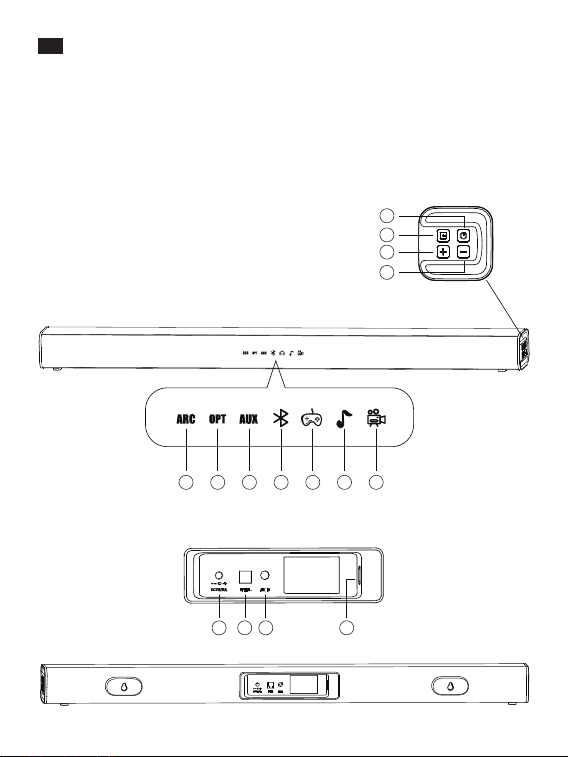
JP
製品図
トップ パ ネル
1. 電源ボタン
2. モード選択
3. 音量+
4. 音量-
ディスプレ ー 表 示
5. HDMI
6. 光
7. AUX
8. Bluetooth
9. ゲーム
10. 音楽
11. ビデオ
バックパネル
12. HDMI入力
13. 光入力
14. AUX入力
15. 電源入力
5
1
2
11
9
8
7
3
4
5
6
10
12
13
12 13 14 15
OPTICAL
AUX
Music
Game Moive
6 7 8 9 10 11
1
2
3
4
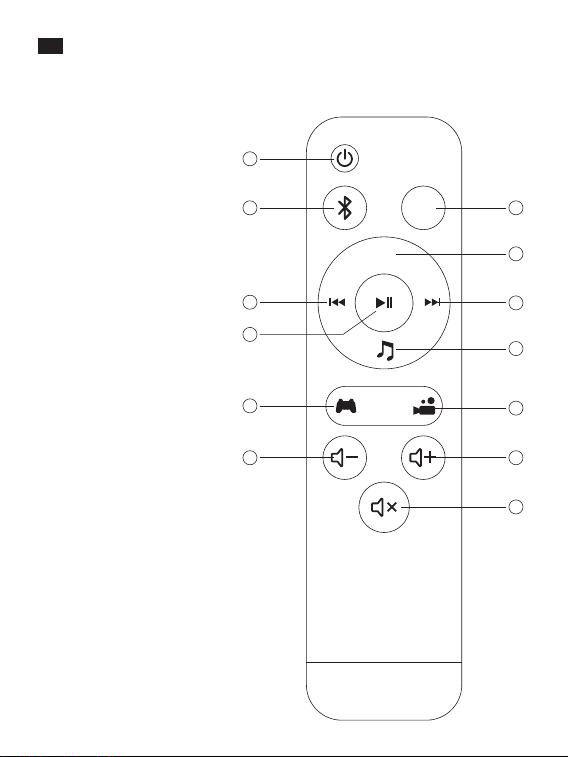
JP
リモコン
1. 電源ボタン
2. Bluetooth モード
3. Optical モード
4. AUX 入力
5. 進む
6. 音 楽 モ ード
7. 戻る
8. 再生/ 一時停止
9. ゲームモード
10. ビデオモード
11. 音声 –
12. 音声 +
13. ミュート(消音)
1413
JP
製品図
トップ パ ネ ル
1. 電源ボタン
2. モード選択
3. 音量+
4. 音量-
ディスプレ ー 表 示
5. HDMI
6. 光
7. AUX
8. Bluetooth
9. ゲーム
10. 音楽
11. ビデオ
バックパネル
12. HDMI入力
13. 光入力
14. AUX入力
15. 電源入力
5
1
2
11
9
8
7
3
4
5
6
10
12
13
12 13 14 15
OPTICAL
AUX
Music
Game Moive
6 7 8 9 10 11
1
2
3
4
JP
リモコン
1. 電源ボタン
2. Bluetooth モード
3. Optical モード
4. AUX 入力
5. 進む
6. 音 楽 モ ード
7. 戻る
8. 再生/ 一時停止
9. ゲームモード
10. ビデオモード
11. 音声 –
12. 音声 +
13. ミュート(消音)
1413

警告
1.火災や感電のリスクを下げるため、本製品を雨や湿気から避けてください。
2.本製品のクリーニングに化学薬品や洗剤を利用しないでください。乾いた布で拭き
取るだけにしてください。
3.尖ったもので表面を引っ掻かないでください。
4.空気口の穴を塞がないでください。製造者の指示に従い設置してください。
5.サウンドバーは、高温高湿・直射日光は避けて保管ください。
6.放熱機、ヒーター、ストーブなどのような発熱源の近くには設置しないでください。
7.電源コードやプラグまたはコードの巻き取り口などは、歩く際に踏んだり、引っ掛け
たりしないよう注意してください。
8.雷が鳴りだしたら、本体や電源プラグに触れないでください。長時間利用しない場合
は、必ず電源プラグをコンセントから抜いてください。
9.電気ショックのリスクを下げるため、背面のカバーを外さないでください。
10.火災や感電、けがの原因となることがありますので、キャビネットを開けたり、分解
や改造をしないください。
11.サウンドバーを落としたり、叩いたりすると内部回線を損傷する可能性があります。
JP
パッケージ内容
•1xTaoTronicsサウンドバー(TT-SK035)
•1xリモコン
•1xRCA-3.5mm音声ケーブル
•1x光ケーブル
•1xユーザーガイド
•2x壁掛け用ネジ
ボタン操作(トップパネル&リモコン)
電源ボタンを押すと、「ディスプレイ」の表示ランプは点
灯(電源オン)・消灯(電源オフ)します。点灯するディス
プレイは前回記憶されたモードです。
音量+ボタンを押します。
音量-ボタンを押します。
サウンドバーの電源がオンの状態で、ボタンを押すと「
光」「AUX」「ARC」「Bluetooth」「ゲーム」「音楽」「ビデオ」
という六つのモードが選択できます。選択したモードは
ディスプレーに点灯します。
このサウンドバーはARCに対応し、HDMIを搭載したの
で、すべての機器と互換性があります。
ミュートボタンを押すと音をミュートボタンを押 すと音
を瞬 時 に消したり、出したりします。
電源オン/オフ
音量+
音量-
モード選択
ミュート(消音)
注意:Bluetoothデバイスとの接続を切断するには、リモコンのBluetoothモードボタン
を2-3秒長押しします。またはサウンドバーのモード選択ボタンを5-6秒押し続けます。
再接続を待っている間、Bluetoothモードのディスプレー表示が点滅します。
仕様
電力供給
消費電力
S/N
周波数特性
動作温度
サイズ
重さ
100-240V; 50 / 60Hz
40W
≥70dB
60Hz-20KHz
-10°C - 35°C
80 x 6 x 6cm
1765g±5g
1615

警告
1.火災や感電のリスクを下げるため、本製品を雨や湿気から避けてください。
2.本製品のクリーニングに化学薬品や洗剤を利用しないでください。乾いた布で拭き
取るだけにしてください。
3.尖ったもので表面を引っ掻かないでください。
4.空気口の穴を塞がないでください。製造者の指示に従い設置してください。
5.サウンドバーは、高温高湿・直射日光は避けて保管ください。
6.放熱機、ヒーター、ストーブなどのような発熱源の近くには設置しないでください。
7.電源コードやプラグまたはコードの巻き取り口などは、歩く際に踏んだり、引っ掛け
たりしないよう注意してください。
8.雷が鳴りだしたら、本体や電源プラグに触れないでください。長時間利用しない場合
は、必ず電源プラグをコンセントから抜いてください。
9.電気ショックのリスクを下げるため、背面のカバーを外さないでください。
10.火災や感電、けがの原因となることがありますので、キャビネットを開けたり、分解
や改造をしないください。
11.サウンドバーを落としたり、叩いたりすると内部回線を損傷する可能性があります。
JP
パッケージ内容
•1xTaoTronicsサウンドバー(TT-SK035)
•1xリモコン
•1xRCA-3.5mm音声ケーブル
•1x光ケーブル
•1xユーザーガイド
•2x壁掛け用ネジ
ボタン操作(トップパネル&リモコン)
電源ボタンを押すと、「ディスプレイ」の表示ランプは点
灯(電源オン)・消灯(電源オフ)します。点灯するディス
プレイは前回記憶されたモードです。
音量+ボタンを押します。
音量-ボタンを押します。
サウンドバーの電源がオンの状態で、ボタンを押すと「
光」「AUX」「ARC」「Bluetooth」「ゲーム」「音楽」「ビデオ」
という六つのモードが選択できます。選択したモードは
ディスプレーに点灯します。
このサウンドバーはARCに対応し、HDMIを搭載したの
で、すべての機器と互換性があります。
ミュートボタンを押すと音をミュートボタンを押 すと音
を瞬 時 に消したり、出したりします。
電源オン/オフ
音量+
音量-
モード選択
ミュート(消音)
注意:Bluetoothデバイスとの接続を切断するには、リモコンのBluetoothモードボタン
を2-3秒長押しします。またはサウンドバーのモード選択ボタンを5-6秒押し続けます。
再接続を待っている間、Bluetoothモードのディスプレー表示が点滅します。
仕様
電力供給
消費電力
S/N
周波数特性
動作温度
サイズ
重さ
100-240V; 50 / 60Hz
40W
≥70dB
60Hz-20KHz
-10°C - 35°C
80 x 6 x 6cm
1765g±5g
1615
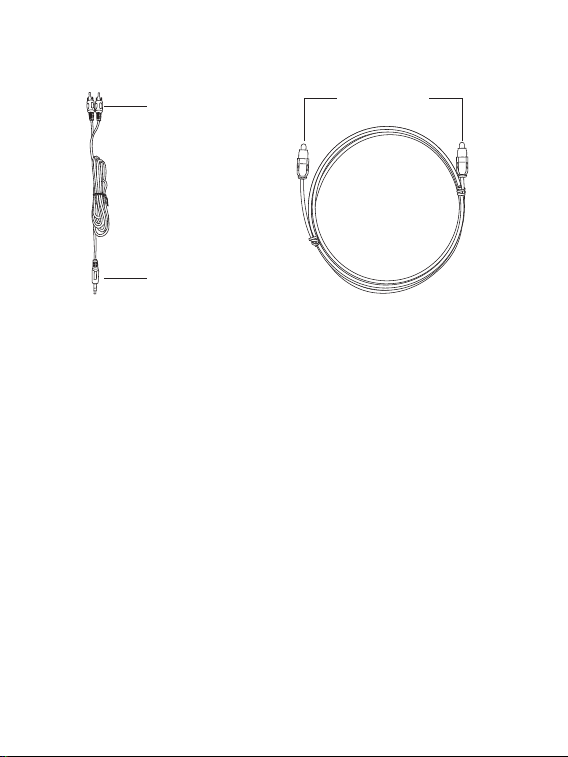
AUX出力
AUX出力
光入力/出力
接続
ケーブス接続
注意:機器にケーブルを接続する際は、対応したポートに正しいケーブルを繋げ、対応
するモードを選択してください。
Bluetooth®接続
1.サウンドバーの電源をオンにしてBluetooth®モードを選択します。
2.ご利用の機器のBluetooth®機能を有効にし、周辺の機器を検索します。
3.TaoTronicsTT-SK035を探し、見つけたらタップして接続します。正常に接続される
とビープ音が聞こえます。
4.正常に接続されるとディスプレイにBluetooth®アイコンが表示されます
注意:
•サウンドバーのペアリングを行っている間は、ディスプレイのBluetooth®アイコンが
点滅し続けます。
•ご利用のデバイスをサウンドバーから1m以内に近づいてください。Bluetooth®機能
が有効になっている他の機器が範囲内にないことを確認してください。
•サウンドバーをTVBluetoothとペアリングすることはお勧めしていません。音声の遅
延を起こす可能性があります。
•Bluetooth経由での再生を行う前に、音量を低〜中に設定してください。
Q&A
Q:本体の電源が入りません。
A:電源コードが、コンセントに正しく繋がれていることを確認してください。
Q:音が出ません。音が歪んでいます。
A:以下の項目を確認してください:
•音声ケーブルが正しく接続されていることを確認してください。
•音量をゆっくり上げてください。
•ミュートボタンを押してください。
•再生/一時停止ボタンを押してください。
•サウンドバーのモードの設定に合わせて、テレビに音声出力モード設定を行ってく
ださい(該当する場合)。
Q:サウンドバーのボタン機能が利用できません。
A:サウンドバーの電源をオフにして、コンセントを外します。再度コンセントをつなぎ、
電源をオンにします。
Q:リモコンか機能が利用できません。
A:以下の項目を確認してください:
•単4(1.5A)電池を2本リモコンに入れてください。
•古い電池を新しい電池と取り替えてください。
•リモコンを操作する際、サウンドバーに向けられていることを確認してください。
•リモコン操作が操作範囲内で行われていることを確認してください。
•サウンドバーの電源をオフにして、コンセントを外します。再度コンセントをつなぎ、
電源をオンにします。
Q:Bluetoothモードボタンを押しても機器の接続を切断できません。
A:Bluetoothデバイスとの接続を切断するには、リモコンのBluetoothモードボタンを
2-3秒長押しします。またはサウンドバーのモード選択ボタンを5-6秒押し続けます。再
接続を待っている間、Bluetoothモードのディスプレー表示が点滅します。
Bluetooth
®
のワードマークおよびロゴはBluetooth SIG, Inc.が所有
する登録商標であり 、Sunvalleytek International Inc.はこれらのマークおよびロゴを
ライセンスに基づいて使用しています。その他の 商標およびトレードネームは、それ
ぞれの所有者に帰属します。
1817

AUX出力
AUX出力
光入力/出力
接続
ケーブス接続
注意:機器にケーブルを接続する際は、対応したポートに正しいケーブルを繋げ、対応
するモードを選択してください。
Bluetooth®接続
1.サウンドバーの電源をオンにしてBluetooth®モードを選択します。
2.ご利用の機器のBluetooth®機能を有効にし、周辺の機器を検索します。
3.TaoTronicsTT-SK035を探し、見つけたらタップして接続します。正常に接続される
とビープ音が聞こえます。
4.正常に接続されるとディスプレイにBluetooth®アイコンが表示されます
注意:
•サウンドバーのペアリングを行っている間は、ディスプレイのBluetooth®アイコンが
点滅し続けます。
•ご利用のデバイスをサウンドバーから1m以内に近づいてください。Bluetooth®機能
が有効になっている他の機器が範囲内にないことを確認してください。
•サウンドバーをTVBluetoothとペアリングすることはお勧めしていません。音声の遅
延を起こす可能性があります。
•Bluetooth経由での再生を行う前に、音量を低〜中に設定してください。
Q&A
Q:本体の電源が入りません。
A:電源コードが、コンセントに正しく繋がれていることを確認してください。
Q:音が出ません。音が歪んでいます。
A:以下の項目を確認してください:
•音声ケーブルが正しく接続されていることを確認してください。
•音量をゆっくり上げてください。
•ミュートボタンを押してください。
•再生/一時停止ボタンを押してください。
•サウンドバーのモードの設定に合わせて、テレビに音声出力モード設定を行ってく
ださい(該当する場合)。
Q:サウンドバーのボタン機能が利用できません。
A:サウンドバーの電源をオフにして、コンセントを外します。再度コンセントをつなぎ、
電源をオンにします。
Q:リモコンか機能が利用できません。
A:以下の項目を確認してください:
•単4(1.5A)電池を2本リモコンに入れてください。
•古い電池を新しい電池と取り替えてください。
•リモコンを操作する際、サウンドバーに向けられていることを確認してください。
•リモコン操作が操作範囲内で行われていることを確認してください。
•サウンドバーの電源をオフにして、コンセントを外します。再度コンセントをつなぎ、
電源をオンにします。
Q:Bluetoothモードボタンを押しても機器の接続を切断できません。
A:Bluetoothデバイスとの接続を切断するには、リモコンのBluetoothモードボタンを
2-3秒長押しします。またはサウンドバーのモード選択ボタンを5-6秒押し続けます。再
接続を待っている間、Bluetoothモードのディスプレー表示が点滅します。
Bluetooth
®
のワードマークおよびロゴはBluetooth SIG, Inc.が所有
する登録商標であり 、Sunvalleytek International Inc.はこれらのマークおよびロゴを
ライセンスに基づいて使用しています。その他の 商標およびトレードネームは、それ
ぞれの所有者に帰属します。
1817

WEEE Compliance
Correct Disposal of This Product (Waste Electrical & Electronic Equipment)
(Applicable in countries with separate collection systems)
This marking on the product, accessories or literature indicates that the product
and its electronic accessories should not be disposed of with other household
waste at the end of their working life. To prevent possible harm to the
environment or human health from uncontrolled waste disposal, please separate
these items from other types of waste and recycle them responsibly to promote
the sustainable reuse of material resources. Household users should contact
either the retailer where they purchased this product, or their local government
office, for details of where and how they can take these items for environmentally
safe recycling. Business users should contact their supplier and check the terms
and conditions of the purchase contract. This product and its electronic
accessories should not be mixed with other commercial wastes for disposal.
NOTE: This equipment has been tested and found to comply with the limits for a
Class B digital device, pursuant to part 15 of the FCC Rules. These limits are
designed to provide reasonable protection against harmful interference in a
residential installation. This equipment generates uses and can radiate radio
frequency energy and, if not installed and used in accordance with the
instructions, may cause harmful interference to radio communications. However,
there is no guarantee that interference will not occur in a particular installation. If
this equipment does cause harmful interference to radio or television reception,
which can be determined by turning the equipment off and on, the user is
encouraged to try to correct the interference by one or more of the following
measures:
- Reorient or relocate the receiving antenna.
- Increase the separation between the equipment and receiver.
- Connect the equipment into an outlet on a circuit different from that to which
the receiver is connected.
- Consult the dealer or an experienced radio/TV technician for help
Changes or modifications not expressly approved by the party responsible for
compliance could void the user's authority to operate the equipment.
This device complies with Part 15 of the FCC Rules. Operation is subject to the
following two conditions:
(1) this device may not cause harmful interference, and
(2) this device must accept any interference received, including interference that
may cause undesired operation.

WEEE Compliance
Correct Disposal of This Product (Waste Electrical & Electronic Equipment)
(Applicable in countries with separate collection systems)
This marking on the product, accessories or literature indicates that the product
and its electronic accessories should not be disposed of with other household
waste at the end of their working life. To prevent possible harm to the
environment or human health from uncontrolled waste disposal, please separate
these items from other types of waste and recycle them responsibly to promote
the sustainable reuse of material resources. Household users should contact
either the retailer where they purchased this product, or their local government
office, for details of where and how they can take these items for environmentally
safe recycling. Business users should contact their supplier and check the terms
and conditions of the purchase contract. This product and its electronic
accessories should not be mixed with other commercial wastes for disposal.
NOTE: This equipment has been tested and found to comply with the limits for a
Class B digital device, pursuant to part 15 of the FCC Rules. These limits are
designed to provide reasonable protection against harmful interference in a
residential installation. This equipment generates uses and can radiate radio
frequency energy and, if not installed and used in accordance with the
instructions, may cause harmful interference to radio communications. However,
there is no guarantee that interference will not occur in a particular installation. If
this equipment does cause harmful interference to radio or television reception,
which can be determined by turning the equipment off and on, the user is
encouraged to try to correct the interference by one or more of the following
measures:
- Reorient or relocate the receiving antenna.
- Increase the separation between the equipment and receiver.
- Connect the equipment into an outlet on a circuit different from that to which
the receiver is connected.
- Consult the dealer or an experienced radio/TV technician for help
Changes or modifications not expressly approved by the party responsible for
compliance could void the user's authority to operate the equipment.
This device complies with Part 15 of the FCC Rules. Operation is subject to the
following two conditions:
(1) this device may not cause harmful interference, and
(2) this device must accept any interference received, including interference that
may cause undesired operation.

www.taotronics.com
User Guide
Model: TT-SK035
TaoTronics Sound Bar
Rev_1.0
Learn more about the EU Declaration of Conformity:
https://www.taotronics.com/pages/user-manual
MADE IN CHINA
Manufacturer:
Shenzhen Danya Technology Co.,Ltd.
Address:
Room 3323, Building C, Galaxy World Phase II, Minle Community,
Minzhi Street, Longhua District, Shenzhen, China
E-mail: