
-1-
Contents
Safety and warnings.......................................................................................2-3
Introduction..................................................................................................4
Stand installation guide..................................................................................5
Installation....................................................................................................6-9
Remote Control............................................................................................10
Operation..................................................................................................... 11-14
-2-
SAFETY AND WARNINGS
IMPORTANT SAFETY INSTRUCTION
TO REDUCE THE RISK OF ELECTRIC SHOCK, DO
NOT REMOVE COVER (OR BACK).NO USER
SERVICEABLE PARTS INSIDE. REFER SERVICING
TO QUALIFIED SERVICE PERSONNEL.
RISK OF ELECTRIC SHOCK
DO NOT OPEN!
CAUTION
CAUTION
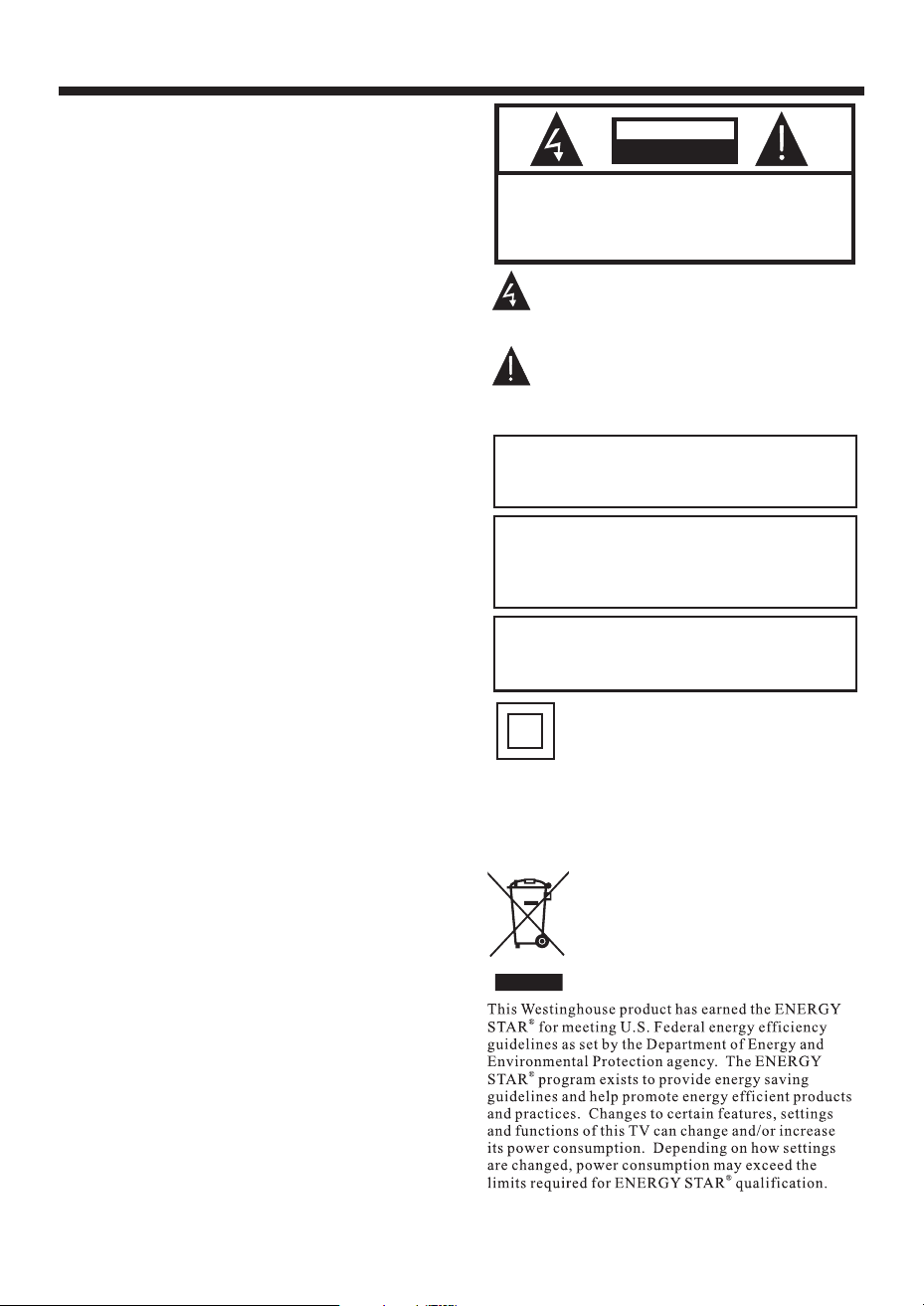
The symbol indicates that dangerous
voltages constituting a risk of electric shock
are present within this unit.
The symbol indicates that there are
important operating and maintenance
instructions in the literaturaccompanying this
unit.
To reduce the risk of fire or electric shock, do
not expose this apparatus to rain or moisture.
WARNING:
This symbol indicates that this product
incorporates double insulation between
hazardous mains voltage and user accessible
parts. When servicing use only
identical replacement parts.
The batteries shall not be exposed to
excessive heat such as sunshine, fire or the
like.
WARNING:
The excessive sound pressure from earphones
and headphones can cause hearing loss.
WARNING:
1) Read these instructions.
2) Keep these instructions.
3) Heed all warnings.
4) Follow all instructions.
5) Do not use this apparatus near water.
6) Clean only with dry cloth.
7) Do not block any ventilation openings, install
in accordance with the instructions.
8) Do not install near any heat sources such as
radiations, heat registers, stoves, or other
apparatus (including amplifiers) that produce
heat.
9) Do not defeat the safety purpose of the
polarized plug. If the provided plug does not fit
into your outlet, consult an electrician for
replacement of the obsolete outlet.
10) Protected the power cord from being walked
on or pinched particularly at plugs, convenience
receptacles, and the point where they exit from
the apparatus.
11) Only use attachments/accessories specified
by the manufacturer.
12) Unplug this apparatus during lighting
storms or when unused for long periods of time.
13) Refer all servicing to qualified service
personnel. Servicing is required when the
apparatus has been damaged in any way, such as
power-supply cord or plug is damaged, liquid
has been spilled or objects have fallen into the
apparatus, the apparatus has been exposed to
rain or moisture, does not operate normally, or
has been dropped.
14) Mains plug is used as the disconnect device,
the disconnect device shall remain readily
operable.
15) The ventilation should not be impeded by
covering the ventilation openings with items,
such as newspapers, table-cloth, curtains, etc.
16) No naked flame sources, such as lighted
candles, should be placed on the apparatus.
17) Attention should be drawn to the
environmental aspects of battery disposal.
18) The use of apparatus in moderate climate.
19) The apparatus shall not be exposed to
dripping or splashing and that no objects filled
with liquids, such as vases, shall be placed on
the apparatus.
-3-
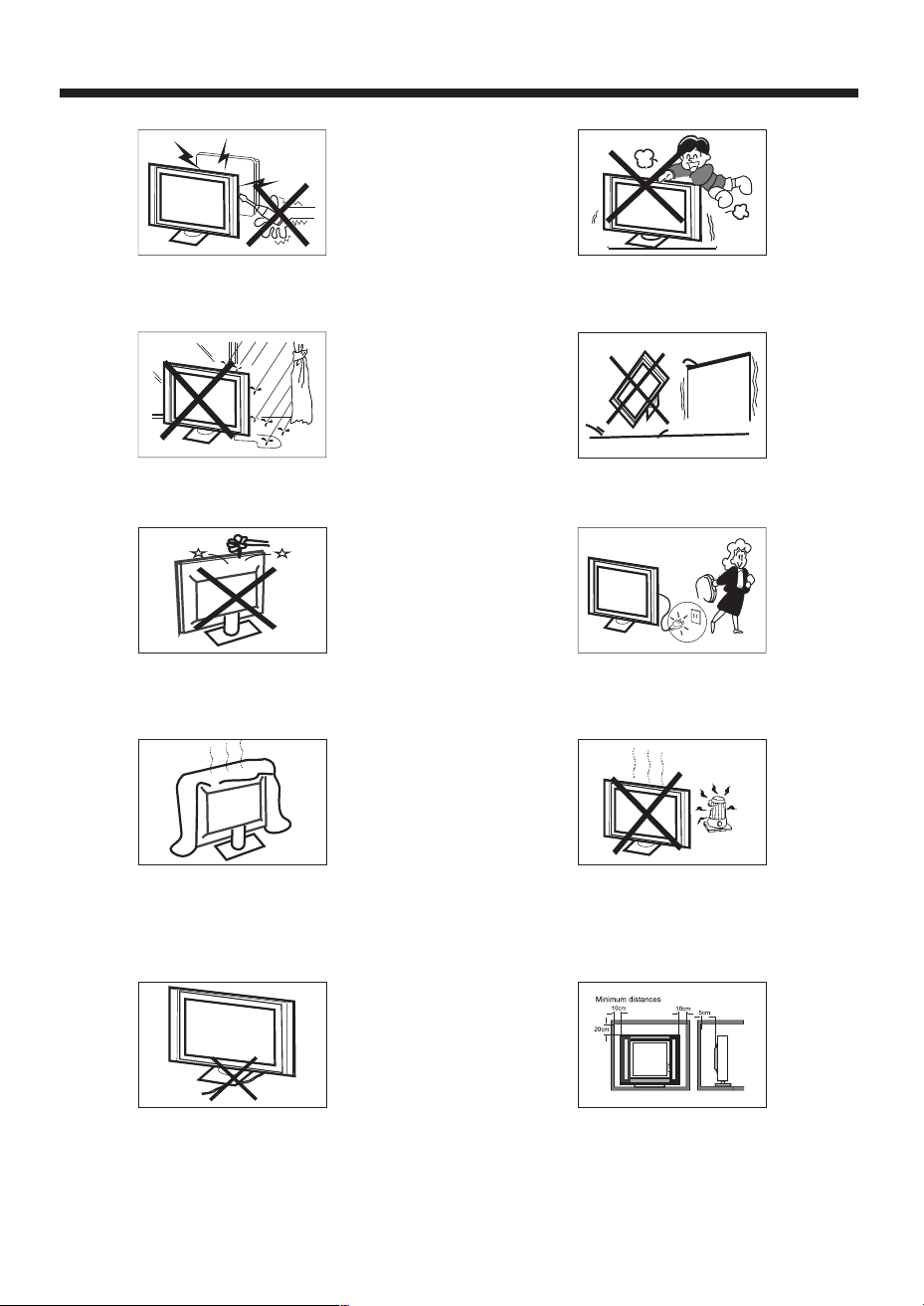
High voltages are used in the operation of this television
receiver. Do not the cabinet.
Refer servicing to qualified service personnel.
open
SAFETY AND WARNINGS
To prevent fire or electrical shock hazard, do not expose
the television receiver to rain or moisture.
Do not drop or push objects into the television cabinet
slots or openings. Never spill any kind of liquid on the
television receiver.
Do not block the ventilation holes on the back cover .
Adequate ventilation is essential to prevent failure of
electrical components.
of the TV
Do not trap the power supply cord under the television
receiver .s' stand
Never stand on, lean on, or suddenly push the television or
its stand. You should pay special attention to children.
Serious injury may result if it falls.
Do not place your television on an unstable cart, stand,
shelf or table. Serious injury to an individual and damage
to the television may result if it falls.
/or
When the television receiver is not used for an
extended period of time, it is advisable to disconnect
the AC power cord from theAC outlet.
Avoid exposing the television receiver to direct sunlight
and other sources of heat. Do not stand the television
receiver directly on other products which give off heat,
e.g. video cassette players and audio amplifiers. Do not
place naked flame sources, such as lighted candles on
the television.or near
Dim:515*320mm()
If the television is to be built into a compartment or similar
enclosure, the minimum distances must be maintained. Heat
build-up can reduce the life of your television, and can also
be dangerous.
x2
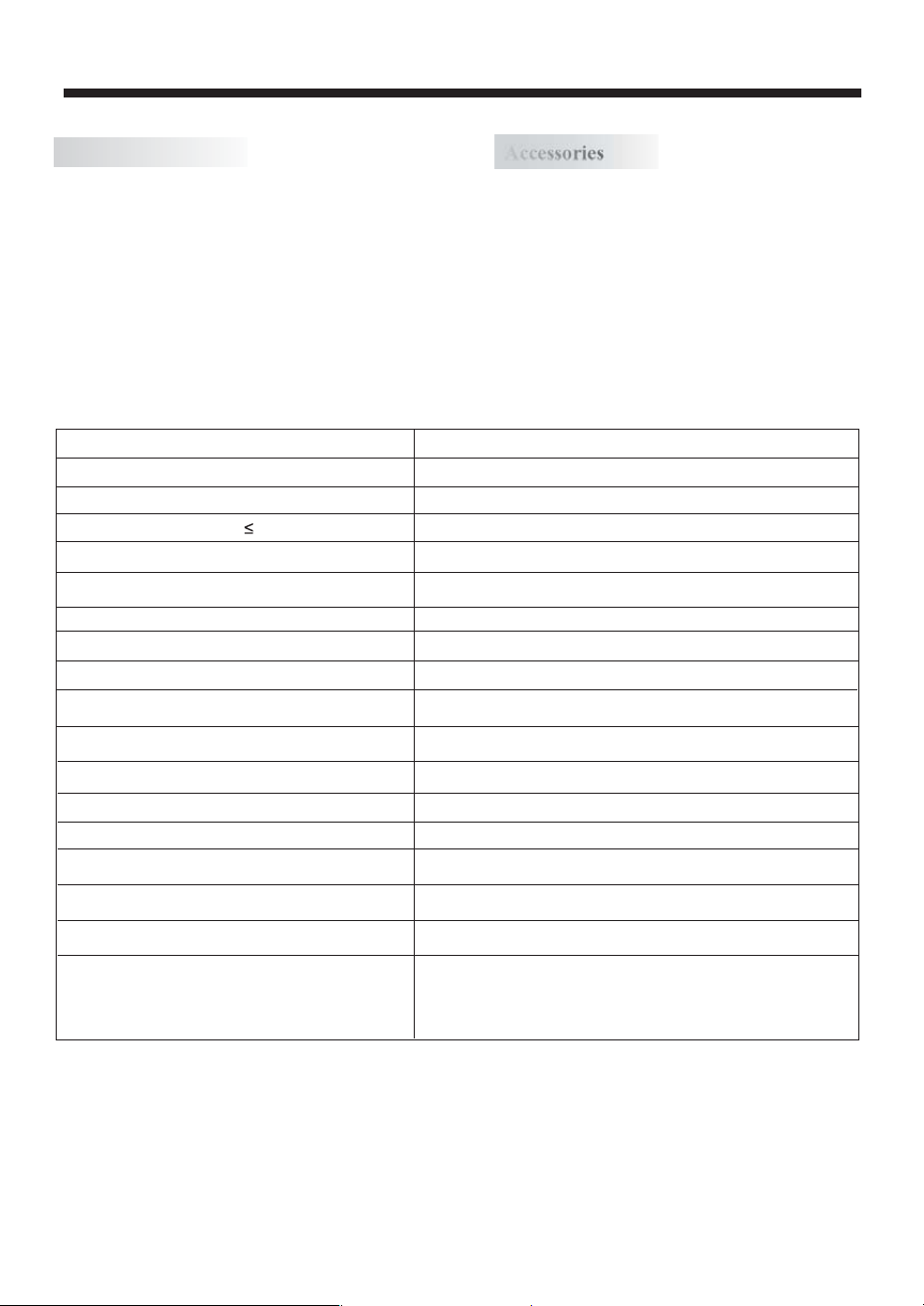
Resolution:
TV System:
Video Signal System:
Receiving Channel:
Horizontal definition (TV line)
16:9
NTSC
Cable :1-135/ Air: 2-69 (ATV&DTV)
x1
High-Definition Multimedia Interface (HDMI) Input
Audio Input x 3
Composite Video Input >=350
x1
YCb(Pb)Cr(Pr) >=400
Video Input >=400
x2
Input Power Voltage:
AC 100V-240V 50/60Hz
ATSC Digital system and NTSC Analog system
Headphone Output
x1
x1
Coaxial Output
x1
USB Input
Aspect Ratio:
Viewing Picture Size (diagonal)
Power consumption:
Audio Output Power (THD 7%):
YCb(Pb)Cr(Pr) Input
Composite Video Input
Analog RGB (VGA) Input
1366x768
32 inches
120W
2x8W
-4-
INTRODUCTION
Main features
Accessories
Infrared Remote Control....................
1
User s Manual .................................’
1
Battery(AAA)................................... 2
Accessories
Main parameter
Power Cable.....................................
1
Integrated ATSC TV tuner for HDTV broadcast reception
High brightness provides a vivid and brilliant picture
Deeper blacks and brighter whites with high contrast
Wide Screen aspect ratio (16:9) for a complete home
theater experience
HDMI input for true digital connection
VGA port for connection to PC
Built-in stereo speaker system
Full-function Remote Control
■
■
■
■
■
■
■
■
-5-
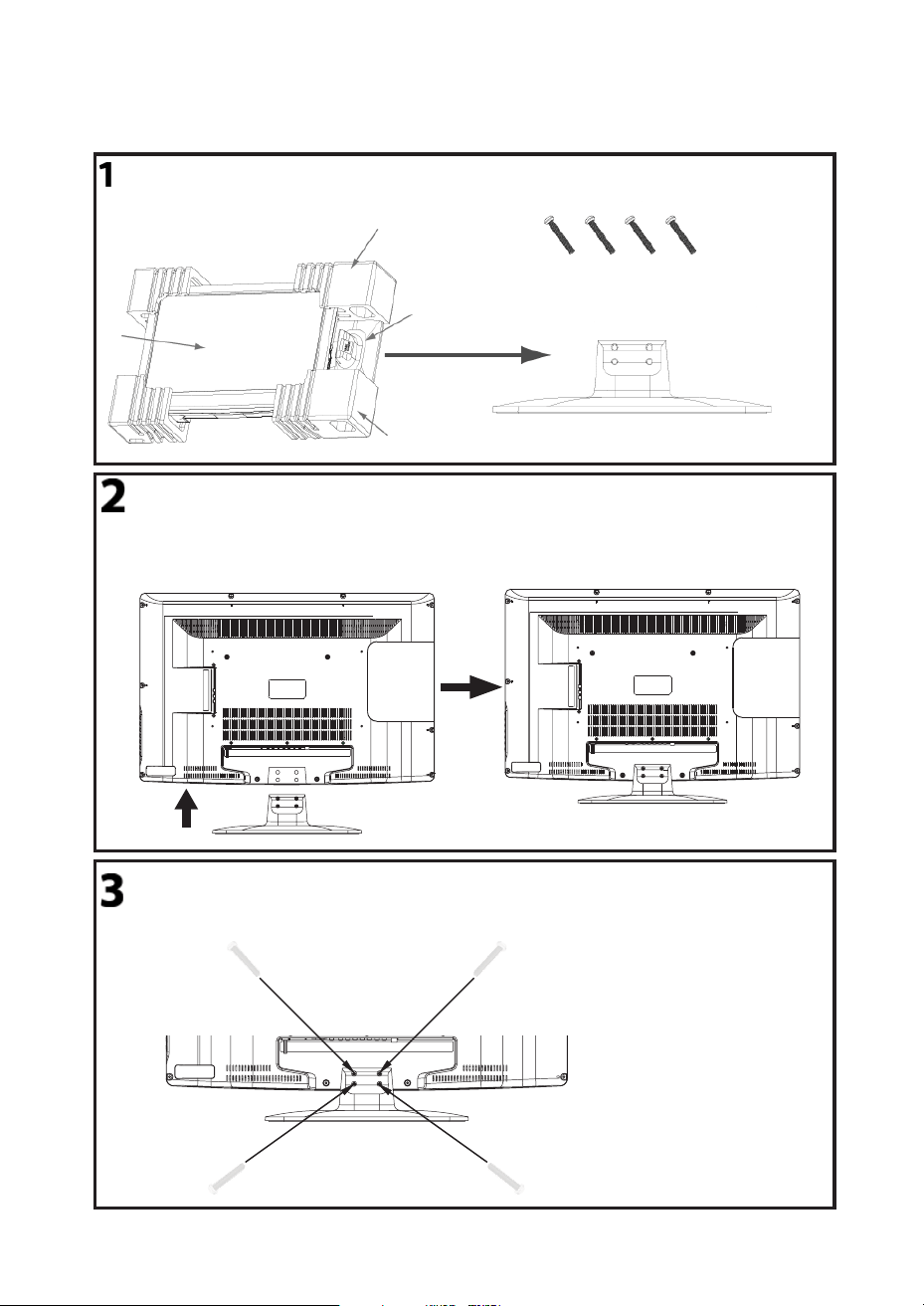
This STAND INSTALLATION GUIDE is provided to help you easily install the stand. Please carefully follow
Step 1 through Step 3.
STAND INSTALLATION GUIDE
Open the box and find the parts
Open the box and find the following parts.
- Stand x1 pc
- Screws x 4 pcs
Packing
Stand
Packing
TV
Screws
Stand
Place the Stand on the TV
1. Place the TV with the display side down
on a table or desk (flat, totally clean surface).
2. Place the Stand on the TV as shown below.
Stand
Secure the Stand to the TV
Secure the Stand to the TV by using the 4 supplied screws.
12
43
-6-
INSTALLATION
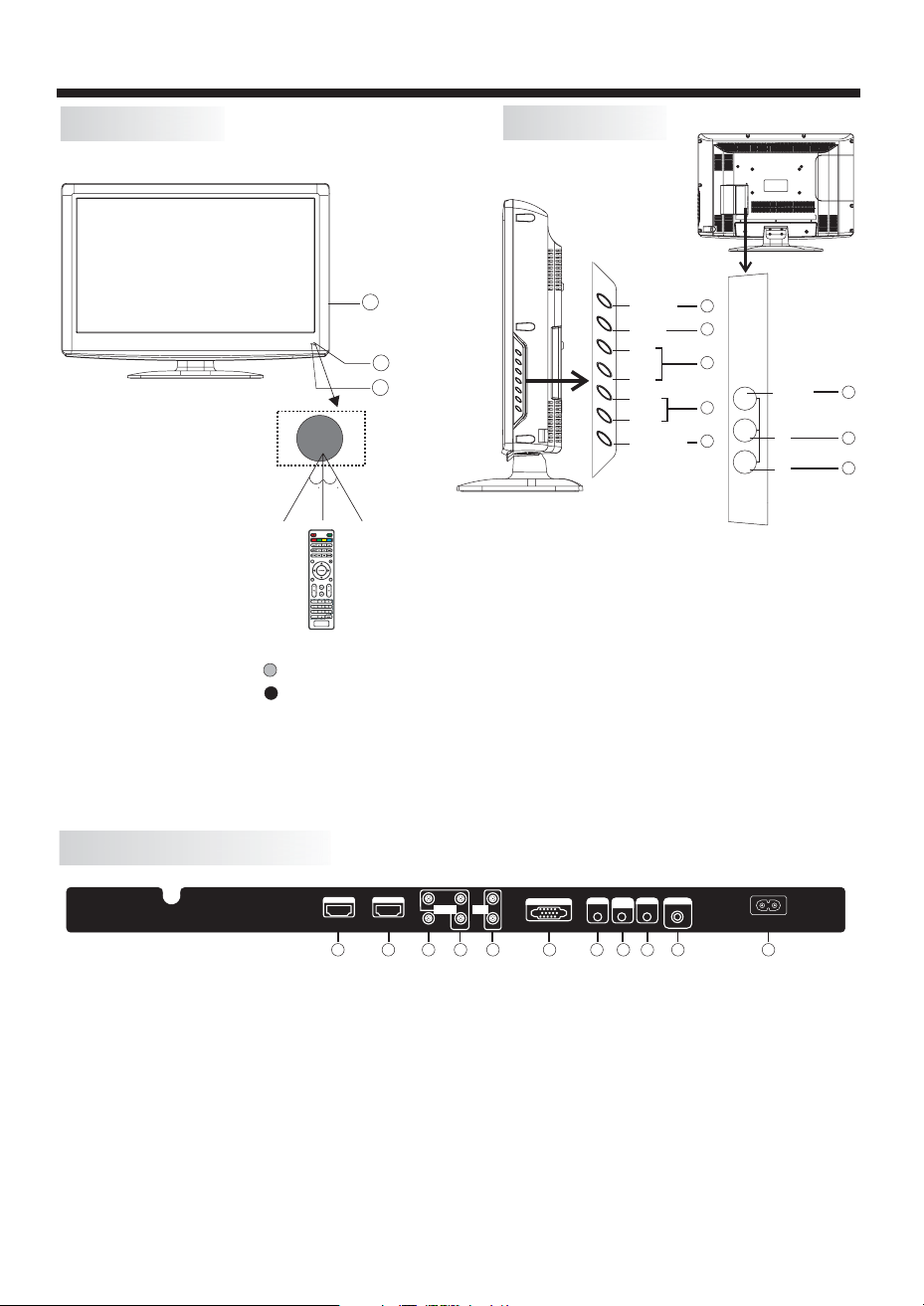
Front panel
REAR AV INPUT/OUTPUT
1: Remote control sensor.
2: Indicator LED: GREEN POWER ON.
RED STANDBY.
3: Side panel keys
1. SOURCE:
2. MENU:
3. CH+/CH-:
4. VOL+/VOL-:
5. STANDBY:
Display the input source menu.
Display main MENU.
In TV mode, press "CH+" or "CH-" to
change the channel up and down. In MENU mode, press
"CH+" or "CH-" to select items in standby mode, press
"CH+" or "CH-" to turn on the TV.
Adjust sound level. In MENU mode,
press "VOL+ " or "VOL- " to adjust the item that you
selected.
Press this button to turn the unit ON
from STANDBY mode. Press it again to turn the set
back to STANDBY.
6. VIDEO INPUT
7. AUDIO INPUT-L
8. AUDIO INPUT-R
Side panel
SOURCE
MENU
CH+
CH-
VOL+
VOL-
STANDBY
30 30
3
1
2
VIDEO
L
R
AV2
R
L
VIDEO
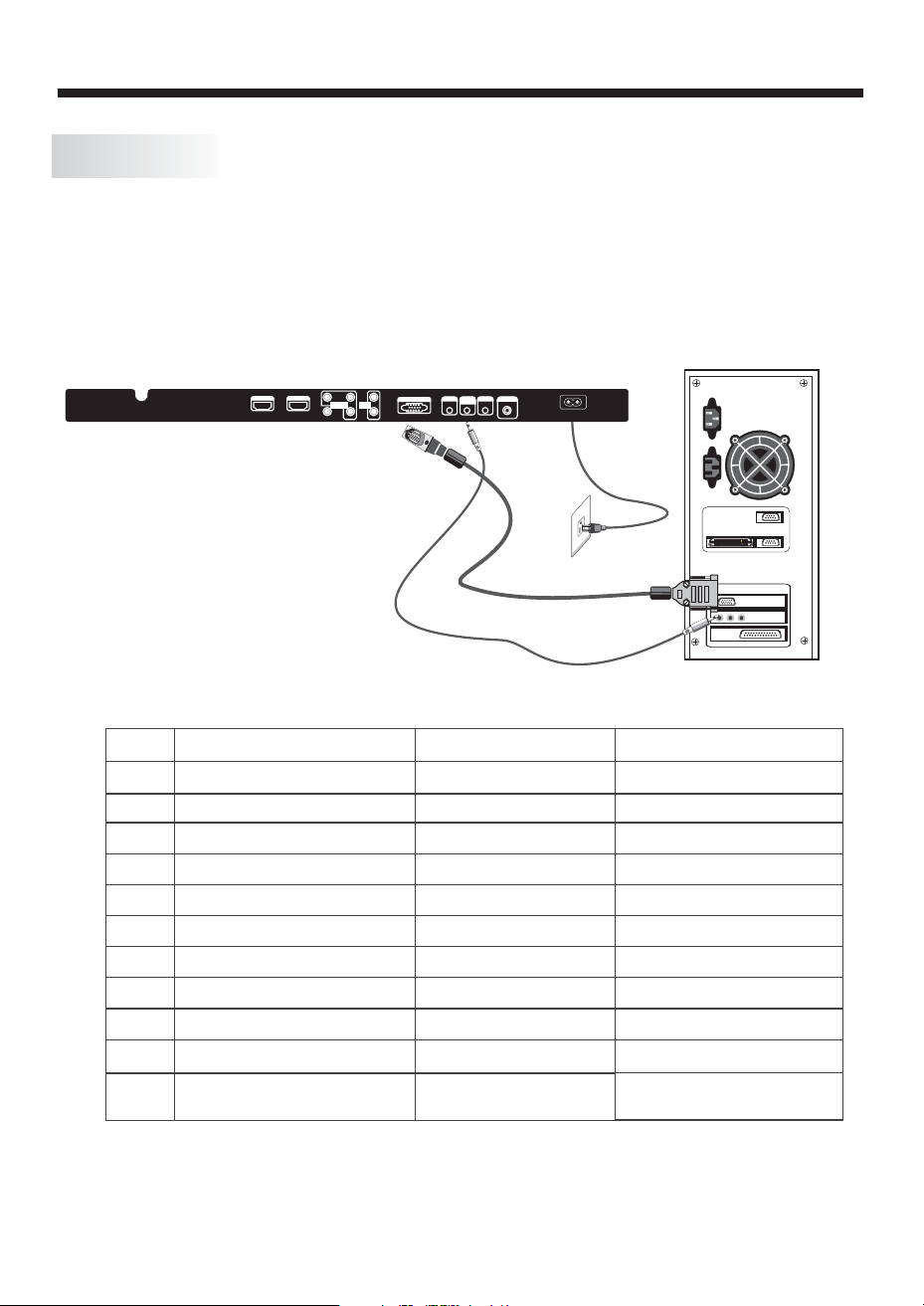
Note: 1. Composite video input and component video input share the audio input.
2. When HDMI1 has an input signal coming from a DVI source then the audio input signal must be
connected to the PC audio input.
3. When HDMI2 has an input signal coming from a DVI source then the audio input signal must be
connected to the YPbPr/AV audio input.
7. Headphone Output
8. PC Audio Input
9. Coaxial
10. Antenna Socket
11. AC Power Socket
1. HDMI1 Input
2. HDMI2 Input
3. Composite Video Input
4. Component Video (YPbPr) Input
5. Audio Input
6. VGA Port (PC Input)
1
2
3
4
5
6
7
8
1 2
3
4 5
6
7
8
9
10 11
HDMI 1
AC INPUT
100-240V~50/60Hz
L
R
AV1
Pr
Y
Pb
HEADPHONE
PC AUDIO
INPUT
COAXIAL
RF INPU T
COMPONENT
INPUT
AUDIO
INPUT
VGA INPUT
HDMI 2
-7-
INSTALLATION
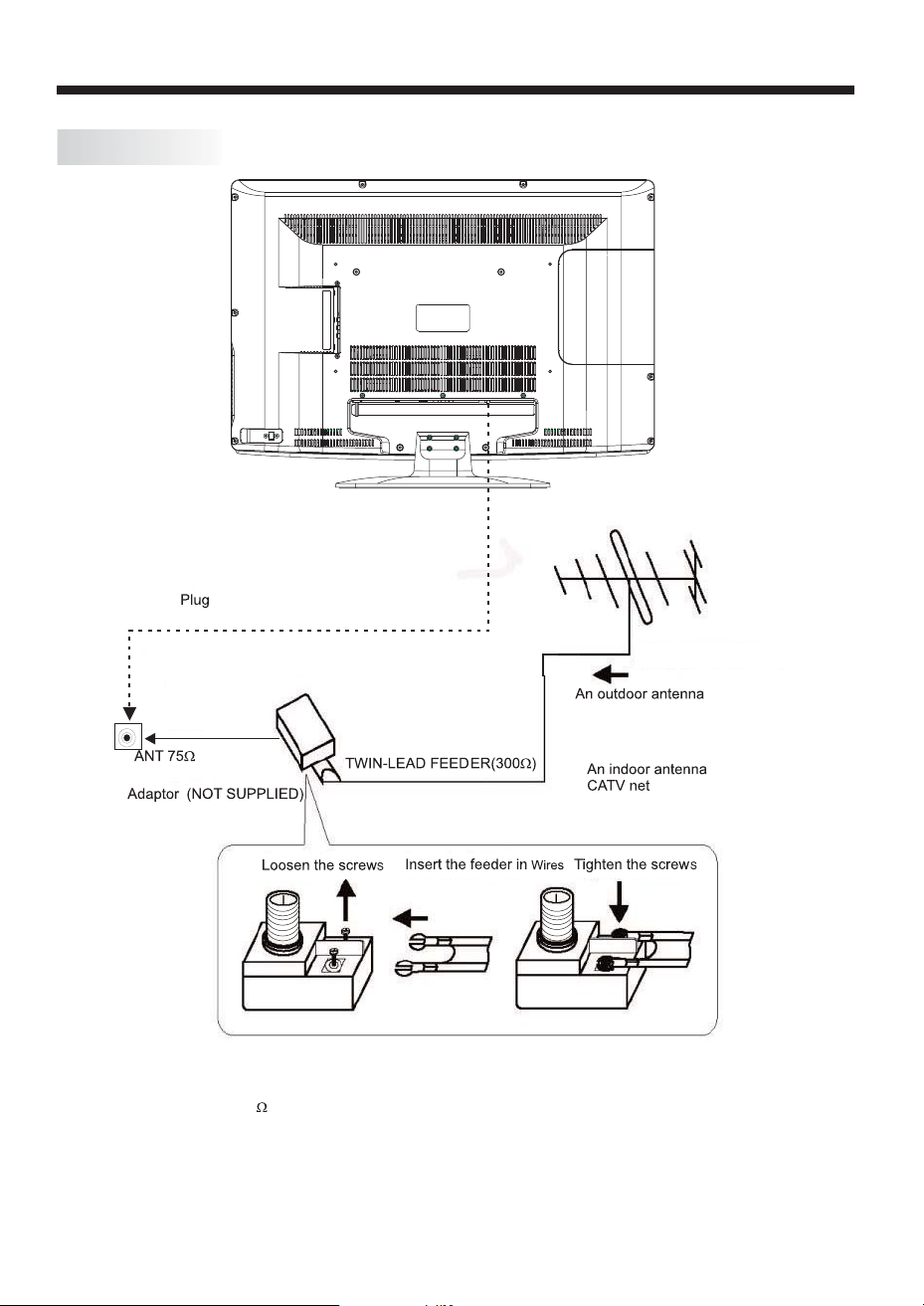
STEPS:
PC
Be sure both the TV and computer are powered off.
1. Connect a VGA and audio cable.
2. Connect the power cord.
3. switch to VGA mode.
4.
Turn on the TV and
Turn on the PC.
PRESET MODE
1
2
3
4
5
6
7
8
9
10
720*400
640*480
640*480
800*600
800*600
1024*768
1024*768
1024*768
1280*1024
1280*1024
70
60
75
60
75
60
70
75
60
75
31.47
31.47
37.50
37.88
46.88
48.36
56.48
60.02
63.98
80.00
RESOLUTION
V.Freq.(Hz) H.Freq.(KHz)
HDMI 1
AC INPUT
100-240V~50/60Hz
L
R
AV1
Pr
Y
Pb
HEADPHONE
PCAUDIO
INPUT
COAXIAL
RF IN PUT
COMPONENT
INPUT
AUDIO
INPUT
VGAINPUT
HDMI 2
11
1366*768
75
80.00
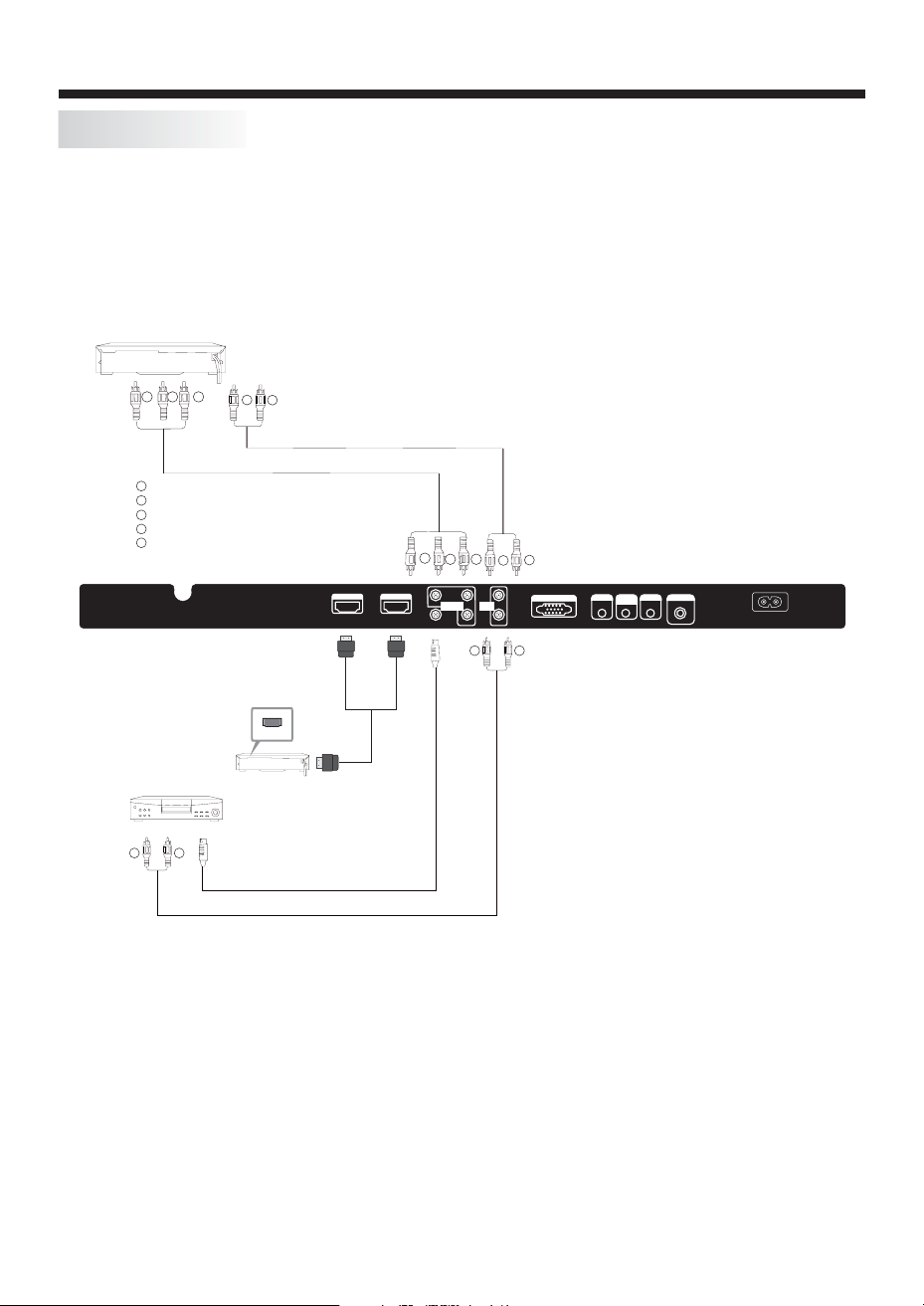
ANTENNA
Note:
Aerial connections:IEC(female).
Input impendance:75 unbalanced.
INSTALLATION
-8-
-9-
INSTALLATION
AV EQUIPMENT
There are two HDMI ports located on the back of your TV. You can connect a Blu-ray player, DVD player, or other video
equipment through these ports.
There is one component (Y, Pb, Pr) and two composite (AV) video input located on the back of your TV. You can connect
a VCR, cable box, or other video equipment to these jacks.
Please see the diagram below. You may also need to refer to the owner's manual of the device that you are trying to connect.
To audio outputs
VIDEO EQUIPMENT
TO VIDEO
output
Yellow (video)
White(audio L)
Red(audio R or Pr)
Y
W
R
W
R
W R
W R
G
B
R
G
R
B
Blue(Pb)
Green(Y)
B
G
VIDEO EQUIPMENT with YPbPr
W
R
HDMI
HDMI 1
AC INPUT
100-240V~50/60Hz
L
R
AV1
Pr
Y
Pb
HEADPHONE
PC AUDIO
INPUT
COAXIAL
RF INPU T
COMPONENT
INPUT
AUDIO
INPUT
VGA INPUT
HDMI 2
The television's inputs can be connected to the following types of equipment: VCR, multi disc player, DVD, camcorder,
video game or stereo system, etc.....
There is a composite (AV) video input . You can use thisAV input to
conveniently connect devices that you may frequently connect and disconnect, such as a camcorder.
-10-
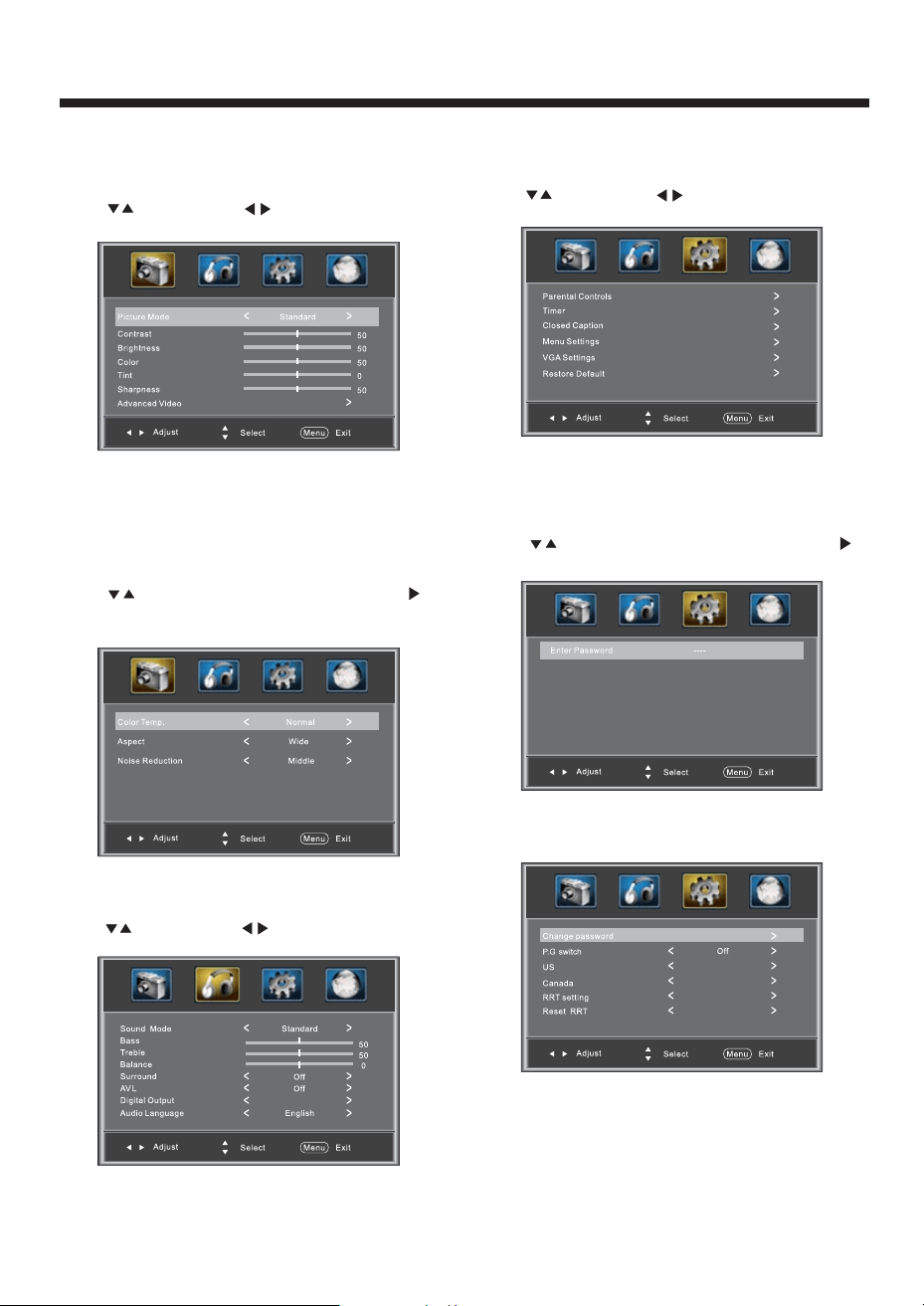
REMOTE CONTROL
1:
To turn the TV on.
2:
For direct access to .
3:
Displays the main on-screen menu.
4:
To move within the menu.
5:
To exit the menu.
6:
To adjust sound level.
7: P
To switch picture mode.
8:
Press to display and select the available video sources.
9:
To disable or enable the sound.
10:
To access the previously viewed channel.
11:
Confirms selection.
12:
Displays/removes the program information
13:
To switch sound mode.
14:
To access the next or previous channel.
15:
To change picture aspect .
16:
To display the channel list.
17:
To display all the information of DTV programs.
18:
To access your favorite channels in digital TV mode.
19:
Hot key to go directly to HDMI source.
20:
Hot key to go directly to AV source.
21:
To display the DTV signal strength menu.
22:
Hot key to go directly to TV source.
23:
Hot key to go directly to YPbPr source.
24:
To enable or disable the CC function.
25:
Hot key to go directly to VGA source.
26:
To switch the sound stereo.
27:
Reserved keys
POWER
NUMBER KEY
CURSOR
EXIT
VOL+/-
.M
MUTE
RECALL
ENTER
TV DISPLAY
S.M
CH+/CH-
ASPECT
CH LIST
EPG
FAV
HDMI
AV
DTV STRENGTH
TV
YPbPr
CC
VGA
MTS
COLOR KEYS
channels
-11-
OPERATION
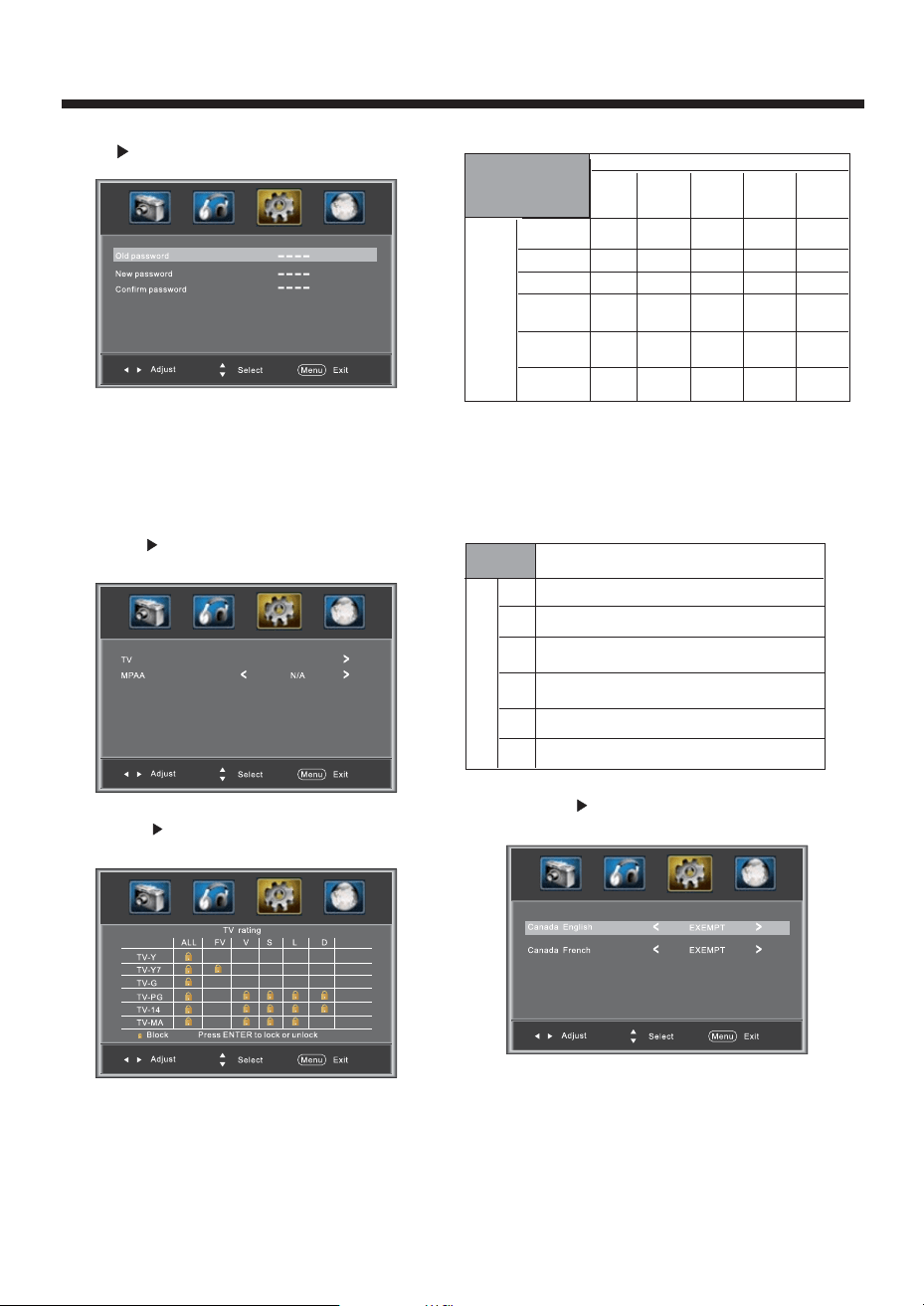
The first item of the MENU is PICTURE MENU.
You can adjust picture effect here, such as contrast,
brightness, etc.
Press to select, press to adjust, press MENU
to exit.
1. PICTURE MENU
2.AUDIO menu
The second item of the MENU is AUDIO MENU.
You can adjust sound here.
Press to select, press to adjust, press MENU
to exit.
3. SETUP MENU
The third item of the MENU is SETUP MENU.
You can setup system here.
Press to select, press to adjust, press MENU
to exit.
Note:
Restore Default: Reset all the settings to default
value.
Note:
Audio language is available in ATSC/TV Programming
only.
Press button to select Advanced Video, press
button, the screen will display as follow:
Advanced Video:
3.1. Parental Controls:
Press button to select , Press
button, the screen will display as follow:
Parental Controls
Enter the password, it will go into
menu. Factory default password is 6666.
Parental Control
Note:
If you want to adjust contrast, brightness, color,
and sharpness , the picture mode must return to
Custom status.“”
RAW
-12-
OPERATION
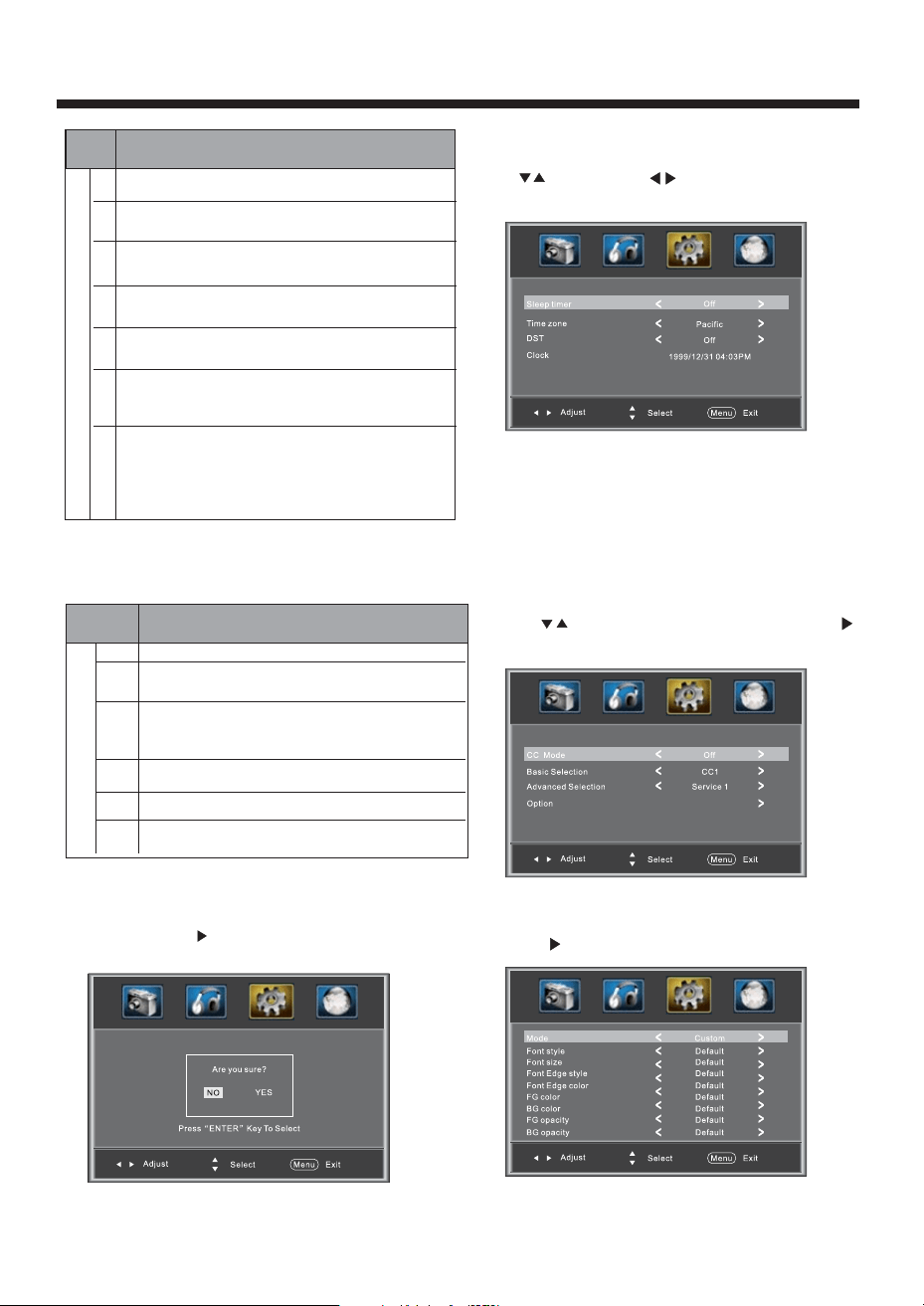
Change Password:
Press button, the screen will display as follow:
2).New password: Input the new password
3).Confirm password: Input the new password again
1).Old password: Input the old password
P.G Switching:
When the switch is ON, the below
options listed below can beadjusted.
Parental Control
US: Press button, the screen will display as
follow:
1:TV: Press button, the screen will display as
follows:
And use the ENTER key to switch lock/ unlock
feature.
Parental
Control
Rating Content
FV
(Fantasy
violence)
V
(Violence)
S
(Sexual
situation)
L
(Adult
language)
D
(Sexually
suggestive
dialog)
Suggested
age
TV-Y (All
children)
TV-Y7(Direct to
order children)
TV-G(General
audience)
TV-PG(Parental
Guidance
suggested)
TV-14(Parents
strongly
cautioned)
TV-MA(Mature
audience only)
X
X
X
X
X
X
X
X
X
X
X
X
Content
2).MPAA: Switching the movie-rating control level;
N/A, G, PG, PG-13, R, NC-17, X.
Rating
Description
Age
G General audiences,All Ages admitted
PG
Parental Guidance suggested. Some material may not be
Suitable for children.
PG-13
Parents strongly cautioned. Some material .may be
Inappropriate for children under 13.
R
NC-17
X
Restrict. Under 17 requires accompanying parent or adult
guardian(age varies in some jurisdictions)
No one 17 and under admitted.
X is an order rating that is unified with NC-17 but may be
encoded in the data of order movies.
Canada: Press button, the screen will be
displayed as follow:
1): Canada English: Switching the English rating control
level: EXEMPT, C, C8+, G, PG, 14+, 18+.
-13-
OPERATION
Rating
Description
Age
E Exempt: Includes news, sports, documents and other information
programming: talk shows, music videos, and variety programming.
C Children: Intended for younger children under the age of 8 years.
Pays careful attention to themes that could threaten their sense of
securityand well-being.
C8+ Children over 8 years old: Contains no portrayal of violence as the
preferred, acceptable, or only way to resolve conflict; nor encourage
children to imitate dangerous acts which they may see on the screen .
G General: Considered acceptable for all age groups, Appropriate
viewing for the entire family, contains very little violence, physical,
verbal or emotional.
PG Parental Guidance: Intended for a general audience, but may not be
suitable for younger children (under the age of 8) because it could
contain controversial themes or issues.
14+ Over 14 Years: Could contain themes where violence is one of the
dominant elements of the storyline But it must be integral to the
devel opment of plot or character. Language usage could be profane
and nudity , present within the context of theme.
18+ Adults: Intended for viewers 18 years and older and might contain
depictions of violence, which while related to the development of
plot, character or themes, are intended for adult viewing. Could
contain graphic language and portrayals of secretary and nudity.
2).Canada French: Switching the French-rating control
level: E, G, 8ANS+, 13 ANS+, 16ANS+, 18ANS+.
Rating
Description
Age
E Exempt programming
G General :All ages and children, contains minimal direct violence,
but may be integrated into the plot in a humorous or unrealistic
manner .
8ans+ General but inadvisable for young children :May be viewed by a
wide public audience, but could contain scenes disturbing to
children under 8 who cannot distinguish between imaginary and
real situations. Recommended for viewing with paren.
13ans+ Over 13 years: Could contain scenes of frequent violent scenes
and in tense violence.
16ans+ Over 16 years: Could contain frequent violent scenes and violence.
18ans+ Over 18 years: Only for adult viewing. Could contain frequent
violent scenes and extreme violence.
Reset RRT: Press button, the screen will be
displayed as follow:
RRT setting: in ATSC digital TV mode, it can be
adjusted
3.2 Timer
You can adjust the timer here.
Press to select, press to adjust, press MENU
to exit.
Sleep Timer: Adjust this item to set the sleep timer.
Note:
Time zone, DST and the clock are available in ATSC
programming only, and the Clock can't be adjust.
2):Option: Used to edit CC font.
Press button, the screen will display as follow:
NOTE: Only ATSC program is available.
1):Advanced selection: onlyATSC program is available.
3.3 Closed Caption: Switching close caption mode.
Press button to select Closed Caption, Press
button, the screen will display as follow:
-14-
OPERATION
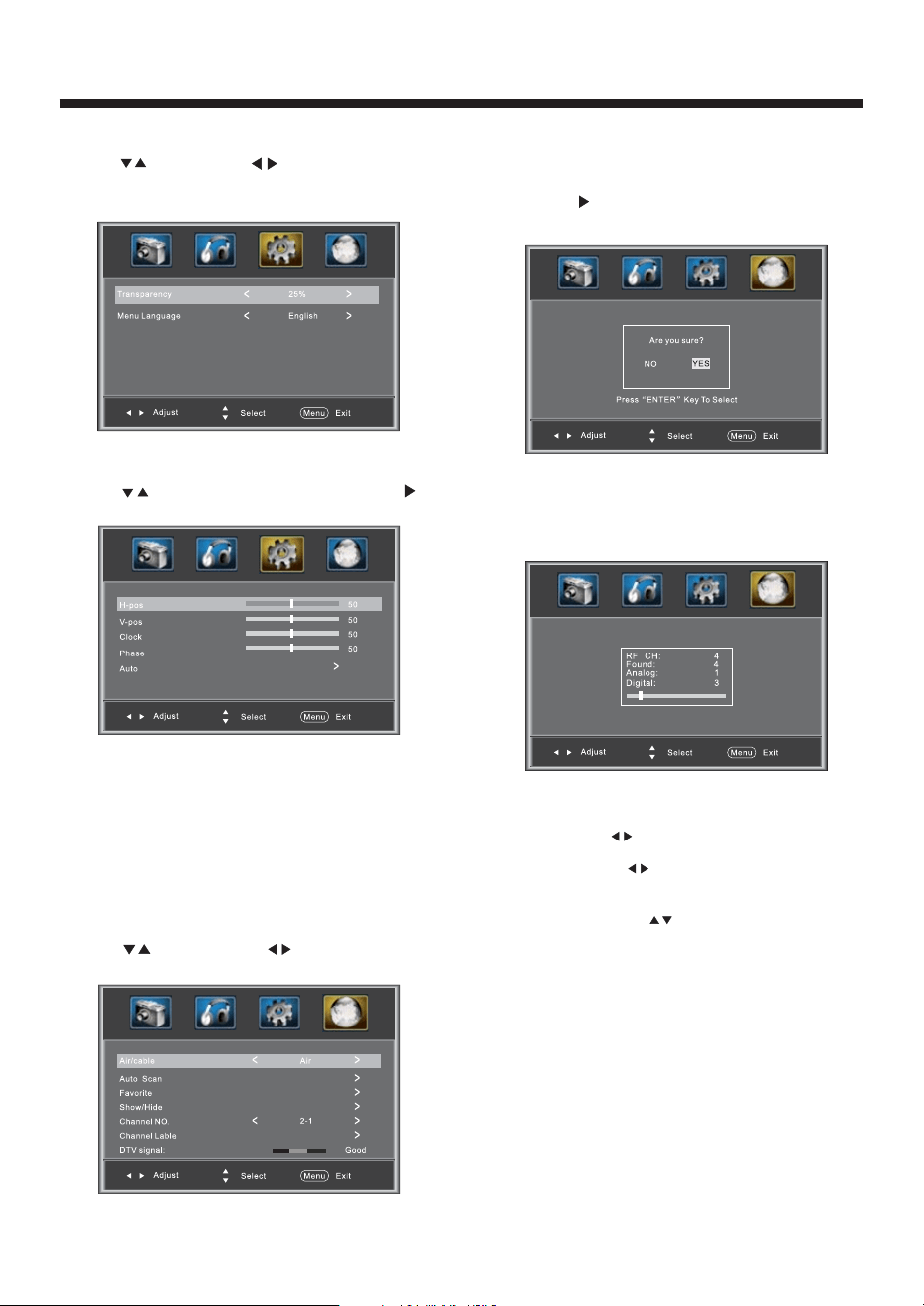
1). Air/Cable: select Air TV signal and cable TV signal.
2). Auto Scan: If it's the first time you use the TV, you
should scan all the TV channels first,
press the button to confirm, you will see the
menu:
select yes item and
“”
press the ENTER button to
confirm, You will see the message below which
indicates auto search is in process.
3). Favorite: Press button to choose/delete the
favorite channel .
4). Show/Hide: Press button to display or hide
current channel.
5). Channel NO. :Display the current channel number.
6). Channel label: Press button to edit current channel
name.
7). DTV signal: Display DTV strength signal. It can't be
selected and adjusted.
3.5 VGA Settings: When PC Mode is available.
1).H-Pos: Adjust the horizontal position of the screen.
2).V-Pos: Adjust the vertical position of the screen.
3).Clock: Fine tune the screen width.
4).Phase: Fine tune the phase of the screen. Usually
don't adjust this item.
5).Auto: Auto adjust to fit the screen.
Press button to select VGA Settings, Press
button, the screen will display as follow:
4. Channel MENU
The fourth item of the MENU is Channel MENU.
You can adjust digital and analog TV Channels.
Press to select, press to adjust.
3.4 Menu Settings
You can adjust the Menu Settings here.
Press to select, press to adjust, press MENU
to exit.