User Manual
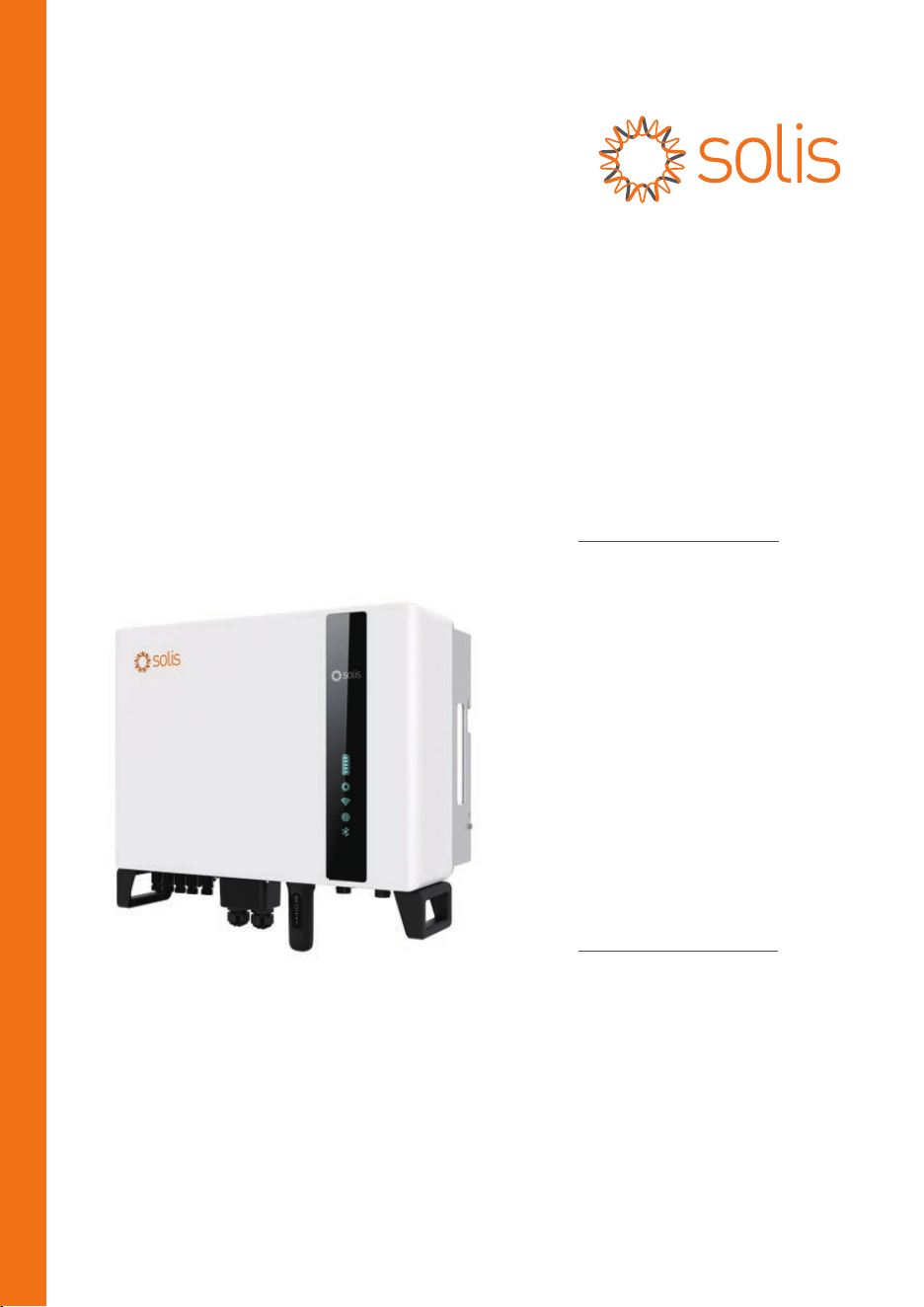
for S6 Series Hybrid Inverter
Version 1.8, Release Date: 08,2024
Applicable models
S6-EH3P5K2-H
S6-EH3P6K2-H
S6-EH3P8K2-H
S6-EH3P10K2-H
S6-EH3P3K-H-EU
S6-EH3P4K-H-EU
S6-EH3P5K-H-EU
S6-EH3P6K-H-EU
S6-EH3P8K-H-EU
S6-EH3P10K-H-EU
S6-EH3P7K-H-LV
Applicable System
Three phase system

02
04
07
09
09
10
17
22
04
02
03
07
13
31
1.1 Product Description
…………………………………………………………………………………
…………………………………………………………………………………………………………
…………………………………………………………………………………………………
…………………………………………………………………………………………………………………………………………
………………………………………………………………………………………………
……………………………………………………………………………………
…………………………………………………………………………………………………
………………………………………………………………………………………………………………
………………………………………………………………………………………………………………………………
…………………………………………………………………………………………………………………………………
……………………………………………………………………………………………………………………………………
1. Introduction
1.2 Packaging
2. Safety & Warning
2.1 Safety
2.2 General Safety Instructions
3. Overview
3.1 Intelligent LED Indicators
4.10 Inverter Remote Monitoring Connection
4. Installation
4.1 Select a Location for the Inverter
4.2 Mounting the Inverter
4.4 PV Input Cable Installation
4.6 AC Cable Installation
4.7 Communication Cable Installation
………………………………………………………………………………………………………………
…………………………………………………………………………………………………………………………………
04
2.3 Notice For Use
06
…………………………………………………………………………………………………………………………
……………………………………………………………………………………………………………
…………………………………………………………………
16
4.5 Battery Power Cable Installation
……………………………………………………………………………………
27
4.8 Meter Installation
……………………………………………………………………………………………………………………
32
…………………………………………………………………………………
5. Commissioning & Shutdown
7. Troubleshooting
…………………………………………………………………………………………………………………
40
45
………………………………………………………………………………………………………………………
8. Specifications
39
…………………………………………………………………………………………………………………………
6. Maintenance
12
4.3 PE Cable Installation
…………………………………………………………………………………………………………
32
5.1 Preparation of Commissioning
………………………………………………………………………………………
32
5.2 Commissioning Procedure
………………………………………………………………………………………………
35
5.3 Shutdown Procedure
…………………………………………………………………………………………………………
Contents
2.4 Notice for Disposal
06
………………………………………………………………………………………………………………
3.2 Password Reset
3.3 Inverter built-in Bluetooth description
08
……………………………………………………………………………………………………………………
08
…………………………………………………………………………
30
4.9 Parallel System Wiring
……………………………………………………………………………………………………
36
5.4 Work Mode
…………………………………………………………………………………………………………………………………
38
5.5 Parallel Settings
…………………………………………………………………………………………………………………
1. Introduction
2
User Manual
1.1 Product Description
The Solis S6 Series is designed for residential hybrid systems, which can work with
batteries to optimize self-consumption. The unit can operate in both off- and on-grid
modes.
This manual covers the Solis S6 Series inverter model listed below:
S6-EH3P5K2-H, S6-EH3P6K2-H, S6-EH3P8K2-H, S6-EH3P10K2-H, S6-EH3P5K-H-EU,
S6-EH3P6K-H-EU, S6-EH3P8K-H-EU, S6-EH3P10K-H-EU, S6-EH3P7K-H-LV
The following models are exclusively for the Polish market:
S6-EH3P3K-H-EU, S6-EH3P4K-H-EU
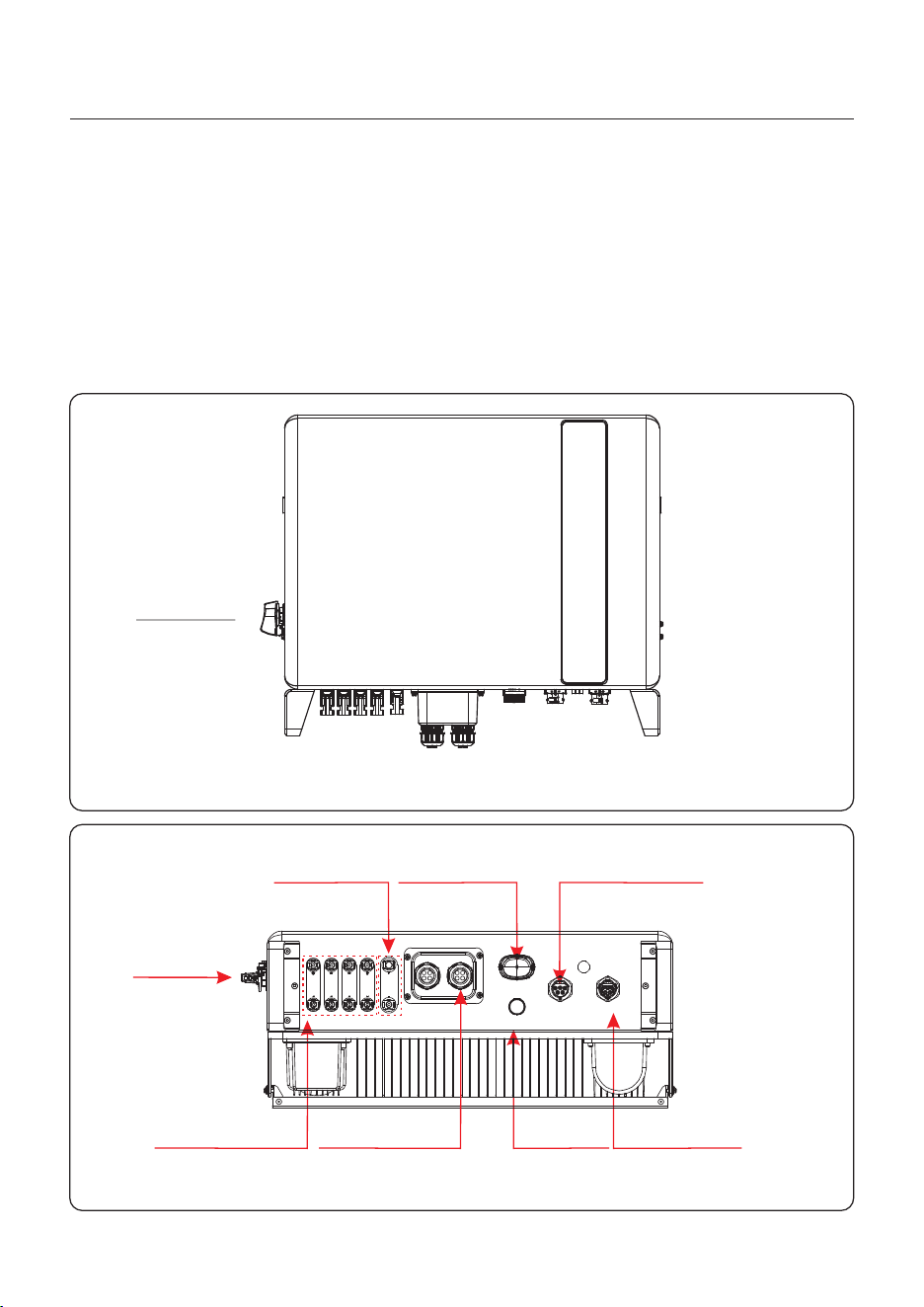
Figure 1.1
Front side view
Figure 1.2
Bottom side view
DC Switch
AC Grid Port
AC Backup Port
Data Logging
Stick (Optional)
AntennaPV Input
Battery Input
AC- GRIDAC- BACKU P
ANT ENNA
COM
PV1 PV2 PV3 PV4 BAT
DC Switch
Communication
1. Introduction
User Manual
3
1.2 Packaging
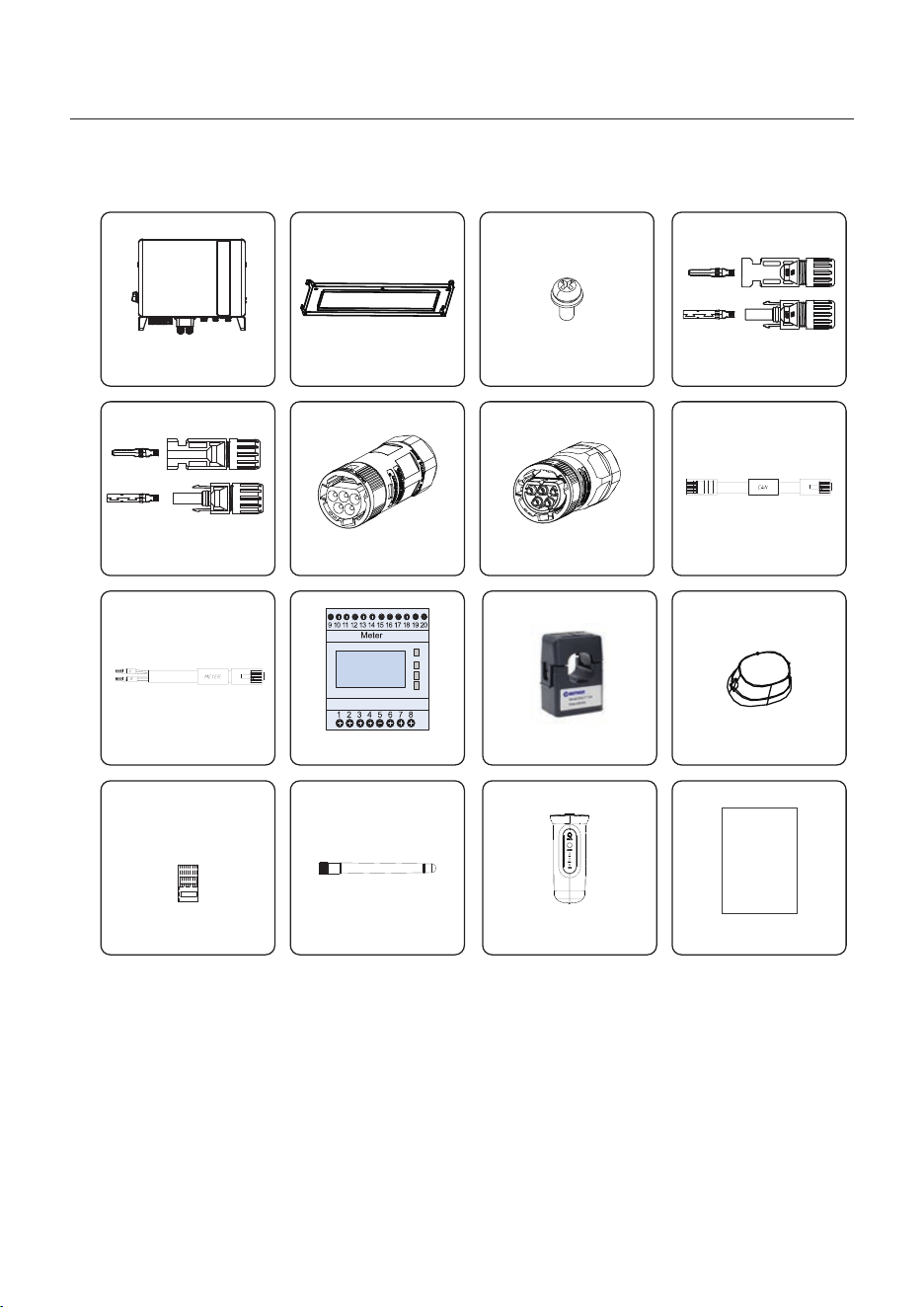
Please ensure that the following items are included in the packaging with your machine:
Inverter x1
Back Plate x1
Fixing Screws(M4*12) x4
Dust Cover x1
CT x3
Eastron Meter x1
Meter cable x1
If anything is missing, please contact your local Solis distributor.
User Manual x1
Manual
Bluetooth Antenna x1
RJ45 connector x6
AC Backup x1
AC Grid x1
CAN cable x1
PV Connector x4
Data Logging Stick (Optional) x1
Battery Connector x1
2. Safety & Warning
User Manual
4
2.1 Safety
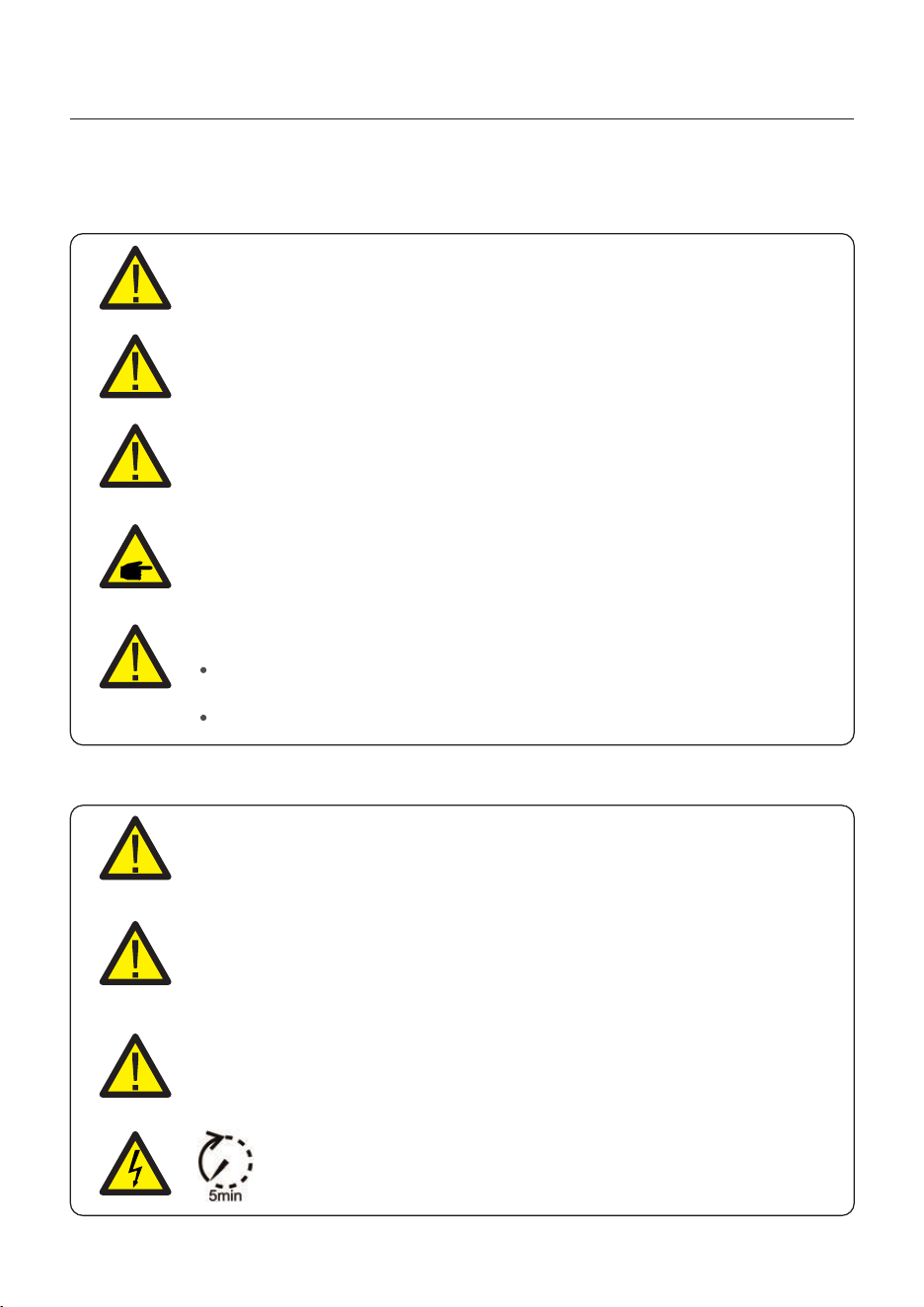
The following types of safety instructions and general information appear in this document as
described below:
CAUTION:
“Caution” indicates a hazardous situation which if not avoided, could result
in minor or moderate injury.
WARNING:
“Warning” indicates a hazardous situation which if not avoided, could result
in death or serious injury.
DANGER:
“Danger” indicates a hazardous situation which if not avoided, will result in
death or serious injury.
NOTE:
“Note” provides tips that are valuable for the optimal operation of your
product.
2.2 General Safety Instructions
WARNING:
Electrical installations must be done in accordance with the local and national
electrical safety standards.
WARNING:
Please don’t connect PV array positive (+) or negative (-) to ground, it could
cause serious damage to the inverter.
WARNING:
Only devices in compliance with SELV (EN 69050) may be connected to the
RS485 and USB interfaces.
WARNING:
Do not touch any inner live parts until 5 minutes after disconnection
from the utility grid and the PV input.
WARNING: Risk of fire
Despite careful construction, electrical devices can cause fires.
Do not install the inverter in areas containing highly flammable materials
or gases.
Do not install the inverter in potentially explosive atmospheres.
2. Safety & Warning
User Manual
5
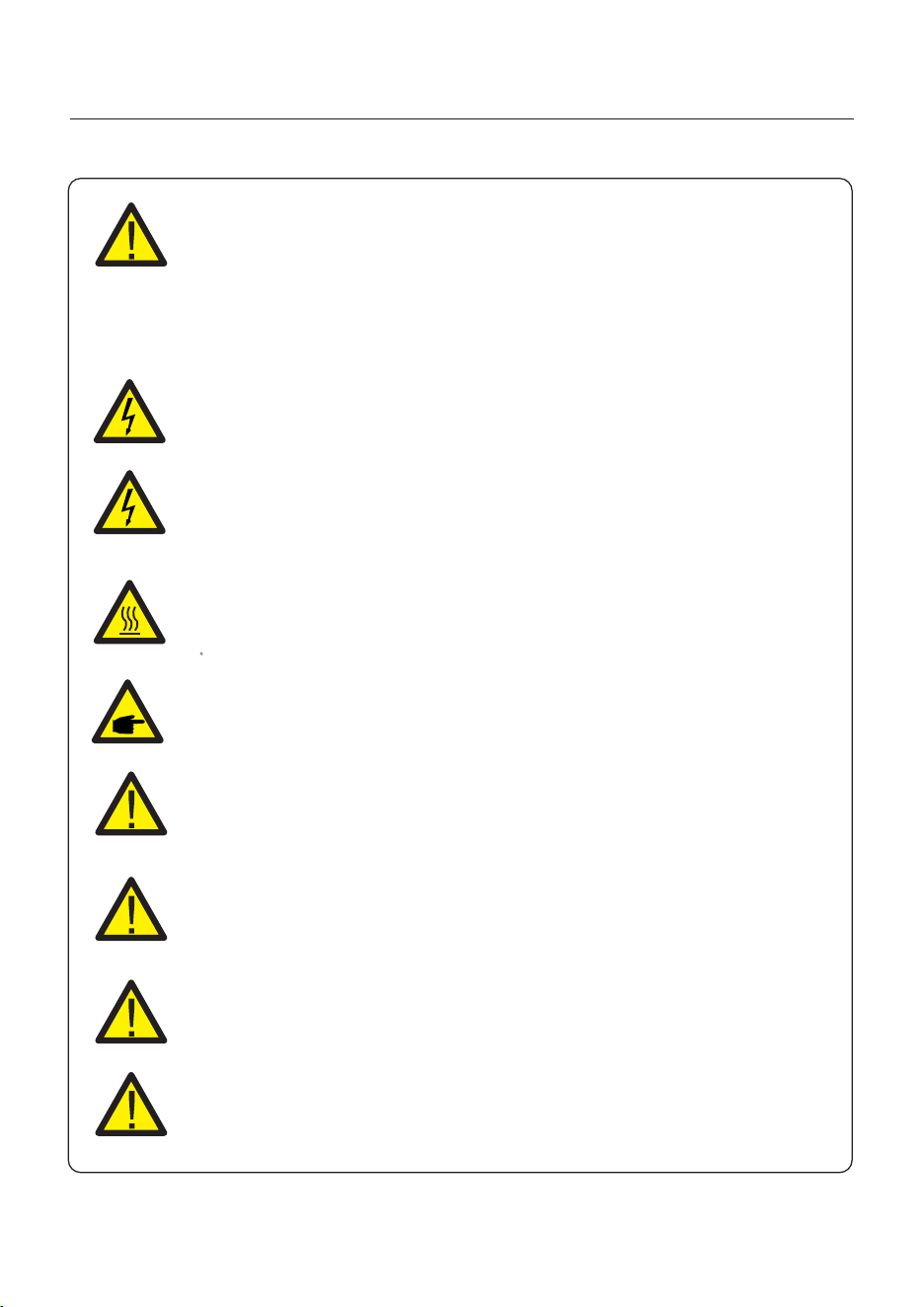
CAUTION:
The PV array supplies a DC voltage when they are exposed to sunlight.
CAUTION:
The surface temperature of the inverter can reach up to 75℃ (167 F).
To avoid risk of burns, do not touch the surface of the inverter while it’s
operating. Inverter must be installed out of the reach of children.
WARNING:
To reduce the risk of fire, over-current protective devices (OCPD) are
required for circuits connected to the inverter.
The DC OCPD shall be installed per local requirements. All photovoltaic
source and output circuit conductors shall have that comply with isolators
the NEC Article 690, Part II.
CAUTION:
Risk of electric shock, do not remove cover. There is no user serviceable
parts inside, refer servicing to qualified and accredited service technicians.
NOTE:
PV module used with inverter must have an IEC 61730 Class A rating.
WARNING:
Operations below must be accomplished by licensed technician or
Solis authorized person.
WARNING:
Operator must put on the technicians’ gloves during the whole process
in case of any electrical hazards.
WARNING:
AC BACKUP Port of S6 Series is not allowed to connect to the grid.
WARNING:
Please refer to the specification of the battery before configuration.
2. Safety & Warning
User Manual
6
2.3 Notice for Use
The inverter has been constructed according to the applicable safety and technical
guidelines. Use the inverter in installations that meet the following specifications ONLY:
1. Permanent installation is required.
2. The electrical installation must meet all the applicable regulations and standards.
3. The inverter must be installed according to the instructions stated in this manual.
4. The inverter must be installed according to the correct technical specifications.
2.4 Notice for Disposal
This product shall not be disposed of with household waste.
They should be segregated and brought to an appropriate collection
point to enable recycling and avoid potential impacts on the environment
and human health.
Local rules in waste management shall be respected .
User Manual
3. Overview
7
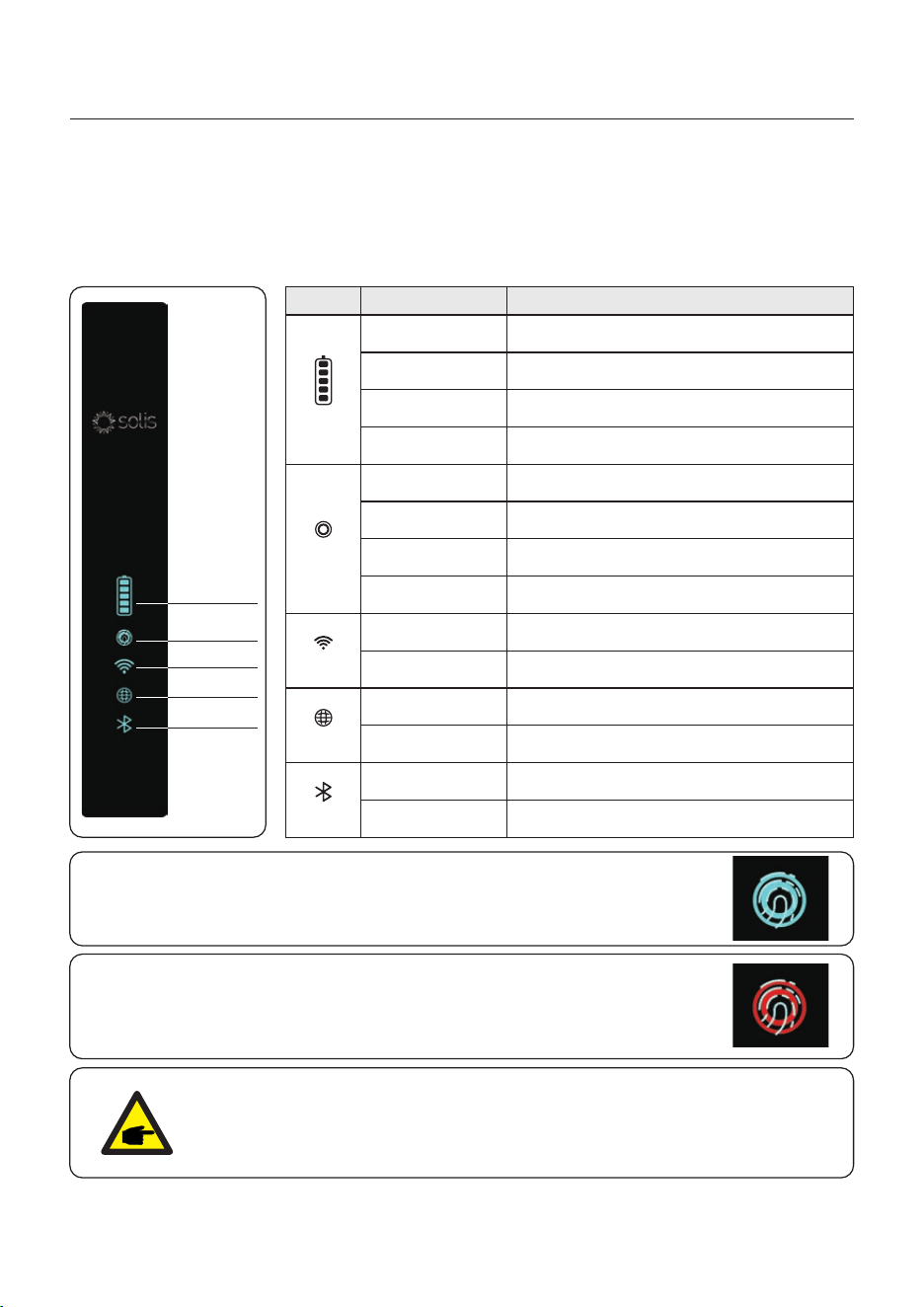
3.1 Intelligent LED Indicators
There are five indicators on the Inverter (Battery, Power, WiFi, Ethernet and The Solis S6 Series
Bluetooth) which indicate the working status of the inverter.
The Bluetooth Antenna or WiFi datalogger shall be installed at the Antenna/COM port of the
hybrid inverter before local debugging.
Battery
Power
WiFi
Bluetooth
RS485
NOTE:
Battery/WiFi/Ethernet/Bluetooth indicators will automatically turn off after
1 minute. The Power indicator will remain on with lower brightness. Short
press the Power indicator can wake up all indicators.
Light Status Description
Blue
Flashing every 3s
Blue
Flashing every 1.5s
Blue
Solid ON
OFF
Blue
Solid ON
Yellow
Solid ON
RedSolid ON or
flashing every 3s
OFF
OFF
OFF
Battery discharging.
Battery charging.
Idle.
No Battery or not working.
Normally Operating.
Warning.
Alarm.
COM Port is using.
RS485 Port is using.
Bluetooth Port is using.
COM Port is not used.
RS485 Port is not used.
Bluetooth Port is not used.
Blue
Solid ON
Blue
Solid ON
Blue
Solid ON
Power
WiFi
RS485
Bluetooth
Battery
Turning On the LED Indicator Lights
After a few minutes, the LED indicator lights will turn off to conserve power.
To turn the lights back on, short-press the Inverter LED light.
Alarm State
When the inverter has an alarm, the Inverter LED light turns red and
starts flashing. It is recommended to connect to the inverter with the
Bluetooth tool. Then you can determine what the alarm code is.
OFF
No Battery or not working.

User Manual
3. Overview
When the password of the owner or the installer needs to be reset,please long press the
Inverter indicator for 5s.
If the reset command is successfully triggered,the status indicator will be blue and blink
for 3s at the frequency of 0.5s, then restore the original state of the indicator.
If the command fails to be triggered,the status indicator will be yellow and blink for 3s at
the frequency of 0.5s,then restore the original state of the indicator.
If the command is successfully triggered,the Bluetooth password can be reset in the APP.
3.2 Password Reset
3.3 Inverter built-in Bluetooth description
Blueooth: BDR、EDR、BLE
frequency band(s) in which the radio equipment operates:2400-2483.5MHZ
Maximum transmitting power: 4dBm
Hereby, Ginlong Technologies Co.,Ltd.declares that the radio equipment type hybrid
inverter is in compliance with Directive 2014/53/EU
8
User Manual
9
4.1 Select a Location for the Inverter
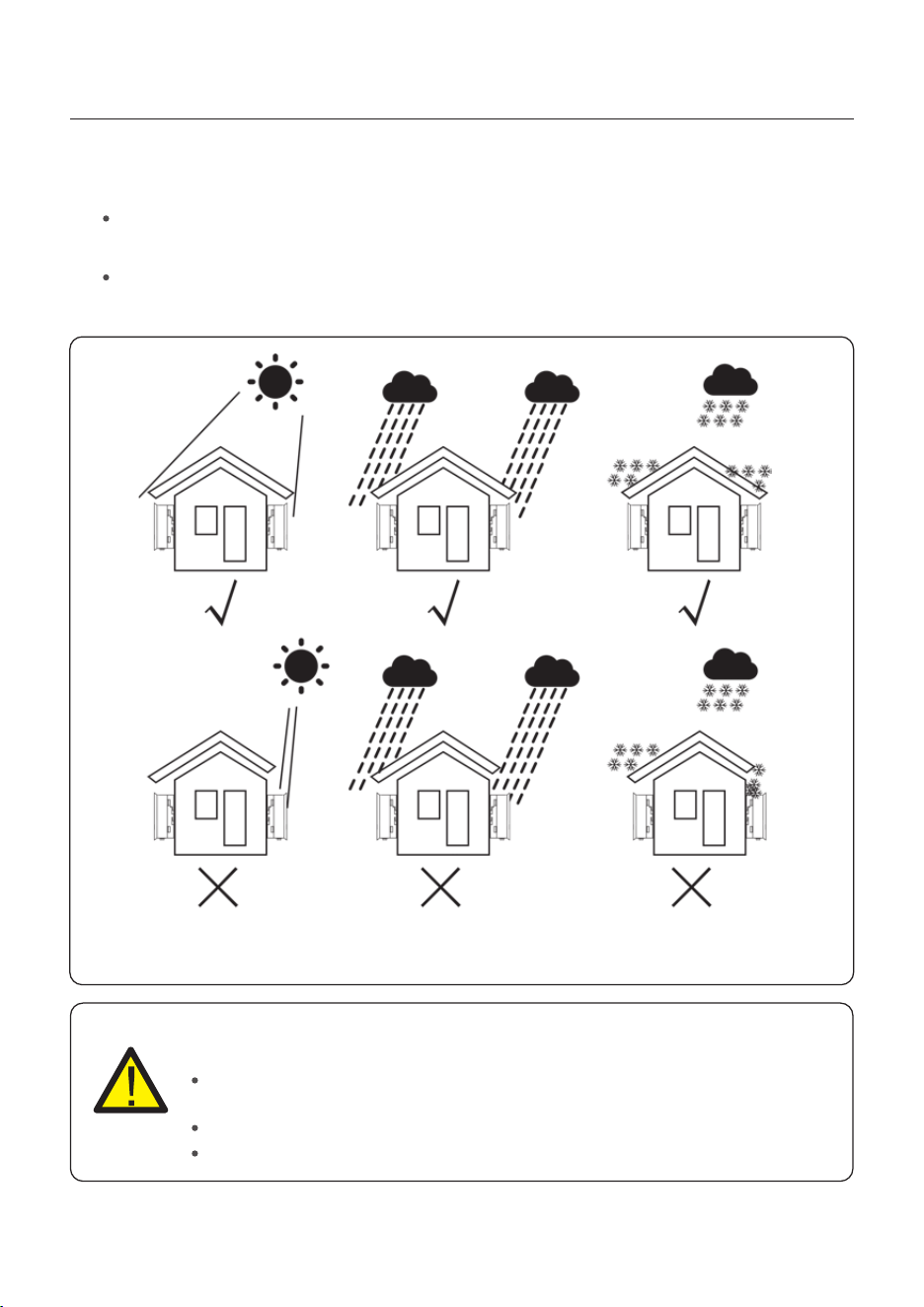
Figure 4.1 Recommended Installation locations
To select a location for the inverter, the following criteria should be considered:
WARNING: Risk of fire
Despite careful construction, electrical devices can cause fires.
Do not install the inverter in areas containing highly flammable materials or
gases.
Do not install the inverter in potentially explosive atmospheres.
The mounting structure where the inverter is installed must be fireproof.
4. Installation
Exposure to direct sunlight may cause output power derating. It is recommended to
avoid installing the inverter in direct sunlight.
It is recommended that the inverter is installed in a cooler ambient which doesn't
exceed 104℉/40℃.
User Manual
4. Installation
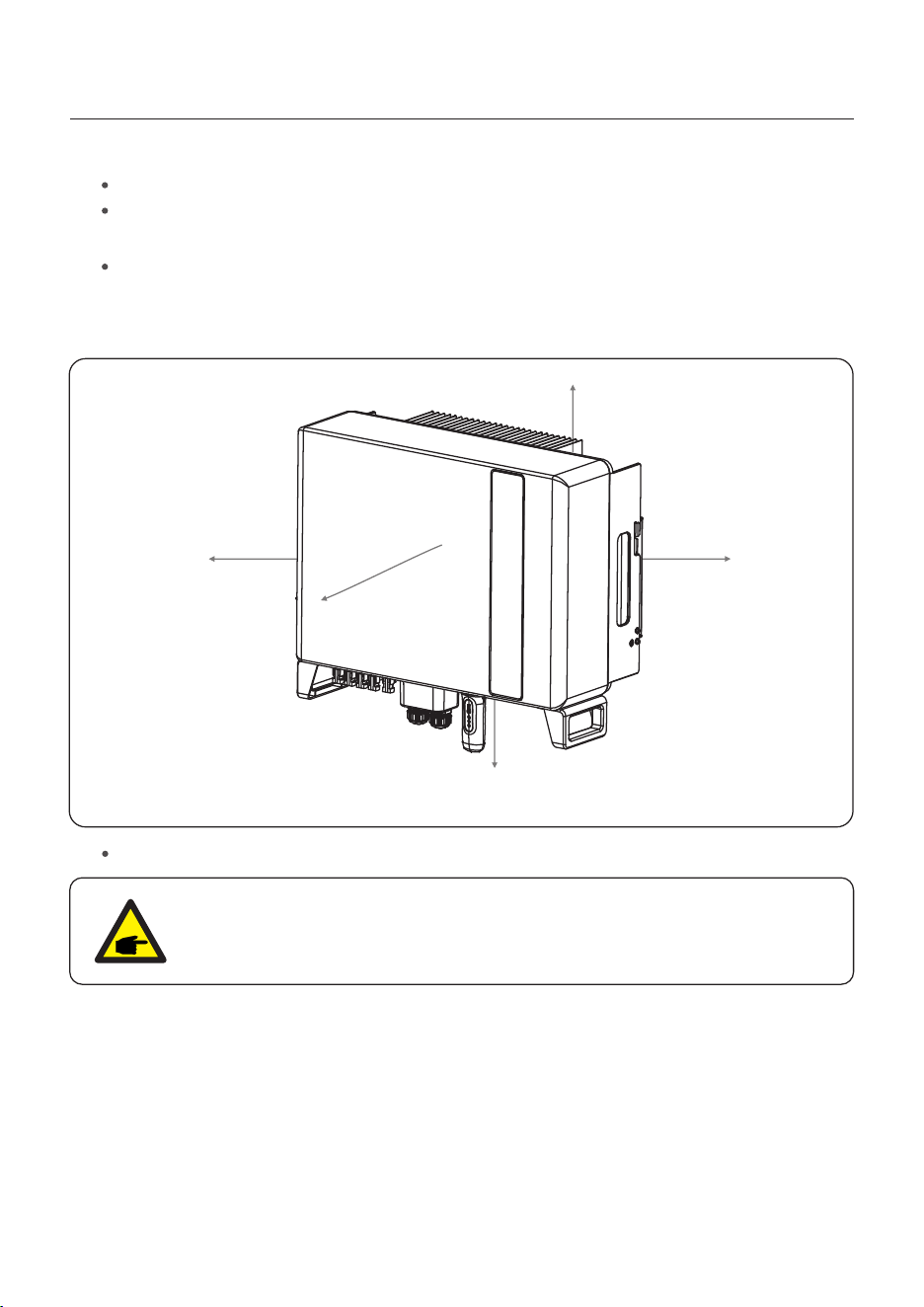
To avoid overheating, always make sure the flow of air around the inverter is not
blocked. A minimum clearance of 200mm should be kept between inverters or
objects and 200mm clearance between the bottom of the machine and the ground.
Adequate ventilation must be provided.
NOTE:
Nothing should be stored on or placed against the inverter.
Install vertically with a maximum incline of +/- 5 degrees, exceeding this may cause
output power derating.
Figure 4.2 Inverter Mounting clearance
Install on a wall or strong structure capable of bearing the weight of the machine (24kg).
≥
200mm
≥200mm
≥200mm
≥200mm ≥200mm
10
User Manual
4. Installation
11
4.2 Mounting the Inverter
The inverter shall be mounted vertically.
The steps to mount the inverter are listed below:
1. Select the mounting height of the bracket and mark the mounting holes.
For brick walls, the position of the holes should be suitable for the expansion bolts.
WARNING:
The inverter must be mounted vertically.
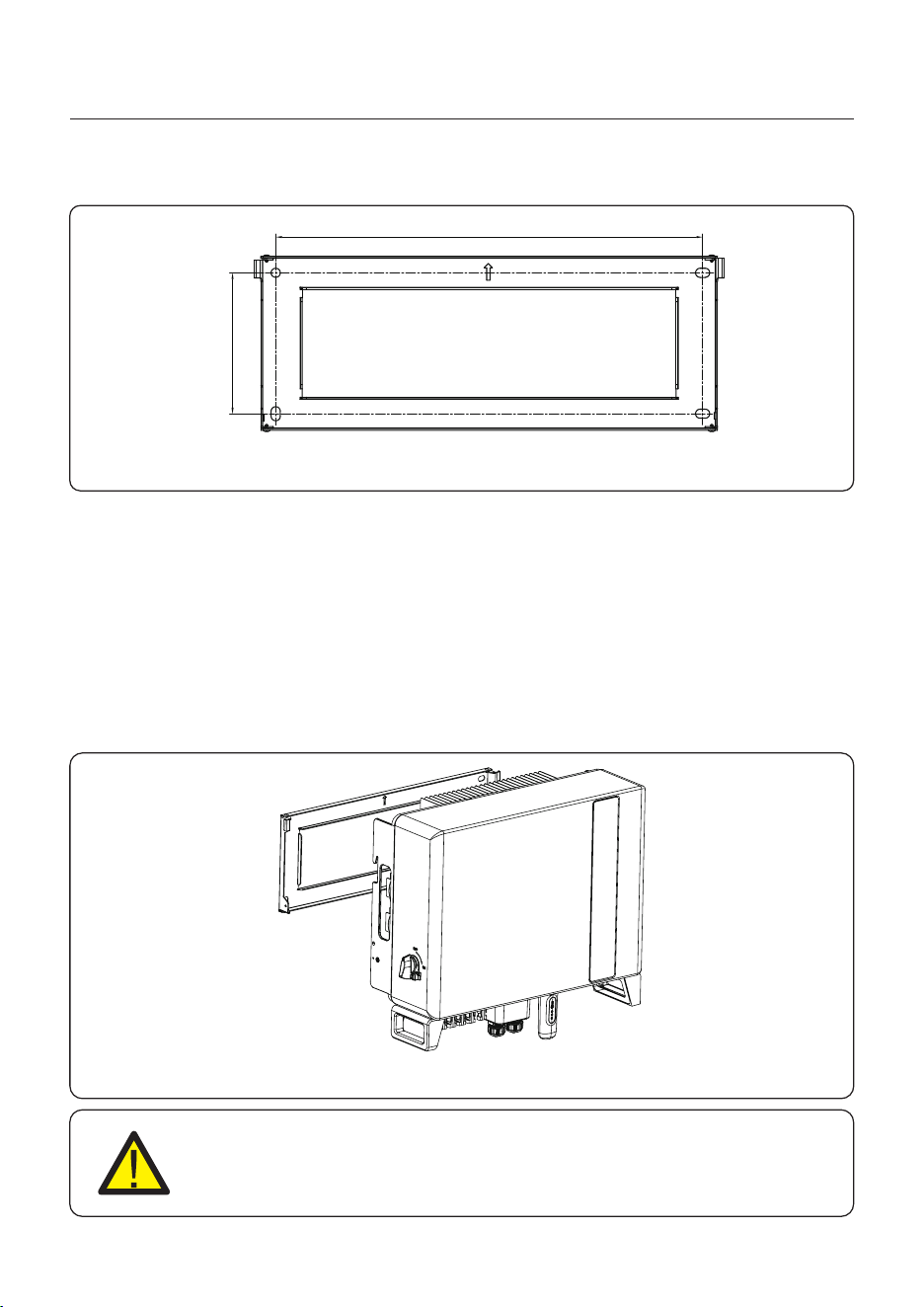
Once a suitable location has be found accordingly to 4.1 using figure 4.3 mount the wall
bracket to the wall.
Dimensions of mounting bracket:
Figure 4.3 Inverter wall mounting
515
170
unit:mm
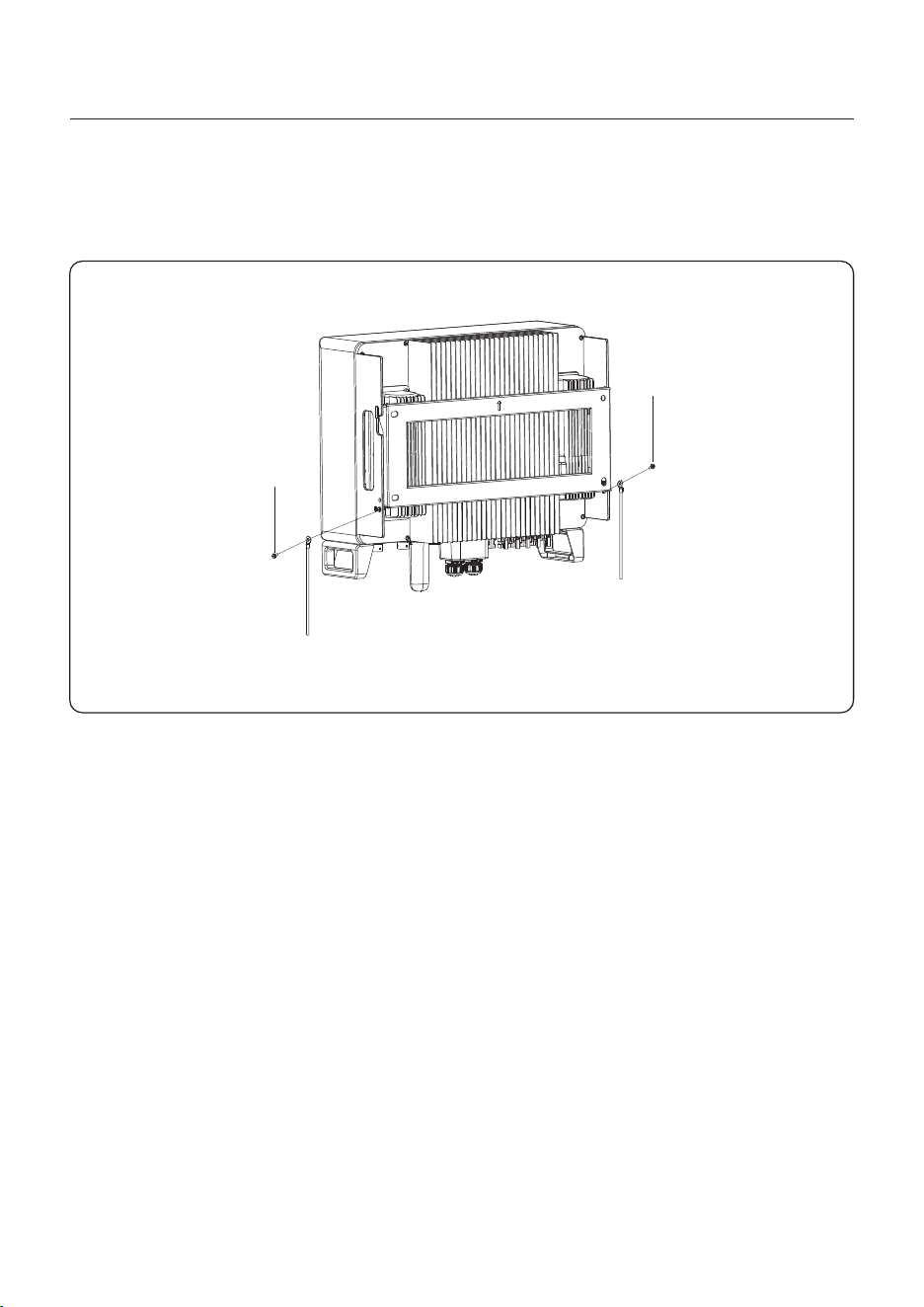
Figure 4.4 Wall Mount Bracket
2. Lift up the inverter (be careful to avoid body strain), and align the back bracket on the
inverter with the convex section of the mounting bracket. Hang the inverter on the
mounting bracket and make sure the inverter is secure (see Figure 4.4)
User Manual
4. Installation
12
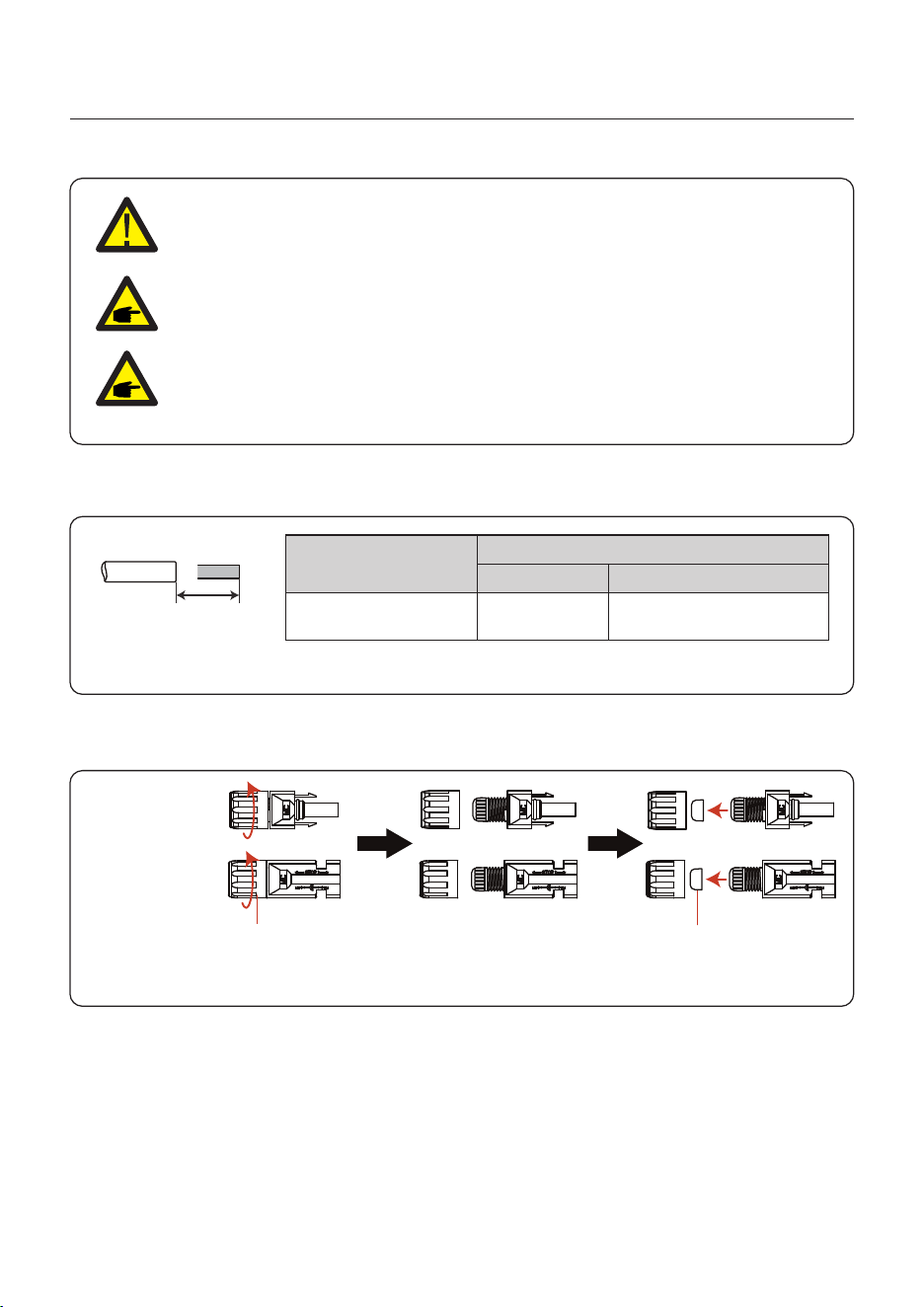
An external ground connection is provided at the right side of inverter.
Prepare OT terminals: M4. Use proper tooling to crimp the lug to the terminal.
Connect the OT terminal with ground cable to the right side of inverter. The torque is 2N.m.
4.3 PE Cable Installation
Grounding screw
Grounding screw
Figure 4.5 Connect the external grounding conductor
User Manual
4. Installation
13
4.4 PV Input Cable Installation
Negative terminal
Positive terminal
Before connecting inverter, please make sure the PV array open circuit
voltage is within the limit of the inverter.
Please use approved DC cable for PV system.
4.0~6.0
4.0(12AWG)
(12~10AWG)
Cable type
Cross section(mm²)
Range
Industry generic P V cable
Recommended value
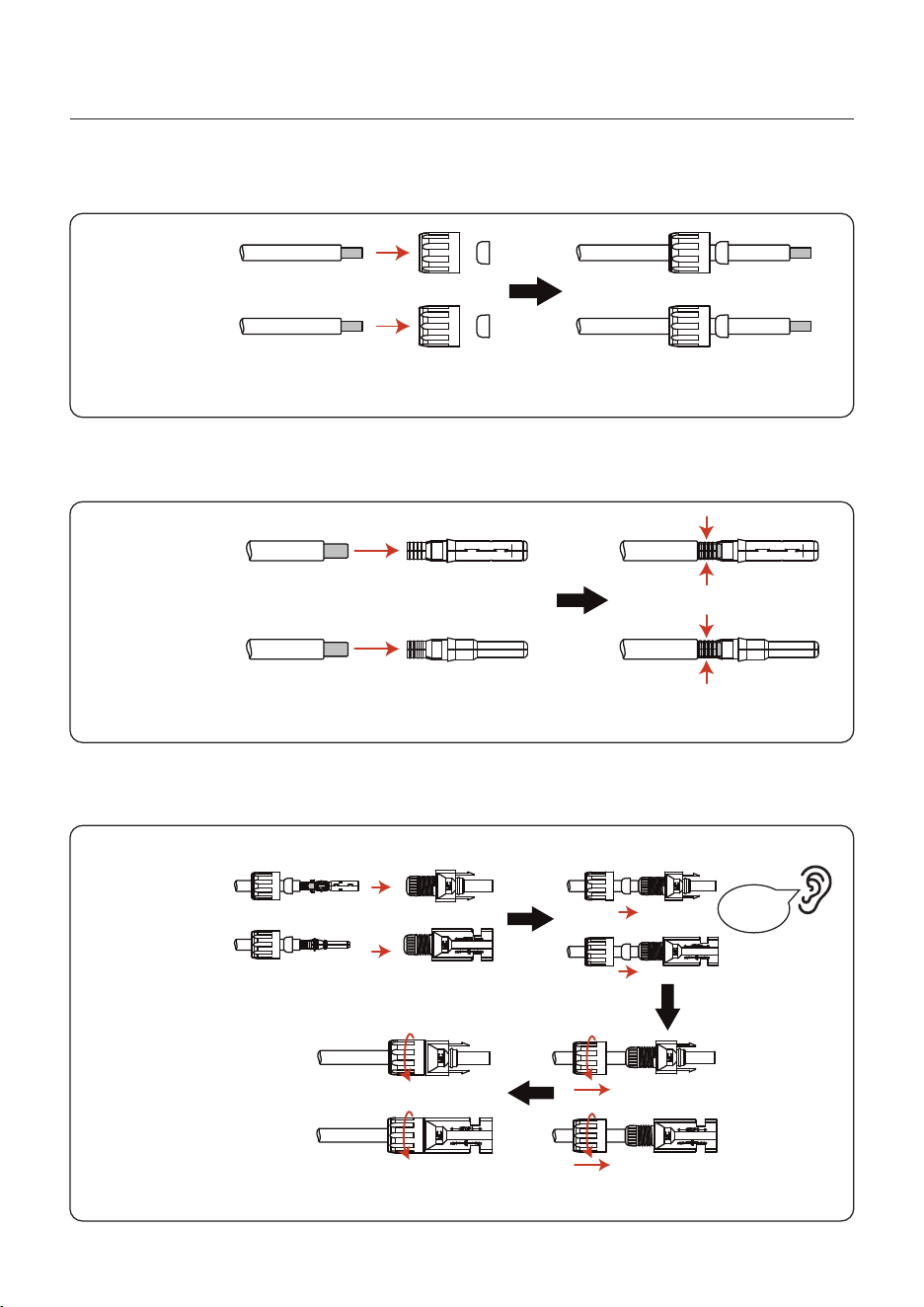
1. Select a suitable DC cable and strip the wires out by 7±0.5mm. Please refer to the table
below for specific specifications.
7±0.5mm
2. Take the DC terminal out of the accessory bag, turn the screw cap to disassemble it,
and take out the waterproof rubber ring.
Nut Waterproof collar
Figure 4.6
Figure 4.7
Before connection, please make sure the polarity of the output voltage of
PV array matches the“DC+”and“DC-”symbols.
User Manual
4. Installation
14
Negative terminal
Positive terminal
3. Pass the stripped DC cable through the nut and waterproof rubber ring.
4. Connect the wire part of the DC cable to the metal DC terminal and crimp it with a special
DC terminal crimping tool.
Negative terminal
Positive terminal
Squeeze
5. Insert the crimped DC cable into the DC terminal firmly, then insert the waterproof rubber
ring into the DC terminal and tighten the nut.
Tighten
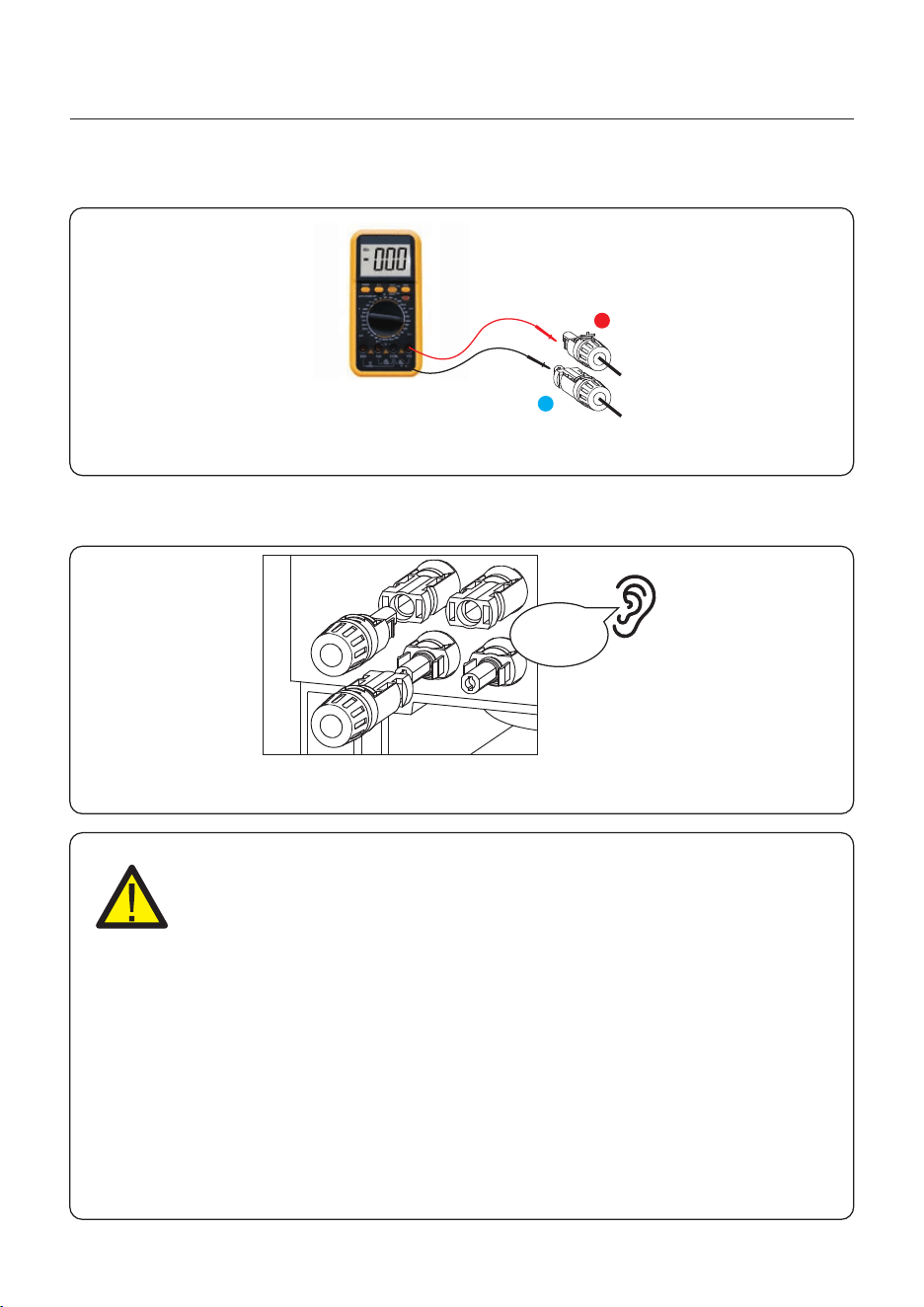
After you hear a "click", pull gently to check for a firm engagement.
Click
Negative terminal
Positive terminal
Figure 4.8
Figure 4.9
Figure 4.10
User Manual
4. Installation
15
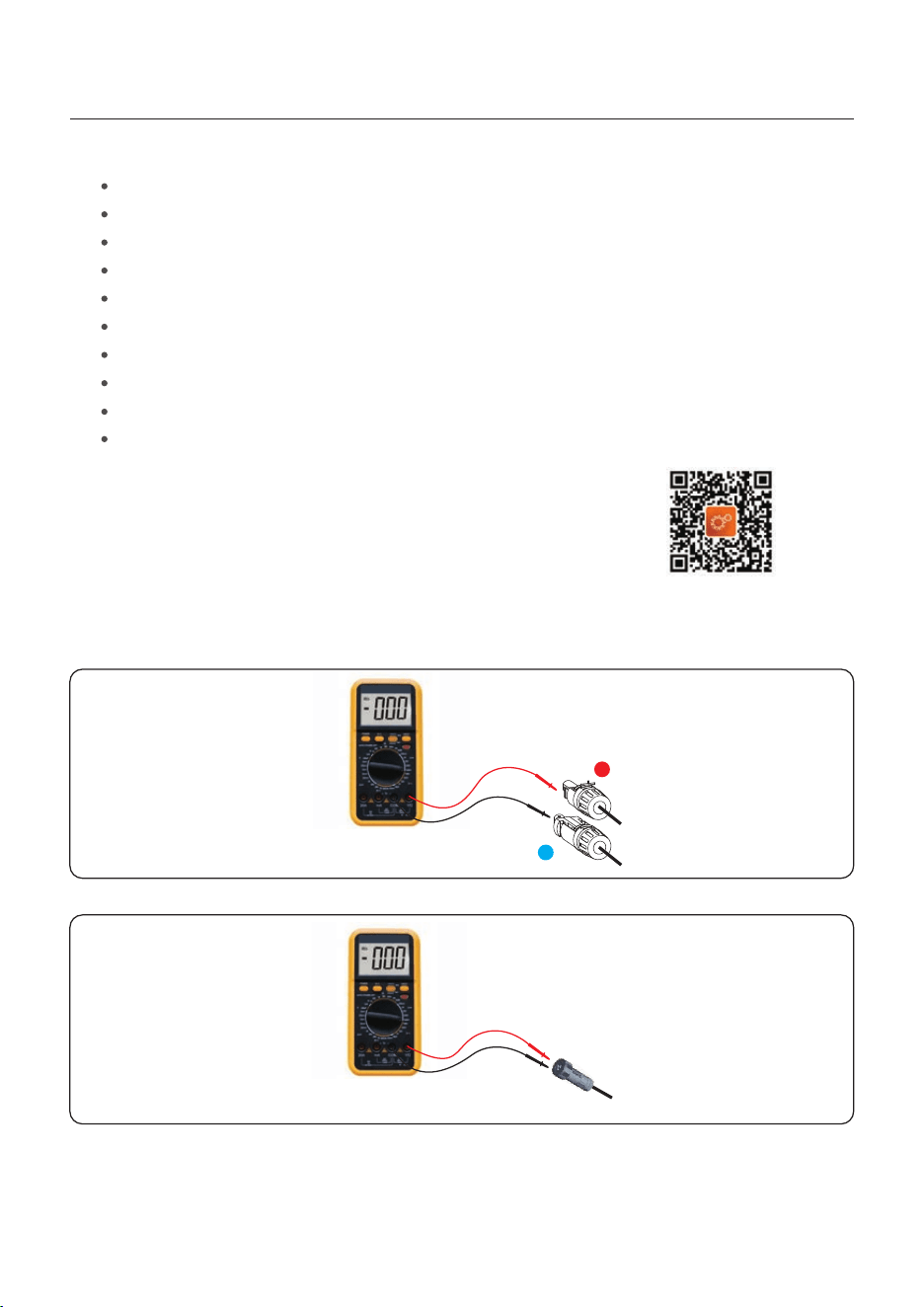
6. Measure PV voltage of DC input with multimeter, verify DC input cable polarity.
7. Connect the wired DC terminal to the inverter as shown in the figure, and a slight
"click" is heard to prove the connection is correct.
+
-
CAUTION:
If DC inputs are accidently reversely connected or inverter is faulty or not
working properly, it is NOT allowed to turn off the DC switch. Otherwise it
may cause DC arc and damage the inverter or even lead to a fire disaster.
The correct actions are:
*Use a clip-on ammeter to measure the DC string current.
*If it is above 0.5A, please wait for the solar irradiance reduces until the
current decreases to below 0.5A.
*Only after the current is below 0.5A, you are allowed to turn off the DC
switches and disconnect the PV strings.
* In order to completely eliminate the possibility of failure, please disconnect
the PV strings after turning off the DC switch to aviod secondary failures due
to continuous PV energy on the next day.
Please note that any damages due to wrong operations are not covered in
the device warranty.
Figure 4.11
Figure 4.12
Click
User Manual
4. Installation
16
4.5 Battery Power Cable Installation
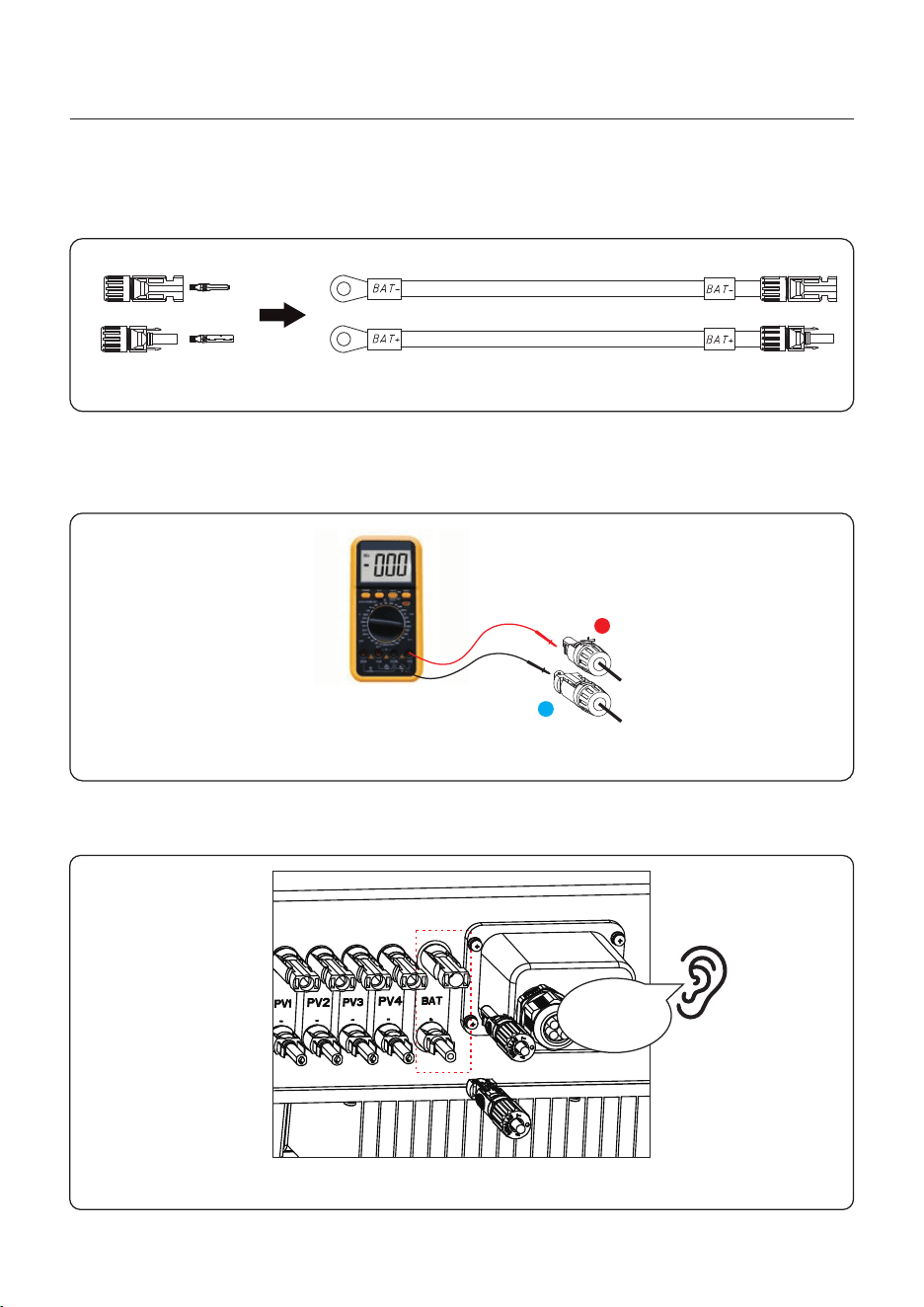
1. Take out the two battery connectors from the package and crimp them as shown in the
Figure 4.13.
Figure 4.13
2. Connect the battery ends to the battery module positive and negative terminals.
3. Measure DC voltage of DC input with multimeter, verify DC input cable polarity.
+
-
Figure 4.14
4. Connect the inverter end to the battery input port of the inverter as shown below, and
push it in until you hear a "Click" sound which proves the fastened connection.
Click
Figure 4.15
The battery connection terminal size: 10mm²/8AWG
User Manual
4. Installation
17
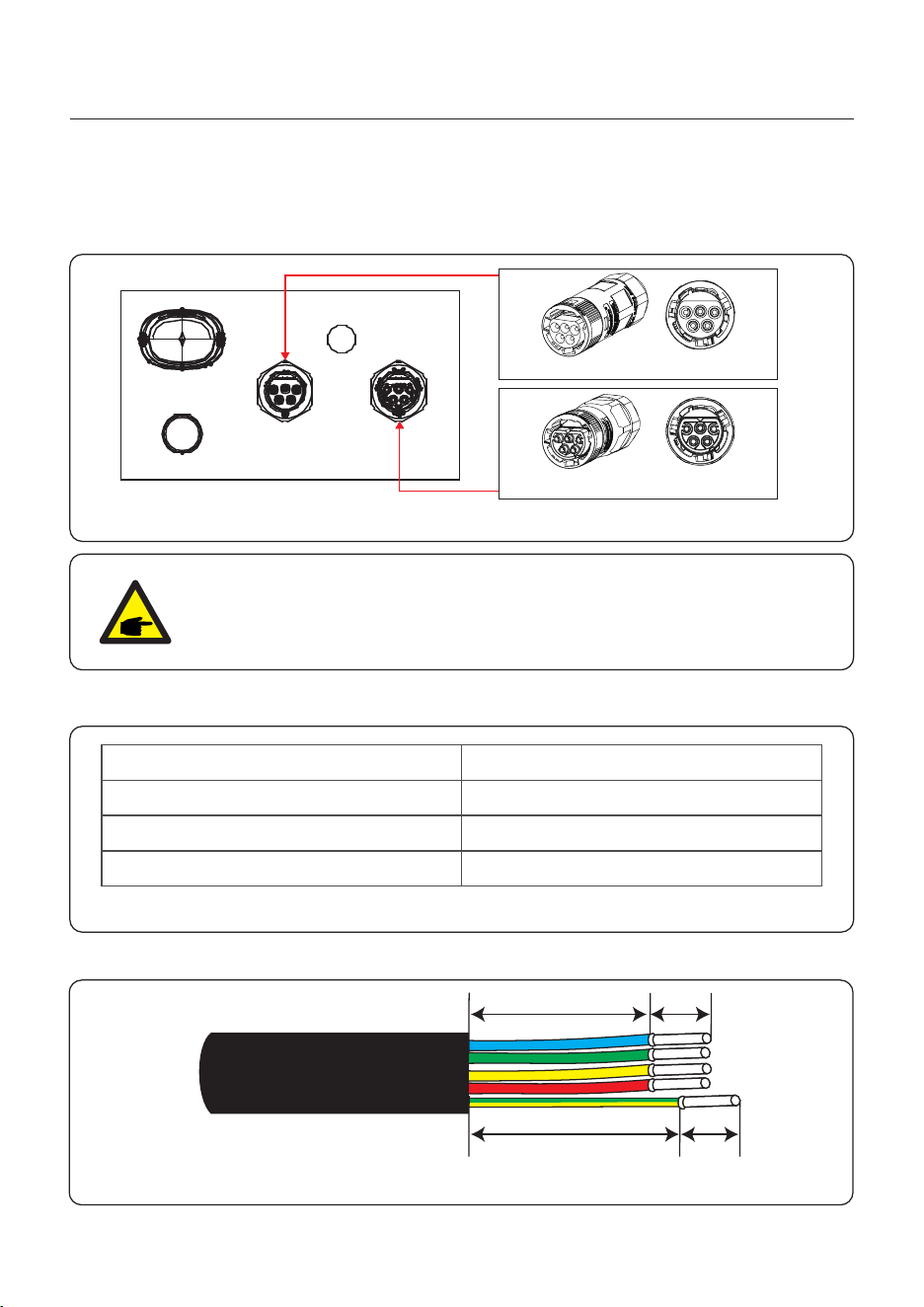
There are two AC terminals on the inverter and the assembly steps are similar.
AC Grid Port is to connect to the grid and AC Backup Port is to connect to the critical load
circuit.
4.6 AC Cable Installation
AC-BACKUP terminal
AC-GRID terminal
AC-GRIDAC-BACKUP
ANTENNA
COM
Figure 4.16
NOTE:
AC Backup Connector is longer while the AC Grid Connector is shorter.
4.6.1 AC Grid Port Connection
Describe
Cable diameter
14~17mm
6mm²
7mm
Traverse cross sectional area
Exposure Length
Numerical value
Table 4.1
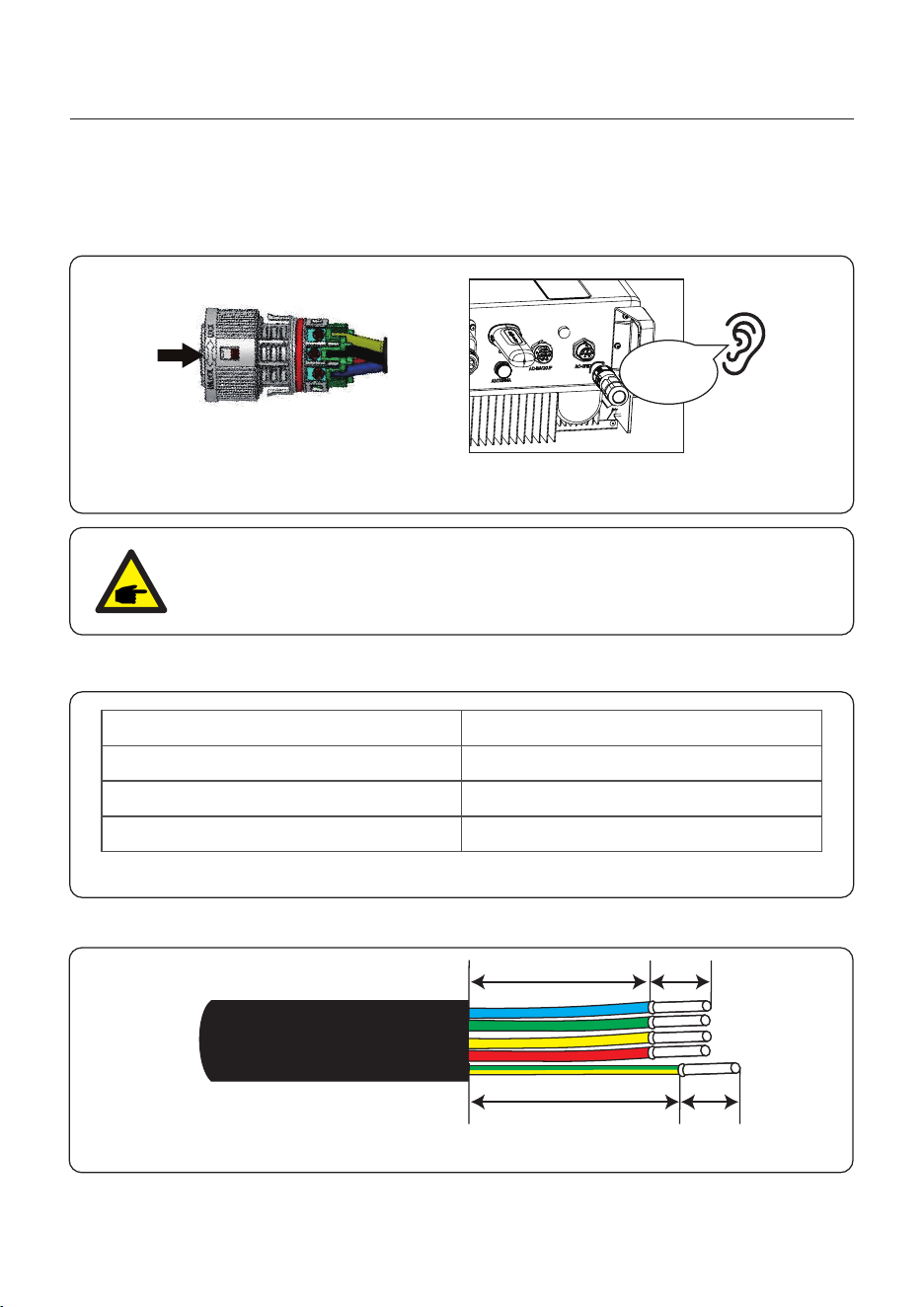
1. Strip the AC wires about 7mm.
Figure 4.17
18mm
23mm 7mm
7mm
User Manual
4. Installation
18
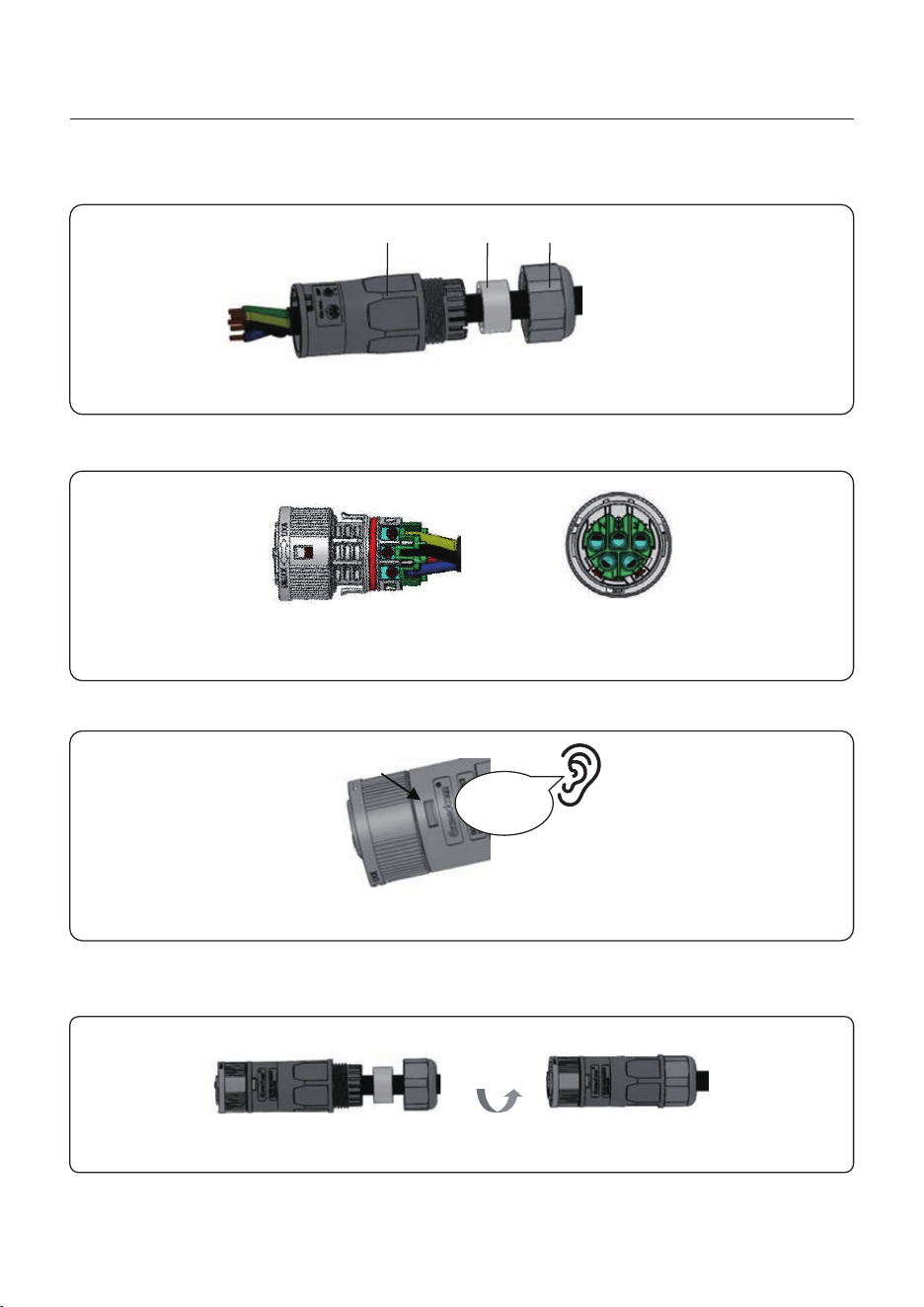
3. Crimp wires, screw torque 0.8N·m±0.1N·m.
2. Disassemble the AC Grid Connector and set the parts on the cable.
Figure 4.18
Figure 4.19
4. Push Housing into Body until you hear a “click” sound.
Figure 4.20
AC Grid
Click
Housing
5. Insert Seal Body and Claw into the Body, and then tighten the Nut with torque
2.5N·m±0.5N·m.
Figure 4.21
A: Body
B: Seal body
C: Nut
A
B C
User Manual
4. Installation
19
Figure 4.22
NOTE:
A continuity test shall be made to ensure that the correct terminations have
been made after field wiring.
6. Push the AC Grid Connector into the AC Grid Port on the inverter and rotate the rotatory
ring on the AC Grid connector to the direction as marked “LOCK” on the connector.
(Hold the Body while rotating the ring).
Click
4.6.2 AC Backup Port Connection
Describe
Cable diameter
6mm²
7mm
Traverse cross sectional area
Exposure Length
Numerical value
Table 4.2
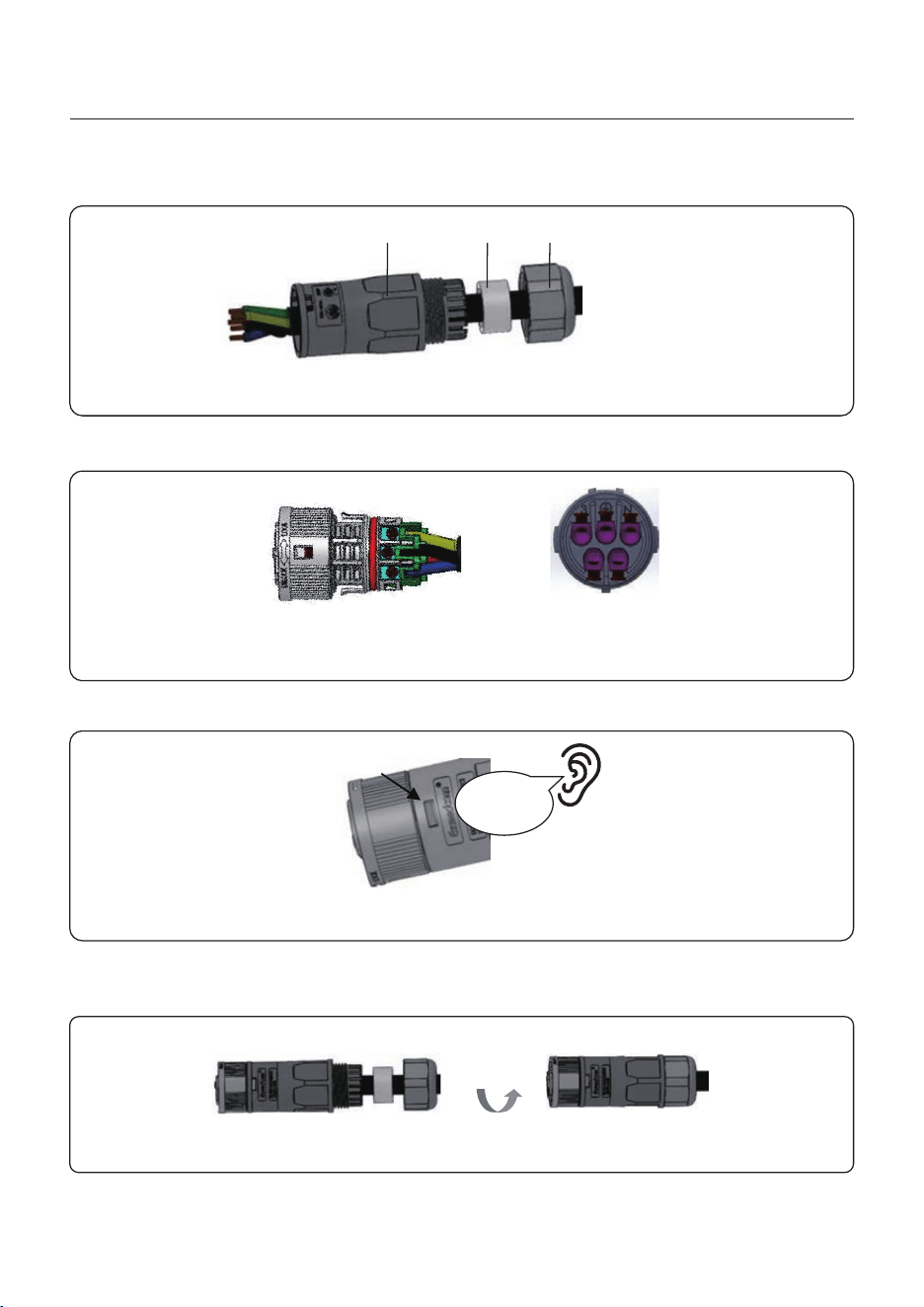
1. Strip the AC wires about 7mm.
Figure 4.23
18mm
23mm 7mm
7mm
14~17mm
User Manual
4. Installation
20
3. Crimp wires, screw torque 0.8N·m±0.1N·m.
2. Disassemble the AC Backup Connector and set the parts on the cable.
Figure 4.25
4. Push Housing into Body until you hear a “click” sound.
Figure 4.26
Click
Housing
5. Insert Seal Body and Claw into the Body, and then tighten the Nut with torque
2.5N·m±0.5N·m.
Figure 4.27
Figure 4.24
A: Body
B: Seal body
C: Nut
A
B C
AC Backup
User Manual
4. Installation
21
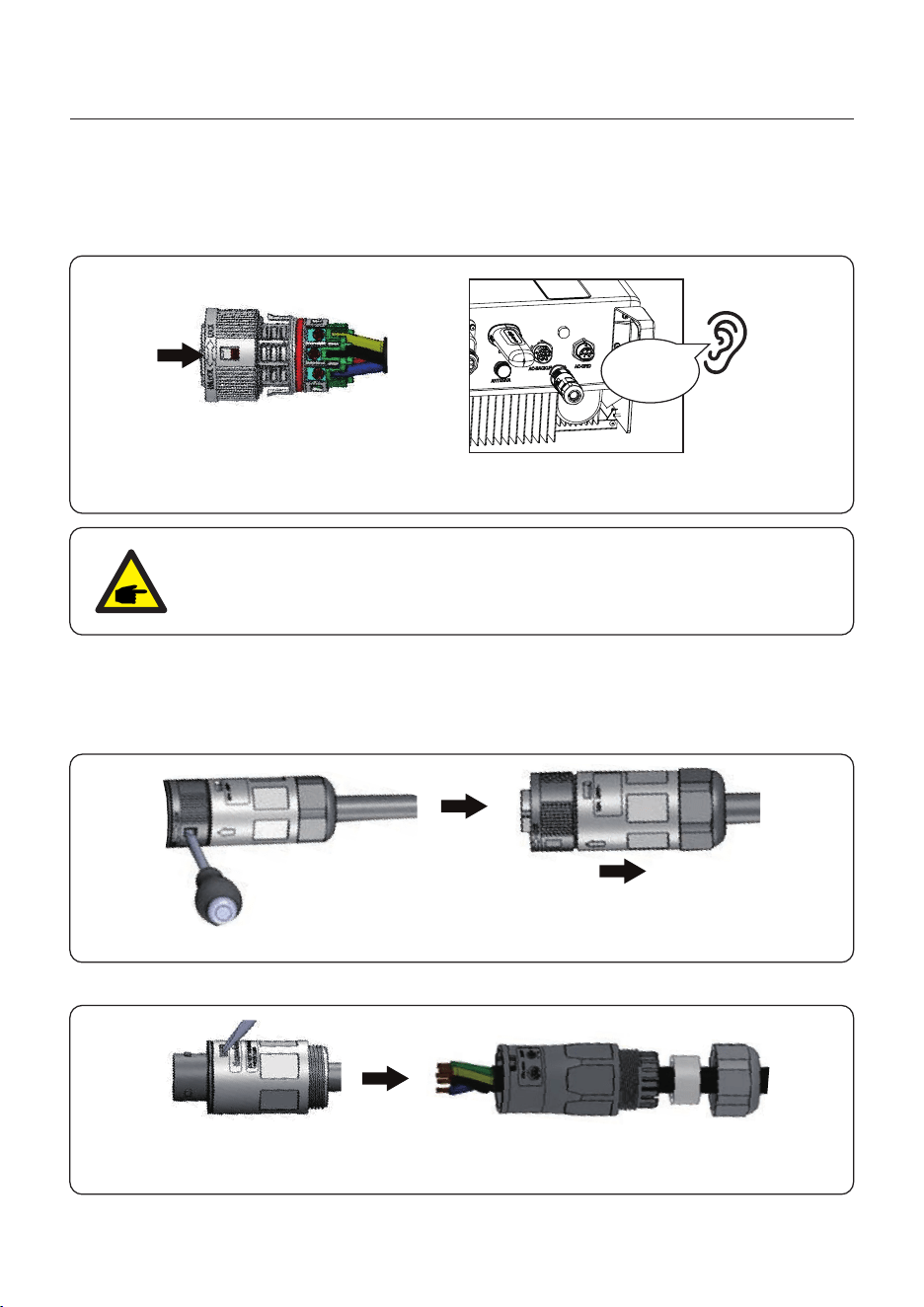
Figure 4.28
NOTE:
A continuity test shall be made to ensure that the correct terminations have
been made after field wiring.
6. Push the AC Backup Connector into the AC Backup Port on the inverter and rotate the
rotatory ring on the AC Backup connector to the direction as marked “LOCK” on the
connector. (Hold the Body while rotating the ring).
Click
4.6.3 Disassembly Connector
1. Separate the male and female connector, rotate the locker according to the direction
instructed by the marks on the locker.
2. Disassembling body and housing for rewire.
Figure 4.29
Figure 4.30
User Manual
4. Installation
22
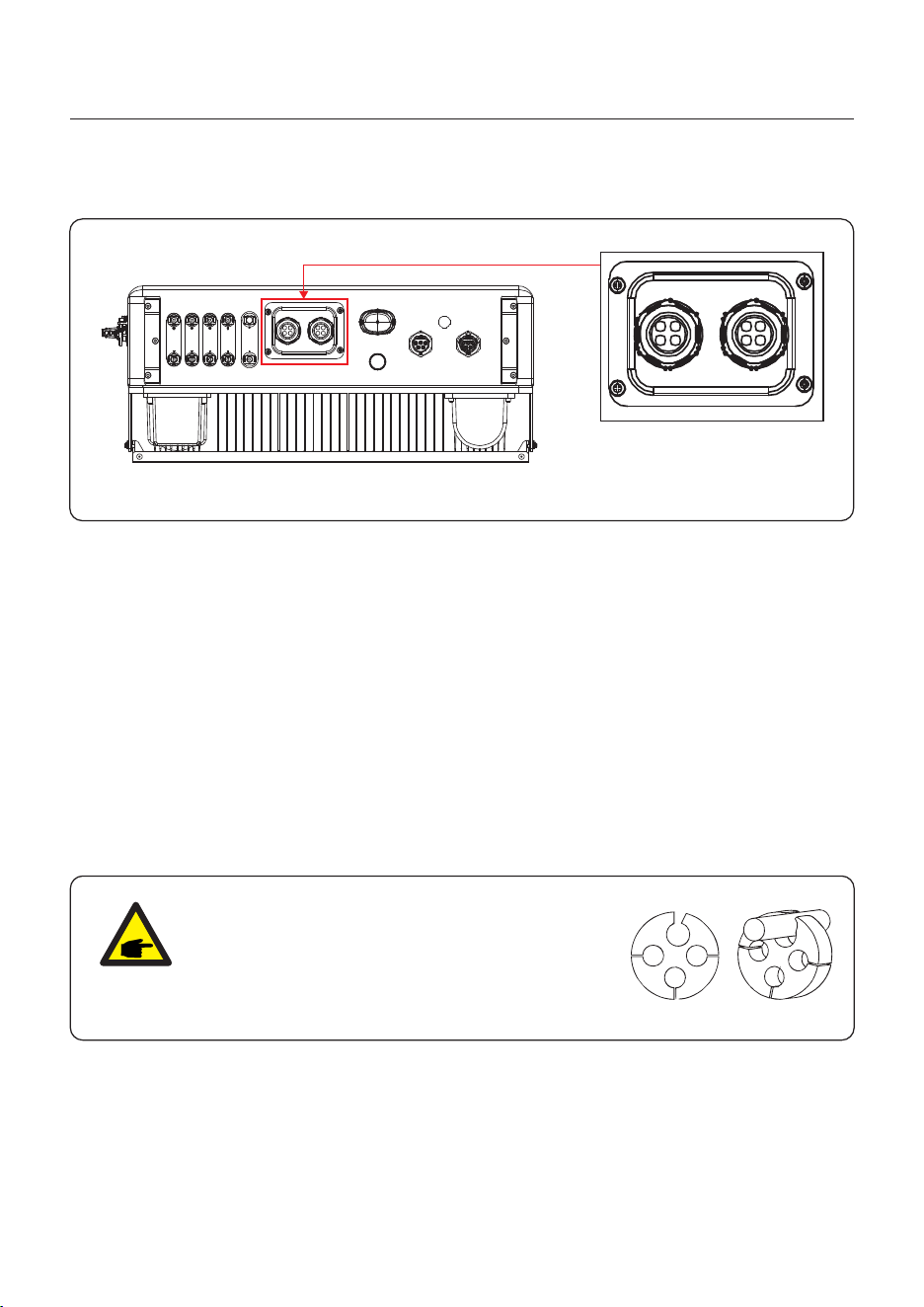
4.7 Communication Cable Installation
AC- GRIDAC- BACKU P
ANT ENNA
COM
PV1 PV2 P V3 PV4 BAT
Figure 4.31
Inverter in the package is with a protective cover assembled to protect the
communication ports.
Step 1. Use Phillips screwdriver to take out the 4 screws on the cover.
Step 2. Read through the following sections of the manual and prepare the internet
cables correspondingly.
Step 3. Loose the cable gland and remove the watertight caps inside the cable gland
based on the number of the cables and keep the unused holes with watertight cap.
Step 4. Lead the cables into the holes in the cable gland. (Hole Diameter: 6mm)
Step 5. Crimp the RJ45 connectors onto the cables according to the pin definitions
described in the following sections and connect to the ports accordingly.
Step 6. Fasten the 4 screws on the cover (Torque: 1.7N.m-2 N.m)
Step 7. Reassemble the cable gland and ensure there is no bending or stretching of
the internet cables inside the cover.
4.7.1 Protective Cover for Communication Ports
NOTE:
The 4-hole fastening rings inside the cable gland
are with openings on the side.
Please separate the gap with hand and squeeze
the cables into the holes from the side openings.
User Manual
4. Installation
23
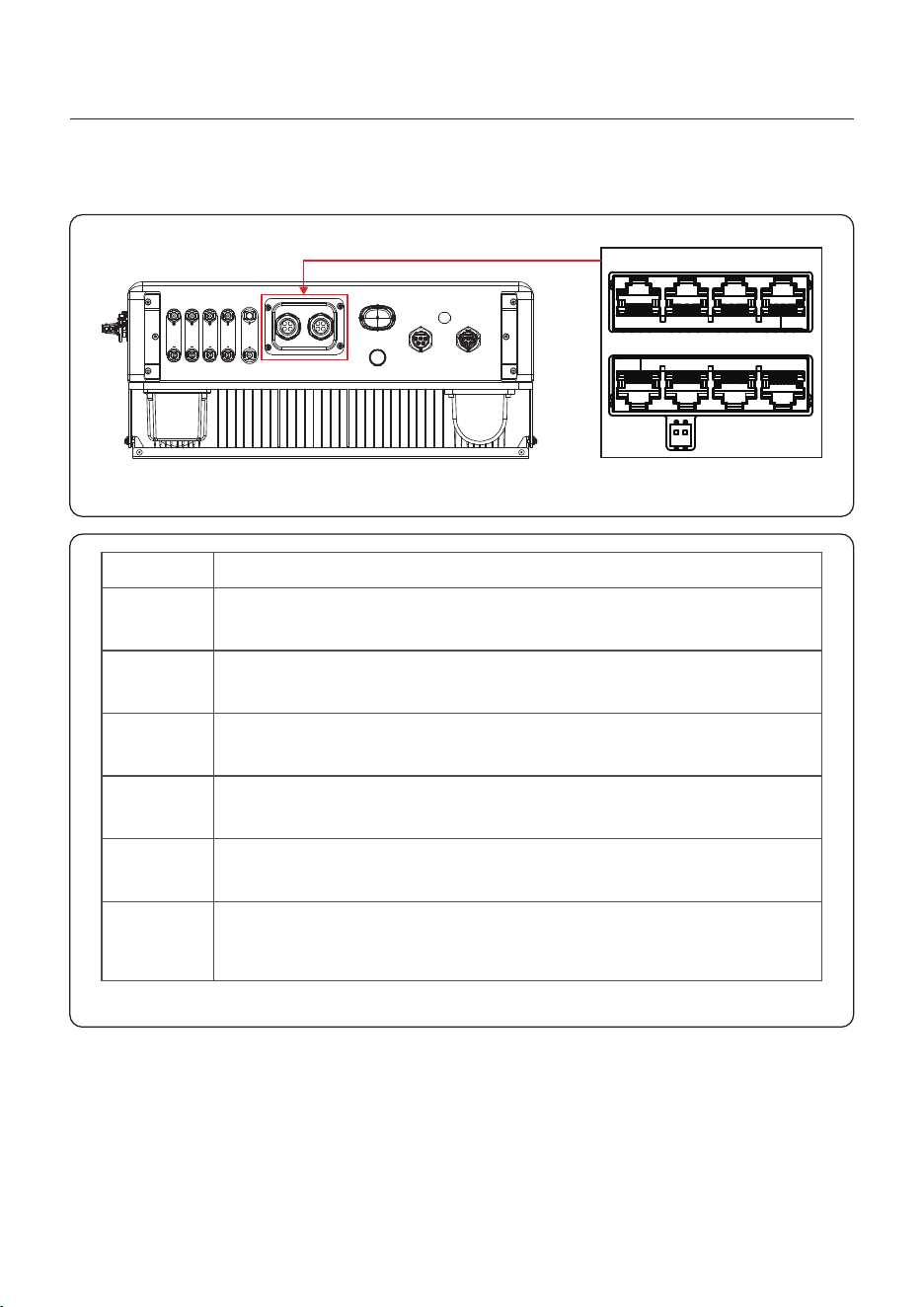
4.7.2 Communication Port Definition
Port
BMS
Meter
DRM
RS485
P-A/P-B
DO/DI
Function
Table 4.3
AC- GRIDAC- BACKU P
ANT ENNA
COM
PV1 PV2 P V3 PV4 BAT
P-A P-B
Reserved
BMSDO/DI MeterRS485
DRM
Figure 4.32
Used for CAN communication between inverter and Lithium battery
BMS.
Used for RS485 communication between inverter and the smart
meter. It is necessary to realize the normal hybrid control logics.
(Optional)To realize Demand Response or Logic interface function,
this function may be required in UK and Australia.
(Optional) Used for Modbus RTU communication with 3rd party
external device or controller.
(Optional) Parallel operation communication ports (Reserved).
(Optional) Dry contact port (Reserved).
Only generators with the dry contact function are supported for
generator control.
User Manual
4. Installation
24
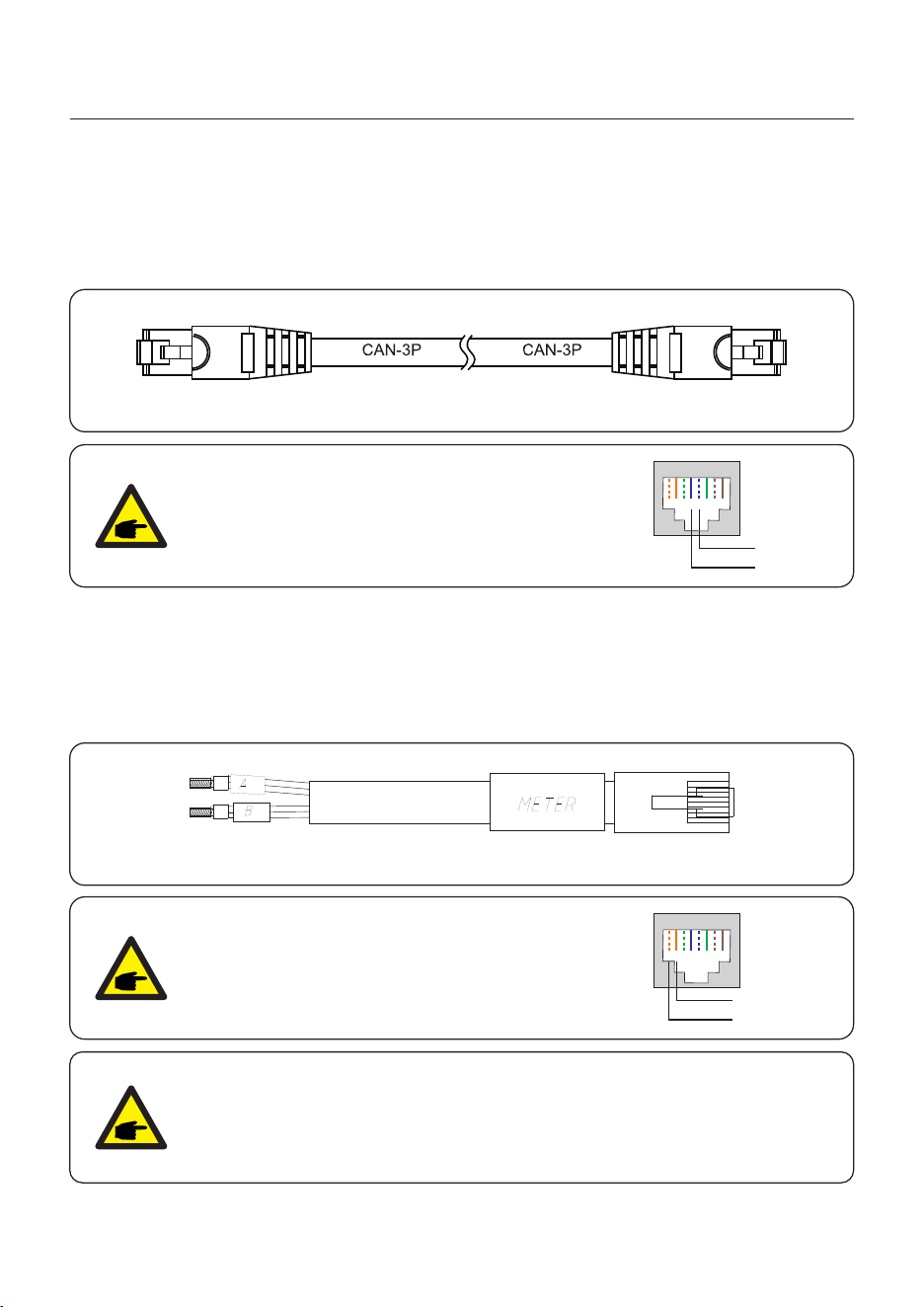
4.7.3 BMS Port Connection
Take out the pre-made CAN cable from the package and connect one end to battery CAN
port and then connect another end to the inverter BMS port.
Cable Length: 3 meters.
NOTE:
Pin definition of the BMS Port is following
EIA/TIA 568B.
CAN-H on Pin 4: Blue
CAN-L on Pin 5: Blue/White
RJ45terminal
1 2 3 4 5 6 7 8
CAN-L
CAN-H
4.7.4 Meter Port Connection
Take out the pre-made Meter cable from the package and connect RJ45 end to inverter
Meter port and then connect another end with loose RS485 A & B pins to the meter RS485
terminal.
Cable Length: 5 meters.
NOTE:
Pin definition of the Meter Port is following
EIA/TIA 568B.
RS485A on Pin Orange/white1:
RS485B on Pin Orange2:
RJ45terminal
1 2 3 4 5 6 7 8
RS485B
RS485A
NOTE:
Compatible Smart Meter Pin definition.
Eastron SDM630MCT – Pin 13 is RS485B & Pin 14 is RS485A.
Eastron SDM630 – Pin B is RS485B & Pin A is RS485A.
Figure 4.33
Figure 4.34

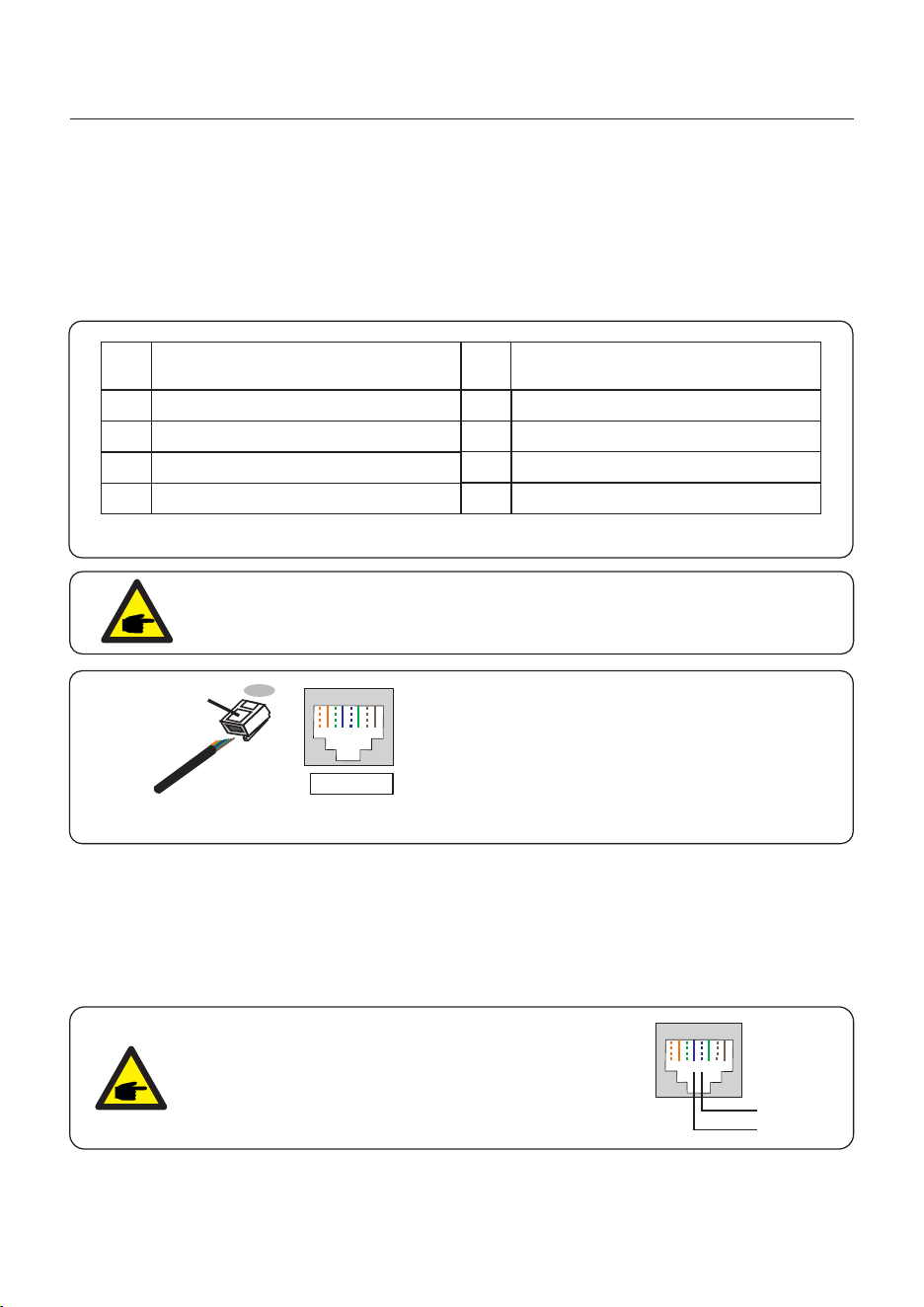
Correspondence between the cables
and the stitches of plug, Pin5 and Pin6
of RJ45 terminal is used for the logic
interface, other Pins are reserved.
Pin 1: Reserved; Pin 2: Reserved
Pin 3: Reserved; Pin 4: Reserved
Pin 5: Switch_input1; Pin 6: Switch_input2
Pin 7: Reserved; Pin 8: Reserved
1--8
Rj45 plug
RJ45terminal
1 2 3 4 5 6 7 8
1 2 3 4 5 6 7 8
DRM(logic interface)
Switch_ input1 Switch_ input2
Figure 4.35 Strip the insulation layer and connect to RJ45 plug
Signal
Short Pin5 and Pin6
Inverter Generates
Inverter Shutdown in 5s
Open Pin5 and Pin6
Function
Table 4.4
4.7.5 DRM Port Connection (Optional)
4.7.5.1 For Remote Shutdown Function
Solis inverters support remote shutdown function to remotely control the inverter
to power on and off through logic signals.
The DRM port is provided with an RJ45 terminal and its Pin5 and Pin6 can be used for
remote shutdown function.
User Manual
4. Installation
25
4.7.6 RS485 Port Connection (Optional)
If a 3rd party external device or controller needs to communicate with the inverter,
the RS485 port can be used. Modbus RTU protocol is supported by Solis inverters.
To acquire latest protocol document, please contact Solis local service team or Solis
sales.
NOTE:
Pin definition of the RS485 Port is following
EIA/TIA 568B.
RS485A on Pin 5: Blue/White
RS485B on Pin 4: Blue
RJ45terminal
1 2 3 4 5 6 7 8
RS485A
RS485B
Assignment for inverters capable
of both charging and discharging
Pin
1
DRM 1/5
2
DRM 2/6
3
DRM 3/7
4
DRM 4/8
5
RefGen
6
7
8
Com/DRM0
V+
V-
Assignment for inverters capable
of both charging and discharging
Pin
DRED means demand response enable device. The AS/NZS 4777.2 required :2020
inverter need to support demand response mode(DRM).
This function is for inverter that comply with AS/NZS 4777.2 standard.:2020
A RJ45 terminal is used for DRM connection.
4.7.5.2 For DRED Control Function (For AU and NZ Only)
Table 4.5
NOTE:
Solis hybrid inverter is designed to provide 12V power for DRED.
Figure 4.36 Strip the insulation layer and connect to RJ45 plug
Correspondence between the
cables and the stitches of plug
Pin 1: white and orange ; Pin 2: orange
Pin 3: white and green; Pin 4: blue
Pin 5: white and blue; Pin 6: green
Pin 7: white and brown; Pin 8: brown
1--8
RJ45 plug
RJ45terminal
1 2 3 4 5 6 7 8
1 2 3 4 5 6 7 8
User Manual
4. Installation
26
4.8 Meter Installation
CAUTION:
Make sure the AC cable is totally isolated from AC power before
connecting the Smart Meter and CT.
The Solis S6-EH3P(3-10)K-H Series inverter is able to connected standard
Eastron meters to fulfill the control logic of the self-consumption mode, export power
control, monitoring, etc.
Eastron 3ph meter (With CT): SDM630MCT (Provided by default)
Eastron 3ph meter (Direct Insert): SDM630 (Optional, Customer prepare if needed)
NOTE:
Please note that the CT orientation must be correct,
otherwise the system will not work properly.
Grid side
K L
Compatible Smart Meter Model
Pin 13 – RS485B, Pin 14 – RS485A
B – RS485B, A – RS485A
SDM630MCT
SDM630
Meter RS485 Pin Definition
Table 4.6
User Manual
4. Installation
27
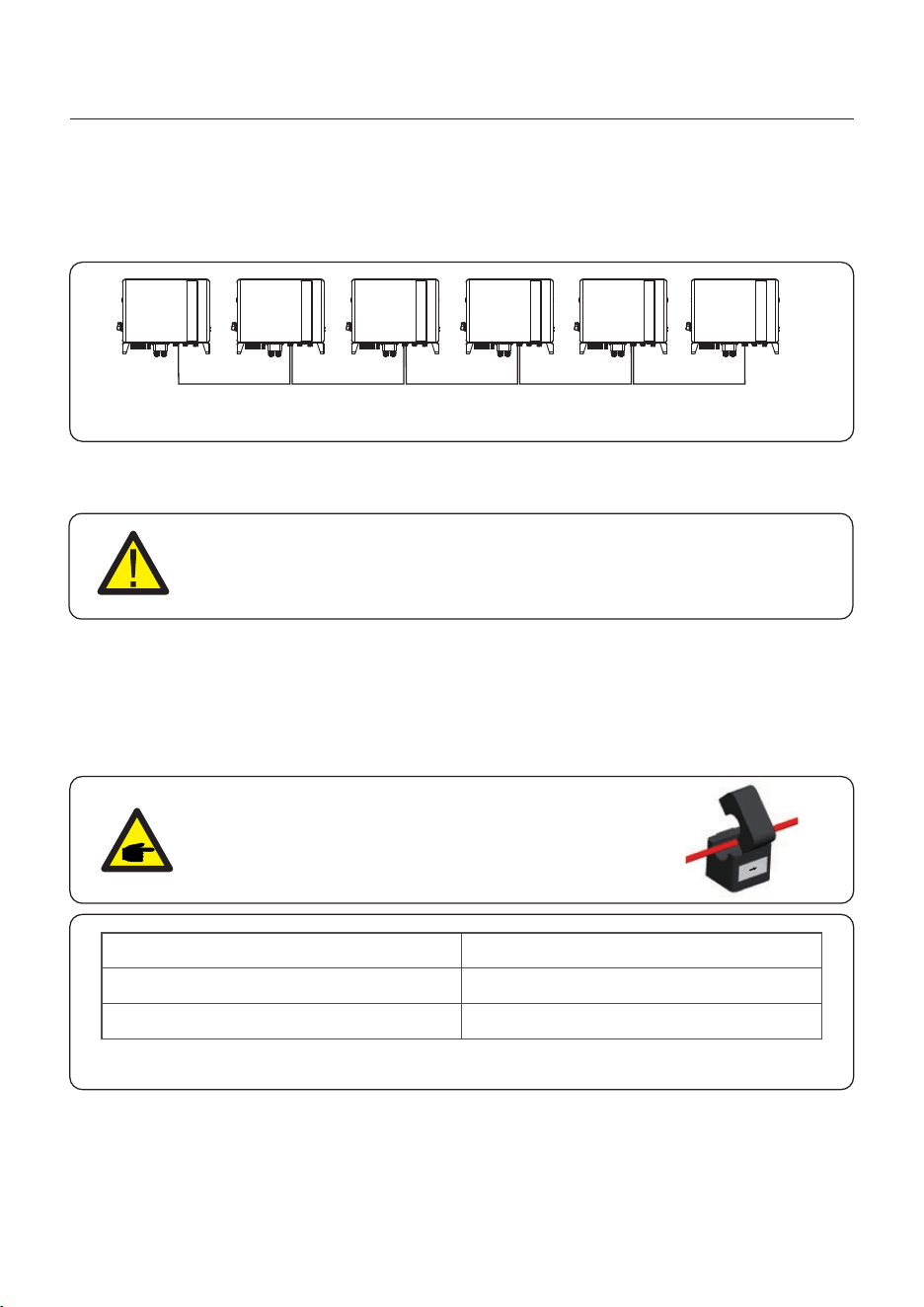
Up to 6 units of the inverter can be connected in parallel.
Please connect the paralleled inverters in daisy chain by using P-A and P-B terminals.
Standard CAT5 with shielding layers internet cable can be used.
P_B P_A P_B P_A P_B P_A P_B P_A P_B P_A
4.7.7 Parallel Terminal Connection (Optional)
Figure 4.37 Parallel Terminal Connection
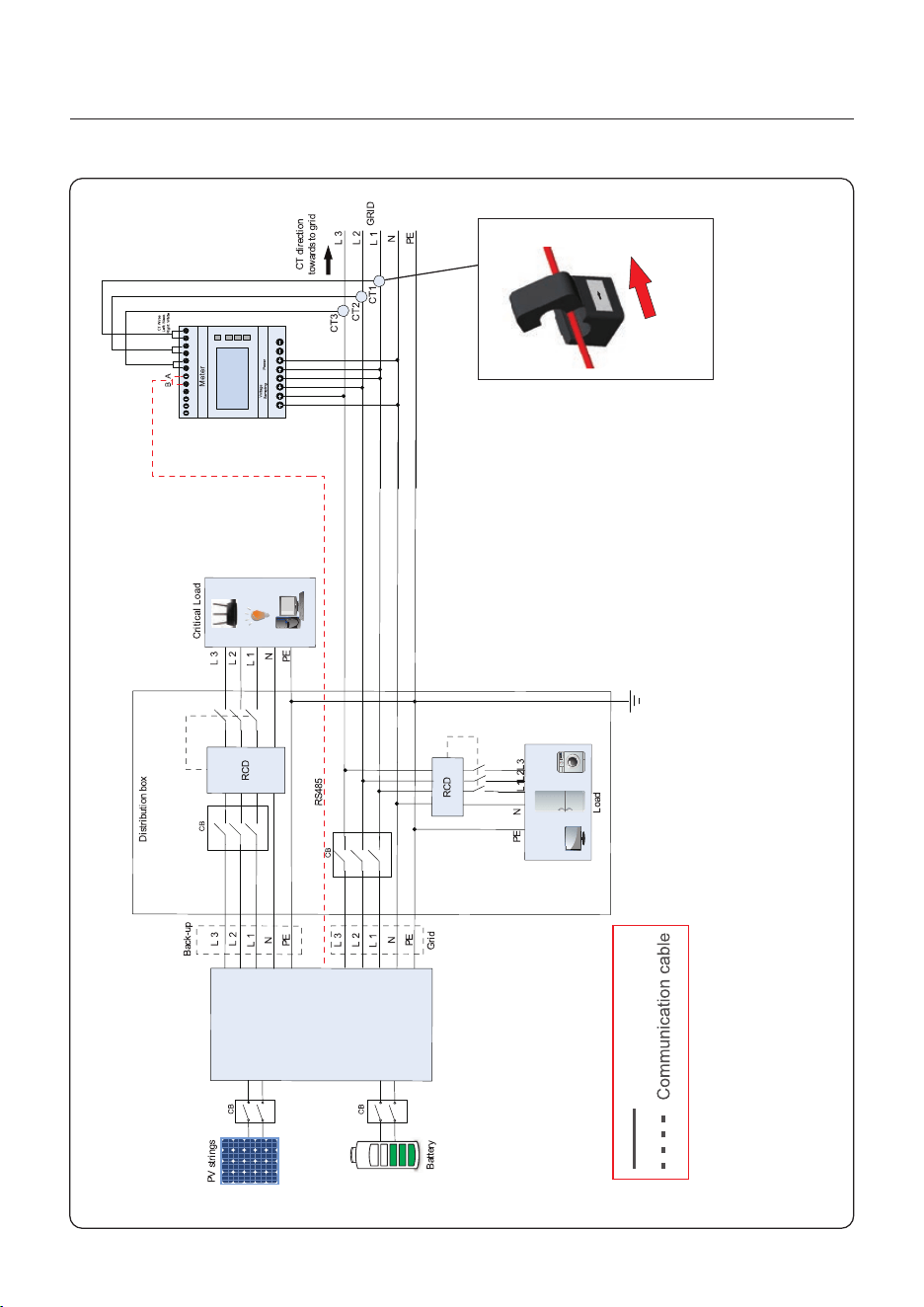
Figure 4.38 Eastron SDM630MCT
S6-EH3P(3-10)K-H-EU
Power cable
Note:
If the CT is installed in the wrong direction,
the Hybrid Inverter can't work normally.
CT direction
towards to grid
Grid side
K L
User Manual
4. Installation
28
9 10
111213141516171819 20
1 2 3 4 5 6 7 8
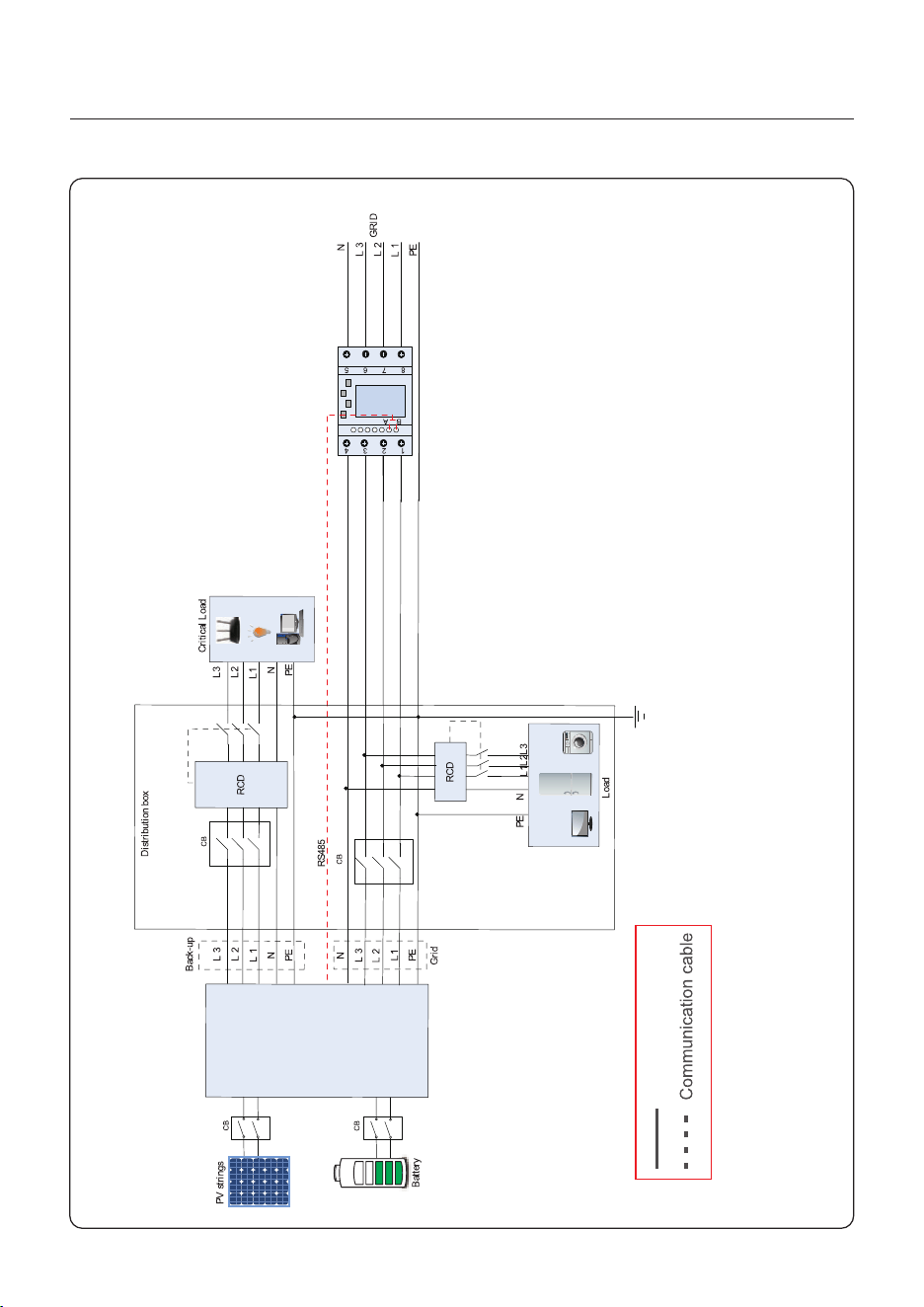
Power cable
Figure 4.39 Eastron SDM630
User Manual
4. Installation
29
S6-EH3P(3-10)K-H-EU
AC-G RIDAC-B ACKUP
ANTE NNA
COM
PV1 PV2 PV3 PV4 BAT
P-A P-B
Reserved
BMSDO/DI MeterRS485
DRM
AC-G RIDAC-B ACKUP
ANTE NNA
COM
PV1 P V2 PV 3 PV 4 BAT
P-A P-B
Reserved
BMSDO/DI MeterRS485
DRM
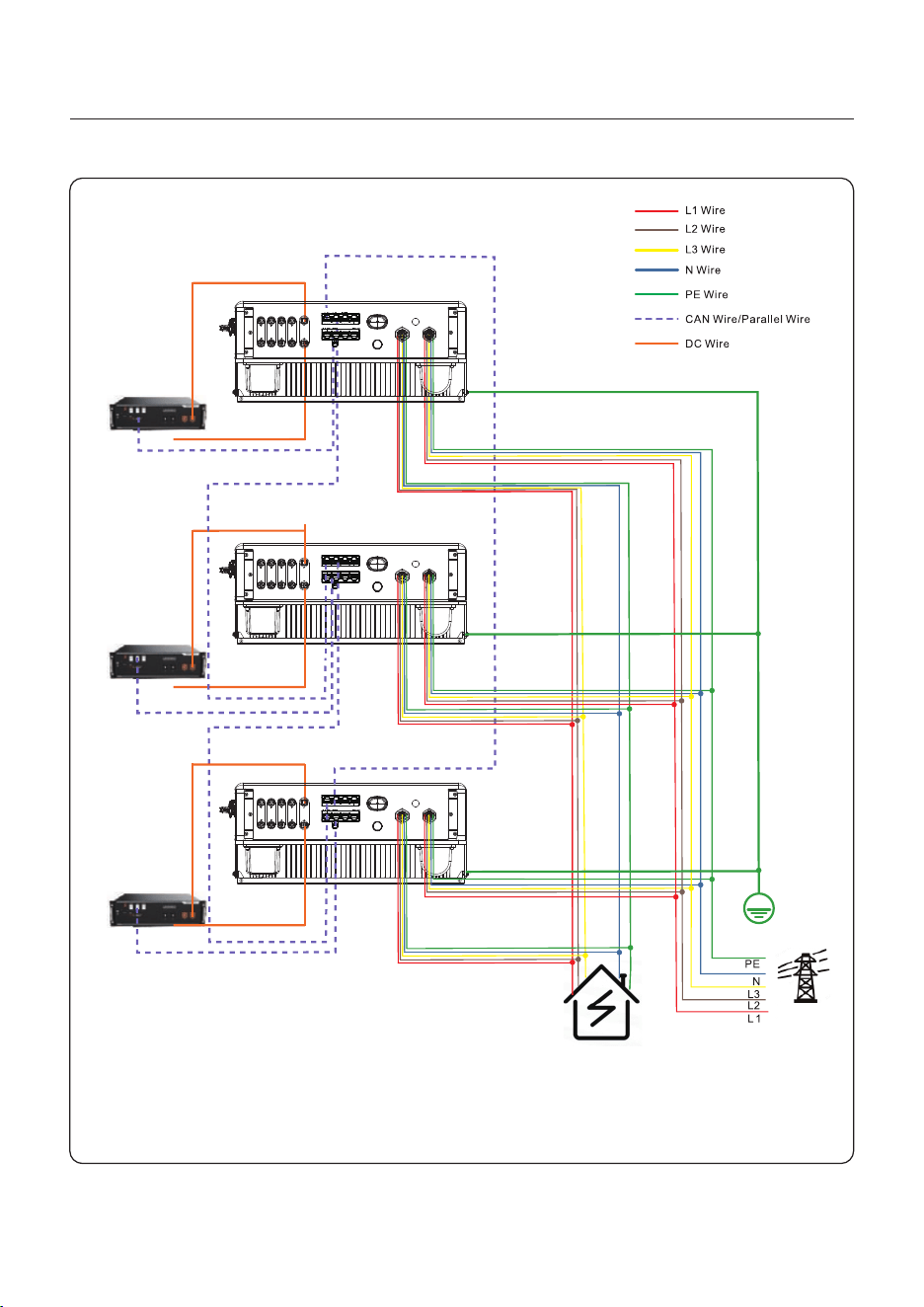
4.9 Parallel System Wiring
User Manual
4. Installation
Figure 4.40
Battery
Battery
Battery
Inverter 1 (Master)
Inverter 2 (Slave)
Inverter 3 (Slave)
Backup
Load
AC-G RIDAC-B ACKUP
ANTE NNA
COM
PV1 P V2 PV 3 PV 4 BAT
P-A P-B
Reserved
BMSDO/DI MeterRS485
DRM
Grid
30
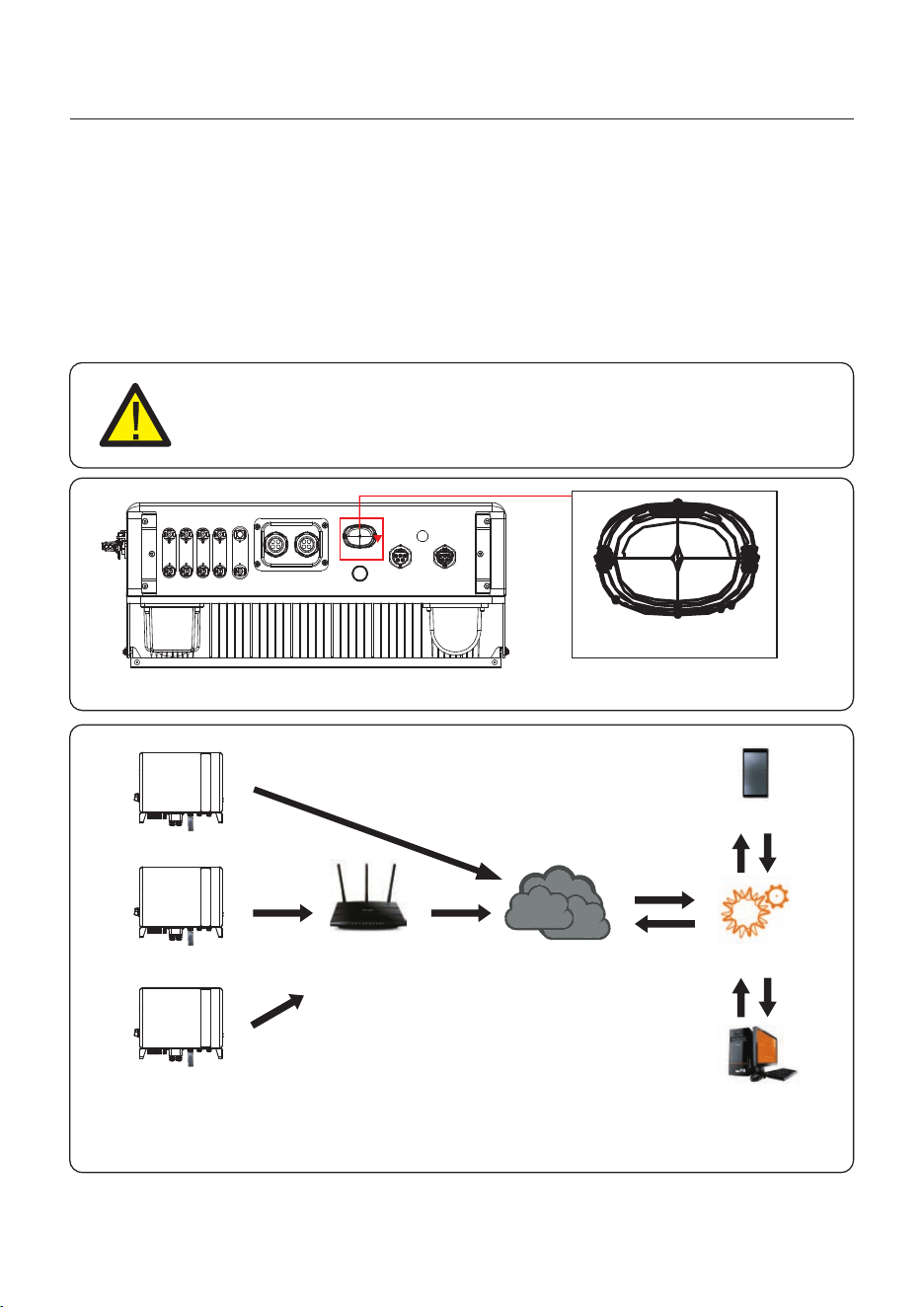
4.10 Inverter Remote Monitoring Connection
The inverter can be remotely monitored via WiFi, LAN or 4G.
The USB type COM port at the bottom of the inverter can connect to different kinds
of Solis data loggers to realize the remote monitoring on Soliscloud platform.
To install Solis data loggers, please refer to corresponding user manuals of Solis
data loggers.
The Solis data loggers are optional and can be purchased separately.
Dust cover is provided the inverter package in case the port is not used.
WARNING:
The USB type COM port is only allowed to connect Solis data loggers.
It is forbidden to be used for other purposes.
AC- GRIDAC- BACKU P
ANT ENNA
COM
PV1 PV2 PV3 P V4 B AT
Figure 4.41
COM
Figure 4.42 Wireless communication function
LAN monitoring
4G monitoring
WiFi monitoring
Router
Internet
Web server
Soliscloud
APP
User Manual
4. Installation
31
5. Commissioning & Shutdown
5.1 Preparation of Commissioning
Ensure all the devices are accessible for operation, maintenance and service.
Check and confirm that the inverter is firmly installed.
Space for ventilation is sufficient for one inverter or multiple inverters.
Nothing is left on the top of the inverter or battery module.
Inverter and accessories are correctly connected.
Cables are routed in safe place or protected against mechanical damage.
Warning signs and labels are suitably affixed and durable.
5.2 Commissioning Procedure
Step 1: Measure DC voltage of PV strings and battery and ensure the polarity is correct.
+
-
Step 2: Measure AC voltage and frequency and ensure they are within local standard.
Step 3: Switch on the external AC breaker to power on the inverter control board.
(Bluetooth signal available)
Bluetooth Antenna has been connected to the Antenna port of the inverter.
An Android or IOS mobile phone with Bluetooth function is available.
Soliscloud APP is installed on the mobile phone.
There are three ways to download and install the latest APP:
1. You can visit to download the latest www.soliscloud.com
version APP.
2. You can search “ ” in Google Play or App Store.Soliscloud
3. You can scan this QR code below to download " ".Soliscloud
User Manual
32
5. Commissioning & Shutdown
User Manual
33
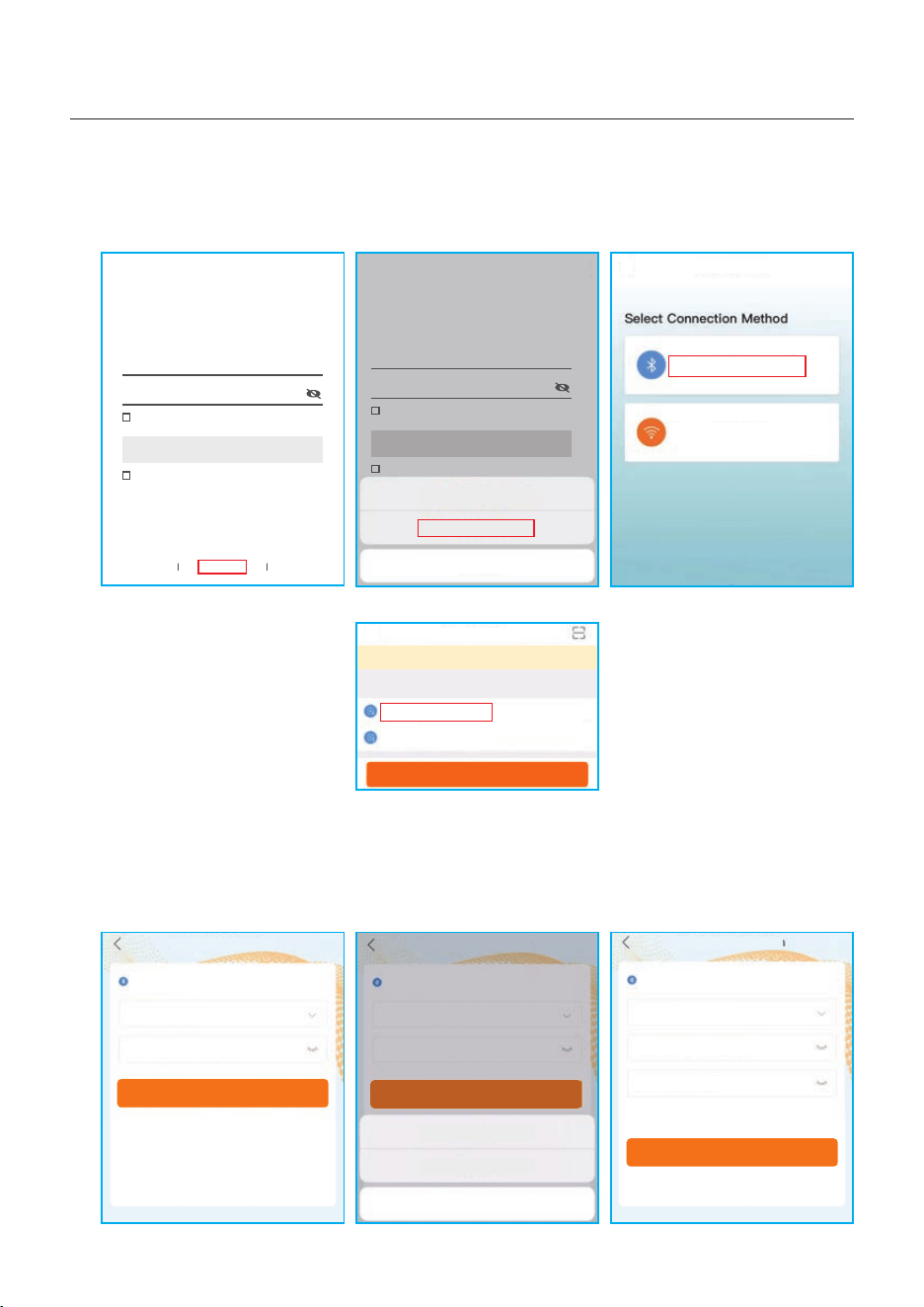
Step 4: Connect with Bluetooth.
Turn on Bluetooth switch on your mobile phone and then open the Soliscloud APP.
Click “More Tools”->”Local Operation”->”Connect with Bluetooth”
Step 5: Select the Bluetooth signal from the inverter. (Bluetooth Name: Inverter SN)
Step 6: Login account.
If you are the installer, please select the account type as Installer. If you are the
plant owner, please select the account type as owner. Then set your own initial password
for control verification. (The first log-in must be finished by installer in order to do the
initial set up)
Hello,
Welcome to SolisCloud
Register
Username/Email
Password
I have agreed Privacy Policy
Remember Forgot Password
Language More Tools Data Migration
Log in
Hello,
Welcome to SolisCloud
Register
Username/Email
Password
I have agreed Privacy Policy
Remember Forgot Password
Log in
Local Operation
Connect With Bluetooth
Connect With WiFi
<
xxxxxxxxxxxx
Nearby Device
<
vivo TWS 2
<
<
Search Device
If the dev ice is not in the list, ple as e click the “Search D ev ice”
butt on a t the bottom or drop-do wn t o refresh the page
Other Device
xxxxxxxxxxxx
xxxxxxxxxxxx
Control Verification
Select account type
Enter password (6-characters)
Verify
Control Verification
Installer
Enter password (6-characters)
Enter password again
Please set the password of the installer’s account
before continuing
Set Enable
<
xxxxxxxxxxxx
Control Verification
Select account type
Enter password (6-characters)
Verify
Installer
Owner
Cancel
<
<
WiFi Configuration
Local Operation
Cancel
5. Commissioning & Shutdown
User Manual
34
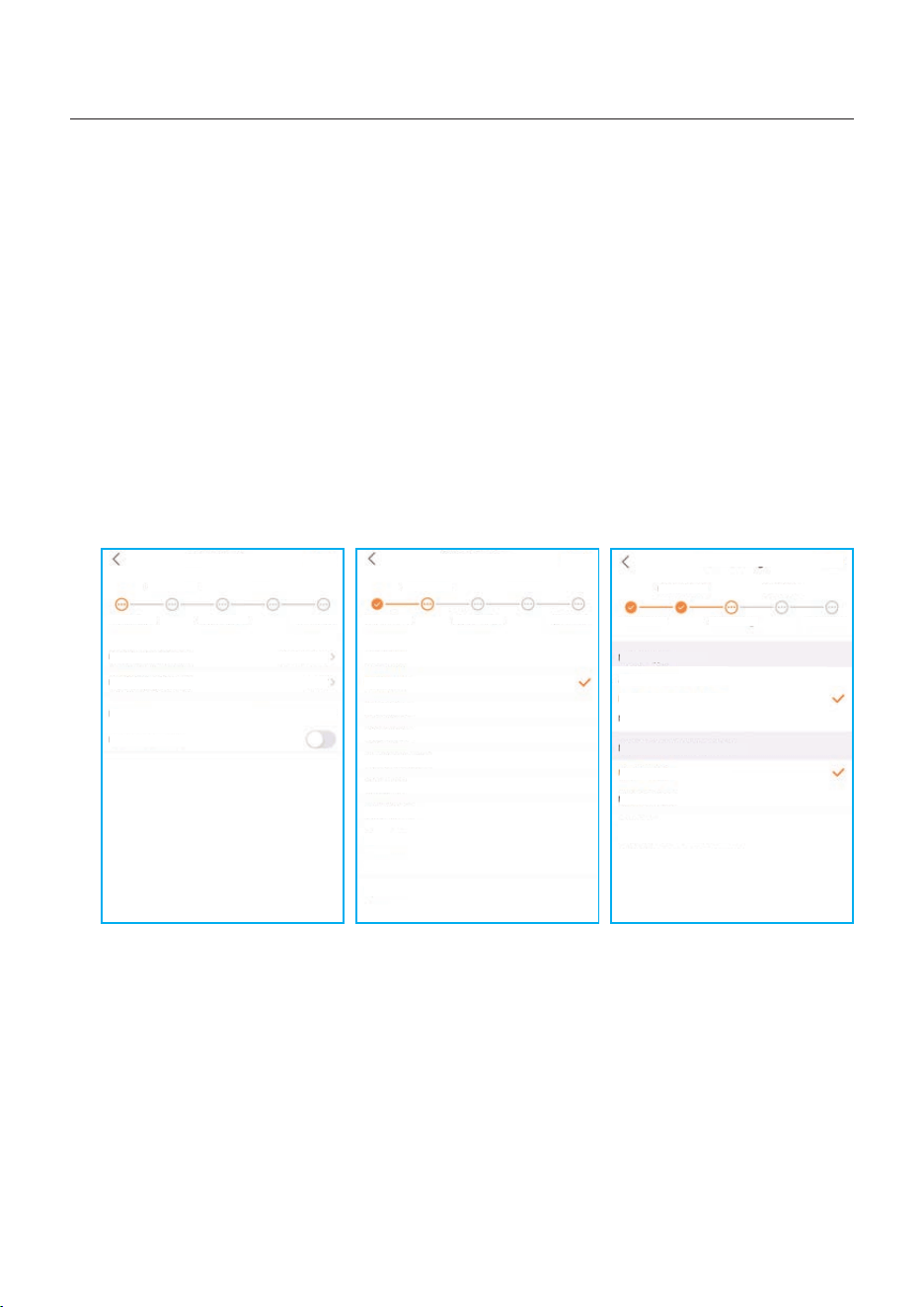
Step 7: After the log in for the first time, initial settings are required.
Step 7.1: Set the inverter Date and Time.
You can set to follow the time on your mobile phone.
Step 7.2: Set the battery model.
It must be based on the battery model that is actually connected to the inverter.
If there is no battery connected for the moment, please select “No Battery” to avoid
alarms.
The default setting for battery over discharge SOC is 20%, force charge SOC is 10%.
Step 7.3: Set the meter setting.
It must be based on the meter type that is actually connected to the inverter.
If there is no meter connected for the moment, please select “No Meter” to avoid alarms.
It is suggested to install the meter at the system grid connection point and select “Meter in
Grid”.
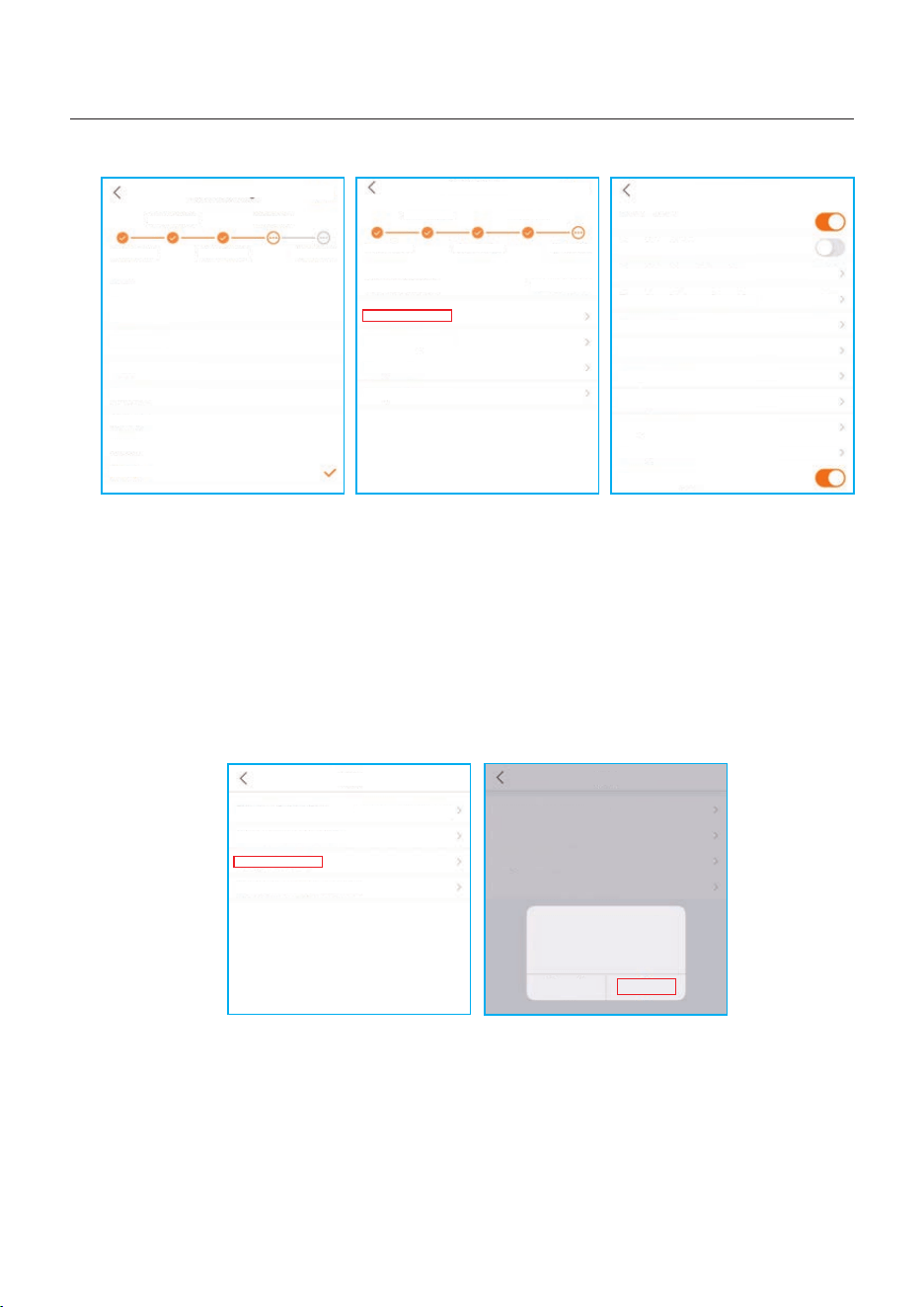
Step 7.4: Set the grid code setting.
Please select the grid code based on the local grid network requirements.
Step 7.5: Set the work mode setting.
Recommended setting is Self-Use Mode. This mode can maximize the use of PV power
generation for household electricity, or store it in batteries and use it for household
electricity. If need manually control the battery charging and discharging with respect to
time, please use the Time of Use switch and the following set points. The “Allow Grid
Charging” is recommended to be turned on (If turned off, the inverter will not force charge
the battery and battery could potentially go to sleep).
Step 7.1 Step 7.2 Step 7.3
Quick Setting
Next
Inverter Time Meter Setting Work Mode
Battery Model Grid Code
Inverter Date Setting
Inverter Time Setting
Phone Time
Follow Phone Time
15:27
2022-08-11
2022-08-11 15:27:25
Quick Setting
Next
Inverter Time Meter Setting Work Mode
Battery Model Grid Code
No Battery
PYLON_HV
B_BOX_HV BYD
LG_HV LG
SOLUNA_HV
Dyness HV
Aoboet HV
Alpha HV
GS Energy
BYD HVL
Jinko
Quick Setting
Next
Inverter Time Meter Setting Work Mode
Battery Model Grid Code
Meter Type
Acrel 3P Meter
NO Meter
Meter Installation Location
Meter in Grid
Meter in Load
Eastron Standard 3P Meter
Grid+PV Inverter
Only applicable for Eastron Meter
5.3 Shutdown procedure
Step 1. Turn off the AC breaker at the grid connection point.
Step 2. Turn off the DC switch of the inverter.
Step 3. Turn off the battery breaker.
Step 4. Waiting for the device powered off and the system shutdown is completed.
5. Commissioning & Shutdown
User Manual
35
Self-Use Mode
Self-Use Mode
Time of Use Switch
Time of Use Charge Current Set
Time of Use Discharge Current Set
Charge Time Slot 1
Discharge Time Slot 1
Charge Time Slot 2
Discharge Time Slot 2
Charge Time Slot 3
Discharge Time Slot 3
Allow Grid Charging
10.0A
10.0A
22:00 ~ 08:00
08:00 ~ 22:00
00:00 ~ 00:00
00:00 ~ 00:00
00:00 ~ 00:00
00:00 ~ 00:00
Quick Setting
Done
Inverter Time Meter Setting Work Mode
Battery Model Grid Code
Current Work Mode
Self-Use Mode
Feed in Priority Mode
Backup Mode
Off-grid Mode
Self-Use Mode
Quick Setting
Next
Inverter Time Meter Setting Work Mode
Battery Model Grid Code
G59/3
User-define
GREECE230
HK230
RENBLAD
CEI 0-16
NTS631
4777-A
Step 7.4 Step 7.5(1) Step 7.5(2)
Step 8: Setup complete.
Now the initial settings on the inverter have been set and you can switch on the inverter
DC switch and switch on battery breaker to start up the system. You can also explore in
the APP to check the operating data, alarm message or other advanced settings.
Step 9: Change Password.
If the Owner forgot the password, please contact the installer. Installer log in and go to
“Setting”->”More”->”Change Password” to reset the password for owner’s account.
If Installer forgot the password, please contact Solis service team.
More
Data Auto Refresh Rate
Download Offline Data File
Change Password
Reset Owner Account Password
Not refresh automatically
More
Data Auto Refresh Rate
Download Offline Data File
Change Password
Reset Owner Account Password
Not refresh automatically
Are you sure to reset
password of owner’s
account?
Cancel OK

Self-Use Mode stores the excess PV power into the battery. If the battery is charged, or there
is no battery, the excess PV power will be exported(sold)back to the utility company. If the
system is set to not export any power, then the inverter will curtail the PV power(derate the
inverter output power).
Feed in Priority Mode will ensure that the system exports any excess PV power after the
home loads are supplied. If the export power quota has been met, then the remaining PV
power will be stored in the battery. This mode should not be used if export power is going to
be set to zero.
Off-Grid Mode is only to be used by systems that are not electrically connected to the grid
at all. This mode is like Self-Use Mode, but the PV power will be curtailed if the battery is
charged and the home load demand is lower than the amount of available PV power.
Peakshaving mode is possible to set the maximum power (Pmax) that the system obtains
from the main grid. The power of the main grid charges batteries and supplies power to the
load, which is within Pmax. When the load power exceeds the set maximum power (Pmax),
the insufficient part is provided by the battery . At the same time, you can set the Peak SOC
and charge the battery to this SOC as far as possible under the premise of satisfying Pmeter.
The power of grid can be controlled to reduce the cost of electricity.
Time of Use Switch is for customizing when the battery is allowed to charge and discharge
power and at what rate, established by a current(amperage)setting.If this slider switch is
turned on, the inverter will only use this schedule to determine when to charge and discharge
the battery. If Allow Grid Charging is turned on, the inverter will use grid power to charge the
battery only under two circumstances:(1) the battery drains to the Force Charge SOC.
(2)Time of Use is enabled and there is not enough available PV power during the charge
window to meet the current rate that is established.
Time of Use is for manual control of the battery charging/discharging.If Time of Use is
turned off, charging/discharging is automatically regulated by the inverter.
5.4 Work mode
5. Commissioning & Shutdown
User Manual
36
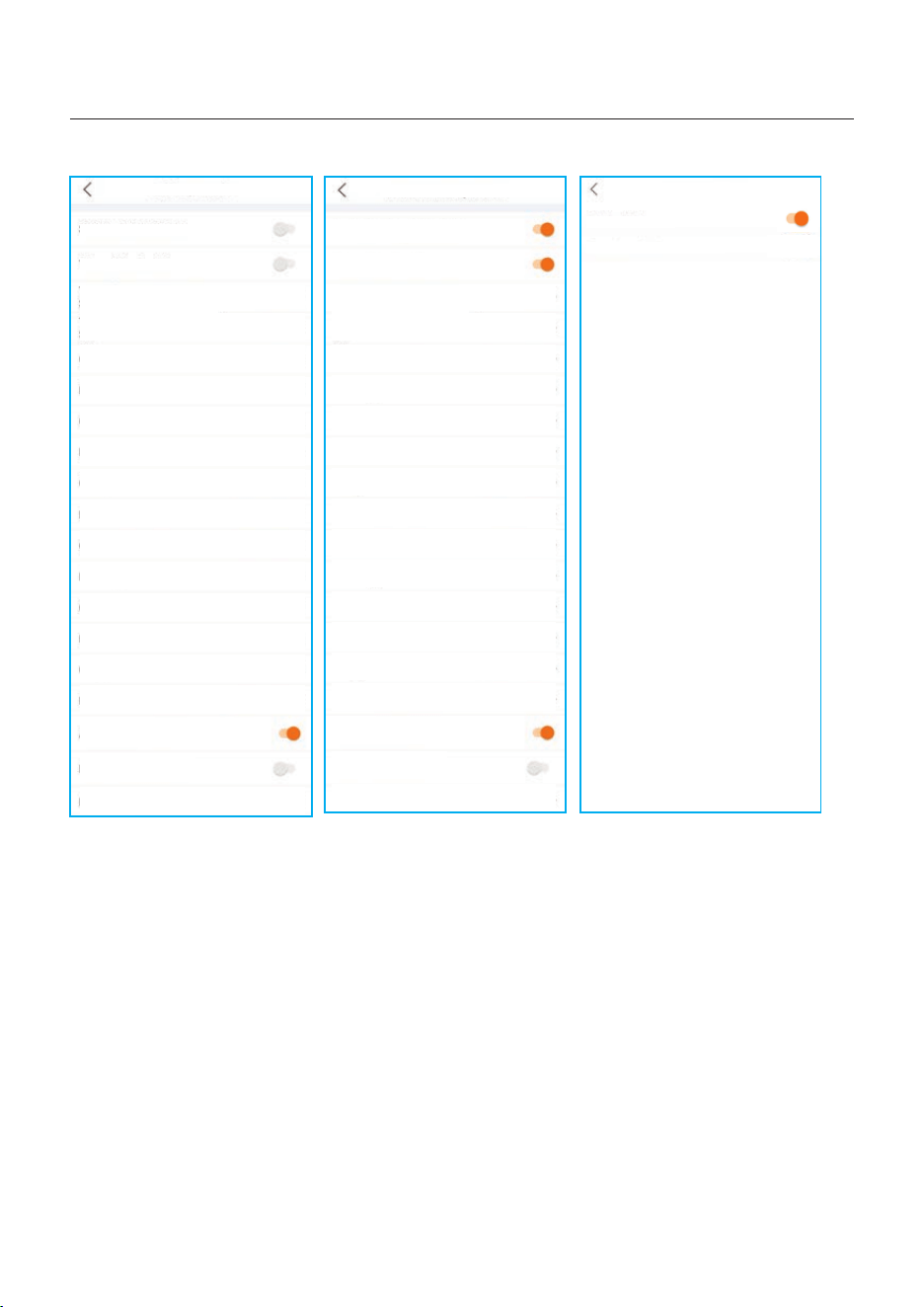
Self-Use Mode Switch
Time of Use Switch
Time of Use Charge Current Set
50.0A >
Time of Use Discharge Current Set
50.0A >
Charge Time Slot 1
Discharge Time Slot 1
Charge Time Slot 2
Discharge Time Slot 2
22:00 ~ 08:00 >
08:00 ~ 22:00 >
00:00 ~ 00:00 >
00:00 ~ 00:00 >
Charge Time Slot 3
00:00 ~ 00:00 >
Discharge Time Slot 3
00:00 ~ 00:00 >
Charge Time Slot 4
00:00 ~ 00:00 >
Discharge Time Slot 4
00:00 ~ 00:00 >
Charge Time Slot 5
00:00 ~ 00:00 >
Discharge Time Slot 5
00:00 ~ 00:00 >
Charge Time Slot 6
00:00 ~ 00:00 >
Discharge Time Slot 6
00:00 ~ 00:00 >
Allow Grid Charging
Backup Mode Switch
Reserved SOC
80% >
Self-Use Mode
Off-Grid Mode
Off-grid Mode Switch
Off-grid Overdischarge SOC
30%
>
Feed in Priority Mode
Feed in Priority Mode Switch
Time of Use Switch
Time of Use Charge Current Set
135.0A >
Time of Use Discharge Current Set
Charge Time Slot 1
Discharge Time Slot 1
Charge Time Slot 2
Discharge Time Slot 2
00:00 ~ 01:00 >
01:00 ~ 02:00 >
02:00 ~ 04:00 >
04:00 ~ 06:00 >
Charge Time Slot 3
06:00 ~ 10:00 >
Discharge Time Slot 3
10:00 ~ 11:00 >
11:00 ~ 14:00 >
14:00 ~ 17:00 >
17:30 ~ 18:00 >
18:00 ~ 22:55 >
23:00 ~ 23:30 >
23:30 ~ 00:00 >
Allow Grid Charging
Backup Mode Switch
Reserved SOC
80% >
135.0A >
Charge Time Slot 4
Discharge Time Slot 4
Charge Time Slot 5
Discharge Time Slot 5
Charge Time Slot 6
Discharge Time Slot 6
5. Commissioning & Shutdown
User Manual
37
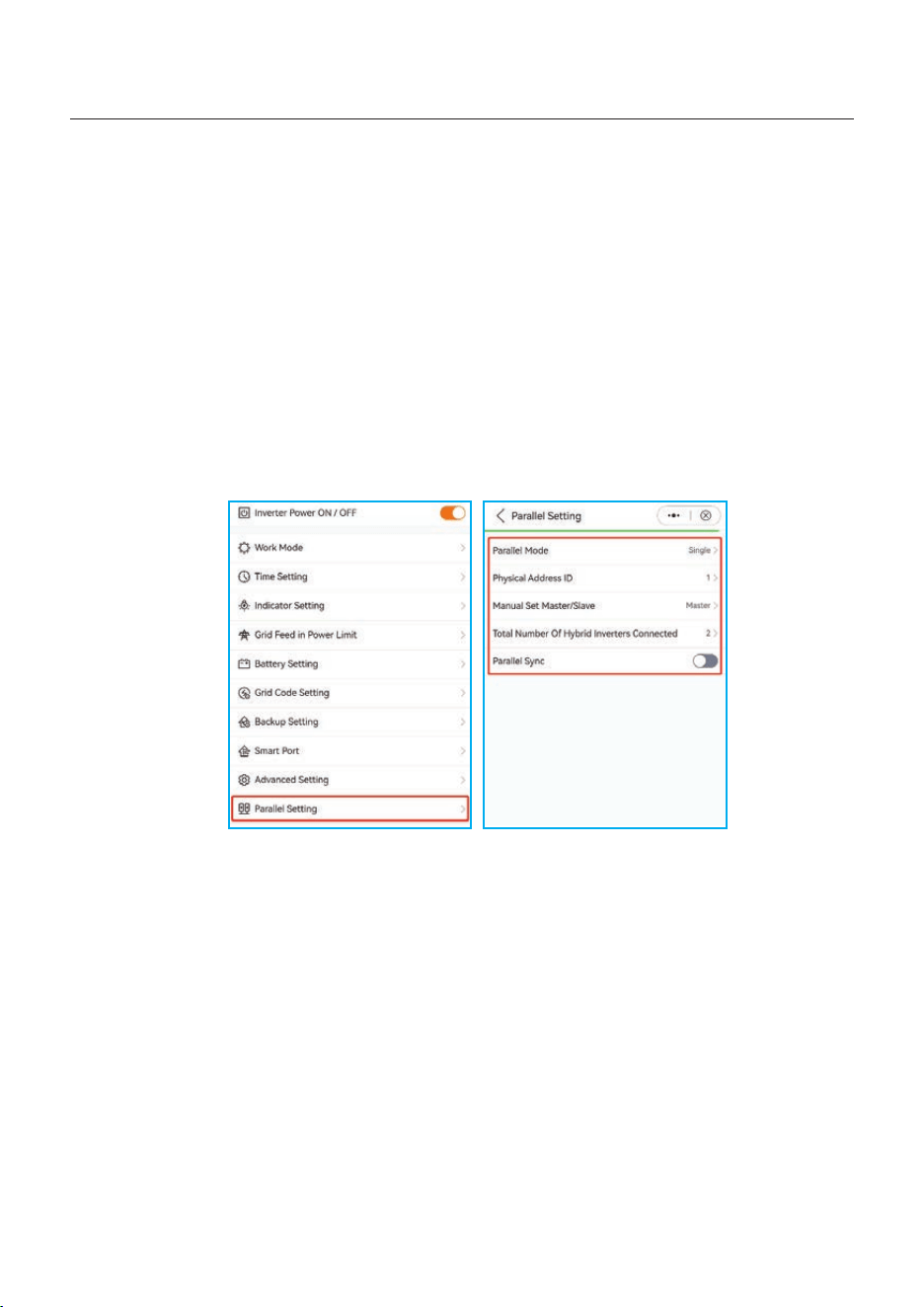
5.5 Parallel Settings
Set up a parallel system according to the following steps:
A. Set the parallel mode as “Parallel”.
B. Set the master inverter address ID to 1, the other slaves to 2~6.
(Note: the address ID cannot be set to 0, and the physical address of the master must be 1 )
C. Choose “master” or “slave” for each inverter.
D. Choose the number of inverters in parallel, the range is 2~6.
E. Enable “Parallel Sync” , parameters of the main inverter will be synchronized to the slaves.
F. DIP Switch:
Option 1: Both the first and the last inverter(INV1 & INV3) have 1 of the DIP switch enabled.
(Either Pin1 & Pin2)
Option 2: One of the first and the last inverter (INV1 or INV3) has 2 DIP switches enabled.
(Both Pin1 or Pin2)
5. Commissioning & Shutdown
User Manual
38
6. Maintenance
User Manual
NOTE:
Never use any solvents, abrasives or corrosive materials to clean the
inverter.
CAUTION:
Do not touch the surface when the inverter is operating. Some parts may be
hot and cause burns. Turn OFF the inverter and let it cool down before you
do any maintenance or cleaning of inverter.
Solis S6 Series inverter does not require any regular maintenance. However, cleaning the
heatsink will help inverter dissipating heat and increase the lifetime of inverter. The dirt on the
inverter can be cleaned with a soft brush.
The Screen and the LED status indicator lights can be cleaned with cloth if they are
too dirty to be read.
39
7. Troubleshooting
User Manual
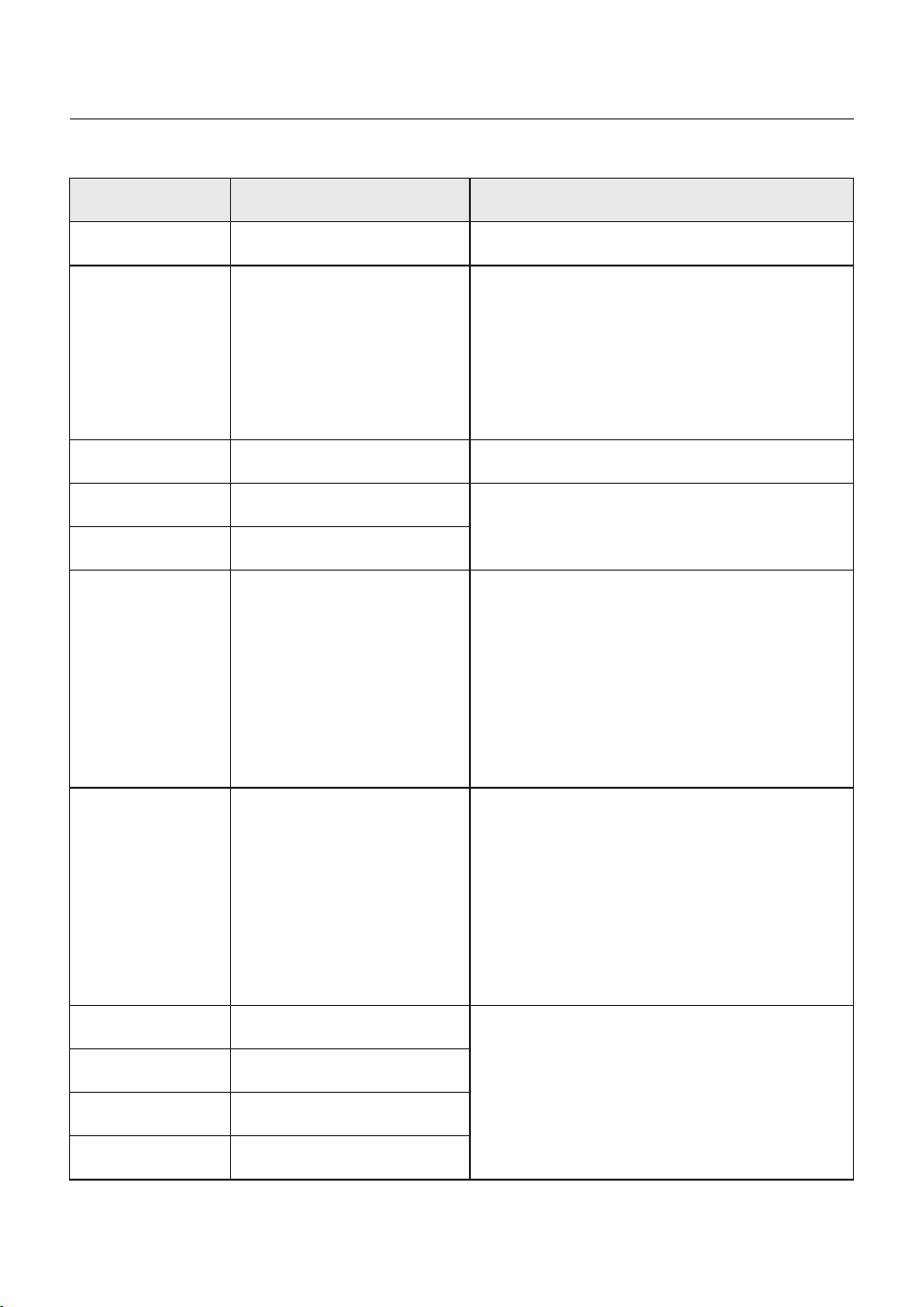
Message Name
Information Description
Troubleshooting Suggestion
1. Confirm whether the inverter is connected
to an external EPM/meter to prevent
reverse current.
2. Confirm whether the inverter is controlled
by an external third-party device.
3. Confirm whether the power setting of the
inverter power control is limited.
4. Verify settings in section 6.6.7 and check
your meter readings.
1. No need to deal with it.
1. No need to deal with it, the device is in
normal operation.
1. Due to the requirements of local safety
regulations, when the grid voltage is high,
the Volt-watt working mode is triggered,
which generally does not need to be dealt with.
2. Inverter factory test errors causing this
mode to open, if you need to close, you can
close this mode in LCD, set the process:
Main menu → Advanced Settings →
Password 0010 → STD mode settings →
Working Mode → Working mode: NULL →
Save and exit.
1. Due to the requirements of local safety
regulations, when the grid voltage is high,
the Volt-watt working mode is triggered,
which generally does not need to be dealt with.
2. Inverter factory test errors causing this
mode to open, if you need to close, you can
close this mode in LCD, set the process:
Main menu → Advanced Settings →
Password 0010 → STD mode settings →
Working Mode → Working mode: NULL →
Save and exit.
LmtByEPM
LmtByDRM
LmtByTemp
LmtByFreq
LmtByVg
LmtByVar
The device's output is under
controlled
DRM Function ON
Over temperature power
limited
Frequency power limited
The device is in the
Volt-Watt mode
The device is in the Volt-Var
mode of operation
Off Control device to shutdown
1. Turn on the device in the ON/OFF Setting.
LmtByUnFr
Under frequency limit
Standby
Bypass run
StandbySynoch
Off grid status to On grid
status
1. No need to deal with it.
GridToLoad Grid to load
40
7. Troubleshooting
User Manual
OV-G-F01
UN-G-F01
G-PHASE
G-F-GLU
NO-Grid
OV-G-V02
OV-G-V03
IGFO L-F
OV-G-V05
OV-G-V04
UN-G-V02
OV-G-F02
UN-G-F02
NO-Battery
Grid frequency exceeds the
upper frequency range
Grid frequency exceeds the
lower frequency range
Unbalanced grid voltage
Grid voltage frequency
fluctuation
Grid transient overvoltage
Grid transient overvoltage
Grid current tracking failure
Grid voltage RMS instanta-
neous overvoltage fault
Grid voltage exceeds the
upper voltage range
Grid voltage exceeds the
lower voltage range
Grid frequency exceeds the
upper frequency range
Grid frequency exceeds the
lower frequency range
Battery is not connected
UN-G-V01
Grid voltage exceeds the
lower voltage range
OV-G-V01
Grid voltage exceeds the
upper voltage range
Surge Alarm On-site grid surge
1. Grid side fault, restart the device.
If it is still not eliminated, please contact the
manufacturer's customer service.
1. Confirm whether the power grid is abnormal.
2. Confirm that the AC cable is properly
connected.
3. Restart the system and check if the fault
persists.
1. Restart the system, confirm if that the fault
continues.
1. Check on information page 1 – Verify the
battery voltage is within standards.
2. Measure battery voltage at plug.
No grid
1. Confirm whether the power grid is abnormal.
2. Confirm that the AC cable is properly
connected.
3. Restart the system and check if the fault
persists.
Message Name
Information Description
Troubleshooting Suggestion
OV-Vbackup
Over-Load
Inverting overvoltage
Load overload fault
1. Check whether the backup port wiring is
normal
2. Restart the system, confirm that the fault
continues.
1. Backup load power is too large, or some
inductive load startup power is too large,
need to remove some backup load, or remove
the inductive load on the backup.
41
7. Troubleshooting
User Manual
Message Name
Information Description
Troubleshooting Suggestion
BatName-FAIL
OV-Vbatt
UN-Vbatt
Fan Alarm
OV-DC01
(1020 DATA:0001)
OV-DC02
(1020 DATA:0002)
OV-BU S
(1021 DATA:0000)
UN-BUS01
(1023 DATA:0001)
UNB-BUS
(1022 DATA:0000)
UN-BUS02
(1023 DATA:0002)
DC-INTF.
(1027 DATA:0000)
OV-G-I
(1018 DATA:0000)
OV-DC A-I
(1025 DATA:0000)
OV-DC B-I
(1026 DATA:0000)
GRID-IN T F.
(1030 DATA:0000)
Wrong battery brand selection
Battery undervoltage detected
Fan alarm
DC 1 input overvoltage
DC 2 input overvoltage
DC bus overvoltage
DC bus undervoltage
DC bus unbalanced voltage
Abnormal detection of
DC bus voltage
DC hardware overcurrent
(1, 2, 3, 4)
A phase RMS value
overcurrent
DC 1 average overcurrent
DC 2 average overcurrent
AC hardware overcurrent
(abc phase)
Battery overvoltage detected
1. Confirm whether the battery model selection
is consistent with the actual one.
1. Restart the system and check if the fault
persists. If it is still not eliminated, please
contact the manufacturer's customer service.
1. Check if the internal fan is working correctly
or jammed.
1. Check if the PV voltage is abnormal
2. Restart the system, confirm that the fault
continues
1. Restart the system, confirm that the fault
continues.
1. Check if the DC wires are connected correctly
without loose connection.
1. Confirm that the grid is abnormal.
2. Confirm that the AC cable connection is not
abnormal.
3. Restart the system, confirm that the fault
continues.
1. Restart the system, confirm that the fault
continues.
1. Verify battery voltage is within standards.
Measure battery voltage at inverter connection
point. Contact your battery manufacturer for
further service.
CAN Fail CAN Fail
1. Can failure is a failure of communication
between inverter and battery. Check cable
conditions. Check to ensure you have it
plugged in on the CAN port of the battery and
inverter. Check that you are using the right
cable. Some batteries require a special
battery from the battery manufacturer.
42
Message Name
Information Description
Troubleshooting Suggestion
1. Confirm that the grid is abnormal.
2. Confirm that the AC cable connection is not
abnormal.
3. Restart the system, confirm that the fault
continues.
DCInj-FAU LT
(1037 DATA:0000)
The current DC component
exceeds the limit
IGBT-OV-I
(1048 DATA:0000)
OV-TE M
(1032 DATA:0000)
UN-TEM
(103A DATA:0000)
PV I S O-PRO01
(1033 DATA:0001)
PV I S O-PRO02
(1033 DATA:0002)
12Power-FAULT
(1038 DATA:0000)
ILeak-PRO01
(1034 DATA:0001)
ILeak-PRO02
(1034 DATA:0002)
ILeak-PRO03
(1034 DATA:0003)
ILeak-PRO04
(1034 DATA:0004)
ILeak_Check
(1039 DATA:0000)
GRID-IN T F02
(1046 DATA:0000)
OV-Vbatt-H/
OV-BU S-H
(1051 DATA:0000)
IGBT overcurrent
Module over temperature
Low temperature protection
PV negative ground fault
PV positive ground fault
12V undervoltage failure
Leakage current failure 01
(30mA)
Leakage current failure 02
(60mA)
Leakage current failure 03
(150mA)
Leakage current failure 04
Leakage current sensor
failure
Power grid disturbance 02
Battery overvoltage hardware
failure / VBUS
1. Restart the system, confirm that the fault
continues.
1. Check whether the surrounding environment
of the inverter has poor heat dissipation.
2. Confirm whether the product installation
meets the requirements.
RelayChk-FAIL
(1035 DATA:0000)
Relay failure
1. Restart the system, confirm that the fault
continues.
1. Check the working environment temperature
of the inverter.
2. Restart the system to confirm if the fault
continues.
1. Check whether the PV strings have insulation
problems.
2. Check whether the PV cable is damaged.
1. Check current leakage to ground.
Verify your grounding.
Verify all wires are in good condition and not
leaking current to ground.
1. Confirm whether the grid is seriously distorted.
2. Check whether the AC cable is connected
reliably.
1. Check if the battery circuit breaker is tripping.
2. Check if the battery is damaged.
7. Troubleshooting
User Manual
43
OV-IL L C
(1052 DATA:0000)
LLC hardware overcurrent
1. Check whether the backup load is overloaded.
2. Restart the system, confirm that the fault
continues.
DSP-B-FAULT
(1036 DATA:0000)
AFCI-Check
(1040 DATA:0000)
ARC- FAULT
(1041 DATA:0000)
The master-slave DSP
communication is abnormal
AFCI self-test failure
AFCI failure
INI-FAULT
(1031 DATA:0000)
AD zero drift overlink
1. Restart the system, confirm that the fault
continues.
1. Verify connections are tight within your PV
system. Arc fault settings can be changed in
advanced settings if further adjustment is
necessary.
Table 7.1 Fault message and description
Message Name
Information Description
Troubleshooting Suggestion
NOTE:
If the inverter displays any alarm message as listed in Table 7.1; please
turn off the inverter and wait for 5 minutes before restarting it .
If the failure persists, please contact your local distributor or the service
center.
1. Serial number of Solis Three Phase Inverter;
2. The distributor/dealer of Solis Three Phase Inverter (if available);
3. Installation date.
4. The description of the problem together with necessary information, pictures,
attachment.
5. The PV array configuration (e.g. number of panels, capacity of panels, number of
strings, etc.);
6. Your contact details.
Please keep ready with you the following information before contacting us.
7. Troubleshooting
User Manual
44
8. Specifications
User Manual
Max. input voltage
Start-up voltage
MPPT voltage range
MPPT number/Max input strings number
Max input power per MPPT
Max. input current
Battery Voltage range
Maximum charging Power
Rated output power
Max. apparent output power
Rated grid voltage
The grid voltage range
AC grid frequency range
Rating grid frequency
Power factor
TH Di
Recommended max. PV power
Maximum Charge/discharge current
Communication
Technical Data
S6-EH3P5K2-H
8000W
160V
200-850V
2/2
16A/16A
5kW
25A
CAN/RS485
5kW
3/N/PE, 380V/400V
320-460V
45-55 Hz/ 55-65Hz
50 Hz/60 Hz
>0.99 ( 0.8 leading to 0.8 lagging)
1000V
Battery Type
Li-ion
5kVA
S6-EH3P6K2-H
9600W
Input DC (PV side)
Rated voltage
600V
Full load MPPT voltage range
250-850V
Max. short circuit current 24A/24A
Battery
Output AC(Grid-side)
6kW
6kW
6kVA
Rating grid output current
Max. output current
7.6A/7.2A 9.1A/8.7A
<3%
120 - 600Vdc
7.6A/7.2A 9.1A/8.7A
9000W8000W
45
8. Specifications
User Manual
Rated output power
6kW5kW
Peak apparent output power
9.6kVA, 60 sec
8.0kVA, 60 sec
Output AC(Back-up)
PV Max. efficiency
BAT charged by PV Max. efficiency
EU efficiency
BAT charged/discharged to AC Max. efficiency
96.50%
98.37%
96.77%
97.32%
THDv(@linear load)
<2%
Efficiency
Protection
Anti-islanding protection
Insulation Resistor detection
Integrated AFCI 2.0
Residual current monitoring unit
Output over current protection
Output short protection
Output over voltage protection
DC switch
DC reverse polarity protection
PV overvoltage protection
Battery reverse protection
Yes
Rated output current
Rated frequency
50 Hz/60 Hz
Rated output voltage
Back-up switch time
3/N/PE, 380V/400V
< 10ms
7.6A/7.2A 9.1A/8.7A
Yes
Yes
Optional
Yes
Yes
Yes
Yes
Yes
Yes
Input voltage range
304-437V / 320-460V
Max. input current
13.8A
11.4A
Input AC(Grid-side)
Frequency range
Rated grid frequency
45-55 Hz / 55-65 Hz
50 Hz/60 Hz
Technical Data
Yes
97.00%
98.45%
97.10%
97.34%
S6-EH3P5K2-H S6-EH3P6K2-H
46
8. Specifications
User Manual
Features
Quick Connection plug
Quick Connection plug
AC connection
Battery connnection
Communication
Warranty
5 years (extend to 20 years)
Display
LE D indicator & Bluetooth+APP
Grid connection standard
G98 or G99, VDE-AR-N 4105 / VDE V 0124, EN 50549-1,
VD E 0126 / U TE C 15/VFR:2019, RD 1699/RD 244 /
UN E 206006 / UNE 206007-1, CEI 0-21, C10/11,
NR S 097-2-1, TO R, EIFS 2018.2, IEC 62116, IEC 61727,
IE C 60068, IEC 61683, EN 50530, M EA, PEA
Safty/EMC standard
IE C 62109-1/-2 ,E N 61000-6-1/-3
4000m
Max.operation altitude
MC4 connector
PV connection
Dimensions(W/H/D)
Max. power per phase (grid & back up)
Max. allowable phase imbalance
(grid & back up)
-25℃~+60℃
Weight
Operation temperature range
Relative humidity
0-95%
General data
Transformerless
<25 W
Topology
Self consumption (Night)
Natural convection
Cooling concept
Ingress protection
Noise emission
Technical Data
CA N, RS485, Optional:Wi-Fi, Cellular, LAN
600*500*210mm
50% rated power
100%
27.58kg
IP66
<46.9 dB(A)
S6-EH3P5K2-H S6-EH3P6K2-H
47
8. Specifications
User Manual
Max. input voltage
Start-up voltage
MPPT voltage range
MPPT number/Max input strings number
Max. input current
Battery Voltage range
Maximum charging Power
Rated output power
Max. apparent output power
Rated grid voltage
The grid voltage range
AC grid frequency range
Rating grid frequency
Power factor
TH Di
Recommended max. PV power
Maximum Charge/discharge current
Communication
Technical Data
S6-EH3P8K2-H
12800W
160V
200-850V
2/2
16A/16A
8kW
50A
CAN/RS485
8kW
3/N/PE, 380V/400V
320-460V
45-55 Hz/ 55-65Hz
50 Hz/60 Hz
>0.99 ( 0.8 leading to 0.8 lagging)
1000V
Battery Type
Li-ion
8kVA
S6-EH3P10K2-H
16000W
Input DC (PV side)
Rated voltage
600V
Full load MPPT voltage range
300-850V
Max. short circuit current 24A/24A
Battery
Output AC(Grid-side)
10kW
10kW
10kVA
Rating grid output current
Max. output current
12.2A/11.5A 15.2A/14.4A
<3%
350-850V
120 - 600Vdc
12.2A/11.5A 15.2A/14.4A
Max input power per MPPT
9000W9000W
48
8. Specifications
User Manual
Rated output power
10kW8kW
Peak apparent output power
16kVA, 60 sec
12.8kVA, 60 sec
Output AC(Back-up)
PV Max. efficiency
BAT charged by PV Max. efficiency
EU efficiency
BAT charged/discharged to AC Max. efficiency
THDv(@linear load)
<2%
Efficiency
Protection
Anti-islanding protection
Insulation Resistor detection
Residual current monitoring unit
Output over current protection
Output short protection
Output over voltage protection
DC switch
DC reverse polarity protection
PV overvoltage protection
Battery reverse protection
Yes
Rated output current
Rated frequency
50 Hz/60 Hz
Rated output voltage
Back-up switch time
3/N/PE, 380V/400V
< 10ms
12.2A/11.5A 15.2A/14.4A
Yes
Yes
Yes
Yes
Yes
Yes
Yes
Yes
Input AC(Grid-side)
Technical Data
Yes
97.50%
98.22%
97.41%
97.50%
97.90%
98.31%
97.51%
97.50%
S6-EH3P8K2-H S6-EH3P10K2-H
49
Input voltage range
304-437V / 320-460V
Max. input current
22.8A
18.2A
Frequency range
Rated grid frequency
45-55 Hz / 55-65 Hz
50 Hz/60 Hz
Integrated AFCI 2.0
Optional
8. Specifications
User Manual
Features
Quick Connection plug
Quick Connection plug
AC connection
Battery connnection
Communication
Warranty
Display
Grid connection standard
G98 or G99, VDE-AR-N 4105 / VDE V 0124, EN 50549-1,
VD E 0126 / U TE C 15/VFR:2019, RD 1699/RD 244 /
UN E 206006 / UNE 206007-1, CEI 0-21, C10/11,
NR S 097-2-1, TO R, EIFS 2018.2, I EC 62116, IEC 61727,
IE C 60068, IEC 61683, EN 50530, M EA, PEA
Safty/EMC standard
IE C 62109-1/-2 ,E N 61000-6-1/-3
4000m
Max.operation altitude
MC4 connector
PV connection
Dimensions(W/H/D)
-25℃~+60℃
Weight
Operation temperature range
Relative humidity
0-95%
General data
Transformerless
<25 W
Topology
Self consumption (Night)
Natural convection
Cooling concept
Ingress protection
Technical Data
IP66
5 years (extend to 20 years)
S6-EH3P8K2-H S6-EH3P10K2-H
CA N, RS485, Optional:Wi-Fi, Cellular, LAN
Noise emission
<46.9 dB(A)
600*500*230mm
30.18kg
50
Max. power per phase (grid & back up)
Max. allowable phase imbalance
(grid & back up)
50% rated power
100%
LE D indicator & Bluetooth+APP
Max. input voltage
Start-up voltage
MPPT voltage range
MPPT number/Max input strings number
Max. input current
Battery Voltage range
Maximum charging Power
Rated output power
Max. apparent output power
Rated grid voltage
The grid voltage range
AC grid frequency range
Rating grid frequency
Power factor
TH Di
Recommended max. PV power
Maximum Charge/discharge current
Communication
Technical Data
S6-EH3P3K-H-EU
4800W
160V
200-850V
2/2
16A/16A
3kW
25A
CAN/RS485
3kW
3/N/PE, 380V/400V
320-460V
45-55 Hz/ 55-65Hz
50 Hz/60 Hz
>0.99 ( 0.8 leading to 0.8 lagging)
1000V
120 - 600Vdc
Battery Type
Li-ion
3kVA
S6-EH3P4K-H-EU
6400W
Input DC (PV side)
Rated voltage
600V
Full load MPPT voltage range
200-850V
Max. short circuit current 24A/24A
Battery
Output AC(Grid-side)
4kW
4kW
4kVA
Rating grid output current
Max. output current
4.6A/4.3A 6.1A/5.8A
<3%
8. Specifications
User Manual
4.6A/4.3A 6.1A/5.8A
Max input power per MPPT
6400W4800W
51
Rated output power
4kW3kW
Peak apparent output power
6.4kVA, 60 sec
4.8kVA, 60 sec
Output AC(Back-up)
PV Max. efficiency
BAT charged by PV Max. efficiency
EU efficiency
BAT charged/discharged to AC Max. efficiency
95.50%
95.96%
95.51%
97.04%
THDv(@linear load)
<2%
Efficiency
Protection
Anti-islanding protection
Insulation Resistor detection
Residual current monitoring unit
Output over current protection
Output short protection
Output over voltage protection
DC switch
DC reverse polarity protection
PV overvoltage protection
Battery reverse protection
Yes
Rated output current
Rated frequency
50 Hz/60 Hz
Rated output voltage
Back-up switch time
3/N/PE, 380V/400V
< 10ms
4.6A/4.3A 6.1A/5.8A
Yes
Yes
Yes
Yes
Yes
Yes
Yes
Yes
Input AC(Grid-side)
Technical Data
S6-EH3P3K-H-EU S6-EH3P4K-H-EU
96.00%
96.57%
96.03%
97.29%
Yes
8. Specifications
User Manual
52
Input voltage range
304-437V / 320-460V
Max. input current
9.1A
6.8A
Frequency range
Rated grid frequency
45-55 Hz / 55-65 Hz
50 Hz/60 Hz
Integrated AFCI 2.0
Optional
Features
Quick Connection plug
Quick Connection plug
AC connection
Battery connnection
Communication
Warranty
5 years (extend to 20 years)
Grid connection standard
G98 or G99, VDE-AR-N 4105 / VDE V 0124, EN 50549-1,
VD E 0126 / U TE C 15/VFR:2019, RD 1699/RD 244 /
UN E 206006 / UNE 206007-1, CEI 0-21, C10/11,
NR S 097-2-1, TO R, EIFS 2018.2, IEC 62116, IEC 61727,
IE C 60068, IEC 61683, EN 50530, M EA, PEA
Safty/EMC standard
IE C 62109-1/-2 ,E N 61000-6-1/-3
4000m
Max.operation altitude
MC4 connector
PV connection
Dimensions(W/H/D)
-25℃~+60℃
Weight
Operation temperature range
Relative humidity
0-95%
General data
Transformerless
<25 W
Topology
Self consumption (Night)
Natural convection
Cooling concept
Ingress protection
Technical Data
S6-EH3P3K-H-EU S6-EH3P4K-H-EU
600*500*210mm
26.42kg
IP66
8. Specifications
User Manual
CA N, RS485, Optional:Wi-Fi, Cellular, LAN
Noise emission
<46.9 dB(A)
53
Display
Max. power per phase (grid & back up)
Max. allowable phase imbalance
(grid & back up)
50% rated power
100%
LE D indicator & Bluetooth+APP
Max. input voltage
Start-up voltage
MPPT voltage range
MPPT number/Max input strings number
Max. input current
Battery Voltage range
Maximum charging Power
Rated output power
Max. apparent output power
Rated grid voltage
The grid voltage range
AC grid frequency range
Rating grid frequency
Power factor
TH Di
Recommended max. PV power
Maximum Charge/discharge current
Communication
Technical Data
S6-EH3P5K-H-EU
8000W
160V
200-850V
3/3
16A/16A/16A
5kW
25A
CAN/RS485
5kW
3/N/PE, 380V/400V
320-460V
45-55 Hz/ 55-65Hz
50 Hz/60 Hz
>0.99 ( 0.8 leading to 0.8 lagging)
1000V
Battery Type
Li-ion
5kVA
S6-EH3P6K-H-EU
9600W
Input DC (PV side)
Rated voltage
600V
Full load MPPT voltage range
200-850V
Max. short circuit current 24A/24A/24A
Battery
Output AC(Grid-side)
6kW
6kW
6kVA
Rating grid output current
Max. output current
7.6A/7.2A 9.1A/8.7A
<3%
120 - 600Vdc
8. Specifications
User Manual
7.6A/7.2A 9.1A/8.7A
Max input power per MPPT
9000W8000W
54
Rated output power
6kW5kW
Peak apparent output power
9.6kVA, 60 sec
8.0kVA, 60 sec
Output AC(Back-up)
PV Max. efficiency
BAT charged by PV Max. efficiency
EU efficiency
BAT charged/discharged to AC Max. efficiency
96.50%
98.37%
96.77%
97.32%
THDv(@linear load)
<2%
Efficiency
Protection
Anti-islanding protection
Insulation Resistor detection
Residual current monitoring unit
Output over current protection
Output short protection
Output over voltage protection
DC switch
DC reverse polarity protection
PV overvoltage protection
Battery reverse protection
Yes
Rated output current
Rated frequency
50 Hz/60 Hz
Rated output voltage
Back-up switch time
3/N/PE, 380V/400V
< 10ms
7.6A/7.2A 9.1A/8.7A
Yes
Yes
Yes
Yes
Yes
Yes
Yes
Yes
Input AC(Grid-side)
Technical Data
S6-EH3P5K-H-EU S6-EH3P6K-H-EU
97.00%
98.45%
97.10%
97.34%
Yes
8. Specifications
User Manual
55
Input voltage range
304-437V / 320-460V
Max. input current
13.8A
11.4A
Frequency range
Rated grid frequency
45-55 Hz / 55-65 Hz
50 Hz/60 Hz
Integrated AFCI 2.0
Optional
Features
Quick Connection plug
Quick Connection plug
AC connection
Battery connnection
Communication
Warranty
Grid connection standard
G98 or G99, VDE-AR-N 4105 / VDE V 0124, EN 50549-1,
VD E 0126 / U TE C 15/VFR:2019, RD 1699/RD 244 /
UN E 206006 / UNE 206007-1, CEI 0-21, C10/11,
NR S 097-2-1, TO R, EIFS 2018.2, IEC 62116, IEC 61727,
IE C 60068, IEC 61683, EN 50530, M EA, PEA
Safty/EMC standard
IE C 62109-1/-2 ,E N 61000-6-1/-3
4000m
Max.operation altitude
MC4 connector
PV connection
Dimensions(W/H/D)
-25℃~+60℃
Weight
Operation temperature range
Relative humidity
0-95%
General data
Transformerless
<25 W
Topology
Self consumption (Night)
Natural convection
Cooling concept
Ingress protection
Technical Data
S6-EH3P5K-H-EU S6-EH3P6K-H-EU
IP66
5 years (extend to 20 years)
8. Specifications
User Manual
CA N, RS485, Optional:Wi-Fi, Cellular, LAN
Noise emission
<46.9 dB(A)
600*500*210mm
27.58kg
56
Display
Max. power per phase (grid & back up)
Max. allowable phase imbalance
(grid & back up)
50% rated power
100%
LE D indicator & Bluetooth+APP
Max. input voltage
Start-up voltage
MPPT voltage range
MPPT number/Max input strings number
Max. input current
Battery Voltage range
Maximum charging Power
Rated output power
Max. apparent output power
Rated grid voltage
The grid voltage range
AC grid frequency range
Rating grid frequency
Power factor
TH Di
Recommended max. PV power
Maximum Charge/discharge current
Communication
Technical Data
S6-EH3P8K-H-EU
12800W
160V
200-850V
4/4
16A/16A/16A/16A
8kW
50A
CAN/RS485
8kW
3/N/PE, 380V/400V
320-460V
45-55 Hz/ 55-65Hz
50 Hz/60 Hz
>0.99 ( 0.8 leading to 0.8 lagging)
1000V
Battery Type
Li-ion
8kVA
S6-EH3P10K-H-EU
16000W
Input DC (PV side)
Rated voltage
600V
Full load MPPT voltage range
200-850V
Max. short circuit current 24A/24A/24A/24A
Battery
Output AC(Grid-side)
10kW
10kW
10kVA
Rating grid output current
Max. output current
12.2A/11.5A 15.2A/14.4A
<3%
250-850V
120 - 600Vdc
8. Specifications
User Manual
12.2A/11.5A 15.2A/14.4A
Max input power per MPPT
9000W9000W
57
Rated output power
10kW8kW
Peak apparent output power
16kVA, 60 sec
12.8kVA, 60 sec
Output AC(Back-up)
PV Max. efficiency
BAT charged by PV Max. efficiency
EU efficiency
BAT charged/discharged to AC Max. efficiency
97.50%
98.22%
97.41%
97.50%
THDv(@linear load)
<2%
Efficiency
Protection
Anti-islanding protection
Insulation Resistor detection
Residual current monitoring unit
Output over current protection
Output short protection
Output over voltage protection
DC switch
DC reverse polarity protection
PV overvoltage protection
Battery reverse protection
Yes
Rated output current
Rated frequency
50 Hz/60 Hz
Rated output voltage
Back-up switch time
3/N/PE, 380V/400V
< 10ms
12.2A/11.5A 15.2A/14.4A
Yes
Yes
Yes
Yes
Yes
Yes
Yes
Yes
Input AC(Grid-side)
Technical Data
S6-EH3P8K-H-EU S6-EH3P10K-H-EU
97.90%
98.31%
97.51%
97.50%
Yes
8. Specifications
User Manual
58
Input voltage range
304-437V / 320-460V
Max. input current
22.8A
18.2A
Frequency range
Rated grid frequency
45-55 Hz / 55-65 Hz
50 Hz/60 Hz
Integrated AFCI 2.0
Optional
Features
Quick Connection plug
Quick Connection plug
AC connection
Battery connnection
Communication
Warranty
Grid connection standard
G98 or G99, VDE-AR-N 4105 / VDE V 0124, EN 50549-1,
VD E 0126 / U TE C 15/VFR:2019, RD 1699/RD 244 /
UN E 206006 / UNE 206007-1, CEI 0-21, C10/11,
NR S 097-2-1, TO R, EIFS 2018.2, IEC 62116, IEC 61727,
IE C 60068, IEC 61683, EN 50530, M EA, PEA
Safty/EMC standard
IE C 62109-1/-2 ,E N 61000-6-1/-3
4000m
Max.operation altitude
MC4 connector
PV connection
Dimensions(W/H/D)
-25℃~+60℃
Weight
Operation temperature range
Relative humidity
0-95%
General data
Transformerless
<25 W
Topology
Self consumption (Night)
Natural convection
Cooling concept
Ingress protection
Technical Data
S6-EH3P8K-H-EU S6-EH3P10K-H-EU
IP66
5 years (extend to 20 years)
8. Specifications
User Manual
CA N, RS485, Optional:Wi-Fi, Cellular, LAN
Noise emission
<46.9 dB(A)
600*500*230mm
30.18kg
59
Display
Max. power per phase (grid & back up)
Max. allowable phase imbalance
(grid & back up)
50% rated power
100%
LE D indicator & Bluetooth+APP
8. Specifications
User Manual
Max. input voltage
Start-up voltage
MPPT voltage range
MPPT number/Max input strings number
Max. input current
Battery Voltage range
Maximum charging Power
Rated output power
Max. apparent output power
Rated grid voltage
The grid voltage range
AC grid frequency range
Rating grid frequency
Power factor
TH Di
Recommended max. PV power
Maximum Charge/discharge current
Communication
Technical Data
S6-EH3P7K-H-LV
160V
200-850V
4/4
16A/16A/16A/16A
50A
CAN/RS485
3/(N)/PE, 127V / 220V, 133V / 230V
195-265V
45-55 Hz/ 55-65Hz
50 Hz/60 Hz
>0.99 ( 0.8 leading to 0.8 lagging)
1000V
Battery Type
Li-ion
11200W
Input DC (PV side)
Rated voltage
600V
Full load MPPT voltage range
Max. short circuit current 24A/24A/24A/24A
Battery
Output AC(Grid-side)
7kW
7kW
7kVA
Rating grid output current
Max. output current
17.57A
<3%
250-850V
120 - 600Vdc
17.57A
Max input power per MPPT
9000W
60
8. Specifications
User Manual
Rated output power
7kW
Peak apparent output power
11.2kVA, 60 sec
Output AC(Back-up)
PV Max. efficiency
BAT charged by PV Max. efficiency
EU efficiency
BAT charged/discharged to AC Max. efficiency
THDv(@linear load)
<2%
Efficiency
Protection
Anti-islanding protection
Insulation Resistor detection
Residual current monitoring unit
Output over current protection
Output short protection
Output over voltage protection
DC switch
DC reverse polarity protection
PV overvoltage protection
Battery reverse protection
Yes
Rated output current
Rated frequency
50 Hz/60 Hz
Rated output voltage
Back-up switch time
< 10ms
17.57A
Yes
Yes
Yes
Yes
Yes
Yes
Yes
Yes
Input AC(Grid-side)
Technical Data
98.20%
98.20%
97.50%
96.10% / 96.50%
Yes
Input voltage range
184-265V
Max. input current
17.57A
Frequency range
Rated grid frequency
45-55 Hz / 55-65 Hz
50 Hz/60 Hz
Integrated AFCI 2.0
Optional
S6-EH3P7K-H-LV
3/(N)/PE, 127V / 220V, 133V / 230V
61
8. Specifications
User Manual
Features
Quick Connection plug
Quick Connection plug
AC connection
Battery connnection
Communication
Warranty
Grid connection standard
EN50549-1, VDE4105, REN342
Safty/EMC standard
IE C 62109-1/-2 ,E N 61000-6-1/-3
4000m
Max.operation altitude
MC4 connector
PV connection
Dimensions(W/H/D)
-25℃~+60℃
Weight
Operation temperature range
Relative humidity
0-95%
General data
Transformerless
<25 W
Topology
Self consumption (Night)
Natural convection
Cooling concept
Ingress protection
Technical Data
IP66
5 years (extend to 20 years)
Noise emission
600*500*230mm
Display
Max. power per phase (grid & back up)
Max. allowable phase imbalance
(grid & back up)
50% rated power
100%
LE D indicator & Bluetooth+APP
S6-EH3P7K-H-LV
62
CA N, RS485, Optional:Wi-Fi, Cellular, LAN
<46.9 dB(A)
30.18kg

Ginlong Technologies Co., Ltd.
No. 57 Jintong Road, Binhai Industrial Park, Xiangshan, Ningbo,
Zhejiang, 315712, P.R.China.
Tel: +86 (0)574 6578 1806
Fax: +86 (0)574 6578 1606
If you encounter any problem on the inverter, please find out the inverter S/N
and contact us, we will try to respond to your question ASAP.
Please adhere to the actual products in case of any discrepancies in this user manual.