Operating and Training Guide
Model Number
PIF00-15001
PLEASE READ THIS ENTIRE GUIDE BEFORE BEGINNING
FREE TO ROAM
WIRELESS FENCE
TM

1-800-732-2677
2

www.petsafe.net
3
Thank you for choosing PetSafe
®
brand. You and your pet deserve a companionship that includes
memorable moments and a shared understanding together. Our products provide you with the
tools and technologies to successfully train your pet. If you have any questions about our products
or training your pet, please visit our website at www.petsafe.net or contact our Customer Care
Center at 1-800-732-2677. To get the most protection out of your warranty, please register your
product within 30 days at www.petsafe.net. By registering and keeping your receipt, you will enjoy
the product’s full warranty and should you ever need to call the Customer Care Center, we will be
able to help you faster. Most importantly, we will never give or sell your valuable information to
anyone. Complete warranty information is available online at www.petsafe.net.
1-800-732-2677
4
Hereinafter Radio Systems Corporation, Radio Systems PetSafe Europe Ltd., Radio Systems Australia Pty Ltd. and any other
affiliate or Brand of Radio Systems Corporation may be referred to collectively as “We” or “Us”.
Important Safety Information
Explanation of Attention Words and Symbols used in this guide
This is the safety alert symbol. It is used to alert you to potential personal injury hazards. Obey all safety messages
that follow this symbol to avoid possible injury or death.
WARNING indicates a hazardous situation which, if not avoided, could result in death or serious injury.
CAUTION, used without the safety alert symbol, indicates a hazardous situation which, if not avoided,
could result in harm to your pet.
NOTICE is used to address safe use practices not related to personal injury.
• Not for use with aggressive dogs. Do not use this product if your dog is prone to aggressive behavior.
Aggressive dogs can cause severe injury or death to their owners and others. If you are not sure that this
product is right for your dog, please talk to your veterinarian or a certified trainer.
• Risk of electric shock. Use the Fence Transmitter indoors in dry location only.
• Risk of explosion if battery is replaced by an incorrect type. Do not short circuit, mix old and new
batteries, dispose of in fire, or expose to water. When batteries are stored or disposed, they must be
protected from shorting. Dispose of used batteries properly.
This PetSafe
®
Free to Roam Wireless Fence
™
system is NOT a solid barrier. The system is designed to act
as a deterrent to remind pets by Static Correction to remain in the boundary established. It is important
that you reinforce training with your pet on a regular basis. Since the tolerance level to Static Correction
varies from pet to pet, Radio Systems Corporation CANNOT guarantee that the system will, in all cases,
keep a pet within the established boundary. Not all pets can be trained to avoid crossing the boundary!
Therefore, if you have reason to believe that your pet may pose a danger to others or harm himself if he
is not kept from crossing the boundaries, you should NOT rely solely upon the PetSafe Free To Roam
Wireless Fence system to confine your pet. Radio Systems Corporation shall NOT be liable for
any property damage, economic loss or any consequential damages, sustained as a result of any animal
crossing the boundary.
Proper fit of the collar is important. A collar worn for too long or made too tight on the pet’s neck
may cause skin damage. Ranging from redness to pressure ulcers; this condition is commonly
known as bed sores.
• Avoid leaving the collar on your pet for more than 12 hours per day.
• When possible reposition the collar on the pet’s neck every 1 to 2 hours.
• Check the fit to prevent excessive pressure; follow the instructions in this manual.
• Never connect a lead to the electronic collar; it will cause excessive pressure on the contacts.
• When using a separate collar for a lead, don’t put pressure on the electronic collar.
• Wash your pet’s neck area and the contacts of the collar weekly with a damp cloth.
• Examine the contact area daily for signs of a rash or a sore.
• If a rash or sore is found, discontinue use of the collar until the skin has healed.
• If the condition persists beyond 48 hours, see your veterinarian.
• For additional information on bed sores and pressure necrosis, please visit our website.

www.petsafe.net
5
These steps will help keep your pet secure and comfortable. Millions of pets are comfortable while they
wear stainless steel contacts. Some pets are sensitive to contact pressure. You may find after some
time that your pet is very tolerant of the collar. If so, you may relax some of these precautions.
It is important to continue daily checks of the contact area. If redness or sores are found, discontinue
use until the skin has fully healed.
• You may need to trim the hair in the area of the Contact Points. Never shave your pet’s neck;
this may lead to a rash or infection.
• Always remove your pet’s Receiver Collar before performing any Transmitter testing.
• The Receiver Collar should not be on your pet when the system is tested. Your pet may
receive an unintended correction.
• The Boundary Zone must be tested whenever an adjustment is made to the Transmitter setting to prevent
unintended corrections to your pet.
• If you use a collar and leash for training, be sure the extra collar does not put pressure
on the contact points.
• To prevent an unintended correction, remove the Receiver Collar from your pet when indoors.
• Never remove power from the system when the collar is on the pet. This may activate
the Receiver Collar.
• Radio Systems
®
Corporation recommends the use of an Uninterruptible Power Supply (UPS) for
use with your wireless fence. Should the power go out at your home, your pet will be unprotected.
Power outages can be unpredictable, and the use of a UPS will provide you with some time to properly
restrain your pet.
In rare instances, if your pet is near the boundary at the time when the power fails, it is possible
that your pet will receive a correction. This correction will stop after a 15 second timeout period has
been reached. This is due to the operation of the collar: the collar is activated by the absence of the
containment signal.
While results will vary depending on the UPS manufacturer’s specifications the following are typical
examples to guide your choice of UPS:
• Using a 400 VA UPS a consumer should expect 3 hours of backup time.
• Using a 900 VA UPS a consumer could expect 8 hours of backup time.
If settings below maximum fence size are used, additional backup time will result. At minimum
fence size settings backup time may be more than two times the backup time estimated at
maximum fence size.
• To prevent an unintended correction, after the Boundary Flags have been placed, be sure to set the
Static Correction on the Receiver Collar back to level 1 tone only.
• Do not place anything on the top of the Transmitter or cover any ventilation holes. This may overheat the
Transmitter and cause early transmit failure.
• Do not place Transmitter in a closet or any other confined, unventilated area.
• Do not place Transmitter on a metal surface.

1-800-732-2677
6
Table Of Contents
Components ......................................................................................................................... 7
How the System Works ........................................................................................................ 8
Key Definitions ..................................................................................................................... 8
Operating Guide ................................................................................................................ 9
Step 1: Set Up the Transmitter ........................................................................................... 9
Step 2: Prepare the Receiver Collar ................................................................................. 10
Step 3: Adjust the Pet Area to Desired Size .................................................................... 12
Step 4: Place the Boundary Flags ................................................................................... 13
Step 5: Fit the Receiver Collar ......................................................................................... 14
Training Guide ................................................................................................................. 16
Day 1 - Boundary Awareness .......................................................................................... 17
Days 2 thru 4 - Continue Boundary Awareness ............................................................... 17
Days 5 thru 8 - Distraction Phase .................................................................................... 18
Days 9 thru 14 - Unleashed Supervision ......................................................................... 19
Days 15 thru 30 - Pet Monitoring ..................................................................................... 19
Taking Your Pet Out of the Pet Area ................................................................................... 19
Wireless-To-Go ................................................................................................................... 20
Accessories ........................................................................................................................ 20
Frequently Asked Questions ......................................................................................... 21
Troubleshooting .............................................................................................................. 22
Terms of Use and Limitation of Liability ............................................................................ 24
Compliance ........................................................................................................................ 24
Customer Care International .............................................................................................. 25
Battery Disposal ................................................................................................................. 25
Perchlorate Battery ............................................................................................................. 25
Warranty ........................................................................................................................... 26
www.petsafe.net
7
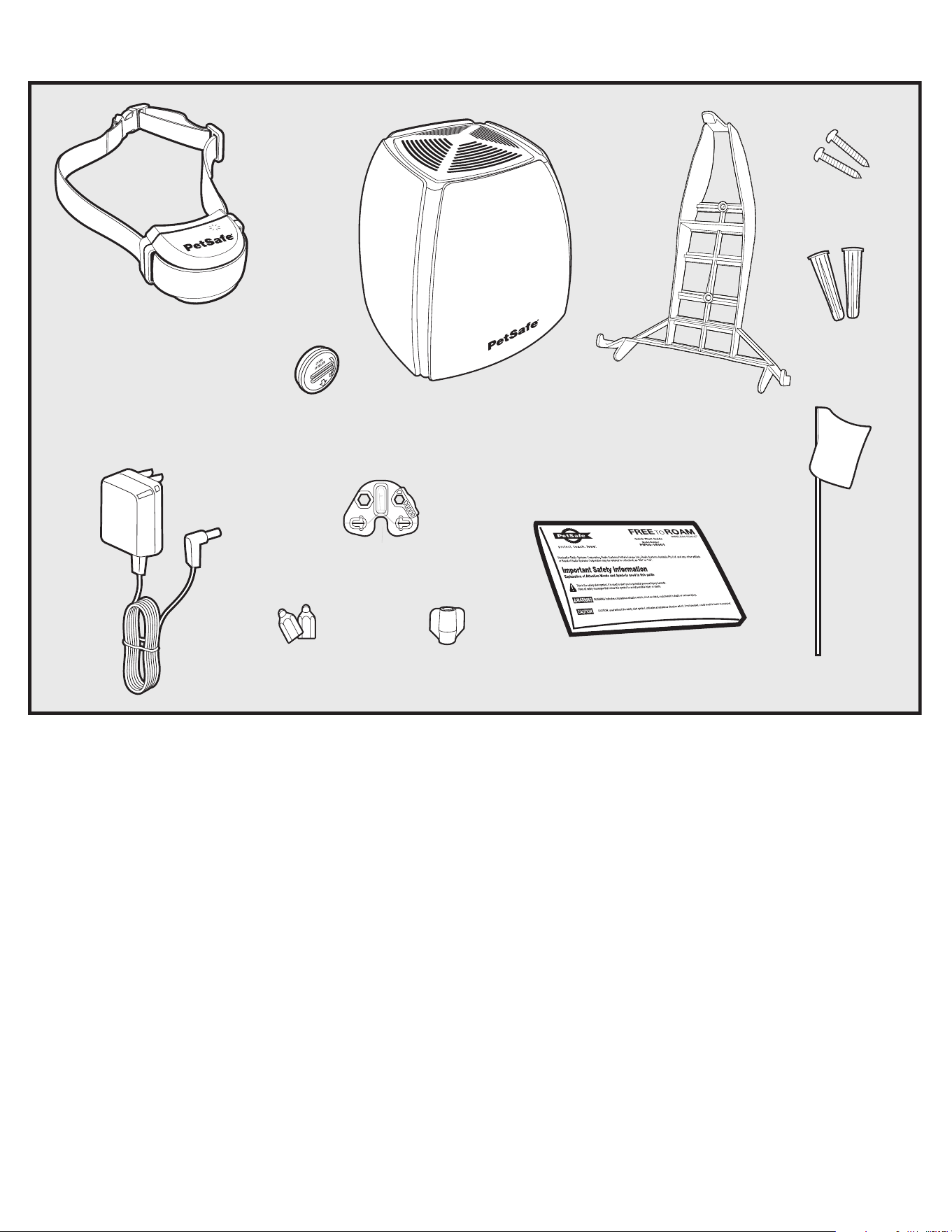
Components
Transmitter
Quick Start
Guide
Battery
(PetSafe
®
RFA-67)
Boundary Flags - 50
Power
Adapter
Long
Contact Points
Test Light
Tool
Receiver
Collar
with
Short
Contact
Points
Mounting Bracket
Mounting
Screws
Mounting
Anchors
Contact Point
Wrench
Other Items You May Need
• Scissors
• Lighter
• Screw Driver
• Drill
• Tape measure
• Non-Metallic Collar and leash or lead
Set up and training help: www.petsafe.net
1-800-732-2677
8
How the System Works
The PetSafe
®
Free to Roam Wireless Fence
™
system has been proven safe, comfortable, and effective
for pets over 5 pounds. The system works by transmitting a radio signal up to 90 feet in all directions.
You temporarily define the Pet Area with Boundary Flags for a visual aid in training your pet. Your pet
wears a Receiver Collar with Contact Points that touch his neck, and, once trained, is allowed to roam
freely in the Pet Area. When your pet reaches the Boundary Zone, the Receiver Collar gives a warning
tone before delivering a safe Static Correction through the Contact Points to get his attention until
he returns to the Pet Area.
Key Definitions
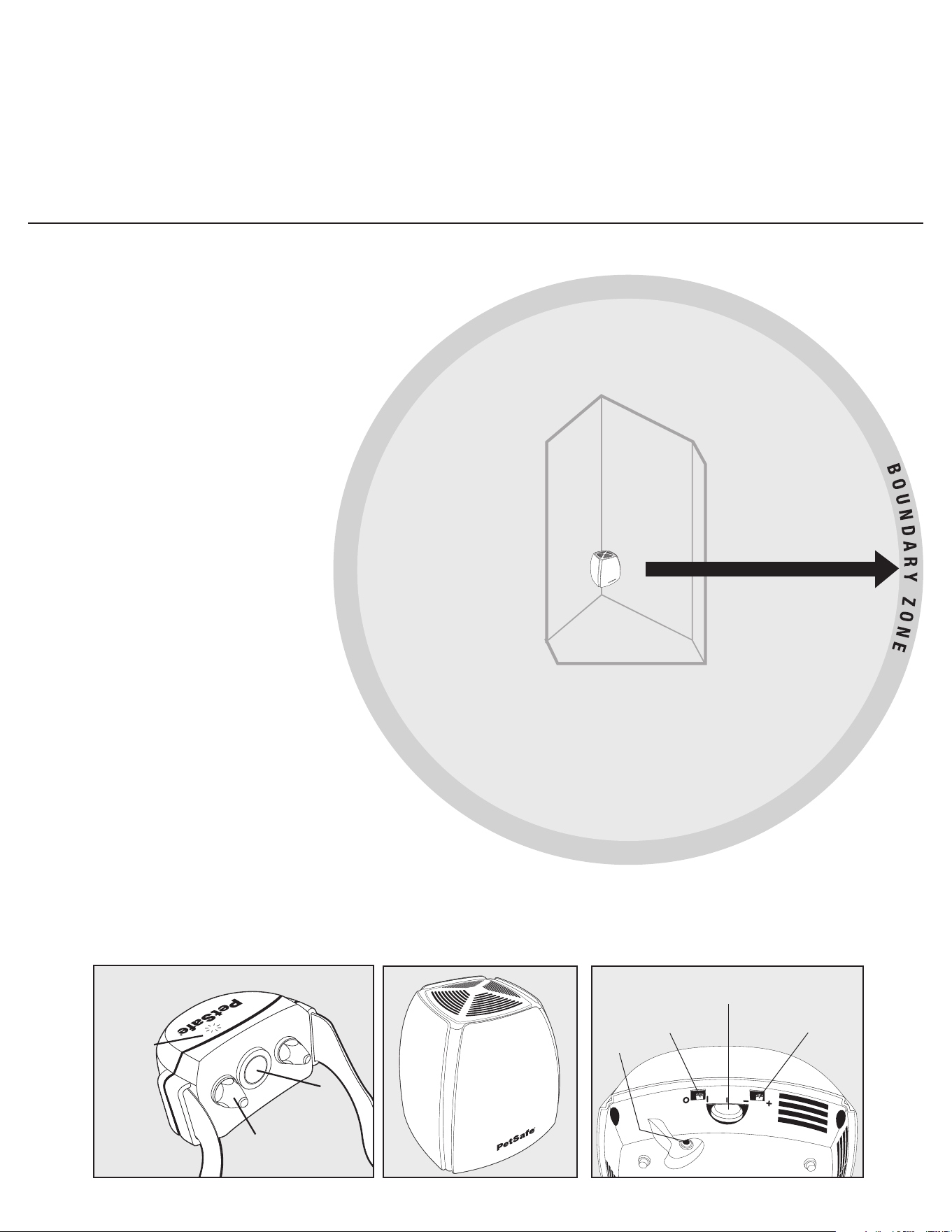
Transmitter: Transmits the radio signal and is the center
of the Pet Area. The Transmitter needs to be located indoors.
Pet Area: Distance from the Transmitter where
your pet can roam freely.
Boundary Zone: 2 to 3 foot wide area outside the
Pet Area where your pet’s Receiver Collar will begin
to tone and then begin to deliver a Static Correction.
The correction will start in the Boundary Zone and
continue anywhere beyond the Pet Area.
Note: The Receiver Collar is equipped with a safety
time-out feature that will stop correcting after
15 seconds if your pet remains outside the Pet Area.
Receiver Collar: Receives the radio signal from
the Transmitter.
Mode Button: Turns Receiver ON/OFF and adjusts
the level of Static Correction your pet receives outside the Pet Area.
Receiver Indicator Light: Indicates the level of correction
at which the Receiver Collar is set. This light also serves
as a low battery indicator.
Contact Points: Deliver the safe Static Correction when your pet moves into the Boundary Zone.
Power Jack: Where the Power Adapter plugs into the Transmitter.
The Transmitter is powered by a standard 120-volt outlet.
Boundary Switch: Adjust according to the size of the Pet Area desired.
Low Range of 5-45 ft. is “–”; High Range of 5-90 ft. is “+”.
Note: Adjusting the switch does not change the level of Static Correction on the Receiver Collar.
Power Light: Indicates when the Transmitter is on.
Boundary Control Dial: Adjusts the distance from the Transmitter to the Boundary Zone.
Note: Adjusting the dial does not change the level of Static Correction on the Receiver Collar.
Transmitter
Power
Jack
Boundary
Control Dial
Boundary
Switch
+ = High
- = Low
On/Off
Switch
l = On
O= Off
Receiver Collar
Receiver
Indicator
Light
Contact
Point
Mode
Button
Transmitter
Note: In many
neighborhoods,
nearby property lines
may limit how large
the Pet Area can be.
PET AREA
Maximum
90 ft. range
(45 average steps)
www.petsafe.net
9
Operating Guide
Step 1: Set Up the Transmitter
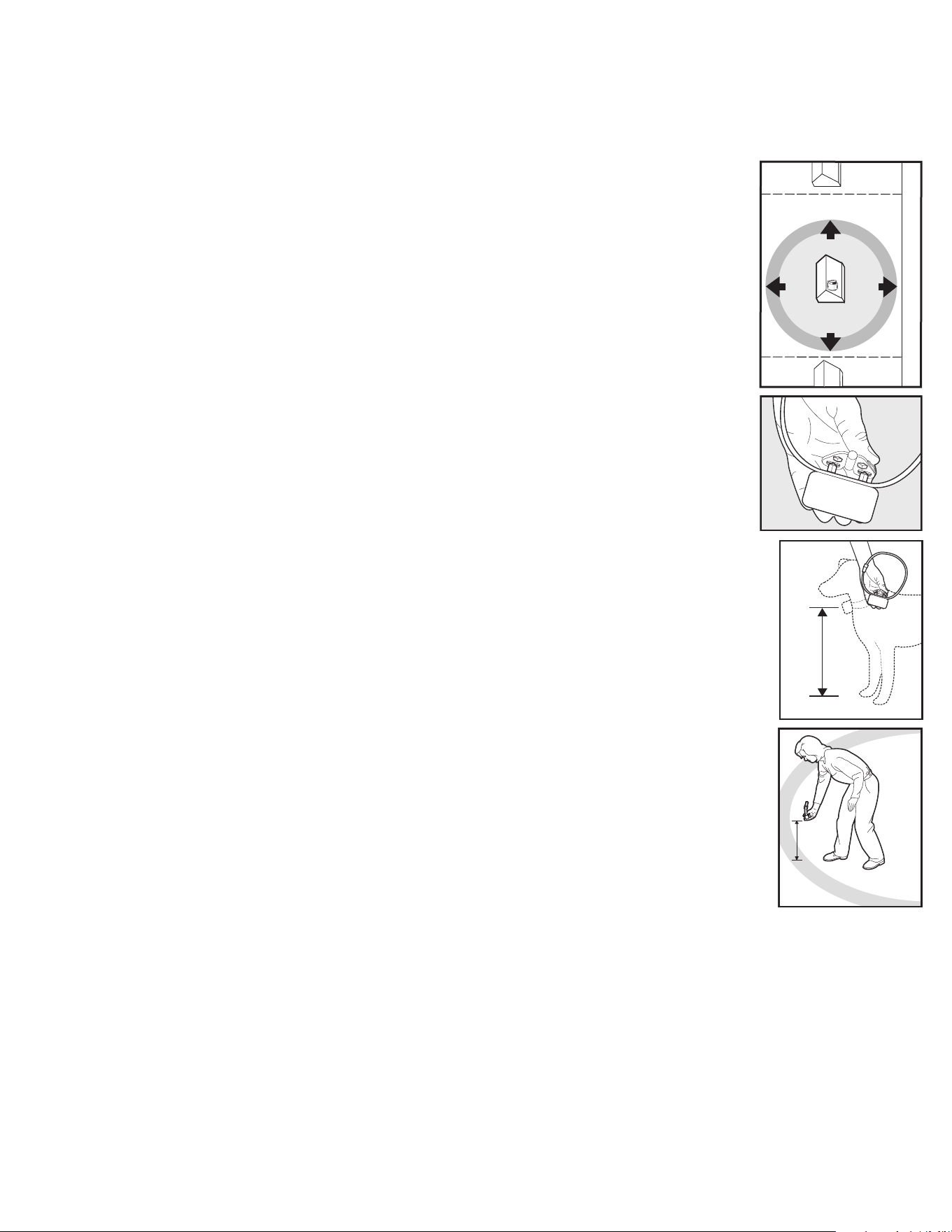
Important: You may need to move the Transmitter several times before determining the final location.
The Transmitter is located at the exact center of the Pet Area.
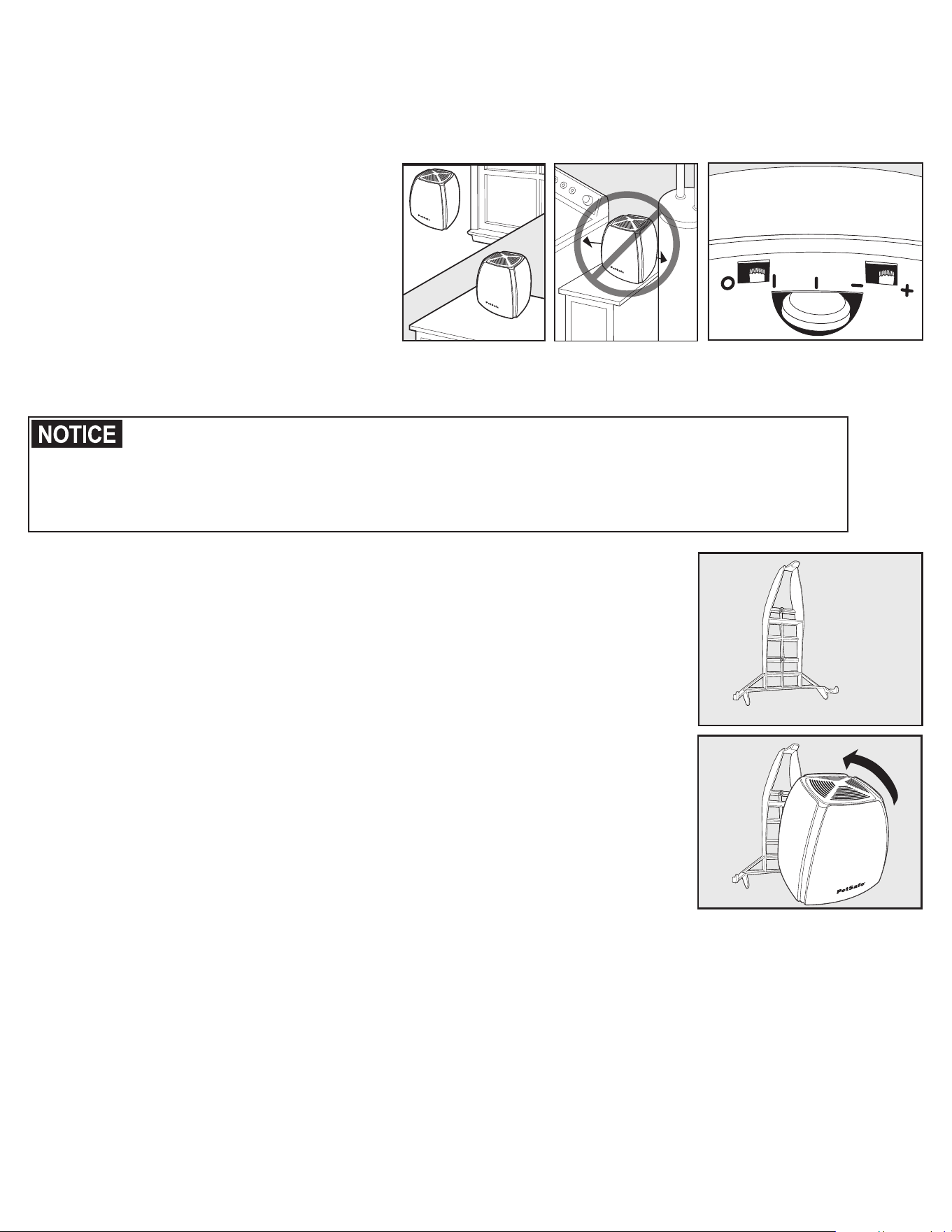
Place the transmitter:
• At least 2 feet above the floor located on
the ground floor of your home.
• In a dry, well ventilated, protected area.
• In an area where temperatures do not fall
below -10º F.
• Mounted to a wall, on a non-metal table
or other hard surface to ensure proper
ventilation (1A).
• At least 3 feet from large metal objects, as these items may reduce the size and shape of your Pet Area (1B).
Placing the Transmitter inside a metal building or shed can reduce the maximum range of the system.
You may mount the Transmitter on a wall.
Wall Mounting the transmitter
1. Place bracket against wall in position to be hung (1D).
2. Mark hole locations.
3. If mounting directly to the wall studs, drill 1/16 inch pilot holes for the screws.
Anchors would not be needed. If mounting to dry wall using the mounting
anchors, drill 1/4” holes and insert anchors completely into the holes.
4. Screw bracket to the wall.
5. Place the bottom edge of transmitter against the bracket making sure the
screw recesses are over the bracket hooks on both sides.
6. Rotate transmitter up and push firmly until the top latch locks into place (1E).
To maximize your Pet Area, make sure the Boundary Switch is on “+” and the
Boundary Control Dial is set to “8” (1C). Plug Power Adapter into Power Jack
and standard 120-volt outlet. Turn the Transmitter ON.
The Transmitter has a built in Power Loss Alarm. This alarm sounds an
intermittent tone alarm indicating power has been removed from the Transmitter.
The alarm will sound for at least 20 minutes. If power is removed from the unit,
your pet is no longer contained.
There are two ways to turn off the Power Loss Alarm:
1. Plug the power cord back into a functional 120-volt outlet. The unit assumes power has been
suspended because of an accident such as a child unplugging the cord, thus sounding the tone.
2. Unplug Transmitter Power Adapter from the Power Jack located on the bottom of the Transmitter,
indicating power is intentionally being suspended.
When your power is restored, be sure to reconnect the Power Adapter into the Power Jack of your
Transmitter.
Wall
Mount
Tabletop
1A
3ft.
1B
1C
Do not place anything on top of Transmitter or cover any ventilation holes. This may overheat the Transmitter
and cause early transmit failure.
Do not place Transmitter in a closet or any other confined, unventilated area.
Do not place Transmitter on a metal surface.
1E
1D
Mounting
Bracket
1-800-732-2677
10
Step 2: Prepare the Receiver Collar
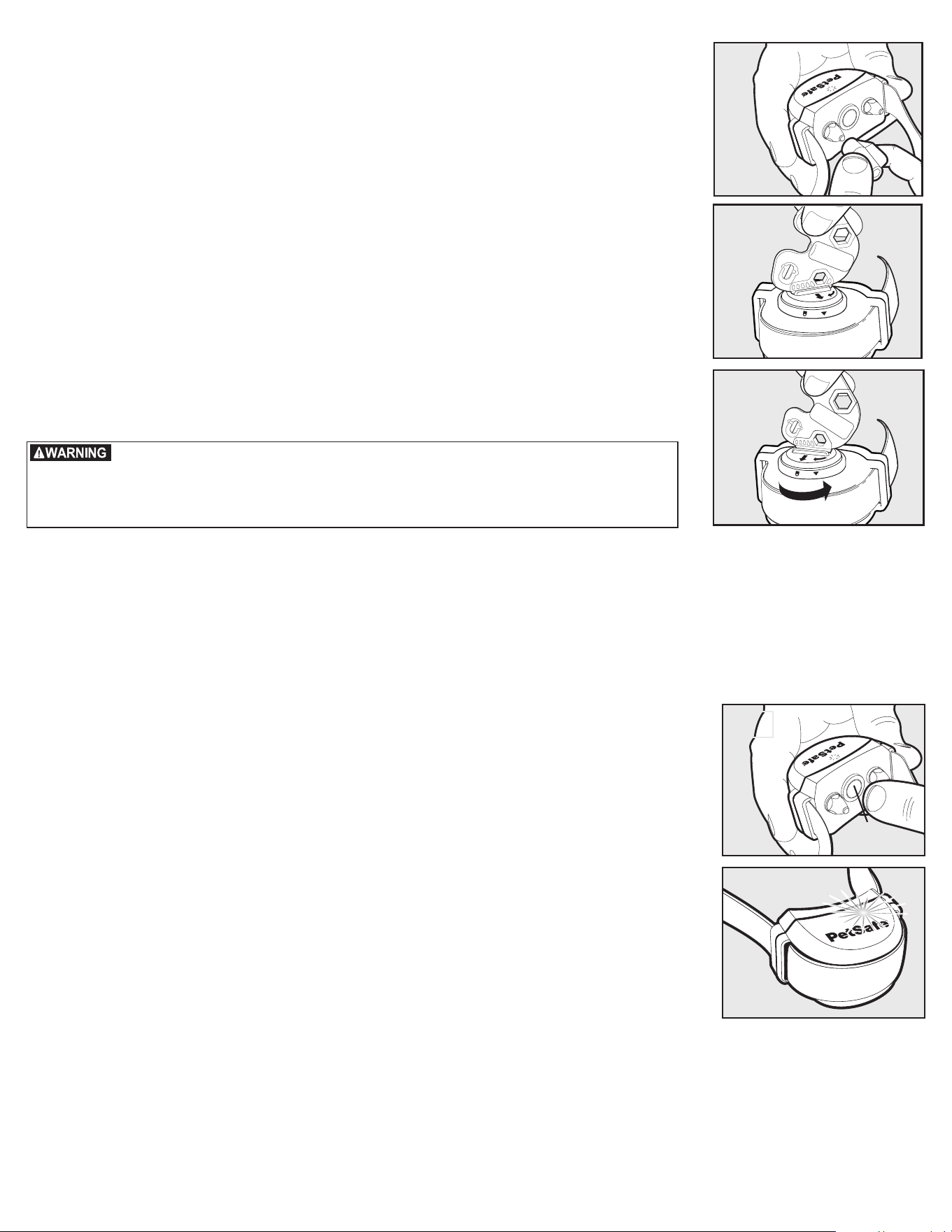
Your Receiver Collar comes with short Contact Points installed. Use the Long
Contact Points for pets with long or thick hair
.
Tighten the Contact Points using
the Contact Point Wrench
(2A)
. Check tightness weekly.
To Insert and Remove the Receiver Collar Battery
Note: Do not install the battery while the Receiver Collar is on your pet.
This Receiver Collar utilizes a replaceable PetSafe
®
battery (RFA-67).
This unique battery is designed to make battery replacement easier and
increase water protection. Once you insert the battery and turn it to the lock
position, the unit will be turned ON.
To insert the battery, align the symbols on the battery (arrow) and Receiver Collar
(triangle) (2B). Use the edge of the Test Light Tool (2B) to turn the battery
clockwise until the arrow lines up with the lock symbol on the housing.
To remove the battery, turn the battery counter-clockwise using the edge of
the Test Light Tool (2C). DO NOT attempt to cut into or pry open the battery.
Be sure to discard the used battery properly.
Note: Before replacing the battery, discharge all power by holding the Mode Button
at least 30 seconds until the LED is no longer illuminated.
A replacement PetSafe
®
battery (RFA-67) can be found at many retailers.
Contact the Customer Care Center at 1-800-732-2677 or visit our web
site at www.petsafe.net to locate a retailer near you.
Turning the Receiver Collar ON
Press and hold the Mode Button continuously for 5 seconds (2D) The green or
red Receiver Indicator Light will turn ON for 5 seconds (2E) to indicate battery
status, followed by the red Receiver Indicator Light flashing the Static Correction
Level Settings.
Turning the Receiver Collar OFF
Press and hold the Mode Button continuously for 5 seconds. The red Receiver
Indicator Light will be ON during this time. The red Receiver Indicator Light will
then turn OFF and all Receiver Indicator Lights will stay OFF indicating that the
unit is turned OFF.
To Set the Static Correction Level
Read all steps before attempting to set the Static Correction Level.
1. Press the Mode Button and release (2D) when the Receiver Indicator Light
illuminates Red (2E).
2. The Receiver Indicator Light will emit a series of red flashes representing
the Static Correction Level.
3. Increase the Static Correction Level by pressing and releasing the Mode Button
within 5 seconds of the previous series of flashes.
The Static Correction levels increase in strength from 1 to 6. Pushing the Mode Button while the Receiver
Collar is on level 6 will cause the Receiver Collar to revert to level 1. Refer to the Function and Response
Table to choose the Static Correction level that best fits your pet.
2A
2C
2B
Risk of explosion if batteries are replaced by an incorrect type. Do not short
circuit, mix old and new batteries, dispose of in fire, or expose to water.
When batteries are stored or disposed, they must be protected from shorting.
Dispose of used batteries properly.
2E
2D
Mode
Button
www.petsafe.net
11
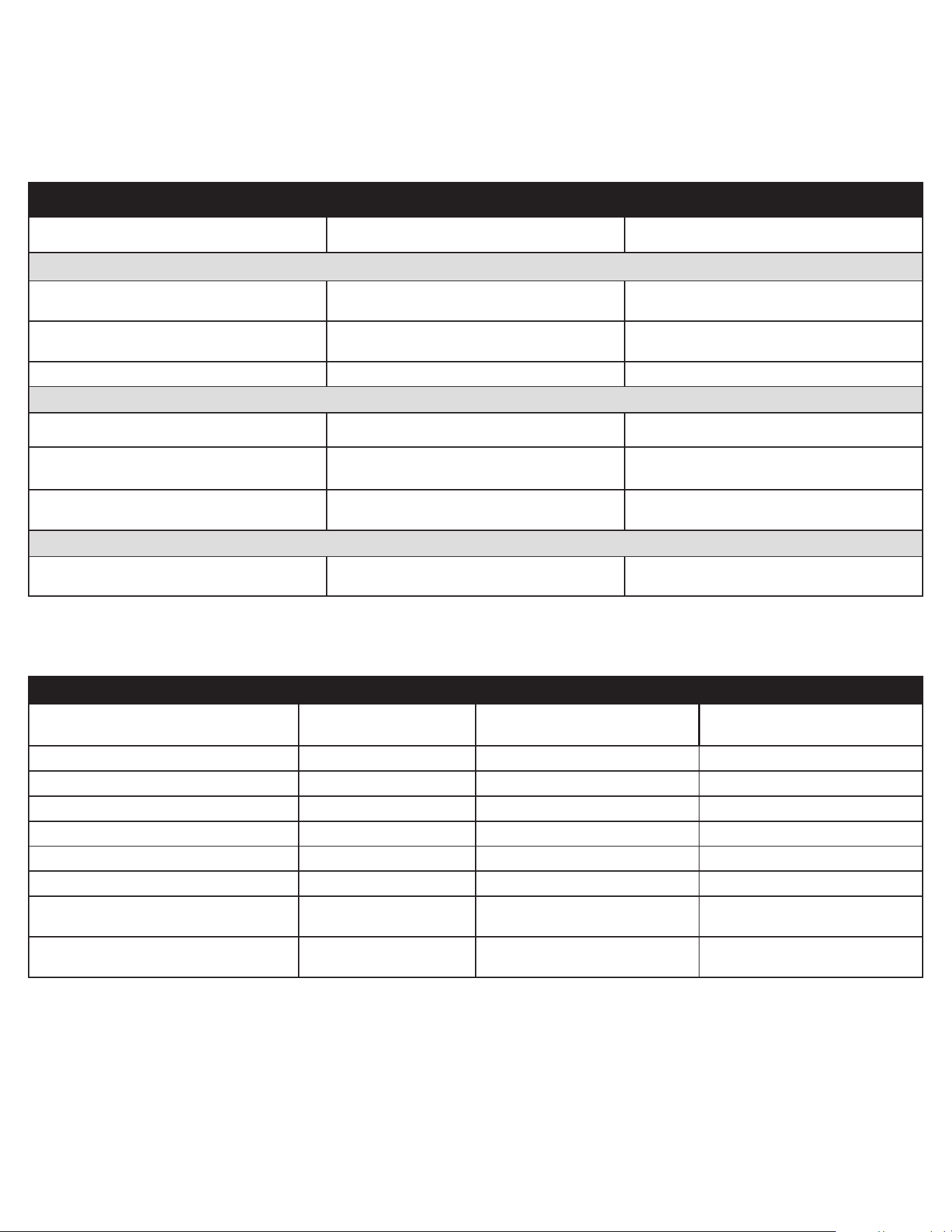
Receiver Collar Status Indicators
The Receiver Collar Status Indicator Light along with the Receiver Collar Alarm Tone are used to determine the
battery status, and the correction type. Refer to the Receiver Collar Status Indicator Table below to understand
the status lights and tones for the Receiver Collar.
During normal operation, the Receiver Collar Indicator Light will flash for the first 30 seconds after a battery is
installed or the receiver is turned on to indicate the battery status as shown in the table below.
Receiver Collar Status Indicator Table
Status Light Alarm Tone Condition
Installing Battery and Turning Unit On
Continuous green or red (5 seconds duration) No Tone Indicates Battery Status
Slow blinking green every 4 to 5 seconds
(for the first 30 seconds)
No Tone Indicates Good Battery
Slow blinking red every 4 to 5 seconds No Tone Indicates Low Battery
Receiver Activation Status
Fast pulsating green (3 flashes per second) Warning Tone Warning Tone
Fast pulsating red (3 flashes per second)
Tone for duration of
Static Correction
Static Correction being
delivered up to 15 seconds
Continuous green (10 seconds) No Tone
Over Correction Protection;
collar locked for 10 seconds
Low Battery Status
Slow blinking red every 4 to 5 seconds No Tone Indicates Low Battery
Function and Response Table
Indicator Light Response
Static Correction
Level
Receiver Collar Function Temperament of Pet
1 Red Flash 1 No Static Correction, Tone Only Initial Training Mode
2 Red Flashes 2 Low Static Correction Timid
3 Red Flashes 3 Medium-Low Static Correction Timid or Average
4 Red Flashes 4 Medium Static Correction Average Energy
5 Red Flashes 5 Medium-High Static Correction Average or High Energy
6 Red Flashes 6 High Static Correction High Energy
Slow blinking green every 4 to 5 seconds
(for the first 30 seconds)
Indicates Battery Status
Green = Good
Slow blinking red every 4 to 5 seconds
Indicates Battery Status
Red = Replace
Over Correction Protection
If your pet enters the Boundary Zone or continues anywhere beyond the Pet Area, this feature limits the
Static Correction duration to 15 seconds. While the system locks out further Static Correction, the Green
light will remain ON for 10 seconds.
In the unlikely event that your pet leaves the Pet Area, he will not receive a Static Correction upon return
to the Pet Area.
1-800-732-2677
12
Step 3: Adjust the Pet Area to Desired Size
Make sure the entire Pet Area lies within your property boundaries (3A). Always start determining the
Boundary Zone at the shortest distance from Transmitter. Place the Boundary Switch on “–” if the
Boundary Zone will be less than 45 feet from the Transmitter.
Note: If your next-door neighbor has a containment system, see Troubleshooting section page 26.
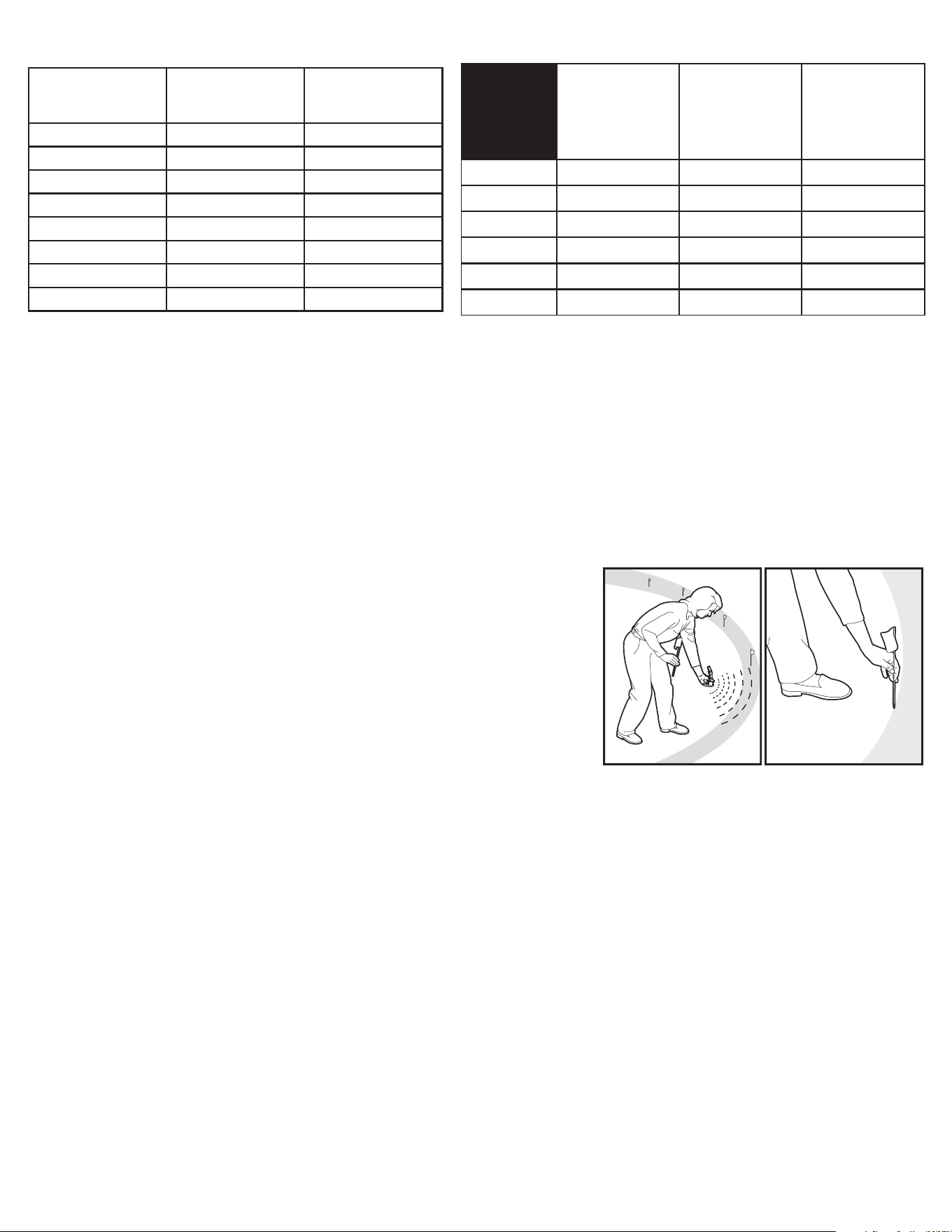
Test Light Instructions
1. Make sure the Receiver Collar battery is properly installed.
2. Set the Correction Level to 2 or above.
3. Hold the Test Light Contacts to the Contact Points (3B).
4. Walk toward the Boundary Zone holding the Receiver collar at your pet’s neck
level (3C) until the Test Light flashes (3D).
Save Test Light for future testing.
Note: If the Test Light does not flash, check the battery status by turning the receiver off, then
on and verify the light is green. If the light is red install a new battery and re-test. If Test Light
still does not flash, contact the Customer Care Center at 1-800-732-2677.
To maximize your Pet Area, make sure the Boundary Switch is on “+” and the
Boundary Control Dial is set to “8”. Plug Power Adapter into Power Jack and
standard 120-volt outlet. Turn the transmitter on.
Two-Person Method
Hold the Receiver Collar at your pet’s neck height (3C) with logo side facing away from
the Transmitter and Contact Points facing upwards. Walk to the edge of the desired
Pet Area. Facing away from the Transmitter, hold the Receiver Collar at the edge of
the desired Pet Area (3D).
Starting with the Boundary Control Dial set to “8”, have a second person turn the dial
down SLOWLY. When the Receiver Collar tone starts, tell the person to stop turning
the Boundary Control Dial. Walk back into the Pet Area until the receiver stops sounding.
Verify the Pet Area boundary by walking towards the Boundary Zone and verifying that
the tone/test light flashes begin at the desired location. Test at multiple locations around
the Pet Area to verify the Pet Area is within your desired location. Record your settings
below for future reference.
One-Person Method
Measure the shortest distance from the desired Boundary Zone to the Transmitter.
Find the distance on the Transmitter Range Chart on page 13 and set the Boundary
Switch and Boundary Control Dial. Hold the Test Light Contacts to the Contact Points
(3B). Take the Receiver Collar to the Boundary Zone with the logo side facing away from
the Transmitter and Contact Points facing upwards (3C). Hold the Receiver Collar at
your pet’s neck level (3D) until the Receiver Collar tone sounds and the Test Light
flashes. If the Receiver Collar tone sounds before or after the desired Boundary Zone,
return to the Transmitter and adjust the Boundary Control Dial. Repeat this process until
the Receiver Collar tone sounds at the desired location. Record your settings on page
13 for future reference.
Pet
Area
STREET
3A
3B
3C
B
o
u
n
d
a
r
y
Z
o
n
e
Pet
Area
3D
www.petsafe.net
13
Transmitter Range Chart
Boundary
Control Dial
Position
Boundary
Switch
“–”
Boundary
Switch
“+”
1 5-10 ft. 5-10 ft.
2 5-10 ft. 5-10 ft.
3 15-20 ft. 25-35 ft.
4 20-25 ft. 42-55 ft.
5 25-30 ft. 55-65 ft.
6 35-40 ft. 75-85 ft.
7 40-45 ft. 85-90 ft.
8 40-45 ft. 85-90 ft.
Note: These distances are approximate.
Step 4: Place the Boundary Flags
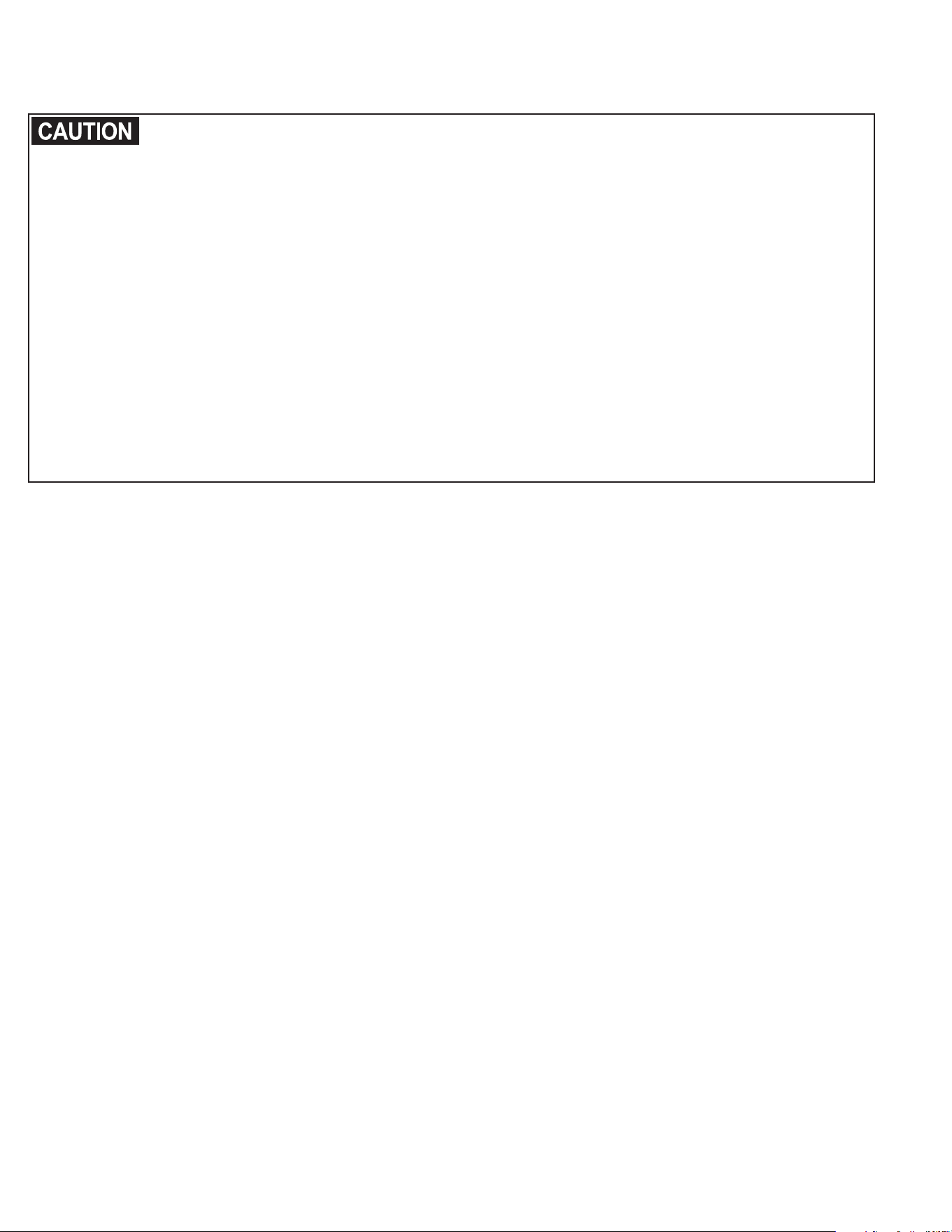
The Boundary Flags are visual reminders for your pet of where the Boundary Zone is located.
The Receiver Collar will activate within 2 to 3 feet of the Boundary Flags.
1. Using the Test Light, with the Static Correction Level set at 2 or greater, hold the Receiver Collar
at your pet’s neck height with logo side facing away from the Transmitter.
2. Walk towards the Boundary Zone until the Receiver Collar tone sounds and the Test Light flashes. (4A).
3. Place a Boundary Flag in the ground (4B).
4. Walk back into the Pet Area until the repeating tone stops.
5. Repeat this process around the Boundary Zone until it is marked
with Boundary Flags every 10 feet.
The Boundary Flags may be in different parts of the Boundary Zone
and may not be in a line. The Boundary Zone is 2 to 3 feet wide.
Record Your Settings
Final Boundary
Switch Setting
(“+” or “–”)
Final Boundary
Control Dial
Position (1-8)
Receiver Static
Correction
Level (1-6)
Home
Camping
Vacation
Other
4A
4B
1-800-732-2677
14
Step 5: Fit the Receiver Collar
Important: The proper fit and placement of your Receiver Collar is important for effective training.
The Contact Points must have direct contact with your pet’s skin on the underside of his neck.
Please read and follow the instructions in this manual. Proper fit of the collar is important. A collar
worn for too long or made too tight on the pet’s neck may cause skin damage. Ranging from redness
to pressure ulcers; this condition is commonly known as bed sores.
• Avoid leaving the collar on the pet for more than 12 hours per day.
• When possible reposition the collar on the pet’s neck every 1 to 2 hours.
• Check the fit to prevent excessive pressure; follow the instructions in this manual.
• Never connect a lead to the electronic collar; it will cause excessive pressure on the contacts.
• When using a separate collar for a lead, don’t put pressure on the electronic collar.
• Wash the pet’s neck area and the contacts of the collar weekly with a damp cloth.
• Examine the contact area daily for signs of a rash or a sore.
• If a rash or sore is found, discontinue use of the collar until the skin has healed.
• If the condition persists beyond 48 hours, see your veterinarian.
• For additional information on bed sores and pressure necrosis, please visit our website.
These steps will help keep your pet secure and comfortable. Millions of pets are comfortable while
they wear stainless steel contacts. Some pets are sensitive to contact pressure. You may find after
some time that your pet is very tolerant of the collar. If so, you may relax some of these precautions.
It is important to continue daily checks of the contact area. If redness or sores are found, discontinue
use until the skin has fully healed.
You may need to trim the hair in the area of the Contact Points. Never shave your pet’s neck; this may
lead to a rash or infection.
www.petsafe.net
15
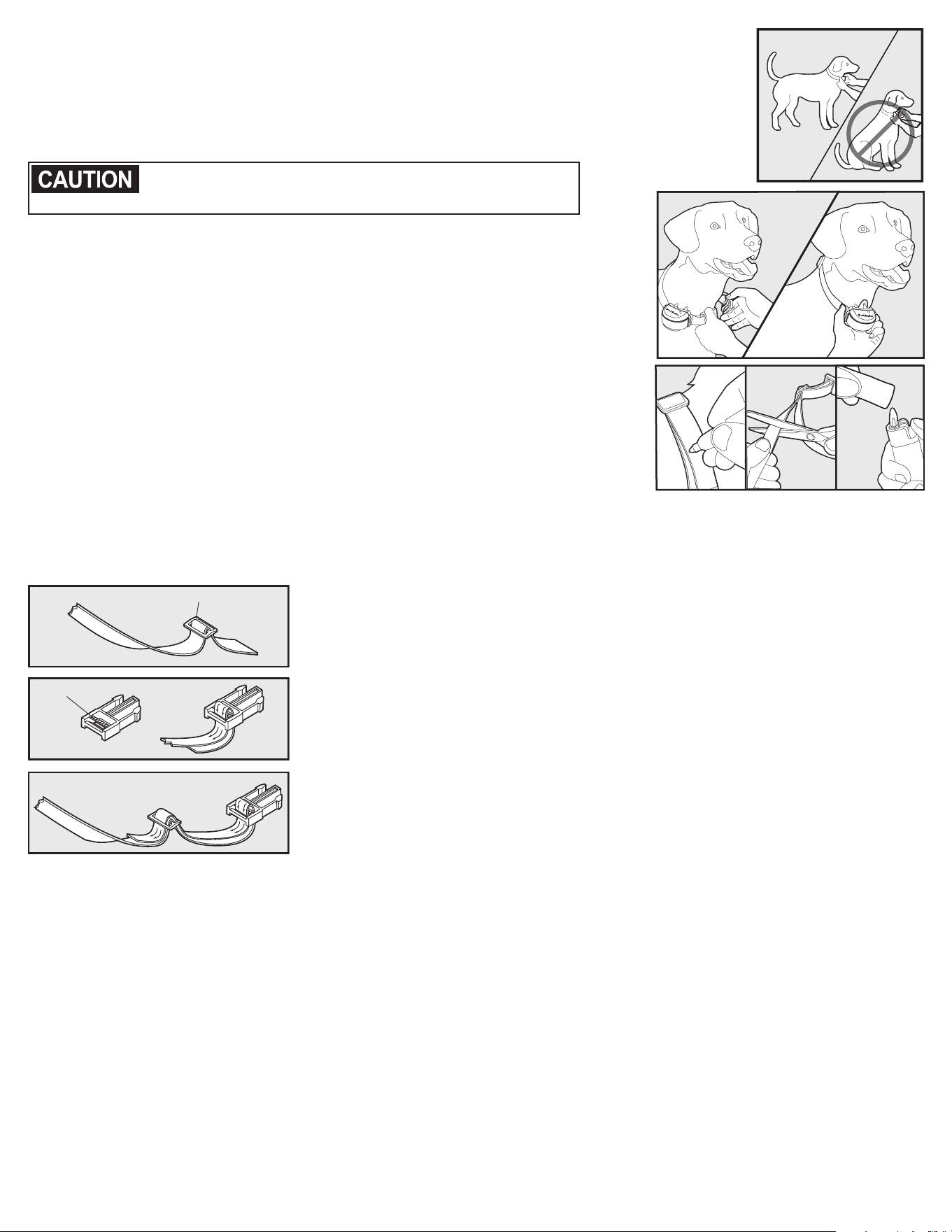
To assure a proper fit, please follow these steps:
1. Make sure that the battery is not installed in the Receiver Collar.
2. Start with your pet standing comfortably (5A).
3. To make it easier to hear the warning tone, place the Receiver Collar on your pet with
the logo side of Receiver facing up.
4. Center the Contact Points underneath your pet’s neck, touching the skin.
You may need to trim the hair in the area of the Contact
Points. Never shave the dog’s neck; this may lead to a
rash or infection.
5. Check the tightness of the Receiver Collar by inserting one finger
between the end of a Contact Point and your pet’s neck. The fit
should be snug but not constricting (5B).
a. Allow your pet to wear the collar for several minutes
then recheck the fit.
b. Check the fit again as your pet becomes more comfortable
with the Receiver Collar.
6. Trim the collar as follows (5C):
a. Mark the desired length of the Receiver Collar with a pen.
Allow for growth if your pet is young or grows a thick winter coat.
b. Remove the Receiver Collar from your pet and cut off the excess.
c. Before placing the Receiver Collar back onto your pet, seal the edge
of the cut collar by applying a flame along the frayed edge.
To Re-Thread the Collar
5A
5C
5B
Slide Buckle
Ridges
The slide buckle prevents the
collar from becoming loose
around your pet’s neck.
The ridges must be facing up;
the collar will slip if it is not
properly threaded.
1-800-732-2677
16
Training Guide
Be Patient With Your Pet
Important: Proper training of your pet is essential to the success of the PetSafe
®
Free to Roam
Wireless Fence
™
system. Read this section completely before beginning to train your pet.
Remember that the PetSafe Free to Roam Wireless Fence system is not a solid barrier.
• Have fun with your pet throughout the training process. Training should be fun, fair, firm and consistent.
• Train for 10 to 15 minutes at a time. Don’t try to do too much too quickly.
More-frequent short sessions are better than less-frequent longer sessions.
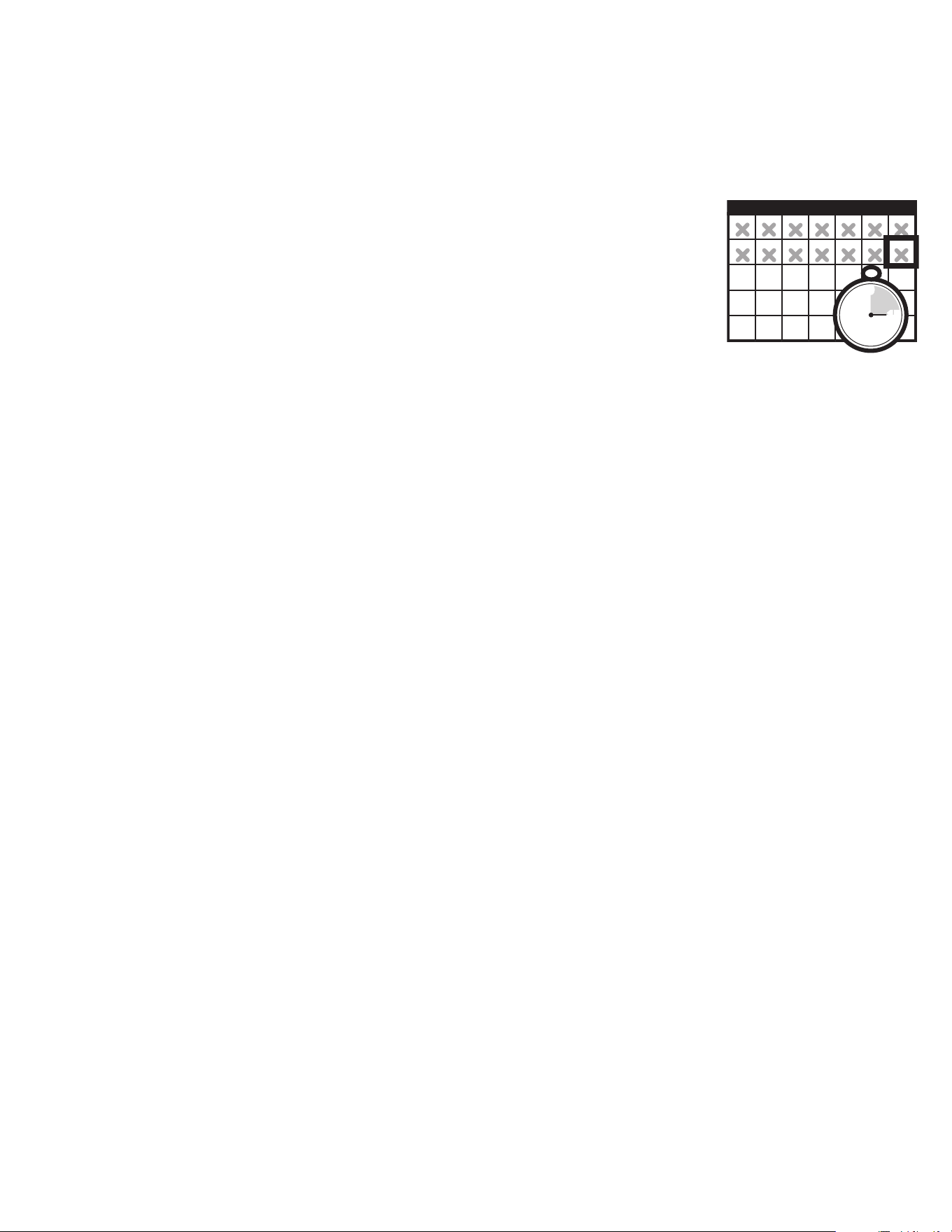
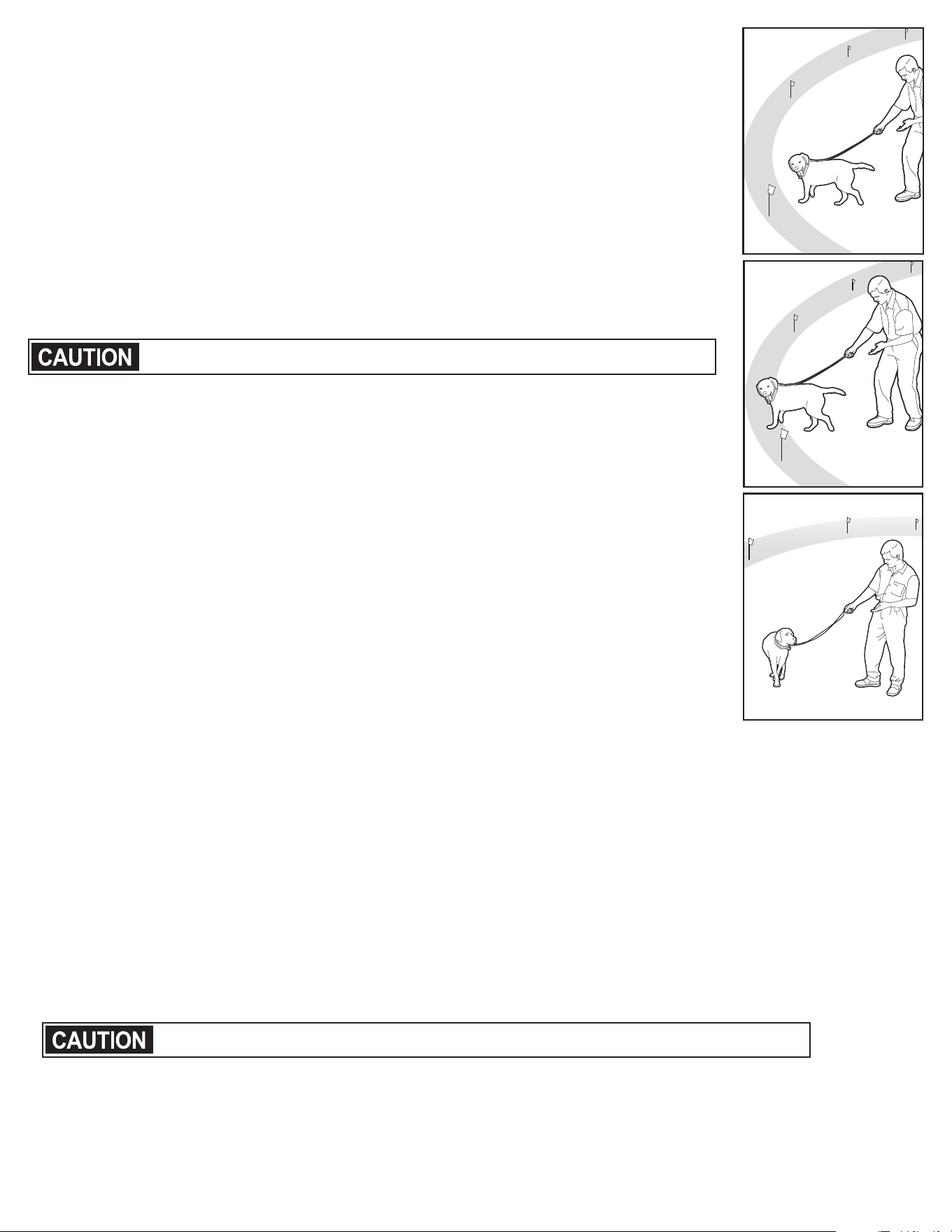
• We suggest a minimum of 14 days of training. Depending on your pet and how
he learns, the training could take more or less time.
• If your pet shows signs of stress, slow down the training schedule, add additional
days of training, or increase the amount of play time with your pet in the Pet Area.
Common stress signals include:
- Pet pulling on leash toward the house
- Ears tucked
- Tail down
- Body lowered
- Nervous / frantic movement or stiffening of pet’s body
• Your pet must be completely comfortable near the Boundary Flags at the end of every training session.
Spend at least 5 minutes of “play time” at the completion of each session within 10 feet of the
Boundary Flags.
• Finish each training session on a positive note with lots of praise and play.
• Remove the Receiver Collar after each training session.
• Be sure to contain your pet by another means during the training period (e.g. pen, tie-out, leash, etc.).
• During training, if you need to take your pet out of the Pet Area, remove the Receiver Collar and either
pick your pet up or put him in the car to pass out of the Pet Area.
• Even if you think your pet is responding well to the training, complete the entire training.
Reinforcement is important!
1 2345
67
8910 11 12
13 14
15 16 17 18 19
20 21
22 23 24 26
27 28
29 30 31
SMTWT FS
25
30
0
min.
45
15
www.petsafe.net
17
Phase 1
Day 1 - Boundary Awareness
Tone Only Training Mode
Perform three sessions on day 1, each training session lasting 10-15 minutes.
Goal: To have your pet learn that the Boundary Flags and warning tone from the
Receiver Collar define the new Pet Area.
Setup:
• Program the Static Correction Level on the Receiver Collar to Level 1 Tone Only
training mode.
• Put a separate non-metallic collar on your pet’s neck ABOVE the Receiver Collar
and attach a leash.
Be sure the extra collar does not put pressure on the Contact Points.
• Have tiny pieces of treats that your pet will find desirable available
(hot dogs or lunch meat work well).
• Have your pet’s favorite play toy available.
Steps:
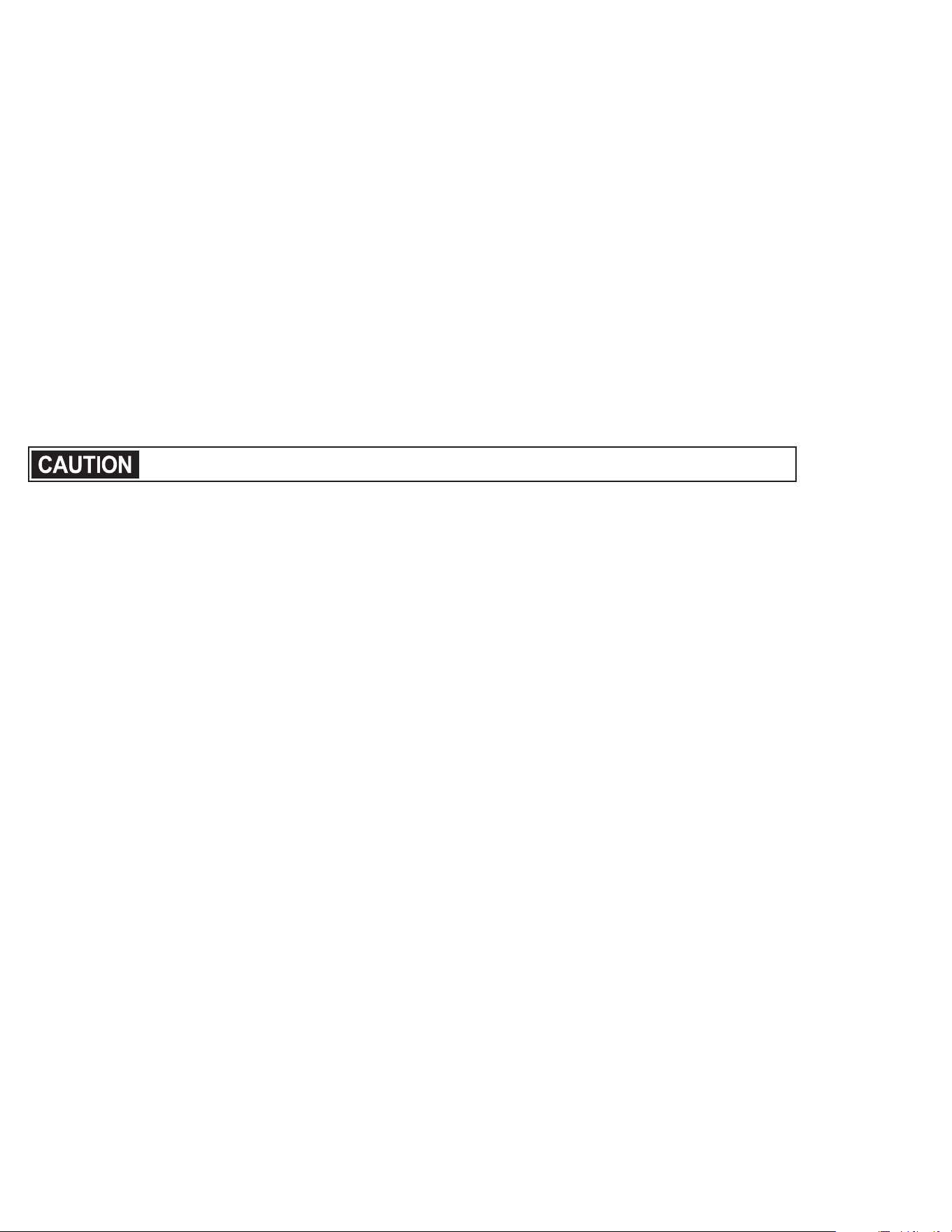
1. Begin by walking your pet on a leash in the Pet Area. Calmly praise and
talk to your pet.
2. Move toward the Boundary Flags (1A). Keep your mood happy.
3. With full control of your pet on a leash, walk to the flags. As your pet enters the
Boundary Zone, the Receiver Collar will begin to tone (1B). Allow your pet to stay in
the Boundary Zone for up to 2 seconds then gently help him back into the Pet Area
(1C). Immediately praise and offer your pet a treat as he enters the Pet Area, even if
you have helped with the leash.
4. Repeat this process at the same Boundary Flag until your pet resists going into
the Boundary Zone.
5. Aim to master 3-4 Boundary Flags per session. Make this FUN! Praise if your pet
quickly retreats or resists going into the Boundary Zone.
Phase 2
Days 2 thru 4 - Continue Boundary Awareness
Introduction to Static Correction
Perform three sessions per day, each lasting 10-15 minutes.
Goal: To train your pet to stay in the Pet Area and respect the boundary.
Setup:
• Program the Static Correction Level on the Receiver Collar to Level 2.
• Put a separate non-metallic collar on your pet’s neck ABOVE the Receiver Collar and attach a leash.
Be sure the extra collar does not put pressure on the Contact Points.
• Have tiny pieces of treats that your pet will find desirable available
(hot dogs or lunch meat work well).
• Have your pet’s favorite play toy available.
1A
1B
1C
1-800-732-2677
18
Steps:
1. Repeat steps 1-5 in Phase One.
2. If your pet does not respond to the Static Correction, confirm that the Receiver Collar is fitting properly
according to Step 5 on page 14.
3. If the Receiver Collar is fitted properly and your pet does not respond to the Static Correction, increase
the Static Correction Level by 1. Watch for slight reactions at first such as ears up, head turned,
looking at the ground.
4. Stay at the same flag until your pet resists going into the Boundary Zone.
Phase 3
Days 5 thru 8 - Distraction Phase
Perform three training sessions per day, each lasting 10 to 15 minutes.
Goal: To train your pet to stay within the Pet Area with distractions outside of the Pet Area.
Setup:
• Program the Static Correction Level on the Receiver Collar to level 2 or higher depending on the
reaction results from days 2 thru 4.
• Put a separate non-metallic collar on your pet’s neck ABOVE the Receiver Collar and attach a leash.
Be sure the extra collar does not put pressure on the Contact Points.
• Have tiny pieces of treats available (hot dogs or lunch meat work well).
• Have your pet’s favorite play toy available.
• Create distractions to tempt your pet to enter the Boundary Zone, such as:
- Have a family member cross from inside the Pet Area to outside of it.
- Throw a ball or treat outside of the Pet Area.
- Have a neighbor walk their pet outside of the Pet Area.
• Gradually increase distraction level. Never coax or call your pet out of the Pet Area.
Steps:
1. With full control of your pet on a leash, have the distraction presented.
2. If your pet does not move toward the distraction, praise and offer a treat.
3. If your pet does react to the distraction, allow him to go into the Boundary Zone.
4. Help your pet back into the Pet Area if he does not turn back after 2 seconds.
5. Treat and praise your pet anytime he comes back into the Pet Area with or without help.
6. Repeat this process with other distractions. Use other family members during this process.
7. If your pet does not respond to the Static Correction, confirm that the Receiver Collar is fitting properly
according to Step 5 on page 14.
8. If the Receiver Collar is fitted properly and if your pet does not respond to the Static Correction,
increase the Static Correction Level by 1.
www.petsafe.net
19
Phase 4
Days 9 thru 14 - Unleashed Supervision
Training sessions should start at 10-15 minutes, gradually increasing
to over an hour.
Your pet is ready for this step only when he clearly avoids the entire Boundary
Zone, regardless of any distractions or temptations. During this step, do not
leave your pet unattended.
Goal: To give your pet free run of the Pet Area off the leash.
Setup:
Adjust the Receiver Collar to the permanent setting appropriate for your pet.
Steps:
1. Enter the Pet Area with your pet wearing the Receiver Collar.
2. Walk around the yard and play with your pet, staying within the Pet Area at all times.
3. Preoccupy yourself with another task in the yard while watching your pet.
4. Should your pet escape, take the Receiver Collar off and lead him back into the Pet Area.
Phase 5
Days 15 thru 30 - Pet Monitoring
Your pet is ready to run! Check in on your pet at regular intervals.
Note: After you are satisfied your pet’s training is complete, remove every other Boundary Flag every 4 days until
all flags are removed. Save Boundary Flags for future use.
Taking Your Pet Out of the Pet Area
Important: Remove the Receiver Collar and leave it in the Pet Area.
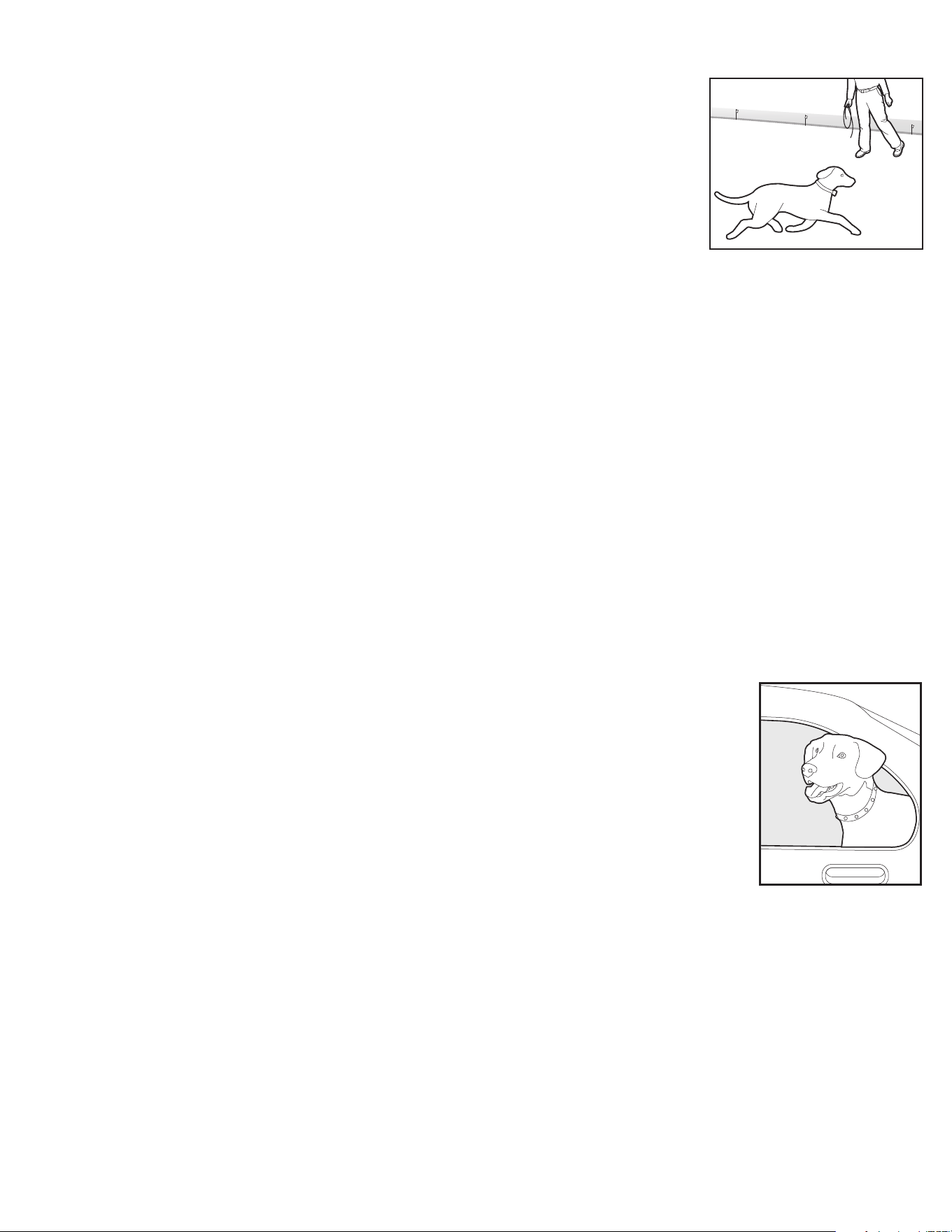
Once your pet learns the Boundary Zone, he will be reluctant to cross it for
walks or car rides.
Option 1: Replace the Receiver Collar with a regular collar. Put your pet in a car
that is within the Pet Area and drive him out of the Pet Area.
Option 2: Replace the Receiver Collar with a regular collar and leash. Walk your pet
out of the Pet Area while giving a command such as “OK” at a specific place of the
Boundary Zone (the end of your driveway, sidewalk, etc.). Always leave the Pet Area
with a leash at this place and your pet will associate leaving the Pet Area only on a
leash, only at this place, and only with a person. You may initially need to convince
your pet to leave the Pet Area with a food treat and lots of praise.
Note: You may also carry your pet out of the Pet Area.
Congratulations!
You have now successfully
completed the training program.
1-800-732-2677
20
Wireless - To - Go
Your PetSafe
®
Free to Roam Wireless Fence
™
system is completely portable. Follow the set-up procedures
(steps 1 through 4) wherever you wish to have containment of your pet. Reestablish the Pet Area and mark
it with Boundary Flags so your pet knows his Boundary Zone. Note: If setting up in a metal building or
vehicle, the maximum size of the Pet Area may be reduced. Be sure to remove the Receiver Collar battery
before turning off the Transmitter. If you want to power the Transmitter from a car or other DC source, use
an inverter rated for 50 watts or more.
Accessories
To purchase additional accessories for your PetSafe Free to Roam Wireless Fence system, contact the
Customer Care Center at 1-800-732-2677 or visit our website at www.petsafe.net to locate a retailer near you.
Component Part Number
Battery - two pack RFA-67D-11
Extra Free to Roam Wireless Fence Receiver Collar PIF00-15002
Power Adapter RFA-513
Mounting Bracket and Hardware RFA-556
Replacement Collar Strap RFA-509
Cat Collar Strap PWF00-14223
Extra Flags RFA-2
Replacement Wireless Transmitter PIF00-15348
Accessory Pack RFA-530
Stubborn Dog Stay + Play Wireless Fence
®
Receiver Collar PIF00-13672
Stay + Play Wireless Fence Receiver Collar PIF00-14288
Stay + Play Wireless Fence Transmitter and Adapter PIF00-13210

www.petsafe.net
21
Frequently Asked Questions
Is the Receiver Collar waterproof?
• Yes. When changing the battery, be sure to keep the battery area free from
dirt and debris.
Will the PetSafe
®
Free to Roam Wireless
Fence
TM
system cover a larger circle than
180 feet across?
• You can use another Wireless Transmitter with overlapping boundaries of at
least 10 feet to increase the size of the Pet Area.
Will a sloping yard or hills affect the
Pet Area?
• The Transmitter signal extends 90 feet in all directions. A sloping yard or a
yard with hills can cause the Pet Area to appear less or more than expected.
Consider repositioning the Transmitter to maximize your Pet Area.
Can I use more than one Receiver Collar
with the Wireless System?
• Yes. There is no limit to the number of pets you can contain with
the Wireless System. You must purchase an additional Wireless Pet
Containment Receiver Collar for each pet. Contact the Customer Care
Center at 1-800-732-2677 or visit our website at
www.petsafe.net to locate a retailer near you.
Will the Wireless System keep other pets
out of my yard?
• No. The Wireless System is only effective on pets who wear
the Receiver Collar.
Is there a hand-held remote Transmitter
that will work with the Wireless System
Receiver Collar?
• No. You would need to purchase a separate Remote Training System.
Contact the Customer Care Center at 1-800-732-2677 or visit our website
at www.petsafe.net to locate a retailer near you.
Is there another compatible Receiver
Collar that I can use with the
Wireless Transmitter?
• Yes. Stay + Play Wireless Fence Receiver Collars and the Stubborn Dog
Stay + Play Wireless Fence Receiver Collars are compatible with the Free
to Roam Wireless Fence Transmitter.
If I have a question about my Wireless
System or need replacement parts,
where can I get answers or service?
• Contact the Customer Care Center at 1-800-732-2677 or visit our
web site at www.petsafe.net.
Can I use the Wireless System on an
aggressive pet?
• We do not recommend using any electronic training devices on aggressive
pets. If you are unsure if your dog is aggressive, please consult your
veterinarian or a certified trainer.
Can I use the Wireless System on a cat?
• The Wireless System can be used as long as the cat can comfortably wear
the Receiver Collar. A nylon cat collar strap is sold separately.
What happens if the power goes out?
• The Wireless System is designed to recognize power outages and shuts
down without activating the Receiver Collar. However, if your pet is near the
Boundary Zone during the power failure, he may receive a Static Correction.
The Transmitter will sound an intermittent alarm greater than 20 minutes to
alert you to the power failure.
What can happen if I turn off or unplug the
Transmitter power?
• If your dog is wearing the Receiver Collar, he may receive an unintended
correction. Always remove your dog’s Receiver Collar before removing
power from the Transmitter or before performing any Transmitter testing.
If my pet leaves the Pet Area, how long
will he be corrected?
• Your pet will receive Static Correction as long as he is outside the Pet Area,
for up to 15 seconds. The Receiver Collar has a safety time-out to stop
correcting and toning after 15 seconds until it is returned to the Pet Area.
How often do I need to replace the
Receiver Collar battery?
• The expected battery life is between 1-2 months. Battery life depends on
how frequently your pet tests the Boundary Zone. The Receiver Indicator
Light acts as a low battery indicator, flashing every 4 to 5 seconds when
replacement is required.
Can I place the Receiver on
another collar?
• Yes. You may use any non-metallic collar that is 3/4 inch wide.
Do I need to perform maintenance on my
Wireless System?
• Check your pet’s neck daily for irritation from the Contact Points.
• Check the Contact Points on the Receiver Collar weekly to make
sure they are tight and clean.
• Check the fit of the Receiver Collar weekly.
• The Receiver Indicator Light acts as a low battery indicator, flashing
every 4 to 5 seconds when replacement is required.
How do I know the battery in the
Receiver Collar is still working?
• Turn the Receiver Collar OFF and then ON to check the battery status.
If no lights are observed, the battery needs to be replaced.
• Take the Receiver Collar off your pet and walk into the Boundary Zone.
The Receiver Collar should tone. If not, replace the battery.
1-800-732-2677
22
Will vehicles, buildings and landscape
features (trees, shrubs, etc.) affect the
performance of the Wireless System?
• Yes. Placing the Transmitter inside a metal building can reduce the
maximum range of the Wireless System.
• Parking a vehicle within the Pet Area, can reduce the range of the system
and cause your pet to receive a Static Correction where it otherwise would
not if the vehicle was not there.
• Fixed large metal objects such as metal sheds can affect the signal by
reducing the maximum range of the system at the location of the object.
As a result, your pet may receive a Static Correction.
What do I do if my pet’s neck becomes
red and irritated?
• This condition is due to the Contact Points irritating the skin. Discontinue
use of the Receiver Collar for a few days. If the condition persists beyond
48 hours, see your veterinarian. Once the skin returns to normal, replace
the Receiver Collar and monitor the skin condition closely.
Can I attach a leash to the
Receiver Collar?
• No. This can result in pulling the Contact Points too tightly against your
pet’s neck. Attach a leash to a separate, non-metallic collar positioned
above the Receiver Collar.
Why does my Receiver Collar have a
tone only mode?
• The tone only mode can be used in training your pet to his boundary
or for well-trained pets that no longer require Static Correction.
What if my Transmitter alarm
is sounding?
• A beeping tone indicates power loss. In the event of a power loss,
your pet is no longer contained.
The Transmitter is beeping intermittently
when I unplug the Power Adapter from
the wall outlet.
• The Power Loss Alarm in the Transmitter is activated to alert you that power
has been removed from the Transmitter and your pet is no longer being
contained. To turn off the Power Loss Alarm, unplug the Power Adapter
from the Power Jack located on the bottom of the Transmitter.
Troubleshooting
The Receiver Collar tone is not sounding
when setting up the Boundary Zone.
• The tone may be difficult to hear in a noisy environment.
• Use Test Light as explained in the “Test Light Instructions” section, and
use it to determine the location of Boundary Zone.
• Check that the Transmitter is set up according to directions and install
a new Receiver Collar battery.
The Receiver Collar tone is not sounding
or administering a Static Correction.
• Check that the Transmitter is plugged into a working 120-volt outlet, turned
on, the Power Light is on, and the Transmitter controls are set at your
desired settings.
• Check Receiver battery to make sure it is installed properly.
• Replace the battery.
The Receiver Collar tone is
sounding everywhere.
• Check that the Transmitter is plugged into a working standard
120-volt outlet, turned on, the Power Light is on, and the Transmitter
controls are set at your desired settings.
The Receiver Collar tone is sounding
inside the house.
• It is recommended to remove the Receiver Collar from your pet when
indoors to avoid activation of the Receiver Collar.
• Make sure the Transmitter is on and set up according to the directions.
• Ensure the entire house is within the Pet Area. The Transmitter may need
to be moved to adjust the Pet Area to include the entire house.
• If relocating the Transmitter, remove the Receiver Collar from your pet
before turning the Transmitter off.
My pet is receiving a Static Correction in
his metal crate.
• The Receiver Collar activates when it loses the Transmitter signal.
The metal crate may block the Transmitter signal which causes the
Receiver Collar to activate.
• Remove the Receiver Collar from your pet when placing him in his
metal crate.
The Boundary Zone seems to fluctuate.
• This is normal for the electro magnetic field of the Wireless System.
The field may be affected by surrounding “electronic noise,” which can
cause it to fluctuate up to 5%.
• The location the Receiver Collar activates is influenced by the speed and
orientation of the Receiver Collar as your pet enters the Boundary Zone.

www.petsafe.net
23
The Receiver Collar activates in the
middle of the yard.
• The Receiver Collar activates when it loses the Transmitter signal. This
sometimes occurs if a large metal object is between the Receiver Collar
and Transmitter, if the orientation of the Receiver Collar changes near the
Boundary Zone, or if the surrounding “electronic noise” interferes with the
signal. If this continues to occur, consider relocating the Transmitter and
resetting the Pet Area.
The Receiver Collar tone is sounding
but my pet is not responding to the
Static Correction.
• Make sure the Static Correction Level is set at 2 or above.
• Test the Receiver Collar with the Test Light.
• If the Test Light flashes, check the fit of the Receiver Collar.
• Trim your pet’s fur where the Contact Points touch the neck and/or switch
to the longer Contact Points.
• Increase the Static Correction Level.
• Repeat training steps to reinforce training.
My pet reacts strongly to the Static
Correction and has become fearful.
• Lower the Static Correction Level.
• Make sure you are in control of the situation when your pet receives his first
Static Corrections (have him on a leash attached to a separate, non-metallic
collar) and lead him into the Pet Area and praise him. If your pet remains
fearful, suspend training and start again the next day. Make sure to end all
training sessions on a positive note with lots of praise and play.
The Transmitter Power Light is not on.
• Make sure the Power Light on the Power Adapter is on when plugged into
a working 120 volt wall outlet.
• If the Power Adapter Light is not on, contact the Customer Care Center
for a replacement Power Adapter.
I was setting up the Pet Area and after I
turned down the Boundary Control Dial,
the Receiver Collar would no longer
tone or correct.
• You may have turned the Boundary Control Dial down too quickly, causing
the Receiver Collar to go into power-fail mode. This is a safety feature
designed to protect your pet when power to the Transmitter goes out.
My next-door neighbor has a
Containment System and the
Receiver Collar does not activate
near their property.
• Your neighbor’s containment signal may interfere with the operation of the
Receiver Collar preventing activation close to their fence. To minimize the
interference, reduce the size of the Pet Area or move the Transmitter away
from your neighbor’s system.
• Adjust the Pet Area so that the Receiver Collar activates for at least
5 feet beyond the reduced Boundary setting when walking towards the
neighboring containment system.
The Receiver Collar has injured my
pet’s neck.
• Failing to follow the important safety information at the front of the
Operating and Training Guide has caused pressure ulcers. Some
descriptions of advanced pressure ulcers describe the sores as looking
like burns on the dog’s neck. Be assured that electronic collars do not use
enough energy to create electrical burns. The energy in an output pulse is
only a few thousandths of a Joule; it is similar in nature to the static pulse
that you may feel when getting out of your car. In some cases, pressure
ulcers are described as chemical burns. The RFA-67 battery is sealed
when installed in the Receiver Collar housing. This sealing makes it virtually
impossible, without misuse or abuse, for your Receiver Collar battery to
leak onto your pet’s neck. Please review and follow the important safety
information on page 4, and the instructions in Step 5 under the heading
“Fit the Receiver Collar” on page 14.

1-800-732-2677
24
Terms of Use and Limitation of Liability
1. Terms of Use
This Product is offered to you conditioned upon your acceptance without modification of the terms, conditions
and notices contained herein. Usage of this Product implies acceptance of all such terms, conditions, and notices.
2. Proper Use
This Product is designed for use with pets where training is desired. The specific temperament of your pet
may not work with this Product. If you are unsure whether this is appropriate for your pet, please consult your
veterinarian or certified trainer.
3. No Unlawful or Prohibited Use
This Product is designed for use with pets only. This pet training device is not intended to harm, injure or provoke.
Using this Product in a way that is not intended could result in violation of Federal, State or local laws.
4. Limitation of Liability
In no event shall Radio Systems Corporation be liable for any direct, indirect, punitive, incidental, special or
consequential damages, or any damages whatsoever arising out of or connected with the use or misuse of this
Product. Buyer assumes all risks and liability from the use of this Product.
5. Modification of Terms and Conditions
Radio Systems Corporation reserves the right to change the terms, conditions and notices under which this
Product is offered.
Compliance
FCC/IC
This Class B digital apparatus complies with Canadian RSS-310. This equipment has been tested and
found to comply with the limits for a Class B digital device, pursuant to Part 15 of the FCC Rules. These
limits are designed to provide reasonable protection against harmful interference when the equipment is
operated in a residential environment. This equipment generates, uses, and can radiate radio frequency
energy and, if not installed and used in accordance with the instruction guide, may cause harmful
interference to radio communications. However, there is no guarantee that interference will not occur
in a practical installation. If this equipment causes harmful interference to radio or television reception,
which can be determined by turning the equipment off and on, the user is encouraged to try to correct the
interference by one or more of the following measures:
• Relocate the interfered receiving antenna.
• Increase the separation between the equipment and receiver.
• Connect the equipment into an outlet on a circuit different to that to which the receiver is connected.
• Contact the Customer Care Center at 1-800-732-2677.
This device complies with Industry Canada Rules. This device complies with part 15 of the FCC Rules.
Operation is subject to the following two conditions: (1) This device may not cause harmful interference,
and (2) this device must accept any interference received, including interference that may cause
undesired operation.
Unauthorized changes or modifications to the equipment, not approved by Radio Systems® Corporation,
could result in not meeting compliance with FCC regulations and could void the user’s authority to operate
the equipment.
ACMA/Australia
This device complies with the applicable EMC requirements specified by the ACMA
(Australian Communications and Media Authority).

www.petsafe.net
25
Customer Care International
USA & Canada - Tel: 800-732-2677
Monday - Friday 8 AM - 8 PM / Saturday 9 AM – 5 PM
Australia - Tel: 1800 786 608
Monday - Friday 8:30 AM - 5 PM
New Zealand - Tel: 0800 543 054
Monday - Friday 10:30 AM - 7 PM
Battery Disposal
Separate collection of spent batteries is required in many regions; check the regulations in your area
before discarding spent batteries. At the end of the product life, please contact our Customer Care Center
to receive instructions on proper disposal of the unit. Please do not dispose of the unit in household or
municipal waste. For a listing of Customer Care Center telephone numbers in your area, visit
our website at www.petsafe.net.
Perchlorate Battery
Perchlorate Material – special handling may apply. See www.dtsc.ca.gov/hazardouswaste/perchlorate.

1-800-732-2677
26
Warranty
One Year Non-Transferrable Limited Warranty
This Product has the benefit of a limited manufacturer’s warranty. Complete details of the warranty
applicable to this Product and its terms can be found at www.petsafe.net and/ or are available by
contacting your local Customer Care Center.
United States and Canada – Radio Systems Corporation, 10427 PetSafe Way, Knoxville, TN 37932 USA
Australia/New Zealand – In compliance with the Australian Consumer Law, Warranties Against Defects,
effective January 1, 2012, warranty details of this Product are as follows:
One Year Non-Transferrable Limited Warranty
What is covered: Radio Systems Australia Pty Ltd. (hereinafter referred to as “Radio Systems”) warrants to the original retail
purchaser, and not any other purchaser or subsequent owner, that its product, when subject to normal and proper residential
use, will be free from defects in material or workmanship for a period of one (1) year from the purchase date. An “original retail
consumer purchaser” is a person or entity who originally purchases the Product, or a gift recipient of a new product that is
unopened and in its original packaging. When serviced by Radio Systems Customer Service, Radio Systems covers labour
and parts for the first year of ownership; after the first year, a service or upgrade charge will apply relative to replacement of the
product with new or refurbished items at Radio Systems’ sole discretion.
The limited warranty is non-transferrable and shall automatically terminate if the original retail consumer purchaser resells
the Radio Systems product or transfers the property on which the Radio Systems product is installed. This Limited Warranty
excludes accidental damage due to dog chews; lightning damage; or neglect, alteration, and misuse. Consumers who purchase
products outside of Australia, New Zealand, or from an unauthorised dealer will
need to return the Product to the original place of purchase for any warranty issues.
Please note that Radio Systems does not provide refunds, replacements, or upgrades for change of mind, or for any other
reason outside of these Warranty terms.
Claims Procedure: Any claim made under this Warranty should be made directly to Radio Systems Australia
Pty Ltd. Customer Care Centre at:
Radio Systems Australia Pty Ltd.
PO Box 7266, Gold Coast Mail Centre QLD 9726
Australia Residents: 1800 786 608
New Zealand Residents: 0800 543 054
Email: [email protected]
To file a claim, a proof of purchase must be provided. Without a proof of purchase, Radio Systems will not repair or replace faulty
components. Radio Systems requests the Consumer to contact the Radio Systems Customer Care Centre to obtain a Warranty
Return number, prior to sending the Product. Failure to do so may delay in the repair or replacement of the Product.
If the Product is deemed to be faulty within 30 days from date of original purchase, Radio Systems will organise for a
replacement to be sent in advance of returning the faulty Product. A Post Bag will be included with the replacement Product
for the return of the faulty Product. The Product must be returned within 7 days of receiving the replacement. If the Product is
deemed to be faulty after 30 days from the date of original purchase, the consumer will be required to return the Product to
Radio Systems at the consumer’s own expense. Radio Systems will test and replace the faulty unit or its components and return
to the consumer free of charge, provided the Product is within its said warranty period. This warranty is in addition to other
rights and remedies available to you under the law. Radio Systems goods come with guarantees that cannot be excluded under
the Australia Consumer Law. You are entitled to a replacement or refund for a major failure and for compensation for any other
reasonably foreseeable loss or damage. You are also entitled to have the goods repaired or replaced if the goods fail to be of
acceptable quality and the failure does not amount to a major failure.
Should you have any queries or require any further information, please contact our Customer Care Centre
on 1800 786 608 (Australia) or 0800 543 054 (New Zealand).

www.petsafe.net
27

Radio Systems Corporation
10427 PetSafe Way
Knoxville, TN 37932
1-800-732-2677
www.petsafe.net
Protected by US Patents 6,879,300;
6,921,089; 7,142,167 and D515,027.
400-1824/1
©2015 Radio Systems Corporation