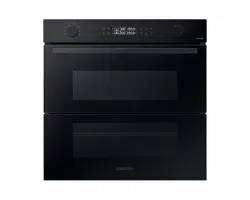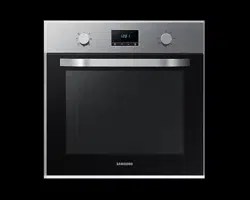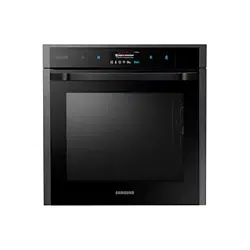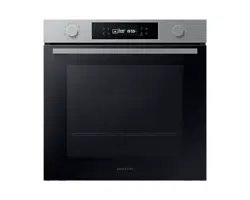
Built-in Oven
User & Installation manual
NV7B412****
2 English
Contents
Contents
Using this manual 3
The following symbols are used in this User Manual: 3
Safety instructions 4
Important safety precautions 4
Auto energy saving function 6
Installation 6
What’s included 6
Power connection 7
Cabinet mount 8
Before you start 10
Initial settings 10
New oven smell 10
Smart safety mechanism 10
Soft closing door (applicable models only) 11
Accessories 11
Mechanical lock (applicable models only) 12
Operations 13
Control panel 13
Common settings 14
Cooking modes (except for Grill) 17
Cooking modes (Grill) 18
To stop cooking 19
Special function 19
Natural Steam (applicable models only) 20
Auto Cook 21
Cleaning 21
Preparation
Wi-Fi MODEL
Connecting SmartThings
1. Launch the QR Code Reader app to scan the QR image attached to the product.
2. When the SmartThings app is running, tap ‘Add’ to connect the SmartThings
app to the product.
Registering the product / Reading the manual / Customer support
1. Launch the QR Code Reader app to scan the QR image attached to the product.
2. When the SmartThings app is running, press ‘Product support’.
3. Select ‘Product registration’, ‘Manual’ or ‘Customer support’.
* Product registration may not be available in all countries.
NON Wi-Fi MODEL
Registering the product / Reading the manual / Customer support
1. Launch the QR Code Reader app to scan the QR image attached to the product.
2. Select ‘Product registration’, ‘Manual’ or ‘Customer support’.
* Product registration may not be available in all countries.
NOTE
• We provide online manuals that can be accessed via your smartphone
or our website to contribute in reducing the usage of manuals in paper
format, as part of efforts to save the Earth.
English 3
Using this manual
Using this manual
Thank you for choosing SAMSUNG Built-In Oven.
This User Manual contains important information on safety and instructions
intended to assist you in the operation and maintenance of your appliance.
Please take the time to read this User Manual before using your oven and keep
this book for future reference.
The following symbols are used in this User Manual:
WARNING
Hazards or unsafe practices that may result in severe personal injury, death and/
or property damage.
CAUTION
Hazards or unsafe practices that may result in personal injury and/or property
damage.
NOTE
Useful tips, recommendations, or information that helps users manipulate the
product.
Timer 23
Sound On/Off 23
Wi-Fi On/Off 23
Cooking smart 24
Manual cooking 24
Auto Cook programmes 27
Test Dishes 29
Collection of frequent Auto cook recipes 30
Maintenance 32
Cleaning 32
Replacement 35
Troubleshooting 36
Checkpoints 36
Information codes 38
Technical specications 39
Appendix 39
Open Source Announcement 39

4 English
Safety instructions
Safety instructions
Installation of this oven must be performed only by a licensed electrician. The
installer is responsible for connecting the appliance to the mains power supply in
observance of the relevant safety recommendations.
IMPORTANT SAFETY PRECAUTIONS
WARNING
This appliance is not intended for use by persons (including
children) with reduced physical, sensory or mental
capabilities, or lack of experience and knowledge, unless
they have been given supervision or instruction concerning
use of the appliance by a person responsible for their
safety.
Children should be supervised to ensure that they do not
play with the appliance.
The means for disconnection must be incorporated in the
xed wiring in accordance with the wiring rules.
This Appliance should be allowed to disconnection from the
supply after installation. The disconnection may be achieved
by having the plug accessible or by incorporating a switch
in the xed wiring in accordance with the wiring rules.
If the supply cord is damaged, it must be replaced by
the manufacturer, its service agent or similarly qualied
persons in order to avoid a hazard.
The method of xing stated is not to depend on the use
of adhesives since they are not considered to be a reliable
xing means.
This appliance can be used by children aged from 8 years
and above and persons with reduced physical, sensory or
mental capabilities or lack of experience and knowledge if
they have been given supervision or instruction concerning
use of the appliance in a safe way and understand the
hazards involved. Children shall not play with the appliance.
Cleaning and user maintenance shall not be made by
children without supervision. Keep the appliance and its
cord out of reach of children less than 8 years.
During use the appliance becomes hot. Care should be taken
to avoid touching heating elements inside the oven.
WARNING: Accessible parts may become hot during use.
Young children should be kept away.
Do not use harsh abrasive cleaners or sharp metal scrapers
to clean the oven door glass since they can scratch the
surface, which may result in shattering of the glass.
If this appliance has cleaning function, excess spillage must
be removed before cleaning and all utensils should not be
left in the oven during steam cleaning or self cleaning. The
cleaning function depends on the model.

English 5
Safety instructions
If this appliance has cleaning function, during cleaning
conditions the surfaces may get hotter than usual and
children should be kept away. For appliances with pyrolytic
cleaning process, Some animals, particularly birds, can be
sensitive to the fumes and local temperature uctuations
during the pyrolytic cleaning process and should be moved
to an appropriate well ventilated area during this process.
Ventilate the room during and after the pyro cleaning
process.
The cleaning function depends on the model.
Only use the temperature probe recommended for this oven.
(Meat probe model only)
A steam cleaner is not to be used.
WARNING: Ensure that the appliance is switched off before
replacing the lamp to avoid the possibility of electric shock.
The appliance must not be installed behind a decorative
door in order to avoid overheating.
WARNING: The appliance and its accessible parts become
hot during use. Care should be taken to avoid touching
heating elements. Children less than 8 years of age shall be
kept away unless continuously supervised.
CAUTION: The cooking process has to be supervised. A short
term cooking process has to be supervised continuously.
The door or the outer surface may get hot when the
appliance is operating.
The temperature of accessible surfaces may be high when
the appliance is operating. The surfaces are liable to get hot
during use.
Insert the wire rack into position
with the protruding parts (stoppers
on both sides) towards the front so
that the wire rack supports the rest
position for large loads.
CAUTION
If the oven has been damaged in transport, do not connect it.
This appliance must be connected to the mains power supply only by a specially licensed
electrician.
In the event of a fault or damage to the appliance, do not attempt to operate it.
Repairs should be performed by a licensed technician only. Improper repair may result
in considerable danger to you and others. If your oven needs repair, contact a SAMSUNG
Service center or your dealer.
Electrical leads and cables should not be allowed to touch the oven.
The oven should be connected to the mains power supply by means of an approved
circuit breaker or fuse. Never use multiple plug adapters or extension leads.
The power supply of the appliance should be turned off when it is being repaired or
cleaned.
Take care when connecting electrical appliances to sockets near the oven.
If this appliance has a vapour or steam cooking function, do not operate this appliance
when the water supply cartridge is damaged. (Vapour or steam function model only)
When the cartridge is cracked or broken, do not use it and contact your nearest service
center. (Vapour or steam function model only)

6 English
Installation
This oven has been designed only for the cooking of household foods.
During use, the oven interior surfaces become hot enough to cause burns. Do not touch
heating elements or interior surfaces of the oven until they have had time to cool.
Never store ammable materials in the oven. The oven surfaces become hot when the
appliance is operated at a high temperature for an extended period of time.
When cooking, take care when opening the oven door as hot air and steam can escape
rapidly.
When cooking dishes that contain alcohol, the alcohol may evaporate due to the high
temperatures and the Vapour can catch re if it comes into contact with a hot part of the
oven.
For your safety, do not use high-pressure water cleaners or steam jet cleaners.
Children should be kept at a safe distance when the oven is in use.
Frozen foods such as pizzas should be cooked on the big grid. If the baking tray is used,
it may become deformed due to the great variation in temperatures.
Do not pour water into the bottom of the oven when it is hot. This could cause damage to
the enamel surface. The oven door must be closed during cooking.
Do not line the bottom of the oven with aluminum foil and do not place any baking
trays or tins on it. The aluminum foil blocks the heat, which may result in damage to the
enamel surfaces and cause poor cooking results. Fruit juices will leave stains, which can
become permanent on the enamel surfaces of the oven. When cooking very moist cakes,
use the deep pan.
Do not rest bakeware on the open oven door. Keep children away from the door when
opening or closing it as they may bump themselves on the door or catch their ngers in
the door.
Do not step, lean, sit or place heavy items on the door. Do not open the door with
unnecessarily strong force. WARNING: Do not disconnect the appliance from the main
power supply even after the cooking process is completed. WARNING: Do not leave the
door open while oven is cooking.
Auto energy saving function
Light : During cooking process, you can switch off Oven lamp by pressing ‘Oven light’
button. For energy saving, the oven lighting is switched off a few minutes after cooking
program has started.
Installation
WARNING
This product is dedicated to built-in products.
This oven must be installed by a qualied technician. The installer is responsible
for connecting the oven to the main power, while observing the relevant safety
regulations of your area.
What’s included
Make sure all parts and accessories are included in the product package. If you
have a problem with the oven or accessories, contact a local Samsung customer
centre or the retailer.
Oven at a glance
01
02
03
01 Control panel 02 Door handle 03 Door
Safety instructions
English 7
Installation
Accessories
The oven comes with different accessories that help you prepare different types of
food.
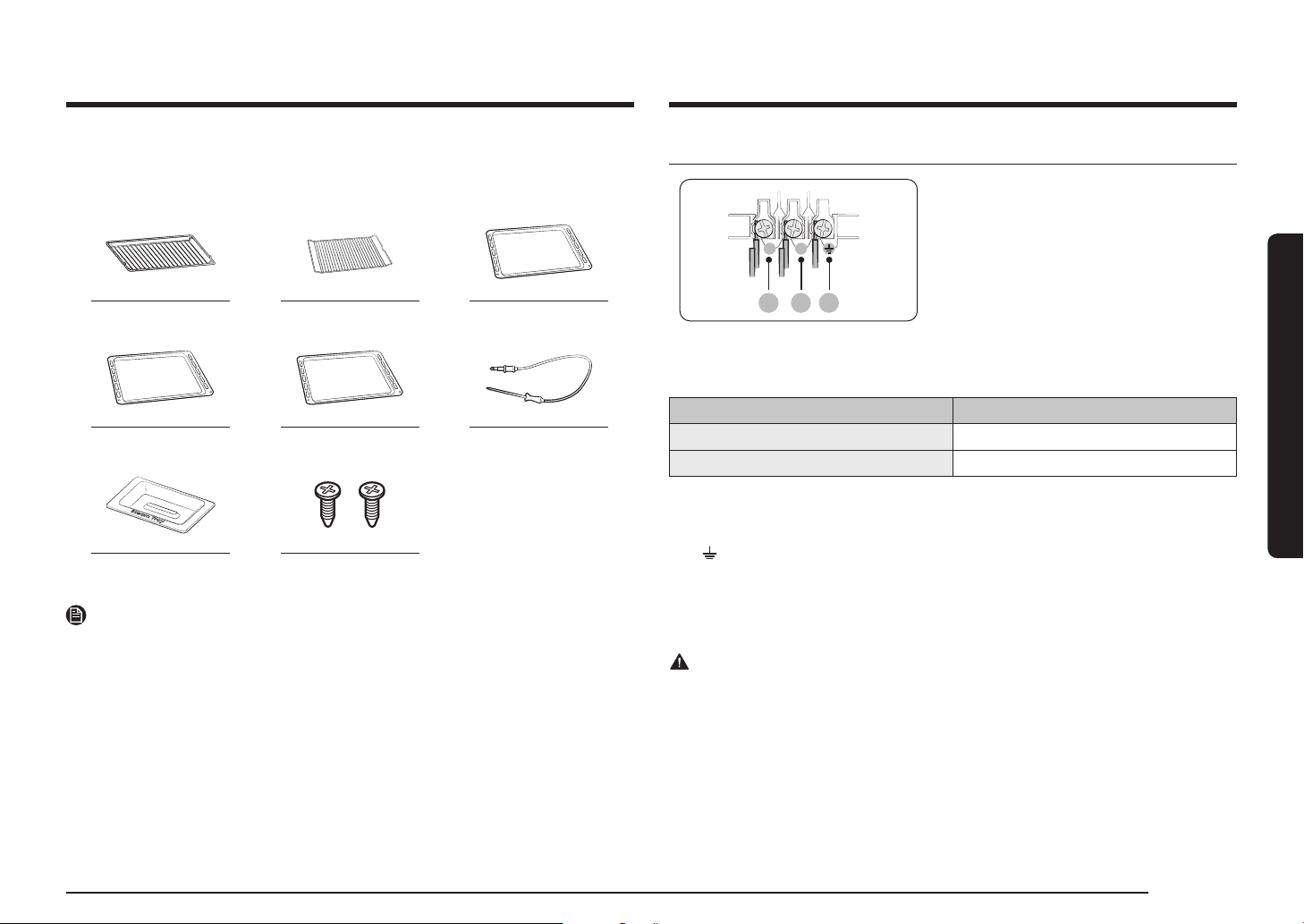
Wire rack Wire rack insert * Baking tray *
Universal tray * Extra-deep tray * Meat probe *
Steam tray * 2 screws (M4 L25)
NOTE
Availability of accessories with an asterisk (*) depends on the oven model.
Power connection
01 02 03
L N
01 BROWN or BLACK
02 BLUE or WHITE
03 YELLOW and GREEN
Plug the oven into an electrical socket. If
a plug-type socket is not available due to
allowable current limitations, use a multi-
pole isolator switch (with at least 3 mm
spacing in-between) in order to meet safety
regulations. Use a power cord of sufcient
length that supports the specication H05
RR-F or H05 VV-F, min. 1.5
~
2.5 mm².
Rated current(A) Minimum cross-sectional area
10 < A ≤ 16 1.5 mm²
16 < A ≤ 25 2.5 mm²
Check the output specications on the label attached to the oven.
Open the rear cover of the oven using a screwdriver, and remove the screws on
the cord clamp. Then, connect the power lines to the relevant connection terminals.
The (
)-terminal is designed for earthgrounding. First connect the yellow
and green lines (earthgrounding), which must be longer than the others. If
you use a plug-type socket, the plug must remain accessible after the oven is
installed. Samsung is not responsible for accidents caused by missing or faulty
earthgrounding.
WARNING
Do not step on or twist the wires during installation, and keep them away from
heat-emitting parts of the oven.
8 English
Installation
Installation
Cabinet mount
If installing the oven in a built-in cabinet, the cabinet must have its plastic surfaces
and adhesive parts resistant up to 90 °C. Samsung is not responsible for damage to
furniture from the oven’s heat emission.
The oven must be properly ventilated. For ventilation, leave a gap of about 50 mm
between the lower shelf of the cabinet and the supporting wall. If you install the
oven under a cooktop, follow the cooktop’s installation instructions.
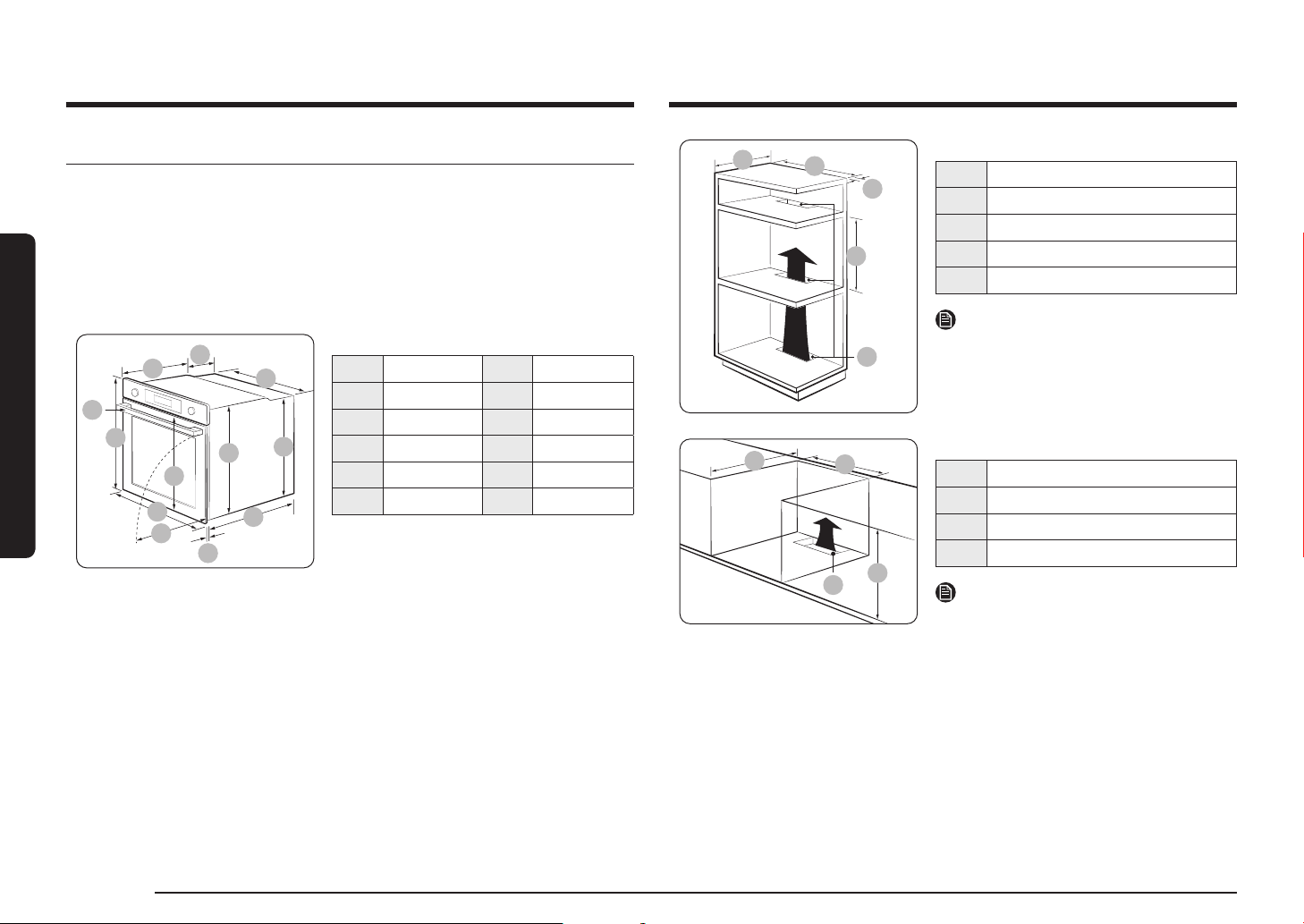
Required Dimensions for Installation
D
E
C
B
A
L
K
J
I
F
H
G
Oven (mm)
A 560 G 503
B 166 H 481
C 383 I 21
D 45 J 549
E 596 K 579
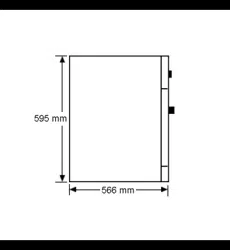
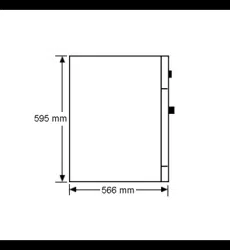
F 595 L 559
D
C
B
A
E
Built-in cabinet (mm)
A Min. 550
B Min. 560
C Min. 50
D Min. 590 - Max. 600
E Min. 460 x Min. 50
NOTE
The built-in cabinet must have vents (E) to
ventilate heat and circulate the air.
D
C
B
A
Under-sink cabinet (mm)
A Min. 550
B Min. 560
C Min. 600
D Min. 460 x Min. 50
NOTE
The built-in cabinet must have vents (D) to
ventilate heat and circulate the air.
English 9
Installation
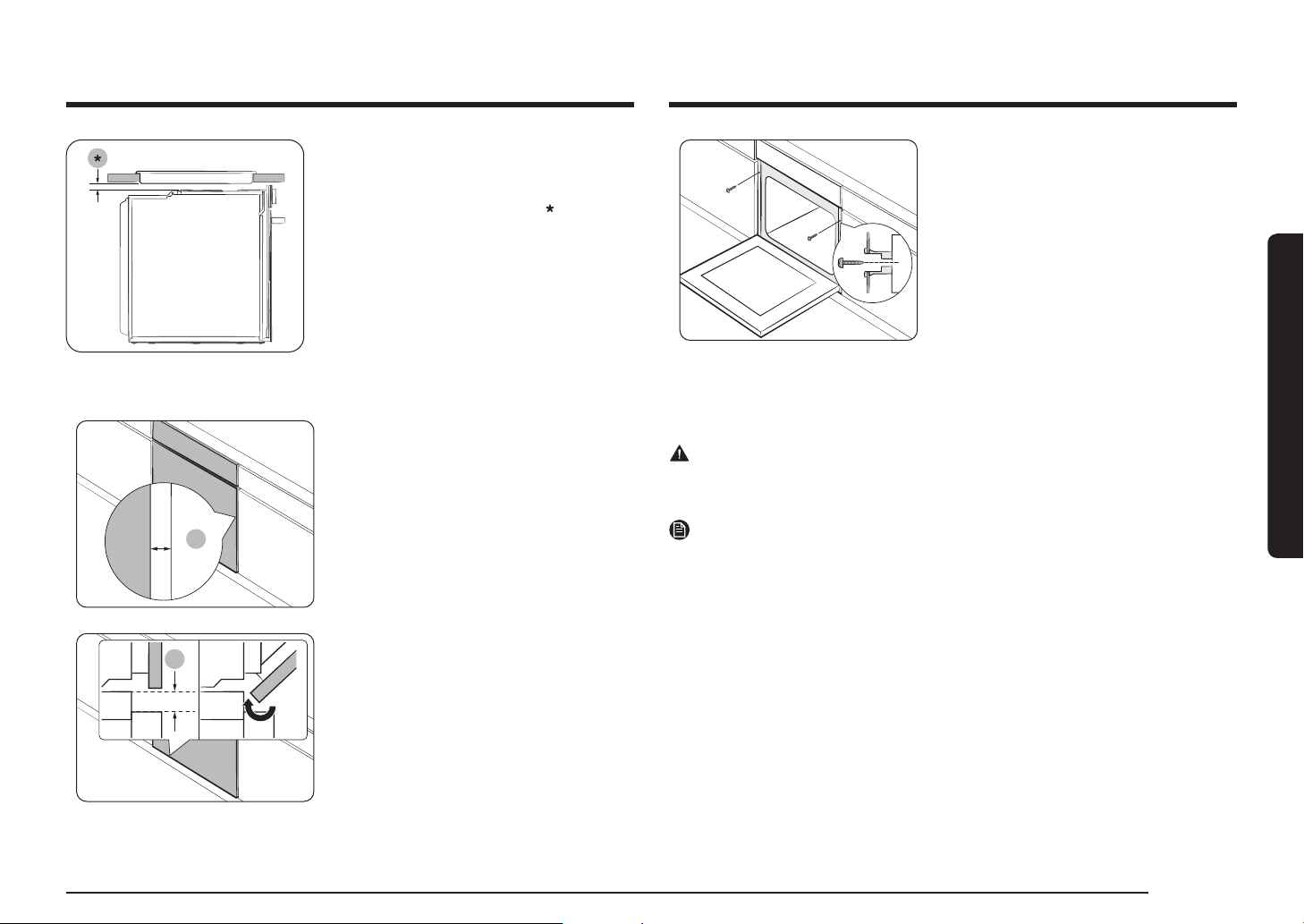
Installing with a hob
To install a hob on top of the oven, check
the installation guide of the hob for the
installation space requirement (
).
Mounting the oven
A
Make sure to leave a gap (A) of at least
5 mm between the oven and each side of
the cabinet.
B
Secure at least 3 mm of gap (B) so that the
door opens and closes smoothly.
Fit the oven into the cabinet and x the
oven rmly on both sides using 2 screws.
After installation is complete, remove the protective lm, tape, and other packing
material, and take out the provided accessories from inside the oven. To remove
the oven from the cabinet, rst disconnect power to the oven and remove
2 screws on both sides of the oven.
WARNING
The oven requires ventilation for normal operation. Do not block the vents under
any circumstance.
NOTE
The actual appearance of the oven may differ with the model.
10 English
Before you start
Before you start
Initial settings
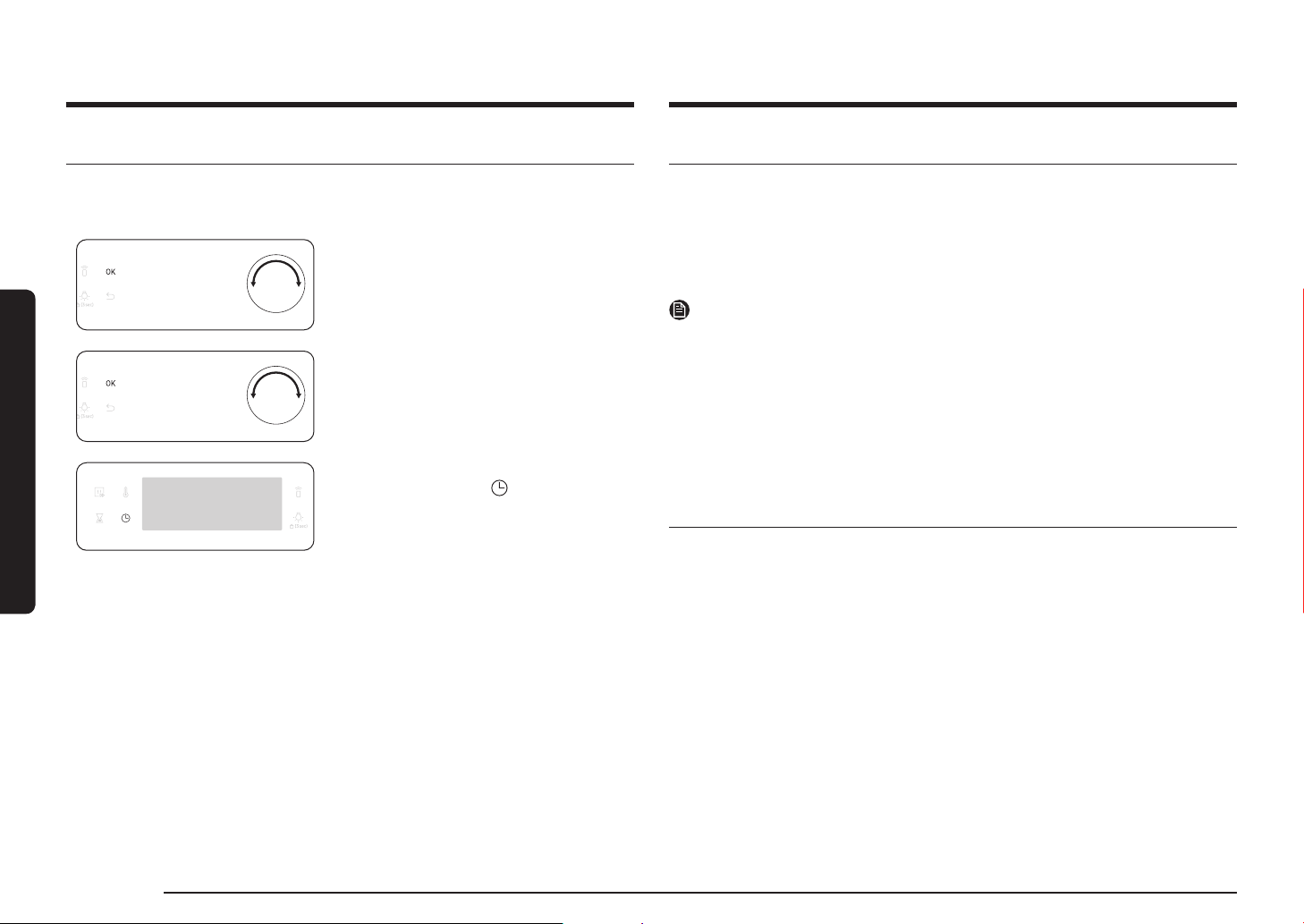
When you power on the oven for the rst time, the default time of “12:00” appears
on the display where the hour element (“12”) blinks. Follow the steps below to set
the current time.
1. With the hour element blinking, turn the
value dial (right-sided dial) to set the
hour, and then press OK to move to the
minute element.
2. With the minute element blinking, turn
the value dial to set the minute, and then
press OK.
To change the current time after this initial
setting, hold down the button for
3 seconds and follow the above steps.
New oven smell
Before using the oven for the rst time, clean inside the oven to remove the new
oven smell.
1. Remove all accessories from inside the oven.
2. Run the oven with Convection 200 °C or Conventional 200 °C for an hour. This
will burn any remaining production substances in the oven.
3. When complete, turn off the oven.
NOTE
• At the rst-time use, you may see some smoke inside the oven while it is
operating. However, this is not a product failure.
• As the temperature of the cooking room increases at an initial period, you may
nd some spots on the inner glass of the door. If this is the case, turn off the
oven and wait until it cools down. Then, use kitchen paper or neutral detergent
with a clean cloth to wipe up the inner glass.
• It is also important to make sure that you operate the oven in a well-ventilating
kitchen environment.
Smart safety mechanism
If you open the door while the oven is operating, the oven light turns on and
both the fan and the heating elements stop operation. This is to prevent physical
injuries such as burns as well as to prevent unnecessary energy loss. When this
happens, simply close the door and the oven continues to operate normally
because this is not a system failure.
English 11
Before you start
Accessories
For rst time use, clean the accessories thoroughly with warm water, detergent
and a soft clean cloth.
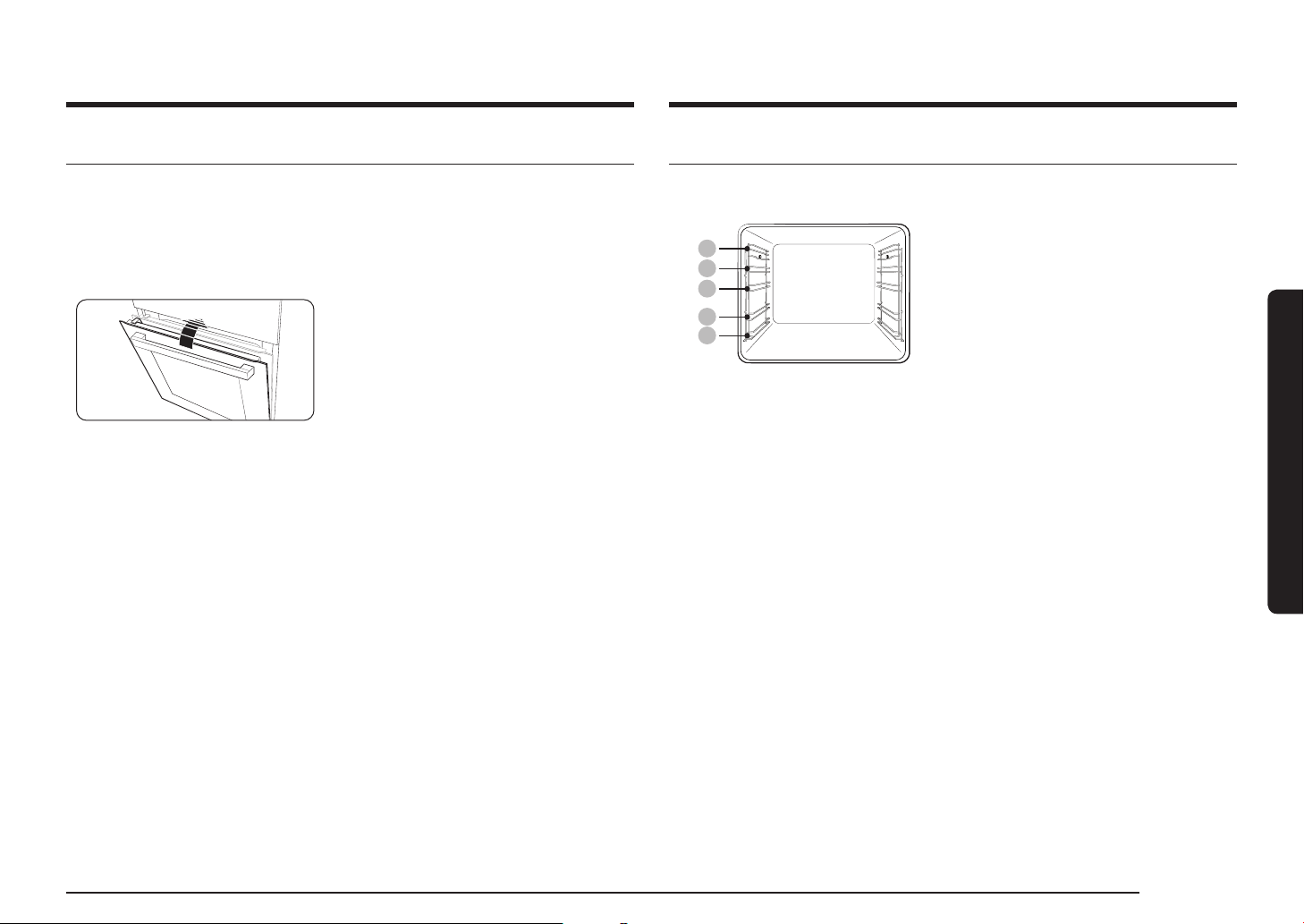
05
04
03
02
01
01 Level 1 02 Level 2
03 Level 3 04 Level 4
05 Level 5
• Insert the accessory to the correct position
inside of the oven.
• Allow at least a 1 cm space from the
accessory and the bottom of the oven, and
from any other accessory.
• Take caution in removing cookware and/
or accessories out of the oven. Hot meals
or accessories can cause burns.
• The accessories may be deformed while
they are gaining heat. Once they have
cooled down, they will recover their
original appearance and performance.
Soft closing door (applicable models only)
The Samsung Built-in Oven features a soft closing door that gently, safely, and
silently closes.
When closing the door, the specially designed hinges catch the door a few
centimetres before the nal position. This is the perfect touch for added comfort,
allowing the door to be closed silently and gently.
(Availability of this feature depends on the oven model.)
The door starts to be closed softly at about
15 degrees and completely closed within
approx. 5 seconds.

12 English
Before you start
Before you start
Mechanical lock (applicable models only)
Installation
A
1. Insert the thin part (A) of the mechanical
lock into the corresponding slot of the
lock handle as shown.
2. Tighten the screw on the lock handle.
Uninstallation
• Loosen and remove the screw from the
lock handle.
Lock/unlock
• To open the door, slightly lift up the lock
handle to unlock the door. Then, open the
door.
• To lock the door, simply close the door.
The mechanical lock automatically locks
the door.
Basic use
For better cooking experience, familiarise yourself with how to use each accessory.
Wire rack The wire rack is designed for grilling and roasting. Insert the
wire rack into position with the protruding parts (stoppers on
both sides) towards the front
Wire rack
insert *
The wire rack insert is used with the tray, and prevents liquid
from dropping onto the bottom of the oven.
Baking tray * The baking tray (depth: 20 mm) is used to bake cakes, cookies,
and other pastries. Put the slanted side to the front.
Universal tray * The universal tray (depth : 30 mm) is used for cooking and
roasting. Use the wire-tray insert to prevent liquid from
dropping onto the bottom of the oven.
Put the slanted side to the front.
Extra-deep
tray *
The extra-deep tray (depth: 50 mm) is used for roasting with
or without the wire-tray insert. Put the slanted side to the
front.
Meat probe * The meat probe measures the internal temperature of the
meat to cook. Use only the meat probe that comes with your
oven.
Telescopic
rails *
Use the telescopic rail plate to insert the tray as follows:
1. Stretch the rail plate out from the oven.
2. Put the tray on the rail plate and slide the rail plate into the
oven.
3. Close the oven door.
Steam tray * Use the steam tray only in Natural Steam mode. Put the tray
in the bottom center of the compartment and ll it with clean
water. As the tray becomes hot during or immediately after
cooking, be sure to use oven gloves or wait until the oven
cools down completely to remove the tray.
NOTE
Availability of accessories with an asterisk (*) depends on the oven model.

English 13
Operations
09 Oven light
(Child lock)
Press to turn the internal light on or off. The oven light
turns on automatically when the door is open or when the
oven operation starts. And it turns off automatically after
a certain period of inactivity in order to save power.
Child lock: To prevent accidents, Child Lock disables all
controls. Hold down for 3 seconds to activate, or hold
down for 3 seconds again to deactivate the lock on the
control panel.
10 OK Press to conrm your settings.
11 Back Cancel the current settings, and return to the default.
12 Value dial Use the value dial to:
• Set the cooking time or temperature.
• Choose a sub item of top-level menus: Cleaning,
Auto Cook, Special function, or Grill.
• Choose a serving size for Auto Cook programmes.
NOTE
Tapping on the display while wearing plastic or oven gloves may not operate
properly.
Operations
Control panel
The front panel comes in a wide range of materials and colours. For improved
quality, the actual appearance of the oven is subject to change without notice.
01
03 05 08 10
0402 06 07 09 11 12
01 Power Turn left/right to turn on/off the oven.
02 Mode selector Turn left/right to select a cooking mode or function.
03 Fast preheat Fast Preheat heats the oven fast to a set temperature.
• Touch on or off the Fast Preheat option.
• Available only with Single mode.
(Convection, Conventional, Top heat + Convection,
Bottom heat + Convection)
• Disabled for temperatures set at less than 100 °C.
04 Timer Helps you check the time or operating duration while
cooking.
05 Temperature Use to set the temperature.
06 Cooking Time Use to set the cooking time.
07 Display Shows necessary information about a selected mode or
current settings.
08 Smart Control Press 3 seconds to enable/disable the Smart Control
function.
14 English
Operations
Operations
Cooking time
1. Turn the mode selector to choose a mode
or function.
2. Press the button, and then turn the
value dial to set a desired time up to
23 hours 59 minutes.
3. Optionally, you can delay the end time
of your cooking to a desired point. Press
the button, and use the value dial to
set an end point. See Delay End for more
information.
4. Press OK to conrm your changes.
NOTE
• You can cook without setting the cooking time if you want to. In this case, the
oven starts cooking at set temperatures without time information, and you must
stop the oven manually when cooking is complete.
• To change the set cooking time, press
button and follow the above steps.
Common settings
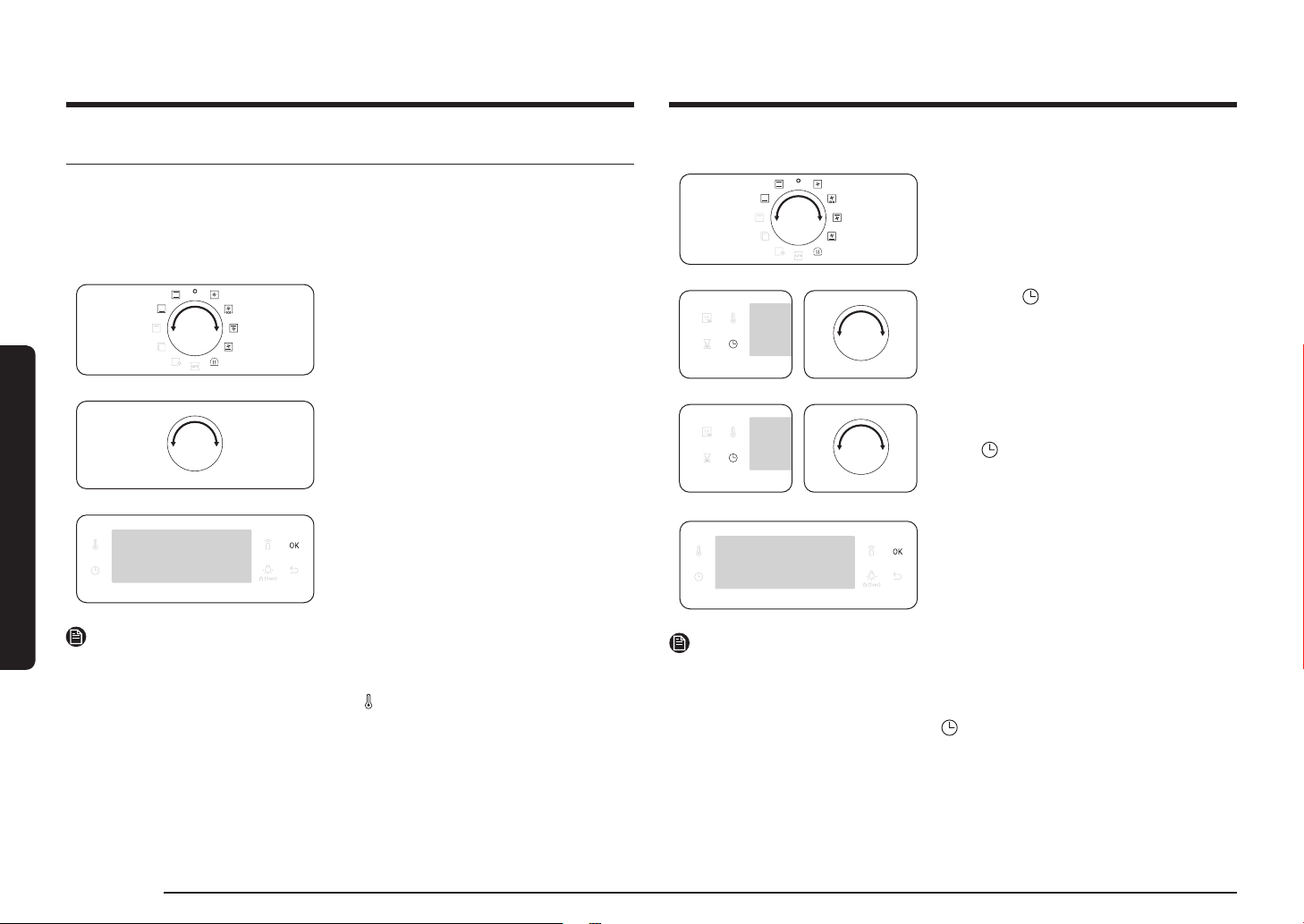
It is common to change the default temperature and/or cooking time across all
cooking modes. Follow the steps below to adjust the temperature and/or cooking
time for the selected cooking mode.
Temperature
1. Turn the mode selector to choose a mode
or function. The default temperature of
each selection appears.
2. Turn the value dial to set a desired
temperature.
3. Press OK to conrm your changes.
NOTE
• If you do not make any further settings within a few seconds, the oven starts
cooking automatically with the default settings.
• To change the set temperature, press the
button and follow the above steps.
• The exact temperature inside the oven can be measured with authorized
thermometer and method dened by an authorized institution.
Using other thermometers may cause a measuring error.
English 15
Operations
End time
1. Turn the mode selector to choose a mode
or function.
2. Press twice, and turn the value dial to
set a desired end time.
3. Press OK to conrm your changes.
NOTE
• You can cook without setting the end time if you want to. In this case, the oven
starts cooking at set temperatures without time information, and you must stop
the oven manually when cooking is complete.
• To change the end time, press
twice, and follow the above steps.
Delay End
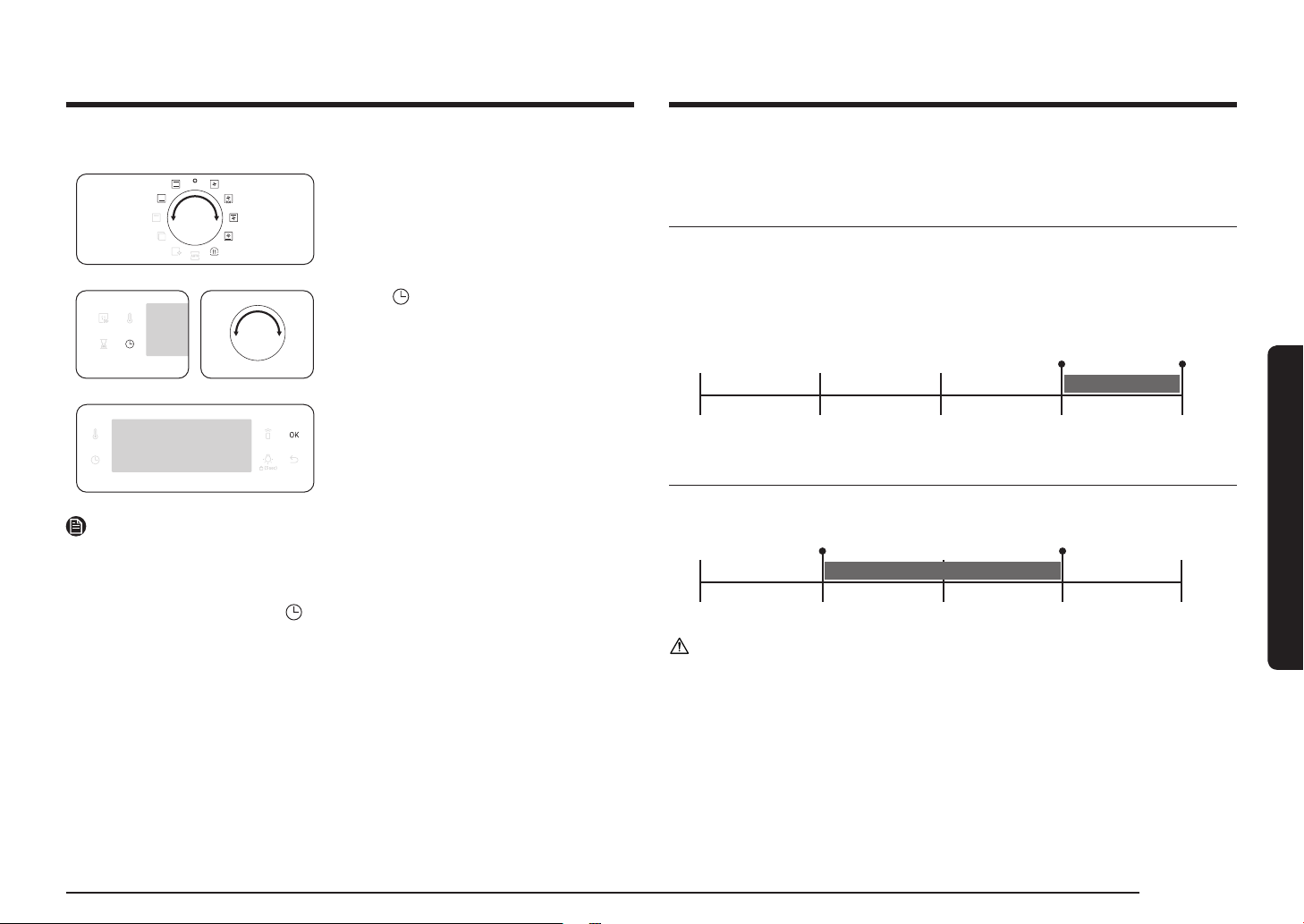
Delay End is designed to make cooking more convenient.
Case 1
Suppose you select a one-hour recipe at 2:00 PM and you want the oven to
nish cooking at 6:00 PM. To set the end time, change the Ready At time to
6:00 PM. The oven will start cooking at 5:00 PM and end at 6:00 PM as you set.
Current time: 2 pm Set cooking time: 1 hour Set Delay End time: 6 pm
The oven will start cooking at 5:00 PM and end at 6:00 PM automatically.
2:00 pm 3:00 pm 4:00 pm 5:00 pm 6:00 pm
Case 2
Current time: 2 pm Set cooking time: 2 hour Set Delay End time: 5 pm
The oven will start cooking at 3:00 PM and end at 5:00 PM automatically.
2:00 pm 3:00 pm 4:00 pm 5:00 pm 6:00 pm
CAUTION
Do not keep cooked food in the oven too long. The food may spoil.
16 English
Operations
Operations
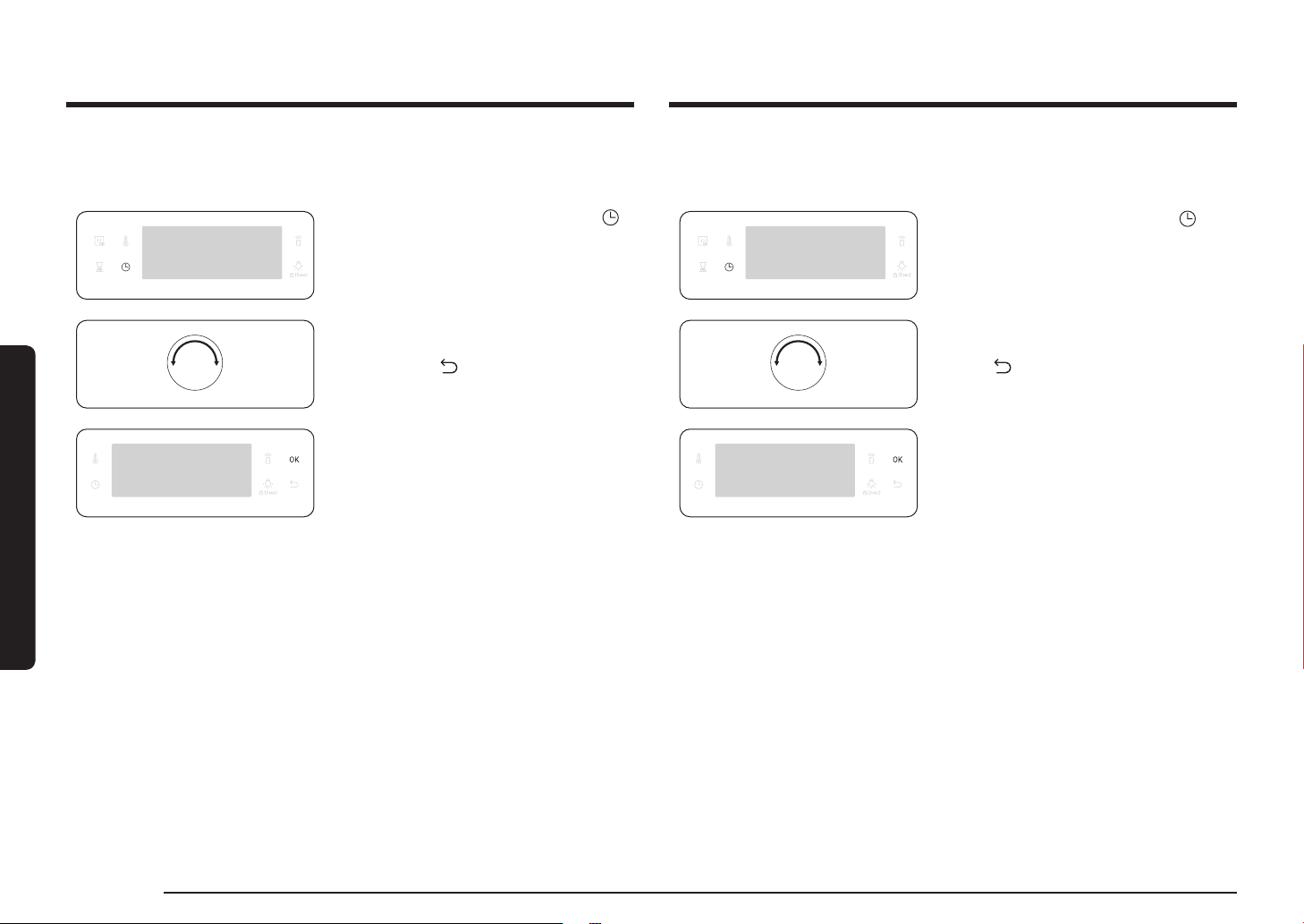
To clear the cooking time
You can clear the cooking time. This is useful if you want to stop the oven
manually at any time during the process.
1. While the oven is cooking, press the
button to display the default cooking
time.
2. Turn the value dial to set the cooking
time to “0:00”. Alternatively,
simply press
.
3. Press OK.
To clear the end time
You can clear the end time. This is useful if you want to stop the oven manually at
any time during the process.
1. While the oven is cooking, press
twice to display the set end time.
2. Turn the value dial to set the end time
to the current time. Alternatively, simply
press
.
3. Press OK.

English 17
Operations
Cooking modes (except for Grill)
The cooking modes with an asterisk (*) are available for fast preheating and
disabled for temperatures set at less than 100 °C.
Mode Temperature range (°C) Suggested temperature (°C)
Convection
* 30-250 160
The rear heating element generates heat, which is
evenly distributed by the convection fan. Use this mode
for baking and roasting on different levels at the same
time.
Conventional
* 30-250 180
The heat is generated from the top and bottom heating
elements. This function should be used for standard
baking and roasting for most types of dishes.
Top heat +
Convection
* 40-250 180
The top heating element generates heat, which is evenly
distributed by the convection fan. Use this mode for
roasting that requires a crispy top (for example, meat or
lasagne).
Bottom heat +
convection
* 40-250 200
The bottom heating element generates heat, which is
evenly distributed by the convection fan. Use this mode
for pizza, bread, or cake.
Bottom heat
100-230 150
The bottom heating element generates heat. Use this
mode at the end of baking or cooking to brown the
bottoms of a quiche or pizza.
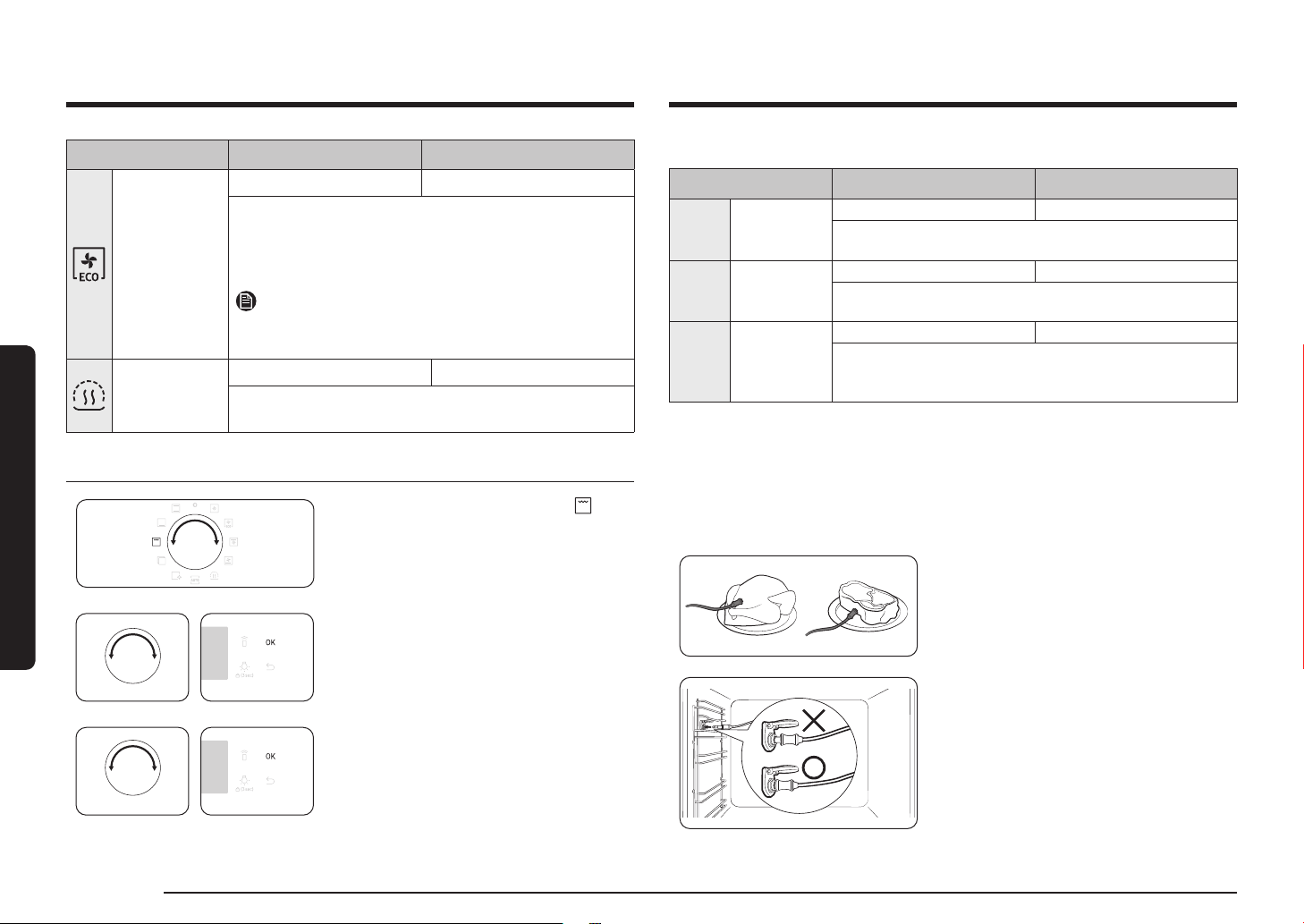
Cooking modes (except for Grill)
1. Turn the mode selector to select an
cooking mode.
2. Set the cooking time and/or temperature
if necessary. See the Common settings
section for details.
3. Optionally, you can fast preheat the
oven. To do this, press the button,
and set the target temperature.
The corresponding indicator appears
on the display.
The oven starts preheating with icon
until the internal temperature reaches the
target temperature.
When preheating is complete, the indicator
disappears with a beep.
Preheating is recommended for all cooking
modes unless otherwise specied in the
Cooking smart.
NOTE
You can change the cooking time and/or
temperature during cooking.
18 English
Operations
Operations
Mode Temperature range (°C) Suggested temperature (°C)
Eco
Convection
30-250 160
Eco Convection uses the optimized heating system to
save energy while cooking. The cooking times slightly
increases, but the cooking results remain the same. Note
that this mode does not require preheating.
NOTE
ECO Convection mode of heating used to determine the
energy efciency class is in accordance with EN60350-1
Keep warm
40-100 60
Use this only for keeping foods warm that have just
been cooked.
Cooking modes (Grill)
1. Turn the mode selector to select .
2. Use the value dial to select a Large grill
(G 1) or Eco grill (G 2) or Fan grill (G 3),
and then press OK.
3. Use the value dial to set the temperature,
and then press OK.
Cooking modes (Grill)
Mode Temperature range (°C) Suggested temperature (°C)
G 1 Large grill
100-270 220
The large-area grill emits heat. Use this mode for browning
the tops of food (for example, meat, lasagne, or gratin).
G 2 Eco grill
100-270 220
The small-area grill emits heat. Use this mode for food
that requires less heat, such as sh and lled baguettes.
G 3 Fan grill
100-250 180
Two top heating elements generate heat, which is
distributed by the fan. Use this mode for grilling meat or
sh.
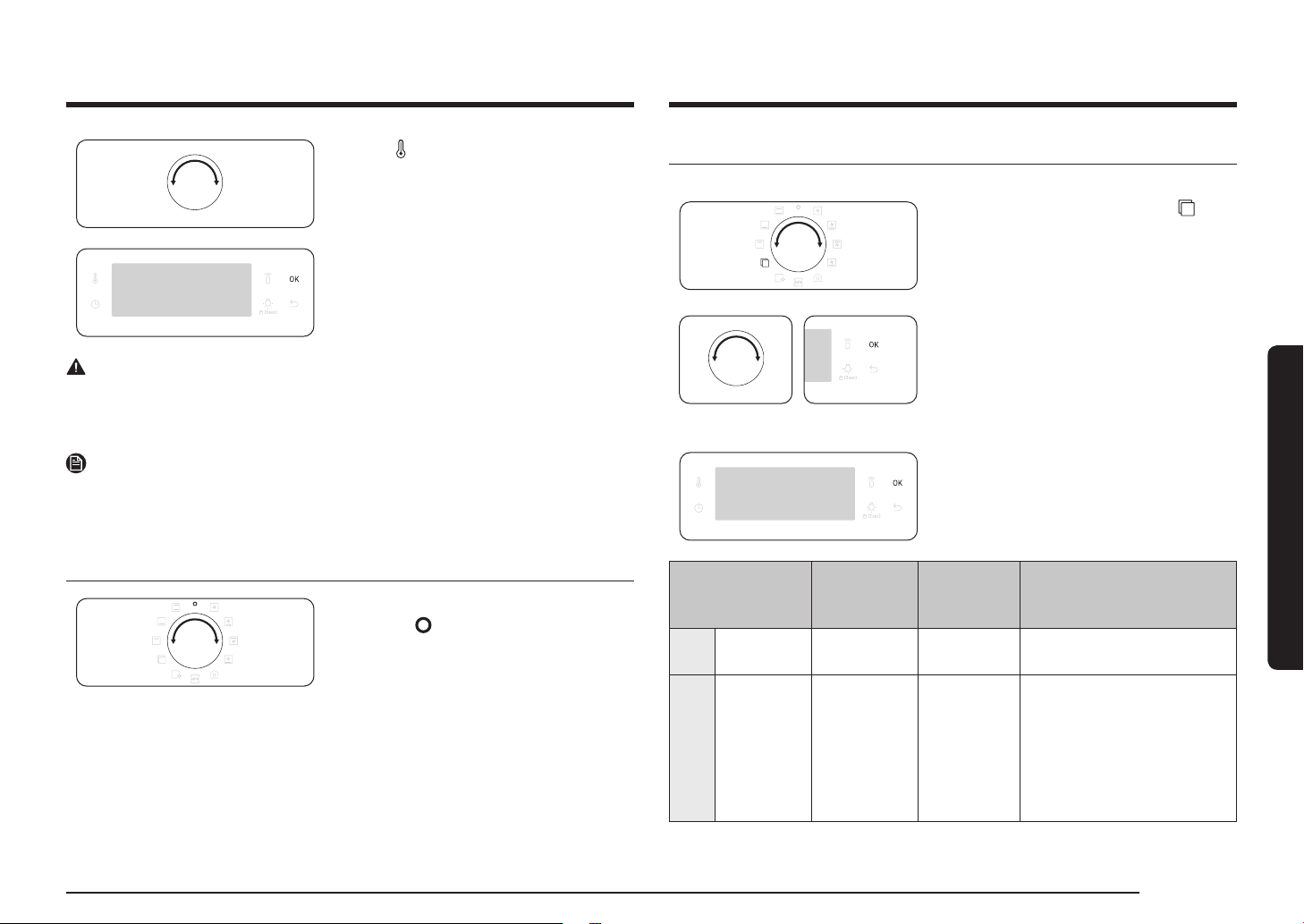
Cooking with the meat probe (applicable models only)
The meat probe measures the internal temperature of meat while it’s cooking.
When the temperature reaches the target temperature, the oven stops and nishes
cooking.
• Use only the meat probe that comes with your oven.
• You cannot set the cooking time if the meat probe is plugged in.
1. On the feature panel, press to choose a
cooking mode and temperature.
2. Insert the tip of the meat probe into the
centre of the meat to cook. Make sure the
rubber handle is not inserted.
3. Plug the probe connector into the socket
on the leftsided wall. Make sure you see
the Meat Probe inserted indicator when
the probe connector is connected.
English 19
Operations
Special function
Add special or additional functions to improve your cooking experience.
1. Turn the mode selector to select .
2. Turn the value dial to select a function,
and then press OK. The default
temperature appears.
3. Set the cooking temperature if necessary.
See the Common settings section for
details.
4. Press OK to start the function.
Mode
Temperature
range (°C)
Suggested
temperature
(°C)
Instructions
F 1 Plate warm 30-80 50
Use this for warming dishes
or ovenware.
F 2 Defrost 30-60 30
This mode uses for
defrosting frozen products,
baking goods, fruit, cake,
cream and chocolate. The
defrosting time is depending
on the type, size and
quantity of the food.
4. Press button again and turn the value
dial (right-sided dial) to set the internal
temperature of the meat.
5. Press OK to start cooking. The oven
completes cooking with a melody when
the internal temperature of the meat
reaches the set temperature.
WARNING on acrylamide
• To prevent damage, do not use the meat probe with the spit accessory.
• When cooking is complete, the meat probe becomes very hot. To prevent burns,
use oven gloves to take out the food.
NOTE
Not all modes support using the meat probe. If you use the meat probe with
inapplicable modes, the current mode indicator blinks. When this happens, remove
the meat probe instantly.
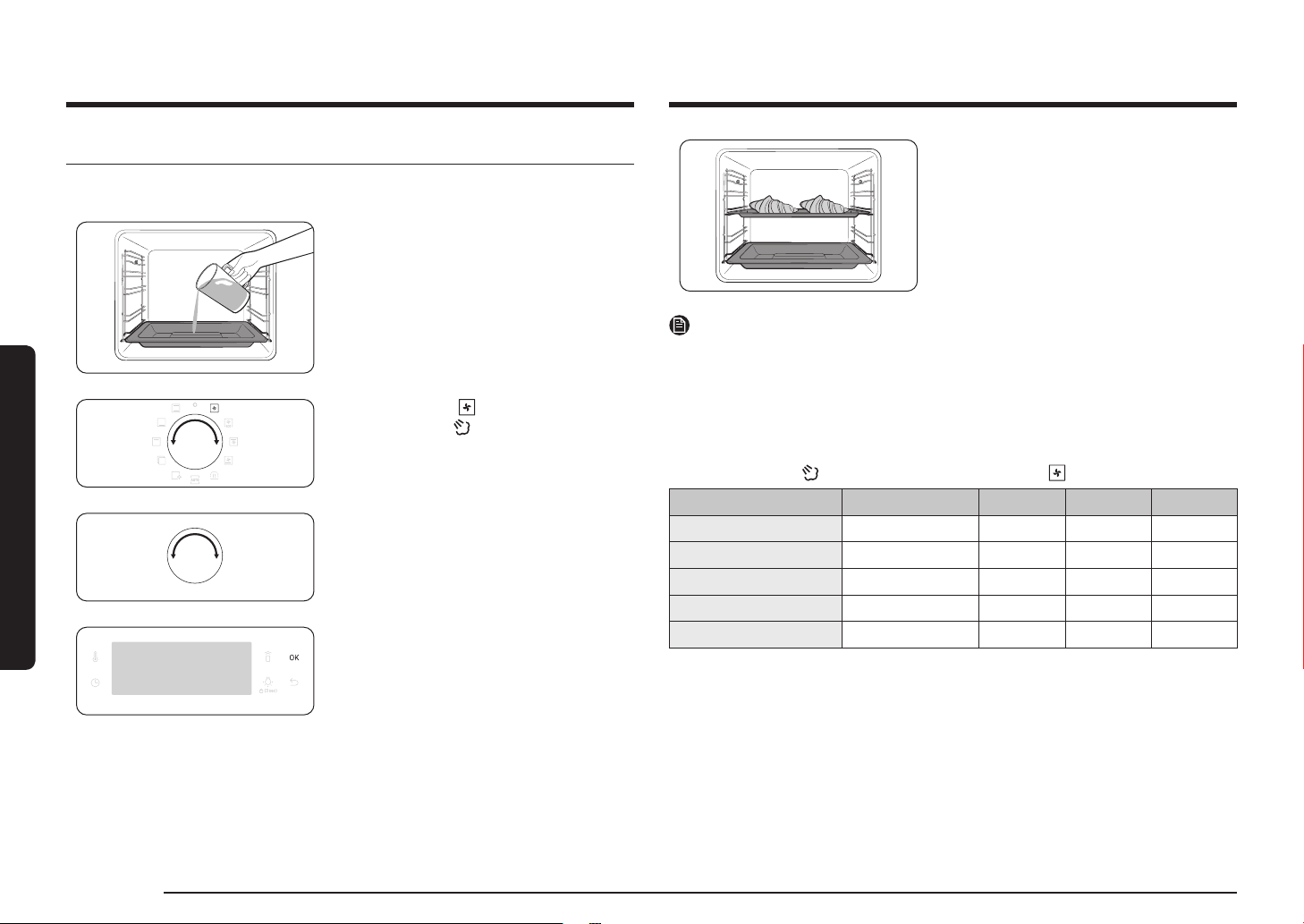
To stop cooking
While cooking is in process, turn the mode
selector to “ ”. The oven turns off in a
few seconds. This is because, to avoid
accepting incorrect commands by users, the
oven waits a few seconds so that they can
correct their selection.
20 English
Operations
Operations
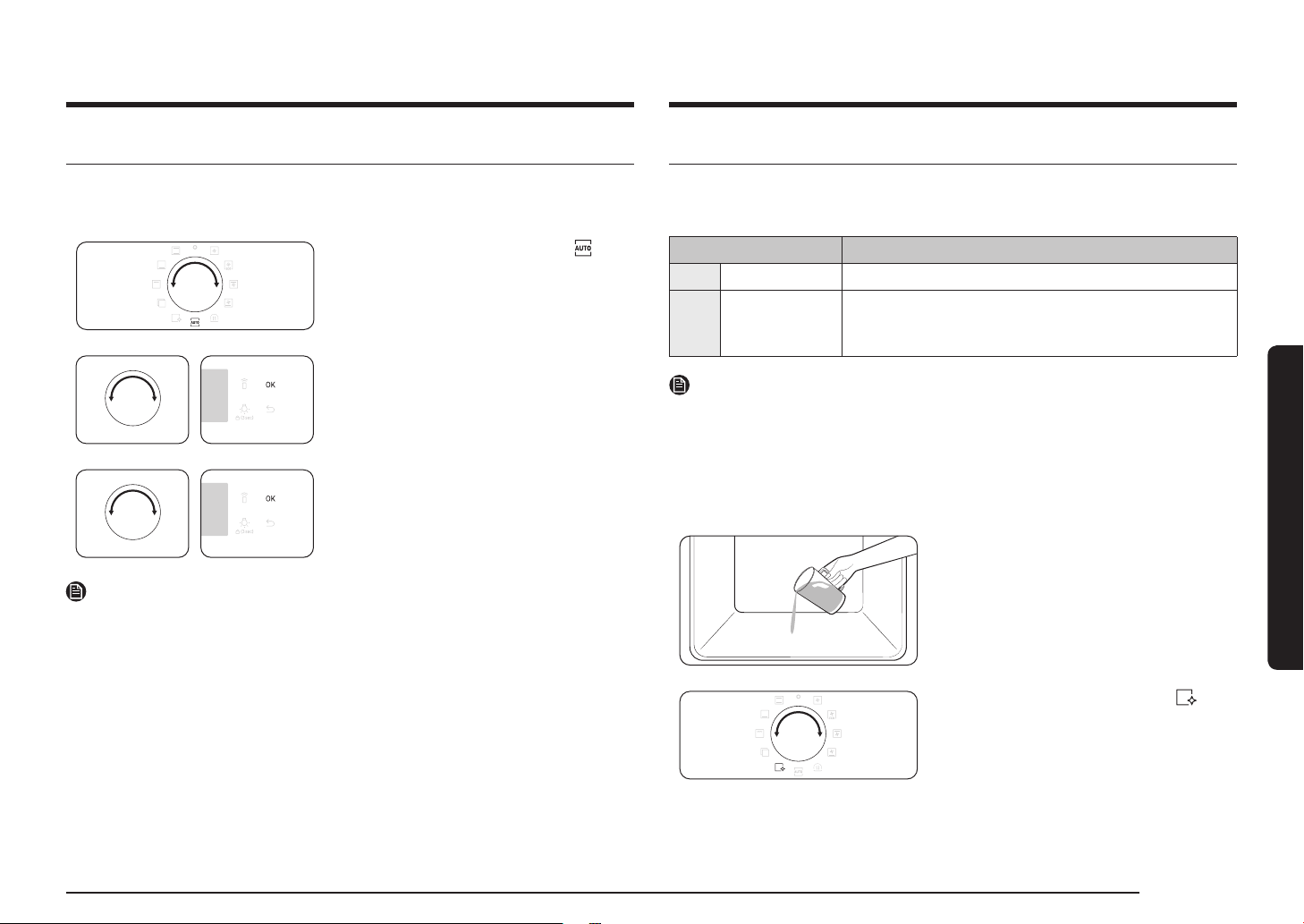
6. Put the food in the oven on any rack and
start cooking.
NOTE
• Do not rell the water during cooking or when the oven is hot.
• When the oven cools down completely after using the Natural Steam function,
use a wet cloth to wipe the bottom of the compartment.
• To remove water scale that forms after using the oven for an extended time, use
a soft cloth with dedicated detergent.
The Natural Steam
works only with the Convection mode.
Food Accessory Level Temp. (°C) Time (min.)
Croissants, 4-6 pieces Universal tray 3 190 20-25
Apple puff pastry Universal tray 3 190 20-25
Danish pastry Universal tray 3 190 20-30
Bread roll Universal tray 3 180 20-30
White bread Wire rack 2 180 30-40
Natural Steam (applicable models only)
With Natural Steam, you can bake bread that is crispy on the outside and moist
inside. We recommended preheat the oven for the best results.
1. Insert steam tray on the bottom of
compartment.
2. Fill the tray with water 250 ml only
when the oven is cold.
3. Set Convection mode and select
Natural Steam .
4. Turn the value dial to set the
temperature.
5. Press OK to start preheating.
English 21
Operations
Cleaning
Two cleaning modes are available for you. This function saves you time by
removing the need for regular manual cleaning. The remaining time appears on
the display during this process.
Function Instructions
C 1 Steam Clean This is useful for cleaning light soiling with steaming.
C 2 Pyrolytic *
Pyrolytic features high temperature thermal cleaning.
It burns off oily leftovers to facilitate manual cleaning.
1 h 50 m (default setting) / 2 h 10 m / 2 h 30 m
NOTE
The function with an asterisk (*) is available with applicable models only.
Steam Clean
This is useful for cleaning light soiling with steaming. This function saves you time
by removing the need for regular manual cleaning. The remaining time appears on
the display during this process.
1. Pour 400 ml (
3
/4 pint) of water onto the
bottom of the oven and close the oven
door.
2. Turn the mode selector to select .
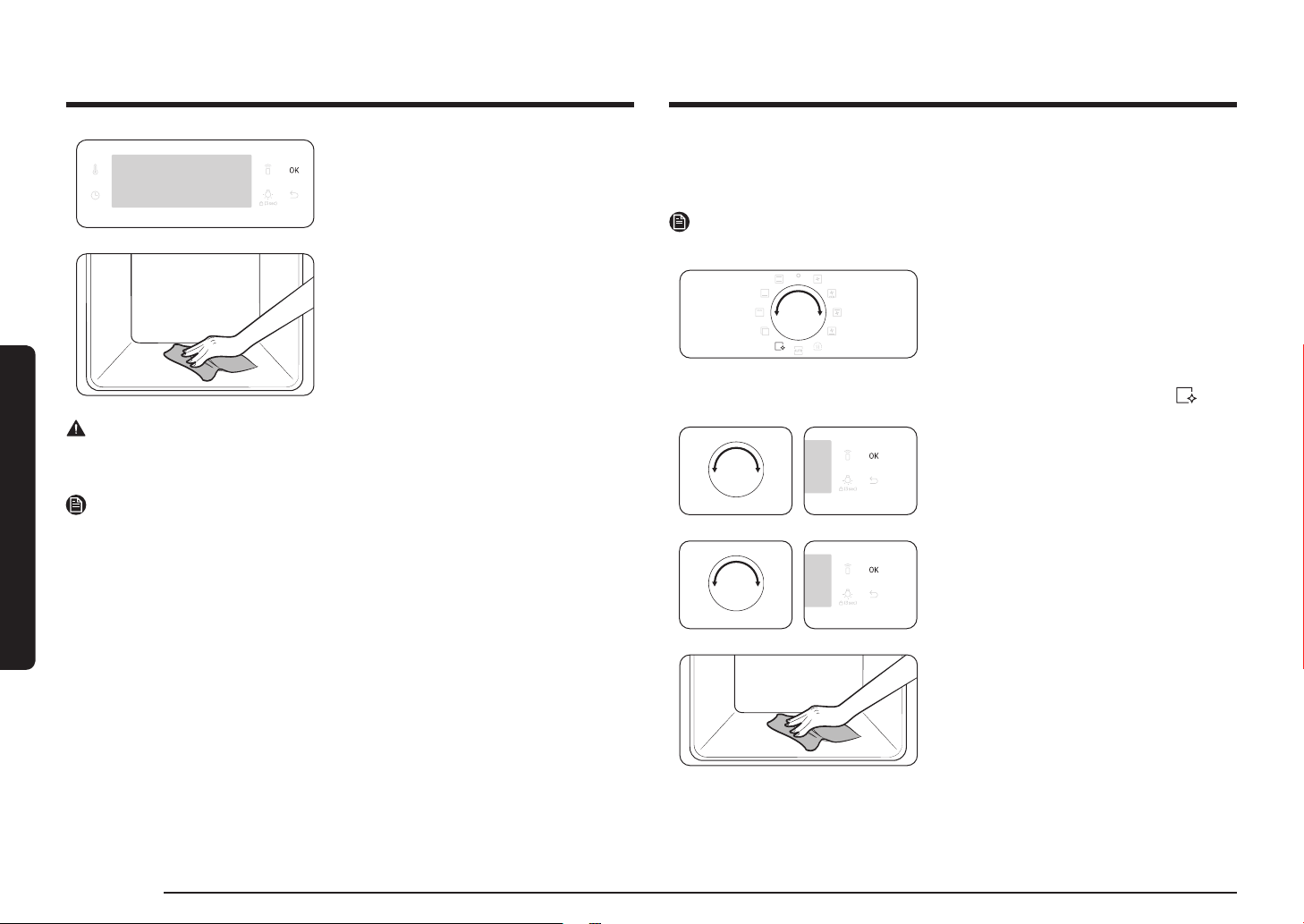
Auto Cook
For inexperienced cooks, the oven offers a total of 20 auto cooking recipes. Take
advantage of this feature to save you time or shorten your learning curve. The
cooking time and temperature will be adjusted according to the selected recipe.
1. Turn the mode selector to select .
2. Turn the value dial to select a
programme, and then press OK.
3. Turn the value dial to select a serving
size. The weight range depends on the
programme.
4. Press OK to start cooking.
NOTE
• Some of the items in the Auto Cook programmes include preheating. For those
items the preheating progress is displayed. Please put the food in the oven after
preheating beep. Then, press Cooking time to start Auto Cook.
• For more information, see the Auto Cook programmes section in this manual.
22 English
Operations
Operations
3. Turn the Value Dial to select C 1, and
then press OK.
Steam cleaning runs for 26 minutes.
4. Use a dry cloth to clean inside the oven.
WARNING
Do not open the door before the cycle is complete. The water inside the oven is
very hot, and it can cause a burn.
NOTE
• If the oven is heavily soiled with grease, for example, after roasting or grilling,
it is recommended to remove stubborn soils manually using a cleaning agent
before activating Steam cleaning.
• Leave the oven door ajar when the cycle is complete. This is to allow the interior
enamel surface to dry thoroughly.
• If the oven is hot inside, cleaning is not activated. Wait until the oven cools down,
and try again.
• Do not pour water onto the bottom by force. Do it gently. Otherwise, the water
overows to the front.
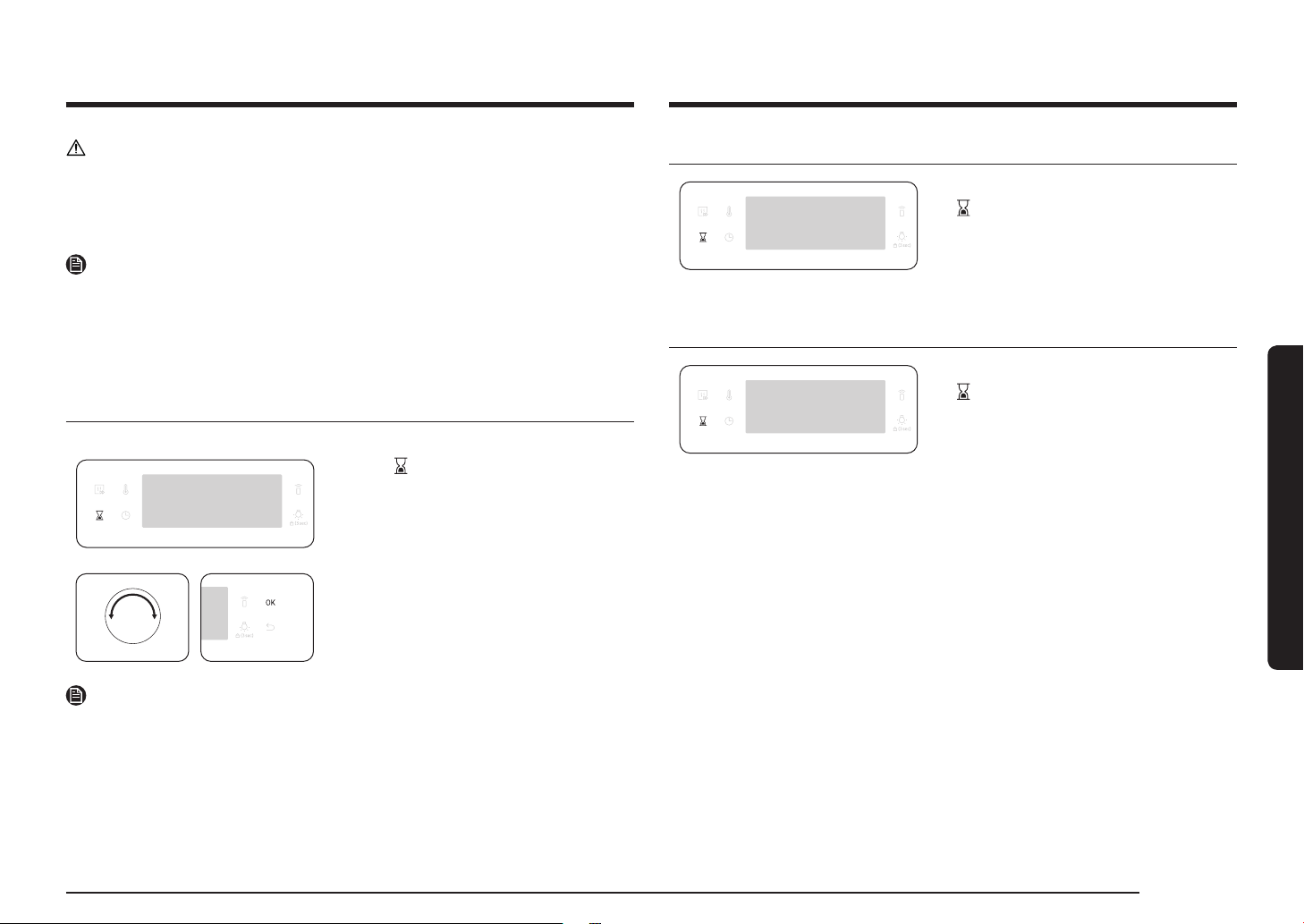
Pyrolytic
Pyrolytic features high temperature thermal cleaning. It burns off oily leftovers to
facilitate manual cleaning.
NOTE
The Pyrolytic function is available with applicable models only.
1. Remove all accessories, including the
side runners, and wipe out large pieces
of impurities manually from inside the
oven. Otherwise, they may cause ames
during the cleaning cycle, resulting in a
re.
2. Turn the mode selector to select .
3. Turn the Value Dial to select C 2, and
then press OK.
4. Turn the Value Dial to select a cleaning
time from 3 levels: 1 hr 50 min (default
setting), 2 hr 10 min, and 2 hr 30 min.
5. Press OK to start cleaning.
6. When complete, wait until the oven cools
down, and then wipe the door along its
edges using a wet cloth.
English 23
Operations
Sound On/Off
1. To mute the sound, press and hold down
for 3 seconds. Then 1 is blinking.
2. Select 1 and press OK. And turn the value
dial to set On and press OK.
3. To unmute the sound, repeat step 1, 2,
set Off and press OK.
Wi-Fi On/Off
1. To set the Wi-Fi on, press and hold down
for 3 seconds. Then 1 is blinking.
2. Select 2 and press OK. And turn the value
dial to set On and press OK.
3. To set the Wi-Fi off, repeat step 1, 2, set
Off and press OK.
CAUTION
• Do not touch the oven because the oven becomes very hot during the cycle.
• To avoid accidents, keep children away from the oven.
• After the cycle is complete, do not power off while the cooling fan is operating to
cool the oven down.
NOTE
• Once the cycle starts, the oven becomes hot inside. Then, the door will be locked
for safety. When the cycle is complete and the oven cools down, the door will be
unlocked.
• Make sure you empty the oven before cleaning. Accessories can be deformed due
to high temperatures inside the oven.
Timer
Timer helps you check the time or operating duration while cooking.
1. Press .
2. Turn the value dial to set the time, and
then press OK.
You can set the time to a max of
23 hours and 59 minutes.
NOTE
• When the time has elapsed, the oven beeps with a blinking message of “0:00” on
the display.
• You can change the timer settings at any time.

24 English
Cooking smart
Baking
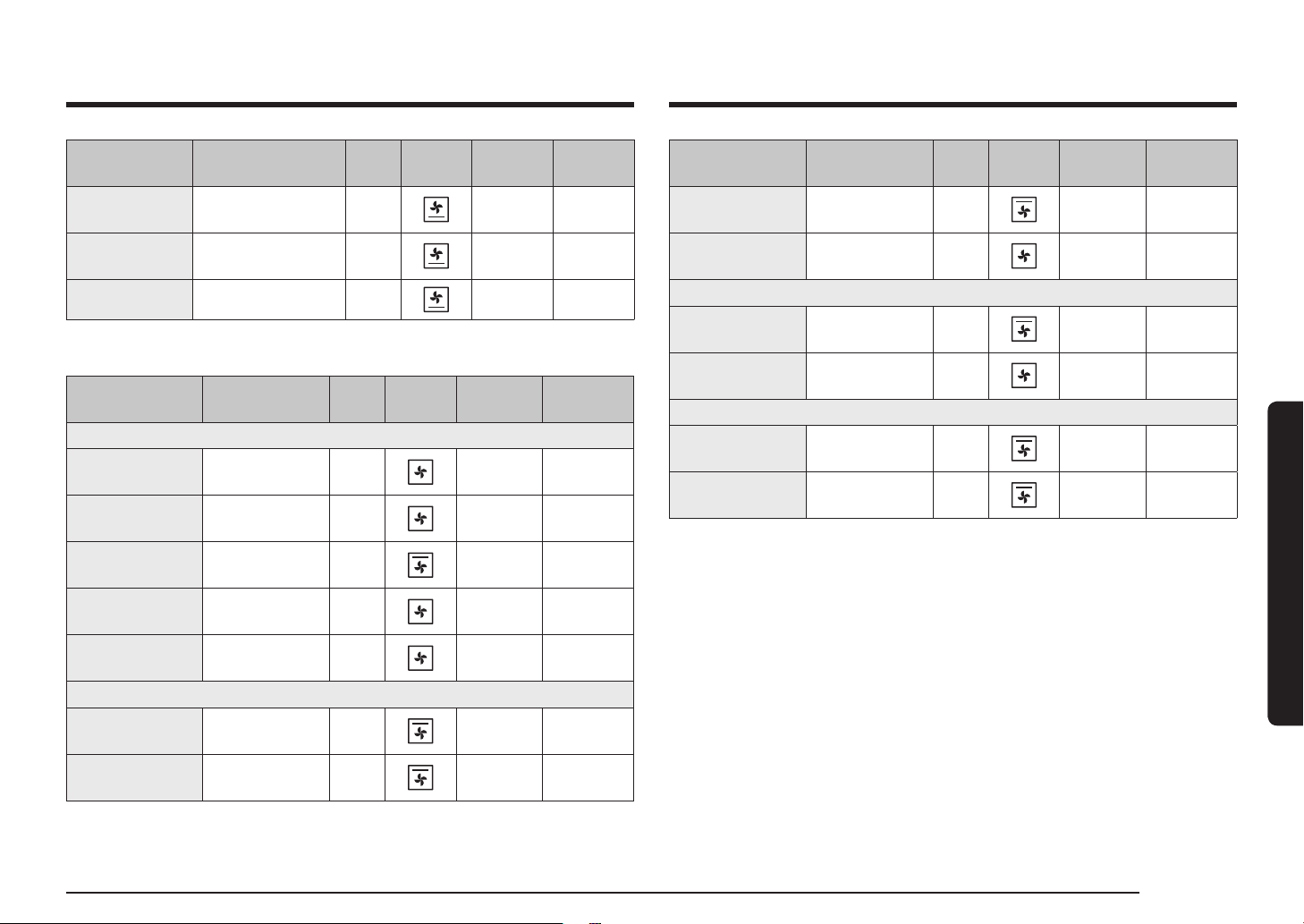
We recommend to preheat the oven for best results.
Food Accessory Level
Type of
heating
Temp. (°C)
Time
(min.)
Sponge cake
Wire rack,
Ø 25-26 cm tin
2
160-170 35-40
Marble cake
Wire rack,
Gugelhopf tin
3 175-185 50-60
Tart
Wire rack,
Ø 20 cm tart tin
3 190-200 50-60
Yeast cake on
tray with fruits
and crumbles
Universal tray 2 160-180 40-50
Fruit crumble
Wire rack,
22-24 cm oven dish
3 170-180 25-30
Scones Universal tray 3
180-190 30-35
Lasagne
Wire rack,
22-24 cm oven dish
3
190-200 25-30
Meringues Universal tray 3
80-100 100-150
Soufé
Wire rack,
soufé cups
3
170-180 20-25
Apple yeast tray
cake
Universal tray 3 150-170 60-70
Homemade
pizza, 1-1.2 kg
Universal tray 2
190-210 10-15
Frozen puff
pastry, lled
Universal tray 2
180-200 20-25
Cooking smart
Manual cooking
WARNING on acrylamide
Acrylamide produced while baking starch-contained food such as potato chips,
French fries, and bread may cause health problems. It is recommended to cook
these foods at low temperatures and avoid overcooking, heavy crisping, or
burning.
NOTE
• Pre-heating is recommended for all cooking modes unless otherwise specied in
the Cooking smart.
• When using Eco Grill, put food in the centre of the accessory tray.
Accessory tips
Your oven comes with a different number or kind of accessories. You may nd that
some accessories are missing from the table below. However, even if you are not
provided with the exact accessories specied in this Cooking smart, you can follow
along with what you already have, and achieve the same results.
• The Baking tray and the Universal tray are interchangeable.
• When cooking oily foods, it is recommended to put a tray under the Wire rack to
collect oil residue. If you are provided with the Wire rack insert, you can use it
together with the tray.
• If you are provided with the Universal tray or Extra deep tray, or both, it is
better to use whichever is deeper for cooking oily foods.
English 25
Cooking smart
Food Accessory Level
Type of
heating
Temp. (°C) Time (min.)
Duck breast
Wire rack +
Universal tray
3
1
180-200 20-30
Small turkey,
Whole, 5 kg
Wire rack +
Universal tray
3
1
180-200 120-150
Vegetables
Vegetables,
0.5 kg
Wire rack +
Universal tray
3
1
220-230 15-20
Baked potato
halves, 0.5 kg
Wire rack +
Universal tray
3
1
200 45-50
Fish
Fish llet, baked
Wire rack +
Universal tray
3
1
200-230 10-15
Roast sh
Wire rack +
Universal tray
3
1
180-200 30-40
* Turnover after half of time.
Food Accessory Level
Type of
heating
Temp. (°C)
Time
(min.)
Quiche
Wire rack,
22-24 cm oven dish
2 180-190 25-35
Apple pie
Wire rack,
Ø 20 cm tin
2 160-170 65-75
Chilled pizza Universal tray 3
180-200 5-10
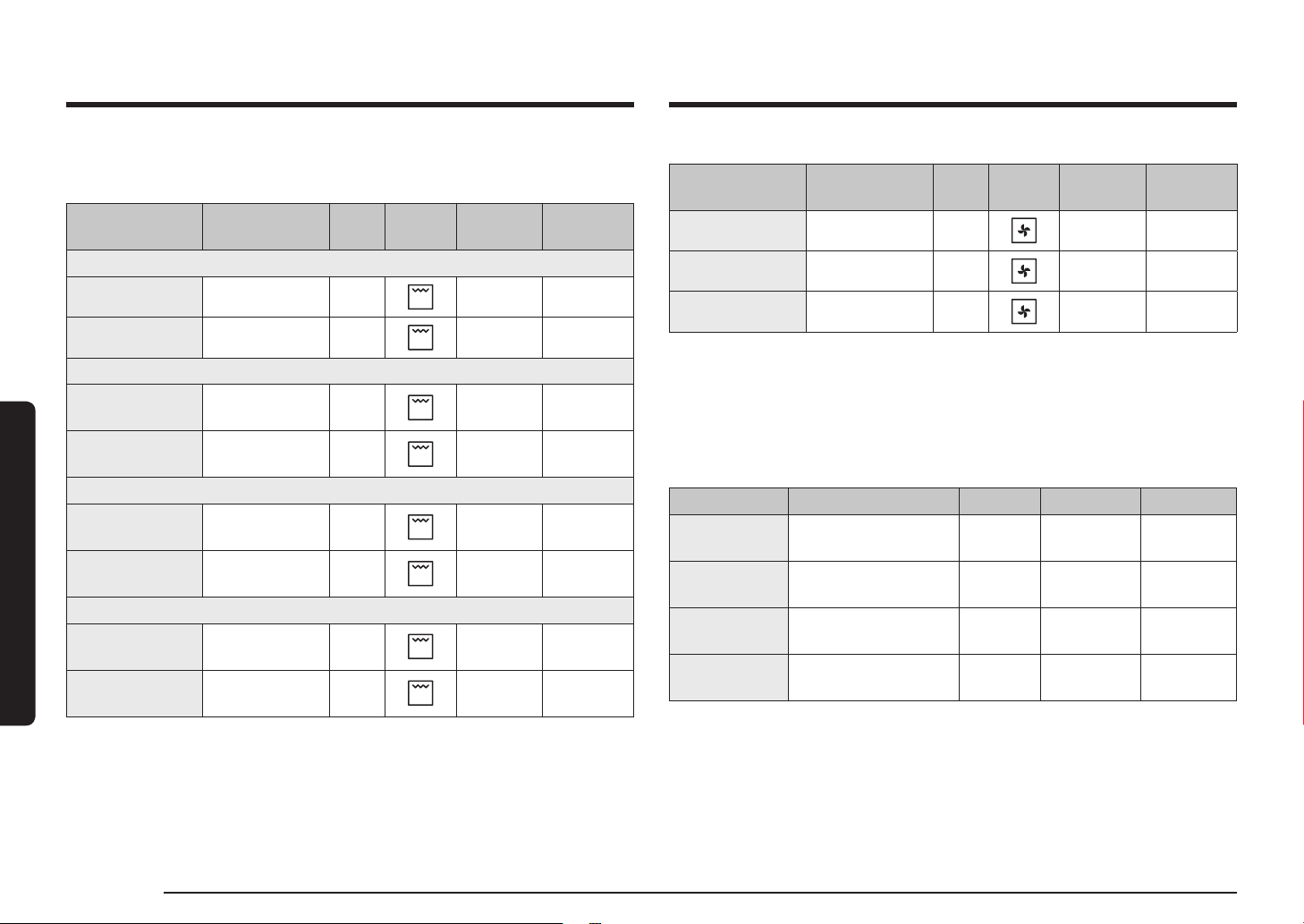
Roasting
Food Accessory Level
Type of
heating
Temp. (°C) Time (min.)
Meat(Beef/Pork/Lamb)
Sirloin of beef,
1 kg
Wire rack +
Universal tray
3
1
160-180 50-70
Boned loin of
veal, 1.5 kg
Wire rack +
Universal tray
3
1
160-180 90-120
Pork roast, 1 kg
Wire rack +
Universal tray
3
1
200-210 50-60
Joint of pork,
1 kg
Wire rack +
Universal tray
3
1
160-180 100-120
Leg of lamb on
the bone, 1 kg
Wire rack +
Universal tray
3
1
170-180 100-120
Poultry(Chicken/Duck/Turkey)
Chicken, Whole,
1.2 kg *
Wire rack +
Universal tray
3
1
205 80-100
Chicken pieces
Wire rack +
Universal tray
3
1
200-220 25-35
26 English
Cooking smart
Cooking smart
Frozen ready-meal
Food Accessory Level
Type of
heating
Temp. (°C) Time (min.)
Frozen pizza Wire rack 3
200-220 15-25
Frozen oven chips Universal tray 3
220-225 20-25
Frozen croquettes Universal tray 3
220-230 25-30
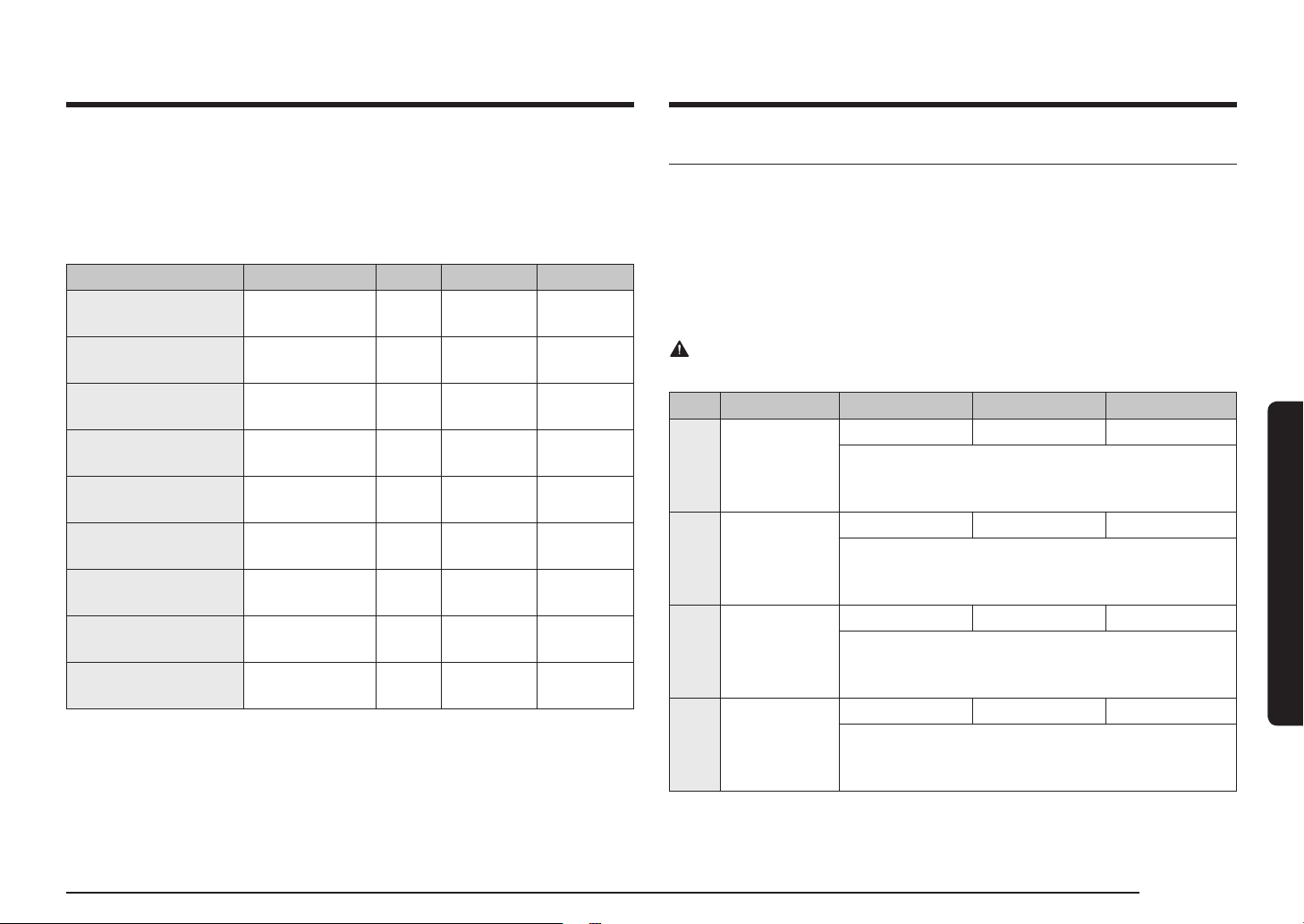
Pro-Roasting
This mode includes an automatic heating-up cycle up to 220 °C. The top heater
and the convection fan are operating during the process of searing the meat. After
this stage the food is cooked gently by the low temperature of pre-selection. This
process is done while the top and the bottom heaters are operating. This mode is
suitable for meat roasts and poultry.
Food Accessory Level Temp. (°C) Time (hrs.)
Roast beef Wire rack +
Universal tray
3
1
80-100 3-4
Pork roast Wire rack +
Universal tray
3
1
80-100 4-5
Lamb roast Wire rack +
Universal tray
3
1
80-100 3-4
Duck breast Wire rack +
Universal tray
3
1
80-100 2-3
Grilling
We recommend preheat the oven for 5-10 minutes using large grill mode. Turn
over after half of time.
Food Accessory Level
Type of
heating
Temp. (°C) Time (min.)
Bread
Toast Wire rack 5
240-250 2-4
Cheese toast Universal tray 4
200 4-8
Beef
Steak *
Wire rack +
Universal tray
4
1
230-250 15-20
Burgers *
Wire rack +
Universal tray
4
1
230-250 15-20
Pork
Pork chops
Wire rack +
Universal tray
4
1
230-250 20-30
Sausages
Wire rack +
Universal tray
4
1
230-250 10-15
Poultry
Chicken, breast
Wire rack +
Universal tray
4
1
230-240 30-35
Chicken,
drumstick
Wire rack +
Universal tray
4
1
230-240 25-35
* Turnover after 2/3 of the cooking time.
English 27
Cooking smart
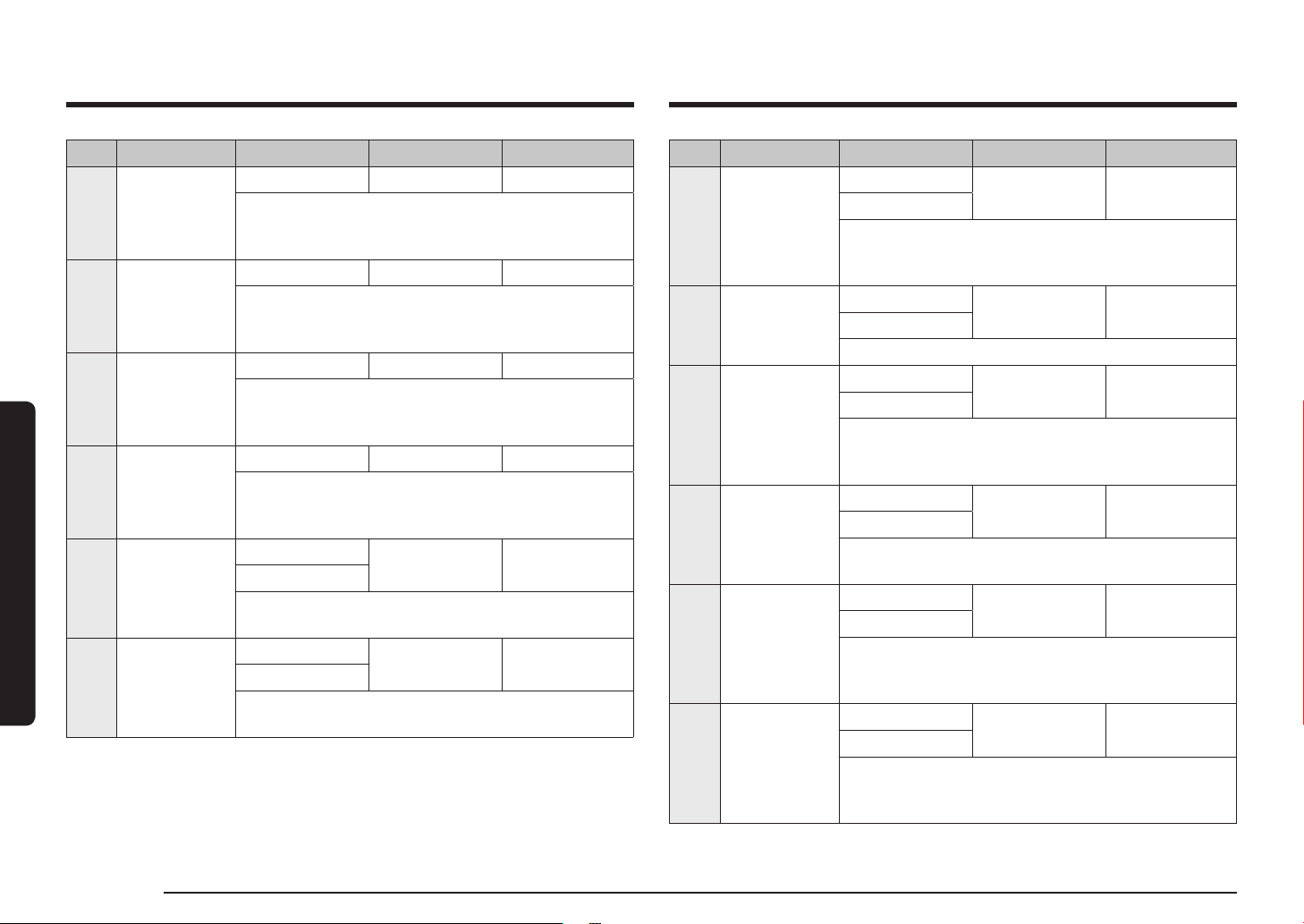
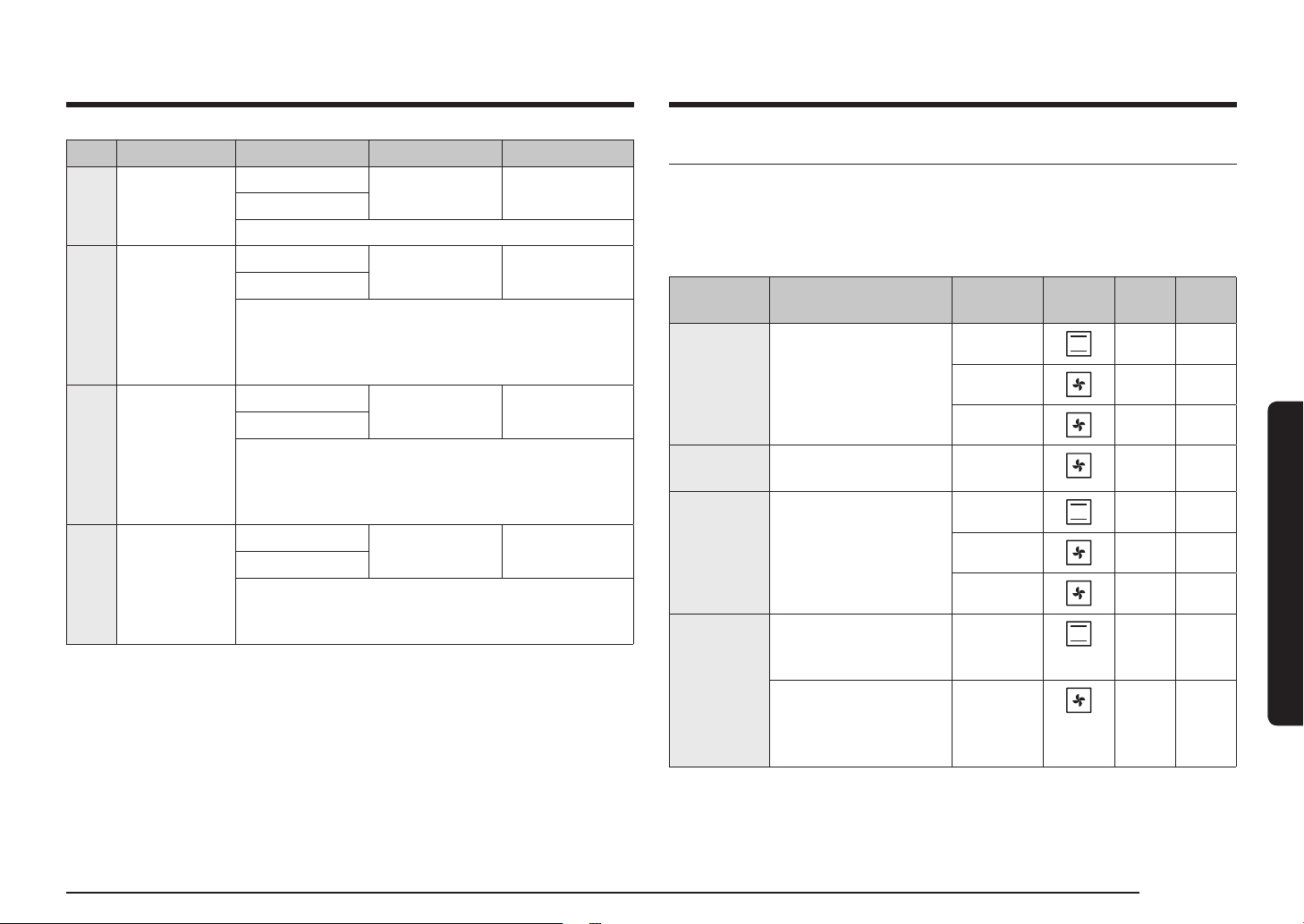
Auto Cook programmes
The following table presents 20 auto programmes for cooking, roasting and
baking.
It contains its quantities, weight ranges and appropriate recommendations.
Cooking modes and times have been pre-programmed for your convenience. You
will nd some recipes for the auto programmes in your instruction book.
Auto Cook programmes 1 to 8, 18 and 19 include preheating and display the
preheating progress. Please put the food in the oven after preheating beep.
Then, press Cooking time to start Auto Cook.
WARNING
Always use oven gloves while taking out food.
Code Food Weight (kg) Accessory Level
A 1 Potato gratin
1.0-1.5 Wire rack 3
Prepare fresh potato gratin using an ovenproof dish, 22-
24 cm. Start programme, after preheating beep sounds,
put dish in the centre of rack.
A 2
Vegetable
gratin
0.8-1.2 Wire rack 3
Prepare fresh vegetable gratin using an ovenproof dish,
22-24 cm. Start programme, after preheating beep
sounds, put dish in the centre of rack.
A 3 Lasagne
1.0-1.5 Wire rack 3
Prepare homemade lasagne using a 22-24 cm
ovenproof dish. Start programme, after preheating beep
sounds, put dish in the centre of rack.
A 4 Apple pie
1.2-1.4 Wire rack 2
Prepare apple pie using a 24-26 cm round metal baking
tin. Start programme, after preheating beep sounds, put
tin in the centre of rack.
ECO convection
This mode uses the optimized heating system so that you save the energy during
cooking your dishes. The times of this category are suggested to not be preheated
before cooking for saving more energy.
You can increase or decrease the cooking time and/or temperature to your
preference.
Food Accessory Level Temp. (°C) Time (min.)
Fruit crumble,
0.8-1.2 kg
Wire rack 2 160-180 40-60
Jacket potatoes,
0.4-0.8 kg
Universal tray 2 190-200 50-70
Sausages,
0.3-0.5 kg
Wire rack +
Universal tray
3
1
160-180 15-25
Frozen oven chips,
0.3-0.5 kg
Universal tray 3 180-200 20-30
Frozen potato wedges,
0.3-0.5 kg
Universal tray 3 190-210 20-30
Fish llets, baked,
0.4-0.8 kg
Wire rack +
Universal tray
3
1
200-220 20-30
Crispy sh llets,
breaded, 0.4-0.8 kg
Wire rack +
Universal tray
3
1
200-220 20-30
Roast sirloin of beef,
0.8-1.2 kg
Wire rack +
Universal tray
2
1
180-200 50-70
Roast vegetables,
0.4-0.6 kg
Universal tray 3 200-220 20-30
28 English
Cooking smart
Cooking smart
Code Food Weight (kg) Accessory Level
A 11 Chicken, whole
0.9-1.1
Wire rack +
Universal tray
2
1
1.1-1.3
Rinse and clean chicken. Brush chicken with oil and
spices. Put it breast side down on the wire rack and turn
over, as soon as the oven beeps.
A 12 Chicken, breast
0.4-0.6
Wire rack +
Universal tray
4
1
0.6-0.8
Marinate breasts and put on the wire rack.
A 13 Trout
0.3-0.5
Wire rack +
Universal tray
4
1
0.5-0.7
Rinse and clean the sh and put head to tail on the wire
rack. Add lemon juice, salt and herbs inside sh. Cut skin
surface with knife. Brush oil and salt.
A 14 Salmon llet
0.4-0.6
Wire rack +
Universal tray
4
1
0.6-0.8
Rinse and clean llets of steaks. Put llets skin side up
on wire rack.
A 15
Roasted
vegetables
0.4-0.6
Universal tray 4
0.6-0.8
Rinse and prepare slices of courgette, eggplant, pepper,
onion and cherry tomatoes. Brush with olive oil, herbs
and spices. Distribute evenly on tray.
A 16
Baked potato
halves
0.6-0.8
Universal tray 3
0.8-1.0
Cut large potatoes (each 200 g) into halves lengthways.
Put with cut side up on tray and brush with olive oil,
herbs and spices.
Code Food Weight (kg) Accessory Level
A 5 Quiche Lorraine
1.2-1.5 Wire rack 2
Prepare quiche dough, put in a round quiche dish with
25 cm diameter. Start programme, after preheating beep
sounds add lling and put dish in the centre of rack.
A 6 Sponge cake
0.5-0.6 Wire rack 3
Prepare dough and put into a black metal round baking
tin with 26 cm diameter. Start programme, after
preheating beep sounds, put tin in the centre of rack.
A 7 Marble cake
0.7-0.8 Wire rack 2
Prepare dough and put into a metal round gugelhopf
or bundt tin. Start programme, after preheating beep
sounds, put tin in the centre of rack.
A 8 Dutch loaf cake
0.7-0.8 Wire rack 2
Prepare dough and put into a black metal rectangular
baking dish (length 25 cm). Start programme, after
preheating beep sounds, put tin in the centre of rack.
A 9
Roast sirloin of
beef
0.9-1.1
Wire rack +
Universal tray
2
1
1.1-1.3
Season the beef and leave in refrigerator for 1 hour.
Put on the wire rack with fat-side-up.
A 10
Herb roasted
lamb chops
0.4-0.6
Wire rack +
Universal tray
4
1
0.6-0.8
Marinate the lamb chops with herbs and spices and put
them on wire rack.
English 29
Cooking smart
Test Dishes
According to standard EN 60350-1
1. Baking
The recommendations for baking refer to a preheated oven. Do not use the fast
preheat function. Always put trays the slanted side to the door front.
Type of food Accessory Level
Type of
heating
Temp.
(°C)
Time
(min.)
Small cakes Universal tray 3 165 25-30
2
165 28-33
1+4
155 35-40
Shortbread Universal tray +
Universal tray
1+4
140 28-33
Fatless
sponge cake
Wire rack +
Spring form cake tin
(Dark coated, Ø 26 cm)
2 165 30-35*
2
160 30-35
1+4
155 35-40
Apple pie Wire rack +
2 Spring form cake tins
* (Dark coated, Ø 20 cm)
1 placed
diagonally
160 70-80
Universal tray +
Wire rack + 2 Spring
form cake tins
** (Dark coated, Ø 20 cm)
1+3 160 80-90
* Increase the cooking time by 5 minutes if you are cooking in Conventional mode
using a glass ovenware (Ø 26 cm).
** Two cakes are arranged on the grid at the back left and at the front right.
*** Two cakes are arranged in the center on top of each other.
Code Food Weight (kg) Accessory Level
A 17
Frozen oven
chips
0.3-0.5
Universal tray 3
0.5-0.7
Distribute frozen oven chips evenly on tray.
A 18 Frozen pizza
0.3-0.6
Wire rack 3
0.6-0.9
Put the frozen pizza in the middle of the wire rack.
Start programme, after preheating beep sounds, insert
rack. The rst setting is for thin Italian pizza, the second
setting for thick pan pizza.
A 19
Homemade
pizza
0.8-1.0
Universal tray 2
1.0-1.2
Prepare homemade pizza with the yeast dough and put
it on the tray. The weight include dough and topping
such as sauce, vegetables, ham and cheese. Start
programme, after preheating beep sounds, insert tray.
A 20
Fermentation
yeast dough
0.5-0.6
Wire rack 2
0.7-0.8
Prepare dough in bowl, cover with cling lm. Put in
centre of rack. The rst setting is for pizza and cake
dough, the second setting for bread dough.
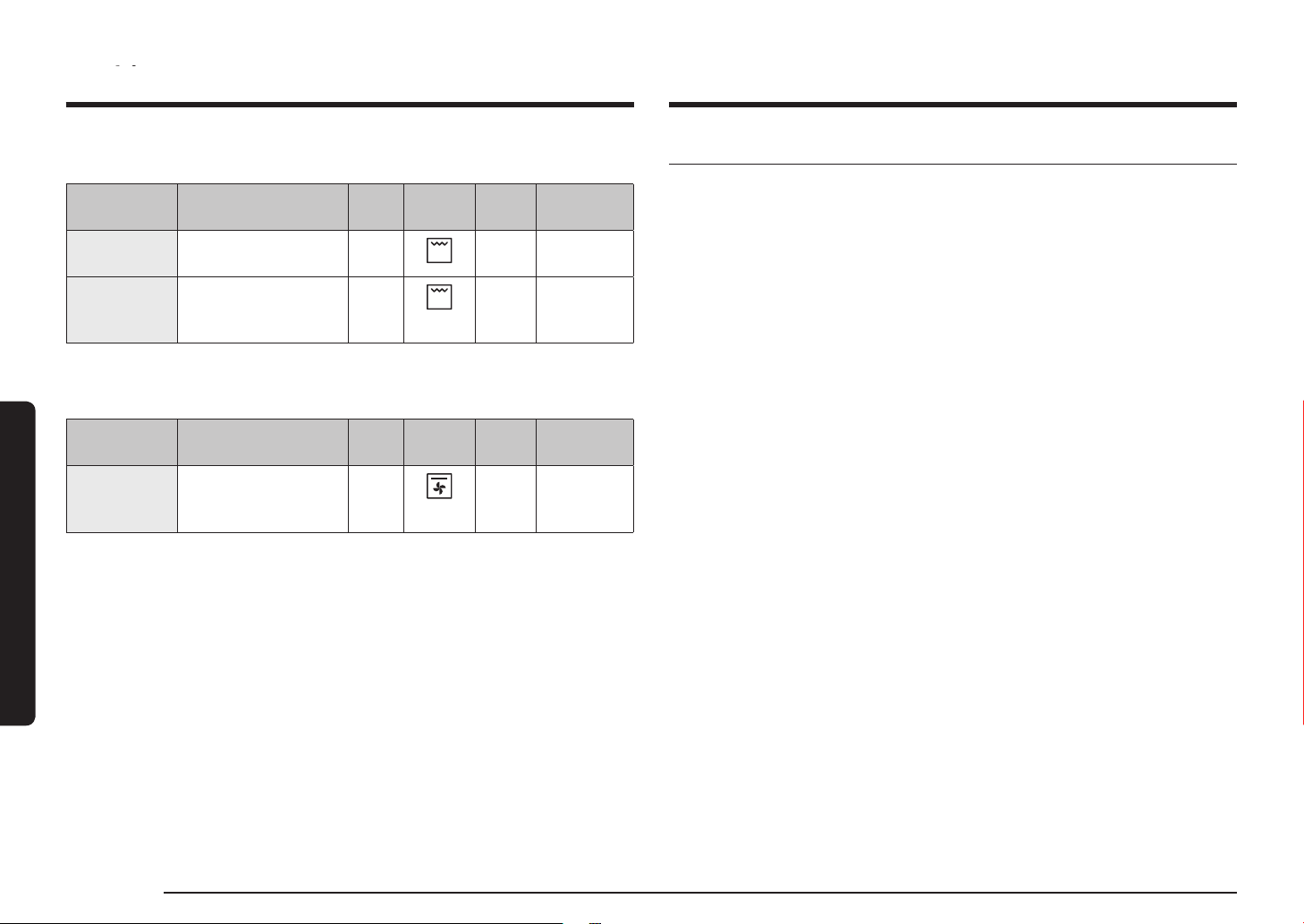
30 English
Cooking smart
Cooking smartCooking smart
Collection of frequent Auto cook recipes
Potato gratin
Ingredients 800 g potatoes, 100 ml milk, 100 ml cream, 50 g beaten whole
egg, 1 tbsp each of salt, pepper, nutmeg, 150 g grated cheese,
butter, thyme
Directions Peel potatoes and slice them to 3 mm thickness. Rub the butter
all over the surface of a gratin dish (22-24 cm). Spread the slices
on a clean towel and keep them covered with the towel while
you prepare the rest of the ingredients.
Mix the rest of the ingredients except for grated cheese into
a large bowl and stir well. Layer the potato slices in the dish
slightly overlapping and pour the mixture over the potatoes.
Spread the grated cheese over the top and bake. After cooking,
serve sprinkled with a few fresh thyme leaves.
Vegetable gratin
Ingredients 800 g vegetables (courgette, tomato, onion, carrot, pepper, pre-
cooked potatoes), 150 ml cream, 50 g beaten whole egg, 1 tbsp
each of salt, herb (pepper, parsley or rosemary), 150 g grated
cheese, 3 tbsp olive oil, some thyme leaves
Directions Wash the vegetables and slice them to 3-5 mm thickness. Layer
the slices on a gratin dish (22-24 cm) and pour the oil on the
vegetables. Mix the rest of the ingredients except for grated
cheese and pour on the vegetables. Spread the grated cheese
over the top and bake. Then serve sprinkled with a few fresh
thyme leaves.
2. Grilling
Preheat the empty oven for 5 minutes using Large Grill function.
Type of food Accessory Level
Type of
heating
Temp.
(°C)
Time (min.)
White bread
toast
Wire rack 5
270
(max)
1-2
Beef burgers *
(12 ea)
Wire rack +
Universal tray
(to catch drippings)
4
1
270
(max)
1st 15-18
2nd 5-8
* Turn over after 2/3 of the cooking time.
3. Roasting
Type of food Accessory Level
Type of
heating
Temp.
(°C)
Time (min.)
Whole
chicken *
Wire rack +
Universal tray
(to catch drippings)
3
1
205 80-100
* Turnover after half of time.

English 31
Cooking smart
Quiche Lorraine
Ingredients • Pastry: 200 g plain our, 80 g butter, 1 egg
• Filling: 75 g cubed fatless bacon, 125 ml cream, 125 g crème
fraiche, 2 eggs, beaten, 100 g grated cheese from Switzerland,
salt and pepper
Directions To make the pastry, put the our, butter and egg in a bowl and
mix to a soften pastry and then rest it in the refrigerator for
30 min. Roll out the pastry and placed in the greased ceramic
dish for quiche (25 cm diameter). Prick the bottom with a fork.
Mix the egg, cream, crème fraiche, cheese, salt and pepper. Pour
it on the pastry just before baking.
Fruit crumbles
Ingredients • Topping: 200 g our, 100 g butter, 100 g sugar, 2 g salt, 2 g
cinnamon powder
• Fruit: 600 g mixed fruits
Directions Mix all ingredients until to be crumble for making topping.
Spread the mixed fruits into an oven dish and sprinkle the
crumble.
Homemade pizza
Ingredients • Pizza dough: 300 g our, 7 g dried yeast, 1 tbsp olive oil, 200
ml warm water, 1 tbsp sugar and salt
• Topping: 400 g sliced vegetable (aubergine, courgette, onion,
tomato), 100 g ham or bacon(chopped), 100 g grated cheese
Directions Put the our, yeast, oil, salt, sugar and warm water in a bowl
and mix to a wettish dough. Knead in a mixer or by hand
about 5-10 min. Cover with lid and place in oven for 30 min
at 35 °C to prove. Roll out the dough on a oured surface into
a rectangle shape and put on the tray or pizza pan. Spread the
tomato puree on the dough and place ham, mushroom, olive and
tomato. Sprinkle evenly with cheese on the top and bake.
Lasagne
Ingredients 2 tbsp olive oil, 500 g minced beef, 500 ml tomato sauce, 100
ml beef stock, 150 g dried lasagne sheets, 1 onion (chopped),
200 g grated cheese, 1 tsp each of dried parsley akes, oregano,
basil
Directions
Prepare tomato meat sauce. Heat the oil in a frying pan, then
cook the minced beef and chopped onion for about 10 min until
browned all over. Pour over the tomato sauce and beef stock,
add the dried herbs. Bring up to the boil, then simmer for 30
min.
Cook lasagne noodles according to package directions. Layer
the lasagne noodle, meat sauce, and cheese then repeat. Then
sprinkle evenly with remaining cheese on the top of layer of
noodles and bake.
Apple pie
Ingredients
• Pastry: 275 g our,
1
/2 tbsp salt, 125 g white castor sugar, 8 g
vanilla sugar, 175 g cold butter, 1 egg(beaten)
• Filling: 750 g rm whole apples, 1 tbsp lemon juice, 40 g sugar,
1
/2 tbsp cinnamon, 50 g seedless raisins, 2 tbsp bread crumbs
Directions
Sift the our with the salt above a big bowl. Sift the castor sugar
and vanilla sugar with it. Cut with 2 knives the butter through
the our in small cubes. Add
3
/4 of the beaten egg. Knead all the
ingredients in the food processor until a crumbly mass appears.
Form the dough into a ball with your hands. Wrap it in plastic foil
and leave it chilled for about 30 min. Grease the spring tin (24-26
cm diameter) and dust the surface with our. Roll out
3
/4 of the
dough till 5 mm thickness. Put it in the tin (bottom and sides).
Peel and core the apples. Cut them in cubes of about
3
/4 x
3
/4 cm.
Sprinkle the apples with lemon juice and mix well. Wash and dry
the currants and raisins. Add sugar, cinnamon, raisins and currants.
Mix well and sprinkle the bottom of dough with bread crumbs.
Press slightly. Roll out the rest of the dough. Cut the dough in small
strips and put them cross wise on the lling. Brush the pie evenly
with the rest of the beaten egg.

32 English
Maintenance
Roast sirloin of beef
Ingredients 1 kg sirloin of beef joint, 5 g salt, 1 g pepper, 3 g each of
rosemary, thyme
Directions Season the beef with salt, pepper and rosemary and leave in
refrigerator for 1 hour. Put on the Wire rack. Put it in the oven
and cook.
Herb roasted lamb chops
Ingredients 1 kg lamb chops (6 pieces), 4 large garlic cloves (pressed), 1
tbsp fresh thyme (crushed), 1 tbsp fresh rosemary(crushed), 2
tbsp salt, 2 tbsp olive oil
Directions Mix the salt, garlic, herbs and oil and add the lamb. Turn to coat
and leave at a room temperature at least 30 min to 1 hour.
Rack of Pork rib
Ingredients 2 racks pork spare ribs, 1 tbsp black peppercorns, 3 bay leaves,
1 onion (chopped), 3 garlic cloves (chopped), 85 g brown sugar,
3 tbsp Worcestershire sauce, 2 tbsp Tomato puree, 2 tbsp olive
oil
Directions Make a barbecue sauce. Heat oil in a sauce pan and add the
onion. Cook until softened and add remaining ingredients.
Broil and reduce heat and simmer for 30 min until thickened.
Marinate the rib with the barbecue sauce at least 30 min to
1 hour.
Maintenance
Cleaning
WARNING
• Make sure the oven and accessories are cool before cleaning.
• Do not use abrasive cleaning agents, hard brushes, scouring pads or cloths, steel
wool, knives or any other abrasive materials.
Oven interior
• For cleaning the interior of the oven, use a clean cloth and a mild cleaning agent
or warm soapy water.
• Do not hand-clean the door seal.
• To avoid damaging the enamelled oven surfaces, only use standard oven
cleaners.
• To remove stubborn soils, use a special oven cleaner.
• As the temperature of the cooking room increases at an initial period, you may
nd some spots on the inner glass of the door. If this is the case, turn off the
oven and wait until it cools down. Then, use kitchen paper or neutral detergent
with a clean cloth to wipe up the inner glass.
Oven exterior
For cleaning the exterior of the oven such as the oven door, handle, and display,
use a clean cloth and a mild cleaning detergent or warm soapy water, and dry with
a kitchen roll or dry towel.
Grease and dirt can remain, especially around the handle because of the hot air
coming from inside. It is recommended to clean the handle after each use.
Accessories
Wash the accessories after every use, and dry it with a tea towel. To remove
stubborn impurities, soak the used accessories in warm soapy water for about 30
minutes before washing.
Cooking smart

English 33
Maintenance
4. When done, follow steps 1 to 2 above in
the reverse order to reinstall the door.
Make sure the clips are hinged on both
sides.
Door glass
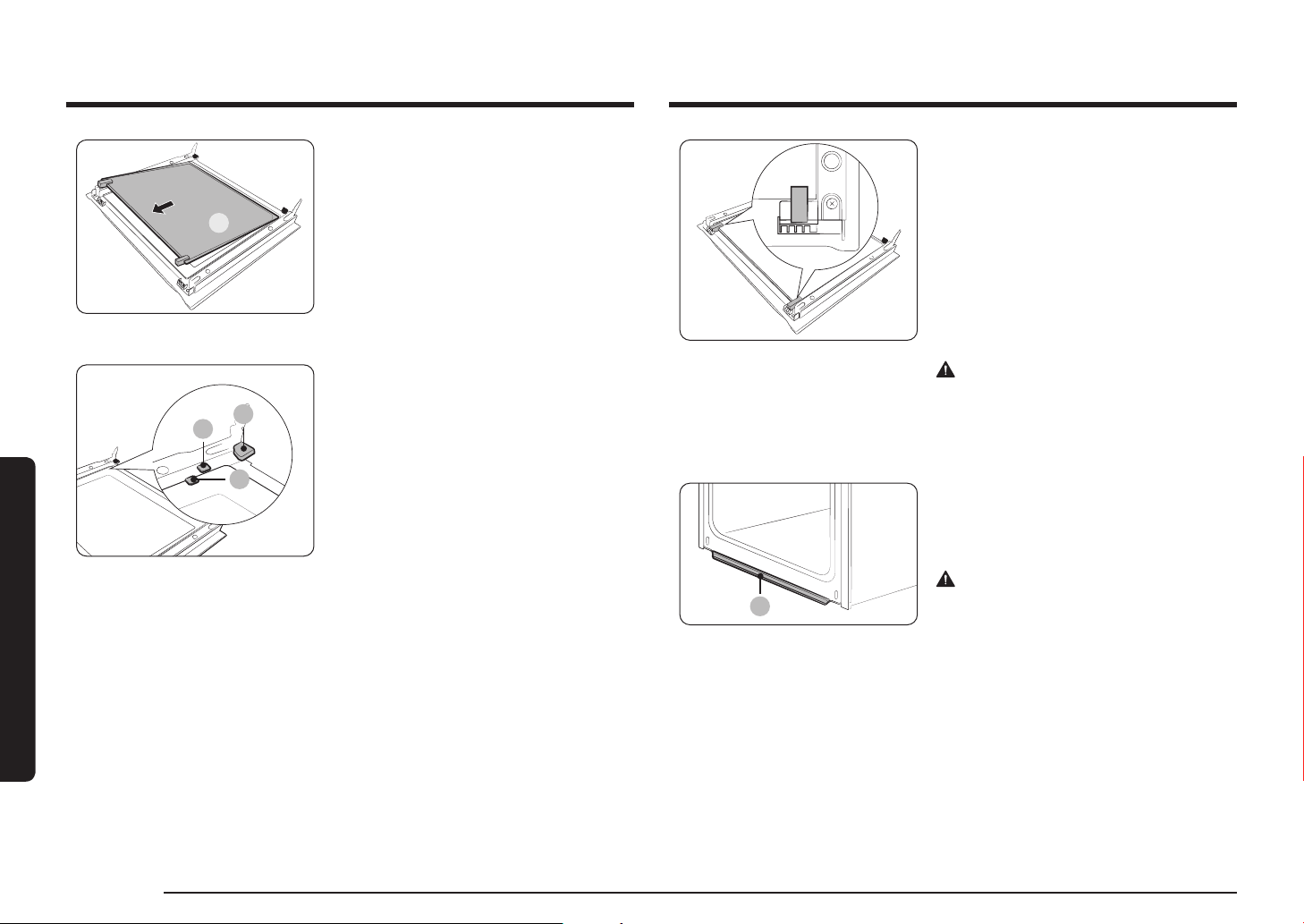
Depending on the model, the oven door is equipped with 3-4 sheets of glass
placed against each other. Do not remove the door glass unless for cleaning
purposes. To remove the door glass for cleaning, follow these instructions.
1. Use a screwdriver to remove the screws
on the left and right sides.
01
2. Detach the coverings in the arrow
directions
3. Remove the rst sheet from the door.
Catalytic enamel surface (applicable models only)
The removable parts are coated with dark grey catalytic enamel. They can be
soiled with oil and fat spattered by the circulating air during convection heating.
However, these impurities burn off at oven temperatures of 200 °C or above.
1. Remove all accessories from the oven.
2. Clean the interior of the oven.
3. Select Convection mode with max temperature, and run the cycle for an hour.
Door
Do not remove the oven door unless for cleaning purposes. To remove the door for
cleaning, follow these instructions.
WARNING
The oven door is heavy.
1. Open the door and ip open the clips at
both hinges.
2. Close the door approximately 70°. Hold
the oven door by the sides using both
hands, and lift and pull upwards until the
hinges are removed.
3. Clean the door with soapy water and a
clean cloth.
34 English
Maintenance
Maintenance
02
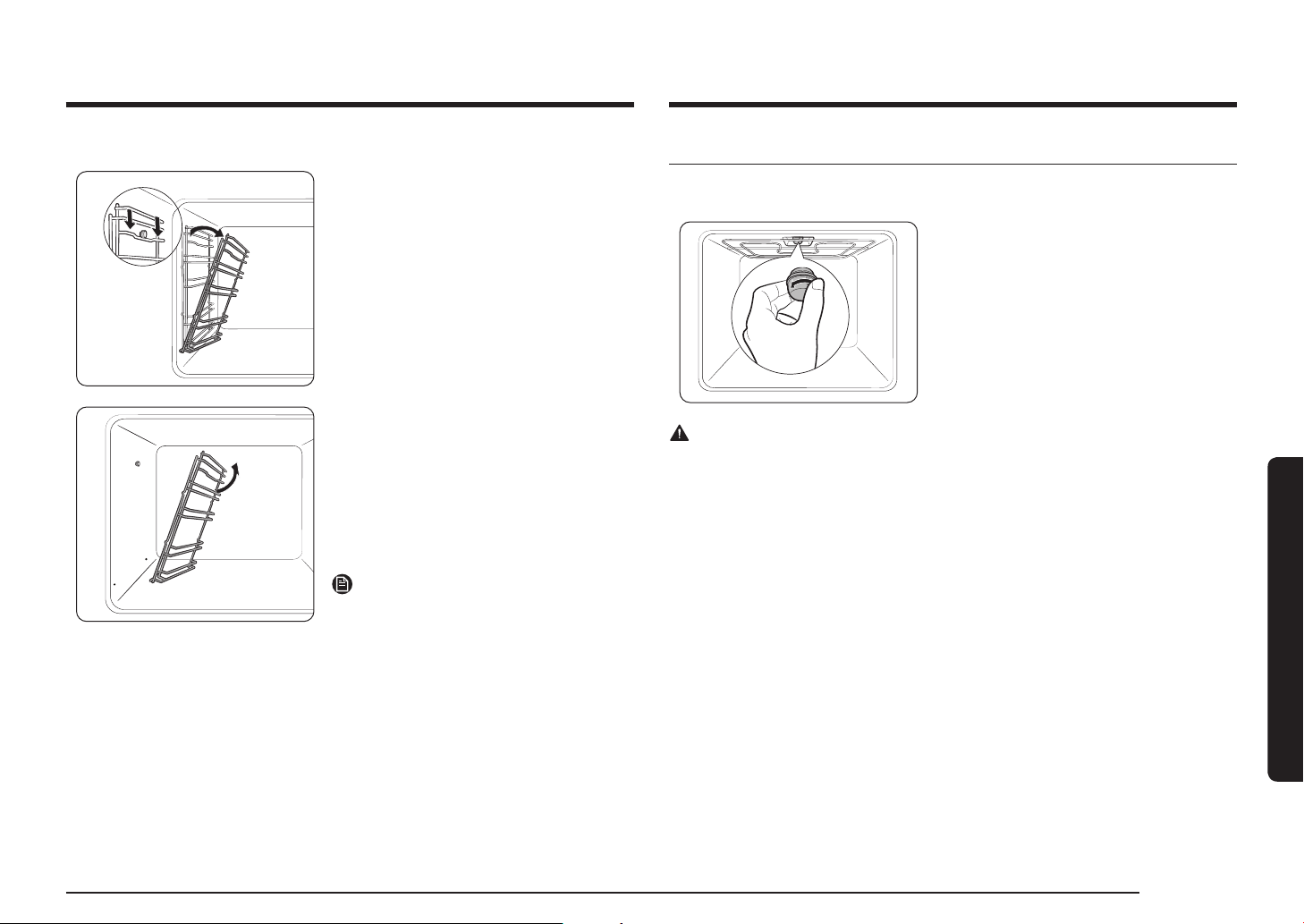
4. Remove the second sheet from the door
in the arrow direction.
5. Clean the glass with soapy water and a
clean cloth.
01
02
03
01 Support clip 1
02 Support clip 2
03 Support clip 3
6. When done, reinsert the sheets as
follows:
• Insert sheet 2 between support clip 1
and 2, and sheet 1 into support clip 3 in
this order.
7. Check if the glass rubbers t into and
secure the glass sheet properly.
8. Follow steps 1-2 above in the reverse
order to reinstall the door.
WARNING
To prevent heat leaks, make sure you
properly reinsert the glass sheets.
Water collector
01
01 Water collector
The water collector collects not only excess
moisture from cooking but also food
residue. Regularly empty and clean the
water collector.
WARNING
If you encounter a water leak from the
water collector, contact us at a local
Samsung service center.
English 35
Maintenance
Replacement
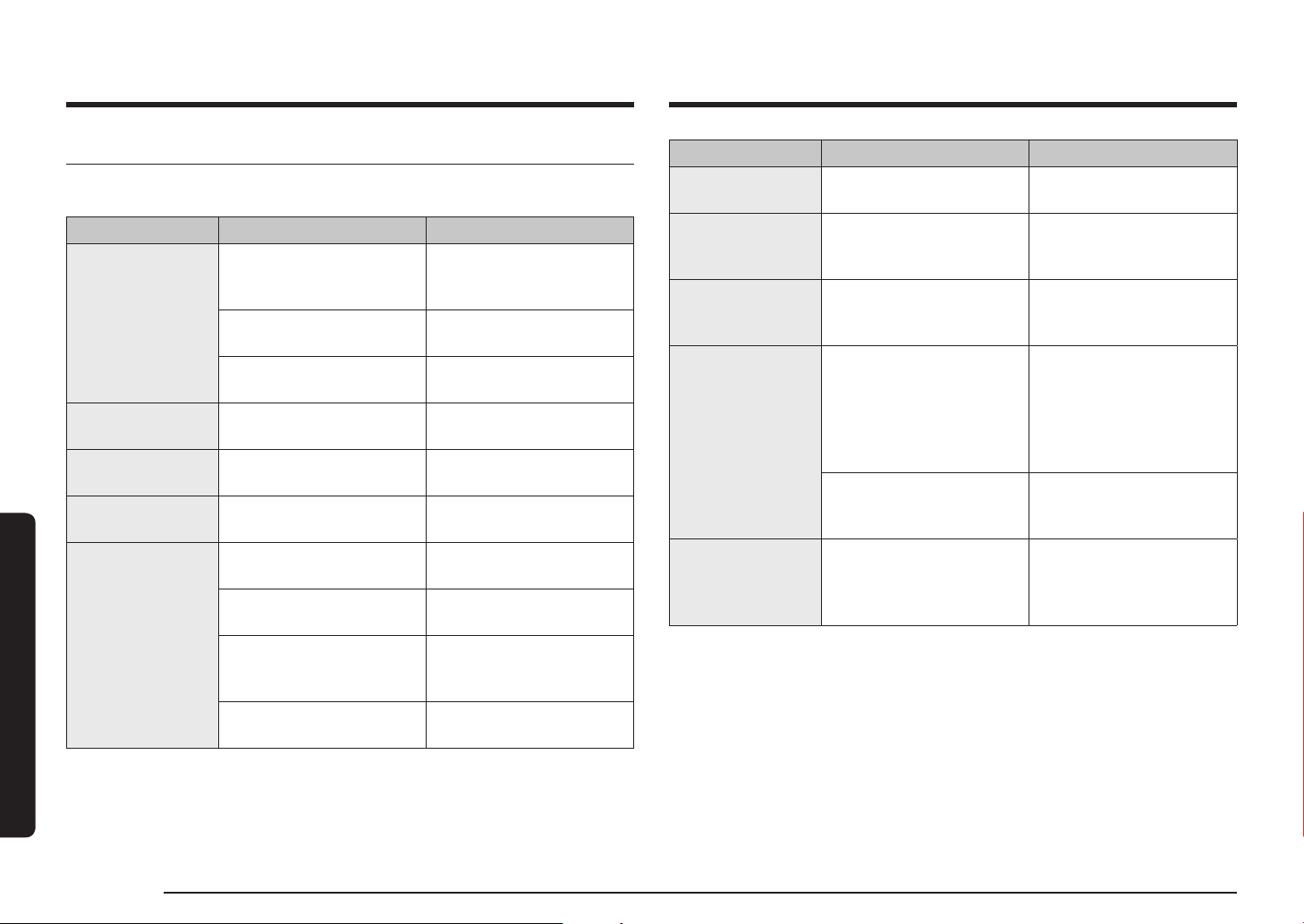
Bulbs
1. Remove the glass cap by turning anti-
clockwise.
2. Replace the oven light.
3. Clean the glass cap.
4. When done, follow step 1 above in the
reverse order to reinsert the glass cap.
WARNING
• Before replacing a bulb, turn off the oven and unplug the power cord.
• Use only 25-40 W/220-240 V, 300 °C heat-resistant bulbs. You can purchase
approved bulbs at a local Samsung service center.
• Always use a dry cloth when handling a halogen bulb. This is to prevent the
bulb from being tampered with ngerprints or sweat, resulting in a shortened
lifecycle.
Side runners (applicable models only)
1. Press the top line of the left side runner,
and lower by approximately 45 º.
2. Pull and remove the bottom line of the
left side runner.
3. Remove the right side runner in the
same way.
4. Clean both side runners.
5. When done, follow steps 1 to 2 above
in the reverse order to reinsert the side
runners.
NOTE
The oven operates without the side runners
and racks in position.
36 English
Troubleshooting
Troubleshooting
Checkpoints
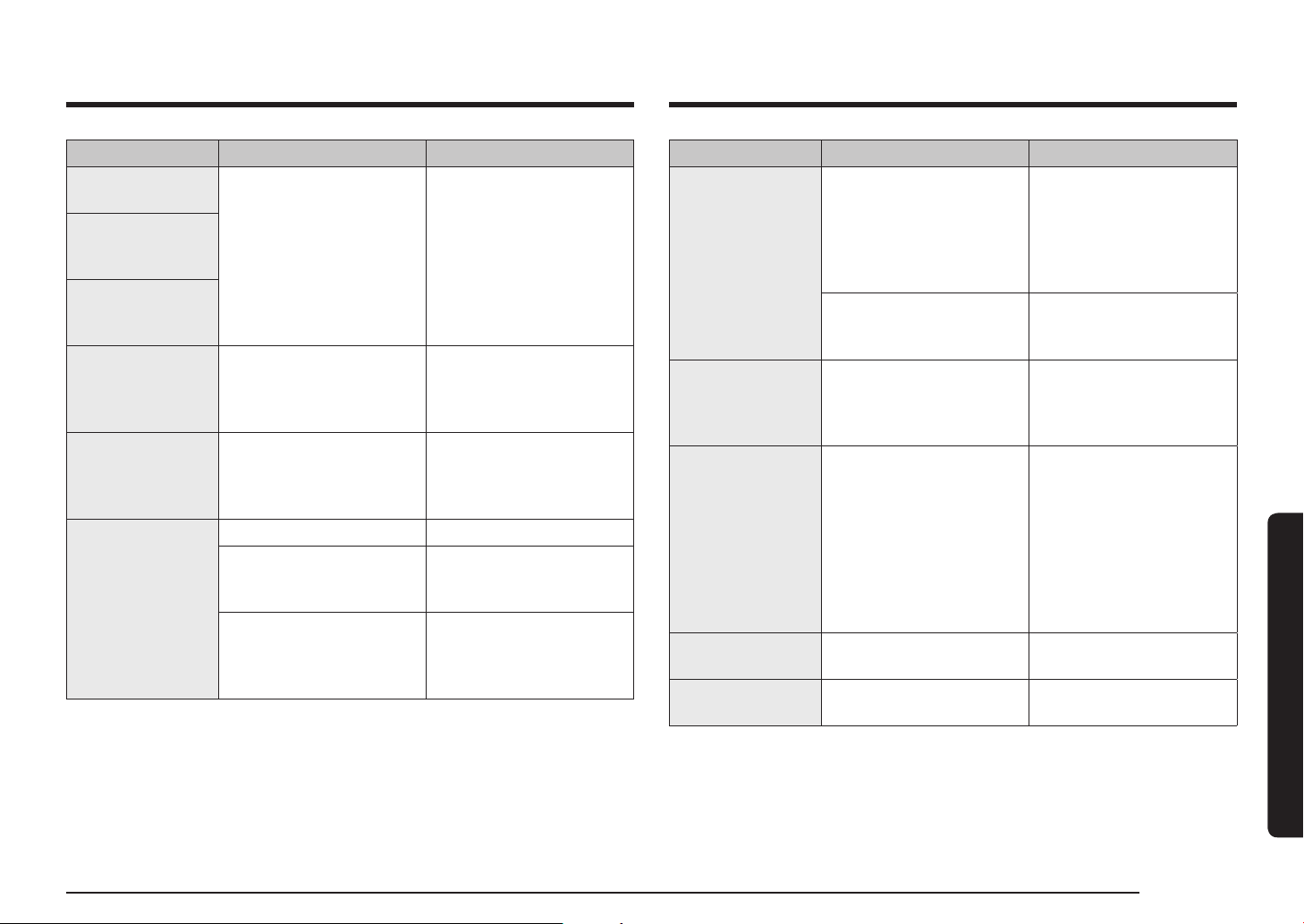
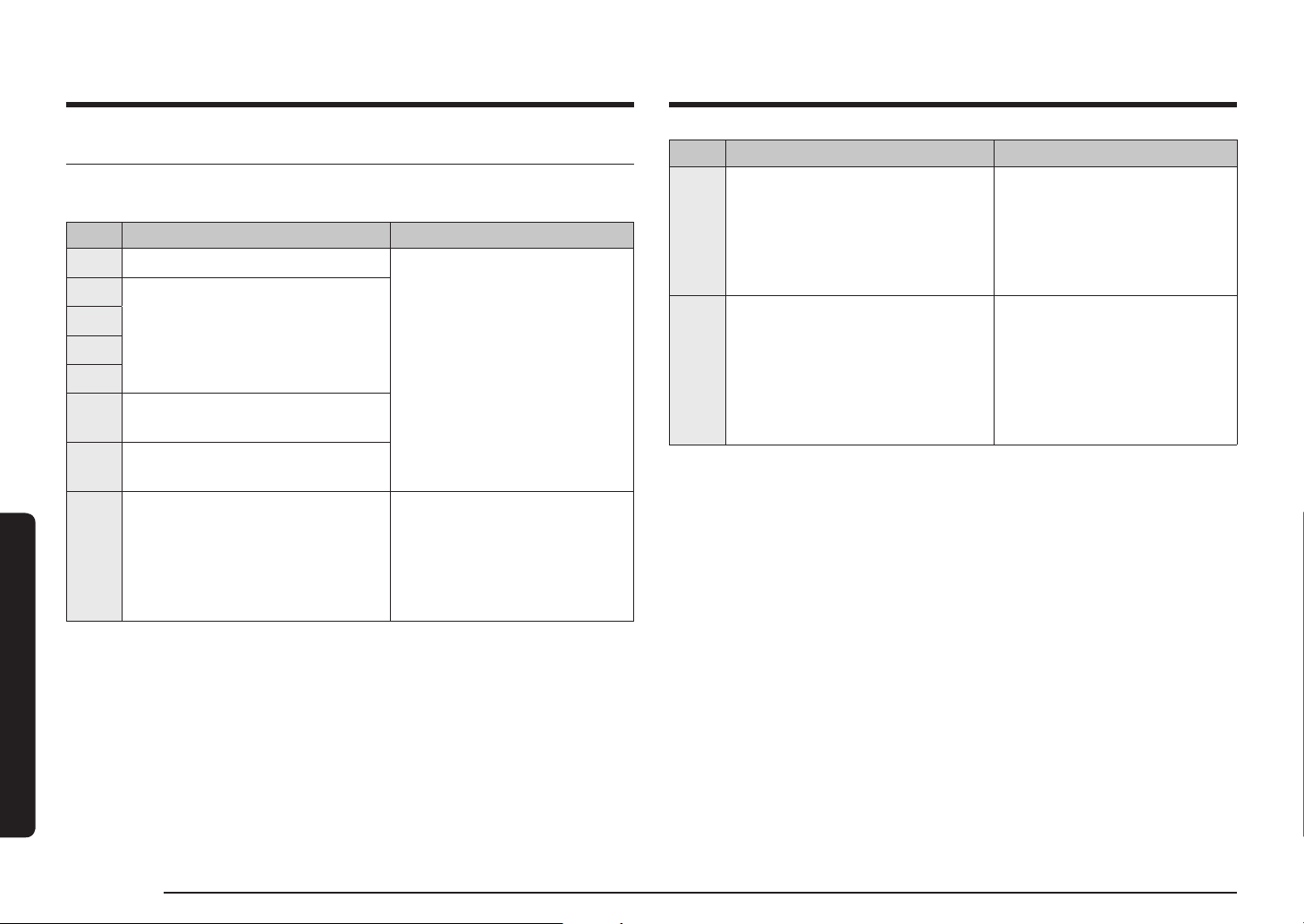
If you encounter a problem with the oven, rst check the table below and try the
suggestions. If the problem continues, contact a local Samsung service centre.
Problem Cause Action
The buttons
cannot be pressed
properly.
• If there is foreign matter
caught between the
buttons
• Remove the foreign
matter and try again.
• Touch model: if there is
moisture on the exterior
• Remove the moisture and
try again.
• If the lock function is set • Check whether the lock
function is set.
The time is not
displayed.
• If there is no power
supplied
• Check whether there is
power supplied.
The oven does not
work.
• If there is no power
supplied
• Check whether there is
power supplied.
The oven stops
while in operation.
• If it is unplugged from the
power socket
• Reconnect the power.
The power turns off
during operation.
• If continuous cooking
takes a long time
• After cooking for a long
time, let the oven cool.
• If the cooling fan does not
work
• Listen for the sound of the
cooling fan.
• If the oven is installed
in a place without good
ventilation
• Keep the gaps specied
in the product installation
guide.
• When using several power
plugs in the same socket
• Use a single plug.
Problem Cause Action
There is no power
to the oven.
• If there is no power
supplied
• Check whether there is
power supplied.
The oven exterior
is too hot during
operation.
• If the oven is installed
in a place without good
ventilation
• Keep the gaps specied
in the product installation
guide.
The door cannot be
opened properly.
• If there is food residue
stuck between the door
and product interior
• Clean the oven well and
then open the door again.
The interior light
is dim or does not
turn on.
• If the lamp turns on and
then off
• The lamp automatically
turns off after a certain
amount of time to save
power. You can turn it
on again by pressing the
oven light button.
• If the lamp is covered
by foreign matter during
cooking
• Clean the inside of the
oven and then check.
Electric shock
occurs on the oven.
• If the power is not
properly grounded
• If you are using a socket
without grounding
• Check whether the
power supply is properly
grounded.
English 37
Troubleshooting
Problem Cause Action
Smoke comes out
during operation.
• During initial operation • Smoke may come from
the heater when you rst
use the oven. This is not
a malfunction, and if you
run the oven 2-3 times, it
should stop happening.
• If there is food on the
heater
• Let the oven cool
sufciently and remove
the food from the heater.
There is a burning
or plastic smell
when using the
oven.
• If using plastic or other
containers that are not
heat-resistant
• Use glass containers
suitable for hot
temperatures.
The oven does not
cook properly.
• If the door is often
opened during cooking
• Do not frequently open
the door unless you
are cooking things that
need to be turned. If you
frequently open the door,
the interior temperature
will be lower and this may
affect the results of your
cooking.
Steam cleaning
does not work.
• This is because the
temperature is too high.
• Let the oven cool and then
use.
Single cook mode
does not work.
• If the divider is inserted in
the oven.
• Take out the divider and
use.
Problem Cause Action
There is water
dripping.
• There may be water or
steam in some cases
depending on the food.
This is not a product
malfunction.
• Let the oven cool and
then wipe with a dry dish
towel.
There is steam
through a crack in
the door.
There is water
remaining in the
oven.
The brightness
inside the oven
varies.
• The brightness changes
depending on power
output changes.
• Power output changes
during cooking are not
malfunctions, so there is
no need to worry.
Cooking is nished,
but the cooling fan
is still running.
• The fan automatically runs
for a certain amount of
time to ventilate inside
the oven.
• This is not a product
malfunction, so there is no
need to worry.
The oven does not
heat.
• If the door is open • Close the door and restart.
• If oven controls are not
correctly set
• Refer to the chapter on
oven operation and reset
the oven.
• If the household fuse has
been blown or the circuit
breaker has been tripped.
• Replace the fuse or reset
the circuit. If it happens
repeatedly, call an
electrician.
38 English
Troubleshooting
Troubleshooting
Code Meaning Action
C-d0
Button problem
Occurs when a button is pressed and
held for a period of time.
Clean the buttons and make sure
there is no water on/around
them. Turn off the oven and try
again. If the problem continues,
contact a local Samsung service
centre.
S-01
Safety shutoff
Oven has continued operating at
a set temperature for an extended
time.
• Under 100 °C - 16 hours
• From 105 °C to 240 °C - 8 hours
• From 245 °C to Max - 4 hours
This is not system failure. Turn
off the oven and remove food.
Then try again normally.
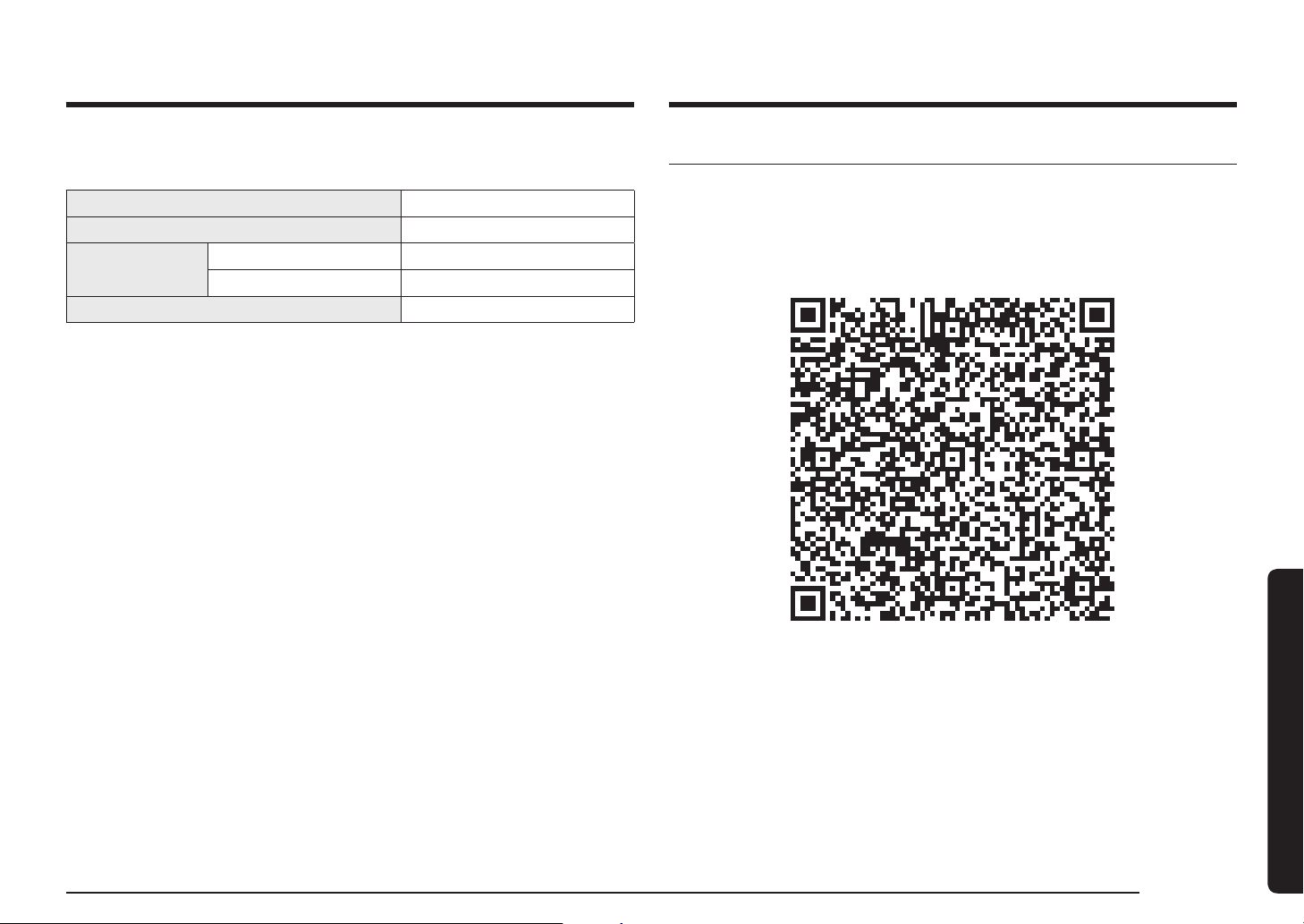
Information codes
If the oven fails to operate, you may see an information code on the display. Check
the table below and try the suggestions.
Code Meaning Action
C-d1 Door lock malfunctions
Turn off the oven and then
restart. If the problem continues,
turn off all power for 30 seconds
or more and then reconnect. If
the problem is not xed, please
contact a service centre.
C-20
Sensor malfunctions
C-21
C-22
C-23
C-F1
Only occurs during EEPROM Read/
Write
C-F0
If there is no communication
between the main PCB and sub PCB
C-F2
Occurs when a communication
problem is maintained between the
Touch IC <-> Main or Sub micom
Turn off the oven and then
restart. If the problem continues,
turn off all power for 30 seconds
or more and then reconnect. If
the problem is not xed, please
contact a service centre.
English 39
Technical specications & Appendix
AppendixTechnical specications
SAMSUNG strives to improve its products at all times. Both the design
specications and these user instructions are thus subject to change without
notice.
Connection voltage 230-240 V
~
50 Hz
Maximum connected load power 3500-3850 W
Dimensions
(W x H x D)
Main unit 595 x 596 x 570 mm
Built-in 560 x 579 x 549 mm
Volume 76 liter
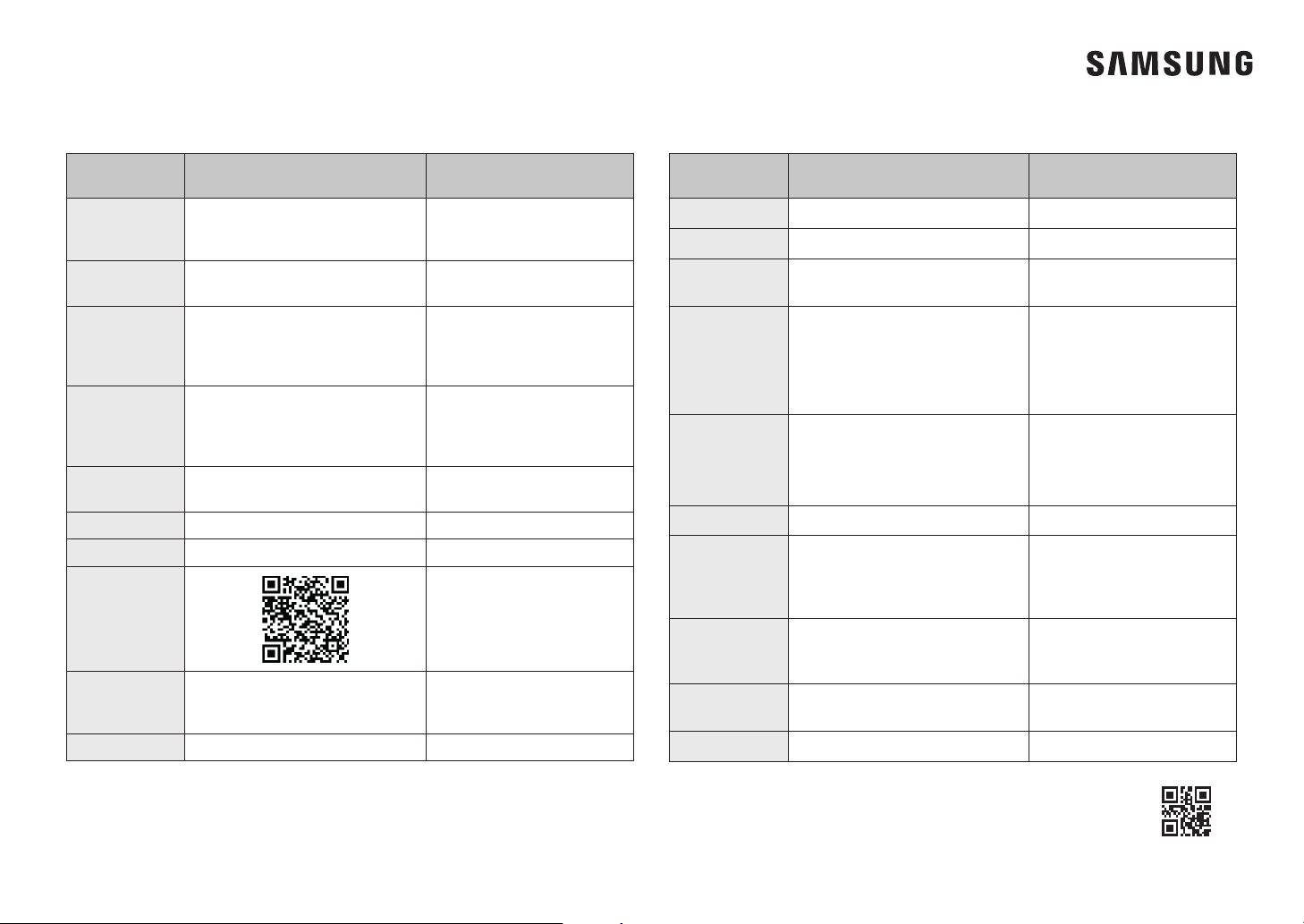
Open Source Announcement
The software included in this product contains open source software.
The following URL http://opensource.samsung.com/opensource/SMART_TP1_0/
seq/0 leads to open source license information as related to this product.
COUNTRY /
LOCATION
CALL OR VISIT US ONLINE AT
CHINA
400-810-5858 (B2C)
400-910-5858 (VIP)
400-610-5858 (B2B)
www.samsung.com/cn/support
TAIWAN
0800-32-9999 (All Product)
0809-00-5237 (B2B / Dealer)
www.samsung.com/tw/support
HONG KONG
3698 4698 (All Product)
3698 4688 (B2B)
www.samsung.com/hk/
support(Chinese)
www.samsung.com/hk_en/
support(English)
MACAU 0800 333
www.samsung.com/hk/
support(Chinese)
www.samsung.com/hk_en/
support(English)
SINGAPORE
1800 7267864 | 1800-SAMSUNG
(Other)
www.samsung.com/sg/support
AUSTRALIA 1300 362 603 (Other)
www.samsung.com/au/support
NEW ZEALAND 0800 726 786 (All Product)
www.samsung.com/nz/support
VIETNAM
www.samsung.com/vn/support
THAILAND
Hotline no : 1282
1800-29-3232 (Toll free for all
product)
www.samsung.com/th/support
MYANMAR +95-1-2399-888
www.samsung.com/mm/support
QUESTIONS OR COMMENTS?
DG68-01414G-01
COUNTRY /
LOCATION
CALL OR VISIT US ONLINE AT
CAMBODIA 1800-20-3232 (Toll free)
www.samsung.com/th/support
LAOS +856-214-17333
www.samsung.com/th/support
MALAYSIA
1800-88-9999 (OTH)
+603-7713 7420 (Overseas contact)
www.samsung.com/my/support
INDONESIA
021-5699-7777
0800-112-8888 (All Product, Toll
Free)
0800-112-7777 (All Product, Toll
Free)
www.samsung.com/id/support
PHILIPPINES
All Products :
1-800-10-7267864 [PLDT-Toll Free]
1-800-8-7267864 [Globe-Toll Free]
84222111 [Landline ]
www.samsung.com/ph/support
JAPAN 0120-363-905
www.samsung.com/jp/support
INDIA
1800 5 SAMSUNG
(1800 5 7267864) (Toll-Free)
1800 40 SAMSUNG
(1800 40 7267864) (Toll-Free)
www.samsung.com/in/support
NEPAL
16600172667 (Toll Free for NTC Only)
9801572667 (Toll Free for Ncell
users)
www.samsung.com/in/support
BANGLADESH
08000-300-300 (Toll free)
09612-300-300
www.samsung.com/bd/support
SRI LANKA 011 SAMSUNG (011 7267864)
www.samsung.com/in/support