User Guide
LG-GS500g
P/NO : MMBB0392301 (1.0)
G
www.lg.com
ENGLISH
FRANÇAIS
User Guide LG-GS500g
Loading page 2...
Loading page 3...
Loading page 4...
Loading page 5...

4 LG GS500g | User Guide
For Your Safety
Turn off your phone in a medical
facility or at a gas station. Never
place your phone in a microwave
oven as this will cause the battery
to explode.
IMPORTANT! Please read the TIA
SAFETY INFORMATION on page 123
before using your phone.
Safety Information
Read these simple guidelines.
Breaking the rules may be
dangerous or illegal. Further
detailed information is given in this
user guide.
• Never use an unapproved battery
since this could damage the
phone and/or battery and could
cause the battery to explode.
• Never place your phone in a
microwave oven as it will cause
the battery to explode.
• Do not dispose of your battery
by fire or with hazardous or
flammable materials.
• Make sure that no sharp-edged
items come into contact with
the battery. There is a risk of this
causing a fire.
• Store the battery in a place out of
reach of children.
• Be careful that children do not
swallow any parts such as rubber
plugs (earphone, connection
parts of the phone, etc.). This
could cause asphyxiation or
suffocation.
• Unplug the power cord and
charger during lightning storms
to avoid electric shock or fire.
Loading page 7...
Loading page 8...
Loading page 9...
Loading page 10...
Loading page 11...
Loading page 12...
Loading page 13...
Loading page 14...
Loading page 15...

14 LG GS500g | User Guide
Guidelines for safe and ecient use
Other Medical Devices
If you use any other personal
medical device, consult the
manufacturer of your device to
determine if they are adequately
shielded from external RF energy.
Your physician may be able
to assist you in obtaining this
information.
Health Care Facilities
Turn your phone OFF in health
care facilities when any regulations
posted in these areas instruct you
to do so. Hospitals or health care
facilities may use equipment that
could be sensitive to external RF
energy.
Vehicles
RF signals may affect improperly
installed or inadequately
shielded electronic systems in
motor vehicles. Check with the
manufacturer or its representative
regarding your vehicle.
You should also consult the
manufacturer of any equipment
that has been added to your
vehicle.
Posted Facilities
Turn your phone OFF in any facility
where posted notices so require.
Aircraft
FCC regulations prohibit using your
phone while in the air. Turn your
phone OFF before boarding an
aircraft.
Blasting Areas
To avoid interfering with blasting
operations, turn your phone OFF
when in a ‘blasting areas or in areas
posted: ‘Turn off two-way radio’.
Obey all signs and instructions.
Loading page 17...
Loading page 18...
Loading page 19...
Loading page 20...

19
• The data saved in your phone
might be deleted due to careless
use, repair of the phone, or
upgrade of the software. Please
backup your important phone
numbers. (Ring tones, text
messages, voice messages,
pictures, and videos could also be
deleted.) The manufacturer is not
liable for damage due to the loss
of data.
• When you use the phone in
public places, set the ring tone
to vibration so as not to disturb
others.
• Do not turn your phone on or off
when putting it in your ear.
FDA Consumer Update
The U.S. Food and Drug
Administration Centre for Devices
and Radiological Health Consumer
Update on Mobile Phones.
1. Do wireless phones pose a
health hazard?
The available scientific evidence
does not show that any health
problems are associated with
using wireless phones. There is
no proof, however, that wireless
phones are absolutely safe.
Wireless phones emit low levels
of radio frequency energy (RF)
in the microwave range while
being used. They also emit very
low levels of RF when in the
standby mode. Whereas high
levels of RF can produce health
effects (by heating tissue),
exposure to low level RF that
does not produce heating
effects causes no known adverse
Loading page 22...
Loading page 23...
Loading page 24...

23
of RF could accelerate the
development of cancer in
laboratory animals. However,
many of the studies that
showed increased tumor
development used animals
that had been genetically
engineered or treated with
cancer causing chemicals so as
to be predisposed to develop
cancer in the absence of RF
exposure. Other studies exposed
the animals to RF for up to 22
hours per day. These conditions
are not similar to the conditions
under which people use wireless
phones, so we don’t know with
certainty what the results of
such studies mean for human
health. Three large epidemiology
studies have been published
since December 2000. Between
them, the studies investigated
any possible association
between the use of wireless
phones and primary brain
cancer, glioma, meningioma,
or acoustic neuroma, tumors
of the brain or salivary gland,
leukemia, or other cancers. None
of the studies demonstrated the
existence of any harmful health
effects from wireless phone RF
exposures.
However, none of the studies
can answer questions about
longterm exposures, since the
average period of phone use in
these studies was around three
years.
5. What research is needed to
decide whether RF exposure
from wireless phones poses a
health risk?
A combination of laboratory
studies and epidemiological
studies of people actually
using wireless phones would
provide some of the data that
are needed. Lifetime animal

24 LG GS500g | User Guide
Guidelines for safe and ecient use
exposure studies could be
completed in a few years.
However, very large numbers
of animals would be needed
to provide reliable proof of
a cancer promoting effect if
one exists. Epidemiological
studies can provide data that
is directly applicable to human
populations, but 10 or more
years follow-up may be needed
to provide answers about some
health effects, such as cancer.
This is because the interval
between the time of exposure to
a cancer-causing agent and the
time tumors develop - if they do
may be many, many years. The
interpretation of epidemiological
studies is hampered by
difficulties in measuring actual
RF exposure during day-to-day
use of wireless phones. Many
factors affect this measurement,
such as the angle at which the
phone is held, or which model of
phone is used.
6. What is the FDA doing to find
out more about the possible
health effects of wireless
phone RF?
The FDA is working with the U.S.
National Toxicology Program
and with groups of investigators
around the world to ensure that
high priority animal studies are
conducted to address important
questions about the effects of
exposure to radiofrequency
energy (RF). The FDA has been
a leading participant in the
World Health Organization
International Electromagnetic
Fields (EMF) Project since its
inception in 1996. An influential
result of this work has been
the development of a detailed
agenda of research needs that
has driven the establishment of
new research programs around
Loading page 27...

26 LG GS500g | User Guide
Guidelines for safe and ecient use
The exposure limit takes into
consideration the body’s
ability to remove heat from
the tissues that absorb energy
from the wireless phone and is
set well below levels known to
have effects. Manufacturers of
wireless phones must report the
RF exposure level for each model
of phone to the FCC. The FCC
website
(http://www.fcc.gov/oet/rfsafety)
gives directions for locating the
FCC identification number on
your phone so you can find your
phone’s RF exposure level in the
online listing.
8. What has the FDA done to
measure the radiofrequency
energy coming from wireless
phones?
The Institute of Electrical and
Electronic Engineers (IEEE)
is developing a technical
standard for measuring the
radiofrequency energy (RF)
exposure from wireless phones
and other wireless handsets
with the participation and
leadership of FDA scientists
and engineers. The standard,
‘Recommended Practice for
Determining the Spatial- Peak
Specific Absorption Rate (SAR) in
the Human Body Due to Wireless
Communications Devices:
Experimental Techniques,’ sets
forth the first consistent test
methodology for measuring the
rate at which RF is deposited
in the heads of wireless phone
users. The test method uses a
tissuesimulating model of the
human head. Standardized
SAR test methodology is
expected to greatly improve the
consistency of measurements
made at different laboratories
on the same phone. SAR is the
measurement of the amount of

27
energy absorbed in tissue, either
by the whole body or a small
part of the body. It is measured
in watts/kg (or milliwatts/g) of
matter. This measurement is
used to determine whether a
wireless phone complies with
safety guidelines.
9. What steps can I take to
reduce my exposure to
radiofrequency energy from
my wireless phone?
If there is a risk from these
products - and at this point
we do not know that there
is - it is probably very small.
But if you are concerned about
avoiding even potential risks,
you can take a few simple steps
to minimize your exposure to
radiofrequency energy (RF).
Since time is a key factor in
how much exposure a person
receives, reducing the amount
of time spent using a wireless
phone will reduce RF exposure.
If you must conduct extended
conversations by wireless
phone every day, you could
place more distance between
your body and the source of
the RF, since the exposure level
drops off dramatically with
distance. For example, you could
use a headset and carry the
wireless phone away from your
body or use a wireless phone
connected to a remote antenna.
Again, the scientific data do
not demonstrate that wireless
phones are harmful. But if you
are concerned about the RF
exposure from these products,
you can use measures like those
described above to reduce
your RF exposure from wireless
phone use.

28 LG GS500g | User Guide
Guidelines for safe and ecient use
10. What about children using
wireless phones?
The scientific evidence does
not show a danger to users
of wireless phones, including
children and teenagers. If you
want to take steps to lower
exposure to radiofrequency
energy (RF), the measures
described above would apply
to children and teenagers using
wireless phones. Reducing the
time of wireless phone use
and increasing the distance
between the user and the RF
source will reduce RF exposure.
Some groups sponsored by
other national governments
have advised that children
be discouraged from using
wireless phones at all. For
example, the government in
the United Kingdom distributed
leaflets containing such a
recommendation in December
2000. They noted that no
evidence exists that using a
wireless phone causes brain
tumors or other ill effects.
Their recommendation to limit
wireless phone use by children
was strictly precautionary; it was
not based on scientific evidence
that any health hazard exists.
11. What about wireless phone
interference with medical
equipment?
Radiofrequency energy (RF) from
wireless phones can interact
with some electronic devices.
For this reason, the FDA helped
develop a detailed test method
to measure electromagnetic
interference (EMI) of implanted
cardiac pacemakers and
defibrillators from wireless
telephones. This test method
is now part of a standard
sponsored by the Association
for the Advancement of Medical
Loading page 31...

30 LG GS500g | User Guide
Guidelines for safe and ecient use
International Commission
on Non-lonizing Radiation
Protection
(http://www.icnirp.de)
World Health Organization
(WHO) International EMF Project
(http://www.who.int/emf)
National Radiological Protection
Board (UK)
(http://www.nrpb.org.uk/)
10 Driver Safety Tips
Your wireless phone gives you the
powerful ability to communicate
by voice almost anywhere, anytime.
An important responsibility
accompanies the benefits of
wireless phones, one that every
user must uphold.
When operating a car, driving is
your first responsibility.
When using your wireless phone
behind the wheel of a car,
practice good common sense and
remember the following tips:
1. Get to know your wireless
phone and its features such as
speed dial and redial. Carefully
read your instruction manual
and learn to take advantage of
valuable features most phones
offer, including automatic redial
and memory. Also, work to
memorize the phone keypad
so you can use the speed dial
Loading page 33...
Loading page 34...
Loading page 35...
Loading page 36...
Loading page 37...
Loading page 38...
Loading page 39...
Loading page 40...
Loading page 41...
Loading page 42...
Loading page 43...
Loading page 44...
Loading page 45...
Loading page 46...
Loading page 47...
Loading page 48...
Loading page 49...
48 LG GS500g | User Guide
Calls
Speed dialling
You can assign a frequently-called
contact to a speed dial number.
Select 1 Contacts in the
COMMUNICATION tab and select
Speed dials.
Your voicemail is already set to 2
speed dial 1. You cannot change
this. Touch any other number to
assign it a speed dial contact.
Your Contacts will open. Select 3
the contact you want to assign
to that number by touching their
phone number once. To find a
contact, tap the Name field box
and enter the first letter of the
name of the contact required.
Making a second call
During your initial call, touch 1
and type the number you want
to call.
Touch 2
to connect the call.
Both calls will be displayed on 3
the call screen. Your initial call
will be locked and the caller put
on hold.
To change between the calls, 4
touch
or press the number of
the held call.
To end one or both calls press 5
and select End followed by All,
Held or Active.
TIP! Touch any single call
log entry to view the date, time
and duration of the call.
NOTE: You will be charged for each
call you make.
Loading page 51...
Loading page 52...
51
Searching for a contact
There are two ways to search for a
contact:
Touch 1 Contacts in the
COMMUNICATION tab.
Touch 2 Search.
You see a list of contacts. Typing 3
in the first letter of a contact’s
name in the Name field will jump
the menu to that alphabetical
area of the list.
TIP! The alphabetical keypad
is displayed once you tap the
Name eld.
Adding a new contact
Touch 1 Contacts in the
COMMUNICATION tab and touch
Add contact.
Choose whether to save the 2
contact to your Handset or SIM.
Enter your first and last name.3
You can enter up to five different 4
numbers per contact. Each entry
has a preset type Mobile, Home,
Office, Pager, Fax and General.
Add an email addresses. You can 5
enter up to two different email
addresses per contact.
Assign the contact to one or 6
more groups. You can assign
up to three groups per contact.
Choose between No group,
Family, Friends, Colleagues,
School or VIP.
You can also add a 7 Ringtone,
Birthday, Anniversary,
Homepage, Home address,
Company name, Job title,
Company address, Memo and
Livecon.
Touch 8 Save to save the contact.
Contacts
Loading page 54...

53
Restore contacts - See
Backing up and restoring the
information on your phone.
Clear contacts - Delete all your
contacts. Choose between
Handset and SIM and touch Ye s
if you are sure you want to wipe
your contacts.
Viewing information
Touch 1 Contacts in the
COMMUNICATION tab and touch
Information.
From here you can view your 2
Service dial numbers, your Own
number, your Memory info.
(showing your memory usage)
and My business card.
TIP! To add your own
business card, select My
business card and enter your
details as you would for any
contact. Touch Save to nish.
Loading page 56...

55
T9 mode
The T9 mode uses a built-in
dictionary to recognise the words
you’re writing based on the
sequence of keys you’ve touched. It
predicts the word you are inputting
and suggests alternatives.
Handwriting recognition
In Handwriting mode you
simply write on the screen and
your GS500g will convert your
handwriting into your message.
Select Handwriting-Screen or
Handwriting-Box according to your
preferred view.
Setting up your email
Touch E-mail in the
COMMUNICATION tab.
If the email account is not set up,
start the email set up wizard and
finish it.
You can check and edit settings by
selecting
. You can also check
the additional settings that were
filled in automatically when you
created the account.
Retrieving your emails
You can automatically or manually
check your account for new emails.
To check manually:
Touch 1 E-mail in the
COMMUNICATION tab.
Touch the account you want to 2
use .
Sending an email using your
new account
Touch 1 New e-mail and a new
email will open.
Complete the message.2
Touch 3 Send and your email will
be sent.
Loading page 58...

57
Message folders
There are five folders in Messaging
menu
.
Inbox - All the messages you
receive are placed into your inbox.
Drafts - If you do not finish writing
a message, you can save what you
have done in this folder.
Outbox - This is a temporary
storage folder while messages are
being sent.
Sent items - All the messages you
have sent are placed in this folder.
My folders - Create folders to store
your messages.
Changing your text message
settings
Touch Messaging in the
COMMUNICATION tab and touch
Settings. Select Text message. You
can make changes to:
Text message centre - Enter the
details of your message centre.
Delivery report - Slide the switch
left to receive confirmation that
your messages have been delivered.
Validity period - Choose how long
your messages are stored at the
message centre.
Message types - Convert your
text into Tex t, Voice, Fax, X.400 or
E-mail.
Character encoding - Choose how
your characters are encoded. This
impacts the size of your messages
and therefore data charges.
Send long text as - Choose to send
long messages as Multiple SMS or
as an MMS.
Changing your multimedia
message settings
Touch Messaging in the
COMMUNICATION tab. Scroll and
choose Settings and Multimedia
message. You can make changes to:
Retrieval mode - Choose between

58 LG GS500g | User Guide
Home network or Roaming
network. If you then choose
Manual you will receive only
notifications of MMS and you can
then decide whether to download
them in full.
Delivery report - Choose to request
and/or allow a delivery report.
Read reply - Choose to request
and/or allow a reply.
Priority - Choose the priority level
of your MMS.
Validity period - Choose how
long your message is stored at the
message centre.
Slide duration - Choose how long
your slides appear on the screen.
Creation mode - Choose your
message mode.
Delivery time - Choose how long to
wait before a message is delivered.
Multi msg centre - Choose one
from the list or add a new message
centre.
Changing your other settings
Touch Messaging in the
COMMUNICATION tab. And touch
Settings.
Voicemail - Touch
to add a
new Voicemail service. Contact
your network operator for more
information about the service they
provide.
Service message - Choose to
receive or block service messages.
You can also set your message
security by creating trusted and
untrusted lists of senders in Service
security option.
Message counter - Choose to set
period for counting messages.
Save sent message - Choose
whether to turn Cell broadcast on/
off and select your channels and
languages.
Messaging

59
Social network services (SNS)
Your GS500g has SNS that lets
you enjoy and manage your social
network. Touch Social network
menu and select the site as below:
Facebook, Twitter, Picasa, Flickr and
Myspace.
TIP! Facebook is a native
application preloaded onto your
phone, and easy to access. Twitter
is a java application based on Java
technology. Other applications
access to the WAP(Wireless
Application Protocol) services.
NOTE: An additional costs may be
incurred when connecting and
using online services. Check your
data charges with your network
provider.
Facebook
Home: Log in and you will see your
friend’s updated status. Input your
comment about new status or check
others. You can also write comments
by selecting + icon.
Profile: You can select the Wall
> Status updates and write the
current status. See your info detail
and upload the photo by touching
Album > Upload Photo. Choose
from Go to images or Take a picture,
and then input some caption with
images.
Friends: You can find many friends
in SNS and view their status.
Search your friends in facebook by
selecting Search tap.
Message: You can see the Inbox/
Sent folder, and write a SN message.
TIP! Using Facebook Feed
Widget
You can add the facebook feed
widget to your home screen.
Drag the facebook feed widget
from widget tray and touch OK.
You can also access the facebook
application directly by touching
up the feed widget.
Loading page 62...
61
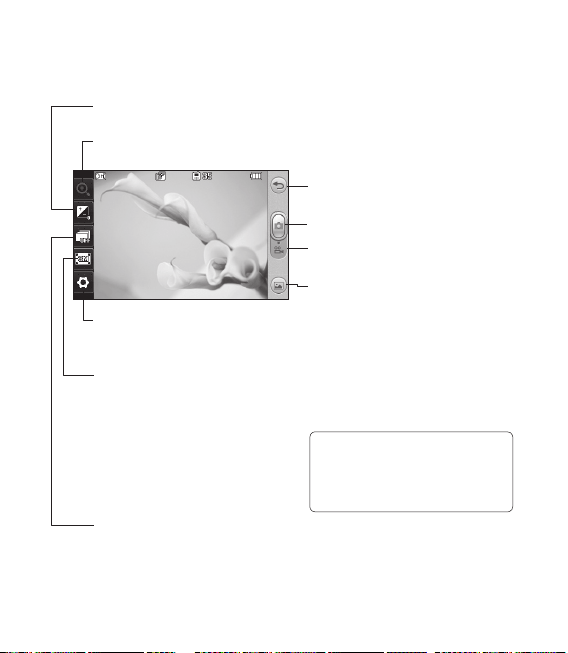
Getting to know the viewfinder
Back
Taking a photo
Video mode - Slide down this icon to
switch to video mode.
Gallery -This enables you to access
your saved photos from within the
camera mode. Simply touch, and your
gallery will appear on the screen.
Settings - Touch this icon to open
the settings menu. See Using the
advanced settings.
Size - Change the size of the photo
to save memory space or take a
picture preset to the correct size
for a contact. Select a pixel value
from the six numerical options:
3M (2048x1536), 2M (1600x1200),
1M (1280x960), VGA (640x480),
WQVGA(400x240), QVGA (320x240).
Continuous shot - This enables you
to take 3/6/9 shots automatically in
very quick succession.
Exposure - A low contrast image will appear foggy, whereas a high
contrast image will appear much sharper.
Zoom - zoom in or zoom out. This function is enabled depending on
the picture size you take.
TIP! You can bring up the options
by tapping the screen. They
automatically turn o after a few
seconds.
