
1
Owner’s Manual
WARRANTY
REGISTRATION
Register online today for
a chance to win a FREE Tripp Lite
product! www.tripplite.com/warranty
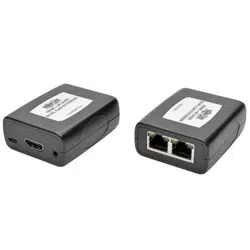
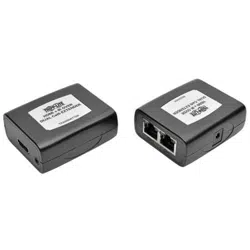
HDMI over Dual Cat5
Extender Kit
Models: B125-101-60, B125-101-60-WP
1111 W. 35th Street, Chicago, IL 60609 USA
www.tripplite.com/support
Note: Follow these instructions and operating procedures to ensure correct performance and to
prevent damage to this unit or to its connected devices. Copyright © 2011 Tripp Lite.
All rights reserved. All trademarks are the sole property of their respective owners.
Product Features 2
Optional Accessories 2
Installation and Operation 2
Warranty & Warranty Registration 4
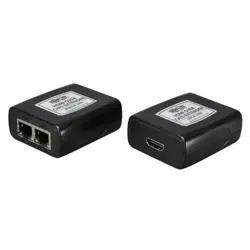
•LocalTransmitterandRemoteReceiverUnits
•ExternalPowerSupply(Input:100-240V,50/60Hz,0.5AOutput:5V,2A)
•ScrewdriverforEqualizationadjustment
•(x4)Wallplatescrews(B125-101-60-WPonly)
•Owner’sManual
Package Contents
201109193-93-3144.indd 1 10/7/2011 2:29:39 PM

TMDS
UP TO 150 ft. (Cat6)
UP TO 100 ft. (Cat5)
LOCAL
TRANSMITTER
BLU-RAY
1080p (6o Hz)
1080p (6o Hz)
REMOTE
RECEIVER
DDC
B125-101-60 Installation Diagram
2
Installation and Operation
Refer to the installation diagrams below as you perform these steps.
Note:
1. Test to make sure the entire installation works properly before pulling cables
through ceilings/walls.
2. To achieve maximum distance and performance, 24Awg solid wire Cat5e/6
cable must be used. The use of stranded wire Cat5e/6 cable, or cable with a
gauge size higher than 24Awg will result in shorter extension distance. All
Tripp Lite N202-Series Cat6 cables are made with 24Awg, solid wire cabling.
3. Make sure the power to all devices you are connecting to is turned off prior to
installation.
Product Features
•B125-101-60–Extenda1080p(60Hz)signalupto150ft.using
Cat6cabling,orupto100ft.usingCat5cabling
•B125-101-60-WP–Extenda1080p(60Hz)signalupto125ft.
usingCat6cabling,orupto75ft.usingCat5cabling
•Supportsupto7.1channelsurroundsoundaudio
•Built-inEqualizationcontroltoadjustthevideoimage
•HDCPand3Dcompatible
Optional Accessories
•N202-SeriesCat624Awg,solidwirepatchcables
•P568-SeriesHighSpeedHDMIcables
201109193-93-3144.indd 2 10/7/2011 2:29:40 PM
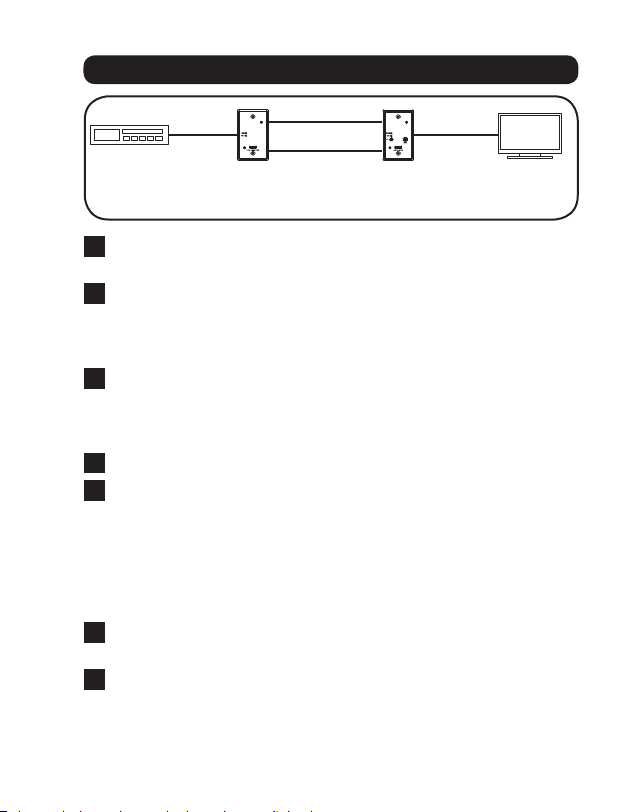
TMDS
UP TO 125 ft. (Cat6)
UP TO 75 ft. (Cat5)
LOCAL
TRANSMITTER
BLU-RAY
1080p (6o Hz)
1080p (6o Hz)
REMOTE
RECEIVER
DDC
B125-101-60-WP Installation Diagram
3
1
ConnecttheHDMIsourcetotheHDMIinputonthelocaltransmitter
unit.
2
Connect the TMDS RJ45portonthelocaltransmittertotheTMDS
RJ45portontheremotereceiverusingCat5e/6cable.
Note: See the installation diagrams for maximum extension
distance at 1080p (60Hz) video resolutions.
3
Connect the DDC RJ45portonthelocaltransmittertotheDDC
RJ45portontheremotereceiverusingCat5e/6cable.
Note: See the installation diagrams for maximum extension
distance at 1080p (60Hz) video resolutions.
4
ConnecttheHDMIoutputontheremotereceivertotheHDMImonitor.
5
Connecttheexternalpowersupplytotheremotereceiver,andthen
plugitintoaTrippLiteSurgeSuppressor,UninterruptiblePower
Supply(UPS),orPowerDistributionUnit(PDU).TheGreenLEDson
both the local and remote units will illuminate to indicate that power
isbeingreceived.TheOrangeLEDontheremoteunitwillilluminate
toindicatethataconnectionhasbeenmadewiththelocalunitvia
Cat5e/6cable.
6
TurnonthepowertotheHDMIsource.TheOrangeLEDonthelocal
unitwillilluminatetoindicateitisreceivingasignalfromthesource.
7
Ifnecessary,usetheequalizationcontroltoadjustthevideoimage.
Note: An improper Equalization setting can result in no image being
displayed at all. Try each Equalization setting until an acceptable
picture is displayed.
Installation and Operation
201109193-93-3144.indd 3 10/7/2011 2:29:40 PM

4
Warranty and Warranty Registration
1-Year Limited Warranty
TRIPPLITEwarrantsitsproductstobefreefromdefectsinmaterialsandworkmanshipforaperiodofone(1)year
fromthedateofinitialpurchase.TRIPPLITE’sobligationunderthiswarrantyislimitedtorepairingorreplacing(at
itssoleoption)anysuchdefectiveproducts.Toobtainserviceunderthiswarranty,youmustobtainaReturned
MaterialAuthorization(RMA)numberfromTRIPPLITEoranauthorizedTRIPPLITEservicecenter.Productsmust
bereturnedtoTRIPPLITEoranauthorizedTRIPPLITEservicecenterwithtransportationchargesprepaidandmust
be accompanied by a brief description of the problem encountered and proof of date and place of purchase. This
warrantydoesnotapplytoequipment,whichhasbeendamagedbyaccident,negligenceormisapplicationorhas
been altered or modified in any way.
EXCEPTASPROVIDEDHEREIN,TRIPPLITEMAKESNOWARRANTIES,EXPRESSORIMPLIED,INCLUDING
WARRANTIESOFMERCHANTABILITYANDFITNESSFORAPARTICULARPURPOSE.
Somestatesdonotpermitlimitationorexclusionofimpliedwarranties;therefore,theaforesaidlimitation(s)or
exclusion(s)maynotapplytothepurchaser.
EXCEPTASPROVIDEDABOVE,INNOEVENTWILLTRIPPLITEBELIABLEFORDIRECT,INDIRECT,SPECIAL,
INCIDENTALORCONSEQUENTIALDAMAGESARISINGOUTOFTHEUSEOFTHISPRODUCT,EVENIFADVISEDOF
THEPOSSIBILITYOFSUCHDAMAGE.Specically,TRIPPLITEisnotliableforanycosts,suchaslostprotsor
revenue,lossofequipment,lossofuseofequipment,lossofsoftware,lossofdata,costsofsubstitutes,claimsby
thirdparties,orotherwise.
Useofthisequipmentinlifesupportapplicationswherefailureofthisequipmentcanreasonablybeexpected
tocausethefailureofthelifesupportequipmentortosignicantlyaffectitssafetyoreffectivenessisnot
recommended.Donotusethisequipmentinthepresenceofaammableanestheticmixturewithair,oxygenor
nitrousoxide.
WEEE Compliance Information for Tripp Lite Customers and
Recyclers (European Union)
UndertheWasteElectricalandElectronicEquipment(WEEE)Directiveandimplementingregulations,when
customersbuynewelectricalandelectronicequipmentfromTrippLitetheyareentitledto:
•Sendoldequipmentforrecyclingonaone-for-one,like-for-likebasis(thisvariesdependingonthecountry)
•Sendthenewequipmentbackforrecyclingwhenthisultimatelybecomeswaste
WARRANTY REGISTRATION
Visitwww.tripplite.com/warrantytodaytoregisterthewarrantyforyournewTrippLiteproduct.You’llbeautomatically
entered into a drawing for a chance to win a FREE Tripp Lite product!*
*Nopurchasenecessary.Voidwhereprohibited.Somerestrictionsapply.Seewebsitefordetails.
TrippLitefollowsapolicyofcontinuousimprovement.Productspecicationsaresubjecttochangewithoutnotice.
1111 W. 35th Street, Chicago, IL 60609 USA
www.tripplite.com/support
201109193•93-3144
201109193-93-3144.indd 4 10/7/2011 2:29:40 PM