website http:/i_ ww.1
Air Conditioner
'S
and thoroughly
a_rconditioner.
future reference after
FOR YOUR RECORDS
Write the m,_el and seria_ numbers he_e:
Model #
_rial #
You can find them on a _abel on the side of each uni[l:.
DealeCs Name
Da_ Purc_sed
i! Stap!e your r_eipl io this page in the event you need
it to prove date d purchase or _or warranty issues..
READ TH!S MANUAL
Inside _ou wifl find many helpf_l hints on how to use
arid maintain your air conditioner properly Just a littie
preventive _re on your part can save you a great dea_
of time and imo_ey over tise life of you_*air _:_dilio_er.
Youli find many answers to ,_mmon p_blems in the
chart of troublesh_ting tips.. If you review our chart ,d
Troub_eshooUng Tips first° you may not need to ca/i
for service at all.
PRECAUTION
• Co,act the a_horized service technician for
repair or maintenance _ this unit
• _act: the in_aller for installation ot _is unit,
.The air conditioner is not intended _or use by
you_ ,children or invalids without su_rvisI_,
. Young chiidren should be su_rvised to ensure
that: they do not p_ay''wQh the air condittone/r,.
-When the power cord Is to be replaced,
replacement work shall be performed by
authorized personnel only usin9 only genuine
replacement _rts.
.Installation work must be performed in
accordance with the National Electric Code by
quaiified and authoNz_ _rsonnel on|y.
2 Room Air Conditioner
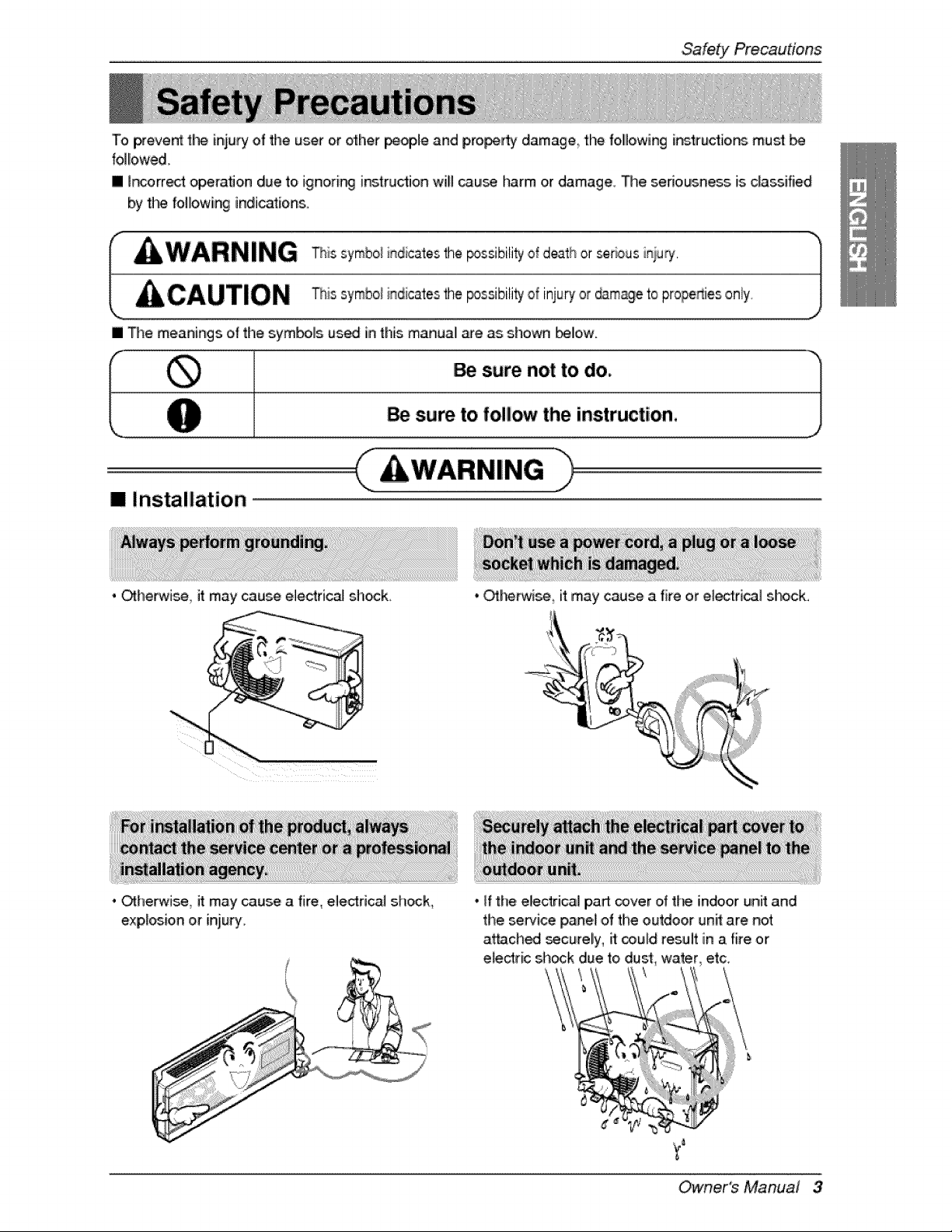
To prevent the injury of the user or e_her _ople and pro_rty damage the follllowing i_trudio, ns mus_
followed,
[] ir_orre_t opera, on due to ignodr_ instruction wili _use harm or damage. The sedousne_ is classified
by Jim followin 9 indications.
[] The meanings of the symbols used in thiismanual me as shown Ibe_ow.
i _. sure not to do, i}
sure to follow the instructio,n,
( )
I!! Ins_ilation
. _he_ise it may cause electrical sh_k.
• _herwise, it may cause a fire, eled:rical sh_k_
exp,_osio,n or injury.
• OtherMse_ it may cause a fire or eie_dcal slhock.
...._i_iiiiiiii/iiiiiiiiiiiiiiii_iiiiii_;="_
• if the electrical pa_ _ver o_the indoor unit and
the service _ne! ,ofthe outdoor unit are not
attach_ _curely, ff _u_d result in a fire or
etectric sh_k due to,dust water, etc,
Owner's Manual 3
SafetyPrecautions
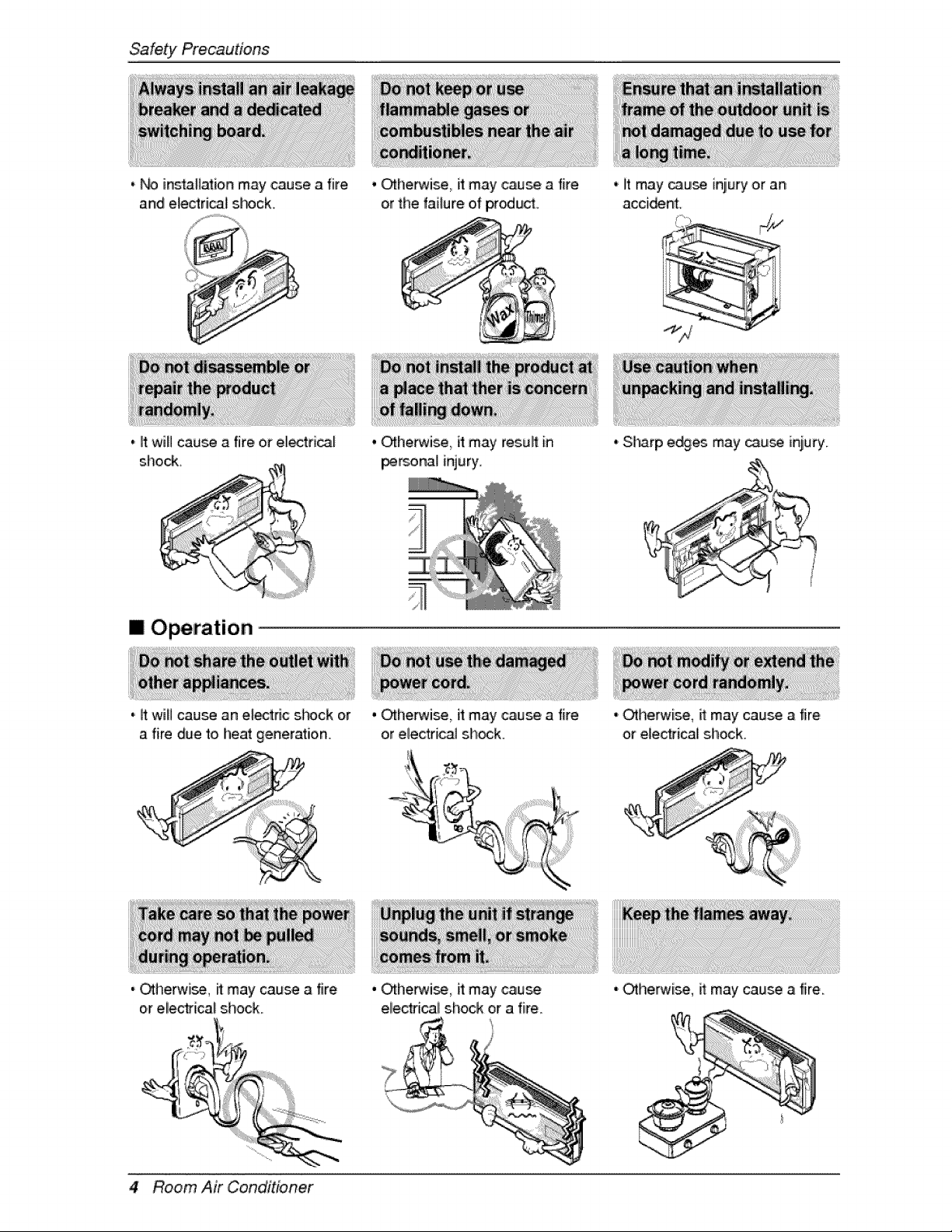
• _ instaH_ion may cause a fire
and electrical sf-#ck.,
, It will cause i_'fire or eUectrical
shock.
[] Operation
'i _t W_l_ Ca_ an e_c: s!'#ck or
a fire due to heat generation.
, Otherwi_, ff may cause a fire
or eliectrical s.hock.
4 Room Air Conditioner
, othello, it may ,cause a fire
or the failure o,fpr_uc[
° otherwi_ it may resuff in
per_nal injury.
,otherwise, it may ,cause a fire
or electrical sh_k.
' othello, it may cause
eliectfica[ shock or a fire
,' it may cause injury or an
accident.
oSharp e_es may _u_ iniu_'y_
oOtherwise, ff may cau_ a fire
or electrical shock
, otherwise, it may cause a fire.
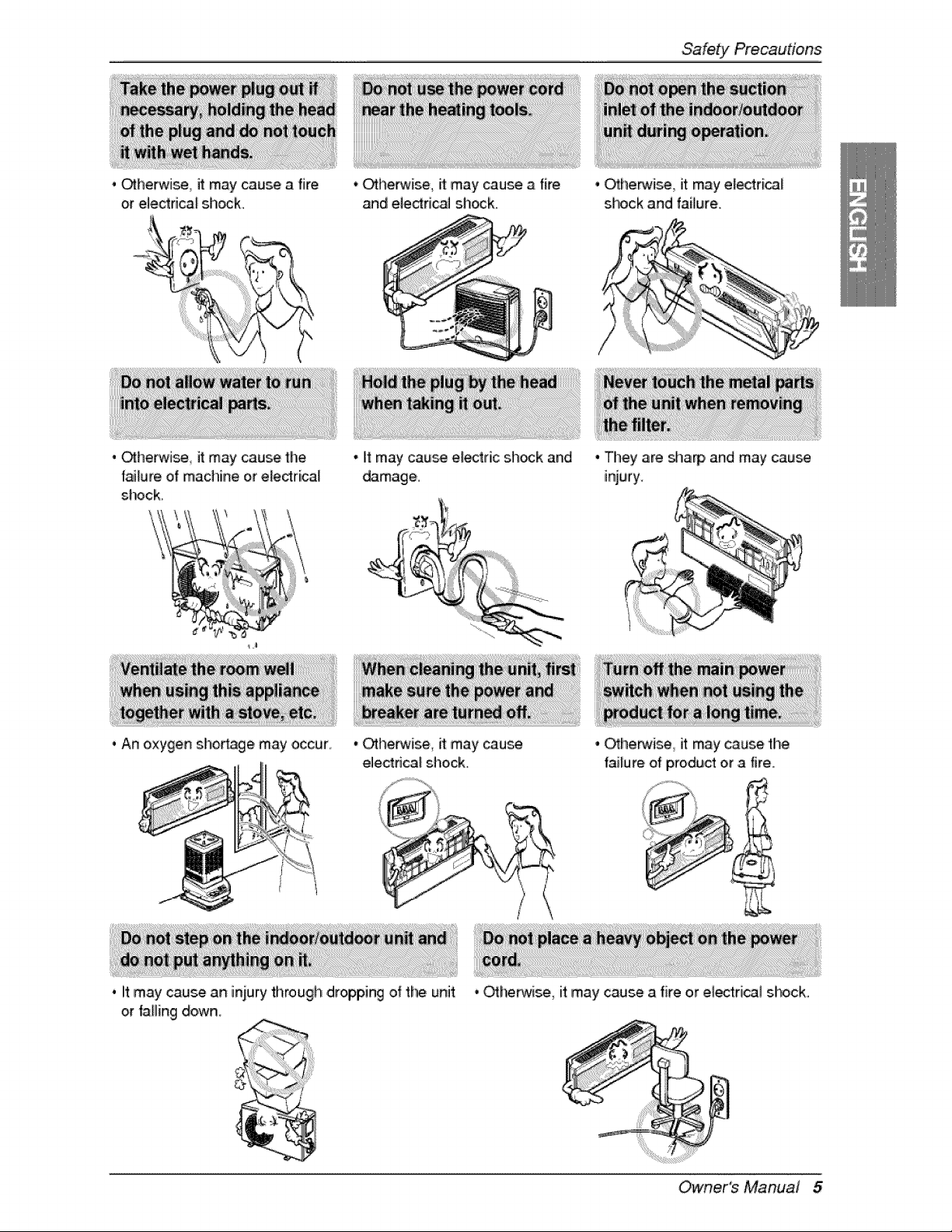
. _herwi_, it maycausea fire
or electdcaFshock_
• Otherwise, it may cause a fire
and el,e_rical sllock.
Safety Precautions
• _he_¢ise Jtmay cause the
[aJ[ureof machine or electrical
shock.
• It may cause e_ric sh_k and
damage,.
oAn oxygen shortage may occur, • Otherwise, it may cau_
electdca_ shock.
. it may cause an i_ury througil dropping of the unit
or falling down.
• O_he_ise, it may electri_f
s_lock and failure,
• They are sha_, and may cause
injury.
• OChepMse, it may cause thi8
iaJlure of )rodu,ct or a fire.
• _herMse, it may cause a fire or ele_dcal shock.
Owner's Manual 5
SafetyPrecautions
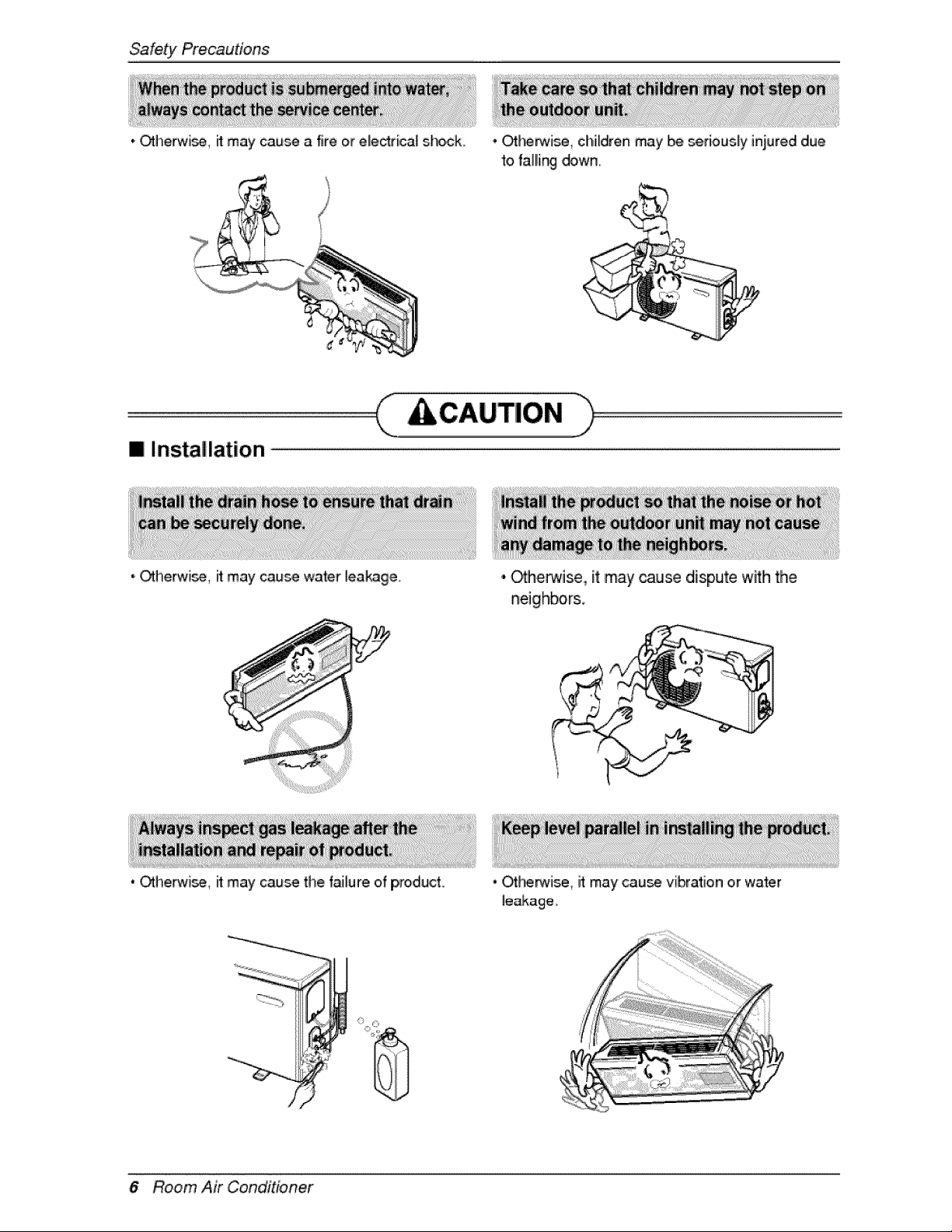
* Otherw'i_, ff may cau_ a fire or e_ectrica[ shock , Ot_rM_, children may be seriously iniured due
to falling do,wn.
[] Installation
'i Otherwi_, i_may cau_ water fea_g,e.
, Otherwi_, _ may cau_ the failure of product
6 Room Air Conditioner
,,,Oth,erwiise,, it may cause dispute with the
neighbor&
, Ot_"_is,e, it may cau_, vibration or water
le_age.
[] Operation
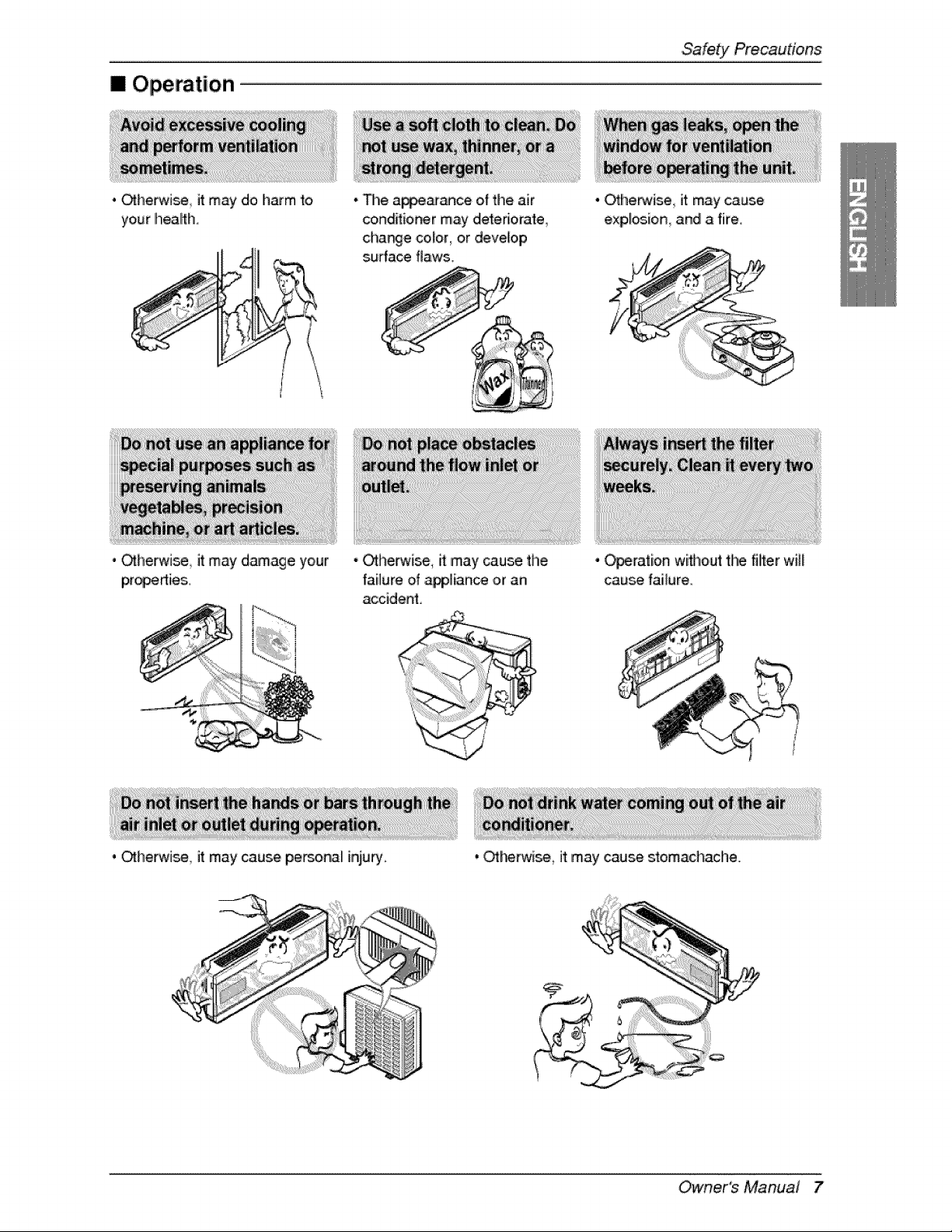
• Otherwise it may do h_m to
your heath.
• _herwJse it may damage your
• The a_ance of the air
c_nditio_r may deleriorale
charge color, or deve_oip
su#ace flaws,
• _herwise, it may cause the
failure of _lian_ or an
accident
. _he_ise it may cause personal inju_.
• Othe_#ise it may cause
exp,l_ion and a fire.
• O_ralion withoutthe filiter will
cau_ failure
• OtherMse it may cause stomachache.
Owner's Manual 7
Priorto Operation
1. Co,r_act an installation s_dalist for installation_
2. P_ugin the power #ug properly.
3, Use a dedicated circuit.
4. D,onot use an exten_on cord.
5. D,onot staWstop o_ration by p,fuggi_/unplugging the power cord.
6_If the cord/plug is damag_ re_ace _ w_ onJy an auft_rized replacement _d_
1. Being exposed to direct _d[ow for a IoW _me may _ hazardous to, your heaffh. Do, no_ expose
occu_nts_ _ts, or giants to dired airflow for a _ongtime.
2. Due to the possibility of oxygen deficiency, ventilate t_ room when usi_ _e appliance f_ether wi_
stoves or o_her heatir._ device..
3,_Do not u_ this _r conditioner for non-_dfied s_cial £urpo_ (eg preserving _ecisio, n devices,
food, pets, pla_s, or art o,bjiec|s), Such use may damage your pro,_ies.
1oDo no_touch the metal parts of the unit when removing th_ filter. Injury can o_ur.
2. D,onot u_ water to clean i_ide the air conditioner Exposure to water can ,destroy the insullation_
leading to electric shock.
3 When cleaning the unit, first make _re that the _r and breaker are tur_d off. The fan routes at a
very high speed during o,_ration_ There is a _ssibility of injury if the unit's power is _iggered while
inner parts, of the unff.
For repair a_ maintenance, co_d your autl_#rized service dealer.
8 Room Air Conditioner
introduction
!iiii i _i i i!_!_!_I _i
This symbol aie_s you to the risk of electric shock.
This symb.ol .ale,s you t.o hazards that may .cause harm to the
air conditioner.
This symbol indicates special notes.
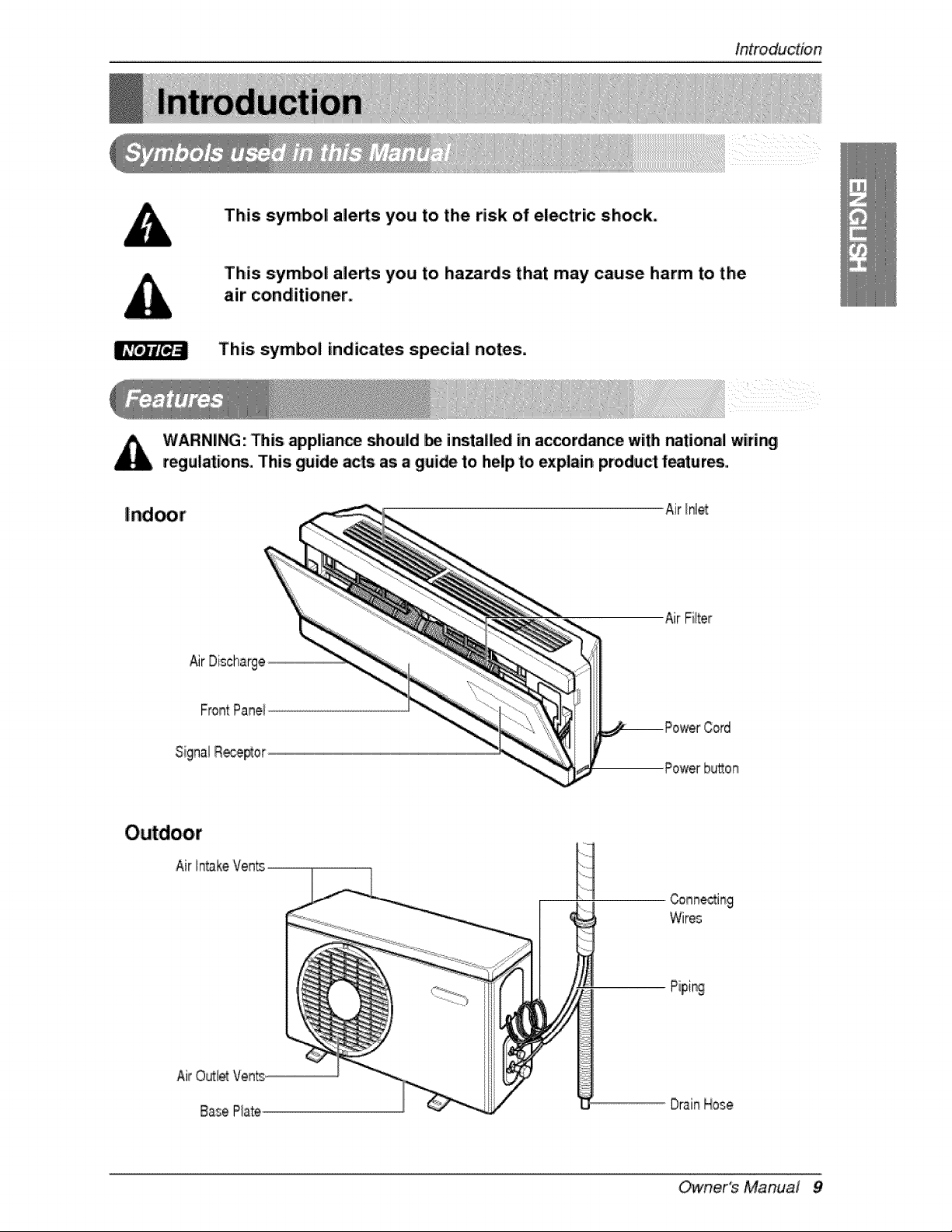
WARNING: Dis applian_ _ould be install_ in accordance with national wirir_
regulation, This guide acts as a guide to help to explain product features,
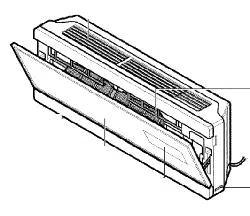
Air Inlet
Air Discharge
Air Fiiter
Powerbu_on
H
Wir_
DrainHose
Owners Manual 9
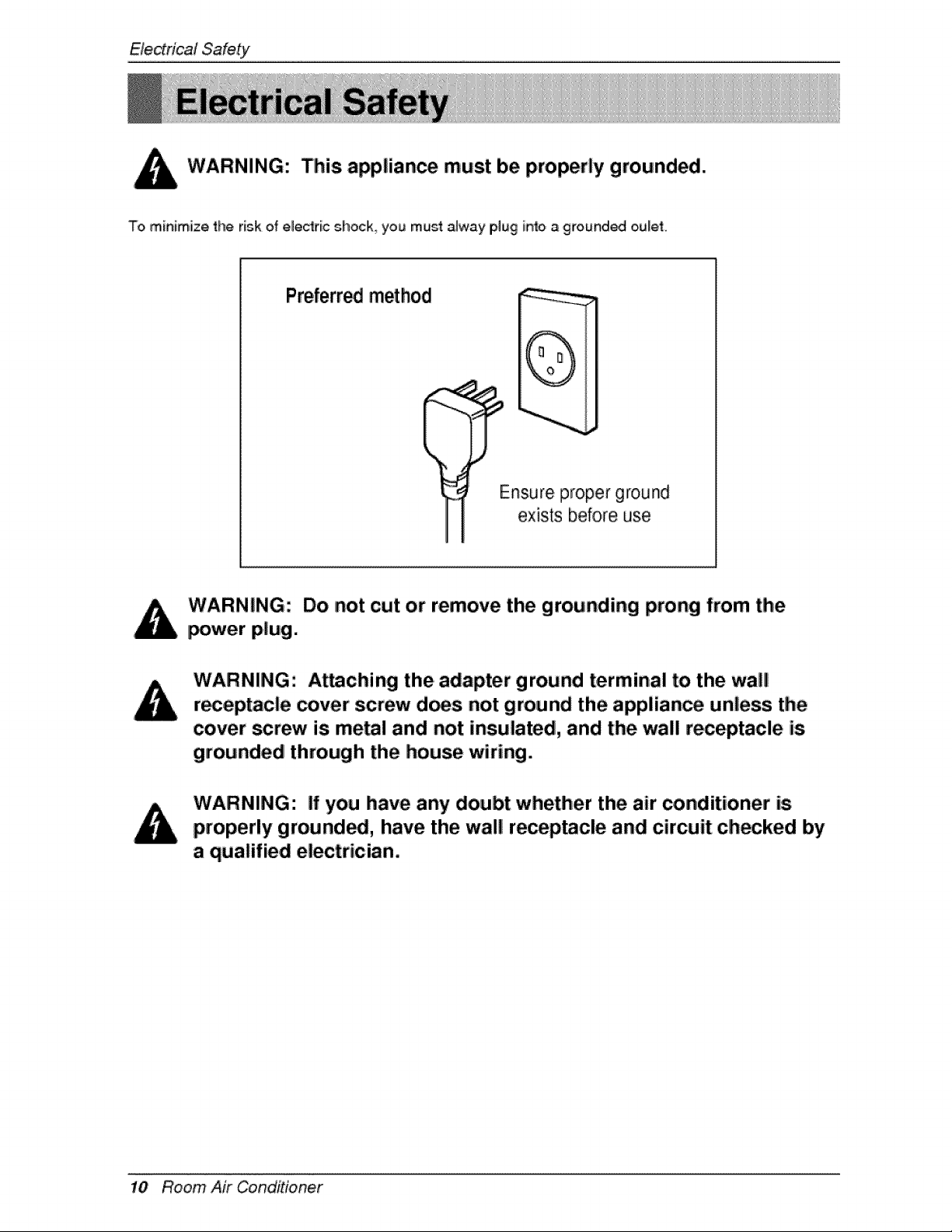
WARNING: This appliance must be properly grounded.
To, minimize the risk of electric shoclk_ you must alway plug in'_o a grounded o,ulet.
Preferred method
(
Ensure proper ground
exists before use
WARNING: Do not cut or remove the grounding prong from the
_wer plug.
Attaching the adapter ground terminal to the wall
r_eptacle cover screw d_s not ground the applian_ unless the
cover screw is meal and not insulated, and the wall receptacle is
grounded through the house wiring.
If you have any doubt whether the air _nditioner is
properly ground_, have the wal! re_p_cle and circuit checked by
a qualified electrician.
10 Room Air Conditioner
ElectricalSafety
We strongly discourage the use of an adorer due to potential _fety Ih_ards. For tem_rary
connectio,ns, use onlly a ULqisted ada_oter,avaJlablle from most local hardware stores. Ensure that t_
large siot in the adapter is. aligned with the large slot in the rece£tacle for a @=,oper_larity connection.
To disconnect the _wer cord from the adapter, u_ one hand on each to ,avoid damaging the grou_
terminal Avoid freque_ly ur_!uggi_ the power cord as this can _eadto eventua_ ground terminal
damage.
Adapter "_
Pl[ug
ReceNacle Cover
Metal Screw
WARNING: Never use the appliance with a broken a_pter.
We strongly discourage _le use o,f an extension cord due to pote_ia_ _fety haz:ar_, For temporary
situations use oniy CSA ce_ifi_ and UL listed 3-wire grounded extension cords, rated 15 A 125 W
Owne,r's Manuai 1!
Operatinginstructions
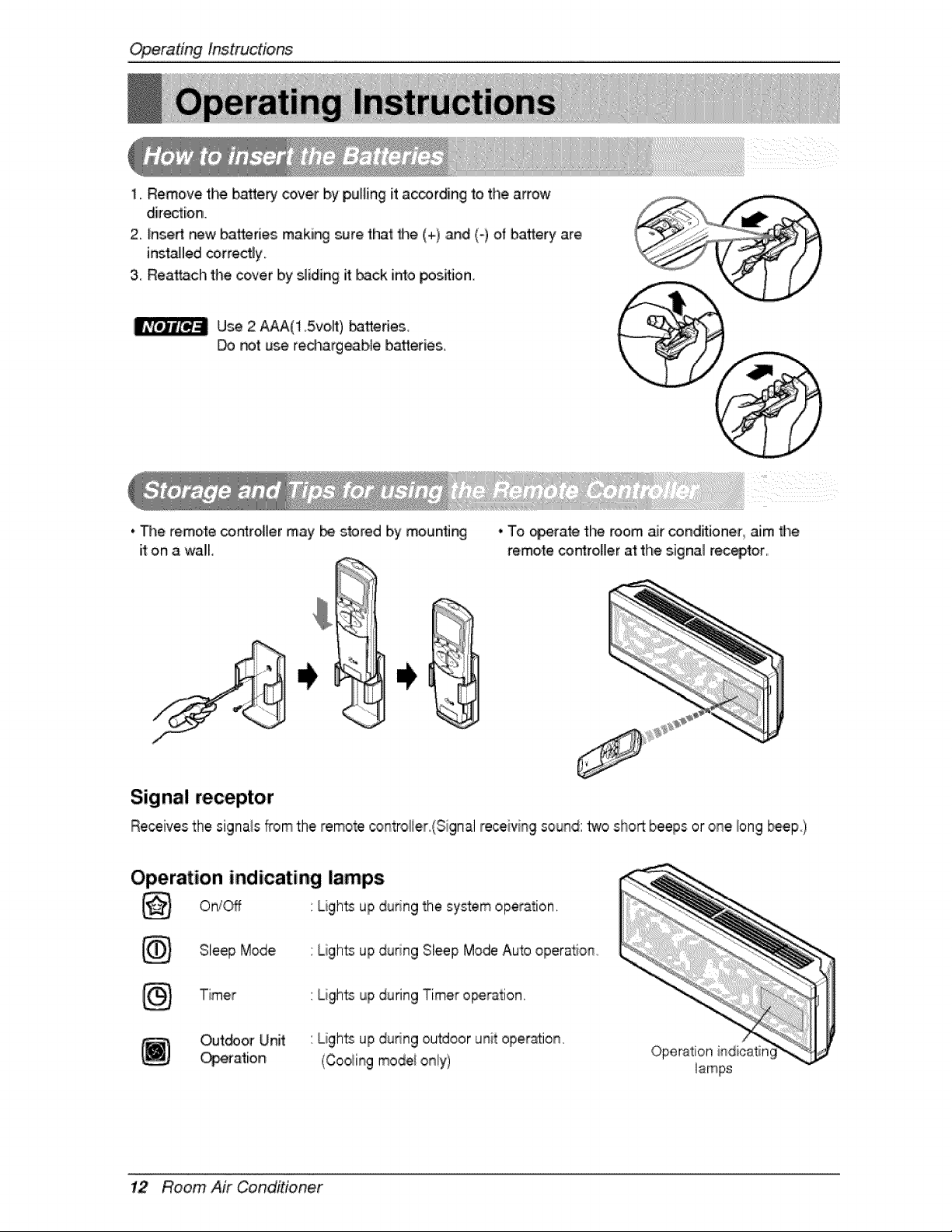
1, Remove the battery cover by puiting it ac_rding to the arrow
direction,
2. tnsert new batteries maki_ sure that the (+) and (-} of battery are
instaJled correctly.
3 Reattach the cover by sliding it back into _sition
Use 2 AAA(1,5,vo,lt) batteries_
_t use red_atgeab_e batteries,,
, #}e remote controller may _ stored b,ymounting
it on a wall,
. To operate the room air conditioner aim the
remote co_roHer at file signal receptor,
Signal receptor
Receives the signals fTomthe remote controllier(Siginalreceiving sound: _o short beeps or one long _ep)
Operation indicating lamps
On/_ Ligh_ up ,duringthe system operstion,
Sleep Mode Lights up du_ng Sleep Mode Auto operation
Timer Lights up during Timer o_r_ion,
Out@or Unit Lights up dudng outdoor unit operation,
(Coo_ingmodei only)
Operation indicatin
12 Room Air Conditioner
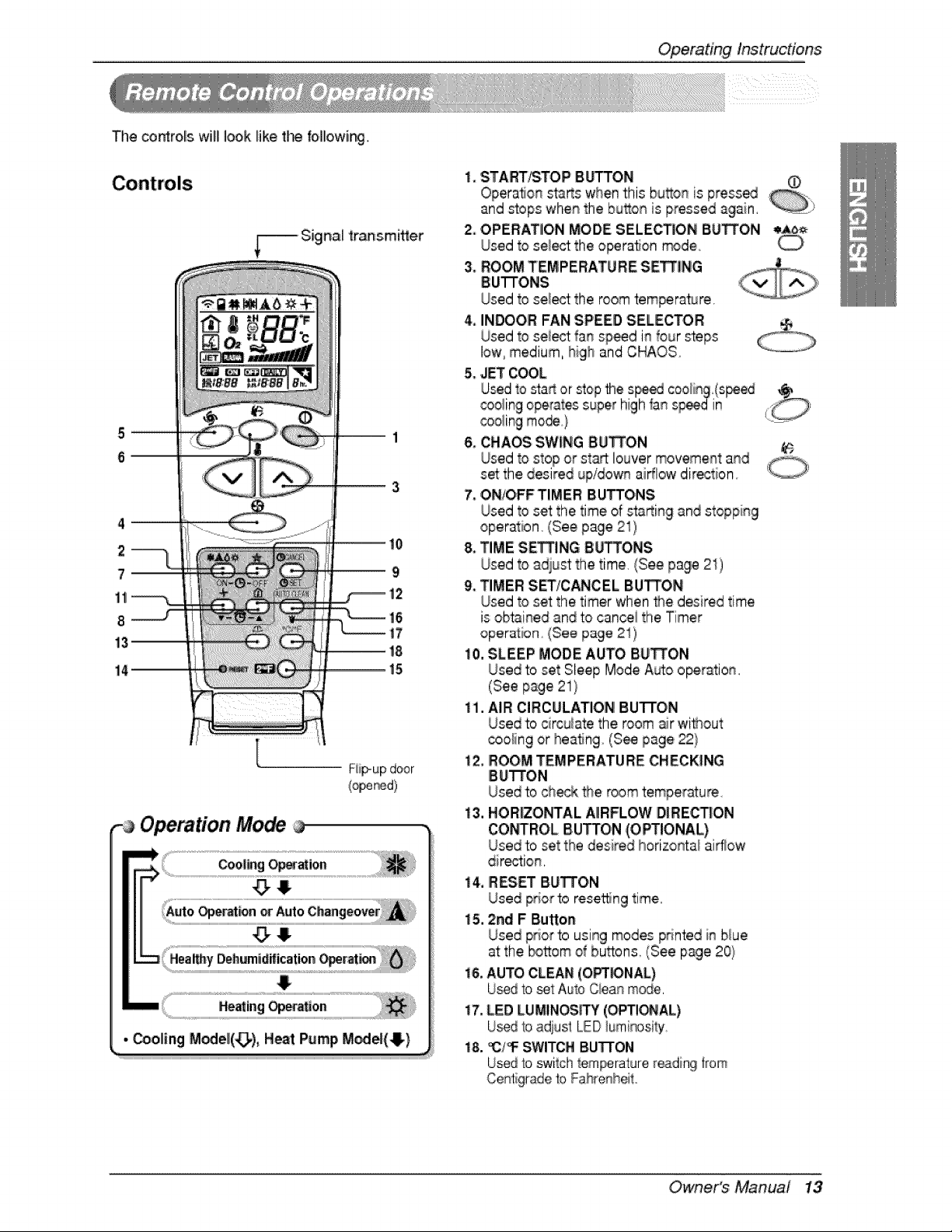
The controlis will look like tim f:o,lllo,wi_g,
2
7_
[
Operate;on
Operating lnstrucdons
i. START/STOP Bb_ON O
Opera, on starts when this bud,onis press_
and stops when the bu_on is pressed again, :_
2. OPERATION MODE SELECTION B.U_ON _6_
Used to select the operaSon _de.
3, ROOM TEMPERATURE SETTING
BU'I-FONS
Used to select:the room temperature.
4, INDOOR FAN SPEED SELECTOR
Used to select fan sp_d in four steps
low, medium, high and CHAOS
5. JET COOL
U_d to staf_or stopthe s_ed coo_ing,(s_ed @
_oiing operatessuper high _anspeedin ,_:_.
cooiing mo_}
6oCHAOS SW_NG8U_ON e
7. ON/O,FFTIMER BU_ONS
Used to set the time of starting and stopping
,operation (See page 21)
8oTIME SE_ING 8lJ_ONS
Used to adiust the time, (See page 21)
9, TIMER SET!CANCEL BUTTON
Used to set the timer when t_e desired time
is obtained and to cancei the Timer
operation. (See page 21)
10, SLEEP MODE AUTO BU_ON
Used to set Sleep Mode Auto o_ration
(See page 21}
il. AIR CIRCULATION! BU'FI'O,N
Used to circuiate the room air without
cooling or heaSng (See page 22}
12, ROOM TEMPERATURE CHECKING
IBU_ON
Used to ct_k _e room temper_ure
i3. HOR|ZONTAL A|RFLOW DiRE,CTION
CON%ROL BUTTON (OPTIONAL)
Used to set the desired horizontal aid_ow
dir_i,on,
14, RESET BUTTON
Used prior to resetting time,
i 5.2ri!! F Button
Used prior to using modes printed in blue
at the _ttom d bu_ons, (See page 20}
i& AUTO CLEAN (OPT_NAL)
Usedto _t Auto Ciean mode.
i7. LED LUMINOS_Y (OPTIONAL)
U_d b adiusf LEDlumir_osi_y.
18, _/'_ SWITCHB.UTFON
U_d to swilch tem_rature readingfrom
Centigradeb Fahrenheit°
Owne,r's Manual 13
Operating lnstruc#o, ns
; Cooling o ration
÷
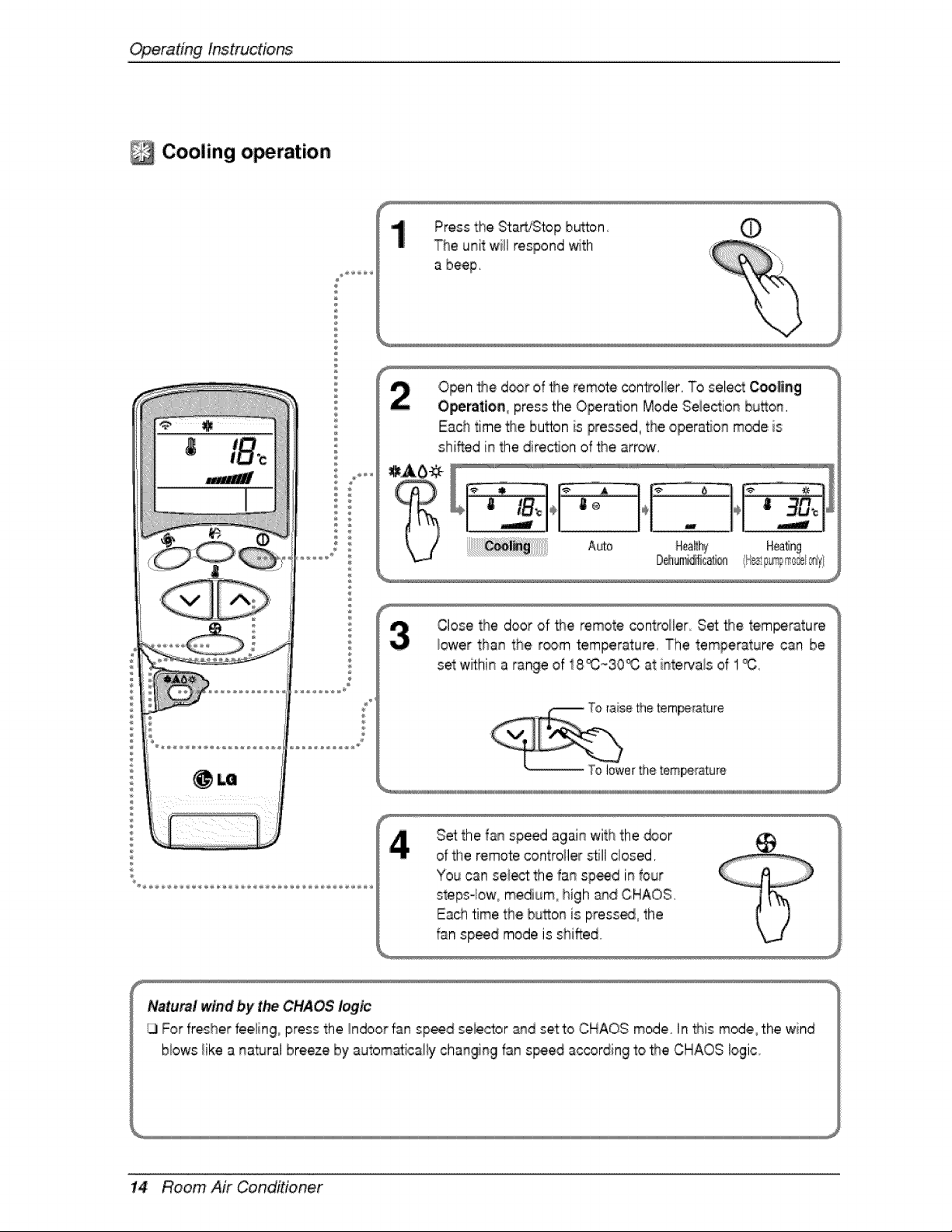
Press the Sta_fStop bu_on O
The unit will respond with
a beep.
Open _e d_r of _e remote con2oller. TOselect Coo|ing
Operation, press the Operation Mode Seiection button.
Each time the bu_on is pressed, the opera, on mode is
shifted in the direc*_onof _e arrow.
Close the door of _e remote controller Set _e tem_rature
iower than the r_m temperature. The temperature can be
set withina t:ange of: 18_,-30_0 at intervals of 1_:.
Set the fan speed again with the _or
of the remote controller s#li closed.
You can se_ the fan sp,_d in four
steps°low, medium° high and CHAOS.
Each time the button is press_ the
fan speed mode is shifted
_;_tur_t w_r_idby the CHAOS logic
_1For fresher fee_ing press the _ndoorfan speed seiector _id setto CHAOS mode In tt_is mode the wind
blows iike a natural breeze by automat:icaliychanging fan s_ed ac_rdi:ng to _e CHAOS logic.
14 Room Air Conditioner
OperatingInstructions
Auto operation (Cooling model only)
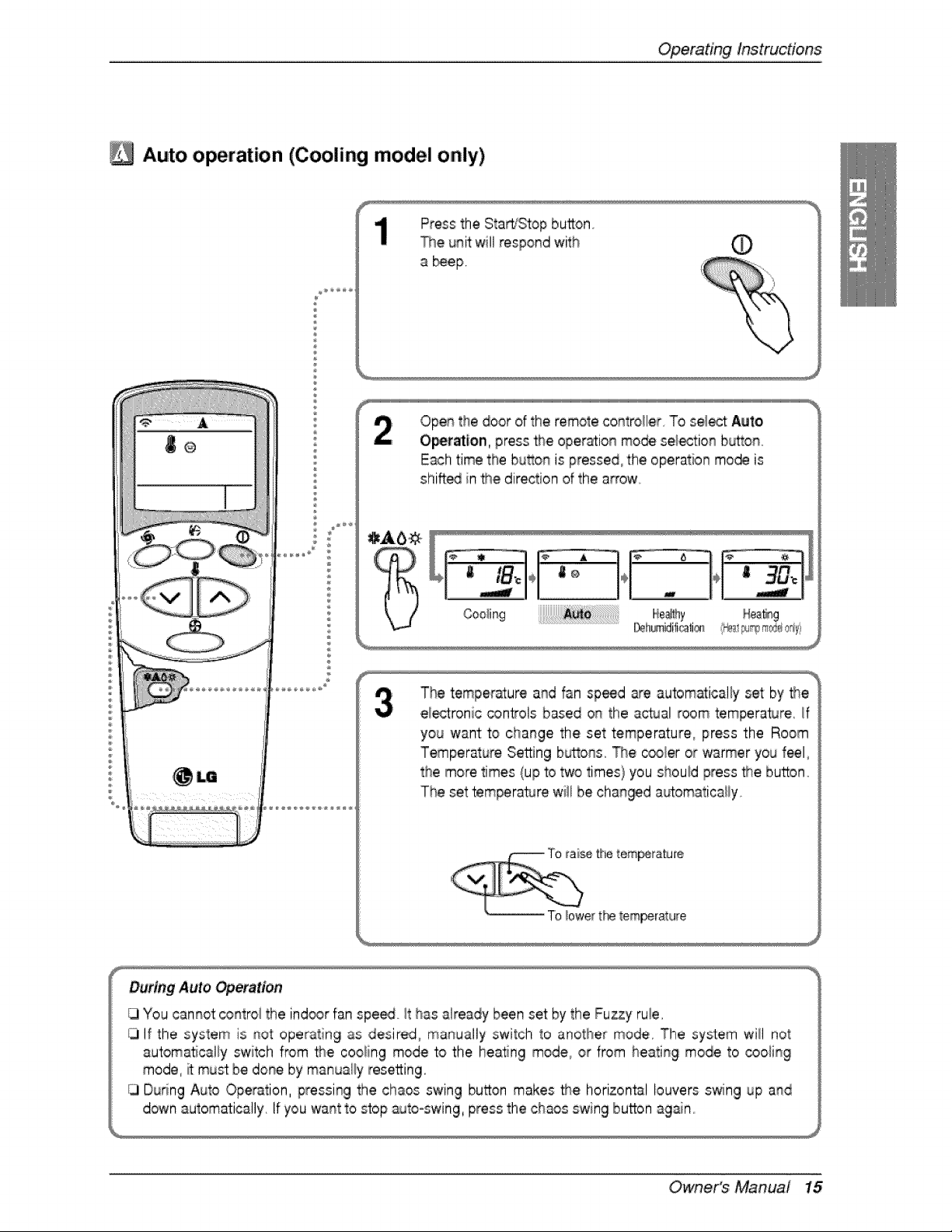
Press the Sta_sStop button,
The unit will respond with
a _ep,
J_
Open the door of the remote co_troHier To se!_ Auto
Ope_ati,on, press the opera_ionmode se_tion b_ono
Each time the button is pressed, the operation mode is
shifted in _e direction of the arrow
Hea_,g
The temperature and fan sp_d are automatically set by the
ei_ronic controls based on the actual room temperature, if
you want to change the set temperature, press the Room
Temperat_ureSetting buttons, The c_ler or w_rmer you feel,
the more times (up to two times) you should press #_e,button°
The set temperature wi!l be c:han@d automa%aiiy
During Auto _eration
iTjYou cannot control the ind_r fan spe_ it has already been set by the Fuzzy ruie,
If the system is _ot operating as desired, mar_ua!ly switch to another mode, The system will not
automa_caHy switch from the coo_ing mode to the heatng mode, or from heating mode to cooling
mode, it must be doi_eby manually resetting,
Dudng Auto Operation, pressing the chaos swing button makes the horizontal louvers swing up a_d
ddwn automatically, If you wa_t to stop _r_to-swing,press the chaos swing button again
Owne,r's Manual 15
Operatinglnstruc#o,ns
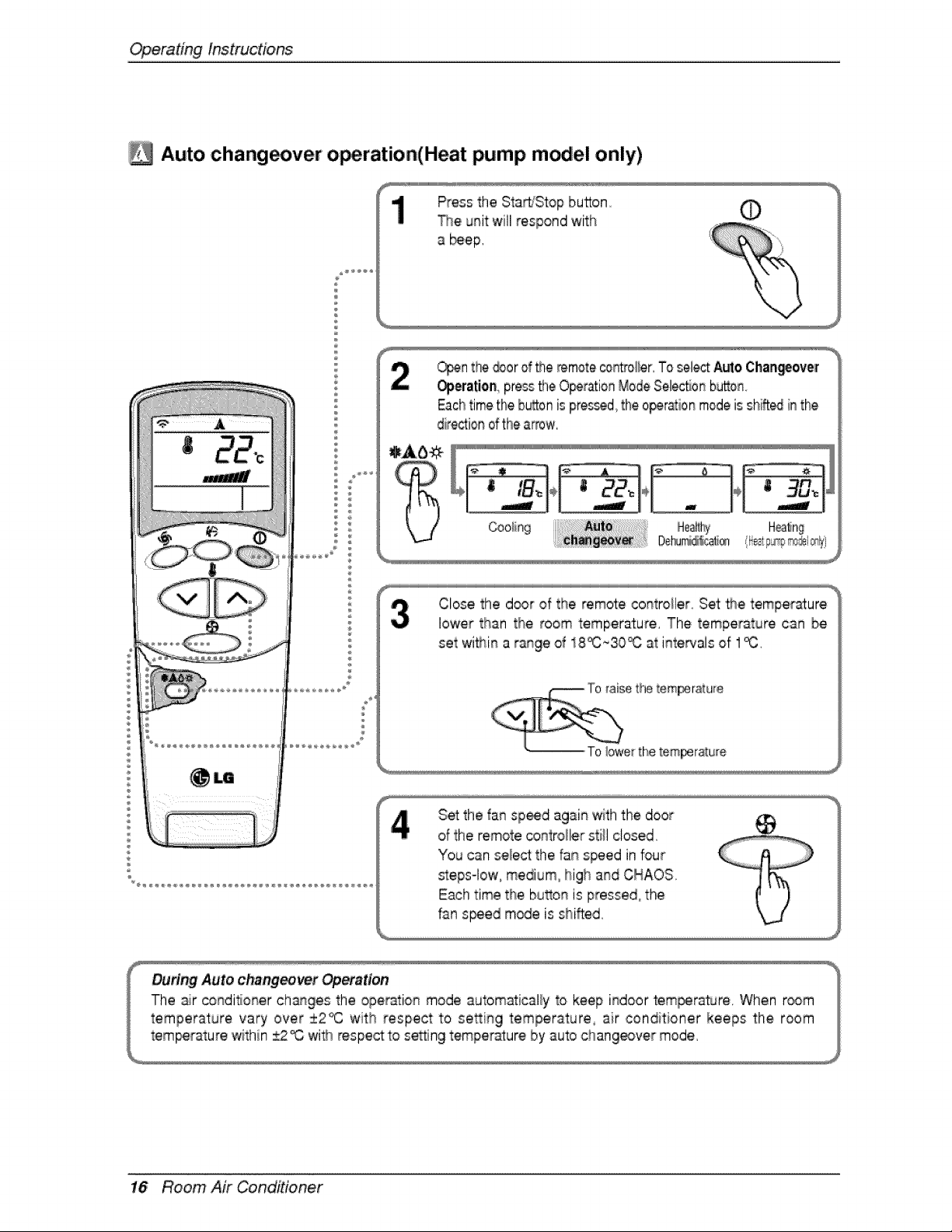
Auto chang_ver o_ration,(Heat pump m_,el only)
®
a
Press the Starh'Stop button
The unit will respond with
a _ep,
©
_n the _or of the _mote controller,To selectAutoC:han_ovef
Operatie_ pressfile O_ration ModeSelesSo_button.
Eachtimethe b_on is pres_d, the operationmodeis shTff_i_the
dire_ionofthe arrow,
Close the door of the remote controller. Set _e temperature
lower than the room temperature, The temperature can be
set wi_in a range of 18_,_30_ at intewals of 1_,
Set the fan spied again '_th the door
of:the remote controller still closed,
Yo_ can select the fan speed in four
_eps-lowi, medium, high and CHAOS
Each time the bu_on is pressed° the
fan s_ed m_e is shifted,
16 Room Air Conditioner
OperatingInstructions
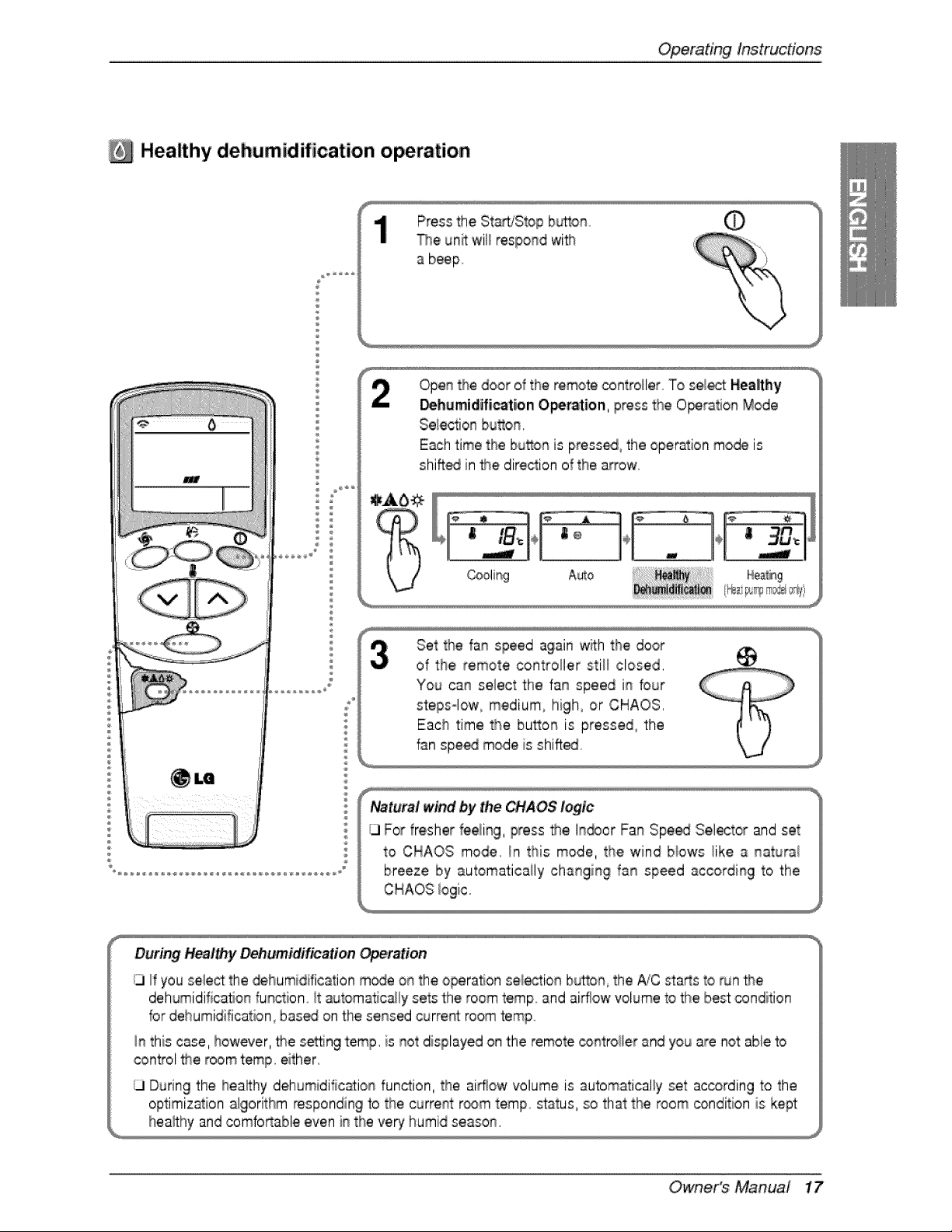
Healthy dehumidification ,operation
®
Press the Start/Stop bu_on.
The unit wil_respo#d wi_
a beep
Ope# the door of the remote controller To sie/e_ Healthy
_hemidifi_tion ,Operation, press the O_ration Mode
Selectio_qbutton.
Each time tlhe bu_on is press_, the operation mode is
shiff_ in the direclion of the a_'ow
Set the fa# speed again w_ththe door
of 'the, remote controller still closed.
Yo,_ ca_ select the fa_ speed i_ four
steps-low, medium, high, or CHAOS.
Each time the bu_on is pressed, the
f_n spe_ mode is shiff_
Natural wind by the CHAOS logic
ILlFor fresher feeli#g, press the h_or Fan Spe,_ Selector and set
to CHAOS mode. in this mode, the wind biows !ike a _aturai
breeze by automatically changing fa_ speed according to the
During Healthy Dehumidification Operation
i3 If you select the _humidification m_e o_ the operation se_i_tio_ b_tto#_the _C sta_s to run _e
dehumidificatio# function _tautomaticaily sets the room temp and airflow voDme to #_ebest condition
for dehumidification, bas_ ,onthe sensed current room temp
In this case, however, the se_ng temp. is _ot displayed on the remote _#trol_er and you are not:able to
control the room t:emp,either.
ILlDuring the healthy dehumidific_io_ function, the airflow volume is automatically set according to the
optimization algorithm responding b the current r_m temp status, so that the room condition is kept
Owne,r's Manuai 17
Operatinglnstruc#ons
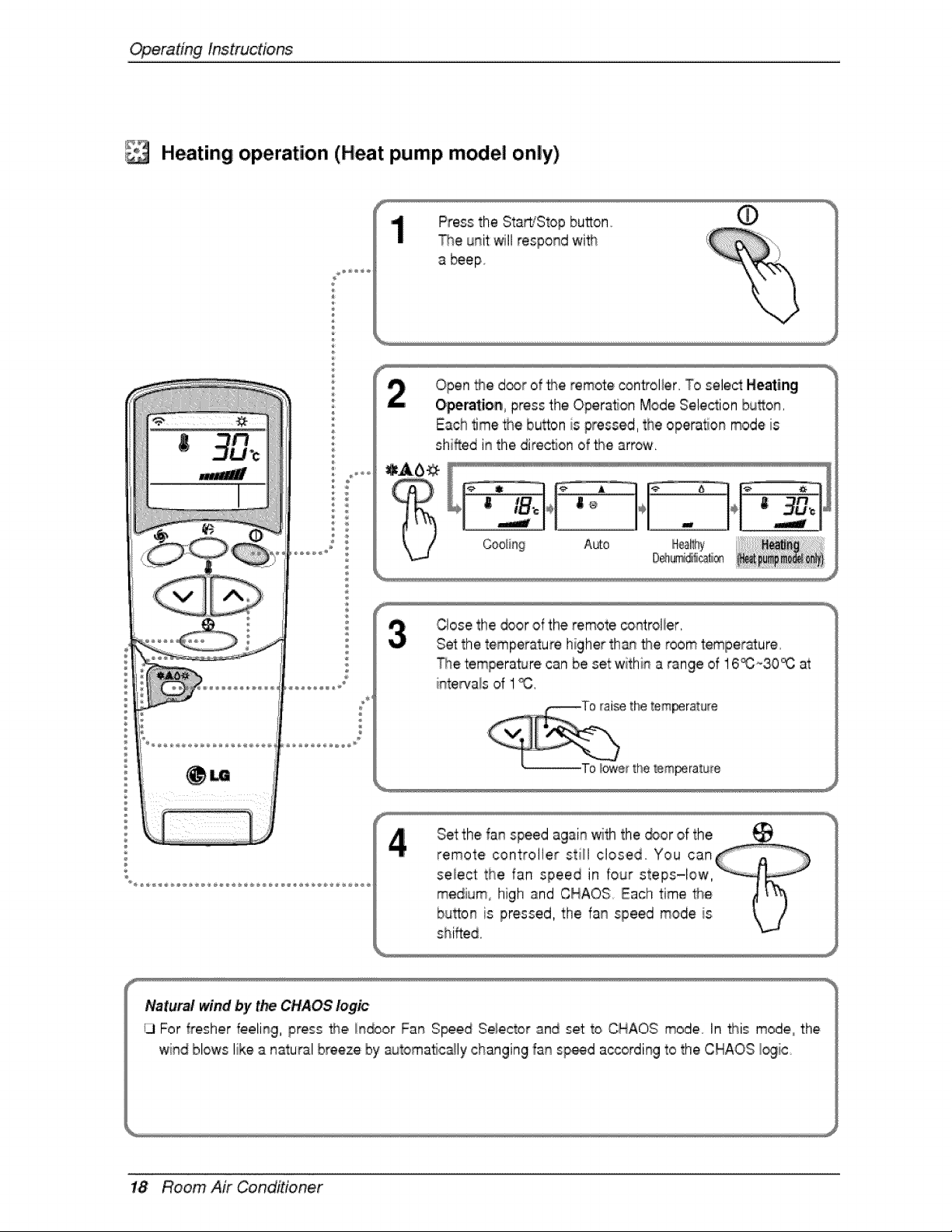
Heating operation (Heat pump model only)
Press the Starb_Stopbu_on
The unit willrespond wi'_
a _epo
f
Open #_ed_r of _:e remote controller, To select Heating
O,perat:ion press the Operalon Mode Selection bu_on,
Each time _e button is pressed, the opera_or_mode is
shifted in the dire_on of the arrow,
Auto
D@a_cal_®
Close the _or of the remote co_trolier,
S_ the temperature higher th_ _e room 'temperature
_e temperature can be set withi_ a range of 16_~30_ at
inte_a!s of ! %
shifted,
Natural wind by the CHAOS logic
13For fresher feeling, press #_e,indoor FatqS_ed Seleic_orand set t,o CHAOS mode,, In t_is mode° the
wind blows like a natural breeze by automa'flc_ly changing fa_ sp,_d a_ordi_g to the CHAOS _ic
1,8 Room Air Conditioner
OperatingInstructions
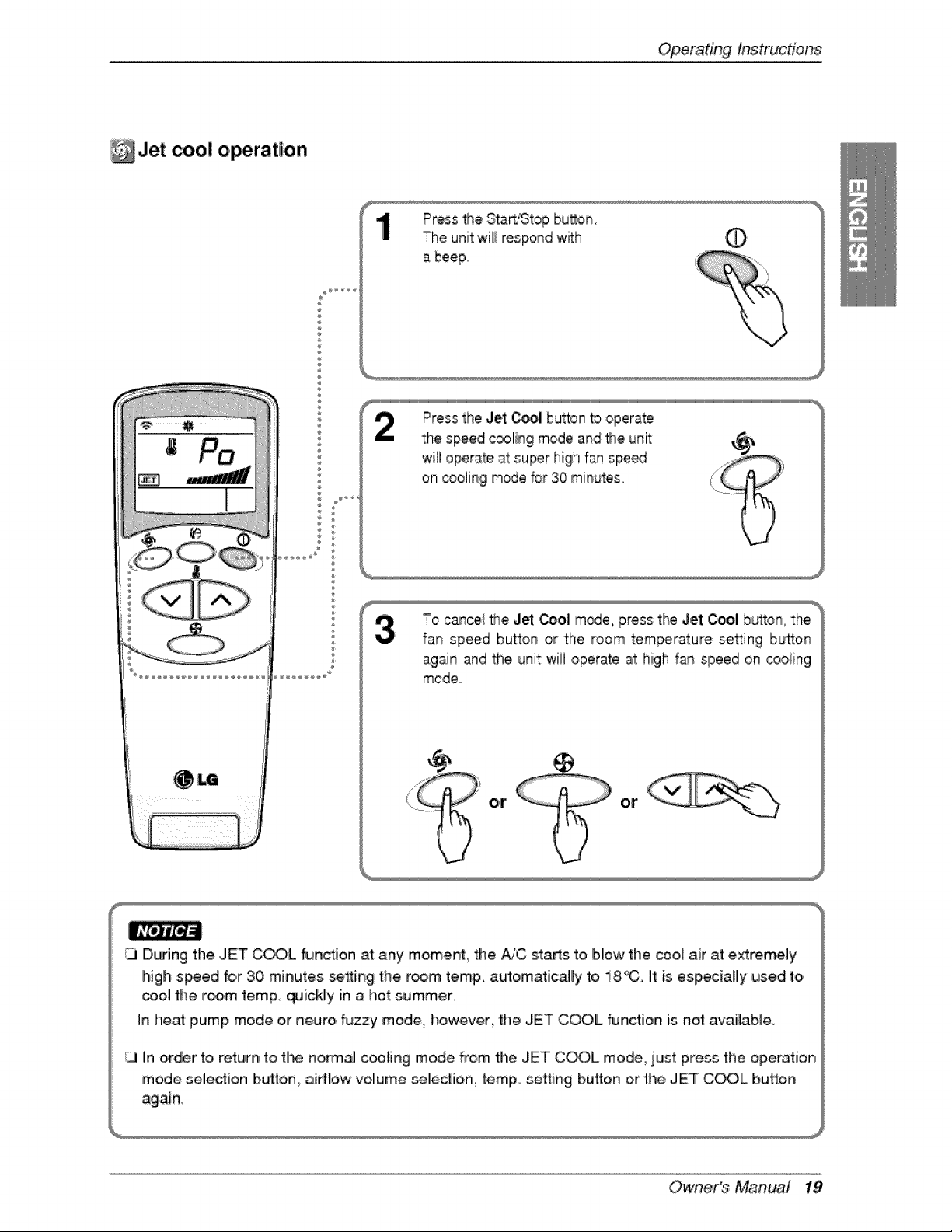
Jet cool o, ration
®
Press the Start/Stop bu_on.
The unit will respond w_:h (!)
a beep
Press the Jet C_I button to operate
the speed cooling mode and _e unit
will operate at super hig!hfan spe_
on _olin 9 m,_e for 30 minutes,
To cancel _e J_ _o1 m_e, press the Jet Cool button, the
fan speed button or the room temperature setting button
again and the unit wi!i operate at high fan speed on cooling
mode
4)
or or
)
CI During the JET C_,L function at any momenL the AiC sta_s to blow the cool air at extrem.ely
high speed for 30 minutes setting the r_m temp. automatically to 18°C. ff is especially used to
cool the room temp. quickly in a hot summer.
In heat pump mode o,r neuro, fuzzy mode, how.ever_ the JET COOL function is not available.
13 in order to, return to the no,rmal cooling mode from the JET C_L mo,_, just press the operation
mode seledion b,utto,n, aidEow volume _lle,¢tion_ temp. setting button or the JET COOL button
Owne,r's Manual 19
Operatinglnstruc#o,ns
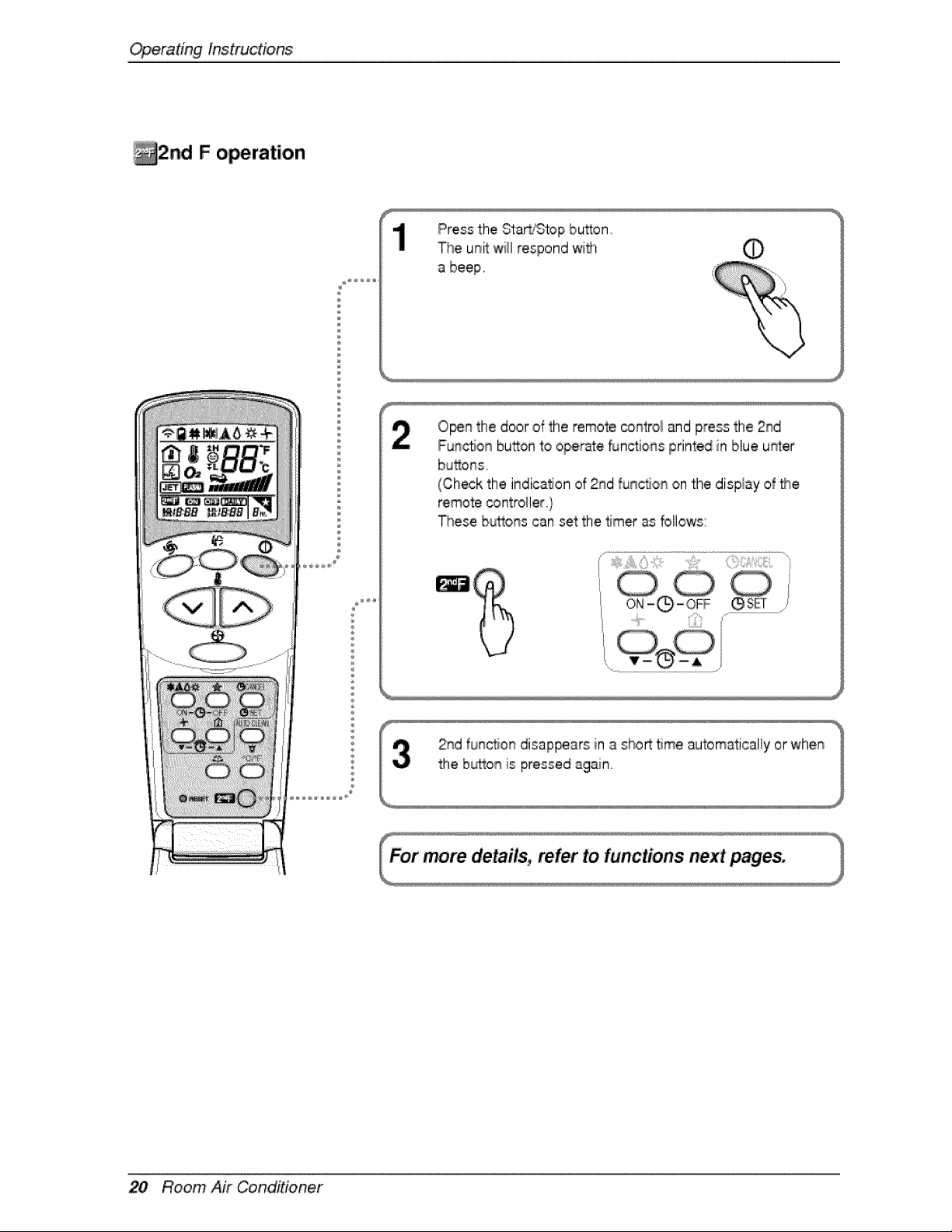
_i2nd F o,_ration
%
O_n the door of the remote contro_and press the 2rid
Fun_o_ button to operate _n,ctions printed in blue u_er
bu_ons
(Check the indication of 2rid func_on on the display of the
These b_ons can set the timer as bllows:
_:ii!!!!:i;:_¸_il;:_ii!_l'iiiil;iiii!!i!__/
,@s_
20 Room Air Conditioner
Operatinginstructions
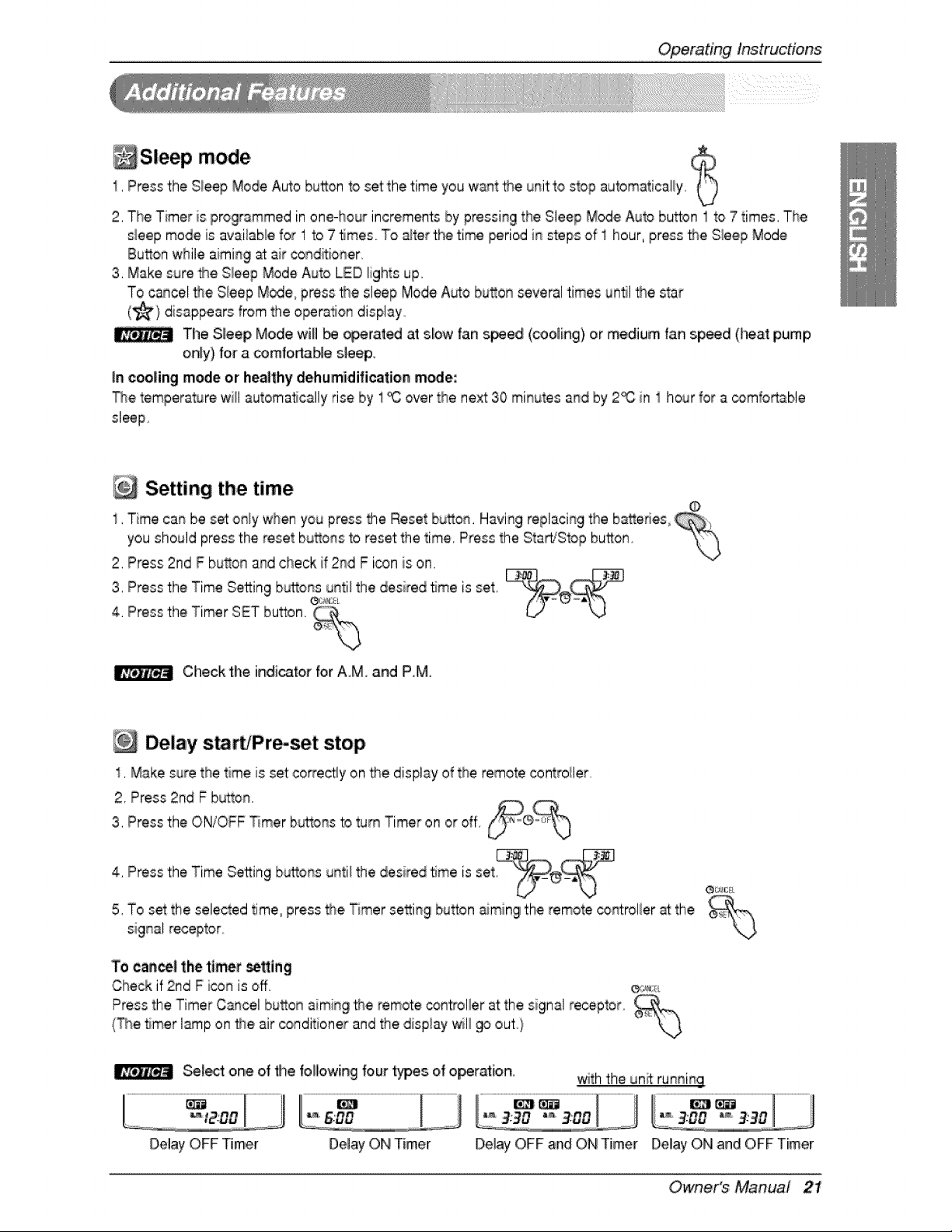
_Sleep mode $1, Pressthe Sieep Mode Auto button to set the time you want the unit to stop automatically
2, The Timer is progrsmmed in one-hour increments by pressing the Sleep Mode Auto button I to 7 times, The
sleep mode is availaNe for 1 to 7 5rues TOalter the time period in steps of 1 hour, press _e S_eepMode
Button while aiming at air conditioner,
3, Make sure _e Sleep Mode Auto LED lights up,
To cancel the Sleep Modie,press _e sleep Mode A_o button several times u@l lse star
(_'} disappears from the operation display
The Sleep Mode will be _rated at sbw fan s_ied (cooling} or medium fan speed (_a_ pump
o,niy) for a comfo_Me sleep,
in cooling m_e or healthy dehumidification mode:
Thetempera_re will automatically rise by 1_ over the next 30 minutes and by 2_ in 1 hour for a comfortable
sleep
Setting the time
1, Time can be set o_ly when you p_yss the Reset button, Having replacing the batteries,
you should press the reset bu_ons to reset the time, Press the Sta_Stop button "_
2, Press 2nd F button and check if 2rid F icon is on,
3, Press thie Time Setting b_tonse_,x_unti_the desired 5me is set
4, Press the Timer SET button, _°_,
Check the indicator for AM, and P,M
Delay s_rb'Pr_set stop
1, Make sure the time is set co_ectly on the display of the remote controller,,
2, Press 2nd F b_on
3, Press the ON/OFF _mer b_ons to turn Timer on or off.
4, Press the Time Se_ing b_ons until the desired 5me is set
5, To set the selected time press the Timer se_ing bu_on aiming the remote _ntroller _ the
signa! receptor,,
To ean_l the timer _tting
Check if 2rid F i_n is off _,,
Press the Timer Cancel bu_on aming _e remote controller at the signal receptor
(The timer I_p on _e, air _nditioner and the display will go out)
Se_t one of file following four type,s of operation, with the unit running
l......................................................................................................................... .oo,,Oo,
Delay OFF Timer Delay ON Timer Delay OFF and ON Timer Delay ON and OFF Timer
Owner's Manual 2!
OperatingInstructiens
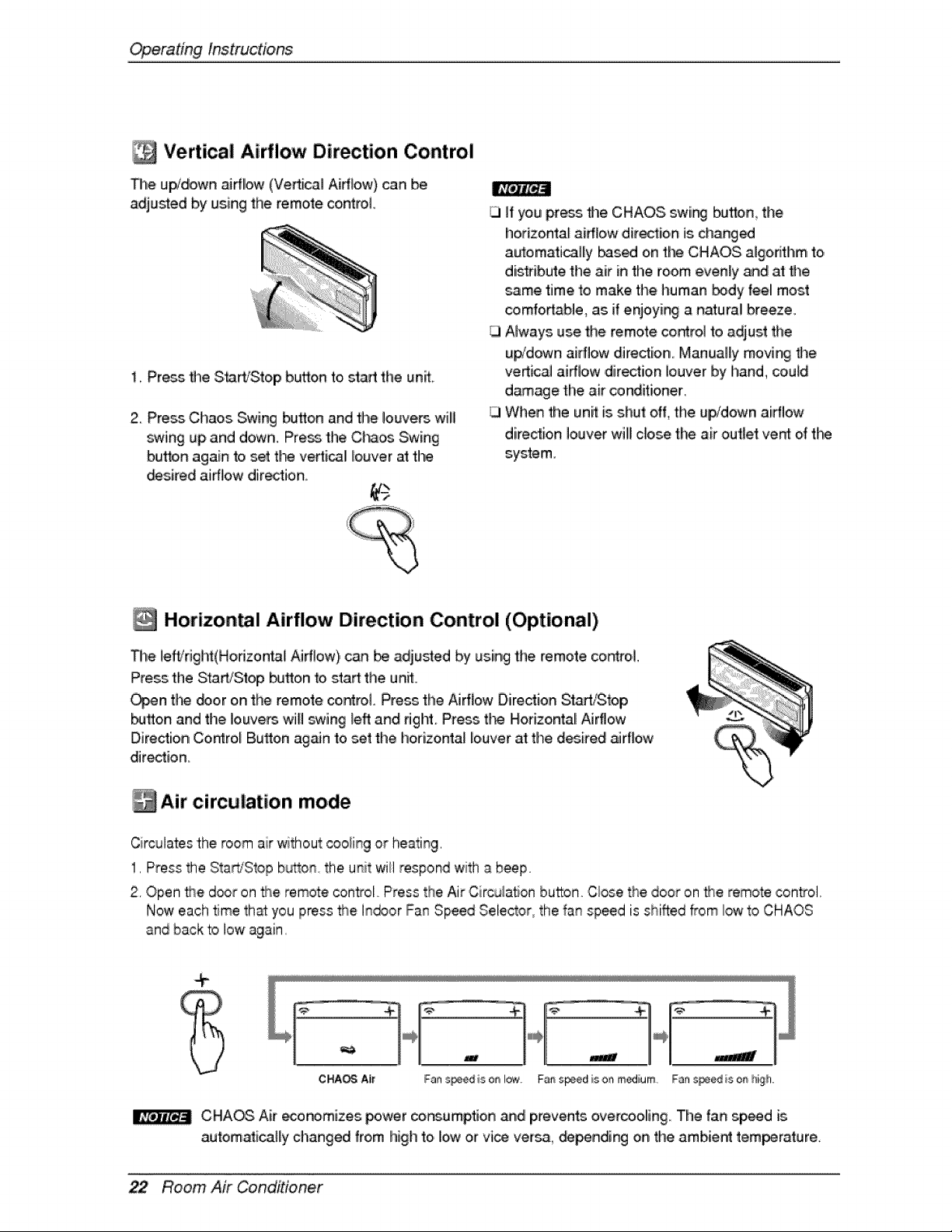
Vertical Airflow Direction Control
The up/down airflow (Vertical Airflow) can be
adjusled by using the remote control.
1, Press file Start,'Stop button to,start the unit
2. Press Chaos Swing button and the louvers will
swing up and down. Press the Ci'_os Swing
button again to set tl_ vertical Io,uver at the
_sired aidlow direction,
]f you press the CHAOS swir_ button, the
horizontal aidlow direction is chang_
automaticailiy _s_ on the CHAOS aigo,dthm to
distribute the air in the room evenly a_d at time
same time to make the human _dy feel most
comfortable, as if enjoyir_ a natural breeze.
Always use the remote co.tel to adjust the
u_'down airflow dire_ion Manually movi_ time
vertical airflow ,dir_tion louverby hand, couM
d_age the air conditioner,
When the unit is shut off, the upJdown airflow
diredio, n louverwill c[oise the ak outlet vent of tl_
system.
Horizon l Airflow Direction Control (Optional)
The left/fight(Horizontal Airflow), can be adjured by using the remote, co_oi_
Press tile Start/Stop bu'_on to start the unit°
Oz'_n tl_ _or on the remote control. Press the Airflow Direction SlartiSbp
button and the louvers 'will swing b_ and right Press the Horizontal Airflow
Direction Co_ro,_ Bu_on ag_n to set the horizonta_ louver at timed_ired _rflow
dir_tion_
Air circulation mode
Circulates the room air without cooiing or hea_ing,
1, Press the Sta@'Stopb_on the unit wii] respond with a beef
2, Open the d_r on the remote control Press the Air Circu!a_on button Cbse the door on the remote control,
Now each time that you press the In_or Fan Speed Selector_the fan speed is shifted from low to CHAOS
and back to low again
CHIAOG Air _nomizes _'wer cor6umption and prevents overcoo,ling. The fan sp_d is
autom_ica]ly changed from high to low or vi_ versa, _nding on the ambient tem_rature.
Room Air Conditioner
OperatingInstructions
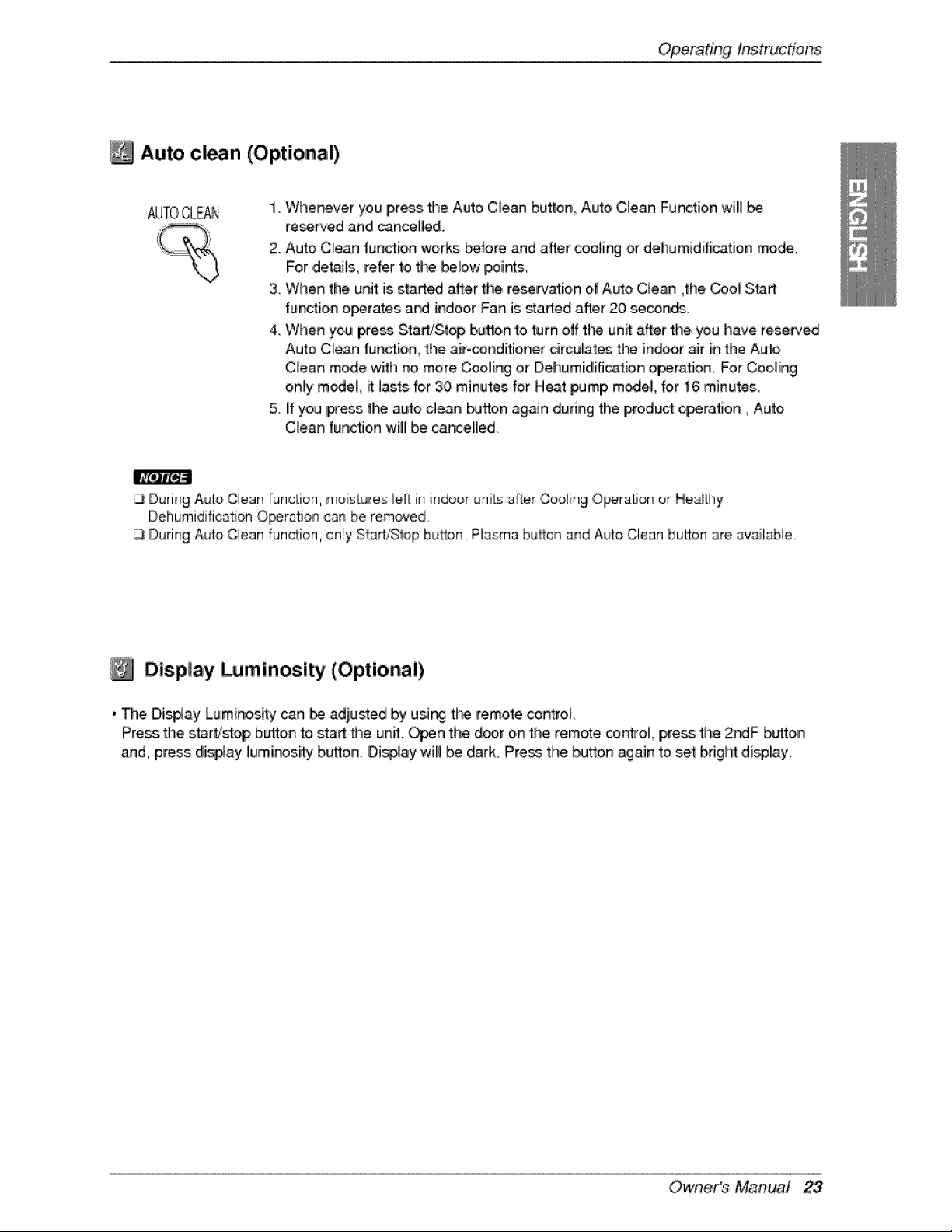
Auto clean (Optional)
AUTOCLEAN
1, Whe_ver you pros _e Auto,Clean button_ Auto Clean Function will be
reset'red and cancelled.
2. Auto Clean function works before and after coo_ing or dehumidification mode.
For ,details, refer to t_ beiow _in_s
& When the unit is stad_ after the re_n0_ioin o,fAuto Clean ,the _ol S_rt
fundion operates a_ indo.o,rFan is started after 20 second..
4. When you press StaWSt_ button 'to turn off t|_ unit after the you have reserved
Auto Cllean function, the air-_nditioner drculates t_ indoor _r in the Auto
C_ean mode w_:h no more Cooling or Dehumidification operation. For COOiliing
only m_eL it lasts lo,r 30 minutes for Heat _mp model, for 16 minute_.
5. if you I_eSs the auto clean button again during the product operation, Auto
Clean function will be,ca_elled.
|_vf.eJt[e].i
During Auto Clean function, moistures i.eftin indoor units _ffer Cooliin90peraSon or H.eaJtlly
Dehumidification Opera, on can be removed
13During A_o Clean function, only Start/Stop bud,on,Plasma bu_on and A_o Clean button are available
Display Luminosity (Optional)
, The Dij_ay Luminos_y can _ adjusted by using t_ remote control
Press.the s_rt/_o£, bi_o,nto stad 8_e unit Open the d_r on the remo,te con#o_, press the 2_F button,
and, press di_ay luminos.i_ b._on. Dismay wi!l be da.rk. Press the bu_on again to set bright display
Owne,r's Manual 23
Operating lnstruc#ons
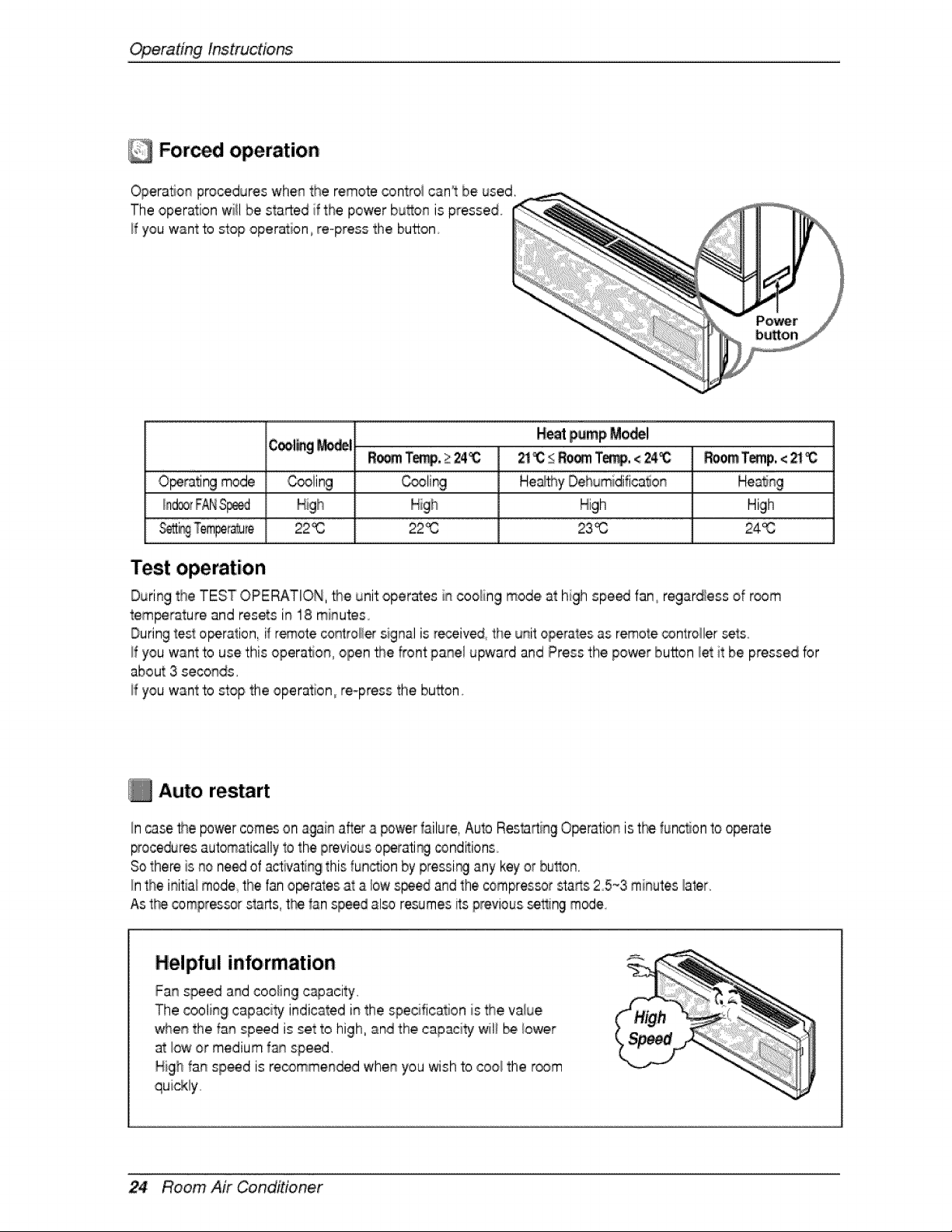
For d operation
Operation procedures whenthe remote controi can't be used.
'The operation will be started if the power bu_on is pressed
_fyou want to stop operation,,re-press the button
C_l_g _,_1
2_i_ _RO_ Te_, < 24i_ ROOmJTernp,< _
O_rating mode _ling _ling He_y Dehumidifica_on
Higih High
22_ 22% 23_ 24_
Test operation
During the TEST OPERATION, _i8 [_i=toperates in cooling mode at high spe_ fan regardless of r_m
temperature and resets in 18 minutes
During_estopera,ion, if _ote controH_ signal isreceived, the unit operates as remo_e_ntroller sets°
If you want to use this operat_ot%open _e front pane! upward and Press the power button _etit be pressed br
about 3 seconds.
If you want to stop the operation re-press the button.
Auto restart
In case the _wer comeson againafter a power failure, Auio Res_rti% O_ration is t_ functionto o_rate
_ocedures automaticallyto the previouso_[ati_ conditions.
Sothere is no need of activating this run.ion by pressi_ any keyor button.
Inthe initial mode the fan o_rates at a bw s_ed and the compres_r sta_s 25_3 minutes laler,
As the compressorstarts t_ lan speed al_ resumes_tsprevious set'_ngm_e
Helpful information
Fanspeed and cooling capacity.
The cooling capaci_ indicated in the specification is the va_ue
_e,n the fan sp_d is set to high, _nd the capacity wil__ _ower
at low or medium f_ speed,
High fa_ sp_d is recomme#_d whee you wish to coo_the r_m
24 Room Air Conditioner
MaintenanceandService
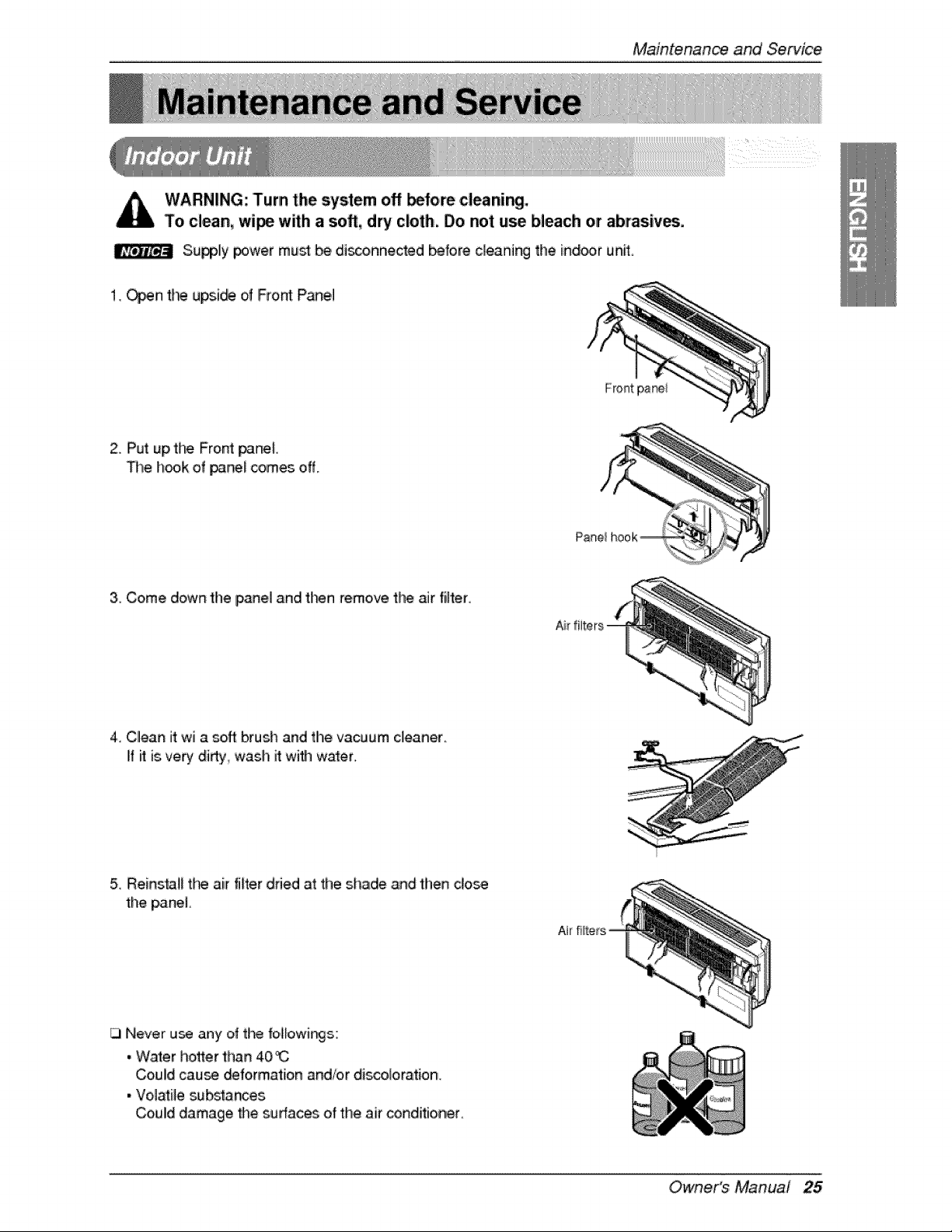
WARNING: Turn the system off before cleaning.
To clean, wi_ wffh a soft, dry cloth. Do not use bleach or abrasives.
Su_ly power must be di_onnected before cleaning the ind_r unff.
1__n t_ upside of Front: Panel
Front pa_i
2, Put up,the Front panel
The i_k of _nef comes off,
3. Come down the panel and tt_n remove the air filter_
4. Cllean it wi a soft brush and the vacuum cleaner
if ff is,very di_y wash it with water.
5_R:einsta_lthe air filter dned at the shade ,andthen dose
the p_neL
Never u_ any of tl'_ b,i_owir_s::
• Waler ho_er than 40_
Could cau_ _formation and/or discoioration,
• Vo]_Be substances
Coulld damage the sufaoes of the air conditioner
Owne,r's Manual 25
Maintenanceand Servi_
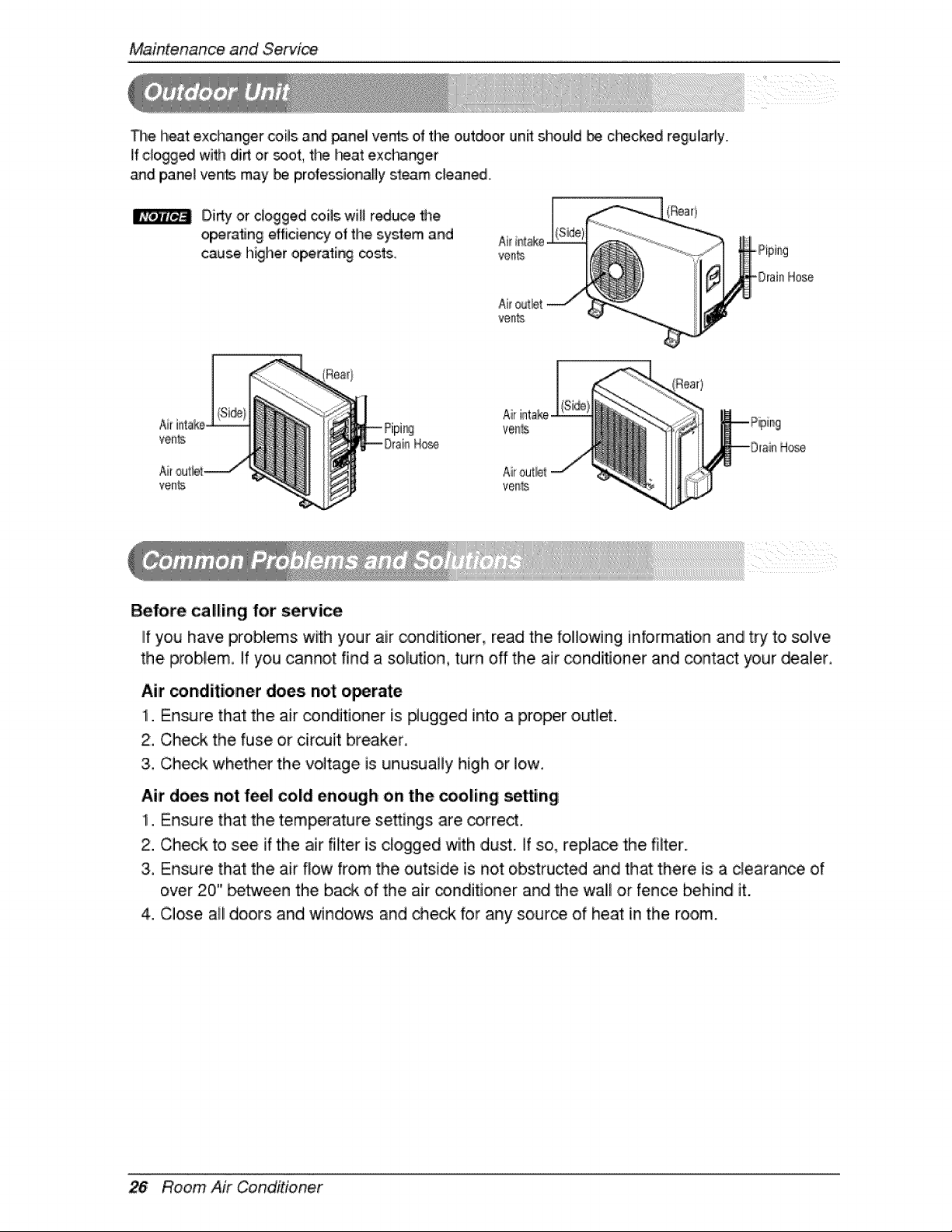
_l,e heat exc_'_nger coils, and _ne,! verbs ef the outdoor un_ shoul,d be ct_cked regulaHy.
if ,cUo,gged with dirt or _ot tl_ !_a_ exc_nger
_d pane_vents maybe pro,fessionaHysteam cleaned.
Dirty or dogged coils will reduce #_e
operating efficiency of the system and
cause I'_igheroperati_ _sts,
-Drain Hose
Air intake°
venlts
Hose
ve_ls
Hose
Before calling for service
IIf you have problems w_h your air _nditiolner, read the following information and try to so,lve
the problem. If you cannot find a sol,ion, turn off the air conditioner and _ntact your dealer.
Air _ndiitioner does not o_rate
1. Ensure that the air conditioner is #ugged into a proper out_et.
2, Check the fuse or circuit breaker,
3, Check whether the voltage is unusually high or !o,w,
Air does not feel cold enough on the _oling se_ing
1. Ensure that the temperature se_ings are correct.
2. Check to see if the air filter is clogged with dust. if so, replace the filter,
3. Ensure that the air flow from the outside is not obstructed and that there is a clearance of
over 20" between the back of the air _ndiitioner and the wall or fence _hind it.
4. Close all doors and windows and check for any sour_ of heat in the room.
Room Air Conditioner
MaintenanceandService
_ore calling for service, please review the following Ilist of common problems and
_lutionis.
Me air conditio_r is operati_ normally when:
• You hear a pinging noise. This is caus_ by water being picked up by the fan on raiiny days
or in highly humid conditions. This feature is designed to help, remove moisture in the, air
and improve coo]ilng efficiency.
• You hear the thermostat click. This is: caused by the comFessor cycle sta_ing and
stopping.
• You see water dripping from the rear of the unit. Water may be collected in the base pan in
highly humid _nditions: or on rainy days. This: water overflows and drips from the rear of
the unit.
• You hear the fan running while the compressor is silent. This is a normal operational
feature.
Owne.r's Manual 27
Maintenanceand Servi_
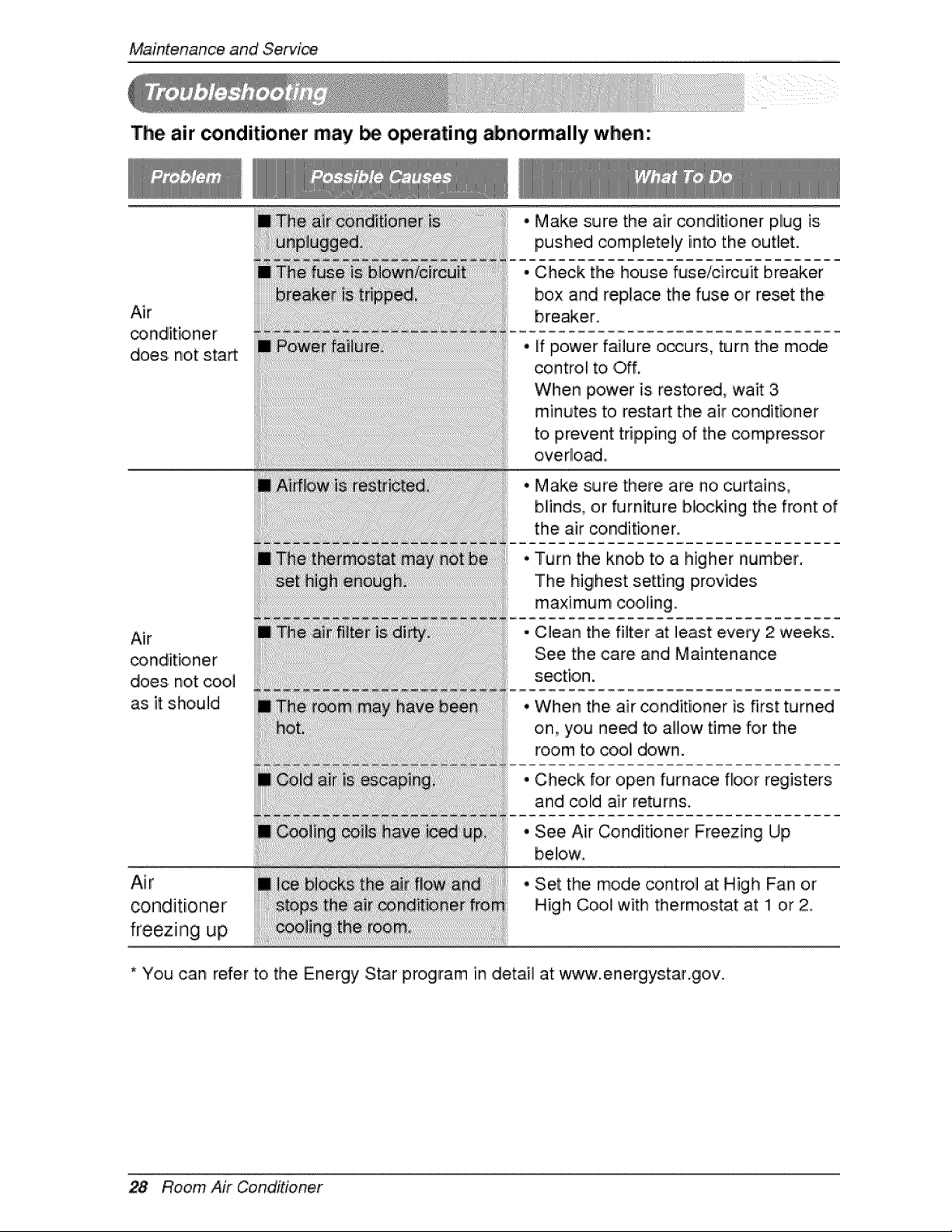
The air _nditioner may be operating abnormally when:
Air
does not start
Air
_ndit:ioner
does not cool
as it should
Air
conditioner
freezing up
• Make sure the air conditioner plug is
pushed completely into the outlet.
° Check the house fuse/circuit breaker
box and rep,iace the fuse or reset the
breaker.
if power failure o_urs, turn the mode
controt to Off.
When power is restored, wait 3
minutes to restart the air conditioner
to prevent tripping of the compressor
overload.
, Make sure there are no curtains,
blinds, or furniture blo,ckin,g the front of
the air conditioner.
Turn the knob to a higher number.
The highest setting provides
maximum cooling.
• Clean the filter at Ileast every 2 weeks.
See the ,care and Maintenance
section.
• When the air conditioner is first turned
on,, you ne_ to aillow time for the
room to cool down.
• Check for open furna_ floor registers
and colld air returns.
o See Air Conditioner Freezing Up
bebw
• Set the mode control at High Fan or
High Cool with thermostat at: !1 or 2
* You can refer to the Energy Star program in detail at w_.energiystar.goiv.
28 Room Air Conditioner

