User Guide fo r the LandAirSea 54

Contents of Box
1 - 54 unit
2 - Rubber waterproof gaskets - (1 pre-installed into device)
1 - On/off Tool
1 - Micro-USB charging cord
1 - Q uick Start Guide (For Activation)
Original (Full) Tracking and Energy Saver Modes
The unit is automatically set on motion based tracking upon arrival. In this mode the unit
will track based on m otion only, and enter a dormant sleep state when stationary. When the unit
is act ivated, and powered on we recommend taking it for a 10 - 15 minute drive to allow it to fully
connect with your account. The unit will begin tracking the movement based on the plan selected
upon activation. In the motion sensing Full/Original tracking mode the unit will enter its sleep
state after 2-3 minutes of motionlessness. During its period of sleep the unit is completely
dormant and will not discharge battery life.
In Energy Saver Mode (ESM), the unit's motion sensor is turned off and the unit is placed
onto a timer instead. This will cause t he unit to not update when it is in motion. The unit will
only wake up at the end of each cycle of time, attempt to register a new update, and then go back
to sleep.
To place the device into an ESM, navigate to the Energy Saver menu in the SilverCloud
mobile application. From this menu you will see the below options.
1. Update location every 30 minutes ( 10 to 15 day battery life)
2. Update location every 1 hour (15 to 30 day battery life)
3. Update location every 2 hours (1 to 1.5 month battery life)
4. Update location every 4 hours (1.5 to 2.5 month battery life)
5. Update location every 6 hours (2 to 3 month battery life)
6. Update location every 12 hours (3 to 4 month battery life)
7. Update location every 24 hours (4 to 6 month battery life)
8. Full or Original Tracking Mode (Your subscription rate)
*Please note the energy saver battery life projections are based on the device beginning
at 100% charged. Sending the energy saver commands WILL NOT force the unit to wake
or connect.
Upon selecting one of these options and sending the command to your unit, the next
update it r egisters the unit will receive the command and shift into the option you have selected.
This means, if your unit is currently in an ESM, it will not receive the command to adjust settings
until the end of the cycle it was set to. (i.e. If the unit is in 24 hour ESM, it will not receive any
new commands until the 24 hour cycle elapses and t he unit wakes up again. If the unit is
in full/original tracking mode it will not enter ESM until it senses motion.)

Update Rates/Subscription
The subscription plans available for the devices will relate to the rate at which the unit will
refresh its location while the device is in motion. This will determine how much detail the unit will
give you in between point A and B of its drive. Depending on the information you are looking to
receive from t he device will determine which plan will be most beneficial for you. The available
plans are listed below.
1. 3-minute updates
2. 1-minute updates
3. 30-second updates
4. 10-second updates
5. 5-second updates
6. 3-second updates
* When on the 5 and 3 second update rates you will notice that the battery will discharge
slightly quicker than on the other plans.
Life of Battery and Charging
(Internal Battery: 3.7V 1500mAh, 3 50mA Max Input Rating: 4.5-5.5V 400mA Max)
In the device's stock Original or Full Tracking Mode, the battery life will depend on the
amount of driving or motion the unit goes through. The battery should last approximately 25
activity hours. It will only use the battery when the device is in motion, and when the device stops
moving it will enter a dormant sleep state. With most average drivers (1 to 2 hours of driving a
day), t he unit should last approximately a week and a half to two weeks.
In the ESM options, the unit does not register with motion so the battery is able to last
much longer. You can find the approximate timeframes for the various energy saver modes in the
above section labeled Original (Full) Tracking and Energy Saver modes.
When charging your device, upon plugging in the unit you will see the red charging light
turn on. This means the device recognizes the charging cord being plugged in, and that it is
actively charging. Once the light turns off, the unit recognizes that it is 100% charged.
*If the device is brought indoors to charge, the unit may not be able to fully establish a
connection to update and show the new battery percentage online. At this point we recommend
ensuring the device is powered up and then take it outside to register a new update. Once the
unit is able to register an update online, you should see it ref lect at 100% battery through t he
SilverCloud mobile application and online portal. NOTE: If the battery drains the unit will
automatically power back on once attached to the charger, and does not need to be manually
turned on.
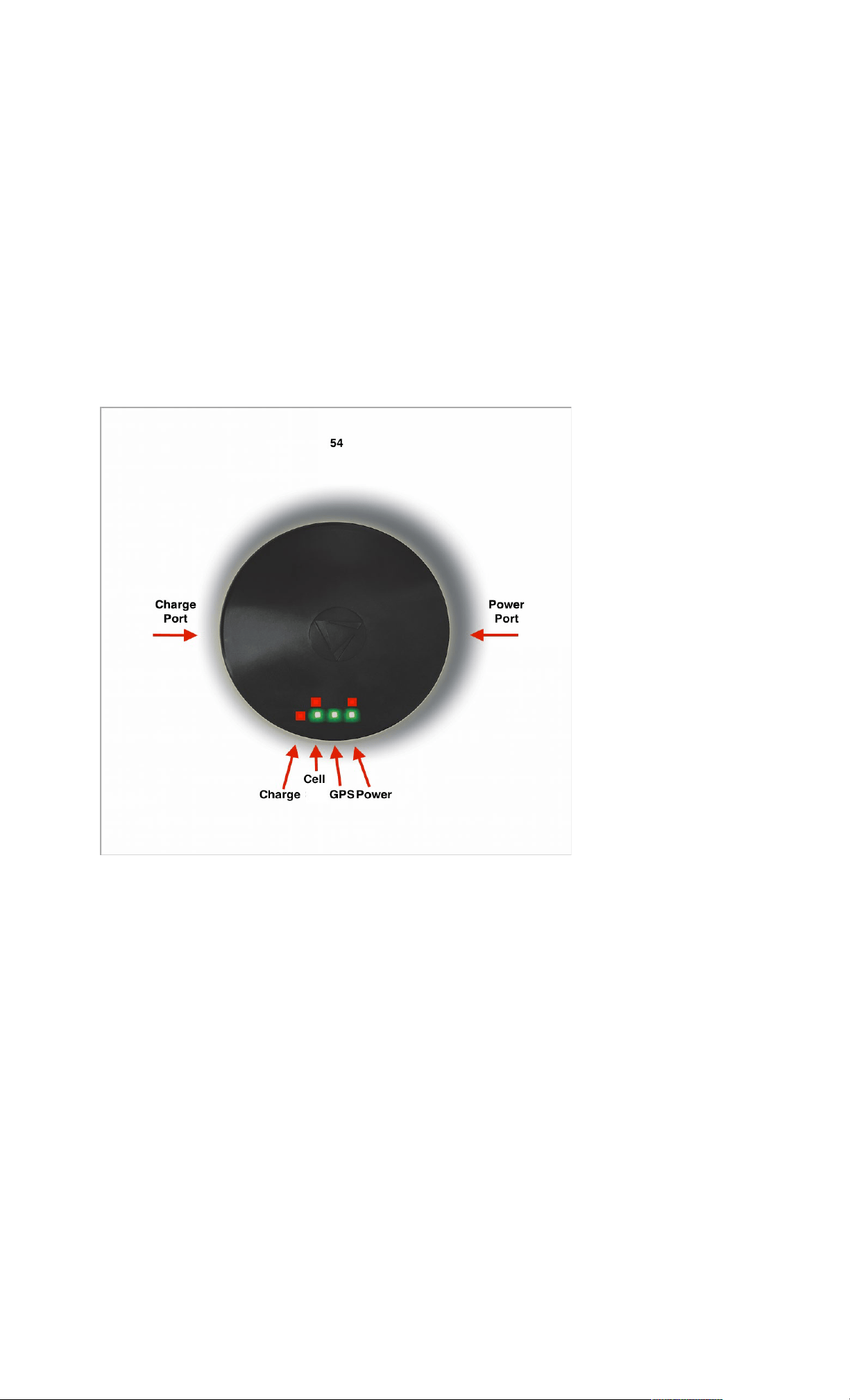
Lights and Their Meanings
There are 6 different lights you can see on the 54 device when you are working with it.
Each light will have its own meaning and can clue you in on what the unit is currently attempting
to do. For the purposes of this explanation we will be describing the lights as you see them when
holding the device with the charging port facing to the left and the on/off port f acing to t he right.
1. Charging - This light will only come on when the unit is plugged into the charging cord. It
will remain on as a solid red light until the device recognizes it is at a full 100% charge.
You will see this light even if the unit's LEDs have been turned off.
2. Cellular (Red) - This light will intermittently come on if the device is not connected to
cellular signal.
3. Cellular (Green) - This light will flash second by second when the unit is not connected to
cellular signal. Once the unit is connected to cellular, this light will come on solid with an
occasional flicker.
4. GPS (Green) - Once the unit is connected to GPS signals t his light will turn on as a solid
green.
5. Power (Red) - This light will come on solid when the unit reaches 20% battery life indicating
that the power is getting low and should be charged. It will flash when the unit hits 5%
battery life indicating that the battery should be charged immediately.

6. Power (Green) - This light will be on solid green when the device is powered on. This light
will remain on unless the device is powered down, or when the battery is below 5% at
which time you will only see the blinking red power light.
Powering on and off Li ghts
The units have two separate light sequences that indicate whether the unit is powered on
or off. You will see these light sequences even when the unit is set to have the lights turned off.
This allows you to know what state the unit is in when the power button is gently pressed with the
on/off tool.
Powering On
Upon pressing t he power button, when the unit is turning on, you will see all t he lights
begin to flash around for a moment. At the end of the sequence you will see all 5 of the main lights
flash at you at the same time. Once you see all 5 lights flash at once this means the unit has
properly powered up and is beginning to connect. (If the unit has been told to turn its lights off, it
will go dark prior t o seeing all 5 lights flash. Wit h the unit going dark, this is your cue that the unit
has booted up properly, and is ready for use)
Powering Off
Upon pressing the power button, when the unit is turned off, you will see the red and green
power lights only flash for a moment or two and then the unit will go dark. Once t he unit has gone
dark this means it is fully powered down.
*NOTE: To avoid confusion please allow the unit to complete the on/off light sequence
prior t o pressing the power button a second time. Sending the Light on/off commands WILL NOT
force the unit to wake, or reconnect.
Locating Serial Number
The serial number for the 54 can be located in two places on the device: on the back of the unit,
and also the last 6-7 digits when a light is shone through the dome of the device.

When reading the serial number internally count the number of digits provided to determine how
to complete the number. If the serial number is 6 digits and begins with a 2, 3, 4, 5, 6, 7, 8, or 9
you will need to add 8880 to the beginning of the number to complete the 10 digit serial number.
If the serial number is 6 digits, and begins with a 0, or 1 add 8881 to complete the 10 digit serial
number.
If the internal serial number is 7 digits long add 888 only to the beginning to complete the 10 digit
serial number.
Accuracy of Unit
The 54 GPS tracking device can have an accuracy to within 500 feet/152 meters.
Depending on the strength of the GPS signal reception the accuracy can greatly increase and
give you a more definite location for the device.
Recommended Placement of Unit
Some of our main recommended placements are:
1. In the glove compartment (Dome/Lights facing the sky)
2. In the pouch behind the seat (Dome/Lights facing the back seat.)
3. Under the seat (Dome/Lights facing the sky)
4. Under the vehicle. When placing the unit under the vehicle we recommend having
the unit within a foot of the front or back bumper with the dome/lights facing the
ground with a clear view to the ground. Avoid areas such as the muffler, wheel
well, or hot surfaces.
*The unit is equipped with a 10lb test magnet. When the unit is placed onto a
sturdy piece of metal it will remain attached to the vehicle.
These placements should increase the overall signal reception for the unit and give it much
more reliable and accurate tracking. You can determine what your approximate signal strength is
by selecting the icon representing your unit on the map (defaulted to a red dot upon activation)
through your SilverCloud application, or on the web portal. This will provide you with the most
recent information provided by the device. In the bottom right area of the information bubble you
will see two symbols. The first is your average GPS sat ellite connection strength, and the second
is your average cellular strength. The higher the number for the GPS connection t he better. You
want to see an average of 5 or higher consistently. If your strength is 5 or below on average you
may want to consider repositioning the device. The more bars your cellular has the better.

Areas to avoid placing your unit are the trunk/engine compartment, or in the spare tire
storage area. You want to avoid placements where the device will be completely encased in
metal. Being 100% surrounded by metal can weaken the signal strength, and cause gaps in your
tracking. Avoid any area that can produce excessive heat as this can cause damage to the
magnet and/or casing of the device ( i.e muffler, or engine).
Warranty Terms & Conditions
PRODUCT STANDARD LIMITED WARRANTY The Limited Warranty is extended solely
to the original purchaser for one (1) year from the date of purchase. A purchase receipt or other
proof of purchase is required before warranty service will be rendered. The Warranty is NOT
transferable.
What is Covered: For one (1) year following the date of purchase of any LandAirSea
Systems, Inc. (LAS) product; LAS will repair or replace any defective product, or a part thereof,
with a defect in material and/or workmanship which failed from established normal use. Custom
built or factory modified products are covered by a 60-day Limited Warranty.
How to Obtain Service: If you believe a defect in material or workmanship exists, please
contact our Technical Support at 847-462-8100 for assistance. I f deemed necessary, instructions
to have the product repaired or replaced will be emailed only to the email on record. Purchaser
shall be responsible for any and all shipping costs to the manufacturer. Charges may apply if out
of warranty or damage is not due to a defect in m aterial or workmanship. Items returned or
replaced will be shipped via standard postal service. Expedited shipping must be requested and
costs will be the responsibility of the purchaser.
Exclusions: - Unauthorized service or modification to the product or any component of
the product will VOID this warranty in its entirety - Expendable/disposable items such as
Removable Memory Storage or batteries - Failure of the product as a result of an accident,
misuse, abuse, negligence, alteration, acts of God, or faulty installation, or any other failure not
relating to a defect in material or workmanship - Damage caused by the use of replacement parts
or “ after-market” parts from third parties - Corrosion or discoloration due to improper or lack of
gasket installation by consumer - Reimbursement for inconvenience installation, setup time, loss
of use, unauthorized service, loss of information - Reimbursement for any data loss or
consequences of data loss, regardless of cause
THE WARRANTIES AND REMEDIES CONTAINED HEREIN ARE EXCLUSIVE AND IS
EXPRESSLY IN LIEU OF ALL OTHER WARRANTIES AND REMEDIES, IF ANY, EXPRESSED
OR IMPLIED, INCLUDING ANY WARRANTY REPRESENTATION OR CONDITION OF
MERCHANTABILITY OR THAT THE PRODUCTS ARE FIT FOR ANY PARTICULAR PURPOSE
OR USE, AND SPECIFICALLY IN LIEU OF ALL SPECIAL, INDIRECT, INCIDENTAL, OR

CONSEQUENTIAL DAMAGES (INCLUDING BUT NO LIMITED TO ANY LOSS OF BUSINESS
OR PROFITS, WHETHER OR NOT FORESEEABLE) RESULTING FROM THE USE OF THE
PRODUCT OR ARISING OUT OF ANY BREACH OF THIS WARRANTY. SOME STATES OR
PROVINCES DO NOT ALLOW THE EXCLUSION OF INCIDENTAL OR CONSEQUENTIAL
DAMAGES, SO THE ABOVE LIMITATION OR EXCLUSION MAY NOT APPLY. THIS WARRANT
MAY GIVE YOU SPECIFIC LEGAL RIGHTS, WHICH MAY VARY FROM STATE TO STATE.
Shipping and Delivery: Orders received after 3:00 PM Central Standard Time from
Monday t hrough Friday will be shipped the next business day, if the next business day is a
Saturday, Sunday, or holiday, then the order will ship on the next business day of operation. If
shipping to a Post Office Box (PO Box) the following service conversion will apply. Ground – will
be substituted with regular US Mail Service. 2nd Day Air – will be substituted with Priority US Mail
Service. Next Day Air – will be substituted with Express US Mail Service. Merchandise that is lost,
damaged or misplaced while in transit is the responsibility of the purchaser. We assume no liability
for merchandise that is in transit.
Force Majeure: LandAirSea Systems, Inc. (www.landairsea.com) shall not be liable for
service interruptions, delays, failures to perform, damages, losses or destruction, or the
malfunction of any service or any consequence thereof caused or occasioned by, or due to fire,
flood, water, the elements, acts of God, war and threat of imminent war, labor disputes or
shortages, utility curtailments, power failures, explosions, civil disturbances, governmental
actions, shortages of equipment or supplies, unavailability of transportation, acts or omissions of
third parties, or any ot her cause beyond the affected party’s reasonable control. LandAirSea
Systems, Inc. (www.landairsea.com) shall exercise good faith efforts to remedy any such cause
of delay or cause preventing performance.
Returns: At LandAirSea Systems, Inc. we offer a seller’s 12-month limited warranty for all
our products which allows you to service your purchase within that time period. In general, your
purchase qualifies for the warranty service if manufacturing defects are found or occur within the
stated warranty period (normally 12 months) as stated above.
Please note that: - Any return must be authorized by a representative of LandAirSea
Systems, Inc. ( www.landairsea.com). Under no circumstances will returns be accepted otherwise.
- A Return Authorization Number (RA# - RMA# - Ticket#) and shipping instructions must be
obtained fr om a LandAirSea Systems, Inc. representative. - No discontinued and/or special
bundled item order may be returned.
Merchandise that is lost, damaged or misplaced while in transit is the responsibility of the
purchaser. We assume no liability for merchandise that is in transit. We strongly recommend any
returns be assigned a tracking number and sufficient insurance by the purchaser or his/her
delivery agent.
NOTE: Unauthorized returns will be shipped back to the purchaser at his or her expense.
Return postage fees must include shipping, handling, tracking, and insurance. Accepted forms of
payment f or r eturn postage are either credit card, PayPal, cashier’s check or money order. We
will not accept credit cards for return shipping on unauthorized merchandise returns.
Miscellaneous: - LandAirSea reserves the right to turn off device / SIM Card due to
excessive data usage, abuse of SIM card or malfunctioning device. - Prices and service are
subject to change - We assume no liability associated with product usage - The buyer is liable

and responsible for any loss, damage, or expenses of any kind, arising from the use or misuse of
these products - By placing an order, the buyer signifies agreement to these Terms of Sale.
In the event that a dispute is issued for any transaction, the card holder or individual
submitting the order will be liable for but not be limited to any and all costs, f ees, civil, legal, and
administrative to settle such dispute. If an order placed with a credit card is disputed and by the
credit issuer, we will seek collections by other means afforded to us in the State of Illinois or any
district selected by LandAirSea Systems, Inc. (www.landairsea.com). Such costs will be added to
the settlement amount and will be the sole responsibility of the card holder or individual placing
order. Such actions if deemed necessary may result in a judgment and/or adversely affect the
card holders credit rating. LandAirSea Systems, Inc. (www.landairsea.com) will not be liable for
any additional costs or fees.
Product Legal Status: It is the responsibility of the Buyer to ascertain and comply with
all applicable Local, State, and Federal laws in regard to the possession and use of any items
purchased. Please consult with an attorney regarding such laws before placing an order. By
placing an order, the Buyer represents that he or she is of legal age and agrees to use the product
only in a lawful manner.
Under NO circumstances, including, but not limited to, negligence, shall
LandAirSea Systems, Inc.(www.landairsea.com) be liable for any direct, indirect, special,
incidental or consequential damages, arising out of use, misuse, or inability to use,
services purchased
Contacting LandAirSea
If you have any further questions or concerns please do not hesitate to reach out to us.
Technical Support phone: (847) 462-8100 Option 2
Technical Support email: support@landairsea.com