TtlE TOTAL #OPY FIT#ESS I IA(ttI#E
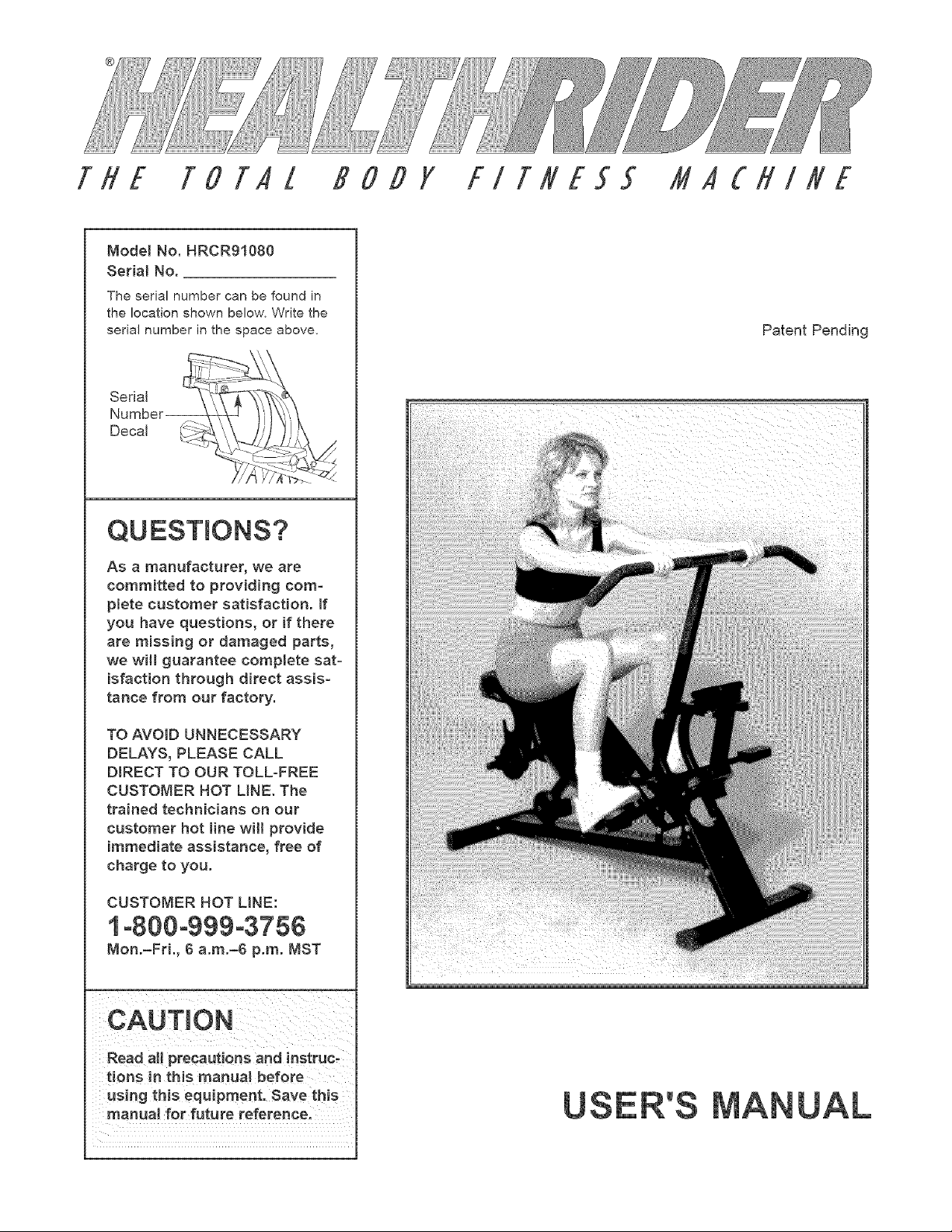
Model No. HRCR91080
Serial No.
The serial number can be found in
the location shown below. Write the
serial number in the space above,
Serial _IJ -
Number
t/ //
QUESTIONS?
As a manufacturer, we are
committed to providing com-
plete customer satisfaction. If
you have questions, or if there
are missing or damaged parts,
we will guarantee complete sat-
isfaction through direct assis-
tance from our factory.
TO AVOID UNNECESSARY
DELAYS, PLEASE CALL
DIRECT TO OUR TOLL-FREE
CUSTOMER HOT LINE. The
trained technicians on our
customer hot line will provide
immediate assistance, free of
charge to you.
CUSTOMER HOT LINE:
1°800°999°3756
Mon.-Fri., 6 a.m.-6 p.m. MST
Read aHprecautiOnS and !nstruc-
tions in this manua_ before
Using this equipment, save this
manual for future reference.
Patent Pending
TABLE OF CONTENTS
IMPORTANT PRECAUTIONS
WARNING: To reduce the risk of serious injury, read the following important precautions before
using the HEALTHRJDER _.
1. Read alJ instructions in this manual before
using the HEALTHRIDER".
6. Regularly inspect and tighten all parts of the
HEALTHRIDER '_.
2. it is the responsibility of the owner to ensure 7, When exercising, do not wear loose clothing
that aH users of the HEALTHRIDER _ are ade- that could become caught on the
quately informed of a[[ precautions. HEALTHRJDER '_.Always wear athletic shoes.
3. The HEALTHRIDER '_should not be used by 8. The totaJ weight of the user and the added
persona weighing more than 250 pounds, weights should not exceed 300 pounds.
4. Keep children under the age of 12 and pets 9. Use the HEALTHRIDER '_only as described in
away from the HEALTHRIDER '_at aH times. _hJs manual
5. Place the HEALTHRIDER ®on a level surface 10. The HEALTHRIDER '_is intended for home
during use. Cover the floor beneath the use only. Do not use the HEALTHRIDER _in a
HEALTHRIDER '_to protect it. commercial, rental, or institutional setting.
WARNING: Before beginning this or any exercise program, consult your physician. This is especiaJ-
ly important for persons over the age of 35 or persons with pre-e×isting health problems. Read aH
instructions before using. ICON assumes no responsibility for personal injury or property damage
sustained by or through the use of this product.
BEFORE YOU BEGIN
Thank you for selecting the new HEALTHRIDER <',The
HEALTHRIDER '')offers a unique form of low-impact
exercise that uses both the upper body and the lower
body for greater cardiovascular benefits and increased
toning.
For your benefit, please read this manual carefully
before using the HEALTHRIDER<h If you have addi-
tional questions, please call our toll-free CUSTOMER
HOT LiNE at 1-800-999-3756, Monday through Friday,
6 a.m. until 6 p.m. Mountain Standard Time (excluding
holidays). To help us assist you, please note the prod-
uct model number and serial number before calling.
The model number is HRCR91080. The serial number
can be found on a decal attached to the HEALTHRIDER '°)
(see the front cover of this manual).
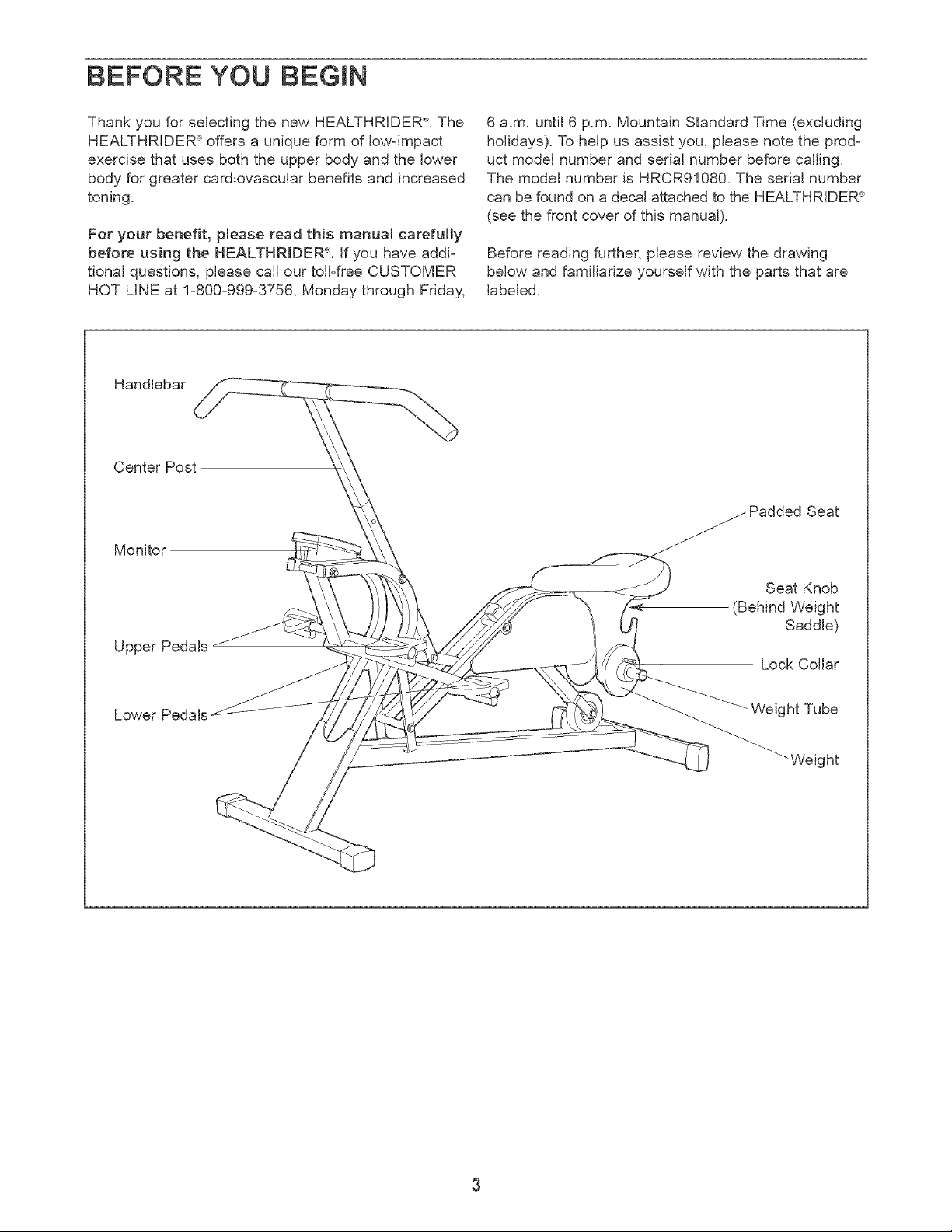
Before reading further, please review the drawing
below and familiarize yourself with the parts that are
labeled.
Center Post
Monitor
Upper Pedals
Seat
Seat Knob
(Behind Weight
Saddle)
Lock Collar
Lower Pedals
Weight Tube
_Weight
Beforebeginningassembly,carefullyreadthe
follow{riginformation and instructions:
• Place all parts in a cleared area and remove the
packing materials; do not dispose of the packing
materials until assembly is completed.
Read each assembly step carefully before you
begin.
During assembly, make sure that all parts are
oriented as shown in the drawings.
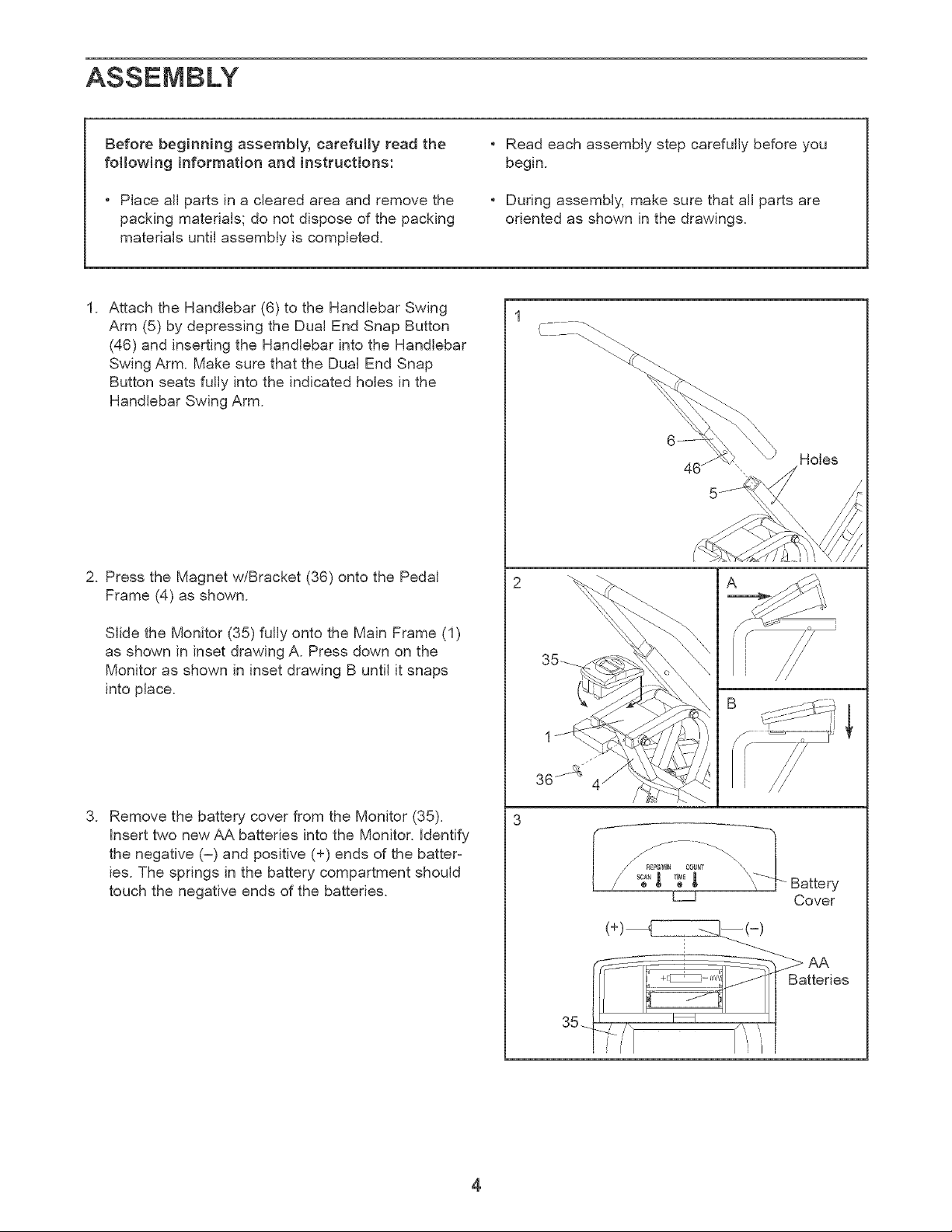
1. Attach the Handlebar (6) to the Handlebar Swing
Arm (5) by depressing the Dual End Snap Button
(46) and inserting the Handlebar intothe Handlebar
Swing Arm. Make sure that the Dual End Snap
Button seats fully into the indicated holes in the
Handlebar Swing Arm.
2. Press the Magnet w/Bracket (36) onto the Pedal
Frame (4) as shown.
Slide the Monitor (35) fully onto the Main Frame (1)
as shown in inset drawing A. Press down on the
Monitor as shown in inset drawing B until it snaps
into place.
3. Remove the battery cover from the Monitor (35).
insert two new AA batteries into the Monitor. Identify
the negative (-) and positive (+) ends of the batter=
ies. The springs in the battery compartment should
touch the negative ends of the batteries.
1
Holes
'S
\
\
/ _ Battery
Cover
__--(-)
/ "
4
ADJUSTMENT AND OPERATION
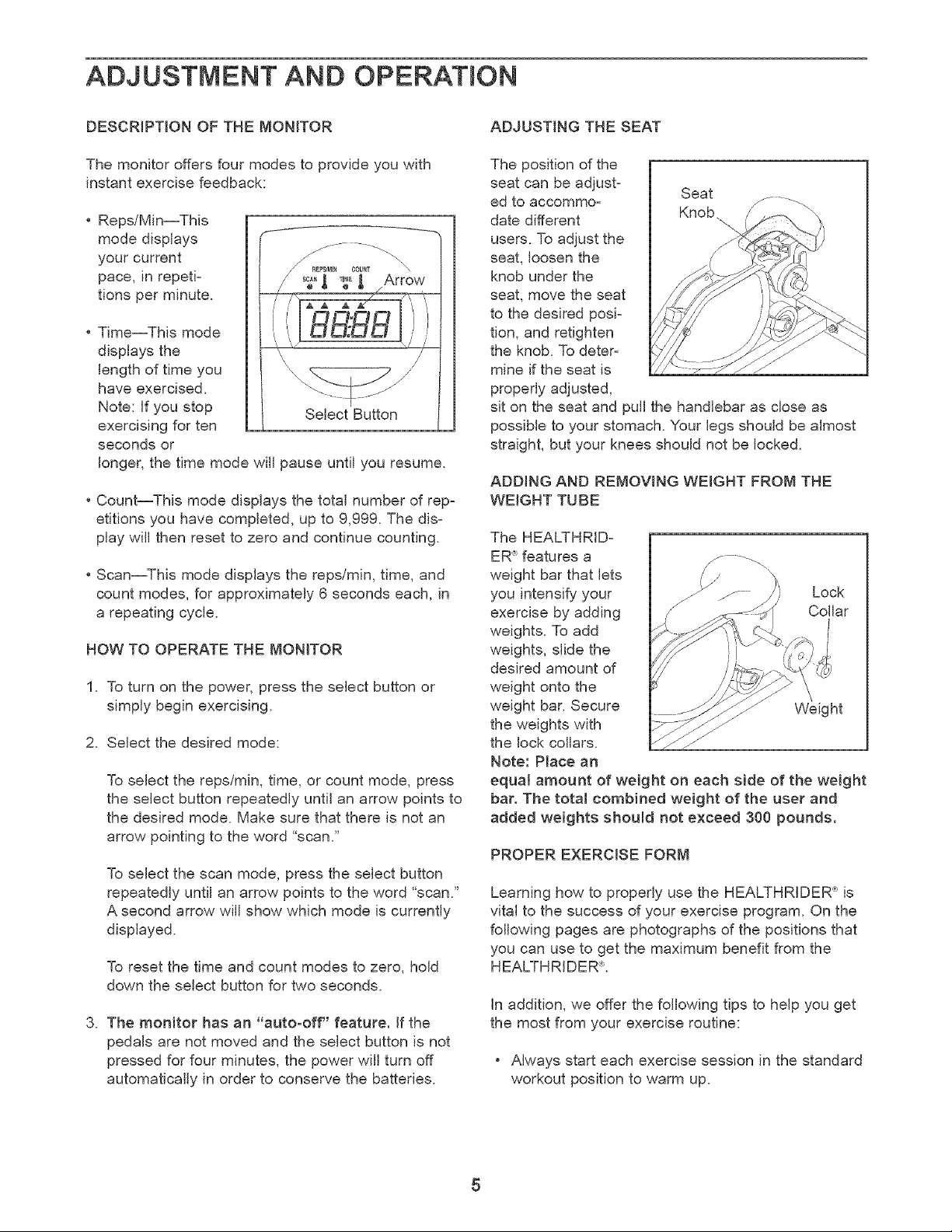
DESCRIPTION OF THE MONITOR
The monitor offers four modes to provide you with
instant exercise feedback:
• Reps/Min--This
mode displays
your current
pace, in repeti-
tions per minute.
f
• Time--This mode
displays the
length of time you
have exercised.
Note: If you stop
exercising for ten
seconds or
longer, the time mode will pause until you resume.
Select Button
• Count--This mode displays the total number of repz
etitions you have completed, up to 9,999. The disz
play will then reset to zero and continue counting.
• Scan--This mode displays the repslmin, time, and
count modes, for approximately 6 seconds each, in
a repeating cycle.
NOW TO OPERATE THE MONITOR
1. To turn on the power, press the select button or
simply begin exercising.
2. Select the desired mode:
To select the reps/min, time, or count mode, press
the select button repeatedly until an arrow points to
the desired mode. Make sure that there is not an
arrow pointing to the word "scan."
To select the scan mode, press the select button
repeatedly until an arrow points to the word "scan."
A second arrow will show which mode is currently
displayed.
To reset the time and count modes to zero, hold
down the select button for two seconds.
3. The monitor has an "auto-off" feature, if the
pedals are not moved and the select button is not
pressed for four minutes, the power will turn off
automatically in order to conserve the batteries.
ADJUSTING THE SEAT
The position of the
seat can be adjust_ Seat
ed to accommo_ _
date different
users. To adjust the
seat, loosen the
knob under the
seat, move the seat
to the desired posi_
tion, and retighten
the knob. To deter_
mine if the seat is
properly adjusted,
sit on the seat and pull the handlebar as close as
possible to your stomach. Your legs should be almost
straight, but your knees should not be locked.
ADDING AND REMOVING WEIGHT FROM THE
WEIGHT TUBE
The HEALTHRID-
ER"_features a
weight bar that lets
Lock
you intensify your
exercise by adding Collar
weights. To add
weights, slide the
desired amount of
weight onto the
weight bar. Secure Weight
the weights with
the lock collars.
Note: Place an
equal amount of weight on each side of the weight
bar. The total combined weight of the user and
added weights should not exceed 300 pounds.
PROPER EXERCISE FORM
Learning how to properly use the HEALTHRIDER 'P_is
vital to the success of your exercise program. On the
following pages are photographs of the positions that
you can use to get the maximum benefit from the
HEALTHRIDERL
In addition, we offer the following tips to help you get
the most from your exercise routine:
• Always start each exercise session in the standard
workout position to warm up.
Youshouldbeabletofeelyourselfpivotorbend
fromthehip--notfromtheback.Don'troundyour
backasthebarmovesforward.
Alwaysplacetheballofeachfootinthecenterof
eachpedal.
Alwaysbringthehandlebarascloseaspossibleto
yourstomachorribcage.Ifyouarenewtoexer=
cise,don'textendthebartoofarforwardforthe
firstfewweeksofyourexerciseprogram.Asyour
backbecomesstrongerandmoreflexible,allow
thehandlebartotravelfartherforwardforincreased
rangeofmotion.
Changegrippositionsandtoepositionsoftento
addvarietyandbalancetoeachworkout.
Yourthumbscanbeplacednexttothefirstfinger
orwrappedaroundthehandlebar.Usethese
thumbpositionsinterchangeablyduringeachwork-
outsessionforgreaterforearmendurance.
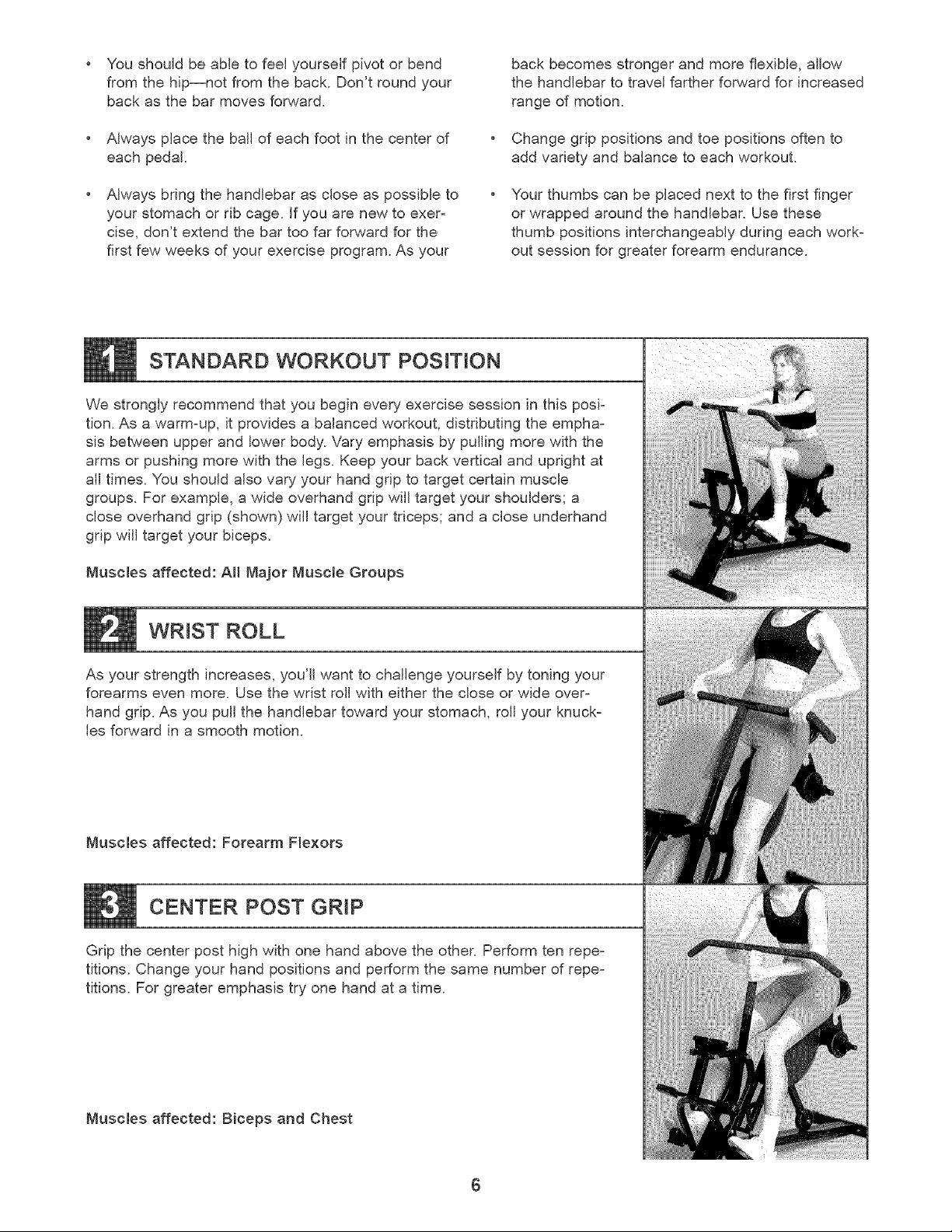
STANDARD WORKOUT POSITION
We strongly recommend that you begin every exercise session in this posb
tion. As a warm=up, it provides a balanced workout, distributing the empha=
sis between upper and lower body. Vary emphasis by pulling more with the
arms or pushing more with the legs. Keep your back vertical and upright at
all times. You should also vary your hand grip to target certain muscle
groups. For example, a wide overhand grip will target your shoulders; a
close overhand grip (shown) will target your triceps; and a close underhand
grip will target your biceps.
Muscles affected: All Major Muscle Groups
WRIST ROLL
As your strength increases, you'll want to challenge yourself by toning your
forearms even more. Use the wrist roll with either the close or wide over=
hand grip. As you pull the handlebar toward your stomach, roll your knuck-
les forward in a smooth motion.
Muscles affected: Forearm Flexors
CENTER POST GRIP
Grip the center post high with one hand above the other. Perform ten repe=
titions. Change your hand positions and perform the same number of repe=
titions. For greater emphasis try one hand at a time.
Muscles affected: Biceps and Chest
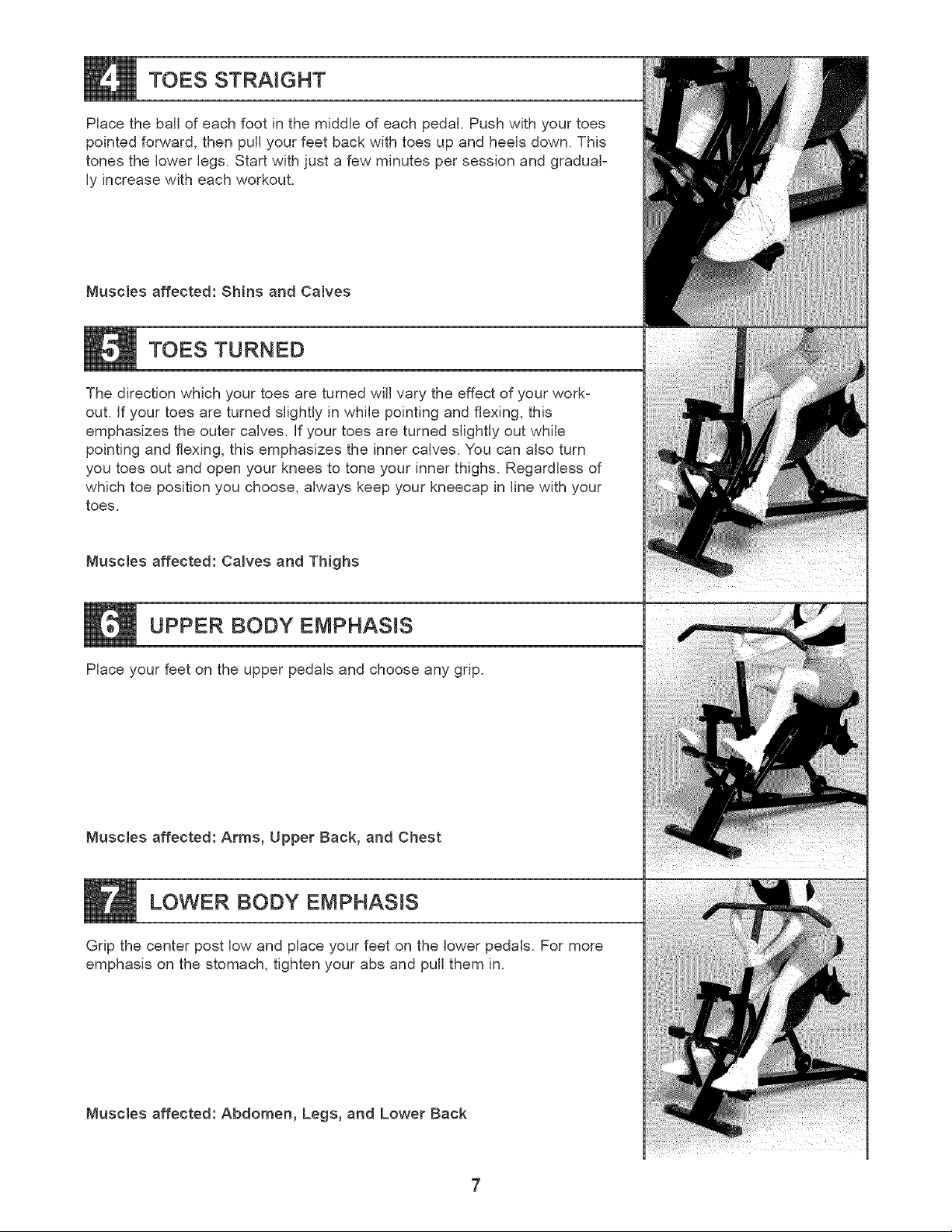
TOES STRAIGHT
Place the ball of each foot in the middle of each pedal. Push with your toes
pointed forward, then pull your feet back with toes up and heels down. This
tones the lower legs. Start with just a few minutes per session and gradual-
ly increase with each workout.
Muscles affected: Shins and Calves
TOES TURNED
The direction which your toes are turned will vary the effect of your work-
out. If your toes are turned slightly in while pointing and flexing, this
emphasizes the outer calves. If your toes are turned slightly out while
pointing and flexing, this emphasizes the inner calves. You can also turn
you toes out and open your knees to tone your inner thighs. Regardless of
which toe position you choose, always keep your kneecap in line with your
toes.
Muscles affected: Calves and Thighs
UPPER BODY EMPHASIS
Place your feet on the upper pedals and choose any grip.
Muscles affected: Arms, Upper Back, and Chest
LOWER BODY EMPHASIS
Grip the center post low and place your feet on the lower pedals. For more
emphasis on the stomach, tighten your abs and pull them in.
Muscles affected: Abdomen, Legs, and Lower Back
MAINTENANCE AND TROUBLE-SHOOTING
inspect and tighten all parts of the HEALTHRIDER" regularly Keep the monitor out of direct sunlight or the display
may be damaged. The HEALTHRIDER _'can be cleaned with a soft, damp cloth. Do not use solvents. Keep liquid
away from the monitor. When storing the HEALTHRIDER'7 remove the batteries from the monitor.
HOW TO LUBRICATE THE HEALTHRIDER <R_
Every three months, a small amount of light multi-pur-
pose oil should be applied to the HEALTHRIDER'L Apply
a few drops of oil between the axle caps or acorn nuts
and the frame in the locations shown at the right. Make
sure to apply oil to both sides of the HEALTHRIDERL
Apply Oil
HOW TO REPLACE THE BATTERIES
if the display of the monitor becomes dim, the AA batteries should be replaced. Refer to step 3 on page 4 of this
manual.
CONDITIONING GUIDELINES
The following general guidelines will help you to plan
your exercise program. Remember that proper nutri-
tion and adequate rest are essential for successful
results.
WARNING: Before beginning this or any exer-
cise program, consult your physician. This is
especially important for persons over the age
of 35 or persons with pro=existing health
problems.
EXERCISE iNTENSiTY
Whether your goal is to burn fat or to strengthen your
cardiovascular system, the Key to achieving the
desired results is to exercise with the proper intensi-
ty. The proper _ntenslty level can be found by using
your heart rate as a guide.
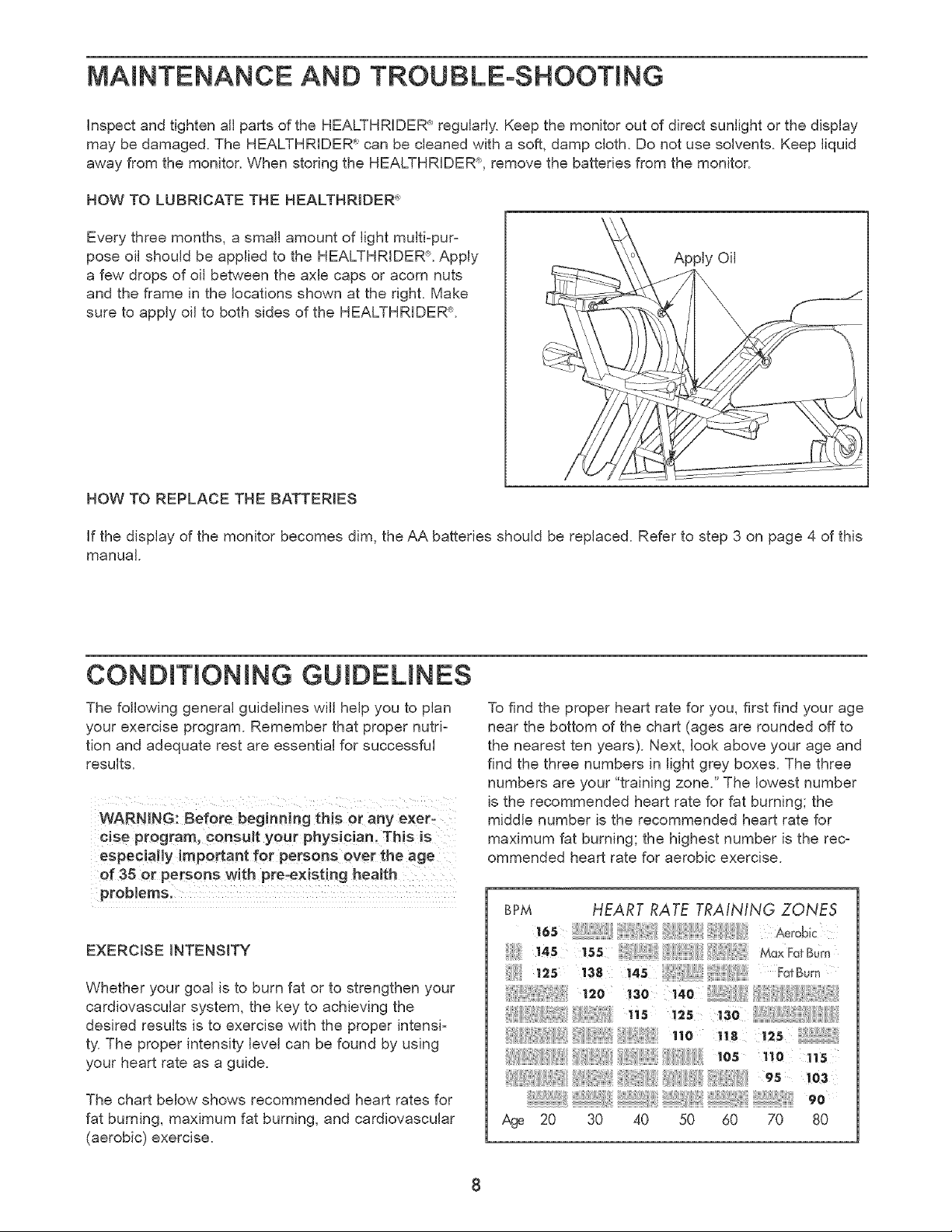
The chart below shows recommended heart rates for
fat burning, maximum fat burning, and cardiovascular
(aerobic) exercise.
To find the proper heart rate for you, first find your age
near the bottom of the chart (ages are rounded off to
the nearest ten years). Next, look above your age and
find the three numbers in light grey boxes. The three
numbers are your "training zone." The lowest number
is the recommended heart rate for fat burning; the
middle number is the recommended heart rate for
maximum fat burning; the highest number is the rec=
ommended heart rate for aerobic exercise.
BPM HEART RATE TRAINING ZONES
12s ' 38 i.s ;" FotSo,,
!3o
,ns
.o
los 'no
_ _ _ _ 95 103
_, 90
Age 20 30 40 50 60 70 80
FatBurning
Toburnfateffectively,youmustexerciseatarelative-
lylowintensitylevelforasustainedperiodoftime.
Duringthefirstfewminutesofexercise,yourbody
useseasilyaccessiblecarbohydratecaloriesforener-
gy.Onlyafterthefirstfewminutesofexercisedoes
yourbodybegintousestoredfatcaloriesforenergy.
ifyourgoalistoburnfat,adjustyourpaceuntilyour
heartrateisnearthelowestnumberinyourtraining
zoneasyou exercise.
Maximum Fat Burning
For increased fat burning, adjust your pace until your
heart rate is near the middle number in your training
zone as you exercise.
Aerobic Exercise
if your goal is to strengthen your cardiovascular sys-
tem, your exercise must be "aerobic." Aerobic exer-
cise is activity that requires large amounts of oxygen
for prolonged periods of time. This increases the
demand on the heart to pump blood to the muscles,
and on the lungs to oxygenate the blood. For aerobic
exercise, adjust your pace until your heart rate is near
the highest number in your training zone.
HOW TO MEASURE YOUR HEART RATE
To measure your heart
rate, first exercise for
at least four minutes.
Then, stop exercising
and place two fingers
on your wrist as
shown. Take a six-sec-
ond heartbeat count,
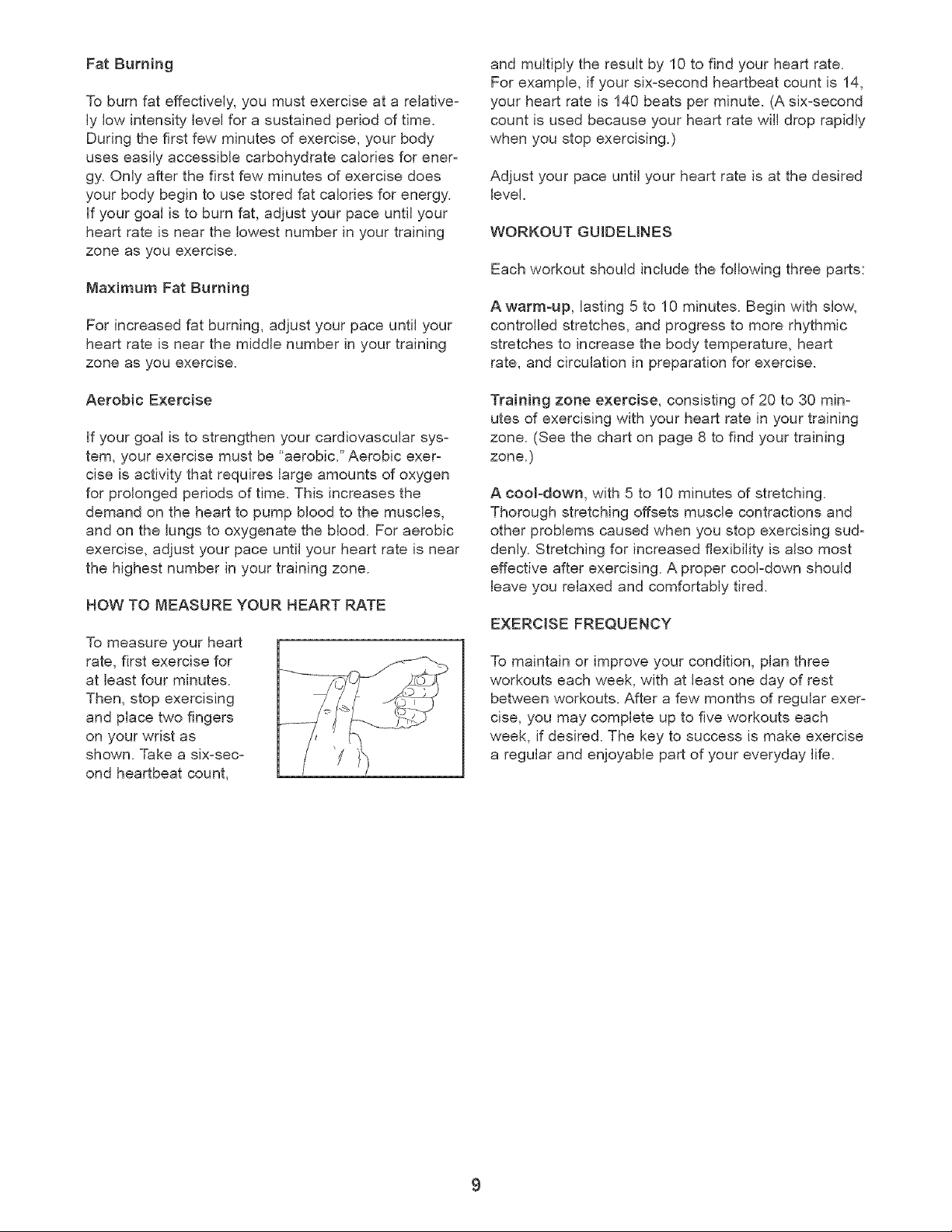
and multiply the result by 10 to find your heart rate.
For example, if your six-second heartbeat count is 14,
your heart rate is 140 beats per minute. (A six-second
count is used because your heart rate will drop rapidly
when you stop exercising.)
Adjust your pace until your heart rate is at the desired
level.
WORKOUT GUIDELINES
Each workout should include the following three parts:
A warm-up, lasting 5 to 10 minutes. Begin with slow,
controlled stretches, and progress to more rhythmic
stretches to increase the body temperature, heart
rate, and circulation in preparation for exercise.
Training zone exercise, consisting of 20 to 30 min-
utes of exercising with your heart rate in your training
zone. (See the chart on page 8 to find your training
zone.)
A cool-down, with 5 to 10 minutes of stretching.
Thorough stretching offsets muscle contractions and
other problems caused when you stop exercising sud-
denly. Stretching for increased flexibility is also most
effective after exercising. A proper cool-down should
leave you relaxed and comfortably tired.
EXERCISE FREQUENCY
To maintain or improve your condition, plan three
workouts each week, with at least one day of rest
between workouts. After a few months of regular exer-
cise, you may complete up to five workouts each
week, if desired. The key to success is make exercise
a regular and enjoyable part of your everyday life.
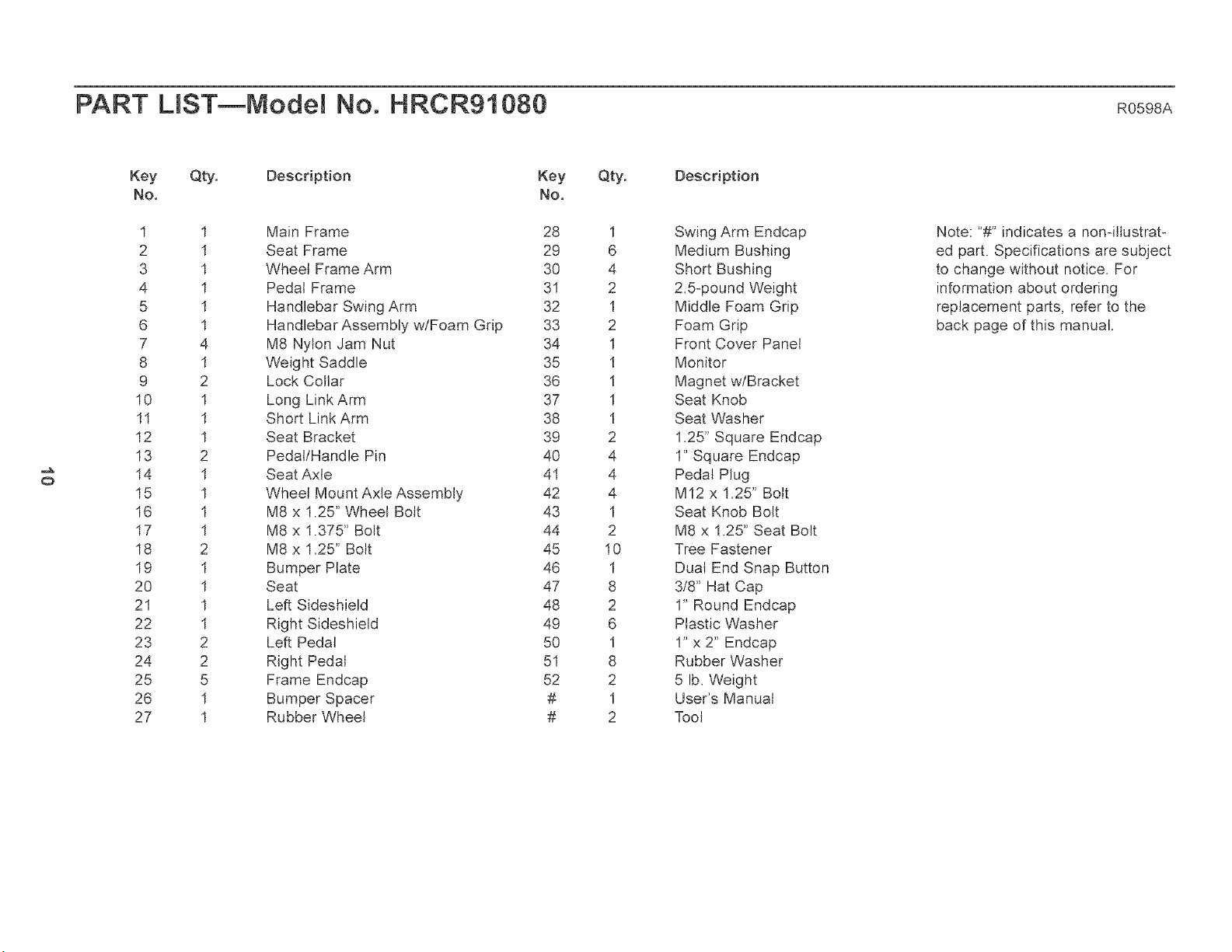
PART LIST--Model No. HRCR91080 R0 98A
o
Key Qty. Description
No,
1
2
3
4
5
6
7
8
9
10
1I
12
13
14
15
16
17
18
19
2O
21
22
23
24
25
26
27
1
I
1
1
I
1
4
I
2
1
I
1
2
I
1
1
I
2
1
I
1
1
2
2
5
I
1
Key
No.
Qty.
Main Frame 28 1
Seat Frame 29 6
Wheel Frame Arm 30 4
Pedal Frame 31 2
Handlebar Swing Arm 32 I
Handlebar Assembly wtFoam Grip 33 2
M8 Nylon Jam Nut 34 1
Weight Saddle 35 I
Lock Collar 36 1
Long Link Arm 37 1
Short Link Arm 38 I
Seat Bracket 39 2
Pedal/Handle Pin 40 4
Seat Axle 41 4
Wheel Mount Axle Assembly 42 4
M8 x 1.25" Wheel Bolt 43 1
M8 x 1.375" Bolt 44 2
M8 x 1.25" Bolt 45 10
Bumper Plate 46 1
Seat 47 8
Left Sideshield 48 2
Right Sideshietd 49 6
Left Pedal 50 I
Right Pedal 51 8
Frame Endcap 52 2
Bumper Spacer # I
Rubber Wheel # 2
Description
Swing Arm Endcap
Medium Bushing
Short Bushing
2.5opound Weight
Middle Foam Grip
Foam Grip
Front Cover Panel
Monitor
Magnet wlBracket
Seat Knob
Seat Washer
1.25" Square Endcap
1" Square Endcap
Pedal Plug
M12 x 1.25" Bolt
Seat Knob Bolt
M8 x 1.25" Seat Bolt
Tree Fastener
Dual End Snap Button
3/8" Hat Cap
1" Round Endcap
Plastic Washer
I" x 2" Endcap
Rubber Washer
5 lb. Weight
User's Manual
Tool
Note: "#" indicates a non-ittustrato
ed part. Specifications are subject
to change without notice. For
information about ordering
replacement parts, refer to the
back page of this manual.
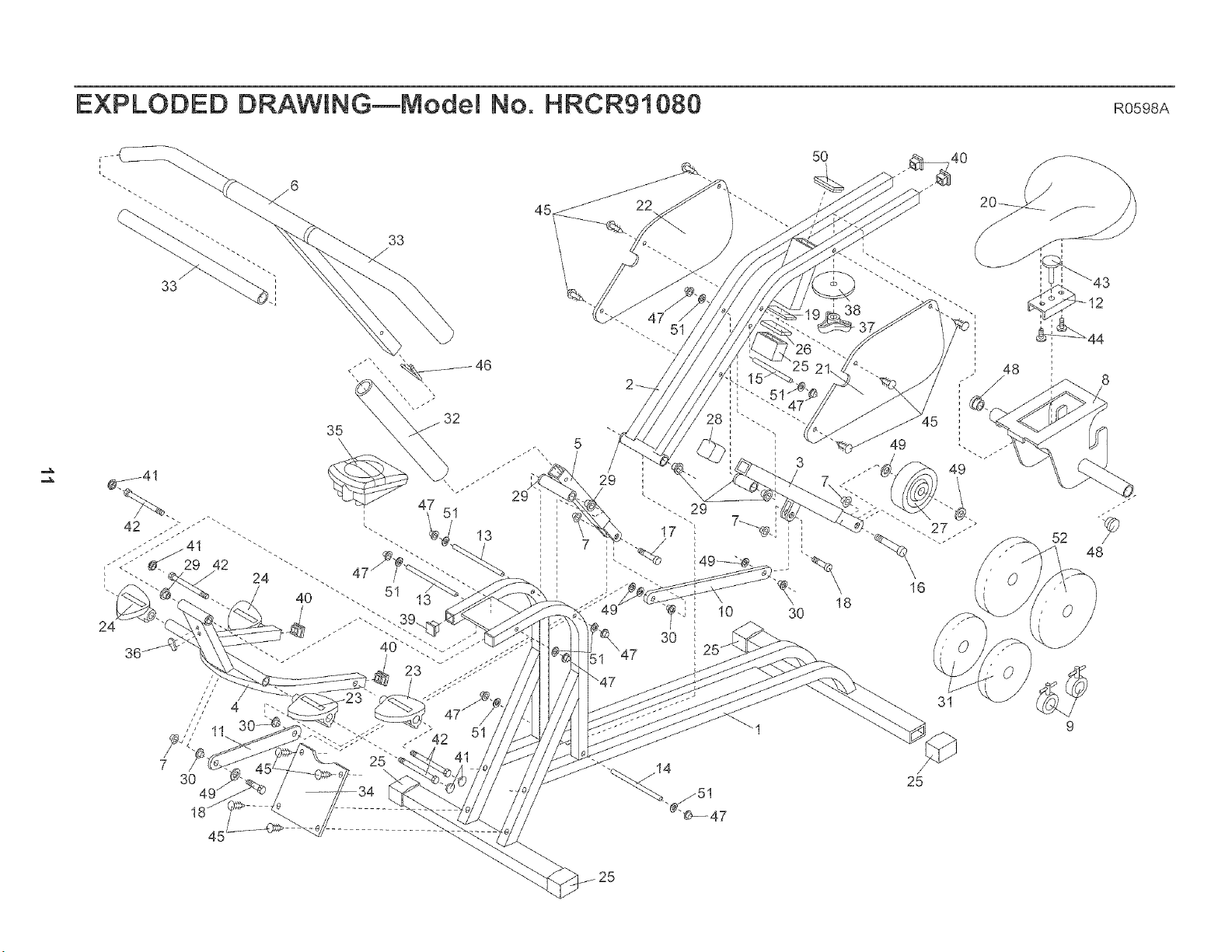
EXPLODED DRAWING_Model No. HRCR91080 R0598A
32
35
'\
47
51
23
13
45
3O
5O
18
49
16
52
48
31
9
/
25
25

HOW TO ORDER REPLACEMENT PARTS
To order replacement parts, simply call our Customer Service Department toll-free at 1-800-999z3756, Monday
through Friday, 6 a.m. until 6 p.m. Mountain Time (excluding holidays). To help us assist you, please be prez
pared to give the following information when calling:
• The MODEL NUMBER of the product (HRCR91080).
• The NAME of the product (HEALTHRIDER<_').
• The PART NUMBER of the PART (see pages 10 and 11 of this manual).
• The DESCRiPTiON of the PART (see pages 10 and 11 of this manual).
HEALTHRIDER is a registered trademark of iCON Health & Fitness, inc.
LmMITED WARRANTY
iCON Health & Fitness, Inc. (ICON) warrants this product to be free from defects in workmanship and
material, under normal use and service conditions, for a period of ninety (90) days from the date of pur-
chase. This warranty extends only to the original purchaser. ICON's obligation under this warranty is lim-
ited to replacing or repairing, at ICON's option, the product at one of its authorized service centers. All
products for which warranty claim is made must be received by ICON at one of its authorized service cen-
ters with all freight and other transportation charges prepaid, accompanied by sufficient proof of purchase.
All returns must be pre-authorized by ICON. This warranty does not extend to any product or damage to
a product caused by or attributable to freight damage, abuse, misuse, improper or abnormal usage or
repairs not provided by an ICON authorized service center, to products used for commercial or rental purz
poses, or to products used as store displays. No other warranty beyond that specifically set forth above
is authorized by ICON.
ICON is not responsible or liable for indirect, special or consequential damages arising out of or in con-
nection with the use or performance of the product or damages with respect to any economic loss, loss
of property, loss of revenues or profits, loss of enjoyment or use, costs of removal, installation or other
consequential damages of whatsoever nature. Some states do not allow the exclusion or limitation of inci-
dental or consequential damages. Accordingly, the above limitation may not apply to you.
The warranty extended hereunder is in lieu of any and all other warranties and any implied warranties of
merchantability or fitness for a particular purpose is limited in its scope and duration to the terms set forth
herein. Some states do not allow limitations on how long an implied warranty lasts. Accordingly, the above
limitation may not apply to you.
This warranty gives you specific legal rights. You may also have other rights which vary from state to state.
iCON HEALTH & FITNESS, INC., 1800 S. 1000 W., LOGAN, UT 84321-9813
Part No. 146162 H01038-C R0598A Printed in China © 1998 ICON Health & Fitness, Inc.
