Rev.23.09
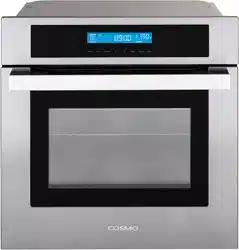
WALL OVEN
COS-30ESWC
COS-30EDWC
USER MANUAL
IMPORTANT:
INSTALLER:
OWNER:
30 IN. ELECTRIC WALL OVEN
READ AND SAVE THESE INSTRUCTIONS.
FOR RESIDENTIAL USE ONLY.
PLEASE LEAVE THESE INSTRUCTIONS WITH THIS UNIT FOR
THE OWNER.
PLEASE RETAIN THESE INSTRUCTIONS FOR FUTURE
REFERENCE.

2
THANK YOU FOR YOUR PURCHASE
Thank you for your purchase. We know that you have many brands and
products to choose from and we are honored to know that you have decided
to take one of our products into your home and hope that you enjoy it.
COSMO Appliances are designed according to the strictest safety and
performance standard for the North American market. We follow the most
advanced manufacturing philosophy. Each appliance leaves the factory after
thorough quality inspection and testing. Our distributors and our service
partners are ready to answer any questions you may have regarding how to
install, use and care for your products. We hope that this manual will help you
learn to use the product in the safest and most effective manner.
Before using this product, please read through this manual carefully. Keep
this user manual in a safe place for future reference. Please ensure that other
persons using this product are familiar with these instructions as well.
If you have any questions or concerns, please contact the dealer from whom you
purchased the product, or contact our Customer Support at:
1-888-784-3108
Reach us online at:
www.cosmoappliances.com

3
TABLE OF CONTENTS
OVEN SAFETY ................................................................................................... 5
Important Safety Instructions ..................................................................................... 6
OVERVIEW ........................................................................................................ 9
Accessories ...................................................................................................................... 9
Oven Overview ............................................................................................................ 10
Control Panel .................................................................................................................12
FEATURES ........................................................................................................ 15
Clock ............................................................................................................................... 15
Timer ............................................................................................................................... 16
Oven Light ..................................................................................................................... 16
Cook Time ...................................................................................................................... 17
Start Time (Delayed Cook Time) ...............................................................................18
Oven Control Settings ................................................................................................ 19
Control Lock .................................................................................................................. 23
USING THE OVEN ........................................................................................... 24
Before Using the Oven ...............................................................................................24
Before Using the Oven for the First Time ............................................................... 25
Oven Vent ..................................................................................................................... 25
Oven Door ..................................................................................................................... 25
Using Oven Racks ........................................................................................................26
Preheating..................................................................................................................... 27
Meat Thermometer (Temperature Probe) ............................................................ 27
Maximum & Minimum Temperature Settings ......................................................29
Bake ............................................................................................................................... 30
Broil ..................................................................................................................................31
Warm .............................................................................................................................. 32
Proof ............................................................................................................................... 33
Convection Bake......................................................................................................... 34
Convection Broil........................................................................................................... 35
Convection Roast ........................................................................................................36
Convection Conversion .............................................................................................. 37
4
Tips and Techniques ................................................................................................... 38
MAINTENANCE AND CARE ............................................................................. 47
Manual Cleaning......................................................................................................... 47
Self Clean ..................................................................................................................... 50
Removing/Replacing the Oven Door ..................................................................... 53
Replacing the Oven Light ......................................................................................... 56
TROUBLESHOOTING ...................................................................................... 59
Baking and Roasting Problems ............................................................................... 59
Operation Problems .................................................................................................. 60
LIMITED WARRANTY ...................................................................................... 63
5
OVEN SAFETY
READ ALL INSTRUCTIONS BEFORE USING THE APPLIANCE
California Proposition 65 Warning
WARNING:
Cancer and Reproductive Harm - www.P65Warnings.ca.gov.
Your safety and the safety of others are very important.
We have provided many important safety messages in this manual and on
your appliance. Always read and obey all safety messages.
WARNING
CAUTION
All safety messages will tell you what the potential hazard is, tell you how
to reduce the chance of injury, and tell you what can happen if the
instructions are not followed.
This is the safety alert symbol.
This symbol alerts you to potential hazards
that can kill or hurt you and others.
All safety messages will follow the safety alert
symbol and either the word "WARNING" or
"CAUTION." These words mean:
You can be killed or seriously injured if you
don't follow instructions.
A potentially hazardous situation which, if not
avoided, could result in minor or moderate
injury.

6
IMPORTANT SAFETY INSTRUCTIONS
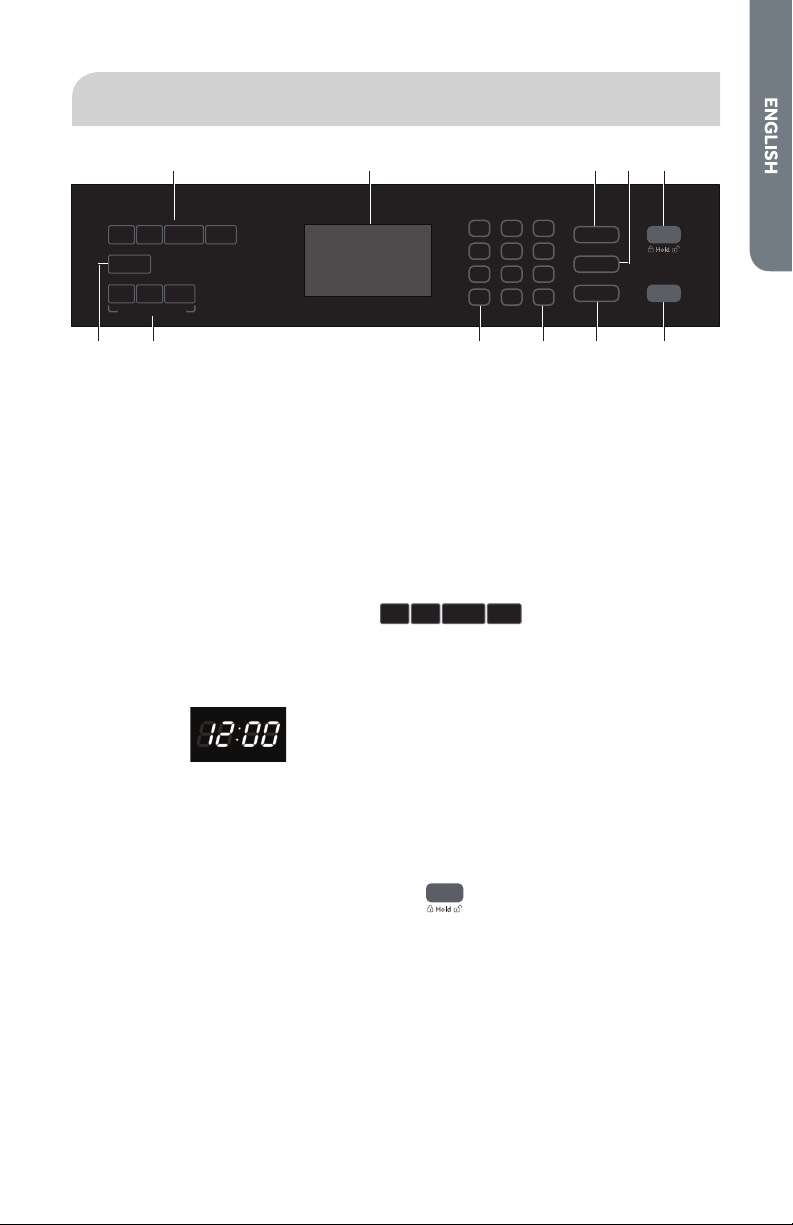
WARNING: To reduce the risk of fire, electrical shock, injury to persons, or
damage when using the appliance, follow basic precautions, including the
following:
• Proper Installation – The
appliance, when installed, must
be electrically grounded in
accordance with local codes, or
in the absence of local codes,
with the National Electrical
Code, ANSI/NFPA 70 or the
Canadian Electrical Code, CSA
C22.1-02. In Canada, the
appliance must be electrically
grounded in accordance with
Canadian Electrical Code. Be
sure your appliance is properly
installed and grounded by a
qualified technician.
• WARNING: Never use this
appliance for warming or
heating the room.
• WARNING: Never cover any
slots, holes or passages in the
oven bottom or cover an entire
rack with materials such as
aluminum foil. Doing so blocks
airflow through the oven and
may cause carbon monoxide
poisoning. Aluminum foil linings
may also trap heat, causing a
fire hazard.
• CAUTION: Do not store items of
interest to children in cabinets
above an oven – children
climbing on the oven to reach
items could be seriously injured.
• Do Not Leave Children Alone –
Children should not be left alone
or unattended in area where
appliance is in use. They should
never be allowed to sit or stand
on any part of the appliance.
• Wear Proper Apparel – Loose-
fitting or hanging garments
should never be worn while
using the appliance.
• User Servicing – Do not repair or
replace any part of the
appliance unless specifically
recommended in the manual. All
other servicing should be
referred to a qualified
technician.
• Do not store or use flammable
materials in or near an oven,
including paper, plastic, pot
holders, linens, wall coverings,
curtains, drapes and gasoline or
other flammable vapors and
liquids.
• Use this appliance only for its
intended purpose as described
in this manual. This appliance is
not intended for storage.
• Do Not Use Water on Grease
Fires – Smother fire or flame or
use dry chemical or foam-type
extinguisher.
READ AND SAVE THESE INSTRUCTIONS

7
IMPORTANT SAFETY INSTRUCTIONS
• Use Only Dry Potholders – Moist
or damp potholders on hot
surfaces may result in burns
from steam. Do not let potholder
touch hot heating elements. Do
not use a towel or other bulky
cloth.
• Use Care When Opening Door –
Let hot air or steam escape
before removing or replacing
food.
• DO NOT TOUCH HEATING
ELEMENTS OR INTERIOR
SURFACES OF OVEN – Heating
elements may be hot even
though they are dark in color.
Interior surfaces of an oven
become hot enough to cause
burns. During and after use, do
not touch, or let clothing or other
flammable materials contact
heating elements or interior
surfaces of oven until they have
had sufficient time to cool. Other
surfaces of the appliance may
become hot enough to cause
burns – among these surfaces
are oven vent openings, surfaces
near these openings, oven
doors, windows of oven doors,
and crevices around the oven
doors.
• Care must be taken to prevent
aluminum foil and meat probes
from contacting heating
elements.
• Do Not Heat Unopened Food
Containers – Build-up of
pressure may cause container to
burst and result in injury.
• Keep Oven Vent Ducts
Unobstructed.
• Never broil with door open.
Open-door broiling is not
permitted due to overheating of
control panel.
• Avoid scratching or impacting
glass doors or control panels.
Doing so may lead to glass
breakage. Do no cook on a
product with broken glass.
Shock, fire or cuts may occur.
• Placement of Oven Racks –
Always place oven racks in
desired location while oven is
cool. If rack must be moved
while oven is hot, do not let
potholder contact hot heating
element in oven.
• Disconnect power before
servicing.
• Do not use replacement parts
that have not been
recommended by the
manufacturer (e.g. parts made
at home using a 3D printer).
• Injuries may result from misuse
of appliance doors such as
stepping, leaning, or sitting on
the doors.
READ AND SAVE THESE INSTRUCTIONS

8
IMPORTANT SAFETY INSTRUCTIONS
• Maintenance – Keep appliance
area clear and free from
combustible materials, gasoline,
and other flammable vapors
and liquids.
• Clean Only Parts Listed in
Manual.
• Do Not Clean Door Gasket – The
door gasket is essential for a
good seal. Care should be taken
not to rub, damage, or move the
gasket.
• Do Not Soak Removable
Heating Elements – Heating
elements should never be
immersed in water.
• Do not let cooking grease or
other flammable materials
accumulate in or near the oven.
Grease in the oven or near the
oven may ignite.
• Proper Disposal of Your
Appliance – Dispose of or recycle
your appliance in accordance
with Federal and Local
Regulations. Contact your local
authorities for the
environmentally safe disposal or
recycling of your appliance.
For self-cleaning ovens:
• CAUTION: Do not leave food or
cooking utensils, etc., in oven
during the operation of self-
cleaning.
• Wait for the oven to cool before
removing contents and cleaning
the oven.
• Before Self-Cleaning the Oven –
Remove broiler pan and other
utensils. Wipe off all excessive
spillage before initiating the
cleaning cycle.
• Do not use a protective coating
to line the oven and do not use
commercial oven cleaner unless
certified for use in a self-
cleaning oven.
• In the event of ignition inside the
oven during self-clean, turn off
the oven and wait for the fire to
extinguish. DO NOT FORCE THE
DOOR OPEN. Introduction of
fresh air at Self Clean
temperatures may lead to a
burst of flame from the oven.
• If the self-cleaning mode
malfunctions, keep door closed,
turn off the appliance,
disconnect the circuit at the
circuit breaker box, and contact
a qualified service provider for
repairs.
• Some birds are extremely
sensitive to the fumes produced
during a self-clean cycle. Move
birds to another well-ventilated
room.
READ AND SAVE THESE INSTRUCTIONS
9
OVERVIEW
ACCESSORIES
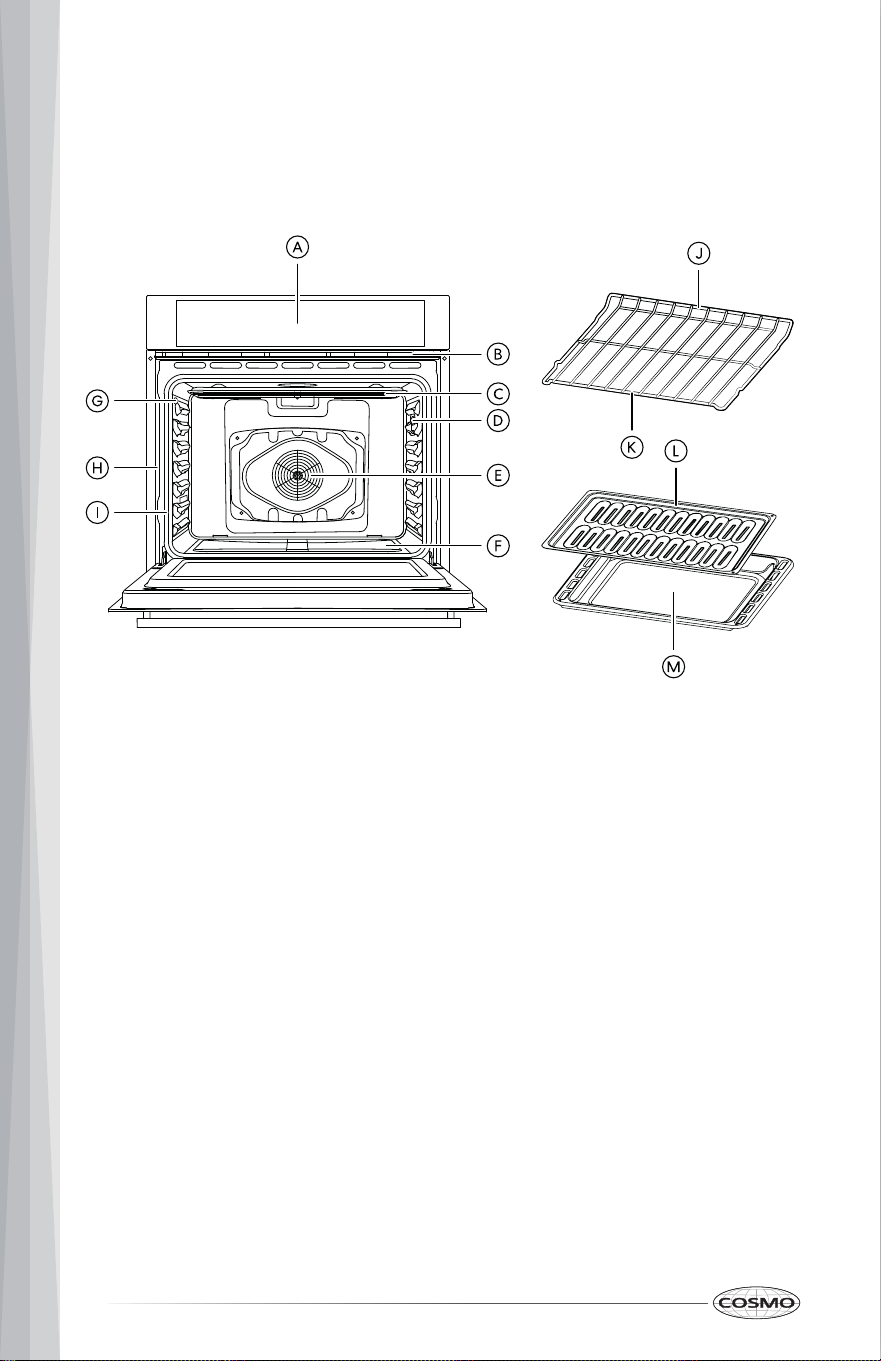
2-Piece broiler panOven Racks
Single oven model (2)
Double oven model (3)
Meat thermometer (probe)
NOTE:
• To purchase these replacement parts or any other accessories, please
visit www.cosmoappliances.com or reference the contact information at
the end of this manual.
10
OVEN OVERVIEW
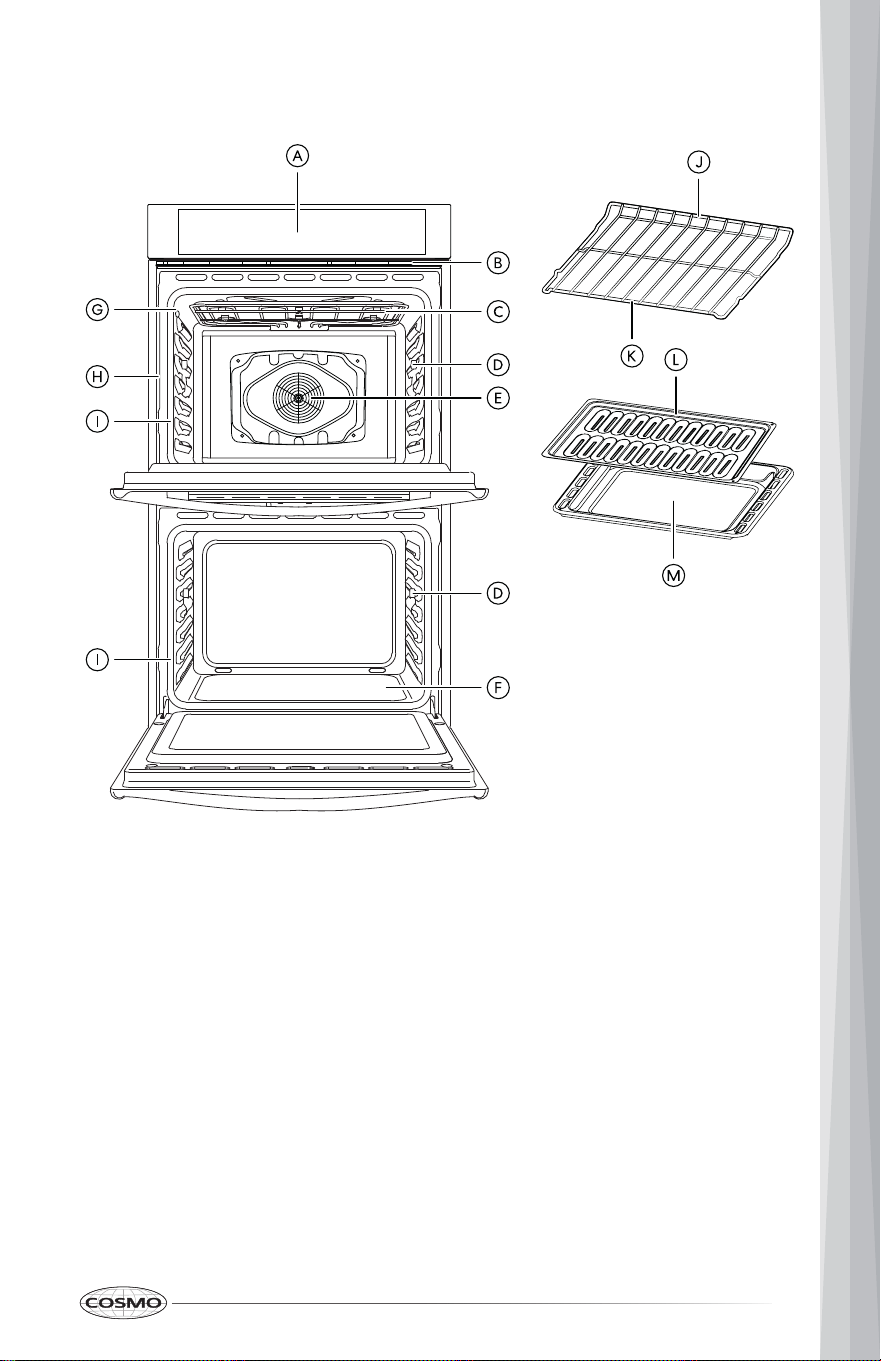
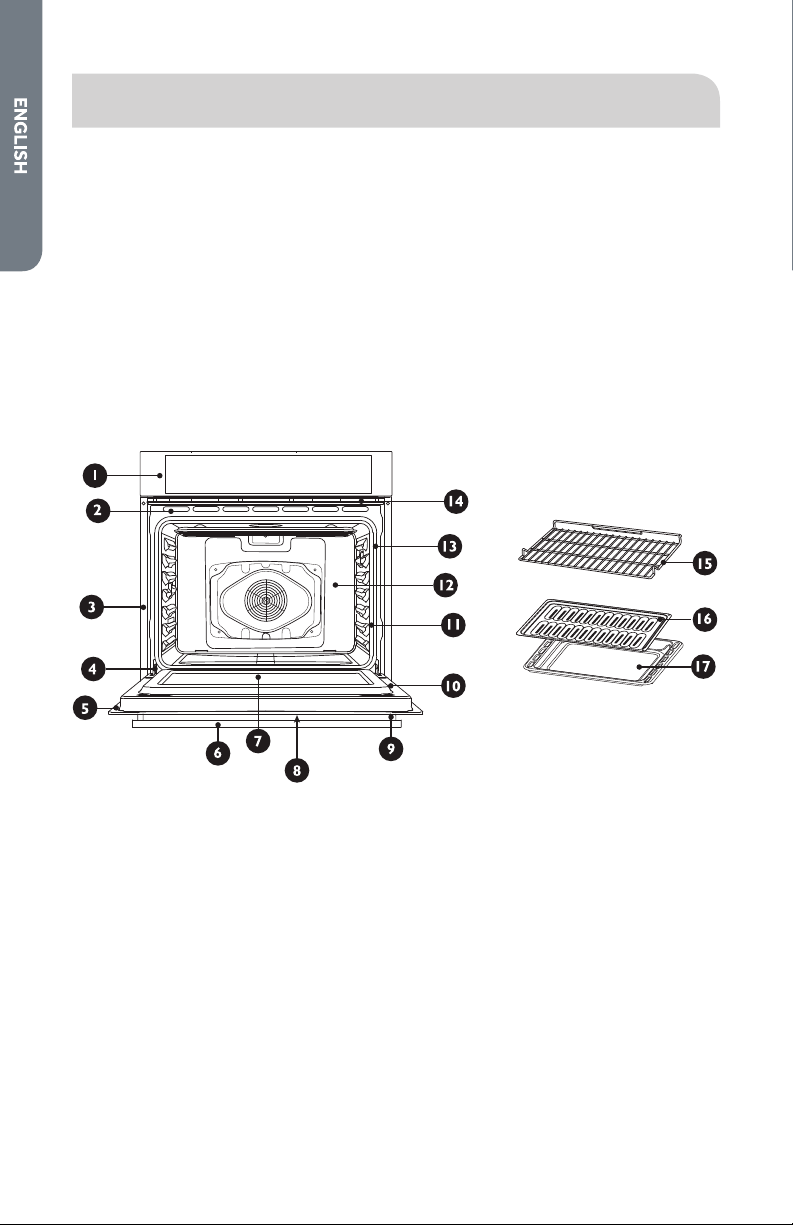
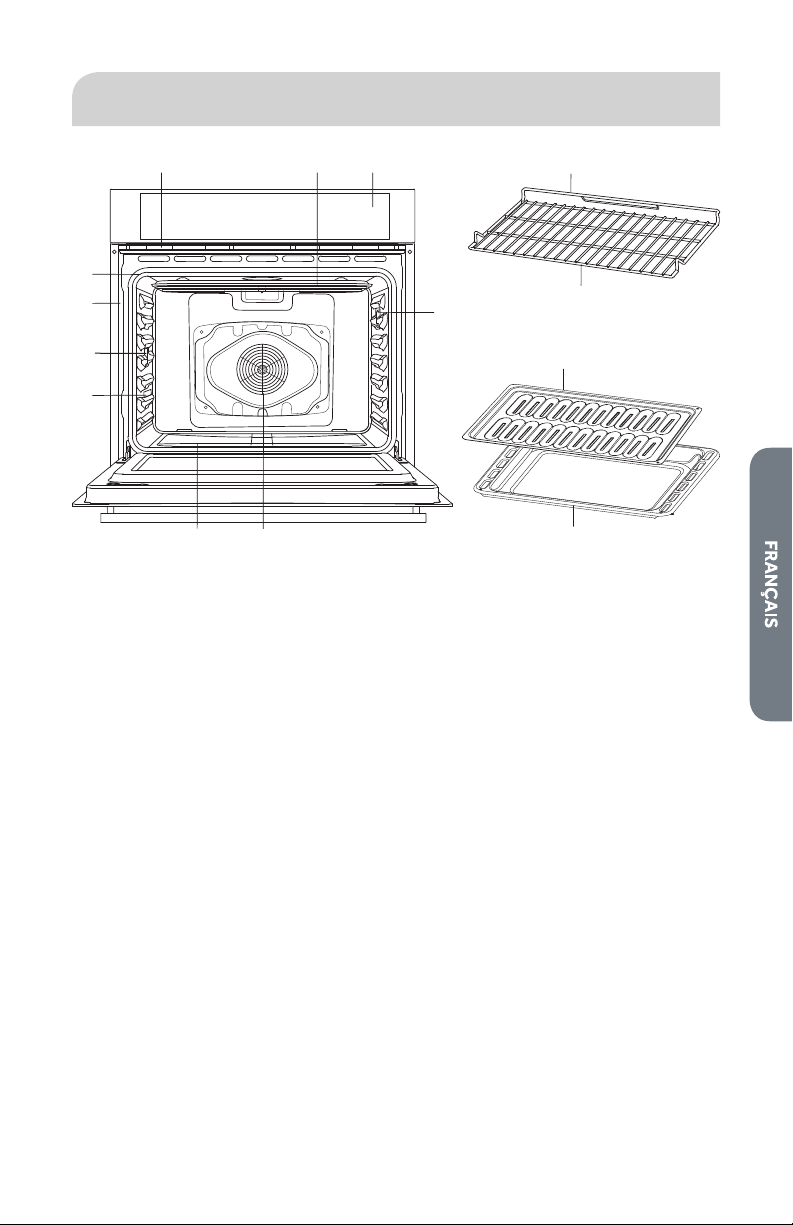
SINGLE OVEN MODEL: COS-30ESWC
A. Control panel
B. Oven vent
C. Broil element
D. Light
E. Convection fan and element
F. Bake element (hidden)
G. Temperature probe
H. Model and serial # plate
I. Door gasket
J. Oven rack (rear)
K. Oven rack (front)
L. Broiler pan rack
M. Broiler pan tray
11
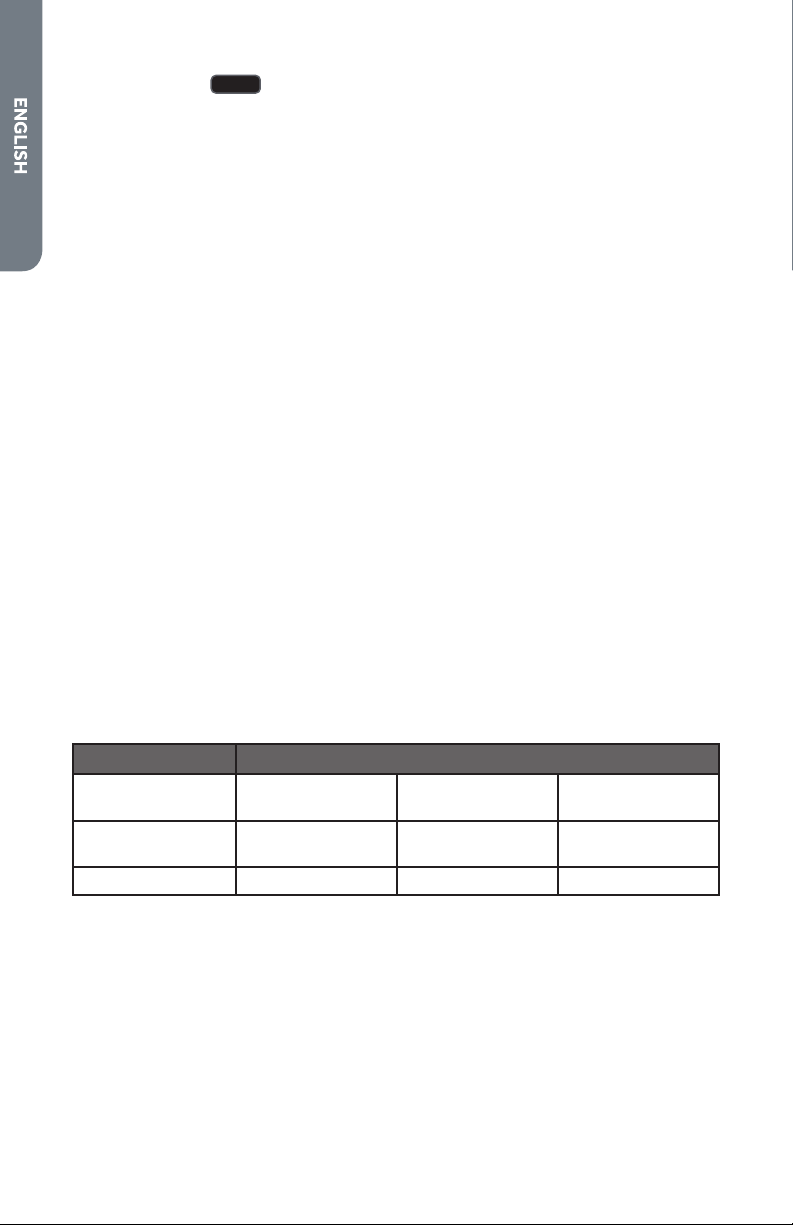
DOUBLE OVEN MODEL: COS-30EDWC
A. Control panel
B. Oven vent
C. Broil element
D. Light
E. Convection fan and element
(upper oven only)
F. Bake element (hidden)
G. Temperature probe (upper
oven only)
H. Model and serial # plate
I. Door gasket
J. Oven rack (rear)
K. Oven rack (front)
L. Broiler pan (grid)
M. Broiler pan (tray)
12
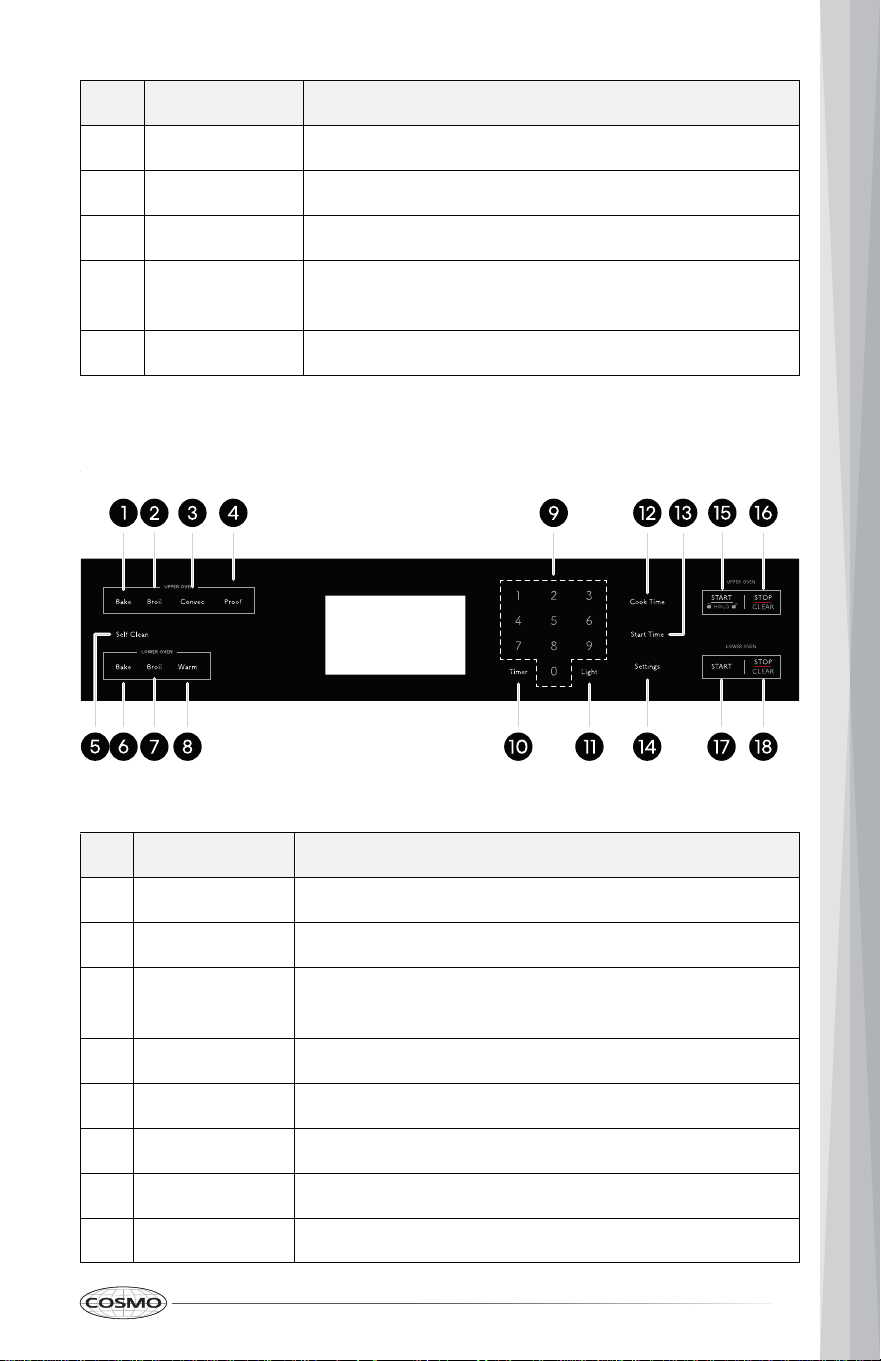
# Name Description
1 Bake
2
To select the Bake function.
Broil
CONTROL PANEL
Read the instructions carefully before using the oven. Control button shapes
are representative; your oven may have alternate button shapes.
SINGLE OVEN MODEL: COS-30ESWC
3
To select the Broil function.
Convec
4
To select the Convection functions.
Warm/Proof
5 Self Clean
To select the Warm/Proof function. To select the
Proof function, press and hold for 3 seconds.
6
To select the Self Clean function.
Baked Goods
7 Meats
To select the Baked Goods function with convection
conversion.
8 All Others
To select the Meats function with convection
conversion.
9 Number Pads
To select the All Others function with convection
conversion.
10
To enter temperature and all times.
Timer
11
To set or cancel the timer.
Light To turn the oven lights on and off.
13
# Name Description
12 Cook Time
13
To set the length of the cooking time.
Start Time
14
To set delay start time of the cooking.
Settings
15
To access and adjust oven settings.
START (HOLD)
16 STOP/CLEAR
To start all functions in the oven. To activate Oven
Lock, press and hold for 3 seconds.
To stop cooking and cancel settings.
DOUBLE OVEN MODEL: COS-30EDWC
# Name Description
1 Bake
2 Broil
To select the Bake function of the upper oven.
3 Convec
To select the Broil function of the upper oven.
4 Proof
To select the Convection and Convection Conversion
functions of the upper oven.
5
To select the Proof function of the upper oven.
Self Clean
6
To select the Self Clean function.
Bake
7 Broil
To select the Bake function of the lower oven.
8 Warm
To select the Broil function of the lower oven.
To select the Warm function of the lower oven.

14
# Name Description
9 Number Pads To enter temperature and all times.
10 Timer To set or cancel the timer.
11 Light To turn the oven lights on and off.
12 Cook Time To set the length of the cooking time.
13 Start Time To set delay start time of the cooking.
14 Settings To access and adjust oven settings.
15 START (HOLD) To start all functions in the upper oven. To activate
Oven Lock, press and hold for 3 seconds.
16 STOP/CLEAR To stop cooking and cancel settings of the upper
oven.
17 START To start all functions in the lower oven.
18 STOP/CLEAR To stop cooking and cancel settings of the lower
oven.

15
FEATURES
CLOCK
The clock must be set to the correct time of day for the automatic oven timing
functions to work properly. The time of day cannot be changed during a
timed cooking, timer cycle, or Self Clean cycle.
Setting the Clock
1. Press Settings once. List of settings appears in the display.
2. Press 1 to select "Clock" from the list.
3. Press 1 to toggle and select AM or PM.
4. Press Settings to accept the change.
5. Press the numbers to enter the correct time of day. For example, to set
12:34, press the numbers 1, 2, 3, and 4.
6. Press Settings. This accepts the time entered and starts the clock.
Changing the Hour Mode (12HR or 24HR)
The control is set to use a 12-hour clock by default. Follow these steps to
change to a 12-hour/24-hour clock.
1. Press Settings once. List of settings appears in the display.
2. Press 4 to select "12/24 hour" from the list.
3. Press 1 to toggle and select 12 or 24.
4. Press Settings to accept the change.
16
TIMER
The Timer serves as an extra timer in the kitchen that will beep when the set
time has run out. It does not start or stop cooking.
The Timer feature can be used during any of the other oven control functions.
Setting the Timer (Up to 12 Hours)
1. Press Timer once.
2. Press the numbers to enter the length of time. For example, to set a 30-
minute timer, press the numbers 3 and 0.
NOTE:
• If no numbers is entered, the timer returns to the time of day.
3. Press Timer to start the timer.
4. When the set time has run out, the indicator tone rings until Timer is
pressed.
Canceling the Timer
1. Press Timer once. The timer returns to the time of day.
NOTE:
• Pressing STOP/CLEAR will not cancel the current timer, but will
cancel any oven cooking modes in progress.
OVEN LIGHT
The oven light automatically turns on when the oven door is opened and turns
off when the oven door is closed.
• Press Light to control the oven light when the oven door is closed.

17
COOK TIME
The oven turns on immediately and cooks for a selected length of time. At the
end of the cooking time, the oven turns off automatically.
NOTE:
• Cooking mode must be selected before you can set a cook time.
• Cook Time can be set for any amount of time between 1 minute and 11
hours and 59 minutes.
• To change the cook time during cooking, press STOP/CLEAR to cancel
the current cooking and set a new cook time.
Setting Immediate Cook and Automatic Shutoff
(Example to set bake at 400°F for 25 minutes.)
1. Press Bake. The default bake temperature setting 350°F (177°C) appears
in the display.
2. Set the oven temperature. (Press 4, 0, and 0.)
3. Press Cook Time.
4. Set the desired cooking time. (Press 2 and 5.)
5. Press START. The oven turns on and starts preheating. When the oven
temperature reaches the set temperature, the cooking time countdown
starts. The oven continues to cook for the set amount of time.
6. Place the food in the oven after preheating.
7. Press STOP/CLEAR to cancel this function at any time.
8. When the cooking cycle finishes, the oven turns off automatically and the
cook end tone plays. Press STOP/CLEAR to stop the tone, and remove the
food from the oven.
18
START TIME (DELAYED COOK TIME)
The automatic timer of the Start Time function turns the oven ON and OFF at
the time selected.
NOTE:
• Cooking mode must be selected before you can set a start time.
• The clock must be set to the correct time of day for Start Time to work
properly.
• If Cook Time was not set, the system will prompt you to set Cook Time.
Setting the Oven for Delayed Start
(Example to set bake at 400°F for 25 minutes starting at 5:30 PM.)
Arrange interior oven rack(s) as needed and place the food in the oven.
1. Press Bake. The default bake temperature setting 350°F appears in the
display.
2. Set the oven temperature. (Press 4, 0, and 0.)
3. Press Cook Time.
4. Set the cook time. (Press 2 and 5.)
5. Press Start Time.
6. Set the desired start time. (Press 5, 3, and 0.)
7. Press START. At the set start time, the oven turns on and starts
preheating. When the oven temperature reaches the set temperature, the
cooking time countdown starts. The oven continues to cook for the set
amount of time.
8. Press STOP/CLEAR to cancel this function at any time.
9. When the cooking cycle finishes, the oven turns off automatically and the
cook end tone plays. Press STOP/CLEAR to stop the tone, and remove the
food from the oven.
19
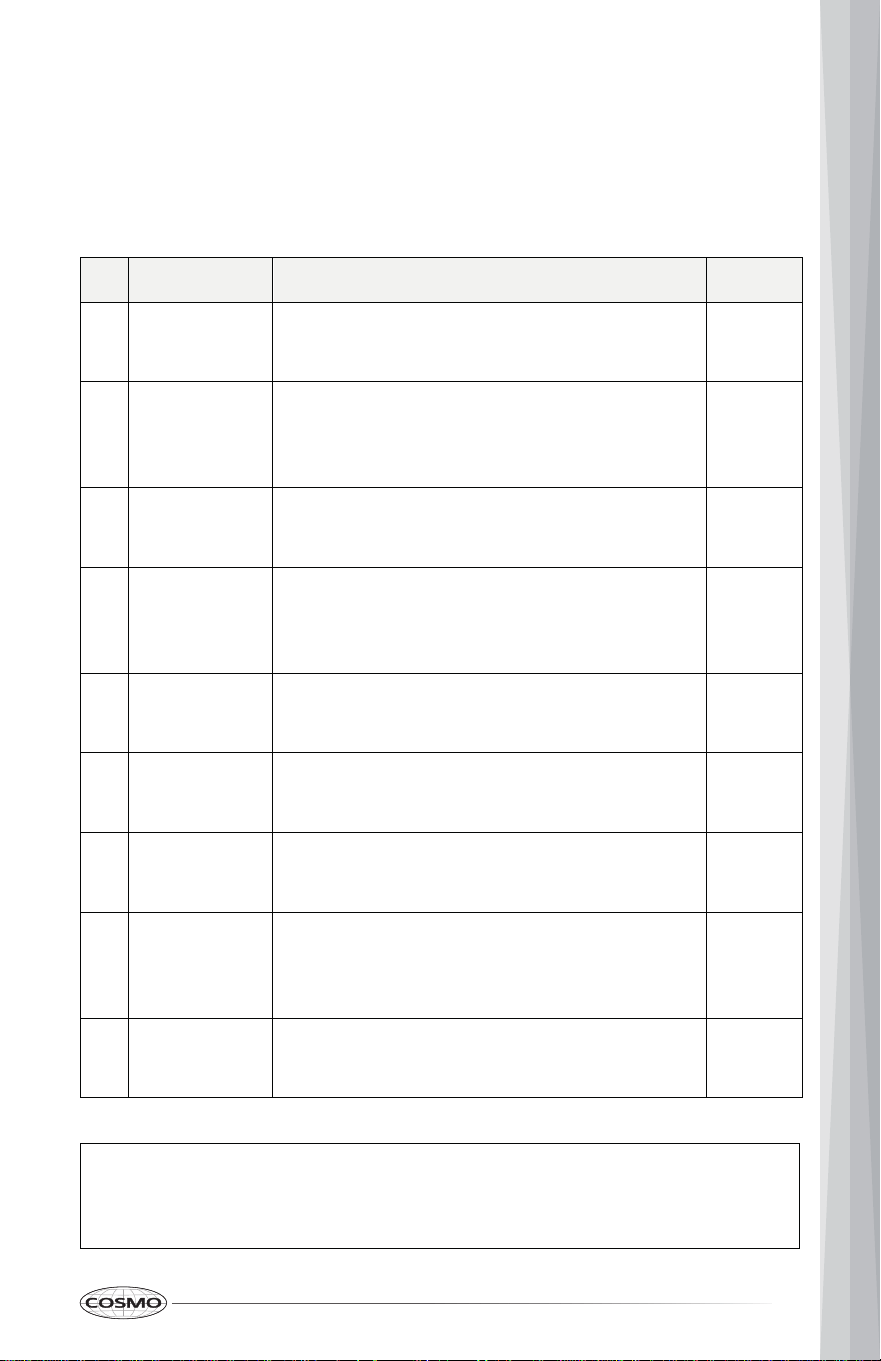
OVEN CONTROL SETTINGS
The oven has additional settings which can be accessed and adjusted using
the Settings button. These settings can only be adjusted or activated while no
oven operation is in progress.
# Settings Description Default
1 Clock Clock
• Setting the time of day.
12:00
2 Temp Unit Temperature Scale
• Switch the temperature scale between
Fahrenheit and Celsius.
°F
3 Sound Keypad Sound
• Turn keypad sound on or off.
On
4 12/24 hour Clock Hour Format
• Switch the clock format between 12-hour
and 24-hour.
12
5 Language Display language
• Switch the system language.
English
6 Sabbath Sabbath Mode
• Turn Sabbath mode on and off.
Off
7 Brightness Display Brightness
• Adjust the brightness of the display.
High
8 Calibration Temperature Calibration
• Adjust the offset temperature of oven
cooking modes.
00°F
9 Demo Mode Demo Mode
• Turn Demo mode on or off.
Off
NOTE:
• Press START to switch between the first page (settings # 1-6) and the
second page (settings # 7-9).
20
SETTING CLOCK
1. Press Settings once. List of settings appears in the display.
2. Press 1 to select "Clock" from the list.
3. Press 1 to toggle and select AM or PM.
4. Press Settings to accept the change.
5. Press the numbers to enter the correct time of day. For example, to set
12:34, press the numbers 1, 2, 3, and 4.
6. Press Settings. This accepts the time entered and starts the clock.
SETTING TEMPERATURE SCALE
1. Press Settings Once. List of settings appears in the display.
2. Press 2 to select "Temp Unit" from the list.
3. Press 1 to toggle and select °F or °C.
4. Press Settings to accept the change.
TURNING ON/OFF SOUND
1. Press Settings Once. List of settings appears in the display.
2. Press 3 to select "Sound" from the list.
3. Press 1 to toggle and select On or Off.
4. Press Settings to accept the change.
SETTING CLOCK HOUR FORMAT
1. Press Settings once. List of settings appears in the display.
2. Press 4 to select "12/24 hour" from the list.
3. Press 1 to toggle and select 12H or 24H.
4. Press Settings to accept the change.

21
SETTING DISPLAY LANGUAGE
1. Press Settings once. List of settings appears in the display.
2. Press 5 to select "Language" from the list.
3. Press 1 to select English.
4. Press Settings to accept the change.
TURNING ON/OFF SABBATH MODE
Sabbath mode is designed for those whose religious observances require
disabling certain oven features, and can only be used with Bake. By enabling
Sabbath Mode, the oven will conform to Star-K Jewish Sabbath requirements.
NOTE:
To Turn On/Off Sabbath Mode:
1. Press Settings Once. List of settings appears in the display.
2. Press 6 to select "Sabbath" from the list.
3. Press 1 to toggle and select On or Off.
4. Press Settings to accept the change.
To Turn On Bake in Sabbath Mode:
1. Press Bake. The default bake temperature setting 350°F (177°C) appears
in the display.
2. Press the numbers to set the oven temperature.
3. [Optional] Press Cook Time, and set the desired cook time.
4. [Optional] Press Start Time, and set the desired start time.
5. Press START. The oven turns on and starts preheating if Start Time is not
set. When the oven temperature reaches the set temperature, the
cooking time countdown starts. The oven continues to cook for the set
amount of time, then turns off automatically.
6. Press STOP/CLEAR to cancel this cooking function at any time.
• Sabbath mode cannot be set when the oven is on. Make sure the oven
is turned off, and the meat thermometer (probe) is not plugged in.
• The oven will not recognize the meat thermometer (probe) while in
Sabbath mode.
22
NOTE:
• If power outage occurs while the oven is in Sabbath mode, the oven will
resume in Sabbath mode when power is restored.
SETTING DISPLAY BRIGHTNESS
1. Press Settings once. List of settings appears in the display.
2. Press START to go to next page.
3. Press 7 to select "Brightness" from the list.
4. Press 1 to toggle and select High or Low.
5. Press Settings to accept the change.
SETTING TEMPERATURE CALIBRATION
This oven may cook differently than the one it replaced. Use the oven for a
few weeks to become more familiar with it before adjusting the thermostat
settings. Do not use thermometers, such as those found in grocery stores, to
check the temperature setting of your oven. These thermometers may vary
20–40 degrees.
1. Press Settings once. List of settings appears in the display.
2. Press START to go to next page.
3. Press 8 to select "Calibration" from the list.
4. Press 1 to toggle and select cooking mode.
5. Press 3 or 6 to increase or decrease temperature offset between 30°F
(18°C) and -30°F (-18°C) for the selected cooking mode.
• +30°F (+18°C) will reduce the oven temperature and cook food less.
• -30°F (-18°C) will increase the oven temperature and cook food more.
6. Press Settings to accept the change.
23
TURNING ON/OFF DEMO MODE
Demo Mode allows user to explore various features and options on the oven
user interface without turning on all the functionality (i.e. turning on the
heating elements).
1. Press Settings once. List of settings appears in the display.
2. Press START to go to next page.
3. Press 9 to select Demo Mode from the list.
4. Press 1 to toggle and select On or Off.
5. Press Settings to accept the change.
CONTROL LOCK
The Control Lock feature automatically locks most oven controls and prevents
them from being turned on unintentionally.
• Press and hold START for 3 seconds
NOTE:
• The control lock cannot be activated when the oven is in the settings
menu.
24
USING THE OVEN
CAUTION
BEFORE USING THE OVEN
Read the instructions for each feature and cooking mode in this manual
carefully before using the oven.
NOTE:
• Because the oven temperature cycles, an oven thermometer placed in
the oven cavity may not show the same set temperature on the oven.
• Do not use any type of foil or oven liner to cover the oven bottom. These
items can trap heat or melt, resulting in damage to the product and risk
of shock, smoke or fire. Damage from improper use of these items is not
covered by the product warranty.
• Foil may be used to catch spills by placing a sheet on a lower rack,
several inches below the food. Do not use more foil than necessary and
never entirely cover an oven rack with aluminum foil. Keep foil at least
1-1/2" (3.8 cm) from oven walls to prevent poor heat circulation.
• Do not cover the slotted grid of the 2-piece broiler pan with aluminum
foil. This will catch the grease and could cause fire.
• Do not use plastic wrap or wax paper in the oven.
• Do not place food, water, ice, or any dish or tray directly on the oven
floor, as this will irreversibly damage the enamel surface.
• Do not block, touch or place items around the oven vent during
cooking. Your oven is vented through ducts right above the oven
door(s). Do not block the oven vent when cooking to allow for proper air
flow.
• The oven and broiler cannot be used during a power outage. If the
oven is in use when a power failure occurs, the oven heating element
shuts off and cannot be used until power is restored. Once power is
restored, you will need to reset the oven (or Broil mode).
• As the oven heats up, the heated air in the oven may cause
condensation to appear on the oven door glass. These water drops are
harmless and will evaporate as the oven continues to heat up.
25
BEFORE USING THE OVEN FOR THE FIRST TIME
Start the oven in Bake mode at the highest available temperature setting.
Allow oven to run for 1 hour to remove any dust or impurities. There will be a
distinctive odor - this is normal. Ensure your kitchen is well ventilated during
this conditioning period.
OVEN VENT
Areas near the vent above the oven door may become hot during operation
and may cause burns. Avoid placing plastics near the vent as heat may distort
or melt the plastic.
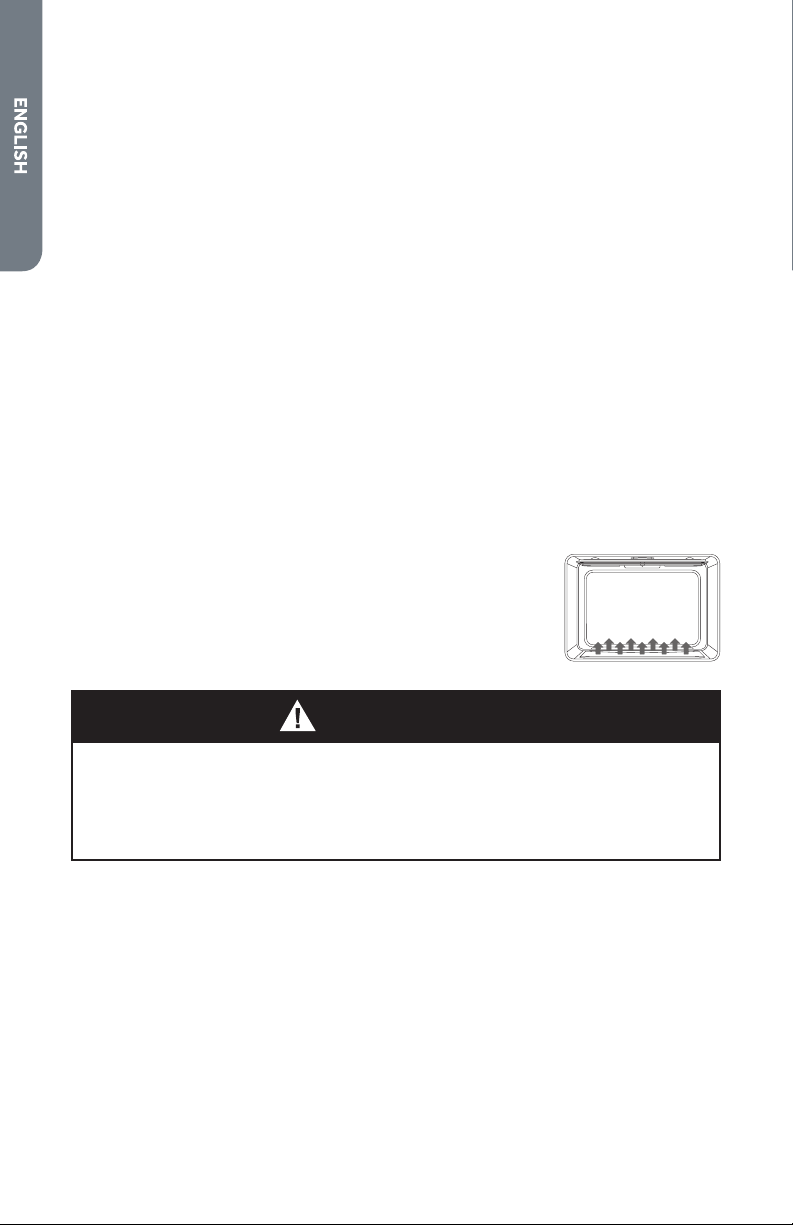
Do not block the vents (air openings) of the oven. They provide the air inlet
and outlet that are necessary for the oven to keep cool and operate properly.
It is normal for steam to be visible when cooking foods with high moisture
content.
OVEN DOOR
To avoid oven door glass breakage:
• Do not close the oven door if the racks are not fully inserted into the oven
cavity or if bakeware extends past the front edge of an oven rack.
• Do not set objects on the glass surface of the oven door.
• Do not hit glass surfaces with bakeware or other objects.
• Do not wipe down glass surfaces until the oven has completely cooled.
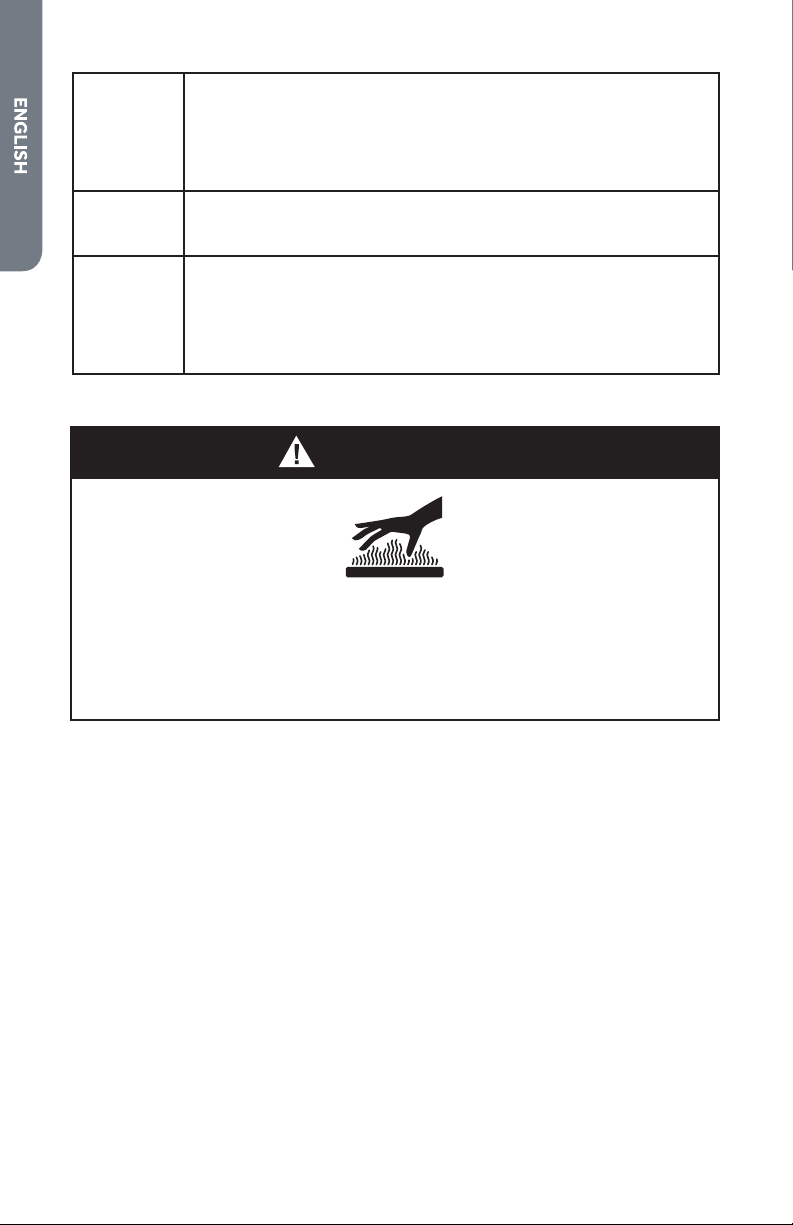
WARNING
FOOD POISONING HAZARD
• Do not let food sit in oven more than one hour before or after cooking.
Doing so can result in food poisoning or sickness.
• Foods that can easily spoil such as milk, eggs, fish, meat or poultry,
should be chilled in the refrigerator first. Even when chilled, they should
not stand in the oven for more than 1 hour before cooking begins, and
should be removed promptly when finished cooking.
26
CAUTION
USING OVEN RACKS
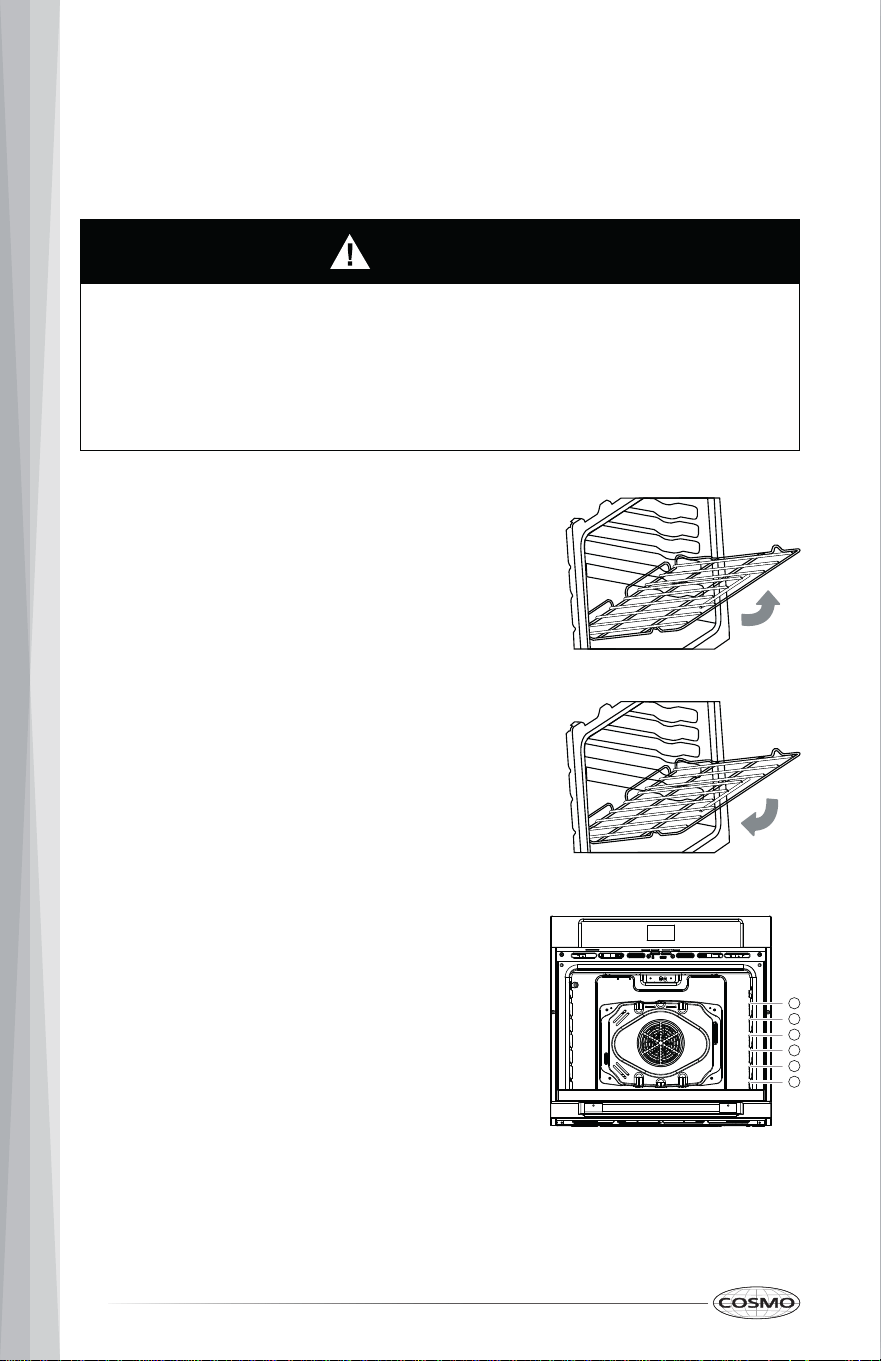
The racks have a turned-up back edge that prevents them from being pulled
out of the oven cavity.
Removing Racks
Replacing Racks
1. Pull the rack straight out until it stops.
2. Lift up the front of the rack and pull it
out.
• Replace oven racks before turning the oven on to prevent burns.
• Do not cover the racks with aluminum foil, or any other material, or
place anything on the bottom of the oven. Doing so will result in poor
baking and may damage the oven bottom.
• Only arrange oven racks when the oven is cool.
1. Place the end of the rack on the support.
2. Tilt the front end up and push the rack in.
Rack Positions
For best cooking results, adjust rack so food is
placed at the center of the oven. For most
foods this will be rack position #2 or #3. For
larger foods like roasts and turkey, move the
rack position down to #1 or #2 to keep the
food centered in the oven.
When using multiple racks simultaneously, try
to space the food out around the oven center
(rack positions #1 and #3 or #2 and #4 for
two racks).
Broiling performs best with the food close to
the broil heating element - typically rack
position #5 or #6.
5
4
3
2
1
6
27
PREHEATING
Preheating is generally desirable, although not absolutely necessary in all
circumstances.
CAUTION
MEAT THERMOMETER (TEMPERATURE PROBE)
BURN HAZARD
• Preheating is necessary for good results when baking cakes, cookies,
pastry and breads.
• Preheating will help to sear roasts and seal in meat juices.
• Place oven racks in their proper position before preheating.
• Selecting a higher temperature does not shorten the preheat time.
• A beep will sound to confirm that the oven is preheated.
• Use an oven mitt to remove temperature probe.
• Do not touch broil element.
• Failure to do so can result in burns.
The temperature probe monitors the internal food temperature, which is
frequently used as an indicator of doneness especially for meats and poultry,
and turns off the oven when the internal food temperature reaches the
programmed temperature.
The temperature probe will work with all oven modes except for the
Warm/Proof, Sabbath, and Self-Clean modes.
IMPORTANT: Always unplug and remove the temperature probe from the
oven when removing the food.
28
To Use the Temperature Probe:
1. Insert the probe tip into the food.
NOTE:
• For meats, the probe tip should be inserted into the center of the
thickest part of the meat. Make sure that the probe tip is not into
the fat or touching bone.
2. Place the food into the oven. Keeping the temperature probe as far away
from a heat source as possible, plug the temperature probe into the oven
outlet. Close the oven door.
3. Select cooking mode.
4. Enter oven temperature.
5. Press START. The display will show the set temperature throughout the
cooking.
6. Press the numbers to enter the desired internal food temperature
between 110°F - 200°F (43°C - 93°C).
7. Press START. The oven begins to cook. The oven will turn off when the set
probe temperature is reached.
8. Press STOP/CLEAR when cooking is finished. Unplug the temperature
probe, and remove food from the oven.
29
MAXIMUM & MINIMUM DEFAULT SETTINGS
Most cooking modes have minimum and maximum cook time and
temperature settings that may be entered into the control. Two short beeps
sound if the entry of the temperature or time is out of the range allowed for
the feature when START is pressed.
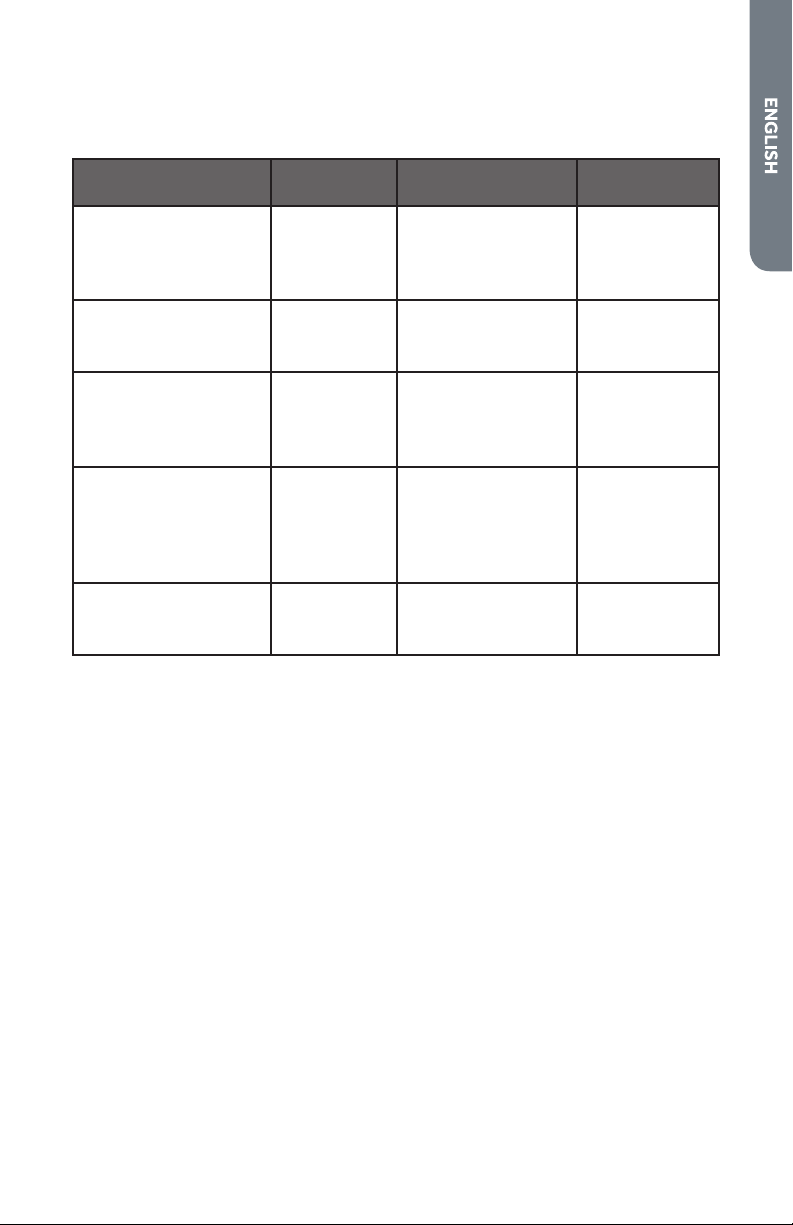
Cooking Mode Default Temp.
Minimum
Temp.
Maximum
Temp.
Bake 350°F (177°C) 170°F (77°C) 500°F (260°C)
Broil 550°F (288°C) 450°F (232°C) 550°F (288°C)
Warm 140°F (60°C) 140°F (60°C) 210°F (99°C)
Proof 80°F (27°C) 100°F (38°C) 120°F (49°C)
Convection
Bake 325°F (162°C) 170°F (77°C) 500°F (260°C)
Broil 450°F (232°C) 170°F (77°C) 550°F (288°C)
Roast 325°F (162°C) 170°F (77°C) 500°F (260°C)
Convection
Conversion
Meats
350°F (177°C) 170°F (77°C) 500°F (260°C)
Baked Goods
Others
NOTE:
• To change the set temperature during cooking, press STOP/CLEAR to
cancel the current cooking and set a new temperature.
NOTE:
• For double oven: Convection cooking modes are only available on the
upper oven.
30
NOTE:
1. Single Oven: Press Bake.
Double Oven: Press UPPER OVEN or LOWER OVEN Bake.
The default bake temperature setting 350°F (177°C) appears in the
display.
2. Press the numbers to set the oven temperature.
BAKE
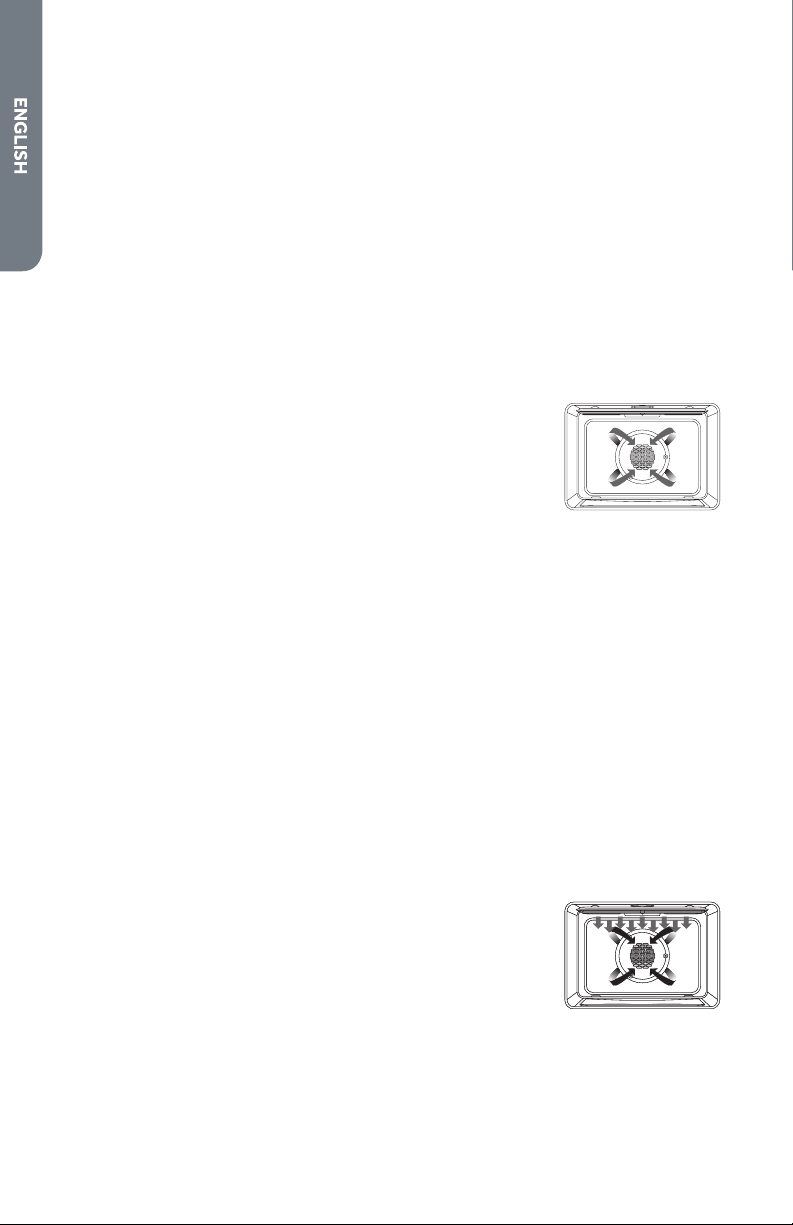
The Bake mode uses heat from upper and lower
elements to cook food. No fan is used to circulate the
heat. This mode works best with food placed on a
single rack. When using this mode to prepare baked
goods such as cakes, cookies and pastries, always
preheat the oven first and place food centrally near
the middle racks.
Follow the recipe or convenience food directions for
baking temperature, time and rack position. Baking
time will vary with the temperature of ingredients and
the size, shape and finish of the bakeware.
Setting the Bake Mode
• After selecting a cooking mode and temperature, you have the
option to set a Cook Time and Start Time before pressing START.
See "Cook Time" and "Start Time" in the FEATURES section.
3. Press START. The oven turns on and starts preheating.
4. Place the food in the oven after preheating.
5. Press STOP/CLEAR to cancel this mode at any time or when cooking is
finished, and remove the food from the oven.
31
NOTE:
1. Place the food in the oven now or after preheating.
2. Single Oven: Press Broil.
Double Oven: Press UPPER OVEN or LOWER OVEN Broil.
The default broil temperature setting 550°F (288°C) appears in the
display.
3. Press the numbers to set the oven temperature.
• After selecting a cooking mode and temperature, you have the
option to set a Cook Time and Start Time before pressing START.
See "Cook Time" and "Start Time" in the FEATURES section.
4. Press START. The oven turns on and starts preheating.
5. Press STOP/CLEAR to cancel this mode at any time or when cooking is
finished, and remove the food from the oven.
BROIL
The Broil mode uses intense heat from the upper
elements to sear foods. Ideal for toasting, melting
cheese, browning and searing surface. Thicker cuts
and unevenly shaped pieces of meat, fish and poultry
may cook better at lower broiling temperatures. Food
should be placed near the upper racks, and should
not be cooked for too long on each side of the food. It
is not necessary to preheat when using this mode.
IMPORTANT: The oven is designed for closed door broiling.
Setting the Broil Mode
32
NOTE:
• For double oven: Warm mode is only available on the lower oven.
Setting the Warm Mode
NOTE:
WARM
The Warm mode uses heat from the lower heating
element to maintain oven temperature of less than
210°F (99°C). It will keep cooked food warm for
serving up to 1 hour after cooking has finished. Cover
foods that need to remain moist and do not cover
foods that should be crisp. Preheating is not required.
This mode should not be used to reheat cold food.
IMPORTANT: Food must be at serving temperature before placing it in the
warmed oven.
1. Place the food in the oven now or after preheating.
2. Single Oven: Press Warm/Proof.
Double Oven: Press Warm.
The default warm temperature setting 140°F (60°C) appears in the
display.
3. Press the numbers to set the oven temperature.
• After selecting a cooking mode and temperature, you have the
option to set a Cook Time and Start Time before pressing START.
See "Cook Time" and "Start Time" in the FEATURES section.
4. Press START. The oven turns on and starts preheating.
5. Press STOP/CLEAR to cancel this mode at any time or when warming is
finished, and remove the food from the oven.
33
NOTE:
• For double oven: Proof mode is only available on the upper oven.
Setting the Proof Mode
PROOF
The Proof feature uses heat from the lower heating
element to maintain a warm environment for rising
yeast leavened products before baking. To avoid
lowering the oven temperature and lengthening
proofing time, do not open the oven door
unnecessarily. Check bread products early to avoid
over-proofing.
NOTE:
1. Before proofing, place the dough in a lightly greased bowl and cover
loosely with wax paper, coated with shortening. Place on second rack
from the bottom and close the oven door.
2. Single Oven: Press and hold Warm/Proof for 3 seconds.
Double Oven: Press Proof.
The default proof temperature setting 100°F (38°C) appears in the
display.
3. Press the numbers to set the oven temperature.
• After selecting a cooking mode and temperature, you have the
option to set a Cook Time and Start Time before pressing START.
See "Cook Time" and "Start Time" in the FEATURES section.
4. Press START. The oven turns on and starts preheating.
5. Press STOP/CLEAR to cancel this mode at any time or when proofing is
finished, and remove the dough from the oven.
34
NOTE:
• For double oven: Convection bake mode is only available on the upper
oven.
Setting the Convection Bake Mode
CONVECTION BAKE
The Convection Bake mode uses heat from upper and
lower elements and hot air movement from the
convection fan to enhance cooking efficiency and
evenness across multiple racks. Always preheat the
oven first. Baking times may be slightly longer for
multiple racks than what would be expected for a
single rack.
NOTE:
1. Press Convec. List of convection modes appears in the display.
2. Press 1 to select "Convect Bake" from the list. The default convection bake
temperature setting 325°F (162°C) appears in the display.
3. Press the numbers to set the oven temperature.
• After selecting a cooking mode and temperature, you have the
option to set a Cook Time and Start Time before pressing START.
See "Cook Time" and "Start Time" in the FEATURES section.
4. Press START. The oven turns on and starts preheating.
5. Place the food in the oven after preheating.
6. Press STOP/CLEAR to cancel this mode at any time or when cooking is
finished, and remove the food from the oven.
35
NOTE:
Setting the Convection Broil Mode
• The oven is designed for closed door broiling.
• For double oven: Convection broil mode is only available on the upper
oven.
CONVECTION BROIL
The Convection Broil mode uses intense heat from the
upper elements and air movement from the fan to
enhance cooking efficiency and evenness across
multiple racks. Ideal for grilling meats, vegetables,
and poultry. Cooking times may be slightly longer for
multiple racks than what would be expected for a
single rack.
NOTE:
1. Place the food in the oven now or after preheating.
2. Press Convec. List of convection modes appears in the display.
3. Single Oven: Press 3 to select "Convect Broil" from the list.
Double Oven: Press 2 to select "Convect Broil" from the list.
The default convection broil temperature setting 450°F (232°C) appears
in the display.
4. Press the numbers to set the oven temperature.
• After selecting a cooking mode and temperature, you have the
option to set a Cook Time and Start Time before pressing START.
See "Cook Time" and "Start Time" in the FEATURES section.
5. Press START. The oven turns on and starts preheating.
6. Press STOP/CLEAR to cancel this mode at any time or when cooking is
finished, and remove the food from the oven.
36
NOTE:
• For double oven: Convection roast mode is only available on the upper
oven.
Setting the Convection Roast Mode
CONVECTION ROAST
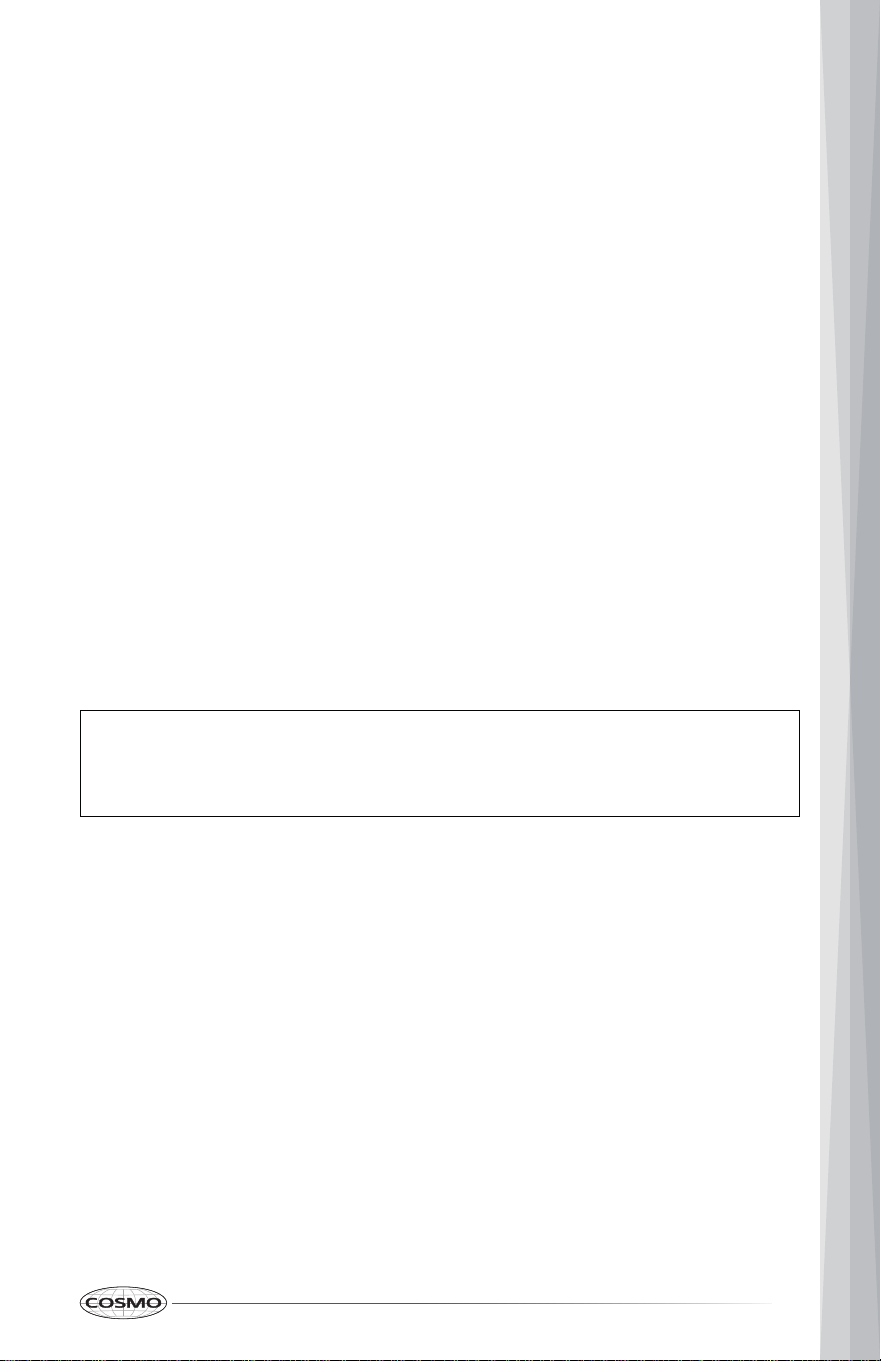
The Convection Roast mode uses heat from both
upper and lower elements and hot air movement
from the convection fan to enhance cooking efficiency
and evenness across multiple racks. Ideal for roasting
meats and poultry. Heated air circulates around the
food from all sides, sealing in juices and flavors. A
meat probe may be used with this feature. Roasting
times may be slightly longer for multiple racks than
what would be expected for a single rack.
NOTE:
1. Place the food in the oven now or after preheating.
2. Press Convec. List of convection modes appears in the display.
3. Single Oven: Press 2 to select "Convect Roast" from the list.
Double Oven: Press 3 to select "Convect Roast" from the list.
The default convection broil temperature setting 325°F (162°C) appears in
the display.
4. Press the numbers to set the oven temperature.
• After selecting a cooking mode and temperature, you have the
option to set a Cook Time and Start Time before pressing START.
See "Cook Time" and "Start Time" in the FEATURES section.
5. Press START. The oven turns on and starts preheating.
6. Press STOP/CLEAR to cancel this mode at any time or when cooking is
finished, and remove the food from the oven.
37
NOTE:
Setting the Convection Conversion Mode
CONVECTION CONVERSION
(MEATS / BAKED GOODS / OTHERS)
When using the Connection Conversion modes, the
oven will automatically convert entered regular
cooking temperatures to convection cooking
temperatures. The cooking temperature will decrease
25°F and the cooking time will decrease 10%.
For example, if you enter a regular recipe
temperature of 350°F and press START, the display
will show the converted temperature of 325°F.
• Setting a cook time is required for Convection Conversion modes.
• The oven door must be closed before setting Convection Conversion.
• For double oven: Convection Conversion modes are only available on
the upper oven.
1. Double Oven: Press Convec, then press 4 to select "Conv Conversion" from
the list of convection modes in the display.
2. Single Oven: Press Baked Goods, Meats, or All Others.
Double Oven: Press 1, 2, or 3 to select "Baked Goods", "Meats", or "Others"
from the list.
The default convection broil temperature setting 350°F (177°C) appears in
the display.
3. Press START to confirm selection.
4. Press the numbers to enter the regular cooking temperature.
5. Press Cook Time.
6. Press the numbers to enter the regular cooking time.
7. Press START. The oven turns on and starts preheating.
38
8. Place the food in the oven after preheating.
NOTE:
• For Meats mode, it is not necessary to preheat the oven. Preheating
can cause overcooking. If preheat is required for the recipe, add 15
minutes to the cook time, and place food in the oven at the
appropriate time.
9. When the cooking cycle finishes, the oven turns off automatically and the
cook end tone plays. Press STOP/CLEAR to stop the tone, and remove the
food from the oven.
TIPS AND TECHNIQUES
GENERAL
• Preheat the oven when using the Bake, Convection Bake and Convection
Roast modes.
• Selecting a higher temperature does not shorten the preheat time.
• Preheating is necessary for good results when baking cakes, cookies,
pastry and breads.
• Preheating will help to sear roasts and seal in meat juices.
• Place oven racks in their proper position and make sure they are level
before preheating.
• Use the interior oven lights to view the food through the oven door
window rather than opening the door frequently.
• Do not set pans on the open oven door or the oven bottom.
• When using the oven at high altitude, cooking times may be extended.
39
COOKWARE
• The material, finish, and size of cookware affect baking performance.
• Dark, coated and dull pans absorb heat more readily than light, shiny
pans. Pans that absorb heat more readily can result in a browner, crisper,
and thicker crust. If using dark and coated cookware, check food earlier
than minimum cook time. If undesirable results are obtained with this
type of cookware, consider reducing oven temperature by 25°F next time.
• Shiny pans can produce more evenly cooked baked goods such as cakes
and cookies.
• Glass and ceramic pans heat slowly but retain heat well. These types of
pans work well for dishes such as pies and custards.
• Air insulated pans heat slowly and can reduce bottom browning.
• Keep cookware clean to promote even heating.
BAKE
Baking is cooking with heated air. The upper and lower heating elements in
the oven are used to heat the air but no fan is used to circulate the heat.
Follow the recipe or convenience food directions for baking temperature, time
and rack position. Baking time will vary with the temperature of ingredients
and the size, shape and finish of the baking utensil.
• For best results, bake food on a single rack with at least 1" - 1½" (2.5 - 3
cm) space between utensils and oven walls.
• Use one rack when selecting the bake mode.
• Check for doneness at the minimum time.
• Use metal bakeware (with or without a non-stick finish), heatproof glass,
glass-ceramic, pottery or other utensils suitable for the oven.
• When using heatproof glass, reduce temperature by 25°F (15°C) from
recommended temperature.
• Use baking sheets with or without sides or jelly roll pans.
• Dark metal pans or nonstick coatings will cook faster with more browning.
Insulated bakeware will slightly lengthen the cooking time for most foods.
• Do not use aluminum foil or disposable aluminum trays to line any part of
the oven. Foil is an excellent heat insulator and heat will be trapped
beneath it. This will alter the cooking performance and can damage the
finish of the oven.
• Avoid using the opened door as a shelf to place pans.
40
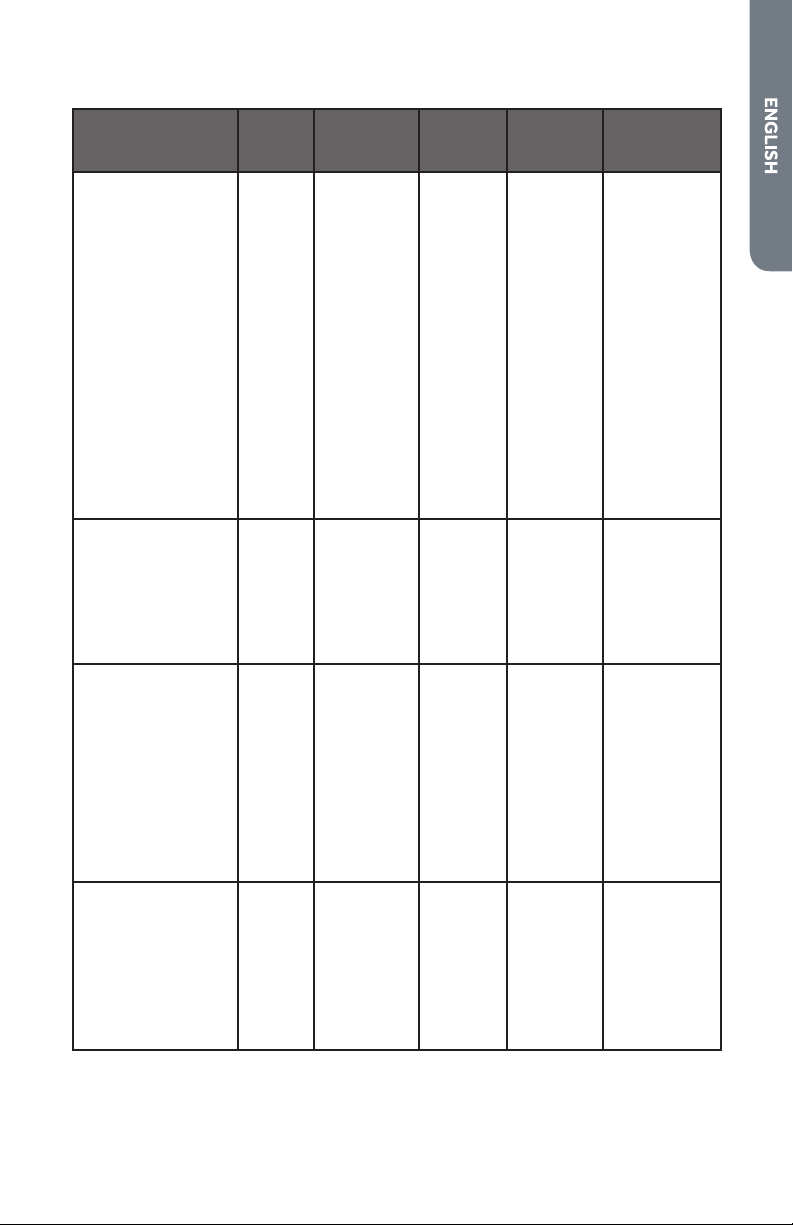
Bake Chart
FOOD ITEM
RACK
POSITION
TEMPERATURE °F (°C)
(PREHEATED OVEN)
TIME
(MIN)
Cake
Cupcakes
Bundt Cake
Angel Food
2
1
1
350 (175)
350 (175)
350 (175)
19-22
40-45
35-39
Pie
2 crust, fresh, 9"
2 crust, frozen fruit, 9"
2
2
375-400 (190-205)
375 (190)
45-50
68-78
Cookies
Sugar
Chocolate Chip
Brownies
2
2
2
350-375 (175-190)
350-375 (175-190)
350 (175)
8-10
8-13
29-36
Breads
Yeast bread loaf, 9"x5"
Yeast rolls
Biscuits
Muffins
2
2
2
2
375 (190)
375-400 (190-205)
375-400 (190-205)
425 (220)
18-22
12-15
7-9
15-19
Pizza
Frozen
Fresh
2
2
400-450 (205-235)
475 (246)
23-26
15-18
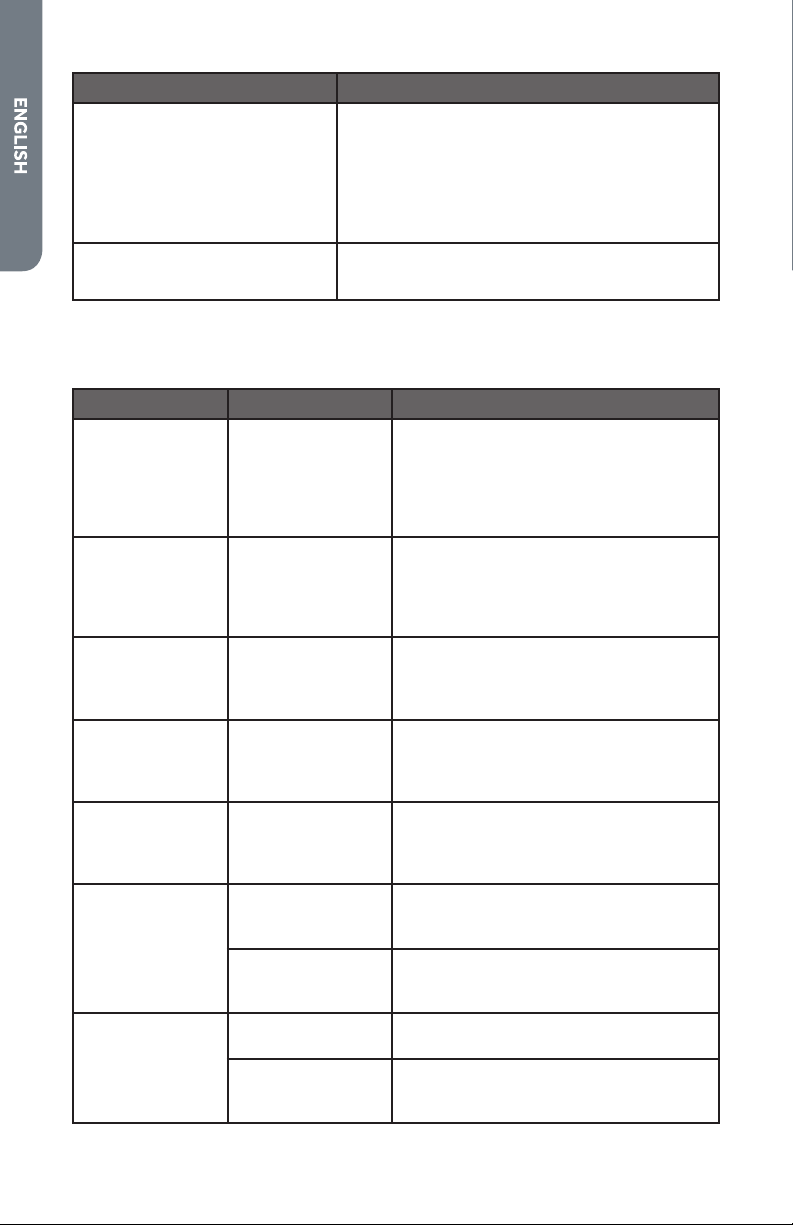
BROIL
The Broil mode uses intense heat from the upper heating element to sear
foods. The size, weight, thickness, starting temperature, and your preference
of doneness will affect broiling times.
• Place rack in the required position needed before turning on the oven.
• Use the 2-piece broil pan.
• Preheat oven for about 5 minutes before placing food in the oven.
• Turn meats once halfway through the cooking time.
41
Broil Chart
FOOD ITEM
RACK
POSITION
BROIL
SETTING
°F (°C)
INTERNAL
FOOD
TEMP.
°F (°C)
TIME
SIDE 1
(MIN)
TIME
SIDE 2
(MIN)
Beef
Steak (¾"-1")
Medium Rare
Medium
Well Done
Hamburgers (¾"-1")
Medium
Well Done
5
5
5
4
4
550 (288)
550 (288)
550 (288)
550 (288)
550 (288)
145 (65)
160 (71)
170 (77)
160 (71)
170 (77)
5-7
6-8
8-10
8-11
10-13
4-6
5-7
7-9
6-9
8-10
Poultry
Breast (bone-in)
Thigh (very well done)
4
4
500 (260)
450 (232)
170 (77)
180 (82)
10-12
28-30
8-10
13-15
Pork
Pork Chips (1")
Sausage (fresh)
Ham Slice (½")
5
5
5
550 (288)
550 (288)
550 (288)
160 (71)
160 (71)
160 (71)
7-9
5-7
4-6
5-7
3-5
3-5
Seafood
Fish Filets (1" buttered) 4 500 (260) Cook until
opaque &
flakes
easily
with fork
10-14 Do not
turn
Lamb
Chops (1")
Medium Rare
Medium
Well Done
5
5
5
550 (288)
550 (288)
550 (288)
145 (63)
160 (71)
170 (77)
5-7
6-8
7-9
4-6
4-6
5-7
Bread
Garlic Bread, (1" slices)
Garlic Bread, (1" slices)
4
3
550 (288)
550 (288)
2-3
4-6
42
CONVECTION BAKE
Convection Bake uses heat from the upper and lower heating elements and
air movement from the convection fan to enhance cooking efficiency and
evenness across multiple racks. Reduce recipe baking temperatures by 25°F
(15°C).
• For best results, foods should be cooked uncovered, in low-sided pans to
take advantage of the forced air circulation. Use shiny aluminum pans for
best results unless otherwise specified.
• Heatproof glass or ceramic can be used. Reduce temperature by another
25°F (15°C) when using heatproof glass dishes for a total reduction of
50°F (30°C).
• Dark metal pans may be used. Note that food may brown faster when
using dark metal bake ware.
• The number of racks used is determined by the height of the food to be
cooked.
• Baked items, for the most part, cook extremely well in convection. Do not
try to convert recipes such as custards, quiches, pumpkin pie, or
cheesecakes, which do not benefit from the convection-heating process.
Use the regular Bake mode for these foods.
• Multiple rack cooking for oven meals is
done on rack positions 1, 2, 3, 4, and 5.
All six rack positions can be used for
cookies, biscuits, and appetizers.
- 2 Rack baking: Use positions 1 and
3 or 2 and 4.
- 3 rack baking: Use positions 2, 3,
and 4 or 1, 3, and 5.
- When baking four cake layers at
the same time, stagger pans so
that one pan is not directly above
another. For best results, place
cakes on front of upper rack and
back of lower rack (See graphic at
right). Allow 1" - 1 ½" (2.5 – 3 cm)
air space around pans.
• Converting your own recipe can be easy. Choose a recipe that will work
well in convection.
• Reduce the temperature and cooking time if necessary. It may take some
trial and error to achieve a perfect result. Keep track of your technique for
the next time you want to prepare the recipe using convection.
5
4
3
2
1
6
Rear
Placement
Front
Placement
43
Foods recommended for convection bake mode:
Appetizers, Biscuits, Cakes, Casseroles, Coffee Beans, Cookies (2 to 4 racks),
Cream Puffs, Popovers, Yeast Breads, One-Dish Entrées, Oven Meals (rack
positions 3 and 4), and Air Leavened Foods (Soufflés, Meringue, Meringue-
Topped Desserts, Angel Food Cakes, Chiffon Cakes).
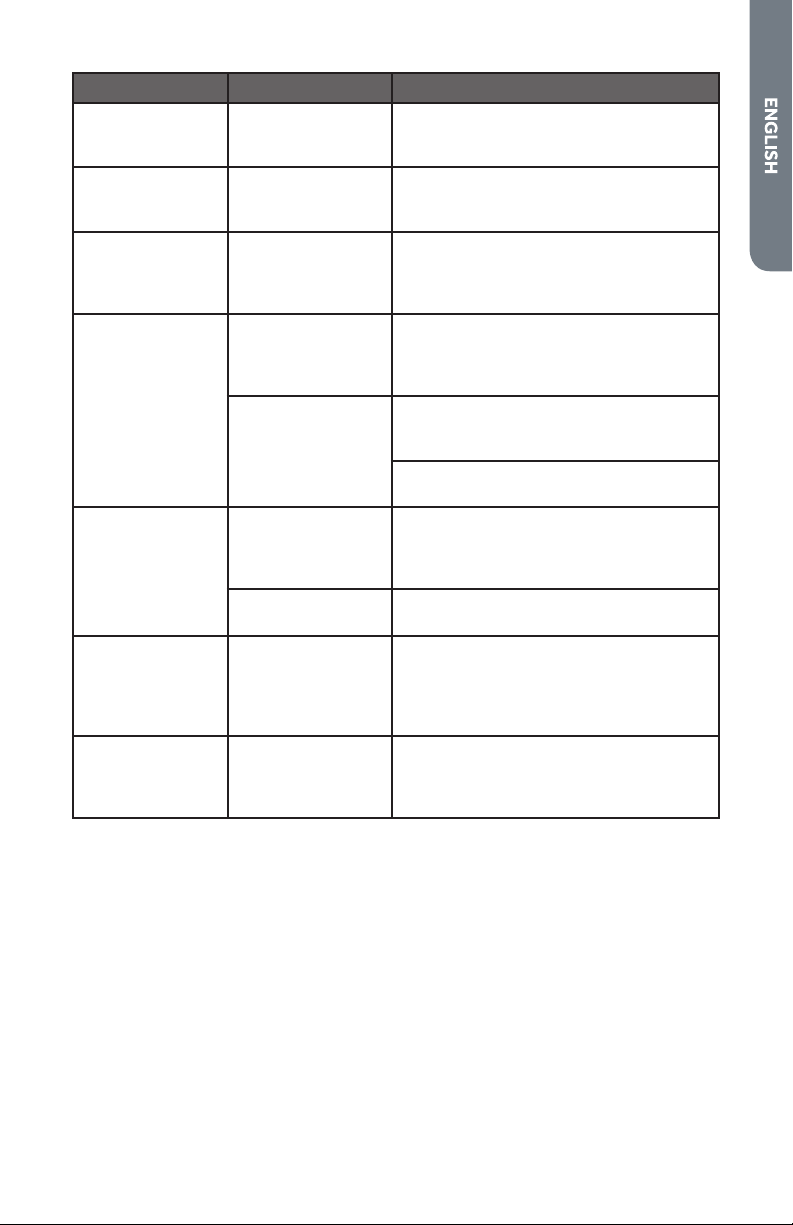
Convection Bake Chart
Reduce standard recipe temperature by 25 ºF (15 °C) for Convection Bake.
Temperatures have been reduced in this chart.
FOOD ITEM
RACK
POSITION
TEMPERATURE °F (°C)
(PREHEATED OVEN)
TIME
(MIN)
Cake
Cupcakes
Bundt Cake
Angel Food
2
1
1
325 (160)
325 (160)
325 (160)
20-22
43-50
43-47
Pie
2 crust, fresh, 9"
2 crust, frozen fruit, 9"
2
2
350-400 (175-205)
350 (175)
40-52
68-78
Cookies
Sugar
Chocolate Chip
Brownies
2
2
2
325-350 (160-175)
325-350 (160-175)
325 (160)
9-12
8-13
29-36
Breads
Yeast bread loaf, 9"x5"
Yeast rolls
Biscuits
Muffins
2
2
2
2
350 (175)
350-375 (175-190)
375 (190)
400 (205)
18-22
12-15
8-10
17-21
Pizza
Frozen
Fresh
2
2
375-425 (190-220)
450 (232)
23-26
15-18

44
CONVECTION BROIL
• Place rack in the required position needed before turning on the oven.
• Use Convection Broil mode with the oven door closed.
• Do not preheat oven.
• Use the 2-piece broil pan.
• Turn meats once halfway through the cooking time.
• Thicker cuts and unevenly shaped pieces of meat, fish and poultry may
cook better at lower broiling temperatures.
Convection Broil Chart
FOOD ITEM RACK
POSITION
BROIL
SETTING
INTERNAL
TEMP.
°F (°C)
TIME
SIDE-1
(MIN)
TIME
SIDE-2
(MIN)
Beef
Steak (> 1 ½")
Medium Rare
Medium
Well
Hamburgers (> 1")
Medium
Well
4
4
4
4
4
450 (232)
450 (232)
450 (232)
550 (288)
550 (288)
145 (65)
160 (71)
170 (77)
160 (71)
170 (77)
9-12
11-13
18-20
8-11
11-13
8-10
10-12
16-17
5-7
8-10
Poultry
Chicken Quarters
Chicken Halves
Chicken Breasts
4
3
4
450 (232)
450 (232)
450 (232)
180 (82)
180 (82)
170 (77)
16-18
25-27
13-15
10-13
15-18
9-13
Pork
Pork Chops (> 1 ¼")
Sausage - Fresh
4
4
450 (232)
450 (232)
160 (71)
160 (71)
12-14
4-6
11-13
3-5

45
CONVECTION ROAST
The Convection Roast mode uses heat from both upper and lower elements
and hot air movement from the convection fan to enhance cooking efficiency
and evenness across multiple racks. Heated air circulates around the food
from all sides, sealing in juices and flavors.
• Roast in a low-sided, uncovered pan.
• When roasting whole chickens or turkey, tuck wings behind back and
loosely tie legs with kitchen string.
• Use the 2-piece broil pan for roasting uncovered.
• Use a meat thermometer to determine the internal doneness.
• Double-check the internal temperature of meat or poultry by inserting
meat thermometer into another position.
• Large food item may need specific areas to be covered with foil (and pan
roasted) during part of the roasting to prevent over-browning.
• The minimum safe temperature for stuffing in poultry is 165°F (75°C).
• After removing the item from the oven, cover loosely with foil for 10 to 15
minutes before carving if necessary to increase the final foodstuff
temperature by 5°F to 10°F (3°C to 6°C).
46
Convection Roasting Chart
FOOD ITEM
WT
(LB)
RACK
POS.
OVEN
TEMP.
°F (°C)
INTERNAL
FOOD
TEMP. °F (°C)
TIME
(MIN/
LB)
Beef
Rib Roast
Medium Rare
Medium
Rib Eye Roast
Medium Rare
Medium
Rump, Eye, Tip, Sirloin
Medium Rare
Medium
Tenderloin Roast
Medium Rare
4-6
4-6
3-6
2-3
2
2
2
2
325 (160)
325 (160)
325 (160)
400 (205)
145 (63)
160 (71)
145 (63)
160 (71)
145 (63)
160 (71)
145 (63)
16-20
18-22
16-20
18-22
16-20
18-22
15-20
Pork
Loin Roast - Medium
Shoulder - Medium
5-8
3-6
2
2
350 (175)
350 (175)
160 (71)
160 (71)
16-20
20-25
Poultry
Chicken Whole
Turkey (unstuffed)
Turkey (unstuffed)
Turkey (unstuffed)
Turkey Breast
Cornish Hen
3-4
12-15
16-20
21-25
3-8
1-1½"
2
1
1
1
1
2
375 (190)
325 (160)
325 (160)
325 (160)
325 (160)
350 (175)
180 (82)
180 (82)
180 (82)
180 (82)
170 (77)
180 (82)
18-21
10-14
9-11
6-10
15-20
45-75
Lamb
Half Leg
Medium
Well Done
Whole Leg
Medium
Well Done
3-4
6-8
2
1
325 (160)
325 (160)
160 (71)
170 (77)
160 (71)
170 (77)
22-27
28-33
22-27
28-33
47
NOTE:
MAINTENANCE AND CARE
MANUAL CLEANING
IMPORTANT: Before cleaning, make sure all controls are off and the oven is
cool. Always follow label instructions on cleaning products. Soap, water and a
soft cloth or sponge are suggested first unless otherwise noted. Do not use
abrasive cleaning products.
• Do not clean the oven door gasket. The material of the gasket cannot
withstand abrasion. It is essential for the gasket to remain intact. If you
notice it becoming worn or frayed, replace it.
The entire oven can be safely cleaned with a soapy sponge, rinsed and dried.
If stubborn soil remains, follow the recommended cleaning methods below.
• Always use the mildest cleaner that will do the job.
• Rub metal finishes in the direction of the grain.
• Use clean, soft cloths, sponges or paper towels.
• Rinse thoroughly with a minimum of water so it does not drip into door
slots.
• Do not immerse the oven door in water.
• Dry to avoid water marks.
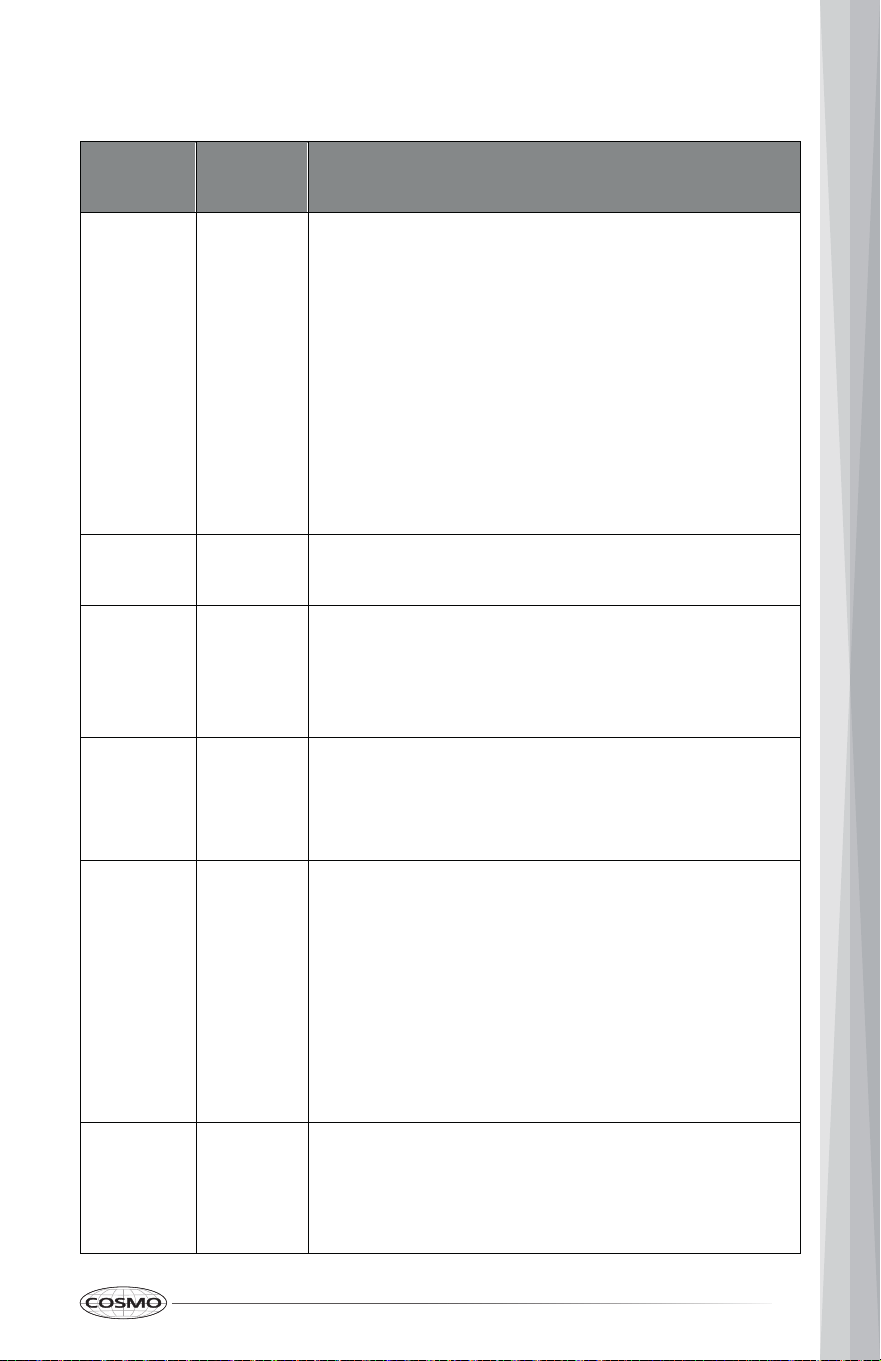
48
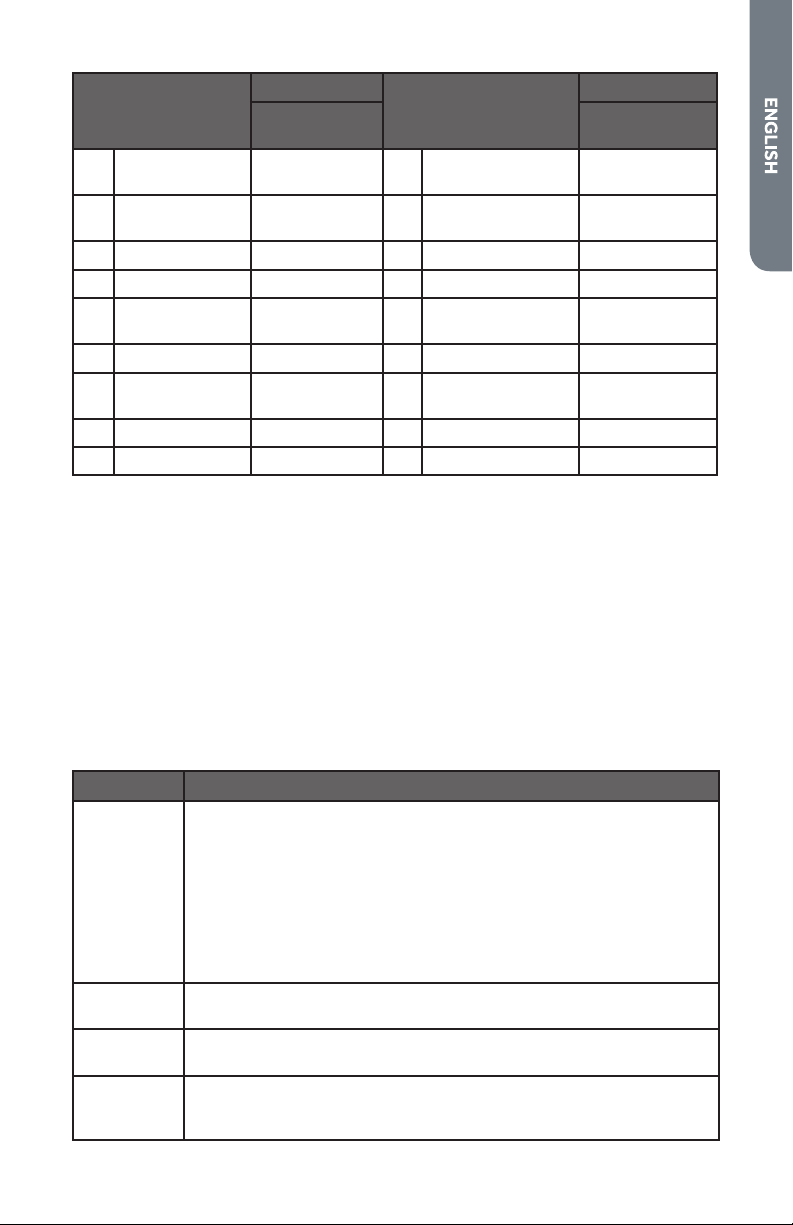
PART
CLEANING CHART BY PARTS
CLEANING
METHOD
PART
CLEANING
METHOD
1 Control panel
trim
G 9 G Door Front
2 C Control panel 10 G Door handle
3
vents
D Oven cooling 11 E Outer door frame
4 D 12 Exterior side trim E Oven front frame
5 E Oven cavity 13 Oven rack A or E
6 B Door gasket 14 E Broiler pan grid
7 E 15 Inner door frame E Broiler pan tray
8 F Door window 16 Meat H
Thermometer
49
The cleaners listed below indicate types of products to use and are not being
endorsed. Use all products according to package directions.
CLEANING
METHOD
SURFACE
TYPE
CLEANING METHOD DESCRIPTION
A Chrome
Plated
Wash with hot sudsy water. Rinse thoroughly and
dry. Or, gently rub with Soft Scrub®, Bon-Ami®,
Comet®, Ajax®, Brillo® or S.O.S.® pads as
directed.
Easy Off® or Dow® Oven Cleaners (cold oven
formula) can be used, but may cause darkening
and discoloration.
Racks may be cleaned in the oven during the Self-
Cleaning mode. However, chromed racks will lose
their shiny finish and permanently change to a
metallic gray.
B Fiberglass
Knit
DO NOT HAND CLEAN GASKET.
C Glass Spray Windex® or Glass Plus® onto a cloth first,
then wipe to clean.
Use Fantastik® or Formula 409® to remove grease
spatters.
D Painted Apply hot sudsy water or apply Fantastik® or
Formula 409® to a clean sponge or paper towel
and wipe clean. Avoid using powdered cleansers
and steel wool pads.
E Porcelain Immediately wipe up acidic spills like fruit juice, milk
and tomatoes with a dry towel. Do not use a
moistened sponge/towel on hot porcelain. When
cool, clean with hot sudsy water or apply Bon-
Ami® or Soft Scrub® to a damp sponge. Rinse and
dry. For stubborn stains, gently use Brillo® or
S.O.S.® pads. It is normal for porcelain to craze
(fine lines) with age due to exposure from heat and
food soil.
F Reflective
Glass
Clean with hot sudsy water and sponge or plastic
scrubber. Rub stubborn stains with vinegar,
Windex®, ammonia or Bon-Ami®.
DO NOT USE HARSH ABRASIVES.
50
CLEANING
METHOD
SURFACE
TYPE
CLEANING METHOD DESCRIPTION
G Stainless
Steel
H Probe (if
present)
SELF CLEAN
CAUTION
Clean probe by hand with detergent and hot
water. Then rinse and dry. Do not soak or clean in
dishwasher.
BURN HAZARD
Always wipe or rub with grain. Clean with a soapy
sponge then rinse and dry. Or, wipe with
Fantastik® or Formula 409® sprayed onto a paper
towel. Protect and polish with Stainless Steel
Magic® and a soft cloth. Remove water spots with
a cloth dampened with white vinegar. Use Zud®,
Cameo®, Bar Keeper’s Friend® or RevereWare
Stainless Steel Cleaner®, to remove heat
discoloration.
• Do not touch the oven during the Self-Cleaning cycle.
• Keep children away from oven during Self-Cleaning cycle.
• Failure to do so can result in burns.
The Self Clean cycle uses very high temperatures to burn soil to a powdery ash
and clean the oven’s interior automatically.
IMPORTANT: Move birds to another well-ventilated room. The health of some
birds is extremely sensitive to the fumes given off during the self-cleaning
cycle of any oven.
51
• During Self Clean, the kitchen should be well ventilated to help eliminate
odors associated with Self Clean. Odors will lessen with use.
• It is common to see smoke and/or an occasional flame-up during the Self
Clean cycle, depending on the content and amount of soil remaining in
the oven. If a flame persists, turn off the oven and allow it to cool before
opening the door to wipe up the excessive food soil.
• As the oven heats, you may hear sounds of metal parts expanding and
contracting. This is normal and will not damage the oven.
• Do not block the oven vent(s) during the Self-Cleaning cycle. Air must be
able to move freely.
• Do not clean, rub, damage or move the oven door gasket.
• The oven light does not operate during Self Clean mode.
• Clean mode stops automatically at the end of the set cleaning time.
• The oven door will lock and the display will show the Lock icon when using
the Self Clean mode.
• When the oven has cooled down to a safe temperature, the oven door
will unlock.
• Do not force the oven door open when the Lock icon is displayed. The
oven door will remained locked until the oven temperature has cooled.
Forcing the door open will damage the door.
• For double-oven models, Self Clean can only be run in one oven at a time.
BEFORE A SELF CLEAN CYCLE
• Remove all utensils and bakeware.
• Remove non-porcelain oven racks. If chromed racks are left in the oven
during the Self Clean cycle, they will permanently lose the shiny finish and
change to a dull dark finish.
• Be sure oven interior lights are off and the light bulb covers are in place.
• Wipe up any grease and soft soils with paper towels. Excess grease will
cause flames and smoke inside the oven during self-cleaning.
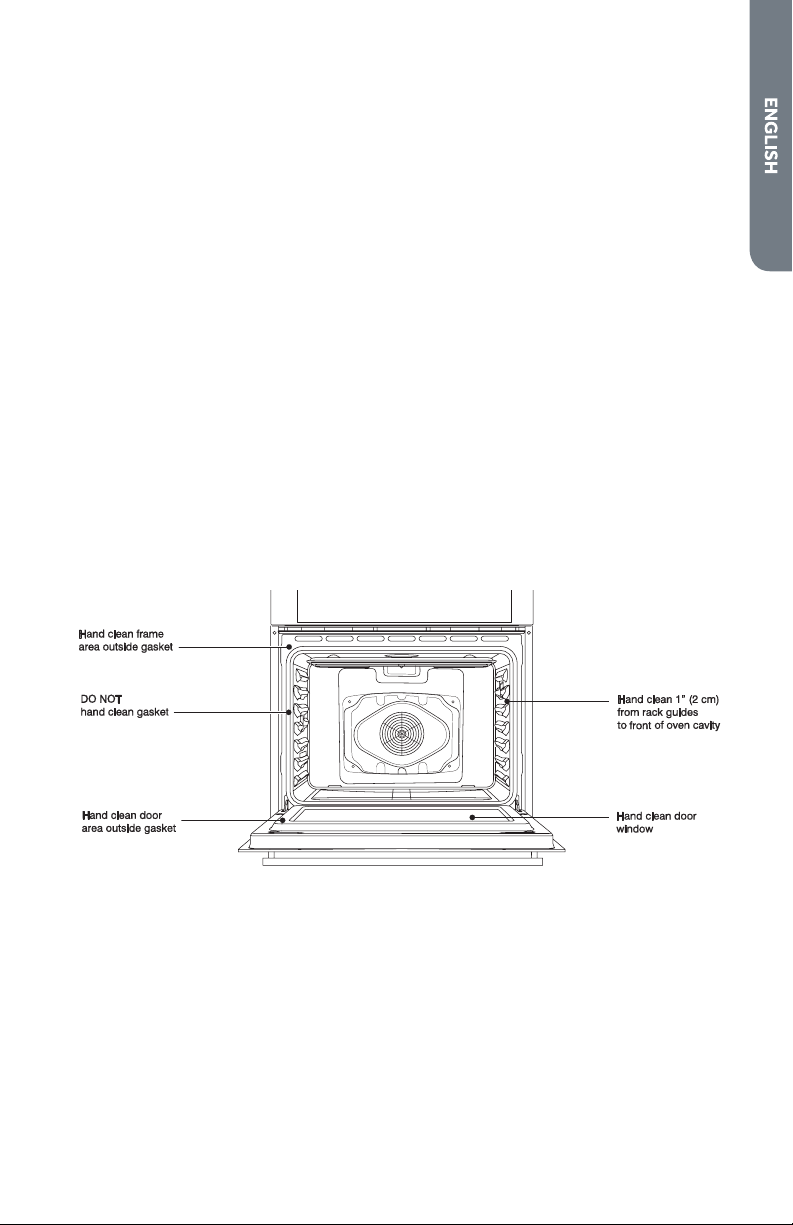
• Some areas of the oven such as the oven door edge, oven door window,
oven front frame, and up to 1½" (2-3 cm) inside the frame do not get hot
enough during the cleaning cycle for soil to burn away, and must be
cleaned by hand BEFORE the cycle begins. Clean using a soapy sponge or
plastic scrubber and a solution of detergent and hot water. Rinse and dry
all areas thoroughly.
• Do not rub the oven door gasket.

52
STARTING A SELF CLEAN CYCLE
1. Empty the oven and close the oven door.
2. Press Self Clean. The Self Clean icon and default cycle time "3" (3.5 hours )
appear in the display.
3. Double Oven: Press 1 or 2 to select upper or lower oven.
4. Press 1, 2, or 3 to select the cleaning duration 2:00, 3:00, or 3:30 (hours).
5. (Optional) Press Start Time and enter the desired start time to set a del ay
start time if desire.
6. Press START. The oven door locks automatically and Self Clean begins.
7. After Self Clean has ended and the oven has completely cooled, remove
ash with a damp cloth.
NOTE:
• When the oven has cooled down to a safe temperature, the oven
door will unlock.
• To avoid breaking the glass, do not apply a cool, damp cloth to the
inner door glass before it has cooled completely.
• After the Self-Clean Cycle
- You may notice some white ash in the oven. Wipe it off with a
damp cloth after the oven cools. These deposits are usually a
salt residue that cannot be removed by the clean cycle.
- Fine lines may appear in the porcelain because it went through
heating and cooling. This is normal and will not affect
performance.
• A 24-hour wait is recommended before starting the next Self-Clean
cycle.
53
REMOVING/REPLACING THE OVEN DOOR
For normal oven use, there is no need to remove the oven door. However,
should it become necessary to remove the door, follow the instructions in this
section.
IMPORTANT:
To Remove the Oven Door:
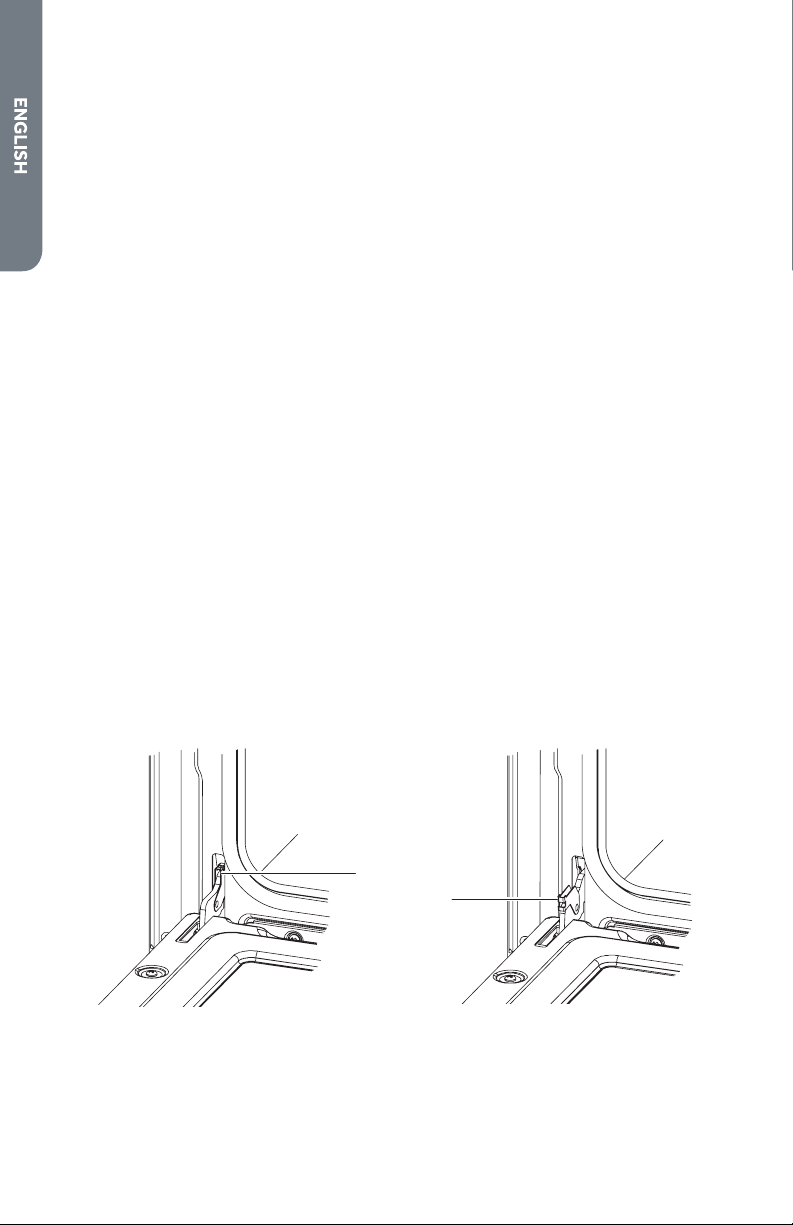
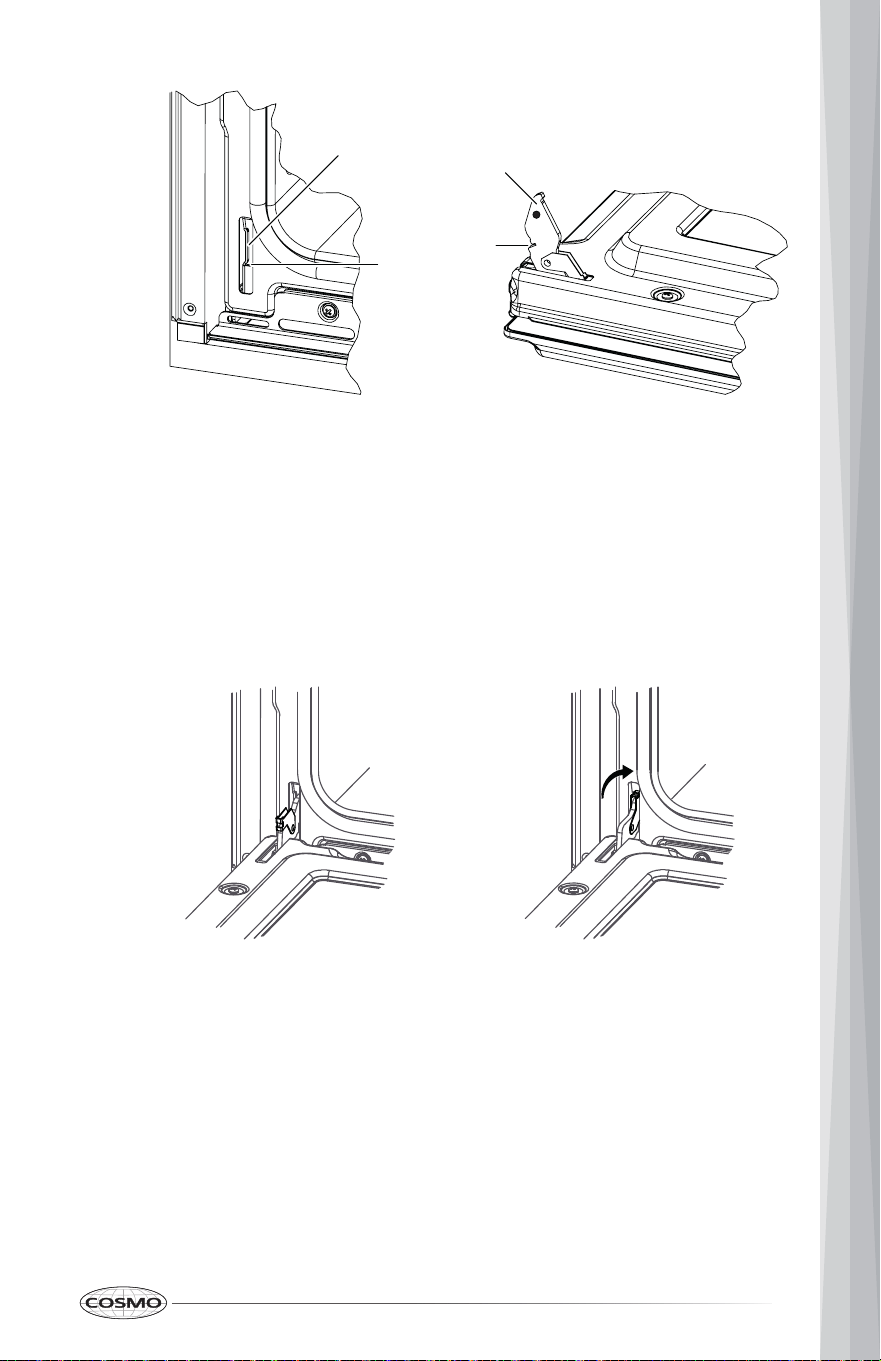
Locked Unlocked
1. Fully open the oven door.
2. Unlock the hinge locks on both sides, rotating them as far toward the
open door frame as they will go.
• Make sure the oven is cool and power to the oven has been turned off.
• Do not lift the oven door by the handle.
• The oven door is heavy and fragile, and the door front is glass. To avoid
oven door glass breakage, use both hands, and grasp only the sides of
the oven door to remove.
• Be sure both levers are securely in place before removing the door.
• Do not force door open or closed.
3. Firmly grasp both sides of the door.
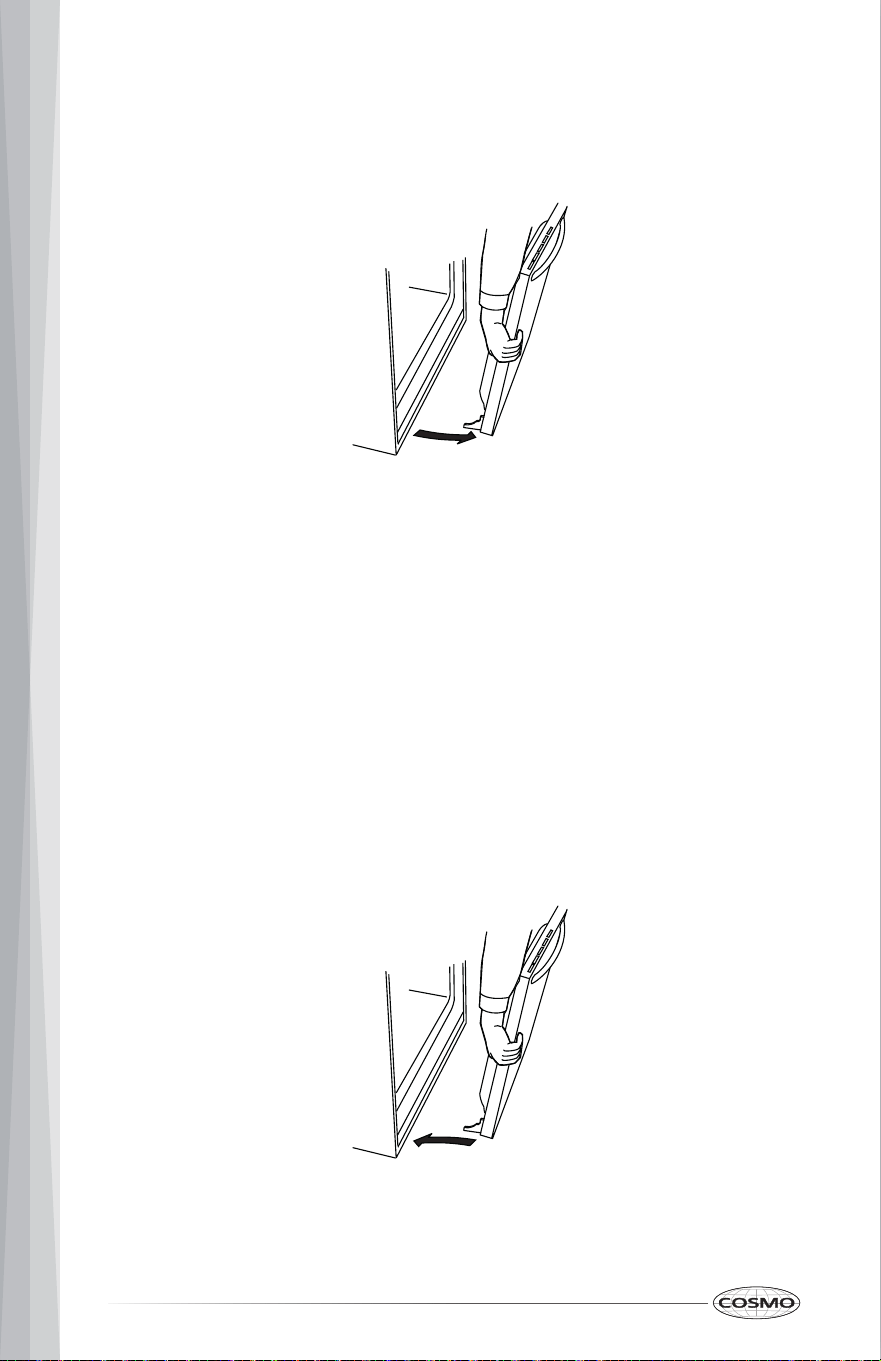
4. Close the door to the removal position, which is approximately five
degrees or 2-3 inches from being fully closed. If the position is correct, the
hinge arms will move freely.
54
5. Lift door up and out until the hinge arms are clear of the slots. Set the
To Replace the Oven Door
oven door(s) aside on a covered work surface. Do not lay the oven door
on its handle. Doing so may cause dents or scratches.
IMPORTANT: Do not lift door by door handle.
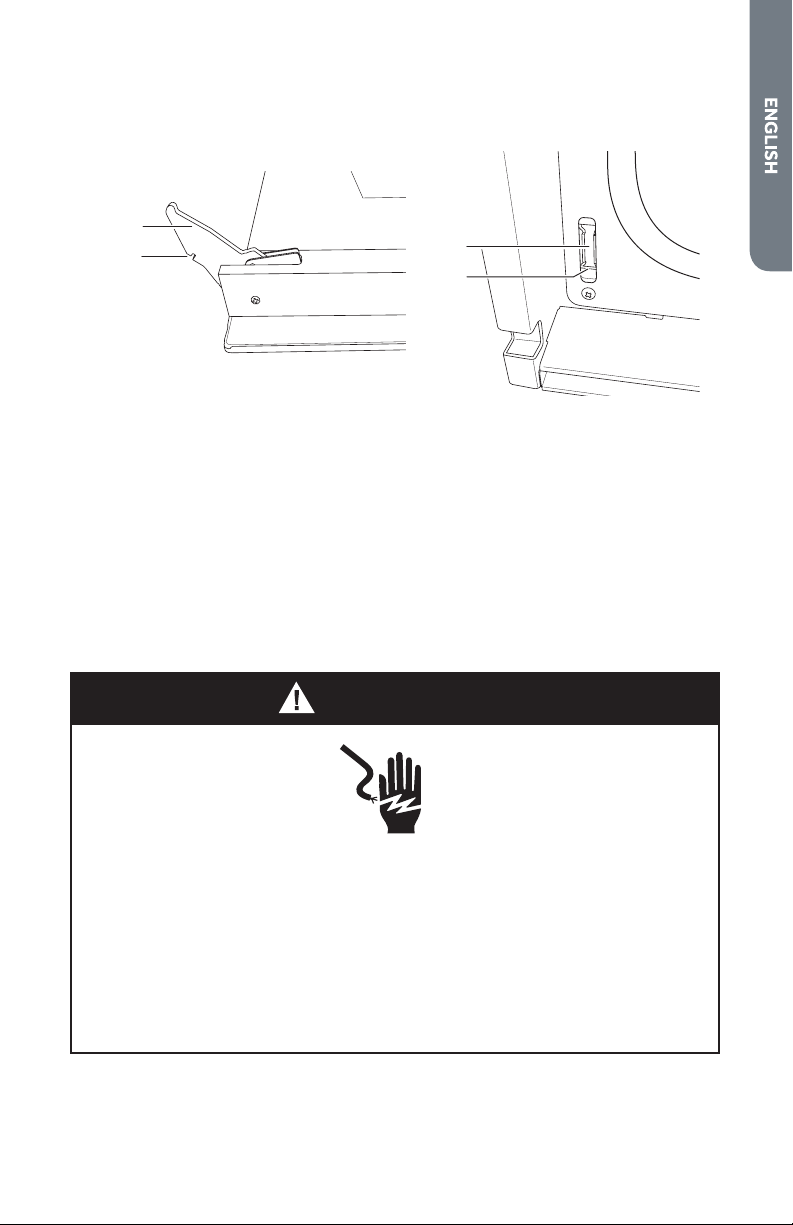
1. Verify that the hinge arms are extending forward.
2. Firmly grasp both sides of the door.
3. With the door at the same angle as the removal position, which is
approximately five degrees or 2-3 inches from being fully closed, seat the
indentation of the hinge arms into the bottom edge of the hinge slots.
IMPORTANT: The notch in the hinge arms must hook on the lip at the
bottom of the slot.
55
Oven frame Oven Door
Unlocked Locked
level while closed.
4. Open the door fully. If the door will not open fully, the indentation is not
seated correctly in the bottom edge of the slots.
5. Lock the hinge locks, rotating them back toward the slots in the oven
frame until they lock.
6. Close the oven door. Check that the door is free to open and close and is
Slot
Lip
Hinge arm
Notch
56
WARNING
REPLACING THE OVEN LIGHT
ELECTRICAL SHOCK HAZARD
CAUTION
BURN HAZARD
• Before replacing oven light bulb, disconnect the electrical power to the
oven at the main fuse or circuit breaker panel.
• Failure to do so can result in severe personal injury, death, or electrical
shock.
The oven light is a standard 25-watt G9 appliance bulb.
• Make sure oven is cool.
• The light cover and bulb should be removed when cool. Touching hot
glass with bare hands or a damp cloth can cause burns.
• Wear gloves while changing the oven light. Glass fragments from
broken bulbs can cause risk of injury.
• Failure to do so could result in cuts or burns.

57
Replacing Oven Light
IMPORTANT: Make sure oven and bulb are cool.
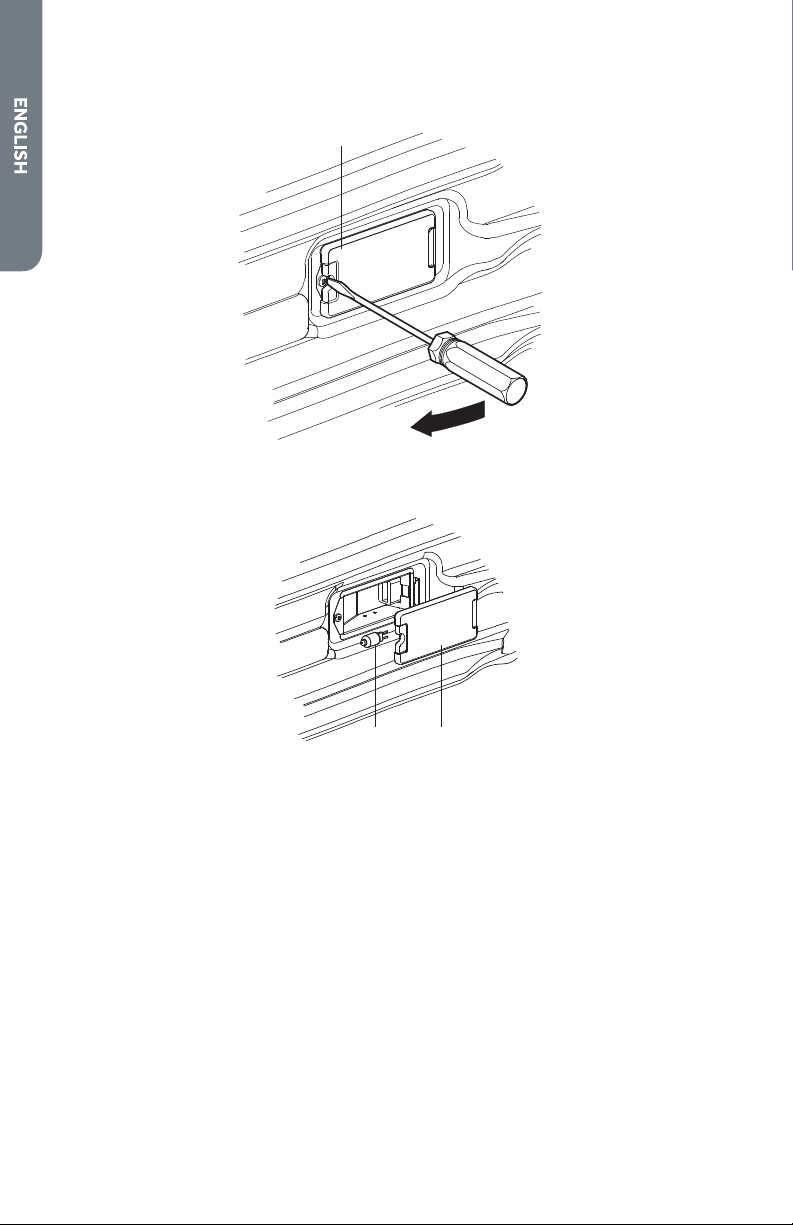
it out from the opening.
- Light cover without screw: Remove the light cover by carefully pulling
1. Disconnect power at the main fuse or circuit breaker panel.
2. Remove oven racks.
3. Remove the light cover on side wall.
- Light cover with screw: Remove the light cover screw using a Phillips-
head screwdriver, and then remove the light cover.
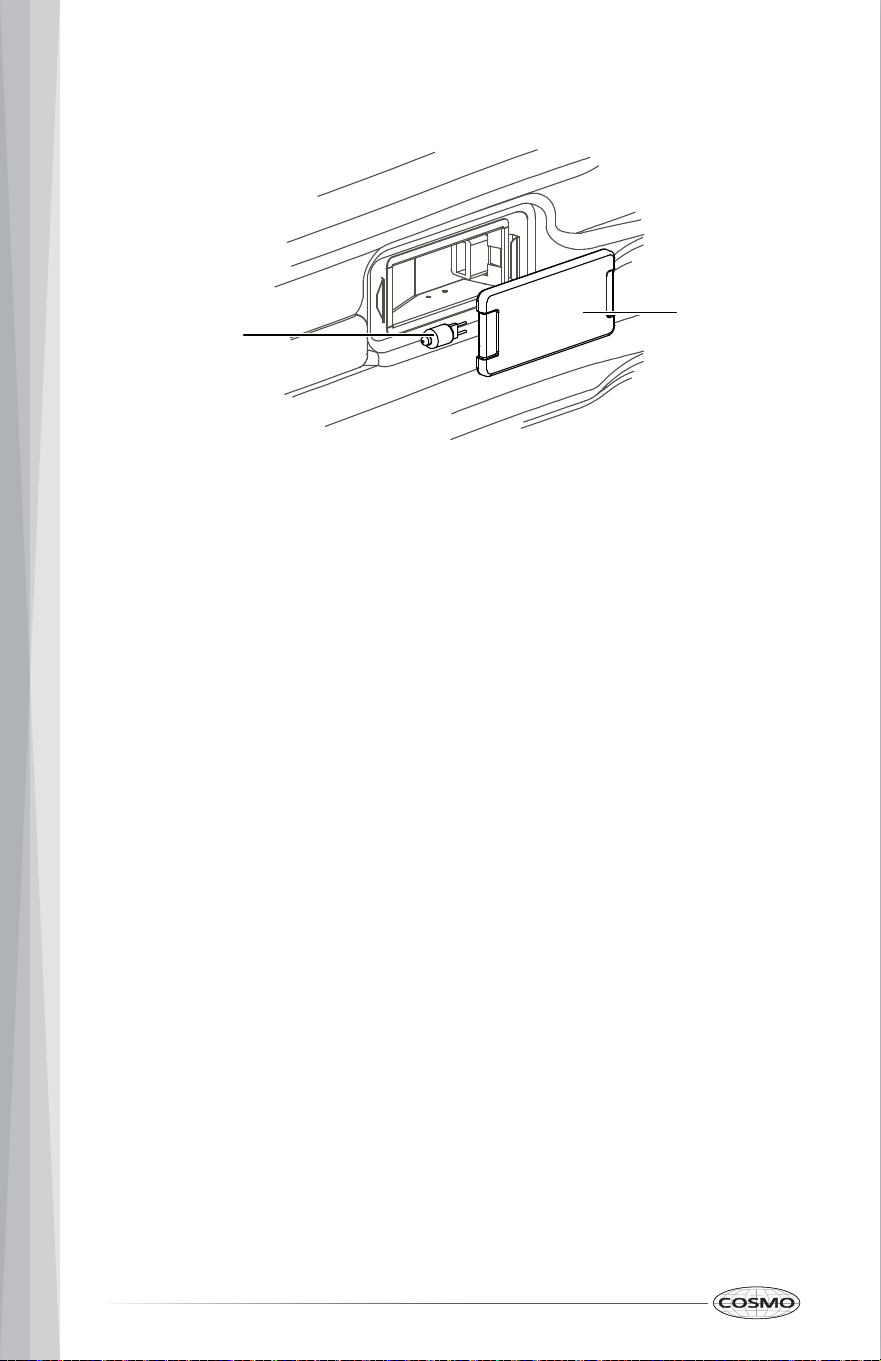
58
4. Remove bulb from socket.
5. Replace bulb, and replace light cover.
6. Plug in oven or reconnect power.
Light cover
Bulb
59
TROUBLESHOOTING
First try the solutions suggested here to possibly avoid the cost of a service
call.
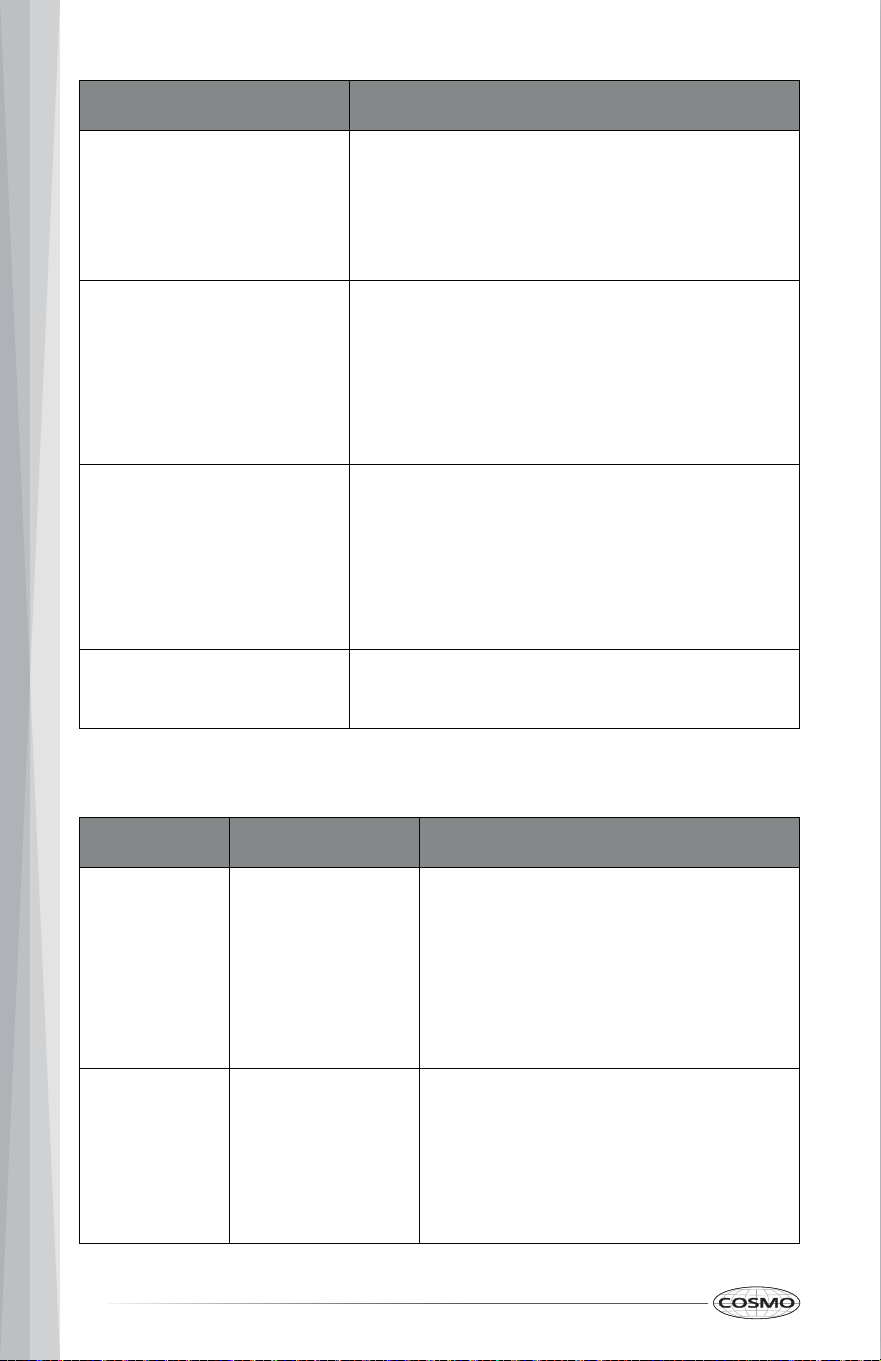
BAKING AND ROASTING PROBLEMS
With any oven cooking modes poor results can occur for many reasons other
than a malfunction of the oven. Check the chart below for causes of the most
common problems. Since the size, shape and material of baking utensils
directly affect the baking results, the best solution may be to replace old
baking utensils that have darkened and warped with age and use.
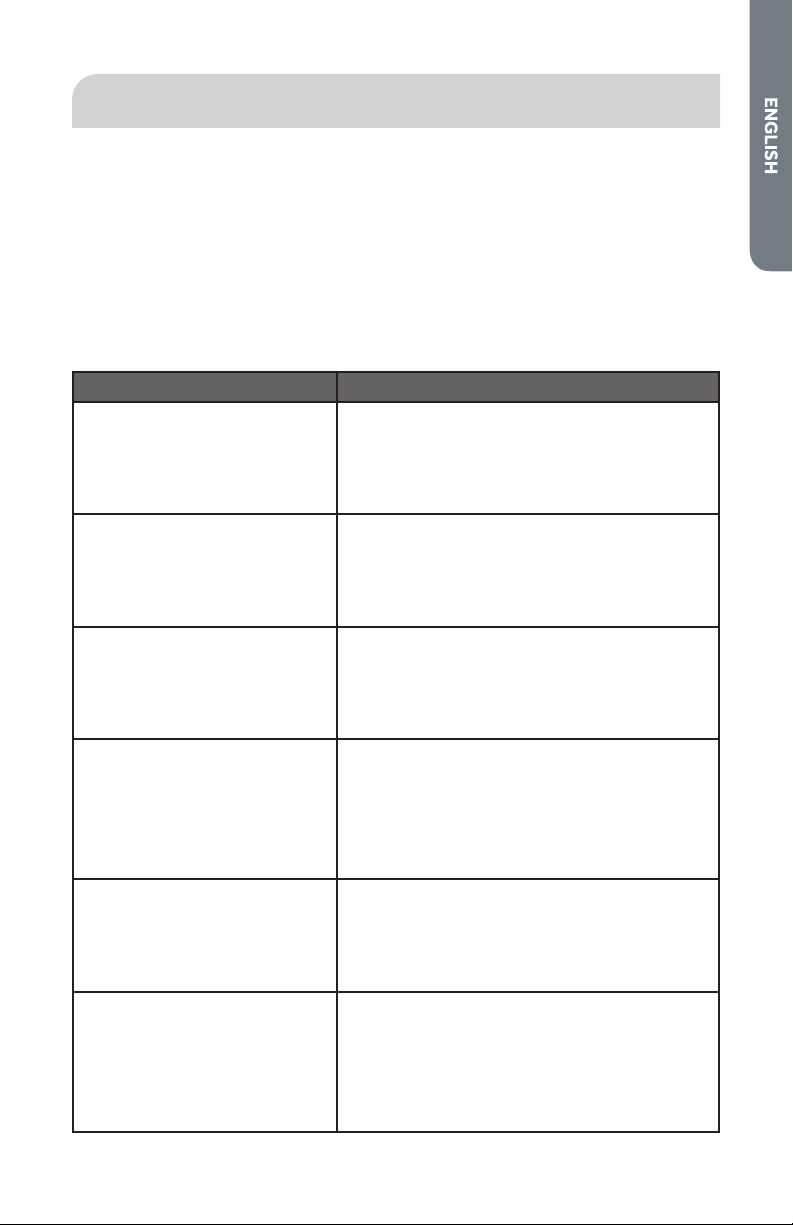
PROBLEM CAUSE
Food browns unevenly • Oven not preheated
• Aluminum foil on oven rack or oven
bottom
• Baking utensil too large for recipe
• Pans touching each other or oven walls
Food too brown on bottom • Oven not preheated
• Using glass, dull or darkened metal pans
• Incorrect rack position
• Pans touching each other or oven walls
Food is dry or has shrunk
excessively
• Oven temperature too high
• Baking time too long
• Oven door opened frequently
• Pan size too large
Food is baking or roasting
too slowly
• Oven temperature too low
• Oven not preheated
• Oven door opened frequently
• Tightly sealed with aluminum foil
• Pan size too small
60
PROBLEM CAUSE
Pie crusts do not brown on
bottom or crust is soggy
• Baking time not long enough
• Using shiny steel pans
• Incorrect rack position
• Oven temperature is too low
Cakes pale, flat and may
not be done inside
• Oven temperature too low
• Incorrect baking time
• Cake tested too soon
• Oven door opened too often
• Pan size may be too large
Cakes high in middle with
crack on top
• Oven temperature too high
• Baking time too long
• Pans touching each other or oven walls
• Incorrect rack position
• Pan size too small
Pie crust edges too brown • Oven temperature too high
• Edges of crust too thin
OPERATION PROBLEMS
PROBLEM POSSIBLE CAUSE SOLUTION
F03 or F04
Error appears
in the display
window.
A problem with
latch mechanism
occurred.
Turn off power at the main power
supply (fuse or breaker box), wait a few
seconds and turn it back on again. The
oven should run a latch auto–test. If
condition persists, note the code
number and call an authorized service
center.
Other F--
Error appears
in the display
window.
Turn off power at the main power
supply (fuse or breaker box), wait a few
seconds and turn it back on again. If
condition persists, note the code
number and call an authorized service
center.

61
PROBLEM POSSIBLE CAUSE SOLUTION
Oven door is
locked and
will not
release, even
after cooling.
Turn the oven off at the circuit breaker
and wait a few seconds. Turn breaker
back on. The oven should reset itself
and will be operable.
Oven is not
heating
No power to the
oven.
Check the circuit breaker or fuse box to
your house. Make sure there is proper
electrical power to the oven.
Oven mode or
temperature not
started or selected
Make sure the oven mode and
temperature have been selected, and
Start button has been pressed.
Oven is not
cooking
evenly
Not using the
correct bake ware
or oven rack
position.
Refer to cook charts for recommended
rack position. Always reduce recipe
temperature by 25 °F (15 °C) when
baking with Convention Bake mode.
Oven display
stays Off
Power
interruption.
Turn off power at the main power
supply (fuse or breaker box). Turn
breaker back on. If condition persists,
call for service.
Cooling fan
continues to
run after
oven is
turned off
The electronic
components have
not yet cooled
sufficiently.
The fan will turn off automatically
when the electronic components have
cooled sufficiently.
Oven light is
not working
properly
Light bulb is loose
or burned-out.
Reinsert or replace the light bulb.
Touching the bulb with fingers may
cause the bulb to burn out.
Oven light
stays on
Oven door is not
completely closed.
Check for obstruction in oven door.
Check to see if hinge is bent or door
switch is broken.
Cannot
remove light
cover
Soil build-up
around the light
cover.
Wipe light cover area with a clean, dry
towel prior to attempting to remove
the light cover.
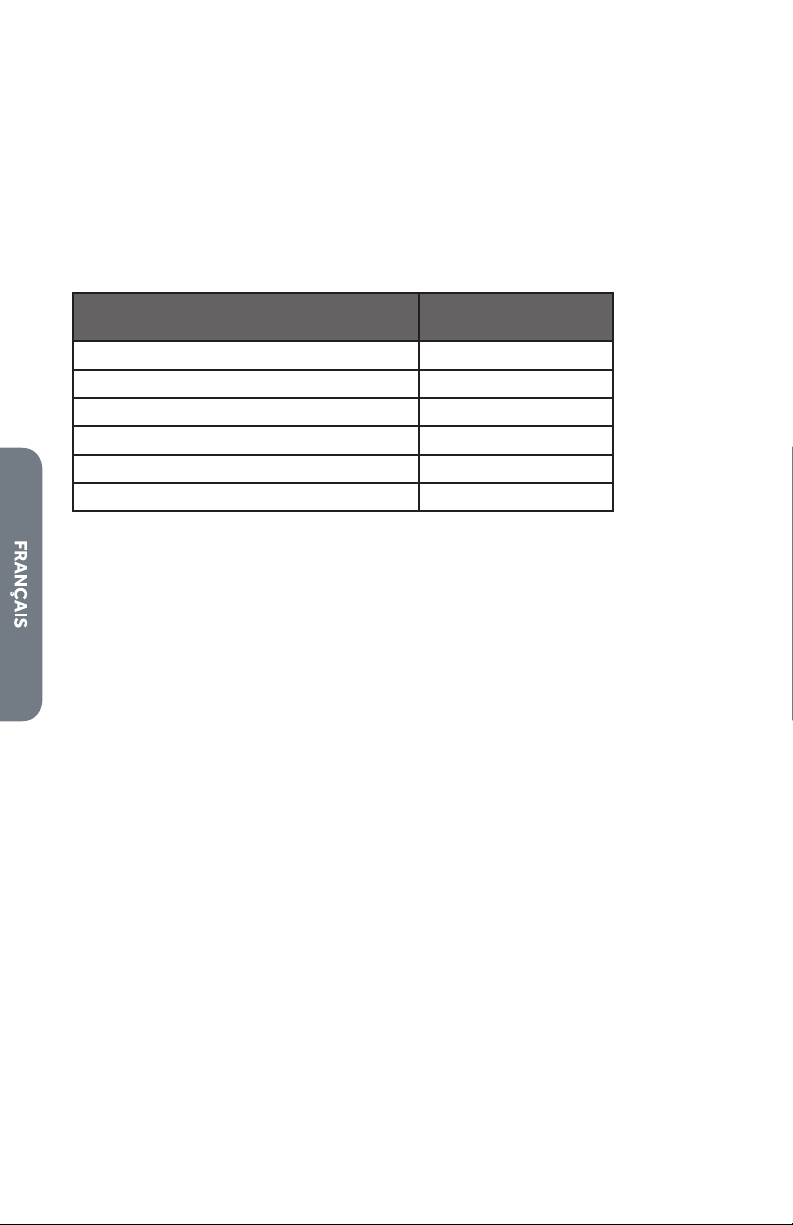
62
PROBLEM POSSIBLE CAUSE SOLUTION
Oven will not
Self Clean
properly
Oven was still
warm when Self
Clean mode was
selected.
Allow the oven to cool before running
Self Clean cycle.
Oven is heavily
soiled.
Always wipe out loose soils or heavy
spillover before running Self Clean.
Clock and
timer are not
working
properly
No power to the
oven.
Check the circuit breaker or fuse box to
your house. Make sure there is proper
electrical power to the oven.
Clock or Timer not
set correctly.
See the Clock and Timer sections.
Excessive
Moisture
Oven was not
properly
preheated.
When using bake mode, preheat the
oven first. Convection Bake and
Convection Roast will eliminate any
moisture in the oven.
Porcelain
Chips
Oven racks were
removed and
replaced
incorrectly.
When removing and replacing oven
racks, always tilt racks upward and do
not force them to avoid chipping the
porcelain.
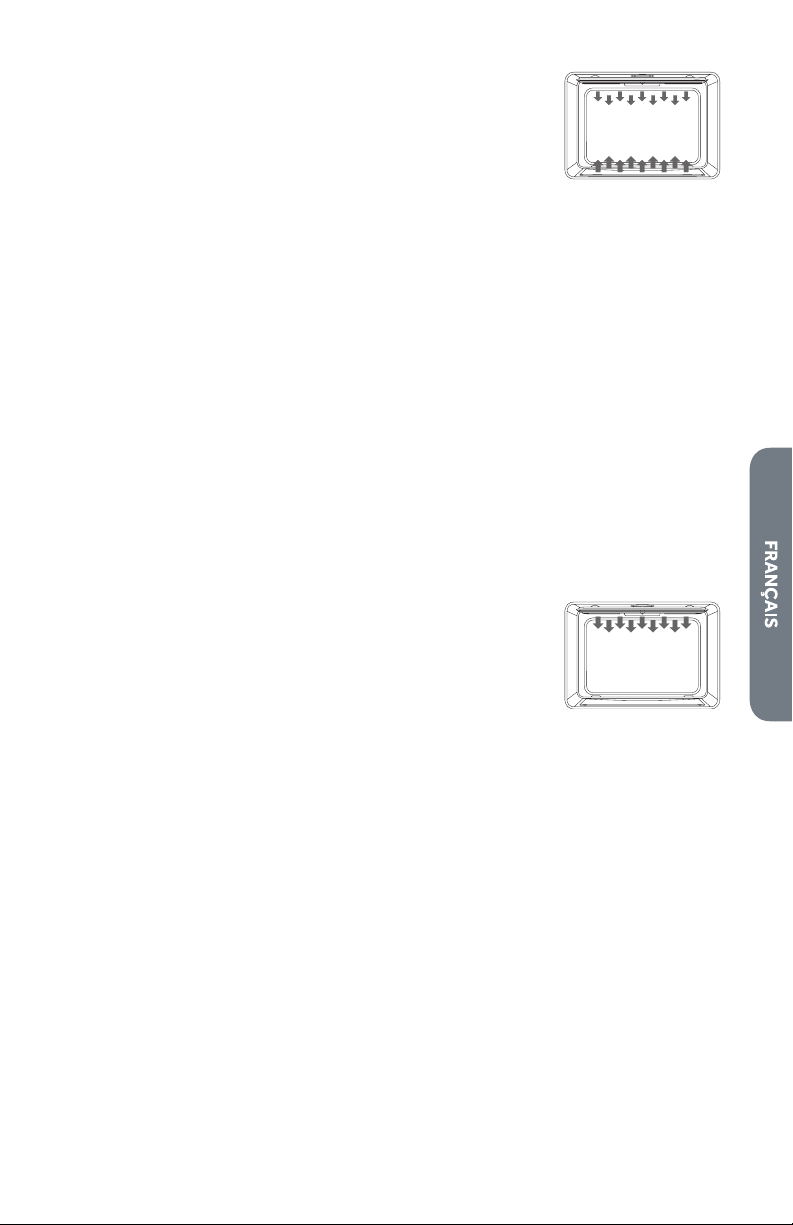
63
LIMITED WARRANTY
WARRANTY AND SERVICE
TO RECEIVE WARRANTY SERVICE, YOUR PRODUCT MUST BE REGISTERED.
TO REGISTER AND REVIEW FULL WARRANTY DETAILS, VISIT:
WWW.COSMOAPPLIANCES.COM/WARRANTY
SCAN TO REGISTER
CUSTOMER SUPPORT
TO CHAT WITH US LIVE FOR ASSISTANCE, VISIT:
WWW.COSMOAPPLIANCES.COM/CHAT
SCAN TO CHAT
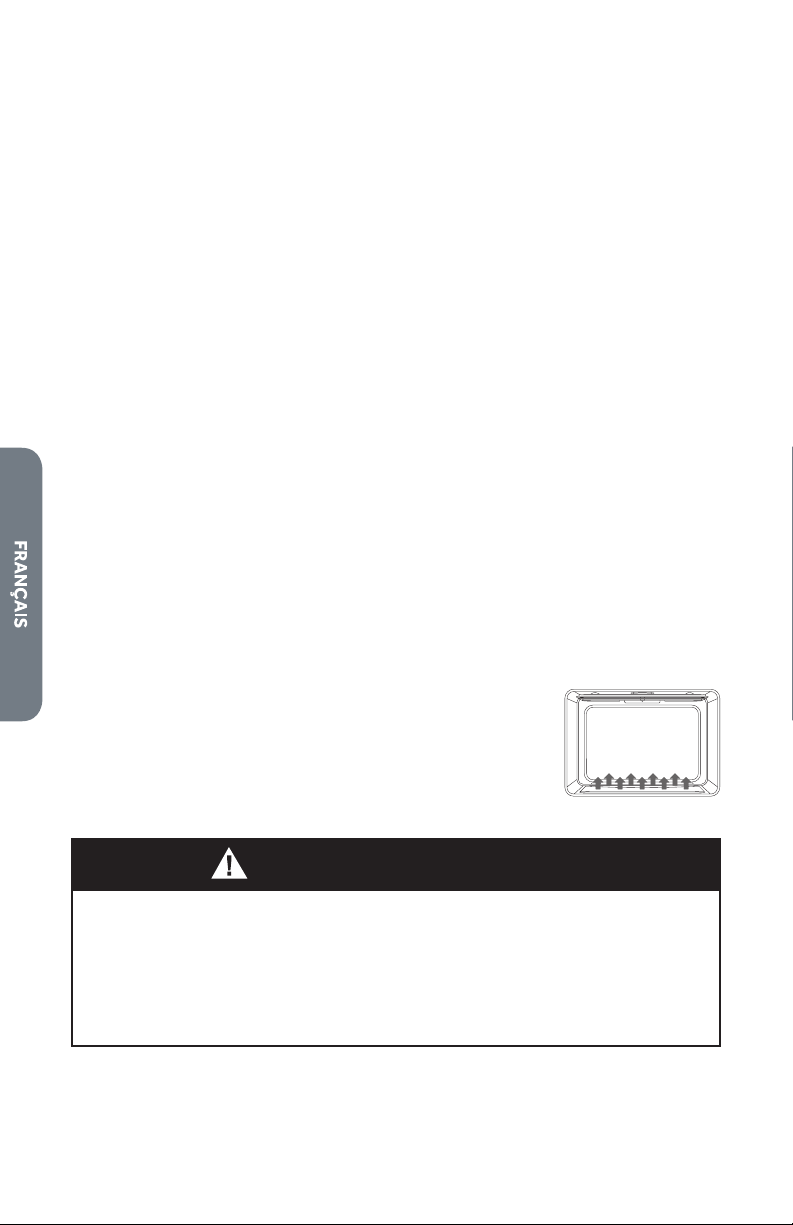
64
IMPORTANT
Do Not Return This Product To The Store
If you have a problem with this product, please contact COSMO Customer
Support at
+1 (888) 784-3108
DATED PROOF OF PURCHASE, MODEL #, AND SERIAL # REQUIRED FOR
WARRANTY SERVICE.
IMPORTANT
Ne pas Réexpédier ce Produit au Magasin
Pour tout problème concernant ce produit, veuillez contacter le service des
consommateurs Cosmo Customer Support au
+1 (888) 784-3108
UNE PREUVE D’ACHAT DATEE EST REQUISE POUR BENEFICIER DE LA GARANTIE.
IMPORTANTE
No regrese este producto a la tienda
Si tiene algún problema con este producto, por favor contacte el ayuda al
cliente COSMO al
+1 (888) 784-3108
(Válido solo en E.U.A.)
NECESITA UNA PRUEBA DE DE COMPRA FECHADA, NÚMERO DE MODELO Y DE
SERIE PARA EL SERVICIO DE LA GARANTÍA.
Correct disposal of this product:
This marking indicates that this appliance should not be
disposed with other household wastes. To prevent
possible harm to the environment or human health from
uncontrolled waste disposal, recycle it responsibly to
promote the sustainable reuse of material resources.

MEMO
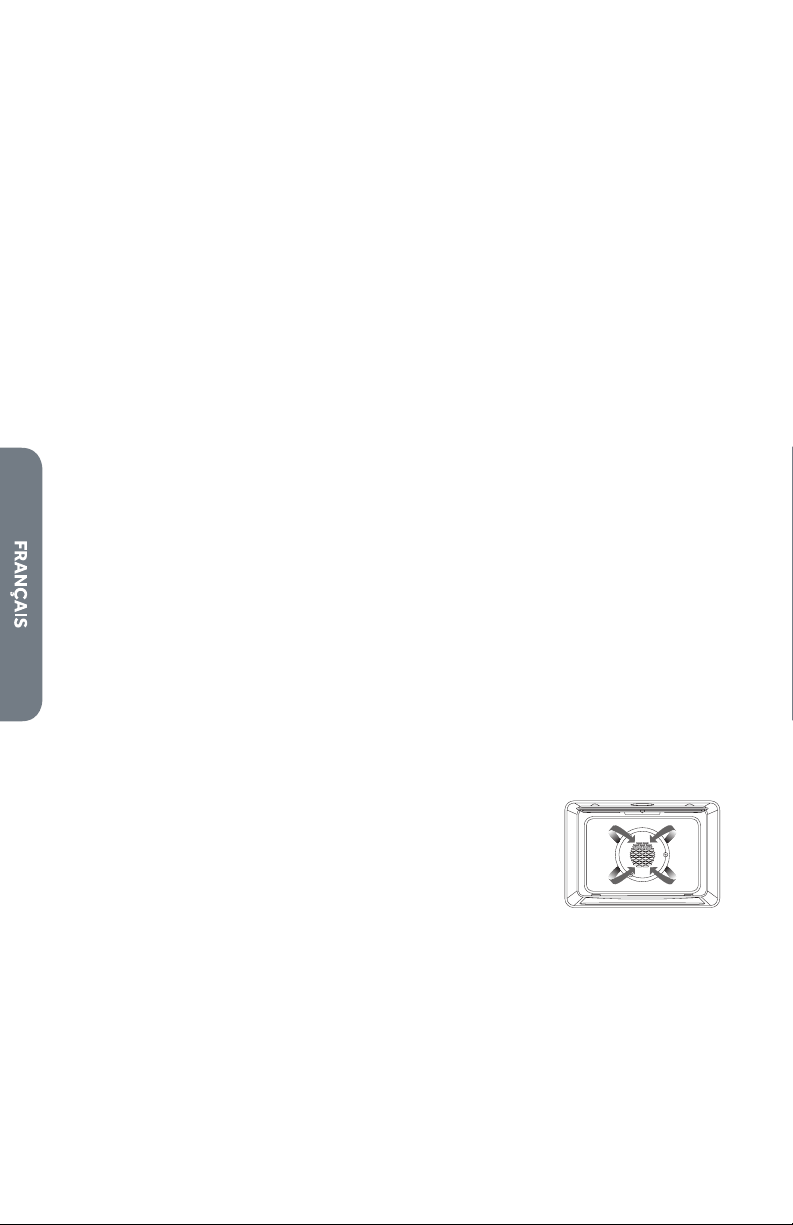
MEMO
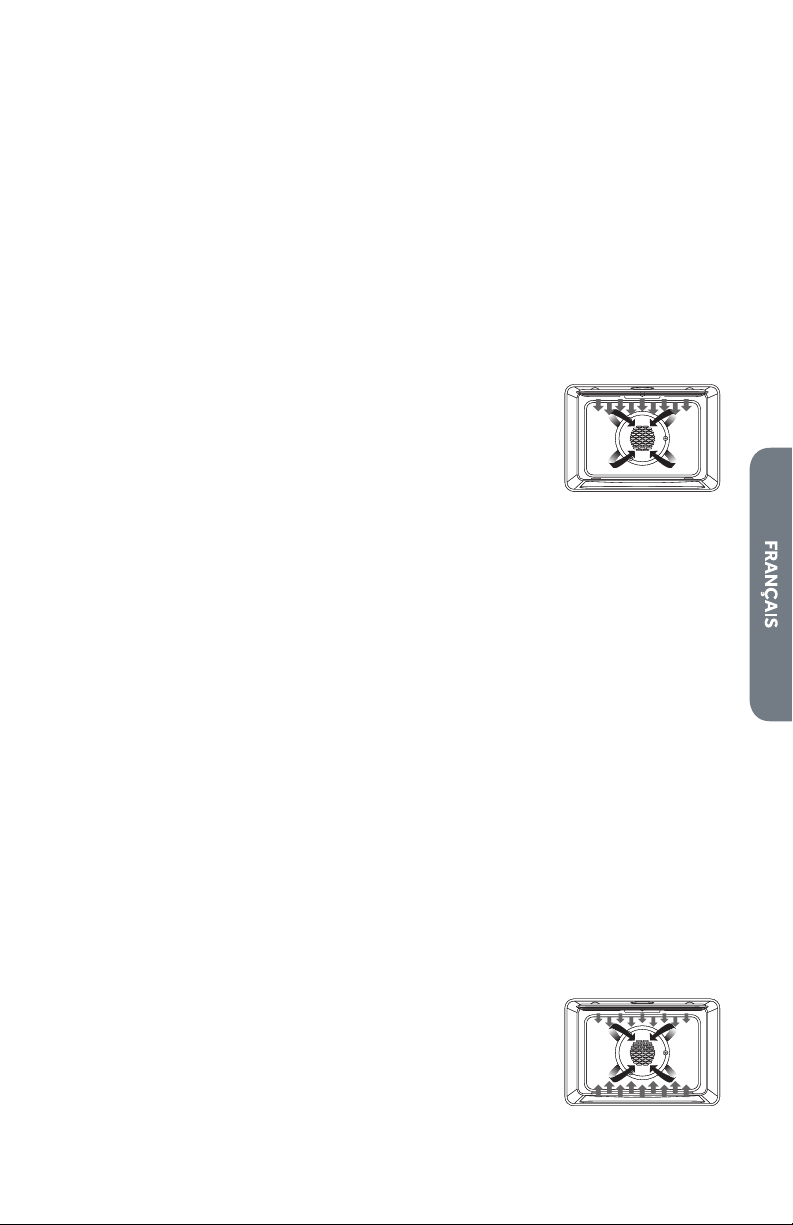
MEMO