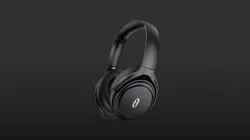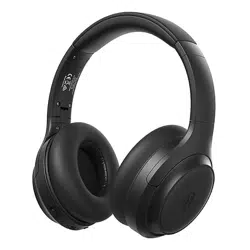

Model: TT-BH090
TaoTronics Soundsurge 90
Active Noise Cancelling
Wireless Stereo Headphones
User Guide
04-22-2020
TT-BH090_V1.1_EU
www.taotronics.com
Shenzhen NearbyExpress Technology Development Co., Ltd.
Address: Floor 7, Building E, Galaxy World Phase II, Shenzhen, China
MANUFACTURER
Learn more about the EU Declaration of Conformity:
https://www.taotronics.com/pages/user-manual
MADE IN CHINA
E-mail:
support@taotronics.com

CONTENTS
English
Français
Español
Italiano
01-03
04-06
07-09
10-12
13-15
Deutsch
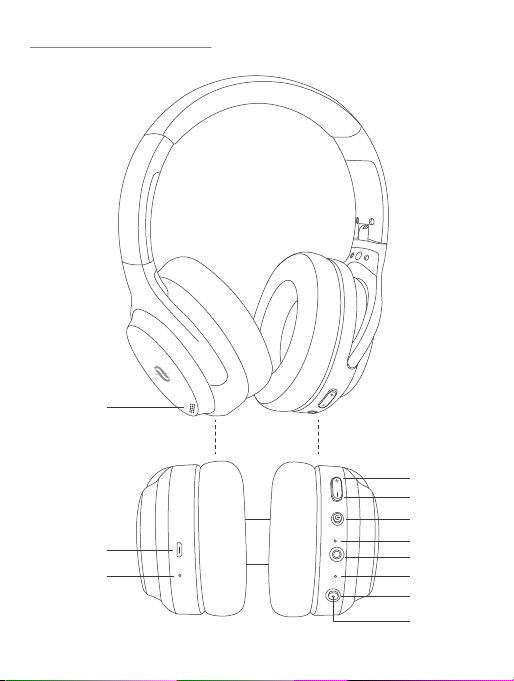
1. Lautstärke + / Nächstes Lied
2. Lautstärke - / Vorheriges Lied
3. Multifunktionsknopf
4. LED-Anzeige
5. 3.5mm Audioanschluss
6. Mikrofon
7. ANC-Knopf
8. ANC-Anzeige
9. Geräuschunterdrückendes Mikrofon
10. Micro-USB-Ladeanschluss
11. Ladeanzeige
1. Volume + / Next Track
2. Volume - / Previous Track
3. Multifunction Button
4. LED Indicator
5. 3.5mm Audio Port
6. Microphone
7. ANC Button
8. ANC Indicator
9. Noise-cancelling Microphone
10. Micro-USB Charging Port
11. Charging Indicator
1. Volume + / Piste Suivante
2. Volume - / Piste Précédente
3. Bouton multifonction
4. Voyant LED
5. Port Audio 3.5mm
6. Microphone
7. Bouton ANC
8. Indicateur ANC
9. Microphoneà réduction de bruit
10. Port de Charge Micro-USB
11. Voyant de Charge
1. Volumen + / Pista Siguiente
2. Volumen - / Pista Anterior
3. Botón Multifunción
4. Indicador LED
5. Puerto de Audio de 3.5 mm
6. Micrófono
7. Botón ANC
8. Indicador ANC
9. Micrófono con cancelación de ruido
10. Puerto de Carga Micro-USB
11. Indicador de Carga
1. Volume + / Traccia Successiva
2. Volume - / Traccia Precedente
3. Pulsante Multifunzione
4. Indicatore LED
5. Porta Audio da 3.5mm
6. Microfono
7. Pulsante ANC
8. Indicatore ANC
PRODUCT DIAGRAM
EN
Product Diagram
DE
Produktdiagramm
FR
Schéma du Produit
ES
Diagrama del producto
IT
Schema del Prodotto
R
①
②
⑪
③
④
⑤
⑥
⑦
⑧
⑨
⑩
9. Microfono con cancellazione del rumore
10. Porta di Ricarica Micro-USB
11. Indicatore di Ricarica

1. Lautstärke + / Nächstes Lied
2. Lautstärke - / Vorheriges Lied
3. Multifunktionsknopf
4. LED-Anzeige
5. 3.5mm Audioanschluss
6. Mikrofon
7. ANC-Knopf
8. ANC-Anzeige
9. Geräuschunterdrückendes Mikrofon
10. Micro-USB-Ladeanschluss
11. Ladeanzeige
1. Volume + / Next Track
2. Volume - / Previous Track
3. Multifunction Button
4. LED Indicator
5. 3.5mm Audio Port
6. Microphone
7. ANC Button
8. ANC Indicator
9. Noise-cancelling Microphone
10. Micro-USB Charging Port
11. Charging Indicator
1. Volume + / Piste Suivante
2. Volume - / Piste Précédente
3. Bouton multifonction
4. Voyant LED
5. Port Audio 3.5mm
6. Microphone
7. Bouton ANC
8. Indicateur ANC
9. Microphoneà réduction de bruit
10. Port de Charge Micro-USB
11. Voyant de Charge
1. Volumen + / Pista Siguiente
2. Volumen - / Pista Anterior
3. Botón Multifunción
4. Indicador LED
5. Puerto de Audio de 3.5 mm
6. Micrófono
7. Botón ANC
8. Indicador ANC
9. Micrófono con cancelación de ruido
10. Puerto de Carga Micro-USB
11. Indicador de Carga
1. Volume + / Traccia Successiva
2. Volume - / Traccia Precedente
3. Pulsante Multifunzione
4. Indicatore LED
5. Porta Audio da 3.5mm
6. Microfono
7. Pulsante ANC
8. Indicatore ANC
PRODUCT DIAGRAM
EN
Product Diagram
DE
Produktdiagramm
FR
Schéma du Produit
ES
Diagrama del producto
IT
Schema del Prodotto
R
①
②
⑪
③
④
⑤
⑥
⑦
⑧
⑨
⑩
9. Microfono con cancellazione del rumore
10. Porta di Ricarica Micro-USB
11. Indicatore di Ricarica

1 x TaoTronics Wireless ANC Headphones (TT-BH090)
1 x Micro-USB Charging Cable
1 x 3.5mm Audio Cable
1 x Travel Pouch
1 x User Guide
1. Charging
1) Connect the charging port with any USB charging adapter or active
computer USB port.
2) Charging will start automatically with the LED indicator turning red.
3) The headphones are fully charged when the LED indicator turns green.
2. Pairing
1) Make sure the headphones and your Bluetooth® device are next to each
other (within 3 feet / 1 meter).
2) Press and hold the Multifunction Button for 5 seconds to bring the headphones
into pairing mode with the LED indicator flashing blue and red.
3) Activate Bluetooth® on your phone and search for nearby Bluetooth®
connections.
4) Find “TaoTronics SoundSurge 90” in the search results. Tap on the name to
connect. Once connected, the LED indicator will flash blue once every 5 seconds
with a warning tone "Connected".
Function
Power On
Power Off
Bluetooth Pairing
ANC On / Off
Play / Pause /Answer /
Hang up Calls
Reject Calls
Operation
Press and hold the Multifunction Button for 3 seconds
with a warning tone “Power On”
Press and hold the Multifunction Button for 3 seconds
with a warning tone “Power Off”
Press and hold the Multifunction Button for 5 seconds
with a warning tone “Pairing”
When the headphones are on, press the ANC Button
once to turn on / off the ANC function with the ANC
indicator turning on / off
Press the Multifunction Button once
Press and hold the Multifunction Button for 2 seconds
When there is a second incoming call (B) in the course
of an ongoing call (A), press the Multifunction Button
once to answer B and hang up A
Note:
• Automatic Re-pairing: The Bluetooth® headphones can remember devices
paired previously. You may simply turn on the headphones and the device
(with Bluetooth activated), and they will connect to the last connected device
automatically without going into the pairing mode.
3. Clear Pairing History
1) If the headphones fail to pair with your Bluetooth® device, clear the pairing
history by pressing and holding the Multifunction and Volume - Buttons
simultaneously when the headphones are on until the LED indicator stays
solid purple for 2 seconds indicating clearing successfully. Then re-pair your
Bluetooth® device as instructed in Pairing.
2) If you want to pair the headphones with another device when already paired,
deactivate the Bluetooth® function on the paired device or remove "TaoTron-
ics SoundSurge 90" from the Bluetooth list.
Second Call
PACKAGE CONTENTS
HOW TO USE
BUTTON CONTROL
ENGLISH / 01
ENGLISH / 02

1 x TaoTronics Wireless ANC Headphones (TT-BH090)
1 x Micro-USB Charging Cable
1 x 3.5mm Audio Cable
1 x Travel Pouch
1 x User Guide
1. Charging
1) Connect the charging port with any USB charging adapter or active
computer USB port.
2) Charging will start automatically with the LED indicator turning red.
3) The headphones are fully charged when the LED indicator turns green.
2. Pairing
1) Make sure the headphones and your Bluetooth® device are next to each
other (within 3 feet / 1 meter).
2) Press and hold the Multifunction Button for 5 seconds to bring the headphones
into pairing mode with the LED indicator flashing blue and red.
3) Activate Bluetooth® on your phone and search for nearby Bluetooth®
connections.
4) Find “TaoTronics SoundSurge 90” in the search results. Tap on the name to
connect. Once connected, the LED indicator will flash blue once every 5 seconds
with a warning tone "Connected".
Function
Power On
Power Off
Bluetooth Pairing
ANC On / Off
Play / Pause /Answer /
Hang up Calls
Reject Calls
Operation
Press and hold the Multifunction Button for 3 seconds
with a warning tone “Power On”
Press and hold the Multifunction Button for 3 seconds
with a warning tone “Power Off”
Press and hold the Multifunction Button for 5 seconds
with a warning tone “Pairing”
When the headphones are on, press the ANC Button
once to turn on / off the ANC function with the ANC
indicator turning on / off
Press the Multifunction Button once
Press and hold the Multifunction Button for 2 seconds
When there is a second incoming call (B) in the course
of an ongoing call (A), press the Multifunction Button
once to answer B and hang up A
Note:
• Automatic Re-pairing: The Bluetooth® headphones can remember devices
paired previously. You may simply turn on the headphones and the device
(with Bluetooth activated), and they will connect to the last connected device
automatically without going into the pairing mode.
3. Clear Pairing History
1) If the headphones fail to pair with your Bluetooth® device, clear the pairing
history by pressing and holding the Multifunction and Volume - Buttons
simultaneously when the headphones are on until the LED indicator stays
solid purple for 2 seconds indicating clearing successfully. Then re-pair your
Bluetooth® device as instructed in Pairing.
2) If you want to pair the headphones with another device when already paired,
deactivate the Bluetooth® function on the paired device or remove "TaoTron-
ics SoundSurge 90" from the Bluetooth list.
Second Call
PACKAGE CONTENTS
HOW TO USE
BUTTON CONTROL
ENGLISH / 01
ENGLISH / 02
Siri / Google Assistant
Redial
Voice Change
Volume + / -
Previous / Next Track
After connected with Bluetooth device, press and hold
the Multifunction Button for 2 seconds, then release the
Multifunction Button until a warning tone “dudu” is
heard
Press the Multifunction Button twice
Press and hold the Multifunction Button for 2 seconds
to switch the voice between your phone and Bluetooth
headphone
Press the Volume + / - Button once
Press and hold the Volume - / + Button for 1 second
Note:
• Low battery alarm occurred 10 minutes before automatically shut off with LED
indicator flashing red quickly and a warning tone "Battery Low".
• The headphones automatically turns off if there is no connection for 10 minutes
with a warning tone “Power Off”.
• Connect the 3.5mm audio port with the included audio cable for wired
headphone use. The Bluetooth function will turn off automatically.
1 x TaoTronics Kabellose ANC Kopfhörer (TT-BH090)
1 x Micro-USB-Ladekabel
1 x 3.5mm Audiokabel
1 x Reisebeutel
1 x Bedienungsanleitung
1. Ladevorgang
1) Schließen Sie den Ladeanschluss an einem beliebigen USB-Ladeadapter
oder einem aktiven Computer-USB-Anschluss an.
2) Der Ladevorgang beginnt automatisch und die LED-Anzeige wird rot.
3) Die Kopfhörer sind vollständig geladen, wenn die LED-Anzeige grün leuchtet.
2. Koppeln
1) Gehen Sie sicher, dass sich die Kopfhörer und Ihr Bluetooth®-Gerät
nebeneinander befinden (innerhalb von 1 Meter / 3 Fuß).
2) Halten Sie den Multifunktionsknopf 5 Sekunden lang gedrückt (wenn das
Headset ausgeschaltet ist), um die Kopfhörer in den Kopplungsmodus zu
versetzen. Die LED-Anzeige blinkt dann blau und rot.
3) Aktivieren Sie die Bluetooth®-Funktion Ihres Handys und suchen Sie nach
Bluetooth®-Verbindungen in der Nähe:
4) Suchen Sie in den Suchergebnissen nach “TaoTronics SoundSurge 90”.
Tippen Sie zum Verbinden auf den Namen. Nach erfolgreicher Verbindung
blinkt die LED-Anzeige alle 5 Sekunden blau und ein Warnsignal "Connected"
ertönt.
Anmerkung:
• Automatisches Verbinden: Die Bluetooth®-Kopfhörer merken sich zuvor bereits
gekoppelte Geräte. Sie können die Kopfhörer und das Gerät
(mit aktiviertem Bluetooth®) einfach einschalten und schon verbinden sich die
Kopfhörer automatisch mit dem zuletzt verbundenen Gerät, ohne in den
Kopplungsmodus zu wechseln.
ENGLISH / 03
DEUTSCH / 04
LIEFERUMFANG
ANLEITUNG

Siri / Google Assistant
Redial
Voice Change
Volume + / -
Previous / Next Track
After connected with Bluetooth device, press and hold
the Multifunction Button for 2 seconds, then release the
Multifunction Button until a warning tone “dudu” is
heard
Press the Multifunction Button twice
Press and hold the Multifunction Button for 2 seconds
to switch the voice between your phone and Bluetooth
headphone
Press the Volume + / - Button once
Press and hold the Volume - / + Button for 1 second
Note:
• Low battery alarm occurred 10 minutes before automatically shut off with LED
indicator flashing red quickly and a warning tone "Battery Low".
• The headphones automatically turns off if there is no connection for 10 minutes
with a warning tone “Power Off”.
• Connect the 3.5mm audio port with the included audio cable for wired
headphone use. The Bluetooth function will turn off automatically.
1 x TaoTronics Kabellose ANC Kopfhörer (TT-BH090)
1 x Micro-USB-Ladekabel
1 x 3.5mm Audiokabel
1 x Reisebeutel
1 x Bedienungsanleitung
1. Ladevorgang
1) Schließen Sie den Ladeanschluss an einem beliebigen USB-Ladeadapter
oder einem aktiven Computer-USB-Anschluss an.
2) Der Ladevorgang beginnt automatisch und die LED-Anzeige wird rot.
3) Die Kopfhörer sind vollständig geladen, wenn die LED-Anzeige grün leuchtet.
2. Koppeln
1) Gehen Sie sicher, dass sich die Kopfhörer und Ihr Bluetooth®-Gerät
nebeneinander befinden (innerhalb von 1 Meter / 3 Fuß).
2) Halten Sie den Multifunktionsknopf 5 Sekunden lang gedrückt (wenn das
Headset ausgeschaltet ist), um die Kopfhörer in den Kopplungsmodus zu
versetzen. Die LED-Anzeige blinkt dann blau und rot.
3) Aktivieren Sie die Bluetooth®-Funktion Ihres Handys und suchen Sie nach
Bluetooth®-Verbindungen in der Nähe:
4) Suchen Sie in den Suchergebnissen nach “TaoTronics SoundSurge 90”.
Tippen Sie zum Verbinden auf den Namen. Nach erfolgreicher Verbindung
blinkt die LED-Anzeige alle 5 Sekunden blau und ein Warnsignal "Connected"
ertönt.
Anmerkung:
• Automatisches Verbinden: Die Bluetooth®-Kopfhörer merken sich zuvor bereits
gekoppelte Geräte. Sie können die Kopfhörer und das Gerät
(mit aktiviertem Bluetooth®) einfach einschalten und schon verbinden sich die
Kopfhörer automatisch mit dem zuletzt verbundenen Gerät, ohne in den
Kopplungsmodus zu wechseln.
ENGLISH / 03
DEUTSCH / 04
LIEFERUMFANG
ANLEITUNG

3. Kopplungsverlauf löschen
1) Sollten sich die Kopfhörer nicht mit Ihrem Bluetooth®-Gerät koppeln lassen,
bereinigen Sie den Kopplungsverlauf, indem Sie die Multifunktions- und
"Lautstärke -"-Tasten gleichzeitig gedrückt halten, während die Kopfhörer
eingeschaltet sind, bis die LED-Anzeige 2 Sekunden lang lila leuchtet und so
das erfolgreiche Löschen bestätigen. Koppeln Sie Ihr Bluetooth®-Geräte dann
wie im Abschnitt "Koppeln" beschrieben erneut.
2) Wenn Sie Ihre Kopfhörer bei bestehender Verbindung mit einem anderen Gerät
koppeln wollen, deaktivieren Sie die Bluetooth®-Funktion des gekoppelten
Geräts oder entfernen Sie "TaoTronics SoundSurge 90" aus der Bluetooth-Liste.
Funktion
Einschalten
Ausschalten
Bluetooth® koppeln
ANC An / Aus
Wiedergabe / Pause /
Anruf annehmen /
auflegen
Anruf ablehnen
Bedienung
Halten Sie die Multifunktionstaste 3s lang gedrückt, bis
der Signalton "Power On" ertönt.
Halten Sie die Multifunktionstaste 3s lang gedrückt, bis
der Signalton "Power Off" ertönt.
Halten Sie die Multifunktionstaste 5s lang gedrückt, bis
der Signalton "Power Off" ertönt.
Drücken Sie die ANC-Taste bei eingeschalteten Kopfhör
-ern ein Mal, um die ANC-Funktion ein-/auszuschalten,
wobei die ANC-Anzeige ebenso an-/ausgeht
Drücken Sie die Multifunktionstaste ein Mal
Halten Sie die Multifunktionstaste 2s lang gedrückt
Zweiter Anruf
Siri / Google Assistant
Wahlwiederholung
Wechseln der
Sprachausgabe
Lautstärke + / -
Vorheriges /
Nächstes Lied
Wenn während eines Telefonats (A) ein zweiter Anruf
(B) eingeht, können Sie die Multifunktionstaste ein Mal
drücken, um Anruf B anzunehmen und Telefonat A zu
beenden
Drücken Sie die Multifunktionstaste nach erfolgreicher
Verbindung mit einem Bluetooth-Gerät und ohne
laufende Musikwiedergabe 2s lang, wenn das
Warnsignal "dudu" ertönt
Drücken Sie den Multifunktionstaste zweimal
Halten Sie die Multifunktionstaste 2s lang gedrückt, um
die Sprachausgabe zwischen Telefon und
Bluetooth-Kopfhörer umzuschalten
Drücken Sie die Tasten Lautstärke + / -
Halten Sie die Taste "Lautstärke - / +" 1 Sekunde lang
gedrückt
Anmerkung:
• Das Signal für niedrigen Akkustand ertönt 10 Minuten bevor das Gerät
automatisch abgeschaltet wird, wobei die LED-Anzeige blinkt schnell rot und
der Signalton "Battery Low" (Niedriger Akkustand) ertönt.
• Die Kopfhörer schalten sich automatisch aus, wenn 10 Minuten lang keine
Verbindung zu Stande kommt, wobei der Signalton "Power Off" (Gerät Aus)
ertönt.
• Für kabelgebundene Nutzung der Kopfhörer schließen Sie das beiliegende
Audiokabel an der 3.5mm Audioklinke an. Die Bluetooth-Funktion deaktiviert
sich dann automatisch.
STEUERUNGSFUNKTIONEN
DEUTSCH / 05
DEUTSCH / 06
3. Kopplungsverlauf löschen
1) Sollten sich die Kopfhörer nicht mit Ihrem Bluetooth®-Gerät koppeln lassen,
bereinigen Sie den Kopplungsverlauf, indem Sie die Multifunktions- und
"Lautstärke -"-Tasten gleichzeitig gedrückt halten, während die Kopfhörer
eingeschaltet sind, bis die LED-Anzeige 2 Sekunden lang lila leuchtet und so
das erfolgreiche Löschen bestätigen. Koppeln Sie Ihr Bluetooth®-Geräte dann
wie im Abschnitt "Koppeln" beschrieben erneut.
2) Wenn Sie Ihre Kopfhörer bei bestehender Verbindung mit einem anderen Gerät
koppeln wollen, deaktivieren Sie die Bluetooth®-Funktion des gekoppelten
Geräts oder entfernen Sie "TaoTronics SoundSurge 90" aus der Bluetooth-Liste.
Funktion
Einschalten
Ausschalten
Bluetooth® koppeln
ANC An / Aus
Wiedergabe / Pause /
Anruf annehmen /
auflegen
Anruf ablehnen
Bedienung
Halten Sie die Multifunktionstaste 3s lang gedrückt, bis
der Signalton "Power On" ertönt.
Halten Sie die Multifunktionstaste 3s lang gedrückt, bis
der Signalton "Power Off" ertönt.
Halten Sie die Multifunktionstaste 5s lang gedrückt, bis
der Signalton "Power Off" ertönt.
Drücken Sie die ANC-Taste bei eingeschalteten Kopfhör
-ern ein Mal, um die ANC-Funktion ein-/auszuschalten,
wobei die ANC-Anzeige ebenso an-/ausgeht
Drücken Sie die Multifunktionstaste ein Mal
Halten Sie die Multifunktionstaste 2s lang gedrückt
Zweiter Anruf
Siri / Google Assistant
Wahlwiederholung
Wechseln der
Sprachausgabe
Lautstärke + / -
Vorheriges /
Nächstes Lied
Wenn während eines Telefonats (A) ein zweiter Anruf
(B) eingeht, können Sie die Multifunktionstaste ein Mal
drücken, um Anruf B anzunehmen und Telefonat A zu
beenden
Drücken Sie die Multifunktionstaste nach erfolgreicher
Verbindung mit einem Bluetooth-Gerät und ohne
laufende Musikwiedergabe 2s lang, wenn das
Warnsignal "dudu" ertönt
Drücken Sie den Multifunktionstaste zweimal
Halten Sie die Multifunktionstaste 2s lang gedrückt, um
die Sprachausgabe zwischen Telefon und
Bluetooth-Kopfhörer umzuschalten
Drücken Sie die Tasten Lautstärke + / -
Halten Sie die Taste "Lautstärke - / +" 1 Sekunde lang
gedrückt
Anmerkung:
• Das Signal für niedrigen Akkustand ertönt 10 Minuten bevor das Gerät
automatisch abgeschaltet wird, wobei die LED-Anzeige blinkt schnell rot und
der Signalton "Battery Low" (Niedriger Akkustand) ertönt.
• Die Kopfhörer schalten sich automatisch aus, wenn 10 Minuten lang keine
Verbindung zu Stande kommt, wobei der Signalton "Power Off" (Gerät Aus)
ertönt.
• Für kabelgebundene Nutzung der Kopfhörer schließen Sie das beiliegende
Audiokabel an der 3.5mm Audioklinke an. Die Bluetooth-Funktion deaktiviert
sich dann automatisch.
STEUERUNGSFUNKTIONEN
DEUTSCH / 05
DEUTSCH / 06

1 x TaoTronics Casque Sans Fil ANC (TT-BH090)
1 x Câble de Charge Micro-USB
1 x Câble Audio 3.5mm
1 x Sacoche de Transport
1 x Guide d’Utilisateur
1. Charge
1) Branchez le port de charge à n’importe quel adaptateur USB de charge ou un
port USB d’ordinateur actif.
2) La charge se lancera automatiquement avec le voyant à LED s’allumant en
rouge.
3) Le casque est entièrement rechargé lorsque l’indicateur LED est vert.
2. Appairage
1) Assurez-vous que le casque et votre appareil Bluetooth® sont proches l’un de
l’autre (moins de 3 pieds / 1 mètre).
2) Appuyez et maintenez le Bouton multifonction pendant 5 secondes pour passer le
casque en mode appairage avec le voyant à LED clignotant en bleu et rouge.
3) Activez la fonction Bluetooth® sur votre téléphone et recherchez les appareils
Bluetooth® à proximité:
4) Trouvez “TaoTronics SoundSurge 90” dans la liste. Touchez pour vous y
connecter. Une fois connecté, l’indicateur LED clignotera en bleu une fois toutes
les 5 secondes avec une annonce sonore “Connected”.
Note:
• Ré-appairage automatique: Le casque Bluetooth® peut se rappeler des
appareils précédemment appairés. Vous pouvez simplement allumer le casque
et l’appareil (avec le Bluetooth® activé), et ils se reconnecteront automatique
ment sans repasser en mode appairage.
3. Vider l’historique d’appairage
1) Si le casque n’arrive pas à s’appairer à l’appareil Bluetooth®, videz l’historique
d’appairage en appuyant et maintenant le Bouton Multifonction et Volume -
simultanément lorsque le casque est allumé jusqu’à ce que l’indicateur LED
reste violet fixe pendant 2 secondes indiquant que le nettoyage de l’historique
est réussi. Puis ré-appairez votre appareil Bluetooth® tel qu’instruit dans la
section Appairage.
2) Si vous souhaitez appairer le casque avec un autre appareil lorsqu’il est déjà
appairé, désactivez la fonction Bluetooth® sur l’appareil appairé ou retirez
“TaoTronics SoundSurge 90” de la liste Bluetooth.
Fonction
Allumage
Extinction
Appairage Bluetooth
ANC allumé / éteint
Lecture / Pause /
Répondre / Raccrocher
aux Appels
Rejeter les Appels
Utilisation
Maintenez le bouton multifonction enfoncé pendant 3
secondes avec une tonalité d'avertissement "Power On".
Maintenez le bouton multifonction enfoncé pendant 3
secondes avec une tonalité d'avertissement "Power Off".
Maintenez le Bouton Multifonction enfoncé pendant 5
secondes avec une tonalité d'avertissement “Pairing”.
Lorsque le casque est allumé, appuyez une fois sur le
bouton ANC pour activer / désactiver la fonction ANC
avec l'indicateur ANC allumé / éteint.
Appuyez sur le Bouton Multifonction une fois.
Appuyez et maintenez le Bouton Multifonction pendant
2 secondes.
FRANÇAIS / 07
FRANÇAIS / 08
CONTENU DE LA BOÎTE
COMMENT L’UTILISER
COMMANDES DES BOUTONS

1 x TaoTronics Casque Sans Fil ANC (TT-BH090)
1 x Câble de Charge Micro-USB
1 x Câble Audio 3.5mm
1 x Sacoche de Transport
1 x Guide d’Utilisateur
1. Charge
1) Branchez le port de charge à n’importe quel adaptateur USB de charge ou un
port USB d’ordinateur actif.
2) La charge se lancera automatiquement avec le voyant à LED s’allumant en
rouge.
3) Le casque est entièrement rechargé lorsque l’indicateur LED est vert.
2. Appairage
1) Assurez-vous que le casque et votre appareil Bluetooth® sont proches l’un de
l’autre (moins de 3 pieds / 1 mètre).
2) Appuyez et maintenez le Bouton multifonction pendant 5 secondes pour passer le
casque en mode appairage avec le voyant à LED clignotant en bleu et rouge.
3) Activez la fonction Bluetooth® sur votre téléphone et recherchez les appareils
Bluetooth® à proximité:
4) Trouvez “TaoTronics SoundSurge 90” dans la liste. Touchez pour vous y
connecter. Une fois connecté, l’indicateur LED clignotera en bleu une fois toutes
les 5 secondes avec une annonce sonore “Connected”.
Note:
• Ré-appairage automatique: Le casque Bluetooth® peut se rappeler des
appareils précédemment appairés. Vous pouvez simplement allumer le casque
et l’appareil (avec le Bluetooth® activé), et ils se reconnecteront automatique
ment sans repasser en mode appairage.
3. Vider l’historique d’appairage
1) Si le casque n’arrive pas à s’appairer à l’appareil Bluetooth®, videz l’historique
d’appairage en appuyant et maintenant le Bouton Multifonction et Volume -
simultanément lorsque le casque est allumé jusqu’à ce que l’indicateur LED
reste violet fixe pendant 2 secondes indiquant que le nettoyage de l’historique
est réussi. Puis ré-appairez votre appareil Bluetooth® tel qu’instruit dans la
section Appairage.
2) Si vous souhaitez appairer le casque avec un autre appareil lorsqu’il est déjà
appairé, désactivez la fonction Bluetooth® sur l’appareil appairé ou retirez
“TaoTronics SoundSurge 90” de la liste Bluetooth.
Fonction
Allumage
Extinction
Appairage Bluetooth
ANC allumé / éteint
Lecture / Pause /
Répondre / Raccrocher
aux Appels
Rejeter les Appels
Utilisation
Maintenez le bouton multifonction enfoncé pendant 3
secondes avec une tonalité d'avertissement "Power On".
Maintenez le bouton multifonction enfoncé pendant 3
secondes avec une tonalité d'avertissement "Power Off".
Maintenez le Bouton Multifonction enfoncé pendant 5
secondes avec une tonalité d'avertissement “Pairing”.
Lorsque le casque est allumé, appuyez une fois sur le
bouton ANC pour activer / désactiver la fonction ANC
avec l'indicateur ANC allumé / éteint.
Appuyez sur le Bouton Multifonction une fois.
Appuyez et maintenez le Bouton Multifonction pendant
2 secondes.
FRANÇAIS / 07
FRANÇAIS / 08
CONTENU DE LA BOÎTE
COMMENT L’UTILISER
COMMANDES DES BOUTONS
1 x Auriculares Inalámbricos ANC de TaoTronics (TT-BH090)
1 x Cable de Carga Micro-USB
1 x Cable de Audio de 3.5 mm
1 x Bolsa de Viaje
1 x Guía del Usuario
1. Carga
1) Conecte el puerto de carga a cualquier adaptador de carga USB o puerto USB de
un ordenador.
2) La carga se iniciará automáticamente y el indicador LED se iluminará en rojo.
3) Los auriculares estarán completamente cargados cuando el indicador LED se
ilumine en verde.
2. Emparejamiento
1) Asegúrese de que los auriculares y su dispositivo Bluetooth® estén uno al lado
del otro (dentro de 3 pies / 1 metro).
2) Mantenga presionado el Botón Multifunción durante 5 segundos para poner los
auriculares en modo de emparejamiento, el indicador LED parpadeará en azul
y rojo.
3) Active la función Bluetooth® en su teléfono y busque las conexiones Bluetooth®
más cercanas:
4) Encuentre "TaoTronics SoundSurge 90" en los resultados de búsqueda. Toque el
nombre para conectarse. Una vez conectado, el indicador LED parpadeará en
azul una vez cada 5 segundos con un tono de advertencia "Conectado".
Deuxième appel
Siri / Google Assistant
Rappeler le dernier
appelant
Sortie Audio
Volume + / -
Piste Précédente /
Suivante
Lorsqu'il y a un deuxième appel entrant (B) au cours
d'un appel en cours (A), appuyez une fois sur le bouton
multifonction pour répondre à B et raccrocher A
Après avoir connecté à un appareil Bluetooth, appuyez
sur le Bouton Multifonction pendant 2 secondes, puis
libérez le Bouton Multifonction jusqu’à entendre une
annonce sonore “dudu”.
Appuyez sur le Bouton Multifonction deux fois
Appuyez et maintenez le Bouton Multifonction pendant
2 secondes pour basculer l’appel de votre téléphone
au casque Bluetooth
Appuyez sur les Boutons Volume + / -
Appuyez et maintenez les Boutons Volume - / +
pendant 1 seconde
Note:
• L’alarme de batterie faible survient 10 minutes avant l’extinction automatique
avec le voyant LED clignote rapidement en rouge avec une tonalité
d'avertissement "Battery Low".
• Le casque s'éteint automatiquement, s'il n'exsite pas de connexion
d'alimentation avec une tonalité d'avertissement "Power Off" pendant 10
minutes.
• Connectez le port audio 3.5mm au câble audio inclus pour une utilisation
filaire. La fonction Bluetooth s’éteint automatiquement.
Nota:
• Emparejamiento Automático: Los Articulares Bluetooth® pueden recordar
dispositivos emparejados previamente.Simplemente encienda los auriculares
y el dispositivo (conBluetooth®activado), y se conectarán al último dispositivo
conectado automáticamente sin entrar en modo de emparejamiento.
FRANÇAIS / 09
ESPAÑOL / 10
CONTENIDOS DEL PAQUETE
CÓMO UTILIZAR

1 x Auriculares Inalámbricos ANC de TaoTronics (TT-BH090)
1 x Cable de Carga Micro-USB
1 x Cable de Audio de 3.5 mm
1 x Bolsa de Viaje
1 x Guía del Usuario
1. Carga
1) Conecte el puerto de carga a cualquier adaptador de carga USB o puerto USB de
un ordenador.
2) La carga se iniciará automáticamente y el indicador LED se iluminará en rojo.
3) Los auriculares estarán completamente cargados cuando el indicador LED se
ilumine en verde.
2. Emparejamiento
1) Asegúrese de que los auriculares y su dispositivo Bluetooth® estén uno al lado
del otro (dentro de 3 pies / 1 metro).
2) Mantenga presionado el Botón Multifunción durante 5 segundos para poner los
auriculares en modo de emparejamiento, el indicador LED parpadeará en azul
y rojo.
3) Active la función Bluetooth® en su teléfono y busque las conexiones Bluetooth®
más cercanas:
4) Encuentre "TaoTronics SoundSurge 90" en los resultados de búsqueda. Toque el
nombre para conectarse. Una vez conectado, el indicador LED parpadeará en
azul una vez cada 5 segundos con un tono de advertencia "Conectado".
Deuxième appel
Siri / Google Assistant
Rappeler le dernier
appelant
Sortie Audio
Volume + / -
Piste Précédente /
Suivante
Lorsqu'il y a un deuxième appel entrant (B) au cours
d'un appel en cours (A), appuyez une fois sur le bouton
multifonction pour répondre à B et raccrocher A
Après avoir connecté à un appareil Bluetooth, appuyez
sur le Bouton Multifonction pendant 2 secondes, puis
libérez le Bouton Multifonction jusqu’à entendre une
annonce sonore “dudu”.
Appuyez sur le Bouton Multifonction deux fois
Appuyez et maintenez le Bouton Multifonction pendant
2 secondes pour basculer l’appel de votre téléphone
au casque Bluetooth
Appuyez sur les Boutons Volume + / -
Appuyez et maintenez les Boutons Volume - / +
pendant 1 seconde
Note:
• L’alarme de batterie faible survient 10 minutes avant l’extinction automatique
avec le voyant LED clignote rapidement en rouge avec une tonalité
d'avertissement "Battery Low".
• Le casque s'éteint automatiquement, s'il n'exsite pas de connexion
d'alimentation avec une tonalité d'avertissement "Power Off" pendant 10
minutes.
• Connectez le port audio 3.5mm au câble audio inclus pour une utilisation
filaire. La fonction Bluetooth s’éteint automatiquement.
Nota:
• Emparejamiento Automático: Los Articulares Bluetooth® pueden recordar
dispositivos emparejados previamente.Simplemente encienda los auriculares
y el dispositivo (conBluetooth®activado), y se conectarán al último dispositivo
conectado automáticamente sin entrar en modo de emparejamiento.
FRANÇAIS / 09
ESPAÑOL / 10
CONTENIDOS DEL PAQUETE
CÓMO UTILIZAR

3. Borrar Historial De Emparejamiento
1) Silos auriculares no pueden emparejarse con su dispositivo Bluetooth®, borre
el historial de emparejamiento dejando presionado los Botones de
Multifuncióny Volumen - al mismo tiempo, el indicador LED permanezca
iluminado por 2 segundos indicado que el historial se ha borrado
exitosamente. Vuelva a emparejar sudispositivoBluetooth®como se indica en
la sección anterior.
2) Si quiere emparejar los auriculares ya emparejados con otro dispositivo,
desactive la función Bluetooth® del dispositivo emparejado o elimine
¨TaoTronics SoundSurge 90¨ de la lista de conexiones Bluetooth.
Función
Encendido
Apagado
Emparejamiento
Bluetooth
Encender /
Apagar ANC
Reproducir / Pausar /
Contestar /
Colgar Llamada
Rechazar Llamada
Operación
Mantenga presionado el Motón Multifunción por 3
segundos, sonara el tono de advertencia diciendo
"Encendido”
Mantenga presionado el Motón Multifunción por 3
segundos, sonara el tono de advertencia diciendo
"Apagado”
Mantenga presionado el Botón Multifunción por 5
segundos, sonara el tono de advertencia diciendo
"Emparejando"
Cuando los auriculares están encendidos, presione el
Botón de ANC una vez para encender/apagar la función,
el indicador del ANC se encenderá/apagara
Presione el Botón Multifunción una vez
Mantenga presionado el Botón Multifunción por 2
segundos
Segunda Llamada
Siri / Asistente de
Google
Volver a Marcar
Cambio de Voz
Volumen + / -
Pista Anterior /
Siguiente
Cuando hay una segunda llamada entrante (B) en el c
urso de una llamada (A), presione el Botón Multifunción
una vez para responder llamada B y colgar llamada A
Después de conectarse con un dispositivo Bluetooth,
presione el Botón Multifunción por 2 segundos, luego
suelte el Botón Multifunción hasta que escuche un tono
de advertencia "dudu"
Presione el Botón Multifunción dos veces
Mantenga presionado el Botón Multifunción por 2
segundos para cambiar la voz entre su teléfono y los
auriculares Bluetooth
Presione el Botón de Volumen + / -
Deje presionado el Botón de Volumen -/+ por 1
segundo
Nota:
• La alarma de batería baja sonara 10 minutos antes de apagarse automática
mente, el indicador LED parpadea en rojo rápidamente y sonara un tono de
advertencia diciendo "Batería Baja”.
• Los auricularesse apagarán automáticamente si no se detecta una conexión
por 10 minutos, sonara un tono de advertencia diciendo "Apagado".
• Conecte dispositivos al puerto de audio de 3.5 mm con el cable auxiliar
incluido para poder usar los auriculares de manera alámbrica.La función
Bluetooth se desactivará automáticamente.
ESPAÑOL / 11
ESPAÑOL / 12
FUNCIONES DE LOS BOTONES
3. Borrar Historial De Emparejamiento
1) Silos auriculares no pueden emparejarse con su dispositivo Bluetooth®, borre
el historial de emparejamiento dejando presionado los Botones de
Multifuncióny Volumen - al mismo tiempo, el indicador LED permanezca
iluminado por 2 segundos indicado que el historial se ha borrado
exitosamente. Vuelva a emparejar sudispositivoBluetooth®como se indica en
la sección anterior.
2) Si quiere emparejar los auriculares ya emparejados con otro dispositivo,
desactive la función Bluetooth® del dispositivo emparejado o elimine
¨TaoTronics SoundSurge 90¨ de la lista de conexiones Bluetooth.
Función
Encendido
Apagado
Emparejamiento
Bluetooth
Encender /
Apagar ANC
Reproducir / Pausar /
Contestar /
Colgar Llamada
Rechazar Llamada
Operación
Mantenga presionado el Motón Multifunción por 3
segundos, sonara el tono de advertencia diciendo
"Encendido”
Mantenga presionado el Motón Multifunción por 3
segundos, sonara el tono de advertencia diciendo
"Apagado”
Mantenga presionado el Botón Multifunción por 5
segundos, sonara el tono de advertencia diciendo
"Emparejando"
Cuando los auriculares están encendidos, presione el
Botón de ANC una vez para encender/apagar la función,
el indicador del ANC se encenderá/apagara
Presione el Botón Multifunción una vez
Mantenga presionado el Botón Multifunción por 2
segundos
Segunda Llamada
Siri / Asistente de
Google
Volver a Marcar
Cambio de Voz
Volumen + / -
Pista Anterior /
Siguiente
Cuando hay una segunda llamada entrante (B) en el c
urso de una llamada (A), presione el Botón Multifunción
una vez para responder llamada B y colgar llamada A
Después de conectarse con un dispositivo Bluetooth,
presione el Botón Multifunción por 2 segundos, luego
suelte el Botón Multifunción hasta que escuche un tono
de advertencia "dudu"
Presione el Botón Multifunción dos veces
Mantenga presionado el Botón Multifunción por 2
segundos para cambiar la voz entre su teléfono y los
auriculares Bluetooth
Presione el Botón de Volumen + / -
Deje presionado el Botón de Volumen -/+ por 1
segundo
Nota:
• La alarma de batería baja sonara 10 minutos antes de apagarse automática
mente, el indicador LED parpadea en rojo rápidamente y sonara un tono de
advertencia diciendo "Batería Baja”.
• Los auricularesse apagarán automáticamente si no se detecta una conexión
por 10 minutos, sonara un tono de advertencia diciendo "Apagado".
• Conecte dispositivos al puerto de audio de 3.5 mm con el cable auxiliar
incluido para poder usar los auriculares de manera alámbrica.La función
Bluetooth se desactivará automáticamente.
ESPAÑOL / 11
ESPAÑOL / 12
FUNCIONES DE LOS BOTONES

1 x Paio di Cuffie Wireless ANC TaoTronics (TT-BH090)
1 x Cavo di Ricarica Micro-USB
1 x Cavo Audio da 3.5mm
1 x Custodia da Viaggio
1 x Manuale Utente
1. Ricarica
1) Connettere la porta di ricarica con qualsiasi adattatore di ricarica USB o con
una porta USB attiva del computer.
2) La ricarica inizierà automaticamente con l'indicatore LED che diventerà rosso.
3) Le cuffie sono completamente cariche quando l’indicatore LED diventa verde.
2. Accoppiamento
1) Assicurarsi che le cuffie e il proprio dispositivo Bluetooth® siano vicini (entro 3
piedi / 1 metro).
2) Premere e tenere premuto il Pulsante Multifunzione per 5 secondi per portare le
cuffie in modalità di accoppiamento. L'indicatore LED lampeggerà di blu e
rosso.
3) Attivare la funzione Bluetooth® sul proprio telefono e cercare le connessioni
Bluetooth® nelle vicinanze.
4) Trovare “TaoTronics SoundSurge 90” nei risultati di ricerca. Premere sul nome
per collegare. Una volta collegate, l’indicatore LED lampeggerà di blu una volta
ogni 5 secondi e un avviso vocale indicherà "Connected".
Nota:
• Ri-accoppiamento Automatico: Le cuffie Bluetooth® sono in grado di ricordare
i dispositivi accoppiati in precedenza. Basterà riaccendere le cuffie e il
dispositivo (con la funzione Bluetooth® attivata), e le cuffie si ricollegheranno
all’ultimo dispositivo a cui erano state collegate senza dover passare per la
modalità accoppiamento.
3. Cancellare lo Storico degli Accoppiamenti
1) Se le cuffie non riescono a collegarsi ad un dispositivo Bluetooth®, cancellare lo
storico degli accoppiamenti premendo e tenendo premuti i Pulsanti
Multifunzione e Volume - contemporaneamente quando le cuffie sono accese,
finché l’indicatore LED resta acceso di viola per 2 secondi ad indicare che la
pulizia è avvenuta con successo. A questo punto, accoppiare nuovamente il
dispositivo Bluetooth® come spiegato nella sezione Accoppiamento.
2) Se si vuole accoppiare la cuffie con un altro dispositivo quando queste sono già
accoppiate, disattivare la funzione Bluetooth® sul dispositivo accoppiato o
rimuovere “TaoTronics SoundSurge 90” dalla lista dei dispositivi Bluetooth.
Funzione
Accensione
Spegnimento
Accoppiamento
Bluetooth
ANC Acceso/Spento
Riproduzione / Pausa /
Rispondere/Riagganc-
iare una Chiamata
Rifiutare una Chiamata
Operazione
Premere e tenere premuto il Pulsante Multifunzione per 3
secondi. Si sentirà l’avviso “Power On”
Premere e tenere premuto il Pulsante Multifunzione per 3
secondi. Si sentirà l’avviso “Power Off”
Premere e tenere premuto il Pulsante Multifunzione per 5
secondi. Si sentirà l’avviso “Pairing”
Quando le cuffie sono accese, premere il Pulsante ANC
una volta per accendere / spegnere la funzione ANC.
L’indicatore ANC si accenderà / spegnerà
Premere una volta il Pulsante Multifunzione
Premere e tenere premuto il Pulsante Multifunzione
per 2 secondi
ITALIANO / 13
ITALIANO / 14
CONTENUTO DELLA CONFEZIONE
MODALITÀ DI UTILIZZO
PULSANTI DI CONTROLLO

1 x Paio di Cuffie Wireless ANC TaoTronics (TT-BH090)
1 x Cavo di Ricarica Micro-USB
1 x Cavo Audio da 3.5mm
1 x Custodia da Viaggio
1 x Manuale Utente
1. Ricarica
1) Connettere la porta di ricarica con qualsiasi adattatore di ricarica USB o con
una porta USB attiva del computer.
2) La ricarica inizierà automaticamente con l'indicatore LED che diventerà rosso.
3) Le cuffie sono completamente cariche quando l’indicatore LED diventa verde.
2. Accoppiamento
1) Assicurarsi che le cuffie e il proprio dispositivo Bluetooth® siano vicini (entro 3
piedi / 1 metro).
2) Premere e tenere premuto il Pulsante Multifunzione per 5 secondi per portare le
cuffie in modalità di accoppiamento. L'indicatore LED lampeggerà di blu e
rosso.
3) Attivare la funzione Bluetooth® sul proprio telefono e cercare le connessioni
Bluetooth® nelle vicinanze.
4) Trovare “TaoTronics SoundSurge 90” nei risultati di ricerca. Premere sul nome
per collegare. Una volta collegate, l’indicatore LED lampeggerà di blu una volta
ogni 5 secondi e un avviso vocale indicherà "Connected".
Nota:
• Ri-accoppiamento Automatico: Le cuffie Bluetooth® sono in grado di ricordare
i dispositivi accoppiati in precedenza. Basterà riaccendere le cuffie e il
dispositivo (con la funzione Bluetooth® attivata), e le cuffie si ricollegheranno
all’ultimo dispositivo a cui erano state collegate senza dover passare per la
modalità accoppiamento.
3. Cancellare lo Storico degli Accoppiamenti
1) Se le cuffie non riescono a collegarsi ad un dispositivo Bluetooth®, cancellare lo
storico degli accoppiamenti premendo e tenendo premuti i Pulsanti
Multifunzione e Volume - contemporaneamente quando le cuffie sono accese,
finché l’indicatore LED resta acceso di viola per 2 secondi ad indicare che la
pulizia è avvenuta con successo. A questo punto, accoppiare nuovamente il
dispositivo Bluetooth® come spiegato nella sezione Accoppiamento.
2) Se si vuole accoppiare la cuffie con un altro dispositivo quando queste sono già
accoppiate, disattivare la funzione Bluetooth® sul dispositivo accoppiato o
rimuovere “TaoTronics SoundSurge 90” dalla lista dei dispositivi Bluetooth.
Funzione
Accensione
Spegnimento
Accoppiamento
Bluetooth
ANC Acceso/Spento
Riproduzione / Pausa /
Rispondere/Riagganc-
iare una Chiamata
Rifiutare una Chiamata
Operazione
Premere e tenere premuto il Pulsante Multifunzione per 3
secondi. Si sentirà l’avviso “Power On”
Premere e tenere premuto il Pulsante Multifunzione per 3
secondi. Si sentirà l’avviso “Power Off”
Premere e tenere premuto il Pulsante Multifunzione per 5
secondi. Si sentirà l’avviso “Pairing”
Quando le cuffie sono accese, premere il Pulsante ANC
una volta per accendere / spegnere la funzione ANC.
L’indicatore ANC si accenderà / spegnerà
Premere una volta il Pulsante Multifunzione
Premere e tenere premuto il Pulsante Multifunzione
per 2 secondi
ITALIANO / 13
ITALIANO / 14
CONTENUTO DELLA CONFEZIONE
MODALITÀ DI UTILIZZO
PULSANTI DI CONTROLLO
Seconda Chiamata
Siri / Assistente Google
Ricomposizione
Cambio Voce
Volume + / -
Traccia Precedente /
Successiva
Quando c’è una seconda chiamata in entrata (B)
durante una chiamata in corso (A), premere il Pulsante
Multifunzione una volta per rispondere a B e mettere in
attesa A
Dopo aver connesso il dispositivo Bluetooth, premere
il Pulsante Multifunzione per 2 secondi, poi lasciare il
Pulsante Multifunzione finché non si sentirà un suono
di avviso “dudu”
Premere due volte il Pulsante Multifunzione
Premere e tenere premuto il Pulsante Multifunzione per
2 secondi per passare la voce tra il telefono e le cuffie
Bluetooth
Premere il Pulsante Volume + / -
Premere e tenere premuto il Pulsante Volume - / + per
1 secondo
Nota:
• L’avviso di batteria bassa si attiva 10 minuti prima dello spegnimento
automatico con l’indicatore LED lampeggia velocemente di rosso e si sente un
suono di avviso "Battery Low".
• Le cuffie si spengono automaticamente se non c’è connessione per 10 minuti, e
si sentirà un suono di avviso “Power Off”.
• Collegare la porta audio da 3,5mm con il cavo audio incluso per l’utilizzo con
cuffie con cavo. La funzione Bluetooth si spegnerà automaticamente.
EN The Bluetooth
®
word mark and logos are registered trademarks owned by the
Bluetooth SIG, Inc. and any use of such marks by Sunvalleytek International Inc. is
under license. Other trademarks and trade names are those of their
respective owners.
DE Die Marke Bluetooth
®
und das Bluetooth Logo sind eingetragene
Markenzeichen der Bluetooth SIG, Inc. und jegliche Verwendung dieser Marke
durch Sunvalleytek International Inc. ist lizensiert. Die Rechte an anderen
Markenzeichen liegen beim jeweiligen Eigentümer.
FR Le terme et les logos Bluetooth
®
sont la propriété de Bluetooth SIG, Inc. et
toute utilisation de ces marques par Sunvalleytek International Inc. se fait sous
licence. Les autres désignations commerciales et marques
mentionnées sont détenues par leur propriétaire respectif.
ES La marca Bluetooth
®
y los logotipos son de propiedad de Bluetooth SIG, Inc.
y se encuentra autorizado cualquier uso de estas marcas por parte de
Sunvalleytek International Inc. Otras marcas y nombres comerciales son aquellas
de sus respectivos propietarios.
IT La parola e i loghi Bluetooth
®
sono marchi di fabbrica registrati di proprietà di
Bluetooth SIG, Inc. e qualsiasi utilizzo di questi marchi da parte di Sunvalleytek
International Inc. avviene su licenza. Gli altri marchi di fabbrica e nomi
commerciali appartengono ai rispettivi proprietari.
ITALIANO / 15

Seconda Chiamata
Siri / Assistente Google
Ricomposizione
Cambio Voce
Volume + / -
Traccia Precedente /
Successiva
Quando c’è una seconda chiamata in entrata (B)
durante una chiamata in corso (A), premere il Pulsante
Multifunzione una volta per rispondere a B e mettere in
attesa A
Dopo aver connesso il dispositivo Bluetooth, premere
il Pulsante Multifunzione per 2 secondi, poi lasciare il
Pulsante Multifunzione finché non si sentirà un suono
di avviso “dudu”
Premere due volte il Pulsante Multifunzione
Premere e tenere premuto il Pulsante Multifunzione per
2 secondi per passare la voce tra il telefono e le cuffie
Bluetooth
Premere il Pulsante Volume + / -
Premere e tenere premuto il Pulsante Volume - / + per
1 secondo
Nota:
• L’avviso di batteria bassa si attiva 10 minuti prima dello spegnimento
automatico con l’indicatore LED lampeggia velocemente di rosso e si sente un
suono di avviso "Battery Low".
• Le cuffie si spengono automaticamente se non c’è connessione per 10 minuti, e
si sentirà un suono di avviso “Power Off”.
• Collegare la porta audio da 3,5mm con il cavo audio incluso per l’utilizzo con
cuffie con cavo. La funzione Bluetooth si spegnerà automaticamente.
EN The Bluetooth
®
word mark and logos are registered trademarks owned by the
Bluetooth SIG, Inc. and any use of such marks by Sunvalleytek International Inc. is
under license. Other trademarks and trade names are those of their
respective owners.
DE Die Marke Bluetooth
®
und das Bluetooth Logo sind eingetragene
Markenzeichen der Bluetooth SIG, Inc. und jegliche Verwendung dieser Marke
durch Sunvalleytek International Inc. ist lizensiert. Die Rechte an anderen
Markenzeichen liegen beim jeweiligen Eigentümer.
FR Le terme et les logos Bluetooth
®
sont la propriété de Bluetooth SIG, Inc. et
toute utilisation de ces marques par Sunvalleytek International Inc. se fait sous
licence. Les autres désignations commerciales et marques
mentionnées sont détenues par leur propriétaire respectif.
ES La marca Bluetooth
®
y los logotipos son de propiedad de Bluetooth SIG, Inc.
y se encuentra autorizado cualquier uso de estas marcas por parte de
Sunvalleytek International Inc. Otras marcas y nombres comerciales son aquellas
de sus respectivos propietarios.
IT La parola e i loghi Bluetooth
®
sono marchi di fabbrica registrati di proprietà di
Bluetooth SIG, Inc. e qualsiasi utilizzo di questi marchi da parte di Sunvalleytek
International Inc. avviene su licenza. Gli altri marchi di fabbrica e nomi
commerciali appartengono ai rispettivi proprietari.
ITALIANO / 15

NOTE: This equipment has been tested and found to comply with the limits for a
Class B digital device, pursuant to part 15 of the FCC Rules.
These limits are designed to provide reasonable protection against harmful
interference in a residential installation. This equipment generates uses and can
radiate radio frequency energy and, if not installed and used in accordance with
the instructions, may cause harmful interference to radio communications. However,
there is no guarantee that interference will not occur in a particular installation. If
this equipment does cause harmful interference to radio or television reception, which
can be determined by turning the equipment off and on, the user is encouraged to
try to correct the interference by one or more of the following measures:
- Reorient or relocate the receiving antenna.
- Increase the separation between the equipment and receiver.
- Connect the equipment into an outlet on a circuit different from that to which the
receiver is connected.
- Consult the dealer or an experienced radio/TV technician for help
Changes or modifications not expressly approved by the party responsible for
compliance could void the user's authority to operate the equipment. This device
complies with Part 15 of the FCC Rules. Operation is subject to the following two
conditions:(1) this device may not cause harmful interference, and(2) this device must
accept any interference received, including interference that may cause undesired
operation.
WEEE Compliance
Correct Disposal of This Product (Waste Electrical & Electronic Equipment)
(Applicable in countries with separate collection systems)
This marking on the product, accessories or literature indicates that the
product and its electronic accessories should not be disposed of with other
household waste at the end of their working life. To prevent possible harm to the
environment or human health from uncontrolled waste disposal, please separate
these items from other types of waste and recycle them responsibly to promote the
sustainable reuse of material resources. Household users should contact either the
retailer where they purchased this product, or their local government office, for
details of where and how they can take these items for environmentally safe
recycling. Business users should contact their supplier and check the terms and
conditions of the purchase contract. This product and its electronic accessories
should not be mixed with other commercial wastes for disposal.

NOTE: This equipment has been tested and found to comply with the limits for a
Class B digital device, pursuant to part 15 of the FCC Rules.
These limits are designed to provide reasonable protection against harmful
interference in a residential installation. This equipment generates uses and can
radiate radio frequency energy and, if not installed and used in accordance with
the instructions, may cause harmful interference to radio communications. However,
there is no guarantee that interference will not occur in a particular installation. If
this equipment does cause harmful interference to radio or television reception, which
can be determined by turning the equipment off and on, the user is encouraged to
try to correct the interference by one or more of the following measures:
- Reorient or relocate the receiving antenna.
- Increase the separation between the equipment and receiver.
- Connect the equipment into an outlet on a circuit different from that to which the
receiver is connected.
- Consult the dealer or an experienced radio/TV technician for help
Changes or modifications not expressly approved by the party responsible for
compliance could void the user's authority to operate the equipment. This device
complies with Part 15 of the FCC Rules. Operation is subject to the following two
conditions:(1) this device may not cause harmful interference, and(2) this device must
accept any interference received, including interference that may cause undesired
operation.
WEEE Compliance
Correct Disposal of This Product (Waste Electrical & Electronic Equipment)
(Applicable in countries with separate collection systems)
This marking on the product, accessories or literature indicates that the
product and its electronic accessories should not be disposed of with other
household waste at the end of their working life. To prevent possible harm to the
environment or human health from uncontrolled waste disposal, please separate
these items from other types of waste and recycle them responsibly to promote the
sustainable reuse of material resources. Household users should contact either the
retailer where they purchased this product, or their local government office, for
details of where and how they can take these items for environmentally safe
recycling. Business users should contact their supplier and check the terms and
conditions of the purchase contract. This product and its electronic accessories
should not be mixed with other commercial wastes for disposal.
Model: TT-BH090
TaoTronics Soundsurge 90
Active Noise Cancelling
Wireless Stereo Headphones
User Guide
04-22-2020
TT-BH090_V1.1_EU
www.taotronics.com
Shenzhen NearbyExpress Technology Development Co., Ltd.
Address: Floor 7, Building E, Galaxy World Phase II, Shenzhen, China
MANUFACTURER
Learn more about the EU Declaration of Conformity:
https://www.taotronics.com/pages/user-manual
MADE IN CHINA
E-mail: