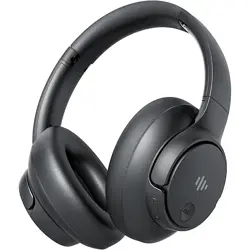
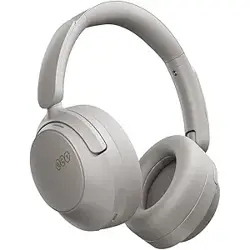
Eduiosma PIONEER-32 Active Noise Cancelling Headphones, Wireless Over Ear Bluetooth Headphones with Microphone, Transparency Mode, 70H Playtime, Hi-Res Audio, Deep Bass, Bluetooth 5.3, Lightweight Design,Black
Product's Documents
Below are documents related to this product, you can read online or download:
The Eduiosma PIONEER-32 are wireless over-ear headphones with active noise cancellation (ANC), transparency mode, and Bluetooth 5.3 connectivity. They feature dual 40mm dynamic drivers, a built-in microphone, and up to 70 hours of playback time (ANC off). The headphones are designed for music, movies, audiobooks, calls, and video meetings.
What's in the Box
1 × PIONEER-32 ANC Bluetooth Headphones
1 × 3.5mm backup audio cable
1 × USB charging cable
1 × User manual
Features
Active Noise Cancellation (ANC)
Professional-grade ANC blocks ambient noises such as airplane engines, subway rumble, car hum, and construction noise. Dual noise-detecting microphones pick up and filter out up to 95% of low-frequency background sound.
Transparency Mode
Transparency mode amplifies external sounds so you can stay aware of your surroundings without removing the headphones.
Dual 40mm Drivers & Hi-Res Audio
Two 40mm dynamic drivers deliver clear, detailed sound with balanced, rich bass. Frequency range: 20 Hz – 20,000 Hz.
Bluetooth 5.3 & Multipoint Connection
Bluetooth 5.3 provides a stable, reliable connection up to 10 m (33 ft). The headphones support simultaneous connection to two Bluetooth devices, allowing you to switch between calls, music, and video meetings without reconnecting.
70‑Hour Battery Life & Fast Charging
Up to 70 hours of music playback with ANC off (45 hours with ANC on). A 5‑minute charge provides up to 4 hours of use. Full charge time: 2.5 hours. When the battery is depleted, use the included 3.5 mm audio cable for wired operation.
Comfortable & Adjustable Design
Memory‑protein foam leather ear cushions and headband provide long‑wearing comfort. The ear cups automatically adjust their angle to fit different head shapes. The headphones are lightweight and foldable for portability.
Built‑in Microphone & Touch Controls
A high‑quality built‑in microphone enables clear hands‑free calls. The headphones feature touch‑sensitive media controls (play/pause, volume, track skip, call answer/end).
Specifications
Model
PIONEER-32
Bluetooth Version
5.3
Wireless Profiles
HFP, A2DP, AVRCP
Working Range
33 ft (10 m)
Driver Size
40 mm (dynamic driver)
Impedance
2.5 Ω
Frequency Range
20 Hz – 20,000 Hz
Battery Capacity
3.7 V / 660 mAh
Charging Voltage
5 V ⎓ 1 A
Charging Time
2.5 hours
Music Playtime (ANC OFF)
Up to 70 hours
Music Playtime (ANC ON)
Up to 45 hours
Noise Control
Active Noise Cancellation
Headphone Jack
3.5 mm
Control Method
Touch
Weight
Lightweight (exact weight not specified)
Use Guide
Power On / Off
Power on: Press and hold the power button for 2–3 seconds until the indicator light flashes.
Power off: Press and hold the power button for 3–4 seconds until the indicator turns off.
Bluetooth Pairing
Ensure the headphones are powered off.
Press and hold the power button for about 5 seconds until the LED rapidly flashes blue and red (pairing mode).
On your Bluetooth device, search for “PIONEER-32” and select it to pair.
Once connected, the LED will slowly flash blue.
ANC & Transparency Mode
Both ANC and Transparency modes can only be activated when the headphones are powered on.
Default (power on): ANC is enabled by default.
Press the ANC button: Switches to Transparency mode (amplifies external sounds).
Press again: Turns off ANC and Transparency; the ANC indicator turns off.
Note: If you do not use ANC mode, turn it off to save battery power.
Multipoint Connection (Two Devices)
Pair the headphones with the first device as described above.
Disable Bluetooth on the first device (or disconnect).
Put the headphones back into pairing mode and connect to the second device.
Re‑enable Bluetooth on the first device and select “PIONEER-32” to reconnect. Both devices will now be connected simultaneously.
Touch Controls
Play / Pause: Single tap on the touch panel.
Volume up: Swipe up.
Volume down: Swipe down.
Next track: Swipe forward.
Previous track: Swipe backward.
Answer / End call: Single tap.
Reject call: Press and hold.
Wired Mode
When the battery is depleted, connect the included 3.5 mm audio cable to the headphones and your audio source. The headphones will operate in wired mode without Bluetooth.
Note: The USB charging cable is used only for charging, not for audio transmission.
Charging
Use the included USB charging cable (5 V ⎓ 1 A).
Full charge takes approximately 2.5 hours.
A 5‑minute charge provides up to 4 hours of playback.
The LED indicator will show red while charging and turn off (or change to blue) when fully charged.
Product Video
The video showcases the product in use, guides you through setup, compares multiple products, and shows the product being unpacked.
Troubleshooting
Headphones won’t power on: Charge the battery for at least 30 minutes, then try again.
No sound / poor audio: Ensure the volume is turned up on both the headphones and the connected device. Check that the Bluetooth connection is active. If using wired mode, ensure the cable is fully inserted.
Bluetooth connection drops: Move the headphones closer to the device (within 10 m / 33 ft). Avoid obstacles and interference from other wireless devices.
Microphone not working: Confirm that the headphones are selected as the audio input device on your phone or computer.
ANC not working: Make sure the headphones are powered on. Press the ANC button to cycle through modes – ANC is enabled by default.
Safety & Maintenance
Do not expose the headphones to water, rain, or high humidity. They are not water resistant.
Clean the ear cushions and headband with a soft, dry cloth. Do not use solvents or abrasive cleaners.
Store the headphones in a cool, dry place. Avoid prolonged exposure to direct sunlight or heat.
Use only the supplied USB charging cable or a certified 5 V / 1 A charger.
Do not disassemble or attempt to repair the headphones yourself. Contact Eduiosma support for assistance.
Warranty
The headphones come with a 12‑month warranty from the date of purchase. For warranty claims or support, contact Eduiosma through the contact details provided in the product packaging or on the Amazon product page.