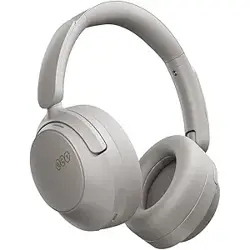
Overview
The vibeadio E11 is an over-ear wireless Bluetooth headphone featuring Hybrid Active Noise Cancellation (ANC), Transparency Mode, and high‑definition sound. Designed for home, office, and travel use, it provides up to 30 hours of playback and hands‑free calling with environmental noise cancellation (ENC).

Key features:
- Hybrid Active Noise Cancellation (up to 33 dB reduction)
- Transparency Mode for ambient awareness
- Custom 40 mm dynamic drivers for Hi‑Fi audio
- Bluetooth 5.2 wireless connectivity (10 m range)
- Built‑in microphone with ENC for clear calls
- Up to 30 hours playtime (25 h with ANC on)
- Detachable 3.5 mm audio cable for wired use
- Lightweight, ergonomic design with protein leather ear cushions
What's in the Box
- Hybrid Active Noise Cancelling Headphones × 1
- Audio Line (3.5 mm cable) × 1
- Charging Cable (USB‑C) × 1
- User Manual
Product Specifications
| Brand | vibeadio |
|---|---|
| Model | E11 |
| Color | Black |
| Ear Placement | Over Ear |
| Driver Size | 40 mm (dynamic driver) |
| Impedance | 32 Ohms |
| Frequency Range | 20 Hz – 20,000 Hz |
| Bluetooth Version | 5.2 |
| Bluetooth Range | 10 meters |
| Battery Life (ANC off) | 30 hours |
| Battery Life (ANC on) | 25 hours |
| Charging Port | USB‑C |
| Audio Jack | 3.5 mm (detachable cable) |
| Weight | 12.7 oz (approx. 360 g) |
| Noise Control | Hybrid ANC + Transparency Mode |
| Microphone | Built‑in with ENC |
| Controls | Touch buttons (noise control, volume, playback) |
| Water Resistance | Not water resistant |
Features
Hybrid Active Noise Cancellation (ANC)
The headphones use a hybrid ANC system that reduces background noise by up to 33 dB. This allows you to focus on your music or calls without distractions.

Background Noise Reduction Up to 95.5% – the hybrid ANC suppresses noise across a broad frequency range for an immersive listening experience.

Transparency Mode
When you need to hear your surroundings, activate Transparency Mode. This feature lets ambient sound in while you continue to enjoy your audio.

Hi‑Fi Audio with 40 mm Drivers
Custom 40 mm dynamic drivers deliver deep bass, clear mids, and crisp highs. The headphones reproduce each beat with detail, providing an immersive musical experience.

The 40 mm drivers are engineered to produce thumping bass and crystal‑clear highs, bringing your music to life.
Crystal Clear Hands‑free Calls
An advanced microphone system with Environmental Noise Cancellation (ENC) filters out background noise, ensuring your voice is heard clearly during calls.

Long Battery Life
Enjoy up to 30 hours of wireless playback without ANC, or 25 hours with ANC activated. When the battery is low, use the included 3.5 mm cable to continue listening in wired mode.

Comfort and Lightweight Design
The headphones feature enlarged breathable protein ear cushions and an ergonomic headband. They are 30 % lighter than many comparable models, making them suitable for all‑day wear.

Wide Compatibility
These headphones work with Bluetooth‑enabled devices such as smartphones, tablets, laptops, desktop computers, and TVs. A 3.5 mm audio cable is included for wired connections.
Compatible with most audio devices that support Bluetooth or a 3.5 mm audio jack.
Easy Switch ANC / Transparency Mode
A dedicated button on the ear cup lets you toggle between Active Noise Cancellation and Transparency Mode quickly.
The control button is sensitive and easy to locate, allowing you to change modes without looking at the headphones.
Use Guide
Charging the Headphones
- Connect the included USB‑C charging cable to the charging port on the right ear cup.
- Connect the other end to a USB power source (e.g., computer, USB wall charger).
- The LED indicator will show red while charging and turn off (or change to blue) when fully charged.
- A full charge takes approximately 2–3 hours.
Power On / Off
- Power On: Press and hold the power button for 2–3 seconds until you hear a power‑on tone or see the LED flash.
- Power Off: Press and hold the power button for 3–5 seconds until you hear a power‑off tone or the LED turns off.
Bluetooth Pairing
- Ensure the headphones are powered off.
- Press and hold the power button for about 5 seconds until the LED rapidly flashes blue and red (pairing mode).
- On your Bluetooth device (phone, tablet, computer), enable Bluetooth and search for available devices.
- Select “vibeadio E11” (or similar name) from the list.
- If prompted, enter the PIN “0000” or confirm pairing.
- Once connected, the LED will stop flashing and remain solid (or slow blink).
Note: The headphones support Bluetooth 5.2 and have a range of up to 10 meters (33 ft).
Using ANC and Transparency Mode
- ANC On: Press the ANC button (marked with a noise‑cancellation icon) once. You will hear a voice prompt “Noise cancelling.”
- Transparency Mode: Press the ANC button again. You will hear “Transparency.”
- ANC Off: Press the button a third time to disable both modes. You will hear “Normal.”
The button is located on the left ear cup. The mode cycles: ANC → Transparency → Normal → ANC …
Playing Audio and Adjusting Volume
- Play / Pause: Press the multifunction button once.
- Next Track: Press and hold the “+” button for 2 seconds.
- Previous Track: Press and hold the “–” button for 2 seconds.
- Volume Up: Press the “+” button briefly.
- Volume Down: Press the “–” button briefly.
Making and Receiving Calls
- Answer a call: Press the multifunction button once.
- End a call: Press the multifunction button once.
- Reject a call: Press and hold the multifunction button for 2 seconds.
- Voice assistant: Double‑press the multifunction button to activate Siri, Google Assistant, or other voice assistants.
The built‑in microphone with ENC technology filters out background noise for clear conversations.
Wired Mode
If the battery is depleted, you can still use the headphones in wired mode:
- Connect the included 3.5 mm audio cable to the headphone jack on the right ear cup.
- Connect the other end to your audio source (phone, computer, etc.).
- Audio will play through the headphones even without power. ANC and Transparency modes are not available in wired mode.
Resetting the Headphones
If the headphones become unresponsive or have connectivity issues, reset them:
- Power off the headphones.
- Press and hold the power button and the ANC button simultaneously for about 5 seconds.
- The LED will flash rapidly, indicating a reset. The headphones will then power off.
- Turn them on again and re‑pair with your device.
Product Video
The video showcases the product in use, guides through setup, and compares multiple products.
Indicators and Controls
LED Indicator
- Flashing red/blue: Pairing mode.
- Solid blue (or slow blink): Connected to a device.
- Red: Charging.
- Off: Fully charged or powered off.
Button Layout

- Power / Multifunction button: Power on/off, play/pause, answer/end calls, voice assistant.
- Volume + / Next track: Volume up (short press), next track (long press).
- Volume – / Previous track: Volume down (short press), previous track (long press).
- ANC button: Cycle through ANC, Transparency, and Normal modes.
Troubleshooting
No sound or low volume
- Ensure the headphones are powered on and connected to your device.
- Check the volume level on both the headphones and the connected device.
- If using wired mode, make sure the cable is fully inserted.
Bluetooth connection issues
- Move the headphones closer to the device (within 10 m).
- Turn Bluetooth off and on again on your device.
- Delete the headphones from your device’s Bluetooth list and re‑pair.
- Reset the headphones (see “Resetting the Headphones” above).
Microphone not working during calls
- Ensure the headphones are selected as the audio input device on your phone or computer.
- Check that the microphone is not blocked by debris.
- Test the microphone on another device to rule out a hardware issue.
ANC not effective
- Make sure ANC mode is activated (voice prompt “Noise cancelling”).
- Ensure the ear cushions form a good seal around your ears.
- Clean the ear cushions and ear cups to remove any debris.
Headphones not charging
- Try a different USB cable and power source.
- Check the charging port for debris or damage.
- If the headphones have been unused for a long time, charge them for at least 30 minutes before turning on.
Safety and Maintenance
- Do not expose the headphones to water, rain, or high humidity. They are not water resistant.
- Store the headphones in a cool, dry place away from direct sunlight.
- Clean the ear cushions and headband with a soft, dry cloth. Do not use solvents or abrasive cleaners.
- Do not disassemble or attempt to repair the headphones yourself. Contact the manufacturer for service.
- Keep the headphones away from children and pets to avoid damage or choking hazards.
- Use only the supplied charging cable or a certified USB‑C cable to charge the headphones.
Warranty and Support
The headphones come with a 12‑month warranty from the date of purchase. For warranty claims or technical support, please contact the manufacturer:
- Brand: vibeadio (MUCOME INC US)
- Warranty: 12 months
- Support: Visit the vibeadio store on Amazon or refer to the user manual included in the box for contact details.
Note: This manual is based on the product information available at the time of writing. For the most up‑to‑date support, please refer to the official vibeadio website or your purchase page.