
EN
USER MANUAL
COFFEE MACHINE
AR

We advise you to read this manual carefully, as it contains all the instructions for managing the appliance’s aesthetic and
functional qualities.
For further information on the product: www.smeg.com
www.smeg.com
“C”
20
23
23a
20a
“A”
4
5
30b
31a
29
31b
30a
39
38
19
9
20
25
27
21
22
1
2
10
3
23
18
16 13 141211
8
15 15
6
7
“B”
33
17
32
28
26
24
34b
34a
5
4
19
20
1 2 3
“D”
16 16 16
28
22b
22
“E”
24
41
22b
22
28
15 15
38
39
“G”
“I”
“F” “H”
“J”
42 42
22
34a
15
7
11
14
18a
18a
18b
21
22
32
20
31b

Important information for the user /
Instructions /
General information on this user manual, on safety and nal disposal /
Description /
Appliance description /
Use /
Information on using your appliance /
Cleaning and care /
Information for proper cleaning and maintenance of the appliance/
Safety instructions /
Information /
Advice /
NOTES
Scan theQR code for the Installation and Maintenance Quick Start Guide

The manufacturer reserves the right to make any changes deemed useful for the improvement of its products without
priornotice. The illustrations and descriptions contained in this manual are therefore not binding and are merely indicative.
EN - 1
EN
1 Warnings
This user manual is an integral part of the
appliance and must therefore be kept in its
entirety and on-hand for the whole working
life of the appliance.
1.1 Intended use
Failure to comply with the safety
recommendations and not reading the
instruction manual can lead to improper
use of the appliance by the users and
consequent personal injury.
• The appliance can be used to prepare
coffee-based beverages, starting from
grinding the coffee beans or to dispense
hot water and steam. All other use is
considered improper. Do not use the
appliance for purposes different to those
for which it is intended.
• The appliance is intended for use in the
home and similar environments, such as:
- in the kitchen area for the staff
of shops, offices and other work
environments;
- in bed and breakfast and agritourism
accommodation;
- by guests at hotels and motels, and
in residential environments.
• Other uses, in restaurants, bars and cafés
for example, are improper.
• Only introduce water into the appropriate
tank; no other liquids.
• Only use the appliance indoors and at
a maximum altitude of 2000 metres.
• Do not insert the appliance into a closed
cabinet (built-in type).
• The appliance is not designed to operate
with external timers or with remote-
control systems.
• This appliance may be used by persons
with reduced physical, sensory or
mental capabilities provided they are
supervised or instructed on the safe use
of the appliance and have understood
the hazards connected with its use.
• Children must not play with the appliance.
• This appliance shall not be used by
children. Keep the appliance and its
cord out of reach children.
1.2 General safety warnings
Follow all safety instructions for safe use
of the appliance: Electrocution Hazard,
since the machine is powered by electricity,
the following safety warnings must be
complied with:
• Read this user manual carefully before
using the appliance.
Important safety information
EN - 2
• Do not leave the appliance unattended
during use.
• Do not immerse the appliance, the
power cable, the plug or the base in
water or any other liquid. Do not remove
the plug from the socket by pulling on
the cable or with wet hands.
• Do not use the appliance when the
power cable or the plug are damaged
or if the appliance has fallen on the oor
or is damaged in any way whatsoever.
• In the event of a fault, or if the power
supply cable is damaged, have the
appliance repaired only by a qualied
technician or by an authorised after-sales
service.
• The cable is deliberately short to prevent
accidents.
• Do not allow the power cable to hang
over the edge of the table or any other
surface, or to come into contact with hot
surfaces.
• Do not allow the electrical power cable
to come into contact with sharp edges.
• Do not position the appliance above or
near gas or electric hob burners when
they are in use, inside an oven or near
other heat sources.
• Do not touch the plug with wet hands.
• Make sure that the power outlet used is
always freely accessible, because only
in this way can it be unplugged when
necessary.
• If the plug must be removed from the
socket, grasp the plug directly and do
not pull the cable.
• If the machine should suffer a malfunction,
do not attempt to repair it. Switch the
appliance off, remove the plug from the
outlet and contact the Technical After-
sales Service.
• Do not try to make modications or
repair the appliance: in the event of
a fault, have it repaired by a qualied
technician or contact the Technical After-
Sales Service.
Injury hazard! Improper use
of the appliance can cause
injuries. Disconnect the plug
before cleaning.
• Keep packaging material out of the
reach of children.
• Never try to put out a re/ames using
water: turn off the appliance, remove
the plug from the outlet and smother the
ame with a lid or re blanket.
• Always disconnect the appliance from
the power supply when it is not in use, if
left unattended or in the case of a fault.
• Always disconnect the appliance from
the power supply before assembly/
disassembly of components.
• Switch off the appliance and unplug it
from the power source before removing
accessories or accessing inner parts that
move during use.
Important safety information
EN - 3
EN
• Always disconnect the appliance from
the power supply and let the appliance
cool down before cleaning.
• Do not use the appliance with parts
or accessories produced by other
manufacturers.
• Only use the manufacturer's original
spare parts. The use of spare parts
not recommended by the manufacturer
could lead to res, electric shocks or
personal injury.
• Only place the appliance on level and
dry surfaces.
• Do not wash the appliance in the
dishwasher. Do not spill liquids on the
power plug and on the power base.
Failure to comply with these warnings
can cause death, a re or electrocution.
• Do not use an adapter.
• Only use type-approved extensions
suitable for the type of appliance.
1.3 Safety recommendations
for this appliance
• Do not ll the water container beyond
the maximum limit indicated.
• Do not use the coffee machine without
the tank tted or without water in the
tank.
• Use only coffee beans to obtain the
powder, do not put ground coffee into
the coffee bean container.
• Make sure that there are no foreign
objects inside the coffee grinder.
• Allow the coffee machine to cool down
before cleaning.
• Leave a space of at least 3 cm between
the coffee machine and any walls to
the rear or side, and a space of 15 cm
above the coffee machine.
• The surfaces of the appliance become
very hot, do not touch the hot surfaces
after use.
• Do not position the appliance near to
taps or sinks.
• If an extension cable is used, the
nominal value indicated must be at
least equivalent to the nominal value
of the appliance. If the appliance has
a 3-wire electric cable with earth, the
extension must be a type with 3 WIRES
AND EARTH. The longest cable must be
positioned in a way not to rest on the
surface or table where it may be pulled
by children or cause falls due to tripping.
Important safety information / Description
18 Tasto caffè 1 tazza (LED bianco)
/ Tasto caffè lungo 1 tazza (LED
arancione).
19 Tasto caffè 2 tazze (LED bianco)
/ Tasto caffè lungo 2 tazze (LED
arancione).
20 Tasto vapore (LED bianco) / Tasto
Decalcicazione (LED arancione).
21 Pulsante settaggi / Cambio
programma di erogazione.
EN - 4
• Avoid getting the coffee machine
wet and do not spray liquids onto it.
In the event of contact with liquids,
immediately disconnect the cable from
the power outlet and dry thoroughly:
Electric shock hazard!
• Do not use aggressive detergents
or sharp objects to clean the coffee
machine.
• Consult the “Cleaning and maintenance”
chapter for cleaning instructions.
•
This appliance cannot be placed in
a cabinet or closed container during
use.
1.4 Manufacturer's liability
The manufacturer declines all liability for
injury/damage to persons and objects
due to:
• use of the appliance different from that
envisioned;
• user manual has not been read;
• tampering with individual parts of the
appliance;
• use of non-original spare parts;
• failure to comply with safety warnings.
Keep these instructions carefully.
Whenever the appliance is
transferred to other persons, it
must be accompanied by these
user instructions.
These instructions can be downloaded
from the Web Smeg site “www.smeg.
com”.
1.5 Disposal
Devices bearing this symbol are subject
to European Directive 2012/19/EU.
• All electric and electronic appliances
must be disposed of separately from
household waste, taking them to the
relevant centres envisioned by the State.
By disposing of the discarded device
correctly, damage to the environment and
risks to human health will be avoided. For
further information regarding disposal of
the discarded appliance, contact the
Municipal Administration, the Disposal
dept. or the shop where the appliance
was purchased.
2 Description
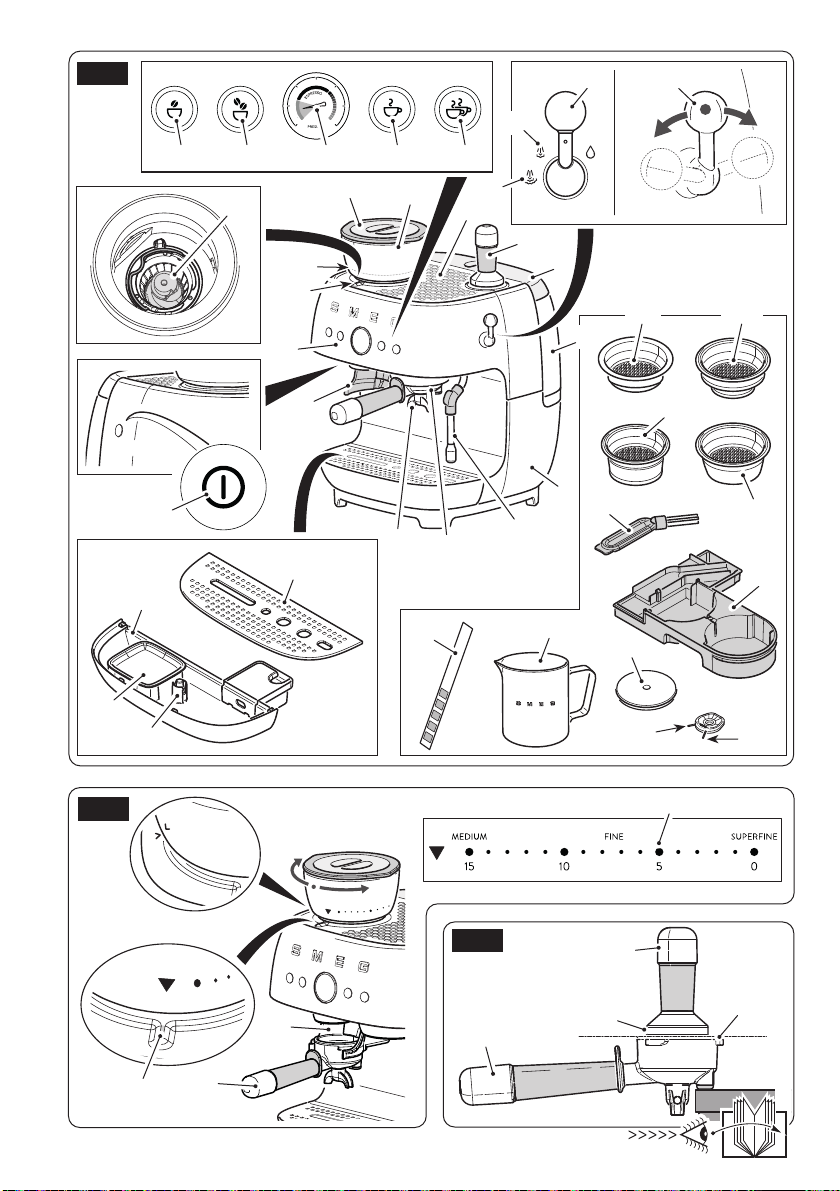
of the appliance (Fig.A)
1 Machine body
2 Coffee bean container lid
3 Coffee bean container
4 Grinding levels
5 Grinding level indicator
6 Water tank lid
7 Water tank (2.6 l)
8 Cup shelf
9 ON/OFF button
10 Control panel
11 Grinding key for single espresso
12 Grinding key for double espresso
13 Dispensing key for single espresso
14 Dispensing key for double espresso
15 Steam/water lever
16 Manometer
17 Water hardness test strip
18 Conical grinders
Use

EN - 5
EN
Pressurised lters (30a, 30b)
These lters facilitate and regulate pressure also
when grinding and dosing are not perfect.
Select the lter for one or two cups as required.
If non-pressurised lters are used and passage from
a single lter to a double one and vice versa, it
may be necessary to prepare a few coffees before
the ideal grinding and correct dose for pre-set
dispensing are obtained. For example, when very
ne grinding with non-pressurised lters is selected,
it may be necessary to increase the amount of
coffee ground to guarantee that the dose contained
in the lter is correct.
The machine is pre-set to dispense coffee with the
use of non-pressurised lters approximately in the
middle of the FINE level. Depending on preferred
use and the desired avour, adjust the grinding
neness by turning the coffee beans container
clockwise or anti-clockwise.
Dispensing unit cleaning disk (32)
Silicone disk to be used to clean the dispensing unit.
Cleaning brush (33)
Use to clean the conical grinders (18).
Steam wand/filter holes cleaning
needles
It is made up from two needles with different
thickness: one for cleaning the steam wand hole
(34a) and the other for cleaning the holes in the
coffee lters (34b).
Use
19 Filter-holder support
20 Filter-holder
21 Dispensing unit
22 Steam/hot water wand
23 Tamper
24 Drip tray
25 Coffee grounds collection tray
26 Cup grill
27 Water level indicator
28 Stainless steel milk jug
29 Accessories drawer
30a Single pressurised lter
30b Double pressurised lter
31a Single non-pressurised lter
31b Double non-pressurised lter
32 Dispensing unit cleaning disk
33 Cleaning brush
34a Steam wand cleaning needle
34b Filter holes cleaning needle
3 Description of the parts/
accessories (Fig.A)
Accessories drawer (29)
The machine has housing for accessories not being
used, so that they are always available to the user.
• To access the accessories drawer, remove the
drip tray (24), and extract the drawer (29)
positioned inside the machine.
Filters
This machine has four lters; two non-pressurised
and two pressurised.
Non-pressurised lters (31a, 31b)
These lters allow various degrees of grinding,
dosing and tamping to be experimented, in
order to create a perfectly balanced espresso.

EN - 6
Use
Water hardness test strip (17)
Use the strip supplied to detect the hardness of the
water used as indicated in the “Machine setting -
Water hardness” paragraph.
Milk jug (28)
Stainless steel milk jug.
Tamper (23)
Tamper with stainless steel disk with diameter of 58
mm to be used to press the ground coffee.
3.1 Description of controls
(Fig.A)
ON/OFF key (9)
Voltage is supplied to or removed from the machine
by pressing this button.
Grinding key for single espresso (11)
The key allows a pre-set quantity of coffee to be
ground for a single espresso.
Grinding key for double espresso (12)
The key allows a pre-set quantity of coffee to be
ground for a double espresso.
Dispensing key for single espresso (13)
The key allows a pre-set quantity for a single
espresso coffee to be dispensed.
Dispensing key for double espresso (14)
The key allows a pre-set quantity for two espresso
coffees to be dispensed.
Water/steam lever (15)
Turn the lever clockwise, in correspondence with
the " " icon to dispense hot water.
Turn the lever anti-clockwise to dispense steam.
Two steam intensities can be selected at will in
correspondence with the respective icons " " / "
".
3.2 Alarms
The keys ash differently to indicate the relative
alarm.
Keys (11) and (12) ash quickly:
The coffee grinder has been used for too long and
the temperature block has activated or it is clogged.
Press one of the two ashing keys and wait for
cooling or disassemble the coffee grinder and clean
the tube from above.
Keys (11) and (12) ash simultaneously:
No coffee beans container (3) or coffee beans
container not introduced correctly alarm. Make
sure that the container is assembled correctly or
add coffee beans, if necessary.
Keys (13) and (14) ash in sequence:
The machine is reaching the correct temperature for
dispensing coffee. Wait for the two keys to have
a xed light and then select the desired beverage.
EN - 7
EN
Keys (13) and (14) ash simultaneously:
No water tank (7) or tank not introduced correctly
or with insufcient water to dispense coffee alarm.
Check the correct introduction or add water if
necessary.
Key (14) with orange light:
The key has an orange light to indicate that a
descaling cycle is necessary.
To proceed, refer to the "Descaling" paragraph in
the Cleaning and maintenance paragraph.
To by-pass the procedure just press the key (14):
all keys have a xed light and the machine will be
ready for use.
In order not to change the avour of
the coffee and for correct operation
of the machine, it is advised to
perform the descaling cycle when
signalled by the machine.
If the descaling cycle is not
performed, the key (14) will light
up in orange at every switch-on
until the descaling cycle has been
carried out.
3.2 Before commissioning
(Fig. A and B)
• Unpack the appliance carefully and remove
all packaging materials.
• Use a damp cloth to clean all removable
components, such as the coffee bean
container (3), water tank (7), lids (6, 2),
coffee grounds collection tray (25), drip
tray (24), cup holder grill (26), lter-holder
(20), lters (30a, 30b, 31a, 31b), tamper
(23) and other accessories.
Use
• Make sure that all components are
thoroughly dry before re-mounting them.
Do not use the coffee machine
without water in the tank or without
the water tank tted.
FAULT HAZARD!
The parts that may come into
contact with foodstuffs are made
using materials that comply with
the provisions of the legislation
in force.
• Introduce the beans container, making the
" "
arrow on the container match the on
the
" "
surface.
• Fix the container by turning it clockwise and
matching the closed arrow
" "
with the
grinding level indicator (5).
• Remove the red protective cap located on
the back of the machine, between the tank
(7) and the rear body of the machine (1).
4 Use
Before starting the coffee
machine, carefully read chapter
“1 Warnings” and the “Before
commissioning” paragraph.
4.1 Machine switch-on
• Make sure that the drip tray (24) complete
with cup grill (26) is correctly mounted at
switch-on and before all dispensing.
• Lift the tank cover (6) and pour fresh water
in the tank making sure not to exceed the
indicated ‘Max’ level and then re-mount the
lid (6).
EN - 8
Use
• Lift the coffee bean container lid (2) and
introduce the coffee beans into the container
(3).
• Switch the coffee machine on by pressing
the ON/OFF switch (9): the keys (13)
and (14) ash to indicate that the correct
temperature is being reached. The coffee
machine is ready for use as soon as all the
keys have a xed light.
4.2 Commissioning (Fig.A)
On commissioning it is
recommended to set the water
hardness as indicated in the
"Water hardness" paragraph.
On commissioning, the internal
circuits must be rinsed. Proceed as
described below.
- Switch the machine on as described in the
“Machine switch-on” paragraph.
• Attach the filter-holder (20) with non-
pressurised lter (31b) for double cup to
the dispensing unit (21).
• Position a container under the coffee
dispensing nozzles and press the key (14).
• Repeat this procedure 5 times.
• Position a container under the hot water/
steam wand (22).
• Turn the steam lever (15) in correspondence
with the
" "
icon and dispense water for 15
seconds and then take it back to the central
position to stop dispensing.
• Turn the steam lever (15) again in
correspondence with the
" " / " "
icons
and dispense steam into the container for
a few seconds and then take it back to the
central position to stop dispensing.
It is recommended to rinse the
internal circuits also when the
coffee machine has not been used
for a long period of time.
4.3 Grinding level regulation
(Fig. B)
Do not use green, caramelised or
candied coffee beans, as they may
stick to the coffee machine and ruin
it.
Grinding level should be regulated
when the machine is in use or at
the occasion of the rst use, when
the bean tank is completely empty;
turning the coffee bean container
(3) with the grinder at a standstill
and with the beans inside could
damage the grinding unit.
• To adjust the level of grinding, turn the
coffee beans container (3) clockwise or
anti-clockwise according to the neness
desired, positioning the scale (4) with the
grinding level present on the container
in correspondence with the indicator (5).
Turning the container (3) clockwise, grinding
will be ner, anti-clockwise makes grinding
coarser.
• Position the lter-holder (20) with relative
lter introduced onto the relevant support
(19) on the left and press the key relative
to desired grinding and check it is correct.
EN - 9
EN
4.4 Preparing espresso coffee
(Fig.A, B, C, D)
For excellent coffee tasting, it is
recommended to pre-heat the cup
by rinsing them with hot water or
dispensing hot water into the cup
via the wand (22).
At every switch-on, it is advised to
rinse the circuits of the dispensing
unit (21) and of the lter-holder (20)
dispensing a double coffee without
the presence of coffee in the lter.
• Check the level of water in the tank (7) and,
if necessary, add water paying attention not
to exceed the "Max" level.
• Check that there are coffee beans in the
beans container (3).
• Select the lter (30a, 30b, 31a, 31b)
suitable for the type of dispensing necessary
and put it into the lter-holder (20) . For
more details regarding the different lters
supplied, see the "Description of the parts/
accessories" paragraph.
• Position the lter-holder (20) with relative
lter introduced onto the relevant support
(19).
• Press the key (11) to grind the dose for one
coffee or (12) to grind the dose for two
coffees.
• After grinding, position the lter-holder (20)
on a surface as shown in gure C.
• Distribute the ground coffee evenly and
press it using the tamper supplied (23). For
correct dosing of the coffee into the lter and
correct tamping, the upper edge (23a) of
the tamper must be aligned with the upper
edge (20a) of the lter-holder.
• Remove the excess ground coffee from the
lter-holder, attach it to the dispensing unit
(21) and then turn it anti-clockwise until it is
tight.
• Position the cup or cups under the lter-
holder nozzles (20).
• Select the desired beverage and press
the relative key (13 or 14). When the
quantity set is reached, dispensing will end
automatically. The manometer (16) allows
the user to check whether the coffee is
dispensed excellently as indicated in Fig.
D.
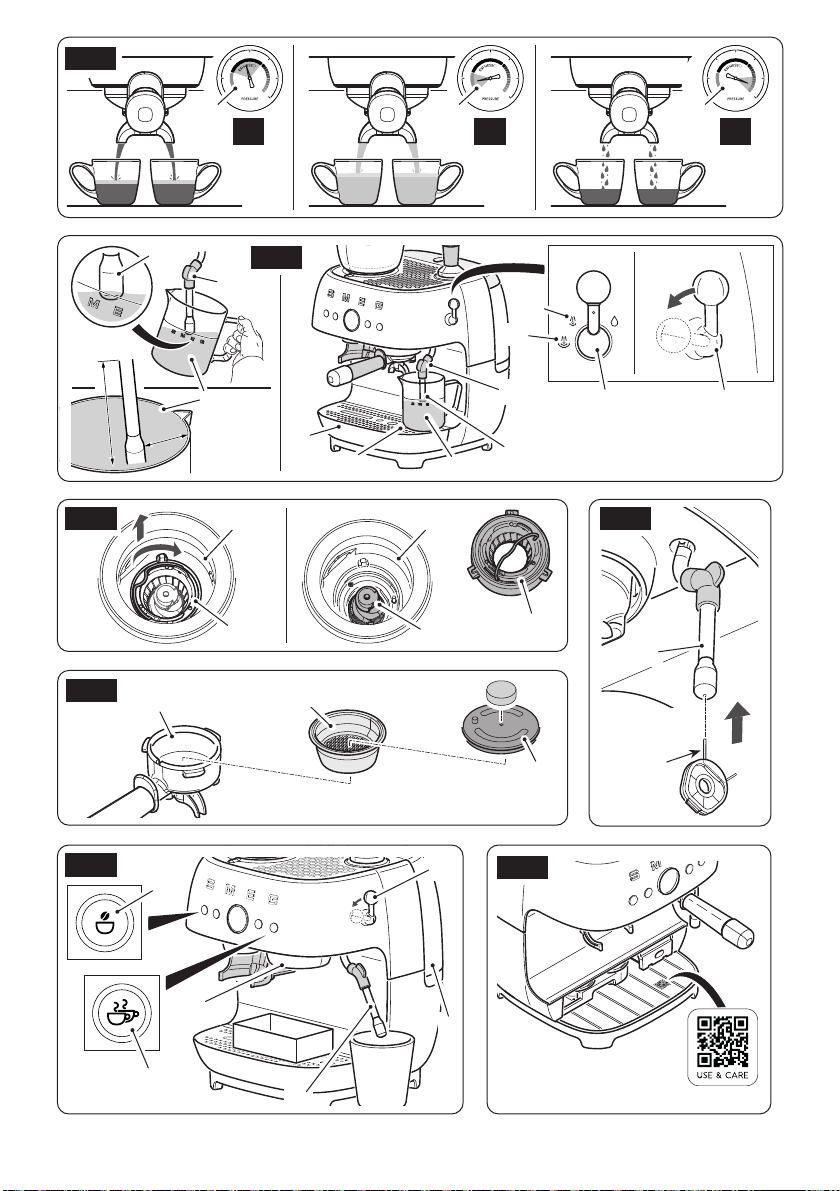
Coffee extracted correctly Fig.D1.
Coffee under-extracted Fig.D2.
Coffee over-extracted Fig.D3.
To avoid spraying, do not remove
the lter holder during dispensing:
wait for a few seconds after
dispensing has stopped.
BURNS HAZARD!
• After dispensing, remove and clean the
lter-holder by turning it clockwise.
After approx. 5 minutes of no use,
the machine goes into Energy
Saving function. The stand-by time
can be modied as indicate din the
"Auto power-off setting" paragraph.
4.5 Dispensing steam and
preparing a cappuccino
(Fig.A and E)
• Two steam intensities can be selected (38
and 39).
• Make sure that the drip tray (24) is mounted
correctly.
Use
EN - 10
• Put cold milk into the jug as desired up to
the spout of the same.
• Position the tip of the steam wand (22) in
correspondence with the relative hole (41),
and turn the lever to the
" "
icon for a few
seconds to make any residual water escape
and then take it back to the vertical position.
• Using the rubber protection (22b) move
the steam wand (22) outwards, introduce
it into the jug (28) and tilt the latter slightly
as shown in gure E.
• Turn the lever (15) anti-clockwise to the
desired steam intensity.
• Once the desired temperature of the milk
has been reached, re-position the lever (15)
in the vertical position to interrupt the supply
of steam.
• Pour the frothy milk into the cups with the
previously-prepared espresso.
The result of milk frothiness can be
affected by the type of milk used
and the dexterity of the user.
To
obtain a good cappuccino, we
recommend using semi-skimmed
or full-fat milk at fridge temperature
(about 5°C).
• To make several cappuccinos,
rst prepare all the coffees and
then froth the milk for all of them
together.
• After heating the milk, dispense
steam for a few seconds,
• Clean the steam wand (22) after
every time it is used, to prevent
the deposit of milk residues or
clogging. For complete cleaning
of the steam wand, see the
“Cleaning and Maintenance”
paragraph.
4.6 Dispensing hot water
• Position a recipient under the steam wand
(22).
• Turn the lever (15) clockwise, in
correspondence with the
" "
icon to
dispense hot water.
• Stop dispensing by re-positioning the lever
(15) vertically.
4.7 Customisation of the
quantity
The amount of coffee ground and dispensed can
be customised for every function.
Press the key 11, 12, 13 or 14 for 3 seconds on
the basis of the function to be customised.
The selected key lights up ashing; if the 'sound'
function is active, the machine emits a double
sound to signal the start of modication of the
pre-set program.
• When the desired quantity has been
reached, press the key selected again.
The key ashes 3 times and an acoustic
signal will indicate the memorisation of the
quantity.
Use

EN - 11
EN
To reset the manufacturer's original
settings, press the keys at the same
time for at least 10 seconds. All of
the keys ash at the same time and
the machine emits a single sound
indicating that factory settings have
been reset.
5 Machine settings
The programming menu can be used to set:
- Auto power-off time (Stand-by)
- Water hardness
- Coffee temperature
- Pre-brewing proles
To access the programming menu, press keys
(11) and (14) at the same time for 5 seconds.
All of the keys ash simultaneously.
• To make the settings relative to the auto
power-off times, press the key (11).
• To set the level of water hardness, press the
key (12).
• Press key (13) to set the extraction
temperature.
• To set the desired pre-brewing times, press
the key (14).
Auto power-off time
After approx. 5 minutes of no use, the machine
goes into Eco mode.
Proceed as follows to change this setting:
• Access the programming menu as indicated
previously.
• Press the key (11), it will ash 3 times to
indicate selection.
• The current setting is shown with the keys
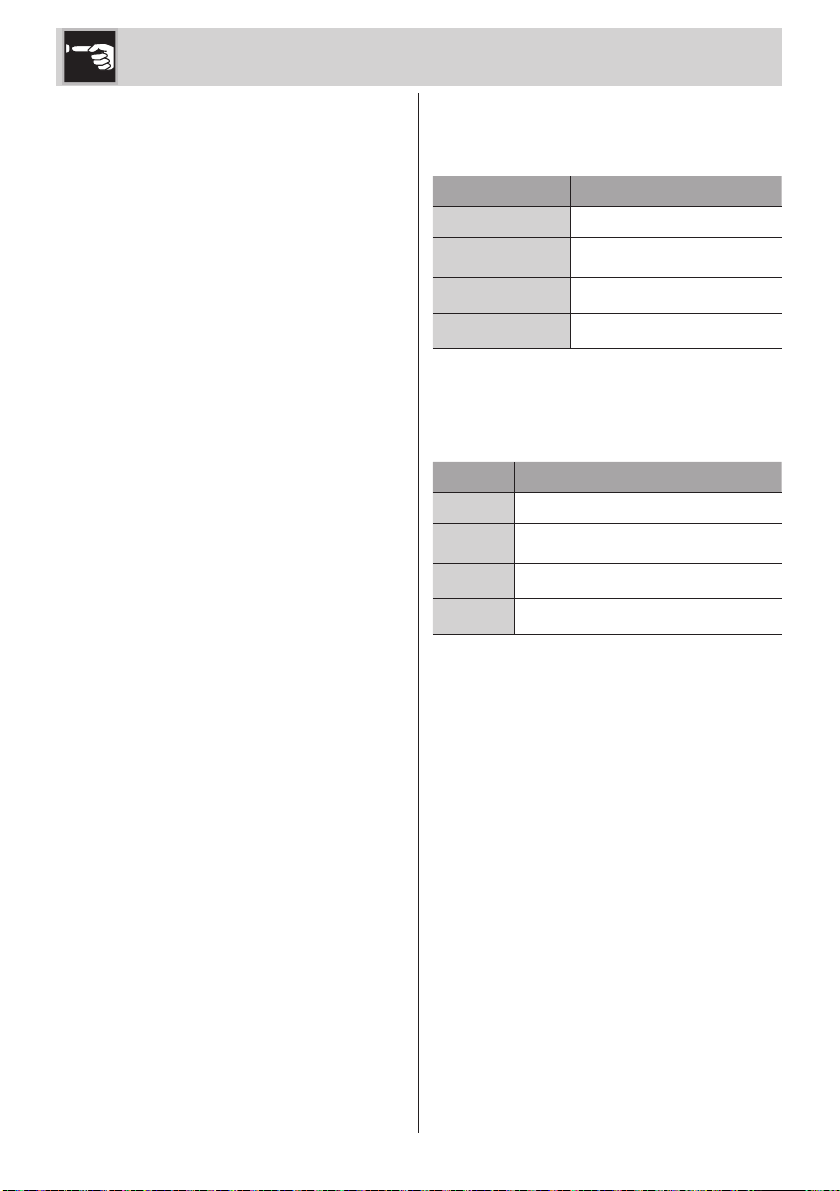
switching on, as shown in the following
table:
Key
Auto power-off time
set
11 Eco Mode (10 minutes)
11.12 30 minutes
11,12,13 40 minutes
11,12,13.14 60 minutes
• Press the key corresponding to the desired
setting to modify the time, as indicated in
the table.
Key
Auto power-off time to be
set
11 Eco Mode (10 minutes)
12 30 minutes
13 40 minutes
14 60 minutes
• The key selected will ash 3 times and a
sound will be emitted (if the acoustic signals
are active) to indicate the setting has been
saved.
Use
EN - 12
Water hardness
The machine is factory set to “Very Hard Water
Level”. The machine can be set according to
the actual hardness of the water used, thus
making the requirement for descaling less
frequent.
If you don’t know the water hardness, use
the test strip supplied (17) and follow the
instructions below:
• Remove the reactive strip supplied (17) from
its packaging.
• Fully submerge the strip in a glass of water
for about one second.
• Remove the strip from the water and shake
it slightly. Read the results after about one
minute.
• If 5 blue stripes appear on the strip, select
“light water” settings.
• If 1 or 2 pink stripes appear on the strip,
select the “medium water” setting.
• If 3 or 4 pink stripes appear on the strip,
select the “hard water” setting.
• If 5 pink stripes appear on the strip, select
the “very hard water” setting.
Proceed as follows to change the setting:
• Access the programming menu as indicated
previously.
• Press the key (12), it will ash 3 times to
indicate selection.
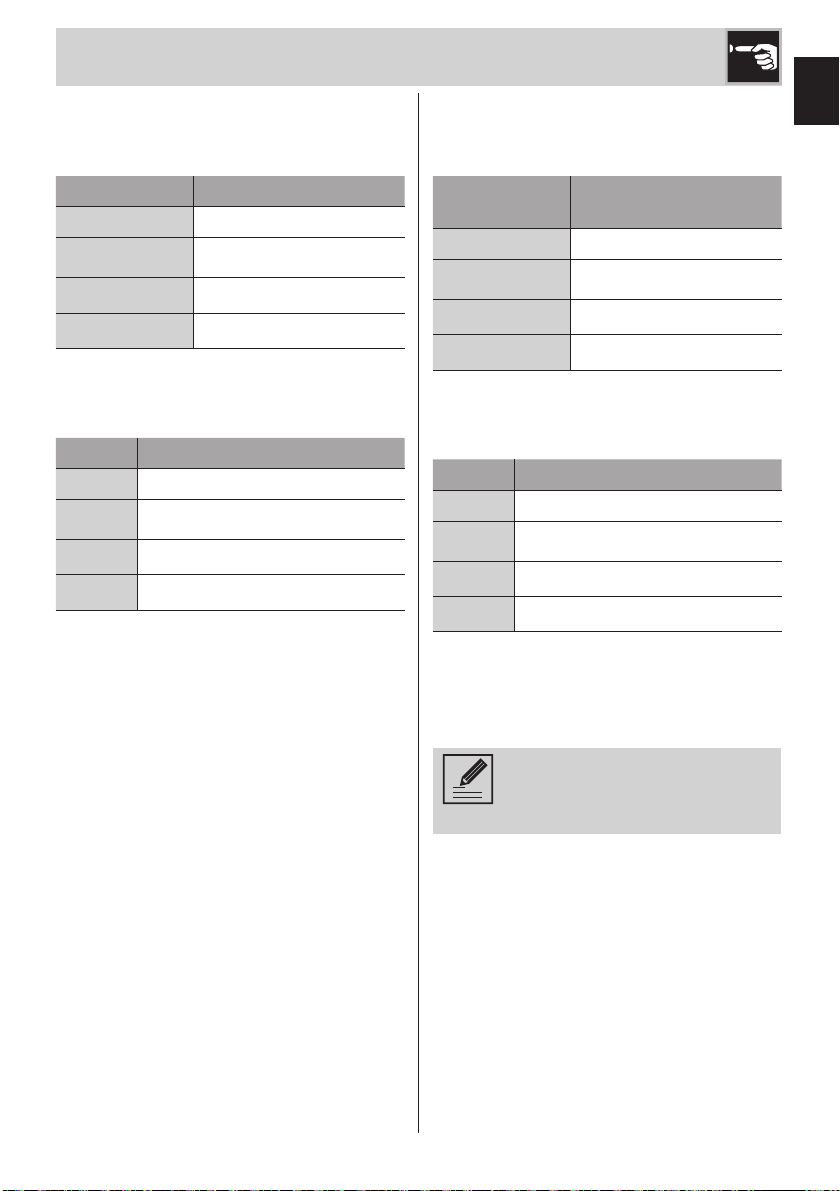
• The current setting is shown with the keys
switching on, as shown in the following
table:
Key Water hardness set
11 Soft water
11.12 Medium water
11,12,13 Hard water
11,12,13.14 Very hard water
• Press the key corresponding to the desired
setting to modify the hardness, as indicated
in the table.
Key Water hardness to be set
11 Soft water
12 Medium water
13 Hard water
14 Very hard water
• The key selected will ash 3 times and a
sound will be emitted (if the acoustic signals
are active) to indicate the setting has been
saved.
Temperature of the coffee
The machine is pre-set to extract coffee at
an ideal temperature, which defines the
temperature in the cup.
Proceed as follows to change the setting:
• Access the programming menu as indicated
previously.
• Press the key (13), it will ash 3 times to
indicate selection.
Use
EN - 13
EN
• The current setting is shown with the keys
switching on, as shown in the following
table:
Key Temperature set
11 Low
11.12 Medium
11,12,13 Excellent
11,12,13,14 High
• Press the key corresponding to the desired
setting to modify the temperature, as
indicated in the table.
Key Temperature to set
11 Low
12 Medium
13 Excellent
14 High
• The key selected will ash 3 times and a
sound will be emitted (if the acoustic signals
are active) to indicate the setting has been
saved.
Pre-brewing proles
The machine is set with a standard pre-brewing
mode.
Proceed as follows to change this setting:
• Access the programming menu as indicated
previously.
• Press the key (14), it will ash 3 times to
indicate selection.
• The current setting is shown with the keys
switching on, as shown in the following
table:
Key
Set pre-brewing
prole
11 Short pre-brewing
11.12 Standard pre-brewing
11,12,13 Pulse pre-brewing
11,12,13,14 Constant pre-brewing
• Press the key corresponding to the desired
setting to modify the pre-brewing prole, as
indicated in the table.
Key Pre-brewing prole to set
11 Short pre-brewing
12 Standard pre-brewing
13 Pulse pre-brewing
14 Constant pre-brewing
• The key selected will ash 3 times and a
sound will be emitted (if the acoustic signals
are active) to indicate the setting has been
saved.
When using pressurised filters
(30a-30b), we suggest setting the
“Short pre-brewing” prole.
Acoustic signals
The machine is pre-set with acoustic signals
active. They can be deactivated by pressing
buttons (11) and (12) at the same time for 5
seconds.
Reset factory settings
To reset the factory settings, press keys (12)
and (13) simultaneously for 10 seconds.
Use
EN - 14
6 Cleaning and
maintenance
6.1 Warnings
Electrocution hazard.
• Remove the plug from the power
outlet before cleaning the coffee
machine.
• Never immerse the coffee
machine in water or other
liquids.
• Allow the coffee machine to cool
down before cleaning.
Risk of damage to the surfaces.
• Do not use steam jets to clean
the coffee machine.
• Do not use cleaning products
containing chlorine, ammonia
or bleach on parts with metal
surface nishes (e.g. anodised,
nickel or chrome-plated).
• Do not use abrasive or corrosive
detergents (e.g. powder
products, stain removers and
metallic scourers).
• Do not use rough or abrasive
materials or sharp metal
scrapers.
To make cleaning easier, it is
possible to scan the QR code
present on the base under the drip
tray, which links to a dedicated
web section on Installation and
Cleaning (g. J).
6.2 Cleaning the machine
body
To keep the external surfaces in good
condition, clean them regularly after all use
and when they have cooled down. Clean with
a soft, damp cloth.
6.3 General cleaning (Fig.A)
To ensure good machine operation, in addition
to excellent quality beverages, a few simple
daily cleaning operations are recommended,
such as cleaning the lter-holder (20) and
relative lter inside, the drip tray (24) and
coffee grounds collection tray (25).
It is also recommended that some specic
machine components
such as the water tank (7) and the coffee bean
container (3) are cleaned regularly.
Only the cup grill (26) and the jug
(28) are dishwasher safe.
Cleaning the lter-holder (20) and
lters (30a, 30b, 31a, 31b)
• Remove the lter from the lter-holder (20)
and rinse under running water.
• Dry the components thoroughly and re-
mount.
Cleaning the drip tray (24) and the
grounds collection tray (25)
The drip tray (24) is equipped with a red oat
(27) which projects from the cup holder grill
when the maximum liquid level is exceeded.
• Remove the cup grill (26), the tray (24) and
the coffee grounds collection tray (25).
• Empty and rinse under running water, use
neutral washing up liquid if necessary.
• Dry components and reassemble in the
machine.
Cleaning and maintenance
EN - 15
EN
Cleaning the coffee bean container
(3) and of the grounds (18) (Fig.A e F)
• Switch the machine on.
• Make sure the coffee bean container (3) is
empty and then press the key (12) to remove
any coffee residues from the grinder.
• Switch the machine off and remove the plug
from the outlet.
• Remove the coffee bean container (3) by
turning it anti-clockwise until the
" "
" "
references are matched with the indicator
(5) and then lift it.
• Remove any coffee beans present in the
grinder using the cleaning brush (33)
supplied.
• Lift the handle (42) of the upper grinder
(18a) and turn it clockwise to remove it.
• Clean the upper grinder (18a) and the
lower grinder (18b) using the brush supplied
(33) if necessary.
•
Re-mount the upper grinder (18a) by matching
the two notches
" "
" "
and turn it anti-
clockwise to x it
" "" "
.
• Clean the coffee beans container (3) using
a damp cloth and re-mount it by matching
the references
" "
" "
with the indicator
(5) and then turn it clockwise to attach it.
Thanks to the Twist & Lock system,
it is possible to remove the coffee
beans container (3) even if there
are coffee beans inside and just
clean the grinders (18).
Cleaning the water tank (7)
• Remove the tank lid (6) and remove the tank
from the machine using the relevant handle.
• Clean the tank under running water, dry it
externally and re-mount it.
Cleaning the steam wand (22) (Fig.H)
Clean the steam wand (22) immediately after
use.
• Position the tip of the steam wand on the
cup grill in correspondence with the relative
hole, turn the lever (15)
to the " " / " "
icon for a few seconds to make any milk
remaining inside escape and then take it
back to the vertical position.
• Dry the steam wand (22) using a damp
cloth.
Let the steam wand cool down
before cleaning.
BURNS HAZARD!
• Check that the steam exit hole is not
blocked. In the case of any deposits, clean
the steam exit hole using the relevant needle
supplied (34a).
Cleaning the dispensing unit (20)
(Fig.G)
• Insert the non-pressurised lter for double
coffee (31b) into the lter-holder (20)
• Insert the cleaning disk (32) supplied and
a detergent capsule inside the lter (31b).
Cleaning and maintenance
EN - 16
Use detergent capsules for
household coffee machines, which
can be found on the market.
• Attach the lter-holder (20) into the dispensing
unit (21) and position a container with
capacity of at least 500 ml under the lter-
holder nozzles.
• Fill the tank (7) with fresh water up to max.
• Hold keys (11) and (14) down for 5
seconds.
• Press the button (14) for 5 seconds to start
the dispensing unit cleaning cycle.
• The machine will proceed with pulse
dispensing to clean the dispensing unit (21)
. Overall, the operation takes approx. 10
minutes. The button (14) ashes indicating
that the procedure is in progress.
• At the end of the procedure all the keys will
light up with a xed light and the machine
will emit a double sound, if the acoustic
signals are active.
• Remove the lter-holder (20) and check that
the detergent has dissolved completely. If
this is not the case, repeat the operation.
• At the end, remove the lter-holder (20) and
the cleaning disk (32) inside.
• Before dispensing a coffee beverage,
attach the lter-holder (20) again with the
lter (31b) to the dispensing unit (21) and
press the button (14) to rinse the circuit.
6.4 Descaling (Fig.B-I)
Before performing the descaling
cycle, remove any water softener
lters present inside the tank (7).
Stay near the machine for the entire
duration of the descaling cycle
since you may be required to ll
the tank, for example.
The entire descaling and rinsing
cycle lasts approximately 40
minutes.
The coffee machine signals when it is
necessary to carry out a descaling cycle on
the basis of the water hardness set (For setting
of the water hardness, see the “Setting water
hardness” paragraph). If the button (14) lights
up with a xed orange light, it means that
a descaling cycle is necessary, so as not to
alter the taste of the coffee and damage the
machine. However, coffee, steam/hot water
can continue to be dispensed.
Proceed as follows to perform the descaling
cycle:
• Remove the lter-holder (20) from its seat
• Place a container with a capacity of at least
500 ml under the dispensing unit (21) and
another with a capacity of at least 800 ml
under the steam wand (22).
• Fill the tank (7) up to "MAX" with a solution
of water and descaler following the doses
recommended by the manufacturer.
• Press keys (11) and (14) simultaneously for
5 seconds to enter the programming menu.
• Turn the lever (15) anti-clockwise to the
steam intensity position.
• Buttons (11), (12) and (13) switch off, while
the button (14) ashes with an orange light.
• Press (14) to start the descaling cycle.
Cleaning and maintenance
EN - 17
EN
During the descaling cycle, the
machine will make a few pauses to
allow the descaler to act effectively
Wait for the end of the cycle.
• The descaling cycle ends when the button
(14) turns white.
• Remove the tank (7) and rinse it under
running water to remove any traces of
descaler.
• Re-mount the tank and ll it up to “MAX”
with clean water to perform the rinse cycle,
then press the key (14) to start this cycle.
The button (14) ashes.
• The rinse cycle ends when the key (14) lights
up with a xed white light.
• Re-position the lever (15) in the vertical
position. The machine is ready for use
again.
Personal injury hazard.
• The descaler contains acids that
can irritate the skin and eyes.
• Follow the manufacturer's
instructions and safety warnings
on the packet scrupulously in
the event of contact with skin or
eyes.
• Use descaler products
recommended by Smeg to
prevent damage to the coffee
machine.
Cleaning and maintenance
EN - 18
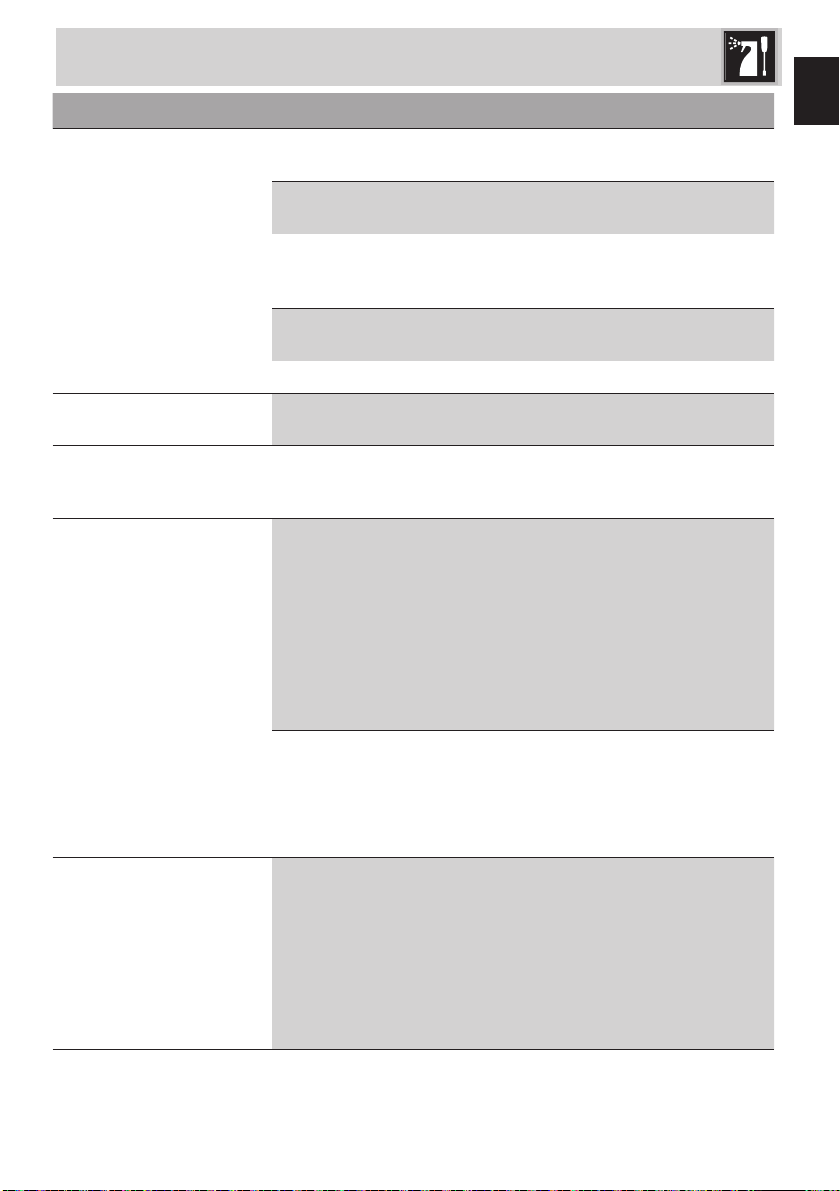
Problem Possible causes Solution
No coffee is dispensed
from the nozzles.
No water in the tank (7).
The keys (13-14) ash.
Fill the tank (7).
The lter holes (11-12-13-
14) are blocked.
Clean the lter (11-12-13-
14) with a brush or the pin
supplied.
The tank (7) is not inserted
correctly or is empty.
Insert the tank (7) correctly and
make sure it contains water.
Lime scale build-up.
Perform a descaling cycle.
The manometer indicates
an over-pressure.
Make the coffee again
introducing less powder or
coarser powder.
The ground coffee is too ne. Adjust grinding level to a thicker
level.
Excessive tamping. Use less coffee.
You are using too much
coffee.
Reduce the amount of coffee.
The coffee drips from
the lter-holder (20) and
not from the nozzles.
The lter-holder (20) is not
attached correctly or is
dirty.
Attach the lter-holder (20)
and rotate it fully home.
Clean the lter-holder (20).
The dispensing unit gasket
is worn.
Have it replaced at an
authorised After-sales Centre.
The nozzle holes are
blocked.
Clean the nozzle holes.
The lter holder (20) will
not attach to the coffee
machine.
The lter has been
overlled.
Check the amount of coffee
dosed.
The coffee machine
does not work and all
the LEDS ash.
Possible fault. Unplug the coffee machine
and contact an Authorised
After-sales Centre.
The coffee is light in colour
and comes out of the
nozzle quickly.
The ground coffee has not
been tamped sufciently.
Tamp the coffee harder.
There is insufcient ground
coffee.
Increase the amount.
The ground coffee is too
coarse.
Set grind to a ner level.
What to do if...
EN - 19
EN
What to do if...
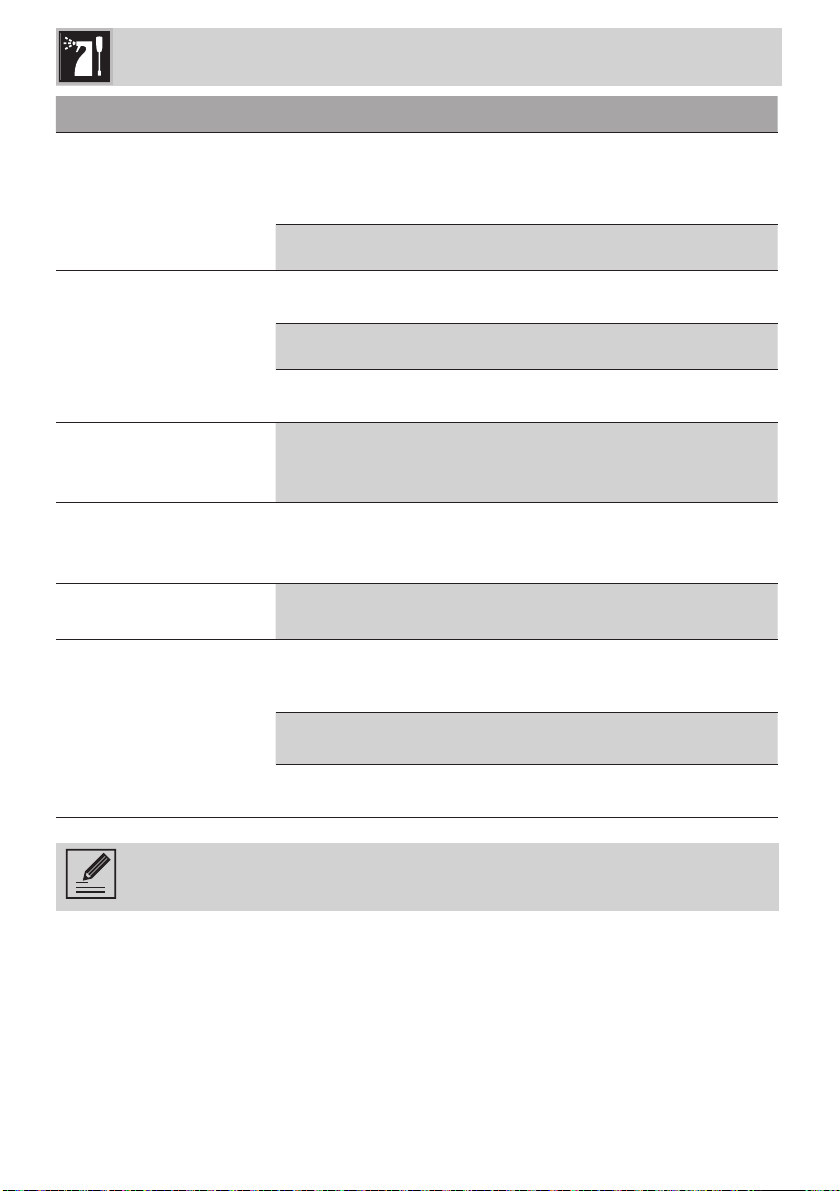
Problem Possible causes Solution
The coffee is dark in colour
and comes out of the
nozzle slowly.
The ground coffee has not
been tamped too hard.
Tamp the coffee with less
force.
There is too much ground
coffee.
Reduce the amount used.
The dispensing unit (20) or
the lter (
30a-30b-31a-
31b
) are clogged
.
Clean the dispensing unit
(20) and the lter (30a-30b-
31a-31b).
The ground coffee is too
ne.
Set grind to a coarser level.
Lime scale build-up. Perform a descaling cycle.
The keys (11) and (12)
ash for a few seconds.
No coffee beans container
(3).
Mount the container correctly
(3).
Keys (13) and (14) ash
simultaneously.
No water in the tank or no
tank inserted (7).
Make sure the tank (7) is
assembled correctly and verify
whether it contains water.
The coffee is not hot.
Machine not used for a
long period of time.
Increase the temperature
of the coffee from the
programming menu following
that indicated in the ”Setting
the coffee temperature”
paragraph.
Dispense hot water into the
same cup in which the coffee
will be prepared in order to
heat the cup.
The cups have not been
pre-heated.
Heat cups by rinsing them
with hot water (Note: the hot
water function can be used).
Insufcient frothing.
The steam wand is dirty. Thoroughly clean the steam
wand removing the steel
nozzle and following the
instructions in the manual.
Note: the quality of the froth
depends on the type of milk
used, its temperature and
the technique used/manual
dexterity.
EN - 20
Problem Possible causes Solution
The machine does not
dispense steam.
Keys (13) and (14) ash
in sequence. The machine
did not reach the steam
dispensing temperature.
Wait for the temperature to
be reached.
Lime scale build-up. Perform a descaling cycle.
The machine looses
water from the base.
Drip tray inserted
incorrectly.
Check and introduce it well.
Drip tray full. Empty the drip tray.
Water tank not introduced
correctly.
Introduce the tank into its seat
correctly.
The coffee bean
container cannot be re-
positioned,
Presence of coffee beans
on the grinder ring.
Clean the coffee bean
container using the relevant
cleaning brush supplied.
The coffee only escapes
from one of the two
nozzles.
The coffee is not pressed
well.
Check horizontal pressing is
performed.
The nozzles are
clogged.
The nozzles were not
cleaned after dispensing.
Clean the nozzles well.
The manometer does not
indicate the pressure.
Not enough coffee has
been inserted.
Increase the quantity of
coffee and repeat the
operation.
The coffee hasn't been
pressed enough.
Apply more force when using
the tamper.
Circuit problem. Contact an Authorised After-
sales Centre.
Contact local technical support if the problem is not solved or in case of other types
of faults.
What to do if...