
Operating and Installation
Instructions
Induction Cooktops
To prevent accidents and machine damage, read these instructions
before installation or use.
en-US, CA
M.-Nr. 12 155 090

Contents
2
IMPORTANT SAFETY INSTRUCTIONS ............................................................ 4
Caring for the environment .............................................................................. 14
Overview............................................................................................................. 15
Cooktop............................................................................................................... 15
KM7720FR ................................................................................................... 15
KM7730FR ................................................................................................... 16
KM7740FR ................................................................................................... 17
Controls and display ........................................................................................... 18
Cooking zone data .............................................................................................. 19
Before first use .................................................................................................. 25
Cleaning the cooktop for the first time................................................................ 25
Turning on the cooktop for the first time ............................................................. 25
Miele@home ........................................................................................................ 26
Con@ctivity.......................................................................................................... 29
How it works ...................................................................................................... 32
Noises.................................................................................................................. 32
Power management system................................................................................ 33
Cookware ........................................................................................................... 34
Energy saving tips ............................................................................................ 36
Setting ranges.................................................................................................... 37
Operation............................................................................................................ 38
Operation............................................................................................................. 38
Switching the cooktop on ................................................................................... 39
Setting the power level........................................................................................ 39
Switching off a cooking zone/the cooktop.......................................................... 39
Residual heat indicator........................................................................................ 39
Setting the power level – extended power level range........................................ 40
Auto heat-up ....................................................................................................... 41
Booster................................................................................................................ 42
Keeping warm ..................................................................................................... 43
Timer................................................................................................................... 44
Kitchen timer ....................................................................................................... 44
Safety shut-off..................................................................................................... 45
Using both timer functions at the same time ...................................................... 46
Additional functions .......................................................................................... 47
Stop&Go............................................................................................................ 47

Contents
3
Wipe protection ................................................................................................... 47
Demo mode......................................................................................................... 47
Displaying the cooktop data ............................................................................... 48
Safety features................................................................................................... 49
System lock/Safety lock...................................................................................... 49
Safety shut-off..................................................................................................... 50
Overheating protection........................................................................................ 51
Programming ..................................................................................................... 52
Cleaning and care ............................................................................................. 56
Frequently Asked Questions ............................................................................ 58
Messages in the display...................................................................................... 58
Unexpected behavior .......................................................................................... 60
Unsatisfactory results.......................................................................................... 61
General problems or technical faults................................................................... 61
Optional accessories ........................................................................................ 62
Customer Service.............................................................................................. 63
Contact in the event of a fault ............................................................................. 63
Data plate ............................................................................................................ 63
Appliance warranty and product registration ...................................................... 63
Installation.......................................................................................................... 64
IMPORTANT SAFETY INSTRUCTIONS - INSTALLATION ................................... 64
Safety distances.................................................................................................. 65
Installation notes ................................................................................................. 69
Installation dimensions........................................................................................ 70
KM7720FR ................................................................................................... 70
KM7730FR ................................................................................................... 71
KM7740FR ................................................................................................... 72
Installation ........................................................................................................... 73
Electrical connection ........................................................................................... 74
Declaration of conformity................................................................................. 76

IMPORTANT SAFETY INSTRUCTIONS
4
This cooktop complies with all relevant local and national safety
requirements. Inappropriate use can, however, lead to personal in-
jury and material damage.
Read the operating and installation instructions carefully before
using the cooktop. They contain important information on safety,
installation, use and maintenance. This prevents both personal in-
jury and damage to the cooktop.
When installing the cooktop, Miele expressly and strongly advises
that you read and follow the instructions under “Installation”, as
well as in the “IMPORTANT SAFETY INSTRUCTIONS”.
Miele cannot be held liable for injury or damage caused by non-
compliance with these instructions.
Keep these instructions in a safe place and pass them on to any
future owner.
Appropriate use
This cooktop is intended for domestic use and use in other similar
environments.
This cooktop is not intended for outdoor use.
The cooktop is intended for domestic use only to prepare food
and keep it warm. Any other use may be dangerous.
Persons (including children) who lack physical, sensory or mental
abilities, or experience with the appliance should not use it without
supervision or instruction by a responsible person.

IMPORTANT SAFETY INSTRUCTIONS
5
Safety with children
Do not leave children unattended: Children should not be alone or
unsupervised in the area where the appliance is installed. Do not al-
low them to sit or stand on the appliance.
Be sure to supervise any children in the vicinity of the cooktop,
and do not let them play with it.
The cooktop gets hot when in use and remains hot for some time
after being turned off. Keep children away from the appliance until it
has cooled down and is no longer a burn hazard.
Danger of burning. Do not store anything which might arouse a
child’s interest in storage areas above or behind the cooktop. Other-
wise they could be tempted to climb onto the cooktop.
Risk of burning or scalding. Turn pot and pan handles inward, so
children cannot pull them down and be burned.
Danger of suffocation. While playing, children may become entan-
gled in packaging material (such as plastic wrapping) or pull it over
their head, presenting the risk of suffocation. Keep packaging mate-
rial away from children.
Activate the system lock to ensure that children cannot turn on the
appliance inadvertently. Use the safety lock when the cooktop is in
use to prevent children from altering the settings selected.

IMPORTANT SAFETY INSTRUCTIONS
6
Technical safety
Proper installation: Make sure that your appliance has been in-
stalled correctly and that it has been grounded by a qualified techni-
cian.
Maintenance by the user: Never repair or replace any part of the
appliance unless the instructions specifically recommend doing so.
Service work should only be performed by a qualified technician.
Unauthorized installation, maintenance, and repairs can cause
considerable danger for the user. Installation, maintenance, and re-
pairs must only be carried out by a Miele authorized technician.
Damage to the cooktop can compromise your safety. Check the
cooktop for visible signs of damage. Do not use the cooktop if it is
damaged.
Temporary or permanent operation on an autonomous power sup-
ply system or a power supply system that is not synchronized with
the grid power supply (e.g., island networks, back-up systems) is
possible. A prerequisite for operation is that the power supply sys-
tem complies with national and local codes.
The function and operation of the protective measures provided in
the domestic electrical installation and in this Miele product must
also be maintained in isolated operation or in operation that is not
synchronized with the grid power supply, or these measures must be
replaced by equivalent measures in the installation.
Be certain your appliance is properly installed and grounded by a
qualified technician. To guarantee the electrical safety of this appli-
ance, continuity must exist between the appliance and an effective
grounding system. It is imperative that this basic safety requirement
be met. If there is any doubt, have the electrical system of the house
checked by a qualified electrician.

IMPORTANT SAFETY INSTRUCTIONS
7
To avoid damaging the cooktop, make sure that the connection
data (voltage and frequency) on the data plate correspond to the
building's power supply before connecting the appliance.
When in doubt, consult a qualified electrician.
Do not connect the appliance to the electrical supply with a power
bar or extension cord. These are a fire hazard and do not guarantee
the required safety of the appliance.
For safety reasons, the cooktop may only be used when it has
been fully installed.
This appliance must not be used in a non-stationary location (e.g.
on a ship).
Any contact with live connections or tampering with the electrical
or mechanical components of the cooktop will endanger your safety
and may lead to appliance malfunctions.
Do not open the casing of the cooktop under any circumstances.
Any repairs not performed by a Miele authorized service techni-
cian will void the warranty.
Defective components should be replaced by Miele original parts
only. Only with these parts can safety of the appliance be assured as
intended by the manufacturer.
The appliance is not intended for use with an external timer switch
or a remote control system.
The cooktop must be connected to the electricity supply by a
qualified electrician (see “Installation – Electrical connection”).
If the power cord is damaged, it must only be replaced by a quali-
fied service technician (see “Installation–Electrical connection”).

IMPORTANT SAFETY INSTRUCTIONS
8
The appliance must be completely disconnected from the electric-
ity supply during installation, maintenance and repair work. Ensure
that power is not supplied to the appliance until after it has been in-
stalled or until any maintenance or repair work has been carried out.
Disconnect by
- removing the fuse,
- “tripping” the circuit breaker, or
- unplugging the unit (if equipped with plug). Pull the plug not the
cord.
Danger of electric shock. Do not use the cooktop if it is faulty, or if
the ceramic surface is cracked, chipped, or damaged in any way.
Switch it off immediately. Disconnect the cooktop from the electrical
power supply. Contact Miele Service.
If the cooktop is installed behind a cabinet door, do not close the
door while the cooktop is in operation. Heat and moisture can build
up behind the closed door and cause damage to the cooktop, cabi-
netry, and flooring. Do not close the door until the residual heat indi-
cators go out.

IMPORTANT SAFETY INSTRUCTIONS
9
Correct use
The cooktop gets hot when in use and remains hot for a while af-
ter being turned off. There is a potential hazard until the residual heat
indicator goes out.
Never leave the appliance unattended at high heat settings–
Boilover causes smoking and greasy spillovers that may ignite.
Oil and fat can catch fire if overheated. Never leave the appliance
unattended when cooking with oil and fat. If the oil or fat catches
fire, do not attempt to put the flames out with water.
Turn off the cooktop and smother the flames using a lid or a suitable
fire blanket.
Do Not Use Water on Grease Fires–Smother fire or flame or use
dry chemical or foam-type extinguisher.
Storage in or on the appliance: Flammable materials should not be
stored in an oven or in the vicinity of the appliance.
The flames could set the grease filters of a ventilation hood on fire.
Do not flambé under a ventilation hood.
Spray canisters, aerosols and other inflammable substances can
ignite when heated. Therefore do not store such items or substances
in a drawer under the appliance. Cutlery inserts must be heat-resis-
tant.
Never heat empty cookware.
Do not heat or can food in closed containers, such as tins or
sealed jars, on the cooktop, as pressure will build up in the container
and cause it to explode.
If the cooktop is covered, there is a risk that the material of the
cover will ignite, explode or melt if the cooktop is still hot or if turned
on inadvertently. Never cover the cooktop with a board, cloth or pro-
tective sheet.

IMPORTANT SAFETY INSTRUCTIONS
10
If the cooktop is turned on or accidentally turned on or if it is still
hot, metal objects on the cooktop can heat up. Other items may melt
or catch fire. Damp lids can become attached to the cooktop by
suction. Do not store items on the cooktop! Always turn the cooking
zones off after use!
You could burn yourself on the hot cooktop. Protect your hands
with heat-resistant pot holders or gloves when handling hot pots and
pans. Do not let them get wet or damp, as this causes heat to trans-
fer through the material more quickly with the risk of scalding or
burning yourself.
When using an electrical appliance, e.g. a hand mixer, near the
cooktop, make sure that the power cable does not come into con-
tact with the hot cooktop. The cable's insulation could become dam-
aged.
Grains of salt, sugar and sand (e.g. from cleaning vegetables) can
cause scratches if they get under pan bases. Make sure that the ce-
ramic surface is clean before placing pans on it.
Even a light object can cause damage to the ceramic cooktop in
certain circumstances. Do not drop anything on the ceramic surface.
Do not place hot pans on the sensor buttons and display as this
could cause damage to the electronics underneath. Do not place hot
pans on the area around the display.
Do not allow solid or liquid sugar, or pieces of plastic or aluminum
foil to get onto the cooktop when it is hot, as they can damage the
ceramic surface when it cools down. If this should occur, turn off the
appliance immediately and scrape off all the sugar, plastic or alu-
minum residues while still hot, using a shielded scraper blade. Use
pot holders. Allow the ceramic surface to cool down before cleaning
with a suitable ceramic cleaning agent.
Pans that boil dry can cause damage to the ceramic glass. Do not
leave the appliance unattended while it is being used.

IMPORTANT SAFETY INSTRUCTIONS
11
Pots and pans with bases with pronounced edges or ridges can
scratch the ceramic surface. Only use pots and pans with smooth
bases.
Lift pans into position on the cooktop. Sliding them into place can
cause scuffs and scratches.
Wear Proper Apparel–Loose-fitting or hanging garments should
never be worn while using the appliance.
Because induction heating works so quickly, the temperature can
quickly reach the ignition point of oils and fats. Never leave the
cooktop unattended when it is turned on.
Do not heat oils and fats for longer than 1minute, and never use
the booster.
For people who have a heart pacemaker: Please note that the area
immediately surrounding the cooktop is electromagnetically charged.
It is very unlikely to affect a pacemaker. However, if in any doubt,
consult the manufacturer of the pacemaker or your doctor.
Objects affected by electromagnetic fields, for instance credit
cards, CDs and calculators, should be kept away from the cooktop
when it is on.
Metal utensils stored in a drawer under the cooktop can become
hot if the appliance is used intensively for a long time.
The cooktop is equipped with a cooling fan. If a drawer is located
directly underneath the cooktop, ensure that there is sufficient space
between the drawer and its contents and the underside of the cook-
top in order to ensure sufficient ventilation for the cooktop.
If a drawer is located directly underneath the cooktop, do not
store any pointed or small items, paper, napkins, etc. in the drawer.
They could get in through the ventilation slots or be sucked into the
casing by the fan and damage the fan or impair cooling.

IMPORTANT SAFETY INSTRUCTIONS
12
Do not use 2items of cookware on a cooking zone or extended
zone at the same time.
If the cookware only partially covers a cooking zone, the handle
could become very hot.
Always place cookware in the middle of the cooking zone.
Wet sponges or cloths can cause burns due to hot steam if they
are used to wipe spilled food off a hot cooktop. Some cleansers can
emit hazardous vapors if they are applied to a hot surface. Be careful
when cleaning the cooktop.
If the cooktop is damaged, cleansers or spilled food can penetrate
the glass surface and cause a short-circuit. Never cook on a dam-
aged cooktop. Contact an electrician immediately.
If an induction adapter plate is used for cookware, the induction
generators may be damaged or even destroyed. Do not use induc-
tion adapter plates.

IMPORTANT SAFETY INSTRUCTIONS
13
Cleaning and maintenance
Do not use a steam cleaner to clean the cooktop.
The steam may reach electrical components and cause a short cir-
cuit.
If the cooktop is built in over a self cleaning oven, the cooktop
should not be used while the self cleaning process is being carried
out, as this could trigger the overheating protection mechanism on
the cooktop (see relevant section).
Miele will guarantee to supply functional parts for a minimum of
10years and up to 15years following the discontinuation of your
cooktop.

Caring for the environment
14
Disposal of the packing mate-
rial
The cardboard box and packing materi-
als protect the appliance during ship-
ping. They have been designed to be
biodegradable and recyclable.
Ensure that any plastic wrappings,
bags, etc. are disposed of safely and
kept out of the reach of children. Dan-
ger of suffocation!
Disposal of your old appliance
Electrical and electronic appliances
contain valuable materials. They also
contain certain substances, compounds
and components which were essential
for the proper functioning and safe use
of the equipment. Handling these mate-
rials improperly by disposing of them in
your household waste can be harmful to
your health and the environment. There-
fore, please do not dispose of your old
appliance with regular household waste
and follow local regulations on proper
disposal.
Consult with local authorities, dealers or
Miele in order to dispose of and recycle
electrical and electronic appliances.
Miele assumes no responsibility for
deleting any personal data left on the
appliance being disposed. Please en-
sure that your old appliance is kept
away from children until removal. Ob-
serve safety requirements for appli-
ances that may tip over or pose an en-
trapment hazard.
Overview
15
Cooktop
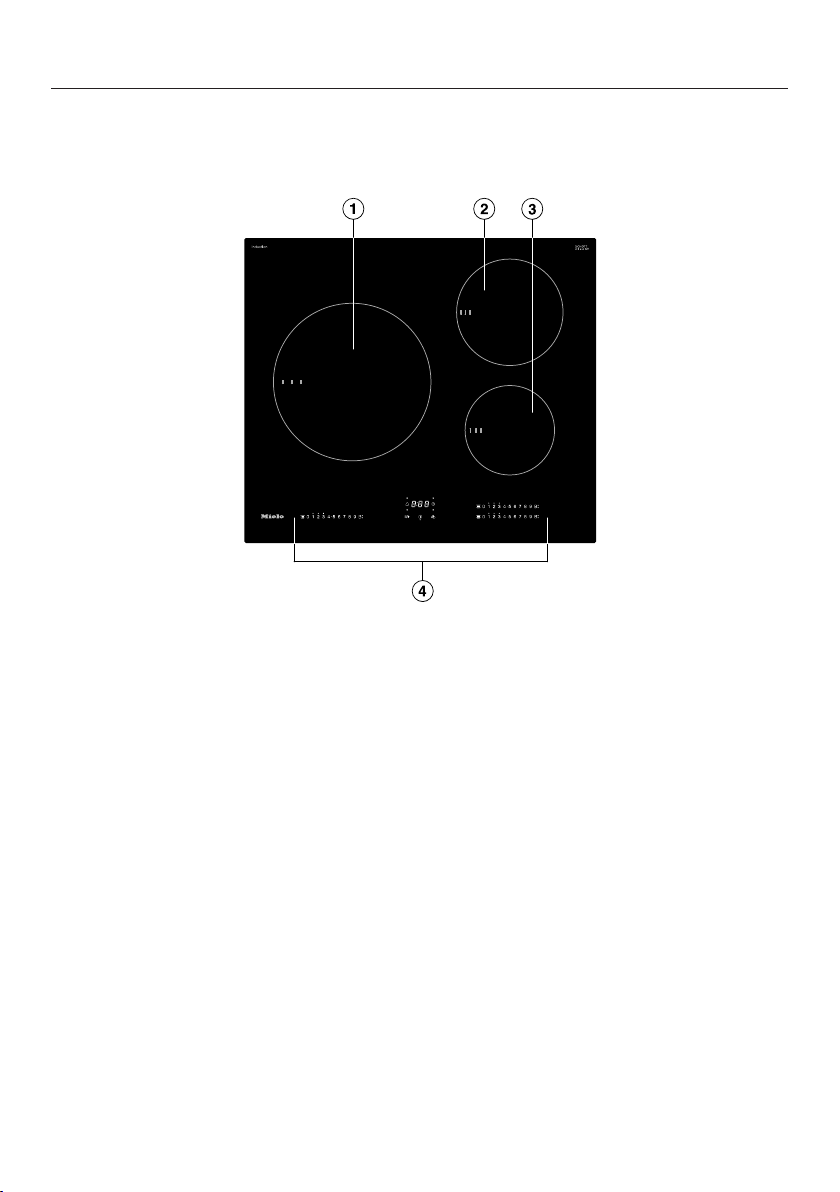
KM7720FR
a
Cooking zone with TwinBooster
b
Cooking zone with TwinBooster
c
Cooking zone with TwinBooster
d
Controls and indicators

Overview
16
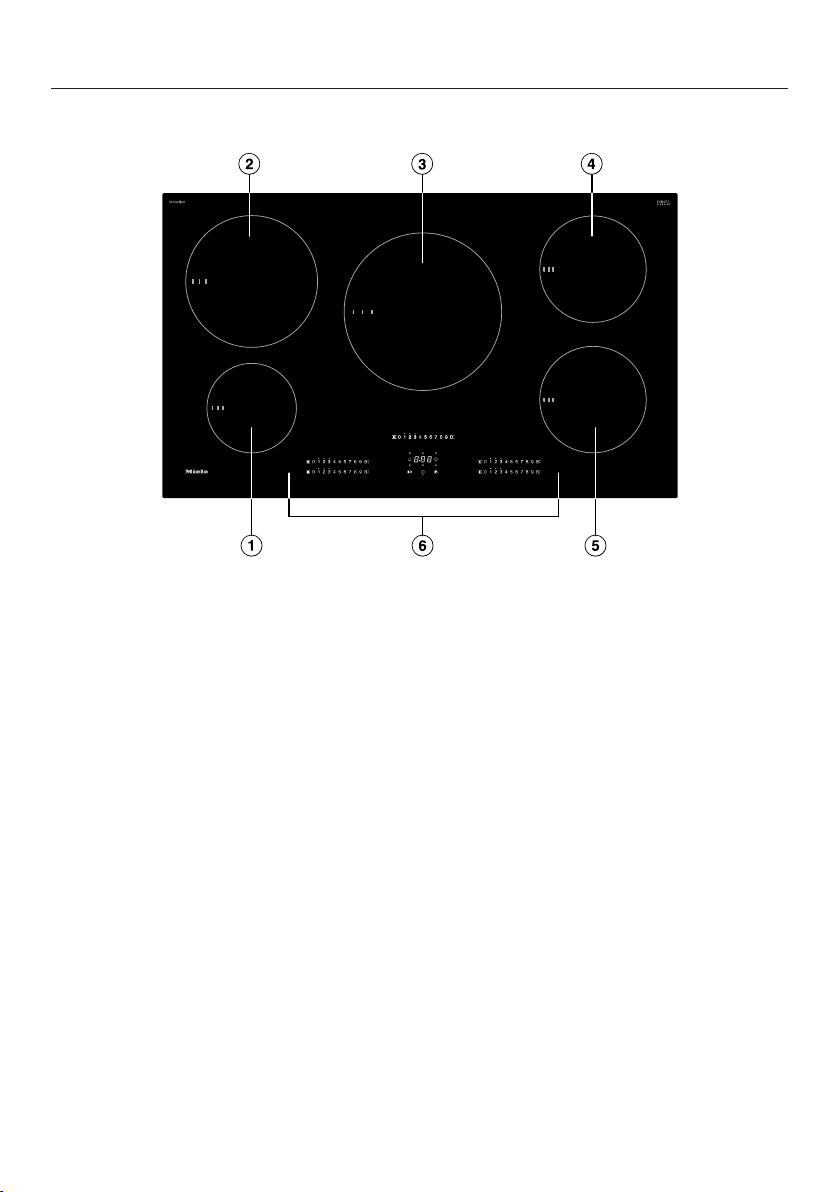
KM7730FR
a
Cooking zone with TwinBooster
b
Cooking zone with TwinBooster
c
Cooking zone with TwinBooster
d
Cooking zone with TwinBooster
e
Controls and indicators
Overview
17
KM7740FR
a
Cooking zone with TwinBooster
b
Cooking zone with TwinBooster
c
Cooking zone with TwinBooster
d
Cooking zone with TwinBooster
e
Cooking zone with TwinBooster
f
Controls and indicators
Overview
18
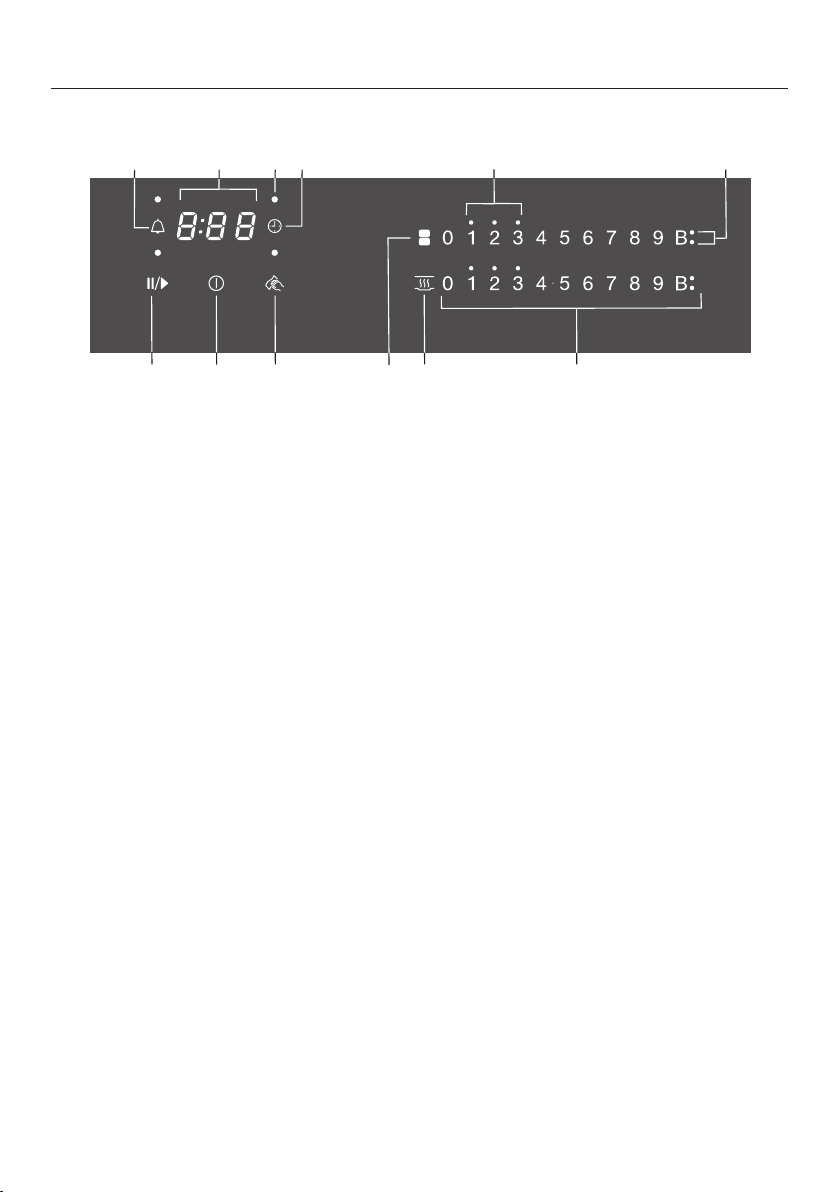
Controls and display
b
a c ed f
i
l
h
j
g
k
a
Stop&Go sensor control
For stopping/starting a cooking process in progress
b
Cooktop On/Offsensor control
c
Wipe protection sensor control
For locking the sensor controls
d
PowerFlex cooking zones sensor control
For manual connection/disconnection of PowerFlex cooking zones
e
Keeping warm sensor control
For activating/deactivating the Keeping warm function
f
Numerical display sensor controls
–For setting the power level
–For setting the times
g
Booster indicator light
Booster function is activated
h
Residual heat indicator lights
i
Safety shut-off sensor control
Switches the cooking zones off automatically
j
Cooking zone allocation safety shut-off indicator light
Safety shut-off for the cooking zone is activated
k
Timer display
to Time in minutes
System lock/safety lock is activated
Demo mode activated
l
Kitchen timer sensor control

Overview
19
Cooking zone data
KM7720FR
Cooking
zone
Øin inches (cm)
1
Max. rating
in watts for 208V
2
Linked
cooking
zone
3
7"–11"
(18–28cm)
Normal
TwinBooster, level 1
TwinBooster, level 2
2,400
2,750
3,350
-
5 1/2"–7 1/2"
(14–19cm)
Normal
TwinBooster, level 1
TwinBooster, level 2
1,700
2,300
2,750
4"–6 1/2"
(10–16cm)
Normal
TwinBooster, level 1
TwinBooster, level 2
1,300
1,550
2,000
Total 6,600
1
Cookware with a base diameter within the given range may be used.
2
The power indicated may vary depending on the size and material of the cookware used.
3
The cooking zone is linked to this cooking zone electrically so that the rating can be increased; see
“How it works – Power management system”.

Overview
20
KM7720FR
Cooking
zone
Øin inches (cm)
1
Max. rating
in watts for 240V
2
Linked
cooking
zone
3
7"–11"
(18–28cm)
Normal
TwinBooster, level 1
TwinBooster, level 2
2,600
3,000
3,700
-
5 1/2"–7 1/2"
(14–19cm)
Normal
TwinBooster, level 1
TwinBooster, level 2
1,850
2,500
3,000
4"–6 1/2"
(10–16cm)
Normal
TwinBooster, level 1
TwinBooster, level 2
1,400
1,700
2,200
Total 7,600
1
Cookware with a base diameter within the given range may be used.
2
The power indicated may vary depending on the size and material of the cookware used.
3
The cooking zone is linked to this cooking zone electrically so that the rating can be increased; see
“How it works – Power management system”.

Overview
21
KM7730FR
Cooking
zone
Øin inches (cm)
1
Max. rating
in watts for 208V
2
Linked
cooking
zone
3
7"–11"
(18–28cm)
Normal
TwinBooster, level 1
TwinBooster, level 2
2,400
2,750
3,350
4"–6 1/2"
(10–16cm)
Normal
TwinBooster, level 1
TwinBooster, level 2
1,300
1,550
2,000
5 1/2"–7 1/2"
(14–19cm)
Normal
TwinBooster, level 1
TwinBooster, level 2
1,700
2,300
2,750
5 1/2"–7 1/2"
(14–19cm)
Normal
TwinBooster, level 1
TwinBooster, level 2
1,700
2,300
2,750
Total 6,600
1
Cookware with a base diameter within the given range may be used.
2
The power indicated may vary depending on the size and material of the cookware used.
3
The cooking zone is linked to this cooking zone electrically so that the rating can be increased; see
“How it works – Power management system”.

Overview
22
KM7730FR
Cooking
zone
Øin inches (cm)
1
Max. rating
in watts for 240V
2
Linked
cooking
zone
3
7"–11"
(18–28cm)
Normal
TwinBooster, level 1
TwinBooster, level 2
2,600
3,000
3,700
4"–6 1/2"
(10–16cm)
Normal
TwinBooster, level 1
TwinBooster, level 2
1,400
1,700
2,200
5 1/2"–7 1/2"
(14–19cm)
Normal
TwinBooster, level 1
TwinBooster, level 2
1,850
2,500
3,300
5 1/2"–7 1/2"
(14–19cm)
Normal
TwinBooster, level 1
TwinBooster, level 2
1,850
2,500
3,000
Total 7,600
1
Cookware with a base diameter within the given range may be used.
2
The power indicated may vary depending on the size and material of the cookware used.
3
The cooking zone is linked to this cooking zone electrically so that the rating can be increased; see
“How it works – Power management system”.

Overview
23
KM7740FR
Cooking
zone
Øin inches (cm)
1
Rating
in watts for 208V
2
Linked
cooking
zone
3
4"–6 1/2"
(10–16cm)
Normal
TwinBooster, level 1
TwinBooster, level 2
1,300
1,550
2,000
6 1/2"–9"16–23cm
(16–23cm)
Normal
TwinBooster, level 1
TwinBooster, level 2
2,100
2,750
3,350
7"–11"
(18–28cm)
Normal
TwinBooster, level 1
TwinBooster, level 2
2,400
2,750
3,350
-
5 1/2"–7 1/2"
(14–19cm)
Normal
TwinBooster, level 1
TwinBooster, level 2
1,700
2,300
2,750
5 1/2"–7 1/2"
(14–19cm)
Normal
TwinBooster, level 1
TwinBooster, level 2
1,700
2,300
2,750
Total 9,900
1
Cookware with a base diameter within the given range may be used.
2
The power indicated may vary depending on the size and material of the cookware used.
3
The cooking zone is linked to this cooking zone electrically so that the rating can be increased; see
“How it works – Power management system”.

Overview
24
KM7740FR
Cooking
zone
Øin inches (cm)
1
Rating
in watts for 240V
2
Linked
cooking
zone
3
4"–6 1/2"
(10–16cm)
Normal
TwinBooster, level 1
TwinBooster, level 2
1,400
1,700
2,200
6 1/2"–9"16–23cm
(16–23cm)
Normal
TwinBooster, level 1
TwinBooster, level 2
2,300
3,000
3,700
7"–11"
(18–28cm)
Normal
TwinBooster, level 1
TwinBooster, level 2
2,600
3,000
3,700
-
5 1/2"–7 1/2"
(14–19cm)
Normal
TwinBooster, level 1
TwinBooster, level 2
1,850
2,500
3,000
5 1/2"–7 1/2"
(14–19cm)
Normal
TwinBooster, level 1
TwinBooster, level 2
1,850
2,500
3,000
Total 11,500
1
Cookware with a base diameter within the given range may be used.
2
The power indicated may vary depending on the size and material of the cookware used.
3
The cooking zone is linked to this cooking zone electrically so that the rating can be increased; see
“How it works – Power management system”.

Before first use
25
Please adhere the extra appliance
data plate (supplied) in the space pro-
vided in the “After sales service” sec-
tion of this manual.
Remove any protective foil and stick-
ers.
Cleaning the cooktop for the
first time
Before first use, wipe down the appli-
ance with a damp cloth and dry it.
Turning on the cooktop for the
first time
Metal components are protected by a
conditioning agent. Smells and vapor
may occur when the appliance is used
for the first time. The heating of the in-
duction coils also causes odors in the
first few hours of operation. With each
subsequent use, the odor is reduced
until it disappears entirely.
The smell and any vapors do not indi-
cate a faulty connection or a defective
appliance and are not harmful to your
health.
Please note that the heat-up time for
induction cooktops is very much
shorter than for conventional cook-
tops.
Before first use
26
Miele@home
Prerequisite: home WiFi network
Your cooktop is equipped with an inte-
grated WiFi module. The cooktop can
be connected to your home WiFi net-
work.
If your Miele Ventilation Hood is also
connected to the home WiFi network,
you can control the ventilation hood au-
tomatically with the Con@ctivity func-
tion. Additional information can be
found in the operating and installation
instructions for your ventilation hood.
Make sure that the signal of your
WiFi network is sufficiently strong in
the place where your cooktop is in-
stalled.
There are a number of ways of connect-
ing your cooktop to your WiFi network.
The cooktop requires max. 2W in net-
worked standby.
Availability of the WiFi connection
The WiFi connection shares a frequency
range with other appliances (including
microwave ovens and remote control
toys). This can cause sporadic or even
complete connection failures. There-
fore, the availability of featured func-
tions cannot be guaranteed.
Miele@home availability
The ability to use the Miele app de-
pends on the availability of the
Miele@home service in your country.
The Miele@home service is not avail-
able in every country.
For information about availability,
please visit www.miele.com.
Miele App
The Miele App is available to download
free of charge from the Apple App
Store
®
or from the Google Play Store™.
After installing the Miele app on a mo-
bile device, you can do the following:
- call up information on the operating
status of your cooktop
- call up information on the program
sequence of your cooktop
- set up a Miele@home network with
other WiFi-enabled Miele domestic
appliances
Before first use
27
Setting up Miele@home
Connecting via the app
The Miele app can be used to connect
to your network.
Install the Miele app on your mobile
device.
To log in you will need:
1. your WiFi network password
2. the password for your cooktop
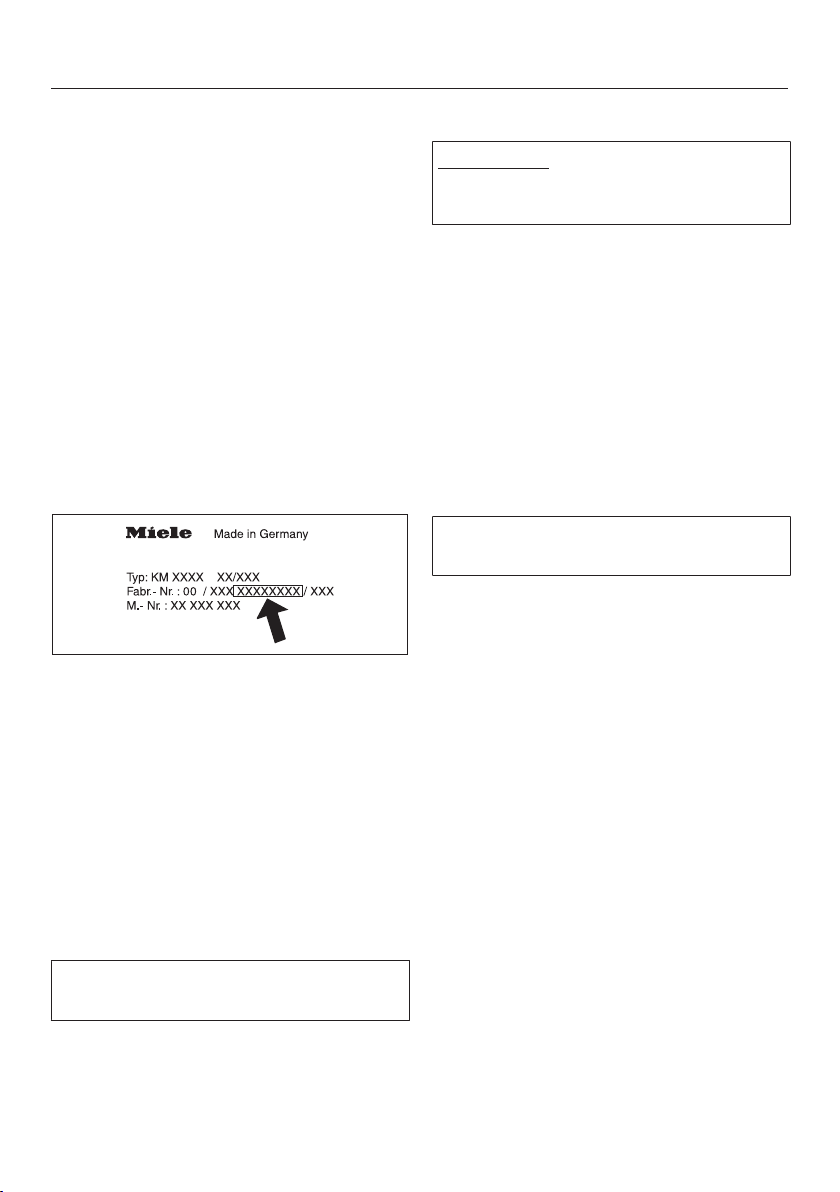
The password for your cooktop con-
sists of the last 9digits of the serial
number. This can be found on the appli-
ance’s data plate.
Switch the cooktop on.
Start the Miele app.
Touch the 0sensor control on any of
the numerical displays.
Touch the0 and 5 sensor controls at
the same time for 6seconds.
The seconds can be seen counting
down in the timer display. After the time
has elapsed, the code: is displayed
in the timer display for 10seconds.
You now have 10minutes to configure
the WiFi.
Follow the user navigation in the app.
Connecting via WPS
Prerequisite: you must have a WPS
(WiFi protected setup) compatible
router.
Switch the cooktop on.
Touch the 0sensor control on any of
the numerical displays.
Touch the0 and 6 sensor controls at
the same time for 6seconds.
The seconds can be seen counting
down in the timer display. After the time
has elapsed, a progress light appears in
the timer display during the connection
attempt (for max. 120seconds).
The WPS login is only active during
these 120seconds.
Activate the WPS function on your
WiFi router.
If the connection was successful, the
code: appears in the timer display.
If the connection could not be estab-
lished, the timer display will show the
code:. You have probably not acti-
vated WPS on your router quickly
enough. Repeat the steps above.
Tip: If your WiFi router does not support
WPS, please connect via the Miele app.

Before first use
28
Canceling the process
Touch any sensor control.
Resetting settings
Resetting is not required when replac-
ing the router.
Switch the cooktop on.
Touch the 0sensor control on any of
the numerical displays.
Touch the0 and 9 sensor controls at
the same time for 6seconds.
The seconds can be seen counting
down in the timer display. After the time
has elapsed, the code: is displayed
in the timer display for 10seconds.
Reset the settings if you are disposing
of your cooktop, selling it, or putting a
used cooktop into operation. This is the
only way to ensure that all personal
data has been removed and the previ-
ous owner will no longer be able to ac-
cess the cooktop.

Before first use
29
Con@ctivity
Con@ctivity is the direct communication
system between your cooktop and a
Miele Ventilation Hood. Con@ctivity en-
ables the ventilation hood to operate
automatically depending on the operat-
ing status of a cooktop.
Additional information can be found in
the operating and installation instruc-
tions for your ventilation hood.
The cooktop requires max. 2W in net-
worked standby.
Availability of the WiFi connection
The WiFi connection shares a frequency
range with other appliances (including
microwave ovens and remote control
toys). This can cause sporadic or even
complete connection failures. There-
fore, the availability of featured func-
tions cannot be guaranteed.
Setting up Con@ctivity
You can set up Con@ctivity between
the cooktop and ventilation hood using
your home WiFi network or a direct WiFi
connection.
Con@ctivity via the home WiFi net-
work (Con@ctivity3.0)
Prerequisite:
- home WiFi network
- WiFi-enabled Miele ventilation
hood
Connect the ventilation hood and the
cooktop to your home WiFi network
(see “Before using for the first time –
Miele@home”).
The Con@ctivity function will be acti-
vated automatically.
You can find the necessary informa-
tion on connecting the ventilation
hood in the associated operating and
installation instructions.

Before first use
30
Con@ctivity via a direct WiFi connec-
tion (Con@ctivity3.0)
You can find the necessary informa-
tion on connecting the ventilation
hood in the associated operating and
installation instructions.
Switch the cooktop on.
Touch the 0sensor control on any of
the numerical displays.
Touch and hold the 0 and 7sensor
controls on the numerical display at
the same time for 6seconds.
The seconds can be seen counting
down in the timer display. After the time
has elapsed, a progress light appears
during the connection attempt. If the
connection was successful, the
code: appears in the timer display.
If the connection could not be estab-
lished, the timer display will show the
code:. Repeat the steps above.
When successfully connected, 2and
3will light up constantly on the ventila-
tion hood.
Quit connection mode on the ventila-
tion hood by pressing the run-on
button.
Con@ctivity has now been activated.
With a direct WiFi connection, it is not
possible to connect the cooktop and
the ventilation hood to a home net-
work. If this is desired later, the direct
WiFi connection between the cooktop
and the ventilation hood must first be
reset (see “Before using for the first
time – Con@ctivity” and “Disconnect-
ing the WiFi” in the operating and in-
stallation instructions for the ventila-
tion hood).

Before first use
31
Canceling the process
Touch any sensor control.
Resetting settings
Resetting is not required when replac-
ing the router.
Switch the cooktop on.
Touch the 0sensor control on any of
the numerical displays.
Touch the0 and 9 sensor controls at
the same time for 6seconds.
The seconds can be seen counting
down in the timer display. After the time
has elapsed, the code: is displayed
in the timer display for 10seconds.
Reset the settings if you are disposing
of your cooktop, selling it, or putting a
used cooktop into operation. This is the
only way to ensure that all personal
data has been removed and the previ-
ous owner will no longer be able to ac-
cess the cooktop.

How it works
32
An induction coil is located under each
cooking zone. The coil creates a mag-
netic field that reacts directly with the
base of the pan and heats it up. The
cooking zone itself is heated up indi-
rectly by the heat given off by the pan.
An induction cooking zone only works
when ferromagnetic cookware is placed
on it (see “Cookware”). The induction
cooking zone automatically recognizes
the size of the cookware.
Risk of burning due to hot items.
When the cooktop is switched on ei-
ther deliberately or by mistake, or
when there is residual heat present,
there is the risk of metal items placed
on the cooktop heating up.
Do not store items on the cooktop.
After use, switch the cooktop off with
the sensor control.
Noises
When you use an induction cooking
zone, the following noises may occur,
depending on the type and shape of the
cookware bottom:
On the higher power levels, it might
buzz. This will decrease or cease alto-
gether when the power level is reduced.
Cookware with bottoms made of differ-
ent materials (e.g.,sandwich bottoms)
may produce a crackling noise.
Whistling may occur if connected cook-
ing zones (see “Operation–Booster”)
are simultaneously in use and cookware
with bottoms made of different materi-
als (e.g.,sandwich bottoms) is placed
on them.
The electronics may produce a clicking
sound, especially at lower power levels.
You may hear a whirring sound when
the cooling fan turns on. It turns on to
protect the electronics when the cook-
top is being used intensively. The fan
may continue to run after the appliance
has been turned off.

How it works
33
Power management system
The cooktop has a maximum total per-
mitted power consumption which can-
not be exceeded for safety reasons.
Cooking zones can be linked together
in pairs on the cooktop. This allows ad-
ditional power to be transferred from
one cooking zone to another.
The values for the maximum total per-
mitted power consumption and which
cooking zones are linked together can
be found in “Overview – Cooking zone
data”.
If power is transferred from one cooking
zone (A) to the other cooking zone (B),
the power for the first cooking zone (A)
is reduced.
If a cooking zone gives power to an-
other zone, this can have the following
effects:
- The power level is reduced.
- Auto heat-up will be deactivated.
Cooking continues at the set level. If
the power is not sufficient, the power
level will be reduced again.
- The Booster function is deactivated.
- The cooking zone is switched off.
When the cooking zone stops transfer-
ring power to the other zone, the power
level can be increased again.

Cookware
34
Suitable cookware
- Stainless steel with a magnetic base
- Enameled steel
- Cast iron
The composition of the pan bottom can
affect the evenness of the cooking re-
sults (e.g., when making pancakes). The
base of the pan must be able to distrib-
ute the heat evenly. A sandwich base
made of stainless steel is particularly
suitable.
Unsuitable cookware
- Stainless steel without a magnetic
base
- Aluminum or copper
- Glass, ceramics, earthenware,
stoneware
Testing cookware
To test whether a pot or pan is suitable
for use on an induction cooktop, hold a
magnet to the base of the pan. If the
magnet sticks, the cookware is gener-
ally suitable.
No cookware/unsuitable cook-
ware display
The set power level flashes in the nu-
merical display for the cooking zone if
- the cooking zone has been switched
on without cookware in place, or if
the cookware is unsuitable (non-
magnetic base)
- the bottom diameter of the cookware
being used is too small
- the cookware is removed from a
cooking zone that is on
If suitable cookware is placed on the
cooking zone within 15seconds, the
flashing power level will go out and you
can continue as usual.
If no cookware or if unsuitable cook-
ware is used, the cooking zone will au-
tomatically turn off after 15seconds.

Cookware
35
Tips
- To make optimum use of the cooking
zones, choose cookware with a suit-
able base diameter (see “Overview –
Cooking zone data”). If the cookware
is too small it will not be recognized.
- Position the cookware as centrally as
possible on the relevant cooking
zone/cooking area.
- Use only pots and pans with smooth
bases. Rough bases can scratch the
ceramic glass.
- Always lift the cookware to move it.
This will help prevent scratching. If
any scratches do appear as a result
of cookware being pushed around,
this will not affect the function of the
cooktop. These scratches are normal
signs of use and are not grounds for
making a complaint.
- Please note that the pot or pan diam-
eter quoted by manufacturers often
refers to the maximum diameter or
diameter of the top rim. The diameter
of the base (generally smaller) is more
important.
- If possible, use pans with straight
sides. If pans with sloped sides are
used, the induction also takes effect
around the edges of the pan. This
can cause the edge of the pan to be-
come discolored or the coating to
peel off.

Energy saving tips
36
- Use a lid whenever possible to mini-
mize heat loss.
- For small quantities, select a small
pan. A small pan on a small cooking
zone uses less energy than a large,
only partially filled pan on a large
cooking zone.
- Cook with as little water as possible.
- Once food has come to the boil or
the pan is hot for frying, reduce the
heat to a lower power setting.
Setting ranges
37
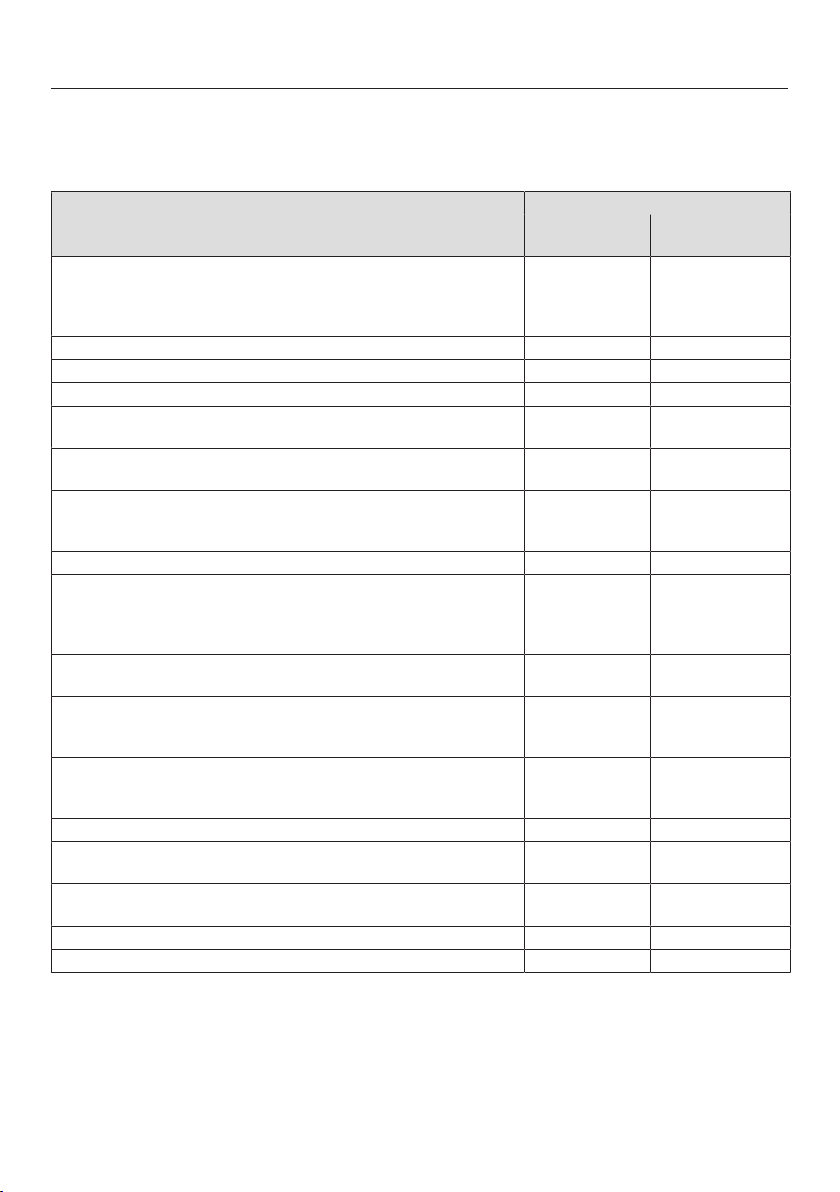
The cooktop is programmed with 9 power levels at the factory. If you wish to fine-
tune a setting, you can extend the power-level range to 17power levels (see “Pro-
gramming”).
Setting range
Factory setting
(9power levels)
Extended setting
(17power levels)
Melting butter
Dissolving gelatine
Melting chocolate
Keeping soups and sauces warm
1–2 1–2.
Making custards and puddings 2 2–2.
Thawing frozen vegetables (blocks) 3 2–3.
Reheating soups or sauces and making rice 3 2–4.
Making oatmeal, grits, polenta, risotto, rice pudding, couscous,
dulce de leche
3–4 2–4.
Cooking dumplings, matzoh balls, ravioli, gnocchi, and tortellini
Poaching eggs
4 3–5.
Warming liquid and half-set foods
Making omelettes or lightly fried eggs
Steaming fruits, making compote
4–5 4–5.
Thawing and heating frozen food 5 4–5.
Steaming vegetables or fish, shellfish, clambakes
Gently frying eggs (without overheating the fat)
Frying pancakes
Making paella
5–6 4.–6.
Bringing large quantities of food to boil, e.g., casseroles
Thickening custard and sauces, e.g., hollandaise
6–7 5.–7.
Toasting nori, tortillas, pita, flatbread, etc.
Toasting nuts
Frying bacon
6–7 6–7.
Sauteeing meat, poultry, fish, or sausage
Pan frying meat (such as hamburgers, kebabs, steaks, etc.), fish,
and poultry
6–7 6–8.
Frying crepes, etc. 7 6.–7.
Simmering for a braise
Making jam, jelly
8 8–8.
Searing meat, poultry, fish, and vegetables
High temperature cooking Wok style, Stir fry
8–9 7.–9
Deep frying e.g., French fries 9 8.–9
Boiling water or liquid Booster Booster
These settings should only be taken as a guide. The power of the induction coils will vary depending on
the voltage, size, and material of the cookware base. For this reason, it is possible that the power levels
will need to be adjusted slightly to suit your cookware. As you use the cooktop, you will get to know
which settings suit your cookware best. When using new cookware that you are not familiar with, set
the power to one level below the one specified.
Operation
38
Operation
This ceramic cooktop is equipped with
electronic sensor controls which react
to finger contact. For safety reasons, in
order to switch the appliance on, the
On/Off sensor control needs to be
touched for a little longer than the other
sensors.
Each time a sensor control is activated,
an audible signal sounds.
Only the printed On/Offsensor con-
trol is visible when the cooktop is
switched off. More sensor controls light
up when the cooktop is switched on.
Malfunction can occur due to
dirty and/or covered sensor controls.
If the sensor controls are dirty or
covered this could cause them to fail
to react, to activate a function, or
even to switch the cooktop off auto-
matically (see “Safety features –
Safety shut-off”). Placing hot cook-
ware on the sensor controls/indica-
tors can damage the electronic un-
derneath.
Keep the sensor controls and indica-
tors clean.
Do not place anything over the sen-
sor controls or indicators.
Do not place hot cookware over the
sensor controls or indicators.
a
Sensor controls and indicators

Operation
39
Fire hazard due to overheated
food.
Unattended food can overheat and
ignite.
Do not leave the cooktop unattended
while it is being used.
Please note that the heating-up time
on induction cooktops is much
shorter than on conventional cook-
tops.
Switching the cooktop on
Touch the sensor control.
Additional sensor controls will light up.
If no further entry is made, the cook-
top will turn itself off after a few sec-
onds for safety reasons.
Setting the power level
Permanent pan recognition is acti-
vated as standard (see “Program-
ming”). When the cooktop is switched
on and you place an item of cookware
on one of the cooking zones, all the
sensor controls for that cooking
zone’s numerical display will light up.
Place the cookware on the cooking
zone you want to use.
Touch the sensor control on the
corresponding numerical display.
Touch the appropriate sensor control
on the respective numerical display
for the power level you want.
Switching off a cooking zone/
the cooktop
To switch off a cooking zone, touch
the 0sensor control on the numerical
display for that cooking zone.
To switch off the cooktop and all the
cooking zones, touch the sensor
control.
Residual heat indicator
If a cooking zone is still hot, the residual
heat indicator will light up after it has
been switched off. Depending on the
temperature, a dot will appear above
power levels 1, 2, and 3.
The dots in the residual heat indicator
go out one by one as the cooking zones
cool down. The last dot only goes out
when the cooking zone is safe to touch.
Risk of burning or scalding due
to hot cooking zones.
The cooking zones will be hot after
use.
Do not touch the cooking zones
while the residual heat indicators are
on.

Operation
40
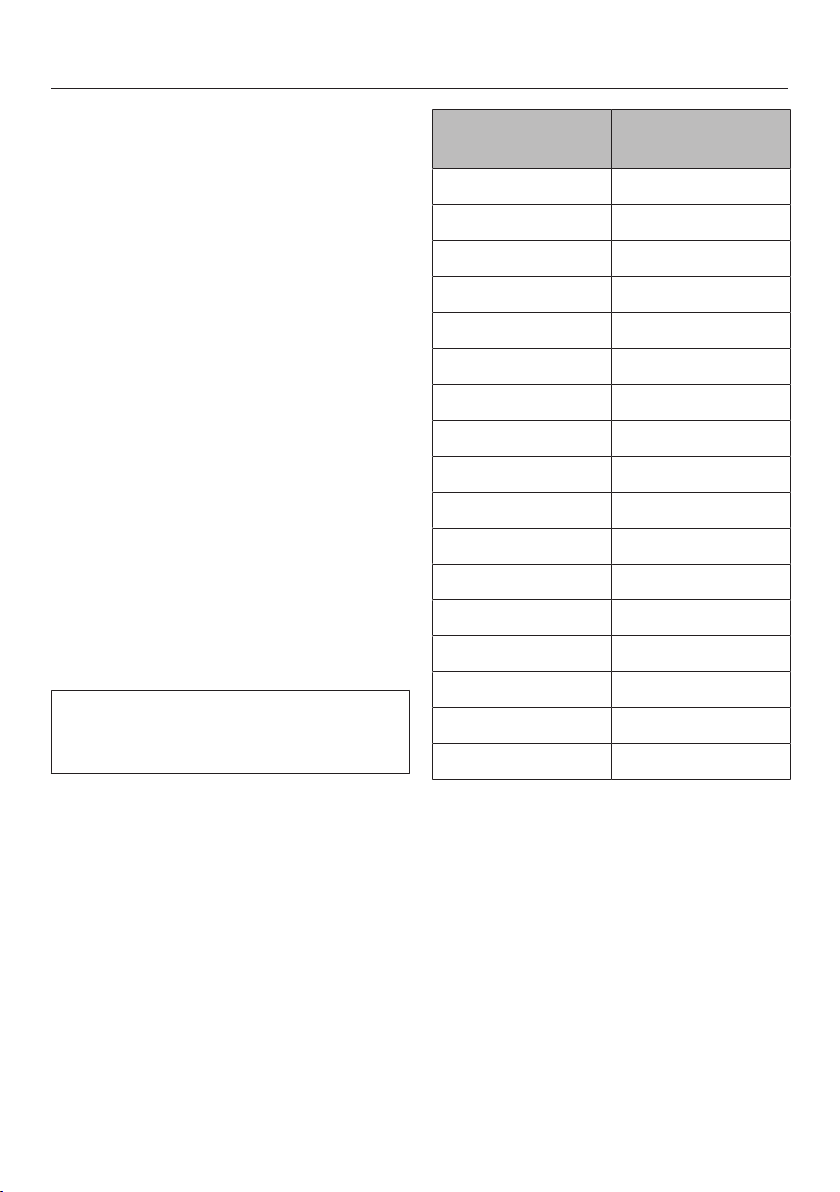
Setting the power level – ex-
tended power level range
Touch the numerical keybank be-
tween two number sensors.
The numbers to the left and right of the
interim level light up brighter than the
other sensor controls.
Example:
If you have set power level 7., the num-
bers 7 and 8 will be brighter than the
other numbers.
Operation
41
Auto heat-up
When Auto heat-up has been activated,
the cooking zone switches on automati-
cally at the highest setting and then
switches to the power level (continued
cooking level) which you have previ-
ously selected. The heat-up time de-
pends on which continued cooking
level has been chosen (see table).
Activating Auto heat-up
Touch the sensor control for the con-
tinued cooking level you want until a
tone sounds and the sensor control
starts to pulsate.
During the heat-up time (see table), the
continued cooking level set will pulsate.
With extended power levels (see “Pro-
gramming”), the sensor controls for the
power levels in front of and after the in-
terim power level will pulsate if an ex-
tended power level setting has been se-
lected.
When you change the continued
cooking level, you deactivate Auto
heat-up.
Deactivating Auto heat-up
Tap the sensor control of the set con-
tinued cooking level.
or
Select a different power level.
Continued cook-
ing level*
Heat-up time
[min:sec]
1 approx. 0:15
1. approx. 0:15
2 approx. 0:15
2. approx. 0:15
3 approx. 0:25
3. approx. 0:25
4 approx. 0:50
4. approx. 0:50
5 approx. 2:00
5. approx. 5:50
6 approx. 5:50
6. approx. 2:50
7 approx. 2:50
7. approx. 2:50
8 approx. 2:50
8. approx. 2:50
9 –
* The continued cooking settings with a dot
after the number are only available if the
power level range has been extended (see
“Programming”).

Operation
42
Booster
When the Booster function is activated,
the power is boosted so that large
quantities can be heated up quickly,
e.g., when boiling water for cooking
pasta. The boost in power is active for a
maximum of 15minutes.
When the Booster function is acti-
vated, the settings for the linked cook-
ing zone may be changed; see “Induc-
tion – Power management system”.
The Booster function can be used on a
maximum of 2cooking zones or 1Pow-
erFlex cooking area at the same time.
If the Booster function is turned on
when
- no power level has been selected,
the cooking zone will revert automati-
cally to level9 at the end of the
Booster time or if the Booster func-
tion is turned off before this.
- a power level has been selected, the
cooking zone will revert automatically
to the setting selected at the end of
the Booster time or if the Booster
function is turned off before this.
Activating TwinBooster
Level1
Place the cookware on the cooking
zone you want to use.
Select a power level, if necessary.
Touch the Bsensor control.
The indicator light for TwinBooster
level 1lights up.
Level2
Place the cookware on the cooking
zone you want to use.
Select a power level, if necessary.
Touch the Bsensor control twice.
The indicator light for TwinBooster
level 2lights up.
Deactivating TwinBooster
Touch theB sensor control repeat-
edly until the indicator lights go out.
or
Select a different power level.

Operation
43
Keeping warm
The Keeping warm function is for
keeping food warm when it has just
been cooked and is still hot. It is not
for reheating food that has gone cold.
The maximum duration for keeping food
warm is 2hours.
- Only use cookware (pots/pans) for
keeping food warm. Cover the cook-
ware with a lid.
- Stir firm or viscous food (mashed
potatoes, stew) occasionally.
- Foods begin to lose their nutrients
during the cooking process and con-
tinue to do so while being kept warm.
The longer food is kept warm, the
greater the loss of nutrients. Try to
ensure that food is kept warm for as
short a time as possible.
Activating/deactivating the Keeping
warm function
Touch the sensor control for the
cooking zone you wish to use.
Keeping warm temperatures
A keeping warm temperature of 85°C is
set as standard. You can change the
keeping warm temperature (see “Pro-
gramming”).
Use Temperature (°F
(°C))
Melting chocolate 120-130 (50–55)
Keeping solid
food and thick liq-
uids warm
150-165 (65–75)
Keeping clear
soups warm
175-195 (80–90)
The cooking result can be negatively
affected if food is kept warm at ex-
cessively high temperatures. Food
can change color and even spoil.

Timer
44
The cooktop has to be switched on if
you wish to use the timer.
The timer can be used for the following
2 functions:
- setting the kitchen timer
- reduce automatically to power
level 1
You can use the functions simultane-
ously.
A duration of between 1minute(:)
and 9hours 59minutes(:) can be
set.
Durations of up to 59minutes are
shown in minutes (00:59) and durations
of more than 60minutes are shown in
hours and minutes. Durations are en-
tered in the order of hours, followed by
minutes in tens and then units.
Example:
59minutes = 00:59hours,
Enter: 5–9
80minutes = 1:20hours,
Enter: 1–2–0
After the first number has been entered,
the timer display will light up constantly.
After the second number has been en-
tered, the first number will move to the
left. After the third number has been en-
tered, the first and second numbers will
move to the left.
Kitchen timer
The timer is set using the numerical dis-
play for the left or front left cooking
zone (depending on model).
Setting the timer
Touch the sensor control.
The timer display flashes.
Set the required time.
Touch the sensor control or wait
10seconds to start the timer.
Changing the timer duration
Touch the sensor control.
The timer display flashes.
Set the required time.
Deleting the timer
Touch the sensor control.
Touchon the numerical display.

Timer
45
Safety shut-off
You can set a time after which the
cooking zone will reduce automatically
to power level1. This function can be
used on all cooking zones at the same
time.
If the time programmed is longer than
the maximum operating time allowed,
the cooking zone will be switched off
by the safety shut-off function (see
“Safety features – Safety shut-off”).
The shut-off time is set on the numeri-
cal display for each cooking zone you
want to switch off automatically.
Setting the shut-off time
Select a power level for the cooking
zone you require.
Touch the sensor control.
The timer display flashes.
Set the required time.
Touch the sensor control or wait
10seconds to start the shut-off time.
The cooking zone allocation safety
shut-off indicator light pulsates.
To set a shut-off time for another
cooking zone, follow the same steps
as described above.
If more than one shut-off time is pro-
grammed, the shortest time left will be
displayed, and the corresponding indi-
cator light will pulsate. The other indi-
cator lights will light up constantly.
If you want to show the time left for
another cooking zone which is count-
ing down in the background,
touchthesensor control repeat-
edly until the indicator light for the
desired cooking zone pulsates.
Changing the shut-off time
Touch the sensor control repeat-
edly until the indicator light for the
cooking zone you require pulsates.
The timer display flashes.
Set the required time.
Deleting the shut-off time
Touch the sensor control repeat-
edly until the indicator light for the
cooking zone you require pulsates.
The timer display flashes.
Touch the sensor control on the nu-
merical display.

Timer
46
Using both timer functions at
the same time
If you use both functions simultane-
ously, the shortest time is always dis-
played. The sensor control (kitchen
timer) or the indicator light of the cook-
ing zone with the shortest time pul-
sates.
If you want to show the times left
counting down in the background,
touch the orsensor control.
If a shut-off time has been pro-
grammed for several cooking zones,
touch the sensor control repeat-
edly until the indicator light for the re-
quired cooking zone pulsates.

Additional functions
47
Stop&Go
When Stop&Go is activated, the power
level of all cooking zones in use is re-
duced to power level1.
The cooking zone power levels and the
timer settings cannot be altered; the
cooktop can only be switched off. The
kitchen timer, shut-off, Booster, and
heat-up times continue to run.
When Stop&Go is deactivated, the
cooking zones will operate at the power
level previously selected.
If the function is not deactivated within
1hour, the cooktop will switch off.
Activation/deactivation
Touch the sensor control.
Use this function if there is a danger of
food boiling over.
Wipe protection
The cooktop sensor controls can be
locked for 20seconds, e.g., to remove
soiling. The sensor control is not
locked.
Activating
Touch the sensor control.
The time counts down in the timer dis-
play.
Deactivating
Touch the sensor control until the
timer display goes out.
Demo mode
This function enables the cooktop to be
demonstrated in dealer showrooms
without heating up.
Activation/deactivation
Switch the cooktop on.
Touch the 0sensor control on any of
the numerical displays.
Then touch the0 and 2 sensor con-
trols at the same time for 6seconds.
In the timer display, flashes alter-
nately with (demo mode activated)
or (demo mode deactivated) for a
few seconds.

Additional functions
48
Displaying the cooktop data
The model identifier and software ver-
sion of the cooktop can be displayed.
There must not be any cookware on the
cooking zones.
Model identifier/serial number
Switch the cooktop on.
Touch the 0sensor control on any of
the numerical displays.
Touch the 0 and 4sensor controls at
the same time.
Numbers will appear in the timer display
one after another, separated by a dash.
Example: (model identifier
KM1234)– (serial num-
ber)
Software version
Switch the cooktop on.
Touch the 0sensor control on any of
the numerical displays.
Touch the 0 and 3sensor controls at
the same time.
Numbers appear in the timer display:
Example: : = software version2.00

Safety features
49
System lock/Safety lock
Your cooktop is equipped with a system
lock and a safety lock to prevent the
cooktop and the cooking zones being
switched on or any settings being al-
tered unintentionally.
The system lock is activated when the
cooktop is switched off. If the system
lock is activated, the cooktop cannot be
switched on and the timer cannot be
used. A set timer will continue to count
down. The cooktop is programmed so
that the system lock must be activated
manually. The system lock can be pro-
grammed to be activated automatically
5minutes after the cooktop has been
switched off (see “Programming”).
The safety lock is activated while the
cooktop is switched on. When the lock
is activated, the cooktop can be oper-
ated only under certain conditions:
- The cooking zones and the cooktop
can only be switched off.
- A set kitchen timer time can be modi-
fied.
If an unavailable sensor control is
touched while the system lock or safety
lock is activated, will appear in the
timer display for few seconds and a
tone will sound.
Activating the system lock
Touch the sensor control for
6seconds.
The seconds can be seen counting
down in the timer display. When this
time has elapsed, will appear in the
timer display. The system lock is acti-
vated.
Deactivating the system lock
Touch the sensor control for
6seconds.
will appear briefly in the timer dis-
play and then the seconds will count
down. The system lock is deactivated
once the time has elapsed.
Activating the safety lock
Touch and hold the and sensor
controls at the same time for 6sec-
onds.
The seconds can be seen counting
down in the timer display. When this
time has elapsed, will appear in the
timer display. The safety lock is acti-
vated.
Deactivating the safety lock
Touch and hold the and sensor
controls at the same time for 6sec-
onds.
will appear briefly in the timer dis-
play and then the seconds will count
down. Once the time has elapsed, the
safety lock function is deactivated.
Safety features
50
Safety shut-off
Sensor controls are covered
Your cooktop will turn off automatically
if one or several of the sensor controls
remain covered for longer than 10sec-
onds, for example, by finger contact,
food boiling over, or by an object.
flashes briefly above the sensor
control and a tone will sound.
will go out once you have removed
the object and/or cleaned the soiling
and the cooktop will be ready to use
again.
Excessive operating time
The safety shut-off mechanism is trig-
gered automatically if a cooking zone is
heated for an unusually long period of
time. This time depends on the power
level selected. If the time has been ex-
ceeded, the cooking zone switches to
power level1. If you turn the cooking
zone off and on again, it will be ready
for operation again.
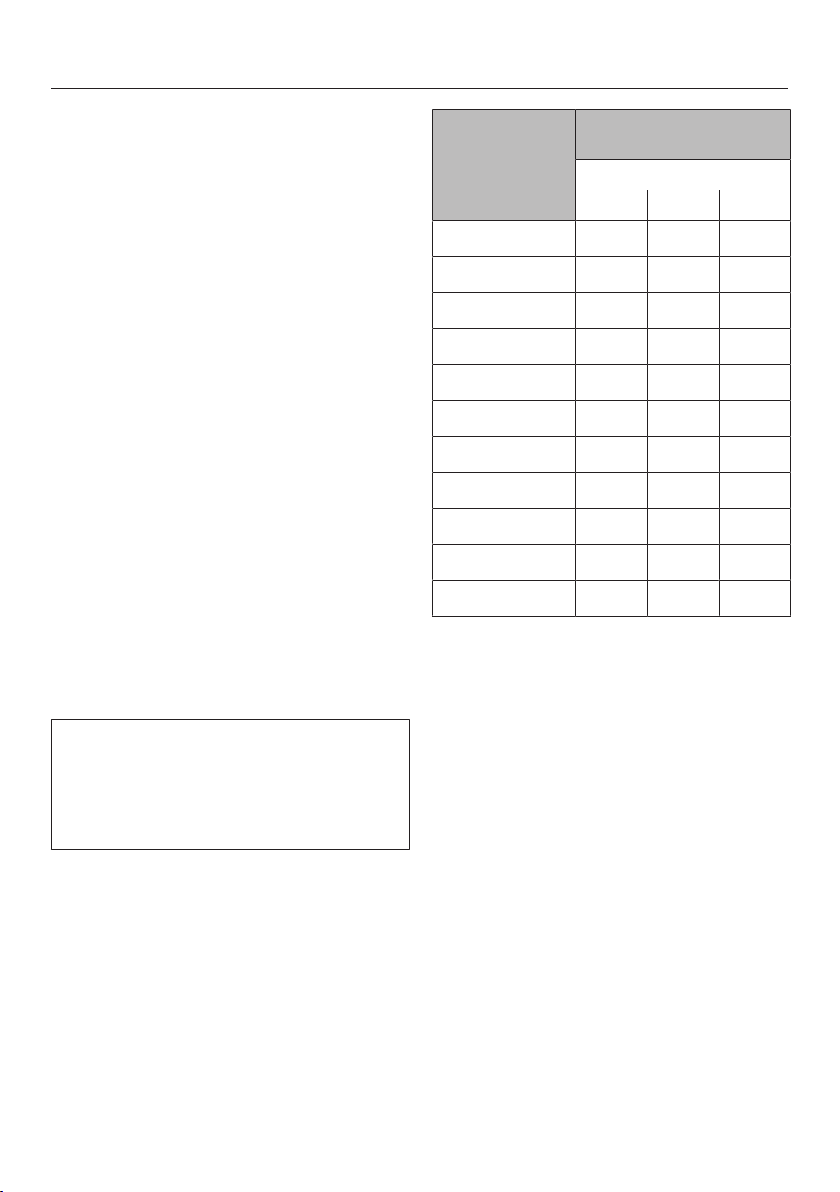
The cooktop is programmed to safety
setting0 at the factory. If required, you
can set a higher safety setting with a
shorter maximum operating time (see
table).
Power level* Maximum operating time
[h:min]
Safety setting
0** 1 2
1 10:00 8:00 5:00
1. 10:00 7:00 4:00
2/2. 5:00 4:00 3:00
3/3. 5:00 3:30 2:00
4/4. 4:00 2:00 1:30
5/5. 4:00 1:30 1:00
6/6. 4:00 1:00 00:30
7/7. 4:00 00:42 00:24
8 4:00 00:30 00:20
8. 4:00 00:30 00:18
9 1:00 00:24 00:10
* The power levels with a dot after the num-
ber are only available if the power level
range has been extended (see “Setting
ranges”).
** Factory default setting

Safety features
51
Overheating protection
All the induction coils and the cooling
elements for the electronics are
equipped with an overheating protec-
tion mechanism. Before the induction
coils or cooling elements get too hot,
the overheating protection mechanism
intervenes in one of the following ways:
Induction coils
- Any Booster function in operation will
be turned off.
- The set power level will be reduced.
- The cooking zone turns off automati-
cally. will flash alternately
within the timer display.
You can use the cooking zones again as
usual when the fault message has gone
out.
Cooling elements
- Any Booster function in operation will
be turned off.
- The set power level will be reduced.
- The cooking zones turn off automati-
cally.
The affected cooking zones can only be
used again if the cooling element has
cooled down to a safe level.
The overheating protection may be acti-
vated under the following circum-
stances:
- The cookware being heated is empty.
- Fat or oil is being heated on a high
power level.
- There is insufficient ventilation to the
underside of the cooktop.
- A hot cooking zone is turned back on
after a power failure.
If, despite removing the cause, the
overheating protection mechanism trig-
gers again, contact Miele Customer
Service.

Programming
52
You can adapt the programming of the
cooktop to your personal needs. Sev-
eral settings can be changed in succes-
sion.
After accessing programming mode,
the symbol appears and will ap-
pear in the timer display. After a few
seconds :(Program01) will flash al-
ternately with :(Code) in the timer
display.
Changing the programming
Accessing programming mode
The sensor control is located ap-
prox. 1cm (index finger width) to the
left of the sensor control.
With the cooktop turned off, touch
and hold the and sensor con-
trols together until the symbol
lights up and appears in the timer
display.
Setting the program
For a two-digit program number you
first need to set the tens position.
While the program is visible in the
display (e.g.,:), touch thesen-
sor control repeatedly until the num-
ber for the program you want appears
in the display or touch the appropri-
ate number on the numerical display.
Setting the code
While the code is visible in the display
(e.g.,:), touch thesensor con-
trol repeatedly until the number for
the code you want appears in the dis-
play or touch the appropriate number
on the numerical display.
Saving the settings
While the program is visible in the
display (e.g.,:), touch the sen-
sor control until the indicators go out.
To avoid saving the settings
While the code is showing in the dis-
play (e.g.,:), touch the sensor
control until the indicators go out.
Programming
53
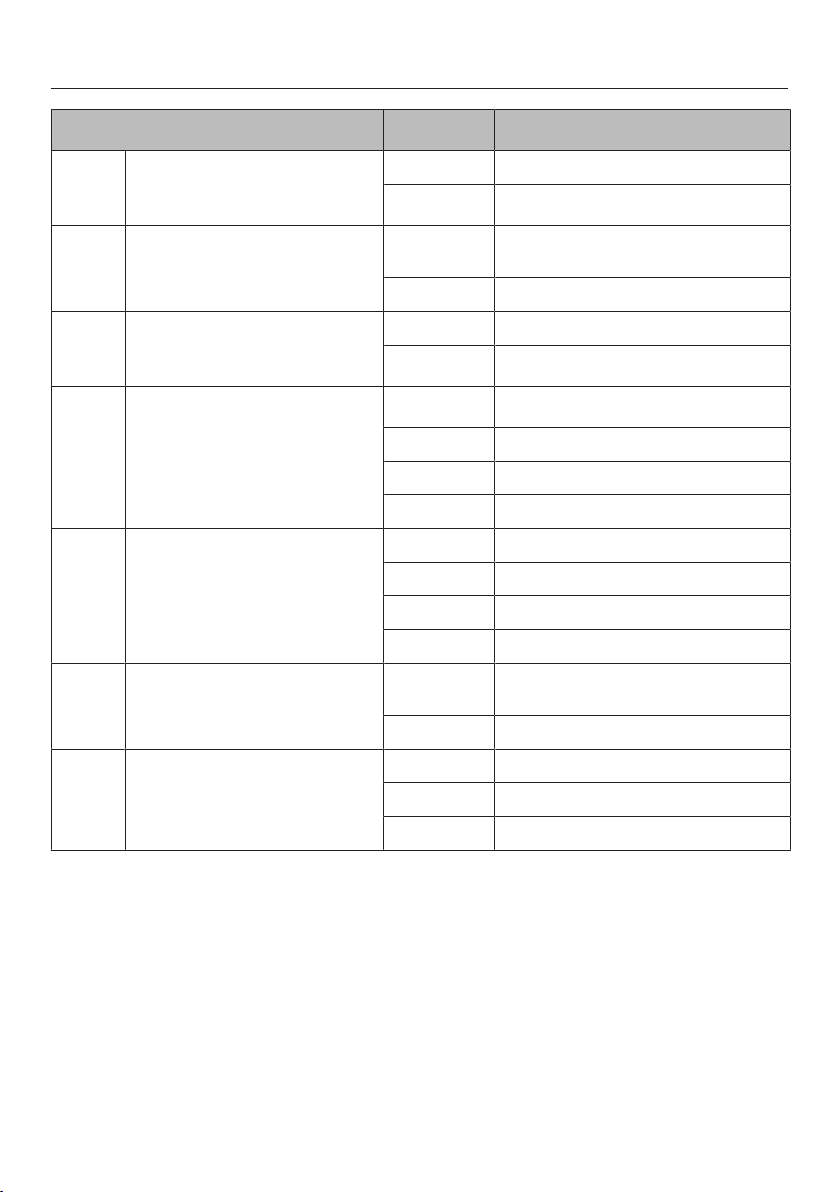
Program
1
Code
2
Settings
P:01
Demo mode
C:00
Demo mode off
C:01
Demo mode on
3
P:03
Factory default
C:00
Do not restore factory default set-
tings
C:01
Restore factory default settings
P:04
Number of cooking zone power
levels
C:00
9power levels + Booster
C:01
17power levels + Booster
4
P:06
Audible tone when a sensor
control is touched
C:00
Off
5
C:01
Quiet
C:02
Medium
C:03
Loud
P:07
Audible signal for timer
C:00
Off
C:01
Quiet
C:02
Medium
C:03
Loud
P:08
System lock
C:00
System lock can only be activated
manually
C:01
System lock activated automatically
P:09
Maximum operating time
C:00
Safety setting0
C:01
Safety setting1
C:02
Safety setting2
Programming
54
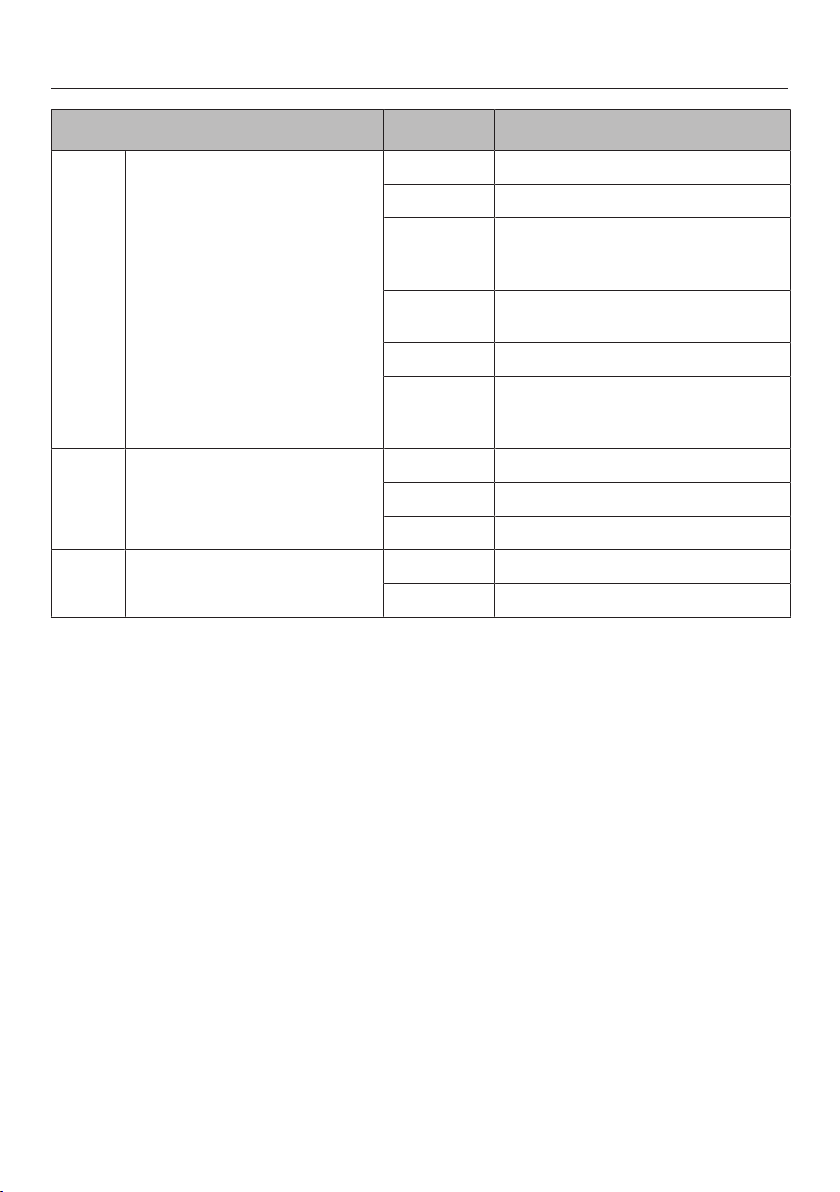
Program
1
Code
2
Settings
P:10
WiFi registration
C:00
Not active/deactivated
C:01
Active but not configured
C:02
Active and configured (cannot be se-
lected; displays whether connection
was successful)
C:03
Connection possible via WPS push
button
C:04 WiFi reset to default (C:00)
C:05
Direct WiFi connection of cooktop
and ventilation hood without Miele
app (Con@ctivity3.0)
P:12
Sensor controls reaction speed
C:00
Slow
C:01
Normal
C:02
Fast
P:15
Permanent pan recognition
C:00
Permanent pan recognition off
C:01
Permanent pan recognition on
Programming
55
Program
1
Code
2
Settings
P:25
Keeping warm temperature
C:00
120°F (50°C)
C:01
130°F (55°C)
C:02
140°F (60°C)
C:03
150°F (65°C)
C:04
160°F (70°C)
C:05
170°F (75°C)
C:06
175°F (80°C)
C:07
185°F (85°C)
C:08
195°F (90°C)
1
Programs not shown here have no allocation.
2
The factory default setting is shown in bold.
3
After the cooktop has been switched on, appears in the timer display for a few seconds.
4
In the text and tables, the extended power levels are shown with a dot after the number for better un-
derstanding.
5
The confirmation tone of the On/Offsensor control cannot be switched off.

Cleaning and care
56
Risk of burning or scalding due
to hot cooking zones.
The cooking zones will be hot after
use.
Turn off the cooktop.
Allow the cooktop to cool down be-
fore cleaning.
Risk of damage due to moisture
ingress.
The steam from a steam cleaning ap-
pliance could reach live electrical
components and cause a short cir-
cuit.
Do not use a steam cleaner to clean
the cooktop.
All surfaces could be discolored or
damaged if unsuitable cleaning
agents are used. All surfaces are
susceptible to scratching.
Remove all cleaning agent residues
immediately.
Do not clean with any abrasive or
sharp pointed objects.
Allow the cooktop to cool down be-
fore cleaning.
Clean the cooktop after every use.
Dry the cooktop thoroughly after ev-
ery cleaning to avoid limescale
residue.
Unsuitable cleaning agents
To avoid damaging the surfaces of the
appliance, do not use:
- liquid dish soap
- cleaning agents containing soda, al-
kalis, ammonia, acids, or chlorides
- cleaning agents containing limescale
remover
- stain or rust removers
- abrasive cleaning agents, such as
scouring powder, scouring liquid, or
pumice stones
- cleaning agents containing solvents
- dishwasher cleaning agents
- grill and oven sprays
- glass cleaners
- hard, abrasive brushes
- sponges
- eraser sponges

Cleaning and care
57
Cleaning the ceramic surface
Risk of damage caused by
pointed objects.
The seal between the cooktop and
the countertop could be damaged.
The seal between the ceramic sur-
face and the frame could be dam-
aged.
Do not use pointed objects for clean-
ing.
When cleaning with liquid dish soap,
not all contaminants and residues
are removed. An invisible film forms,
which causes discoloration of the ce-
ramic. This discoloration cannot be
removed.
Clean the ceramic surface regularly
with a suitable ceramic cooktop
cleaning agent.
First wipe down the surface with a
damp cloth to loosen soiling, then re-
move stubborn crusting with a glass
scraper.
Then clean the ceramic surface with
the Miele Ceramic and Stainless-
Steel Cooktop Cleaner (see “Optional
accessories – Cleaning and care
products”) or with a proprietary ce-
ramic cleaner applied with a paper
towel or a clean cloth. Do not put the
cleaner on a hot cooktop since this
may cause spotting. Please follow the
cleaning-agent manufacturer’s in-
structions.
Finally wipe the cooktop with a damp
cloth and dry it with a soft, dry cloth.
Residues can burn onto the cooktop
the next time it is used and cause
damage to the ceramic surface. En-
sure that all cleaner residues are re-
moved.
Spots caused by limescale, water,
and aluminum residues (spots with a
metallic appearance) can be removed
using the Miele Ceramic and Stain-
less-Steel Cooktop Cleaner.
Risk of burning or scalding due
to hot cooking zones.
The cooking zones are hot during
use.
Wear pot holders and use a glass
scraper to remove sugar, plastic, or
aluminum foil residues from the hot
cooktop.
Should any sugar, plastic, or alu-
minum foil spill or fall onto a hot
cooking zones while it is in use, first
turn off the cooktop.
Then carefully scrape off these
residues immediately while they are
still hot, using a shielded scraper
blade.
Afterwards, clean the ceramic surface
in its cooled state, as described
above.

Frequently Asked Questions
58
With the help of the following guide minor faults in the performance of the ma-
chine, some of which may result from incorrect operation, can be remedied with-
out contacting the Service Department.
This guide may help you to find the reason for the fault, and how to correct it.
Messages in the display
Problem Possible cause and solution
will flash alternately
with in the timer dis-
play and a tone will
sound.
The cooktop is incorrectly connected.
Disconnect the cooktop from the electrical power
supply.
Contact Customer Service. The cooktop must be
connected to the power supply according to the
wiring diagram.
After the cooktop has
been switched on, or af-
ter touching a sensor
control, appears in
the timer display for a
few seconds.
The system lock or safety lock is activated.
Deactivate the system lock or safety lock (see
“Safety features – System lock/Safety lock”).
After the cooktop has
been switched on,
appears briefly in the
timer display. The cook-
ing zones do not heat
up.
The cooktop is in demo mode.
Touch the 0sensor control on any of the numerical
displays.
Then touch the and sensor controls at the
same time until flashes alternately with in
the timer display.
The cooktop has
switched off automati-
cally. When the element
is switched back on,
appears above the
On/Off sensor control.
One or more of the sensor controls are covered, e.g.,
by finger contact, food boiling over, or an object.
Clean off any soiling and/or remove the object (see
“Safety features – Safety shut-off”).
will flash alternately
within the timer
display.
Overheating protection has been triggered.
See “Safety features – Overheating protection”.

Frequently Asked Questions
59
Problem Possible cause and solution
will flash alternately
with, , or in
the timer display.
The fan is blocked or defective.
Make sure it has not been blocked by an object.
Remove the obstruction.
If this fault message continues to appear in the
display, contact Miele Customer Service.
In the timer display, E-
digit, e.g., E-0, flashes
alternately with , ,
, , , , , or
.
The fan is blocked or defective.
Make sure it has not been blocked by an object.
Remove the obstruction.
If this fault message continues to appear in the
display, contact Miele Customer Service.
A message not listed in
this table is appearing
in the timer display.
There is an electronic fault.
Disconnect the power supply to the cooktop for
approx. 1minute.
If the problem persists after the power supply has
been restored, please contact Customer Service.

Frequently Asked Questions
60
Unexpected behavior
Problem Possible cause and solution
The power level se-
lected is flashing.
There is no dishware on the cooking zone, or the
dishware is unsuitable.
Use suitable cookware (see “Induction – Cook-
ware”).
Power level9 is auto-
matically reduced if you
also set power level9
for the connected cook-
ing zone.
Operating both zones at power level9 exceeds the
permitted maximum power for the two zones.
Use a different cooking zone.
A cooking zone turns it-
self off automatically.
It might have been turned on for too long.
You can use the cooking zone again by turning it
back on (see “Safety features–Safety shut-off”).
The cooking zone is not
working in the usual
way with the set power
level.
Overheating protection has been triggered.
See “Safety features–Overheating protection”.
A cooking zone or the
whole cooktop switches
off automatically.
Overheating protection has been triggered.
See “Safety features–Overheating protection”.
The booster has auto-
matically turned off
early.
Overheating protection has been triggered.
See “Safety features–Overheating protection”.

Frequently Asked Questions
61
Unsatisfactory results
Problem Possible cause and solution
Auto Heat-up is turned
on, but the food does
not start cooking.
Large amounts of food are being heated.
Start cooking at the highest power level, then re-
duce the power level manually.
The pan is not conducting heat properly.
Use a different pan that is able to better conduct
heat on an induction cooktop.
General problems or technical faults
Problem Possible cause and solution
Cooktop or cooking
zones cannot be turned
on.
There is no power to the cooktop.
Check if the breaker has tripped. Contact a quali-
fied electrician or Miele Customer Service (for the
minimum fuse rating, see data plate).
There may be a technical fault.
Disconnect the cooktop from the electricity supply
for approx. 1 minute by
– tripping the relevant breaker or screwing the
fuse out completely, or
– switching off the residual current device.
If the cooktop will still not turn on after resetting
the breaker or the residual current device, contact
a qualified electrician or Miele Customer Service.
There is a strange smell
or vapors when the
cooktop is being used
for the first time.
The metal components have a protective coating.
When the cooktop is used for the first time, this
causes a smell and possibly also vapor. The material
from which the induction coils are made also gives
off a smell in the first few hours of operation. With
each subsequent use, the odors are reduced until
they disappear completely. The smell and any vapors
do not indicate a faulty connection or a defective ap-
pliance and are not harmful to your health.
A noise can be heard
after the appliance is
turned off.
The fan will continue running until the cooktop has
cooled down. It will then turn itself off automatically.

Optional accessories
62
Miele offers a range of useful acces-
sories, as well as cleaning and condi-
tioning products for your appliance.
These products can be easily ordered
from the Miele webshop.
These products can also be ordered
from Miele Technical Service (see the
end of these operating instructions) or
your Miele dealer.
Cookware
Miele offers a wide range of cookware.
These have all been optimized for Miele
appliances in terms of functionality and
dimensions. Detailed information can
be found on the Miele website.
Cleaning and care products
Ceramic and stainless steel cleaner
250mL
Removes heavy soiling, lime scale, and
aluminum residue.
Microfiber cloth
Removes finger marks and light soiling.

Customer Service
63
Contact in the event of a fault
In the event of a fault which you cannot remedy yourself, please contact your
Miele dealer or Miele Customer Service.
You can book a Miele Service Call online at www.miele.com/service.
Contact information for Miele Customer Service can be found at the end of this
document.
Please quote the model identifier and serial number of your appliance (SN) when
contacting Miele Customer Service. Both pieces of information can be found on
the data plate.
Data plate
Adhere the extra data plate supplied with the appliance in the space below. Make
sure that the model number matches the one specified on the back cover of this
document.
Appliance warranty and product registration
You can register your product and/or view the manufacturer´s warranty terms and
conditions for Miele appliances and vacuum cleaners at www.mieleusa.com.
Installation
*INSTALLATION*
64
IMPORTANT SAFETY INSTRUCTIONS - INSTALLATION
Risk of damage caused by incorrect installation.
Incorrect installation can damage the cooktop.
The cooktop must only be installed by a qualified specialist.
Risk of electric shock from voltage.
Incorrect connection to the power supply may result in an electric shock.
The cooktop must be connected to the electrical supply by a qualified electri-
cian only.
Damage from falling objects.
Take care not to damage the cooktop when installing cabinetry or a ventilation
hood above it.
Install the cabinetry and ventilation hood before installing the cooktop.
Reaching over a hot appliance to access the cabinets can result in
burns. You can reduce the risk of burns by installing a ventilation
hood that extends at least 5" (12cm) past the bottom of the cabi-
nets.
The countertop must be heat-resistant (up to 212°F / 100°C), so
that it does not become deformed or the veneer detached. The wall
strips must be heat-resistant as well.
The cooktop must not be installed above refrigerators/freezers,
dishwashers, or washer/dryers.
This cooktop may only be installed above a stove or oven if they
have a built-in cooling fan.
Ensure that the power cord cannot be touched after the cooktop
has been installed.
After the installation of the cooktop, the electrical cord may not
come into contact with any moving kitchen parts (e.g. a drawer) or
be subject to mechanical stress.
Observe carefully the safety clearances listed on the following
pages.
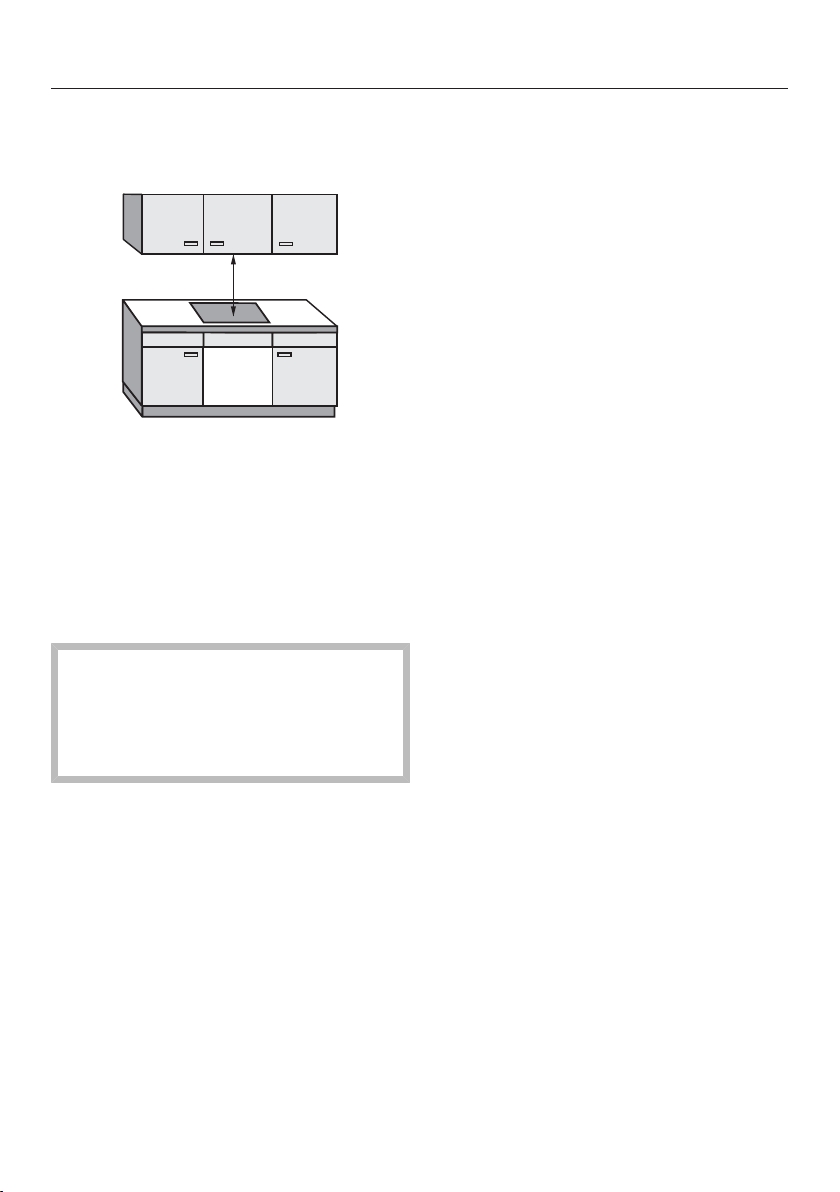
Installation
*INSTALLATION*
65
Safety distances
Safety distance above the cooktop
The safety distance specified by the
manufacturer of the ventilation hood
must be maintained between the cook-
top and the ventilation hood above it.
If combustible objects are installed
above the cooktop (e.g., a suspended
rack), a minimum safety distance of
19 3/4" (500mm) must be maintained.
When two or more appliances which
have different safety distances are
installed together below a ventilation
hood, you should observe the great-
est specified safety distance.
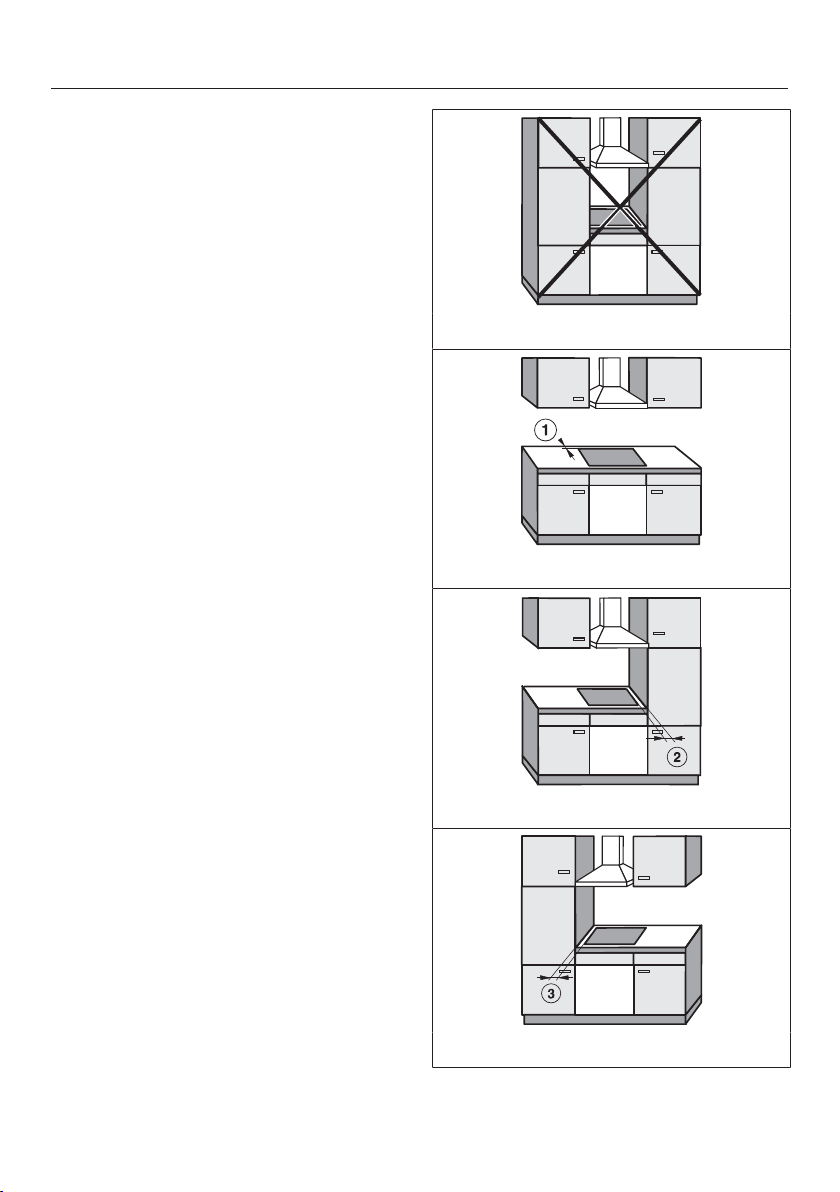
Installation
*INSTALLATION*
66
Safety clearances to the sides and
back of the cooktop
Ideally the cooktop should be installed
with plenty of space on either side.
The minimum distance shown below
must be maintained between the back
of the cooktop and a tall unit or wall.
The minimum distance , shown
below must be maintained between a
tall unit or a wall to the left or right of
the cooktop with a minimum distance of
113/4"(300mm) on the opposite side.
minimum distance between the back
of the counter cut-out and the rear edge
of the counter:
2" (50mm)
minimum distance to the right of the
counter cut-out to the closest adjacent
piece of cabinetry (for instance, a high
cabinet) or a room wall:
2" (50mm)
minimum distance to the left of the
counter cut-out to the closest adjacent
piece of cabinetry (for instance, a high
cabinet) or a room wall:
2" (50mm)
Not allowed
Highly recommended
Not recommended
Not recommended
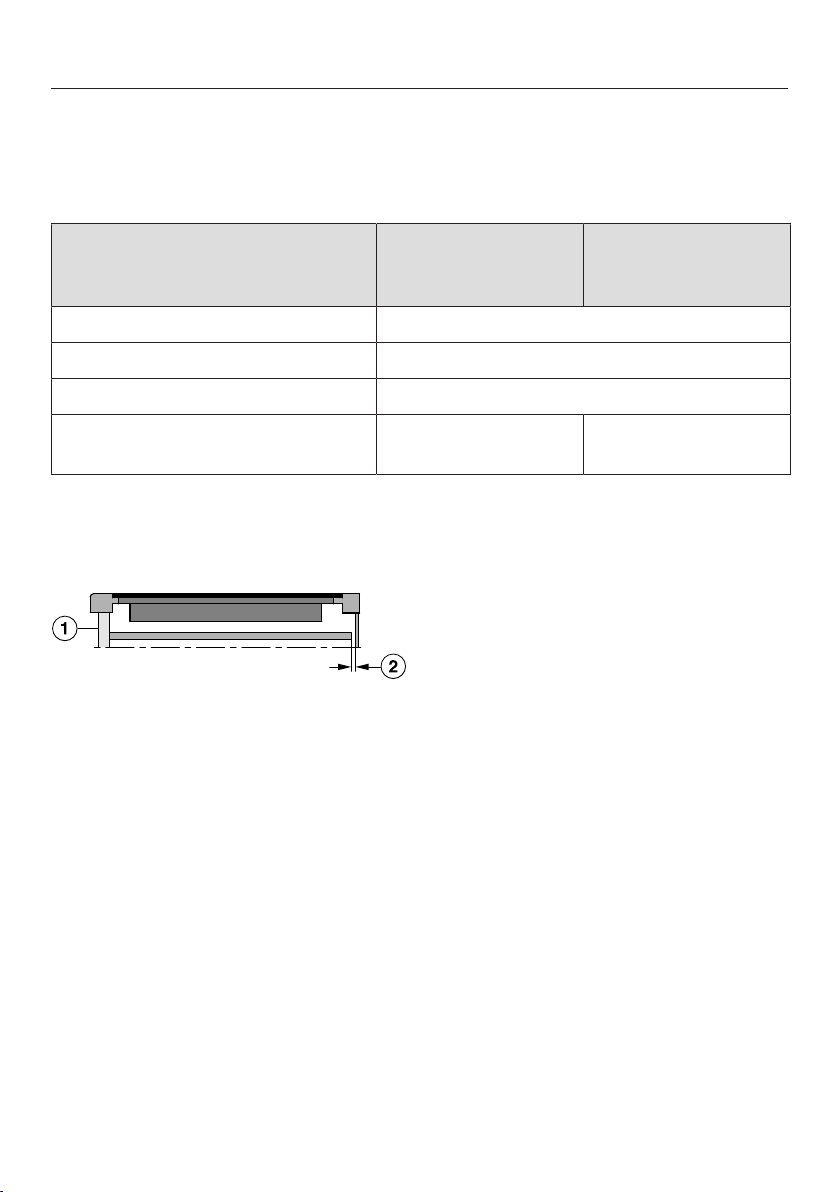
Installation
*INSTALLATION*
67
Minimum safety distance underneath the cooktop
To ensure sufficient ventilation to the cooktop, a minimum safety distance must be
left between the underside of the cooktop and any oven, intermediate shelf, or
drawer.
The minimum safety distance
between the underside of the
cooktop and
KM7720FR,
KM7740FR
KM 7730 FR
the top edge of a drawer ≥ 3/16" (5 mm)
the base of a drawer ≥ 3" (75 mm)
the top edge of an oven ≥ 9/16" (15 mm)
the top edge of an intermediate
shelf
≥ 9/16" (15 mm) ≥ 3 3/4" (95 mm)
Protective base
Installation of a protective base under the cooktop is allowed but not required.
Side view
a
Front
b
Rear air gap
Leave a air gap of 3'' (75mm) at the back between the cabinet and the interme-
diate shelf to accommodate the power supply cord.
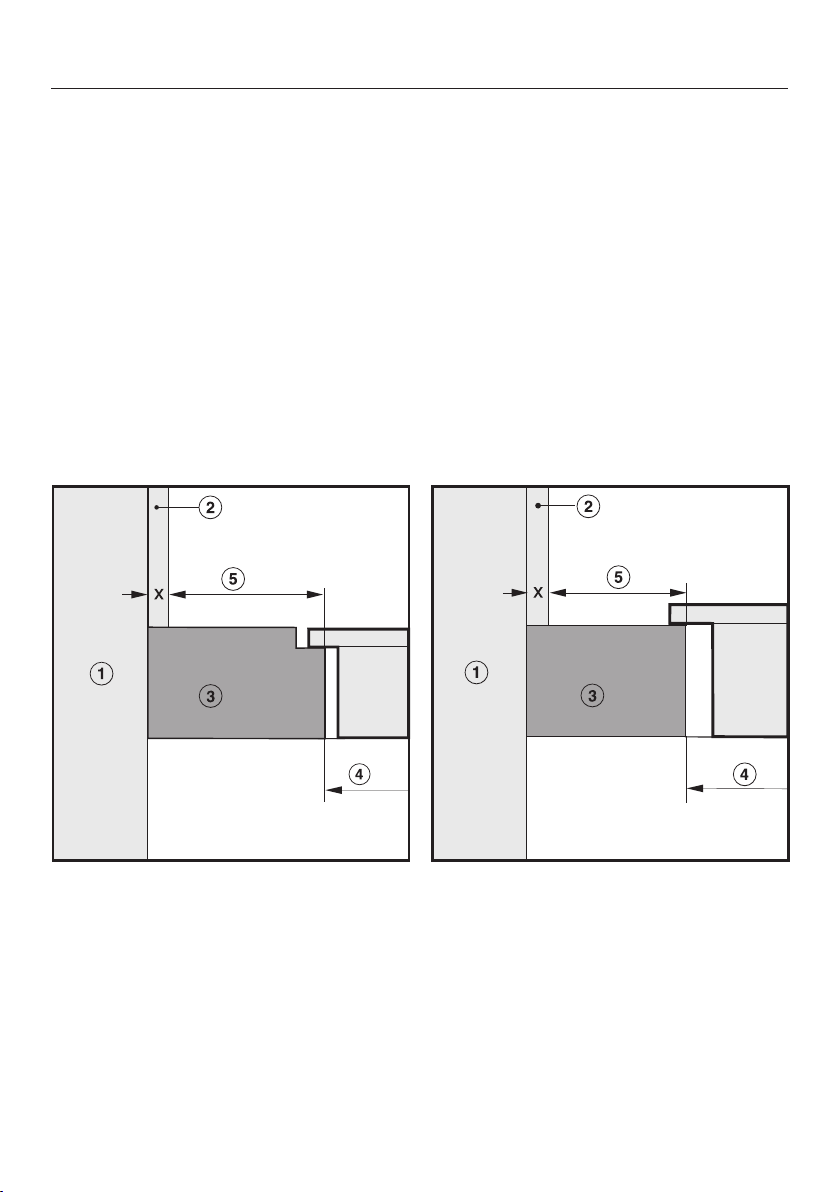
Installation
*INSTALLATION*
68
Safety distance from the wall covering
If a wall covering is installed, a minimum safety distance must be maintained be-
tween the countertop cut-out and the covering, since high temperatures can dam-
age these materials.
If the covering is made of a combustible material (such as wood), the minimum
safety distance between the countertop cut-out and the wall covering must be
2" (50mm).
For coverings made of non-combustible materials (such as metal, marble, granite,
ceramic tiles) the minimum safety distance between the countertop cut-out and
the wall covering must be 2" (50mm) minus the thickness of the covering.
For example: thickness of wall covering 9/16" (15mm)
2" (50mm) - 9/16" (15mm) = minimum safety distance 1 3/8" (35mm)
Flush-mounted cooktops Framed cooktops
a
Wall frame
b
Wall covering dimension x = thickness of the wall covering
c
Countertop
d
Countertop cut-out
e
Minimum safety distance to
combustible materials 2" (50mm)
non-combustible materials 2" (50mm) - dimension x
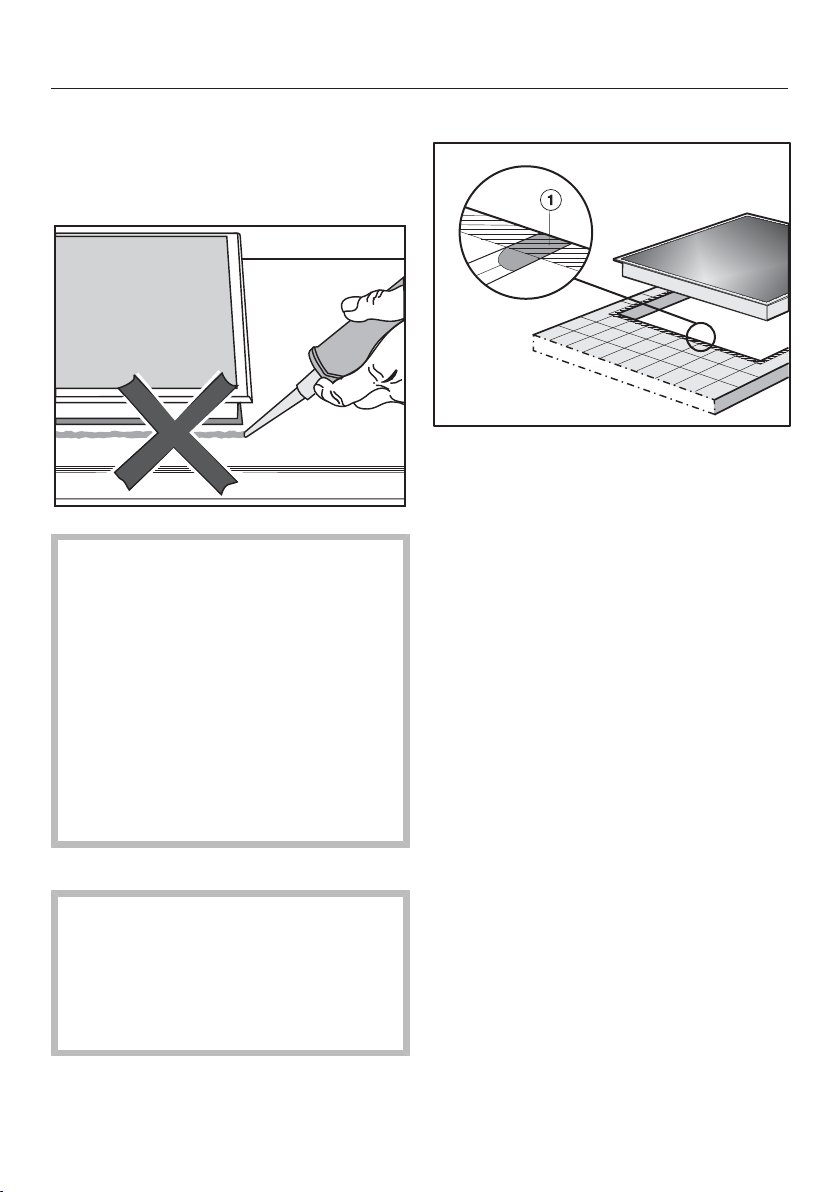
Installation
*INSTALLATION*
69
Installation notes
Seal between cooktop and counter-
top
Damage caused by incorrect in-
stallation.
Using sealant under the cooktop
could result in damage to the cook-
top and the countertop if the cook-
top ever needs to be removed for
servicing.
Do not use sealant between the
cooktop and the countertop.
The sealing strip under the edge of
the cooktop provides a sufficient seal
for the countertop.
Sealing strip
Dismantling the cooktop for service
purposes may damage the sealing
strip underneath the edge of the
cooktop.
Always replace the sealing strip be-
fore reinstalling the cooktop.
Tiled countertop
Grout lines and the shaded area un-
der the cooktop frame must be smooth
and even. If they are not, the cooktop
will not sit flush with the countertop and
the sealing strip underneath the cook-
top will not provide a good seal be-
tween the cooktop and the countertop.
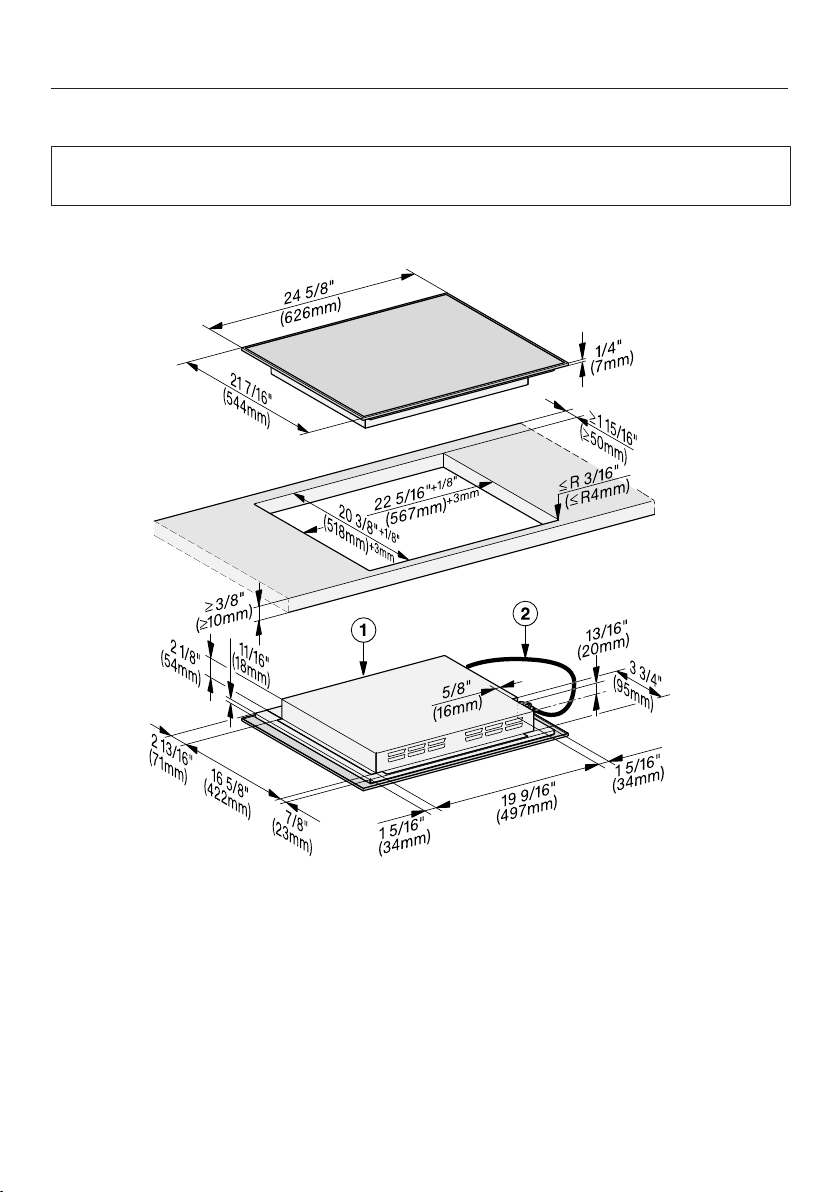
Installation
*INSTALLATION*
70
Installation dimensions
The superscript numbers after the cut-out dimensions are the tolerances for the
cut-out.
KM7720FR
a
Front
b
Flexible metal hose with power cords,
L =4' (1,200mm)
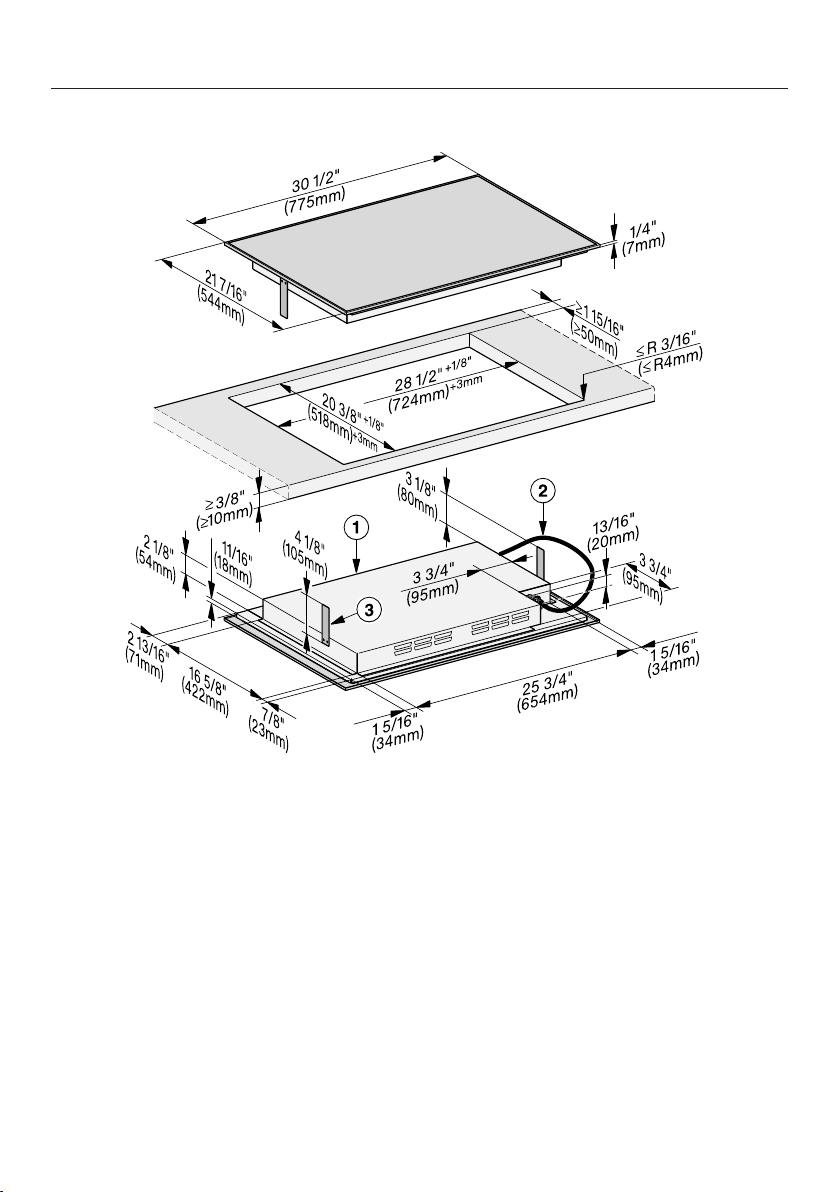
Installation
*INSTALLATION*
71
KM7730FR
a
Front
b
Flexible metal hose with power cords,
L =4' (1,200mm)
c
Spacer plate (only necessary if a protective base is installed)
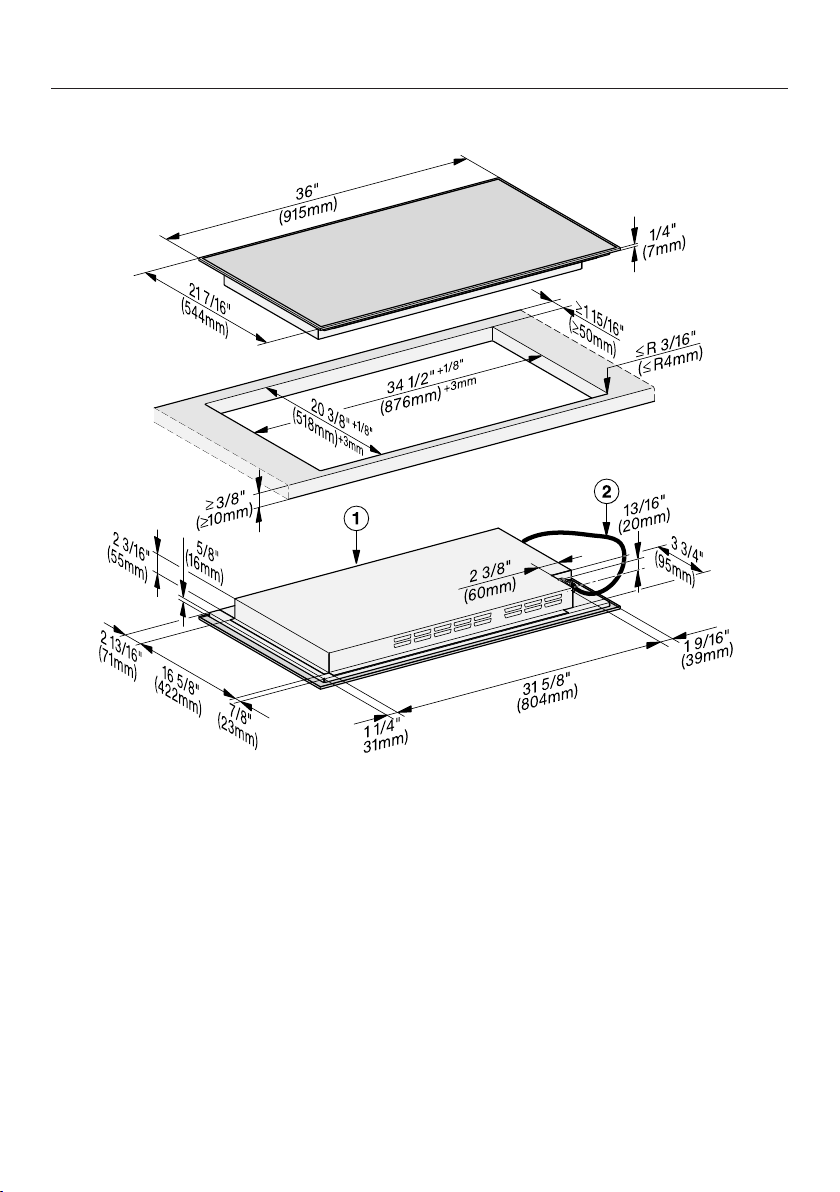
Installation
*INSTALLATION*
72
KM7740FR
a
Front
b
Flexible metal hose with power cords,
L =4' (1,200mm)
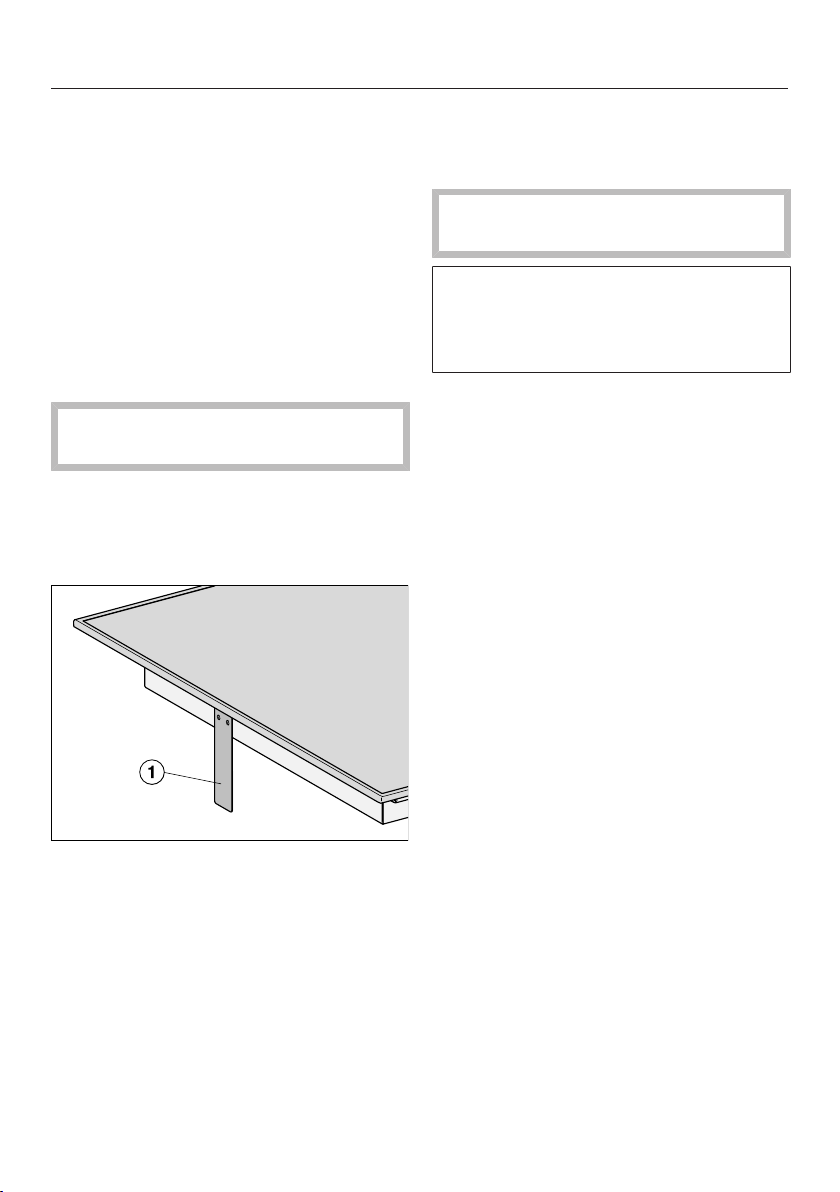
Installation
*INSTALLATION*
73
Installation
Create the countertop cut-out. Re-
member to maintain the minimum
safety distances (see “Installation” –
“Safety distances”).
Seal any cut surfaces on wooden
countertops with a special varnish,
silicone rubber, or resin to prevent the
wood from swelling as a result of
moisture. The sealant must be tem-
perature-resistant.
Ensure that the sealant does not get
on the top surface of the countertop.
Attach the sealing strip provided un-
derneath the edge of the cooktop. Do
not apply the sealing strip under ten-
sion.
KM 7730 FR (only necessary if a pro-
tective base is installed): On the left
and right side of the hob, attach 1
spacer plate each.
Feed the cooktop power cord down
through the countertop cut-out.
Place the cooktop centrally in the
cut-out. When doing this make sure
that the seal of the appliance sits
flush with the countertop on all sides.
This is important to ensure an effec-
tive seal all round.
Do not use any additional sealant
(e.g.,silicone) on the cooktop.
If the seal does not sit flush with the
countertop in the corners, the corner
radius (≤R 3/16" (4 mm)) can be care-
fully cut to fit using a jigsaw.
Connect the cooktop to the electrical
power supply.
Check that the cooktop works.

Installation
*INSTALLATION*
74
Electrical connection
Damage through improper work.
Installation, repair, and maintenance
work performed by by unqualified
persons can cause considerable
danger to users.
Miele cannot be held liable for any
damage arising as a result of such
work.
Installation, repair and maintenance
work should only be performed by a
Miele-authorized qualified electrician
in compliance with local regulations
and the ANSI National Electrical
Code/NFPA 70 in the United States
or the Canadian Electric Code, CSA
C22.1-02. in Canada.
Danger of electric shock.
There is a risk of electric shock when
performing installation, repair, and
service work .
Before performing installation, repair,
and service work, disconnect the
power supply by either removing the
fuse, shutting off the main power or
manually “tripping” the circuit
breaker.
Danger of electric shock by
missing or interrupted grounding.
The appliance may be energized.
To guarantee the electrical safety of
this appliance, continuity must exist
between the appliance and an effec-
tive grounding system. It is impera-
tive that this basic safety require-
ment be met. If there is any doubt,
have the electrical system of the
house checked by a qualified electri-
cian.
Damage by incorrect connection.
If the household electrical supply is
not suitrable for the appliance, it can
be damaged.
The voltage and frequency listed on
the data plate must correspond with
the household electrical supply to
prevent damage to the appliance.
Ensure that the connection data on
the data plate match those of your
electrical supply. Consult an electri-
cian if in doubt.
For safety reasons, the cooktop may
only be used when it has been fully
installed into the countertop.
Important –Save these instructions
for the local electrical inspector’s use.

Installation
*INSTALLATION*
75
Connection
Ensure that the connection data on
the data plate (voltage, frequency,
and fuse rating) match those of your
electrical supply.
The data plate is located underneath
the appliance.
The appliance is approved and ready
for connection to a grounded connector
with three connecting wires, sheathed
by a flexible metal hose.
It must be connected to an assigned
line in an approved connecting socket.
The appliance must be able to be dis-
connected from the power supply on all
poles by disconnecting devices. When
turned off, a contact distance of at least
¹/₈" (3mm) must be present. The dis-
connecting devices are overcurrent pro-
tection elements and protective circuit
breakers.
Black: Connect to L1 (hot)
Red: Connect to L2 (hot)
Green: Connect to GND (ground)
KM 7720, KM 7730
208/240V, 60Hz, 32A
KM 7740
208/240V, 60Hz, 40A
Make sure that the power outlet is ac-
cessible after the installation of the ap-
pliance.
Further information can be found on the
included data plate.
WARNING:
THIS APPLIANCE MUST BE
GROUNDED

Declaration of conformity
76
Supplier's Declaration of Con-
formity 47CFR§2.1077 Com-
pliance Information
Induction Cooktop
Unique Identifier: Miele Model:
KM7720; KM7730; KM7740
Responsible Party
Miele, Inc.
National Headquarters
9 Independence Way
Princeton, NJ08540
Phone: 800-843-7232
Fax: 609-419-4298
www.mieleusa.com
FCC Compliance Statement: This de-
vice complies with Part 18 of the FCC
Rules.
IC Compliance Statement: This device
complies with
CAN ICES-001 (B) / NMB-001 (B)
Radio Modules
This device contains the following WiFi
module:
FCC ID 2ACUWEK037
IC ID 5669C-EK37
Frequency band 2.412GHz –
2.462GHz
Maximum trans-
mitting power
< 0.1W
Compliance Statement
This device complies with Part 15 of the
FCC Rules and contains licence-ex-
empt transmitter(s)/receiver(s) that com-
ply with Innovation, Science and Eco-
nomic Development Canada’s licence-
exempt RSS Standard(s).
Operation is subject to the following
two conditions:
(1) this device may not cause harmful
interference, and
(2) this device must accept any interfer-
ence received, including interference
that may cause undesired operation.
The construction of the device assures
that the FCC/IC exposure limits are ver-
ifiably met using the integrated radio
module.
Warning!
Any changes or modifications to this
unit not expressly approved by the
party responsible for compliance
could void the user’s authority to op-
erate the equipment.



9 Independence Way
Princeton, NJ 08540
www.mieleusa.com
U.S.A.
Miele, Inc.
National Headquarters
Please have the model and serial number
of your appliance available when
contacting Customer Service.
Canada
Importer
Miele Limited
Headquarters and Miele Centre
Customer Support
Phone: 888-99-MIELE (64353)
161 Four Valley Drive
Vaughan, ON L4K 4V8
www.miele.ca
Customer Care Centre
Phone:
1-800-565-6435
905-532-2272
International Headquarters
Miele & Cie. KG
Carl-Miele-Straße 29
33332 Gütersloh
Germany

M.-Nr. 12 155 090 / 02
KM 7720FR, KM7730FR, KM7740FR
en-US, CA





