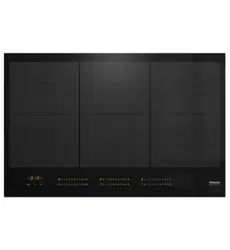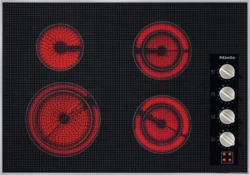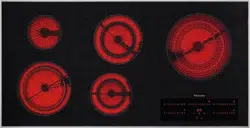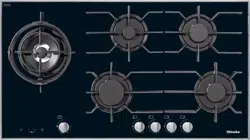
Operating and Installation
Instructions
Electric Cooktops
To prevent accidents and machine damage, read these instructions
before installation or use.
en-US, CA M.-Nr. 07 844 710


Contents
3
IMPORTANT SAFETY INSTRUCTIONS ............................................................ 5
Caring for the environment .............................................................................. 16
Overview............................................................................................................. 17
Cooktop............................................................................................................... 17
KM5840 ......................................................................................................... 17
KM5860 ......................................................................................................... 18
KM5880 ......................................................................................................... 19
Control elements/indicators ................................................................................ 20
Cooking zone data .............................................................................................. 22
Before first use .................................................................................................. 24
Cleaning the cooktop for the first time................................................................ 24
Turning on the cooktop for the first time ............................................................. 24
How the cooking zones work........................................................................... 25
Cookware ........................................................................................................... 26
Energy saving tips ............................................................................................ 27
Setting range...................................................................................................... 28
Operation............................................................................................................ 29
Using the appliance............................................................................................. 29
Switching the cooktop on ................................................................................... 30
Switching on the cooking zone and setting the power level............................... 30
Switching off........................................................................................................ 30
Residual heat indicator........................................................................................ 30
Extension............................................................................................................. 31
Setting the power level – extended power level range........................................ 31
Auto Heat-up....................................................................................................... 32
Timer................................................................................................................... 33
Timer ................................................................................................................... 33
Switching off a cooking zone automatically........................................................ 35
Using both timer functions at the same time ...................................................... 36
Additional functions .......................................................................................... 37
Stop&Go............................................................................................................ 37
Safety features................................................................................................... 38
System lock/Safety lock...................................................................................... 38
Safety shut-off..................................................................................................... 39
Overheating protection........................................................................................ 40

Contents
4
Cleaning and care ............................................................................................. 41
Programming ..................................................................................................... 43
Frequently Asked Questions ............................................................................ 46
Optional accessories ........................................................................................ 49
Customer Service.............................................................................................. 50
Contact in the event of a fault ............................................................................. 50
Appliance warranty and product registration ...................................................... 50
Installation.......................................................................................................... 51
IMPORTANT SAFETY INSTRUCTIONS - INSTALLATION ................................... 51
Safety distances.................................................................................................. 52
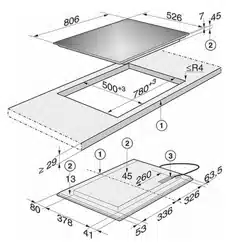
Installation notes ................................................................................................. 56
Installation dimensions........................................................................................ 57
KM5840 ......................................................................................................... 57
KM5860 ......................................................................................................... 58
KM5880 ......................................................................................................... 59
Installation ........................................................................................................... 60
Electrical connection ........................................................................................... 62
MieleCare ........................................................................................................... 64

IMPORTANT SAFETY INSTRUCTIONS
5
This cooktop complies with all relevant local and national safety
requirements. Inappropriate use can, however, lead to personal in-
jury and material damage.
Read the operating and installation instructions carefully before
using the cooktop. They contain important information on safety,
installation, use and maintenance. This prevents both personal in-
jury and damage to the cooktop.
When installing the cooktop, Miele expressly and strongly advises
that you read and follow the instructions under “Installation”, as
well as in the “IMPORTANT SAFETY INSTRUCTIONS”.
Miele cannot be held liable for injury or damage caused by non-
compliance with these instructions.
Keep these instructions in a safe place and pass them on to any
future owner.

IMPORTANT SAFETY INSTRUCTIONS
6
Appropriate use
This cooktop is intended for domestic use and use in other similar
environments.
This cooktop is not intended for outdoor use.
The cooktop is intended for domestic use only to prepare food
and keep it warm. Any other use may be dangerous.
Persons (including children) who lack physical, sensory or mental
abilities, or experience with the appliance should not use it without
supervision or instruction by a responsible person.

IMPORTANT SAFETY INSTRUCTIONS
7
Safety with children
As with any other appliance, children must be supervised.
Do not leave children unattended: Children should not be alone or
unsupervised in the area where the appliance is installed. Do not al-
low them to sit or stand on the appliance.
Be sure to supervise any children in the vicinity of the cooktop,
and do not let them play with it.
The cooktop gets hot when in use and remains hot for some time
after being turned off. Keep children away from the appliance until it
has cooled down and is no longer a burn hazard.
Danger of burning. Do not store anything which might arouse a
child’s interest in storage areas above or behind the cooktop. Other-
wise they could be tempted to climb onto the appliance.
Risk of burning or scalding. Turn pot and pan handles inward, so
children cannot pull them down and be burned.
Danger of suffocation. While playing, children may become entan-
gled in packaging material (such as plastic wrapping) or pull it over
their head, presenting the risk of suffocation. Keep packaging mate-
rial away from children.
Activate the system lock to ensure that children cannot turn on the
appliance inadvertently. Use the safety lock when the hob is in use
to prevent children from altering the settings selected.

IMPORTANT SAFETY INSTRUCTIONS
8
Technical safety
Unauthorized installation, maintenance, and repairs can cause
considerable danger for the user. Installation, maintenance, and re-
pairs must only be carried out by a Miele authorized technician.
Maintenance by the user: Never repair or replace any part of the
appliance unless the instructions specifically recommend doing so.
Service work should only be performed by a qualified technician.
Damage to the cooktop can compromise your safety. Check the
cooktop for visible signs of damage. Do not use the cooktop if it is
damaged.
Reliable and safe operation of the cooktop can only be guaran-
teed if it is connected to the public power supply.
Be certain your appliance is properly installed and grounded by a
qualified technician. To guarantee the electrical safety of this appli-
ance, continuity must exist between the appliance and an effective
grounding system. It is imperative that this basic safety requirement
be met. If there is any doubt, have the electrical system of the house
checked by a qualified electrician.
Proper installation: Make sure that your appliance has been in-
stalled correctly and that it has been grounded by a qualified techni-
cian.
To avoid damaging the cooktop, make sure that the connection
data (voltage and frequency) on the data plate correspond to the
building's power supply before connecting the appliance.
When in doubt, consult a qualified electrician.
Do not connect the appliance to the electrical supply with a power
bar or extension cord. These are a fire hazard and do not guarantee
the required safety of the appliance.
For safety reasons, the cooktop may only be used when it has
been fully installed.

IMPORTANT SAFETY INSTRUCTIONS
9
This appliance must not be used in a non-stationary location (e.g.
on a ship).
Any contact with live connections or tampering with the electrical
or mechanical components of the cooktop will endanger your safety
and may lead to appliance malfunctions.
Do not open the casing of the cooktop under any circumstances.
Any repairs not performed by a Miele authorized service techni-
cian will void the warranty.
Defective components should be replaced by Miele original parts
only. Only with these parts can safety of the appliance be assured as
intended by the manufacturer.
The appliance is not intended for use with an external timer switch
or a remote control system.
The cooktop must be connected to the electricity supply by a
qualified electrician (see “Installation – Electrical connection”).
If the power cord is damaged, it must only be replaced by a quali-
fied service technician (see “Installation–Electrical connection”).
The appliance must be completely disconnected from the electric-
ity supply during installation, maintenance and repair work. Ensure
that power is not supplied to the appliance until after it has been in-
stalled or until any maintenance or repair work has been carried out.
Disconnect by
- removing the fuse,
- “tripping” the circuit breaker, or
- unplugging the unit (if equipped with plug). Pull the plug not the
cord.
Danger of electric shock. Do not use the cooktop if it is faulty, or if
the ceramic surface is cracked, chipped, or damaged in any way.
Switch it off immediately. Disconnect the cooktop from the electrical
power supply. Contact Miele Service.

IMPORTANT SAFETY INSTRUCTIONS
10
If the cooktop is installed behind a cabinet door, do not close the
door while the cooktop is in operation. Heat and moisture can build
up behind the closed door and cause damage to the cooktop, cabi-
netry, and flooring. Do not close the door until the residual heat indi-
cators go out.
Do not open the cooktop housing under any circumstances.
Disconnect the cooktop from the electrical power supply before
carrying out any maintenance or repair work.

IMPORTANT SAFETY INSTRUCTIONS
11
Correct use
DO NOT TOUCH SURFACE UNITS OR AREAS NEAR UNITS –
Surface units may be hot even though they are dark in color. Areas
near surface units may become hot enough to cause burns. During
and after use, do not touch, or let clothing or other flammable mate-
rials contact surface units or areas near units until they have had suf-
ficient time to cool. Among these areas are (identification of areas –
for example, the cooktop and surfaces facing the cooktop).
The cooktop gets hot when in use and remains hot for a while af-
ter being turned off. There is a potential hazard until the residual heat
indicator goes out.
Do not leave the cooktop unattended when cooking on high
power. Spilled food will begin to smoke and cause grease splatter,
which can ignite on the cooktop. Doing so may result in carbon
monoxide poisoning and overheating of the appliance.
When in use, the cooktop emits a significant amount of heat,
which can cause objects in the vicinity to catch fire.
Never use the cooktop to heat the room.
Oil and fat can catch fire if overheated. Never leave the appliance
unattended when cooking with oil and fat. If the oil or fat catches
fire, do not attempt to put the flames out with water.
Turn off the cooktop and smother the flames using a lid or a suitable
fire blanket.
Smother the fire or flames, or use a dry chemical extinguishing
agent or foam fire extinguisher.
Storage in or on the appliance: Flammable materials should not be
stored in an oven or in the vicinity of the cooktop.
The flames could set the grease filters of a ventilation hood on fire.
Do not flambé under a ventilation hood.

IMPORTANT SAFETY INSTRUCTIONS
12
Spray canisters, aerosols and other inflammable substances can
ignite when heated. Therefore do not store such items or substances
in a drawer under the appliance. Cutlery inserts must be heat-resis-
tant.
Never heat empty cookware.
Do not heat or can food in closed containers, such as tins or
sealed jars, on the cooktop, as pressure will build up in the container
and cause it to explode.
If the cooktop is covered, there is a risk that the material of the
cover will ignite, explode or melt if the cooktop is still hot or if turned
on inadvertently. Never cover the cooktop with a board, cloth or pro-
tective sheet.
If the cooktop is turned on or accidentally turned on or if it is still
hot, metal objects on the cooktop can heat up. Other items may melt
or catch fire. Damp lids can become attached to the cooktop by
suction. Do not store items on the cooktop! Always turn the cooking
zones off after use!
You could burn yourself on the hot cooktop. Protect your hands
with heat-resistant pot holders or gloves when handling hot pots and
pans. Do not let them get wet or damp, as this causes heat to trans-
fer through the material more quickly with the risk of scalding or
burning yourself.
When using an electrical appliance, e.g. a hand mixer, near the
cooktop, make sure that the power cable does not come into con-
tact with the hot cooktop. The cable's insulation could become dam-
aged.
Grains of salt, sugar and sand (e.g. from cleaning vegetables) can
cause scratches if they get under pan bases. Make sure that the ce-
ramic surface is clean before placing pans on it.
Even a light object can cause damage to the ceramic cooktop in
certain circumstances. Do not drop anything on the ceramic surface.

IMPORTANT SAFETY INSTRUCTIONS
13
Do not place hot pans on the sensor buttons and display as this
could cause damage to the electronics underneath. Do not place hot
pans on the area around the display.
Do not allow solid or liquid sugar, or pieces of plastic or aluminum
foil to get onto the cooktop when it is hot, as they can damage the
ceramic surface when it cools down. If this should occur, turn off the
appliance immediately and scrape off all the sugar, plastic or alu-
minum residues while still hot, using a shielded scraper blade. Use
pot holders. Allow the ceramic surface to cool down before cleaning
with a suitable ceramic cleaning agent.
Pans that boil dry can cause damage to the ceramic glass. Do not
leave the appliance unattended while it is being used.
Pots and pans with bases with pronounced edges or ridges can
scratch the ceramic surface. Only use pots and pans with smooth
bases.
Lift pans into position on the cooktop. Sliding them into place can
cause scuffs and scratches.
Fire hazard! Loose-fitting or hanging garments can catch fire. Be
sure to wear appropriately fitting clothing when cooking. Never allow
loose clothing or flammable materials to come into contact with the
cooking zones while the cooking zones are in use.
Cookware made of plastic or aluminum foil will melt at high tem-
peratures. Do not use any plastic or aluminum foil cookware.
The cooktop frame or cooktop edges (on cooktops with beveled
edges) and the controls can become hot due to the influence of the
following factors: operating duration, high power level(s), large cook-
ware, and the number of cooking zones being used.
Cookware made from aluminum or with an aluminum base can
cause shiny metallic spots. These spots can be removed with ce-
ramic glass or stainless steel cleaner (see “Cleaning and Care”,
“Cleaning the ceramic surface”).

IMPORTANT SAFETY INSTRUCTIONS
14
If residue remains on the cooktop for any length of time, it can
cook into the cooktop and sometimes it is then not possible to re-
move it. Remove spills and splatters promptly. Also make sure that
the bottom of any cookware is clean, dry, and free of grease before
placing it on the cooktop.
Do not use the ceramic surface for preparing food. Always use
suitable cookware.
Wet sponges or clothes can cause burns due to hot steam if they
are used to wipe spilled food off a hot cooktop. Some cleansers can
emit hazardous vapors if they are applied to a hot surface. Be careful
when cleaning the cooktop.
If the cooktop is damaged, cleansers or spilled food can penetrate
the glass surface and cause a short-circuit. Never cook on a dam-
aged cooktop. Contact an electrician immediately.
The cooktop has cooking zones of different sizes. Use cookware
with a level base that is large enough for the cooking zone. Cook-
ware that is too small leaves part of the hot cooking zone uncovered,
which may cause burns due to touching or ignite clothing. The use of
cookware of the right size also makes for better use of the heated ar-
eas.
Not any cookware of glass, glass ceramic, ceramic, clay or other
glass cookware is suitable for use on the cooktop. It can be dam-
aged due to sudden temperature change.
If the handles of a pot or pan extend across an adjacent cooking
zone, this can cause burns, the ignition of flammable materials and
the spilling of food due to inadvertent contact with the cookware.
Turn the pot or pan so that the handles point toward the inside and
do not extend across an adjacent cooking zone.

IMPORTANT SAFETY INSTRUCTIONS
15
Cleaning and maintenance
Do not use a steam cleaner to clean the cooktop.
The steam may reach electrical components and cause a short cir-
cuit.
Miele will guarantee to supply functional parts for a minimum of
10years and up to 15years following the discontinuation of your
cooktop.

Caring for the environment
16
Disposal of the packing mate-
rial
The cardboard box and packing materi-
als protect the appliance during ship-
ping. They have been designed to be
biodegradable and recyclable.
Ensure that any plastic wrappings,
bags, etc. are disposed of safely and
kept out of the reach of children. Dan-
ger of suffocation!
Disposal of your old appliance
Electrical and electronic appliances
contain valuable materials. They also
contain certain substances, compounds
and components which were essential
for the proper functioning and safe use
of the equipment. Handling these mate-
rials improperly by disposing of them in
your household waste can be harmful to
your health and the environment. There-
fore, please do not dispose of your old
appliance with regular household waste
and follow local regulations on proper
disposal.
Consult with local authorities, dealers or
Miele in order to dispose of and recycle
electrical and electronic appliances.
Miele assumes no responsibility for
deleting any personal data left on the
appliance being disposed. Please en-
sure that your old appliance is kept
away from children until removal. Ob-
serve safety requirements for appli-
ances that may tip over or pose an en-
trapment hazard.
Overview
17
Cooktop
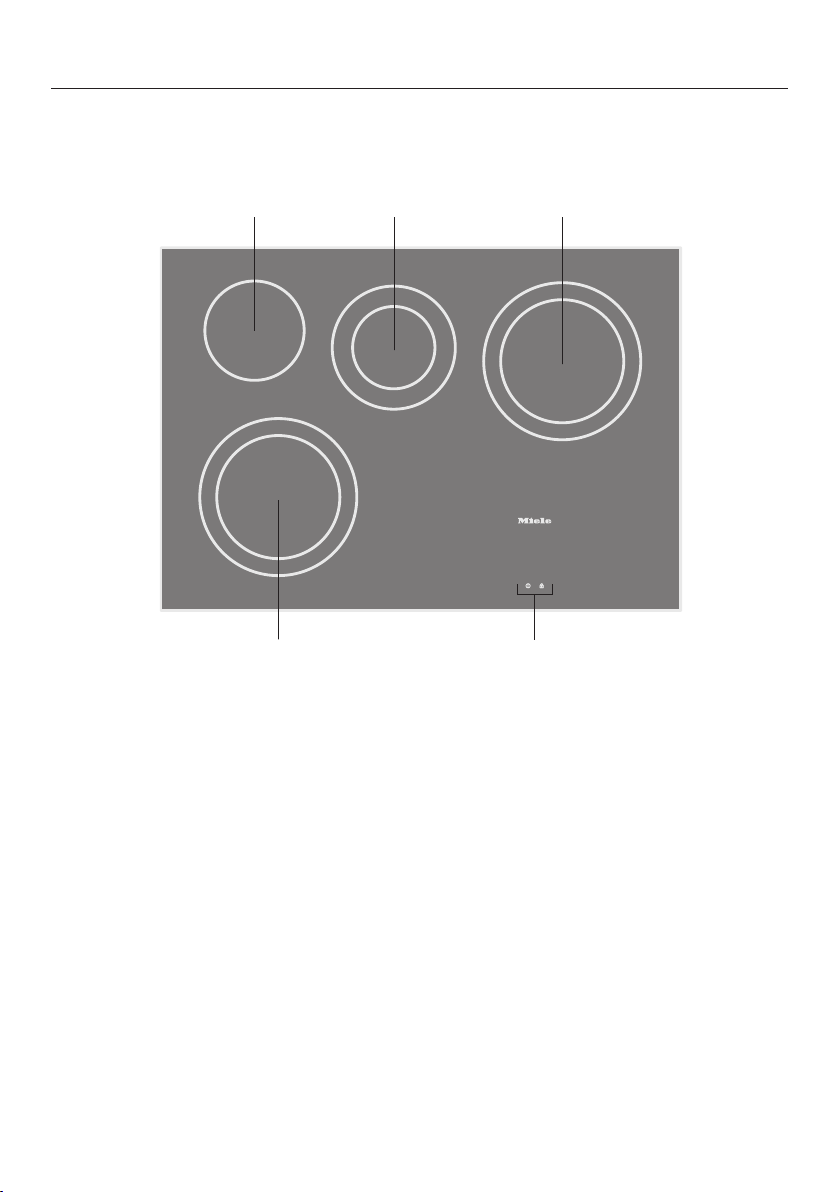
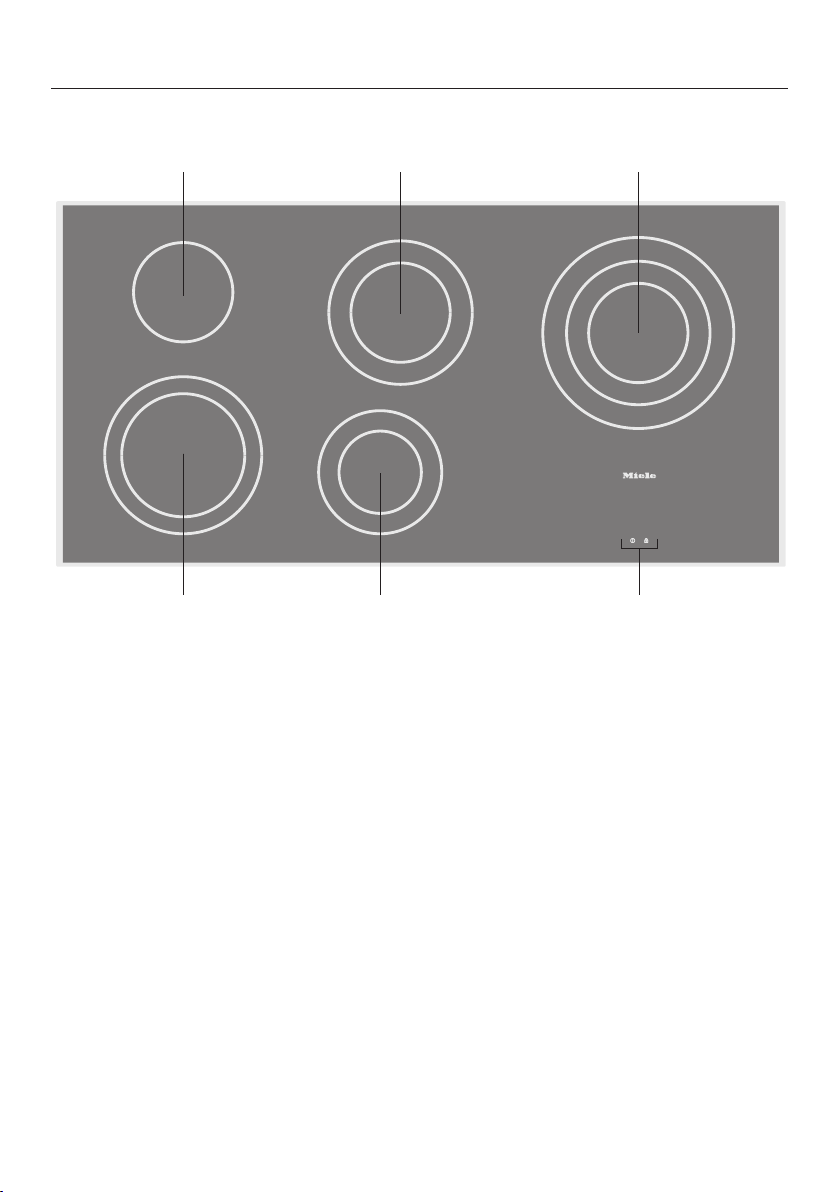
KM5840
e
a
b c d
a
Variable cooking zone
b
Standard cooking zone
c
Variable cooking zone
d
Variable cooking zone
e
Controls and indicators
Overview
18
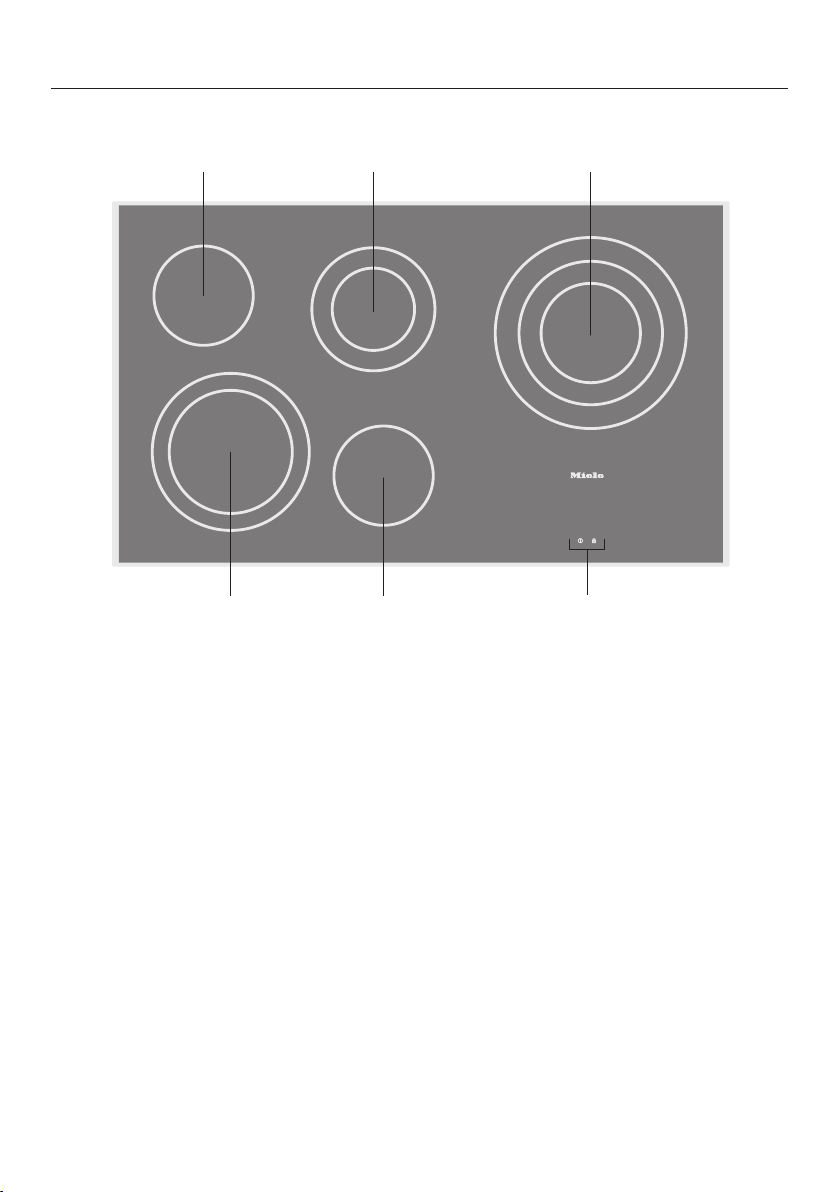
KM5860
a e
b
dc
f
a
Variable cooking zone
b
Standard cooking zone
c
Variable cooking zone
d
Variable cooking zone
e
Standard cooking zone
f
Controls and indicators
Overview
19
KM5880
b dc
ea
f
a
Variable cooking zone
b
Standard cooking zone
c
Variable cooking zone
d
Variable cooking zone
e
Variable cooking zone
f
Controls and indicators
Overview
20
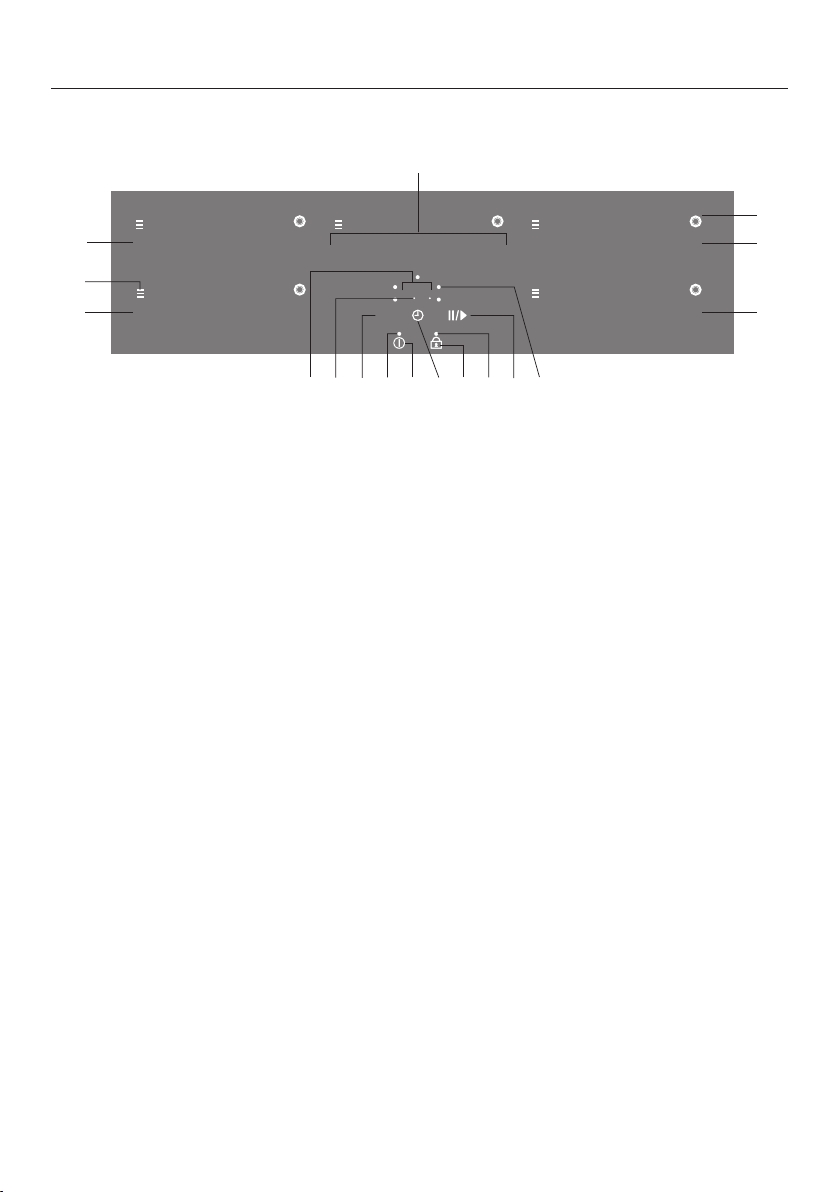
Control elements/indicators
0
0
9
0
9
1 2 3 4 5 6 7 8 1 2 3 4 5 6 7 8 9 1 2 3 4 5 6 7 8 9
0 1 2 3 4 5 6 7 8 1 2 3 4 5 6 7 8
9
h
b
b
b
b
8 8
a
c
j
fh
d
l kn
0
m
e
g
i
Sensor buttons
a
Switching the cooktop on and off
b
Setting the power level for the left and right cooking zones
c
Activating/deactivating the system lock/safety lock
d
Additional heating circle
e
Numerical display
– For setting the power level for middle rear cooking zones
– For setting the timer
f
Activating/deactivating the Stop&Go function
g
Timer
– For switching on/off
– For switching between timer functions
– For selecting a cooking zone (see “Switching off a cooking zone automati-
cally”)
h
Hour function
Indicators
i
Cooktop switched on
j
System lock/safety lock activated
k
For cooking zone selection, e.g., right rear cooking zone
l
For half hours if the timer setting is over 99 minutes
m
Residual heat

Overview
21
n
Timer display
to Time in minutes
.to. Time in hours
System lock/safety lock activated
Demo mode activated
Overview
22
Cooking zone data
KM5840
Cooking zone Øin inch Øin cm Rating in watts for
208/230V
7
1
/
16
"
18 1,600
9
1
/
16
"
23 2,500
5
11
/
16
"
14.5 1,200
4
3
/
4
"
12 700
7
1
/
16
"
18 1,800
7
1
/
16
"
18 1,600
9
1
/
16
"
23 2,500
Total power:8,000
KM5860
Cooking zone Øin inch Øin cm Rating in watts for
208/230V
7
1
/
16
"
18 1,600
9
1
/
16
"
23 2,500
5
11
/
16
"
14.5 1,200
4
3
/
4
"
12 700
7
1
/
16
"
18 1,800
5
11
/
16
"
14.5 1,100
8
1
/
4
"
21 2,150
10
5
/
8
"
27 3,100
5
11
/
16
"
14.5 1,200
Total power:9,800

Overview
23
KM5880
Cooking zone Øin inch Øin cm Rating in watts for
208/230V
7
1
/
16
"
18 1,600
9
1
/
16
"
23 2,500
5
11
/
16
"
14.5 1,200
5
11
/
16
"
14.5 1,100
8
1
/
4
"
21 2,400
5
11
/
16
"
14.5 1,100
8
1
/
4
"
21 2,150
10
5
/
8
"
27 3,100
4
3
/
4
"
12 700
7
1
/
16
"
18 1,800
Total power:11,000

Before first use
24
Cleaning the cooktop for the
first time
Before first use, wipe down the appli-
ance with a damp cloth and dry it.
Turning on the cooktop for the
first time
Metal components are protected by a
conditioning agent. Smells and vapor
may occur when the appliance is used
for the first time.
The smell and any vapors do not indi-
cate a faulty connection or a defective
appliance and are not harmful to your
health.
How the cooking zones work
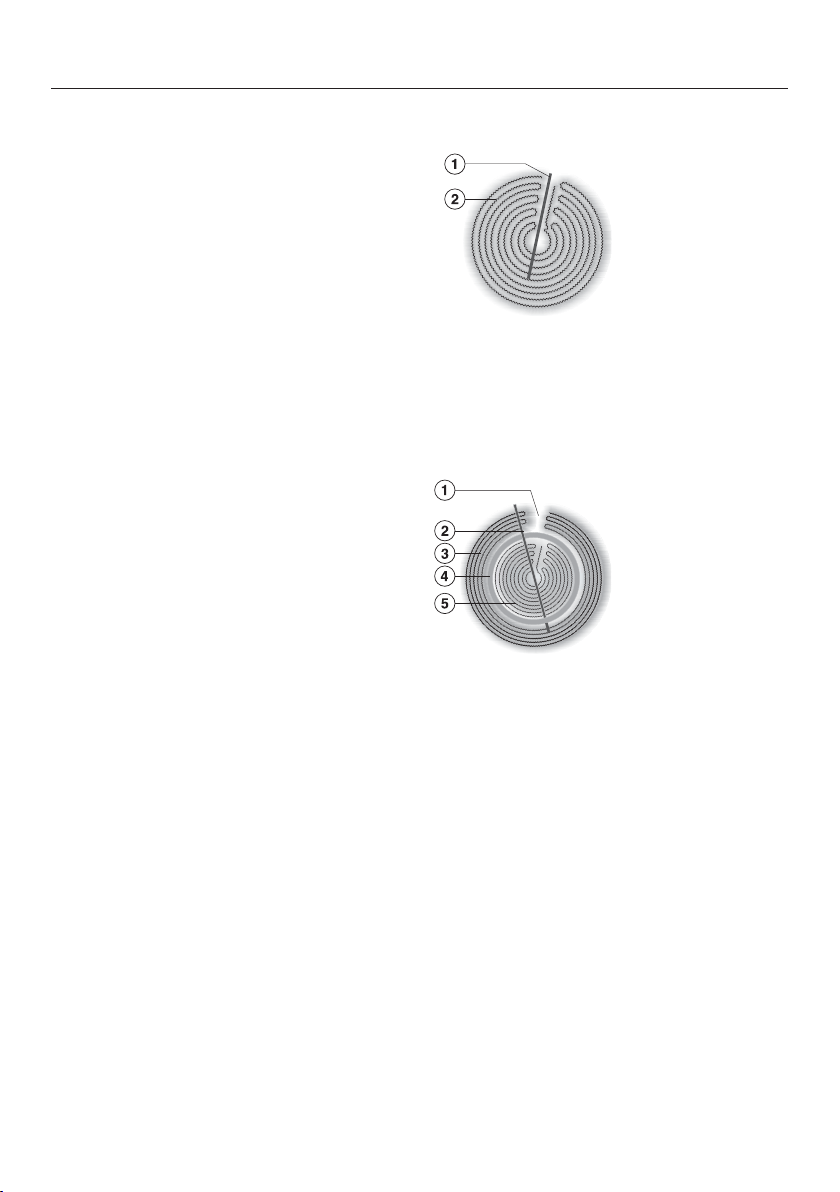
25
Standard cooking zones have one heat-
ing element, while variable cooking
zones and extended zones have two.
Depending on the model, the heating
elements may be separated by an insu-
lating ring.
Each cooking zone has overheating
protection (a temperature limiter), which
stops the ceramic surface from becom-
ing too hot (see “Safety features – Over-
heating protection”).
When a power level is selected, the
heat switches on and the element can
be seen through the ceramic surface.
The temperature of the cooking zone
depends on the power level selected,
and is electronically regulated. This
controls the “timing” of a cooking zone,
switching the element on and off.
Standard cooking zone
a
Overheat protection
b
Heating element
Variable cooking zone
a
Technical requirement, not a defect
b
Overheat protection
c
Outer heating element
d
Insulating ring
e
Inner heating element
Cookware
26
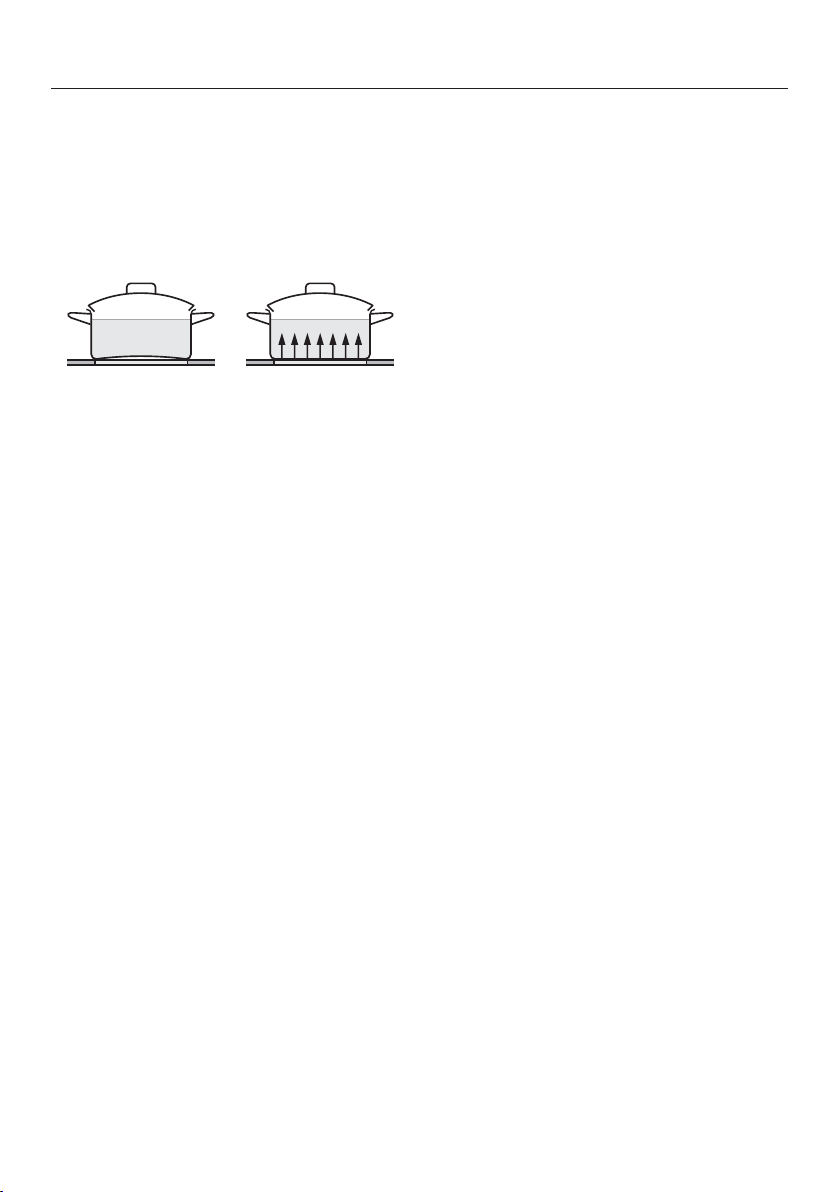
The most suitable cookware is metal
pots and pans with thick bottoms that,
when cold, bulge inwards slightly. On
warming, the bottom extends and sits
level on the cooking zone; this con-
ducts the heat optimally.
Cold Hot
Glass, ceramic or stoneware cookware
is less suitable. These materials do not
conduct the heat well.
Pots and pans made of synthetic mate-
rial or aluminum foil are not suitable.
These melt at high temperatures.
Cookware made from aluminum or with
an aluminum base can cause shiny
metallic spots. These spots can be re-
moved with ceramic and stainless-steel
cooktop cleaner (see “Cleaning and
care”, “Cleaning the ceramic surface”).
The composition of the pan bottom can
affect the evenness of the cooking re-
sults (e.g., when making pancakes).
- To make optimum use of the cooking
zones, choose cookware with a suit-
able base diameter (see “Overview -
Cooking zone data"”).
- Use only pots and pans with smooth
bases. Rough bases can scratch the
ceramic glass.
- Always lift the cookware to move it.
This will help prevent scratching.
- Please note that the maximum diam-
eter quoted by manufacturers often
refers to the diameter of the top rim
of the pot or pan. The diameter of the
base (generally smaller) is more im-
portant.

Energy saving tips
27
- Ensure that the bottoms of pots or
pans match the size of the cooking
zone or are somewhat larger. This en-
sures that heat is not lost unneces-
sarily.
- Use a lid whenever possible to mini-
mize heat loss.
- For small quantities, select a small
pan. A small pan on a small cooking
zone uses less energy than a large,
only partially filled pan on a large
cooking zone.
- Cook with as little water as possible.
- Once food has come to the boil or
the pan is hot for frying, reduce the
heat to a lower power setting.
- When cooking for a long time, turn
the cooking zone off at least 5 or
10minutes before the end of the
cooking time. This makes use of the
residual heat.
Setting range
28
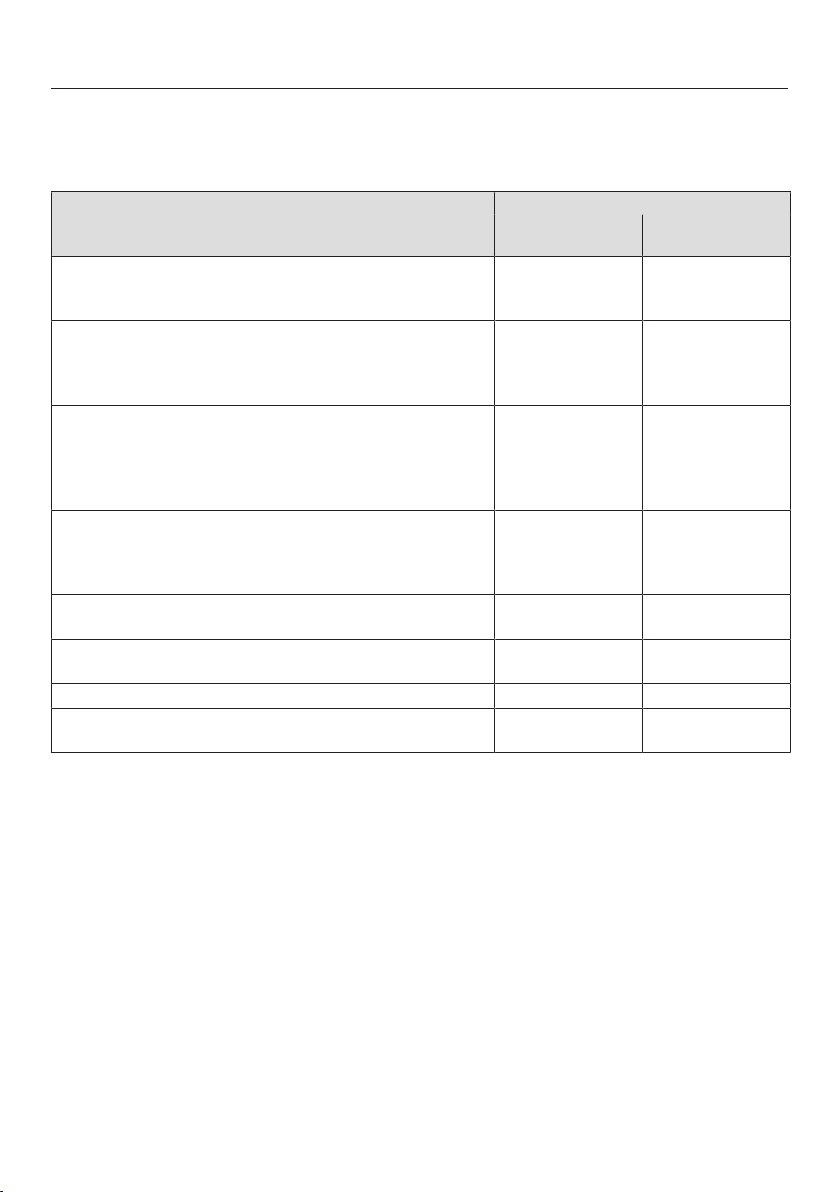
The cooktop is programmed with 9 power levels at the factory. If you wish to fine-
tune a setting, you can extend the power-level range to 17power levels (see “Pro-
gramming”).
Setting ranges
Factory setting
(9power levels)
Extended setting
(17power levels)
Melting butter, chocolate, etc.
Dissolving gelatin
Preparing yogurt
1–2 1–2.
Thickening sauces containing only egg yolk and butter
Warming small quantities of liquid
Keeping food warm that sticks easily
Cooking rice
1–3 1–3.
Warming liquid and semi-solid foods
Thickening sauces, e.g. Hollandaise
Making oatmeal
Preparing omelettes, lightly fried eggs
Steaming fruit
2–4 2–4.
Defrosting deep-frozen food
Steaming vegetables, fish
Cooking pasta, pulses
Cooking broths, pulse soups
3–5 3–5.
Bringing to the boil and continued cooking of large
quantities of food
5 5.
Gently frying (without overheating the fat) of fish, cutlets,
sausage, fried eggs, etc.
6–7 6–7.
Cooking potato fritters, pancakes, etc. 7–8 7–8.
Boiling large quantities of water
Bringing to a boil
8–9 8.–9
These levels should only be taken as a guide. They apply to 4normal servings. With deep
pans, large quantities, or when cooking without the lid, a higher level is required. For smaller
quantities, select a lower level.

Operation
29
Using the appliance
This ceramic cooktop is equipped with
electronic sensor buttons which react to
finger contact. For safety reasons, in or-
der to switch the appliance on, the On/
Off sensor button needs to be
touched for a little longer than the other
sensors.
Each time a sensor is activated, an au-
dible signal sounds.
When the cooktop is turned off, only the
printed symbols for the On/Off and
system lock/safety lock sensor but-
tons are visible. When the cooktop is
turned on, all other sensor buttons light
up. On the numerical displays, the
sensor button lights up in brightness
level 2, and the through sensor but-
tons light up in brightness level1.
When you set a power level, the sensor
buttons up to the set power level light
up in brightness level2.
If the booster or Keep Warm function is
set, the corresponding sensor button
lights up in brightness level2.
Malfunction can occur due to
dirty and/or covered sensor controls.
If the sensor controls are dirty or
covered this could cause them to fail
to react, to activate a function, or
even to switch the cooktop off auto-
matically (see “Safety features–
Safety shut-off”). Placing hot cook-
ware on the sensor controls/indica-
tors can damage the electronic un-
derneath.
Keep the sensor controls and indica-
tors clean.
Do not place anything over the sen-
sor controls or indicators.
Do not place hot cookware over the
sensor controls or indicators.

Operation
30
Fire hazard due to overheated
food.
Unattended food can overheat and
ignite.
Do not leave the cooktop unattended
whilst it is being used.
Switching the cooktop on
Touch the sensor button.
All sensor buttons and the “Cooktop
switched on” indicator light will light up.
If no further entry is made, the cooktop
will turn itself off after a few seconds for
safety reasons.
Switching on the cooking zone
and setting the power level
Touch the sensor button on the rel-
evant numerical display.
All the sensor buttons will light up.
Touch the appropriate number sensor
for the power level you want.
Switching off
To turn off a cooking zone, press the
sensor button on the corresponding
numerical display.
To switch off the cooktop and all the
cooking zones, touch the sensor
button.
Residual heat indicator
When a cooking zone is hot, the resid-
ual heat indicator and the sensor but-
ton light up on the control scale after
deactivation.
The lines of the residual heat indicator
go out one after another as the cooking
zones cool down. The last bar and the
sensor button go out together.
The residual heat indicators will flash if
there is a power cut during use or
while residual heat is still present or if
you have opened the programming
function while residual heat is still
present.
Risk of burning or scalding due
to hot cooking zones.
The cooking zones will be hot after
use.
Do not touch the cooking zones
while the residual heat indicators are
on.

Operation
31
Extension
You can switch on the second or third
heating circles of a cooking zone if
available (see “Overview – Cooktop”).
The indicator light to show that the ad-
ditional heating circle is switched on will
light up brighter than normal while it is
switched on. There is no difference in
the display between the second and
third heating circles of a triple-circle
cooking zone.
Switching additional heating circles
on
Switch on the required cooking zone.
Set the power level you want.
Two-circle cooking zone: touch the
sensor button.
Three-circle cooking zone: touch
the sensor button.
- Once: the first heating circle is turned
on
- Twice: the third heating circle is
turned on
Switching the heating circle off
Touch the sensor button.
Setting the power level – ex-
tended power level range
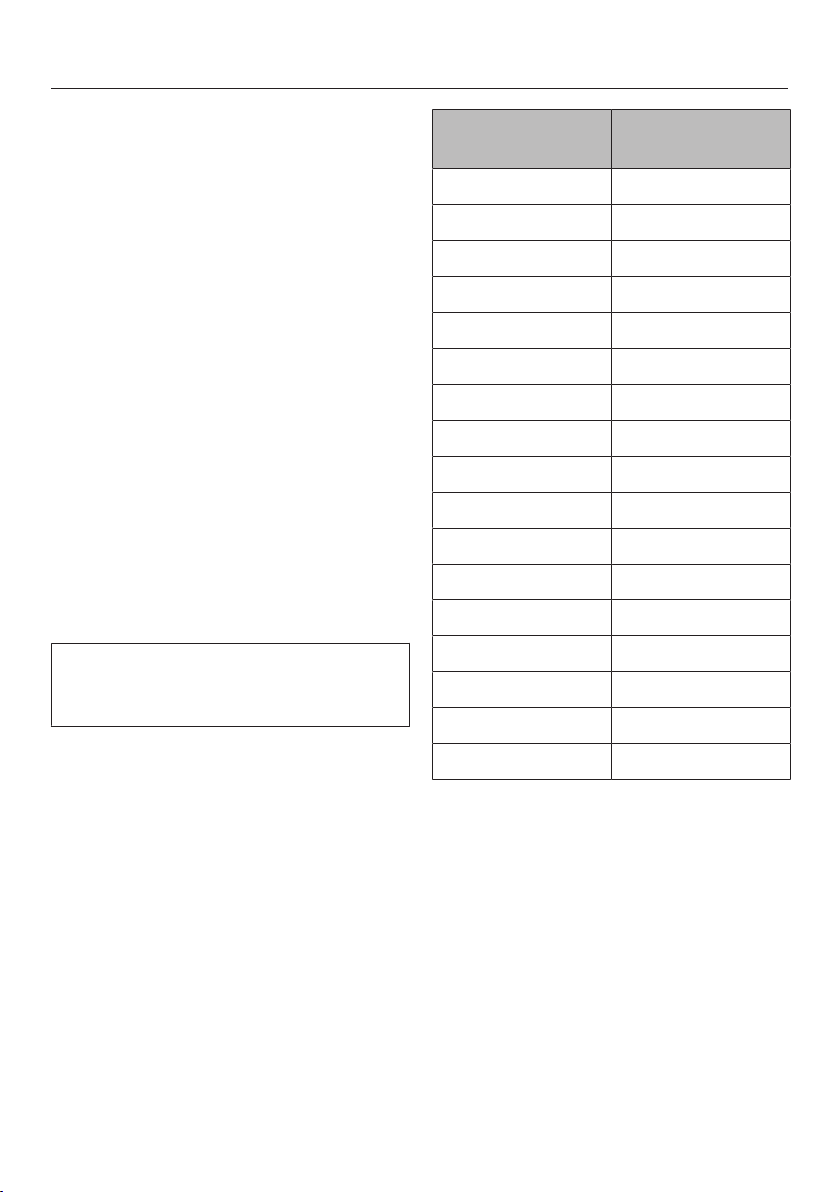
Touch the numerical keybank be-
tween two number sensors.
The numbers to the left and right of the
interim level light up brighter than the
other sensor controls.
Example:
If you have set power level 7., the num-
bers 7 and 8 will be brighter than the
other numbers.
Operation
32
Auto Heat-up
When Auto Heat-up has been activated,
the cooking zone turns on automatically
at the highest level and then switches
to the previously selected continued
cooking level. The heat-up time de-
pends on which continued cooking
level has been chosen (see chart).
Activating
Tap the sensor button of the required
continued cooking level until an audi-
ble tone sounds and the sensor but-
ton starts to flash.
During the heat-up time, the set contin-
ued cooking level flashes.
With extended power levels (see “Pro-
gramming”), the power levels before
and after the intermediate power level
will flash when an intermediate power
level is selected.
When you change the continued
cooking level, you deactivate Auto
Heat-up.
Deactivating
Tap the sensor button of the set con-
tinued cooking level.
or
select a different power level.
Continued cook-
ing level*
Heat-up time
[min:sec]
1 1:20
1. 2:00
2 2:45
2. 3:25
3 4:05
3. 4:45
4 5:30
4. 6:10
5 6:50
5. 7:10
6 1:20
6. 2:00
7 2:45
7. 2:45
8 2:45
8. 2:45
9 –
* The continued cooking settings with a dot
after the number are only available if the
power-level range has been extended (see
“Programming”). As the higher continued
cooking settings are generally used for fry-
ing food, only a relatively short heat-up time
is needed to heat up the cookware initially.
Timer
33
The cooktop has to be turned on if
you wish to use the timer.
You can set a time between 1 minute
() and 9 hours (.).
The timer can be used for two different
functions:
- For setting the timer
- For turning off a cooking zone auto-
matically.
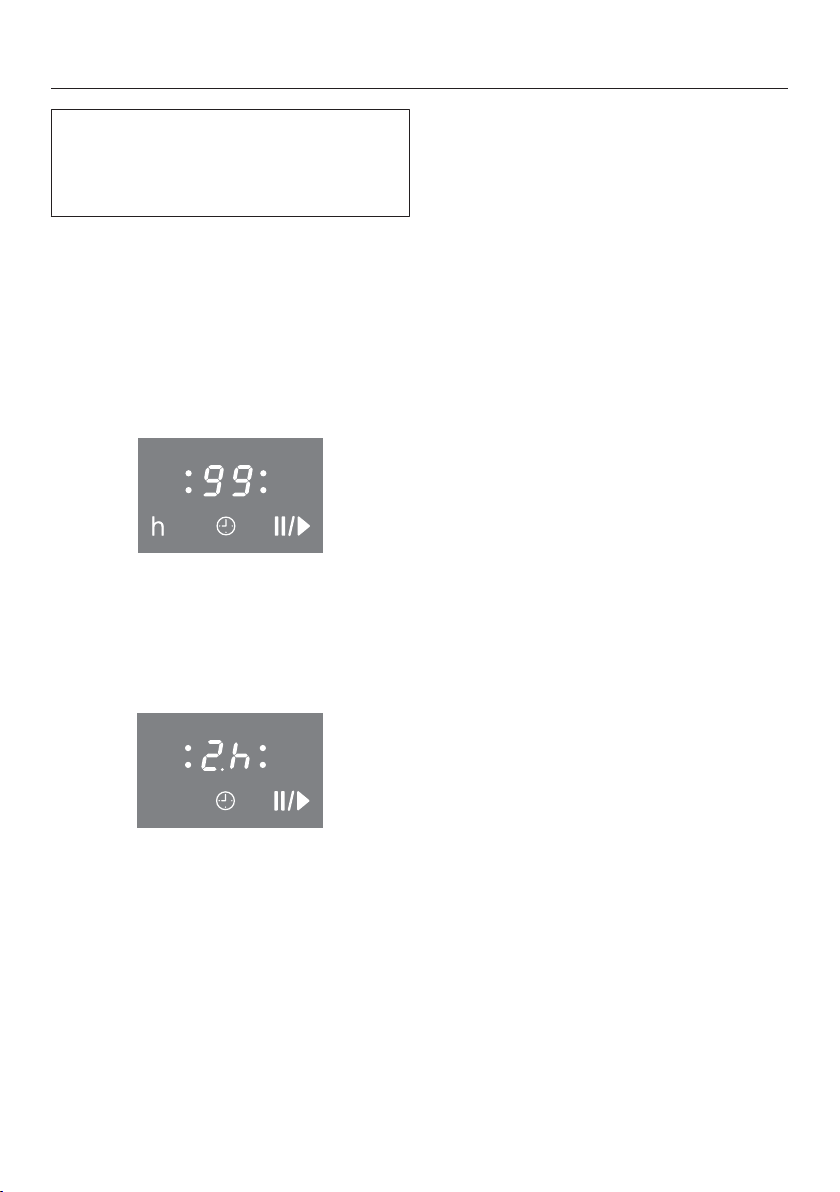
A time up to 99 minutes is set and dis-
played in minutes.
In case of a time of more than 99 min-
utes, the timer must be switched to
hours (h). The time is set in half-hour
steps. Half-hours are indicated by a dot
following the number, for example, 2 h
30 min:
h
Timer
Setting the minutes
Example: You want to set a time of
15minutes.
Make sure the cooktop is switched
on.
Touch the sensor button.
appears in the timer display, and the
right flashes.
First the tens digit is set, then the ones
digit.
Touch the number sensor which cor-
responds to the tens position (1 in
this case).
The timer display will change and will
start flashing on the right.
Touch the number sensor which cor-
responds to the ones position (5 in
this case).
The timer display will change. jumps
to the left and appears on the right.
After a few seconds, the timer display
will light up continuously. The timer
starts counting down.

Timer
34
Setting the hours
To set full hours, touch the respective
sensor on the number scale. To set half
hours, touch the space between 2 sen-
sors on the number scale.
Example: You want to set a time of 2
hours and 30 minutes.
Make sure the cooktop is switched
on.
Touch the sensor button.
appears in the timer display, and the
right flashes.
Touch the sensor to set the display
to hours.
Tap the number scale between the
and sensor buttons.
After a few seconds, the timer display
will light up continuously. The timer
starts counting down.
Changing the timer
Tap the sensor button.
Set a new time, as described above.
Deleting the timer
Touch the sensor button until
appears in the timer display.

Timer
35
Switching off a cooking zone
automatically
You can set a time after which the
cooking zone will switch off automati-
cally. This function can be used on all
cooking zones at the same time.
If the programmed time is longer than
the maximum time allowed, the safety
shut-off function will turn off the cook-
ing zone automatically when the maxi-
mum time has elapsed (see “Safety
shut-off”).
Select a power level for the cooking
zone you require.
Keep touching the sensor control
until the indicator light for this cook-
ing zone starts flashing.
If several cooking zones are on, the in-
dicator lights flash in a clockwise di-
rection, starting with the front left.
Set the required time.
If you want to set another cooking
zone to switch off automatically, fol-
low the same steps as described
above.
If more than one switch-off time is
programmed, the shortest time left will
be displayed, and the corresponding
indicator light will flash. The other indi-
cator lights will light up constantly.
If you want to show the time left for
another cooking zone which is count-
ing down in the background, touch
the sensor control repeatedly until
the indicator light for the cooking
zone you require flashes.

Timer
36
Using both timer functions at
the same time
The minute minder and automatic
switch-off functions can be used at
the same time.
If you have programmed one or more
switch-off times, and would like to use
the minute minder as well:
Touch the sensor control repeat-
edly until the indicator lights of the
programmed cooking zones light up
constantly and appears in the
timer display.
Set the time as described above.
If you have set the minute minder and
would like to program one or more
switch-off times as well:
Touch the sensor control repeat-
edly until the indicator light for the
cooking zone you require flashes.
Set the time as described above.
Shortly after the last entry, the timer
display switches to the function with the
shortest time left.
If you want to show the times left which
are counting down in the background:
Touch the sensor control repeat-
edly until
- the indicator light for the required
cooking zone flashes (automatic
switch-off).
- the timer display (minute minder)
starts flashing.
Starting with the shortest time left
which is shown in the display, all
switched-on cooking zones and the
minute minder are shown in a clockwise
direction.

Additional functions
37
Stop&Go
When Stop&Go is activated, the power
level of all cooking zones in use is re-
duced to power level1.
The cooktop power levels and the timer
settings cannot be altered; the cooktop
can only be switched off. A set timer
will continue to count down. AutoBoost
and automatic shut-off times set will be
paused.
When Stop&Go is deactivated, the
cooking zones will operate at the previ-
ously set power level, and the Auto-
Boost and automatic shut-off times will
start to count again.
If the function is not deactivated within
1hour, the cooktop will switch off.
Activation/deactivation
Touch the sensor button.
Use this function when the sensors
need to be cleaned quickly.

Safety features
38
System lock/Safety lock
The system lock and safety lock are
deactivated if there is a power out-
age.
One-finger control is the default set-
ting. You can change the default to
three-finger control (see “Program-
ming”).
Your cooktop is equipped with a system
lock and a safety lock to prevent the
cooktop and the cooking zones being
switched on or any settings being al-
tered unintentionally.
The system lock is activated when the
cooktop is switched off. If the system
lock is activated, the cooktop cannot be
switched on and the timer cannot be
used. The cooktop is programmed so
that the system lock must be activated
manually. It can be programmed to be
activated automatically 5minutes after
the cooktop has been switched off if it
is not manually locked first (see “Pro-
gramming”).
The safety lock is activated while the
cooktop is switched on. When the
safety lock is activated, the cooktop
can be operated only under certain
conditions:
- The power levels for the cooking
zones and the timer settings cannot
be changed.
- The cooking zones, entire cooktop,
and the timer can be turned off, but
once turned off cannot be turned on
again.
If a locked sensor is touched when the
safety lock or the system lock is acti-
vated, the indicator light comes on and
appears in the timer display for a few
seconds.
Activating
Touch the sensor until appears
in the timer display and the safety
lock indicator light appears.
After a few moments, the indicator
light and switch off.
Deactivating
Touch the sensor until goes out
in the timer display and the safety
lock indicator light goes out.

Safety features
39
Safety shut-off
Excessive operating time
The safety shut-off mechanism is trig-
gered automatically if a cooking zone is
heated for an unusually long period of
time. This time depends on the power
level selected. If the time has been ex-
ceeded, the cooking zone turns off and
the residual-heat indicator appears. If
you turn the cooking zone off and on
again, it will be ready for operation
again.
Safety shut-off if the sensors are
covered
Your cooktop will turn off automatically
if one or several of the sensors remain
covered for longer than 10 seconds, for
example, by finger contact, food boiling
over or by an object such as an oven
glove or tea towel. flashes in the timer
display and a buzzer sounds every
30seconds for 10minutes.
When you remove the objects or soil-
ing, goes out, the buzzer goes off,
and the cooktop is ready for operation
again.

Safety features
40
Overheating protection
Each cooking zone is equipped with
overheating protection (internal temper-
ature limiter). This switches off the
cooking zone heating element automat-
ically before it overheats. As soon as
the cooking zone temperature has
cooled sufficiently, heating is switched
on again automatically.
The overheating protection may be acti-
vated under the following circum-
stances:
- No cookware is present on the acti-
vated cooking zone.
- The cookware being heated is empty.
- The base of the cookware is not sit-
ting evenly on the cooking zone.
- The cookware is not conducting heat
properly.
You can tell that the overheating protec-
tion has activated because the heating
element switches on and off even when
the highest power level is selected.

Cleaning and care
41
Risk of burning or scalding due
to hot cooking zones.
The cooking zones will be hot after
use.
Turn off the cooktop.
Allow the cooktop to cool down be-
fore cleaning.
Risk of damage due to moisture
ingress.
The steam from a steam cleaning ap-
pliance could reach live electrical
components and cause a short cir-
cuit.
Do not use a steam cleaner to clean
the cooktop.
All surfaces could be discolored or
damaged if unsuitable cleaning
agents are used. All surfaces are
susceptible to scratching.
Remove all cleaning agent residues
immediately.
Do not clean with any abrasive or
sharp pointed objects.
Clean the cooktop after every use.
Dry the cooktop thoroughly after ev-
ery cleaning to avoid limescale
residue.
Unsuitable cleaning agents
To avoid damaging the surfaces of the
appliance, do not use:
- liquid dish soap
- cleaning agents containing soda, al-
kalis, ammonia, acids, or chlorides
- cleaning agents containing limescale
remover
- stain or rust removers
- abrasive cleaning agents, such as
scouring powder, scouring liquid, or
pumice stones
- cleaning agents containing solvents
- dishwasher cleaning agents
- grill and oven sprays
- glass cleaners
- hard, abrasive brushes or sponges
(e.g., pot scourers), or sponges which
have been previously used and still
contain abrasive cleaning agents
- eraser sponges

Cleaning and care
42
Cleaning the ceramic surface
Risk of damage caused by
pointed objects.
The seal between the cooktop and
the countertop could be damaged.
The seal between the ceramic sur-
face and the frame could be dam-
aged.
Do not use pointed objects for clean-
ing.
When cleaning with liquid dish soap,
not all contaminants and residues
are removed. An invisible film forms,
which causes discoloration of the ce-
ramic. This discoloration cannot be
removed.
Clean the ceramic surface regularly
with a suitable ceramic cooktop
cleaning agent.
First wipe down the surface with a
damp cloth to loosen soiling, then re-
move stubborn crusting with a glass
scraper.
Then clean the ceramic surface with
the Miele Ceramic and Stainless-
Steel Cooktop Cleaner (see “Optional
accessories – Cleaning and care
products”) or with a proprietary ce-
ramic cleaner applied with a paper
towel or a clean cloth. Do not put the
cleaner on a hot cooktop since this
may cause spotting. Please follow the
cleaning-agent manufacturer’s in-
structions.
Finally wipe the cooktop with a damp
cloth and dry it with a soft, dry cloth.
Residues can burn onto the cooktop
the next time it is used and cause
damage to the ceramic surface. En-
sure that all cleaner residues are re-
moved.
Spots caused by limescale, water,
and aluminum residues (spots with a
metallic appearance) can be removed
using the Miele Ceramic and Stain-
less-Steel Cooktop Cleaner.
Risk of burning or scalding due
to hot cooking zones.
The cooking zones are hot during
use.
Wear pot holders and use a glass
scraper to remove sugar, plastic, or
aluminum foil residues from the hot
cooktop.
Should any sugar, plastic, or alu-
minum foil spill or fall onto a hot
cooking zones while it is in use, first
turn off the cooktop.
Then carefully scrape off these
residues immediately while they are
still hot, using a shielded scraper
blade.
Afterwards, clean the ceramic surface
in its cooled state, as described
above.

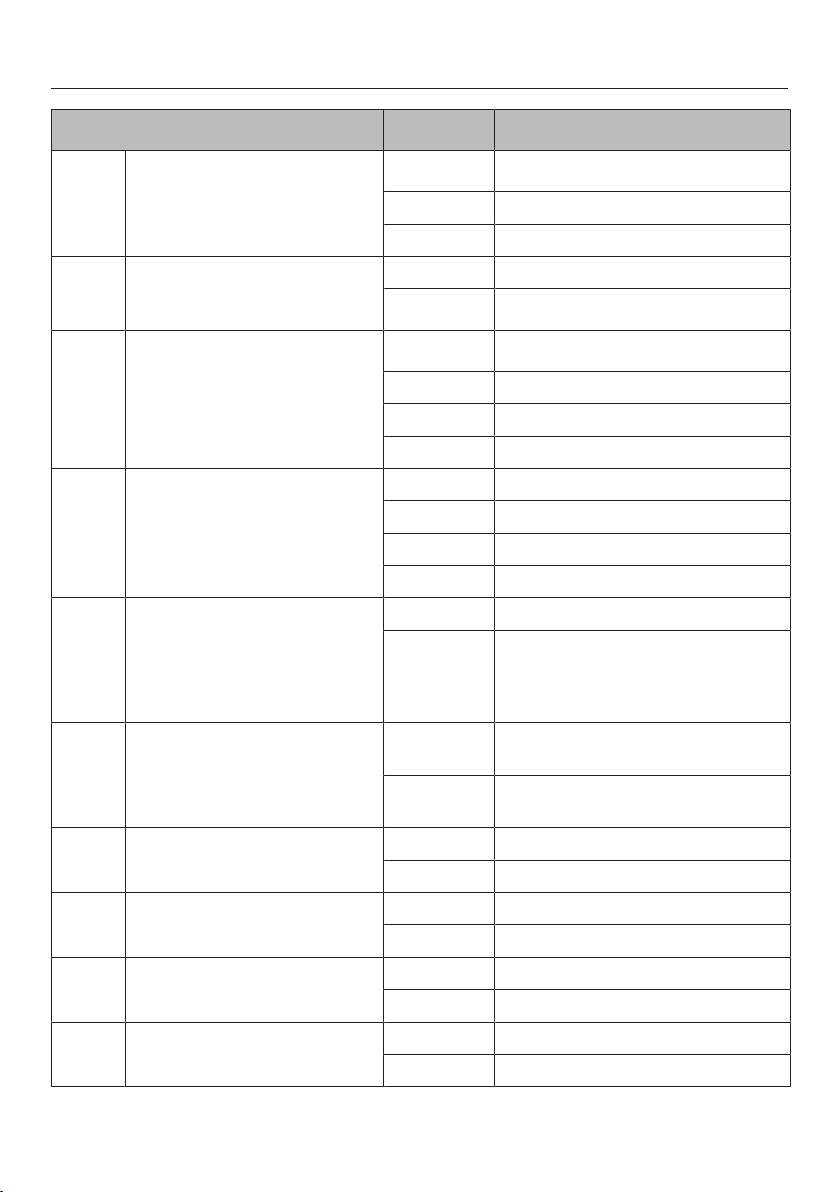
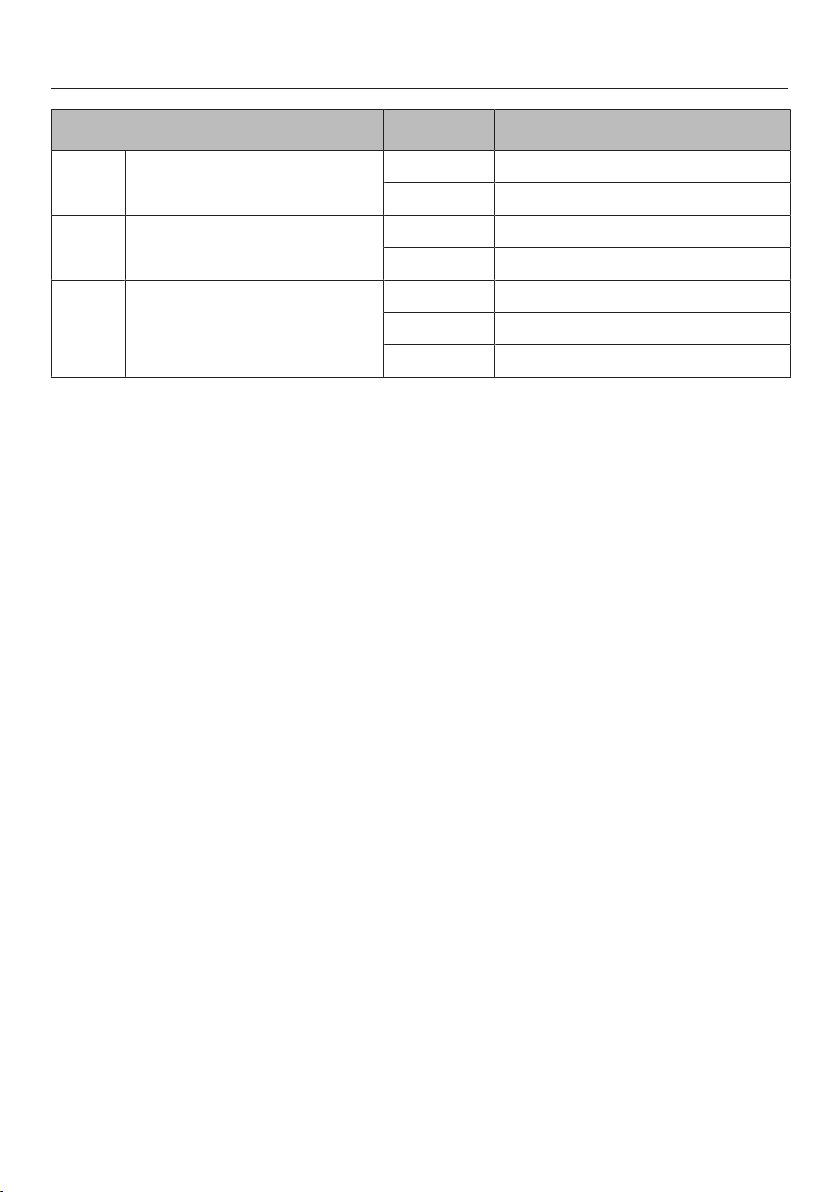
Programming
43
You can adapt the programming of the
cooktop to your personal needs. Sev-
eral settings can be changed in succes-
sion.
After the programming function is
started, (program) and (status) will
appear in the timer display. With cook-
tops that have 3 cooking zones, an ad-
ditional display appears at the back left.
The program is displayed in the front
left and rear left control scales.
Example:
Program 3 =
Front left, rear left
Program 14 =
Front left, rear left
The status is displayed in the front right
control scale.
After the programming function is ex-
ited, an automatic reset is performed.
It is concluded when an indicator light
lights up briefly via the sensor but-
ton.
Do not turn on the cooking zone until
the reset is concluded.
Starting the programming
function
When the cooking zone is turned
off, tap the and sensor buttons
simultaneously until the indicator light
for the safety lock flashes.
Setting a program
To set the ones digits, tap the corre-
sponding number on the front left
control scale.
To set the tens digits, tap the corre-
sponding number on the rear left
control scale.
Setting the status
Touch the respective number on the
front right control scale.
Saving the settings
Touch the sensor until the indica-
tors go out.
How to avoid saving the set-
tings
Touch the sensor until the indica-
tors go out.
Programming
44
Program
1
Status
2
Settings
P0 Demo mode and factory default
settings
S0
Demo mode on
3
S1 Demo mode off
S9 Factory default settings reinstated
P2 Number of power levels S0 9 power levels
S1
17 power levels
4
P4 Tone when a sensor button is
touched
S0
Off
5
S1 Quiet
S2 Medium
S3 Loud
P5 Audible signal for timer S0 Off
S1 Quiet
S2 Medium
S3 Loud
P6 System lock/Safety lock S0 One-finger control with
S1 Three-finger control by touching
and the “0” sensor button for select-
ing the right-hand cooking zones at
the same time
P7 System lock S0 System lock can only be activated
manually
S1 Manual and automatic activation of
the system lock
P8 Auto heat-up S0 Off
S1 On
P11 Second circle of the front left
cooking zone
S0 Not switched on at the same time
S1 Always switches on at the same time
P12 Second circle of the front right
cooking zone
S0 Not switched on at the same time
S1 Always switches on at the same time
P13 Second circle of the rear right
cooking zone
S0 Not switched on at the same time
S1 Always switches on at the same time
Programming
45
Program
1
Status
2
Settings
P14 Second circle of the rear central
cooking zone
S0 Not switched on at the same time
S1 Always switches on at the same time
P15 Audible signal if the sensors are
covered
S0 Off
S1 On
P16 Sensor buttons reaction speed S0 Slow
S1 Normal
S2 Fast
1
Programs not shown here have no allocation.
2
The factory setting is shown in bold.
3
After switching the cooktop on, appears in the timer display for several seconds.
4
In the text and charts, the extended power levels are shown with a dot after the number
for better understanding.
5
The keypad tone for the On/Off sensor cannot be switched off.

Frequently Asked Questions
46
With the help of the following guide minor faults in the performance of the ma-
chine, some of which may result from incorrect operation, can be remedied with-
out contacting the Service Department.
This guide may help you to find the reason for the fault, and how to correct it.
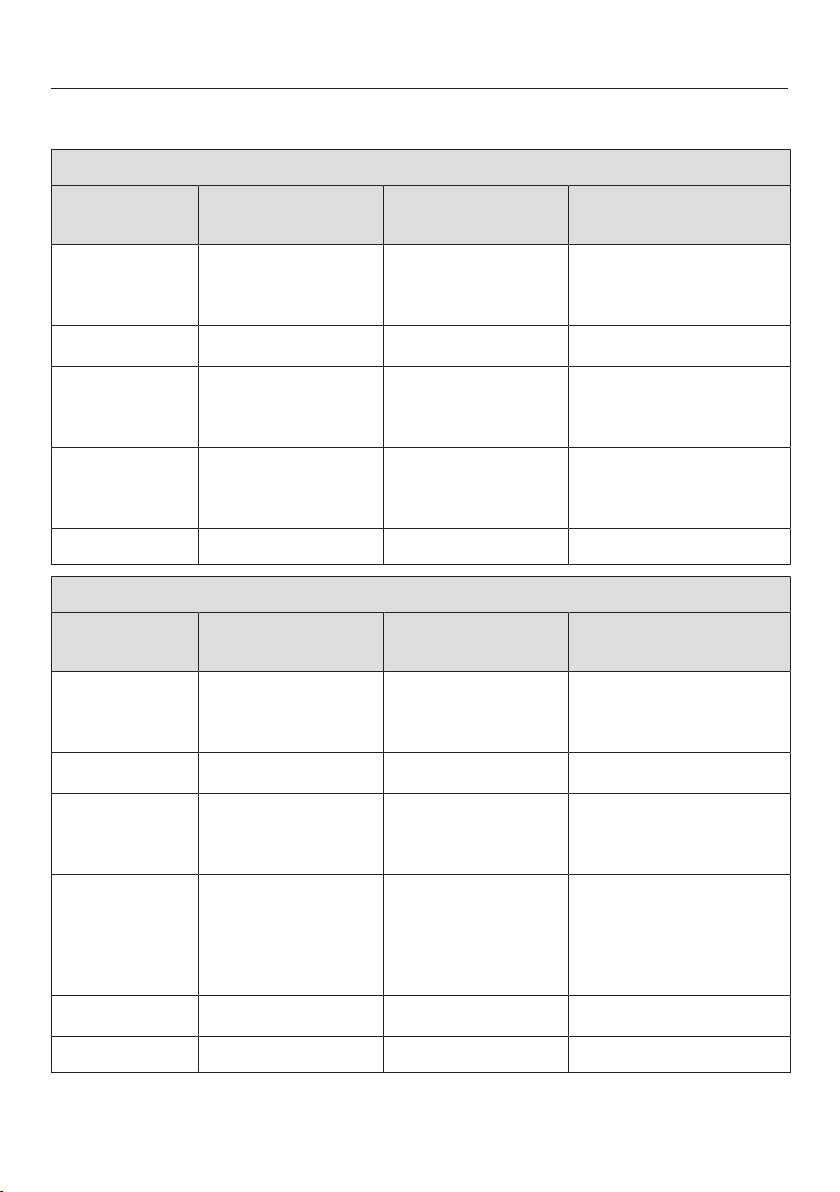
Problem Possible cause and solution
Cooktop or cooking
zones cannot be turned
on.
There is no power to the cooktop.
Check if the breaker has tripped. Contact a quali-
fied electrician or Miele Customer Service (for the
minimum fuse rating, see data plate).
There may be a technical fault.
Disconnect the cooktop from the electricity supply
for approx. 1 minute by
– tripping the relevant breaker or screwing the
fuse out completely, or
– switching off the residual current device.
If the cooktop will still not turn on after resetting
the breaker or the residual current device, contact
a qualified electrician or Miele Customer Service.
There is a strange smell
or vapors when the ap-
pliance is being used
for the first time.
Metal components are protected by a conditioning
agent. Smells and vapor may occur when the appli-
ance is used for the first time. The smell and any va-
pors do not indicate a faulty connection or a defec-
tive appliance and are not harmful to your health.
After the cooktop has
been switched on,
appears in the timer
display for a few sec-
onds.
The system lock or safety lock is activated.
Deactivate the system lock or safety lock (see
“Safety features – System lock/Safety lock”).
flashes in the timer
display and the cooktop
switches off automati-
cally.
One or more of the sensor controls are covered, e.g.,
by finger contact, food boiling over, or an object.
Clean off any dirt and/or remove the object (see
“Safety features – Safety shut-off”).
After turning on the
cooktop, appears in
the timer display for
several seconds. The
cooking zones don't
heat up.
The cooktop is in demo mode.
Deactivate demo mode (see “Programming”).

Frequently Asked Questions
47
Problem Possible cause and solution
A cooking zone turns it-
self off automatically.
It might have been turned on for too long.
You can use the cooking zone again by turning it
back on (see “Safety features–Safety shut-off”).
Auto Heat-up is turned
on, but the food does
not start cooking.
Large amounts of food are being heated.
Start cooking at the highest power level, then re-
duce the power level manually.
The pan is not conducting heat properly.
Use a different pan that is able to better conduct
heat on an induction cooktop.
The food in the pan is
barely heating up or is
not heating up at all.
The pan is not conducting heat properly.
Use a different pan that is able to better conduct
heat.
The pan is too large for the cooking zone.
Use a smaller pan.
The outer ring of a variable or extended cooking zone
is not switched on.
Switch the outer ring on.
The heating element for
one of the cooking
zones switches on and
off.
This “timing” of the element is normal. It is caused
by the electronic temperature control (see “How the
cooking zones work”).
If the heating switches on and off at the highest
power level, the overheating protection has been
triggered (see “Safety features – Overheating pro-
tection”).
One or more residual
heat indicators is flash-
ing.
There was a power failure during operation or when
residual heat was present.
You called the programming function while residual
heat was still present.

Frequently Asked Questions
48
Problem Possible cause and solution
The sensor buttons are
over-sensitive or do not
react at all.
The sensitivity level of the sensor buttons has
changed.
Ensure that the cooktop is not in direct sunlight or
strong artificial light and that the area around the
cooktop is not too dark.
Make sure that there is nothing covering the sen-
sor buttons or the cooktop.
Take any pans off the cooktop and wipe away any
food deposits.
Interrupt the power supply to the cooktop for ap-
prox. 1minute.
If the problem persists after power is restored,
please contact Miele Service.
In the timer display
flashes alternately with
numbers.
There is an electronic fault.
Disconnect the power supply to the cooktop for
approx. 1minute.
If the problem persists after power has been re-
stored, please contact Customer Service.

Optional accessories
49
Miele offers a range of useful acces-
sories, as well as cleaning and condi-
tioning products for your appliance.
These products can be easily ordered
from the Miele webshop.
These products can also be ordered
from Miele Technical Service (see the
end of these operating instructions) or
your Miele dealer.
Stainless steel conditioner
250ml
Removes heavy soiling, lime scale, and
aluminum residue.

Customer Service
50
Contact in the event of a fault
In the event of a fault which you cannot remedy yourself, please contact your
Miele dealer or Miele Customer Service.
You can book a Miele Service Call online at www.miele.com/service.
Contact information for Miele Customer Service can be found at the end of this
document.
Please quote the model identifier and serial number of your appliance (SN) when
contacting Miele Customer Service. Both pieces of information can be found on
the data plate.
Appliance warranty and product registration
You can register your product and/or view the manufacturer´s warranty terms and
conditions for Miele appliances and vacuum cleaners at www.mieleusa.com.
Installation
*INSTALLATION*
51
IMPORTANT SAFETY INSTRUCTIONS - INSTALLATION
Risk of damage caused by incorrect installation.
Incorrect installation can damage the cooktop.
The cooktop must only be installed by a qualified specialist.
Risk of electric shock from voltage.
Incorrect connection to the power supply may result in an electric shock.
The cooktop must be connected to the electrical supply by a qualified person
only.
Damage from falling objects.
Take care not to damage the cooktop when installing cabinetry or a ventilation
hood above it.
Install the cabinetry and ventilation hood before installing the cooktop.
Reaching over a hot cooktop to access the cabinets can result in
burns. You can reduce the risk of burns by installing a ventilation
hood that extends at least 4¾" (12cm) past the bottom of the cabi-
nets. Do not install any cabinets above the cooktop.
The countertop must be heat-resistant (up to 212°F / 100°C), so
that it does not become deformed or the veneer detached. The wall
strips must be heat-resistant as well.
The cooktop must not be installed above refrigerators/freezers,
dishwashers, or washer/dryers.
When installing the cooktop, make sure that the power cord can-
not come into contact with hot appliance parts.
Ensure that the power cord cannot be touched after the cooktop
has been installed.
After the installation of the cooktop, the electrical cord may not
come into contact with any moving kitchen parts (e.g. a drawer) or
be subject to mechanical stress.
Observe carefully the safety clearances listed on the following
pages.
Installation
*INSTALLATION*
52
Safety distances
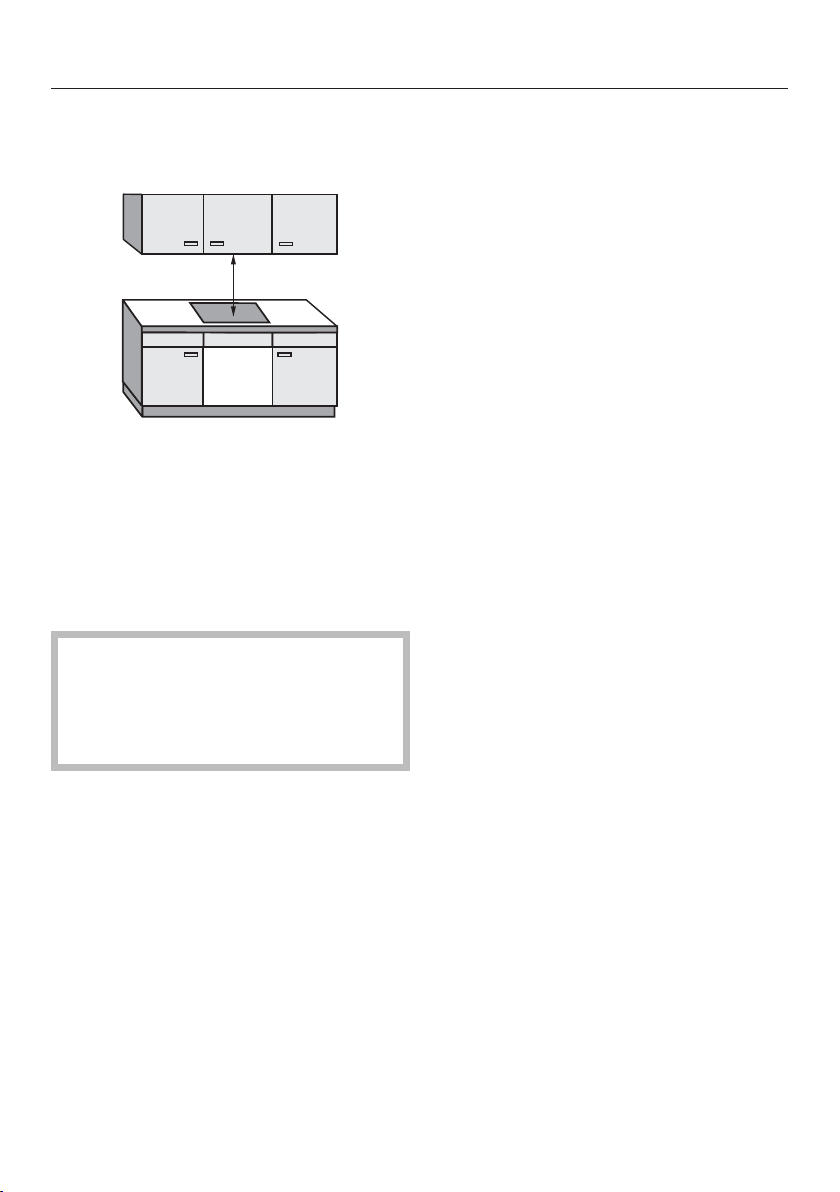
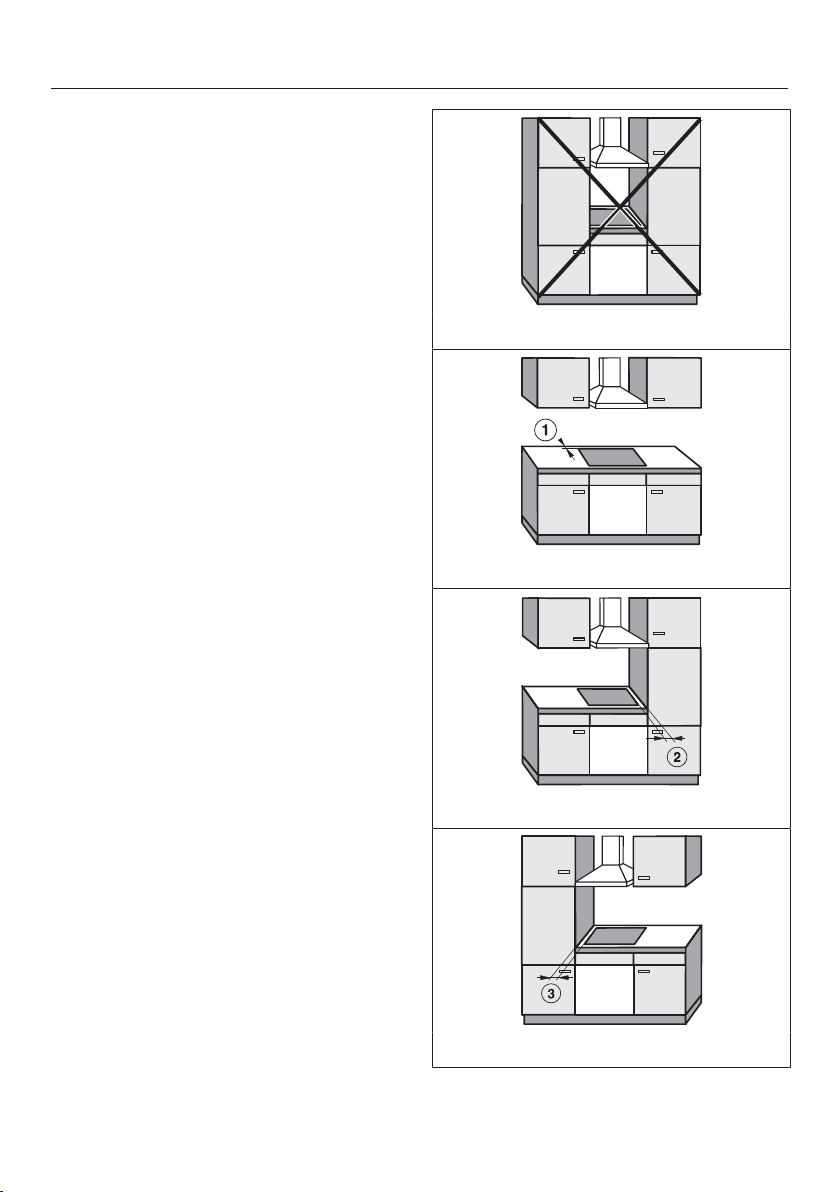
Safety clearance above the cooktop
For a ventilation hood above the cook-
top, always use the clearance specified
by the hood manufacturer. If there are
no specifications from the hood manu-
facturer or if flammable materials (e.g. a
utensil rail) are installed above the
cooktop, the clearance must be at least
30" (760mm).
If there is more than one appliance
installed below the ventilation hood,
each with a different safety clear-
ance, the largest clearance must be
used.
Installation
*INSTALLATION*
53
Safety clearances to the sides and
back of the cooktop
Ideally the cooktop should be installed
with plenty of space on either side.
The minimum distance shown below
must be maintained between the back
of the cooktop and a tall unit or wall.
The minimum distance , shown
below must be maintained between a
tall unit or a wall to the left or right of
the cooktop with a minimum distance of
113/4"(300mm) on the opposite side.
minimum distance between the back
of the counter cut-out and the rear edge
of the counter:
2"(50mm)
Minimum distance on the right side
between the countertop cut-out and the
closest adjacent piece of cabinetry
(e.g., tall unit) or a room wall:
2" (50mm) KM5840
4" (100mm) KM5860,
KM5880
minimum distance to the left of the
counter cut-out to the closest adjacent
piece of cabinetry (for instance, a high
cabinet) or a room wall:
2"(50mm)
Not allowed
Highly recommended
Not recommended
Not recommended

Installation
*INSTALLATION*
54
Protective base
Installation of a protective base under
the cooktop is allowed but not required.
If an interim shelf is fitted under the
cooktop, there must be a minimum gap
of 4
5
/
16
" (110mm) between the top of
the countertop and the top of the shelf.
Leave a gap of 5/16“ (10mm) at the
back of the shelf to accommodate the
cable. If the cooktop has an external
power connection box, the minimum
gap is 1
3
/
8
” (35mm).
Installation
*INSTALLATION*
55
Safety distance from the wall covering
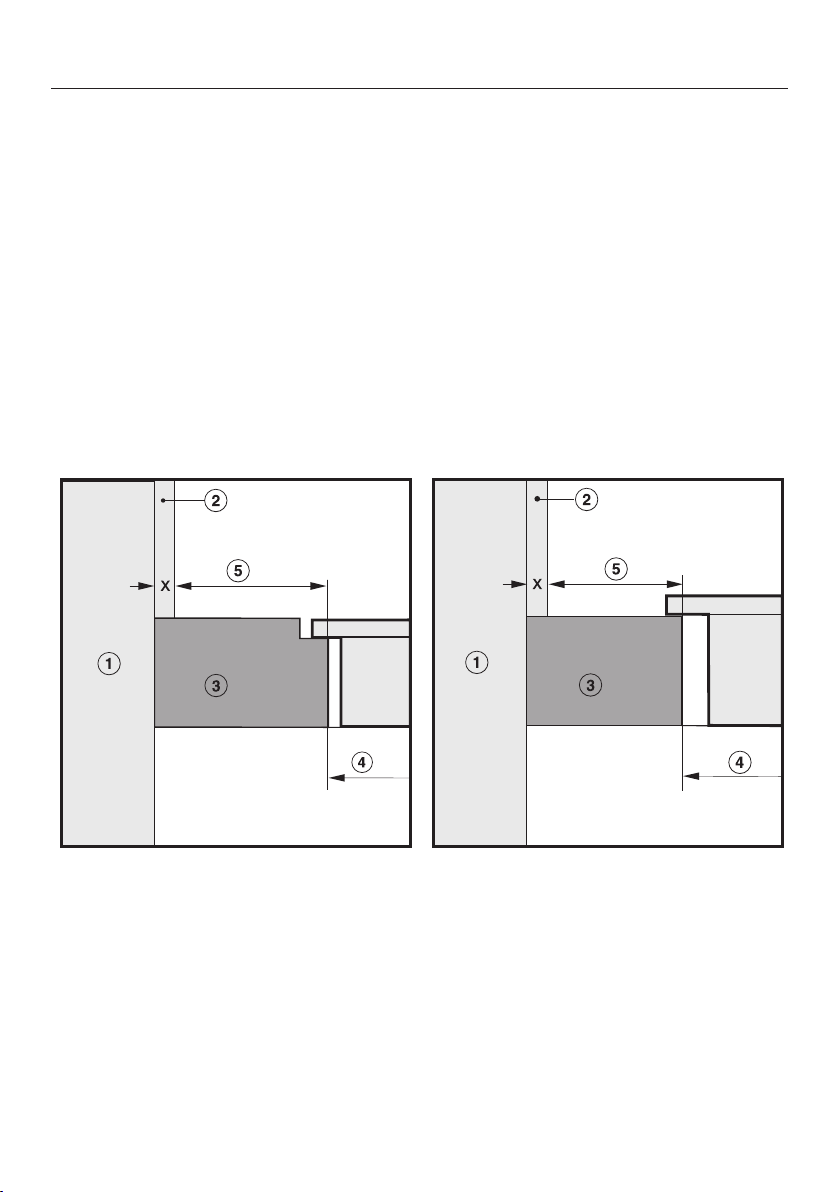
If a wall covering is installed, a minimum safety distance must be maintained be-
tween the countertop cut-out and the covering, since high temperatures can dam-
age these materials.
If the covering is made of a combustible material (such as wood), the distance be-
tween the countertop cut-out and the wall covering must be a minimum of
2" (50mm).
For coverings made of non-combustible materials (such as metal, marble, granite,
ceramic tiles) the minimum safety distance between the countertop cut-out and
the wall covering must be 2“ (50 mm) minus the thickness of the covering. For ex-
ample: thickness of wall covering 2” (50mm) - ⁹/₁₆“ (15mm) = minimum safety dis-
tance 1⁷/₁₆” (35mm).
Flush-mounted cooktops Framed cooktops
Wall frame
Wall covering dimension x = thickness of the niche cladding
Countertop
Countertop cut-out
Minimum distance for
flammable materials 2" (50mm).
non-flammable materials 2" (50mm) - dimension x
Installation
*INSTALLATION*
56
Installation notes
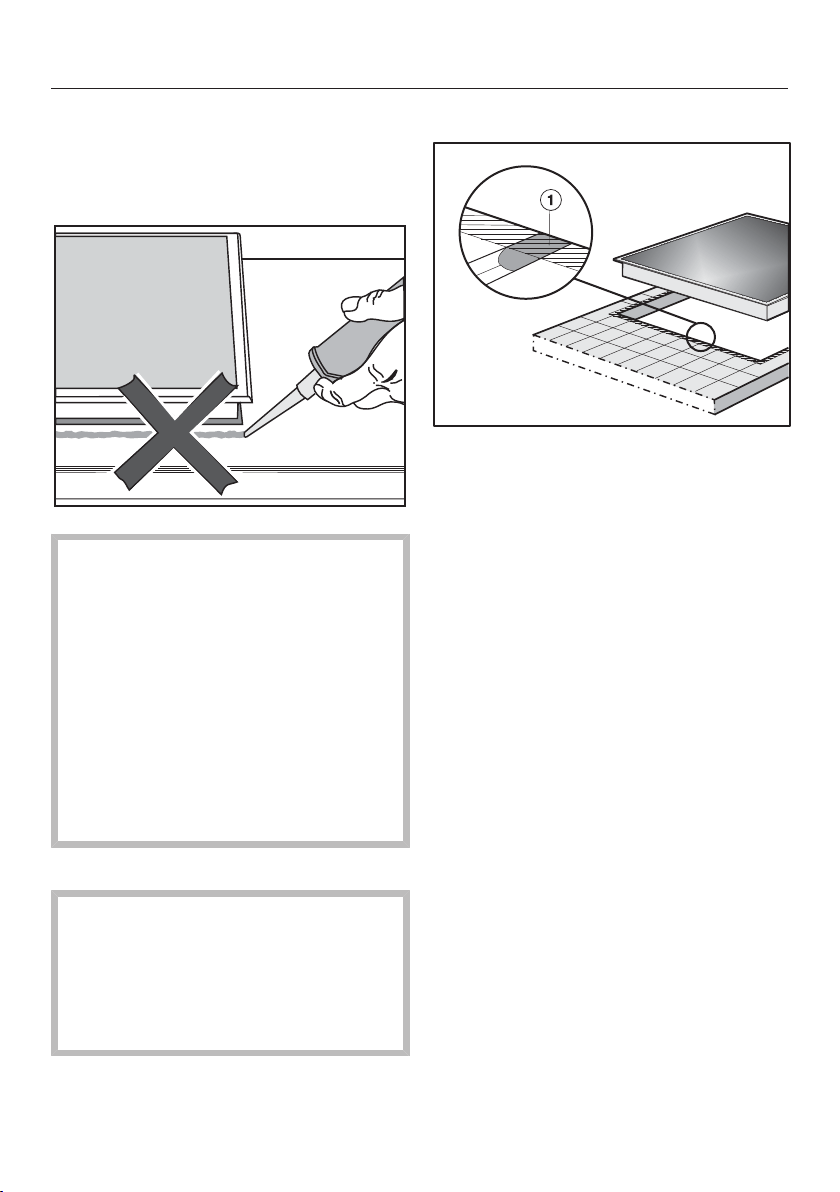
Seal between cooktop and counter-
top
Damage caused by incorrect in-
stallation.
Using sealant under the cooktop
could result in damage to the cook-
top and the countertop if the cook-
top ever needs to be removed for
servicing.
Do not use sealant between the
cooktop and the countertop.
The sealing strip under the edge of
the cooktop provides a sufficient seal
for the countertop.
Sealing strip
Dismantling the cooktop for service
purposes may damage the sealing
strip underneath the edge of the
cooktop.
Always replace the sealing strip be-
fore reinstalling the cooktop.
Tiled countertop
Grout lines and the shaded area un-
der the cooktop frame must be smooth
and even. If they are not, the cooktop
will not sit flush with the countertop and
the sealing strip underneath the cook-
top will not provide a good seal be-
tween the cooktop and the countertop.
Installation
*INSTALLATION*
57
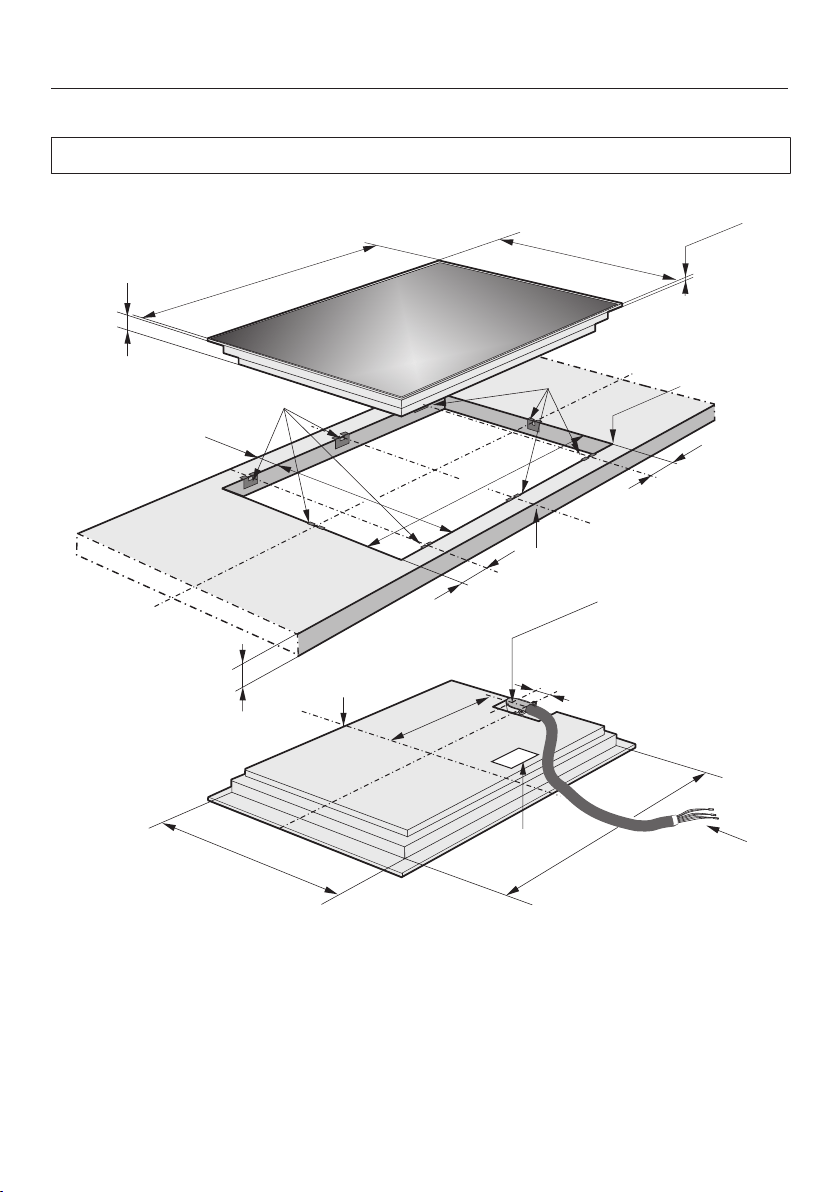
Installation dimensions
All dimensions in this instruction booklet are given in mm and inches.
KM5840
d
0
R
4 mm
3/1
6"
b
(7mm)
( 0
30 mm)
1/4"
1/1
6"
(71
5 mm)
(509 mm)
(544 mm)
21
(775 mm)
1/2"
(51
8 mm)
7/16"
(724 mm)
30
( 50 mm)
2"
1/2"
a
b
0
+
1
-
+
1
-
3/8"
20
28
2
2
3/8"
3/8"
a
(60 mm)
(60 mm)
(68 mm)
20
(302 mm)
c
1
1
e
1/8"
28
(70 mm)
3/16"
1
(54 mm)
1/8"
2
c
11/1
6"
2
7/8"
3/4”
2
a
Spring clips
b
Front
c
Installation height
d
Flexible metal hose with power cords,
L =4'(1,200mm)
e
Data plate
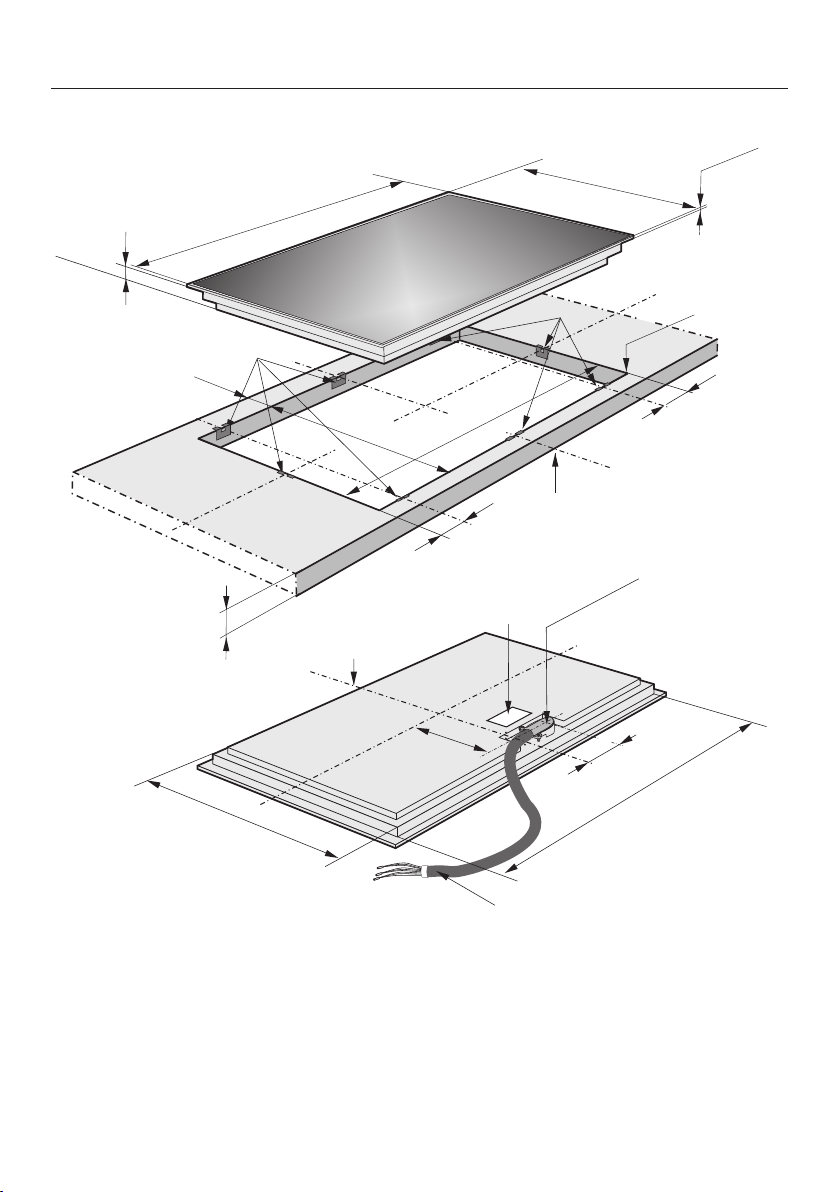
Installation
*INSTALLATION*
58
KM5860
11/16"
0
R
4 mm
3/16"
2
(54 mm)
1/8"
b
(876 mm)
+
1
-
(915 mm)
36"
34
1/2"
(544 mm)
7/16"
21
(7 mm)
1/4"
(518 mm)
3/8"
20
3/8"
a
a
2
3/8"
(60 mm)
0
( 50 mm)
2"
(60 mm)
2
c
+
1
-
0
30
(
mm)
3/16"
1
34
1/8"
c
(68 mm)
2
(205 mm)
1/8"
8
(866 mm)
e
d
b
20
1/16"
(509 mm)
(86 mm)
3
3/8"
a
Spring clips
b
Front
c
Installation height
d
Flexible metal hose with power cords,
L =4'(1,200mm)
e
Data plate
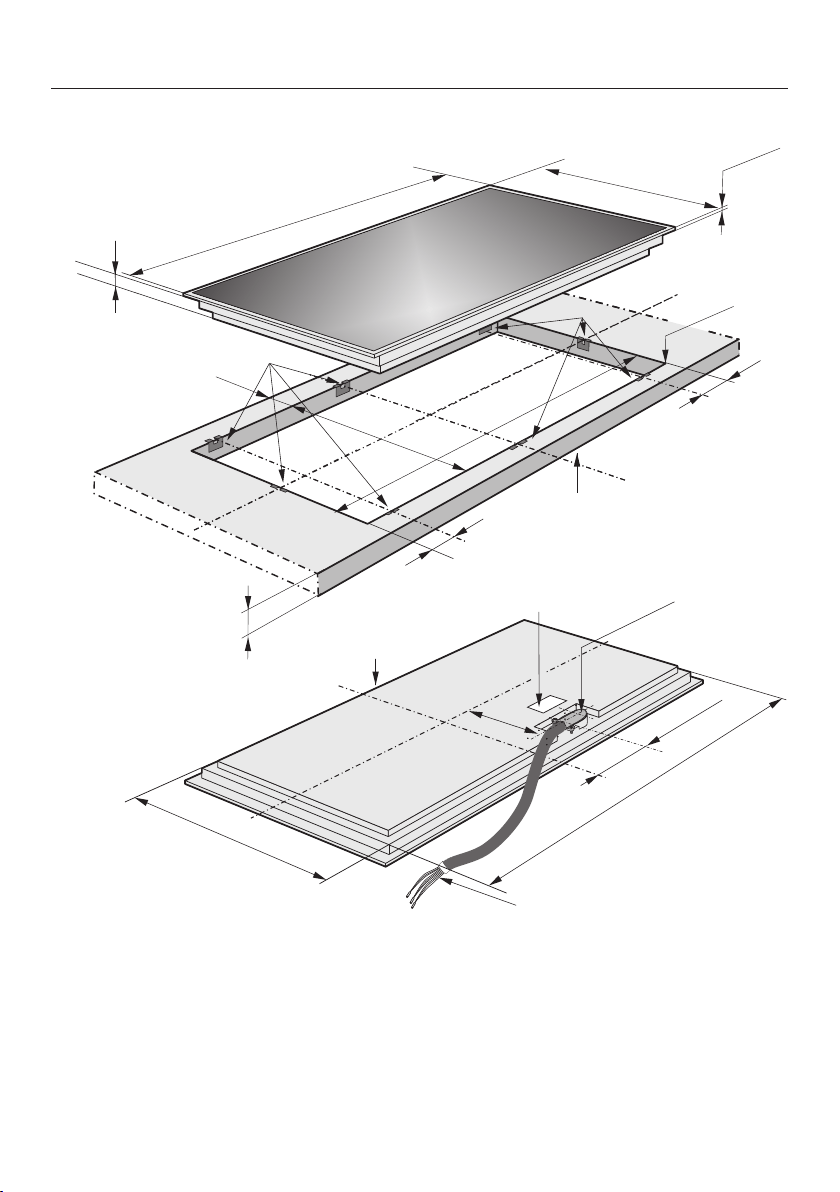
Installation
*INSTALLATION*
59
KM5880
(200 mm)
7/8"
7
d
2
(54 mm)
1/8"
b
e
(1035 mm)
(1080 mm)
42
(544 mm)
7/16"
21
(7 mm)
1/4"
(518 mm)
+
1
-
3/8"
20
3/8"
a
a
2
3/8"
0
( 50 mm)
2"
0
30
(
mm)
3/16"
1
b
(60 mm)
20
1/16"
(509 mm)
2
c
0
R
4 mm
3/16"
40
(60 mm)
1/2”
3/4”
5
3/4"
(146 mm)
40
3/8"
(1025 mm)
(68 mm)
c
11/16"
a
Spring clips
b
Front
c
Installation height
d
Flexible metal hose with power cords,
L =4'(1,200mm)
e
Data plate
Installation
*INSTALLATION*
60
Installation
Preparing the countertop
Create the countertop cut-out. Re-
member to maintain the minimum
safety distances (see “Installation” –
“Safety distances”).
Wooden countertops
Seal any cut surfaces on the wooden
countertop with a special varnish, sili-
cone rubber, or resin to prevent the
wood from swelling as a result of
moisture. The sealant must be tem-
perature-resistant.
Ensure that the sealant does not get
on the top surface of the countertop.
The sealing strip ensures that the
cooktop will sit securely in the cut-out
without slipping. Any gap between the
trim and countertop will become
smaller over time.
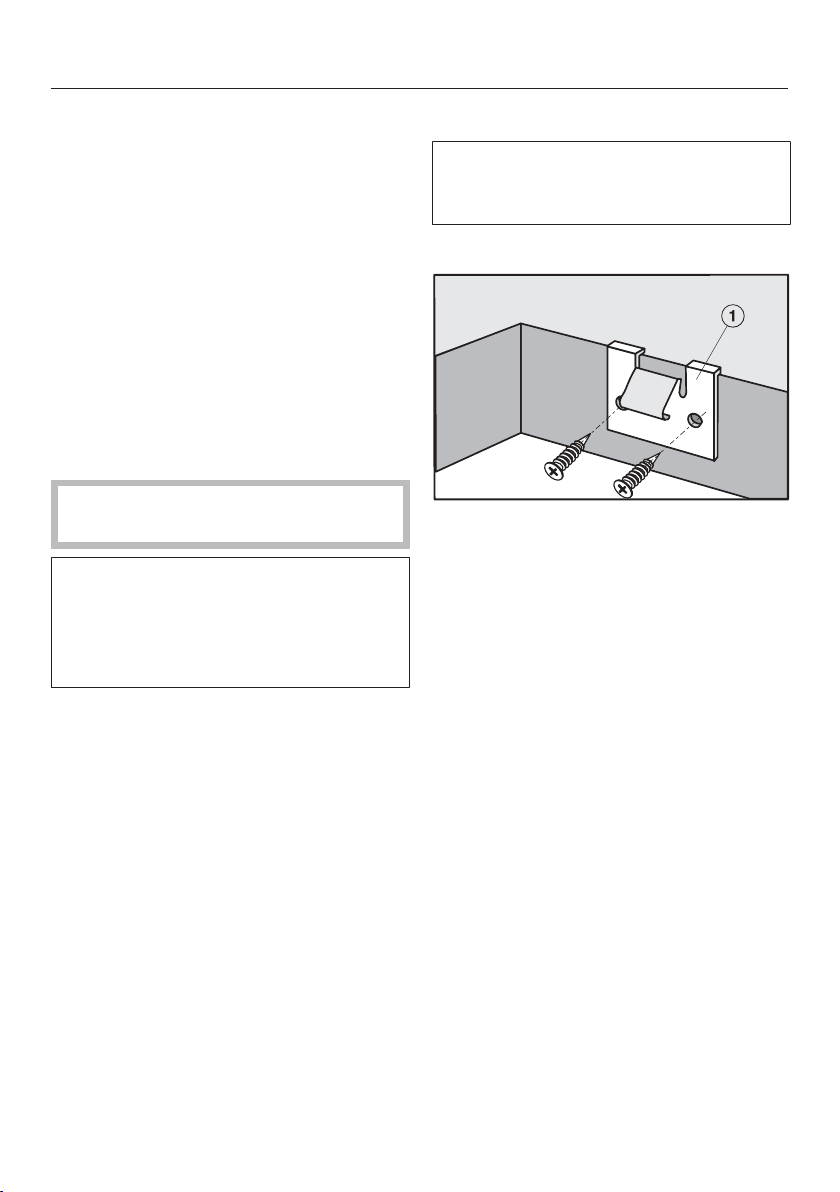
Securing the spring clamps
The exact positioning of the spring
clamps is shown in the individual
cooktop diagrams.
Wooden countertops
Position the spring clamps on the
top edge of the cut-out as shown in
the cooktop illustration.
Fasten the spring clamps using the
13/8“ (3.5)x1” (25mm) wood
screws supplied with the appliance.
Installation
*INSTALLATION*
61
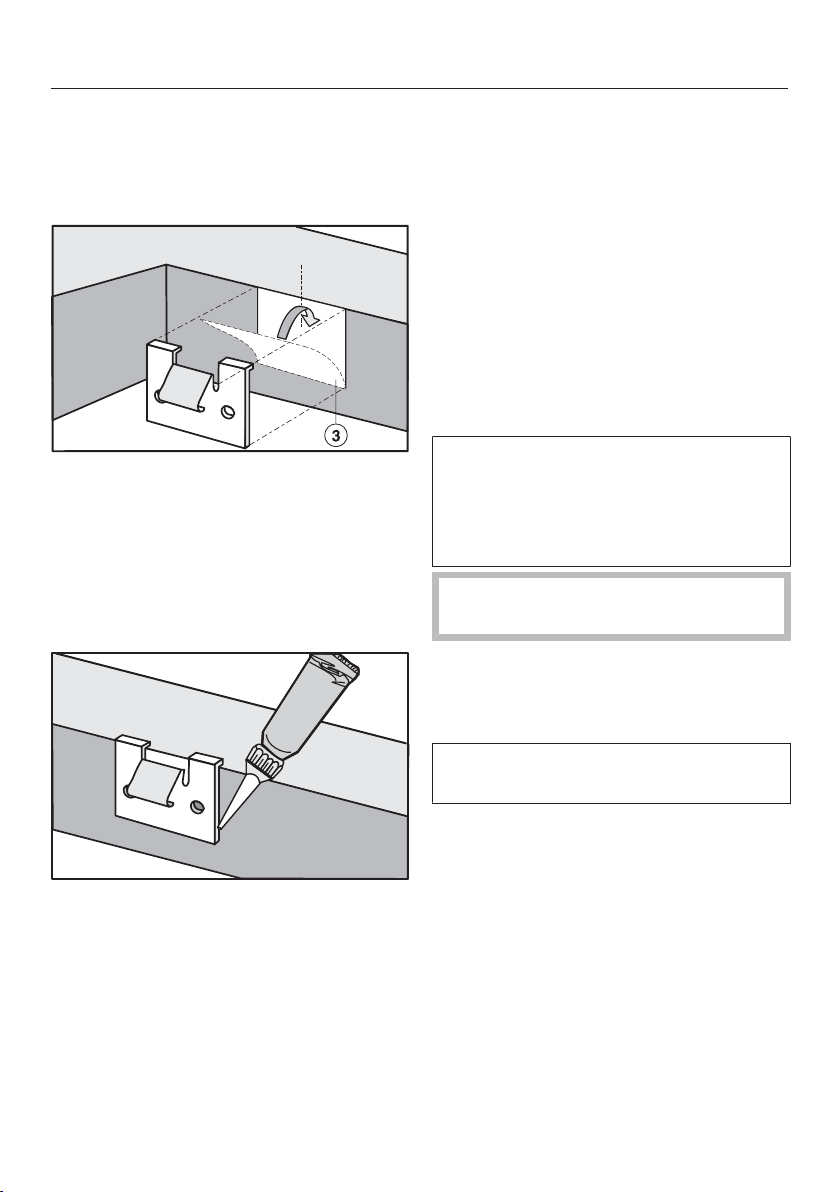
Granite and marble countertops
You will need heavy-duty double-sided
adhesive tape (not included with the
cooktop) to fasten the spring clamps.
Attach the adhesive tape along the
top edge of the cut-out in the posi-
tions shown in the cooktop illustra-
tion.
Position the spring clamps on the top
edge of the cut-out and press them
firmly into place.
Coat the side edges and the lower
edges of the spring clamps with sili-
cone.
Installing the cooktop
Feed the appliance power cord down
through the counter cut-out.
Position the cooktop in the counter
cut-out.
Using both hands, press down evenly
on the sides of the cooktop until it
clicks into position. When doing this
make sure that the seal of the appli-
ance sits flush with the countertop on
all sides. This is important to ensure
an effective seal all round.
If during installation the seal around
the frame does not sit flush with the
countertop in the corners, the corner
radius, maximum 3/16" (≤R4/ 4mm),
can be carefully filed down to fit.
Do not use any additional sealant
(e.g. silicone).
Connect the cooktop to the electrical
power supply.
Check that the cooktop works.
The cooktop can only be removed us-
ing a special tool.

Installation
*INSTALLATION*
62
Electrical connection
ATTENTION:
Before installation or servicing, dis-
connect the power supply by either
removing the fuse, shutting off the
main power or manually “tripping”
the circuit breaker.
Installation work and repairs should
only be performed by a qualified
technician in accordance with all ap-
plicable codes and standards. Re-
pairs and service by unqualified per-
sons could be dangerous and the
manufacturer will not be held re-
sponsible.Installation, repair, and
maintenance work should only be
performed by a Miele-authorized ser-
vice technician. Work by unqualified
persons can cause considerable
danger to users. Miele cannot be
held liable for any damage arising as
a result of such work.
Before connecting the appliance to
the power supply, make sure that the
voltage and frequency listed on the
rating label correspond with the
household electrical supply. This
data must correspond to prevent ap-
pliance damage.
Consult an electrician if in doubt.
For safety reasons, the cooktop may
only be used when it has been fully
installed into the countertop.
To guarantee the electrical safety of
this appliance, continuity must exist
between the appliance and an effec-
tive grounding system. It is impera-
tive that this basic safety require-
ment be met. If there is any doubt,
have the electrical system of the
house checked by a qualified electri-
cian.
Installation, repair and maintenance
work should only be performed by a
Miele-authorized qualified electrician
in compliance with local regulations
and the ANSI National Electrical
Code / NFPA 70 in the United States
or the Canadian Electric Code, CSA
C22.1-02. in Canada.
Installer:
Please leave these instructions with
the customer.

Installation
*INSTALLATION*
63
Connection
Ensure that the connection data on
the data plate (voltage, frequency,
and fuse rating) match those of your
electrical supply.
The data plate is located underneath
the cooktop.
The cooktop is approved and ready for
connection to a grounded connector
with three connecting wires, sheathed
by a flexible metal hose.
It must be connected to an assigned
line in an approved connecting socket.
The appliance must be able to be dis-
connected from the power supply on all
poles by disconnecting devices! (When
turned off, a contact distance of at least
¹/₈" (3mm must be present!) The dis-
connecting devices are overcurrent pro-
tection elements and protective circuit
breakers.
Black: Connect to L1 (hot)
Red: Connect to L2 (hot)
Green: Connect to GND (ground)
KM5840
208/240V, 60Hz, 40A
KM5860
208/240V, 60Hz, 50A
KM5880
208V, 60Hz, 60A
240V, 60Hz, 50A
Make sure that the connecting socket is
accessible after the installation of the
cooktop.
Further information can be found on the
included data plate.
WARNING:
THIS COOKTOP MUST BE
GROUNDED

MieleCare
64
This service is available in USA only.
MieleCare, our Extended Service Con-
tract program, gives you the assurance
of knowing that your appliance invest-
ment is covered by 5years of worry free
ownership.
MieleCare is the only Extended Service
Contract in the industry that guarantees
repairs by a Miele Authorized Service
Provider using genuine Miele parts.
Only genuine Miele parts installed by
factory trained professionals can guar-
antee the safety, reliability, and
longevity of your Miele appliance.
Please note that unless expressly ap-
proved in writing by Miele’s Service de-
partment, Extended Service Contracts
offered by other providers for Miele
products will not be recognized by
Miele. Our goal is to prevent unautho-
rized (and untrained) service personnel
from working on your Miele products,
possibly doing further damage to them,
you and/or your home.
To learn more about MieleCare Ex-
tended Service Contracts, please con-
tact your appliance dealer or visit us
online at:
www.mieleusa.com



9 Independence Way
Princeton, NJ 08540
U.S.A.
Miele, Inc.
National Headquarters
Please have the model and serial number
of your appliance available when
contacting Customer Service.
Canada
Importer
Miele Limited
Headquarters and Miele Centre
Customer Service & Support
Phone: 888-99-MIELE(64353)
www.mieleusa.com
161 Four Valley Drive
Vaughan, ON L4K 4V8
www.miele.ca
Customer Care Centre
Phone:
800-565-6435
905-532-2272
International Headquarters
Miele & Cie. KG
Carl-Miele-Straße 29
33332 Gütersloh
Germany

M.-Nr. 07 844 710 / 03en-US, CA
KM5840, KM5860, KM5880