4'(4+)'4#6+10
75'4/#07#.
5GBC@W5GBC
95'595'295'9
95'595'295'9
95'595'995'5
95'295'9
+KNMPR?LRQ?DCRWGLQRPSARGMLQ
.?PECQGBC@WQGBCUGRFQR?LB?PBDC?RSPCQ
%MKN?ARQGBC@WQGBCUGRFGACU?RCPDC?RSPCQ
)CLCP?JGLQR?JJ?RGML
%JC?PCLACQ?PMSLBWMSPPCDPGECP?RMP
+LQR?JJ?RGML
#BHSQRGLEBMMP?JGELKCLR
+LRCPL?JN?AI?EGLE
4CDPGECP?RMP(PCCXCPMNCP?RGML
+ACU?RCPKMBCJQ
+ACK?ICPQR?PRSN
6CKNCP?RSPCRPMS@JCQFMMRGLE
7QGLEWMSPPCDPGECP?RMP
'JCARPMLGABGQNJ?WN?LCJ
5CRRGLERFCAJMAI
#BHSQRGLERCKNCP?RSPCQ
3SGAIDPCCXCDSLARGML
&MMP?J?PK
(PCCXCPRCKNCP?RSPC?J?PK
&PGLIQAFGJJRGKCP
%FGJBJMAI
'LCPEWCDDGAGCLAW
1RFCPCJCARPMLGADC?RSPCQ
(MMBAMKN?PRKCLRDC?RSPCQ
+ACU?RCPDC?RSPCQ
6UGQRGACQCPTC
+ACU?RCPBGQNCLQCPDC?RSPCQ
*MURFCU?RCPBGQNCLQCPUMPIQ
*MURFCGACBGQNCLQCPUMPIQ
%JC?LGLERFCGACBGQNCLQCP
%F?LEGLERFCU?RCPDGJRCP
6FCCVRCPL?JU?RCPDGJRCPIGR
6MPCNJ?ACRFCU?RCPDGJRCP
%F?LEGLERFCJGEFR@SJ@
%JC?LGLEWMSPPCDPGECP?RMP
%JC?LGLERFCCVRCPGMP
%JC?LGLERFCGLRCPGMP
*CJNDSJFGLRQ
'LCPEWAMLQSKNRGMLCJCARPGAGRWAMQRQ
5UGRAFGLEMDDWMSPPCDPGECP?RMP
2MUCPD?GJSPC
5?DCRW
*CJNDSJFGLRQDMPQRMPGLEDMMB
*CJNDSJFGLRQDMPDPCCXGLEDMMB
6PMS@JCQFMMRGLE
+ACU?RCPRPMS@JCQFMMRGLE
#SRMK?RGAGACK?ICP
+ACBGQNCLQCP
0MRCQ
9?PP?LRW
Dear customer,
Congratulations and thank you for choosing our refrigerator.
We are sure you will find your new appliance a pleasure
to use. Before you use the appliance, we recommend that
you read through the entire user manual, which provides
the description of the appliance and its functions.
To avoid the risks that are always present when you use
an electric appliance, it is important that the appliance is
installed correctly and that you read the safety instructions
carefully to avoid misuse and hazards.
We recommend that you keep this instruction booklet
for future reference and pass it on to any future owners.
After unpacking the appliance, please check it is not
damaged. If in doubt, do not use the appliance but
contact your local customer care centre.
TIPS & INFORMATION
+/2146#06h%*'%-(14#0;&#/#)'514/#4-5
If you find the refrigerator is damaged or marked, you must
report it within 7 days if you wish to claim for damage/marks
under the manufacturers warranty. This does not affect your
statutory rights.
ENVIRONMENTAL TIPS
+0(14/#6+1010&+5215#.(1475'45
s¬ ¬-OST¬OF¬THE¬PACKING¬MATERIALS¬ARE¬RECYCLABLE¬
Please dispose of those materials through your local
recycling depot or by placing them in appropriate
collection containers.
s¬ ¬)F¬YOU¬WISH¬TO¬DISCARD¬THIS¬PRODUCT¬PLEASE¬CONTACT¬YOUR¬
local authorities and ask for the correct method of disposal.
BEFORE YOU CALL
Please ensure you read the instruction manual fully
before you call for service, or a full service fee could
be applicable.
%106'065%10)4#67.#6+105
%1
06'065
Please read the user manual carefully and store in a
handy place for later reference. Pass the user manual
on to possible new owners of the refrigerator.
The symbols you will see in this booklet have these
meanings:
WARNING
6FGQQWK@MJGLBGA?RCQGLDMPK?RGMLAMLACPLGLEWMSPNCPQML?JQ?DCRW
CAUTION
6FGQQWK@MJGLBGA?RCQGLDMPK?RGMLMLFMURM?TMGBB?K?EGLE
RFC?NNJG?LAC
TIPS & INFORMATION
6FGQQWK@MJGLBGA?RCQRGNQ?LBGLDMPK?RGML?@MSRSQCMDRFC?NNJG?LAC
ENVIRONMENTAL TIPS
6FGQQWK@MJGLBGA?RCQRGNQ?LBGLDMPK?RGML?@MSRCAMLMKGA?J?LB
CAMJMEGA?JSQCMDRFC?NNJG?LAC
-EANINGS¬OF¬SYMBOLS¬USED¬IN¬THIS¬MANUAL¬ARE¬SHOWN¬BELOW
6FGQQWK@MJGLBGA?RCQLCTCPRMBMRFGQ
6FGQQWK@MJGLBGA?RCQ?JU?WQBMRFGQ
WARNING
s¬ ¬)F¬PRESSURISED¬AEROSOL¬CONTAINERS¬BEAR¬THE¬WORD¬
‘flammable’ and/or a small flame symbol,
do not store them inside any refrigerator or
freezer. If you do so you may cause an explosion.
s¬¬ ¬7HEN¬YOU¬DISPOSE¬OF¬YOUR¬OLD¬REFRIGERATORS¬AND¬
freezers, remove any doors. Children can suffocate
if they get trapped inside.
s¬¬ ¬4HIS¬APPLIANCE¬CONTAINS¬INSULATION¬FORMED¬WITH¬
flammable blowing gases. Avoid safety hazards
by carefully disposing of this appliance.
s¬ ¬4HIS¬APPLIANCE¬IS¬NOT¬INTENDED¬FOR¬USE¬BY¬PERSONS¬
(including children) with reduced physical, sensory
or mental capabilities, or lack of experience and
knowledge, unless they have been given supervision
or instruction concerning use of the appliance by a
person responsible for their safety. Children should
be supervised to ensure that they do not play with
the appliance.
WARNING
The appliance must be plugged into its own
dedicated 220-240V, 50Hz AC electrical outlet.
Ensure that the electric outlet is properly earthed to
ground. Consult a qualified electrician if you are unsure.
Don’t use an extension cord or adapter plug.
Don’t plug your refrigerator into a timer fitted to the
power point.
If the power cord is damaged, it should be replaced
by a service technician or a qualified person.
Unplug the appliance before cleaning and before
changing the light bulb to avoid electric shock.
Never unplug the appliance by pulling on the power
cord. Always grip the plug firmly, and pull straight out of
the receptacle to prevent damaging the power cord.
Choose a location that is not too cold –
the temperature should be above 10ºC.
Put the appliance in a dry place, avoiding areas
of high moisture or humidity.
Don’t put the appliance in frosty or unprotected areas,
for example in a garage or on a verandah.
Don’t put the appliance in direct sunlight.
Don’t put the appliance near stoves, fires or heaters.
Don’t put the refrigerator on an uneven surface.
Never let children play with the refrigerator.
Never store fizzy drinks in the freezer compartment.
Never try to repair the refrigerator yourself.
Never use electric heaters or dryers to defrost the
freezer because you can receive an electric shock.
Never use electrical appliances inside the
refrigerator or freezer.
4#4'(4+)'4#069#40+0)
This appliance contains a small quantity of environmentally
friendly, but flammable, non-synthetic R600a refrigerant:
s¬ ¬%NSURE¬THAT¬THE¬TUBING¬OF¬THE¬REFRIGERANT¬CIRCUIT¬IS¬NOT¬
damaged during transportation and installation.
s¬ ¬,EAKING¬REFRIGERANT¬MAY¬CAUSE¬EYE¬INJURIES¬OR¬IGNITE
s¬ ¬4HE¬ROOM¬FOR¬INSTALLING¬APPLIANCE¬MUST¬BE¬AT¬LEAST¬
1m
3
per 8g of refrigerant. The amount of refrigerant
in the appliance can be found on the rating plate
inside the appliance.
+/2146#065#('6;+05647%6+105
5#('6
;
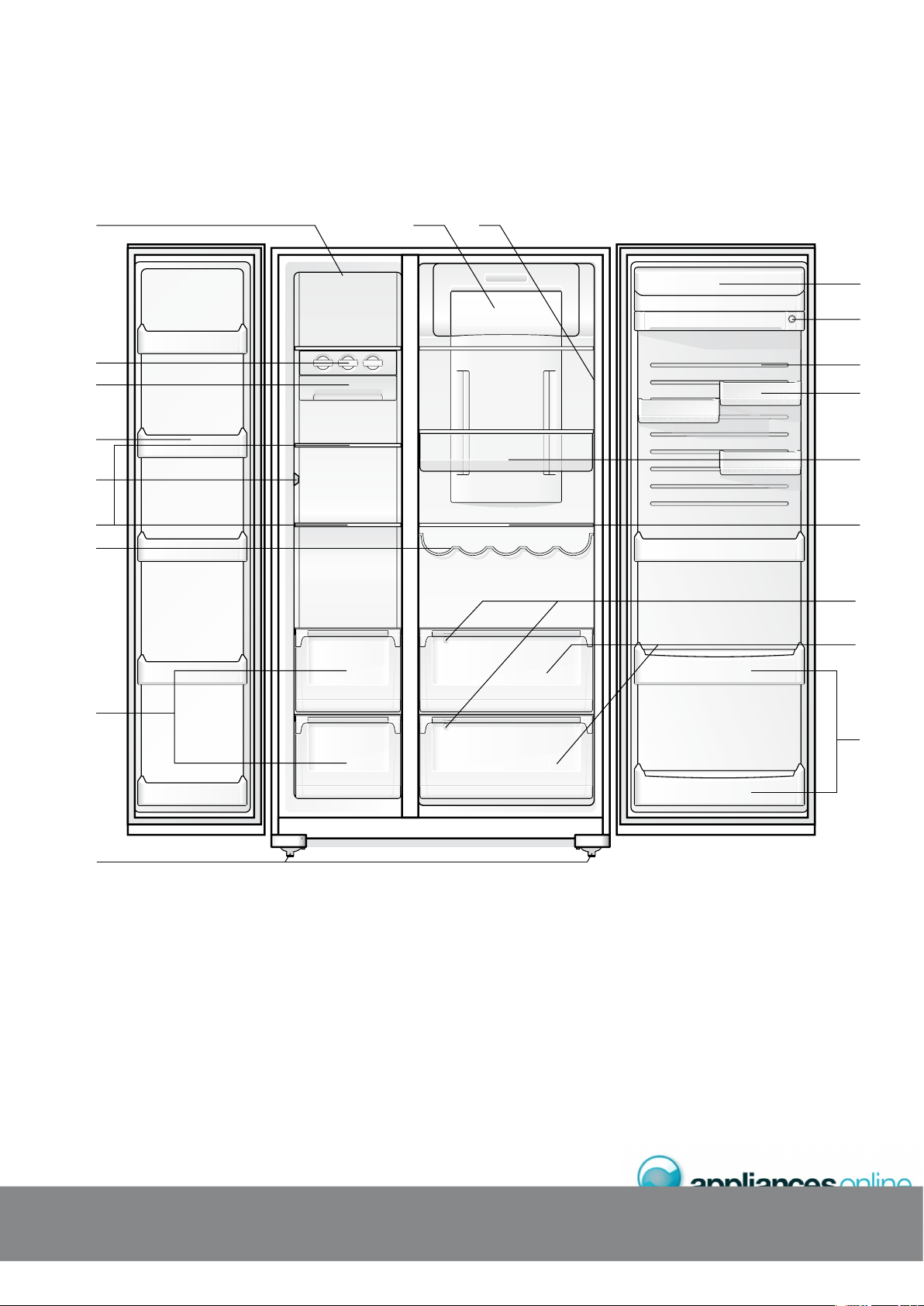
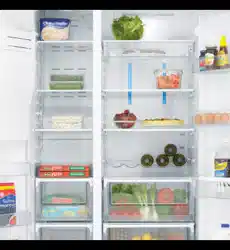
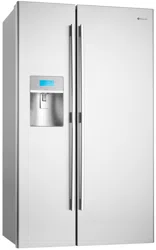
.#4)'5+&'$;5+&'9+6*56#0&('#674'5
(
'#674'5
Freezer light
Twist ice & serve
Ice cube storage bin
Freezer door bins
Wine rack
Sensors
Glass shelves
Telescopic freezer bins
Fridge & freezer temperature
control
¬¬ ,IGHT¬LENS
Dairy compartment
Storesafe™ bin (lockable)
Flexi-door door liner
Door bins
Deli bins
¬¬ !DJUSTABLE¬GLASS¬SHELVES
Humidity controls
Telescopic crisper bins
Bottle bins
¬¬ !DJUSTABLE¬ROLLERS
Features may vary depending on model. Not all models will have features listed.
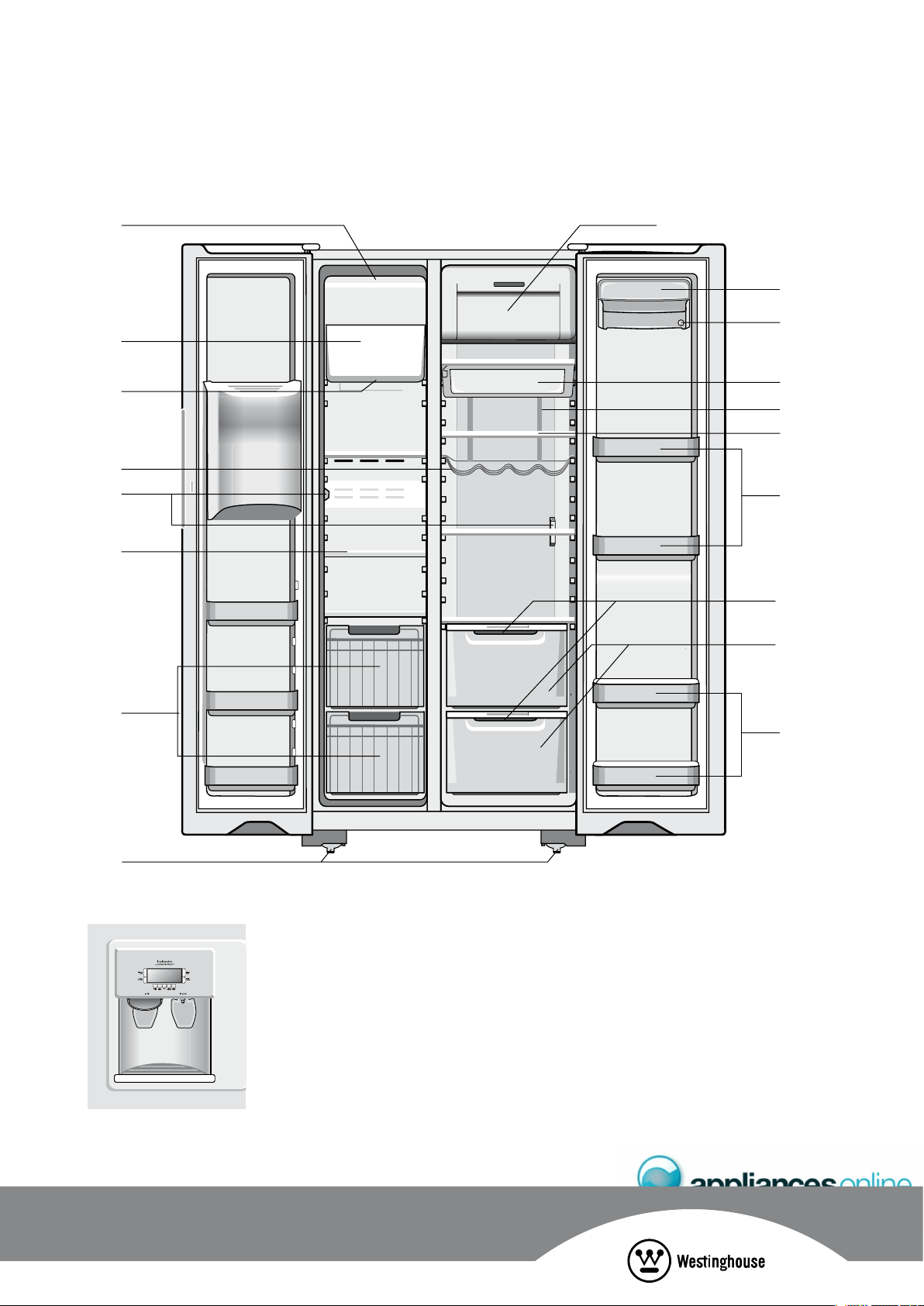
%1/2#%65+&'$;5+&'9+6*+%'9#6'4('#674'5
Ice cream shelf
Ice maker unit
¬¬ ,IGHTING
Wine rack
Sensors
Glass shelves
Roll out baskets
¬¬ ,IGHT¬LENS
Dairy compartment
Storesafe™ bin (lockable)
Deli bin
¬¬-ULTIFLOW¬DUCT¬
(with blue feature lighting)
¬¬ !DJUSTABLE¬GLASS¬SHELVES
¬¬ !DJUSTABLE¬DOOR¬BINS
Humidity controls
Crisper bins
Bottle bins
¬ !DJUSTABLE¬ROLLERS
Ice & Water Door Dispenser
Features may vary depending on model. Not all models will have features listed.
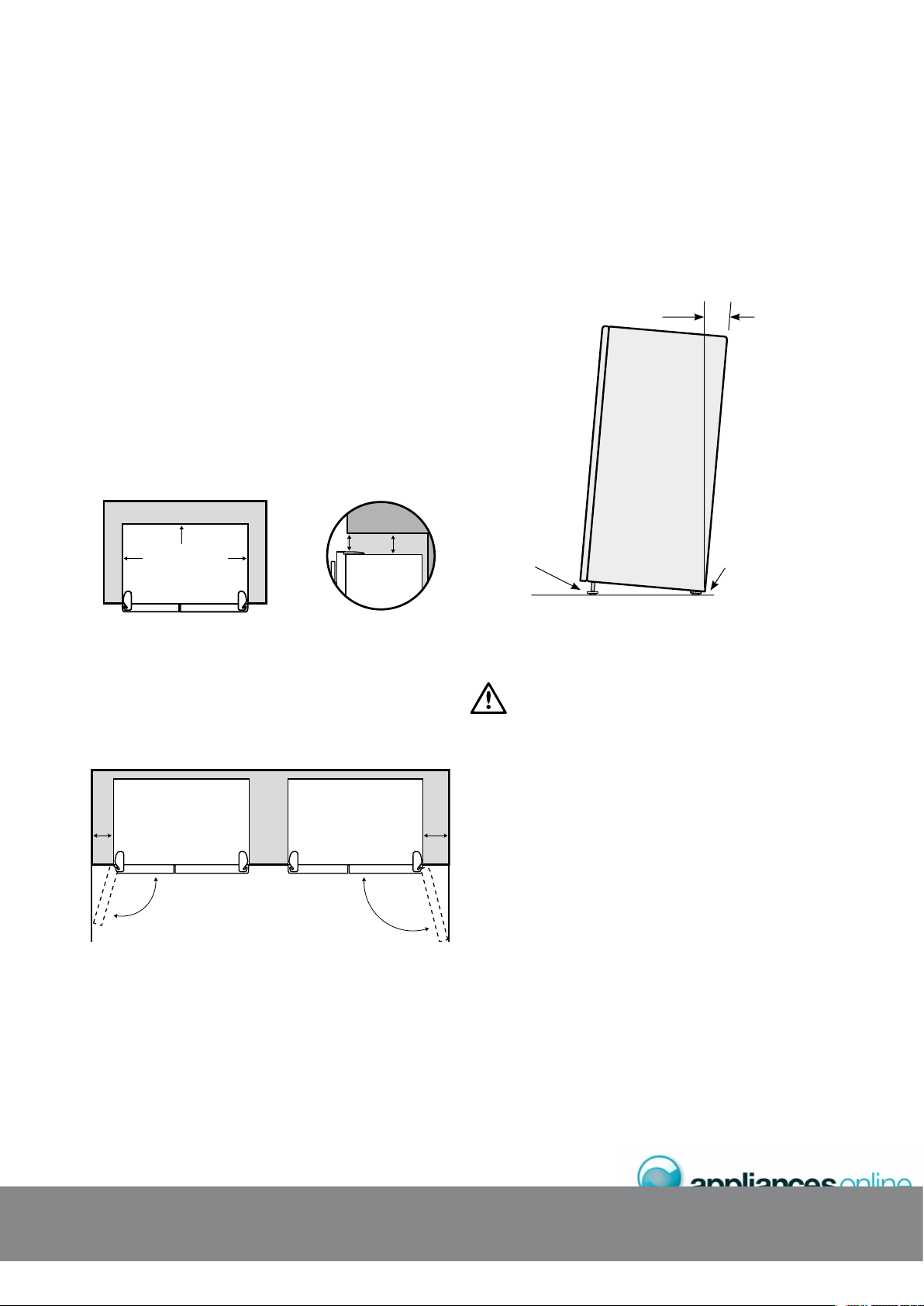
)'0'4#.+056#..#6+10
When correctly installed, your refrigerator should:
s¬¬ ¬(AVE¬ADEQUATE¬CLEARANCE¬TO¬THE¬BACK¬SIDES¬AND¬
top for air circulation
s¬¬ "E¬ALIGNED¬TO¬THE¬SURROUNDING¬CUPBOARDS
s¬¬ ¬(AVE¬DOORS¬THAT¬WILL¬SELF¬CLOSE¬FROM¬A¬PARTIALLY¬
open position
%.'#4#0%'5#4170&;1744'(4+)'4#614
Your Side by Side refrigerator can be installed between
cupboards or fixtures but you must allow for the following
spaces around the cabinet.
s¬¬ ¬!LLOW¬A¬MINIMUM¬OF¬¬MILLIMETRES¬CLEARANCE¬ON¬BOTH¬
sides (see diagram 1)
s¬¬ ¬!LLOW¬A¬MINIMUM¬OF¬¬MILLIMETRES¬CLEARANCE¬ABOVE¬
hinge covers (see diagram 1)
s¬¬ ¬!LLOW¬¬MILLIMETRES¬CLEARANCE¬AT¬THE¬BACK¬OF¬THE¬
refrigerator (see diagram 1)
Diagram 1
Recommended
airspace
CABINET
5mm
10mm
10mm 28mm
5mm
DOORS
s¬¬ ¬!LLOW¬A¬¬TO¬¬MILLIMETRES¬CLEARANCE¬ON¬THE¬HINGE¬
side of the doors, if you place the refrigerator next to the
wall. This will make cleaning easier (refer to diagram 2).
s¬¬ ¬-AKE¬SURE¬THAT¬CUPBOARDS¬OR¬FIXTURES¬DO¬NOT¬STICK¬OUT¬
further than the refrigerator cabinet (refer to diagram 2).
+056#..#6+10
The refrigerator should arrive with the front rollers wound
down. We recommend that the appliance be tilted
backwards by about 10 to 15 millimetres, this will allow
the doors to self close providing a consistent door seal.
To do this follow the instructions below.
(EIGHT¬ADJUSTABLE¬
front rollers
Fixed rear rollers
10 -15mm
When you want to install your appliance, take the
following steps.
1. Roll the refrigerator into it’s final position.
WARNING
The rollers are designed for forward or backward movement
ONLY¬4HEY¬ARE¬NOT¬CASTORS¬-OVING¬THE¬REFRIGERATOR¬SIDEWAYS¬
may damage your floor and the rollers.
¬ ¬)F¬THE¬REFRIGERATOR¬IS¬NOT¬TILTED¬BACK¬YOU¬CAN¬ADJUST¬THE¬
TWO¬FRONT¬ROLLERS¬BY¬ADJUSTING¬THE¬LARGE¬PLASTIC¬ROLLER¬
nut (refer page 7). You may need two people, one to
ADJUST¬ROLLERS¬AND¬ONE¬TO¬TILT¬THE¬REFRIGERATOR¬SLIGHTLY¬BACK¬
to take the weight of the appliance off the front rollers.
This will increase or decrease the height of the rollers.
One turn of the nut will change the tilt of the refrigerator
by approximately 10mm.
3. If the cabinet is level, then the side walls should be plumb
or vertical. If the cabinet is built in or partly built in check
the alignment of the cabinet side against the cupboard.
+
056#..#6+
1
0
Diagram 2
200mm
350mm
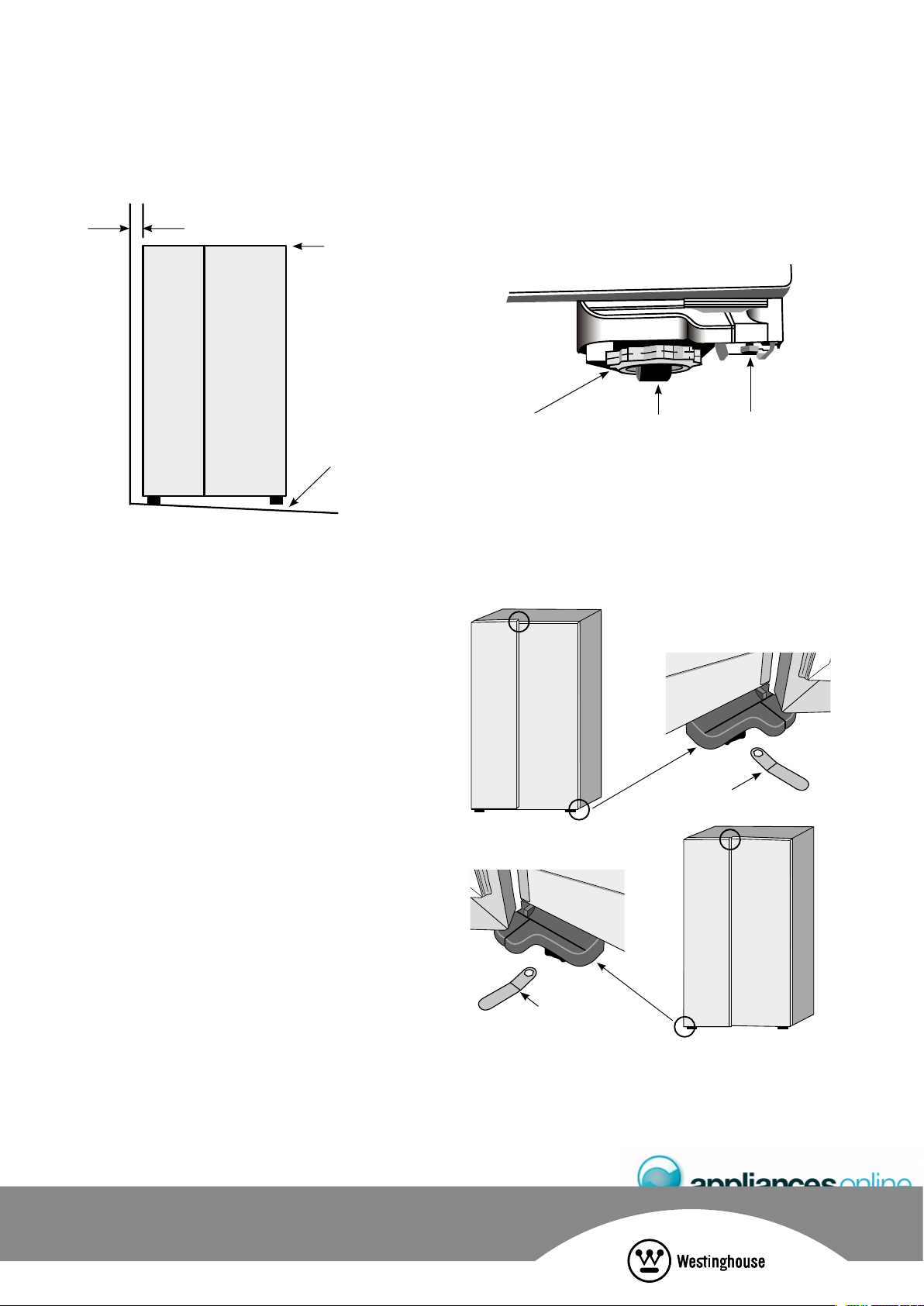
aligned to cupboard –
even gap
Top of refrigerator
is level – horizontal
!DJUST¬FRONT¬ROLLERS¬FOR¬
unevenness of floor. e.g.
ADJUST¬THIS¬ROLLER¬DOWN¬
Packing may be required
underneath the rear roller
to ensure stability.
4. If the appliance now rocks from one corner to the
opposite rear corner, this means that the floor is uneven;
you will need to put some packing under one of the
rear rollers.
5. You may now need to fine-tune the installation by
ADJUSTING¬THE¬FRONT¬ROLLERS¬ONCE¬AGAIN
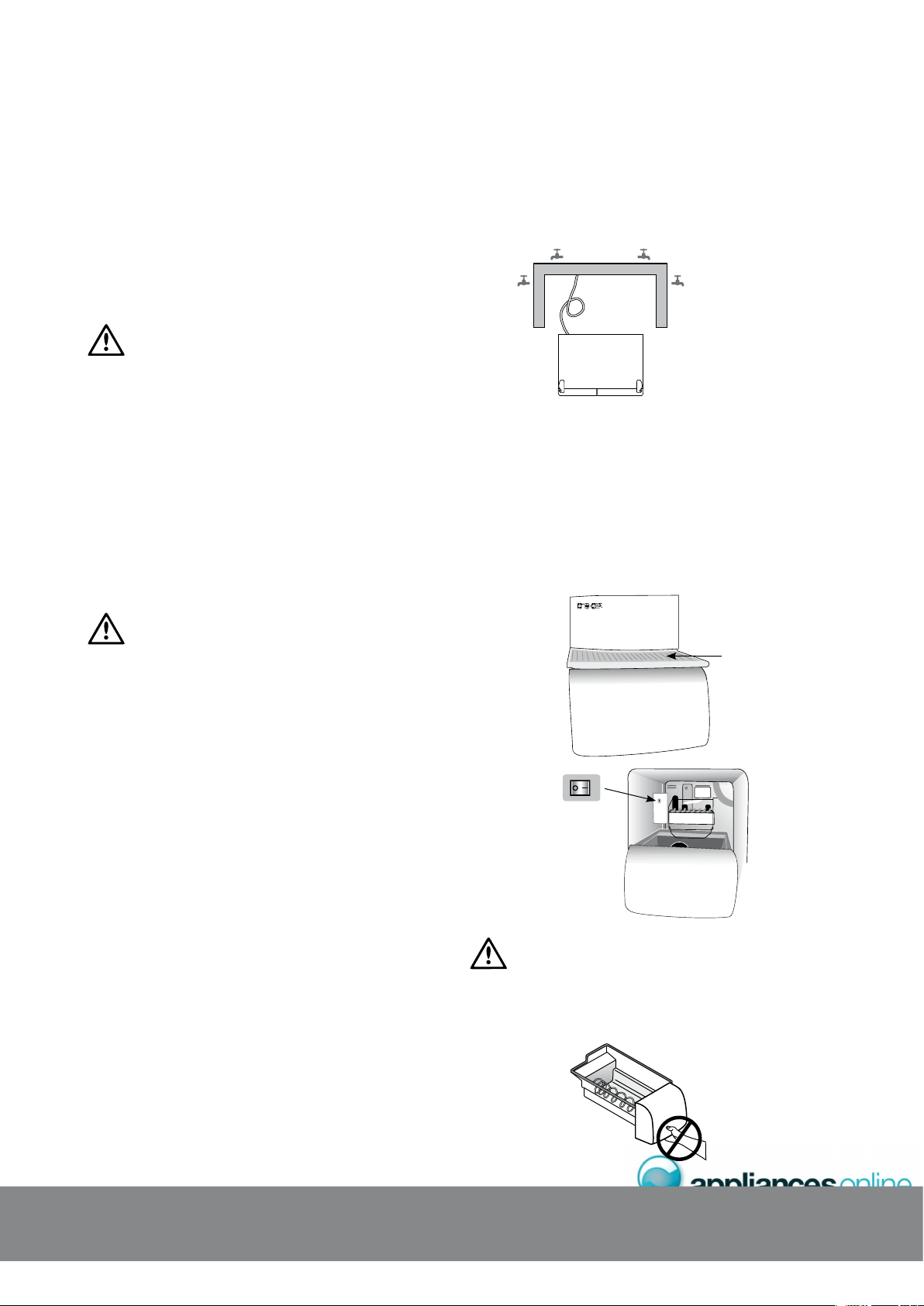
#&,756+0)&114#.+)0/'06
%ACH¬DOOR¬IS¬INDEPENDENTLY¬ADJUSTABLE¬IN¬THE¬VERTICAL¬
DIRECTION¬BY¬TURNING¬THE¬ADJUSTABLE¬BOLTS¬UNDER¬THE¬HINGES¬
using the spanner provided.
,ARGE¬PLASTIC¬ROLLER¬NUT
Front roller
!DJUSTING¬BOLT
4HE¬DOORS¬CAN¬BE¬ADJUSTED¬UP¬OR¬DOWN¬$EPENDING¬ON¬THE¬
AMOUNT¬OF¬ADJUSTMENT¬REQUIRED¬IT¬MAY¬BE¬SUFFICIENT¬TO¬ADJUST¬
only one door (see diagrams below).
NOTE: When the height of the rollers and adjusting bolts
are correctly adjusted the refrigerator will stand firmly on the
floor and the doors will be in line with one another.
Spanner
Spanner
)'0'4#.+056#..#6+10
+06'40#.2#%-#)+0)
1. Please remove all internal packaging material before use.
Any glue or tape residue or the like should be removed
with a solution of mild detergent and water.
2. Clean your appliance thoroughly following the instructions
on page 19 and wipe off any dust that has accumulated
during shipping.
WARNING
Before cleaning: Remove the power cord from the power
socket. This will make sure there is no chance of getting
an electric shock.
3. Install accessories such as the ice cube storage bin.
The accessories are packed together to prevent damage
during delivery.
4. Plug your appliance into the power point.
5. We recommend that you let your refrigerator run for two
to three hours before you put any food in it. This will
allow you to check that it is operating properly and that
enough cool air is circulating.
+%'#0&9#6'4/1&'.5
CAUTION
The water connection to your ice and water product
should only be done by a licensed refrigeration mechanic,
plumber or electrician.
All relevant information regarding the water connection is
detailed in the water kit provided with your product for use
by the professional installer only.
The automatic ice and water dispenser needs a drinkable
water supply with a pressure of:
s¬¬ -INIMUM¬¬K0A¬¬PSI¬¬KGFCM§
s¬¬ -AXIMUM¬¬K0A¬¬PSI¬¬KGFCM§
In some areas water pressure is significantly higher due to
local conditions. In such areas a pressure reducing valve
must be used. Ensure your plumber or installer checks your
water pressure when installing your refrigerator.
If you are using your refrigerator for the first time, or if you
have not used the dispenser for some time:
s¬¬ $ISCARD¬THE¬FIRST¬SEVEN¬OR¬EIGHT¬CUPS¬OF¬WATER
s¬¬ ¬$ISCARD¬ANY¬ICE¬THAT¬THE¬ICE¬MAKER¬PRODUCES¬IN¬THE¬
first 24 hours (contaminants could have settled in the
water pipes)
The water tap can be anywhere and there is no limit to
the amount of pipe between the tap and the refrigerator,
however, some points to note are:
1. It is better to have the tap accessible without having
to roll the refrigerator forward, so we recommend
putting it outside the cavity as shown by the taps
in the diagram below.
2. It is recommended, but not essential that the height
of the tap should be 400mm from the ground.
3. If the refrigerator is required to be pulled forward for
cleaning, the water pipe may need to be removed
from the tap.
+%'/#-'456#4672
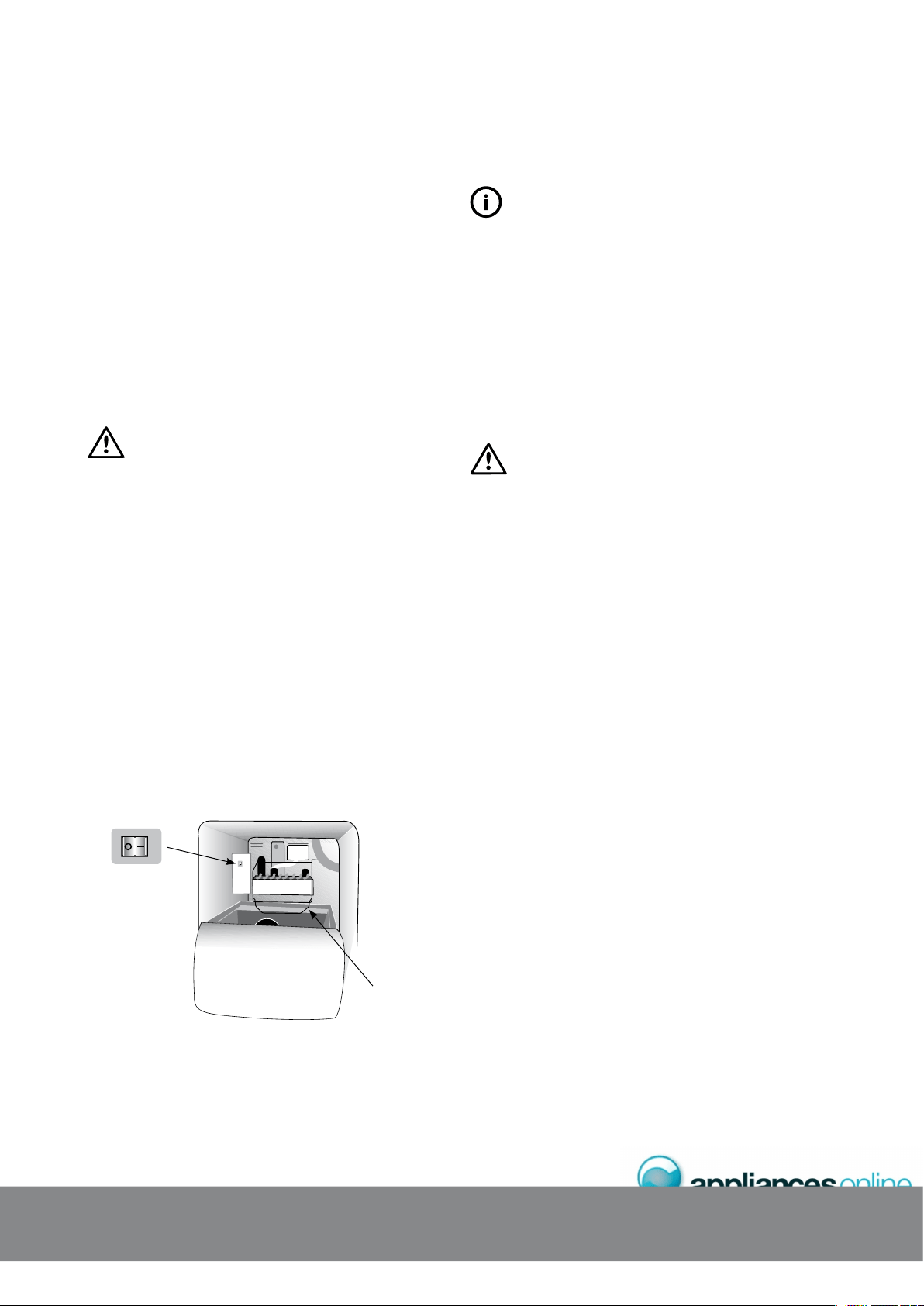
If the ice maker is not connected to a water supply,
check that the ice maker is turned off. To do this remove
the ice cream shelf and put the switch in the ‘OFF’ position.
If you don’t do this a loud buzzing noise will be heard
intermittently if the icemaker is on but no water is being
supplied. If the ice maker is connected to a water supply,
check that the ice maker is turned on. To do this put the
switch in the ‘ON’ position.
ONOFF
WARNING
Connect to potable water supply only.Do not use the ice chute
as a handle when removing or replacing the ice storage bin.
Do not put fingers up the ice chute. Surfaces there may be sharp.
+
056#..#6+
1
0
ice cream shelf

4'(4+)'4#614(4''<'412'4#6+10
It is normal for the rear, sides and centre mullion of the
appliance to feel warm. These areas are warm because
the appliance transfers heat from the food placed inside
to the outside air.
There is a cooling coil located behind the rear wall of
the freezer section. This coil cools and removes moisture
from the air. A fan at the rear of the freezer section then
circulates cold, dry air throughout the refrigerator. The air
circulation means that foods are refrigerated far more quickly
than in refrigerators where there is less air circulation. Avoid
placing food against air outlets as this will affect air circulation.
A light frosting will occasionally occur on the interior of the
freezer when the door is opened frequently. This is normal
and will disappear after a few days in most climates.
-AKE¬SURE¬YOU¬FULLY¬CLOSE¬THE¬FREEZER¬DOOR¬AFTER¬YOU¬LOAD¬
or remove food. If the door is left partly open, a heavy
frost will coat the inside of the freezer. If a frost develops,
remove it. Take care to properly close the door and the
frost will not reoccur.
Your new energy efficient appliance uses a high-speed
compressor and other energy efficient components which
may produce different noises to your old appliance.
These sounds are normal and include:
s¬ #OMPRESSOR¬RUNNING¬NOISE
s¬ !IR¬MOVEMENT¬NOISE¬FROM¬THE¬SMALL¬FAN¬MOTOR
s¬ /CCASIONAL¬GURGLING¬SIMILAR¬TO¬WATER¬BOILING
s¬ !¬POPPING¬NOISE¬HEARD¬DURING¬AUTOMATIC¬DEFROSTING
s¬ !¬CLICKING¬NOISE¬JUST¬PRIOR¬TO¬THE¬COMPRESSOR¬STARTING¬UP
s¬ !¬MOTORISED¬AIR¬BAFFLE¬USED¬TO¬ADJUST¬AIRFLOW
These noises are normal and not cause for alarm.
6'/2'4#674'5'05145
Avoid loading food against your freezer temperature sensor.
Doing so may adversely affect freezer temperatures. If warm
food is inadvertently loaded against the sensor, it may also
set off the freezer temperature alarm up to 50 minutes after
the food is loaded against the sensor.
NOTE: Product illustrations demonstrate features that
may not be completely in line with all current products.
+0+6+#.56#4672
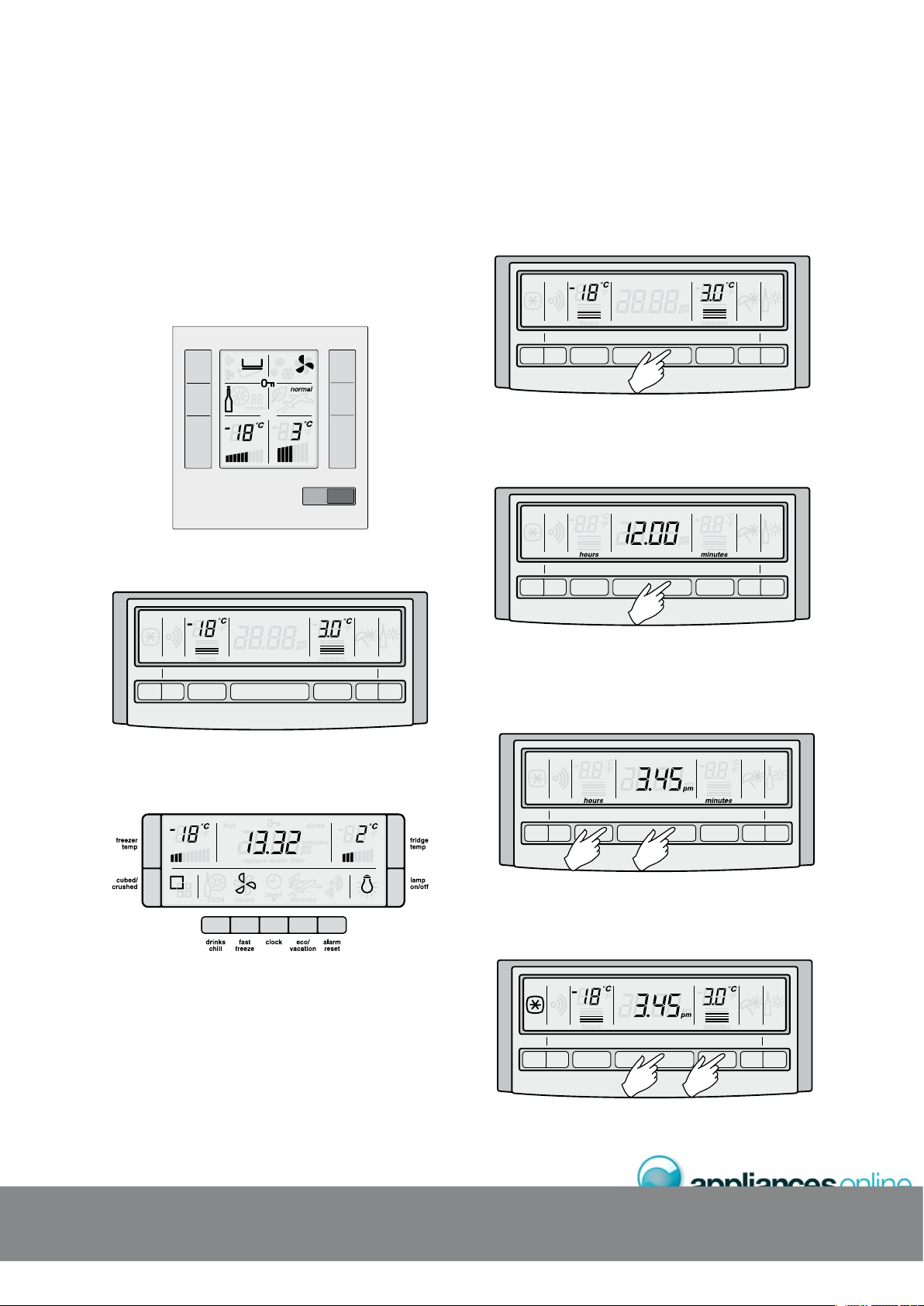
'.'%6410+%&+52.#;2#0'.
The internal electronic display panel is located on the inside
front right of the fridge liner in side by sides and at the top
rear in the fridges compartment of compact side by sides.
)T¬CONSISTS¬OF¬AN¬,#$¬DISPLAY¬WITH¬BLUE¬LIGHTING¬AND¬BUTTONS
'JCARPMLGA&GQNJ?W2?LCJh5GBC@W5GBC95'
sensor
alarm
reset
drinks
chill
freezer
quick
freeze
eco/
holiday
fridge
'JCARPMLGA&GQNJ?W2?LCJh%MKN?AR5GBC@W5GBC95'
QUICK
FREEZE
ALARM
RESET FREEZER CLOCK FRIDGE
HOLIDAY
MODE
DRINKS
CHILL
'JCARPMLGA&GQNJ?W2?LCJh+AC9?RCP&GQNJ?W
NOTE: The Electronic Display Panel varies according to the
model of refrigerator purchased. The above and following
diagrams are only representative of the different types of
panels available. Not all models will have all features listed.
75+0);1744'(4+)'4#614
6SPLGLERFCAJMAIML?LBMDD
Press the clock button to turn the clock display on or off.
NOTE: The clock still works while the display is off.
QUICK
FREEZE
ALARM
RESET FREEZER CLOCK FRIDGE
HOLIDAY
MODE
DRINKS
CHILL
5'66+0)6*'%.1%-
1. Press and hold the clock button for two seconds.
Hours and minutes will then appear on the display.
QUICK
FREEZE
ALARM
RESET FREEZER CLOCK FRIDGE
HOLIDAY
MODE
DRINKS
CHILL
2. While holding down the clock button, press the freezer
button to advance the hours. Hold the freezer button
down for continuous and fast advance. After the first
12 hours the pm indicator will appear.
QUICK
FREEZE
ALARM
RESET FREEZER CLOCK FRIDGE
HOLIDAY
MODE
DRINKS
CHILL
3. While holding down the clock button, press the fridge
button to advance the minutes. Hold the fridge button
down for continuous and fast advance.
4. When the correct time is displayed release the
clock button.
7
5+0
)
;
1
74#22.+#0
%
'
QUICK
FREEZE
ALARM
RESET FREEZER CLOCK FRIDGE
HOLIDAY
MODE
DRINKS
CHILL
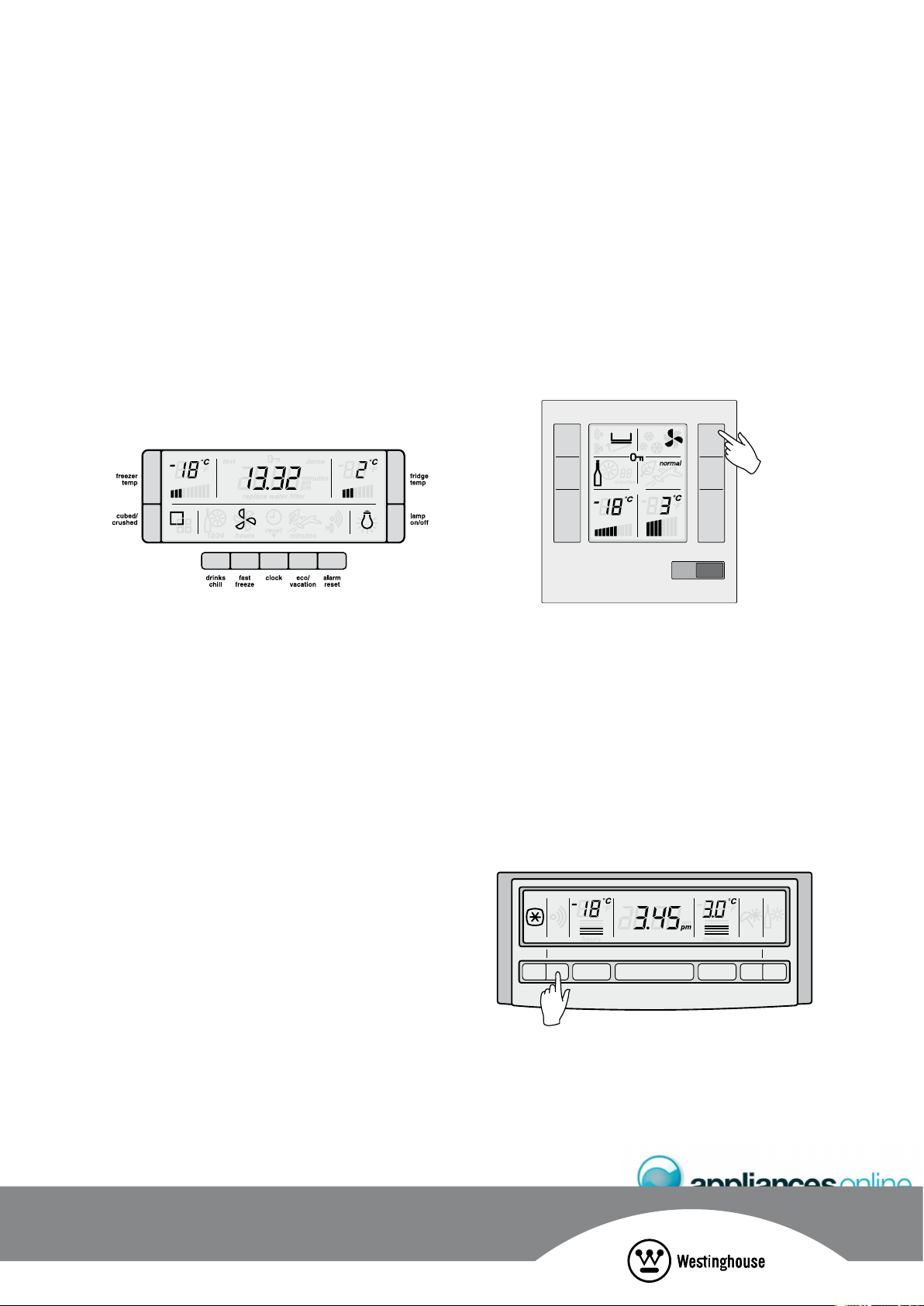
37+%-(4''<'(70%6+10
Use the quick freeze function when you add a large
amount of food to the freezer compartment. This freezes
the food quickly but does not affect the temperature in the
refrigerator compartment.
To use this function, press the quick freeze button once.
An animated icon above the button will light up. The quick
freeze function will now operate for 90 minutes. If you want
to turn the quick freeze function off before 90 minutes have
passed, simply press the quick freeze button again. The icon
will disappear and the refrigerator will return to normal operation.
sensor
alarm
reset
drinks
chill
freezer
quick
freeze
eco/
holiday
fridge
(4''<'46'/2'4#674'#.#4/
If the freezer becomes too warm, a buzzer will sound and
the icon above the Alarm Reset button, the freezer temperature
and the bar graph will flash until the Alarm Reset button is
pressed. After the Alarm Reset button has been pressed the
freezer temperature setting and the bar graph will flash until
normal operating temperatures are reached.
Check that the freezer door has not been left open or warm
food has not been placed too close to the temperature
sensor in the freezer. See diagram on page 9 for the sensor
location. If the freezer is still too warm the alarm will sound
again in 50 minutes, indicating that something may be
wrong with your refrigerator.
QUICK
FREEZE
ALARM
RESET FREEZER CLOCK FRIDGE
HOLIDAY
MODE
DRINKS
CHILL
NOTE: The freezer temperature alarm can be reset for
12 hours by pressing the alarm reset button continuously
for 10 seconds.
%10641..+0)6*'6'/2'4#674'
We recommend that when you start your refrigerator for
the first time, the temperature for the refrigerator is set to
3°C and the freezer to -18°C. If you want to change the
temperatures, use the instructions below. You should make
ONLY¬SMALL¬ADJUSTMENTS¬AND¬WAIT¬¬HOURS¬TO¬SEE¬WHETHER¬
further changes are required.
NOTE: The set temperature for the refrigerator is an
average temperature for the whole refrigerator cabinet.
Temperatures inside each compartment may vary
depending on how much food you store and where you
place it. High or low room temperature may also affect
the actual temperature inside the refrigerator.
%F?LEGLERFCDPCCXCPRCKNCP?RSPC
Press the freezer button to make the freezer colder in 1ºC steps.
Once –23ºC is reached the display will return to –14ºC
with the next button press. You’ll notice that the bar graph
gets smaller with colder freezer settings. If you set –14ºC,
the bar graph will flash continuously to warn that it is not
cold enough for long term storage of frozen food.
%F?LEGLERFCPCDPGECP?RMPRCKNCP?RSPC
Press the fridge button to make the fridge colder in 1ºC steps.
Once 0.0ºC is reached the display will return to 7ºC with
the next button press. The bar graph gets smaller with
colder freezer settings.
NOTE: Testing ice cream is a good way to check the freezer.
Testing drinking water is a good way to check the refrigerator
compartment temperature.
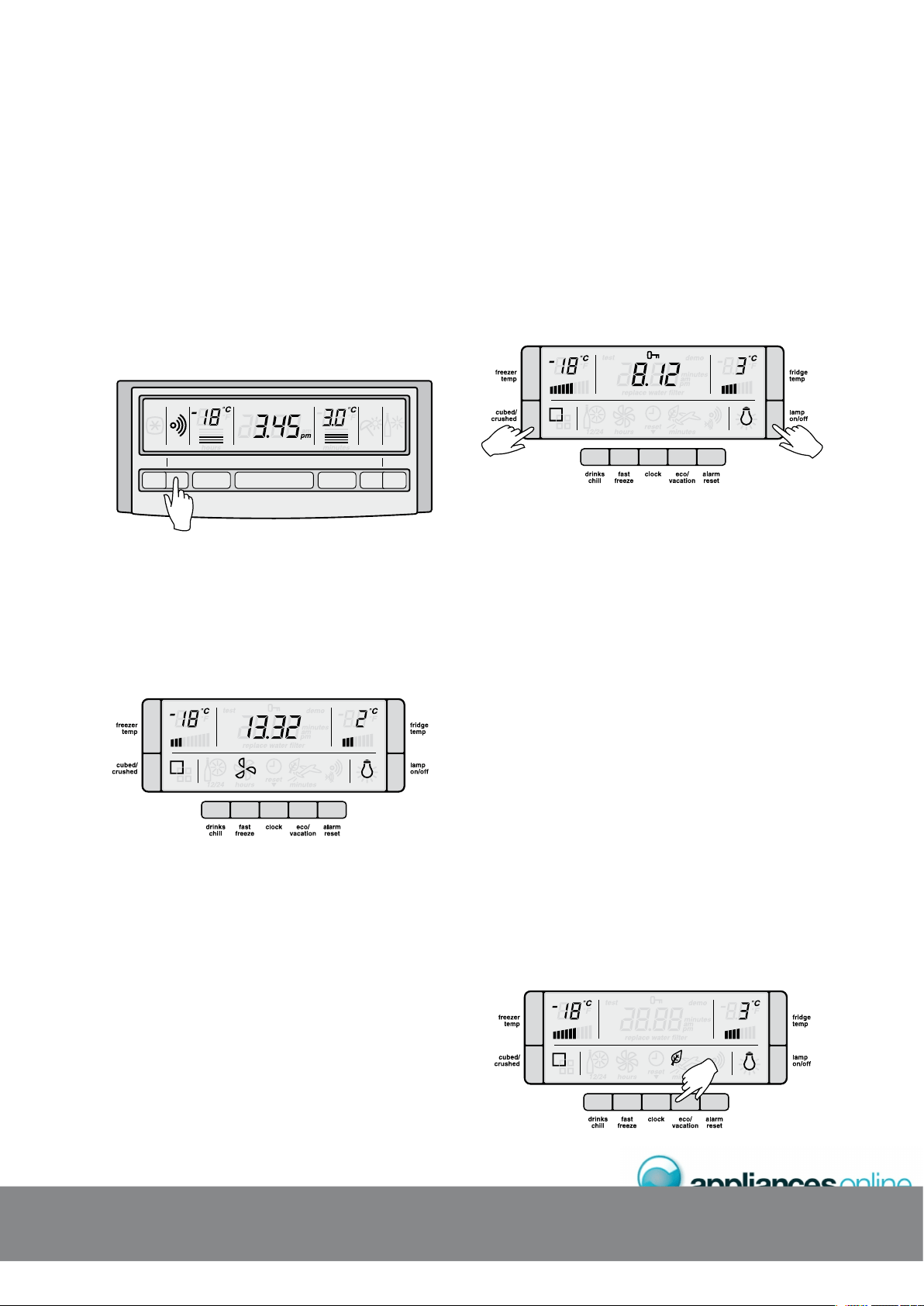
&114#.#4/
If the refrigerator door is left open for longer than 2 minutes
a buzzer will sound and the icon above the alarm reset
button will flash. The refrigerator temperature settings and
bar graph will also flash. If you want to leave the door open
while you load the fridge, you can turn the alarm off for
8 minutes by pressing the alarm reset button.
If the alarm is sounding for no apparent reason, check
whether anything is holding the door open. Closing the
door resets the alarm for a further 2 minutes.
QUICK
FREEZE
ALARM
RESET FREEZER CLOCK FRIDGE
HOLIDAY
MODE
DRINKS
CHILL
&4+0-5%*+..6+/'4
If you set the drinks chill timer it will sound an alarm to remind
you that you have left drinks in your freezer for quick chilling.
Suggested chilling times:
s¬ ¬MINUTES¬FOR¬CANS¬OF¬DRINKS
s¬ ¬MINUTES¬FOR¬BOTTLES¬OF¬WINE
s¬ ¬MINUTES¬FOR¬BOTTLES¬OF¬SOFT¬DRINK
To use the timer, press the drinks chill button. An animated icon
appears above the drinks chill button and the clock display is
replaced by the countdown timer. Press the button once to set
a 10 minute time limit, twice for 20 minutes and three times
for 30 minutes. Press four times to turn the timer off. The timer
will count down in 1 minute increments; you can change the
timer or turn the timer off even after the countdown has started.
When the countdown has finished a buzzer will sound and
the icon above the alarm will flash until the alarm reset button
is pressed. To stop the alarm and turn off the drinks chill timer,
press the Alarm Reset button. If your drink is chilled, take it out of
the freezer. If it is not cold enough, reset the drink chill function
bearing in mind that the drink is already partially chilled.
%*+.&.1%-
To activate the child lock on ice & water models, press and
hold the lamp on/off and cubed/crushed buttons together.
This will disable the display to prevent accidental changes
to settings. The key icon will appear on the electronic
display when child lock is activated. To turn off the child
lock press and hold the lamp on/off and cubed/crushed
buttons together.
For standard models activate the child lock by pressing the
fridge and freezer buttons at the same time for 3 seconds.
Repeat to unlock.
'0'4);'((+%+'0%;
Your appliance has been designed with energy efficiency
in mind and can operate in any of three modes (normal,
eco, vacation), depending on the level of efficiency sought.
] 0MPK?JKMBC
This is the mode which is entered automatically when the
appliance is first turned on. Normal mode is the mode
most suitable when the refrigerator door is opened often.
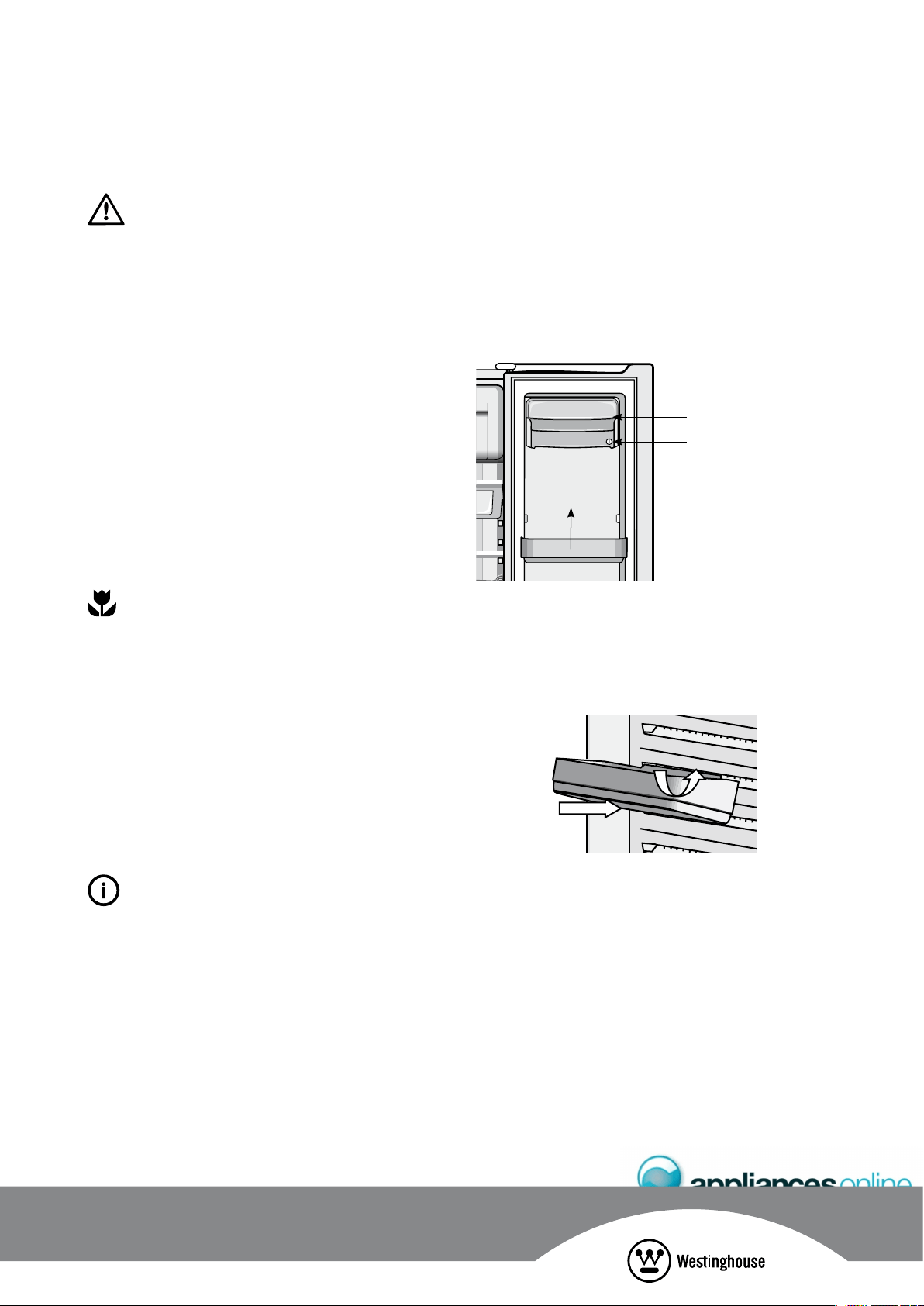
] 'AMKMBC
Eco mode is a more efficient mode than normal mode
and can be entered in two ways. Either by manually
pressing the eco/vacation button once when in normal
mode, or automatically after 30 hours if the refrigerator
door has not been opened. The leaf icon will appear
on the electronic display when eco mode is activated.
If eco mode is entered automatically, the appliance
will revert to normal mode once the refrigerator door
is opened. If eco mode is entered manually, door
openings will not cause the display to revert to normal
mode. To exit eco mode, press the eco/vacation
button twice (or until there are no icons displayed).
75+0);1744'(4+)'4#614
7
5+0
)
;
1
74#22.+#0
%
'
CAUTION
Eco mode is designed to operate with minimum door
opening (e.g. if used as a long term storage fridge).
If turned on manually, it won’t switch off automatically and
frequent door opening in eco mode could lead to food
spoilage. If frequent door opening is likely to occur switch
back to normal mode.
] 8?A?RGMLFMJGB?WKMBC
Vacation mode is suitable if you will be away from your
appliance for an extended period. To take advantage
of maximum efficiency press the eco/vacation button
TWICE¬IN¬SUCCESSION¬JUST¬BEFORE¬YOU¬LEAVE¬n¬DO¬THIS¬
while in normal mode. The appliance will then enter
vacation mode, as indicated by the aeroplane symbol.
Press eco/vacation button again to cycle between
‘normal’, ‘eco’ and ‘vacation’ modes. If in eco mode
a single button press is all that is required to enter
vacation mode.
Vacation mode is exited automatically once the
refrigerator door is opened and normal mode resumes.
ENVIRONMENTAL TIPS
Eco and vacation modes minimise defrosting to save
energy, while maintaining your temperature settings.
NOTE: Opening the freezer door has no effect on the
operation of Eco and Vacation Modes
16*'4'.'%6410+%('#674'5
Your refrigerator:
s¬¬ ¬#ONTROLS¬THE¬COMPRESSOR¬AND¬FAN¬INDEPENDENTLY¬
to provide the best performance
s¬¬ ¬0ROVIDES¬EXTRA¬COOLING¬DEPENDING¬ON¬THE¬NUMBER¬
of door openings
s¬¬ ¬!UTOMATICALLY¬DEFROSTS¬DURING¬PERIODS¬WHEN¬THE¬DOOR¬
is not being opened frequently
TIPS & INFORMATION
If you find that the display malfunctions, this may be due to
brief power supply interruptions. If this is the problem, you
simply need to turn the refrigerator off at the power point
and wait 5 minutes, then turn the refrigerator on again at
the power point.
(11&%1/2#46/'06('#674'5
&MMPQRMP?EC@GLQ
Both the refrigerator and freezer have door storage bins.
9OU¬CAN¬ADJUST¬THE¬DOOR¬BINS¬TO¬MEET¬DIFFERENT¬STORAGE¬NEEDS¬
All the door bins are completely removable for cleaning.
)F¬YOU¬WANT¬TO¬REMOVE¬OR¬ADJUST¬A¬BIN¬IN¬ALL¬FREEZERS¬AND¬
in the fridge of the compact side by side, lift it over the
support lugs on the inner door panel. Push the bin down
over the support lugs to lock it in place.
coin slot
lift bin to remove
store safe compartment
&MMPQRMP?EC@GLQQFCJTCQ
&LEXIDOOR¬SHELVING¬IS¬USED¬ON¬THE¬DOOR¬OF¬THE¬,¬
SIDE¬BY¬SIDE¬)F¬YOU¬WANT¬TO¬REMOVE¬OR¬ADJUST¬A¬BIN¬LIFT¬AND¬
tilt to remove. To replace, fit top and push bin down until
support lugs to lock it in place.
&?GPWAMKN?PRKCLR
Use the dairy compartment to store foods like butter,
margarine and cheeses. The compartment is slightly warmer
than the rest of the refrigerator compartment, while the lid
provides protection against odours.
5RMPCQ?DCAMKN?PRKCLRQCCRMNBG?EP?K
The store safe compartment is a coin-lockable compartment.
To lock, rotate the coin slot anti-clockwise until the slot is
horizontal. To unlock, turn the coin slot clockwise until the
slot is vertical.
To open the drawer, push the tab down with your thumb
and pull the drawer forward.
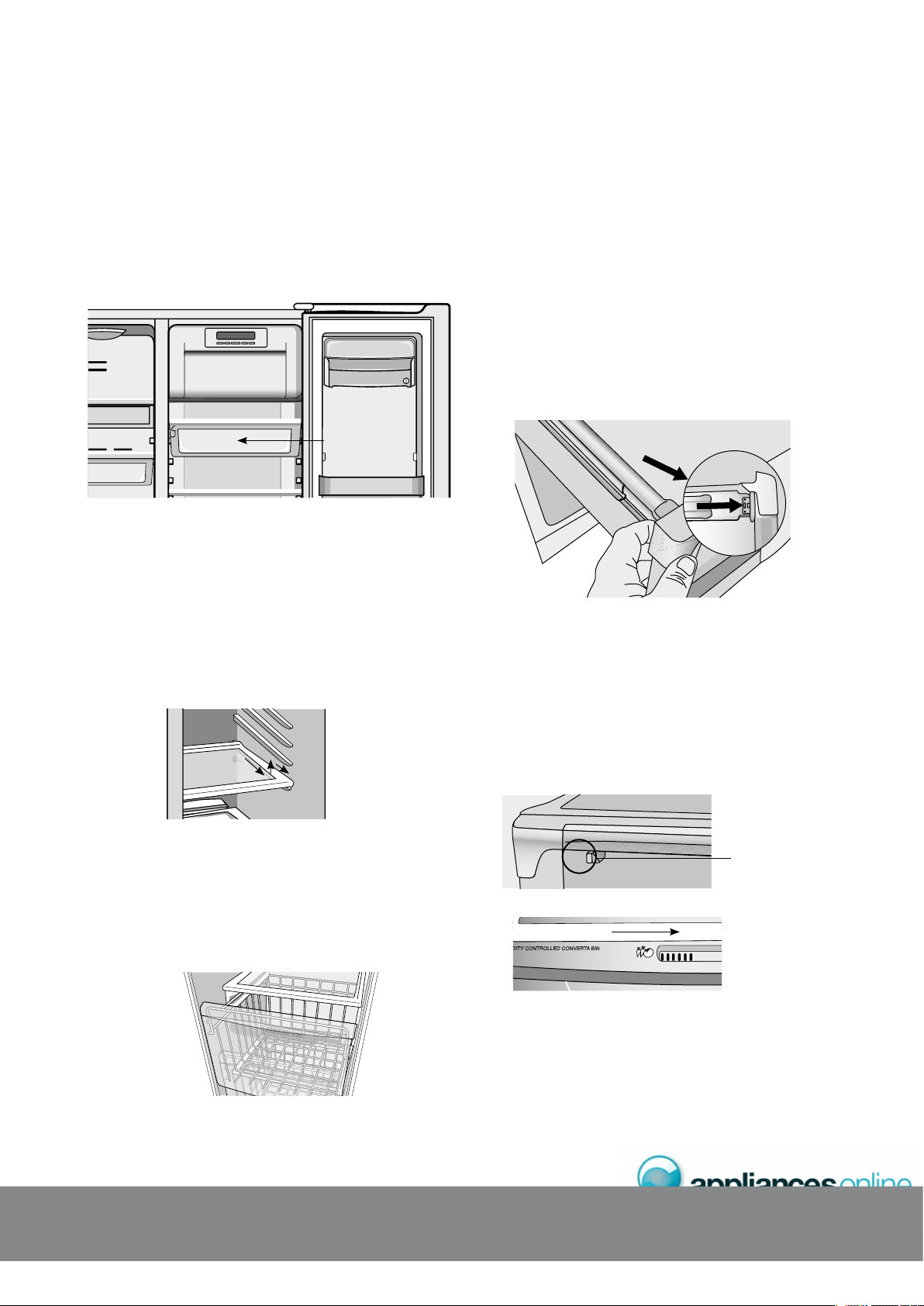
&CJGAMKN?PRKCLR
The deli compartment is an ideal place to keep deli items,
such as cold meats. Additional cold air is directed into the
deli compartment, keeping the contents fresher for longer. It can
also be used for faster chilling of food or drinks. To remove
the deli compartment, pull forward, then up and forward.
deli compartment
5JGBCMSREJ?QQQFCJTCQ
To make access to your food easier, both the refrigerator
and freezer compartments are fitted with glass shelves.
To remove the shelves
1. Gently pull them forward until the shelf comes to a stop.
¬ ¬,IFT¬THE¬SHELF¬SLIGHTLY¬TO¬CLEAR¬THE¬STOP
3. Continue pulling the shelf forward.
To return the shelf, make sure there is nothing behind it that may
obstruct movement and gently push the shelf into the cabinet.
It should slide back over the stops into its original position.
(PCCXCP@?QICRQ
&REEZER¬BASKETS¬AND¬FREEZER¬SHELVES¬ARE¬FITTED¬TO¬,¬
freezer compartments. Wire baskets are used to provide
easy visibility of the contents in the compact side by side.
All the baskets and the shelves pull out for easy access and
have a stop to prevent the baskets and shelves being pulled
out too far.
To remove the basket, pull it out until it hits the stop then lift
the front to unhook the stop while continuing to pull forward,
until the basket is free of the runners under the shelf.
6CJCQAMNGADPCCXCP@GLQ?LBAPGQNCPQ
&OR¬,¬SIDE¬BY¬SIDES¬WITH¬TELESCOPIC¬FREEZER¬BINS¬
and crispers you can replace the draw as follows:
1. With the telescopic slides pushed in all the way.
2. Slide the drawer into place over the slides and push the
bin in until it stops. The bin will not be closed all the way.
3. Open the bin to access the finger tabs at the ends of
the telescopic slides, on each side of the bin. Using
your thumb and forefinger, lift the bin over the end of
the slide and clip in place. If the drawer is not fully
engaged on the slide, it’s possible the drawer won’t
stay on the slide if fully extended.
The end of slide must
be clipped into place
4. Fully close the bin.
When replacing the drawers after cleaning, we recommend
fitting the lower drawer first.
%PGQNCP@GLQ
s¬ 3TORING¬VEGETABLES
You can use the crisper bin to store vegetables, fruit
or smallgoods. You can change the humidity inside
the bin by sliding the humidity control.
Humidity control
s¬ 3TORING¬FRUIT¬¬SMALLGOODS
You can also store fruit & smallgoods in the crisper bin
remembering to set the humidity control to less humid (open).
75+0);1744'(4+)'4#614
7
5+0
)
;
1
74#22.+#0
%
'

CAUTION
Never close the door while the telescopic slides are extended.
It may damage the slide and/or the refrigerator or cause the
slide to become disengaged from the refrigerator.
CAUTION
To clean a crisper cover with telescopic extension slides,
simply wipe with a damp cloth and warm soapy water.
Never immerse the cover in water, as this could affect the
operation of the slide.
+%'9#6'4('#674'5
69+56+%'5'48'
To use, remove the tray, fill with water and place back in
the freezer. Once ice has formed (approximately 3 hours)
simply twist the knob at the front clockwise until the ice
drops into the bin below.
+%'9#6'4&+52'05'4('#674'5
The ice and water dispenser conveniently dispenses cool,
filtered water and ice cubes or crushed ice. To operate the
ice dispenser, select an ice option using the electronic display.
Press a glass against the dispensing paddle. Hold the top
of the glass as close as possible to the ice outlet, so that
you will catch all the ice. To stop dispensing ice, pull the
glass away from the dispensing paddle. Do not remove the
glass until the ice has finished coming out.
To operate the water dispenser, press a glass against the
dispensing paddle. To stop dispensing water, pull the glass
away from the dispensing paddle. A drip tray located at
the base of the dispenser (see diagram above) will catch
small spills and allow them to evaporate. The drip tray is
removable and dishwasher safe.
CAUTION
Do not pour water or excess cubes into the drip tray
because it is not connected to a drain.
&GQNCLQCPJ?KN
The dispenser has a light which can be turned on and off
BY¬PRESSING¬THE¬,AMP¬BUTTON¬ON¬THE¬ELECTRONIC¬DISPLAY¬SEE¬
diagram below). The lamp is also activated for 6 seconds
whenever a dispensing paddle is pressed. The light comes
FROM¬¬ULTRA¬BRIGHT¬,%$S¬LIGHT¬EMITTING¬DIODES¬WHICH¬ARE¬
part of the electronic display. These are not customer
replaceable. The same technology is used in the interior
multiflow duct (blue strip lights).
*196*'9#6'4&+52'05'4914-5
After the refrigerator is connected to the water supply,
fill the water tank by holding a glass against the dispenser
paddle. You may need to hold the glass against the paddle
for up to 2 minutes before water begins to flow. Continue
to draw water for a further 3 minutes to rid the tank and
plumbing connections of any impurities, the tank will
automatically refill as you dispense water.
CAUTION
Remember, do not drink this water as it may have impurities in it!
TIPS & INFORMATION
The water connection to your ice and water product
should only be done by a licensed refrigeration mechanic,
plumber or electrician.
The water dispenser water tank is located behind the
upper crisper bin in the refrigerator compartment.
*On selected models
0MPK?J1NCP?RGMLi(MPAMMJU?RCP?BBGAC
To provide the convenience of filtered water in the same
location as the ice dispenser, it is necessary to route the
tubes from the refrigerator compartment. This means the first
half glass of water will not be quite as cold as the following
3 or 4 glasses. If you require cool water from the first glass,
we recommend that you first add crushed or cubed ice to
your glass then the water. In times of high use, water may
be dispensed before it has time to cool. Once this occurs,
the dispensed water temperature will be similar to that of
your normal tap water until the tank has had a chance to
re-cool. The addition of cubed or crushed ice will allow
YOU¬TO¬STILL¬ENJOY¬COOL¬WATER¬SHOULD¬THIS¬OCCUR
CAUTION
Chemicals from a malfunctioning softener can damage
the ice maker. If the ice maker is connected to soft water,
ensure that the softener is maintained and working properly.
*196*'+%'&+52'05'4914-5
The ice maker and ice container are located in the top of
the freezer compartment. After the refrigerator is installed
properly and has cooled for several hours, the ice maker
can begin making ice and the first batch will be ready
within 24 hours. A full tray of ice may not be created for
the first few batches, due to air in the refrigerator’s new
plumbing lines. To begin ice production, switch the switch
to the ON position. If no ice is dispensed it will take about
2 days to fill the storage container. The ice maker turns
off automatically when the ice container is full. To stop
ice production, turn the switch to the OFF position (see
diagram on page 8). The first batches of ice cubes may be
discoloured or have an odd flavour, due to the refrigerator’s
new plumbing connections. Discard this ice until batches
are free of discolouration or taste problems.
ONOFF
wire signal arm
NOTE: If the water filter is not in place or suitably
by-passed, the ice maker will not produce any ice.
TIPS & INFORMATION
s¬¬ ¬)CE¬CUBES¬STORED¬TOO¬LONG¬MAY¬DEVELOP¬AN¬ODD¬FLAVOUR¬
Remove the ice container and discard the ice cubes.
When replacing the tray, ensure that the wire signal
arm (see diagram below left) sits within the ice cube
container. The ice maker will then start producing ice.
s¬¬ ¬/CCASIONALLY¬SHAKE¬THE¬ICE¬CONTAINER¬TO¬KEEP¬
ice separated.
s¬¬ ¬!FTER¬YOU¬TAKE¬DELIVERY¬OF¬THE¬REFRIGERATOR¬KEEP¬THE¬ICE¬
maker switch in the OFF position until the refrigerator is
connected to the water supply. The switch should also
be kept in the OFF position whenever the water supply
is turned off.
CAUTION
If the dispensing paddle is pushed for more than 4 minutes,
the dispenser motor may overload and stop. The overload
protector will reset automatically after 3 or 4 minutes.
s¬¬ ¬)F¬A¬LARGE¬QUANTITY¬OF¬ICE¬IS¬NEEDED¬AT¬ONE¬TIME¬IT¬IS¬BEST¬
to remove cubes directly from the ice cube container
s¬¬ ¬7HEN¬THE¬ICE¬MAKER¬IS¬OPERATING¬IT¬IS¬NORMAL¬TO¬HEAR¬
the sound of:
– The motor running.
– Ice dropping into the ice container.
– The water valve opening or closing.
– Ice loosening in the tray.
– Running water.
#
76
1
/#6+
%
&+52'05'4
%.'#0+0)6*'+%'&+52'05'4
Clean the dispenser and ice container at regular intervals,
particularly before you take a vacation or move, also clean
the dispenser if it sticks.
To clean the dispenser:
1. Switch the ice maker off by putting the wire signal arm
in the horizontal position.
2. Remove the ice container by lifting it up and out.
Empty and carefully clean the container with mild
detergent. Rinse carefully ensuring no traces of
detergent remain. Do not use harsh or abrasive
cleaners. Allow the ice container to dry completely
before replacing it in the freezer.
3. Remove ice chips from the shelf and chute that support
the ice container; clean these areas.
4. Replace the ice container.
5. Turn the ice maker on by moving the wire signal arm.
WARNING
Do not use the ice chute as a handle when removing or
replacing the ice storage bin. Do not put fingers up the
ice chute. Surfaces there may be sharp.
CAUTION
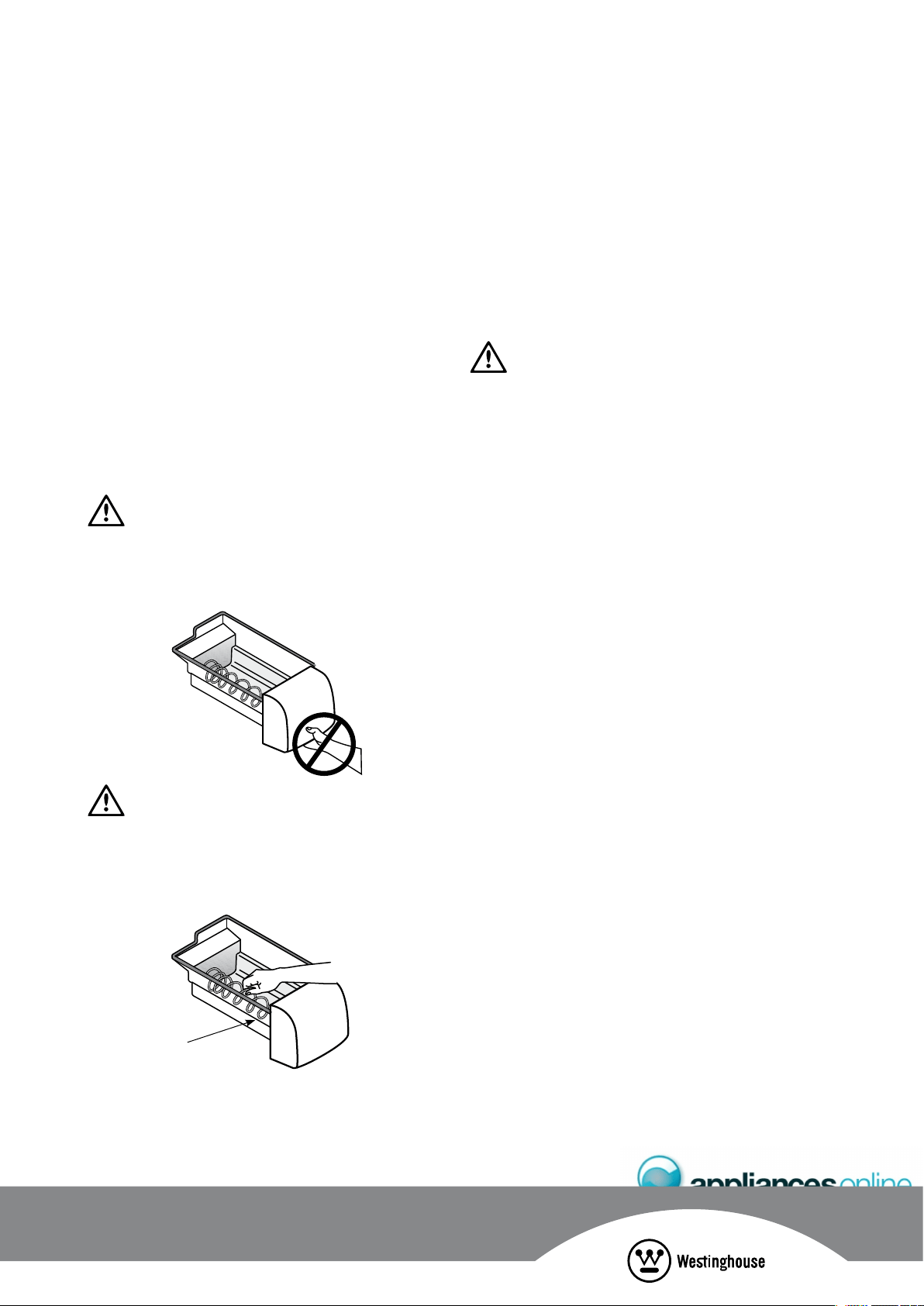
When removing or replacing the ice bin do not rotate
the auger in the ice bin. If the auger is accidentally turned,
you must realign the auger by turning it in 90º turns until
the ice bin fits into place with the drive mechanism.
auger
4CKMTC?LBCKNRWRFCGACQRMP?EC@GLGD
1. An extended power failure (one hour or longer) causes
ice cubes in the ice storage bin to melt and freeze
TOGETHER¬AND¬JAM¬THE¬DISPENSER¬MECHANISM
2. If the ice dispenser is not used frequently, ice cubes
WILL¬FREEZE¬TOGETHER¬IN¬THE¬BIN¬AND¬JAM¬THE¬DISPENSER¬
mechanism. If this happens remove the ice storage bin
and shake it to loosen the cubes.
CAUTION
NEVER use an ice pick or similar sharp instrument to break
up the ice. This could damage the ice storage bin and
dispenser mechanism.
1RFCPCJCARPMLGADC?RSPCQMDWMSPQR?LB?PB?LB+ACU?RCPPCDPGECP?RMP
Your refrigerator:
s¬ ¬#ONTROLS¬THE¬COMPRESSOR¬AND¬FAN¬INDEPENDENTLY¬
to provide the best performance
s¬ ¬0ROVIDES¬EXTRA¬COOLING¬DEPENDING¬ON¬THE¬NUMBER¬
of door openings
s¬ ¬!UTOMATICALLY¬DEFROSTS¬DURING¬PERIODS¬WHEN¬THE¬DOOR¬
is not being opened frequently
s¬ ¬(AS¬BLUE¬FEATURE¬LIGHTING¬ACTIVATED¬BY¬OPENING¬
the refrigerator door (ice and water models only)
NOTE: If you find that the display malfunctions, this may
be due to brief power supply interruptions. If this occurs you
simply need to turn the refrigerator off at the power point
and wait 5 minutes for the refrigerator pressure to equalise
then turn the refrigerator on again at the power point.
6*'':6'40#.9#6'4(+.6'4-+6
An external water filter and connection kit has been supplied
for use with your Ice & Water refrigerator. The external filter design
allows more space within the refrigerator and provides double
the life of previous filters reducing the cost of replacement. The
filter is designed to significantly reduce chlorine, taste, odour,
heavy metals, turbidity ( cloudiness) and scale build up. The
INCLUDED¬PLASTIC¬,,$0%¬WATER¬TUBE¬ALLOWS¬QUICK¬CONNECTION¬TO¬
the filter and is designed for high durability and kink resistance.
This filter is designed only to be used with a potable water supply.
It should not be used on water that is micro biologically unsafe
or with water of unknown quality. The filter should be replaced
every 12 months. The service life of the filter may be reduced
in water supplies that contain an excess of particles or other
impurities. Reduced flow rate is an indication that a new filter
is required. Failure to replace the filter when required can
affect the function of the ice maker. Service calls caused by
a failure to replace the filter are not covered by warranty.
614'2.#%'6*'9#6'4(+.6'4
The water filter is fitted with Super Speed fit Fittings for
ease of installation and replacement. To replace the filter;
1. Turn off the water supply.
2. Release the pressure in the water lines by holding
a container against the water dispenser paddle on
the refrigerator until the pressure has been released.
3. Turn off the refrigerator at the power point and remove
the plug from the socket or turn off the icemaker.
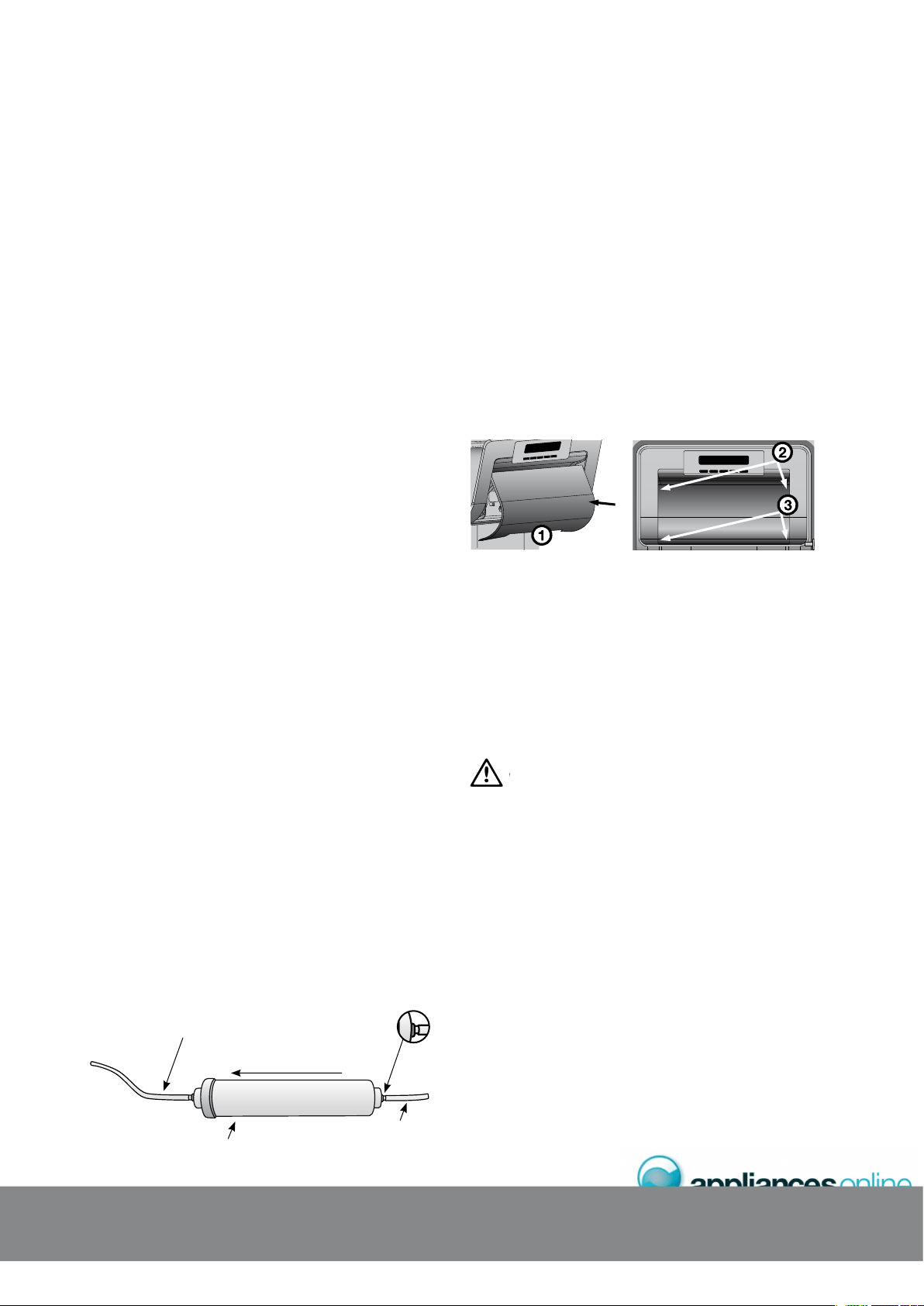
4. Depress the collet (see diagram below) and pull the
tube out of each end of the filter.
5. Refit the tubes into the new filter to the stops (about 15mm).
Ensure that you observe the flow direction. Write the
fitment date in the space provided on the filter.
6. Gently pull back on the tube to ensure that it is secure.
7. Turn the water supply back on and check for leaks.
8. Plug the unit back in and turn the power supply back on to the
refrigerator and ensure that the icemaker is turned back on.
9. Purge and dispose of approximately 5 litres of water
through the water dispenser to condition the filter and
clear the water lines of air and impurities. It may take
up to a minute to get a full flow of water from the
dispenser. Do not be alarmed if there is an initial black
colour to the water. This is residual carbon dust from the
filter and is non-toxic.
10. Once the lines have been purged, dispose of the first
few batches of ice to ensure that impurities have been
flushed from this part of the system.
External water filter – installed between fridge and water supply.
(Usually situated within kitchen cupboard under sink or surrounds).
Tube supplied with filter installation kit.
Cut to fit as per your kitchen requirements.
From water supply
Flow direction
To fridge
Collet (blue ring).
There is a collet
at both ends.
Note: If the water is slow to shut off or the dispenser is dripping,
this indicates that there may still be air in the lines. Either purge
more water through the system to remove this air or allow some
time for the air to be removed over subsequent dispensing.
%*#0)+0)6*'.+)*6$7.$
4'(4+)'4#614.+)*6
1. Switch off the power at the power point and remove
the refrigerator’s power cord from the power point.
2. Check the temperature settings and write them down.
diagram A diagram B
3. Unclip the light lens by inserting your fingers at
point 1 in diagram A.
¬ ¬,IFT¬THE¬LIGHT¬LENS¬UNTIL¬IT¬IS¬CLEAR¬OF¬THE¬HOUSING¬AND¬
unscrew the light bulb.
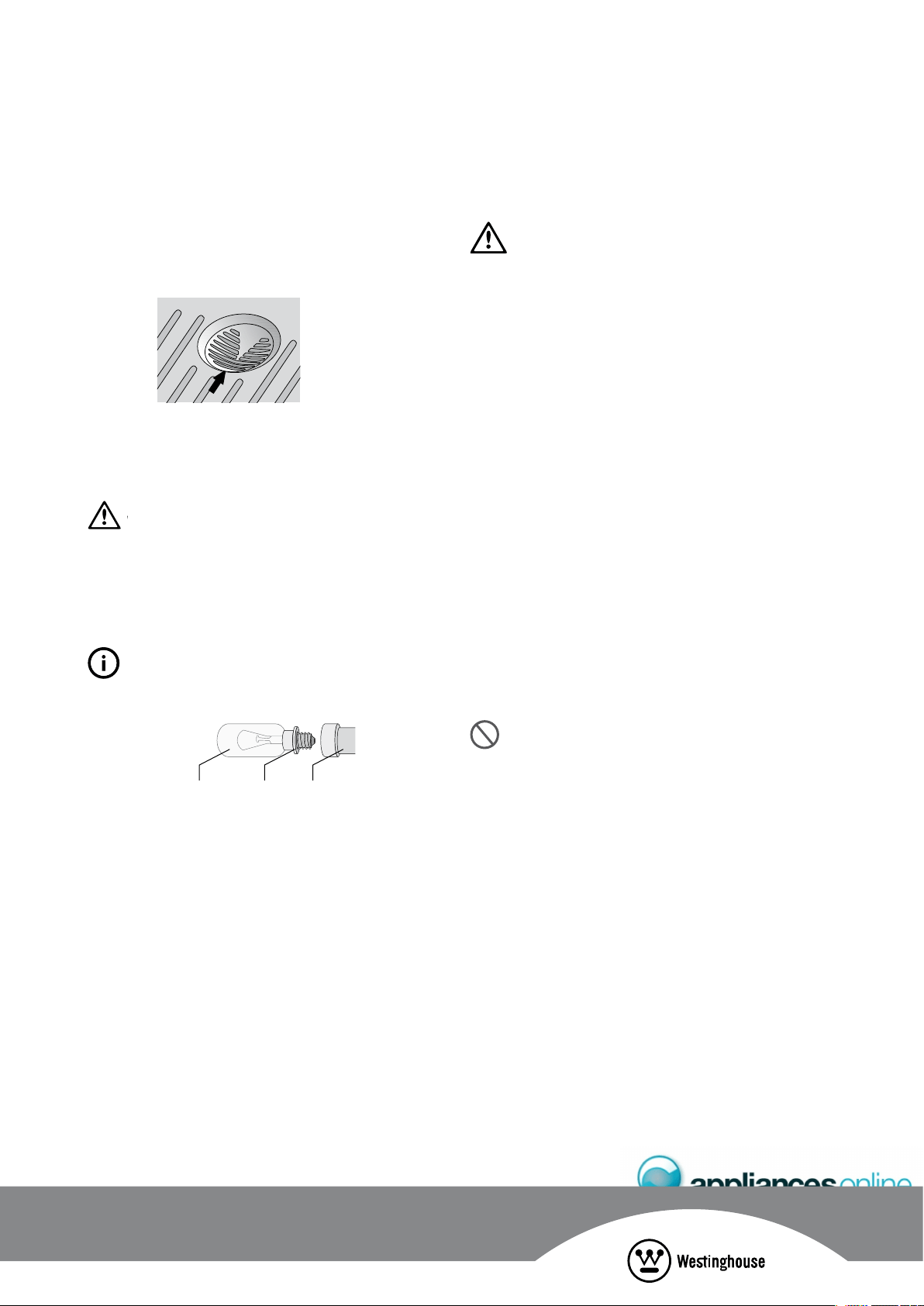
5. Unscrew the light bulb and replace it with a bulb that is
the same as the original. If, when you remove the light
bulb the small rubber “O” ring comes out with the bulb,
fit the “O” ring over the new bulb and screw bulb into
the socket (see diagram on next page).
Never insert your finger into the light bulb socket to
check for the presence of the “O” ring.
6. Replace the light lens by inserting the tab on the lens
at point 2 and pushing in the lens with both hands at
point 3, see diagram B.
7. Turn the refrigerator back on and reset your temperature
to the previous settings.
%*#0)+0)6*'9#6'4(+.6'4
9
#6'4(+.6'4.+
)
*6$7.$
W
%*#0)+0)6*'.+)*6$7.$
%.'#0+0)6*'':6'4+14
WARNING
"%&/2%¬#,%!.).'¬4URN¬THE¬REFRIGERATOR¬OFF¬AT¬THE¬
power point and unplug the cord to prevent any chance
of electrocuting yourself.
An occasional wipe over with a clean, damp cloth will help
remove finger marks. You should only clean the doors with
lukewarm, soapy water and a soft cloth. Rinse with clean
water and then wipe the surface with a soft, clean cloth to
remove any soapy residue.
Note: Only wash plastic parts or decorative trim with warm
(not hot) water using an unscented detergent.
&MMPQh2?GLRCB
Clean as described above for the cabinet.
&MMPQh5R?GLJCQQ5RCCJ
Your stainless steel appliance is manufactured from a mark
resistant stainless steel. This stainless steel has a special
advanced protective coating that helps ease the removal
of marks such as finger prints or water spots. To keep your
stainless steel refrigerator looking its best, you should clean
it regularly. You should only clean the stainless steel doors
with lukewarm soapy water and a soft cloth. Rinse with
clean water and then wipe the surface with clean water
and a soft, clean cloth to remove any soap residue.
Do not use abrasive pads or other cleaners as they are
likely to scratch the surface. Damage to this product
after installation is not covered by your warranty.
Note: It is important to wipe in the direction of the grain of
the stainless steel to avoid any undue marking of the surface.
(4''<'4.+)*656#0&
1. Switch off the power at the power point and remove
the cord by pulling the plug.
2. Carefully unclip the light cover by pulling the light cover
tab at the rear, towards you.
3. Unscrew the light bulb and replace it with a new bulb
of the same type and wattage. If, when you remove the
light bulb the small rubber “O” ring comes out with the
bulb, fit the “O” ring over the new bulb and screw bulb
into the socket (see diagram at bottom of page).
W
Never insert your finger into the light bulb socket to
check for the presence of the “O” ring.
4. Replace the light cover by hooking the light cover lugs
into the front of the housing and pressing the rear of the
cover up until it clips in.
5. Wait 5 minutes to ensure pressures in the refrigeration
system are equalised before turning the refrigerator on
at the power point.
TIPS & INFORMATION
Ensure the ‘O’ ring is in place before replacing the bulb.
(4''<'4.+)*6+%'9#6'4
1. Switch off power.
2. Remove cover located at the rear under the icemaker.
3. Unscrew 2 bulbs and replace.
4. Replace light cover.
5. Wait 5 minutes and turn power back on.
%.'#0+0);1744'(4+)'4#614
%
.'#0+0
)
,IGHT¬BULB “O” ring ,IGHT¬SOCKET
'0'4);%1057/26+10'.'%64+%+6;%1565
The following guide will help you reduce the running cost
of your new refrigerator. This will save you money and help
conserve our valuable energy resources.
s¬ ¬)F¬YOU¬KEEP¬YOUR¬OLD¬REFRIGERATOR¬SAVE¬POWER¬BY¬
switching it off when not in use.
s¬ ¬$O¬NOT¬SET¬YOUR¬FREEZER¬TEMPERATURE¬TOO¬LOW¬!FTER¬¬HOURS¬
ice cream should be firm but able to be scooped out
with a spoon without bending the handle. If ice cream
IS¬FIRMER¬THAN¬THIS¬OR¬TOO¬SOFT¬ADJUST¬THE¬FREEZER¬TEMPERATURE¬
CONTROLS¬SEE¬@!DJUSTING¬4EMPERATURES¬PAGE¬
s¬ ¬%NSURE¬THAT¬THE¬REFRIGERATOR¬DOORS¬SEAL¬PROPERLY¬AS¬YOU¬
close them.
s¬ ¬"EFORE¬YOU¬OPEN¬THE¬REFRIGERATOR¬DOORS¬DECIDE¬WHAT¬
you want to put in or take out. This will minimize the
time you have the doors open.
s¬ ¬)T¬IS¬BEST¬TO¬HAVE¬THE¬REFRIGERATOR¬IN¬A¬PLACE¬THAT¬IS¬OUT¬
of direct sunlight and away from heating appliances
of any kind. For example, do not place the refrigerator
next to a cooker, stove or dishwasher.
s¬ ¬!LLOW¬HOT¬FOODS¬TO¬COOL¬TO¬ROOM¬TEMPERATURE¬BEFORE¬YOU¬
put them in your freezer.
s¬ 4HAW¬FROZEN¬FOOD¬IN¬THE¬REFRIGERATOR¬SECTION
s¬ ¬)F¬YOU¬KEEP¬THE¬FREEZER¬COMPARTMENT¬FILLED¬TO¬CAPACITY¬
your food mass will help maintain the freezer
temperature when you open the door.
s¬ ¬$O¬NOT¬BLOCK¬AIR¬VENTS¬$OING¬SO¬MAY¬CAUSE¬THE¬
refrigerator to run longer and use more energy.
59+6%*+0)1((;1744'(4+)'4#614
If you switch your refrigerator for an extended period,
follow these steps to reduce the chances of mould:
1. Take all the food out of the refrigerator and
freezer compartments.
2. Switch off the refrigerator and remove
the electric cord from the power point.
3. Clean the inside.
¬¬ ¬,EAVE¬THE¬DOORS¬OPEN¬4HIS¬PREVENTS¬BACTERIA¬FROM¬
growing and causing smells in the refrigerator.
219'4(#+.74'
If there is a power failure in your area, keep the door to the
FREEZER¬CLOSED¬-OST¬FOODS¬IN¬YOUR¬FREEZER¬WILL¬STAY¬FROZEN¬
for 24 hours.
&PGNRP?W
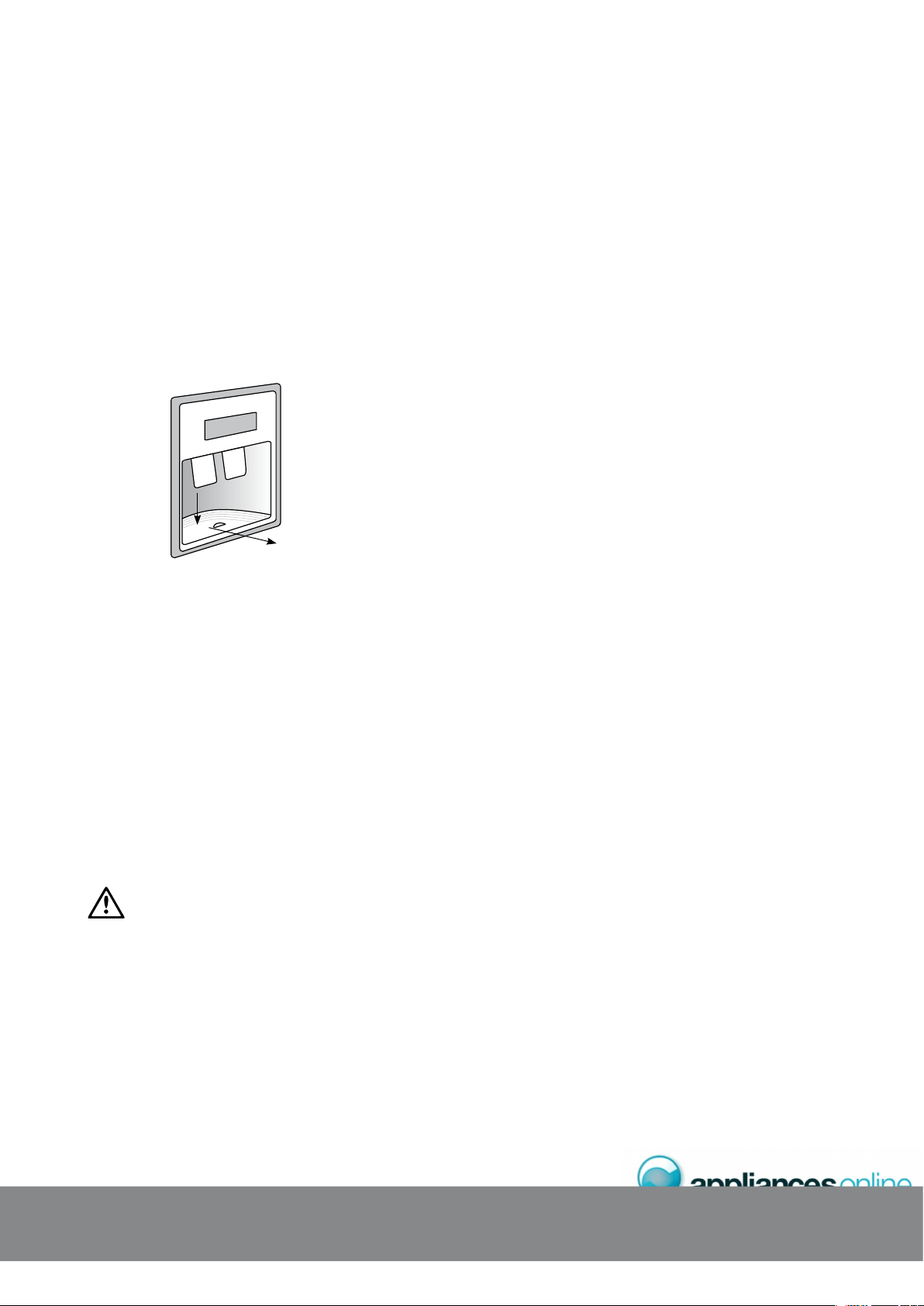
Water may accumulate in the sump located under the drip
tray. If this occurs the sump can be sponged out to prevent
water overflowing down the front of the door.
For cleaning, remove the tray as described below:
1. Press down at the back of the drip tray with the tips
of your fingers.
2. Pull the tray forward.
3. To refit, slide the drip tray back into position and
push into place (see Diagram below).
1. Push down
2. Slide out
%.'#0+0)6*'+06'4+14
You should clean the refrigerator interior regularly. It will
be easiest to clean when the food supply is low. Wash
the interior with a soft cloth and use an unscented mild
soap with lukewarm water. Thoroughly dry all surfaces
and removable parts. Avoid getting water on refrigerator
controls. If you have taken out any removable parts,
replace them and switch the power on before restocking
the refrigerator with food. You should keep the interior
of your refrigerator hygienic by promptly and thoroughly
wiping up any food spills.
-CCNBMMPQC?JQAJC?L
Take care to keep door seals clean. Sticky food and drink
can cause seals to stick to the cabinet and tear when you
open the door. Wash the seal with a mild detergent and
warm water. Rinse thoroughly with clean water and dry.
CAUTION
Never use hot water, solvents, commercial kitchen cleaners,
aerosol cleaners, metal polishes, caustic or abrasive cleaners,
OR¬SCOURERS¬TO¬CLEAN¬YOUR¬REFRIGERATOR¬-ANY¬COMMERCIALLY¬
available cleaning products and detergents contain solvents
that will damage your refrigerator. Use only a soft cloth with
an unscented mild soap and lukewarm water.
If your refrigerator has telescopic extension slides, simply wipe
them with a damp cloth to clean them and never immerse
them in water.
%.'#0+0);1744'(4+)'4#614 *'.2(7.*+065
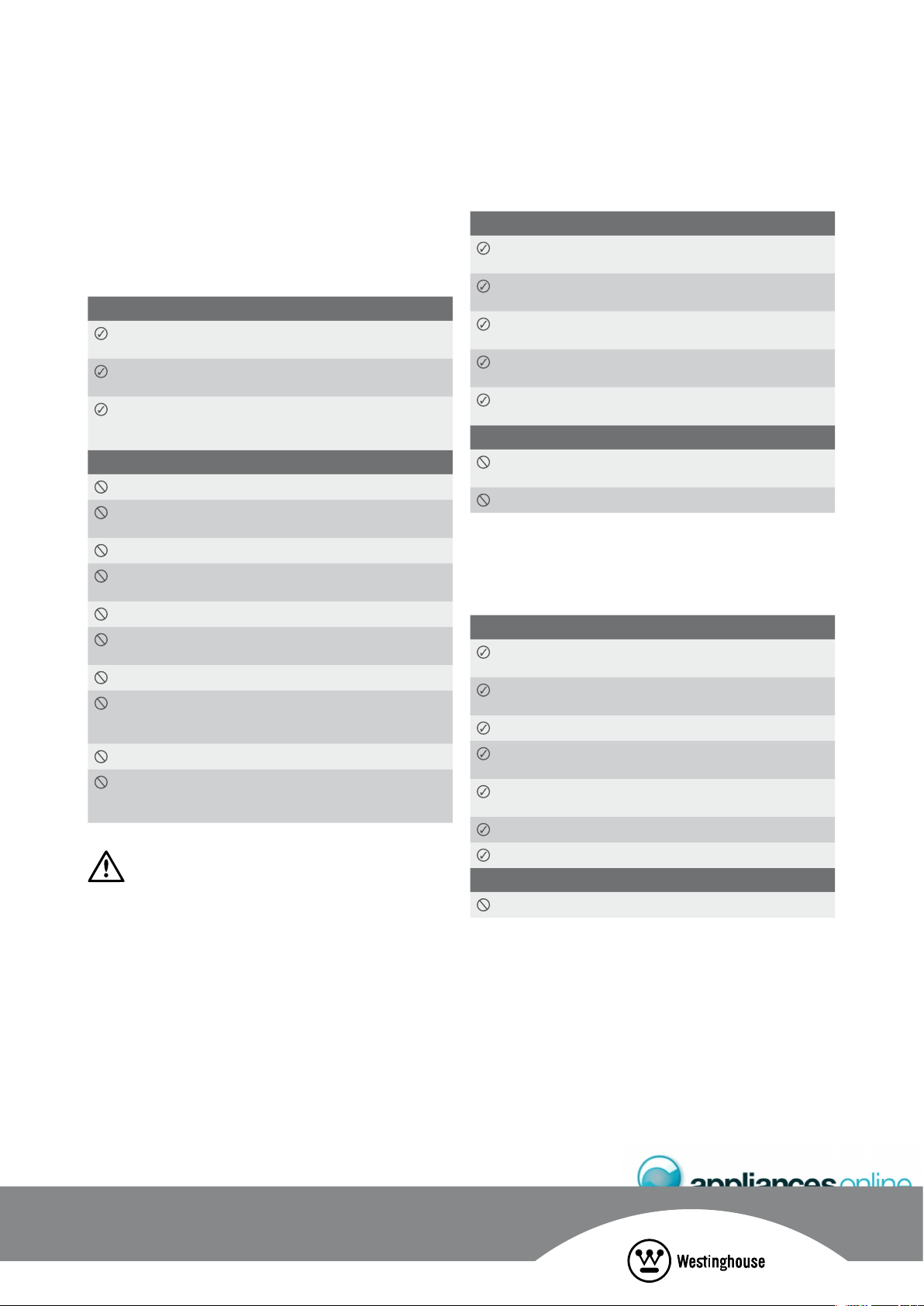
5#('6;
It is important to use your appliance safely. This means you
need to supervise young children and infirm persons when
they use it. You need to make sure that young children do
not play with the appliance. Follow the tips below.
#.9#;5&16*+5
Check the power point is properly earthed – if you are not
sure get an electrician to check it.
Switch off and unplug the refrigerator at the power point
before you clean or move it.
If the power supply cord is damaged, have it replaced
by the manufacturer, service agent or similarly qualified
person.
0'8'4&16*+5
Never let children play with the refrigerator.
Never store spray cans, explosive fluids or flammable
liquids in the refrigerator.
Never store fizzy drinks in the freezer compartment.
Never lick icy foods when they first come out of the freezer.
This can burn your lips and mouth.
Never try to repair the refrigerator yourself.
Never use electric heaters or dryers to defrost the freezer
because you can receive an electric shock.
Never use electrical appliances inside the food storage areas.
This appliance contains insulation formed with flammable
blowing gases. For safety reasons, take care when you
dispose of it.
Do not damage the appliance circuit.
Do not use mechanical devices or other means to
accelerate the defrosting process, other than those
recommended by the manufacturer.
WARNING
When you dispose of your old refrigerator or freezer remove
any doors. Children can suffocate if they get trapped inside.
*'.2(7.*+065
*'.2(7.*+065(145614+0)(11&
#.9#;5&16*+5
Buy the freshest, best quality food and put it in the
refrigerator as soon as possible.
Cover food with plastic wrap or foil to stop it drying out
and to help prevent bad smells.
Rinse and wrap fish and poultry before you put them
in the refrigerator.
-INIMISE¬BACTERIA¬BY¬REMOVING¬STUFFING¬FROM¬POULTRY¬
before you put it in the refrigerator.
When you store eggs in the refrigerator compartment,
store them with the pointed end down.
0'8'4&16*+5
Store bananas, avocados or mangoes in the refrigerator.
This can cause them to go black or to go soft.
Put hot or warm food in the refrigerator. Allow it to cool first.
*'.2(7.*+065(14(4''<+0)(11&
You can use the freezer to store food which you buy in bulk
when prices are low. You can also cook extra food and
freeze it for later use.
#.9#;5&16*+5
Buy the freshest, best quality food and put it in the freezer
as soon as possible.
Place food in plastic bags or plastic wrap before you put it
in the freezer.
Squeeze the air out of plastic bags as this prevents frost.
When you buy frozen foods in the supermarket, keep them
in their packaging when you store them.
Defrost food, especially chicken and fish, in the refrigerator
compartment. This stops bacteria from growing.
,EAVE¬FOOD¬IN¬ITS¬WRAPPING¬WHILE¬IT¬DEFROSTS
Use defrosted food immediately.
0'8'4&16*+5
Never refreeze defrosted food.
*'.2(7.*+06
5
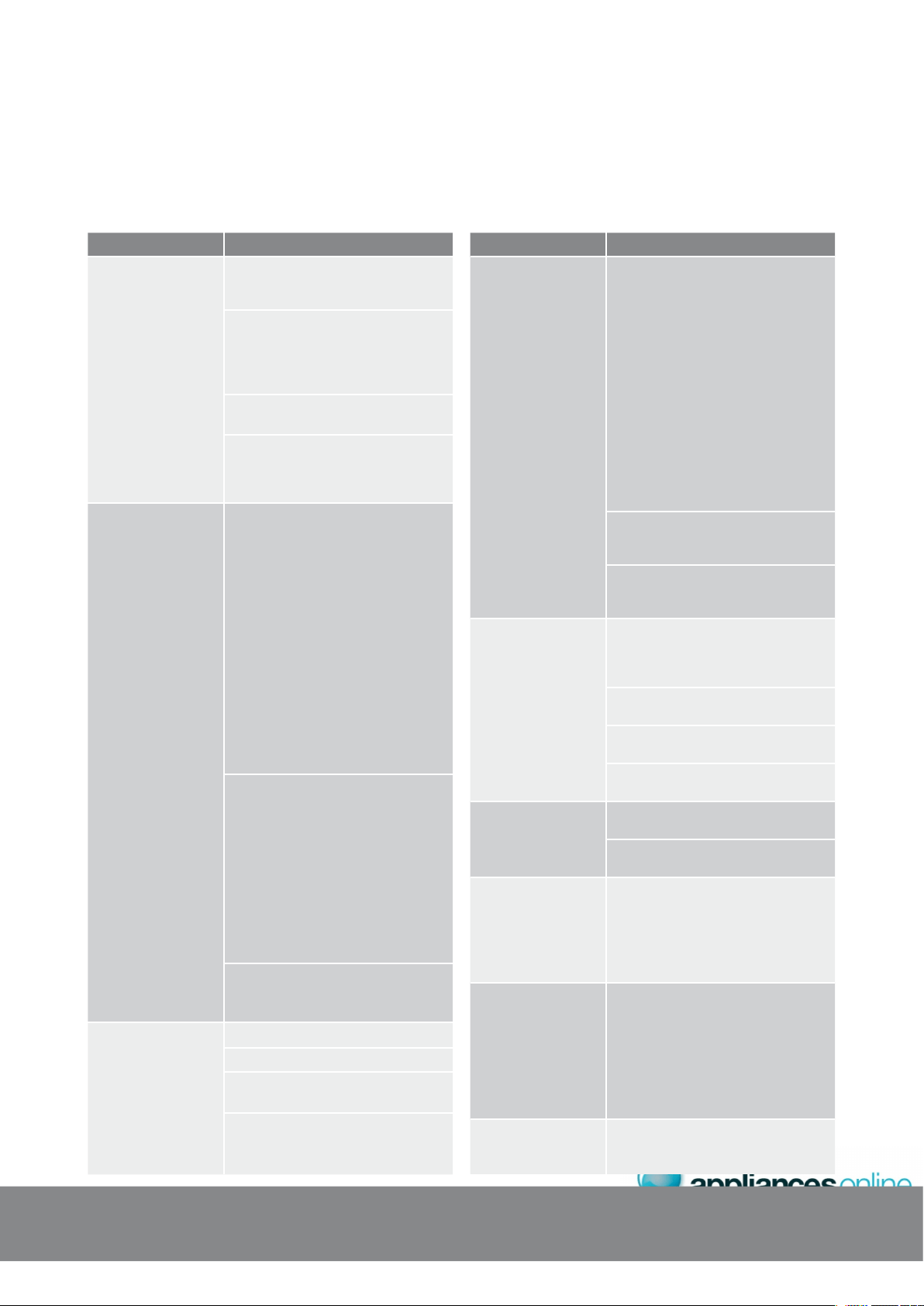
241$.'/ 51.76+10
When your
appliance is
not operating
s
Check that the power cord is plugged
into the power outlet properly and
that the outlet is switched ‘ON’.
s¬¬4RY¬RUNNING¬ANOTHER¬APPLIANCE¬FROM¬THE¬
power outlet. If no power is coming
from the outlet you may have blown
a fuse or tripped a circuit of your
household power supply.
s¬¬4RY¬ADJUSTING¬THE¬TEMPERATURE¬CONTROL¬
to a slightly “colder” position.
s¬¬)T¬IS¬NORMAL¬FOR¬THE¬FREEZER¬FAN¬./4¬
to operate during the automatic
defrost cycle, or for a short time
after the appliance is switched on.
When there is
refrigerator/freezer
noise
-ODERN¬REFRIGERATORSFREEZERS¬WITH¬
increased storage capacity use high
speed compressors. These can provide
a seemingly high level of sound which
is quite normal. Normal operational
sounds include:
s¬¬/CCASIONAL¬GURGLING¬SIMILAR¬TO¬WATER¬
boiling.
s¬¬!IR¬FLOW¬NOISE¬AIR¬CIRCULATES¬BECAUSE¬
of a small fan).
s¬¬!¬POPPING¬NOISE¬HEARD¬DURING¬
automatic defrost.
s¬¬!¬CLICKING¬NOISE¬HEARD¬JUST¬BEFORE¬
the compressor starts (this is merely
the automatic switching action of
the temperature control, turning the
compressor on or off).
Other strange sounds may mean that
you need to check and take action.
For example, noises may mean that:
s¬4HE¬CABINET¬IS¬NOT¬LEVEL
s¬4HE¬FLOOR¬IS¬UNEVEN¬OR¬WEAK
s¬"OTTLES¬ARE¬BADLY¬PLACED¬AND¬RATTLING
s¬¬4HERE¬ARE¬VIBRATIONS¬FROM¬AN¬OBJECT¬
on top of or behind or beside the
refrigerator.
s¬¬4HE¬BACK¬OF¬THE¬REFRIGERATOR¬CABINET¬
is touching the wall.
Remember it is quite normal for noise
TO¬SEEM¬LOUDER¬JUST¬AFTER¬THE¬REFRIGERATOR¬
starts operating.
If there are odours
inside the appliance
s¬4HE¬INTERIOR¬MAY¬NEED¬CLEANING
s¬3OME¬FOODS¬PRODUCE¬ODOURS
s¬¬3OME¬CONTAINERS¬AND¬WRAPPING¬CAN¬
cause odours.
s¬¬!SK¬YOURSELF¬IF¬THE¬ODOUR¬STARTED¬
about the same time you started
storing something unusual.
241$.'/ 51.76+10
When the motor
seems to run more
than expected
Your new appliance provides you with
large capacities in both the refrigerator
section and the separate freezer.
It is normal for the motor to operate
frequently. However, to keep operation
to a minimum, check the following:
s¬¬!RE¬DOORS¬KEPT¬OPEN¬TOO¬LONG¬OR¬
too often?
s¬¬!RE¬CONTROLS¬SET¬TOO¬COLD¬
3EE¬@!DJUSTING¬TEMPERATURE¬
in your relevant model section.
s¬¬(AVE¬LARGE¬AMOUNTS¬OF¬WARM¬FOOD¬
JUST¬RECENTLY¬BEEN¬STORED¬
Summer, festive seasons and
holidays usually mean a lot more
work for your appliance.
s¬¬)F¬THE¬DAY¬IS¬HOT¬OR¬THE¬ROOM¬IS¬VERY¬
warm, the appliance will need to run
more than normal.
s¬¬4HE¬APPLIANCE¬WILL¬RUN¬MORE¬THAT¬
NORMAL¬JUST¬AFTER¬YOU¬INSTALL¬IT¬OR¬WHEN¬
it has been turned off for a long time.
If the temperature
in the refrigerator
is too warm
s¬¬#HECK¬THAT¬THE¬APPLIANCE¬HAS¬ENOUGH¬
clearance at the sides, back and top.
Refer to the installation Instructions at
the front of this booklet.
s¬¬2EFER¬TO¬@!DJUSTING¬TEMPERATURE¬
in your relevant model section.
s¬¬9OU¬MAY¬HAVE¬KEPT¬THE¬DOOR¬OPEN¬
too long or too frequently.
s¬¬&OOD¬CONTAINERS¬OR¬PACKAGING¬
may be holding a door open.
If the temperature
in the refrigerator
is too cold
s¬¬2EFER¬TO¬@!DJUSTING¬TEMPERATURE¬
in your relevant model section.
s¬¬)NCREASE¬THE¬TEMPERATURE¬TO¬AVOID¬
high energy consumption.
If heavy frosting
occurs in the freezer
-AKE¬SURE¬YOU¬FULLY¬CLOSE¬THE¬FREEZER¬
and fridge doors. If the doors are left
partly open a heavy frost will coat the
inside of the freezer. If a frost develops,
remove it. Take care to properly close
the doors and the frost will not reoccur.
If water drips
on the floor
The defrost water tray, (located at the
back or underneath of the cabinet) may
not be properly positioned, or the drain
tube may not be properly positioned to
direct water into this tray. You may need
to pull the refrigerator away from the
wall to check the tray and tube.
Fridge does not exit
vacation mode
Turn appliance off at the powerpoint.
,EAVE¬OFF¬FOR¬THREE¬¬MINUTES¬FOR¬THE¬
memory to clear, then turn back on.
6417$.'5*116+0)
If you think something may be wrong with your refrigerator, you can carry out some easy checks before calling for service.
You may locate the problem, sparing yourself from inconvenience and saving time and money.
6
4
1
7$.'5*
11
6+0
)
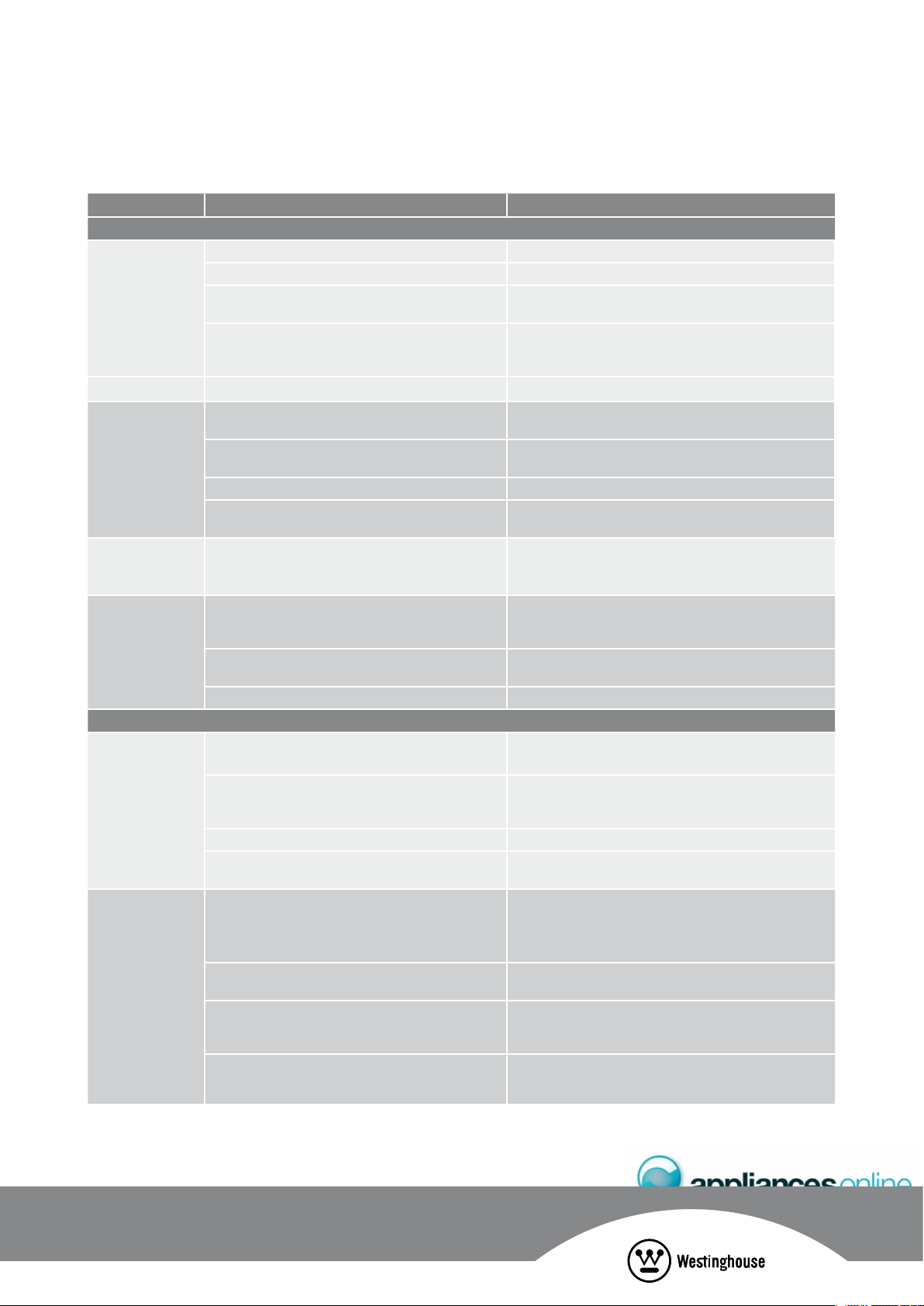
241$.'/ 2155+$.'%#75'5 51.76+10
#761/#6+%+%'/#-'4
The ice maker
is not making
any ice
s¬¬)CE¬MAKER¬IS¬IN¬THE¬/&&¬POSITION s¬¬0UT¬SWITCH¬IN¬THE¬/.¬POSITION
s¬¬7ATER¬TAP¬IS¬TURNED¬OFF s¬¬4URN¬ON¬THE¬WATER¬TAP
s¬¬4HE¬FREEZER¬IS¬NOT¬COLD¬ENOUGH s¬3EE¬THE¬4ROUBLESHOOTING¬SECTION¬@)F¬THE¬TEMPERATURE¬
in the refrigerator is too warm’ on page10
s¬4HE¬WATER¬DISPENSER¬MAY¬NOT¬BE¬DISPENSING¬WATER s¬)F¬IT¬ISNT¬THE¬ICE¬¬WATER¬FILTER¬CARTRIDGE¬MAY¬BE¬
clogged or restricted by foreign material, and will
need to be replaced
s¬&ILTER¬MAY¬BE¬BLOCKED s¬#HECK¬ANDOR¬CHANGE¬FILTER
The ice-maker
is not making
enough ice
s¬¬4HE¬ICE¬MAKER¬IS¬PRODUCING¬LESS¬ICE¬THAN¬YOU¬EXPECT s¬4HE¬ICE¬MAKER¬SHOULD¬PRODUCE¬APPROXIMATELY¬
2–3 kilograms of ice every 24 hours
s¬4HE¬FREEZER¬IS¬NOT¬COLD¬ENOUGH s¬¬2EFER¬TO¬@!DJUSTING¬4EMPERATURE¬IN¬YOUR¬RELEVANT¬
model section
s¬¬(OUSEHOLD¬WATER¬LINE¬VALVE¬IS¬NOT¬OPEN s¬¬/PEN¬THE¬HOUSEHOLD¬WATER¬LINE¬VALVE
s¬4HE¬WATER¬DISPENSER¬IS¬DISPENSING¬SLOWER¬
than normal
s¬¬2EPLACE¬THE¬WATER¬FILTER¬CARTRIDGE
Ice cubes are
hollow or smaller
than normal
s¬2ESTRICTED¬WATER¬FLOW¬TO¬THE¬ICE¬MAKER s¬2EPLACE¬THE¬FILTER¬CARTRIDGE¬AS¬THE¬WATER¬FILTER¬CARTRIDGE¬
may be clogged
The ice has
a bad odour
and taste
s¬4HE¬ICE¬HAS¬PICKED¬UP¬ODOUR¬OR¬FLAVOUR¬FROM¬STRONGLY¬
flavoured food stored in the refrigerator or freezer
s¬#OVER¬FOODS¬TIGHTLY¬$ISCARD¬STALE¬ICE¬4HE¬ICE¬MAKER¬
will produce a fresh supply
s¬#HANGE¬ICE¬MONTHLY
s¬4HE¬WATER¬RUNNING¬INTO¬THE¬ICE¬MAKER¬HAS¬POOR¬
taste or colour
s¬!DD¬A¬FILTER¬TO¬WATER¬SUPPLY¬LINE¬#ONSULT¬A¬WATER¬
purifying company
s¬)CE¬NOT¬USED¬FREQUENTLY¬ENOUGH s¬$ISCARD¬STALE¬ICE¬MONTHLY
+%'&+52'05'4
The dispenser will
not dispense ice
s¬4HE¬ICE¬STORAGE¬CONTAINER¬IS¬EMPTY s¬7HEN¬THE¬FIRST¬SUPPLY¬OF¬ICE¬DROPS¬INTO¬THE¬CONTAINER¬
the dispenser should operate.
¬¬s¬(OUSEHOLD¬WATER¬TAP¬IS¬NOT¬OPEN s¬¬/PEN¬THE¬HOUSEHOLD¬WATER¬TAP¬!LLOW¬SUFFICIENT¬TIME¬FOR¬
the ice to be made. When ice is made the dispenser
should operate
s¬4HE¬WIRE¬SIGNAL¬ARM¬IS¬EITHER¬HELD¬OR¬JAMMED s¬2EMOVE¬JAM¬OR¬FREE¬ARM
s¬)CE¬MAKER¬SWITCH¬IS¬IN¬/&&¬POSITION s¬3EE¬ICE¬MAKER¬SECTION¬IN¬USER¬MANUAL¬4URN¬SWITCH¬TO¬
ON position
The ice dispenser
IS¬JAMMED
s¬)CE¬HAS¬MELTED¬AND¬FROZEN¬AROUND¬THE¬AUGER¬DUE¬
to infrequent use, temperature fluctuations, and/or
power outages
s¬2EMOVE¬THE¬ICE¬CONTAINER¬AND¬EMPTY¬ITS¬CONTENTS¬
Clean and dry the container and replace to its proper
position. When new ice is made, the dispenser
should operate
s¬)CE¬CUBES¬ARE¬JAMMED¬BETWEEN¬THE¬ICE¬MAKER¬AND¬
back of ice container
s¬2EMOVE¬ICE¬CUBES¬THAT¬ARE¬JAMMING¬DISPENSER
s¬)CE¬CUBES¬ARE¬FROZEN¬TOGETHER s¬5SE¬THE¬DISPENSER¬OFTEN¬SO¬THAT¬CUBES¬DO¬NOT¬
freeze together
s¬$ISCARD¬ICE¬MONTHLY
s¬)CE¬CUBES¬ARE¬HOLLOW¬OR¬SMALLER¬THAN¬NORMAL s¬4HE¬WATER¬FILTER¬CARTRIDGE¬COULD¬BE¬CLOGGED¬
Cartridge may need replacing
+%'9#6'46417$.'5*116+0)
If you have a problem, and the problem persists after you have made the checks mentioned above, contact your nearest
Electrolux approved Service Centre or the dealer you bought the refrigerator from. Be ready to quote the model number
and 8-digit serial number, which is stated on the label inside the refrigerator compartment.
This document sets out the terms and conditions of product warranties for
Electrolux branded appliances. It is an important document. Please keep it
with your proof of purchase documents in a safe place for future reference
should you require service for your Electrolux appliance.
General Terms and Conditions
1. In this warranty
(a) ‘Electrolux’ means Electrolux Home Products Pty Ltd ABN 51 004 762 341
in respect of Appliances purchased in Australia and Electrolux (NZ) Limited in
respect of Appliances purchased in New Zealand;
(b) ‘Appliance’ means any Electrolux product purchased by you accompanied by
this document;
(c) ‘Warranty Period’ means
(i) where you use the Appliance for personal, domestic or household purposes
in Australia the period of ‘24’ months and in New Zealand the period of ‘24’
months;
(ii) where you use the Appliance for commercial purposes, in Australia the
period of ‘3’ months and in New Zealand the period of ‘3’ months, (if the
period stated is 0 months you are not covered by this product warranty)
following the date of original purchase of the Appliance;
(d) ‘you’ means the purchaser of the Appliance not having purchased the
appliance for re-sale, and ‘your’ has a corresponding meaning.
2. This warranty only applies to Appliances purchased and used in Australia or
New Zealand and is in addition to (and does not exclude, restrict, or modify in any
way) any non-excludable statutory warranties in Australia or New Zealand.
3. Electrolux warrants that, when dispatched from an Electrolux warehouse,
the Appliance is free from defects in materials and workmanship for the
Warranty Period.
4. During the Warranty Period Electrolux or its Authorised Service Centre will, at no
extra charge if your appliance is readily accessible without special equipment,
and subject to these terms and conditions, repair or replace any parts which it
considers to be defective. You agree that any replaced Appliances or parts become
the property of Electrolux. This warranty does not apply to light globes, batteries,
filters or similar perishable parts.
5. Parts and Appliances not supplied by Electrolux are not covered by this warranty.
6. Where you are within an Electrolux service area, this warranty covers the cost of
transport of the Appliance to and from Authorised Service Centres of Electrolux and
travelling costs for representatives of the Authorised Service Centre to and from
your home or business. If you are outside an Electrolux service area, you will bear
these costs. For information about whether you are within an Electrolux service
area, please phone 13 13 49 in Australia, or 0800 10 66 10 in
New Zealand.
7. Proof of purchase is required before you can make a claim under this warranty.
8. You may not make a claim under this warranty unless the defect claimed is due
to faulty or defective parts or workmanship. Electrolux is not liable in the following
situations (which are not exhaustive):
(a) The Appliance is damaged by:
(i) accident
(ii) misuse or abuse, including failure to properly maintain or service
(iii) normal wear and tear
(iv) power surges, electrical storm damage or incorrect power supply
(v) incomplete or improper installation
(vi) incorrect, improper or inappropriate operation
(vii) insect or vermin infestation.
(b) The Appliance is modified without authority from Electrolux in writing.
(c) The Appliance’s serial number or warranty seal has been removed
or defaced.
(d) The Appliance was serviced or repaired by anyone other than Electrolux or its
Authorised Service Centres.
9. This warranty, the contract to which it relates and the relationship between you
and Electrolux are governed by the law applicable in the Australian State where the
Appliance was purchased or the law applicable in New Zealand if the Appliance was
purchased in New Zealand. Where the Appliance was purchased in New Zealand for
business purposes the Consumer Guarantee Act does not apply.
Limitation of Liability
10. To the extent permitted by law:
(a) Electrolux excludes all warranties other than as contained in this document;
(b) Electrolux shall not be liable for any loss or damage whether direct or indirect
or consequential arising from your purchase, use or non-use of
the Appliance.
11. Provisions of the Trade Practices Act and State consumer legislation in Australia, and
the Consumer Guarantees Act, the Sale of Goods Act and the Fair Trading Act in
New Zealand, imply warranties or conditions, or impose obligations, upon Electrolux
which cannot be excluded, restricted or modified. To the extent permitted by law, the
liability of Electrolux (if any) arising out of or in relation to the Appliance or any services
supplied by Electrolux shall be limited (where it is fair and reasonable to do so),:
(a) in the case of Appliances, at its option, to the replacement or repair of the
Appliances or the supply of equivalent products or the payment of the cost
of replacing the Appliances or having the Appliances repaired or of acquiring
equivalent Appliances. Upon being replaced, parts and Appliances become
the property of Electrolux; or
(b) in the case of services, at its option, to the supply of the services again or the
payment of the cost of having the services re-supplied; and in the case of
Appliances or services supplied in New Zealand, loss or damage whether
direct or indirect or consequential that is reasonably foreseeable.
Privacy
You acknowledge that in the event that you make a warranty claim it will be necessary
for Electrolux and its Authorised Service Centres to exchange information in relation to
you to enable Electrolux to meet its obligations under this warranty.
EXTENDED WARRANTIES AND INDEMNITY
Sealed Refrigeration System Warranty
For a further period of three years following the expiry of the Warranty period,
Electrolux or its agent will supply replacements for, or at the sole option of
Electrolux, repair, all parts it finds defective in the Sealed Refrigeration System
which comprises: compressor, condenser, evaporator, dryer and tubing. During
this three year period you will pay for the costs of labour (including any call out
or service fees), and freight if necessary in replacing defective parts in the Sealed
Refrigeration System. You will pay for the costs of transport of the Appliance if
further service is required and the costs of parts or repairs to parts other than
those included in the Sealed Refrigeration System
Frozen Food indemnity
Subject to the following exclusions, Electrolux will indemnify you for a period
of 24 months from the date of purchase of the Appliance against any loss or
damage to frozen foodstuffs due to a Sealed Refrigeration System breakdown.
This indemnity will be limited to:
(a) in the case of freezers with a capacity of less than 400 litres – AU$150
(b) in the case of freezers with a capacity of 400 litres or more – AU$300
This indemnity does not cover loss or damage to frozen foodstuffs occasioned by:
(a) failure to plug in the freezer to a properly connected power supply or failure
to switch on the power point
(b) accidental removal of the plug from the power point or switching off the
power supply;
(c) failure to keep the door or lid of the freezer closed
(d) the introduction of abnormal heat loads to the freezer;
(e) failure to observe the operating and installation instructions supplied with
the freezer; and
(f) failure to defrost the freezer at recommended intervals on chest freezers or
non frost free models
Warranty
FOR SALES IN AUSTRALIA AND NEW ZEALAND
APPLIANCE: WESTINGHOUSE COMPACT SIDE BY SIDE, WESTINGHOUSE SIDE BY SIDE.
Important Notice
Before Calling a Service Technician please check carefully the operating instructions, service booklet and the warranty terms and conditions.
FOR SERVICE
or to find the address of your nearest
state service centre in Australia
PLEASE CALL 13 13 49
For the cost of a local call (Australia only)
SERVICE AUSTRALIA
ELECTROLUX HOME PRODUCTS
www.electrolux.com.au
FOR SPARE PARTS
or to find the address of your nearest
state spare parts centre in Australia
PLEASE CALL 13 13 50
For the cost of a local call (Australia only)
FOR SERVICE
or to find the address of your nearest
authorised service centre in New Zealand
FREE CALL 0800 10 66 10
(New Zealand only)
SERVICE NEW ZEALAND
ELECTROLUX HOME PRODUCTS
www.electrolux.co.nz
FOR SPARE PARTS
or to find the address of your nearest
state spare parts centre in New Zealand
FREE CALL 0800 10 66 20
(New Zealand only)
AUSTRALIA
phone: 1300 363 640
fax: 1800 350 067
email: [email protected]
web: www.westinghouse.com.au
NEW ZEALAND
phone: 09 573 2384
fax: 0800 363 600
email: [email protected]
web: www.westinghouse.co.nz
(MPKMPCGLDMPK?RGMLML?JJ9CQRGLEFMSQC?NNJG?LACQ
MPDMPBGKCLQGML?LBGLQR?JJ?RGMLGLDMPK?RGMLA?JJGLRMWMSPPCR?GJCP
NFMLCMPCK?GJMSPASQRMKCPA?PCRC?KMPTGQGRMSPUC@QGRC
6125'48+%'
Top Service encompasses the after sales service
provided by The Electrolux Group to consumers
including delivery, home service and spare parts.
9CQRGLEFMSQC9C?PCN?PRMDRFC'JCARPMJSVD?KGJW
5F?PCKMPCMDMSPRFGLIGLE?RUUUCJCARPMJSVAMK
¥¬¬%LECTROLUX¬(OME¬0RODUCTS¬0TY¬,TD¬!".¬¬¬¬
0RINT¬CODE¬7-!.2%&2)'383?-AR
Part number: 1452723