
User Manual
TECBOT S1 Series

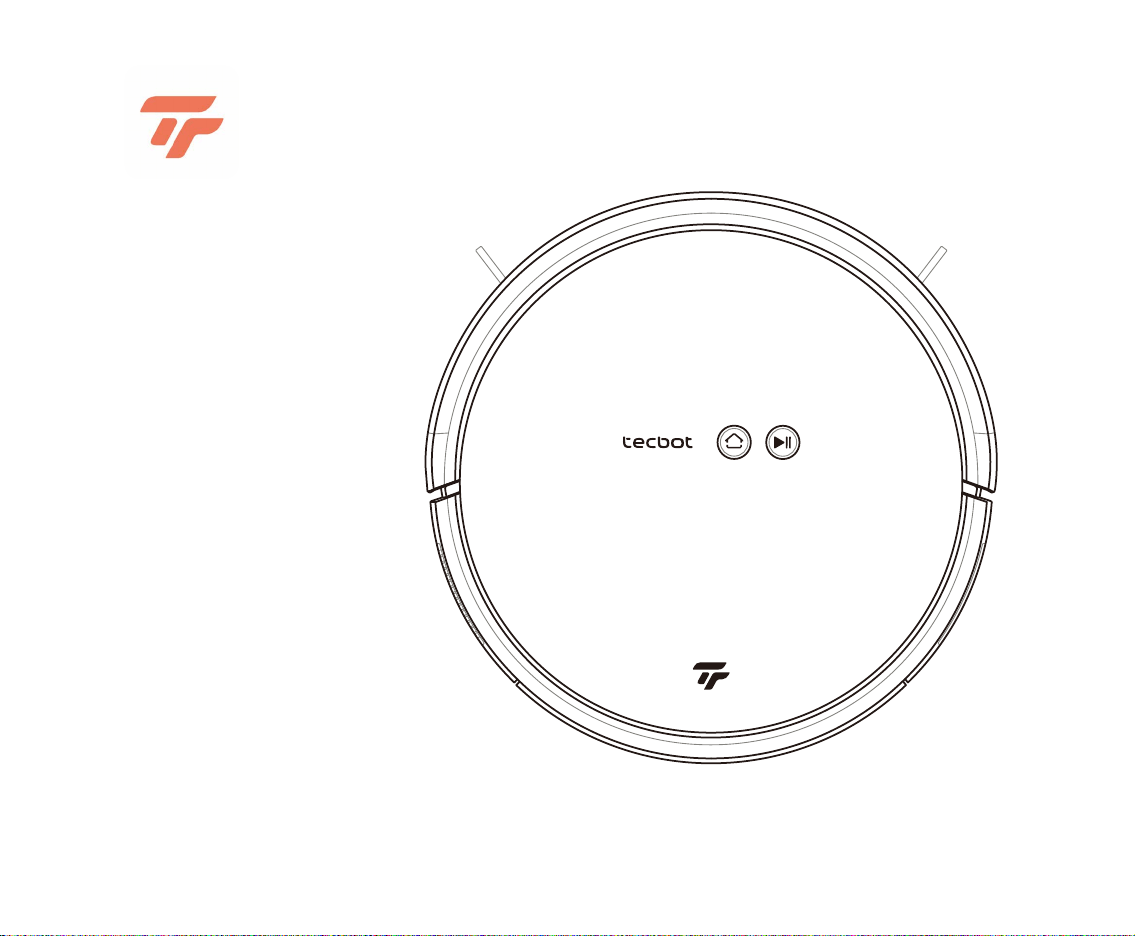
User Manual
Before using your product, read through this User Manual
carefully and keep it for future reference.
TECBOT
S1 Series


1
Welcome
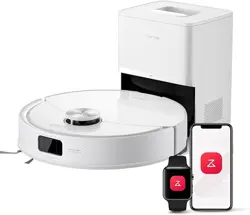
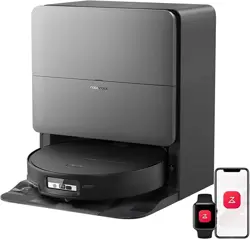
Thank you for purchasing our TECBOT S1 Series, a robot vacuum cleaner.
TECBOT S1 Series has a gyroscope navigation system for accurate
mapping, routing, and cleaning coverage. In addition, the upward-oriented
vacuum exhaust avoids blowing pet hair around, making them ideal for
homes with pets.
We are Tecbot, “Expert Manufactures of Cleaning Robots.” We make
cleaning easier to create more free time for you.

Package list 3
TECBOT S1 Series anatomy 4
Precautions 8
Installation 9
Pairing 10
Charging 14
Cleaning modes and mopping function 15
Regular maintenance 18
Troubleshooting and FAQs 22
Warnings and Restrictions 24
Hazardous materials 26
2
Table of content
3
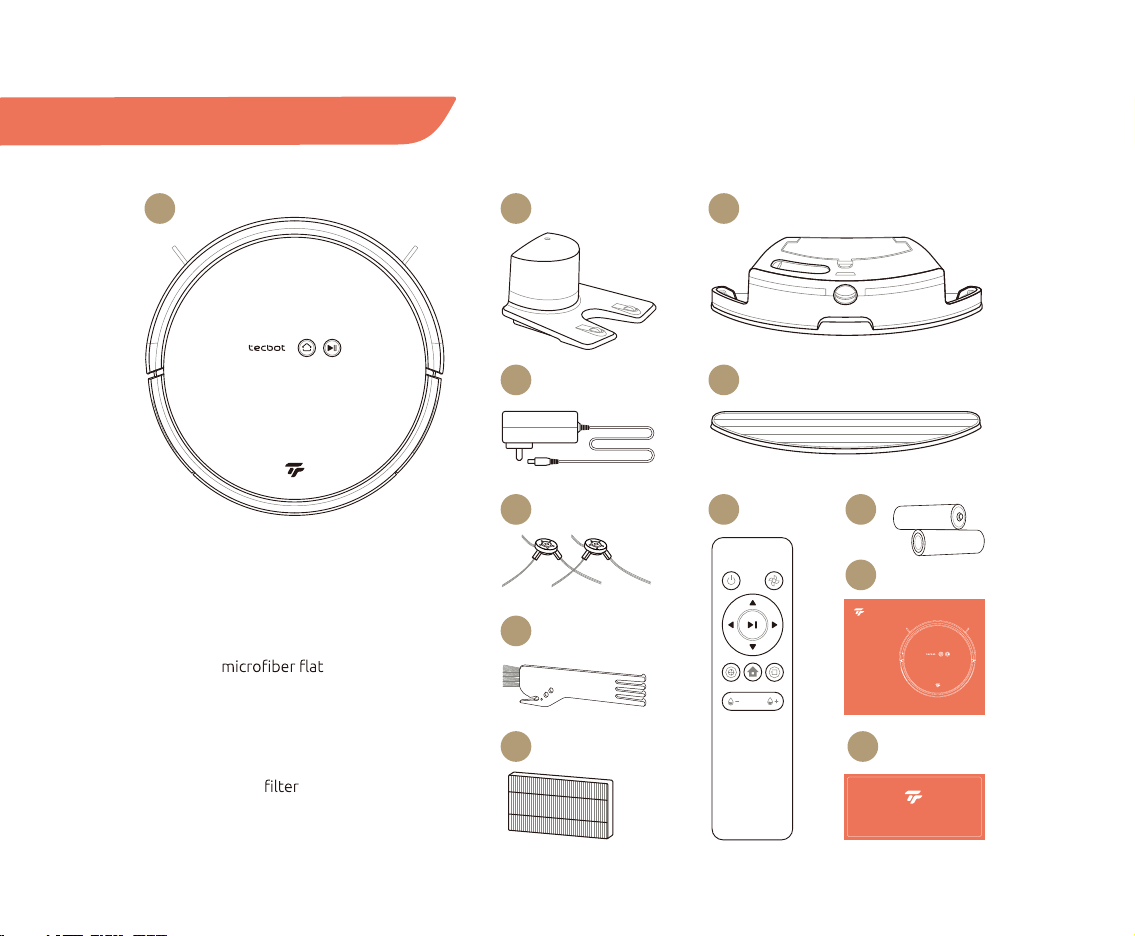
Package list
01 TECBOT S1 Series (Dust box included)
02 Charging dock
03 Power cord
04 Water tank (optional)
05 1 extra mop (optional)
06 2 extra edge-cleaning brushes
07 Remote control
08 2 AAA remote control batteries
09 Brush and hook knife cleaning tool
10 1 extra HEPA
11 User Manual
12 Warranty Card
01
03
06
09
10 12
02 04
05
07 08
11
User Manual
TECBOT S1 Series
Warranty Card
4
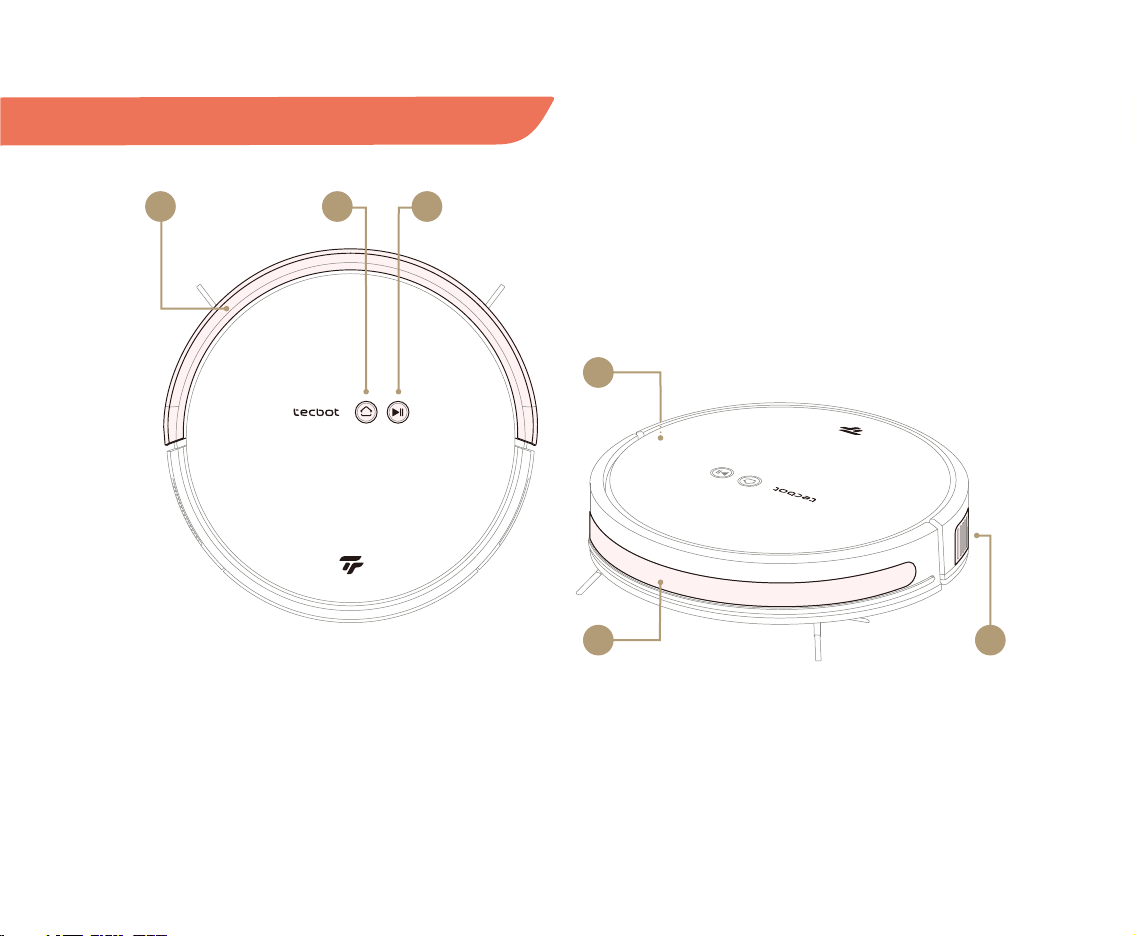
TECBOT S1 Series anatomy
01 Collision bumper
02 Charging button
03 Start/Pause button
04 ON/OFF switch
05 ToF wall sensor
06 Vacuum exhaust
01 02
05
04
03
06
5
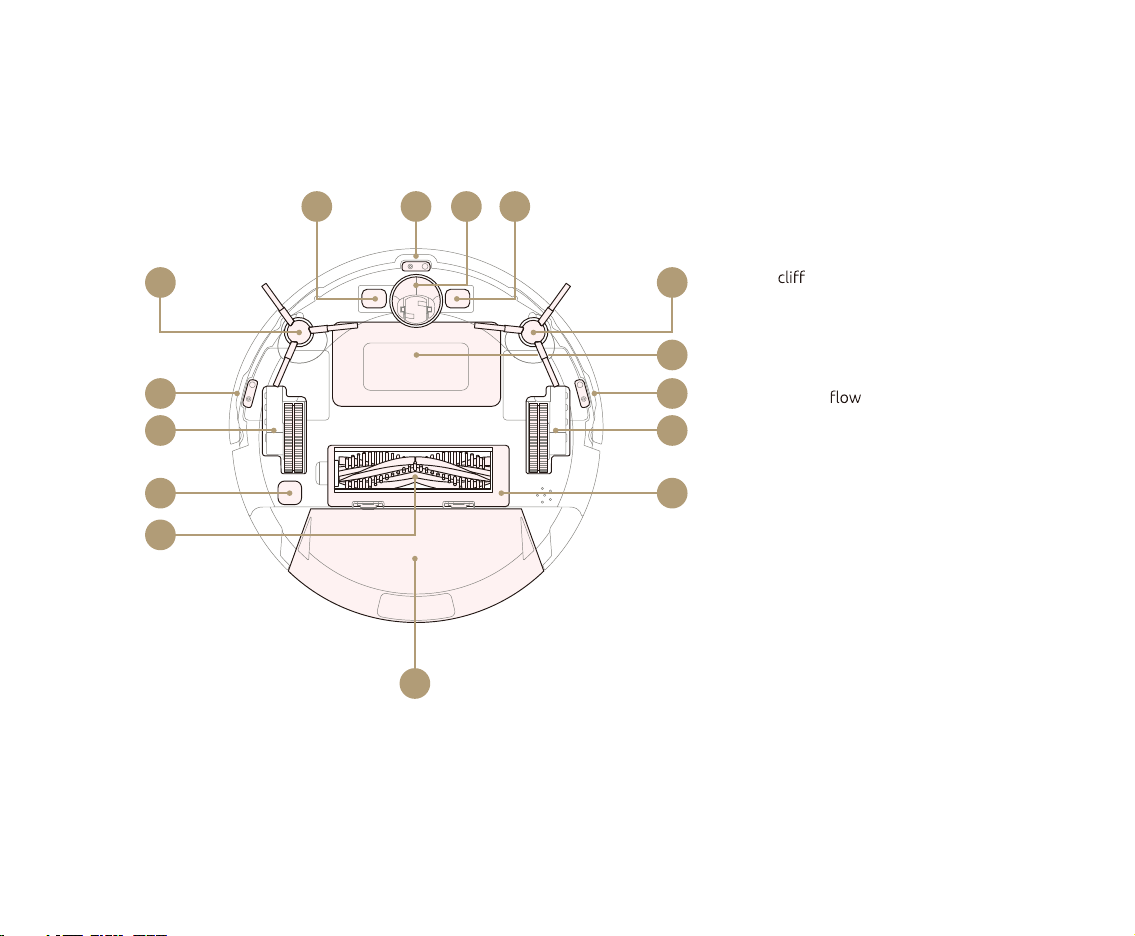
07 Contact point for charging dock
08 ToF
sensor
09 Driving wheel
10 Edge-cleaning brush
11 Battery cover
12 Wheel
13 ToF optical sensor
14 V-shaped brush main cover
15 V-shaped brush
16 Dust box or water tank
10
15
10
11
08
12
14
12
13
08
08
16
07 0709
6
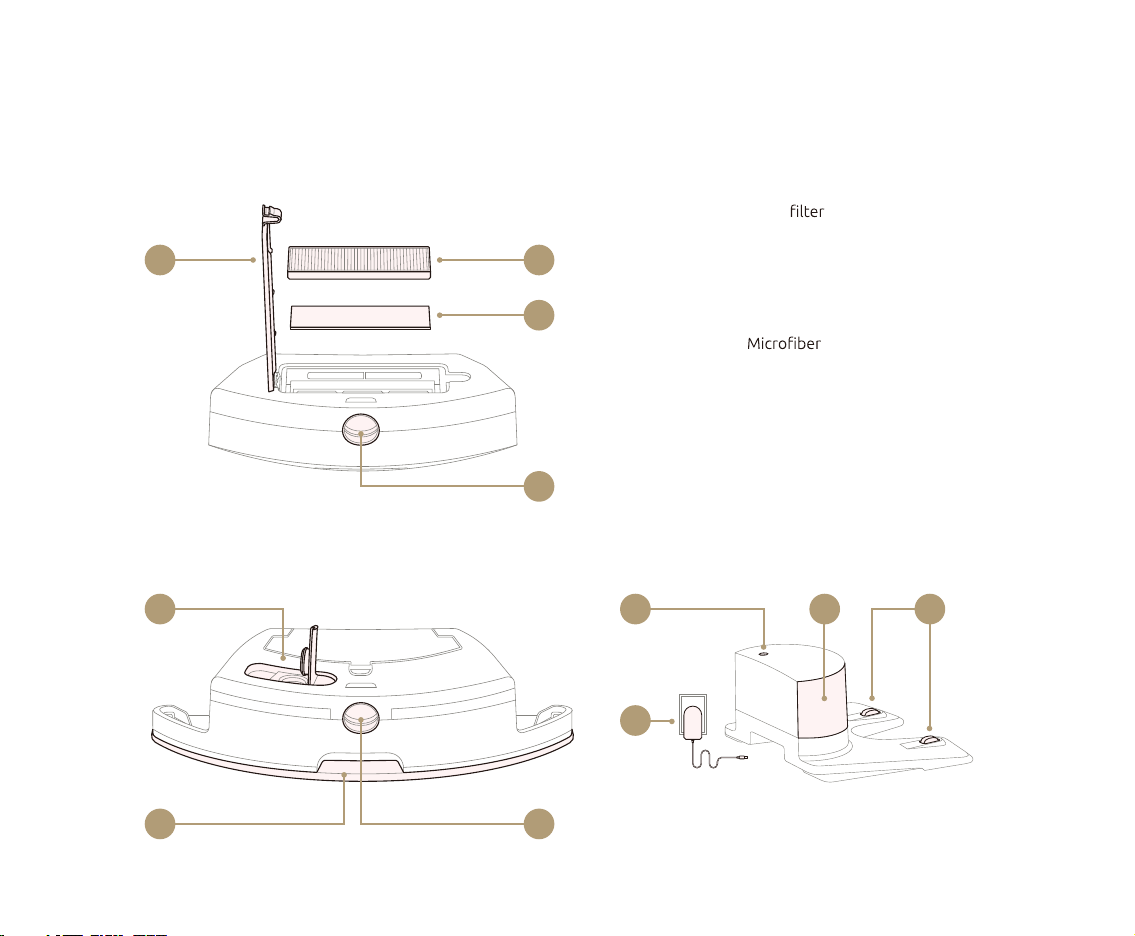
Dust box
17 Cover
18 HEPA
19 Sponge
20 Release clip
Water tank
21 Inlet
22 mop
23 Release clip
Charging dock
24 Charging indicator light
25 Signal emitter
26 Charging contact points
27 Power adapter
17
21 262524
27
18
19
20
2322
Dust box
Water tank Charging dock
7
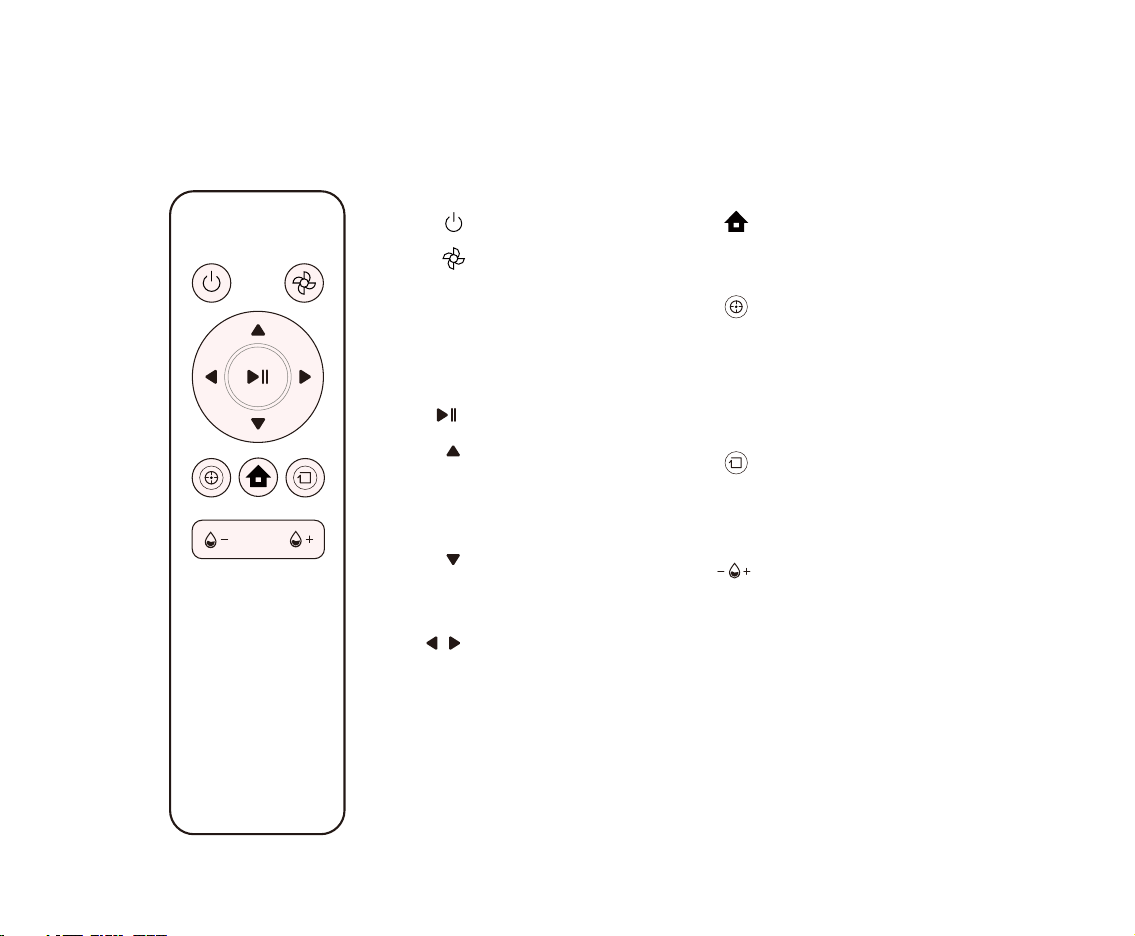
ON/OFF
Vacuum suction power
Adjust vacuum suction power.
Increase for a more
heavy-duty vacuum cleaning
or decrease for a longer and
quieter cleaning run.
Start/Pause
Forward
Press and hold to move forward.
Your TECBOT S1 Series will stop
when encountering an obstacle.
Backward
Press and hold to move
backward. Release to stop.
Left and Right
Press and hold to turn.
Release to stop.
Charging
Press to return your TECBOT S1
Series to the charging dock.
Spot cleaning mode
Press to intensely clean an area.
Your TECBOT S1 Series will spiral
outward about 3 feet / 1 meter
in diameter and then inward to
where it started.
Edge cleaning mode
Press to clean along the room’s
edges, including around chair
legs and other furniture.
Mopping water level
s
Press to adjust the mopping
water levels to avoid water
stains damage and increase the
running time.
Remote control
8
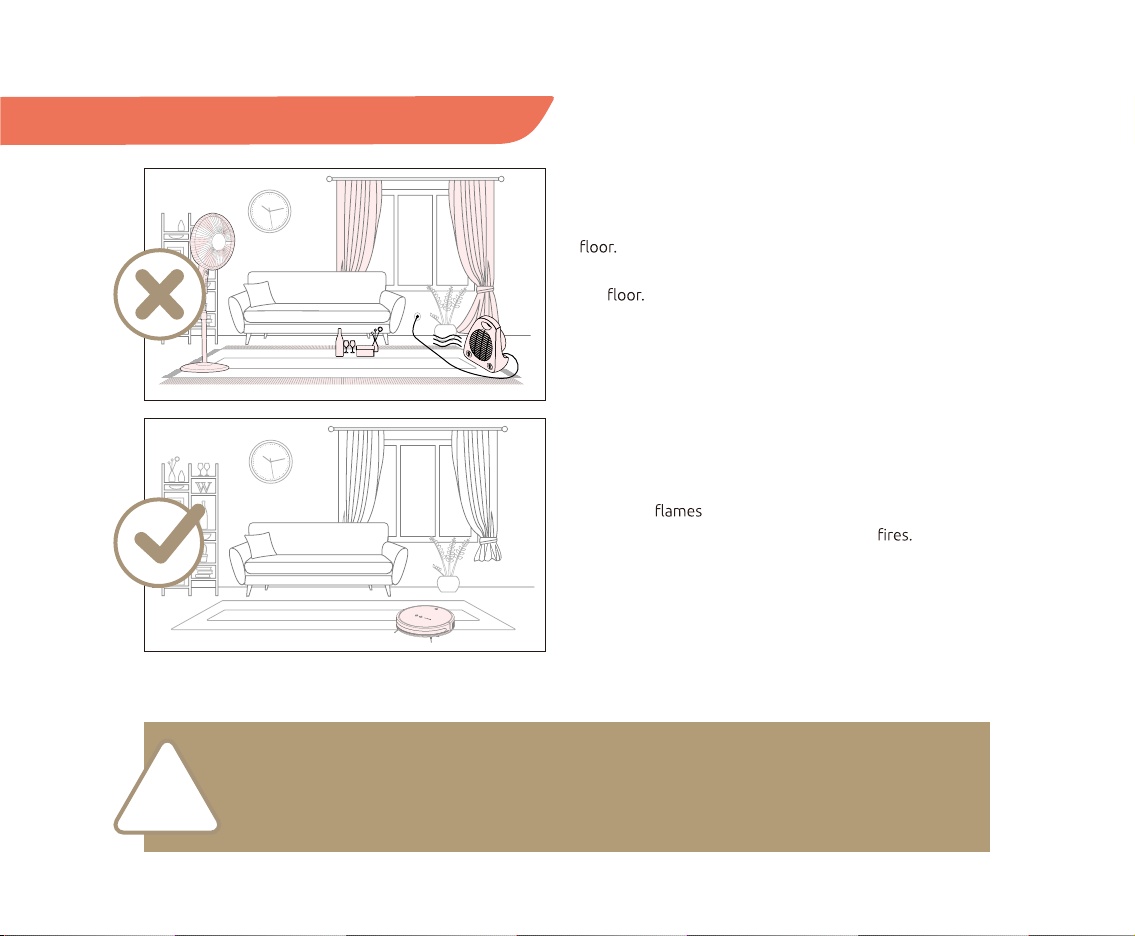
Before operating your TECBOT S1 Series, please remove
any tripping hazard, litter, quickly falling objects and
valuables, and potentially dangerous items from the
In addition, fold any fringe tassels edge under the
carpet and lift the ends of curtains and tablecloths from
the
Please prevent your TECBOT S1 Series from getting
stuck, entangled, dragging, or knocking down objects to
avoid personal or property damage. Avoid blocking the
movement of your TECBOT S1 Series by standing in its
way. Place fences or set restricted area at the entrance of
duplex staircases, open terraces, or any open area.
Prevent your TECBOT S1 Series from getting too close
with open or high-temperature equipment during
operation to extend its lifetime and avoid
Precautions
Do not pick up your TECBOT S1 Series with one hand to avoid accidentally releasing the dust box or
water tank.
Retrieve the dust box or water tank when turning over your TECBOT S1 Series for maintenance.
!
ON/OFF switch protective foams
Dust box
V-shaped
main brush
Edge-cleaning
brushes
1.5 ft / 0.5 m
1.5 ft / 0.5 m
3 ft / 1 m
9
NOTE:
The ON/OFF switch is on the right side of your TECBOT S1 Series. (“I” position for ON and “O” for OFF,
see page 4.) Your TECBOT S1 Series will self-check for about 10 seconds before turning on.
Installation
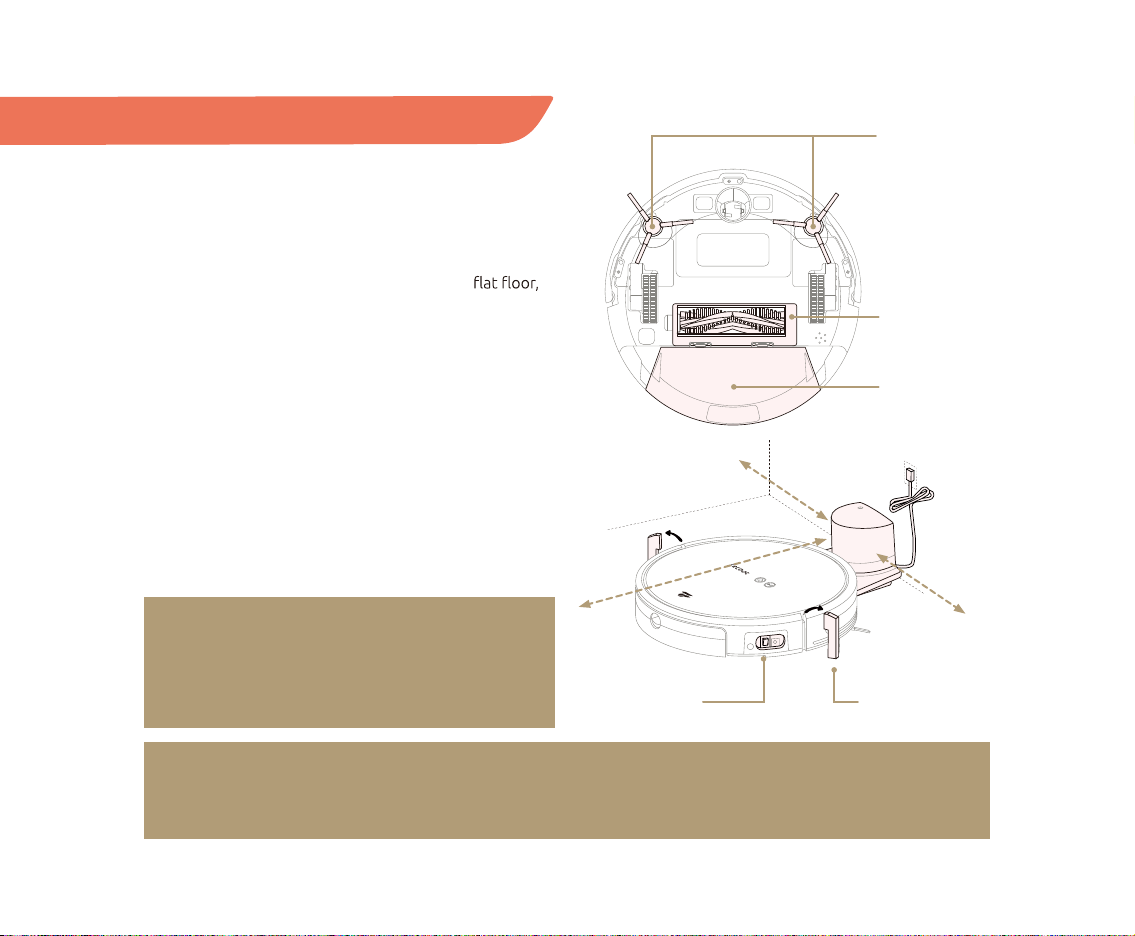
01 After taking your TECBOT S1 Series out of the box,
remove the protective foam on both sides.
02 Check whether all components are in place: dust box,
V-shaped main brush, and edge-cleaning brushes.
03 Place the charging dock against a wall on a
and connect it to the power source. Please make sure
there are more than 1.5 feet / 0.5 meter of free space
at the front and 3 feet / 1 meter to the sides of the
charging dock.
04 Turn on your TECBOT S1 Series.
05 Place your TECBOT S1 Series at the charging dock.
Ensure the contact points on the TECBOT S1 Series
and the charging dock are in complete contact.
Your TECBOT S1 Series will make a “beep” to start
charging. The charging time is about 4 hours.
06 Your TECBOT S1 Series is ready for Wi-Fi pairing.
NOTE:
Only use clean water or foamless floor cleaner in
the water tank. Foam or bubbles will decrease the
performance of the mopping function.
10
Pairing
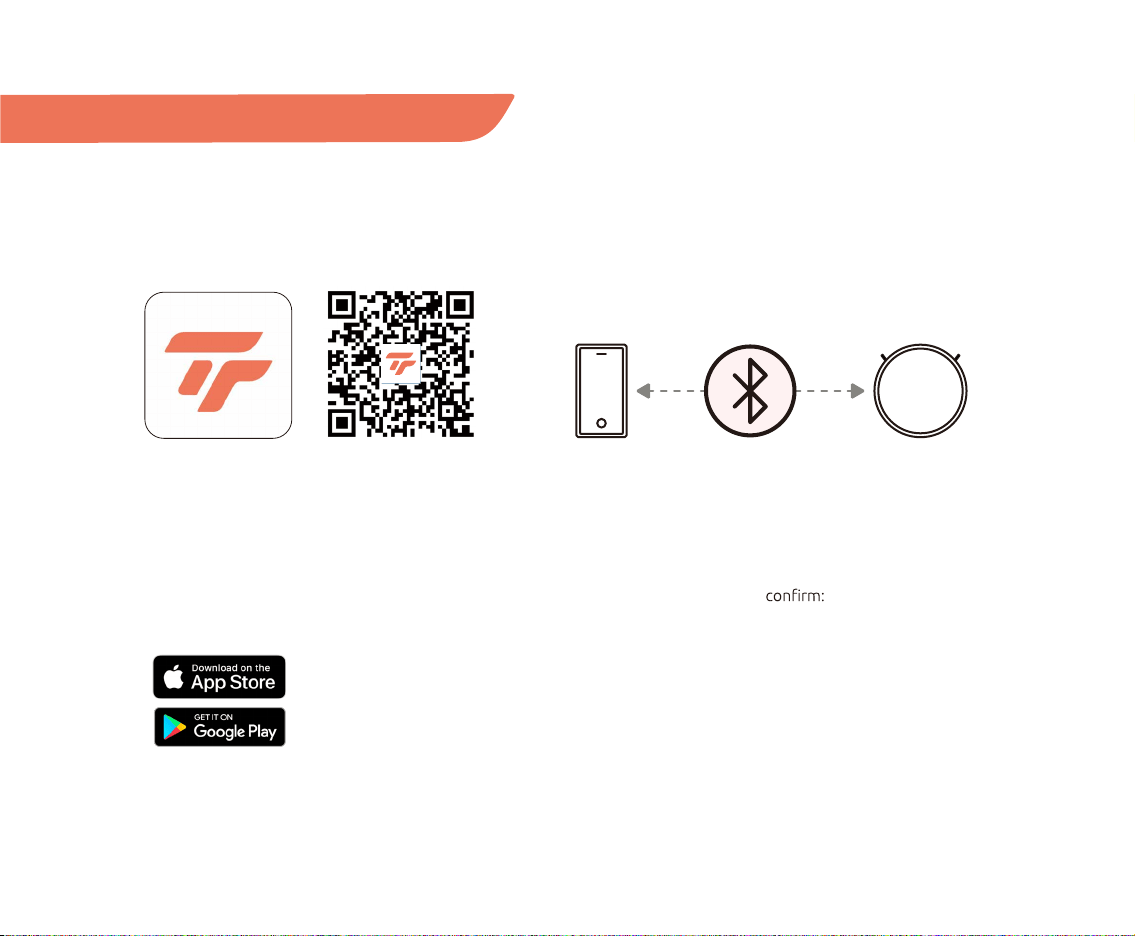
Download Tecbot Home App
Download our Tecbot Home App by scanning the
QR code or searching on the App Store or Google Play
to enjoy all the functions of your TECBOT S1 Series
wherever you are.
Automatic pairing via Bluetooth
Your Tecbot S1 Series will automatically try to pair with
your mobile device via Bluetooth. Please ensure your
Bluetooth connection is turned ON on your mobile
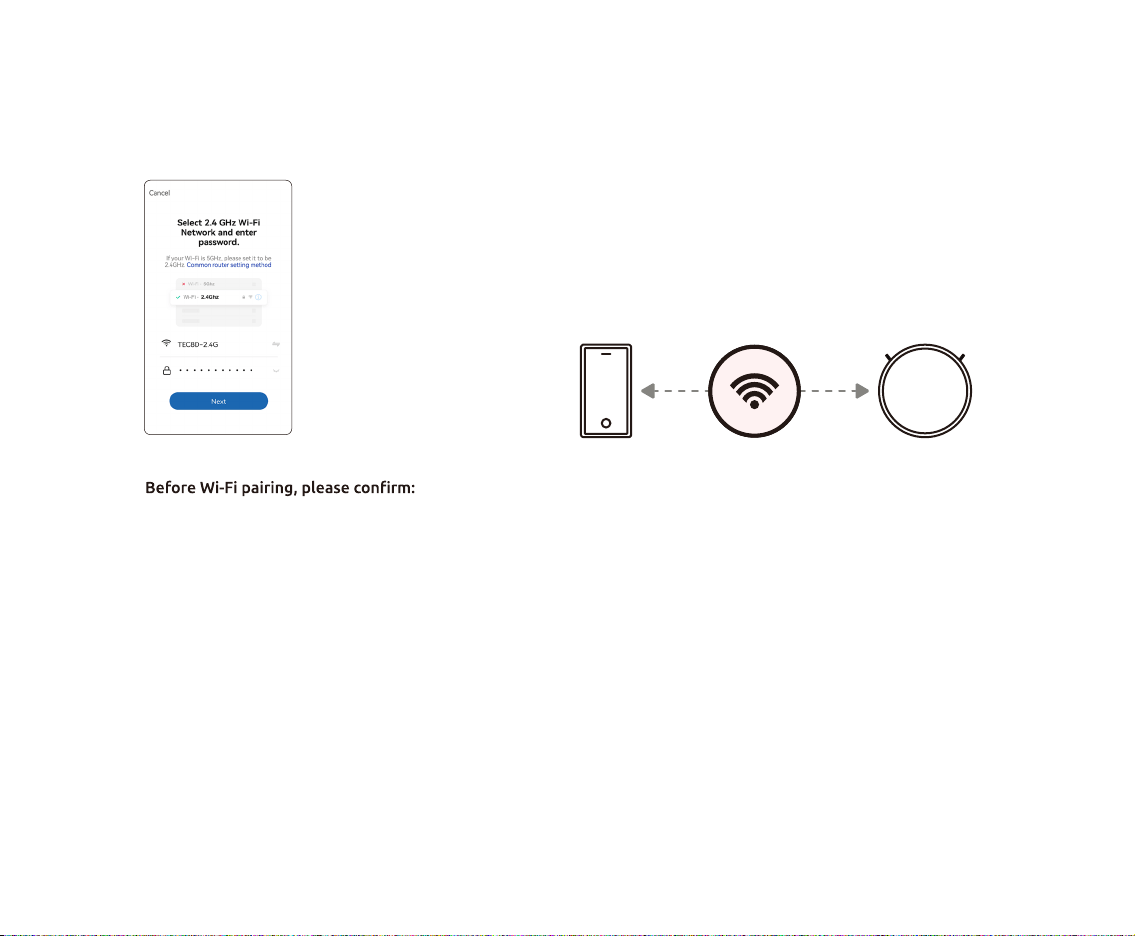
device. In addition, please
• Your Wi-Fi router supports a 2.4 GHz frequency band.
• Your mobile device or tablet is connected to the Wi-Fi
network of 2.4 GHz frequency band.
• Your mobile device or tablet operating system is up
to date.
Automatic pairing (Bluetooth)
11
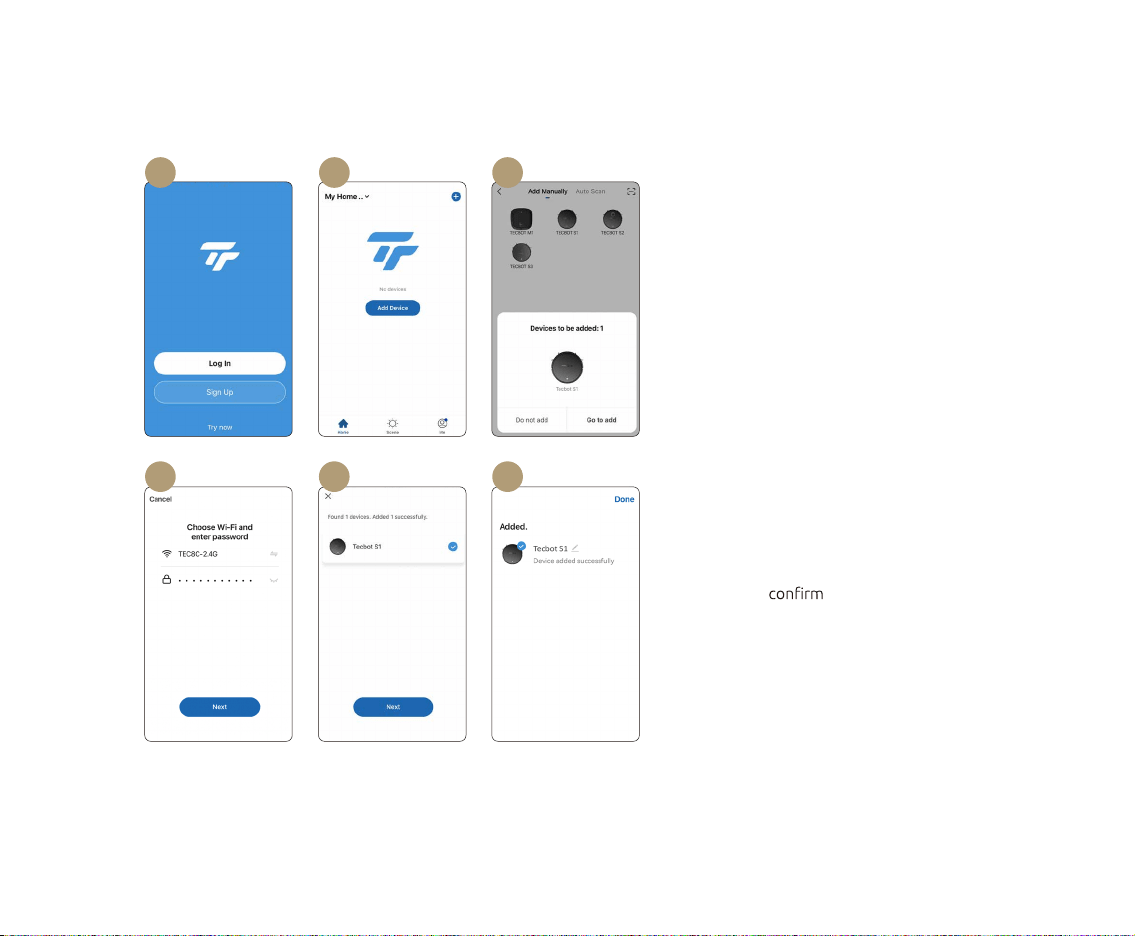
01 Sign up to register an account and log in.
02 Ensure your Tecbot S1 Series is turned ON
(The ON/OFF switch is located at the side
of your TECBOT S1 Series) and tap “Add
Device.”
03 Wait for the splash screens on your mobile
device. Tap “Go to add.”
04 Enter your Wi-Fi password.
05 Keep your device as close as possible to
your TECBOT S1 Series. Your TECBOT S1
Series Start/Pause button light will stop
blinking to
pairing. Tap “Next.”
06 Success! Your TECBOT S1 Series is ready.
Automatic pairing (Bluetooth)
01 02 03
05 0604
12
Manual pairing (Wi-Fi)
Manual pairing via Wi-Fi
If your Tecbot S1 Series is not pairing automatically, you
can try to add it manually via Wi-Fi.
Using the manual mode, your TECBOT S1 Series will use
your home Wi-Fi connection to pair with your device.
• Your Wi-Fi router supports a 2.4 GHz frequency band.
• Your mobile device or tablet is connected to the Wi-Fi
network of 2.4 GHz frequency band.
• Your mobile device or tablet operating system is up
to date.
13
01 02 03
0604 05
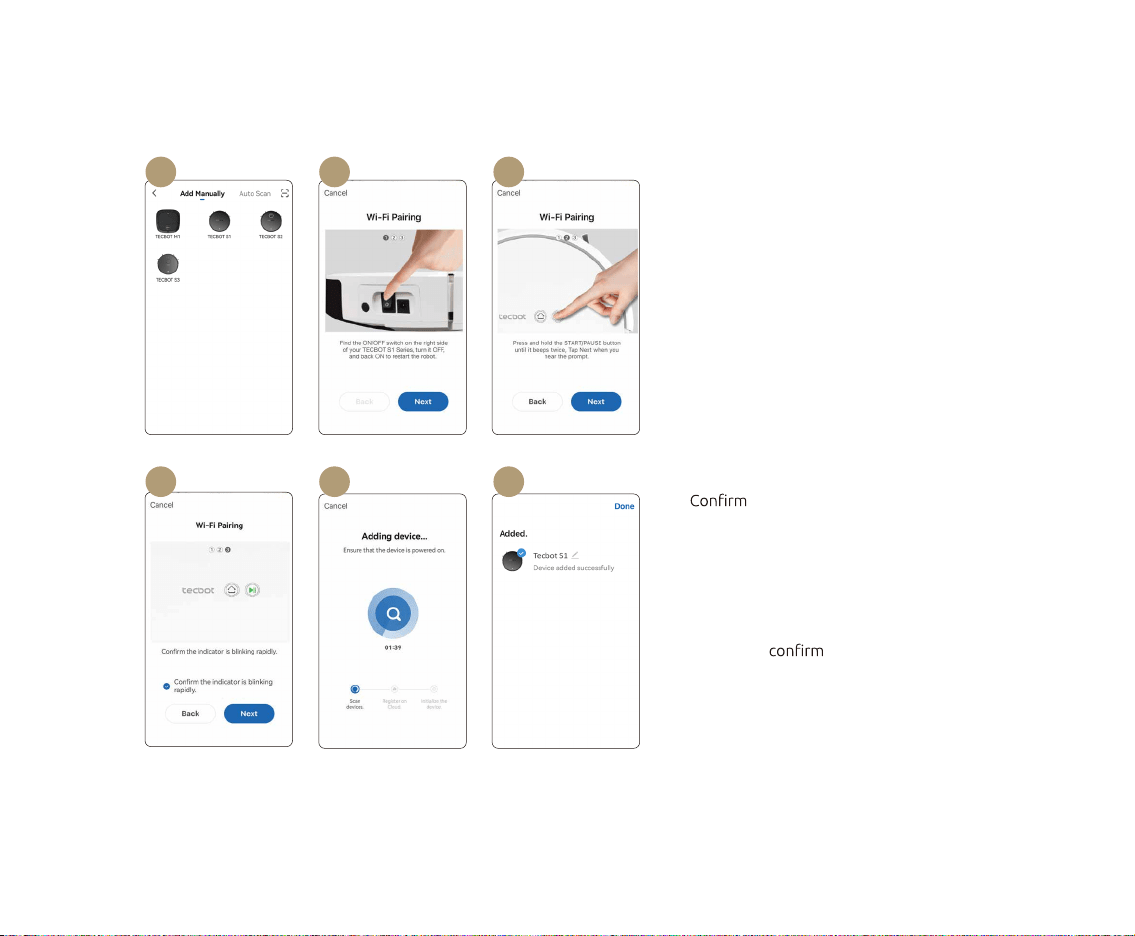
01 Tap “ TECBOT S1” and enter your Wi-Fi
password.
02 Restart your TECBOT S1 Series by switching
it OFF and ON. The switch is located at the
side of your TECBOT S1 Series.
03 Press and hold the Start/Pause button for 3
seconds until it beeps once to establish the
Wi-Fi connection.
04 the Start/Pause button light
is blinking and after you hear the voice
prompt. Tap “Next.”
05 Keep your device as close as possible to
your TECBOT S1 Series. Your TECBOT S1
Series Start/Pause button light will stop
blinking to pairing.
06 Success! Your TECBOT S1 Series is ready.
Manual pairing (Wi-Fi)
14
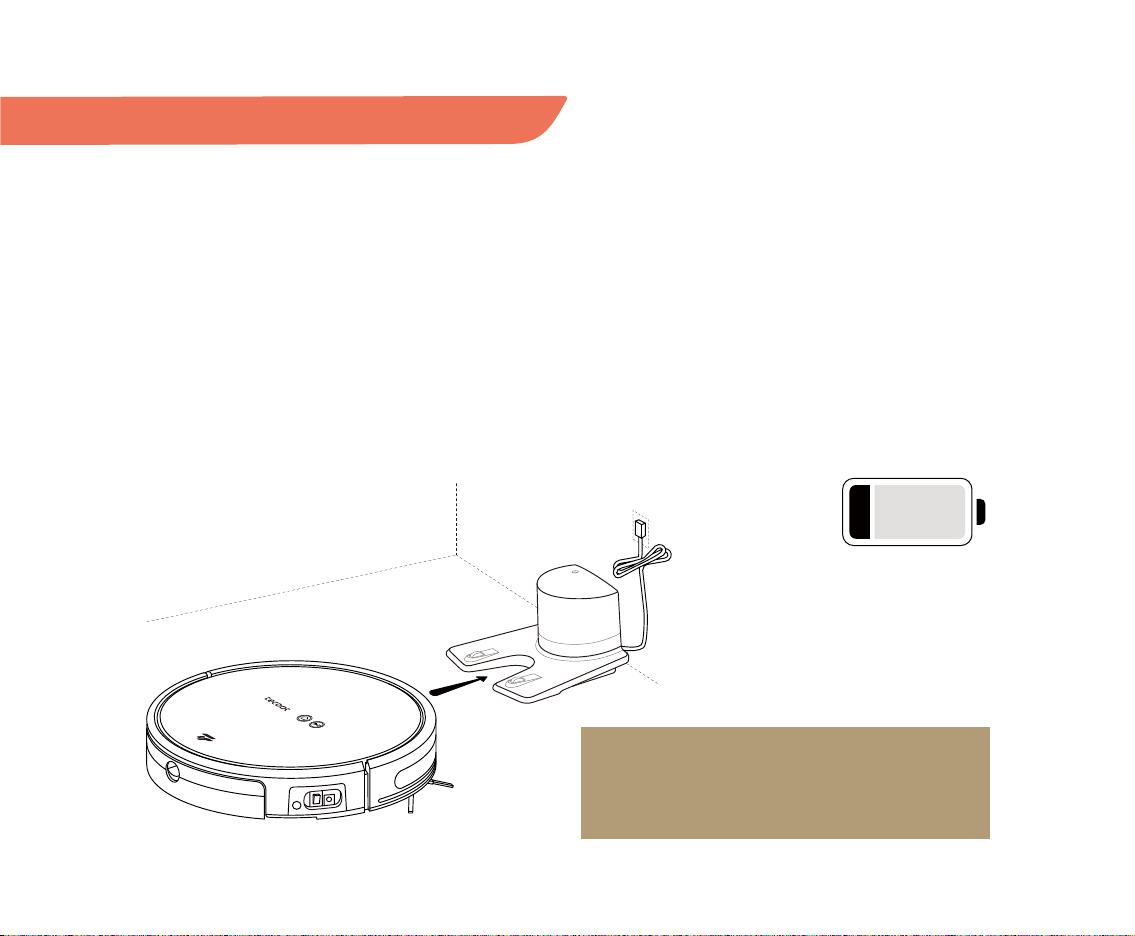
Your TECBOT S1 Series will
automatically return to
the charging dock when its
battery is lower than 20%.
<20%
NOTE:
Turn off your TECBOT S1 Series if you do not intend
to use it in the following 24 hours.
Charging
Your TECBOT S1 Series will automatically return to the
charging dock when its battery is lower than 20%. Press
the charging button on your TECBOT S1 Series, remote
control, or the Tecbot Home App to start the recharge
function.
Your TECBOT S1 Series will not turn on when its battery
is low. Please, manually place your TECBOT S1 Series on
the charging dock. The indicator light on the charging
dock will blink to indicate that charging has started.
Your TECBOT S1 Series takes about 6 hours to charge its
battery fully.
Battery
Your TECBOT S1 Series uses a high-performance
lithium-ion rechargeable battery pack. Please charge
your TECBOT S1 Series after daily use to maintain the
battery performance.
15
Cleaning modes and mopping function
NOTES:
If your TECBOT S1 Series gets stuck, encounters
obstacles, or needs to suspend the cleaning run for
any reason, please pause your TECBOT S1 Series
before moving it and putting it back within a radius of
3 feet / 1 meter from the "suspended position" to ensure
the continuation and completion of the cleaning task.
When you only need to clean a single room,
just close the door of this room. If there is no
charging stand in this room, your TECBOT S1 Series
will return to the point of origin after completing
the task.
Cleaning modes
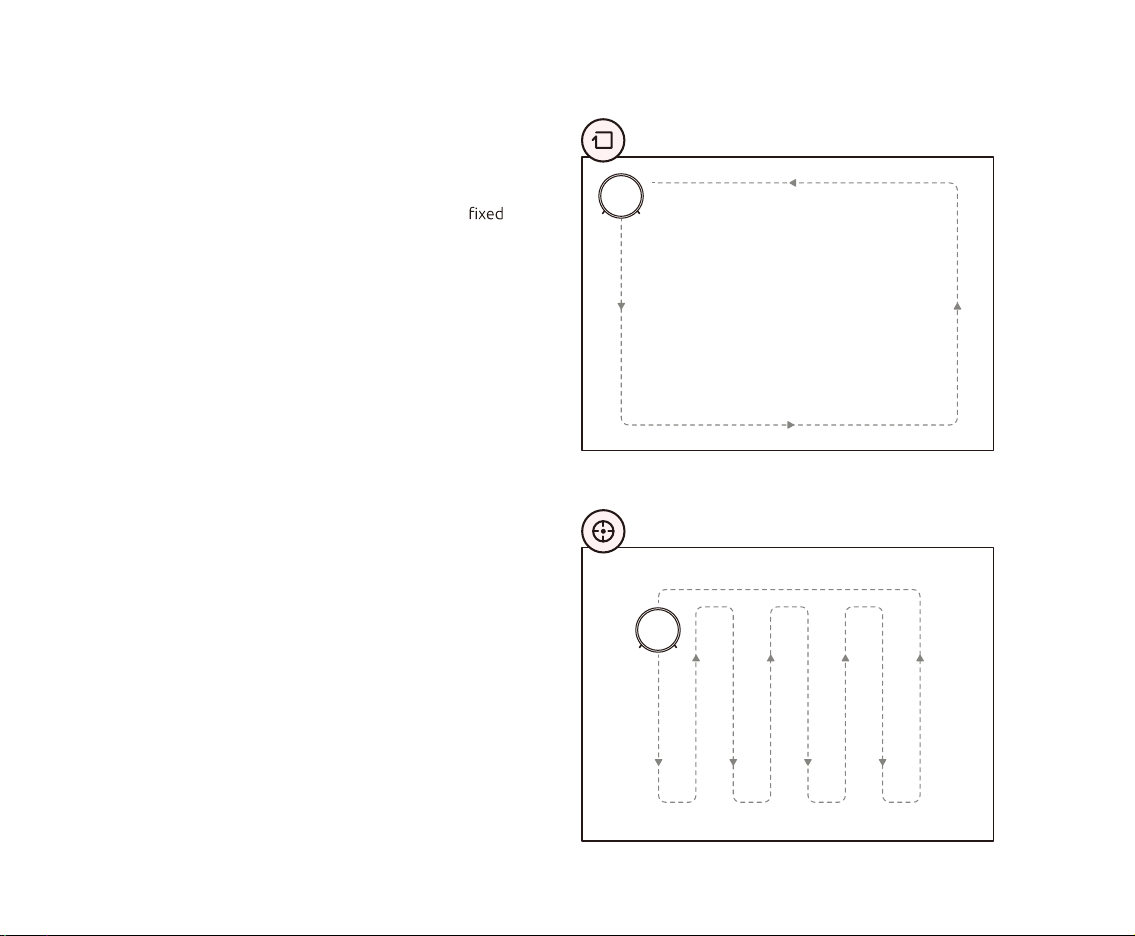
Automatic cleaning mode
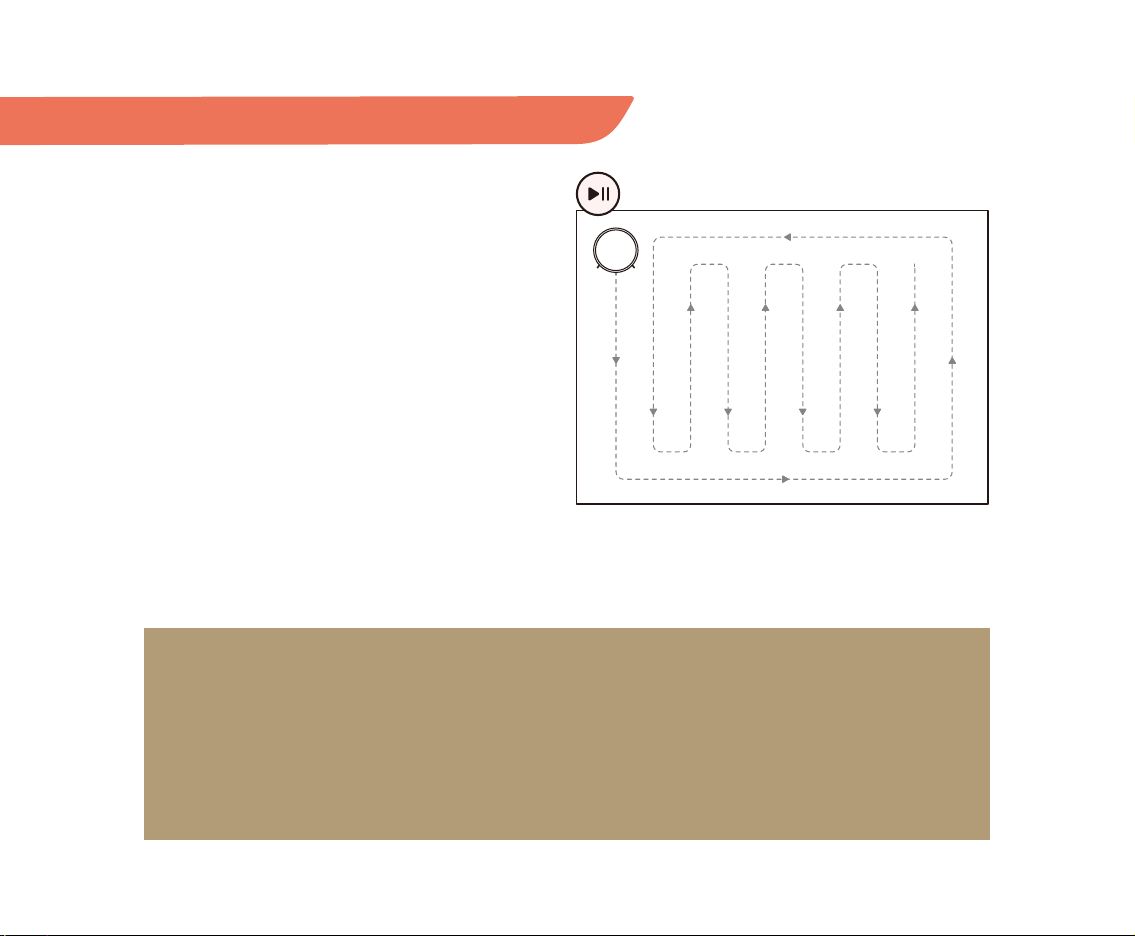
Your TECBOT S1 Series will clean all the accessible areas
of your house. TECBOT S1 Series will start to move
straight along the wall/obstacles, and move in anti-clock-
wise direction for edge cleaning. Once the edge-cleaning
is completed, it will automatically plan a zigzag path to
clean the remaining space and avoid obstacles on its way.
16
Cleaning modes
Edge cleaning mode
The edge cleaning mode will clean the corners of the
room. Your TECBOT S1 Series will clean along object
edges (such as a wall) and returns to the charging base.
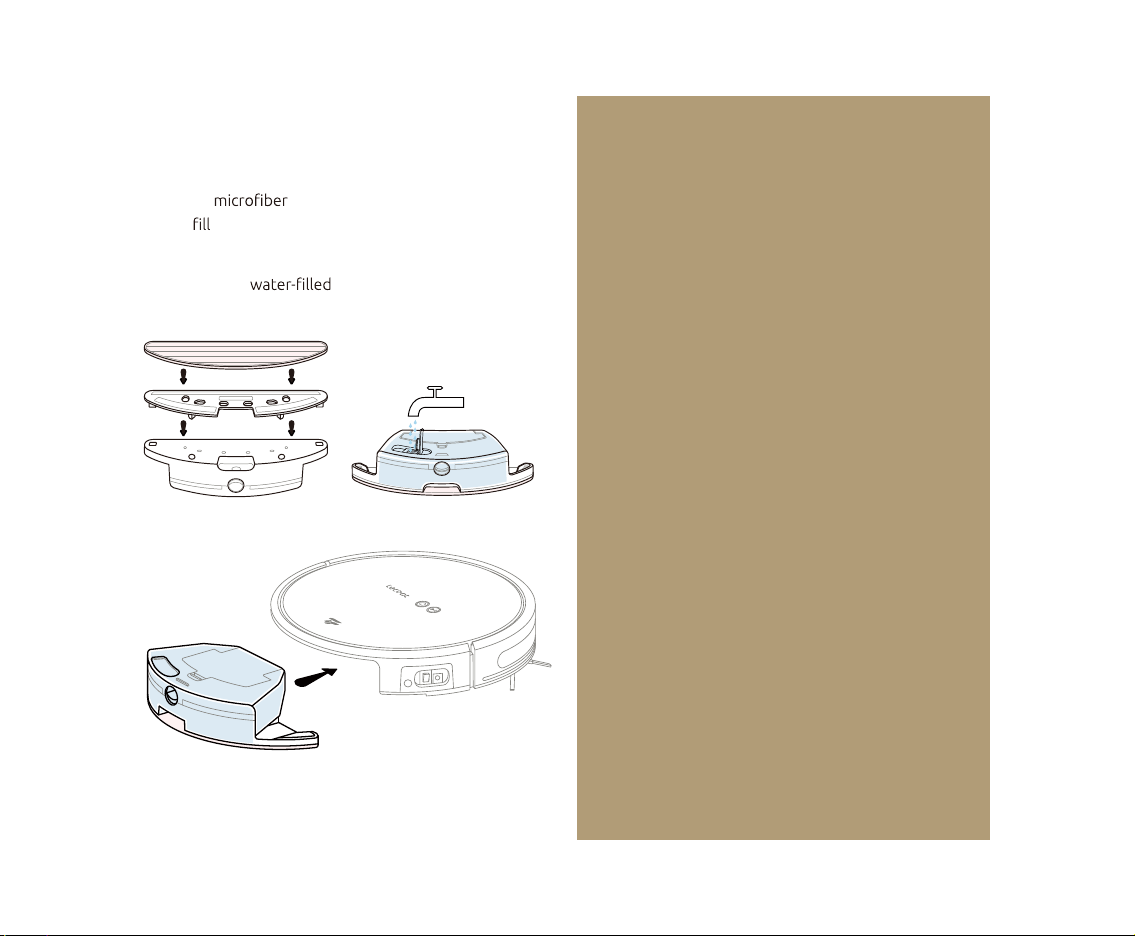
Spot cleaning mode
The spot cleaning mode is suitable for cleaning an area
where the debris or dust is concentrated. Your TECBOT
S1 Series will clean in a zigzag path and returns to the
starting position.
17
Mopping function
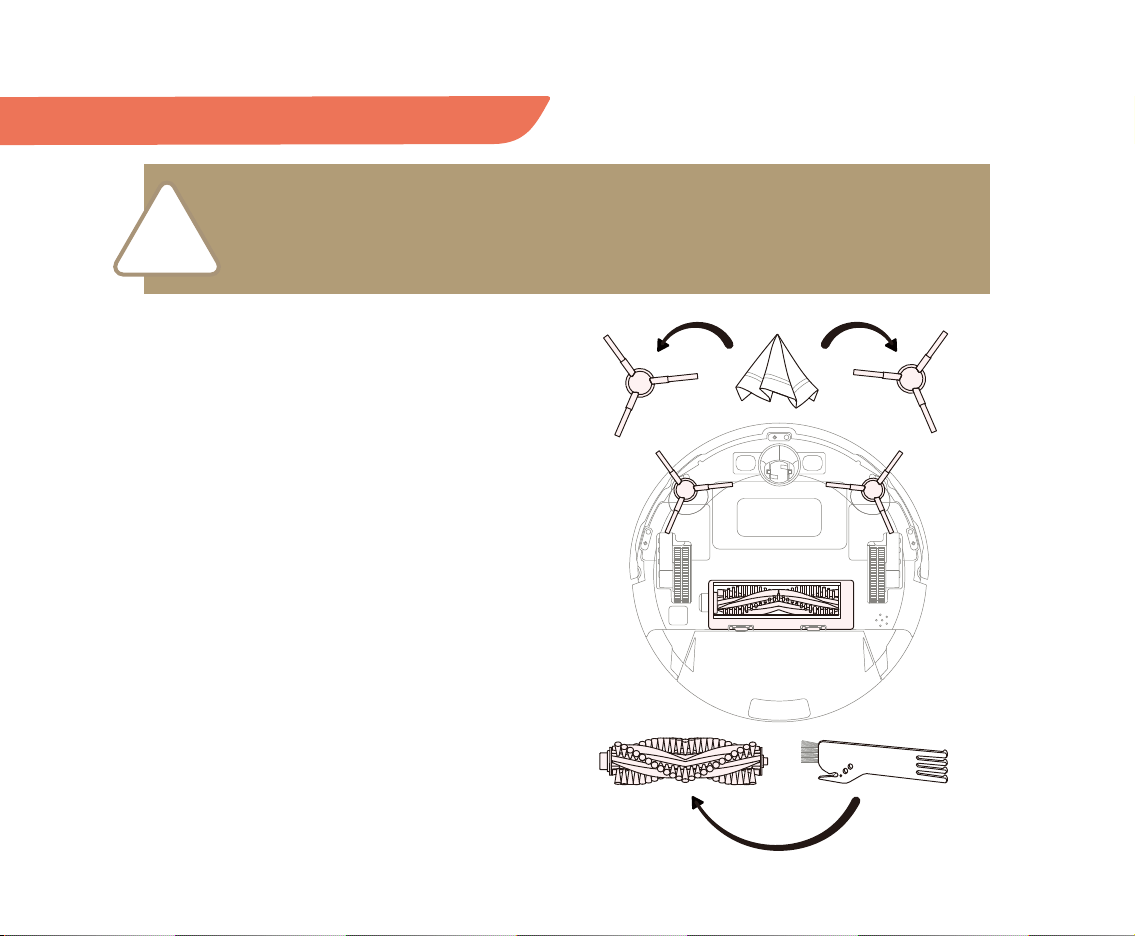
Place the mop in place, open the water inlet,
slowly up the water tank with clean water, and close
the water inlet tightly.
Place back the water tank.
NOTES:
• Ensure your TECBOT S1 Series is fully charged.
• Fold any fringe tassels edges under the carpet to
prevent dirtying them during the mopping.
• Do not use the mop mode over a carpet.
• It is recommended to use purified or demineralized
water to prolong the life of the water tank.
• If you need to add water to the water tank, please
pause your TECBOT S1 Series before retrieving the
water tank for filling, and do not move your
TECBOT S1 Series away from its pause position.
• After the mop is done, please rinse and empty
the water tank and remove and rinse the
microfiber mop.
18
!
Regular maintenance
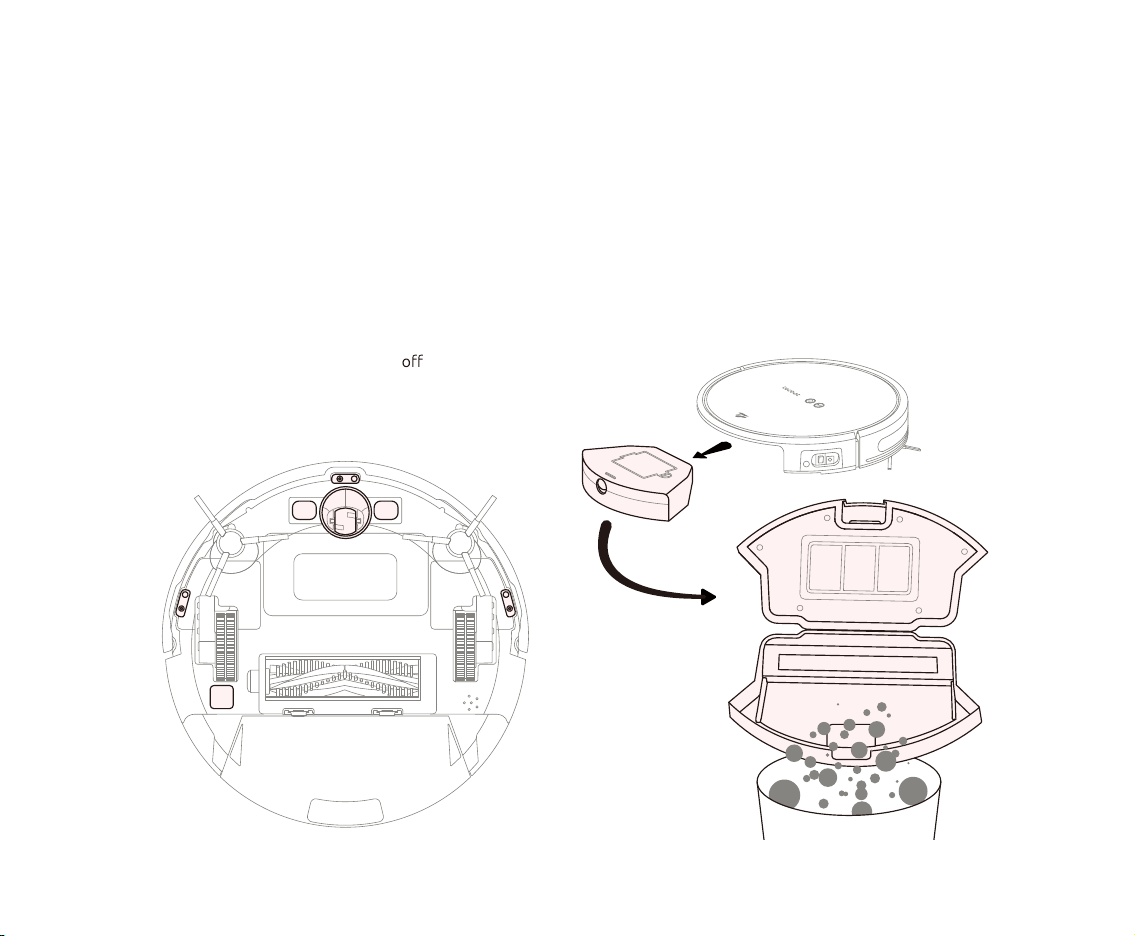
V-shaped main brush
It is recommended to clean up at least once a week.
• Turn over your TECBOT S1 Series, and remove
the V-shaped main brush cover by pushing on both
sides clips.
• Retrieve the V-shaped main brush upwards.
• Use the cleaning tool to remove any entanglement.
• Reinstall the V-shaped main brush and its cover.
Edge-cleaning brushes
It is recommended to replace after 6 months.
• Turn over your TECBOT S1 Series and remove the
edge-cleaning brushes by pulling them upwards.
• Clean the edge-cleaning brushes with a clean cloth.
• Reinstall the edge-cleaning brushes by snapping them
into place until you hear a “click” sound.
Please turn off your TECBOT S1 Series and retrieve the dust box or water tank when turning it
over for maintenance.
19
Contact point and sensors
It is recommended to clean up once a month.
• Always keep all sensors’ windows clean.
• Wipe clean all sensors’ windows and contact points
with a soft dry cloth.
Driving wheel
It is recommended to clean up at least once a week.
• Remove entanglements and clean any dirt on the
driving wheel body and axle.
Dust box
It is recommended to clean up at least once a week.
• Retrieve the dust box from your TECBOT S1 Series
pressing its release clip.
• Push the release clip to open the dust box.
• Empty it.
• Reinstall the dust box.
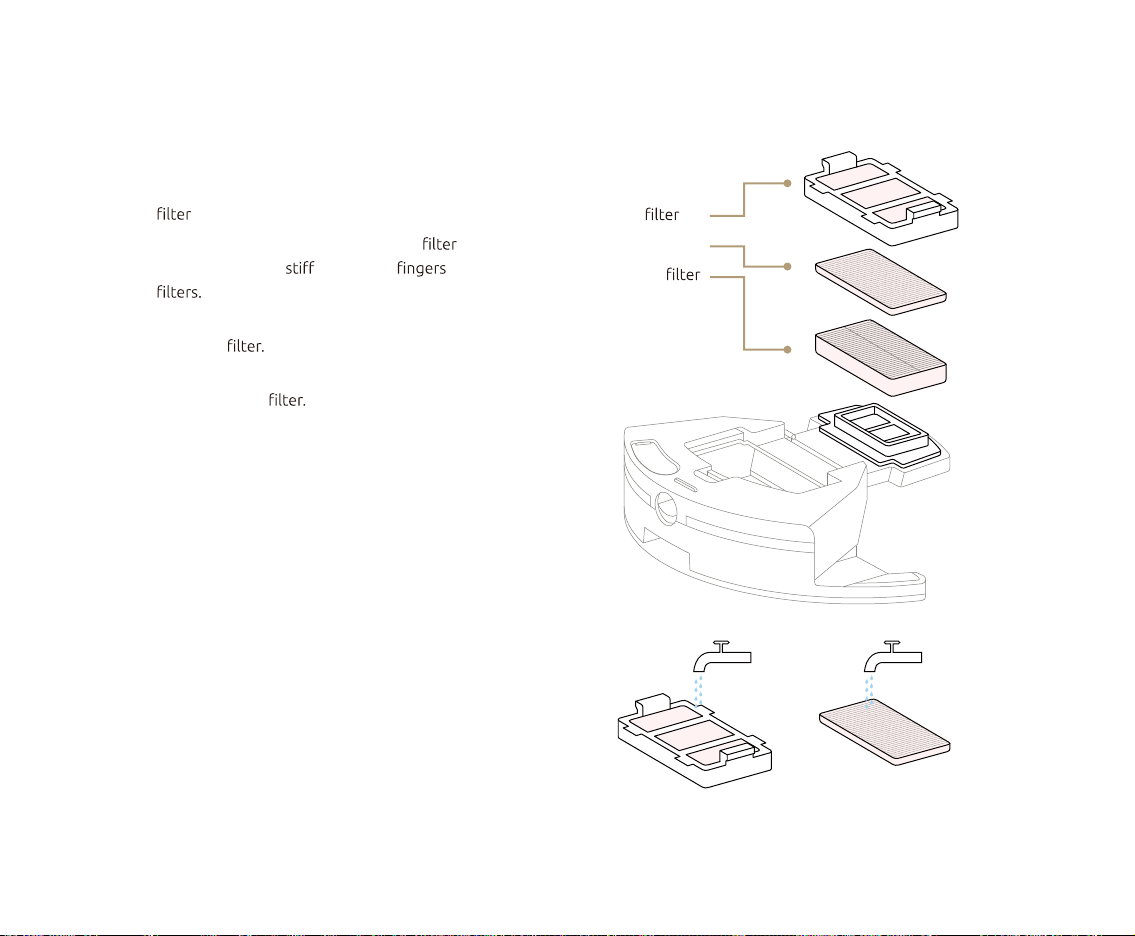
20
air
sponge
HEPA
Water tank components
It is recommended to clean up once a month.
• Open the water tank top cover, and retrieve the HEPA
and sponge.
• Rinse the water tank, sponge, and air with clean
water. Do not use brushes or to clean the
• Use a hand vacuum cleaner or cleaning brush to clean
the HEPA Do not clean with water.
• Shake out the water droplets from the water tank,
sponge, and air
• Let them dry in the air for at least 24 hours.
• Assemble back the water tank and place it into your
TECBOT S1 Series.
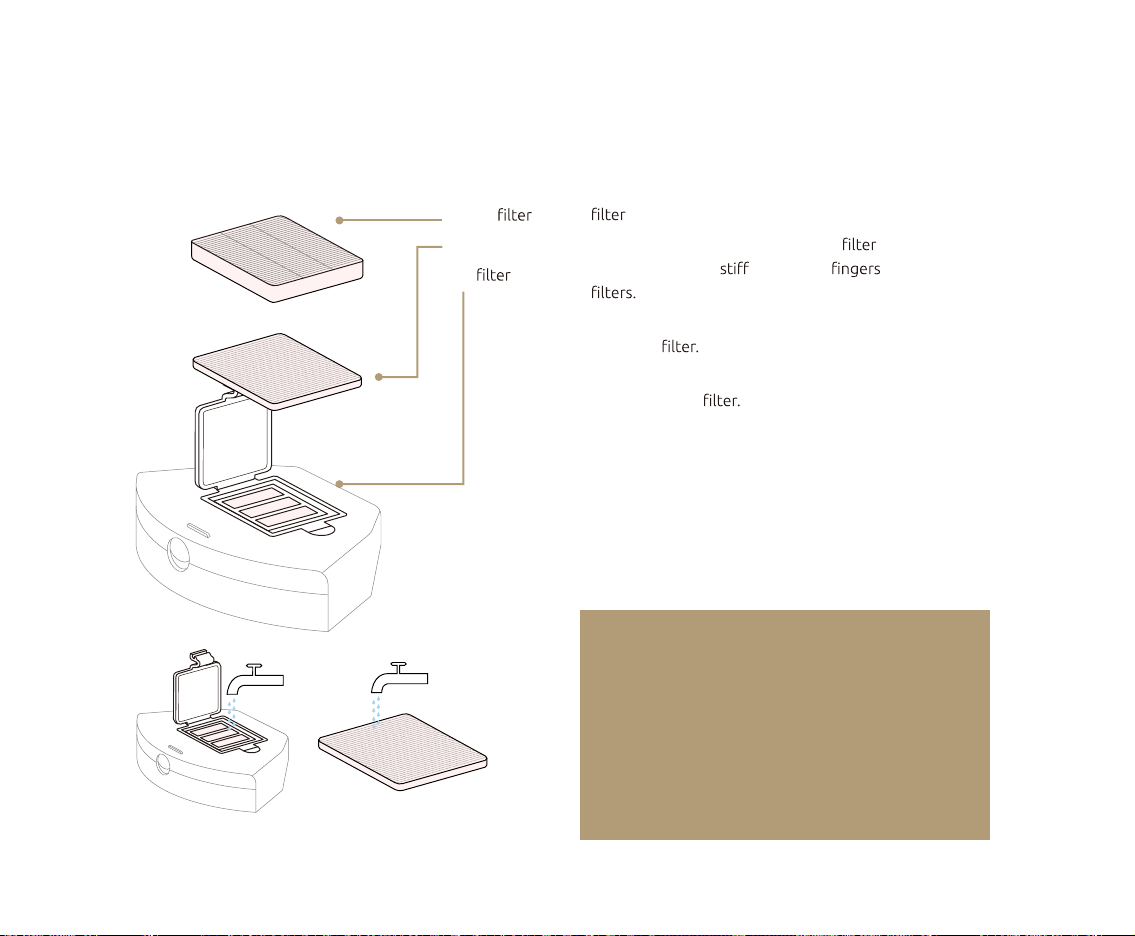
21
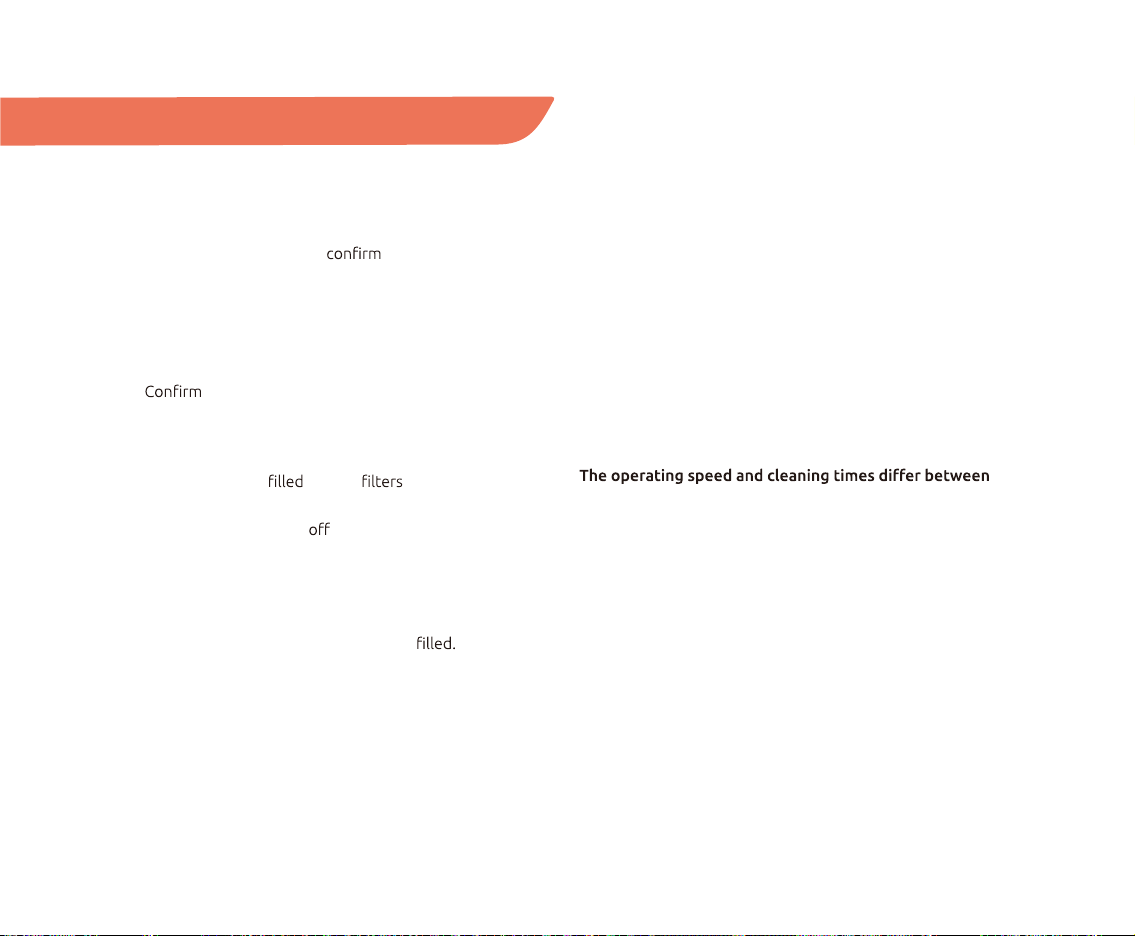
Dust box components
It is recommended to clean up once a month.
• Open the dust box top cover, and retrieve the HEPA
and sponge.
• Rinse the dust box, sponge, and air with clean
water. Do not use brushes or to clean the
• Use a hand vacuum cleaner or cleaning brush to clean
the HEPA Do not clean with water.
• Shake out the water droplets from the dust box,
sponge, and air
• Let them dry in the air for at least 24 hours.
• Assemble back the dust box and place it into your
TECBOT S1 Series.
HEPA
sponge
air
NOTES:
• It is recommended to replace the HEPA filter
between 6 to 12 months to ensure an excellent
vacuum effect.
• Use a brush to clean the dust accumulated in the
HEPA filter regularly.
• The longest age of the HEPA filter is 12 months.
22
It doesn't charge.
Ensure that both ends of the charging dock power cord
are plugged in. Clean the charging station and TECBOT S1
Series contact points and
that the charging dock
indicator is on.
It doesn't return to the charging dock station.
Put the charging dock in an open area. Place your
TECBOT S1 Series near the charging dock and try again.
whether the charging dock is powered and its
contact points and signal emitter are clean.
Cleaning ability decreased, or dust is dropping.
The dust box has up, the are blocked, and
the V-shaped main brush and edge-cleaning brushes are
entangled. Please turn your TECBOT S1 Series before
maintenance.
Mopping ability decreased.
Clean any dirt on the outlets at the bottom of the water
tank. Check whether the water tank is Fill up the
water tank before starting the cleaning task.
It doesn't return to recharge after partial cleaning or
moving away.
Your TECBOT S1 Series will redraw the map after a
partial cleaning or long-distance movement. It may not
be able to return to recharge if the charging base is too
far away. Manually put your TECBOT S1 Series into the
charging dock.
The scheduled cleaning does not happen.
Ensure your TECBOT S1 Series is turned on. When the
battery is low, the scheduled cleaning will start after the
battery level is above 20%.
surfaces, such as wooden and ceramic tiles.
Operating speed and cleaning times vary according to the
complexity of the room, the amount of debris, the clean-
ing mode, and surfaces’ unique characteristics.
Abnormal noise during cleaning.
Turn OFF your TECBOT S1 Series for cleaning. Clean any
entanglement on the V-shaped main brush, edge-cleaning
brushes, or wheels.
Troubleshooting and FAQs

23
Abnormal behavior.
Restart your TECBOT S1 Series by turning it
and on.
It doesn’t avoid obstacles.
Check and clean the front and side sensors’ windows.
It fell down the stairs during cleaning.
Check and wipe clean all the sensors' windows.
The remote control fails.
The remote control range is 4 feet / 1.2 meter.
Check your TECBOT S1 Series in turned ON and charge.
Replace the remote control batteries with new ones.
Clean the remote control and your TECBOT S1 Series
infrared transmitter, and check that there is no other
infrared transmitter device interfering with the signal,
such as a TV.
Cables, slippers, and other objects placed on the
the regular operation and scan functions of your
TECBOT S1 Series. Tidy up the wires, slippers, and other
things scattered on the It is also recommended
not to interfere with the cleaning path by moving your
TECBOT S1 Series or blocking it.
Tecbot Home App can not be paired.
• Check your home Wi-Fi router supports the 2.4 GHz
frequency band.
• Check your home Wi-Fi password input is correct.
• Check your Wi-Fi router does not have a
• Check if your TECBOT S1 Series Start/Pause button
light is blinking.
Add family members to the Tecbot Home App.
Tap “Me” to select family management.
Tecbot Home App does not have a map.
Tap “Smart plan cleaning.” Tap “more” to save the map
in the map management after the TECBOT S1 Series
icon appears.
“Selection cleaning” can not be selected.
You can edit the map after the map is saved.
Create smart cleaning.
Open the Tecbot Home App and tap “Smart.”
Tab the “+” to add.

24
Warnings and Restrictions
• Use your TECBOT S1 Series
according to this User Manual.
The user will bear any loss and
injury caused by improper use.
• Ensure the dust box and are
properly installed before using your
TECBOT S1 Series.
• Ensure the power supply voltage
matches the voltage marked on the
charging dock.
• Do not place the charging dock
near a heat source (such as a
radiator).
• Do not use your TECBOT S1 Series
in environments where the
temperature exceeds 104 ºF (40 ºC)
or is lower than 32 ºF (0 ºC).
• Do not use any mop mode on
the carpet.
• Incorrect use of cleaner liquid
may cause damage to your TECBOT
S1 Series. For a better cleaning
experience, it is recommended to
use Tecbot cleaner.
• Do not use your TECBOT S1 Series
for cleaning long-haired carpets
(it may not work correctly on some
dark-colored carpets.)
• Do not use your TECBOT S1 Series
over damp, standing water, or
sticky surfaces.
• Only use your TECBOT S1 Series
in-home or environments.
Please do not use it in commercial
or industrial environments.
• When operating, do not place
hair, or pets close to the
vacuum.
• Do not allow people with physical,
mental, or sensory impairments
and children to operate your
TECBOT S1 Series.
• Do not place any objects on
your TECBOT S1 Series, including
children and pets.
• Do not allow children to use
your TECBOT S1 Series as a toy.
Supervise children and pets when
it is operating.
• Do not allow your TECBOT S1
Series to vacuum over hard or sharp
objects (such as decoration litter,
glass, iron nails, etc.)
• Do not use your TECBOT S1 Series
to clean any burning objects or
substances (such as
unextinguished cigarettes,
gasoline, and printer toner.)
• Stop using the power cord
and charging dock if broken or
damaged.
• Do not disassemble, repair,
or modify the battery and
charging dock.
• Keep your TECBOT S1 Series
cleaning tools out of reach
of children.
• Do not clean or maintain when
it’s turned on. Unplug the charging
dock before cleaning
or maintenance.
• Do not use a damp cloth or any
liquid to clean any part of your
TECBOT S1 Series.
• Do not use any third-party batteries
or charging docks.

25
Dimensions:
13.8 x 2.95 inch
Product weight:
6.6 lb
Vacuum power:
1800 Pa for S1 or
3000 Pa for S1 Pro
Noise level:
<68 dB
Battery type:
Rechargeable Li-ion
battery pack
Battery:
14.4 V
2600mAh for S1 or
5200mAh for S1 Pro
Rated power:
25 W
Dust box capacity:
600ml
Water tank capacity:
320 ml (optional)
Obstacle clearance
maximum height:
0.75 inch
Operating time:
~100 min
Charging dock model:
TEC400
Remote control model:
TEC1089
• Carry your TECBOT S1 Series with
both hands, and do not use the
collision bumper as a handle.
• Transport your TECBOT S1 Series
using the original packing box and
ensure it is turned
• If you intend not to use your
TECBOT S1 Series for a long time,
charge it fully and turn it
Please keep it in a cool and dry
place. Charge it at least once every
3 months to avoid excessive
battery discharge.
• Consult a professional recycling
agency for directions to discard
used batteries.
• Incineration of your TECBOT S1
Series is prohibited even if the
product is severely damaged. In
addition, the battery may explode.

26
Implementation standards:
GB4706.1-2005
GB4706.7-2014
GB4343.1-2009
GB17625.1-2012
Hazardous materials
Notes
Parts Pb Hg Cd Cr(VI) PBB PBDE
Plastic parts O O O O O O
Hardware X O O O O O
Circuit board X O O O O O
Electronic O O X O O O
Battery O O O O O O
Plug power cord (metal part) X O O O O O
X The amount in at least a certain part exceeds the limit requirement of the GB/T 26572 regulation,
and there is currently no proven alternative in the industry that meets the environmental protection
requirements of the EU RoHS regulations.
O The amount in the parts is below the limit requirement of the GB/T 26572 regulation.
Elements
Pb Lead
Hg Mercury
Cd Chromium
Cr(VI) Hexavalent
Chromium
PBB Polybrominated
biphenyls
PBDE Polybrominated
phenyl ether
The environmental protection use period of
the product under normal use is 5 years.
5


TECBOT S1 Series
Manufacturer:
Shenzhen Tecbot Intelligent Robot Co., Ltd.
Address:
8D, Nanyuan Maple Leaf Building.
Nanshan Avenue No.1088, Shenzhen, Guangdong, China.
Manufacturer:
Guangdong Jingrong Technology Holdings Co., Ltd.
Address:
Jingrong Industrial Park, Shunfeng Road,
Dongguan, Guangdong, China.
Customer Service Department email:
Website:
www.tecbot.ai