User’s Guide


3
CONTENTS
Safety Instructions ...........................................................................................................................................................4
Precautions ...................................................................................................................................................................... 6
Declaration of Conformity ................................................................................................................................................ 7
Intro to PRX900 ...............................................................................................................................................................8
Overview ........................................................................................................................................................................ 9
Application Examples .....................................................................................................................................................10
Mixer Panel ....................................................................................................................................................................12
Mixer Panel Functions ................................................................................................................................................... 13
EasyNav LCD ................................................................................................................................................................ 15
APP .............................................................................................................................................................................. 19
PRX908 Specications ..................................................................................................................................................20
PRX912 Specications ..................................................................................................................................................21
PRX915 Specications ..................................................................................................................................................22
PRX915XLF Specications ............................................................................................................................................23
PRX918XLF Specications ............................................................................................................................................24
Cables & Connectors ..................................................................................................................................................... 25
Contact Information .......................................................................................................................................................26
Warranty Information .................................................................................................................................................... 27

4
The PRX900 system covered by this manual is not intended for use in high moisture environments. Moisture can damage the speaker cone and surround
and cause corrosion of electrical contacts and metal parts. Avoid exposing the speakers to direct moisture.
Keep speakers out of extended or intense direct sunlight. The driver suspension will prematurely dry out and nished surfaces may be degraded by
long-term exposure to intense ultra-violet (UV) light. The PRX900 system can generate considerable energ y. When placed on a slippery surface such as
polished wood or linoleum, the speaker may move due to its acoustical energy output. Precautions should be taken to assure that the speaker does not
fall off a stage or table on which it is placed.
HEARING DAMAGE, PROLONGED EXPOSURE TO EXCESSIVE SPL
The PRX900 system is capable of generating sound pressure levels (SPL) sufcient to cause permanent hearing damage to performers, production crew,
and audience members. Caution should be taken to avoid prolonged exposure to SPL in excess of 85 dB.
CARE & CLEANING
PRX900 systems may be cleaned with a dry cloth. Do not allow moisture into any of the openings in the system. Ensure that the system is unplugged
from the AC outlet before cleaning.
THIS APPARATUS CONTAINS POTENTIALLY LETHAL VOLTAGES. TO PREVENT ELECTRIC SHOCK OR HAZARD, DO NOT REMOVE CHASSIS, MIXER
MODULE, OR AC INPUT COVERS. NO USER SERVICEABLE PARTS INSIDE. REFER SERVICING TO QUALIFIED SERVICE PERSONNEL.
WEEE Notice
The Directive 2012/19/EU on Waste Electrical and Electronic Equipment (WEEE), which entered into force as European law
on 14/02/2014, resulted in a major change in the treatment of electrical equipment at end-of-life.
The purpose of this Directive is, as a rst priority, the prevention of WEEE, and in addition, to promote the reuse, recycling
and other forms of recovery of such wastes so as to reduce disposal. The WEEE logo on the product or on its box indicating
collection for electrical and electronic equipment consists of the crossed-out wheeled bin, as shown below.
This product must not be disposed of or dumped with your other household waste. You are liable of dispose of all your electronic or electrical waste
equipment by relocating over to the specied collection point for recycling of such hazardous waste. Isolated collection and proper recovery of your
electronic and electrical waste equipment at the time of disposal will allow us to help conserving natural resources. Moreover, proper recycling of the
electronic and electrical waste equipment will ensure safety of human health and environment. For more information about electronica and electrical
waste equipment disposal, recovery, and collection points, please contact your local city center, household waste disposal service, shop from where you
purchased the equipment, or manufacturer of the equipment.
RoHS Compliance
This product is in compliance with Directive 2011/65/EU and (EU) 2015/863 of the European Parliament and of the Council of 19. 31/03/2015 on the
restriction of the use of certain hazardous substances in electrical and electronic equipment.
REACH
REACH (Regulation No 1907/2006) addresses the production and use of chemical substances and their potential impacts on human health and the
environment. Article 33 (1) of REACH Regulation requires suppliers to inform the recipients if an article contains more than 0.1% (per weight per article)
of any substance(s) on the Substances of Very High Concern (SVHC) Candidate List (‘REACH candidate list’).
This product contains the substance ‘’lead’’ (CAS-No. 7439-92-1) in a concentration of more than 0.1% per weight.
At the time of release of this product, except for the lead substance, no other substances of REACH candidate list are contained in a concentration of
more than 0.1% per weight in this product.
Note: on June 27, 2018, lead was added to the REACH candidate list. The indusion of lead in the REACH candidate list does not mean that lead-
containing materials pose an immediate risk or results in a restriction of permissibility of its use.
SAFETY INSTRUCTIONS
5
1. READ these instructions.
2. KEEP these instructions.
3. HEED all warnings.
4. FOLLOW all instructions.
5. DO NOT use this apparatus near water.
6. CLEAN ONLY with dry cloth.
7. DO NOT block any ventilation openings. Install in accordance with the manufacturer’s instructions.
8. DO NOT install near any heat sources such as radiators, heat registers, stoves, or other apparatus (including ampliers) that produce heat.
9. DO NOT defeat the safety purpose of the polarized or grounding type plug. A polarized plug has two blades with one wider than the other. A
grounding type plug has two blades and a third grounding prong. The wider blade or the third prong are provided for your safety. If the provided
plug does not t into your outlet, consult an electrician for replacement of the obsolete outlet.
10. PROTECT the power cord from being walked on or pinched, particularly at plugs, convenience receptacles, and the point where they exit from the
apparatus.
11. ONLY USE attachments/accessories specied by the manufacturer.
12. USE ONLY with a cart, stand, tripod, bracket, or table specied by the manufacture, or sold with the apparatus. When a cart is used, use
caution when moving the cart/apparatus combination to avoid injury from tip-over.
13. UNPLUG this apparatus during lightning storms or when unused for long periods of time.
14. REFER all servicing to a qualied service personnel. Servicing is required when the apparatus has been damaged in any way, such as power-supply
cord or plug is damaged, liquid has been spilled or objects have fallen into the apparatus, the apparatus has been exposed to rain or moisture, does
not operate normally, or has been dropped.
15. DO NOT expose this apparatus to dripping or splashing and ensure that no objects lled with liquids, such as vases, are placed on the apparatus.
16. To completely disconnect this apparatus from the AC Mains, disconnect the power supply cord plug from the AC receptacle.
17. Where the mains plug or an appliance coupler is used as the disconnect device, the disconnect device shall remain readily operable.
18. DO NOT overload wall outlets or extension cords beyond their rated capacity as this can cause electric shock or re.
19. For adequate ventilation, do not install this equipment in a condent or enclosed space, such as a book case or similar unit. Product ventilation
should not be impeded by covering the ventilation openings with items such as newspaper, tablecloths, curtains, etc.
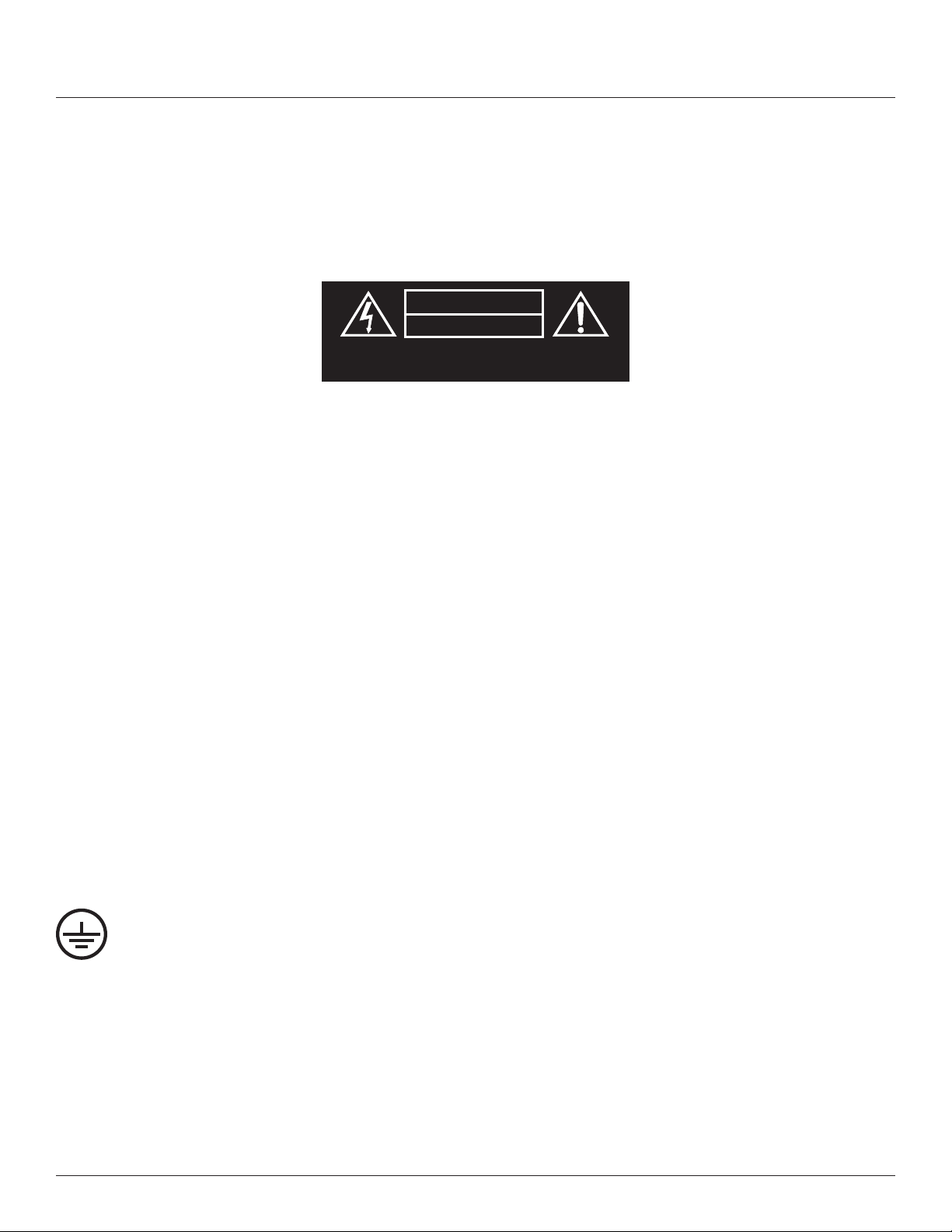
The exclamation point, within an equilateral triangle, is intended to alert the user to the presence of important operating and maintenance
(servicing) instructions in the literature accompanying the product.
The lightning ash with an arrowhead symbol within an equilateral triangle is intended to alert the user to the presence of uninsulated
“dangerous voltage” within the product’s enclosure that may be sufcient in magnitude to constitute a risk of electrical shock to persons.
WARNING: To reduce the risk of re or electrical shock, do not expose this apparatus to rain or moisture.
WARNING: No naked ame sources – such as lighted candles –should be placed on the product.
WARNING: Equipment shall be connected to a MAINS socket outlet with a protective earthing connection.
6
WARNING: This product is intended to be operated ONLY from the voltages listed on the back panel. Operation from other voltages other than those
indicated may cause irreversible damage to the product and void the product’s warranty. The use of AC Plug Adapters is cautioned because it can allow
the product to be plugged into voltages in which the product was not designed to operate. If you are unsure of the correct operational voltage, please
contact your local distributor and/or retailer. If the product is equipped with a detachable power cord, use only the type provided, or specied, by the
manufacturer or your local distributor.
OPERATING TEMPERATURE RANGE: -20ºC - 40ºC (-4ºF - 104ºF)
WARNING TO REDUCE THE RISK OF ELECTRIC SHOCK,
DO NOT EXPOSE THIS EQUIPMENT TO RAIN OR MOISTURE.
RISQUE DE CHOC ELECTRIQUE NE PAS OUVRIR
CAUTION
RISK OF ELECTRIC SHOCK
DO NOT OPEN
WARNING: Do Not Open! Risk of Electrical Shock. Voltages in this equipment are hazardous to life. No user-serviceable parts inside. Refer all servicing
to qualied service personnel.
Place the equipment near a main power supply outlet and make sure that you can easily access the power breaker switch.
DO NOT UNDER ANY CIRCUMSTANCES OPERATE THE UNIT WITH THE WRONG VOLTAGE SELECTED. DOING SO MAY RESULT IN SERIOUS DAMAGE TO
YOUR PA SYSTEM WHICH WILL NOT BE COVERED BY WARRANTY.
FCC AND CANADA EMC COMPLIANCE INFORMATION: This device complies with Part 15 of the FCC Rules. Operation is subject to the following
two conditions
1. This device may not cause harmful interference, and (2) this device must accept any interference received, including interference that may cause
undesired operation.
CAUTION: Changes or modications not expressly approved by the manufacturer could void the user’s authority to operate this device.
NOTE: This equipment has been tested and found to comply with the limits for a Class B digital device, pursuant to Part 15 of the FCC
Rules. These limits are designed to provide reasonable protection against harmful interference in a residential installation. This equipment
generates uses and can radiate radio frequency energy and, if not installed and used in accordance with the instructions, may cause
harmful interference to radio communications. However, there is no guarantee that interference will not occur in a particular installation. If this equipment
does cause harmful interference to radio or television reception, which can be determined by turning the equipment off and on, the user is encouraged
to try to correct the interference by one or more of the following measures: Reorient or relocate the receiving antenna. Increase the separation between
the equipment and receiver. Connect the equipment into an outlet on a circuit different from that to which the receiver is connected. Consult the dealer or
an experienced radio/TV technician for help.
CAUTION: This product is for non-residential use only.
WARNING: This equipment is compliant with Class B of CISPR 32. In a residential environment this equipment may cause radio
interference.
CAN ICES-003(B)/NMB-003(B)
Protective earthing terminal. The apparatus should be connected to a mains socket outlet with a protective earthing connection.
PRECAUTIONS
7
DECLARATION OF CONFORMITY
WIRELESS TRANSMITTER COMPLIANCE INFORMATION: The term “IC:” before the radio certication number only signies that Industry
Canada technical specications were met.
Le terme «IC:» avant le numero de certication radio signie seulement que les specications techniques d’lndustrie Canada ont ete
respectees.
This device contains licence-exempt transmitter(s)/receiver(s) that comply with Innovation, Science and Economic Development
Canada’s licence-exempt RSS(s). Operation is subject to the following two conditions (1) this device may not cause harmful
interference, and (2) this device must accept any interference, including interference that may cause undesired operation of the device.
Cet appareil contient des émetteurs / récepteurs exemptés de licence conformes aux RSS (RSS) d’Innovation, Sciences et
Développement économique Canada. L’exploitation est autorisee aux deux conditions suivantes : (1) l’appareil ne doit pas produire
de brouillage, et (2) l’utilisateur de l’appareil doit accepter tout brouillage radioelectrique subi, meme si le brouillage est susceptible
d’en compromettre le fonctionnement.
This equipment complies with FCC and IC radiation exposure limits set forth for an uncontrolled environment. This equipment should
be installed and operated with minimum distance 20cm between the radiator and your body. This transmitter must not be co-located or
operating in conjunction with any other antenna or transmitter.
Cet appareil est conforme a FCC et IC !’exposition aux rayonnements limites xees pour un environnement non controle. Cet appareil
doit etre installe et utilize avec une distance minimale de 20cm entre le radiateur et votre corps. Cet transmetteur ne doit pas etre cositue
ou operant en liaison avec toute autre antenne ou transmetteur.
EU COMPLIANCE INFORMATION:
Hereby, HARMAN Professional, Inc., declares that the equipment type PRX900 is in compliance to the following:
European Union Restriction of Hazardous Substances Recast (RoHS2) Directive 2011/65/EU; European Union WEEE (recast)
Directive 2012/19/EU; European Union Registration, Evaluation, Authorization and Restriction of Chemicals (REACH) Directive
1907/2006; European Radio Equipment Directive (RED) 2014/53/EU
You may obtain a free copy of the full Declaration of Conformity by visiting:
http://www.jblpro.com/www/product-support/downloads
WIRELESS FREQUENCY RANGE AND WIRELESS OUTPUT POWER:
2402MHz - 2480MHz
6.00mW
Prevention of hearing loss
Caution: Permanent hearing loss may occur if earphones or headphones are used at high volume for prolonged periods of time.
Note: To prevent possible hearing damage, do not listen at high volume levels for long periods.
CLASS B PRODUCT:
ENVIRONMENTAL:
此标识适用于在中华人民共和国销售的电子信息产品 . 标识中间的数字为环保实用期限的年数 .
Este equipamento não tem direito à proteção contra interferência prejudicial e não pode causar interferência
em sistemas devidamente autorizados
8
INTRO TO PRX900
GETTING STARTED
Congratulations on your purchase of JBL Professional PRX900 loudspeakers! We know you are anxious to get up and running as fast as
possible, which is why you are reading this section. The following will help you get set up as soon as possible.
Packaging Contents
Your PRX900 should include:
• 1 PRX900 Full Range or Subwoofer Cabinet
• 1 6’ (2m) AC Power Cable
• 1 QSG
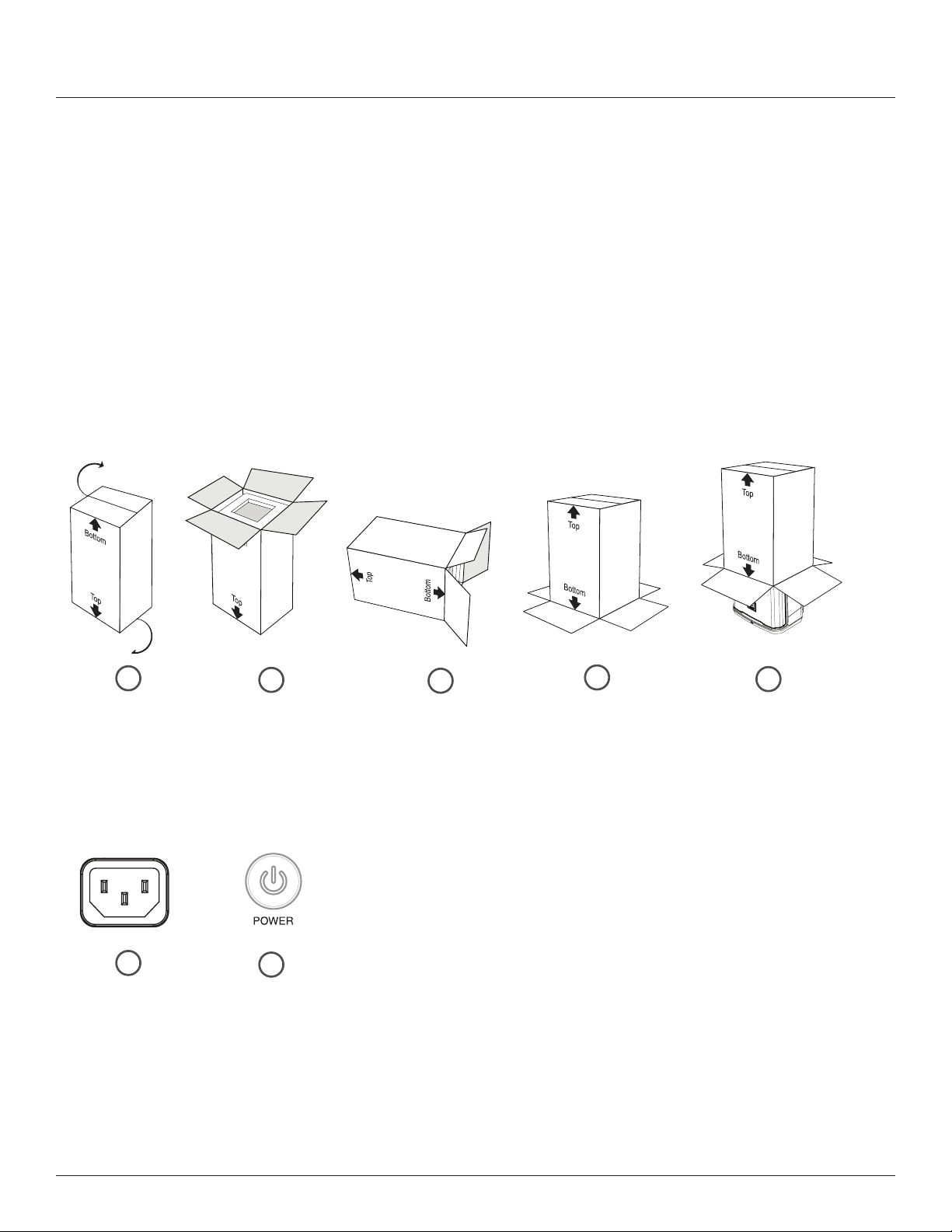
Flip box/packaging on
its top, e.g. top resting
on the ground, bottom
facing up, etc.
Open bottom of
box/packaging.
Carefully lay box/
packaging on its side.
Lift and ip box/
packaging, rmly
resting onto its bottom,
e.g. top facing up, etc.
Carefully lift to remove
the box/packaging to
reveal speaker.
Plug AC cable
into inlet
Power up
Unboxing
MAIN / MENU
1
6
4
5
2
7
3
9
P.A. BASICS
A mixing board is actually a very simple device that takes the audio input signals (from the input channels) and “mixes” them to
the outputs. The mixing board controls will typically enable the user to blend the input channel signal levels, affect their tone,
and adjust each channel’s reverb level. The signal is then fed from the mixing board to the ampliers and onto the speakers. The
PRX900 is a self-contained PA system, which includes a mixing board, ampliers, and speakers.
GETTING ACQUAINTED WITH PRX900
The powered mixer section of the PRX900 system houses the mixing board and power amplifier. Here, all of the
microphones, musical instruments, and external sound sources (such as MP3 players and CD players) can be connected.
SETTING UP
How to set up
1. Insert input into desired channel
2. Slowly turn the Main knob to increase your main volume.
3. Adjust the Channel Gain knobs until your desired volume is achieved.
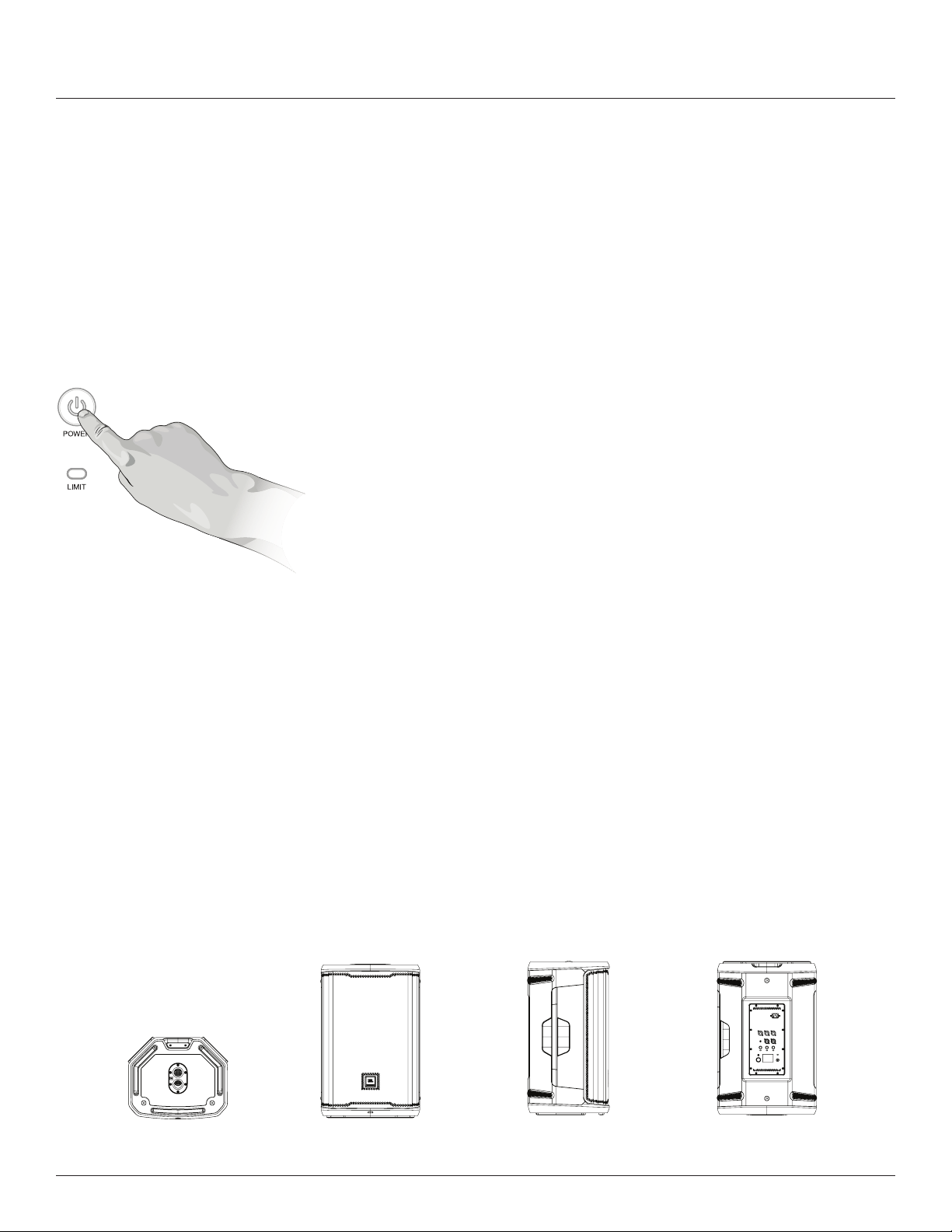
How to turn on/off
Press the Power Button for .5 of a second to engage power.
MAIN / MENU
Bottom View Front View Left View Rear View
14.975
380.4
14.975
380.4
14.975
380.4
14.975
380.4
OVERVIEW
10
MAIN / MENU
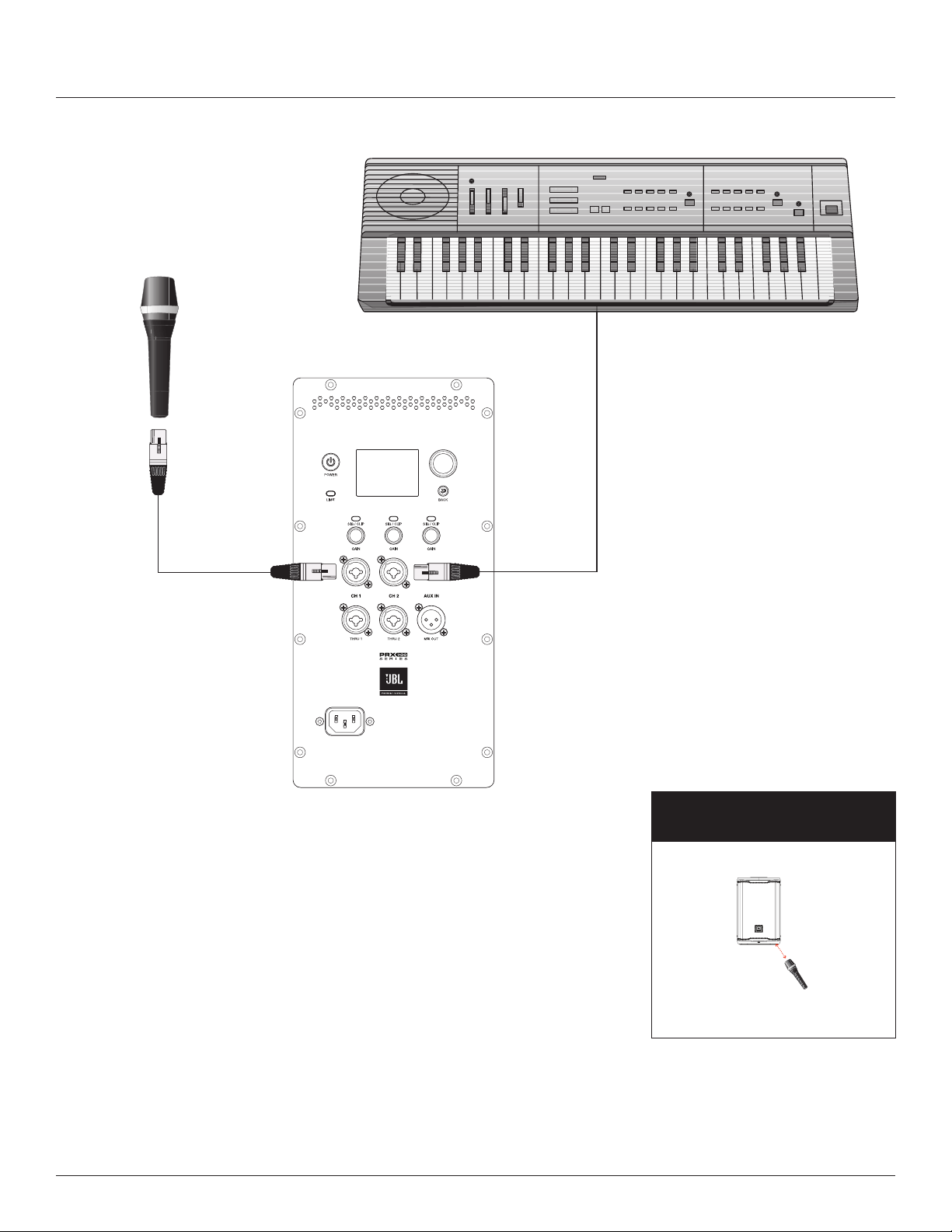
INSTRUMENTS & MIC PLUGGED INTO MIXER
CH1 XLR-1/4” Combo Mic, CH2 XLR-1/4” Combo Mic Keyboard
APPLICATION EXAMPLES
MICROPHONE
(presenter or speaker) Subwoofer
positioning distance
Microphone (speaker/presenter)
stands before subwoofer.
To prevent any unnecessary feedback, please:
Position Microphone at least 2m (6ft) from a speaker
Do not stand directly in front of a speaker
14.975
380.4
>1m
>2m
11
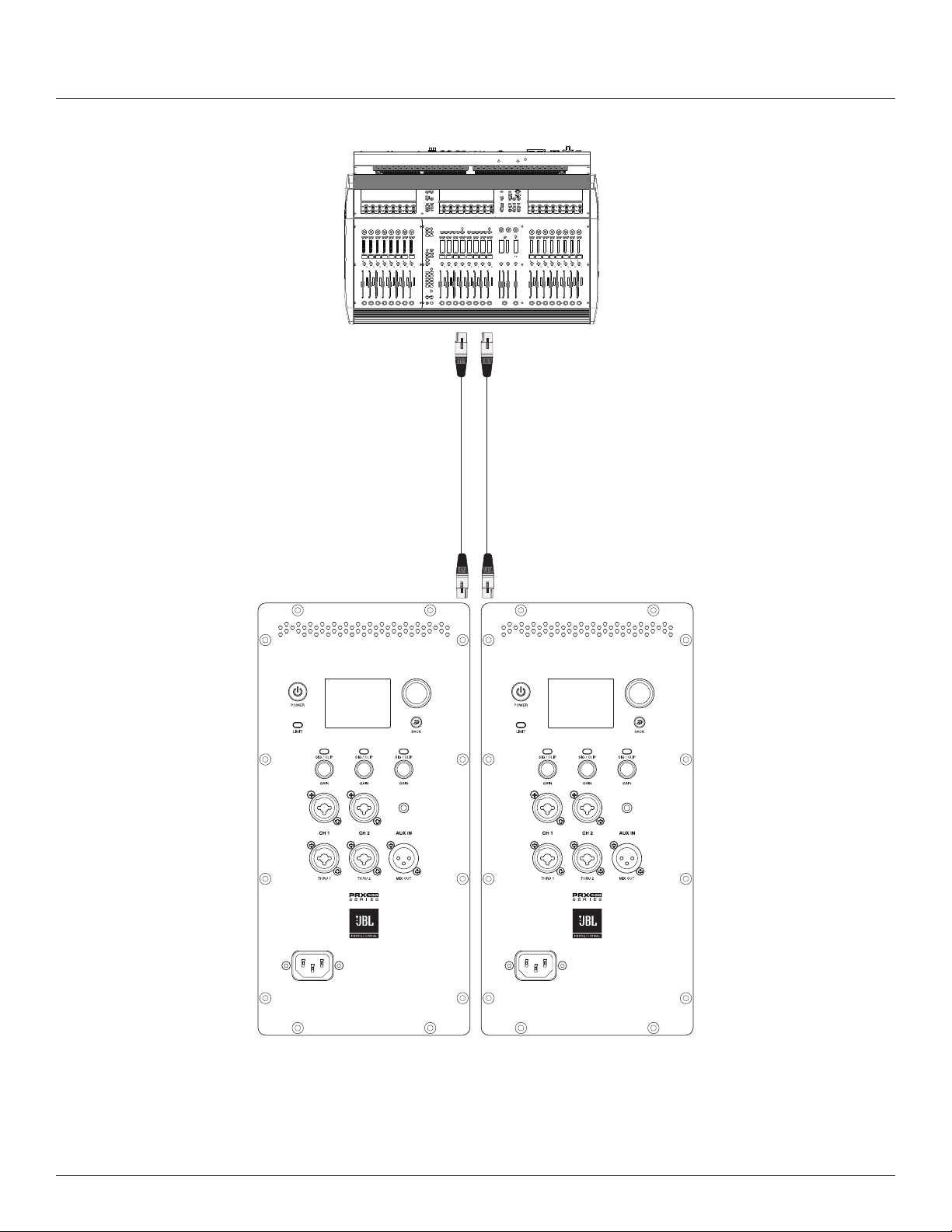
USING TWO SYSTEMS AS MONITORS
PRX900 Left and PRX900 Right
MAIN / MENUMAIN / MENU
12
MIXER PANEL
MAIN / MENU
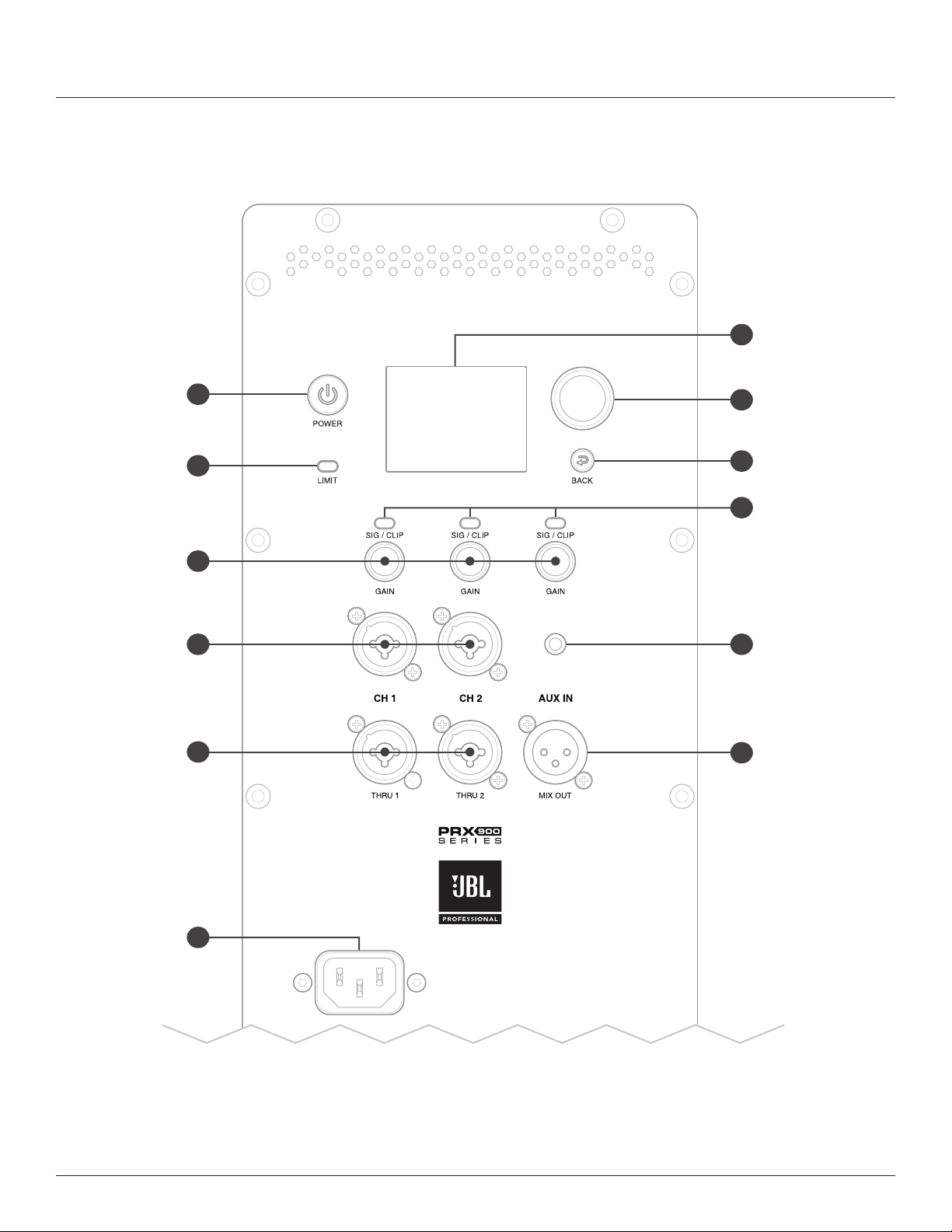
AC Power
Connector
Power
Limit LED
Channel
Volumes
CH 1 & CH 2
XLR-1/4”
Combo Input
CH 1 & CH 2
Pass Thrus
Main Volume
/ Menu
Navigation
Aux In
XLR Mix Out
LCD Panel
Clip LED
Back Button
H
I
L
K
B
C
D
A
E
F
G
J

13
A. AC Power Connector
Inlet adapter for A/C power cable
B. CH1 & CH2 XLR Pass Thrus
This XLR connection will loop the signal directly from it’s respective
input, so plugging into Thru 1 will provide a direct loop from CH1.
There is no DSP functionality on the loop through.
C. CH1 & CH2 XLR-1/4” Combo Input
XLR – 1⁄4” combination connector (1 for each input) are used for
the analog audio inputs.
D. Channel Volumes
Control the volume levels of each channel
E. Limit LED
Amplier is reaching clip.
F. Power Button
The Power Button is a momentary push button. It is used to
toggle the unit between the On and Off states. When in the Off
state, a short press and release of the Power Button will put
the unit into the On state.
G. LCD Panel
The LCD is used to display basic diagnostic information and
allow access to more advanced features through a menu system.
See the LCD GUI specication for more details on the LCD
menu system, features, and navigation. The LCD will refresh at
approximately 4Hz and is not suitable for meters or any other fast
motion items
H. Main Volume / Menu Navigation
Controls LCD Display
• Rotary encoder: In Menu - Clockwise down menu/Anti-
clockwise up menu
• Press to select menu item
• + On Home screen, Main Volume increase by rotating the
knob clockwise.
+ On Home screen, Main Volume decrease by rotating the
knob counterclockwise.
I. Back Button
Press to return to previous menu item
MIXER PANEL FUNCTIONS
14
Knobs and Functions
The PRX900 comes equipped with push button rotaries to make for easy navigation and hardware usage.
• A single press of the MAIN/MENU knob will open up the main menu.
• Pressing and holding the MAIN/MENU knob for 2s will mute the SPEAKER.
• Pressing and holding a CHANNEL KNOB for 2s will mute the CHANNEL.
Buttons and Functions
• The POWER button turns on/off the speaker. Hold for .5s to turn on the speaker and 2s to turn off the speaker.
• The BACK button will back you out of the current screen you are in without saving changes. This can be thought of as a
“CANCEL” button.
LEDs and Functions
1. Signal detection - LED below channel knobs will periodically flash yellow to indicate signal is present.
2. LED function when Muting Channels/Speaker : LED Below Channel knobs will slowly ash RED when a channel is muted.
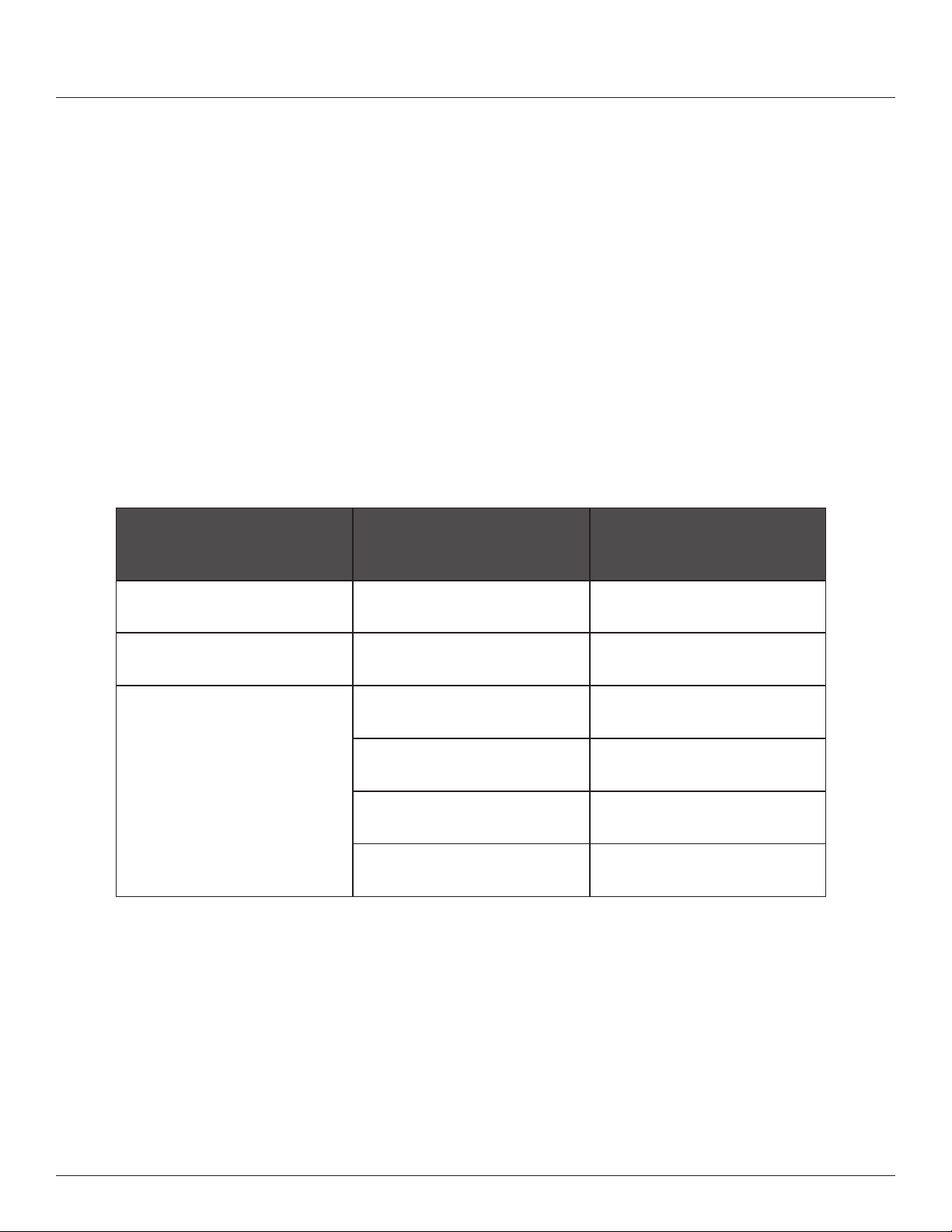
SSM
Levels LED Status
Default: no signal LEDs off
Muted Channel Muted Channel
Muted Channels LED
ashes dim Red
Channel Signal Level
Very Low/No Signal Channel LED off
Normal Signal Channel LED Bright Green
Strong Signal Channel LED Bright Yellow
Clipping Channel LED Bright Red

15
Main Menu
• Pressing the Main/Menu rotary at any time will take you to the PRX900’s main menu. Here, users can access the main
menu functions of the PRX900.
• Gain adds preamp gain to the system to support microphone usage. PRX900’s fader runs standard in LINE LEVEL, but
accessing the GAIN menu can allow users to plug a microphone in directly.
• Press The Channel knob to access the Gain menu for that channel.
• Once in the gain menu, turn the main knob to adjust the gain to your desired levels.
• dbx DriveRack Output - DriveRack is a line of hardware products produced by Harman’s dbx brand. These rack mount
signal processors provide detailed control for nal processing and crossovers before feeding the mix to one or more
speakers. This DriveRack functionality embedded into PRX900 is designed to optimize the combination of speaker and Mix
Output built into this JBL speaker.
• AFS by dbx, or automatic feedback suppression, is a combination of processing that can enable the user to add up to
3 dB more total gain to their output before getting audio feedback back in through the mix inputs. AFS does this using
a combination of auto sensing and very tight width parametric EQs before the output master EQ.
• Stage setup best practices are always recommended for best results to avoid feedback, in combination with
the AFS processing system. Microphones have less chance of contributing feedback if they follow the following
position standards on stage:
• Microphones should be behind the front plane of the speakers.
• Microphones should be least two meters to the left or right of the speakers.
• “AFS by dbx” On/Off selection toggles the AFS processor on or off.
• “Reset Filters” will reset all lters, prompting the lters to reset and start over in their discovery of potential feedback
frequency risks.
• The Output EQ is a package of lter adjustments on the main mix before the audio feeds to the amp and speaker. It
includes a collection of easy to select preset curves for common speech and music styles. Each preset can also be loaded
into the Custom preset for detailed user adjustable of output parametric EQ’s. The user has adjustments for individual band
level, frequency, and width (“Q”).
• “Output EQ” On/Off enables or bypasses the current settings in the output EQ processor.
• “Presets” enables rotation of the Main/Menu knob to view and select from the Output EQ presets.
• Scroll the menu to “Presets” and press the MAIN/MENU knob.
• Rotate the MAIN/MENU knob to view the available presets.
• Click the MAIN/MENU knob to load the currently listed preset.
• Users can load the Custom preset, then double click the MAIN/MENU knob to open the Master EQ editing page.
Inside this graph display page you may rotate the MAIN/MENU knob to a specic parametric EQ number and
click the MAIN/MENU knob again to select to edit the gain (plus or minus in dB), lter frequency, or “Q” (i.e.
adjust the lter width.)
• Users can load any preset as a starting point, then scroll down and adjust any setting to load the current
curve as the Custom preset for further editing. A conrmation dialog will appear, warning the user that
doing this will remove the current Custom preset settings and load it with the currently viewed settings.
EASYNAV LCD
Intro to the EasyNav LCD

16
• The Limiter provides a “brick wall” limiter on the master mix, after the Master EQ in the signal chain. Limiters reduce the
loudest parts of the mix dynamic range. Limiters can be used either for protection when playing very loud source material, or
to creatively sculpt down the loudest dynamics of the master mix. Carefully turn up the Makeup Gain to compensate for low
threshold limiter results.
• “Reset” is an action command to reset the Output Limiter to the factory default setting.
• “Presets” are available to recall limiter settings for common creative situations or trouble shooting.
• If the user selects any of the lower three settings to edit, the preset automatically loads the lower three settings to the
Limiter “Custom” preset for further user editing.
• “Threshold” enables the user to set the threshold level, limiting the maximum mix level to amp and speakers. All
dynamic range above that level will be limited down to the maximum Threshold setting.
• “OverEasy” an Enabling “OverEasy” smooths the transition before the signal reaches the Threshold level to provide a
smooth limiting audio result. “OverEasy” is often selected on rock ballads or speaking panels. Turning off OverEasy is
often desired on harder rock or DJ style of music program.
• “Makeup Gain” can be used to raise a limited mix to pre-limiter levels. Warning: Using limiter “Makeup Gain” on
already loud mixes may exceed desired mix gain levels. This setting is best used only by skilled audio professionals.
Small movements are best when adjusting limiters.
• Bass Boost - The Bass Boost functionality adds 3db of bass at 80hz to the system.
• Bass Boost On/Off enables or disables bass boost functionality.
• Mix Out XLR output can be set to assist in feeding the mix to additional speakers. This section includes presets and
settings based on the type of speaker the Mix Out will be feeding and how it is positioned in comparison to this speaker and
the audience.
• “Mix Out” On/Off” enables or disables the Mix Out XLR output feed.
• “Presets” enables selection of three types of speakers combinations using the Mix Out XLR output:
• “Full Range” is designed for feeding another full range speaker.
• “Sub” preset automatically congures settings for isolating low frequencies and feeding them to Mix Out XLR out
for a subwoofer speaker. Selecting “Sub” automatically sets the internal amp/speaker feed to HPF (“high pass
lter”) only signal at above 80Hz and the Mix Out XLR output to only pass the mix signal below 80Hz.
• “Custom” allows the user to set the settings manually.
• “HPF on this Speaker” can be used to remove signal below a selected frequency to the built-in amp/speaker.
• “LFP on Mix Out”can be used to set the low pass lter on the Mix Out XLR output feed.

17
• Time Align
• Signal delays are used when multiple speakers are in use but speakers are at different distances from the audience.
• Examples:
• A subwoofer in front of the stage, while this full range speaker in on the stage. In this conguration, the Mix Out
XLR to subwoofer will need to be slightly delayed to make up for its closer position to the audience.
• The Mix Out XLR out is feeding an additional full range speaker placed half way back in the audience, to give
additional listening distance. In this case, delay the back ll speaker in the audience to compensate correct time
alignment.
• Time Alignment Basics:
• To compensate for different distances’, determine the speaker farthest from the audience and delay other
speakers with the same signal to “time align” with the speaker farthest away from the audience.
• Sound travels through air at average humidity and room temperature at about 1.1 feet per ms. Measure the
difference in distance of each speaker feeding the audience. Feed the speaker farthest from the audience with
no time alignment delay. Set delays for the other closer speakers based on their distance ahead of the farthest
back speaker. Measure the distance difference and enter 1 ms per 1.1 feet that each speaker is ahead of the
farthest back speaker in your conguration. Time alignment is not perfect as not all audience positions measure
the same speaker distance differences.
• “Delay Mix Out” places audio signal delay on the Mix Out feature of the PRX900 Series. You can place up to
20ms of signal delay adjustable in 100 microsecond intervals.
• “Delay This Speaker” adds up to 180ms of signal delay to the power output section of the speaker, adjustable in
100 microsecond intervals..

18
Settings
• “BT Control Pairing” enables Bluetooth control pairing for up to 30 seconds with the JBL Pro Control app. This turns off
when a pairing has been made, or after 30 seconds.
• The PRX900 loudspeaker will conrm a secure pin with the app. Please ensure you conrm this to secure BLE control
pairing.
• “LCD Contrast” allows the user to adjust the LCD contrast between 0 and 100%.
• “Firmware Version” shows the current rmware version loaded onto the speaker.
• “Factory Reset” resets all settings in the speaker to factory default, including Bluetooth communication pairing.
• “System lock” locks out all hardware operation from the speaker.
• To initiate system lock, press and hold the POWER button and the BACK button until all LEDs ash and a LOCK icon
appears in the top left corner of the LCD.
OR
Navigate to the System Lock eld in the settings menu, and select CONFIRM.
• To disable system lock, press and Hold the POWER button and the BACK button until all the LEDs ash the lock icon
disappears from the top left corner.
OR
Remove AC power and reboot the system.

19
JBL Pro Connect
The JBL Pro Connect app is a Bluetooth Low Energy control application used to remotely control the features within the PRX900. The app
is a free download on iOS and Android.
It is recommended that all users download the app and ensure their unit is operating on the latest firmware for the best experience.
If you experience any rmware update related issues in the update process with your PRX900 speaker, please remove the AC inlet from
your speaker to disconnect from AC power and wait 60s. Re-insert the AC inlet. The speaker will automatically return to a powered on
state. Follow the directions on the LCD and in the JBL Pro Connect app to resume rmware update.
It is recommended you do not switch off your device’s bluetooth, navigate out of the JBL Pro Connect app, or leave Bluetooth range during
rmware update.
APP

20
PRX908 SPECIFICATIONS
TECHNICAL SPECIFICATIONS
System Type 8IN Powered Loudspeaker
Woofer Model 908G
Woofer Size 8"
Woofer Magnet Ferrite
Woofer Voice Coil 2.4"
Tweeter Model 2408H-2
Tweeter Size 1.5"
Tweeter Magnet Neodymium
Transducer Impedence Rated: woofer: 4Ω; tweeter: 8Ω
Max SPL 126dB
Freq Range -10 55 Hz - 20 kHz (4Pi)
Freq Range -3 65 Hz - 15 kHz (4Pi)
Hor Dispersion 105°
Vert Dispersion 60°
Power Rating 2000W peak
AC Power Input 100-230Vrms 50-60Hz
Cooling Natural convection, No fan
LED Indicators x3 SSM input levels & Limit
Input Impedence 100KΩ Balanced
Input Gain 0-36dB gain, 0-12 db on Aux In
Crossover Freq 1930Hz
I/O x2 Combo inputs & x1 3.5mm stereo jack
x2 XLR Through Out& x1 Mix Out
Cabinet Polypropylene + 10% Talc
Grille Powder coated Steel , T=1.2mm
Suspension/Mount 6x M10 suspension point and dual 36mm pole mount.
Handles Top Handle
Net Weight 13.7Kg
Gross Weight 16.5kg
Product Dims 479 x 312 x 285 (H X W X D, mm)
Shipping Dims 515 x 424 x 397 (H X W X D, mm)

21
PRX912 SPECIFICATIONS
TECHNICAL SPECIFICATIONS
System Type 12IN Powered Loudspeaker
Woofer Model 912G
Woofer Size 12"
Woofer Magnet Ferrite
Woofer Voice Coil 2.5"
Tweeter Model 2408H-2
Tweeter Size 1.5"
Tweeter Magnet Neodymium
Transducer Impedence Rated: woofer: 4Ω; tweeter: 8Ω
Max SPL 132dB
Freq Range -10 50 Hz - 20 kHz (4Pi)
Freq Range -3 65 Hz - 17 kHz (4Pi)
Hor Dispersion 90°
Vert Dispersion 50°
Power Rating 2000W pk
AC Power Input 100-230Vrms 50-60Hz
Cooling Natural convection, No fan
LED Indicators x3 SSM input levels & Limit
Input Impedence 100KΩ Balanced
Input Gain 0-36dB gain, 0-12 db on Aux In
Crossover Freq 2050Hz
I/O x2 Combo inputs & x1 3.5mm stereo jack
x2 XLR Through Out& x1 Mix Out
Cabinet Polypropylene + 10% Talc
Grille Powder coated Steel , T=1.5mm
Suspension/Mount 6x M10 suspension point and dual 36mm pole mount.
Handles Top Handle and Side Handle x1
Net Weight 19.5Kg
Gross Weight 23.5kg
Product Dims 636 x 394 x 332 (H X W X D, mm)
Shipping Dims 668 x 506 x 444 (H X W X D, mm)

22
PRX915 SPECIFICATIONS
TECHNICAL SPECIFICATIONS
System Type 15IN Powered Loudspeaker
Woofer Model 915G
Woofer Size 15"
Woofer Magnet Ferrite
Woofer Voice Coil 2.5"
Tweeter Model 2408H-2
Tweeter Size 1.5"
Tweeter Magnet Neodymium
Transducer Impedence Rated: woofer: 4Ω; tweeter: 6Ω
Max SPL 133dB
Freq Range -10 48 Hz - 19 kHz (4Pi)
Freq Range -3 60 Hz - 16 kHz (4Pi)
Hor Dispersion 90°
Vert Dispersion 50°
Power Rating 2000W pk
AC Power Input 100-230Vrms 50-60Hz
Cooling Natural convection, No fan
LED Indicators x3 SSM input levels & Limit
Input Impedence 100KΩ Balanced
Input Gain 0-36dB gain, 0-12db on Aux In
Crossover Freq 1920Hz
I/O x2 Combo inputs & x1 3.5mm stereo jack
x2 XLR Through Out& x1 Mix Out
Cabinet Polypropylene +10% Talc
Grille Powder coated Steel , T=1.5mm
Suspension/Mount 6x M10 suspension point and dual 36mm pole mount.
Handles Top Handle and Side Handle x1
Net Weight 24.1kg
Gross Weight 28.7kg
Product DIMs 717 x 465 x 383 (H X W X D, mm)
Shipping DIMs 749 x 574 x 495 (H X W X D, mm)

23
PRX915XLF SPECIFICATIONS
TECHNICAL SPECIFICATIONS
System Type 15IN Powered Subwoofer
Woofer Model 915SG
Woofer Size 15"
Woofer Magnet Ferrite
Woofer Voice Coil 3"
Transducer Impedence Rated: woofer: 4Ω
Max SPL 131dB @1m/2Pi
Freq Range -10 36Hz - 98Hz (2Pi)
Freq Range -3 40Hz - 87Hz (2Pi)
Hor Dispersion Omni
Vert Dispersion Omni
Crossover Frequency 80Hz, 100Hz, 120Hz Selectable
Power Rating 2000W peak
AC Power Input 100-230Vrms 50-60Hz
Cooling Natural convection, No fan
LED Indicators Limit, 2x SSM Input
Input Impedence 100KΩ Balanced
Input Gain 0-12dB gain
I/O x2 Combo inputs
x2 XLR pass through outputs
Cabinet 18mm Plywood + Duraex
Grille Powder coated Steel , T=1.5mm
Suspension/Mount Pole mount on top surface
Handles Side Handle x2
Net Weight 28.6kg
Gross Weight 33.6kg
Product Dims 549 x 480 x 580 (H x W x D mm)
Shipping Dims 593x 593 x688( H x W x D mm)

24
PRX918XLF SPECIFICATIONS
TECHNICAL SPECIFICATIONS
System Type 18IN Powered Subwoofer
Woofer Model 918SG
Woofer Size 18"
Woofer Magnet Ferrite
Woofer Voice Coil 4"
Transducer Impedence Rated: woofer: 4Ω
Max SPL 134dB @1m/2Pi
Freq Range -10 30Hz - 110Hz (2Pi)
Freq Range -3 35Hz - 92Hz (2Pi)
Hor Dispersion Omni
Vert Dispersion Omni
Crossover Frequency 80Hz, 100Hz, 120Hz Selectable
Power Rating 2000W Peak
AC Power Input 100-230Vrms 50-60Hz
Cooling Natural convection, No fan
LED Indicators Limit, 2x SSM Input
Input Impedence 100KΩ Balanced
Input Gain 0-12dB gain
I/O x2 Combo inputs
x2 XLR pass through outputs
Cabinet Plywood + Duraex
Grille Powder coated Steel , T=1.5mm
Suspension/Mount Pole mount on top surface
Handles Side handle x2
Net Weight 40.7kg
Gross Weight 47.5kg
Product Dims 693 x 591 x 654 (H x W x D mm)
Shipping Dims 737 x 703 x 765 (H x W x D mm)
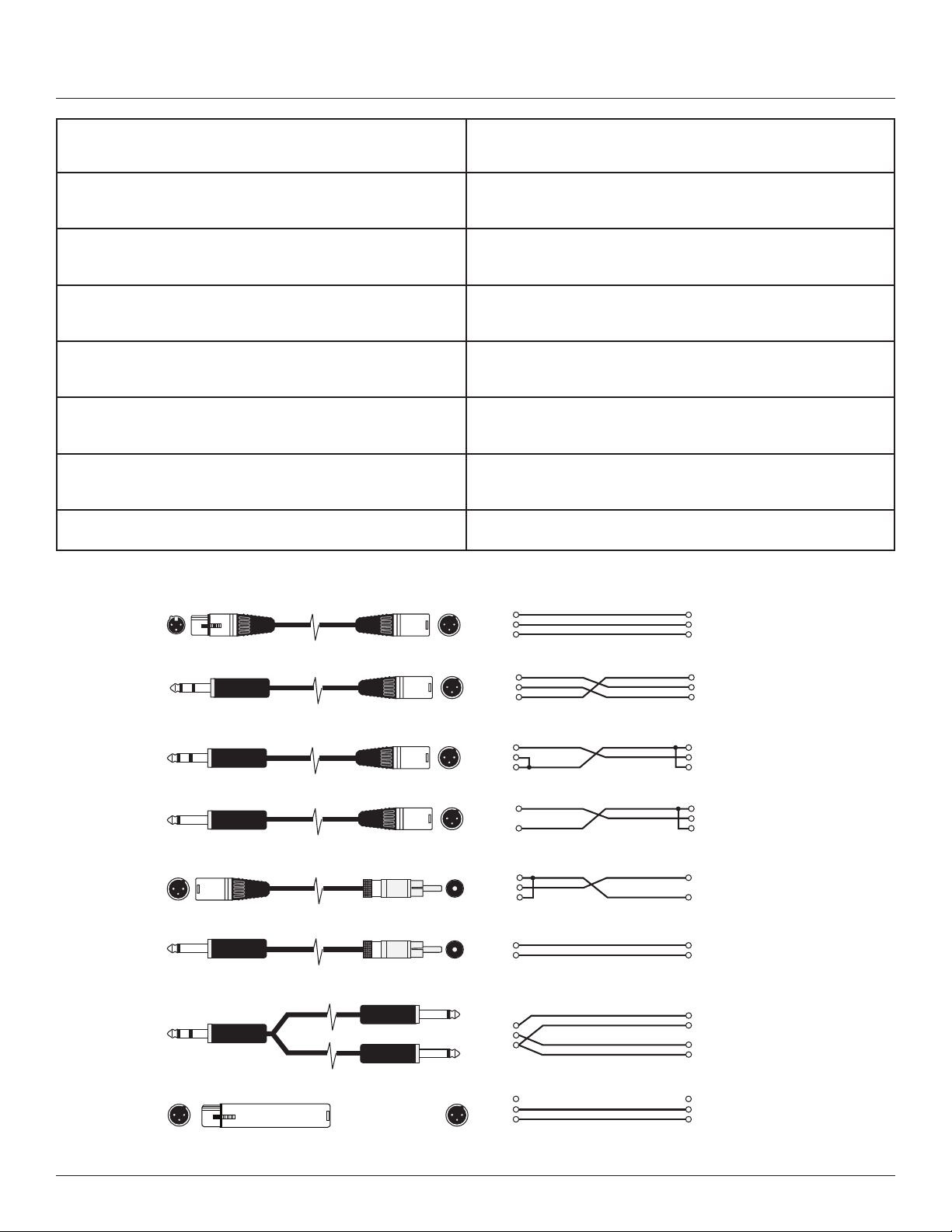
25
XLR/F to XLR/M Microphone Cable
TRS (Balanced) 1/4" Phone to XLR/M Cable
TRS (Unbalanced) 1/4" Phone to XLR/M Cable
TS (Unbalanced) 1/4" Phone to XLR/M Cable
XLR/M to RCA (Phono) Cable
TS (Unbalanced) 1/4" Phone to RCA (Phono) Cable
TRS 1/4" Phone to dual TS 1/4" Phone Cable
XLR/F to XLR/M Audio Ground Lift Adapter
Tip Ring Sleeve
Tip Ring Sleeve
Tip Sleeve
Tip Sleeve
Tip Ring Sleeve
TipSleeve
TipSleeve
1
2
3
Tip
Ring
Sleeve
Tip
Ring
Sleeve
Tip
Sleeve
1
2
3
Tip
Sleeve
1
2
3
Tip
Ring
Sleeve
1 (no connection)
2
3
Tip
Sleeve (shield)
Tip
Sleeve (shield)
Tip
Sleeve (shield)
Sleeve (shield)
Tip
1 (shield)
2
3
1 (shield)
2
3
1 (shield)
2
3
1 (shield)
2
3
XLR/F to XLR/M Microphone Cable
The standard cable for interconnection of microphone and
line level signal in professional audio systems.
• Microphone to mixer
TRS (balanced) 1/4 inch (6.35mm) phone jack to XLR/M
For connecting balanced devices with 1/4 inch (6.35mm) phone
and maybe used interchangeably.
TRS (unbalanced) 1/4 inch (6.35mm) phone jack to XLR/M
For connections of instruments with unbalanced outputs to bal-
anced XLR inputs.
TS (unbalanced) 1/4 inch phone (6.35mm) jack to XLR/M
This cable is electrically identical to "TRS" (unbalanced) 1/4 inch
(6.35mm) phone and may be used interchangeably.
XLR/M to RCA (phono) cable
Connects consumer audio products and some DJ mixer outputs to
professional audio equipment inputs
TRS 1/4 inch Phone jack to dual 1/4 inch (6.35mm) Phone jack
Splits a stereo output into separate left/right signals.
TRS 1/4 inch Phone jack to dual 1/4 inch (6.35mm) Phone jack
Change to a TRS mini-phone jack to connect to the output
of a portable. MP3/CD – player and computer sound cards
to a mixer.
XLR/F to XLR/M audio ground lift Only with balanced in - and outputs
CABLES & CONNECTORS

26
Mailing Address:
JBL Professional
8500 Balboa Blvd.
Northridge, CA 91329
Shipping Address:
JBL Professional
8500 Balboa Blvd., Dock 15
Northridge, CA 91329
(Do not return product to this address without rst obtaining prior authorization from JBL)
Customer Service:
Monday through Friday
8:00am -5:00pm
Pacic Coast Time in the U.S.A.
(800) 8JBLPRO (800.852.5776)
www.jblproservice.com
On The World Wide Web:
www.jblpro.com
Professional Contacts, Outside the USA:
Contact the JBL Professional Distributor in your area.
A complete list of JBL Professional international distributors is provided at our U.S.A. website: www.jblpro.com
CONTACT INFORMATION

27
The JBL Limited Warranty on professional loudspeaker products (except for enclosures) remains in effect for ve years from the date of
the rst consumer purchase. JBL ampliers are warranted for three years from the date of original purchase. Enclosures and all other JBL
products are warranted for two years from the date of original purchase.
Who Is Protected By This Warranty?
Your JBL Warranty protects the original owner and all subsequent owners so long as: A.) Your JBL product has been purchased in the
Continental United States, Hawaii or Alaska. (This Warranty does not apply to JBL products purchased elsewhere except for purchases by
military outlets. Other purchasers should contact the local JBL distributor for warranty information.); and B.) The original dated bill of sale is
presented whenever warranty service is required.
What Does The JBL Warranty Cover?
Except as specified below, your JBL Warranty covers all defects in material and workmanship. The following are not covered:
Damage caused by accident, misuse, abuse, product modification or neglect; damage occurring during shipment; damage resulting
from failure to follow instructions contained in your Instruction Manual; damage resulting from the performance of repairs by
someone not authorized by JBL; claims based upon any misrepresentations by the seller; any JBL product on which the serial
number has been defaced, modified or removed.
Who Pays For What?
JBL will pay all labor and material expenses for all repairs covered by this warranty. Please be sure to save the original shipping
cartons because a charge will be made if replacement cartons are requested. Payment of shipping charges is discussed in the next
section of this warranty.
How To Obtain Warranty Performance
If your JBL product ever needs service, write or telephone us at JBL Incorporated (Attn: Customer Service Department), 8500 Balboa
Boulevard, PO. Box 2200, Northridge, California 91329 (818/893-8411). We may direct you to an authorized JBL Service Agency or ask
you to send your unit to the factory for repair. Either way, you’ll need to present the original bill of sale to establish the date of purchase.
Please do not ship your JBL product to the factory without prior authorization. If transportation of your JBL product presents any unusual
difculties, please advise us and we may make special arrangements with you. Otherwise, you are responsible for transporting your
product for repair or arranging for its transportation and for payment of any initial shipping charges. However, we will pay the return
shipping charges if repairs are covered by the warranty.
Limitation of Implied Warranties
ALL IMPLIED WARRANTIES, INCLUDING WARRANTIES OF MERCHANTABILITY AND FITNESS FOR PARTICULAR PURPOSE, ARE LIMITED IN
DURATION TO THE LENGTH OF THIS WARRANTY.
EXCLUSION OF CERTAIN DAMAGES
JBL’S LIABILITY IS LIMITED TO THE REPAIR OR REPLACEMENT, AT OUR OPTION, OF ANY DEFECTIVE PRODUCT AND SHALL NOT
INCLUDE INCIDENTAL OR CONSEQUENTIAL DAMAGES OF ANY KIND. SOME STATES DO NOT ALLOW LIMITATIONS ON HOW LONG AN
IMPLIED WARRANTY LASTS AND/OR DO NOT ALLOW THE EXCLUSION OF INCIDENTAL OR CONSEQUENTIAL DAMAGES, SO THE ABOVE
LIMITATIONS AND EXCLUSIONS MAY NOT APPLY TO YOU. THIS WARRANTY GIVES YOU SPECIFIC LEGAL RIGHTS, AND YOU MAY ALSO
HAVE OTHER RIGHTS, WHICH VARY, FROM STATE TO STATE.
JBL Professional
8500 Balboa Blvd. Northridge, CA 91329 USA
WARRANTY INFORMATION

08/22 8500 Balboa Boulevard Northridge, CA 91329 USA www.jblpro.com