READ AND SAVE THESE INSTRUCTIONS
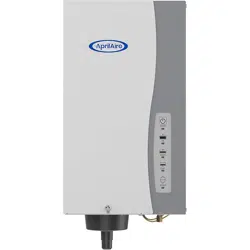
Series 800 Steam Humidifier
Owner’s Manual
Includes Safety & Operating Instructions
and Warranty Information
Steam Humidifier
- 3 -
Safety Cautions ..............................................3
Introduction .................................................4
Principles of Operation ........................................4
Sequence of Operation ........................................5
Installation Options and Effect of Water Characteristics.............. 6
Operating Modes ............................................. 7
Display Panel ................................................8
Operating Instructions –
Model 62 Automatic Digital Humidifier Control ..................... 9
Operating Instructions –
Model 65 Manual Digital Humidistat ............................14
Operating Instructions –
Model 63 Automatic Digital Modulating Control . . . . . . . . . . . . . . . . . . . 17
Additional Information........................................ 20
Maintenance ...............................................20
Limited Warranty............................................22
TABLE OF CONTENTS
- 2 -
CAUTION
HOT SURFACES AND HOT wATER
This steam humidification system has extremely hot surfaces.
Water in steam canister, steam pipes, and dispersion tube can be
as hot as 212°F (100°C). Discharged steam is not visible. Contact
with hot surfaces, discharged hot water, or air into which steam
has been discharged can cause severe personal injury. To avoid
severe burns, follow procedures in this manual when performing
service or maintenance procedures on any part of the system.
ELECTRICAL SHOCk HAzARD
Follow the shutdown procedure in this manual before performing
service or maintenance procedures on any part of the system.
If the humidifier starts up responding to a call for humidity during
maintenance, severe bodily injury or death from electrical
shock could occur. Follow the procedures in this manual before
performing service or maintenance procedures on this humidifier.
EXCESS HUMIDITY
Do not set humidity higher than recommended. Condensation
may cause damage.
CAUTION
Read all cautions and instructions.
Read this manual before performing service or maintenance
procedures on any part of the system. Failure to follow all
cautions and instructions could produce the hazardous
situations described, resulting in property damage, personal
injury, or death.
Failure to follow the instructions in this manual can cause
moisture to accumulate, which can cause damage to structure
and furnishings.
SAFETY CAUTIONS
- 3 -
Safety Cautions ..............................................3
Introduction .................................................4
Principles of Operation ........................................4
Sequence of Operation ........................................5
Installation Options and Effect of Water Characteristics.............. 6
Operating Modes ............................................. 7
Display Panel ................................................8
Operating Instructions –
Model 62 Automatic Digital Humidifier Control ..................... 9
Operating Instructions –
Model 65 Manual Digital Humidistat ............................14
Operating Instructions –
Model 63 Automatic Digital Modulating Control . . . . . . . . . . . . . . . . . . . 17
Additional Information........................................ 20
Maintenance ...............................................20
Limited Warranty............................................22
TABLE OF CONTENTS
- 2 -
CAUTION
HOT SURFACES AND HOT wATER
This steam humidification system has extremely hot surfaces.
Water in steam canister, steam pipes, and dispersion tube can be
as hot as 212°F (100°C). Discharged steam is not visible. Contact
with hot surfaces, discharged hot water, or air into which steam
has been discharged can cause severe personal injury. To avoid
severe burns, follow procedures in this manual when performing
service or maintenance procedures on any part of the system.
ELECTRICAL SHOCk HAzARD
Follow the shutdown procedure in this manual before performing
service or maintenance procedures on any part of the system.
If the humidifier starts up responding to a call for humidity during
maintenance, severe bodily injury or death from electrical
shock could occur. Follow the procedures in this manual before
performing service or maintenance procedures on this humidifier.
EXCESS HUMIDITY
Do not set humidity higher than recommended. Condensation
may cause damage.
CAUTION
Read all cautions and instructions.
Read this manual before performing service or maintenance
procedures on any part of the system. Failure to follow all
cautions and instructions could produce the hazardous
situations described, resulting in property damage, personal
injury, or death.
Failure to follow the instructions in this manual can cause
moisture to accumulate, which can cause damage to structure
and furnishings.
SAFETY CAUTIONS

- 4 - - 5 -
The Aprilaire
®
Steam Humidifier delivers humidity in the form of steam to
the conditioned space via the HVAC system duct or Aprilaire Fan Pack. The
humidifier generates steam by energizing two electrodes that extend into a
canister of water. Current flowing between the electrodes causes the water
to boil, creating steam. Water is introduced to the humidifier through a fill
valve to a fill cup located in the top of the cabinet. The fill cup serves as
an overflow reservoir and provides an air gap between the humidifier and
water source. The steam canister is filled from the bottom. The canister is
seated in a drain cup assembly which includes a drain valve. The drain and
fill valves work together to maintain water level in the canister to deliver
the rated steam capacity based on the electrical conductivity of the water
and to temper drain water. See Figure 1 for representation of fill and
drain system and canister.
Steam is delivered into the airstream through a dispersion tube mounted
in the HVAC system ductwork. Openings in the dispersion tube are fitted
with “tubelets
™
” which extend into the center of the tube. The design of
the dispersion tube and tubelets distribute steam over a wide area in the
duct and direct any condensed moisture back into the steam hose.
PRINCIPLES OF OPERATION
FIgURE 1 – Fill and Drain System and Canister
90-1522
Steam
Outlet
Drain
Supply
Water
Drain Cup
Drain Valve
Canister
Electrodes
High Water
Level Sensor
Flow Control
Orifice
Inlet
Fill V
alve
Overflow
Fill
Fill Cup
Thank you for your recent Aprilaire
®
humidifier purchase. We appreciate
your business and are pleased to add your name to our growing list of
customers. You have invested in the highest quality equipment available.
Aprilaire manufactures whole-house indoor air quality products and is a
recognized leader in the heating and air conditioning industry.
Your humidifier will require periodic maintenance to assure continued
consistent performance. See page 20.
Please take a few minutes and read this booklet. This will familiarize
you with the benefits you will receive from the humidifier and help you
understand the routine maintenance that will be required.
Be sure to register your humidifier warranty online at:
www.aprilaire.com/warranty.
INTRODUCTION
genuine Aprilaire Replacement Model 80 Steam Canisters are
available from your installing contractor or from most other heating
and air conditioning contractors in your area. Use the dealer locator on
our web site (www.aprilaire.com) or look in the Yellow Pages under
Humidifying Apparatus or Heating & Air Conditioning Contractors.
SEQUENCE OF OPERATION
When the Humidifier Control detects the need for humidity, and provided
the humidifier is turned on and the HVAC system blower is operating,
the internal controller in the humidifier energizes the electrodes and
measures the current flowing through the water between them. The
controller adjusts water level in the canister via a fill valve and a drain
valve to maintain a constant current. The operating water level in the
canister depends on the mineral content of the water which determines
conductivity.

- 4 - - 5 -
The Aprilaire
®
Steam Humidifier delivers humidity in the form of steam to
the conditioned space via the HVAC system duct or Aprilaire Fan Pack. The
humidifier generates steam by energizing two electrodes that extend into a
canister of water. Current flowing between the electrodes causes the water
to boil, creating steam. Water is introduced to the humidifier through a fill
valve to a fill cup located in the top of the cabinet. The fill cup serves as
an overflow reservoir and provides an air gap between the humidifier and
water source. The steam canister is filled from the bottom. The canister is
seated in a drain cup assembly which includes a drain valve. The drain and
fill valves work together to maintain water level in the canister to deliver
the rated steam capacity based on the electrical conductivity of the water
and to temper drain water. See Figure 1 for representation of fill and
drain system and canister.
Steam is delivered into the airstream through a dispersion tube mounted
in the HVAC system ductwork. Openings in the dispersion tube are fitted
with “tubelets
™
” which extend into the center of the tube. The design of
the dispersion tube and tubelets distribute steam over a wide area in the
duct and direct any condensed moisture back into the steam hose.
PRINCIPLES OF OPERATION
FIgURE 1 – Fill and Drain System and Canister
90-1522
Steam
Outlet
Drain
Supply
Water
Drain Cup
Drain Valve
Canister
Electrodes
High Water
Level Sensor
Flow Control
Orifice
Inlet
Fill V
alve
Overflow
Fill
Fill Cup
Thank you for your recent Aprilaire
®
humidifier purchase. We appreciate
your business and are pleased to add your name to our growing list of
customers. You have invested in the highest quality equipment available.
Aprilaire manufactures whole-house indoor air quality products and is a
recognized leader in the heating and air conditioning industry.
Your humidifier will require periodic maintenance to assure continued
consistent performance. See page 20.
Please take a few minutes and read this booklet. This will familiarize
you with the benefits you will receive from the humidifier and help you
understand the routine maintenance that will be required.
Be sure to register your humidifier warranty online at:
www.aprilaire.com/warranty.
INTRODUCTION
genuine Aprilaire Replacement Model 80 Steam Canisters are
available from your installing contractor or from most other heating
and air conditioning contractors in your area. Use the dealer locator on
our web site (www.aprilaire.com) or look in the Yellow Pages under
Humidifying Apparatus or Heating & Air Conditioning Contractors.
SEQUENCE OF OPERATION
When the Humidifier Control detects the need for humidity, and provided
the humidifier is turned on and the HVAC system blower is operating,
the internal controller in the humidifier energizes the electrodes and
measures the current flowing through the water between them. The
controller adjusts water level in the canister via a fill valve and a drain
valve to maintain a constant current. The operating water level in the
canister depends on the mineral content of the water which determines
conductivity.

- 7 -- 6 -
END OF SEASON/PERIOD OF INACTIVITY SHUT-DOwN
If the humidifier does not receive a call to operate in 72 hours, the
humidifier controller drains the canister, the drain valve will remain open
for 30 minutes. The drain light will remain on until there is a humidity call
or 24 hours has elapsed. The humidifier will resume normal operation when
a call for humidity is made.
OPERATINg MODES
Your Steam Humidifier can be powered with a 120, 208 or 240 volt circuit
and operated at either 11.5 or 16.0 amps. The higher the voltage and
amperage the higher the potential output. The operating voltage and
amperage are set by your installing contractor to meet the humidification
needs of your home.
Amperage Voltage Maximum steam capacity (gal/day)
11.5
120V 11.5
208V 20.5
240V 23.3
16.0
120V 16.0
208V 30.0
240V 34.6
It may take several days for the humidifier to reach rated capacity
depending on the input voltage and the electrical conductivity of
the water. 120 volt systems take longer to reach rated capacity than 240
volt systems. The humidifier should always be plumbed to cold water but
the water can be softened or unsoftened. “Hard” water, which has a high
mineral content, and softened water generally have higher conductivity
than naturally soft water. Systems plumbed to higher conductivity water
will reach capacity sooner than systems plumbed to low conductivity
water. As the humidifier operates, minerals build up in the canister, which
increases the conductivity of the water. With a new canister, allowing the
humidifier to operate continuously (along with the HVAC system blower)
will allow it to reach rated capacity in the shortest amount of time.
Canister life is highly dependent on water quality. Canisters in systems
plumbed to water with high concentrations of suspended and dissolved
solids will not last as long as canisters operating on water with less
minerals.
NOTE: Amperage, Voltage and plumbing changes should be made by a
heating and air conditioning contractor.
INSTALLATION OPTIONS AND EFFECT OF
wATER CHARACTERISTICS
When the humidifier is powered and turned on, the “On/Off” light is
illuminated green.
When the canister is being filled or replenished with water, the “Fill” light
illuminates green.
When the canister is being drained, the “Drain” light illuminates green.
During initial start up with a new canister, the humidifier may run through
a series of fill/drain cycles until the conductivity of the water is in a range
that allows normal operation. During this time, the “Steam” light illuminates
green. If the humidifier cannot produce steam at the rated level after 168
hours of operation, the “Steam” light illuminates yellow. The humidifier
continues to operate in this state until the rated output is reached.
The conductivity of naturally soft water, hard water, and softened water
changes as the water heats up, the internal controller adjusts the water
level to maintain a nominal current between the electrodes. Over the
life of the canister, minerals that build up on the electrodes will reduce
their effective surface area and affect the resistance between them. The
operating water level will increase with use until it reaches the high water
level probe. At that point, the “Service” light will flash red indicating that
the canister should be replaced. The humidifier will continue to operate
but with reduced output.
When the humidifier begins a drain cycle, the fill valve opens to introduce
cold water into the canister. This is done to prevent hot water from
entering the drain. The drain valve remains open for four minutes to allow
all water to drain from the canister.
Any time power is disconnected or humidifier is turned off, the internal
timer for start-up and drain cycles is reset.
If the humidifier has operated 168 hours without a drain cycle, the drain
valve will open and drain the canister. Normal operation will continue.
If the humidifier is operating and a power failure occurs, once power
is restored, the “On/Off” light will flash green for one minute, then the
humidifier will turn on.

- 7 -- 6 -
END OF SEASON/PERIOD OF INACTIVITY SHUT-DOwN
If the humidifier does not receive a call to operate in 72 hours, the
humidifier controller drains the canister, the drain valve will remain open
for 30 minutes. The drain light will remain on until there is a humidity call
or 24 hours has elapsed. The humidifier will resume normal operation when
a call for humidity is made.
OPERATINg MODES
Your Steam Humidifier can be powered with a 120, 208 or 240 volt circuit
and operated at either 11.5 or 16.0 amps. The higher the voltage and
amperage the higher the potential output. The operating voltage and
amperage are set by your installing contractor to meet the humidification
needs of your home.
Amperage Voltage Maximum steam capacity (gal/day)
11.5
120V 11.5
208V 20.5
240V 23.3
16.0
120V 16.0
208V 30.0
240V 34.6
It may take several days for the humidifier to reach rated capacity
depending on the input voltage and the electrical conductivity of
the water. 120 volt systems take longer to reach rated capacity than 240
volt systems. The humidifier should always be plumbed to cold water but
the water can be softened or unsoftened. “Hard” water, which has a high
mineral content, and softened water generally have higher conductivity
than naturally soft water. Systems plumbed to higher conductivity water
will reach capacity sooner than systems plumbed to low conductivity
water. As the humidifier operates, minerals build up in the canister, which
increases the conductivity of the water. With a new canister, allowing the
humidifier to operate continuously (along with the HVAC system blower)
will allow it to reach rated capacity in the shortest amount of time.
Canister life is highly dependent on water quality. Canisters in systems
plumbed to water with high concentrations of suspended and dissolved
solids will not last as long as canisters operating on water with less
minerals.
NOTE: Amperage, Voltage and plumbing changes should be made by a
heating and air conditioning contractor.
INSTALLATION OPTIONS AND EFFECT OF
wATER CHARACTERISTICS
When the humidifier is powered and turned on, the “On/Off” light is
illuminated green.
When the canister is being filled or replenished with water, the “Fill” light
illuminates green.
When the canister is being drained, the “Drain” light illuminates green.
During initial start up with a new canister, the humidifier may run through
a series of fill/drain cycles until the conductivity of the water is in a range
that allows normal operation. During this time, the “Steam” light illuminates
green. If the humidifier cannot produce steam at the rated level after 168
hours of operation, the “Steam” light illuminates yellow. The humidifier
continues to operate in this state until the rated output is reached.
The conductivity of naturally soft water, hard water, and softened water
changes as the water heats up, the internal controller adjusts the water
level to maintain a nominal current between the electrodes. Over the
life of the canister, minerals that build up on the electrodes will reduce
their effective surface area and affect the resistance between them. The
operating water level will increase with use until it reaches the high water
level probe. At that point, the “Service” light will flash red indicating that
the canister should be replaced. The humidifier will continue to operate
but with reduced output.
When the humidifier begins a drain cycle, the fill valve opens to introduce
cold water into the canister. This is done to prevent hot water from
entering the drain. The drain valve remains open for four minutes to allow
all water to drain from the canister.
Any time power is disconnected or humidifier is turned off, the internal
timer for start-up and drain cycles is reset.
If the humidifier has operated 168 hours without a drain cycle, the drain
valve will open and drain the canister. Normal operation will continue.
If the humidifier is operating and a power failure occurs, once power
is restored, the “On/Off” light will flash green for one minute, then the
humidifier will turn on.

- 8 - - 9 -
The Model 62 Automatic Digital Humidifier Control (ADHC) offers two
modes of operation, Automatic or Manual. An explanation of both modes
follows. (See Figure 2 on page 10 for Automatic Mode. See Figure 3 on
page 12 for Manual Mode.)
When in the Automatic Mode, this system offers the following benefits:
• You will receive the optimum amount of humidity so that your
home and its furnishings are protected from the damaging effects
of excess condensation or low humidity during the heating season.
The ADHC automatically adjusts your home’s humidity based on the
outdoor temperature, increasing the time maximum comfort is maintained.
• Simple operation with few adjustments. In the Automatic Mode, the
ADHC eliminates the need to manually adjust the control when outdoor
temperature changes. It also eliminates the need to turn the dial setting
to “OFF” during the summer season.
OPERATINg INSTRUCTIONS – MODEL 62 AUTOMATIC
DIgITAL HUMIDIFIER CONTROL
MODEL 62 AUTOMATIC DIgITAL HUMIDIFIER CONTROL
INDICATOR LIgHTS
Call Dealer for Service: The red light indicates that the control is not
operating normally and that service is required.
Humidifier On: The green light indicates that the control is operating
normally and sending a call for humidity to the humidifier.
BLOwER ACTIVATION
Set the “Blower Activation Switch” to “ON” to allow the humidifier control
to activate the HVAC fan for maximum humidification.
If the HVAC system has been idle for one hour, the humidifier control will
activate the HVAC system fan to sample the air for 3 minutes. If the RH is
lower than the set point, the humidifier control will activate the humidifier
and keep the fan running. The humidifier will continue to operate for 2
hours or until the humidification set point is reached.
If the RH set point has not been reached by the end of a call for heat, the
control will continue to operate the humidifier and the HVAC fan until the
humidification set point is reached or 2 hours have elapsed.
When the “Blower Activation Switch” is in the “OFF“ position, the humidifier
control will only operate the humidifier if humidity is required and the HVAC
system fan is operating or the HVAC system is producing heat.
NOTE: If used in conjunction with an Aprilaire 8570 Communicating
Thermostat, and the blower activation feature is desired, DO NOT wire the
A B communication terminals.
TABLE 1 – Display Panel
Indicator Light Function
Off
Humidifier is turned off or not receiving power.
Solid
green
Humidifier is turned on.
Flashing
green
Humidifier is preparing to turn on. Occurs if power is
disconnected, then restored with switch ON. Flashes for one
minute.
Solid
green
Normal Operation. Fill valve is energized allowing water
to flow into canister via fill cup. (Does not illuminate when
tempering water during drain cycle.)
Flashing
green
Fill and Drain Valves are pulsing to dislodge mineral build-up in
canister. Flashes 10 times in four seconds.
Solid Red
Fault Mode. Indicates canister needs water but cannot fill.
Humidifier shuts down. (Occurs if high water probe does not
detect water after fill valve is energized for 40 minutes.) Call
your heating and air conditioning dealer for service.
Solid
green
Normal Operation. Humidistat is calling for steam and
humidifier is operating.
Solid
Yellow
Normal Operation. Humidifier is operating but is not delivering
steam at rated capacity. Occurs if humidifier has operated
for 168 hours at less than rated capacity due to low water
conductivity. Light will turn green once water conductivity
increases and humidifier is delivering rated capacity.
Flashing
green
Humidifier is preparing to drain. (Fill valve is open tempering
water in canister.) Occurs when humidifier is turned off, at
end of season drain (72 hours with no operation) and during
forced drain down (168 hours of operation with no drain
activity.)
Fill and Drain Valves are pulsing to dislodge mineral build-up in
canister. Flashes 10 times in four seconds.
Solid
green
Drain valve is energized and open, draining canister. Valve
remains energized for four minutes.
Indicates end of season shut-down. Occurs if humidifier does
not receive call for humidity in 72 hours. Light remains on
for 24 hours. Humidifier will turn on with the next call for
humidity.
Flashing
Red
Canister has reached the end of its life and needs to be
replaced. Occurs after humidifier has operated for at least 168
hours and for an additional 24 hours at a current level below
75% of the maximum operating current. Humidifier continues
to operate, but at reduced capacity.
Solid Red
Operational problem with humidifier. Humidifier shuts down.
Occurs when unit detects over-current which can be caused
by failure to drain or other system failures. Call your heating
and air conditioning dealer for service.
DISPLAY PANEL

- 8 - - 9 -
The Model 62 Automatic Digital Humidifier Control (ADHC) offers two
modes of operation, Automatic or Manual. An explanation of both modes
follows. (See Figure 2 on page 10 for Automatic Mode. See Figure 3 on
page 12 for Manual Mode.)
When in the Automatic Mode, this system offers the following benefits:
• You will receive the optimum amount of humidity so that your
home and its furnishings are protected from the damaging effects
of excess condensation or low humidity during the heating season.
The ADHC automatically adjusts your home’s humidity based on the
outdoor temperature, increasing the time maximum comfort is maintained.
• Simple operation with few adjustments. In the Automatic Mode, the
ADHC eliminates the need to manually adjust the control when outdoor
temperature changes. It also eliminates the need to turn the dial setting
to “OFF” during the summer season.
OPERATINg INSTRUCTIONS – MODEL 62 AUTOMATIC
DIgITAL HUMIDIFIER CONTROL
MODEL 62 AUTOMATIC DIgITAL HUMIDIFIER CONTROL
INDICATOR LIgHTS
Call Dealer for Service: The red light indicates that the control is not
operating normally and that service is required.
Humidifier On: The green light indicates that the control is operating
normally and sending a call for humidity to the humidifier.
BLOwER ACTIVATION
Set the “Blower Activation Switch” to “ON” to allow the humidifier control
to activate the HVAC fan for maximum humidification.
If the HVAC system has been idle for one hour, the humidifier control will
activate the HVAC system fan to sample the air for 3 minutes. If the RH is
lower than the set point, the humidifier control will activate the humidifier
and keep the fan running. The humidifier will continue to operate for 2
hours or until the humidification set point is reached.
If the RH set point has not been reached by the end of a call for heat, the
control will continue to operate the humidifier and the HVAC fan until the
humidification set point is reached or 2 hours have elapsed.
When the “Blower Activation Switch” is in the “OFF“ position, the humidifier
control will only operate the humidifier if humidity is required and the HVAC
system fan is operating or the HVAC system is producing heat.
NOTE: If used in conjunction with an Aprilaire 8570 Communicating
Thermostat, and the blower activation feature is desired, DO NOT wire the
A B communication terminals.
TABLE 1 – Display Panel
Indicator Light Function
Off
Humidifier is turned off or not receiving power.
Solid
green
Humidifier is turned on.
Flashing
green
Humidifier is preparing to turn on. Occurs if power is
disconnected, then restored with switch ON. Flashes for one
minute.
Solid
green
Normal Operation. Fill valve is energized allowing water
to flow into canister via fill cup. (Does not illuminate when
tempering water during drain cycle.)
Flashing
green
Fill and Drain Valves are pulsing to dislodge mineral build-up in
canister. Flashes 10 times in four seconds.
Solid Red
Fault Mode. Indicates canister needs water but cannot fill.
Humidifier shuts down. (Occurs if high water probe does not
detect water after fill valve is energized for 40 minutes.) Call
your heating and air conditioning dealer for service.
Solid
green
Normal Operation. Humidistat is calling for steam and
humidifier is operating.
Solid
Yellow
Normal Operation. Humidifier is operating but is not delivering
steam at rated capacity. Occurs if humidifier has operated
for 168 hours at less than rated capacity due to low water
conductivity. Light will turn green once water conductivity
increases and humidifier is delivering rated capacity.
Flashing
green
Humidifier is preparing to drain. (Fill valve is open tempering
water in canister.) Occurs when humidifier is turned off, at
end of season drain (72 hours with no operation) and during
forced drain down (168 hours of operation with no drain
activity.)
Fill and Drain Valves are pulsing to dislodge mineral build-up in
canister. Flashes 10 times in four seconds.
Solid
green
Drain valve is energized and open, draining canister. Valve
remains energized for four minutes.
Indicates end of season shut-down. Occurs if humidifier does
not receive call for humidity in 72 hours. Light remains on
for 24 hours. Humidifier will turn on with the next call for
humidity.
Flashing
Red
Canister has reached the end of its life and needs to be
replaced. Occurs after humidifier has operated for at least 168
hours and for an additional 24 hours at a current level below
75% of the maximum operating current. Humidifier continues
to operate, but at reduced capacity.
Solid Red
Operational problem with humidifier. Humidifier shuts down.
Occurs when unit detects over-current which can be caused
by failure to drain or other system failures. Call your heating
and air conditioning dealer for service.
DISPLAY PANEL

- 10 - - 11 -
Your Aprilaire ADHC must be installed in the cold air return duct. During
the first heating season, your Humidifier Control needs to be set initially
to match your home’s condition. Please follow these steps when adjusting
your control (refer to Figure 2).
1. Turn the dial setting knob to “5”, which is within the normal range.
During the next 24-48 hours it may be necessary to adjust the dial for
more or less humidity, depending on your personal comfort and home’s
requirements. Refer to TABLE 2 – ADHC Operation guide.
2. During the coldest portion of the first heating season, minor adjustments
may be necessary. This is dependent upon your home’s construction.
Refer to TABLE 2 – ADHC Operation guide.
The humidity in your home will now be accurately controlled to meet
your needs and should not need further adjustment during future heating
seasons. Make note of the dial setting in the event you temporarily move
the knob to “OFF” when performing annual maintenance of your Aprilaire
humidifier.
Your humidifier is a precision system that will accurately maintain the
humidity in your home. For every 2°F change in outdoor temperature, the
Model 62 Automatic Digital Humidifier Control will automatically adjust the
indoor humidity by 1%.
The Model 62 Automatic Digital Humidifier Control will accurately control
the humidity in your home to a maximum of 45%.
The humidity values in Table 3 are targets based on outdoor temperature
and the Digital Humidifier Control setting. The actual humidity may vary
due to conditions in the home (cooking, showering, etc.).
AUTOMATIC MODE
FIgURE 2 – Automatic Mode
90-1235B
TABLE 3 – % Relative Humidity guide
Outdoor Temperature (°F)
-10°F 0°F 10°F 20°F 30°F 40°F
1 10% 10% 10% 15% 20% 25%
2 10% 10% 15% 20% 25% 30%
3 10% 15% 20% 25% 30% 35%
4 15% 20% 25% 30% 35% 40%
5 20% 25% 30% 35% 40% 45%
6 25% 30% 35% 40% 45% 45%
7 30% 35% 40% 45% 45% 45%
Dial Setting
Relative Humidity (%)
TABLE 2 – ADHC Operation guide
Condition Solution
Condensation on windows. Reduce the setting on the control dial by 1
increment.
Lack of humidity. Increase the setting on the control dial by 1
increment.
Humidifier does not turn on. Make certain HVAC blower is operating. Turn
dial to “Test/Reset”. If unit still does not
operate, consult a heating contractor. Display
will flash software revision level e.g. r1, if the
control knob is left in test/reset for longer than
1 minute.
Humidifier won’t shut off. Turn control dial to “Off”. If unit continues to
produce steam (steam light on), disconnect
main power to turn off the humidifier and
consult a heating contractor.
Test mode. Make certain HVAC blower is operating.
System operation is checked by setting the
knob to “Test/Reset”. Humidifier will operate
for one minute.
Red “Call Dealer for Service” light
flashes (Figure 2).
Note the error code on the display (E1,
E2, E3 or E4) and call your heating and air
conditioning dealer for service.

- 10 - - 11 -
Your Aprilaire ADHC must be installed in the cold air return duct. During
the first heating season, your Humidifier Control needs to be set initially
to match your home’s condition. Please follow these steps when adjusting
your control (refer to Figure 2).
1. Turn the dial setting knob to “5”, which is within the normal range.
During the next 24-48 hours it may be necessary to adjust the dial for
more or less humidity, depending on your personal comfort and home’s
requirements. Refer to TABLE 2 – ADHC Operation guide.
2. During the coldest portion of the first heating season, minor adjustments
may be necessary. This is dependent upon your home’s construction.
Refer to TABLE 2 – ADHC Operation guide.
The humidity in your home will now be accurately controlled to meet
your needs and should not need further adjustment during future heating
seasons. Make note of the dial setting in the event you temporarily move
the knob to “OFF” when performing annual maintenance of your Aprilaire
humidifier.
Your humidifier is a precision system that will accurately maintain the
humidity in your home. For every 2°F change in outdoor temperature, the
Model 62 Automatic Digital Humidifier Control will automatically adjust the
indoor humidity by 1%.
The Model 62 Automatic Digital Humidifier Control will accurately control
the humidity in your home to a maximum of 45%.
The humidity values in Table 3 are targets based on outdoor temperature
and the Digital Humidifier Control setting. The actual humidity may vary
due to conditions in the home (cooking, showering, etc.).
AUTOMATIC MODE
FIgURE 2 – Automatic Mode
90-1235B
TABLE 3 – % Relative Humidity guide
Outdoor Temperature (°F)
-10°F 0°F 10°F 20°F 30°F 40°F
1 10% 10% 10% 15% 20% 25%
2 10% 10% 15% 20% 25% 30%
3 10% 15% 20% 25% 30% 35%
4 15% 20% 25% 30% 35% 40%
5 20% 25% 30% 35% 40% 45%
6 25% 30% 35% 40% 45% 45%
7 30% 35% 40% 45% 45% 45%
Dial Setting
Relative Humidity (%)
TABLE 2 – ADHC Operation guide
Condition Solution
Condensation on windows. Reduce the setting on the control dial by 1
increment.
Lack of humidity. Increase the setting on the control dial by 1
increment.
Humidifier does not turn on. Make certain HVAC blower is operating. Turn
dial to “Test/Reset”. If unit still does not
operate, consult a heating contractor. Display
will flash software revision level e.g. r1, if the
control knob is left in test/reset for longer than
1 minute.
Humidifier won’t shut off. Turn control dial to “Off”. If unit continues to
produce steam (steam light on), disconnect
main power to turn off the humidifier and
consult a heating contractor.
Test mode. Make certain HVAC blower is operating.
System operation is checked by setting the
knob to “Test/Reset”. Humidifier will operate
for one minute.
Red “Call Dealer for Service” light
flashes (Figure 2).
Note the error code on the display (E1,
E2, E3 or E4) and call your heating and air
conditioning dealer for service.

- 12 - - 13 -
TABLE 4 – Outdoor Temperature and Recommended Indoor RH Setting
Outdoor Temperature Recommended Indoor RH Setting
+40°F 45%
+30°F 40%
+20°F 35%
+10°F 30%
0°F 25%
-10°F 20%
-20°F 15%
TEST/RESET
The Test/Reset feature allows the humidifier operation to be checked even
if there is no call for humidity. See “Check the Humidifier Operation”.
DIgITAL HUMIDIFIER CONTROL
Set the knob to “Test/Reset”, make sure that the water saddle valve is
open and that the humidifier is on. The HVAC fan must be running for the
humidifier to function. The humidifier will only operate for 1 minute in test
mode. Reduce the Humidifier Control setting to the recommended inside
humidity, depending on the outside temperature. DO NOT LEAVE IN
TEST MODE AS HUMIDIFIER wILL NOT OPERATE.
CHECk THE HUMIDIFIER OPERATION
MANUAL MODE
When installed in the Manual Mode (see Figure 3 – internal switch in “MAN”
position and “M” in the display), it is important to anticipate a drop in outdoor
temperature and reduce the setting accordingly to avoid excessive condensation.
For example, with an outdoor temperature of 20°F the recommended setting will
be 35%. If the temperature is expected to fall to 0°F that evening, then merely
reduce the setting to 25% several hours prior to the temperature change.
See Table 4 for the recommended settings. These settings, which are based
on years of research, represent a compromise between humidity levels that
would be most desirable for comfort and humidity levels that are suitable
for protection of your home and to avoid condensation on your windows. For
example, a wintertime indoor humidity of 50% may be considered ideal for
comfort, but unfortunately, it probably would result in condensation, which
can cause damage to your home. Observing the recommended humidity
levels on your Humidifier Control is an important safeguard. Condensation
of water on the inside surface of windows in the form of fogging or frost
is usually an indication of too much humidity. This same condensation can
occur in other areas in your home, possibly resulting in damage.
FIgURE 3 – Manual Mode
90-1236B

- 12 - - 13 -
TABLE 4 – Outdoor Temperature and Recommended Indoor RH Setting
Outdoor Temperature Recommended Indoor RH Setting
+40°F 45%
+30°F 40%
+20°F 35%
+10°F 30%
0°F 25%
-10°F 20%
-20°F 15%
TEST/RESET
The Test/Reset feature allows the humidifier operation to be checked even
if there is no call for humidity. See “Check the Humidifier Operation”.
DIgITAL HUMIDIFIER CONTROL
Set the knob to “Test/Reset”, make sure that the water saddle valve is
open and that the humidifier is on. The HVAC fan must be running for the
humidifier to function. The humidifier will only operate for 1 minute in test
mode. Reduce the Humidifier Control setting to the recommended inside
humidity, depending on the outside temperature. DO NOT LEAVE IN
TEST MODE AS HUMIDIFIER wILL NOT OPERATE.
CHECk THE HUMIDIFIER OPERATION
MANUAL MODE
When installed in the Manual Mode (see Figure 3 – internal switch in “MAN”
position and “M” in the display), it is important to anticipate a drop in outdoor
temperature and reduce the setting accordingly to avoid excessive condensation.
For example, with an outdoor temperature of 20°F the recommended setting will
be 35%. If the temperature is expected to fall to 0°F that evening, then merely
reduce the setting to 25% several hours prior to the temperature change.
See Table 4 for the recommended settings. These settings, which are based
on years of research, represent a compromise between humidity levels that
would be most desirable for comfort and humidity levels that are suitable
for protection of your home and to avoid condensation on your windows. For
example, a wintertime indoor humidity of 50% may be considered ideal for
comfort, but unfortunately, it probably would result in condensation, which
can cause damage to your home. Observing the recommended humidity
levels on your Humidifier Control is an important safeguard. Condensation
of water on the inside surface of windows in the form of fogging or frost
is usually an indication of too much humidity. This same condensation can
occur in other areas in your home, possibly resulting in damage.
FIgURE 3 – Manual Mode
90-1236B

- 14 - - 15 -
Apply the RH setting label to the front cover if you want a guideline for
setting the control according to outdoor temperature. Since all houses are
different, you will need to determine exactly where to set the control so
that you have enough humidity to meet your needs, but not so much as to
cause excess condensation on windows or other cold surfaces.
CAUTION
Do not adjust humidity set-point above recommended level or to
recommended level if condensation occurs on inside surface of
windows or on other surfaces. Excess condensation can cause
damage to structure or furnishings. Excess moisture can also
allow the possibility for mold growth to occur.
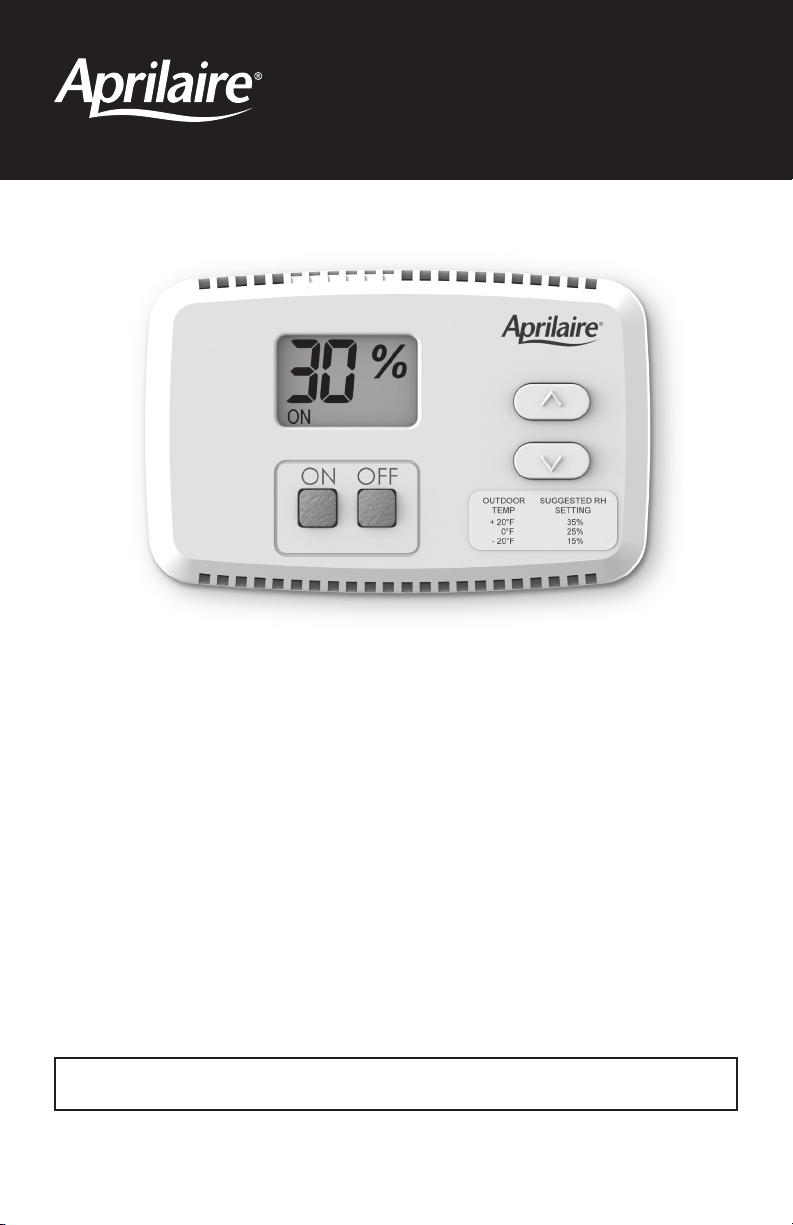
When the control is first powered up, it will display “30%”, which is the
default setting.
OPERATINg INSTRUCTIONS –
MODEL 65 MANUAL DIgITAL HUMIDISTAT
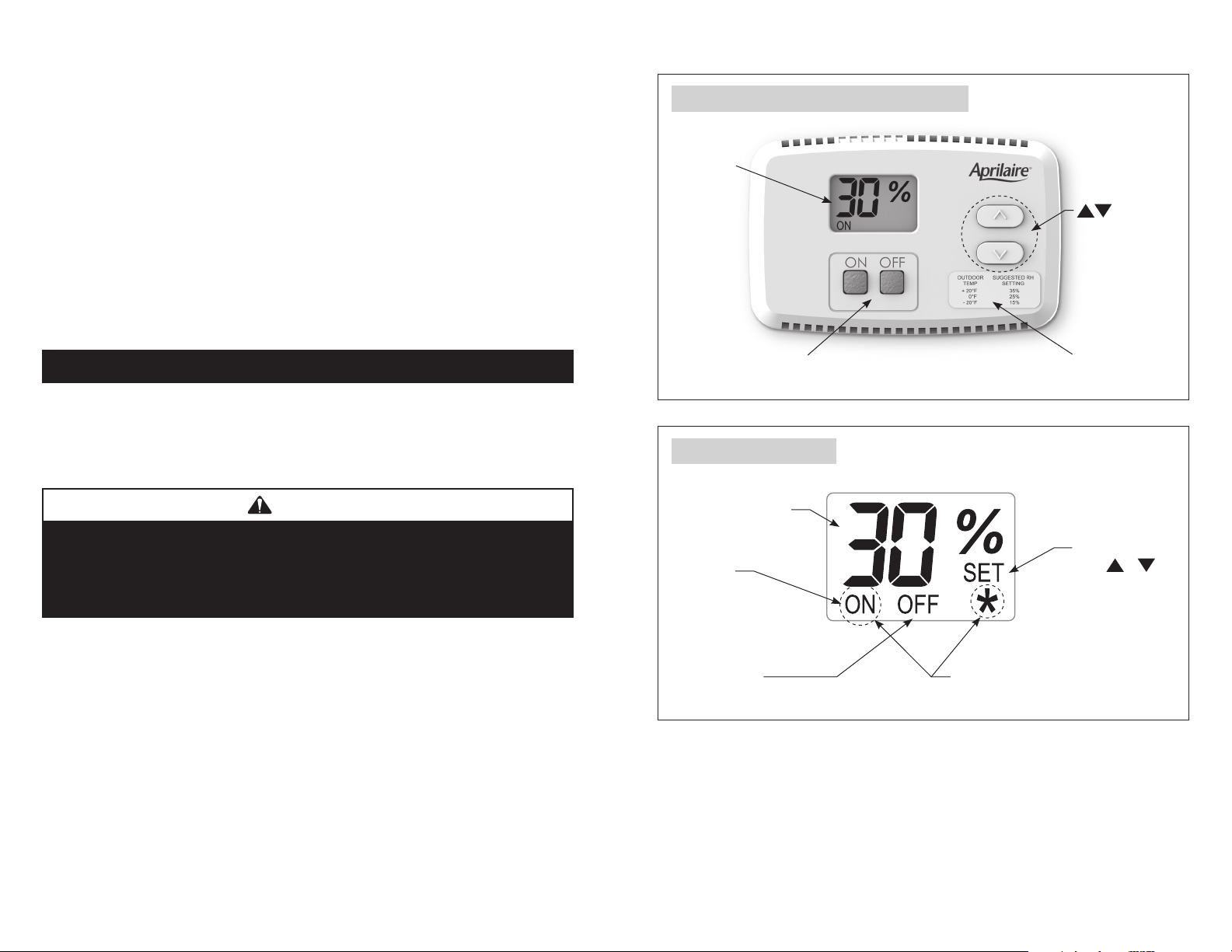
FIgURE 4 – Control Display and User Buttons
LCD Display
Mode Buttons – Use
to turn control On/Off.
Buttons –
Use to view and
adjust relative
humidity setting.
RH Setting Label
FIgURE 5 – LCD Display
90-1670
Blinking ON +
*
: Temp Limits Exceeded.
See Operating Limits, page 16.
Solid ON:
Control On
Blinking ON:
Humidifying
Numbers show
current room humidity
OR humidity setting
SET is displayed
when
or
is
pressed. The value
displayed is the
relative humidity
setting.
OFF: Control Off
TURNINg CONTROL ON & OFF
Begin by pressing the ON button. “ON” will appear on the display. This
means the control is on, but it does not necessarily mean the humidifier
is running. In order for the control to turn on your humidifier, several
conditions must be met:
1) The control and humidifier must be powered,
2) the RH level in the conditioned space must be below the set point, and
3) your furnace or furnace blower must be running.
When these conditions are met and the humidifier is operating, “ON” will
blink in the control display.
NOTE: If you have an Aprilaire Model 800 Steam Humidifier and a Model
850 Fan Pack, they will operate independently of any HVAC (Heating,
Ventilating and Air Conditioning) equipment.
To disable the humidifier, press the OFF button. The control will remain on
and display “OFF” plus the actual RH but will not allow the humidifier to
operate. The control must be ON in order to adjust the RH setting.
SETTINg THE DESIRED RH LEVEL
Use the
and
buttons to display and raise or lower the RH setting.
When pressing the
and
buttons, “SET” and the RH setting will be
displayed. Each press of the buttons will change the setting by 1% RH.
If a button is pressed and held, the setting will change 1% RH every 1/2
second. “SET” will disappear and the display will once again show the
actual RH 5 seconds after the buttons are pressed.

- 14 - - 15 -
Apply the RH setting label to the front cover if you want a guideline for
setting the control according to outdoor temperature. Since all houses are
different, you will need to determine exactly where to set the control so
that you have enough humidity to meet your needs, but not so much as to
cause excess condensation on windows or other cold surfaces.
CAUTION
Do not adjust humidity set-point above recommended level or to
recommended level if condensation occurs on inside surface of
windows or on other surfaces. Excess condensation can cause
damage to structure or furnishings. Excess moisture can also
allow the possibility for mold growth to occur.
When the control is first powered up, it will display “30%”, which is the
default setting.
OPERATINg INSTRUCTIONS –
MODEL 65 MANUAL DIgITAL HUMIDISTAT
FIgURE 4 – Control Display and User Buttons
LCD Display
Mode Buttons – Use
to turn control On/Off.
Buttons –
Use to view and
adjust relative
humidity setting.
RH Setting Label
FIgURE 5 – LCD Display
90-1670
Blinking ON +
*
: Temp Limits Exceeded.
See Operating Limits, page 16.
Solid ON:
Control On
Blinking ON:
Humidifying
Numbers show
current room humidity
OR humidity setting
SET is displayed
when
or
is
pressed. The value
displayed is the
relative humidity
setting.
OFF: Control Off
TURNINg CONTROL ON & OFF
Begin by pressing the ON button. “ON” will appear on the display. This
means the control is on, but it does not necessarily mean the humidifier
is running. In order for the control to turn on your humidifier, several
conditions must be met:
1) The control and humidifier must be powered,
2) the RH level in the conditioned space must be below the set point, and
3) your furnace or furnace blower must be running.
When these conditions are met and the humidifier is operating, “ON” will
blink in the control display.
NOTE: If you have an Aprilaire Model 800 Steam Humidifier and a Model
850 Fan Pack, they will operate independently of any HVAC (Heating,
Ventilating and Air Conditioning) equipment.
To disable the humidifier, press the OFF button. The control will remain on
and display “OFF” plus the actual RH but will not allow the humidifier to
operate. The control must be ON in order to adjust the RH setting.
SETTINg THE DESIRED RH LEVEL
Use the
and
buttons to display and raise or lower the RH setting.
When pressing the
and
buttons, “SET” and the RH setting will be
displayed. Each press of the buttons will change the setting by 1% RH.
If a button is pressed and held, the setting will change 1% RH every 1/2
second. “SET” will disappear and the display will once again show the
actual RH 5 seconds after the buttons are pressed.

- 16 - - 17 -
TABLE 5 – Outdoor Temperature and Recommended Indoor RH Setting
Outdoor Temperature Recommended Indoor RH Setting
+40°F 45%
+30°F 40%
+20°F 35%
+10°F 30%
0°F 25%
-10°F 20%
-20°F 15%
OPERATINg LIMITS
If the temperature in the space to be conditioned drops below 40°F or
rises above 99°F, the control will not allow the humidifier to operate.
Under these conditions, the display will blink “ON” and “
*
”. Once the
temperature is in the normal operating range, the control will once again
allow the humidifier to operate and the blinking “ON” and “
*
” will no
longer be displayed.
ADjUSTINg THE RH DISPLAY OFFSET
AUTOMATIC DIgITAL MODULATINg CONTROL INTERFACE
If you have another device that displays RH in your home, it may not
match the Model 65 Control display due to placement or a difference in
calibration. If you want the devices to match, the RH displayed by the
Model 65 control can be adjusted higher or lower by up to five percentage
points. Allow the control to acclimate to the space for 48 hours before
adjusting the offset.
The control must be on in order to adjust the offset. Press and hold the
OFF button for 5 seconds or until the display shows a value between -5%
and +5%. Use the
and
buttons to adjust the offset. The control will
revert back to the normal display mode after 5 seconds.
OPERATINg INSTRUCTIONS – MODEL 63 AUTOMATIC
DIgITAL MODULATINg CONTROL
Symbols on Display
Humidification ON
Low, Medium, High demand.
Percentage of humidity
or
°C: Celsius scale
°F: Fahrenheit scale
Menu set-up Lock
Programming mode
(Technician setting)
Alarm status
The Aprilaire
®
Model 63 Automatic Digital
Modulating Control (ADMC) offers precise control
of the humidity in your home by providing a variable
output based on the difference between the set
point and the sensed humidity.
The Automatic Digital Modulating Control offers
two modes of operation, Automatic or Manual.
An explanation of both modes follows. When in
Automatic Mode, this system offers the following
benefits:
• You will receive the optimum amount of humidity so that your
home and its furnishings are protected from the damaging effects
of excess condensation or low humidity during the heating
season. The ADMC automatically adjusts your home’s humidity based
on the outdoor temperature, increasing the time maximum comfort is
maintained.
• Simple operation with few adjustments. In the Automatic Mode, the
ADMC eliminates the need to manually adjust the control when outdoor
temperature changes.

- 16 - - 17 -
TABLE 5 – Outdoor Temperature and Recommended Indoor RH Setting
Outdoor Temperature Recommended Indoor RH Setting
+40°F 45%
+30°F 40%
+20°F 35%
+10°F 30%
0°F 25%
-10°F 20%
-20°F 15%
OPERATINg LIMITS
If the temperature in the space to be conditioned drops below 40°F or
rises above 99°F, the control will not allow the humidifier to operate.
Under these conditions, the display will blink “ON” and “
*
”. Once the
temperature is in the normal operating range, the control will once again
allow the humidifier to operate and the blinking “ON” and “
*
” will no
longer be displayed.
ADjUSTINg THE RH DISPLAY OFFSET
AUTOMATIC DIgITAL MODULATINg CONTROL INTERFACE
If you have another device that displays RH in your home, it may not
match the Model 65 Control display due to placement or a difference in
calibration. If you want the devices to match, the RH displayed by the
Model 65 control can be adjusted higher or lower by up to five percentage
points. Allow the control to acclimate to the space for 48 hours before
adjusting the offset.
The control must be on in order to adjust the offset. Press and hold the
OFF button for 5 seconds or until the display shows a value between -5%
and +5%. Use the
and
buttons to adjust the offset. The control will
revert back to the normal display mode after 5 seconds.
OPERATINg INSTRUCTIONS – MODEL 63 AUTOMATIC
DIgITAL MODULATINg CONTROL
Symbols on Display
Humidification ON
Low, Medium, High demand.
Percentage of humidity
or
°C: Celsius scale
°F: Fahrenheit scale
Menu set-up Lock
Programming mode
(Technician setting)
Alarm status
The Aprilaire
®
Model 63 Automatic Digital
Modulating Control (ADMC) offers precise control
of the humidity in your home by providing a variable
output based on the difference between the set
point and the sensed humidity.
The Automatic Digital Modulating Control offers
two modes of operation, Automatic or Manual.
An explanation of both modes follows. When in
Automatic Mode, this system offers the following
benefits:
• You will receive the optimum amount of humidity so that your
home and its furnishings are protected from the damaging effects
of excess condensation or low humidity during the heating
season. The ADMC automatically adjusts your home’s humidity based
on the outdoor temperature, increasing the time maximum comfort is
maintained.
• Simple operation with few adjustments. In the Automatic Mode, the
ADMC eliminates the need to manually adjust the control when outdoor
temperature changes.

- 18 - - 19 -
TABLE 6 – ADMC Operation guide
Condensation on
windows.
Reduce the setting on the control by 5%.
Lack of humidity.
Increase the setting on the control by 5%.
Humidifier does
not turn on.
Check that set point is higher than sensed humidity.
Make certain HVAC blower is operating and humidifier is
On. If humidifier still does not operate consult a heating
contractor.
Humidifier won’t
shut off.
Turn ADMC Off. If humidifier continues to produce steam
(humidifier steam light On), disconnect main power to
turn off the humidifier and consult a heating contractor.
“OFF”, “– – –“
and alarm symbol
are displayed.
The humidity sensor is not connected or is short circuited.
Consult a heating contractor.
“– – –“ is
displayed.
The temperature sensor is not connected or is short
circuited. Consult a heating contractor.
TABLE 7 – ADMC Maximum Set Point
for Outdoor Temperature
Outdoor
Temperature
°F (°C)
Maximum
Setpoint
(%RH)
20 (-7) 35%
10 (-12) 30%
0 (-18) 25%
-10 (-23) 20%
-20 (-29) 15%
The humidity in your home will
now be accurately controlled
to meet your needs and should
not need further adjustment
during future heating seasons.
The Aprilaire ADMC measures
outdoor temperature and
automatically adjusts the set
point to prevent condensation
and damage. Table 7 shows the
maximum Humidistat set point
the ADMC will allow for various
outdoor temperatures.
If an outdoor temperature
sensor cannot be installed or the
application requires a specific
RH set point, the ADMC can be
configured to Manual Mode. In
Manual Mode, the humidifier
and control will maintain a
constant RH, regardless of
outdoor temperature.
It is important to anticipate a
drop in outdoor temperature
and reduce the setting
accordingly to avoid excessive
condensation. See Table 8 for
the recommended settings. These settings are based on years of research,
represent a compromise between humidity levels that would be most
desirable for comfort and humidity levels that are suitable for protection
of your home and to avoid condensation on your windows. For example, a
wintertime indoor humidity of 50% may be considered ideal for comfort, but
unfortunately, it probably would result in condensation, which can cause
damage to your home. Observing the recommended humidity levels on your
ADMC is an important safeguard. Condensation of water on the inside
surface of windows in the form of fogging or frost is usually an indication
of too much humidity. This same condensation can occur in other areas in
your home, possibly resulting in damage.
TABLE 8 – Outdoor Temperature and
Recommended Indoor RH Setting
Outdoor
Temperature
Recommended
Indoor RH Setting
+40°F 45%
+30°F 40%
+20°F 35%
+10°F 30%
0°F 25%
-10°F 20%
-20°F 15%
MANUAL MODE
BLOwER ACTIVATION
AUTOMATIC MODE
The blower Activation feature provided with the Model 63 ADMC turns the
HVAC system fan on when there is a call for humidity.
During the first heating season, your ADMC needs to be set to match
your home’s condition. The ADMC default set point is 40% RH. Follow
these steps when adjusting your control.
1. For the first 24-48 hours of operation, it may be necessary to adjust the
set point for more or less humidity, depending on your personal comfort
and home’s requirements. Refer to Table 6 – ADMC Operation guide.
2. During the coldest portion of the first heating season, minor adjustments
may be necessary. This is dependent on your home’s construction. Refer
to Table 6 – ADMC Operation guide.

- 18 - - 19 -
TABLE 6 – ADMC Operation guide
Condensation on
windows.
Reduce the setting on the control by 5%.
Lack of humidity.
Increase the setting on the control by 5%.
Humidifier does
not turn on.
Check that set point is higher than sensed humidity.
Make certain HVAC blower is operating and humidifier is
On. If humidifier still does not operate consult a heating
contractor.
Humidifier won’t
shut off.
Turn ADMC Off. If humidifier continues to produce steam
(humidifier steam light On), disconnect main power to
turn off the humidifier and consult a heating contractor.
“OFF”, “– – –“
and alarm symbol
are displayed.
The humidity sensor is not connected or is short circuited.
Consult a heating contractor.
“– – –“ is
displayed.
The temperature sensor is not connected or is short
circuited. Consult a heating contractor.
TABLE 7 – ADMC Maximum Set Point
for Outdoor Temperature
Outdoor
Temperature
°F (°C)
Maximum
Setpoint
(%RH)
20 (-7) 35%
10 (-12) 30%
0 (-18) 25%
-10 (-23) 20%
-20 (-29) 15%
The humidity in your home will
now be accurately controlled
to meet your needs and should
not need further adjustment
during future heating seasons.
The Aprilaire ADMC measures
outdoor temperature and
automatically adjusts the set
point to prevent condensation
and damage. Table 7 shows the
maximum Humidistat set point
the ADMC will allow for various
outdoor temperatures.
If an outdoor temperature
sensor cannot be installed or the
application requires a specific
RH set point, the ADMC can be
configured to Manual Mode. In
Manual Mode, the humidifier
and control will maintain a
constant RH, regardless of
outdoor temperature.
It is important to anticipate a
drop in outdoor temperature
and reduce the setting
accordingly to avoid excessive
condensation. See Table 8 for
the recommended settings. These settings are based on years of research,
represent a compromise between humidity levels that would be most
desirable for comfort and humidity levels that are suitable for protection
of your home and to avoid condensation on your windows. For example, a
wintertime indoor humidity of 50% may be considered ideal for comfort, but
unfortunately, it probably would result in condensation, which can cause
damage to your home. Observing the recommended humidity levels on your
ADMC is an important safeguard. Condensation of water on the inside
surface of windows in the form of fogging or frost is usually an indication
of too much humidity. This same condensation can occur in other areas in
your home, possibly resulting in damage.
TABLE 8 – Outdoor Temperature and
Recommended Indoor RH Setting
Outdoor
Temperature
Recommended
Indoor RH Setting
+40°F 45%
+30°F 40%
+20°F 35%
+10°F 30%
0°F 25%
-10°F 20%
-20°F 15%
MANUAL MODE
BLOwER ACTIVATION
AUTOMATIC MODE
The blower Activation feature provided with the Model 63 ADMC turns the
HVAC system fan on when there is a call for humidity.
During the first heating season, your ADMC needs to be set to match
your home’s condition. The ADMC default set point is 40% RH. Follow
these steps when adjusting your control.
1. For the first 24-48 hours of operation, it may be necessary to adjust the
set point for more or less humidity, depending on your personal comfort
and home’s requirements. Refer to Table 6 – ADMC Operation guide.
2. During the coldest portion of the first heating season, minor adjustments
may be necessary. This is dependent on your home’s construction. Refer
to Table 6 – ADMC Operation guide.

- 20 - - 21 -
Be sure to keep fireplace dampers closed when not in use. They provide
an excellent escape route for heat, as well as humidity.
On occasion, indoor moisture producing activities such as clothes drying,
cooking, showers, etc., may raise the humidity level higher than it
should be, even though the Aprilaire humidifier is not operating. Telltale
indications are condensation or frost on cold surfaces such as windows,
doors, walls, etc. If such condensation persists for several hours, your home
should be ventilated to dissipate the potentially damaging excess moisture.
ADDITIONAL INFORMATION
MAINTENANCE
Turn humidifier off and allow humidifier to drain. Disconnect
power before servicing.
Inspect Humidifier at approximately 500 hour intervals or several times
during the humidification season.
• Check system operation and inspect all plumbing connections and piping
for signs of cracks or leaks.
• Inspect drain line to make sure it is not blocked and has constant
downward slope. Clean or replace if necessary.
• Inspect steam hose to make sure it has no low spots and has constant
upward slope from humidifier to dispersion tube in duct. If dispersion
tube is mounted below humidifier, inspect drip tee drain.
Replace the canister annually and when prompted by the “Service” light.
Use Only Genuine Aprilaire Model 80 Canister.
1. Press On/Off switch to turn humidifier off. Humidifier will drain for four
minutes.
2. Allow humidifier to drain. When the green “drain” LED stops flashing,
disconnect main electrical power to humidifier.
3. Remove front panel.
4. Pull three wires off posts on top of canister. (Two large electrode
conductors and one water level probe conductor.)
5. Loosen hose clamp at top of canister.
6. Slide hose off top of canister.
7. Slide canister up and out of drain assembly. Discard canister.
8. Remove o-ring from drain assembly using small screw driver.
9. Inspect drain assembly and remove any debris. See drain valve cleaning
procedure in Installation & Maintenance manual.
10. Insert new o-ring into slot in drain assembly. (O-ring is provided with
Model 80 canister.) Dampen o-ring with water before inserting canister.
Do not use oil, grease, or any lubricant besides water.
11. Make sure strainer is inserted into bottom of new canister.
12. Insert canister into drain assembly. Position canister with label facing
outward.
13. Slip steam hose over top of canister and tighten hose clamp.
14. Reattach and fully seat three wires to posts on top of canister. (Larger
electrode conductors are interchangeable.)
15. Replace front panel.
16. Inspect drain line to make sure it is not blocked and has constant
downward slope. Clean or replace if necessary.
17. Inspect steam hose to make sure it has no low spots and has constant
upward slope from humidifier to dispersion tube in duct. If dispersion
tube is mounted below humidifier, inspect drip tee drain.
18. Restore electrical power to humidifier.
19. Turn humidifier on and verify green On/Off light is illuminated.
20. See Start-up procedure in Installation, Operation & Maintenance manual.
TO REPLACE THE CANISTER
TO SERVICE FILL VALVE
If water flow from fill valve is restricted, disconnect inlet fitting and remove
in-line strainer using small screw from inlet port. Clean or replace strainer.

- 20 - - 21 -
Be sure to keep fireplace dampers closed when not in use. They provide
an excellent escape route for heat, as well as humidity.
On occasion, indoor moisture producing activities such as clothes drying,
cooking, showers, etc., may raise the humidity level higher than it
should be, even though the Aprilaire humidifier is not operating. Telltale
indications are condensation or frost on cold surfaces such as windows,
doors, walls, etc. If such condensation persists for several hours, your home
should be ventilated to dissipate the potentially damaging excess moisture.
ADDITIONAL INFORMATION
MAINTENANCE
Turn humidifier off and allow humidifier to drain. Disconnect
power before servicing.
Inspect Humidifier at approximately 500 hour intervals or several times
during the humidification season.
• Check system operation and inspect all plumbing connections and piping
for signs of cracks or leaks.
• Inspect drain line to make sure it is not blocked and has constant
downward slope. Clean or replace if necessary.
• Inspect steam hose to make sure it has no low spots and has constant
upward slope from humidifier to dispersion tube in duct. If dispersion
tube is mounted below humidifier, inspect drip tee drain.
Replace the canister annually and when prompted by the “Service” light.
Use Only Genuine Aprilaire Model 80 Canister.
1. Press On/Off switch to turn humidifier off. Humidifier will drain for four
minutes.
2. Allow humidifier to drain. When the green “drain” LED stops flashing,
disconnect main electrical power to humidifier.
3. Remove front panel.
4. Pull three wires off posts on top of canister. (Two large electrode
conductors and one water level probe conductor.)
5. Loosen hose clamp at top of canister.
6. Slide hose off top of canister.
7. Slide canister up and out of drain assembly. Discard canister.
8. Remove o-ring from drain assembly using small screw driver.
9. Inspect drain assembly and remove any debris. See drain valve cleaning
procedure in Installation & Maintenance manual.
10. Insert new o-ring into slot in drain assembly. (O-ring is provided with
Model 80 canister.) Dampen o-ring with water before inserting canister.
Do not use oil, grease, or any lubricant besides water.
11. Make sure strainer is inserted into bottom of new canister.
12. Insert canister into drain assembly. Position canister with label facing
outward.
13. Slip steam hose over top of canister and tighten hose clamp.
14. Reattach and fully seat three wires to posts on top of canister. (Larger
electrode conductors are interchangeable.)
15. Replace front panel.
16. Inspect drain line to make sure it is not blocked and has constant
downward slope. Clean or replace if necessary.
17. Inspect steam hose to make sure it has no low spots and has constant
upward slope from humidifier to dispersion tube in duct. If dispersion
tube is mounted below humidifier, inspect drip tee drain.
18. Restore electrical power to humidifier.
19. Turn humidifier on and verify green On/Off light is illuminated.
20. See Start-up procedure in Installation, Operation & Maintenance manual.
TO REPLACE THE CANISTER
TO SERVICE FILL VALVE
If water flow from fill valve is restricted, disconnect inlet fitting and remove
in-line strainer using small screw from inlet port. Clean or replace strainer.

- 22 -
- 22 -
- 22 -
Visit us on-line at www.aprilaire.com to register your Aprilaire product.
If you do not have on-line access, please mail a postcard with your name, address,
phone number, model number of product purchased and date of installation to:
Research Products Corporation, P.O. BOX 1467, Madison, WI 53701
Your warranty Registration information
will not be sold or shared outside of this company.
wARRANTY REgISTRATION
Your Research Products Corporation Aprilaire
®
humidifier unit is expressly warranted for five
(5) years from date of installation to be free from defects in materials or workmanship except,
however, for the disposable steam canister which will have to be replaced from time to time
depending upon the amount of use.
Research Products Corporation’s exclusive obligation under this warranty shall be to supply,
without charge, a replacement for any part of the humidifier which is found to be defective within
such five (5) year period and which is returned not later than thirty (30) days after said five (5)
year period by you to either your original supplier or to Research Products Corporation, Madison,
Wisconsin 53701, together with the model number and installation date of the humidifier.
THIS WARRANTY SHALL NOT OBLIGATE RESEARCH PRODUCTS CORPORATION FOR ANY LABOR
COSTS AND SHALL NOT APPLY TO DEFECTS IN WORKMANSHIP OR MATERIALS FURNISHED BY
YOUR INSTALLER AS CONTRASTED TO DEFECTS IN THE HUMIDIFIER ITSELF.
IMPLIED WARRANTIES OF MERCHANTABILITY OR FITNESS FOR A PARTICULAR PURPOSE
SHALL BE LIMITED IN DURATION TO THE AFORESAID FIVE YEAR PERIOD. RESEARCH PRODUCTS
CORPORATION’S LIABILITY FOR INCIDENTAL OR CONSEQUENTIAL DAMAGES, OTHER THAN
DAMAGES FOR PERSONAL INJURIES, RESULTING FROM ANY BREACH OF THE AFORESAID
IMPLIED WARRANTIES OR THE ABOVE LIMITED WARRANTY IS EXPRESSLY EXCLUDED.
THIS LIMITED WARRANTY IS VOID IF DEFECT(S) RESULT FROM FAILURE TO HAVE THIS UNIT
INSTALLED BY A QUALIFIED HEATING AND AIR CONDITIONING CONTRACTOR. IF THE LIMITED
WARRANTY IS VOID DUE TO FAILURE TO USE A QUALIFIED CONTRACTOR, ALL DISCLAIMERS
OF IMPLIED WARRANTIES SHALL BE EFFECTIVE UPON INSTALLATION.
Some states do not allow limitations on how long an implied warranty lasts or the exclusion or
limitation of incidental or consequential damages so the above exclusion or limitations may not
apply to you.
This warranty gives you specific legal rights and you may also have other rights which vary from
state to state.
LIMITED wARRANTY
P.O. Box 1467 • Madison, WI 53701-1467 • Phone: 800/334-6011 • Fax: 608/257-4357
www.aprilaire.com
10010990 8.14
B2206542A
© 2014 Aprilaire – A division of Research Products Corporation
Printed in U.S.A.
Rendez-vous en ligne sur www.aprilaire.com pour enregistrer votre produit Aprilaire.
Si vous n’avez pas accès à Internet, veuillez envoyer une carte postale en indiquant
votre nom, adresse, numéro de téléphone, le numéro de modèle du produit acheté
et la date de l’installation à :
Research Products Corporation, P.O. BOX 1467, Madison, WI 53701 É.-U.
Les renseignements de l’enregistrement de votre garantie ne seront ni vendus,
ni partagés à l’extérieur de notre entreprise.
ENREgISTREMENT DE LA gARANTIE
Votre humidificateur Aprilaire
®
de Research Products Corporation est expressément garanti pendant cinq (5)
ans à compter de la date d’installation d’être libre de défauts de matériaux ou de fabrication, à l’exception,
cependant, de la cartouche à vapeur qui doit être remplacée de temps à autre selon le niveau d’utilisation.
L’obligation exclusive de Research Products Corporation en vertu de cette garantie sera de fournir gratuitement
toute pièce de rechange pour l’humidificateur qui serait défectueuse durant une telle période de cinq (5) ans
et renvoyée au plus tard dans un délai de trente (30) jours après ladite période de cinq (5) ans par vous, soit au
fournisseur original, soit à Research Products Corporation, Madison, Wisconsin 53701 É.-U. avec le numéro de
modèle et la date d’installation de l’humidificateur.
CETTE GARANTIE N’OBLIGE PAS RESEARCH PRODUCTS CORPORATION À COUVRIR LES FRAIS DE MAIN
D’OEUVRE ET NE S’APPLIQUE PAS AUX DÉFAUTS DE FABRICATION OU DE MATÉRIAUX FOURNIS PAR VOTRE
INSTALLATEUR, CONTRAIREMENT AUX DÉFAUTS DE L’HUMIDIFICATEUR LUI-MÊME.
LES GARANTIES IMPLICITES DE VALEUR MARCHANDE OU D’ADAPTATION À UN USAGE PARTICULIER SE
LIMITENT EN DURÉE À LA PÉRIODE DE CINQ ANS CI-MENTIONNÉE. LA RESPONSABILITÉ DE RESEARCH
PRODUCTS CORPORATION EN CAS DE DOMMAGES INDIRECTS OU CONSÉCUTIFS, AUTRES QUE LES
DOMMAGES POUR DES BLESSURES, RÉSULTANT D’UNE INFRACTION AUX GARANTIES IMPLICITES
SUSMENTIONNÉES OU À LA GARANTIE LIMITÉE CI-MENTIONNÉE EST EXPRESSÉMENT EXCLUE. CETTE
GARANTIE LIMITÉE EST NULLE ET SANS EFFET SI LE(S) DÉFAUT(S) RÉSULTE(NT) DU FAIT QUE VOUS N’AVEZ PAS
FAIT INSTALLER CETTE UNITÉ PAR UN PROFESSIONNEL DU CHAUFFAGE ET DE LA CLIMATISATION QUALIFIÉ.
SI LA GARANTIE LIMITÉE DEVIENT NULLE ET SANS EFFET PARCE QUE VOUS N’AVEZ PAS FAIT APPEL À UN
PROFESSIONNEL QUALIFIÉ, TOUTES LES CLAUSES DE NON-RESPONSABILITÉ DES GARANTIES IMPLICITES
ENTRENT EN VIGUEUR AU MOMENT DE L’INSTALLATION.
Certaines provinces n’autorisent pas les limites sur la durée d’une garantie implicite ou l’exclusion ou la
limitation des dommages consécutifs ou indirects. Le cas échéant, les limitations ou l’exclusion susmentionnées
peuvent ne pas s’appliquer à vous.
Cette garantie vous confère des droits juridiques précis et pouvez aussi avoir d’autres droits qui varient d’une
province à l’autre.
gARANTIE LIMITéE
P.O. Box 1467 • Madison, WI 53701-1467 É.-U. • Téléphone : 800/334-6011
Fax : 608/257-4357 • www.aprilaire.com
10010990 8.14
B2206542A
© 2014 Aprilaire – une division de Research Products Corporation
Imprimé aux É.-U.

LIRE ET CONSERVER CES INSTRUCTIONS
Humidificateur à vapeur series 800
Manuel d’utilisation
Comprend les directives sur la sécurité
et le fonctionnement ainsi que les
renseignements sur la garantie
Humidificateur à vapeur

- 2 - - 3 -
Précautions de sécurité ...............................................3
Introduction ........................................................4
Principes du fonctionnement...........................................4
Séquence des opérations .............................................5
Options d’installation et effet des caractéristiques de l’eau ..................6
Modes de fonctionnement.............................................7
Panneau d’affichage .................................................8
Directives d’utilisation –
Model 62 Automatic Digital Humidifier Control ............................9
Operating Instructions –
Model 65 Manual Digital Humidistat ...................................14
Operating Instructions –
Model 63 Automatic Digital Modulating Control . . . . . . . . . . . . . . . . . . . . . . . . . . 17
Renseignements supplémentaires .....................................20
Entretien..........................................................20
Garantie limitée ....................................................22
TABLE DES MATIÈRES
MISE EN gARDE
SURFACES CHAUDES ET EAU CHAUDE
Les surfaces de ce système d’humidification à vapeur sont extrêmement
chaudes. L’eau dans la cartouche de vapeur, les tuyaux à vapeur et le tube
de dispersion peuvent atteindre une température de 100 °C (212 °F). La
vapeur évacuée n’est pas visible. Tout contact avec les surfaces chaudes,
l’eau chaude évacuée ou l’air dans lequel la vapeur a été évacuée peut
causer des blessures graves. Pour éviter les brûlures graves, suivez les
directives de ce manuel lorsque vous effectuez toute procédure de service
ou d’entretien sur toute pièce du système.
DANgER DE CHOC éLECTRIQUE
Respectez la procédure d’arrêt indiquée dans ce manuel avant d’effectuer
toute procédure de service ou d’entretien sur toute pièce du système.
Si l’humidificateur se met en marche en réponse à une demande
d’humidité pendant une procédure d’entretien, des blessures graves ou
mortelles peuvent survenir à la suite d’un choc électrique. Respectez
les procédures décrites dans ce manuel avant d’effectuer toute
procédure de service ou d’entretien sur cet humidificateur.
EXCéDENT D’HUMIDITé
Ne réglez pas l’humidité à un niveau supérieur à celui recommandé.
La condensation pourrait causer des dommages.
MISE EN gARDE
Lisez toutes les mises en garde et les instructions.
Lire ce manuel avant d’effectuer toute procédure de service ou d’entretien
sur toute pièce du système. Le non-respect des mises en garde et
instructions pourrait provoquer les situations dangereuses décrites et
causer des dommages matériels et des blessures graves ou mortelles.
Le non-respect des instructions se trouvant dans ce manuel peut
provoquer une accumulation d’humidité pouvant causer des dommages
à la structure et aux meubles.
PRéCAUTIONS DE SéCURITé

- 2 - - 3 -
Précautions de sécurité ...............................................3
Introduction ........................................................4
Principes du fonctionnement...........................................4
Séquence des opérations .............................................5
Options d’installation et effet des caractéristiques de l’eau ..................6
Modes de fonctionnement.............................................7
Panneau d’affichage .................................................8
Directives d’utilisation –
Model 62 Automatic Digital Humidifier Control ............................9
Operating Instructions –
Model 65 Manual Digital Humidistat ...................................14
Operating Instructions –
Model 63 Automatic Digital Modulating Control . . . . . . . . . . . . . . . . . . . . . . . . . . 17
Renseignements supplémentaires .....................................20
Entretien..........................................................20
Garantie limitée ....................................................22
TABLE DES MATIÈRES
MISE EN gARDE
SURFACES CHAUDES ET EAU CHAUDE
Les surfaces de ce système d’humidification à vapeur sont extrêmement
chaudes. L’eau dans la cartouche de vapeur, les tuyaux à vapeur et le tube
de dispersion peuvent atteindre une température de 100 °C (212 °F). La
vapeur évacuée n’est pas visible. Tout contact avec les surfaces chaudes,
l’eau chaude évacuée ou l’air dans lequel la vapeur a été évacuée peut
causer des blessures graves. Pour éviter les brûlures graves, suivez les
directives de ce manuel lorsque vous effectuez toute procédure de service
ou d’entretien sur toute pièce du système.
DANgER DE CHOC éLECTRIQUE
Respectez la procédure d’arrêt indiquée dans ce manuel avant d’effectuer
toute procédure de service ou d’entretien sur toute pièce du système.
Si l’humidificateur se met en marche en réponse à une demande
d’humidité pendant une procédure d’entretien, des blessures graves ou
mortelles peuvent survenir à la suite d’un choc électrique. Respectez
les procédures décrites dans ce manuel avant d’effectuer toute
procédure de service ou d’entretien sur cet humidificateur.
EXCéDENT D’HUMIDITé
Ne réglez pas l’humidité à un niveau supérieur à celui recommandé.
La condensation pourrait causer des dommages.
MISE EN gARDE
Lisez toutes les mises en garde et les instructions.
Lire ce manuel avant d’effectuer toute procédure de service ou d’entretien
sur toute pièce du système. Le non-respect des mises en garde et
instructions pourrait provoquer les situations dangereuses décrites et
causer des dommages matériels et des blessures graves ou mortelles.
Le non-respect des instructions se trouvant dans ce manuel peut
provoquer une accumulation d’humidité pouvant causer des dommages
à la structure et aux meubles.
PRéCAUTIONS DE SéCURITé

- 4 - - 5 -
The Aprilaire
®
Steam Humidifier delivers humidity in the form of steam to the
conditioned space via the HVAC system duct or Aprilaire Fan Pack. L’humidificateur
génère de la vapeur en énergisant deux électrodes qui se prolongent dans une cartouche
d’eau. Le courant s’écoulant entre les électrodes fait bouillir l’eau pour ainsi créer de
la vapeur. L’eau est introduite dans l’humidificateur grâce à un robinet de remplissage
vers un godet de remplissage situé dans la partie supérieure de l’armoire. Le godet
de remplissage sert de réservoir de débordement et fournit un espace d’air entre
l’humidificateur et la source d’eau. La cartouche de vapeur est remplie à partir du fond.
La cartouche est appuyée sur un godet d’évacuation qui comprend un robinet de purge.
Les robinets de purge et de remplissage fonctionnent ensemble pour maintenir le niveau
d’eau dans la cartouche et fournir la capacité nominale de vapeur selon la conductivité
électrique de l’eau et pour tempérer l’eau d’évacuation. Reportez-vous à la Figure 1 pour
une représentation du système de remplissage et d’évacuation et de la cartouche.
La vapeur est fournie dans le flux d’air par un tube de dispersion monté dans les
conduits du système de CVC. Les ouvertures dans le tube de dispersion sont munies
de « tubelets
™
» (petits tubes) qui se prolongent dans le centre du tube. La conception
du tube de dispersion et des petits tubes distribue la vapeur dans une vaste zone du
conduit et retourne toute humidité condensée dans le boyau à vapeur.
PRINCIPES DU FONCTIONNEMENT
FIgURE 1 – Système de remplissage et d’évacuation et cartouche
90-1522
Sortie
de vapeur
Drain
Eau
d’alimentation
Godet d’évacuation
Robinet de purge
Cartouche
Électrodes
Capteur de niveau
élevé d’eau
Orifice
de contrôle
du flux
Entrée
du robinet
de remplissage
Débordement
Remplissage
Godet de
remplissage
Merci d’avoir acheté un humidificateur Aprilaire
®
. Nous sommes reconnaissant de
vos affaires et heureux d’ajouter votre nom à notre liste grandissante de clients.
Vous avez investi dans l’équipement de la plus haute qualité qui soit. Aprilaire
fabrique des produits pour la qualité de l’air intérieur de toute la maison et elle est
reconnue comme meneur dans l’industrie du chauffage et de la climatisation.
Votre humidificateur nécessitera un entretien périodique pour assurer une
performance uniforme ininterrompue. Reportez-vous à la page 20.
Veuillez prendre quelques minutes pour lire ce livret. Cela vous permettra de vous
familiariser avec les bienfaits dont vous profiterez de l’humidificateur et vous
aidera à comprendre l’entretien de routine qui sera requis.
Assurez-vous d’enregistrer la garantie de votre humidificateur en ligne à :
www.aprilaire.com/warranty.
INTRODUCTION
Des cartouches à vapeur de rechange authentiques Aprilaire modèle 80
sont offertes par votre installateur ou par la plupart des entrepreneurs de
chauffage et de climatisation dans votre région. Utilisez le localisateur
de concessionnaire sur notre site web (www.aprilaire.com) ou regardez
dans les Pages jaunes sous appareil d’humidification ou entrepreneurs
de chauffage et de climatisation.
SéQUENCE DES OPéRATIONS
When the Humidifier Control detects the need for humidity, and provided the
humidifier is turned on and the HVAC system blower is operating, the internal
controller in the humidifier energizes the electrodes and measures the current
flowing through the water between them. Le contrôleur ajuste le niveau d’eau
dans la cartouche par l’entremise du robinet de remplissage et du robinet de purge
pour maintenir un courant constant. Le niveau d’eau de fonctionnement dans la
cartouche dépend de la teneur en minéraux de l’eau qui détermine la conductivité.

- 4 - - 5 -
The Aprilaire
®
Steam Humidifier delivers humidity in the form of steam to the
conditioned space via the HVAC system duct or Aprilaire Fan Pack. L’humidificateur
génère de la vapeur en énergisant deux électrodes qui se prolongent dans une cartouche
d’eau. Le courant s’écoulant entre les électrodes fait bouillir l’eau pour ainsi créer de
la vapeur. L’eau est introduite dans l’humidificateur grâce à un robinet de remplissage
vers un godet de remplissage situé dans la partie supérieure de l’armoire. Le godet
de remplissage sert de réservoir de débordement et fournit un espace d’air entre
l’humidificateur et la source d’eau. La cartouche de vapeur est remplie à partir du fond.
La cartouche est appuyée sur un godet d’évacuation qui comprend un robinet de purge.
Les robinets de purge et de remplissage fonctionnent ensemble pour maintenir le niveau
d’eau dans la cartouche et fournir la capacité nominale de vapeur selon la conductivité
électrique de l’eau et pour tempérer l’eau d’évacuation. Reportez-vous à la Figure 1 pour
une représentation du système de remplissage et d’évacuation et de la cartouche.
La vapeur est fournie dans le flux d’air par un tube de dispersion monté dans les
conduits du système de CVC. Les ouvertures dans le tube de dispersion sont munies
de « tubelets
™
» (petits tubes) qui se prolongent dans le centre du tube. La conception
du tube de dispersion et des petits tubes distribue la vapeur dans une vaste zone du
conduit et retourne toute humidité condensée dans le boyau à vapeur.
PRINCIPES DU FONCTIONNEMENT
FIgURE 1 – Système de remplissage et d’évacuation et cartouche
90-1522
Sortie
de vapeur
Drain
Eau
d’alimentation
Godet d’évacuation
Robinet de purge
Cartouche
Électrodes
Capteur de niveau
élevé d’eau
Orifice
de contrôle
du flux
Entrée
du robinet
de remplissage
Débordement
Remplissage
Godet de
remplissage
Merci d’avoir acheté un humidificateur Aprilaire
®
. Nous sommes reconnaissant de
vos affaires et heureux d’ajouter votre nom à notre liste grandissante de clients.
Vous avez investi dans l’équipement de la plus haute qualité qui soit. Aprilaire
fabrique des produits pour la qualité de l’air intérieur de toute la maison et elle est
reconnue comme meneur dans l’industrie du chauffage et de la climatisation.
Votre humidificateur nécessitera un entretien périodique pour assurer une
performance uniforme ininterrompue. Reportez-vous à la page 20.
Veuillez prendre quelques minutes pour lire ce livret. Cela vous permettra de vous
familiariser avec les bienfaits dont vous profiterez de l’humidificateur et vous
aidera à comprendre l’entretien de routine qui sera requis.
Assurez-vous d’enregistrer la garantie de votre humidificateur en ligne à :
www.aprilaire.com/warranty.
INTRODUCTION
Des cartouches à vapeur de rechange authentiques Aprilaire modèle 80
sont offertes par votre installateur ou par la plupart des entrepreneurs de
chauffage et de climatisation dans votre région. Utilisez le localisateur
de concessionnaire sur notre site web (www.aprilaire.com) ou regardez
dans les Pages jaunes sous appareil d’humidification ou entrepreneurs
de chauffage et de climatisation.
SéQUENCE DES OPéRATIONS
When the Humidifier Control detects the need for humidity, and provided the
humidifier is turned on and the HVAC system blower is operating, the internal
controller in the humidifier energizes the electrodes and measures the current
flowing through the water between them. Le contrôleur ajuste le niveau d’eau
dans la cartouche par l’entremise du robinet de remplissage et du robinet de purge
pour maintenir un courant constant. Le niveau d’eau de fonctionnement dans la
cartouche dépend de la teneur en minéraux de l’eau qui détermine la conductivité.

- 6 - - 7 -
FERMETURE à LA FIN DE LA SAISON OU D’UNE PéRIODE D’INACTIVITé
If the humidifier does not receive a call to operate in 72 hours, the humidifier
controller drains the canister, the drain valve will remain open for 30 minutes. Le
voyant du drain demeurera allumé jusqu’à ce qu’il y ait un appel d’humidité ou une
période de 24 heures soit écoulée. L’humidificateur reprend son fonctionnement
normal lorsqu’un appel d’humidité est effectué.
MODES DE FONCTIONNEMENT
Your Steam Humidifier can be powered with a 120, 208 or 240 volt circuit and
operated at either 11.5 or 16.0 amps. Plus la tension et l’intensité sont élevées,
plus la sortie potentielle sera élevée. La tension et l’intensité de fonctionnement
sont réglées par votre installateur pour répondre aux besoins en humidité de
votre maison.
Intensité Tension Capacité de vapeur maximale (litres/jour)
11,5
120 volts 43,5
208 volts 77,6
240 volts 88,2
16,0
120 volts 60,6
208 volts 113,6
240 volts 131,0
L’humidificateur pourra prendre plusieurs jours pour atteindre sa capacité
nominale selon la tension d’entrée et la conductivité électrique de l’eau. Les
systèmes à 120 volts peuvent prendre plus longtemps à atteindre la capacité nominale
que les systèmes à 240 volts. L’humidificateur doit toujours être relié à la plomberie
de l’eau chaude, mais l’eau peut être adoucie ou non. L’eau « dure », qui possède
une haute teneur en minéraux et l’eau adoucie ont généralement une conductivité
supérieure à celle de l’eau naturellement adoucie. Les systèmes reliés à la plomberie
d’une eau à conductivité supérieure atteindront leur capacité plus rapidement que
les systèmes reliés à la plomberie d’une eau à faible conductivité. Pendant que
l’humidificateur fonctionne, les minéraux s’accumulent dans la cartouche, ce qui
augmente la conductivité de l’eau. Avec une nouvelle cartouche, laisser l’humidificateur
fonctionner continuellement (en plus du ventilateur du système de CVC) lui permettra
d’atteindre sa capacité nominale dans le plus court laps de temps.
La durée utile de la cartouche dépend grandement de la qualité de l’eau. Les
cartouches dans des systèmes reliés à la plomberie d’une eau ayant des concentrations
élevées de solides dissous et en suspension ne dureront pas aussi longtemps que les
cartouches fonctionnant avec de l’eau ayant moins de minéraux.
NOTE: Amperage, Voltage and plumbing changes should be made by a heating and air
conditioning contractor.
OPTIONS D’INSTALLATION ET EFFET DES
CARACTéRISTIQUES DE L’EAU
Lorsque l’humidificateur est alimenté et mis en marche, le voyant « On/Off »
(marche/arrêt) s’allume en vert.
Lorsque la cartouche est remplie ou ravitaillée en eau, le voyant « Fill »
(remplissage) s’allume en vert.
Lorsque la cartouche se vide, le voyant « Drain » (évacuation) s’allume en vert.
Durant la mise en marche initiale avec une nouvelle cartouche, l’humidificateur peut
passer à travers une série de cycles de remplissage/d’évacuation jusqu’à ce que la
conductivité de l’eau se trouve dans l’étendue qui permet un fonctionnement normal.
Pendant ce temps, le voyant « Steam » s’allume en vert. If the humidifier cannot
produce steam at the rated level after 168 hours of operation, the “Steam” light
illuminates yellow. L’humidificateur continue de fonctionner de cette façon jusqu’à ce
que la sortie nominale soit atteinte.
The conductivity of naturally soft water, hard water, and softened water changes
as the water heats up, the internal controller adjusts the water level to maintain
a nominal current between the electrodes. Pendant la durée utile de la cartouche,
les minéraux qui s’accumulent sur les électrodes réduiront la surface d’efficacité et
affecteront la résistance entre eux. Le niveau d’eau de fonctionnement augmentera
avec l’utilisation jusqu’à ce qu’il atteigne le capteur de niveau élevé d’eau. At that
point, the “Service” light will flash red indicating that the canister should be
replaced. L’humidificateur continuera de fonctionner, mais à un rythme inférieur.
Lorsque l’humidificateur commence un cycle de purge, le robinet de remplissage
s’ouvre pour introduire de l’eau froide dans la cartouche. Cela est effectué pour
empêcher l’eau chaude d’entrer dans le drain. Le robinet de purge demeure ouvert
pendant quatre minutes pour permettre à toute l’eau de s’évacuer de la cartouche.
Chaque fois que le courant est coupé ou que l’humidificateur est éteint, la minuterie
interne pour les cycles de démarrage et d’évacuation est réinitialisée.
Si l’humidificateur a fonctionné pendant 168 heures sans cycle d’évacuation, le
robinet de purge s’ouvre et vide la cartouche. Le fonctionnement normal se poursuit.
Si l’humidificateur fonctionne et qu’une panne de courant survient, une fois le
courant rétabli, le voyant « On/Off » (marche/arrêt) clignote en vert pendant une
minute, puis l’humidificateur se met en marche.

- 6 - - 7 -
FERMETURE à LA FIN DE LA SAISON OU D’UNE PéRIODE D’INACTIVITé
If the humidifier does not receive a call to operate in 72 hours, the humidifier
controller drains the canister, the drain valve will remain open for 30 minutes. Le
voyant du drain demeurera allumé jusqu’à ce qu’il y ait un appel d’humidité ou une
période de 24 heures soit écoulée. L’humidificateur reprend son fonctionnement
normal lorsqu’un appel d’humidité est effectué.
MODES DE FONCTIONNEMENT
Your Steam Humidifier can be powered with a 120, 208 or 240 volt circuit and
operated at either 11.5 or 16.0 amps. Plus la tension et l’intensité sont élevées,
plus la sortie potentielle sera élevée. La tension et l’intensité de fonctionnement
sont réglées par votre installateur pour répondre aux besoins en humidité de
votre maison.
Intensité Tension Capacité de vapeur maximale (litres/jour)
11,5
120 volts 43,5
208 volts 77,6
240 volts 88,2
16,0
120 volts 60,6
208 volts 113,6
240 volts 131,0
L’humidificateur pourra prendre plusieurs jours pour atteindre sa capacité
nominale selon la tension d’entrée et la conductivité électrique de l’eau. Les
systèmes à 120 volts peuvent prendre plus longtemps à atteindre la capacité nominale
que les systèmes à 240 volts. L’humidificateur doit toujours être relié à la plomberie
de l’eau chaude, mais l’eau peut être adoucie ou non. L’eau « dure », qui possède
une haute teneur en minéraux et l’eau adoucie ont généralement une conductivité
supérieure à celle de l’eau naturellement adoucie. Les systèmes reliés à la plomberie
d’une eau à conductivité supérieure atteindront leur capacité plus rapidement que
les systèmes reliés à la plomberie d’une eau à faible conductivité. Pendant que
l’humidificateur fonctionne, les minéraux s’accumulent dans la cartouche, ce qui
augmente la conductivité de l’eau. Avec une nouvelle cartouche, laisser l’humidificateur
fonctionner continuellement (en plus du ventilateur du système de CVC) lui permettra
d’atteindre sa capacité nominale dans le plus court laps de temps.
La durée utile de la cartouche dépend grandement de la qualité de l’eau. Les
cartouches dans des systèmes reliés à la plomberie d’une eau ayant des concentrations
élevées de solides dissous et en suspension ne dureront pas aussi longtemps que les
cartouches fonctionnant avec de l’eau ayant moins de minéraux.
NOTE: Amperage, Voltage and plumbing changes should be made by a heating and air
conditioning contractor.
OPTIONS D’INSTALLATION ET EFFET DES
CARACTéRISTIQUES DE L’EAU
Lorsque l’humidificateur est alimenté et mis en marche, le voyant « On/Off »
(marche/arrêt) s’allume en vert.
Lorsque la cartouche est remplie ou ravitaillée en eau, le voyant « Fill »
(remplissage) s’allume en vert.
Lorsque la cartouche se vide, le voyant « Drain » (évacuation) s’allume en vert.
Durant la mise en marche initiale avec une nouvelle cartouche, l’humidificateur peut
passer à travers une série de cycles de remplissage/d’évacuation jusqu’à ce que la
conductivité de l’eau se trouve dans l’étendue qui permet un fonctionnement normal.
Pendant ce temps, le voyant « Steam » s’allume en vert. If the humidifier cannot
produce steam at the rated level after 168 hours of operation, the “Steam” light
illuminates yellow. L’humidificateur continue de fonctionner de cette façon jusqu’à ce
que la sortie nominale soit atteinte.
The conductivity of naturally soft water, hard water, and softened water changes
as the water heats up, the internal controller adjusts the water level to maintain
a nominal current between the electrodes. Pendant la durée utile de la cartouche,
les minéraux qui s’accumulent sur les électrodes réduiront la surface d’efficacité et
affecteront la résistance entre eux. Le niveau d’eau de fonctionnement augmentera
avec l’utilisation jusqu’à ce qu’il atteigne le capteur de niveau élevé d’eau. At that
point, the “Service” light will flash red indicating that the canister should be
replaced. L’humidificateur continuera de fonctionner, mais à un rythme inférieur.
Lorsque l’humidificateur commence un cycle de purge, le robinet de remplissage
s’ouvre pour introduire de l’eau froide dans la cartouche. Cela est effectué pour
empêcher l’eau chaude d’entrer dans le drain. Le robinet de purge demeure ouvert
pendant quatre minutes pour permettre à toute l’eau de s’évacuer de la cartouche.
Chaque fois que le courant est coupé ou que l’humidificateur est éteint, la minuterie
interne pour les cycles de démarrage et d’évacuation est réinitialisée.
Si l’humidificateur a fonctionné pendant 168 heures sans cycle d’évacuation, le
robinet de purge s’ouvre et vide la cartouche. Le fonctionnement normal se poursuit.
Si l’humidificateur fonctionne et qu’une panne de courant survient, une fois le
courant rétabli, le voyant « On/Off » (marche/arrêt) clignote en vert pendant une
minute, puis l’humidificateur se met en marche.

- 8 - - 9 -
The Model 62 Automatic Digital Humidifier Control (ADHC) offers two modes
of operation, Automatic or Manual. Une explication des deux modes se trouve
ci-dessous. (Reportez-vous à la Figure 2 à la page 10 pour le mode automatique.
Reportez-vous à la Figure 3 à la page 12 pour le mode manuel.)
En mode automatique, ce système offre les avantages suivants :
• Vous obtiendrez la quantité optimale d’humidité afin que votre maison
et son ameublement soient protégés des effets destructeurs d’une
condensation excessive ou d’une faible humidité durant la saison de
chauffage. The ADHC automatically adjusts your home’s humidity based on the
outdoor temperature, increasing the time maximum comfort is maintained.
• Fonctionnement simple avec peu de réglages. In the Automatic Mode,
the ADHC eliminates the need to manually adjust the control when outdoor
temperature changes. Elle élimine aussi le besoin de tourner le cadran à « OFF
» (arrêt) pendant la saison estivale.
OPERATINg INSTRUCTIONS – MODEL 62 AUTOMATIC DIgITAL
HUMIDIFIER CONTROL
MODEL 62 AUTOMATIC DIgITAL HUMIDIFIER CONTROL
INDICATOR LIgHTS
Call Dealer for Service (communiquer avec le concessionnaire pour
obtenir du service) : le voyant rouge indique que la commande ne fonctionne pas
normalement et qu’un service est requis.
Humidifier On (humidificateur en marche) : le voyant vert indique que la
commande fonctionne normalement et envoie un appel d’humidité à l’humidificateur.
ACTIVATION DU VENTILATEUR
Réglez l’interrupteur « Blower Activation » (activation du ventilateur) à « ON » (en
marche) pour permettre à la commande de l’humidificateur d’activer le ventilateur
CVC pour maximiser l’humidification.
Si le système CVC a été inactif pendant une heure, la commande de l’humidificateur
activera le ventilateur du système CVC pour vérifier l’air pendant trois minutes. Si
l’HR est inférieure au point de réglage, la commande de l’humidificateur activera
l’humidificateur et fera fonctionner le ventilateur. L’humidificateur continuera
de fonctionner pendant deux heures ou jusqu’à ce que le point de réglage
d’humidification soit atteint.
Si le point de réglage de l’HR n’a pas été atteint à la fin d’un appel de chaleur, la
commande continuera de faire fonctionner l’humidificateur et le ventilateur CVC
jusqu’à ce que le point de réglage d’humidification soit atteint ou que deux heures
se soient écoulées.
Lorsque l’interrupteur « Blower Activation » (activation du ventilateur) est à la
position « OFF » (arrêt), la commande de l’humidificateur ne fera fonctionner
l’humidificateur que si de l’humidité est requise et que le ventilateur du système
CVC fonctionne ou le système CVC produit de la chaleur.
REMARQUE : s’il est utilisé en conjonction avec un thermostat de communication
8570 d’Aprilaire et la fonction d’activation du ventilateur, ne reliez PAS les bornes
de communication A B.
TABLEAU 1 – panneau d’affichage
Indicateur Voyant Fonction
Arrêt
L’humidificateur est éteint ou n’est pas alimenté.
Vert
continu
L’humidificateur est en marche.
Vert
clignotant
L’humidificateur se prépare à se mettre en marche. Se produit si
le courant est débranché, puis remis avec l’interrupteur à ON (en
marche). Clignote pendant une minute.
Vert
continu
Fonctionnement normal. Le robinet de remplissage est activé pour
permettre à l’eau de s’écouler dans la cartouche par l’entremise du
godet de remplissage. (Ne s’allume pas lors du tempérage de l’eau
durant un cycle d’évacuation.)
Vert
clignotant
Les robinets de remplissage et de purge vibrent pour déloger
l’accumulation de minéraux dans la cartouche. Clignote 10 fois dans
quatre secondes.
Rouge
continu
Mode d’anomalie. Indique que la cartouche a besoin d’eau, mais ne
peut pas se remplir. L’humidificateur s’éteint. (Se produit si le capteur
de niveau d’eau élevé ne détecte pas d’eau après avoir activé le
robinet de remplissage pendant 40 minutes.) Call your heating and air
conditioning dealer for service.
Vert
continu
Fonctionnement normal. L’humidostat demande de la vapeur et
l’humidificateur fonctionne.
jaune
continu
Fonctionnement normal. L’humidificateur fonctionne, mais ne fournit
pas de vapeur à la capacité nominale. Se produit si l’humidificateur
a fonctionné pendant 168 heures à un niveau inférieur à sa capacité
nominale en raison d’une faible conductivité de l’eau. Le voyant
s’allume en vert lorsque la conductivité de l’eau augmente et
l’humidificateur fonctionne à sa capacité nominale.
Vert
clignotant
L’humidificateur se prépare à s’évacuer. (Le robinet de remplissage
est ouvert tempérant l’eau dans la cartouche.) Se produit lorsque
l’humidificateur est arrêté, lors de l’évacuation à la fin de la saison
(72 heures sans fonctionner) et durant l’évacuation forcée (168 heures de
fonctionnement sans activité d’évacuation.)
Les robinets de remplissage et de purge vibrent pour déloger
l’accumulation de minéraux dans la cartouche. Clignote 10 fois dans
quatre secondes.
Vert
continu
Le robinet de purge est énergisé et ouvert, évacuant la cartouche. Le
robinet demeure énergisé pendant quatre minutes.
Indique l’arrêt de fin de saison. Se produit si l’humidificateur ne
reçoit pas d’appel d’humidité pendant 72 heures. La lumière demeure
allumée pendant 24 heures. Humidifier will turn on with the next call
for humidity.
Rouge
clignotant
La cartouche a atteint la fin de sa durée utile et doit être remplacée.
Se produit lorsque l’humidificateur a fonctionné pendant 168 heures
et 24 heures supplémentaires à un niveau actuel inférieur à 75 % du
courant de fonctionnement maximal. L’humidificateur continue de
fonctionner, mais à capacité réduite.
Rouge
continu
Problème de fonctionnement avec l’humidificateur. L’humidificateur
s’éteint. Se produit lorsque l’unité détecte une surintensité qui peut
être causée par une défaillance d’évacuation ou d’autres défaillances
du système. Appelez votre concessionnaire de chauffage et de
climatisation pour obtenir du service.
PANNEAU D’AFFICHAgE

- 8 - - 9 -
The Model 62 Automatic Digital Humidifier Control (ADHC) offers two modes
of operation, Automatic or Manual. Une explication des deux modes se trouve
ci-dessous. (Reportez-vous à la Figure 2 à la page 10 pour le mode automatique.
Reportez-vous à la Figure 3 à la page 12 pour le mode manuel.)
En mode automatique, ce système offre les avantages suivants :
• Vous obtiendrez la quantité optimale d’humidité afin que votre maison
et son ameublement soient protégés des effets destructeurs d’une
condensation excessive ou d’une faible humidité durant la saison de
chauffage. The ADHC automatically adjusts your home’s humidity based on the
outdoor temperature, increasing the time maximum comfort is maintained.
• Fonctionnement simple avec peu de réglages. In the Automatic Mode,
the ADHC eliminates the need to manually adjust the control when outdoor
temperature changes. Elle élimine aussi le besoin de tourner le cadran à « OFF
» (arrêt) pendant la saison estivale.
OPERATINg INSTRUCTIONS – MODEL 62 AUTOMATIC DIgITAL
HUMIDIFIER CONTROL
MODEL 62 AUTOMATIC DIgITAL HUMIDIFIER CONTROL
INDICATOR LIgHTS
Call Dealer for Service (communiquer avec le concessionnaire pour
obtenir du service) : le voyant rouge indique que la commande ne fonctionne pas
normalement et qu’un service est requis.
Humidifier On (humidificateur en marche) : le voyant vert indique que la
commande fonctionne normalement et envoie un appel d’humidité à l’humidificateur.
ACTIVATION DU VENTILATEUR
Réglez l’interrupteur « Blower Activation » (activation du ventilateur) à « ON » (en
marche) pour permettre à la commande de l’humidificateur d’activer le ventilateur
CVC pour maximiser l’humidification.
Si le système CVC a été inactif pendant une heure, la commande de l’humidificateur
activera le ventilateur du système CVC pour vérifier l’air pendant trois minutes. Si
l’HR est inférieure au point de réglage, la commande de l’humidificateur activera
l’humidificateur et fera fonctionner le ventilateur. L’humidificateur continuera
de fonctionner pendant deux heures ou jusqu’à ce que le point de réglage
d’humidification soit atteint.
Si le point de réglage de l’HR n’a pas été atteint à la fin d’un appel de chaleur, la
commande continuera de faire fonctionner l’humidificateur et le ventilateur CVC
jusqu’à ce que le point de réglage d’humidification soit atteint ou que deux heures
se soient écoulées.
Lorsque l’interrupteur « Blower Activation » (activation du ventilateur) est à la
position « OFF » (arrêt), la commande de l’humidificateur ne fera fonctionner
l’humidificateur que si de l’humidité est requise et que le ventilateur du système
CVC fonctionne ou le système CVC produit de la chaleur.
REMARQUE : s’il est utilisé en conjonction avec un thermostat de communication
8570 d’Aprilaire et la fonction d’activation du ventilateur, ne reliez PAS les bornes
de communication A B.
TABLEAU 1 – panneau d’affichage
Indicateur Voyant Fonction
Arrêt
L’humidificateur est éteint ou n’est pas alimenté.
Vert
continu
L’humidificateur est en marche.
Vert
clignotant
L’humidificateur se prépare à se mettre en marche. Se produit si
le courant est débranché, puis remis avec l’interrupteur à ON (en
marche). Clignote pendant une minute.
Vert
continu
Fonctionnement normal. Le robinet de remplissage est activé pour
permettre à l’eau de s’écouler dans la cartouche par l’entremise du
godet de remplissage. (Ne s’allume pas lors du tempérage de l’eau
durant un cycle d’évacuation.)
Vert
clignotant
Les robinets de remplissage et de purge vibrent pour déloger
l’accumulation de minéraux dans la cartouche. Clignote 10 fois dans
quatre secondes.
Rouge
continu
Mode d’anomalie. Indique que la cartouche a besoin d’eau, mais ne
peut pas se remplir. L’humidificateur s’éteint. (Se produit si le capteur
de niveau d’eau élevé ne détecte pas d’eau après avoir activé le
robinet de remplissage pendant 40 minutes.) Call your heating and air
conditioning dealer for service.
Vert
continu
Fonctionnement normal. L’humidostat demande de la vapeur et
l’humidificateur fonctionne.
jaune
continu
Fonctionnement normal. L’humidificateur fonctionne, mais ne fournit
pas de vapeur à la capacité nominale. Se produit si l’humidificateur
a fonctionné pendant 168 heures à un niveau inférieur à sa capacité
nominale en raison d’une faible conductivité de l’eau. Le voyant
s’allume en vert lorsque la conductivité de l’eau augmente et
l’humidificateur fonctionne à sa capacité nominale.
Vert
clignotant
L’humidificateur se prépare à s’évacuer. (Le robinet de remplissage
est ouvert tempérant l’eau dans la cartouche.) Se produit lorsque
l’humidificateur est arrêté, lors de l’évacuation à la fin de la saison
(72 heures sans fonctionner) et durant l’évacuation forcée (168 heures de
fonctionnement sans activité d’évacuation.)
Les robinets de remplissage et de purge vibrent pour déloger
l’accumulation de minéraux dans la cartouche. Clignote 10 fois dans
quatre secondes.
Vert
continu
Le robinet de purge est énergisé et ouvert, évacuant la cartouche. Le
robinet demeure énergisé pendant quatre minutes.
Indique l’arrêt de fin de saison. Se produit si l’humidificateur ne
reçoit pas d’appel d’humidité pendant 72 heures. La lumière demeure
allumée pendant 24 heures. Humidifier will turn on with the next call
for humidity.
Rouge
clignotant
La cartouche a atteint la fin de sa durée utile et doit être remplacée.
Se produit lorsque l’humidificateur a fonctionné pendant 168 heures
et 24 heures supplémentaires à un niveau actuel inférieur à 75 % du
courant de fonctionnement maximal. L’humidificateur continue de
fonctionner, mais à capacité réduite.
Rouge
continu
Problème de fonctionnement avec l’humidificateur. L’humidificateur
s’éteint. Se produit lorsque l’unité détecte une surintensité qui peut
être causée par une défaillance d’évacuation ou d’autres défaillances
du système. Appelez votre concessionnaire de chauffage et de
climatisation pour obtenir du service.
PANNEAU D’AFFICHAgE

- 10 - - 11 -
Your Aprilaire ADHC must be installed in the cold air return duct. Lors de la
première saison de chauffage, la commande de votre humidificateur doit être
initialement réglée pour correspondre à l’état de votre maison. Veuillez suivre les
étapes suivantes lorsque vous réglez votre commande (reportez-vous à la Figure
2).
1. Tournez le bouton de réglage à cadran à « 5 », ce qui est l’étendue normale. Durant
les prochaines 24 à 48 heures, il pourra être nécessaire de régler le cadran pour
obtenir plus ou moins d’humidité selon votre confort personnel et les exigences de
votre maison. Reportez-vous au TABLEAU 2 – ADHC Operation guide.
2. Durant la partie la plus froide de la première saison de chauffage, des réglages
mineurs pourront être nécessaires. Cela dépend de la construction de votre
maison. Reportez-vous au TABLEAU 2 – ADHC Operation guide.
L’humidité dans votre maison sera maintenant contrôlée avec exactitude pour
répondre à vos besoins et ne devrait pas nécessiter d’autres réglages durant les
saisons de chauffage subséquentes. Notez le réglage du cadran au cas où vous
déplaceriez temporairement le bouton à « OFF » (arrêt) pour effectuer l’entretien
annuel de votre humidificateur Aprilaire.
Votre humidificateur est un système de précision qui gardera avec exactitude
l’humidité dans votre maison. For every 2°F change in outdoor temperature, the
Model 62 Automatic Digital Humidifier Control will automatically adjust the indoor
humidity by 1%.
The Model 62 Automatic Digital Humidifier Control will accurately control the
humidity in your home to a maximum of 45%.
Les valeurs d’humidité dans le Tableau 3 sont des cibles fondées sur la température
extérieure et le réglage de la commande numérique de l’humidificateur. L’humidité
réelle peut varier en raison de conditions dans la maison (cuisson, douches, etc.).
MODE AUTOMATIQUE
FIgURE 2 – mode automatique
90-1 235B
TABLEAU 3 – guide d’humidité relative en %
Température extérieure (°C)
-23,3 °C -17,8 °C -12,2 °C -6,7 °C -1,1 °C 4,4 °C
1 10 % 10 % 10 % 15 % 20 % 25 %
2 10 % 10 % 15 % 20 % 25 % 30 %
3 10 % 15 % 20 % 25 % 30 % 35 %
4 15 % 20 % 25 % 30 % 35 % 40 %
5 20 % 25 % 30 % 35 % 40 % 45 %
6 25 % 30 % 35 % 40 % 45 % 45 %
7 30 % 35 % 40 % 45 % 45 % 45 %
Réglage du cadran
Humidité relative (%)
TABLEAU 2 – ADHC Operation guide
état Solution
Condensation dans les fenêtres. Réduisez le réglage sur le cadran de
commande d’un incrément à la fois.
Manque d’humidité. Augmentez le réglage sur le cadran de
commande d’un incrément à la fois.
L’humidificateur ne se met pas en
marche.
Assurez-vous que le ventilateur CVC fonctionne.
Tournez le cadran jusqu’à « Test/Reset »
(test/réinitialisation). Si l’unité ne fonctionne
pas, consultez un entrepreneur de chauffage.
L’écran clignotera le niveau de révision du
logiciel (r1, par exemple), si le bouton de
commande est laissé à la position test/
réinitialisation pendant plus d’une minute.
L’humidificateur ne s’arrête pas. Tournez le cadran jusqu’à « Off » (arrêt). Si
l’unité continue à produire de la vapeur (voyant
de vapeur allumé), débranchez l’alimentation
principale pour éteindre l’humidificateur et
consultez un entrepreneur en chauffage.
Mode test. Assurez-vous que le ventilateur CVC fonctionne.
Le fonctionnement du système est vérifié en
réglant le bouton sur « Test/Reset » (test/
réinitialisation). L’humidificateur fonctionnera
pendant une minute.
Le voyant rouge « Call Dealer
for Service » (appeler le
concessionnaire pour obtenir du
service) clignote (Figure 2).
Notez le code d’erreur affiché à l’écran
(E1, E2, E3 ou E4) et appelez votre
concessionnaire de chauffage et de
climatisation pour obtenir du service.

- 10 - - 11 -
Your Aprilaire ADHC must be installed in the cold air return duct. Lors de la
première saison de chauffage, la commande de votre humidificateur doit être
initialement réglée pour correspondre à l’état de votre maison. Veuillez suivre les
étapes suivantes lorsque vous réglez votre commande (reportez-vous à la Figure
2).
1. Tournez le bouton de réglage à cadran à « 5 », ce qui est l’étendue normale. Durant
les prochaines 24 à 48 heures, il pourra être nécessaire de régler le cadran pour
obtenir plus ou moins d’humidité selon votre confort personnel et les exigences de
votre maison. Reportez-vous au TABLEAU 2 – ADHC Operation guide.
2. Durant la partie la plus froide de la première saison de chauffage, des réglages
mineurs pourront être nécessaires. Cela dépend de la construction de votre
maison. Reportez-vous au TABLEAU 2 – ADHC Operation guide.
L’humidité dans votre maison sera maintenant contrôlée avec exactitude pour
répondre à vos besoins et ne devrait pas nécessiter d’autres réglages durant les
saisons de chauffage subséquentes. Notez le réglage du cadran au cas où vous
déplaceriez temporairement le bouton à « OFF » (arrêt) pour effectuer l’entretien
annuel de votre humidificateur Aprilaire.
Votre humidificateur est un système de précision qui gardera avec exactitude
l’humidité dans votre maison. For every 2°F change in outdoor temperature, the
Model 62 Automatic Digital Humidifier Control will automatically adjust the indoor
humidity by 1%.
The Model 62 Automatic Digital Humidifier Control will accurately control the
humidity in your home to a maximum of 45%.
Les valeurs d’humidité dans le Tableau 3 sont des cibles fondées sur la température
extérieure et le réglage de la commande numérique de l’humidificateur. L’humidité
réelle peut varier en raison de conditions dans la maison (cuisson, douches, etc.).
MODE AUTOMATIQUE
FIgURE 2 – mode automatique
90-1 235B
TABLEAU 3 – guide d’humidité relative en %
Température extérieure (°C)
-23,3 °C -17,8 °C -12,2 °C -6,7 °C -1,1 °C 4,4 °C
1 10 % 10 % 10 % 15 % 20 % 25 %
2 10 % 10 % 15 % 20 % 25 % 30 %
3 10 % 15 % 20 % 25 % 30 % 35 %
4 15 % 20 % 25 % 30 % 35 % 40 %
5 20 % 25 % 30 % 35 % 40 % 45 %
6 25 % 30 % 35 % 40 % 45 % 45 %
7 30 % 35 % 40 % 45 % 45 % 45 %
Réglage du cadran
Humidité relative (%)
TABLEAU 2 – ADHC Operation guide
état Solution
Condensation dans les fenêtres. Réduisez le réglage sur le cadran de
commande d’un incrément à la fois.
Manque d’humidité. Augmentez le réglage sur le cadran de
commande d’un incrément à la fois.
L’humidificateur ne se met pas en
marche.
Assurez-vous que le ventilateur CVC fonctionne.
Tournez le cadran jusqu’à « Test/Reset »
(test/réinitialisation). Si l’unité ne fonctionne
pas, consultez un entrepreneur de chauffage.
L’écran clignotera le niveau de révision du
logiciel (r1, par exemple), si le bouton de
commande est laissé à la position test/
réinitialisation pendant plus d’une minute.
L’humidificateur ne s’arrête pas. Tournez le cadran jusqu’à « Off » (arrêt). Si
l’unité continue à produire de la vapeur (voyant
de vapeur allumé), débranchez l’alimentation
principale pour éteindre l’humidificateur et
consultez un entrepreneur en chauffage.
Mode test. Assurez-vous que le ventilateur CVC fonctionne.
Le fonctionnement du système est vérifié en
réglant le bouton sur « Test/Reset » (test/
réinitialisation). L’humidificateur fonctionnera
pendant une minute.
Le voyant rouge « Call Dealer
for Service » (appeler le
concessionnaire pour obtenir du
service) clignote (Figure 2).
Notez le code d’erreur affiché à l’écran
(E1, E2, E3 ou E4) et appelez votre
concessionnaire de chauffage et de
climatisation pour obtenir du service.

Lors de l’utilisation du mode manuel (reportez-vous à la Figure 3 – interrupteur
interne à la position « MAN » et « M » à l’écran), il est important d’anticiper une
baisse de température extérieure et de réduire le réglage en conséquence pour éviter
toute condensation excessive. Par exemple, avec une température extérieure de
-6,7 °C (20 °F), le réglage recommandé sera de 35 %. Si la température doit
descendre au-delà de 17,8 °C (0 °F) le soir en question, réduisez alors simplement le
réglage à 25 % plusieurs heures avant le changement de température.
Reportez-vous au Tableau 4 pour connaître les réglages recommandés. Ces
réglages, qui sont fondés sur des années de recherche, représentent un compromis
entre les niveaux d’humidité qui seraient les plus désirés pour le confort et des
niveaux d’humidité qui sont appropriés pour la protection de votre maison et éviter la
condensation dans vos fenêtres. Par exemple, une humidité intérieure d’hiver de 50
% peut être considérée comme étant idéale pour le confort, mais malheureusement,
elle entraînerait probablement de la condensation, ce qui cause des dommages à votre
maison. Respecter les niveaux d’humidité recommandés sur la commande de votre
humidificateur est une importante mesure de protection. La condensation de l’eau sur la
surface intérieure des fenêtres sous la forme de brume ou de givre est habituellement
une indication qu’il y a trop d’humidité. Cette même condensation peut se produire à
d’autres endroits dans votre maison, pouvant occasionner des dommages.
TABLEAU 4 – température extérieure et réglage de l’HR intérieure recommandée
Température extérieure Réglage de l’HR intérieure recommandée
+4,4 °C (+40 °F) 45 %
-1,1 °C (+30 °F) 40 %
-6,7 °C (+20 °F) 35 %
-12,2 °C (+10 °F) 30 %
-17,8 °C (0 °F) 25 %
-23,3 °C (-10 °F) 20 %
-28,9 °C (-20 °F) 15 %
TEST/RéINITIALISATION
La fonction Test/Reset (test/réinitialisation) permet de vérifier le fonctionnement de
l’humidificateur, même si de l’humidité n’est pas requise. Reportez-vous à « Vérifier
le fonctionnement de l’humidificateur ».
- 12 - - 13 -
COMMANDE NUMéRIQUE DE L’HUMIDIFICATEUR
Réglez le bouton sur « Test/Reset » (test/réinitialisation), en vous assurant que le
robinet-valve d’eau est ouvert et que l’humidificateur est en marche. Le ventilateur
CVC doit fonctionner pour que l’humidificateur fonctionne. L’humidificateur ne
fonctionnera que pendant une minute en mode test. Réduisez le réglage de
la commande de l’humidificateur à l’humidité intérieure recommandée, selon
la température extérieure. NE LAISSEz PAS EN MODE TEST PUISQUE
L’HUMIDIFICATEUR NE FONCTIONNERA PAS.
VéRIFIER LE FONCTIONNEMENT DE L’HUMIDIFICATEUR
MODE MANUEL
FIgURE 3 – mode manuel
90-1 236B

Lors de l’utilisation du mode manuel (reportez-vous à la Figure 3 – interrupteur
interne à la position « MAN » et « M » à l’écran), il est important d’anticiper une
baisse de température extérieure et de réduire le réglage en conséquence pour éviter
toute condensation excessive. Par exemple, avec une température extérieure de
-6,7 °C (20 °F), le réglage recommandé sera de 35 %. Si la température doit
descendre au-delà de 17,8 °C (0 °F) le soir en question, réduisez alors simplement le
réglage à 25 % plusieurs heures avant le changement de température.
Reportez-vous au Tableau 4 pour connaître les réglages recommandés. Ces
réglages, qui sont fondés sur des années de recherche, représentent un compromis
entre les niveaux d’humidité qui seraient les plus désirés pour le confort et des
niveaux d’humidité qui sont appropriés pour la protection de votre maison et éviter la
condensation dans vos fenêtres. Par exemple, une humidité intérieure d’hiver de 50
% peut être considérée comme étant idéale pour le confort, mais malheureusement,
elle entraînerait probablement de la condensation, ce qui cause des dommages à votre
maison. Respecter les niveaux d’humidité recommandés sur la commande de votre
humidificateur est une importante mesure de protection. La condensation de l’eau sur la
surface intérieure des fenêtres sous la forme de brume ou de givre est habituellement
une indication qu’il y a trop d’humidité. Cette même condensation peut se produire à
d’autres endroits dans votre maison, pouvant occasionner des dommages.
TABLEAU 4 – température extérieure et réglage de l’HR intérieure recommandée
Température extérieure Réglage de l’HR intérieure recommandée
+4,4 °C (+40 °F) 45 %
-1,1 °C (+30 °F) 40 %
-6,7 °C (+20 °F) 35 %
-12,2 °C (+10 °F) 30 %
-17,8 °C (0 °F) 25 %
-23,3 °C (-10 °F) 20 %
-28,9 °C (-20 °F) 15 %
TEST/RéINITIALISATION
La fonction Test/Reset (test/réinitialisation) permet de vérifier le fonctionnement de
l’humidificateur, même si de l’humidité n’est pas requise. Reportez-vous à « Vérifier
le fonctionnement de l’humidificateur ».
- 12 - - 13 -
COMMANDE NUMéRIQUE DE L’HUMIDIFICATEUR
Réglez le bouton sur « Test/Reset » (test/réinitialisation), en vous assurant que le
robinet-valve d’eau est ouvert et que l’humidificateur est en marche. Le ventilateur
CVC doit fonctionner pour que l’humidificateur fonctionne. L’humidificateur ne
fonctionnera que pendant une minute en mode test. Réduisez le réglage de
la commande de l’humidificateur à l’humidité intérieure recommandée, selon
la température extérieure. NE LAISSEz PAS EN MODE TEST PUISQUE
L’HUMIDIFICATEUR NE FONCTIONNERA PAS.
VéRIFIER LE FONCTIONNEMENT DE L’HUMIDIFICATEUR
MODE MANUEL
FIgURE 3 – mode manuel
90-1 236B

- 14 - - 15 -
OPERATINg INSTRUCTIONS –
MODEL 65 MANUAL DIgITAL HUMIDISTAT
Appliquez l’étiquette de réglage d’HR sur le couvercle avant si vous désirez une directive
pour régler la commande selon la température extérieure. Puisque toutes les maisons
sont différentes, vous devrez déterminer exactement où régler la commande afin d’avoir
suffisamment d’humidité pour répondre à vos besoins, mais pas trop pour causer de la
condensation excessive sur les fenêtres ou les autres surfaces froides.
MISE EN gARDE
Ne réglez pas le taux d’humidité au-delà du niveau recommandé ou
au niveau recommandé si de la condensation apparaît sur la surface
intérieure des fenêtres ou sur d’autres surfaces. Une condensation
excessive peut causer des dommages à la structure ou à l’ameublement.
Un excédent d’humidité peut également favoriser la croissance de
moisissure.
Lorsque la commande est mise en marche la première fois, elle affichera « 30% »,
ce qui est le réglage par défaut.
FIgURE 4 – écran de la commande et boutons d’utilisation
Affichage à CL
Boutons de mode – à utiliser
pour mettre la commande en
marche ou l’arrêter (On/Off).
Boutons
– à
utiliser pour voir et
régler l’humidité
relative.
Étiquette de réglage
de l’HR
FIgURE 5 – Affichage à CL
90-1670
Clignote ON +
*
: limites de température
dépassées. Reportez-vous aux limites de
fonctionnement, à la page 16.
ON allumé
en continu :
commande
en marche
ON clignote :
humidifie
Les chiffres indiquent
l’humidité actuelle de
la pièce OU le réglage
d’humidité
SET est affiché
lorsque
ou
sont enfoncés. La
valeur affichée est le
réglage de l’humidité
relative.
OFF : commande éteinte
METTRE EN MARCHE ET ARRêTER LA COMMANDE
Commencez en appuyant sur le bouton ON (en marche). « ON » apparaîtra à l’écran.
Cela signifie que la commande est en marche, mais ne signifie pas nécessairement
que l’humidificateur fonctionne. Afin que la commande mette votre humidificateur en
marche, plusieurs conditions doivent être remplies :
1) la commande et l’humidificateur doivent être alimentés,
2) le niveau d’HR dans l’espace traité doit se trouver en dessous du point de réglage,
et
3) votre appareil de chauffage ou le ventilateur de votre appareil de chauffage
doivent fonctionner.
Lorsque ces conditions sont remplies et que l’humidificateur fonctionne, « ON »
clignote sur l’écran de la commande.
REMARQUE : si vous possédez un humidificateur de vapeur modèle 800 et un bloc
ventilateur modèle 820 d’Aprilaire, ils fonctionneront de façon indépendante de tout
équipement de CVC (chauffage, ventilation, climatisation).
Pour désactiver l’humidificateur, appuyez sur le bouton OFF (arrêt). La commande
demeurera allumée et affichera « OFF » en plus de l’HR réelle, mais ne permettra pas
à l’humidificateur de fonctionner. La commande doit être à ON afin de régler l’HR.
RégLER LE NIVEAU D’HR DéSIRé
Utilisez les boutons
et
pour afficher et augmenter ou réduire le réglage
d’HR. Lorsque vous appuyez sur les boutons
et
, « SET » et le réglage d’HR
seront affichés. Chaque fois que les boutons sont enfoncés, le réglage de l’HR varie
de 1 %. Si un bouton est enfoncé et tenu enfoncé, le réglage de l’HR variera de 1
% toutes les demi-secondes. « SET » disparaîtra et l’affichage montrera à nouveau
l’HR réelle cinq secondes après que les boutons aient été enfoncés.

- 14 - - 15 -
OPERATINg INSTRUCTIONS –
MODEL 65 MANUAL DIgITAL HUMIDISTAT
Appliquez l’étiquette de réglage d’HR sur le couvercle avant si vous désirez une directive
pour régler la commande selon la température extérieure. Puisque toutes les maisons
sont différentes, vous devrez déterminer exactement où régler la commande afin d’avoir
suffisamment d’humidité pour répondre à vos besoins, mais pas trop pour causer de la
condensation excessive sur les fenêtres ou les autres surfaces froides.
MISE EN gARDE
Ne réglez pas le taux d’humidité au-delà du niveau recommandé ou
au niveau recommandé si de la condensation apparaît sur la surface
intérieure des fenêtres ou sur d’autres surfaces. Une condensation
excessive peut causer des dommages à la structure ou à l’ameublement.
Un excédent d’humidité peut également favoriser la croissance de
moisissure.
Lorsque la commande est mise en marche la première fois, elle affichera « 30% »,
ce qui est le réglage par défaut.
FIgURE 4 – écran de la commande et boutons d’utilisation
Affichage à CL
Boutons de mode – à utiliser
pour mettre la commande en
marche ou l’arrêter (On/Off).
Boutons
– à
utiliser pour voir et
régler l’humidité
relative.
Étiquette de réglage
de l’HR
FIgURE 5 – Affichage à CL
90-1670
Clignote ON +
*
: limites de température
dépassées. Reportez-vous aux limites de
fonctionnement, à la page 16.
ON allumé
en continu :
commande
en marche
ON clignote :
humidifie
Les chiffres indiquent
l’humidité actuelle de
la pièce OU le réglage
d’humidité
SET est affiché
lorsque
ou
sont enfoncés. La
valeur affichée est le
réglage de l’humidité
relative.
OFF : commande éteinte
METTRE EN MARCHE ET ARRêTER LA COMMANDE
Commencez en appuyant sur le bouton ON (en marche). « ON » apparaîtra à l’écran.
Cela signifie que la commande est en marche, mais ne signifie pas nécessairement
que l’humidificateur fonctionne. Afin que la commande mette votre humidificateur en
marche, plusieurs conditions doivent être remplies :
1) la commande et l’humidificateur doivent être alimentés,
2) le niveau d’HR dans l’espace traité doit se trouver en dessous du point de réglage,
et
3) votre appareil de chauffage ou le ventilateur de votre appareil de chauffage
doivent fonctionner.
Lorsque ces conditions sont remplies et que l’humidificateur fonctionne, « ON »
clignote sur l’écran de la commande.
REMARQUE : si vous possédez un humidificateur de vapeur modèle 800 et un bloc
ventilateur modèle 820 d’Aprilaire, ils fonctionneront de façon indépendante de tout
équipement de CVC (chauffage, ventilation, climatisation).
Pour désactiver l’humidificateur, appuyez sur le bouton OFF (arrêt). La commande
demeurera allumée et affichera « OFF » en plus de l’HR réelle, mais ne permettra pas
à l’humidificateur de fonctionner. La commande doit être à ON afin de régler l’HR.
RégLER LE NIVEAU D’HR DéSIRé
Utilisez les boutons
et
pour afficher et augmenter ou réduire le réglage
d’HR. Lorsque vous appuyez sur les boutons
et
, « SET » et le réglage d’HR
seront affichés. Chaque fois que les boutons sont enfoncés, le réglage de l’HR varie
de 1 %. Si un bouton est enfoncé et tenu enfoncé, le réglage de l’HR variera de 1
% toutes les demi-secondes. « SET » disparaîtra et l’affichage montrera à nouveau
l’HR réelle cinq secondes après que les boutons aient été enfoncés.

- 16 - - 17 -
TABLEAU 5 – température extérieure et réglage de l’HR intérieure recommandée
Température extérieure Réglage de l’HR intérieure recommandée
+4,4 °C (+40 °F) 45 %
-1,1 °C (+30 °F) 40 %
-6,7 °C (+20 °F) 35 %
-12,2 °C (+10 °F) 30 %
-17,8 °C (0 °F) 25 %
-23,3 °C (-10 °F) 20 %
-28,9 °C (-20 °F) 15 %
LIMITES DE FONCTIONNEMENT
Si la température dans l’espace à traiter tombe en dessous de 4,4 °C (40 °F)
ou dépasse 37,2 °C (99 °F), la commande ne permettra pas le fonctionnement
de l’humidificateur. Dans ces conditions, « ON » et «
*
» clignoteront à l’écran.
Une fois la température revenue dans l’étendue de fonctionnement normale, la
commande permettra à nouveau le fonctionnement de l’humidificateur et le « ON »
et «
*
» clignotants ne seront plus affichés.
RégLAgE DU DéCALAgE DE L’AFFICHAgE DE L’HR
Si vous avez un autre dispositif qui affiche l’HR dans votre maison, il peut ne pas
correspondre à l’affichage de la commande modèle 65 en raison de l’emplacement
ou d’une variation dans l’étalonnage. Si vous désirez que les dispositifs
correspondent, l’HR affichée par la commande modèle 65 peut être augmentée ou
diminuée jusqu’à cinq points de pourcentage. Laissez la commande s’acclimater à
l’espace pendant 48 heures avant de régler le décalage.
La commande doit être en marche afin de régler le décalage. Appuyez et tenez le
bouton OFF pendant cinq secondes ou jusqu’à ce que l’affichage indique une valeur
entre -5 % et +5 %. Utilisez les boutons
et
pour régler le décalage. La
commande reviendra au mode d’affichage normal après cinq secondes.
AUTOMATIC DIgITAL MODULATINg CONTROL INTERFACE
OPERATINg INSTRUCTIONS – MODEL 63 AUTOMATIC
DIgITAL MODULATINg CONTROL
Symbols on Display
Humidification ON
Low, Medium, High demand.
Percentage of humidity
or
°C: Celsius scale
°F: Fahrenheit scale
Menu set-up Lock
Programming mode
(Technician setting)
Alarm status
The Aprilaire
®
Model 63 Automatic Digital
Modulating Control (ADMC) offers precise control
of the humidity in your home by providing a variable
output based on the difference between the set
point and the sensed humidity.
The Automatic Digital Modulating Control offers
two modes of operation, Automatic or Manual.
An explanation of both modes follows. When in
Automatic Mode, this system offers the following
benefits:
• You will receive the optimum amount of humidity so that your
home and its furnishings are protected from the damaging effects
of excess condensation or low humidity during the heating
season. The ADMC automatically adjusts your home’s humidity based
on the outdoor temperature, increasing the time maximum comfort is
maintained.
• Simple operation with few adjustments. In the Automatic Mode, the
ADMC eliminates the need to manually adjust the control when outdoor
temperature changes.
gEO – TRANSLATE THIS wHOLE PAgE

- 16 - - 17 -
TABLEAU 5 – température extérieure et réglage de l’HR intérieure recommandée
Température extérieure Réglage de l’HR intérieure recommandée
+4,4 °C (+40 °F) 45 %
-1,1 °C (+30 °F) 40 %
-6,7 °C (+20 °F) 35 %
-12,2 °C (+10 °F) 30 %
-17,8 °C (0 °F) 25 %
-23,3 °C (-10 °F) 20 %
-28,9 °C (-20 °F) 15 %
LIMITES DE FONCTIONNEMENT
Si la température dans l’espace à traiter tombe en dessous de 4,4 °C (40 °F)
ou dépasse 37,2 °C (99 °F), la commande ne permettra pas le fonctionnement
de l’humidificateur. Dans ces conditions, « ON » et «
*
» clignoteront à l’écran.
Une fois la température revenue dans l’étendue de fonctionnement normale, la
commande permettra à nouveau le fonctionnement de l’humidificateur et le « ON »
et «
*
» clignotants ne seront plus affichés.
RégLAgE DU DéCALAgE DE L’AFFICHAgE DE L’HR
Si vous avez un autre dispositif qui affiche l’HR dans votre maison, il peut ne pas
correspondre à l’affichage de la commande modèle 65 en raison de l’emplacement
ou d’une variation dans l’étalonnage. Si vous désirez que les dispositifs
correspondent, l’HR affichée par la commande modèle 65 peut être augmentée ou
diminuée jusqu’à cinq points de pourcentage. Laissez la commande s’acclimater à
l’espace pendant 48 heures avant de régler le décalage.
La commande doit être en marche afin de régler le décalage. Appuyez et tenez le
bouton OFF pendant cinq secondes ou jusqu’à ce que l’affichage indique une valeur
entre -5 % et +5 %. Utilisez les boutons
et
pour régler le décalage. La
commande reviendra au mode d’affichage normal après cinq secondes.
AUTOMATIC DIgITAL MODULATINg CONTROL INTERFACE
OPERATINg INSTRUCTIONS – MODEL 63 AUTOMATIC
DIgITAL MODULATINg CONTROL
Symbols on Display
Humidification ON
Low, Medium, High demand.
Percentage of humidity
or
°C: Celsius scale
°F: Fahrenheit scale
Menu set-up Lock
Programming mode
(Technician setting)
Alarm status
The Aprilaire
®
Model 63 Automatic Digital
Modulating Control (ADMC) offers precise control
of the humidity in your home by providing a variable
output based on the difference between the set
point and the sensed humidity.
The Automatic Digital Modulating Control offers
two modes of operation, Automatic or Manual.
An explanation of both modes follows. When in
Automatic Mode, this system offers the following
benefits:
• You will receive the optimum amount of humidity so that your
home and its furnishings are protected from the damaging effects
of excess condensation or low humidity during the heating
season. The ADMC automatically adjusts your home’s humidity based
on the outdoor temperature, increasing the time maximum comfort is
maintained.
• Simple operation with few adjustments. In the Automatic Mode, the
ADMC eliminates the need to manually adjust the control when outdoor
temperature changes.
gEO – TRANSLATE THIS wHOLE PAgE

- 18 - - 19 -
TABLE 6 – ADMC Operation guide
Condensation on
windows.
Reduce the setting on the control by 5%.
Lack of humidity.
Increase the setting on the control by 5%.
Humidifier does
not turn on.
Check that set point is higher than sensed humidity.
Make certain HVAC blower is operating and humidifier is
On. If humidifier still does not operate consult a heating
contractor.
Humidifier won’t
shut off.
Turn ADMC Off. If humidifier continues to produce steam
(humidifier steam light On), disconnect main power to
turn off the humidifier and consult a heating contractor.
“OFF”, “– – –“
and alarm symbol
are displayed.
The humidity sensor is not connected or is short circuited.
Consult a heating contractor.
“– – –“ is
displayed.
The temperature sensor is not connected or is short
circuited. Consult a heating contractor.
TABLE 7 – ADMC Maximum Set Point
for Outdoor Temperature
Outdoor
Temperature
°F (°C)
Maximum
Setpoint
(%RH)
20 (-7) 35%
10 (-12) 30%
0 (-18) 25%
-10 (-23) 20%
-20 (-29) 15%
The humidity in your home will
now be accurately controlled
to meet your needs and should
not need further adjustment
during future heating seasons.
The Aprilaire ADMC measures
outdoor temperature and
automatically adjusts the set
point to prevent condensation
and damage. Table 7 shows the
maximum Humidistat set point
the ADMC will allow for various
outdoor temperatures.
If an outdoor temperature
sensor cannot be installed or the
application requires a specific
RH set point, the ADMC can be
configured to Manual Mode. In
Manual Mode, the humidifier and
control will maintain a constant
RH, regardless of outdoor
temperature.
It is important to anticipate a
drop in outdoor temperature
and reduce the setting
accordingly to avoid excessive
condensation. See Table 8 for
the recommended settings. These settings are based on years of research,
represent a compromise between humidity levels that would be most
desirable for comfort and humidity levels that are suitable for protection
of your home and to avoid condensation on your windows. For example, a
wintertime indoor humidity of 50% may be considered ideal for comfort, but
unfortunately, it probably would result in condensation, which can cause
damage to your home. Observing the recommended humidity levels on your
ADMC is an important safeguard. Condensation of water on the inside
surface of windows in the form of fogging or frost is usually an indication
of too much humidity. This same condensation can occur in other areas in
your home, possibly resulting in damage.
TABLEAU 8 – température extérieure et
réglage de l’HR intérieure recommandée
Température
extérieure
Réglage de
l’HR intérieure
recommandée
+4,4 °C (+40 °F) 45 %
-1,1 °C (+30 °F) 40 %
-6,7 °C (+20 °F) 35 %
-12,2 °C (+10 °F) 30 %
-17,8 °C (0 °F) 25 %
-23,3 °C (-10 °F) 20 %
-28,9 °C (-20 °F) 15 %
MANUAL MODE
BLOwER ACTIVATION
AUTOMATIC MODE
The blower Activation feature provided with the Model 63 ADMC turns the
HVAC system fan on when there is a call for humidity.
During the first heating season, your ADMC needs to be set to match
your home’s condition. The ADMC default set point is 40% RH. Follow
these steps when adjusting your control.
1. For the first 24-48 hours of operation, it may be necessary to adjust the
set point for more or less humidity, depending on your personal comfort
and home’s requirements. Refer to Table 6 – ADMC Operation guide.
2. During the coldest portion of the first heating season, minor adjustments
may be necessary. This is dependent on your home’s construction. Refer
to Table 6 – ADMC Operation guide.
gEO – TRANSLATE THIS wHOLE PAgE
(TABLE 8 is done)
gEO – TRANSLATE THIS wHOLE PAgE

- 18 - - 19 -
TABLE 6 – ADMC Operation guide
Condensation on
windows.
Reduce the setting on the control by 5%.
Lack of humidity.
Increase the setting on the control by 5%.
Humidifier does
not turn on.
Check that set point is higher than sensed humidity.
Make certain HVAC blower is operating and humidifier is
On. If humidifier still does not operate consult a heating
contractor.
Humidifier won’t
shut off.
Turn ADMC Off. If humidifier continues to produce steam
(humidifier steam light On), disconnect main power to
turn off the humidifier and consult a heating contractor.
“OFF”, “– – –“
and alarm symbol
are displayed.
The humidity sensor is not connected or is short circuited.
Consult a heating contractor.
“– – –“ is
displayed.
The temperature sensor is not connected or is short
circuited. Consult a heating contractor.
TABLE 7 – ADMC Maximum Set Point
for Outdoor Temperature
Outdoor
Temperature
°F (°C)
Maximum
Setpoint
(%RH)
20 (-7) 35%
10 (-12) 30%
0 (-18) 25%
-10 (-23) 20%
-20 (-29) 15%
The humidity in your home will
now be accurately controlled
to meet your needs and should
not need further adjustment
during future heating seasons.
The Aprilaire ADMC measures
outdoor temperature and
automatically adjusts the set
point to prevent condensation
and damage. Table 7 shows the
maximum Humidistat set point
the ADMC will allow for various
outdoor temperatures.
If an outdoor temperature
sensor cannot be installed or the
application requires a specific
RH set point, the ADMC can be
configured to Manual Mode. In
Manual Mode, the humidifier and
control will maintain a constant
RH, regardless of outdoor
temperature.
It is important to anticipate a
drop in outdoor temperature
and reduce the setting
accordingly to avoid excessive
condensation. See Table 8 for
the recommended settings. These settings are based on years of research,
represent a compromise between humidity levels that would be most
desirable for comfort and humidity levels that are suitable for protection
of your home and to avoid condensation on your windows. For example, a
wintertime indoor humidity of 50% may be considered ideal for comfort, but
unfortunately, it probably would result in condensation, which can cause
damage to your home. Observing the recommended humidity levels on your
ADMC is an important safeguard. Condensation of water on the inside
surface of windows in the form of fogging or frost is usually an indication
of too much humidity. This same condensation can occur in other areas in
your home, possibly resulting in damage.
TABLEAU 8 – température extérieure et
réglage de l’HR intérieure recommandée
Température
extérieure
Réglage de
l’HR intérieure
recommandée
+4,4 °C (+40 °F) 45 %
-1,1 °C (+30 °F) 40 %
-6,7 °C (+20 °F) 35 %
-12,2 °C (+10 °F) 30 %
-17,8 °C (0 °F) 25 %
-23,3 °C (-10 °F) 20 %
-28,9 °C (-20 °F) 15 %
MANUAL MODE
BLOwER ACTIVATION
AUTOMATIC MODE
The blower Activation feature provided with the Model 63 ADMC turns the
HVAC system fan on when there is a call for humidity.
During the first heating season, your ADMC needs to be set to match
your home’s condition. The ADMC default set point is 40% RH. Follow
these steps when adjusting your control.
1. For the first 24-48 hours of operation, it may be necessary to adjust the
set point for more or less humidity, depending on your personal comfort
and home’s requirements. Refer to Table 6 – ADMC Operation guide.
2. During the coldest portion of the first heating season, minor adjustments
may be necessary. This is dependent on your home’s construction. Refer
to Table 6 – ADMC Operation guide.
gEO – TRANSLATE THIS wHOLE PAgE
(TABLE 8 is done)
gEO – TRANSLATE THIS wHOLE PAgE

- 20 - - 21 -
Assurez-vous de garder les registres de foyer fermés lorsqu’ils ne sont pas utilisés.
Ils fournissent une excellente voie de sortie pour la chaleur, ainsi que l’humidité.
Parfois, les activités produisant de l’humidité à l’intérieur, comme le séchage des
vêtements, la cuisson, les douches, etc., peuvent augmenter l’humidité au-delà de ce
qu’elle devrait être, même si l’humidificateur Aprilaire ne fonctionne pas. Des indices
sont la condensation ou le givre sur les surfaces froides comme les fenêtres, les portes,
les murs, etc. Si une telle condensation persiste pendant plusieurs heures, votre maison
doit être aérée pour dissiper l’humidité excédentaire possiblement dommageable.
RENSEIgNEMENTS SUPPLéMENTAIRES
ENTRETIEN
Arrêtez l’humidificateur et laissez-le se vider. Couper l’alimentation
électrique avant d’effectuer l’entretien.
Examinez l’humidificateur à des intervalles d’environ 500 heures ou plusieurs fois
durant la saison d’humidification.
• Vérifiez le fonctionnement du système et inspectez toutes les connexions de
plomberie et de tuyauterie pour vous assurer qu’il n’y ait pas de fissures ou de fuites.
• Inspectez la conduite d’évacuation pour vous assurer qu’elle n’est pas bloquée et
qu’elle ait une inclinaison négative constante. Nettoyez-la ou remplacez-la au besoin.
• Inspectez le boyau à vapeur pour vous assurer qu’il n’ait pas de zones
creuses et qu’il ait une inclinaison positive constante de l’humidificateur au
tube de dispersion dans le conduit. Si le tube de dispersion est monté sous
l’humidificateur, examinez le té d’écoulement et le siphon.
Remplacez la cartouche annuellement et lorsque le voyant « Service » vous l’indique.
Utilisez seulement des cartouches originales Aprilaire modèle 80.
1. Appuyez sur l’interrupteur de marche/arrêt pour éteindre l’humidificateur.
L’humidificateur se videra pendant quatre minutes.
2. Laissez l’humidificateur se vider. Lorsque la DEL verte « Drain » cesse de
clignoter, débranchez l’alimentation électrique principale de l’humidificateur.
3. Retirez le panneau avant.
4. Tirez les trois fils des poteaux sur la partie supérieure de la cartouche. (Deux
gros conducteurs d’électrode et un conducteur de capteur de niveau d’eau.)
5. Desserrez la bride de serrage située sur le dessus de la cartouche.
6. Glissez le boyau du dessus de la cartouche.
7. Glissez la cartouche vers le haut et hors de l’assemblage d’évacuation. Jetez la
cartouche.
8. Retirez le joint torique de l’assemblage d’évacuation au moyen d’un petit tournevis.
9. Examinez l’assemblage du drain et retirez tout débris. Reportez-vous à la procédure
de nettoyage du robinet de purge dans le manuel d’installation et d’entretien.
10. Insérez un nouveau joint torique dans la fente de l’assemblage d’évacuation.
(Le joint torique est fourni avec la cartouche modèle 80.) Humectez le joint
torique avec de l’eau avant de réinsérer la cartouche. N’utilisez pas de l’huile,
de la graisse ou tout autre lubrifiant sauf de l’eau.
11. Assurez-vous que la crépine est insérée dans le fond de la nouvelle cartouche.
12. Insérez la cartouche dans l’assemblage d’évacuation. Placez la cartouche de
manière à ce que l’étiquette soit visible.
13. Glissez le boyau à vapeur sur le dessus de la cartouche et serrez la bride de serrage.
14. Rattachez et appuyez complètement trois fils sur les poteaux situés sur la
partie supérieure de la cartouche. (Les conducteurs d’électrodes plus gros sont
interchangeables.)
15. Replacez le panneau avant.
16. Inspectez la conduite d’évacuation pour vous assurer qu’elle n’est pas bloquée
et qu’elle ait une inclinaison négative constante. Nettoyez-la ou remplacez-la
au besoin.
17. Inspectez le boyau à vapeur pour vous assurer qu’il n’ait pas de zones creuses et
qu’il ait une inclinaison positive constante de l’humidificateur au tube de dispersion
dans le conduit. Si le tube de dispersion est monté sous l’humidificateur, examinez
le té d’écoulement et le siphon.
18. Rétablissez l’alimentation électrique de l’humidificateur.
19. Mettez l’humidificateur en marche et vérifiez que le voyant « On/Off » est allumé.
20. Reportez-vous à la procédure de démarrage dans le manuel d’installation, de
fonctionnement et d’entretien.
POUR REMPLACER LA CARTOUCHE
POUR RéPARER LE ROBINET DE REMPLISSAgE
Si le débit d’eau du robinet de remplissage est restreint, débranchez le raccord
d’admission et retirez la crépine en ligne du port d’admission au moyen d’un petit
tournevis. Nettoyez ou remplacez la crépine.

- 20 - - 21 -
Assurez-vous de garder les registres de foyer fermés lorsqu’ils ne sont pas utilisés.
Ils fournissent une excellente voie de sortie pour la chaleur, ainsi que l’humidité.
Parfois, les activités produisant de l’humidité à l’intérieur, comme le séchage des
vêtements, la cuisson, les douches, etc., peuvent augmenter l’humidité au-delà de ce
qu’elle devrait être, même si l’humidificateur Aprilaire ne fonctionne pas. Des indices
sont la condensation ou le givre sur les surfaces froides comme les fenêtres, les portes,
les murs, etc. Si une telle condensation persiste pendant plusieurs heures, votre maison
doit être aérée pour dissiper l’humidité excédentaire possiblement dommageable.
RENSEIgNEMENTS SUPPLéMENTAIRES
ENTRETIEN
Arrêtez l’humidificateur et laissez-le se vider. Couper l’alimentation
électrique avant d’effectuer l’entretien.
Examinez l’humidificateur à des intervalles d’environ 500 heures ou plusieurs fois
durant la saison d’humidification.
• Vérifiez le fonctionnement du système et inspectez toutes les connexions de
plomberie et de tuyauterie pour vous assurer qu’il n’y ait pas de fissures ou de fuites.
• Inspectez la conduite d’évacuation pour vous assurer qu’elle n’est pas bloquée et
qu’elle ait une inclinaison négative constante. Nettoyez-la ou remplacez-la au besoin.
• Inspectez le boyau à vapeur pour vous assurer qu’il n’ait pas de zones
creuses et qu’il ait une inclinaison positive constante de l’humidificateur au
tube de dispersion dans le conduit. Si le tube de dispersion est monté sous
l’humidificateur, examinez le té d’écoulement et le siphon.
Remplacez la cartouche annuellement et lorsque le voyant « Service » vous l’indique.
Utilisez seulement des cartouches originales Aprilaire modèle 80.
1. Appuyez sur l’interrupteur de marche/arrêt pour éteindre l’humidificateur.
L’humidificateur se videra pendant quatre minutes.
2. Laissez l’humidificateur se vider. Lorsque la DEL verte « Drain » cesse de
clignoter, débranchez l’alimentation électrique principale de l’humidificateur.
3. Retirez le panneau avant.
4. Tirez les trois fils des poteaux sur la partie supérieure de la cartouche. (Deux
gros conducteurs d’électrode et un conducteur de capteur de niveau d’eau.)
5. Desserrez la bride de serrage située sur le dessus de la cartouche.
6. Glissez le boyau du dessus de la cartouche.
7. Glissez la cartouche vers le haut et hors de l’assemblage d’évacuation. Jetez la
cartouche.
8. Retirez le joint torique de l’assemblage d’évacuation au moyen d’un petit tournevis.
9. Examinez l’assemblage du drain et retirez tout débris. Reportez-vous à la procédure
de nettoyage du robinet de purge dans le manuel d’installation et d’entretien.
10. Insérez un nouveau joint torique dans la fente de l’assemblage d’évacuation.
(Le joint torique est fourni avec la cartouche modèle 80.) Humectez le joint
torique avec de l’eau avant de réinsérer la cartouche. N’utilisez pas de l’huile,
de la graisse ou tout autre lubrifiant sauf de l’eau.
11. Assurez-vous que la crépine est insérée dans le fond de la nouvelle cartouche.
12. Insérez la cartouche dans l’assemblage d’évacuation. Placez la cartouche de
manière à ce que l’étiquette soit visible.
13. Glissez le boyau à vapeur sur le dessus de la cartouche et serrez la bride de serrage.
14. Rattachez et appuyez complètement trois fils sur les poteaux situés sur la
partie supérieure de la cartouche. (Les conducteurs d’électrodes plus gros sont
interchangeables.)
15. Replacez le panneau avant.
16. Inspectez la conduite d’évacuation pour vous assurer qu’elle n’est pas bloquée
et qu’elle ait une inclinaison négative constante. Nettoyez-la ou remplacez-la
au besoin.
17. Inspectez le boyau à vapeur pour vous assurer qu’il n’ait pas de zones creuses et
qu’il ait une inclinaison positive constante de l’humidificateur au tube de dispersion
dans le conduit. Si le tube de dispersion est monté sous l’humidificateur, examinez
le té d’écoulement et le siphon.
18. Rétablissez l’alimentation électrique de l’humidificateur.
19. Mettez l’humidificateur en marche et vérifiez que le voyant « On/Off » est allumé.
20. Reportez-vous à la procédure de démarrage dans le manuel d’installation, de
fonctionnement et d’entretien.
POUR REMPLACER LA CARTOUCHE
POUR RéPARER LE ROBINET DE REMPLISSAgE
Si le débit d’eau du robinet de remplissage est restreint, débranchez le raccord
d’admission et retirez la crépine en ligne du port d’admission au moyen d’un petit
tournevis. Nettoyez ou remplacez la crépine.

- 22 -
- 22 -
- 22 -
Visit us on-line at www.aprilaire.com to register your Aprilaire product.
If you do not have on-line access, please mail a postcard with your name, address,
phone number, model number of product purchased and date of installation to:
Research Products Corporation, P.O. BOX 1467, Madison, WI 53701
Your warranty Registration information
will not be sold or shared outside of this company.
wARRANTY REgISTRATION
Your Research Products Corporation Aprilaire
®
humidifier unit is expressly warranted for five
(5) years from date of installation to be free from defects in materials or workmanship except,
however, for the disposable steam canister which will have to be replaced from time to time
depending upon the amount of use.
Research Products Corporation’s exclusive obligation under this warranty shall be to supply,
without charge, a replacement for any part of the humidifier which is found to be defective within
such five (5) year period and which is returned not later than thirty (30) days after said five (5)
year period by you to either your original supplier or to Research Products Corporation, Madison,
Wisconsin 53701, together with the model number and installation date of the humidifier.
THIS WARRANTY SHALL NOT OBLIGATE RESEARCH PRODUCTS CORPORATION FOR ANY LABOR
COSTS AND SHALL NOT APPLY TO DEFECTS IN WORKMANSHIP OR MATERIALS FURNISHED BY
YOUR INSTALLER AS CONTRASTED TO DEFECTS IN THE HUMIDIFIER ITSELF.
IMPLIED WARRANTIES OF MERCHANTABILITY OR FITNESS FOR A PARTICULAR PURPOSE
SHALL BE LIMITED IN DURATION TO THE AFORESAID FIVE YEAR PERIOD. RESEARCH PRODUCTS
CORPORATION’S LIABILITY FOR INCIDENTAL OR CONSEQUENTIAL DAMAGES, OTHER THAN
DAMAGES FOR PERSONAL INJURIES, RESULTING FROM ANY BREACH OF THE AFORESAID
IMPLIED WARRANTIES OR THE ABOVE LIMITED WARRANTY IS EXPRESSLY EXCLUDED.
THIS LIMITED WARRANTY IS VOID IF DEFECT(S) RESULT FROM FAILURE TO HAVE THIS UNIT
INSTALLED BY A QUALIFIED HEATING AND AIR CONDITIONING CONTRACTOR. IF THE LIMITED
WARRANTY IS VOID DUE TO FAILURE TO USE A QUALIFIED CONTRACTOR, ALL DISCLAIMERS
OF IMPLIED WARRANTIES SHALL BE EFFECTIVE UPON INSTALLATION.
Some states do not allow limitations on how long an implied warranty lasts or the exclusion or
limitation of incidental or consequential damages so the above exclusion or limitations may not
apply to you.
This warranty gives you specific legal rights and you may also have other rights which vary from
state to state.
LIMITED wARRANTY
P.O. Box 1467 • Madison, WI 53701-1467 • Phone: 800/334-6011 • Fax: 608/257-4357
www.aprilaire.com
10010990 8.14
B2206542A
© 2014 Aprilaire – A division of Research Products Corporation
Printed in U.S.A.
Rendez-vous en ligne sur www.aprilaire.com pour enregistrer votre produit Aprilaire.
Si vous n’avez pas accès à Internet, veuillez envoyer une carte postale en indiquant
votre nom, adresse, numéro de téléphone, le numéro de modèle du produit acheté
et la date de l’installation à :
Research Products Corporation, P.O. BOX 1467, Madison, WI 53701 É.-U.
Les renseignements de l’enregistrement de votre garantie ne seront ni vendus,
ni partagés à l’extérieur de notre entreprise.
ENREgISTREMENT DE LA gARANTIE
Votre humidificateur Aprilaire
®
de Research Products Corporation est expressément garanti pendant cinq (5)
ans à compter de la date d’installation d’être libre de défauts de matériaux ou de fabrication, à l’exception,
cependant, de la cartouche à vapeur qui doit être remplacée de temps à autre selon le niveau d’utilisation.
L’obligation exclusive de Research Products Corporation en vertu de cette garantie sera de fournir gratuitement
toute pièce de rechange pour l’humidificateur qui serait défectueuse durant une telle période de cinq (5) ans
et renvoyée au plus tard dans un délai de trente (30) jours après ladite période de cinq (5) ans par vous, soit au
fournisseur original, soit à Research Products Corporation, Madison, Wisconsin 53701 É.-U. avec le numéro de
modèle et la date d’installation de l’humidificateur.
CETTE GARANTIE N’OBLIGE PAS RESEARCH PRODUCTS CORPORATION À COUVRIR LES FRAIS DE MAIN
D’OEUVRE ET NE S’APPLIQUE PAS AUX DÉFAUTS DE FABRICATION OU DE MATÉRIAUX FOURNIS PAR VOTRE
INSTALLATEUR, CONTRAIREMENT AUX DÉFAUTS DE L’HUMIDIFICATEUR LUI-MÊME.
LES GARANTIES IMPLICITES DE VALEUR MARCHANDE OU D’ADAPTATION À UN USAGE PARTICULIER SE
LIMITENT EN DURÉE À LA PÉRIODE DE CINQ ANS CI-MENTIONNÉE. LA RESPONSABILITÉ DE RESEARCH
PRODUCTS CORPORATION EN CAS DE DOMMAGES INDIRECTS OU CONSÉCUTIFS, AUTRES QUE LES
DOMMAGES POUR DES BLESSURES, RÉSULTANT D’UNE INFRACTION AUX GARANTIES IMPLICITES
SUSMENTIONNÉES OU À LA GARANTIE LIMITÉE CI-MENTIONNÉE EST EXPRESSÉMENT EXCLUE. CETTE
GARANTIE LIMITÉE EST NULLE ET SANS EFFET SI LE(S) DÉFAUT(S) RÉSULTE(NT) DU FAIT QUE VOUS N’AVEZ PAS
FAIT INSTALLER CETTE UNITÉ PAR UN PROFESSIONNEL DU CHAUFFAGE ET DE LA CLIMATISATION QUALIFIÉ.
SI LA GARANTIE LIMITÉE DEVIENT NULLE ET SANS EFFET PARCE QUE VOUS N’AVEZ PAS FAIT APPEL À UN
PROFESSIONNEL QUALIFIÉ, TOUTES LES CLAUSES DE NON-RESPONSABILITÉ DES GARANTIES IMPLICITES
ENTRENT EN VIGUEUR AU MOMENT DE L’INSTALLATION.
Certaines provinces n’autorisent pas les limites sur la durée d’une garantie implicite ou l’exclusion ou la
limitation des dommages consécutifs ou indirects. Le cas échéant, les limitations ou l’exclusion susmentionnées
peuvent ne pas s’appliquer à vous.
Cette garantie vous confère des droits juridiques précis et pouvez aussi avoir d’autres droits qui varient d’une
province à l’autre.
gARANTIE LIMITéE
P.O. Box 1467 • Madison, WI 53701-1467 É.-U. • Téléphone : 800/334-6011
Fax : 608/257-4357 • www.aprilaire.com
10010990 8.14
B2206542A
© 2014 Aprilaire – une division de Research Products Corporation
Imprimé aux É.-U.