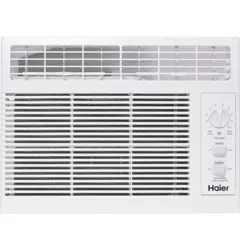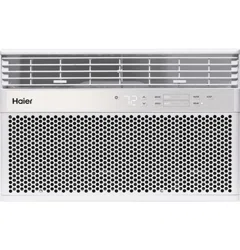
Owner’s Manual and
Installation Instruction
Manual del propietario y
instrucciones de instalación
QPCD05NXTW
HPB08XCM
Portable Air Conditioner
Acondicionador de aire portatil
49-7782-1 12-18 GEA
Design may vary by model number.
Some models may have an additional
letter after the model number
El diseño puede variar según el número
de modelo
Algunos modelos pueden tener una
letra adicional después del número del
modelo

2 49-7782-1
ENGLISH

49-7782-1 3
ENGLISH
TABLE OF CONTENTS
SAFTEY INFORMATION ...........................................................................................4
CONTROL PANEL .................................................................................................5
PARTS AND FEATURES .......................................................................................... 8
INSTALLATION REQUIREMENTS ................................................................................. 9
INSTALLATION INSTRUCTIONS ..................................................................................10
AIR CONDITIONER USE . . . . . . . . . . . . . . . . . . . . . . . . . . . . . . . . . . . . . . . . . . . . . . . . . . . . . . . . . . . . . . . . . . . . . . . . . . . . . . . . . . . . . . . . . 13
AIR CONDITIONER CARE ....................................................................................... 13
TROUBLESHOOTING . . . . . . . . . . . . . . . . . . . . . . . . . . . . . . . . . . . . . . . . . . . . . . . . . . . . . . . . . . . . . . . . . . . . . . . . . . . . . . . . . . . . . . . . . . . 14
LIMITED WARRANTY ............................................................................................15
RECORD KEEPING
Thank you for purchasing this Haier product. This user manual
will help you get the best performance from your new range.
For future reference, record the model and serial number
located on the front behind the range storage drawer, and the
date of purchase.
Staple your proof of purchase to this manual to aid in
obtaining warranty service if needed.
____________________________________________________
Model number
____________________________________________________
Serial number
____________________________________________________
Date of purchase
HAIER WEBSITE
Have a question or need assistance with your appliance? Try the Haier Website 24 hours a day, any day of the year! You
can also shop for more great Haier products and take advantage of all our on-line support services designed for your
convenience. In the US: Haierappliances.com

4 49-7782-1
ENGLISH
IMPORTANT SAFETY INSTRUCTIONS
WARNING
To reduce the risk of fire, electrical
shock, injury to persons, or damage when using the air
conditioner, follow basic precautions, including the
following:
• Read all of the instructions before using this appliance.
• Plug into a grounded 3 prong outlet.
• Do not remove ground prong.
• Do not use an adapter.
• Do not use an extension cord.
• Do not operate the air conditioner if it has a damaged
cord or plug, if it is not working properly, or if it has been
damaged or dropped.
• The air conditioner should be serviced only by qualified
service personnel. Call an authorized service company
for examination, repair, or adjustment.
• Disconnect power before servicing.
• Disconnect power before cleaning.
NOTE: Turning off power by pressing the Power button
does NOT disconnect the appliance from the power
supply.
• Do not install or use the air conditioner in any area where
the atmosphere contains combustible gases or where
the atmosphere is contaminated. Avoid any chemicals
coming in contact with your air conditioner.
• Do not store anything directly on top of the air
conditioner.
• Use two or more people to move and install air
conditioner.
• Never operate the air conditioner without the filters in
place.
• Do not use the air conditioner near a bathtub, shower or
wash basin or other wet area.
READ AND SAVE THESE INSTRUCTIONS
IMPORTANT SAFETY INFORMATION
READ ALL INSTRUCTIONS BEFORE USING THE APPLIANCE
SAFETY INFORMATION
49-7782-1 5
ENGLISH
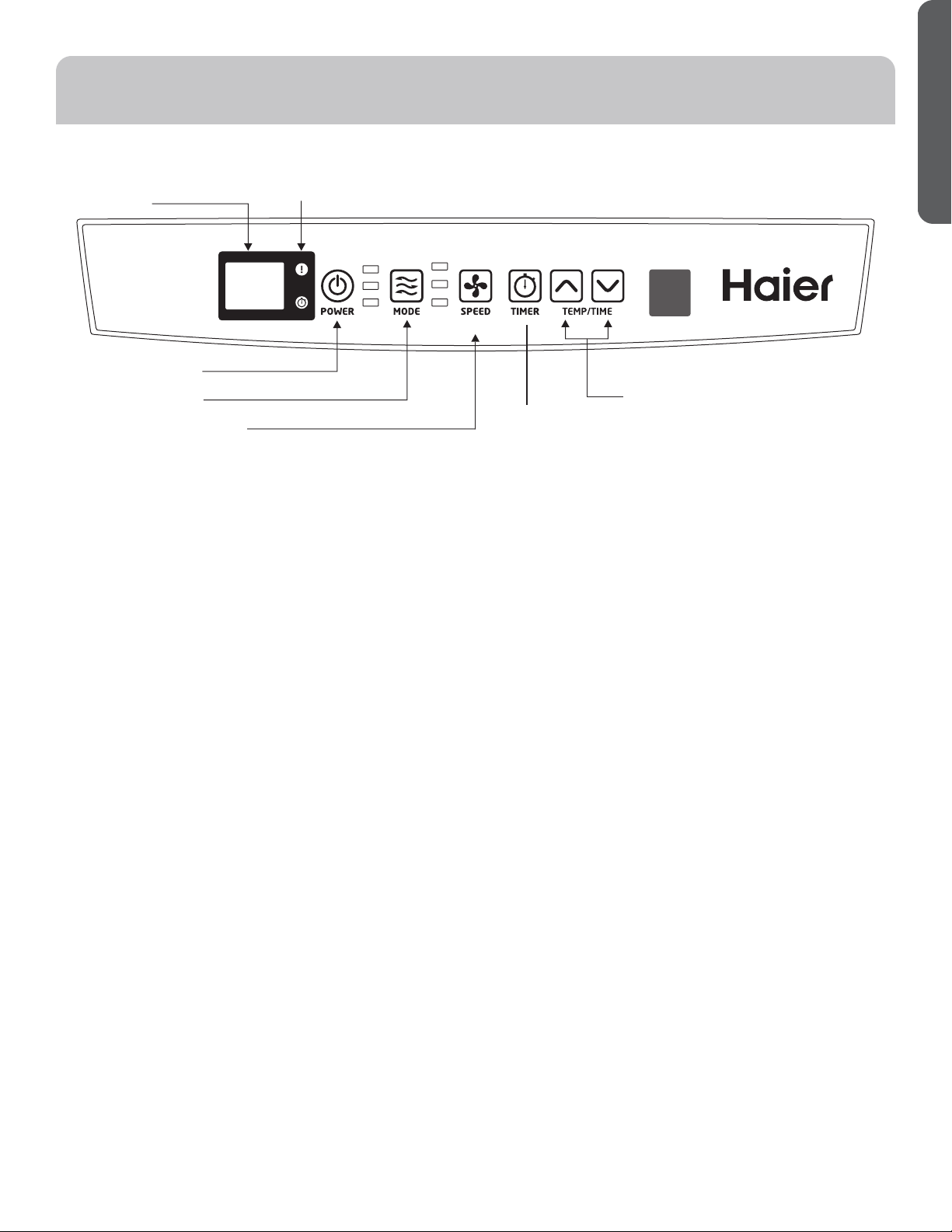
Features and appearance will vary.
Lights next to the touch pads on the air conditioner control panel indicate the selected settings.
BUTTONS
A
Display
B. Warning Light
Condensed water may accumulate in the unit. If the
internal tank becomes full, the warning light will light
up and the unit will not operate until the unit has been
drained.
C. Power Control
The power control turns the unit on and off.
D. Mode Control
The mode control has three settings: COOL,
DEHUMIDIFY, and FAN. The settings are adjusted with
Mode Control button. A light will indicate which setting is
currently being used.
Cooling Mode.
When cool mode is selected, the indicator light turns blue.
During the cooling mode the air is cooled and hot air
is exhausted to the outside through the exhaust tube.
Adjust fan speed and air temperature to suite your desired
comfort level. NOTE: The air exchange hoses must vent
outside the room when using cool mode.
Dehumidify Mode.
When dehumidify mode is selected, the indicator light
turns yellow. Air is dehumidified as it passes through
the unit, without being in full cooling mode. If room
temperature is higher than 77 degrees Fahrenheit, fan
speed can be adjusted; otherwise fan speed is fixed to
“Low”. NOTE: If the unit is to be used as a dehumidifier,
do not connect the exhaust hose let the warm air return
to the room. Continuous drainage is then necessary.
Fan Mode
When fan mode is selected the indicator light will shine
green. Air is circulated throughout the room with no
cooling. NOTE: Unit does not need to be vented in Fan
mode.
E. Fan Speed Control
Select between multiple fan speeds. Number of fan
speeds vary by model.
Hold the FAN button for 3 seconds, the fan will continue
running even when the compressor stops due to the
temperature being reached.
F. Timer
Auto Turn Off:
With machine in running mode, press timer button to
select number of hours you would like the unit to run in air
conditioning mode until it automatically shuts off.
Auto Turn On:
With machine in stand by mode, press timer button to
select number of hours until you would like the unit to
automatically start running in air conditioning mode.
F. Timer/Temp Set Controls
• Used for adjusting the timer and thermostat.
• The default display is room temperature.
• In cooling mode when ޔ or ޕ button is pressed, the set
temperature is displayed and may be adjusted. After 15
seconds the display will revert back to room temperature.
Temperature is only adjustable in cool mode. The time is
adjustable between 1-24 hours.
NOTE: By pressing both ޔ and ޕ buttons at the same
time, the display will toggle between Celsius and
Fahrenheit. The temperature cannot be adjusted in the
fan or dehumidification modes.
CONTROL PANEL
After switching the air conditioner off, you must wait 3 minutes before switching it back on again.
A
B
C
D
E
F
G
Hold 3 Sec for
Constant Cool
CONSTANT
COOL
COOL
DEHUM
FAN
LOW
HIGH

6 49-7782-1
ENGLISH
CONTROL PANEL
Cool Mode
Use the COOL mode for cooling and for economy cooling.
To set the COOL mode:
1. Press the MODE pad until the COOL indicator light is
lit.
2. Press the FAN pad to set HIGH or LOW fan speed.
3. Press + or - to set the desired temperature between
61°F and 89°F in 1°F increments.
After settings have been made, the display will change
back to show the room temperature.
The temperature control is used to maintain the room
temperature. The compressor will cycle on and off to keep
the room at the set level of comfort. Set the temperature
control at a lower number and the indoor air will become
cooler. Set the temperature control at a higher number and
the indoor air will become warmer.
NOTE: If the air conditioner is off and is then turned on
while set to COOL, it will take approximately 3 minutes for
the compressor to start and cooling to begin.
Cooling Descriptions
For Normal Cooling—Select the COOL mode or HIGH
fan speed with a middle set temperature.
For Maximum Cooling—Select the COOL mode
and HIGH fan speed with a lower set temperature.
For Quieter & Nighttime Cooling—Select the COOL
mode and LOW fan speed with a middle set temperature.
NOTE: If you switch from COOL or DRY mode setting to
OFF wait 3 minutes before restarting.
In Cool mode, the fan will cycle off with the compressor when
the room temperature is reached. Then the fan will cycle 10
minutes off and 2 minutes on to sample the air temperature.
DRY Mode—Dehumidification
Use the DRY mode to provide dehumidification only. The
fan will run at a fixed speed at this setting, so a fan speed
cannot be set. Keep windows and doors closed for the
best dehumidifying effects.
To set the DRY mode:
•Press the MODE pad until the DRY indicator light is lit.
In the DRY mode, a set temperature will not be displayed.
After DRY mode has been set, the display will change
back to show the room temperature.
NOTE: If you switch from a DRY setting to OFF or to a fan
setting, wait at least 3 minutes before switching back to a
DRY setting.
If using the unit in the DRY mode as a dehumidifier for an
extended time.
1 . Unplug the power cord.
2. Connect a drain hose (not included) to the center drain
port (see page 9, upper drain #8) and lead hose to floor
drain.
3. Reconnect the power cord and press the MODE pad
until the DRY indicator light is lit.
FAN Mode
Use the FAN mode to provide air circulation and filtering
without cooling.
To set the FAN mode:
• Press the FAN pad until the desired indicator light for
HIGH or LOW fan speed is lit.
Since fan only settings do not provide cooling, a set
temperature will not be displayed. After FAN speed has
been set, the display will change back to show the room
temperature.
Constant Cool Mode
Use Constant Cool mode when you do not want the fan to
stop running.
To Set Constant Cool Mode:
1. Press the FAN pad for 3 seconds until the Constant Cool
indicator light is lit.
2. Press the FAN pad to set High or Low fan speed.
3. Press + or - to set the desired temperature between 61°F
and 89°F in 1°F increments.
In Constant Cool Mode, the fan will continue running even
when the compressor stops due to the set temperature being
reached.
Power Outage Recovery Feature
In the case of a power outage or interruption, the unit will
automatically re-start in the settings last used after the
power is restored.
NOTE: If the TIMER was set before the power outage, it
will need to be reset after power is restored.
The display will always default to show the room temperature.
When the air conditioner is turned on, it will automatically start in the last mode and fan settings selected.
49-7782-1 7
ENGLISH
CONTROL PANEL
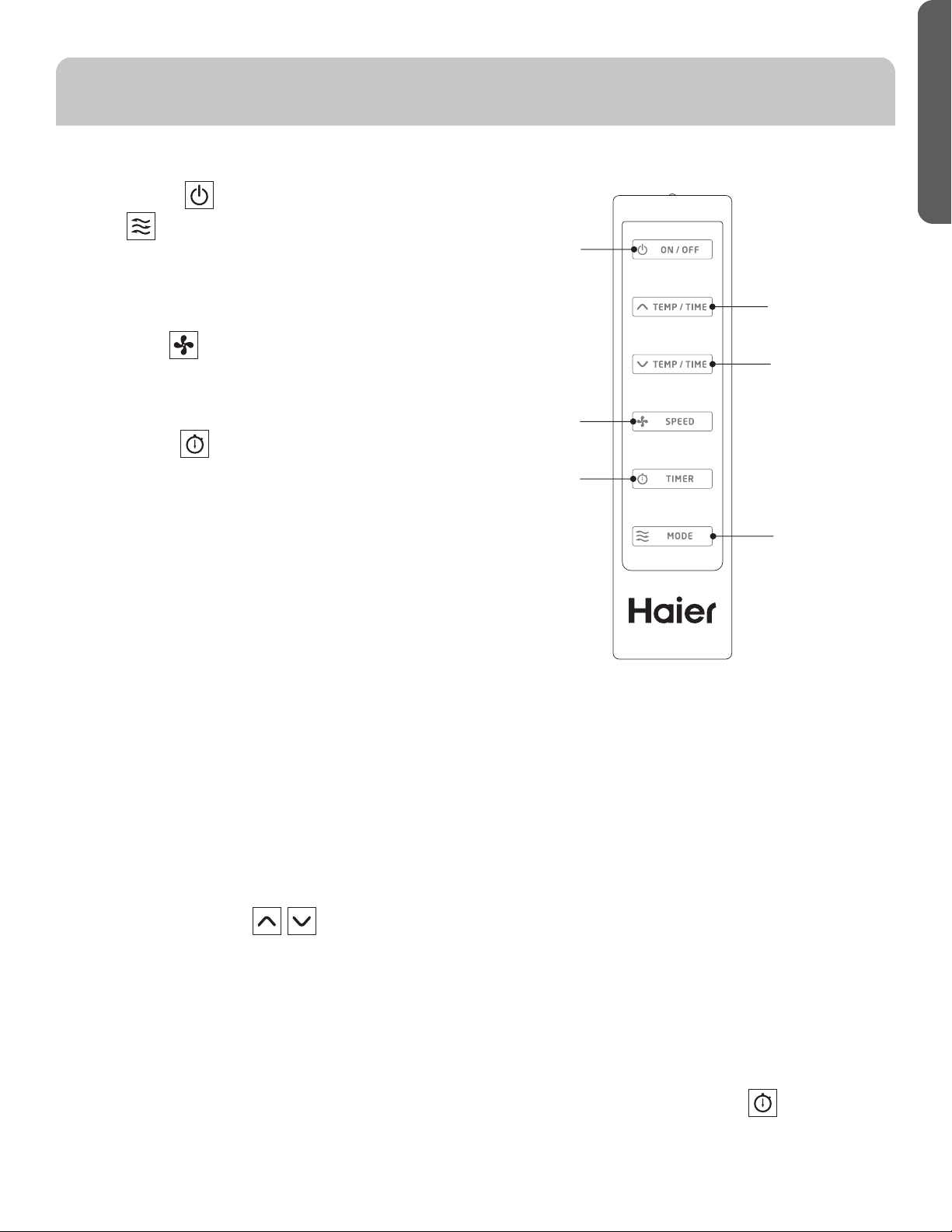
REMOTE CONTROL
1. Power On/Off
2. Mode
Cool: Blue LED lights when in cooling mode.
Dehumidification: Yellow LED lights when in
dehumidification mode.
Fan: Green LED lights when in fan mode.
3. Fan Speeds
Select between multiple fan speeds. Number of fan
speeds vary by model. In dehumidification mode, and
room temperature is greater than 77° F, fan speed can be
adjusted; Otherwise fan speed is fixed to “low”.
4. On/Off Timer
To set the timer for a 1- 24-hour delay until the air
conditioner turns off:
1. When you use the timer setting button while the unit is
operating, you can preset a time for the unit to turn off.
2.
When you use the timer setting button while the unit is
on standby, you can preset a time for the unit to turn on.
3. If you press the “ON/OFF” button, the preset timer
function will be canceled.
4. Timer setting range is 1-24 hours.
To clear Timer Delay program:
NOTE: Air conditioner can be either on or off.
1. Press the Timer Button.
2. Press the + or - buttons continuously till “00” appears
to cancel the timer function.
To change the remaining time (in hours):
1. Press the Timer Button.
2. Press the plus or minus button to change the delay time
from 1 to 24 hours.
3. The new delay time will display.
5. Setting the Temperature
To set the temperature, press the ޔ or ޕ keys to raise or
lower the temperature. The temperature can be raised
or lowered in the cool mode. The temperature cannot be
adjusted in fan or dehumidification mode.
NOTE; The temperature can be set between 61° F to 89° F
(Cool Mode).
1
2
3
4
5
6
8 49-7782-1
ENGLISH
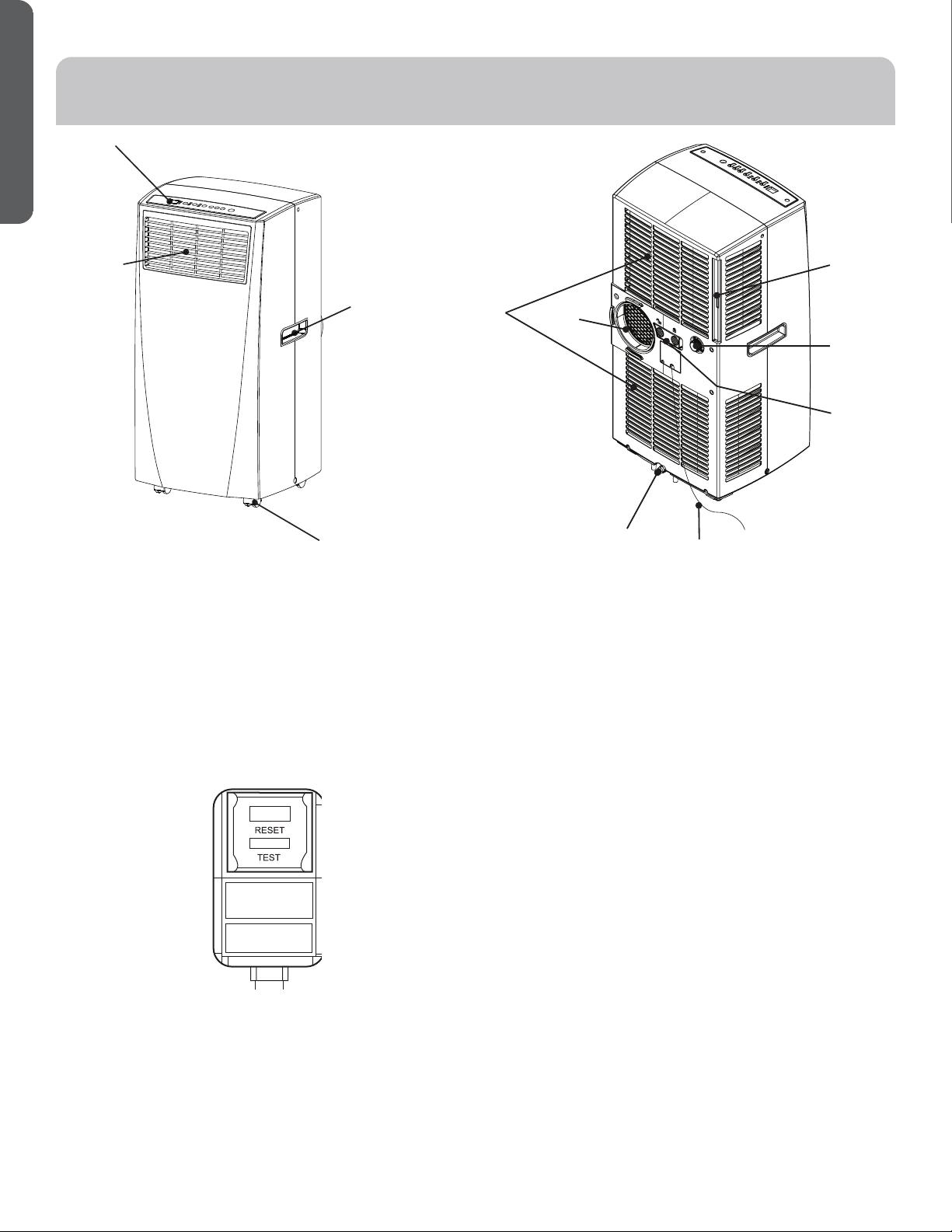
Power Cord
TEST: When this button is pressed or when there is a
current leak, the unit will not operate.
RESET: After resolving the problem, press the reset
button to resume operation.
PARTS AND FEATURES
1. Control Panel
2. Air Outlet
3. Handle hole
4. Caster
5. Air Filter
6. Exhaust Hose Connection
7. Air Intake
8. Upper Drain
9. Lower Drain
NOTE: Please ensure if the water outlet drain is
well installed before use.
10. Power Supply Cord
11. Rocker Switch
1
2
3
4
5
6
7
8
9
10
11
49-7782-1 9
ENGLISH
INSTALLATION REQUIREMENTS
TOOLS AND PARTS
Gather the required tools and parts before starting installation.
TOOLS NEEDED
• Flat-blade Screwdriver
• Phillips Screwdriver
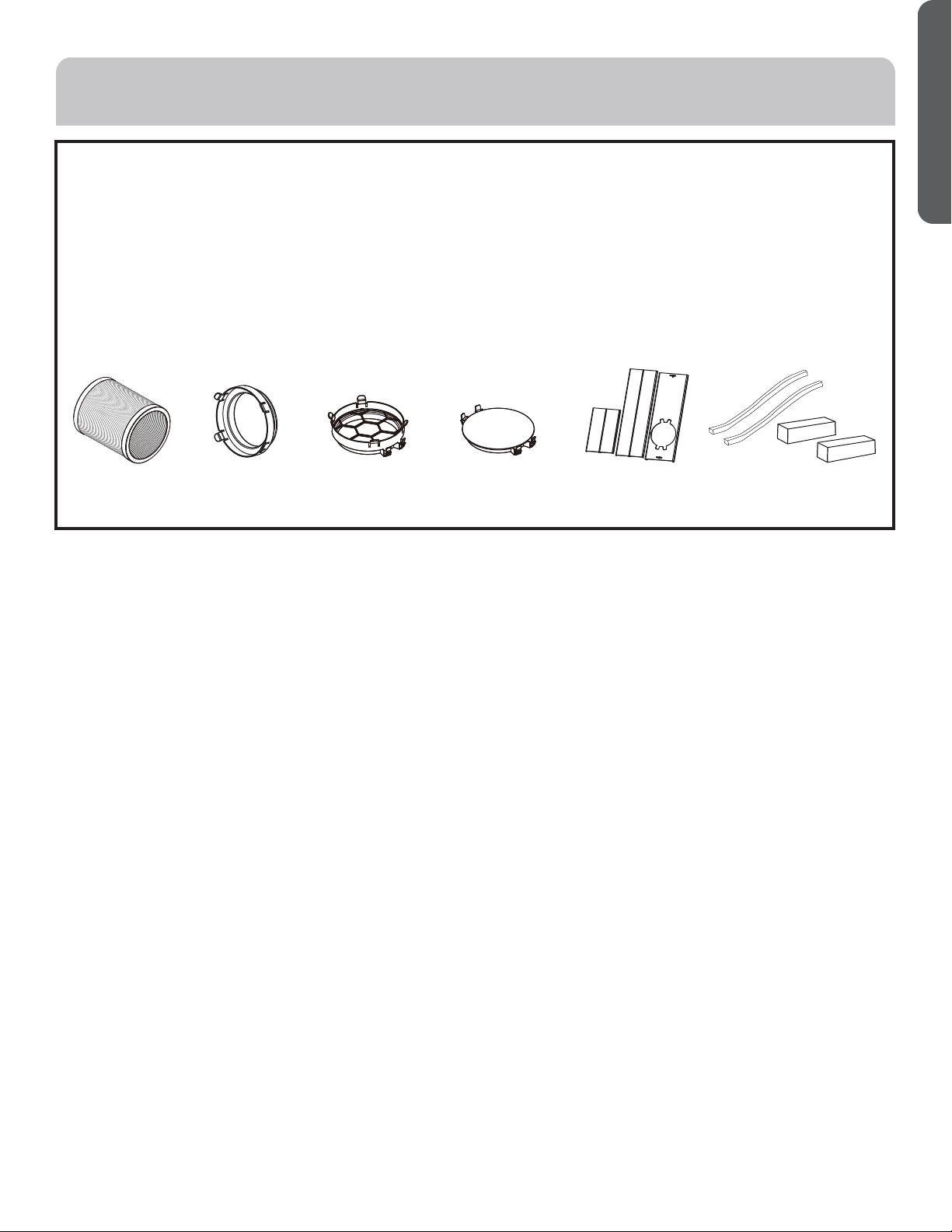
PARTS SUPPLIED
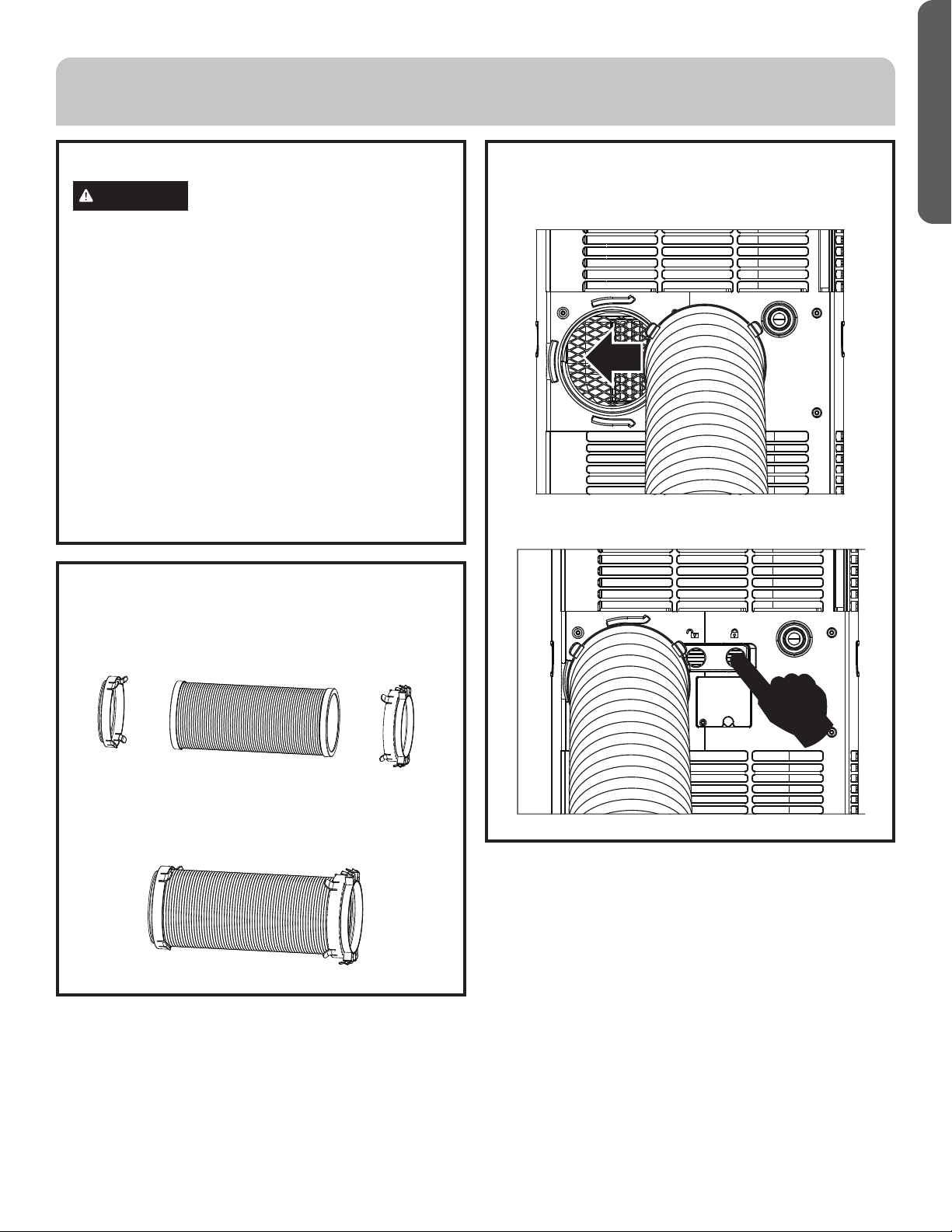
Exhaust Hose
Hose Connector
Hose Connector
Cover #5
Window Panel and
Extension Panel (3)
Foam Seals
10 49-7782-1
ENGLISH
Questions? Call Haier Appliances at 1.877.337.3639 or visit our Website at: HaierAppliances.com.
BEFORE YOU BEGIN
Read these instructions completely and carefully.
• IMPORTANT — Save these instructions for local
inspector’s use.
• IMPORTANT — Observe all governing codes and
ordinances.
• Note to Installer – Be sure to leave these instructions
with the Consumer.
• Note to Consumer – Keep these instructions for future
reference.
• Skill level – Installation of this appliance requires basic
mechanical skills.
• Completion time – Approximately 1 hour
• We recommend that two people install this product.
• Proper installation is the responsibility of the installer.
• Product failure due to improper installation is not
covered under the Warranty.
• You MUST use all supplied parts and use proper
installation procedures as described in these
instructions when installing this air conditioner.
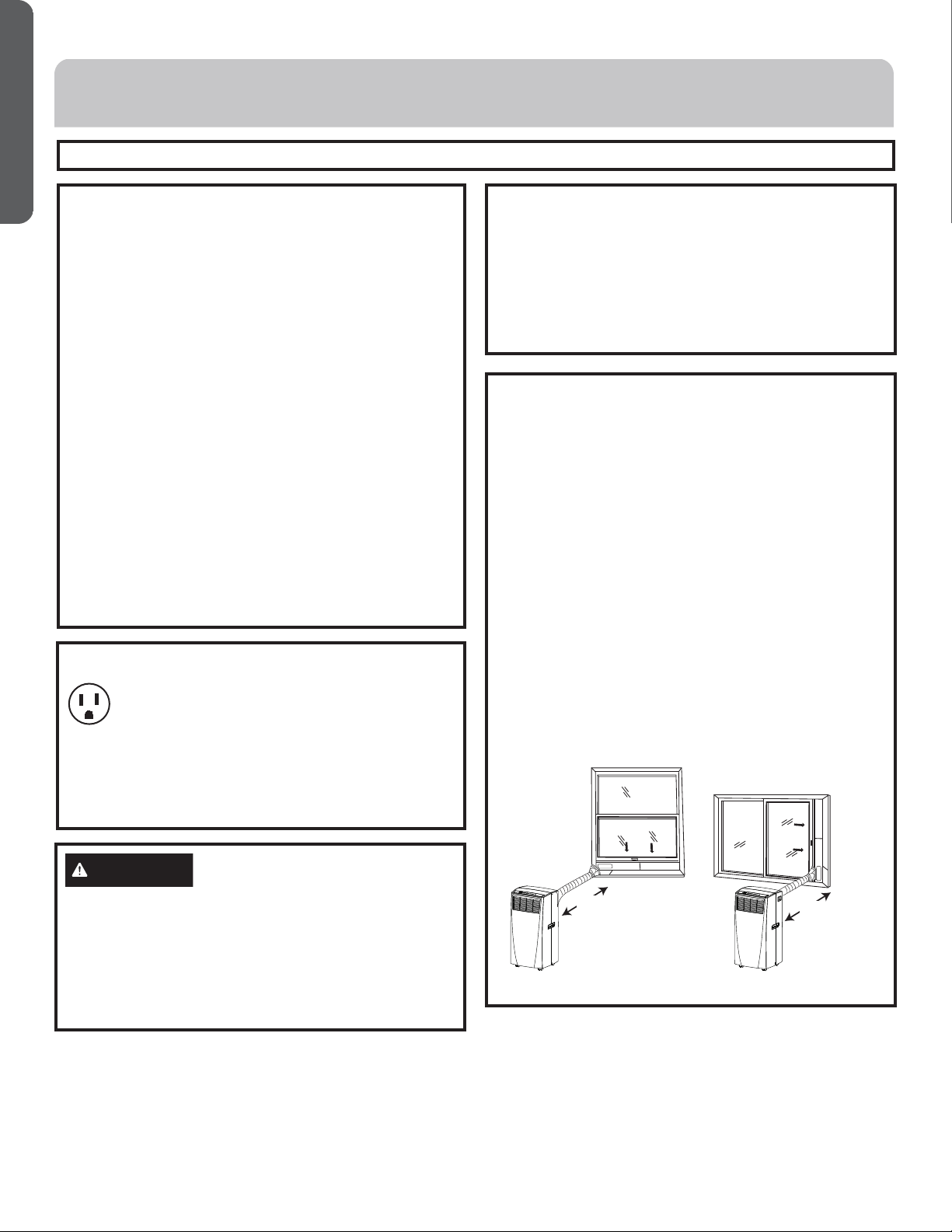
Location Requirements
• Place the air conditioner on a flat, level surface in a
location that is at least 20” (51 cm) from any wall.
NOTE: A minimum clearance of 30” (76.2 cm) from the
air conditioner to the wall must be maintained to ensure
proper airflow.
• Maintain a minimum 20” (51 cm) clearance around the air
conditioner to not block airflow.
• Keep the air conditioner free of any obstructions such as
drapes, curtains, blinds, etc.
• The exhaust hose should be free of any obstructions.
• Do not place the air conditioner on an unstable or raised
surface because it could fall and cause damage or injury.
•
Do not place the air conditioner in direct sunlight or near
a heat source such as baseboard heaters, stoves, etc.
• The window panel can be installed in a window with a
minimum 20” (51 cm) to a maximum 40” (101.6 cm)
opening.
20”
(51 CM)
20”
(51 CM)
ÎÕÎÌÝÛÒÌÊÕÛÎÚÞÒÛÎÖÎ×ÝÜ
Some models require a 115/120-volt AC,
60-Hz grounded outlet protected with a 15-amp
time-delay fuse or circuit breaker.
The 3-prong grounding plug minimizes the possibility of
electric shock hazard. If the wall outlet you plan to use is
only a 2-prong outlet, it is your responsibility to have it
replaced with a properly grounded 3-prong wall outlet.
CAUTION
Do not, under any circumstances, cut or remove the third
(ground) prong from the power cord.
Do not change the plug on the power cord of this air
conditioner.
Aluminium house wiring may present special problems—
consult a qualified electrician.
Power cord includes a current interrupter device. A test
and reset button is provided on the plug case. The device
should be tested on a periodic basis by first pressing the
TEST button and then the RESET button while plugged
into the outlet. If the TEST button does not trip or if the
RESET button will not stay engaged, discontinue use
of the air conditioner and contact a qualified service
technician.
INSTALLATION INSTRUCTIONS
49-7782-1 11
ENGLISH
1. Unpack the Air Conditioner
WARNING
Excessive Weight Hazard
• Use two or more people to move and install air
conditioner.
• Failure to do so can result in back or other injury.
• Remove packaging materials. Save the carton and the
foam packaging for storing the air conditioner when
not in use.
NOTE: There are NO packing materials inside the air
conditioner to remove—Do Not open the cabinet.
• Properly dispose of/recycle all packing material.
• Handle the air conditioner gently.
• Keep the air conditioner upright and level. Do not set
the air conditioner on its side, front, back or upside
down.
2. Install Exhaust
1. Connect the connectors #2 and #3 to two sides of
exhaust hose #1 to create an exhaust assembly.
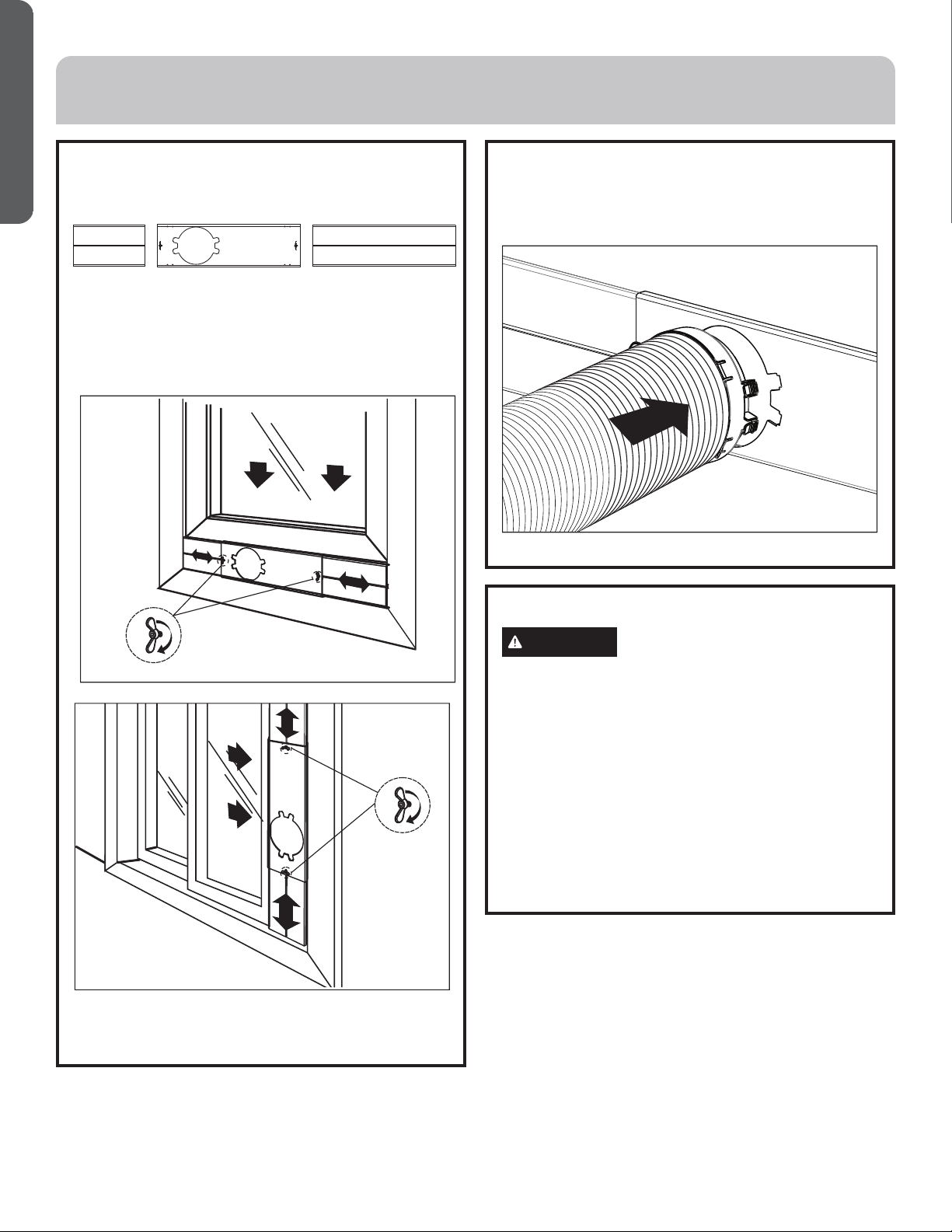
2. Install Exhaust (cont.)
2. Sliding in one end of hose assembly (with hose
connector #2) to rear panel.
Ýëèñóøöë÷ëèõòæîèõöúì÷æë÷òĤû÷ëèëòöèäööèðåïü
Ĥõðïü
INSTALLATION INSTRUCTIONS
2 1 3
12 49-7782-1
ENGLISH
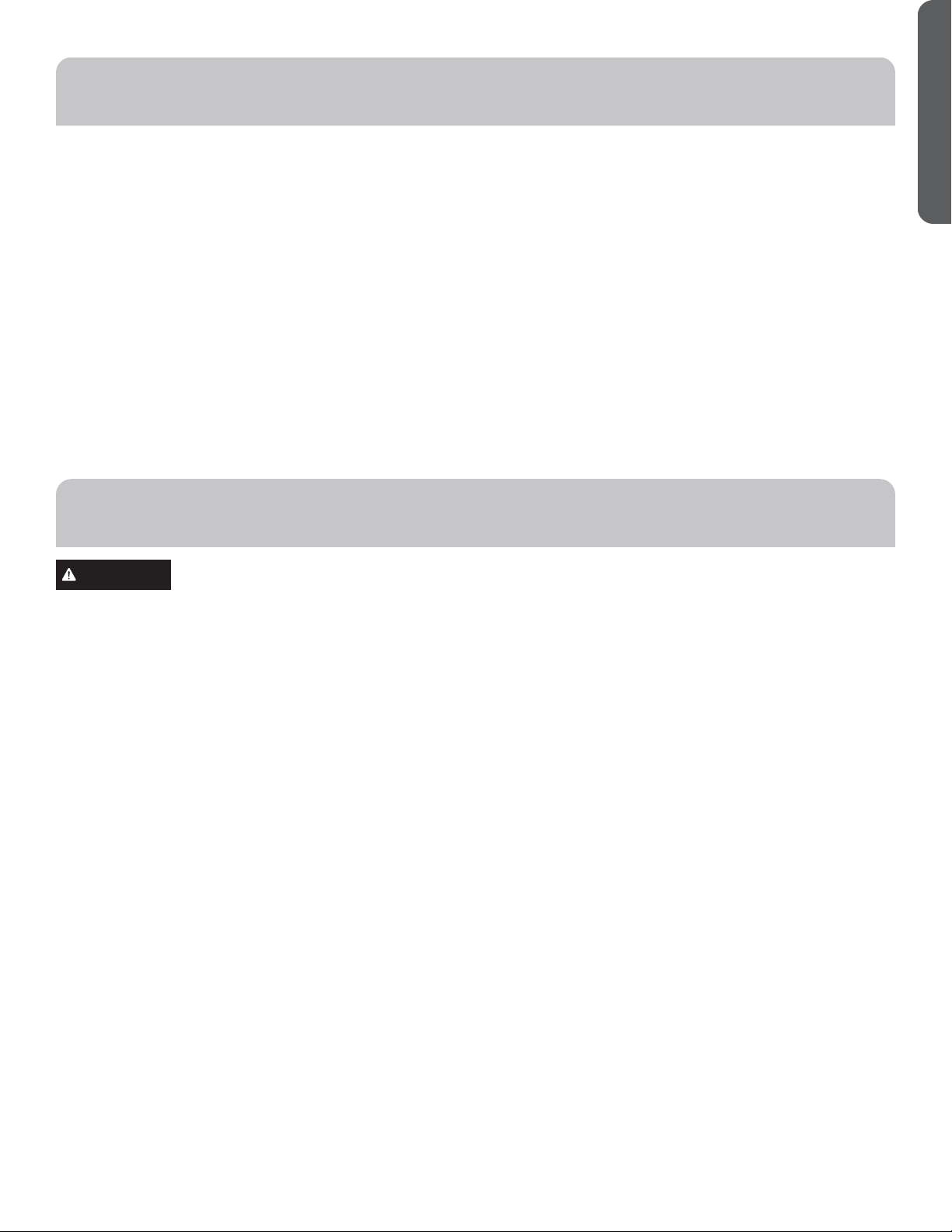
3. Install Window Panels
1. Insert the window panel B and C to each end of the
main panel A. Adjust to fix the length of window.
2. Open the window and place window panels into
úìñçòúÊçíøö÷÷ëèèû÷èñöìòñóäñèïö÷òĤ÷úìç÷ëòõ
height of window by the screw and nut sets mounted
on the main ptanel A.
4. Attach Exhaust Hose to the
Exhaust Nozzle
1. Insert the other end of the exhaust hose assembly
(with hose connector #3) onto the window bracket.
INSTALLATION INSTRUCTIONS
5. Complete Installation
WARNING
Electrical Shock Hazard:
• Plug into a grounded 3 prong outlet.
• Do not remove the ground prong from the power
cord plug.
• Do not use an adapter.
• Do not use an extension cord.
• Failure to do so can result in death, fire or electrical shock.
1. Plug the power cord into a grounded 3 prong outlet.
2. Press the Reset button on the power cord to
ensure the safety plug is providing power to the air
conditioner.
CA B
49-7782-1 13
ENGLISH
IMPORTANT: If the air conditioner has been tilted on its side,
wait 24 hours before turning on the air conditioner to allow
the oil to return to the compressor. This will prevent the air
conditioner from failing prematurely.
• Allow 20” (51 cm) of space around the unit for proper air
circulation.
• Do Not operate the air conditioner without air filters in
place.
• Do not spill liquid on the control panel; it may cause an
electrical short to the interior electronic parts that would
either disable them or cause them to function improperly.
• When turning on the air conditioner for the first time
after plugging it into an electrical outlet, the unit will
start in Cooling mode set at 75ºF (24°C), and at High fan
speed. The control panel will display the current room
temperature.
• When turning on the unit after previous use, it will
remember the last settings used.
• After a normal shut down, please wait for 3 minutes before
restarting the unit.
• In Cooling mode, this unit should not require water to be
removed. This model has a unique design that continuously
evaporates the water.
• When the unit is operated in high humidity conditions, you
may need to empty the water tank periodically.
• The unit will shut down automatically when the water tank
is full. The Full indicator illuminates to alert you of this
condition.
WARNING
Electrical Shock Hazard:
• Disconnect power before cleaning.
• Failure to do so can result in death or electrical shock.
Cleaning
1. Unplug or disconnect power.
2. Use only a soft cloth dampened with water to clean the
cabinet.
NOTE: Do not use a liquid or spray cleaner to clean the air
conditioner.
NOTE: DO NOT use chemicals, abrasives, ammonia,
chlorine bleach, concentrated detergents, solvents or
scouring pads. Some of these chemicals/items may
damage and/or discolor your air conditioner.
3. Dry thoroughly with a soft cloth.
4. Plug in or reconnect power.
Air Filters
The air filters should be cleaned at least once a week for your
unit to operate at optimum efficiency.
IMPORTANT: Do Not operate the air conditioner without the
air filters in place.
1. Unplug or disconnect the power.
2. Pull on the tabs to slide out the filters from the back of the
air conditioner.
NOTE: The secondary filters are accessible once the main
filters are removed.
3. Wash or vacuum the dust from the air filters.
NOTE: If washed, gently shake the filter to remove the
excess water and dust particles trapped in the filter.
4. Reinstall the filters.
5. Plug in or reconnect power.
Internal Water Tank
The Full indicator illuminates, when the internal water tank
has filled with condensed water.
To Empty the Internal Water Tank:
1. Unplug or disconnect power.
2. Place a shallow 1 quart or larger pan (not included) below
the lower drain located on the back (near the bottom) of
the air conditioner.
3. Remove the cap and the rubber plug and drain the water
tank.
4. Re-insert the drain plug and screw the cap snugly into
place.
5. Plug in or reconnect power.
Storage
If the unit is not being used for a long period of time:
1. Unplug or disconnect power.
2. Drain the water from the water tank. See “Air
Conditioner Care.”
3. Use the original packaging to repack the unit to avoid a
buildup of dust or dirt.
4. Store the air conditioner in a cool, dry location.
AIR CONDITIONER USE
AIR CONDITIONER CARE
14 49-7782-1
ENGLISH
Problem Possible Causes Solution
Unit does not start or
operate
Power supply cord is not plugged into an
outlet.
Plug the power cord into a grounded 3 prong outlet.
Power supply cord has tripped. Press and release the RESET button on the power
supply cord.
The Power button has not been pressed. Press the Power button on the Control Panel or
Remote Control to turn ON the air conditioner.
There is no power to the electrical outlet. Plug a working lamp into the outlet to check for
power.
A household fuse has blown or a circuit breaker
has tripped.
Replace the fuse or reset the circuit breaker.
The control was programmed for a Time Delay. Cancel the Time Delay. See “Control Panel.”
The batteries in the remote control are dead. Replace the batteries.
The internal water tank is full.
NOTE: The air conditioner automatically turns
off, and the Water Full indicator illuminates to
alert you of this condition.
Empty the water tank. See “Air Conditioner
Care.”
Remote control is not
working
Batteries are dead. Replace the batteries.
Batteries are installed incorrectly. Make sure the batteries are inserted in the correct
position.
Air conditioner is
working but the room
is not cooling.
The room temperature is hot.
NOTE: On extremely hot and humid days,the
air conditioner will take longer to cool the
room.
Allow time for the room to cool when you first turn
on the unit.
Make sure the air conditioner has an adequate
BTU rating for the size of the room being cooled.
The control is set incorrectly to Fan or Dehum
mode.
Set the Mode to Cool and the Fan Speed to High.
Airflow is restricted. Remove any obstacles to the airflow and redirect
airflow for uniform cooling.
Temperature set too high. Lower the set temperature.
Air filters are dirty or restricted. Clean the air filter. See “Air Conditioner Care.”
Air conditioner installed incorrectly Check the exhaust hose and window panel for
proper installation.
Doors and windows are open. Close the doors and windows to the room being
cooled to prevent cooled air from escaping.
TROUBLESHOOTING
49-7782-1 15
ENGLISH
LIMITED WARRANTY
EXCLUSION OF IMPLIED WARRANTIES - Your sole and exclusive remedy is product repair as provided in this Limited
Warranty. Any implied warranties, including the implied warranties of merchantability or fitness for a particular purpose,
are limited to one year or the shortest period allowed by law.
For US Customers: This limited warranty is extended to the original purchaser and any succeeding owner for products
purchased for home use within the USA. If the product is located in an area where service by a GE Appliances Authorized
Servicer is not available, you may be responsible for a trip charge or you may be required to bring the product to an Authorized
GE Appliances Service location for service. In Alaska, the limited warranty excludes the cost of shipping or service calls to your
home.
Some states do not allow the exclusion or limitation of incidental or consequential damages. This limited warranty gives you
specific legal rights, and you may also have other rights which vary from state to state. To know what your legal rights are,
consult your local or state consumer affairs office or your state’s Attorney General.
Warrantor US:
GE Appliances, a Haier company
Louisville, KY 40225
Ŷ Customer instruction. This owner’s manual provides
information regarding operating instructions and user
controls.
Ŷ Improper installation. If you have an installation problem,
or if the air conditioner is of improper capacity, contact
your dealer or installer. You are responsible for providing
adequate electrical connecting facilities.
Ŷ Failure of the product resulting from modifications to the
product or due to unreasonable use including failure to
provide reasonable and necessary maintenance.
Ŷ Replacement of house fuses or resetting of circuit breakers.
Ŷ Failure due to corrosion on models not corrosion-protected.
Ŷ Damage to the product caused by improper power supply
voltage, accident, fire, floods or acts of God.
Ŷ Incidental or consequential damage caused by possible
defects with this air conditioner.
Ŷ Damage caused after delivery.
What Will Not Cover:
For The Period Of: Will Replace:
One Year
From the date of the
original purchase
Replacement, repair, or refund of the original retail price for any product which fails due to a
defect in materials or workmanship. If the unit is exchanged, the replacement unit is warranted
for the remainder of your product’s original one-year warranty period. GE will, at its sole
discretion, replace the product with a product of the same or comparable functionality and quality
or refund the original retail price.
Ŷ Properly pack your unit. We recommend using the original
carton and packing materials.
ŶReturn the product to the retail location where it was
purchased.
Ŷ Include in the package a copy of the sales receipt or other
evidence of date of original purchase. Also print your name
and address and a description of the defect.
In Order to Make a Warranty Claim During the First 90 Days from the Date of Original Purchase:
Ŷ Locate your original sales receipt and make a note of your
model and serial number.
Ŷ Call 1.877.337.3639 (in the United States) to initiate the
product replacement process.
ŶYou will be asked to provide your name, address, date of
purchase, model and serial number.
ŶGE Appliances will arrange for a carton to be sent to your
home to recover the product.
Ŷ Please return all requested materials (postage pre-paid) in the
carton provided. Please include a description of the defect.
ŶYou should receive your replacement product or refund
within 7 to 10 business days after your package is received.
In Order to Make a Warranty Claim During the Remainder of the One-Year Warranty:
16 49-7782-1
ENGLISH
NOTES
32 49-7782-1
ESPAÑOL
Impreso en China
IMPORTANT
Do Not Return This Product To The Store
Òéüòøëäùèäóõòåïèðúì÷ë÷ëìöóõòçøæ÷óïèäöèæäïï!¡(''¡##'¡#&#)éòõ÷ëèñäðèäñç÷èïèóëòñèñøðåèõòé÷ëè
nearest authorized service center.
DATED PROOF OF PURCHASE REQUIRED FOR WARRANTY SERVICE
IMPORTANTE
No regrese este producto a la tienda
Üì÷ìèñèøñóõòåïèðäæòñèö÷èóõòçøæ÷òóòõéäùòõæòðøñżôøèöèäï!¡(''¡##'¡#&#)óäõäöòïìæì÷äõèï
nombre y número telefónico del centro de servicio al cliente autorizado más cercano.
×ÎÌÎÜÒÝÊÞ×ÊÙÛÞÎËÊÍÎÌØÖÙÛÊÏÎÌÑÊÍÊ×ųÖÎÛØÍÎÖØÍÎÕØ
Y DE SERIE PARA EL SERVICIO DE LA GARANTÍA