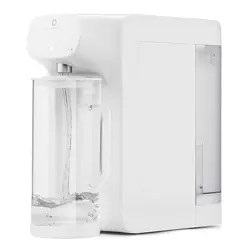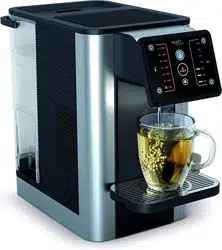

Aurora user manual
Aurora Gebrauchsanweisung
Manuel d’utilisation Aurora
Aurora - Manuale utenti
Manual de usuario Aurora
AUR001

Necessary precautions must be taken when using electrical
appliances, and these include the following:-
1. Keep the appliance cord out of reach of children.
2. This appliance can be used by children aged 8 and above
and persons with reduced physical, sensory or mental
capabilities or lack of experience of knowledge if they
have been given supervision or instruction concerning
use of the appliance in a safe way and understand
the hazards involved. Children shall not play with this
appliance. Cleaning and user maintenance shall not be
carried out by children without supervision.
3. Install the appliance according to the installation
instructions in this user manual.
4. Use on a flat heat resistance surface.
5. Use in a well ventilated area. This appliance emits hot
steam.
6. Ensure the voltage on the appliance rating plate
corresponds to that of the mains electricity.
7. Never place the appliance on or close to sources of heat
or very damp places.
8. Ensure that the power cord does not come into contact
with hot surfaces.
9. NEVER PLACE THE APPLIANCE BODY, PLUG OR POWER
CORD IN WATER OR OTHER LIQUIDS; ALWAYS WIPE
CLEAN WITH A DAMP CLOTH.
10. Always ensure that your hands are thoroughly dry before
using or adjusting the switches on the appliance, or
before touching the power plug or power connections.
11. Do not obstruct the ventilation on the sides of the
appliance.
12. This product is intended to filter tap water only. Do
not put water of unknown quality or that has been
microbiologically impaired into the product. Use only
cold or room temperature water. Do not use for the
preparation of baby food.
13. Consume filtered water within three days.
14. To unplug the appliance, grip the plug and remove it
directly from the power socket. Never pull the power
cord to unplug the appliance.
15. Never use the appliance if the power cord or plug are
damaged or if the appliance itself is faulty.
16. Any changes to this product that have not been expressly
authorized by the manufacturer may lead to the user’s
guarantee being rendered null and void.
17. Packaging must never be left within the reach of children
since it is potentially dangerous.
18. This appliance is designed for filtering, chilling and heating
water. Please do not use the appliance to chill other
liquids as this will damage the appliance and void the
guarantee.
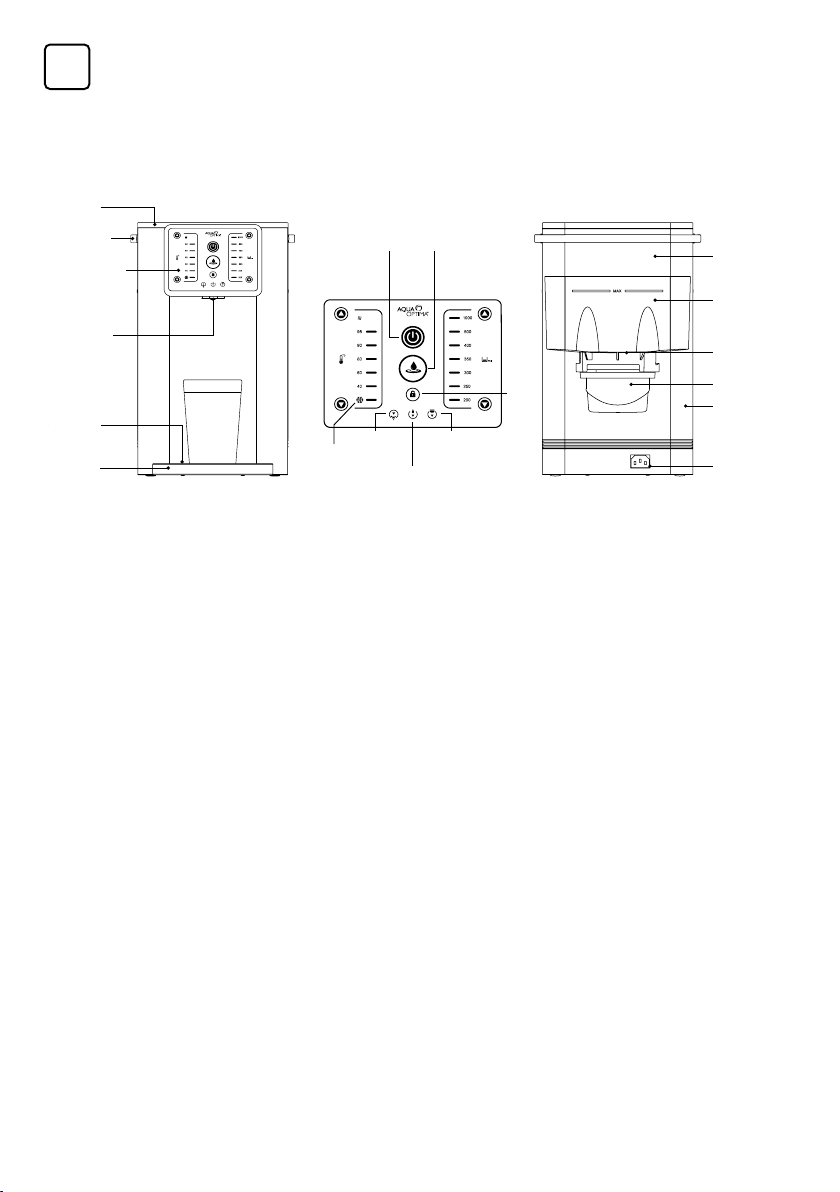
Tank Lid
Control panel
Water tank
handle
Dispensing
outlet
Drip tray
plate
Drip tray
Power cord
Internal chilled
water tank
(0.8l capacity)
Inner water
tank
Filter seal ring
Water
tank
Filter
IMPORTANT SAFEGUARDS
Before first use, clean the appliance, following the
points in the installation set up and cleaning section.
Before use ensure the filter is fitted in the inner water tank.
1. Parts Guide
Temperature
selection
Descale
icon
Chilled
temperature
setting
Replacement
filter icon
Refill icon
Lock
Water volume
selection
Dispense button
On/Off button
1
READ ALL INSTRUCTIONS BEFORE USE
& SAVE THEM FOR FUTURE REFERENCE
EN
Replacement Evolve+ filters are available from all Aqua Optima stockists.
The heating element surface is subject to residual heat after use.
Appliance outlet and other items may be hot after a cycle.
Failure to follow these instructions could cause scalding or damage to the product.
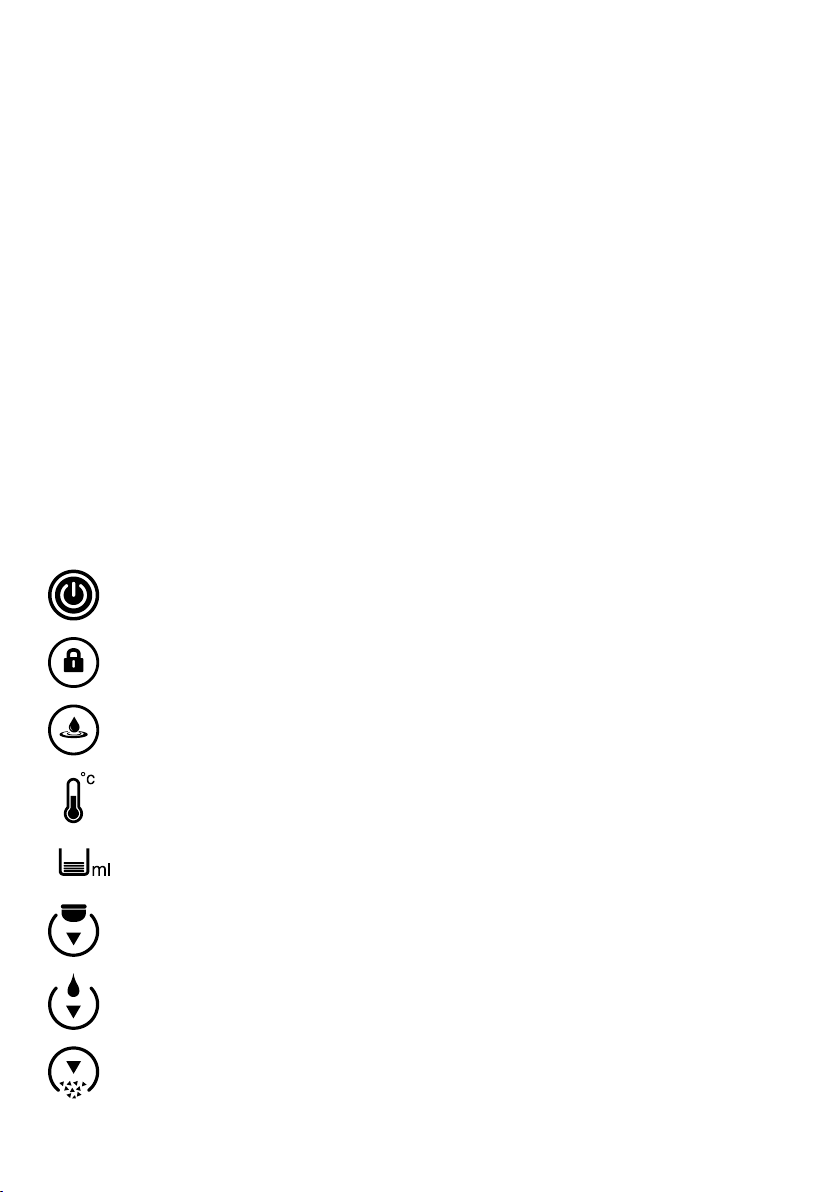
On/Off Button: Press for 1 second to activate or deactivate the
appliance. Blue light shows when power is on.
Lock: Press and hold for 3 seconds to lock or unlock appliance, white
light shows when unlocked, red light shows when locked. Auto lock
after 60 seconds of no button pressing (child lock).
Dispense Button: Press to start/stop dispensing, light will fade in &
out whilst dispensing, red (Hot) or blue (Chilled).
Temperature Selection: Chilled, 40°C to 95°C & boiling
temperature. Use the up and down arrows to press through settings.
The chilled icon will light up red when the water is not chilled and light
up white when the water is chilled.
Water Volume Selection: 200 to 1000ml. Use the up and down
arrows to press through settings.
Filter Icon: Orange light shows when the filter requires changing. See
the instructions for replacing the Aqua Optima Evolve+ filter cartridge
in section 3. Set up, first use and cleaning.
Refill Icon: Orange light shows when the water tank needs refilling
(Non interactive).
Descale Icon: Orange light shows when appliance requires descaling.
See the descale procedure in section 5. Descaling.
2. Control Panel
19.
Do not store or use this appliance outdoors.
20.
If the appliance is used incorrectly, please remove the
plug from the socket and contact Aqua Optima customer
services.
21.
The appliance is designed for use with Aqua Optima
Evolve+ filters, the performance is not guaranteed if any
other filters are used.
22. Do not leave the appliance unattended during operation.
23. Do not clean with solvents or harsh chemicals.
24. Do not move the appliance when in use.
25. Do not operate appliance with a damaged cord, plug or
after the appliance has malfunctioned or been damaged
in any manner. If the cord is damaged it must be changed
by a qualified person to avoid a hazard.
26. Do not fill the appliance with water over 30°C.
27. Do not remove filter while the appliance is running.
28. Do not use appliance without the filter correctly placed or
if the filter is damaged or broken.
29. At first use or after the appliance has been completely
drained of water in all tanks, ensure the instructions for
first use are followed.
30. The appliance should not be placed in a cabinet when in
use.
31. Do not store explosive substances such as aerosol cans
with a flammable propellant in this appliance.
2
3. Set up, first use and cleaning
BEFORE USING THE AURORA APPLIANCE FOR THE
FIRST TIME
• Remove all packaging. There is clear film covering the
display, this can be removed.
• Remove the tank lid and extract the inner water tank and
water tank. Wash rinse and dry thoroughly.
• Prepare filter as per the instructions.
PREPARING THE AQUA OPTIMA EVOLVE+ WATER
FILTER CARTRIDGE
Aqua Optima is a unique water filtration system developed
to deliver filtered water quickly – reducing chlorine,
limescale, organics, herbicides, pesticides, lead and other
heavy metals.
1. Remove all packaging from the filter
cartridge. There may be a small residue
of black carbon particles in the bag
or adhering to the cartridge body;
this is normal. These particles are
harmless and are washed off during the
preparation process.
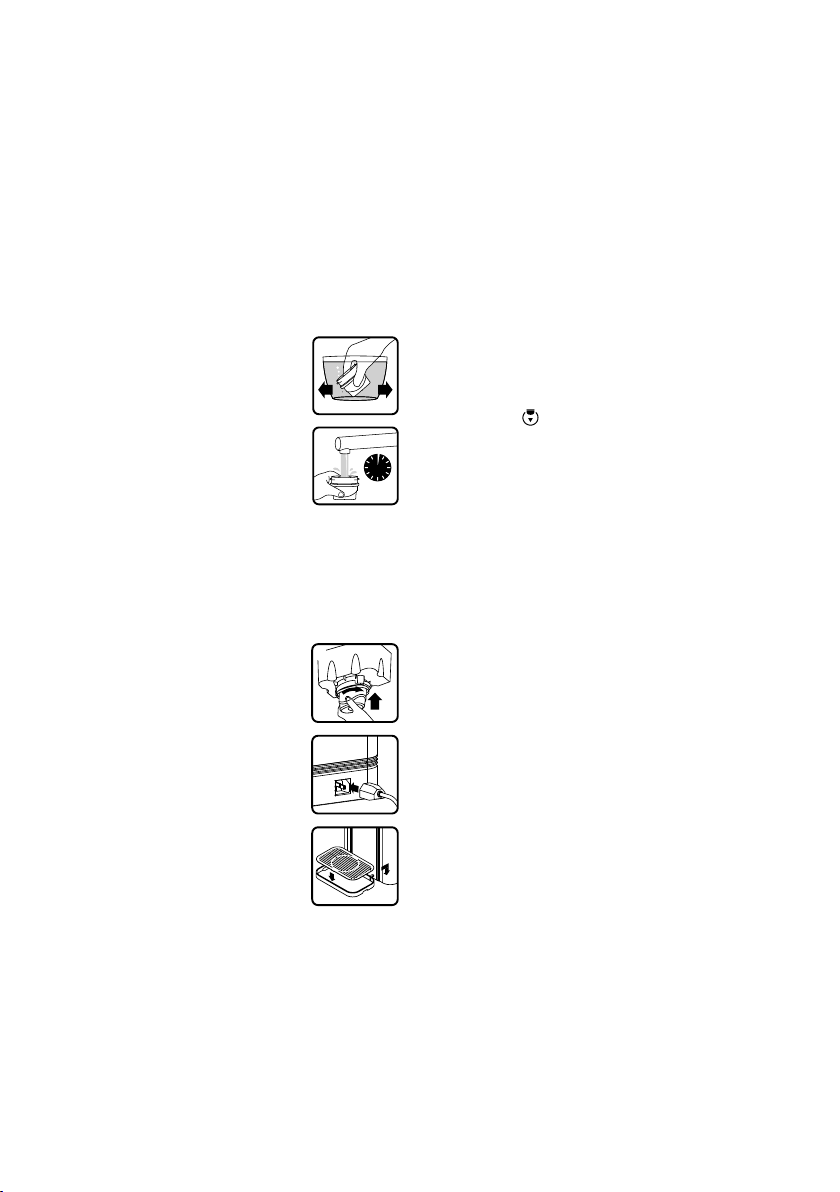
2. Soak the cartridge in a bowl of water for
5-10 minutes to remove all air bubbles (A).
3. Flush for 1 minute under a running tap (B).
4. The filter cartridge is now ready for use.
SET UP THE APPLIANCE AS PER THE INSTALLATION
INSTRUCTIONS IN SECTION 6. OF THIS MANUAL
1. Using the tank handle lift the water tank from the
appliance. Take out the inner water tank.
2. Ensure the seal ring is installed correctly.
3. Fit the Aqua Optima water filter
cartridge into the underside of the inner
water tank, rotating clockwise to lock
into place (A). Ensure it is firmly secure.
4. Reinsert the inner water tank into the
water tank.
5. Attach the power cord to the socket at
the base of the appliance (B).
6. Fill the water tank through the lid to
the “MAX” with cold tap water and
refit the water tank. Allow the water to
filter through to the main tank. Refill
the water tank to “MAX” with cold tap
water and refit the water tank into the
appliance.
7. Place drip tray and drip tray plate on the
front of the appliance (C).
8. Place jug or vessel under the dispense outlet.
9. Plug the power cord into the mains socket and turn on.
10. Using the On/Off button turn the appliance on.
11. Press and hold the lock button for 3 seconds to unlock
appliance. Select the chilled temperature and 1000ml
dispense volume.
12. Press the dispense button to start dispensing. For the
first 800ml no water will be dispensed whilst the internal
chilling tank is being filled. Repeat this so that 2L is
discarded.
13. Your appliance is now ready to use.
CLEANING
• ATTENTION: NEVER PLACE THE APPLIANCE BODY, PLUG
OR POWER CORD IN WATER OR OTHER LIQUIDS; ALWAYS
WIPE CLEAN WITH A DAMP CLOTH.
• Always switch off and unplug appliance before cleaning.
• Ensure the appliance is cool before cleaning.
• Wash, rinse and dry the inner water tank, water tank and
the tank lid regularly, at least when the filter cartridge is
replaced.
• Wash the drip tray with soapy water. Rinse all soap away
with clean water. Allow to air dry.
• Do not use scouring pads, solvents or abrasives to clean as
they may damage the appliance.
• The inner water tank, water tank, tank lid and drip tray are
not dishwasher proof.
• For hygiene and safety reasons you should always clean
the inner water tank, water tank and tank lid if it has been
unused or in storage for longer than 2 weeks.
REPLACING THE AQUA OPTIMA EVOLVE+ FILTER
CARTRIDGE
An orange light will show on the control panel when the filter
requires changing.
This appliance is only intended for use with Aqua Optima
Evolve+ filters.
1. Drain the water from the tanks and remove the tank lid.
2. Take out the inner water tank and remove the filter
cartridge by rotating it anti-clockwise.
3. Insert the new filter cartridge as described previously.
4. Reinsert the inner water tank into the water tank. Fill the
water tank up to the max line and refit the water tank into
the appliance.
5. Dispense water to remove any unfiltered water in the
appliance and top up.
6. Press and hold the filter warning symbol for 3 seconds to
reset the filter timer.
7. The appliance is now ready to use.
To ensure the best performance, the filter cartridge should
be changed after 100 litres, which is approximately 30 days
of typical use.
CARE & MAINTENANCE
• Water is a foodstuff. We recommend using the filtered
water within 3 days. If the appliance is not used for more
than 72 hours the water system will need draining. Unplug
the appliance and take it to the sink. Unscrew both the
drainage caps located on the underside of the appliance
and remove the silicon bungs over a sink. Allow all water to
drain out of the system. Re-insert the drainage bungs and
screw on the caps. Repeat the process in section 3. first
use, to refill the appliance to continue use.
• Should the appliance not be used for an extended period
of time (for example a holiday) we recommend that the
filter is removed and placed in a clean plastic bag and
stored in the fridge. This will help to maintain the filter when
not in use. Before using the filter after storage, follow the
preparation and fitting instructions for use as normal.
• Do not overfill the water tank, do not fill above the “MAX” fill
to avoid risk of water overflow in the inner water tank.
A
B
C
B
1 Min
A
3
4. How to use
1. Fill water tank to the “MAX” mark; water will flow through
the filter at a set rate and may take some time due to the
action of the filter cartridge.
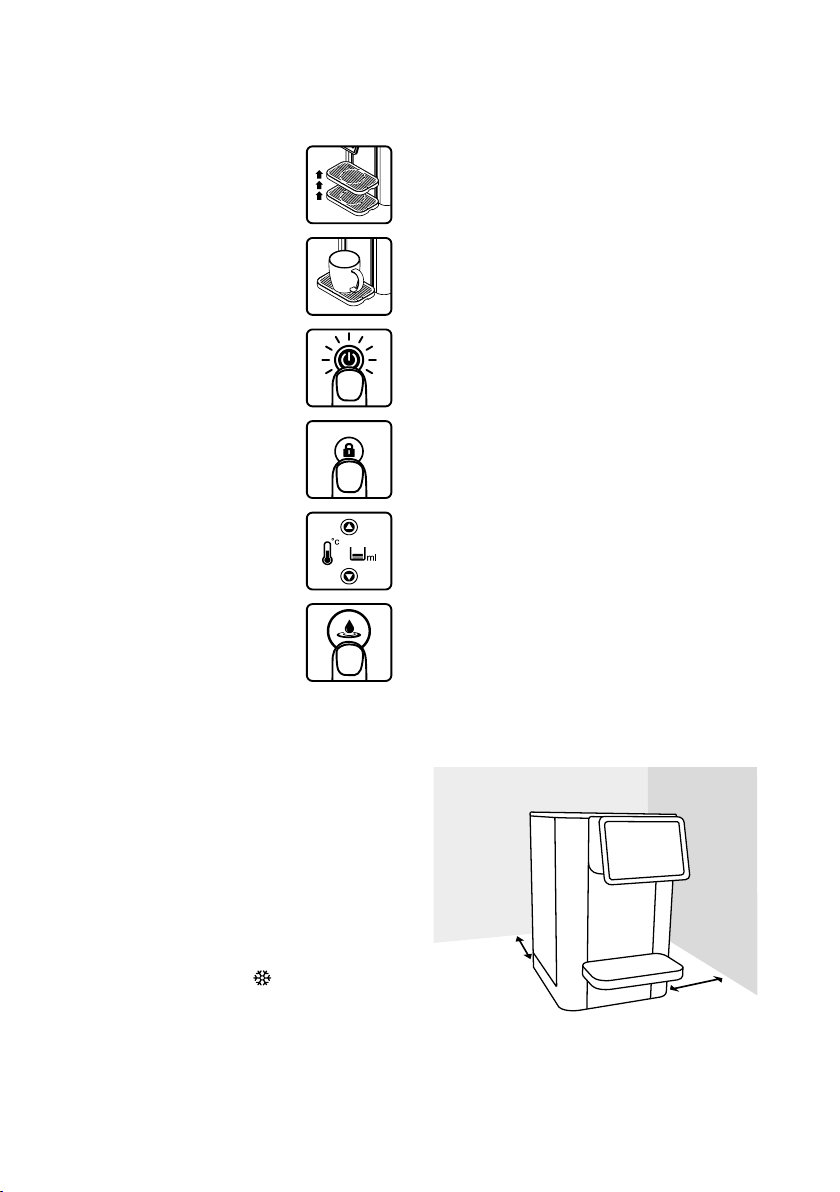
2. Adjust the height of the drip tray to
accommodate the size of the mug
used. Ensure the drip tray is fully
engaged with the appliance. There are
3 height options (A).
3. Place mug or glass on drip tray (B).
4. Press the On/Off button. The On/
Off button will light up blue and the
appliance will be locked (C).
5. Press and hold the lock button for
3 seconds to unlock the appliance.
The lock button will change from red to
white (D).
6. Press the up or down button to select
the desired temperature and volume
settings (E).
7. Press the dispense button to start
dispensing. One beep at the start. (F)
8. The dispense button will fade in and
out whilst dispensing and beep twice
once complete.
Note:
• To stop the cycle at any time press the dispense button.
Once the cycle has stopped it cannot be continued. A
new cycle must be started.
• The user interface will automatically lock after 60
seconds if no actions are performed or can be manually
locked by holding lock button for 3 seconds.
• Sound - all button sounds can be turned off (not sound
in 6. & 7.) in How to use guide, section 4.) by pressing and
holding the temperature down arrow and the volume up
arrow for 3 seconds in the locked mode.
• Lock – the automatic lock can be turned off by pressing
and holding the temperature up arrow and the volume
down arrow for 3 seconds in locked mode. Manual locking
will still be active.
• The chilled temperature setting
will light up red when
the appliance is chilling the water and will light up white
when the water is chilled. At first use the chiller takes
around 40 minutes to fully cool down the water (can vary
depending on the incoming water temperature).
• The refill icon will turn orange when the water tank needs
refilling.
• The filter icon will turn orange when the filter needs
replacing, at 100L usage, follow the filter preparation and
replacement instructions in this manual.
5. Descaling
For safe & efficient operation of your Aurora appliance it is
important to descale regularly.
Untreated scale deposits prevent the element conducting
heat efficiently and may affect its performance.
The appliance will display the descale warning symbol when
the appliance requires the descale process.
Ensure the water tank is empty and the filter is removed
before starting the descale process.
Descale Procedure:
1. Fill water tank with 2L of 4%-5% vinegar solution.
2. Place jug under dispense nozzle.
3. Press and hold the descale warning symbol for 3 seconds.
4. The descale warning symbol will flash and the appliance
will run a descale process. Caution: Dispense solution
will be hot; around 60°C.
5. When the water tank is empty, refill with 2L of cold water
and press the descale warning symbol again.
6. The appliance will run a cleaning cycle. Caution:
Dispense solution will be hot; around 60°C.
7. The descale warning symbol will turn off once complete.
8. Re-insert the Aqua Optima filter after descale process is
complete.
9. The appliance is now ready to use.
Note:
• To abort the descale process, press the dispense button.
Unless the process is run completely the de-scale indicator
will not be reset and the appliance will continue displaying
descale icon.
6. Installation
The appliance comes with two plug types, one for UK and
one for EU, the correct plug should be used and inserted
into the plug socket.
WARNING: PLEASE DO NOT DISASSEMBLE THIS
APPLIANCE YOURSELF. ELECTRIC ELEMENTS WILL BE
EXPOSED AND THERE IS A RISK OF ELECTROCUTION
POSITIONING OF APPLIANCE
• Do not install this appliance in a very damp or hot place or
near heat source.
• Place the appliance on a flat and even surface.
• Install the appliance in a dry place to avoid damage,
moisture or rust.
3
SEC
A
B
C
D
E
F
4
TROUBLESHOOTING
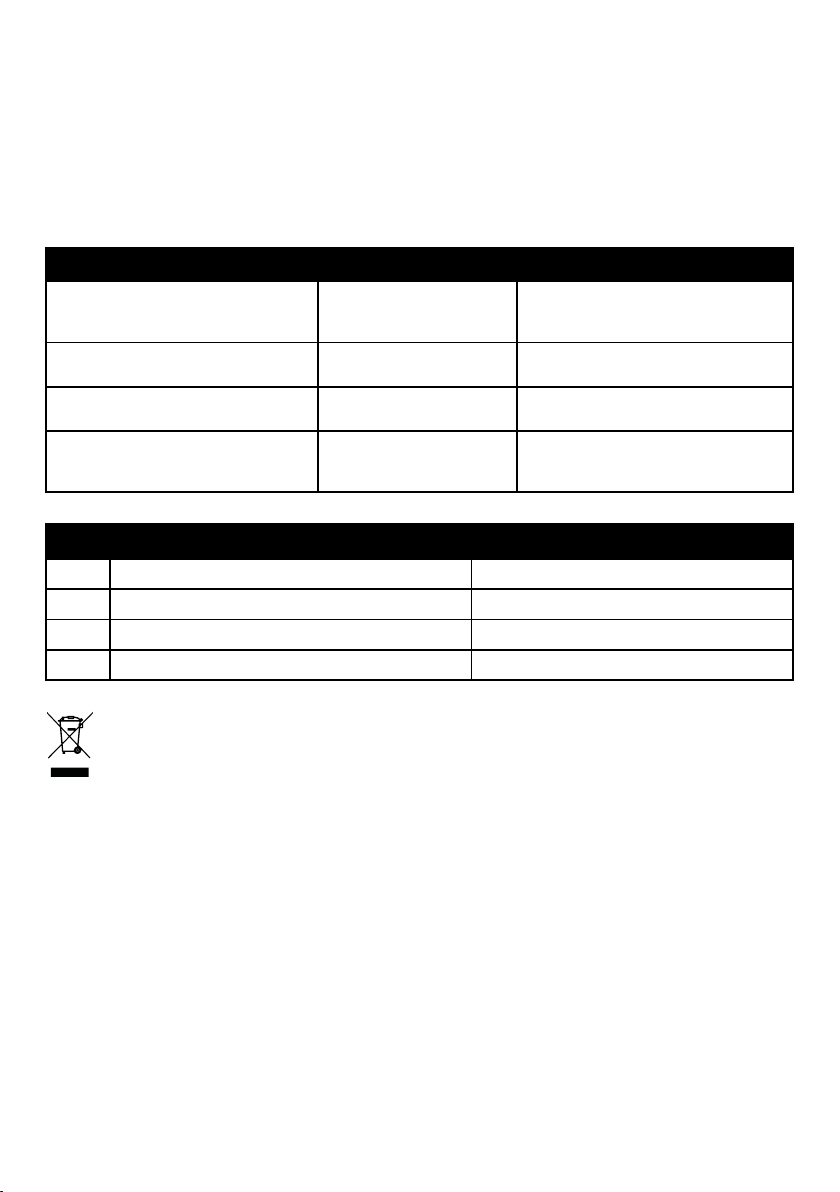
Condition
Possible cause Solution
Machine will not start. Appliance is unplugged. Ensure the power cord is inserted in the
appliance and the plug is securely placed
into the socket.
Descale warning symbol on screen. Appliance needs descaling. Descale appliance using instructions in
manual.
Refill water warning symbol on screen. Water tank is empty. Refill water tank following the descaling
instructions.
Change filter warning symbol on screen
(will illuminate after 100L).
Filter life expired. Change filter following the Aqua Optima
filter instructions. Reset filter warning
symbol by holding for 3 seconds.
Code
Operation Error Description
EAC Lock + boiling light blink Wrong input AC power
DSO Lock + 95°C light blink Running without water
ENTC Lock + 90°C light blink NTC failure
E09 Lock + 80°C light blink No power to element/heater
This symbol on the products and accompanying documents means that used electrical and electronic products
should not be mixed with general household waste.
For proper disposal or treatment, recovery and recycling, please take these products to designated collection
points where they will be accepted on a free of charge basis. In some countries you may be able to return your
products to your local retailer upon the purchase of a new product.
Disposing of this product correctly will help you save valuable resources and prevent any possible effects on human health
and the environment, which could otherwise arise from inappropriate waste handling. Please contact your local authority for
further details of your nearest collection point for WEEE.
Penalties may be applicable for the incorrect disposal of this product in accordance with national legislation.
This appliance conforms to the (LVD) 2014/35/EU, (EMC) 2014/30/EU and (RoHS) 2011/65/EU directives.
The appliance is designed for domestic and small office use only. It should not be used for commercial purposes.
Do not immerse in water.
Warning! Children should be supervised to ensure that they do not play with the appliance.
If the supply cord is damaged, it must be replaced by the manufacturer, its service agent or similarly qualified persons in order
to avoid a hazard.
The product is supplied with a BS 1363 mains plug containing a 13A fuse. If it ever becomes necessary to replace the fuse, only
use fuses that are marked BS 1362, and rated at 13A. A second mains cord and CEE 7/7 plug is supplied for use in European
markets.
AUR001: Electrical rating input: 220-240V ~ 50- 60Hz 2100W, Class l, climatic class: T
5
• Do not use this appliance outdoors. This appliance is only
suitable for use indoors.
• Do not overhang the power cord and/or water tray off a
table, counter or other surface and avoid contact with
hot surfaces.
• WARNING: DO NOT INSTALL THIS APPLIANCE IN DIRECT
SUNLIGHT.
• Ensure that the ventilation on both sides is never blocked
or covered.
• WARNING: When positioning the appliance, ensure the
supply cord is not trapped or damaged.
• WARNING: Do not locate multiple portable socket-outlets
or portable power supplies at the rear of the appliance.

ART_2713 Rev 3
www.aqua-optima.com
Aqua Optima is a trademark of Strix Ltd.
Manufacturer: Strix Limited
Forrest House, Ronaldsway, Isle of Man IM9 2RG, British Isles.
EU Authorised Representative: Laica S.p.A.
Viale del Lavoro 10-Fraz, Ponte – 36048 Barbarano Mossano, Italy.