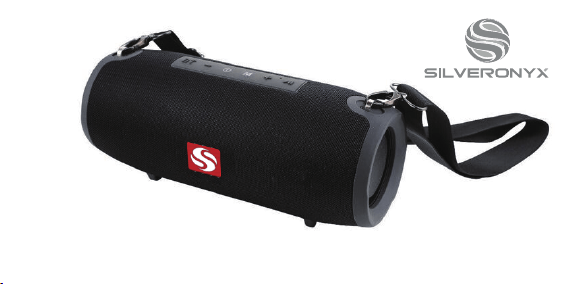
Water Resistant Outdoor Wireless Speaker
User Manual
Version 1.0
SO-125

PRODUCT SPECIFICATIONS
• Bluetooth: V4.2
• Battery: 3.7V 1200mAh • Working Distance: 33ft
• Playing Time: 4-6 Hours • SNR: ≥90dB
• Speaker Driver: Ø57mmx2 • Power: 4Ω/5Wx2
• Frequency: 80Hz-20KHz • Unit Weight: 754g
• Unit Size: 94.8 x 98.7 x 220mm • Charging: 5V/0.5A

PRODUCT FEATURES
1. Advanced and reliable Bluetooth circuitry that supports
all wireless devices.
2. FM radio playback with quick and easy station search
functionality.
3. Crystal clear and vibrant sounds from Hi-Fi speakers.
4. Supports playback of MP3 audio files via microSD card
and USB drive.
5. Working range for Bluetooth connectivity is 33 feet.
6. Connect other devices such as computers, tablets, TVs,
and mobile phones using the 3.5mm AUX line-in jack.
③
OPERATING THE SPEAKER
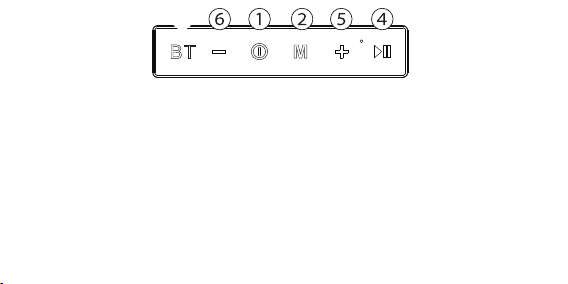
1. Press and hold power switch to turn ON/OFF.
2. Press to toggle between USB/microSD/FM/Wireless (BT)/AUX modes.
3. Press to switch to BT playback. While in BT mode, press again to search for devices.
4. In USB/microSD/BT/AUX modes press to toggle between ‘Play’ & ‘Pause’. In FM
mode, press to search radio stations - press again to stop search*. In BT mode, press
to answer incoming call - press again to hang up - press twice to call back previous #.
5. Press once for next track/radio station - press and hold to increase volume.
6. Press once for previous track/radio station - press and hold to decrease volume.
*NOTE: plug in charging cable to enhance radio reception.
OPERATING THE SPEAKER
1. Press and hold power switch to turn ON/OFF.
2. Press to toggle between USB/microSD/FM/Wireless (BT)/AUX modes.
3. Press to switch to BT playback. While in BT mode, press again to search for devices.
4. In USB/microSD/BT/AUX modes press to toggle between ‘Play’ & ‘Pause’. In FM
mode, press to search radio stations - press again to stop search*. In BT mode, press
to answer incoming call - press again to hang up - press twice to call back previous #.
5. Press once for next track/radio station - press and hold to increase volume.
6. Press once for previous track/radio station - press and hold to decrease volume.
*NOTE: plug in charging cable to enhance radio reception.
INPUT OPTIONS
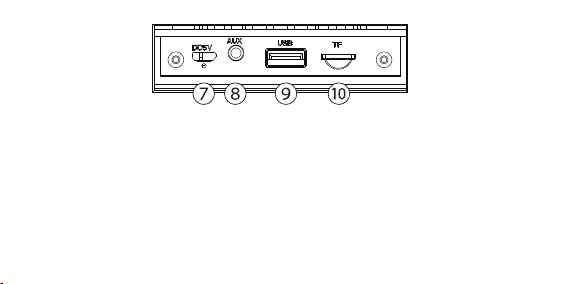
7. DC 5V port: use standard micro USB charging cable for charging speaker.
8. AUX line-in: audio playback using 3.5mm headphone audio cable.
9. USB audio in: this speaker can decode and play MP3 format audio when a USB drive
is inserted in the USB slot.
10. TF/microSD: this speaker can decode and play MP3 format audio when a microSD
card is inserted in the TF card slot.
