
1
Owner’s Manual
PROTECT YOUR INVESTMENT!
Register your product for quicker service and ultimate peace of mind.
You could also win an ISOBAR6ULTRA surge protector—a $100 value!
www.tripplite.com/warranty
1111 W. 35th Street, Chicago, IL 60609 USA
www.tripplite.com/support
Copyright © 2017 Tripp Lite. All rights reserved.
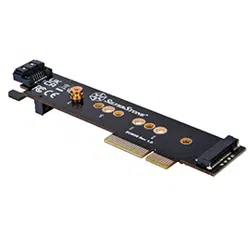
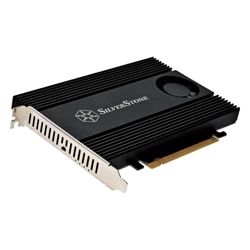
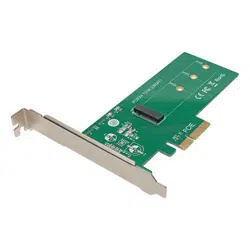
M.2 NGFF PCIe SSD (M-Key)
PCI Express Card
Model: PCE-1M2-PX4
Español 7 • Français 13 • Русский 19
17-02-311-9336C3.indb 1 3/10/2017 10:01:45 AM

2
Product Features
Package Contents
System Requirements
• Enhance your PC’s speed and increase internal storage by adding an
M.2 PCIe SSD (M-Key) adapter
• Supports 2242, 2260 and 2280 M.2 drive types
• PCI Express 4-Lane (x4) interface is compatible with (x4), (x8) and
(x16) slots
• PCIe M.2 SSD speeds provide ultra-fast data access to your computer
• Install your OS on your M.2 PCIe drive, while using larger platter drives
for bulk storage
• Compatible with PCIe 3.0 motherboards; backward compatible with
PCIe 2.0 and PCIe 1.0
• Plug-and-play; no software or drivers required
• No external power required
• PCE-1M2-PX4
• Screws (x2)
• SSD standoff nut
• Owner’s Manual
• Computer with an available PCI Express (PCIe) expansion slot
(x4, x8, x16)
• M.2 NGFF PCIe Drive with an M-Key or B + M-Key connector;
not compatible with M.2 NGFF SATA SSDs
• Compatible with Windows
®
(XP and later), Mac
®
(OS X
®
10.0 and later)
• Supports 2242, 2260 and 2280 M.2 drive types
17-02-311-9336C3.indb 2 3/10/2017 10:01:45 AM

3
Installation
Notes:
• PCI Express cards are static sensitive devices that require proper handling. An
Anti-Static ESD Wrist Strap (such as Tripp Lite’s P999-000) or similar device
should always be used when handling.
• Handle the card with care when installing, holding it by the edges and not the
PCIe interface connectors.
• When disconnecting the drive, go through the proper disconnection steps of
your operating system to safely remove it. Removing the drive prior to proper
disconnection can result in losing or corrupting data stored on the drive.
• If your drive has not been formatted yet, you will first need to format it using your
computer’s disk management utility in order to copy and access files.
1. Place your SSD next to the M.2 SSD connector on the PCIe adapter,
matching up the drive installation holes. Insert the standoff into the
hole that matches the size of your drive. Secure the standoff to the
board using one of the included screws and nut.
2. Slide the M.2 connector on the SSD drive into the M.2 receptacle on
the PCIe adapter.
Note: The connector on the M.2 SSD is keyed so the drive will only fit one way.
3. Hold down the drive toward the mounting standoff, and secure it
in place using the second included screw. Your M.2 drive is now
installed.
4. Turn off the computer you are installing the PCIe card in. Unplug
its power cord and disconnect all peripheral devices (e.g. monitor,
keyboard, mouse, printer, etc.) from it.
5. Referring to your computer’s technical documentation, remove the
cover from your computer.
6. Locate an available PCI Express slot (x4, x8 and x16 slots supported).
Remove the metal bracket from the back of the computer to allow for
insertion of the card.
17-02-311-9336C3.indb 3 3/10/2017 10:01:45 AM
4
Installation
Specifications
7. Gently insert the PCIe interface connector on the adapter into the
PCIe slot, making sure it connects securely and evenly.
8. Fasten the metal bracket to the back of the computer.
9. Place the cover back onto the computer, and re-connect its power
cords and peripheral devices. Your adapter is now ready to use.
Drive Connection M.2 NGFF PCIe (M-Key)
PCIe Card Connection (x4) PCI Express—Male
Supported SSD 2242, 2260, 2280
Operating Temperature 50° to 122°F (10° to 50°C)
Operating Humidity 10% to 80% RH
17-02-311-9336C3.indb 4 3/10/2017 10:01:45 AM

5
Warranty and Product Registration
1-Year Limited Warranty
TRIPP LITE warrants its products to be free from defects in materials and workmanship for
a period of one (1) year from the date of initial purchase. TRIPP LITE’s obligation under
this warranty is limited to repairing or replacing (at its sole option) any such defective
products. To obtain service under this warranty, you must obtain a Returned Material
Authorization (RMA) number from TRIPP LITE or an authorized TRIPP LITE service center.
Products must be returned to TRIPP LITE or an authorized TRIPP LITE service center with
transportation charges prepaid and must be accompanied by a brief description of the
problem encountered and proof of date and place of purchase. This warranty does not
apply to equipment, which has been damaged by accident, negligence or misapplication or
has been altered or modified in any way.
EXCEPT AS PROVIDED HEREIN, TRIPP LITE MAKES NO WARRANTIES, EXPRESS OR
IMPLIED, INCLUDING WARRANTIES OF MERCHANTABILITY AND FITNESS FOR A
PARTICULAR PURPOSE. Some states do not permit limitation or exclusion of implied
warranties; therefore, the aforesaid limitation(s) or exclusion(s) may not apply to the
purchaser.
EXCEPT AS PROVIDED ABOVE, IN NO EVENT WILL TRIPP LITE BE LIABLE FOR DIRECT,
INDIRECT, SPECIAL, INCIDENTAL OR CONSEQUENTIAL DAMAGES ARISING OUT OF THE
USE OF THIS PRODUCT, EVEN IF ADVISED OF THE POSSIBILITY OF SUCH DAMAGE.
Specifically, TRIPP LITE is not liable for any costs, such as lost profits or revenue, loss of
equipment, loss of use of equipment, loss of software, loss of data, costs of substitutes,
claims by third parties, or otherwise.
Product Registration
Visit www.tripplite.com/warranty today to register your new Tripp Lite product. You’ll be
automatically entered into a drawing for a chance to win a FREE Tripp Lite product!*
* No purchase necessary. Void where prohibited. Some restrictions apply. See website for details.
FCC Notice, Class B
This device complies with part 15 of the FCC Rules. Operation is subject to the following
two conditions: (1) This device may not cause harmful interference, and (2) this device
must accept any interference received, including interference that may cause undesired
operation.
Note: This equipment has been tested and found to comply with the limits for a Class B
digital device, pursuant to part 15 of the FCC Rules. These limits are designed to provide
reasonable protection against harmful interference in a residential installation. This
equipment generates, uses and can radiate radio frequency energy and, if not installed
and used in accordance with the instructions, may cause harmful interference to radio
communications.
17-02-311-9336C3.indb 5 3/10/2017 10:01:45 AM
6
Warranty and Product Registration
However, there is no guarantee that interference will not occur in a particular installation.
If this equipment does cause harmful interference to radio or television reception, which
can be determined by turning the equipment off and on, the user is encouraged to try to
correct the interference by one or more of the following measures:
• Reorient or relocate the receiving antenna.
• Increase the separation between the equipment and receiver.
• Connect the equipment into an outlet on a circuit different from that to which the
receiver is connected.
• Consult the dealer or an experienced radio/TV technician for help.
Any changes or modifications to this equipment not expressly approved by Tripp Lite could
void the user’s authority to operate this equipment.
WEEE Compliance Information for Tripp Lite Customers and Recyclers
(European Union)
Under the Waste Electrical and Electronic Equipment (WEEE) Directive and
implementing regulations, when customers buy new electrical and electronic
equipment from Tripp Lite they are entitled to:
• Send old equipment for recycling on a one-for-one, like-for-like basis (this
varies depending on the country)
• Send the new equipment back for recycling when this ultimately becomes
waste
Use of this equipment in life support applications where failure of this equipment can
reasonably be expected to cause the failure of the life support equipment or to significantly
affect its safety or effectiveness is not recommended.
Tripp Lite has a policy of continuous improvement. Specifications are subject to change
without notice.
1111 W. 35th Street, Chicago, IL 60609 USA
www.tripplite.com/support
17-02-311-9336C3.indb 6 3/10/2017 10:01:45 AM

7
Manual del Propietario
1111 W. 35th Street, Chicago, IL 60609 EE UU
www.tripplite.com/support
Copyright © 2017 Tripp Lite. Todos los derechos reservados.
Tarjeta PCI Express M.2
NGFF PCIe SSD (M-Key)
Modelo: PCE-1M2-PX4
English 7 • Français 13 • Русский 19
17-02-311-9336C3.indb 7 3/10/2017 10:01:45 AM

8
Características del Producto
Contenido del Empaque
Requisitos del Sistema
• Mejore la velocidad y aumente el almacenamiento interno de su PC
agregando un adaptador M.2 PCIe SSD (M-Key)
• Soporta tipos de unidad M.2 2242, 2260 y 2280
• La interfaz PCI Express de 4 Vías (x4) es compatible con (x4), (x8) y
(x16) vías
• Las velocidades de PCIe M.2 SSD proporcionan acceso ultra rápido de
datos a su computadora
• Instale su sistema operativo en su unidad M.2 PCIe, mientras usa
unidades de disco más grandes para almacenamiento masivo
• Compatible con tarjetas madre PCIe 3.0; compatible con versiones
anteriores de PCIe 2.0 y PCIe 1.0
• Conectar y Usar—No requiere software ni controladores
• No se necesita alimentación externa
• PCE-1M2-PX4
• Tornillos (x2)
• Tuerca para separador de SSD
• Manual del Propietario
• Computadora con una ranura de expansión PCI Express (PCIe)
disponible (x4, x8, x16)
• Unidad M.2 NGFF PCIe con un conector M-Key o B + M-Key;
no es compatible con SSDs SATA M.2 NGFF
•
Compatible con Windows
®
(XP y posterior), Mac
®
(OS X
®
10.0 y posterior)
• Soporta tipos de unidad M.2 2242, 2260 y 2280
17-02-311-9336C3.indb 8 3/10/2017 10:01:45 AM

9
Instalación
Notas:
• Las tarjetas son dispositivos sensibles a estática que requieren un manejo
adecuado. Al manejarlas debe usarse siempre una correa de muñeca
antiestática ESD (como la P999-000 de Tripp Lite) o un dispositivo similar.
• Maneje la tarjeta con cuidado cuando la instale, sujetándola por los bordes y no
por los conectores de la interfaz PCIe.
• Al desconectar la unidad, siga los pasos de desconexión adecuados de su
sistema operativo para retirarla con seguridad. Retirar la unidad antes de una
desconexión adecuada puede resultar en pérdida o corrupción de los datos
almacenados en el disco.
• Si su unidad aún no ha sido formateada, necesitará formatearla primero usando
la herramienta de Administración de Discos de su computadora a fin de copiar y
acceder a los archivos.
1. Coloque su SSD al lado del conector M.2 SSD en el adaptador de
PCIe, haciendo coincidir los agujeros de instalación de la unidad.
Inserte el separador en el agujero que coincida con el tamaño de
su unidad. Asegure el separador a la tarjeta utilizando uno de los
tornillos con tuerca incluidos.
2. Deslice el conector M.2 en la unidad SSD en el receptáculo M.2 en
el adaptador de PCIe.
Nota: El conector en el SSD M.2 está diseñado para que la unidad sólo ajuste
de una manera.
3. Mantenga presionada la unidad hacia el separador de montaje y
asegúrela en su lugar utilizando el segundo tornillo incluido. Su
unidad M.2 ya está instalada.
4. Apague la computadora en que va a instalar la tarjeta PCIe.
Desenchufe el cable de alimentación y desconecte todos los
dispositivos periféricos (monitor, teclado, mouse, impresora, etc.).
5. Siguiendo las instrucciones de la documentación técnica de su
computadora, quite la tapa de la computadora.
17-02-311-9336C3.indb 9 3/10/2017 10:01:45 AM
10
Instalación
Especificaciones
6. Localice una ranura PCI Express disponible (soporta x4, x8 y x16
ranuras). Retire el soporte de metal de la parte posterior de la
computadora para permitir la inserción de la tarjeta.
7. Suavemente inserte el conector de interfaz PCIe en el adaptador
en la ranura PCIe, asegurándose de que se conecta firme y
uniformemente.
8. Sujete el soporte metálico a la parte posterior de la computadora.
9. Coloque nuevamente la tapa en la computadora y vuelva a conectar
sus dispositivos periféricos y cables de alimentación. Su adaptador
está ahora listo para usarse.
Conexión de Unidad M.2 NGFF PCIe (M-Key)
Conexión de la Tarjeta PCIe (x4) PCI Express—Macho
Soporta SSD 2242, 2260, 2280
Temperatura de Operación 10 °C a 50 °C [50 °F a 122 °F]
Humedad de Funcionamiento HR de 10% a 80%
17-02-311-9336C3.indb 10 3/10/2017 10:01:45 AM

11
Garantía
Garantía limitada por 1 año
TRIPP LITE garantiza por un (1) año a partir de la fecha de compra inicial que este
producto no tiene defectos de materiales ni de mano de obra.
La obligación TRIPP LITE bajo esta garantía está limitada a la reparación o reemplazo (A
su entera discreción) de cualquier producto defectuoso. Para obtener servicio bajo esta
garantía, debe obtener un número de Autorización de Devolución de Mercancía (RMA) de
TRIPP LITE o de un centro de servicio autorizado de TRIPP LITE. Los productos deben ser
regresados a TRIPP LITE o a un centro de servicio autorizado de TRIPP LITE con los cargos
de transporte prepagados y deben acompañarse con una breve descripción del problema
y un comprobante de la fecha y el lugar de compra. Esta garantía no se aplica a equipos
que hayan sido dañados por accidente, negligencia o mal uso, o hayan sido alterados o
modificados de alguna manera.
EXCEPTO COMO SE INDICA EN EL PRESENTE, TRIPP LITE NO HACE GARANTÍAS EXPRESAS
O IMPLÍCITAS, INCLUIDAS GARANTÍAS DE COMERCIABILIDAD Y ADECUACIÓN PARA
UN PROPÓSITO PARTICULAR. Algunos estados no permiten la limitación o exclusión
de garantías implícitas; por lo tanto, las limitaciones o exclusiones antes mencionadas
pueden no aplicarse al comprador.
EXCEPTO COMO SE INDICA ANTERIORMENTE, EN NINGÚN CASO TRIPP LITE SERÁ
RESPONSABLE POR DAÑOS DIRECTOS, INDIRECTOS, ESPECIALES, INCIDENTALES O
CONSECUENTES QUE SURJAN DEL USO DE ESTE PRODUCTO, INCLUSO SI SE ADVIERTE
SOBRE LA POSIBILIDAD DE TAL DAÑO. Específicamente, TRIPP LITE no es responsable por
ningún costo, como pérdida de utilidades o ingresos, pérdida de equipos, pérdida del uso
de equipos, pérdida de software, pérdida de datos, costos de sustituciones, reclamaciones
de terceros o de cualquier otra forma.
17-02-311-9336C3.indb 11 3/10/2017 10:01:46 AM
12
Garantía
Información de Cumplimiento con WEEE para Clientes y Recicladores de Tripp Lite
(Unión Europea)
Bajo la Directiva de Desechos de Equipos Eléctricos y Electrónicos (WEEE) [Waste
Electrical and Electronic Equipment] y regulaciones aplicables, cuando los clientes
adquieren un nuevo equipo eléctrico y electrónico de Tripp Lite están obligados a:
• Enviar el equipo viejo a reciclado en una base de uno por uno, equivalente por
equivalente (esto varía de un país a otro)
• Regresar el equipo nuevo para reciclado una vez que finalmente sea un
desecho
No se recomienda el uso de este equipo en aplicaciones de soporte de vida en donde
razonablemente se pueda esperar que la falla de este equipo cause la falla del equipo de
soporte de vida o afectar significativamente su seguridad o efectividad.
Tripp Lite tiene una política de mejora continua. Las especificaciones están sujetas a
cambios sin previo aviso.
1111 W. 35th Street, Chicago, IL 60609 EE UU
www.tripplite.com/support
17-02-311-9336C3.indb 12 3/10/2017 10:01:46 AM

13
Manuel de l'utilisateur
1111 W. 35th Street, Chicago, IL 60609 USA
www.tripplite.com/support
Droits d'auteur © 2017 Tripp Lite. Tous droits réservés.
Carte PCI Express M.2 NGFF
PCIe SSD (M-Key)
Modèle : PCE-1M2-PX4
English 1 • Español 7 • Русский 19
17-02-311-9336C3.indb 13 3/10/2017 10:01:46 AM

14
Caractéristiques du produit
Contenu de l'emballage
Configuration requise
• Améliorer la vitesse d'un PC et augmenter le stockage interne en
ajoutant un adaptateur M.2 PCIe SSD (M-Key)
• Prend en charge des types de lecteurs M.2 2242, 2260 et 2280
• L'interface PCI Express à 4 voies (x4) est compatible avec les fentes
(x4), (x8) et (x16).
• Les vitesses PCIe M.2 SSD fournissent un accès ultra rapide aux
données à un ordinateur.
• Installer un OS sur le lecteur M.2 PCIe tout en utilisant des lecteurs
plateaux de plus grande capacité pour la mémoire de masse.
• Compatible avec des cartes-mères PCIe 3.0; rétrocompatible avec
PCIe 2.0 et PCIe 1.0
• Prêt à l'emploi; aucun logiciel ou lecteur requis
• Aucune alimentation externe requise
• PCE-1M2-PX4
• Vis (x2)
• Écrou de la douille à sertir SSD
• Manuel de l'utilisateur
• Ordinateur avec une fente d'extension PCI Express (PCIe) disponible
(x4, x8, x16)
• Lecteur M.2 NGFF PCle avec clé M ou un connecteur de clé B + M;
non compatible avec les lecteurs SSD M.2 NGFF SATA
• Compatible avec Windows
®
(XP et les versions ultérieures), Mac
®
(OS
X
®
10.0 et les versions ultérieures)
• Prend en charge des types de lecteurs M.2 2242, 2260 et 2280
17-02-311-9336C3.indb 14 3/10/2017 10:01:46 AM

15
Installation
Remarques :
• Les cartes PCI Express sont des dispositifs sensibles à l'électricité statique qui
exigent une manutention adéquate. Un bracelet antistatique ESD (comme le
P999-000 de Tripp Lite) ou un dispositif semblable devrait toujours être utilisé
lors de la manutention.
• Manipuler la carte avec soin au moment de l'installation en la tenant par les
bords et non par les connecteurs de l'interface PCIe.
• Au moment de débrancher le lecteur, s’assurer de suivre les étapes de
déconnexion appropriées pour le système d'exploitation pour un débranchement
sans risque. Retirer le lecteur avant une déconnexion appropriée pourrait
entraîner la perte ou la corruption des données stockées sur le lecteur.
• Si le lecteur n'a pas encore été formaté, il doit d'abord être formaté en utilisant
l'utilitaire Disk Management de l'ordinateur pour copier et accéder aux fichiers.
1. Placer le SSD à côté du connecteur SSD M.2 sur l'adaptateur PCIe
en faisant correspondre les trous de montage du lecteur. Insérer
l'écrou de la douille à sertir dans le trou correspondant à la taille du
lecteur. Fixer l'écrou de la douille à sertir au panneau en utilisant une
des vis et l'écrou inclus.
2. Glisser le connecteur M.2 sur le lecteur SSD dans la prise M.2 sur
l'adaptateur PCIe.
Remarque : Le connecteur sur le SSD M.2 est verrouillé; le lecteur ne s'insère
donc que d'une seule façon.
3. Tenir le lecteur vers la douille à sertir de montage, puis le retenir
en place en utilisant la seconde vis incluse. Le lecteur M.2 est
maintenant installé.
4. Mettre hors tension l'ordinateur sur lequel la carte PCIe est
installée. Débrancher son cordon d'alimentation et débrancher tout
l'équipement périphérique (p. ex. le moniteur, le clavier, la souris,
l'imprimante).
5. En se référant à la documentation technique de l'ordinateur, retirer le
couvercle de l'ordinateur.
17-02-311-9336C3.indb 15 3/10/2017 10:01:46 AM
16
Installation
Caractéristiques techniques
6. Trouver une fente PCI Express disponible (prise en charge des fentes
x4, x8 et x16). Retirer le support en métal de l'arrière de l'ordinateur
pour permettre l'insertion de la carte.
7. Insérer délicatement le connecteur d'interface PCIe sur l'adaptateur
dans la fente PCIe en s'assurant que la connexion est ferme et
uniforme.
8. Fixer le support en métal à l'arrière de l'ordinateur.
9. Remettre le couvercle sur l'ordinateur, puis rebrancher son cordon
d'alimentation et tout l'équipement périphérique. L'adaptateur est
maintenant prêt à être utilisé.
Connexion du lecteur M.2 NGFF PCIe (clé M)
Connexion de la carte PCIe (x4) PCI Express — mâle
SSD pris en charge 2242, 2260, 2280
Température de fonctionnement 10 à 50 °C (50 à 122 °F)
Humidité de fonctionnement 10 à 80 % HR
17-02-311-9336C3.indb 16 3/10/2017 10:01:46 AM

17
Garantie
Garantie limitée d'un (1) an
TRIPP LITE garantit que ses produits sont exempts de vices de matériaux et de fabrication
pendant une période d'un (1) an à partir de la date d'achat initiale. La responsabilité de
TRIPP LITE, en vertu de la présente garantie, se limite à la réparation ou au remplacement
(à sa seule discrétion) de ces produits défectueux. Pour obtenir réparation sous cette
garantie, vous devez obtenir un numéro d'autorisation de retour de matériel (« RMA »)
auprès de TRIPP LITE ou d'un centre de réparation autorisé par TRIPP LITE. Les produits
doivent être retournés à TRIPP LITE ou à un centre de réparation autorisé par
TRIPP LITE en port prépayé et être accompagnés d'une brève description du problème et
d'un justificatif de la date et du lieu d'achat. Cette garantie ne s'applique pas au matériel
ayant été endommagé suite à un accident, à une négligence ou à une application abusive,
ou ayant été altéré ou modifié d'une façon quelconque.
SAUF INDICATION CONTRAIRE DANS LES PRÉSENTES, TRIPP LITE N'ÉMET AUCUNE
GARANTIE, EXPRESSE OU TACITE, Y COMPRIS DES GARANTIES DE QUALITÉ
COMMERCIALE ET D'ADÉQUATION À UN USAGE PARTICULIER. Certains États n'autorisant
pas la limitation ni l'exclusion de garanties tacites, les limitations ou exclusions
susmentionnées peuvent ne pas s'appliquer à l'acheteur.
À L'EXCEPTION DES DISPOSITIONS CI-DESSUS, TRIPP LITE NE POURRA EN AUCUN CAS
ÊTRE TENUE RESPONSABLE DE DOMMAGES DIRECTS, INDIRECTS, SPÉCIAUX, FORTUITS
OU CONSÉCUTIFS RÉSULTANT DE L'UTILISATION DE CE PRODUIT, MÊME SI AYANT ÉTÉ
AVISÉE DE L'ÉVENTUALITÉ DE TELS DOMMAGES. Plus précisément, TRIPP LITE ne pourra
être tenue responsable de coûts, tels que perte de bénéfices ou de recettes, perte de
matériel, impossibilité d'utilisation du matériel, perte de logiciel, perte de données, frais de
produits de remplacement, réclamations d'un tiers ou autres.
17-02-311-9336C3.indb 17 3/10/2017 10:01:46 AM
18
Garantie
Renseignements sur la conformité à la directive DEEE pour les clients de Tripp Lite
et les recycleurs (Union européenne)
En vertu de la directive et des règlements d'application relatifs aux déchets
d'équipements électriques et électroniques (DEEE), lorsque des clients achètent
de l'équipement électrique et électronique neuf de Tripp Lite, ils ont droit :
• D'envoyer l'équipement usagé au recyclage pourvu qu'il remplace un
équipement équivalent (cela varie selon les pays)
• De retourner le nouvel équipement afin qu'il soit recyclé à la fin de sa vie utile.
Il n'est pas recommandé d'utiliser cet équipement pour des appareils de survie où une
défaillance de cet équipement peut, selon toute vraisemblance, entraîner la défaillance de
l’appareil de maintien de la vie ou nuire de façon majeure à sa sécurité ou son efficacité.
La politique de Tripp Lite en est une d'amélioration continue. Les caractéristiques
techniques sont sujettes à changement sans préavis.
1111 W. 35th Street, Chicago, IL 60609 USA
www.tripplite.com/support
17-02-311-9336C3.indb 18 3/10/2017 10:01:46 AM

19
Руководство пользователя
1111 W. 35th Street, Chicago, IL 60609 USA
www.tripplite.com/support
Охраняется авторским правом © 2017 Tripp Lite. Перепечатка запрещается.
Карта PCI Express твердотельного
накопителя M.2 NGFF PCIe
(с разъемом M-Key)
Модель: PCE-1M2-PX4
English 1 • Español 7 • Français 13
17-02-311-9336C3.indb 19 3/10/2017 10:01:46 AM

20
Характеристики продукта
Содержимое упаковки
Системные требования
• Повышение быстродействия ПК и увеличение объема внутренней памяти за счет
добавления адаптера M.2 PCIe SSD (M-Key)
• Поддержка дисковых накопителей типа 2242, 2260 и 2280 M.2
• Интерфейс PCI Express 4-Lane (4-канальный) совместим с 4-, 8- и 16-канальными разъемами
• Скорости передачи данных, поддерживаемые твердотельными накопителями формата M.2
через шину PCIe, обеспечивают сверхбыстрый доступ к данным, хранящимся на компьютере
• Установите свою ОС на накопитель M.2 PCIe, используя более емкие дисковые накопители
для внешнего хранения больших объемов информации
• Совместимость с материнскими платами PCIe 3.0; обратная совместимость с интерфейсами
PCIe 2.0 и PCIe 1.0
• Автоматическая настройка подключаемых устройств без необходимости в использовании
программного обеспечения или драйверов
• Отсутствие необходимости во внешнем источнике питания
• Устройство мод. PCE-1M2-PX4
• Винты (2 шт.)
• Гайка для крепления проставки твердотельного накопителя
• Руководство пользователя
• Компьютер со свободным расширительным разъемом PCI Express (PCIe)
(4-, 8-, 16-канальным)
• Накопитель M.2 NGFF PCIe с разъемом M-Key или B + M-Key connector;
несовместим с твердотельными накопителями M.2 NGFF SATA
• Совместимость с ОС Windows
®
(XP и более поздних версий), Mac
®
(OS X
®
10.0 и более поздних
версий)
• Поддержка дисковых накопителей типа 2242, 2260 и 2280 M.2
17-02-311-9336C3.indb 20 3/10/2017 10:01:46 AM

21
Установка
Примечания:
• Карты PCI Express чувствительны к воздействию статического электричества и требуют надлежащего
обращения. При работе с ней обязательно следует использовать антистатический браслет (типа Tripp Lite
P999-000) или аналогичное заземляющее приспособление.
• При установке карты следует соблюдать осторожность, держа ее за края, а не за интерфейсные разъемы
PCIe.
• При отсоединении накопителя необходимо выполнить все этапы отключения, установленные для
используемой операционной системы и обеспечивающие безопасное отсоединение. Отсоединение
накопителя без предварительного отключения от системы может привести к потере или повреждению
хранящихся на нем данных.
• Если накопитель еще не отформатирован, то сначала необходимо отформатировать его с использованием
установленной на компьютере утилиты Disk Management, обеспечивающей копирование файлов и доступ
к ним.
1. Поместите твердотельный накопитель (SSD) рядом с разъемом M.2 SSD адаптера PCIe,
совместив монтажные отверстия накопителя. Вставьте промежуточную гайку в отверстие,
соответствующее размеру накопителя. Прикрепите проставку к корпусу при помощи
одного из имеющихся в комплекте винтов и гайки.
2. Вставьте разъем M.2 твердотельного накопителя во входной разъем M.2 адаптера PCIe.
Примечание. Разъем M.2 твердотельного накопителя скомпонован таким образом, чтобы диск мог
вставляться только одним способом.
3. Прижмите накопитель к проставке и зафиксируйте его вторым винтом из комплекта.
Накопитель M.2 установлен.
4. Выключите компьютер, в который собираетесь установить карту PCIe. Выньте шнур
питания компьютера из розетки и отсоедините от него все периферийные устройства (напр.
монитор, клавиатуру, мышь, принтер и др.).
5. Снимите с компьютера кожух согласно его технической документации.
6. Найдите свободный разъем PCI Express (допускается использование 4-, 8- и 16-канальных
разъемов). Снимите металлическую скобу с тыльной стороны компьютера, что даст
возможность установить карту.
17-02-311-9336C3.indb 21 3/10/2017 10:01:46 AM
22
Установка
Технические характеристики
7. Осторожно вставьте интерфейсный разъем PCIe адаптера в компьютерный разъем PCIe и
убедитесь в наличии плотного и равномерного контакта.
8. Прикрепите металлическую скобу с тыльной стороны компьютера на свое место.
9. Наденьте кожух обратно на компьютер и снова подсоедините шнуры к нему питания и
периферийные устройства. Адаптер готов к использованию.
Разъем накопителя M.2 NGFF PCIe (M-Key)
Разъем карты PCIe PCI Express — штекерный (4 шт.)
Поддерживаемые типы твердотельных
накопителей
2242, 2260, 2280
Диапазон рабочих температур От 10 до 50°C
Рабочий диапазон влажности Относительная влажность от 10 до 80%
17-02-311-9336C3.indb 22 3/10/2017 10:01:46 AM

23
Гарантийные обязательства
Ограниченная гарантия 1 год
Компания TRIPP LITE гарантирует отсутствие дефектов материалов и изготовления в течение одного (1) года с
момента первоначальной покупки.
Обязательства компании TRIPP LITE по настоящей гарантии ограничиваются ремонтом или заменой (по ее
единоличному усмотрению) любых таких дефектных изделий. Для получения услуг по данной гарантии
необходимо получить номер Returned Material Authorization (RMA - разрешение на возврат материалов)
от компании TRIPP LITE или ее авторизованного сервисного центра. Изделия должны быть возвращены в
компанию TRIPP LITE или авторизованный сервисный центр TRIPP LITE с предоплатой транспортных расходов
и сопровождаться кратким описанием возникшей проблемы и документом, подтверждающим дату и место
его приобретения. Действие настоящей гарантии не распространяется на оборудование, поврежденное в
результате аварии, небрежного обращения или неправильного использования, а также видоизмененное
каким бы то ни было образом.
ЗА ИСКЛЮЧЕНИЕМ ПРЕДУСМОТРЕННЫХ ЗДЕСЬ СЛУЧАЕВ КОМПАНИЯ TRIPP LITE НЕ ПРЕДОСТАВЛЯЕТ КАКИХ-
ЛИБО ЯВНЫХ ИЛИ ПОДРАЗУМЕВАЕМЫХ ГАРАНТИЙ, ВКЛЮЧАЯ ГАРАНТИИ КОММЕРЧЕСКОЙ ПРИГОДНОСТИ
И ПРИГОДНОСТИ ДЛЯ КАКОЙ-ЛИБО КОНКРЕТНОЙ ЦЕЛИ. В некоторых штатах/государствах ограничение
или исключение подразумеваемых гарантий не допускается; следовательно, вышеуказанное(-ые)
ограничение(-я) или исключение(-я) могут не распространяться на покупателя.
ЗА ИСКЛЮЧЕНИЕМ ПРЕДУСМОТРЕННЫХ ВЫШЕ СЛУЧАЕВ КОМПАНИЯ TRIPP LITE НИ ПРИ КАКИХ ОБСТОЯТЕЛЬСТВАХ
НЕ НЕСЕТ ОТВЕТСТВЕННОСТИ ЗА ПРЯМЫЕ, КОСВЕННЫЕ, СЛУЧАЙНЫЕ ИЛИ ПОБОЧНЫЕ УБЫТКИ ЛИБО УБЫТКИ,
ОПРЕДЕЛЯЕМЫЕ ОСОБЫМИ ОБСТОЯТЕЛЬСТВАМИ, ВОЗНИКАЮЩИЕ В СВЯЗИ С ИСПОЛЬЗОВАНИЕМ ДАННОГО
ИЗДЕЛИЯ, ДАЖЕ В СЛУЧАЕ ЕЕ ИНФОРМИРОВАНИЯ О ВОЗМОЖНОСТИ НАСТУПЛЕНИЯ ТАКИХ УБЫТКОВ. В частности,
компания TRIPP LITE не несет ответственности за какие-либо издержки, такие как упущенные прибыли или
доходы, потеря оборудования, потеря возможности использования оборудования, потеря программного
обеспечения, потеря данных, расходы на заменители, урегулирование претензий третьих лиц и пр.
17-02-311-9336C3.indb 23 3/10/2017 10:01:46 AM
24
Гарантийные обязательства
Информация по выполнению требований Директивы WEEE для покупателей и переработчиков
продукции компании Tripp Lite (являющихся резидентами Европейского союза)
Согласно положениям Директивы об утилизации отходов электрического и электронного
оборудования (WEEE) и исполнительных распоряжений по ее применению, при покупке
потребителями нового электрического или электронного оборудования производства компании
Tripp Lite они получают право на:
• Продажу старого оборудования по принципу “один за один” и/или на эквивалентной основе (в
зависимости от конкретной страны)
• Отправку нового оборудования на переработку после окончательной выработки его ресурса
Не рекомендуется использование данного оборудования в системах жизнеобеспечения, где его выход из
строя предположительно может привести к перебоям в работе оборудования жизнеобеспечения или в
значительной мере снизить его безопасность или эффективность.
Компания Tripp Lite постоянно совершенствует свою продукцию. В связи с этим возможно изменение
технических характеристик без предварительного уведомления.
1111 W. 35th Street, Chicago, IL 60609 USA
www.tripplite.com/support
17-02-311 93-36C3_revA
17-02-311-9336C3.indb 24 3/10/2017 10:01:46 AM