
WASHER SAFETY ............................................................................3
Proper Installation .................................................................................5
When Not in Use ....................................................................................5
OPERATION REQUIREMENTS ....................................................... 6
Location of Your Washer ....................................................................6
Electrical Requirements ......................................................................6
Water Supply Requirements ..............................................................7
Drain Requirements ..............................................................................7
INSTALLATION INSTRUCTIONS ....................................................8
Before You Begin ...................................................................................8
Tools Required ........................................................................................8
Parts Required (Obtain Locally) ......................................................9
Parts Supplied .........................................................................................9
Rough-In Dimensions ...........................................................................9
Unpacking the Washer ......................................................................10
Installing the Washer ........................................................................... 11
WASHER USE .................................................................................14
Control Panel ......................................................................................... 14
Features ................................................................................................... 19
Loading and Using the Washer ..................................................... 22
Dear user
THANK YOU and CONGRATULATIONS on your purchase of
this high-quality Midea product. Your Midea washer is designed
for reliable, trouble-free performance. Please take a moment to
register your new washer.
Register your new washer at
https://www.midea.com/ca/support/Product-registration
For future reference, record your product model and serial
numbers located on the inside frame of the washer.
Model Number________________________________________
Serial Number_________________________________________

Washer
Safety
Operation
Requirements
Installation
Instructions
Troubleshooting Washer CareWasher Use
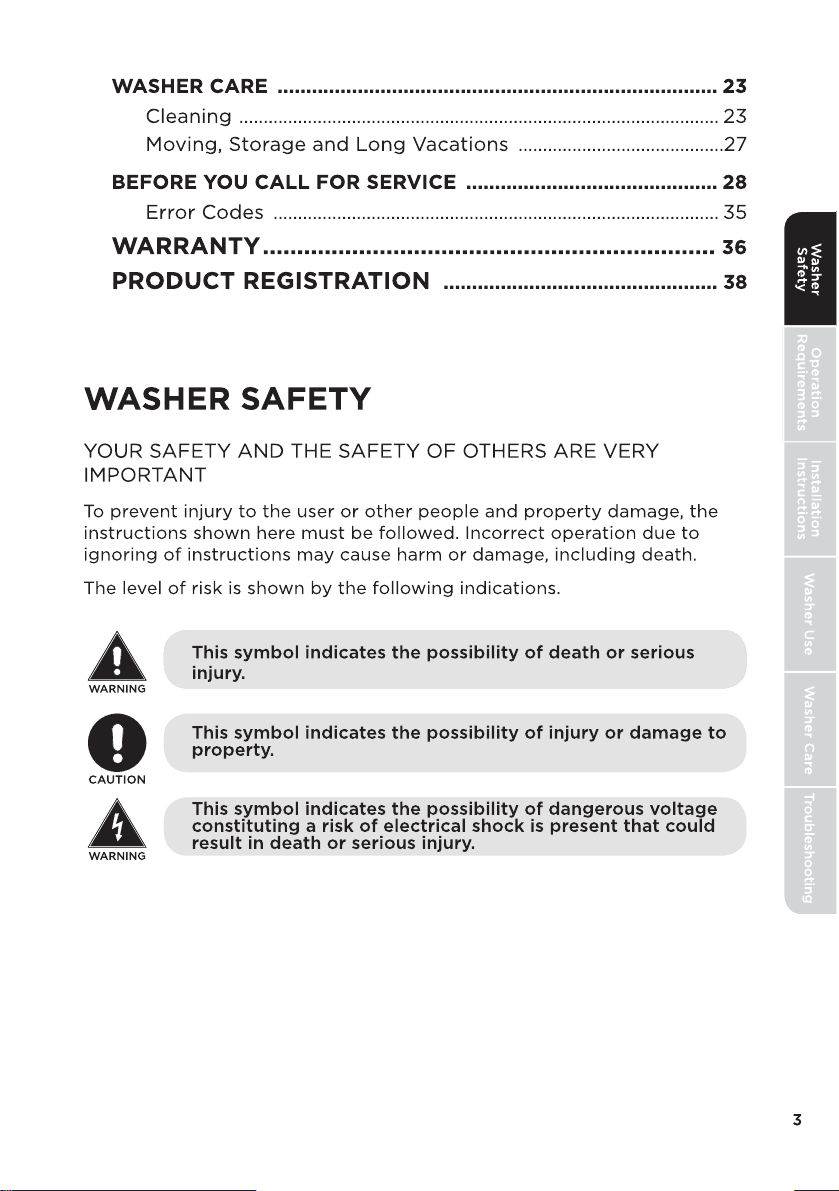
WARNING
To reduce the risk of death, fire, explosion, electric shock, or injury
to persons when using your vfd appliance, follow basic precautions,
including the following:
• Read the instruction manual before using the appliance.
• DO NOT wash or dry articles that have been previously cleaned in,
washed in, soaked in or spotted with gasoline, dry-cleaning solvents,
or other flammable or explosive substances, as they give off vapors
that could ignite or explode.
• DO NOT add gasoline, dry-cleaning solvents, or other flammable or
explosive substances to the wash water. These substances give off
vapors that could ignite or explode.
• Under certain conditions, hydrogen gas may be produced in a
hot-water system that has not been used for 2 weeks or more.
HYDROGEN GAS IS EXPLOSIVE. If the hot water system has not
been used for such a period, before using a washing machine, turn
on all hot-water faucets and let the water flow from each for several
minutes. This will release any accumulated hydrogen gas. As the gas
is flammable, DO NOT smoke or use an open flame during this time.
• DO NOT allow children to play on or in this appliance. Close
supervision of children is necessary when this appliance is used near
children. Before the washer is removed from service or discarded,
remove the door or lid. Failure to follow these instructions may
result in death or injury to persons.
• DO NOT reach into the appliance if the drum or other components
are moving to prevent accidental entanglement.
• DO NOT install or store this appliance where it will be exposed to the
weather.
• DO NOT tamper with controls, repair or replace any part of this
appliance or attempt any servicing unless specifically recommended
in the user maintenance instructions or in published user repair
instructions that you understand and have the skills to carry out.
• Keep the area around your appliance clean and dry to reduce the
possibility of slipping.
• DO NOT operate this appliance if it is damaged, malfunctioning,
partially disassembled, or has missing or broken parts including a
damaged cord or plug.
• Unplug the appliance or turn off the circuit breaker before servicing.
Pressing the Power button DOES NOT disconnect power.
• See “Electrical Requirements” located in the Installation Instructions
for grounding instructions. This appliance is not intended for use
by persons (including children) with reduced physical, sensory or
mental capabilities, or lack of experience and knowledge, unless
they have been given supervision or instruction concerning use
of the appliance by a person responsible for their safety. Children
should be supervised to ensure that they do not play with appliance.
4
IMPORTANT SAFETY INSTRUCTIONS
• This washer must be properly installed and located in accordance
with the Installation Instructions before it is used. Ensure the cold
water hose is connected to the “C” valve.
• Install or store where it will not be exposed to temperatures below
freezing or exposed to the weather, which could cause permanent
damage and invalidate the warranty.
Properly ground washer to conform with all governing codes and
ordinances. Follow details in installation instructions.
WARNING
Electrical Shock Hazard
• Plug into a grounded 3 prong outlet.
• Do not remove the ground prong.
• Do not use an adapter.
• Do not use an extension cord.
• Failure to do so can result in death, fire or electrical
shock.
WARNING: Cancer and Reproductive Harm
-www.P65Warnings.ca.gov.
PROPER INSTALLATION
WHEN NOT IN USE
Turn off water faucets to minimize leakage if a break or rupture should
occur. Check the condition of the fill hoses; We recommend changing the
hoses every 5 years.
State of California Proposition 65 Warnings:
SAVE THESE INSTRUCTIONS
THIS APPLIANCE IS FOR HOUSEHOLD USE ONLY
5
• If the supply cord is damaged, it must be replaced by the
manufacture, its service agent or similarly qualified persons in order
to avoid a hazard.
• The new hose-sets bought from the retailer where the product was
purchased are to be used and that old hose-sets should not be
reused.
• This appliance is for indoor use only.
SAVE THESE INSTUCTIONS
Washer
Safety
Operation
Requirements
Installation
Instructions
Troubleshooting
Washer Care
Washer Use

Washer
Safety
Operation
Requirements
Installation
Instructions
Troubleshooting Washer CareWasher Use
WARNING
TO REDUCE THE RISK OF FIRE, ELECTRICAL SHOCK AND PERSONAL
INJURY:
• DO NOT USE AN EXTENSION CORD OR AN ADAPTER PLUG
WITH THIS APPLIANCE. Washer must be electrically grounded in
accordance with local codes and ordinances.
6
OPERATION REQUIREMENTS
LOCATION OF YOUR WASHER
DO NOT INSTALL THE WASHER:
1. In an area exposed to dripping water or outside weather conditions.
The ambient temperature should never be below 60°F (15.6°C) for
proper washer operation.
2. In an area where it will come in contact with curtains or drapes.
3. On carpet. The floor MUST be a hard surface with a maximum slope of
1/2" per foot (1.27 cm per 30 cm). To make sure the washer does not
vibrate or move, you may have to reinforce the floor.
NOTE: If floor is in poor condition, use 3/4" impregnated plywood sheet
solidly attached to the existing floor covering.
IMPORTANT: MINIMUM INSTALLATION CLEARANCES
• When installed in alcove: Top and Sides = 0" (0 cm), Back = 3" (7.6 cm)
• When installed in closet: Top and Sides = 0" (0 cm), Front = 2" (5 cm),
Back = 3" (7.6 cm)
• Closet door ventilation openings required: 2 louvers each 60 square in.
(387 cm), located 3" (7.6 cm) from top and bottom of door
ELECTRICAL REQUIREMENTS
Read these instructions completely and carefully.
CIRCUIT - Individual, properly polarized and grounded 16-amp branch
circuit fused with 16-amp time -delay fuse or circuit breaker.
POWER SUPPLY - 2-wire with ground, 120V~, single-phase, 60Hz,
alternating current.
OUTLET RECEPTACLE - Properly grounded receptacle located so the
power supply cord is accessible when the washer is in an installed
position.
BACK
47.24
"
(120 cm)
Max.
GROUNDING REQUIREMENTS
Improper connection of the equipment grounding conductor can result in a
risk of electrical shock. Check with a licensed electrician if you are in doubt
as to whether the appliance is properly grounded.
1. The washer MUST be grounded. In the event of malfunction or breakdown,
grounding will reduce the risk of electrical shock by providing a path of
least resistance for electrical current.
2. Since your washer is equipped with a power supply cord having an
equipment-grounding conductor and a grounding plug, the plug MUST
be plugged into an appropriate, copper-wired receptacle that is properly
installed and grounded in accordance with all local codes. If in doubt, call
a licensed electrician. DO NOT cut off or alter the grounding prong on the
power supply cord. In situations where a two-slot receptacle is present, it
is the owner’s responsibility to have a licensed electrician replace it with
a properly grounded grounding-type receptacle.
WATER SUPPLY REQUIREMENTS
Hot and cold water faucet MUST be installed within 42" (107 cm) of your
washer’s water inlet. The faucet MUST be 3/4" (1.9 cm) garden hose-type
so inlet hoses can be connected. Water pressure MUST be between 10 and
120psi. Your water department can advise you of your water pressure.
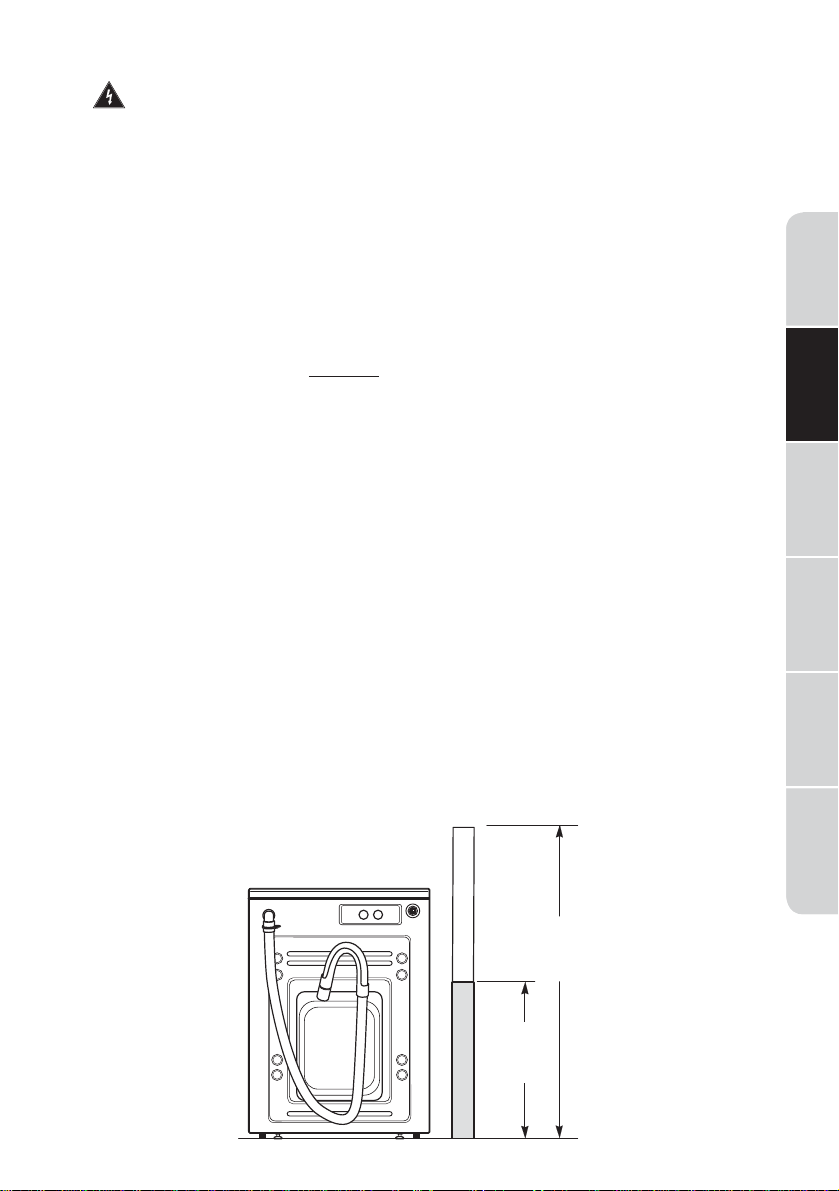
DRAIN REQUIREMENTS
1. Drain capable of eliminating 64.3 L per minute.
2. A standpipe diameter of 1-
1/4" (3.18 cm) minimum.
3. The standpipe height above the floor should be:
Minimum height: 24" (61 cm)
Maximum height: 47.24" (120 cm)
7
24"
(61 cm)
Min.
Washer
Safety
Operation
Requirements
Installation
Instructions
Troubleshooting
Washer Care
Washer Use

Washer
Safety
Operation
Requirements
Installation
Instructions
Troubleshooting Washer CareWasher Use
• IMPORTANT - Save these instructions for local
inspector’s use.
• IMPORTANT - Observe all governing codes and ordinances.
• Note to Installer - Be sure to leave these instructions with the
Consumer.
• Note to Consumer - Keep these instructions for future reference.
• Skill level - Installation of this appliance requires basic mechanical
and electrical skills.
• Completion time - 1-3 hours.
• Proper installation is the responsibility of the installer.
• Product failure due to improper installation is not covered under the
Warranty.
WARNING
• This appliance must be properly grounded and installed as described
in these Installation Instructions.
• Do not install or store the appliance in an area where it will be
exposed to water/weather. See the Location of Your Washer section.
• NOTE: This appliance must be properly grounded, and electrical
service to the washer.
• Certain internal parts are intentionally not grounded and may present
a risk of electric shock only during servicing. Service Personnel - Do
not contact the following parts while the appliance is energized:
Electrical Valve, Drain Pump, Heater and Motor.
8
INSTALLATION INSTRUCTIONS
BEFORE YOU BEGIN
Read these instructions completely and carefully.
FOR YOUR SAFETY:
TOOLS REQUIRED
•Adjustable wrench or 1/2" (13mm) socket with ratchet
•Adjustable wrench or 9/16" (14mm) open-end wrench
•Channel-lock adjustable pliers
•Carpenter’s level
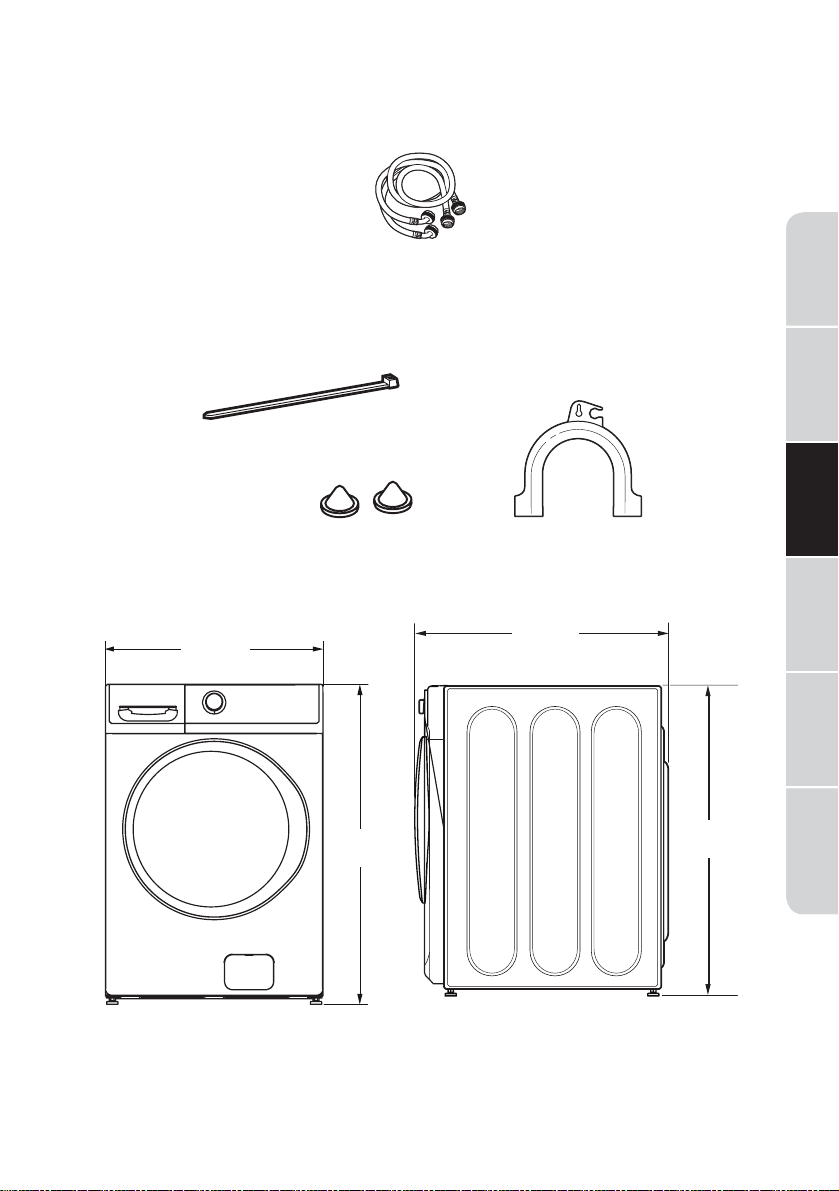
27.0 "
(68.6 cm)
39.8"
(101.09 cm)
SIDE
34.2"
(86.9cm)
PARTS REQUIRED (OBTAIN LOCALLY)
Water Hose (2)
PARTS SUPPLIED
Inlet Hose Screen Washers(2)
ROUGH-IN DIMENSIONS
*NOTE: With pedestal, 52.6"
Stacked, 84"
9
Cable Tie
Drain Hose Guide
Washer
Safety
Operation
Requirements
Installation
Instructions
Troubleshooting
Washer Care
Washer Use
39.8"
(101.09 cm)
Washer
Safety
Operation
Requirements
Installation
Instructions
Troubleshooting Washer CareWasher Use
WARNING:
• Recycle or destroy the carton and plastic bags after the washer is
unpacked. Make materials inaccessible to children. Children might use
them for play. Cartons covered with rugs, bedspreads or plastic sheets
can become airtight chambers causing suffocation.
1. Cut and remove the top and bottom packaging straps.
2. While it is in the carton, carefully lay the washer on its side. DO NOT lay
the washer on its front of back.
3. Turn down the bottom flaps-remove all base packaging, including the
cardboard, styrofoam base and styrofoam tub support (inserted in
center of base).
NOTE: If you are installing a pedestal, proceed to the installation instructions
that come with the pedestal.
4. Carefully return the washer to an upright position and remove the carton.
5. Carefully move the washer to within 4 feet (122 cm) of the final location.
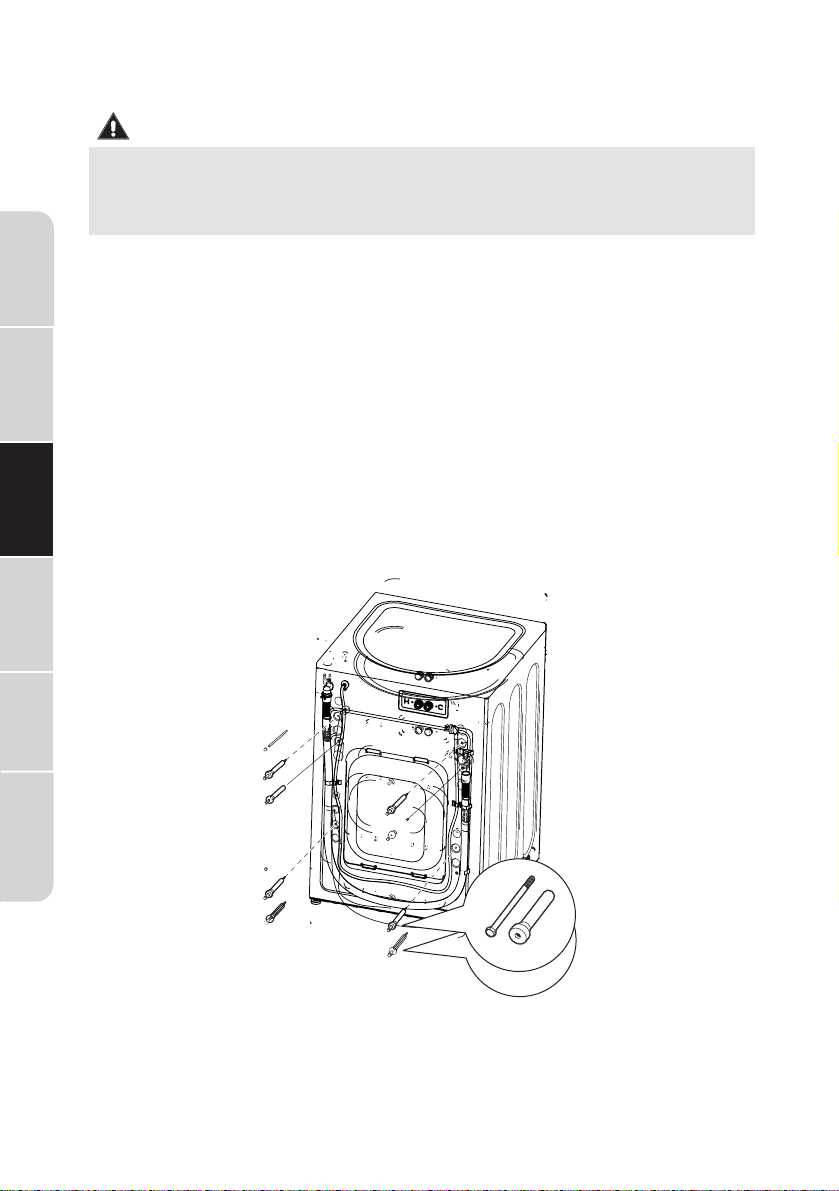
6. Remove the following from the back side of the washer:
4 bolts
4 plastic spacers (including rubber grommets)
4 power cord retainers
10
UNPACKING THE WASHER
IMPORTANT: Failure to remove the shipping bolts* can cause the washer to
become severely unbalanced.
Save all bolts for future use.
* Any damages from failure to remove the shipping bolts are not covered by the
warranty.
Inlet
Hose
Screen
Washers
NOTE: If you must transport the washer at a later date, you must reinstall
the shipping support hardware to prevent shipping damage. Keep the
hardware in the plastic bag provided.
INSTALLING THE WASHER
1. Run some water from the cold faucet to flush the water lines and
remove particles that might clog up the inlet hose.
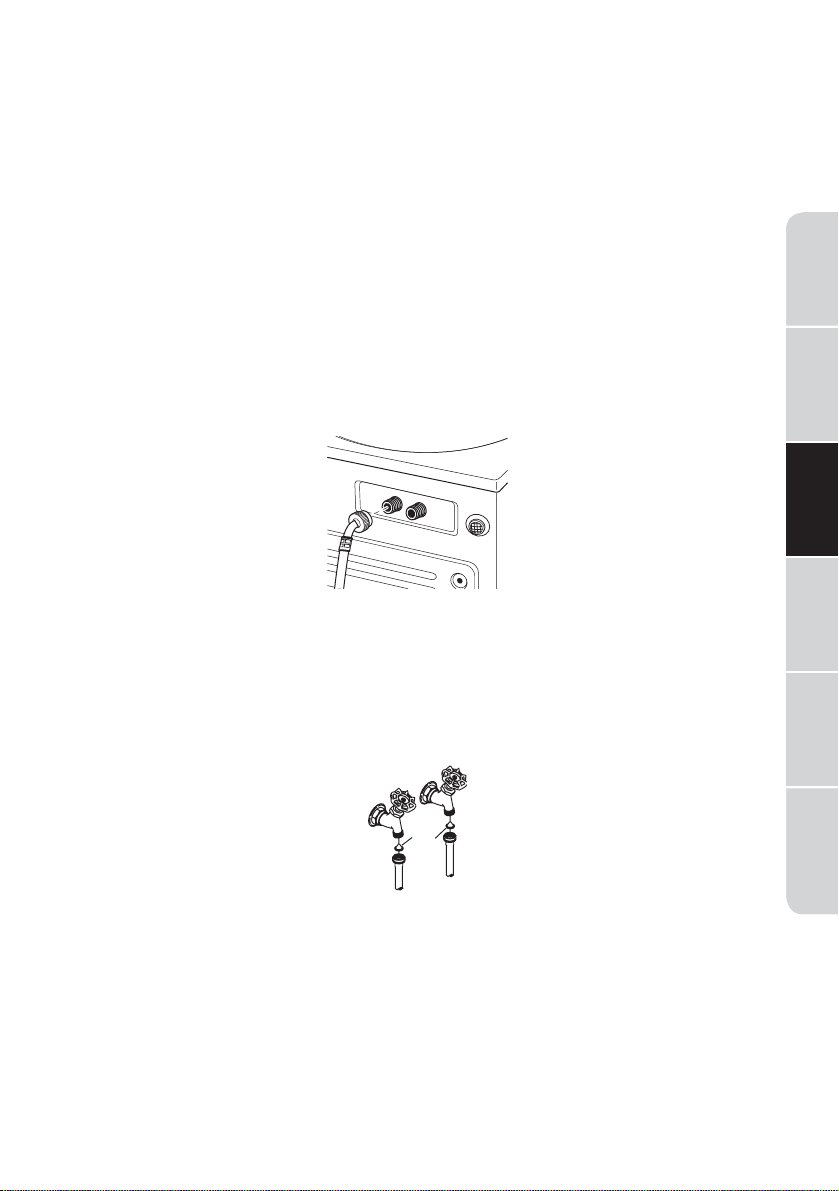
2. Ensure there is a rubber washer in the hoses. Reinstall the rubber
washer into the hose fitting if it has fallen out during shipment.
Carefully connect the inlet hose marked HOT to the rear “H” inlet of the
water valve. Tighten by hand;then tighten another 2/3 turn with pliers.
And COLD to the rear “C” inlet of the water valve. Tighten by hand;
then tighten another 2/3 turn with pliers.
Do not crossthread or over-tighten these connections.
3. Install the screen washers by inserting them into the free ends of the
inlet hoses with protruded side facing the faucet.
4. Connect the inlet hose ends to the HOT and COLD water faucets
tightly by hand, then tighten another
2/3 turn with pliers. Turn the
water on and check for leaks.
5. Carefully move the washer to its final location. Gently rock the washer
into position ensuring inlet hoses do not become kinked. It is important
not to damage the rubber leveling legs when moving your washer to its
final location. Damaged legs can increase washer vibration. It may be
helpful to spray window cleaner on the floor to help move your washer
into its final position.
NOTE: To reduce vibration, ensure that all four rubber leveling legs are
firmly touching the floor. Push and pull on the back right and then back
left of your washer.
11
H
C
Washer
Safety
Operation
Requirements
Installation
Instructions
Troubleshooting
Washer Care
Washer Use
Washer
Safety
Operation
Requirements
Installation
Instructions
Troubleshooting Washer CareWasher Use
Cable
Tie
Cable
Tie
Cable
12
NOTE: Do not use the dispenser drawer or door to lift the washer.
NOTE: If you are installing into a drain pan, you can use a 24-inch long 2x4
to lever the washer into place.
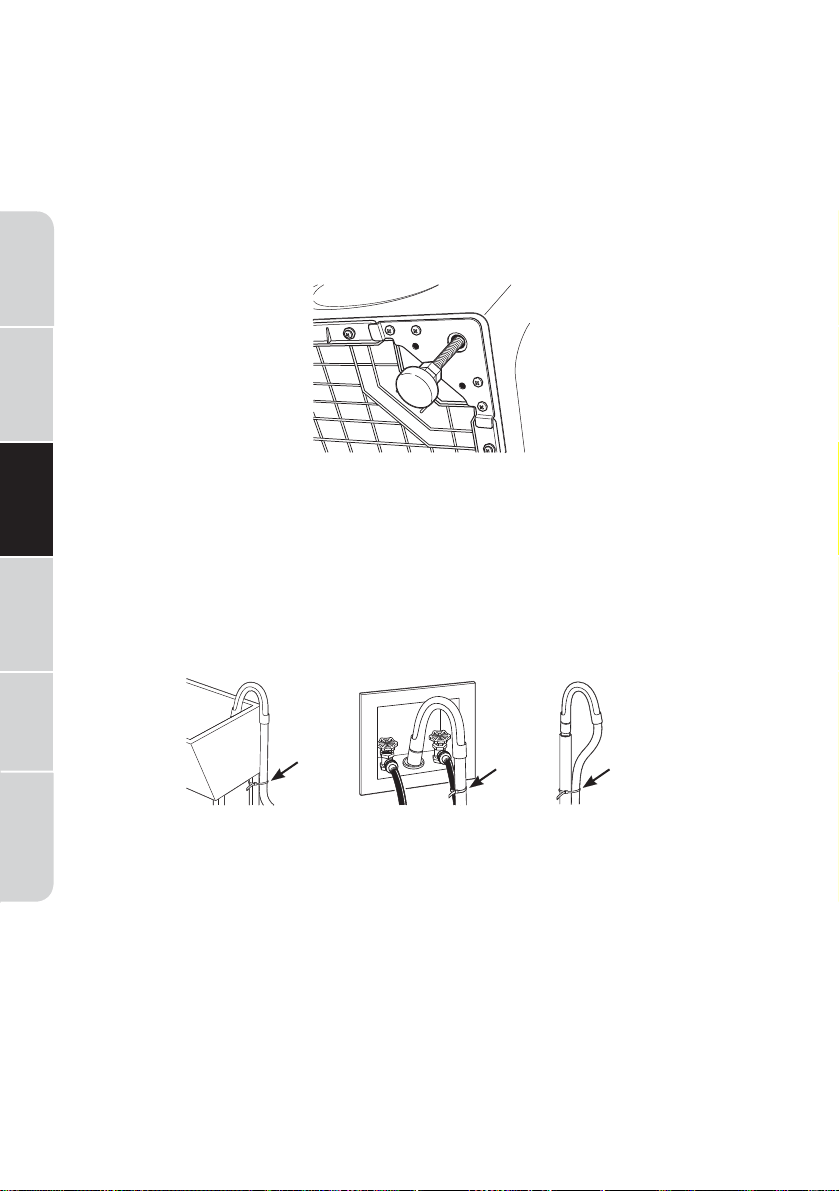
6. With the washer in its final position, place a level on top of the washer
(if the washer is installed under a counter, the washer should not be able
to rock). Adjust the front leveling legs up or down to ensure the washer
is resting solid. Turn the locknuts on each leg up towards the base of the
washer and snug with a wrench.
NOTE: Keep the leg extension at a minimum to prevent excessive
vibration. The farther out the legs are extended, the more the washer
will vibrate.
If the floor is not level or is damaged, you may have to extend the rear
leveling legs.
7. Attach the U-shaped hose guide to the end of the drain hose. Place
the hose in a laundry tub or standpipe and secure it with the cable tie
provided in the enclosure package.
NOTE: Placing the drain hose too far down the drain pipe can cause a
siphoning action. No more than 7 inch (17.78 cm) of hose should be in the
drain pipe. There must be an air gap around the drain hose. A snug fit can
also cause a siphoning action.
8. Plug the power cord into a grounded outlet.
NOTE: Check to be sure the power is off at the circuit breaker/fuse box
before plugging the power cord into an outlet.
9. Turn on the power at the circuit breaker/fuse box.
10. Read the rest of this Owner’s Manual. It contains valuable and helpful
information that will save you time and money.

11. Before starting the washer, check to make sure:
• Main power is turned on.
• The washer is plugged in.
• The water faucets are turned on.
• The unit is level and all four leveling legs are firmly in the floor.
• The shipping support hardware is removed and saved.
• The drain hose is properly tied up.
12. Run the washer through a complete cycle.
13. If your washer does not operate, please review the Before You Call
For Service section before calling for service.
14. Place these instructions in a location near the washer for future
reference.
13
Washer
Safety
Operation
Requirements
Installation
Instructions
Troubleshooting
Washer Care
Washer Use
Washer
Safety
Operation
Requirements
Installation
Instructions
Troubleshooting Washer CareWasher Use
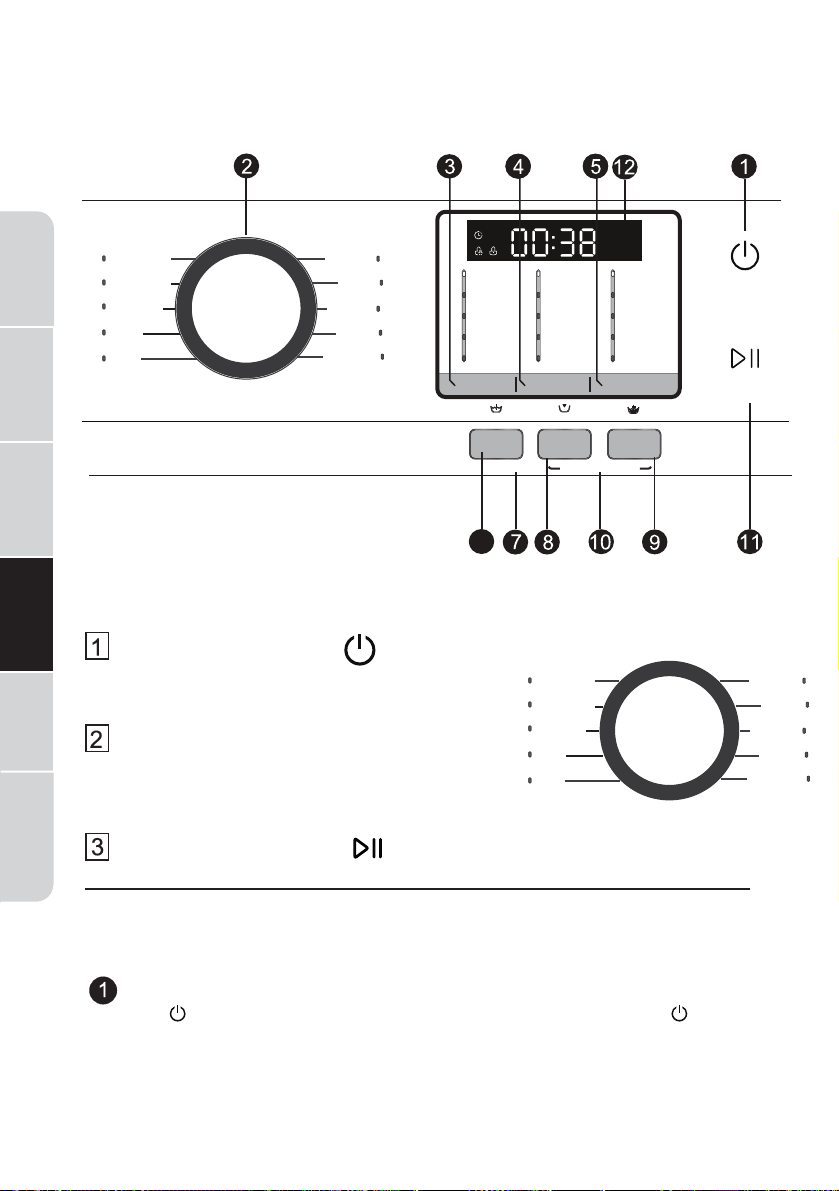
QUICK START
Press the Power button.
If the screen is dark, a press of the Power
button will “wake up” the display.
Select a wash cycle. (Defaults are set for
each cycle. These default settings can be
changed. See Control setting for more
information).
Press the START/PAUSE.
14
WASHER USE
CONTROL PANEL
CONTROL SETTING
Power
Press to “wake up” the display. If the display is active, press to put
the washer into standby mode.
NOTE: Pressing Power does not disconnect the appliance from the
power supply.
6
Normal/Colors
Bulk/Sheets
Heavy Duty
Whites
Towels
Rinse & Spin
Tub Clean
Sportswear
Delicates
Quick Wash
Extra Heavy
Heavy
Medium
Light
Extra Light
Hot
Warm
Eco Warm
Cold
Tap Cold
Extra High
High
Medium
Low
No Spin
POWER
START/PAUSE
Spin Speed
Soil Level
Wash Temp
PRE
SOAK
DELAY
EXTRA
RINSE
Water Plus/Hold 3 sec Control Lock/Hold 3 sec
Normal/Colors
Bulk/Sheets
Heavy Duty
Whites
Towels
Rinse & Spin
Tub Clean
Sportswear
Delicates
Quick Wash
Wash Cycles
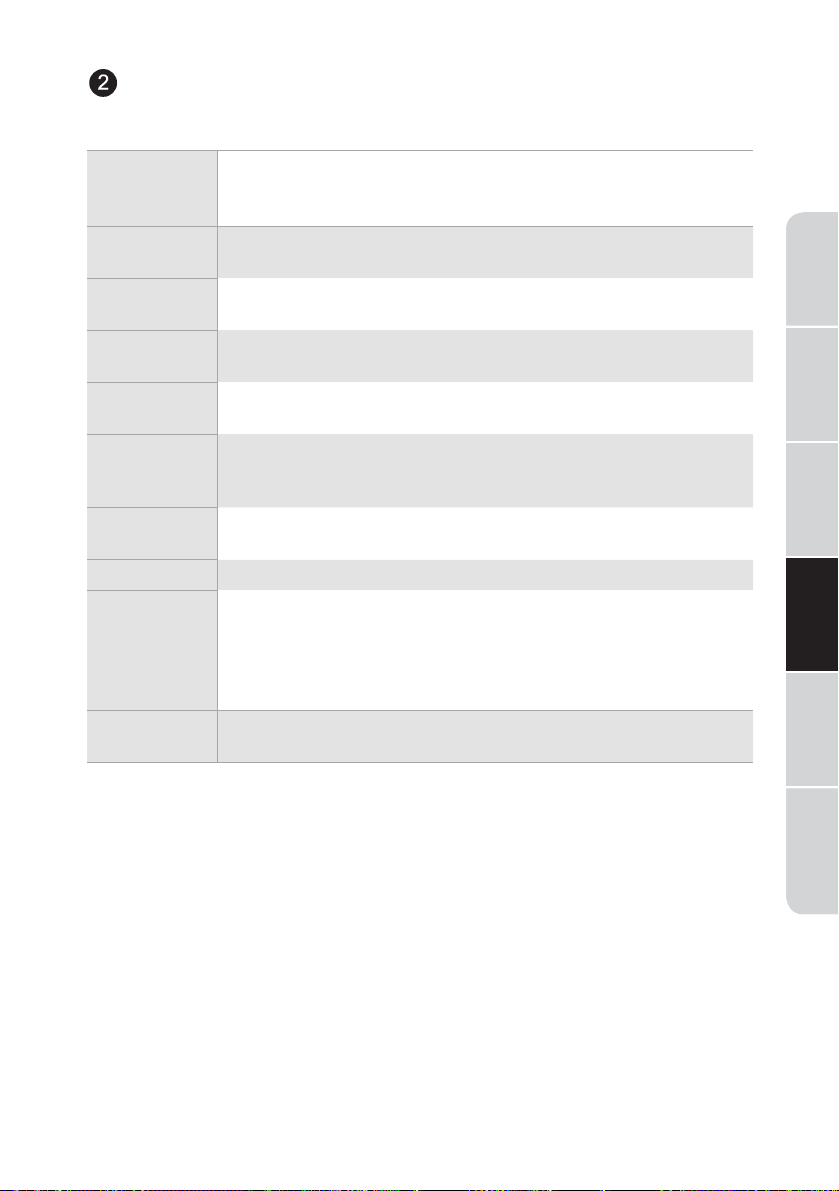
The wash cycles are optimized for specific types of wash loads. The
chart below will help you match the setting with the loads.
15
Washer
Safety
Operation
Requirements
Installation
Instructions
Troubleshooting
Washer Care
Washer Use
Normal/
Colors
For heavily to lightly soiled colorfast cottons, household
linens, work and play clothes.
NOTE: This is the most common cycle.
Bulky/
Sheets
For large items such as comforters, blankets, small rugs
and similar bulky items.
Heavy
Duty
Washing the large and heavy clothing, such as overcoats
or towels.
Whites For heavily to lightly soiled white laundry, work and play
clothes
Towels For items such as towels, sheets, pillowcases and dish
rags.
Quick Wash For lightly soiled items needed in a hurry. Cycle time
is approximately 40 minutes, depending on selected
options.
Delicates For delicate, washable textiles, e.g. made of silk, satin,
synthetic fibers or blended fabrics.
Sportswear Washing the activewear.
Tub Clean Use for cleaning the basket of residue and odor.
Recommended use of at least once per month.
NOTE: Never load laundry white using Tub Clean.
The laundry may become damaged See the Care and
Cleaning section.
Rinse &
Spin
To quickly rinse and spin out any items at any time.
Washer
Safety
Operation
Requirements
Installation
Instructions
Troubleshooting Washer CareWasher Use
16
SOIL LEVEL
Change the Soil level
to increase or decrease
the wash time to
remove different
amounts of soil.
To change the Soil level,
press the Soil level button
until you have reached the
desired setting. You can
choose between Extra Light,
Light, Medium, Heavy or
Extra Heavy soil levels.
WASH TEMP
Adjust to select the
proper main water
temperature for
the wash cycle. The
PreWash rinse water
is always cold to help
reduce energy usage
and reduce setting of
stains and wrinkles.
Follow the fabric
manufacturer’s care
label when selecting
the wash temperature.
To change the wash
temperature, press the
wash Temp button until you
have reached the desired
setting.
Tap Cold, Cold,Eco Warm,
You can choose between
Warm or Hot.
By design, to protect
fabrics, not all wash
temperatures are available
for certain wash cycles.
SPIN SPEED
Changing the Spin
speed changes the
final spin speed of
the cycles. Always
follow the garment
manufacturer’s care
label when changing
the Spin speed.
To change the Spin speed,
press the Spin speed button
until you have reached the
desired setting. You can
choose between No Spin,
Low, Medium, High or Extra
High. Higher spin speeds
are not available on certain
cycles, such as Delicates.
Higher spin speeds remove
more water from the clothes
and will help reduce dry
time, but may also increase
the possibility of setting
wrinkles on some fabrics.
Washer
Safety
Operation
Requirements
Installation
Instructions
Troubleshooting
Washer Care
Washer Use
17
PRE SOAK
For soaking your
garments prior to
the wash cycle. This
option
begins with a
brief tumble
and then
proceeds to soak the
clothes with water
and detergent for a
specified period of
time. Once complete,
the cycle will begin
automatically. Pre Soak
must be selected
prior
to pressing button.
The Pre Soak time will
add an additional 10-20
minutes to the overall
wash time. High-eciency
detergent from the main
wash compartment in the
dispenser is used for the Pre
Soak period and main wash
cycle.
WATER
PLUS
Hold 3 sec
Increases the water
level of the main wash.
Option is available on
Normal/Colors,Bulky/
Sheets,Heavy
Duty,Whites, Towels,
Delicates, Sportswear
To use:
1. Turn power ON and select
a wash cycle.
2. Select the Add Water Plus
button to activate water
plus.
3. Press the
button.
DELAY
You can delay the
start of a wash cycle
for up to 24 hours.
Press the Delay Wash
button to choose the
amount of time you
want to delay the start
of the wash cycle.
Once the desired time
is reached, press the
button. The machine
will count down and
start automatically at
the correct time.
NOTE: If you forget to close
the door, a double beep will
sound when pressing pause/
add garment button.
NOTE: If you open the door
when the delay is count-
ing down, the machine will
enter the pause state. You
must close the door and
press
again in order to
restart the countdown.
EXTRA
RINSE
This option allows for
an extra rinse during a
cycle to remove excess
dirt and detergent
from soiled loads.
DELAY and
EXTRA
RINSE
Control Lock/Hold 3 sec
You can lock the
controls to prevent any
selections from being
made. Or you can lock
or unlock the controls
after you have started
a cycle.
Children cannot
accidentally start the
washer by touching
buttons with this
option selected.
To lock the washer, press
and hold the Delay and
Extra Rinse buttons for
3 seconds.
To unlock the washer
controls, press and hold
Delay and Extra Rinse
buttons for 3 seconds.
NOTE: The Power button
can still be used when the
machine is locked.
START/PAUSE
Press to start a wash
cycle. If the washer
is running,pressing it
once will pause the
washer. Press again to
restart the wash cycle.
If you want add a
garment, please press
the
button.
The washer will unlock
the door. Press again
to restart the cycle.
NOTE: In some cycles the
washer will drain first,then
unlock the door when it is
paused.
NOTE: The washer performs
automatic system checks
after pressing the button
You may hear the door lock
and unlock before water
flows, this is normal.
Display
Displays the
approximate time
remaining until the end
of the cycle.
NOTE: The cycle time
is affected by the
water pressure in your
home and the balance
of the load in the
washer. You may see
the time remaining on
the display increase to
accommodate a slower
spin speed to handle
unbalanced loads.
%
$
&
'
Wash
Rinse
Spin
Cycle status is also
displayed and certain
features such as Delay
Wash or Steam are shown
indicating they have been
selected.
A
Display
Wash Time Delay Time
END Error
B
Remain-Delay
C
Child Lock
D
Door Lock
Washer
Safety
Operation
Requirements
Installation
Instructions
Troubleshooting Washer CareWasher Use
18
FEATURES
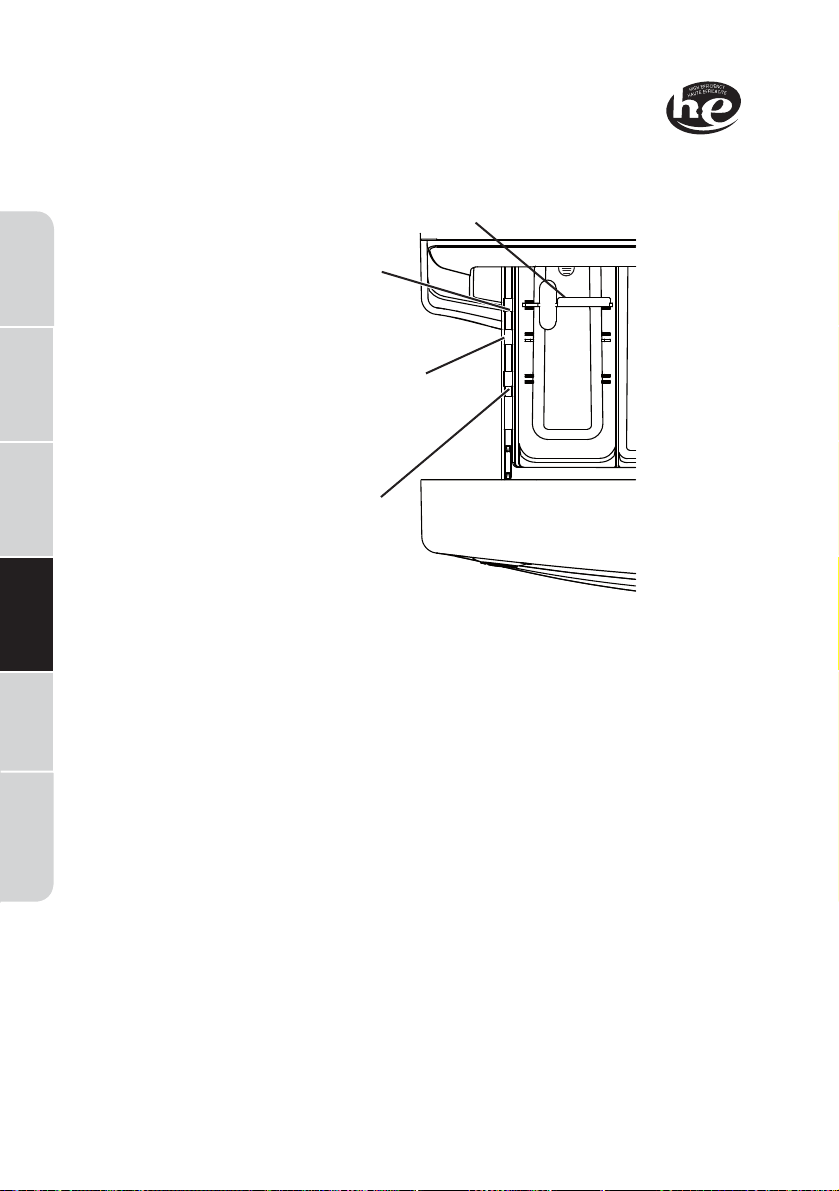
THE DISPENSER DRAWER
Slowly open the dispenser drawer by pulling it out until it stops.
After adding laundry products, slowly close the dispenser drawer. Closing
the drawer too quickly could result in early dispensing of the bleach,
fabric softener or detergent.
You may see water in the dispenser drawer at the end of the cycle. This
is a result of the flushing/siphoning action and is part of the normal
operation of the washer.
NOTE: Liquid detergent will drain into the washer drum as it is added.
• Detergent usage may need to be adjusted for water temperature,
water hardness, size and soil level of the load. Avoid using too
much detergent in your washer as it can lead to over sudsing and
detergent residue being left on the clothes.
19
Washer
Safety
Operation
Requirements
Installation
Instructions
Troubleshooting
Washer Care
Washer Use
Washer
Safety
Operation
Requirements
Installation
Instructions
Troubleshooting Washer CareWasher Use
Remove for powder detergent
Normal
HE Liquid
Detergent
Setting
2X HE Liquid
Detergent
Setting (most
common
setting)
3X HE
Liquid
Detergent
Setting
2X
DETERGENT
The Detergent Compartment
• High-ecient detergent is required for this washer.
Use the detergent manufacturer’s recommended amount.
• Add measured detergent to the front left detergent compartment of
the dispenser drawer.
• Detergent is flushed from the dispenser at the beginning of the wash
cycle. Either powdered or liquid detergent can be used.
• Powder Detergent-Remove the Detergent selection insert and place
it in a safe location outside of the washer. Follow the detergent
manufacturer’s instructions when measuring the amount of powder to
use.
• Detergent usage may need to be adjusted for water temperature,
water hardness, size and soil level of the load. Avoid using too much
detergent in your washer as it can lead to oversudsing and detergent
residue being left on the clothes.
• Using more detergent than the recommended quantity can cause
residue buildup on your washer.
• Liquid Detergent - Locate the concentration of your detergent on
the bottle. Place the Detergent selection insert in the corresponding
location depending on the concentration.
remove for powder
SO
LIQUID
1X 3X
20
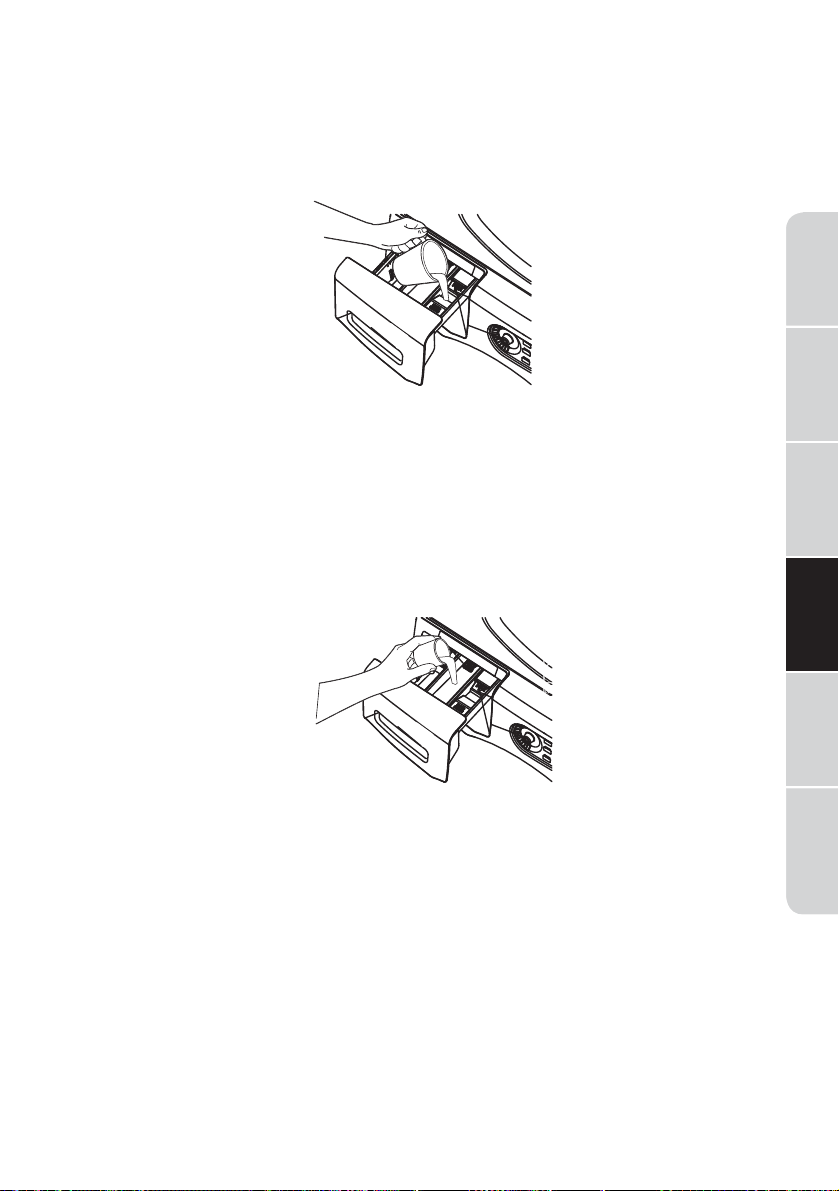
The Liquid Bleach Compartment
IMPORTANT: Be sure to identify the correct compartment for bleach
before using.
If desired, measure out the recommended amount of liquid bleach,
not to exceed 1/3 cup (80 ml), and pour into the right compartment
labeled “LIQUID BLEACH”.
Do not exceed the maximum fill line. Overfilling can cause early
dispensing of the bleach which could result in damaged clothes.
NOTE: Do not use powdered bleach in the dispenser.
The Fabric Softener Compartment
IMPORTANT: Be sure to identify the correct compartment for fabric
softener before using.
If desired, pour the recommended amount of liquid fabric softener into
the compartment labeled “FABRIC SOFTENER”.
Use only liquid fabric softener in the dispenser.
Dilute with water to the maximum fill line.
Do not exceed the maximum fill line. Overfilling can cause early
dispensing of the fabric softener which could stain clothes.
NOTE: Do not pour fabric softener directly on the wash load.
21
Washer
Safety
Operation
Requirements
Installation
Instructions
Troubleshooting
Washer Care
Washer Use
Washer
Safety
Operation
Requirements
Installation
Instructions
Troubleshooting Washer CareWasher Use
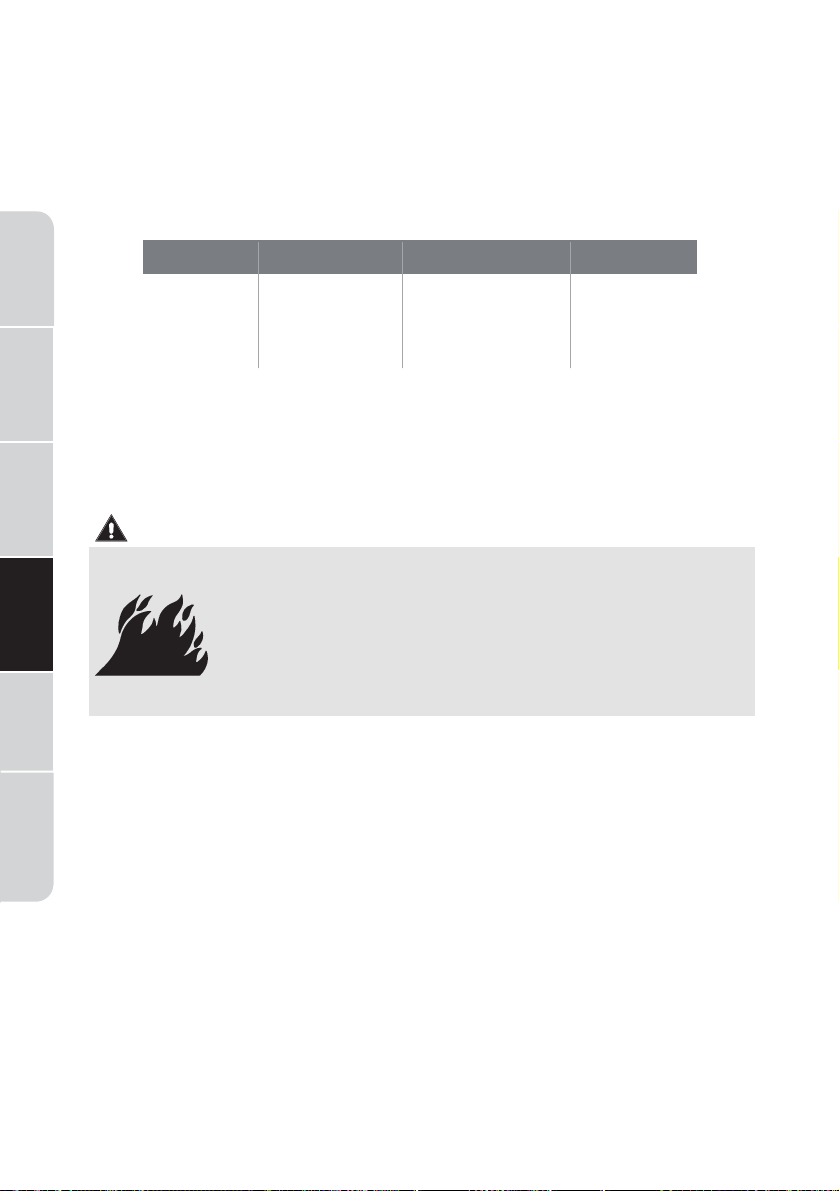
WARNING
Fire Hazard
22
LOADING AND USING THE WASHER
Always follow fabric manufacturer’s care label when laundering.
SORTING WASH LOADS
Sort laundry into loads that can be washed together.
PREPARING CLOTHES
To avoid snags during washing:
Follow these steps to maximize garment care.
• Combine large and small items in a load. Load large items first.
Large items should not be more than half the total wash load.
• Washing single items is not recommended. This may cause an out-
of-balance load. Add one or two similar items.
• Pillows and comforters should not be mixed with other items. This
may cause an out-of-balance load.
• Never place items in the washer that are dampened
with gasoline or other flammable liquids.
• No washer can completely remove oil.
• Do not dry anything that has ever had any type of oil
on it (including cooking oils).
• Doing so can result in death, explosion, or fire.
• Close garment zippers, snaps, buttons and hooks.
• Mend seams, hems, tears.
• Empty all items from pockets.
• Remove nonwashable garment accessories such as ornaments and
nonwashable trim materials.
• To avoid tangling, tie strings, draw ties and belt-like materials.
• Brush away surface dirt and lint.
• Promptly wash wet or stained garments to maximize results.
• Use nylon mesh garment bags to wash small items.
• Wash multiple garments at one time for best results.
COLORS SOIL FABRIC LINT
Whites
Lights
Darks
Heavy
Normal
Light
Delicates
Easy Care
Sturdy Cottons
Lint
Producers
Lint
Collectors
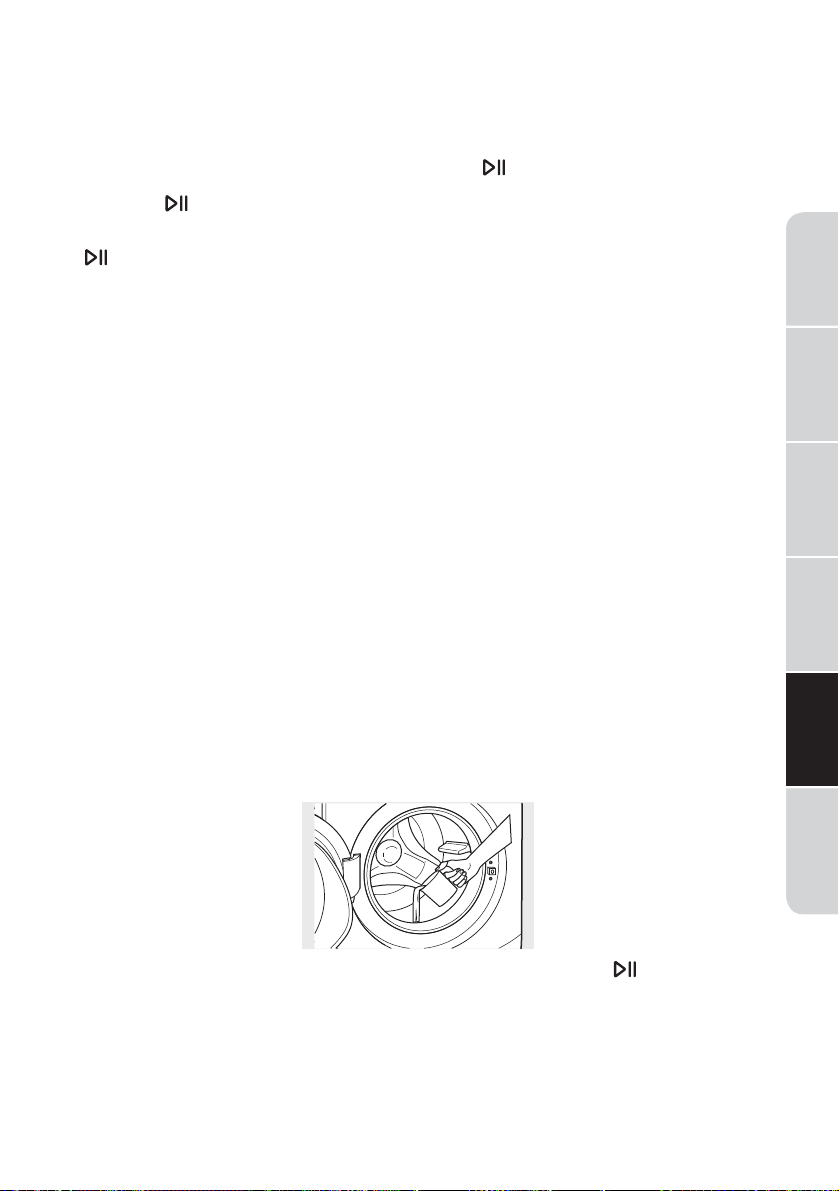
LOADING THE WASHER
Wash drum may be fully loaded with loosely added items. Do not wash
fabrics containing flammable materials (waxes, cleaning fluids, etc.).
To add items after washer has started, press
and wait until the door is
unlocked. The washer may take up to 30 seconds to unlock the door after
pressing depending on the machine conditions. Do not try to force
open the door when it is locked.
After the door unlocks, open gently. Add items, close the door and press
to restart.
WASHER CARE
CLEANING
EXTERIOR
Immediately wipe off any spills. Wipe with damp cloth. Do not hit surface
with sharp objects.
INTERIOR
To clean the interior of the washer, select the Tub Clean feature on the
control panel. This Tub Clean cycle should be performed, at a minimum,
once per month. This cycle will use more water, in addition to bleach, to
control the rate at which soils and detergents may accumulate in your
washer.
NOTE: Read the instructions below completely before starting the Tub
Clean cycle.
1. Remove any garments or objects from the washer and ensure the
washer basket is empty.
2. Open the washer door and pour one cup or 250 ml of liquid bleach or
other washing machine cleaner into the basket.
3. Close the door and select the Tub Clean cycle. Push the
button.
4. When the Tub Clean cycle is working, the display will show the
estimated cycle time remaining. The cycle will complete in about
90 minutes. Do not interrupt the cycle.
23
Washer
Safety
Operation
Requirements
Installation
Instructions
Troubleshooting
Washer Care
Washer Use
Washer
Safety
Operation
Requirements
Installation
Instructions
Troubleshooting Washer CareWasher Use
24
5. After the cycle is complete, leave the door open slightly for better
ventilation.
If for any reason the cycle needs to be interrupted, the door will not
open immediately. Forcing open the door at this stage may cause water
to flood. The door will open after the water is drained to a level where it
would not flood the floor.
Tub Clean may be interrupted by pressing button in between cycles. A
power outage in the house might also interrupt the cycle. When the power
supply is back, the Tub Clean cycle resumes where it had stopped. When
interrupted, be sure to run a complete Tub Clean cycle before using the
washer. If the Power pad is pressed during Tub Clean,the cycle will be lost.
IMPORTANT:
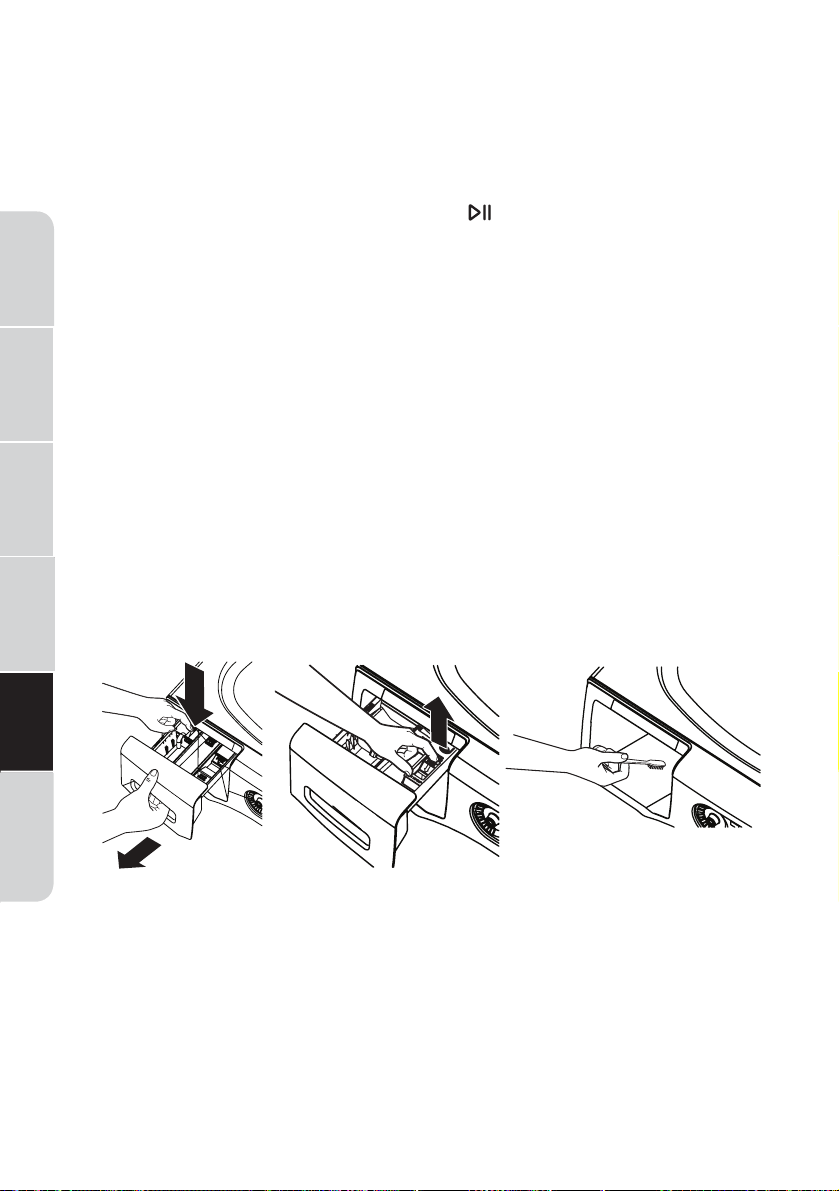
DISPENSER DRAWER AREA
Detergent and fabric softener may build up in the dispenser drawer.
Residue should be removed once or twice a month.
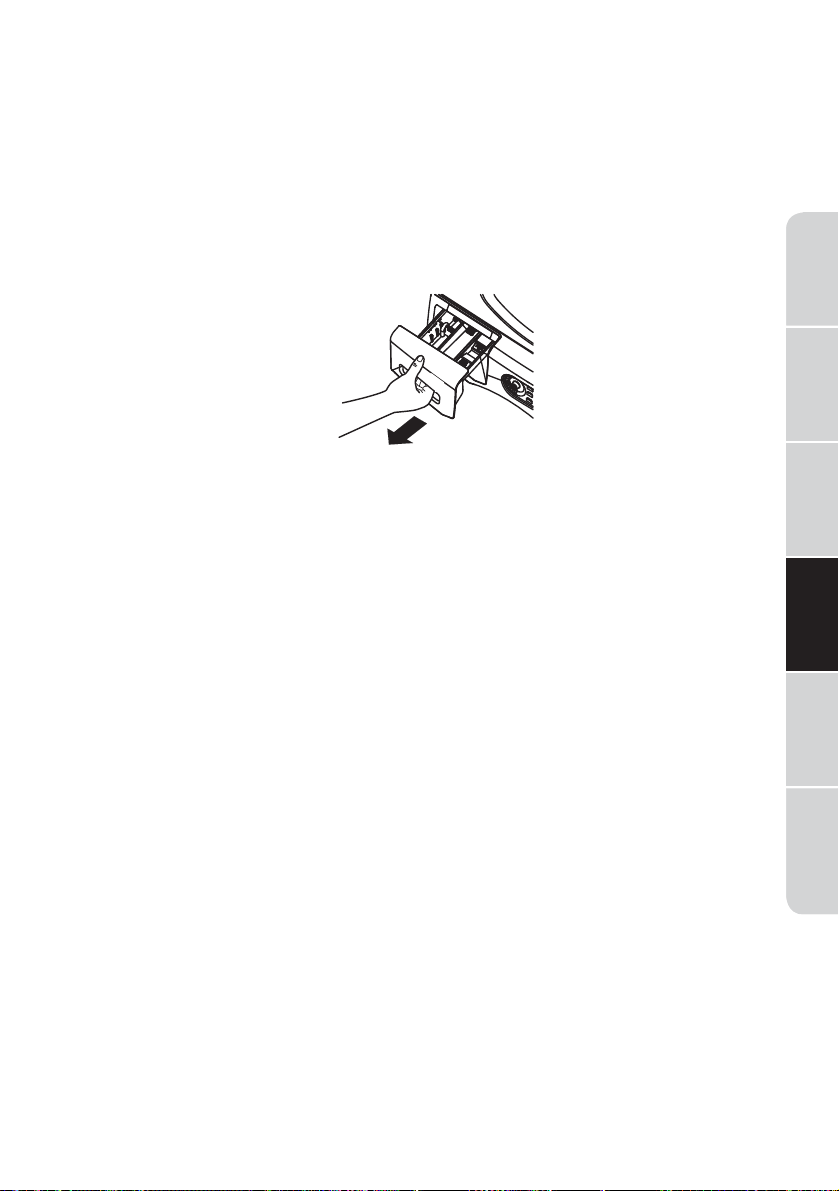
Lock tab is visible only after drawer has been pulled open.
Remove the drawer by first pulling it out until it stops. Then reach back
into the left rear corner of the drawer cavity and press down firmly on
the lock tab, pulling out the drawer.
• Run Tub Clean with 1 Cup (250 ml) of bleach once a month.
• After the completion of a Tub Clean cycle, the interior of your
washer may have a bleach smell.
• It is recommended to run a light color load after the Tub Clean
cycle.
Washer
Safety
Operation
Requirements
Installation
Instructions
Troubleshooting
Washer Care
Washer Use
Pump lter
Pour
spout
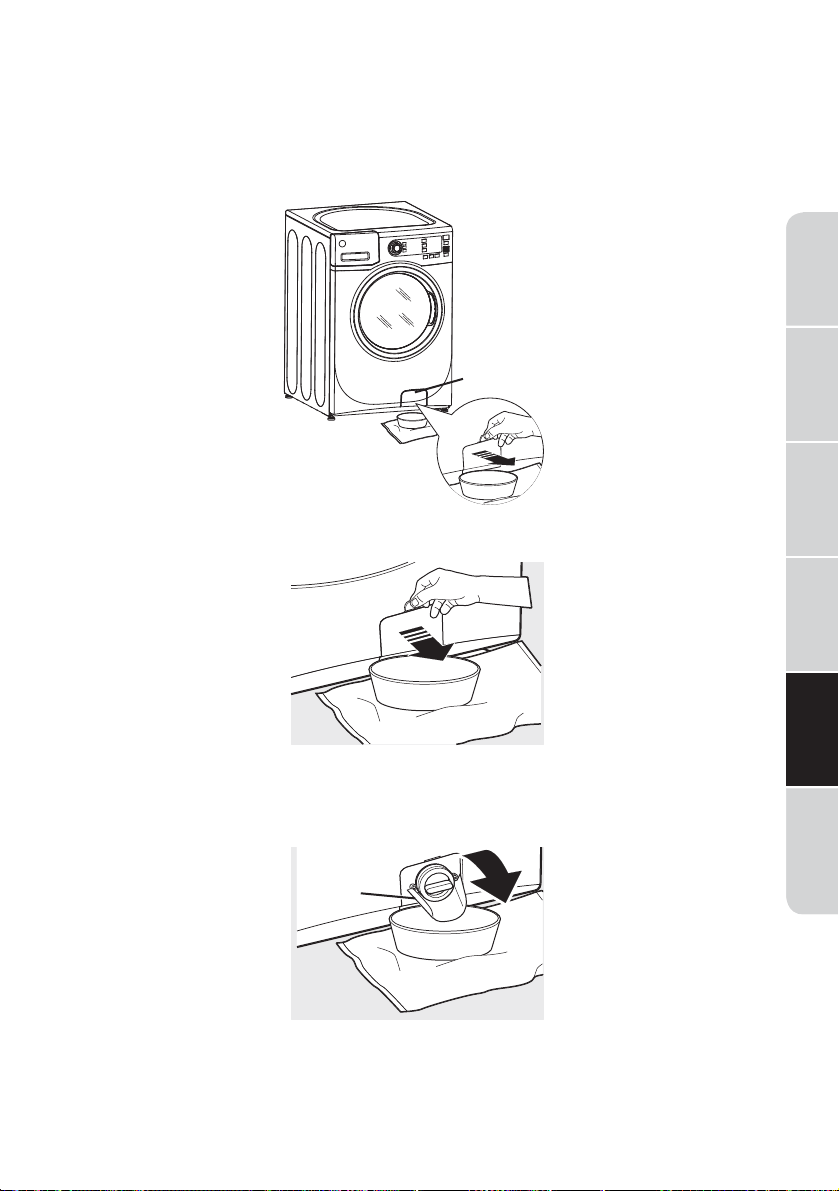
CLEANING THE PUMP FILTER
Due to the nature of the front-load washer, it is sometimes possible for
small articles to pass to the pump. The washer has a filter to capture lost
items so they are not dumped to the drain. To retrieve lost items, clean out
the pump filter.
1. Using a coin or flat screwdriver in the notch on the door, open the
access door.
2. Place a shallow pan or dish under the pump access door and towels on
the floor in front of the washer to protect the floor. It is normal to catch
about a cup of water when the filter is removed.
3. Pull down the pour spout.
25
Washer
Safety
Operation
Requirements
Installation
Instructions
Troubleshooting Washer CareWasher Use
Pour
spout
26
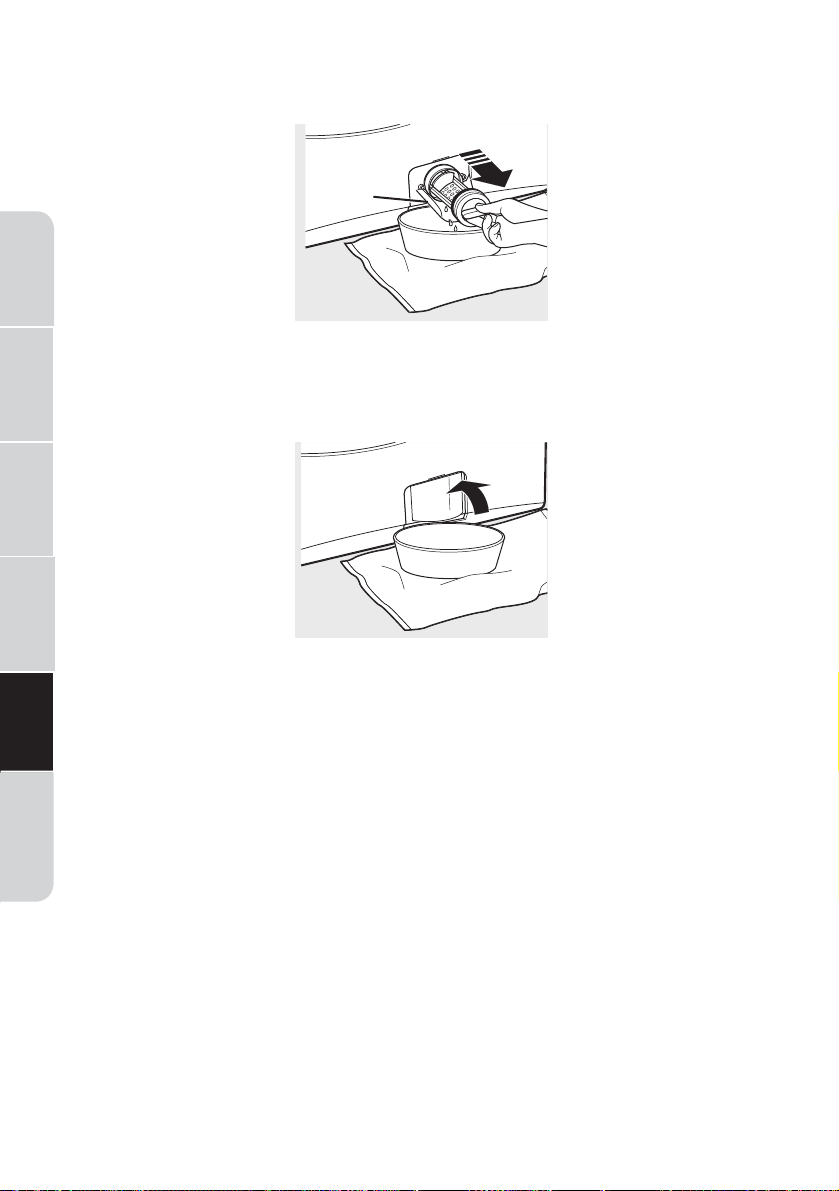
4. Turn the pump filter counterclockwise and remove the filter. Open
slowly to allow the water to drain.
5. Clean the debris from the filter.
6. Replace the filter and turn clockwise. Tighten securely.
7. Flip up the pour spout.
8. Close the access door.
CLEANING THE DOOR GASKET
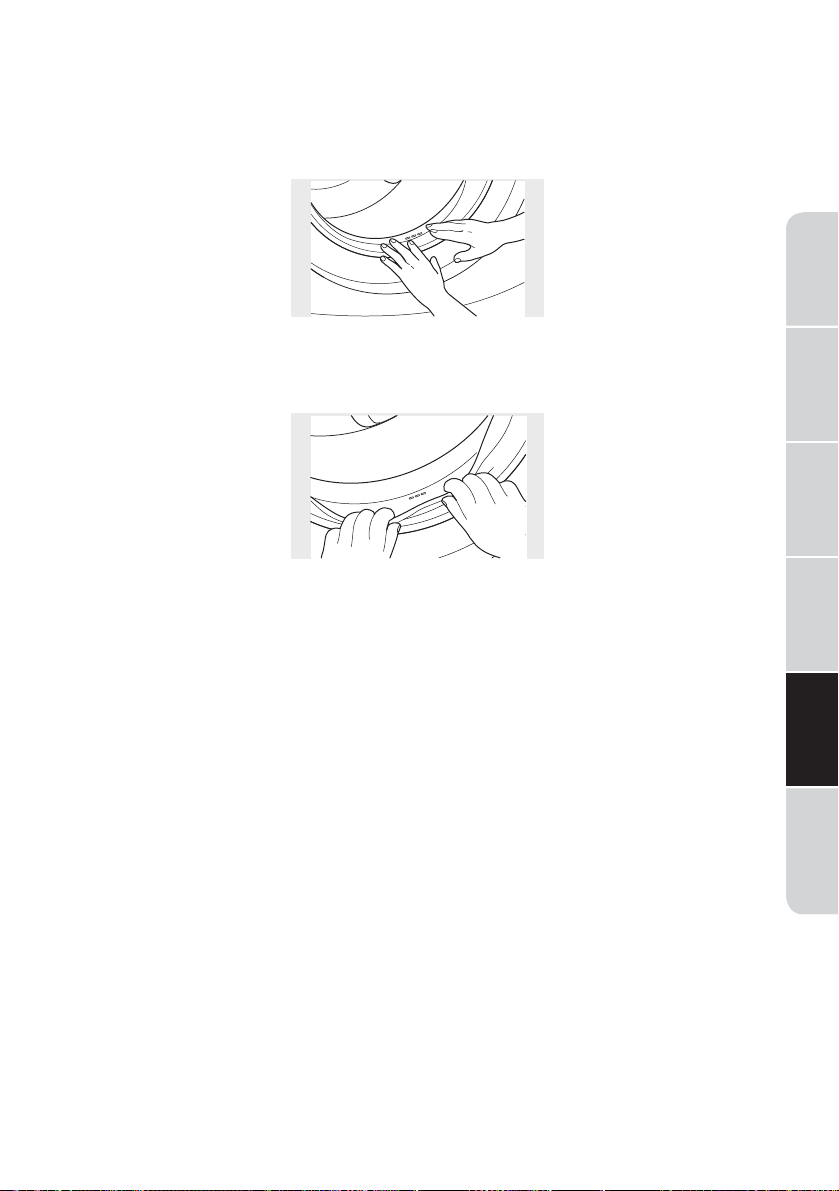
1. Open the washer door. Using both hands, press down the door gasket.
Remove any foreign objects if found trapped inside the gasket. Make
sure there is nothing blocking the holes behind the gasket.
2. While holding down the door gasket, inspect the interior gasket by
pulling it down with your fingers. Remove any foreign objects if found
trapped inside this gasket. Make sure there is nothing blocking the holes
behind the gasket.
3. When you are finished cleaning the door gasket, remove your hands
and the gasket will return to the operating position.
MOVING, STORAGE AND LONG VACATIONS
Ask the service technician to remove water from drain pump and hoses.
Do not store the washer where it will be exposed to the weather. When
moving the washer, the tub should be kept stationary by using the
shipping bolts removed during installation. See Installation Instructions in
this book.
Be sure the water supply is shut off at the faucets. Drain all water from
the hoses if the weather will be below freezing.
Certain internal parts are intentionally not grounded and may present a
risk of electric shock only during servicing. Service Personnel - Do not
contact the following parts while the appliance is energized: Electrical
Valve, Drain Pump, Heater and Motor.
27
Washer
Safety
Operation
Requirements
Installation
Instructions
Troubleshooting
Washer Care
Washer Use

Washer
Safety
Operation
Requirements
Installation
Instructions
Troubleshooting Washer CareWasher Use
28
BEFORE YOU CALL FOR SERVICE...
Troubleshooting Tips
Save time and money! Review the charts on the following pages first and
you may not need to call for service.
Problem Possible Cause What To Do
Not draining
Not spinning
Not agitating
Load is out of balance
Pump clogged
Drain hose is kinked or
improperly connected
Household drain may be
clogged
Drain hose siphoning;
drain hose pushed too far
down the drain
• Redistribute clothes and
run drain & spin or rinse
& spin.
• Increase load size if
washing small load
containing heavy and
light items.
• See page 25 on how to
clean the Pump Filter.
• Straighten drain hose and
make sure washer is not
sitting on it.
• Check household
plumbing. You may need
to call a plumber.
• Ensure there is an air gap
between hose and drain.
Leaking water Door gasket is damaged
• Check to see if gasket is
seated and not torn.
Objects left in pockets
may cause damage to
the washer (nails, screws,
pens, pencils).
Door gasket not damaged
• Water may drip from the
door when the door is
opened. This is a normal
operation.
• Carefully wipe off rubber
door seal. Sometimes
dirt or clothing is left in
this seal and can cause a
small leak.
Check back left of washer
for water
• If this area is wet, you
have over sudsing
condition. Use less
detergent.

29
Washer
Safety
Operation
Requirements
Installation
Instructions
Troubleshooting
Washer Care
Washer Use
Problem Possible Cause What To Do
Leaking water
(cont.)
Fill hoses or drain hose is
improperly connected
• Make sure hose
connections are tight at
washer and faucets and
make sure end of drain
hose is correctly inserted
in and secured to drain
facility.
Household drain may be
clogged
• Check household
plumbing. You may need
to call a plumber.
Dispenser clogged
• Powder soap may cause
clogs inside the dispenser
and cause water to
leak out the front of
the dispenser. Remove
drawer and clean both
drawer and inside of
dispenser box. Please
refer to Cleaning the
Washer section.
Incorrect use of detergent
• Use HE and correct
amount of detergent.
Dispenser box crack
• If new installation, check
for crack on inside of
dispenser box.
Clothes too
wet
Load is out of balance
Pump clogged
Overloading
Drain hose is kinked or
improperly connected
• Redistributes clothes and
run drain & spin or rinse
& spin.
• Increase load size if
washing small load
containing heavy and
light items.
• The machine will slow the
spin speed down to 400
rpm if it has a hard time
balancing the load. This
speed is normal.
• See page 25 on how to
clean the Pump Filter.
• The dry weight of the
load should be less than
18 lbs.
• Straighten drain hose and
make sure washer is not
sitting on it.

Washer
Safety
Operation
Requirements
Installation
Instructions
Troubleshooting Washer CareWasher Use
30
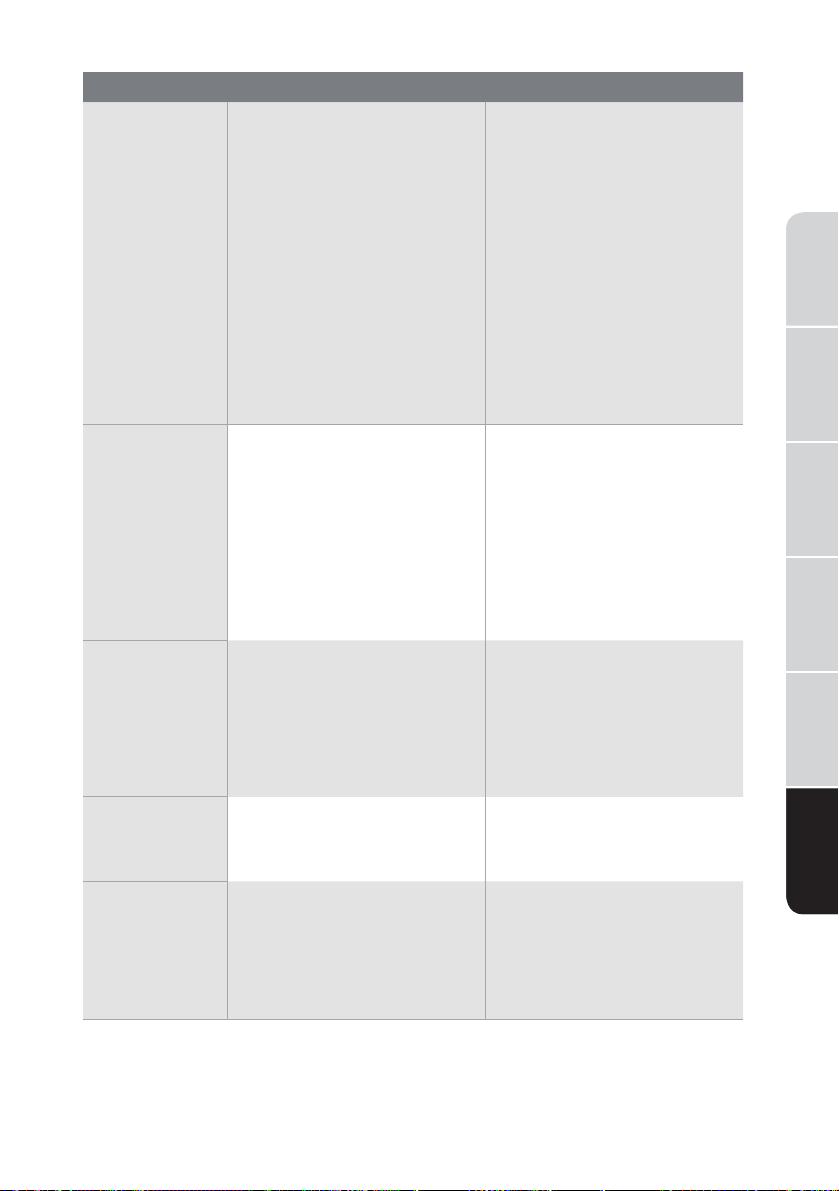
Problem Possible Cause What To Do
Clothes too
wet (cont.)
Household drain may be
clogged
Drain hose siphoning; drain
hose pushed too far down
the drain
• Check household
plumbing. You may need
to call a plumber.
• Ensure there is an air gap
between hose and drain.
Incomplete
cycle or timer
not advancing
Automatic load
redistribution
• Timer adds 3 minutes to
cycle for each rebalance.
11 or 15 rebalances maybe
done. This is normal
operation. Do nothing;
the machine will finish the
wash cycle.
Pump clogged
• See page 25 on how to
clean the Pump Filter.
Drain hose is kinked or
improperly connected
• Straight drain hose and
make sure washer is not
sitting on it.
Household drain may be
clogged
• Check household
plumbing. You may need
to call a plumber.
Drain hose siphoning; drain
hose pushed too far down
the drain
• Ensure there is an air gap
between hose and drain.
Loud or un-
usual noise;
vibration or
shaking
Cabinet moving
All rubber leveling legs
are not firmly touching the
floor
Unbalanced load
Pump clogged
• Washer is designed to
move
1/4" to reduce
forces transmitted to the
floor. This movement is
normal.
• Push and pull on the back
right and then back left
of your washer to check if
it is level. If the washer is
uneven, adjust the rubber
leveling legs so they are
all firmly touching the
floor and locked in place.
Your installer should
correct this problem.
• Open door and manually
redistribute load. To
check machine, run rinse
and spin with no load. If
normal, unbalance was
caused by load.
• See page 25 on how to
clean the Pump Filter.
31
Washer
Safety
Operation
Requirements
Installation
Instructions
Troubleshooting
Washer Care
Washer Use
Problem Possible Cause What To Do
No power/
washer not
working or
dead
Washer is unplugged • Make sure cord is plugged
securely into a working
outlet.
Water supply is turned o • Turn cold faucet fully on.
Circuit breaker/fuse is
tripped/blown
• Check house circuit
breaker/fuses. Replace
fuses or reset breaker.
Washer should have
separate outlet.
Automatic self system
checks
• First time the washer is
plugged in, automatic
checks occur. It may take
up to 2 minutes before
you can use your washer.
This is normal operation.
Snags, holes,
tears, rips or
excessive wear
Overloaded
Pens, pencils, nails, screws
or other objects left in
pockets
Pins, snaps, hooks, sharp
buttons, belt buckles,
zippers and sharp objects
left in pockets
• The dry weight of the load
should be less than 18 lbs.
• Remove loose items from
pockets.
• Fasten snaps, hooks,
buttons and zippers.
Control time
wrong or
changes
This is normal
• During spin the washer
may need to rebalance
the load sometimes
to reduce vibrations.
When this happens,the
estimated time is
increased causing time
left to increase or jump.
Not enough
water
This is normal
• Horizontal washers do
not require the tub to fill
with water like top-load
washers.
Washer
pausesor
has to be
restarted, or
washer door is
locked and will
not open
Pump clogged • See page 25 on how to
clean the Pump Filter.

Washer
Safety
Operation
Requirements
Installation
Instructions
Troubleshooting Washer CareWasher Use
32
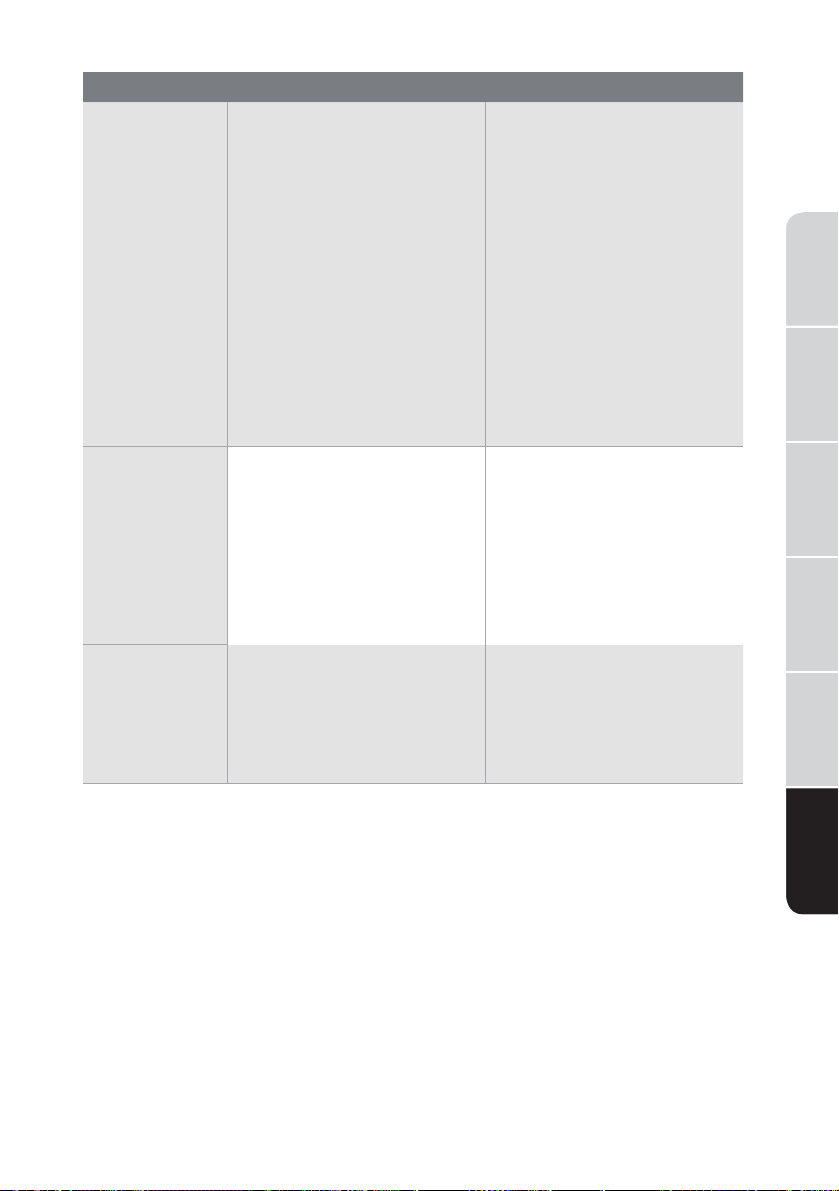
Problem Possible Cause What To Do
Door unlocks
or press
and machine
doesn’t
operate
This is normal
Incorrect operation
• Front-load washers
startup differently than
top-load washers, and
it takes 30 seconds to
check the system. The
door will lock and unlock.
• Simply open and close the
door firmly; then press
.
Water does
not enter
washer or
enters slowly
Automatic self system
checks
• After
is pressed, the
washer does several
system checks. Water
willflow 60 seconds after
is pressed.
Water supply is turned o
• Turn on water supply.
Water valve screens are
stopped up
• Turn off the water source
and remove the water
connection hoses from
the upper back of the
washer. Use a brush or
toothpick to clean the
screens in the machine.
Reconnect the hose and
turn the water back on.
Wrinkling Improper sorting
Overloading
Incorrect wash cycle
Repeated washing in water
that is too hot
• Avoid mixing heavy items
(like work clothes) with
light items (like blouses).
• Load your washer so
clothes have enough
room to move freely.
• Match cycle selection to
the type of fabric you are
washing (especially for
easy care loads).
• Wash in warm or cold
water.
33
Washer
Safety
Operation
Requirements
Installation
Instructions
Troubleshooting
Washer Care
Washer Use
Problem Possible Cause What To Do
Grayed or
yellowed
clothes
Not enough detergent • Use correct amount of
detergent.
Not using HE (high-
eciency) detergent
• Use HE detergent.
Hard water
• Use hottest water safe for
fabric.
• Use a water conditioner
like Calgon brand or
install a water softener.
Detergent is not dissolving
• Try a liquid detergent.
Dye transfer
• Sort clothes by color. If
fabric label states wash
separately unstable dyes
may be indicated.
Colored spots Incorrect use of fabric
softener
Dye transfer
• Check fabric softener
package for instructions
and follow directions for
using dispenser.
• Sort whites or lightly
colored items from dark
colors.
• Promptly remove wash
load from washer.
Slight
variation in
metallic color
This is normal appearance
• Due to the metallic
properties of paint used
for this unique product,
slight variations of color
may occur due to viewing
angles and lighting
conditions.

Washer
Safety
Operation
Requirements
Installation
Instructions
Troubleshooting Washer CareWasher Use
34
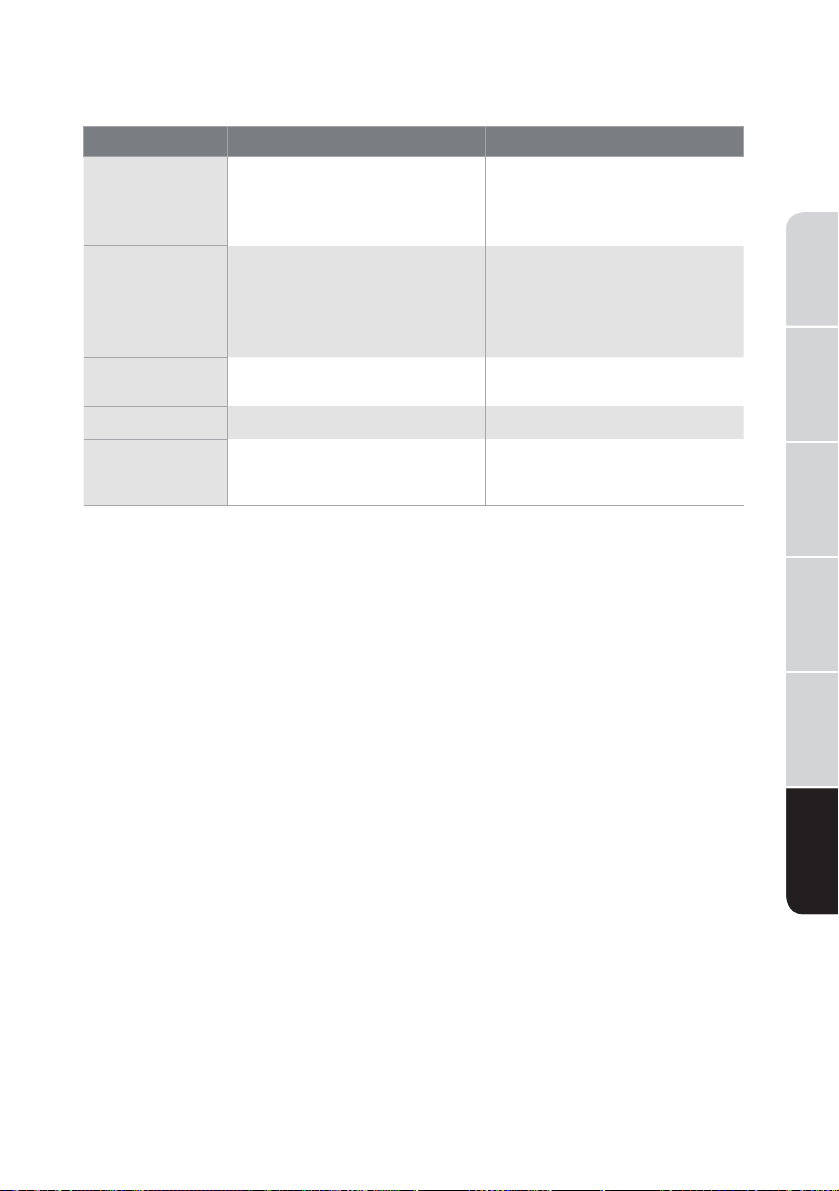
Problem Possible Cause What To Do
Smell inside
your washer
Washer unused for a
long time, not using
recommended quality of
HE detergent or used too
much detergent
• Run a Tub Clean cycle
once a month.
• In the case of strong
smell, you may need to
run the Tub Clean cycle
more than once a month.
• Use only the amount of
detergent recommended
on the detergent
container.
• Use only HE (high-
eciency) detergent.
• Always remove wet items
from the washer promptly
after machine stops
running.
• Leave the door slightly
open for the water to air
dry. Close supervision is
necessary if this appliance
is used by or near
children. Do not allow
children to play on, with
or inside this or any other
appliance.
Detergent leak Incorrect placement of
detergent insert
Make sure detergent insert
is properly located and
fully seated. Never put
detergent above max line.
Improper
dispensing of
softener or
bleach
Dispenser clogged
Softener or bleach is filled
above the max line
Softener or bleach cap
issue
Monthly clean the
dispenser drawer to
remove build up of
chemicals.
Make sure to have the
correct amount of softener
or bleach.
Make sure softener and
bleach cap for dispenser
are seated or they will not
work.
ERROR CODES
35
Washer
Safety
Operation
Requirements
Installation
Instructions
Troubleshooting
Washer Care
Washer Use
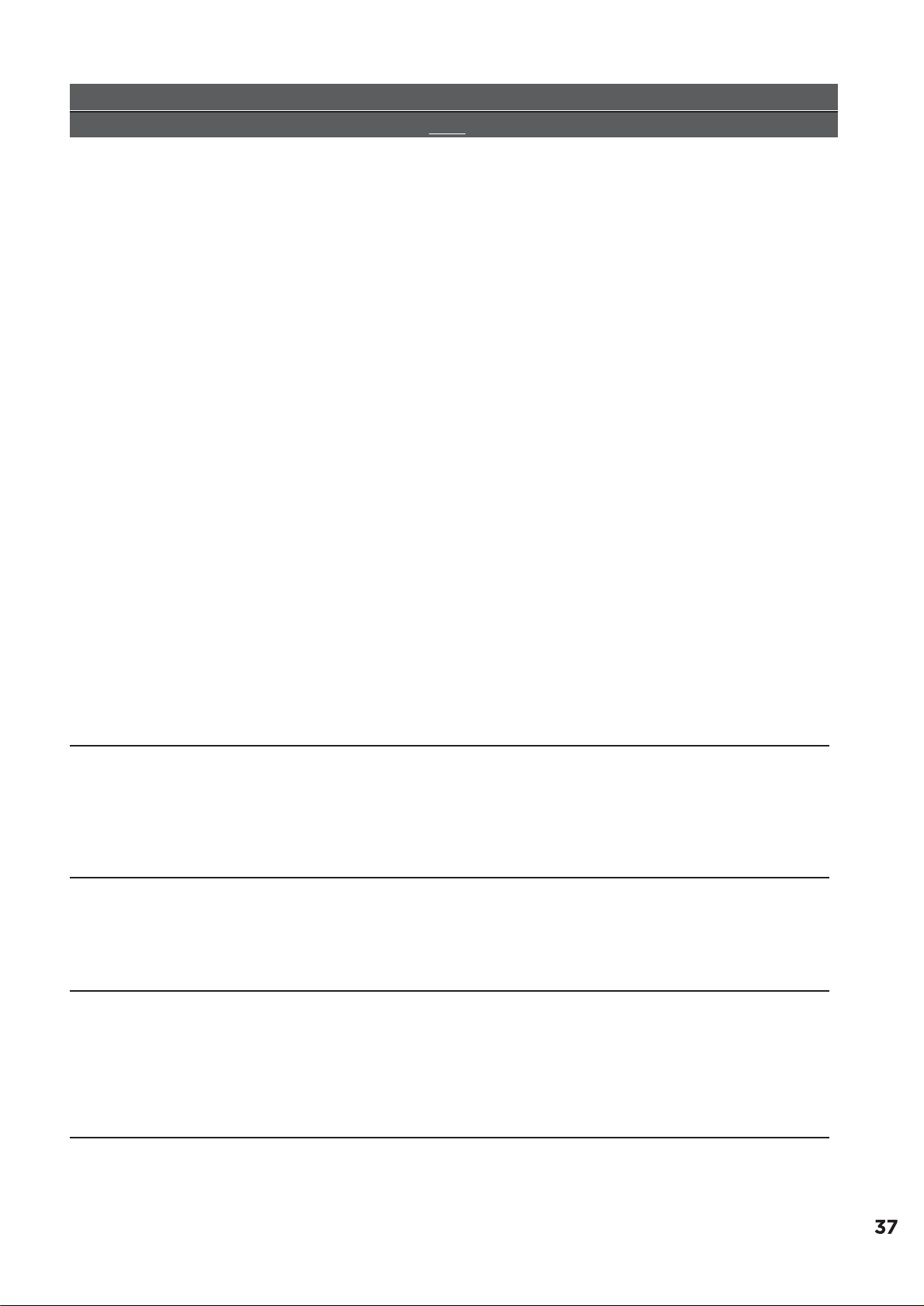
Description Reason Solution
E30
Door is not closed properly Restart after the door is
closed.
Check if the clothes is
stuck.
E10
Water injecting problem
while washing
Check if the water pressure
is too low.
Straighten the water hoses.
Check if the inlet valve filter
is blocked.
E21
Overtime water draining Check if the drain hose is
blocked, clean drain filter.
E12
Water overflow Restart the washer.
EXX
Others
Please try again first, call up
service line if there are still
troubles.

IF YOU NEED SERVICE:
1. Before contacting us to arrange service, please determine whether your product requires
repair. Some questions can be addressed without service. Please take a few minutes to
review the Troubleshooting section of the User Manual, or visit http://us.Midea.com/support
2.
ff
ective from the date of original consumer purchase.
Proof of original purchase date is required to obtain service under this limited warranty.
MIDEA
LAUNDRY
WASHER
LIMITED
WARRANTY
ATTACH YOUR RECEIPT HERE. PROOF OF PURCHASE
IS REQUIRED TO OBTAIN WARRANTY SERVICE.
Please have the following information available when
you call the Customer Service Centre:
■ Name, address and telephone number
■ Model number and serial number
■ A clear, detailed description of the problem
■ Proof of purchase including dealer or retailer
name and address, and date of purchase
All warranty service is provided exclusively by our authorized Midea Service Providers, in the
U.S. and Canada.
Midea Customer Service
In the U.S.A. or Canada, call 1-866-646-4332.
If outside the 50 States of the United States or Canada, contact your authorized Midea dealer to
determine whether another warranty applies.
LIMITED WARRANTY
WHAT IS COVERED
TWO YEAR LIMITED WARRANTY (PARTS AND LABOR)
For two years from the date of purchase, if this major appliance is installed, operated and
maintained according to instructions attached to or furnished with the product, Midea America
Corporation (hereafter “Midea”) will pay for factory specified replacement parts and repair
labor to correct defects in materials or workmanship that existed when this major appliance was
purchased, or at its sole discretion replace the product. In the event of product replacement,
your appliance will be warranted for the remaining term of the original unit’s warranty period.
YOUR SOLE AND EXCLUSIVE REMEDY UNDER THIS LIMITED WARRANTY SHALL BE PRODUCT
REPAIR OR REPLACEMENT AS PROVIDED HEREIN. Service must be provided by a Midea
designated service company. This limited warranty is valid only in the 50 States of the United
States or Canada and applies only when the major appliance is used in the country in which it
was purchased. This limited warranty is e
LIMITED WARRANTY
WHAT IS NOT COVERED
1. Commercial, non-residential or multiple-family use, or use inconsistent with published
user, operator or installation instructions.
2. In-home Instruction on how to use your product.
3. Service to correct improper product maintenance or installation, installation not in
accordance with electrical codes or correction of household electrical system (i.e.
house wiring, fuses, etc.).
4. Consumable parts (i.e. light bulbs, batteries, air or water filters, etc.).
5. Defects or damage caused by the use of non-genuine Midea parts or accessories.
6. Damage from accident, misuse, abuse, fire, floods, electrical issues, acts of God or use
with products not approved by Midea.
7. Repairs to parts or systems to correct product damage or defects caused by
unauthorized service, alteration or modification of the appliance.
8. Cosmetic damage including scratches, dents, chips, and other damage to appliance
finishes unless such damage results from defects in materials and workmanship and is
reported to Midea within 30 days.
9. Routine maintenance of the product.
10. Products that were purchased “as is” or as refurbished products.
11. Products that have been transferred from its original owner.
12. Discoloration, rust or oxidation of surfaces resulting from caustic or corrosive
environments including but not limited to high salt concentrations, high moisture or
humidity or exposure to chemicals.
13. Pick-up or delivery. This product is intended for in-home repair.
14. Travel or transportation expenses for service in remote locations where an authorized
Midea servicer is not available.
15. Removal or reinstallation of inaccessible appliances or built-in fixtures (i.e. trim,
decorative panels, flooring, cabinetry, islands, countertops, drywall, etc.) that interfere
with servicing, removal or replacement of the product.
16. Service or parts for appliances with original model/serial numbers removed, altered or
not easily identified.
The cost of repair or replacement under these excluded circumstances shall be borne by the
customer.
DISCLAIMER OF IMPLIED WARRANTIES
IMPLIED WARRANTIES, INCLUDING ANY IMPLIED WARRANTY OF MERCHANTABILITY
OR IMPLIED WARRANTY OF FITNESS FOR A PARTICULAR PURPOSE, ARE LIMITED TO
TWO YEAR OR
THE SHORTEST PERIOD ALLOWED BY LAW. Some states and provinces
do not allow limitations on the duration of implied warranties of merchantability or fitness,
so this limitation may not apply to you. This warranty gives you specific legal rights, and
you also may have other rights that vary from state to state or province to province.
DISCLAIMER OF REPRESENTATIONS OUTSIDE OF WARRANTY
Midea makes no representations about the quality, durability, or need for service or repair
of this major appliance other than the representations contained in this warranty. If you
want a longer or more comprehensive warranty than the limited warranty that comes with
this major appliance, you should ask Midea or your retailer about buying an extended
warranty.
LIMITATION OF REMEDIES; EXCLUSION OF INCIDENTAL AND CONSEQUENTIAL DAMAGES
YOUR SOLE AND EXCLUSIVE REMEDY UNDER THIS LIMITED WARRANTY SHALL
BE PRODUCT REPAIR AS PROVIDED HEREIN. MIDEA SHALL NOT BE LIABLE FOR
INCIDENTAL OR CONSEQUENTIAL DAMAGES. Some states and provinces do not allow
the exclusion or limitation of incidental or consequential damages, so these limitations and
exclusions may not apply to you. This warranty gives you specific legal rights, and you also
may have other rights that vary from state to state or province to province.
12/20
REGISTRATION INFORMATION
PROTECT YOUR PRODUCT:
We will keep the model number and date of purchase of your new Midea product on
file to help you refer to this information in the event of an insurance claim such as fire
or theft.
Product registration is not mandatory. Failure to complete and return the card or
form does not diminish the consumer’s warranty rights.
Register online at
https://us.midea.com/product-registration
OR
Please fill out and return it to the following address:
Midea America Corp. 300
K
imball
D
rive, Parsippany, NJ 0705
4
--------------------------------------------- (detach here) ----------------------------------------
Name: Model#: Serial #:
Card:
Address: Store / Dealer Name:
City:
Area Code:
State: Zip:
Phone Number:
Did you purchase an additional warranty:
How did you learn about this product:
❏ Advertising
❏ In Store Demo
❏ Personal Demo
Date Purchased:
E
-
mail Address:
Occupation:
As your Primary Residence:
Age:
Marital Status:
Information collected or submitted to us is only available to company internal employees for
purposes of contacting you or sending you emails, based on your request for information and to
company service providers for purposes of providing services relating to our communications with
you. All data will not be shared with other organizations for commercial purposes.
Please consider leaving a customer review at
www.midea.com
.
Midea America Corp.
Parsippany, NJ 07054
Customer Service 1-866-646-4332 Made in China V1 ENGLISH