TP150 Tire Pressure Diagnosis Tool
Operation Manual


Brand:
Copyright:
Responsibility:
After sales:
Safety:
TP150 Tire Pressure Diagnosis Tool
Shenzhen Xtooltech Intelligent Co., Ltd has finished the trademark registration,the
logo is Shenzhen Xtooltech Intelligent Co., Ltd brand、service mark、
domain name、icon and company name which countries have not registered,
Shenzhen Xtooltech Intelligent Co., Ltd declares it still has ownership for brand service
mark、domain name、icon and company name which are not registered. Other
products and company name which are referred from this operation manual are still
belong to the original registered company,before acquire the written permission from
owner,anyone should not use Shenzhen Xtooltech Intelligent Co., Ltd or other
company brand、domain name、icon and company name which are referred.
This operation manual only provide usage method,due to use this product or data to
break the national law,users undertake all the consequences,company do not undertake
any legal liability. The accident caused by users themselves or the third-party;or users
misuse、misuse this device;or unauthorized change,disassemble this device;or
equipment damage caused by do not via this operation manual to use、damage which are
produce the cost and loss,Shenzhen Xtooltech Intelligent Co., Ltd do not undertake any
legal responsibility. This operation manual is according to the product existing configuration
and function to compile,if the product add new configuration and function,the new
edition operation manual also will be changed,forgive us do not further notice.
Without written permission by Shenzhen Xtooltech Intelligent Co., Ltd,any companies
or person should not copy or back up this operation manual in any form(electronic、
machinery、photocopy、record or other form)
This product only used for vehicle maintenance and repair professionals.
When the engine is working,please keep maintenance district draughty,connect the
engine with building exhaust system properly,the body will become sluggish caused by the
white damp which is produced by the engine,even take place the serious personal injury or
death.
Please wear the goggle which is accord with the ANSI standard ,and let the cloth、hair、
hand、tool、diagnosis device away from working or heated engine parts.
After-sales service hot line(400-880-3086)
Official website:http://www.xtooltech.com
1

Catalog
TP150 Tire Pressure Diagnosis Tool
2
Chapter One Product cognition.................................................................................... 3
1.1 Product overview.................................................................................................... 3
1.2 Appearance and interface...................................................................................... 3
Chapter Two Product usage....................................................................................... 6
2.1 Tire pressure diagnostic function........................................................................... 6
2.1.1 Main menu.......................................................................................................... 6
2.1.2 Test vehicle information selection....................................................................... 7
2.2 Tire pressure service interface.............................................................................. 8
2.3 Trigger tire pressure sensor.................................................................................. 8
2.4 Tire pressure system diagnosis............................................................................ 9
2.5 The original sensor information ........................................................................... 10
2.6 Programming sensor........................................................................................... 11
2.6.1 Generate ID automatically................................................................................ 11
2.6.2 Input ID manually .............................................................................................. 11
2.6.3 Via activation copy............................................................................................ 13
2.6.4 Read ECU copy................................................................................................ 16
2.7 Tire pressure learning method............................................................................. 19
2.8 Recent test........................................................................................................... 22
2.9 Setting.................................................................................................................. 23
2.9.1 Pressure unit setting......................................................................................... 23
2.9.2 Temperature unit setting.................................................................................... 24
2.9.3 The format of sensor ID..................................................................................... 24
2.9.4 Auto power-off setting....................................................................................... 25
2.9.5 District setting.................................................................................................... 25
2.9.6 Language setting .............................................................................................. 26
2.9.7 Warning tone setting......................................................................................... 26
2.10 Upgrade............................................................................................................. 27
2.11 About.................................................................................................................. 27
Chapter One Product cognition
1.1 Product overview
1.2 Appearance and interface
TP150 Tire Pressure Diagnosis Tool
3
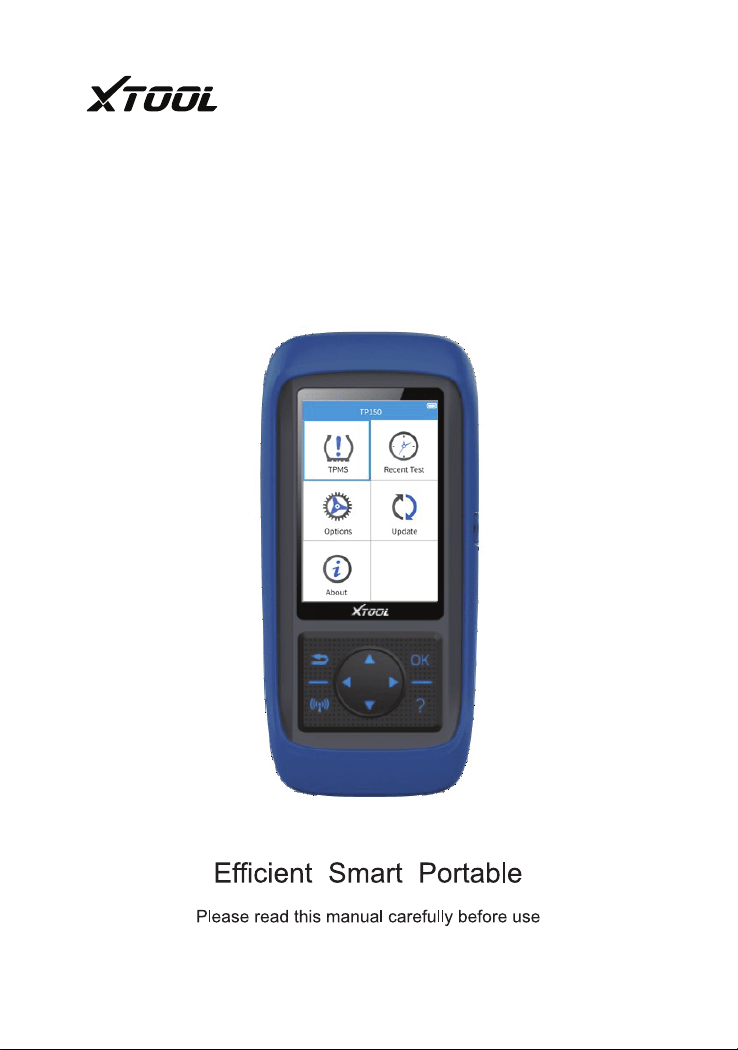
TP150 tire pressure diagnostic tool is equipped read、clear tire pressure fault code,
trigger tire pressure sensor、acquire tire pressure sensor ID、tire pressure、temperature
and state of battery. It provide tire pressure sensor learning method,support program
Xtool programmable popular type tire pressure sensor. It will satisfy the different users
fact requirement of vehicle maintenance and repair factory and tire repair store etc.
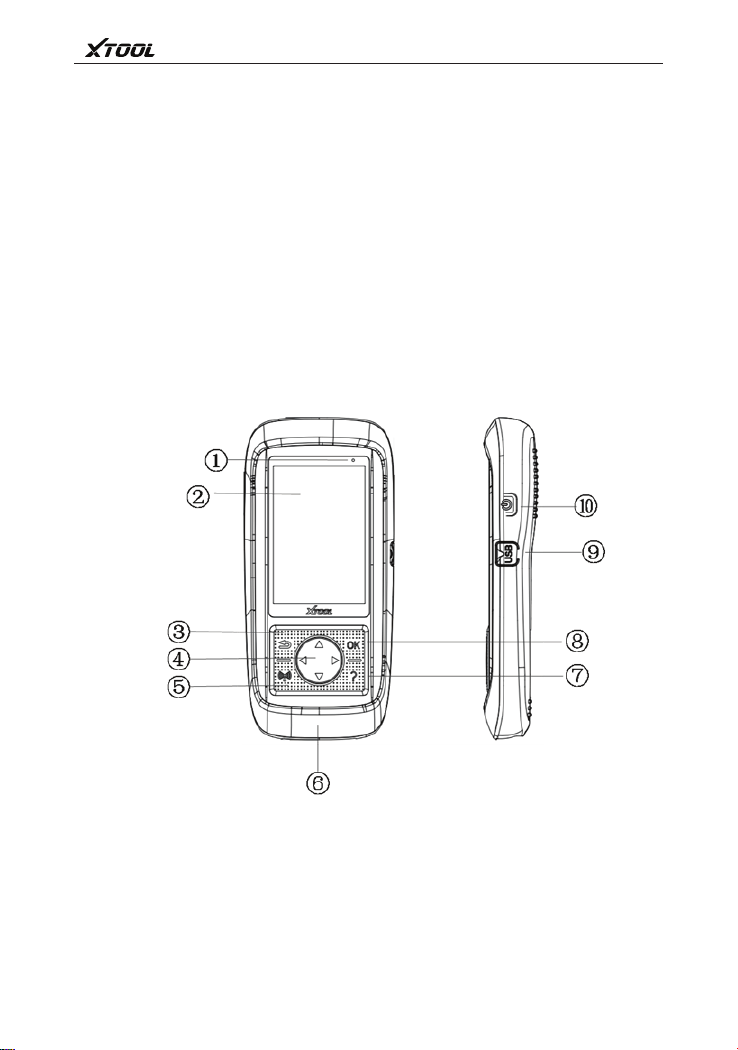
① Charge lamp ② LCD Display ③ Return ④ Direction Key ⑤ Activate/programming
⑥ DB15 connector ⑦ Help ⑧ OK ⑨ USB interface ⑩ Power switch

1.3 Parameters
1.4 Parts list
4
TP150 Tire Pressure Diagnosis Tool
1.Display the device state of charge
2.Display product function menu
3.Cancel selection(or operation)or return the upper menu
4.Up/down key: Remove the menu up and down in menu mode
Left/right key: View previous/next screen information
5.Trigger tire pressure sensor to test or program tire pressure sensor
6.Conect tire pressure portable device with OBDII interface of vehicle
7.Provide help information
8.Confirm selection
9.Conect tire pressure portable device with PC to update or charge
10.Short time press is switch on/switch off device; Keep press 7s which can restart
the device
Display:320x480 dpi TFT colorful display screen
Power:3.7v lithium polymer battery
Working temperature:-10℃~60℃
Storage temperature:-20℃~70℃
Dimension:200x92x33mm
Weight:0.4kg
1.Operation manual – Provide product operation instruction
2.OBDII cable – Connect product with test vehicle power and information
3.USB cable and power adapter – Connect USB cable with PC to tire pressure
diagnostic device charging or update software, via power adapter and USB cable to
charge tire pressure diagnostic device.
4.Blow molding box – Store the tire pressure diagnostic device and parts
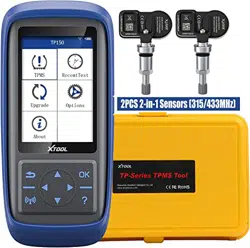
5.Programmable popular type tire pressure sensor – The original tire pressure sensor
alternative parts

1.5 Keyboard
1.6 Battery
Attention:
Use USB cable, connect with PC to charge battery:
Use USB cable adapter to charge battery:
In order to keep device the best performance,please full charged the
battery. Suggest at least 2 hours to charge before at the first time to use.
TP150 Tire Pressure Diagnosis Tool
5
Please use soft and non-abrasive cleaner and soft cotton cloth to clean keyboard
and display screen. Do not use solvent (like alcohol) to clean device.
Product is equipped 3000mA/3.7V interior lithium polymer chargeable battery. Two
types of charge, as follow separately.
Use only the USB cable adapter which is provided by our company parts to charge
this device. Product damage caused by use the unauthorized power,so that
product doesn’t work,it’s out of our guarantee repair range.
1.Find USB interface in device
2.Use USB cable connect with device and PC
1. Find USB interface in device
2. Use USB cable adapter connect with device and power
Chapter Two Product usage
2.1 Tire pressure diagnostic function
2.1.1 Main menu
TP150 Tire Pressure Diagnosis Tool
6
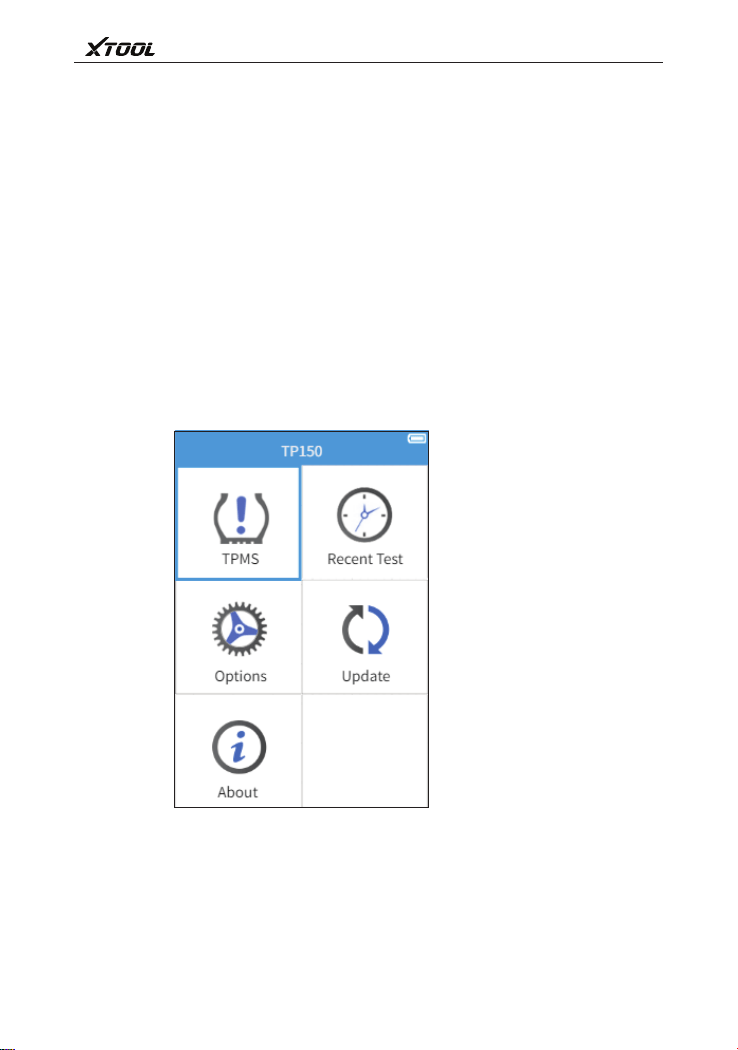
Tire pressure diagnostic function,mainly include:tire pressure system
diagnosis、trigger tire pressure sensor、view the learning step and tire
pressure sensor information、program tire pressure sensor function.
Select【Tire pressure diagnosis】function,enter the test vehicle information
selection page.
7
TP150 Tire Pressure Diagnosis Tool
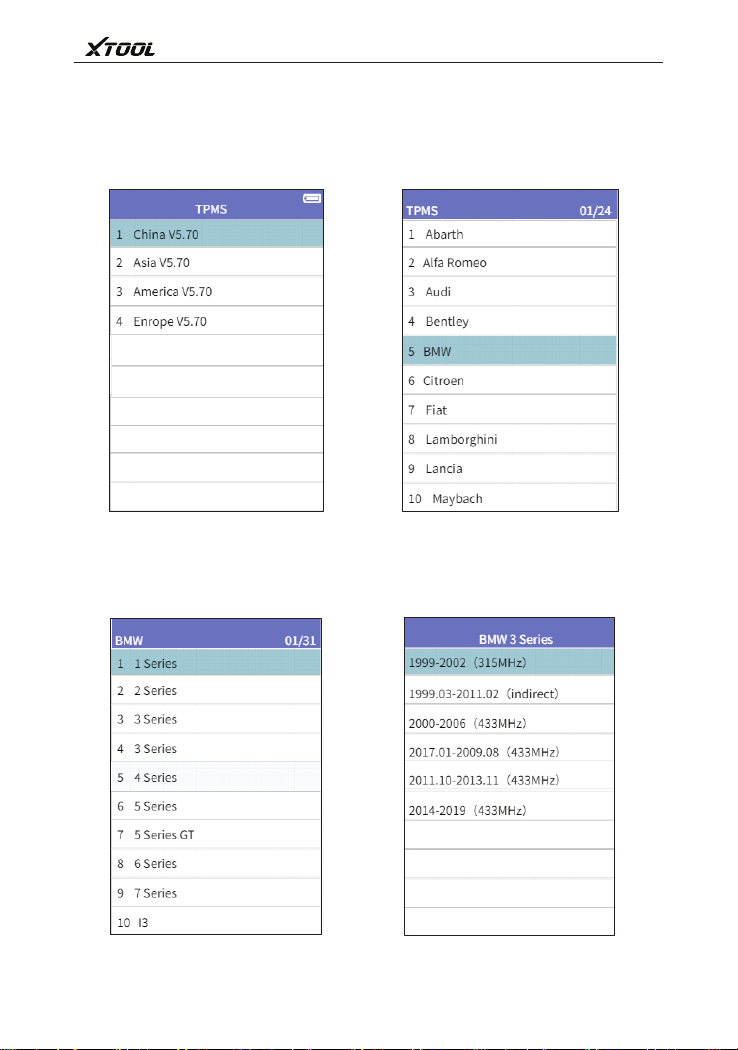
2.1.2 Test vehicle information selection
1、Vehicle area selection Vehicle brand selection 2、
Vehicle type selection
3 、 4 、 A fter select the years of vehicle,
enter the tire pressure service
page
8
TP150 Tire Pressure Diagnosis Tool
2.2 Tire pressure service
interface
2.3 Trigger tire pressure sensor
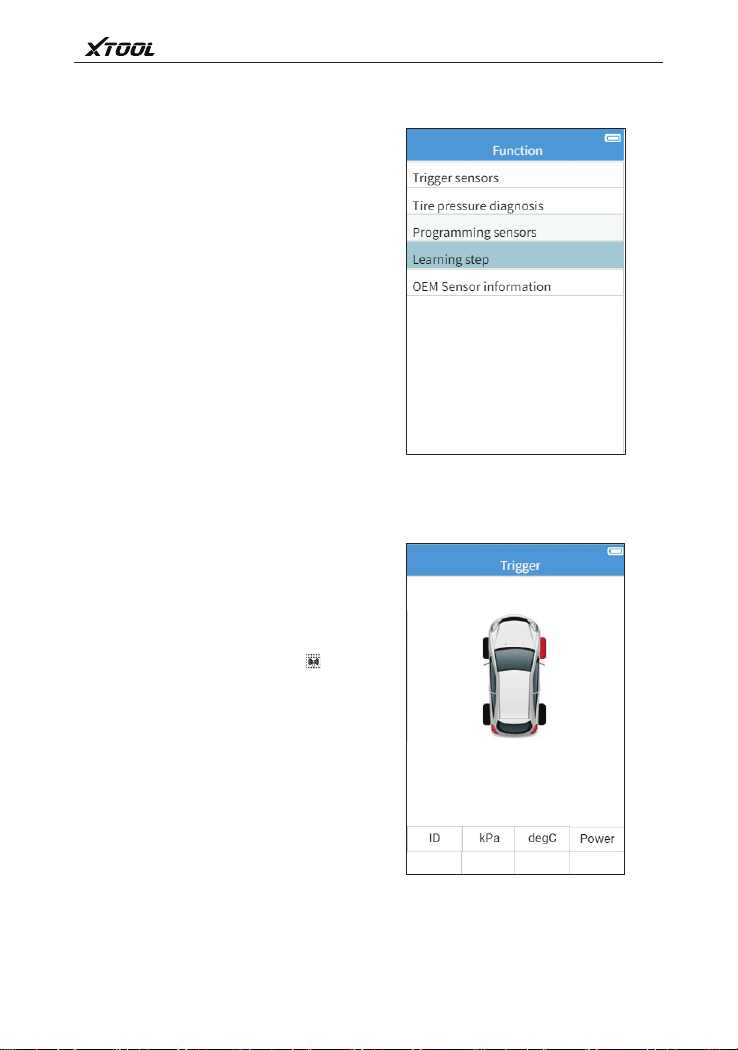
Tire pressure service interface
(For use the direct-type tire
pressure system vehicle),Mainly
include:Tire pressure system
diagnosis、trigger tire pressure
sensor、tire pressure sensor
programming、view learning step、
view the original tire pressure sensor
information.
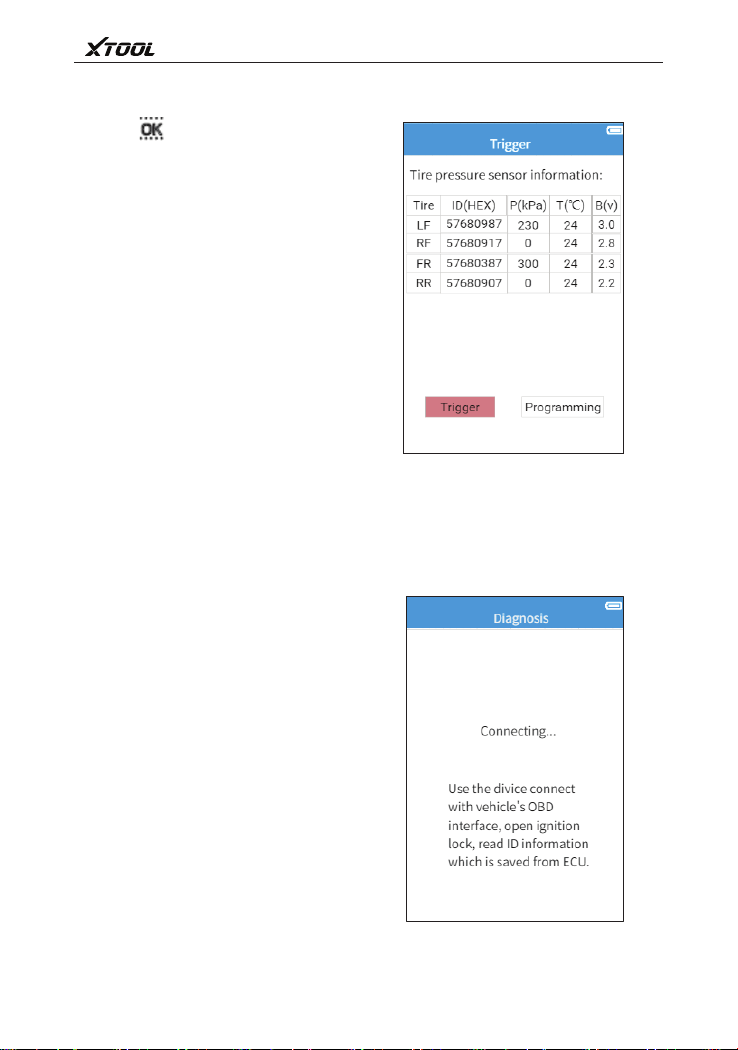
Take the portable diagnostic
device close to sensor or tire sidewall
which is located in above the sensor.
Via direction key to switch select
different tire location,click activation
key to trigger tire pressure sensor,
take diagnostic device to receive tire
pressure sensor data.
After activate succeed, the state
and pressure of sensor will be
displayed on the screen.
9
TP150 Tire Pressure Diagnosis Tool
2.4 Tire pressure system diagnosis
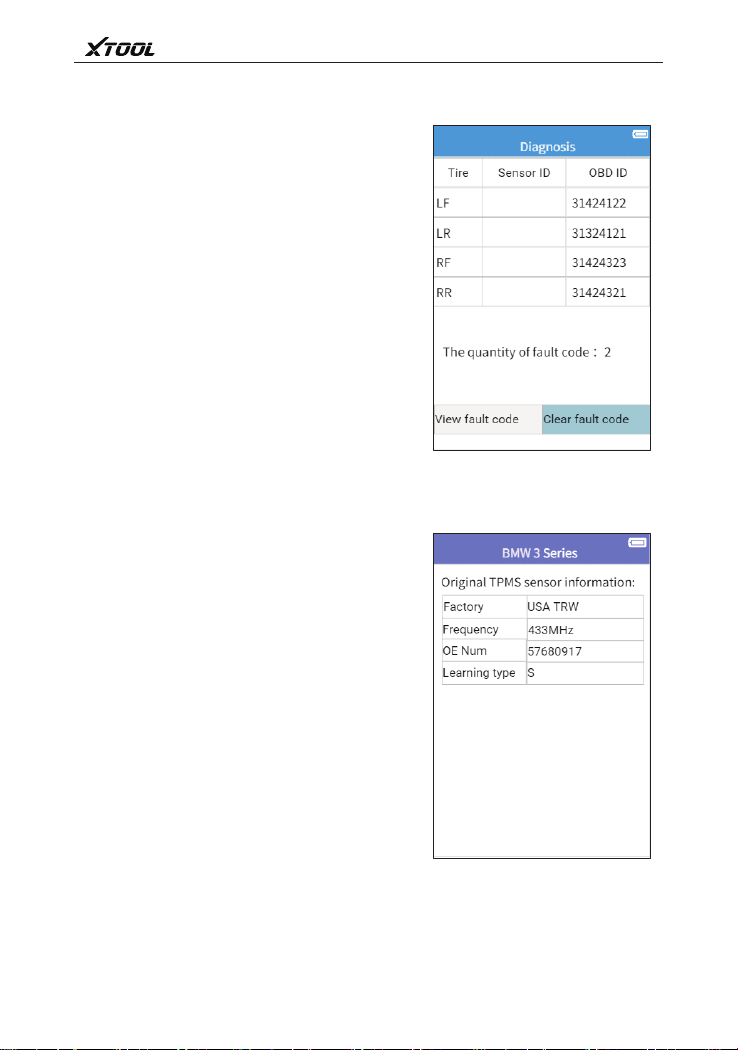
Click key,the detailed information
of senor will be displayed on the screen
which is include sensor ID、pressure、
temperature and voltage.
If part of tire pressure sensors do
not acquire the data,select 【
Activation continue】to trigger tire
pressure sensor acquire the tire
pressure sensor ID or more information.
Select【OBD learning】write the
acquired OBDII ID information in
vehicle ECU.
Connect the vehicle OBD interface:
Use OBD cable connect with device and
vehicle OBDII diagnosis interface,and
open the ignition,tire pressure portable
device will read vehicle ECU tire pressure
related fault code automatically.
10
TP150 Tire Pressure Diagnosis Tool
2.5 The original sensor information
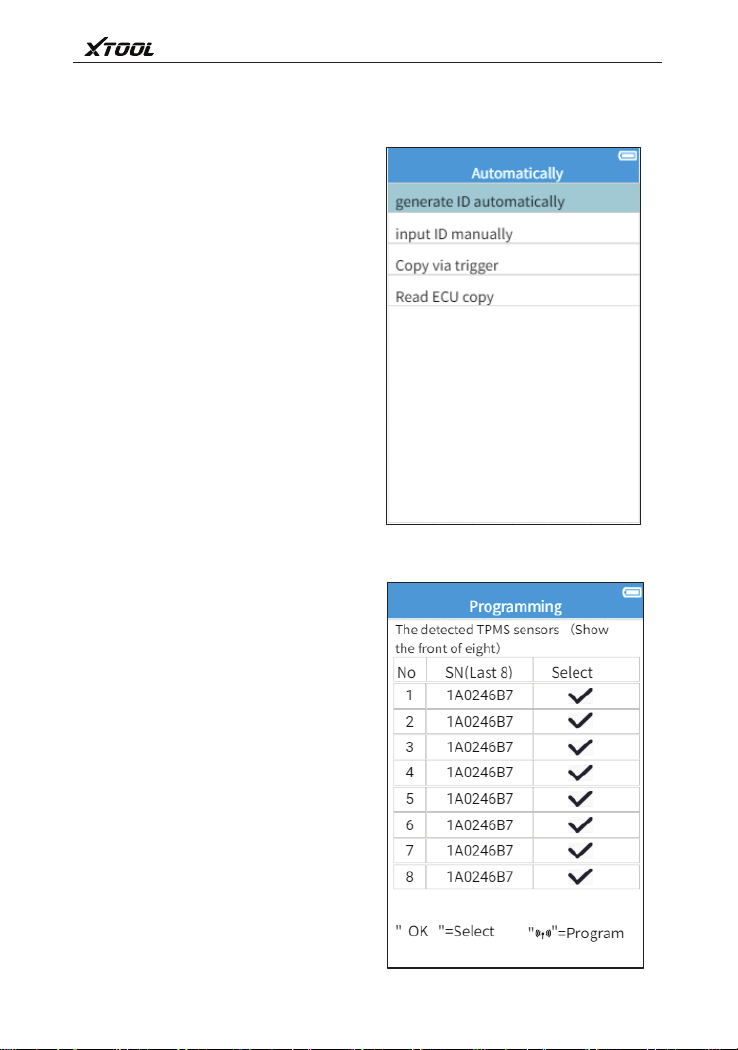
Display the tire pressure sensor ID
information which is stored by vehicle ECU.
Screen will display the number of fault
codes when has read it.
Select 【View fault code】can view
fault codes and its meaning.
Select 【Clear fault code】can clear
fault code.
Portable device will display the original
sensor information which is install in test
vehicle.
TP150 Tire Pressure Diagnosis Tool
11
2.6 Programming sensor
2.6.1 Generate ID automatically
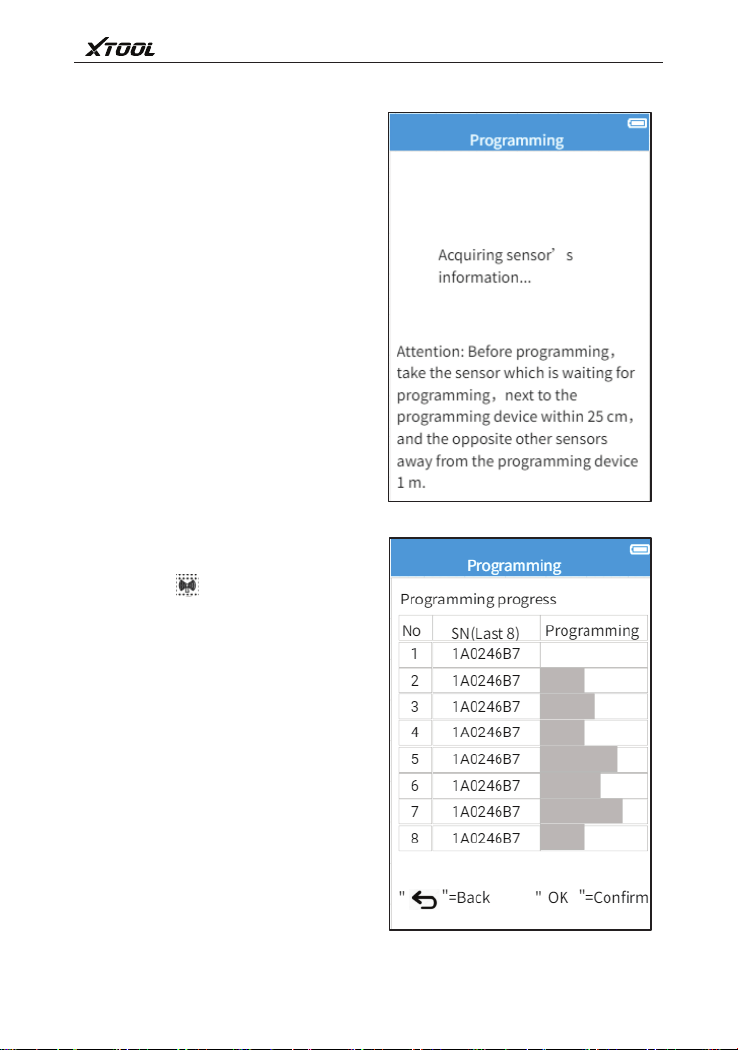
Four programming ways to use for
program Xtool programmable popular
type tire pressure sensor: Generate
sensor ID automatically、input sensor
ID manually、via activate copy sensor
ID、via read ECU copy sensor ID.
This function use for auto set up
sole senor ID in 1~8 Xtool programable
popular type tire pressure sensor,
these ID are random generation. The
newly generate sensor ID usually
different from the sensor ID which is
stored by the original tire pressure
system,so need learn the newly
generate sensor ID into the original tire
pressure system.
TP150 Tire Pressure Diagnosis Tool
12
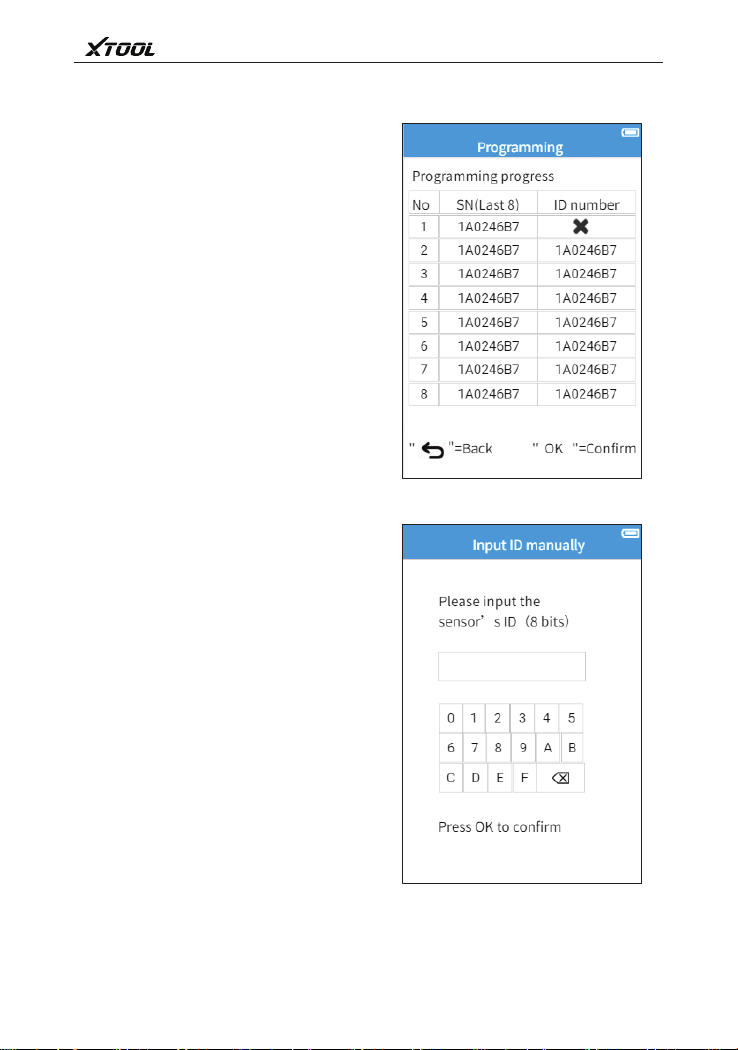
Take the waited programming
Xtool sensor close to the top of
programming device position,the
device will auto detect nearby Xtool tire
pressure sensor.
Via direction key select the waited
programming tire pressure sensor,
press OK to confirm.
Press key to start program. It
can program 1~8 Xtool tire pressure
sensor at the same time.
13
TP150 Tire Pressure Diagnosis Tool
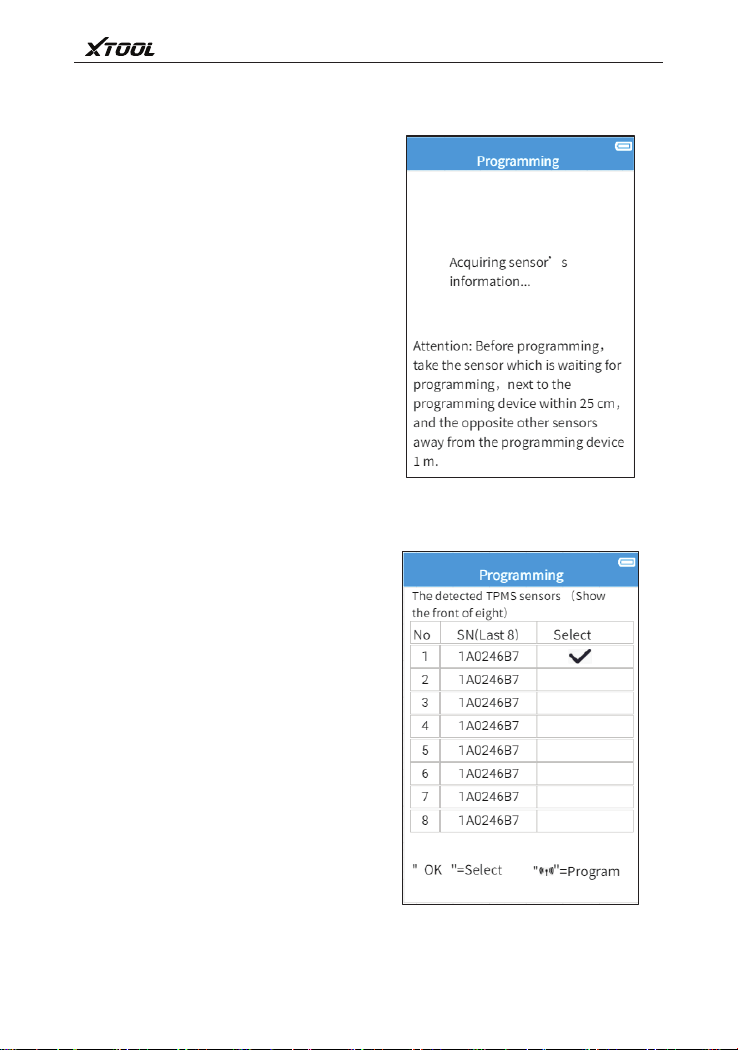
2.6.2 Input ID manually
After tire pressure sensor finish the
programming,display screen will display
sensor SN(rear eight numbers)and
corresponding ID. If have sensor
programming failed,device will remind
the failed information.
Input ID manually,and program this
ID in Xtool programmable popular type tire
pressure sensor.
Press OK key to confirm after input it.
14
TP150 Tire Pressure Diagnosis Tool
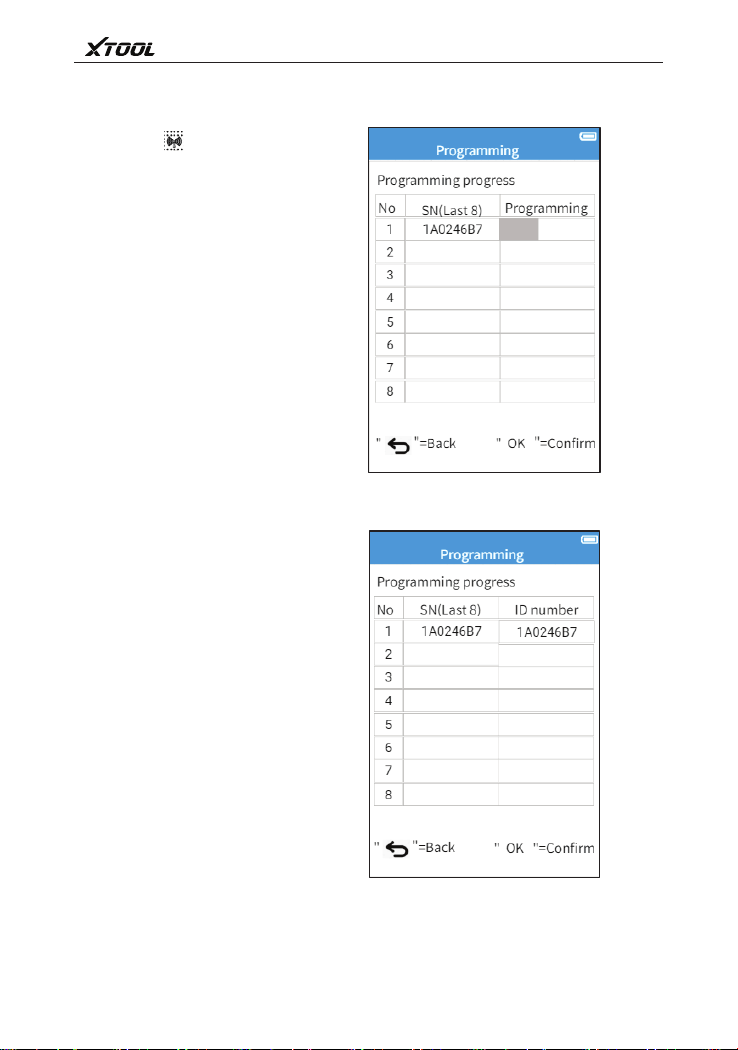
Take the waited programming Xtool
sensor close to the top of programming
device position,the device will auto detect
nearby Xtool tire pressure sensor.
Via direction key select the waited
programming tire pressure sensor,press
OK key to continue.
15
TP150 Tire Pressure Diagnosis Tool
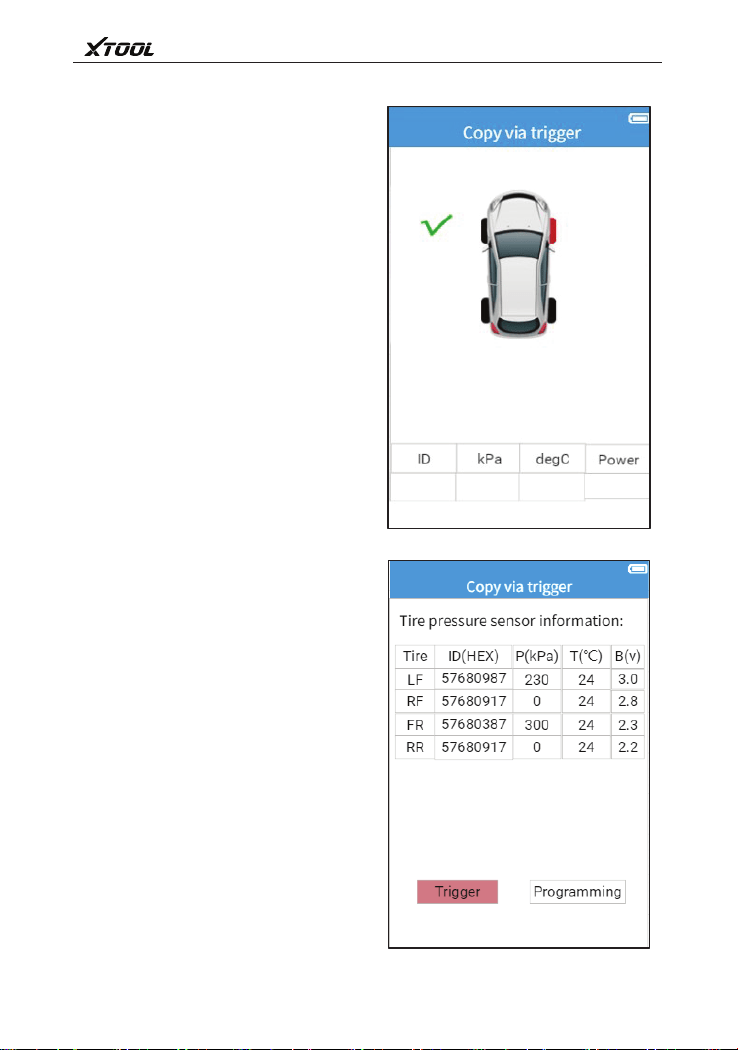
Press key to start program.
After tire pressure sensor finish the
programming,display screen will display
sensor SN(rear eight numbers)and
corresponding ID.
TP150 Tire Pressure Diagnosis Tool
16
2.6.3 Via activation copy
Sensor which is via activation copy,
identify this sensor ID,and program this
ID in Xtool programmable popular type tire
pressure sensor.
Activate copy single tire sensor ID,
and can also activate copy multiple sensor
ID.
Press 【OK】 key to view which
have activated sensor information.
Select 【Sensor programming】 and
press 【OK】 key to continue
programming operation.
TP150 Tire Pressure Diagnosis Tool
17
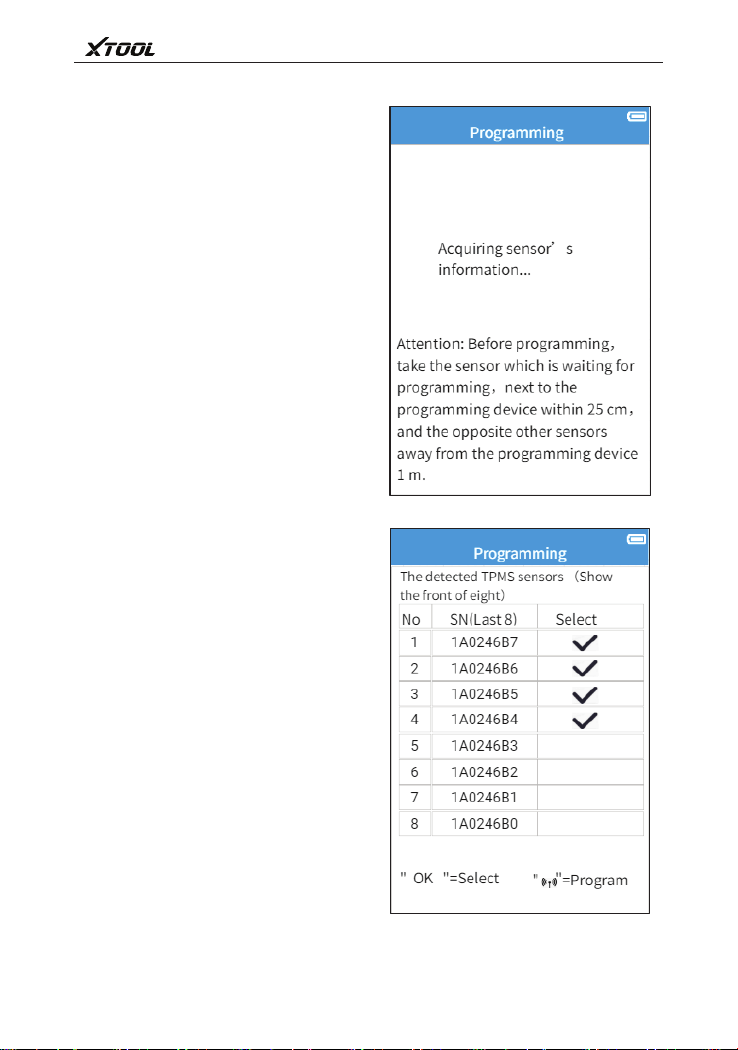
Take the waited programming Xtool
sensor close to the top of programming
device position,the device will auto
detect nearby Xtool tire pressure sensor.
Prepare corresponding the number
of Xtool tire pressure sensors previously
when program multiple sensor ID.
Via direction key select the waited
programming tire pressure sensor,press
OK key to continue.
18
TP150 Tire Pressure Diagnosis Tool
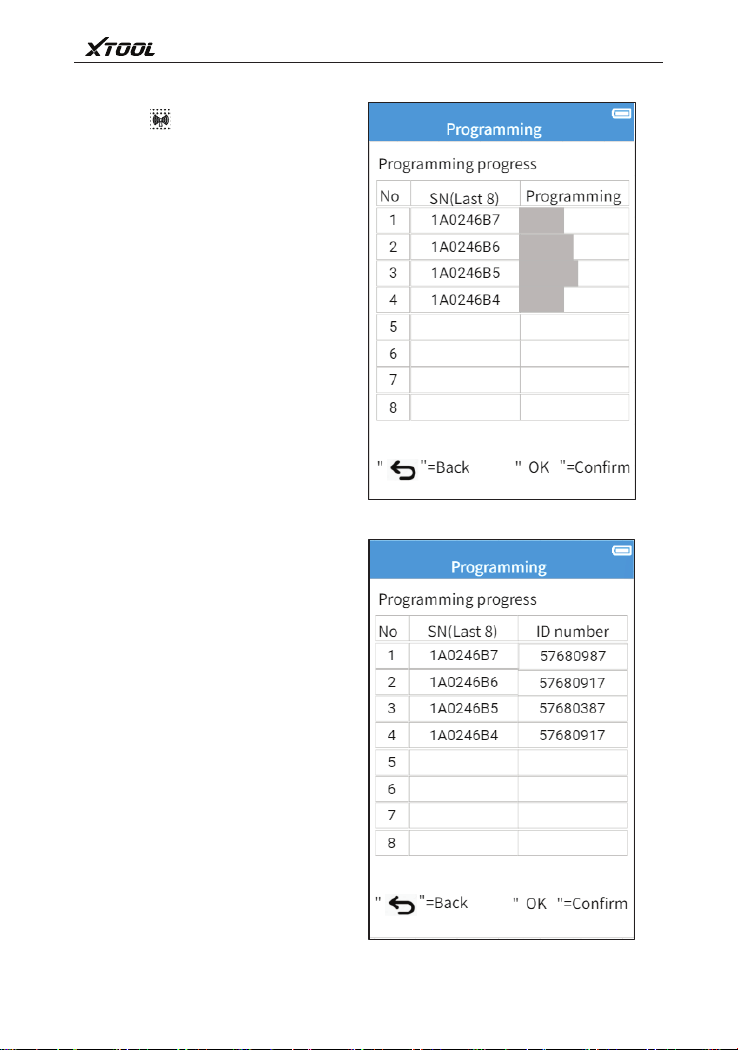
Press key to start program. It can
program 1~6 Xtool tire pressure sensor ID
in 1~6 Xtool tire pressure sensors.
After tire pressure sensor finish the
programming,display screen will display
sensor SN(rear eight numbers)and
corresponding ID.

19
TP150 Tire Pressure Diagnosis Tool
2.6.4 Read ECU copy
Read sensor ID which is stored by
vehicle tire pressure system ECU,and
program this ID in Xtool programmable
popular type tire pressure sensor.
Via the sensor ID which is stored by
vehicle tire pressure system of ECU to
select waited programming ID. Program
this ID in Xtool tire pressure sensor.
20
TP150 Tire Pressure Diagnosis Tool
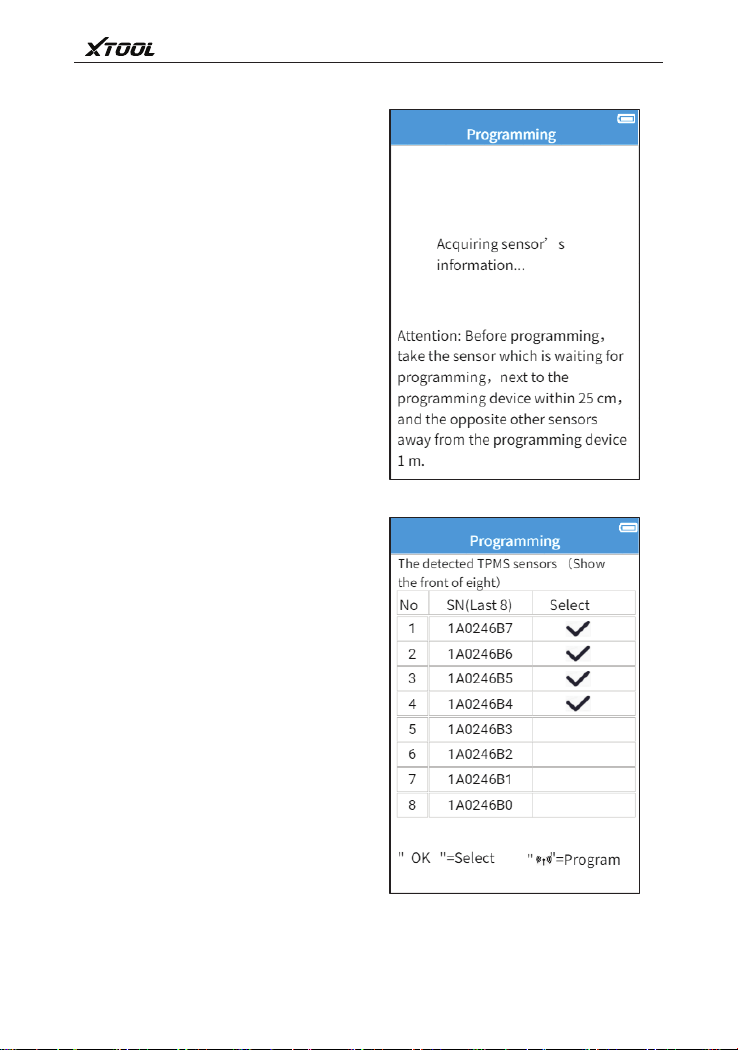
Take the waited programming Xtool
sensor close to the top of programming
device position,the device will auto
detect nearby Xtool tire pressure sensor.
Prepare corresponding the number of
Xtool tire pressure sensors previously
when program multiple sensor ID.
Via direction key select the waited
programming tire pressure sensor,press
OK key to continue.

21
TP150 Tire Pressure Diagnosis Tool
Press key to start program. It can
program 1~6 Xtool tire pressure sensor ID
in 1~6 Xtool tire pressure sensors.
After tire pressure sensor finish the
programming,display screen will display
sensor SN(rear eight numbers)and
corresponding ID.
TP150 Tire Pressure Diagnosis Tool
22
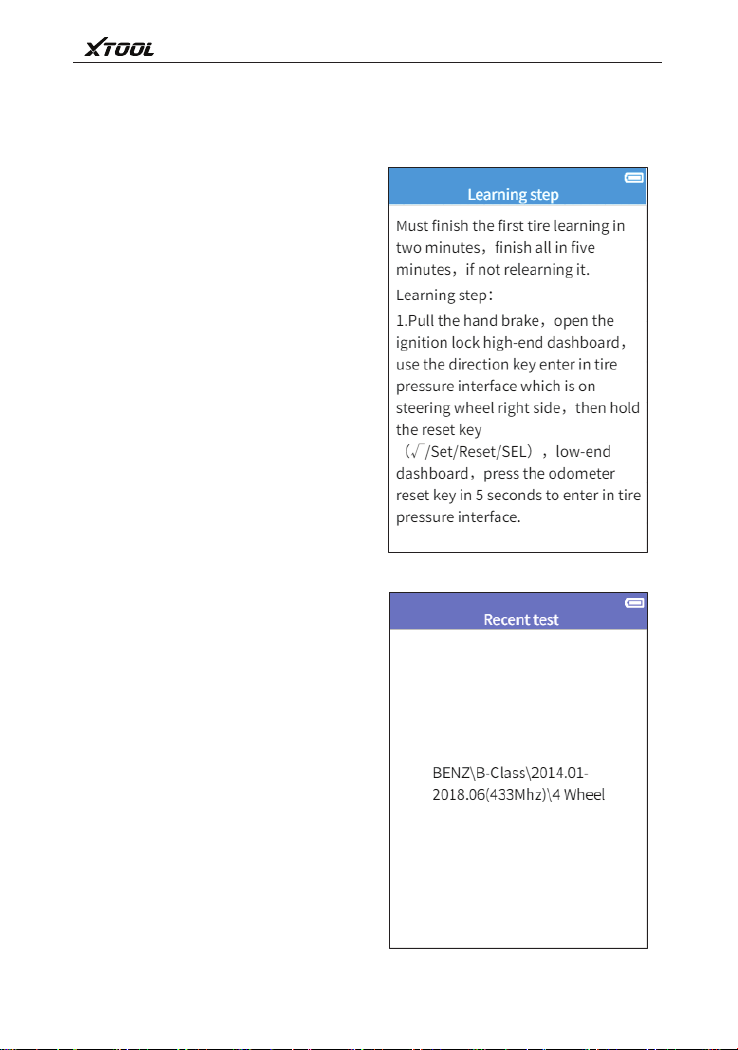
2.7 Tire pressure learning method
2.8 Recent test
Please read learning steps, and via
the steps to operate.
Record recent tire pressure
diagnostic vehicle type selection and tire
pressure sensor trigger data, it is
convenient to user continue the last
unfinished operation or sensor data.
TP150 Tire Pressure Diagnosis Tool
23
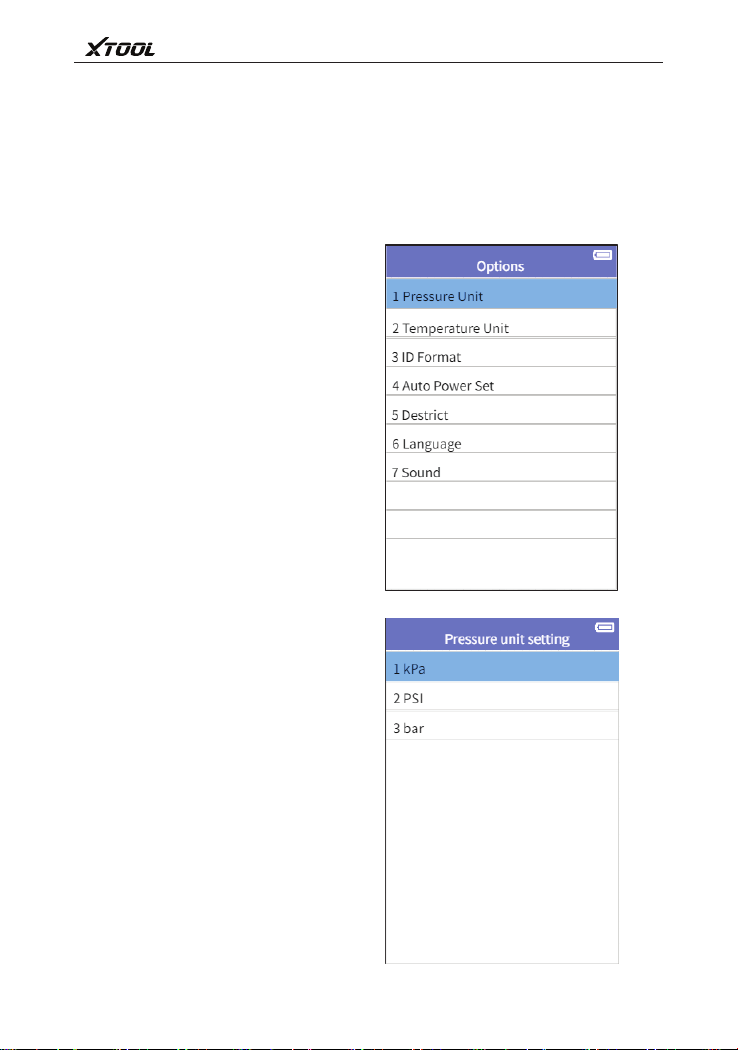
2.9 Setting
2.9.1 Pressure unit setting
Provide change device setting、view
software and hardware edition. This
product can do adjustment and setting as
follow:
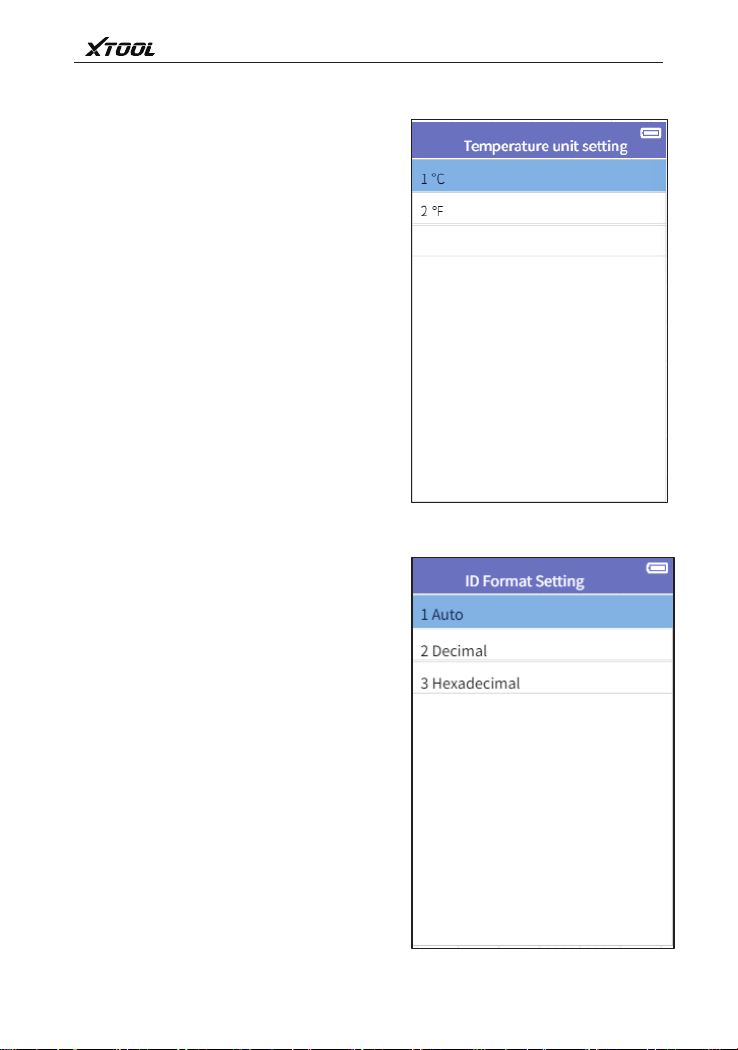
1、Pressure unit setting:Set pressure
unit to kPa,Psi or Bar.
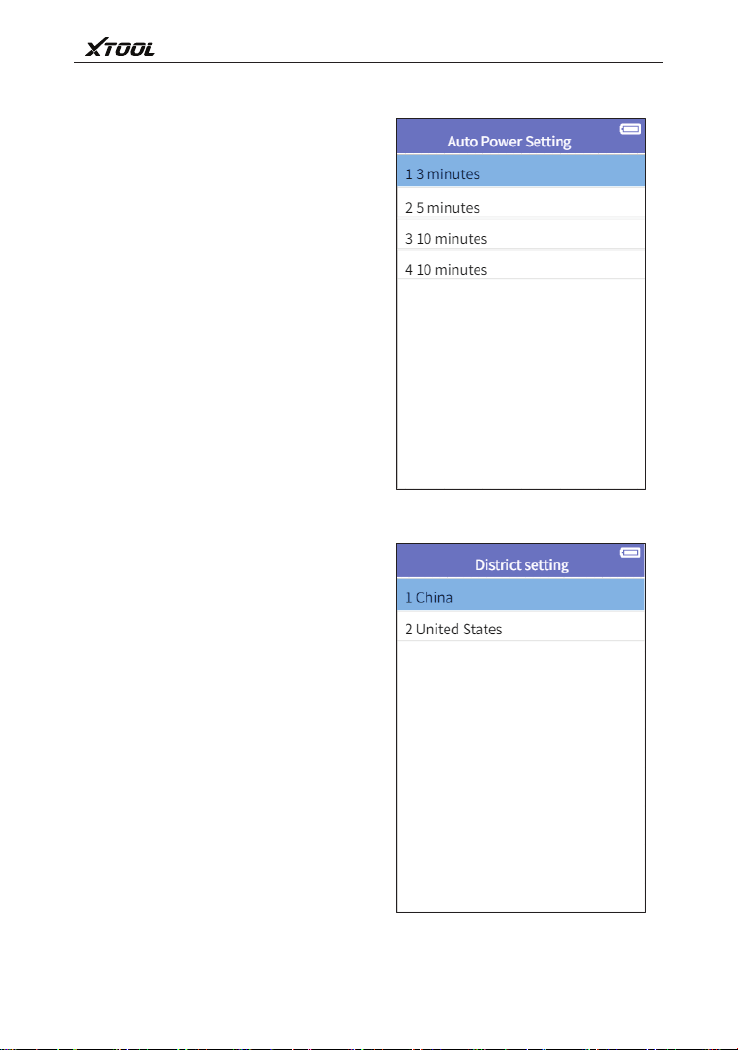
2、Temperature unit setting:Set
temperature unit to ℃ or ℉.
3、The format of sensor ID:Set
hexadecimal or decimalization for ID
display
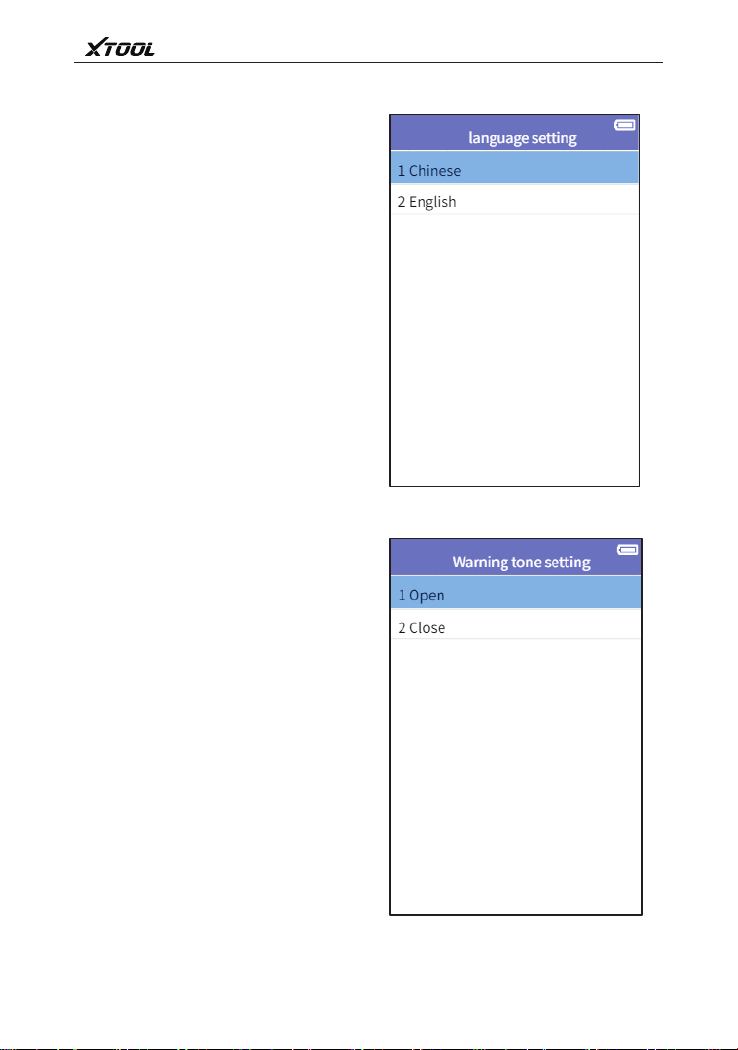
4、Auto power-off setting:Set the device
stand-by time before auto power-off
setting
5、District setting
6、Language:Select device
Set pressure unit to kPa,Psi or Bar.
Use pull up/pull down to select,then
press OK key to confirm.
operation language
7、Warning tone setting:Turn on/Turn off
the key humming.
24
TP150 Tire Pressure Diagnosis Tool
2.9.2 Temperature unit setting
2.9.3 The format of sensor ID
Set temperature unit to ℃ or ℉. Use
pull up/pull down to select,then press
OK key to confirm.
Use pull up/pull down to select,then
press OK key to confirm.
25
TP150 Tire Pressure Diagnosis Tool
2.9.4 Auto power-off setting
2.9.5 District setting
Use pull up/pull down to select,then
press OK key to confirm.
Use pull up/pull down to select,then
press OK key to confirm.
26
TP150 Tire Pressure Diagnosis Tool
2.9.6 Language setting
2.9.7 Warning tone setting
Use pull up/pull down to select,then
press OK key to confirm.
Use pull up/pull down to select,then
press OK key to confirm.
27
TP150 Tire Pressure Diagnosis Tool
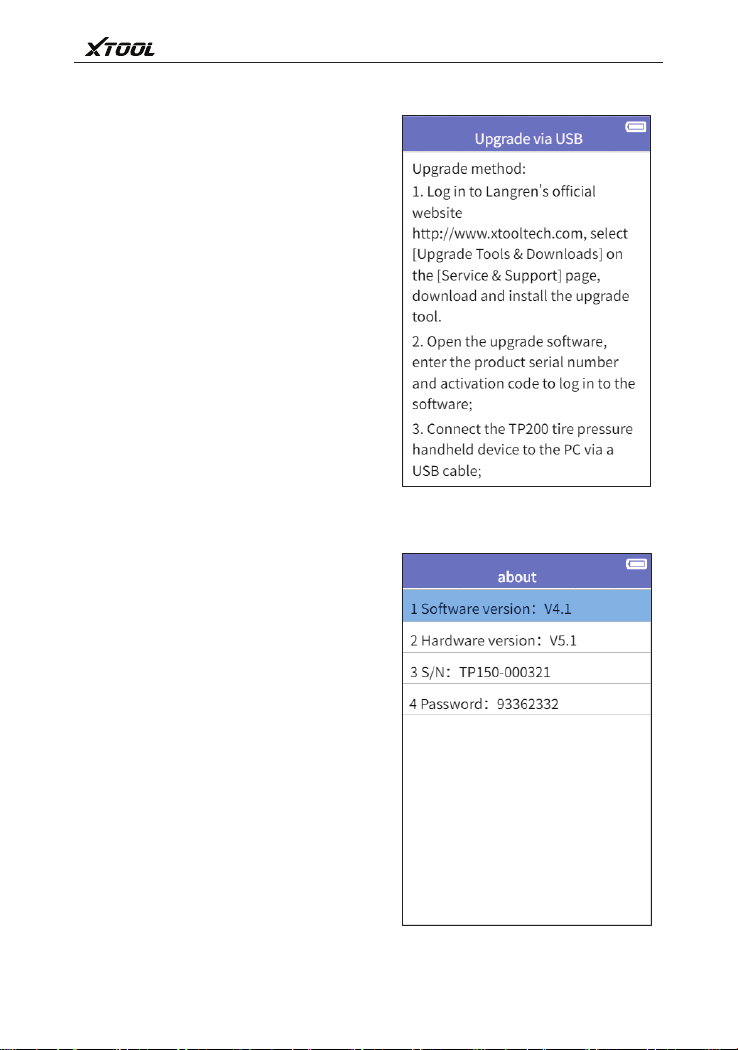
2.10 Upgrade
2.11 About
Tire pressure diagnostic device can
via USB connect with PC to upgrade.
Show the tire pressure diagnostic
device software 、hardware edition
information.
1.Via USB upgrade



Shenzhen Xtooltech Intelligent Co., Ltd
Add:2nd Floor, Building No.2, Block 1, Excellence City,
No.128, Zhongkang Road, Shangmeilin, Futian District,
Shenzhen, China
Tel:+86 755 21670995 or +86 755 86267858
E-Mail:[email protected](Upgrade service)