2000W
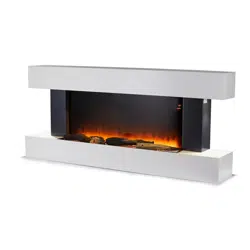
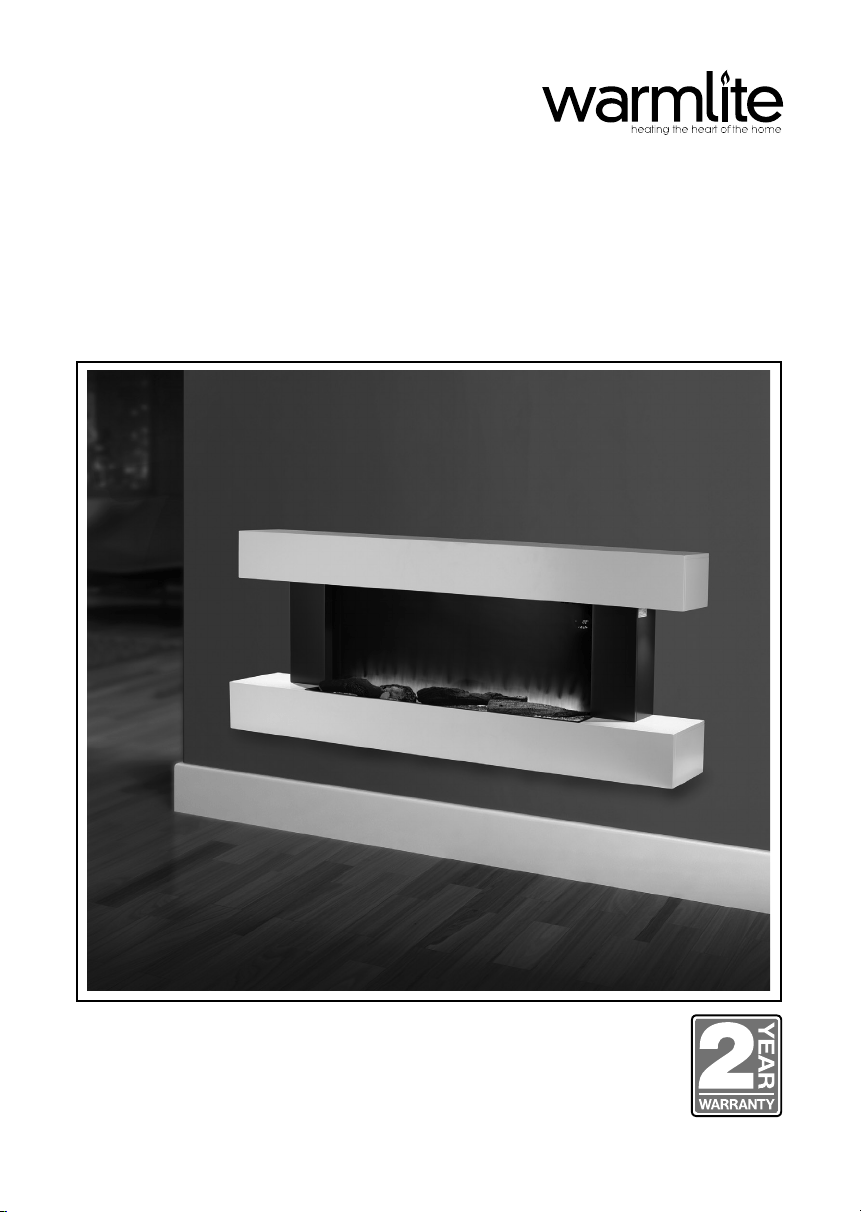
WALL MOUNTED SURROUND
FIREPLACE SUITE
MODEL WL45033N
YOUR SAFETY &
INSTRUCTION MANUAL
PLEASE READ CAREFULLY
www.warmlite.co

2 CUSTOMER SUPPORT TEAM:: +44 (0) 333 220 6056
TECHNICAL DATA
Description: Wall Mounted Surround Fireplace Suite
Model: WL45033N
Rated Voltage: 220-240V
Frequency: 50/60Hz
Power Consumption: 2000W
Remote Control: 1 x 3V lithium button cell battery
DOCUMENTATION
We declare that this product conforms to the following product legislation in accordance with the
following directive(s):
2014/30/EU Electromagnetic Compatibility Directive.
2014/35/EU Low Voltage Directive.
2011/65/EU Restriction of Hazardous Substances Directive.
2009/125/EC Eco-Design of Energy Related Products.
RK Wholesale LTD Quality Assurance, United Kingdom
WARRANTY
This product is guaranteed for 12 months from the date of original purchase. If any defect arises due
to faulty materials of workmanship, the faulty products must be returned to the place of purchase.
Refund or replacement is at the discretion of the retailer.
The following conditions apply:
• The product must be returned to the retailer with proof of purchase.
• The product must be installed and used in accordance with the instructions contained in this
instruction guide.
• It must be used only for domestic purposes.
• It does not cover wear and tear, damage, misuse or consumable parts.
• RK Wholesale LTD has limited liability for incidental or consequential loss or damage.
• This guarantee is only Valid in the UK and Eire Only.
An extended warranty is available for this appliance.
See back page for details.
3www.warmlite.co
WARNING:
This Appliance MUST be Earthed
WIRING SAFETY FOR UK USE ONLY
IMPORTANT
As the colours in the mains lead of this appliance
may not correspond with the coloured markings
identifying the terminals in your plug, please
proceed as follows:
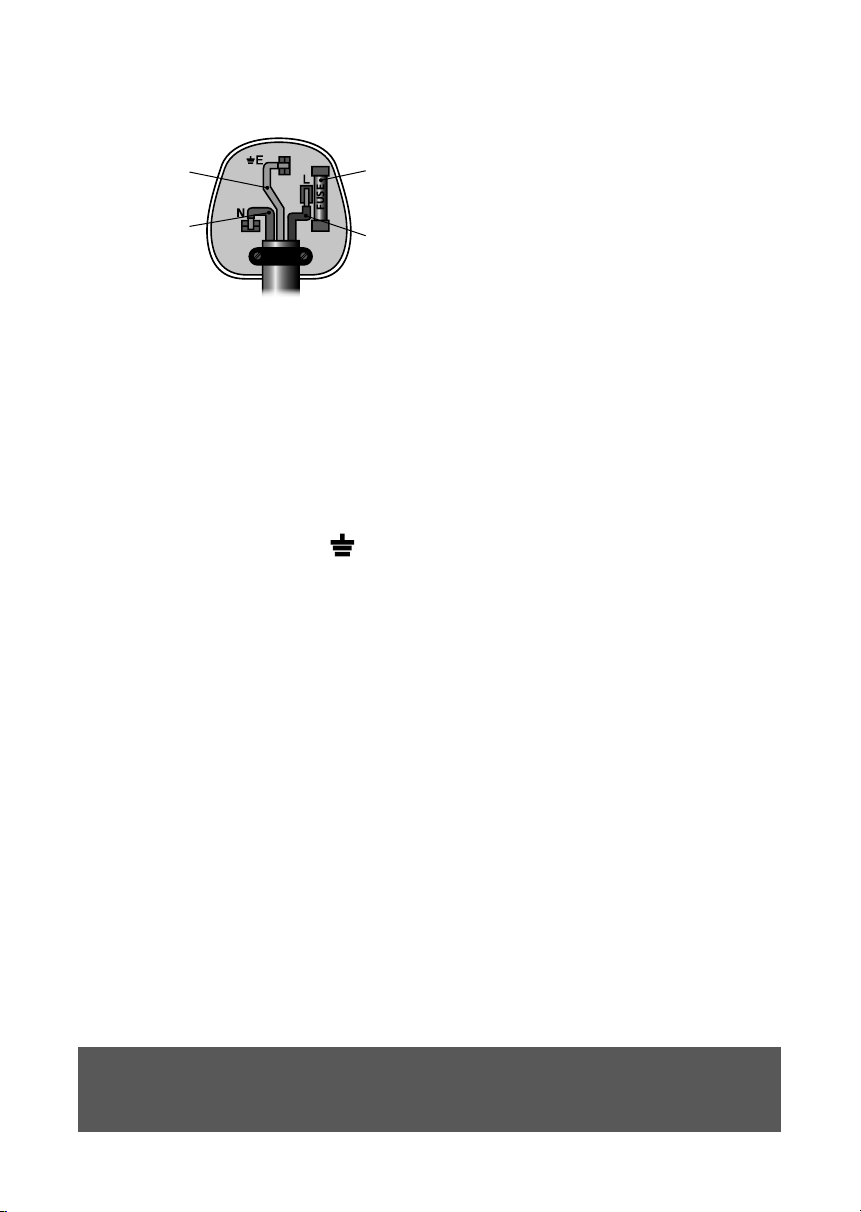
The wires in the mains lead are labelled in
accordance with the following code:
Blue neutral [N] Brown live [L]
Green/Yellow [EARTH]
Plug Fitting Details (Where Applicable). The
wire labelled blue is the neutral and must be
connected to the terminal marked [N].
The wire labelled brown is the live wire and must
be connected to the terminal marked [L].
The wire labelled green/yellow must be
connected to the terminal marked with the letter
[E].
On no account must either the brown or the blue
wire be connected to the [EARTH] terminal.
Always ensure that the cord grip is fastened
correctly.
The plug must be tted with a fuse of the same
rating already tted and conforming to BS 1362
and be ASTA approved.
If in doubt consult a qualied electrician who will
be pleased to do this for you.
Non-Rewireable Mains Plug
If your appliance is supplied with a non-
rewireable plug tted to the mains lead and
should the fuse need replacing, you must use an
ASTA approved one (conforming to BS 1362 of
the same rating).
If in doubt, consult a qualied electrician who will
be pleased to do this for you.
If you need to remove the plug - disconnect it
from the mains - then cut it o of the mains lead
and immediately dispose of it in a safe manner.
Never attempt to reuse the plug or insert it into a
socket outlet as there is a danger of an electric
shock.
FUSE
Earth
(Green/Yellow)
Fuse
Neautral
(Blue)
Live
(Brown)

4 CUSTOMER SUPPORT TEAM:: +44 (0) 333 220 6056
PRODUCT SAFETY
When using any electrical appliance, basic safety precautions should
always be followed including the following:
• Check that the voltage of the
main circuit corresponds with
the rating of the appliance
before operating.
• The intended use for this unit
is described in this manual.
The use of any accessory
or attachment or the
performance of any operation
with this appliance other
than those recommended in
this instruction manual may
present a risk of personal
injury.
• Retain this manual for future
reference.
• WARNING! When using
mains-powered appliances,
basic safety precautions,
including the following,
should always be followed to
reduce the risk of re, electric
shock and personal injury
and material damage.
• Check that the voltage of the
main circuit corresponds with
the rating of the appliance
before operating.
• Always ensure that the
appliance is placed on a rm
level surface. Ensure that the
air cooler is not positioned
close to curtains, furniture or
any combustible materials
as this could create a re
hazard. The appliance must
not be located immediately
below a mains socket outlet.
• DO NOT immerse cords,
plugs or any part of the
appliance in water or any
other liquid.
• DO NOT let the cord hang
over the edge of a table
or counter or let it come
into contact with any hot
surfaces.
• DO NOT carry the appliance
by the power cord.
• DO NOT use any extension
cord with this appliance.
• The use of accessory
attachments is not
recommended by the
appliance manufacturer,
apart from those supplied
with this product. DO NOT
use extension cords with the
appliance.
• DO NOT pull the plug out by
the cord as this may damage
the plug and/or the cable.
• Switch o at the wall socket
then remove the plug from
the socket when not in use
or before cleaning.

5www.warmlite.co
• Switch o and unplug before
tting or removing tools/
attachments, after use and
before cleaning.
• DO NOT use this product
for anything other than its
intended use.
• DO NOT leave the appliance
unattended while it is
operating.
• This appliance is for
household use only.
• DO NOT use the appliance
outdoors.
• DO NOT use the appliance
near water.
• Always place wires in a
regular and orderly manner
to prevent the air cooler from
becoming a trip hazard or
the plug from accidentally
being pulled out.
• The heater must not be
located immediately below a
socket outlet.
• Do not use this heater in
the immediate surroundings
of a bath, a shower or a
swimming pool.
• In order to avoid overheating,
do not cover the heater.
• Children of less than 3 years
should be kept away unless
continuously supervised.
• Children between the ages of
3 and 8 years old should only
switch the appliance on or
o when it has been placed
and installed in its intended,
normal operating position
and when they have been
given adequate supervision
or instruction concerning
safe use of the appliance
and understand the hazards
involved. Children between
the ages of 3 and 8 years
old should not plug in,
regulate, clean or perform
user maintenance on the
appliance.
• The appliance is not to be
used by persons (including
children) with reduced
physical, sensory or mental
capabilities, or lack of
experience and knowledge,
unless they have been given
supervision or instruction.
• Close supervision is
necessary when any
appliance is used by or near
children.
• Children should not play with
the appliance.

6 CUSTOMER SUPPORT TEAM:: +44 (0) 333 220 6056
• This appliance can be
used by children aged
from 8 years and above
and persons with reduced
physical, sensory or mental
capabilities or lack of
experience and knowledge
if they have been given
supervision or instruction
concerning use of the
appliance in a safe way and
understand the hazards
involved.
• CAUTION! Some parts of
this product can become
very hot and cause burns.
Particular attention has to
be given where children
and vulnerable people are
present.
• Cleaning and user
maintenance should not
be undertaken by children
without supervision.
• Take care when any
appliance is used near pets.
• When not in use, please
unplug the portable air cooler
from the mains socket.
• Always unplug the appliance
and allow it to cool before
moving it from one location
to another.
• Please ensure that the
appliance is used on a
stable, level, and heat
resistant surface.
• If the supply cord or
appliance is damaged,
stop using the appliance
immediately and seek advice
from the manufacturer, its
service agent or a similarly
qualied person.
• DO NOT attempt to
dismantle or repair any part
of the heater. This should
only be done by a qualied
service agent.
• DO NOT install the heater in
washhouses or other places
with water and moist.
• DO NOT turn the heater on
or o by inserting or pulling
out the plug.
• DO NOT place things on the
heater.
• DO NOT put anything into
the air inlet and outlet.
• DO NOT use insecticide
spray or other ammable
matters in the vicinity of the
heater.
• DO NOT splash oil or water
into the heater.

7www.warmlite.co
• DO NOT clean the heater
with water. Wipe it with a
semi-wet soft cloth.
• DO NOT wipe the heater with
chemical solvents such as
benzene, gasoline or alcohol.
Use neutral detergents only.
• Only install the heater in at
and dry places. Keep the
heater 50cm away from
surrounding objects.
• The heater should be placed
away from gasoline, cooking
stoves or other combustibles
and heat sources.
• Use the appliance in a well-
ventilated area.
• CAUTION! DO NOT operate
the appliance with wet
hands.
• DO NOT tip the appliance
over as this may cause
damage to the appliance and
create a re hazard.
• In the unlikely event the
appliance develops a fault,
stop using it immediately
and seek advice from the
Customer Support Team.
HIGH VOLTAGE HOT SURFACE DO NOT COVER
8 CUSTOMER SUPPORT TEAM:: +44 (0) 333 220 6056
2 1
3
4
WHAT’S IN THE BOX
Instruction Manual
Wall Fire Suite
Remote
Fixing Kit
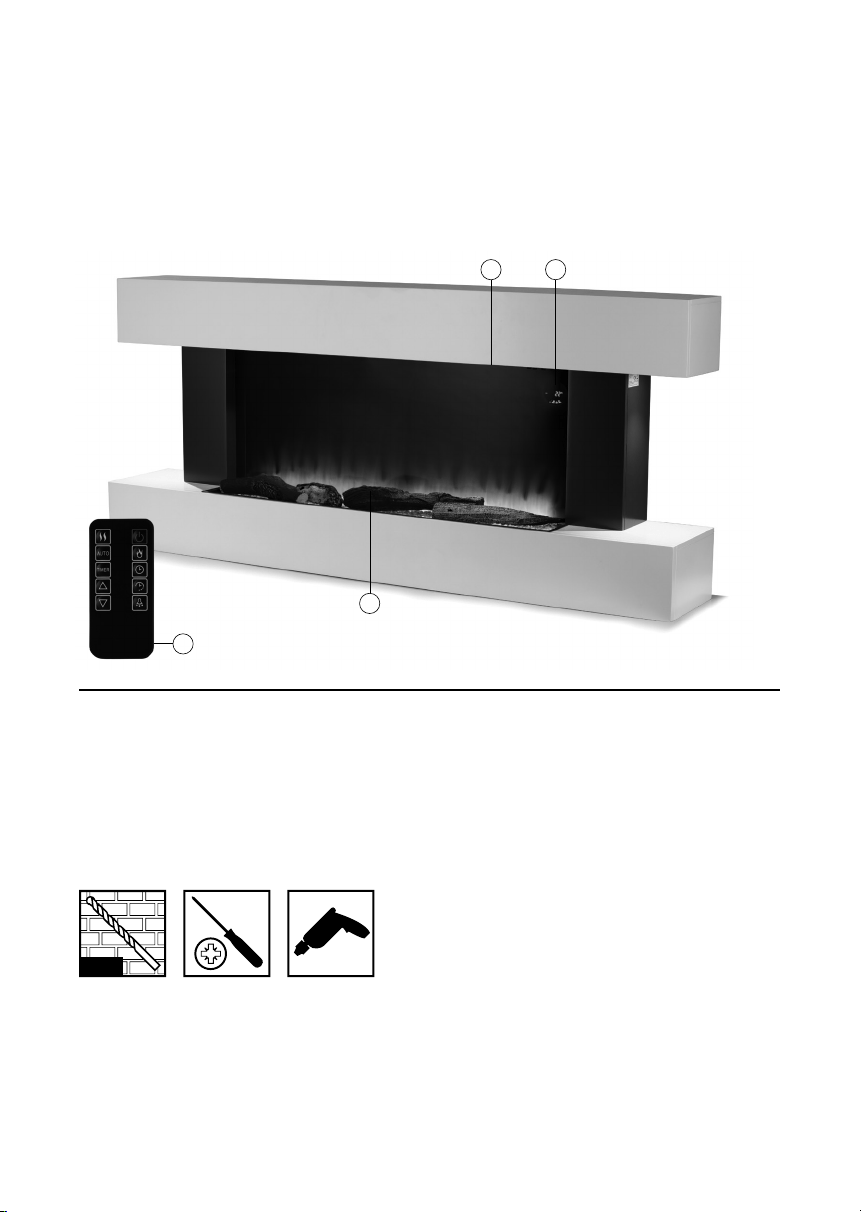
1. Overhead Lamps
2. Control Panel
3. LED Flame Eect
4. Remote Control
BEFORE YOUR FIRST USE:
1. Remove your appliance from the packaging.
2. Install your appliance in accordance with the installation & safety instructions.
3. Your appliance is now ready for normal use.
Dispose of the packaging in a responsible manner.
WARNING: This product must be installed correctly, failure to do so may result in injury, electric
shock to the user or damage to your product and your Property.
TOOLS NEEDED (not supplied)
1. 2mm pilot drill bit & 8mm drill bit (the 8mm drill bit may need to be a masonry bit)
2. Philips screw driver
3. Power drill
2mm
8mm
9www.warmlite.co
HANDLING
Before continuing any further with the
installation of this re please read the following:
• Two people should be sucient to lift the
re.
• When lifting always keep your back
straight. Bend your legs and not your
back.
• Avoid twisting at the waist. It is better to
reposition your feet.
• Avoid upper body / top heavy bending.
Always bend from the knees rather
than the waist. Do not lean forward or
sideways whilst handling the re.
• Always grip with the palm of your hand.
Do not use the tips of ngers for support.
• Always keep the product as close to the
body as possible to prevent unnecessary
and undue strain on the body.
• Use gloves to provide additional grip.
• Always use assistance if required.
UNPACKING THE PRODUCT
The unit is supplied in a single package
carton. Carefully unpack the product using the
following procedure:
• Ensure that the product is in the correct
position with the carton wording legible.
• Remove the straps and sleeve.
• Carefully lift the replace out of the box.
• Remove the protective packaging and
bag from the suite.
• Locate the xing pack and put aside.
• Carefully remove the protective lm
covering the re.
INSTALLATION
IMPORTANT: Do not connect the appliance
until it is properly xed to the wall and the
instructions have been read fully.
Ensure the minimum distances are
observed.
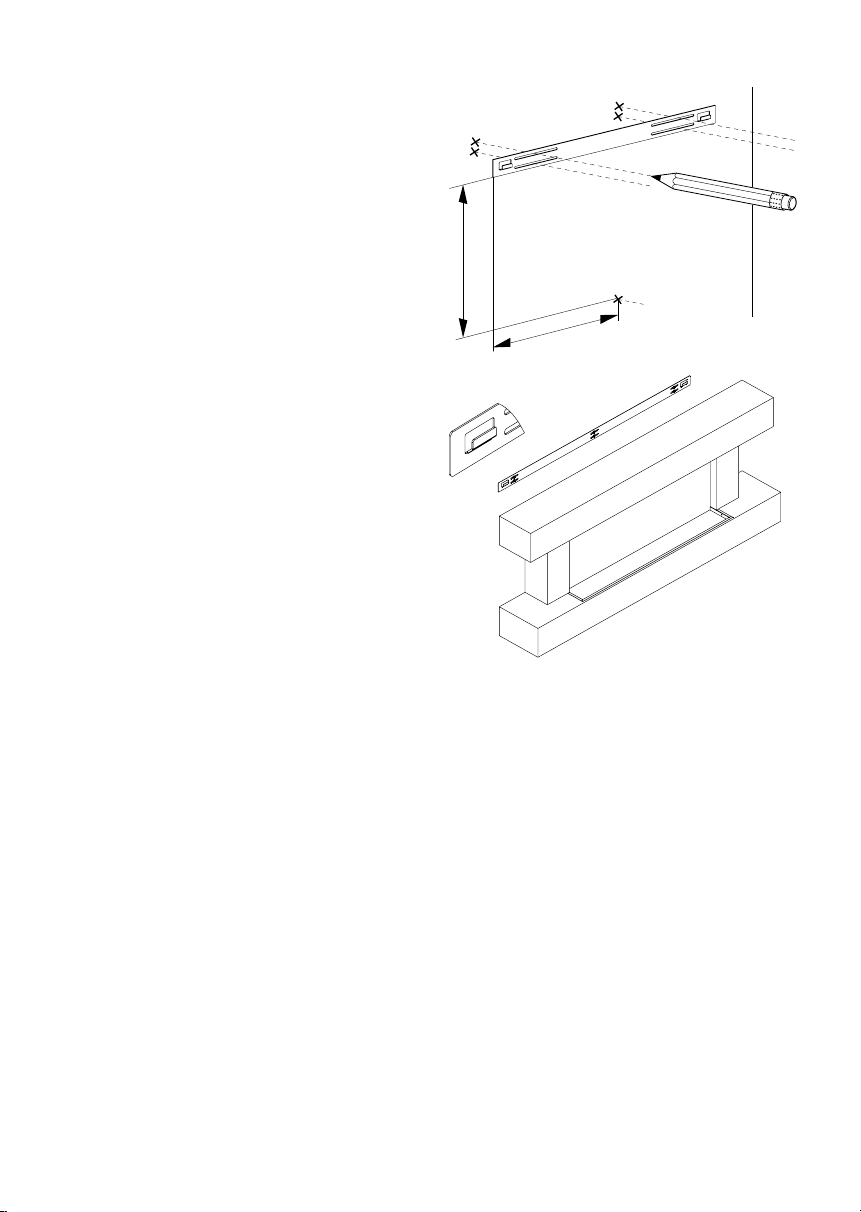
1. The re is designed to be permanently
xed to a wall at a minimum height
of 300mm. The wall bracket must be
tted horizontally and the cable routed
to the bottom right of the re. A height
of 600mm from the oor to the bottom
of the wall re is recommended for
optimum viewing of the fuel bed.
2. Use the bracket as a table template
and mark ve drill positions on the wall.
Ensure that these holes are all level.
3. Put the bracket aside and drill holes
with a depth of 35mm using a 2mm
pilot drill bit & 8mm drill bit.
4. Clean the holes from dust and debris
and insert one plug in each hole. Make
sure the edge of each hole is ush with
the surface.
5. Hold the bracket in position and x it in
place with screws.
475 mm
330.5 m
m
10 CUSTOMER SUPPORT TEAM:: +44 (0) 333 220 6056
6. Carefully lift the appliance up, ensuring
that the top rear ledge of the wall re
engages with the wall bracket and is
sitting centrally. This process should be
carried out by two people to avoid injury
or damage to property or the appliance.
Do not let go of the appliance until
you are sure it is safely attached to the
bracket.
7. Gently bring the wall re down against
the wall. Mark the two xing hole
positions for the lower xing bracket on
the wall, then remove the wall re.
8. Drill the wall and insert the wall plugs.
9. Ret the wall re to the wall and
fasten the bottom xing bracket to
the wall using the screws provided to
permanently x the wall re in place.
10. Remove the front panel. Unpack the
logs from the bag and place them along
the light unit in the desired position.
11. Put the front panel back in place.
USING YOUR APPLIANCE
Helpful advice before tting:
The appliance can be operated either by the
switches located on the left hand side of the
re under its canopy or by the supplied remote
control.
MANUAL OPERATION
The ON/OFF switch must be switched to ‘I’ to
begin operating the re.
The re is operated through the buttons located
on the right hand side of the re under the
canopy.
The re will beep to indicate that it is powered
up.
• Turn the appliance on by icking the
Power On/O switch to the On position,
represented by the symbol ‘I’.
• The fan heater has two separate settings
that are selected by pressing each of the
two heat selection switches on the main
body of the unit. Press the | switch for low
heat, or press the || switch for the high
heat setting.
• Press the I switch to select the 1000W
heat setting. The Heat 1 display will
illuminate to indicate this setting has been
selected.
• Press the II switch to select the 2000W
heat setting. The Heat 2 display will
illuminate to indicate this setting has been
selected.
• To turn the heater o press the Function
button again and set the power switch
to 0.
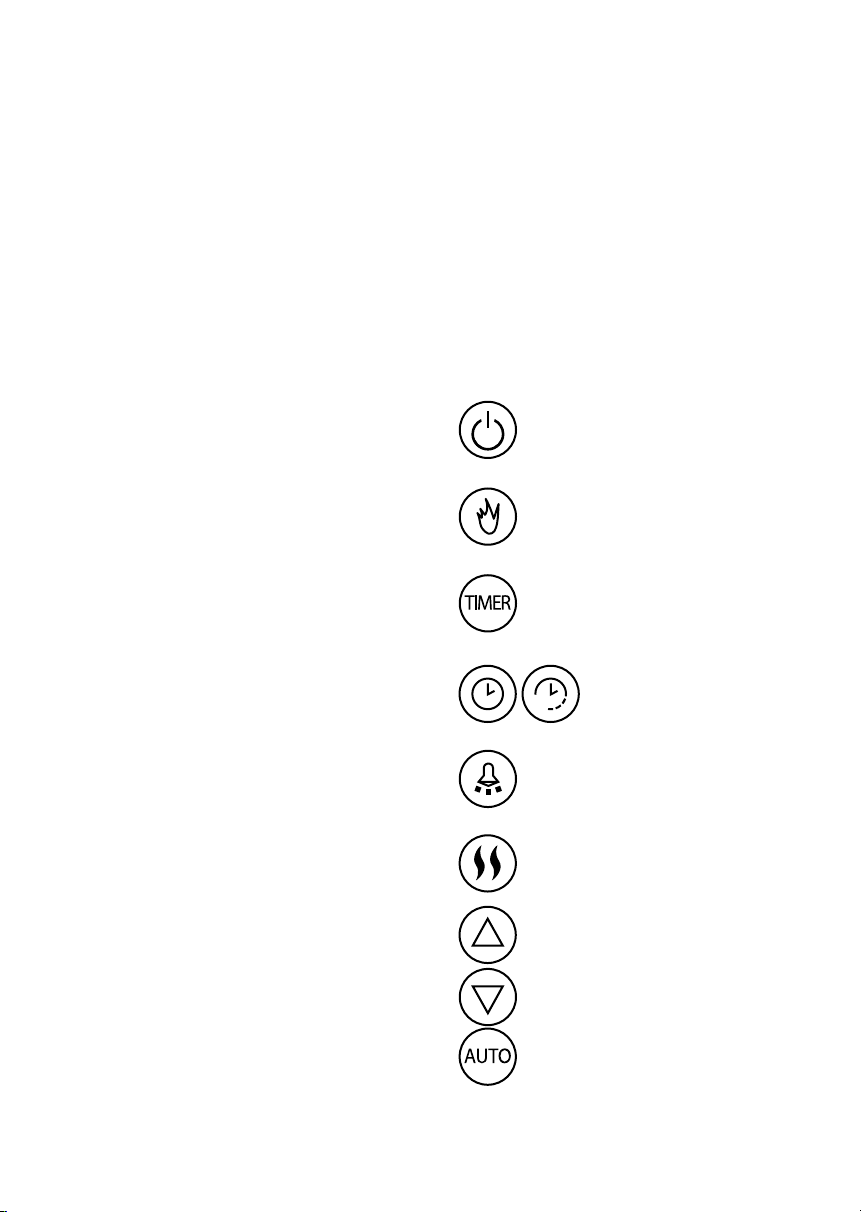
REMOTE OPERATION
Press once to turn the appliance
and ame eects on. Pressing
again turns the appliance and
ame eects o.
Press to cycle through the ame
eect settings.
Time Setting. See Setting the Time
and date.
Lamp Control. Press once to turn
the lamps on. Pressing again turns
the lamps o.
Heat Setting Selection. Press once
to activate 1000W heat, pressing
twice activates 2000W. Pressing
again will turn o the heating.
Advance Timer.
Decrease Timer.
Auto Mode Button. See auto
mode settings.
Timer Setting. See Setting
The Timer.

11www.warmlite.co
Note: Ensure the power switch on the unit’s
main body is set to On before attempting to
use the remote control.
TURNING THE UNIT ON AND OFF
• Press the On/O button on the unit’s
remote control to turn the re on or o.
• Press this button once to turn the unit
on. There will be a beeping noise and the
current temperature will be shown in the
unit’s LCD display to indicate the unit has
been turned on.
• Press the button again when the unit is
in operation to turn it o. The unit’s LCD
display will go o to indicate it has been
powered down.
SELECTING HEATING LEVELS
• The fan heater has two separate settings,
which can be selected by pressing the
Heat Setting button on the unit’s remote
control.
• Press this button once to select the Low
heat setting, or press it a second time for
the High heat setting. The corresponding
indicator will light up on the unit’s control
panel to show each heating level has been
selected.
• Press this button again after a heat setting
has been selected to turn the heating
function o.
ADJUSTING THE TEMPERATURE
• Press the Up and Down buttons on the
unit’s remote control to manually adjust
the temperature. Press the Up button to
increase the temperature, or press the
Down button to decrease it.
Note: The temperature will increase or
decrease by increments of 1
o
, from 16
o
up to
30
o
.
AUTO MODE
This unit is equipped with an automatic
temperature control mode. When this mode
is selected, the unit will automatically adjust
the heating levels as necessary to reect room
temperature, including detecting if a window
is open and turning the heating function o if
the temperature drops more than 5
o
within the
space of 30 minutes.
• Press the ‘Auto’ button on the unit’s
remote control to turn Auto mode on. The
corresponding indicator will light up on the
unit’s LCD screen to show this mode has
been selected.
• Press this button again when the unit is
in Auto mode to turn the Auto function
o. The corresponding indicator on the
unit’s LCD screen will go out to show this
function has been cancelled, and the unit
will return to manual operation.
TURNING THE FLAME EFFECT ON AND
OFF
• Press the Flame button on the unit’s
remote control to turn the ame eect
on and o or dim its intensity. The rst
press of this button activates the eect
on the high brightness setting, the next
two presses of the button will gradually
decrease the brightness, and a fourth
press of the button will switch the ame
eect o altogether.
• The corresponding indicators on the unit’s
LCD screen will light up when the button
is rst pressed, and gradually go out as
the brightness is adjusted.
Note: The ame eect can be activated without
any heat selection being made. However, the
heating function cannot be activated unless
the ame eect has been turned on. When
the ame eect is turned o, pressing the
temperature selection buttons on the remote
control or the unit’s control panel will have no
eect.

12 CUSTOMER SUPPORT TEAM:: +44 (0) 333 220 6056
TURNING THE LAMPS ON AND OFF
Aside from the ame eect, the small lamps to
either side of the unit can also be turned on or
o as required.
• Press the ‘Light’ button on the unit’s
remote control while the re is turned on
to turn these lamps on. Press this button
again while the lamps are on to turn them
o.
SETTING THE TIME AND DATE
This unit is equipped with a built-in timer, which
allows for programmable, hands-free timed
operation. To make use of the unit’s timer,
begin by setting the correct time and date.
• Press the ‘Time’ button on the unit’s
control panel to begin selecting and
adjusting the time and date. Press this
button once to select the day of the week,
press it again to select the hour, and press
it a third time to select the minutes.
• The corresponding indicators or digits on
the LCD control panel will ash to indicate
they have been selected and can now be
adjusted.
• When each setting has been selected,
press the Up and Down arrows on the
unit’s remote control to manually adjust it.
• Press the ‘Time’ button again once the
correct date or time has been set to move
on to the next setting. Press this button
again once all the settings have been
adjusted to exit the time and date function
and return to normal operation.
• The unit will automatically save the
selected settings to memory.
SETTING THE TIMER
Note: Ensure the correct time and date have
been set before attempting to program a timer.
• Press the ‘Timer Set’ button on the unit’s
remote control to begin setting a timer.
Press this button once to select the
starting day for the timer, press it again
to select the starting hour, press it a
third time to select the starting minutes,
a fourth time to select your desired
temperature and a fth time to set the
starting day. The corresponding indicators
or digits on the LCD control panel will
ash to indicate they have been selected
and can now be adjusted.
• When each setting has been selected,
press the Up and Down arrows on the
unit’s remote control to manually adjust it.
Press the ‘Timer Set’ button again once
each setting has been adjusted to move
on to the next one.
Note: When selecting the starting or ending
day for each timer, press the Down arrow once
the correct day has been chosen to conrm
the selection. Failing to do this will result in the
timer not being properly saved to memory or
activated.
• Press the ‘Timer Set’ button again once all
the settings have been adjusted to move
on to the ending date and time selection.
Repeat the process as detailed above to
set the ending time, date and temperature
for the currently selected timer.
• Press the ‘Timer Set’ button again once all
the settings have been adjusted to exit the
timer programming function. The unit will
automatically save the selected settings
to memory.
TURNING THE TIMER ON AND OFF
• A previously programmed timer can be
turned on or o at any point using the
unit’s remote control.
• Press the ‘Timer’ button on the remote
control to turn a pre-programmed timer
on. Press this button again when a timer
is active to turn this setting o.
Note: If the ‘Down’ arrow has not been
pressed when selecting the date, as detailed
above, this button will have no function. Ensure
the starting and ending dates for each timer
have been correctly set and saved before
attempting to use this function.

13www.warmlite.co
SAFETY CUT-OUT
This appliance is tted with a safety cut-o
which will operate if the re overheats (e.g. due
to blocked air vents). For safety reasons, the
re will NOT automatically reset.
To reset the appliance, disconnect the
appliance from the mains supply for at least 15
minutes. Reconnect to the mains supply and
switch on the appliance.
CAUTION: Do not touch the heater as it will be
hot. Set the heater switches to OFF and leave
the heater to cool down fully. Once completely
cool, reconnect the heater and switch it on.
Do not open this product. There are no user-
serviceable parts inside.
CHECK THAT YOU HAVE NOTED ALL THE
FOLLOWING INSTRUCTIONS:
Do’s
• Always install the re in accordance with
this guide. If in doubt obtain expert advice.
• Always make sure the electrical socket is
accessible and located adjacent to, but
not above or behind the re.
• Always disconnect the re from the
electrical supply before carrying out
cleaning or maintenance.
• Always make sure the re is rmly
secured.
• Always assemble the re in accordance
with this guide. If in doubt, obtain expert
advice.
• Always ensure the product is assembled
in an area that is free from dust, grease or
liquids.
• Always ensure that the correct tools are
used to assemble/install this product.
• Always make sure the re is rmly secured
in place when complete.
Dont’s
• Never leave children unsupervised in a
room where the re is ON and unguarded.
• Never obstruct or cover the fan outlet or
force items into re openings.
• Never install or use the re anywhere
where water is in use, i.e. bathrooms,
kitchens, shower rooms, and swimming
pool etc.
• Never use aerosols or steam cleaners on
or around the re.
• Never route the mains supply cable under
carpet etc.
• Never install the re close to curtains or
combustible materials.
• Never use the re to dry clothes etc.
• Never sit or stand on the re.
• Never cut the o the plug and hard wire
into a xed fused spur.
Note: Any new wiring required, must be in
accordance with local and national codes and
other applicable regulations in order to reduce
the risk of re, electric shock, or other injuries.
Note: When the re is turned on for the rst
time or when it has not been used for some
time, it may release a slight, harmless odour.
This odour is a normal occurrence caused
by the initial heating of the internal heating
elements or dust, and will disappear with use.
TROUBLE SHOOTING
Safety Cut-Out device:
To ensure against the potential hazard
caused by blockage of the air outlet, this
unit is equipped with an automatic over-
temperature safety cut-out device. When the
device is activated the heater will not operate.
If this occurs, the unit can be reset using the
following procedure.
1. Turn the re o by depressing the on/o
switch on the unit.
2. Unplug the power cord form the electrical
mains supply socket and leave it
disconnected for at least 15 minutes.
3. Ensure that the air vents are free from
obstruction.
4. Plug the power cord back in to the mains
socket.
14 CUSTOMER SUPPORT TEAM:: +44 (0) 333 220 6056
5. Turn the re back on.
6. If the re fails to operate, check the fuse
in the plug.
7. If the fuse in the plug is OK and the re
is still not functioning, contact a qualied
service person.
Symptom Corrective action
No operation/ no
fan.
Check that the
safety cut-o has
not operated.
Check the fuse;
if broken a
replacement is
necessary.
No light Check the LED,
if broken a
replacement is
necessary.
CLEANING AND CARE
Warning- Always disconnect from the mains
supply before cleaning the wall re.
• For general cleaning use a soft clean
duster - never use harsh abrasives or
cleaners.
• The glass viewing screen should be
cleaned carefully with a soft cloth.
CAUTION: Allow the product to completely
cool before handling or cleaning it.
• Do not allow water or other liquids to run
into the interior of the product, as this
could cause a re and/or electrical hazard.
• We also recommend the periodic cleaning
of this appliance by lightly running a
vacuum cleaner nozzle over the guards
to remove any dust or dirt that may have
accumulated inside or on the unit.
CAUTION: Do not use harsh detergents,
chemical cleaners or solvents as they may
damage the surface nish of the plastic
components.
WARNING:
DO NOT IMMERSE ANY ELECTRICAL PART
OF THE APPLIANCE IN WATER SUCH AS
MOTOR UNITS OR PLUGS.
PLEASE SEE CLEANING SECTION FOR
FURTHER INSTRUCTIONS.
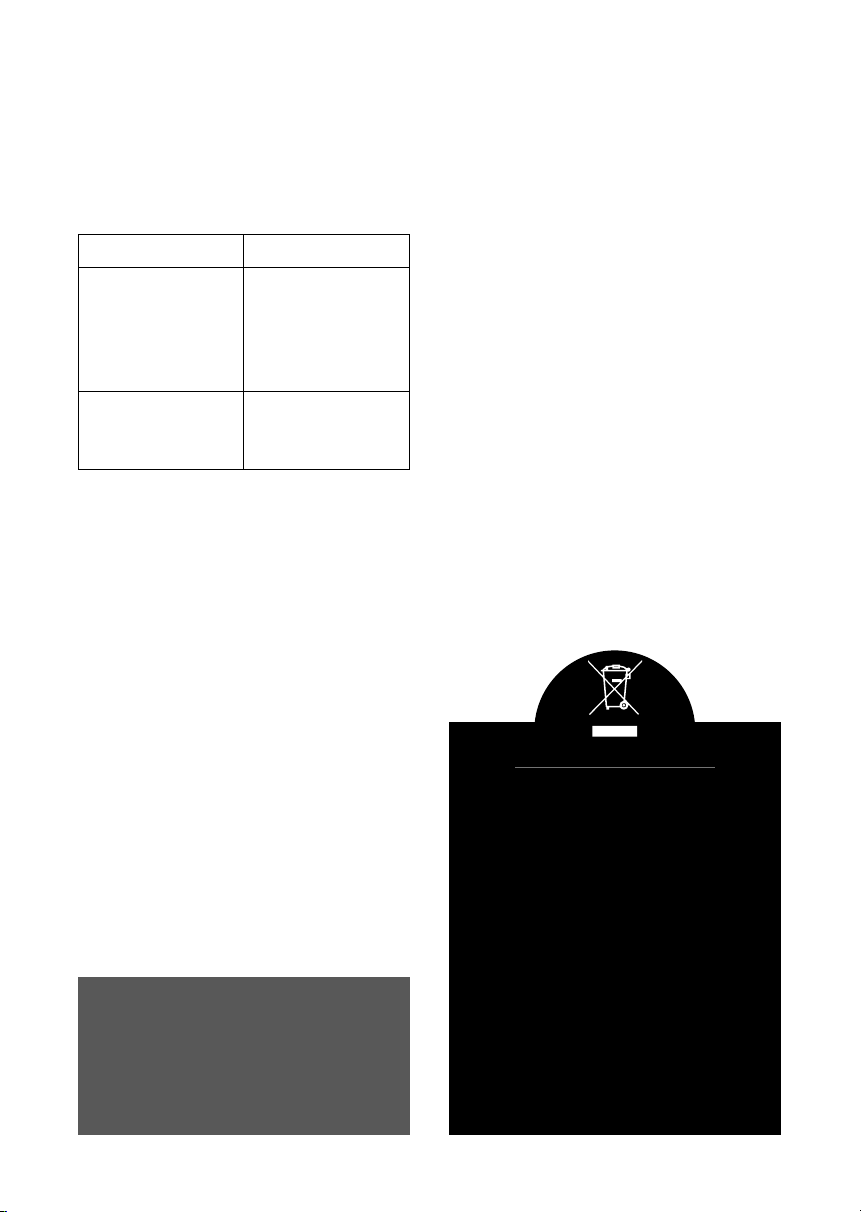
DISPOSAL OF THE UNIT
Appliances bearing the symbol shown here
may not be disposed of in domestic rubbish.
You are required to dispose of old electrical
and electronic appliances like this separately.
Please visit www.recycle-more.co.uk or
www.recyclenow.co.uk
for access to information about the recycling
of electrical items.
Please visit www.weeeireland.ie for access to
information about the recycling of electrical
items purchased in Ireland.
The WEEE directive, introduced in August
2006, states that all electrical items must be
recycled, rather than taken to landll.
Please arrange to take this appliance to your
local Civic Amenity site for recycling, once it
has reached the end of its life.
15www.warmlite.co
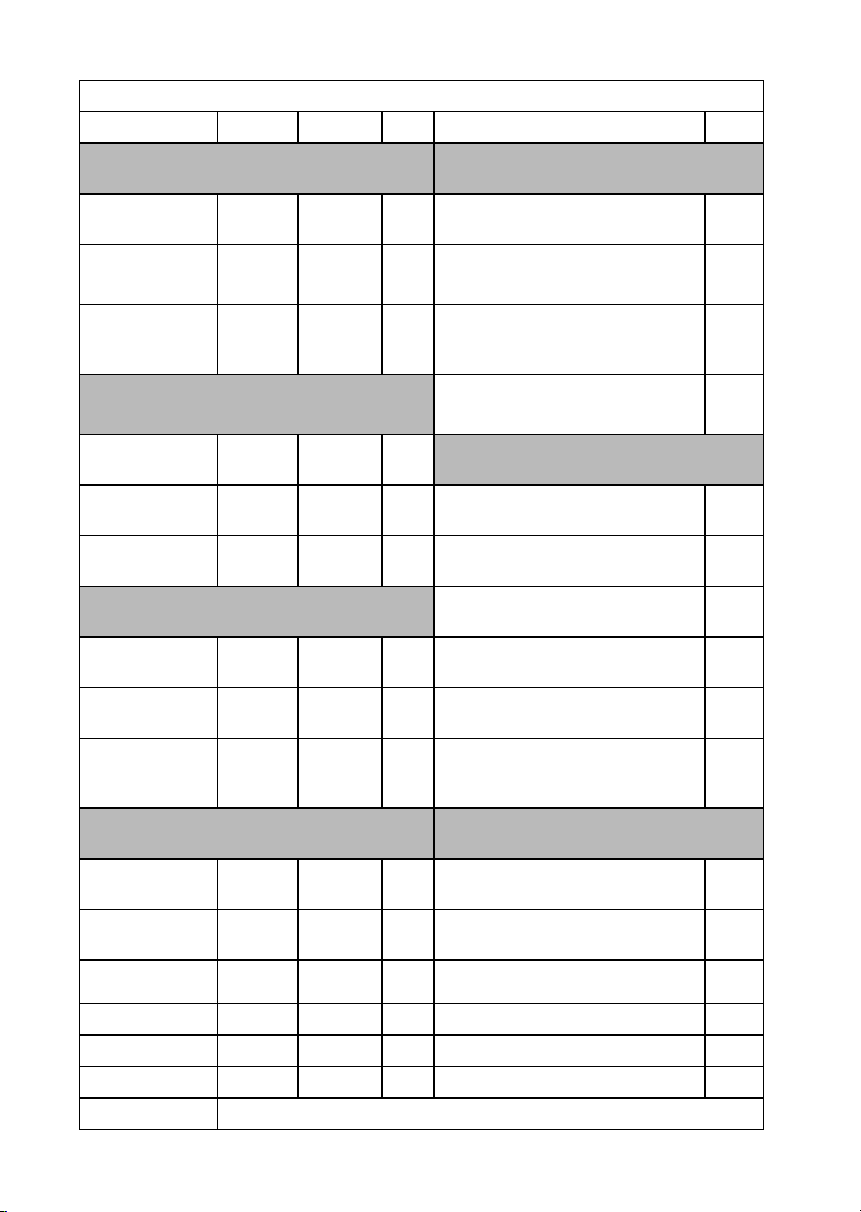
Model Identier(s): WL45033N
Item Symbol Valve Unit Item Unit
Heat Output
Type of heat input for electric storage, local
space heaters only (select one)
Nominal heat
output
Pnom 2.0 kW
Manual heat charge with integrated
thermostat
NA
Minimum heat
output (indicative)
Pmin 1.0 kW
Manual heat charge control with room
and/or outdoor temperature feedback
NA
Maximum
continuous heat
output
Pmax, c 2.0 kW
Electronic heat charge control with
room
and/or outdoor temperature feedback
NA
Auxiliary electricity
consumption
Fan assisted heat output NA
At nominal heat
output
elmax 0.027 kW
Type of heat output/room temperature control
(select one)
At minimum heat
output
elmin 0.027 kW
Single stage heat output and no room
temperature control
No
In standby mode eISB 0 kW
Two or more manual stages, no room
temperature control
No
Heat Output
With mechanic thermostat room
temperature control
No
Nominal heat
output
Pnom NA kW
With electronic room temperature
control
No
Minimum heat
output (indicative)
Pmin NA kW
Electronic room temperature control
plus day timer
No
Maximum
continuous heat
output
Pmax, c NA kW
Electronic room temperature control
plus week timer
Yes
Auxiliary electricity
consumption
Other control options (multiple selections
possible)
At nominal heat
output
elmax NA kW
Room temperature control with pres-
ence detection
No
At minimum heat
output
elmin NA kW
Room temperature control with open
window detection
Yes
In standby mode eISB NA kW With distance control option No
With adaptive start control No
With working time limitation Yes
With black bulb sensor No
Contact Details: Imported by RK Wholesale LTD., Berryhill Road, Stoke-on-Trent ST4 2NL

We hope you enjoy your appliance for many years.
As a thank you for purchasing one of our fantastic products,
we are oering you an extra 1 year peace of mind.
*To receive your extra guarantee period, register your appliance online
within 28 days of purchase by visiting:
www.warmlite.co
Make sure to retain your original receipt.
Should you have a problem
with your appliance or need any spare parts please call our
Customer Support Team on:
+44 (0) 333 220 6056
Distributed throughout the UK by RK Wholesale LTD
0719.V1