OVERVl F POTENTIALHAZARDS
READTHISSAFETYINFORMATI N
Garage doors are large, heavy objects that move with the help of springs under high tension and electric motors. Since moving
objects, springs under tension, and electric motors can cause injuries, your safety and the safety of others depend on the owner or
user of this system to read, understand and implement the information in this manual. Ifyou have questions or do NOT
understandthe information presented, contact The Genie Company or an authorized Genie®Dealer.
The safety alert symbol and following signal words DANGER,WARNING, and CAUTION are used throughout this manual to call
attention to and identify different levels of hazard and special instructions.
,& This is the safety alert symbol. This symbol is placed next to signal words and messages to help you identify
important safety information
The word:
,& DANGER indicates an imminently hazardoussituation which, if NOT avoided,will result in death or serious injury.
,& WARNING indicates a potentially hazardous situation which, if NOT avoided, could result in death or serious injury.
CAUTION indicates a potentially hazardous situation which, if NOTavoided, may result in injury or property damage.
The word ,;0 is used to indicate important steps to be followed, important considerations,or location of parts.
IMPORTANTSAFETYINSTRUCTIONS
READAND FOLLOWALL INSTRUCTIONS
SAVETHESE INSTRUCTIONS
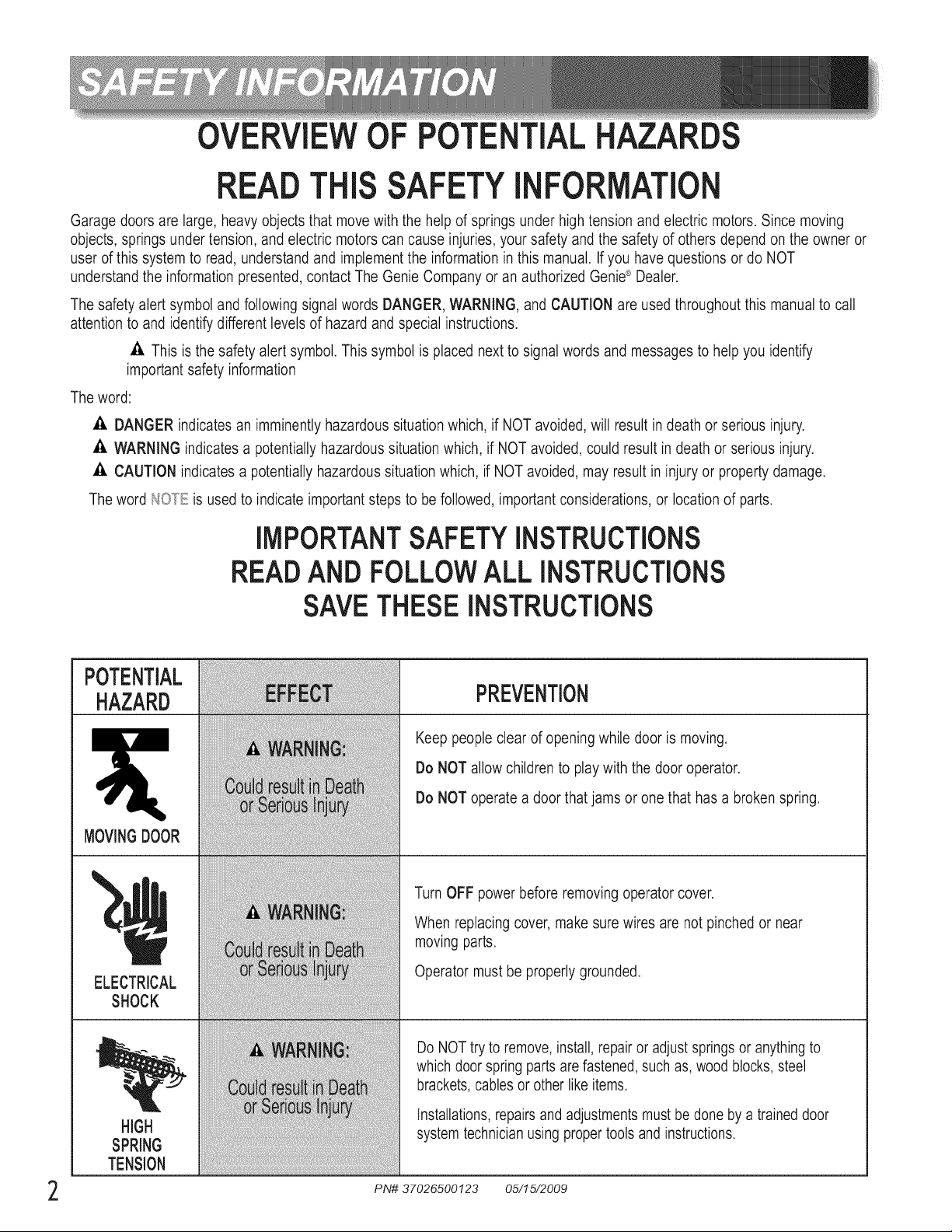
POTENTIAL
HAZARD
MOVINGDOOR
ELECTRICAL
SHOCK
PREVENTION
Keep people clear of openingwhile door is moving.
Do NOTallow children to play with the door operator.
Do NOToperate a door that jams or one that has a broken spring.
Turn OFF power before removing operator cover.
When replacing cover, make sure wires are not pinched or near
moving parts.
Operator must be properly grounded.
HIGH
SPRING
TENSION
Do NOTtry to remove, install,repair or adjustsprings or anything to
which door spring parts are fastened,such as, wood blocks,steel
brackets,cables or other like items.
Installations,repairs and adjustmentsmust be done by a trained door
system technicianusing proper tools and instructions.
PN# 37026500123 05/15/2009
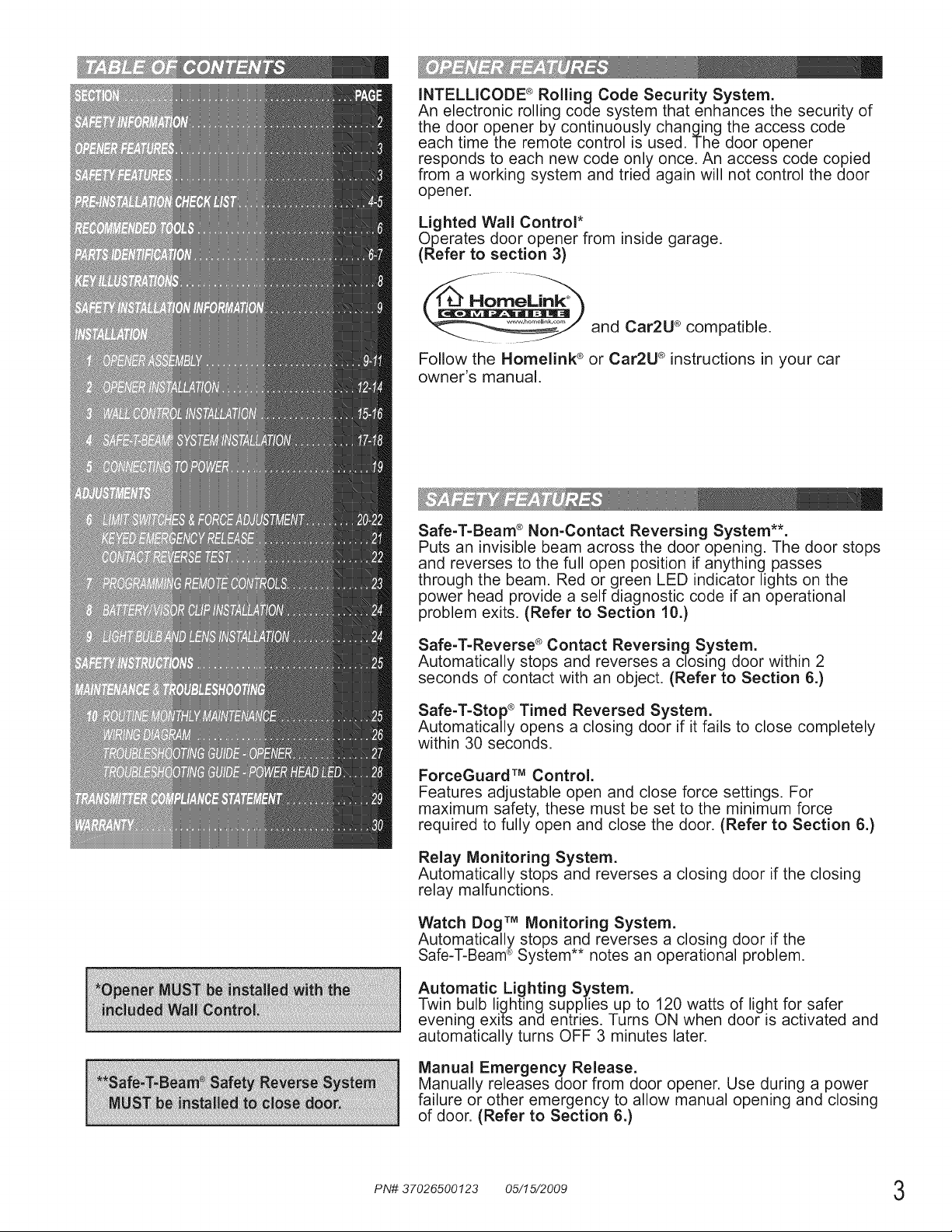
INTELLICODE ® Rolling Code Security System.
An electronic rolling code system that enhances the security of
the door opener by continuously changing the access code
each time the remote control is used. The door opener
responds to each new code only once. An access code copied
from a working system and tried again will not control the door
opener.
Lighted Wall Control*
Operates door opener from inside garage.
(Refer to section 3)
and Car2U ® compatible.
Follow the Homelink ® or Car2U ® instructions in your car
owner's manual.
Safe-T-Beam ® Non-Contact Reversing System**.
Puts an invisible beam across the door opening. The door stops
and reverses to the full open position if anything passes
through the beam. Red or green LED indicator lights on the
power head provide a self diagnostic code if an operational
problem exits. (Refer to Section 10.)
Safe-T-Reverse ®Contact Reversing System.
Automatically stops and reverses a closing door within 2
seconds of contact with an object. (Refer to Section 6.)
Safe-T-Stop ® Timed Reversed System.
Automatically opens a closing door if it fails to close completely
within 30 seconds.
ForceGuard TM Control.
Features adjustable open and close force settings. For
maximum safety, these must be set to the minimum force
required to fully open and close the door. (Refer to Section 6.)
Relay Monitoring System.
Automatically stops and reverses a closing door if the closing
relay malfunctions.
Watch Dog TM Monitoring System.
Automatically stops and reverses a closing door if the
Safe-T-Beam®System notes an operational problem.
Automatic Lighting System.
Twin bulb lighting supplies up to 120 watts of light for safer
evening exits and entries. Turns ON when door is activated and
automatically turns OFF 3 minutes later.
Manual Emergency Release.
Manually releases door from door opener. Use during a power
failure or other emergency to allow manual opening and closing
of door. (Refer to Section 6.)
PN# 37026500123 05/15/2009 3
Thsgs to co_"_s de__ f you a_e p_an s ng to _©o_ t_you_o_'self,_
This opener is designed for use with SECTIONAL doors only.
_? De Sse £_s8 operer insX,;::stled Seso ace some pso-ZsIstlsIk/J) hs_es <iJ iot need Jl<>be
s</<:/mssed TTey s_}) as fL>/Cows:
_7_e Gese Oompsny £s_cemme£_7 SSs8 you sssd ssc_ @/y £ sdes/s_snd aS nfs_s_sdos and
q!ues_o_s shouFd be dMs, cSed _'o N%e Ge_"_Fe Co sN}/0_" sN ss_'#_o;'_zed Ge_"_s _,©esIe£
(The Lssue _ur?sL?e_{_beMw mrS:?; ;k> ;l(e cS_c/ed ;;,_mi?ei's i_ i!te iIl_srx}IM_s o) pi{?£e 5;'
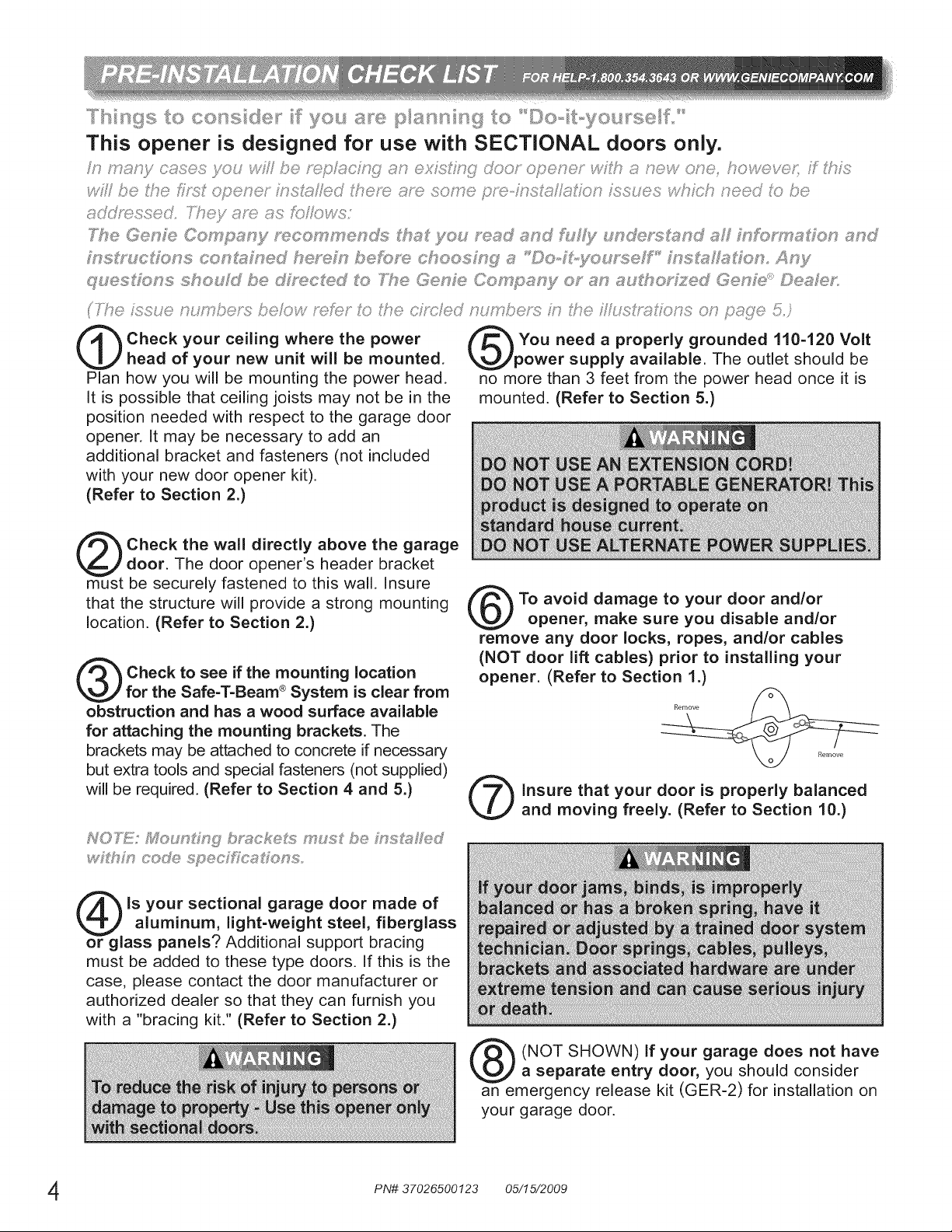
Check your ceiling where the power
head of your new unit will be mounted.
Plan how you will be mounting the power head.
It is possible that ceiling joists may not be in the
position needed with respect to the garage door
opener. It may be necessary to add an
additional bracket and fasteners (not included
with your new door opener kit).
(Refer to Section 2.)
You need a properly grounded 110-120 Volt
power supply available. The outlet should be
no more than 3 feet from the power head once it is
mounted. (Refer to Section 5.)
Check the wall directly above the garage
door. The door opener's header bracket
must be securely fastened to this wall. Insure
that the structure will provide a strong mounting
location. (Refer to Section 2.)
Check to see if the mounting location
for the Safe-T-Beam ®System is clear from
obstruction and has a wood surface available
for attaching the mounting brackets. The
brackets may be attached to concrete if necessary
but extra tools and special fasteners (not supplied)
will be required. (Refer to Section 4 and 5.)
_?_h':_ cede spec[fics_e _s
To avoid damage to your door and/or
opener, make sure you disable and/or
remove any door locks, ropes, and/or cables
(NOT door lift cables) prior to installing your
opener. (Refer to Section 1.)
insure that your door is properly balanced
and moving freely. (Refer to Section 10.)
is your sectional garage door made of
aluminum, light-weight steel, fiberglass
or glass panels? Additional support bracing
must be added to these type doors. If this is the
case, please contact the door manufacturer or
authorized dealer so that they can furnish you
with a "bracing kit." (Refer to Section 2.)
(NOT SHOWN) If your garage does not have
a separate entry door, you should consider
an emergency release kit (GER-2) for installation on
your garage door.
PN# 37026500123 05/15/2009
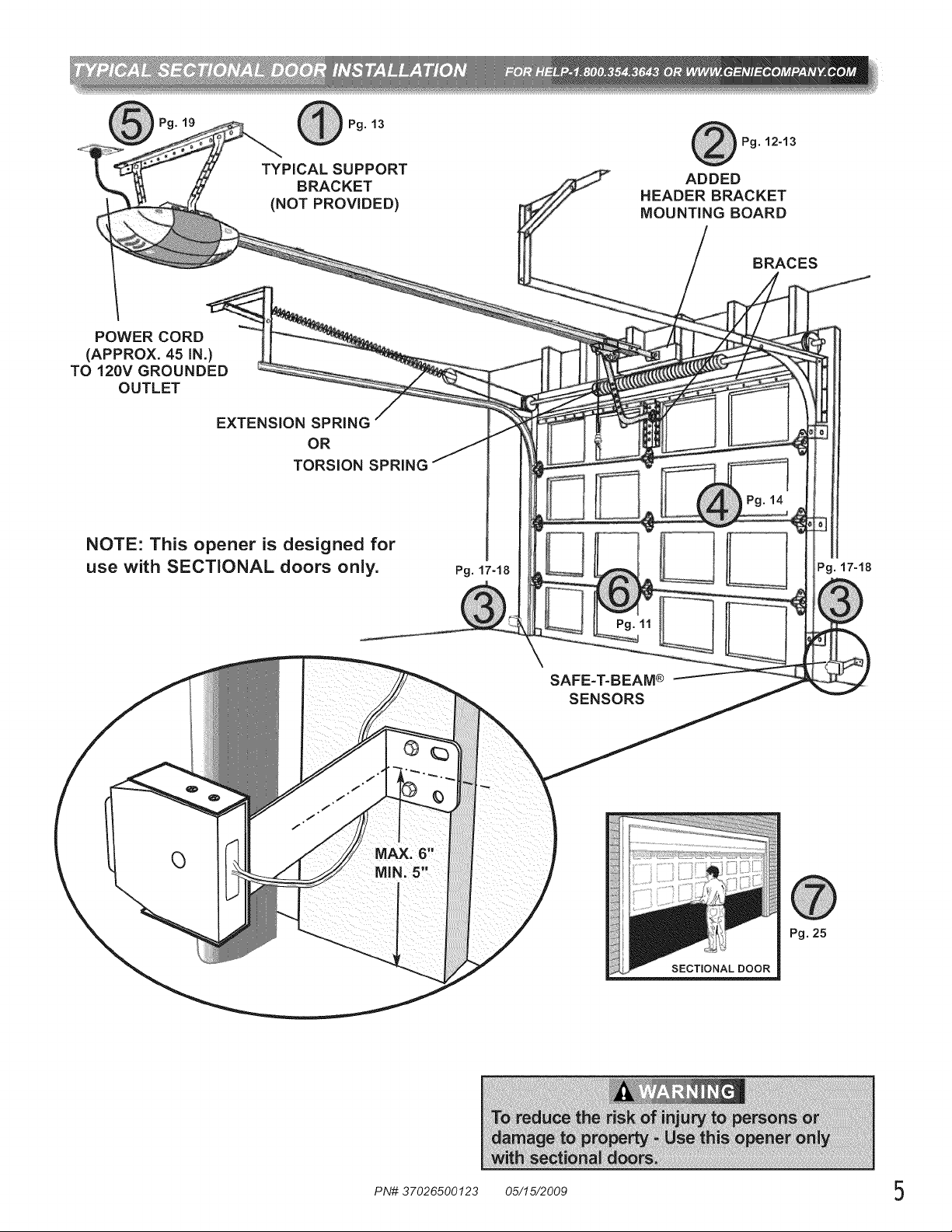
Pg. 13
TYPICAL SUPPORT
BRACKET
(NOT PROVIDED)
Pg. 12-13
ADDED
HEADER BRACKET
MOUNTING BOARD
BRACES
POWER CORD
(APPROX. 45 iN.)
TO 120V GROUNDED
OUTLET
EXTENSION SPRING
OR
TORSION SPRING
NOTE: This opener is designed for
use with SECTIONAL doors only.
Pg. 17-18
SAFE=T=BEAM®
SENSORS
SECTmONALDOOR
Pg. 17-18
Pg.25
PN# 37026500123 05/15/2009 5
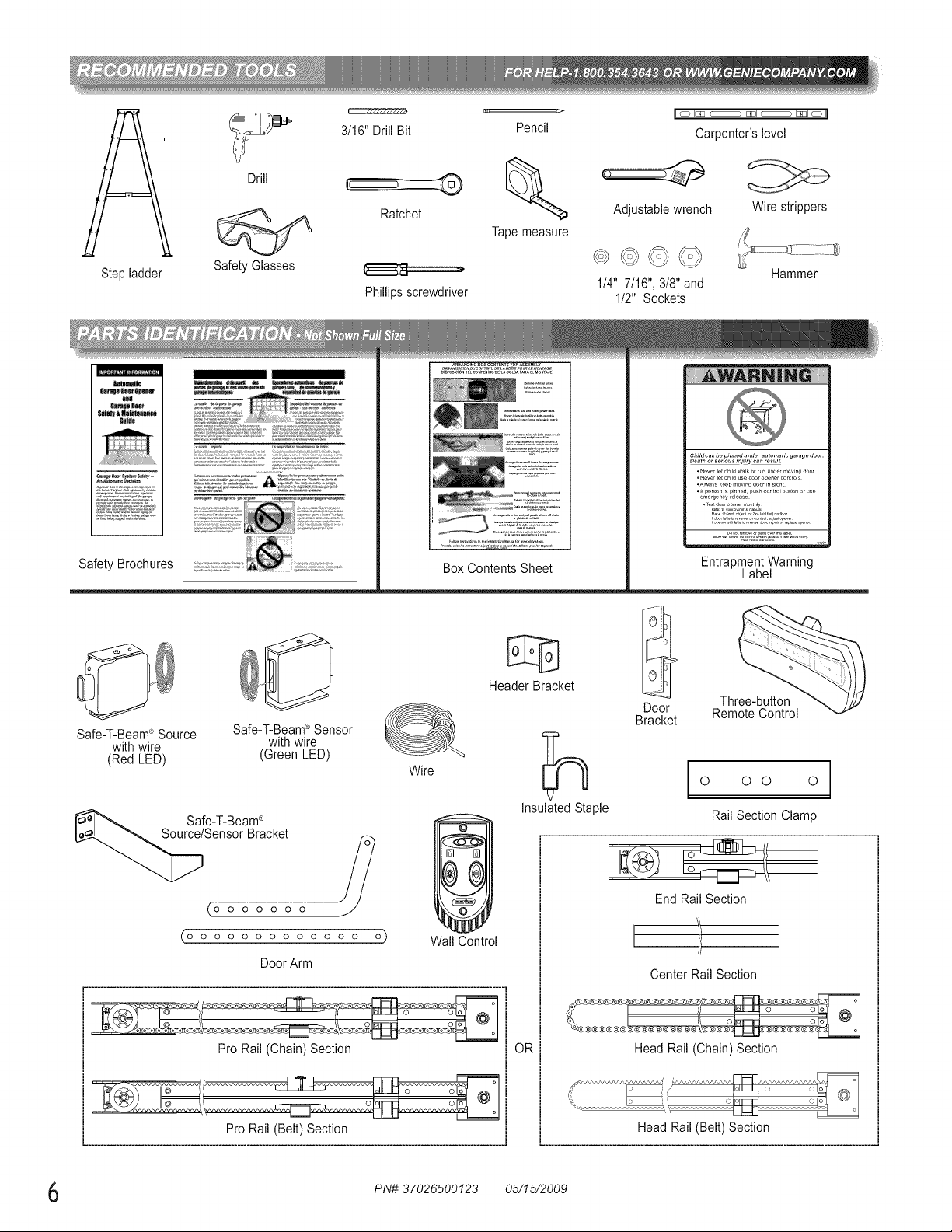
Step ladder
Drill
Safety Glasses
3/16" DrillBit
Ratchet
Phillips screwdriver
Pencil
Tapemeasure
I o I_JI c ) I_JI c ) I_JI o II
Carpenter'slevel
Adjustablewrench Wire strippers
1/4",7/16", 3/8" and
1/2" Sockets
Hammer
1t81t1_
Safety Brochures
_E5727:
Box Contents Sheet
Safe-T-Beam®Source Safe-T-Beam®Sensor
with wire with wire
(Red LED) (Green LED)
O
Wire
Header Bracket
Safe-T-Beam®
Sensor Bracket ?
0 0 0 0 0 0 0
O O O O O O O O O O O O O O
Door Arm
Wall Control
Pro Rail (Chain) Section
OR
Child can be pinned under automatic garage door.
• N_wr I_tchild w_lkor run under ,_ovin_ d_or
• N_ver I_tchild us_ door opener controls
_Al_ys k_p moving door in sight
• _ p_r_n is pinned push control button orus_
e,_erg_n_y relea_,
,d_,fo, ............... djuo_o,....
Entrapment Warning
Label
Insulated Staple
Door
Bracket
Three-button
Remote Control
0 0 0 0
Rail Section Clamp
End Rail Section
[ ]
Center Rail Section
Head Rail (Chain) Section
PN# 37026500123 05/15/2009
iiiiill,_Ii!ii'i!iliii;il_!ii;il_!ii;ii!iii!iii!iiiii!iiiiiii;!iii;!iiiiii_ii!i!_ii_i_ii_iii_i_::i!iii!,i!ii_!iiii_iilii:i!i_ili!_!!_i!iii:iil!iii_il_iii!i!iili_iiii_i_i!ii'i'ii'ii::i_i!i_ii_i_iliiii_iillii_i_ii_;il_;ii_;ii_;ii_;ii_;ii_;ii_;ii_;ii_;ii_;ii_;ii_;ii_;ii_;ii_;ii_;ii_;ii_;ii_;ii_;ii_;ii_;ii_;ii_;ii_;ii_;ii_;ii_;ii_;ii_;ii_;ii_;ii_;ii_;ii_;ii_;ii_;ii_;ii_;ii_;ii_;ii_;ii_;ii_;ii_;ii_;ii_;ii_;ii_;ii_;ii_;ii_;ii_;iii_i!
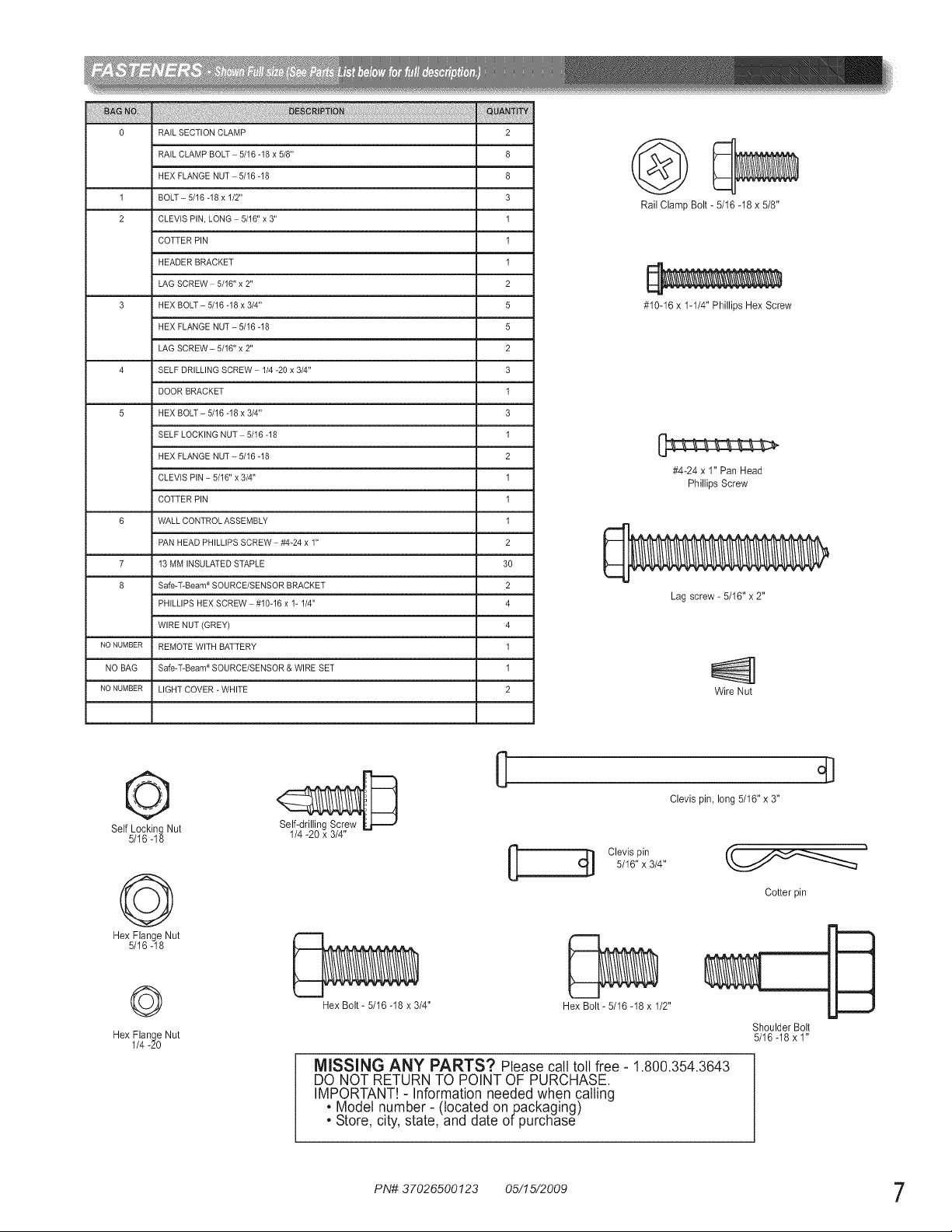
0 RAIL SECTION CLAMP 2
RAIL CLAMP BOLT 5/16 -18 x 5/8" 8
HEX FLANGE NUT 5/16-18 8
1 BOLT - 5/16 -18 x 1/2" 3
2 CLEVIS PIN, LONG 5/16" x 3" 1
COTTER PIN 1
HEADER BRACKET 1
LAG SCREW 5/16" x 2" 2
3 HEX BOLT - 5/16 -18 x 3/4" 5
HEX FLANGE NUT - 5/16 -18 5
LAG SCREW - 5/16" x 2" 2
4 SELF DRILLING SCREW 1/4 -20 x 3/4" 3
DOOR BRACKET 1
5 HEX BOLT - 5/16 -18 x 3/4" 3
SELF LOCKING NUT - 5/16 -18 1
HEX FLANGE NUT - 5/16 -18 2
CLEVIS PIN - 5/16" x 3/4" 1
COTTER PIN 1
6 WALL CONTROL ASSEMBLY 1
PAN HEAD PHILLIPS SCREW #4-24 x 1" 2
7 13 MM INSULATED STAPLE 30
8 Safe-T-Beam ®SOURCE/SENSOR BRACKET 2
PHILLIPS HEX SCREW #10-16 x 1- 1/4" 4
I WIRE NUT (GREY) 4
NONUMBER REMOTE WITH BATTERY 1
NO BAG Safe-T-Beam ®SOURCE/SENSOR & WIRE SET 1
NONUMBER LIGHT COVER - WHITE 2
Rail Clamp Bolt _ 5/16 _18 x 5/8"
#10_16 x 1_1/4" Phillips Hex Screw
[]==n:n:=>
#4-24 x 1" Pan Head
Phillips Screw
Lag screw * 5/16" x 2"
Wire Nut
©
Self Locking Nut
5/16 _18
©
Hex Flange Nut
5/16 _18
Self-drilling Screw
1/4 _20 x 3/4"
C[] Clevis pin
5/16" x 3/4"
Clevis pin, long 5/16" x 3"
Cotter pin
©
Hex Flange Nut
1/4 _20
Hex Bolt _ 5/16 _18 x 3/4" Hex Bolt _ 5/16 _18x 1/2"
MISSING ANY PARTS? Please call toll free - 1.800.354.3643
DO NOT RETURN TO POINT OF PURCHASE.
IMPORTANT! - Information needed when calling
• Model number- (located onpackaging)
• Store, city, state, and date of purchase
Shoulder Bolt
5/16 _18 x 1"
PN# 37026500123 05/15/2009 7
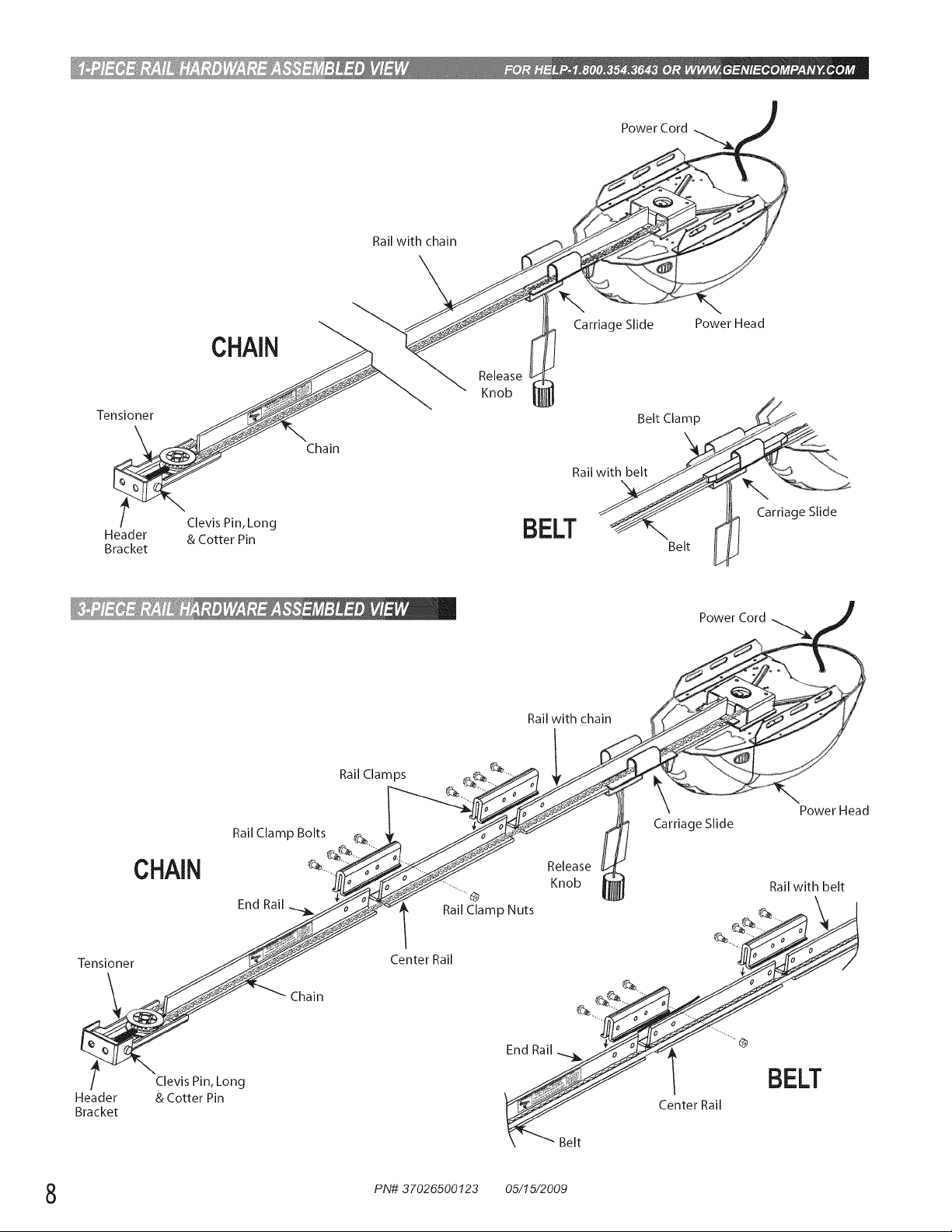
PowerCord
Railwithchain
Tensioner
CHAIN
t Clevis Pin, Long
Header & Cotter Pin
Bracket
Chain
Carriage Slide Power Head
Release
Knob
Belt Clamp
Rail
BELT _Belt
l Carriage Slide
Rail with chain
Ra,Clam_s __
Rail Clamp Bolts_.__/°_-,,._//k.-,,_/Ci_k___._ enobease_ Carriage Slide
t_UAIM
_#1 I_,11_i
"JHf_---_ _ Rail with belt
-_ Chain ....
/ 2';Vo';_irn_Long BELT
Header F_T_Y_JJ Center Rail
Bracket
\ .... Belt
PN# 37026500123 05/15/2009
IMPORTANTINSTALLATIONINSTRUCTIONS
1. READAND FOLLOW ALL SAFETY, INSTALLATION 5.
AND OPERATION INSTRUCTIONS.( yo_J_ave
qvesto_so do o u_dosS;,_v_i_:s__st_;cto_ ca/ i/% 6.
_,, L/34 :S ., <_
2. Install only on a properly balanced sectional garage door.
An improperly balanced door could cause severe injury.
Have a trained door system technician make repairs or
adjustments to cables, spring assemblies, and other 7.
hardware before installing the opener.
3. Removeall ropesand removeor make inoperativeall
locksconnectedto the garagedoor before installingopener. 8.
4. Where possible,installthe door opener7 feet or more
above the floor. For productshavingan emergency
release,mountthe emergencyrelease6 feet above the floor.
Do NOT connect the opener to source of power
until instructed to do so.
Locate the Wall Control:
• Within sight of door,
• At minimum height of 5 feet so small children are not
able to reach it, and
• Away from all moving parts of the door.
Install the Entrapment WARNING Label next to the Wall
Control in a prominent location. Install the Emergency
Release Tag on or next to the emergency release.
After installing the opener, the door must reverse within
2 seconds when it contacts a 1-1/2 inch high object (or a
2 x 4 board laid fiat) on the floor.
I
NOTE: Please follow ALL instructions in their NUMBERED sequence. Use wall control and safety sensors
provided with this unit. Do NOT substitute wall control or safety sensors.
NOTE: Throe J) p£/?ce _s:!_£ssse£ bSes am £}_ s 7
/:o0_ h){Fh sec_ions doo_,:
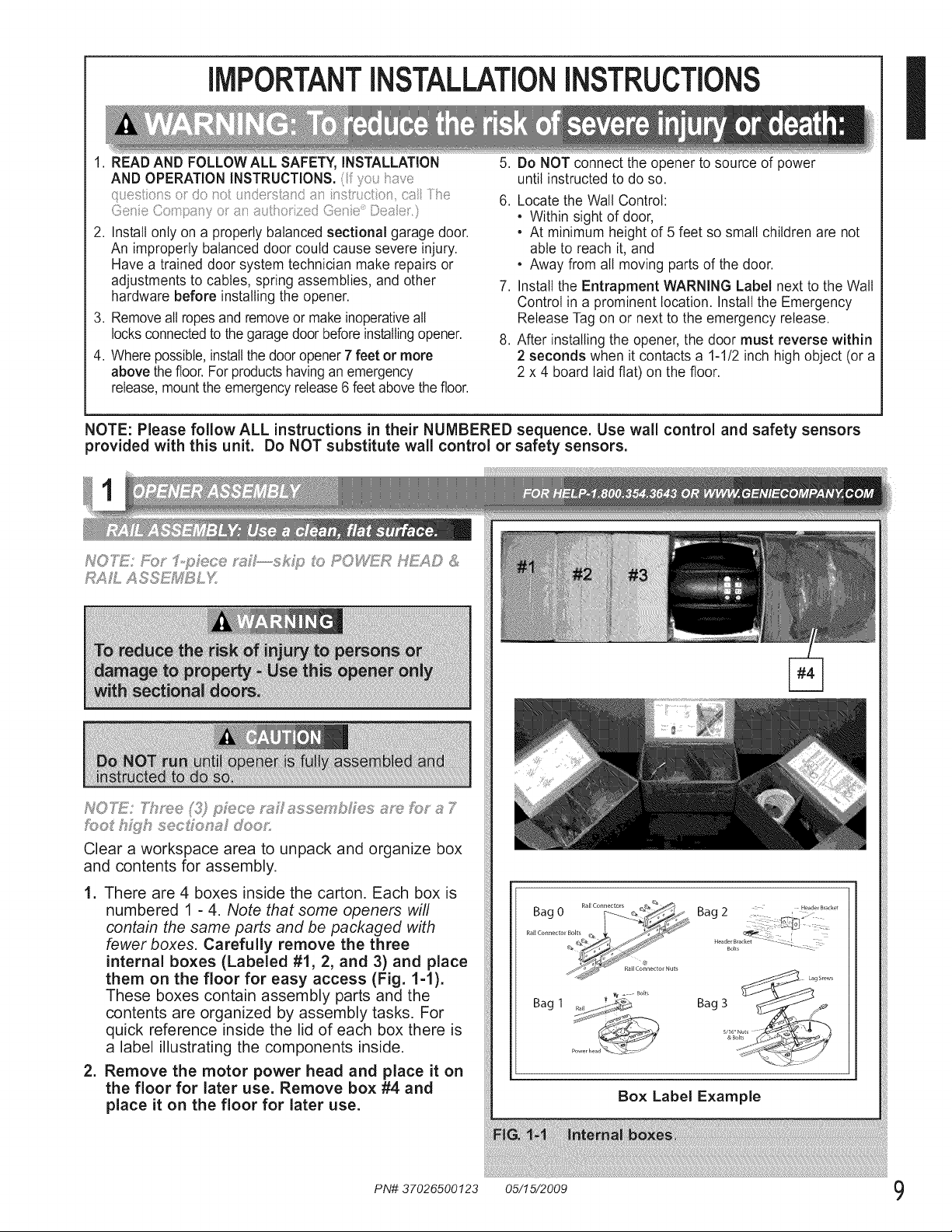
Clear a workspace area to unpack and organize box
and contents for assembly.
1. There are 4 boxes inside the carton. Each box is
numbered 1 - 4. Note that some openers will
contain the same parts and be packaged with
fewer boxes. Carefully remove the three
internal boxes (Labeled #1, 2, and 3) and place
them on the floor for easy access (Fig. 1-1).
These boxes contain assembly parts and the
contents are organized by assembly tasks. For
quick reference inside the lid of each box there is
a label illustrating the components inside.
2. Remove the motor power head and place it on
the floor for later use. Remove box #4 and
place it on the floor for later use.
Box Label Example
PN# 37026500123 05/15/2009 9
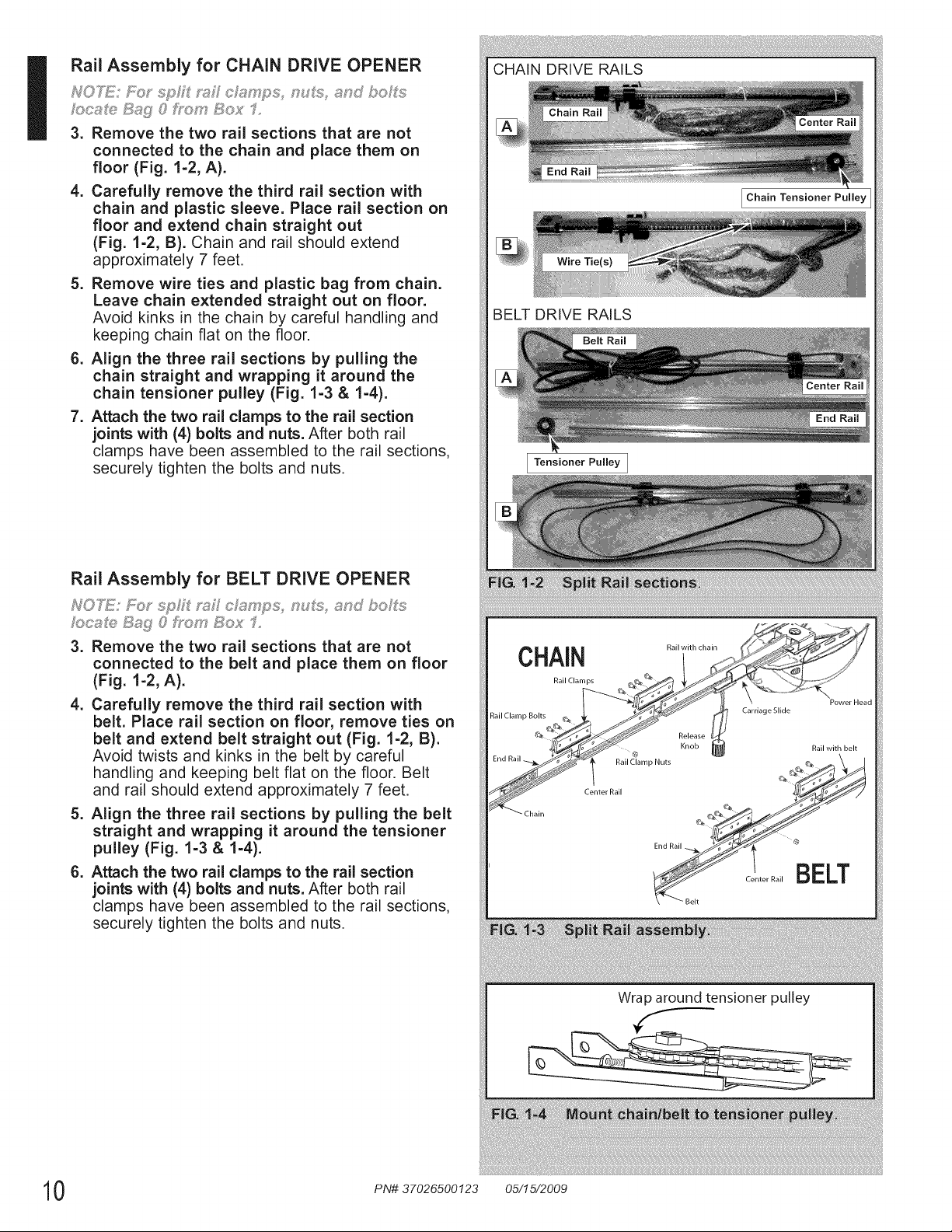
Rail Assembly for CHAIN DRIVE OPENER
NOTS: FoJ" sp£I ;ss£ c/__mps, n s, ,s,nd bohfs
/oc,sS_ S_£ 0 Fro_r Box 1,
3. Remove the two rai sections that are not
connected to the chain and place them on
floor (Fig. 1-2, A).
4. Carefully remove the third rail section with
chain and plastic sleeve. Place rail section on
floor and extend chain straight out
(Fig. 1-2, B). Chain and rail should extend
approximately 7 feet.
5. Remove wire ties and plastic bag from chain.
Leave chain extended straight out on floor.
Avoid kinks in the chain by careful handling and
keeping chain flat on the floor.
6. Align the three rail sections by pulling the
chain straight and wrapping it around the
chain tensioner pulley (Fig. 1-3 & 1-4).
7. Attach the two rail clamps to the rail section
joints with (4) bolts and nuts. After both rail
clamps have been assembled to the rail sections,
securely tighten the bolts and nuts.
Rail Assembly for BELT DRIVE OPENER
NOTS: Eor sp£ mJl c/;_?mps, n s, _s,nd bo£s
ocs_ Sag 8 Ik_m Box f,
3. Remove the two rail sections that are not
connected to the belt and place them on floor
(Fig. 1-2, A).
4. Carefully remove the third rail section with
belt. Place rail section on floor, remove ties on
belt and extend belt straight out (Fig. 1-2, B).
Avoid twists and kinks in the belt by careful
handling and keeping belt flat on the floor. Belt
and rail should extend approximately 7 feet.
5. Align the three rail sections by pulling the belt
straight and wrapping it around the tensioner
pulley (Fig. 1-3 & 1-4).
6. Attach the two rail clamps to the rail section
joints with (4) bolts and nuts. After both rail
clamps have been assembled to the rail sections,
securely tighten the bolts and nuts.
CHAIN DRIVE RAILS
Chain Tensioner Pulley
BELT DRIVE RAILS
Tensioner Pulley I
CHAIN
Rail Clamps
Pail with chain
Power Head
Rail Clamp Bolts
Carriage Slide
Release
Knob Ra wth bet
PailCl_amp Nuts _G_ \ |
Center Rail @_/r_//
End Rail ___ _ @
ELT
B
Rail
r
Wrap around tensioner pulley
0 PN# 37026500123 05/15/2009
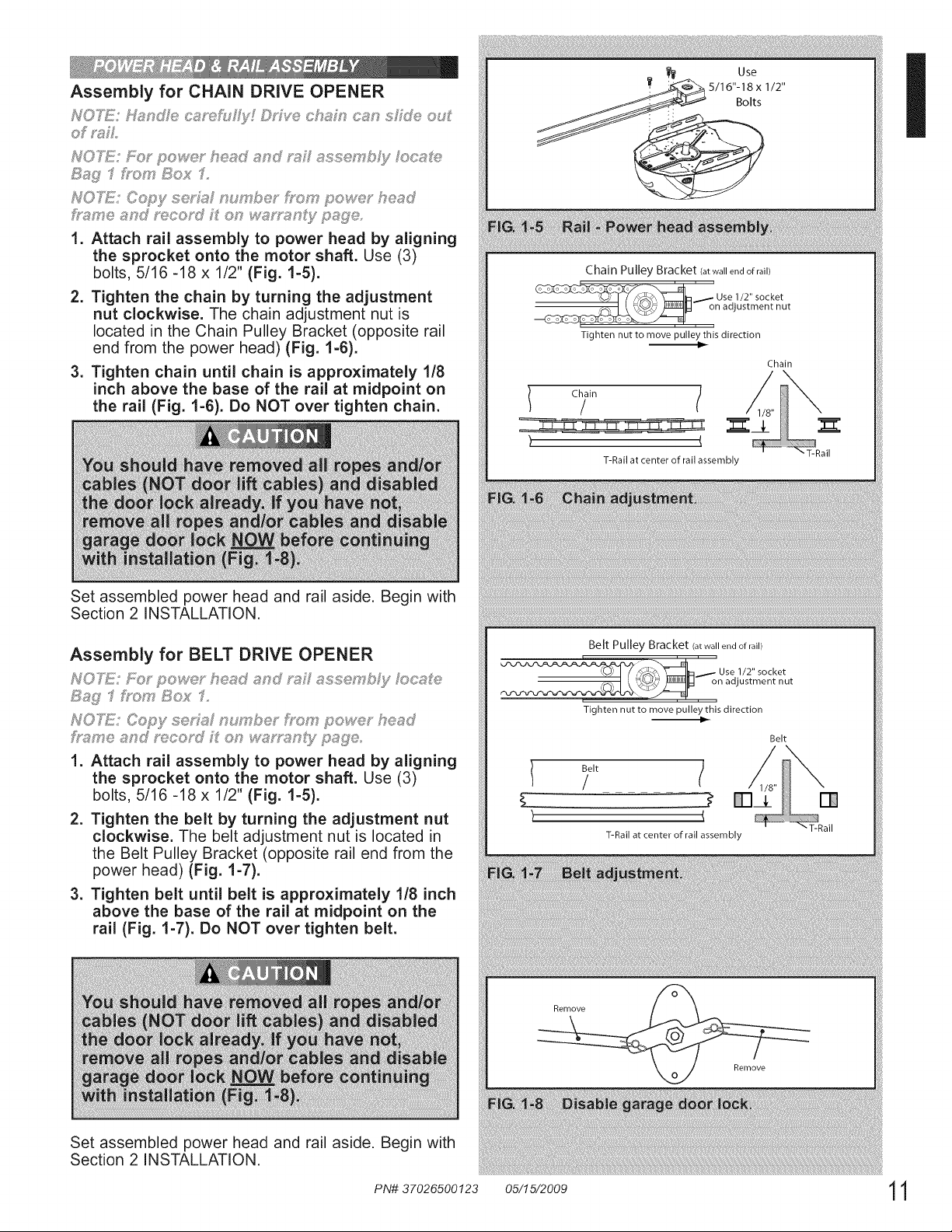
Assembly for CHAIN DRIVE OPENER
,._:._u,_..y. chsn ........o
of "<_L
HO'_£!: F@" powe£ he,_d end ss£ esse£ DJy/oceSe
t!:_g f £msy 8ox 1,
IVO_!: Copy se_/_,_ury bet _soFs'power heed
_qs,sy e and _'eco_J £ on w#/,_uy"_,_n_yp,sWe,
1. Attach rail assembly to power head by aligning
the sprocket onto the motor shaft. Use (3)
bolts, 5/16 -18 x 1/2" (Fig. 1-5).
2. Tighten the chain by turning the adjustment
nut clockwise. The chain adjustment nut is
located in the Chain Pulley Bracket (opposite rail
end from the power head) (Fig. 1-6).
3. Tighten chain until chain is approximately 1/8
inch above the base of the rail at midpoint on
the rail (Fig. 1-6). Do NOT over tighten chain.
Set assembled power head and rail aside. Begin with
Section 2 INSTALLATION.
Assembly for BELT DRIVE OPENER
NOTE: FO;"powe_ ° heed end m£ esse£ bF}//ocee
Bag f}osy B_ 1,
IVO_!: Copy seh,_d _,_umbes"f),_c,,f_'pow@ heed
hs_,rye _tnd _'ecosd Y' on _v,_,_;.y"sn(yp,_We
1. Attach rail assembly to power head by aligning
the sprocket onto the motor shaft. Use (3)
bolts, 5/16 -18 x 1/2" (Fig. 1-5).
2. Tighten the belt by turning the adjustment nut
clockwise. The belt adjustment nut is located in
the Belt Pulley Bracket (opposite rail end from the
power head) (Fig. 1-7).
3. Tighten belt until belt is approximately 1/8 inch
above the base of the rail at midpoint on the
rail (Fig. 1-7). Do NOT over tighten belt.
Set assembled power head and rail aside. Begin with
Section 2 INSTALLATION.
Bolts
Chain Pulley Bracket (at wall end of rail)
' Use 1/2" socket
on adjustment nut
i
Tighten nut to move pulley this direction
Chain
/ ?" /
"T-Rail
T-Rail at center of rail assembly
Belt Pulley Bracket (at wall end of rail)
_,_,__.- Use 1/2" socket
_.. I _ ,_..\_/EJ_ on adjustment nut
Tighten nut to move pulley this direction
)
Belt
/ /
T-Rail at center of rail assembly
Belt
Remove
Remove
"T-Rail
=
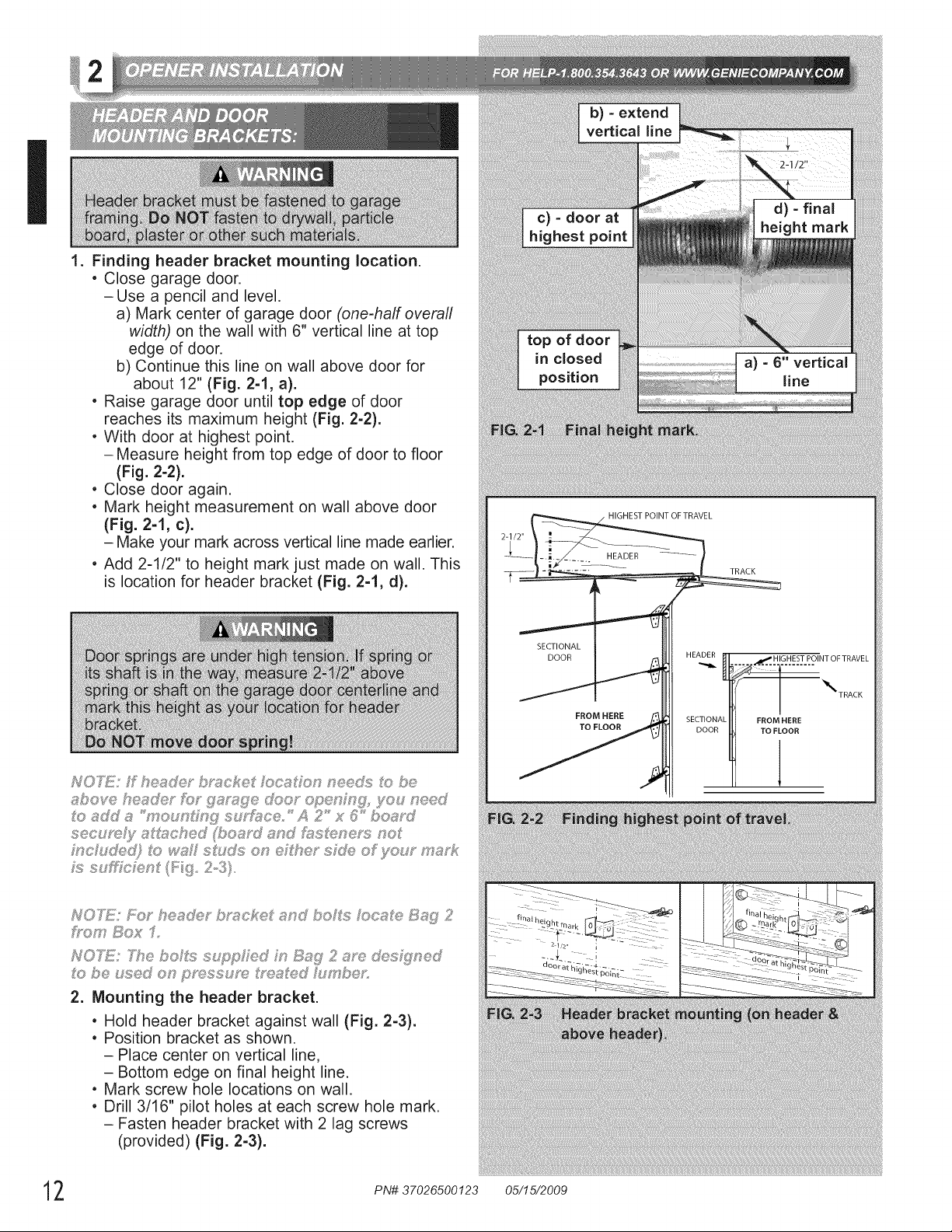
Finding header bracket mounting location.
, Close garage door.
-Use a pencil and level.
a) Mark center of garage door (one-half overall
width) on the wall with 6" vertical line at top
edge of door.
b) Continue this line on wall above door for
about 12" (Fig. 2-1, a).
, Raise garage door until top edge of door
reaches its maximum height (Fig. 2-2).
, With door at highest point.
- Measure height from top edge of door to floor
(Fig. 2-2).
, Close door again.
, Mark height measurement on wall above door
(Fig. 2-1, c).
- Make your mark across vertical line made earlier.
, Add 2-1/2" to height mark just made on wall. This
is location for header bracket (Fig. 2-1, d).
b) - extend
vertical line
c) - door at
highest point
top of door
in closed
position
d) - final
height mark
a) - 6" vertical
line
NT OF TRAVEL
SECTIONAL I Uli
FROM HERE SECTIONAL "
NOTE; Fk:__'he_?@?_bmckeit ,_;,ndbohfs Ioc,_;,e B_?ii;_2
2. Mounting the header bracket.
• Hold header bracket against wall (Fig. 2-3).
• Position bracket as shown.
- Place center on vertical line,
- Bottom edge on final height line.
• Mark screw hole locations on wall.
, Drill 3/16" pilot holes at each screw hole mark.
- Fasten header bracket with 2 lag screws
(provided) (Fig. 2-3).
2 PN# 37026500123 05/15/2009
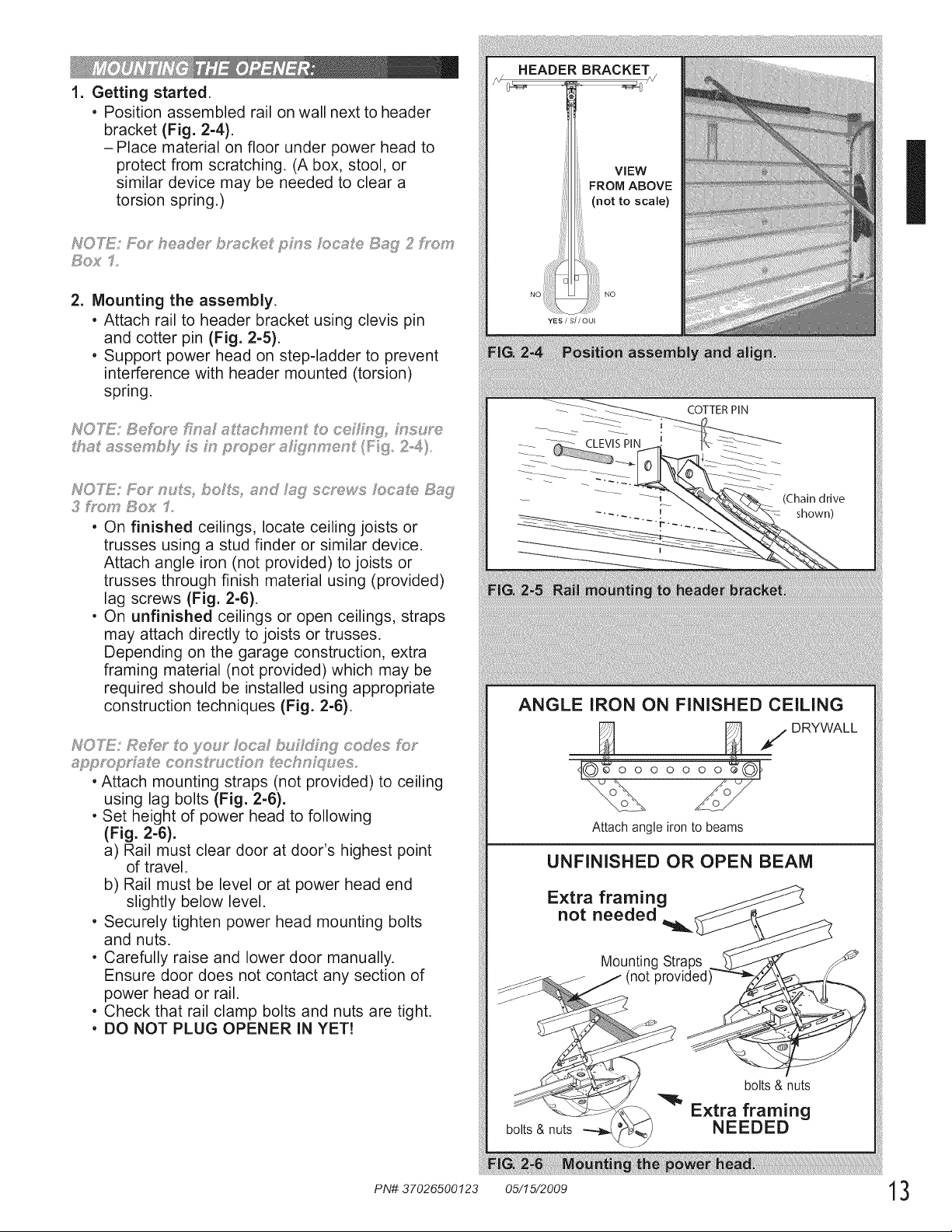
1. Getting started.
, Position assembled rail on wall next to header
bracket (Fig. 2-4).
-Place material on floor under power head to
protect from scratching. (A box, stool, or
similar device may be needed to clear a
torsion spring.)
So;< 1=
2. Mounting the assembly.
, Attach rail to header bracket using clevis pin
and cotter pin (Fig. 2-5).
, Support power head on step-ladder to prevent
interference with header mounted (torsion)
spring.
NOTE: SeF0_,e BY:_ss schryen ito ce_ng_ ms_: _
ths sssery bJy _:_m pmd;_e_°sh:_i_nryen (F: _3 2.-4)
3 _bo_t Bo_' 1
, On finished ceilings, locate ceiling joists or
trusses using a stud finder or similar device.
Attach angle iron (not provided) to joists or
trusses through finish material using (provided)
lag screws (Fig. 2-6).
, On unfinished ceilings or open ceilings, straps
may attach directly to joists or trusses.
Depending on the garage construction, extra
framing material (not provided) which may be
required should be installed using appropriate
construction techniques (Fig. 2-6).
NOTE: Refi_£ o yeuy' oca bu £ cod_:;,s Ibm
appmp_':&s_e consIr_ c ion Sx_ch_ q ,_es,
, Attach mounting straps (not provided) to ceiling
using lag bolts (Fig. 2-6).
, Set height of power head to following
(Fig. 2-6).
a) Rail must clear door at door's highest point
of travel.
b) Rail must be level or at power head end
slightly below level.
, Securely tighten power head mounting bolts
and nuts.
, Carefully raise and lower door manually.
Ensure door does not contact any section of
power head or rail.
, Check that rail clamp bolts and nuts are tight.
, DO NOT PLUG OPENER IN YET!
COTTERPIN
(Chain drive
shown)
ANGLE IRON ON FINISHED CEILING
_ /DRYWALL
_J©_o o o o o o o£01
Attach angle iron to beams
UNFINISHED OR OPEN BEAM
Extra framing
not needed
Mounting Straps
(not provided
bolts & nuts
bolts & nuts
Extra framing
NEEDED
ii_!i!!_ii!:iliii!iliii!!i!i!i!! i !i! i!:i !:!!!!;
I
uos oc,s, e 8_;'{11
ho_, b;os' 2
I,
,
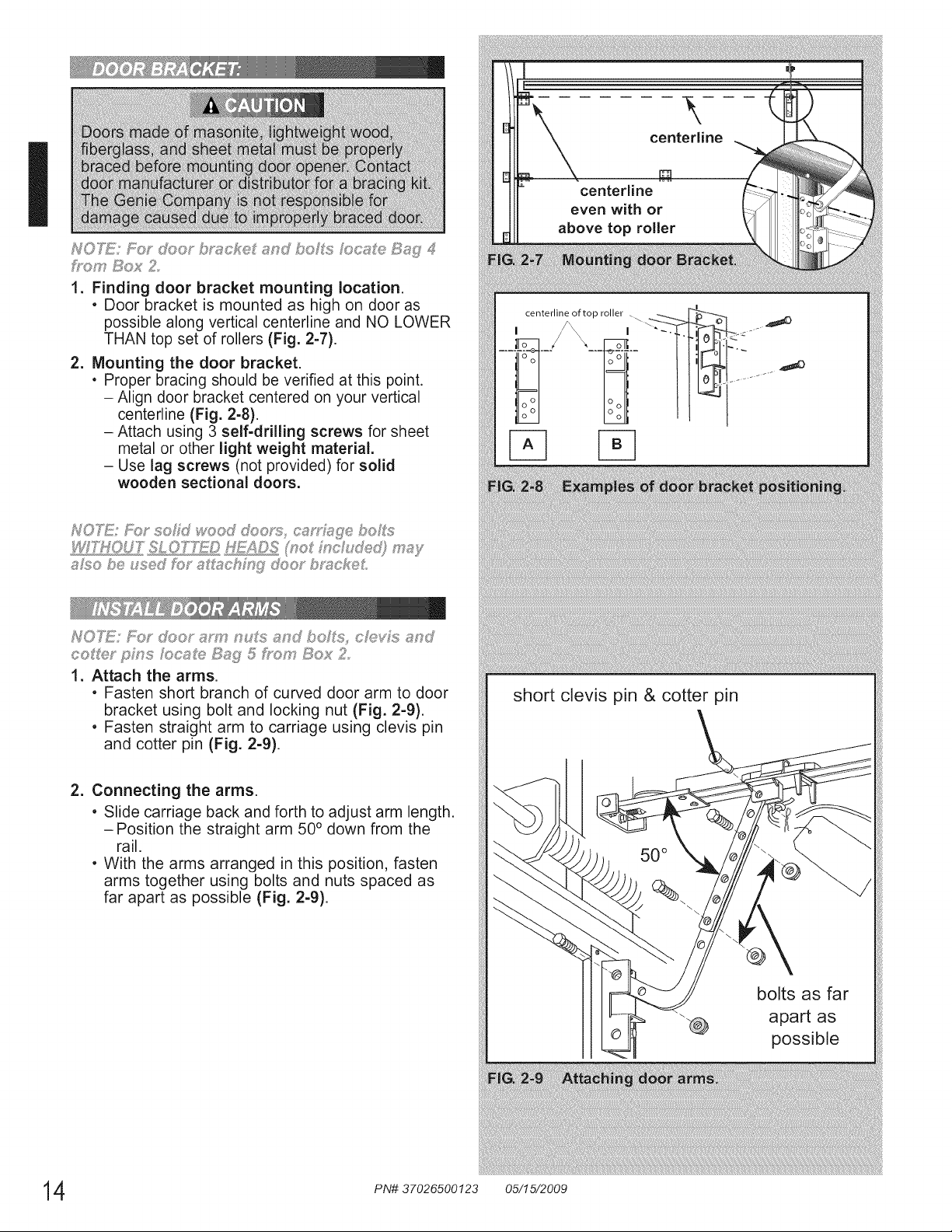
Finding door bracket mounting location.
. Door bracket is mounted as high on door as
possible along vertical centerline and NO LOWER
THAN top set of rollers (Fig. 2-7).
Mounting the door bracket.
• Proper bracing should be verified at this point.
- Align door bracket centered on your vertical
centerline (Fig. 2-8).
- Attach using 3 self-drilling screws for sheet
metal or other light weight material.
- Use lag screws (not provided for solid
wooden sectional doors.
NO"IGE: _;; d]so_ am? noIs and boI% cMds ,snd
co_/_y pins _ocate Bag 5/7on, Box 2
1. Attach the arms.
, Fasten short branch of curved door arm to door
bracket using bolt and locking nut (Fig. 2-9).
, Fasten straight arm to carriage using clevis pin
and cotter pin (Fig. 2-9).
2. Connecting the arms.
, Slide carriage back and forth to adjust arm length.
-Position the straight arm 50 ° down from the
rail.
, With the arms arranged in this position, fasten
arms together using bolts and nuts spaced as
far apart as possible (Fig. 2-9).
i
short clevis pin & cotter pin
bolts as far
apart as
possible
4 PN# 37026500123 05/15/2009
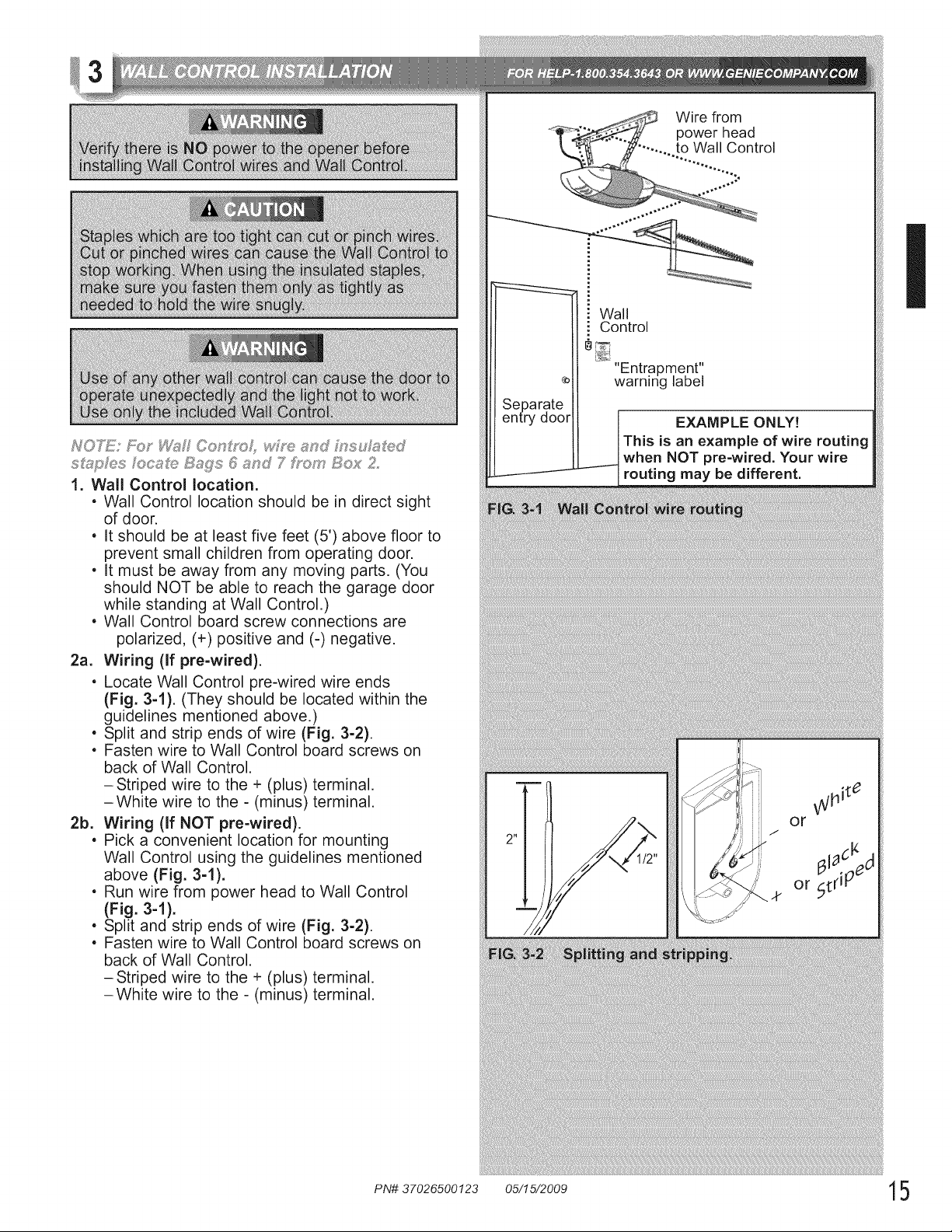
1. Wall Control !ocation.
. Wall Control location should be in direct sight
of door.
. It should be at least five feet (5') above floor to
prevent small children from operating door.
. It must be away from any moving parts. (You
should NOT be able to reach the garage door
while standing at Wall Control.)
. Wall Control board screw connections are
polarized, (+) positive and (-) negative.
2a. Wiring (if pre-wired).
. Locate Wall Control pre-wired wire ends
(Fig. 3-1). (They should be located within the
guidelines mentioned above.)
. Split and strip ends of wire (Fig. 3-2).
. Fasten wire to Wall Control board screws on
back of Wall Control.
-Striped wire to the + (plus) terminal.
-White wire to the - (minus) terminal.
2b. Wiring (if NOT pre-wired).
. Pick a convenient location for mounting
Wall Control using the guidelines mentioned
above (Fig. 3-1).
. Run wire from power head to Wall Control
(Fig. 3-1).
. Split and strip ends of wire (Fig. 3-2).
. Fasten wire to Wall Control board screws on
back of Wall Control.
-Striped wire to the + (plus) terminal.
-White wire to the - (minus) terminal.
¢)
Separate
entry door
j_
Wire from
power head
...... to Wall Control
............::::.
Wall
Control
"Entrapment"
warning label
EXAMPLE ONLY!
I This is an example of wire routing
__---I when NOT pre-wired. Your wire
- Jrouting may be different.
I
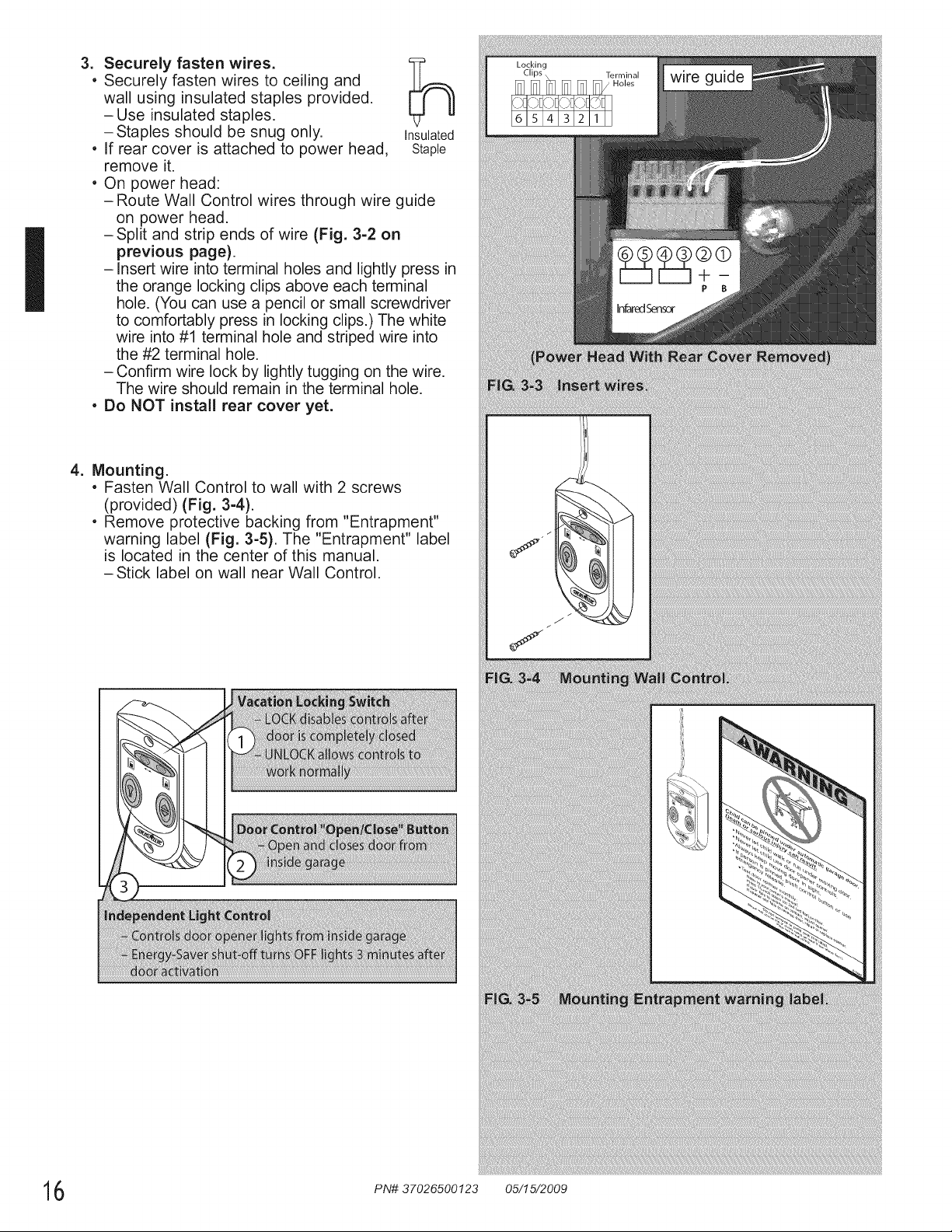
3. Securely fasten wires.
, Securely fasten wires to ceiling and
0q
wall using insulated staples provided.
-Use insulated staples.
-Staples should be snug only. Insulated
, if rear cover is attached to power head, Staple
remove it.
, On power head:
-Route Wall Control wires through wire guide
on power head.
- Split and strip ends of wire (Fig. 3-2 on
previous page).
- insert wire into terminal holes and lightly press in
the orange locking clips above each terminal
hole. (You can use a pencil or small screwdriver
to comfortably press in locking clips.) The white
wire into #1 terminal hole and striped wire into
the #2 terminal hole.
- Confirm wire lock by lightly tugging on the wire.
The wire should remain in the terminal hole.
. Do NOT install rear cover yet.
4. Mounting.
. Fasten Wall Control to wall with 2 screws
(provided) (Fig. 3-4).
, Remove protective backing from "Entrapment"
warning label (Fig. 3-5). The "Entrapment" label
is located in the center of this manual.
-Stick label on wall near Wall Control.
6 PN# 37026500123 05/15/2009
NO7£E': £oJ,"Sensop,_s sc_-_,vus, wh,s::÷__d iJ?suh:_ed
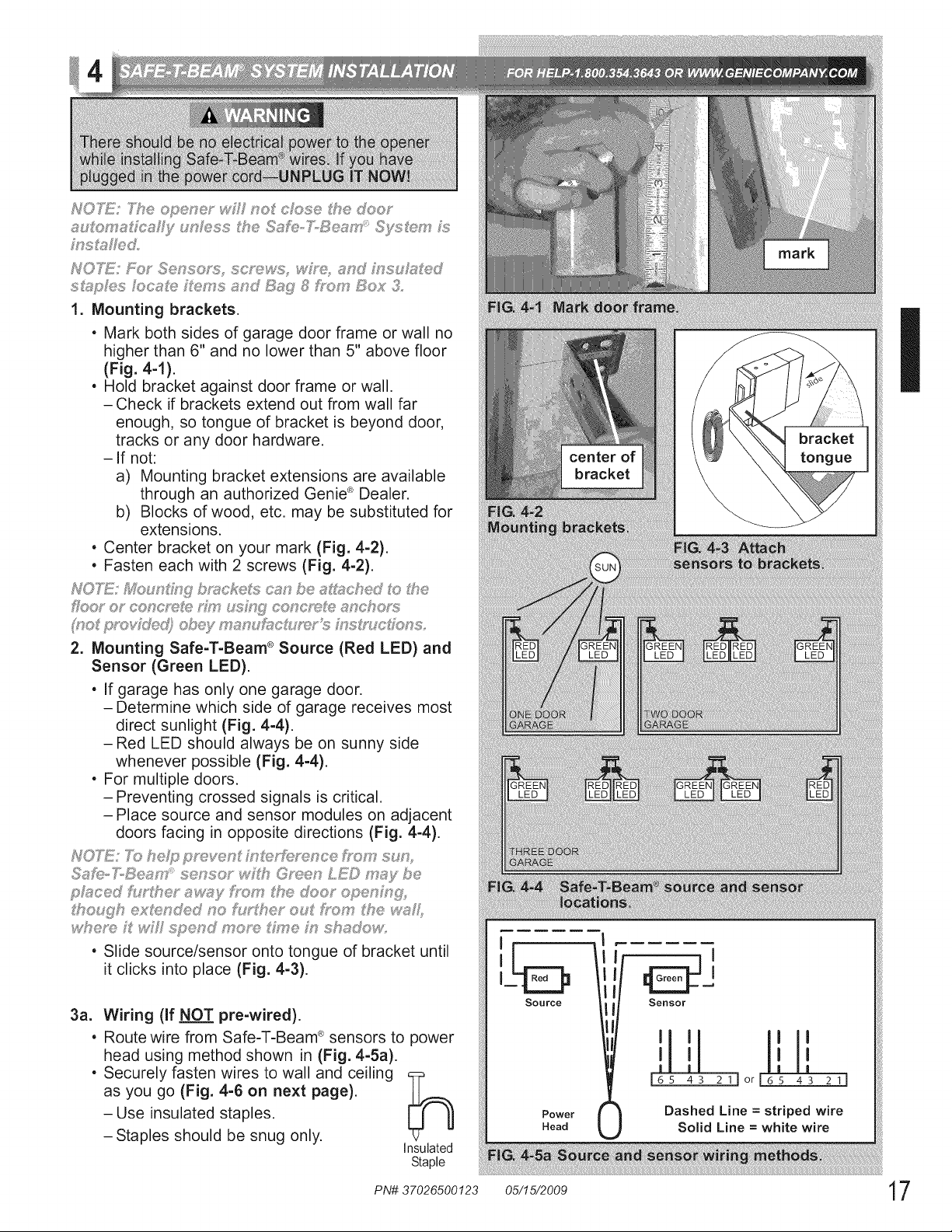
1. Mounting brackets.
. Mark both sides of garage door frame or wall no
higher than 6" and no lower than 5" above floor
(Fig. 4-1).
, Hold bracket against door frame or wall.
-Check if brackets extend out from wall far
enough, so tongue of bracket is beyond door,
tracks or any door hardware.
-If not:
a) Mounting bracket extensions are available
through an authorized Genie ® Dealer.
b) Blocks of wood, etc. may be substituted for
extensions.
, Center bracket on your mark (Fig. 4-2).
• Fasten each with 2 screws (Fig. 4-2).
NOTE; u_"g,qii_b'_u:_ke_,s_? be _cqmd o the
2. Mounting Safe-T-Beam ® Source (Red LED) and
Sensor (Green LEO).
" If garage has only one garage door.
- Determine which side of garage receives most
direct sunlight (Fig. 4-4).
-Red LED should always be on sunny side
whenever possible (Fig. 4-4).
. For multiple doors.
-Preventing crossed signals is critical.
-Place source and sensor modules on adjacent
doors facing in opposite directions (Fig. 4-4).
. Slide source/sensor onto tongue of bracket until
it clicks into place (Fig. 4-3).
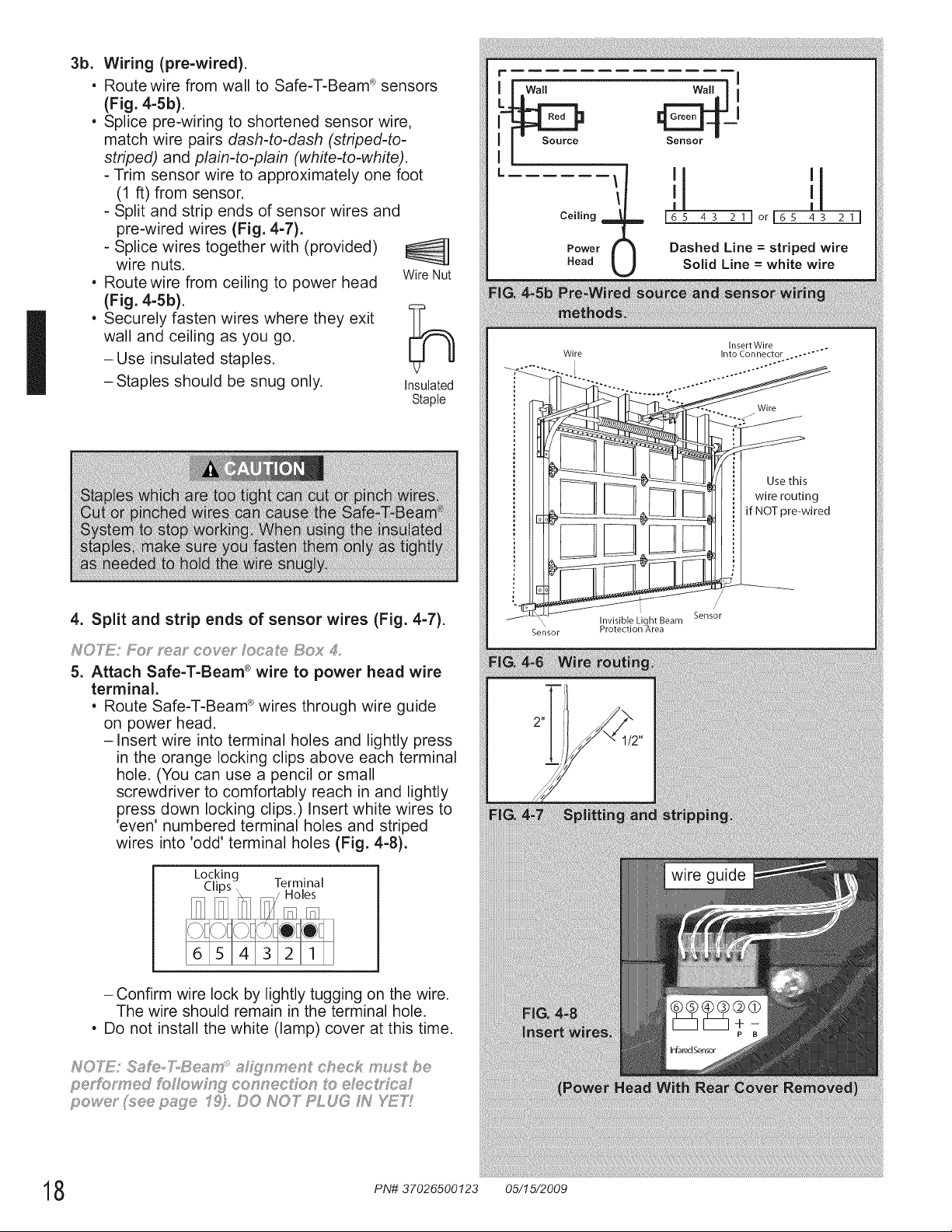
3a. Wiring (If NOT pre-wired).
, Route wire from Safe-T-Beam ®sensors to power
head using method shown in (Fig. 4-5a).
, Securely fasten wires to wall and ceiling _p
as you go (Fig. 4-6 on next page).
-Use insulated staples.
-Staples should be snug only.
Insulated
Staple
Source
Power
Head
=
Sensor
'1'1 I'1'
I I I I
| | ! !
!65 43 211or!6s 4S 21!
Dashed Line = striped wire
Solid Line = white wire
I
I
3b.
e
e
e
Wiring (pre-wired).
Route wire from wall to Safe-T-Beam ® sensors
(Fig. 4-5b).
Splice pre-wiring to shortened sensor wire,
match wire pairs dash-to-dash (striped-to-
striped) and plain-to-plain (white-to-white).
- Trim sensor wire to approximately one foot
(1 ft) from sensor.
- Split and strip ends of sensor wires and
pre-wired wires (Fig. 4-7).
- Splice wires together with (provided)
wire nuts.
Route wire from ceiling to power head Wire Nut
(Fig. 4-5b).
Securely fasten wires where they exit
wall and ceiling as you go.
-Use insulated staples.
-Staples should be snug only.
Insulated
Staple
4. Split and strip ends of sensor wires (Fig. 4-7).
NOTE: Bo_ ',e_:_ coy@" oc_ ;e Box 4
5. Attach Safe-T-Beam ®wire to power head wire
terminal.
, Route Safe-T-Beam ®wires through wire guide
on power head.
-Insert wire into terminal holes and lightly press
in the orange locking clips above each terminal
hole. (You can use a pencil or small
screwdriver to comfortably reach in and lightly
press down locking clips.) Insert white wires to
'even' numbered terminal holes and striped
wires into 'odd' terminal holes (Fig. 4-8).
Locking Terminal
- Confirm wire lock by lightly tugging on the wire.
The wire should remain in the terminal hole.
• Do not install the white (lamp) cover at this time.
r
L.
I I Source
L
\
Ceiling ]
Power (
Head
'1 '1
I I
i65 4S 21Jor165 43 211
Dashed Line = striped wire
Solid Line = white wire
Insert Wire
Wire Into Connector .. .... "°"
', _ Wire
pre-wired
Sensor
S..... _,,.._.,_.. h._i1_,r.o,(ec,t/on g/_,reaea m
wire guide
8 PN# 37026500123 05/15/2009
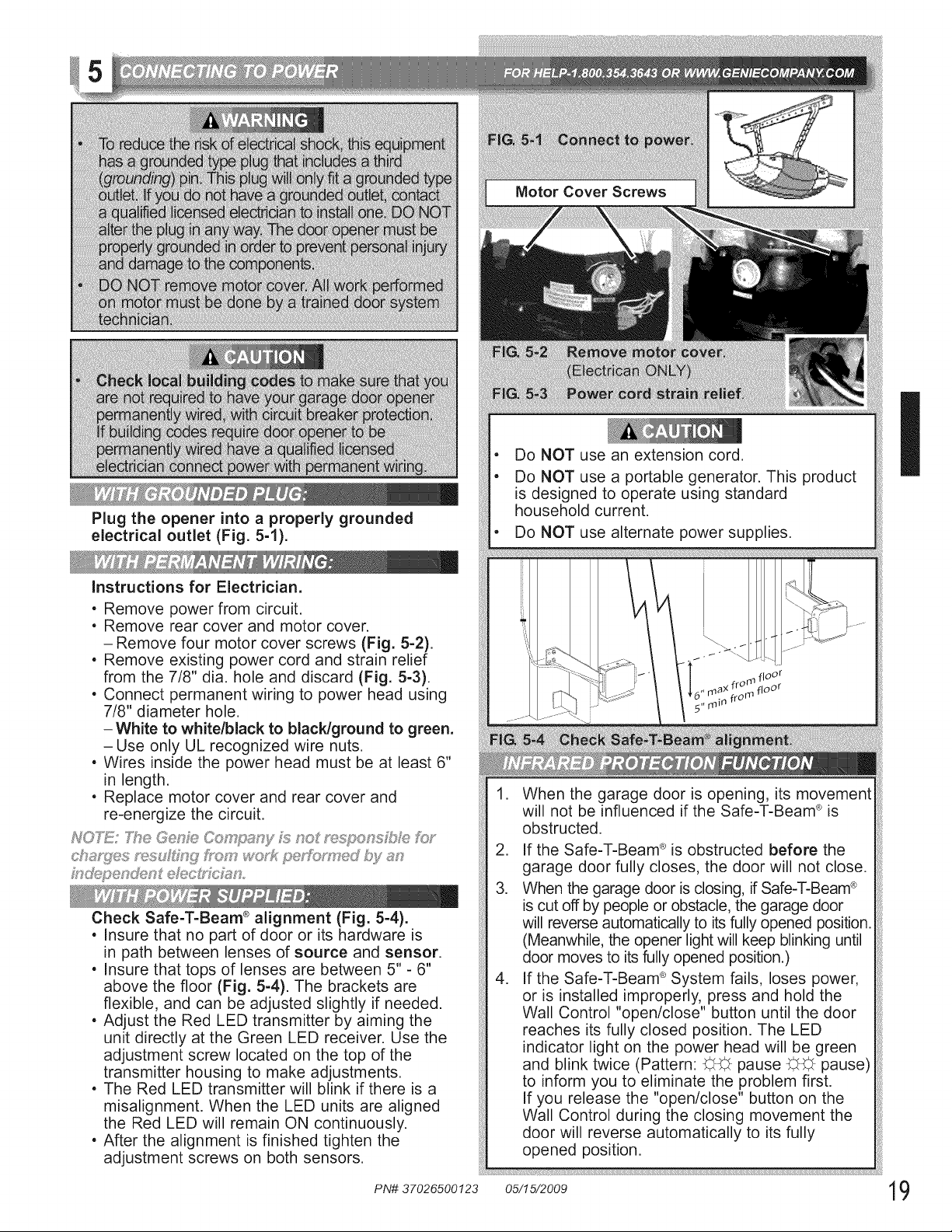
Motor Cover Screws
Plug the opener into a properly grounded
electrical outlet (Fig. 5-1).
instructions for Electrician.
, Remove power from circuit.
, Remove rear cover and motor cover.
- Remove four motor cover screws (Fig. 5-2).
, Remove existing power cord and strain relief
from the 7/8" dia. hole and discard (Fig. 5-3).
, Connect permanent wiring to power head using
7/8" diameter hole.
-White to white/black to blacldground to green.
- Use only UL recognized wire nuts.
. Wires inside the power head must be at least 6"
in length.
. Replace motor cover and rear cover and
re-energize the circuit.
P_70T_!!:The GG,,nJ_Co_'_p_ny _; no ons_!::_:_;;,f_:._
;J:; en@n_ dec n
Check Safe-T-Beam ®alignment (Fig. 5-4).
, insure that no part of door or its hardware is
in path between lenses of source and sensor.
, insure that tops of lenses are between 5" - 6"
above the floor (Fig. 5-4). The brackets are
flexible, and can be adjusted slightly if needed.
, Adjust the Red LED transmitter by aiming the
unit directly at the Green LED receiver. Use the
adjustment screw located on the top of the
transmitter housing to make adjustments.
, The Red LED transmitter will blink if there is a
misalignment. When the LED units are aligned
the Red LED will remain ON continuously.
, After the alignment is finished tighten the
adjustment screws on both sensors.
, Do NOT use an extension cord.
, Do NOT use a portable generator. This product
is designed to operate using standard
household current.
, Do NOT use alternatepowe_supplies.
1. When the garage door is opening, its movement
will not be influenced if the Safe-T-Beam ® is
obstructed.
.
3.
.
if the Safe-T-Beam ®is obstructed before the
garage door fully closes, the door will not close.
When the garage door is closing, if Safe-T-Beam ®
is cut off by people or obstacle, the garage door
will reverse automatically to its fully opened position.
(Meanwhile, the opener light will keep blinking until
door moves to its fully opened position.)
if the Safe-T-Beam ®System fails, loses power,
or is installed improperly, press and hold the
Wall Control "open/close" button until the door
reaches its fully closed position. The LED
indicator light on the power head will be green
and blink twice (Pattern: C,C, pause C,C, pause)
to inform you to eliminate the problem first.
if you release the "open/close" button on the
Wall Control during the closing movement the
door will reverse automatically to its fully
opened position.
iihiiiiiiii!iiii!iiii!ii;iiiiiii;i!iii!ii11ii1i111!1!i!!!i!ii!ii ;iiiii;
i
I
20
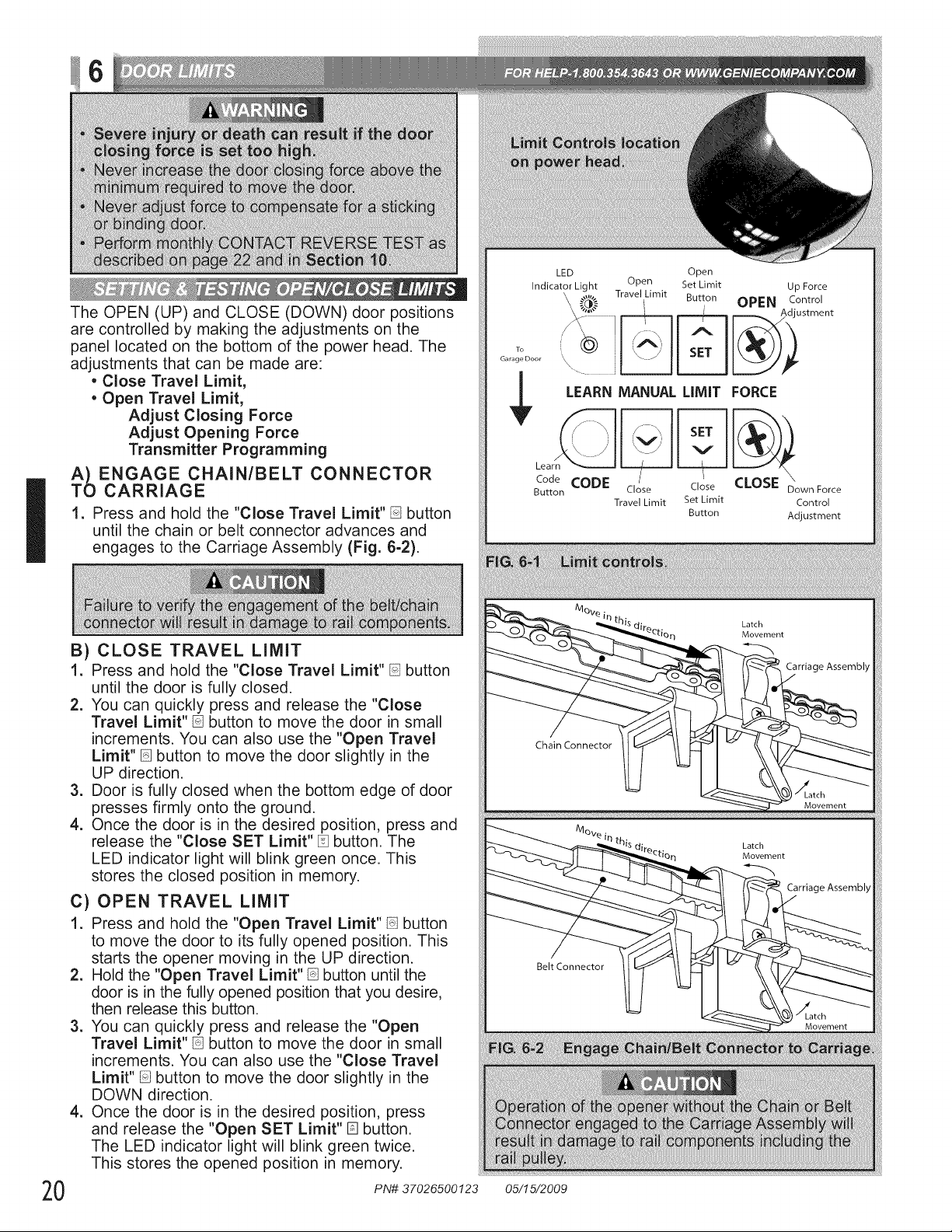
The OPEN (UP) and CLOSE (DOWN) door positions
are controlled by making the adjustments on the
panel located on the bottom of the power head. The
adjustments that can be made are:
• Close Travel Limit,
• Open Travel Limit,
Adjust Closing Force
Adjust Opening Force
Transmitter Programming
ENGAGE CHAIN/BELT CONNECTOR
CARRIAGE
1. Press and hold the "Close Travel Limit" B button
until the chain or belt connector advances and
engages to the Carriage Assembly (Fig. 6-2).
B) CLOSE TRAVEL LIMIT
1. Press and hold the "Close Travel Limit" D button
until the door is fully closed.
2. You can quickly press and release the "Close
Travel Limit"[] button to move the door in small
increments. You can also use the "Open Travel
Limit" [] button to move the door slightly in the
UP direction.
3. Door is fully closed when the bottom edge of door
presses firmly onto the ground.
4. Once the door is in the desired position, press and
release the "Close SET Limit" [] button. The
LED indicator light will blink green once. This
stores the closed position in memory.
C) OPEN TRAVEL LIMIT
1. Press and hold the "Open Travel Limit" [] button
to move the door to its fully opened position. This
starts the opener moving in the UP direction.
2. Hold the "Open Travel Limit" [] button until the
door is in the fully opened position that you desire,
then release this button.
3. You can quickly press and release the "Open
Travel Limit" _ button to move the door in small
increments. You can also use the "Close Travel
Limit" [] button to move the door slightly in the
DOWN direction.
4. Once the door is in the desired position, press
and release the "Open SET Limit" [] button.
The LED indicator light will blink green twice.
This stores the opened position in memory.
PN# 37026500123
LED
Indicator Light
Open
Open Set Limit Up Force
\ _;,.(_,',}..... Travel Limit Button, OPEN C°stt_Clen t
LEARN MANUAL LIMIT FORCE
\
Code CODE Close CLOSE Down Force
Button Close
Travel Limit Set Limit Control
Button Adjustment
/_1ove.
Latch
Movement
Carriage Assembly
Carriage Assembly
05/15/2009
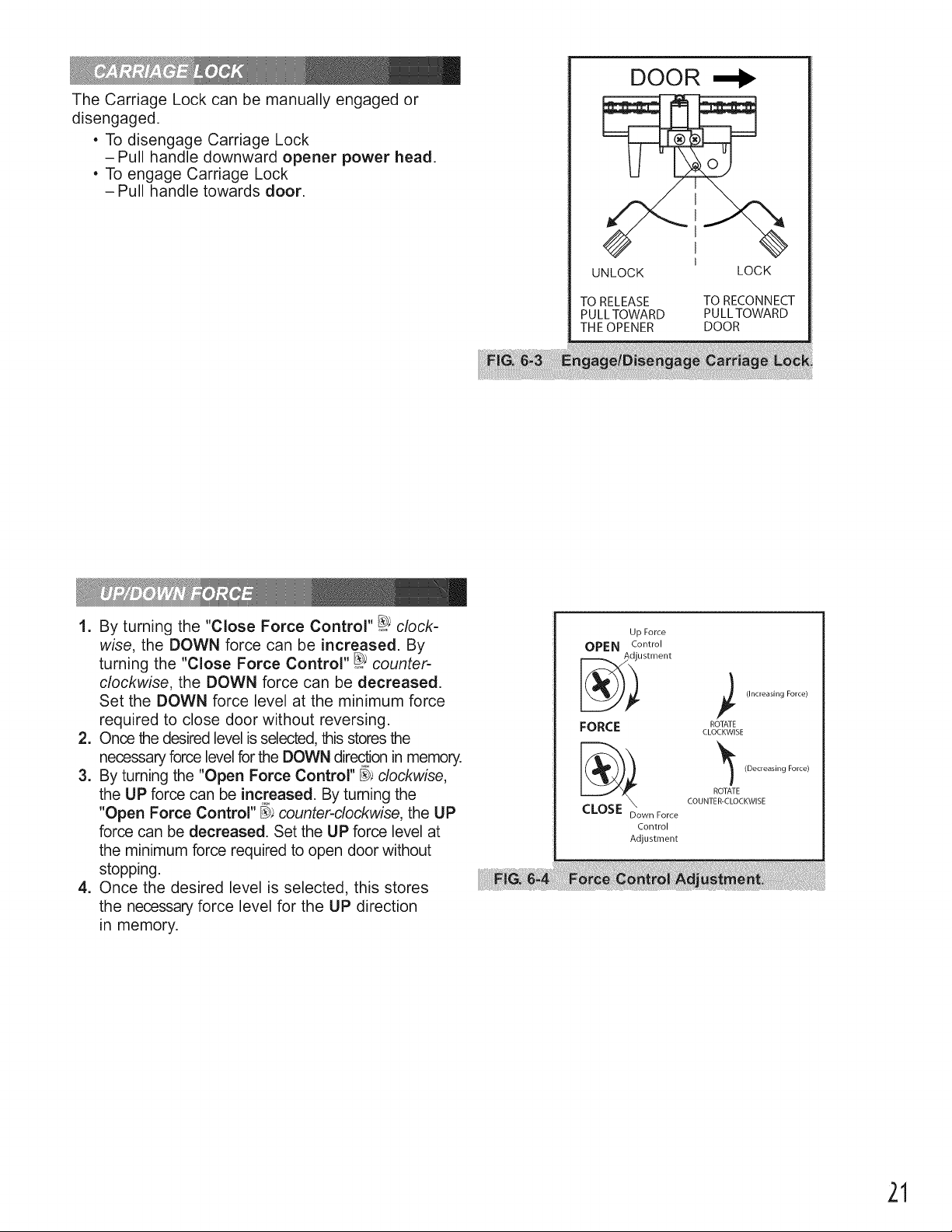
The Carriage Lock can be manually engaged or
disengaged.
, To disengage Carriage Lock
-Pull handle downward opener power head.
, To engage Carriage Lock
-Pull handle towards door.
DOOR
I
UNLOCK LOCK
TO RELEASE TO RECONNECT
PULLTOWARD PULLTOWARD
THE OPENER DOOR
1. By turning the "Close Force Control" _; clock-
wise, the DOWN force can be increased. By
turning the "Close Force Control" _ counter-
clockwise, the DOWN force can be decreased.
Set the DOWN force level at the minimum force
required to close door without reversing.
2. Once the desired level is selected, this stores the
necessary force level for the DOWN direction in memory.
3. By turning the "Open Force Control" _ clockwise,
the UP force can be increased. By turning the
"Open Force Control" _; counter-clockwise, the UP
force can be decreased. Set the UP force level at
the minimum force required to open door without
stopping.
4. Once the desired level is selected, this stores
the necessary force level for the UP direction
in memory.
Up Force
OPEN Control
ustment
FORCE
CLOSE \
Down Force
Control
Adjustment
(Increasing Force)
ROTATE
CLOCKWISE
(Decreasing Force)
ROTATE
COUNTER-CLOCKWISE
21
1. Press and hold both of the "SET" buttons
([] & Pq)together until the green indicator
light blinks (about 5 seconds).
2. All close and open travel limit settings are
erased. Then follow the steps above to
reprogram close and open travel limits.
.......... ne doo_
NOTE" TY,_'_o/:J®s"ey w F .o_'_'cos® '""
I
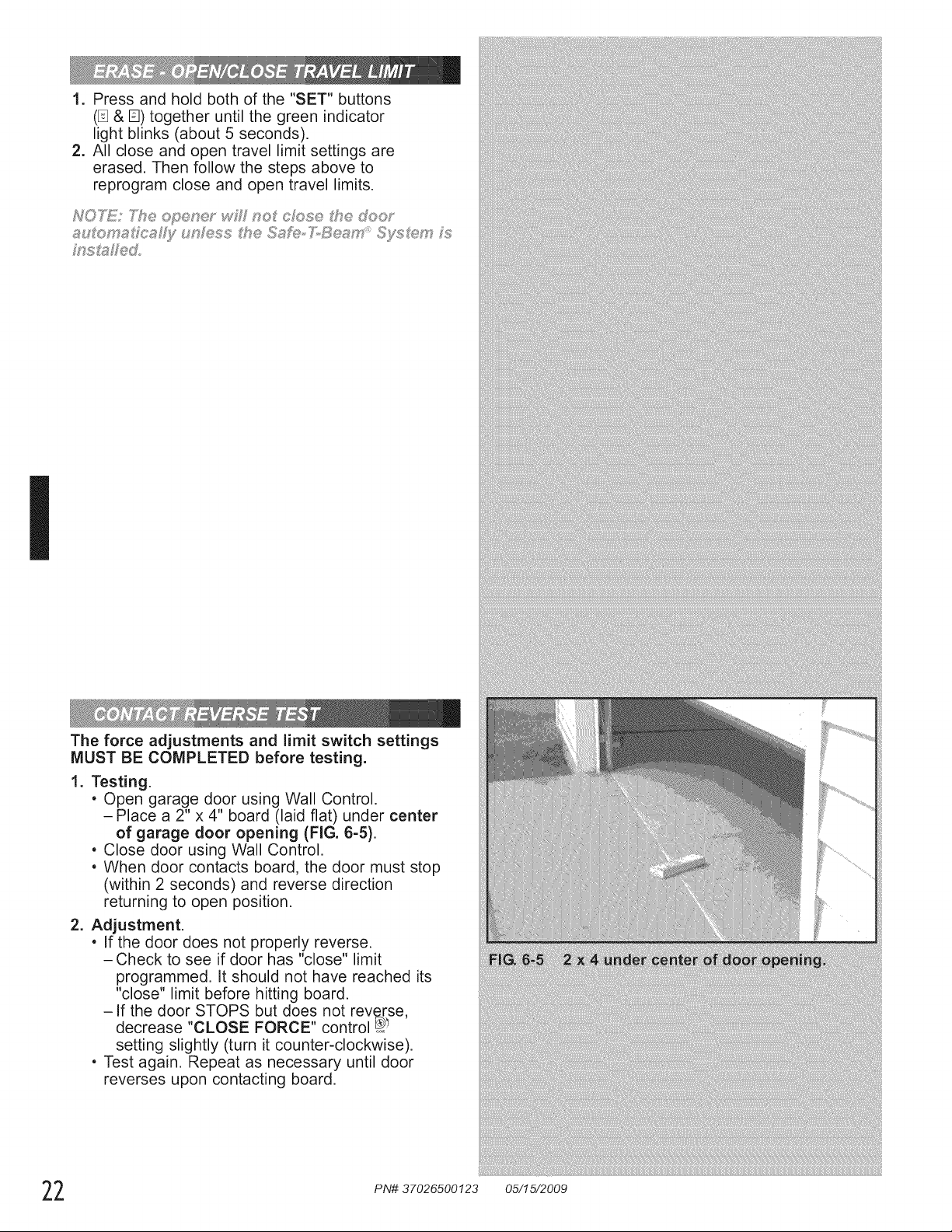
The force adjustments and limit switch settings
MUST BE COMPLETED before testing.
1. Testing.
, Open garage door using Wall Control.
- Place a 2" x 4" board (laid flat) under center
of garage door opening (FIG. 6-5).
, Close door using Wall Control.
, When door contacts board, the door must stop
(within 2 seconds) and reverse direction
returning to open position.
2. Adjustment.
, If the door does not properly reverse.
- Check to see if door has "close" limit
programmed. It should not have reached its
"close" limit before hitting board.
-If the door STOPS but does not reverse,
decrease "CLOSE FORCE" control _
setting slightly (turn it counter-clockwise).
, Test again. Repeat as necessary until door
reverses upon contacting board.
2 PN# 37026500123 05/15/2009
!7
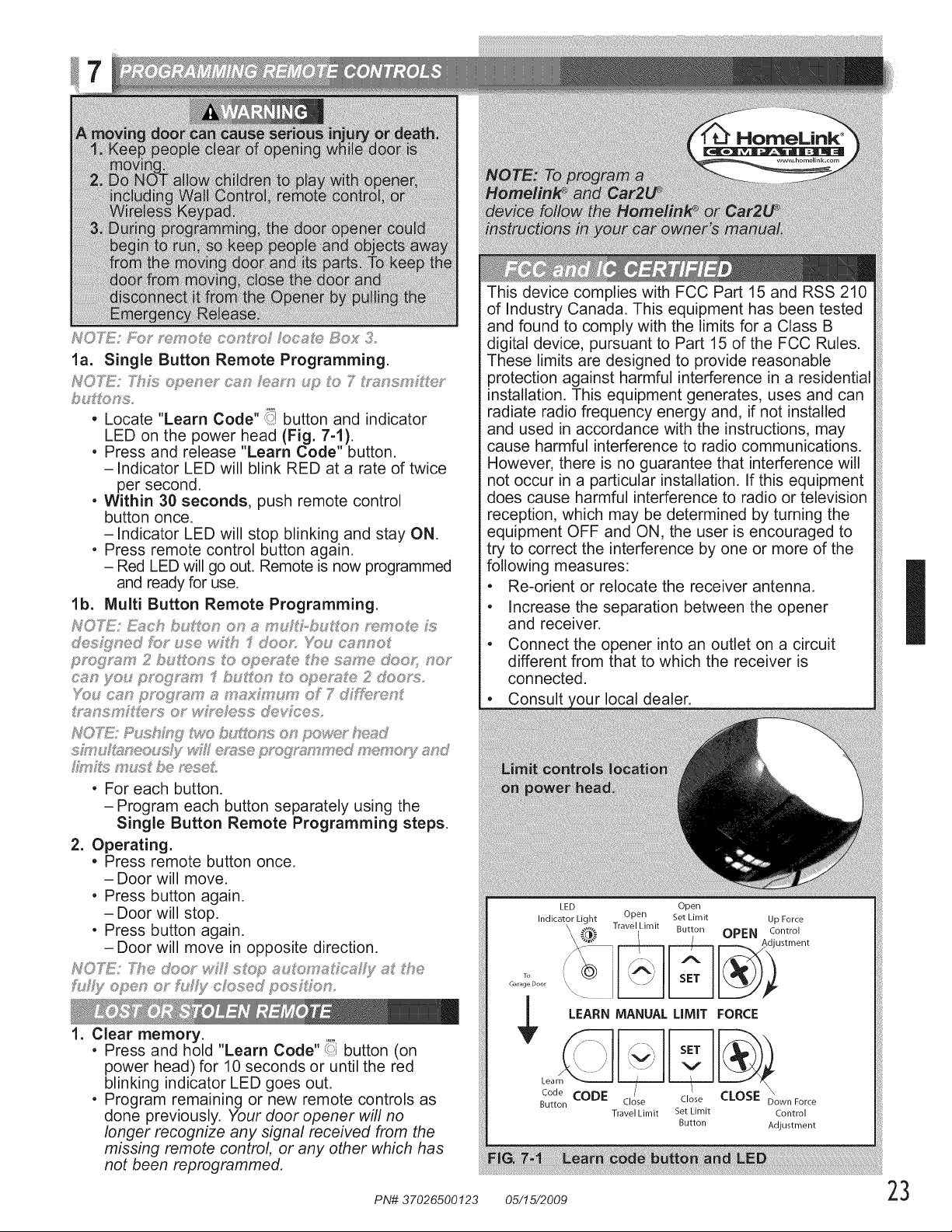
PsIO'LY£!';Bo< sen oI_e cont_{;_ /oe_Ie Box 3
la. Single Button Remote Programming.
HO'X_{¢ 7hLs o_ener c,sn hs,_;_,rn#;_ o 7*_nssy i'if_er
if lions,
,, Locate "Learn Code" >_'7button and indicator
LED on tie power head (Fig. 7-1).
. Press and release "Learn Code" button.
-indicator LED will blink RED at a rate of twice
per second.
. Within 31 seconds, push remote control
button once.
-Indicator LED will stop blinking and stay ON.
. Press remote control button again.
- Red LED will go out. Remote is now programmed
andreadyfor use.
lb. Multi Button Remote Programming.
HOTE: _Y_c £:,,uiXxsnon ;;_m i,-bu_ton <emote 5Y;
@s_'77ne/fbr use wilt "Sdoos YOu c_:,,mno_
pmgs,:_s _ 2 buons o oper_s,e _he s_J_me@oJ; _<,or
c_:_nyo,, progs_!_ry "I huron o ope_;_fe 2 doo_s,
'h:,tu c_m prog<_m _J_m_;hy um of 7/i_c, ren_
_Yf¢_SrIU__4s'_'$OY wM{Tdess devices<
NOTE{"Pushk:W £_×}b_A, ns on po_n}r'_m_d
sh_¢d&_neou_3i, end{sop_o ryryed ryeryoC/_s,nd
hy _!:;n' ;<!;be reseL
, For each button.
-Program each button separately using the
Single Button Remote Programming steps.
2. Operating.
• Press remote button once.
- Door will move.
, Press button again.
- Door will stop.
, Press button again.
-Door will move in opposite direction.
NOT_k 7he door wk_ sitOp _u o n_fc_s,£y _s,the
h £y open or h:£y c osed pos _fon,
1. Clear memory.
, Press and hold "Learn Code" Ui button(on
power head) for 10 seconds or until the
red
blinking indicator LED goes out.
, Program remaining or new remote controls as
done previous@. Your door opener will no
longer recogmze any signal received from the
missing remote control, or any other which has
not been reprogrammed,
This device complies with FCC Part 15 and RSS 210
of industry Canada. This equipment has been tested
and found to comply with the limits for a Class B
digital device, pursuant to Part 15 of the FCC Rules.
These limits are designed to provide reasonable
protection against harmful interference in a residential
installation. This equipment generates, uses and can
radiate radio frequency energy and, if not installed
and used in accordance with the instructions, may
cause harmful interference to radio communications.
However, there is no guarantee that interference will
not occur in a particular installation. If this equipment
does cause harmful interference to radio or television
reception, which may be determined by turning the
equipment OFF and ON, the user is encouraged to
try to correct the interference by one or more of the
following measures:
• Re-orient or relocate the receiver antenna.
• Increase the separation between the opener
and receiver.
• Connect the opener into an outlet on a circuit
different from that to which the receiver is
connected.
Consult local dealer.
LED Open
Indicator Light Open Set Limit
,\ Travel Limit Button
\
To
Garage Door
Up Force
OPEN control
_i ustment
LEARN MANUAL LIMIT FORCE
Learn_ _Jki_ _L_
BCtdtoen CODE Close Close CLOSE D_ownF ....
Travel Limit Bet Limit Control
Button Adjustment
I
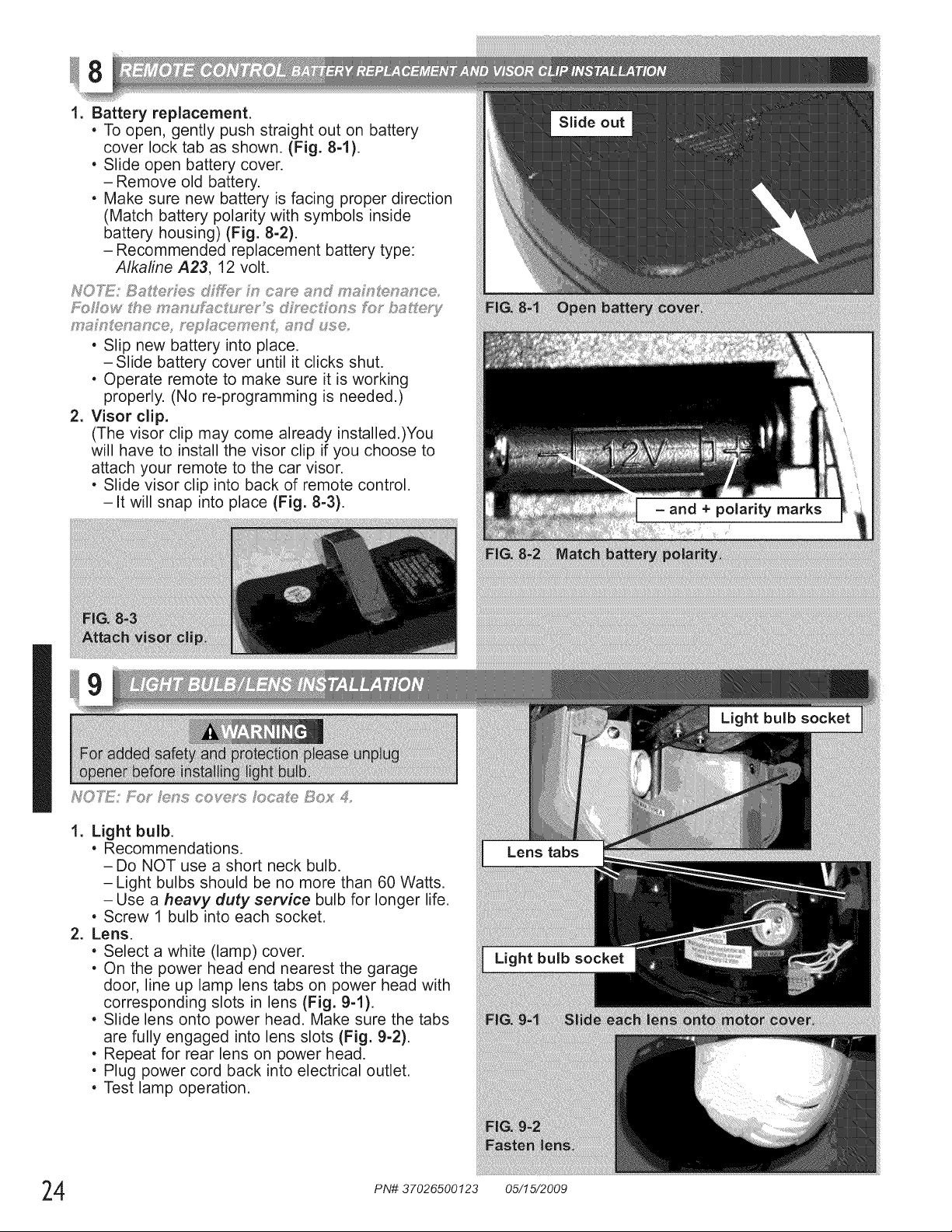
1. Battery replacement.
, To open, gently push straight out on battery
cover lock tab as shown. (Fig. 8-1).
, Slide open battery cover.
- Remove old battery.
, Make sure new battery is facing proper direction
(Match battery polarity with symbols inside
battery housing) (Fig. 8-2).
- Recommended replacement battery type:
Alkaline A23, 12 volt.
, Slip new battery into place.
-Slide battery cover until it clicks shut.
, Operate remote to make sure it is working
properly. (No re-programming is needed.)
2. Visor clip.
(The visor clip may come already installed.)You
will have to install the visor clip if you choose to
attach your remote to the car visor.
, Slide visor clip into back of remote control.
-It will snap into place (Fig. 8=3).
1. Light bulb.
, Recommendations.
-Do NOT use a short neck bulb.
-Light bulbs should be no more than 60 Watts.
- Use a heavy duty service bulb for longer life.
, Screw 1 bulb into each socket.
2. Lens.
, Select a white (lamp) cover.
, On the power head end nearest the garage
door, line up lamp lens tabs on power head with
corresponding slots in lens (Fig. 9-1).
, Slide lens onto power head. Make sure the tabs
are fully engaged into lens slots (Fig. 9-2).
, Repeat for rear lens on power head.
, Plug power cord back into electrical outlet.
, Test lamp operation.
4 PN# 37026500123 05/15/2009
.
2.
3.
.
5.
.
.
.
.
0 UCe rIS
READ AND FOLLOW ALL INSTRUCTIONS.
severe injury or
Never let children operate or play with the door controls. Keep the remote control away from children.
Always keep the moving door in sight and away from people and objects until the door is completely
closed. NO ONE SHOULD CROSS THE PATH OF THE MOVING DOOR.
NEVER GO UNDER A STOPPED, PARTIALLY OPEN DOOR.
Test opener monthly. The door MUST reverse on contact with a 1-1/2" high object (or a 2" x 4" board
laid flat) at the center of the doorway on the floor. After adjusting either the force or the limit of travel,
retest the door opener. Failure to adjust the opener properly may cause severe injury or death.
When possible, use the emergency release only when the door is closed. Use caution when using this
release with the door open. Weak or broken springs are capable of increasing the rate of door closure
and increasing the risk of severe injury or death.
KEEP DOORS PROPERLY BALANCED. See your garage door Owner's Manual. An improperly
balanced door increases the risk of severe injury or death. Have a trained door system technician make
repairs to cables, spring assemblies, and other hardware.
SAVE T ESE I STRUCTIONS.
If you have any questions, please do not hesitate to contact Genie®customer service at:
1.800.354.3643
1
Door balance.
• With the door closed, pull emergency release
knob (Carriage Lock) towards the opener to
release door from carriage assembly.
• Raise door manually approximately 3'- 4' and
release.
- Door should remain stationary or move very
slightly.
- If door moves quickly, CONTACT A TRAINED
DOOR SYSTEM TECHNICIAN,
• Close the door.
• Pull emergency release knob towards door to
engage carriage.
- Operate door using remote.
- Door will re-attach itself to carriage assembly.
2. Contact reverse.
• Place a 2"x 4" board laid flat on floor.
- In center of garage door opening.
• Close door by using wall control or remote control.
- Door fails to reverse on contact with board
(See section [] "CONTACT REVERSE.")
- Opener still fails
CONTACT THE GENIE COMPANY OR AN
AUTHORIZED GENIE ® DEALER.
3. Safe-T-Beam ®System.
• Red LED blinks.
- check alignment (See section _).
I
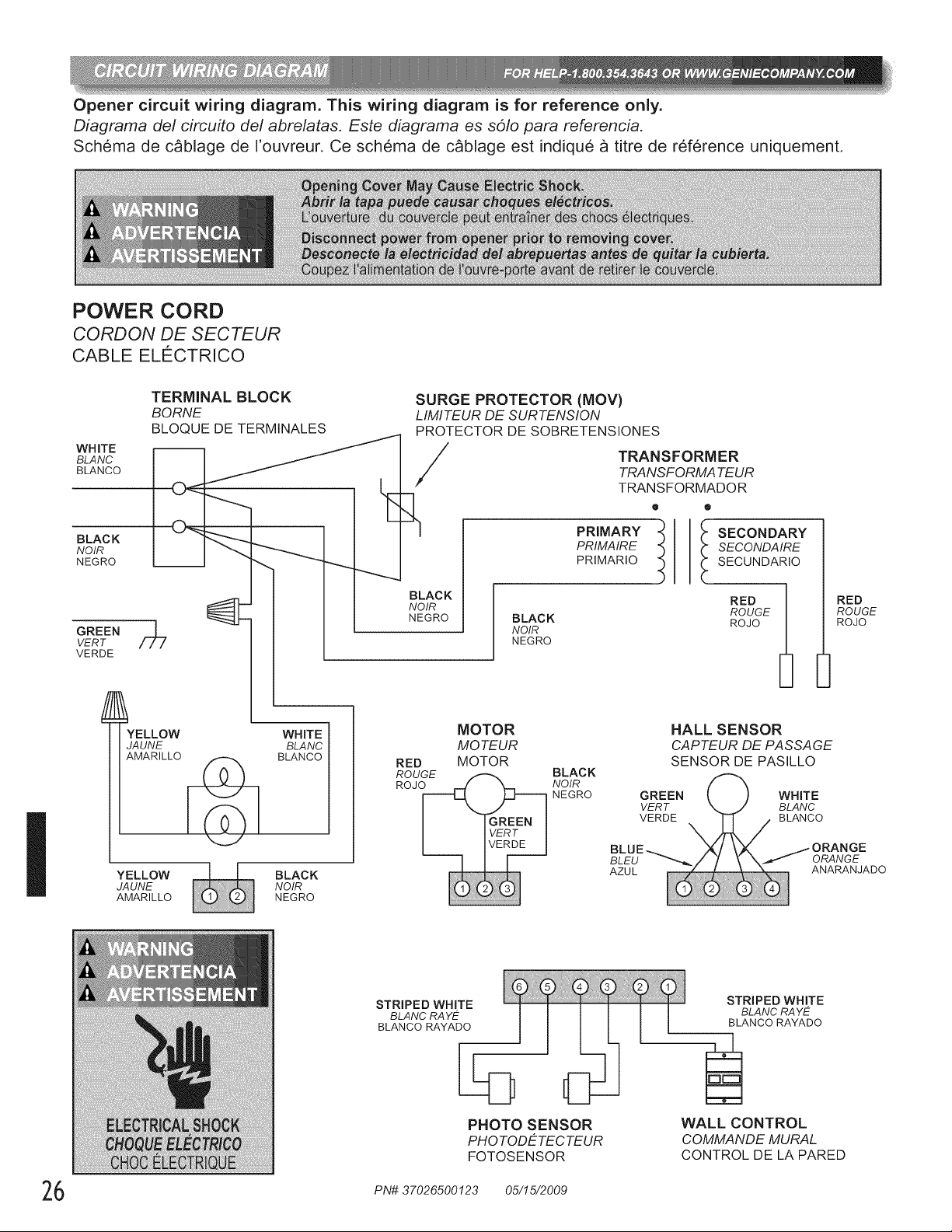
Opener circuit wiring diagram. This wiring diagram is for reference only.
Diagrama del circuito del abrelatas. Este diagrama es solo para referenda.
Schema de c_blage de I'ouvreur. Ce schema de c_blage est indique a titre de ref6rence uniquement.
POWER CORD
CORDON DE SECTEUR
CABLE ELg:CTRICO
I
WHITE
BLANC
BLANCO
BLACK
NOIR
NEGRO
GREEN
VERT
VERDE
TERMINAL BLOCK
BORNE
BLOQUE DE TERMINALES
O_ ___
YELLOW WHITE
JAUNE BLANC
AMARILLO _ BLANCO
SURGE PROTECTOR (MOV)
LIMITEUR DE SURTENSION
PROTECTOR DE SOBRETENSIONES
/
MOTOR
RED
MOTEUR
MOTOR
BLACK
NOIR
NEGRO
BLACK
NOIR
NEGRO
TRANSFORMER
TRANSFORMA TEUR
TRANSFORMADOR
@ @
PRIMARY
PRIMAIRE
PRIMARIO
I ECONDARY
SECONDA IRE
SECUNDARIO
RED
ROUGE
ROJO
BLACK
NOIR
NEGRO
HALL SENSOR
CAPTEUR DE PASSAGE
SENSOR DE PASILLO
YELLOW BLACK
JAUNE NOIR
AMARILLO NEGRO
RED
ROUGE
ROJO
STRIPED WHITE
BLANC RA YE
BLANCO RAYADO
PHOTO SENSOR
PHO TODETEC TEUR
FOTOSENSOR
STRIPED WHITE
BLANC RA YE
BLANCO RAYADO
WALL CONTROL
COMMANDE MURAL
CONTROL DE LA PARED
6 PN# 37026500123 05/15/2009
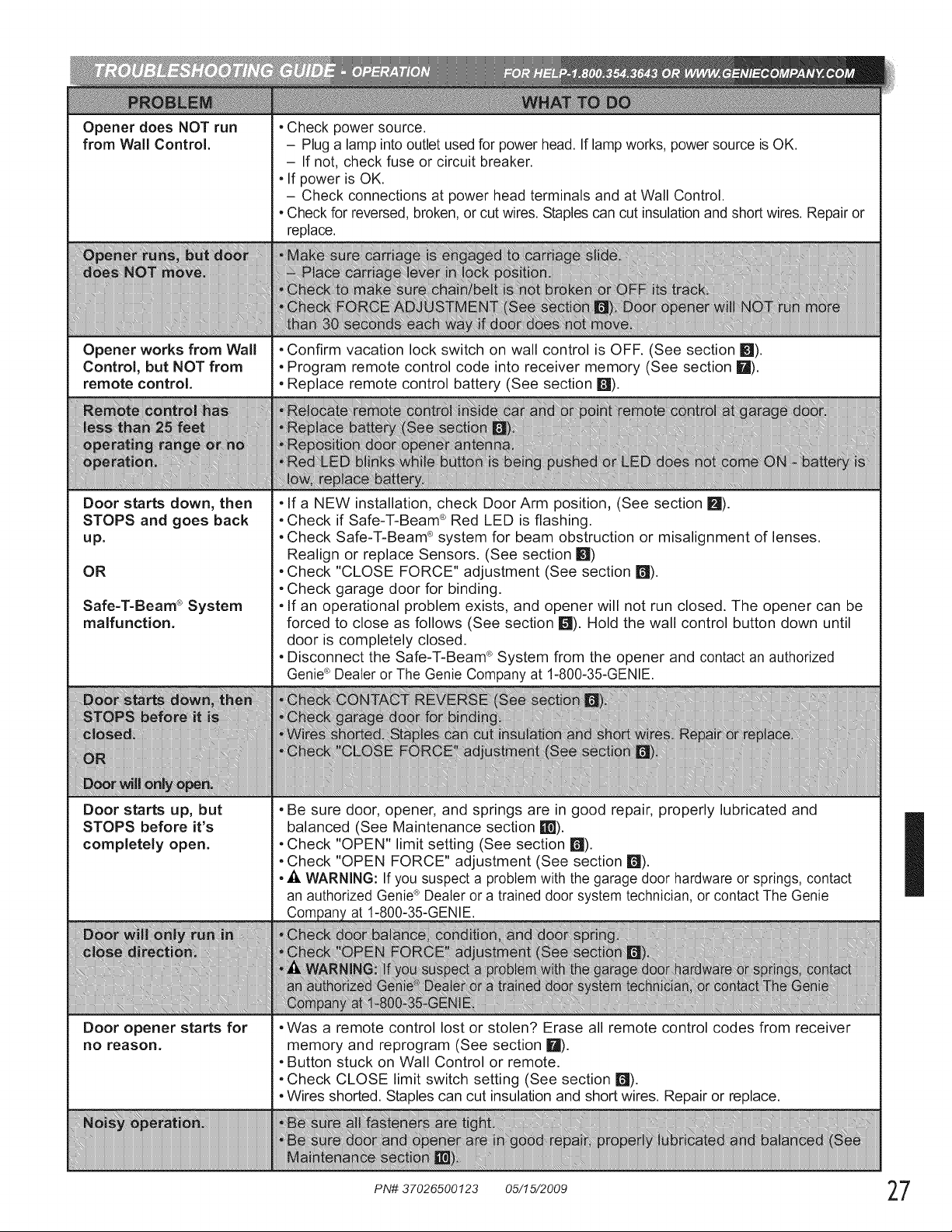
Opener does NOT run
from Wall Control.
Opener works from Waft
Control, but NOT from
remote control.
Door starts down, then
STOPS and goes back
up.
OR
Safe=T=Beam®System
malfunction.
Door starts up, but
STOPS before it's
completely open.
Door opener starts for
no reason.
, Check power source.
- Plug a lamp into outlet used for power head. If lamp works, power source is OK.
- If not, check fuse or circuit breaker.
, If power is OK.
- Check connections at power head terminals and at Wall Control.
, Check for reversed, broken, or cut wires. Staples can cut insulationand short wires. Repair or
replace.
• Confirm vacation lock switch on wall control is OFF. (See section m).
• Program remote control code into receiver memory (See section I_1).
• Replace remote control battery (See section m).
, If a NEW installation, check Door Arm position, (See section IF,I).
• Check if Safe-T-Beam ® Red LED is flashing.
• Check Safe-T-Beam ® system for beam obstruction or misalignment of lenses.
Realign or replace Sensors. (See section 181)
• Check "CLOSE FORCE" adjustment (See section r_l).
• Check garage door for binding.
• If an operational problem exists, and opener will not run closed. The opener can be
forced to close as follows (See section I_1).Hold the wall control button down until
door is completely closed.
• Disconnect the Safe-T-Beam ®System from the opener and contact an authorized
Genie®Dealer or The Genie Company at 1-800-35-GENIE.
• Be sure door, opener, and springs are in good repair, properly lubricated and
balanced (See Maintenance section W).
• Check "OPEN" limit setting (See section m).
• Check "OPEN FORCE" adjustment (See section n).
• ,i_ WARNING: If you suspect a problem with the garage door hardware or springs, contact
an authorized Genie® Dealer or a trained door system technician, or contact The Genie
at 1-800-35-GENIE.
• Was a remote control lost or stolen? Erase all remote control codes from receiver
memory and reprogram (See section I_).
• Button stuck on Wall Control or remote.
• Check CLOSE limit switch setting (See section m).
• Wires shorted. Staples can cut insulation and short wires. Repair or replace.
I
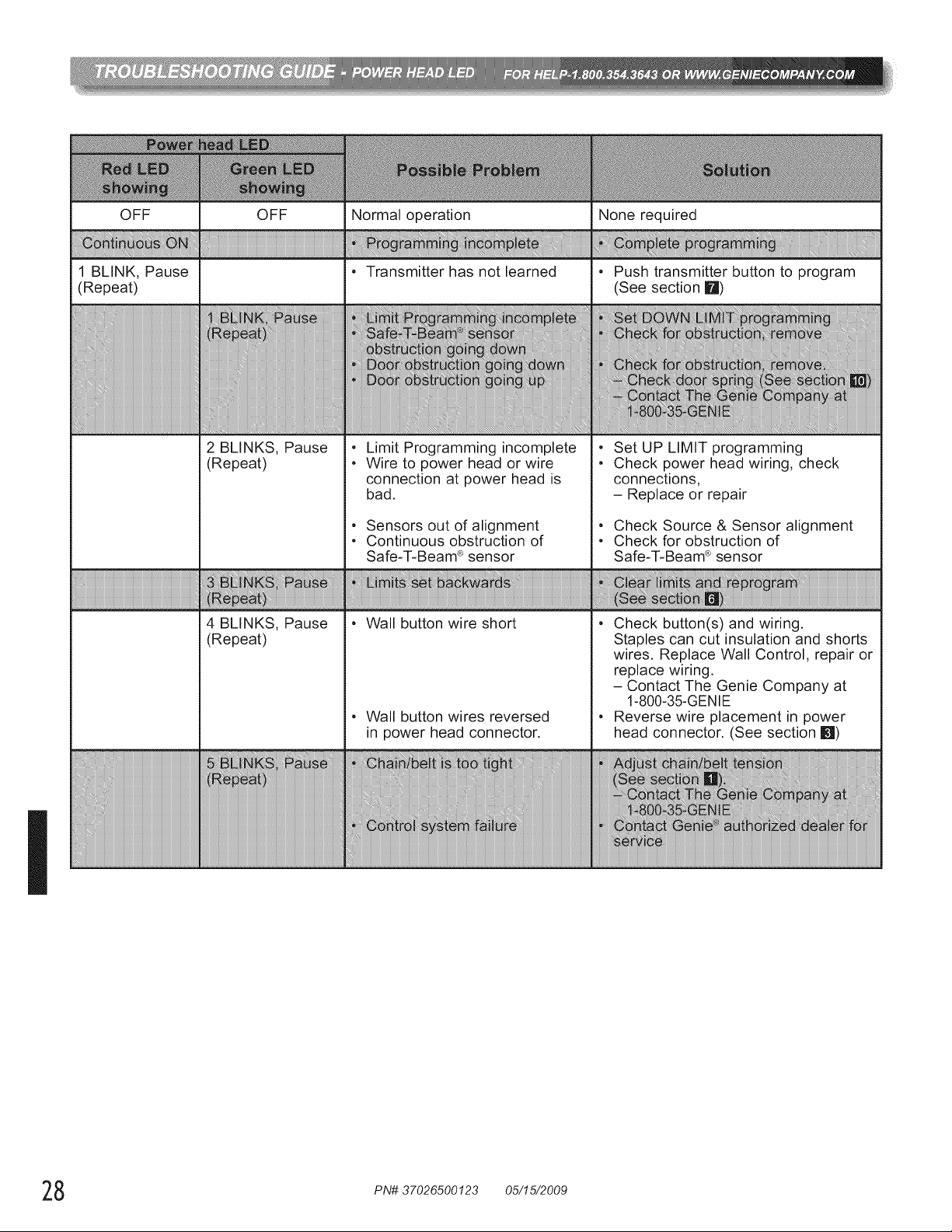
I
OFF
1 BLINK, Pause
(Repeat)
OFF
2 BLINKS, Pause
(Repeat)
4 BLINKS, Pause
(Repeat)
Normal operation
• Transmitter has not learned
Limit Programming incomplete
Wire to power head or wire
connection at power head is
bad.
Sensors out of alignment
Continuous obstruction of
Safe-T-Beam ®sensor
• Wall button wire short
• Wall button wires reversed
in power head connector.
None required
Push transmitter button to program
(See section I_1)
)_c Ira_ ml
se
m mm
Set UP LIMIT programming
Check power head wiring, check
connections,
- Replace or repair
Check Source & Sensor alignment
Check for obstruction of
Safe-T-Beam ®sensor
• Check button(s) and wiring.
Staples can cut insulation and shorts
wires. Replace Wall Control, repair or
replace wiring.
- Contact The Genie Company at
1-800-35-GENIE
• Reverse wire placement in power
head connector. (See section !_1)
8 PN# 37026500123 05/15/2009
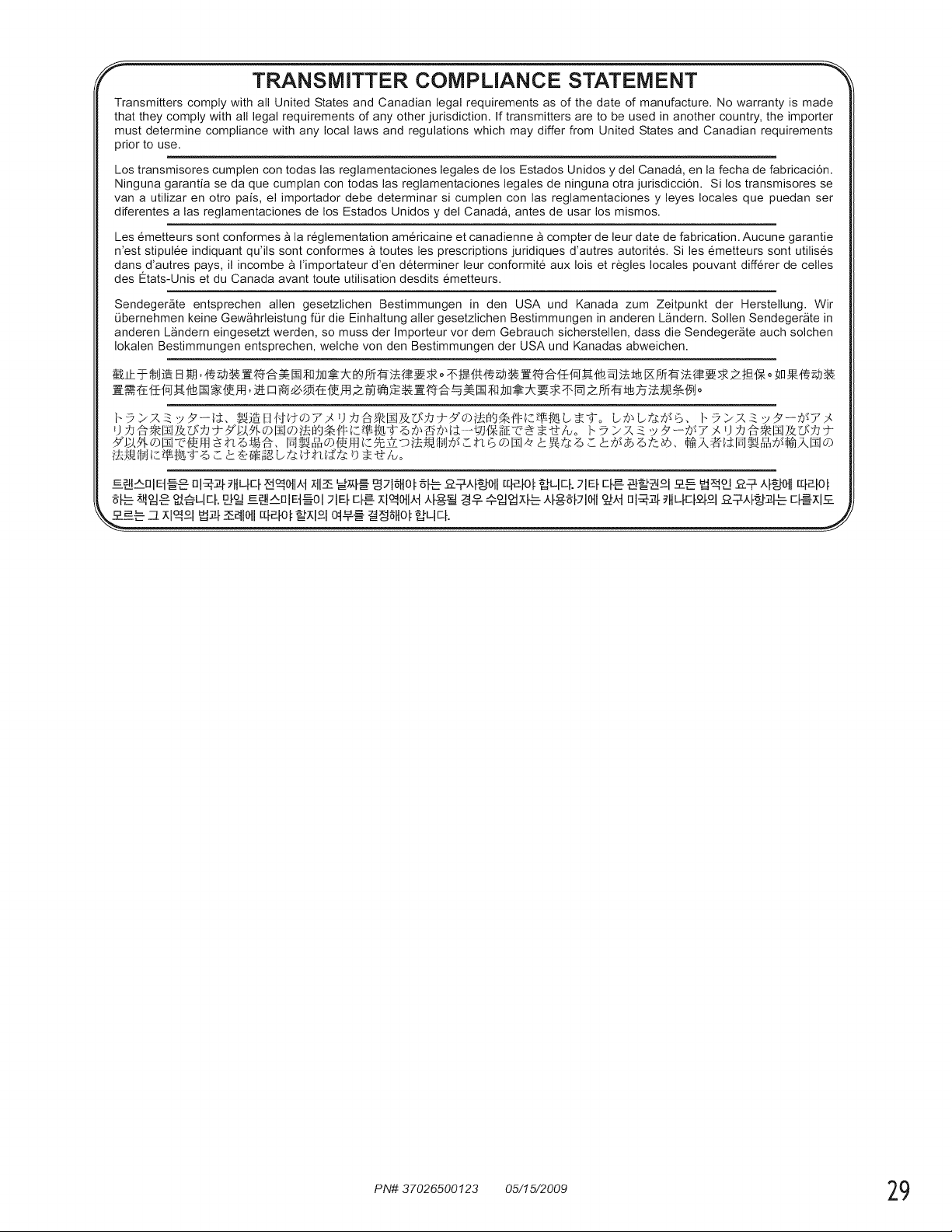
TRANSMITTER COMPLIANCE STATEMENT
Transmitters comply with all United States and Canadian legal requirements as of the date of manufacture. No warranty is made
that they comply with all legal requirements of any other jurisdiction. If transmitters are to be used in another country, the importer
must determine compliance with any local laws and regulations which may differ from United States and Canadian requirements
prior to use.
Los transmisores cumplen con todas las reglamentaciones legales de los Estados Unidos y del Canada, en la fecha de fabricaci6n.
Ninguna garantia se da que cumplan con todas las reglamentaciones legales de ninguna otra jurisdicci6n. Si los transmisores se
van a utilizar en otro pais, el importador debe determinar si cumplen con las reglamentaciones y leyes locales que puedan ser
diferentes alas reglamentaciones de los Estados Unidos y del Canada, antes de usar los mismos.
Les emetteurs sont conformes _ la reglementation am@icaine et canadienne _ compter de leur date de fabrication. Aucune garantie
n'est stipulee indiquant qu'ils sont conformes a toutes les prescriptions juridiques d'autres autorites. Si les emetteurs sont utilises
dans d'autres pays, il incombe _ I'importateur d'en determiner leur conformite aux lois et regles locales pouvant differer de celles
des Etats-Unis et du Canada avant toute utilisation desdits emetteurs.
Sendeger_te entsprechen allen gesetzlichen Bestimmungen in den USA und Kanada zum Zeitpunkt der Herstellung. Wir
0bernehmen keine Gew_hrleistung for die Einhaltung aller gesetzlichen Bestimmungen in anderen L_ndern. Sollen Sendeger_te in
anderen L_ndern eingesetzt werden, so muss der Importeur vor dem Gebrauch sicherstellen, dass die Sendegergte auch solchen
Iokalen Bestimmungen entsprechen, welche von den Bestimmungen der USA und Kanadas abweichen.
PN# 37026500123 05/15/2009 29
MODELS 2022/2024/2042
LIMITED WARRANTY
GMI Holdings, Inc. d/b/a The Genie Company ("Seller") warrants to the original purchaser of the below identified opener, Model 2022/2024/2042 ("Product"),
subject to all of the terms and conditions hereof, that the Product and all components thereof will be fi'ee fi'orn defects in materials and workmanship for the
following period(s) of time, measured fi'orn the date of purchase:
MOTOR - Seller warrants the motor %r a period ofTEN (10) YEARS.
PARTS - Seller warrants all other parts and components for a period of ONE (1) YEAR.
Seller's obligation under this warranty is specifically limited to repairing or replacing, at its option, the Product or any part thereof which is detennined by
Seller to be defective during the applicable warranty period. Any labor charges are excluded and will be the responsibility of the purchaser.
This warranty gives you specific legal rights, and you may also have other rights which vary from state to state. This warranty is made to the original
purchaser of the Product only, and is not transferable or assignable. This warranty applies only to Product installed in a residential or other non-commercial
application. It does not cover any Product installed in commercial or industrial building applications. This warranty does not apply to any unauthorized or
improper installation, alteration or repair of the Product, or to any Product or component which has been dalnaged or deteriorated due to misuse, neglect,
accident, failure to provide necessary m_dntenance, normal wear and tear, or acts of God or any other cause beyond the reasonable control of Seller, and does
not cover batteries, missing or damaged parts frorn clearance or open box sales, or repairs or maintenance to door components.
ALL EXPRESS AND IMPLIED WARRANTIES FOR THE PRODUCT, INCLUDING BUT NOT LIMITED TO ANY IMPLIED WARRANTIES OF
MERCHANTABILITY AND FITNESS FOR A PARTICULAR PURPOSE, ARE LIMITED IN TIME TO THE APPLICABLE WARRANTY PERIOD
REFLECTED ABOVE. NO WARRANTIES, WHETHER EXPRESS OR IMPLIED, WILL APPLY AFTER THE LIMITED WARRANTY PERIOD HAS
EXPIRED. Some states do not allow limitations on how long an implied warranty lasts, so the above limitation may not apply to you.
IN NO EVENT SHALL GMI HOLDINGS, INC. OR ITS PARENT OR AFFILIATES BE RESPONSIBLE FOR, OR LIABLE TO ANYONE FOR, SPECIAL
INDIRECT, COLLATERAL, PUNITIVE, INCIDENTAL OR CONSEQUENTIAL DAMAGES, even if Seller has been advised of the possibility of such
damages. Such excluded damages include, but are not limited to, loss of use, cost of any substitute product, or other similar indirect financial loss. Sol'he
states do not allow the exclusion or limitation of incidental or consequential damages, so the above lilnitation or exclusion lnay not apply to you.
Clailns under this warranty must be lnade promptly after discovery m_d within the applicable warranty period. To obtain warranty service, you must contact
Genie® customer service and provide proof of the date and location of purchase and identification as the original purchaser. (?all Genie® Customer Service toll
free at 1-800-354-3643 to speak with a trained representative. Purchaser must allow seller a reasonable opportunity to inspect Product claimed to be defective
prior to relnoval or alteration of its condition. Upon detennination by Seller that the Product or any part thereof is defective during the applicable warranty
period (which may require purchaser to return the Product to Seller at purchaser's expense), Seller will supply the purchaser with replacement parts or, at its
option, a replacement Product. Seller may use new or reconditioned parts, or a new or reconditioned Product of the same or similar design.
There are no established informal dispute resolution procedures of the type described in the Magnuson-Moss Warrant?" Act.
PURCHASER:
INSTALLATION ADDRESS:
DATE PURCHASED: SERIAL NUMBER:
OPENER MODEL:
REMOTE CONTROL MODEL:
DEALER NAME:
DEALER ADDRESS:
P900-787