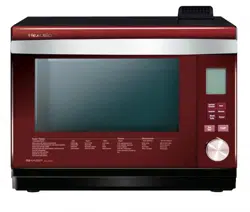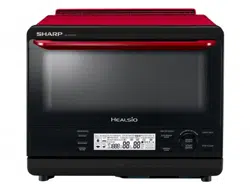

AX-1700R
使用說明書
水波爐
WATER OVEN
OPERATION MANUAL

Page
CONTENTS
IMPORTANT SAFETY INSTRUCTIONS ................... E-1
INSTALLATION INSTRUCTIONS .............................. E-3
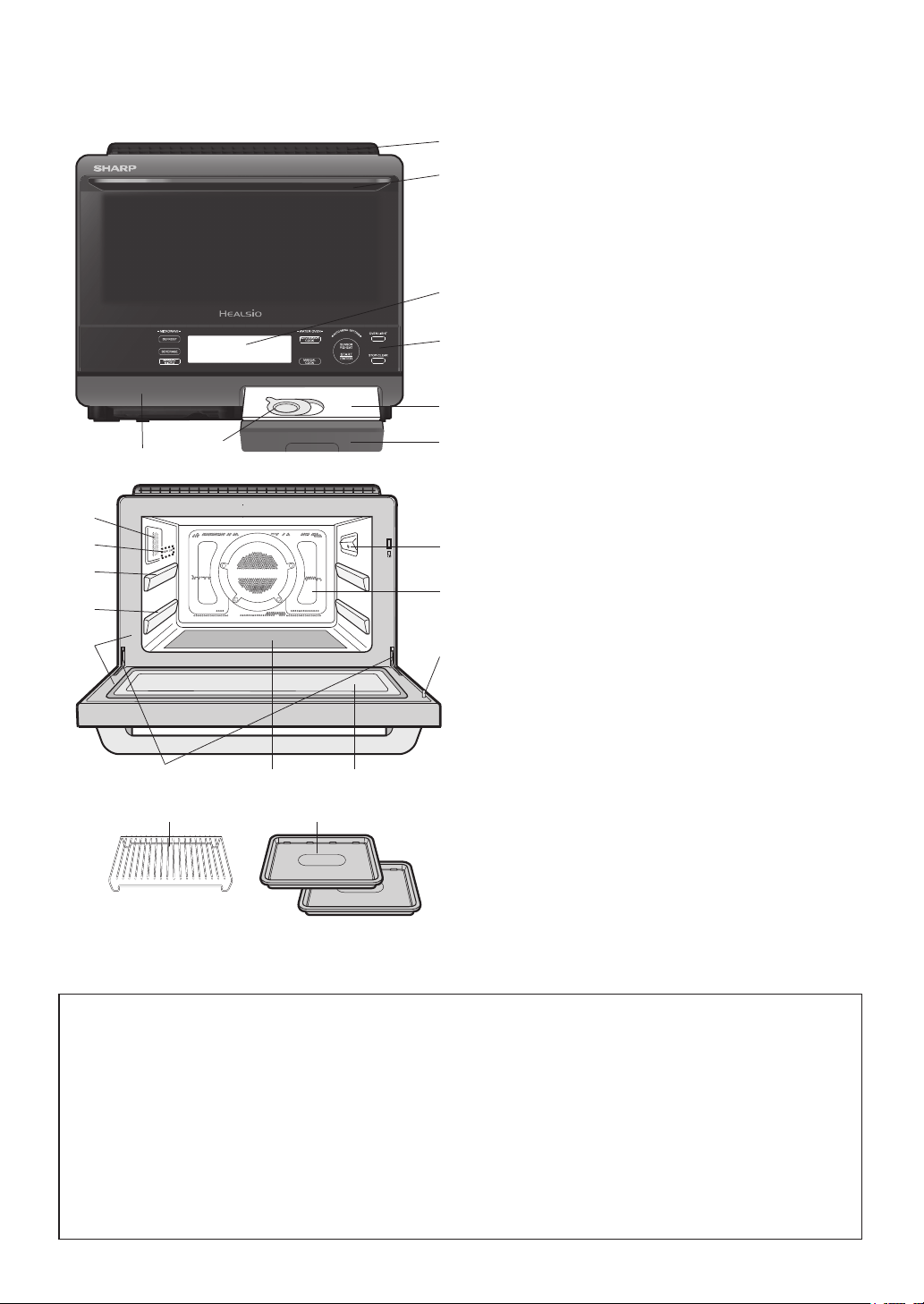
OVEN DIAGRAM ....................................................... E-4
CONTROL PANEL ..................................................... E-5
IMPORTANT INSTRUCTIONS ..................................E-6
BEFORE OPERATING .............................................. E-9
CLEAN THE OVEN BEFORE FIRST USE ................ E-9
AUTOMATIC COOKING ............................................ E-10
MANUAL COOKING .................................................. E-14
Page
OTHER CONVENIENT FEATURES .......................... E-20
CLEANING AND CARE ............................................. E-22
TROUBLESHOOTING CHART .................................E-24
SERVICE CALL CHECK ...........................................E-27
SPECIFICATIONS ..................................................... E-27
COOKING GUIDES ................................................... E-28
AUTOMATIC COOKING CHART ............................... E-31
E – 1
IMPORTANT SAFETY INSTRUCTIONS
IMPORTANT SAFETY INSTRUCTIONS: READ CAREFULLY AND KEEP FOR FUTURE REFERENCE
1. This oven is designed to be used on a countertop only. It is not designed to be built-in to a wall or cabinet.
Do not place the oven in a cabinet. See page E-3 for the installation.
The oven door may become hot during cooking. Place or mount the oven so that the bottom of the oven is
85 cm or more above the floor. Keep children away from the door to prevent them from burning themselves.
2. Ensure there is a minimum of free space above the oven of 13 cm.
3. This appliance is intended to be used in household and similar applications such as:
• staff kitchen areas in shops, offices and other working environments;
• farm houses;
• by clients in hotels, motels and other residential environments;
• bed and breakfast type environments
4. The microwave oven is intended for heating food and beverages.
Drying of food or clothing and heating of warming pads, therapeutic devices (eg. wheat bags), slippers, sponges,
damp cloth and similar may lead to risk of injury, ignition or fire.
5. This appliance is not intended for use by persons (including children) with reduced physical, sensory or
mental capabilities, or lack of experience and knowledge, unless they have been given supervision or
instructio
n concerning use of the appliance by a person responsible for their safety.
6. Children should be supervised to ensure that they do not play with the appliance.
7.
WARNING: Only allow children to use the oven without supervision when adequate instructions have been
given so that the child is able to use the oven in a safe way and understands the hazards of improper use.
8. WARNING: When the appliance is operated in Convection, Grill or Steam functions, children should
only use the oven under adult supervision due to the temperature generated.
9. WARNING: Accessible parts may become hot during use. Young children should be kept away.
10. WARNING: If the door or door seals are damaged, the oven must not be operated until it has been repaired
by a qualified service technician trained
by SHARP.
11. WARNING: Never adjust, repair or modify the oven by yourself. It is hazardous for anyone other than a
qualified service technician trained by SHARP to carry out any service or repair operation that involves the
removal of a cover which gives protection against exposure to microwave energy.
12. If the power supply cord of this appliance is damaged, it must be replaced by a qualified service technician
trained by SHARP in order to avoid a hazard.
13. WARNING: Liquids and other foods must not be heated in sealed containers since they are liable to explode.
14. Microwave heating of beverages can result in delayed eruptive boiling, therefore care must be taken when
handling the container.
15. Eggs in their shell and whole hard-boiled eggs should not be heated on microwave modes since they may
explode, even after microwave heating has ended. To cook or reheat eggs which have not been scrambled
or mixed on microwave modes, pierce the yolks and the whites, or the eggs may explode. Shell and slice
hard boiled eggs before reheating them on microwave modes.
16. Utensils should be checked to ensure that they are suitable for use in the oven. See Page E-29. Use only
microwave safe containers and utensils on microwave modes.
18. The contents of feeding bottles and baby food
jars shall be stirred or shaken and the temperature checked
17. Metallic containers for food and beverages are not allowed during microwave modes.
before consumption, in order to avoid burns.
19.
During use the appliance becomes hot. Care should be taken to avoid touching the heating elements and
oven cavity. To prevent burns, always use thick oven gloves. Before cleaning make sure they are not hot.
20. When heating food in plastic or paper containers, keep an eye on the oven due to the possibility of ignition.
21.
If smoke is observed, switch off or unplug the appliance and keep the door closed in order to stifle any flames.
22. The oven should be cleaned regularly and any food deposits removed.
23. Cleaning and user maintenance shall not be performed by children without supervision.
24. Failure to maintain the oven in a clean conditio
n could lead to deterioration of the surface that could
adversely affect the life of the appliance and possibly result in a hazardous situation.
25. Do not use harsh abrasive cleaners or sharp metal scrapers to clean the oven door glass since they can
scratch the surface, which may result in shattering of the glass.
26. Steam cleaner is not to be used.
27. See instructions for cleaning door seals, cavities and adjacent parts on page E-22.
28. See instructions for using accessories on page E-4.
Other warnings
1. To reduce the risk of fi re in the oven cavity:
a.
No other liquid than room temperature water suitable for drinking (filtered) can be poured into the water tank.
b. The oven should not be left unattended during operation. High oven temperature or long cooking time
may overheat foods resulting in a fi re
.
c. Do not overcook food.
d. Remove wire twist-ties from paper or plastic bags before placing bag in the oven.
e. Do not heat oil or fat for deep frying. The temperature of the oil cannot be controlled.
f . Do not use containers made of synthetic material for cooking. They could melt at high temperature.

E – 2
g. Do not use plastic containers if the oven is still hot because they may melt. Plastic containers must
not be used unless the container manufacturer claims it is suitable.
h. Do not store food or any other items inside the oven.
i. When alcoholic beverages are added when roasting or cooking cakes and sweets, there is a risk that
vapours released by the alcohol may catch fi re upon coming into contact with the electrical heating
element. Attend the oven closely during cooking.
2. To reduce the risk of an explosion or delayed eruptive boiling, care should be taken when handling the
container. Your oven is capable of heating food and beverages very quickly with microwave, therefore it is
very important that you select the appropriate cooking time and power level for the type and quantity of
food to be heated. If you are unsure of the cooking time and power level required, begin with low cooking
times and power levels until the food is sufficiently heated evenly throughout.
Additionally:
a. Do not place sealed containers in the oven. Babies bottles fitted with a screw cap or teat are
considered to be sealed containers.
b. Do not use excessive amount of time.
c. When boiling liquids in the oven, use a wide-mouthed container.
d. Stand at least for 20 seconds at the end of cooking to avoid delayed eruptive boiling of liquids.
e. Stir the liquid before and during cooking. Use extreme care when handling the container or inserting a
spoon or other utensil into the container.
3. This oven is for home food preparation only and should only be used for heating, cooking and defrosting
food and beverage.
It is not suitable for commercial, laboratory use, or heating therapeutic devices eg. Wheat bags.
4. Never operate the oven whilst any object is caught or jammed between the door and the oven.
5. Handle with care when removing items from the oven so that the utensil, your clothes or accessories do
not touch the latches.
6. Never poke an object, particularly a metal object, through a grille or between the door and the oven while
the oven is operating.
7. Never tamper with or deactivate the latches.
8. Always use thick oven gloves to prevent burns when handling utensils that are in contact with hot food.
Enough heat from the food can transfer through utensils to cause skin burns.
9. If the oven lamp fails please consult your dealer or a qualified service technician trained by SHARP.
10. Avoid steam burns by directing steam away from the face and hands. Slowly lift the furthest edge of a
dish's cover including microwave plastic wrap etc., and carefully open popcorn and oven cooking bags
away from the face.
11. Make sure that the power supply cord is undamaged, and that it does not run under the oven or over any
hot surfaces or sharp edges.
12. Use care when opening door. To avoid burns from escaping heat and steam, let hot air or steam escape
before removing or replacing food.
13. Do not place anything on the outer cabinet because the oven will become very hot during operation.
14. To avoid burns, always test the food and container temperature and stir before serving. Pay special
attention to the temperature of food and drink given to babies, children and the elderly. Do not drink
beverages or soup without checking the container's temperature. Take extra caution when handling the
container because it becomes very hot.
15. Make sure the utensil does not touch the interior walls during cooking.
16. Do not touch the oven door, outer cabinet, rear cabinet, oven cavity, air-vent openings, accessories and
dishes because the escaping steam from the ventilation cover during operation becomes hot.
17. Do not touch around the oven lamps directly. This part will become hot when the oven lamp is on.
18. When the oven is in use, ventilate a room where the oven is installed. e.g. open a window or switch a
kitchen ventilation fan on. Steam from the ventilation cover may wet nearby wall or furniture.
19. Do not operate the oven if the water tank cracks and water leaks. Please contact a SERVICE CENTRE
APPROVED BY SHARP.
20. Do not insert fingers or objects in the holes (the steam outlets or air-vent openings) as this may damage
the oven and cause an electric shock or a hazard.
21. Do not touch the electric plug with wet hand. Plug into the electric wall socket securely. When removing the
plug from the socket always grip the plug, never pull the power supply cord as this may damage the power
supply cord and the connections inside the plug.
22. Never move the oven when it is operating. If the oven needs to be moved, always drain all water inside the
oven using DRAIN WATER. After draining, empty the drip tray.
23. Do not put any water on the door or control panel intentionally.
24. If the oven falls down or drops on the floor, do not use the oven. Unplug the unit and contact a SERVICE
CENTRE APPROVED BY SHARP.
25. Do not place any things weighing more than 4 kg on the door to prevent that the oven may fall down or
could damage the door and hinges. Do not cling onto the handle and do not hang heavy objects from it.
26. To prevent condensation which could corrode the appliance, do not leave cooked food in the oven for an
extended period.
IMPORTANT SAFETY INSTRUCTIONS
E – 3
INSTALLATION INSTRUCTIONS
1. Remove all packing materials from the oven cavity, and the feature sticker from the outside of the door, if there
is one. Check the unit for any damage, such as a misaligned door, damaged door seals around the door or
dents inside the oven cavity or on the door. If there is any damage, please do not operate the oven until it has
been checked by a SERVICE CENTRE APPROVED BY SHARP and repaired, if necessary.
2. Accessories provided
1) Rack 2) 2 Baking trays 3) Operation manual
3. Since the door may become hot during cooking, and in order to avoid its accidental touch, the oven should be
placed at least 85 cm or more above floor. You should also keep children away from the door to prevent them
burning themselves.
4. This oven is designed to be used on a countertop only. It should not be installed in any area where excessive
heat and steam are generated, for example, next to a conventional oven unit. It should not be installed near
combustible materials, for example, curtains. The oven should be installed so as not to block ventilation openings.
A fire may occur if this appliance is covered or touching flammable material, including curtains, drapes, walls,
etc. Allow space of at least 13cm from top of the oven for air ventilation. This oven is not designed to be built-in
to a wall or cabinet.
WARNING: Steam is ventilated from the top rear of the oven. Make sure the escaping steam does not
wet electrical outlets/other electrical appliances.
5. If the window is close to the oven, keep more than 20 cm distance between the ventilation and the window.
Window may be broken by the heat from the ventilation.
CAUTION: Steam ventilated from the oven may wet or dirty nearby furniture or wall. Keep sufficient
space between the oven and the wall or furniture. Steam comes from the ventilation cover or door during
cooking or after cooking. Steam may be condensed on the wall or furniture around the oven. Install the
oven where it can be well ventilated.
To prevent from wet, we recommend to cover the wall or furniture with aluminium foil.
6. Do not connect other appliances to the same socket using an adaptor plug.
7. Neither the manufacturer nor the distributors can accept any liability for damage to the machine or personal
injury for failure to observe the correct electrical connecting procedure. The A.C. voltage and frequency must
correspond to the one indicated on the rating label.
8. This appliance must be earthed:
IMPORTANT
The wires in power supply cord are coloured in accordance with the following code:
Green-and-yellow : Earth
Blue : Neutral
Brown : Live
As the colours of the wires in the power supply cord of this appliance may not correspond with the coloured
marking identifying the terminals in your plug, proceed as follows:
The wire which is coloured green-and-yellow must be connected to the terminal in the plug which is marked
with the letter E or by the earth symbol
or coloured green or green-and-yellow.
The wire which is coloured blue must be connected to the terminal which is marked with the letter N or coloured
blue.
The wire which is coloured brown must be connected to the terminal which is marked with the letter L or
coloured brown.
When unpacking your Water Oven, you may notice a small amount of water inside
the oven and water tank.
This is a normal phenomenon of testing.
E – 4
WARNING:
The oven cavity, door, outer cabinet,
accessories and dishes will become very hot,
use thick dry oven gloves when removing the
food or accessories from the oven to prevent
burns.
1
Ventilation openings
2
Door open handle
3
LCD display
4
Control panel
5
Oven lamp
6
Shelf runner (upper position)
7
Shelf runner (lower position)
8
Water tank lid (See page E-6.)
9
Water tank (See page E-6.)
10
Door seals and sealing surfaces
11
Latches
12
Ceramic oven floor
13
Door hinges
14
Steam outlets
15
Drip tray (See page E-6.)
16
Infrared sensor
17
Oven cavity
18
See through door
19
Flip-up lid
ACCESSORIES
20
Rack
For Convection, Grill or Steam function.
Do not use when microwave cooking.
Always place on baking tray.
21
Baking tray x2
For Convection, Grill or Steam function.
Do not use when microwave cooking.
AUTO MENU
1 Crispy Reheat
2 Steam Reheat
3 Reheat Bread
4 Reheat Frozen Food
5 Reheat as Temprerature
6 Grilled Chicken
7 Deep Fried Chicken
8 Grilled Fish
9 Steamed Vegetables
10 Baked Sweet Potato
11 Toast
12 Breakfast Set
13 Sponge Cake
14 Cream Puff
15 Dried Food
MANUAL COOKING
16 Grill
17 Steam High
18 Steam Low
19 Steam Proof
20 Proof
MAINTENANCE
21 Sterilization
22 Drain Water
23 Steam Clean
24 Descale
25 Clean Oven
(First Use)
OPTION NUMBER
The following options are selected by turning the Knob. Each option number will be shown in the display.
8
9
1
2
3
4
15
14
6
16
7
10
11
12
13
18
5
20
21
19
17
OVEN DIAGRAM
E – 5
Operating Pads
CONTROL PANEL
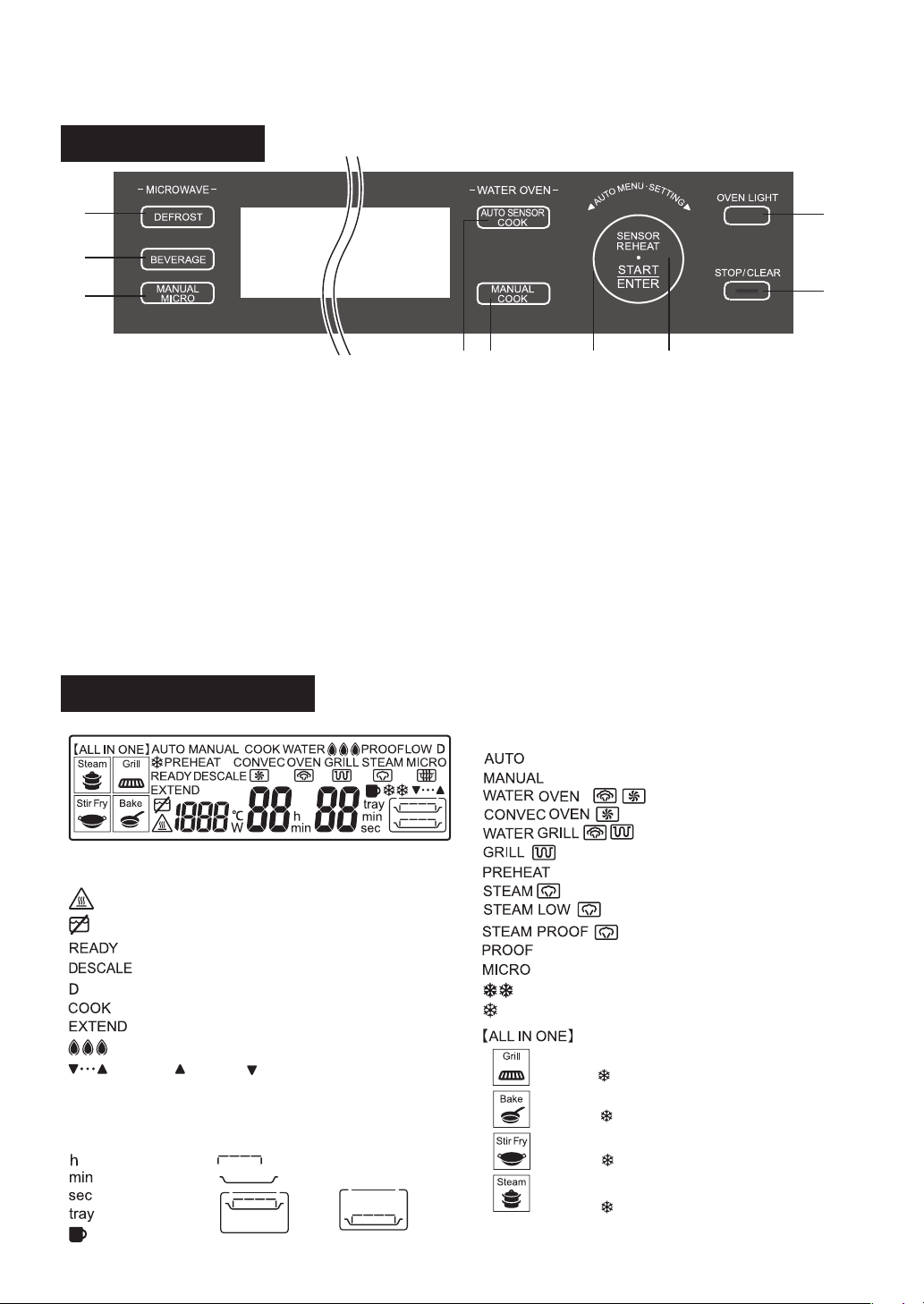
1. DEFROST pad
Press to defrost food. DEFROST has 2 options;
“Defrost” and “Defrost Low”
2. BEVERAGE pad
Press to reheat beverage.
3. MANUAL MICRO pad
Press to select Manual Microwave cooking.
4. AUTO SENSOR COOK pad
Press to select Auto Sensor Cook (ALL IN ONE)
5. MANUAL COOK pad
Press to select Manual Convection cooking.
6. Knob
Turn to select desired option.
7. SENSOR REHEAT / START / ENTER pad
Press to reheat food automatically.
Press to start oven after setting programmes.
Press to confirm your choice.
* The indicator light will flash to remind you to press
the pad or turn the knob.
8. OVEN LIGHT pad
Press to light the oven lamp during the cooking for
10 seconds.
9. STOP / CLEAR pad
Press to clear during programming.
Press to cancel cooking programme.
Display Information
The display shows useful information including cooking time and
cooking mode.
4 5 6 7
8
9
1
2
3
: Automatic cooking is selected.
: Manual cooking is selected.
: Defrost
: Defrost Low
COOKING MODE INDICATORS:
: Water Oven
: Oven
: Water Grill
: Grill
: Steam High
: Steam Low
: Steam Proof
: Proof
: Microwave
TIME / AMOUNT
INDICATORS:
: Hour
: Minute
: Second
: Layer
ACCESSORY INFORMATION
INDICATORS:
: Rack
: Baking tray
: Upper position : Lower position
: Auto Sensor Cook is selected.
: Auto Sensor Cook (Grill)
* With “ ”, frozen ingredients are included.
: Auto Sensor Cook (Bake)
* With “ ”, frozen ingredients are included.
: Auto Sensor Cook (Stir Fry)
* With “ ”, frozen ingredients are included.
: Auto Sensor Cook (Steam)
* With “ ”, frozen ingredients are included.
OVEN CONDTION INDICATORS:
: The oven is very hot.
: Preheat
: Preheat is complete.
: Check the water tank.
: Descaling is necesary.
: Demo mode is in progress.
: The oven is in operation.
: You can extend cooking time.
: Superheated steam level indicators
: MORE( )/LESS( ) indicators for automatic
cooking
: Cup
E – 6
IMPORTANT INSTRUCTIONS
WATER TANK
To fill the water tank with room temperature water
suitable for drinking (filtered) is a must for both
Automatic and Manual Cooking. Be sure to follow
the directions below.
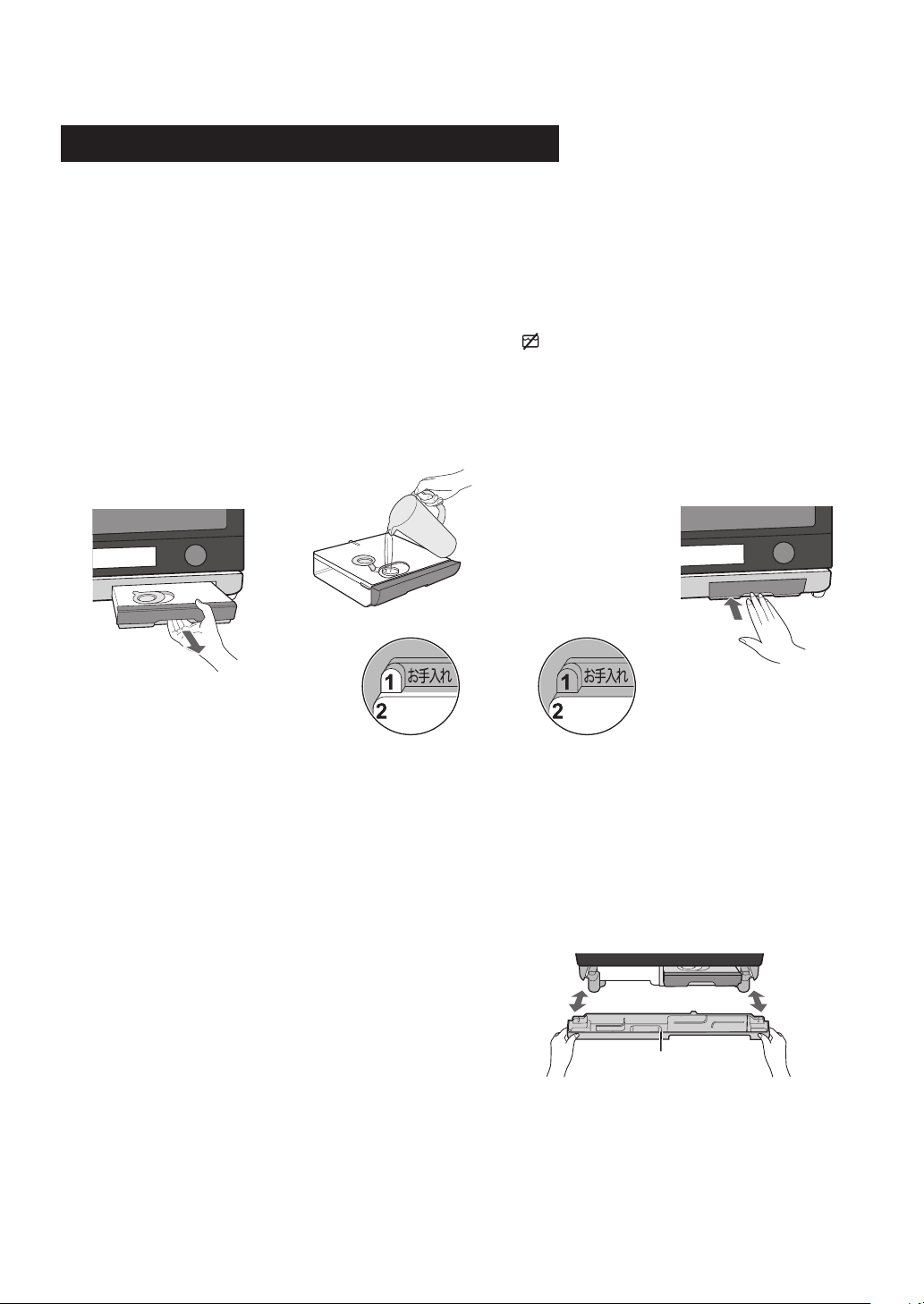
1. Pull the water tank toward you to remove. (Figure 1)
2. Wash the water tank and lid for the first time.
3. Fill the water tank with room temperature water
suitable for drinking (filtered)
There are 2 Water Levels. (Figure 2) Do not fill the
water tank over the 2 mark (MAX).
4. Make sure the lid is closed firmly.
5. Install the water tank by pushing firmly. (Figure 3)
6. After cooking, empty the water tank and wash
the water tank and the lid.
NOTES:
1. Do not use any other liquids like distilled water, R.O
water, mineral water and etc.
2. An insufficient amount of water in the water tank
may cause an undesired result.
3. We recommend that you empty the water tank
every time after cooking. Do not leave the water
tank filled with water in the oven over a day.
4. If “
” is shown in the display during cooking, check
the water tank is put correctly.
5. Do not drop or damage the water tank. Heat may
cause the water tank to change shape. Do not
use a damaged water tank. Contact a SERVICE
CENTRE APPROVED BY SHARP.
DRIP TRAY
Be sure to cook with drip tray in position and
follow the directions below.
The drip tray is packed with the oven. Place the drip
tray under the oven door as shown in Figure 4. This
drip tray collects the condensation from the oven door.
To remove the drip tray: Pull the drip tray toward you
with both hands.
* Make sure water is not dripping down before
removing the drip tray.
To replace the drip tray: Insert the drip tray horizontally
as shown in Figure 4.
Empty the drip tray after each time you cook. Empty,
rinse thoroughly, dry and replace. Failure to empty may
cause the drip tray to overflow. Cooking repeatedly
without emptying the drip tray may cause it to overflow.
WARNINGS:
1. Do not open the oven with your face close to the oven. Steam from the oven may cause burns.
2. Do not touch the water directly as water in the drip tray may be hot.
Figure 2
Figure 3Figure 1
Read Carefully Before Cooking with Water
Figure 4
Water Level 1 Water Level 2
Drip tray
E – 7
Before cooking
1. Make sure the water tank is put with room temperature water suitable for drinking (filtered) and is installed.
(See page E-6.)
2. Make sure the empty drip tray is installed. (See page E-6.)
3. Place food in the oven unless preheating is needed.
After Cooking
1. After the oven has cooled, remove and empty the water tank, wipe oven cavity. Then empty the drip tray.
2. Perform the Drain Water function at least once a day.
Oven Door Opening
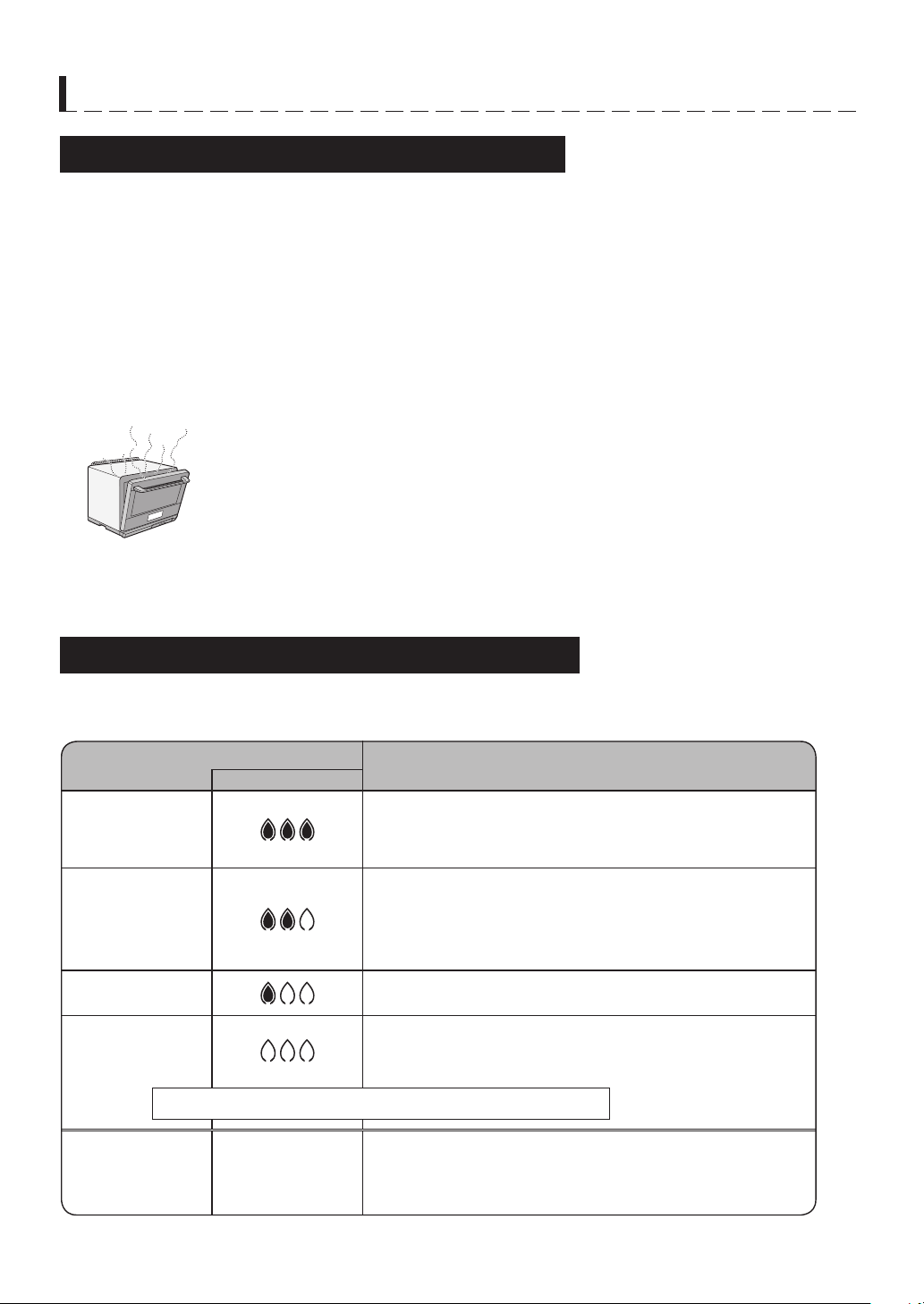
You can stop the door with the upper part of the oven open to exhaust steam, to cool or
dry the oven cavity temporarily after cooking. (See Figure 1)
WARNING: Do not open the oven with your face close to the oven. Steam from the oven
may cause burns.
NOTE: Avoid opening and closing the door during cooking as the oven cavity temperature
drops suddenly, which may affect the result.
Figure 1
Read Carefully Before Cooking with Water
IMPORTANT INSTRUCTIONS
Superheated Steam Level for Manual Cooking
On MANUAL Water Oven and Water Grill, you can select the quantity of Superheated Steam.
This function is also available during the cooking.
Superheated Steam Level
Examples
Display
- Water Oven 3
- Water Grill 3
• To quickly raise oven temperature for such items as frozen
foods and pieces of meat.
• Applies ample steam when starting to cook baguette for a
crispy finish.
- Water Oven 2
- Water Grill 2
• Evenly cooks the inside and outside of food.
• Most online cookbook recipes recommend Superheated
Steam Level 2.
• For breads and cream puffs, applies steam when starting to
cook for a fluffy finish.
- Water Oven 1
- Water Grill 1
• Concentrates baking on the outside to prevent dryness.
- Water Oven 0
- Water Grill 0
- No Superheated Steam
For stopping to generate Superheated Steam.
(This level is same as Oven and Grill without water)
- Oven
- Grill
No Superheated
steam level
indicator lights.
- No water needs for these mode.
NOTE: These modes cannot be changed to Water oven and
Water Grill during the cooking.
THIS LEVEL IS AVAILABLE DURING THE COOKING ONLY.
E – 8
Perform the Drain Water function at least once a day
after using water tank. It takes up to 8 minutes.
Drain Water function is very useful to prevent
scale build up and the use of stale water. It causes
evaporation of the internal steam system.
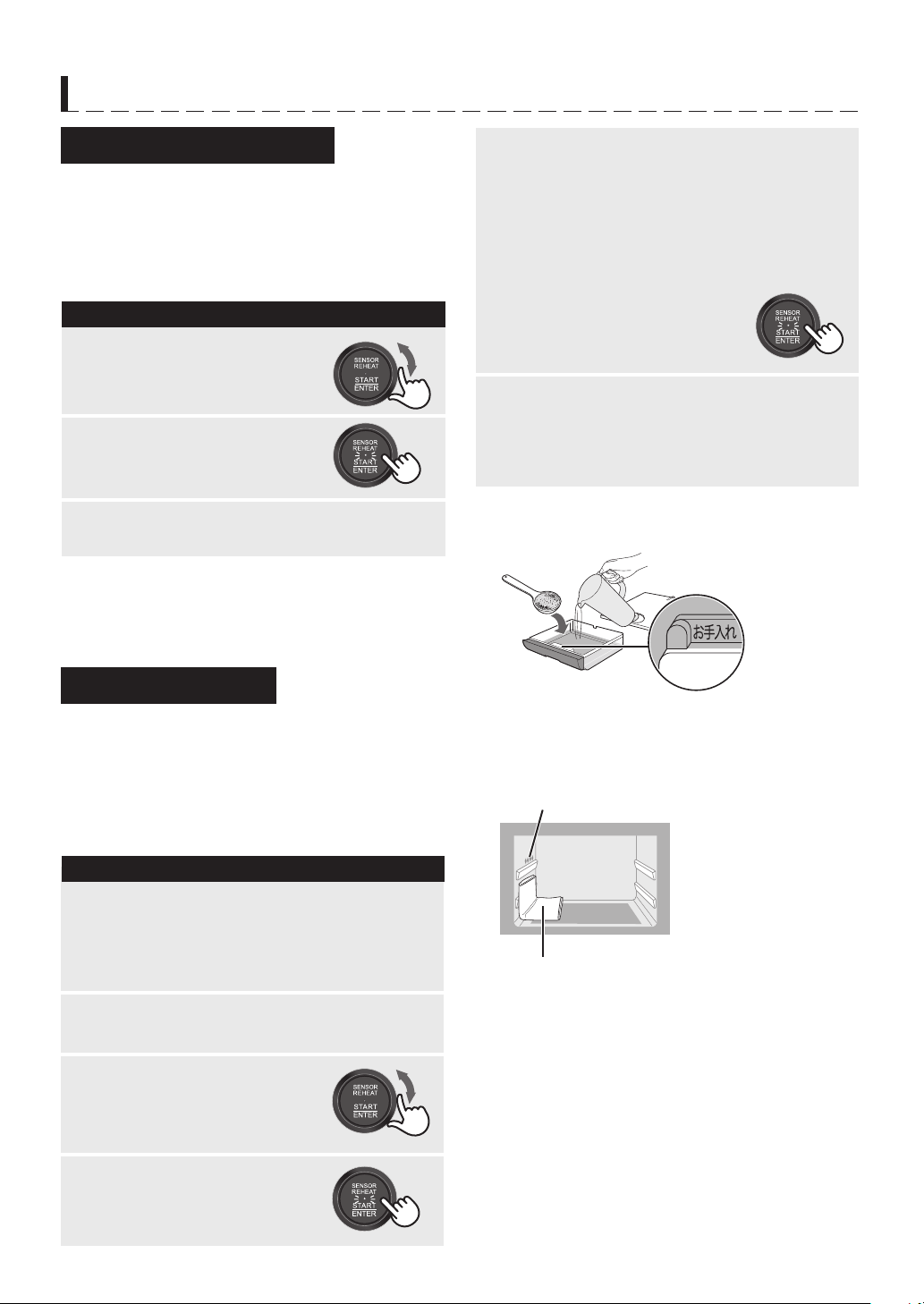
PROCEDURE
1
Make sure the water tank is
removed and press START.
2
Ensure nothing is in the oven.
Turn the Knob to select [22]
Drain Water.
After the oven has cooled, wipe oven cavity.
3
NOTE:
The water tank must be removed before starting this
procedure.
White or gray grains, also called scale, may form in the
water circuit inside the oven during steam generation,
which could cause the oven to malfunction.
When “DESCALE” is shown in the display, be sure to
carry out Descale function immediately. It takes about
1 hour.
PROCEDURE
1
Place a folded towel under the steam outlets as
shown in Figure 2.
2
5
When rinsing has ended, remove water tank
and empty.
Remove the towel.
Wipe oven cavity to dry. Then empty the drip
tray.
6
Pure citric acid, available at some drugstores,
is used for descaling. Open the lit of the water
tank. Fill the water tank with water over the 1
mark. Then dissolve 2 tablespoons of pure citric
acid as shown in Figure 1.
When the oven has stopped, wipe oven cavity,
then wring the towel and put it again as shown
in Figure 2. Remove water tank, empty, rinse
and refill with water over the 1 mark. Replace
the water tank.
Remove and empty the drip tray, then replace it
to the oven.
Press START. Rinsing will start.
Figure 1
Figure 2
IMPORTANT INSTRUCTIONS
Descale Function
Drain Water Function
3
Press START.
4
Turn the Knob to select [24]
Descale.
1
2
Steam outlets
Tow el
E – 9
BEFORE OPERATING
CLEAN THE OVEN
BEFORE FIRST USE
•
Before operating your Water Oven, make sure
you read and understand this operation manual
completely.
•
Before the oven can be used, follow these procedures:
1. Place the drip tray correctly. See page E-6.
2. See below for getting started.
3.
Follow directions on the right side for clean the
oven before first use.
Your oven has an Auto Display Off Mode.
PROCEDURE
1
Plug the oven into a power point.
“0” (initial display) will appear on the display.
CAUTION:
1. With the initial display, if you do not operate the
oven for 1 minute or more (i.e. after closing the door,
or pressing STOP/CLEAR, the display will be blank
until you open and close the oven door,
2. After cooking, it will take 1 - 30 minutes to be blank
depending the following condition.
• The oven door is close.
• The initial display (displayed only 0) is shown.
• “
” is not shown in the display.
1. Press STOP/CLEAR if you make a mistake during
programming.
2. Cancel a programme during cooking.
3. Return the initial display (displayed only 0).
NOTE:
To stop the oven temporarily during cooking, open
the door. To restart cooking, close the door and press
START.
The steam generator heats the water which is used
for cooking. It should be cleaned before the first use
to get rid of any odour in the oven cavity. Clean the
oven with [25] Clean Oven (First Use). It takes about
20 minutes. You may notice some smoke and odour
during this process. This is normal. The oven is not out
of order.
PREPARATION
1. Ventilate the room.
2.
Make sure that the empty drip tray is installed.
3. Make sure the water tank is filled to the 1 mark with
room temperature water suitable for drinking (filtered)
and is installed.
PROCEDURE
1
Press START.
2
Ensure nothing is in the oven.
Turn the Knob to select [25]
Clean Oven (First Use).
When the oven is cool, remove water tank and
empty. Wipe oven cavity. Remove and empty
the drip tray, then replace it to the oven.
3
WARNINGS:
1. The oven door, outer cabinet and oven cavity will
become hot.
2. Do not open the oven with your face close to the
oven. Steam from the oven may cause burns.
Getting Started
Clear
E – 10
AUTOMATIC COOKING
1.
When using the automatic features, carefully follow the
instructions provided in each Menu Guide to achieve
the best result. If the instructions are not followed care
-
fully, the food may be overcooked or undercooked.
2. Food weighing more or less than the quantity or
weight listed in each Menu Guide, cook manually.
3. To change the final cooking or defrosting result
from the standard setting, turn the Knob clockwise
(
s
) for more cooking time or counterclockwise (
t
)
for less cooking time after pressing START. Refer
to page E-20.
4. When covering with plastic wrap, cover loosely. Do
not reheat with a sealed container. Remove the lid.
5. Do not place any non heat-resistant containers
while the oven cavity is hot. They may melt.
6. After cooking, the display may show “
”.
The oven will automatically cool and you will hear
the sound of the cooling fan. The fan may continue
to operate up to 10 minutes depending on the oven
and parts temperature.
7. The final cooking result will vary according to the
food condition (e.g. initial temperature, shape, qual-
ity). Check the food after cooking.
Sensor Reheat automatically reheats all the food shown
in the Sensor Reheat Menu Guide on page E-31.
SPECIAL NOTE for SENSOR REHEAT:
1. Wipe off any moisture from the outside of cooking
containers and the interior of the oven with a dry
cloth or paper towel prior to reheating.
2. Place food in the center of the oven floor.
3. Never use Sensor Reheat to heat any beverages to
prevent the eruptive boiling. BEVERAGE is suitable
for heating the beverages. See page E-11.
* Suppose you want to reheat 1 serve of rice.
PROCEDURE
1
Press SENSOR REHEAT.
After cooking, “EXTEND” will appear. If you
wish to extend cooking time, turn the Knob to
add time and press START within 1 minute.
If not, press STOP/CLEAR.
2
NOTES:
1. It is not necessary to enter the weight of the food.
2. To reheat other foods or foods above or below the
weights allowed on Sensor Reheat Menu Guide,
reheat manually. See Microwave on page E-15.
3. Do not use the baking tray and metal rack.
Notes for Automatic Cooking
Sensor Reheat (Microwave cooking)
* The progress is shown with the flashing bar.
(4 bars will light before finishing the
cooking) The remaining cooking time may
be appeared.
E – 11
AUTOMATIC COOKING
Defrost automatically defrosts all the foods shown in
the Defrost Menu Guide on page E-32.
Defrost has two options:
PROCEDURE
1
Press DEFROST once.
Press START.
2
* The progress is shown with the flashing bar.
(4 bars will light before finishing the cooking)
3
NOTES:
1. It is not necessary to enter the weight of the food.
2. To defrost other foods or foods above or below the
weights allowed on Defrost Menu Guide, use time
and 200W microwave power. See Microwave on
page E-15.
3. Defrost can be done without water, but the
doneness will be slightly different.
4. Do not use the baking tray and metal rack.
5. While the oven cavity temperaure is too high, you
cannot use Defrost. The display will show “U 04” .
Defrost (Microwave with Steam cooking)
After cooking, “EXTEND” will appear. If you
wish to extend defrosting time, turn the Knob to
add time and press START within 1 minute.
If not, press STOP/CLEAR.
After defrosting, remove and empty
the water tank, wipe oven cavity. Then empty
the drip tray.
Option Pad Display Doneness
1. Defrost
×1
For immediate cooking
2. Defrost
Low
×2
For harder texture to
divide food partly
Water Level: 1 or more
* Suppose you want to defrost 200 g sliced meat with
Defrost.
× 1
Beverage automatically reheats beverages shown in
the Beverage Menu Guide on page E-32.
PROCEDURE
1
Press BEVERAGE.
Press START.
2
* Remaining cooking time will be
appear after about 30sec.
3
NOTE:
Do not use the baking tray and metal rack.
Beverage (Microwave cooking)
After cooking, “EXTEND” will appear.
If you wish to extend cooking time, turn the
Knob to add time and press START within
1minute.
If not, press STOP/CLEAR.
* Suppose you want to reheat 4 cups of milk.
Turn the Knob to select
the desired amount (4 ).
4
E – 12
AUTOMATIC COOKING
Auto Sensor Cook automatically cooks meat, fish and vegetables at the same time. The sensor controls the heat
and cooking time depending on the type of ingredients, initial temperature and quantity.
Auto Sensor Cook has four options:
WARNINGS:
1. The oven door, outer cabinet and oven cavity will
become hot. Use thick oven gloves when adding or
removing foods to prevent burns.
2. Do not open the oven with your face close to the
oven. Steam from the oven may cause burns.
NOTE:
It is not necessary to enter the weight of the food.
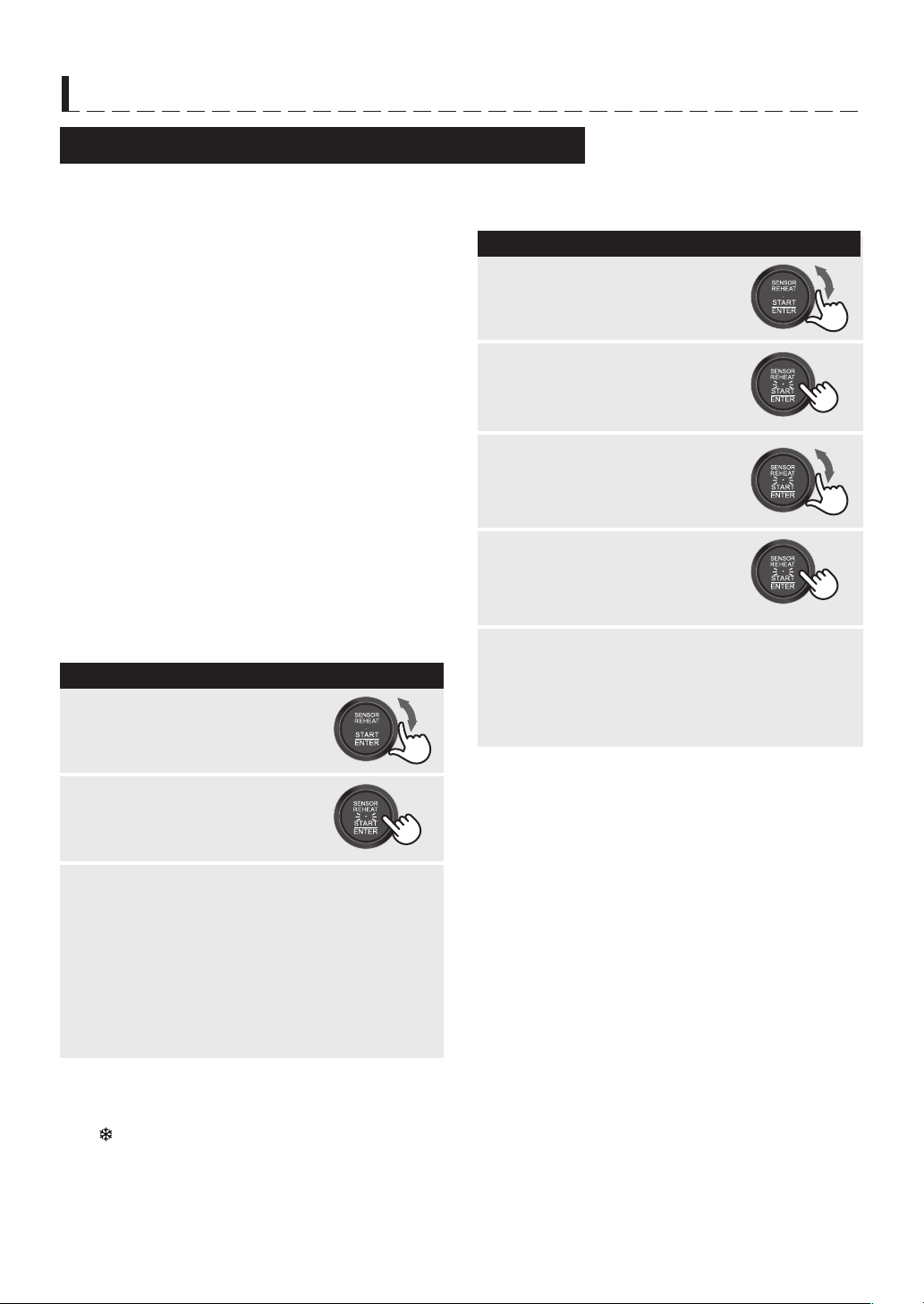
Auto Sensor Cook (ALL IN ONE) (Water Oven/Steam cooking)
PROCEDURE
1
Press AUTO SENSOR COOK once.
Turn the Knob until desired
option (Stir Fry) appears.
2
3
* Suppose you want to cook a 0.5 kg food with
no frozen ingredient by Stir Fry.
× 1
Option Display
Weight
range
Water level Accessory
Food
position
Cooking time (min.)
No Frozen With Frozen
1. Grill
Up to 1 kg 1 or more
Baking tray
Rack
Upper
20 - 25 25 - 30
2. Bake Baking tray 20 - 30 25 - 30
3. Stir Fry
Baking tray 15 - 20 20 - 25
4. Steam
Up to 800 g 2 (MAX)
Baking tray
Rack
15 - 20 20 - 25
•
Additional 2 choices are available depending on having frozen ingredients or not:
For no frozen ingredient, press AUTO SENSOR COOK once.
For having any frozen ingredients, press AUTO SENSOR COOK twice.
•
Refer to Auto Sensor Cook Menu Guide on page E-33 and online cookbook, ensure the suitable menus and
follow to SHARP instructions.
Press START.
* The progress is shown with the flashing bar.
(When the sensor detects the vapour from the
food, the remaining cooking time will appear)
4
After cooking, “EXTEND” will appear.
If you wish to extend cooking time, turn the
Knob to add time and press START within
1minute.
If not, press STOP/CLEAR.
After the oven has cooled, remove and empty
the water tank, wipe oven cavity.
Then empty the drip tray.
E – 13
AUTOMATIC COOKING
WARNINGS:
1. The oven door, outer cabinet and oven cavity will
become hot. Use thick oven gloves when adding or
removing foods to prevent burns.
2. Do not open the oven with your face close to the
oven. Steam from the oven may cause burns.
NOTES:
1. Menu No. 5 cannot be programmed with More or
Less Time Adjustment.
2 For the menus with *, it is not necessary to enter
the weight of food.
Tips for menu No.1 - 3:
For reheating frozen item, turn the Knob slightly right
until “
” is shown with the menu number.
Auto Menu (Water Oven/Water Grill/Steam/Microwave cooking)
Auto Menu has 15 menus:
1. Crispy Reheat*
2. Steam Reheat*
3. Reheat Bread*
4. Reheat Frozen Food*
5. Reheat as Temprerature*
6. Grilled Chicken
7. Deep Fried Chicken
8. Grilled Fish
9. Steamed Vegetables*
10. Baked Sweet Potato
11. Toast
12. Breakfast Set
13. Sponge Cake
14. Cream Puff
15. Dried Food
Refer to Auto Menu Guide on page E-34-38, and
online cookbook, ensure the suitable menus and
follow to SHARP instructions.
For Menus except for Menu No. 5
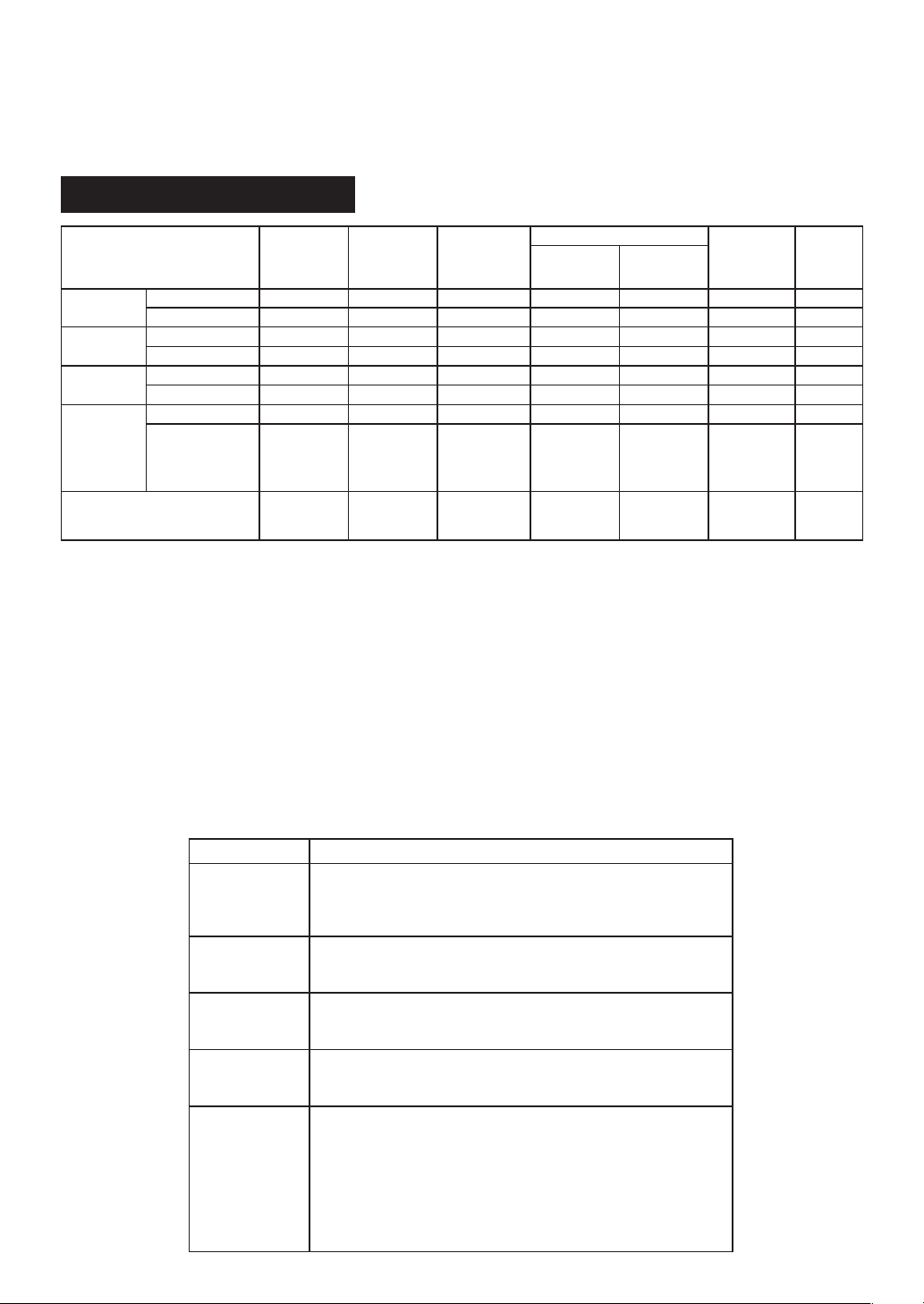
* Suppose you want to grill fish for 4 servings.
PROCEDURE
1
Turn the Knob until desired
menu number (8-4) appears.
Press START.
2
3
After cooking, “EXTEND” will appear.
If you wish to extend cooking time,
turn the Knob to add time and press START
within 1 minute.
If not, press STOP/CLEAR.
If necessary, after the oven has cooled, remove
and empty the water tank, wipe oven cavity.
Then empty the drip tray.
For menu No. 5
* Suppose you want to heat butter to 20°C.
PROCEDURE
1
Turn the Knob until desired
menu number (5) appears.
Press ENTER to confirm.
2
3
After cooking, “EXTEND” will appear.
If you wish to extend cooking time,
turn the Knob to add time and press START
within 1 minute.
If not, press STOP/CLEAR.
Press START.
4
Turn the Knob until desired
temperature (20°C) appears.
5
E – 14
MANUAL COOKING
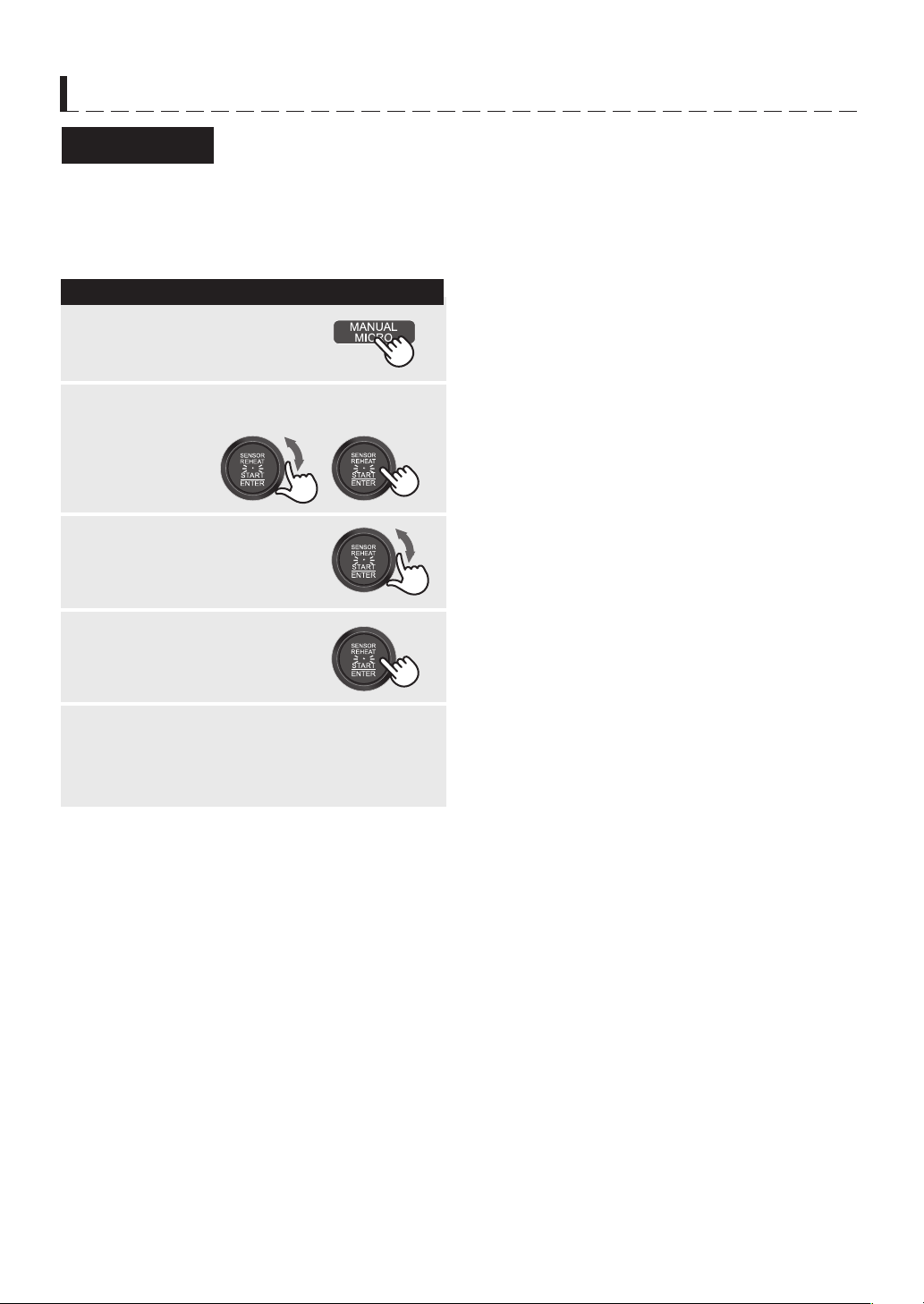
Manual Cooking is an option in Convection, Grill, Steam, Proof and Microwave.
Refer to the Manual Cooking Chart. The chart gives information on each setting.
Manual Cooking Chart
SUPERHEATED STEAM LEVEL
Your oven can be programmed for the quantity of Superheated Steam from level 0 to level 3. See page E-7.
COOKING TIME INPUT
Your oven can be programmed for up to 8 hours depending on the cooking mode. Refer to the Manual Cooking
Chart. The input unit increment varies from 10 seconds to 30 minutes, depending on the total length of time and
cooking mode as shown in the table below.
TEMPERATURE INPUT
Your oven can be programmed for temperatures from 30°C to 250°C depending on the cooking mode.
Refer to the Manual Cooking Chart. The temperature can be adjusted as shown in the table below.
* Preheat temperature is held for 20 minutes.
** Time range for 800W is 0-10 minutes, and for 600 W is 0- 30 minutes.
Option Preheat*
Superheated
Steam
level
Temp/
Microwave
range
Adjustment during cooking
Time range
Water
Tank
Superheated
Steam level
Temp/
Microwave
Convection
Water Oven YES or NO 0 - 3 100 - 250°C YES YES 0 - 1h35min. YES
Oven YES or NO - 100 - 250°C - YES 0 - 1h35min. NO
Grill
[16] Water Grill YES or NO 0 - 3 - YES - 0 - 45min. YES
[16] Grill YES or NO - - - - 0 - 45min. NO
Steam
[17] Steam High NO - 100°C - - 0 - 30min. YES
[18] Steam Low NO - 70 - 95°C - NO 0 - 45min. YES
Proof
[19] Steam Proof NO - 35 - 45°C - NO 0 - 2 hours YES
[20] Proof NO - 30 - 45°C - NO
30°C :
0 - 8 hours
35 - 45°C:
0 -2 hours
NO
Microwave - -
800/600/500/
200 W
- NO 0 - 1hour** NO
ITEM INPUT STEP
Temperature
Convection
Steam
Proof
10°C per step (170°C is initial temperature)
5°C per step (70°C is initial temperature)
5°C per step (40°C is initial temperature)
Cooking Time
Convection 0 - 30 min.
30 min. - Max.
: 1 min. per step (Initial setting time: 15 min.)
: 5 min. per step
Cooking Time
Grill
Steam
0 - 15 min.
15 min. - Max.
: 30 sec. per step (Initial setting time: 15 min.)
: 1 min. per step
Cooking Time
Proof 0 - 1 hour
1 hour - Max.
: 5 min. per step (Initial setting time: 30 min.)
: 30 min. per step
Cooking Time
Microwave 0 - 5 min.
5 - 10 min.
10 - 30 min.
30 min. - Max.
: 10 sec. per step
: 30 sec. per step
: 1 min. per step
: 5 min. per step
* 0 - 10 min. : 10 sec. per step (for 200 W)
0 - 1 min.: 5 sec. per step (for 800 W)
1 - 10 min.: 10 sec. per step (for 800 W)
E – 15
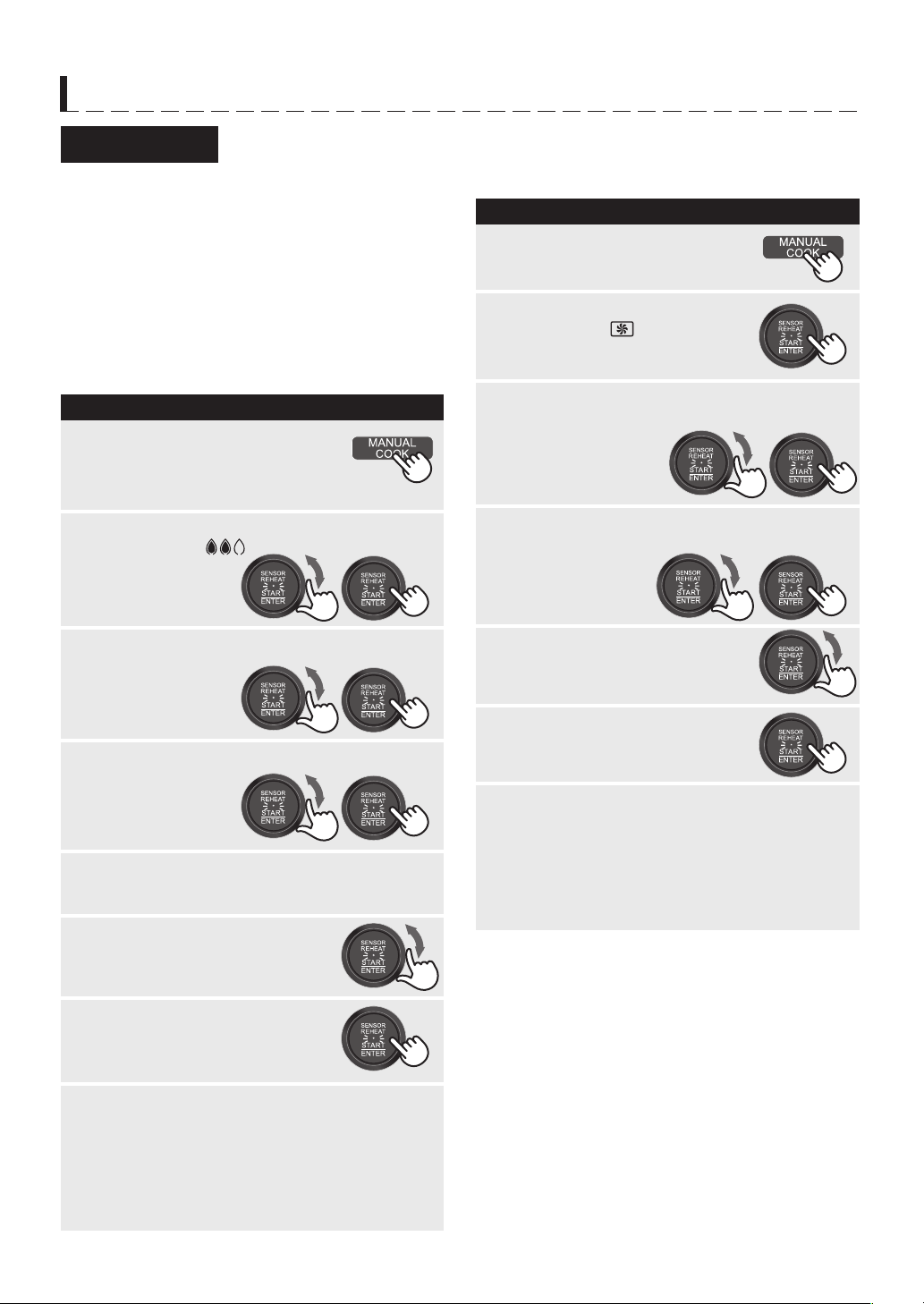
Microwave is fast and convenient for cooking,
reheating and defrosting.
There are 4 different power levels.
PROCEDURE
1
Turn the Knob to select power level (500 W),
and press ENTER to confirm.
2
Press MANUAL MICRO.
3
Turn the Knob to enter desired
cooking time (5 min.)
MANUAL COOKING
Microwave
Press START.
4
After cooking, “EXTEND” will appear. If you
wish to extend cooking time, turn the Knob to
add time and press START within 1 minute.
If not, press STOP/CLEAR.
5
* Suppose you want to cook for 5 minutes on 500W.
NOTE:
Do not use the baking tray and metal rack.
E – 16
MANUAL COOKING
Convection
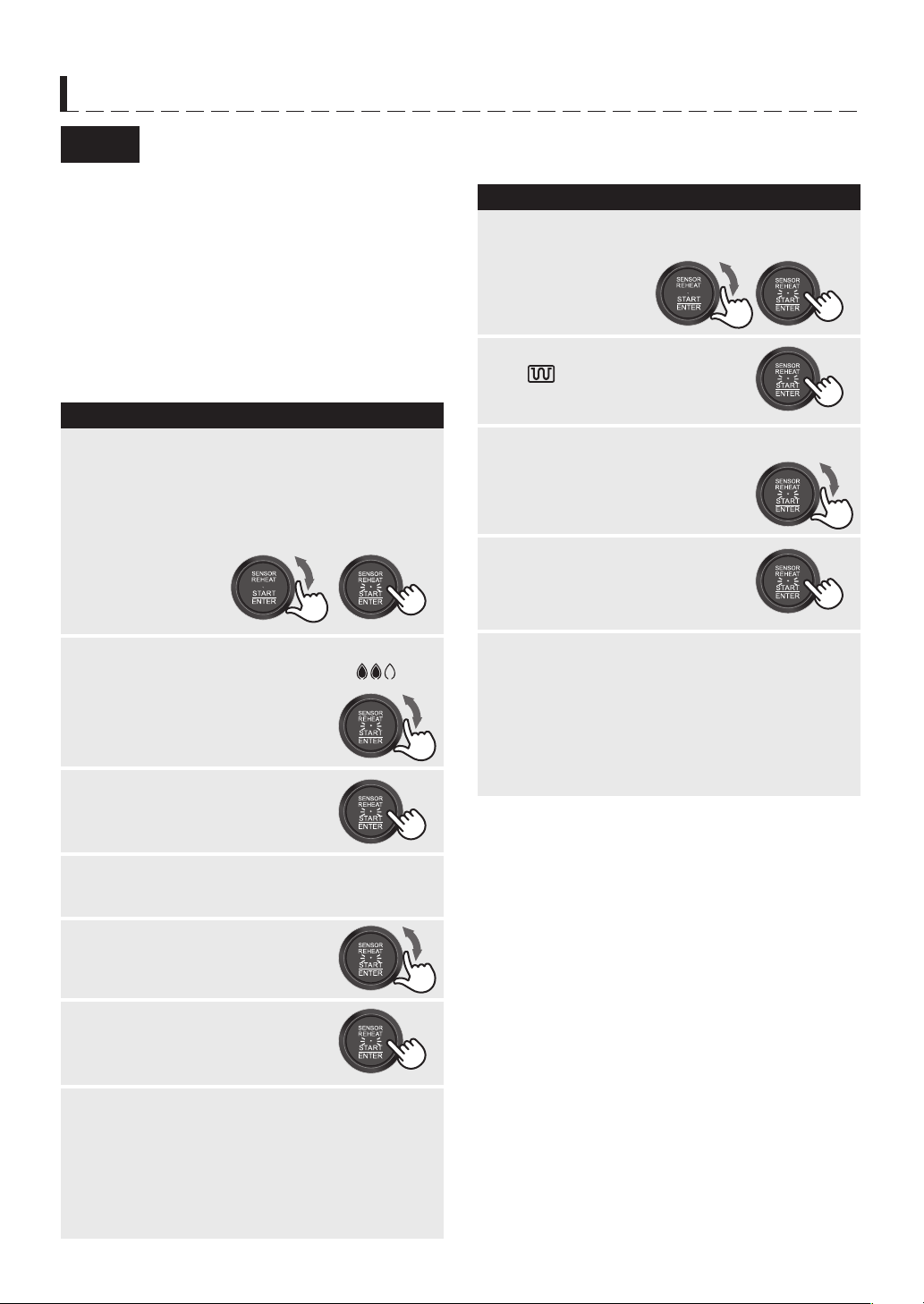
Convection has 2 functions, Oven and Water Oven, and
each function has 2 options, With Preheat or Without Preheat.
You can cook with one or two layers. Refer to online
cookbook, ensure the suitable menus and follow to
SHARP instructions.
Water Level: 1 or more (for Water Oven only)
Food Position: Lower
Cooking with Preheat
* Suppose you want to cook 1 layer for 45 minutes
on Water Oven 2 at 160°C.
WARNING:
The oven door, outer cabinet and oven cavity will
become hot. Use thick oven gloves when adding or
removing foods to prevent burns.
NOTES:
1.
If the oven door is not opened after preheating, the
oven will hold the preheat temperature for 20 minutes.
After that, the display will return to the initial one and
you have to reprogram from the step 1.
2.
You can change the oven temperature during cooking.
See page E-20.
3.
You can change the Superheated Steam Level during
cooking. See page E-20.
Cooking without Preheat
*
Suppose you want to cook 2 layers for 45 minutes on
Oven at 160
°C
PROCEDURE
Turn the Knob to select desired superheated
steam level (2:
),
then press ENTER
to confirm.
2
Turn the Knob to enter
desired temperature
(160°C), then press
START to preheat.
3
Turn the Knob to enter desired
cooking time (45 min.)
4
5
When preheat is over, place food in the oven.
Close the door.
6
1
No food in the oven.
* Depending on the menu,
only accessories should be put.
Press MANUAL COOK.
Press START.
7
PROCEDURE
2
Turn the Knob to enter desired temperature
(160°C) and press ENTER to confirm.
4
Turn the Knob to enter desired
cooking time (45 min.)
5
Press START.
6
7
1
Press MANUAL COOK.
Turn the
Knob
to select desired layer (2 tray)
without flashing “PREHEAT”,
then press ENTER
to confirm.
3
After cooking, “EXTEND” will appear. If you
wish to extend cooking time, turn the Knob to
add time and press START within 1 minute.
If not, press STOP/CLEAR.
After the oven has cooled, remove and empty
the water tank, wipe oven cavity. Then empty
the drip tray.
8
Turn the Knob to select “PREHEAT” and
desired layer (1 tray),
then press ENTER
to confirm.
Confirm flashing “CONVEC
OVEN” and “
”, then press
ENTER.
After cooking, “EXTEND” will appear. If you
wish to extend cooking time, turn the Knob to
add time and press START within 1 minute.
If not, press STOP/CLEAR.
After the oven has cooled, remove and empty
the water tank, wipe oven cavity. Then empty
the drip tray.
E – 17
MANUAL COOKING
Grill
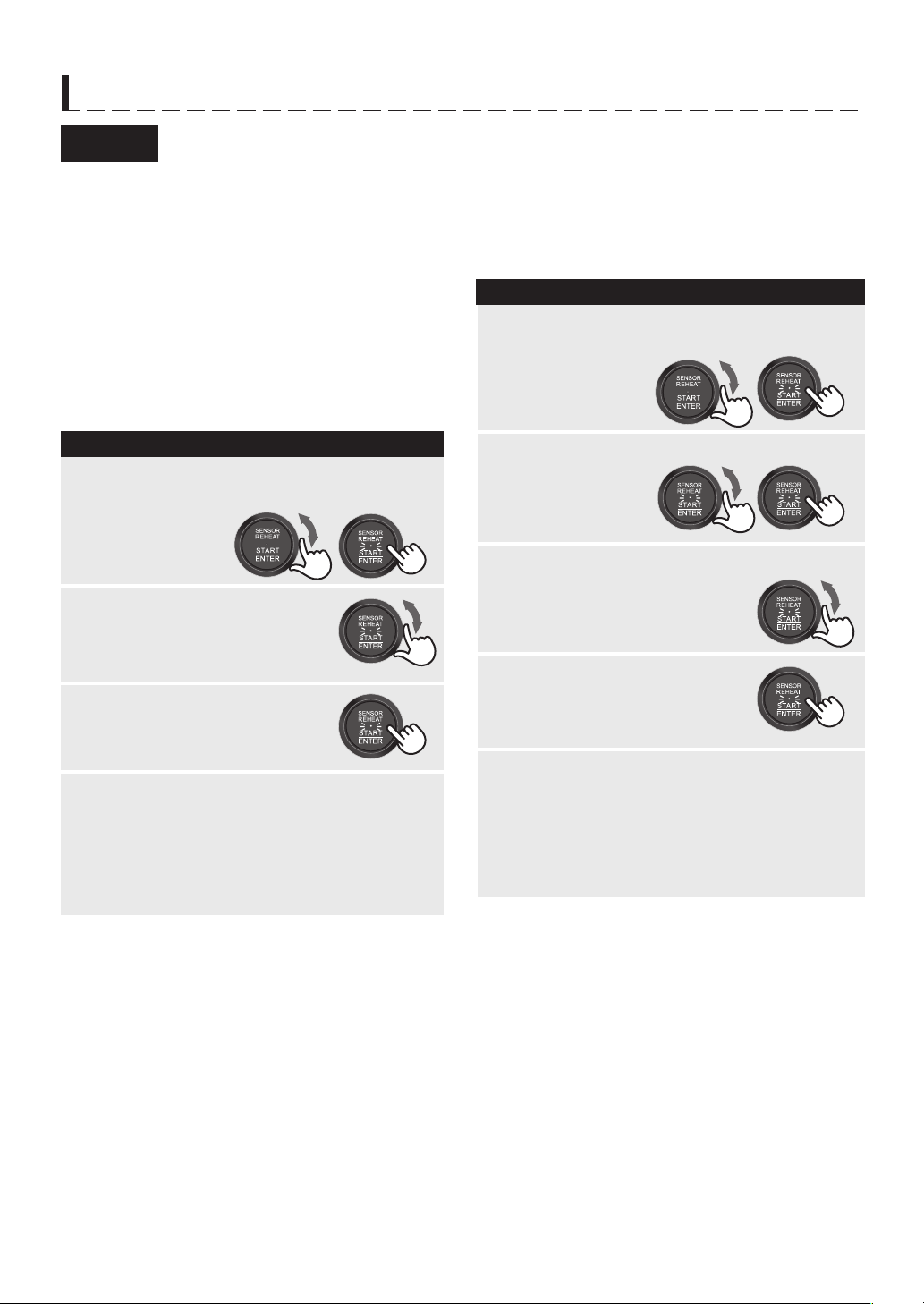
Grill has 2 functions, Grill and Water Grill, and each
function has 2 options, With Preheat or Without
Preheat.
Refer to the online cookbook, ensure the suitable
menus and follow to SHARP instructions.
Water Level: 1 or more (for Water Grill only)
Food Position: Upper
Cooking with Preheat
* Suppose you want to cook for 20 minutes on Water
Grill 2.
WARNING:
The oven door, outer cabinet and oven cavity will
become hot. Use thick oven gloves when adding or
removing foods to prevent burns.
NOTES:
1.
If the oven door is not opened after preheating, the
oven will hold the preheat temperature for 20 minutes.
After that, the display will return to the initial one and
you have to reprogram from the step 1.
2.
You can change the Superheated Steam Level during
cooking. See page E-20.
Cooking without Preheat
*
Suppose you want to cook for 20 minutes on Grill.
PROCEDURE
Turn the Knob to select Water Grill and
desired superheated steam level (2:
).
2
Press START to preheat.
3
Turn the Knob to enter desired
cooking time (20 min.)
4
5
When preheat is over, place food in the oven.
Close the door.
6
1
No food in the oven.
* Depending on the menu,
only accessories should be put.
Press START.
7
PROCEDURE
2
Turn the Knob to enter desired cooking time
(20 min.).
4
5
Press START.
1
Turn the Knob to select Grill (16 without
flashing “PREHEAT”), then press ENTER to
confirm.
3
After cooking, “EXTEND” will appear. If you
wish to extend cooking time, turn the Knob to
add time and press START within 1 minute.
If not, press STOP/CLEAR.
After the oven has cooled, remove and empty
the water tank, wipe oven cavity. Then empty
the drip tray.
Turn the Knob to select Grill (16) and
“PREHEAT”, then press ENTER to confirm.
Confirm flashing “GRILL” and
“
”, then press ENTER.
After cooking, “EXTEND” will appear. If you
wish to extend cooking time, turn the Knob to
add time and press START within 1 minute.
If not, press STOP/CLEAR.
After the oven has cooled, remove and empty
the water tank, wipe oven cavity. Then empty
the drip tray.
E – 18
MANUAL COOKING
Steam
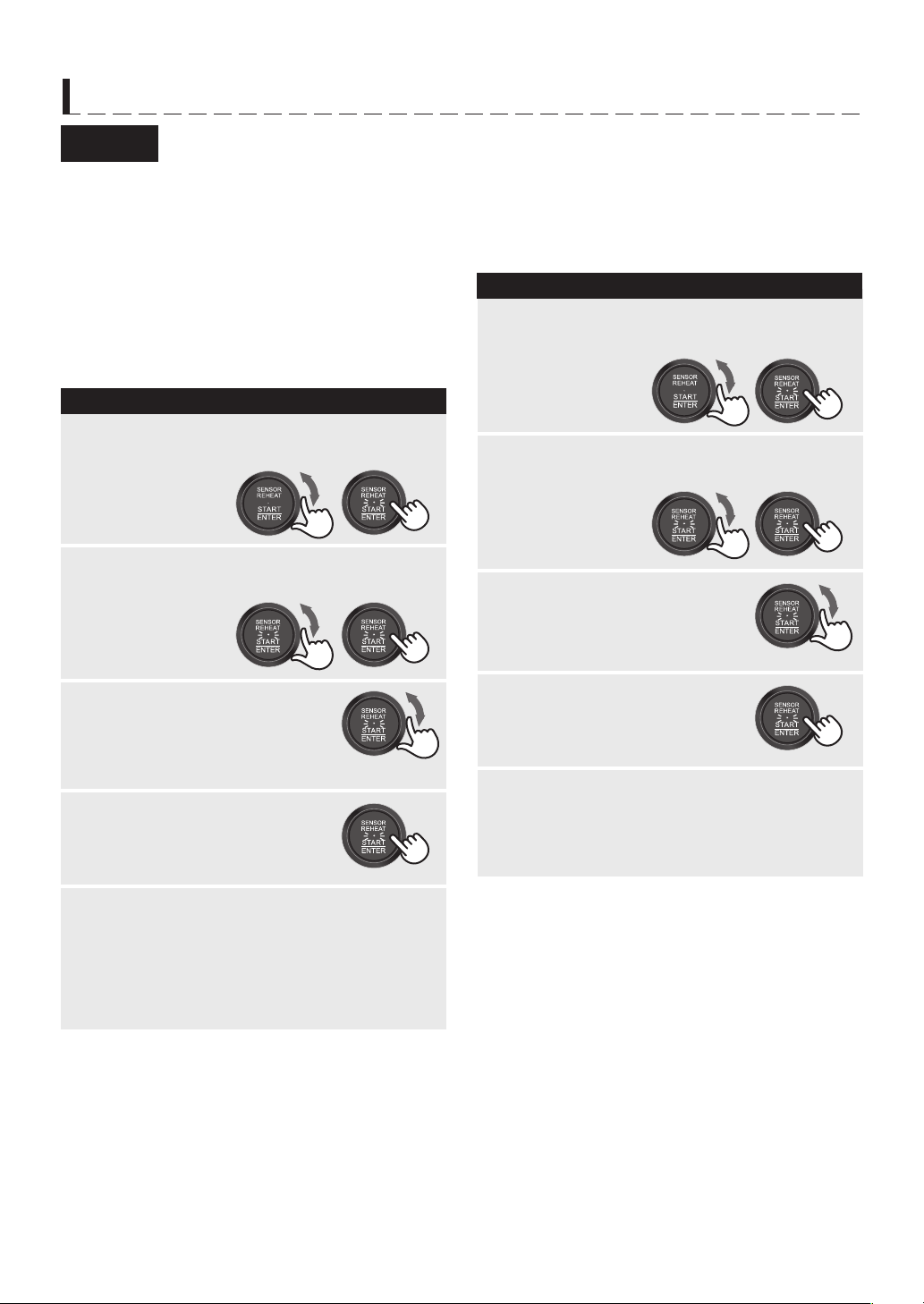
Steam has 2 functions: Steam High and Steam Low.
Steam cooks food gently without destroying shape,
colour or aroma.
Refer to the online cookbook, ensure the suitable
menus and follow to SHARP instructions.
Steam High
Steam High cooks food at 100°C.
Water Level: 2 (MAX)
Food Position: Upper
* Suppose you want to cook for 20 minutes on Steam
High.
PROCEDURE
Turn the Knob to enter desired
cooking time (20 min.)
2
3
4
1
Press START.
After cooking, “EXTEND” will appear. If you
wish to extend cooking time, turn the Knob to
add time and press START within 1 minute.
If not, press STOP/CLEAR.
After the oven has cooled, remove and empty
the water tank, wipe oven cavity. Then empty
the drip tray.
Turn the Knob to select Steam High (17),
then press ENTER to confirm.
WARNING:
The oven door, outer cabinet and oven cavity will
become hot. Use thick oven gloves when adding or
removing foods to prevent burns.
NOTE:
While the oven cavity temperaure is too high, you
cannot use Steam Low. The display will show “U 04”.
PROCEDURE
2
Turn the Knob to enter desired cooking time
(20 min.).
4
5
Press START.
1
Turn the Knob to select Steam Low (18),
then press ENTER to confirm.
3
Turn the Knob to enter desired
temperature (90°C)
and press ENTER
to confirm.
After cooking, “EXTEND” will appear. If you
wish to extend cooking time, turn the Knob to
add time and press START within 1 minute.
If not, press STOP/CLEAR.
After the oven has cooled, remove and empty
the water tank, wipe oven cavity. Then empty
the drip tray.
Steam Low
Steam Low cooks food at 70 - 95°C.
Water Level: 2 (MAX)
Food Position: Upper
* Suppose you want to cook for 20 minutes on Steam
Low (90°C).
WARNING:
The oven door, outer cabinet and oven cavity will
become hot. Use thick oven gloves when adding or
removing foods to prevent burns.
E – 19
MANUAL COOKING
Proof
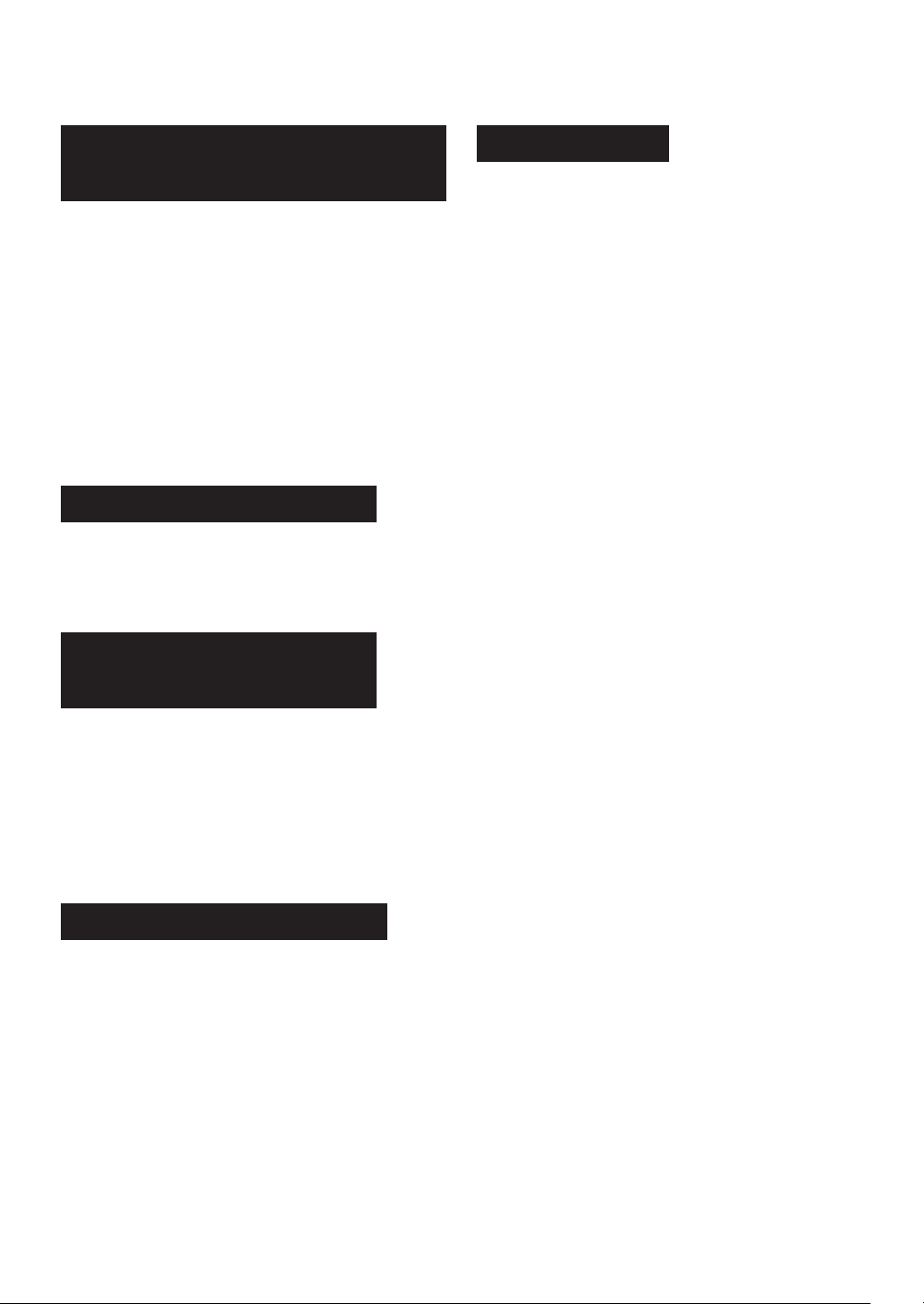
Proof has 2 functions, Steam Proof and Proof.
Use Proof to aid dough rising when making regular or
sweet yeast breads.
Steam Proof
This function proofs dough while adding steam.
Water Level: 1 or more
Food Position: Lower
* Suppose you want to proof for 50 minutes on Steam
Proof (40°C)
NOTES:
1. While the oven cavity temperaure is too high, you
cannot use Steam Proof. The display will show
“U 04”.
2. Cover the food container with a dry kitchen cloth.
PROCEDURE
2
Turn the Knob to enter desired
cooking time (50 min.).
4
5
Press START.
1
Turn the Knob to select Steam Proof (19),
then press ENTER to confirm.
3
Turn the Knob to enter desired temperature
(40°C) and press ENTER to confirm.
After cooking, “EXTEND” will appear. If you
wish to extend cooking time, turn the Knob to
add time and press START within 1 minute.
If not, press STOP/CLEAR.
Remove and empty the water tank, wipe oven
cavity. Then empty the drip tray.
Proof
This function proofs dough without steam.
The water tank is not necessary.
Food Position: Lower
* Suppose you want to proof for 2 hours 30 minutes on
Proof (30°C).
NOTES:
1. While the oven cavity temperaure is too high, you
cannot use Proof. The display will show “U 04”.
2. Cover the food container with a dry plastic wrap.
PROCEDURE
2
Turn the Knob to enter desired
cooking time (2 h 30 min.).
4
5
Press START.
1
Turn the Knob to select Steam Proof (19),
then press ENTER to confirm.
3
Turn the Knob to enter desired temperature
(30°C) and press ENTER to confirm.
After cooking, “EXTEND” will appear. If you
wish to extend cooking time, turn the Knob to
add time and press START within 1 minute.
If not, press STOP/CLEAR.
E – 20
OTHER CONVENIENT FEATURES
You can adjust cooking results as you like.
Should you discover that you like any automatic
settings slightly more done, turn the Knob clockwise
within 30 sec. after pressing START.
The display will show “
s
”.
Should you discover that you like any automatic
settings slightly less done, turn the Knob
counterclockwise within 30 sec. after pressing
START.
The display will show “
”.
During “
●
” is flasing, you can change the setting.
(It will disappear in about 30 sec.)
Automatic Cooking Time Adjustment
(More or Less Time Adjustment)
Temperature Adjustment
To change the oven temperature during cooking in
Manual Operation with Convection, simply turn the
Knob to increase or decrease in 10°C increments and
then press ENTER.
The Superheated Steam Level can be changed
during cooking in Manual Operations with Water
Oven and Water Grill. To change, press MANUAL
COOK. Then turn the Knob to select desired
Superheated Steam Level and then press ENTER.
NOTE:
This function is invalid during preheating and the
extension cooking.
Superheated Steam Level
Adjustment
End of Cooking Reminder
At end of cooking, the oven will signal and repeat after
1, 2 and 3 minutes unless door is opened or STOP/
CLEAR is pressed.
Mute the Oven
To mute the oven, press MANUAL MICRO for 4 sec.
until the 2 short beeps sound. Then press STOP/
CLEAR.
NOTES:
1. The oven will hold the setting even if the power is
interrupted.
2. The following 2 signals will sound even if the oven
is in the mute setting.
- Error sound
- Cancelation sound during oven operation
3. To restore the sound, press MANUAL MICRO for
4 sec. until a short beep sounds.
Then press STOP/CLEAR.
E – 21
OTHER CONVENIENT FEATURES
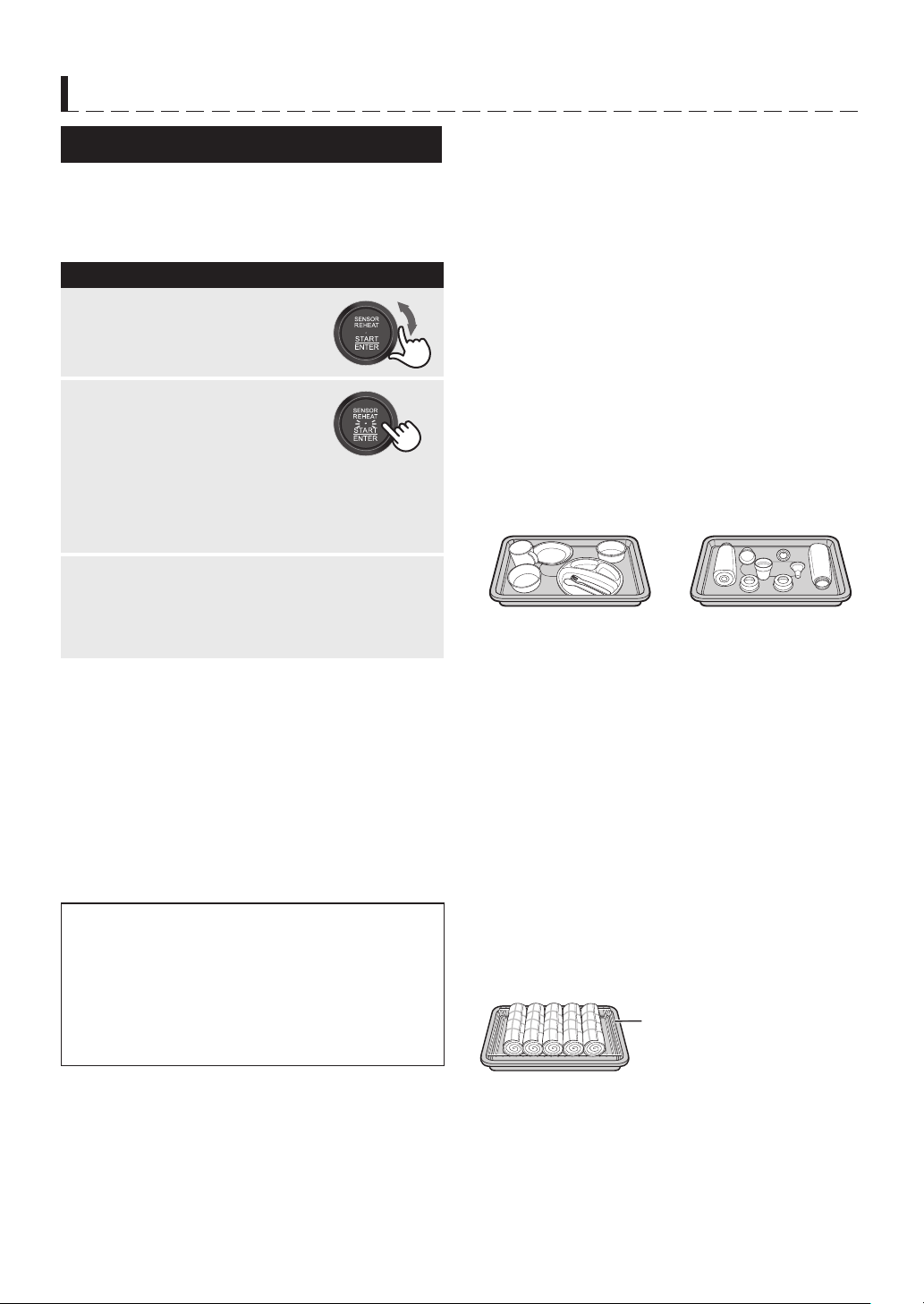
Sterilization has 2 options [21-1] and [21-2] depending
on the heat-resistant temperature. See the right side.
* Suppose you want to sterilizate dishes with [21-1].
PROCEDURE
1
Press START.
2
Turn the Knob to select
desired option number
(21-1) appears.
Sterilization for Kitchen Items
[21-1]
Items that heat-resistant temperature is over 120°
C
.
Time required: Maximum 46 min. (sterilization time:
about 26 min.)
Examples
:
• Plastic container (except for Polycarbonate resin)
• China, Ceramics: plate and bowl etc.
• Glassware (The items made of tempered glass,
cut-glass and crystal glass may be broken)
• Metal cutlery (The items having plastic handles are
not available)
• Stainless kitchen knife
• Kitchen scissors
• Baby bottle
NOTE for Container with lid:
Check the heat-resistant temperature for each part.
Some lids have lower heat-resistant temperature than
their containers.
Water Level: 2 (MAX)
Position: Lower
How to set: Put item directly on the baking tray.
• Containers should be put face upward.
• You can put baking paper on the baking tray.
[21-2]
Items that heat-resistant temperature is over 90°
C
.
Time required: Maximum 33 min. (sterilization time:
about 30 min.)
Examples
:
• Plastic cutting board (smaller than 29cm×39cm:
1sheet)
• Towel (smaller than 40cm×40cm : up to 6 pieces,
smaller than 36cm×90cm: up to 3 pieces)
Water Level: 2 (MAX)
Position: Upper
How to set: Put item on the metal rack in baking tray.
NOTE for towel:
1. Wring water out of towels.
2. Fold the towels and stack them on the metal rack.
Or roll up and put them side by side on the rack.
(with less than10 layers)
* Test organization: General Incorporated
Association Kyoto Biseibutsu Kenkyusho
Test method: Live bacteria measurement
Sterilization method: Removal by heat using water vapor
Test results: More than 99.0% of bacteria eliminated
Test subject: 21-1:Ceramic rice bowl
21-2:Towel
In no case does sterilization completely eliminate bacteria.
* After heating, the oven will automatically go
on to the cooling programme. The progress is
shown with flashing bar.
(4 bars will light before finishing the programme)
After sterilization, remove the baking tray
slowly and horizontally.
Remove and empty the water tank, wipe
oven cavity. Then empty the drip tray.
3
NOTES:
1. While the oven cavity temperaure is too high, you
cannot use Sterilization. The display will show
“U 04”.
2. Check the heat-resistant temperature of each
container before sterilization.
Never sterilizate items the heat-resistant
temperature is not clarified.
3. Do not open the door or add any items during
sterilization.
4. Do not remove items until the sterilization finishes
to pervent burns.
Unavailable Items:
• Items with heat-resistant temperature less than
90°
C
.
• Lacquer, Bamboo, Wooden or Paper Ware
• Iron Cookware
• Dirty tableware
• Polycarbonate products
• Any other items than tableware and cookware
Up to 2 dishes can
be stacked.
Put item on the metal rack.
Place the baby bottle on
its side and set the nipple
and cap next to it.
E – 22
CLEANING AND CARE
CLEAN THE OVEN AT REGULAR INTERVALS -
Keep the oven clean and remove any food deposits, or
it could lead to deterioration of the surface. This could
adversely affect the life of the appliance and possibly
result in a hazardous situation.
IMPORTANT CAUTIONS:
• DISCONNECT THE POWER CORD BEFORE
CLEANING.
• BEFORE CLEANING, MAKE SURE THE OVEN
IS COMPLETE COOL.
• DO NOT USE OVEN CLEANERS, CAUSTIC
CLEANERS (ACIDIC/ALKALINE), ABRASIVE,
HARSH CLEANERS OR SCOURING PADS ON
ANY PART OF YOUR OVEN.
• DO NOT USE A STEAM CLEANER.
Oven Cleaning - Exterior
The outside may be cleaned with mild soap and warm
water, wipe clean with a damp cloth. Avoid the use of
harsh abrasive cleaners. Keep the ventilation openings
free of dust.
Door
Wipe the door and window on both sides, the door
seals and adjacent parts frequently with a damp cloth
to remove any spills or spatters. Do not use harsh
abrasive cleaners or sharp metal scrapers to clean the
oven door glass since they can scratch the surface,
which may result in shattering of the glass.
Control Panel
Care should be taken in cleaning the control panel.
Wipe the panel with a cloth dampened slightly with
water only. Dry with a soft cloth. Do not scrub or use
any sort of chemical cleaners.
Oven Cleaning - Interior
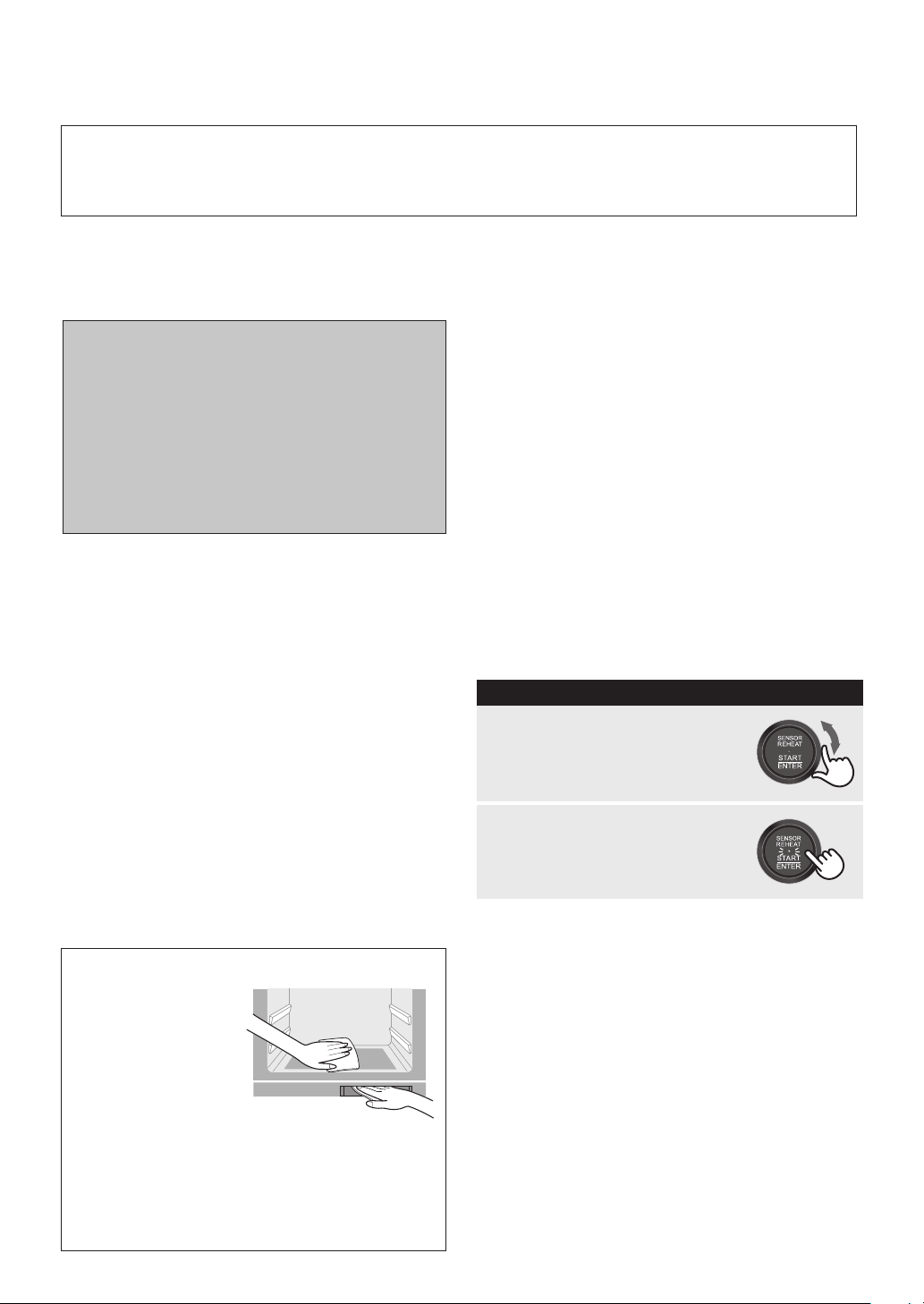
For removal of OIL AND FOOD SPLASHES on
oven walls:
1. Fill the water tank with room temperature water
suitable for drinking (filtered) through the lid to the
2 mark (MAX).
2. Operate the oven with [17] Steam High for 10
minutes without food. See page E-18 in the
operation manual.
3. After the steaming, wipe the dirt in the oven interior
with a dry soft cloth while the oven is still warm.
For removal of the ODOUR (STEAM CLEAN):
Carry out Steam Clean function below. It is not a
self-cleaning function. It will take approximately 20
minutes for the cleaning cycle.
PREPARATION
1. Make sure to wipe the oven walls with a soft cloth
and warm water (or mild soapy water) before
carrying out Steam Clean.
2. Make sure that the water tank is filled with room
temperature water suitable for drinking (filtered) to
the 1 mark and is installed. (See page E-6.)
3. Make sure that the empty drip tray is installed. (See
page E-6.)
Key Point for Cleaning - Immediately and frequently!
The food splashes and oily meat juice, remaining on the oven interior walls will get stuck and hard to remove
if it is not cleaned immediately and after each use. The usage of the Steam function will assist in this cleaning
process.
IMPORTANT INFORMATION:
• After every use:
Wipe the oven walls
with a soft cloth
and warm water (or
mild soapy water)
while the oven is
still warm. Using
the oven without
cleaning may lead
spatters to get stuck.
• Do not use caustic cleaners (acidic/alkaline),
spray type cleaners, abrasive or harsh cleaners
or scouring pads as it may damage the surface
of paint coating.
Allow the oven to cool to prevent burns. Then open
the door and remove any residue carefully with a soft
damp cloth. Finally, remove and empty the water tank.
Then empty the drip tray.
PROCEDURE
1
Turn the Knob to select
[23] Steam Clean.
2
Press START.

E – 23
CLEANING AND CARE
Door Seals
Always keep the door seals clean to prevent any
damage. If water condenses inside the door seals,
wipe dry with a soft cloth. Polish with another soft
cloth. Do not use a chemical or abrasive cleaner
on these surfaces. Care should be taken not to rub,
damage, pull or move the seals. Before cooking,
always check that door seals is lying smooth and
flat. If not, steam will leak from the door. Do not use
the oven if it has a damaged door seals. Consult a
SERVICE CENTRE APPROVED BY SHARP.
Baking Tray / Rack
Wash baking tray and rack after cooking with a mild
soap or detergent solution, rinsing and polishing dry.
Do not use harsh cleaners, sharp metal scrapers or
stiff brushes to prevent damage to the surface.
Water Tank and Water Tank Lid
After cooking, wash in a mild soap or detergent solution
with a soft damp cloth or sponge, rinse and polish
dry. Do not wash in the dishwasher. Do not use harsh
cleaners, sharp metal scrapers or stiff brushes on the
water tank and water tank lid.
Drip Tray
Empty drip tray after cooking, wash in a mild soap or
detergent solution with a soft damp cloth or sponge,
rinse, polish dry and replace below the oven front. Do
not wash in the dishwasher.
Descaling within the Oven’s Steam Parts
During steam production, scale may form in the steam
generator. To remove scale, carry out descale function
when “DESCALE” is shown in the display. See page
E-8 for complete instructions.
E – 24
TROUBLESHOOTING CHART
If “C with number” is displayed or you think the oven is not working properly, check the chart below before
consulting a SERVICE CENTRE APPROVED BY SHARP. This will help to prevent unnecessary service calls.
• Repairs and Modifications: Do not attempt to operate the oven if it is not working properly.
• Outer cabinet & Lamp Access: Never remove the outer cabinet to avoid the possibility of electric shock or burns.
Error Message/Information Message
DISPLAY ACTION
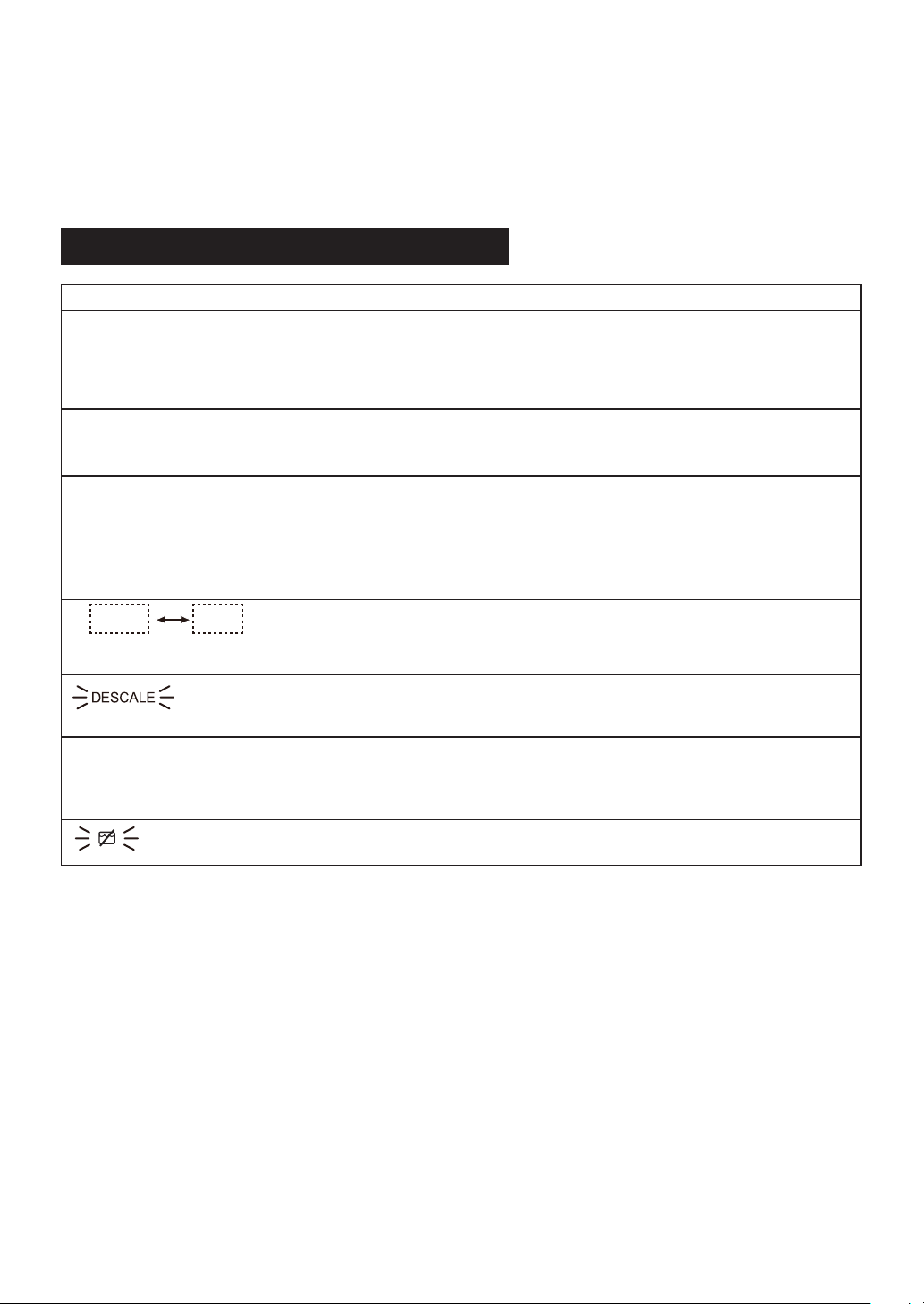
U 03
The amount of food to be cooked is too small.
Press STOP/CLEAR and increase the amount or set the cooking time to less
than 5 minutes.
After oven cooking and then heating with the microwave while the inside is still
hot, this may appear. If this occurs, allow the inside of the oven to cool.
U 04
The oven is too hot to use Defrost, Auto Menu (menu No. 5), [18] Steam Low,
[19] Seam Proof, [20] Proof or [21] Sterilization.
Remove food from oven and allow to cool until the message clears.
U 11
Remove water tank.
If the water tank is in the oven, [22] Drain Water function will not start.
Remove the water tank before starting Drain Water.
U 15
The water in the water circuit inside the oven is flozen.
The oven may not operate properly. Operate the oven with Oven (1 layer at 200°C)
without food and preheat for 5 minutes. See page E-16.
C
number
888
Flash alternately.
Due to technical error, contact a SERVICE CENTRE APPROVED BY SHARP.
Descaling is necessary.
Follow step-by-step instructions for descaling.
See page E-8.
D
(Time appearing in the
display is counting
down very rapidly.)
The oven is in the Demonstration mode.
This feature is mainly for use by retail outlets.
To cancel, press STOP/CLEAR until it beeps, and then press it 4 more times.
Check the water tank is put correctly.
E – 25
TROUBLESHOOTING CHART
The following situations are normal and are not signs that the oven is malfunctioning.
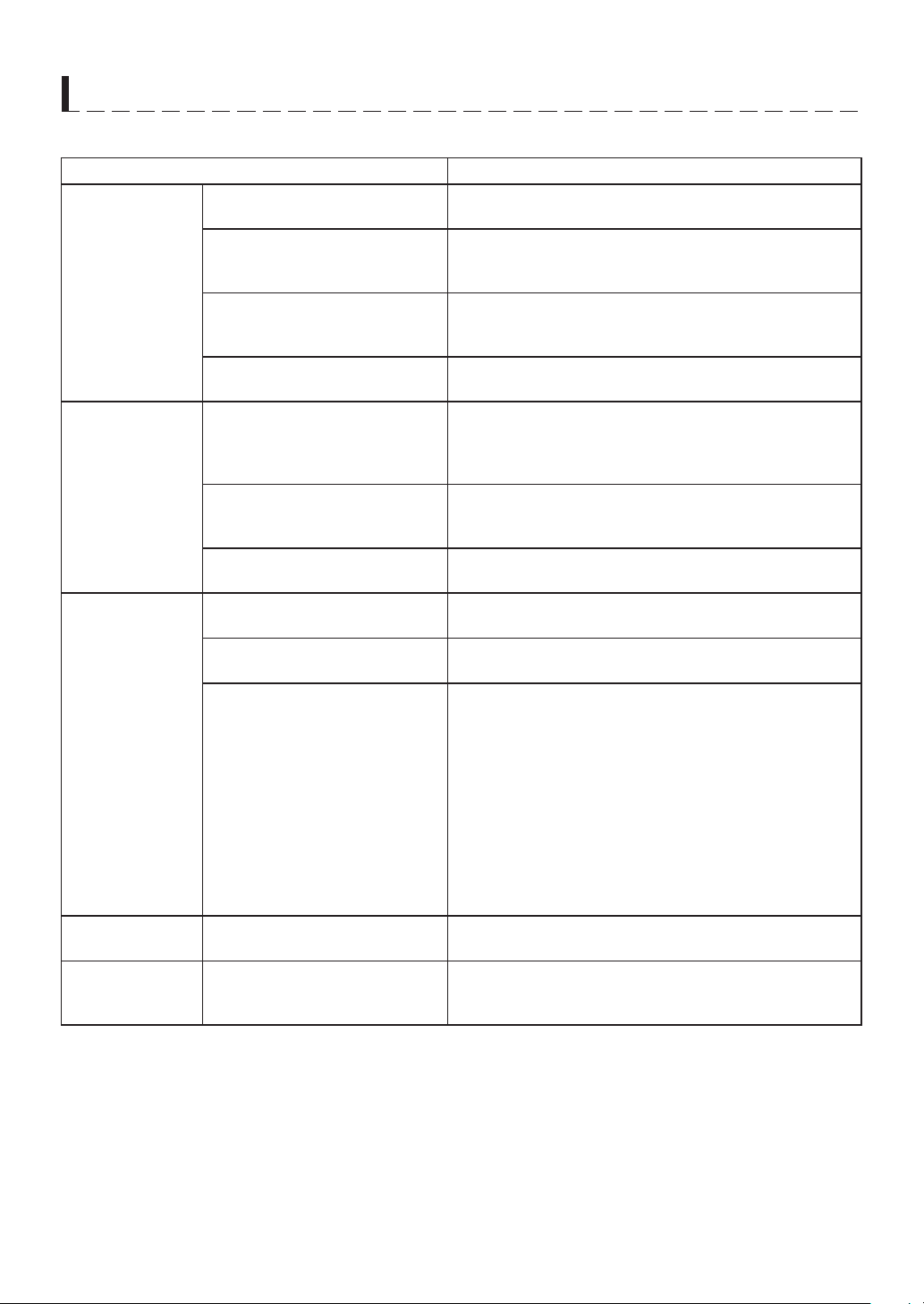
QUESTION / SITUATION ANSWER
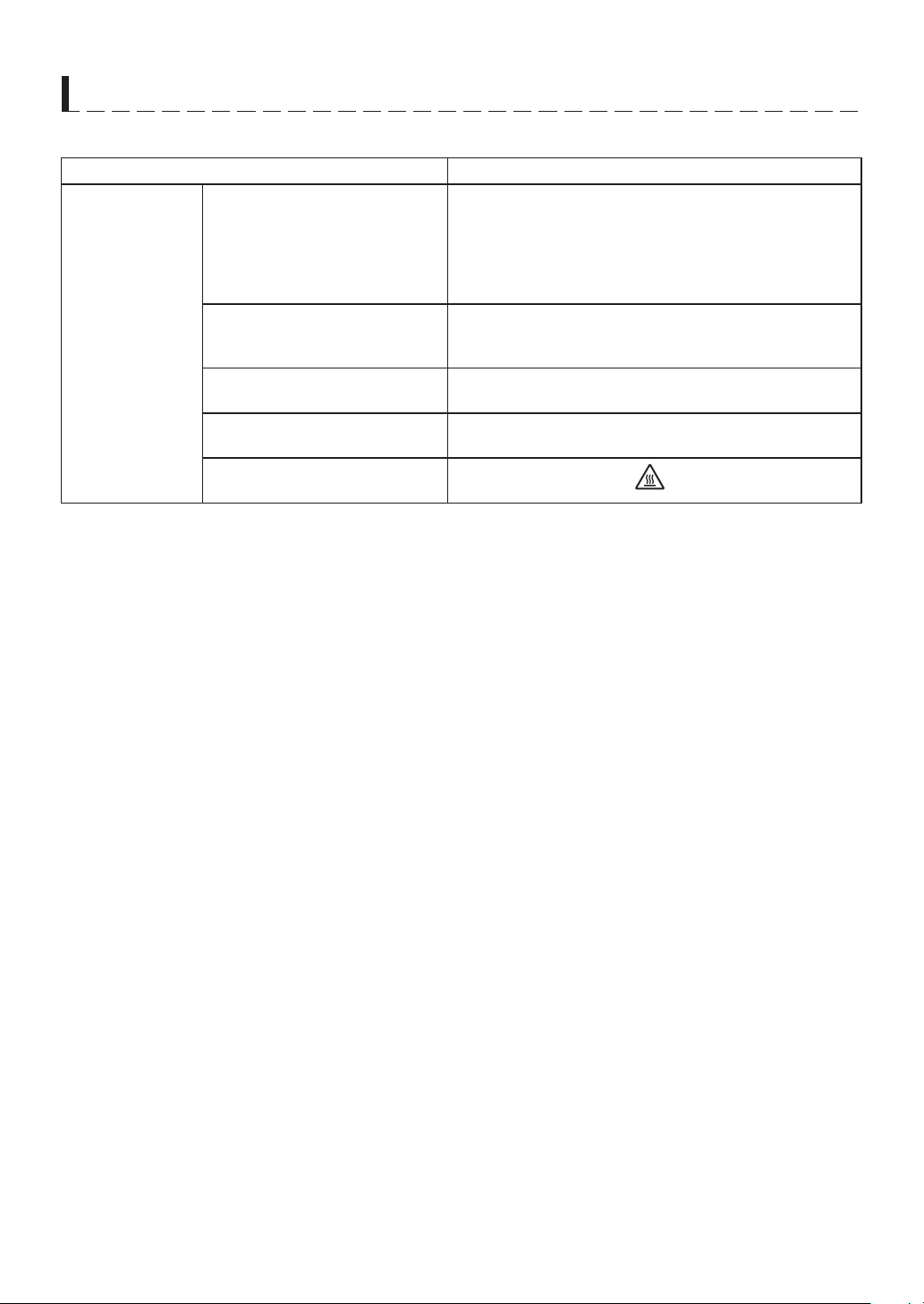
Control panel /
power supply
The display is black / blank. * Open the door and close.
* Check the power plug is properly connected to a
suitable wall outlet.
* Check the wall socket and fuse are functioning properly.
* Disconnect the power cord, wait for a minute, then
reconnect.
Electrical power supply is
interrupted during cooking.
* The programmed cooking time and mode will be
cancelled.
* Continue to cook with manual mode.
Oven light is off during PROOF
mode.
Normal operation to prevent bread dough from drying on
the surface.
Oven light is off during operating
in option No. [22] - [25].
This is normal operation.
The display does not go off.
When the display shows "
", the display will not go off.
E – 26
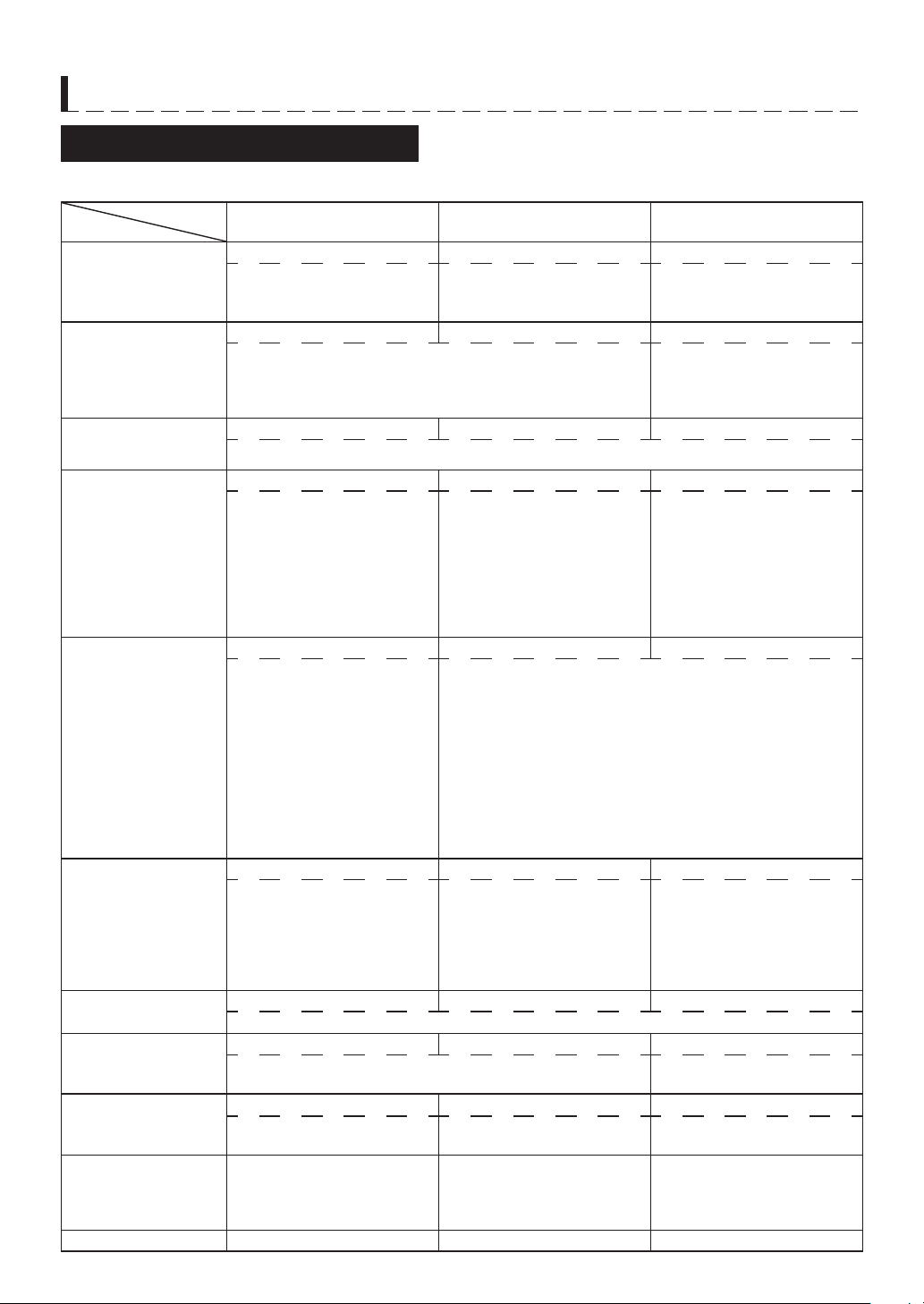
TROUBLESHOOTING CHART
The following situations are normal and are not signs that the oven is malfunctioning.
QUESTION / SITUATION ANSWER
Steam
Water is found inside the oven
when the door is opened.
Steam has condensed inside the oven. Wipe dry with a
soft cloth or a sponge after cooling.
Steam comes out of the air
ventilation openings at the top of
the oven.
It is normal for used steam to come from the air
ventilation opening on the top of the oven.
Condensed water can be seen in
the oven cavity.
This operation is normal.
Steam has condensed on the oven floor. Wipe dry with a
soft cloth or a sponge after cooling.
Steam comes from the door
during cooking.
Check the door sealings to make sure it is lying smoothly
and flat.
Noise / Sound No sound just after pressing
START.
The fan will operate depending on the oven internal
temperature etc.
No sound may cause at the beginning of the cooking,
however, it is normal.
Noise after cooking. The cooling fan will operate until the oven is cool.
The fan may continue to operate up to 10 minutes
depending on the oven and parts temperatures.
Noise when cooking with high
temperature.
High temperatures may cause expansion of the oven's
components. This is normal.
Smoke / Aroma When using the oven for the first
time, it may smoke or smell.
See page E-9 for step-by-step instructions for cleaning
the oven before the first use.
The oven cavity smells after
cooking.
See "For removal of the ODOUR:" on page E-22 for step-
by-step instructions for removing the aroma.
When a lot of smoke is emitted
from the food during grilling.
Before cooking, pour 1 cup (200ml) of water into the
baking tray (under the splash guard) to reduce the
smoking emitted from the food. If you pour the water,
extend the cooking time by 10-20%.
Never pour water during the cooking to prevent the
burn caused by very hot splashes.
WARNINGS:
1. The oven door, outer cabinet and oven cavity will
become hot. Use thick oven gloves when adding or
removing foods to prevent burns.
2. Do not open the oven with your face close to the oven.
Steam from the oven may cause burns.
Others Time appearing in the display is
counting down very rapidly.
Check the column of "D" on page E-24 and cancel.
Food spatters It is difficult to remove food
spatters stuck on the oven walls.
See "For removal of OIL AND FOOD SPLASHES on
oven walls:" on page E-22.
It is important to clean the oven interior after every use.

E – 27
Check the following before calling service:
1. Place one cup of water (approx. 250 ml) in a glass measure in the oven and close the door securely.
Programme the oven for one minute on Microwave 800 W. At this moment:
A. Does the oven lamp light? Yes _______ No _______
B. Does the cooling fan work? Yes _______ No _______
(Put your hand over the ventilation openings.)
C. Does the Microwave icon
appear in the display? Yes _______ No _______
D. After one minute, did audible signals sound? Yes _______ No _______
E. Is the water inside the oven hot? Yes _______ No _______
2. Remove water from the oven and programme the oven for 5 minutes on Oven (1 layer, 250°C).
A. Does the Oven icon
appear in the display? Yes _______ No _______
B. After the oven stops, is inside of the oven hot? Yes _______ No _______
3. Fill the water tank with water and replace.
Operate the oven for 3 minutes on Steam High.
A. Does the Steam icon
appear in the display? Yes _______ No _______
B. After the oven stops, is the inside of the oven filled with steam? Yes _______ No _______
If “NO” is the answer to any of the above questions, please check your wall socket and the fuse in your meter
box. If both the wall socket and the fuse are functioning properly, CONTACT YOUR NEAREST SERVICE
CENTRE APPROVED BY SHARP.
IMPORTANT: If the display shows nothing even if the power supply plug is properly connected, the Auto Display
Off Mode may be in operation. Open and close the oven door to operate the oven. See "Getting Started" on
page E-9.
NOTES:
1. If time in the display is counting down very rapidly, check Demonstration Mode. (Please see page E-24 for detail.)
2. If you cook the food over 3 minutes on Microwave 800 W power level, output power will be reduced to avoid
overheating.
AC Line Voltage : Refer to the rating label.
AC Power Required :
Microwave 1.34 kW
Convection 1.41 kW
Microwave Output Power : 800 W
*
(IEC test procedure)
Microwave Frequency : 2450 MHz (Class B/Group 2)
**
Outside Dimensions : 500 mm(W) x 420 mm(H) x 475 mm(D)
***
Cavity Dimensions : 400 mm(W) x 244 mm(H) x 316 mm(D)
Oven Capacity : 31 litre
****
Weight : Approx. 25 kg
*
This measurement is based on the International Electrotechnical Commission’s standardised method for
measuring output power.
**
This is the classification of ISM (Industrial, Scientific and Medical) equipment described in the International
Standard CISPR11.
***
The depth does not include the door opening handle.
****
Internal capacity is calculated by measuring maximum width, depth and height. Actual capacity for holding
food is less.
SERVICE CALL CHECK
SPECIFICATIONS

E – 28
COOKING GUIDES
About Your Oven
This Operation Manual is valuable: read it carefully
and always save it for reference.
Be aware that, unlike microwave-only ovens, Water
Ovens have a tendency to become hot during cooking
with Convection, Grill or Steam.
The oven is for food preparation or sterilization of
kitchen items only. It should not be used to dry clothes
or newspapers.
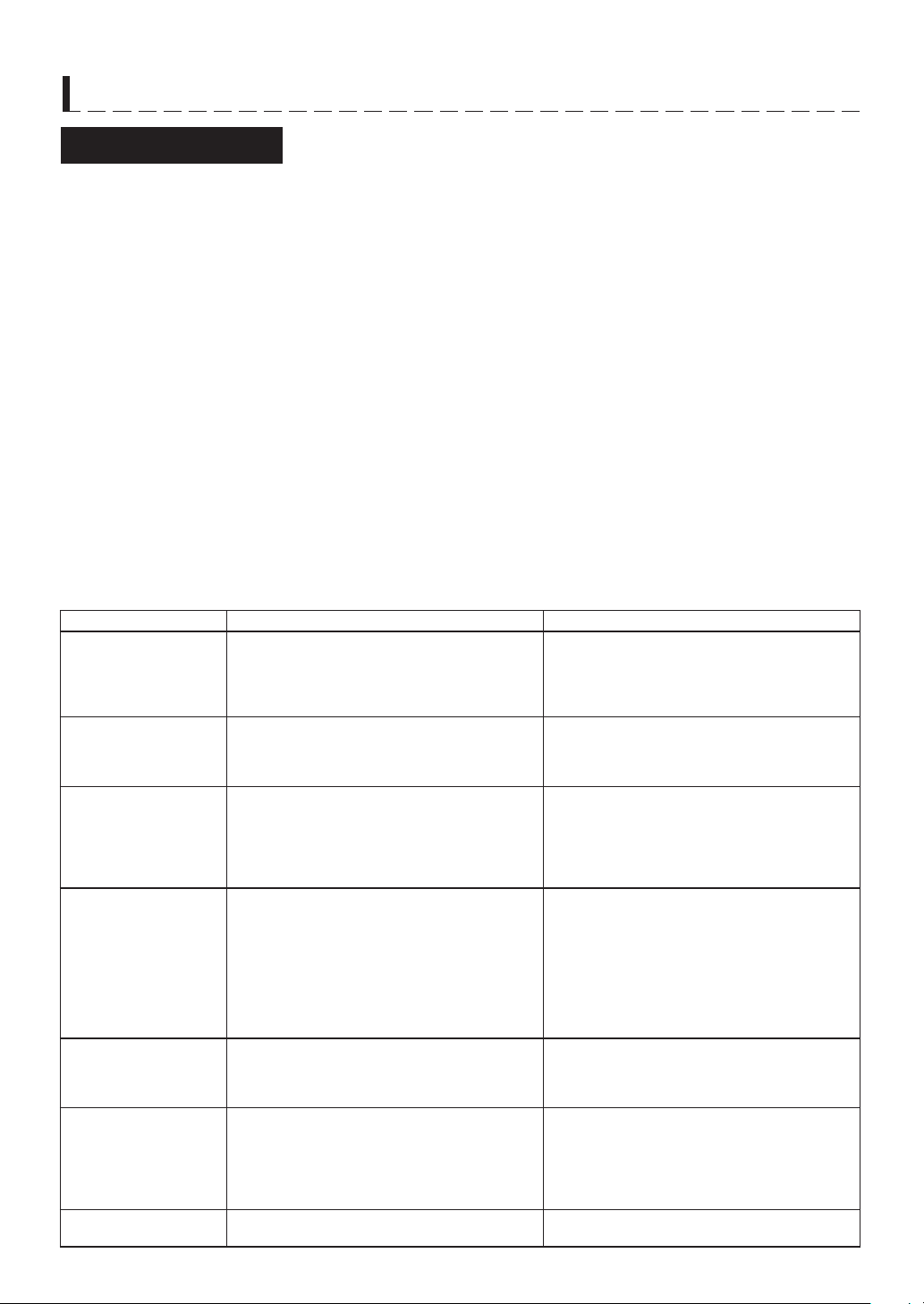
Your oven has a variety of cooking options that are divided into automatic and manual. Convection, Grill, Steam
and Microwave have both automatic and manual choices.
Water Oven / Water Grill
Superheated Steam is combined with Convection/Grill heating, which can roast or bake foods and allow excess
fats to be removed. These foods retain moisture. Meats and poultry are brown, juicy and flavourful.
Oven/Grill
Oven/Grill browns, bakes, broils and crisps a wide variety of foods. Cookies, cakes, breads, muffins, biscuits and
rolls can be baked on one or two levels.
Steam/Proof
Steam cooks foods gently while retaining moisture, natural flavours and nutrients.
Proof aids dough rising when making regular or sweet yeast breads.
Microwave (Defrost)
Microwave is fast and convenient for cooking and defrosting.
About Cooking Options
E – 29
COOKING GUIDES
About Utensils and Coverings
The chart below will help you decide what utensils and coverings should be used in each mode.
Utensils -
Coverings
Cooking Mode
Convection/Grill Steam/Proof
Microwave (Defrost)
Aluminium Foil, Metal,
Foil Containers
YES YES NO*
Only use aluminum foil under
the conditions described in
this manual.
China, Ceramics YES YES YES
Oven-proof porcelain, pottery, glazed earthenware and
bone china are usually suitable. Do not use the container if
it has a flaw.
Check manufacturer's
recommendation for being
microwave safe. Do not use
the container if it has a flaw.
Heat-resistant
Glassware
YES YES YES
Care should be taken if using fine glassware as it can break or crack if heated suddenly.
Plastic/Polystyrene
Containers,
Plastic Wrap
heat-resistant temp.
over 140°C
NO YES YES
Care must be taken as
some containers warp,
melt or discolour at high
temperatures.
Use microwave-safe plastic
containers for reheating and
defrosting. Some microwave-
safe plastics are not suitable
for cooking foods with high
and sugar content.
Follow manufacturer's
directions.
Silicone containers YES* YES YES
(Cannot use the grill function
with the water grill) Use a
silicon container capable of
withstanding temperatures more
than 30°C higher than the set
oven temperature.
The temperature near the steam
and hot air outlet is higher than
the set temperature, and this can
deform the container depending
on its shape.
Silicone containers heat-resistant temp. over 140°C
Paper Towels,
Paper Plates
NO NO YES
Paper towels: To cover for
reheating and cooking. Do
not use recycled paper
towels which may contain
metal filings.
Paper plates: For reheating.
Containers made of
synthetic material
NO NO NO
They could melt at high temperature.
Baking paper YES YES NO
Do not touch the oven wall as it may be burnt. Keep the
heat-resistant temp.
Roasting Bags
YES NO YES
Roasting bags should only be
used with Convection Oven.
Follow manufacturer’s
directions.
Silver Dishes and
Cooking Utensils or
Containers that might
rust inside the oven
.
NO NO NO
Rack, Baking Tray YES YES NO
E – 30
COOKING GUIDES
1. Use ventilation when cooking, as cooking produces a lot of heat and steam.
2. Avoid as much as possible opening and closing the door when cooking. Allowing heat and steam to escape
reduces cooking performance.
• Check cooking conditions immediately after cooking is completed.
• When opening the door during automatic cooking, refer to the Manual Cooking section of the online cook-
book and cook manually.
3. When preparing a recipe from a common cookbook with a gas oven or another electric oven, cook while
monitoring its progress. Refer to a similar recipe in the online cookbook and cook while monitoring its progress.
Differences in oven cavity size, structure, and other features, however, may result in unsatisfactory cooking
results despite using the cooking instructions given in commercial cookbooks or other recipe sources.
Special Notes and Warning for Microwave
Cooking Advices
For Cooking with Water
Use room temperature water suitable for drinking
(filtered)
Slowly carry the baking tray while keeping it level:
to avoid spilling meat juices, oils, hot water, or other
liquids it may contain.
For Convection/Grill
Once the dish is ready remove it from the oven.
• This prevents overcooking due to exposure to
residual heat.
• When cooking with water, the dish may get wet due to
a drop in temperature that cause vapor to condensate.
For Automatic Cooking
When repeating cooking, use the results control while
monitoring cooking.
Cavity or cooking accessories that are hot may result
in overcooking and unsatisfactory results.
Use the indicated recipe ingredients and quantities,
as they are compatible with this oven.
DO DON'T
Eggs, fruits, nuts,
seeds, vegetables,
sausages and oysters
*
Puncture egg yolks and whites and oysters
before cooking to prevent “explosion”.
* Pierce skins of potatoes, apples, squash,
hot dogs, sausages and oysters so that
steam escapes.
*
Cook eggs in shells. This prevents “explosion”,
which may damage the oven or injure yourself.
* Cook hard / soft boiled eggs.
* Overcook oysters.
* Dry nuts or seeds in shells.
Popcorn * Use specially bagged popcorn for the
microwave oven.
* Listen while popping corn for the popping
to slow to 1-2 seconds.
* Pop popcorn in regular brown bags or
glass bowls.
* Exceed maximum time on popcorn
package.
Baby food * Transfer baby food to small dish and heat
carefully, stirring often. Check for suitable
temperature to prevent burns.
* Remove the screw cap and teat before
warming baby bottles. After warming shake
thoroughly. Check for suitable temperature.
* Heat disposable bottles.
* Overheat baby bottles.
* Heat bottles with nipples on.
* Heat baby food in original jars.
General * Food with filling should be cut after heating,
to release steam and avoid burns.
* Use a deep bowl when cooking liquids or
cereals to prevent boiling over.
*
When cooking small amounts of finely cut roots
and the like, always soak them in an adequate
amount of water. Cooking small amounts of
less than 100g can cause accidents due to
sparks, burnt food, and combustion.
* Heat or cook in closed glass jars or
airtight containers.
* Deep fat fry.
* Heat or dry wood, herbs, wet papers,
clothes or flowers.
* Operate the oven without a load (i.e. an
absorbing material such as food or water)
in the oven cavity.
Liquids
(Beverages)
* For boiling or cooking liquids see
INPORTANT SAFETY INSTRUCTIONS
on page E-1-2 to prevent explosion and
delayed eruptive boiling.
* Heat for longer than recommended time.
Canned foods
”Boil-in-the-bag” food
* Put bagged and canned food in a
container before cooking. Cooking food in
aluminum and other metal containers can
cause damage due to sparks.
Bagged and canned food can be cooked
by [17] Steam High.
* Heat or cook food while in cans or bags.
Sausage rolls, Pies,
Christmas pudding
* Cook for the recommended time. (These
foods have high sugar and / or fat contents)
* Overcook as they may catch fire.
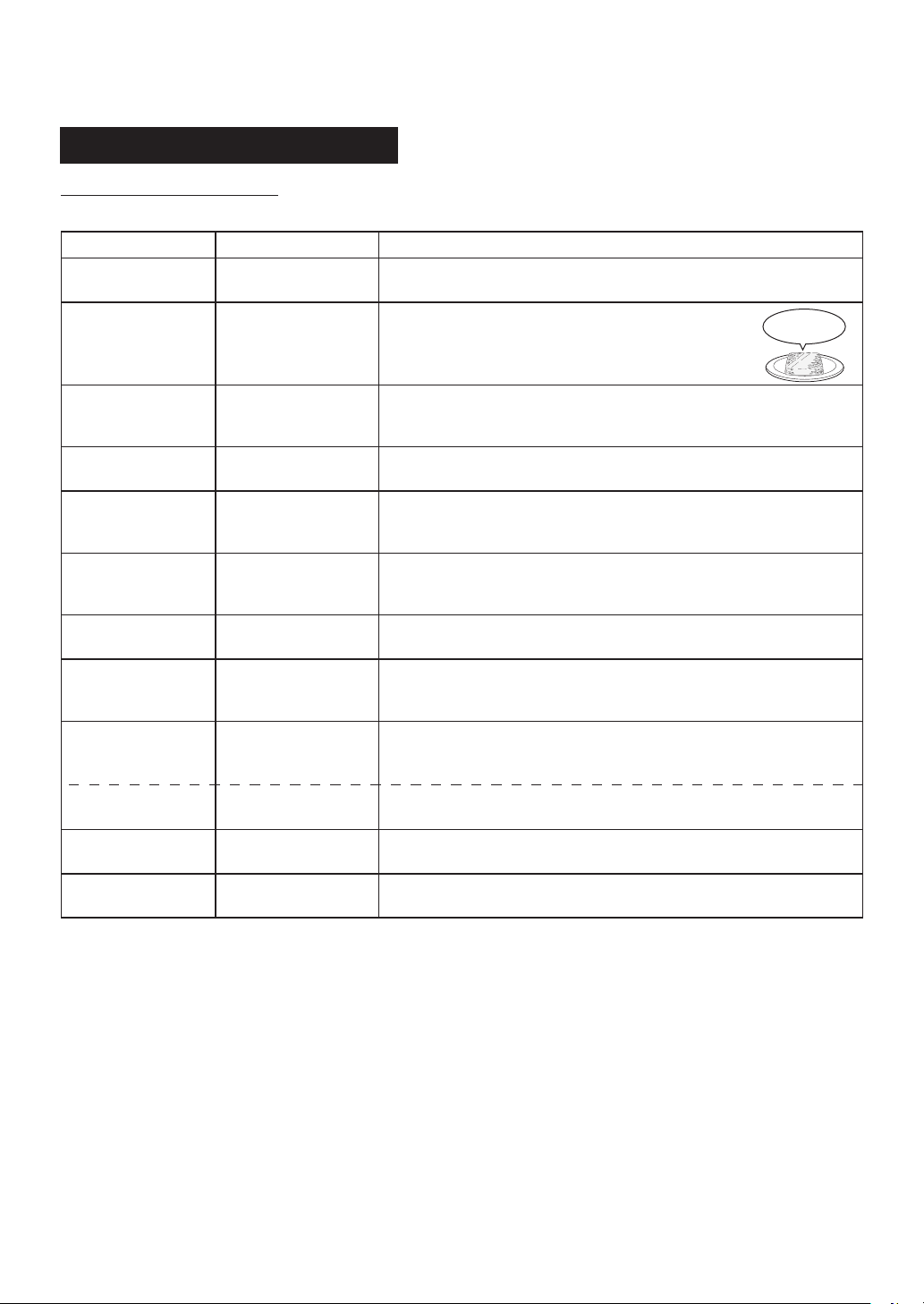
E – 31
AUTOMATIC COOKING CHART
Sensor Reheat Menu Guide
Cooking Mode: Microwave
Place the food in the centre of the oven floor.
Menu Name Weight Range Tips
Rice
(initial temp 8-20°C)
1- 4 serves
(1 serve: 150 g)
• When reheating 1 serve, select LESS (
t
) after pressing START.
• When reheating the hard texture rice, sprinkle water.
Frozen Rice
(initial temp -18°C)
1- 2 serves
(1 serve: 100 - 150 g)
• Use the flat frozen rice of 2-3 cm thick
covered with plastic wrap.
• Place food on a plate.
• Select LESS (
t
) after pressing START.
Chinese Steamed
Dumplings
initial temp 8-20°C)
5 - 12 pieces
(up to 160 g)
• Splinkle water to the food.
• Cover with plastic wrap.
• Select LESS (
t
) after pressing START.
Hamberg
initial temp 8-20°C)
1 - 4 pieces
(1 piece: 90 g)
• Do not cover.
• Select MORE (
s
) after pressing START.
Tempura
(initial temp 8-20°C)
0.1 - 0.4 kg • Put kitchen paper on the plate, then put food in the single layer
on it.
• Do not cover.
Grilled Chicken
Skewers
(initial temp 8-20°C)
2 - 6 skewers
(up to 150 g)
• Do not cover.
Pilaf
(initial temp 8-20°C)
0.1 - 0.4 kg • Do not cover.
• After cooking, stir.
Fried Noodles
(initial temp 8-20°C)
0.1 - 0.2 kg • Add a little butter or oil if the food is dry before cooking.
• Do not cover.
• After cooking, stir.
Curry
(initial temp 8-20°C)
(initial temp -18°C)
0.2 - 0.4 kg
0.2 - 0.4 kg
• Cover with plastic wrap.
• Select LESS (
t
) after pressing START.
• Use shallow dish.
• Cover with plastic wrap.
Simmered food
(initial temp 8-20°C)
0.1 - 0.4 kg • Do not cover except for simmered fish.
Miso Soup
(initial temp 8-20°C)
1- 2 cups
(1 cup: 150 mL)
• Do not cover.
• Select MORE (
s
) after pressing START.
100~150g
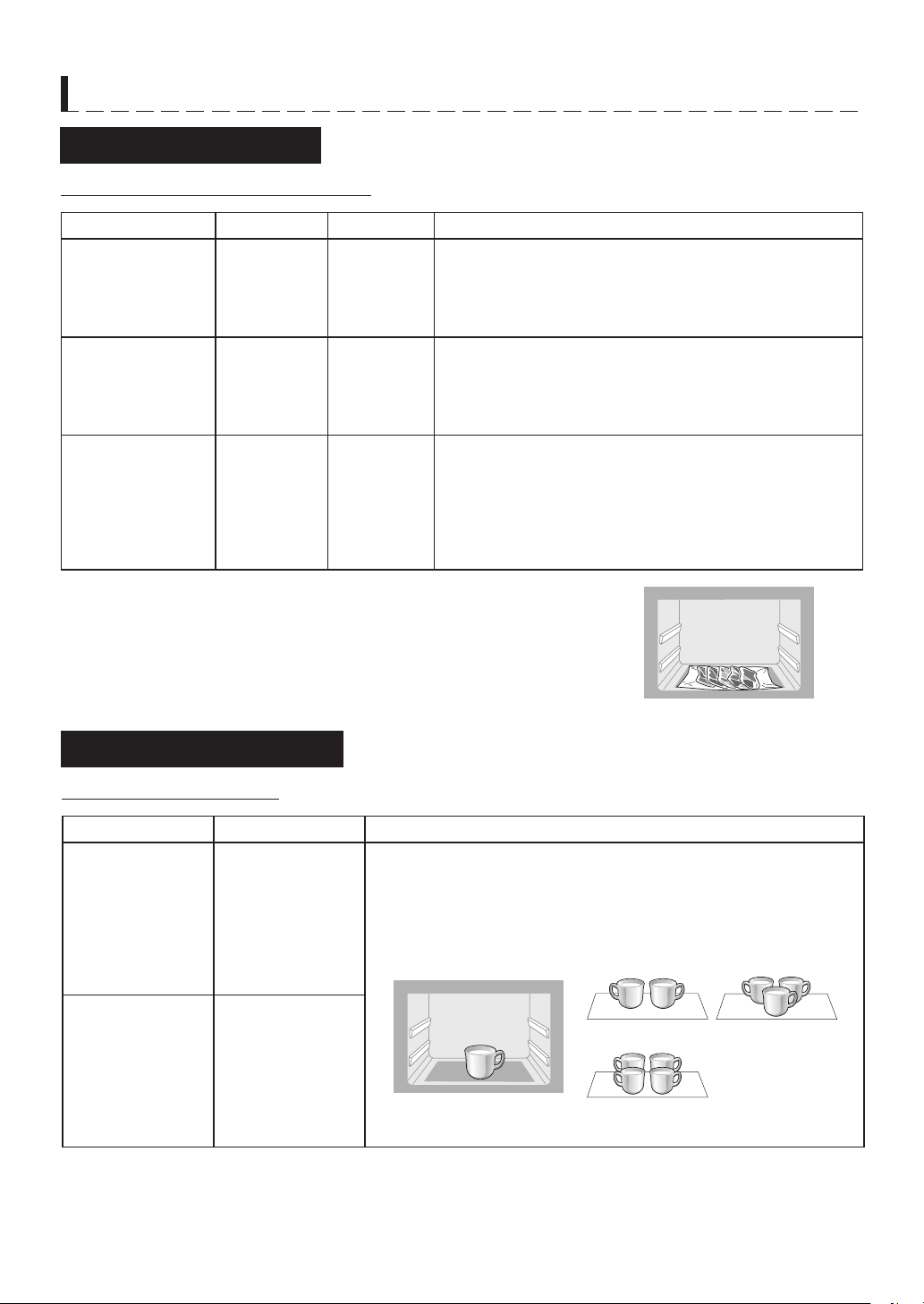
E – 32
AUTOMATIC COOKING CHART
Defrost Menu Guide
Cooking Mode: Microwave with Steam
Menu Name Weight Range
Water Level
Tips
Chunk of Meat
(initial temp -18°C)
0.1 - 0.5 kg
1 or more
• Remove from original wrapper.
• Put the plastic wrap in the centre of the oven floor, then
place the food on it.
• Do not cover.
• Select MORE (
s
) after pressing START
.
Sliced Meat
Boneless Chicken
(thigh/breast)
Minced meat
(initial temp -18°C)
0.1 - 0.5 kg
1 or more
• Remove from original wrapper.
• Put the plastic wrap in the centre of the oven floor, then
place the food on it.
• Do not cover.
• For 100 g, select LESS (
t
) after pressing START.
Fish Fillet
Squids, Prawns
(initial temp -18°C)
0.1 - 0.5 kg
1 or more
• Remove from original wrapper. Shield thin end with foil.
• Put the plastic wrap in the centre of the oven floor, then
place the food on it.
• Do not cover.
• For Defrost, select LESS (
t
) after pressing START.
• For Defrost Low with 400 g or more, select MORE (
s
)
after pressing START.
Foods not listed in the Guide can be defrosted manually using 200W
power level setting.
NOTE:
After the cooking with Convection or Oven function, the oven floor will be too hot.
Defrost food after the oven has completely cool, because the plastic wrap
may melt on the hot oven floor.
Beverage Menu Guide
Cooking Mode: Microwave
Menu Name Quantity Tips
Milk
(initial temp 8°C)
1 - 4 cups
(1 cup: 200 mL)
• Use wide-mouthed container.
• Do not cover.
• Stir the liquid before cooking.
• Place the cup in the centre of the oven floor.
• After cooking, stir.
Coffee
(initial temp 20°C)
1 - 4 cups
(1 cup: 150 mL)
(1 cup)
(2 cup)
(4 cup)
(3 cup)
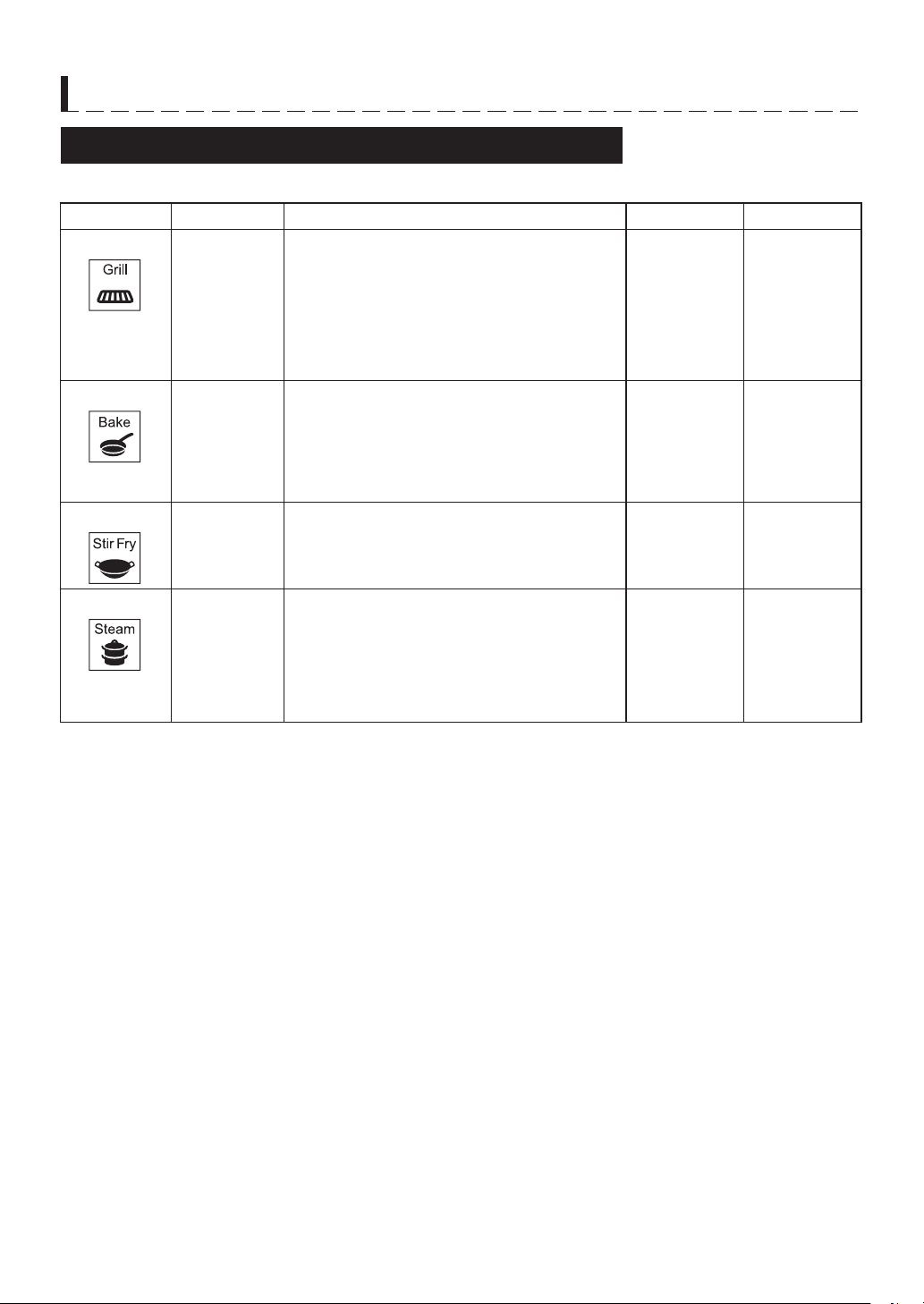
E – 33
AUTOMATIC COOKING CHART
Auto Sensor Cook (ALL IN ONE) Menu Guide
• Refer to the online cookbook, ensure the suitable menus and follow to SHARP instructions.
Menu Name Weight Range Procedure Cooking Mode Water Level
1. Grill
Up to 1 kg
Place food on rack in baking tray and then
cook.
• Use to salt grill or sauce broil meat and fish.
• Oil-free cooking for deep fried is available.
• Prepare a quick meal by adding your favorite
vegetables with meat/fish and cooking them
at the same time.
• See the online cookbook.
Water Oven 1 or more
2. Bake
Up to 1 kg
Place food on baking tray and then cook.
• Grill fish, gratin, and other familiar dishes.
• Prepare a more balanced meal by adding
your favorite vegetables and cooking them at
the same time.
• See the online cookbook.
Water Oven 1 or more
3. Stir Fry
Up to 1 kg
Spread out on baking tray and cook.
• You can cook stir-fried using the baking tray
as a frying pan.
• See the online cookbook.
Water Oven 1 or more
4. Steam
Up to 0.8 kg
Steam vegetables, meat, fish, eggs, and
store-bought foods.
• Place food on rack in baking tray and then
cook.
• Steam chicken, vegetables, and the like.
• Add variety with dressings and sauces.
• See the online cookbook.
Steam 2 (MAX)
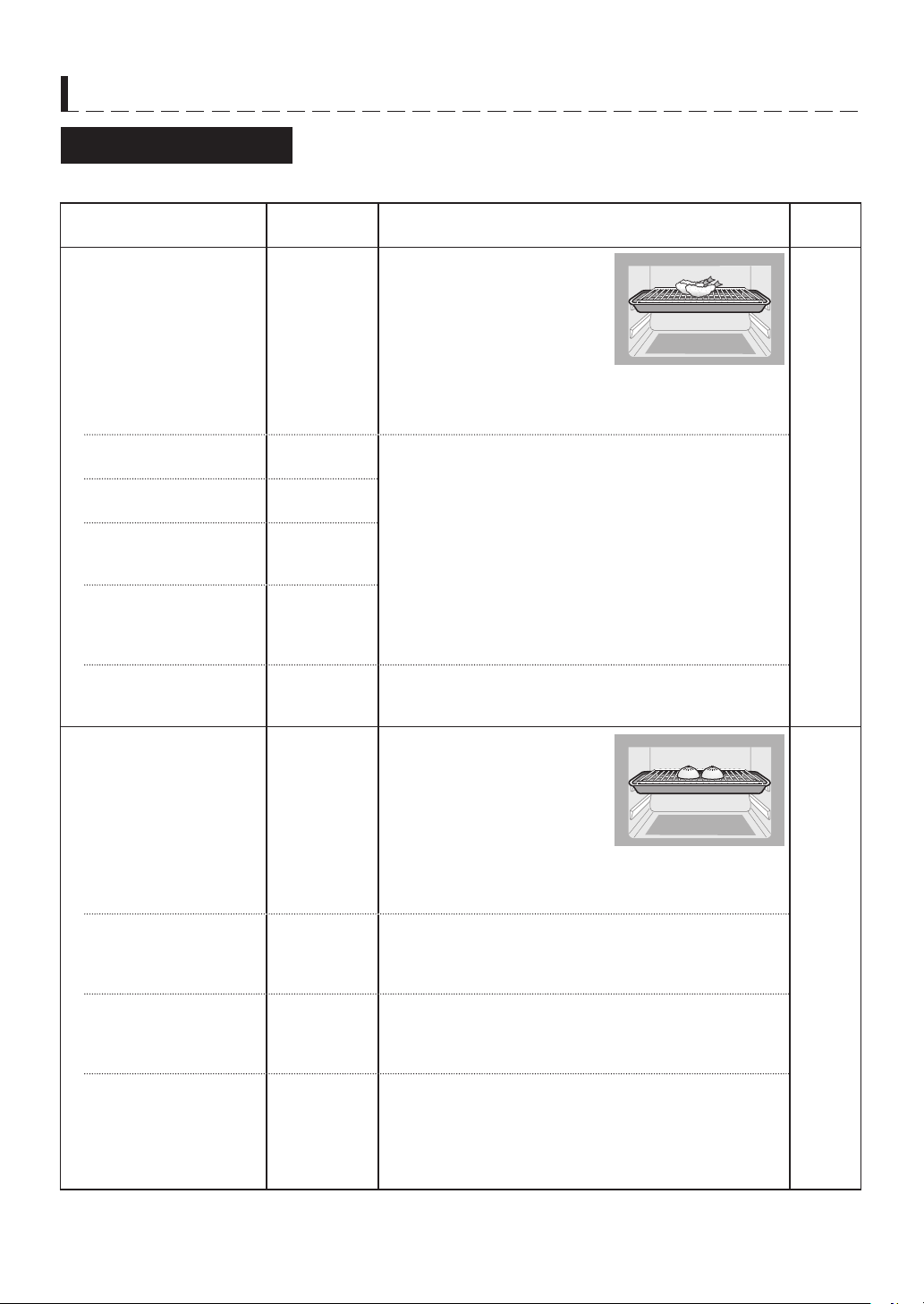
E – 34
AUTOMATIC COOKING CHART
Auto Menu Guide
• Refer to the online cookbook, ensure the suitable menus and follow to SHARP instructions.
Menu Name Weight Range Procedure
Cooking
Mode
1. Crispy Reheat Water Level: 1 or more
Food Position: Upper
Water
Oven
Tempura
(initial temp 8 -20°C)
100 - 600 g • Put food on rack in baking tray, uncovered.
• When reheating 400 g or more, select MORE(
s
) after
pressing START.
Meat Cutlet
(initial temp 8 -20°C)
100 - 600 g • Put food on rack in baking tray, uncovered.
• Select LESS (
) after pressing START.
French Fries
(initial temp 8 -20°C)
100 - 200 g
Fried Chicken on the
Born
(initial temp 8 -20°C)
100 - 400 g
Grilled Fish
Yakitori (Grilled Chicken
Skewers)
(initial temp 8 -20°C)
100 - 300 g
Hamburg
(initial temp -18°C,
8 - 20°C)
1 - 4 pieces
(1 piece :
approx. 90 g)
• Put food on rack in baking tray, uncovered.
• For food at 8 -20°C, select LESS (
) after pressing
START.
2. Steam Reheat Water Level: 2 (MAX)
Food Position: Upper
Steam
Steamed Buns
(initial temp -18°C,
8 - 20°C)
1 - 4 pieces
(1 piece :
70 - 120 g)
• Put food on rack in baking tray, uncovered.
• When reheating bigger bun (120 g), select MORE (
s
)
after pressing START.
Chinese Steamed
Dumplings
(initial temp -18°C,
8 - 20°C)
5 - 12 pieces
(up to 160 g)
• Put food on rack in baking tray, uncovered.
• Select LESS (
) after pressing START.
Steamed Rice
(initial temp 20°C)
100 - 600 g • Put food in rice bowl.
• Place the bowl on baking tray, uncovered.
• When reheating 150 g or less, select LESS (
) after
pressing START.
Canned foods
(initial temp 20°C)
1 - 2 cans
(1 can :
80 - 100 g)
• Open the lid of the can.*
• Place on the rack in baking tray
• Select LESS (
) after pressing START.
*Although you can cook canned foods without opening
the lid, you should open it before cooking to prevent
burns.
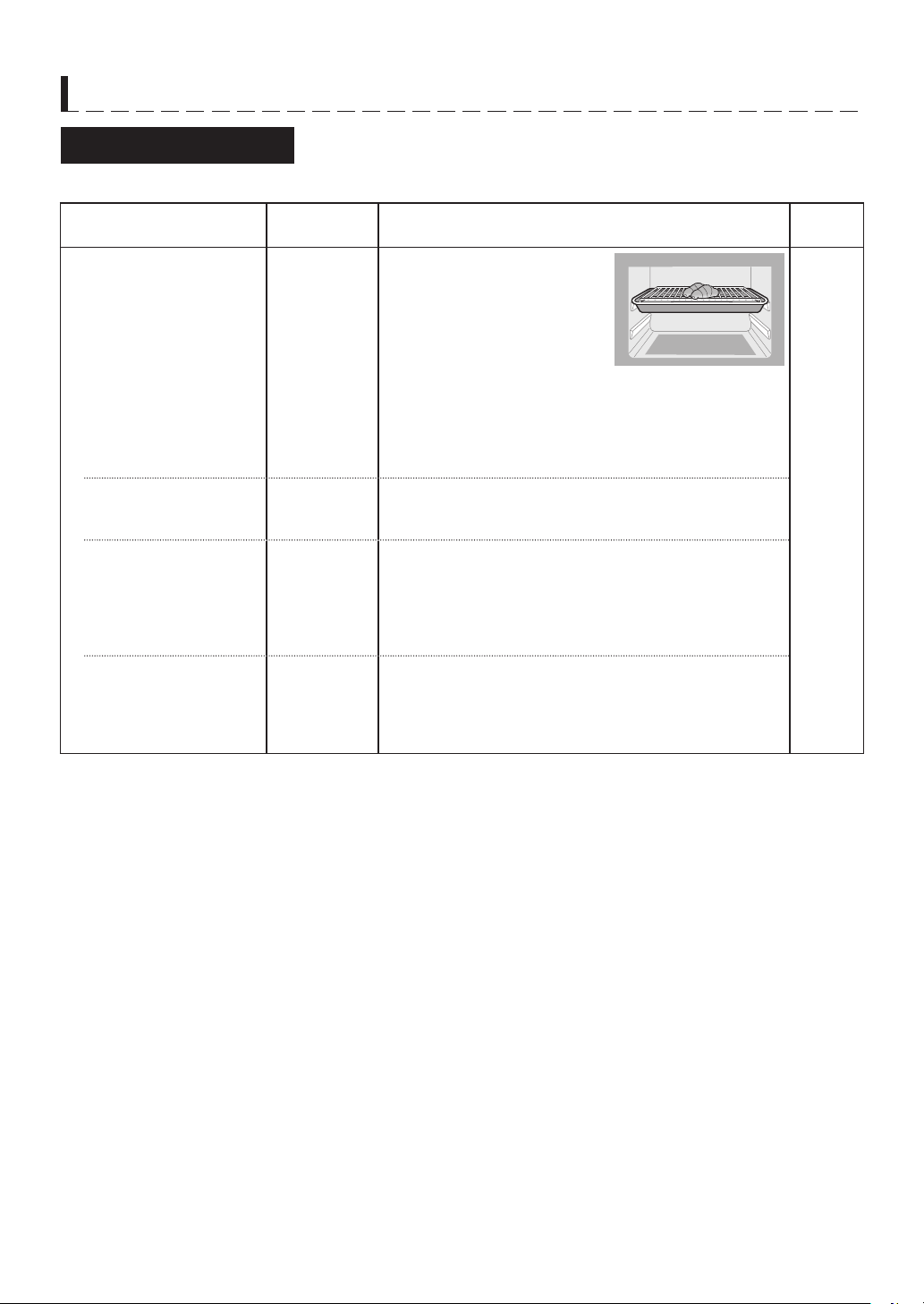
E – 35
AUTOMATIC COOKING CHART
Auto Menu Guide
• Refer to the online cookbook, ensure the suitable menus and follow to SHARP instructions.
Menu Name Weight Range Procedure
Cooking
Mode
3. Reheat Bread Water Level: 1 or more
Food Position: Upper
Water
Oven
3-1. Dinner Roll
(initial temp -18°C,
8 - 20°C)
30 - 240 g
(1 - 8 pieces)
• Put food on rack in baking tray, uncovered.
• When reheating 90 g or less, select LESS (
) after
pressing START.
• When reheating 2 pieces of Savoury Buns (200 g),
select MORE (
s
) after pressing START.
3-1. Pizza
(initial temp -18°C,
8 - 20°C)
100 - 400 g
(1 - 4 slices)
• Put food on rack in baking tray, uncovered.
• For 300 g or more, select MORE (
s
) after
• pressing START.
3-2. Baguette
(initial temp -18°C,
8 - 20°C)
30 - 240 g
(1 - 8 slices)
• Use baguettes sliced less than 4 cm in thick.
• Put food on rack in baking tray, uncovered.
• When reheating 90 g or less, select LESS (
) after
pressing START.
• When reheating 2 pieces of Savoury Buns (200 g),
select MORE (
s
) after pressing START.
3-3. Croissant/Pie
(initial temp -18°C,
8 - 20°C)
40 - 240 g
(1 - 6 pieces)
• Put food on rack in baking tray, uncovered.
• When reheating 80 g or less, select LESS (
) after
pressing START.
• When reheating 2 pieces of Savoury Buns (200 g),
select MORE (
s
) after pressing START.
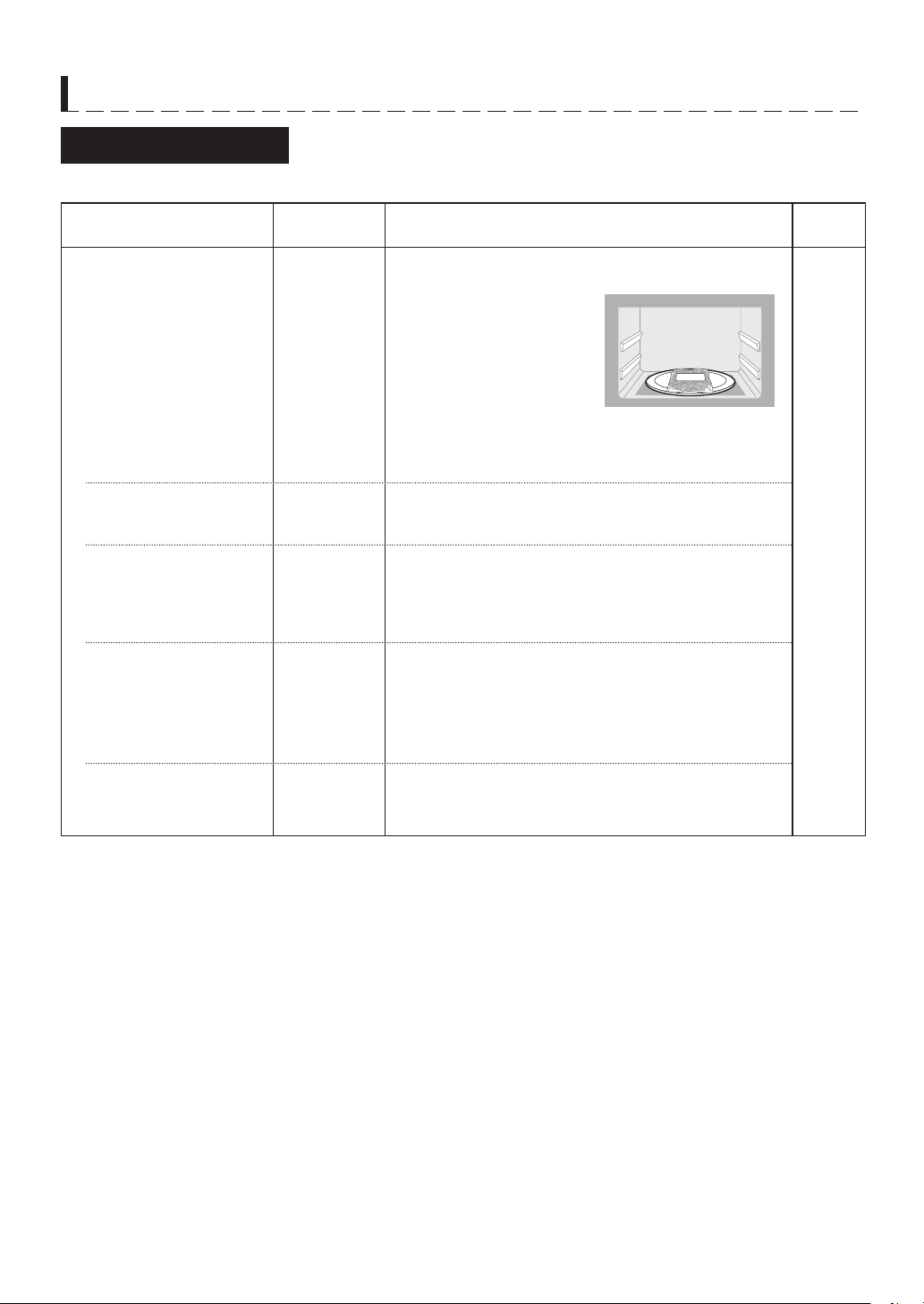
E – 36
AUTOMATIC COOKING CHART
Auto Menu Guide
• Refer to the online cookbook, ensure the suitable menus and follow to SHARP instructions.
Menu Name Weight Range Procedure
Cooking
Mode
4. Reheat Frozen Food Use mainly for reheating commercial Frozen Meal
(microwave-safe) for one person.
Microwave
Spaghetti
(initial temp -18°C)
1 serve
(180 - 360 g)
• Prepare food as mentioned on the package.
• Place the food in the centre of the oven floor.
• After cooking, stir.
Fried Noodles
(initial temp -18°C)
1 serve
(200 - 300 g)
• Prepare food as mentioned on the package.
• Place the food in the centre of the oven floor.
• After cooking, stir.
Fried Rice
(initial temp -18°C)
200 - 450 g • Prepare food as mentioned on the package.
• Break up the food before cooking.
• Cover with plastic wrap.
• Place the food in the centre of the oven floor.
• After cooking, stir.
Chinese Steamed
Dumplins
(initial temp -18°C)
5 - 12 pieces
(up to 160 g)
• Prepare food as mentioned on the package.
• Splinkle water to the food.
• Cover with plastic wrap.
• Place the food in the centre of the oven floor.
Tip: You can also reheat on menu No. 2 (Steam Reheat)
for moist texture.
Vegetable;
Taro/Pumpkin
(initial temp -18°C)
100 - 400 g • Prepare food as mentioned on the package.
• Cover with plastic wrap.
• Place the food in the centre of the oven floor.
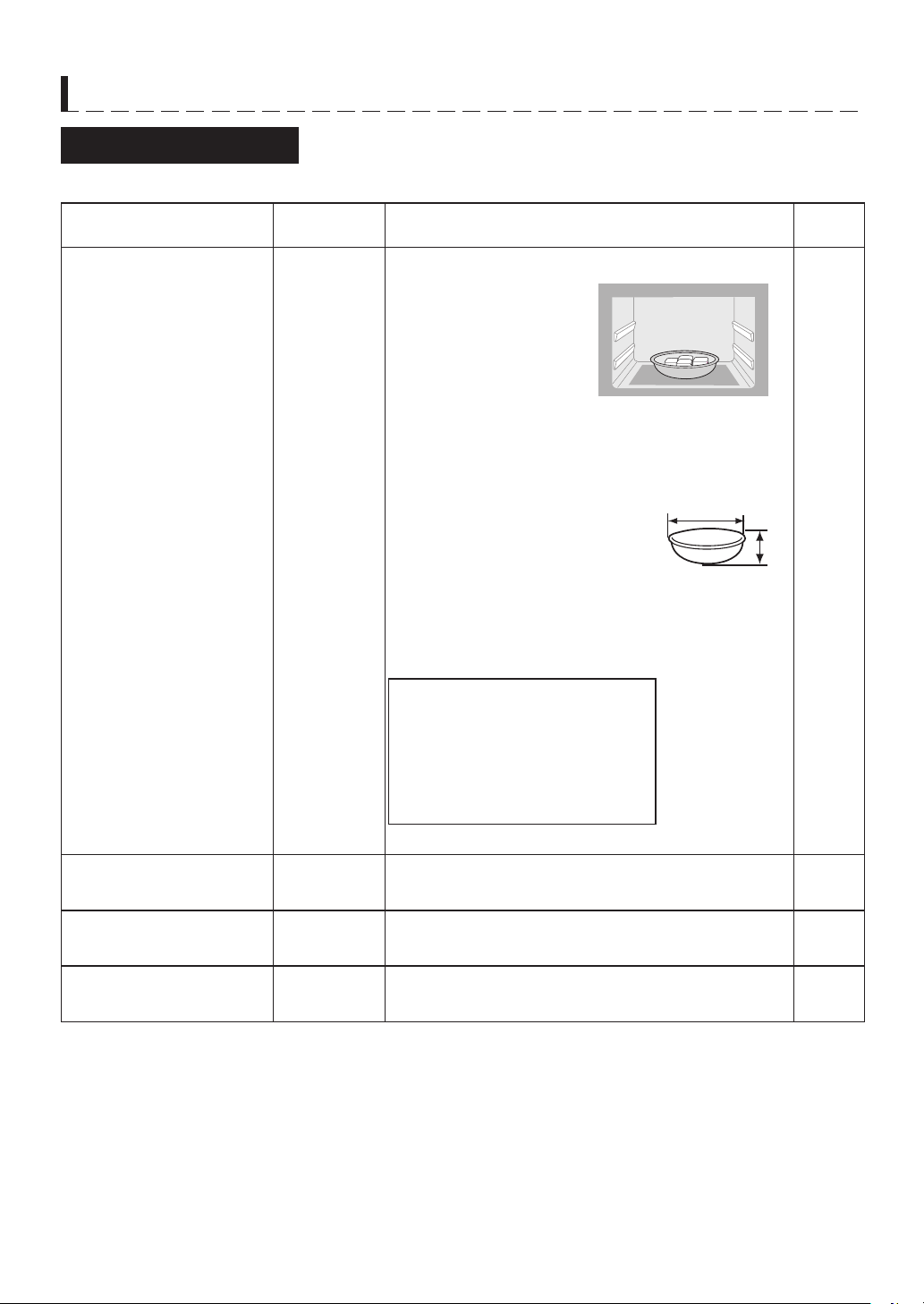
E – 37
AUTOMATIC COOKING CHART
Auto Menu Guide
• Refer to the online cookbook, ensure the suitable menus and follow to SHARP instructions.
Menu Name Weight Range Procedure
Cooking
Mode
5. Reheat as Temprerature 1 - 2 serves
(up to 200 g)
Use to soften butter or reheat soup by setting desired
temperature.
Temperature Range:
-10°C, 20 - 90°C (5°C per step)
• Do not cover.
• When using containers, put the food in one container.
The recommended container size:
Width: 12cm or more
Hight: less than 5 cm
• Place the food in the centre
of the oven centrev.
NOTES:
• Do not reheat any beverages with this function.Reheat
with BEVERAGE. See page E-11.
• Do not reheat buns contained chocolate or cream.
Recommended Temperature
Soup: 80 - 90°C
Rice: 60 - 70°C
Savoury Buns: 50 - 60°C
Rice Ball: 40 - 50°C
Butter: 20°C
Ice Cream: -10°C
Microwave
6. Grilled Chicken 2 or 4 serves • See the online cookbook.
Water
Grill
7. Deep Fried Chicken 2 or 4 serves • See the online cookbook.
Water
Oven
8. Grilled Fish 2 or 4 serves • See the online cookbook.
Water
Grill
12cm or more
less than 5cm
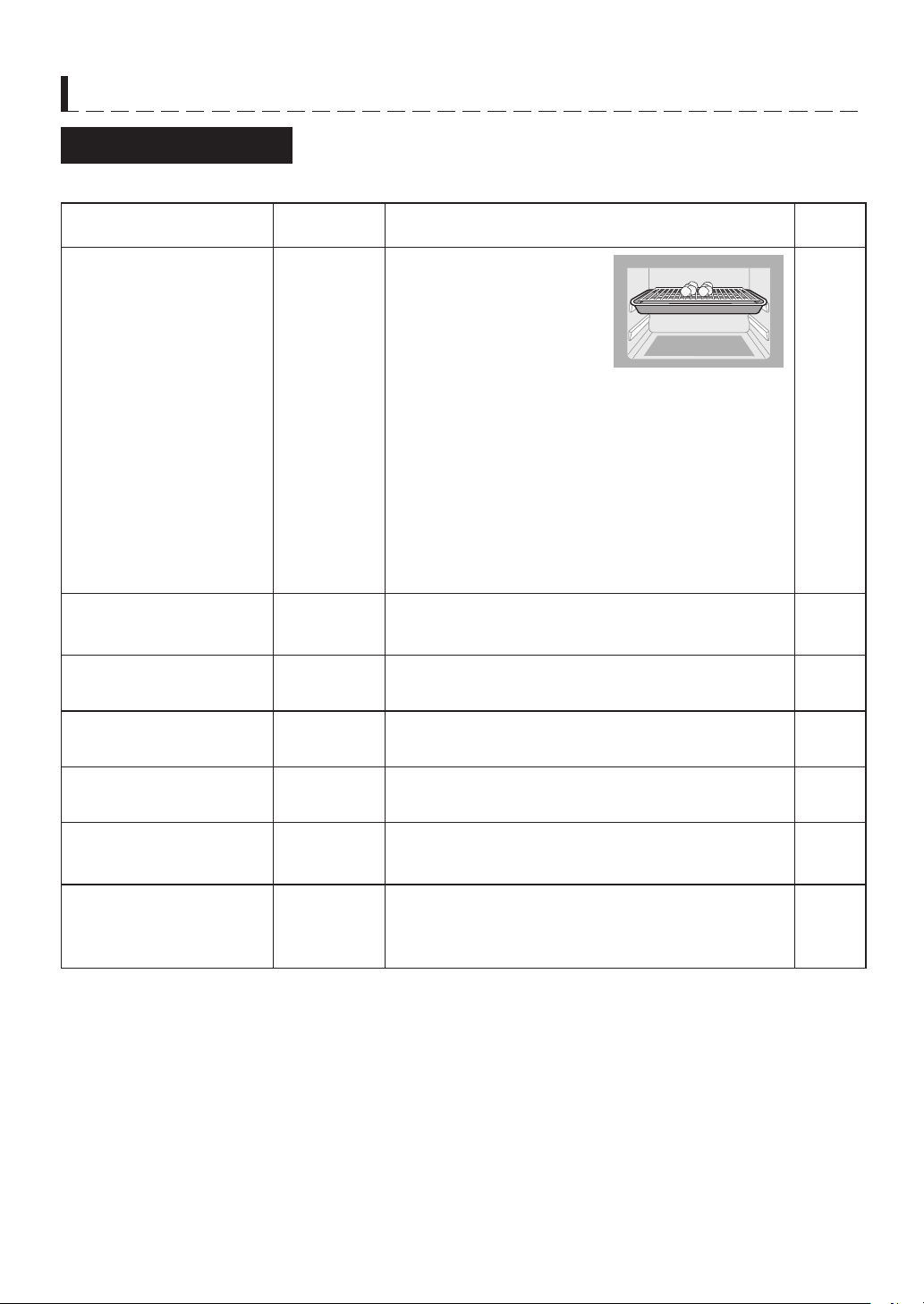
E – 38
AUTOMATIC COOKING CHART
Auto Menu Guide
• Refer to the online cookbook, ensure the suitable menus and follow to SHARP instructions.
Menu Name Weight Range Procedure
Cooking
Mode
9. Steamed Vegetables
Spinach
Asparagus
Broccoli
Daikon Radish
Pumpkin
Carrot
0.1 - 0.4 kg Water Level: 2 (MAX)
Food Position: Upper
• Wash vegetables, then remove excess water.
• Cut and trim the vegetables into florets, shreds or
strips.
• Put vegetables on rack in baking tray, uncovered.
• Put the baking rack on the upper position in the oven.
For Spinach, Aspragus:
Select LESS (
t
) after pressing START.
For Radish, Pumpkin, Carrot:
Select MORE (
s
) after pressing START.
Steam
10. Baked Sweet Potato 1 - 4 pieces
(1 piece:
250 g)
• See the online cookbook.
Water
Oven
11. Toast 2 or 4 slices • See the online cookbook.
Water
Oven
12. Breakfast Set 2 or 4 serves • See the online cookbook.
Water
Oven
13. Sponge Cake 1 - 2 layers
• See the online cookbook.
Water
Oven
14. Cream Puff
1 - 2 layers
(1 layer:
12 pieces)
• See the online cookbook.
Water
Oven
1
5. Dried Food
15-1. Dried Fruit (soft)
15-2. Dried Chips
15-3. Snacks
2 layers
• See the online cookbook.
Water
Oven

TINS-A876WRRZ-R91
Printed in Thailand
SHARP CORPORATION
AUTO MENU
1 Crispy Reheat
2 Steam Reheat
3 Reheat Bread
4 Reheat Frozen Food
5 Reheat as Temprerature
6 Grilled Chicken
7 Deep Fried Chicken
8 Grilled Fish
9 Steamed Vegetables
10 Baked Sweet Potato
11 Toast
12 Breakfast Set
13 Sponge Cake
14 Cream Puff
15 Dried Food
MANUAL COOKING
16 Grill
17 Steam High
18 Steam Low
19 Steam Proof
20 Proof
MAINTENANCE
21 Sterilization
22 Drain Water
23 Steam Clean
24 Descale
25 Clean Oven
(First Use)
OPTION NUMBER
The following options are selected by turning the Knob. Each option number will be shown in the display.
1 香脆加熱
2 純蒸加熱
3 麵包加熱
4 冷凍食品加熱
5 加熱溫度
6 烤雞
7 炸雞
8 烤魚
9 蒸蔬菜
10 焗蕃薯
11 多士
12 早餐套餐
13 海綿蛋糕
14 泡芙
15 風乾食物
16 燒烤
17 高溫蒸氣
18 低溫蒸氣
19 蒸氣發酵
20 發酵
21 除菌
22 排水
23 蒸氣清潔
24 除垢
25 清潔水波爐
(首次使用)
The following options are selected by turning the Knob. Each option number will be shown in the display.
-1 捲/薄餅-2 法國麵包
-3 牛角包/批
-1 乾果 (軟身)
-2 脆片
-3 小食
-1 Roll/Pizza
-2 Baguette
-3 Croissant/Pie
-1 Dried Fruit (Soft)
-2 Dried Chips
-3 Snacks