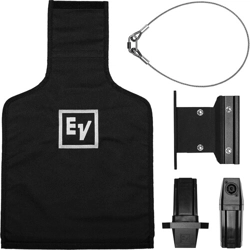

EVOLVE Wall mount kit
EVOLVE‑WMK‑PB, EVOLVE‑WMK‑PW, EVOLVE‑WMK‑NB,
EVOLVE‑WMK‑NW, EVOLVE‑TM‑B
en
Installation Manual


EVOLVE Wall mount kit Table of contents | en 3
Electro-Voice
Installation Manual
2022-03 | 02 | F.01U.401.529
Table of contents
1
Safety 4
1.1 Suspension 4
1.2 Notices 4
2
Short information 6
3
Introduction 7
3.1 System features 7
3.2 Packing list 9
4
Wiring and installation 11
4.1 Wiring the EVOLVE column 12
4.2 Attaching the column speaker adapter to the EVOLVE column 15
4.3 Attaching the EVOLVE column to the wall bracket 15
4.3.1 Installing the wall part 16
4.3.2 Attaching the handle part to the EVOLVE column 17
4.3.3 Mounting the wall bracket 18
4.3.4 Attaching the cosmetic cover set 19
4.4 Attaching the EVOLVE column to the truss mount bracket 20
4.5 Wiring the subwoofer 23
4.6 Installing the subwoofer amplifier input cover 25
5
Troubleshooting 27
6
Technical data 28
6.1 Additional pin-out tables 28
6.2 Dimensions 29
4 en | Safety EVOLVE Wall mount kit
2022-03 | 02 | F.01U.401.529
Installation Manual
Electro-Voice
1 Safety
1.1 Suspension
!
Warning!
Read and fully understand this manual and all safety instructions before attempting to
suspend the loudspeaker.
!
Warning!
Suspending any object is potentially dangerous and should only be attempted by individuals
who have a thorough knowledge of the techniques and regulations of suspending objects
overhead. Electro-Voice strongly recommends that loudspeakers be suspended taking into
account all current national, federal, state, and local laws and regulations. It is the
responsibility of the installer to ensure all loudspeakers are safely installed in accordance
with all such requirements. When loudspeakers are suspended, Electro-Voice strongly
recommends the system be inspected at least once per year or as laws and regulations
require. If any sign of weakness or damage is detected, remedial action should be taken
immediately. The user is responsible for making sure the wall, ceiling, or structure is capable
of supporting all objects suspended overhead. Any hardware used to suspend a loudspeaker
not associated with Electro-Voice is the responsibility of others.
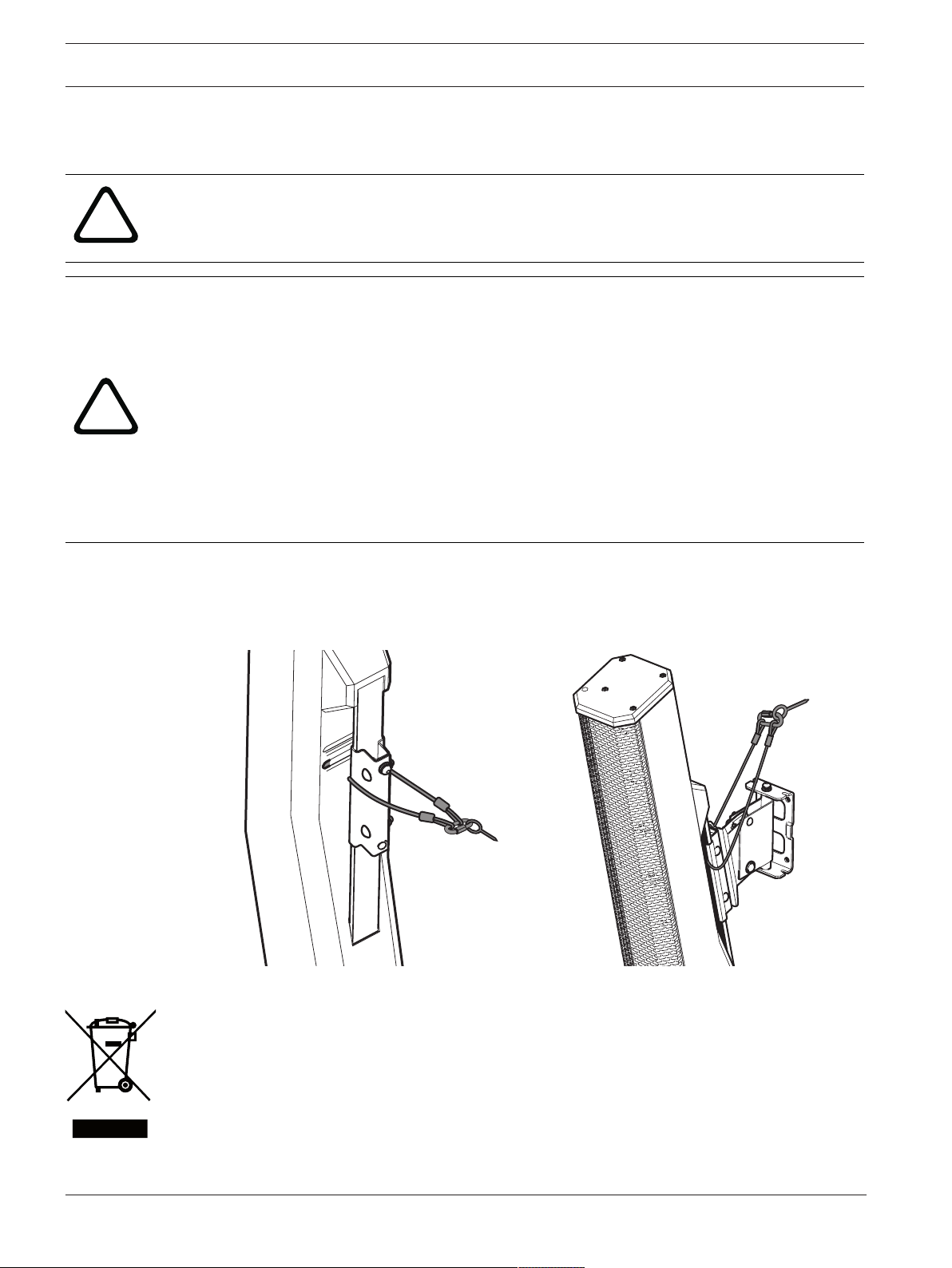
Safety point
As an added safety measure, Electro-Voice recommends the user install and secure the
secondary auxiliary support cable to a different structural support point. This safety point
should have as little slack as possible (less than 25mm/1in. is preferable).
1.2 Notices
Old electrical and electronic appliances
Electrical or electronic devices that are no longer serviceable must be collected separately and
sent for environmentally compatible recycling (in accordance with the European Waste
Electrical and Electronic Equipment Directive).
To dispose of old electrical or electronic devices, you should use the return and collection
systems put in place in the country concerned.
EVOLVE Wall mount kit Safety | en 5
Electro-Voice
Installation Manual
2022-03 | 02 | F.01U.401.529
Copyright and disclaimer
All rights reserved. No part of this document may be reproduced or transmitted in any form by
any means, electronic, mechanical, photocopying, recording, or otherwise, without the prior
written permission of the publisher. For information on getting permission for reprints and
excerpts, contact Electro-Voice.
All content including specifications, data, and illustrations in this manual are subject to change
without prior notice.
For China only
߿݇
Ӳ߄؞࣒ૅ
䫵
(Pb)
ợ
(Hg)
攰
(Cd)
භ௴擓
(Cr 6+)
ከ⁏倻勖
(PBB)
ከ⁏Ɽ憁
(PBDE)
૨ߡ
o
o
o
o
o
o
ুў
x
o
x
o
o
o
ߑুў
x
o
o
o
o
o
ުى
x
o
o
o
o
o
չحি
o
o
o
o
o
o
⸾މߕމ
o
o
o
o
o
o
ًߕމ
x
o
o
o
o
o
ߎ߿݇ઁؔӲ৲ۨ
o˖Їଚ߄؞࣒ૅ֨۱߄ԕխથ࣒ૅ֮ૅߕމИխ֮Ѻй
ઁؔஒқ
x˖Їଚ߄؞࣒ૅ֮֨ࣔؔૅߕމИխ֮й
ઁؔஒқ
Ҽйથঝфսࣿфޙߊїદূપޢ
બhttp://www.boschsecurity.com/datecodes/
QA PASS
ঊц˄⨐⎧˅ᆹ؍㌫㔏ᴹ䲀ޜ
6 en | Short information EVOLVE Wall mount kit
2022-03 | 02 | F.01U.401.529
Installation Manual
Electro-Voice
2 Short information
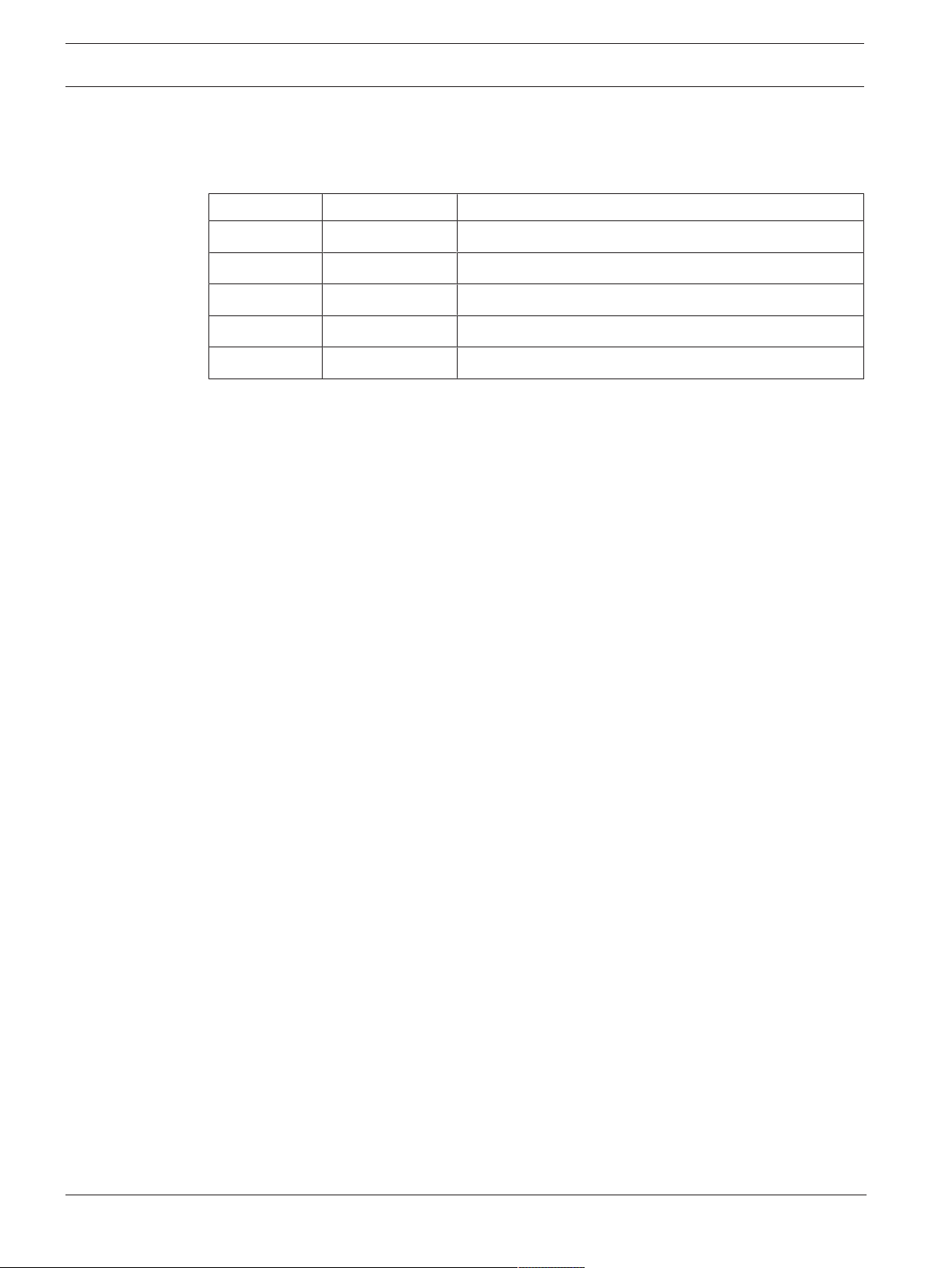
The following table lists products in a family, with CTN (Commercial Type Number) and
identifying product name DESCRIPTION.
Part number CTN Description
F.01U.392.641 EVOLVE-WMK-PB EVOLVE Wall mount kit, Phoenix, black
F.01U.392.642 EVOLVE-WMK-PW EVOLVE Wall mount kit, Phoenix, white
F.01U.392.643 EVOLVE-WMK-NB EVOLVE Wall mount kit, NL4, black
F.01U.392.644 EVOLVE-WMK-NW EVOLVE Wall mount kit, NL4, white
F.01U.395.777 EVOLVE-TM-B Truss mount, EVOLVE, black

EVOLVE Wall mount kit Introduction | en 7
Electro-Voice
Installation Manual
2022-03 | 02 | F.01U.401.529
3 Introduction
Thank you for choosing an Electro-Voice wall mount kit for your EVOLVE column speaker
system. Please take time to consult this manual to understand all the features and
requirements of the EVOLVE Wall Mount Kit. This is necessary to ensure proper use of the wall
mount kit and to provide the highest level of acoustic performance, reliability and safety.
Electro-Voice strongly recommends that loudspeakers be suspended taking into account all
current national, federal, state and local laws and regulations. Suspending any object is
potentially dangerous. Only individuals who have thorough knowledge of the techniques and
regulations of suspending objects overhead should attempt to suspend loudspeakers.
The Electro-Voice EVOLVE Wall Mount Kit provides users the flexibility to mount the EVOLVE
column speaker remotely from the subwoofer and without the distance pole. This provides a
safe method for mounting the column speakers higher than the distance pole allows and
remote locating the subwoofer for aesthetic or acoustic purposes. The installation can be
permanent with the wall mount bracket, or temporary to a truss with the truss mount kit.
The wall mount kit is available in both black and white colors to match the EVOLVE columns
speaker system and the venue. Both permanent installation friendly Phoenix-style connectors
internal to the adapters and easy to use NL4 adapters are available in each color.
The truss mount kit allows the EVOLVE column to be clamped to trusses when needed and is
available with NL4 adapters.
3.1 System features
EVOLVE-WMK-PB / EVOLVE-WMK-PW
– Innovative mount system is included for quick, simple, and reliable installations of
EVOLVE column speakers.
– Sturdy wall mount bracket with 15degrees of downward tilt, and 45degrees, each way,
of left and right adjustment.
– Subwoofer and column adapters with internally secured PCB screw terminal blocks.
– Compatible with EVOLVE 30M , EVOLVE 50 and EVOLVE 50M column speakers, available
in black or white.
– Suggested to use correctly rated speaker cable for installation: wire gauges 1.5mm
2
-
2.5mm
2
(AWG16-AWG14).
EVOLVE-WMK-NB / EVOLVE-WMK-NW
– Innovative mount system is included for quick, simple, and reliable installations of
EVOLVE column speakers.
– Sturdy wall mount bracket with 15degrees of downward tilt, and 45degrees, each way,
of left and right adjustment.
– Subwoofer and column adapters with NL4 connections.
– Compatible with EVOLVE 30M , EVOLVE 50 and EVOLVE 50M column speakers, available
in black or white.
– Suggested to use correctly rated speaker cable for installation: wire gauges 1.5mm
2
-
2.5mm
2
(AWG16-AWG14).
EVOLVE-TM-B
– Innovative mount system is included for quick, simple, and reliable installations of
EVOLVE column speakers to trusses.
– Sturdy truss mount bracket works with M10 threaded studs found on common truss
clamps.
– Subwoofer and column adapters with NL4 connections.

8 en | Introduction EVOLVE Wall mount kit
2022-03 | 02 | F.01U.401.529
Installation Manual
Electro-Voice
– Compatible with EVOLVE 30M , EVOLVE 50 and EVOLVE 50M column speakers, available
in black.
– Suggested to use correctly rated speaker cable for installation: wire gauges 1.5mm
2
-
2.5mm
2
(AWG16-AWG14).
– For use with truss clamps rated for WLL= 20kg (44lb) SF=5:1.
EVOLVE Wall mount kit Introduction | en 9
Electro-Voice
Installation Manual
2022-03 | 02 | F.01U.401.529
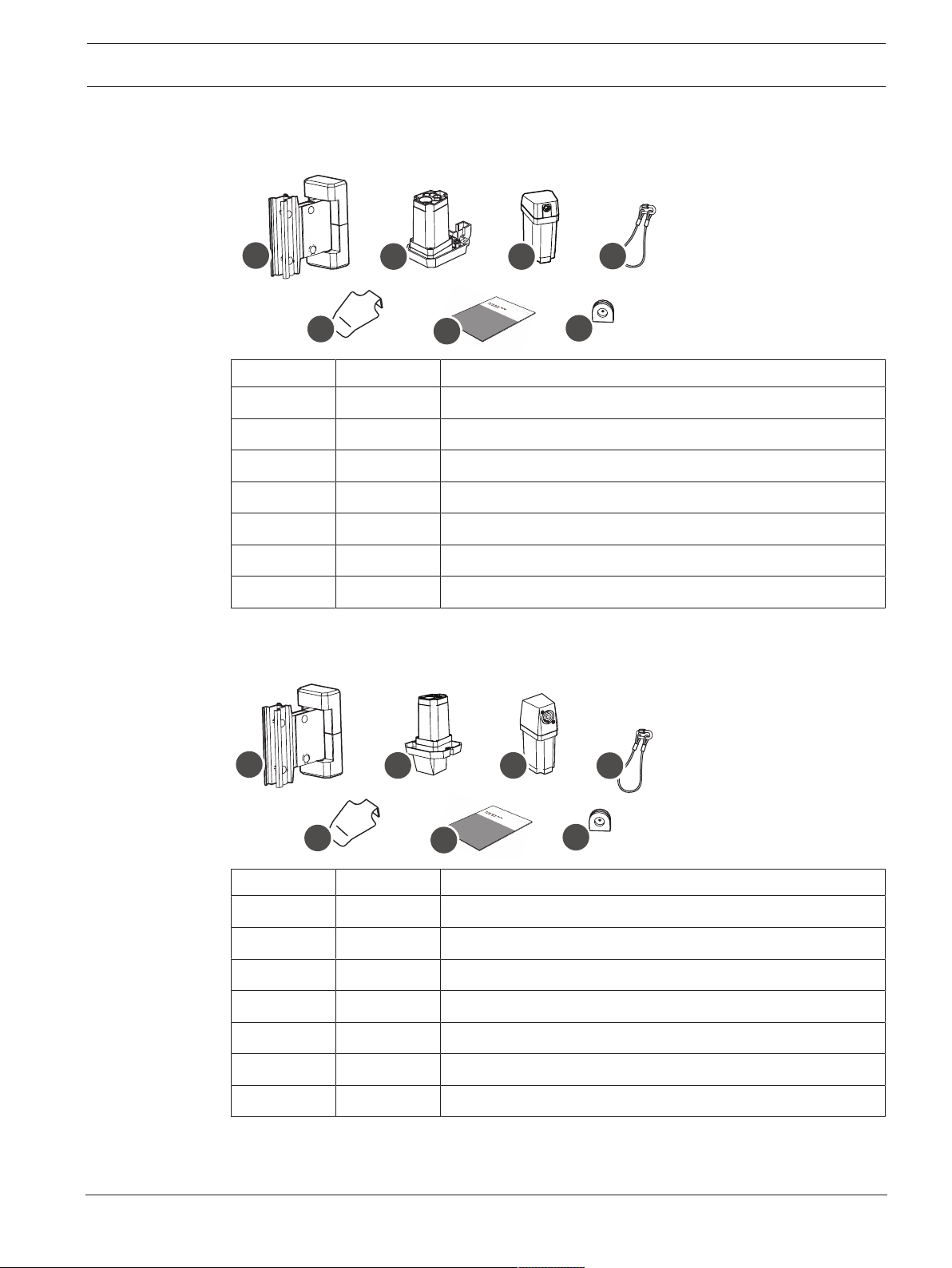
3.2 Packing list
EVOLVE-WMK-PB / EVOLVE-WMK-PW
A
C D
B
E
G
F
Item Quantity Component
A 1 Wall mount bracket
B 1 Subwoofer amplifier input cover
C 1 Column speaker adapter
D 1 Subwoofer adapter
E 1 Secondary auxiliary support cable
F 1 Installation manual
G 2 Rubber grommets
Table3.1: Components list for EVOLVE-WMK with Phoenix-style connector
EVOLVE-WMK-NB / EVOLVE-WMK-NW
A
E
C D
B
G
F
Item Quantity Component
A 1 Wall mount bracket
B 1 Subwoofer amplifier input cover
C 1 Column speaker adapter
D 1 Subwoofer adapter
E 1 Secondary auxiliary support cable
F 1 Installation manual
G 2 Rubber grommets
Table3.2: Components list for EVOLVE-WMK with NL4 connector
10 en | Introduction EVOLVE Wall mount kit
2022-03 | 02 | F.01U.401.529
Installation Manual
Electro-Voice
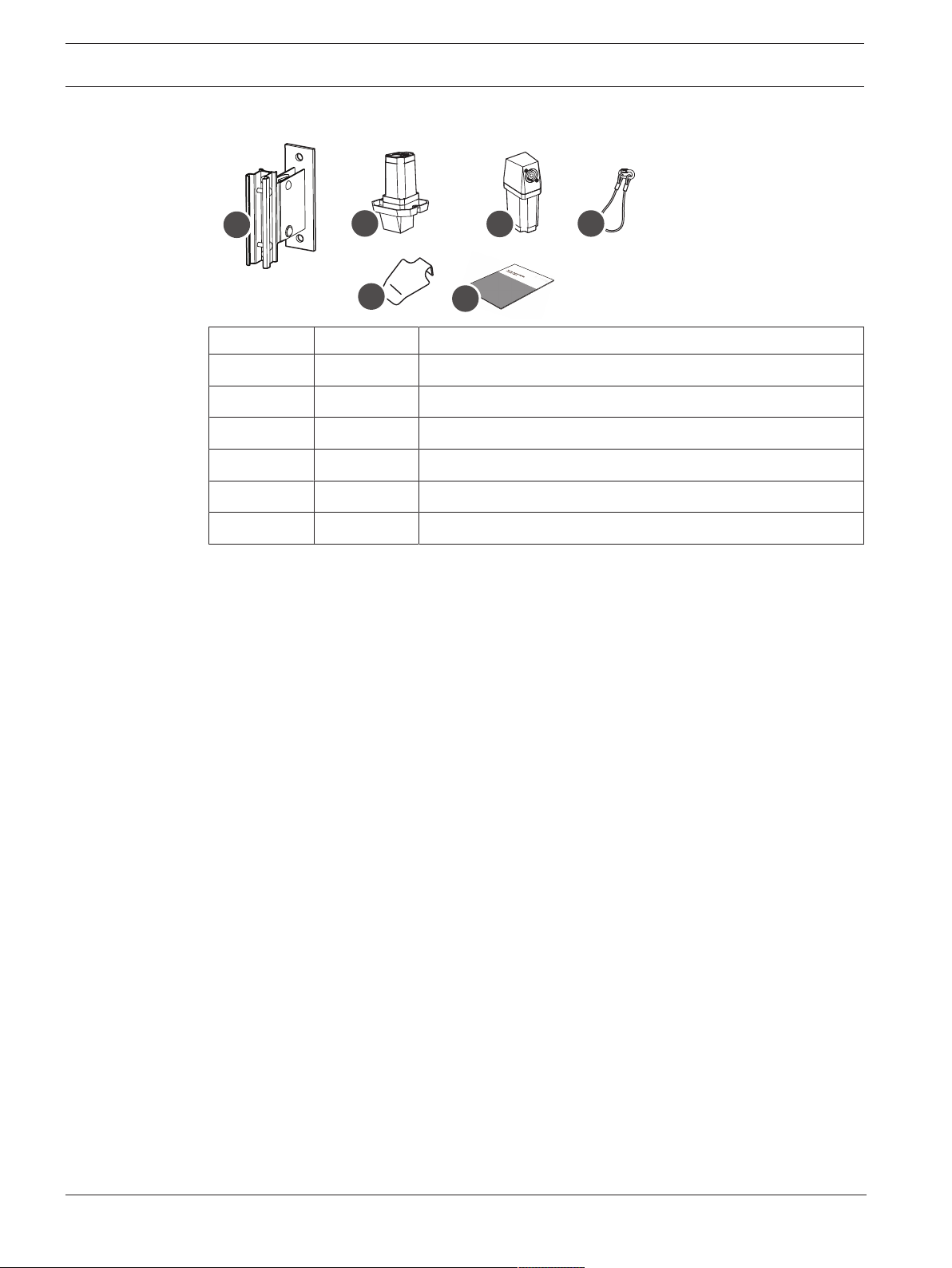
EVOLVE-TM-B
A
C
F
D
E
B
Item Quantity Component
A 1 Truss mount, EVOLVE, black
B 1 Subwoofer amplifier input cover
C 1 Column speaker adapter
D 1 Subwoofer adapter
E 1 Secondary auxiliary support cable
F 1 Installation manual
Table3.3: Components list for EVOLVE-TM-B
EVOLVE Wall mount kit Wiring and installation | en 11
Electro-Voice
Installation Manual
2022-03 | 02 | F.01U.401.529
4 Wiring and installation
The EVOLVE-WMK is used to suspend EVOLVE 30M , EVOLVE 50 and EVOLVE 50M column
speakers remotely from the subwoofer and without the distance pole.
!
Warning!
The EVOLVE-WMK is designed to only suspend EVOLVE 30M , EVOLVE 50 and EVOLVE 50M
column speakers (maximum 11lbs/5kg load weight). Do not use to suspend any other
loudspeakers or additional equipment.
For safety, ensure the mounting surface supports more than the weight of the speaker. Use
only industry-accepted fasteners and mounting methods when mounting the wall bracket.
Consult an expert if you are unsure.
!
Caution!
It is the installer's responsibility to determine and use the proper mounting hardware for the
wall construction type.
Disregarding this caution could result in damage to the product and personal injuries may
occur.
!
Caution!
It is the installer's responsibility to determine and use properly rated truss clamps with truss
system.
Disregarding this caution could result in damage to the product and personal injuries may
occur.
i
Notice!
If the loudspeaker installation will be delayed, cover it with the paint shield/dust shield.
12 en | Wiring and installation EVOLVE Wall mount kit
2022-03 | 02 | F.01U.401.529
Installation Manual
Electro-Voice
4.1 Wiring the EVOLVE column
The process of wiring the EVOLVE column is different depending on the connection type of the
wall mount kit, as described in this section.
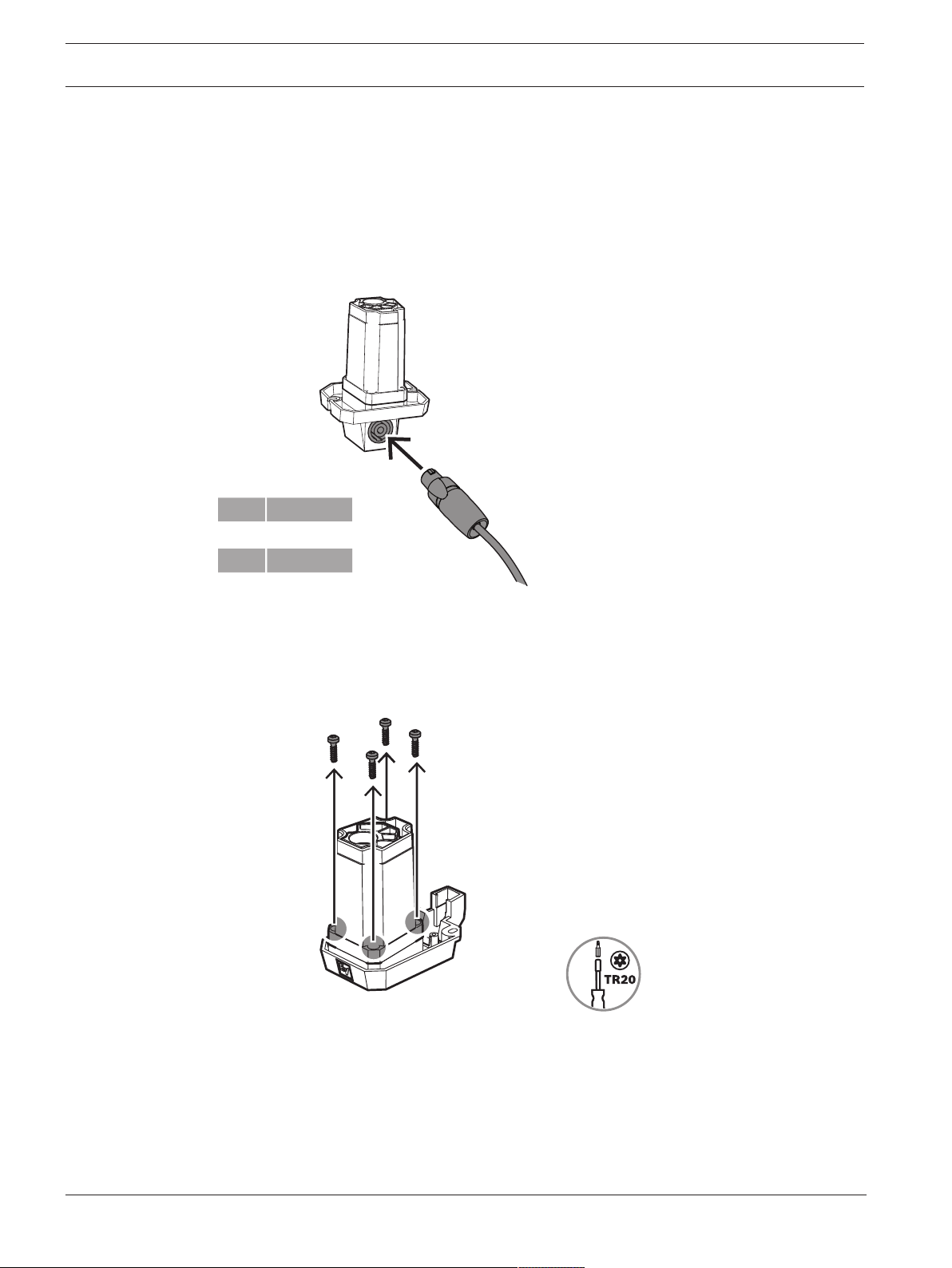
To wire the EVOLVE column to the column speaker adapter:
EVOLVE-WMK-NB / EVOLVE-WMK-NW / EVOLVE-TM-B
– Connect the cable using an NL4 connector to the corresponding NL4 connector on the
column speaker adapter.
1+ SUB+
1- SUB-
2+ n.c.
2- n.c.
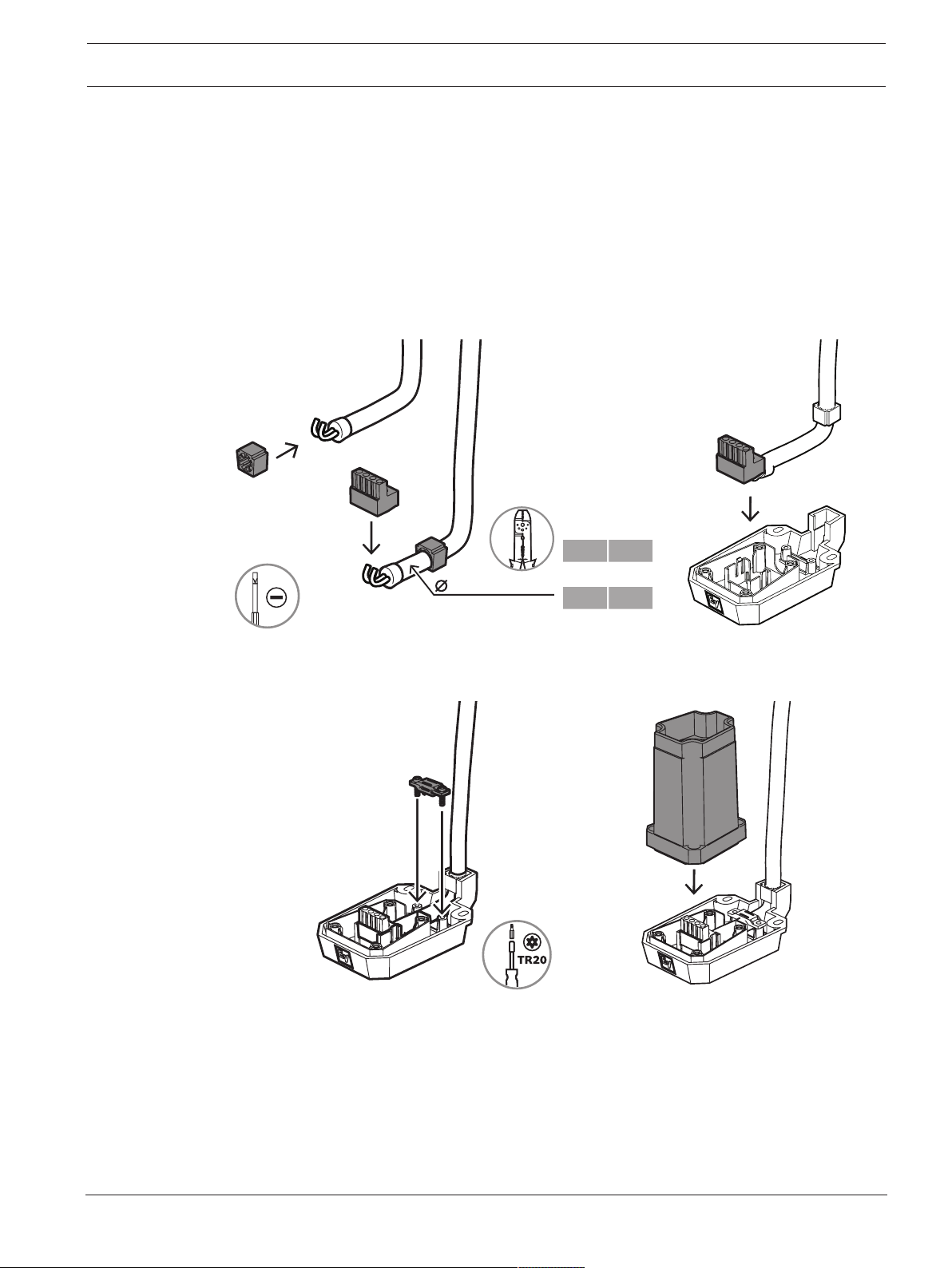
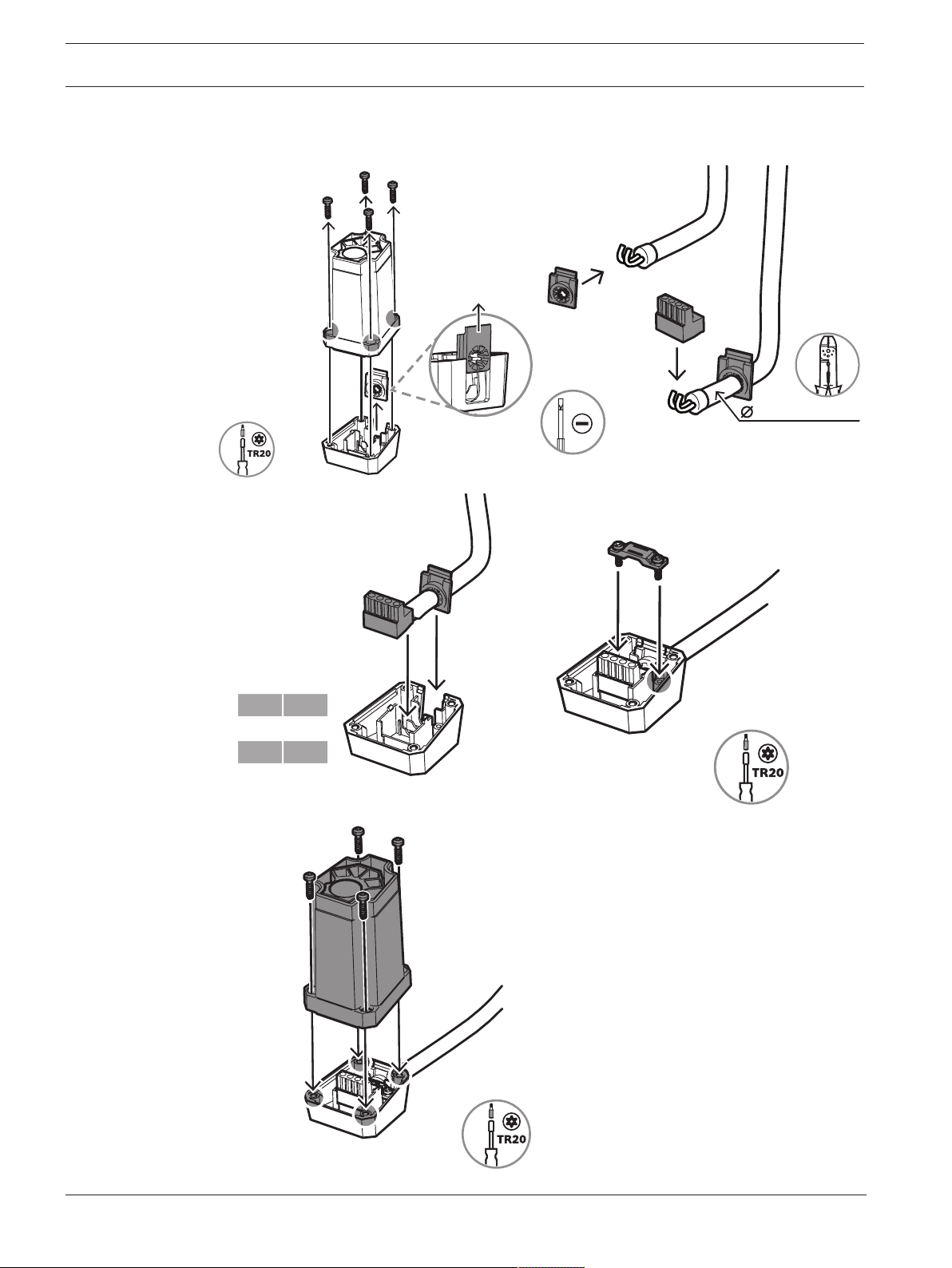
EVOLVE-WMK-PB / EVOLVE-WMK-PW
1. Remove the four screws that attach the upper housing of the column speaker adapter to
the lower housing.
EVOLVE Wall mount kit Wiring and installation | en 13
Electro-Voice
Installation Manual
2022-03 | 02 | F.01U.401.529
2. Strip back each individual wire’s insulation to leave approximately 6mm of bare wire
exposed.
3. Twist the wire ends to prevent individual strands from separating.
4. Insert the bare wire into the input terminal connector.
Make sure no excess bare wire is exposed beyond the terminal connector. The connector
must clamp down on the bare wire, not the wire insulation.
5. Install the rubber grommet on the cable and attach the Phoenix-style connector to the
wire. Connect the positive wire to the pin marked with a "+", and the negative wire to the
pin marked with a "-".
6. Plug the connector into the lower housing of the column speaker adapter.
6 - 8 mm
1,5mm² - 2,5mm²
(AWG16-AWG14)
1 +
1 +
2 -
2 -
7. Attach the strain relief clamp using TR20 screws.
8. Replace the upper housing of the column speaker adapter onto the set.
14 en | Wiring and installation EVOLVE Wall mount kit
2022-03 | 02 | F.01U.401.529
Installation Manual
Electro-Voice
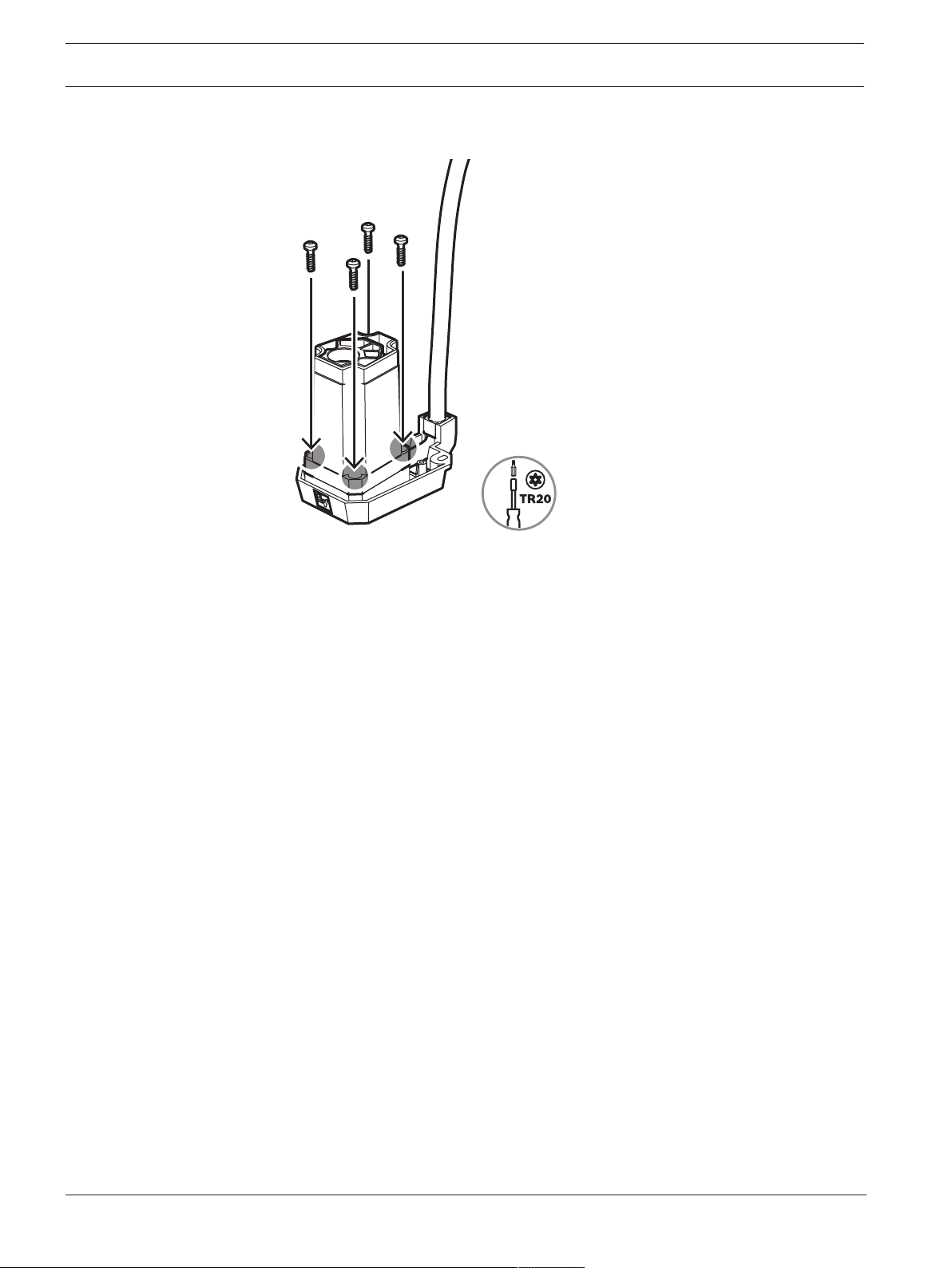
9. Attach the upper housing of the column speaker adapter to the lower housing with the
supplied screws.
If you’re connecting a Phoenix to an NL4, refer to
Additional pin-out tables, page 28
.
Refer to
– Additional pin-out tables, page 28
EVOLVE Wall mount kit Wiring and installation | en 15
Electro-Voice
Installation Manual
2022-03 | 02 | F.01U.401.529
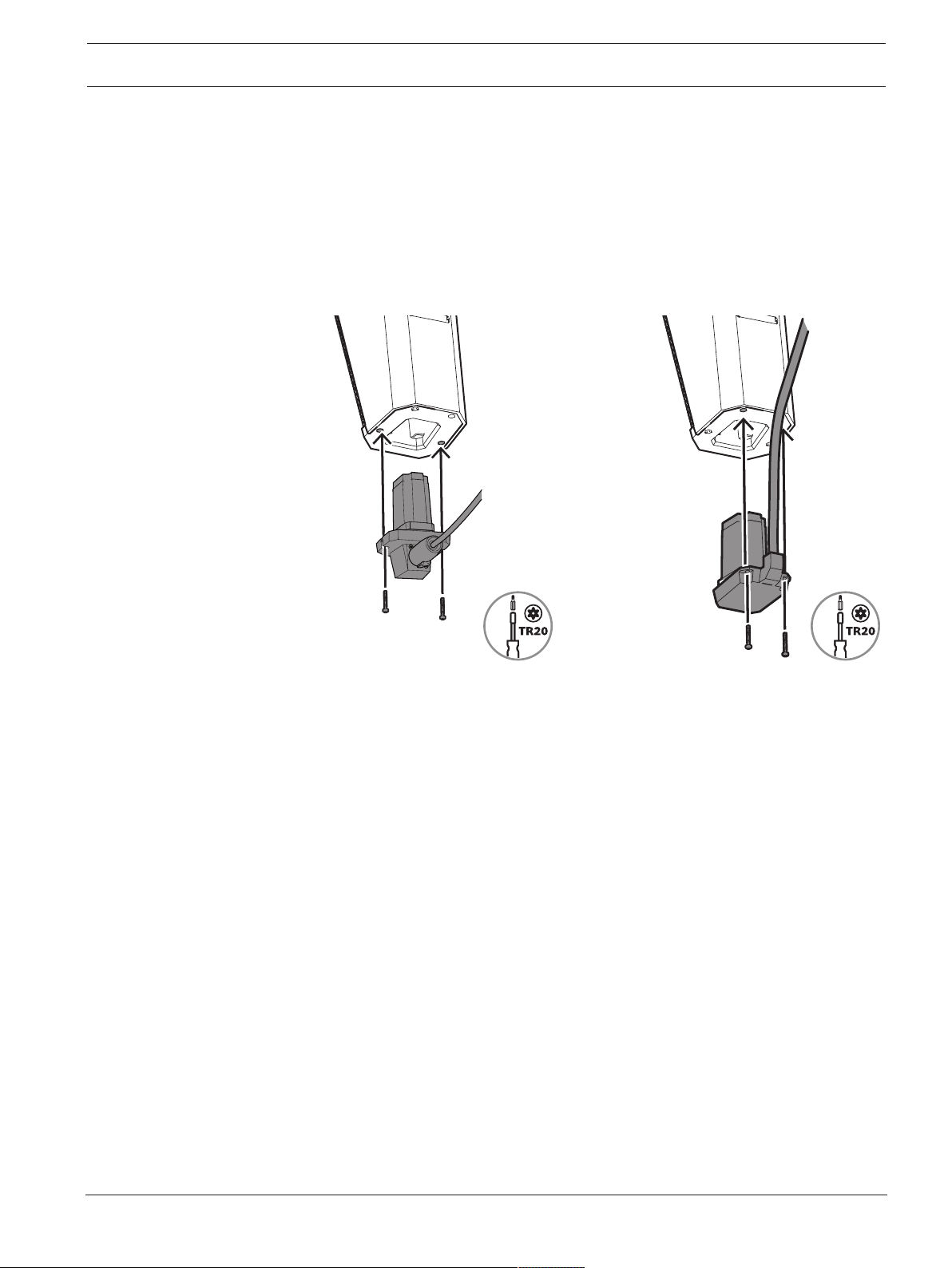
4.2 Attaching the column speaker adapter to the EVOLVE column
To attach the column speaker adapter to the EVOLVE column:
1. Remove the two screws on the bottom of the EVOLVE column.
2. Insert the column speaker adapter in the opening at the bottom of the EVOLVE column.
3. Attach the column speaker adapter to the EVOLVE column with the supplied TR20
screws.
EVOLVE-WMK-NB / EVOLVE-WMK-NW /
EVOLVE-TM-B
EVOLVE-WMK-PB / EVOLVE-WMK-PW
4.3 Attaching the EVOLVE column to the wall bracket
The wall bracket is composed of two pieces: the wall part and the handle part.
The installation of the wall bracket comprises:
1.
Installing the wall part, page 16
2.
Attaching the handle part to the EVOLVE column, page 17
3.
Mounting the wall bracket, page 18
4.
Attaching the cosmetic cover set, page 19
16 en | Wiring and installation EVOLVE Wall mount kit
2022-03 | 02 | F.01U.401.529
Installation Manual
Electro-Voice
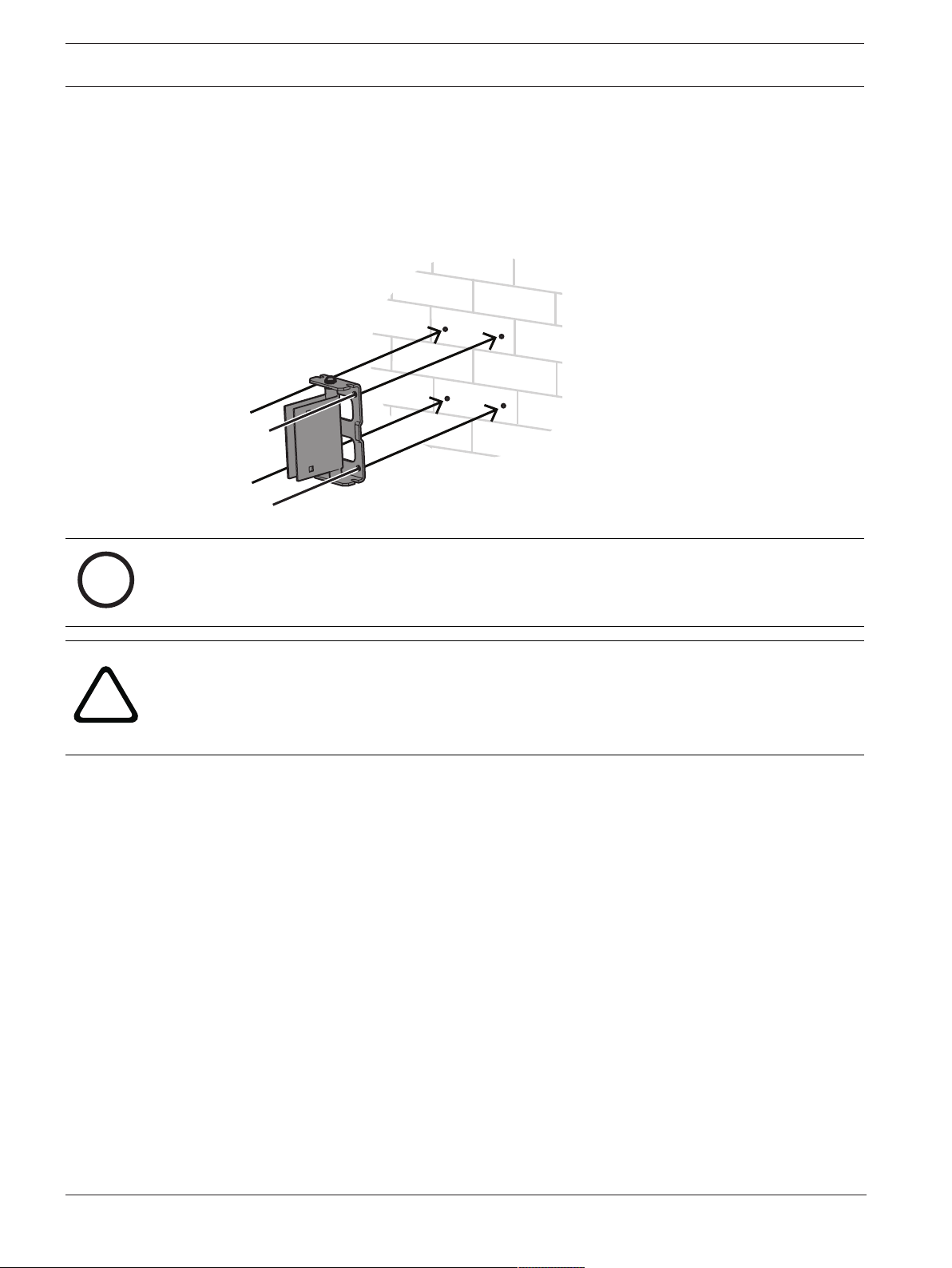
4.3.1 Installing the wall part
To install the wall part of the bracket:
1. Separate the two pieces of the wall bracket by unscrewing the two bolts on the side.
2. Use a bubble level to align the wall part on the wall.
3. Mark the position of the screw holes with a pen.
4. Attach the wall part to the wall with the mounting screws.
i
Notice!
Consult an engineer and install fasteners according to the hardware manufacturer.
!
Caution!
It is the installer's responsibility to determine and use the proper mounting hardware for the
wall construction type.
Disregarding this caution could result in damage to the product and personal injuries may
occur.
EVOLVE Wall mount kit Wiring and installation | en 17
Electro-Voice
Installation Manual
2022-03 | 02 | F.01U.401.529
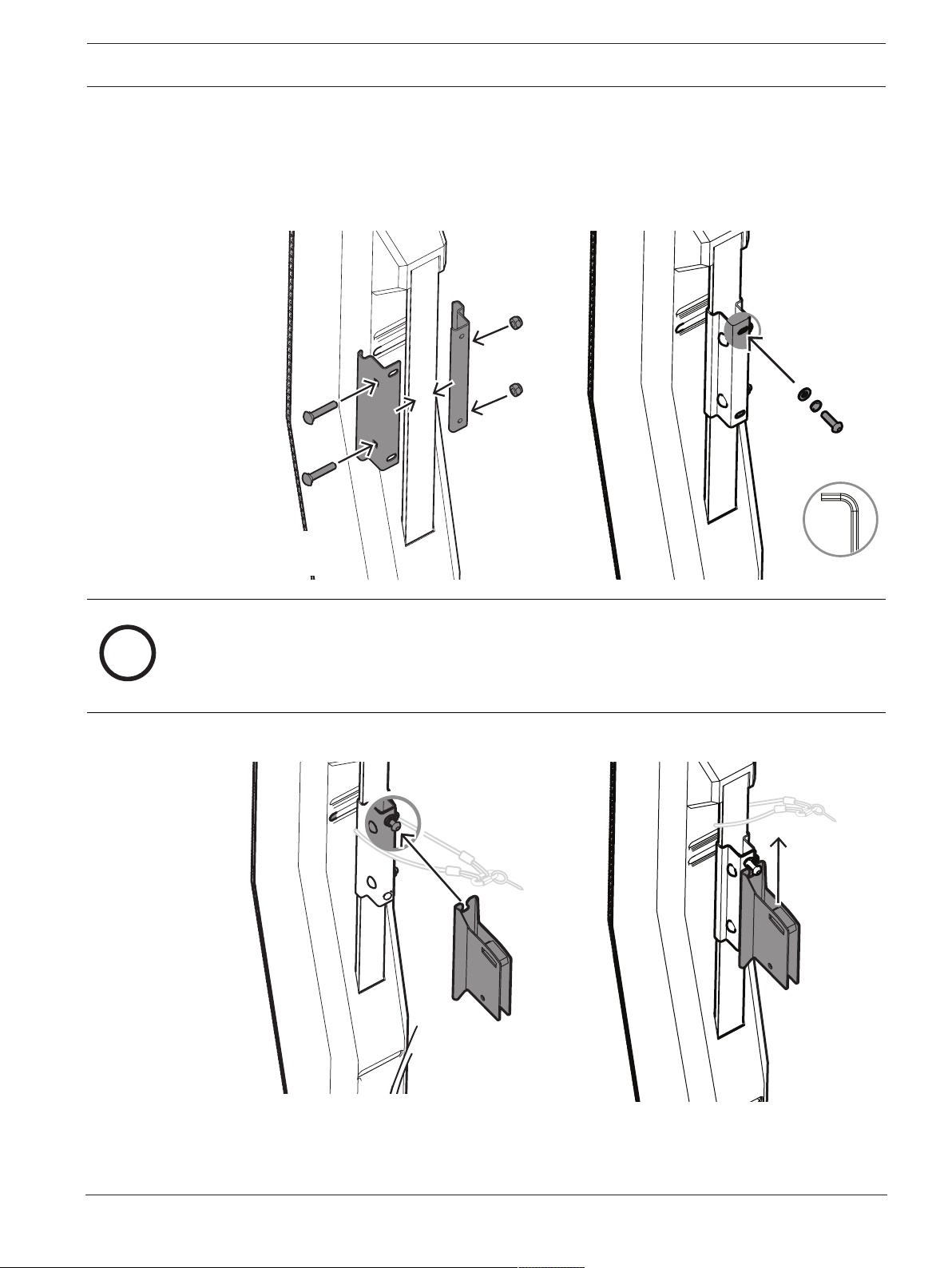
4.3.2 Attaching the handle part to the EVOLVE column
To attach the handle part of the bracket to the EVOLVE column:
1. Attach and secure the clips to the back of the EVOLVE column with two screws and nuts.
2. Install the screw at the top of the clips. Do not fully insert the screw until the handle part
is in place.
4.5 - 6 Nm
(40 - 55 lb-in)
HEX 5mm
i
Notice!
Safety point
As an added safety measure, Electro-Voice recommends the user install and secure the
secondary auxiliary support cable to a different structural support point. This safety point
should have as little slack as possible (less than 25 mm/1 in. is preferable).
3. Slide the top screw of the clips down the slit of the handle part.
18 en | Wiring and installation EVOLVE Wall mount kit
2022-03 | 02 | F.01U.401.529
Installation Manual
Electro-Voice
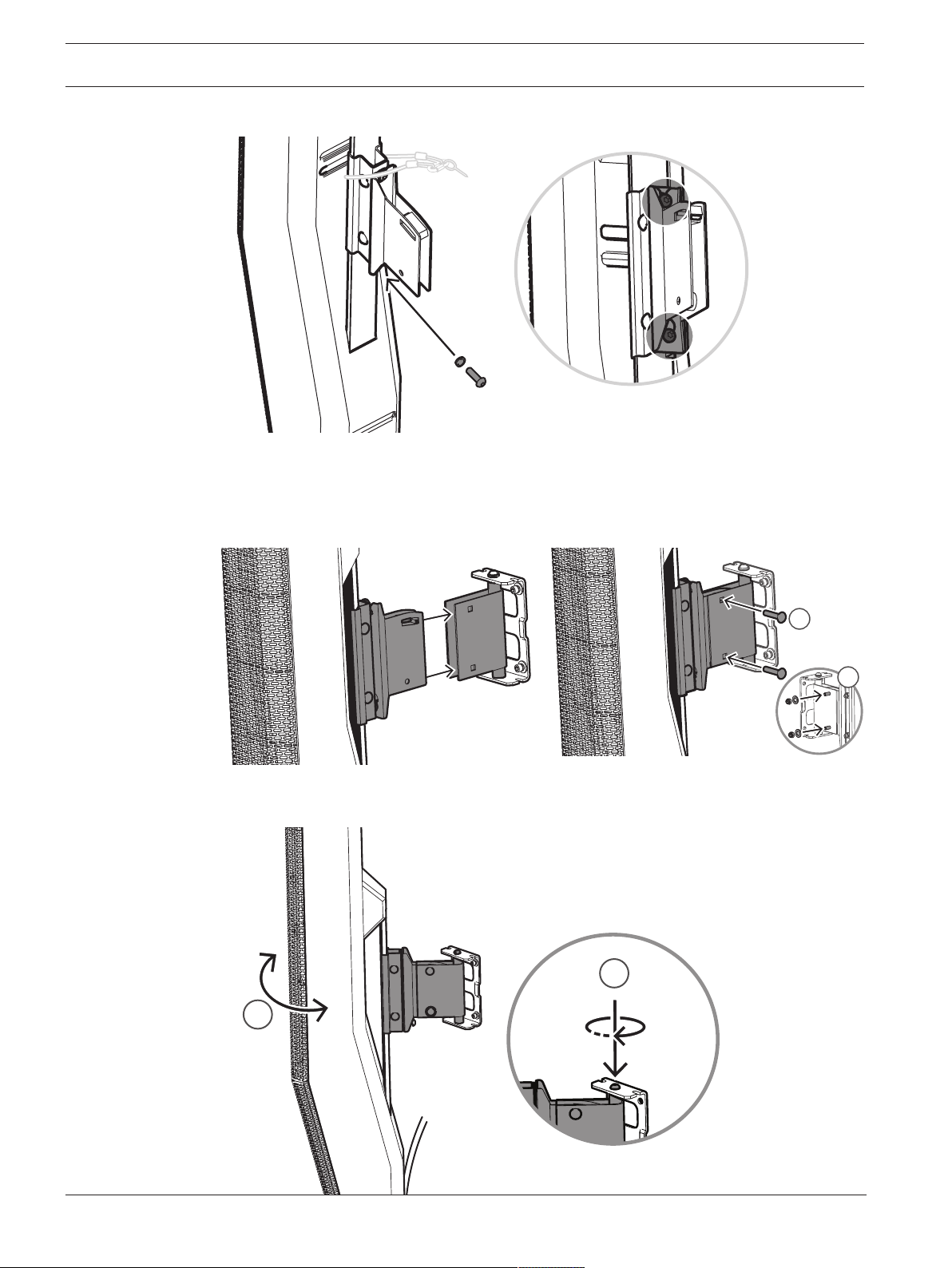
4. Install the screw at the bottom of the clips.
4.5 - 6 Nm
(40 - 55 lb-in)
4.3.3 Mounting the wall bracket
To mount the wall bracket:
1. Attach the handle part to the wall bracket and join both pieces by reinstalling the two
bolts.
1
2
4.5 - 6 Nm
(40 - 55 lb-in)
2. When the speaker is in the proper pan angle (1) position, tighten the wall mount screw
(2) to lock it in place.
1
10 - 15 Nm
(90 - 130 lb-in)
2
EVOLVE Wall mount kit Wiring and installation | en 19
Electro-Voice
Installation Manual
2022-03 | 02 | F.01U.401.529
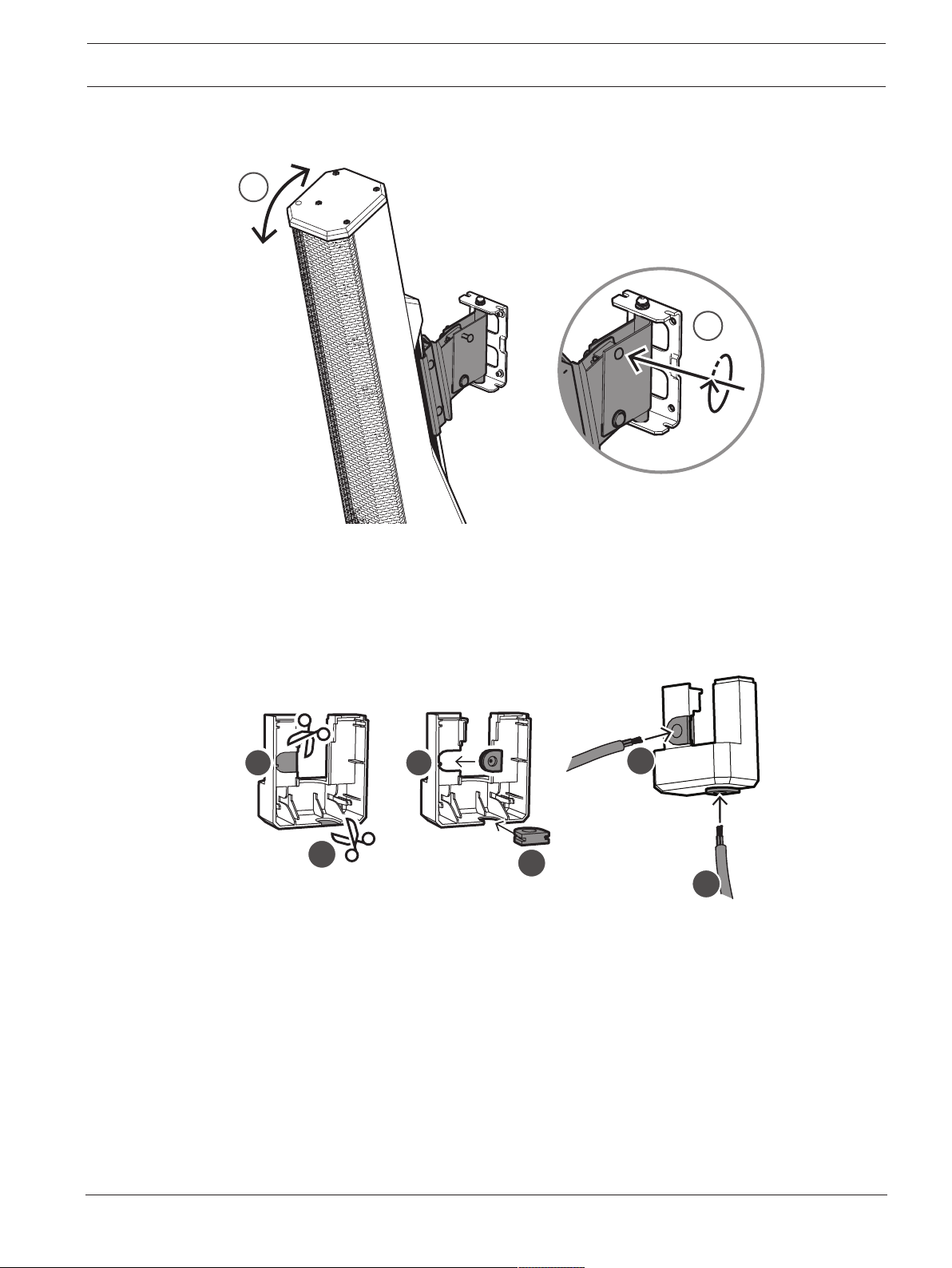
3. When the speaker is in the proper tilt angle (1) position, tighten the wall mount screw (2)
to lock it in place.
1
4.5 - 6 Nm
(40 - 55 lb-in)
2
4.3.4 Attaching the cosmetic cover set
To attach the cosmetic cover set onto the bracket:
1. Cut out one or two slots on the cosmetic cover set to route the cable, as needed.
The area to be cut out will be of a thinner material.
2. Install the supplied rubber grommets.
A
A
A
B
B B
20 en | Wiring and installation EVOLVE Wall mount kit
2022-03 | 02 | F.01U.401.529
Installation Manual
Electro-Voice
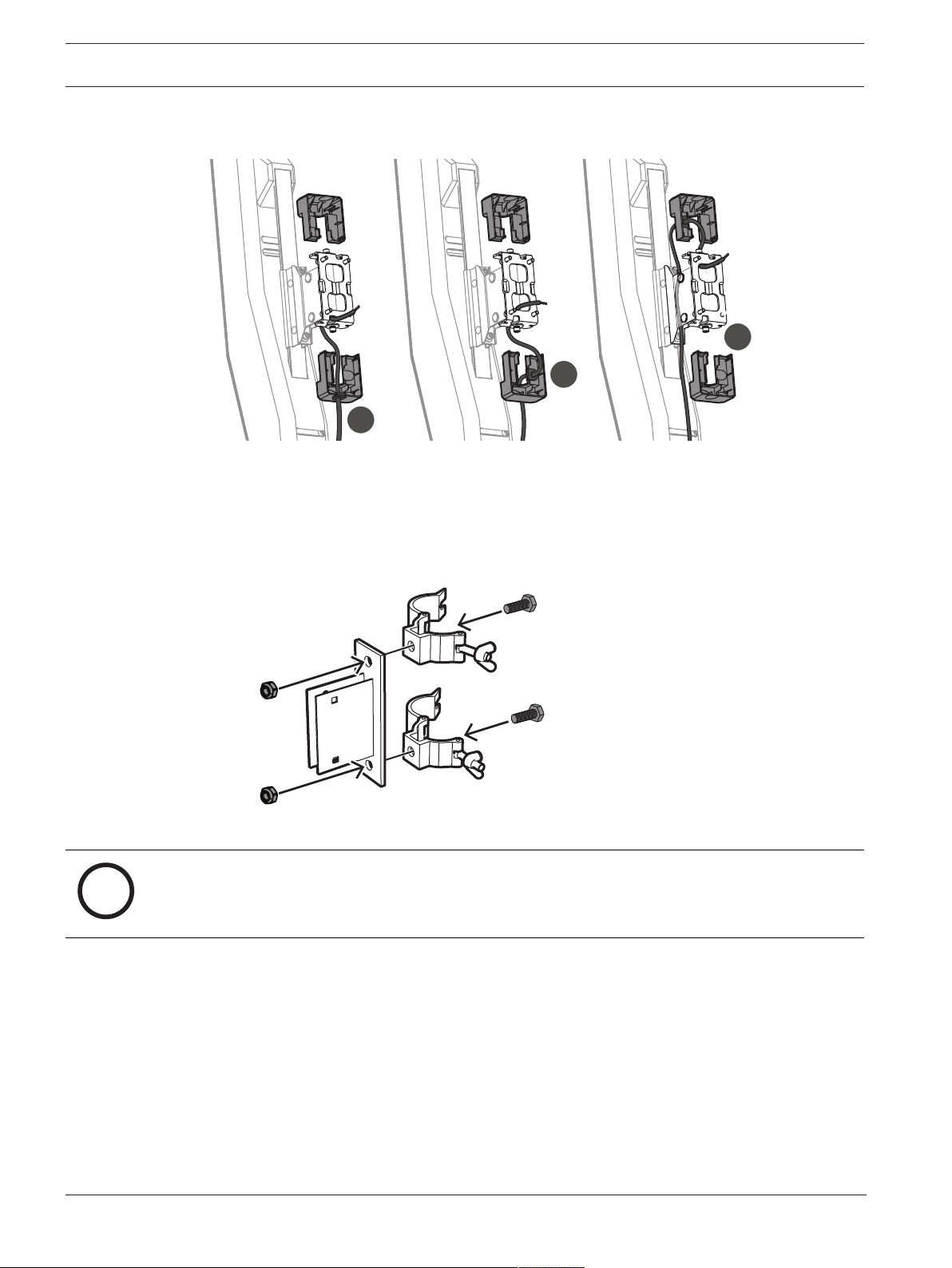
3. Route the cable and attach the cosmetic cover set onto the bracket.
There are at least three options to route the cable.
A
B
C
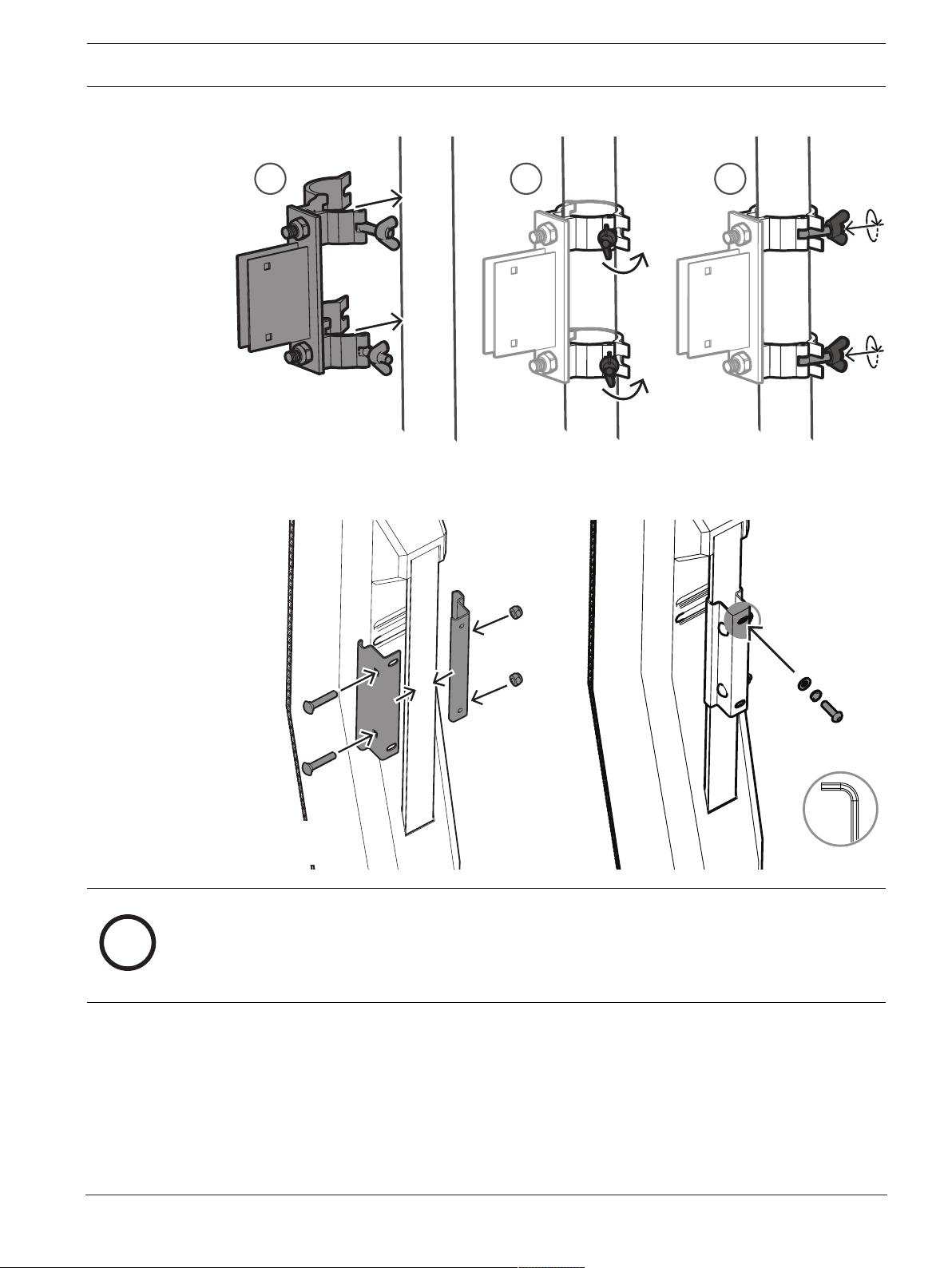
4.4 Attaching the EVOLVE column to the truss mount bracket
The truss mount bracket is composed of two pieces: the truss part and the handle part.
1. Screw the truss mount bracket to the truss mount clamps using the top and bottom
screw holes.
i
Notice!
Use two truss mount clamps with M10 threaded studs rated for 20kg (44lb) working load
limit (WLL) or greater and 5:1 safety factor (SF).
EVOLVE Wall mount kit Wiring and installation | en 21
Electro-Voice
Installation Manual
2022-03 | 02 | F.01U.401.529
2. Attach the truss mount bracket with clamps to the desired support point.
1 2 3
3. Attach and secure the clips to the back of the EVOLVE column with two screws and nuts.
4. Install the screw at the top of the clips. Do not fully insert the screw until the handle part
of the truss mount bracket is in place.
4.5 - 6 Nm
(40 - 55 lb-in)
HEX 5mm
i
Notice!
Safety point
As an added safety measure, Electro-Voice recommends the user install and secure the
secondary auxiliary support cable to a different structural support point. This safety point
should have as little slack as possible (less than 25 mm/1 in. is preferable).
22 en | Wiring and installation EVOLVE Wall mount kit
2022-03 | 02 | F.01U.401.529
Installation Manual
Electro-Voice
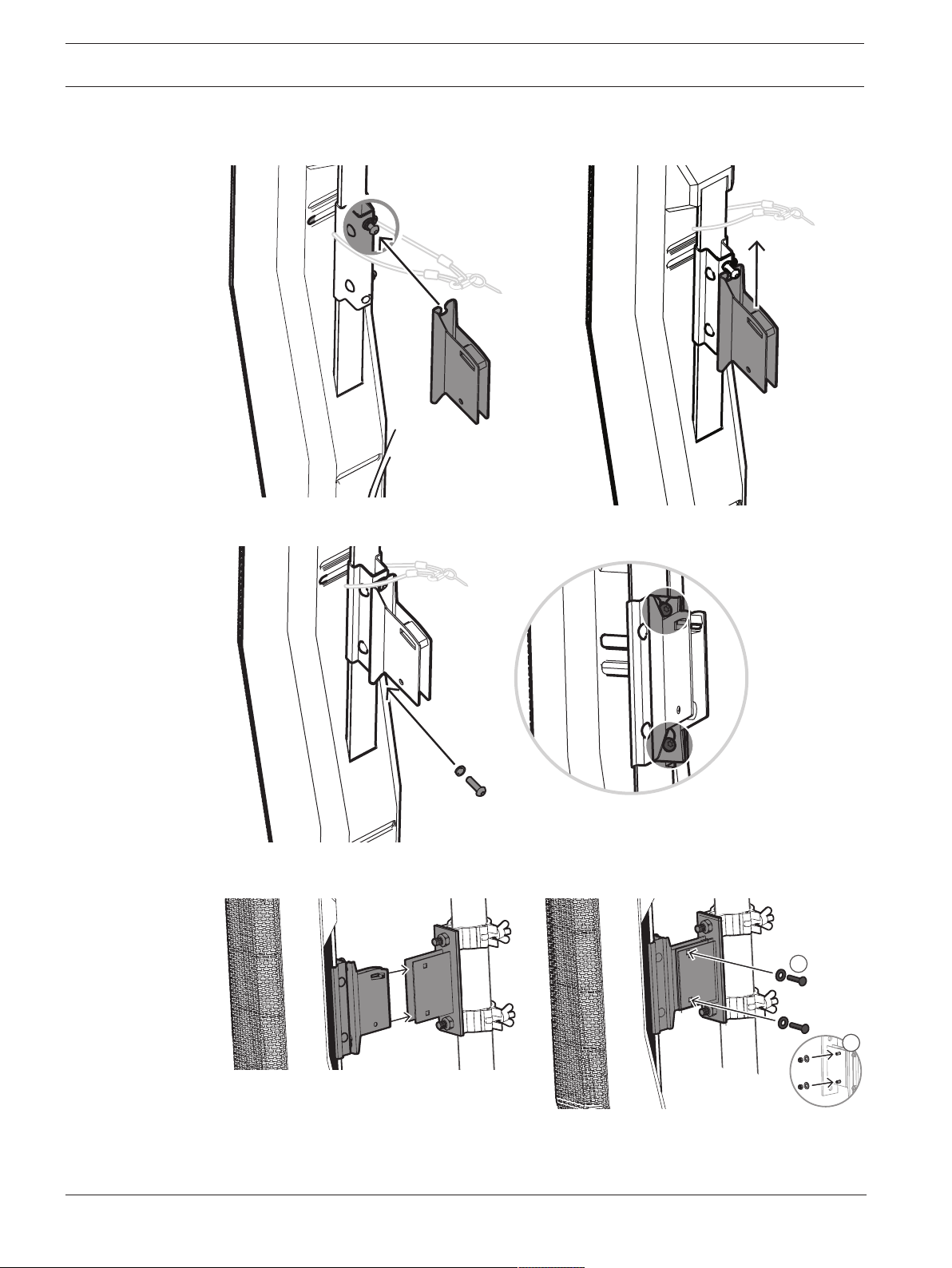
5. Slide the top screw of the clips down the slit of the handle part of the truss mount
bracket.
6. Install the screw at the bottom of the clips.
4.5 - 6 Nm
(40 - 55 lb-in)
7. Attach the EVOLVE column to the truss mount bracket and join both pieces by reinstalling
the two bolts.
1
2
EVOLVE Wall mount kit Wiring and installation | en 23
Electro-Voice
Installation Manual
2022-03 | 02 | F.01U.401.529
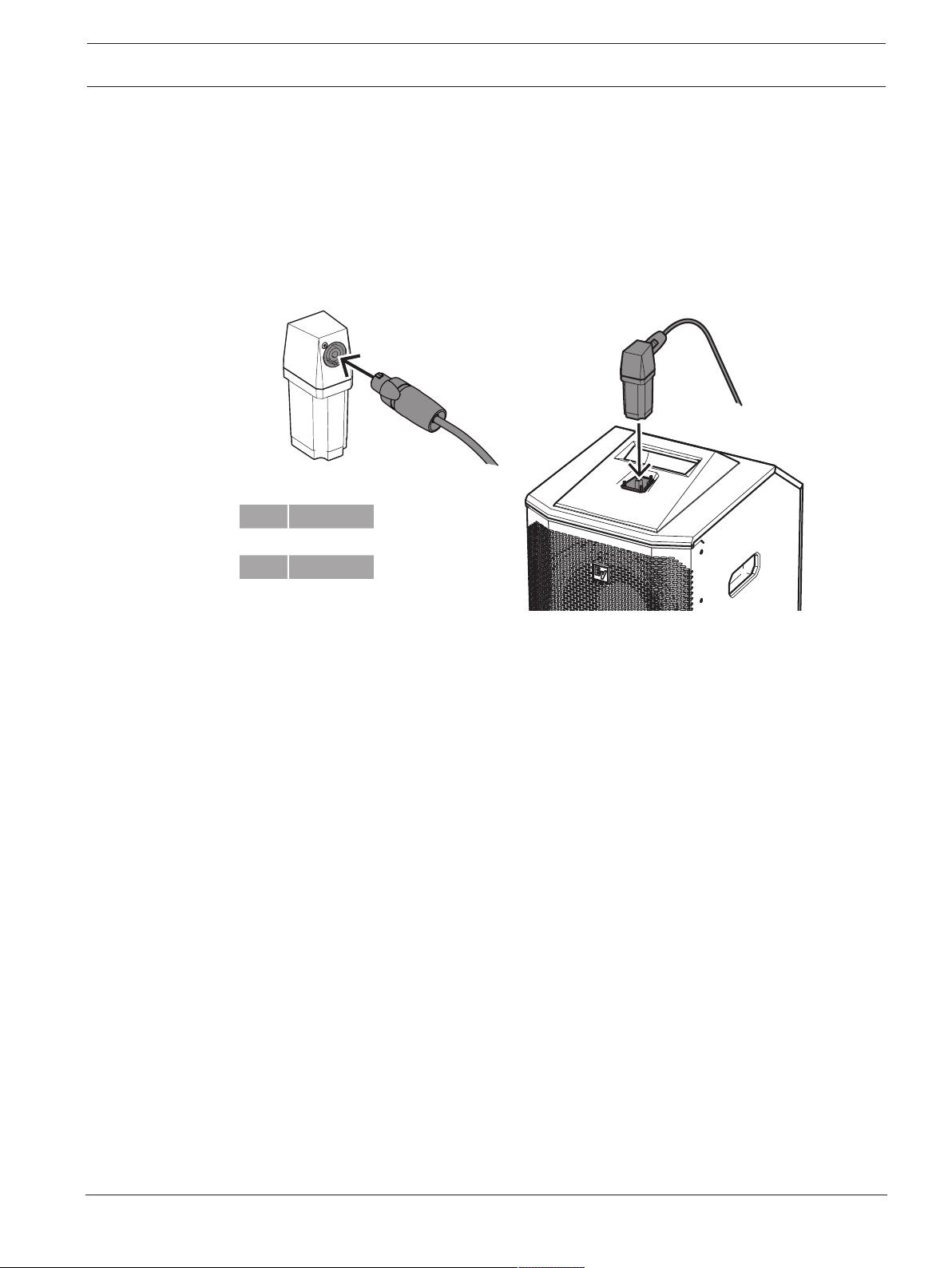
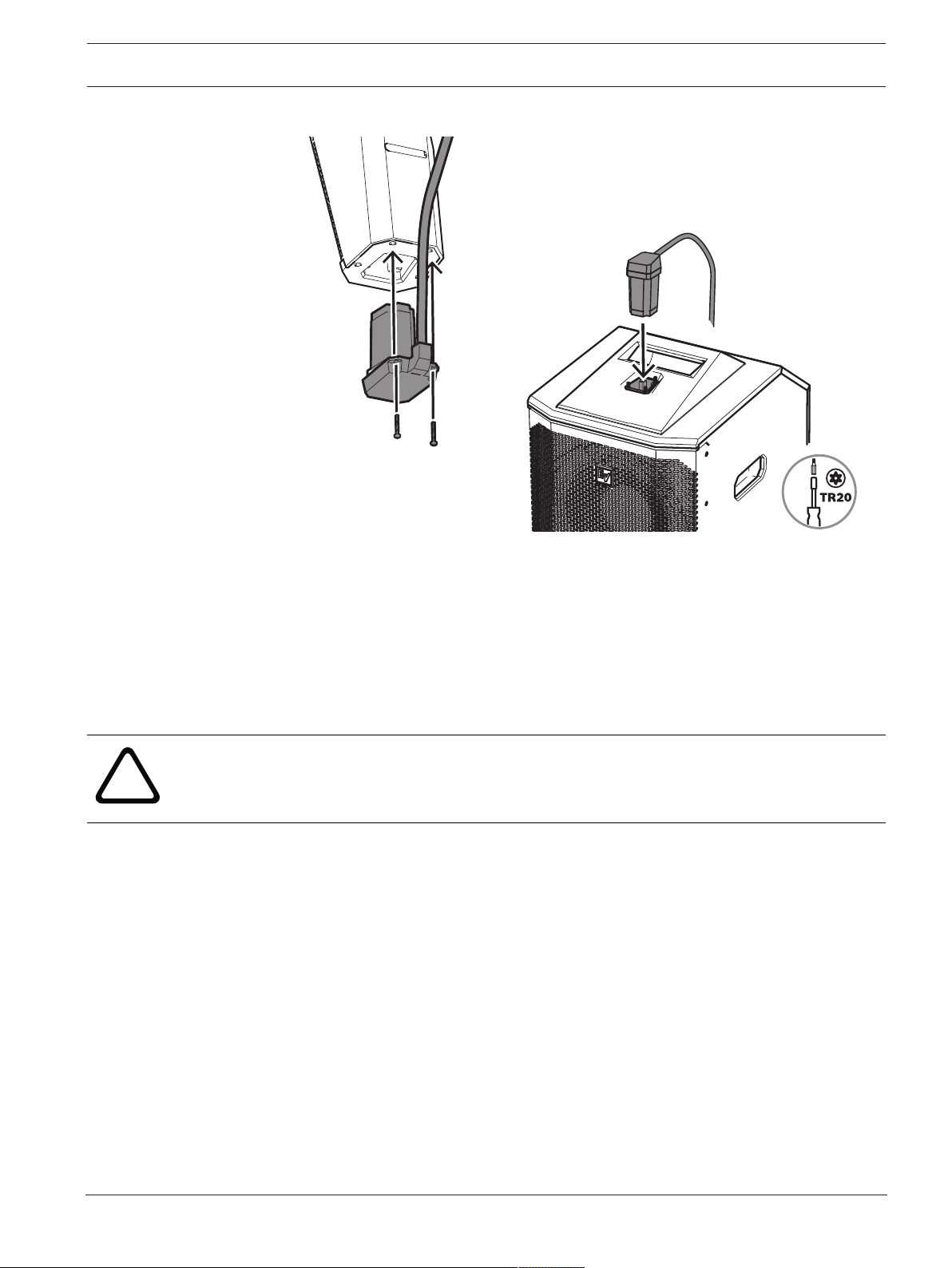
4.5 Wiring the subwoofer
The process of wiring the subwoofer is different depending on the connection type of the wall
mount kit, as described in this section.
To wire the subwoofer to the subwoofer adapter:
EVOLVE-WMK-NB / EVOLVE-WMK-NW / EVOLVE-TM-B
1. Connect the cable using an NL4 connector to the corresponding NL4 connector on the
subwoofer adapter.
2. Plug the subwoofer adapter by inserting it in the slot on the upper part of the subwoofer.
1+ SUB+
1- SUB-
2+ n.c.
2- n.c.
EVOLVE Wall mount kit Wiring and installation | en 25
Electro-Voice
Installation Manual
2022-03 | 02 | F.01U.401.529
2. Plug the subwoofer adapter by inserting it in the slot on the upper part of the subwoofer.
If you’re connecting a Phoenix to an NL4, refer to
Additional pin-out tables, page 28
.
Refer to
– Wiring the EVOLVE column, page 12
4.6 Installing the subwoofer amplifier input cover
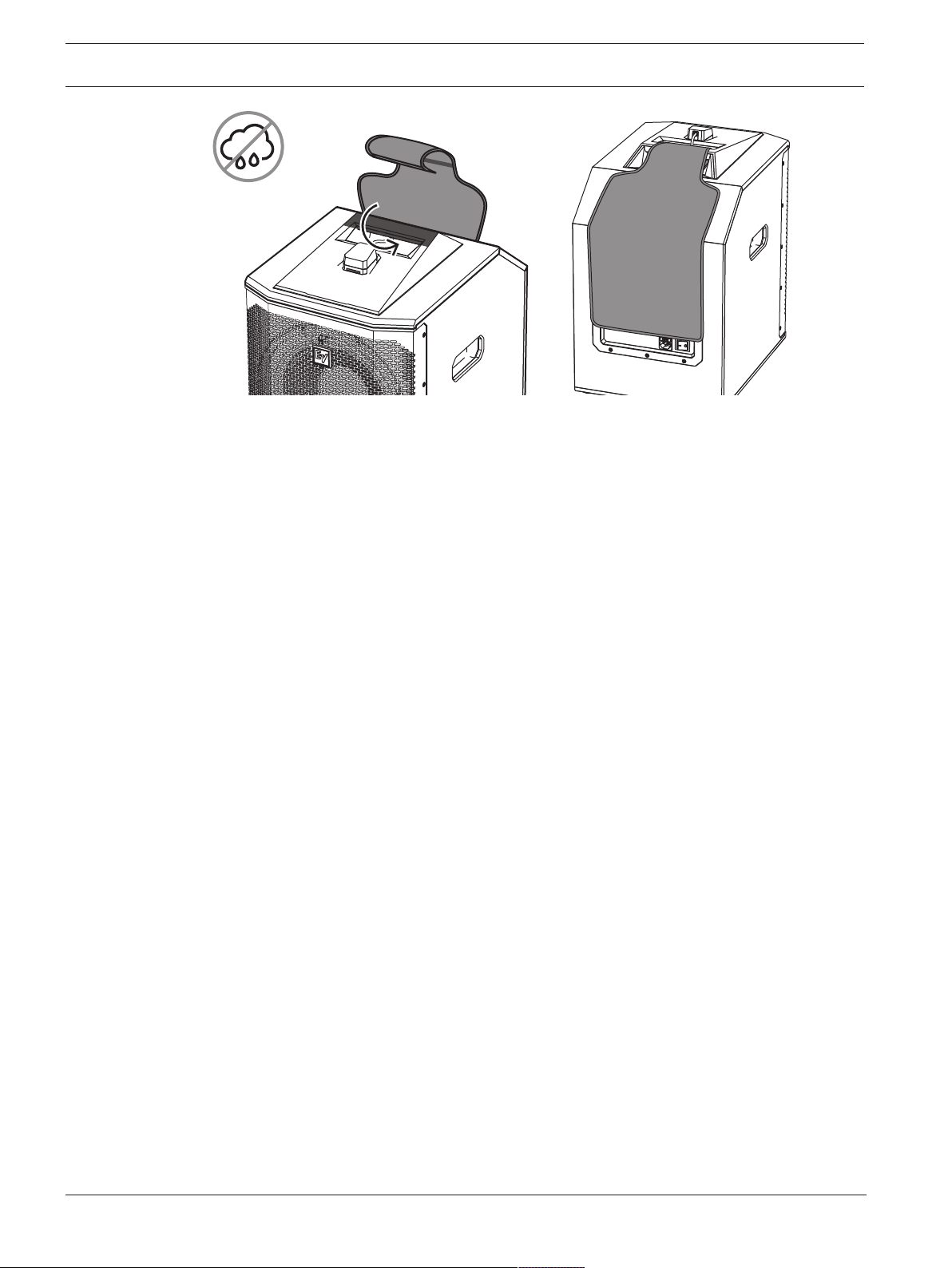
The subwoofer amplifier input cover is included with the EVOLVE-WMK to provide protection
from dust and occasional light moisture, such as splashes. The cover will also block the light
from the LCD display when needed.
!
Warning!
Do not use the subwoofer amplifier input cover outdoors in wet or damp environments. The
cover does not protect the amplifier from rain.
To install the subwoofer amplifier input cover:
1. Wrap the cloth around the handle of the subwoofer.
2. Attach the hook and loop.
26 en | Wiring and installation EVOLVE Wall mount kit
2022-03 | 02 | F.01U.401.529
Installation Manual
Electro-Voice

EVOLVE Wall mount kit Troubleshooting | en 27
Electro-Voice
Installation Manual
2022-03 | 02 | F.01U.401.529
5 Troubleshooting
Problem Possible Causes Action
No Sound Amplifier Connect a known working test speaker to the amplifier outputs. If
there is no sound, check all electronics are on, the signal routing is
correct, the source is active; the volume is turned up, and so on.
Correct/Repair/Replace as necessary. If there is sound, the problem is
in the wiring.
Wiring Verify you have connected the correct wire pairs to the amplifier. Play
something at low level through the amplifier (for example, from a CD
player or tuner). Connect the test speaker in parallel with the
malfunctioning line. If the sound has gone or is very weak, the line has
a short in it (possibly a severe scrape, pinch, or staple puncture). If
the sound level is normal the wire is open (possibly a cut wire or
missed connection). Using the test speaker, move down the line and
test each connection/junction until you find the problem and correct
it. Observe proper polarity.
Verify you have the inputs and outputs connected to the correct wires.
If the subwoofer input panel is not correctly wired, there will be little
or no sound. Observe proper polarity.
Poor Low-
Frequency
Response
Speakers Wired Out-
of-Polarity
When two speakers are connected out of polarity (out of phase), the
low frequencies will cancel each other acoustically. Carefully observe
the wire markings or tracers on your speaker wires. Verify the
amplifier (+) terminal is connected to the red speaker terminals and
the amplifier (-) terminal is connected to the black speaker terminals.
Improperly Wired
Subwoofer Panel
Using a test speaker as described above, verify all amplifier and
speaker wires are connected to their proper terminals with the correct
polarity. Reversing just one set of amplifier wires can cut out all bass
output from the subwoofer.
Intermittent
Output such as,
Crackling or
Distortion
Faulty Connection Check all connections at amplifier and speakers to ensure they are
clean and tight. If the problem persists, it may be in the amplifier or
wiring. See other actions above.
Constant Noise
such as Buzzing,
Hissing, Humming
Defective Amplifier
or other Electronic
Device
If the noise is present but no program material is playing, the likely
cause is the signal chain in the electronics. Evaluate each component
as necessary to isolate the problem.
Poor System
Grounding or
Ground Loop
Check and correct the system grounding, as required.
If these suggestions do not solve your problem, contact your nearest Electro-Voice dealer or
Electro-Voice distributor.
28 en | Technical data EVOLVE Wall mount kit
2022-03 | 02 | F.01U.401.529
Installation Manual
Electro-Voice
6 Technical data
EVOLVE-WMK-PB/PW EVOLVE-WMK-NB/NW EVOLVE-TM-B
Connectors: Phoenix style NL4
Environmental: Indoor
Color: Black or white Black
Dimensions
(HxWxD):
80mm x 400mm x 400mm (3.1in. x 15.75in. x 15.75in)
WLL: 5kg (11.0lbs)
Net weight: 1.35kg (3.0lbs)
Shipping weight: 1.8kg (4.0lbs)
6.1 Additional pin-out tables
Column Phoenix NL4
Positive
connection
1 n.c.
1 +1
Negative
connection
2 -1
2 n.c.
Subwoofer Phoenix NL4
Positive
connection
n.c. n.c.
1 +1
Negative
connection
2 -1
n.c n.c.
EVOLVE Wall mount kit Technical data | en 29
Electro-Voice
Installation Manual
2022-03 | 02 | F.01U.401.529
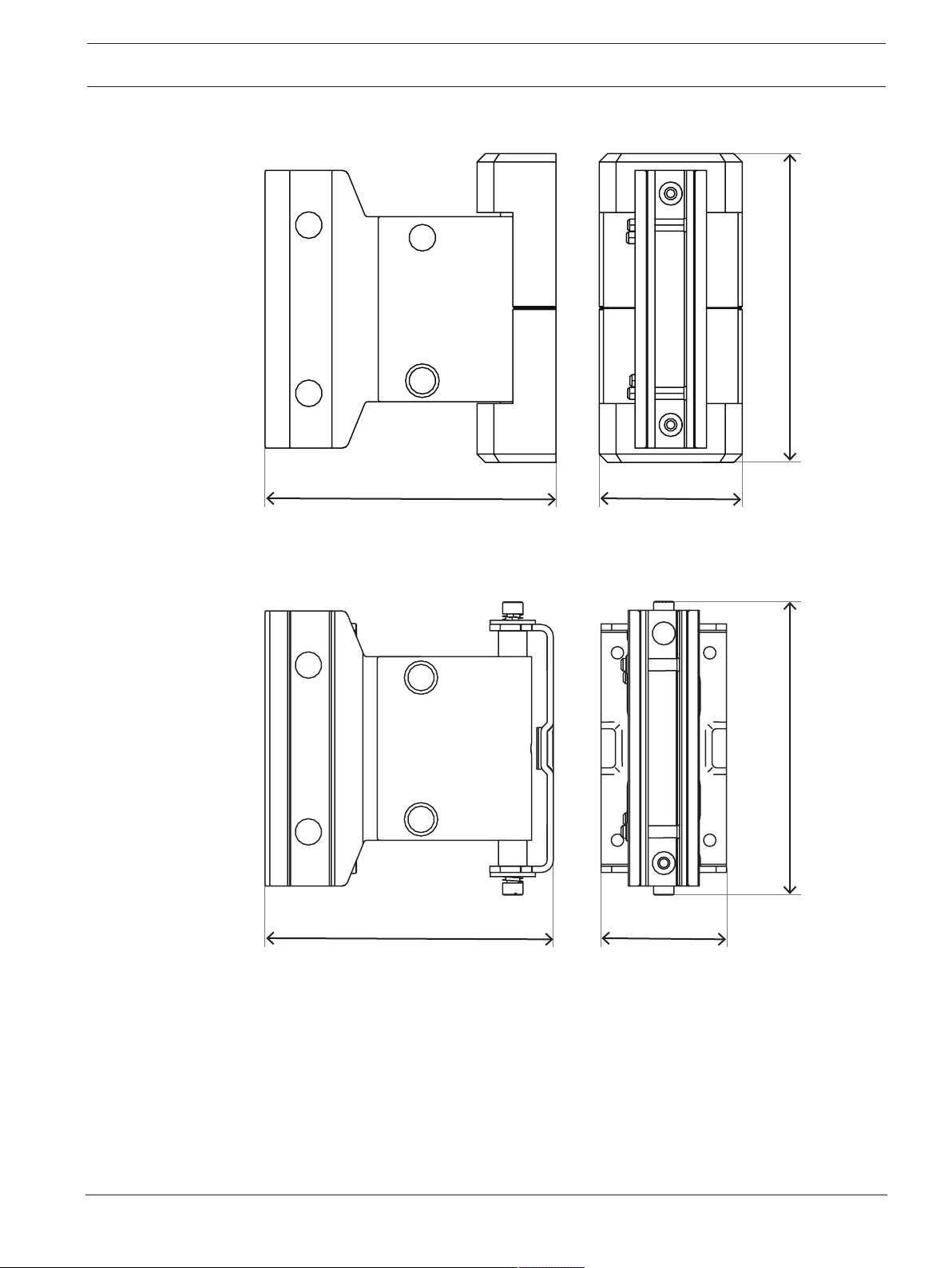
6.2 Dimensions
mm [in]
147
[5.8]
138.25 [5.4] 88 [3.5]
Figure6.1: Wall mount bracket
mm [in]
141
[5.6]
138 [5.4] 60 [2.4]
Figure6.2: Wall mount bracket without covers
30 en | Technical data EVOLVE Wall mount kit
2022-03 | 02 | F.01U.401.529
Installation Manual
Electro-Voice
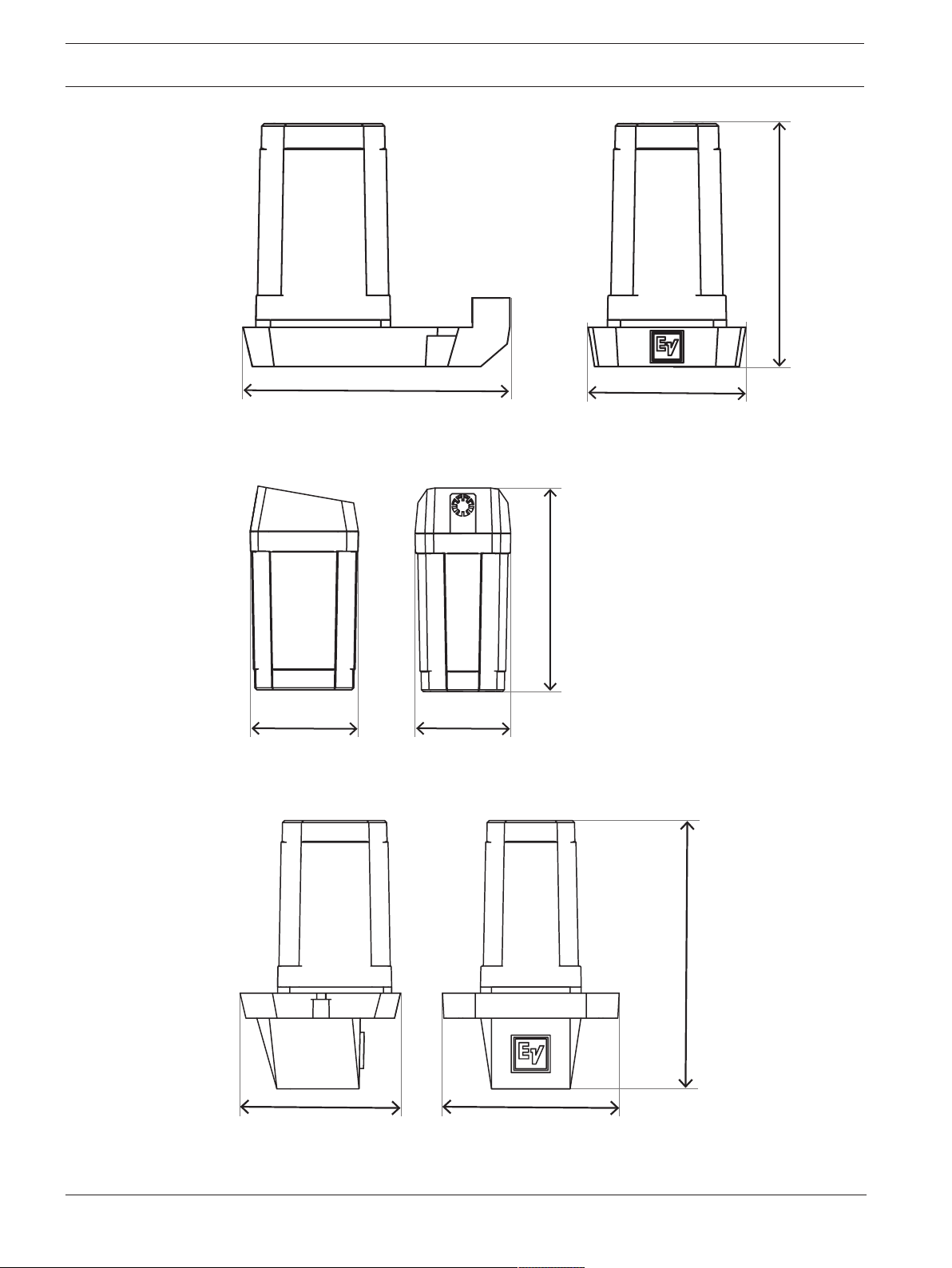
mm [in]
108.7 [42.8]
99 [39]
64 [25.2]
Figure6.3: Column speaker adapter for EVOLVE-WMK with Phoenix-style connector
mm [in]
103 [4]
55 [2.2]
48.4 [1.9]
Figure6.4: Subwoofer adapter for EVOLVE-WMK with Phoenix-style connector
mm [in]
129
[5.08]
77 [3.03] 85 [3.34]
Figure6.5: Column speaker adapter for EVOLVE-WMK with NL4 connector
EVOLVE Wall mount kit Technical data | en 31
Electro-Voice
Installation Manual
2022-03 | 02 | F.01U.401.529
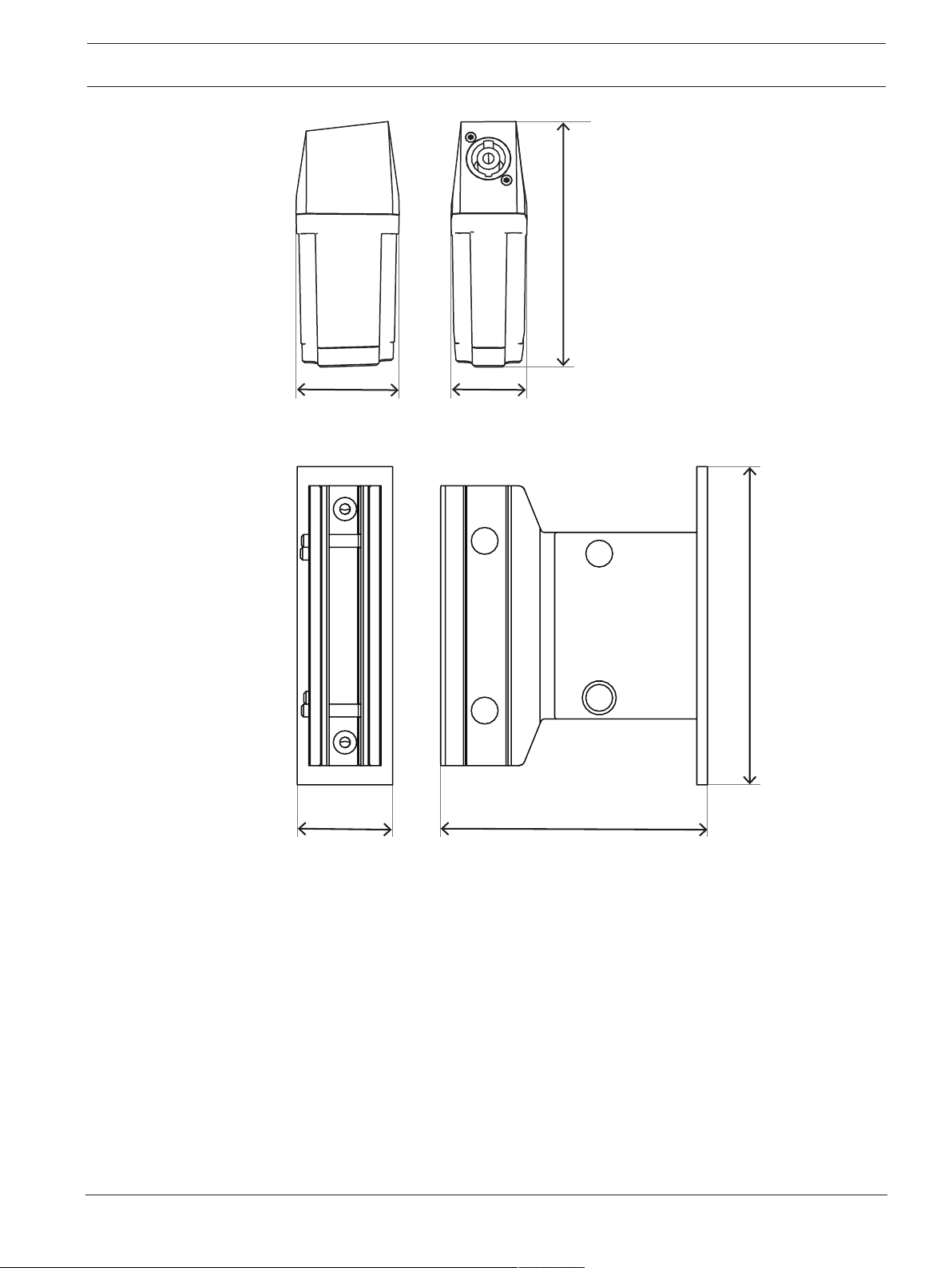
mm [in]55 [2.2]
48.4 [1.9]
130 [5.1]
Figure6.6: Subwoofer adapter for EVOLVE-WMK with NL4 connector
72 [28]
45 [17.7]
mm [in]
150
[109]
Figure6.7: Truss mount bracket
32 en | Technical data EVOLVE Wall mount kit
2022-03 | 02 | F.01U.401.529
Installation Manual
Electro-Voice
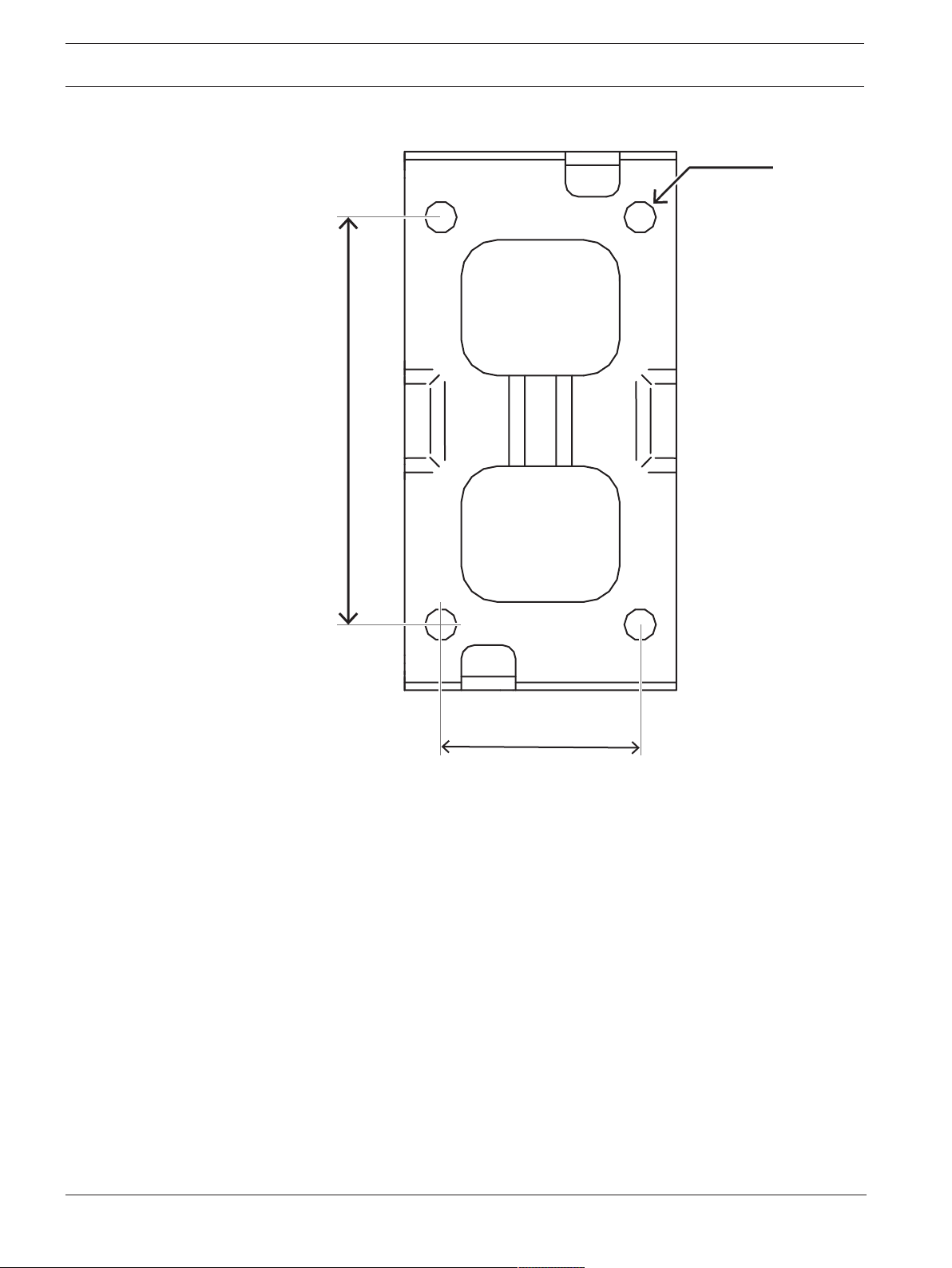
mm [in]
7 [0.28]
44 [1.7]
90 [3.5]
Figure6.8: 1:1 template for drilling holes

EVOLVE Wall mount kit Technical data | 33
Electro-Voice
Installation Manual
2022-03 | 02 | F.01U.401.529

34 | Technical data EVOLVE Wall mount kit
2022-03 | 02 | F.01U.401.529
Installation Manual
Electro-Voice


Bosch Sicherheitssysteme GmbH
Robert-Bosch-Ring 5
85630 Grasbrunn
Germany
www.boschsecurity.com
© Bosch Sicherheitssysteme
GmbH, 2022
Bosch Security Systems, LLC
12000 Portland Avenue South
Burnsville MN 55337
USA
www.electrovoice.com
© Bosch Security Systems,
LLC, 2022
202203141029
