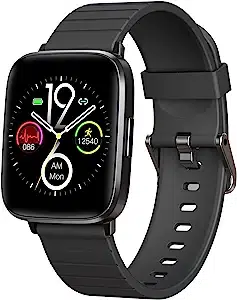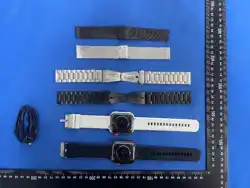
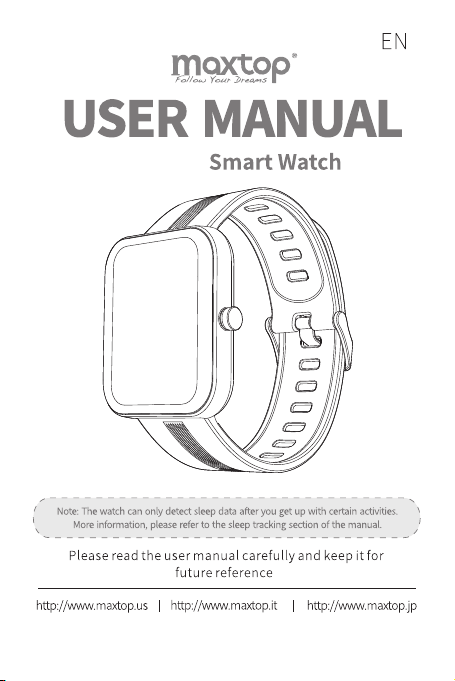
T11 Pro
V1.1
T11 Pro
If you have any questions, please contact us through our Email: inf[email protected]
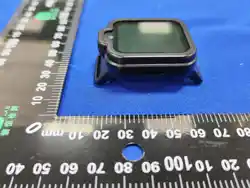
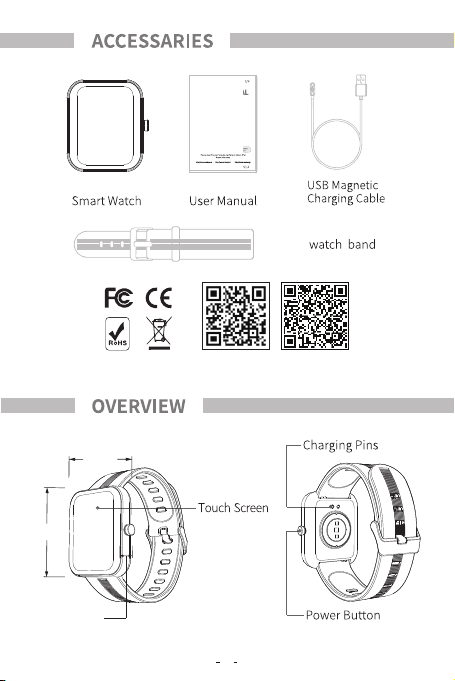
44MM
11MM
39MM
MAXTOP WEBSITEH BAND APP
1
2
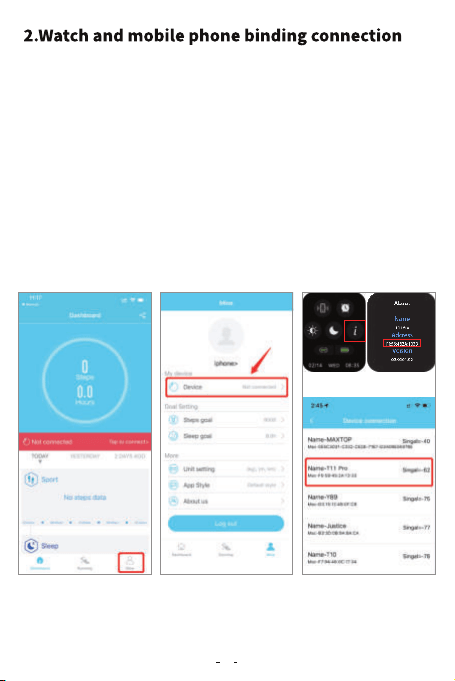
1. APP connect T11 Pro:
① Turn on the Bluetooth of the mobile phone, enter "Mine" in the
APP page.
② Find"Device" and click on the name of the device to be connected
"T11 pro".
④ Then click"pair" and "allow".
③ Choose T11 Pro to connect, please choose to allow access to location
information, if there are multiple devices nearby, please filter
according to the MAC address of the watch, and the MAC address can
be viewed inAbout Devices in the watch settings function.
3
①②③
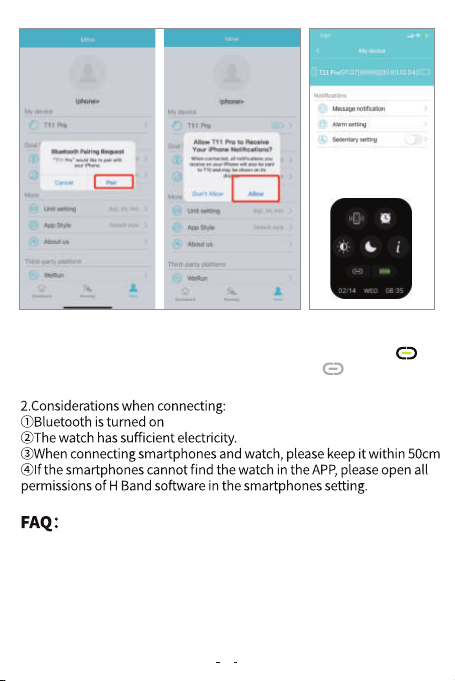
⑤ Please slide down of the watch under main interface,The symbol in
the bottom left corner is displayed in green. if you see in gray, it means
that the connection is not successful, please try again.
Could not find the device while connecting?
1.Make sure the Bluetooth of your smartphone is turned on and the
operating system of your smartphone should be Android 5.0 and later,
or loS 9.0 and later.
2.Ensure that the distance between the smartphones and the device is
less than 0.5 meters. After connection, the device should be kept with in
④⑤
4
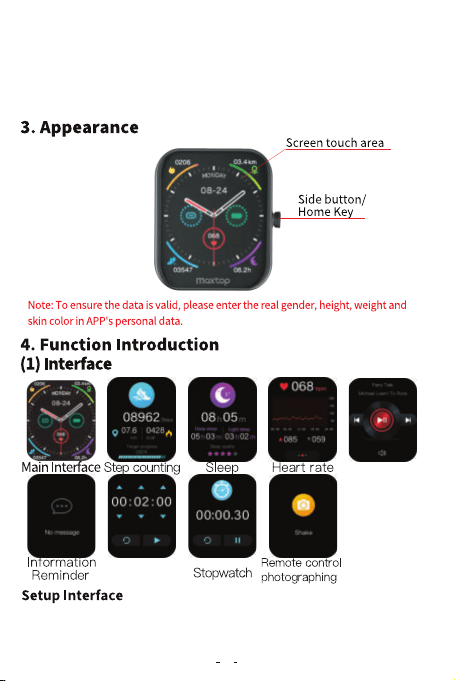
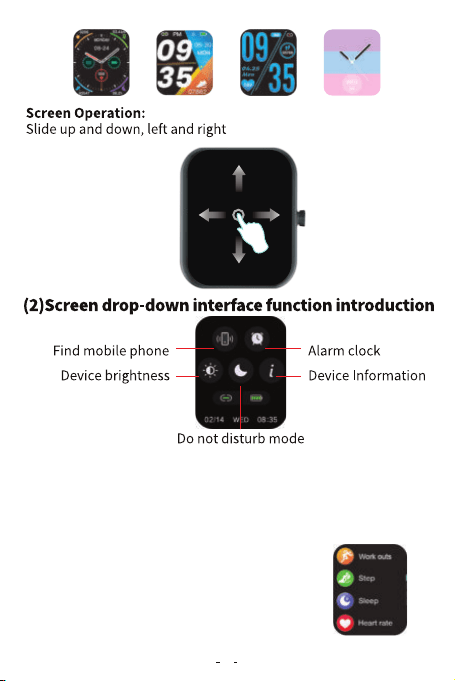
Make sure the watch and APP are connected well. Enter APP, click My Device-T11 Pro
Dial Setting-Select the corresponding style, and the watch screen shows that the
replacement was successful.
Music Contral
Timer
the effective range (usually less than 10 meters).
3.If your mobile is iphone,please go to the bluetooth setting to ignore the
devide and connect the smart watch by the app,not the bluetooth list.
4.Ensure that the device has sufficient power. lf there are still problems
after charging, please feel free to contact us.
5
6
(3)Startup/Shutdown
Startup: when the device is in the shutdown state, press the key for
4 seconds to start up and enter the time interface.After 5 seconds
without operation, the device will automatically turn off the screen
and stand by.
Shutdown: Press the device side key for 4 seconds to shut down.
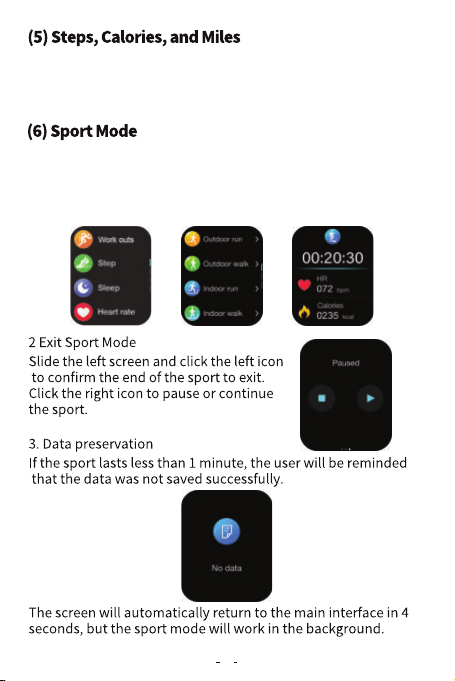
(4)Function Interface
Press the side Key to enter the function selection
interface, slide up and down to select the
required function for operation, and press the
side key again to return to the main interface.
Enter the step counting interface to display the current steps, target
progress, calories and distance of the day.The screen will close after
5 seconds.The acceleration sensor detects the step with a small error
(within 10%) within a reasonable range.
7
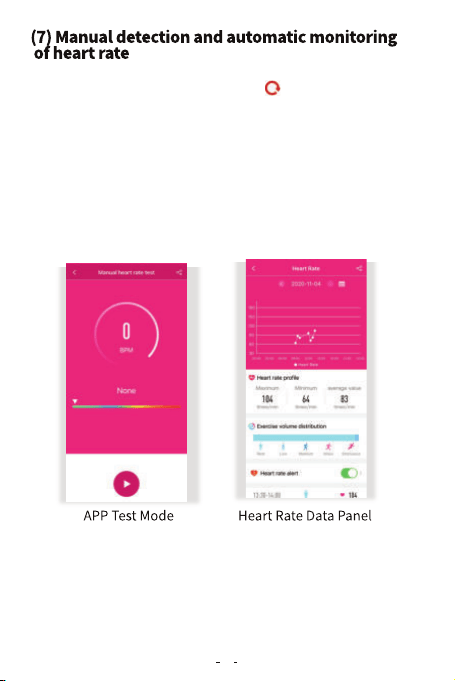
1.Press the Side Key shortly to enter the function selection interface
and select the Sport Mode.There are 19 Sport Modes.You can click to
select the Sport Mode, and the data page displays the running time,
exercise heart rate, running distance, calories, and number of steps in
real time.
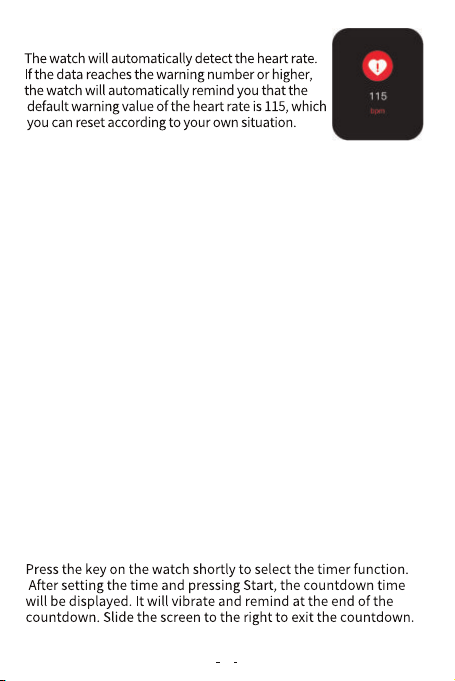
Slide the right screen on the main interface of the device to enter the
heart rate detection interface and click the icon to start the detection.
After the measured results are obtained, the real-time heart rate value
will be continuously measured and displayed. No matter whether the
results are measured or not, the device will automatically extinguish the
screen and stand by after 60 seconds of cumulative testing.The heart rate
measured on the device will not be saved. You can also enter the heart
rate manual test interface on the APP's data panel-T11 Pro-More
Operations-Heart Rate icon, and the heart rate test results operated on
the APP will not be saved.Turn on the heart rate automatic detection
switch at the APP end, and the device will automatically monitor the
heart rate 24 hours a day, collect data every 10 minutes and display data
every 30 minutes. After synchronizing the data, the test results can be
viewed on the APP for details.
1.As long as you put on your watch, it will automatically detect your heart
rate, number of steps and calories and synchronize to the APP.
2.When you bind the watch and APP successfully, the automatic heart rate
measurement function is enabled by default,which detects the heart rate
every 30 minutes;If you want to turn off the function,go to the app and find
"My device-T11 Pro-Switch setting--AUtomatic Heart Rate Monitoring-Turn off".
3.In order to monitor the heart rate more accurately, please make it tighter
than usual during exercise.
8
Open APP-Setting-My Device-Message Reminder, Turn Reminder
on or off. lf you want to display messages, please set them in the
corresponding APP.
The sleep detection period is from 8:00 p.m. the same day to 10:00
a.m. the next day.The principle of sleep detection is to collect data
according to the status of the wearer. When you wake up the watch
next morning, please walk 100-200 steps, then the watch will show
your sleep data automatically.And you can also the check the sleep
data on the app after connected.
Press the watch key shortly to select the stopwatch function, click
the touch key to start running for seconds once, then press Pause,
then press Continue, cycle in turn, and slide the right screen to exit
running for seconds. Note: After entering the stopwatch interface,
the device will temporarily block all reminders that need and push
work need to occupy the screen. The maximum timing time value
of the stopwatch is 99 minutes and 59 seconds.
9
(8) Heart Rate Alarm
(9) Sleep Monitoring
(10) Information Reminder
(11) Stopwatch
(12) Timer
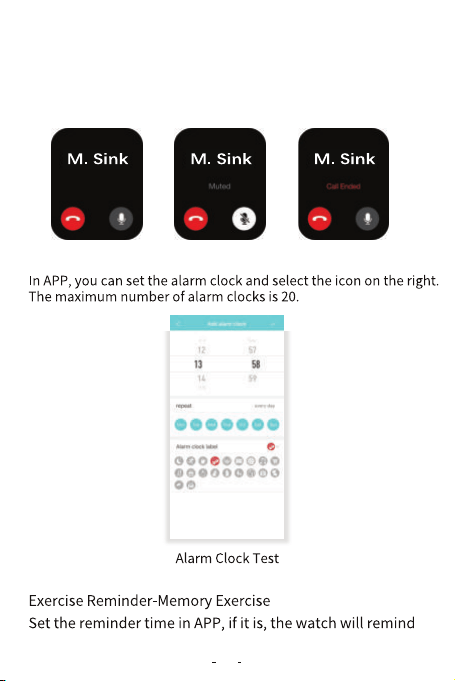
After setting up the call reminder, when someone calls, the watch
will keep vibrating. You can mute or refuse to answer by click the
corresponding touch key.
10
(13) Call Reminder
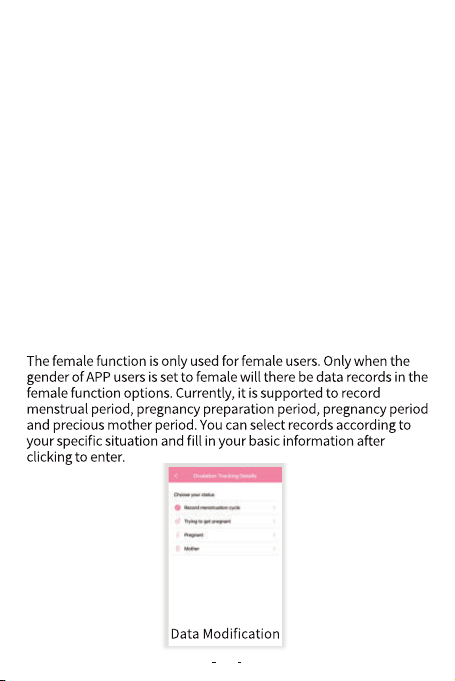
(14) Alarm Clock
Connect the watch and open the APP, click "T11 Pro"-take photos, turn
on the camera of the smartphones, select take photos in the watch
funtion options,click the take photos icon or shake it to take photos.
(17) Remote Control of Smartphone Camera
(18) Wear Test
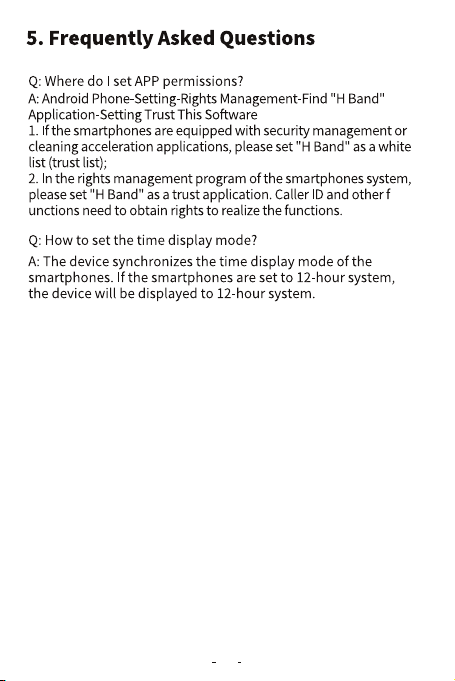
(19) Female Physiological Period
After the APP successfully connects the watch, open the music
app in your mobile and click the music option in the function
interface to play the music in the smartphones.
Keep "H Band" running in the background of the smartphones.
Click the Find Smartphones option in the function interface, and
the smartphones connected to the watch will ring. Pay attention
to keeping the smartphones in ring mode.
The setting method as following: My device---Swith setting--wear test
in the APP.
(15) Music Control
(16) Looking for Smartphones
11
Q: How do l reset the password?
A: Change the password in APP My-T11 Pro-Reset Password. The
user can enter the old password and the new password and save
it at a single point.The initial password is 0000. When the device
is connected again, the user can connect the device by entering
a new password. lf you forget the password, press it for 6 seconds
in the watch sleep interface until the watch vibrates to clear the
password.When the APP terminal connects the device again, it
can connect directly. When it is set again, the old password is the
initial password.
12
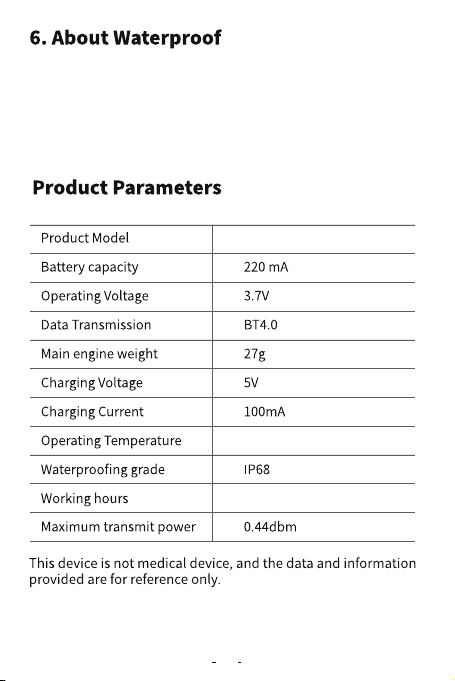
The waterproof grade of the watch is IP68, which means that dust
can be prevented from inhaling; Prevent short-term soaking.
The allowed activity scenes in the activity area are as follows:
wearing, washing face and hands in rainy days.
T11 Pro
-10℃~-45℃
6 Days
13
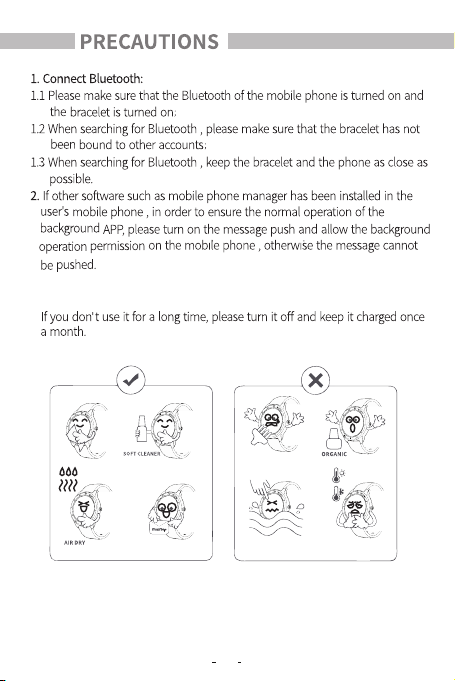
14
3. Charging requirements : Use a charger with a specification of 5V 0 . 5-1A for
charging .
V1.1
T11 Pro
睡眠モニタリング
ご不明な点がございましたら、下記までご連絡くださいませ。 メールアドレス:info@maxtop.asia
44MM
11MM
39MM
MAXTOP ウェブサイトH BAND アプリ
15
V1.1
T11 Pro
16
携帯電話
IOS 9.0以降Android 5.0以降
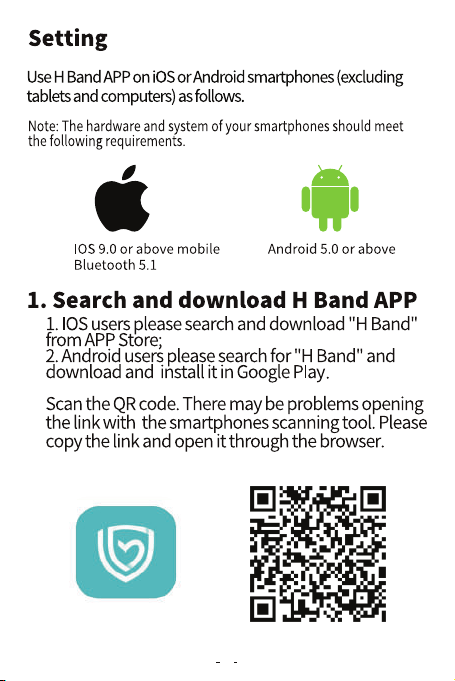
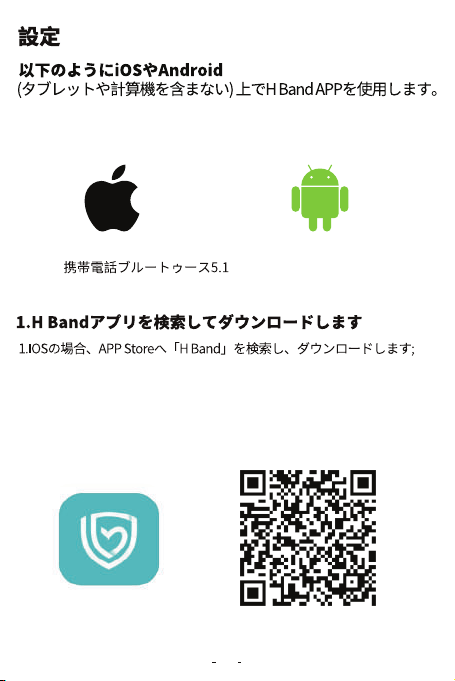
2.Androidの場合、Google PLayに、「HBand」を検索し、ダウンロードし
てイ ンストールします 。
QRコードをスキャンします。携帯電話のスキャンツールでリンクを
開くことに問題がある可能性がありますので、リンクをコピーし
てブラウザで開いてくだ さい。
注意: 携帯電話のハードウェアおよびシステムは、
以下の要件に適合しなければなりません。
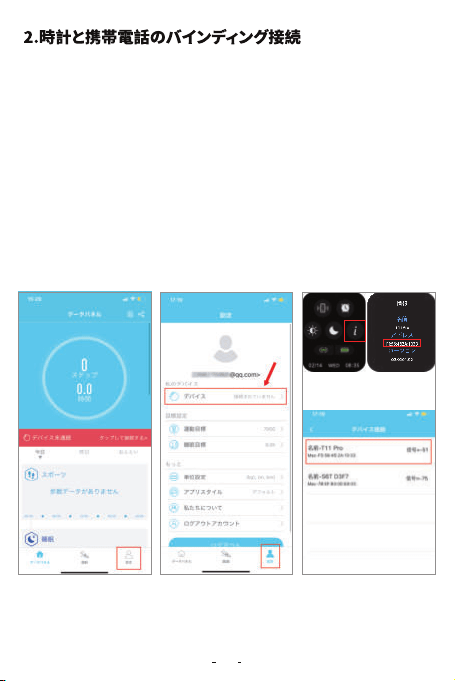
APP接続T11 Pro:
① 携帯電話の Bluetooth をオンにし、APPに「設定」ページに入ってく
ださい。
② 「デバイス」を検索し、名前「T11 pro」のデバイスをクリックし、接続します。
④ それから、「 ペアリング」と「 許 可」をクリックします。
③ 「T11 pro」を選択します。位置情報へのアクセスを許可することを選択して
ください。近くに複数のデバイスがある場合は、時計の MAC アドレスに従っ
てフィルタリングしてください。MACアドレスは、時計の設定機能の
「設定>情報」で確認できます。
①②③
17
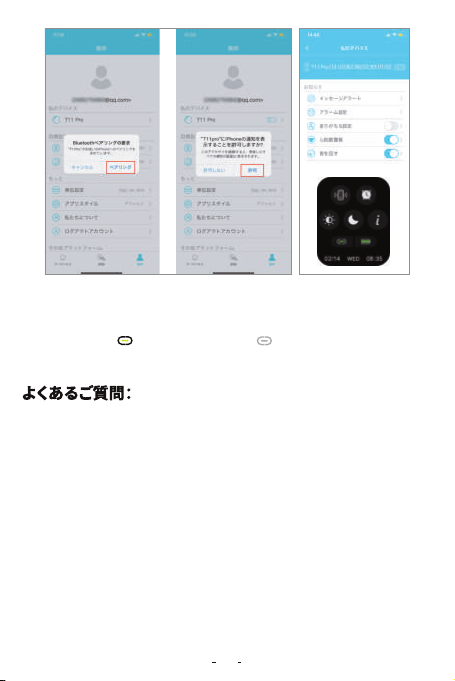
接続時にデバイスが「T11 pro」見つかりませんか?
1、携帯電話のBluetoothがオンになっていることを確認し、携帯電話のオペ
レーティングシステムは、Android 5.0以降、またはIOS 9.0以降でなければ
な りませ ん 。
2、携帯電話とスマートウォッチの距離が0.5メートル未満であることを確認し
ます。接続後、スマートウォッチは有効範囲内(一般に10メートル未満)に維持
さ れ なければな りませ ん 。
3、お使いの携帯電話がiPhoneの場合は、Bluetooth設定にデバイス
「T11 pro」を無視し、Bluetoothリストではなく、Hbandアプリからスマート
ウォッチ「T11 pro」を接続してください。
4、スマートウォッチに十分な電力量があることを確認します。充電後も問題
がありましたら、いつでもご連絡ください。
⑤ 時計のメインインターフェイスに、下にスライドさせてください。左下隅
の記号が緑色 で表示されます。灰色 で表示される場合は、接続
が成功していないことを意味します。もう一度やり直してください。
④⑤
18
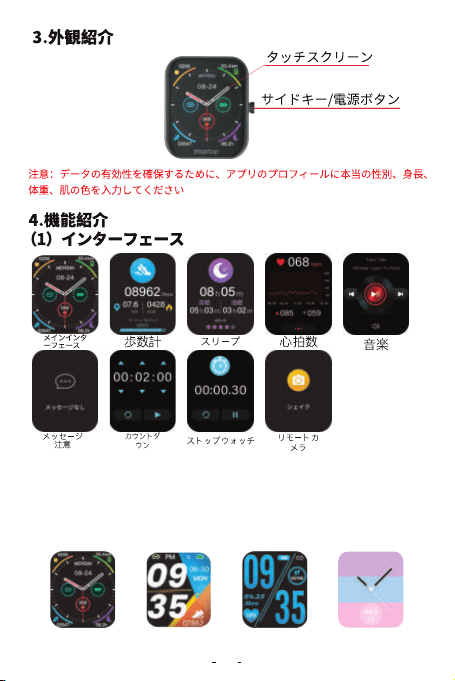
スマートウォッチとアプリが接続されていることを確 認します。アプリに入
り、「私のデバイス」>「メイン画面のスタイル設定」、スタイルを選択し、ス
マートウォッチのメイン画面は交換成功です。
イン タ ーフェ ース設定
19
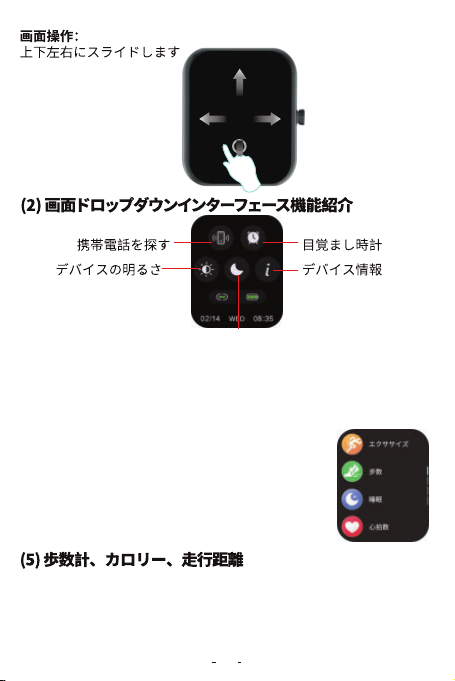
お やす み モ ード
電源オン:時計はシャットダウン状態で右側のボタンを4秒を長押し、メイ
ンインターフェースに入り、5秒操作がないと画面が自動的に消灯します。
電源オフ: 右側のボタンを4秒を長押し、電源を切ります。
右側のボタンを短く押して、機能選択インターフェイ
スに入ります。上下にスワイプして、機能を選択し、も
う一度右側のボタンを短く押すとメインインターフェ
ースに戻ります。
歩数インターフェイスに入り、現在の歩数、目標の進捗状況、カロリー、
および1日の距離を表示します。5秒後に画面がオフになります。加速度
センサーがステップを検出し、誤差10%以内は妥当な範囲です。
(3)電源オン·オフ
(4)機能インタフェース
20
21
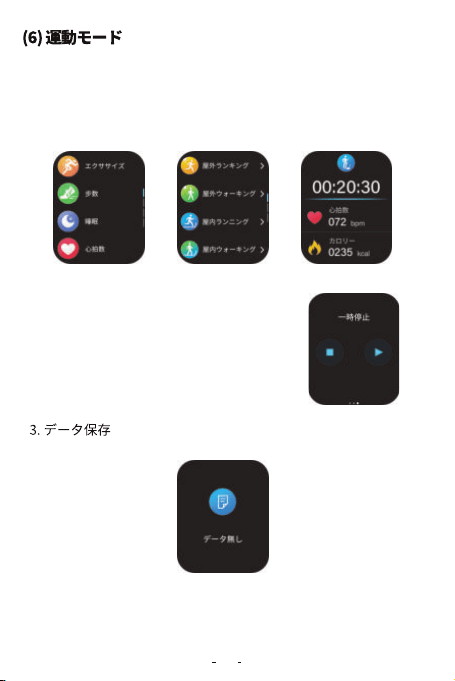
1.右側のボタンを短く押して、機能選択インターフェースに入り、スポーツ
モードを選択し、19種類のスポーツモードがあります。クリックして運動モ
ードを選択すると、データページにランニング時間、運動心拍数、ランニン
グ距離、カロリー、歩数などデータはリアルタイムに表示されます。
2.運動モードから終了します
運動中の画面に、左スライドして、運動終了を
確認するとログアウトできます。右のグラフを
クリックして一時停止または運動継続を選択
します。
運動時間が1分未満の場合、「データ無し」ヒントは表示します。
4秒後、画面は自動的にメインインタフェースに戻ります。
運動モードはバックグラウンドで動作します。
22
(7)心拍数手動測定と自動モニタリング
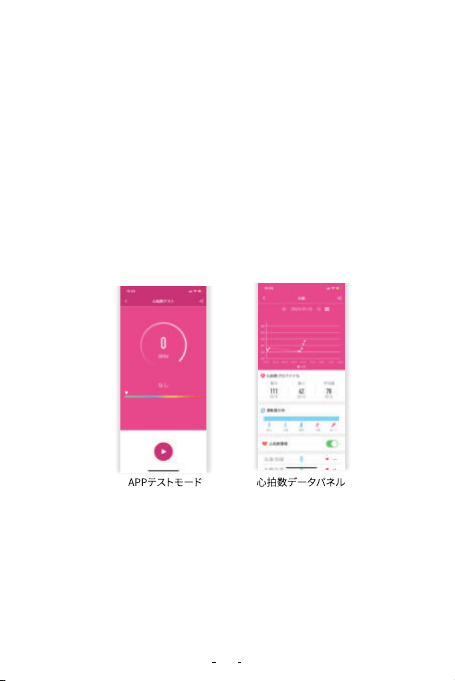
メインインターフェイスに右スワイプして、心拍数測定インターフエイスに
入ります。アイコンをクリックして心拍数測定を開始します。
測定結果が測定された後、リアルタイムの心拍数が継続的に測定されて
表示されます。結果が測定成功かどうかに関係なく、デバイスは自動的に
画面をオフにし、累積テスト後60秒間待機します。デバイスで測定された
心拍数値は保存されません。APPのデータパネル>T11pro >詳細>心拍
数アイコンをクリックして、心拍数手動測定は行わています。APP上で操
作された心拍数テストの結果は保存されません。
APP側でHR自動モニタリングのスイッチをオンにすると、デバイスは24時
間に自動的に心拍数を監視し、10分ごとに四つデータを収集し、30分ご
とにデータを展示します。データを同期させた後、テスト結果はAPPで詳
細 を 見 ること ができます。
①スマートウォッチをつけるだけで、心拍数、歩数、カロリーを自動的に検
出し、アプリに同期します。
②スマートウォッチとAPPは接続成功した後、心拍数自動測定機能がデフ
ォルトでオンになります。30 分ごとに心拍数が自動測定されます。この機
能をオフしたい場合は、APPに「設定」>「私のデバイス」>「スイッチ設定」>
「HR自動モニタリング」>オフ
③心拍数をより正確に監視するために、トレーニング時にはいつもよりき
つくす るように してくださ い 。
23
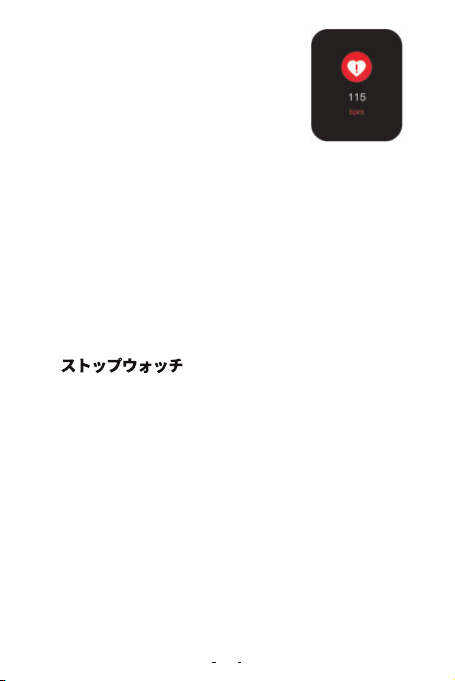
スマートウォッチは自動的に心拍数を検出し、デ
ータが警告数以上になったら、スマートウオッチ
は自動的にリマインドします。心拍数の最大値
と覚醒値は115で、自分の状況に応じて再設定
することができます。
(8)心拍数警報
睡眠監視インタフェースに入り、前日の総睡眠時間を表示します。この機
能は自動的に実行されます。一般に、起きた後10~30分でデータを知る
ことが できます。
(9)睡眠モニタリング
スマートウォッチのボタンを短く押して、タイマ機能を選択できます。時間
を設定した後、カウントダウンは開始します。カウントダウン時間が表示
され、終了時に振動して注意されます。右にスライドして、カウントダウン
画 面 が 退出 できます。で も、カウントダウンは バックグラウンドで実 行 され ,
一時停止ボタンを押すとカウントダウンは止まります。
(12)カウントダウン
アプリを開く> 設定 >「私のデバイス」>「メッセージアラート」、いろいろ通
知をオン/オフできます。メッセージを表示したい場合は、アプリにメッセ
ージ通知を設定してください。
(10)メッセージ通知機能
スマートウォッチのボタンを短く押して、ストップウォッチ機能を選択でき
ます。また右にスライドして、ストップウォッチ画面を退出します。ご注意:
ストップ ウォッチ インタフェース に 入 る と、メッセ ージ 通知な ど のリマ イン
ダーは一時停止します。ストップウォッチの最大時間値は99分59秒です。
(11)
24
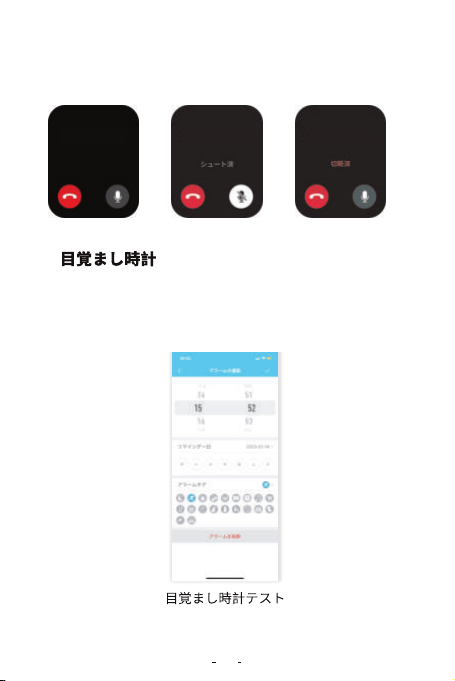
着信通知をオンになると、誰かが電話をかけて、スマートウオッチが即時
振動でお知らせします。簡単に拒否/ミュートできます。
アプリを開く> 設定 >「私のデバイス」>「アラーム設定」に目覚まし時計を
設定できます。目覚まし時計の最大数は20です。
(13)電話を拒否/ミュート機能
(14)
山田さん山田さん山田さん

25
APPとスマートウォッチに正常に接続されたら、マートウォッチに音楽オ
プションをクリックして、スマートウォッチで携帯電話の音楽の再生、一
時停止、曲切り替えなどコントロールができます。ご注意:スマートウォッ
チが音楽を再生できません。
(15)音楽コントロール
「HBand」APPとスマートウォッチに正常に接続した場合、スマートウォッ
チの機能インタフェースの「スマホを検索」クリックして、携帯電話が鳴っ
ています。携帯電話は鳴動モードに保つようにて注意してください。
(16)携帯電話を探す
「HBand」APPとスマートウォッチに正常に接続した場合、アプリを開く>
設定 >「私のデバイス」>「写真」を選択してください。それから、携帯電話
の カ メラを開 け て 、スマ ートウォッチ の 機能オプション に「カメラ 」を 選択
して 、写真ア イコ ン をク リック して、あ る いは、スマ ート ウォッチ を 振っ た り、
写真 を 撮 ること ができます。
(17)カメラをリモートコントロールする
アプリを開く> 設定 >「私のデバイス」>「スイッチ設定」>「装着モニタリン
グ」をオンにしてください。装着失敗の場合は検出できます。
(18)装着テスト
女性機能は女性ユーザーにのみ使用され、APPユーザーの性別を女性に
設定した場合、女性機能オプションにデータ記録があり、現在は月経期、
妊娠期、妊娠期、赤ちゃん期を記録することを支持しており、あなたの具体
的な状況に応じて記録を選択し、入った後に自分の基本情報を記入すれ
ば い いです。
(19)女性生理期

26
Q:時間表示方式の設定方法?
A:スマートウォッチと携帯電話の時間表示方式は同期です。携帯電話を
12時間制に設定すると、スマートウォッチ表示は12時間制となります。
Q :どうやって パス ワードをリセットします か ?
A:APP私の-T11 Pro-リセットパスワードでパスワードを修正して、
ユーザーは古いパスワード、新しいパスワードを入力して、単品で保存
すればいいです。初期パスワードは0000です。
デバイスを再接続する際には、ユーザが新しいパスワードを入力すれば
デバイスに接続できます。
パスワードを忘れると、スマートウォッチの睡眠インタフェースで6秒長く
押すと、スマートウォッチが 振 動 するまでパスワードをクリアすることが
でき、APP側がデバイスに再接続する際に直接接続すればよく、再設定時
に は 古 い パスワードが 初期 パスワ ードとなります。
Q:どこにアプリ権限を設定しますか?
A:アンドロイド携帯電話--設定--権限管理。「H Band」アプリを見つける。
このソフトウェアを信頼する設定:
1、携帯電話にセキュリティ管理系やクリーンアップ系のアプリケーション
がインストールされている場合は、「H Band」をホワイトリスト(信頼リスト)
に設定し てください;
2、携帯電話システムの権限管理プログラムでは、「H Band」を信頼アプリ
ケーションとしてください。着信表示などの機能は、権限を取得して機能
を実現する必要があります。
27
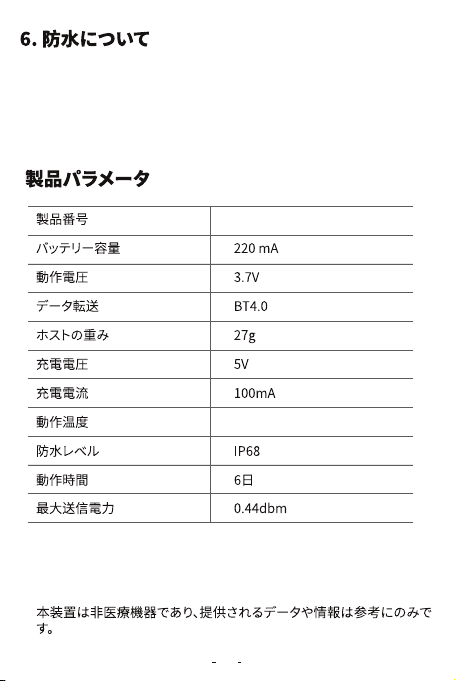
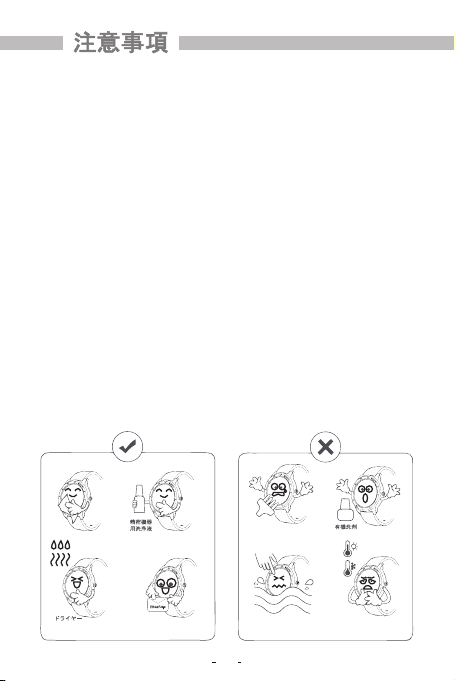
①スマートウォッチの防水レベルはIP68です。これはほこりの吸入を防ぐ
ことができることを意味します。短時間の浸漬を防止します。
②イベントエリアで許されるイベントシーンは、雨の日に着用し、顔を洗う
こと、手を洗うことです。
T11 Pro
-10℃~45℃
28
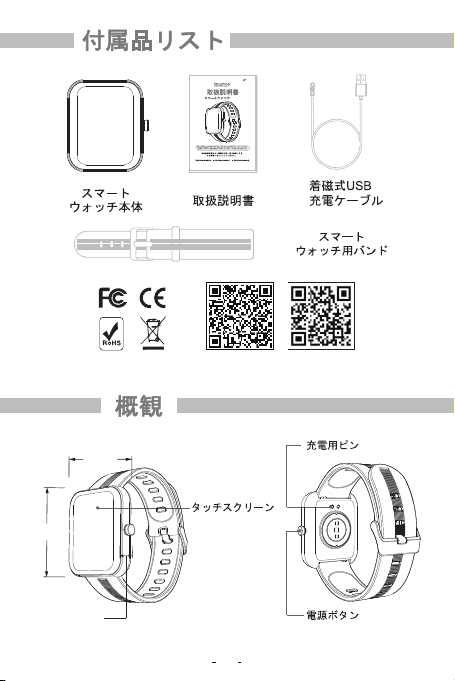
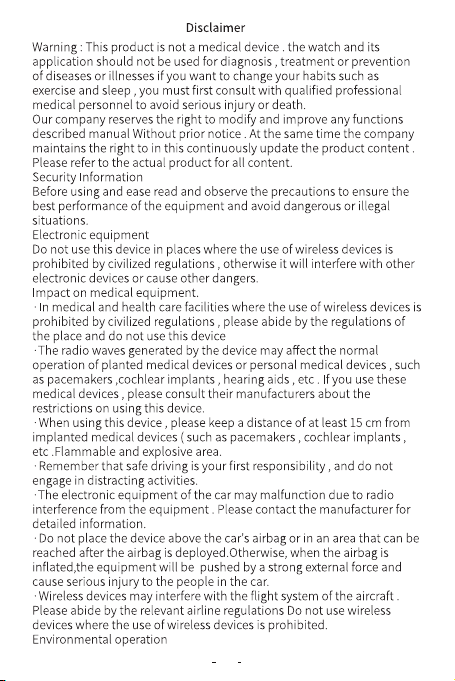
1. Bluetoothの接続について
1.1携帯電話のBluetooth機能及びブレスレットの電源がオンになっている
ことを確認し てください。
1.2 Bluetoothを検索する際は、デバイスが別のアカウントとバインドされて
いないことを確認してください。
1.3 Bluetoothを検索する際は、本体と携帯電話をできるけ近づけるように
し てください。
2.お客様の携帯電話に携帯電話管理などのアプリケ·ョンがインストールさ
れている場合、アプリケーションがックグラウンドで正常に動作できるよう、
プッシュメッセ機能をオンにし、携帯電話でのバックグラウンド動作の許可
をしてくださ い 。そうし な い とプッ シュメッセ ー ジを 確認できま せ ん 。
3.充電についての注意:充電には、5V0.5~1Aの仕様の充電器を使用してく
ださい。長時間使用しない場合、電源をオフにし一ヶ月に一度は充電する
よ うに してください。
4.検査データの正確性を確保するため、血圧検査を行う場合、検査中は体
をリラックスさせて動かさないようにしてください。又、検査中は会話をし
ないようにしてください。(この機能は、人体の運動前後の血圧変化を観察
するための参考データであり、医療行為を行うためではありません。)
29
30
31
If you have any questions, please contact us through our Email: info@maxtop.asia
32