Home power
LRM3120K/27

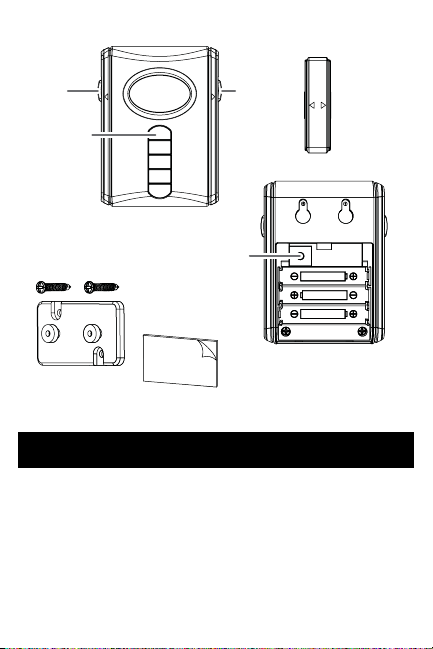
The alarm unit has a low battery circuit.
When the batteries reach a low level,
the indicator light will ash slowly.
Average battery life for typical usage is
up to one year.
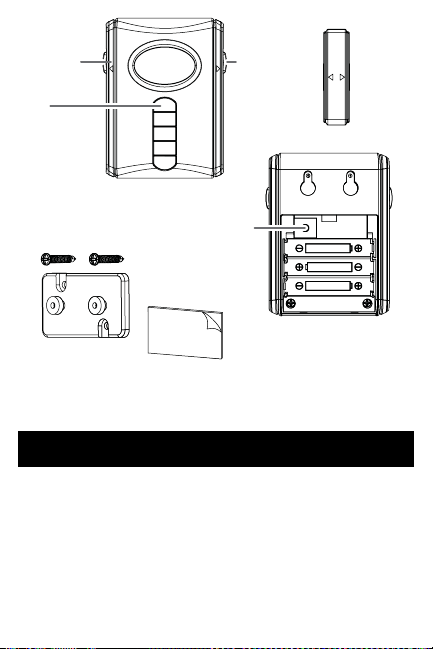
LEARN
Home/
away
switch
Alarm/
chime
switch
Magnet
Indicator
light
Learn
button
Double-
sided tape
Mounting
plate
Screws
Battery
compartment
Low Battery Indicator
3
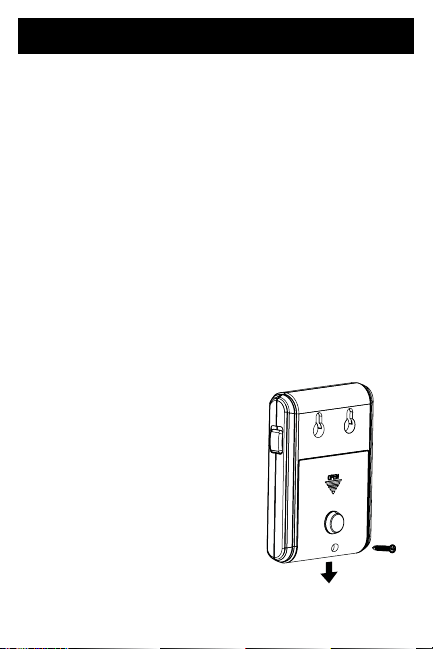
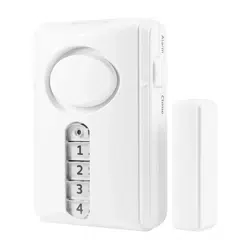
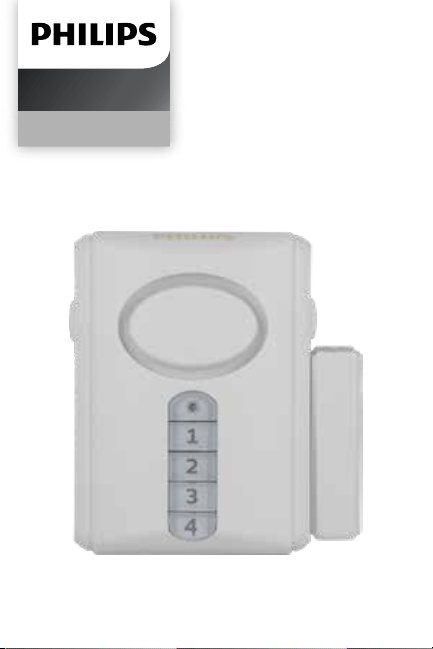
The keypad controlled door alarm
requires three (3) AAA Alkaline
batteries (not included).
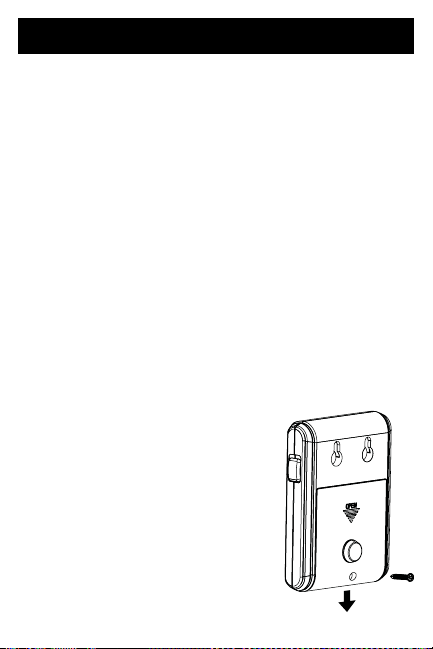
To install the batteries:
1. Remove screw from battery
compartment door located
on back of the unit. Slide o the
door in the direction of
the arrow.
2. Insert three (3) AAA batteries
noting the polarity diagram inside
the battery compartment.
3. Replace door and
secure screw.
Installing Batteries
4
The keypad allows you to set a
personal 4-digit code for arming and
disarming the alarm.
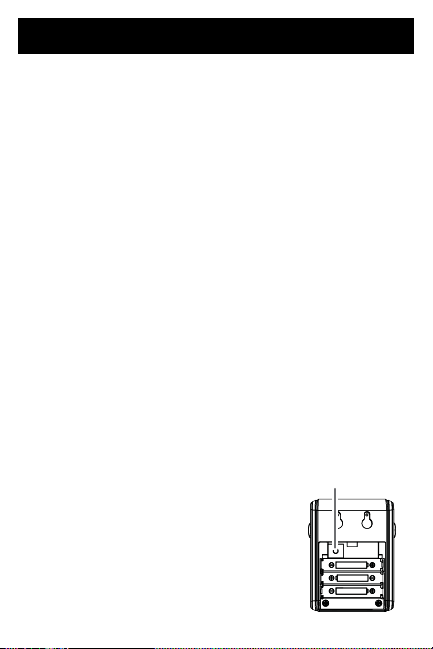
1. Remove screw from battery
compartment door located on
back of the unit. Slide o the door
in the direction of the arrow.
2. Press the LEARN button.
3. The red light on the front of the
alarm will blinkfor 15 seconds.
During this time, input your 4-digit
code. A beep will conrm each
input. The unit will ash a green
light 3 times to conrm the new
4-digit code has been saved.
4. Replace cover and
secure screw.
Creating Your Personal Alarm Code
5
LEARN
Learn
button
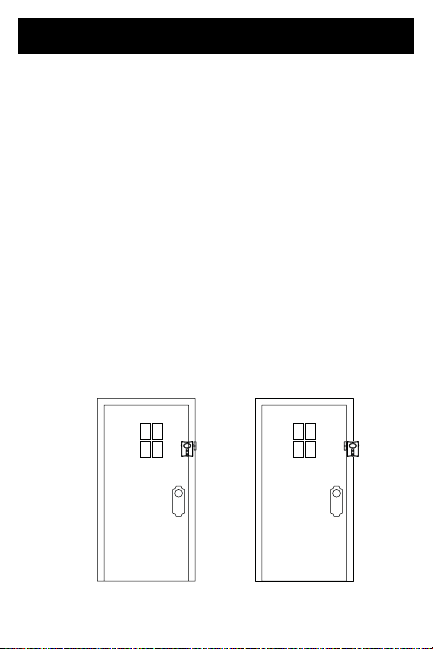
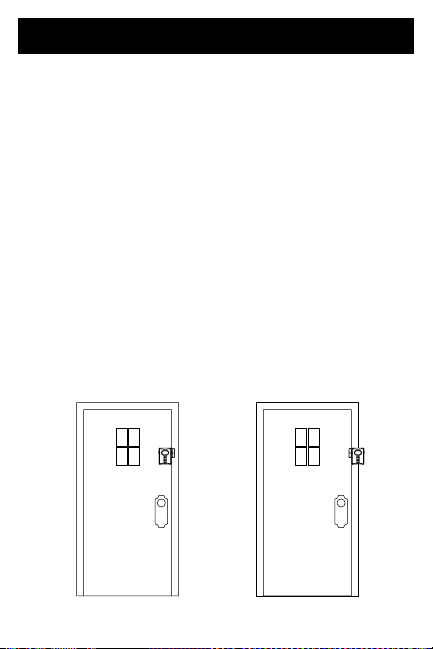
1. Select desired location for
alarm. The alarm is designed to
mount to the door frame or to
the door itself. Use either the
provided screws (for permanent
mounting) or double-sided tape
(for temporary mounting). The
recommended location is the
back of the door, with the magnet
mounted to the door frame.
Mounting the alarm to the door
ensures that the alarm will not be
damaged by opening and closing
the door.
Installation
Recommended Mounting Method Alternate Mounting Method
6
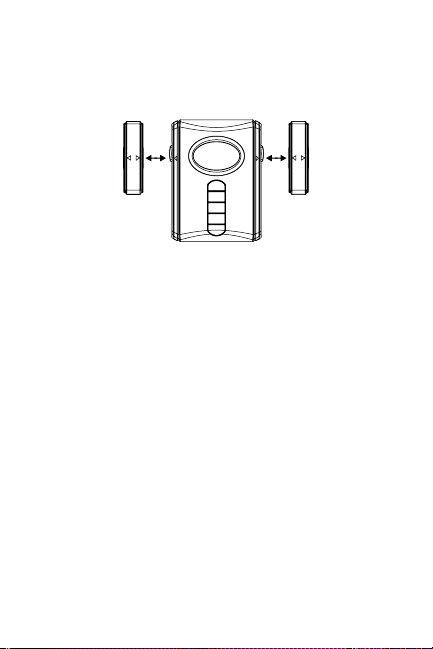
Note that the magnet may be
mounted to either side of the
alarm as long as the arrows line
up.
IMPORTANT: Whether mounting
to the door or door frame, the gap
distance between the alarm and
magnet must be 1/2” or less.
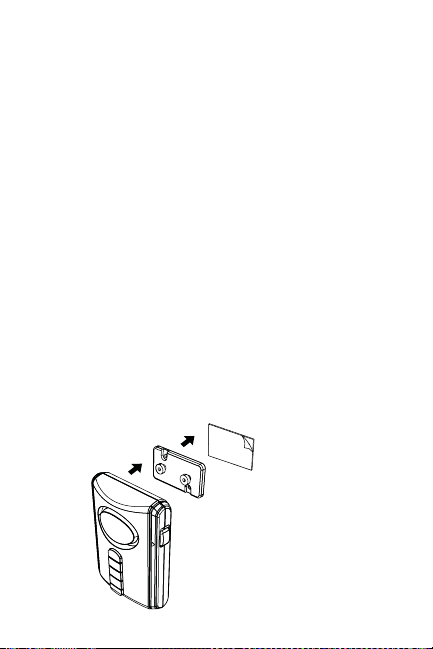
2. Attach the mounting plate to
the back of the alarm. Peel the
protective covering from one side
of the double-sided tape and then
apply to mounting plate. Remove
protective covering from the back
side of the double-sided tape
and lightly mount the alarm in
the desired position. Make sure
Distance must be less that 1/2”
7
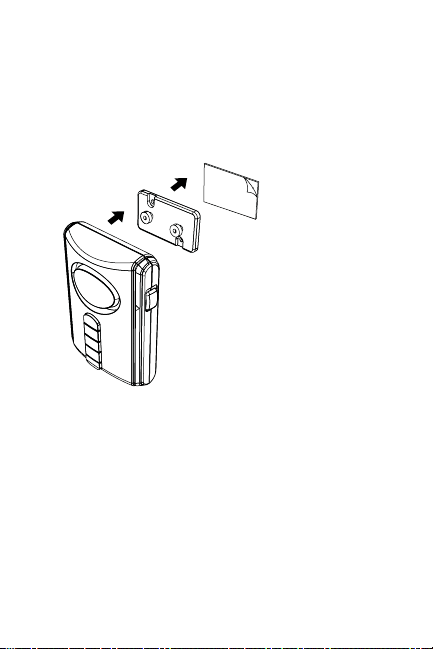
the surface you are mounting to
is clean and dry. For best results,
clean the mounting surface with a
mixture of 50% isopropyl alcohol
and 50% water.
Do not apply rm pressure until
location is nal.
NOTE: When mounting to a door
frame, the mounting plate mounts
o-center to the left or right in
order to position alarm closest to
the edge of the door.
8
Double-sided tape
Mounting Plate
Alarm

3. Using double-sided tape, lightly
attach the magnet to the opposite
edge next to the alarm. Line up
the arrows of the alarm and the
magnet. Ensure the distance
between the two pieces is 1/2”
or less. To test the gap distance,
slide the ALARM/CHIME switch to
CHIME and open the door. If chime
sounds, then the gap distance is
correct. If it does not sound, move
either the alarm or magnet closer
so that gap distance is 1/2” or less.
4. Once you have conrmed the
correct positioning of the magnet
and alarm, lift the alarm o the
mounting plate and apply rm
pressure directly to the plate
itself. Once secured, reattach the
alarm to the mounting plate.
5. Apply rm pressure to the magnet
to secure its position as well.
9

1. Locate ALARM/CHIME switch on
right side of the alarm unit.
2. Slide switch to ALARM position.
3. Choose HOME or AWAY on the left
side of the alarm unit.
HOME MODE
In HOME mode, the alarm will sound
when the gap between the alarm and
the magnet is greater than 1/2” (i.e.
the door is opened).
AWAY MODE
In AWAY mode, there will be a 45 second
exit delay before the unit is armed.
The alarm’s indicator light will ash
red quickly, alerting you that the unit
has been activated and has begun the
45-second count down. The delay allows
time for you to leave the protected area
without triggering the alarm. When
returning to the protected area, there is
a 30 second delay to allow time to enter
4-digit code before the alarm will sound.
10
Operating In The Alarm Mode

Arming the Alarm:
1. Arm the alarm by pressing your 4-digit
code. When the 4 digit code is entered
correctly the unit will ash a green
light once. NOTE: if the 4 digit code is
entered incorrectly, the unit will sound
a higher tone and ash red 3 times.
Disarming the alarm:
1. Enter your 4-digit code to disarm the
alarm. When the fourth digit of your
code is entered, the unit will respond
with two tones and will ash a green
light twice.
2. Enter the correct code anytime after
the alarm has sounded to deactivate.
NOTE: When testing, a cloth can be
used to cover the alarm to reduce risk
of hearing damage.
Incorrect code
If an incorrect code is entered, the
unit will sound a louder beep and
will ash red 3 times. Re-enter the
correct code after the light stops
ashing.
11

1. Locate ALARM/CHIME switch on
right side of unit.
2. Slide switch to CHIME mode.
Activating the chime:
1. The chime will now sound
immediately if the distance
between the alarm and magnet is
greater than 1/2” (i.e. the door is
opened).
Deactivating the chime:
1. To deactivate the chime slide
ALARM/CHIME switch to ALARM
position.
To clean the alarm housing, use a soft
cloth slightly dampened with water
and wipe dry. Do not use chemical
agents as this may damage and
discolor the unit.
12
Care and Maintenance
Operating In The Chime Mode

13
Warning
Limitations of Alarm Products
This product should be tested periodically to
make sure it is working properly. The product, if
used properly, may reduce the risk of burglary,
robbery, or other adverse events. However,
JASCO is not an insurer, this product is neither
insurance nor a guarantee that such an event
will be prevented, and users should protect
themselves with proper insurance. JASCO makes
no representation that this product cannot
be compromised or circumvented, that it will
provide an adequate warning, or that it will
prevent any personal injuries, property damage,
or other losses. Like any alarm product, including
expensive commercial systems, it may be
bypassed, it is subject to compromise, and it may
fail to warn for a variety of reasons, including,
but not limited to: improper installation or
positioning; improper maintenance; tampering;
dead or improperly installed batteries; sensing
limitations; component failures; receivers;
for infrared products, intrusions may be
outside of a product’s designed range and
certain environmental conditions may impact
performance and audible alarm signals may
be outside of hearing range, muted by doors,
walls, and oors, unheard by deep sleepers or
the hearing-impaired, or overwhelmed by other
sounds.

Risk of personal injury
• Prolonged exposure to alarm siren may cause
permanent hearing loss
Battery Warning
• Remove batteries before storing the Alarm for
extended periods
• Batteries may leak harmful liquids or ignitable
materials or explode causing injury and product
damage
• Do not mix old and new or other battery types
• Replace all batteries at the same time
• Replace fully discharged batteries immediately
For indoor use only; do not use in wet locations.
Warning
14
MADE IN CHINA
Philips and the Philips Shield Emblem are registered trademarks
of Koninklijke Philips N.V. and are used under license. This product
has been manufactured by and is sold under the
responsibility of Jasco Products Company, and
Jasco Products Company LLC, 10 E. Memorial
Rd., Oklahoma City, OK 73114 is the warrantor in
relation to this product.
This product comes with a 1-year limited warranty.
Visit www.philips.com/support for warranty details.
Questions? Contact our US-based Consumer Care
at 1-844-816-0320 between 7AM–8PM, M–F,
Central Time.

Suppliers Declaration of Conformity | Model #:
LRM3120K/27 | Jasco Products Co., 10 E. Memorial Rd,
Oklahoma City, OK 73114, www.byjasco.com
This device complies with Part 15 of the FCC rules.
Operation is subject to the following two conditions: (1)
this device may not cause harmful interference, and (2) this
device must accept any interference received, including
interference that may cause undesired operation.
FCC NOTE: The manufacturer is not responsible for
any radio or TV interference caused by unauthorized
modications to this equipment. Such modications could
void the user’s authority to operate the equipment.
NOTE: This equipment has been tested and found to
comply with the limits for a Class B digital device, pursuant
to Part 15 of the FCC Rules. These limits are designed
to provide reasonable protection against harmful
interference in a residential installation. This equipment
generates, uses and can radiate radio frequency energy
and, if not installed and used in accordance with the
instructions, may cause harmful interference to radio
communications. However, there is no guarantee that
interference will not occur in a particular installation. If
this equipment does cause harmful interference to radio
or television reception, which can be determined by
turning the equipment o and on, the user is encouraged
to try to correct the interference by one or more of the
following measures:
— Reorient or relocate the receiving antenna.
— Increase the separation between the equipment
and receiver.
— Connect the equipment into an outlet on a circuit
dierent from that to which the receiver is connected.
— Consult the dealer or an experienced radio/TV
technician for help.
15
16
Scan to watch a step-by-
step instructional video or
visit byjasco.com/47713i
Get exclusive, web-only
deals and more! Scan here
or visit byjasco.com/deals
Like our product?
Leave us a review on
Amazon.com or your
favorite retailer website!
Having issues and
need support?
Call our U.S.-based
experts Monday–Friday,
from 7AM–8PM (Central)
1-844-816-0320
Product
instructions
made easy
For additional Philips home
security visit our website!
byjasco.com/security
Need more home
security devices?
Register
your Philips
product
THANK YOU FOR YOUR PURCHASE!
Home power
LRM3120K/27

La unidad de alarma tiene un circuito
de batería baja. Cuando las baterías
lleguen a un nivel bajo, la luz indicadora
se encenderá y se apagará lentamente.
La vida promedio de las baterías es de
hasta un año para una utilización normal.
Indicador de batería baja
LEARN
Interruptor
en casa/
fuera de
casa
Interruptor
de alarma/
campana
Imán
Luz
indicadora
Botón
crear
Cinta doble faz
Placa de
soporte
Tornillos
Compartimento
para baterías
3
La alarma para puertas controlada por
teclado funciona con tres (3) baterías
alcalinas AAA (no vienen incluidas).
Para instalar las baterías:
1. Retire el tornillo de la tapa del
compartimento para baterías que se
encuentra en la parte de atrás de la
unidad. Deslice la tapa en dirección
de la echa.
2. Inserte tres (3) baterías AAA
de acuerdo con el diagrama de
polaridad que se encuentra en el
compartimiento para baterías.
3. Vuelva a colocar la
tapa y asegure el
tornillo.
Cómo Instalar Las Baterías
4

El teclado le permite jar un código
personal de 4 dígitos para activar y
desactivar la alarma.
1. Retire el tornillo de la tapa del
compartimento para baterías que se
encuentra en la parte de atrás de la
unidad. Deslice la tapa en dirección
de la echa.
2. Presione el botón CREAR.
3. La luz roja de la parte del frente
de la alarma se encenderá
intermitentemente durante 15
segundos. En ese tiempo usted debe
ingresar el código de 4 dígitos. Cada
vez que oprima un dígito escuchará un
pito. Una luz verde aparecerá 3 veces
en la unidad para conrmar que el
nuevo código de 4 dígitos ha quedado
guardado.
4. Vuelva a colocar la tapa y asegure el
tornillo.
Cómo Creat Código Personal
Para La Alarma
5
1. Elija la ubicación deseada para la
alarma. La alarma está diseñada
para ser ubicada en el marco de la
puerta o en la puerta. Puede utilizar
los tornillos suministrados (si desea
dejarla colocada permanentemente)
o la cinta doble faz (si desea colocarla
temporalmente). Recomendamos
colocar la alarma en la parte de atrás
de la puerta, con el imán en el marco
de la puerta. Colocar la alarma en la
puerta garantiza que no se vaya a dañar
al abrir y cerrar la puerta.Observe que
el imán puede colocarse en cualquiera
de los dos lados de la alarma siempre y
cuando las echas concuerden.
Instalación
6
Método recomendado para
colorcar la alarma
IMPORTANTE: Ya sea que coloque la
alarma en la puerta o en el marco de
la puerta, la distancia entre la alarma
y el imán debe ser de 1/2” o menos.
2. Fije la placa de soporte a la parte
de atrás de la alarma. Despegue un
lado de la cinta doble faz y póngala
en la placa de soporte. Despegue
la otra parte de la cinta doble faz
y suavemente coloque la alarma
en la posición deseada. Cerciórese
de que la supercie en la que va a
colocar la alarma esté limpia y seca.
Para mejores resultados, limpie la
supercie con una mezcla de 50% de
alcohol isopropílico y 50% de agua.
No presione fuertemente hasta que el
lugar donde va a colocar la alarma sea
denitivo.
NOTA: Si va a colocar la alarma en el
7
Cinta doble faz
Placa de soporte
Alarma

marco de la puerta, ubique la placa de
soporte hacia la izquierda o derecha
para que la alarma quede lo más cerca
posible al borde de la puerta.
3. Con la cinta doble faz, je suavemente
el imán al borde opuesto al lado de
la alarma. Haga concordar las echas
de la alarma y del imán. Asegúrese de
que la distancia entre las dos piezas
sea de 1/2” o menos. Para probar si la
distancia es la adecuada, deslice el
interruptor ALARMA / CAMPANA a la
opción CAMPANA y abra la puerta. Si
la campana suena, la distancia es la
correcta. Si no suena, acerque más la
alarma o el imán para que la distancia
sea de 1/2” o menos.
4. Una vez ha conrmado la ubicación
correcta del imán y de la alarma,
saque la alarma de la placa de
soporte y presione rmemente la
placa de soporte. Una vez esté bien
asegurada, vuelva a colocar la alarma
en la placa de soporte.
5. Presione rmemente el imán para
asegurar su posición.
8

1. Ubique el interruptor de ALARMA
/ CAMPANA al lado derecho de la
unidad de la alarma.
2. Deslice el interruptor a la posición
de ALARMA.
3. Elija la posición EN CASA o FUERA
DE CASA en el lado izquierdo de la
unidad de la alarma.
MODALIDAD EN CASA
En la modalidad EN CASA, la alarma
sonará cuando el espacio entre la alarma
y el imán sea mayor de 1/2” (cuando se
abra la puerta).
MODALIDAD FUERA DE CASA
En la modalidad FUERA DE CASA, habrá
un lapso de 45 segundos para darle
tiempo de que salga antes de que se
accione la alarma. La luz indicadora roja
de la alarma se encenderá de manera
intermitente y rápida para avisarle que
la unidad se ha activado y ha iniciado el
conteo regresivo de 45 segundos. Este
lapso le da tiempo para salir del área
protegida sin que se accione la alarma.
Cómo Operar El Modo de Alarma
9

Al regresar al área protegida, hay un
lapso de 30 segundos para que ingrese el
código de 4 dígitos antes de que suene la
alarma.
Cómo activar la alarma:
1. Active la alarma ingresando el
código de 4 dígitos. Al ingresar
correctamente el código de 4 dígitos,
una luz verde se encenderá una vez.
NOTA: Si el código de 4 dígitos es
ingresado incorrectamente, la unidad
emitirá un sonido más alto y una luz
roja se encenderá 3 veces de manera
intermitente.
Cómo desactivar la alarma:
1. Ingrese el código de 4 dígitos para
desactivar la alarma. Cuando haya
ingresado el cuarto dígito del código,
la unidad responderá con dos tonos y
una luz verde se encenderá dos veces.
2. Ingrese el código correcto en
cualquier momento después de que la
alarma ha sonado para desactivarla.
NOTA: Al hacer una prueba, utilice un
pedazo de paño para cubrir la alarma
y reducir el riesgo de daño auditivo.
10

Código incorrecto
Si se ingresa un código incorrecto, la
unidad emitirá un sonido más alto y la luz
indicadora roja se encenderá 3 veces de
manera intermitente. Vuelva a ingresar
el código correcto después de que la luz
haya dejado de encenderse.
11

Para limpiar la parte exterior de la
alarma, pásele un paño levemente
humedecido y luego un paño seco. No
utilice químicos porque pueden dañar y
desteñir la unidad.
1. Ubique el interruptor ALARMA /
CAMPANA en el lado derecho de la
unidad.
2. Deslice el interruptor a la modalidad
CAMPANA.
Cómo Activar La Campana:
1. La campana sonará inmediatamente si
la distancia entre la alarma y el imán
es mayor a 1/2” (cuando se abra la
puerta.)
Cómo Desactivar La Campana:
1. Para desactivar la campana, deslice el
interruptor ALARMA / CAMPANA a la
posición ALARMA.
Cómo Operar La Modalidad
De Campana
12
Cuidado Y Mantenimiento

13
Advertencia
Limitaciones de las alarmas
Este producto debe ser revisado periódicamente
para garantizar que esté funcionando bien.
Si el producto es utilizado adecuadamente,
puede reducir el riesgo de robo y otros eventos
adversos. Sin embargo, JASCO no es una
aseguradora, este producto no es un seguro
ni una garantía de que se podrá evitar tal
evento, y los usuarios deben protegerse con un
seguro adecuado. JASCO no asegura que este
producto no pueda ser dañado o evadido, que
proporcione una alerta adecuada ni que evite
lesiones personales, daños a la propiedad u
otras pérdidas. Al igual que cualquier producto
de alarma, incluyendo los costosos sistemas
comerciales, puede ser evadido, dañado y
podría no dar la alerta por varias razones, entre
otras: instalación o ubicación no adecuada,
mantenimiento inadecuado, sabotaje, baterías
insucientes o mal instaladas, limitaciones en el
sensor, fallas de los componentes, receptores;
para los productos infrarrojos, las intrusiones
pueden estar por fuera del rango diseñado para
el producto y algunas condiciones ambientales
podrían afectar el desempeño, y las señales
audibles de la alarma podrían estar por fuera
del rango del alcance auditivo, podrían ser
silenciadas por puertas, paredes y pisos, no
escuchadas por personas con sueño profundo o
con problemas auditivos o absorbidas por otros
sonidos.

Riesgo de lesiones personales
• La exposición prolongada a la sirena de la alarma
puede ocasionar una pérdida permanente de la
audición.
Advertencia sobre las baterías
• Retire las baterías antes de guardar la alarma por
períodos largos de tiempo.
• Las baterías pueden ltrar líquidos nocivos o
materiales combustibles o explotar y provocar
daños personales y al producto.
• No mezcle baterías nuevas y viejas y otros tipos
de baterías.
• Reemplace todas las baterías al mismo tiempo
• Reemplace inmediatamente las baterías
descargadas.
Únicamente para ser utilizado en interiores: no
utilizar en lugares húmedos.
14
Advertencia
HECHO EN CHINA
Philips y el emblema de escudo Philips son marcas
registradas de Koninklijke Philips N.V. y se usan bajo licencia.
Este producto ha sido fabricado y se comercializa bajo
responsabilidad de Jasco Products Company y
Jasco Products Company LLC, 10 E. Memorial
Rd, Oklahoma City, OK 73114, es el garante en
relación a este producto.
Este producto tiene una garantía limitada de
1 año. Visite www.philips.com/support para
conocer los detalles de la garantía.
¿Tiene preguntas? Comuníquese al 1-844-816-
0320 entre las 7:00 a. m. y las 8:00 p. m. CST
(hora central estándar).

15
DECLARACIÓN DE LA COMISIÓN FEDERAL DE COMUNICACIONES (FCC):
Declaración de conformidad del proveedor | Modelo #: LRM3120K/27 |
Jasco Products Co., 10 E. Memorial Rd, Oklahoma City, OK 73114,
www.byjasco.com
Este dispositivo cumple con las Especicaciones del apartado
15 de las normas de la FCC y con las especicaciones de
las normas radioeléctricas (RSS) del Ministerio de Industria
de Canadá aplicables a aparatos exentos de licencia. El
funcionamiento está sujeto a las siguientes dos condiciones:
(1) este dispositivo no debe provocar interferencia perjudicial, y
(2) este dispositivo debe aceptar toda interferencia que reciba,
incluso la que pudiera causar un funcionamiento no deseado.
NOTA DE LA FCC: El fabricante no se hace responsable
de ninguna interferencia de radio o TV ocasionada por
modicaciones no autorizadas efectuadas a este equipo.
Dichas modicaciones podrían anular la autoridad del usuario
para utilizar el equipo.
NOTA: Este equipo ha sido probado y cumple con los
límites para aparatos digitales de Clase B, de conformidad
con el apartado 15 de las normas de la FCC. Estos límites
están diseñados para proveer protección razonable contra
interferencias perjudiciales en una instalación residencial. Este
equipo genera, usa y puede irradiar energía de
radiofrecuencias y, si no se instala y usa según las
instrucciones, puede provocar interferencia perjudicial a las
radiocomunicaciones. No obstante, no hay garantías de que
no ocurrirá interferencia en una instalación en particular. Si
este equipo provoca interferencia perjudicial a la recepción
de radio o televisión, lo que puede determinarse encendiendo
y apagando el equipo, se recomienda que el usuario intente
corregir la interferencia por medio de la implementación de
una o más de las siguientes medidas:
— Reorientar o reubicar la antena receptora.
— Incrementar la separación entre el equipo y el receptor.
— Conectar el equipo a un tomacorriente de un circuito
diferente del circuito al que está conectado el receptor.
— Consultar al distribuidor o a un técnico con experiencia en
radio/televisión para solicitar asistencia.
Escanee para ver un video
instructivo paso a paso o visite
https://byjasco.com/47713i
Para ofertas exclusivas, que
solo encontrará en Internet
y ¡más! Escanee o visite
byjasco.com/deals
Le gusta nuestro
producto?
Déjenos una reseña en
Amazon.com o el sitio web
de su comercio favorito.
Tiene problemas y
necisita ayuda?
Llame a nuestros expertos
en los EE. UU., de lunes a
viernes, de 7 a. m. a 8 p. m.
(hora del centro)
1-844-816-0320
Instrucciones
fáciles
Si desea ver más
dispositivos de seguridad
para el hogar Philips, visite
nuestro sitio web
byjasco.com/security
¿Necesita más dispositivos
de seguridad para el hogar?
Registre su
producto
Philips
GRACIAS POR SU COMPRA