
USER
MANUAL
AF-52CSROUS(H)
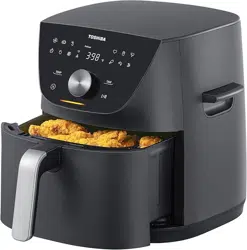
Menu-IQ Air Fryer
5.5 QT


TABLE OF CONTENTS
WELCOME! ....................................................................................................................4
.................................................................................................................... 4
.............................................................................................................4
....................................................4
IMPORTANT SAFEGUARDS ..........................................................................................5
PARTS AND ACCESSORIES
CONTROL PANEL
...........................................................................................9
..........................................................................................................
10
Status messages .......................................................................................................11
COOKING .....................................................................................................................15
CARE, CLEANING AND STORAGE ...............................................................................16
............................................................................
17LIMITED ONE-YEAR WARRANTY
Contact us
Specications
How to nd the model name and serial number
Cooking status ..........................................................................................................11
Features
.....................................................................................................................
12
While Air Frying
.......................................................................................................
6
General Safety
..........................................................................................................
5
Power & Cord
.....................................................................................................................
7
3
GETTING STARTED ......................................................................................................13
Initial set up
...............................................................................................................
13
How to use your basket
...........................................................................................
13
...................................................................................................14
Using your air fryer
........................................................................14
Is something missing or damaged?
WELCOME!
Contact us
4
Thank you for purchasing the Toshiba 5.5 QT Menu-IQ Air Fryer. We hope you enjoy cooking with
it for years to come.
When you have questions about your new Air Fryer, we're here to help.
Customer Service Center: 1-855-204-5313
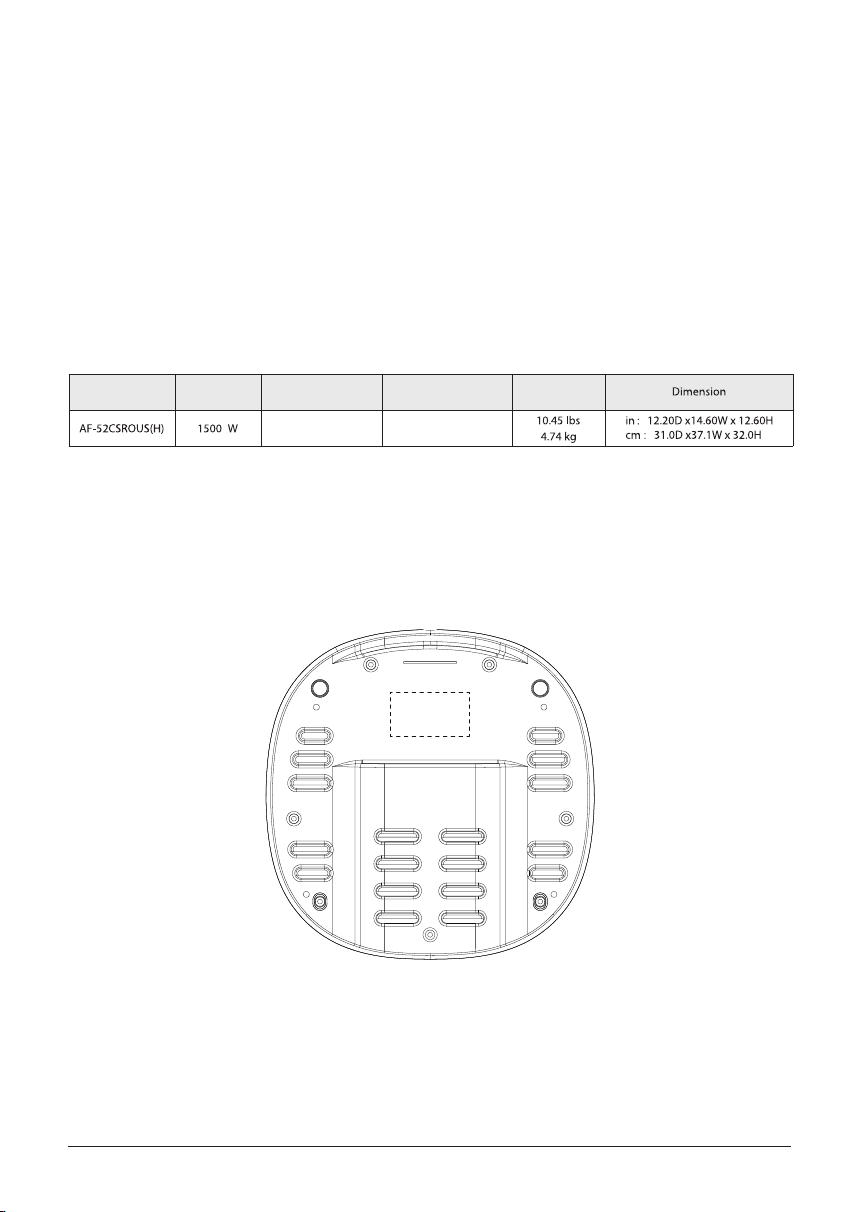
Specifications
How to nd the model name and serial number
*Please always use inner basket to cook. Outer basket is 5.2L (5.5QT).
Model
Rated power Rated Voltage&Frequency
Capacity*(inner basket) Weight
Both the model name and serial number can be found on the rating label that is located on the
bottom of the air fryer.
120V~ 60Hz
4.0 QT
3.8 L
General Safety
IMPORTANT SAFEGUARDS
5
At TOSHIBA Brands your safety always comes rst. The TOSHIBA family was designed with
your safety in mind. When using electrical appliances, basic safety precautions should always
be followed:
• READ ALL INSTRUCTIONS, SAFEGUARDS, AND WARNINGS BEFORE OPERATING THE APPLIANCE.
FAILURE TO FOLLOW THESE SAFEGUARDS AND INSTRUCTIONS MAY RESULT IN INJURY AND/OR
PROPERTY DAMAGE.
• To protect against the risk of electric shock, DO NOT immerse power cord, plug,
or the appliance in water or other liquid.
• DO NOT rinse the appliance under a faucet or other water source.
• This appliance is NOT to be used by children or by persons with reduced physical, sensory, or
mental capabilities. Close supervision is necessary when this appliance is used near children and
these individuals. Children should not use or play with this appliance.
•
the outlet. NEVER pull from the power cord.
• Avoid making contact with moving parts.
• Inspect the appliance and power cord regularly. DO NOT operate any appliance with a damaged
cord or plug or after the appliance malfunctions, or is dropped or damaged in any manner. For
assistance contact our Customer Service Center at 1-855-204-5313.
• DO NOT use any accessories or attachments not authorized by TOSHIBA. The use of attachments
• For household countertop use only. DO NOT use outdoors. Not for commercial use.
• DO NOT place the appliance or any of its parts on any kind of stovetop, near gas or electric
burners, or in a heated oven; heat from an external source will damage the appliance.
• DO NOT use appliance for anything other than intended use.
• DO NOT attempt to repair, replace, alter, or modify components of the appliance. This may cause
• DO NOT tamper with any of the safety mechanisms.
•
DO NOT leave the appliance unattended while in use.
•
DO NOT store any materials, other than the included accessories, in the cooking cavity when not
in use.
•
DO NOT place any combustible materials in the cooking cavity; such as paper, cardboard, plastic,
styrofoam or wood.
• Use extreme caution when moving an appliance contaning hot oil or other hot
liquids.
6
2
IMPORTANT SAFEGUARDS
While Air Frying
• The appliance's outer surfaces may become hot during use. DO NOT touch hot surfaces. Only
use the air fryer basket handle to lift and carry the air fryer basket. Wear proper hand protection
when handling hot components. Extreme caution must be used when moving the appliance.
Let the appliance cool to room temperature before handling or moving.
• WARNING: Spilled food can cause serious burns. Keep appliance and cord away from children.
NEVER drape cord over edge of table or counter, NEVER use power outlet below counter.
•
•
DO NOT cover the air vent(top) and air outlet while the appliance is in operation. Doing so will
prevent even cooking and may cause damage to the appliance.
•
An air fryer works with hot air only. NEVER pour or spray oil into the cooking cavity. This could
result in re and/or personal injury.
•
While cooking, the internal temperature of the appliance reaches several hundred degrees. To
avoid personal injury, NEVER place unprotected hands inside the appliance until it has cooled to
room temperature.
•
When cooking, DO NOT place the appliance against a wall or against other appliances. Leave
at least 5in (13cm) of free space on the back, front, sides, and above the appliance. DO NOT
operate the appliance on or near combustible materials
such as tablecloths and curtains. DO
NOT place anything on top of the appliance.
•
When in operation, hot air is released through the air outlet. Keep your hands and face at
a safe distance from the vent and take extreme caution when removing the accessories
from the appliance.
•
Should the unit emit black smoke, press Cancel and unplug the appliance immediately. Wait for
smoking to stop before removing the basket and then clean the appliance thoroughly. If the
cause was not burnt food, contact our Customer Service Center at 1-855-204-5313.
• Keep your air fryer away from ammable materials (curtains, tablecloths, etc). Use on a at,
stable, heat-resistant surface away from heat sources or liquids.
• To avoid the risk of re, property damage and personal injury, DO NOT spray cooking oil into
the cooking cavity.
• Do not place any objects on top of air fryer at any time.
• The air fryer's cooking cavity contains electrical
components. To avoid electric shock, DO NOT
put liquid of any kind into the cooking cavity.
• Proper maintenance is recommended after each use. Refer to CARE, CLEANING AND STORAGE.
Let the appliance cool to room temperature before cleaning or storage.
•
•
creating a risk of electric shock.
7
IMPORTANT SAFEGUARDS
Plug & Cord
•
This appliance has a polarized plug (one blade is wider than the other). To reduce the risk of
Do not attempt to modify the plug in any way.
•
This appliance uses a short power-supply cord is provided to reduce the risk resulting from
becoming entangled in or tripping over a longer cord.
•
•
Extension cords are available and may be used if care is exercised in their use.
If extension cords is used:
1. The marked electrical rating of the extension cord should be at least as great as the
electrical rating of the appliance (see page 4).
2. The cord should be arranged so that it will not drape over the countertopor tabletop
where it can be pulled on by children or tripped over unintentionally.
3. Do not share the extension cord with other appliances.
•
•
Oversized foods and/or metal foil packages, or utensils must not be inserted into the cooking
cavity as they may cause risk of re and/or personal injury.
•
DO NOT use appliance accessories in any other appliance including microwave ovens, toaster
ovens, convection or conventional ovens, ceramic, electric, induction or gas cooktops, or
outdoor grills.
•
Do not place paper, cardboard, non-heat-resistant plastic, or similar materials, into your air fryer.
You may use parchment paper or foil.
•
Never put baking or parchment paper into the air fryer without food on top. Air circulation can
cause paper to lift and touch heating coils.
•
Always use heat-safe containers. Be extremely cautious if using containers that aren't metal or
glass.
•
resistant surface.The handle is attached to the inner basket, not the outer basket. When you
press the basket release button, the outer basket will drop.
•
NEVER connect this appliance to an external timer switch or separate remote-control system.
•
Use extreme caution when removing hot baskets from the appliance, removing the inner basket
•
•
DO NOT use the appliance in power outlets other than 120V (60Hz). DO NOT use with power
converters or adapters.

8
IMPORTANT SAFEGUARDS
SAVE THESE INSTRUCTIONS
Read this manual carefully and completely and retain for future reference. Failure to adhere to
safety instructions may result in serious injury or damage.
To avoid injury, read and understand the instructions in this user manual before attempting to
use this appliance.
•
•
•
The failure to follow any of the important safeguards and/or the instructions for safe use is a
misuse of your appliance that can void your warranty and create the risk of serious injury.
9
Illustrations in this document are for reference on oduct.
Always refer to the actual product.
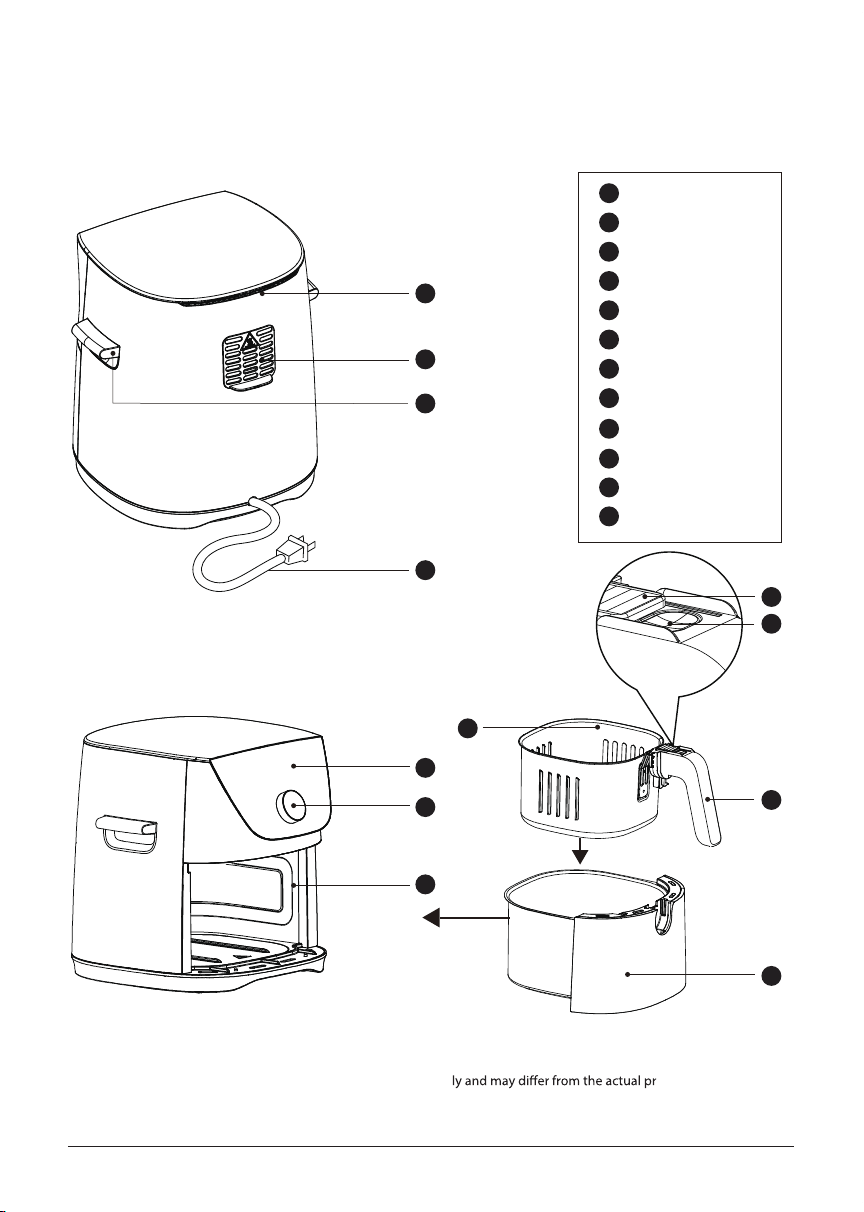
PARTS AND ACCESSORIES
Before using your cute new air fryer, make sure that everything is present and accounted for.
Cooking cavity
Air vents (top)
Control panel
Power cord
Knob
Inner basket
Basket release button
Protection Cover
Transportation handle
Air outlet
A
B
C
D
F
E
G
A
B
C
D
F
E
G
H
I
L
K
J
H
I
J
Basket handle
K
Outer basket
L
10
CONTROL PANEL
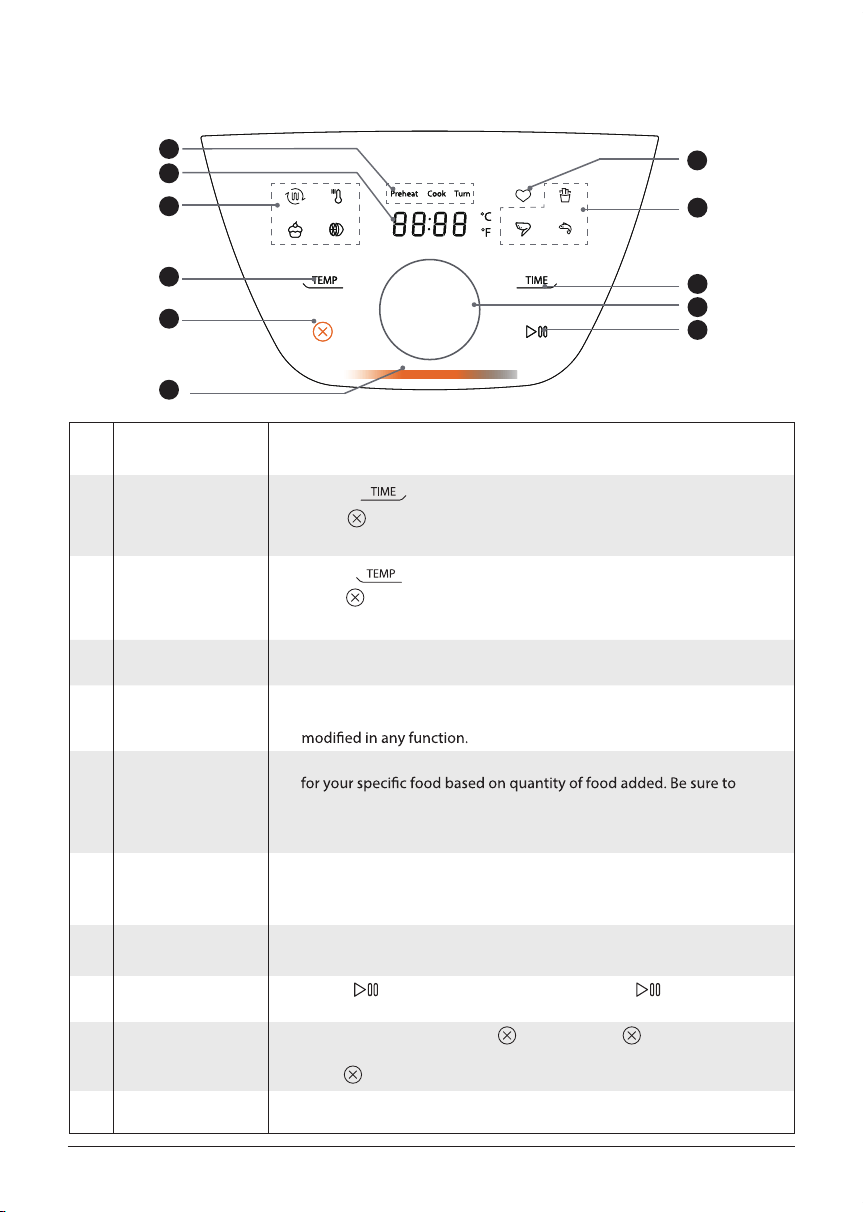
These indicators show if the air fryer is preheating, cooking, or if food
should be turned.
Cooking status
4
Display
1
Shows the cooking time, set temperature, reminder messages and
error messages.
Knob
8
Rotate the knob to change the selected food/function, cooking time, or
cooking temp. Press the knob to start cooking.
Indication light
11
The indication light is lit whenever the air fryer is heating.
MENU-IQ presets
6
These presets can automatically calculate the cook time needed
add food before you start the air fryer.
Note: Changing the time or temp will cancel the automatic cook time
calculation.
Memory
7
This function remembers the last time and temp that was used for
the memory function and is a great option to save your most used
preset.
Cooking modes
5
Preset functions can cook your food in a variety of ways. Allow air
fryer to preheat before placing food. Time and temperature can be
Temp
3
Press to cancel the selection, otherwise, the setting will be
selected if no operation within 5s.
Touch
and rotate the knob to change the cooking temp.
T
Time
2
Touch
Press to cancel the selection, otherwise, the setting will be
selected if no operation within 5s.
and rotate the knob to change the cooking time.
Cancel
10
During cooking, quick touch twice or hold 3s to stop the
cooking and go back to menu selection; when programming,
press to go back to standby mode.
10
11
3
2
6
7
8
9
4
1
5
Start/pause
9
Touch to start cooking. While cooking, touch
to pause
cooking and touch again to resume cooking.
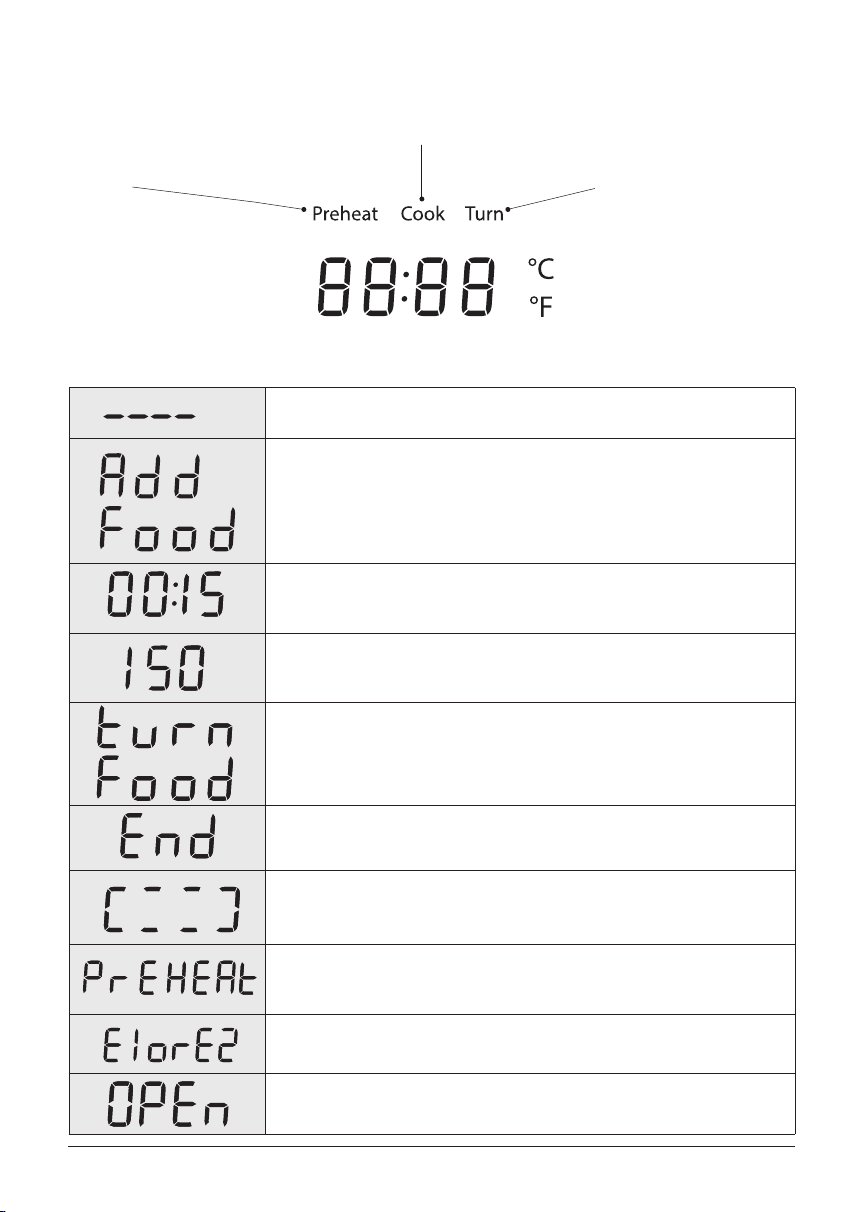
The air fryer is in standby mode.
For Menu-IQ preset: This message appears at the beginning of the cooking
process.
For Cooking Modes: This message appears to let you know that the air fryer
has reached the perfect cooking temperature and food can be added to the
air fryer basket (if it hasn't been already).
The display shows the cooking time and on-screen messages.
The display also shows the set cooking temperature and on-screen
messages.
°F
Food is ready to be turned or tossed, as recommended by your recipe.
Food is ready and the basket can be removed.
Cook time is being calculated for the MENU-IQ preset.
Air fryer is preheating to give the best cooking mode performance.
The unit is not operating properly. Please contact
our Customer Service
Basket is not installed properly or removed.
Note: no operation can be made if this message appears.
Center at 1-855-204-5313
Cooking status
Status messages
11
The air fryer is heating up
to the perfect temperature
to cook your meal.
Cooking is in progress. Food is ready to be ipped
or tossed, as required by your
recipe.
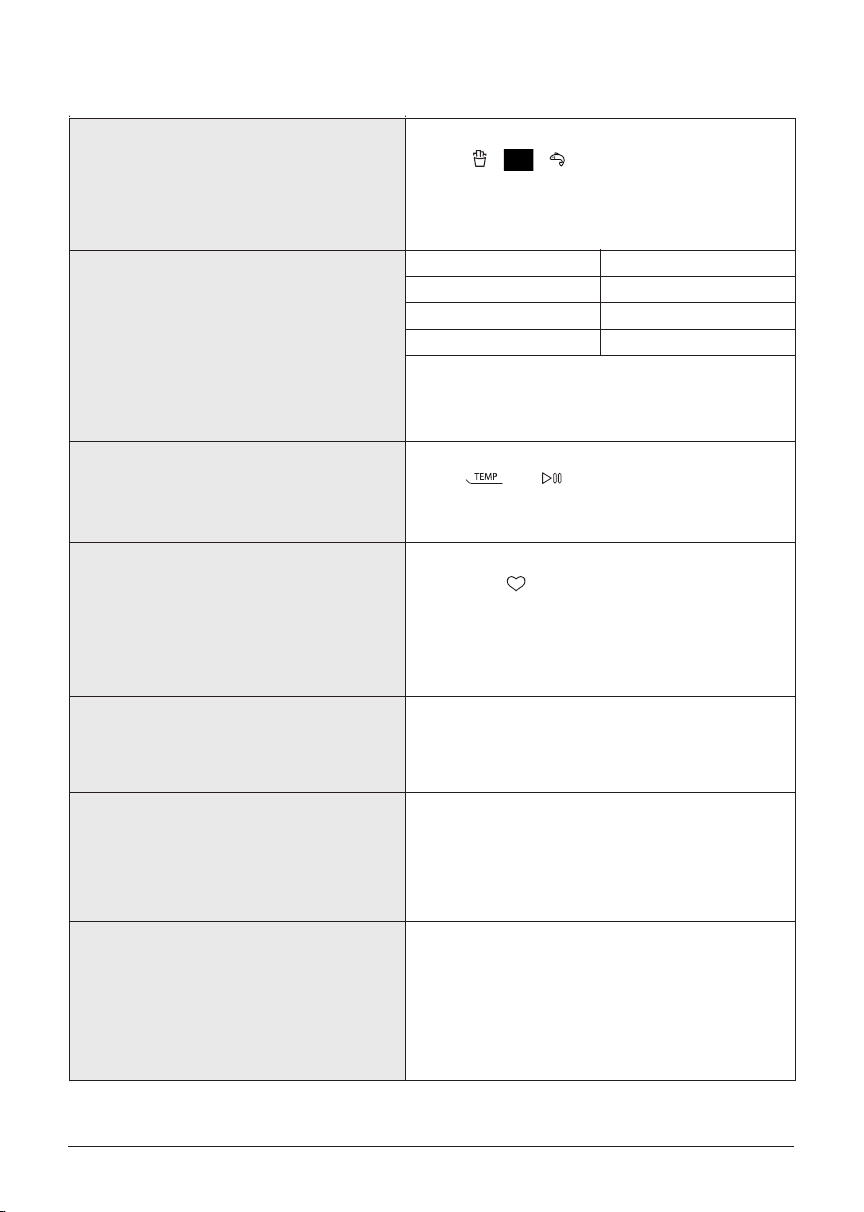
Features
Precise temperature control technology
Temperature unit change
Memory function
Overheat protection
12
MENU-IQ presets
cooking performance.
Each time is used, the memory function
remembers the previously used time and temp.
This is a great function for cooking your favorite
items that you are always making.
Temp [°F]
<175
175-210
210- 400
Error [°F]
5
3
2
Hold and for 3s to change between
°C and °F.
For simply place the food
in the basket before cooking, start the air fryer,
and let it automatically determine the time that
the food needs to be cooked.
Once the internal temperature is too high, the
overheat protection measure will be triggered, the
unit will shut o automatically.
Auto-Pause
If the basket is removed during cooking, the air fryer
will pause automaticaly and no operation can be
made, “ OPEN ” will be shown on display to indicate
that the basket is not installed properly or removed.
Auto-Shuto
If the air fryer has no active program within 2 minutes,
it will return to standby mode and clear all the
existing settings.
If the air fryer has been paused for more than 10
minutes, it will return to standby mode and clear all
the existing settings
Very small temperature uctuation for improved
GETTING STARTED
Initial set up
13
01 Pull that air fryer out of the box!
02 Remove the basket and check the cooking cavity for loose packing material
03
Make sure to leave at least 5in (13cm) of space above and around all sides of the appliance.
04 Follow the CARE, CLEANING AND STORAGE instructions to clean your new air fryer before
using it.
Do not remove the the rating label from the air fryer.
DO NOT put the air fryer on your stove-top.
DO NOT place your air fryer on top of another appliance.
Place your Air Fryer on a stable, level surface, away from combustible material and external
heat sources.
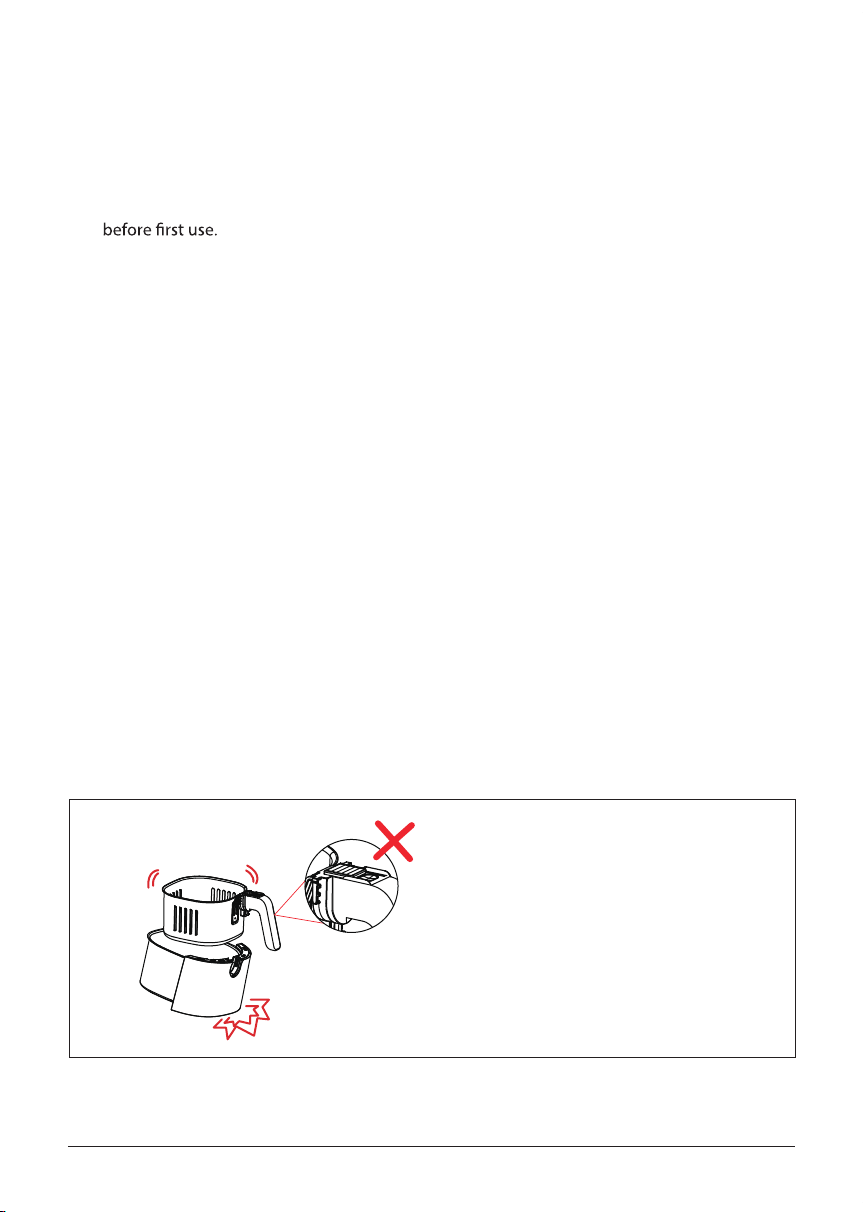
How to use your basket
Note:
01 Place the entire basket set on a countertop or at surface.
02 Slide the button protection cover forward until you can press the release button.
03 Press the release button, and lift the handle and the inner basket can be detached from outer
01 Never press the release button if the basket is not on a at surface.
02 The handle is attached to the inner basket, not outer basket.
03 Do not unscrew anything from the basket.
basket.
DANGER: Do not press button while
moving or shaking basket.
Outer basket will DROP.
Using your air fryer
14
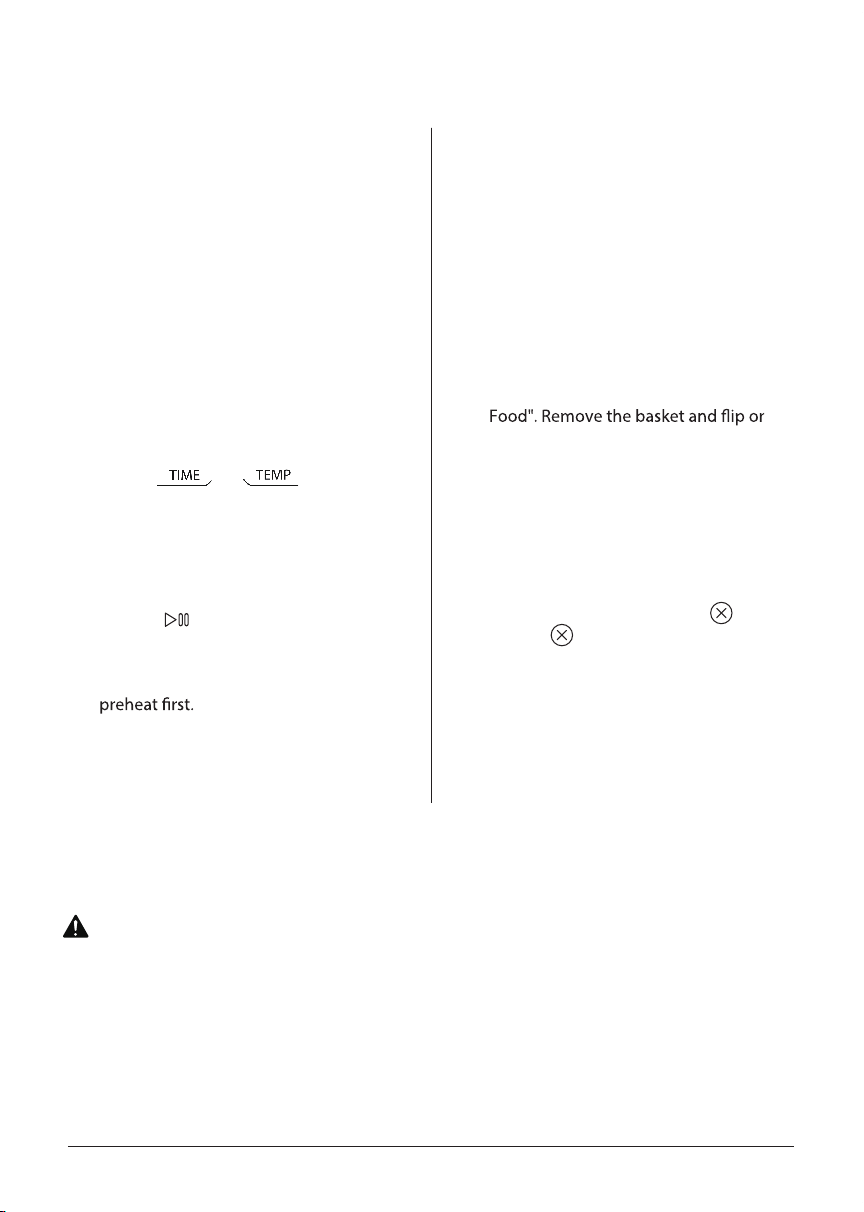
01
Stage 1: Setting up the air fryer
for cooking
Stage 2: Cooking
02 Remove the basket and wash and dry it.
03 Make sure that there are no packaging
materials in the basket.
04 Re-insert the basket into the air fryer.
05 Turn the knob to select a desired
cooking mode or MENU-IQ preset.
MENU-IQ presets (except Memory) can
automatically determine the cook time
for your food.
06
Touch or , and rotate
the knob, to change the set cooking
time or temp.
Changing the time or temp on a MENU-
IQ preset will cancel the auto cook time
calculation.
07 Touch or press the knob to start
cooking. For MENU-IQ presets, place
food in the basket before cooking. For
cooking modes, allow the air fryer to
you may notice a strong plastic smell.
The rst few time you use your air fryer,
This is normal, non-toxic, and goes away
quickly.
01
When the air fryer is ready to start
cooking the food, it will show "Add
Food". For initial test run, do not add
the food.
When the display shows "Add Food",
remove and re-insert the basket. While
cooking, the display will show the
remaining time.
02 Approximately half way through
cooking, the display will show "Turn
turn the food or wait 30 seconds for the
message to disappear.
03 Once there is 1 minute of cook time
remaining, the display will start to
countdown in seconds and once
cooking is complete, the display will
show "End" and will beep 5 times.
Plug in the air fryer and enter the
standby mode.
04 During cooking, quick touch twice
or hold 3s to stop the cooking and
go back to menu selection.
WARNING
Is something missing or damaged?
Contact the customer advisor by calling 1-855-204-5313 and we will be happy to serve you.
To avoid the risk of re, property damage, and/ or personal injury, do not place anything on top
of the appliance, and do not block the air vent(top) and the air outlet.
15
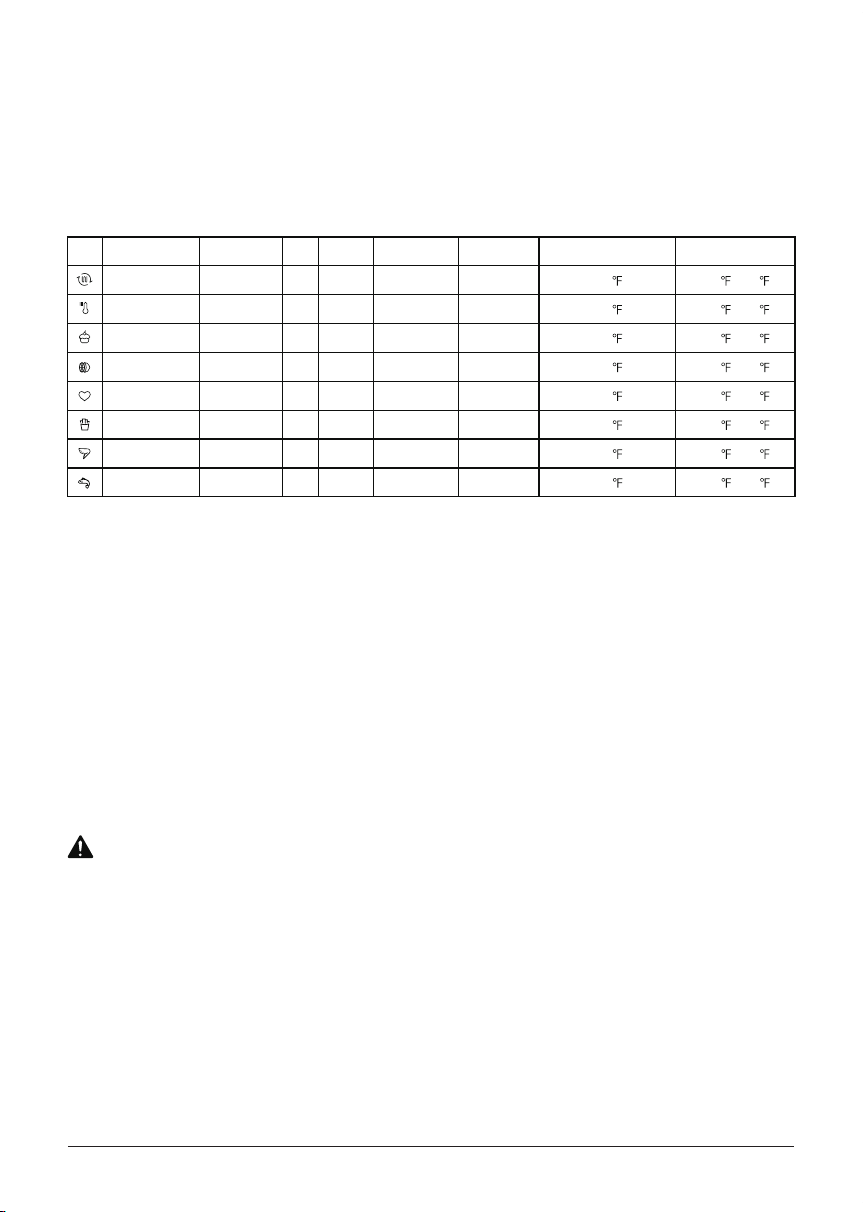
COOKING
The default time and temps are a starting point that you can experiment with to get the results
These cooking options give your meals all the rich and crispy avor of deep frying with little to
no oil.
you like best.
Icon Function Auto Timing Turn Preheat Default Time Time Range
Air Fry No Yes Yes 15 mins 1-60min
Reheat No Yes Yes 10 mins 1-60min
Bake
No No Yes 10 mins 1-60min
Dehydrate No No Yes 1hour 1-12hour
Memory No Yes No 10 mins 1-60min
French Fries Yes Yes No 18 min 1-60min
Chicken Wings Yes Yes No 19 min 1-60min
Fish Yes Yes No 24 min 1-60min
Default Temperature Temperature
390
105 -400
280 105 -400
340 105 -400
210 105 -210
390 105 -400
355 105 -400
390 170 -400
355 150 -400
Range
To avoid the risk of re, property damage and personal injury, DO NOT spray cooking oil into
the cooking cavity.
Do not place any objects on top of air fryer at any time.
CAUTION
Hint:
1. When cook food, make sure the food is evenly placed on bottom of inner basket, this will help
achieve an even cooking result.
2. Overlapping food may result in uneven cooking performance.
3. To achieve a crisper result, a small amount of oil can be sprayed on food.
4. If the air fryer has been paused for more than 10 minutes, it will return to standby mode and
clear all the existing settings.
5. Approximately middle of the cooking process, the air fryer will beep and "Turn Food" will be
shown on display.
6. Time and Temp can be adjusted at any time during cooking process.
16
CARE, CLEANING AND STORAGE
Let all surfaces dry thoroughly before use, and before storage.
Outer basket
Cooking cavity
•
•
•
• Clean the inner basket with a cloth or sponge and warm water with dish soap.
•
•
Clean the cooking cavity with a sponge or soft cloth and warm water and dish soap.
•
•
•
Exterior •
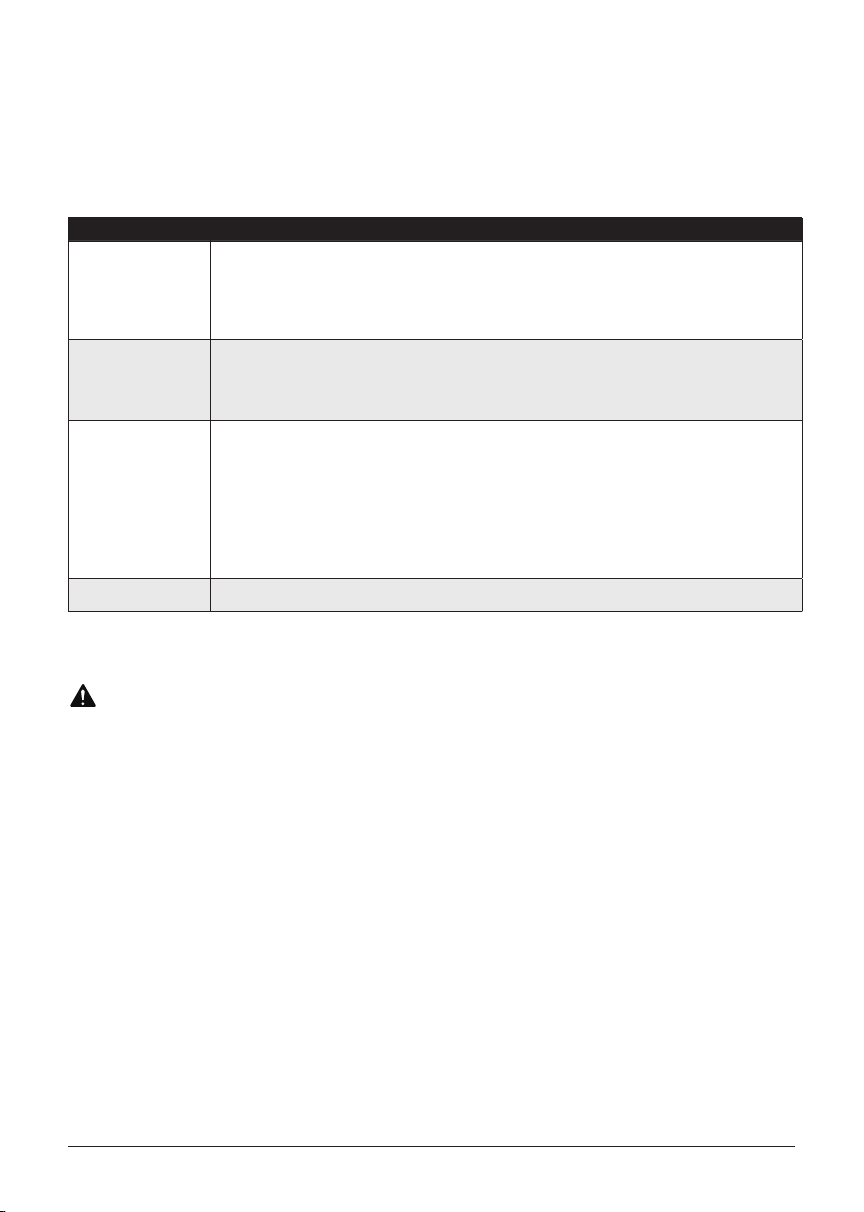
Always unplug the air fryer and let it cool to room temperature before cleaning. Never use harsh
chemical detergents, scouring pads, or powders on any of the parts or components.
Part or accessory Cleaning method
Inner basket
Clean the outer basket with a sponge or cloth and warm water and dish soap, then rinse well.
Ensure that all grease and food residue are removed.
DO NOT immerse the basket in water or any other liquid.
DO NOT machine wash the basket.
The inner basket has non-stick coating. To avoid damage to the non-stick coating, DO NOT
use metal cleaning utensils.
To remove baked-on grease and food residue from cooking cavity, spray with a mixture
of baking soda and vinegar and wipe clean with a damp cloth.
before scrubbing clean.
Check the heating element for oil spatter and food residue. Clean the heating element with
a damp cloth as needed. Ensure the heating element is completely dry before next use.
Clean with a soft and damp cloth or sponge and wipe dry.
Any other servicing must be performed by an authorized representative.
WARNING
Without proper cleaning, food and grease splatter may build up around the heating
element. This can cause smoke, re, and personal injury.
If you see or smell smoke, touch Cancel, unplug the appliance, and allow it to cool. Remove
food residue or grease with a soft cloth and dishsoap.
For stubborn residue, allow the mixtrue to sit on the aected area for several minutes
17
LIMITED ONE-YEAR WARRANTY
(U.S. ONLY)
Warranty Period:
This warranty is available to consumers only. You are a consumer if you own a Toshiba that was
purchased at retail for personal, family or household use. Except as otherwise required under
applicable law, this warranty is not available to retailers or other commercial purchasers or owners.
We warrant that your Toshiba will be free of defects in materials or workmanship under normal
home use for 1 year from the date of original purchase. However, product registration does not
eliminate the need for the consumer to maintain the original proof of purchase in order to obtain
for purposes of this warranty will be the date of manufacture. If your Toshiba should prove to be
defective within the warranty period, we will repair it, or if we think necessary, replace it. To obtain
warranty service, simply call our toll-free number 1-855-204-5313 for additional information from
our Customer Service Representatives.
NOTE:
For added protection and secure handling of any Toshiba product that is being returned, we
recommend you use a traceable, insured delivery service. Toshiba cannot be held responsible for
in-transit damage or for packages that are not delivered to us. Lost and/or damaged products are
not covered under warranty. Please be sure to include your return address, daytime phone number,
description of the product defect, product model number (located on bottom of product), original
date of purchase, and any other information pertinent to the product's return.
CALIFORNIA RESIDENTS ONLY
California law provides that for In-Warranty Service California residents have the option of returning
a nonconforming product (A) to the store where it was purchased or (B) to another retail store that
sells Toshiba products of the same type. The retail store shall then, at its discretion, either repair the
product, refer the consumer to an independent repair facility, replace the product, or refund the
purchase price less the amount directly attributable to the consumer's prior usage of the product. If
the above two options do not result in the appropriate relief to the consumer, the consumer may
then take the product to an independent repair facility if service or repair can be economically
accomplished. Toshiba, and not the consumer, will be responsible for the reasonable cost of such
service, repair, replacement, or refund for nonconforming products under warranty.
California residents may also, according to their preference, return nonconforming products
directly to Toshiba for repair, or if necessary, replacement, by calling our Customer Service Center
toll-free at 1-855-204-5313. Toshiba will be responsible for the cost of the repair, replacement, and
shipping and handling for such products under warranty.
BEFORE RETURNING YOUR TOSHIBA PRODUCT
If you are experiencing problems with your Toshiba product, we suggest that you call our Customer
Service Center at 1-855-204-5313 before returning the product for service. If servicing is needed a
Representative can conrm whether the product is under warranty and direct you to the nearest
desianed for use only in 120-volt outlets and only with authorized accessories and replacement
parts. This warranty expressly excludes any defects or damages caused by attempted use of this
unit with a converter, as well as by use with accessories replacement parts or repair service other
than those authorized by Toshiba. This warranty does not cover damage caused by accident, misuse,
shipment or other than ordinary household use. This warranty excludes all incidental or

18
consequential damages. Some states do not allow the exclusion or limitation of these damages,
may also have other rights, which vary from state to state.
Important:
If the nonconforming product is to be serviced by someone other than Authorized Service Center,
please remind the servicer to call our Customer Service Center at 1-855-204-5313 to ensure that the
problem is properly diagnosed, the product is serviced with the correct parts, and the product is still
under warranty.

# MatterDetails