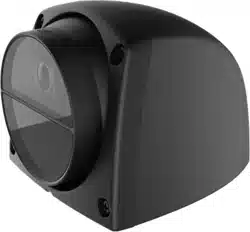
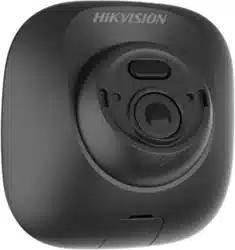
Vehicle-Mounted Camera
User Manual
UD02784B-A
1
UserManual
Thank you for purchasing our product. If there are any
questions, or requests, do not hesitate to contact the
dealer.
This manual applies to Vehicle-Mounted Camera.
This manual may contain several technically incorrect
places or printing errors. The content is subject to change
without notice, and the updates will be added to the new
version of this manual. We will readily improve or update
the products or procedures described in the manual.
RegulatoryInformation
FCCInformation
FCCcompliance:Thisequipment has been tested and
found to comply with the limits for a digital device,
pursuant to part 15 of the FCC Rules. These limits are
designed to provide reasonable protection against
harmful interference when the equipment is operated in
a commercial environment. This equipment generates,
uses, and can radiate radio frequency energy and, if not
installed and used in accordance with the instruction
manual, may cause harmful interference to radio
communications. Operation of this equipment in a
residential area is likely to cause harmful interference in
which case the user will be required to correct the
interference at his own expense.
FCCConditions
This device complies with part 15 of the FCC Rules.
Operation is subject to the following two conditions:
1. This device may not cause harmful interference.
2. This device must accept any interference received,
including interference that may cause undesired
operation
EUConformity Statement
This product and - if applicable - the
supplied accessories too are marked with
"CE" and comply therefore with the
applicable harmonized European standards listed under
the Low Voltage Directive 2014/35/EC, the EMC Directive
2014/30/EC.
2012/19/EU (WEEE directive): Products
marked with this symbol cannot be
disposed of as unsorted municipal waste in
the European Union. For proper recycling,
return this product to your local supplier
upon the purchase of equivalent new equipment, or
dispose of it at designated collection points. For more
information see: www.recyclethis.info.
2006/66/EC (battery directive): This
product contains a battery that cannot be

2
disposed of as unsorted municipal waste in the European
Union. See the product documentation for specific
battery information. The battery is marked with this
symbol, which may include lettering to indicate cadmium
(Cd), lead (Pb), or mercury (Hg). For proper recycling,
return the battery to your supplier or to a designated
collection point. For more information see:
www.recyclethis.info.
Industry CanadaICES-003Compliance
This device meets the CAN ICES-3 (A)/NMB-3(A)
standards requirements.
Safety Instruction
These instructions are intended to ensure that user can
use the product correctly to avoid danger or property
loss.
The precaution measure is divided into “Warnings” and
“Cautions”
Warnings:Seriousinjury or death may occur if any of the
warnings are neglected.
Cautions:Injuryor equipment damage may occur if any
of the cautions are neglected.
Warnings
� In the use of the product, you must be in strict
compliance with the electrical safety regulations of
the nation and region.
� Refer to technical specifications for detailed
information.
� Input voltage should meet both the SELV (Safety Extra
Low Voltage) and the Limited Power Source with AC
24V or DC 12V according to the IEC60950-1 standard.
Refer to technical specifications for detailed
information.
� Do not connect several devices to one power adapter
as adapter overload may cause over-heating or a fire
hazard.
� Make sure that the plug is firmly connected to the
power socket.
� When the product is mounted on wall or ceiling, the
device shall be firmly fixed.
WarningsFollow
these safeguards to
prevent serious injury
or death.
CautionsFollow these
precautions to prevent
potential injury or
material damage.
3
� If smoke, odor or noise rise from the device, turn off
the power at once and unplug the power cable, and
then please contact the service center.
� If the product does not work properly, contact your
dealer or the nearest service center. Never attempt to
disassemble the camera by yourself. (We shall not
assume any responsibility for problems caused by
unauthorized repair or maintenance.)
Cautions
� Make sure the power supply voltage is correct before
using the camera.
� Do not drop the camera or subject it to physical shock.
� Do not touch senor modules with fingers. If cleaning is
necessary, use clean cloth with a bit of ethanol and
wipe it gently. If the camera will not be used for an
extended period, replace the lens cap to protect the
sensor from dirt.
� Do not aim the camera at the sun or extra bright
places. Blooming or smearing may occur otherwise
(which is not a malfunction), and affect the endurance
of sensor at the same time.
� The sensor may be burned out by a laser beam, so
when any laser equipment is in using, make sure that
the surface of sensor will not be exposed to the laser
beam.
� Do not place the camera in extremely hot, cold, dusty
or damp locations, and do not expose it to high
electromagnetic radiation.
� To avoid heat accumulation, good ventilation is
required for operating environment.
� Keep the camera away from liquid while in use.
� While in delivery, the camera shall be packed in its
original packing, or packing of the same texture.
SymbolConventions
The symbols that may be found in this document are
defined as follows.
Symbol Description
Provides additional information to
emphasize or supplement important
points of the main text.
Indicates a potentially hazardous
situation, which if not avoided, could
result in equipment damage, data loss,
performance degradation, or
unexpected results.
Indicates a hazard with a high level of
risk, which if not avoided, will result in
death or serious injury.
4
Introduction1
1.1 Product Features
This series of camera adopts new generation sensor with
high sensitivity and advanced circuit design technology. It
features high resolution, low image distortion and low
noise, etc., which makes it suitable for surveillance system
and image processing system.
The main features are as follows:
� High performance CMOS sensor and high resolution
bring high-quality image.
� Low illumination.
� Support IR LED.
� Support auto white balance, auto gain control, unit
transmission control.
� Advanced 3-axis design meets different installation
requirements.
� Support audio function (depending on models).
1.2 Overview
1.2.1 Overview of Vehicle-Mounted Camera
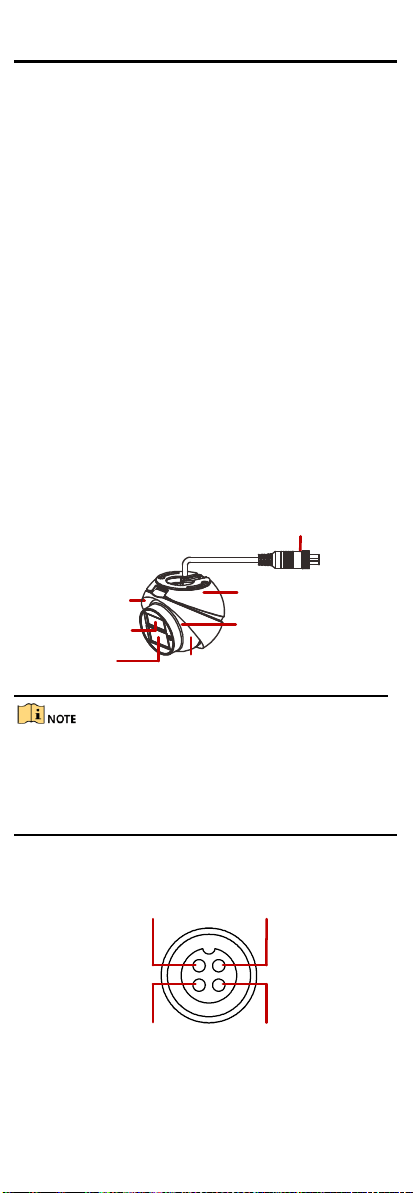
The overview of the camera is shown below.
Aviation Plug
Enclosure
Mounting Base
IR LED
Lens
Main Body
Pickup Hole
OverviewFigure 1-1
The camera with sound pickup function has a pickup hole
on the main body, shown in Figure 1-1 and this series
camera can only be used in the indoor facility. For the
camera without this function, it can be used in the
outdoor facility.
1.2.2 Interfaces of Aviation Plug
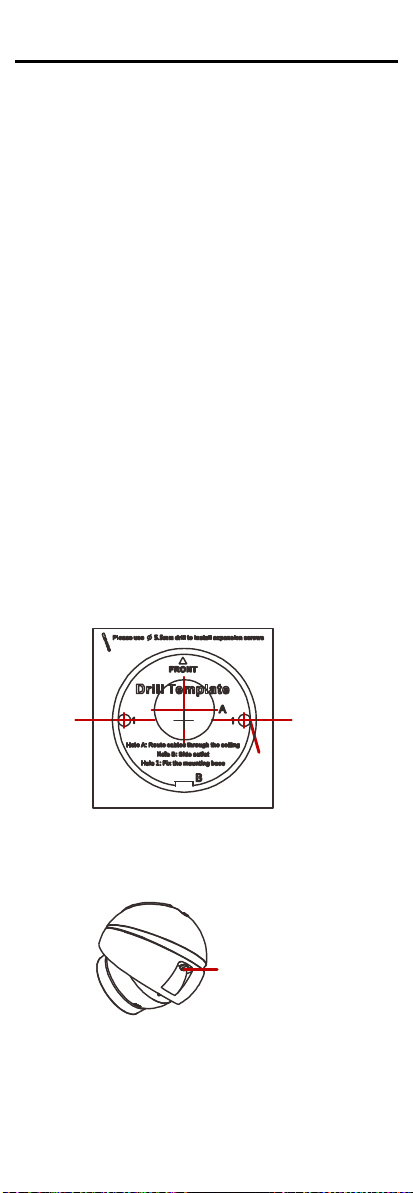
The interfaces of aviation plug are shown below.
Video Interface
Audio Interface Power Supply
GND
Interfaces of Aviation PlugFigure 1-2
5
Installation2
Before youstart:
� Please make sure that the device in the package is in
good condition and all the assembly parts are
included.
� Make sure that all the related equipment is power-off
during the installation.
� Check the specification of the products for the
installation environment.
� Check whether the power supply is matched with your
power output to avoid damage.
� Please make sure the wall is strong enough to
withstand four times the weight of the camera and
the mounting.
� If the wall is the cement wall, you need to insert
expansion screws before you install the camera. If the
wall is the wooden wall, you can use self-tapping
screw to secure the camera.
� If the product does not function properly, please
contact your dealer or the nearest service center. Do
not disassemble the camera for repair or maintenance
by yourself.
2.1 Ceiling Mounting
The installation steps of ceiling mounting are shown as
follows.
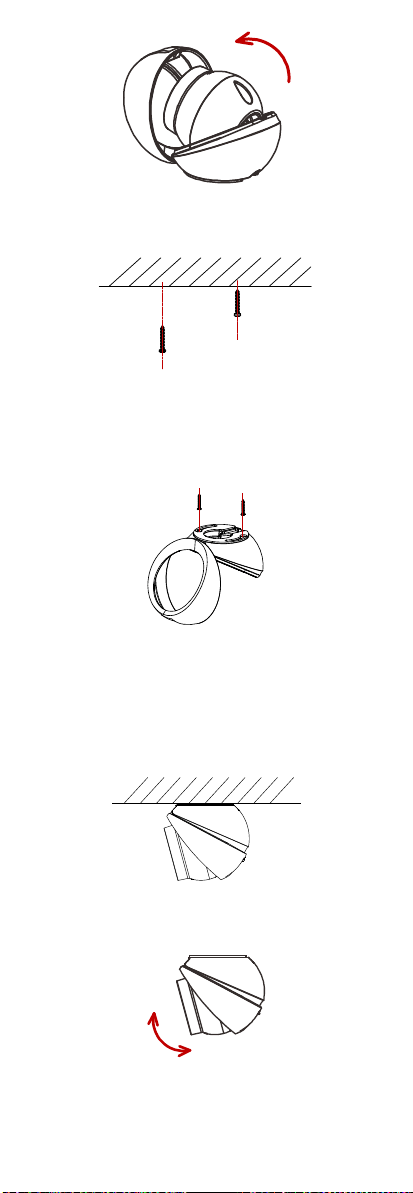
Step 1 Drill the screw holes according to the drill
template with Φ5.5mm electric drill.
Screw hole
The Drill TemplateFigure 2-1
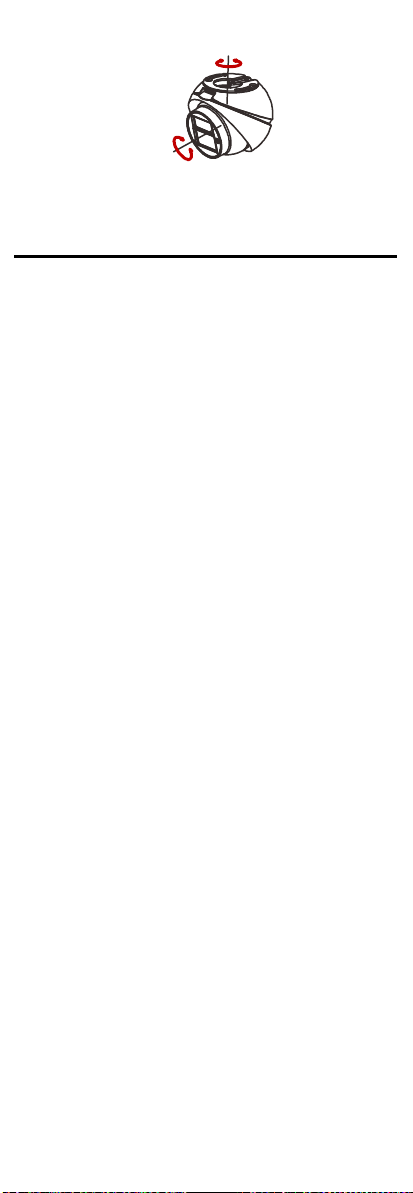
Loosen the adjusting screw of the main bodyStep 2
with the allen wrench.
Adjusting Screw
Loosen the Adjusting ScrewFigure 2-2
Open the enclosure to take out the camera.Step 3
6
Take Out the CameraFigure 2-3
Take 2 PA3X25 screws from the screw packageStep 4
and insert 2/3 of it into the expansion screws.
Insert the ScrewsFigure 2-4
Align the holes of the mounting base to theStep 5
PA3X25 screws.
Step 6 Rotate the base to its appropriate position.
Step 7 Tighten the PA3X25 screws.
Tighten the ScrewsFigure 2-5
Insert the main body of camera and insert theStep 8
adjusting screws for 2~3 threads with allen
wrench to make sure the main body doesn’t fall
off.
Step 9 Adjust the main body to the appropriate position
and tighten the adjusting screws.
Fix the CameraFigure 2-6
Adjust the camera according to the figure belowStep 10
to get an optimum angle.
50
°
0~
7
0
~360°
0
~50°
3-axis AdjustmentFigure 2-7
PTZ Control3
The PTZ function is only supported in vehicle mounted
TVI dome camera, you can realize the control of IR LED
and mirror mode by calling presets.
3.1 IR LED Control
� Enable IR LED
You can enable IR LED by calling preset No. 130.
� Disable IR LED
You can disable IR LED by calling preset No. 131.
3.2 Mirror Mode
� Disable Mirror Mode
You can disable mirror mode by calling preset No. 140.
� Flip the Image Vertical
You can flip the image vertical by calling preset No.
141.
� Flip the Image Horizontal
You can flip the image horizontal by calling preset No.
142.
� Flip the Image Vertical and Horizontal
You can flip the image vertical and horizontal by
calling preset No. 143.