1
22lbs
(10kg)
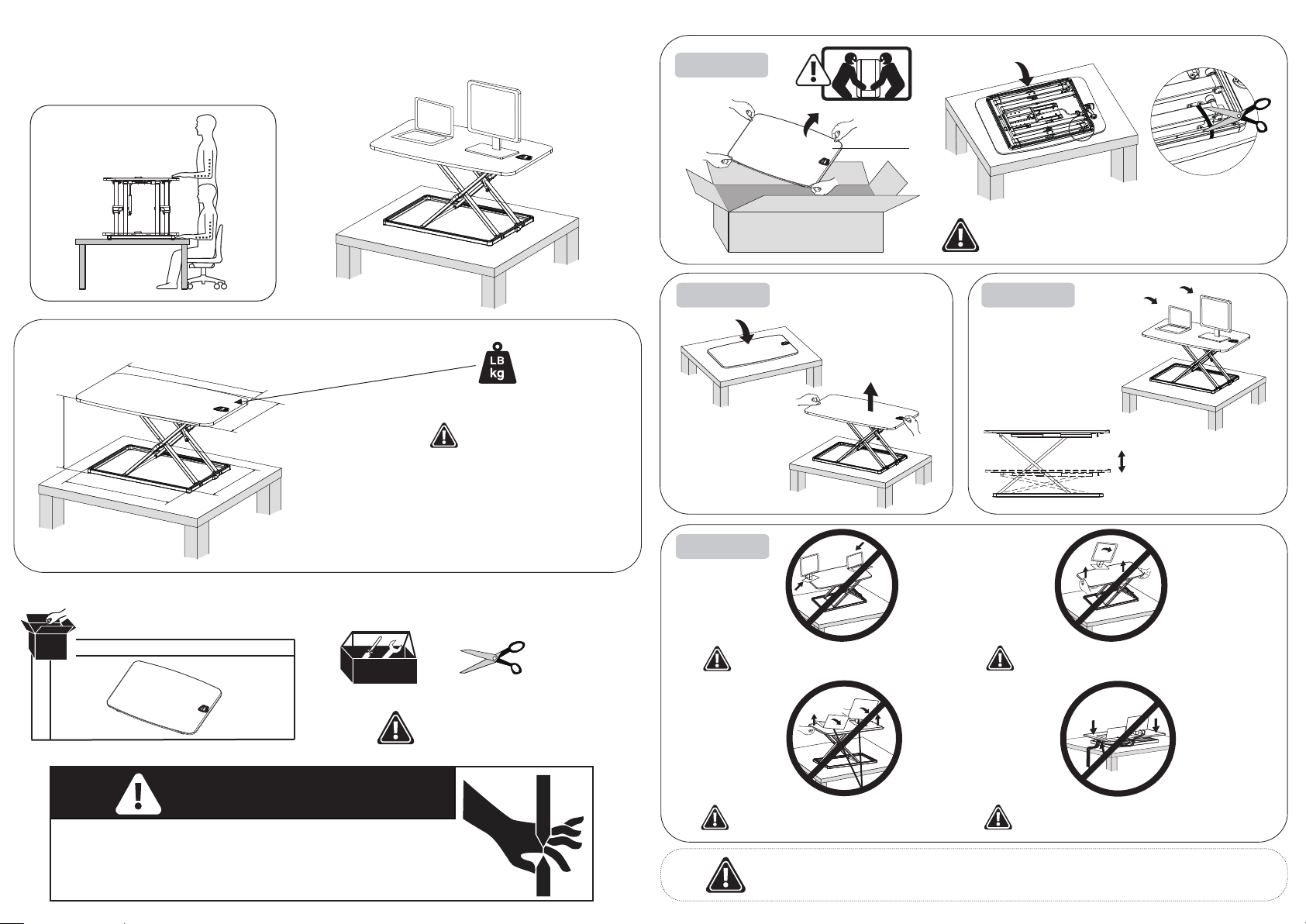
MOUNTING INSTRUCTIONS
Sit and Stand Desktop
A
1
Components Tools required not included
Features & Specifcations
Warning: Impact Hazard! Moving
Parts can Crush and Cut.
CAUTION: DO NOT EXCEED
MAXIMUM LISTED WEIGHT
CAPACITY. SERIOUS INJURY
OR PROPERTY DAMAGE MAY
OCCUR!
4
3
Height adjustment
Keep monitor and laptop base fully on the worksurface.
Allowing any part of base or stand to hang off the edge
may result in property damage and or personal injury.
Raise worksurface slowly. Raising worksurface too fast may
create an unstable situation resulting in property damage
and or personal injury.
To avoid the potential to pinch cables it is important to follow the
cable routing instructions in this manual. Failure to follow these
instructions may result in equipment damage or personal injury.
Leave enough slack in cable to allow for full range of vertical
motion (16” / 40.7 cm). Failure to heed this warning may result in
property damage and or personal injury.
DO NOT place hands on or near support bars. Pinch points are
created during lifting and lowering the worksurface. Failure to
follow these instructions may result in serious personal injury.
WARNING
PINCH POINT
A
When carrying the lift table, be sure to hold the bottom with both
hands. Do not subject the table to a separate force. This can
cause the tabletop to be out of step with the bottom structure.
910/35.8”
715/28.1”
441/17.4”
500/19.7”
45-407/ 1.8-16”
2
Turn the desktop
over and rise
1、7 different height. When adjust the height, please ensure the buckle into the corresponding position. In case of the
desktop fall suddenly.
2、If you find the product does not meet your expectation or there is any problem with the product ,contact us please.
HL-GSD73L